#old-monitors-and-tv
1 messages · Page 29 of 1
 thin venture
ok ty
 covert swift
@full moat Yea that's what i've seen as well 🙂
 odd mantle
Tfw Xbox One X doesn't support 1440p 120Hz for the LG 32GK650F-B
 odd echo
its using basically the same specs from 2013 lol
odd mantle
Specs aren't the issue, it supports 120Hz refresh rates but most games never hit it. However, 120Hz also mostly eliminates frame tearing and does it without the input lag Freesync adds. The issue is that apparently the monitor doesn't properly support a 120Hz mode so it isn't compatible
 hot zephyr
Okay this is kinda offtopic but I was unsure where else to ask this.
A few months ago, I obtained a high-end VGA CRT monitor from a friend (2002 or so).
I couldn't find it anywhere online, and it uses a bizarre connector. With it I got a cable that goes from that connector to VGA.
I'd like to display my GameCube, Wii, and SNES on the CRT, as the picture is really nice.
However, the video cables for these consoles use three cables (two for audio, one for video iirc). What kind of adapter should I buy to get a good picture on the CRT?
Do note my SNES is from Germany, so I guess it won't work on the CRT (?).
For those curious, the CRT says "IBM" and "P70" on it.
This is what it looks like:
Ack what's with the horrible JPEG on the image lol I uploaded the high quality version.
 full moat
@hot zephyr got a pic of the input ?
it is most likely s-video and something else as input
hot zephyr
heheh okay
full moat
if you show me a pic of the input, i might be able to help
hot zephyr
Inputs:
-weird cable
-power.
ouch that jpeg again
I swear that pic is clear on my phone.
full moat
unscrew that connector please
then take a photo of where that connector was connected
and then, take a photo of both ends of that cable please
full moat
well darn, i have not seen those in close to 2 decades
full moat
i think i saw it in a school setup i was doing maintenance on in .. 1998
itt cannon are a weird company
they do "WEIRD" connectors
also, that is a industry d-sub connector with shielding
the "gold" you are seeing is the shield
@hot zephyr could you grab a photo of the other end of the cable?
full moat
https://www.mouser.dk/datasheet/2/578/ITT-Cannon-D-Subminiature-Catalog-1600566.pdf <- page 43 is the start of the group that the connector belongs to
( i really do have a bunch of weird info stuck in my noggin)
if you post the picture, i will have a look when i get back from work tomorrow
hot zephyr
aw rip I have to wait for tmrw then
hot zephyr
@full moat if you're still there, here's the pic
I think it's just a normal VGA connector?
It does plug into my laptop and display well.
full moat
aye, it is a normal connector on that end @hot zephyr
full moat
have a chat with ITT Cannon about it
 slate hamlet
full moat
slate hamlet
full moat
they know if there is a simple conversion from component (which is what i imagine you would want) to their dsub variant
hot zephyr
uhh
slate hamlet
Vga to composite adapter
hot zephyr
Wouldn't it be easier to sorry L adapter composite to vga?
full moat
weird words in that sentence :)
 full moat
in theory, you can use a female + female dsub converter block to connect from what you currently have, to a "something something -> vga"
there is however one big unknown (for me at least), i have no idea about the quality of the picture you end up with
and in case you are not reading all the words
i mean, i have NO IDEA at all about the quality of the signal that you end up with
hot zephyr
I am reading everything you're saying.
full moat
it is just to make certain that you dont see/read an implied promise about the quality @hot zephyr
it was not meant to say/imply that you are not reading things :)
hot zephyr
np lol
So it would probably be better to ask itt cannon directly about the right cable?
(no promise on video quality)
full moat
yes/no ... ish
something
let me ask something else (it is related)
the consoles you want to connect
full moat
output is component or?
hot zephyr
I don't know much abt video connectors. It's three cables.
hot zephyr
I will go check.
full moat
colours dont matter much, but 3 identical cables that kinda look like this

a fair number of component cables (consumer side) are red/yellow/white
hot zephyr
Ack for the life of me I can't find the box where I store the cables
hot zephyr
Well I have to leave for school
full moat
have fun, i will be around, off for the weekend :)
hot zephyr
I think it is red yellow white.
full moat
aye, so regular component cable
full moat
https://www.amazon.com/Composite-S-Video-Converter-Projector-Adapter/dp/B074M38P1H <- that does in theory do the job @hot zephyr
 olive token
oooooo rgb cables
hot zephyr
Hmm I don't like converter boxes.
olive token
:gasp:
hot zephyr
I have one that converts the signal from the GameCube directly to hdmi, and it is USB powered. After an hour or so it heats up and there is very loud static.
Also, the video quality is pretty abismal, but I guess that is to be expected on an old console displayed on a modern monitor.
hot zephyr
aha
full moat
hence why i was stressing the whole picture quality thing earlier
at work i have a number of converter boxes that cost the better part of my monthly wage
what i linked, is not remotely like any of those
hot zephyr
wow
I have no monthly wage.
I have some money saved up from YT donations, and some electronics repairs I've done, but that's all.
full moat
well, i probably also have some 20+ years on you :)
hot zephyr
True true.
full moat
but as a summary, what was linked above should work (still no promise about the quality of things)
olive token
\o/
hot zephyr
Also, I picked up a German SNES during an exchange trip a few months ago. I doubt this but asking anyways: could the SNES display on the CRT?
The cable outputs are exactly the same, I believe.
But ofc the refresh rate on the European SNES is different.
This CRT, according to the small amount of info I've found about it online, claims to support many different fps.
full moat
crt's are fairly open in regards to what they are willing to display
so (again), in theory it should work
hot zephyr
Epic.
Wait peck another question.
A few months ago (after I got the monitor) I found out I am moving to France in half a year.
If the CRT isn't damaged in shipping, will it still probably work?
If not, I can get a voltage converter.
full moat
aye, that should be simple enough
 late hatch
only about 8 hours late to this conversation, but the converter box that I use is a cheap one from amazon, but it had great reviews. I have not had any trouble with it. Newegg doesn't sell it so I don't feel horrible about posting the link.
I have used it on my PC monitor and also used it on my 4k tv. My vizio wont detect a signal below 420p over composite or component and I can use this to play all my old consoles without any issues on that TV.
hot zephyr
Hah nice I might pick that up. However for the CRT it needs to be a VGA cable.
Here's the relevant messages: https://discordapp.com/channels/500085440221806603/500102748629630996/675157377988820992
I think I'll be going with the converter box that Naed recommended.
Tho I am open to any ideas.
hot zephyr
Ordered the box. Should arrive on the 9th, I'll update then.
 harsh anchor
Could someone give me their thoughts on this for dual monitors? Will be gaming
https://www.tomshardware.com/reviews/aorus-cv27f-165hz-curved-hdr,6358.html

Tom's Hardware
For about $350, the Aorus CV27F delivers everything a performance-oriented gamer could want, including HDR with both FreeSync and G-Sync PCs.
full moat
consider the space you need
@humble crow have a gander at TFTcentral
two of those side by side take up 1228mm (122,8cm)
that is a LOT of deskspace
harsh anchor
Lol I guess so :(
full moat
and that is just the horizontal space
consider that you need depth on the desk too
unless you want to turn your neck all the time
 humble crow
Hmm?
full moat
@humble crow for colour calibrated display info
humble crow
Ohhh okay
 outer magnet
https://www.bhphotovideo.com/c/product/1501171-REG/lg_34gl750_b_aus_34_wfhd_2560x1080_219
Anyone know a better/cheaper 1080 144hz gsync ultrawide?

Buy LG UltraGear 34GL750-B 34" 21:9 144 Hz HDR FreeSync IPS Gaming Monitor featuring In-Plane Switching (IPS) Panel, HDMI | DisplayPort Inputs, 2560 x 1080 Resolution, 1000:1 Static Contrast Ratio, 300 cd/m² Brightness, 178°/178° Viewing Angles, 5 ms Response Time (GtG), 144...
full moat
"it stretches" <- that is a nonsensical statement @mighty tide
 mighty tide
Ok well, its more complicated
full moat
care to provide some context on it?
 whole sorrel
Screen driver duplication causes aspect ratio screw ups
When there's two generic pnps
full moat
that is a driver issue, not a screen issue
whole sorrel
It stretches
mighty tide
Yeah
full moat
also, i believe you mean PiP's?
mighty tide
HeReS a ReDdIt PoSt

reddit
Recently, both my AOC 1080p monitors died on me and I'm now looking for a replacement in the ball park of £200-250. I game quite a lot, but also...
But at 400$, just get 1440p tbh
Depending on your specs @outer magnet
whole sorrel
full moat
you are referencing the top post @mighty tide ?
mighty tide
Yes
full moat
all of those are either application specific or driver specific
it has nothing to do with the monitor itself.
whole sorrel
Yes
full moat
@whole sorrel and why would you ever run with the generic profile?
whole sorrel
No reason to change it
full moat
that is quite akin to not installing your gpu drivers
because i have no problem, whatsoever, with the statement: ultrawides as a concept are wonky on the usecase side, because the software is just not aware enough of them.
that is from my pov, very true
but that is not the fault of the monitor.
and a ultrawide IS lovely for movies
whole sorrel
I had a computer at school that had two generic pnp drivers, and it couldn't do 16:9 ratios
full moat
again, not the fault of the monitor, that is the admin being a silly derp
whole sorrel
The one next to it was perfectly fine with 16:9 with one instance of generic pnp
Yeah
whole sorrel
People in previous classes kept stretching the monitor to fudge it into 16:9 and I couldn't leave it be, I always took it back to 4:3
Well that's fair
mighty tide
Plus, 34 inch? You'll probably see every pixel cmon
whole sorrel
34 inch is the diagonal measurement right?
full moat
"1080p ultrawide isnt good" <- that sure sounds like you are saying that (when there is no context given), do remember, the person you are answering/giving the answer to. Does not necessarily have the context you have in your head when typing the answer.
it is @whole sorrel
whole sorrel
Wouldn't it be normal for it to be a long measurement on an ultrawide?
full moat
the diagonal number goes a bit silly on Ultrawides
mighty tide
Yeah
full moat
however, "you will probably see every pixel" <- that is very much dependent on the person and the distance
whole sorrel
I think there were some tiny 1024x768 monitors at school, and you very much could see every single pixel
full moat
those are also ancient
full moat
panel tech has evolved, just a tiny bit since then
whole sorrel
Just a bit lol
mighty tide
I have one thats 1440x900
whole sorrel
Yikes
mighty tide
16gb ddr3
whole sorrel
Reminds me of the laptop lineup at Costco
whole sorrel
My mom hasn't renewed her membership in a couple years now
Only had it for like a year
mighty tide
Dont judge me
whole sorrel
I went on the Letgo craigslist clone and browsed laptops, there were numerous HP Streams
Unhappy poor people no doubt
That includes me
I am unhappy poor people
outer magnet
I just don't think I'd get anywhere near 144hz with a 1440p and a 2070S
Maybe upscale 1080 to 1440 somehow but I don't think it won't look good
hot zephyr
hm so the adapter arrived
hot zephyr
yay!
however it uh displays blue
Turns out my gcn video cable has a S-Video out, so I'm trying it with that first.
I've set it to use the S-Video input, but the display on the CRT is just blue.
full moat
it has moved beyond what i can actually help with, sorry.
hot zephyr
Pressing buttons on the box does display text, so it must be an issue with the S-Video cable?
hot zephyr
I have a sneaking suspicion that the VGA Out and In's labels are swapped..
full moat
shrugs
hot zephyr
The VGA Out labelled VGA port is on the side with all the inputs.
full moat
all i can do is wish you best of luck :)
 limber gust
What is the best display for a gaming pc
 karmic shadow
Hello. I'm looking for a montior with a gsync under a budget?
 leaden forge
What’s your budget ? What resolution, what refresh rate/response time ? GSYNC or GSYNC compatible ? What you’re asking for is pretty vague @karmic shadow
karmic shadow
1920x1080 res, 1ms or 3ms. 60hz unless I changed my mind if I want a 120hz that's fine too. Both. I use 1070ti
leaden forge
I would say 1070 Ti could "support" 144hz in some games
https://pcpartpicker.com/product/bVzkcf/lg-24mk400h-b-240-1920x1080-75-hz-monitor-24mk400h-b Cheapest option that match your requirements, has FreeSync so normally G SYNC compatible but please double check
https://pcpartpicker.com/product/HBRzK8/aoc-c24g1-240-1920x1080-144-hz-monitor-c24g1 as for 120hz +, this monitor is good but please double check for g sync compatibility again
G2g, lmk if u need more info @karmic shadow
Use PCPP to pursue research and compare prices
 solar marten
 covert solstice
1440p
karmic shadow
thanks i will check it out
 oak coyote
why are there more FREESYNC monitor choices than there are GSYNC?
mighty tide
@oak coyote its cheaper
oak coyote
dont seem to be cheaper in price
oak coyote
ive heard from many that compatible is crap in most cases
is this true
i do see a lot that say adaptive sync on them
anyone have concerns with adaptive sync or compatible sync?
!rank
 wild coralBOT
 SnakeBliskn, this command is disabled in this channel
 slate surge
is it weird for my monitor to look like its strobing bright and dark but very slightly?
its a 144hz freesync monitor if that has anything to do with it
olive token
whats the res at
 sage trail
!rank
wild coralBOT
SassyFish256 [2x2637v2/GTX1080], this command is disabled in this channel
sage trail
!rank
wild coralBOT
SassyFish256 [2x2637v2/GTX1080], this command is disabled in this channel
sage trail
heh
hot zephyr
oh peck it works :D
Had to order a new GC cable, went for S-Video instead of AV bc I heard it is better.
Here it is in action:
full moat
good to hear @hot zephyr
hot zephyr
I.. forgot to consider sound though haha. Is this the correct channel to ask?
full moat
close enough
hot zephyr
Okay.
I have some pretty nice speakers and a subwoofer. However, I don't have any audio equipment other than that.
The speakers are attached to their own subwoofer (which I don't use), and all the sound for them comes in through on 3.5mm jack.
The subwoofer is a Klipsch model with lots of inputs and controls that are beyond any of my understanding. When I got it (for free) it came with a lot of audio cables (not the 3.5mm cables, but bigger ones I've only seen at performances). They plug into the sub but not into my computer anywhere.
full moat
because the sub contains the amplifier
hot zephyr
So right now I use it by plugging a 3.5mm cable into one of the subwoofer's inputs (I can get a pic if needed), and the other into an airplane audio splitter, which then goes into my PC.
The tweeters are plugged into the same audio splitter.
full moat
that sounds weird
hot zephyr
This is obvs not a very good setup, but it works alright. However I'd like to eventually upgrade to have some sort of central control for all of this.
full moat
okay, this will get complicated enough that we should probably move to #peripherals-and-displays
hot zephyr
Okay lol.
 amber pike
covert solstice
amber pike
covert solstice
https://www.amazon.com/dp/B00N2L5CXO? one of the best 1440p 144hz tn panels @amber pike
 slender prawn
I have one, can confirm, except mine is G-sync
leaden forge
 shell hedge
No I put it in displays becuse I wanted opinions on it
shell hedge
I wanted a 1440p 144hz ips monitor but "throws hands" cant find one that's under 500
But ips doesn't support 32" so
leaden forge
Is this one VA ? 32" is pretty large remember
You might want something smaller in some situations
covert solstice
27” being the sweet spot for 1440 is one of the most popular opinions on size, 32” is pretty big and has worse pixel density, px7 prime and 27GL850-B are both great 1440p 144hz ips monitors under $500
 mystic agate
LF> 27 in 1440p 144hz 1ms curved monitor recommendations budget is around 250-350ish USD thanks (will mostly use for gaming (FFXIV))
mighty tide
@mystic agate not if you want IPS
shell hedge
@leaden forge I'm doing programming and gaming I need something a bit bigger for game developing
 neat cosmos
Well then get a 21:9 and do vertical mount. Perfect for looking at a lot of code
Also means you can get a 34" for relatively cheap a QHD 21:9 monitors are usually no smaller then 32" and seem to average around the 34"
shell hedge
Thanx but I also game so this is the best of both worlds
 trail yew
Does using freesync increase input lag?
mighty tide
No
trail yew
Nice
trail yew
If I can get 120fps on 60hz what do you think I can get if I upgrade to 144hz
shell hedge
@trail yew upgrading your monitor does not increase fps unless your lowing resolution if your getting 120fps on a 60hz the you gana get 120 on a 144
trail yew
Ok. I thought It lowered frames not increased them, but good to know it doesnt
shell hedge
👍
trail yew
So heres the final question for me. Which monitor should I get. One has freesynce and can rotate vertically. One has g sync but doesnt rotate. (I have nvidia) is there much of a difference between g sync and freesync performance for nvidia? Heres the 2 options. Both are on a good sale right now.
trail yew
It is g sync compatible
trail yew
Ton panel?
trail yew
I'm pretty sure they're both tn...
trail yew
People in the reviews said they could tweak it in nvidia control panel and windows color calibration and it looked better
shell hedge
I would go with a MAG321CQR or mag271cqr
trail yew
They're more expensive😂
shell hedge
What are your pc specs @trail yew
trail yew
300 was my budget and I wanted 1440p if possible and 144hz, and possible freesync or gsync... (I know its a lot)
I have a gtx1060 6gb and I bought a ryzen 5 3600 that I'm upgrading too in a week or so
leaden forge
shell hedge
Why are you getting a 1440p 144hz?
shell hedge
Go for 1080p 144hz with the 1060
I have a 2070 super and it hits 1440p 144hz
Your 1060 will not be able to hit 1440p 60fps or less
trail yew
I would only use 1440p while photo editing, not gaming
shell hedge
Ok humm
Well if you go with a gaming monitor I would fo with this for 1080p https://www.amazon.com/VG278Q-G-Sync-Compatible-Adaptive-Monitor/dp/B074JLD4HZ/ref=mp_s_a_1_7?keywords=1080p+144hz&qid=1581692858&sr=8-7
trail yew
I wanted something that wouldnt be outdated in a year or too because I plan to upgrade my gpu by the end of the year too
leaden forge
Over budget I think
leaden forge
You’ll need 2070 super I would say to hit constant 144hz
trail yew
That monitor u sent me is a tn panel
shell hedge
Nope va
trail yew
Lemme check again
shell hedge
Oh the link one
leaden forge
If you’re really into photo editing IPS is also a really nice thing to have.
shell hedge
I thought you ment the pic my bad
shell hedge
Yes ips
trail yew
Oh ya my bad
shell hedge
Sorry thought u ment the photo I sent my bad
trail yew
27 in
shell hedge
I prefer 32"
trail yew
32 too big imo
shell hedge
I sit far away from my monitor
trail yew
i sit pretty close cuz i got a wall behind me
trail yew
Give me 2 mins
trail yew
Heres one of my cat
shell hedge
Nice ya if you want to photo editing get a 4k 60hz ips
shell hedge
There not that expensive anymore
trail yew
The main feature i wanted was the higher refresh rate
shell hedge
Oh you wana game still smacks face ok ya just dont try to play games at 1440p
trail yew
lmao
trail yew
ya that was the plan all along. I would game at 1080 144hz and edit at QHD 60hz
Whats the main drawback of a TN panel
leaden forge
I don’t have a monitor myself, I’m on a laptop 😅 @shell hedge
shell hedge
Oh nice
@trail yew color
The color on a tn is very gray
But ips and va look alot better
leaden forge
More expensive though
leaden forge
Which are in 8 months more or less 😅
trail yew
8 months... thats depressing
leaden forge
In a long time lol I can’t count months
leaden forge
?
shell hedge
Anyway I would go with this MAG321CQR it's great for both
And it's on sale for 340
Just a bit more expensive but it's a great monitor
leaden forge
I wouldn’t recommend a curved monitor for photo editing though
So ignore the link I sent up
shell hedge
leaden forge
1080p remember
shell hedge
That's just the link j have on me
leaden forge
But i would say it’s a good monitor overall
shell hedge
Nope 32
Yeee
Or go with this one
Just wait for the price to fall down
They always go on sale
shell hedge
Yup
trail yew
have a good one
leaden forge
Let me repeat, a flat monitor might be preferable for photo editing.
Keep that in mind.
trail yew
Ya I dont like the curved ones in general
shell hedge
Unless that boi is 32" then you gana want a curved boi
trail yew
Lol
shell hedge
At least a 18000 curved boi
trail yew
And sry but I forgot if we answered this. Freesync vs gsync with an nvidia gpu. Is there a difference in performance?
shell hedge
Rose's are red @solemn yarrow hands are blistered you might be fast but my hands are faster
 solemn yarrow
faster at what?
shell hedge
Idk I failed to rhyme anyway
solemn yarrow
and make any sense
shell hedge
Shhhh
Rose's are red he shows no remorse Santa is joining the terrorist force
@solemn yarrow
late hatch
nvidias dead, intels deader, everyones pc's are getting redder
mighty tide
@late hatch nvidia is still relevant
late hatch
Never
mighty tide
Intel is pretty dead tho
late hatch
I refuse your reality
trail yew
Ya I know some freesync monitors support nvidia so what I'm asking is if I have two monitors, one is g sync and one is freesync, both running on an nvidia gpu, will the gsync monitor out perform the freesync monitor?
solemn yarrow
Nvidia is still alive and kicking a lot of butt

 trail yew
Intel is kicking their own butt😂
mighty tide
AMDs third gen is destroying intels prices
Lol true
If 4th gen comes out in the next 2 years and intel doesnt change from 14nm....... its gonna be kinda bad
solemn yarrow
4000 series is this year though
late hatch
desktop 4000 will probably come out this fall
trail yew
Do you know when the 4000 series launch is
late hatch
paper launch anyway
solemn yarrow
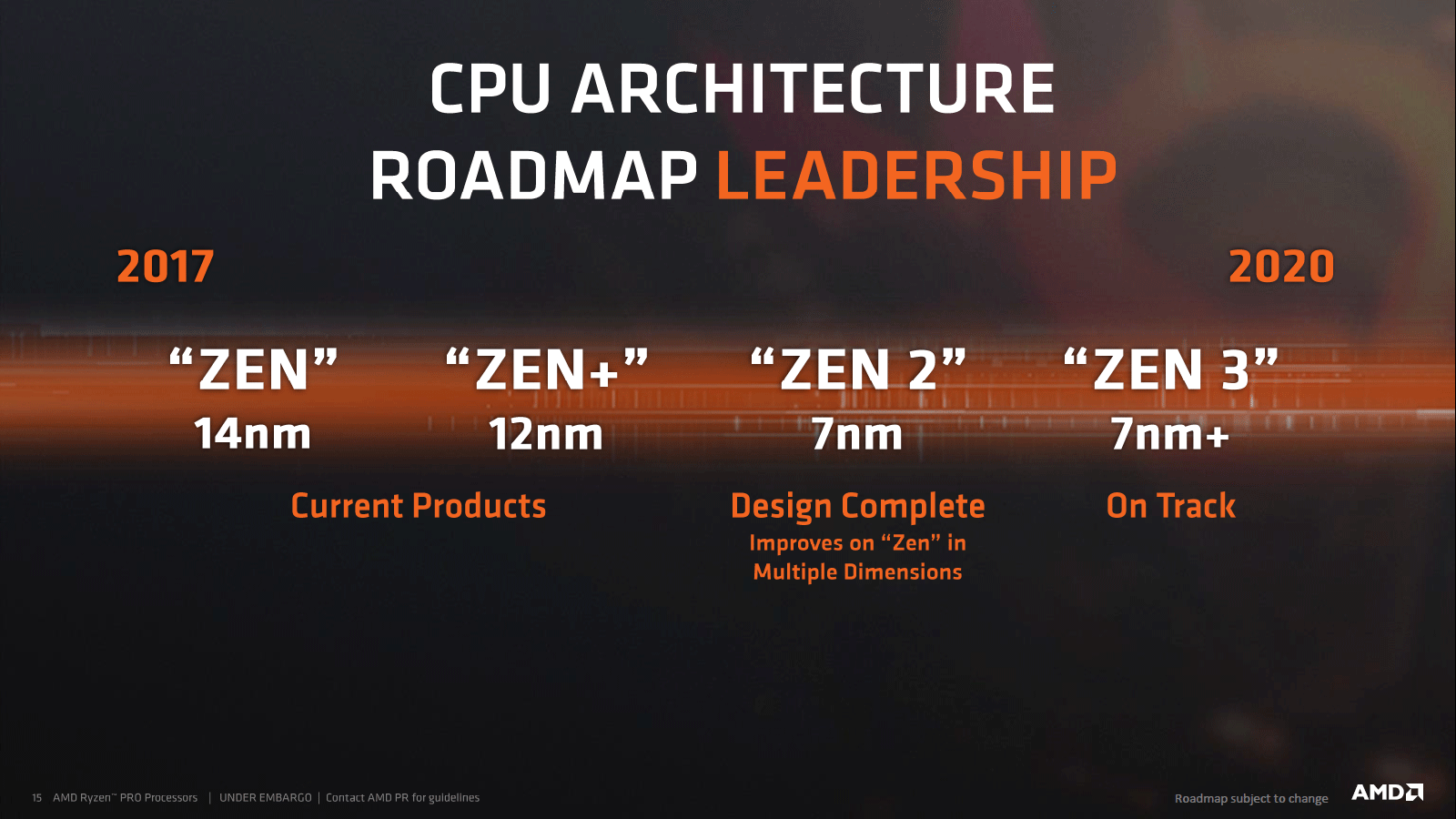
Remember this road map https://cdn.wccftech.com/wp-content/uploads/2018/05/amd_roadmap_cpu_q2_2018.png

 trail yew
Was it really 2017 when it started... wow it feels like it was last year imo
late hatch
ya, it was a few months after I built my intel system.
mighty tide
RIP
late hatch
that computer felt outdated fairly fast
trail yew
Just imagine how I feel with an i5 6400😂
late hatch
mine was a 6600k.
late hatch
2700x
trail yew
Nice
solemn yarrow
Intel's 10th gen might be a beta thing with them cause having hyper threading for all the i core series is new to them so 11th gen they might go down to like 10nm
trail yew
Lol this definately shouldn't be in the displays channel
solemn yarrow
But i am still curious to see how well 10th gen will perform especially the i3's
shell hedge
@late hatch true but amds drivers tho🥺
late hatch
I don't have a 5700, but I have had less driver issues on my amd gpu's than on my nvidia ones
shell hedge
I have had no driver issues with either
late hatch
I have been 2 years waiting on nvidia to fix their screens flickering when gsync is enabled. they don't even seem to acknowledge its an issue.
its only an issue on multi monitor setups so its probably low on their list of concerns
solemn yarrow
I have had more issues with AMD drivers than Nvidia
shell hedge
I dont have any gsync monitors nor multi
 river blade
My only issue I’ve had with the 5700xt drivers is if I have a DisplayPort monitor and have msi afterburner open my screen will flicker. Not a huge deal but I like to use it to control my hours fan speeds
 quartz sinew
anyone have recommendations for 1080p 144hz with G-sync?
solemn yarrow
You could get one with FreeSync if you are going to go with DP
solemn yarrow
There was one i saw before you could overclock it to 155hz
quartz sinew
how exactly does one force g-sync on a freesync monitor
solemn yarrow
It only works through display port
so no HDMI when using Nvidia with a FreeSync monitor
@quartz sinew There is this one and just got sold out on the Canadian site https://www.newegg.com/sceptre-c248b-144rn-24-full-hd/p/0JC-007F-00038
This one is on sale right now for another 10 hours https://www.newegg.com/black-red-acer-kg241-pbmidpx-um-fx1aa-p01-24/p/N82E16824011245
quartz sinew
i'm kinda looking for actual gsync-rated ones
solemn yarrow
Well you can always watch this https://www.youtube.com/watch?v=rFSP20pWPY8 if you choose to

Today I'll show you how to use and enable G-Sync on your AMD FreeSync monitors! Nvidia finally caved in 👍
LG 32GK850F Amazon: https://geni.us/32GK850Frandomfrankp
LG 34GK950F Amazon: https://geni.us/34GK950FRandomfrankp1
LG 32GK850F (LG.com): http://bit.ly/2GZdzNj
LG 34GK950F ...
quartz sinew
then again, am i gonna experience frame drops with g-sync, the same way as i do with vsync?
solemn yarrow
You might but then again you don't have to lower the cap by 3
quartz sinew
wym
solemn yarrow
He explains in the video that if you lower it down to 141hz instead cause usually with the screen tearing Gsync in the control panel would then disable but also depending on what you're using and what games cause there is a lot of games that you would be within the 100 to 120 frame mark
I am trying to explain what he says in the video but not that well cause i read it back and was a little confused as well lol
But ya this is why i posted the video as an option to see so you would what he does to get everything stable
You could always look up the difference between Gsync and FreeSync but for saving money (cause i am always on a tight budget) i would go with the FreeSync monitor
quartz sinew
honestly i may just disregard it all together and go for a regular old 1080p 144hz
i don't seem to get tearing often atm going 100 fps on 60hz,
solemn yarrow
@quartz sinew It is totally up to you just these monitors has more to offer than just prevention of screen tearing
quartz sinew
such as?
solemn yarrow
For each monitor you would have to see what else they would offer
@quartz sinew This is just an example but click on this and scroll down ok https://www.newegg.com/sceptre-c248b-144rn-24-full-hd/p/0JC-007F-00038
 leaden karma
May be a stupid question but I’m wondering after I finish my build
Do I need 2 1440 p 144hz monitors to have dual screen one for chat etc and one for gaming?
Or can I just buy one and use my slightly older 1080p 60hz for the chat and stuff?
Like it won’t affect the other monitor correct?
whole sorrel
you don't need two 1440p 144hz monitors if you're only going to take advantage of the high refresh rate and higher resolution of one monitor
it's pretty normal to have two very different monitors I think 😛
quartz sinew
you can connect both and use them separately, just don't think you'll be splitting a screen across them very well
mystic agate
leaden karma
That looks like a great monitor
I actually would love opinions on these 2 as well
2/3
2: https://www.newegg.ca/product/N82E16824236987?m_ver=1
This is the same as first with the only difference I see is ips vs tn but would love which of the 2 you would pick and why since I cannot find any reviews of the first vg27bq
3: https://www.newegg.ca/product/N82E16824012010?m_ver=1
Heard lots of great things about this but what makes it worth the extra almost 175$?
covert solstice
@leaden karma the first one is a TN panel, while the second and third are both IPS. The third is one of the best 1440p high refresh ips monitors, but iirc uses the same panel (or very similar) to the px7 prime, i'd either get the px7 prime or the second one you listed https://www.newegg.ca/p/N82E16824737006?Description=px7 prime&cm_re=px7_prime-_-24-737-006-_-Product
leaden karma
In that case I feel maybe the second vg27aq May be the best option
https://www.rtings.com/monitor/reviews/best/by-usage/gaming it’s also rated highest on ratings

RTINGS.com
The ASUS TUF VG27AQ is the best FreeSync monitor that we've tested so far. At 27 inches, the 1440p resolution delivers a crisp image with exceptional motion handling, thanks to its high refresh rate and low response time.
I just want the fastest possible for 1440p as I do a lot of FPS and will be coming back into competitive after a very long time on console
covert solstice
if you want much better colors and a little better contrast, get the second
if you want like a ms advantage go with the first one, its a tn panel and should be a little faster but loses some color/picture advantages
leaden forge
TN is bare able, in my opinion, for most games.
Also, I wonder if humans actually would notice a difference between 0.4 ms and 1ms.
But as Nachos said, IPS is a really nice thing to have and you’ll benefit from great colors compared to a TN panel.
quartz sinew
what's the best kind of panel for 144
 deep fern
Dollars or hz?
 stone grove
I got 2x AOC G2590FX monitors a couple of weeks ago and love them so far. Found them for $150 each on sale. 144hz 1080p TN panels
karmic shadow
thats a pretty awesome deal for a gsync
 visual pilot
IPS panel is "best"
deep fern
OLED is “best”
visual pilot
@deep fern theres 144hz oled panels now?
deep fern
Idk about 144 but there is 90
visual pilot
I thought the best is like that one oled panel samsung showed at ces with like 8k res 120hz
covert solstice
oled has burn in issues
its gonna take a little bit before they are great monitors
deep fern
The burn in isn’t as bad as it once was, but yeah it is something to think about
hot zephyr
Thoughts on this monitor? https://www.amazon.com/Sceptre-E225W-19203R-Monitor-Speakers-Metallic/dp/B07774L6TT
deep fern
75 is a nice step up from 60hz. 22” is fine for 1080p. Has a bit of a high response time tho at 5ms
visual pilot
should be an okay cheapo monitor
deep fern
It’s fine for its price
mighty tide
Yep
hot zephyr
Cool, thanks! 👌
leaden karma
Curious to know what everyone thinks is the best 144hz 1440p monitor
Forget the options I gave earlier just wanna know what comes to everyone’s mind
 astral ferry
the aoc 27"
visual pilot
MSI Mag271cqr comes to mind
 trail mauve
Ok look, here’s the full story.
I got this display from a company that has a product that requires the display be outside.
mighty tide
Solar powered xD?
trail mauve
No, it’s powered through the Ethernet.
Through PoE.
Literally how IP cameras work.
trail mauve
A way for it to work without relying on their crappy hardware.
 unique estuary
he needs more ethernet ports and drivers
trail mauve
If you’re not going to help, please don’t post.
mighty tide
In my opinion, get a new monitor
trail mauve
In that case, I need a monitor that does power and data through one cable.
mighty tide
Why
unique estuary
he needs a PoE display
mighty tide
Get an industrial extension cord
mighty tide
Yes it is
trail mauve
Not here at least.
mighty tide
I have them in my garage
unique estuary
then move
mighty tide
What country
trail mauve
USA.
mighty tide
Same
unique estuary
Same
trail mauve
It’s part of the building code we have to abide by.
unique estuary
change the code for a better one then
 sharp laurel
same
trail mauve
We can’t use any type of extension cord.
unique estuary
hm, try windows 7 then
trail mauve
Any other ideas?
unique estuary
windows 7
mighty tide
Idk abt this stuff
unique estuary
or you could emulate windows 7 inside of windows 10 and pass the ethernet port to it then have the windows 10 tunnel into the windows 7 emulation to pull the video feed. I'd invest in another gpu and a capter card rather than tunnel tho
trail mauve
Thanks for the help anyways.
unique estuary
np, glad to help
 red forge
Anyone have any thoughts about this monitor?
https://pcpartpicker.com/product/nyMwrH/acer-xf250q-cbmiiprx-245-1920x1080-240-hz-monitor-xf250q-cbmiiprx
leaden forge
You sure you really need 240Hz right
 jagged horizon
what 1440p displays do you guys recommend?
i want something that's at least 144hz
i mostly do gaming, and i play in a dark room
also i dont want anything over $600
odd echo
AORUS AD27QD 27" 144Hz QHD 2560 x 1440 1440P FreeSync and G-SYNC Compatible Gaming Monitor Exclusive Built-in ANC Display HDR 1ms Response Time 10-Bit IPS 95% DCI-P3 Display Port 2 x HDMI 2 x USB 3.0 https://www.newegg.com/product/N82E16824012006?m_ver=1
IPS looks amazing
top of the budget tho
olive token
Curved or flat?
slender prawn
You can click the link and find out 
jagged horizon
oh yeah
flat
that aorus monitor is $620 here
20 dollars aint much so it's not a big deal
mighty tide
That is overpriced tho
jagged horizon
most things here are overpriced
leaden karma
The aorus is good but has a few downsides too
Read the reviews on rtings.com
I was looking at it too but honestly after all the research the Asus TUF 27aq is much better and nearly 150$ cheaper here
VG27AQ
Rtings rates the blacks a 3 on the aorus and almost 7 on the Asus, both IPS panels, Asus also gets a faster response time
jagged horizon
that tuf monitor is ~75 usd cheaper than the aorus one here
deep fern
could not be the same specs
there are a lot of hidden specs that they don't show on product page.
 limpid lintel
If I plan on building something like a 2070 super with a i7 or a amd 3700x whats a good monitor to get the nost out of it for like $150 lol. Would I just want a 144 hz 1440p
leaden forge
$150- is more 1080p 144hz price range 🥶
odd echo
@jagged horizon
i found a deal on a monitor for you
that has a $30 discount with promo code EMCDFGP26
170hz, 1440p
IPS
oh and 1ms response time
so compared to the aorus one i linked earlier, this one is better for cheaper (while the sale lasts) and then when the sale is done its just better for the same price
jagged horizon
@odd echo that monitor is not in stock here
odd echo
alright
jagged horizon
and amazon doesnt ship some electronics here for some reason
i'll look around i german stores
maybe they have that there
jagged horizon
i'll probably wait because that monitor seems amazing
unique estuary
@jagged horizon have you looked at computer universe?
I had to order something from there once and it seems to be the best kept European secret.
Their deals aren't phenomenal or anything, but most are competitive with the U.S. market
jagged horizon
its not in stock there either
unique estuary
Oh, rip
limpid lintel
Damn just barely missed a deal for the 32 inch lg 144 hz 1440p for only $300 😥
This ny best bet for a 144hz 1440p?
slender prawn

Buy ViewSonic VX2758-2KP-MHD 27" 16:9 144 Hz FreeSync IPS Gaming Monitor featuring In-Plane Switching (IPS) Panel, HDMI | DisplayPort Inputs, 2560 x 1440 WQHD Resolution, 1000:1 Static Contrast Ratio, 350 cd/m² Brightness, 178°/178° Viewing Angles, 1 ms Response Time (MPR...
I just saw it on /r/buildapcdeals
limpid lintel
Ah damn thanks
sage trail
Ya it's good, IPS, 1ms rs
limpid lintel
Yeah i follow that reddit but was at work much thanks
 stable trout
Does anyone know of a good 1080p 120hz or better for $150-200
 copper hemlock
how important is response time in a monitor
I'm tryna find specific specs for a monitor in my price range but it's impossible
I want a 144hz 1ms 1440p monitor preferably curved for around 300
covert solstice
thats also in cad so it should be cheaper in usd
copper hemlock
it is
astral ferry
^ i too have a 2070super should run a vast amount of games 2k 120fps+ min
astral ferry
i use a chinese one XD hkc
copper hemlock
oof
astral ferry
i would have bought the one i linked you
but it was out of stock when i was looking
copper hemlock
I'm kinda thinking this

Micro Center
but I'd have to drive to microcenter which is an hour and half away lol
astral ferry
that one is excellent as well
unfortunately i am canadian which limits my options heavily
astral ferry
aoc is highly reviewed
copper hemlock
or if they pretty much the same
astral ferry
my chinese monitor is a bit expensive than both but i think its because they are using a samsung va panel
copper hemlock
oh ok
astral ferry
i think either monitor you choose
your basic reqs of 2k 144hz and good response time with adaptive sync will be met
copper hemlock
ok
I might as well go with AOC one
now to get 250 in my venmo lol since I have cashe😂
astral ferry
👍
 shy venture
I has a few questions about my monitor setup and the purchase i need to make concerning cables.
shy venture
my current monitor setup uses a dvi cable, and a HDMI. i hate the HDMI. Never used a displayport cable and the monitor on the hdmi cable has a displayport, port. is it better than or less than a DVI? Because i could get a displayport cable with a DVI end. or just run that monitor on the DP to DP cable
sorry for the novel
unique estuary
What
mighty tide
@shy venture
shy venture
the one in question is an ASUS VH242H the other is a much older Envision monitor. has DVI and VGA inputs.
 proud terrace
Yo can someone help
olive token
can we?
 wicked grotto
I've been thinking about getting this monitor because of the price point. https://www.newegg.com/p/N82E16824475017?Description=msi optix mag241c&cm_re=msi_optix_mag241c-_-24-475-017-_-Product&quicklink=true
Anyone else have an recommendations for a monitor of similar specs at around the same price?
like $190 - $250ish
144hz, 1080p
visual pilot
@wicked grotto there are cheaper AOC monitors like this one, but that IS a good monitor, I currently own that mag241c.
https://www.amazon.com/AOC-C24G1-Frameless-DisplayPort-Adjustable/dp/B07GD7H18F/ref=asc_df_B07GD7H18F/?tag=hyprod-20&linkCode=df0&hvadid=312780390407&hvpos=1o1&hvnetw=g&hvrand=5835210143730104803&hvpone=&hvptwo=&hvqmt=&hvdev=c&hvdvcmdl=&hvlocint=&hvlocphy=9033359&hvtargid=pla-569477707174&psc=1
wicked grotto
I'm honestly surprised I haven't seen this monitor in all my searching lol
probably scrolled passed it tbh
gonna keep it in mind. Ty!
quartz sinew
what's a good 1080p 144hz+ display with actual G-sync (not just freesync that i can jury-rig)
quartz sinew
well i'd rather be able to use g-sync from the get go rather than tinker
that and peace of mind
 fallen aspen
there hsouldnt be any tinkering. freesync monitors work with gsync compatible gpus. just turn freesync on.
quartz sinew
hmm
fallen aspen
other than that i dont have any actual recomendations cause i dont buy super fancy monitors 😛
fallen aspen
mk i think this one is good https://www.amazon.com/VG278Q-G-Sync-Compatible-Adaptive-Monitor/dp/B074JLD4HZ/ref=sr_1_2?crid=1D70NCRAHZO9N&keywords=gsync%2Bmonitor%2B144hz&qid=1582498946&sprefix=gsync%2Caps%2C198&sr=8-2&th=1 but again im not savy in this department 😛 finding price per performance i mean
quartz sinew
eh
quartz sinew
correct me if i'm wrong but freesync-based gsync doesn't have the same benefits
mighty tide
No, but its barely noticeable
fallen aspen
i mean the idea behind gzync and free sync is that it stops screen tearing
quartz sinew
yeah
fallen aspen
both accomplish that pretty well.
i tried finding gsync ultimate but theyre like $1000+
quartz sinew
but there's also visual artifacts to be considered and some freesync monitors don't work below 48-40 fps
mighty tide
@quartz sinew well hopefully a 2070s wont get below that at 1080p :)
quartz sinew
well you'd be surprised what happens when you go into a massive grinder in MC
look mate, i said g-sync, i want g-sync, not freesync or compatible
mighty tide
Well im just saying that its overpriced
quartz sinew
i'm pretty sure
leaden forge
What panel and response time do you want @quartz sinew
Since you’re willing to pay a lot for a G Sync monitor you don’t want no crappy TN panels I would guess
Even though they are bare able
quartz sinew
i have no clue, that's why i'm asking
leaden forge
Do a quick a search about the difference between TN, VA, and IPS panels, Google might explain better than me
leaden forge
And let me know. Because VA is expensive and IPS is much more expensive
visual pilot
I'm not even kidding
leaden forge
solemn yarrow
It is a nice monitor but useless RGB since you will never see it
leaden forge
PCPP is usually accurate isn’t it
visual pilot
that one is only G-sync compatable
you can check yourself if you want to
https://www.nvidia.com/en-us/geforce/products/g-sync-monitors/specs/
leaden forge
Ah oof
solemn yarrow
Amazon can even tell you that https://www.amazon.com/ViewSonic-XG270-Compatible-Enhancements-Ergonomics/dp/B07VL5SNG8
Buy ViewSonic Elite XG270 27" 1080P 1ms 240Hz IPS G-Sync Compatible Gaming Monitor with Elite Design Enhancements and Advanced Ergonomics for Esports: Everything Else - Amazon.com ✓ FREE DELIVERY possible on eligible purchases
leaden forge
Whoops
visual pilot
only non-TN 1080p full g-sync monitors
covert solstice
just get freesync there done
leaden forge
But it is 1440p
visual pilot
31.5 inch and 30 inch are not good for 1080p so
solemn yarrow
@visual pilot You have to remember that those monitors Nvidia only tested so you would have to also look on a manufacture site to see compatibility
visual pilot
@solemn yarrow they wanted like the full nvidia g-sync experience and said
so
I would definally say g-sync compatible is good enough
they only want full G-sync
solemn yarrow
Meh ill still go for a FreeSync monitor for myself for my 1660
almost the same performance for less money
 maiden wedge
get a samsung 240hz1080 or 144hz1440
quartz sinew
what samsung 240
full moat
@maiden wedge i think the question was more along the lines of "what model of..."
quartz sinew
yeah
visual pilot
also
G-Sync compatible is good enough
quartz sinew
i'll go with full G-sync
visual pilot
1080p?
quartz sinew
yes
visual pilot
if you're gonna pay that much why not 1440p
full moat
@visual pilot it is their choice :)
quartz sinew
because i don't want to play at 1440p
full moat
if you want to change their mind, start throwing links/review/facts etc
visual pilot
theres 3 full g-sync monitors thats not TN panel
full moat
then you can have a debate about it. IF you want.
visual pilot
according to nvidia
quartz sinew
i wanna play at 1080p and high refresh rates without tearing, hence why i'm willing to invest in g-sync
and i already found a display
full moat
but until then, it is opinion vs opinion
unique estuary
or is it
quartz sinew
yes
maiden wedge
found this 240hz 1080p va panel for only 270£
visual pilot
As I said, there only 3 non-tn 1080p full g-sync monitors
anna they REALLY want g-sync
visual pilot
they're probably g-sync compatible, the exact thing you didn't want us to find for you
maiden wedge
the good thing about Samsung is that their g sync premiums are small
full moat
@quartz sinew (without looking it up) you have checked the manufacturer websites for that right?
visual pilot
I'm sourcing the list from Nvidia
quartz sinew
considering i searched g-sync and didn't select compatible
visual pilot
You want to trust nvidia or some marketing team
full moat
@quartz sinew just a FYI, a sellers website can be "oops! our mistake on that typo" and be excused. a manufacturers website? not so much. [edit:a]
visual pilot
heck, give me the model of some of those monitors, I'll find them on Nvidia's list, and they're likely just g-sync compatible
Heres the link if you want to check yourself
https://www.nvidia.com/en-us/geforce/products/g-sync-monitors/specs/
quartz sinew
i checked
visual pilot
one example please
full moat
@quartz sinew also, please note, i am not trying to change your mind :)
visual pilot
I'm just tired and slightly grumpy
quartz sinew
i know naed
i'm exhausted and getting progressively ticked at you Mr1111, so how's about we stop debating and you let someone else help
unique estuary
I agree
visual pilot
I'll just leave you with Nvidia's website then
quartz sinew
also, the monitor i looked at was on the manufacturer site before i found the amazon link
visual pilot
just check before you buy
unique estuary
Just get something that has fine everything on a super sale
then you'll get your utility whether you love it or if its just good enough
and you can always resell
quartz sinew
yeah
full moat
i mentioned what i did @quartz sinew because e-shops have no real downside to "oops!" moments like i described. So make very certain.
unique estuary
unless you're maxing out your rig/setup, theres no reason to get caught up on all the particulars
obviously sort out the major ones
but it usually ends up coming down to performance/$
quartz sinew
i'm just making an investment so that i don't have issues
i've got a pc that can handle it, now i just want to buy a monitor with confidence
full moat
reviews, reviews, and more reviews is your diet for a while going forward @quartz sinew
quartz sinew
yeah
leaden forge
What specs would make a monitor better quality for the human eye and hurt it less ? (Blue Lights, panel type.... many other factors ......) I don’t mind spending more on a monitor if it ruins less my eyesight and just my eyes in general
It could be better colors (IPS), lower blue lights I really don’t know...
Those are extremely random examples
visual pilot
There might be some monitors with built in blue light reduction
but that generally is not a spec you commonly see
trail yew
Theres a built in blue light filter in windows that I often use. It does a decent job
visual pilot
IPS Panels may be good (for blue light reduction) , but I don't really know
mighty tide
@leaden forge what res?
leaden forge
That’s right. All I really need is 144Hz, and < 3ms response time
Free/Adaptive Sync would be a + too @mighty tide
leaden forge
I just wanted to know if anything could make a display better for the human eye to look at
visual pilot
I think thats mostly software, with a good monitor
leaden forge
Like a built in flashlight reductor, blue light filter etc etc
visual pilot
lol
leaden forge
Thanks for the recommendation, but would this one be better than others for eyes ?
That’s my main focus
visual pilot
I dont think you can compare monitors for just being better for your eyes
mighty tide
Yeah
visual pilot
There are blue light reducing glasses
I might actually get one of them
my eyesight isn't doing too good
leaden forge
That could be good
mighty tide
Yeah
visual pilot
Link me when you find it, I cant find it rn
mighty tide
They are labeled "gaming glasses" sometimes, but are dumb
leaden forge
On my local PCPP, I can see there is a research filter for monitors : Flicker-Free
I that really a genuine thing
mighty tide
Wont effect u
visual pilot
nah better than that
mighty tide
Thats just more reliable, means it wont be accidently flashing rarely
Monitors barely flicker tho
visual pilot
I also need prescription glasses or whatever you call them
visual pilot
meh
leaden forge
What about Glare Protection ?
visual pilot
I think I'm like 2x in one eye 3x in the other or smth like that
leaden forge
It exists as a filter on my PCPP
mighty tide
I know
It is not for eyes, it is so if there are lights in your room then it will not be reflected onto screen
mighty tide
M.a.r.k.e.t.i.n.g
mighty tide
If you have curtains or not super bright lights, your fine
There isnt
I have used them
mighty tide
No just use software
It works better and doesnt cost a ton more
Most of that stuff is for workstation monitora
leaden forge
Do you know of a good software ? Free is preferable
That would be more effective than built in
mighty tide
The monitor comes with the ability I think
I am not at my house currently, but I have it and will check in its settings
In like 45 minutes
leaden forge
Isn’t that considered built in though ? If it’s in monitor settings
leaden forge
What software were you talking about earlier though ?
mighty tide
Windows has it I believe