#old-monitors-and-tv
1 messages · Page 25 of 1
 olive token
 summer zephyr

Microsoft Store
This curved monitor brings gaming and immersion together on a 27-inch QHD display.
You guys think I should go with that?
 solemn yarrow
@olive token what do you think?
 surreal veldt
im using a aoc gaming monitor it was just $244 144hz 27'' 1ms has freesync and my gsync works with it.
has to do some tweaks to get it to my liking but not bad for the price
 spare egret
@summer zephyr I have the AD27QD and I can testify that it's amazing. Beautiful colors and excellent response and refresh rate.
It's not curved (I prefer flat) but it's still awesome.
summer zephyr
Ok
I have about 7-900 to spend on a monitor or monitors
27" CRG5 240HZ CURVED GAMING MONITOR
This was also a contender if you know if it’s any good
solemn yarrow
You mean 700 to 900?
 covert solstice
for 700-900, honestly i'd look towards 1440p ultrawide like this
https://www.amazon.com/dp/B0777RY75V?tag=georiot-us-default-20&th=1&psc=1&ascsubtag=tomsguide-custom-tracking-20
solemn yarrow
That is not bad 120hz as well
covert solstice
honestly even 700 is a lot for a monitor, only thing more expensive is nearly only 4k 144hz ips monitors
summer zephyr
My old monitor was 650 I believe. The Lenovo y27g razor edition. I’m not rly looking for more than 27 inches. I loved that monitor but ultrawides are too big for my liking
summer zephyr
You guys think I should go with this?
GIGABYTE AORUS CV27Q-SA 27" Quad HD 2560x1440 165Hz 1ms 2xHDMI DisplayPort AMD Radeon FreeSync and G-SYNC Compatible HDR Flicker-Free USB 3.0 Hub Widescreen LED Backlight Curved Gaming Monitor
Or this
I narrowed it down to those two
covert solstice
id rather go with the 27GL850-B since its IPS and nearly all the same specs for like $130 cheaper
summer zephyr
Its not curved though which is what im looking for and I have a big budget
covert solstice
summer zephyr
Too wide for me. I like the AORUS CV27Q bc it has everything I need and the size I like
Gives me money to spend on speakers and rocket league
 hushed lantern
Hello, I am new to this group. Referred by NewEgg employee. I am interested in guidance in expanding my stock trading abilities. I currently have a 27” IMAC (circa 2012 year model) I would like to somehow add up to 3 additional monitors with a potential mounting stand for additional monitors. The current IMac would pose a problem in the visual configuration of other monitors. I have plus or minus $1,000 to contribute to this monitor setup idea. Any thoughts would be appreciated. Thanks
 errant meadow
So...what cable do I need to use to get my 144hz? I’m using the display port and getting 60hz.
 gilded ivy
you gotta set it in your display settings
make sure you plug your displayport into the displayport sl0t of your gpu
errant meadow
I did
 rain latch
Question, does anyone know why when your desktop feels laggy after you turn on laptop with external monitor first then switch to laptop monitor then back to monitor and then it lags?
(lmk if my question is not comphrensible, I can re write again.)
 slate hamlet
Are you switching which display is actually, displaying or are you using it like 2 monitors simultaneously
rain latch
Not 2 monitors simultaneously, switching displays
Um is my question not making sense?
slate hamlet
Kinda
if you're switching back and forth between displays then it's gonna take a second to catch up
rain latch
My laptop starts up with HDMI cable hooked to external monitor display, and when it's on the external display i switch to laptop display and then switch back to external monitor again then it feels laggy on external monitor. It's solved by restarting.
Does that make sense now?
 junior matrix
Hey guys. Any recommendations for a monitor that has really good picture quality?
Looking for under $600. 1440p or 4k. Doesn't matter. 144hz not neccessary, but welcome. Also needs to be durable. It's for my truck on the road. So pretty rough goings for it.
spare egret
@junior matrix i really like the AD27QD, 1440p 144Hz, 10 bit IPS and HDR and anti glare screen so it's really nice imo
olive token
honestly can't suggest any monitor that is going to be bouncing around in a truck.
olive token
big rig?
junior matrix
@spare egret I actually had that one in my cart already lol. I just got told that the pixio prime 7 is basically the same but cheaper
Yes. Big rig
olive token
ah ok
spare egret
@junior matrix i'm using the AD27QD rn but i have no idea about the pixio one
junior matrix
How about the pg279qz
 maiden wedge
It's good, but an older panel, same 144, 1440p , hardware gsync AUO component in the Acer xb271hu . Maybe if one goes on sale for 400 new or something
covert solstice
@spare egret the px7 primes uses the same panel, and it’s gone down to like 380 on sale
I have it, solid monitor
 feral nimbus
does anyone have a better idea for budget 4k monitor than MG28UQ?
 rustic surge
I recently got a new gpu that only has 1 hdmi port and i need that for my ce headset, so i bought 2 dp to hdmi adapters because my monitors don't have dp ports. when i plugged my monitors in, they starting flashing, or turning on and off maybe. then i tried only one adapter with the other monitor in the hdmi port and the monitor with the adapter was having color variations and was fluzzy. the adapter is Nurbenn DisplayPort (DP) to HDMI Adapter, 4K HDMI Converter - Black
olive token
sounds like a bad adapter
maiden wedge
Sounds like a passive adapter that might also suffer from bad qc, $6 on newegg can be hit or miss on dongles.
This may help https://linustechtips.com/main/topic/729232-guide-to-display-cables-adapters-v2/
Linus Tech Tips
Glenwings Guide to Display Cables / Adapters (v2) This Revision: 2.4.9 (2019-06-25) (If you can see this message without needing to examine the page source, then something somewhere has gone terribly wrong) BEHOLD, the terrible programming of the one known as GLENWING, first ...
rustic surge
it claims to be active
maiden wedge
Guessing your monitors aren't dual mode and are sending the wrong signal. Thoe are passive adapters.
Actives are for a differnet use case - usually to go between either dp/hdmi etc while still retaining the max res + refresh + bit depth as the source signal.
rustic surge
can you recommend one for me?
i don't want to waste more money on another that won't work
maiden wedge
Got a link to your full build parts list? If not, running a userbenchmark.com and linking it here is the easy option for 90% of the relevant info.
rustic surge
i'm not home right now, i'll send you both when i do get home
 rustic surge
@maiden wedge ^
 thorny pulsar
is LED better than LCD or is it the other way around
slate hamlet
I believe LCDs are usually better when it comes to color accuracy
 fallen estuary
Just built a pc getting no signal rip
slate hamlet
If everything else is working but it just isn't showing up
try using a different pci-E slot
fallen estuary
Havent quite obtained a graphics card yet using inegrated graphics in the mean time...i might try vga to see if its an issue with hdmi port
 glacial field
What motherboard and CPU are you using?
fallen estuary
Thank you 😂 cpu is ryzen 7 1800x no integrated grapihcs
slate hamlet
Well that would explain it then
solemn yarrow
Sounds like you need a 2400G 😛
 severe depot
Im looking to buy a second monitor but dont know what to get. Do you guys have any suggestions
slate hamlet
What is the purpose of the second monitor, like just discord or?
maiden wedge
Does anyone know if this monitor is good It’s a 165hz monitor
severe depot
@slate hamlet i want to try streaming and my current monitor is a real bottleneck to my current build so really im just looking for a new monitor
slate hamlet
If it's for the chat then basically anything will do
 vague zinc
oh is your current monitor not able to match what your system puts out
severe depot
Yeah
I got a 2080ti but that used up much of my budget so I got a 144hz 1080p monitor. Its not bad but I know my gpu is capable of much more
severe depot
what are the benefits of curved over normal
That is also the monitor i was looking at
 odd echo
its just preference
vague zinc
what he said
severe depot
Is there a price difference between curved and normal
maiden wedge

RTINGS.com
Find the best products for your needs, based on our reviews, ratings and recommendations.
 maiden wedge
Repair stuck pixels using the JScreenFix algorithm.
maiden wedge
Ive noticed msi curved r cheaper than regular
 topaz lark
guys i have a compatability question about a specific setup and a specific monitor. Wanting to know if they will work together optimally
Monitor - https://www.newegg.com/p/N82E16824260555
solemn yarrow
I don't see how it would not work together
solemn yarrow
The system can handle 1440p without a problem
topaz lark
sweet ty
 wild grove
That monitor is significantly above 1440p though
maiden wedge
that is closer to 4k in terms of raw pixels than 1440, i think
wild grove
That system will still be able to handle it, but in AAA titles it won't be running at 120 fps on highest settings
maiden wedge
no, it's definitely closer to 1440 in terms of raw pixels, but it's still a lot more than a non-ultrawide 1440
wild grove
Should still get at least 60 fps though I think
 maiden wedge
$11,463.57 USD for that adjusted for inflation
What cheapskates, not even a flatscreen
and the bezels, good lord
shameful display of...uh, displays
i'm actually kind of salivating of a CRT with that resolution at 240hz or something crazy lol
2k nits, i always wanted to be blind https://www.usa.canon.com/internet/portal/us/home/products/details/reference-displays/4k-uhd-reference-displays/dp-v3120
Canon’s 31-inch DP-V3120 4K Reference Display was designed to meet the unique set of challenges that come with HDR production.
 shrewd epoch
Hello I had a question about hooking my laptop up to a high refresh rate monitor
 tardy vine
or possibly a dock if you dont have built in output
maiden wedge
If your using apple
Pretty sure most modern laptops come with hdmi ports
Windows that is
solemn yarrow
Well all would include Micro/Mini/HDMI
maiden wedge
Idk bout all that
tardy vine
i was more saying that i dont know his laptop so it is a possibility
maiden wedge
Every computer does have a usb port tho
solemn yarrow
If it is an older laptop it would have VGA
maiden wedge
If your pc doesnt have an hdmi then you can get a usb to hdmi Connector
Ya. Vga. But if u have a newer monitor you’ll need a vga to dvi
solemn yarrow
There are still some newer monitors that still has VGA on it
some of these companies knows that people still like using older systems on their monitors
maiden wedge
Idk. I dont mess with that old tech
solemn yarrow
Besides you don't know how many USB ports is on his laptop and if they are in use already
For all we know he could have 2 USB ports
solemn yarrow
lol
shrewd epoch
My laptop does not have a display port
and it is a 144hz monitor
I do not know if the monitor supports 144hz hdmi
solemn yarrow
It will
slate hamlet
https://computers.woot.com/offers/hp-25x-25-led-144hz-gaming-monitor-15?utm_campaign=AmazonOffer+-+20191122+-+Computers+-+3199300&utm_source=Amazon&utm_medium=email&ref_=pe_3199300_454607460 how good of an idea are woot deals

Computers.Woot
HP 25X 25" LED 144Hz Gaming Monitor
 mystic agate
O_O whoa
slate hamlet
Well I mean just how risky is it
 lavish kite
Should I get the Samsung C27JG56 or the MSI Optix MAG271CQR
In big need of a monitor upgrade, the only difference spec wise is 1ms response time bs 4ms and I’ve never had a high end monitor so idk is the 3ms is work the extra 70$
vague zinc
Well if you're gaming fastest response time is best
 onyx scroll
anyone know if the asus VG248QE supports 144hz dp??
 smoky thicket
it does have a displayport connection @onyx scroll
onyx scroll
will it display 144 hz?
smoky thicket
yeah, displayport is usually used to do 144hz default @onyx scroll
onyx scroll
is the monitor i listed supports 144hz on dp?
smoky thicket
yes
but i wouldnt buy it unless its on super sale
its one of the first 144hz 1ms monitors, there are much newer 144hz 1ms monitors out now with improvements
 runic girder
Can someone give me a 144hz monitor sub 200 with thinish bezels
 atomic hinge
Anybody know any good 4k monitors?
 sand terrace
Look at this monster
 clear island
XD
lol why the calculator
couldn't they just use the cpomputer
cpoputuer
computatader
 umbral pasture
So I’ve got a slight problem
My MSI Optix G24C Fell over when I tilted it slightly downward and it shattered after impacting my keyboard and mouse. What should I do
vague zinc
that isn't a slight problem
I don't know if warranty covers user error
maybe
contact msi
least you can do is try
umbral pasture
I’ve tried to contact msi but there chat is closed and I would have to call them and I have a feeling I would be on hold for a long time. Just due to the time it is
vague zinc
jesus christ
clear island
So uh
is this thing real?
or has best buy gone off the deep end with it's marketing
solemn yarrow
@clear island it is real but id personally go for the Insignia one's
I have seen Hisense before and the picture/color quality isn't that bad but the Insignia models i find they look sharper
clear island
I mean I could care less lol
It is 120hz
and I should be able to compensate for that software wise
I was asking if the 120 was real
That is the part I care about
solemn yarrow
Well got to remember that usually the 120hz is more for gaming console and other things while using it as a PC monitor would most likely be in the 60hz
clear island
??
explain
why?
are you saying it's just frame interpolating?
but if it can do that
solemn yarrow
It is just the way TV's are and also the ms you would usually get is like 8 to 15ms
 languid walrus
Acer Gaming Series ED323QUR Abidpx 32" (Actual size 31.5") 2560 x 1440 2K Resolution 144Hz 4ms DisplayPort HDMI DVI AMD FreeSync LED Backlit Curved Gaming Monitor https://m.newegg.com/product/N82E16824011234?m_ver=1
This is the monitor I have and I love it
clear island
That looks really nice
solemn yarrow
For using a 2080 1440p would be the best thing to go for
languid walrus
It’s a great monitor. I was concerned about 32” but it’s not too bad honestly
The 2080 Super is fantastic for it. 1440p but not usually the 144fps it could show.
solemn yarrow
27" would be my limit for a monitor
languid walrus
That’s fair
solemn yarrow
I used a 32" TV once for my monitor and cause of the distance i sit and the games i play there was too much neck movements which was a pain
i like to see everything without moving my head
clear island
lol yeah I don't move my neck either
smooth eye movements
no microsaccades
I have a fair bit of visual dield I am not using though
field
visual field
I always put my Fov above 100 too
umbral pasture
So since I broke my msi monitor. I was thinking if it’s not covered under warranty or I can’t repair it with msi I would upgrade to 1440P 144hz. Does anyone know any good monitors other than the previously linked Acer monitor.
umbral pasture
 cedar nest
I connected my monitor to a laptop when I full screen a game it automatically locks on to 30 FPS any fixes?
vague zinc
is ur v sync on
cedar nest
nope
vague zinc
and there's sometimes in games settings that let you limit fps
cedar nest
well Im on Fortnite
cedar nest
hdmi
cedar nest
Already tried
vague zinc
hmm
that's weird
idk much about connecting a monitor to a laptop
Don't know what else to try
slate hamlet
If it has Nvidia control panel try selecting the external monitor as a PhysX device
maiden wedge
Go to global settings, restore, then make sure v-sync isn't on adaptive. - unrelated to "adaptive sync" as a monitor mode
 coarse oak
Hey all, just bought an Acer VG270U P, and it intermittently flickers completely black. Drivers are up to date. Been browsing online and it does not seem to be a completely isolated incident, but wondered if anyone could offer any insight. Been tinkering with my GPU settings, and it seems to help a little bit. GPU is a Radeon RX 580 series.
solemn yarrow
Did you check if your connection between the monitor and you system is solid?
coarse oak
Yes completely solid
Power is not an issue either, as when the screen goes black, power light is still on
solemn yarrow
You're using a desktop right
coarse oak
yup
solemn yarrow
check to see if your GPU is really aligned cause sometimes if it is not the connection could be half way in without you knowing
coarse oak
So I have a dual monitor set up, and neither of my monitors had any issue till now.
It has been 5-6 months
Replaced the older one with the Acer
solemn yarrow
Did you turn on any modes you weren't aware of and also did you turn on FreeSync
solemn yarrow
You actually have to turn it on from the monitor settings
some monitors can have like 2 to 3 different FreeSync options
Like mine for FreeSync has standard and ultimate
@coarse oak what is your GPU as well
solemn yarrow
Ok and also in Adrenalin did you turn on FreeSync from there (cause default it is off on that)
coarse oak
Yeah in Adrenalin I tried turning that off
solemn yarrow
For FreeSync to work you need it on from there and in your monitor settings
also after you enable those it is usually best to restart your system
coarse oak
What exactly does FreeSync do and why do you think it is necessary to have on?
Just trying to understand
solemn yarrow
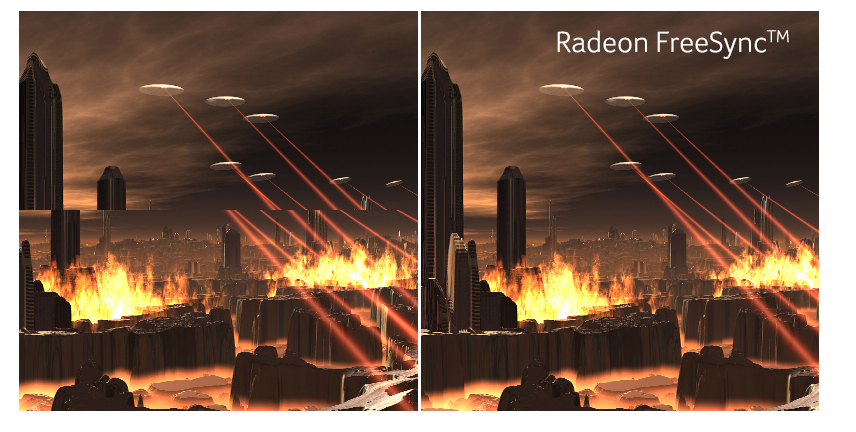
FreeSync reduces motion blur and screen tearing
This is the best example i can show https://i.gyazo.com/f1981f7161755a4b6e37995c47d41688.png
 coarse oak
Ahh okay. So do you think that having freesync off is part of the reason it flickers
solemn yarrow
Could be which it is good to turn that on and also for your monitor settings to see if there is anything that might look unusual
Oh and one other thing
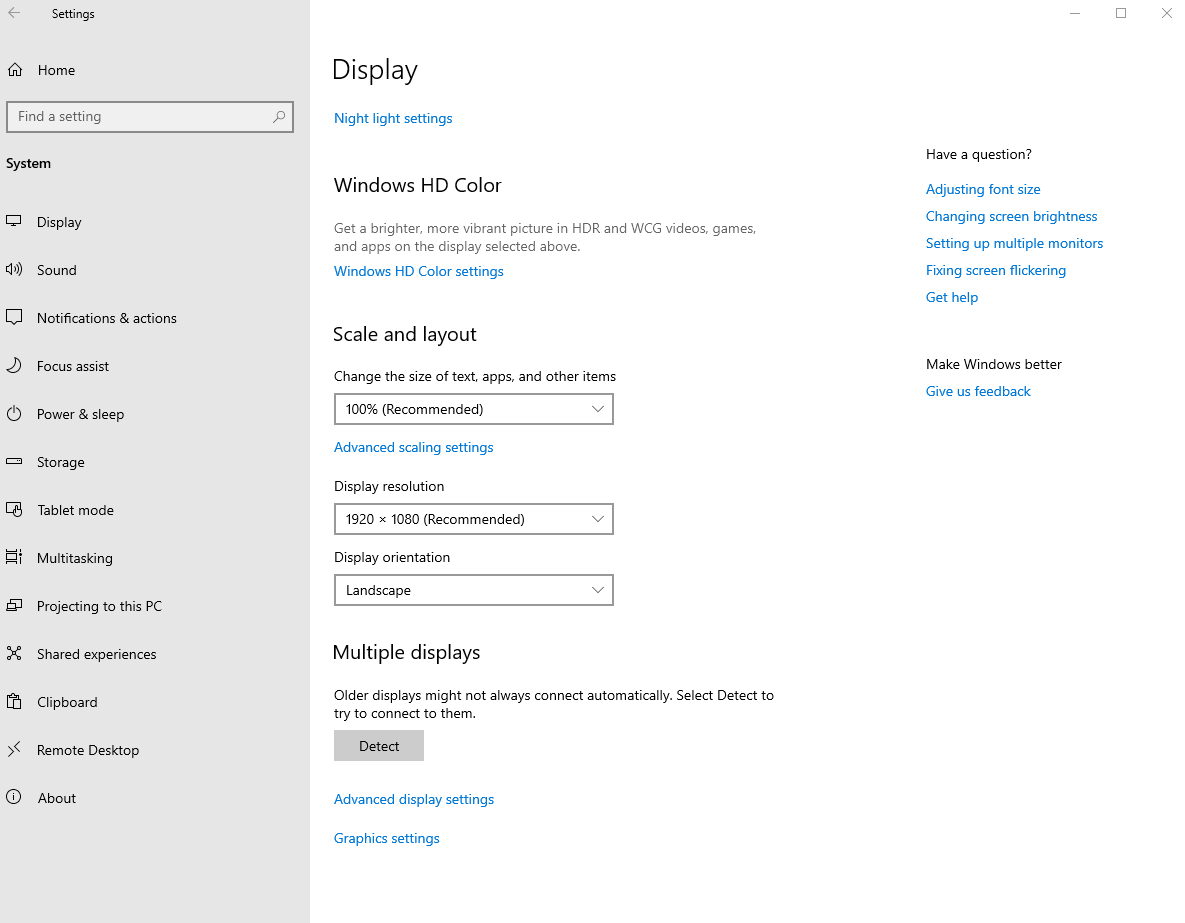
Go in here and click on Advanced display settings https://i.gyazo.com/34b201841a15df8c32aee92e508037e3.png

just to also see if you are on the proper refresh rate
coarse oak
So the refresh rate is 144hz, which is what I thought it should be. Should I try decreasing that?
solemn yarrow
144hz is fine
was just letting you check cause sometimes Windows likes to have it on 59 point something hz
coarse oak
hah yeah that is what my other monitor is set to
the one that works
So where would I turn freesync on other than adrenalin?
solemn yarrow
Well i am using Nvidia now but i would believe on the bottom where it might say settings
coarse oak
My bad, miscommunication from my part. In the display settings you were saying that there was a free sync option there as well?
the monitor settings rather
solemn yarrow
Display settings would be for your refresh rate and Adrenaline would be for freesync
coarse oak
Right, but you said there would be multiple places to turn free sync on?
solemn yarrow
You do that in Adrenaline and on your monitor settings
@coarse oak I have to go for awhile but if you have anything else to ask just ping intender
surreal veldt
is your gsync on?
if u have a freesync monitor it should work
@coarse oak it would be through your geforce control panel
coarse oak
Yeah so Freesync is on in my AMD control panel
surreal veldt
u have amd video card?
coarse oak
yup
surreal veldt
o ok yea just make sure its on on the control panel as well as set to 144 on the monitor
when u game set your ingame options to 144
and you should be set
coarse oak
Yeah that is what I thought as well. I think My GPU is struggling with this monitor
I opened a game from 5 years ago, wouldn't even start
Messed with some options, found some stuff on forums. Adjusted the power allocated to the GPU and the game would start, but it would get choppy.
Meanwhile, the game works perfectly fine on my old monitor
Kind of bizarre
coarse oak
The monitor is an Acer VG270UP
If it isn't the GPU, I have no idea what could be causing such a performance discrepancy
maiden wedge
Variable refresh rate techs like freesync can be buggy with multi-monitor configs in windows. Best to keep any hardware accelerated programs on the main display, use a VESA certified DP cable, disable fullscreen optimizations on the game's executable, then follow the blurbusters guide bible on variable refresh rate (VRR) optimal settings.
https://www.blurbusters.com/gsync/gsync101-input-lag-tests-and-settings/14/
smoky thicket
i turn freesync off because everytime i minimize a fullscreen app it flickers black before recovering
coarse oak
kk I will gave that a shot
umbral pasture
Does anyone know if this 144hz 1440P Monitor is good https://www.amazon.com/dp/B00N2L5CXO?tag=pcpapi-20&linkCode=ogi&th=1&psc=1
 shut maple
Hey, new to having a pc, and im looking for a monitor. any recommendations? What brands are good?
odd echo
Dell’s Biggest Cyber Monday Ever starts Now! Save up to 50% on Laptops, PCs, Gaming PCs, TVs, Monitors & Electronics - FREE DELIVERY ✓.
this is a fantastic deal
$300 monitor for $100
i have one, i love it
its great for gaming
if youre using it for watching movies or looking at photos, id look for an IPS panel. But if youre gaming, that one is FANTASTIC.
 mystic garnet
is it good for gaming?
umbral pasture
@vague zinc it has some great reviews. One of the things I’m looking for is stand stability. Because I had some bad luck with my msi monitors stand
mystic garnet
its g sync compadible
umbral pasture
Ok
odd echo
i have a super wobbly desk and the monitor doesnt wobble at all
umbral pasture
My hp stand is great
odd echo
also this dell one rotates
umbral pasture
Yes that seems like a nice thing to have
odd echo
yeah
umbral pasture
This is what happened to my msi monitor. That’s why I’m looking for a new one
The monitor would tip over when tilted downward at all. And it got tilted downward a small amount and fell straight onto my mouse and shattered
mystic garnet
oof
odd echo
well thats just stupid lol
umbral pasture
I don’t anymore
 umbral pasture
I can tell
umbral pasture
That’s nice
clear island
https://www.amazon.com/LG-65SM8600PUA-Alexa-Built-NanoCell/dp/B07PP4882Q/ 120hz :p not sure if you could actually get that to display on a 4k rez tho
umbral pasture
I think the monitor I linked is the exact same stand just a different panel
clear island
I tried the 4k TV at my fam's vacy rental
120hz for 1080
120 for 2k
only 60 for 4K
I wanna 4k 120
umbral pasture
Lg
clear island
link?
umbral pasture
They make 120hz 4K compatibly g sync TVs
umbral pasture
Yea
I don’t know which one. Linus and bitwit put out videos on it
It’s an oled but it’s like 2-4 k
clear island
hmmm. Intersting
umbral pasture
clear island

Dell
34" gaming monitor with the full colors brought by IPS Nano Color (98% DCI-P3) technology and a 2ms response time. Featuring a 1900R WQHD resolution and 21:9 display ratio.
umbral pasture
And 1440
clear island
because i'M SO CLOSE
umbral pasture
How close do you sit
umbral pasture
I’m on my phone so I don’t have to worry about that
clear island
lol if I moved back like 10 more cm I wouldn't see them
but then my arms wouldn't be comfy
1440 would prob fix it
or just a smaller display at 1080
umbral pasture
You can get 1440 240hz but not any higher right now. At least that’s what the internet is providing
clear island
this might be the best option tbh. Realistically, at nice rez my games are not gonna render at 240
also it's not too much bigger than my current monitor
oh then I saw the price
😢
umbral pasture
I don’t even think a 2080ti would run that without crying
clear island
lol yeah there is no way
clear island
That would require getting used to
wait acer has a 27" too
wait that's refurbished
umbral pasture
I don’t know how much I would trust that stand
umbral pasture
Yea but still it’s more convenient and you may want to use it. I’m just saying it looks like it would be very wobbly
What I’m the world is typolationulartion
clear island
lol I wa scommenting on typoing
umbral pasture
Well i wish you like in finding a monitor.
umbral pasture
I wish everyone has good monitor stability and does not shatter their display. Good night
clear island
Good night
this seems like a great option if you don't mind using an alternative stand
just 2k
but still
 fair plover
I wonder if I should go 2 monitor or 1 ultra wide with my GTX 1650 setup.
solemn yarrow
non super?
fair plover
Yea. Zotac’s low profile version
 full moat
@fair plover What is your intended use case?
fair plover
Lately it’s been 50/50. Light gaming, SWTOR, Path of Exile, Star Trek Online, maybe the new Phoenix Point, and the other half YouTube and multi tasking stuff
full moat
planning on hooking up a console to your monitor(s)?
fair plover
The occasional Xbox stream of a game to the monitor while the wife watches Dr. Pol. Lol
fair plover
So no hooking up. The streaming to the monitor has been flawless
full moat
depends on how much you weight that part of it.
fair plover
I’m also thinking of a single 27 inch 144, I know I won’t get to 144.
full moat
what resolution on the 27?
fair plover
1080p most likely. I have not done 1440 gaming before.
full moat
Personally i find 1080p@27inch to be a tad big pixelwise. However, my usecase is a 10/90 split between gaming/work
full moat
ideally, try and see if you can get your eyeballs on a 1080p@27, so you can see if that is the case for you too
as in, see if you can visit a store with displays in demo mode
a picture/talk about it, only really tells you "so" much
fair plover
Very true. Hey thanks!
full moat
there are plenty of clients that have machines with 1080p@27 and they are very happy with it.
and there are also plenty that curse loudly when they try that :)
it is very much personal preference.
and considering the normal lifetime of a display, it is imo worth spending the time to try and get it right the first time around :)
and you are very welcome :)
covert solstice
if going 1080p i'd go 24in
olive token
I have both 27in and 24in 1080p
I see no difference.
but then again I'm blind af.
😛
 solemn yarrow
Box uses sonar to see what we say 😛
olive token

 swift badger
does anyone know if the Samsung - 390 Series 24" LED Curved FHD FreeSync Monitor is good? i know it only has has 60hz and a 4 millisecond respond rate but im getting what i can afford (im not a adult)
 gaunt cradle
hello?
olive token
is it me.. you're lookin' foooooor.
maiden wedge
slate hamlet

 shrewd kraken
Any recommendations for a decent monitor that's cheap?
 brittle glacier
Same^ $250 or Under
 stuck fiber
 left reef
Anyone have and recommendations for a cheap 144hz with dvi-d? Its hard to find one with dvi-d as i have a older graphics card with no dp.
maiden wedge
What gpu
 mossy kindle
ok guys great question to u LG 27" 27GL850-B vs ASUS TUF Gaming VG27AQ 27 psi .
im just regular gamer
solemn yarrow
LG
solemn yarrow
For me i always find that LG is always better
maiden wedge
Just because a monitor says "gaming" in it doesn't mean it's good
"Gaming" TVs are trash imo lol (ik kinda unrelated but its an example)
and yes LG is muy bueno 👍
mossy kindle
u know that it has spec
solemn yarrow
yep i know that the monitors have specs
maiden wedge

mossy kindle
why dont liked it asus one
maiden wedge
Then why did you ask
solemn yarrow
Asus makes good products but their customer support is pretty crappy
mossy kindle
i need to details for decision
solemn yarrow
When i shop for things i always look at video and Newegg reviews what it has the panel and such and lastly the cost
mossy kindle
i was expect kinda "lg has great color acc"
i did everything what regular customer does

maiden wedge
Ohhh, well their websites kinda review that stuff although bias. I'd look into Youtube reviews (non sponsored)
mossy kindle
checked already
mossy kindle
linus said best gamer monitor 2019
1 month later asus model appeard
u know pepega moment

solemn yarrow
For a monitor really there really isn't a best because i have seen Tech Tubers mention this and this is the best but it comes down to would it really be good for you will you have eye problems or not those thing
mossy kindle
really
smoky thicket
amazon fake review farms are a real thing.
solemn yarrow
I have people recommend me monitors in the past saying i should get this one cause it is 144hz and fits my budget but because the panel is a VA it would be bad for me cause VA panels really hurts my eyes
solemn yarrow
VA is between TN and IPS you know sort of like a mix of 2 and also i am showing examples to what i was trying to explain
mossy kindle
i see
 wild coralBOT
 Akhenaton#6935 has been warned
Reason: Bad word usage
mossy kindle
im currenty using tn panel
solemn yarrow
which is why there really isn't a best cause there can be somethings in one monitor that you wouldn't like
also no swearing
mossy kindle
yeah bro i know
u know i just need to support like "ok buy it this good" someting like that
solemn yarrow
the panel i am using now is a PLS panel
so you know PLS is pretty much Samsung's version of a IPS
mossy kindle
those monitors has gsync comp but i have actuall gsync modul
could be any problem for me ?_
i mean tearing issues
solemn yarrow
you shouldn't experience any tearing
solemn yarrow
you don't want my monitor it is only 60hz
 solemn yarrow
I would really go for LG since it is usually the better company as well
 solemn yarrow
Only other company i would go for but this is for me is ViewSonic
mossy kindle
yeah i also using tv lg one
maiden wedge
Bro my monitor is 27 bucks
DVI and VGA port lmao
Acer X203H 20"
it's LCD too
old stuff
solemn yarrow
I use a 4:3 LCD monitor for my Raspberry Pi lol
maiden wedge
It's actually not too bad; since I got it used it has two or three dark spots but they're not terribly noticeable
solemn yarrow
arcade games looks better on it
maiden wedge
@solemn yarrow I've actually thought about using a Pi for Discord and emulators exclusively
Get a little 10" monitor for the guy
solemn yarrow
If you were to buy a Pi go for the 4gb Pi 4
mossy kindle
btw im not competitive player
solemn yarrow
1gb would be a little bit laggy and the 2gb is decent
mossy kindle
just i want to see good color as i can buy
maiden wedge
idk man that's a lot for a tiny cheap computer, I might just recycle my Optiplex 780 when my new parts come in
solemn yarrow
95% of games i own are single player games
maiden wedge
my new PC won't be using DDR3 anyways
solemn yarrow
and i have over 300 games on steam
solemn yarrow
For PC gaming i use my desktop
mossy kindle
but 144 hz really smooth compare to 60 hz
maiden wedge
Ohh
solemn yarrow
i use my Pi for arcade emulation
maiden wedge
Makes sense
solemn yarrow
and when i stream (when i have time) i use my laptop for the chat room
mossy kindle
u playing consol games ?
maiden wedge
my dad has like 4 different raspberry pi 2s around the house, including one he uses for movies and stuff on our TV
solemn yarrow
Only consoles i own and play on it my PS2, Nvidia Shield (and yes it is a android TV console) and my Nintendo Switch
solemn yarrow
i am in my 30's
mossy kindle
cool
maiden wedge
yo I've actually thought about getting the Nvidia Shield
my issue is compatibility with most games, since it hasn't opened up a ton towards that.
Wait
they're moving it towards cloud gaming, I almost forgot
solemn yarrow
They have cloud gaming already on the Shield
been like a year now
the only problem is you need a very good conntecion
maiden wedge
O
I got accepted into testing for Project xCloud (Xbox cloud gaming), and ngl it isn't too bad on 2.4ghz connection
definitely see some tough spots with it also being a router for a family of 5, each owning about 3-4ish devices each
solemn yarrow
This is my connection so i have no real issues https://i.gyazo.com/ed574f6cfb1f6ae103ae38d04254fbc4.png

 solemn yarrow
It works pretty good but like i said you need a really good connection
mossy kindle
which one important arround here up or down
solemn yarrow
This is also another feature for the Shield that i like
only problem is i need a Logitech C920 if i was to stream with a cam
mossy kindle
clean desk 
solemn yarrow
Geforce Now is the cloud gaming service they have on it and you can see there is streaming settings so you can stream on Twitch
that is my dresser cause that is where my consoles are
This is my desk
mossy kindle

maiden wedge
I like your setup dude. It has "gamer" kind of vibes to it, while keeping it look like someone actually uses it (but not a bad messy)
maiden wedge
Oooh nice case
maiden wedge
Oh dangit my guess was close
I was gonna guess the Rosewill Magnetar
after a quick google search, ive come to a conclusion that I'm just stupid
mossy kindle
which is good actually front panel 3 fan or just yours couldnt decide
solemn yarrow
Well that case is different it is 3 bottom 1 rear and if i want to i can put 2 more on the side
mossy kindle
wdym side ? front ?
solemn yarrow
if you are talking about the warning sticker no i like having that on
good reminder for friends to know it is actually glass
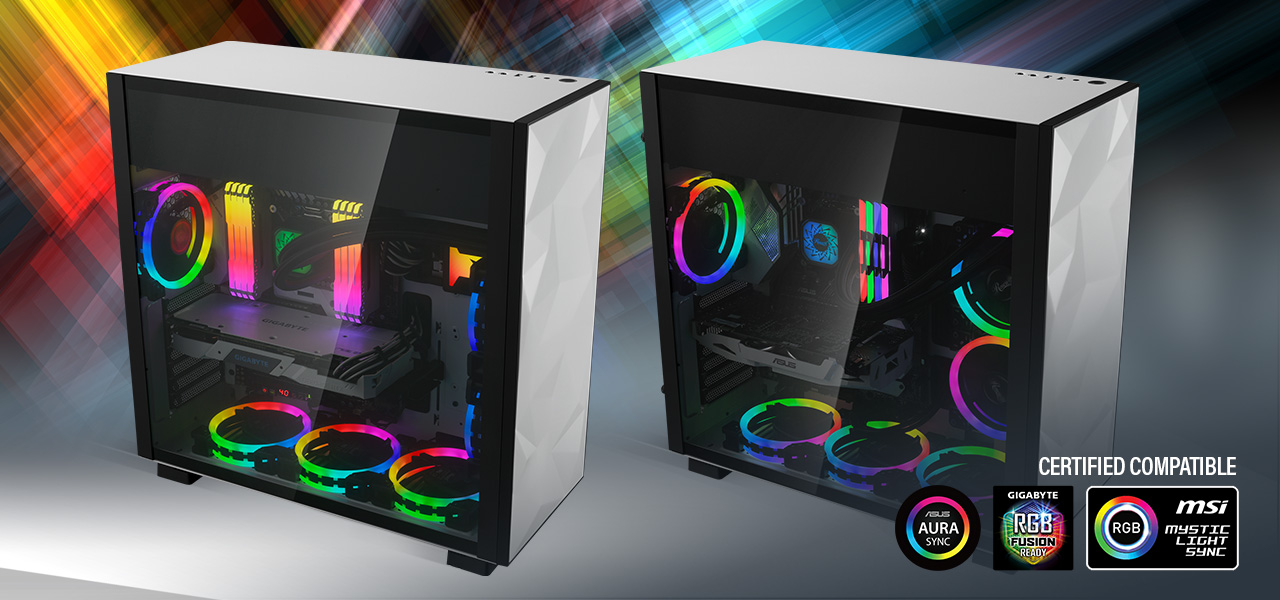
This is also what i mean by the side if i wanted to https://images10.newegg.com/BizIntell/item/11/147/11-147-298/b3_050619.jpg

can see i can add in 2 more
mossy kindle
first one is really good setup for air cooler solutions
which is mine too
500D RGB SE PREMIUM i want this case so hard
maiden wedge
YOOO have you guys seen that iBuyPower case that has the display built into the side panel?
mossy kindle
but urs so good too
solemn yarrow
Actually the second one is better
maiden wedge
It's the iBUYPOWER Snowblind
solemn yarrow
wanna know why
maiden wedge
do I wanna know why
mossy kindle
yeah i watched today linus good
solemn yarrow
This is the right side of the case https://images10.newegg.com/BizIntell/item/11/147/11-147-298/b2_050619.jpg
 mossy kindle
but pricey i thinkl
solemn yarrow
you can see air vents there
solemn yarrow
Ryzen 5 2600 and my GPU is a GTX 1660 from EVGA
maiden wedge
oh that's a good build
solemn yarrow
good for now but in like 3 years i would need to change the GPU
maiden wedge
yeah
better than console right there tbh
My friend's got a RX 590 and a Ryzen 5 2600 coming in
I'm irritated though because he REFUSES to do his research for building. I helped him pick out his parts and his monitors/cables. guess how he's building it
his dad's friend is gonna build it. Like bro can I at least help darn
solemn yarrow
Next year is the next gen consoles
maiden wedge
500 bucks for em
It's literally cheaper anymore to just build a PC
and upgrade it by a little when a new console comes out
mossy kindle
whats ur cpu temp while full stress
solemn yarrow
Let me see if my video shows it
video doesn't show but when monitoring using Cinebench i get 60c max
gaming i would assume around 55c
solemn yarrow
Both can stress a CPU and even CPU-Z can stress it
 whole sorrel
I still have a 1280x1024 Xerox from 2004 :))
 night carbon
@whole sorrel i have a monitor from 2002
night carbon
fax
whole sorrel
what type is yours?
night carbon
my monitor: https://www.amazon.com/dp/B07TGMC29J
whole sorrel
dunnu why I imagined you might have a crt :p
whole sorrel
I'm relying on this one fullscreen tho man 😔
night carbon
i used to only be able to either play on the floor in my living room or play on a 15inch and i chose the 15inch
so i know hoe it feels
whole sorrel

whole sorrel
as a benefit I guess my weak gpu doesn't have to drive an HD monitor
night carbon
what gpu
whole sorrel
gt 730 with 2gb ddr3
night carbon
i have a gt750 lol
whole sorrel
o nice
night carbon
but thats in my old pc
whole sorrel
smh got me good again 😔
night carbon
it was a prebuilt technically
night carbon
my dad made it so its prebuilt by my dad
whole sorrel
ah xd
night carbon
it use IDE lol
night carbon
i have a few systems that i bought from my school and took the parts out and sold them to get profit and with that profit i got my 500gb ssd
512*
whole sorrel
man I wish I took advantage of all the Optiplexes at school
I wonder if they're still using them
night carbon
my school isnt
whole sorrel
it's more likely they're almost fully chromebook though so I doubt
night carbon
they upgraded to chromebooks
whole sorrel
rip
night carbon
im 15 btw
whole sorrel
ah I'm 18
night carbon
and when i did the buying and selling of parts i was 11
night carbon
yeah
sand terrace
That's awesome @night carbon !
What was ur first build?

 ebon beacon
My build is based on an HP ProDesk
I plan to wedge an RM750, a 1660 Super, and an i5 4790 in this thing eventually
right now i have the RM750, just haven't installed
it only matters for the GPU
i just tried and aborted a Ryzen build, because there was a part that was not working and i couldn't tell what it was - I can't really invest more time or money into the build though maybe i'll have the motherboard replaced just to be sure, and grab a new CPU to replace the R3 2200G of questionable provenance i had in there, grab a hyper T2 because it's got the old AMD mount which I absolutely adore and I'm glad AMD left it on the AM4 standard
 opaque sonnet
what mobo tho
 robust hinge
 dawn karma
looking for a good 240hz monitor, budget is 400
maiden wedge
http://rtings.com, http://tftcentral.co.uk, and the blurbusters forums / /r/monitors are where I'd search around to see what models fit your budget/preference/availability.
The benq XL2540 and XL2546 although not the newest, are still very popular among CSGO pro's (and similar games)
 winged oriole
@dawn karma https://www.amazon.com/Acer-XF250Q-Cbmiiprx-FREESYNC-Technology/dp/B07G3GRFSZ/ref=sr_1_5?crid=Y5ZN2LR4J3JZ&keywords=240hz+monitor&qid=1575661178&sprefix=240%2Caps%2C160&sr=8-5 , https://www.amazon.com/Alienware-25-Gaming-Monitor-Height-Adjustable/dp/B0733YCKM5/ref=sr_1_3?crid=Y5ZN2LR4J3JZ&keywords=240hz+monitor&qid=1575661242&sprefix=240%2Caps%2C160&sr=8-3 and https://www.amazon.com/Samsung-27-Inch-Curved-Monitor-LC27RG50FQNXZA/dp/B07TGMC29J/ref=sr_1_4?crid=Y5ZN2LR4J3JZ&keywords=240hz+monitor&qid=1575661242&smid=ATVPDKIKX0DER&sprefix=240%2Caps%2C160&sr=8-4
with your budget you can really get any 240hrz monitor
depending if you like a 27' or 24' inch monitor prices and response time might vary but again with your budget it wont matter too much
dawn karma
@winged oriole the problem is that i live in israel and im looking for a monitor that cost about 1500 shekels which is about 400 dollars maybe more but shipping and import fees from amazon will be a lot more than 400 dollars
@winged oriole which one do you think is best from the 3 links you sent
 pale crane
Honestly not much a difference between 144 and 240.. could save some money or up the resolution sticking to 144hz
winged oriole
well most of the links I sent are around $300-$330 and I think they come with free shipping
I recently ordered a 240 hrz monitor only because im going from 60hrz to 240 🙂
plus it had a black friday sale on amazon
dawn karma
im going from 60 to 240 as well
@winged oriole the samsung you sent is actually 90 dollars shipping
winged oriole
aww man
dawn karma
the acer one does not ship to israel
winged oriole
I guess just keep looking around a search for reviews on youtube...
dawn karma
yap
winged oriole
winged oriole
im guessing so, no clue
dawn karma
oh its g sync compatible not g sync
i guess thats fine too
oh i actually found the alienware one for 390 in israel
i will probably buy it
thanks for the help @winged oriole
winged oriole
no problem, hope you find a monitor 🙂
 placid igloo
144 hz 1080 under 200 thin bezel gsync or free sync look kool
odd echo
onyx scroll
which one is better for gaming at 144hz 1080p. HDMI or Displayport
covert solstice
displayport
 languid badge
DP
 glossy fractal
is the S2417DG good?
languid badge
Nice part number... Brand? Specs? Link?
mossy kindle
@glossy fractal i have that one if u want tn panel it is good package for gamer otherwise u know just tn
i wanna go for ips
 zealous wigeon
colors are better on ips for sure
languid badge
1440p at 165hz doesn't seem too bad but there are better beals for similar specs, can't personally say anything on the user experience
I'm a color pleb I don't care about the color space too much if it's affordable and fast
zealous wigeon
I have a 27" Acer Predator and it looks pretty good although I dont use it much in favour of a 55" Q80 samsung tv....
languid badge
I use 25" 165hz Sceptre... Cause it was a bargain and it games well enough 😂
zealous wigeon
my gaming performance saw a bigger improvement from screen size than refresh rate lol although the tv does have a native 120hz
languid badge
My headaches saw an improvement with a higher refresh rate and freesync
zealous wigeon
Acer makes really nice ones then the predator is definately smoother than the tv and has gsync
oh and a faster response time the tv is like 4ms and the monitor is 1ms but I dont notice that too much
could be part of the smoothness though
languid badge
Even LTT gave sceptre the best score out of the budget options
Some ghosting, but decent enough
zealous wigeon
lol I just now realized you werent the one looking for a monitor
zealous wigeon
I've never tried a scepter but yeah that acer one cost me like 500
languid badge
The 165hz 1080p Sceptre is like $200
zealous wigeon
nice
languid badge
I won $250 to Amazon from a lan so I bought a budget monitor
zealous wigeon
I have to have the tv now though myself once you know games can be this big its hard to go back
languid badge
I can't stand large screens personally, I prefer high pixel density at high frame rates
But to each their own
zealous wigeon
for me 120hz is enough the first one I tried didnt have a native 120hz so I had to try again. And then I needed one that had 2.1 hdmi so I could actually have 4k at 120hz so you have to do a lot of research
languid badge
Though a lot of the time I can't hit 165 cause I crank graphics settings to the absolute limit
zealous wigeon
yeah thats the other thing I like my graphics on ultra so I'm not usually pulling more than 120hz on modern games even on my 2080ti
and 4k on top of that
languid badge
I am at the top of the AMD offerings with a Radeon VII
So quite a lot less horse power
languid badge
Ahahaha
zealous wigeon
It actually broke and doesnt work anymore and forced me to upgrade
languid badge
🤔 it broke less than a year of being sold and you didn't RMA?
Or did you psysically break it
languid badge
RIP
glossy fractal
is S2417dg good
languid badge
It's decent specs, but you can find similar for cheaper or with better looking displays
zealous wigeon
its seems overpriced what price are you getting
my predator was less than that bigger higher res higher refresh rate
I'm looking at dells website though so
languid badge
But I'm the budget monitor king, I settle minor ghosting for a massive price difference
zealous wigeon
Or maybe you already have one or found one laying on the side of the road if so then yeah its a good monitor use it... lol
languid badge
Or if its at the goodwill
zealous wigeon
yeah tell them you will take that "old office" monitor off their hands
languid badge
I never say no for cheap or free stuff, I've gotten lots, like my chair I found behind a bank
 toxic sorrel
Is there a monitor with a higher refresh rate than my current AOC 2476WM? right now mine is at 75HZ.
toxic sorrel
~> that doesn't really help me find suggested items for my budget if i'm being sweetly honest..
mossy kindle
144 vs 165 any difference between two ?
zealous wigeon
whats the budget
toxic sorrel
Uhh I guess my monitor budget is like... under 200
zealous wigeon
not much difference that I could tell between 144 vs 165
this is great for right at 200 https://www.newegg.com/p/N82E16824236755?Description=asus 24 inch full hd &cm_re=asus_24_inch_full_hd-_-24-236-755-_-Product
but its still 75hz
looking like $250 is about as cheap as I can find one with 144hz
 lost anchor

MSI Optix MAG271CV - Curved VA Gaming Monitor (144hz). Onze specialist adviseert deze monitor voor: ✔ Gaming: is een monitor van e-Sports niveau,...
best monitor ever
for 250
euro
in america it is cheaper
 delicate monolith
Here it is 319€ min
 bleak kite
no hdr 😦
I'm looking for an ultrawide 120hz freesync 1440p with hdr1000
that's what i'm looking at, but the 4ms response has ne at a pause
languid badge
here are some good budget options for 165Hz 1080p
https://www.amazon.com/MSI-Non-Glare-Adjustment-Optix-MAG271R/dp/B07S5GWSZL/ref=sr_1_4?keywords=165hz&qid=1575723053&sr=8-4
covert solstice
@bleak kite that’s better a bad choice if you want it for gaming
its more for productivity, and it’s perfects good for that cause the response time isn’t bad
 visual pilot
Is there a strong reason for going 1080p 165hz over 1080p 144hz?
 opal grotto
Bragging rights lol. I personally don’t think you’ll notice a huge difference between those two
languid badge
You really won't notice a huge difference between those 2, but it also won't hurt to have, the recent LTT video on refresh rate and frame rate shows casual players get the biggest benifit from higher refresh rates
And even for the 2070/5700 range of GPUs if you are cranking settings to absolute max they can't event hit 165 most of the time at 1080p in really demanding titles
 sharp panther
I'm running dual 1080s and hitting around 90fps at max settings
languid badge
But in lighter titles like mobas, CSGO , etc. Those easily hit hundreds of frames
A 165hz panel could help with a slight advantage in those kinds of titles
 stiff vine
does anybody know where i could a good 144hz monitor from 150$-170$
nvm just scrolled upo
languid badge
There is that Sceptre I posted for 165hz in that price range
Minor ghosting, but what can you expect from a budget high refresh.
zealous wigeon
@stiff vine Scepter seems to be the only one I was looking yesterday couldnt find any thing else for less than $240
of course I was looking for 1440p and higher
maiden wedge
im looking for a 144hz 1080p display for under $300 that doesnt have much, if any ghosting, and has good color accuracy any suggestions?
i ussually play games like csgo or rdr2
languid badge
Should fit what you are looking for
maiden wedge
thanks man
languid badge
No :D
maiden wedge
languid badge
For even tighter budgets I recommend the sceptre, but it does have some ghosting
languid badge
Yea that panel is basically the curved version of the MSI panel I linked
Personally not a fan of curved displays, I like my ultra thins
mossy kindle
ppl still want 1080p _?
olive token
it's still valid..
zealous wigeon
get all those frames for cheap
Of course I'm personally spoiled and prefer gaming in at least 1440p if not 2160p
maiden wedge
i got a 1070ti and an 8700k but for csgo do you really need 1440p or 4k?
zealous wigeon
no you dont "need" it and it also depends on how big your monitor is. I play on a 55" screen so my pixels are a lot bigger than on a 24" or smaller screen
but a 1070ti and 8700k should be able to play csgo in 1440p or 4k no problem
languid badge
1080p is still a desired resolution for ultra high refresh rate Game play on even the meatiest of games
 languid escarp
Acer sb220 bi a good monitor? I'm looking to pick up 2 for cheap
 tawny mural
@zealous wigeon get yourself a 240 hz 1080p
 sage trail
^
tawny mural
I rock a 1440p 144hz monitor but thats cuz my pc is a tank and can do basically anything. Ive heard amazing things about 240 hz monitors tho
Also rock a 4k hdr monitor
But my pc isnt that good to take advantage of the refresh rate on that predator
covert solstice
1440p144hz>4k60hz=1080p240hz
tawny mural
^100%
However i still wanna play red dead in 4k soooo
You know i always heard of complaints on the fan on the predator x27, and honestly i have yet to hear it.
Like i dont understand. They probably revised it
ebon beacon
https://www.amazon.com/Acer-XG270HU-27-inch-FREESYNC-Widescreen/dp/B00VRCLHYS/ i'm planning on getting this, from whoever has the best price at the time i purchase it, it's gonna replace a 27inch curved 144Hz 1080p panel
i only have a GTX 1650 but i'm probably not going to game higher than 1080p 😅 and i plan on a better GPU later
it's also G-SYNC compatible, according to newegg's page, i'm just posting this because i had bookmarked
tawny mural
Honestly im pretty sure they dont care ngl
languid badge
165Hz is the Budget 240Hz 😉
 hazy obsidian
Hello guys, i could use some advice. I’m planning on upgrading my 1080p 144hz samsung LC24FG73 to a 1440p 144hz monitor soon, but I don’t know any affordable ones that i trust. Oh and a good response time is an absolute must
 rugged grove
I don't think you'll find a low response time 1440p 144hz for anything less than $380 maybe with a sale perhaps
what's affordable and how low are you looking your response time to be? I mean this one's renewed yet it's 5ms and $300
maiden wedge
is a lower hz but a 1ms response ok to use for gaming ?
rugged grove
honestly anything under 5ms is fine unless you're doing super competitive CS:GO where it actually matters, but if you're doing first person shooters you practically need at least 120hz or higher because the improvement is phenomenal
if you want a noticeable difference and actually want to get better at a competitive game, go from 60Hz to 144Hz. You'll regret buying a 1ms 60Hz over high refresh rate, guaranteed
languid badge
Linus Tech Tips even did a video about how High Refresh can affect your performance in gaming , it was more gains for the more casual gamers than the pros
 cobalt forge
Aoc C24G1 144hz Curved VA panel is the 1080p king for my opinion. I was using 60hz ips LG display after that getting Aoc C24G1 i get really mad. Because 60 to 144hz is amazing upgrade for my eyes. Everyone should get at least 144hz display. 👌 👌 👌
languid badge
when I had to RMA my 165Hz panel cause a backlight failed I had use my 75Hz for 2 weeks... I was not happy
hazy obsidian
@rugged grove around 400-450 would work
 hasty hound


 zealous wigeon
refurbished Acer predator 27" 240hz and gsync 279.99 from amazon
 static sage
^I hear a quite of bit of bad reviews on the product is it worth it?
zealous wigeon
and I think samsung and Benq both have new ones for 299.99
I have a predator albeit a much more expensive one and I like it
cant say about that specific one though
rugged grove
Have that exact one, ask me anything
For that CPU and GPU combo you're fine, I average 80 fps on AAA games at 1440p medium/high with a 2060 non super and an old kaby lake i5
 astral gale
@rugged grove That's great that you own it. I have many questions.
1- Does HDR on it work well?
2- Did you have dead pixels
3- Does monitor do ghosting
4- What are the negatives of it?
zealous wigeon
I dont own one but I will sat that Samsung has been really good in my experience for replacing panels that have dead pixels. In one case I smacked into my tv with the vacuum cleaner handle even after it was out of warranty and they still replaced the panel for me free of charge
astral gale
@rugged grove When you're on, can you DM me answers please? Thanks.
 meager loom
I am getting this monitor as my main:
Dell AW3418DW 34.1" 3440x1440 120 Hz Monitor
And this one as a side screen:
Dell U2717D 27.0" 2560x1440 60 Hz Monitor
What do you guys think?
astral gale
What will you use this two for?
meager loom
AW3418DW - Gaming and main monitor for work as well
U2717D - Discord, youtube, twitch, OBS
zealous wigeon
it would bother me that they arent the same size but thats really personal preference. I would try to find a closer size with lower specs for the discord youtube monitor
rugged grove
- HDR works great but it should be noted it's either 144hz or full res HDR
- Zero dead pixels, not so much as a blemish
- I dunno what you mean by "do ghosting" but I haven't experienced anything like that
- Only negative was some backlight flicker but it turned out to be Spotify causing it with it's hardware acceleration setting. Hardware wise, the stand is a little wobbly but it's forgiveable due to the sheer size, it doesn't feel flimsy at all and is really articulated! @astral gale
zealous wigeon
@rugged grove whats the max Hz in HDR?
astral gale
Ok thanks. Buying it.
rugged grove
Like 60? I dunno just not high refresh lol haven't exactly checked other than watched a few movies and those are locked at 24?
meager loom
@zealous wigeon Oh, that's the think, the 27 Inch will be the same horizontal sinze as the 34 Ultrawide
zealous wigeon
yeah I actually was thinking that after I typed it
@rugged grove yeah I was thinking for gaming in HDR which I like in some games
meager loom
That would bother me quite a lot as well, in fact I would love to get kind of some monitor aesthetic
rugged grove
Haven't done hdr in games tbh. 2060 isn't great for 1440p lol
meager loom
I though about the new 34 and 27 LG Ultragear
zealous wigeon
but as I game on a 55" TV with a 27" 4k 240hz Acer Predator sitting next to me I may not be the best person to ask about monitors LOL
astral gale
4k 240 hz ???....
rugged grove
Woah what
rugged grove
Dude a 144hz 4k is already like $900
astral gale
non-existing tech has been founded in this person's house
zealous wigeon
It was only like $700 when I got it
meager loom
I also though about geting 27 240HZ 1440p monitor for some FPS games, since Ultrawide don't give you a lot of value in most of the FPS games, but higher frequency does
rugged grove
And are you sure you can do 1440p 240hz? Non native high res isn't common
meager loom
But I don't know if I would botter doing the switch all the time
zealous wigeon
XB272 27" FHD
lol its not 4k I thought it was
too be fair I did say I dont use it
1080p in 240hz only
tv looks much better
meager loom
What do you play?
zealous wigeon
Warthunder, Battlefield 5, Starcraft 2, WoW, VR games, and a bunch of others not as often when they come out like that star wars assassins creed clone and the outer worlds
obviously the monitor doesnt matter for VR
supposedly my TV can do gsync but I havent figured out how to do it....
its not in my nvidia control panel
meager loom
How far away do you sit from the TV?
zealous wigeon
about 4 feet
meager loom
I never really liked using TV to play keyboard games, I usually go for TV for games like The Wither 3
zealous wigeon
for me the screen real estate helps with first person/first plane shooters
meager loom
My last build
zealous wigeon
in warthunder I can see the pixels that make up your plane sooner farther away than on a smaller monitor 😉
zealous wigeon
you know I havent and I have thought about it
arent not all games optimized for it so it can look stretched?
meager loom
I have this build before the one I just posted, but the right monitor was barely used when not playing on eyefinity
@zealous wigeon most of then are nowdays... It's hard to find one that won't work well on Ultrawide
zealous wigeon
thats good because that was one of the major reasons I held back when they first came out
the eyefinity setup is awesome
zealous wigeon
I have been really happy with the tv though it does have native 120hz, great colors, high brightness, and a hdmi 2.1 port <-- most important thing about tv gaming
meager loom
What TV is it?
zealous wigeon
Q80 samsung 2019 55"