#old-cooling
1 messages · Page 33 of 1
 hidden mural
sTR4 socket still right

 cobalt heath
Uh hi I accidentally left a fingerprint on the preapplied thermal paste on the bottom of my CPU cooler. Will this harm anything?
 junior thunder
i would clean it off and reapply the thermal paste on the cpu
do you havbe thermal paste at your house?
and the cleaner?
cobalt heath
would it make much of a difference if I left it on? I'd like to avoid buying thermal paste xd
nope, and no cleaner
it's not smudged, just on and off
@junior thunder would it be okay if I had it the way it was and then monitored the CPU temps using the BIOS? Then if the temps got too high (I'd do a stress test), I could get some paste, remove the cooler, remove the old paste, and then reapply
 frosty moth
the oil will slightly lower the thermal conductivity but it would probably be fine
it won't catch on fire or anything, it may just run a little warmer
 lunar gyro
will 1.41 v produce 2 mutch heat on a kingston hyperx predator ram? 8GB 3200 mhz cl14 hyinx cjr
junior thunder
@frosty moth damn i was going to say that but i went to bed
at least it wont be on fire
 manic tusk
Ok gamers, I want to water cool literally everything, is it possible to water cool ram? What about an ssd?
manic tusk
Hell yeah.
 low pumice
havnt found a ssd waterblock yet but heres a ssd heatsink by ek
https://www.ekwb.com/shop/ek-m-2-nvme-heatsink-gold

EKWB - Premium Liquid Cooling solutions
EK-M.2 NVMe Heatsink is a passive heatsink for M.2 NVMe Next Generation Form Factor SSDs. The heatsink is ribbed, so it`s not just a flat aesthetical cover, it also acts as a very effective passive cooler.
 cold island
isn’t that just passively cooled?
 magic sparrow
Careful with those heatsinks. 99.9% of the time they dont just cooler the controller but also the NAND flash. Which you shouldnt try to cool the NAND flash as it works better when it's hot. If it's cold it has to work harder and thus reduces its lifespan
 severe relic
My fans kick on high for no reason
And my computer really isnt under a large load
And relatively cool around 54-65+
I tried tuning the fans with the motherboard and GPU managers but it doesnt fix anything, anyone have any ideas....
 merry crown
play with the fan curves then
severe relic
Yeah I tried that... Do you think some od the sound is because they are not "silent fans"?
 knotty eagle
Are they three pin or 4 pin?
knotty eagle
The connector
3 pin isn't speed controlled and wqill run 100% all the time
4 pin is PWM and has speed control
@severe relic
frosty moth
3 pin can be voltage controlled down to 60% speed or so
either way you probably need to set the fan profile in BIOS
severe relic
Is there any easy guide @frosty moth
I mean these are default case fans and my power supply is a bit overkill
frosty moth
it depends on your motherboard and what headers you plugged them into
 dapper path
About to redo my loop. Question, how do you make the top of the reservoir an outlet/inlet?
frosty moth
this video shows the fan settings in the MSI BIOS https://www.youtube.com/watch?v=lHix2EalN04#t=2m53s
if they are 3 pin fans you want to set to the DC fan mode
severe relic
anyway to tell the difference between 3 and 4?
And this is what may be causing my fans to just throttle for no reason? @frosty moth
i do appreciate this help
frosty moth
idk why they would throttle for no reason, unless you have one plugged into the CPU fan header so it's spinning up whenever the CPU gets warm
but the BIOS settings will work better than any software settings
if you look at the mobo header, there should be a free pin sticking out still if it's only a 3 pin fan
it could be that it's just on a 0 RPM mode, so it does nothing until 60C and then comes on at full speed
 topaz blaze
should i take my side panel off my gpu runs 10c-15c hotter when closed
 smoky rover
yes
 obsidian jewel
Well is it throttling?
topaz blaze
100% usage im close to 80c
obsidian jewel
Up to you then
topaz blaze
at 3k rpm
obsidian jewel
Won't hurt performance but it'll run cooler and thus most likely quieter
topaz blaze
i don't mind the noise just don't wanna melt my gpu lol
obsidian jewel
iirc 100-120c is the danger point for silicon
So your still well within the clear
topaz blaze
damn they can take a hell of a beating
first serious pc I've had not trying to ruin it within a month ya know
probably gonna get a better case fan tho this stock one blows
obsidian jewel
Totally get it, my first PCs cooling is mediocre at best and I wish I'd done more research first
topaz blaze
i know that i need an intake fan only the one blowing all that hot air out
just gonna have to get another case no room in this one
obsidian jewel
Yeah a single exhaust probably isn't ideal
But it seems like it's keeping your GPU cool enough how are CPU thermals?
topaz blaze
i figure if i upgrade it to a high rpm one i could make it just fine
cpu doesn't seem very hot i don't have the thermals on hand
obsidian jewel
Yeah maybe, if you get a higher end noctua/corsair
That should take care of it I think
topaz blaze
it really only goes to 77% and thats if i have 20 tabs discord and a game running its sitting at 55% rn with discord open metro 2033 and a game downloading in the background
id bet 90% of the heat is the gpu
 unique lilyBOT
 Blïtz#1000 has been warned
Reason: Bad word usage
obsidian jewel
Shame it doesn't DM you the message
topaz blaze
i said with insurgency sandstorm maxed on my 4gb card fps is low but still sits around 80c
obsidian jewel
That would do it
topaz blaze
you live you learn i guess 😳
obsidian jewel
Lol yeah
frosty moth
the real problem with high temps is you start losing boost speed
and usually at 100C they start throttling hard, even cutting into base clocks
 vagrant tree
hi im getting a warning on startup that my cpu fan is having problems
im trying to find the correct replacement fan on newegg
hidden mural
what is the fan you need
knotty eagle
They don't know what cooler it has nor can they provide a pic :/
been here, done this
hidden mural
oh
knotty eagle
Ya, they went to another channel and asked there too
hidden mural
so in other words completely unsalvageable except by the PC's owner
knotty eagle
Well, for whatever reason they couldn't get to the tower for a pic so we'd know what the fan was
Nor did they know the size of the fan other than "square"
smoky rover
what is the best and cheapest AIO Watercooling for CPU
since I wanna overclock my CPU
 hoary sparrow
dark rock 4 or fuma 2 for my 9700k?
knotty eagle
Are you going to OC or not?
Either way their performance is within 1-2 C so whichever is cheaper
hoary sparrow
ok
 stiff herald
I've not built a rig in ages... My mobo is a socket 1151, for coolers, is 1151 compatible what i need to look for?
knotty eagle
Yep, that will fit
stiff herald
great thanks 🙂
knotty eagle
Welcome!
hidden mural
i'm looking at cooler master AIOs because i'm cheap
$75 or something for a 240mm rad
knotty eagle
What are you cooling with it?
hidden mural
R5 2600, either an R9 3900X/3900 (this CPU is not out yet) or 3700X later when they get cheap
knotty eagle
Fora 3700x they'll be....OK. For the 2600 it'll be fine
hidden mural
ideally a 3900 or 3900x though, because the prices will go down when Zen3 hits
knotty eagle
Definitely not a cheap AIO for those
hidden mural
the 3900 would only be a 65W part
knotty eagle
SO is my 3700X
and let me tell you, that's only at stock clocks
Any kind of PBO or up clock and it exceeds that big time
knotty eagle
No, I'm talking the AMD Boost
hidden mural
ah
knotty eagle
Trust me when I say it's not 65 w
I've got a 360mm AIO and under heavy loads it'll still get warm
and I'm not overclocking it, just letting it do it's thing
SO I can imagine the 3900 with more cores getting warmer
hidden mural
i don't have room for a rad that big, so i'd need to find a good 240mm cooler
hidden mural
well i plan on getting this way later down the road
knotty eagle
Ah, thought you were buying the cooler now and using it later
knotty eagle
Waterblock doesn't mean much. Also need to consider fans and pump speed/flow
hidden mural
yeah
i'll grab an H100i then later
what about H100x
is RGB required for more cooling or do the i series just have better cooling separate from the RGB
knotty eagle
Well, the h100i includes pump and fan control from within the OS using software where the x is BIOS only
hidden mural
so they don't have pwm?
frosty moth
the i also has 2400 rpm fans where the x has 1700 rpm
hidden mural
the black version of the i is okay?
hidden mural
the white one has a different fan control and fan speed
frosty moth
LL fans are still pretty good
hidden mural
i'm glad because i don't want my system to be really lit up, i like a really basic system
i don't have a side window even
frosty moth
that's weird the white one is the only one that comes with LL fans
hidden mural
because it's "the pimped out $169 version"
frosty moth
yeah i guess if you're pimping your case you're usually going with a white case too
hidden mural
i got the define nano S with no side window
with no side window it has more sound dampening foam
frosty moth
that'll fit a 240? that's impressive
hidden mural
yeah it's just a shorter mid tower
frosty moth
oh right it's the define so it's still fat
hidden mural
yes it's very fat
and still long on the ground
it's literally just a mini tower define
with ITX standoffs
frosty moth
is it just me or is height the only dimension that doesn't actually matter? i mean unless it's too tall to fit under a desk
hidden mural
yeah
frosty moth
how do you like the mini ITX? none of them fit M.2 do they?
hidden mural
they do
i've still gotta buy most of the guts
i got the case and motherboard
er
power supply not motherboard
frosty moth
oh, interesting
hidden mural
gotta buy the guts in like two weeks when i get paid
RIP
i'll have a good system on many levels and i'm really looking forward to getting to use a system that has good parts, and i've always wanted ITX
i've always had cheap parts
frosty moth
i want to build a mini system but i'm not crazy about any of the cases available. the H200/210 looks alright, except it doesn't have much cooling
i wish corsair made a skinnier mini crystal series
hidden mural
my last ryzen build i had a ryzen 3 and a rosewill hive 500, it was complete butt
frosty moth
who needs all that drive space
hidden mural
haha
they actually had a mini version of the prior version of that case
https://www.newegg.com/black-corsair-crystal-series-280x-micro-atx-case/p/N82E16811139129 and of the current one
it's microATX but it's still enormous
frosty moth
yeah that's the one i meant
it's just too wide, bunch of wasted space
but i guess if you put the PSU underneath then it's basically the same as the meshify C
i just don't like the cooling in my meshify C
i need to figure out how to do it right
i had to add extra exhaust fans to get my GPU temps down, but it's running negative pressure now which i'd rather not
hidden mural
meshify C is a lovely case i think
frosty moth
getting air to the GPU is just a challenge
hidden mural
ah
frosty moth
thinking maybe getting a 240 rad and mounting it to the top instead of my 280 on the front would keep the GPU cooler
or maybe i just need better fans for the front rad to pull in enough air
hidden mural
240 rad up top is definitely a better situation
frosty moth
they are just the 1200 rpm fans that came with the h115i
hidden mural
and high static pressure fans come with every AIO
frosty moth
i wouldn't call these high static pressure
frosty moth
1.27mm-H2O
yeah they seem to work better sucking
since they were too close to the filter when front mounted i guess
these are the wimpiest fans corsair puts on any cooler
i guess it's supposed to be like a silent model
hidden mural
silent ugh
frosty moth
their higher performance ones are like 4mm-H2O pressure, more than twice as much
and i bet i need it with the thick filter on the meshify
hidden mural
maybe up top is less filter?
frosty moth
i've got LL fans on the exhaust, probably putting those in front would be better
dapper path
I recently got the EK-XRES 250 SPC PWM. Just want to make sure but that pump is good enough for two 360 rads right?
frosty moth
hmm no the LL 140mm are only 1.52mm-H2O
weird, you can only get their 2000rpm 140mm fans if you get the hydro series H115i
but yeah, having the CPU radiator on the front with a high powered GPU gets weird because you'd have to like make the CPU fan profile super aggressive to make sure the GPU gets enough air
knotty eagle
Best to have the AIO exhaust out the top
frosty moth
yeah i'm thinking that now, i'll need to get a 240 to do that though
maybe i could just run the front fans at 80% all the time, it's not as if they're loud at only 1000rpm
nah it's still in negative pressure like that, yeah i'll need to get that 240 rad, hopefully my 8700k doesn't run much hotter with that
knotty eagle
240 will be plenty to cool it provided you get a good AIO and not a cheap one
frosty moth
yeah most likely i'd get another corsair
hidden mural
https://www.newegg.com/p/N82E16835181141 i'm likely to get this later on
frosty moth
does the 100x have the same pump/cold plate as the 100i?
hmm no the X has a bigger and more square copper pad
wonder which one is better
cause i kinda want RGB fans
frosty moth
yeah i'm just wondering about the pump on the X since i might change the fans anyway
i want those LL fans but not a white radiator 😛
frosty moth
ah okay, well i'm sure i can live without the RGB
frosty moth
it has an RGB pump case, not RGB fans
knotty eagle
Beg to differ
frosty moth
except the platinum SE but that has a white rad
oh nvm the hydro series has RGB fans too
and is black
frosty moth
$15 for RGB, hmm
hidden mural
do you have to connect a plug for each fan
knotty eagle
I mean, you're gonna spend that on two fans anyway lol
frosty moth
true
the pump has a connector for the two fans, not sure how the RGB is done, i guess it probably just has connectors for those too
frosty moth
i have a commander pro in case i need it but i think the pump head includes the RGB control for the two fans
frosty moth
nah just get the 100i with the regular fans
and you can just turn off the light on the pump head
hidden mural
because of manual fan control or whatever
frosty moth
because the pump is better as bekora pointed out
hidden mural
hm
frosty moth
and it does just come with better fans as well yeah
hidden mural
that'll be something i get later
frosty moth
good idea staying away from RGB, i think i'm addicted now
i might even get LED strips
honestly though the one RGB component that's worth it is RGB RAM, because you don't pay extra for it, and it keeps working even while the computer is asleep
cold island
mugen 5 rev b, ninja 5, fuma 2, or some other <$60 cpu cooler?
 tidal glen
I just had an idea
Gather round children
So liquid cooling is great, but god forbid you have a leak in the system, your hardware may be ruined! What if there was a way to liquid cool a system, using liquid that would turn solid and seal the leak as soon as it reaches open air?
topaz blaze
Isn't that Gallium?
topaz blaze
Crap you're right
knotty eagle
Melts in your hand, not in your mouth lol
topaz blaze
Still a funny joke though at least to me XD
tidal glen
urethane foam is liquified until it reacts with oxygen i believe, but since its an insulating agent, it can't be used as coolant i dont think
rather than dissipate heat it would hold it in
topaz blaze
If it turns solid depending on how heavy it is then thwoomp bai-bai GPU XD
tidal glen
its also known as polyurethane
biggest problem is its actually capability to absorb and transfer heat (as well as dissipation), and preventing it from reaching open air under any circumstances
thoughts?
knotty eagle
Too thick
tidal glen
thick or dense
tidal glen
i figured, it just traps heat
there must be some scientific method by which you can manufacture something of those properties though, but with thermal transfer
knotty eagle
The best thing we have, still, to this day, for liquid cooling is water. UNless you wanna get real creative and use Mercury or another liquid metal with better heat transfer
tidal glen
true but the idea here is creating a substance that will prevent leakage by solidifying when it contacts oxygen
i should research this
tidal glen
i dont think there's any natural or manufactured substance that does that, perhaps i could research it later on and develop it
topaz blaze
yeah that was my main concern. given some ingenuity you could probably find some sort of small industrial pump and put it in something overly huge like a Core X9 and like, use wall power or something
knotty eagle
And a custom radiator
topaz blaze
yea
knotty eagle
passages in standard rad are too small
topaz blaze
like i said, that would be one exotic loop
tidal glen
with the complexity of it, the cooling loops and liquid would have to be custom made
topaz blaze
wavegal, i just read the idea you had above, and i think the idea of a self-sealing loop would be super cool!
if only i had any knowledge in this field to contribute ideas lol
tidal glen
same
I might actually pursue this later on
im so hyped i actually came up with something people like and im proud of myself
hidden mural
isn't gallium less toxic? or does it not have the right properties
knotty eagle
gallium solidifies at room temp
hidden mural
yeah that's a problem
knotty eagle
slightly below body temp. if you hold it in your hand it will melt
hidden mural
neat
knotty eagle
it's also not nice at all with aluminum
hidden mural
i've never worked with gallium but i've seen it being used and that property of it was not being touched on
knotty eagle
which most radiators are made of
knotty eagle
yup
hidden mural
but it'd be expensive anyway so why not just make a copper rad
but temp is a problem
tidal glen
i think the coolant im thinking of would have to be synthesized
because quite frankly, i dont think anything of its specifications exists
hidden mural
they have some really cool.... coolants
stuff that gets used in machine shops and stuff
hidden mural
hmm
my friend who worked in a machine shop had no idea what he was immersing his hands in then
hidden mural
i wonder if one could use ethylene glycol or similar coolants in those systems
or does it degrade
knotty eagle
Of course. But it doesn't transfer heat as well as distilled water. Nor does it have the same heat capacity
hidden mural
hmm, interesting
knotty eagle
Yep
tidal glen
and it can cause harm if you inhale its fumes or get it in you
knotty eagle
The fumes don't hurt you, drinking it does
tidal glen
ah
knotty eagle
At worst it's an irritant to the eyes and mucus membranes
hidden mural
maybe a ferrofluid? what might that do? i guess you'd have the problem of particulate getting stuck in thin passageways
manic tusk
I have these 3 cheap fans from up here and when I use one facing down (ontop of my case) it’s silent, 100% inaudible but when there straight up (on the side of infront of my case) they make a really annoying high pitched noise, any idea why?
hidden mural
something like a ferrofluid with a metal that is better at transferring heat
knotty eagle
Probably not maglev. The motor rotor is probably rubbing on something
tidal glen
not to mention the ferrofluid being disrupted due to the electric charge of metal components, i think
hidden mural
yeah
knotty eagle
not to mention the pumps are magnetically driven
hidden mural
that's why another metal
knotty eagle
Not a good use for ferrofluid
tidal glen
i still think there isnt any common or known fluid that does the job
tidal glen
exactly
there needs to be a way to formulate the benefits of both in a single fluid
or at least create a mixture
hidden mural
it's a scientific problem i wish i had the resources and education to figure out
because nobody is figuring it out really
knotty eagle
Well, it's not really an issue for AIO's. They rarely leak any more.
Advances in o-ring material and hoses have come a long way
hidden mural
well i was thinking more of a fluid that helped heat transfer
tidal glen
not to mention, imagine the possibilities if we could manufacture such a self-sealing coolant on a commercial scale?
 celest vine
they still slowly loose fluid over time, after 4-5 years they are usually done
celest vine
via Permeation yea
knotty eagle
The pumps don't really go bad because there's no physical drive
celest vine
usually can't do that at least easily for most AIO's
tidal glen
for a self-sealing oxygen reaction coolant, i think it would have to be delivered via vacuum-seal canisters
knotty eagle
most you can remove the base plate
and fill from there
It's fidgety but you can do it
hidden mural
hmm
it'd be wonderful if we could find a material that improved cooling efficiency and safely mixed with the self sealing
manic tusk
I have this t-force ram that’s really tall, but I want to get another am4 cooler for my Ryzen 5 2600 but I’m concerned that it might be too big for some coolers to fit, it runs against my wraith spire... could anyone help me find a cooler that will fit?
knotty eagle
Buy Scythe Mugen 5 Rev.B 120mm Air CPU Cooler, Intel LGA1151, AMD AM4/Ryzen: CPU Cooling Fans - Amazon.com ✓ FREE DELIVERY possible on eligible purchases
 harsh ermine
Question really limited for space/ power but cpu when playing demanding games os getting hot like 80 does liquid coolers draw alot of power?
topaz blaze
Negligible. <10watts maybe
harsh ermine
Hmm.
Im running i7 7700 12gb ram rtx 2060 super on a 500watt psu have to run some test and see if i have 10 lol
 simple anchor
I'm looking for an AiO liquid cooler, 240mm any recommendations?
dapper path
You just want an Asetek or something fancier?
 dapper path
I actually dont know of an AIO thats more than 150
maybe the big swiftechs
or like I said the fancier ones from EK
simple anchor
Less than $150
dapper path
sorry i meant that even reached 150
simple anchor
Oh
dapper path
most of the high ends are 120
simple anchor
Okay I swear there's one that's 170 from ASUS
dapper path
it would work fine
dapper path
Like I said it doesnt really matter. Just brand preference, aesthetics and features like RGB.
and just get the size you want
simple anchor
Well Newegg is losing on the price on it to Amazon
dapper path
Id rather buy from Amazon as long as its not a third party seller
usually faster shipping/cheaper
and easy returns
simple anchor
Gets banned
dapper path
returns are so easy on Amazon
simple anchor
True
dapper path
But you cant buy everything on Amazon
simple anchor
Yeah
dapper path
and I really liked the black Friday deals/ Cyber monday on Newegg
simple anchor
Yeah that's how I got my ram
dapper path
I bought a kit last month too
simple anchor
Shipped and sold by Amazon?
dapper path
lol is that really what it was?
simple anchor
Prob not but it became a meme becuase he had a truck load of it
Like tons of boxes of it
 cobalt lark
Does anyone know a good CPU cooler under about 70-80$?
topaz blaze
topaz blaze
Most, but master cooler’s the oddball with that pattern from what I hear 🤷🏼♂️
This one’s really the only good water cooler in his price range too.
hoary sparrow
Should I get a fuma 2 for 72 dollars or a mugen 5 rev b for 10 dollars less?
magic sparrow
@topaz blaze there are $50 air coolers that performs better than that
 worldly heath
I would also advise against a 120mm AiO unless that's the only thing that would fit due to size
cold island
the fuma 2 should be like $60ish on Amazon rn @hoary sparrow
hoary sparrow
amazon is a big no no for me
cold island
why?
hoary sparrow
international shipping vat and other bs taxes double the price suddenly
cold island
ic
hoary sparrow
And on top it can get stuck in customs xd
cold island
they perform really close, the fuma is just quieter but you could add another fan to the mugen 5 rev b, so both would be pretty good
really depends on if the quieter noice is worth the money to you
cold island
yeah
but the fuma has an extra 15mm fan, so the other can run slower and quieter with the same performance
here’s a good review of it and the mugen 5 rev b is on the graph too https://www.google.com/amp/s/www.tweaktown.com/reviews/9223/scythe-fuma-2-cpu-cooler-review/amp.html

TweakTown
Scythe's FUMA 2 CPU cooler gets fully examined today. Should you add it to your list of potential new coolers? Let's see.
hoary sparrow
I wonder if I could find a second fan for the mugen 🤔
cold island
you could
which would put it probably neck and neck with the fuma
but if you put a $30 fan like a a12x25 on it I’d be like $20 more for the same cooling, so the fan would have to be around $10 to be the same price as the fuma
topaz blaze
Yeah I guess that works, I just lean towards water cooling when achievable.
hidden mural
i'm gonna get that fractal design AIO cooler
i forget the name
celsius S24
as an american, i really need to start understanding temperatures given in C more organically
 river gorge
Fractal makes nice AIOs
hidden mural
ye4s
and no RGB nonsense to deal with
just complete darkness inside my windowless case
:3
cold island
how much is it? @hidden mural
 cursive zodiac
I just got new ll120 fans from corsair and my pc usally runs from 60-70c and idk if im just being pompus but they are making a buzzing noise, I have fan speed control and it dosent make the noise until around 40% rpm. Its like a constant hum and I can hear it through my headset
is that normal or did i buy some poo fans
hidden mural
@cold island still $200
cold island
for a 240? Thats like really overpriced
magic sparrow
Esp when full custom loop with CPU and GPU is $230
(if you know where to buy from)
cold island
i'd suggest the eisbaer 240 if u want best performance, its one of the best 240mm aios and only lke $110
magic sparrow
I mean a copper custom loop for just CPU is $115 from Bykski
240mm rad as well
RGB fan, res, and CPU block
tidal glen
so
basically
anyone care to hear about a scientific idea that could, if executed, change the way that liquid cooling is managed on a domestic scale?
@ me if you do because i'm playing gmod
 fading yacht
Hey gamers quick rgb question
So basically i hate mystic light and i have an msi board. I was wondering what corsair fans are the bestforvalue and that can do sickomode colours AND if i can put my cpu clrs rgb cable into the node or whatever its called. Pls @ me if you can help. Thanks gamers
topaz blaze
🍿
 warm comet
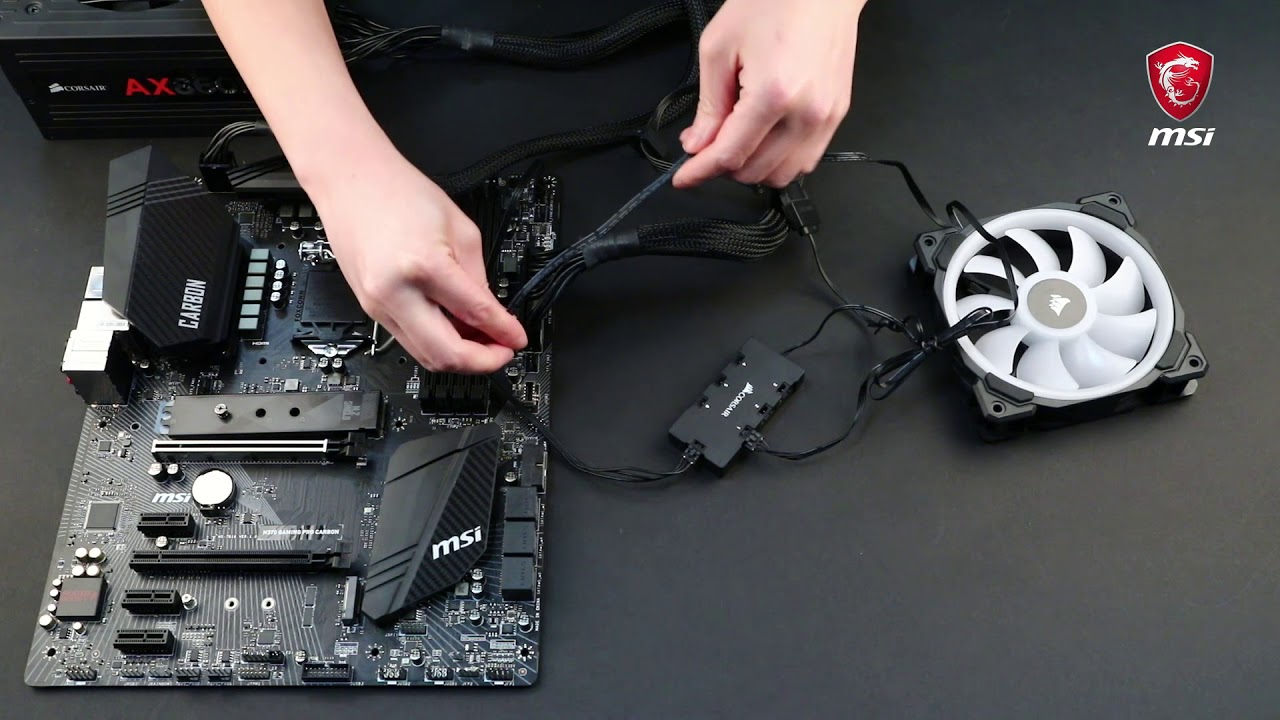
In this demonstration, we'll show you how to connect Corsair RGB LED fans to the JCORSAIR1 connector.
magic sparrow
@fading yacht Corsair fans are overpriced. Best bet is to buy other RGB fans and the controller by itself and then wire it up yourself. Also look at this for better mystic lighting software
https://github.com/ixjf/MSIRGB

GitHub
Alternative to MSI Mystic Light with unlocked colour control and customizable effects - ixjf/MSIRGB
magic sparrow
dont know
fading yacht
Uh for the cue wheel can we ajust the speed to make it faster
Im tryna do this
Switch from colour to colour real fast
warm comet
I don't think you can sync mystic light with anything else
other than corsair if you have the jcorsair header
There is an app called jacknet rgb sync that you can use to sync corsair devices rgb with other stuff. I think it works with asus razer, logitech and cooler master. maybe a few more
I use it to sync my logitech mouse rgb with my corsair stuff
cursive zodiac
Im currently stuck using 3 ll120 mm fans with a radiator for my cpu. I currently have 1 fan pulling air in from the front and a push pull set up on my radiator on the back, and im getting 70-80c temps on certain games. Anyone have a suggestion for a different way to set them up, i have 2 fans slots on the front, 1 exhaust slot, and 2 top slots
low pumice
@cursive zodiac I would suggest like 2 fans intake 1 fan exhaust/radiator
low pumice
I mean if you have 3dmark that shows temps with the results
You could also just have like msi afterburner in the background while benchmarking, and checking it at the end and looking at the temperature graph
cursive zodiac
alright thanks man
 dense lodge
 blissful kettle
Where the hell do I put the water then lmao
cold island
trying to refill it?
blissful kettle
Idk where it is
unique lilyBOT
 Toop#9027 has been warned
Reason: Bad word usage
knotty eagle
Uh, not supposed to open AIO's. Supposed to be pre-filled and stay that way. What brand is it? It's usually best to go in from the Pump, which is in the CPU water block to refill and burp them if you have to
Definitely going to need to remove the CPU block
blissful kettle
I don’t know the brand as I bought it pre
Made
But I took some more pictures if that helps
It seems to be 2 fans on the radiator
And then the 2 pipes and nothing else
knotty eagle
I'd recommend watching Gamers Nexus video on refilling an AIO
to get an idea of what's needed
blissful kettle
Ok
knotty eagle
Wait, is there a reason you're doing this?
CPU getting hot or something?
You're also going to need Distilled water, not tap water and CPU Thermal paste to get this done
Hopefully yours has a fill port on the radiator?
 blissful kettle
Yes
The CPU is peaking 80 constantly
I plan on redoing thermal paste
Sad 😦
Also, is it just normal distilled water ?
@knotty eagle
Or is there another chemical needed
 supple cobalt
um. Your paste is most likely bad. your AIO should not need a refill unless is leaked. and then thats a bigger issue
unless you have overclocked your CPU significantly and have been stress testing it
blissful kettle
Well, it is low on liquid
supple cobalt
how do you know? they only have as much as they need to function in them
supple cobalt
Theres only like 3 brands that have refillable AIO's and that does not look like one of them
blissful kettle
I know, it’s aids
supple cobalt
what CPU
blissful kettle
I7 8.8HZ
supple cobalt
what?
blissful kettle
You did not want to know the CPU ?
supple cobalt
thats not a cpu
blissful kettle
8700K pretty sure
supple cobalt
than yea that things going to get stupid hot with that cooler
its much too small for a 8700k
you can try repasting
blissful kettle
I am
supple cobalt
and doing a remount. but a 120mm AIO for that cpu is beyond the minimum
unless its like a 8700 non K skew. but even then. if you push that CPU its gonna heat soak that radiator pretty fast
blissful kettle
Yeah, it’s gonna fell bad to refill
Btw
Is it just distilled water
Or do I need another coolant
To add to the distilled water
supple cobalt
I would not refill that. I would replace it
if it sincerely is out of coolant...than you have a bigger problem
how old is this PC?
blissful kettle
2 - 3 years
supple cobalt
repaste with a good quality thermal compound and if you still have issues replace the cooler
opening up a sealed AIO not designed to be opened has a larger chance of something to go wrong and damaging equipment if it leaks
magic sparrow
Technically you'd need to refill AIOs due to permutation. But your pump will die long before that
blissful kettle
Ok, will do, but for any future reference, it’s just distilled water
supple cobalt
its distilled water and a growth/bacteria inhibitor
if you dont know what your doing I cant recommend refilling it. a Open loop is another story
blissful kettle
Ok
blissful kettle
I got one more question for general knowledge, thermal paste is universal, so it does not matter the type of cooling system you have, thermal paste is still normal thermal paste ?
blissful kettle
Ok, thanks
 hollow panther
Don’t get cheap Chinese stuff, get like arctic silver or something from another reputable brand
 copper patrol
i recommend Thermal Grizzly Kryonaut
hollow panther
^
copper patrol
some of the best (if not, THE best) thermal paste out there
 azure crown
i just used kryonaut
copper patrol
i mean tbh theres not that much of a difference between all of them in terms of temps, but like kryonaut is the same price so why not :D
azure crown
its not a bad price too
copper patrol
blissful kettle
It’s fine right
blissful kettle
Idk, #1 on amazon so I’m just guessing here lmao
azure crown
the kryonaut on newegg is being shipped by some 3rd party seller
so im not sure about that
knotty eagle
MX4 is good. Difference between Kryonaut and MX4 is like 3 degrees C
blissful kettle
Which one is 3 degrees
knotty eagle
The difference between the two is only 3 degrees C
So, MX-4 is just fine
I use it
hidden mural
MX-4 is my goop of choice
same goes for a lot of people
it goes on easy and spreads nicely just from pressure
cold island
 for mx-4
topaz blaze
Dis one
 short acorn
Enermax Liqfusion 102.17 CFM aio any good?
knotty eagle
Yeah, they grew a lot of goop inside
Plugged up and quit cooling
H100i is a better 240mm choice
cold island
wasn’t that only on the tr coolers? Or their entire lineup
knotty eagle
Well, if one does it, the rest will too. Same materials, just a different sized block. Not sure I'd trust them until it's confirmed the issue was resolved
Steves video is from October so....oof
cold island
yeah I saw that and it looks terrible 
hidden mural
@topaz blaze do you have the Radeon VII
i really want one of them since it's basically just the penultimate version of the vega architecture
and it's kind of a silly thing
i like silly hardware
topaz blaze
it is
topaz blaze
mine is a badass hbm2 overclocker
topaz blaze
hidden mural
oof that OC speed
 hidden mural
the most you can get out of a vega 56 is like 980 before it becomes unstable
i dunno about a 64
less resources about overclocking those
probably because power draw is an issue
OCing the HBM will really give you that performance boost though
i really hope AMD keeps investing in HBM so it can find its way into Navi cards too
knotty eagle
They aren't. None of the newer cards use it
hidden mural
it'
it's unfortunate
because by developing the tech further they could've stayed ahead of GDDR6
and used it in their most high end cards
maybe the VII will go down before it's made irrelevant
i would surely like to use one sometime, if only because it's so ridiculous
yeah the 5700 XT handily beats it already
dunno why they're still $500
GPU market is weird
you'd think it'd be below $400 because it's somewhere between the 5700/5700 XT
knotty eagle
it's going to depend on the game honestly
SOmetimes the VII is still a tad faster
But still, it's only a couple FPS.
So for the money, 5700XT is a better option
hidden mural
it's not $100 extra of performance
so hopefully we see the VII go way down in price in the coming months
as it's already showing up with price cuts of $200 (to $500)
but also for $1000
both new cards
ebay is weird
magic sparrow
$500 for a R7 should be pretty damn good. Sure in gaming it's a bad choice given the 5700XT. But the R7 is a great work station GPU
topaz blaze
do you guys think a deepcool castle 360ex is enough for a 1.34v 5ghz i9-9900k
azure crown
A 360mm rad should easily handle an overclocked 9900k
topaz blaze
aight
hidden mural
Hei I would just like to see it hit $300, i'd honestly pick one up for the hell of it
topaz blaze
1.34v under load , 5.0 clock 0 avx could be 150-225? watts, varies by chip , config, and more, but sure. It really depends on the use case, it's always valuable to measure package power when collecting data.
 lavish folio
Too many channels
hidden mural
yes
 neat river
Who do y’all recommend in terms of radiators
knotty eagle
COrsair or EK. nothing too special about radiators, most brands are fine
It's the pumps and blocks that should be picked carefully
neat river
Alright then who do you recommend for those
knotty eagle
EK
knotty eagle
Welcome!
azure crown
EK makes some of the best CPU blocks. They make some pretty cheap ones too for around $50
neat river
What fans do y’all recommend
 clever berry
 knotty eagle
Silent wings
cold island
noctua for the best performance fans, and alphacool for best performance rads
neat river
Noctua it is then
 heavy lake
AIO vs stock cooler on 3600x, what dose this chat feel is better?
 dire field
im debating on this one too as im considering a 3600x as well
unless ur going nuts on overclocking, from what ive read, you dont need anything fancy
unless u wanna keep your case nice and cool at all times, spending the extra money on AIO doesnt really seem worth it to me
a good fan cooler would do the trick, but i guess that wasnt really your question, so it depends on what u plan to do and want from the 3600x and ur computer
magic sparrow
Just decent air cooler. Usually gets better noise normalized perf over cheap AIOs
 limpid elbow
Best brand for countering the heat while overclocking?
Noctua is one of my choices, but is there anything else I should be aware about before I proceed with Noctua?
obsidian jewel
BeQuiet has a lot of good options
 acoustic scarab
pretty much any giant air cooler will do the trick
limpid elbow
performance wise, anything that wouldn't fail me?
I heard Noctua was good performance wise.
obsidian jewel
Dark rock pro 4 is better than some AIOs
acoustic scarab
the nh-d15 is big, quiet, reliable
limpid elbow
i have a hearing loss so i dont worry much bout' the sounds lmao
acoustic scarab
oh ok
limpid elbow
plus sound cancelling headphones hehe
limpid elbow
imagine putting a car radiator in your pc
Ok, I'll stick with nh-d15, why would I need three fans anyway when I have one giant fan.
acoustic scarab
you can also just buy noctua fans apparently
they're.. weirdly pricey
like $20 per fan for the good ones, yeesh
topaz blaze
Car radiators can work well as long as your coolant is compatible with any mixed metals in the loop, if present. You'll want an ethylene glycol/diethylene glycol based antifreeze without 2-EHA or silicates.
 silk salmon
can i use the blood of my enemies as a coolant for my PC?
river gorge
yes
 burnt goblet
however, you void your warranty by doing so
because cleaning that from the cooler on returns is just .. annoying
 flat finch
It could coagulate if you dont use some sort of blood thinner in your loop. Youd have to take it apart to clean it
silk salmon
how about the tears of my enemies? or is that worse? else, what can I use that belongs to my enemies..
asking for a friend.
as one does.
flat finch
That could corrode the blocks because of its salinity. Remember to try and avoid mixed ph in your loop when possible to avoid corrosion
flat finch
My PC has drip cause it uses my grandma's iv
obsidian jewel
should i be worried about thermal throttling with a 3700x and a stock cooler?
no OC
obsidian jewel
cool cool
blissful kettle
So my PCs fans are not working except for my water cooler put into the mother board
That’s where all the 5 fans are connected and they are not getting power
blissful kettle
Power supply
Direct pretty sure
My PCs also prebuilt
So that’s also a problem
knotty eagle
Unplug them all but one and see if it works
knotty eagle
Right
Unplug all the fans except one
So, one black plug, one white plug, see if it works
White plug = power in
blissful kettle
Ok
knotty eagle
Might be one bad fan shorting out the bus
Might not hurt to power it down and then back up too. As in fully off switch and physcially unplug the main power cord
knotty eagle
Noise or high temps
 short sand
is air cooling ok
knotty eagle
Yes, unless you want to overclock
short sand
my gpu is overclocked and a duel fan.
knotty eagle
For GPU it's fine, not much other choice without a custom loop
topaz blaze
Can say repeating did a lot for me
I
My cpu
Don’t know about gpu cause haven’t done it
topaz blaze
Are Be Quiet AiO's?
 vale vault
simple anchor
vale vault
simple anchor
Does anyone know of an AiO that works with RGB Fusion 2.0?
That has RGB and isn't $130?
simple anchor
Nvm
 kind apex
@simple anchor the evga 280mm one was on sale for 99.99 but only works with the evga software for lights
simple anchor
Already got a cooler
kind apex
cool
 wet bramble
Wow, I just upgraded my HTPC with new cooling as I did not like the fan noise. I removed the stock Intel proc fan and replaced it with a Corsair H80i v2 using two Noctua NF-A12x25 fans in a push-pull setup with the radiator. This whole thing was in a Coolermaster 130 compact case (made for mini-ITX builds). It's now stunning how quiet it is. Those new generation Noctuas are just amazing (but, still ugly - but they are inside the case and I don't care). It was a major pain in the ass getting the fans and radiator mounted, plus I had to remove the motherboard to install the backplate for the cooler. Got a lot stuffed in to that small enclosure but I now have what I have always wanted in a HTPC - it's small, powerful, and quiet. Happy Holidays everyone!
 stoic yacht
Any experts on CPU cooling here. I need to choose one to cool an intel i9-9820X Skylake X 10-Core 3.3 GHz (4.1 GHz Turbo) LGA 2066 chip. I have a corsair case
wet bramble
@stoic yachtIt's important to know what you will be using the system for. Are you a serious overclocker playing PC games at high frame rates? Or, just a "normal" user, not overclocking, casual gamer, every day PC user? Obviously, you can't just lump everyone into two categories, but those are kind of the opposite ends of the spectrum (as defined by me, so subject to debate. Haha). I am a big fan of AIO ("all in one") coolers such as the Corsair H100, and it's siblings. Easy to install in a normal sized ATX case, will run very quietly for every day "normal" users, and you can still do some serious overclocking. These run in the $100-300 range. They are reliable and pretty well reviewed (on Newegg). Air cooling by using an engineered heat sink in conjunction with associated fans would be another way to go and it's a cheaper solution and can yield very good results. I'll be happy to answer more questions, if you wish. Plenty of other knowledgeable folks on this forum. Again, the important question is your usage profile. Cheers! Edit: Another important consideration is the maximum power generated by your processor. This will be in it's specs and any kind of cooler will have a power dissipation rating. You always want to get a cooler that's rated to - at least - match the power generated by your proc.
hidden mural
i'm getting a 130W rated cooler for a 95W CPU
reason: when it boosts up it uses more than the TDP sometimes
also any overclocking
wet bramble
@hidden mural Yes, I absolutely agree that you want to overrate your cooler. Same thing with power supplies. At the end of the day, the two items that will keep your system running smoothly are the cooler and the p/s.
hidden mural
yeah my power supply is 750W and i need at a basic level 550W
and the cooler is just a cheap hyper T2 also
it's something anyone can afford if they can afford to build a PC
hoary sparrow
is a fuma 2 enough cooling for an i9-9900k?
wet bramble
If you just paid over $600 for a proc (like @stoic yacht) you probably want to splurge a little on a cooler. AIO's are kind of no-brainers today.
 buoyant mirage
https://www.amazon.com/gp/aw/d/B07YZGPRSF?ref=ppx_pt2_mob_b_prod_image
What do y'all think about this for a 4770k?
wet bramble
@hoary sparrow That's a 95W device. I would say the Fuma 2 "should" be plenty. But, as always, it's going to depend on your usage. Cooler usage is not an exact science and at some point you will need to install a temp monitoring app (like HWMonitor) and see what's happening. Sometimes trial and error will either show that your cooler is doing the job (i.e. the proc is not exceeding the max temp in the processor specifications) or it's not (time to upgrade to a better cooler).
hoary sparrow
ok cool
wet bramble
Emerald, I would not even consider buying something with a $15 fan. I've had exactly one failure since I began doing my own PC builds and it was a stock fan. Buy good fans. A decent air cooler is going to cost ~$50. Don't cheap out on a cooler.
buoyant mirage
alright i have 120 aio coming from a friend this is just a temporary cooler until it arrives
wet bramble
Sure, I would go with that. Just not a good, long term, reliable solution.
 gilded cipher
yeah i have a cooler master liquid all in one 120mm fan for cpu cooling
just bought, whats your initial take on the product itself? planning to install it when my friend sends over his cpu and motherboard over to me (ryzen 7 1800x and asus motherboard)
topaz blaze
Can I sandwich the radiator with 2 fans
 undone quail
You can do push pull configuration
topaz blaze
O that’s the name for it?
Thanks
Do I really have to use 4 screws to secure the fan with radiator or 2 is fine if I screw them on diagonally
burnt goblet
ask yourself this: Are you okay with having a container of water, in your case, that is not secured tightly?
burnt goblet
it is entirely up to you
 uneven halo
Anyone got a corsair h100i white?
 silent scarab
 hidden mural
if you're asking for the sake of selling/trading then that isn't allowed here, but if you're asking because you genuinely think the colors are different, well, they're not
 pale plover
So.... should i get a 240mm aio for my i7 9700k?
I have a 120mm with 2 fans on it right now
knotty eagle
Yes
pale plover
Only place i can put it is in the front, and i have 3 120 fans in there
So i might want a new case
pale plover
How much is that?
knotty eagle
$50
pale plover
Because i hit 80c sometimes
pale plover
I have a really crappy case to, so i might just get a new one, idk
knotty eagle
What is it?
pale plover
One 120mm top fan
knotty eagle
nothjing in the back
pale plover
And a 120mm back fan
pale plover
But i have 3 fans in the front
pale plover
I might get a nzxt h710, or il just stick with this one.
knotty eagle
The only concern I'd have is enough room for the AIO in the front, they're twice as thick as fans
That'd be a good choice too
pale plover
Or a corsair 570x
knotty eagle
I don't like all glass cases because the dust sticks to them. Just food for thought.
knotty eagle
Quieter for sure
manic tusk
Jesus, it looks thicc.
knotty eagle
It's HUGE
manic tusk
Is there a chance it would interfere with ram???
manic tusk
Ok well looks like I’m not getting it lol
low pumice
Some CPU coolers with ram clearance issues wont have issues if you take off the second fan
knotty eagle
Not pre applied to my knowledge
Let me check if it includes a tube though
Looks like no paste
Get some MX-4 or whatever you want
manic tusk
Ok
low pumice
Some do come with paste, usually not pre applied tho
knotty eagle
The Mugen's?
low pumice
Idk
Nh-d15 came with paste
knotty eagle
Mugen doesn't
knotty eagle
Honestly no idea
manic tusk
Is arctic Mx 4 good
manic tusk
Is there... better stuff?
knotty eagle
Thermal Grizzly Kryonaut
manic tusk
Look good?
knotty eagle
Yes
manic tusk
Coolio.
I also have 40 extra dollars that I’ve have soon, Is replacing the fans on it with noctua a good thing?
knotty eagle
Those fans are low RPM high air movement
Noctua can move more air at the expense of noise
So your choice
burnt goblet
@low pumice the noctua paste is fine
@knotty eagle remember to caution people about understanding the application of cryonaut
dont want that stuff spilling all over
magic sparrow
LM isnt the only thing that is electrically conductive
some thermal paste is as well
magic sparrow
idk
magic sparrow
Ah, well that's nice
knotty eagle
Right. I don't like to recommend conductive pastes
burnt goblet
@knotty eagle my reading stinks today :)
magic sparrow
not to standard consumers anyways
knotty eagle
No worries
burnt goblet
jumping around on too many topics. Only handle kryonaut LM normally. Use other brands for paste.
burnt goblet
indeed
 serene lava
Thoughts on Corsair's Commander Pro system? Anyone here use it?
Currently trying to hook up 8 fans. I don't really want to y split off the mobo if I don't have to
 verbal folio
Do you have to put a cpu cooler in?
wet bramble
@serene lava I did take the time to download and read the Commander Pro install guide. A couple of thoughts come to mind. First, it requires the use of one of your mobo's USB 2.0 ports for control (gets power from any SATA power connector off your power supply). I think most modern ATX mobo's will have two of those. So, that leaves you one. Most cases will use at least one USB2.0 port to service USB2.0 ports on the front of the case. If you use (for example) a Corsair AIO cooler like an H100i, H75i, etc, some of those coolers also require the use of one USB2.0 port to power and run the cooler pump. So, you can do that, but now you are using one of the USB2.0 ports on the Commander Pro itself. Should work, but if you need another 2.0 port then you are down to none. Next, what is your aversion to using "Y" splitters? Again, some Corsair AIO coolers use splitters on the device itself if your radiator is using two fans (either for push/pull or side_by_side). This is desirable as you want the two fans connected to the splitter to be controlled by the "cpu_fan" port. It's the most important fan port on your motherboard. If "Y" splitters caused problems I really doubt that Noctua would include one with every fan they sell. A well engineered mobo should support all fans running at full speed on every fan connector. That would be crazy loud BTW. But, truth is that in most systems the fans are only running at less than 50% the majority of the time, so running "Y"'s off a couple of the connectors should not be a problem. If you're going for a world record fastest processor you need to be looking into how to cool with liquid nitrogen 😉 Now, if you are thinking about the Commander Pro to run RGB stuff that's a whole 'nuther ball of wax. TL;DR Running a couple of "Y" splitters off your mobo should not be a problem. Hope this helps you.
topaz blaze
Kryonaut is effectively non-conductive. Conductonaut is - very.
 odd wigeon
@uneven halo realistically, if u have the money: yeah, it’s worth the price. But there are probably cheaper alternatives, which might be good enough
uneven halo
well i kinda like the rgb fans that come with it and also the price is not to bad considering the nzxt kraken x52 is selling for $130 but still its a lot of money to be putting down
@odd wigeon
odd wigeon
Yes, the rgb is great. As u said urself, other products like the kraken are a little cheaper, but still good. Again, if ur down spending the money, go for it. If not, find a cheaper, more boring product
uneven halo
lmaooo yeah maybe ill just bite the bullet and get cause honestly it will work for any cpu that i upgrade too lol
and i probably wont ever need to get another AIO cooler again
odd wigeon
Tbh I personally prefer the black/silver version and it’s considerably cheaper
uneven halo
yeah i would but it doesnt fit my white and black pc build
cause its gonna go in a s340 elite case
odd wigeon
I was about to say, it has to fit with the rest
topaz blaze
@ wall of text/others earlier - Standard mobo fan headers are usually rated to 1 amp, sometimes 2 or 3, manual will tell.
Fans will be labeled for max current draw on the back, ususall <.2 A each.
Nothing wrong with running 5 pwm fans off a header.
uneven halo
yeah and the nzxt aio fits because its nzxt but doesnt fit the color scheme where as the white aio does and it also has rgb fans that are basically $35 a fan
odd wigeon
U gonna do it, then?
odd wigeon
I dunno about ur financial situation
topaz blaze
Check out gamersnexus for noise normalized benchmark tests of various AIO
x62, h115i are some of the better
odd wigeon
okay, the one @uneven halo had was h100i
uneven halo
yeah it fits perfectly
and i mean i can afford it no problem its just i dont like spending money lol i just got new ram and it might be here
tomorrow lol
topaz blaze
h100i* fixed * is dual 120mm fan - nothing wrong with that
uneven halo
its just idk should i drop that kinda cash and is it worth it lol
magic sparrow
I mean if you dont like spending money there is always good air coolers
but I assume you dont want that
less that half the cost for what is basically same noise normalized perf
uneven halo
nah i like the look of the white lol
magic sparrow
There are some white air coolers, if that can work. But idk
uneven halo
true ive seen some but then it gets in the way of the ram
wet bramble
I am running an original h100 cooler today. Point being, they are pretty reliable and have good life. Should last through a few upgrades. So, paying a little more is more of an investment.
topaz blaze
Typical life is 2-4 years without maintenance, ya.
uneven halo
yeah so kinda like what i was saying earlier is that if i get it i probably wont need to worry about upgrading it cause it will still be good and looking sharp lol
wet bramble
I got that h100 in 2013. So, charmed life for that cooler.
uneven halo
lmao yeah and i mean not like ima change the color scheme of my pc and white kinda goes with everything and the rgb fans are kinda like a bonus with the aio imo
wet bramble
@topaz blaze Just curious ... If, as you say, typical life is 2-4 years, then why would Corsair be giving 5 year warranties?
topaz blaze
Maybe they've upped the componet build quality and coolant choices on those units.
IIRC most AIO's run propylene glycol/water/corrosion inhibitor + biocide
The manual-goes-in-the-trash- folks often overheat the coolant at some point - 80C or so for a few hours a week will cause enough coolant loss to cut that longevity down
simple anchor
Does the Corsair H100i work with RGB Fusion 2.0?
 rain pumice
somebody help out an old man, and tell me whether or not the AI1 cooling system on the computer i'm considering could freeze and burst - should the temperature drop {power outtage} for enough time to cause this - or is the fluid inside the system resistent to freezing {as distilled water isn't?}
rain pumice
yes - as i understand - the system would come precharged with fluid and hopefully never leak or need recharged = ?
knotty eagle
I wouldn't say never but it will take 5-10 years
rain pumice
but could it freeze and burst?
knotty eagle
Are you using this outside?
topaz blaze
Usually they use propylene glycol mix in AIO's - idk what the Al1 is, looks like some EK custom kit? - PG /water coolant has low-ish expansion on freezing vs straight water, also somewhere around 0 -10f freezing point
rain pumice
no --- but we live in the country, and occasionally lose power - and are not there 24/7 - so its' possible that we couldn't resolve the outtage for a couple days
knotty eagle
Keep in mind, it would have to get below freezing inside your house and then it would take multiple hours before it starts to freeze.
So the possibility of it freezing exists but you'd be frozen too inside your house
realistically, no, it won't freeze.
rain pumice
propylene glycol is what i thought should be used to charge any system - but when i tried to research {via google} - i wasn't able to verify =- like i said, i'm an old guy, and most of this is pretty foreign to me .........but i'm trying.......
knotty eagle
No worries
It depends on the propylene glycol content
Most manufacturers don't advertise that information
5% content is a 29 degree freezing point, while 40% is something like -10 degrees
topaz blaze
PG is a budget pick - if you post the full component list - I can recommend something much better.
knotty eagle
But the inside of your house would have to get below freezing for hours for that to happen
rain pumice
clearly..............i'm not interested in any trade secrets.........i just want to be reasonably assured that if we lose power for several days, and aren't home to remedy quickly, that the computer won't be trashed via distilled water throughout .........
knotty eagle
What computer is this? A pre-built that includes water cooling?
topaz blaze
I'm unsure what an AL1 cooler is - could you link it?