#cpus-mobo-and-memory
1 messages · Page 134 of 1
 slow kernel
 main pulsar
i assume you have gotten the same result with those
slow kernel
yep
main pulsar
go back to the recording tab and right click the default mic
go to properties
then click the levels tab
slow kernel
ok
main pulsar
make sure its at 100%
slow kernel
yep
main pulsar
i highly doubt both of your mics are dead
slow kernel
same
main pulsar
that would leave the issue between the jacks themselves to the physical audio device on the board
because i assume, with a generic windows driver, there is no extra software or configurations messing with the device
slow kernel
yes
main pulsar
and considering you have reinstalled windows, only to get the same result
slow kernel
yes
main pulsar
the issue isnt configuration or driver related
open your case, check the audio section of the motherboard
its the area where the audio jacks are, down to the bottom of the board
look for anything that could look like damage
main pulsar
give the capacitors near the bottom of the board a little wiggle
they cant shock you if the system is on rn
just touch the top, see if any are more loose than the others
slow kernel
they seem fine
main pulsar
do you see 9 of them?
main pulsar
do you see the really small one above the audio chip?
slow kernel
yes
main pulsar
is it loose at all?
slow kernel
no
main pulsar
sounds to me like either a partly dead audio chip, or a motherboard trace has been messed up somehow
slow kernel
So what do you suggest I do
main pulsar
42 is kinda alot for just a mic tho
this would be better
well, not better, but cheaper
main pulsar
yeah
heres a cheap ebay sound card
https://www.ebay.com/itm/PCI-Express-PCI-E-5-1-Ch-6-Channel-CMI8738-Audio-3D-Digital-Sound-Card-Adapter/293776145797 @slow kernel
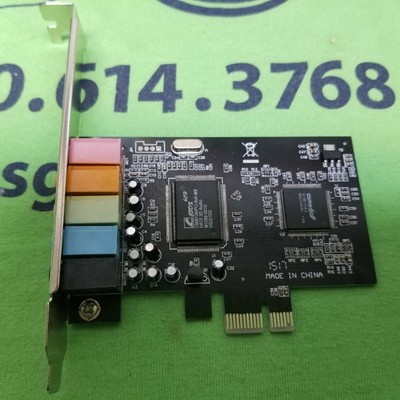
eBay
(Unless specifically listed otherwise). Drivers not included unless specifically listed.
this ones cheaper and black
 peak sail
should I be happy my 3600XT only runs at 4ghz on air?
 dreamy dragon
Hello guys, I need help
 gritty meadow
then ask, and if someone has the time/desire/knowledge to help, they will answer :)
dreamy dragon
I bought this motherboard: https://www.newegg.com/p/1JW-003D-00042?Item=9SIAGSHBPR3282 and installed it and everything works fine
EXCEPT my cpu fan is always on 100% speed and I can't control it and motherboard doesnt seem to detect it
I'm thinking it might be an outdated BIOS but I'm not sure how to find the right BIOS file to flash it, considering its an unknown manufacturer
gritty meadow
a inline voltage controller for the fan could fix it for you
dreamy dragon
ooh
gritty meadow
https://www.newegg.com/noctua-na-fc1/p/1W8-001X-00014 <- something like that one
but there are many others
but generally, its because the fan header you are using is going full tilt.
so you could also try and just change header
dreamy dragon
what do you mean going full tilt
gritty meadow
for some reason, the header you are connected to is sending a "run at full speed" signal to the fan
dreamy dragon
I tried this same cpu heatskin/fan on a different mb just yesterday and it worked fine
gritty meadow
see above
dreamy dragon
so would you say its a faulty mb then?
gritty meadow
it could be
could also just be how they have designed it
if we dont have a manual for it, we dont know.
dreamy dragon
so if I had a fan controller, would I still plug the fan in the cpu fan header?
on the mb
gritty meadow
yes, its a controller you put in between
but how long have you had that mainboard?
gritty meadow
have a chat with newegg
and tell them to kindly receive in the post the fairly "words not intended for human ears" mainboard back
and then please buy something that actually has a name :)
gritty meadow
again
no manual
is there any particular reason you selected this mainboard in the first place @dreamy dragon ?
 fallen lynx
Is it a 4 pin or 3 pin fan?
gritty meadow
check the link earlier @fallen lynx for the mainboard
you could have a "perfect" fan and we would not be able to tell anything, because no specs, no nothing
fallen lynx
I looked but it's hard to tell if the mb has 3pin or 4 pin fan headers. If he only has 3 pin fans they will run at 100% and that would be normal
Unless he said they were pwm fans and I missed it
gritty meadow
bios does not react to things was his take too
and as he said, tested in other board, worked fine (not 100%)
 proud folio
Hello, I need some product performance matching help. Is that something anyone can help me with?
 hollow thorn
@proud folio what exactly do you need?
proud folio
Robert Thornton simianmoonstudios@gmail.com
I purchased a pair of G.Skill RAM DIMMS through Newegg a couple of years ago for a PC I built.
I recently purchased an additional pair of matching DIMMs to upgrade from 32GB to 64GB total. Unfortunately, the heat-sink radiator and fan for the CPU is too large and overhangs above one of the memory slots for the RAM DIMM. The issue is the 'heat spreader' on the DIMM of RAM is too tall. If I can purchase a pair of RAM DIMMs without heat spreaders, they will fit underneath the CPU heat-sink radiator and fan.
The RAM I purchased is: G.SKILL Ripjaws V Series 32GB (2 x 16GB) 288-Pin DDR4 SDRAM DDR4 2400 (PC4 19200) Desktop Memory Model F4-2400C15D-32GVR
Can you help me match the exact performance that RAM has with sticks that do not have heat spreaders?
hollow thorn
What CPU cooler is it?
proud folio
That I do not remember or have access to at this time.
hollow thorn
Because it's likely you'll be looking for something more like this, with a shorter heat spreader:
proud folio
Am I able to post pictures here?
hollow thorn
Not until level 3, but you could DM me if you want.
proud folio
No need providing you know the specs of the RAM I need to match.
Those Aegis sticks look short enough to fit, yes. Do you have model numbers you can provide?
hollow thorn
Here's the link to a kit of 2x16gb 3000c16.
https://www.newegg.com/g-skill-32gb-288-pin-ddr4-sdram/p/N82E16820232418
Now that I think about it, I don't even remember if aegis had a heatsink or if it was just a sticker... Oh well, they're decent.
proud folio
Ha! "decent or good? lol
hollow thorn
Well, good specs, and heat spreaders don't really matter for lower speed ram modules, so they're good, but don't expect much more than some bare-bones sticks.
Honestly, the more I look at aegis sticks, the more I think it's just a sticker and not a heat spreader...
proud folio
the ones I originally purchased are considered lower speed ram modules?
hollow thorn
Quite slow, relative to what is more mainstream.
proud folio
G.SKILL Ripjaws V Series is considered slow now?
hollow thorn
For example, 3200mhz is more or less standard nowadays, although no guarantees of 3200mhz being supported on older platforms. But I don't believe they really heat up and need a heat spreader until around 3600mhz or above.
Well, the "lineup" of sticks is still fine, I'm talking about the specs on the sticks themselves :)
Since you said 2400mhz c15 sticks at first.
Anyways, before I make you stray too far off topic, what motherboard and CPU do you have?
peak sail
@hollow thorn sadly i use those in the kids pc's
proud folio
sorry for the wait.
fallen lynx
you could also replace your CPU cooler to one that will accomodate taller RAM
peak sail
I use Team Group DDR4 myself and
never had a cooler/ram space issue, even swapped in a large Wraith Prism because I have a few laying around
peak sail
Thats a gorgeous mobo, but I am a Asus fanboy so don't take me too seriously
proud folio
@peak sail - if you have nothing productive to offer, I don't need to know I am using sad stuff you put in your kid's computers, thanks
fallen lynx
damn dude
peak sail
@proud folio why trouble yourself
proud folio
@hollow thorn Sorry for the delay, it took me longer to look them up than I thought.
peak sail
nothing sad about functional pc
easy to settle
this is what I purchased for my own use Team T-FORCE DARK Za 16GB (2 x 8GB) 288-Pin DDR4 SDRAM DDR4 3600 (PC4 28800) Desktop Memory (FOR AMD) Model TDZAD416G3600HC18JDC01
hollow thorn
Hey, I'm back
peak sail
should be a affordable intel variant
hollow thorn
@proud folio What ram do you already have?
proud folio
I personal messaged you.... or atleast I thought I did
hollow thorn
Yea you did.
I was just gone for a bit
So one thing about "mixing" ram, you can only run them as fast as the slowest sticks.
proud folio
May we continue there so we can have uninterrupted help by others who don't know the issue?
hollow thorn
So if you had 2 sticks of 3600mhz and 2 sticks of 3200mhz ram, it can only run at 3200mhz for all of them.
Eh, people are trying to help, it's the intent that counts :)
@peak sail FYI, that is going to interfere with a NH-D15, no doubt about it
peak sail
@hollow thorn I am not a villian unless your intent is to make me one
proud folio
I can only handle on conversation at a time.
fallen lynx
If you get an asymmetrical CPU cooler, like a shadow rock 3 or Mugen 5 you don't have to worry about RAM compatibility
peak sail
My advice and experience is as good as anyone here
hollow thorn
I was talking about this part.
I have a D15, I'd know. It has very little clearance under the second fan for ram.
I've looked at ram height and clearances before, sticks with anything sticking up will not fit.
Including Ripjaw Vs
they won't fit with the second fan intalled in standard positioning.
fallen lynx
Also, mismatched memory can be problematic sometimes, even if you match the speeds/timings
hollow thorn
So I'm just saying while it might not interfere with your cooler, it very much can interfere with other people's coolers :)
peak sail
I have more issue with top mounted radiators, ie fans than cpu coolers/ram sticks so I tried to visualize it by examining the mobo itself.
I have to remember that high TDP Intel Cpu cooler tend to get a little chunky.
fallen lynx
Most tower coolers need to have notches cut out of the fins to accomodate taller RAM
unless you have an asymmetrical one which keeps everything to the side so nothing is actually directly over the RAM
proud folio
Mr1111 was able to help. Problem solved. Thanks to everyone
gritty meadow
@proud folio thank you for sticking around and not being driving out by the local ... trolls
proud folio
@gritty meadow well, is this a chat room for useless banter or a customer service forum for Newegg?
gritty meadow
neither actually
its a server for people that try to help
none of us are paid
heck, i have never once in my life shopped at newegg
proud folio
Newegg seems to think it is. That's what they said when they directed me here.
gritty meadow
yeah, we have a bit of a debate going about that :)
proud folio
Ha!
 midnight pollen
ya this place really just for people that like tech to hang out and help others, there is someone to dm for newegg order concerns tho. it is interesting we see quite a few people directed here from cust support
peak sail
Oddly I am only here because I am a decade old Newegg customer who happens to be a techie and small business owner
In short I am moving between various interest channels from tech, gaming, to media to pass the time.
proud folio
@peak sail I apologize for being short with you earlier. All of the steps that lead me here were all negative ones, so by the time I finally got here, I wasn't in the mood for chit chat or anything remotely negative related to my situation. The perspective I was coming from at the time was being told by Newegg; Discord, is in fact part of Newegg's customer support team.
proud folio
@hollow thorn @gritty meadow - Thank you both for the mindful and direct help you gave me. I appreciate your time. Cheers
gritty meadow
you are very welcome :)
 sturdy steeple
is my i7 6700k enough to play doom eternal with gtx 1080?
 trim geyser
depends on resolution @sturdy steeple
on 1080p you can get 60 fps easily with maxed out settings
1440p, you might get 60 fps if you tone down a few
and 4k no
sturdy steeple
well then lets go, cuz my mobile gtx 1060 3gb had everything else max ettings but texture on low at 1080p and got stable 60 fps so then gtx 1080 will be bale with same settings but medium texture to achive 100fps or more?
 trail quarry
is there any particular reason why people reccommend 3600mhz for amd specifically?
trail quarry
is there significant improv of 3600mhz c18 over 3200mhz c16
hollow thorn
Yes, because Infinity Fabric depends on frequency, and that's what drives most of the perf increase from 3200 to 3600mhz
trail quarry
ahhh thanks
 mellow crag
i am so pumped for the new amd cpu's
hollow thorn
always wait whenever possible
hollow thorn
always wait whenever possible
fallen lynx
this close to launch its best to wait and see what the benchmarks say
 fluid gorge
makes sense
 errant hinge
I have a HP Pavillion 510-p030 with 12 GB Ram
Looking to upgrade
Thinking about
G.SKILL Ripjaws V Series 32GB (2 x 16GB) 288-Pin DDR4 SDRAM DDR4 3200 (PC4 25600) Desktop Memory Model F4-3200C16D-32GVK
any suggestions?
 magic cedar
Get the 3600mhz version and ur good to go
 stiff kraken
any recommendations for a B550 mobo with:
- ALC1200 codec
- 3733MHz/3800MHz RAM support
- ATX only
- VRMs good enough for 150A core current (high airflow case)
- at least 1 SATA port on the bottom of the board
- 2 12V RGB headers and 1 5V ARGB header
- WiFi, onboard RGB not needed but not opposed
hollow thorn
what do you mean bottom of the board?
stiff kraken
like physically on the bottom edge
some mobos i looked at only have sata on the right edge
hollow thorn
huh
@stiff kraken well look into the b550 velocita either way
should meet the requirements
stiff kraken
i have one hard drive, would like to connect to the bottom edge for better looking cables
looks a bit garish can all of the onboard rgb change to white?
there is no sata port on the bottom edge
stiff kraken
was looking at b550 pro4 first, but no sata port on bottom edge
hollow thorn
no joke
hollow thorn
I've never seen it
stiff kraken
i'm not sure how important it is for the mobo to specifically list support for 3733/3800
this one lists 3600, 4000, and 4400
hollow thorn
really isn't
anyways
velocita just has a great feature set
it's just going to be my go-to high end b550 board suggestion unless I want to look deeper
stiff kraken
my current mobo lists 3733 and 3866, 3733 is perfectly stable and 3800 crashes after 6 hours, but unsure if that's mobo or cpu imc
yeah i like it except for no sata port on bottom
hollow thorn
which is a really weird thing that I didn't even know existed before lel
stiff kraken
if i had a black case i wouldn't care as much but i have a white case so it's a deal breaker
it might be less common but there are well known boards out there with them
gigabyte b550 aorus elite meets every requirement except explicitly stated support for 3733/3800 ram, you think it would be fine anyways?
hollow thorn
I'm gonna look for moar
Look at asus X570-p actually
that might work
and X570-plus
those have all the requirements, except too lazy to check vrm specs
this is what you're looking for right
stiff kraken
I only need about 80A core current right now for a 3600X, would just like to have upgrade headroom later on
hollow thorn
I'll leave you to that
stiff kraken
this one also doesn't state 3733/3800 ram compatibility
hollow thorn
one sec
stiff kraken
although i found an independent review stating they got 3733mhz stable on it
so i guess explicitly stated compatibility is not a big deal as long as you're not trying to run above the highest stated?
 vast granite
@hollow thorn if you want to go to the proper channel to show me the recommendations and not flood the case and psu channel
hollow thorn
@vast granite Aorus Elite Wifi seems to have everything you wanted other than the 2 heatsink thing
https://www.amazon.com/dp/B07WL5MFXL
lemme see the differences between tomahawk and the elite wifi rq
vast granite
this was my secondary the only difference i know besides that is it only has an 8 pin for the cpu power
stiff kraken
i'm thinking about getting the b550 aorus elite then tbh
hollow thorn
seems worse vrms
@stiff kraken yea probably, the bottom of the board SATA port thing was interesting
stiff kraken
hollow thorn
mhm, never seen/noticed em before
stiff kraken
vs a build i did with b550 pro4
vast granite
oh thats a nice placement for that
stiff kraken
you can probably see why i would prefer it on the bottom
stiff kraken
if i paid for custom white cables i'm not tryina have black sata and usb 3 cable next to them
vast granite
@hollow thorn appreciate the aid though I will be on the look out and look at other boards im not dead set on anyone
hollow thorn
@vast granite another option, also has 2x m.2 heatsinks
https://www.amazon.com/dp/B08BWZGSHB
should be similar VRMs, and same wifi to the tomahawk
and X570 usually doesn't offer more than B550 for most people.
vast granite
just a minor loss in the extra pcie gen 4
stiff kraken
b550 is 20 pcie 4 lanes right?
hollow thorn
I mean, not many people uses gen 4 slots :P
vast granite
exactly minor loss
stiff kraken
x16 gpu and x4 ssd?
hollow thorn
@stiff kraken it's all 20 CPU lanes are PCIe 4.0, chipset lanes are 3.0
wait I'm trying to think
ick
hollow thorn
yea
stiff kraken
so i don't need x570 for sure
vast granite
I guess in that case of considering a b550 there is the https://www.newegg.com/msi-mag-b550-tomahawk/p/N82E16813144326?Description=b550 tomahawk&cm_re=b550_tomahawk-_-13-144-326-_-Product&quicklink=true
vast granite
just would put out the extra money on a wifi card for myself nvm loses the 4 pin for cpu power
stiff kraken
and it's only $150
hollow thorn
wait
I think B550 tomahawk is missing one of the things you wanted
wasn't showing up on my filtered view
vast granite
yeah i just saw the top left cuz amazon had bad pics
stiff kraken
what do you need 12 pin cpu power for
hollow thorn
oh right
hollow thorn
I had wifi selected in my filter
vast granite
I wanna dabble in overclocking
vast granite
and from what ive read having the extra 4 helps
hollow thorn
also I think it's more like single 3950x overclocked synthetic load on dice/chilled
stiff kraken
142W PPT
vast granite
so then is the 8 and 4 pin over kill then
stiff kraken
apparently 8 pin supplies 288W continuously
hollow thorn
@vast granite if you're planning on Ocing anything below a 3950x/5950x, yea basically
@stiff kraken tbh I'd stick to the 150w standard
plus the slot power
stiff kraken
i don't think 3950X would even hit 288W on LN2
hollow thorn
like 288w through the connector sounds like melting to me :P
vast granite
alright noted then and I may just go with that gigabyte board
hollow thorn
even just 150w connector plus (dunno really,) 75w slot power
that's a lot of OCing to get to
vast granite
I am glad I joined this server its great to learn about these things from people where it makes more sense than some articles
stiff kraken
i'm gonna bite the bullet and buy this b550 aorus elite
will be able to recoup most of the cost selling my b450 tomahawk max anyways
hollow thorn
mm
stiff kraken
just put it in a flip build lol
does cpu socket provide 75W?
i know pcie slot does
but idk about socket
stiff kraken
24pin powers everything on the board no?
but i'd assume some of it goes to cpu too
just not sure how much
hollow thorn
yea that's what I'm saying
stiff kraken
hmm
now i'm thinking
should i upgrade board now or upgrade it along with a 5600X and AIO and keep the B450 tomahawk max + 3600X + CM 212 as a set
less work for me
then again do i really need to upgrade a 3600X for 1440p
i feel like no
but i'm also not short on money for it
gritty meadow
"now i'm thinking" <- be very careful you might end up with answers
stiff kraken

 naive pendant
can someone tell me why when i set my 3600 mhz ram to its xmp profile reboot to windows, my pc reboots 3 times posts and then my ram isnt set to 3600
 green terrace
Does your motherboard support that speed?
green terrace
Did you try running at 3200 first?
naive pendant
umm no i havent, how do i set it to that, the only xmp profiles i have are 3600
green terrace
That's odd
 hollow cobalt

 coarse patrol
Is the Msi B450M Pro-Vdh Max a good board for a ryzen 3 3100
 prisma river
Hey am I ignorant or what
The ** Says PCI_E4 will be unavailable when an M2 is installed in the M2_2 slot
does this mean that I wont get PCIE 4.0?
if I have 2 M.2 Drives?
this is the motherboard: https://www.newegg.com/msi-mag-b550m-mortar-wifi/p/N82E16813144327
gritty meadow
no, not quite
@prisma river lets walk through it :)
count the number of PCI-E slots on the board please
how many do you see?
gritty meadow
yes, and what happens to that?
prisma river
it dies if I use two m.2 drives
prisma river
I'll prob never use that slot so its no big deal
does this mean that both my M.2 slots support PCIE4?
cuz if SO
gritty meadow
look at your board specs on the manufacturers site
prisma river
anyone wanna buy a Sabrent M.2? lol
gritty meadow
NEVER trust a vendors information
prisma river
yeah clearly I shouldn't have
gritty meadow
pci-e 4.0 for ssd's is quite overrated imo
prisma river
∙ 2x M.2 slots (Key M)
▪ M2_1 slot (from AMD processor)
▫ Supports PCIe 4.0/ 3.0 x4 *
▫ Supports SATA 6Gb/s
▫ Supports 2242/ 2260/ 2280 storage devices
▪ M2_2 slot (from AMD B550 chipset)
▫ Supports PCIe 3.0x4
▫ Supports 2242/ 2260/ 2280 storage devices
- The supported specification depends on installed processor.
gritty meadow
but if you think it matters a lot to you, have at it
gritty meadow
it does not matter one bit, as i said above
and a pci-e 4.0 drive can work perfectly fine in a 3.0 slot
 neat perch
Everyone can give me a comment on MSI MEG Z490 UNIFY ATX LGA1200 Motherboard?
prisma river
but I wont get the F U L L S P E E D
its still probably not that big of a deal
but its good to know
thanks Naed
gritty meadow
the only place you will see a difference? is IF you run a benchmark
blink and you will miss the potential benefit that might, maybe, sometimes show up
and you are welcome
prisma river
what I dont understand is how come benchmarks dont always equal real life performance?
is there a bottleneck there going on?
gritty meadow
what do you "do" when a benchmark runs?
fallen lynx
because benchmarks aren't real life
 mild jackal
Benchmarks measure what they were designed to measure
Pick a benchmark that represents your use case
 dense pier
Someone help
XTU is greyed out, the part where you lower and higher the voltage (undervolting)
Before I resetted my PC it was working and not greyed out
after resetting I am unable to, its greyed out. I updated my BIOS
still nothing
dense pier
nvm throttlestop works
 burnt notch
Ryzen 7 3800x for $250 good?
 lethal glacier
used?
burnt notch
Do CPUs go bad? If it’s not the pins?
Cause I recently bought a used one but I can’t test it yet
burnt notch
Alright. It’s amd so Ik ab the pins and stuff just idk ab the rest
naive pendant
G.SKILL 16GB (2x8GB) 3600MHz CL16 Trident Z 16 16 16 36 or Crucial 16GB (2x8GB) 3600MHz CL16 Ballistix 16 18 18 38
is this a good ram
for ryzen 7 3700x for example
fallen lynx
yes
 split wasp
what cpu is the best for gaming
fallen lynx
yes
 proper lava
They look like they're exactly the same but I'm planning on getting the Crucial Ballistix one
fluid gorge
@split wasp Ryzen i think is better for gaming but I'm still wondering if I should wait and buy a ryzen 5 5600x og ryzen 7 3600x
naive pendant
@proper lava they arent
timings are different
16 16 16 36 is expensive
but is it worthy buying for 7 3700x
 neat estuary
No. it is overclocking ram. compared to the 16-19-19-19-39 timings the difference out of the box will be very small. like 2%. you dont pay for b-die unless you plan to overclock it
hollow thorn
You shouldn't pay for b die.
@naive pendant I'd grab the crucial
e die ain't no b die but it's still good
 hollow nimbus
What brand is better for gaming intel or amd
 rugged sierra
technically intel but there is very little difference anymore
 viral junco
if you bend a pin on a amd cpu is it possible to actually repair the dead cpu some how
midnight pollen
Possible maybe, ive seen some try to bend pinds back in place or replace pins but i wouldnt exactly recommend it, very tricky and has chance of ruining the board as well
neat estuary
If you did it to your own then a attempt at repairing it is worth it. Use a razor blade and be very careful. Their is a high chance of success if it’s just a single pin or two @viral junco
viral junco
Ok
 loud sinew
Does anyone know and 2x8gb DDr3 ram?
But less or the same of 0.30 inches in height
My cpu cooling fan literally blocks most of my ram space and makes it so my ram has to be small in height
or is that height of ram just not possible anymore to come by
fallen lynx
0.3 inches?
loud sinew
yea
fallen lynx
i don't think any RAM was ever that tall
0.3 inches is approx the height of the DIMM slots
loud sinew
ooooh
fallen lynx
what CPU cooler do you have
fallen lynx
what MB?
peak sail
Ballistix Sport is pretty low profile
loud sinew
I have sk hynix ddr3 4x2gb 1333 mhz ram
I saw it was 0.3 inches but that might have been talking about the dimm slots
loud sinew
I just cant find any ram with my part number
I see other hynix ram with the part number in name
but I cant find mine
wait nevermind
peak sail
Series Ballistix LT Sport
Fan included No
Height 32.5 mm / 1.28 inch
Warranty Limited Lifetime
Features Intel XMP 2.0 (Extreme Memory file) Ready
loud sinew
I'm checking my ram height right now I found my ram
Genuine Hynix HMT325U6CFR8C-H9 Computer Memory 2GB 1Rx8 PC3-10600 497157-D88
its thhat on the newegg website
its just i cant find the dimensions of my ram
fallen lynx
fallen lynx
0.47 is going to be the thickness
fallen lynx
also, thats the package, not the RAM itself
loud sinew
oh
fallen lynx
you need a different CPU cooler that doesn't block your slots
what CPU cooler do you have now?
loud sinew
I dont know right now
I dont know where the serial number is located
I could take a picture of it
If that would help you
fallen lynx
probably
loud sinew
its not like blocking it as I couldnt put ram in the slot
its blocking it like I need to remove the cooler and put ram in
then put it back on
@fallen lynx pics in dms tell me if you need more pics
 thorn falcon
I had to temporarily take out the graphics card for an rma on my pc and am currently running on the integrated graphics. What all should I be able to run without the card?
loud sinew
I might've been over exaggerating now that I think about it
I've never seen back there but now it looks like I have alot more space
 worn pumice
Anyone able to help confirm this memory is compatible with my Dell PowerEdge T130 server?
worn pumice
This thing on?
gritty meadow
people only answer if they want to :)
@worn pumice let me guess that newegg customer service told you to come here for customer service help?
and for me to answer your question: are you currently using RDIMM or UDIMM modules in the machine?
scratch that, my memory is slow today
according to the spec sheet from Dell, your system has a max support of 64gigs
and it does NOT support RDIMM
only UDIMM/DIMM
worn pumice
Lol yep
Ahh ok I think that was my trouble before
I tried to match up all specs, but I think I purchased RDIMM instead of UDIMM
worn pumice
ya
gritty meadow
okay :)
and yes, RDIMM do not work in UDIMM only boards
so, as long as you get the right type, everything should work just fine :)
worn pumice
Ok cool thanks a lot for your help!
fluid gorge
What Cpu should i buy
I know the new ryzen 5000 i laucnhing
but I dont know if a r7 3700x is better than a r5 5600x
gritty meadow
wait for reviews
fluid gorge
Will probably also wait for the benchmarks but should i get a different motherboard
I'm gonna buy a whole pc
Don't know if the Mobo can suppor tthe new 5000
gritty meadow
any b550/x570 can
fluid gorge
Ok
gritty meadow
and if you are buying new now, it makes no sense to buy any other board
fluid gorge
Was gonna buy asus 550-f
 grim hornet
16 gb ddr4-3600 cl16 or 32 gb ddr4-3600 cl18 ?
grim hornet
What is the diffence between cl16 and cl18, i mean is there a big difference?
gritty meadow
a bit of speed
 hidden spoke
alright so i recently bought a used Dell Optiplex 390 with a i3 2100 in it and opened it up and i wanna buy a new case for it but i cant figure out if the motherboard for it is a ATX or micro ATX board can someone help me out with this
gritty meadow
@hidden spoke got a picture of the board?
hidden spoke
Yeah let me get it
gritty meadow
because there are different 390 models (in different form factors) :)
hidden spoke
gritty meadow
try and compare that to the actual placement of screws in your mainboard
(the black dots on the drawing is the holes/screws in your mainboard)
hidden spoke
i marked were the screws are and the thing is like 9. something by 9. something so yes? or am i s pe d
gritty meadow
keep in mind, the following is NOT your particular board
it is however a board from a 390 machine
notice the red circle?
hidden spoke
yeah
gritty meadow
try and find anything on the layout picture that actually lines up with that :)
reason i point this out is that Dell are notorious for doing weird BS like that
so, i would strongly recommend double and triple checking with the schematic from the earlier link :)
the good news is this:
IF things align with that schematic. then yes, you can order just about any mATX or bigger case :)
hidden spoke
alright so the board is 9.6 by 9.6 and i think the bottom/side match
hollow thorn
The main part isn't matching dimensions, it's about matching screw mounting.
Even if a motherboard physically may fit in a case, it doesn't mean you can mount it correctly :)
 cobalt pendant
Hey all looking for some memory for my gigabyte z390 aorus pro wifi. Looking at this set https://www.newegg.ca/corsair-64gb-288-pin-ddr4-sdram/p/N82E16820236592 but it doesn't say what version it is and this mb needs very 5.49
 ebon lantern
do you guys know how good the i3 10100 is?
 charred venture
its as good as the price
 stoic matrix
based off everything shown so far would the ryzen 5 5600x bottleneck the RTX 3080 FE as much as my current ryzen 7 3700x
stoic matrix
im saying based off the single core scores on passmark
stoic matrix
thanks, im eager to get something better for my setup so i wont be bottlenecked in 1080p
 dusky pagoda
Is multi core better since multi threaded rendering exists
stoic matrix
idk but i do know that i might be leaning more towards the 5950x and it has 16 cores 32 threads, so that technically should destroy the competition
dusky pagoda
Ok
 still juniper
so in my pc parts list i have an intel 17-10700 as my cpu, should I switch to AMD? will it be cheaper for about the same performance? what exactly is the AMD equivalent?
hollow thorn
wait for reviews.
still juniper
for the new amd cpus?
hollow thorn
mhm
still juniper
ok perf
dusky pagoda
Its november 5 right?
stoic matrix
oh yeah, my current 3700x is only giving me 140fps on 1080p
i know it can do over 200 in warzone
dusky pagoda
Silicon lottery
stoic matrix
we have the exact same setup
3080 fe
and everything is the same except he has a 10900k
hollow thorn
...
hollow thorn
Yes
I was just saying CPU itself doesn't contribute to the FPS
and warzone is screwey
I get 140fps on 1080p with a RTX 2070 and a 3700x on nearly max settings... so uh
@stoic matrix might want to check settings if you're downscaling or something
 worn night
The 3700x won't bottleneck a 3080 lmao
 heady root
who said it would
hollow thorn
@worn night considering the FPS I get with a 2070... I'd think there's something wrong in his settings
stoic matrix
yeah there is something wrong
im not downscaling
our settings are identical and he gets 40 more fps than me
it might be drivers since the 3080 is still new and not many people have them
but somtehing is wrong still
dusky pagoda

The ULTIMATE guide to Optimize Nvidia Control panel settings for best Performance in 2020 ✔️, RTX, GTX Geforce For Both OLD and NEW PCs getting more fps in games and speed up your pc, fix lag fix stuttering
Lets try for 5000+ Likes! 👍 For this Extremely helpful tutorial?! Do y...
kinda dumb but u could try these settings
hollow thorn
what the hell is that
stoic matrix
its just setting max performance
hollow thorn
I don't trust it
midnight pollen
Go check out blur busters
midnight pollen
Yeah idk seems kinda click baity vid
hollow thorn
take a look at all of these
https://blurbusters.com/gsync/gsync101-input-lag-tests-and-settings/
@stoic matrix this is good info

Many G-SYNC input lag tests & graphs -- on a 240Hz eSports monitor -- via 2 months of testing via high speed video!
ofc it's not necessary for anything
but it's good info
midnight pollen
Blur buster very nice
stoic matrix
ok lets see
i used that to do gsync lets see if the fps is better
Also something that I have read was that Nvidia shaders can make the game run 20 fps less if they are enabled
Idk how true itis
 glass marsh
Will b550 support the new cpus?
 deep vigil
Yes
With a bios update
I recommend waiting till since I believe the newer boards will come with bios for it
 shut void
Which is best: Ryzen 7 3700x or Ryzen 5 5600x?
 winged parcel
The ryzen 5 5600x will be better for gaming but the ryzen 7 3700x will be better for productivity with its 2 extra cors
hollow thorn
we'll have to see
winged parcel
theoretically
hollow thorn
because with the two samples we have on passmark so far, 5600x might actually beat 3700x with overall multithread score because of how fast each thread is @winged parcel
https://www.cpubenchmark.net/compare/AMD-Ryzen-5-5600X-vs-AMD-Ryzen-7-3700X/3859vs3485
winged parcel
possibly
hollow thorn
theoretically it's better, but yet also can be worse.
(Passmark's overall score is with all threads)
with a 10600k and 10700k for reference actually:
https://www.cpubenchmark.net/compare/AMD-Ryzen-5-5600X-vs-AMD-Ryzen-7-3700X-vs-Intel-i5-10600K-vs-Intel-i7-10700K/3859vs3485vs3735vs3733
of course the 5600x scores are only leaks so far
winged parcel
if the clocks are high enough it could out do the 3700x
hollow thorn
the cause isn't clocks
it's iPC
if it's just clocks, why can't a 5ghz Intel 10600k beat a 3700x in mutithread? @winged parcel
:D
winged parcel
Yeh ik
I’m just glad I’m lazy
I almost bought stuff for a rig then didn’t get around to finalize it and 3000 series was announced so I was like I’ll wait then 5000 and 6000 series so
Now I have tons of options
hollow thorn
fun
worn night
Lmao
 weary summit
Hello! I'm looking for assistance in purchasing future computers for my company. We historically have purchased Mini PCs, and they have worked amazingly for what we need. I would like to continue purchasing these type of units. Intel® NUC 10 Performance kit - NUC10i5FNH was one of our previous units, simple and effecient...running about 5-7+ years per system.
Necessity:
- HDMI Port
- Ability to run ALL Microsoft products
- Wifi & Ethernet
- i5 or i7 shouldn't be an issue
- 3.5mm Audio port
- 3+ USB ports
- Pre-installed Windows 10
Googling the NUC10i5FNH, this can still be purchased, and definitely could work. Simply looking for suggestions from people!
 neat glacier
@weary summit build them yourselves
also that's not rlly what we do here..
like
we talk abt tech @weary summit
and build PCs
we aren't like- customer support tho
weary summit
@neat glacier I understand that option. I have limited experience with building a Mini PC, nor do I have the time to complete that type of build. I guess my hope was to find someone within this Discord who has knowledge of Mini PCs, and could provide a direction.
The tech/building pcs topic, would completely address what I was hoping to get.
neat glacier
erm
weary summit
@neat glacier Customer Support options from Newegg, Intel, etc...are not helpful.
neat glacier
I mean, what kind of work do the PCs need to do?
gpu intensive, cpu intensive, high amount of storage or ram?
or do u just need functioning PCs
also- how many, and for how much?
weary summit
Very basic things.
Microsoft Products (Word/Excel/etc)
Internet (Typically youtube/videos)
Adobe Acrobat
Middle of the road EVERYTHING for gpu, cpu, and ram. Because we don't need these devices to pull any significant weight...
i5 would make sense due to performance, SSD would make sense for efficiency, 8gb would make sense for health of the machine
winged parcel
^
weary summit
Could be an older unit, so $350-650. And roughly 1-2 per year.
16gbs could work - If the price difference from 8-16 is minimal, I'd select 16 for sure.
neat glacier
ya know @weary summit- you could do something similar to what my dad did for his team at work... do a team or workplace teambuilding activity and all build your own PCs.
16 gb vs 8 gb is abt 30$
30$ extra*
weary summit
@neat glacier I truly value that option, but given the projects I work on and limited time, buying a prebuilt unit is almost my only option.
neat glacier
you are going to have a hard time finding a prebuilt for that price that would meet ur requirements
maybe find a custom builder?
so I build custom PCs for people... find somebody like me who can do that
weary summit
That could definitely be the solution ^
neat glacier
like i don't wanna break rules, bc selling isn't allowed, but dm me if u want more info about that
weary summit
(Our prior IT service was overpriced, and not worth any $$ we paid). My simple goal is to have a long-term option to buy prebuilt mini pcs (outdated or not).
winged parcel
define mini pc
fallen lynx
For business you should not be building your own. Go with an OEM like Dell or hp
winged parcel
depends on what you're trying to do
hollow thorn
The thing is, an old optiplex sounds just about right for you, swap in an SSD and done.
 sly vessel
Sorry if this is kind of a noob question, but what's more important for gaming? Single- or multi-core performance?
I'm torn between the ryzen 5 5600x and the 3700x for my new build
hollow thorn
Single core is more important for gaming, by quite a bit.
Because most games don't make use of more than 4 threads or so.
sly vessel
Alright, thanks!
I was torn on how much the difference in cores would matter, because they're similarly priced
 brave path
Sould I get a new mobo or stay with my b450 tomhank max with the new rx 6000 cards
sly vessel
Which card do you plan to buy?
hollow thorn
@brave path GPU doesn't really care about PCIe 4.0 yet, so just a GPU upgrade wouldn't need a new mobo or anything.
sly vessel
^
Also a note on what I asked earlier: It turns out the 3700x has marginally better multi-core performance (around 5-7%), but the 5600x has like 30% better single-core performance
And it's $20 cheaper
So really you can't go wrong
hollow thorn
or does it
sly vessel
According to the benchmarks
sly vessel
true lol
hollow thorn
it's also only like a 3% multi core perf difference according to the passmark samples
sly vessel
oh wow
Also another question: What would be better for a 5600x/3070 build: a mid-range X570 (Asus TUF), or a high-end B550?
sly vessel
Currently the TUF sells for 160
fallen lynx
Get a 160ish b550
sly vessel
I can get an ROG strix b550 for the same price
with a newegg deal
Wait what?
The ROG Strix B550 comes with PCIe 4.0
Hm, really no reason to choose the TUF now
fallen lynx
All b550 have 20 pci-e 4 lanes
fallen lynx
Chipset fans are all awful
gritty meadow
people worrying about chipset fans should get a hobby
naive pendant
Maybe that is their hobby
fallen lynx
That is my hobby
gritty meadow
good, that means you should be aware that you are a niche of a niche :)
fallen lynx
I bring a "ban chipset fans" sign when I got to political protests
naive pendant
What's wrong with chipset fans? Do they make the board worse? I'm looking to get a x570
naive pendant
So is that a reason to not get x570?
fallen lynx
If it fails completely then chance of chipset on MB overheating and bye bye mb
For me it is
naive pendant
Damnit means I have to start looking all over again
sly vessel
I'd rather go for a high-end B550 than a mid-range X570 bc that's what my budget allows
fallen lynx
Looking through B550 shouldn't be too hard
Basically only get x570 of you need the extra features
 devout geyser
I need help really bad guys!!!! Its an mobo question
fallen lynx
And I don't even know what they are
gritty meadow
are you serious @fallen lynx ?
fallen lynx
Yes, of the top of me head I don't know all the differences between the two
devout geyser
Asrock b459m pro4 wont post with 3rd gen in. Im trying to talk to amd for 2nd gen to update bios but is getting no " confirmation " that i need an upgrade
fallen lynx
For serious
gritty meadow
the fan failing is indeed worth noting. But it stopping wont overheat the chipset
you would need to pull on all the lanes and features for that
and even then, you would need to have a ZERO airflow case
worn night
I've only seen a handful of people ever complain about the fan I don't stress mine 😂
fallen lynx
Look at this chipset fan apologist over here 🚨
sly vessel
The value was a dealbreaker for me
worn night
🤣😭
sly vessel
I'd take an ROG strix B550 over a TUF X570
naive pendant
So the it's fine if the fan fails? Whats it needed for then
worn night
Why you so sure it'll fail I haven't heard that happen to anyone yet
sly vessel
I've personally heard they wear out quick
fallen lynx
Because it's a tiny little fan. It will fail
devout geyser
So.. no help here. Anyone know where I can talk to tech??
sly vessel
@devout geyser Do you know for certain the BIOS is the problem?
worn night
People have complained the GPU can block it slightly but It doesn't affect performance
fallen lynx
You would have to call asus about your problem, not amd
sly vessel
asrock*
sly vessel
I would check their website for a bios update first
sly vessel
Afaik, B450 boards are compatible with the ryzen 3000s
Are you sure it's not a problem with the mobo itself?
gritty meadow
b450 chipset boards can potentially need a bios upgrade.
fallen lynx
Well at least b450 doesn't have a chipset fan to interfere with things
sly vessel
Apparently the B450M Pro4 came Ryzen 3000 ready.
worn night
I hate when all the dust accumulates in my chipset fan and it sets on fire
gritty meadow
@fallen lynx small fan is not automatically = bad fan that will fail fast.
gritty meadow
nah, its misunderstood engineering if anything
fallen lynx
Say what you want, I'm still gonna protest with my anti chipset fan signs
naive pendant
Sounds like buzz is not a fan of them
gritty meadow
just please be realistic about it
fallen lynx
That said, if I ever actually needed whatever additional features from x570 I would get one. But as a home user I just don't see any benefit
sly vessel
My point of conflict was futureproofing, but considering the Ryzen 5000 series is compatible with the B550 I don't need to worry about that
naive pendant
I'm going for an x570 bc the one I'm looking at has the best combo of looks/internal/external io/vrm/etc that I've found
Every thing else had something that bugs me
fallen lynx
What is the main difference anyway? Chipset itself has pcie4 lanes instead of pcie4 being only from the CPU?
sly vessel
As far as I can tell the TUF X570 and the ROG strix b550 have the exact same vrm
And those are the top two in my price range
So really it's down to personal preference for me
 carmine lynx
yo I have a b450 asrock steel legend motherboard and I have been thinking about getting a m.2 that uses PCIe 4.0 will they work?
carmine lynx
@gritty meadow then what speed will it work at?
sly vessel
B450 boards don't support PCIe 4.0 on m.2s, but it'll still work if you put in a 4.0 ssd
It'll just run at the speed of a PCIe 3.0 ssd
carmine lynx
gotcha
I was wanting to get the ryzen 9 5900x so I might be looking to a new mobo anyways
what motherboard would y'all go with if it was a x570
gritty meadow
any you want really
look at board features IO etc
find one that fits your needs
and go with that
naive pendant
https://www.newegg.com/gigabyte-x570-aorus-xtreme/p/N82E16813145158
Alright well this one doesnt have a chipset fan lol
The joke is it's $1200
sly vessel
Jokes aside, is there any situation where you would actually need a $1200 mobo?
gritty meadow
on the consumer side?
i hope it never comes to that (that we need something in that price range)
are there people that want boards in that price range? yes
are they normal consumers? some of them are. but some of them are from the OC crowd
hollow thorn
Ignoring HEDT, I don't really think there's any reasons for a high end board other than OC
worn night
That'd be some pretty extreme overclocking, no?
gritty meadow
"oh shiny" segment does not automatically include logic
naive pendant
So how do you guys think the zen 3 5000 series launch will go? Im lookin to get a 5600
sly vessel
Same here. Hopefully they won't have all the... stock issues we've seen recently. AMD uses different foundries than Nvidia, and they seem really confident in their radeon 6000 series launch, so I think it'll go just fine.
 fresh river
I think it might sell out initially but wont be as bad as the 3090 and 3080 launch
there wont be as bad of stock issues
gritty meadow
well, it would be very hard to launch as few as nvidia has done so far
sly vessel
Another big problem with the RTX 3000 series launch is that they didn't give the AIB manufacturers enough time to actually finalize their designs
gritty meadow
but darn, those 6000 chips are NOT small
thats a minor detail @sly vessel
its the actual chips that seem to be lacking
fresh river
Hopefully the 3070 wont be as much of a crap show im going to try and snipe one hopefully
gritty meadow
is the "no time for the AIB's to work on cards" a good thing? heck no. Is it a minor thing by now? yes
sly vessel
They pulled the listings off Newegg to prevent bots from tracking them @fresh river. So it probably won't be as bad
fresh river
Think amazon did the same thing I only see PNY ones, any idea how Im supposed to find 3070 listings tmrw then?
sly vessel
They'll go up as soon as the launch happens
So just search "rtx 3070" and keep refreshing
fresh river
Should I jsut refresh 3070 in the search bar a lot
Aight hopefully im going to try and snipe an aftermarket card, my price point is under $550
gritty meadow
going to be interesting to see if the AIB reviews have a embargo before or at the same time as physical card launch thou
 buoyant hamlet
Hello i got a question about my ram
gritty meadow
ask, and if people know the answer or have the time. they will answer.
buoyant hamlet
I recently ordered the wrong ram g.skill ripjaws3200 two 8 gig sticks. I currently have g.skill ripjaws300 two 8 gig sticks. However i just wanted to test and see if they would work together. I had my 3000 in A2 and B2 and put the 3200 in A1 and B1. It recognizes in my bios but then my computer screen goes black and won't start up. Both sets work by themselves but not together, any tips or should i just return?
sorry i meant to put g.skill ripjaws3000*
gritty meadow
which mainboard?
buoyant hamlet
asrock B450M pro4
gritty meadow
what cpu @buoyant hamlet ?
buoyant hamlet
ryzen5 2600
gritty meadow
it seems that that board does not like using all 4 mem slots
which is a bit weird, because i am fairly certain i have build in that one with 4 sticks before
buoyant hamlet
yeah i'm not quite sure. I watched a few videos of people with similar builds do the same thing with different speed rams in the same mother board and it worked fine for them, I could have a faulty dim slot
gritty meadow
you could
not likely, but you could
try and see if you can boot with 1 sticks in A1 / B1
And yes, i know, its not where the manual tells you to plug them
buoyant hamlet
alright i'll try that
gritty meadow
because that would answer the "maybe a dead slot" question
best of luck @buoyant hamlet
buoyant hamlet
both ste booted in A1 and B1 so I tried once again to run all 4 at once and my computer still won't start up. Thanks again for the help
sets*
gritty meadow
darn
fallen lynx
also try swappping which slots the pairs are in, and also try disabling XMP
sly vessel
@echo bolt AMD recommends at least DDR4-3200 for the 3700x. I would go for 3600 if it’s in your budget
buoyant hamlet
alright will do thanks guys
gritty meadow
16
sly vessel
^
 echo bolt
k cool thank guys!
worn night
Would it be doable to overclock 3000 mhz C16 Ram to 3600 mhz
 wild cypress
If I were to get 2x4 gigs to fit my budget could I buy the same ran again down the road to upgrade?
ram*
hollow thorn
@worn night it's like asking if I can OC any CPU from 3.0 ghz base clock to 3.6ghz, who knows, we need specifics, and OCing is always iffy.
 long geyser
wow, new thing in AMD mobo spreadsheet
worn night
@hollow thorn what's realistic for OC ram?

 echo bolt
@worn night use xmp
deep vigil
3070 launches at 9am est right
deep vigil
Oh sht wrong one lol
worn night
Yeah that's why I'm asking
echo bolt
i was about to say that
bc u gotta go to the bios every time
and if its not stable it would be a pain
worn night
I mean yeah it seems like it could be a pain in the ass that could lead to other possible issues but I'm curious what I could safely do if I felt like it
naive pendant
when is the new intel cpu reveal
gritty meadow
we dont know
there is no remotely credible rumours about that at all @naive pendant
naive pendant
oke because i want to build a workstation but i don't know if i should choose intel or amd
gritty meadow
depends on what you need it for
naive pendant
solidworks and gaming
gritty meadow
"workstation" is not specific enough to tell you
zen3 is my take on that
meaning, you will be building after nov 5th
naive pendant
oke i have patient
gritty meadow
and if you wanted to go with 11th gen intel, its some time in 2021
naive pendant
ohh that late
gritty meadow
but if that is january or december? we dont know
2021 is technically not far away
just 2 months
but again
we dont know
naive pendant
yeah oke
gritty meadow
and from what we know about 11th gen, it wont be faster than the zen3 chips
naive pendant
oke
hollow thorn
@worn night what's realistic? none.
No OC is realistic for ram
because that's what you'll get for a lot of sticks of ram, not much freq increase at all, maybe a bit tighter timings
worn night
Hmmm fair enough
naive pendant
do you think the amd ryzen 7 3700x will be better to have for a workstation than the amd ryzen 5 5600
sly vessel
@naive pendant The Ryzen 7 3700x has a slightly higher multi-core performance rating, so it will be slightly better for multitasking.
In contrast, the 5600x has a considerably higher single-core performance rating, which is typically more important for gaming
rugged sierra
for one of my friends builds i am debating going intel because the 9600k is 160 at the microcenter but i need to know if it would be worse or better than the 3600 for gaming
and then he would also get 20 bucks of the mobo that way
midnight pollen
Check out some benchmarks
rugged sierra
okay
carmine lynx
yo my mobo says it supports 3533+ (OC) for ram right does that mean it will work with 3600?
 paper hill
well it depends
could ur mother board handle the 3600hz?
and it also depends on what ramm ur getting
fluid gorge
I have just bought a b550-f from asus
The corsair vengeance 18 c 3600 i've been looking at
fluid gorge
It's just the difference between 3200 mhz and 3600 mhz on this webiste is minor
paper hill
no rgb on ramm, depending on the lighting, the ramm may take up power supply
wait wdym
fluid gorge
But with the r7 3600x I dont know if 3600 mhz is too much
Or if I should settle with 3200
paper hill
ok lets talk basic
fluid gorge
It's just the difference between 3200 mhz and 3600 mhz on this webiste is minor
@fluid gorge (In price)
paper hill
u got the r7 3600x
hollow thorn
@fluid gorge should wait for 5600x
paper hill
true
fluid gorge
@hollow thorn why?
hollow thorn
From what we've seen so far
Much better performance
As in beating Intel kind of performance
paper hill
but if he wants a chipest now, i suggest micro center .com for the chip, its lower price, but newegg for other things
fluid gorge
the r5 5600x is better than r7 3600x?
fluid gorge
It's just that the r7 has 2 cores and 4 threads more i thinok
hollow thorn
And ignore the r5 r7 r9 marketing
fluid gorge
3700x*
fluid gorge
But ain't more cores and threads bettter (I'm not that intelligent in cpus)
I've seen the r5 has good single core performance
hollow thorn
5600x threads are so good, 12 threads can beat the 16 threads of the 3700x in a multithread benchmark
fluid gorge
It beats the i 9 10900k
paper hill
remember ur power supply may be bulkier bc of the whole pc wattage
hollow thorn
@fluid gorge even in multi thread benchmark
paper hill
i like the R5
fluid gorge
Of what i've seen the r7 had better multicore
paper hill
those are good
hollow thorn
5600x is nearly beating 3700x with the samples we have so far
Where are you seeing it :)
sly vessel
r7 has like 3% better multicore
paper hill
but i dont know when the new ones are coming out
fluid gorge
Some website i guess
sly vessel
r5 has 30% better single core
hollow thorn
I'll pull up numbers
fluid gorge
So what would be optimal @sly vessel
sly vessel
For gaming, the r5 wins
fluid gorge
Yeah ok
paper hill
if u want a chip go with the r5 3600x
fluid gorge
But what about games that need better multicore?
fluid gorge
I dont know
fluid gorge
I use the i5 6600k i thnk
yeap i5 6600k
Welp then thanks for the help I think I will wait then
paper hill
the cooler do u got an idea of what the chip needs?