#cpus-mobo-and-memory
1 messages · Page 94 of 1
 naive pendant
 elfin warren
They did
naive pendant
i wonder than why AMD have not fixed VBS to work with master 🤔 @elfin warren
elfin warren
No idea on that one.
naive pendant
@naive pendant which cpu?
whats your budget any how
likely going to get a 3700x-3800x-3900-x
about 800 for mobo and cpu
preferably in 700 range
what do you plan doing with your system?
1440p 144hz and down the line 4k 144hz
or atleast 120hz for 4k
likely going to get a 2070 super or a 3070 when it comes out
i own meg ace x570 great board and i also do own strix e gaming which better version of F gaming great choices really cant go wrong unless prefer brands bios
 long geyser
@naive pendant I mean if you are looking to save a bit, can go with these which are more or less the same quality as the Meg
There are more, but didnt want to have a super long image
naive pendant
Good choices too
Hero is overpriced moment tho @long geyser
i been seeing it like 440$ everywhere
long geyser
Well the prices on that list dont really get updated a whole lot, probably.
naive pendant
yeah its only newegg third party seller over pricing
i just check its around same price as meg for retail
long geyser
@naive pendant idk if you like having a 💩 ton of storage, like lots o SATA 2tb/4tb SSDs or large HDDs, but the meg does have a low amount of SATA ports for a major high end board. Only four ports. Fine for most people, but as you are going major high end idk if you are going to do super bulk storage
naive pendant
another very good point too^
 wild venture
I was looking at getting a r9 3900x, however im still wondering what x570 motherboard would be the best option
naive pendant
@wild venture whats your motherboard budget?
 fleet inlet
B450 Steel Legend VS B450 Tomahawk Max (Tomahawk non-max isn’t available locally). what motherboard should I buy, knowing that the steel legend is around $7 dollars cheaper and I really won’t be overclocking a lot (maybe a little though)
wild venture
@naive pendant Well I have $250 left to spend but I can push to $300
fleet inlet
All I want is to run RAM at rated speed but that should be easy 😉
naive pendant
@wild venture these are good choices for price range you targeting they all about same in terms of quality https://pcpartpicker.com/product/cqsnTW/asus-rog-strix-x570-f-gaming-atx-am4-motherboard-rog-strix-x570-f-gaming https://pcpartpicker.com/product/pbvqqs/asrock-x570-taichi-atx-am4-motherboard-x570-taichi
@fleet inlet i would recommend tomahawk max in your case its the best b450 board out their and i hear nothing but good reviews for it
wild venture
THanks 🙂
fleet inlet
That’s what I was thinking. Ty!
Tomahawk Max is solid enough to OC a 2600 right ?
With a decent cooler
naive pendant
yeah it will be than enough
fleet inlet
Alrighty’
wild venture
https://pcpartpicker.com/product/dmGnTW/asus-tuf-gaming-x570-plus-wi-fi-atx-am4-motherboard-tuf-gaming-x570-plus-wi-fi @naive pendant I was just curious about this board too people sayh that it isnt the best with the fan being blocked by the gpu... was very curious aas this may give me morpe to spend on other stuff but those boards above are great thank you.
naive pendant
i have not seen much on this board but if trying save money i would just get tomahawk max like i recommended to ziky@wild venture
wild venture
Would I be able to overclock on that? @naive pendant
naive pendant
you plan using 3 gen ryzen correct? @wild venture
naive pendant
@wild venture ok than alot times its not worth manual ocing 3 gen chip and just letting PBO do it thing in some cases you see perf lost for games and such and back on your question the tomahawk max will be perfectly fine
wild venture
Alright thanks.
 misty belfry
i saw the biostar racing in that infographic up there
iirc that one is pretty low on features
like one M.2 slot
 young arch
Looking for motherboards and struggling to see a difference between the MSI B450M PRO-VDH MAX and the MSI B450M BAZOOKA V2. Are there any differences??
misty belfry
hmm, have you considered the MSI B450 TOMAHAWK MAX?
the MAX one is the one you want unless you have a second gen ryzen
because it's preconfigured to work with third gen
young arch
ahh, ok thanks will look into it
naive pendant
Hey guys I installed my pc but my ram doesn’t look like it’s in? Any help on this issue?
2 sticks of DDR4 8gb ram
Am I suppose to see the gold lining on the mobo when I put the ram in?
 crude path
you can sometimes yeah. just make sure the clips have snapped all the way up in place
naive pendant
The hole on the ram matches the latch that is there
crude path
if you lift up the latch will it latch on to the ram all the way?
 gritty meadow
@naive pendant take a picture and tell your uncle to go read the newspaper or something :)
naive pendant
@gritty meadow
I took out the other one so I could get a better angle
That’s the farthest I could get it to go
crude path
you sure its facing the right way?
gritty meadow
model of the board?
@naive pendant
(for the lurkers: want to see if it is a single or dual clip)
naive pendant
ASUS TUF Z390-Plus Gaming (Wi-Fi) LGA 1151 (300 Series) Intel Z390 HDMI SATA 6Gb/s USB 3.1 ATX Intel Motherboard
gritty meadow
one moment
that looks like single clip
the end of the ram slot that is towards the GPU does not move at all does it?
naive pendant
Nope
gritty meadow
okay, then normally you would "flip" the clip at the top of the board down as far as it goes (roughly about 45 degrees)
naive pendant
Yea
gritty meadow
and then place the memory so that the "notch" on the bottom aligns with the "notch" on the inside of the bottom latch (the one that doesnt move)
and then just turn the memory down until the latch at the top "clicks" (engages)
naive pendant
Wait I don’t understand
crude path
angle it in basically
naive pendant
It’s still not working
crude path
basically the side that you cant move, you want to put the ram stick in at a slight angle and push it in towards the side a little bit (Carefully) and then line up the whole thing and push it down that way
gritty meadow
take that picture with better light please
gritty meadow
give me a moment
crude path
ima wait for naed cause hes going to be better at this than i am but when its in all the way it should look like this:
gritty meadow
@naive pendant the memory should NOT be inserted at an angle
naive pendant
It shouldn’t ?
gritty meadow
(i just checked the manual)
flip that upper latch to the 45 degrees
and just press the memory straight down
gritty meadow
https://puu.sh/F1jOq/de06c0224d.png <- that is from the manual
 crude path
dont worry unless you tried to slam it down you didnt break it
gritty meadow
question: do you have it in the case or on a table?
naive pendant
In the case
crude path
so if you flip it though it should still go down to the lip, so what did you mean it wouldn't go down at all
gritty meadow
and all the standoffs are installed?
@crude path its the "in-hand" feel that is/can be a bit wonky for new builders
naive pendant
No I can still access it
gritty meadow
because it can "flex"
naive pendant
gritty meadow
@naive pendant i meant: are all the screws to secure the mainboard screwed in?
naive pendant
It’s a messy but that’s what I have rn
gritty meadow
dont worry about the mess :)
naive pendant
👍
crude path
i have a couple questions real quick
you already got one in successfully correct?
just this one wont go in?
crude path
i know but they said earlier they removed one
gritty meadow
ah, i missed that.
naive pendant
Yea I removed the others cuz I realised that they weren’t placed correctly
And then I encountered this problem
crude path
I took out the other one so I could get a better angle
@naive pendant
okay so none were placed correctly?
naive pendant
Nope
crude path
okay is there any foreign objects in the slot?
naive pendant
No
crude path
ok can you do me one more favor? pull out the ram, line it up with the slot but on its side, and take a pic straight above where we can see the side of the ram and the slot?
naive pendant
crude path
i could be wrong but i still think you're putting it in the wrong way
try flipping it and putting it in again
face of ram facing away from cpu
gritty meadow
the first is right
crude path
yep im wrong lol
gritty meadow
look at the notch
naive pendant
Yea I aligned it and pushed down
crude path
thats what i was looking at and it looked slightly off to me and ddr4 is much closer to center than ddr3 which is what im used to
crude path
so i thought that mightve been it
how much pressure are you putting on it?
cause you dont wanna break it, but you are supposed to put a good amount of pressure
crude path
and it wont go into any of the slots?
try pushing and pulling that tab up at the same time
but like gently lol
its been a while but i know that my first time doing ram i always thought id break it so im not quite sure
gritty meadow
it can, at times, require a fairly stupid amount of force
crude path
yeah lol
gritty meadow
that is why i mentioned flex earlier
crude path
but its still good you checked cause someone came in here with debris in their slot before
gritty meadow
aye
crude path
so does it look all the way in now?
gritty meadow
if it clicks, it should be
 crude path
grz on your build btw
gritty meadow
@naive pendant btw, next time you build a machine, install the ram while the mainboard is outside the case and test boot the system while it is outside the case.
2 reasons:
First: Way easier to push down on the board and see what the heck is going on .
second: in the case of dead parts. You dont have to unscrew the board from the case :)
naive pendant
Alright
I’ll ask for help if I need anything else
@gritty meadow hey one more thing
Do u know a reason why I’m getting “no signal” on my monitor
The cable is connected to my monitor and my gpu
gritty meadow
are you certain it is your GPU you are connected to ?
naive pendant
Yes
gritty meadow
you certain that you have the power cables etc for your GPU connected?
naive pendant
Yea it lights up and all that
gritty meadow
that is not enough to signal that it is actually connected as it should be
naive pendant
Ahh
gritty meadow
all the power cables in your machine have a "latch" of some kind
naive pendant
Yea it’s all clicked in
naive pendant
I7 9700k
gritty meadow
the simple way to figure out if it is your GPU or something else
remove your GPU from the case
naive pendant
From the MOBO?
naive pendant
Then what?
gritty meadow
plug your monitor into the connector that is together with your usb and other connectors
gritty meadow
okay. lets take it from the start :)
currently your have your mainboard+cpu+ram installed in your case
and you have your GPU installed in there too right?
naive pendant
Yea
gritty meadow
uninstall the GPU
naive pendant
Alright
gritty meadow
just trust me on this one :)
naive pendant
Because I tried doing that before
And it got jammed
The gpu is in the motherboard and is heard to get out
Hard*
gritty meadow
there is a latch on that slot too
naive pendant
gritty meadow
in that picture, the screw that is to the top right
see the plastic handle there?
that is the latch
naive pendant
Yea
gritty meadow
iirc, just press it down towards the mainboard
gritty meadow
question: what are you trying to show me?
naive pendant
The latch lol
gritty meadow
 crude path
make sure its not screwed down onto the case
gritty meadow
can you see how there are 2 sections to it?
naive pendant
Yea
gritty meadow
and as @crude path said, do remember to remove the screw at the metal bracket
naive pendant
@crude path wdym by screwed down onto the case
gritty meadow
other end of the card
crude path
i think its supposed to be lower
on the top part of that there should be screws or something holding it down tho
gritty meadow
(depends on the case)
naive pendant
Ahh
gritty meadow
 naive pendant
Because it’s not going any lower
gritty meadow
here is the picture from the manual
gritty meadow
we are asking about the screw at the left of the picture
naive pendant
What about the screws?
gritty meadow
has that been undone yes/no?
naive pendant
Yea we removed it
gritty meadow
okay.
back to the latch
in the picture you posted of the latch
it looks like the card is not all the way down into the slot
basically, it is the ram all over again
naive pendant
Ahh
crude path
it looks like its in to me ._.
gritty meadow
(second picture @crude path )
gritty meadow
yes
naive pendant
I can’t push it in more
crude path
try to remove it
gritty meadow
okay, back to removing it then
crude path
push the lever down and pull up
naive pendant
Alright I’ll give it another shot
gritty meadow
and to be clear, it should be the upper right hand part of this lever that you push on
long geyser
Try removing front first
gritty meadow
been done @long geyser
long geyser
After removing the front a bit, wiggle it around while playing with the latch
naive pendant
I took it out
naive pendant
What do I do now
gritty meadow
put the gpu aside.
crude path
now plug the monitor into the mobo io port
gritty meadow
and now you connect your monitor to the mainboard IO connecter
@crude path you up for taking over? (it is getting real late on my end)
crude path
yeah sure
 naive pendant
Alright thanks for the help @gritty meadow 🍻
crude path
we got dis sagiri
naive pendant
Alright
gritty meadow
@naive pendant you are very welcome, you are in stable hands with @crude path
 high crystal
Do you think it would be a good idea to buy a ryzen 3600 for 170 rn on amazon or should i wait to see if it goes lower 
naive pendant
@crude path it still says no signal
crude path
but im unsure
high crystal
says normally its £200  but idk
naive pendant
Intel Core i7-9700K Coffee Lake 8-Core 3.6 GHz (4.9 GHz Turbo) LGA 1151 (300 Series) 95W BX80684I79700K Desktop Processor Intel UHD Graphics 630
high crystal
hm
crude path
ok so it shold have onboard graphics
naive pendant
The mobo input?
high crystal
yes
naive pendant
HDMI
naive pendant
Yes
high crystal
try using the integrated graphics to confirm if it can detect the gpu 🤔
crude path
what led's are on?
naive pendant
Mobo
naive pendant
high crystal
do you get any signal with the hdmi on the motherboard
naive pendant
How do I check?
high crystal
plug it in :)
crude path
okay go ahead and power it down and gimme a min
high crystal
hm
naive pendant
i have an old NARRRA6 mobo that I'm thinking to sell it would $15 be ok for that old mobo?
 naive pendant
I did
high crystal
did you try with just 1 stick
naive pendant
Yea
gritty meadow
@high crystal it is polite behaviour to at least read up what has been tried
gritty meadow
there is quite literally nothing but talk about this for the last 30+ minutes :)
high crystal
exactly :I
gritty meadow
then work together with @crude path on it :)
and on that note, i am out for the night.
crude path
okay what all is currently in your pc? i know you got ram, mobo, cpu, what else?
naive pendant
Ram cpu heatsink ssd
crude path
and are all the parts brand new?
naive pendant
Yes
crude path
what kind of ssd?
high crystal
psu maybe?
crude path
2.5? m.2?
ok
do me a favor and take out all of the ram except the far right ram
with the pc off and unplugged first
naive pendant
Ok
 copper solar

naive pendant
What do I do now?
crude path
you only have one stick of ram in?
naive pendant
Yes
high crystal
try turning it on now with the hdmi plugged in 🤔
crude path
yeah try to turn it back on
naive pendant
Alright give me a sec
crude path
also the cpu power pin is plugged in properly on the mobo right?
naive pendant
Yes
crude path
ok
let me know when its done
you got on board leds so we're going to look at those next
crude path
does your monitor have multiple inputs?
naive pendant
No
naive pendant
Led on ram ?
crude path
like right next to the ram
naive pendant
naive pendant
It’s on
crude path
what monitor do you have
high crystal
maybe a pin is gone?
crude path
what do you mean
naive pendant
MSI Optix MAG24C 24" Non-Glare 1ms Widescreen Full HD 1920 x 1080 144Hz Refresh Rate Curved Gaming Monitor
Is it a problem if the monitor has amd FreeSync?
crude path
no
naive pendant
Alrig Jet
crude path
does that monitor have multiple ports?
naive pendant
Yes
naive pendant
Alright I did
crude path
and you're absolutely sure its on hdmi input?
naive pendant
Yes
crude path
look at the back of the psu, is there a little switch
naive pendant
Yea
naive pendant
Wait what
crude path
hold on lemme look up the monitor to see what to press
is the power button like a single button that moves around or is it like 4 buttons
naive pendant
There is only 1 power button
crude path
does it move around like a joy stick
naive pendant
The power button?
crude path
yes
naive pendant
Then change it to HDMI?
crude path
yes
naive pendant
Still no signal
crude path
turn pc off and back on
wait
turn pc off
then look at the back of power suply and tell me if there is a switch that says like 120v and 240v
naive pendant
Where is the switch?
crude path
it should be a small hard to change switch, usually red or orange but can be black as well
on the back like where you would plug in the cord
not all psu's have it
naive pendant
crude path
ok i believe you're good there
now turn it back on and lemme know if anything happens on screen
crude path
didnt do anything?
naive pendant
Nope
crude path
ok
turn it off, take out the ram chip, add a different one in its place (Same slot) and try again
naive pendant
Still no signal
crude path
ok
turn it off, take out the plug completely, and take out the battery on the mobo. wait a bit, and put it back in and try again
naive pendant
Alright will do
crude path
keep in mind each time you turn on your pc you need to give it a bit too
but you're looking for a bios screen
crude path
alright. btw is your pc making beeping noises at all
crude path
ok
not bad or good was just wondering if it mightve had built in bios beeper thing lol
crude path
no itd be a specific type of beeper
it goes on the mobo directly
not in the audio jack
anything on screen?
naive pendant
Nope not al all
crude path
ok
ima @elfin warren and see if hes available to help at all
cause im kinda at a loss right now
naive pendant
Should I hook the gpu back in?
crude path
i would say you could undo the cpu and check for bent pins
make sure it was placed correctly
naive pendant
Alright I’ll check that
crude path
yes
crude path
yeah looks good
go ahead and seat it back in
make sure thermal paste is spread on it and put it back together
double check the cpu pin and mobo pins
make sure you have all 8 pins on your cpu plug in all the way
misty belfry
you can just squirt a BB sized piece of thermal paste on it
and it'll spread automatically
crude path
and then i would go ahead and put the gpu in and try with that again
the issue annie is the pc wont give any output to monitor
misty belfry
yeah, was just clarifying on the easy method for thermal paste
crude path
tried diff sticks of ram, tried onboard vs gpu although gpu may not have been in properly,
yeah but i mean i think the paste thats already on there should be fine unless they wiped it off lol
its fresh
misty belfry
does not look good 😦
and yeah, you are correct
i was mistaken thinking they were applying thermal paste
or re-applying
but that's not necessary
i replaced my CPU cooler many times without replacing the paste
crude path
same
im wondering if they have a dead mobo, cpu, or psu but idk how to test for those ._.
misty belfry
yeah
crude path
well without having other mobo, cpus, or psus lol
misty belfry
@naive pendant does your PC show any signs of power or turning on
crude path
yeah the rgb lights up and fans spin
crude path
well psu could still be an issue just not likely
misty belfry
it's highly unlikely and we should rule it out for now
also front panel connectors are in correctly
because it turns on
crude path
si
misty belfry
CPU issue is highly unlikely because CPUs (aside from pins) are built like bloody tanks
having a problem with the CPU is extremely rare
naive pendant
Wait do I have to appply the paste?
crude path
is there paste already on it
misty belfry
that was my mistake
naive pendant
crude path
you're good
naive pendant
Also I think I messed up
crude path
ok so this does have onboard right
Intel Core i7-9700K Coffee Lake 8-Core 3.6 GHz (4.9 GHz Turbo) LGA 1151 (300 Series) 95W BX80684I79700K Desktop Processor Intel UHD Graphics 630
how
naive pendant
Yes
crude path
yeah those are usually pretty loose feeling
crude path
wait hold up something looks off
crude path
yeah wheres the screw
naive pendant
The metal thing
misty belfry
@naive pendant can you return the motherboard
naive pendant
Is it suppose to be on the cpu
crude path

Step by step guide on how to install the CPU (Processor) on a Motherboard and also install the CPU heatsink fan and in this video I use a intel processor based on the LGA 1155 socket and install it on a Asus Z77 motherboard.
What to look for when selecting a motherboard http...
misty belfry
see in the thumbnail that nut
the retention mechanism is supposed to go in there
to hold the CPU down
crude path
if that wasn't there that is probably your issue
naive pendant
Yea I got it
I thought something with the cap and lever came apart
Cuz it suddenly got loose
misty belfry
well it's good you've got it
if it went somewhere and you couldn't find it that would be terrible
crude path
yes
crude path
mhmm. i dont see it being a gpu problem as the problem is consistant without the gpu
but double check all your plugs too
make absolute sure theyre alll in all the way
crude path
ok everything is plugged in correctly?


 crude path
no power at all?
naive pendant
Nope
naive pendant
👍
crude path
._.
naive pendant
¯_(ツ)_/¯
crude path
give it a min
naive pendant
Yea
misty belfry
you'd get a BIOS signal if it was the SSD
naive pendant
Welp I’m not getting 1
crude path
can you try to unplug the hdmi, and plug in the display port and change input to that
 vale oracle
hAvE yOu TrIeD tUrNiNg It OfF aNd On AgAiN?
naive pendant
vale oracle
jk
naive pendant
I’m not sure if this is right or not
vale oracle
i have nothing to add here
crude path
then go back to podcasting
naive pendant
Wait for display port is it still HDMI?
naive pendant
The DVI?
naive pendant
Alright yea
crude path
its almost like hdmi
naive pendant
No signal
crude path
and you're on the right input? did you try other inputs?
crude path
yeah i think you might have a dead component i just dont know which
either cpu or mobo
if everything is plugged in properly then it should be working
wait
try one more thing
turn it off, and move the ram stick to the next slot
naive pendant
Keep going left?
naive pendant
Yea
Wait ok
So for the display port
There are 3 spots
2 on top and 1 at the bottom
Is there a significance to it or it doesn’t matter which one I plug in
crude path
take a pic?
naive pendant
crude path
shouldn't matter, but plug it into the one at left of hdmi
also i just realized, make sure its going in that port all the way
that lip might be an issue
crude path
ok is your monitor in sleep mode btw
naive pendant
Yea
crude path
when you plug it in, does it come out of sleep moe to tell you theres no signal?
naive pendant
No
naive pendant
Wdym?
crude path
like, can you unplug the wires from the psu
crude path
turn off and make sure those wires are in all the way
crude path
i mean yeah if you guys putting it all the way in
im worried about the cpu more than mobo pins
the 8pin plug
naive pendant
Wait is the 8 pin for the cpu suppose to go in the top left
crude path
yes
crude path
yes
naive pendant
Alright
@crude path alright bro thanks a lot for the help I’m going to head to bed and hopefully find a fix soon
Thanks for everything
crude path
alright sorry 😦
 vagrant horizon
Hey are the trident z neo 3600 ram good?
 urban ferry
yes
 hollow thorn
Yes
 mild jackal
Always "good", sometimes legitimately good, but understand the RGB premium, it's a preference call imo.
hollow thorn
^
You're paying a premium for the look, but you're just asking if the ram itself is good, so the answer is yes.
I quite like the rgb on the trident z neo. But how worth it might be depends on you.
mild jackal
IIRC there's 3600 16 19 19 42 neo hynix cjr or something, as well as 3600 16 16 16 36 low-ish bin b-die, as well as 3600 14 14 14 34 b-die but with 1.45v XMP spec or something.
Along with the 3600 cl>16 list
hollow thorn
Yea I doubt hes talking about the b-die listing, that one is like twice the price of the c die listing
mild jackal
TL;DR Trident Z Neo is just a mode line from Gskill that shares a heatspreader design.
Same for the rest - trident z , trident z RGB, flarex, ripjaws, royal, list goes on.
hollow thorn
Yea
wild venture
elfin warren
I'd go Gigabyte.
 gilded crest
Ok now every time I unplug my computer it reset all my UEFI Bios setting. Even after putting a new CMOS battery in. This was a refurbished board from Asus return from me. Also it still keep the time. Even in offline.
My board is an ASUS rog strix b 450 f gaming.
Also never set a Raid in the first place.
 blazing carbon


 shrewd jacinth
Hi im building a pc for my grandpa any recommendations? cheap as possible i was thinking the new Athlon 3000G
 cerulean nova
Ya that's about as cheap as its gonna get. Plus you have a lot of upgrade room with the am4 platform
 main pulsar
what is he using this pc for
shrewd jacinth
Emails, google extra
 devout mothBOT
 !MrRhody#4389 has been warned
Reason: Bad word usage
main pulsar
a 100 dollar dell optiplex from 5 years ago will handle that just fine
comes with everything
shrewd jacinth
No needs to be new
main pulsar
why?
shrewd jacinth
Just does
main pulsar
it will no longer be new the moment you take it out of the box...
shrewd jacinth
-_-
main pulsar
my point being
there is little difference with used hardware
its the same metal
and plastic
shrewd jacinth
To much hassle
shrewd jacinth
Also im in Australia
devout mothBOT
!MrRhody#4389 has been warned
Reason: Bad word usage
shrewd jacinth
So there is not much used stuff
main pulsar
heres just a quick example

eBay
Model 9020. Max Turbo Speed 3.6 GHz. Product Line Dell OptiPlex. Installed Size 8 GB. Type Core i5. Max Supported Size 32 GB. Manufacturer Dell, Inc. Capacity 180 GB.
ok
yikes
 split copper
the link here is made of link
main pulsar
im not suggesting that one, but something similar
shrewd jacinth
That us ebay o.o
main pulsar
i know
thats why i said example
what about a laptop
a brand new 200 dollar chromebook
google drive baked in
oh, you said "google extra"
i thought you said google drive lmao
shrewd jacinth
Playing five m my pc to bad to have GC open why playing o-o
But yeah thanks ill have a look lator
@main pulsar Can you use Word and stuff with a chrombook?
main pulsar
apparently
but why would you want to
it has google docs baked in
and it auto syncs with your google account
long geyser
@main pulsar That is one small link there
main pulsar
lmao right
main pulsar
pull up docs online as a test and ask him how he likes it, because for his needs, a chromebook is way better suited than a buggy windows machine
but yeah, he can still get ms word on the chromebook
so its still a great choice
naive pendant
Should I get a Ryzen 3600 or a 2700x?
elfin warren
3600
naive pendant
Kk very cool
fleet inlet
What are some good M-ATX B450 boards that would run well with a 2600 (and if upgrade 3600 ; w/ or w/o BIOS update) ? I want my motherboard for at least 3 years long without having to upgrade, and some RGB on the board itself would be nice to have (since I have a Mid tower case, the attention would be drawn on the MB’s RGB)
fleet inlet
Want to cheap out
Well ATX is fine too, but they are usually more expensive than other form factor boards (in my country)
Also, I think most of the M-ATx boards could serve me well and have all the features I need (GPU slot, Bluetooth and sound cards slots...)
Attaching 2-3 drives to it
Plus, I could benefit from smaller form factors since I’ll be getting a non modular PSU : I’ll have more space to route cables and manage them in the case @gritty meadow
Actually NVM. Don’t need RGB, all I need is the best bang for buck
naive pendant
I hate to re-post it here, and doing so by deleting the original message from general-chat.
But, Guys, I have a 4770k (overclocked with MSIs own software, whatever it gives) liquid cooled with Corsair h100i paired with GTX 1080.
Want to get myself a RTX 2080Ti soon.
Would 4770k suffice of that GPU? Or should I wait more and upgrade the whole rig altogether?
elfin warren
Wait and upgrade other things.
fleet inlet
Can anyone help me out with the question above ?
fleet inlet
Thanks Bekora. I was thinking about that board too, but someone in LTT server told me VRM was meh/bad
Will I be fine with a slightly OCed 2600 ?
fleet inlet
BIOS isn't to hard to navigate in right.
I have heard great things about the Steel Legend, but there are also 'mediocre' reviews here and there and the net
I just need something that I could use without encountering massive problems for at least 3 years with 2600 and 3600(x)
elfin warren
It'll be fine. For more RGB it's going to cost significantly more, in which case x570 is a better option.
fleet inlet
Alright thanks a lot, I’ll cop that and couple it with a Evolv X and a 2600.
long geyser
@fleet inlet Steel Legend (ATX and mATX) can support upto a 3700x with decent case airflow. So VRMs arent all too bad. AsRock does however fall apart in BIOS, lacking nice OC features and having a bad layout where options are in confusing places. However all in all it's good enough for standard use
 inner oar
@long geyser what do you consider to be the best brands to look at for Mobo?
long geyser
depends on AMD vs Intel, for what CPU, what chipset, etc. Example, B450 vs x570 for AMD, MSI did a real good job on B450 but absolutely horrible on x570 and very few of their x570 boards are worth it
Pretty rare for a brand to be good on average for a specific lineup tho, MSI just did real well at that for b450. One shouldnt expect something like that to happen
So as such, dont go by brand but by model for the most part
mild jackal
100% b450 lineup ->go with msi, for x570 - now that most of the teething issues have worked themselves out, I think the $300+ market segment is pretty even and feature specific
inner oar
I've got an MSI tomahawk max spec'd out at the moment.
 cerulean forge
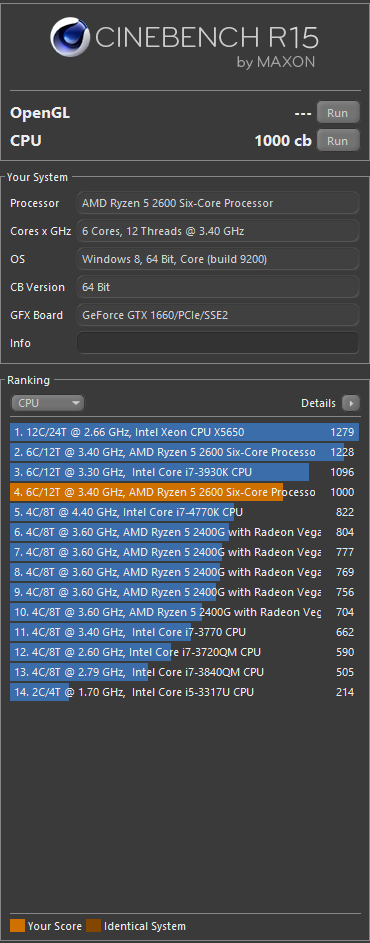
This isn’t right is it?
mild jackal
build 9200? why
mild jackal
nvm, forgot R15 does that
 wet storm
https://fi.pcpartpicker.com/list/mqvQGc can som expert take a look and tell me spesifically will i run into any problems while building this like a BIOS update or do i have enough ports for the fan rgb in my mobo or will anything overheat? do i have enough space... and is my psu enough? I WOULD APPRICIATE it soooo soo much but i know its a lot of work so im not insisting anybody to do, Thank you and sorry for my bad english!
 dusk oracle
@cerulean forge are you testing for single thread?
dusk oracle
Well this is my R15 score https://i.gyazo.com/390917567fdfd6f1d09450528d9574a0.png
same processor as you see
@cerulean forge So what kind of memory are you using as well?
cause you can see i have the same CPU not overclocked and the score is a lot higher than yours
@mild jackal Do you find it strange as well that his CPU got that score?
mild jackal
Likely misclicked on a different test, or some program causing interference

HWBOT
The Ryzen 7 3700X @ 4350.4MHzscores getScoreFormatted in the Cinebench - R15 with BenchMate benchmark. Forksranks #26 worldwide and #5 in the hardware class. Find out more at HWBOT.
I think I just ran each benchmate test once when I first tested out ryzen, didn't bother much on OC
dusk oracle
doubt it cause look at all the other results and then look at mine
can see the 3770 is the same on the score
mild jackal
yes - it seems likely that score is in error
dusk oracle
Well the one thing i know is when doing said test to not do anything while it is running
But still for me to get exactly 1000 points on the dot lol
But anyways for new CPU's supposed to be using R20
mild jackal
r20 I get 5000 something both 9900k/3700x iirc.
dusk oracle
Is your system running anything CPU wise right now
mild jackal
Run a userbenchmark
dusk oracle
If i was still playing my game while running R15 pretty sure i would of had a lower score
cerulean forge
Nothing open, just r15.
elfin warren
That seems like a single core score
cerulean forge
It wasn’t
elfin warren
Do you have dual screens?
cerulean forge
Yes
elfin warren
Leave task manager open on one and run R15 on the other
See if all the cores are utilized or only one
And see what the overall utilization comes to
That's really close to the single core score
cerulean forge
It’s using all 12 threads
elfin warren
Better score or no? CLick on the memory section under Performance. What does your ram speed and slots used say?
elfin warren
How many GB and how many slots?
cerulean forge
16gb how do I find slots
cerulean forge
Yes
elfin warren
WIth you doing nothing, how much CPU load do you have?
cerulean forge
4%
elfin warren
If you go to Device manager, do you have any yellow triangles with a ! in them?
Unknown devices?
elfin warren
What motherboard and do you have the latest BIOS?
There is a bug with older BIOS that doesn't clock the CPU up under load. Sounds like yours might need updating
I've read a couple things about Ryzen and R15. DO you have a manual overclock or are you using PBO? @cerulean forge
 idle dragon
Stupid question are 10th gen intel CPU’s out yet
idle dragon
Thank you
 slate gorge
Anyone build a ryzen 9 3900x on a Asus x370-a setup yet?
elfin warren
Not recommended
slate gorge
@elfin warren how so?
slate gorge
Dang and Asus support page said it would work..
elfin warren
Well, it will work, yes
Provided you don't turn on PBO
But what's the point of a 3900X without PBO? Why spend $500 on a processor and $100 on a motherboard?
slate gorge
Sweet thanks
I bought the board first and went from there cpu is 5 days out still buying items as see good deals
elfin warren
Might have to hit up Ebay lol
slate gorge
Already did 86. 3 days left
slate gorge
Lol
cerulean forge
I have that x570 p board and it’s pretty good
 prisma spoke
Can the ryzen 3 2200g handle a gtx 1070?
urban ferry
thats unbalanced
look for like a 1600 or 2600
imo
2600 can be had for $80 at micro center
crude path
getting a 2600 at that price at micro center requires you to also buy the mobo, if they are still running that promotion
urban ferry
oh
crude path
the 2600 is (was) on sale for 120 and they give you 30 bucks off if you also buy the mobo
idk if its still on sale
long geyser
2600 for more then $90 makes no sense. 1600 AF is literally a slightly underclocked 2600 for $85, can add $5 for the convenience of the OC or smth, idk
dusk oracle
All this talk about the 1600 AF and i don't even see it in stores
fleet inlet
It’s sold on Amazon, haven’t seen it in stores though
dusk oracle
Just looked on Amazon there is a 1600 but no 1600 AF
fleet inlet
Buy AMD Ryzen 5 1600 65W AM4 Processor with Wraith Stealth Cooler (YD1600BBAFBOX): CPU Processors - Amazon.com ✓ FREE DELIVERY possible on eligible purchases
There y’a go
dusk oracle
That is just a 1600
fleet inlet
That’s right
There is "AF" hidden in reference name
Instead of AE
Both are sold under the same name though
dusk oracle
Still better to future proof a system than just getting a "now" only CPU
fleet inlet
I agree, but 1600 AF is a decent way to save some money for budget builds
cerulean nova
The af has basically the same performance as the 2600
 oblique palm
Just would like to confirm, All Ryzen 7 Series Chip sets do not have integrated GPU's? If i try post on a 3800x with no dedicated GPU, would it give me a beep error? or would it silently no post?
gritty meadow
there are no Ryzen 7 series chips with integrated graphics
what a board does is dependent on the board
but it should just post
having a headless machine (a build without a GPU) is quite normal
does that answer it for you?
oblique palm
So should i still here beeps even though there is no GPU?
gritty meadow
in theory, no.
the board should not beep
but, for your own sake, (and for making your life much easier) install a gpu and boot with that
and then you can always just remove it later
oblique palm
K, Thats mostly what i wanted to know. I have a quite post, but without the GPU, no idea if it was a good or bad thing lol
gritty meadow
it could be good, it could be bad :)
oblique palm
Well, Ill be putting a 2080 Super in it next week, So ill just wait till then
gritty meadow
if you have an old gpu, you can just use that for now
oblique palm
Just hoping all the parts i bought are good.
gritty meadow
time will tell :)
oblique palm
Indeed. Thanks bro
gritty meadow
and no, i am not teasing/joking. it is just the reality of things :)
you are very welcome :) and congrats on the almost complete build :)
oblique palm
Thanks. Its my very first build.
mild jackal
2500k 2080 ti best
 inland stump
I'm building a $1000 mini-itx system with a ryzen 5 3600 and gtx 1660 super. I'm wondering if the Gigabyte b450 I aorus pro WIFI will be good enough, or should I spent the extra $100 to get the x570 I aorus pro WFI? What would be the advantages?
 hollow jolt
Do I get a Ryzen 7 2700x or Ryzen 5 3600
inland stump
depends if you wanna multitask more (7 2700) or focus on 1 task (5 3600)
both will be great
So I guess the b450 will be fine then?
inland stump
the 7 2700 has more cores, meaning it will be better at multitasking, however the 5 3600 has faster cores, meaning it will be better at single tasks
gritty meadow
and what @inland stump just said :)
inland stump
What games are you planning on recording?
gritty meadow
are you budget constrained?
inland stump
pared with what gpu?
hollow jolt
RX 5700 XT
inland stump
Both cpu's should be good enough for at least 60fps recording with a 5700XT, to be honest I'd pick the 5 3600, you'll be fine with recording at 60+fps and when you're not recording, it'll be a little faster then the 2700
hollow jolt
Ok
dusk oracle
Recording and streaming he if plans on going with a 5700 XT it would be best to stick with the 2700
mild jackal
Go 3600, if you like to stream, add a nvidia something on there
long geyser
@inland stump 1k mini itx can at least get a 5700XT/2060S
https://pcpartpicker.com/list/thYGx6
Note for that build: you'll have to remove the shroud off the CPU cooler to fit in the case
inland stump
Yea I’ve done some tweaking and niw have a 2060S @long geyser
long geyser
good
long geyser
It's okay RAM, nothing too amazing
 azure fractal
ok
long geyser
@dusk oracle For the 1600 AF, you need to look at the part number.
old: YD1600BBAEBOX
new: YD1600BBAFBOX
 sharp blaze
@hollow jolt just be aware that depending on the retailer stock, the b450 board may not support the ryzen 3600 out of the box.
 wary cape
I had some anomalies with 3000 on b450 but nothing super horrible
 oblique geyser
can someone help me pick ram iv been researching for a while and come up with the conclusion that i have no idea what to pick 😫
oblique geyser
rgb would be nice but not a deal breaker
msi b450 gaming pro carbon ac with a ryzen 2600x
wary cape
whats your price range?
oblique geyser
motherboard says its god for 3466 ram
wary cape
so from what i remember 3200 or 3000 mhz is the sweet spot for 2000
ive got 3000 mhz with my 3700x and its nice
crude path
3200 is good ram
oblique geyser
but then people have also been saysing ..... might as well go for 3466 if you can
sooooooooo...... idk
oblique geyser
will i see performance difference between 3200 and 3466 that is worth the price difference?
crude path
just get 3000 or 3200 mghz and make sure you get at least 2. so if you do 16 gb do 2x8 sticks
oblique geyser
wary cape
@oblique geyser https://www.youtube.com/watch?v=IkJIAB7KBsk

Ryzen 5 2600 : DDR4 2400Mhz vs 3600Mhz RAM Test in 8 Games
World of Warships - https://wgaffiliate.com/?a=2736&c=4692&s1=
Games:
Grand Theft Auto V
Kingdom Come Deliverance - 00:54
Fallout 4 - 02:00
The Witcher 3 - 03:29
Far Cry 5 - 04:45
Battlefield 1 - 05:45
Assassin's C...
it makes a slight difference but at 3000-3200 it plateaus
oblique geyser
yeah im using 2400 rn
wary cape
i have two of those kits and i like them
wary cape
what other rgb software you use?
oblique geyser
timing for trident is 16-18-18-38 while corsair is 16-18-18-32 idk what that is but someone told me it makes a difference