#cpus-mobo-and-memory
1 messages · Page 93 of 1
 naive pendant
 amber venture
hey guys
naive pendant
dont go with inte l go amd
 naive pendant
if you plan on going HEDT,Workstation Threadripper is better bet
naive pendant
how much FPS will this cpu get in fortnite
ryzen 5 3400g
along with
rx 580
 dusk oracle
depending on the settings
playing maxed out expect between 80 and 100 fps
also at 1080p
 restive wedge
^ I studied a lot of benchmarks for that because I wanted to make a smaller pc for home. Every Fortnite benchmark I could find was 60-80 at medium settings.
Lows of 50 with a lot going on, but an average of about 70 outdoors. 100 indoors though so it seems pretty well optimised.
Ignore that menu fps
naive pendant
What does the 3600 in the Ryzen 5 mean
 gritty meadow
model number
 hollow thorn
ryzen 5 just means its a 6 core
gritty meadow
the ryzen 5 is the product name (ryzen) followed by the series (5) number
hollow thorn
^
naive pendant
Ah
gritty meadow
and yes, that specific model is the 3rd generation ryzen
naive pendant
Ok
gritty meadow
the 3400g and below is not
naive pendant
Yeah I need to change my board then
hollow thorn
?
gritty meadow
hm?
hollow thorn
All B450 Max boards have updated BIOS for 3rd gen ryzen
gritty meadow
link your board @naive pendant
hollow thorn
just quickly putting it out
gritty meadow
you already own it or are you planning a build?
naive pendant
Planning
gritty meadow
k
naive pendant
The max is only 3 dollars more and supports 3rd gen
hollow thorn
basically
 quaint current
yeah get the max
hollow thorn
here
(theres also cheaper max boards but since you already chose tomahawk, just giving you the upgraded thing)
naive pendant
Yeah
 pseudo bluff
Achoo
naive pendant
i have a question about xmp
 misty belfry
what is the question, just ask
naive pendant
i contact asrock and they said to enable that after inserting 3200mhz
and they even recommended it to stay with 3200mhz
should i enable it
 elfin warren
Why are you fighting xmp so much? Asrock is wrong. Just set it in bios and forget it.
 high crystal
@naive pendant you shouldnt need to upgrade your board
if it supports 3rd gen as a bios update, you just need a usb stick to upgrade it instead of putting another cpu in it before upgrading the bios
 simple ore
my 3600 kit wont post the xmp 2 profile im stuck at 3333. i know the feeling.
hollow thorn
rip
wait you're using 2700x tho @simple ore
2nd gen dont support as high as 3rd gen
unless your name is deceivingme
simple ore
are you sure? someone was saying i does i think i saw a chart? maybe i might be wrong
simple ore
well dang alright then good to know then
naive pendant
2nd gen i seen is like 3466 but its very memory controller dependant
naive pendant
all cpus have built in memory controllers
it won't matter if on x570 you using sec gen
cpus
simple ore
How do i get msi afterburner to display the statistics on screen?
naive pendant
have to set it up on rivatuner which comes bundle with afterburner
simple ore
okay im only seeing the fps counter and none of the other graphs what am i missing? >.<
naive pendant
@simple ore https://www.youtube.com/watch?v=77FgPG0cmAw

If you have ever wondered what your hardware is doing while gaming and wanted to know how to find out- play this video. Performance monitoring can help us identify bottlenecks and troubleshoot hardware issues, so every gamer should have their OSD setup to give vital system me...
 reef garden
Need some input. I'm looking to do some upgrades currently 16gb ddr4 and a 6700k. Im wanting to go with 32gb of ram but not sure what CPU to upgrade to. Im torn between ryzen 7 3800x and a 9700 or 9900k anyone have some input? cost doesnt bother me and I dont need to worry about upgrading gpu
main thing I do is gaming
hollow thorn
@reef garden What do you need the ram for?
Because high amounts of ram suggest like workstation workloads
then AMD is clear choice
reef garden
I currently have multiple colors in my PC (red black blue and white) The ram is white and I want to go with some RGB ram and the 4 sticks would look at lot cleaner in my opinion
hollow thorn
so no workloads using those?
I suggest trident z neo/trident z rgb, those rgb look really nice
reef garden
maybe some light video editing or some stuff on FL studio nothing hardcore, I was looking at trident z rgb
hollow thorn
Then it Might be nice to get amd, in case you need to do smth that would appreciate the extra performance, since you're not purely doing gaming
Also, the 3800x is barely better than the 3700x, not worth the like 70$ more dollars stock price.
BUT if you can find the 3800x at a good price near 3700x, do it
reef garden
another part of all of this is the flexing upon friends who are trying to have the best. I'm already at the top overall but need to be better lmao
hollow thorn
heres the thing
I bought my 3800x at 330$, same price as the 3700x
but I dont think theres any sales like feb/mar
reef garden
I guess it should be a no brainer to get ryzen but I HATED my old AMD cpu went to intel and I havent looked back till now
hollow thorn
yea AMD is back on track now
pretty neato
it might be worth waiting a bit tho
isn't newer intel chips coming in like a month?
reef garden
Yeah I was thinking about waiting to see what comes out and get a new case cooler etc slowly
hollow thorn
oh wait nvm
aparently ice lake desktop chips arnt coming till 2021 Even though it was predicted to be released at CES2020 lol
 long geyser
Expect nothing amazing from "new" intel chips apart from price drops
long geyser
due to being another refresh
hollow thorn
so basically get a 3700x unless you can find a 3800x at a good price
naive pendant
what is a good motherboard that fits an i9 Extreme
reef garden
When is the 4000 series coming out
hollow thorn
prob like october
reef garden
I'll probably just wait on that then
According to passmark everything on my PC is 99th percentile except CPU which is 90th so no worries on being able to play whatever. I'll just get case ram and a new AIO now then
restive wedge
@reef garden Get a 3950x for the ultimate flex.
 frank walrus
I got my 3800x at microcenter for 300$
during black friday
Went from a 1500x to a 3800x
quaint current
o nice
naive pendant
the only new intel cpus will be another coffee lake refresh with 10cores that proby clock maybe 100-300mghz better than i9 9900k plus requiring a new mobo
quaint current
yeah they just increased cores, clocks, and turned it into a furnace without good binning
 south gyro
@frank walrus nice upgrade 😄
naive pendant
intel really never cared for desktop anyway its showing even more by them giving up on competing
focusing on laptops,servers
elfin warren
wut
naive pendant
we talking about 10th gen mainstream cpus
naive pendant
we just saying vs i9 9900k its not going be any different just maybe 100-300mghz difference
naive pendant
nothing official yet
elfin warren
4.x ghz
naive pendant
base?
 split copper
rip my i7-4790
elfin warren
 elfin warren
Yes, they have
naive pendant
O than i am little behind sorry
i might change my i9 990k to 10c if clocks to 5.3ghz
elfin warren
Intel will also be hyperthreading all of the comet lake I5 and i3 processors
So, expect some performance there
naive pendant
ahh
@elfin warren you think 10c be able to clock 5.3ghz?
on loop?
@elfin warren where on their site or publicly has intel confirm 10 gen main stream cpus?
i am looking at stuff right now its all rumors
elfin warren
Well, then don't believe it. However, rumors from reliable sources aren't really rumors. IF you think Intel is leaving the consumer market alone, you're incorrect. "Intel never really cared about desktop anyway". That's not even close to correct. They just haven't had competition in a decade and have been slacking.
 gloomy goblet
What would be a good Mobo around 150
split copper
what cpu dawg
gloomy goblet
Amd
naive pendant
Lol i jist wrote an essay on that article for class this morning
naive pendant
anyone selling a b450/x570 mobo or 16 gb of ram at 3600
 severe igloo
Just got my new Mobo 😎😎
split copper
nice
frank walrus
@naive pendant How much are you willing to spend on ram?
That’s the question
Honestly, buy a x470 mobo. You don’t need the X570 unless you wanna overclock super hard.
I bought my self the X470 Gaming-F mobo from Asus and paired it with a Ryzen 7 3800x and its working like a charm.
naive pendant
@frank walrus i mean u ghues like 80 bucks
frank walrus
That low for ram at 3600mhz
Around Black Friday I got a pair of 3600 for 89$
You don’t really need 3600mhz ram anyway.
3000 or 3200 should do just fine
You also mentioned something about a motherboard
@naive pendant
naive pendant
i have a 3600 so yes i do need fast ra m
hollow thorn
well
hollow thorn
you might be able to get 3600mhz for 80 bucks lemme check
frank walrus
Found it
hollow thorn
thats what I mean
frank walrus
@naive pendant You gotta make sure your mobo supports up to 3600mhz
frank walrus
Whoops
hollow thorn
like if you have 2nd gen, you can only use up to like 3466, but 3rd gen supports up to like 4266
naive pendant
should i upgrade my mobo i have a b350 f gaming and a 3600 should i upgrade to b450 or x470 or x570 i think im going to get a 2060 ko or rx 5700
 tropic pagoda
just a quick question, whats the compatibility rating for a Ryzen 7 2700, Asus ROG STRIX B450-F GAMING and RTX 2060 super be
hollow thorn
what
@tropic pagoda I dont understand the question
be what?
be compatable with what?
tropic pagoda
together
 dark smelt
I'm really thinking about getting the 3900x. Any performance gain with x570? I'd be upgrading from a 6700k
dark smelt
@hollow thorn A bit of both?
hollow thorn
Well I would suggest x570 just because you're getting such a expensive cpu
And if you want to OC or any future proofing, x570 would be good
since x570 supports PCIE 4.0, usually has some better VRMs for overclocking and all
dark smelt
The 3900x is appealing since I can do monthly payments on it through Amazon
hollow thorn
oh yea heres a neat place to look for boards if you havn't seen this yet
https://linustechtips.com/main/topic/1137619-motherboard-tier-list-v2-currently-amd-only/
Linus Tech Tips
Credit to:@VegetableStu @GoldenLag @LukeSavenije The following list is based on facts, ranked on power delivery and known problems. The list will include boards that support CPU overclocking available at retail from different brands. Currently only AMD boards are done because...
You prob dont Need Tier S since thats like crazy nitrogen overclocking stuff
dark smelt
@hollow thorn Thanks! I haven't got to look at much since I've switched jobs 
hollow thorn
ah
dark smelt
I was already thinking of getting the ASUS TUF plus board
hollow thorn
ah
long geyser
If you need to save money on that some b450 is good. Tho spending $500 on a CPU and $110 on a mobo is eh, extra $40 gets you a decent x570
naive pendant
@long geyser i think you would be perfect for the techie role
long geyser
eh, maybe
hollow thorn
for sale? dat not allowed...
 cyan night
@misty belfry you have the b450 aorus?
misty belfry
b450 AORUS PRO I WIFI (ITX)
cyan night
how doeth one overclock
i have ryzen master overclock stuff but id want to do it in the bios
misty belfry
uh you go to like advanced frequency settings
and then CPU frequency
from the main page
elfin warren
Do it in Ryzen Master first to test it
misty belfry
if it's the same BIOS
elfin warren
Then make it permanent in BIOS
misty belfry
Bekora is right
cyan night
ive tested it in ryzen master
cyan night
its stable
elfin warren
Then apply your Ryzen Master settings into the BIOS. however you did it in Master
cyan night
my specs is a ryz 7 2700 with 3200mhz dual channel kit
misty belfry
4.0 is stable for me but it gets too hot, my hyper T2 can't handle it
cyan night
i got mine running 4.025 and at load it only goes upto 60C
misty belfry
i feel like i could use an AIO
misty belfry
probably the fractal AIO because they're really good and RGBless
and they have mounts for AM4 i believe
so does corsair
did yours come with an AM4 mount?
cyan night
Yea
im in canada and all the other aios broke into the 100$ range except that one i got
misty belfry
i try to avoid the RGB stuff because i don't have a side window and it's kind of pointless and expensive
misty belfry
https://www.coolermaster.com/catalog/coolers/cpu-liquid-coolers/masterliquid-lite-240/ i wouldn't mind buying this
well try it in ryzen master first
and then see how it goes
my 2400 OC'd all the way to 3200
and it was seemingly 💩 RAM
oh and two different sticks
so i feel like you might get lucky
 meager scarab

reef garden
@Mr1111#1350 thanks for telling me. I deleted it
hollow thorn
Yw
naive pendant
ryzen
cyan night
i9 can go upto 5.0ghz but ryz got more cores and threads
 pastel monolith
depends on use case if its gaming only and you have the money get an i9
 fathom tulip
Why does it say in bios that my CPU is running a 3.7 MHz but in MSI dragon center it says 4 MHz
long geyser
If it's for gaming and only gaming and you have 2.5k USD or more, then i9. If not then AMD
quaint current
^
 broken hazel
what would you guys say is the best cheaper x570 mobo
elfin warren
ASUS Prime P
long geyser
Or that AsRock board, dont remember the name now
broken hazel
ok
what about this one https://www.amazon.com/dp/B07SQJZDTX?tag=pcpapi-20&linkCode=ogi&th=1&psc=1
@long geyser the phantom
nvm bekora is right
broken hazel
ight thanks
reef garden
So more on what I was thinking about with what CPU to get I think ryzen will be best for me. I plan on single PC streaming plus pcie 4.0 is nice
I'm still going to wait for the 4000 series
long geyser
tbh just 3600+2070S and do NVENC encoding
4000 are like going to be actually released in like 0.7 years so it'll be a while
 vagrant mist
unless you and your budget can wait that long
naive pendant
rumors has amd not launching 4000 series to October,November so its better bet to buy now tbh
cna someone help me out
i need ram for my asrock x570 phantom gaming 4
what should i get
@elfin warren ^
i had to remove some items to place an order and i forgot to write down the ram
i really need help
naive pendant
can you send me a link for 2 16gigs
 cerulean nova
you want 32 gbs?
cerulean nova
or do you mean 2 8 gb
naive pendant
what about that one
nvm they went it up
will that ram work
2 16gig sticks
so 32gigs total
cerulean nova
what cpu do you have?
cerulean nova
this is $10 cheaper and its 3600 but it doesnt have rgb if you care about that
naive pendant
idc about that
cerulean nova
ok well there you go
naive pendant
send me the link
cerulean nova
naive pendant
which one
dusk oracle
which ever you can afford
cerulean nova
ya
naive pendant
i dont have to select the speed
cerulean nova
no its like a 1 click solution
naive pendant
i found this online
so i just select profile then save and exit
some people say select frequency
cerulean nova
ya and at least on my mb there was only 2 options, the default one and the XMP
but idk about other mbs
naive pendant
i was only going to enable xmp and select 3600
i just ordered my tower and motherboard
before it was too late
cerulean nova
nice
naive pendant
@elfin warren helped me out
looks like an awesome case
plus putting liquid cooling on my processor also
cerulean nova
Nice
naive pendant
i will update the bios after i get it plugged in
but one of my friends is installing the aio but i will update the bios before he installs it
im putting an m.2 in it also
as a boot
cerulean nova
ya it was a pain to update mine because i dont have a usb so i had to use aorus @ bios software to update it. i upgraded from a i3 8100 to an i5 9600k and the bios didnt support 9th gen
cerulean nova
and i realized that after i had already installed the new cpu so i had to take it out and put the old one back in and then put the new one in again
naive pendant
with gt 730 video card
cerulean nova
wow so a 3700x is gonna be a big upgrade then
naive pendant
yep
cerulean nova
what gpu are you getting?
cerulean nova
ya lol
naive pendant
cerulean nova
i have a 1070 which is basically the equivalent of a 1660S
frank walrus
You already bought that card? @naive pendant
naive pendant
not yet
frank walrus
When?
frank walrus
A 1660 it is more then enough.
frank walrus
A few years
cerulean nova
well considering you are even thinking about getting a 2080ti im gonna say you are at least richer than i am
naive pendant
i plan on playing modern warfare on it
naive pendant
1080
frank walrus
Then it should last a while
frank walrus
I was able to snag a deal on the Evga 2070 ftw3 ultra card for 400$
Not the super version
naive pendant
did you see the thats what she said sentence
frank walrus
How long ago?
frank walrus
You don’t really need a X570 mobo. A X470 is more then enough. However, it’s all up to you because it’s your cash.
frank walrus
The price on the X570 mobo were too high so I decided to pair my 3800x with the X470 Gaming-F mobo .
naive pendant
its already been ordered
frank walrus
That’s fine
I did buy the cpu and mobo at MicroCenter during Black Friday, so the price for both was way low.
naive pendant
im pairing it with my 3700x
with m.2 as boot and ssd for storage
also liquid cooling
naive pendant
yep
i dont do stock cpu fans
right now im using a hyper evo 212 on my fx 8350
idles at 6
max 32
naive pendant
yep
frank walrus
I usually go to my local micro-center
frank walrus
They price match, so it’s a win for me
naive pendant
so does newegg
naive pendant
lucky you
frank walrus
Newegg takes a few days
naive pendant
so
frank walrus
Only one in my state xD
naive pendant
i bought my modem from there i get it tomorrow
frank walrus
They are rare
naive pendant
who is
frank walrus
MicroCenter stores
naive pendant
never heard of them
frank walrus
They are a tech store that sells computer parts and are well known in the PC gaming community
I got all my parts for my first build there
naive pendant
sweet
frank walrus
I was lucky and built it the year ryzen came out
naive pendant
ever since i left console gaming my stress levels have gone down
naive pendant
i left because of all the lying from support
frank walrus
Lying from support?
 versed coral
anyone know the difference between M Power and X Power on the MSI boards? i cant find any spec differences but see an extra 6pin connector on the board. help plz! 
reef garden
curently have a 6700k and 1080ti so I can wait
long geyser
same. Could do a custom loop, as that is what Im thinking about doing
 tired wren
difference between i5 9600k and KF version?
misty belfry
opposite for me
re: newegg/amazon
i still use newegg when they offer a better price but for acceptably fast shipping it can be expensive depending on what seller you're dealing with
 dark sand
Anyone else think that DDR5 will be consumer ready by the end of 2020? I want it to be...but I'm thinking 2021 will be more likely. Gotta sync up with the MOBO and CPU readiness too
 sharp blaze
we are still at least 1 more generation from ddr5. Whatever replaces am4 might get it. 10th gen intel will stay on ddr4. early leaks showed that intel will bring ddr5 to server chips in 2021 but who knows when it will be on consumer boards.
hollow thorn
AMD said they are moving to AM5 Because of ddr5 I thought
cyan night
id rather they not switch to ddr5 so fast >:{
hollow thorn
they gotta tho
 crude path
yeh gotta move forward
 obsidian lagoon
 cyan night
no they dont. ddr4 has finally become affordable. Innovation shouldnt always be at the expense of the consumer
crude path
see you say that but, when ddr4 came out ddr3 was still widely used and more affordable. even if ddr5 drops tomorrow ddr4 will still go strong for another year or 2
gritty meadow
ddr4 will be around and in production for a good number of years still
long geyser
Given the history of DDR launches DDR5 will be pricy at launch. So DDR4 will still be widely used for a while after launch
naive pendant
AM5,z590 will be proby be dual platforms supporting ddr4,ddr5
If really want a honest answer tho DDR5 proby only go into servers and threadripper first
 real hinge
is oloy trustaorthy like corsair because it seems sketchy based off the price and zero reviews
trustworthy*
for RAM
crude path
seems to be fine from wat ive seen
gritty meadow
@naive pendant the chance of the IMC in the gen of cpu that uses ddr5 also supporting ddr4 is slim to none (imo)
that was a lovely typo :)
gritty meadow
not really, it its a question of it making sense to include it.
space being used for that is space that could be used for something else
naive pendant
threadripper and epyc would benfit more thats why i said they would be first too
gritty meadow
it was different back when the MC was on the chipset. That made things way easier to finaggle
and yes ofc DDR5 will be in servers first. That is a given.
naive pendant
if know DDR5 is already in testing phase for servers too
yeah it interesting to see if DDR5 makes to it mainstream early @gritty meadow
my guess it will since AMD new roadmap shows new socket for mainstream
gritty meadow
that is a question of definition.
IF aurora comes in on time, that will probably be the first rollout of DDR5 in quantity
(Aurora being the Cray/Intel supercomputer for Argonne labs)
and that is slated for sometime in 2021
naive pendant
Micron DDR5 is in testing for servers and Samsung DDR5 in coming online this quarter with Hynix 3 quarter
gritty meadow
the first chips got produced a couple of years ago iirc. The question is still: Is it actually ready.
i dont believe any of the vendors has said anything beyond: Things are progressing as planned
and as with any semi-conductor company: "progressing as planned" = everything is fine until suddenly it isnt
naive pendant
@gritty meadow https://www.pcgamesn.com/micron/ddr5-memory-release-date
 gritty meadow
yes, sampling, for testing
that is a lot of words to say: we wanted to write an article without substance.
naive pendant
yeah all i was saying is DDR5 in sampling phase which good
gritty meadow
sampling is not the same as it being "ready"
is what i am saying :)
intel has been sampling 10nm cpus for years now
naive pendant
tbh i know alot people going hate this commit but don't expect DDR5 for mainstream to 2025
naive pendant
when i mean mainstream talking consumer chips
gritty meadow
i dont quite agree on that
there will be a halo part at the upper end of the consumer market (not HEDT) that is DDR5 before then
most likely start of 2022 (is my guess)
naive pendant
if talking halo for consumer than i agree but in terms of main adopition it will be a later 2023-2025
versed coral
anyone know the diffrence in the MSI Xpower and Mpower mobo for a kaby lake?
 main pulsar
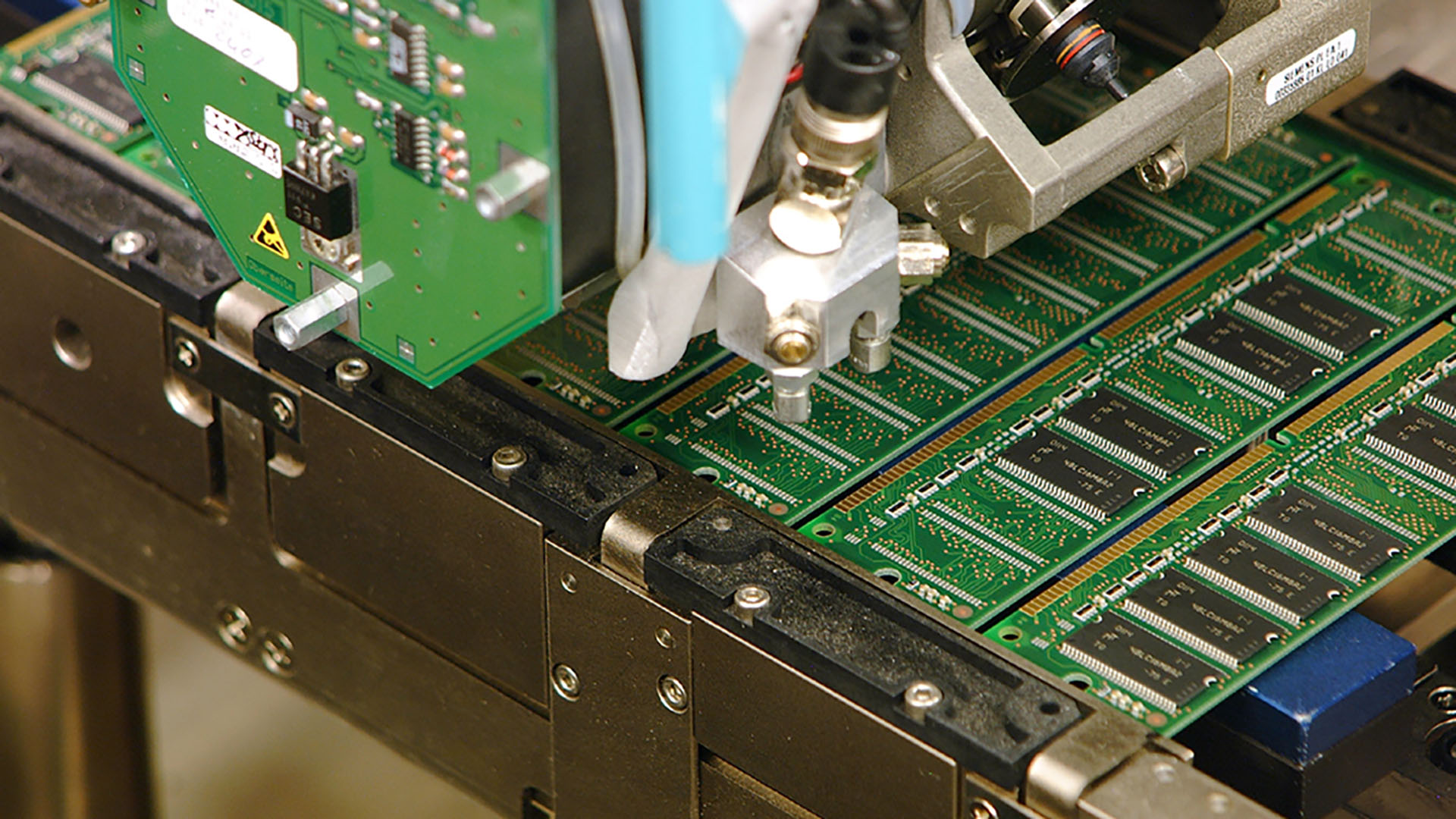
the dimms in the pic are synch ram lmao
naive pendant
synch ram for servers
main pulsar
tru
gritty meadow
according to people that have a VERY big interest in showing the people financing things that things at least look like they are on track
as i said, wait and see for Aurora
main pulsar
tbh, im just gonna snag a buncha cheap am4 stuff once am5 launches
naive pendant
alot will
main pulsar
im hoping the build im working on rn lasts for the next few years
i mean, im not a huge gamer or anything
gritty meadow
i am quite curious where they (intel/amd) are going to improve things for the next couple of archs.
because power and density is getting real interesting
naive pendant
i wonder if AMD will delay AM5 to DDR5 rdy🤔
gritty meadow
it would not make sense to not do that.
naive pendant
server,TR get new socket next year so maybe they will only offer DDR5 for them at first
main pulsar
i mean, thats literaly the major defining part of the socket name
am2 had ddr2
am3 ddr3
etc
wait
maybe not
gritty meadow
not likely, unless they need the socket for power/area reasons
main pulsar
yeah, i mean, theres no other reason for a consumer socket redesign
gritty meadow
mind, all of this is just my opinion and guesses :)
naive pendant
i think amd plan with zen 4 is make it up towards 24cores so proby change socket for power reasons🤔
gritty meadow
nah, 24 cores is still doable
naive pendant
not if plan on making chip bigger with bigger ihs
main pulsar
zen 3 is doubling the core count per chiplet i thought
naive pendant
no they cancelled that
gritty meadow
wishfull thinking imo
main pulsar
aww
naive pendant
only new thing about zen 3 is CCX redesign
gritty meadow
i would like to remind you both that the software has to keep up with the cores too
main pulsar
yep
gritty meadow
and we have jumped UP in core counts massively over the last couple of years
naive pendant
yeah but you talking about a company who don't care about software
gritty meadow
a lot of things are also going to be dictated by the console SOC designs
main pulsar
i just want better mobile processors
naive pendant
amd brute force their way to lead in adobe
main pulsar
1 or 2 watts lmao
gritty meadow
that is a completely different topic, and one that i am going to respectfully disagree on.
naive pendant
tbh AMD main focus will be leading in laptops now
main pulsar
whats wrong with super low power mobile chips
gritty meadow
not that part.
main pulsar
oh
gritty meadow
the brute force part
the mobile part is also a different topic.
one that i would love to have, IF i didnt need sleep :)
naive pendant
its whatever anyway we use our pcs differently buy for are needs
gritty meadow
gotta start these talks a couple of hours earlier :)
naive pendant
sleep well @gritty meadow
naive pendant
what is a good mobo that fits an i9 extreme
naive pendant
?
naive pendant
my uncle says its a pre production extreme
naive pendant
i guess
high crystal
any specific brand you want ?
high crystal
Highest rating one is an ASRock x299 Taichi https://www.amazon.com/dp/B072ZTTWFJ but if you want looks it might be a bit eh
naive pendant
thankyou
high crystal
or you could get like the EVGA X299 MICRO ATX 2 https://www.amazon.com/dp/B07J9KWHK7 if you want a smaller form factor as its matx
better wait untl you know proper specs of the cpu first tho
would be annoying getting a motherboard the cpu doesnt fit 
naive pendant
yea
high crystal
but as the other extremes are currently using 2066 i doubt it will change
 prisma spoke
Is using a usb Bluetooth dongle better than Bluetooth from motherboard?
cerulean nova
R5 3600 or r7 2700x for gaming. I know the 3600 has better performance now but in the future will the 8 cores be better utilized?
main pulsar
i think if you plan on playing the newest AAA titles, then the 2700x might be the better buy
but very few games now will utilize 16 threads
 candid spire
So um. My mobo is a TUF B450M-PLUS which doesn't come with the wifi routers. So I was hoping if someone could help me choose a card? Or dongle that's best for it? I'm still pretty new to this and I don't know what the best way about getting wireless connection is. Thanks
candid spire
Aw okay. Is there a certain way about choosing one
main pulsar
anything cheap will work fine
but this
is cheap rn
but of course, this should be good enough if you dont wanna spend 35
candid spire
Thank you very much. I was just really stumped. Tbf I should have done further research but when the board came and I didn't see router outlets I got a little scared
dusk oracle
USB's are ok for the like 5$ price tag on them
main pulsar
yeah, very few motherboards come with integrated wifi
and if they do, its like a huge selling point
 rose arch
its mostly MITX boards that come with integrated wifi
youll occasionally find it on atx boards for some reason and rarely on MATX
candid spire
I just wanted some advice to see if it's good or not for my first build
rose arch
most ppl drop a list in gen chat for advice
candid spire
Right.
My brother has an itx board but his came with it
rose arch
yeah its usually a little m.2 e-key module
naive pendant
Ok so i need help finding the right ram for my pc, its an all in one. And badly, i mean Badly Needs an upgrade. I'm trying to figure out what ram to use. Been trying to find the right ram and a cheap price. Just need 16gb.
main pulsar
get cpuz
and it has a section that will tell you the dimm model number
put that into ebay
boom
main pulsar
i dont think 16gb is worth it, 8gb in this machine should be fine
i mean, its not worth it to put money into this machine
naive pendant
yeah
main pulsar
but, if you dont have a lot of extra cash on hand, an identical 4gb dimm of ebay should be like 10
naive pendant
yeah]
cerulean nova
what gpu do you have?
cerulean nova
turn it into a testbench lol
dusk oracle
what kind of system is it
naive pendant
Its a all in one pc
dusk oracle
Does it have a WiFi thing
naive pendant
yes
dusk oracle
like a wifi card
cerulean nova
oh like those ones that are like in the monitor?
cerulean nova
ahhh ok
dusk oracle
You could always buy the external types that would plug in that way but you would have to go hardwire or a USB wifi dongle instead
naive pendant
dusk oracle
@main pulsar would have to know the exact model
and for the external it would be this https://www.aliexpress.com/item/32824725772.html

aliexpress.com
Smarter Shopping, Better Living! Aliexpress.com
dusk oracle
I have seen a lot of tech tubers test that out and does work good but you loose Wifi and you would have a PSU on the table
naive pendant
so it would replace the existing io imput?
naive pendant
yueah i know
its better off getting new pc
but mum isn't wanting to work it out with me
cerulean nova
on ebay that goes for like 200 maybe 250
naive pendant
i honistly want a gaming laptop due to portability
i dont like lugging around an all in one
dusk oracle
https://www.ebay.com/itm/Dell-OptiPlex-7020-MT-Intel-Core-i5-4690-8-GB-RAM-No-HDD-AMD-HD8490-Win-7-COA/164029946649 and slap in a GTX 1650 Super and you have a gaming PC

eBay
These include, but are not limited to swords, daggers, ninja stars, bb guns, airsoft rifles, etc. The towers can have scratches and pin dents. All the towers have Windows 7 Professional COAs. These may have pin dents and light scratches.
The thing is with a gaming laptop is you really would need to buy one with a RTX 2070 or 2080 to make it last a long time
naive pendant
yeah
dusk oracle
Gaming laptops now are not like gaming laptops in the past where you can just swap out the GPU
naive pendant
the other thing i was thinking about is getting this and gettinga egpu, take the advantage of the thunderbolt https://www.lg.com/us/laptops/lg-17Z990-RAAS8U1-ultra-slim-laptop

LG USA
Get information on the LG 17Z990-R.AAS8U1. Find pictures, reviews, and tech specs for the LG 17Z990-R.AAS8U1 gram 17” Ultra-Lightweight Laptop with Intel® Core™ i7 processor
dusk oracle
@main pulsar you remember those right
main pulsar
thicc boi laptops with upgradable gpus
yeah, i used to have one
did i ever upgrade
no
dusk oracle
I used to have one as well
main pulsar
it had a gt 730m
dusk oracle
and i did replace the GS 9600 with a GT 9800
dusk oracle
It was when Asus made cool looking laptops
@main pulsar look how cool those were back in the days
dusk oracle
Ya laptops back then were cool
now they try too hard with RGB in the back (which you don't see) that kills your battery faster
main pulsar

eBay
Up for sale is a Getac X500G2 15.6″ Laptop. The screen is in good condition. The laptop has 1434~ hours of use. The fan seems to be running at full speed and is slightly loud. It has a Nvidia Geforce GT 745m onboard graphics and a 2-port SFP card.
i want one of these
naive pendant
does it matter if i use one from korea and one from china
the korea one costs 42 aud
naive pendant
this is the exact model HMT451S6BFR8A but its hard to find someone that selling it
it might be discontinued
naive pendant
https://www.newegg.com/corsair-rmx-series-rm750x-cp-9020179-na-750w/p/N82E16817139233?Item=N82E16817139233 will this fit my full size case
crude path
should but we dont know what case
naive pendant
the connector that goes to the cpu connector
i have a long 4 pin that can transfer into an 8pin
2 x EPS/ATX12V 8-PIN (4+4)
one is long one is very short
23”
That just not including the connectors
gritty meadow
that should be fine
naive pendant
but will it have enough room to run out the back
gritty meadow
rephrase? (because that question does not make any sense to me)
naive pendant
will the cable be long enough so i can run it out the back in that case
crude path
yes you should be able to run the cables through the cable management side of the case
gritty meadow
i am not certain that is what is being asked
naive pendant
gritty meadow
yes, we know.
naive pendant
thats what i was asking
crude path
lol
naive pendant
i was worried i never have used a full size case before
naive pendant
ive been using mid towers
crude path
im pretty sure that is basically a mid tower isnt it
crude path
but oof i love that case
naive pendant
same length
naive pendant
@crude path my case is a full atx
misty belfry
i almost instead of going ITX bought a define XLR2 (also very silent, full tower) and a full ATX board
naive pendant
how much difference is the inside compared from a mid tower to a full tower
gritty meadow
depends on the specific cases you are comparing
there are full towers that are twice the volume of what you are getting
naive pendant
this is what im using now https://www.newegg.com/p/N82E16811553007
gritty meadow
and there are full towers that are 10% more volume than what you are getting
naive pendant
and im switching to the one i posted earlier
gritty meadow
i have a job for you :)
naive pendant
i dont do jobs
gritty meadow
go to google, search for the specific cases
compare the measurements
and answer the question yourself, you might learn something in the process :)
naive pendant
i just want to know the difference inside compared to those 2 cases
gritty meadow
and that would require that someone did what i just suggested you do :)
gritty meadow
here is a hint for you: Both are atx cases
naive pendant
but my new case is 14" taller
gritty meadow
and?
naive pendant
that shouldnt matter on the inside
is that right
going from power supply to motherboard
gritty meadow
compare where the psu and the mainboard are in relation to each other
naive pendant
im just worried that i cant run the cpu power connect around the back
both are on the bottom
dusk oracle
Oddly the front of that case reminds me of master chief
And i can tell that case have good airflow
naive pendant
which case
dusk oracle
the one you linked
naive pendant
oh
dusk oracle
cable management is alright now the best but can still be clean
naive pendant
but will i have excess for the cpu power cable
naive pendant
i have brain damage
misty belfry
me too, but i do my best
you probably want some cable extensions
for both the 24pin and the 8pin
for the GPU it shouldn't be a problem
dusk oracle
Anni for the case he showed i don't think he would need extensions for the 24 pin
dusk oracle
I have had a case with similar design inside and i was able to route cables well
gritty meadow
to make it simple.
psu is in the same spot
mainboard is in the same spot
it is everything "around" that is bigger
misty belfry
oh, i see
dusk oracle
I have had this case once https://images-na.ssl-images-amazon.com/images/I/A1p7uoeBBWL._AC_SL1500_.jpg
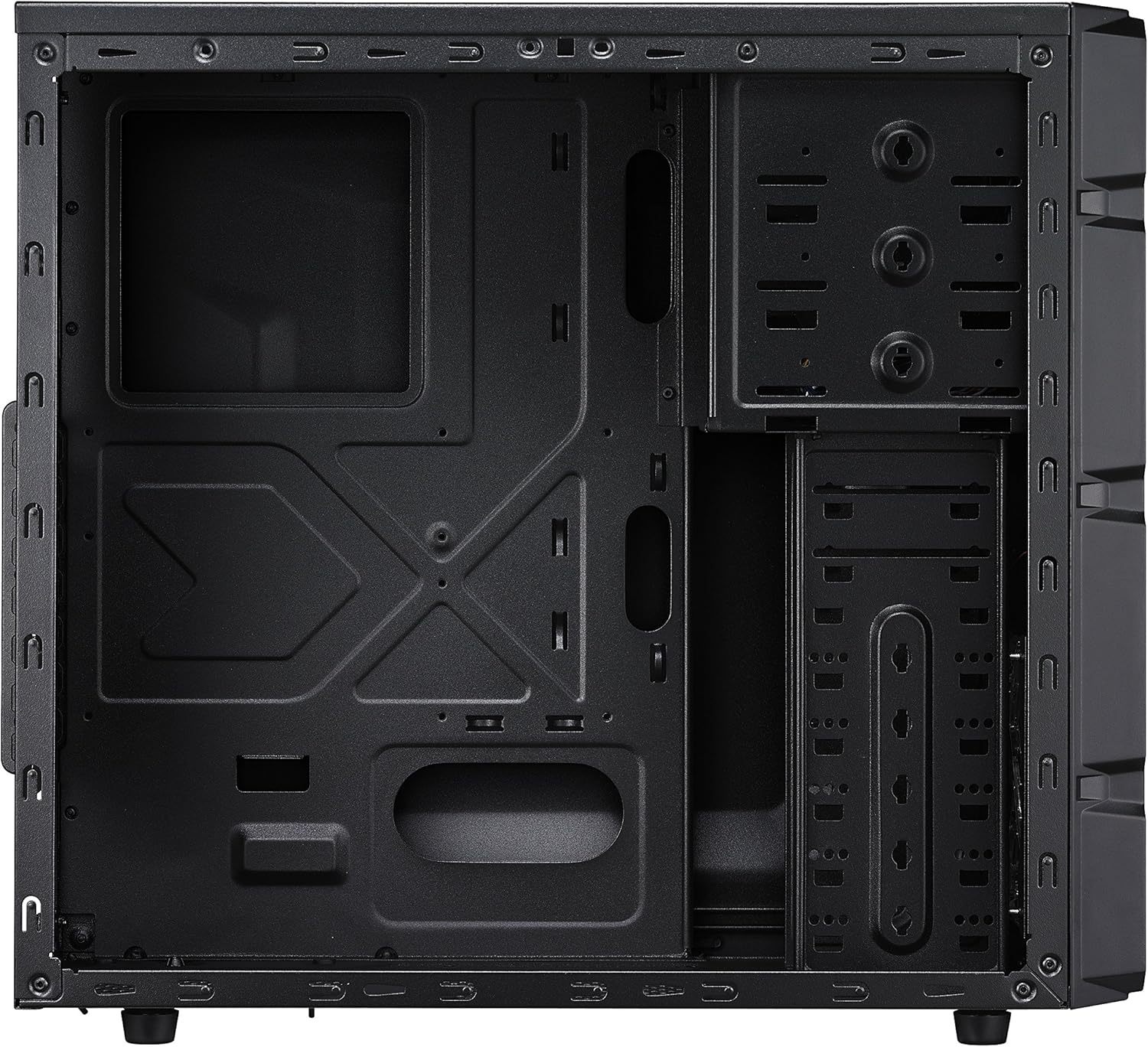

Cooler Master K350
was a nice case
only 3 fans though
1 front 1 rear and 1 side
naive pendant
@misty belfry thats how much taller the case is
dusk oracle
The only thing he might need an extension for is the 4/8 pin connector
No idea what board he will have so
dusk oracle
so 8/12 pin
dusk oracle
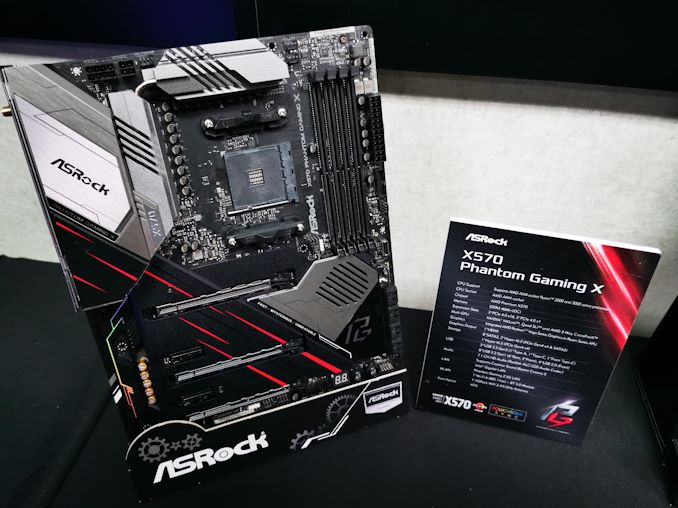
Well i see a 8 and a 4 https://images.anandtech.com/doci/14472/IMG_20190529_101636_678x452.jpg
 gritty meadow
and where is it in/on your current board
naive pendant
at the top
gritty meadow
now refer to what i just said earlier
naive pendant
thats how much i have left
i can even go around my cooler
should i have enough cable
but if i have the fan blowing out the bottom i will have even more slack
dusk oracle
@naive pendant There is one thing you can do before putting in the new motherboard
naive pendant
i plan on having my fan upside down
blowing out the bottom
so i will have more cable
dusk oracle
If you look carefully here you can see a small cut out for where you would thread the 8 pin connector for the board https://i.gyazo.com/72444406dd4c3e0b643993e7f74d42ae.png
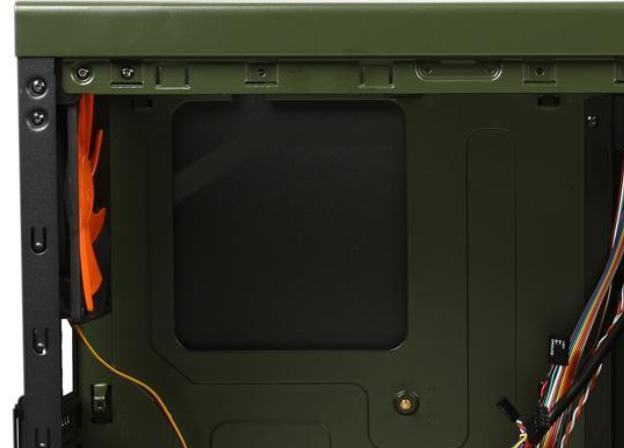
 dusk oracle
talking about for your new board if you get it
dusk oracle
If i had that case id reuse it
To be honest i like when cases looked like that
have a little bit of light shine out from the side vents
misty belfry
i still think the fractal define series is the ultimate design for looks
dusk oracle
define?
gritty meadow

Fractal Design
The Define Series of cases focuses on delivering the perfect balance between silent operation and minimalist Scandinavian design. The understated look and feel allows for a natural fit into your home or office while never compromising on quality, performance of configurability.
naive pendant
im putting liquid cooling in my case
dusk oracle
I like mesh in the front guess this is why i like the Focus G more
misty belfry
do you have experience with liquid cooling (I assume you mean a custom loop)
dusk oracle
i would assume an AIO
misty belfry
the define series come with really high pressure fans to suck as much as possible out of the front
so it's not a big deal that there isn't a mesh
dusk oracle
My case i have now i prefer the way it is cause the cooling is different
little tired so
naive pendant
im mounting it at the top
dusk oracle
@misty belfry just in case if you forgot this is the case i have now https://www.newegg.com/p/N82E16811147298
misty belfry
such RGB
dusk oracle
came with the case so i can't complain lol
misty belfry
my case doesn't do anything cool
it doesn't even cool itself until i get a second fan up front, since it only came with one, the cheapskates
dusk oracle
If you were to get a new case id suggest this https://www.newegg.com/p/N82E16811147300R
misty belfry
RGB
dusk oracle
one reason is the RGB but the other reason you can see for the cooling
misty belfry
yeah it's got good airflow
i just like to laugh about the RGB trend
because it was like suddenly everywhere
dusk oracle
The case i showed you this is how great the airflow is https://i.gyazo.com/34b6f50efee818d71f5fb91d5a441e45.png
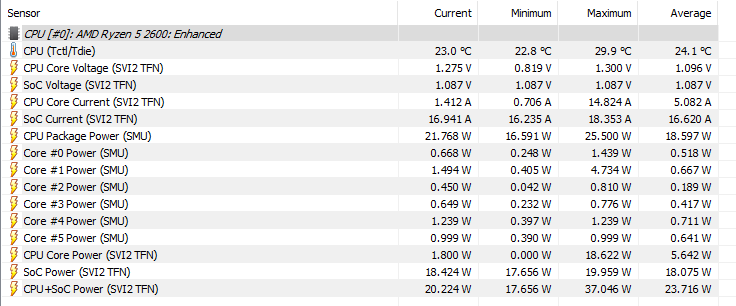

average 24c
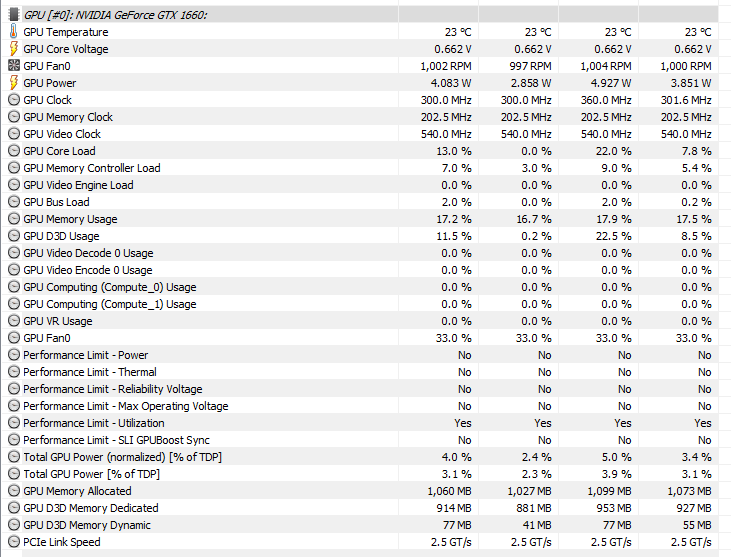
@misty belfry think about it i am only using 4 fans lol
misty belfry
damn
i'm definitely getting myself a new fan for this thing and a 5-way fan splitter so i can install an AIO later
or alternately install some top fans for intake
there's an open mesh on the top of the case
in fact i could just consider the front fans useless and grab another fan and move them up to the top
then grab an AIO and put it up front maybe since cooling an AIO is more about static pressure than overall air movement
dusk oracle
normally it is good to have the front for intake and the top/rear for exhaust
misty belfry
i see
i might do the low pressure high exhaust thing
it could make this case an airflow beast
as i understand it that creates air currents going up and to the back of the case which helps to move air faster than just the front fans can
 weak hamlet
I have one of these laying around https://www.amazon.com/SilverStone-System-Cables-Black-CPF04/dp/B00VNW556I
it worked really well when I needed it.
misty belfry
oh man that
that's awesome
not sure how managing the cables with that would work
i feel like it'd be a bit troublesome because you have a box in the mix
present company excluded
weak hamlet
it's not that big.
misty belfry
probably velcro it to the side of the case and just zip tie the fan cables together
bit of a cheap job but whatever
weak hamlet
yeah that's what I did
misty belfry
it works, it keeps the airflow going
naive pendant
whats a good temp reader for ryzen cpu's
gritty meadow
the master tool
naive pendant
is core temp good
weak hamlet
its ok.
elfin warren
Ryzen Master is the most accurate.
naive pendant
oh
elfin warren
Their temps aren't accurate though
dusk oracle
back and their temps are very accurate cause i had that open with Ryzen Master which both was saying the exact same temps
elfin warren
For Ryzen 3000 they read differently, installing now to see if it's changed
Side by side on my 3700x, it's not reading the same voltages nor temps
1.425 in HWInfo, 1.24 in Master
46C in HWInfo, 32C in Master
CPU Power, 35W in HWInfo, 8 W in Master
dusk oracle
You sure you're reading from up here right https://i.gyazo.com/124d6b7b69cf5bc0c4bc44302785d2a0.png

 elfin warren
Yes
Current Column
PPT, TDC, and EDC are correct
it's a known issue with HWInfo and Ryzen 3000 series
naive pendant
HWinfo has AMD microcode to monitor
elfin warren
It doesn't match Ryzen Master though, side by side, they are different
HWInfo reads higher temps and voltages
naive pendant
I emailed AMD they said master is only ment for overclocking and should used hwinfo for monitoring
latest beta version anyway reports same temps as ryzen master
of hwinfo
could be different per gen but TR Hwinfo and master report same temps @elfin warren
elfin warren
I literally just did the above tonight, side by side
naive pendant
on ryzen cpu or tr?
elfin warren
3700x, just like OP has
naive pendant
interesting
elfin warren
There is a known issue with HWInfo and 3000 series AMD CPU's.
1000 and 2000 series are fine
naive pendant
on TR core temp and ryzen master and hwinfo report all same temps on 3970x
have tried latest beta version?
of hwinfo?
elfin warren
Yep, that's what I downloaded
I can check it again but there was a large descrepancy
naive pendant
let me check on 3950x and asus e gaming
x570
where you under load or just idaling?
naive pendant
which voltage you going off mobo part of hwinfo or cpu?
elfin warren
Ryzen master CPU and HWInfo CPU
See, right now HW Info says 38, Ryzen Master says 31
Celcius
naive pendant
you going off package temp or ccds?
elfin warren
I look at all of them
naive pendant
package is always 8c ahead
elfin warren
I dunno, it's a thing. I found a Reddit post that something was odd with the Ryzen 3000 series and HWInfo didn't have the microcode for them
naive pendant
i send you latest version to check for yourself
naive pendant
@elfin warren https://www.fosshub.com/HWiNFO-old.html

fosshub.com
Free, in-depth hardware and real-time system monitor and analyzing program for Microsoft Windows OS.
elfin warren
I literally did that 5 minutes ago lol
naive pendant
o
elfin warren
6.21-4050 portable beta
naive pendant
I am using full installer
elfin warren
Full installer doesn't have the Beta available. Also, you sent me a link to the HWInfo OLD section
naive pendant
which mobo?
elfin warren
Asus TUF Gaming X570 wifi
naive pendant
sometimes vendors like mess with pbo without telling people like mce
naive pendant
i am testing 3950x right now btw
naive pendant
i own 3950x for spare gaming rig
elfin warren
Nice
naive pendant
yeah maybe its lower skus but from what i can tell minus 3950x and above
issues
strange bug
i wonder how 3950x is immune to it
elfin warren
No idea
naive pendant
My b if sound like was attacking you too @elfin warren
naive pendant
honestly even ryzen master is proby wrong on everything no software can keep up with how fast these chips ideal and boost so everything is proby like 2-3ms off
Master anyway still acts strange on TR too @elfin warren
like it still works like 50/50
elfin warren
I dunno. Master has been fantastic for me
Temps report quickly, voltages seem to read right
Oc testing and setting is ok.
naive pendant
yeah alot times its give me please reinstall so i am kinda over it
elfin warren
I know vbs can interfer with it
Make sure that's off
In the bios as well as os
That is also a known issue
naive pendant
i need vbs since my NAS