#cpus-mobo-and-memory
1 messages · Page 83 of 1
 fair orbit
 dusk oracle
go with team
fair orbit
I see that 2x16gb team mem is 103. Supposedly these things are better on an asus board..idk why that's a thing tho
 grizzled holly
Would a RX 560 2GB bottleneck a 2700X?
fair orbit
If anyone could help me decide b/t Dark Z and DarkZa Team memory that'd be sweet. I know the Za are "tailored" for AMD, but I just wonder if it matters that much.
 dusky swift
What SSD can go on this MB ( ASUS AMD AM4 ROG X570 Crosshair VIII Hero (Wi-Fi) ATX Motherboard with PCIe 4.0, Dual M.2, SATA 6Gb/s, USB3.2 Gen 2, 2.5Gbps LAN, WiFi 6 ) Would like one for my Windows to be on. Thanks
 weak hamlet
any 120gb ssd would be fine @dusky swift
 bleak onyx
is there one that goes on the MB with out a cable? Sorry was not log on in above msg
@weak hamlet can this go on that MB?? https://www.newegg.com/intel-660p-series-2tb/p/N82E16820167461
weak hamlet
yes it has an m.2 slot
it's under the heatshield
so you'll have to unscrew that, install the m.2 ssd and put shield back on, and be good to go
bleak onyx
@weak hamlet Ok thank you
weak hamlet
NP.
 fair orbit
I'm having the hardest time trying to decide what cpu to get. even tho I bought memory for amd (I could cancel I think). I currently have 6700k. I'm trying to decide b/t 2700x, 3800x(only $30+ over 37) or i5 9600k
 urban ferry
if the 3800x is $320 right now thats what i would get
if youre going for a bit cheaper the 2700x is still a fantastic cpu
 dense cedar
or 3600
 naive pendant
Depending on use case, 6700k could be very close/possibly better than even a 3800x, e.g. csgo with a gtx 1050 ti
BFV with a 2070 super? 3800x definitelly > 6700k.
fair orbit
cuz I think the 2700x is about 160 now and Idk if I can justify paying 170 more for like 15% perf diff
 civic ore
i think the 3600 is 185?
fair orbit
ohhh I didn't even think of that
I see it for 199 on amazon and that's not bad. comes with a game.
civic ore
mine auto overclocked to 4.2ghz
fair orbit
you have a 3600x? what board do you use?
fair orbit
nice ya there's not a huge diff b/t that and the X version
fair orbit
I wish I knew if the prices of the newer would drop again in a few months, but I gotta feeling they won't
fair orbit
6700k
fair orbit
ya, i'd keep it but a friend wants to buy my old rig. I want soemthing that'll last 3-5 years. Also gotta find a new gpu, but not sure if I want to dish out the $$ for a top card
civic ore
i got my 1070 for 192 shipped
fair orbit
oh wow special?
 frigid talon
i got a 1070ti for less than 300
civic ore
technically its used but literally for like 5 mins
its the asus strix 1070
and a x570 board with 1tb nvme 4.0 ssd
fair orbit
nice
civic ore
intel needs gen 4
fair orbit
Is there a main diff b/t x470, b450, a320 boards? Is x for higher end, b for mid and a for starters or something?
I read the 2700X supports up to 64 GiB of dual-channel DDR4-2933 memory, but then I'm seeing people talk about using 3200. I'm assuming I can use 3200 and enable xmp I think it's called?
 gritty meadow
@fair orbit for the regular consumer, the main difference between the chipsets are supported features (number of: usb ports, sata port) and what amount of pci-e lanes are split in what way.
ask if you want more info :)
as for memory support: look at your mainboard of choice. There will be a QVL list of memory sticks for your board. Some types of memory is only guaranteed to work at X speed with Y number of sticks
@fair orbit here is an example for the MSI X570-A Pro (Board that a client will be using in a new build): https://puu.sh/EKS2L/f48925e19d.jpg
 fair orbit
I picked up the 2700x for 150 (had promo credit) and am looking at the rog strix b450 f board for 104
gritty meadow

ASUS Danmark
Best AMD AM4 B450 Ryzen ATX gaming motherboard with advanced cooling, Aura Sync, SupremeFX, dual M.2, Intel LAN, and USB 3.1 Gen 2
dont mind the DK part of the url. it wont effect the QVL list
fair orbit
the strix supports up to 3200 so i should be good. and since it has 4 with total 64gb, I'm guessing 2x16gb is fine
gritty meadow
in theory yes.
IF you want to be certain, look in the QVL list
annoyingly ASUS dont have their QVL lists online on a site that is easy to lookup, instead they use PDF files for it
fair orbit
dang, not sure if this mem will work then. It just came out this month and is "tailored" to amds
gritty meadow
the tailored part does not mean much in reality
fair orbit
i figured, but the price was good
gritty meadow
IF you are truly worried about it (i would not be, it is only 2 sticks, 4 is where it gets weird)
you could contact the support department at ASUS
worst comes to, you can always sell it to someone :)
and it used to be there was a ROG Community forum, so maybe look for something like that
fair orbit
@gritty meadow hey still around?
gritty meadow
@fair orbit i am
fair orbit
the mem thing that's more board associated than cpu right?
gritty meadow
yes and no
its one of those "it is complicated" kind of answers
IF your first/main priority is to get your system up and running with as little hassle as possible.
you go with a kit from the QVL list.
IF you want to OC the snot out of it, then it is a different matter.
 glad stream
My new board is not happy with ram OC so far. Successful post and boot
But
The XMP that worked before...
Does not now
Nor am I having success with manually OCing
fair orbit
damn
fair orbit
you said you use msi?
gritty meadow
@glad stream it is one of those things/situations that might be fixed by a multitude of things.
glad stream
It's an AsRock board
gritty meadow
a new bios might fix it, the same board + ram with a different cpu might fix it
again, we are talking about an OC of ram.
glad stream
Both my old and new board are AsRock B450s
gritty meadow
the amount of factors that play into it are many, and require a bunch of knowledge about your specific parts to comment on them in a meaningful way
glad stream
The old board was successfully running these sticks at 3200
Same CPU
New one is not here yet
gritty meadow
the only takeaway from that is that your old board+cpu combo worked well with it.
that is all that that tells you.
glad stream
Haha thanks
gritty meadow
not trying to be snarky, just in case it is not clear.
glad stream
Nah you're good
Could I revert to an older bios?
Because the older board was not running the latest
gritty meadow
but people (in general) have a tendency to think that "it worked on this other thing that is outwards identical" means that it works on the replacement board (also outwardly identical)
aye, you should be able to flash it just fine. Please check your OEM's support site for info on that :)
gritty meadow
The "if it isnt broke, dont fix it" saying comes to mind.
gritty meadow
no, the RAM oc is broken
glad stream
True
I should see how destiny runs rn
Before I go messing with BIOS versions
But just windows tasks seem
Sluggish
Like how it was last board before OC
gritty meadow
the only one that can decide on what to do is you.
glad stream
Yep yeppp
So far seems good
200+ frames in ye menus
About to load in
Wow
High 90s mid 80s
As opposed to low 80s high 70s on the old board
But then there aren't many enemies here
I mean I'm not gonna complain about this performance at all
Can't wait for the new CPU
 copper solar
fair orbit
copper solar
fair orbit
i need a sweet 570 mobo deal..like 200 off a cross
 weak hamlet
ye he did didn't he
I need more coffee.
lol
109 after rebate
144 .. openbox
dense cedar
get the aorus one
if you're going x570 treat yourself to something that looks and is nice
naive pendant
Think $400 for the trx40 aorus pro will sell out?, the other 3 have
weak hamlet
probably
weak hamlet
links up there ^^
fair orbit
asus prime and tuf boards are poop?
naive pendant
prime and TUF x570 are good
fair orbit
lol true true
i guess I should say what I have and what I wanna do with it? I picked up some team mem 16gbx2 (it was $114, seemed ok) 3200, might not do nvme yet, i got an adata 1tb ssd sata. Might go 2070 S or might go 1660 or less if possible. (currently 7850). I don't play anything super intensive. maybe as creed, no man's sky and possibly cyberpunk. I picked up a 3600x.
weak hamlet
look at it as future proofing.
get the 2070super, be set for a looooooooooooooooong time.
fair orbit
you don't thinke the 3k cards will be nuts?
naive pendant
The will be. Eventually. But mainly for ML compute / RTX , kinda like 2080 ti vs 1080 ti.
(my guess). 50% more gigarays /sec. Same 11GB memory layout but with 16Gbit IC's , more bandwidth on gddr6.
fair orbit
i wish 1070s were cheaper.
weak hamlet
1070s?
fair orbit
1070's . damn wish i coulda got that msi ventus that sounds legit
weak hamlet
I keep looking at that msi 5700xt MECH
fair orbit
that's probably just as pricey as a 2060 or 2070 right?
weak hamlet
ish yeah
fair orbit
if I could get that ventus for 189, would that be a good price?
1660 ventus. kinda odd one site says ti other doesn't, but have same boost speeds
naive pendant
Sub 200 is good for a 1660 - but would have to check reviews for said model. Ignore specs listed for base/boost mostly. Cooler will have more impact.
fair orbit
only con i've read is the fans are at minimum 44% (speed i'm assuming)
naive pendant
I like evga. Do you like evga?
fair orbit
Don't really know much about it. that's amd?
last card I had was amd also current card and it's...olddddddddd
weak hamlet
lol
weak hamlet
built in
naive pendant
Ty
weak hamlet
glad stream
@copper solar did you post something about ram? Because I might still be able to cancel mine and order something that my new mobo will like more
copper solar
Check #tech-deals @glad stream
Double check if the promo works with a product you're interested in before canceling your order
glad stream
I just realized they're already out for delivery
So looks like I'll have them today
Hopefully I can figure out how to get them to OC
I ordered two more of the sticks I had because they were doing well in the b450 I had. I guess at least I know I ought to check QVL now.
Worse comes to worse I could just wait until I have enough $ to just buy new and use them in my old board. Maybe get another of it and do another build using them.
Lol I wish I had mondo $$
copper solar
Same
 jovial arch
hey team
weak hamlet
Sup
jovial arch
what do you think of this?
10th Generation Intel® Core™ i7-10710U, 12 MB Cache, 6 Core, up to 4.70 GHz
i am looking to buy a laptop for programming
looking at this ?

Dell
Check out new 33 cm XPS 13 7390 laptop featuring innovative HD webcam located on the top of the InfinityEdge display and next generation Dell Cinema.
worth it?
weak hamlet
I'm not big into laptop and programming sadly, but I'm sure someone will chime in that does 🙂
@naive pendant
naive pendant
Richard Stallman uses a T420 thinkpad.
jovial arch
that has a windows operating system
naive pendant
I think he runs an open source bios/bootloader like libreboot and probably debian or something
jovial arch
i am looking for ubuntu or mac
OS
yea but i rather have a machine that comes with linux
dusk oracle
You can always replace windows with Ubuntu or dual boot
jovial arch
when you run linux like that
than you run into problems of having driver support and other stuff
so i rather have something that comes with ubuntu
also god damn
that lenovo looks thick
dusk oracle
Last time i checked Ubuntu is free
naive pendant
I do not suggest you choose a t420 for a main laptop unless already a thinkpad fan. That said, the newer models like the x1 carbon 6th gen are comparable to Dell's XPS 13 (can actually be bought with ubuntu - maybe better driver compatibility simply due to inertia of consensus) , or HP's spectre elite
These are all 13" 2lb or so machines. There are of course larger, more capable, more powerful models.
Why would you suggest that
dusk oracle
he mentioned programing and coding
naive pendant
nvm, ya, that makes sense
naive pendant
I mean - now I understand. But no, don't get that lol, that's of 0 use for his use case as described so far.
jovial arch
and looks so heavy
so the xps 13 that i posted above
is useless?
not good enough for coding?
like idk
web development
front end
and back end
and a bit of data science
what do you think
naive pendant
To clarify -ecks answered my question as to why he would suggest a P series.
dusk oracle
Well all i core laptop processors ending with U are extreme low powered processors as well
naive pendant
I mean, do you compile much on the local machine? Or is it just a thin client basically
jovial arch
i do compile a bit
dusk oracle
Normally when i see someone looking for something that would require what he asked first thing that pops in my head is a Xeon and a Quadro
naive pendant
I'm curious about your use case, sounds like you're currrently on windows/MacOS and would like to move to a unix environment for both work/general use?
jovial arch
windows user....have been testing ubuntu and macOS developement at work and i have to say its so much easier
in windows there are always so many extra steps
naive pendant
So like, full stack, react, node js, rust elixr, klotin w/e ?
weak hamlet
you don't like extra steps?! 😛
jovial arch
yes exactly
lately i have been getting involved with data science
but i am mainly in full stack web development
i was looking at the macbook pro
but idk
too expensive
naive pendant
Well, I like thinkpads like the x1c - form factor towards the portable end of laptops. But I can't say I know a single full stack SDE or PM who has to crunch a lot of compiling, or even GPU compute on their portable machine.
TL;DR Pick based on preference focusing on ergonomics, QoL, but google around or otherwise investgate a bit further to ensure your usage profile isn't an edge case requiring a specific feature set - or just more of a desktop replacement kind of "laptop"
Fwiw - MS gives every intern a surface book pro with a 1070 and some 6600hq or something (~2ish yaars ago) which is a 15" 3?-4 lb "middle ground" of form factor. But more than overkill for any actual developer work. Once again, it'll comme down to preference imo.
jovial arch
thanks for your input
 rapid mortar
if i were to upgrade from my r5 2600 what would be the best option. nothing brand new and top price around 175 ish
gritty meadow
What is the rest of your system looking like @rapid mortar ?
rapid mortar
going to be a 5700xt soon and mobo is a b350m
 marble epoch
Hello,
I just bought 4x16gb of G Skill Trident Z Neo 3600mhz ram from Newegg , I should receive it by the end of the week. I tried asking MSI, but they are vague. I have an x470 gaming pro carbon motherboard, it says the board will take up to 3466mhz ram. If I plug in the 3600 Mhz ram I just bought, will it run at all, or will it run but at slower speeds. Just trying to figure out if I need to return that and get slower ram, or keep it as is. Thanks
Dan
gritty meadow
2sec Dan
rapid mortar
yes it will run but only 3466mhz
gritty meadow
@marble epoch can you link me the exact model (of ram) you have purchased?
the product page at newegg is fine
rapid mortar
i am right, right? it should only run at what the mobo can put out
gritty meadow
@rapid mortar are you using a SSD at the moment, and if you are, which one?
rapid mortar
no ssd right now
gritty meadow
then that is your biggest upgrade right now
gritty meadow
then why are you asking here? :)
rapid mortar
im just wondering what what be a good upgrade in the near future lol
gritty meadow
ask when you are closer to purchasing
marble epoch
OK, cool, I appreciate the fast reply. OK hold on
rapid mortar
i suppose that would've been smart lmao
marble epoch
G.SKILL Trident Z Neo (For AMD Ryzen) Series 32GB (2 x 16GB) 288-Pin RGB DDR4 SDRAM DDR4 3600 (PC4 28800) Desktop Memory Model F4-3600C18D-32GTZN https://m.newegg.com/product/N82E16820232867?m_ver=1
gritty meadow
i say that because it gives us (people here and elsewhere) a better (up to date) foundation to answer you from @rapid mortar :)
gritty meadow
@marble epoch dont expect that kit to go above 3200
marble epoch
OK, thanks again, at least it will work until I upgrade the mobo
gritty meadow
i am not guaranteeing anything @marble epoch, just to be clear.
it should work. but there is no guarantee
https://www.msi.com/Motherboard/support/X470-GAMING-PRO-CARBON#support-mem-14 <- this is the QVL for your board
 marble epoch
No worries, I appreciate the input. Msi, wouldn't give me a straight answer
gritty meadow
aye, because they just look at the QVL like i do
because that is all they can realistically do.
there are simply too many "weird" memory kits around
and you are very welcome :)
marble epoch
Thanks again.
naive pendant
rapid mortar
im loosing it lmao. my mobo only supports 2 fans what is the name of the piece that allows me to use more than just 2 fans?
i literally forget
gritty meadow
fan splitter
rapid mortar
thank you
gritty meadow
keep in mind, it can be either 3 or 4 pin
rapid mortar
omg i could not for the life of me remember lmao
gritty meadow
so make certain you order the right one.
rapid mortar
yeah definitely
grizzled holly
Could anyone recommend me a good AM4 B450/X470 motherboard under 100$? Thanks!
naive pendant
b450 gaming plus max, b450 tomahawk max
grizzled holly
@naive pendant Is the B450-A Pro Max good?
naive pendant
no
naive pendant
Do you have further questions about the links/articles/build guides I've sent you?
grizzled holly
wait you sent me those?
naive pendant
type that into search, then search again the other way around, - only because my recommendations and reasoning hasn't really changed haha.
weak hamlet
lul
naive pendant
Not trying to be terse - they're just really good resources to learn how to figure out what parts make the best build for you - the user.
grizzled holly
all good!
naive pendant
lacks flashback, nothing else redeeming
 quaint current
what cpu?
grizzled holly
@quaint current a 2700X
naive pendant

eBay
You may also be interested in. We do believe those are the worthy approaches to shape STARLIT PARTNER your most trusted source of computer products. City of Industry, CA 91748. 901 Canada Court.
grizzled holly
oh thanks 😀
 solemn raven
Hey all, I'm doing a new build. I have a Fractal Design R6 USB-C case and ASRock x570 Steel Legend mobo. I'm having an issue with the USB 3.1 Gen 2 cable from the case. I dont see a port for that on the mobo. Is there an adapter I could use or am I SOL?
gritty meadow
@solemn raven based on the board info, there is only Gen1 connectors there.
solemn raven
@gritty meadow looks like 2 Gen1's but no Gen2
gritty meadow
yes. as i said. Based on the board info. the Board only has Gen 1 connectors.
and you need gen 2
 sharp blaze
Designed for cases with front USB Type-C ports that utilizes the 20-pin Key A connector, the SilverStone’s CP14 adapter can convert motherboard’s older USB 3.0 19-pin internal header to be compatible with 20-pin Key A connectors. It is easy to add and there is no driver i...
 next mica
i need help
sharp blaze
you can use something like that as an adapter, but they are pricey
and still going to be limited to gen 1 speed
next mica
@sharp blaze can you help me
sharp blaze
what do you need
next mica
whats a good ssd
sharp blaze
m.2 or sata
sharp blaze
what motherboard do you have
next mica
im pretty sure its sata
sharp blaze
sata is standard
sharp blaze
what is the model number of the dell
sharp blaze
looking it up now
ok, so it looks like you system can use either m.2 drives or sata drives. depending on the config you may already have a combination of sata and m.2 drives in the system
sharp blaze
m.2 nvme is faster, but for a storage drive or loading games you may never notice the difference and sata is usually a bit cheaper
what size ssd are you interested in buying
next mica
1 tb
again its just im buying a new gpu
i want faster load speeds and i want to be cost efficient
trying to stay around or under 100
dusk oracle
If the system is using a B450 board (if i am seeing the right model for it using a Ryzen 7) there is StoreMI which merges a smaller size SSD with a large HDD
sharp blaze
yes
sharp blaze
you would just select the new drive as the install location
dusk oracle
There is this you can look into if you would like https://youtu.be/cn8qXIPOdCM
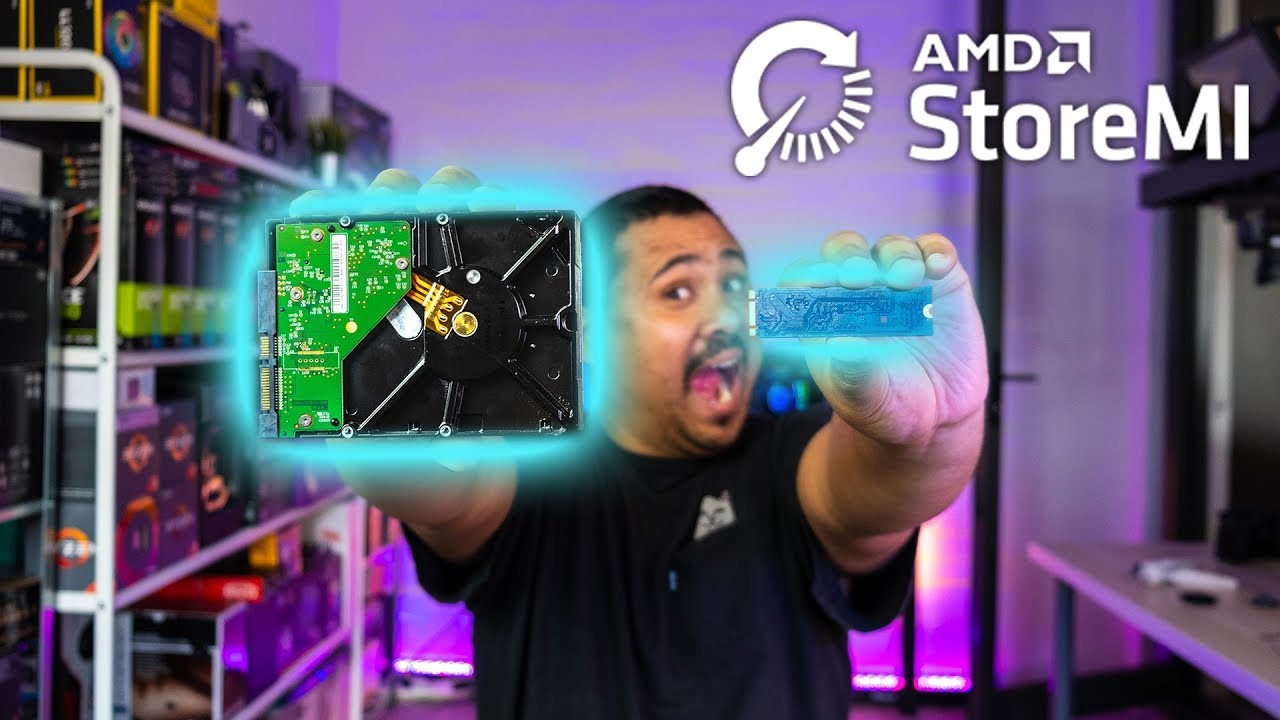
There has a been a little bit of confusion as to what StoreMI is and how it works. AMD asked us to explain it to you guys in our very "Gear Seekerish" way to...
sharp blaze
and most launchers allow you to easily move games to a different drive
sharp blaze
this would have been an easier choice before today with the black friday sales, at the $100 price point it limits you to a few drives
next mica
honesty now knowing i can have two
i could probably do with a 500 gb ssd
because i would have 1.5 tb total
i dont do that heavy gaming
sharp blaze
@naive pendant what do you think, you are usually on top of the ssd game
best deal I am seeing in the 1TB range on newegg right now is a WD blue for under $100
next mica
hmm
sharp blaze
there is a deal on the 660p, but I have never bought anything from the seller
naive pendant
How much media / non i/o intensive data , how much game/program (i/o intensive data) and what's your current C:/ drive filled size
next mica
i might go with a 500gb instead
knowing i can keep the HDD which is 1 TB already
i have maybe like 500 GB used
maybe half of that is games
so lets say 250 gb is games
naive pendant
so 2700 misc b450 board, you already have 1 single 500 GB hdd for os and everythin?
best to link a pcpartpicker, or list components
next mica
i have a 1 TB HDD
sharp blaze
its a dell
naive pendant
Gotit, so currently everything on 1 TB hdd?
next mica
pcparkpicker doesnt have my motherboard
naive pendant
Budget $100 but flexible?
next mica
yes right now everything on 1 TB HDD but i want an ssd for my games
sharp blaze
from the reviews the board has 2 m.2 slots, 2 3.5 slots, and 1 2.5 slot,
stock sata power cable can do 3 drives
naive pendant
Without knowing too much about the dell, or even if I did, safe bet recommendation fromme would be buy an 860 evo or whatever the best deal for your budget is at 1Tb 2.5" ssd not m.2 and clean install windows to that. Follow the 10forums guide I can link later to take ownership of old drive, use for media storage
Oh, so a recent dell
A userbenchmark will also tell us everything we need to know
sharp blaze
Enjoy the videos and music you love, upload original content, and share it all with friends, family, and the world on YouTube.
thats a video review
naive pendant
userbench will list very part number including mobo andbios
sharp blaze

Top Market Research & Genuine Product Insight from our Users. Quickly find category leading products with UserBenchmark.
run that post a link
next mica
sec
naive pendant
You plan to put a 2060s into a dell?
next mica
ye
sharp blaze
to get a 2060 in there you may have to remove that bracket that holds the gpu in place
next mica
i know there in the back
u have to slide em out
im downloading that thing
i think im going to go with a 500 gb ssd
sharp blaze
next mica
not bad
sharp blaze
These are quality drives, but backordered right now. you can go ahead and order it I think and it will ship when its in stock
I have one of those and its been good
next mica
sharp blaze
But the drives do not come with a sata data cable so you will also need to order one of those
sharp blaze
for those you will need the data cable
sharp blaze
naive pendant
Not bad deal, tbh I might buy some of those at 250/500
sharp blaze
something like that is cheap enough and will give you some spares if you want to add another drive later
next mica
how do i use those cables
naive pendant
So, windows is staying on the hdd? or?
sharp blaze
one end with the 90 degree will plug into the ssd, the other will plug into the motherboard
dusk oracle
or vise versa depending on the case
sharp blaze
the way your case is designed I am pretty sure you need the 90 on the ssd side
dusk oracle
All of mine mounts behind so i can't use the L part lol
next mica
but they can flip
naive pendant
So, the mobo has 2 m.2 slots?
sharp blaze
Ya, one near the cpu, and another under the gpu
dusk oracle
This is what i mean for behind and this is from my case https://i.gyazo.com/45d2888c0a8f6a5b750e776e9414dff7.png
 sharp blaze
with b450 I would assume the top one is direct to the cpu, and the other is pch
naive pendant
Wouldhave to check the manual, but even the worst implementation would be warp 9 vs current "feel" of windows on hdd
The crosshair 6H x370 for example has that weird sharing config with the top m.2 and pcie 1
dusk oracle
Windows on a HDD is so slow
next mica
okay so now ima have a ryzen 7 2700, rtx 2060s, 1tb hdd, and 500gb ssd
sharp blaze
one other thing I cant tell from the video's or pictures is how the ssd will mount. Dell sometimes uses pressure fit clips to hold drives in place, sometimes its screws
naive pendant
Sounds like a problem for the zip ties to figure out
sharp blaze
My wife might kill me, but that 500gb is cheap right now
next mica
the 860?
sharp blaze
ya
next mica
it lowkey is
sharp blaze
its been about a year since I bought mine, but I think I paid close to $100 for it
next mica
ssds are 500 mbps compared to hdds at 100 right
dusk oracle
so intender if you buy that does that mean we have to wake you up on new years lol
next mica
giving it a faster load speed
sharp blaze
only if you dig up my grave
naive pendant
I bought two 1TB of those 167 each in 2018, Loving these cheap storage and ram prices
dusk oracle
ill have zack help out then he could use the work out 😛
naive pendant
TBH - the price of a indistinguishibly faster computer is really continuing to shrink
sharp blaze
Now if you ever want to add more drives, plan on getting m.2 drives. with them they dont need any cabled, they just slot into the motherboard.
dusk oracle
i hope Dell put the M.2 screw
naive pendant
IMO - if you have 2060 super budget, I'd drop a $100ish 1TB NVME in there , clean install windows, if needed keep hdd on retianer for storage, or better yet, for backup only.
next mica
my budget is 400 total for this upgrade
im already at 420 with gift cards i earn from work and a $60 credit
naive pendant
Hmm, ya, would have to cut down on gpu. Nice card tho
next mica
hmm
naive pendant
Half the fun is chasing the next upgrade imo
naive pendant
i'd have to look at what GPU's are on sale compared to your current expected expenditure for the 2060 super upgrade. But I'd absolutely make room for $50-120 of nvme boot.
Though - the unknowns that remain are how amenable/interested you are in resinstalling windows,
dropping down on gpu, trying new stuff etc
next mica
i mean
if the cost is around the same
i dont play with super high graphics
was just doing the better gpu for a longer term investment
naive pendant
is your monitor 1080p 60hz?
next mica
yes
naive pendant
Well, that makes it much, much easier for us to confidently recommend dropping down a tier on gpu for a cutting edge ssd
next mica
hmm
naive pendant
Side note , userbenchmark takes about 3 mins and gives all of this information haha
next mica
do i just copy from the website?
UserBenchmarks: Game 42%, Desk 53%, Work 51%
CPU: AMD Ryzen 7 2700 - 71.9%
GPU: AMD Radeon RX 580 - 41.2%
HDD: Seagate Barracuda 1TB (2016) - 66%
RAM: Samsung M378A1K43BB2-CRC 2x8GB - 75.8%
MBD: Dell Inspiron 5676
lmao
naive pendant
Download the exe, run it, whenit's done, it'll show you a web page. link us the page, or I can try pick through that and findit manually lol
naive pendant
didn't know you were coming from a 580, not enough horsepower for your gaming?
next mica
the 580 is okay
graphics could be a little better and load times a bit slow
like for good graphics it struggles
naive pendant
Wanna see a userbench comparing my ssd's to an hdd?
next mica
sure
dusk oracle
2 major things i can see holding back your system is the drive and the memory being at 2400MHz
naive pendant
Hmm, only one I have with an hdd bench is this, a spinpoint F4 2TB
https://www.userbenchmark.com/UserRun/20019814
So, ignore the percents, but look at the HDD random 4k read, write and mixed. it's .7, 2.3, and .7
That 830 evo is a $100 drive I bought in literally 2012 and it does 24, 60 and 25
Point is, I think you'll very much enjoy this upgrade.
naive pendant
btw, that's not my normal system config, I went to some lengths there to see how many generations of drives could run at once lol.
Anyway, $400 total for system overall?
next mica
$400 for new gpu and ssd
naive pendant
What games do yo play
dusk oracle
Lower than a 2060S is a 2060 or a 1660 Ti
next mica
i play dead by daylight
world of warcraft
runescape, sometimes ark
csgo, overwatch
naive pendant
How competitive are you with csgo/overwatch
dusk oracle
Well read not hear lol
next mica
not very ive actually been getting off those games and going to MMOs more
dusk oracle
Are you playing on 1080p or higher?
next mica
1080
naive pendant
hate to push you into yet another parts suggestion, but i'd upgrade monitor + ssd only. lol
next mica
upgrade my monitor?
dusk oracle
i am assuming he means like 1440p
naive pendant
from 60 hz to 144. Though, maybe just one step at a time here
It's a 1080p 60hz monitor, yes?
dusk oracle
75hz is pretty good right now
next mica
i want better performance not looks
naive pendant
For simplicity sake, how about I just send a recommendation for gpu/ssd, you can make the call from there - if you do want to go 144 monitor, always feel free to ask
next mica
sure!
naive pendant
I mean, I've played on all of these configs
next mica
im thinkin 1660ti tbh
naive pendant
I've had a 580 and played games onit + a i3 2120 , I've played years on 1080p60, also on 2400 hz ram, hdd boots, to 2.5" ssd ,
dusk oracle
You don't play any demanding like MMO's?
next mica
black desert online, world or warcraft, not many others
looking into ff14
rust but its eh on this
takes a while to load when moving fast
i play gta5
dusk oracle
open world games like Rust it would load better with a SSD
naive pendant
Lol ya, rust is even hard for me to max out with low frametime dips
next mica
rust is a tuff one
dusk oracle
I didn't bother to play that game cause of all the grieving i have seen
like logging out to only find out the next day you've been robbed
next mica
true
hmm
anyone know the difference in the msi 1660 ti (armor vs gaming x vs ventus>
dusk oracle
If going with Nvidia i would honestly suggest going with EVGA
next mica
u think so?
dusk oracle
They do tend to have better customer support
dusk oracle
and with MSI cards from what i have experienced can be hit or miss meaning i had a 1050 Ti from MSI and the area around the fans was a little small which i had to sand it down
next mica
oof
 low flume
hello?
low flume
got a question about getting a new monitor
next mica
whats up
low flume
I built a gaming pc with msi motherboard, 17 intel cpu, 32 gig ram, 1080 ti fe video card
how high of a monitor can I run? as far as 144hz or more...and true hd or 2k or 4k
low flume
is the 1440 2k or 4k?
dusk oracle
2K
dusk oracle
That is a pretty good card
next mica
this will fit in my motherboard right
dusk oracle
and i believe that is the length that would fit your system
next mica
system*
dusk oracle
was looking at the XC but that seemed to be too long
next mica
i think the xc is a bit to long yea
dusk oracle
This is the GPU i am using now https://www.newegg.com/evga-geforce-gtx-1660-06g-p4-1161-kr/p/N82E16814487437
naive pendant
here, also 5% off https://www.evga.com/products/product.aspx?pn=06G-P4-1267-KR&associatecode=29OR9CPT20N35CI
EVGA
The EVGA GeForce GTX 16-Series Graphics Cards are powered by the all-new NVIDIA Turing architecture to give you incredible new levels of gaming realism, speed, power efficiency, and immersion. With the EVGA GeForce GTX 16-Series gaming cards you get the best gaming experience...
dusk oracle
This is why he linked the SC 😛
naive pendant
EVGA
The EVGA GeForce GTX 16-Series Graphics Cards are powered by the all-new NVIDIA Turing architecture to give you incredible new levels of gaming realism, speed, power efficiency, and immersion. With the EVGA GeForce GTX 16-Series gaming cards you get the best gaming experience...
dusk oracle
Ya that triple slot card like mine lol
But ya with the 1660 i am using i was able to get way over 80fps playing WoW
at 1080p for games like Overwatch you will get more than 100 frames
naive pendant
EVGA cards are black > sc > XC >ftw3 > kingpin
dusk oracle
For games like Rust and Ark i can't say anything about it cause Rust i don't own and Ark i haven't installed ever since i got my card
naive pendant
Oh, I did that backwards
dusk oracle
@next mica Do you ever plan on playing at 1440p?
naive pendant
Black is the lowest, locked clocks / power card, sc/xc usually have reference pcb, ftw3 and kingpin are custom pcb + higher power limits
dusk oracle
If not you could maybe take it down a notch and go with the 1660 Super instead
dusk oracle
Well i wouldn't say better but a lot cheaper on the cost
next mica
p sure the ti is cheaper
dusk oracle
and i think it is about a 10% difference and @naive pendant you can back me up if i am right on that
Ti is more than the Super
naive pendant
I would google around for benchmarks for current GPU's and find the cards of concern on said benchmarks for comparison
GPU drivers/windows updates/gamepatches constantly change ranking, as such - I recommend just looking at whatever card got reviewed last.
dusk oracle
This is like a month and half old now but gives a right idea between the 1660, 1660S and 1660 Ti https://www.youtube.com/watch?v=JkcZJpL_7AQ

NVIDIA GeForce GTX 1660 vs GTX 1660 SUPER vs GTX 1660 Ti l 1080p l Buy GTX 1660 SUPER - http://bit.ly/2rRg52K Games : Assassin's Creed Odyssey PUBG - 01:08 F...
naive pendant
Good choice of benchmark video.
now... the thing is, a 580 isn't much behind a 1660 lol.
Unless you stream, then it's head and shoulders above because Turing's NVENC
next mica
i stream on twitch \
im going to go with the gtx 1660 ti
with the 1 tb ssd
i think the ryzen 7 2700 will do me justice for a bit longer
naive pendant
Good pick. I recommend the last one linked from evga - but best option is aesthetic preference. Hope the upgrade goes well.
next mica
and this will be a nice upgrade to storage, load times and graphics
ima go with the evga
naive pendant
2700 will last you as long as you stay on 1080p 60hz
next mica
and the 860 evo
Order total: $346.85

RX 580 vs GTX 1660 Ti | Test in 7 GAMES I know it's an unfair test, but it was requested by a lot of subs. Battlefield V: 0:00 Shadow of the Tomb Raider: 0:5...
dusk oracle
Ya that video is a lot older
cause right now the 1650 Super gives on average 70fps on battlefield 5
next mica
outdated?
ah
Guaranteed delivery date: Dec. 6, 2019
i hope nothing goes wrong with the cpu
dusk oracle
np
 autumn stream
I just installed my 1660TI in my old x58 rig to play WOW... 99FPS everything maxed
I'm actually quite pleased with the GPU
upgraded from i7 920 to Xeon W3680 as well
solemn raven
@sharp blaze perfect.....thank you!!
 high igloo
When is the B550 motherboards coming out?
 wraith karma
No idea
 violet stratus
I just got all the parts for my Black Friday build except for the Ryzen 9 3900x Any word on when they're going back in stock?
 indigo aspen
No clue
quaint current
2900x doesnt exist. are you talking about the 3900x?
 limpid pelican
so i have a bit of a problem, i have a "ryzen 7 2700" on a "asus b450-f motherboard" and "16gb of corsair vengeance rgb pro ram", the ram is only running at 2133Mhz when it should be at 3200, I tried changing my bios settings to DOCP but my system wont boot when its selected. How can i get my ram to run at 3200mhz
 meager onyx
i bought a ryzen 7 2700X for streaming
is it a good choice, considering its nearly 2020?
you can @ me
 high crystal
yeah
they are still good cpus 
But to be honest, it would of been better to get a 3600x. @meager onyx
 rancid delta
^
meager onyx
i got the 2700X for 169€ xD
high crystal
Better single core performance, faster and more energy efficient due to it being 7nm instead of 12nm so better to cool especially as i presume you're going to overclock it
rancid delta
It's not a bad choice, but I wouldn't put my money on it, while I won't get as many cores as the 2700x, the difference between that and the R5 3600 is almost minimal
Like Rock said, it is still a good CPU, but it will be less valuable than the 3600 in the oncoming years
high crystal

rancid delta
you can plan a BBQ on it
high crystal
have a dedicated core 2 quad array for bbq
 glacial niche
@meager onyx Nice. I snagged mine for $160. Today is the delivery day but it's behind. Lol
meager onyx
xD
high crystal
thats pretty cheap
high crystal
from where tho
rancid delta
paid an arm and a leg for mine
 lament fern
any of yall cop zen 3rd gen from micro center
high crystal

lament fern
they had decent discounts at launch fr fr
high crystal
never heard of that
lament fern
ryzen i mean lmao
rancid delta
@meager onyx Another advantage of going directly to 3rd gen is PCI 4.0, although it is a gimmick to me, it will be worthwhile when it comes to using capture cards
high crystal
no i mean microcenter
lament fern
do u live in us?
high crystal
nop
glacial niche
I managed to grab this used xfx 460 for $10 as a temporary card until I can afford an up to date one haha. I won’t be doing any heavy gaming so I’m good for now.
glacial niche
Bet
meager onyx
paid 85€ for it cus my gf paid half as a gift xD
glacial niche
Well, I guess I paid $0 then because a friend paid for everything. Lol
 candid spire
For my first build I just want basic components so I chose a, AMD Ryzen 5 2600. Is this good for a start or could I get something a little better within that price range?
 shell pond
I'm actually curious about what the fastest BUS transfer speed is that newegg offers on motherboards.
naive pendant
What do you mean bus transfer speed
glacial niche
What's your budget and plans to do with the PC? @candid spire
candid spire
£750 max, I've already bought the MoBo. And it's just for basic gaming for the time, but I was thinking about looking into streaming too.
candid spire
Tuf b450m-plus gaming
I have an amazon basket of stuff. But I'm always looking to see if I could change things
naive pendant
3600, a nice psu from this list
https://linustechtips.com/main/topic/1116640-psu-tier-list-40/
maybe a 1660ti , unsure what current sales would be best
glacial niche
The mobo only supports 2nd gen AMD.
candid spire
Ah okay. So is that bad ?
naive pendant
No it supports 3rd gen with the correct bios.
glacial niche
^
naive pendant
You may need to apply for a loaner kit (free) from amd to flash the bios to one that is 3rd gen compatible.
candid spire
Okay then, thanks. I'll look into that to get a better understanding so I don't buy the wrong parts
glacial niche
Are you using pcpartpicker? @candid spire
candid spire
I tried it before and when I put all the stuff in I plan to get it said everything was compatible
naive pendant
I highly recommend the msi b450 gaming plus max, or tomahawk max for a budget AMD 3600 build. Higher, you could go with one of the cheaper x570's like the Asus TUF for 160.
glacial niche
Yeah, the tomahawk max is a fantastic board.
candid spire
If only I joined before I bought this one
 languid sapphire
dads
https://pcpartpicker.com/list/ZwRCdm would the ram and mobo work good on that
?
the mobo doesnt say 3600, but im wondering since it says 3733 if it would work or not
naive pendant
Two different 2x8 kits?
languid sapphire
oh
naive pendant
That's a decent 3600c16 kit for plug and play.
languid sapphire
forgot to remove gskil
without trident z i mean
just wondering if that 3600 would work even tho the mobo doesnt 3600mhz ram
languid sapphire
but i need micro atx and i need it to be ryzen 3000 compatiable out of box
naive pendant
languid sapphire
does it come ryzen 3000 compatible or do i have to update bios?
naive pendant
Supports flashback https://i.redd.it/58am663beh931.png
 naive pendant
Should work either way
dusk oracle
@naive pendant There is also this option as well now https://pcpartpicker.com/product/kRTzK8/msi-b450m-pro-vdh-max-micro-atx-am4-motherboard-b450m-pro-vdh-max
and there is a Tomahawk version for the Max series
naive pendant
ok
 north kelp
 thick trail
Hey guys so i currently have a Geforce 1660 and im nopt quite sure what CPU i should go with, with my current CPU (I5 6400T) i bottle neck in nearly every game and im planning on getting a ryzen 5 2600 but im not too sure if i should go with something else
any suggestions?
weak hamlet
budget?
 long geyser
just 3600 non x
3600 and 3600x perform more or less the same with PBO
or with PB2
or both?
idk with which tech. But it's basically the same now
wraith karma
i guess
dusk oracle
Most of the time when i see people wanting the X versions i would only recommend it if the person doesn't overclock but if they do want to overclock to just stick with the non X versions
long geyser
Even if you dont really OC it's basically the same as going into BIOS and enabling XMP
just do the same except for PBO
PB2 should be automatically enabled I think
naive pendant
If the cooler on the 3600x was the prism, that'd be nice.
 forest sigil
Would it be a problem if a mixed brands of memory?
I ask this because atm I have 8gb stock and want to get 16gb more. Both what I have and what I want to get are the same speeds. My motherboard supports up to 32gb
 split copper
might work fine without problems, but don't count on that being the case
my brother's old computer currently has 2x2gb ddr3 Kingston and 2x2gb ddr3 Corsair
1600MHz and 1333MHz respectively
my guess is the Kingston is clocked down to 1333
I don't know why it's so mixed when there was 4 of the Corsair DIMMs anyway ^^'
naive pendant
Howdy guys was wondering what cpu cooler recommendations I could get. I'm ganna be running intel I7 9800k on an asus prime z370 a mobo the rest of the cast and hardware will be plenty cooled with fans but I feel like cpu cooler is necessary for the i7
 sturdy horizon
i might be able to help @naive pendant
naive pendant
guys
If I get this https://www.amazon.com/dp/B07D1XCKWW/?th=1
and I have a ryzen 5 3500x
is it bottle necking the cpu?
 pastel monolith
I think more speed would be better
unless you really like the rgb
like this around the same price same timing and faster
naive pendant
aight
 eager hollow
@naive pendant @pastel monolith The Corsair vengeance pro has better timings. It's CL16 3200mhz vs CL19 3600mhz. Your best bet is to look at your motherboards comparability list and look for RAM on there. The speed difference between these two kits is negligible, however if it has been tested by the manufacturer for the motherboard and a timings profile loaded then that will work better.
 wanton path
I have a CL15 kit but I can't get it past 2133MHz on my mobo
weak hamlet
what mobo
naive pendant
i9 with 390-f and 32 gb 3000 mhz should fit fine, right?
eager hollow
Intel doesn't sync as well as AMD with high frequency RAM, does it match the mobo supported kits?
 graceful rain
pastel monolith
graceful rain
pastel monolith
@eager hollow sorry took a minute eating breakfast. I didnt see the timing difference. But the speed isnt negligible with a ryzen cpu it needs the faster frequency
and I would go for higher frequency over better timings for a ryzen cpu
but yeah for my intel I see no difference between 3200, 3600, 4266
eager hollow
Theres been a lot of comparisons, but it's speed + timings. I think gamersnexus has a great video on the subject that is worth watching. I originally was going for CL18 3600mhz, but instead went for CL16 3200mhz. The reason was at my budget I could get 32gb rather than 16gb, and I had been doing more work with Unreal Engine recently.
pastel monolith
@graceful rain CPUZ only shows single ram speed so double it
eager hollow
Overall, 3600mhz CL19 may be slightly faster, but timings are important. The most important factor is the motherboard support
pastel monolith
@eager hollow yeah thats probably true I dont work with many AMD systems as of late. I did upgrade my gskill aegis 3200 to gskill tridentz 4266 and saw almost no difference in performance but I have an 8700k intel so speed doesnt seem to matter much
 stoic nexus
u might get some points on benchmarks but thats it
eager hollow
I'll see if I find the Gamersnexus video on Ryzen RAM. It is true that speed upto 3866mhz is a boost to performance, but if you're running really poor timings then you won't get that performance. It's the combination of timings plus speed that really make the difference. I'd probably say CL14 3200mhz will beat CL18 3600mhz. Honestly the performance boost to the price will not matter to most people. You would be better off putting that money into a better CPU. Best way to garrentee good performance tho is to match a good ram kit with the motherboard.
pastel monolith
I'm not sure how much timing really affects things either since my timings decreased also but didnt really seem to add any performance went from16-18-18-38 to 15-15-15-36 not a huge difference either I guess
dont have any super RAM that can do 13 or 14 timings
 grim niche
Anyone know much about cpu and ram overclocking?
pastel monolith
AMD or intel?
I would just watch a gamers nexus video on whichever you are overclocking they have some great informative videos on youtube and you may even be able to find your specific motherboard/cpu
grim niche
Intel 9700k msi mobo
 steady oasis
Some mail boards have an auto overclocking feature that does ok with it
MSI***
Afterburner I believe is the software/hardware
Otherwise, there should be TONS of forums dedicated to oc of a 9700k
weak hamlet

grim niche
I have that for my gpu, but I've went into bios and enabled xmp any when boots it fails same with the cpu oc genie in bios. Fails too
steady oasis
Back it back to stock clocks and run the OC genie again

MSI has introduced 9 models of Z390 motherboards for the new 9th Gen processors. Here we show you how to overclock Core i9-9900K to 5.0GHz+. This overclocking guide works for all MSI Z390 series. It is also perfect for entry-level overclockers. You can pe
pastel monolith
hit us with some more info what kind of powersupply and memory
could be dirty power, not enough power, ram incompatibility
steady oasis
Are you using a UPS?
grim niche
Ram is adata 3000mhz showing up as just 2666mhz and power supply is thermaltake 600watt
pastel monolith
what country are you in?
grim niche
Usa
grim niche
Msi 2070
steady oasis
@grim niche when you use the auto overclock a lot of times it messes with your ram timing.
You will probably have to manually set them back to factory spec, as well as check the power for the spec and correct that as well
pastel monolith
yeah I agree most likely that ram doesnt have an xmp profile
steady oasis
I had that problem when running the auto overclock on my asus board and 8700k
grim niche
When I do xmp it increases power for ram to 1.35v and does change all the timing for it also
pastel monolith
yeah its supposed to but it is supposed to get those instructions from the ram if they have them if not it guesses
grim niche
Ok. So I need to google and find the stock timing for it when I change to 3000mhz?
When I enabled xmp I have like 6 options to choose from for ram speed though
From 3000-4200 I believe
pastel monolith
have you tried only enabling xmp for the ram and leaving the cpu alone?
steady oasis
Stick to the 3000 that's you've stated was stock to get it stable
@pastel monolith good point. Was it ever stable or did it always cut off after you used the xmp and auto overclock?
pastel monolith
also another thing to do would be update the bios on the board as the 9700k is relatively new
steady oasis
What specific MSI board?
pastel monolith
If I was a betting man I think I would bet that a bios update/flash will solve this issue
also why I stopped buying msi boards 🤫
grim niche
Msi z390 pro
@steady oasis ram is advertised as 3000mhz but has only ever been 2666mhz. Also simply enabling xmp still caused it to fail
pastel monolith
update the bios
 grim niche
Go with beta or non beta?
grim niche
Ok. I'll try that in a few hours when I get home
pastel monolith
I bet it fixes it right away just go through normal steps for xmp after its updated
 azure fractal
hey 1 thing. i have an i3-8100 cpu, and it runs a bit hot. should i pay $60 for a watercooler?
pastel monolith
whats a bit hot?
its an intel so it can take up to 100c
and you cant overclock it...
I would say no maybe get another case fan if concerned
 modern blade
Jack are you running stock?
azure fractal
yes
modern blade
Then I highly recommend getting the cooler for $60
azure fractal
it runs at abt 55 degrees
modern blade
While the cpu CAN handle higher temps it will lower the life of the cpu over time
Cooler is always better.
azure fractal
yes
modern blade
However if you have the space you may want to consider a high quality air cooler over a 120mm AIO
modern blade
120mm AIO is definitely the choice then
azure fractal
i have a cdrom drive and it gets in the way
modern blade
How often do you use the drive?
azure fractal
pretty often
pastel monolith
55c is really cold for a cpu
modern blade
Cool, 120mm AIU is a great choice
pastel monolith
who would water cool a cpu thats only hitting 55c.....
nobody thats who
its an intel for gods sake
max temp is 100c
modern blade
Noise alone is a reason to upgrade. And cooler is always better.
pastel monolith
I guarantee that a 120mm rad and fan will not be quieter
modern blade
I assumed the 55c was at mild workload. Browsing etc.
Or he wouldn’t have been looking for a cooler to begin with.
And 120mm cooling solution is almost always going to be quieter than the intel stock cooler.
Per joule of thermal transfer.
pastel monolith
so intel changed their stock coolers for the specific cpu and they arent really that loud anymore
most intels dont come with coolers anymore
modern blade
A cpu cooler is one of the best bang for buck upgrades you can make in your pc assuming that your GPU isn’t already maxed out.
pastel monolith
I disagree
that cpu isnt going to benefit one iota from more cooling
I will give you maybe a slight decrease in noise
it is an i3 8100 running at 3.6 with 65 watts of power
to be honest it would probably run just fine with passive cooling
 coarse bay
anyone can give me a clear answer wether i still need to update bios on this mainboard for the 3600X ? https://de.msi.com/Motherboard/B450-GAMING-PRO-CARBON-AC

B450 GAMING PRO CARBON AC gaming motherboard supports AMD® RYZEN™ Processors for Socket AM4, DDR4-3466+(OC) Memory; Mystic Light and Mystic Light Sync can setup 16.8 million colors / 17 effects in one click.
pastel monolith
@coarse bay yes you will need to update the bios to the beta version
coarse bay
@pastel monolith okay i hope the mainboard update which i ordered with my pc will fixthat issue
pastel monolith
it should although I hope it didnt cost too much that literally takes seconds to do on your own
coarse bay
just wanted to be sure ^^
pastel monolith
is it a prebuilt?
@coarse bay If it doesnt work its because they updated to the most recent stable version and didnt install the beta (which is required for that cpu and board) and then you will have to do it yourself
coarse bay
well the mainboard has usb flash if i remember correctly so i should be fine, right ?
pastel monolith
yep just need a thumbdrive
coarse bay
and no i picked the parts myself
pastel monolith
gotcha I only asked because I've never hear of anyone offering a motherboard update with a sale
I'm pretty anti-warranty and all that though so its possible i just skip over it
modern blade
AMD also has an upgrade program where they will ship you an older Ryzen chip compatible with the 450 chipset that allows you to boot and upgrade the bios through UEFI as a worst-case option.
grim niche
@pastel monolith @steady oasis just flashed bios. Now simply enabling xmp works and am running 3000mhz on my ram now
steady oasis
Glad to hear it!
naive pendant
Which motherboards have RGB software that doesnt trip off anticheats?
 brazen wedge
i have a now in the box asrock z170 oc formula just sitting in the box unused if someone is interested in buying then dm me
ASRock Super Alloy; OC Formula Kit : Power / Connector / Cooling / Monitor; Supports 7th and 6th Generation Intel Core™ Processors (Socket 1151)*8th Gen Intel Core™ desktop processors are supported with Intel 300 Series chipset motherboards only; Digi Power, 18 Power Phas...
new*
 glossy sphinx
can i run 2200g with rx 570 for med/high settinngs 60 fps
naive pendant
Hey, as great of an overclocking board that is, let's keep buy/sell/trade posts out of the public text channels, it helps the server stay unbiased and cuts down on clutter.
grim niche
@steady oasis also enabled oc genie and it put me up to 4.7 from 3.6. Will cinebench be a good test mark?
steady oasis
That's a good one
naive pendant
Sure, it's a relatively light load vs p95 etc, but can still give meaningful data.
grim niche
@steady oasis so my temp hit 98 at load. How do I fix that
steady oasis
@naive pendant prime 95 will definitely get it hot. Good stress test to hold and see if it's stable.
What cooler do you have? Is it stock?
grim niche
No, it's an aio cooler
steady oasis
Wait that doesn't come with a stock cooler
Um, what kind of aio? What kind of thermal compound did you apply?
grim niche
Was pre installed. Just know it's a 120mm aio
steady oasis
That's probably not enough to keep a 9700k cool. I'd suggest at least a 240mm.
Unless you're at stock clocks
naive pendant
9700k puts out ~150W ish at 1.3 vcore 5.0 0avx on p95 IME. I used a d15s with good results.
steady oasis
I'm running a h115i on my 8700k with 5.0gh of and she stays no higher than 50s F
grim niche
I'll definitely be getting a new aio then
naive pendant
delid?
steady oasis
Sorry to hear what you have isn't enough bro. But tbh, unless you're really bottlenecked at your cpu, do you need the higher core clocks?
naive pendant
I'm not an AIO fan, but h115 /h150i pro or the x62 would be my pick if I did.
rancid delta
['Jurassic Park' Theme plays in the distance]
naive pendant
Yours?
rancid delta
Old hardware at work, AM2 era Mobos and some ddr2 chips
 dim coral
How times have changed for the better
grim niche
@steady oasis just wanted to get them few extra frames
dim coral
How times have changed for the better
grim niche
@steady oasis just wanted to get them few extra frames
naive pendant
Nice, glad to see old/classic hardware posts. LTT should mention us more often haha.
naive pendant
Nice custom loop. What flight sim? Also - I like luke's psu tier list, I link it here to users often haha. - saw his comment on the pic
steady oasis
IBM 5150. That was a fun lunch break playing Yahtzee
Ohhh. We have 11 FRASCA devices
3 ftd5 Skyhawks. 1 ftd5 Piper Seminole. 1 Piper arrow aatd. And 7 rtds
12 total..***
Then some random batds
I'm the chief sim tech for Liberty University
The custom loop of we did was for my boss. We have 3 vr PCs as well here that are pretty sick
naive pendant
I used to play a lot of x-plane 8, still have a saitek aviator somewhere.
Microsoft flight sim multiplayer seems from from airforceproud95's videos
naive pendant
Hey guys wanted some recommendations
Howdy guys was wondering what cpu cooler recommendations I could get. I'm ganna be running intel I7 9800k on an asus prime z370 a mobo the rest of the cast and hardware will be plenty cooled with fans but I feel like cpu cooler is necessary for the i7
naive pendant
Noctua D15s are popular.
 eternal crypt
Depends on how much your willing to spend on a cooler and if it's air or liquid
long geyser
Mugen Rev. B
Windale 6
Le Grand Macho RT
D15s
DRP4
 jaunty nimbus
noice
 rocky flame
I didn't know if I should put this in the gaming channel or not: I am playing modern warfare and I see that the cpu (3900x) is at 22% and gpu is around 9%. The game is very cpu heavy. It maxed my i7 8700 when I had it. The observation that I am trying to figure out is that my fps is around 100. Thats fine, but my i7 was putting me at 130,lol. I can go much higher than 100 with the 3900x. Anyone know why it isn't going at full speed ahead?
dim coral
i have 8600k with a z370 msi tomahawk. looking for a z390 motherboard that has a good bios, bluetooth, and maybe wifi. what do yall recommend?
pastel monolith
well first of all I would recommend not upgrading if you dont need something you dont currently have but there are some good options
I like the ASUS TUF Z390M
and the GIGABYTE Z390 AORUS
dim coral
i need a usb header i have a usb c connector for my case thats not being used
being picky but its whatever
pastel monolith
I have actually been looking myself as I have a z370 board with my 8700k and a not very expensive one its like a gigabyte h3d or something like that but my point is that there is nothing wrong with it and I have decided to hold off. I would like a few more m.2 slots and few other things
And thats not a problem I almost just said the hell with and bought one too so I know where you are coming from
naive pendant
If you want a fun project - grab a Z270 Apex or similar for $100 ebay and hardwaremod+ flash z370 bios with coffee lake micro code for 8th/9th gen.
Z390 aorus boards are really nice though.
pastel monolith
and of course if its all about that usb header you could grab a pci usb header card
just make sure you have the right amount of pins for your cases usb cord or get an adapter
dim coral
yeah but i also do want to be able to do good for a better cpu down the line
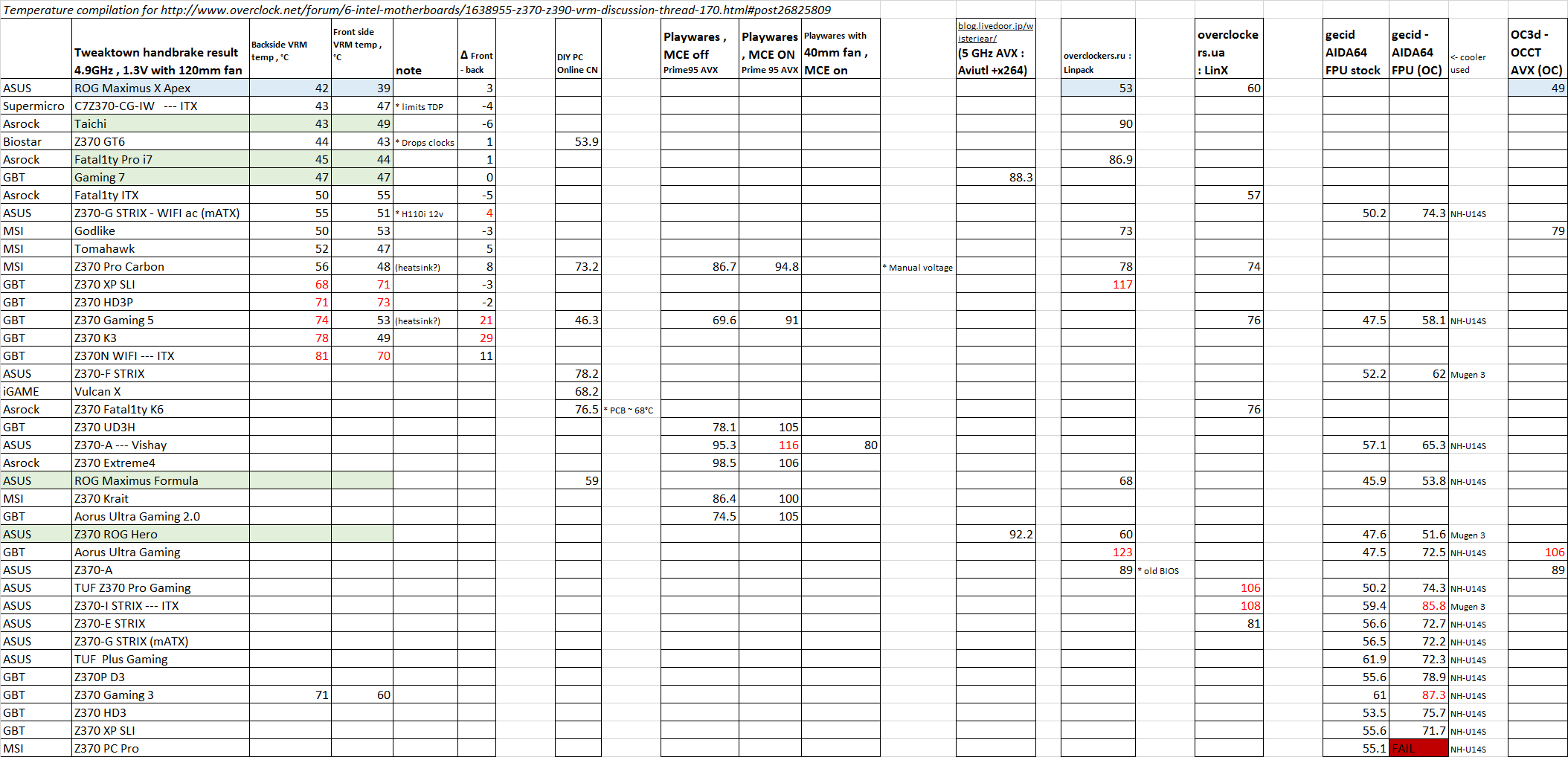
i mean my tomahawk board does well now but if i want to do 9900k i doubt my boards vrm can do that well but i could be wrong
pastel monolith
you would be wrong about the vrms on that board at least
it should be fine to overclock a 9900k
My below $100 gigabyte h3p thing can hold my 8700k overclock to 5.3 on all cores perfectly stable

 dim coral
thats what i was kinda figuring but not alot of people talk about my board lol
yooo thanks
pastel monolith
see my board didnt even get numbers but your board looks great
naive pendant
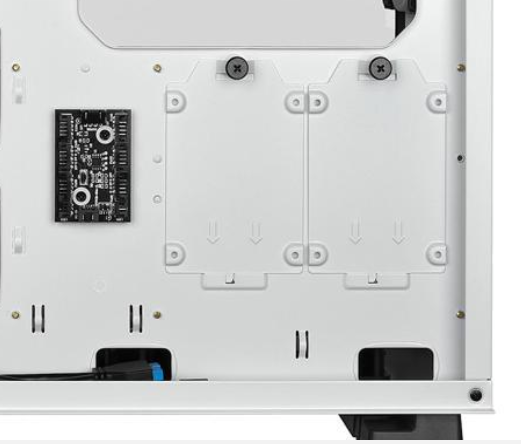
A user in another OCN discord tested the 9900k / msi gaming pro carbon today and 150W load put the VRM mosfets to 109C
pastel monolith
ouch
@naive pendant are boards similair enough across the board to do random single board tests like that?
dim coral
yeah the pro carbon isnt that great
pastel monolith
I never could understand how my VRMs dont heat up like the tests show they should
naive pendant
Yes, with few exceptions, the M10 Hero , for example, had two different configs. One with doublers, one with 4x2 power stages
pastel monolith
I am in a 62 f ambient location
naive pendant
Few MOSFETS/power stages have accurate internal temp measurement features , even when they do, it's stil up to the software to read and display correctly
The IR 3555 , an asus favorite, is supposed to read pretty accurately
pastel monolith
everyone told me this board would be terrible at overclocking but then when it worked without issues and made it through the stress tests I was like well I guess I'll keep it. I was 2080ti poor when I got it lol
and I am at 5.3!!!
granted my 8700k is delidded
naive pendant
People wayyy overestimate or misattribute the extent and to what effect higher end mobo features can provide.
pastel monolith
thats kind of been my take on it