#cpus-mobo-and-memory
1 messages · Page 78 of 1
 little jasper
 urban ferry
there we go
 quaint current
yeah that could fit a 420 and 360
urban ferry
hed do ram too if thermaltake made their water ram in the capacity and speeds he wants
 quaint current
see all the tt cases are like $200
urban ferry
and
quaint current
the o11 did everything that they can do for half the price
little jasper
I still think what your dad is doing is slightly beyond the realm of some custom built home pc...
urban ferry
that wont stop him
little jasper
Build a 2k gaming computer, use the other 3k for AWS server costs
He'll be so much better off
quaint current
see look at how much you can fit in a o11 https://i.imgur.com/vzkSYHl.jpg
 little jasper
This frightens me a bit lol
urban ferry
the o11 is so boxy
urban ferry
its gonna be under his desk keep in mind
quaint current
ok then you pick the case
urban ferry
oh another concern is hard drives
he has like 4 i think
yeahhh, the o11 only can fit 3
quaint current
:l
 lethal belfry
im doing 3d renders of autocad and gaming so prob the 3700x
quaint current
^
lethal belfry
i just pulled the 3600 because i was able to fit a better mobo and cooler
urban ferry
just dont overclock
the stock cooler for both of those do a great job
unless you want to overclock
lethal belfry
alright ill get the 3700X one then
lethal belfry
Thats because the cosair cooler does not have thermal paste already on
quaint current
7 3.5" slots and can fit 2 420's
lethal belfry
but most if not all ryzen stock coolers have it pre applied
urban ferry
the stock coolant on the stock coolers isnt really all that great
urban ferry
yeah
nice find @quaint current
ill probably go with that one
its practical and looks good too
oh wait that thing is friggin expensive lol
still a good case 
lmao it has a wireless charger built in
 timber jungle
Corsair dominator Vs Trident zskill.... GO
 naive pendant
@timber jungle
Apples vs oranges, they're both tasty fruit but each can come in a range of quality.
You can have a nice Fuji or Honeycrisp Apple
https://www.newegg.com/p/N82E16820236514 3200c14 kit
or a Red Delicious / Granny Smith that's best fed to my compost bin
https://www.newegg.com/p/N82E16820233850 2666MHz cl15
 lucid root
what is a good amd cpu for streaming for under 120
 agile mason
I’d go for the newest generation of amd chips if I were you, just whichever matches your budget best
agile mason
I agree
lucid root
oik
agile mason
But btw if you’re really serious about streaming you’re gonna want to spend the extra $ on a ryzen 7 cpu
naive pendant
3700x certainly gives a bit more benfit over the 3600, it's really just 8 cores vs 6, the max single tread is a few percent, a few more percent with a big cooler.
naive pendant
Budget? Also, cpu, mobo? Lastly, do you want something that's very plug and play, no fiddling with settings? Or top of the line stuff that can be tweaked for peformance
naive pendant
Do you need 16 or 32 GB total? 32 won't be able to clock as fast, but not a huge issue.
timber jungle
Need... 16... going with 32.... because why not
naive pendant
For example, here's my 3200c14 kit clocked to 4133c17 on the right https://puu.sh/DXVhd.png
 timber jungle
Just trying to spark more conversations...
 naive pendant
4133c17 is pretty chill though, I can push 4000 c13 for bench, or 4000c14 for daily
Haha what do you mean
 copper solar
i wish 4000+ was cheaper
naive pendant
Buying 4000+ is usually kinda silly
copper solar
BuT ItS FaStEr
naive pendant
The thing is, the highest bin samsung sells is 3200c14 for b-die, other companies can bin themselves though.
timber jungle
Anything over 3200 is really ehhhh
naive pendant
Do you mean the ram as sold by it's XMP rating? Or actual clock in use
timber jungle
Actual use..
I have 3000 right now... and don’t see the need to upgrade... yet... lol
naive pendant
probably not worth it, what latency kit?
 cinder sierra
ive heard c16 is pretty good, is that correct?
quaint current
@naive pendant what kinda voltage u got those running at?
naive pendant
Which? I run 1.45 daily, but could probably go lower. I'm on a frankenstein build rn though, on the z390 dark, 1.4v easy for 4133 17 18 18 28 1T 2x8
cinder sierra
So i got that dr4p on my 2600x, am getting around 40c at idle. that sound reasonable? i was previously getting 50s and 60s with the spire
naive pendant
@cinder sierra Yes.
cinder sierra
awesome. now to see what it looks like on prime95 lol
naive pendant
Prime 95 AVX and or small fft is an absolute worst case scenario tewst
 jolly gust
Any word on the Tomahawk MAX release date for MSI? I'm planning on getting that and a Ryzen 3600... But if it's gonna take too long I might just go with the Tomahawk and a 2600
naive pendant
Which is fine, but you need to interpret the results as such
e.g. if I get 95C in prime 95 AVX, then I know I'll hit maybe 80C max in themost demanding of games, which is fine. It's the upper limit for my setup and preference, but fine.
cinder sierra
what would be a more ideal test if i will be gaming on 1440p
gaming benchmarks?
@naive pendant
naive pendant
Prime 95 is fine. I use aida64
cinder sierra
ok cool. i remember hitting 91c on the spire
 shadow seal
So i wonder how long its going to take for stock vs demand of the 3900x's to normalize so it doesnt sell out in 3 hours each time theres a shipment
timber jungle
2-3 more months
 fair mantle
so im trying to buy ram off of newegg im not sure what the difference is between the sdram and dram?
aight thanks
naive pendant
SDRAM is old stuff. You're probably looking for DDR4.
fair mantle
well yeah ddr4 but theres one that says just dram and one that is sdram
no difference in price or anything just that name
naive pendant
The name on that page is the only difference. Wouldn't worry about it.
fair mantle
so should I go with the DRAM then?
naive pendant
Post the link.
fair mantle
naive pendant
Or the link to your build and description of your use csae if you want a memory recommendation
naive pendant
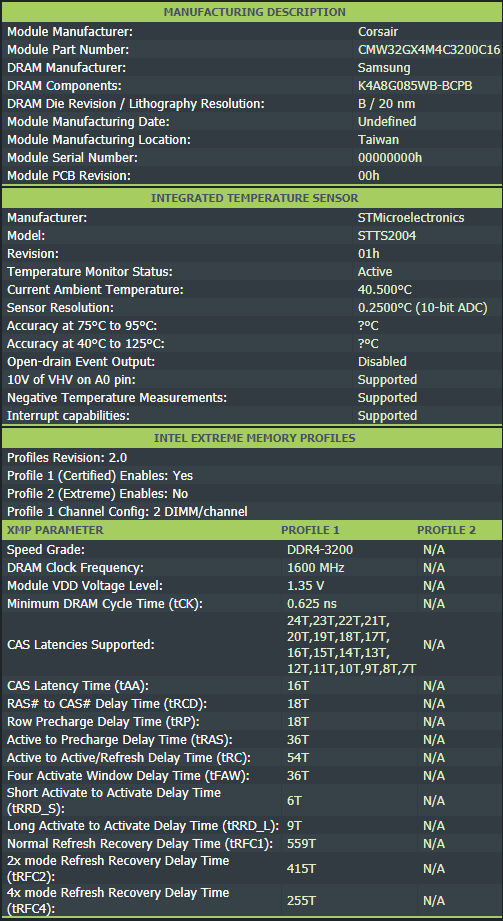
Yep, those are the same kit CMW32GX4M4Z3200C16
 fair mantle
ok weird with the naming
naive pendant
Important part is 4x8 3200 c16 Corsair vengeance - that's what you'd usually call it
fair mantle
Thanks man been trying to figure out what the difference is and it got me all confused
@copper solar How do u like the board?
naive pendant
It's a low bin b-die kit https://file1.hkepc.net/2018/08/source/0616220525601101411.png
 fair mantle
Im pairing it with the i9-9900k, any issues with that, that I would be looking at?
naive pendant
If you want better, you can get better, but otherwise, no
fair mantle
Everyone wants better lol but I can only stretch my budget so far
naive pendant
Definitely. If you're just gaming I'd go 2x8
fair mantle
I'm planning on doing gaming and some video editing as well
naive pendant
The board is wired T topology to 4x8 is fine too.
shadow seal
if video editing I would go 32
its not really much more expensive to go with 32 gigs now
as long as its not like c14 or Royal ram
naive pendant
If you want to save, and you don't care about rgb, go https://www.newegg.com/ballistix-32gb-288-pin-ddr4-sdram/p/N82E16820164144 That's micron rev E, can overclock well for the cost
That is a very cheap 4x8 , probably because it's on sale
fair mantle
Yeah that is cheaper, 80 dollars for rgb basically im a sucker for rgb plz dont judge lol
naive pendant
Nothing wrong with that at all. The kit you linked seems great to me if you want RGB.
shadow seal
dont look up c14 trident royal 32 gig kits with 4 sticks than >.>
fair mantle
lol
naive pendant
Royal's heat spreader just looks dumb imo
Even I would maybe buy some trident z rgb
shadow seal
its rgb effect is probably the best out there though
the new Neo is cool for ryzen though
naive pendant
Why for ryzen?
shadow seal
its tuned specially for ryzen
naive pendant
How?
shadow seal
they have a special kit thats like c14 3800 that keeps the 1:1 infinity fabric timings
fair mantle
oh man that looks crazy
shadow seal
bascially unheard of. Normally you can only keep 1:1 with 3600
naive pendant
Lol, that still means fclk has to run 1900MHz
Which is very hard to do on 1.1V SOC, have to get lucky, even with a 3900x
shadow seal
the performance numbers on the neo are pretty crazy good
naive pendant
Oh, 3800c14 is definitely super high bin memory, I don't doubt that at all
shadow seal
ill stick with my silver royal c16 cuz thats expensive and looks cool XD
fair mantle
so these 3200 corsair on my board do i have to overclock them to run at that speed or is that something it does stock
naive pendant
Just enable XMP and they should run 3200 c16 no problem
shadow seal
nah. there should be a XMP profile that will auto the timings for you
fair mantle
ok thats good to know cuz if i had to do the timings manually that would be a problem
shadow seal
its not the tightest timings, so there more performance to squeeze but its the best out of the box
might be a calculator out there somewhere
for intel
naive pendant
Can't be worse than the ryzen dram calc
fair mantle
now I just need to decide on a GPU
shadow seal
cant go wrong with a 2080 super or 2070 super. depends on your resolution your running
copper solar

fair mantle
i want to game and video edit in 4k
shadow seal
4k is tough. your looking at the two highest skews than
fair mantle
the 2080 tis are crazy expensive
shadow seal
yeeep. such is the cost of gaming at 4k with decent frames
fair mantle
are those basically the only cards that can game at 4k? 2070 dont?
naive pendant
What monitor? If you're just doing 4k 60 you can get by with less. Even more so, what games?
fair mantle
I dont care much so for the frames as long as I get 60 at least
I play mainly Destiny 2, some sport games
Tomb raider as well
shadow seal
hmmn. well 2070 super might be okay. i dono how future titles would fare
2080 super would be fairly safe
we probably have like 2 more gens of graphics cards till 4k becomes what 1440p is now
fair mantle
yeah that sounds about right i guess, well i guess I can sleep on it and decide in the morning lol
shadow seal
i just dont wanna shoot too low and scre you over on cards for the next like 2-3 years
er games
fair mantle
yeah no I understand I when u spend so much on one item u want it to be future proof for a bit
shadow seal
and Im thinking about the next gen consoles could bump graphics again
fair mantle
I just want something that I wont have to switch out in the next 3 or 4 years if im paying over 500 for a gpu
shadow seal
willing to bet a 2080 super would be safe than honestly
specially if they improve DLSS r w/e it is that down res and sharpens to improve frames and not lose quality with the RTX series
fair mantle
yeah I was thinking super as well. I read that ps5 will be about as powerful as the rtx 2080
shadow seal
interesting
shadow seal
than yea. probably super would be safe XD
might as well since they are phasing the standard 2080's out
fair mantle
alright man, thanks for the help everyone who chimed in, I am going to go to bed.
shadow seal
yep yep. sleep well, happy to help
 arctic dome
I don't think you're gonna find any 3.2 headers right now. I haven't really looked but I don't think adoption is very high currently.
urban ferry
beardy speaks 
arctic dome
 mod trainee.
urban ferry

 urban ferry

 coral charm
@young blade so the only one I could fine with usb 3.2 Gen2 Type C would have been this spendy Aorus one, granted you dont usually want to skimp on a mobo so depends on your price limit https://www.newegg.com/p/N82E16813145159?item=N82E16813145159&source=region&nm_mc=knc-googleadwords-pc&cm_mmc=knc-googleadwords-pc-_-pla-_-motherboards+-+amd-_-N82E16813145159&gclid=CjwKCAjwqNnqBRATEiwAkHm2BDtOxtp0YroDAfKY4xX_zoMRxytYwMaf6wOHgc35mgm8-zUVDVik7BoCOOcQAvD_BwE&gclsrc=aw.ds
Also another spendy one, but an asusu board if you want aura or just simply prefer Asus, idk https://www.amazon.com/ASUS-ROG-X570-F-Motherboard-Heatsinks/dp/B07SXDR2LJ/ref=asc_df_B07SXDR2LJ/?tag=hyprod-20&linkCode=df0&hvadid=366288502003&hvpos=1o17&hvnetw=g&hvrand=6888442242601643950&hvpone=&hvptwo=&hvqmt=&hvdev=c&hvdvcmdl=&hvlocint=&hvlocphy=9033597&hvtargid=pla-785017987673&psc=1&tag=&ref=&adgrpid=74513439485&hvpone=&hvptwo=&hvadid=366288502003&hvpos=1o17&hvnetw=g&hvrand=6888442242601643950&hvqmt=&hvdev=c&hvdvcmdl=&hvlocint=&hvlocphy=9033597&hvtargid=pla-785017987673
This one has USB 3.1 gen1 type C? its also only $100 which is a lot better compared to the other two. https://www.neweggbusiness.com/Product/Product.aspx?Item=9B-13-119-141&source=region&nm_mc=KNC-GoogleBiz-PC&cm_mmc=KNC-GoogleBiz-PC-_-pla-_-Motherboards+-+AMD-_-9B-13-119-141&gclid=CjwKCAjwqNnqBRATEiwAkHm2BNbbK84_fWFoRSPl7aOn7NwMaugrfV4E5JnyPjLxhCXc81_8B-mR3BoCka0QAvD_BwE&gclsrc=aw.ds
 shy wyvern
Do people actually seek out good motherboards? Most of them do the same thing. I've never put much thought into my motherboards
 sharp blaze
depends on the features you need/want
I usually buy something close to the top end
more I/O, usually better sound, more fan headers, more m.2 slots. and if you are into overclocking then better vrm and pcb design.
the average user probably doesnt need it though
coral charm
I have always gone for the better of motherboards, unless on a super tight budget build, the motherboard is often your key to upgrades too. If you plan to have your machine for awhile, get a motherboard you know will be able to support what you want to do.
cinder sierra
so i have the aorus b450 pro wifi and i was wondering if i got a 3600/x would it be able to supply the power it needs to automatically overclock itself?
i dont mind the bios update
sharp blaze
yes
the b450 pro should be good up to about a stock 3900x. A 3600x should be no problem at all.
cinder sierra
so it would be ok with xmp enabled with the 3600x?
sharp blaze
xmp is for the memory, do you mean precision boost and xfr
either way the answer is yes, pretty much all the b450 boards use a 4 phase vrm design. I think there is one asus and maybe 1 or 2 msi boards that arent 4 phase. The vrm on the b450 pro should be good especially if you have an air cooler on the cpu that will keep some air moving around the vrm
it was fully capable of running a 2700x @ 4.2ghz in the tweaktown review, and a 3600x is much more efficient than a 2700x
most of the reviews I have seen show the 3600x with pbo only drawing around 80W
 cinder sierra
oh yeah i should be more than ok
sharp blaze
if you look at the very top the catagory that the b450 pro wifi falls into for overclocking would be a 3800x/3700x
naive pendant
That chart overestimates the capability of some x570 boards IMO, but it's extremely hard to make a tier list that long "perfect"
cinder sierra
yeah so im more than ok, sweet
naive pendant
sharp blaze
ya I questioned some of the 4 phase asus boards
naive pendant
Eh, 4 phases in itself doesn't automatically mean bad VRM
Like, the entire Asus z390 line other than the Apex, Extreme, gene are all 4 phase I think
sharp blaze
I know its basically an 8 phase but still not sure it would be good with an overclocked 3950
naive pendant
They just run two power stages in parallel to each output on the voltage controller
sharp blaze
and I havnt looked at all the msi boards so I dont know much about them
and only seen a few reviews on the asus boards like the strix f and the hero
naive pendant
B450 pro 4 for a 3600x?
edit, nvm, aorus
urban ferry

naive pendant
You plan to put a 3600x in your b450 aorus pro, right? seems fine to me
urban ferry
(ive been wanting to use that emoji lol)
naive pendant
Is there a big difference between a xeon x3440 and x3450 to where one would work in a mb, but not the other?
No, but knowing intel, they could just firmware lock it.
The chips are nearly physically identical.
Would have to check board/bios qvl
Ah ok, thanks. I was a bit disapointed when a new budget rig of mine didn't fire up. Cpu-upgrade lists a 3450 compatible, but not a 3440
first gen i7's are a ton more expensive and don't overclock as well i'm told
I guess one has embedded options? https://ark.intel.com/content/www/us/en/ark/compare.html?productIds=42928,42929
Intel® product specifications, features and compatibility quick reference guide and code name decoder. Compare products including processors, desktop boards, server products and networking products.
But that'd be obvious
I appreciate you taking a look. I went ahead and ordered a 3450 and i'll cross my fingers. It was only $15, but i was jw so i thought i'd ask
Gotta love ebay.
absolutley!
Who wants to join club x299 https://www.ebay.com/itm/293179784230
the gigabyte mb i got for this build came in looking brand new
What'd you get again?
Gigabyte ga-p55a-ud3.
i was going to do an overkill build with a 1080ti and 9700k but i kept losing auctions at the last second lol. so this sounded like a fun project
Retro-ish builds are interesting. You should post progress pics.
i have a few pictures
 pliant lantern
i don't mean to interrupt but i need help
naive pendant
shall i dump them here, or is there a section?
The build pics channel is kinda just for the stream showcase, I'd just do it in this section
ok
Or build chat, ?
ill stick 'em here i guess, just a couple
pliant lantern
i just got an asus b450 mb can someone tell me how to update the BIOS?
naive pendant
Sry don, i'm not ignoring u, I'm not sure. I'd just look around youtube, but im not a lot of help with amd stuff
@pliant lantern https://www.asus.com/us/Motherboards/AMD-platform-Products/
PSU is a little sketch, no?
I did cheap out there 😂
You bought that new? haha
i looked around for a decent 600w one for the gtx 770 and overclock. found that thermaltake with decent reviews
pliant lantern
i went there and it gave me a CAP file now what lol
naive pendant
yeah i didn't trust any of the garbage psus i have laying around. old oem ones
its thermaltake. $45 on amazon
You're probably fine, the reviews aren't that bad. Nothing in there sucks a ton of power.
oh darn. "do not buy"
😬
I prefer PSU's to have color coded cables honestly. Makes it harder to make mistakes.
yea i mean the reviews were ok. i am trying to cut costs on this old build
A nice 7 year warranty, no worries at all PSU could be as low as 60 AR
yeah. oh also this doens't have an 80+ cert. lol
500W is all you need, even 450
ah alright. the guy who gave me that 770 said get at least a 550w because its power hungry. but he's embellished before 😂
The first and foremost priority is the quality of the unit itself.
You can get a more/less powerful unit than your rough target based off what's on sale.
Ah, i see. So perhaps, for example, a seasonic focus+ 500w may provide more reliable power than a thermaltake tr2 600w ? lol
reliable / more stable output
Definitely, it's not that cheap units are overrated, they just often can't afford to
include features like over-temp protection, under-voltage, over power, etc.
e.g. even the cheapest of cars can go fast enough to make a crash hurt.
lol yeah
my problem is being cheap, and also doing a build based on saving money
maybe when my house burns down i'll spend the extra on an 80+ gold. lol. kidding
Haha ya, depends how much you value reliability and piece of mind.
A cheap PSU can certainly cook the rest of the PC if the right diode shorts etc
I hear what you're saying. Lately i've been ending up reselling my builds to try and form a "side-hustle" but it would be good to at least have an expensive psu to swap to my main rig as i go
then again, I don't want to go too cheap on a psu and put anyone at risk. so far the 2 builds i've sold had a corsair cx750, and another which i don't remember (decent one)
I bet you could get something for $60 or less that'd be far safer, could just return the TR
if you know one off-hand, i'm interested. you don't have to go out of your way
naive pendant
oh wow lol, a focus like i mentioned. i'll keep that one in mind for the next time. 450w should be ok for overclocking and a gtx 770?
It's on the low side, but it's miles better than what you have according to some internet stranges
nice xD thanks for helping me out
770 takes about 250 w absolute max in furmark. CPU/mobo rest , probably <100
ohh alright!
 rich yarrow
Hey, so I’m wanting to upgrade my CPU and mobo. I currently have a Threadripper 1900X CPU and a X399 Mobo, and I now realize I’ve basically wasted the money on Threadripper when I could have payed a but more for a much better performing Ryzen. Should I just hold off and purchase a 3900X later as well as a new Mobo? I do a fair bit of astrophotography and make compilations with hundreds of photos for a single scene... that and I also wouldn’t mind a boost in gaming performance on the side.
 sudden coral
What AMD CPU runs well with the RTX 2060?

 timber jungle
https://apple.news/ANSSaF1qCOiio-BjMa8WpvA that seems interesting
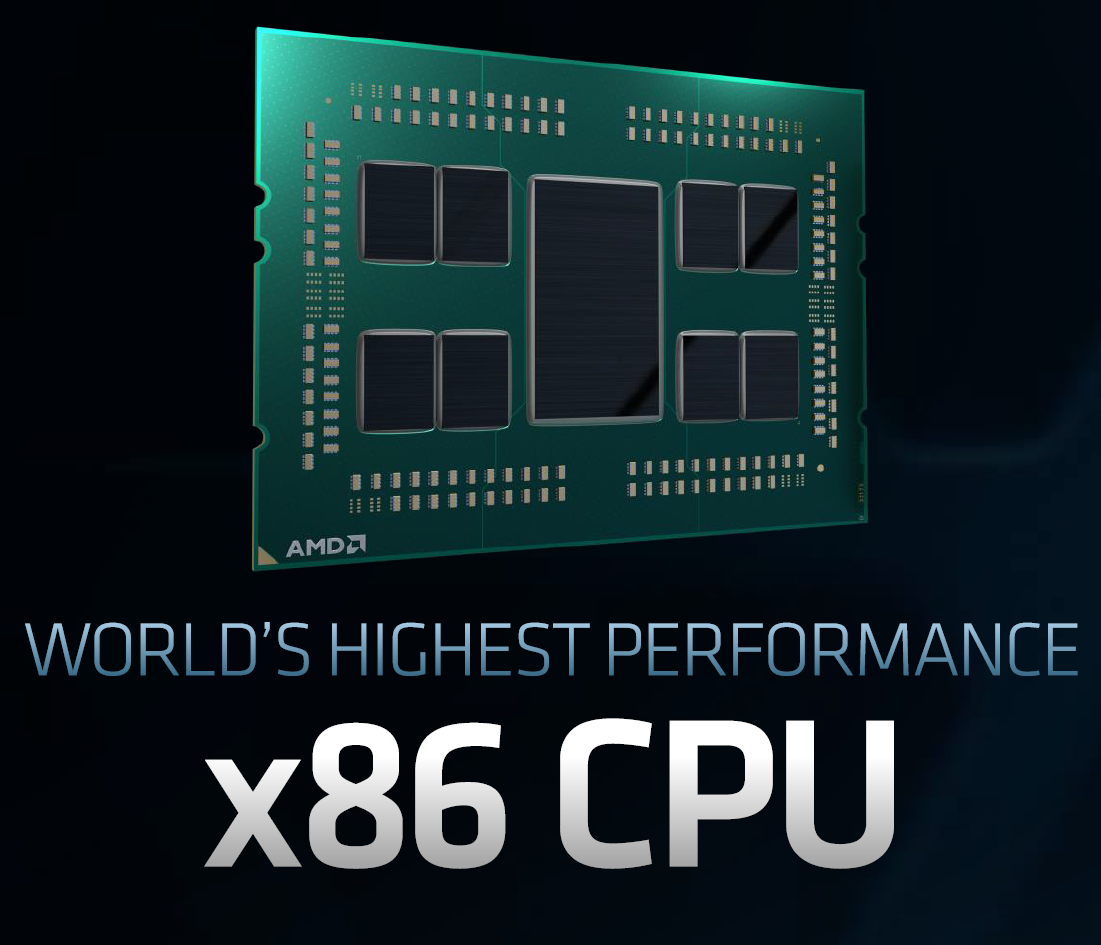
A 3rd Generation AMD Ryzen Threadripper 3000 processor with 32 cores and 64 threads has made a surprise appearance on Geekbench.
naive pendant
64 threads. jeez 😂

 young blade
so
I'm shifting form factor down to itx
and I'm looking at the h210
which has a "type e" connector
and I currently have a 7700k
and my choices are either to get a used strix z270i off of ebay and hope
or
go with the 3700x and potentially way overpay for the Impact VIII, which is the only sff amd mobo with that connector
your thoughts?
 ancient whale
You could just do an h200 with this: https://www.newegg.com/asus-rog-strix-x470-i-gaming/p/N82E16813119101?Description=x470 itx&cm_re=x470_itx-_-13-119-101-_-Product
Or any other ITX AM4 mobo. Do you need/want the type-c port?
copper solar
@naive pendant figured out what caused it to under perform, turning off asus multicore enhancement and switching to xmp 2 instead of 1. my programs opening immediately now instead of a few seconds.
arctic dome
Shouldn't have used asus.
copper solar
@arctic dome please 
arctic dome
HATE SPEECH
 dusk jay
no not really
arctic dome
Oh thanks for clarifying, big brain.
dusk jay
i was only stating a fact
urban ferry
dusk jay
i find this a very helpful server and love it very much
arctic dome

urban ferry

copper solar

urban ferry

arctic dome

dusk jay

cinder sierra
lol bought my drp4 and my 2600x was already boosting to its max XD so it did nothing for performance
just runs cooler
 wise gulch
Is the b360m mortar for Msi any good?
pliant lantern
can anyone tell me why my MOBO is only running my ram at 2133 and not 3000?
dusk jay
omg i have had 3 people with the same problem this week
pliant lantern
i have a rog strix b450f gaming MOBO and i updated everything even the BIOS and when i set it higher than 2133 it becomes unstable
any ideas what the problem is?
dusk jay
Linus Tech Tips
So, I was diagnosing my unexpected lag spikes while moving my mouse. That was when I realized that task manager said my Ram was at 2133 Mhz. It is 3000Mhz ram. Link: PcPartpicker Link I have it in the first two DIMMs(my friend said that was how my motherboard said to do it, b...
sorry
naive pendant
Have you enabled XMP in bios?
jolly gust
Might be a dumb question but can the rgb headers be used for case fans?
 trim whale
So let’s say with my budget I’m not able to get the Ryzen 2700X? What would be some other options?
copper solar
@trim whale 3600 is like 9% faster than the 2700X and cheaper.
trim whale
Like right out the box or after over-clocking?
copper solar
out of the box.
 devout mirage
So have you guys ever had a bad motherboard where it will turn on and runa game for like 30mins and then shut the whole computer down?
copper solar
thermal shut down sounds like it @devout mirage
devout mirage
Ok, I got a new psu, and it still happened. Everything immediately shuts down with now reset or anything, just black screens, and the boots back up like 6 seconds later
I have 5 fans in my pc, I have the cams software and my cpu and gpu both run at a steady 40-50 degrees C @copper solar
devout mirage
would it be to my advantage to take it to a computer repair place (not geek squad) and have them run a diagnostic?
copper solar
you could prob diagnose this yourself
i'd run a stress test to see if it does it again on load
mobo sensors could also be messing up and doing emergency shut down if cpu temps spiked up randomly
bios update may fix it? may not.
devout mirage
intel i5 9400 F
MSI MAG Z390 Tomahawk mobo
Corsair CM750X PSU
MSI 1050 TI GPU
Master Coooler EVO 212 CPU fan
and Corsair Crystal Series case x570
I already did a Bios update and it didn't fix it. how do I run a stress test?
copper solar
well for cpu, prime95 is pretty good at heating up cpu
it's free too
for gpu that's free uhhhhh
timber jungle
Not usually
copper solar
heaven benchmark is okay, furmark is okay, i like the paid 3dmark stuff
prime95 is pretty good at heating up if you wait a while
timber jungle
Office Depot is in trouble right now because they showed fake viruses on your PC for your free checkup
copper solar
also since you said it does shut down after about 30 min
nothing is overclocked or altered right?
timber jungle
30 min shut down... overheating? OC?
copper solar
i'd say run optimized defaults in bios and hope for best if you did change anything
timber jungle
Reseat ram, double check all plugs... with a new PSU, make sure the plugs are in right.. and What Theo said... reset bio to default
Bios default fixes a lot of crap
copper solar
does the pc freeze before the restart?
like looping sound and frozen screen or is it just a complete shut down
copper solar
well you can try cpu stress test and monitoring temps
gpu stress tests too
i'd reset cmos on motherboard to make sure there are no weird settings
devout mirage
ok for sure, I ran a CPU stress test and nothing happened
copper solar
make sure to re-enable xmp for your memory tho
it takes a while run it for like 20 min
and watch the temps
devout mirage
nothing is oc'd either, it's all stock
copper solar
not exactly sure what to tell you D:
if cpu stress test doesnt crash you after 20 min then its prob not cpu
same with gpu
you could try repairing windows
but i doubt its that
sfc /scannow in admin command prompt
if cpu and gpu and repair doesn't fail it its one of the older components of your pc
like you said, may be your mobo

Free benchmarking software. Compare results with other users and see which parts you can upgrade together with the expected performance improvements.
this could usually tell you whats under performing and show signs of degradation
by comparing performance average
just make sure you're not running anything else
devout mirage
Ok I will after gpu stress test. Nothing yet and its running at 67C as the highest
copper solar
prime95?
devout mirage
Yes and the FurMark test too
devout mirage
Well, it happens sometimes during video editing or something that causes a lot of stress on the pc
copper solar
could be faulty memory too
devout mirage
but the stress tests aren't doing anything to it :/
timber jungle
Reseat ram...
copper solar
if you press start and type memory test it should pop up the windows diagnostic
timber jungle
Test 1 stick at a time
copper solar
and it will restart your pc
devout mirage
ok I can do that through furmark?
devout mirage
Ok I’m running the test on the memory now
copper solar
ok good luck
devout mirage
Honestly I hope it ends up being this because this is honestly the most annoying thing ever.. especially since it’s so hard to pinpoint what it could be 😦
copper solar
yeahhhh its a tough thing to troubleshoot
if you're using a surge protector or multi-outlet type deal you could try changing it or trying a diff outlet to see if that helps
devout mirage
Ya especially since this is my first pc build so it’s all really new to me since I originally gamed on PS4 and switched to pc 4 months ago
I do use a surge protector and tried plugging it straight into the wall outlet and it didn’t fix the problem
copper solar
mmk
devout mirage
Could it be that I don’t have windows activated on my pc?
 dusk oracle
If you're using 10 i doubt that would be the problem
devout mirage
I have windows 10 but for some reason it keeps telling me I need to activate some windows thing and when I try to it says I need to buy it for $110 off the store D:
Well, the only old things on my pc is the gpu and the psu so I’m not sure if the gpu could be causing the shitting down problem if it’s not overheating. And I know the psu is good
 fallow spire
Did you buy a key from Microsoft/official retail store that gave you a disc?
If you bought it off eBay or such it may be invalid
devout mirage
No, that’s what I’m saying I don’t have. Could that really be the problem for it randomly shutting down though? And no, I have never bought a key so there’s nothing to even be invalid
fallow spire
All it does is lock personalization features currently and put a water mark, but if it bothers you that much but it
No
Not 10
devout mirage
Ok, well then that’s not the problem. It doesn’t bother me that much tbh.
fallow spire
How's it randomly shutting down?
devout mirage
I’ve done a sfc/scannow in admin and nothing came up
fallow spire
Like, doing something and freeze, blacks screens, bsod, normal shutdown where it closes apps out?
devout mirage
It’s literally just shutting down, black screening, with no warning or anything
timber jungle
Did you take out 1 stick of ram? Try 1 at a time
fallow spire
Could be anything
copper solar
did the memory test come up with anything
devout mirage
I’m still waiting for the memory scan to get done. It’s at 60% with no problems of memory detected
fallow spire
But it may also be a faulty cpu
If a CPU is damaged it may at first boot and do stuff
Same with a bad motherboard
devout mirage
I will try ram next. And ya I’ve come to the terms that it’s probably faulty cpu, it doesn’t do anything at boot screen that I know of.
fallow spire
Well if a core is damaged it can still boot
It may also be a faulty disk drive or ssd
But not likely
devout mirage
Ya, I have an m2 and a hard drive and they work and function fine. Honestly, my last resort is the cpu and mono
Mobo
Right so I possibly could be, but is there any other way to see if there is a damaged core other than buying a new one?
dusk oracle
For your CPU are you using the stock cooler?
dusk oracle
Cooler Master you mean
devout mirage
Ya lol
dusk oracle
did you apply the right amount of thermal paste and applied the cooler on properly?
devout mirage
yup, everything is the way it should be
dusk oracle
And also when you placed the cooler did you do it inside or outside the case
devout mirage
outside of the case because there are mounts that require you to take the mobo out of the case to put in
dusk oracle
Well most cases have a cut out on the other side so you can use back plates
devout mirage
Ya, I mean I could have done that, but we decided since we originally thought it was my CPU overheating because I was using the original cpu fan. so we decided to unplug eberything to also rule out the maybe something wasn't plugged in correctly.
dusk oracle
Should just check all connections as a just in case
devout mirage
ok so, I looked through my event log in my pc and it is showing an event where my pc randomly shuts down. It keeps giving me a Kernel-power (event ID 41) error. I looked online and its saying that it has to do with a power issue. I'm not sure what kind of power issue it could be, considering I've already tried to change out the psu
timber jungle
I still say Ram....
shadow seal
will the r9 3900x ever be back in stock. Find out next time on CP-U Zeeeee
dusk oracle
I prefer Dragon Ball P 😛
cinder sierra
Would the x570 aorus pro wifi be a good motherboard for overclocking ram past 3200 mhz?
fair mantle
ROg Maximus XI Hero (wifi) MOBO, which slot is best to put a m.2 drive?
@copper solar
copper solar
best? uhhhh the top one first
fair mantle
so the one closer to the pcie?
copper solar
i just put it there because its designated first m.2 slot
fair mantle
oh u have same board?
copper solar
yes
copper solar
2
fair mantle
whats the other thing by the pcie ports looks like another slot
oh nvm i was looking at the wrong thing
quaint current
Put it in A
fair mantle
One more Q. This Mobo has onboard memory do I have to go into bios and disable it maually when i install the GPU
copper solar
No
fair mantle
Ah nice graph, thanks. what if I want to put another one later on is it gonna run slower in b?
fair mantle
Awesome. sorry for the newbie questions its been 8 years since I built a PC
Thanks for the helps
copper solar
It will disable sata port if you install an m.2 sata drive though
So make sure it's nvme if you don't want that to happen
Read the manual
:0
fair mantle
Which sata port, is that used for a hard drive?
fair mantle
got it.
yeah im installing the 970 pro its nvme
Definetly gonna read the manual im getting the mobo tomorrow just trying to get a head start
fair mantle
kool thanks
 oblique steeple
3950x + X570 Master?
naive pendant
Perfectly fine.
 oblique steeple
@copper solar intel shill
timber jungle

dusk jay

jolly gust
Anyone know how to get the screws to reach? I took the heat sync off after installation to check a cpu error now I cant get it back on
Ryzen 5 2600x
Also, have the mobo in the case still. Do I need to take it out to reinstall?
copper solar
lossen the other screws then make sure every other screw is at least grabbing the back plate before tightening @jolly gust
might need to push the back plate more against the mobo to actually have it flush against it
so that the screws can grab them
 warm barn
I'm lookin to add some more ram to what i have. the sticks i have all dont end with a K but i can only find ones online that end with a K is this still oK?
warm barn
the model numbers i have for the ram i have all end with a K but the ones I see online don't end with K
naive pendant
Send us a pic of the model number. If it ends in K, it might be a higher bin kit of b-die G-skill ripjaws , vs non K. e.g. 3200c14 vs 3200c16
jolly gust
Anyone know what this means when I start my Mobo ? Fans work. Computer doesn't bout
Already reseated the CPU and everything
I think it's the CPU led but idk what it could be.
 split garnet
@jolly gust it may be the ram led from the position. If you have already reseated those as well then try disconnecting all power to the computer for about a minute and try again. I have that happen to me once in a while and that's usually all it takes to get it back running.
jolly gust
Should I reseat them to slots a1 and b1 @split garnet
split garnet
Wouldn't hurt to try. That could be the problem since you are only running 2 sticks instead of 4. When running only 2 most mobo want them in those spots.
naive pendant
Usually A2 B2 are the convention. Some T Toplogy boards don't specify.
jolly gust
There's asterisks beside a2 and b2
naive pendant
But I agree, re-seating them can't hurt. I'd try one stick at a time in each slot if that's what it takes.
naive pendant
I have a guess - the cooler didn't mount well because the CPU has one or more bent pins which are a common cause for not only failure to post but, in minor cases, dead memory channels.
jolly gust
I didn't see any bent pins when I checked it the 2nd time
naive pendant
I'd at least try each stick in one A and one B channel, then repeat with the other stick. Thermal problems aside, I can't imagine it's likely you'll cause more damage unless you set bios voltages manually.
Didn't you mention something about non-matching memory SKU's?
jolly gust
Not sure what that is but I don't think so
 jolly gust
naive pendant
jolly gust
naive pendant
You lucked out, it's samsung b, since it's ver 4.32
jolly gust
Maybe if I try to switch the 8 pin CPU connector around?
naive pendant
Can't hurt to snap us a few pics of the insides
sharp blaze
I am excited about getting a new cpu
I want to see how far I can overclock my existing ram before I make a decision
naive pendant
I want to ditch x570 for x299, probably a dark , maybe the R6EE
jolly gust
YO
naive pendant
And go quad 63xx for the AMD build
naive pendant
Random, if any of you all want to edit that POST screen to say funny stuff, hmu
What's going on down here? jrfp1 / 2, hd audio out? and... a wifi card?
naive pendant
Low priority, but may I suggest moving that top fan one slot towards the rear?
Should pull less hottish GPU air into the CPU. This is very much nitpicking btw.
jolly gust
Good idea. I had a fan behind it but it was plugged up to the wrong thing
naive pendant
I kinda have to keep my advice in check with that I think will leave the consumer fairly satisfied, but also without closing any doors for them in the future.
Why recommend slot A? just curious, I'm often asked that question.
@quaint current
dusk oracle
Doesn't that guys case have cable management?
naive pendant
Koala's? I'm the wrong one to ask
quaint current
cause A would be the slot for the main one, so you would put it in their
 proven trail
What's up guys? Wanted to ask for a suggestion. I've finally decided on a CPU (Ryzen 5 3600) after receiving my case. Next purchase I'll be making is a motherboard. I was going to go with a x570. I'll have approximately $200 budgeted for that. Any suggestions on which would be best closest to that price range? Open to suggestions on alternative motherboards as well.
naive pendant
It's running at 3000c16
 trail vapor
fair mantle
trail vapor
fair mantle
Do I need to plug something in those 2 slots? I have the ATX rog maximus xi hero
copper solar
what two slots
fair mantle
copper solar
thats the eps/cpu 12 volt
you can use either the 8 pin
or the 8pin+4pin
not JUST 4pin
8+4 is for extreme overclocking
8 is fine for most people
naive pendant
Yes, assuming you're holding both ends of the same cable.
fair mantle
Yes I am one of the ends is split into 4s though
naive pendant
Just align the clip on each 4 with the clip on the 8 pin input on the MB
fair mantle
Alright sounds good. Thanks for the help
copper solar

dusk jay
https://www.newegg.ca/p/N82E16813119197 does this mobo support DDR4-3600
dusk oracle
3200MHz is still the sweet spot and affordable
dusk jay
but will it take 3600?
 coral bear
isnt the x570 a new motherboard that just came out?
dusk jay
yeah
coral bear
i dunno i tried using http://www.pc-specs.com but they didnt have it
Computer system hardware comparison and compatibility reports and news
prob a bad site to use
shadow seal
so newegg got a new shipment of 3900x's in today. Any idea how long it lasted before it sold out?
shadow seal
jeez. These things are becomming a cpu of legend only. Nearly impossible to get
quaint current
just set a autonotify
shadow seal
whats shipment rate?
quaint current
no clue
shadow seal
I did, by the time I woke up they were gone
quaint current
yeah also might want to check r/amd or r/buildapcsales they might have posts when they're back in stock
urban ferry
id do it
timber jungle
You don’t even have a PC... lol
urban ferry
ok
shadow seal
thats hard to say. I would try to find c16 or c17 personally
18 and 19 is bottom of the barrel binning
sharp blaze
I guess it could end up coming with hynix chips on the worse timing sticks, but at that speed and timing for either I have a hard time believing that it would make much difference
shadow seal
is it for a intel build or a ryzen? if its ryzen I would pay a little more for the faster ram
timber jungle
Intel
shadow seal
than it wouldnt matter as much
timber jungle
I9-9900k
urban ferry
cheaper ram will be good then.
shadow seal
might be able to find cheaper twin 16's if you dont care about populating all slots
that are faster CAS
timber jungle
I want pretty lights... lol.
shadow seal
ah than yea, your gonna pay for it than
urban ferry
may i recommend 3200mhz instead
cheaper for the pretty lights
and still plenty fast
shadow seal
I think even 3400 cas 16 would be faster
shadow seal
or would be really close unless you need a memory specific tasks
shadow seal
how are you using so mcuh ram
urban ferry
good question
timber jungle
Have 3000 now, and it’s plenty fast... but always like going bigger... May step down to 3200 or so
shadow seal
reformat your pc
urban ferry
look at the bottom, thats all i have open
naive pendant
standbylist cleaner? Valgrind is my jam - unrelated
timber jungle
I still say you have a virus
shadow seal
I think you do have a virus or malware or something
timber jungle
So?
shadow seal
if its a broken program even. Reformat and try again
 devout mothBOT
 Tazman1982#7729 has been warned
Reason: Bad word usage
urban ferry
language please
if i had a virus i think it would be attacking other parts of my computer, instead of just filling my ram
timber jungle
Oops... was supposed to say Shut... lol
shadow seal
unlikely
naive pendant
i downloaded ram and got this "virus" thing
shadow seal
the whole idea of a good virus is to not make it super obvious to the user
naive pendant
did it work
timber jungle
Fist thing a Virus does is shuts down the antivirus so it can’t find it
shadow seal
so you either have a virus/malware. Or you have a broken/corrupt program leeching resources at an alarming rate
either way its going to harm your performance drasticly till its fixed
timber jungle
That’s why I use defender as my normal... and have Malwarebytes on a drive so it’s not affected
shadow seal
Ignoring it doesnt make it go away
urban ferry
or i have a memory leak.
shadow seal
back up your stuff on a known clean drive and reformat
urban ferry
i havent downloaded anything in a long time
shadow seal
boi...that doesnt mean anything
urban ferry
and i have antivirus that scans every web page i go to
timber jungle
Have you been online?? BOOM... potential virus
shadow seal
that still means nothing
urban ferry
im confident that my antivirus is doing its job
shadow seal
than find and fix your leak
if you cannot
than reformat and start fresh, monitoring the installs till you find whats causing the issue
timber jungle
👆👆👆👆
timber jungle
I removed SOOOOO many virus working at Office Depot and Staples... and they all had virus defenders too
urban ferry
im fixing the problem
urban ferry
im explaining that ive been trying to fix the problem, and i think the issue is i have a memory leak
but i cant figure out how to fox it
fix*
shadow seal
than reformat
naive pendant
ez fix
urban ferry
but it hasnt been bothering me since ive been busy with school
timber jungle
They just told you how..
shadow seal
cuz it can easily be something corrupt within a working program or windows
urban ferry
i dont wanna reformat personally
urban ferry
 imma just leave for now
shadow seal
reformating now takes litterally like 30 minutes
and maybe 2 hours to reintall programs
naive pendant
Do you guys like tech trivia?
shadow seal
hmmn, this makes me question why I use avast when windows defender does the job XD
avast is borderline spamware at this point with its pointless "buy my stuff" bs
timber jungle
Defender does a decent job...
naive pendant
What drive being reformatted? Interested in input?
timber jungle
Really only had 1 virus... and it was my fault.
shadow seal
Ive had many false flags, but never an actual virus
shadow seal
how many tabs did you have open in chrome. what other taskbar processes did you have running
shadow seal
yea than somethings big time broke. I got like 3 game launchers, 25 tabs, discord. steam, graphics overclocking stuff and only using 8.5
shadow seal
whens the last time you reformatted?
urban ferry
never
shadow seal
I do it every year
shadow seal
good idea for future stuff is 2 seperate drives. One for games and such and one for other stuff. Main try to keep clean for easy formatting
shadow seal
I only format the main drive with the OS and deep scan the other 2
urban ferry
i have a laptop so if anything went wrong thats a no no
kinda laptop thats hard to open up too
shadow seal
oor theres always partitions
naive pendant
@shadow seal fast storage is great these days. What kind of build you running?
shadow seal
an old setup im looking to replace at the end/eginning of the this/next year. 6700k, gigabyte gaming 7 z170. 24 gigs ram because a single stick died at 2400. Haf X case, twin 1070 FTW's 1,000 Watt G2 supernova, thermaltake 240 rgb aio. WD black HD (main) 1TB, 1.5 TB blue, and a Samsung evo SSD 500 gig
overhauling most this rig is gonna cost me like 2 grand when im done
 royal pecan
I feel your pain zack. cleaning up my laptop today too
naive pendant
Nice attention to detail, I usually just have peple run a userbench because it's a ton of info in 2 minuts.
urban ferry
i tried cleaning my google drive, but the site is too slow
cant do it
chromebooks garbage
naive pendant
When do you get new pc
urban ferry
hopefully in the next couple months
shadow seal
uh hoping that 3900x availability improves by the end of the year. thats kind of the wall atm. I should have my credit cards cleared by then
3900x, 32 gigs Trident Z royals, x570 Auorus master, 1 tb blue SSD (main) 1tb NVME (games) and 500 gig secondary SSD with the 1.5 tb as a backup. H500M case, swapping my AIO over since it still works fine. Then when Nvidias next gen 3080Ti or w/e its called hits ill get that to replace my 1070's
then ill rebuild my old PC and sell it, and the cycle will continue
urban ferry
anger intensifies
so apparently it was supposed to say the results of the memory diagnostic test after i logged back in
i logged in and nothing happened
naive pendant
It's not in event viewer?
royal pecan
thats not event viewer
royal pecan
my mistake
royal pecan
it should be in Event Viewer>Windows Logs>System then select ‘memory diagnostic results’.
 grizzled holly
Hey can anyone help me?
timber jungle
Think you are beyond help... lol
urban ferry
ill take a look @royal pecan
thx for the help
if it doesnt work imma just wait till i get my new computer which will have 64gb of ram 
royal pecan
Get your hw done before tackling the memory leak first
urban ferry
its already done
royal pecan
Do you have killer network app?
urban ferry
never heard of it
royal pecan
its an ethernet thing. A software packaged with drivers. The app itself does nothing but cause issues. I’m investigating that as the cause of my high memory usage.
urban ferry
hm
dusk oracle
I got a feeling you didn't do your homework 😛
shy wyvern
Alright. I think my 8600k is either dying or my psu is causing extreme stuttering
dusk oracle
Or maybe your motherboard?
dusk oracle
Did you overclock your 8600K
shy wyvern
Yeah but even under locked it stutters.
I am running that and a 2060 on a 450 watt psu with both of them overclocked.
I have a suspicion that it's my power delivery
 vague lava
id tend to agree you may be right a the edge of the psu
dusk oracle
You pretty much would of needed at least a 550w
i always say go a little higher over what is recommended for your system
shy wyvern
My system recommends 550 watts.
devout mothBOT
shy wyvern
Should probably be 600 watgs
dusk oracle
If it recommends 550w why are you using a 450w
shy wyvern
I replaced components and couldn't afford a stronger psu
Oh great
How TF is this thing running
urban ferry
you could seriously damage things, be careful
shy wyvern
My roommates wattage tester says 535 watt power draw on stress test. Why is my psu letting that run
dusk oracle
Put the 8400 back in for now until you have a better PSU
shy wyvern
I've had the 8600k in there for like 4 months. If I don't overclock either I go down to 430 watts.
I ordered a 600 watt from best buy.
dusk oracle
🤦
cheaper to get from an actual PC store or on Newegg
The only thing i would buy at a bestbuy is a new TV i wouldn't even bother buying any computer hardware from there
@shy wyvern Tell me how much did you pay on bestbuy and which PSU did you get
shy wyvern
Evga 600 watt bronze 80+. My current one is the 450 watt model and has served me for 4 years.
And I paid only 45 cause I had a 40% off birthday coupon
Well actually it was like 47.8something. free shipping
Originally $80
It's the modular one
 warm berry
shy wyvern
warm berry
shy wyvern
It's 75 on Newegg
 hasty marsh
whats so surprising
shy wyvern
It's not bad for under $50
hasty marsh
you can find decent psus for like 50 bucks
shy wyvern
Like I think that's psu for under $50 is not a bad feal
hasty marsh
i just had a bit of extra money left to spare
shy wyvern
Is that EVGA 600 watt bq 80+ a good deal for $48?
hasty marsh
ye
i was gonna get evga
but i saw reviews and there were some bad reviews about it
so i just noped outta there
hasty marsh
for me, there were enough bad reviews to UNconvince me of that psu
so i went with corsair
shy wyvern
I've had great success with EVGA. First power supply was a 500 watt with a 3 year warranty, it lasted for 5.
hasty marsh
i didnt say it was bad
i just didnt want to take any chances with my first ever build
so i was a bit paranoid
shy wyvern
My dad's computer got fried from a Corsair psu.
He plugged it in and his computer instantly fried. His board blew some capacitors. Smelled awful.
Just some units are bad, it's a risk you take with all components.
shy wyvern
Corsairs customer service pissed me off too. Told my dad "it sounds like a bad motherboard" and don't honor the warranty
He used that motherboard for 4 months prior
hasty marsh
dang that sucks
shy wyvern
He has a 9900k and a 1080 in there. Both just fried
Had*
He's using the 7700k and 950 he upgraded from now.
naive pendant
Both Corsair and EVGA use a variety of PSU manufacturers. I prefer EVGA/s warranty policy and customer support.
shy wyvern
^
shy wyvern
They offered me a %20 off coupon when I called customer service when my 500 watt psu fried. It was 2 years out of warranty
Used it to buy my current 450 watt one
naive pendant
I like a good PSU convo
shy wyvern
They're overlooked parts tbh
I might put this 450 watt to good use! Build my sister a gaming PC with the 8400 and 1060
hasty marsh
not bad
shy wyvern
It's play games on ultra settings still.
I just got greedy and jumped on a $220 + $30 shipping rtx 2060
Only reason why I don't use the 1060 anymore. 450 watts is more than enough for that card
shy wyvern
Eh
Not that good of a deal, is it? 😝 It was used 2 days beforehand
Just for 2 days
It's the ventus oc model which has terrible cooling. Runs at 87° at full load slightly overclocked even with the premium thermal grizzly stuff used.
hasty marsh
still lucky
naive pendant
Kryonaut?
shy wyvern
Yes
Checked my Amazon order history
I didn't want liquid metal since I have mild dyspraxia and liquid metal + motor skills deficiency = dead components.
naive pendant
Kryonaut is more than fine for that type of use. Don't bother with LM unless you want to overclock/mod for fun's sake.
shy wyvern
I was trying to push my i5 8600k to 5.3 GHz but I was hitting 93 degree temps
Liquid metal would be nice
That chip is legit the definition of the silicon lottery. 1.4 volts and 5.3 ghz stable. Just extremely hot.
naive pendant
I de-lidded my 7700k and used conductonaut under the IHS. Good results, but I did so for fun, not because I needed 300MHz haha.
What AVX offset?
8600k shouldn't be too bad since, it's the HT on the 8700k that pushes many to de-lid and LM for a 2-300 MHz gain.
shy wyvern
I had to set it to 2 I believe
I had to put it back because 93 degrees is too hot. That cpu would die pretty fast
It jumping up to 93-95 degrees and back down to 40-50 when gaming will start to cause issues
naive pendant
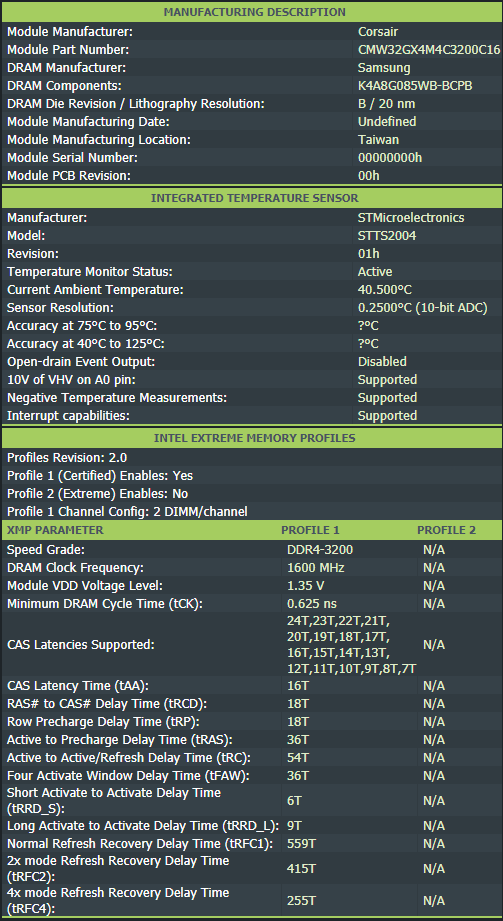
What was the thermal load though? Temps are meaningless without giving watts, e.g. package power etc


 royal pecan
what did you do?
royal pecan
was there any indication everything came out normal or was it one of those where it was all hex
naive pendant
@hardy prairie @naive pendant Easier here
 hardy prairie
Alright
So I should go for that ram you said? It’s the best possible for my setup?
@naive pendant
naive pendant
What's the budget again? Including monitor
dusk oracle
His budget is 2 grand
naive pendant
Oh, nice
But ya, if budget isn't really a concern, this is great, but really hard to justify the price.
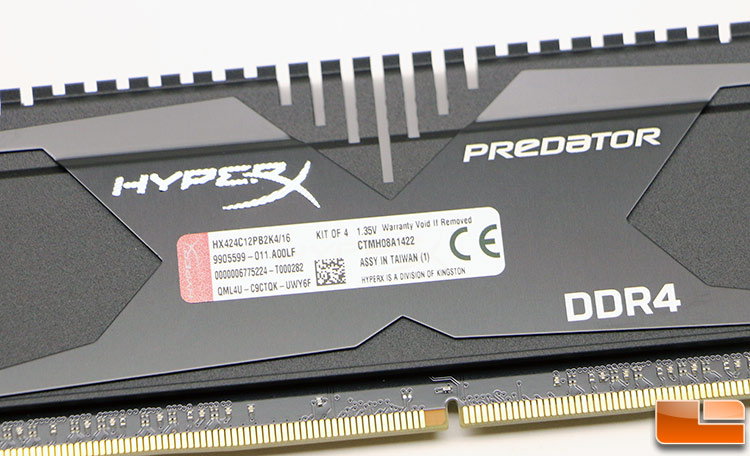
Rare kit, unsure if it'll run as intended. https://www.newegg.com/p/N82E16820232306
hardy prairie
Alright I’ll add that on my list
dusk oracle
Those are more compatible for Intel
hardy prairie
I heard it was good for amd
naive pendant
Idk, most people just buy 3200c14 b-die and OC to whatever they want. I'd never buy 4000c19 or something.
 sand glen
My msi gaming edge x570 is not getting power. Anyone got any ideas what's wrong?
dusk oracle
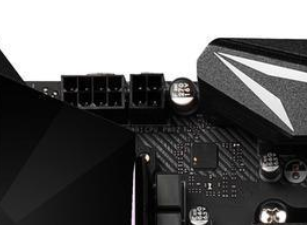
Did you connect the 24 pin and 8 pin connectors?
sand glen
Yes
dusk oracle
You need more juice https://i.gyazo.com/4ee5a44fa651c9964dd43f050c734978.png
 sand glen
I have a 750w
dusk oracle
Do you have all those connected in
naive pendant
If you're interested in sharing some pictures of the build and where the cables are routed, we'd be happy to take a look.
sand glen
Does it need the cpu to power it?
dusk oracle
Take a picture of inside your system
sand glen
Okay
naive pendant
Unless you're using the BIOS flashback capability, yes, you'd have to have the CPU installed to power on.
dusk oracle
@naive pendant Doesn't he need to fill in that 4 pin as well?
naive pendant
Almost always no, but I think I remember reading that specific manual saying you do. TBH it shouldn't matter, but might as well check everything else in the processs
dusk oracle
Well if it is not booting i would assume that is the cause of it all
sand glen
I'll see what I can do real quick
naive pendant
Could you show the complete connection between each cable end
Also the pins that you're using to pwr_sw
dusk oracle
so there is CPU pwr 1 and 2
sand glen
I guess I need to buy a 2x4
Or a 2x2
Because i have a cord that connects 2 2x2s to make a 4x4
naive pendant
I mean, there are still a lot of possible reasons for failure to power on. But it couldn't hurt to get an adapter as long as you're careful.
sand glen
I eliminated some ram roo
dusk oracle
This is why if i plan on going for the 3000 series i want there to be a B550 board
naive pendant
The more you can describe or show about what's going on the better we can guess
If there's no reaction from the power switch at all, it's likely that the PSU isn't connected properly, the power switch is inthe wrong spot etc
Even if you had a dead short, there'd be a click and you'd see tha fans spin
sand glen
Well I plugged them into the same spots as the manual says and in the same spots as my old board and ingot power
Could it be a defect board?
naive pendant
ingot power?
naive pendant
No worries, I thought that was the name of PSU or something
sand glen
So it's not the power switch
naive pendant
It could be a defuct board, but unlikely.
Could you show a closeup of the power switch connection
sand glen