#graphics-cards
1 messages · Page 152 of 1
 plucky ibex
It only happened after i cleaned the gpu
 hard wren
did you take the gpu out when you cleaned it?
hard wren
how long did you wait before powering it back up?
plucky ibex
Like 30 mins
hard wren
hmm thats sounds fine
plucky ibex
Then what the heck then my gpu must be dying
hard wren
I would try unseating it from the pci slot and reseating it
then I would ddu the drivers and reinstall drivers
if the reseating doesnt have any effect
plucky ibex
I already did that but not the gpu drivers part and reseating didn’t fix it
plucky ibex
Its a zotac gtx 1650 and i bought it like 3 months ago I think
hard wren
overclocked?
plucky ibex
No
I just turned the pc off and didn’t disconnect the power supply
When i was cleaning the gpu
hard wren
I mean you should but I doubt that would cause an issue
more likely you knocked something loose on the card with the air
plucky ibex
That’s what i was thinking
I was kinda spraying at a close distance at my mobo since it was dirty aswell did i do any harm to that? Pc is working fine rn just games look bad
hard wren
might also have blown dust into somewhere in the gpu that it wasnt before that is now causing that part of the gpu to overheat
plucky ibex
Temps are fine
hard wren
like you could have blown dust somewhere the gpu manufacturer never thought dust could go so no sensor or anything
could take it apart and wipe it down with some alcohol then let it dry
unless you can return it
then you might try that
plucky ibex
Ill try i was thinking of just saving up
But did you read what i said about my motherboard hopefully I didn’t damage that either i got no problems with it atm just the gpu when playing games
hard wren
it seems unlikely if its just artifacting
hard wren
pretty much has to be a gpu problem and thats a much better card
I would also try the ddu and reinstall drivers as it could solve your problems
in the mean time
plucky ibex
Ok thanks ill try that
@hard wren thanks for the help atleast i know its my gpu I thought my other parts were damaged thanks!
 hard lion
Hello All!! I'm an old guy with and old computer problem.. Graphics card PNY Quadro 4000 VCQ4000-PB 2GB 256-bit GDDR5 PCI Express 2.0 x16 Workstation Video Card. It seams to have pucked out. The motherboard gives a red light signal at startup for the video card and then sits there. I woould like to replace this with out overhauling the Windows 7 machine that I use for Photoshop and Lightroom operations. Any suggestions would be greatly appreciated....Thanks Gary
 nocturne dagger
Just get a used 1060gb card and plug it in. and also if i was you upgrade to windows 10 its free
 wicked hound
@hard lion That can still be another issue. Just means that the GPU couldnt be detected / started properly. Which can be due to the CPU, mobo, PSU, or obviously, the GPU
Before going out to buy another GPU I suggest testing with another GPU. Also if you can test that Quadro in another PC
hard lion
I was thinking similar. It starts sometimes and I've pulled the card out and reinstalled it to find it operational. I thought it was dirty contacts so did a cleaning. I has worked for a week and just did it again tonight. #@!%
I don't have another computer to try it on.
 torpid garden
Does it crash during load? Or without rhyme or reason?
hard lion
Durring the start up push of the button.
wicked hound
Does it sometimes fail to start? Like say it fails two times in a row then work?
hard lion
There has never been a mid session freeze up
wicked hound
I've actually had a lemon GPU that failed to start sometimes. Usually would have to do some random hardware display change like unplug the HDMI cable for it to work again
hard lion
Yes it sometimes fail and tonight, it is stubbern
spelling??
I've found that HDMI CABLE reconnect to have worked twice.
wicked hound
Well if all else fails can try a GPU BIOS flash (not to be confused with mobo BIOS)
but save that for a bit later
Tho speaking of BIOS, can do a mobo BIOS update too
hard lion
Hei, did the HDMI RE PLUGGING make the issue go away?
wicked hound
not permanently. It'd fix it till some sort of update happened (Win update, GPU driver update, changing displays, etc) then it'd happen upon next boot
ended up replacing it cuz warranty
 spice prawn
it might also be a psu age related issue @wicked hound
hard lion
Sounds like where I'm headed. I really don't want to make it Windows10 because all software works. I'm looking trying to have Newegg give me a suggestion for a replacement card.
wicked hound
It wasnt in my case. Situation followed itself to another PC
I also used another GPU with a higher OC (was originally OEM 970, had another AIB 970 laying around) and it worked. Also something weird happened with my warranty. Was a prebuilt and upon getting getting it back I got a 1070 as a replacement, which also worked
torpid garden
Do you need all the functionality that the quadro 4000 offered? We'd be happy to recommend a modern equivalent, but it'll be priced similarly to what the original card cost when you bought it.
If your needs can be met by something like a 1050 ti, 1660 ti/super, I'd go with one of those.
hard lion
I think it gets a workout with my large image processing in photoshop. If it has a psu issue would it still fire up the motherboard and respond to a card issue?
I get a 3beep tone at startup when this happens.
wicked hound
PSUs are weird and complex, stuff like that can happen afaik. Also note for us to know post code errors and what they mean we'd need to know the mobo model too as post code errors differ from mobo to mobo
torpid garden
3 beep tone is traditionally a RAM issue, can sometimes be motherboard or CPU related. Can* vary by motherboard model.
PSU issues are hard to to troubleshoot and can present intermittently, causing all kinds of downstream problems.
hard lion
the mobo is a ASUS Sabertooth X79 LGA 2011 Intel X79 SATA 6Gb/s USB 3.0 ATX Intel
it gives a 3beep tone and a few seconds later a single beep
a red light goes on near the graphics card slot for a short while as an initial investagation when working properly. When the issue happens, that light stays on but the screen is dead.
torpid garden
Do you have another system with which to test the card?
hard lion
the power supply is CORSAIR Enthusiast Series TX750 V2 750W ATX12V v2.31/ EPS12V v2.92 80 PLUS BRONZE Certified Active PFC High Performance ...
Forks...I don't have another system.
torpid garden
For a newer, more powerful replacement, I'd recommend something like an M2000 provided the price is reasonable.
https://www.newegg.com/p/pl?d=Quadro+M2000
It was released in 2016 - so there are certainly new/faster - albeit more expensive options. Do you have a price range?
hard lion
I was targeting the $200 range
torpid garden
Do you need windows 7 compatibility? Another other programs than photoshop?
hard lion
Yes windows7. the computer is dedicated to graphics work -image processing.
I've got a good investment in 64gb sdram too
My $200 is not written in stone and I've seen Newegg referbs lower that $100 in the catalog. It would be nice to work with a knowledgeable video man/woman.
torpid garden
Both the quadro m2000 and the p2000 , around $170 /400 respectively have solid windows 7 drivers https://www.nvidia.com/download/driverResults.aspx/115425/en-us
Either card will be 2-10x more "powerful" than what you're coming from, and may not even require an additional 6/8 pin pcie power cable.
hard lion
Holy Spotlight Batman! Thanks for the info
I can't find the $170ish price as listed. Can you give me a link to the lower priced units? Please
torpid garden
It's a used card available from a Newegg 3rd party seller, https://www.newegg.com/pny-vcqm2000-pb/p/N82E16814133624
Since it's a 3rd party seller, refer to their return/warranty https://www.newegg.com/Made-PC/about?position=return
hard lion
Many Thanks. I'm checking them out.
Forks....I appreciate your help and time. Thanks, Gary
torpid garden
No problem, happy to help.
btw - benchmark comparison of various cards by Puget Systems
https://www.pugetsystems.com/labs/articles/Photoshop-CC-2018-NVIDIA-Quadro-vs-AMD-Radeon-Pro-1202/

Puget Systems
Many users require the use of a workstation graphics card as that is the only way to display 10-bit color in Photoshop. But will an NVIDIA Quadro or an AMD Radeon Pro video card give you the best performance for your dollar?
 pallid kite
What is the best bang for the buck gpu for 1080p 90-120fps
 dense flicker
RX570
can be found on ebay for like $100-$120
make sure to find a RX570 8gb tho
@pallid kite
pallid kite
@dense flicker thats not too out dated?
dense flicker
nah
pallid kite
Hmm interesting
 wet tulip
@dense flicker rx 570 gets around 70fps on most games
 sudden storm
I have the Nvidia 1060 6gb and its gets abt 120 fps on high settings at 1080p in Fortnite
 upbeat rover
What’s better value? 1650 super or RX 580
I’m gonna OC which ever one I get but idk which one will OC better since the stock performance on both of them are very similar
 mighty island
i think RX 580 has better stock performance
but 1650S is more power efficient
so you'll have more thermal headroom
but you can find a lot of used rx 580 for cheaper
if you stream/record then the 1650S comes with NVENC
imo go 1650S if you stream/record, rx 580 if gaming only
@upbeat rover
some 8gb rx 580 can be had for ~$100
 twin crown
Can you give me some links
wicked hound
@upbeat rover 1650S is generally cheaper new then 580 new with same rasterization perf. It also comes with NVENC and consumes less power. So overall the 580 is worse due to being the same in some aspects and worse in others. Never really being better to make it worth it (few games here and t here would perform better on 580, but nothing really noticeable)
upbeat rover
Ok. Thanks guys
 thorn kestrel
Is the geforce rtx 2060 ko good in terms of performance?
spice prawn
the 2060ko in terms of gaming performance is just like any non-ko 2060
the only place the KO model differs is in very special semi-professional workloads
spice prawn
whichever 2060 is cheapest
if it is just for gaming, just about any of them will do
Personally i would go for the ventus or the gigabyte oc
because i like having bigger slower spinning fans
thorn kestrel
Thank you
 desert flare
desert flare
desert flare
I heard from other people that the dual oc was better, thought I would ask.
torpid garden
Good info in here https://www.overclock.net/forum/69-nvidia/1706276-official-nvidia-rtx-2080-ti-owner-s-club.html
Last Updated: February 3, 2020 NVIDIA GeForce® RTX 2080 Ti RTX 2060 / SUPER Owner's Club RTX 2070 / SUPER Owner's
desert flare
tysm Forks
plucky ibex
Does DDU remove nvidia control panel and GeForce experience? getting a new gpu soon
hard wren
I dont think so there used to be an option to but I think they took it off
plucky ibex
Alright i don’t really need to remove them anyways right? Just dont want any errors
hard wren
should be fine
plucky ibex
Kk thanks
 normal hawk
I have a 2060 and a Ryzen 7 2700x, would it be okay upgrading to a used 2080 super for 4k and rendering? Or should I just get a 2070 super?
 fallen schooner
I'd think the 2080super would be better at that, but I have no experience in rendering.
hard wren
@normal hawk depends on use case but the 2080S and 2070S are like identical in V-ray
 lucid whale
so i've got this guy who has the gigabyte rx 5600xt oc gaming card, and is willing to downsize to my rx 580 8gb + $70. is this a good trade? his card was purchased two weeks ago and is simply too big for his case
 hexed forge
seems fine to me if you trust him lol
the 580 new is about 150 right now and the 5600 xt is about 250, so youd be getting a good deal.
 granite juniper
yea but 580's used are like 100, still a good deal
spice prawn
he has the advantage @brisk flame
he can legit say that he doesnt hear what they are complaining about
aint that right @hexed forge
hexed forge
Who’s complaining about wha?
 brisk flame
Lol
hexed forge
thought about it but i genuinly didnt understand the context lol
spice prawn
a techie aka techsupport (that cannot hear what the customers are saying) @hexed forge that is the joke/context
 river wadi
Hey so I am looking into upgrading a old dell optiplex it has a core 2 duo and I was wondering if a gt 710 would be a good upgrade for it
 tired swan
from what i assume to be integrated graphics?
and what cpu is it?
from what i can find online i dont think it will be much of an upgrade, if at all
river wadi
I an not sure what type it is
I do not think it has integrated graphics
What would be the best budget gpu to use then
river wadi
no there is no gpu installed
 glad willow
guys need help I got a Inspiron 560 I need a video card for this with at least 2 gig of on board ram is there such a thing for this model?? also running a ps 300 watts
river wadi
are you trying to game on it
tired swan
@river wadi what is your budget for a gpu?
@glad willow and what is your budget for a gpu?
 tropic sedge
Would a ryzen 5 3600 keep up with an Rtx 2080S? Or would it not be worth the upgrade without first upgrading my CPU. Don't want my CPU to bottleneck
spice prawn
what GPU do you have now @tropic sedge ?
tropic sedge
1660 super
spice prawn
it would imo be worth the upgrade
tropic sedge
It's weird, ever since the most recent firmware update for the 1660, it's basically halved its performance
Like games I had no problem getting 200 frames a second on in 1080p suddenly struggle to hit 60
CPU usage is low, GPU usage is low, no memory bottleneck that I'm aware of, I think my cards fans are just dying
spice prawn
that sounds more like a driver/setting issue
tropic sedge
I think I'm hearing a small amount of grinding when they're revving up
Haven't paid too much attention to temps but they haven't seemed awful
But I was planning to upgrade anyway because I need support for a third monitor
spice prawn
support for a third monitor should already be there on your current card
tropic sedge
Yes it supports it, but all of my monitors get locked at 30 frames a second if I'm using display port and HDMI outputs at the same time
Can't figure out why
tropic sedge
I can't say I've tried it in the past month or so, but it wasn't working in January
tropic sedge
I'll try it out tomorrow then, hopefully it works without any issues
tropic sedge
It all started with Doom q.q it forced me to update the drivers
spice prawn
and i will devote some time to actually working/thinking seriously about it
tropic sedge
Gotcha, I'll let you know how it goes
spice prawn
thank you
 lone pond
best rx 5700xt for the money?
hard wren
well for the money a 2060S is better
but something like this should be ok
I dont reccomend sapphire anymore after so many port issues
 graceful frost
Trying to help my friend decide on a GPU for his build. Looking at one of these two.
EVGA GeForce GTX 1660 SUPER BLACK GAMING Video Card, 06G-P4-1061-KR, 6GB GDDR6, Single Fan https://www.newegg.com/product/N82E16814487484?m_ver=1
MSI GeForce GTX 1660 SUPER DirectX 12 GTX 1660 SUPER VENTUS XS OC 6GB 192-Bit GDDR6 PCI Express 3.0 x16 HDCP Ready Video Card https://www.newegg.com/product/N82E16814137475?m_ver=1
torpid garden
I'd go with the EVGA, great warranty, cheaper, comes with a game.
The MSI cooler is a bit lacking even though it's dual fan, uses a cheapo cast/milled aluminum fin stack.
graceful frost
I was leaning EVGA because I’ve always had good luck with their products.
Thanks for the advice!
 rigid crag
So I got kinda a weird question. In my first pre-built it had a 1060 6gb. I've changed literally everything in my system besides that gpu at this point. I'm curious tho because I don't know exactly what gpu it is. Like I cant find it for sale anywhere so I'm assuming its some kind of oem only model. Gpuz lookup also doesn't have any results btw. If anyone has any ideas id be happy to hear them
Also because I'm lazy I don't have any pictures on it outta my system but heres a bad one of it in there
tropic sedge
@spice prawn
So I got it hooked up, things are working fairly normally except my primary monitor is 144 hz and it's being locked at 60
other monitors working well at 60hz though
 frigid moon
ampere is supposed to launch in november, and zen 3 not long after that, should i wait for next gen cpus and gpus or buy a 2070s and a 3700x soon-ish
hard wren
@rigid crag looks like an asus
rigid crag
Well it was an asus prebuilt
hard wren
rigid crag
Oh oh that's it
hard wren
ta dah
hard wren
nah pulled pic online
hard wren
Asus OEM Blower Nvidia GTX 1060 Video Card 6GB Samsung-GDDR5-Memory Asus-OEM-B
hard wren
yeah at least its got the 6gb ram
hard wren
np
rigid crag
Lmao whys that guy selling it for $500
hard wren
no idea
rigid crag
Lol
rigid crag
How do I clean my gpu's pcb
 steel hamlet
How much should a used rtx 2060 founders edition go for ? In usd
 wet temple
are you selling one or looking to buy
steel hamlet
Looking to buy
wet temple
ah
well on a quick google search, there aren't a lot of listings
can't find much still
steel hamlet
Yeah, I plan on buying on Reddit hardware swap but I want to know what it goes for
wet temple
i'd say, from the looks of it, you should just buy one new
it doesn't appear you'll get many good deals on one
wet temple
and how much are they brand new?
wet temple
still seems like a way better deal than any of the founder's
what's the appeal with those anyway?
hexed forge
iunno theyre not bad gpus
steel hamlet
They look good lol
steel hamlet
Ye
wet temple
yes
hexed forge
founders is made directly by nvidia. they usually keep the quality boards for themselves and ship the not as good ones to other manufacturers so they have to come up with more creative solutions to make them run better or something like that
thats what someone else told me anyways.
but also yeah some people like the way they look better too.
wet temple
i thought nvidia only sold the licensing to make the boards
steel hamlet
I really wanted to maximize asethetics without giving up too much cooling but I guess I'll go with a used gtx 1070or smth
hexed forge
i believe they make and sell the boards. the heatsinks and fans and shroud is made by the other companies I think
steel hamlet
I'm doing mini itx
hexed forge
iunno i like some of the other cards. like i love evga cards
steel hamlet
Nouvolo steck, 8.7L case
hexed forge
neat
 royal copper

 royal copper
?
wet temple
zotac better

 spare relic
Why the founders edition so pretty
granite juniper
@steel hamlet you could also go with something like a ventus, itx card, or zotac, they're all between 300 and 350 new
rigid crag
Is this card beautiful or what
wicked hound
I'd go with this myself
https://www.aliexpress.com/item/32918824371.html

aliexpress.com
Smarter Shopping, Better Living! Aliexpress.com
There is GPU only kit there for $125 or so (meaning GPU block+pump+rad+res)
 open crystal
https://www.amazon.com/dp/B07ZPNF4GP windforce x2 2070 for 399 or 2060 super for 399
wicked hound
@open crystal That 2070 cooler is quite cheap. I'd go with a decent 2060S, probs something from EVGA
rigid crag
That kit looks good hei but I have next to no interest in custom loops because of the hassle to build and maintain. Not to mention the fear of ruining everything
wicked hound
maintaining isnt much if just using water with some bio repellent. Replace the water every two years or so. Then to go on with a leakage, so long as you test it before turning on the PC beforehand then its likelyhood of leaking is decently close to an AIO
As most custom leaks are from the beginning where you forgot to tighten smth or close smth
but building hassle is a bit more, esp if hardline
rigid crag
Leaking could also occur down the line if I knocked it over or something. Actually can constant vibrations cause that too?
But regardless would you get better cooling performance from a custom loop?
torpid garden
If your PC is vibrating with that much amplitude - you have other problems.
rigid crag
Ok lol
wicked hound
Oh also major note with GPU AIO, pump failure
that'd be a hardcore pain to replace when warranty is over
rigid crag
True
Also if I'm going to go through that hassel I might as well buy a cpu block as well to replace my stock cooler
wicked hound
generally afaik going past 240mm is diminishing returns per component for cooling perf. However noise normalized cooling still can win as you can do smth crazy like 480mm with passive cooling
torpid garden
I wouldn't rely on any AIO to last more than 2-3 years at most without maintenance or failure.
They're not really designed to last more than that since they most often use a propylene glycol based coolant.
rigid crag
480m is like bigger than my case
torpid garden
Like 70/30 water/PG
rigid crag
Ah ok
wicked hound
Im getting 240mm + 120mm just to keep that noise down. Tho my shippment was majorly delayed due to human malware
torpid garden
In a custom loop, it's normal to use 99.9 something % distilled water + a small volume - 10-30ml of corrosion inhibitor + biocide concentrate.
rigid crag
Ok
In the event that I water cooled both my cpu and gpu would it be better to buy a card that has a waterblock on it already?
torpid garden
Many of the AIO gpu cooler cards have all kinds of issues.
wicked hound
As in a custom block preinstalled, or AIO?
torpid garden
TBH - I'd either go with a GPU with a giant triple fan air cooler - or buy a reference/cheap card and just waterblock it.
torpid garden
A ton of people with 2080 ti's put NZXT G12 AIOs on them.
Since samsung gddr6 likes to get hot and the vrm is so efficient it doesn't need much cooling
wicked hound
Usually is fine, just need to look out for mixing metals and cost
like that 2080S is $140 over MSRP
which is a lot compared to the kit I recently gave out
rigid crag
How much would just a gpu block cost?
wicked hound
usually about $85 - $110 if on the cheap side
torpid garden
What GPU? Usually around $120-200 for mainstream stuff.
rigid crag
Probably a 2080s
torpid garden
Reference pcb blocks are usually cheaper.
wicked hound
I mean a full CPU/GPU custom loop kit is like $250 from the same seller
for that kit I gave out
rigid crag
Ok that would probably be the best option then
torpid garden
But like I mentioned earlier - you can just stick an AIO on the gpu core, then affix heat sink fins to the VRM componentry with zip ties / something.
And point a fan to it.
wicked hound
There are a few other sellers that could have it cheaper, just an example of another seller/kit (more expensive, but example)
https://www.aliexpress.com/item/32866793876.html

aliexpress.com
Smarter Shopping, Better Living! Aliexpress.com
rigid crag
Ok
I think my plan will just be to get a standard 2080s 2 fan card and then when I have the money for a cpu upgrade I'll do a full custom loop
wicked hound
If looking for the cheap side of things, stay at Bykski or Barrow. I wouldnt trust any other cheap brand. If mainstream then you got EK, Alphacool, Thermaltake, etc. Usually quite a bit pricier tho
rigid crag
Ok good to know
torpid garden
I think custom loops are best enjoyed as a hobby in themselves - not so much because you want to min/max your performance / (dollar + effort)
rigid crag
Well whenever I'm not working on a build i always wish I was so I would be happy spending time on it
 remote saffron
Looking for a graphics card to upgrade to from a AMD Radeon Sapphire 7950. With PCI E 2.0. And requires a 12-16 pin connection. Any suggestions?
remote saffron
I have a 6 core processor and 700 w power supply.
hexed forge
which proccesor is it though
remote saffron
Just a sec. Double checking my specs.
hexed forge
ok
hexed forge
so all of the newer gpus will be bottlenecked by that cpu
so you can get a newer GPU but you won't be able to get the full power out of it
you would see an increase in performance probably by doing so but to utilize the newer gpus you'll probably need a new cpu and mobo and ram
remote saffron
That's what I figured. Im just looking to get this thing replaced. had it for 8 years. and it's starting to crash my games on me.
wicked hound
well, I mean would the monitor "bottleneck" the CPU cuz it can (maybe) achieve 60FPS?
In which case can get a 1650S or used 570
remote saffron
It was holding 50 C when I booted up .
hexed forge
it will be low at boot
you might be able to benefit from simply cleaning the thermal paste and reapply new paste and making sure to clean out all the dust
idk when the last time paste was applied or when you last cleaned it, but heat can cause slowdowns and crashes
remote saffron
on the card it's self?
hexed forge
paste on the CPU and make sure theres no dust on any of it
you can try to reapply the paste on the gpu but ive not done it and I've heard it can be hard to do right
also @wicked hound is that a thing? a monitor bottlenecking something? i've never heard of that
remote saffron
Sorry thinking here.
wicked hound
Well, the GPU can do say 150FPS but the CPU "bottlenecks" it to 90FPS. Tho if on a 60Hz monitor, why worry?
all example numbers btw
dont know any specifics
hexed forge
true, but like according to calculators online, something like a 1660 would get a massivveee bottleneck and the only one I foudn that was in range was like a 460 which is still kinda outdated.
wicked hound
best to look at benchmarks of the CPU with a good GPU to see what it can achieve
remote saffron
the weird part about it. is that when I'm playing suddenly I'll get vertical bars on my screen. and my other screen will go grey
As so.
remote saffron
8 years. I've replaced a few parts on it so far.
hexed forge
like what?
hexed forge
well you can get a 580 on ebay for about a hundred used, or you might be able to find a 5600 xt for around 200-250 used
and if that doesn't work, you can start working on upgrading
hold on lemme check something
ok i was checking if it had integrated graphics. It doesnt and i didnt think it would but i thought i'd check lol
 cursive raven
can RX 570 gpu is compatible with these mobo Fm2a55m-vg3
fallen schooner
I wouldn't see why not.
wet temple
^
fallen schooner
fm2 is suuuuuuuuuuuper old tho
spare relic
👀
fallen schooner
so it's going to bottle neck the crap outta the gpu
spare relic
I have a Lenovo OEM board

 analog shore
https://pcpartpicker.com/list/pfHfDx
Im looking for opinions on a GPU to match up with this CPU.
In the list i have linked are the basic components to the machine as it currently stands. The machine currently runs linux and will be used as a standard day to day station but i would like it to be able to run your average steam games. It might be used for doing recording stuff as well. If you need any other info please let me know, Thanks
spare relic
what resolution and framerate goal?
analog shore
Ermmmmm. Couldnt say im sure tbh
Oh i did forget to mention i wish for it to not be hugely pricey and im not fussed if its Radeon or Nvidia
spare relic
GTX 1650 or 1650 Super would work
analog shore
Any particular brand one you would recomend
Im never really sure about that part either
spare relic
no, I don't have any experience with any, but I want to get the Zotac mini twin fan 1650 Super
nice and smol for fitting in poorly designed office micro atx cases
analog shore
This case i have is just a mini machine that hides under my desk currently with some crummy GPU not capable of doing anything heavy duty. So gonna try get it going a little more with some better stuff
spare relic
what size is the expansion slot? if it's a slim case it won't be able to fit much of anything
analog shore
The zotac is a pretty chunky monkey. Might be a tight fit if i went with that one
analog shore
The thickness of it i mean
spare relic
it is a dual slot card
analog shore
I know. Thats my point
spare relic
you could go with a GT 1030?
spare relic
ouch
not much clearance
there seem to be single slot GTX 1050Tis
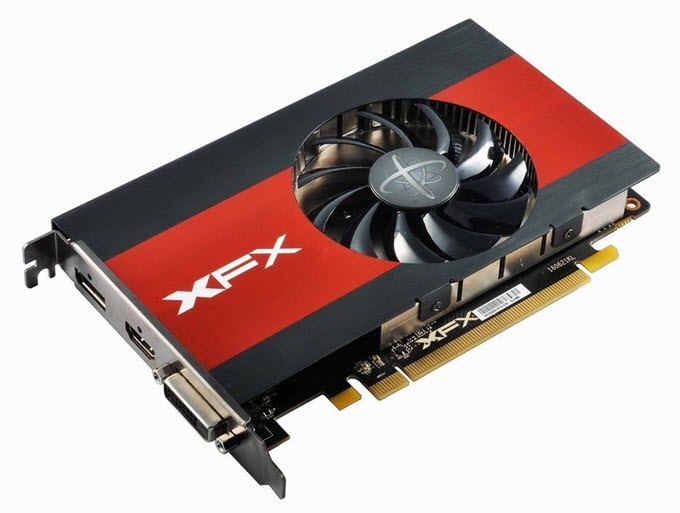
Top Single Slot Graphics Cards from Nvidia and AMD for Gaming and Graphics Work. These Single Slot Video Cards are slim and occupy only a single slot on your motherboard or PC case. These single slot GPUs come with a slim heatsink and fan combination to keep temperatures down ...
analog shore
It doesnt show very well in my picture but the side panel there is an enturely ventilation section so the fans will be able to blow through
analog shore
Thats the side of it. So probably a good amount of airflow to a degree
I have no idea in all honesty
spare relic
xd
a two slot card would probably be comfortable in there tbh
you could find a used one locally and pick it up for a small amount to see how cool it stays in that case versus in a different case
but it looks like it would stay nice and cool :p
analog shore
Market place stuff is all closed for second hand things right now because of covid. Prevent people going out and such
spare relic
yea makes sense
rigid crag
There's always apps like letgo and offer up
spare relic
though last time I checked people are still keeping on on LetGo lmao
rigid crag
Lol ya they don't care
analog shore
Both those dont seem to be so huge in the UK from what im aware of
rigid crag
Oh I didn't know you were in the uk. I don't really know anything about international markets
analog shore
Its all good 😛 I never mentioned until now haha
Well i guess thats the GPU ideas done for now. Next step is looking at a secondary monitor 😂
spare relic
I need one of those too 
rigid crag
I need a primary monitor 
spare relic
lol
I was just second guessing if I could even put a GTX 1650 Super in my motherboard
since it's a Lenovo OEM board from probably 2014
rigid crag
Why wouldn't u be able to
spare relic
no idea
the primary reason that I'm aware about is just a PSU not having PCIe power cables
which I'm willing to replace
rigid crag
You don't have a gpu currently?
rigid crag
Hmm
spare relic
GT 730
rigid crag
Ok
spare relic
no pins
spare relic
non modular, mounted in a normal micro atx bracket
rigid crag
Ok, and you've taken off both panels and examined the cables it has?
spare relic
I don't think there's any such thing as a modular or semi modular psu in the OEM market, those things probably don't exist to these people
rigid crag
Probably not
spare relic
there's only one side panel that comes off on this case, and yeah there's just two cables for the board and CPu
rigid crag
Hump...
Is there a cache somewhere in the case where they stuffed all the extra wires?
spare relic
nah, it's all out in the open
spare relic
OEM parts give you nothing but the essentials for getting a computer running
yeah I plan on that, it's only 280 watts anyway :p
rigid crag
Ah ok 👌
spare relic
I do wonder if I can use it in a different computer I have, maybe for a NAS computer that doesn't need huge watts, though it would require hard drive cables from the board
I got a second non-working Lenovo computer for fricks and kibbles, it has similarly limited parts
royal copper
depends what ryzen 3 but you can look it up, I was able to run beamng on a 2 core processor at semi playable fps at low with integrated graphics
some larger vehicles did lag tho
lol
which ryzen 5
like 1400, 1600?
2500 is second gen haha
maybe first gen apu
wicked hound
(edit: for mobile CPUs) That's a bad way of saying it because Zen+ exists.
2000 = Zen
3000 = Zen+
4000 = Zen2
But it almost sounds like you're saying mobile 4000 is Zen3
 green harness
Fair, thanks for the input on that. It's nice that they made this so straightforward!
I edited to try to clarify @wicked hound, if that's still wrong let me know and I'll nuke it
wicked hound
@green harness I thought this was about mobile. If it's APUs then for 3000 series you have 3200g/3400g being Zen+ and 3000g being Zen
2200g/2400g is Zen
Don't know that 4400g/etc will be
green harness
Yeah, I'll just nuke it. I thought APU was the term used for the mobile processors with integrated graphics as well as desktop parts with integrated graphics, but perhaps I am mistaken?
royal copper
originally this was about mobile apus yes
I just wasn't sure if there was a 2nd gen 2500 chip as there is a 3rd gen 3500x
desktop cpu that is
spice prawn
the 3500 is a desktop cpu, oem/china only
anything below that is 3000 series in name, but 2nd gen (zen+) in core architecture
wicked hound
@green harness honestly just needed to say mobile APUs so that people won't get confused with desktop APUs
 coarse frost
yep but they updated it?
spare relic
I think so
coarse frost
how much time do u thinks that card will last?
spare relic
plenty 👀
coarse frost
like run games on like med or high graphics on 1440
spare relic
I still have an AGP All In Wonder 64MB gpu and it still runs like a champ
coarse frost
like how many years?
spare relic
not sure
spare relic
I'm certain it varies based on use, but like it's not going to be a long time before it kicks the bucket
with Windows XP and old games :)
spare relic
it runs NFS 5 at a pretty low framerate
coarse frost
by dway where r u from?
spare relic
California
spare relic
hi 😄
I have slightly better gpus, like an HD5570 and a GT730
but not much beyond that
I manage with it, with some struggle xd
 mystic shadow
Which is better, a gtx 1650 or a gtx 1060? Just wondering.
rigid crag
Assuming its a 6gb 1060 then the 1060 wins
spare relic
what about 1650 Super :>
rigid crag
1060 still wins
wet temple
1650 is especially limited not only in power but by vRAM
rigid crag
Its not that much more for a 1660 super tho
rigid crag
About
spare relic
160 is a good price for me
so in my case, 1650 Super wins :>
how much is the non Super 1660?
rigid crag
You have to get it used since its discontinued and that could be any price rly but I wouldn't imagine it be more than 200
I see a couple going for like 115 ish used
spare relic
that's not bad
rigid crag
Not bad at all
spare relic
where would I find such prices, eBay?
rigid crag
Thats where I saw it
spare relic
ah
rigid crag
They were on auction tho so they'll probably go up a little more before they end
Theres not many of them tbh
spare relic
yeah I'm not too keen on auction
hexed forge
theyre selling for about 180-200
spare relic
it's still good, but I'd rather do 1650 Super for 160
hexed forge
someone either got lucky or scammed lol
spare relic
jumping from a GT 730, I'll be happy with that lol
I want to buy new, B&H looks to be the best for Zotac GTX 1650 Super Twin Fan
rigid crag
I think a 3400g would be a upgrade from a gt 730
spare relic
lol
hexed forge
thats the only one anywhere near that low though. 1660s are going for 180ish or higher, 1660 supers are going for 240-280, and 1660 tis are selling for between 185-270 (dont know why some tis are going so much lower)
spare relic
I have an i7-4790 tho, not in need of a new system
the Zotac is tiny and I love it
perfect to fit in my poorly designed Lenovo case
 hard rain
Alright this is probably the best place to ask this. I'm relatively new to graphics cards and how gpu's work with drivers, and I've been having a bit of a problem. My config is a msi GS65 8SE (i7-8750h rtx 2060 16x1 gb) My rtx 2060 handles every game I play perfectly except Minecraft, which is super confusing to me. I've watched benchmarks on youtube and the results they are getting are around 500-1000 fps. I'm only getting 50 to 100 frames for some reason. I supposed there might be software holding the gpu back, but I have no idea where to start looking.
dense flicker
@hard rain thats a common problem with laptops
one second
go to this file directory
C:\Program Files (x86)\Minecraft Launcher
right click MinecraftLauncher.exe
and go to the dropdown that says "Run with graphics processor"
and then choose your 2060 from the list
also youre not gonna hit 500-1000fps on a 2060 unless you do like 2 render distance lol.
anyways
i think thats how youd fix it
i havent used minecraft on a laptop in awhile
when youre in the game, press F3
look on the right
it will either say UHD Graphics 630 or Nvidia 2060
you obviously want the 2060.
dense flicker
let me know how it goes
hard rain
👍
tried that and I’m still getting 50-100 fps
120* it varies
also I’m on the lowest settings
https://youtu.be/2rdqp20BWp4 This benchmark is using a 1060 and is still getting better fps

========================================================
Specs:
Intel Core i7 8750H @2.20GHz (turbo @ 4.10Ghz)
32GB RAM @ 2667MHz
Nvidia GTX 1060 6GB
1080p 144Hz display
========================================================
Average FPS when not recording:
NO OPTIFINE
...
hard wren
come clean how many mods are you using? LOL
hard rain
None! I'm playing completely vanilla lol
spare relic
haha
you say you have 1x16GB stick of memory?
without shaders, the highest performance hit goes to the CPU in Minecraft
maybe single channel memory is making the CPU unhappy?
though I'm not acquainted with the nuances of memory channel performance impacts
hard wren
dual channel ram would up the fps
hard rain
Yes and it was
@spare relic I’m not sure that single channel ram would cause that much of an fps game.
drop**
spare relic
¯_(ツ)_/¯
well, dual channel memory should bump framerate, and Optifine would help as well
do you know if your CPU is running at turbo clock speeds, or base?
hard rain
base speeds i suppose
hard wren
should really only add 5-15 fps with dual channel
hard rain
I don’t really know how to overclock my cpu. I downloaded msi afterburner and the area to change cpu clock speeds is inaccessible
hard wren
intel non "k"
spare relic
it should be fine using stock turbo speeds
hard wren
intel non "k"
hard rain
? wdym
how do i turn on stock turbo speeds
and would that make a significant difference
spare relic
well, as it is right now to see if it is running at turbo clock, you can open Minecraft and wander around loading in chunks and stuff
and then open Task Manager to the Performance tab
my processor has a base speed of 3.6GHz, and a turbo speed of 4.0GHz
yours, an i7-8750H has a base of 2.2GHz, and a turbo of 4.1GHz
hard wren
@hard rain by non "K" I meant only "K" intel CPUs can be easily overclocked like a 8700K where your 8750H is not meant to be OC-ed just the turbo
hard rain
spare relic
it looks like it's doing well
I see a large chunk of activity on the UHD graphics though
hard rain
probably because i opened up my browser using intel graphics
it showed no activity when just minecraft was opened
Still I haven't found a solution
spare relic
ah
hard rain
I am getting 140-150 fps now
slightly better but nowhere near what it's supposed to be running
hard wren
why is the UHD doing anything?
disable it in bios
that is taking all kinds of resources
spare relic
interesting
hard rain
alright brb
wait
@spare relic Retract what I said chrome wasn't open when I took that sc
spare relic
o
hard wren
bet that fixes it
hard rain
Where do i disable uhd in bios?
hard wren
what motherboard?
hard rain
u h
hard wren
is it a laptop?
hard wren
yeah looks like you cant
"Turns out this cannot be achieved in any way. I just called MSI support and they confirmed that a physical switch is required to transfer the HDMI output from the Intel chip to the NVIDIA GPU."
thats a terrible way to make a gaming laptop
hard rain
Welp I’m still stuck then
spare relic
that is bizarre
hard wren
looks like it. that is strange though cant believe they would make it like that
spare relic
sneaky computer
hard rain
wow lol
hard wren
@spice prawn you know anything about this?
hard rain
its strange how this is seen most clearly on minecraft
other games run as expected with an rtx 2060
hard wren
I agree its very strange
hard rain
I don't understand why both gpus are being used
spice prawn
would seem to be because of the code that is being run
because other games work fine right @hard rain ?
spice prawn
then i would ask the minecraft devs AND nvidia why their drivers work like that
you might see "some" UHD activity no matter what
you are effectively doing a passthrough after all
depending on how task manager "looks" at things
that could be enough to trigger "some" activity in the graphs
hard wren
think its Java?
spice prawn
that would be my guess yes
but as i told Zack, i have no clue about minecraft as such
as in, i know the original runs in Java
but i honestly thought they had moved engine by now
hard rain
wow yeah with splitgate running ultra settings uhd saw 30% use
so minecraft just doesnt work because its minecraft?
spice prawn
kinda-maybe-ish
hard wren
I would maybe see if you can go into nvidia control panel > manage 3d settings> program settings > [add] > browse select java excecutable and change preferred gpu to high performance nvidia processor and see if that helps
hard wren
its also a good name for the MSI blunder that uses a splitter to move from the integrated gpu to the nvidia gpu. I will call it Splitgate from now on
spice prawn
@hard rain ah!, in that game, do you get the expected performance for your GPU?
hard rain
I guess. Its a pretty graphically challenging game and i get 120-150 fps
spice prawn
so, in other words. way beyond what the iGPU could be doing
hard rain
theres no benchmarks i’ve found of splitgate so i have nothing to base it off of
yes
definitely
spice prawn
and more in line with what you would expect from the nvidia card
hard rain
Yeah
spice prawn
that leads to the (not-final) conclusion that in the case of games that use "not java", the nvidia driver does what it is supposed to
which leads to the observation that: Something is borked in regards to how the iGPU and Nvidia driver interact when it comes to games running Java
but, as Nilboggen suggested, can you try and add it as a custom exe?
hard rain
I’ll try that
hard wren
@spice prawn thanks for taking a look with me I was baffled
spice prawn
Anytime Nilboggen :)
spare relic
we are all baffled in these trying times
spice prawn
not really @spare relic we have you to do that for all of us
spare relic
oh xd
spare relic
haha
 woven belfry
I have an Asus Z17DM-E D3 mother board, i would like to move the GPU down to the lower slot to make room too mount a radiator for a water cooler, will this affect the performance of the Graphics card being in the lower slot rather than the first slot? any help would be greatly appreciated, new to PC building.
spare relic
Z170M-E D3?
woven belfry
yes sorry
spare relic
the black x16 slot seems to be running at PCIe x4
so the best slot for your gpu is the grey slot
woven belfry
ok so it would affect performance due to the black slot being x4
spare relic
yes I think so
woven belfry
ok thank you so much,
spare relic
you're welcome
you could go with an air cooler if you want to overclock the CPU, there are many out there that can cool down a hot CPU with comparable performance with a good radiator
woven belfry
i do have a decent enermax air cooler i could put back in, just like the apperance and thought a water cooler would work better.
 half ravine
i have a serious question for someone maybe with this graphics card, but i recently bought a new pc and i got the asus blower style card the PNY RTX 2080ti but seeings that its kinda generic should i be worried about the life of the card or should i just go get a name brand one?
torpid garden
Nothing to worry about.
half ravine
really? sweet that's the only thing about my system i was worried about
torpid garden
Ya, same as any other component/pc - set up case fans for sufficient ventilation, check temps if you're concerned.
You might see load temps as high as 80+C and the blower fan might get a bit loud if you really, really push the card - but few real world gaming uses will utilize the full 320W power limit on your card.
More like 150w-200w average
half ravine
okay yeah i monitor it with msi afterburner and the only thing i was worried about is how long is this going to last, it is a pre-built sadly i couldnt build my own, so i have a warranty
torpid garden
Nothing wrong with prebuilt, and ya Afterburner is great - nearly everyone uses it for overclocking stuff.
half ravine
sweet, thanks for the help really
hard rain
@spice prawn @hard wren I copied the program minecraft was running off of in task manager (Javaw) and took the file location (C:\Program Files (x86)\Minecraft Launcher\runtime\jre-x64\bin) and pasted it into "add" in nvidia control panel. I changed the preferred gpu for Javaw to High Performance Processor and there was still no change with fps. The uhd is showing more activity than my gpu
hard rain
Maybe there's a mod to utilize the gpu instead of the uhd?
rigid crag
Is there a way to just disable the uhd entirely?
royal copper
what is this, optimus?
hard rain
Msi uses optimus and there is no way to disable the uhd without i suppose a physical key or hacking the bios
wicked hound
@hard rain if you open the f3 menu, does it show Intel UHD or dGPU?
Don't remember how I did it. I mightve added the java exe itself to run as high performance rather then the MC exe
hard rain
It shows the dGPU
wicked hound
Then it's using dGPU to render MC. Tho all other basic programs open are still using iGPU (discord, chrome, etc) so there'll still be iGPU usage. This is all to save on battery life. For example with having a 1060 max q I get like 2 hours of battery life with dGPU only and 6 - 7 hours with iGPU only when doing basic stuff like word processing
 rare sorrel
Hey is my system bottlenecked?
Ryzen 7 2700x
Rog strix radeon 580
wicked hound
Yes, but also no. All computers have a bottleneck depending on perspective and use case
wicked hound
Gaming, workstation, Bitcoin mining, word processing, etc; all stuff considered to be a general type of workload. There there is specifics:
-gaming: what kind of game, res, desired settings
-workstation: video rendering, code compiling, photo editing, etc
hard rain
Then if that is the case and the igpu is not rendering mc, then why am I not getting the expected dGPU performance?
Kind of just goes back to my original question
 olive canopy
Hey everyone. Lately I've noticed my 1660ti is idling at 1500mhz even when I'm doing nothing. Anyone have any suggestions on how to fix this?
royal copper
check your usage and see if it is under any load and by what program
if you are using folding@home it could do that also btw
wicked hound
Also are you running shaders? If not then it's not GPU related
Or quite unlikely to be, as MC without shaders is mostly CPU bound
hard rain
I'm not using shaders. My cpu should be plenty powerful to run it too
I have an i7 8750h
wicked hound
Are you on battery or plugged in? Also did you uncap FPS and make sure no vsync is enabled via MC or Nvidia
Also high performance on windows settings
 young kettle
This old girl.
rigid crag
Those dual dvis tho... 👀
spice prawn
we cannot decide for you.
spice prawn
at the core, they are both clocked the same.
so the question becomes, which do you like the most
with the side question being: do you actually need either of them?
hard rain
@wicked hound I’m plugged in, no fps cap with vsync off and I have high performance selected
still only 50-120 fps
coarse frost
5700 or 2070??
wicked hound
How much RAM is allocated to it? @hard rain
@coarse frost $330 (5700) vs $440 (2070)
not an ideal comparison
coarse frost
@wicked hound in my region they r d same
wicked hound
What about the 2060 Super?
coarse frost
bro i want to ask a question but it will take some time
i want to buy a r5 3600 with an rx5700 and a b450
what do u recommend me to upgrade?
i got some extra bucks
brisk flame
get a 5700 XT
coarse frost
i was thinking about downgrading the cpu to 2600 and upgrading to 2070 @brisk flame
bad idea?
wicked hound
why would you downgrade? Arent the 2070 and 5700 the same price in your area?
coarse frost
sorry i just saw the 2060 price and thought it was the 2070
i just saw it rn and it is 50 60 dollars more
😂
my question here
is what is worth to upgrade
wicked hound
So in that case, then 5700 and unless you plan to stream, get a 2060/2070
Also the 2060 Super is usually cheaper then the 2070
coarse frost
no i just record gameplay
wicked hound
then Nvidia, because you're still doing video encoding on the fly
so 2060, 2060 Super, 2070, 2070 Super, etc
coarse frost
so should i downgrade the cpu?
cuz i think they give the same performance
dont they?
wicked hound
Well first off find the price of the 2060 Super
coarse frost
it is as same as the 2070 @wicked hound
lone pond
I just bought a corsair 1000D and i want a fully watercooled rig
i also play videos games at 3440 1440 at 144 htz
i was just wondering mostly about which card would you think would last longest under constant load
wicked hound
Now see if you can get the R5 1600 AF (not to be confused with AE) as that is usually cheaper then the 2600. They both have basically the same perf
part number: YD1600BBAFBOX vs YD1600BBAEBOX
https://www.amazon.com/AMD-Processor-Wraith-Stealth-Cooler/dp/B07XTQZJ28/ref=sr_1_4?dchild=1&keywords=amd+1600+af&qid=1585700735&sr=8-4
coarse frost
so is this enough for playing gta v on ultra and recording at the same time?
wicked hound
probably
hard rain
@wicked hound 16x1 gb for system, 6gb dedicated for dGPU
wicked hound
@hard rain How much to MC tho? You specify an amount for MC to use up as well
wicked hound
shouldn't be an issue, tho 4gb is generally ideal
wicked hound
Unless 1.15 killed itself the difference shouldnt be major.
MC launcher>Installations (top middlish)>what ever installation you want to edit>more options>JVM Arguments... change -Xmx2G or -Xmx2048M to -Xmx4G. Make sure you arent changing -Xmn[some amount here]M as that is min RAM usage. You want to change max RAM usage
hard rain
Yeah I did that and there wasn’t any difference
hard wren
the moral of the story here is dont buy an MSI gaming laptop in the future
lone pond
hmm
seriously can somebody give me a straight answer on which gpu is superior for constant workloads?
Waterforce auros or K|ngp|n?
royal copper
If you have the money, then kingpin
 oak lake
Is there any hope that when Nvidia allows GSync monitors to work with AMD GPU's some of the nicer monitors already on the market will enjoy this even though they said no currently available ones will?
 unreal elm
I believe newer GSync monitors support AMD cards however some older ones do not
oak lake
Is it always just plug and play when they do or is software required?
i looked at AW's website for my monitor and theres nothing there, I'm wondering if something third party works
spice prawn
@lone pond which question is it you would like to have answered, because you have asked a couple of different ones by now
there is the "which is objectively better" one, which is very much dependant on your own opinion and value set
there is the "i do intensive 3d modelling and rendering" line
which only has one answer: quadro
spice prawn
what is most important.
as i said about the first question: your own opinion and value set
we cannot read your mind :)
lone pond
i would say which card will last me the longest under high load?
spice prawn
either
spice prawn
and just to be certain it is being pointed out, i am not being flippant here, but you are asking the wrong question.
because you are asking a question that we cannot answer
spice prawn
best of luck.
lone pond
you too
 little trail
@hard rain Yo i had a similiar problem, i bought a lenovo laptop with gtx 1060 and i7 cpu. I ran minecraft and it was like only 40-60 fps. I thought that it was very weird because i didnt thought that minecraft is that heavy, but then after 4-6 months i decided to buy monitor (1440p, 75hz) just because sometimes im programming etc. so i need bigger monitor. So i connected the monitor throught mini display port cable to display port. I decided to run minecraft just to see how it looks on 2x bigger screen. And damn i was surprised. The game ran at atleast 400-800 fps without shaders. I was very surprised because i thought the higher res gonna eat my fps but it was actually boosting my fps. So yeah, if you want you can try doing this
sorry 4 english lol
hard rain
@little trail Thats interesting. My brother has a 4k monitor so i’ll test that too
 rain drift
Yo smh y’all use Nvidia smh
spice prawn
@hard rain all you need to test what he is talking about, is ANY external monitor
spice prawn
then as we have been around before, seems to be the specific implementation
hard rain
@little trail was it a laptop?
little trail
Yeah, Lenovo legion y720
 devout dove
i need help
so
my graphics card isn’t connecting to my monitor
and i got another graphics card to test
it’s either my cable, monitor, or montherboard
royal copper
have you had a problem before, do you have the cable plugged into the gpu and not the motherboard
royal copper
is there any signal at all(can you see backlight) or just no signal
devout dove
it says no signal
my monitor cycles through all the displays it can detect
then it says no signal
royal copper
can you see that the computer is one, like fans spinning, rgb lighting up. etc.
royal copper
hmm
royal copper
you didn't have any errors before this happened, right?
devout dove
yea
royal copper
you said you have another gpu?
royal copper
it could be something else
 gray vapor

Bored, didn't like any of the subs I saw for this video out there so I gave it a whirl. I've never been that great at making out lyrics in any language, but the words are much more clear than most of his other songs. The original music is of course by hyadain, whose youtube ch...
devout dove
it’s not the gpu for sure
royal copper
the peripherals aren't lighting and usually that lights up when the system boots
royal copper
have you tried to enter bios
royal copper
make sure you have all the cables plugged in all the way and the ram is seated, sometimes it can go loose
royal copper
I have to eat rn, but if no one else comes here to help ill try to come back
royal copper
@devout dove what are your specs
royal copper
what mobo do you have
devout dove
asus tuf gaming
royal copper
which one, b450/x570, plus/pro
also double check that the locks on the gpu and ram that it is secure @devout dove
also maybe if you could send a pic of the pc
 crude patrol
 limber flax
That should be good
 half sapphire
How would a RTX 2080 and a Ryzen 5 3600X run?
Also, could you OC the RTX 2080 into a 2080 Super?
torpid garden
Good
No
hard wren
wednesdays every wednesday
half sapphire
The exact time?
hard wren
not sure think its all day subscribe to EVGAs emails and it will email you every wednesday to let you know
they are still good now
hard wren
pretty sure its all day every wednesday
wicked hound
kinda late for that response
spare relic
I'm not one to care for late response
limber flax
Should have said 'time is relative'
spare relic
Responses may vary

 spice prawn
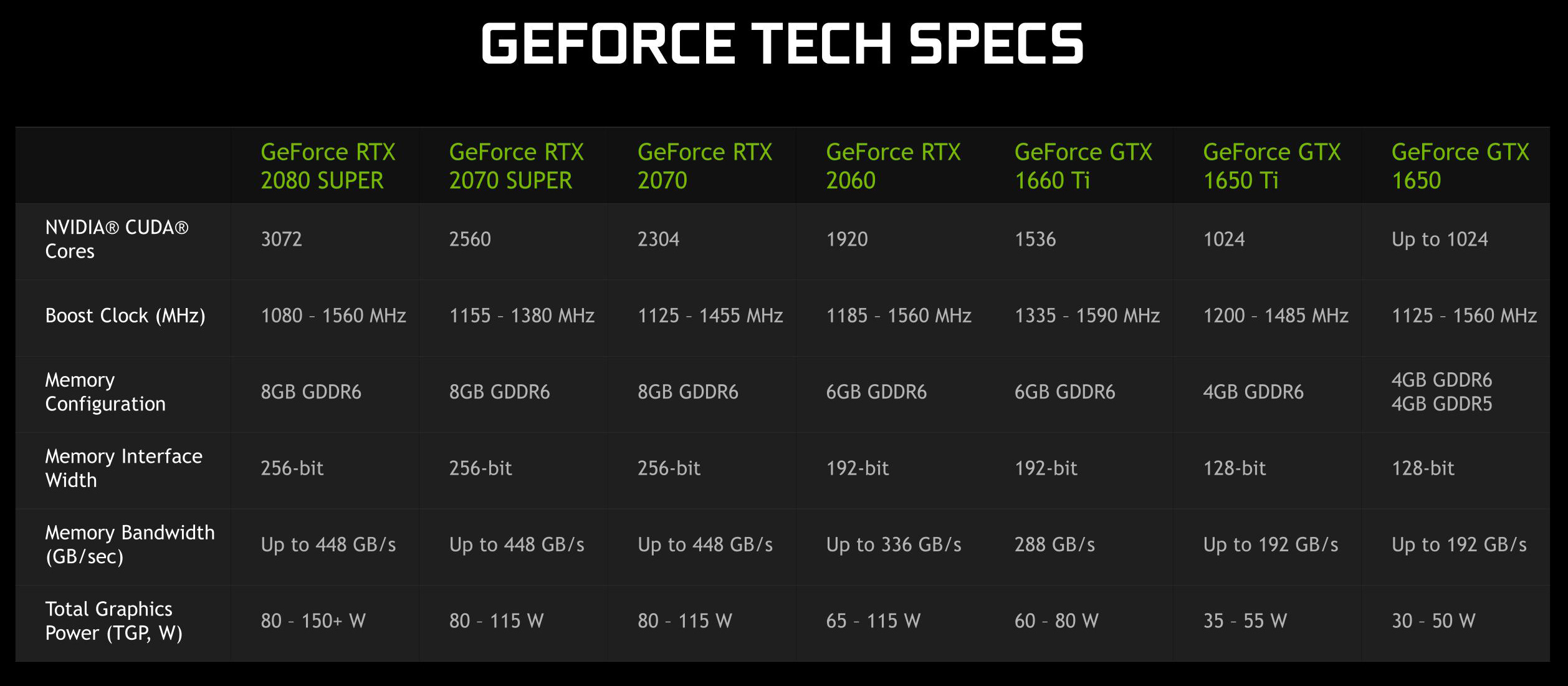
re: lower end supers: its the mobile versions, so what you see there, is the full list
whats silly is the non-distinct SKU for the 1650 variants
 acoustic ginkgo
I'm currently thinking about snagging a 1660 Super for my build. I've decided as nice as a 2060 would be, it's just a bit out of reach right now.
spare relic
Ah I see
I personally want to buy a 1650 Super
Today's low end beats 6 years ago low end, of which I have the Lenovo GT 730
spice prawn
:)
acoustic ginkgo
I have a 1060 right now. But since its in a laptop, I can't really remove it to reuse.
 acoustic iris
plus its a laptop version of the card...
rigid crag
Whys your name white?
royal copper
because they aren't in the server anymore...
rigid crag
Lol they're parting words
royal copper
xD
 soft quarry
Anyone know if this is a good card? https://www.newegg.com/evga-geforce-rtx-2060-super-08g-p4-3062-kr/p/N82E16814487485?item=N82E16814487485
I'm trying to find a good 2060S or 2070 but the prices keep going up and down- not to mention a normal 2060 is around $325 now
acoustic ginkgo
I decided a 1660 Super was all I really needed, because I am not playing cutting edge games by any means.
 outer juniper
What would be a decent upgrade over an R9 390 for ~$250?
soft quarry
@outer juniper a GTX 1660 Super would be a pretty good upgrade for that card for around $230, though if you can find a good deal and don't mind spending more you can sometimes get an RTX 2060 for around $275
 graceful escarp
Which rtx 2060 should i get
outer juniper
@soft quarry Thanks!
soft quarry
No problem
 pallid musk
any nice GPU sag solutions that aren't crazy expensive? seen some cool figurine hold ups other wise anyone know if this is good https://www.amazon.com/DEEPCOOL-Graphics-Addressable-Controlled-Motherboard/dp/B07PYR46CL/ref=sr_1_3?dchild=1&keywords=rgb+gpu+bracket&qid=1585875500&sr=8-3
2070 super starting to sag
mystic shadow
Should I keep my gtx1650 Ventus 4gb or should I get a different one? I’m building a new system, 700 dollar budget
rigid crag
Depends on what the rest of your stuff is
I would keep it for a while and save for a 2070s or something
 boreal turret
Is painting my aio and GPU a bad idea
mystic shadow
yEAh
boreal turret
Is that sarcasm font?
royal copper
painting can be difficult