#graphics-cards
1 messages · Page 132 of 1
 gray vapor
 solar parcel
yea on like medium low
gray vapor
then yes you will get 60 with that settings then
solar parcel
K thx
gray vapor
you could get it at medium as well
solar parcel
im really good at rust so i usually just play on low
gray vapor
Rust is one of those games that is never really that optimized
gray vapor
I have a 1660 and a R5 2600 and for the games i play they look beautiful
 wide rose
lol
solar parcel
but i ordered a new pc for christmas with a ryzen 2600x gtx 1660 x470 aurous gaming 16gb 3000mhz ram and just a 256gig ssd and i gotta buy a hardive
 next ginkgo
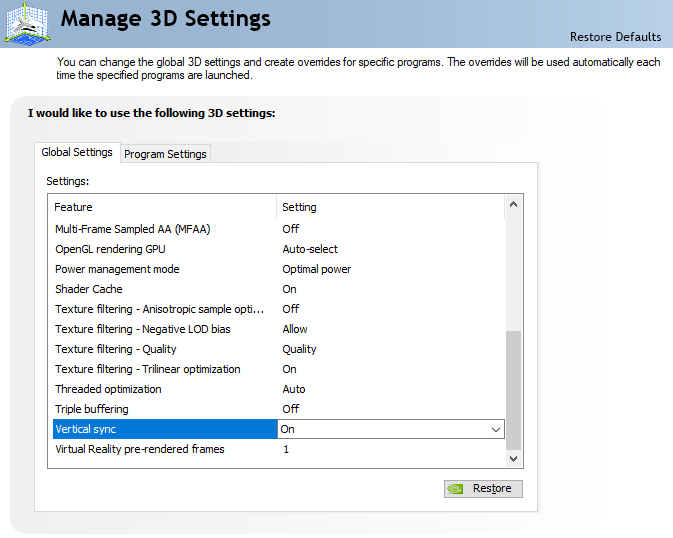
yeah it turned it on on the monitor and turned on gsync in nvidia
gray vapor
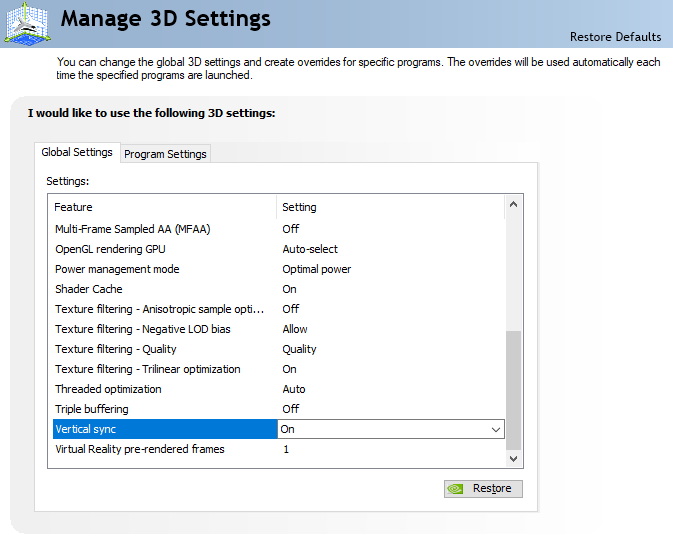
and vsync is on from the nvidia control panel right
next ginkgo
vsync? isn't the whole point to not use Vsync?
solar parcel
ecks gamer what games do u play? and what settings??
next ginkgo
or do you mean g-sync?
solar parcel
keegen
 solar parcel
go to radeon crimson live
radeon settings
then go to display and then u can turn on freesync
gray vapor
He is using Nvidia
solar parcel
O
next ginkgo
oh okay they have a demo i can use to test if it's working https://www.nvidia.com/coolstuff/demos#!/g-sync
Download free demos and experience how NVIDIA technology impacts graphics today!
gray vapor
The games i play anyways is pretty much Destiny 2, Tomb Raider series (starting from the 2013 one), Overwatch, Tera, Batman Arkham knight etc
too many to list so
next ginkgo
hmm it won't let me turn on gsync in the demo
gray vapor
are you connected through display port
gray vapor
if you just turned on freesync then restart your PC first cause Nvidia might of not detected it
next ginkgo
ah okay i'll try that
okay yeah now it lets me turn it on, cool
it makes the monitor flash though, that's annoying
wonder if it'll do that in game
gray vapor
No idea cause i can't use freesync cause my monitor is only HDMI
have to wait about 2 months to get my new monitor
But the monitor i am getting as well will be only 75hz
next ginkgo
it's making my monitor randomly flash even on desktop lol
guess this MSI can't handle it
 lone pond
that's an oof then, cause i can't jump straight to DDR4 now
i just bought my RX580 8GB, and things here in my country are expensive as fk
that's a very good buy
580 doesn't disappoint
got mine for $80
mint condition
it's collecting dust in my warehouse now
wow
i just tested my "vr capatibility" on steam and it says my cpu can handle it well
vr capabilityyyyyyy
yeah yeah, i'm not natural with english
brazilian here
anyways, i got only 4 cpu skipped frames out of 8925 frames tested
that with my navigator open and a lot of other apps open in the background
 tender mulch
What VR games do you want to play?
lone pond
as many as i can lol
tender mulch
Yeah, check those, not the Steam VR test
lone pond
Assetto Corsa, Euro Truck, Pavlov, etc
gray vapor
tests can tell you one thing but actual games is another
Also Ryzen 5 1600's are cheap now and you can get a decent B350/B450 board for the right amount and another thing is DDR4 memory is not that expensive
gray vapor
80$ is the normal price at Microcenter
solar parcel
yea
gray vapor
and if you wanted to save more money the Ryzen 5 1400 on Aliexpress is 50$
solar parcel
for 4 cores 8 threads thats kind of a deal
gray vapor
The only game it would struggle a little is Destiny 2
gray vapor
@lone pond there is also more than just you and i talking
 summer peak
@lone pond I mean you might and I stress might be able to run simpler games like beat saber
but you stand no chance of anything more complex
 graceful escarp
6 cores 6 threads? U mean 12 threads?
summer peak
no, he means 6 core 6 thread
lone pond
6 core 6 threads, AMD FX-6300
by the way, you think with a good overclock i can close this gap?
i really wanna play Pavlov and Assetto Corsa
summer peak
no, absolutely not
the fx 6300 is really old, and it wasn't very powerful even when it came out
you're going to have to upgrade to get any sort of playable experience
sorry man
gray vapor
If you had a 8320 then maybe
 ancient crystal
i had an FX-6300 once
 dreamy dragonBOT
 AnniS#7280 has been warned
Reason: Bad word usage
 digital heath
should I get a 2080 super for 144 hz 1080p or would 2070 super be enough?
tender mulch
Games are only going to get more intensive. If you can afford the 2080, it's always best to buy what you can afford that will last the longest, if that makes sense
2070 is no slouch but it may get that way in a few years.
digital heath
I wonder if I should just wait for the 30 series 😄
tender mulch
Get what you can afford now because better tech is always on the horizon
you'll just end up playing the waiting game
 jagged pier
which brand best 5700xt
 wicked hound
Red Dragon, Pulse, Nitro+
 obtuse sorrel
I'm going with a 9700k + 2070 Super for New NVENC Encoded streaming and maxing out framerates and 1% lows at competitive settings in Fortnite/Apex. Sound good? Opinions?
lone pond
well you can make worse decisions in life
summer peak
sounds solid to me, but it really depepnds on your budget
also hi communist @lone pond 😏
lone pond
no I'm not communist
 wraith pasture

lone pond
@obtuse sorrel at that price point and 2070 super I would suggest the 3800x
x.x you will get the same fps regardless
but better everything else
obtuse sorrel
@lone pond So 4.5ghz per core will perform equal when cpu bound by settings/resolution as water cooled and OC'd to 5-5.2ghz?
Where I'm buying the 3800x will be more. 3700x/9700k would be identical price with the mobo I've picked out.
tender mulch
For pure gaming, if that's all you're going to do, the 9700k is better
If you're going to game and stream, go AMD
But it sounds like you're using NVENC
SO the 9700K will get you more FPS
obtuse sorrel
I'll be streaming but I've chosen New NVENC since the quality comparison is hard to judge between the two at fast/medium and limited to 6000 bitrate.
tender mulch
Only question is 2070 super vs 5700XT. If you aren't going to use Ray Tracing, get the 5700XT
OH
nevermind then lol
obtuse sorrel
I already have the 2070 Super.
obtuse sorrel
So my thought process was to max out gaming performance since my streaming will not affect my fps.
Plus my bigger thing is I'm trying to eliminate 1% lows since I will be upgrading to possibly a 240hz monitor.
lone pond
if you can get the 3800x for the same price then I say go 3800x for the same gaming performance but wwhere you live 3700x and 9700k are the same then
summer peak
The 2070 super is good for streaming and the 9700k is a good matchup
summer peak
if you render videos outside of streaming consider the 3700x anyway
it's not like you'll get much worse performance with it
but the 9700k can do it just fine too
tender mulch
5-10%. It's not much
summer peak
it'll just cut time
obtuse sorrel
I don't yet, but isn't it still true that I "can" still render videos just fine with the 9700k with the expense that it will take longer?
obtuse sorrel
I was typing as you said that.
summer peak
ye
you're good
it's a good matchup
ordinarily I recommend AMD but for your use case it makes sense to go Nvidia
NVENC is great
lone pond
he already bought the super
obtuse sorrel
It sounds dumb but I'm going for a "how the hell is he getting 600+ fps in lobby while streaming" look. Plus reducing all latency while gaming and streaming simultaneously and not affecting framerates.
lone pond
there's no going back
lone pond
nvenc is awesome
obtuse sorrel
Bruh my Gigabyte 2070 Super is wild. I managed a 2220 OC on the core and 16,000mhz on the vram and it still sits under 65c at 45% fan.
While streaming, too.
2220 after gpu boost ofc, that's not the raw OC by itself.
Thanks guys. I had so many people trying to push me to hyperthreading/amd not understanding the end result and I just wanted to be sure it could be a viable option.
summer peak
it's viable for sure -- AMD has its place but it's not like the 9700k is suddenly terrible just because AMD can do some productivity stuff better
I do think it's a little overpriced for what it is, but it will serve you fine
 obtuse sorrel
The whole build is going to run me about $1800 gpu already included with what I paid for it. It will have a Gigabyte Aorus Ultra, a 240 rad rgb water cooler, tempered glass rgb case, 32gb 3200mhz rgb ram, etc.
I thought that was an ok price point for all the eye candy and clean looking build.
Sorry not the Aorus Ultra. The Aorus Elite.
I keep mixing up the two.
summer peak
Personally I wouldn't spend that much just for looks, but that's just me, there's nothing wrong with it
I've said it before but my case is really understated
obtuse sorrel
Ok wait and I lied. 16gb 3200mhz rgb ram and that was so I could upgrade to a 500gb m.2 nvme drive and 2tb hdd while keeping the cost around $1800
obtuse sorrel
I went minimalist the first go around. Being a streamer I kind of want a trophy pc I can show off to my viewers. They like that, and I like it too.
summer peak
yeah it makes sense and there's nothing wrong with it
I just tend to value a minimalist look and saving money more
but if you know you're paying for it and you're okay with that, go nuts
RGB everything
wooooo
obtuse sorrel
I'm going mid range budget/quality on everything if that makes sense. Like...
I'm going with a 240 rad cooler and it has rgb but it's the Cooler Master MasterLiquid ML240L not the more expensive and flashier one.
Actually wait.
Here's my build exactly https://pcpartpicker.com/list/PZbkf9
dreamy dragonBOT
 JemuzuO_O#3632 has been warned
Reason: Bad word usage
summer peak
is there a particular reason you're going with WD black?
It's kind of overpriced for what it is
on the hard drive
also just get a windows key off of ebay for 5 dollars
 novel shoal
I gotta not not do that.
obtuse sorrel
Where I'm buying it the WD Black NVMe drive is the cheapest buy with good performance metrics, so I just wanted to keep the drive brands/look uniform.
As retarded as that is.
summer peak
¯_(ツ)_/¯
whatever floats your boat I just personally wouldn't spend that when you can get a barracuda 7200rpm 2tb drive for 70 dollars
obtuse sorrel
My store has them for $50.
I might change both drives.'
I maybe don't need top end performance on the nvme drive either.
summer peak
The sabrent rocket is a good nvme ssd for cheap fwiw
obtuse sorrel
But I don't want to fall into the realm of cheap.
And I want to buy everything at the same place so if I have any issues during building I can drive 20mins and still finish my build the same day.
summer peak
makes sense
obtuse sorrel
Ok it looks like I can drop down to $60 for the nvme and $50 for the hdd by going with a kingston and barracuda.
summer peak
Depeends on the nvme ssd, but generally that's a good place to save some money
obtuse sorrel
But the kingston only has 2000/2200 r/w whereas the black had 3500/2600.
obtuse sorrel
Would that matter enough that I'd notice?
summer peak
the nvme anyway
summer peak
I've never had one fail on me (well, not until it's been used for like 5 years)
I can't speak objectively, but
obtuse sorrel
Ok TY I'll brb smoke break (at work)
summer peak
👍
obtuse sorrel
If you're still there I had some other ideas to bounce off someone even though they're not about gpus.
summer peak
What kind of ideas?
obtuse sorrel
Ok, case airflow. I have a choice between the Cooler Master MasterBox MB530P and the Cooler Master MasterBox Pro 5, both of which meets my desire for included RGB and tempered glass for a clean/flashy build look.
One has minimal ventilation in the front, both have three front fans, one rear fan, one has top ventilation with included dust filter.
One is 129.99 the other is 94.99.
next ginkgo
the MB530P looks like it has way more airflow
obtuse sorrel
The cheaper one would require me to move from 240mm water cooling to 120mm in order to keep the look I'm going for.
But overall the cost would drop since both the case and cooler would both be cheaper at this point.
So I'm wondering if it is important enough or should I save the money.
summer peak
I think it would be fine
people worry a bit too much about airflow especially if you're doing a rad front mounted
it's not like the pro 5 is going to choke your system
next ginkgo
well what CPU/GPU are you running and are they overclocked?
summer peak
9700k and 2070 super
obtuse sorrel
Now the gpu kicks off a hot of heat. I know this for sure because I managed a 2220mhz oc on the core and 16,000mhz oc on the vram and it still sits under 65c at full load and 45% fan speed.
Right now this is in a case with only one front, one rear 120mm fan but it is also vented at the top.
obtuse sorrel
And my cpu is on a basic 212 evo.
next ginkgo
i have my 8700k and 2070 super just under 70C with 4 140mm and 1 120mm case fans, but the intake is pretty choked on mine
but i like to keep things cool
obtuse sorrel
I'm not so much concerned as wondering if I should be.
summer peak
I wouldn't say so, I showed you my case right?
the side vent things are where my airflow comes from
it does fine
obtuse sorrel
Cause I will go cheaper if it's not going to really impact things. I will be OC'ing the 9700k to 5ghz all core if I can which is why I'm going with water cooling period.
 lapis leaf
I have an evga rtx 2080 xc gaming ultra and an 8700k
summer peak
my processor runs cooler but the rx 5700 runs pretty hot and I don't have a problem with an OC on it
next ginkgo
personally i'd go for the MB530P cause you're going to be dissipating like 300-400W in there
and for 5Ghz you're going to want the 240mm in my experience
summer peak
if you're concerned, get the MB530P -- keegan is right there
it will have better airflow
for sure
obtuse sorrel
Yea that's true plus considering the amount of rgb I know leds don't draw a lot but basically every piece of this thing is going to have rgb. The ram, the cooler, all the fans, the mobo, the gpu, even besides all the power craw and overclocking.
next ginkgo
but technically you can let things run up to like 85C i think
i think you lose boost clock though
so i just run things as cool as i possibly can without the fan noise getting annoying
obtuse sorrel
I definitely want a stable 5ghz all cores if I can.
Ok so everyone thinks the first pick was the right choice.
And it has nicer routing for cable management, tbh.
Has the rubber slits and all. Though the back panel is also tempered glass so I'm gonna have to spend extra time cleaning up the back, too.
I really hope the stock psu cables and all the fan cables, etc are going to be long enough to do that.
Ok next thing is I had some people in the other channel hating on my psu choice. Is there anything wrong with this psu and do you think the cables included will be long enough for clean front and back cable management? EVGA SuperNOVA 750 G+ 80 Plus Gold
next ginkgo
what about like a phanteks p400a if you can find them in stock? it has RGB and good airflow, and no back glass
and it's as cheap as the cheaper cooler master
obtuse sorrel
Ok there is a good reason why I'm going Cooler Master for the case and cooler, and why I chose the ram, mobo, and cpu.
Every piece in this build is compatible with Gigabyte's RGB sync, including the ram.
This way I can unify the entire rgb look in one easy shot.
not cpu, gpu.
next ginkgo
the phanteks appears to be too
obtuse sorrel
This is my first build though and idk about fan headers and rgb control or if I'm going to have enough headers/splitters or whatever the crap you need to make it all work.
Let me look up phanteks at my place.
next ginkgo
it may not be in stock anymore actually, looks like they all sold out after that gamer's nexus review
obtuse sorrel
They don't have any at my place.
And I want to avoid ordering online or from different places only so that if I run into any problems of any kind I can run back to the store which is local and get whatever I need replaced same day or get any additional things I need.
next ginkgo
ah i see
obtuse sorrel
They have better/cheaper cases but they either don't include any rgb and I'd have to buy separate fan packs which would bring them up to = price or they sacrifice things like tempered glass for plastic and I don't want a cheap looking/feeling build,
So, about the PSU, any thoughts?
People were kind of rude and pushy when I asked in the PSU channel.
next ginkgo
yeah i can't think of many other cases like that, maybe like corsair icue 220t or the masterbox h500 but they wouldn't sync to a gigabyte motherboard
you said a 750W EVGA 80+ gold? that should be great
you'll probably be running around 600W with all that overclocking
obtuse sorrel
According to the calculator I used I should be maxing out just under 450.
According to the calculator anyway, so I figured that was enough headroom for error.
summer peak
if you want a better PSU I'd recommend the corsair RMx -- it should be around the same price and has some better protections
the g1 is a bit old
obtuse sorrel
What kind of protections?
summer peak
one moment
eh you should be fine
it's good enough
I thought the g1 was a bit older than it is
I was confusing it with another evga psu
obtuse sorrel
And cable length? Any of you experienced enough to know if they'll be long enough for not only front cable, but rear cable management?
summer peak
depends on your case, I haven't built in those cases so
obtuse sorrel
Like I said, this case has a tempered glass back panel, too. So I have to manage the rear cables so it will look decent.
summer peak
best bet is to get the build, build it so you can use it, and then take some measurements to get custom cables
you can always change the cables later
obtuse sorrel
Like you suggested I'm switching to the barracuda, and I'm going $10 higher on the nvme drive and getting a 970 evo.
summer peak
good idea
obtuse sorrel
Well the thing is I can get cable extensions when I get everything else. Just didn't know if I'd need them or not.
If I don't need them I leave myself like $40 headroom for parts.
next ginkgo
the spec sheets include the cable lengths, maybe you can guess by looking at pictures of the case and planning how you'd route them https://www.evga.com/products/product.aspx?pn=120-GP-0750-X1
hard to say though, at least that store is local if you need to go back for them
obtuse sorrel
That's true and exactly why I'm doing it that way, lol.
next ginkgo
the EPS cables are never long enough in my limited experience, because they still size them as if PSUs were top mounted
obtuse sorrel
True but this is EVGA and and fully modular psu which are most popular for custom builds.
I would think, or hope by now.
So end result, is the Corsair 750MX better?
next ginkgo
650mm, 25.5", i figure you'd need about 36" to route the EPS through the routing channels with the other ones if you really want it to look nice
obtuse sorrel
So I'd be just short and getting extensions will fit the bill but leave a lot of excess that I'll have to zip tie down under the PSU shroud.
next ginkgo
it'll reach without extensions it'll just need to go diagonally across the back, won't look as good through the glass
next ginkgo
you could get a single extension for just that cable off amazon for only $8
obtuse sorrel
It's a big psu shroud from the looks of it so I can wind up the excess and zip tie it so it's out of sight but still looks organized.
You think only the one cable is going to be an issue?
next ginkgo
yeah usually that's the only one that's an issue
obtuse sorrel
Again, first build I'm doing myself, so I don't know every calbe.
cable*
I'll ask on purchase day if they have anything for the single cable at the store. If not, I'll order it or just get the full kit and say f it and be done with it.
Is there a difference between the corsair rm750x and the rm750?
And did we decide if the Corsair was better than the EVGA?
It does have a zero rpm mode. I like that.
Dunno if the evga does or not.
next ginkgo
i doubt any of them are different enough to worry about it. personally i'd get the Corsair if you really want it to look good through the back window. the EVGA doesn't appear to have zero RPM, but you rarely hear power supply fans anyway
obtuse sorrel
Why does the corsair have cleaner looking or longer cables or something?
next ginkgo
the side of the power supply is cleaner looking
dumb reason to pick a PSU but they are all pretty much equal lol
i have the rm750x in my 8700k + 2070 super build, it's been going strong for like 3 years i think
obtuse sorrel
I mean tbh I've had a cheap 750 bronze powespec in my current system for nearly 3 years.
powerspec*
So no matter what it's an upgrade.
Is MLC Nand a bad choice?
For the m.2?
 proven valve
What's better for gaming (and vr) a rtx 2060 ,rx5 700 or rx5700 xt
obtuse sorrel
Samsumg 970 Evo.
next ginkgo
oh yeah those are solid
obtuse sorrel
Definitely the 5700xt.
obtuse sorrel
5700xt is on par with 2070 Super in terms of gaming and cuda count.
next ginkgo
970 evo is TLC, which is pretty much the best balance of performance and price
obtuse sorrel
 next ginkgo
damn that's a great price too
obtuse sorrel
There's this and the Evo+, this one is cheaper and still gives 3500/2500 r/w I think.
Maybe the evo + is the tlc nand. Just making sure mlc nand isn't some cheap junk.
next ginkgo
3-bit MLC is the same thing as TLC
obtuse sorrel
I like the sound of that then.
next ginkgo
the Pro series samsung drives are 2-bit MLC for better reliability but cost twice as much
obtuse sorrel
Yea not going there, lul.
next ginkgo
but that really only matters if you are doing some kind of production work that writes to the drives a ton
obtuse sorrel
I'm sure I'll build a new rig by 5 years or less.
I think you guys answered everything. I really appreciate it.
And you saved me a little bit of money. I didn't realize you could buy just a key for win10 for so much cheaper.
 copper jackal
you honestly don't even need to worry about QLC unless you plan on keeping it for 10+ years or something in a home system
obtuse sorrel
But I'll need a usb drive to download the iso off their website onto, right?
copper jackal
chances are you'll have upgraded years before drive life became a problem
tender mulch
Windfows 10 install media, yeah
obtuse sorrel
Technically I should own a key with my first build but they somehow locked it to my mobo.
copper jackal
I still have an intel 40gb ssd from 2009 working fine
obtuse sorrel
I contacted microsoft and they even told me "the store you bought your pc at is required to give you the key for your pc" and the store was like "huh?"
next ginkgo
if it's from 2009 it's probably SLC or MLC isn't it?
obtuse sorrel
Is there a way I can pull the key from the bios or something?
next ginkgo
i think that only applies to builders @obtuse sorrel this store isn't building the PC for you are they?
copper jackal
MLC, sata II for speed it's so old
obtuse sorrel
It was a prebuilt, yes.
 frail lintel
hey the Radeon RX 5700 is good right?
next ginkgo
apparently you can unlock the 5700 to almost be an XT
obtuse sorrel
Man they didn't even include my recovery disk even though it's listen on the included contents and now they want me to pay for the recovery disk.
next ginkgo
oh weird
obtuse sorrel
And I need it to reset my current rig because selling it is part of the new build fund.
tender mulch
Recovery disk is usually an HD partition
frail lintel
but would a Radeon RX 5700 be ok as is for a while
obtuse sorrel
How can I check?
obtuse sorrel
Pretty sure I only have the two for ssd and hdd.
Man they really trying to f me on this one.
next ginkgo
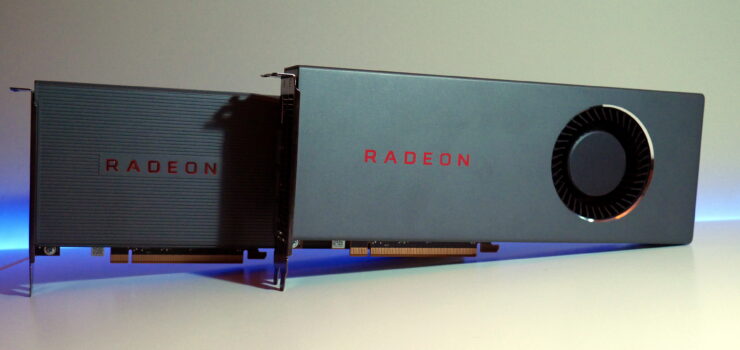
It's no secret that one thing people have loved doing with their Radeon cards over the years has been to flash the vBIOS of a lower-tier card with a higher tiered model to great success. We've covered over the past years the way to fully unlock the RX 460, how a Vega 56 could...
i'm sure that voids the warranty though
obtuse sorrel
Which cable do I need an extension for again?
next ginkgo
it's an option, but the stock 5700 should be good enough for most stuff @frail lintel
the EPS cable @obtuse sorrel 4+4 CPU cable
frail lintel
thank you very much
obtuse sorrel
What's your gpu budget?
next ginkgo
at 1080p it's like 100 fps for the 5700 or 120fps for the 5700 xt in the most demanding games, or 70 vs 85 fps at 1440p
obtuse sorrel
I'm gonna get this so I have everything covered https://www.microcenter.com/product/470639/cablemod-internal-power-cable-extension-kit-black

Now when I had a different psu selected pcpartpicker was screaming something at me about my board having 2x 4 pin 12volt connections and the first psu not supporting that.
So do I need one of these extensions or two?
next ginkgo
i guess all of those extensions will be nice to have since they are more flexible than the ones that come with the power supply and will look better on the front side then the stock ones
you only need one
of the CPU cables
obtuse sorrel
Oh?
next ginkgo
your board will have a 4 pin and an 8 pin at the top, but you only need to plug in the 1 8 pin
obtuse sorrel
Good to know. Didn't know I'd run into flex issues.
And knowing that now I agree I'll be able to make the front look cleaner as well.
Oh ok, so the 4pin is for basic power and the 8 pin is for high power gpu systems and overclocking, correct?
And that mod pack includes the cpu cable you mentioned too, right?
next ginkgo
i think the intent on that board is you can also plug in the 2nd one for really extreme overclocking
but that's like for LN2 overclocking type of stuff
obtuse sorrel
Will I need that for 5ghz all cores?
I don't see myself trying to push more than that. At least right away.
 granite juniper
no
next ginkgo
single 8 pin can do 235W
my 8700k only does 100W at 4.9GHz all core, so i doubt the 9700k at 5GHz pulls that much more
if any
obtuse sorrel
You guys have taught me so much in such a short amount of time.
next ginkgo
it's like for people going crazy with a 9900k i guess
obtuse sorrel
And it looks like I'll finally have everything I need in one shot.
Now I just have to find a buyer for my rig.
And we're off to go shopping.
 rough sluice
so i just returned a rx590 and plan on getting a 1060. what brands should i aim for within the 200-250 range?
obtuse sorrel
What's a good selling price for a 6700k/msi 1070 gaming 8g/16gb 3200mhz gskill ripjaw/250gb ssd/1tb hdd?
ASRock z170 gaming K6 incase you were wondering.
next ginkgo
idk for sure but i'd say like $1000 on the high end
i think you can get a new 9000 series for like $1400 with those specs
obtuse sorrel
the cpu does 4.6 easy at 1.34 volts heavily tested and the gpu peeks at just barely under 2000mhz.
Really? I was hoping for just $800, maybe even less.
next ginkgo
yeah i'd say like $800 if you're trying to move it quickly
obtuse sorrel
Like, with the saving you just helped me with I literally only "need" to make 600 off of it.
So you believe $800 would be an easy sell?
I mean I spent $1500 3 years ago on it but somehow I thought it lost more value. Mostly cause of the outdated cpu.
granite juniper
could you give a price breakdown cause idk about the cpu/mobo but I know the rest would be around 300-350 based on my time on eBay/hws, but @daring minnow would be the best person to ask
next ginkgo
i would think it'd still be worth a good amount, 6-series isn't that old, they were still 4 core weren't they?
yeah those were still 14nm even
intel hasn't changed that much since then
obtuse sorrel
4 core 8 thread 4.2ghz stock and this one goes to 4.6 OC all core at a fixed 1.34 volts.
And temps still stay pretty much the same as stock.
Dude you guys are all great thank you so much for hanging out and talking tech with me.
next ginkgo
with that overclock it's basically a 7700
obtuse sorrel
7700k easily.
You right.
7700k is even only 4.5ghz stock and the exact same architecture.
I just can't call it a 7700k when I sell it.
obtuse sorrel
The 7700k was the dumbest refresh.
next ginkgo
it's still a killer 1080p 100-144hz-ish rig
obtuse sorrel
Same exact chip, down to every detail other than better thermals = higher boost clock.
granite juniper
sounds like intels hedt chips :v minus the price
obtuse sorrel
Even with the original 1070 it was still peaking at 144hz steady fps on high/epic settings with shadows off in Fortnite, yea.
next ginkgo
maybe you'll get lucky with christmas, you could try listing it at $1000 for the next week or so
obtuse sorrel
I think with no frame cap and competitive settings I was seeing as high as the 300s.
That's why I need the disk, though.
 ripe creek
Is $20 a good deal for a Nvidia 960SC 2GB
obtuse sorrel
Can't sell it without being able to reset it. I'd rather not risk any personal data or have the buyer be annoyed with having to uninstall a bunch of crap.
next ginkgo
$20 is a good deal for any video card i think lol
ripe creek
Yeah
next ginkgo
but that's like a 1050, so it's only like...playable 60Hz
obtuse sorrel
That's still a semi-relevant gpu.
next ginkgo
1080p
ripe creek
Bet because my teacher sold me it
obtuse sorrel
Yea, 60hz 1080p ez. Better if you play competitively and lower all your settings and textures.
Oh and turn off all the extra crap in the gpu driver settings/panel.
You don't need any of it unless it's performance based.
lone pond
Buy rtx2070s or wait for ampere?
ripe creek
That's just the first part of my build I've bought. I was going to get a used CPU but it went out of stock :/
lone pond
My 760 still works fine
obtuse sorrel
It's a good start for $20.
lone pond
What game u playing llama?
obtuse sorrel
If you're itching for an upgrade my advice is always, upgrade. There's always going to be something new around the corner, so waiting is pointless and the increase of performance is never enough to justify the wait or the inflated launch prices.
lone pond
I see
That makes sense
Can I ask u as well
I'm trying to decide between the 60s and the 70s
Which one will be sufficient for 1080p 140hz always
On ultra and never worry
obtuse sorrel
I have a 2070 Super and I love it, and I'm even being cpu bottlenecked by my outdated 6700k which I'm soon upgrading to a 9700k, so I haven't even seen its max potential yet.
1080p/144hz you could get a system like mine that I'm about to sell and it would do it just fine.
Originally my system was 6700k/1070 before I got the 2070 Super.
lone pond
I ended up getting a i5 9600k
obtuse sorrel
I almost sold the 1070 by itself but I'm gonna throw it back in and sell the whole system.
lone pond
Last thing to get is the graphics
obtuse sorrel
Well you have several options really for 1080/144
You can get a 1070 for slightly cheaper, used. Or get a 2060 which would be more than powerful enough for that. Only reason I went 2070 Super is because I'm currently deciding between 1080/240hz or 1440/144hz so I'll need the extra umph.
lone pond
So the 2060super is enough for any 1080p 144hz?
next ginkgo
i think you can get 144fps in even things like MW with a 2060 super
lone pond
I don't plant to get a 1440p
obtuse sorrel
I would think the 2060 non-super would even be enough.
obtuse sorrel
I mean yea it's pretty on par with the 1070.
obtuse sorrel
And I gamed at 1080/144 on epic/high settings in Fortnite at least with just shadows off and maintained 144 easy.
The 2070
obtuse sorrel
But honestly, who plays shooters with shadows on? I mean cmon.
next ginkgo
lol
next ginkgo
the selling point of 2060s is 60Hz 1080p with RTX on, so it's easy 120+ with RTX off
lone pond
A pro on 60hz
obtuse sorrel
If you want new, get the 2060.
lone pond
Is still gonna eat ur ass
obtuse sorrel
If you plan on streaming, get the 2060 and use New NVENC
Turing NVENC looks way better than previous versions and can actually stand in for x264 encoding from very fast through medium encoder setting.
lone pond
I've never streamed with twitch but I do screen share a lot in discord
Would it help with quality or is that my connection
obtuse sorrel
Both.
next ginkgo
can discord use NVENC?
obtuse sorrel
Idk I've never streamed to discord.
next ginkgo
i don't think it can, at least it's not in the options
obtuse sorrel
Well, what's your upload speed?
lone pond
I have 15/5
obtuse sorrel
Ok so you're looking at a bit of lower end streaming.
At best you're gonna get 2500-3000 bitrate and probably gonna want to stick with 720/30 to help clean it up a bit.
A better quality encoder can help with that a little, yes, but it won't be a huge insane difference because you don't have a lot of bandwidth to spare for the encoder.
next ginkgo
does NVENC take processing power away from your GPU for gaming?
obtuse sorrel
Nope.
lone pond
That reminds me, why does turning on the Ray tracing thing kill ur fps
next ginkgo
oh okay
obtuse sorrel
Nothing noticeable.
lone pond
Doesn't it have dedicated cores for that
obtuse sorrel
That's the whole idea behind my build.
next ginkgo
i think the dedicated cores only accelerate part of the process, ray tracing is still a hugely intensive operation
obtuse sorrel
9700k/2070 Super/32gb high speed 3200mhz quad channel with New NVENC Encoding.
Absolute max fps I can get while simultaneously streaming.
next ginkgo
i think they had to start ray tracing just to sell new GPUs because they're already about to hit 4k120hz with the 2080 Ti lol
obtuse sorrel
At best I see a 5-10 fps difference at around 550 fps which is a percentage of idk.
lone pond
Holy up
obtuse sorrel
Not very much of anything?
lone pond
U get 550 fps
obtuse sorrel
In lobby.
lone pond
Ah
obtuse sorrel
In lobby...
next ginkgo
the GPU isn't loaded in lobby is it?
obtuse sorrel
I get an average of 300-400 in game. Sometimes dipping around 200s.
lone pond
This man running in low settings with a 700$ gpu
next ginkgo
lol
obtuse sorrel
And that is with the 6700k I'm curious to see what I get when I upgrade.
next ginkgo
you madman
obtuse sorrel
I am, you right.
ancient crystal
is that the "rustle your jimmies" gorilla, Keegan?
obtuse sorrel
But remember I'm rebuilding everything soon so I'm experimenting with what I can and cannot do right now on the 6700k.
next ginkgo
it is @ancient crystal
ancient crystal
lol
next ginkgo
trying to max out your 480hz monitor? @obtuse sorrel
ancient crystal
i was with my ex-gf at the store and i picked up a box of that cereal and was like "my jimmies rustle eternal"
obtuse sorrel
If it helps clear things up and I can easily lock to 240fps on all epic settings with shadows off.
With the 2070S and the 6700k.
next ginkgo
unfortuantely they don't sell the cereal with that picture on the box anymore
now it's a baby gorilla
next ginkgo
that company must be the least fun company ever
obtuse sorrel
Actually I think unlocked I still sit at 300+ fps in lobby on all epic.
I tweaked the gpu settings for max performance.
ancient crystal
i'm gonna just get a 5700, if i can get 144fps to specifically match with my adaptive sync i'll be just fine
next ginkgo
i'm surprised a 6700k bottlenecks a 2070s but a 8700k doesn't
obtuse sorrel
Everything in the nvidia panel as far as quality is useless, you can barely see the difference, and if you turn it all off or gear it towards max performance, you easily see a 50-100fps difference depending on in game graphic settings.
Probably because of the raw core speed + Fortnite recently integrated multi-threaded rendering and dx12 which lets it utilize your cpu better.
next ginkgo
ah
obtuse sorrel
If I moved up to 1440p it wouldn't even matter, but if I decide on 240/1080 then the newer beefier cpu will help my 2070S max out its potential thanks to those changes.
And what I want is to play at mixed settings and maintain a solid 240 with little to no 1% dips below that point.
I like to turn off shadows and post processing. They make the absolute biggest fps difference. All the other settings in that game make minimal difference, but still a small difference.
So I like to keep anti-aliasing on high, effects on high, and draw distance on high. It's a nice balance for insane fps while having the game still look very good.
And right at those settings exactly it seems to balance out the load between being cpu and gpu bound, so both upgrades will make a difference.
This is my theory.
next ginkgo
hey i noticed MW says the resolution is 2880p on my 1440p monitor, does anyone know why it's super scaled and if there's a way to turn that off to get better FPS?
obtuse sorrel
Can you just create a custom resolution?
obtuse sorrel
So we're talking in game settings?
next ginkgo
yeah in game
obtuse sorrel
What about windowed fullscreen?
next ginkgo
i think it's related to nvidia dynamic super resolution but i'm not sure how to turn that off
lemme check
obtuse sorrel
It's in the nvidia control panel.
next ginkgo
there's not an option to disable it in the control panel from what i see
obtuse sorrel
It should be just below the low latency option.
next ginkgo
oh i see you just uncheck all of them to disable it
let me see what that does to the game
obtuse sorrel
And it will have options for the different scaling amounts, 2x, 1,78x, 4x, whatever.
Actually you don't have to uncheck any of them there's a separate option just above those individual options to disable DSR altogether.
Or you can try creating a custom resolution/refresh rate and it will tell you it has to disable DSR and will do it for you.
next ginkgo
i dont see it, but i unchecked all of them and now it says Off for DSR-Factors
obtuse sorrel
Yea your only other option would be to use windowed fullscreen which will just default to your monitor.
And at our level of hardware the whole "fullscreen vs windowed fullscreen" affecting performance argument hardly applies. I never see any increase in fps between the two.
next ginkgo
yeah i always play windowed fullscreen when i can
obtuse sorrel
And for me trying to stream in fullscreen is annoying with two displays.
next ginkgo
i think it was super scaling even in windowed, but turning it off in nvidia seems to have disabled it
obtuse sorrel
I do way too much interaction in chat and changing things, looking things up, watching youtube videos with viewers while servers are down or cue times are up, etc.
Good deal.
Yay I helped back.
next ginkgo
somehow it doesn't seem to have improved FPS though
obtuse sorrel
Small difference.
next ginkgo
huh, i would have thought rendering at 4x resolution would have had a bigger impact
OH, i had DXR on
obtuse sorrel
Unless the game doesn't support it properly.
Bro I've done DSR for Fortnite and ran it at 4x rendering and my fps doesn't change.
It even lists 4k as an option and lets me set it.
next ginkgo
yeah it doesn't seem to be much better if at all, damn
obtuse sorrel
Like there's no way I'm pumping out 300-400 fps in game at 4k resolution scaling.
So I just disable DSR and overclock my 144hz monitor to 160hz.
next ginkgo
i'm actually getting more FPS with DSR on somehow
maybe i'm standing in a slightly different spot
nvm, 125-126 with DSR off, 124-126 with 2x, 125-126 with 4x
so it makes no difference
weird, wonder how they do that
obtuse sorrel
They don't.
If your fps isn't changing then it's not actually scaling.
Meaning the game just doesn't properly support DSR.
next ginkgo
then why does MW say render resolution 5120x2880?
obtuse sorrel
It sees the resolution option but it isn't "really" applying it. Or at least what it's applying isn't a higher resolution being downscaled, but just your same native resolution.
next ginkgo
ah i see
so that's why it got blurry when i turned it down to "1440p"
cause it was actually 1/4 scale
 daring minnow
@obtuse sorrel whats the specs?
obtuse sorrel
You'll have to ask the game devs when they're going to properly support DSR.
Fortnite needs to do the same thing.
Yea so it gets blurry cause it's 1/4th scaling your native resolution not the resolution you specified.
next ginkgo
i'd like to get 144fps in this game but i guess 120 is enough
obtuse sorrel
Specs on?
daring minnow
the PC you were asking help for on valuing
obtuse sorrel
Oh right, my rig I'm selling.
daring minnow
if you have a PCPP list that would be helpful too XD
obtuse sorrel
6700k (overclocks to 4.6ghz at fixed 1.34 volts), msi gaming 8g 1070 (overclocks to just under 2000mhz), ASRock z170 Gaming K6 mobo, 16gb DDR4 3200mhz Gskill Ripjaw V Ram (Black), 250gb SSD, 1tb HDD.
Pretty basic case though it has top ventilation, one front panel led fan, one back panel led fan, side panel ventilation, and a dust filter for the psu.
All the ventilation is that mesh style metal to decrease dust as well. I never really get any dust buildup inside the case or heatsinks.
750 watt bronze psu. Nothing fancy.
@next ginkgo what does your nvidia control panel settings look like?
Because if you turn off most of that stuff you see like no difference in game but a significant increase in fps.
Some of it needs to stay on because it actually helps with performance, but I can't tell you which things cause I'm not looking at the panel.
daring minnow
6700K - $150
BOARD - $50
RAM - $40
SSD - $20
HDD - $15
GPU - $180
case - ?
PSU - $40
$600ish
but, you can poblable get $700-$750 for it
@obtuse sorrel
next ginkgo
i think all the important stuff is turned off
do you turn on low latency mode? @obtuse sorrel
obtuse sorrel
@next ginkgo Turn on low latency mode per individual game. If you turn it on globally it tries to apply low latency to every application and depending on your hardware that can cause things to crash when you launch things like the game.
I went through this when I tried to stream with low latency on. My SLOBS would vanish and so would a few other apps. Then when I turned it on for ONLY Fortnite and Apex but left it off globally it worked just fine.
next ginkgo
ah that makes sense
obtuse sorrel
@daring minnow If I can make 600-700 then I've made my budget for the new system. Actually, above it as long as I don't have to buy windows for $130
And I just talked to a guy at my work who wants to check it out and is thinking about working a deal with me.
daring minnow
idk what cooler you're using either
so that would add a bit
windows is free
or you can buy a licesne key for like $5 on ebay
obtuse sorrel
If he offers anything 600 or higher I'm just doing it and being done with it. I currently only need 1250 to finish the build and I'll have 700 saved in another week.
hyper 212 evo.
So basically at this point I only need the thing to sell and the new build is bought.
Anything I make above that just means I can make tiny upgrades that I don't even really need at this point. I think the build looks pretty solid as is.
next ginkgo
sweet i'm getting like 144fps in MW now
obtuse sorrel
It made a difference right? And I bet the visual difference is hard to even tell.
And what nvidia doesn't tell you is that you can still have anti-aliasing by using the in game settings because there is usually the game engine's version and then nvidia's version if it's turned on. Nvidia's hurts your fps more.
Things like that.
Now shader cache and the other options that boost performance should be left on.
next ginkgo
i left some basic AA and texture filtering on, i don't want it to look like complete poo
obtuse sorrel
Something else, too I forget.
next ginkgo
the only ones that really seem to make a difference are AA and shadow resolution
obtuse sorrel
Texture filtering, yes, and anything to do with that with max performance bias.
I was so surprised the first day I tried turning all that off and saw a 100+ fps difference in lobby and 50+ fps difference in game in Fortnite.
Here's the build now with the new storage we decided on and without factoring in Windows if I really can get it for super cheap. https://pcpartpicker.com/list/ZTTZcq
Mind you I'm buying all this at Microcenter so the prices aren't exact.
My cost will be $1,258.20 - the 700 I'm going to have saved up.
My rig has to pay for the difference.
next ginkgo
you could go to 16GB ram without hurting games right? was there a reason you needed 32?
obtuse sorrel
Plus I still have a Corsair M65 Elite for sale, brand new. A Corsair MM300 Extended Mousepad, brand new. A Corsair K55 used but good condition. A Hyper X Cloud Stinger used but good condition. And a Sound Blaster X G1 USB Headset Soundcard with 7.1 simulated surround sound pretty much like new condition all for sale.
Well I wanted to go quad channel and I don't want to do that with 4gb sticks, so I figured I'd just go the full upgrade since it seemed to be in the budget, plus later on as I push to do more things and dabble in video editing, etc, I thought it couldn't hurt.
Plus RGB ram just looks so much nicer with 4 sticks.
I mean cmon.
But yes if I really wanted to or needed to I could drop another $80 off the budget.
The thing is do I really need to?
 brisk flame
You can get RGB dummy ram sticks
obtuse sorrel
That's a thing?
brisk flame
They look identical to the ram you have, but have no actual silicon
obtuse sorrel
Ok so just out of curiosity I dropped to 16gb and upped the PSU to the Corsair RM 750 X and that puts the budget at $1,190.80 - 700
I guess I just notice a lot when I'm gaming/streaming my ram usage sometimes gets up in the 60% or higher even with 16GB and sometimes I wonder, will I need more if I ever decide to record while streaming, or do other tasks while streaming? Will more help for video editing if that's something I start doing?
Idk these things.
Just wanted a beefy rig.
But yea that would put me at what only needing a minimum of $500 out of my current build.
Not saying I want to sell it that low unless I have to.
brisk flame
More will definitely be necessary for video editing
Well, for intensive video editing
obtuse sorrel
Just means I can still get the build done with less ram if I get impatient and want the thing to fly out my door so I can get the new one.
Plus I suppose I can always take on overtime in the future and buy another set.
Not like I really care about dropping 80 bucks later down the line.
next ginkgo
gskill makes dummy sticks? lol
brisk flame
Eh, just stick with the 32gb set I guess. I don't see a reason in getting it later.
obtuse sorrel
But, if my first offer for this rig ends up being 600-800 I'm taking it and getting all the bells and whistles.
Well where I'm buying it it's actually cheaper to buy two sets of 16 which is how I was going to do it. The 4 pack for some reason is $15 more, not even on sale.
next ginkgo
i see
brisk flame
Plus, sometimes if you get a set, and try to mix it with what should be an identical set, you won't be able to push the same speed and timings
obtuse sorrel
So whether I buy them together or at a separate time it won't matter.
brisk flame
That's fine, but the dimms may not cooperate. They most likely will, but sometimes they're fussy and end up clocking a few 100mhz lower
That's why buying a full set of 4 is more expensive
next ginkgo
is that only if you're overclocking? or even with XMP?
obtuse sorrel
A full set is 189.99 at their store and if I buy two separate sets of 16gb of the same exact thing it comes to 165.
Isn't XMP guaranteed though considering they're selling them advertised as 3200mhz?
So it's actually $25 cheaper. Damn.
brisk flame
If you have a set of two, and mix it with another set of two that are "identical" but haven't been tested together to run at a speed of like 3600 together, just because both sets individually clock that high, that doesn't mean you will be able to get both sets together to clock that high.
That's the premium you pay for a "guaranteed" speed
obtuse sorrel
The way Microcenter is with customer service, if I bought two pairs and 16 and didn't get the advertised 3200mhz, they'd probably just swap me to the 4 pack and price match it.
I've dealt with them a lot.
brisk flame
Microcenter nice
next ginkgo
true they have good service
i wish the microcenter here weren't 90 minutes away
i'd be broke if they were close though
ancient crystal
obtuse sorrel
Plus I'm about to drop another $1200 after dropping $550 and buying a prebuilt for $1500 2 1/2-3 years ago + peripherals.
brisk flame
I mean, the closest microcenter to me is like hours away
ancient crystal
seagate compute drive for cheaper
obtuse sorrel
Yea, they'll treat me good if anything goes wrong.
next ginkgo
he's shopping microcenter specifically
obtuse sorrel
At microcenter the barracuda is the cheapest 2tb drive.
next ginkgo
oh right they price match right?
next ginkgo
ah
obtuse sorrel
That's Best Buy and Best Buy no longer matches Newegg.
ancient crystal
no i was talking about the barracuda, the compute version is a little faster iirc
next ginkgo
does best buy still match amazon?
next ginkgo
nice
ancient crystal
target matches amazon, it's really cool when amazon has a sale on a TV
obtuse sorrel
I understand you're trying to help but I don't want a corsair cooler, even if it was half the price and I have reasons I explained a few hours ago when we started this.
next ginkgo
ah, there's no such thing as a barracuda compute
all of the basic barracudas say compute on the label
obtuse sorrel
Everything in my build is compatible with a single lighting sync.
ancient crystal
sorry, i wasn't here during that
ancient crystal
also i didn't modify your parts list, it was someone else's
dreamy dragonBOT
AnniS#7280 has been warned
Reason: Bad word usage
obtuse sorrel
I just didn't update the parts list.
obtuse sorrel
That's twice the price though.
ancient crystal
i lived in minnesota and there was one close
obtuse sorrel
Like is there anything bad about the barracuda?
ancient crystal
no, there isn't
rough sluice
Whats a better alternative to an rx590 at around $200-230?
ancient crystal
i was just remarking on how cool ironwolf sounds
obtuse sorrel
I'm putting my competitive games on 970 evo nvme m.2 anyway.
summer peak
@rough sluice there really isn't one.
obtuse sorrel
Everything else, single player slow paced games I care less about are going on the hdd.
ancient crystal
and apparently i did modify your list but i thought it was something else
rough sluice
Not a 1060?
obtuse sorrel
I'll fix it later.
ancient crystal
does that edit permanently?
summer peak
but the 1660 and 590 are so close it really doesn't matter
obtuse sorrel
I was going to update changes anyway, besides I have all this listed in my cart for microcenter anyway.\
ancient crystal
i thought it made a totally new one
summer peak
you're looking at 1-2 fps difference either way depending on the game
and that fluctuates between nvidia and amd leaning
rough sluice
I just returned a 590 because it sounded like a jet engine taking off and was still going around 79-82c in apex
obtuse sorrel
I only made the pcpartpicker so I could show you guys the parts.
summer peak
there are good coolers and bad coolers, could have also been a thermal paste issue
but if you want to switch, go for a 1660
obtuse sorrel
Were you playing apex on low settings?
rough sluice
I see. Thank you for your response visi
obtuse sorrel
Or max settings?
summer peak
right in your price range, and competes directly with the 590
next ginkgo
the barracuda is actually faster than the ironwolf in the 2TB size, interesting
obtuse sorrel
Weird.
summer peak
ironwolf is a storage drive
it's not meant to be fast
it's meant to be reliable
it's for NAS
rough sluice
I appreciate it 🙏🏻
next ginkgo
well, the higher capacity ones are actually faster too
obtuse sorrel
Well they both come with warranties.
obtuse sorrel
And I'm not building a server I'm looking to keep for 10 years.
next ginkgo
the 8TB ironwolf is significantly faster than the 8TB barracuda
obtuse sorrel
I'm building a fast performance pc on a fixed budget I expect to last 3-5 years.
summer peak
As I said earlier I can't give you data on failure rates but barracuda drives I've gotten have lasted around 5 years
never had a dead drive when I got them either
obtuse sorrel
I mean I have a toshiba p100 1tb drive or some crap right now and it's lasted 3 years with zero issue.
And I've put that thing through its paces. Constantly changing games in my list and doing large installs/uninstalls. It's held up.
next ginkgo
i think i've had my WD black for like 7-9 years but i can't say i used it that hard, it was only a boot drive for a few of those years
next ginkgo
probably was idle for the last 5 or so lel
obtuse sorrel
I think I like where this price range is sitting. I get everything I need and my current pc only has to sell for $500. If it sells for $600 or more then I can go back to 32gb ram and even possibly move up on things like the cooler, or storage.
summer peak
I think you're in a good place with it too
obtuse sorrel
But I'm actually certain $500 would be the easiest sell for this rig so no matter what my new rig is going to happen.
And that alone is a great feeling, because I have always wanted a custom rig I could build myself so I knew everything looked perfect, and one with killer performance.
Any thoughts on the mobo I chose? Good enough for what I'm trying to do? I almost went with the Ultra but idk how I feel about spending 200+ on a mobo.
When this one is only 179 and I get $20 off for buying the 9700k with it.
I assumed since it has the 8 pin + 4 pin power you mentioned that it would have more than enough power for my relatively mild over to 5ghz all core.
And I think it only has 1 m.2 slot but I only need one.
Not sure what else I need to know about or check before choosing that one.
It has onboard 7.1 support for my 5.1 speaker system, so I don't need a soundcard. It has onboard intel gigabit lan so I don't need the intel gigabit pcie card I bought for my current system.
So basically only using what's right there in the parts list,
next ginkgo
i mean there are definitely cheaper intel boards
obtuse sorrel
Yea I didn't want to buy a B board or anything.
But I wanted to make sure this was within that mid range quality that will safely get the job done and has everything I need without over spending on what I wouldn't need.
Like the Ultra has 3 m.2 slots. I don't need that. Not even sure what other important differences there are but I wouldn't know if I needed them anyway.
And by the time I upgrade, I'll literally do the same thing I'm doing now and save, sell the whole system, build new.
So idc about adding things later unless it's the extra ram.
next ginkgo
not much cheaper so i guess not worth sweating
obtuse sorrel
Maybe an extra drive if I start editing video but hell I could just get an external for that.
So it's still a good quality board?
next ginkgo
on my Asus board that's only if the M.2 is in sata mode, not sure if that's the same for gigabyte
so it wouldn't apply to your 970 evo anyway if that's the case
that board actually has 2x M.2s
lone pond
barracuda is a type of fish
 slender vigil
https://pcpartpicker.com/list/Q662x6 what you guys think
summer peak
Looks okay to me, why the 2070 super over a 5700xt?
Also the ram is overpriced
also the ssds confuse me -- an nvme drive for storage? a worse 2.5" ssd at 500gb for...?
slender vigil
I already have 860 evo just added it bc why not
slender vigil
And why 5700 xt
summer peak
Nearly identical performance for 100 dollars less -- the 2070 super still makes sense if you're planning to stream often -- NVENC is nice to have
but otherwise for most consumers the rx 5700xt is the better buy
slender vigil
Surprised didn’t say anything about cpu lol thought you say like why that cpu
Alr
Thank you
slender vigil
No no no i think you say that’s to overkill
summer peak
really good for both gaming and especially any sort of editing work
well if it's in your budget, why not
slender vigil
I do virtual machines serves and stuff
summer peak
absolutely a great choice then
slender vigil
Servers
summer peak
good choice on the power supply too
slender vigil
Ye rn I’m rocking with a intel Xeon E5 2643 Duel cpu ram 64 gb ddr3 speed 1600 and card 1070 ftw
And if I add just 2070 s I’ll be bottlenecking it and stuff
summer peak
that's gonna be a good jump up then
you put together a really solid list and I can only really nitpick like that RAM
summer peak
nice
slender vigil
When I built this it was meant for server stuff and tiny bit of mc on 2016 but then I got into higher end games and streaming but still doing server stuff
obtuse sorrel
I'm about to be done work so thank you everyone in here that was kind enough to hang for so long and talk tech. Later.
summer peak
see ya' later jemuzu
slender vigil
My dad is rocking with 128 DDR3 ram 10 SSDs don’t know which, GTX 1080 liquid cooling, Intel Xeon Duel cpu newer version also both cpus liquid cooled, and some other stuff
slender vigil
He does not game at all so idk why he picked 1080 especially liquid cooled
He works for the va at home
He wanted to make a quiet server that’s not big
My setup atm
Replacing keyboard, just ordered new one
summer peak
i spent all my monitor budget on a VR headset
slender vigil
You kidding right
slender vigil
Higher refresh rates monitors are the best
summer peak
I barely play pancake games anymore
slender vigil
I switched my birthday present from a vr headset to RTX 2070 s
slender vigil
Then we’re upgrading entire rig shortly
I know it looks hella fun but need to upgrade first
summer peak
yeah
ancient crystal
visi why aren't you shilling that team group stuff, that stuff is good and/or ridiculously cheap
ancient crystal
oh
slender vigil
Idc about rgb ram I just heard it was good ram
slender vigil
I care about performance over rgb
ancient crystal
you can save some money
3200/3600 are basically the same performance wise in ryzen systems
because INFINITY FABRIC and whatever
there's some infinitesimal difference
summer peak
well this is worse performance than the RGB ram I put in
but it is 50 less
@ancient crystal zen 2 benefits from 3600
ancient crystal
oh really
summer peak
yeah
ancient crystal
well i'll be damned
slender vigil
Then I’d take the 3600 lol
slender vigil
Rn running with 1600 😂
ancient crystal
infinity fabric sounds like something out of anime
summer peak
hah yeah
@slender vigil btw I told this to anni yesterday but if you want VR on the cheap look into the samsung odyssey+
you can get one for 230 usd atm
it's a super solid headset
slender vigil
For like parlov and beat saber?
summer peak
I've personally used it in both
ancient crystal
hopefully it doesn't increase in price too much by the time i can buy one
summer peak
I'm not the best at beat saber but it worked fine for both for me
ancient crystal
i'm cannibalizing old parts but i've got RAM to buy and some other nonsense
summer peak
To some extent you're getting what you pay for, but the tracking isn't terrible or anything, and it actually has some advantages compared to IE the rift S in so far as the audio solution is better and the display has better color and black levels
slender vigil
I wonder how much I can sell my rig rn
ancient crystal
i would probably be bad at beat saber
summer peak
the caveat is if you need glasses you'll want to consider custom lens inserts for it
which raises the price a bit
slender vigil
We just sold the gtx 1070 that was in my rig
ancient crystal
and i can't see the broad side of a barn without my glasses so it's kind of essential for me
slender vigil
Funny thing I can’t game for 5 days
summer peak
https://youtu.be/8nuYn8UxOPY?t=80
I showed this to anni but it's timestamped and will give you an idea about the tracking on it

My recommended VR hardware: https://www.amazon.com/shop/mixedrealitytv
Check out the MRTV Patreon page: https://www.patreon.com/sebastianang
Join the MRTV Discord server: https://bit.ly/mrtv-discord
My VR Rig:
GTX 1080ti http://geni.us/rVXQ
Asus Rog Strix Z370-F Gaming M...
you can lose tracking if you move the controllers above or behind the headset and keep them there
but as long as the controllers are moving it'll keep tracking with inertial data
and they'll snap right back into place when you move the controllers in view of the cameras
and this is an older video -- the tracking works even slightly better due to updates since then
slender vigil
Visit how much you think I can sell this rig with intel Xeon E5 2643 Duel cpu, 64 ddr3 gbs ddr3 and 850 wat ps dell
summer peak
I really couldn't tell you for sure, I'm not super familiar with xeon processors or what they're worth
Find great deals on eBay for Xeon E5 2643. Shop with confidence.
slender vigil
Ok then...
ancient crystal
i'd try selling the whole thing for $500 since it's a bit of an oddity and some geeky person might be interested just to geek on it
summer peak
do you know the motherboard?
ancient crystal
it's still a good server too
summer peak
I think server boards are more expensive
slender vigil
Dell precision t5600 I think
 split hearth
I dont think anyone would pay 500$
slender vigil
I’d try 400 and go from there
summer peak
yeah, you can always lower the price if nobody buys
start high, work your way down over time
split hearth
The problen with workstation and Xeon is that people dont know they exist
dreamy dragonBOT
 Swift#4102 has been warned
Reason: Bad word usage
slender vigil
Really f is not allowed
split hearth
Hard to find buyers :/
split hearth
Thats why Xeon and workstations are so cheap on ebay
slender vigil
No one knows there decent
split hearth
People just want to get rid of them
slender vigil
It’s actually a pretty decent cpu for server stuff but being sold for a fast food combo
summer peak
yeah, like, I personally don't know that much about them and I consider myself a PC enthusiast -- I used to build PCs for a living even.
I had no idea what they're worth until I looked
 midnight summit
Hello gents
slender vigil
Newer versions are much more expensive I think
summer peak
hiya