#graphics-cards
1 messages · Page 115 of 1
 wide mango
they launching soon?
 potent shoal
you want model for the motherboard?
 gray vapor
No idea when but if their first card ends up being on par with a 2060 and is like 50$ less i think people would forget about Nvidia 😛
wide mango
click the mainboard tab
 lone pond
Can't go wrong with non-reference cooler 5700. If you want CUDA capability, NVENC, and other goodies, go 2060, 2070 super etc
wide mango
on the program
potent shoal
0FPV4P
wide mango
itll be both the manufacturer and model
potent shoal
Alienware
wide mango
oof
 tender wraith
lol
potent shoal
Bad?
lone pond
That's an aurora R4, x79?
potent shoal
I don't know but its from the 2014 era
lone pond
Wanna run a userbenchmark?
potent shoal
Sure
lone pond
That'll tell us mobo model, cpu, gpu, memory, bios, gpu driver, everything
potent shoal
How do I do it?
wide mango
i had him run cpu-z and thats what he got but i suppose there should be more info?
lone pond
The info I stated above is 90% of the reason why I recommend userbenchmark as the starting point for the vast majority of troubleshooting.
A lot of people gripe about the site'performance metric weighting, but I don't pay much attention to that part.

Top Market Research & Genuine Product Insight from our Users. Quickly find category leading products with UserBenchmark.
wide mango
this is what i found with his model number and make https://www.amazon.ca/Dell-Alienware-Aurora-System-Motherboard/dp/B017YFR2PE
lone pond
Ya, looks like a sandy-e or ivy-e x79 board
wide mango
ddr3
lone pond
Yes, those are both ddr3 platforms
wide mango
so admiral was right
potent shoal
It looks like the one in my system
lone pond
So, are you looking to upgrade your GPU?
potent shoal
Yes
wide mango
his budget is 500 and below
lone pond
I kinda skimmed through the earlier convo, was the question whether or not it's worth upgrading the GPU only right now?
And whether or not said GPU would benefit both the current system and also be able to fit well into a future mobo/cpu/ram upgrade?
wide mango
games are Destiny 2, Fortnite, Minecraft and newer games
wide mango
1080p gaming with 1080p monitor
lone pond
1660 is a perfectly fine budget option for $200 new, as is a used 570 for $80
potent shoal
GTX 1660?
lone pond
Yes
potent shoal
Any major difference between 1650 and 1660?
wide mango
i think the vegas beat it at its price
lone pond
Huge differences between the 1650 and 1660. 1650 should only be used in systems where external PCIe 6 pin power is no option.
gray vapor
1650 is more aimed towards esports
lone pond
1650 also lacks the Turing hardware encoder, not a huge deal, but for the price, it's a rip off.
potent shoal
So 1660 ti?
lone pond
1660 ti is a perfectly fine option for more performance than the 1660 for just a bit more $
I'd say check benchmarks for games that matter most to you, tested at the resolutions and quality settings that also (matter most to you), and see how much spending more to get more is worth it (to you).
potent shoal
Any difference between gigabyte, msi, or evga? I personally like evga
wide mango
i saw online someone was having trouble using his powersupply at 875w with the r9 290x
lone pond
I personally like EVGA too, IMO they have the best customer support currently.
gray vapor
usually the difference is the clock speeds if i recall
 worldly crow
evga is best company by far
my 780 was out of warranty and they still sent me a gtx 970
lone pond
@wide mango It's hard to make any kind of judgement from that information without knowing what model, or even brand?? that PSU is. 875 sticker rating could mean anything.
lone pond
Important: read EVGA's warranty policy carefully, and when appropriate register the card so that you can receive the full warranty benefits.
I'm bordering on EVGA shill here so I encourage you to research further on your own.
 magic pebble
I love me some aorus/gigabyte, but evga has an amazing warranty
worldly crow
i always register my cards first thing
potent shoal
I guess ill get a 1660 ti
gray vapor
i love Asus but if i stick with AMD i an going to go with Sapphire
tender wraith
I went with EVGA for my 2080ti just because everyone said their customer service is the best
lone pond
Similarly, you can save 5-10% using someone's EVGA associate code, I'd check the EVGA forums to find one, and for the reason above, I can't give out my own here haha
magic pebble
its hard to beat evga for any kind of warranty coverage
worldly crow
why not 2060?
potent shoal
I have a 750ti can I still register that?
gray vapor
@lone pond I got a useful link for EVGA's midweek madness
worldly crow
its not too much more
lone pond
Same, I like my EVGA 2080 ti ftw3 so far, 16649 graphics score in timespy.
wide mango
at what price is the cheapest 2060 right now?
magic pebble
I mod for aorus/gigabyte but evga has the best warranty on the market from what I have seen
tender wraith
I also paid for Micro Centers warranty since I was putting a waterblock on
worldly crow
theyre about 350
lone pond
Lol, I just realized I talked to you on my other account @magic pebble
magic pebble
you did?
wide mango
hes playing these Destiny 2, Fortnite, Minecraft and newer games
lone pond
hahahaha
worldly crow
2060 supers are 400+
potent shoal
So is 1660 ti a good choice?
lone pond
I have view set to compact so I don't see profile pics. Never noticed
magic pebble
I have alt accounts on discord too
wide mango
i have a question, why not use a vega?
worldly crow
@potent shoal whats ur budget for a video card?
gray vapor
intender you have no secrets 😛
wide mango
his budget is 500 and under
lone pond
It's not really an alt, it's just the one I register to my phone.
worldly crow
im going for 2070 super when i upgrade next
worldly crow
if u like amd u can get a 5700xt
wide mango
not*
wide mango
i suppose the right question is what future games do you intend on playing?
worldly crow
1660ti is basically a gtx 1070
lone pond

Guru3D.com
Meet the ASUS Radeon RX 5700 XT ROG STRIX that we review today. It has increased clocks, increased looks and well is just customized all the way. Fabricated at a 7nm node and capable of battling with ... DX12: Battlefield V

 potent shoal
big oof for 1660ti
worldly crow
are the 2 fan cards out yet for the 5700xt?
lone pond
Those are only two examples, I linked the article itself so you can see what's best for you use case
wide mango
it depends on what future games you plan on playing i think if its for gaming
lone pond
Remember that there are binned, and non binned , non overclockable 2070 super chips.
gray vapor
@worldly crow why 2 when you can get 3 https://www.newegg.com/gigabyte-radeon-rx-5700-xt-gv-r57xtgaming-oc-8gd/p/N82E16814932208
lone pond
Some 2070 supers are gimped 2080s
It's a complicated issue, you can read more on http://www.overclock.net
An overclocking forum devoted to maximizing the performance of graphics cards, CPUs, motherboards, RAM and everything else found inside your computer case.
potent shoal
I think I decided on a card
worldly crow
gray vapor
ok you linked what i linked 😛
lone pond
Unsure, but wouldn't surprise me. TL;DR there are 4 different bins of 2070 super, some with un-measurable differences, others with variance worth mentioning
worldly crow
ah lol
potent shoal
Thank you all for helping me
worldly crow
what card u getting?
potent shoal
RTX 2060
worldly crow
the evga one?
potent shoal
Is there one?
worldly crow
yea
potent shoal
Then yes
gray vapor
@wide mango ping Mike he will be faster to let them know lol
worldly crow
super?
potent shoal
yes
worldly crow
or just regular?
potent shoal
Super
wide mango
hey @sinful bobcat when we getting more 5700xt's in stock on newegg?
worldly crow
and u get 2 free games
potent shoal
oooo
wide mango
lol
potent shoal
Thank you
lone pond
Lol, why..
gray vapor
2 decent games
potent shoal
What do you mean for the rtx?
wide mango
it doesnt do so hot with ray tracing on
worldly crow
the 2060 didnt
wide mango
but ya def faster than 1660ti
worldly crow
this one has 2 more gb
potent shoal
Well I gotta get going to bed thank you all
worldly crow
np
wide mango
wait real quick
potent shoal
Yes?
wide mango
what game are you planning on playing in the future?
gray vapor
One of the games Nvidia is giving isn't even out yet
wide mango
like new games
wide mango
gotcha then i think youll fine then with that
gray vapor
AMD is a 3 months Xbox Game Pass for PC
worldly crow
hell hes good for any games
gray vapor
so get your first month free and then activate for the other 3 months so you have 4 months in total
potent shoal
I got the 3 months for a dollar back in E3
wide mango
well if he said the new cod or cyberpunk 2077 then id recommend him something different with his budget
potent shoal
Oh yes cyberpunk
potent shoal
Its ok
worldly crow
he should be able to play any game with card at max settings
potent shoal
Ill turn everything low
wide mango
these games have like minimum requirment of 8gb vram
potent shoal
How many fps?
wide mango
i think the 2060 is 6gb
gray vapor
Well i got a feeling Cyberpunk 2077 isn't going to have crazy requirements
worldly crow
hes getting the super
wide mango
o ok
worldly crow
its 8gb
wide mango
nvm
worldly crow
its basically a 2070
potent shoal
I got 20gb ram
potent shoal
Ah
worldly crow
:p
gray vapor
If i had the money and if this was in stock i would buy this https://www.newegg.com/sapphire-radeon-rx-5700-100417p8gl/p/N82E16814202350
wide mango
na dud amd gimps 5700
get the xt
wait isnt the 2060 super the same price as the 5700xt?
it is, rip lightbulbs
gray vapor
you know he is gone right
wide mango
yup
gray vapor
Besides i think he prefers Nvidia
wide mango
and they are in stock so i guess theres that
gray vapor
Well i might end up going for the 1660/1660 Ti
For what i play i don't need anything better than that
wide mango
im trying to get someone to tell me why i shouldnt go with the vegas
cuz from i see its better than the 1660ti for just 30 more $
wide mango
gog+cd project red = op
 potent shoal
real quick question
wide mango
oi
potent shoal
this is the best option out of all of them? https://www.amazon.com/EVGA-GeForce-GAMING-Backplate-08G-P4-3163-KR/dp/B07TLPWBJ4/ref=dp_ob_title_ce
wide mango
hold up
im not seeing why you wouldnt just go https://www.newegg.com/evga-geforce-rtx-2060-super-08g-p4-3067-kr/p/N82E16814487460
um
if you must stick with evga
o you want rgb?
wide mango
seems to be cheaper on there
potent shoal
oh nice
wide mango
they allow us to post links to amazon
potent shoal
ok
wide mango
i believe this is the same one https://www.newegg.com/evga-geforce-rtx-2060-super-08g-p4-3162-kr/p/N82E16814487459
on newegg
potent shoal
no ultra?
wide mango
its really confusing actually lol
potent shoal
also we are sure this will fit and work on my system?
wide mango
from what i understand you power supply should be fine
the motherboard being ddr3
can run ddr5
not sure about ddr6
which is the 2060 super
potent shoal
So if 450 dollars is wasted is there anything I can do?
wide mango
but the others didnt seem bothered by it
potent shoal
if its from evga?
wide mango
if you order from amazon you can return it if you dont like it
when i bought a projector and used it
wide mango
i returned it since i didnt like it lol
and they let me
i dont see why they wouldnt with the gpu
potent shoal
oo and i get it tuesday
wide mango
um
ya i dunno
i would say try it out but i think you should call amazon first to confirm that you can return it
if you order from amazon
potent shoal
says free returns
wide mango
that one you posted from amazon has rgb and its evga and its about the same price as the rgb from newegg so seems fine as a gpu for 2060 super
potent shoal
ok
wide mango
also id personally want you to consider the 5700xt from amd but i understand if you want to stick with nvidia
its the same price as the 2060 super and performs better
close to the performance of the 2080
when overclocked
anyways food for thought, you can always watch videos with performance comparisons with games between the two
worldly crow
the 2-3 fan ones arent released yet
wide mango
they have 3 fans out
wide mango
oh ya please dont get the blower coolers like what he says
potent shoal
how many frames can I get on fortnite with everything low?
wide mango
with the 2060 super or 5700xt?
potent shoal
2060
wide mango
let me check userbenchmark
worldly crow
do you usually use nvidia or amd cards more?
potent shoal
who
wide mango
oh ya you can reach 144 fps with 2060 on max setting with your 1080p gaming
potent shoal
wow
wide mango
probably even more if you get the monitor above 144hz
potent shoal
whats better sc or xc?
worldly crow
this is most likely the monitor im getting in 2 weeks https://www.newegg.com/black-acer-kg271-cbmidpx-um-hx1aa-c02-27/p/N82E16824011157
wide mango
im not sure @potent shoal
but its has the specs i think your looking for the one you poster, 8gb vram 2060 super rgb
2 fans aib model
so itll keep cool
 rough harness
2080 TI for the win!! Go for it
worldly crow
hes got a 500 budget
wide mango
um i feel like i should explain to you the thing about monitors and fps
rough harness
500 + 1200... lol
potent shoal
sure
wide mango
youll want to have a 144hz monitor if you want to have 144 fps
from what i understand
wide mango
arent they closely relevant in quantity though?>
worldly crow
high frames are good but you dont really have to get 144 fps to take advantage of a 144hz gaming monitor
potent shoal
Oh yeah thats why I keep my games capped at 60fps since my monitor is 60hz
wide mango
mine caps at 60fps with a 60hz monitor aswell, and the idea i presented is what i hear online
ive been looking into monitors, but anyways youll have to upgrade you monitor to be able to use your 2060 super effectively
wide mango
coolcool, so plan is i guess to call amazon to confirm returnability then buy it try it out then return it if it doesnt work
since noone has any input on your motherboard lol
worldly crow
itll work its brand new lol
and u can return amazon stuff just make sure ur buying from amazon not a 3rd party
once u get it go right to evga site and register it right away
potent shoal
what do i get if i register it?
wide mango
warranty
worldly crow
premium support
worldly crow
u get the warranty no matter what its just alot easier for rma or getting support if it is registered
potent shoal
what if i register it a year later?
worldly crow
i wouldnt lol
potent shoal
do i still get 3 years?
wide mango
i believe you can get a refund for the warranty if you get that too on amazon
you know where the proection plan is on amazon
potent shoal
how much tax is it on newegg?
wide mango
probably the same, you can go see
worldly crow
i have never had 1 bad card
wide mango
wide mango
that item from amazon you linked is 10$ cheaper too
worldly crow
tbh u dont need any protection plans the 3 year warranty thats included will be enough
potent shoal
ok
wide mango
im not sure how that works but he seems to know
potent shoal
do i get the fortnite skin with this card?
wide mango
Free Wolfenstein and Control download code.
Receive Wolfenstein: Youngblood + Control promo code with the purchase of any qualifying product shipped and sold by Amazon.com Offer runs 07/09/2019 – 09/16/2019. You will be emailed a download code 2 business day after your order ships. Here's how (restrictions apply)
its not out yet i dont think
looks interesting
potent shoal
ohhhhhhh
wide mango
the wolfenstein is out though
potent shoal
with my monitor ray tracing will work?
worldly crow
ray tracing is graphics card based it goes on all monitors
potent shoal
oh sorry I am new to these graphics cards
wide mango
it halves your fps if you turn it on but youll be able to see a difference if you try looking in the reflections
lone pond
Which card you looking at?
worldly crow
certain games like battlefield 5 have extra settings that allow you to turn on ray tracing
wide mango
hes getting the 2060 super
lone pond
Not bad
potent shoal
HDR will work right?
lone pond
Yeah
worldly crow
it depends how high he sets the dxr
potent shoal
Ok
wide mango
o yea youll have like a low medium high and stuff
for that feature
in games that have it
wide mango
only the nvidia rtx cards have the raytracing atm integrated
worldly crow
it basically adds reflections in water and stuff like that. makes games more realistic somewhat
potent shoal
Ok im ordering it
worldly crow
10 series has ray tracing also but its software related
wide mango
o interesting
worldly crow
kinda sucks tho
wide mango
but i know for sure that the rtx cards have dedicated cores to it
wide mango
i wanted to get rtx cards for it but i think imma wait a generation or two
worldly crow
thinking of getting the 2060 super and stick a evga rtx 2060 super hydrocopper block on it
or i could go with 5700xt with block but im unsure
wide mango
if your not getting a gpu for rtx then i think the 5700xt is a no brainer
worldly crow
heard the rx 5700xt on a waterblock will keep boosting till it hits a certain temp
wide mango
unless you got a big budget
potent shoal
ok ordered it
wide mango
nice
magic pebble
watch the gamers nexus video on the 5700xt if you want to see how it reacts
worldly crow
nah im disabled so strict budget
potent shoal
destiny 2 will look amazing right?
magic pebble
they used ln2
worldly crow
yea
wide mango
max everything high fps
lone pond
I wanna run games like DayZ at extreme settings in 1440p at maybe say 144hz? anyway i was thinking about the ASUS strix Rtx2070 Super? any thoughts or advice? bc I'm not sure if it will push the power needed but i might be wrong?
wide mango
ez
worldly crow
all ur games will be able to be maxed out and beautiful
wide mango
itll look much better with a newer monitor so keep that in mind
higher hz monitor that is
worldly crow
and with higher hz its responds better
potent shoal
will vr run good on this system if i ever get one?
wide mango
with the 2060 super i think youll be safe
worldly crow
depends on processor and ram
wide mango
o yeah thats true
worldly crow
ur grapohics will be fine
wide mango
he has a i7 cpu
worldly crow
hes good
wide mango
and 20gb ram
lone pond
A VRR monitor would help a lot
wide mango
or so he says
potent shoal
i have two 8gb and two 2gb
potent shoal
Thank you all for helping me get the best one in my budget
Im heading to bed for real this time
worldly crow
k later
potent shoal
bye
wide mango
im hoping the base 2070 would drop in price with the new supers out
maybe itll get low enough to where i can justify getting that instead of a 5700xt
worldly crow
in some cases the 5700xt is outperforming the 2070 super
wide mango
i was hoping that guy would wait to call amazon first to confirm he can return it after trying it out
since its a computer part
cuz if that motherboard doesnt work with that gpu annnd he cant return it he'll be in a pickle
worldly crow
there should be no problem
if anything he had pcie2
all it would do is downscaled the bandwith
as long as he puts it in a pciex16 1.0 hes good
but when i had my i7 4770k im pretty sure it was pcie3
lone pond

DisplaySpecifications
Specifications of LG 32GK650F. Display: 31.5 in, VA, W-LED, 2560 x 1440 pixels, Viewing angles (H/V): 178 ° / 178 °, Brightness: 350 cd/m², Static contrast: 3000 : 1, Refresh rate: 48 Hz - 144 Hz, Dimensions: 715 x 424 x 57 mm, Weight: 6.5 kg. LG 32GK650F is also known as ...
Just ordered this monitor and being used with a 5700xt
Opinions?
worldly crow
ouch 5ms response
worldly crow
no its actually real
lone pond
Its a meme
worldly crow
u can tell the difference between 5ms and 1ms when your playing fps games like battlefield
o o0k my bad it seems you really cant tell the difference
are all the lg panels superwide only 75 hz?
lone pond
@worldly crow was the my bad comment sarcasm or not?
I cant tell
This one isnt superwide nor 75hz
worldly crow
nah
did a lil reading on toms
trying to find a good gaming monitor for 200
i currently have a 22 inch 60hz.
looking to get atleast 27'' 144hz
worldly crow
was gonna get https://www.newegg.com/p/N82E16824160368?Description=AOC C27G1 &cm_re=AOC_C27G1-_-24-160-368-_-Product but its just 250 nit and the acer is 400. just wish it was curved
wide mango
this ones cheaper https://www.amazon.com/dp/B07GD5XG5G/?tag=pcpapi-20&th=1
damn lol 90$ cheaper
same monitor
worldly crow
yea its a nice monitor but doesnt have a high brightness range. its only 250 nit which is why i was looking at the acer
the acer is 400
lone pond
@worldly crow but why would i get 1080p...
worldly crow
idk? im looking for 1080p 144hz but 200 or less with 350-400 nit
potent shoal
Can someone help me finding a graphics card under 200 dollars?
potent shoal
yes
Tried getting a rtx 2060 super but my bank won't let me so it has to be under 200
 hard quartz
the 1660 is a bit above your budget and if so your best bet is RX 580
rough harness
Save for another check and get the 1660
hard quartz
or 1660 TI
potent shoal
Isn't the 1660 bad?
potent shoal
Oh awesome
rough harness
About 270$ new
hard quartz
the 1660 TI is a lot of $
rough harness
Only 70$ more then the budget originally
hard quartz
MSI
potent shoal
any difference between msi and evga?
rough harness
I know... it’s the evil A.... but there it is
hard quartz
nice phone
potent shoal
any major difference between 1660 and 1660 ti?
hard quartz
yeah TI is wayyyyy faster
hard quartz
yea
potent shoal
I would love to get a rx580 but I won't get nvidia benefits?
rough harness
AMD is over rated... lol
potent shoal
Yeah I don't like amd either
hard quartz
AMD is wayyyyyyyyyyy better then intel or nvidia
rough harness
👎👎👎👎
hard quartz

rough harness
potent shoal
How many fps on fortnite with 1660?
hard quartz
idk enough
rough harness
Based on 44,862 user benchmarks for the Nvidia GTX 1660 and the GTX 1660-Ti, we rank them both on effective speed and value for money against the best 621 GPUs.
hard quartz
the 1660 TI is way better
potent shoal
I think Ill just get 1660
hard quartz
ok
hard quartz
GTX 1660 is what you should get
potent shoal
ok
hard quartz
cool
potent shoal
SC ultra gaming, xc black, or xc gaming (they are the same price)
 violet dock
so next july should we expect to hear something about nvidias next gen graphics?
or are they gonna stretch it?
lone pond
@potent shoal I haven't been able to find a 1660 ti founders edition card online so I don't believe there is one, but there is other ti founders editions like the 2080ti founders edition.
gray vapor
Founders was usually for the RTX lineup from what i recall
lone pond
Quick question, ive got a 5700xt and i ordered a freesync 1440p 144hz monitor, do i let the order come through and keep it or do i cancel the monitor, return the 5700xt and get a better card for 1440p? Either way the card will be watercooled
gray vapor
Keep the card and monitor
lone pond
@gray vapor cos I could cancel the monitor, keep the card til i get paid and get 2080 super
rough harness
5700 is pretty equal to 2080 super with out raytracing
lone pond
Cos i wanna be near 144 fps as i can
gray vapor
5700 XT is more like the 2070 super
lone pond
Ive heard 5700xt is 2060 super/2070
gray vapor
5700 non XT is more like the 2060 super
 wraith pasture
5700xt is more like a 2080 non-super
lone pond
So my 5700xt can easily get 1440p 120~ fps?
gray vapor
which is a 2070 super lol
lone pond
144
wraith pasture
what game
lone pond
Battlefield 1/v, rainbow siege, gta v, ghost recon wildlands, black ops 3 etc
rough harness
I totally vote for 2080 Ti... down with AMD... lol
lone pond
High at least
gray vapor
@rough harness go back to playing your Fortnite lol
lone pond
I9 9900k
rough harness
UGH...
wraith pasture
oh okay thats not an issue, gpu will be an issue tho
time to find you some bench marks brb
lone pond
@rough harness thats the problem with benchmarks though
wraith pasture

Tom's Hardware
Given what we’ve already seen from GeForce RTX 2060 Super and 2070 Super, both of AMD’s Radeon RX 5700-series cards are best suited to gaming at 2560 x 1440. They’re also beyond ample for 1920 x 1080, though we don’t think you need to spend $350 or $4...
lone pond
Some show its really good and some show its rubbish
wraith pasture
looks like 115 average on 1440p for bfv
rough harness
I love my i9-9900k and 2080ti combo.... it’s sexy
 gray vapor
Ya but is he going to hit that 144 he wants with a 2080
wraith pasture
only time you'll see amd excell is during vulkan games
lone pond
So should i cancel this monitor order, keep this 5700xt til i get paid, return it and then get 2080 super?
wraith pasture
if your goal is 144+ fps yes
lone pond
Not 144+
gray vapor
So every game when using Linux then theo?
wraith pasture
well 120+
lone pond
Just atleast up to 144, maybe 120+ on 1440p high minimum
lone pond
Alright
Il cancel the monitor
Il keep the card til i get paid then il return and get a 2080 super
gray vapor
If you bought the RX 5700 XT without the extended warranty you might end up being stuck with it
lone pond
Nope
gray vapor
That is also if you bought it on Newegg
lone pond
I got it on amazon
gray vapor
trator
wraith pasture

lone pond
So im illegible for return
:p
Il come here for advice but I wouldn’t buy from newegg if im honest
gray vapor
Id rather buy from Newegg over Amazon for tech
wraith pasture

gray vapor
I have seen tech like GPU's as an example cost more even with prime shipping over Newegg even with the tax and shipping costs
 lusty kraken
but get AMD and Linux after that just buy a windows smartphone, and support brands
gray vapor
Aren't Windows smart phones like not supported anymore 🤔
 lone pond
@gray vapor but with amazon ive returned things that are like 9 months used
Because they dont care
Makes my life easy
Rather than sell and pay loads to upgrade i return them and get newer cheaper
🤷♂️
 warm dust
Alright boys, ASUS ROG Strix GeForce RTX 2060 Super or MSI GeForce RTX 2070 Duke?
wraith pasture
2070...
 fallen schooner
MSI DUKE.
warm dust
Okay, it’s actually cheaper
 feral axle
2070 is still more powerful than a 2060 super
feral axle
Can you send a snippet of your cart?
worldly crow
why does it matter if u get 144 fps? cant see any frames higher than 40-50 anyways
now hz that would be a different story
feral axle
How is hz different from FPS in games?
worldly crow
i always get evga they have the best support and warranties
fps is how many frames your getting and hz is the smoothness and motion blur
which is why ppl prefer 144 over 60hz any day
feral axle
Hz is the amount of frames your monitor can push per second
worldly crow
when vsync is being used
feral axle
No
worldly crow
better go read up lol
feral axle
It is literally a measurement of how many frames per second

Windows Central
In all the jargon associated with your PC monitor you'll see a listing for refresh rate. But what exactly does it mean?
 feral axle
Hertz is a measurement of how frequently the screen can refresh this is the frames per second
Did you read the article you sent me?
worldly crow
so ur saying without reaching 144 frames the 144hz monitor is useless?
you dont have to get 144 frames to take advantage of as 144hz monitor
feral axle
Because usually you still hit above 60 FPS
worldly crow
ive got a 1070 and my frames are mostly over 100
bf5 easily 120 frames
max settings
a rx 5700xt or a 2070 will surpass that
feral axle
Then you’ll be able to see those 100 frames on a 144 hz panel in the form of smoothness
gray vapor
Got an image for a 120hz monitor lol
 cold stream




 feral axle
Most are also ultrawides
gray vapor
Well from that image they're all ultrawides
feral axle
Probably 120 hz due to display bandwidth
gray vapor
Well if i change my GPU to a GTX 1660/1660 Ti i might need to replace my monitor for this one https://www.newegg.com/p/N82E16824160291
feral axle
What do you have atm?
gray vapor
I have a 60hz 24" Samsung FreeSync monitor but in order to use it with Nvidia cards you need a DP
feral axle
What resolution?
Nvidia cards have an hdmi
Also I’d recommend just spending the extra 50 on a monitor for 144hz vs 75 hz
gray vapor
In order to use FreeSync with Nvidia cards you have to connect only from a display port
Also i am always on a tight budget and when i would get one thing i would need the other right away
feral axle
I doubt the monitor you are looking at/have is supported by Nvidias drivers for adaptive sync
If you aren’t looking for rtx I’d recommend getting amd at the price point you are looking at
gray vapor
Well i said GTX not RTX
Besides that i mainly game at 1080p and i don't really care if i get 75fps or 100 fps
feral axle
I’d say maybe get a vega 56 just avoid the gigabyte model it’s the one I have and it’s got some quirks that are less than desirable but it does have six outputs
gray vapor
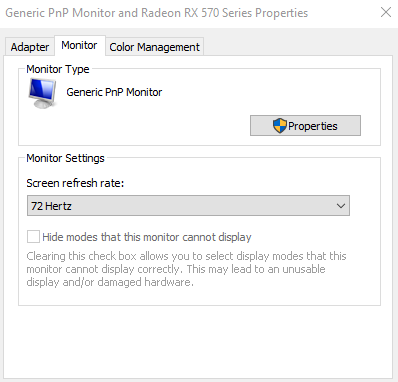
Oh ya my monitor by default right now is 60hz but i am running it at 72hz https://i.gyazo.com/7a8c3b6e24f8c9b617ce82c93dbcf8a0.png
 feral axle
I see
A 75hz panel is basically just a 60 hz overclocked so better than 75 is a good choice for an upgrade
gray vapor
So who knows maybe with a 75hz monitor i could hit like 87hz instead
feral axle
Maybe
feral axle
Be careful with 1ms because a lot of companies set the overdrive to max to hit that 1 ms and it ends up with colors that overshoot
gray vapor
eh curved monitors
gray vapor
better have a good GPU to go with it
feral axle
Need like a 2080 ti for one of those
gray vapor
2070 super
feral axle
2080ti if you wanna trace rays
gray vapor
They both have ray tracing
feral axle
You won’t be able to hit 144 hz at 3440x1440 with a 2070 super in cyberpunk
gray vapor
Ok but what if Cyberpunk ends recommending a 2070 for 1080p so for 1440p ultra wide he would mainly hit like 70 fps to 100fps with a 2080 Ti
worldly crow
i was doing 4k 60hz on my 50'' 4k dolby vision tv with bf5 50-70 frames off a ryzen 7 and gtx 1070
and hdr
 gritty quartz
... the actual size doesn't affect framerates
worldly crow
regretibly all the good 3440 x 1440 screens that are 144hz are too expensive for me
gritty quartz
I mean, it's a uncommon resolution in general
worldly crow
yea well i get more frames in 1080p thatn i did off my tv at same resolution
gritty quartz
Your tv is probably outputting in 1080p
worldly crow
no
gritty quartz
Check your pc
worldly crow
i have a 4k tv dude
gritty quartz
Ok
worldly crow
my resolution was 2160p
gritty quartz
I got a 4k phone yet I can't play anything in 4k
worldly crow
cause that a stupid phone lo9l
gritty quartz
I garuentee your not getting the same frames at 1080p and at 2160p
gray vapor
1440p and 4K phones are meant for media to be played at those resolutions
gritty quartz
yea well i get more frames in 1080p thatn i did off my tv at same resolution
worldly crow
when i tested it against my monitor
gritty quartz
Not 4 years ago
worldly crow
but before that i used to play games in 2160\
gritty quartz
It was "4k" but it couldn't process 4k video
worldly crow
same resolution as in 1080p
worldly crow
u totally lost what i was saying
gritty quartz
Indeed
worldly crow
i ran the test on monitor and tv at 1080p
then
i used to play my games at 4k not 1080
1080 was just for a test
not for gaming
gritty quartz
Honestly 1080p isn't even needed to test anymore
A ryzen 7 3xxx can probably play bf5 at 1080p on medium
worldly crow
the test was to see if using a large tv costs more resources than a 22'' monitor
gritty quartz
I can play at uw2k ultra raytracing 70fps average
feral axle
The mass drop vast with 120 hz is a really good deal
Look more for 120 hz instead of 144hz
gritty quartz
Because honestly, your just wasting frames otherwise
feral axle
Why 144?
worldly crow
thats what im getting
feral axle
120 isn’t that different than 144
gritty quartz
If your doing 120 your most likely overclocking it
worldly crow
lol
gritty quartz
144 is 120 overclocked usually
worldly crow
im gonna go faster later on
gritty quartz
120 is 100 overclocked
gray vapor
shopping amazon on a newegg discord 🤔
worldly crow
no these monitors are 144 not 120\
i buy alot from newegg
i dont have to buy everything from there\
gritty quartz
Otroud, you seem to not know you can overclock monitors
worldly crow
i also see ppl using pcpartpicker
gritty quartz
It's a norm now
feral axle
Here’s a good budget ultrawide
gritty quartz
Pcpartpicker is a great site to decide on what to get
gritty quartz
Yeah
worldly crow
i do all my shopping manually lol
gray vapor
Instead of naming everything i believe said person should get when they're on a budget i would use pcpartpicker to give them a rough idea
gritty quartz
Your better off getting a 2k monitor
I manually but my PC parts from great stores like Barnes and Noble
Buy*
gray vapor
you're cough cough
worldly crow
im getting the 1080p 24'' as a temporary screen till i get a 2560 x 1440p
this is my crappy monitor https://www.newegg.com/p/N82E16824160069
gray vapor
Why not keep using your TV till you get a 1440p monitor?
worldly crow
because i have a pc desk now
its only for another 2 weeks
this way i can play games and watch tv at same time tv stand is right next to desk and on a swivel mount
so i turn it my way and i can watch news while i game
only getting the monitor from amazon cause its on sale if it was on sale on newegg id buy it there but this coming up month im on a strict budget
its currently 209 on newegg
lone pond
is anyone else getting a 404 error trying to download the new nvidia drivers?
fallen schooner
yeah, had to use geforce Experience.
lone pond
i guess i'll just wait to get them cuz i don't use that, thanks for confirming that i wasn't just being dumb
lone pond
@gray vapor Did you figure out the GPU paste thing?
gray vapor
@lone pond from the image i showed in the other channel it just looked like there was not enough and also on the heatsink itself it was kind of hard
lone pond
Were you the one with rx570 overheating issues?
gray vapor
yes remember hitting like 80c
Going to start up Shadow of the Tomb Raider to do a benchmark test and see if the temps are better now
lone pond
You use hwinfo64 or aida64 or something for temps, right? Just not speccy or hwmonitor
gray vapor
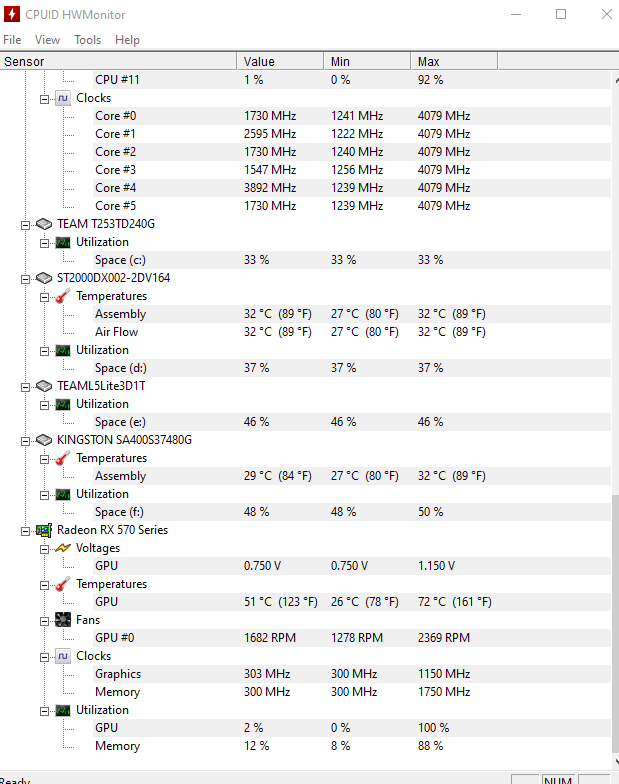
@lone pond This is the temps i am getting when playing Shadow of the Tomb Raider and also i have my fans running at 60% https://i.gyazo.com/a62df25773465c632d538e351379ad97.png
 lone pond
Uninstall hwmonitor in favor of hwinfo64
gray vapor
when i got that 80c temps i was at 100% fan speeds
I actually use both
and i stopped using speccy when it was showing bazar temps
So replacing the thermal paste was a good move
oh ya and because of the RX 570 i use AMD Link to monitor my temps when in a game
lone pond
I haven't researched the paste you mentioned, but one of the concerns for GPU TIM is pumpout
gray vapor
@lone pond You can see there is an improvement since i am using 40% less fan speeds and getting 8c less
lone pond
i.e. just keep an eye on temps over the course of time and make sure they don't climb too much if the paste job loses effectiveness due to drying out / pumpout.
gray vapor
https://www.newegg.ca/deepcool-z9/p/N82E16835856011?reviews=all lot of good reviews for it on Newegg
and reviews are linked for Canada and the US
lone pond
Nice. Remember to keep thermal load constant across tests
gray vapor
Oh when i do tests i usually do them for 30 minutes to an hour which the games i would also do these tests on is Division 2, Tomb Raider and GTA V
sometimes Ghost Recon Wildlands
lone pond
Real-world application testing is definitely important, but record the GPU's power min,max,avg in hwinfo64 for each test.
The chip's heat output (package power) can and will change due to driver updates, settings, and of course user input variation between tests.
gray vapor
Ya i am wondering when AMD will release a new driver cause i keep seeing just optional drivers
lone pond
Try checking out the AMD driver support forums or reddit for user feedback on current driver updates.
lone pond
of course
gray vapor
Would double sided tape go well with mounting SSD's on a case if it doesn't really have a mounting area?
I am looking for a new case to get and some that i like has a mounting spot for only 1 SSD but the thing is the one i like the most the PSU covers the screws
lone pond
Like a 2.5" Sata SD? I'd go with a zip-tie or velcro-tie to keep sticky gunk off the SSD.
gray vapor
I only have 2.5" SSD's well 3 in total
and a single 3.5" SSHD
I do plan on swapping one of them for a M.2 in the future but i would need money for that and was thinking of getting a heatsink for it as well
This is also the case i really like which if you see in the images for the back panel the SSD mounting is the bottom right https://www.newegg.ca/petrol-blue-fractal-design-focus-g-atx-mid-tower/p/N82E16811352073
The other case i like as well which i also think would benefit my GPU is this one which has like 2-3 SSD mounting area's https://www.newegg.ca/p/N82E16811853002
lone pond
Want a card for cheap that can do 1440p 120+ fps preferably or at least stay over 100 on high/ultra most games
gray vapor
RX 590?
gray vapor
i would of said Vega 56 but well you said cheap
lone pond
5700 xt pulse or something
Well nothing more than £650 preferably
RX 590 is a <$180 card
I have a 5700xt rn but its cooler is trash so may return it
Go for a 5700 xt Nitro
There is none
Absolutely 0 air cooler cards are even listed anywhere
It won't be long. What happened to your 1080
 somber glen
what games
lone pond
That was on its last legs so i traded it in before it died fully
gray vapor
Hello Kitty Island Adventure
lone pond
Battlefield1/v, rainbow siege, ghost recon, gta v, halo master chief collection, any new games i cant think of, forza 7 too, all in 1440p preferably 120+fps but never below 100 fps on high/ultra all games
@somber glen
@lone pond
..
I would check recent game benchmarks
What monitor? VRR?
Also is this still on the 9900k with 4x8 4000c19 or something
gray vapor
Ok so amazon (sorry for using them) never gave me the 3 months game pass when i bought my R5 2600 so instead they are giving me back 15% what i paid for the CPU
technically 28$ back
lone pond
Seems like a good deal, how much do those go for normally? I need to sell mine
gray vapor
that xbox game pass not much
@lone pond They gave me 28$ back and this is how much the pass costs for the 3 months https://i.gyazo.com/b0a454de6a8fc2f9ee309a4f02ead50a.png


so more like a great deal
lone pond
Nice
gray vapor
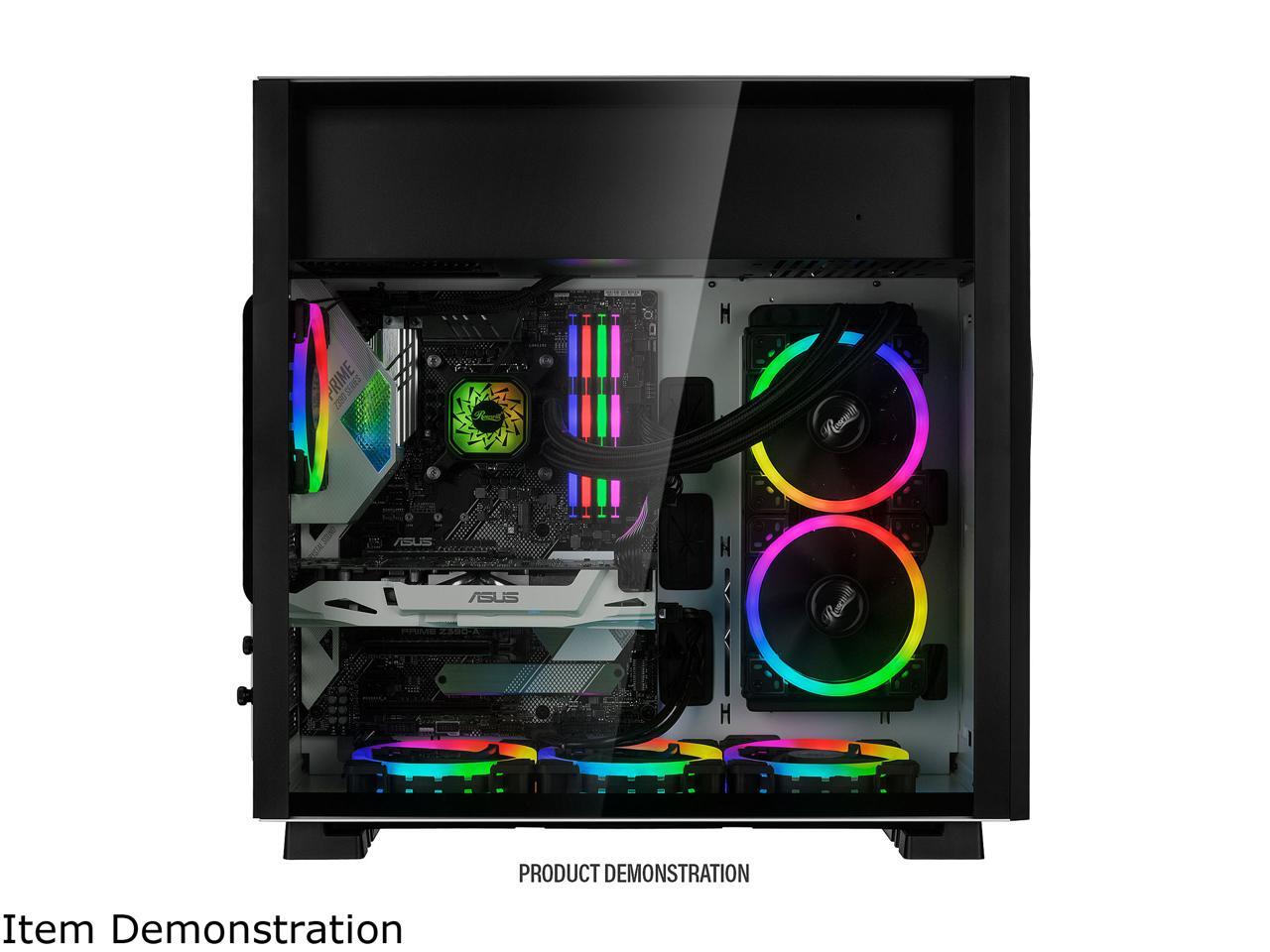
Ok i am surprised to see a nice case with a old PSU mounting method
@lone pond What do you think and sorry for the pings just got a feeling you might be playing a game or something as well >_<
Looked at their RGB model as well and this is what it looks like https://c1.neweggimages.com/NeweggImage/ProductImageCompressAll1280/11-147-298-V10.jpg
 lone pond
Case choice is largely personal preference.
Personally, I like 140mm fan capability.
Also personally, I think that all white and minimalist looks is very clean.
gray vapor
I usually like having my fans mounted in the front but i am willing to try something different if it has good airflow
I also decided to not use Deepcool cases for one main reason
all of their connectors for things like USB and power is on the front panel which is near impossible to clean
lone pond
@lone pond thats the issue i have
Ive seen multiple benchmarks all showing varied results so im struggling to compare to the rtx cards
Some show it as good as 2070 super, some show its better, some show its nearly 2080 performance
So im struggling to get a set answer
and no, 2x16gb 3000
gray vapor
RX 5700 XT problem solved lol
gray vapor
really it depends on the games cause some you can get those frames and some you can't
lone pond
Then its not what I want
I want a gpu that can maintain all those settings minimum 100 fps
gray vapor
There is a lot that can do that but really it still depends on the game in the end cause someone could say a RX 5700 XT someone could say a RTX 2070 Super and someone could say a RTX 2080 which really in the end you won't know which would be the better option
lone pond
Exactly
gray vapor
also some games does tend to be a little more optimised for said GPU
lone pond
Thats what everyones been saying
Hence I cannot Decide
About the wide range in 5700 xt performance: the cooler matters, as does the card's OC
I may water cool mine
Gpu
You seem like you're into overclocking for fun, so I'd say go for it, just pick a card with a warranty that lets you do that. If warranty matters to you
gray vapor
There is a water cool block for the RX 5700 XT
somber glen
you might not get that with ghost recon, but possibly with battlefield. ghost recon is a very demanding game
somber glen
i cant get that with a 2080 overclocked
gray vapor
Well none cause this is the only option for water cooling it https://www.ekwb.com/shop/ek-vector-radeon-rx-5700-xt-rgb-nickel-plexi
EK-Vector Radeon RX 5700 +XT is a high-performance full-cover water block designed for multiple AMD® Radeon® RX 5700 and RX 5700 XT graphics cards. Please check our Cooling Configurator online compatibility system for detailed compatibility list!
This wa
lone pond
But what ive seen forums on
Is the warranty sticker on the screw for the core backplate a scare tactic?
gray vapor
One way to avoid that warranty screw is using a pair of plyers and twist it
It is on the screw that connects the cooler to your GPU
lone pond
Ik
gray vapor
But also most people find it unethical for them to do that cause what happens if it is a simple heating problem and you just need to change the paste
You know if cleaning your property voids a warranty then i would go against that
But like i said if you are scared of removing the warranty screw just use a pair of plyers
 granite juniper
If ur gonna watercool usually do the reference cause there will be more blocks available and quicker
 uneven steppe
Can anyone help me with a tech issue here? Im about 1000% sure its a graphics card issue but ineed some serious expertise.
gray vapor
Tell and wait for someone to answer
uneven steppe
Okay, I bought this near 2grand computer off newegg, it got in, and I plugged both monitors into the hdmi port. The second monitor doesnt work, its like the port doesnt work. The first monitor comes on, with all these weird pink lines. So someone in this discord said its probably damaged. So I filed a refund, they sent me a brand new one. Still the same problems. Only this time the lines are white. Why is this happening?
everytime I go to the nividia driver, it installs 436.02, says restart, when i do, it asks to install again, i do, restart, asks to install again, so I installed an older version, still the same problem. I can't update the driver because it keeps resetting the loop.
 cloud basin
I have a question dudes and dudets
gray vapor
Did FedEx send it to you?
uneven steppe
Ups this time. FedEx was the first time.
It's pissing me off. I love Newegg but I've waited nearly 2 weeks for this thing to have the problem fixed.
gray vapor
I actually forgot if it was UPS or FedEX that tosses boxes around
uneven steppe
Well ive had em both lol. First time it was ups. Second time it was fed ex.
I'm wondering if it just needs a driver update. But I can't install it. Keeps going in a loop
gray vapor
Up here in Canada we have a 3rd and 4th option which i prefer
uneven steppe
Any idea why it's doing it. Or do I need to get a full refund
gray vapor
For your GPU did you update the drivers?
uneven steppe
I'm trying. It says it's updating version 436.02.
gray vapor
and also curious if you plugged it in from the GPU or on the motherboard
uneven steppe
So I update it. Hit restart. And when I go back in it says it needs to install the same driver I just did
I didn't plug anything in. I just took it out of the box and turned itnon
gray vapor
I am mainly referring to the HDMI connection between the graphics and monitor
and also some people does get things confused
uneven steppe
Oh. The HDMI on the motherboard doesn't work. Says there's not a second monitor detected. The first one (plugged into the graphics card) worked but has those lines
Same thing happened with the last computer
One on the bottom works (with these white lines) other one on top just doesn't work. Monitorn says no signal
gray vapor
For dual monitor you're suppose to use just the GPU
uneven steppe
There's not a second HDMI on the GPU.
There's only one hdmi
The rest are display ports
gray vapor
Well that is why you get a DVI-D or DP to HDMI connector
gray vapor
unplug the one on your motherboard restart the system and see if everything is working
lone pond
the motherboard's hdmi is for any integrated video
To clarify, you have a dual monitor setup? What GPU and what model monitors?
lone pond
i often see those lines when connectors aren't fully seated
uneven steppe
Model monitor is AEUS
uneven steppe
Asus ty
lone pond
I see, so you have two HDMI only monitors, but the 2080 ti only has one HDMI out?
lone pond
what monitors are those even? what model #
If the problem is fixed, no need to stress, but we're happy to help if you want further consult.
uneven steppe
My issue is the white lines
uneven steppe
How do I do that. Just make sure shits plugged in?
lone pond
yeah, unplug them and plug them back in
You can get HDMI to DP adapters, but you'll run into problems for 1080p 144hz , 4k etc
lone pond
Sounds like a GPU artifact, unlrelated to cable/connection.
uneven steppe
lone pond
What model 2080 ti? Do you know the purchase date?
uneven steppe
EVGA GeForce 2080 RTX ti
lone pond
they have lots of models of 2080tis
uneven steppe
First one I bought tow weeks ago. Same computer. Off Newegg. This happened. So I sent it back. This is apparently repaired
lone pond
EVGA makes a few SKU's of 2080 ti, SC2, XC, ftw3, ftw3 ultra, k1ingp1n, etc
if both video cards are doing the same thing i'm not inclined to believe it's an issue with the gpu
are you sure your desktop video settings match up with your monitor's capability? i.e., don't have it at something weird like 45hz in the control panel?
gray vapor
for things like that the 3 main possibilities is one the GPU two the HDMI cables and three the monitor itself
lone pond
Got a link to your full parts list? If not, wanna run a userbenchmark to show us the stats?
uneven steppe
I've tried a different monitor. Same issue. I've tried brand new HDMI cables. Same issue
I've tried my TV. My old monitor. The new one you just saw. New cables.
The computer I bought. Has al the parts listed
lone pond
are you sure you have your output settings matching your monitor's capabilities?
uneven steppe
How do I check that.
uneven steppe
Also would the driver be the issue?
lone pond
possibly, yes
gray vapor
it doesn't say what made of the board is which i am curious
lone pond
Yes, the driver could very well be the issue
lone pond
go update your drivers and then come back
have you tried rebooting into safe mode and using DDU?
My guess is EVGA 2080 ti black if it's unlisted
+1 to using DDU to clean install, but I'd recommend reading a guide first, it can be a little disorienting the firs ttime
yes, that's true, sorry i presume you have a certain level of tech understanding
let me find you a guide
Wagnardsoft
Display Driver Uninstaller (DDU) Tutorial/Guide By - /u/GhostMotley This tutorial was written for version V17.0.8.2, future versions may differ slightly. Please feel free to contact me via PM on Reddit if you think I should update the guide.
uneven steppe
I can't update the graphics driver lol. I go to install version 436.02 it says install. I restart like it says. Then it says I need to install it again.
So I installvkf again. Restart. And it does it again
lone pond
try using ddu after rebooting into safe mode
Userbench will show us card model, bios date, gpu driver etc
i have driver issues somewhat regularly and ddu seems to solve a lot of them, whatever conflicts
lone pond
especially if you didn't reinstall drivers after getting the new GPU
uneven steppe
I'll try the ddu next.
lone pond
i presume they just sent you a new gpu? or did you send the whole computer back
uneven steppe
Whole computer. This is a brand new refunded computer
lone pond
ok
in that case yeah start with downloading ddu and rebooting into safe mode
uninstalling drivers through it
If you're comfortable with speccy, aida64, or hwinfo64 those work as well. Be careful which level of report you use with speccy if that's your preference. I don't recommend speccy/hwmonitor in general
wait
actually before we do that
let'
s see what drivers you DO have
It's likely a standard vs DCH issue as well.
you should see a green eye in your splash tray, open that, or your geforce experience
gray vapor
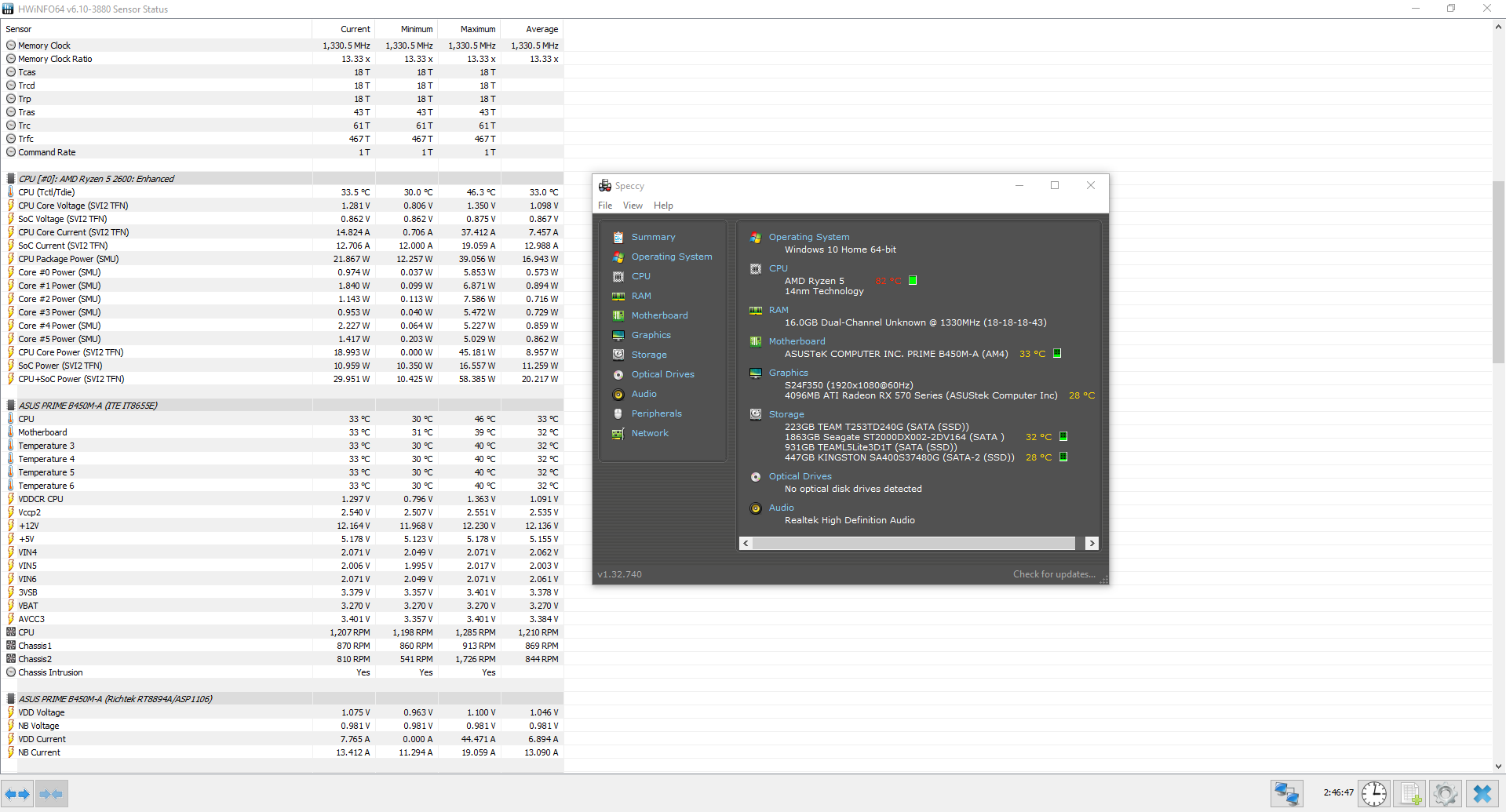
When using Speccy don't follow the temps for your CPU
lone pond
nvidia control panel
lone pond
i can't read that but it looks like it starts with 406 which is REALLY REALLY oudated drivers
That's geforce experience updating drivers automatically
uneven steppe
It's version.
lone pond
those are the ones they just released today, yeah
436.02 is current, just released today.
uneven steppe
Yes I know that. Problem is. When it says install. I install it. It tells me to restart my computer. So I do. Then it tells me to install the same one again
This loop continues for hours
gray vapor
If you look at the temps between HWInfo and Speccy you can see Speccy tries to scare you https://i.gyazo.com/a758294f498ed5a45a271cc5ecfec9b7.png
 lone pond
ok np, like we suggested, read that blurb i linked above, install DDU, reboot safe mode, reinstall drivers
PSA uninstall speccy/hwmonitor for hwinfo64/aida64
i know you have the most recent drivers but
uneven steppe
Okay. I'll read it.
gray vapor
Who is PSA 
lone pond
Initialism for public service announcement
POGGERS calling an initialism an initialism instead of an acronym
uneven steppe
Thank you for the help so far. I'll try the ddu thing you sent and hit you back when I get it fixed