 somber spindle
Building UI in Unity shouldn't feel like fighting the engine. ReactiveUIToolKit brings the React component model to UI Toolkit — reusable components, state hooks, and a JSX-like markup language called UITKX. Write your UI in clean .uitkx files, hit save, and watch it update instantly with built-in hot-reload (no domain reload, ~100ms).
What it does:
- Function components with hooks (state, effect, context, memo, reducer, and more)
.uitkxmarkup compiled to C# at build time — zero runtime overhead- HMR that hot-reloads UI changes in Play Mode without restarting
- Full IDE support — IntelliSense, Go to Definition, View All References, Rename, diagnostics — for VS Code, Visual Studio
- Works with Unity 6.2+
A quick taste:
component Counter {
    var (count, setCount) = useState(0);

    return (
        <Box>
            <Label text={$"Count: {count}"} />
            <Button text="+" onClick={() => setCount(count + 1)} />
        </Box>
    );
}
🎬 Demo video: https://www.youtube.com/watch?v=cAp87nzTLeY
📖 Docs & guides: https://reactiveuitoolkit.info/
Happy to answer any questions about the approach or architecture. More updates to come as we work toward v1.0!
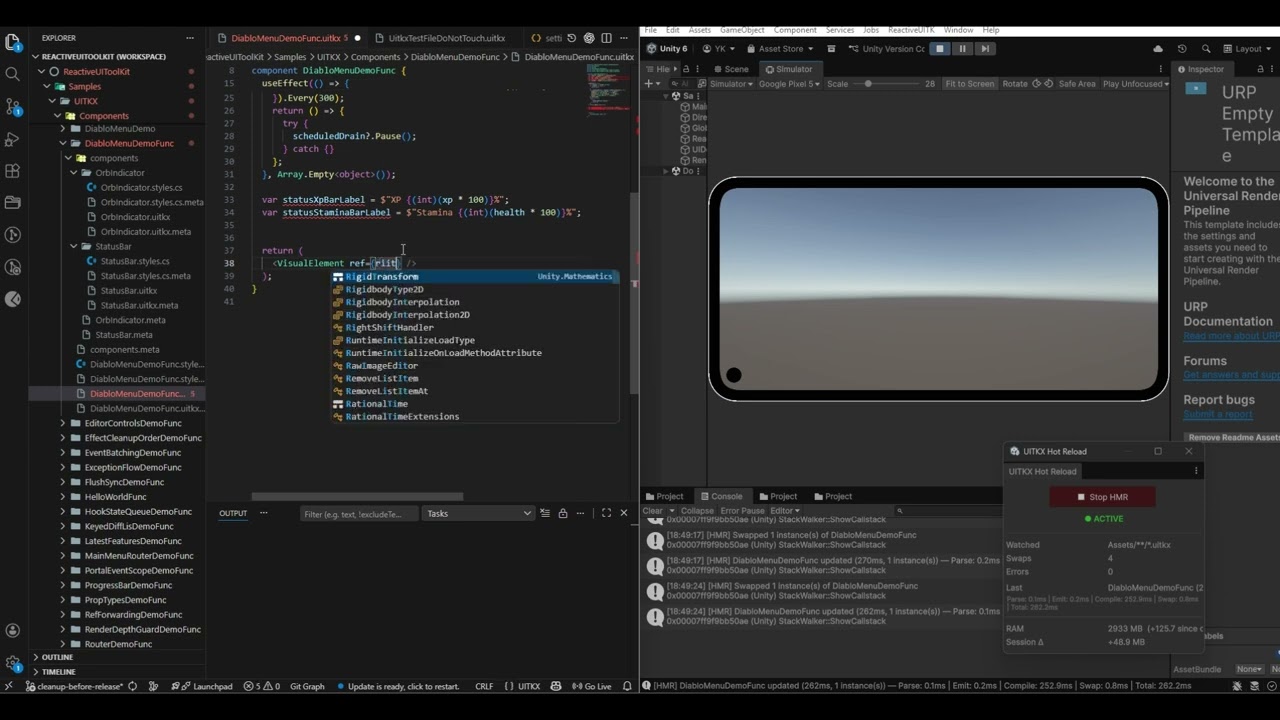
Short demo on how Hot Module Reload works with Reactiveuitoolkit