#Courageandfire's issue
1 messages · Page 1 of 1 (latest)
 gray raven
number of dots being created
 steady rose
So, are those many little dots supposed to be some kind of targeting system? I'm wondering if none of this code was designed to launch a projectile.
gray raven
wait.
no
nvm. It is the number of balls. Got confused there for a minute
this code is to only create a projectile path. I am using another script for the projectile.
kind of like angry birds game?
steady rose
gray raven
kind of like angry birds game?
Oh, so you're looking to animate these balls so they move in the pictured direction every frame?
gray raven
steady rose
Oh, so you're looking to animate these balls so they move in the pictured direct...
Exactly!
steady rose
Gotch!
steady rose
So, you need a reliable way to know when a ball is small enough to destroy, but what would probably do is just have a sort of code-first "animation" that doesn't really destroy balls, but rather just draws a known number of them with a bit of translation.
Are you familiar with Mathf.Lerp?
gray raven
I am not really supposed to share this. but oh well fuck it, u see the projectile right?
gray raven
steady rose
Are you familiar with Mathf.Lerp?
yup
I am trying to replicate the projectile path in this game
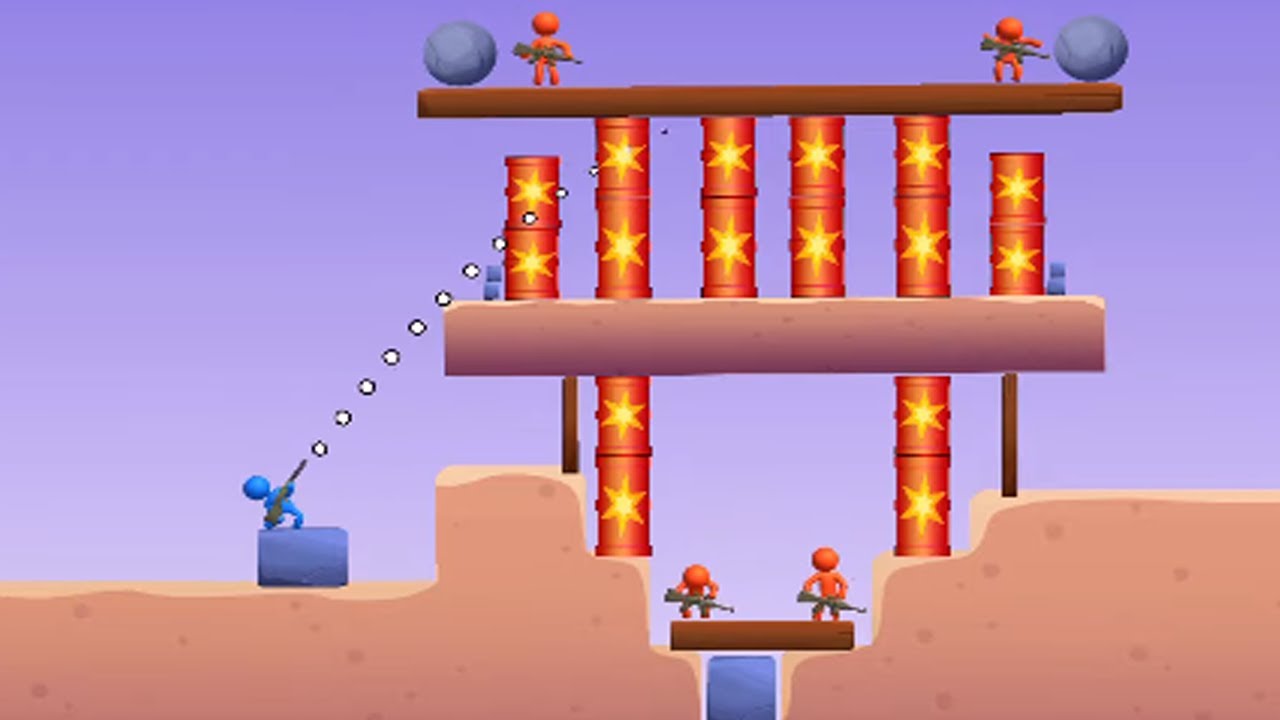
Subscribe! - https://www.youtube.com/channel/UCzkPX3KCIVquUPa8oXjHn0g?sub_confirmation=1
Bazooka Boy - All Levels Gameplay Android, iOS - Top 10 Best Android, iOS Games 2020 Gameplay - Mod Apk, Hack, Cheats, Full Game
You can find a lot of daily walkthrough official games videos all in 1080p 60fps HD Quality of the most popular mobile best gam...
steady rose
gray raven
I am not really supposed to share this. but oh well fuck it, u see the projectil...
Okay, so what I would do is draw those balls along a spline. If we imagine that you have 10 balls, their relative placements would be like [0.0, 0.1, 0.2, 0.3 0.4, 0.5, 0.6, 0.7, 0.8, 0.9] This is the case when the nearest ball has just spawned. On a frame where the tenth ball is about to spawn out, their positions might be [0.09, 0.19 ... 0.99] etc. My point being that as the last ball disappears, a new ball spawns. This means you always have 10 balls to draw, so spawn/destroy logic is not needed.
gray raven
how about the position? how to make the 1st ball go to the 2nd position? lerp?
steady rose
gray raven
how about the position? how to make the 1st ball go to the 2nd position? lerp?
Technically, the balls just back up when the last one is about to be destroyed, giving the illusion that they're always moving forward. This would be way more efficient than trying to spawn/destroy.
Do you want the behaviour in that TapTap example where obstacles limit the length of the effect?
gray raven
ya?
steady rose
Okay, so if I understand how your object works, it lives at the world position where the projectile would fire from... is that correct?
So in other words, moving the mouse affects where in the world it lives if it's anchored to another object, like on a hinge.
gray raven
I am taking the sphere as the reference, and instantiating from its position, 0-10 balls spawning in the opposite direction of the sphere. on mouse down
steady rose
So a couple difficulties with your script as it stands now is that the length of your line isn't well known, which would make it hard to implement that blocker effect. We need to know the furthest point where the last ball will be drawn before we place any of the balls in order to achieve this - best even if the number of balls is variable according to the space available.
Second of all, your strategy is to multiply the scale towards zero, which will make it hard to determine at what final scale the last object is "close enough" to zero to avoid it popping out of existance. This is messy and will make your math more complicated as you try to animate it smoothly.
gray raven
not entirely, The length depends on the force being applied on the ball.
        new Vector2(-forceAtPlayer.x * forceFactor, -forceAtPlayer.y * forceFactor) * elapsedTime + //ut
0.5f * Physics2D.gravity * elapsedTime * elapsedTime;```endpos is the mouseposition.
        Vector3 birdForce = (currentPosition - center.position) * force * -1;
        bird.velocity = birdForce;

        bird.GetComponent<Bird>().Release();

        bird = null;
        birdCollider = null;
StartCoroutine(CreatingBird());```OH okay, your comments got me there. That's your physics calculation for the projectile... perfect! We can just keep that and refactor the Update loop. The three lines + comments looked a bit hard to read in notepad++. Is that your IDE?
gray raven
no. VC community
steady rose
Ahh, the colours and font look like Notepad++.
gray raven
gray raven
``` bird.isKinematic = false;
Vector3 birdForce = (currentPositio...
and the current pos is
currentPosition = Camera.main.ScreenToWorldPoint(mousePosition);```sorry about that. Just starting out my journey so. got a lot to learn i guess
steady rose
gray raven
sorry about that. Just starting out my journey so. got a lot to learn i guess
No prob, I thought a lot of your calculatePosition(float) was referencing a rigidbody in some way and that code was supposed to actually set rigidbody parameters, thus it was commented out. I see now it's just a projectile calculation using members with similar names across 3 lines.
So can we assume that slightShotRef.currentPosition is the point where your aiming widget touches a blocker, or is it just the point where the user is aiming?
steady rose
I am here.
gray raven
got any solution?
steady rose
Do you want the effect to aim where the cursor is or do you want the cursor to just inform the initial direction before gravity gets factored in?
gray raven
its already aims where the cursor is pointed at tho
gray raven
gray raven
https://www.youtube.com/watch?v=hxUGvSquFeU
i just need to add the projectile path moving effect like in this game
steady rose
gray raven
its already aims where the cursor is pointed at tho
Okay, so you don't want it to aim high to get the project to the cursor, you basically want it to drop as it does now and always land a bit below - that's intentional.