#Canvas not working in Screen Space Camera mode
1 messages · Page 1 of 1 (latest)
 strange horizon
Sorry for taking so long @mild marten and @digital timber and hope you dont mind the ping. Made a thread so it doesnt get lost in the other responses. Here are my findings:
This is the test scene:
https://i.imgur.com/8dVDLe5.png
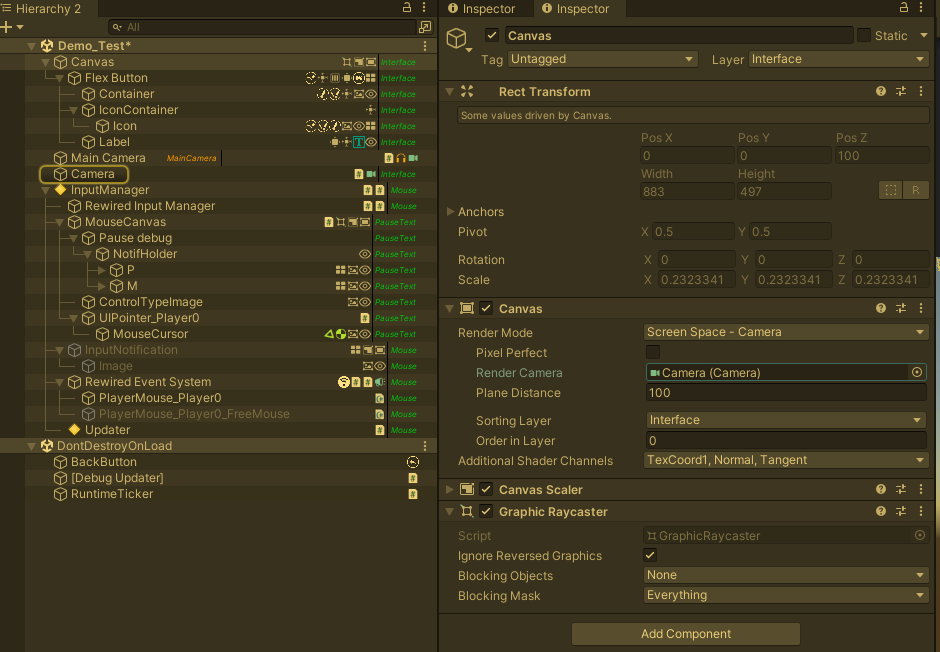

Starting the test scene just like that, screen space overlay camera works. BUT Loading into the test scene from the main menu, it doesnt react, but upon disabling the "LoadManager" that is responsible for loading scenes and displaying a loading screen, it does, because of this weird behaviour:
https://i.imgur.com/8uE7Bos.gif

disabling the "LoadManager" object or just the canvasgroup and the raycaster on it makes the button work as per the GIF
for reference, this is the scene when loaded from the main menu, the highlighted objects get carried over from the main menu, but as you can see in the GIF, only the "LoadManager" seemed to have blocked the button from working:
https://i.imgur.com/zymK7eV.png

Now, I tried doing this in a "real" scene to no avail. I loaded the scene, opened one of the canvases that have the problem, disabled the "LoadManager" like in the previous gif, no change. (arrow shows the canvas that's selected)
https://i.imgur.com/XvtbhO1.png

and for reference here's my camera setup:
https://i.imgur.com/BJWmvOG.png

 digital timber
Oh you're using Rewired?
strange horizon
yes
strange horizon
shouldnt, it works fine in certain scenarios, so i ruled it out
i mean that if i run the test scene with my rewired stuff in it, it worked. if i load into it via main menu, it works after disabling the loadingscreen manager thing as in this gif, which is new - this 100% wasnt a problem on 2020.3, i never had to disable the loading screen because it was blocking some canvas underneath

but this same "fix" doesnt cut it in a "normal" scene, even if i disable every other canvas and raycaster and only have that one canvas and its elements on. it just wont react
even when set to overlay
 mild marten
And it seems like you are loading scene additively, is it correct?
strange horizon
yes
mild marten
Do you still get the issue if you load it in single load mode?
strange horizon
the way the project is set up i cant really try, it's reliant on the loadingscreen scene always being loaded :(
mild marten
I see, that's fine but something on the additive scene could be part of issue
strange horizon
yeah I get where you're coming from but I'm certain it's not that:
i just tested something else: I duplicated that "real" scene I mentioned testing in earlier, disabled everything in the hierarchy so when i get to it, only the stuff that's moved from the main menu is in there. then i enabled that one canvas that i tested with earlier and it works.
but the weird thing is, even after I reenable EVERYTHING it will still work.
something is going wrong in the "real" scene, I'm not sure what it is but I feel one step closer
however whatever is going wrong is probably to do with the upgrade to 2021.3 version, everything worked perfectly fine with canvases before
mild marten
Is it some kind of event system initialization issue? I never used rewired as well 😅 so just guessing
strange horizon
Im not yet sure but i dont think it's related to rewired, in all of these testing scenarios, rewired is present and all the components that process input, and the culprit seems to be something else
it does seem to be something to do with initialisation but not the event system's. there's an object in the scene that "houses" a couple of systems used only in that scene. if i go into the scene in the editor, disable that object then load into the scene from main menu and enable the canvas, it reacts, and will continue to do so even after I enable that object with those systems.
I'm trying to rule out which specific system on the object causes this issue by having only one enabled each time I load in
digital timber
good plan
strange horizon
I've narrowed it down to a more specific thing, it's to do with opening the pause menu and a UI Manager I'm using (Doozy UI Manager). If I open the pause menu normally by pressing "P", it breaks all the canvases in the scene for seemingly no reason, they wont work even when set to overlay, but if I circumvent pressing "P" by just calling to the script that activates the pause canvas, it works. it also works if i manually activate the canvas.
Something goes wrong between pressing "P" and the pause script deciding to open the pause menu. Really odd, there's nothing there that should cause this...
Hope I'll be able find out what the problem is tomorrow!