#🖼️┃2d-tools
1 messages · Page 20 of 1
 rancid rain
 modest cedar
I'm doing a bunch of troubleshooting with tilemaps.. running into a lot of problems and one of the solutions I wanted to try was enabling PixelSnap... It's greyed out. It's probably something so simple I'm missing, some help would be appreciated.
problem im trying to fix
modest cedar
yeah its off
sometimes it lines up perfectly when the camera moves around and ive found other people with this problem and it seems liek theres a thousand solutions and none of them are working for me
the tutorial im following hasnt run into this problem
rancid rain
Yeah.. I have similar problems. You could try just increasing the scale of the grid by 0.001 to give them a very small overlap. I've seen that work for some people
modest cedar
that fixed it
rancid rain
Sweet!
modest cedar
there goes my nice round numbers o_o
probably wont be messing with the scale of tilemap at all so its prob fine :P
rancid rain
Story of my life.. lol get used to reset position and copy/past coordinates.
modest cedar
thx
rancid rain
Np, I'm a total scrub, so anything I can help with is a win. haha
modest cedar
yea im trying to learn unity RN
i tried godot but it had a workflow i wasnt familiar with
rancid rain
At least you've some experience somewhere. I spent a year in Comp Sci 15 years ago a learnt mostly Java, then I put myself through a Python course earlier this year, just to have something to show for my fundamentals lol
Basically all the experience I had.
modest cedar
so far it seems like every engine has its problems :P
 echo vigil
@solar thicket Kinda gotten stuck again lol, I want to use Scale With Screen Size instead of Constant Pixel Size on the canvas due to that window showing the lines becomes really small on larger screens. Though that breaks the line points math.
 eternal hamlet
@modest cedar try setting your filter mode, resize algo and compression to the same as this
echo vigil
there might be a different way to size the window accordingly without having to change the code for the lines. Unsure.
 still tendon
I need help making something in unity 2d , i want to make something that triggers an explosion anim and particles and does damage but has a cooldown but i dont quite know where to start on that, i have anims done
 opal socket
I need help making something in unity 2d , i want to make something that triggers an explosion anim and particles and does damage but has a cooldown but i dont quite know where to start on that, i have anims done
@still tendon that sounds simple? when do you want this to happen? Cooldown for what - before the explosion? Cooldown before next explosion?
still tendon
can someone help me
pls help
and heres the only code
idk whats wrong but i need help
 chrome mica
Hey guys, can someone help me? I'm trying to make a top-down game, but I'd a problem: the player's character collides with other objects as if it were a elastic mesh. The player's character is entering in the other rigidbodies and in sequence, is lightly pushed back
my code here
 lime pawn
@chrome mica are you addforcing() or translating?
Oh I see, MovePosition()
Hmm I guess I can't really tell, but I've seen that behavior if I translate a rigidbody instead of adding force, since translate is teleporting the object directly to the destination
 tropic inlet
There's Rigidbody2D.Cast iirc
I can't get the 3d version Rigidbody.SweepTest to work. . .
 plain blade
Is there an object that I can attach to grid, like tileset, but structures data rather than sprites?
I need to mark areas (for example, cells that player can build) so I would like to use something like a palette to ease out the process instead of defining them in code.
I have prototyped something but would like to know if there is built-in functionality or a hack with tilesets that I can use so I wouldn't reinvent the wheel.
 vocal condor
What kind of data structures? There's Prefab brush that would allow you to generate prefabs such as GameObjects: https://www.youtube.com/watch?v=UqhK6GpCgrM
plain blade
Oh, I just need to store boolean. I would like to know if the cell is buildable or not. I'm checking the link, thanks.
vocal condor
So taking excerpts: Is there an object that I can attach to grid, like tileset.
Yes , you would be able to place GameObjects which may have your necessary script component that would then hold your bool.
Not so sure about the performance of having an alarming amount of GameObjects in the scene but would definitely be easier to design with; visually, rather than manually creating your grid array through code, etc.
plain blade
Yeah, that is why I thought something like tileset but stores values rather than sprite. Creating gameobjects for each tile is kinda overkill, I will implement something by myself, thanks!
vocal condor
It's there to be used though if you change your mind, I mean how bad of a performance can we possibly get? 
plain blade
Well, I don't like preoptimization but I target mobile and would like to use the libraries I create on next projects.
I have prototyped something like this. I am using Handles.DrawSolidRectangleWithOutline, would this affect editor performance?
vocal condor
Will probably try putting a thousand objects in scene to simply see the performance 😛
plain blade
I know it is robust and everything works like this in low-level but, it feels wrong to draw all of those on OnSceneGUI.
vocal condor
The only expense I can think of (other than anything inappropriate a person may be doing in Updates) is the construction time and destruction time in scene change; which shouldn't be a concern for the most of us.
plain blade
I see, thanks again!
lime pawn
You all building maps in unity or something else?
vocal condor
You could design maps in Unity if you want or something else; I do my 2d level design in Unity, since they provide a pretty decent tile editor.
modest cedar
running into probably a really easy problem again
in scene view the player is visible
but in game view he's completely invisible
theres no background ATM so i dont think its a zindex thing
vocal condor
Where is the player located, show the Transform inspector?
modest cedar
Ah maybe his z was -10
lemme check
yep that fixed me
:P guess it was a z problem then
thx
eternal hamlet
@plain blade you can always use the start function to add to an array of bools and then destroy the game objects since you don't need them
I do something similar by using the tilemap to create objects to save information and then gets deleted
plain blade
Oh, so you use tilemap as usual and delete gameobject of tilemap afterwards, right?
eternal hamlet
Yup
I'll use it to create prefabs where I want, but you could say have a separate tilemap just for settings... Seems like it'd work if you didn't have many settings
A better way might be to just create different prefabs with the settings you need
 humble nebula
@modest cedar that is a common problem i met often for my game when i recently remade my game project to work with bolt XD
it's always the z dimension that needed to be fixed lol
(i'm surprised to see that new channel for 2D code, i'm really glad this exist now!)
 orchid ore
Hey guys, so I was trying to make a sort of poison cloud, which would increase a multiplier on one of the player's script, while he was inside the cloud
My issue is, if the player is touching the edge of the cloud, the script is detected, and everything works, but once the player completely enters the cloud, the script is null
So this is outside
when it's touching the edge
inside
Relevant code:
    [SerializeField] private PlayerMovement movementScript;
    [SerializeField] private double multiplierIncrement = 2.5;

    private void OnTriggerStay2D(Collider2D other){
        movementScript = other.gameObject.GetComponent<PlayerMovement>();
    }
    private void OnTriggerEnter2D(Collider2D other){
        StartCoroutine(IncrementMultiplier());
    }


    private void OnTriggerExit2D(Collider2D other){
        StopCoroutine(IncrementMultiplier());
    }

    private IEnumerator IncrementMultiplier(){
        yield return new WaitForSeconds(1.0f);
        Debug.Log("inside");
        movementScript.IncreaseMultiplier(multiplierIncrement);
    }
This script is on the cloud object (the black ellipse)
I tried getting the PlayerMovement script inside OnTriggerEnter2D
But it would also not work, so I settled for OnTriggerStay2D, and that way, it works when he's just touching the outside
Could it be because of the collider itself?
vocal condor
Probably add print statements in enter and exit to see if exit is prematurely occurring.
Else the coroutine isn't working properly.
vocal condor
So that leaves your coroutine
orchid ore
But the coroutine doesn't change the script variable
So an error there shouldn't make the movementScript variable null
I tried adding in more lines on the collider
vocal condor
The coroutine could be at fault, if it doesn't last...
I can't see code I haven't seen, so this is all up to you unless you provide the script.
Ah, it was included at the bottom of the snippet..
You aren't looping...
The coroutine will end after the short delay
And you only Start it on entering the cloud.
Use a while loop in the coroutine @orchid ore infinite loop of true would be fine since you're ending it on exit..
orchid ore
Ah, I see
That's true
But I still don't understand how that would set the movementScript variable to null
vocal condor
But strange.. you're calling it again
at the end of the coroutine.. best not do that; tail recursion not necessary.
orchid ore
I am?
vocal condor
I see you calling it after logging inside.
orchid ore
The movementScript.IncreaseMultiplier(multiplierIncrement);?
vocal condor
But you're only calling it as a function and not starting it.
vocal condor
But you likely don't want to do that at all
orchid ore
See
The coroutine
Has the same name as the function insde the movementScript script
I hadn't even noticed that
Renamed it to poison
The same happens
Maybe I shouldn't be using triggers?
vocal condor
Not entirely sure what you're doing.. error says you've got null references..
orchid ore
Yeah, that's what I'm trying to fix
vocal condor
You're coroutine was definitely not correct though, unless you simply want a minor delay (non repeating).
orchid ore
        while(true){
            yield return new WaitForSeconds(1.0f);
            movementScript.IncreaseMultiplier(multiplierIncrement);
        }
}```changed it to this, it's working as intended now
want it to increase the multiplier on the movementScript once every 1 sec
My issue is getting the script itself...
vocal condor
Is the script a..... Component 😛
orchid ore
Yep
I just showed you lol, it works if the player is on the edge of the cloud, but as soon as he completely enters it, the reference becomes null
vocal condor
Then you'll need to get it like you always get components 😉
vocal condor
Says null
orchid ore
See it works fine when the player is just touching the cloud
But once the player is inside, it's back to being null
vocal condor
So either component is not there or you don't have a reference to the game object making the component call.
Or you're assigning it null somewhere
orchid ore
The reference comes from here
And nothing else in the code assigns anything to movementScript
vocal condor
So other might not be what you're expecting?
Are you filtering by tag?
The ground could have collided as well... right...?
Or anything else that can trigger
orchid ore
Oh that might be it. I'll give it a try, thanks! @vocal condor
Sorry for making you wait, but I had to go make lunch

 elfin sandal
I have a 2d top down game
What's the best way to show the player when they're behind a wall?
Should I use a trigger collider and change the alpha of the wall when the player goes inside the collider?
Or is that too expensive?
Should I use a shader with Ztest?
still tendon
Good day, quick question:
https://i.imgur.com/urTUkC3.gif
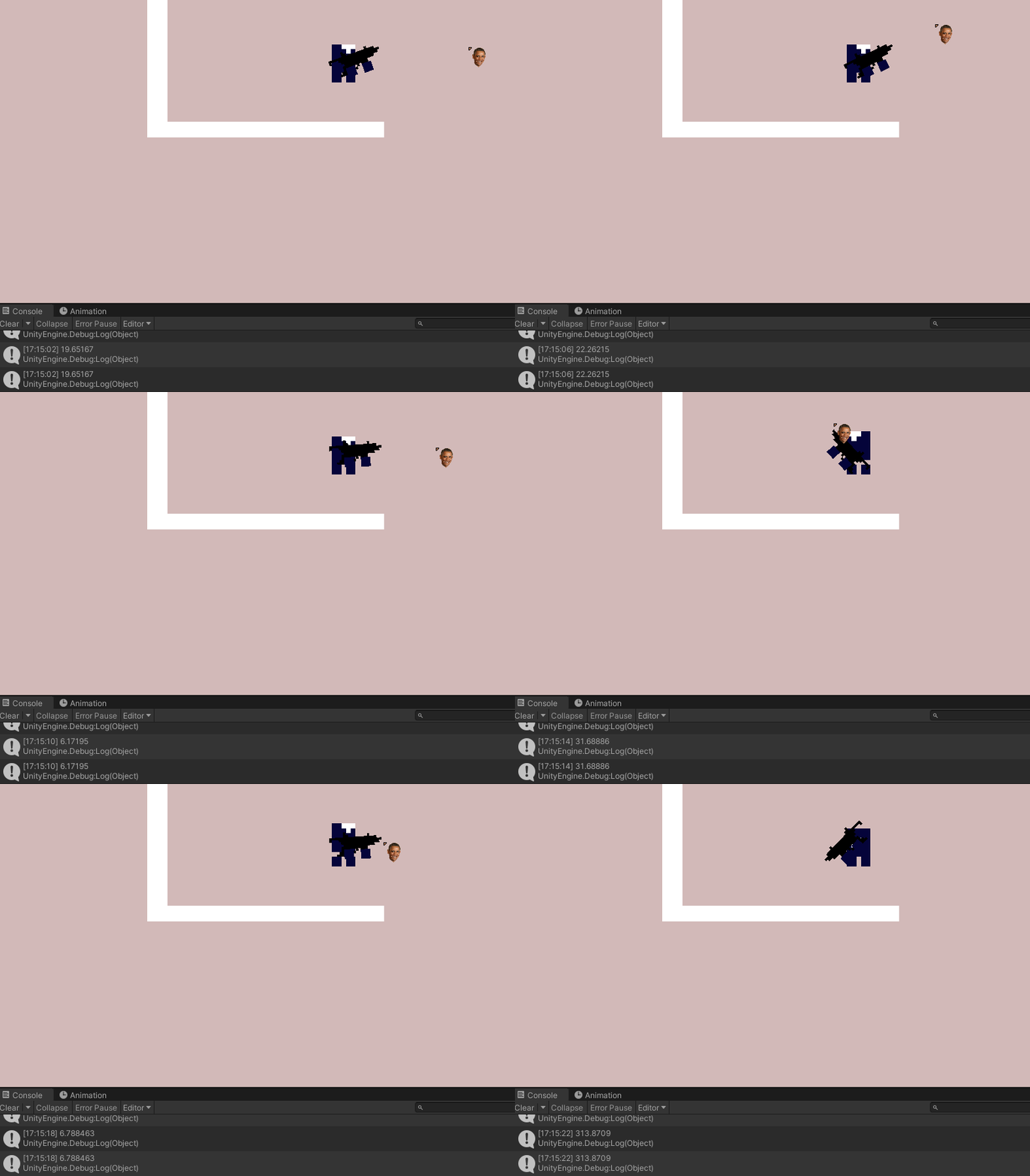
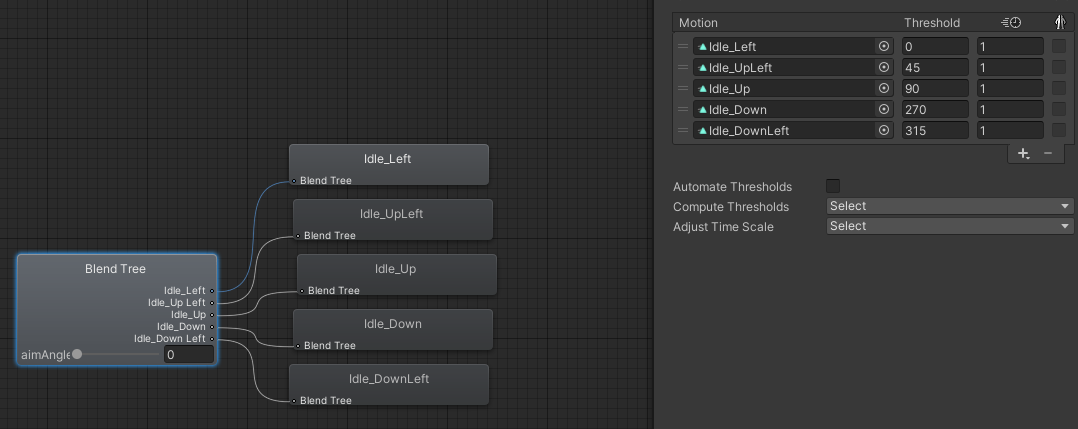
Why does the Up/Left Idle animation play so fast the lower the angle and why does it overwrite the normal idle where it just looks to the right.
What I find weird is that it only happens on the right side, on the left side it works fine.
The script looks like this:
    private void HandleAiming()
    {
        Vector3 mousePositon = GetMouseWorldPosition();

        Vector3 aimDirection = (mousePositon - transform.position).normalized;
        float angle = Mathf.Atan2(aimDirection.y, aimDirection.x) * Mathf.Rad2Deg;
        aimTransform.eulerAngles = new Vector3(0, 0, angle);

        if (angle > 100 || angle < -100)
        {
            reversed = true;
            aimTransform.Rotate(180, 0, 0);
            aimTransform.position = transform.position - new Vector3(2.5f,0,0);
        }
        else
        {
            reversed = false;
            aimTransform.eulerAngles = new Vector3(0, 0, angle);
            aimTransform.position = transform.position + new Vector3(2.5f,0,0);
        }

    }
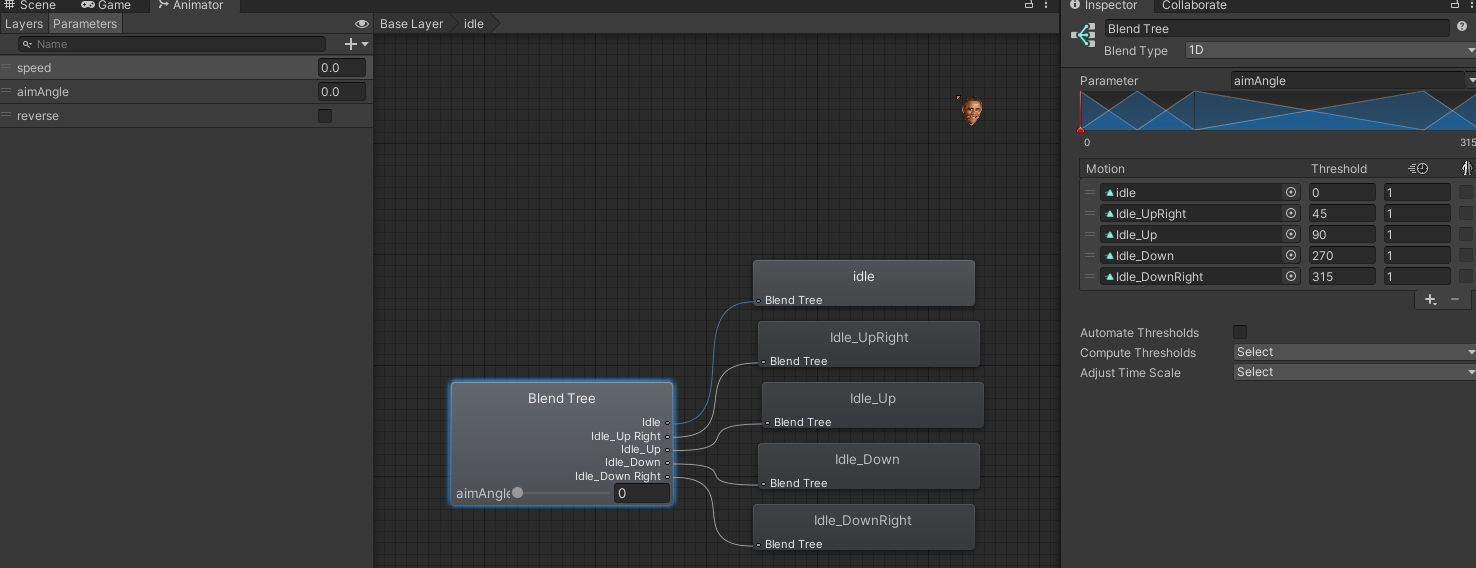
and the animation blend tree like this:
https://i.imgur.com/M1Dhx0K.png
 distant pecan
how can i not do this lol
@light elk blend tree, substate machine
I cant really see the image, its blurred, but i can see you have jump/fall, these two can be merged by using blend tree based on Y velocity
The other animation names i cant read, but im sure you can use it too
 light elk
it gets so messy
more ability u have
more messy it gets
imagine a 2D character having 10+ abilities
or more
or a charaacter in street fighter
distant pecan
It dont get messy if you do it the right way
light elk
😓
light elk
i found this

The Unity Animator system is powerful but can quickly over-complicate simple animation state management for 2D games. In this video I will explain to you another, more streamlined approach.
(Project files at the bottom of desc)
0:00 Escape Unity Animator Hell
4:48 A practica...
yeah he describe it right
its unity animator hell
distant pecan
It is not, just do the right way and use blend trees/substate machines...
I have a fighting game where the player has 4 styles of each animation, so in total he have +- 30 animations
And the animator is fine
and i could probably simplify it even more by merging idle with walk and walk reverse
light elk
2D fighting game?
m interested
i like beat them ups
@distant pecan
you have a v blog?
distant pecan
i don't have 😦
it's not a beat'em up, it's a 2d gladiator manager with turn-based fighting, something like Domina + Swords and Sandals, we have just a twitter account where we post about it, the twitter is twitter.com/GodsSand
it's coming to steam in a few months
 halcyon ridge
 magic oriole
Can ui colliders collide? I have colliders on both objects, both are isTrigger, rigidbody on one, and a script that has an ontriggerenter method. Yet my debug.log does not output whenever the colliders overlap.
magic oriole
Nevermind I figured out why. Time.timeScale is 0 😛 I have to work out some other thing then
eternal hamlet
@light elk snippet of my player so far, it doesn't have to be all messy...
rancid rain
    void Update()
    {

        //inputs handled in update
        movement.x = Input.GetAxisRaw("Horizontal");
        movement.y = Input.GetAxisRaw("Vertical");

        animator.SetFloat("Speed", (Mathf.Abs(movement.x) + Mathf.Abs(movement.y)));
    }
    private void FixedUpdate()
    {
        // movements handled here
        rb.MovePosition(rb.position + movement * movementSpeed * Time.fixedDeltaTime);
        StartCoroutine(checkForEncounters());
    }
    private IEnumerator checkForEncounters()
    {
        if(Physics2D.OverlapCircle(transform.position, 0.2f, LongGrass) != null)
        {
            if(Random.Range(1, 101) <= 10)
            {
                Debug.Log("Encountered a foe!");
            }
            yield return new WaitForSeconds(1);
        }
    }
Hey folks, this is my player movement script, but I'm having trouble with the encounter method. Currently, if I'm standing on the appropriate layer, it fires constantly.. I realize this is because I have it set up in the update method, but I'm not sure how to delay it, or how I should otherwise call it to work while the player moves.
Ideally, I could have it check for an encounter every time the player moves one tile (though the movement isn't really based on the tile grid at all).
Any thoughts are appreciated.. really sorry about the huge message.
 heavy token
@rancid rain Your Coroutine doesn't do any Coroutine stuff. Right now it's just a method that waits a second after it is done, but that doesn't prevent it from firing again.
Can't really say how to improve it because I don't know anything about your game or how you want it to work, but one solution would be to start the coroutine in Start() or Awake() with a while loop that stays true forever:```
while(true)
{
yield return new WaitForSeconds(1);
//Do stuff
}```
rancid rain
@heavy token I'm basically scripting a random encounter system that works identically to pokemon. My movement isn't grid based though.. so that's a problem I have to overcome.
So there are patches of grass in a tilemap with 2d collision triggers on that map. When a player walks over those tiles, it's supposed to check if there's an encounter, and 10% of the time find one.
Currently it's checking every cycle and spamming me with encounters any time the player stands on the tilemap.
I'd prefer if it would check the first time the collision occurs, and then check again when the player object moves one unit - or even just checking after a set period of time would be acceptable at this point.
Hope that's more clear.
The reason I did the coroutine thing .. is honestly because it's the only way I've learnt how to implement 'waitforseconds' and have it compile lol .. I'm new - I don't expect it to work
heavy token
you could save the position where you checked last and then use: if (Vector3.Distance(oldPosition, transform.position > 1) { oldPosition = transform.position; //Roll for an Encounter }
that would need to be in Update or FixedUpdate
rancid rain
Hmm.. that seems doable will this work with diagonal movement? Do I have to use absolute values at all? .. just trying to predict problems I had with my movement script earlier.
heavy token
Should work with Diagonal movement
 grand cove
You really should have a bool that say's if you are walking or running, since that will be used when animating too
so if you are walking and running + standing on tall grass, check for encounter.
rancid rain
@grand cove that's not how I'm animating though
heavy token
basically every time you roll for an encounter it draws a circle around the point the player is standing at and the player has to leave that circle before another roll takes place.
 fading sphinx
Guys, is this the "help" chat?
grand cove
Any chat is a help chat, but it depends on what the subject is about
read the description of each channel and you see what they are about 🙂
fading sphinx
Ok, it's about 2D programming, so I think i'm on the right place! Thank you!
rancid rain
@grand cove The way I'm firing my character animation is through a parameter I set up, my inputs give a 'speed' which when > 1 animates.
grand cove
So the variable speed > 1 would be walking?
rancid rain
Pretty much. Which is set by pressing movement buttons.
https://drive.google.com/file/d/1vYte8PCiZUZlPk8fxYe23JoTHhIyOMQp/view?usp=sharing
Seems to work well enough. I'm really proud of my progress.

Google Drive
grand cove
Well there you have it, just have that value accessible and you easily have the walking bool 😄
Or a method that returns the value true if "speed > 1" and you only call it while in grass
rancid rain
I handled the 'grass or not grass' by having it check which layer it's colliding with
grand cove
I like using raycasts, but each to their own.
rancid rain
@heavy token Sorry, I'm a scrub and having trouble implementing your suggestion. I need to assign the variable oldPosition somewhere before this method, ya? ..
@grand cove I just haven't gotten there yet ><
fading sphinx
| Sorry for interrupting you guys.. : |
|---|
| I just started studying Unity today, and I'm stuck on the Ground Check stuff.. |
        // !!! Got stuck here !!! :/
        Vector2 bottomLeft = new Vector2(transform.position.x - 0.5f, transform.position.y - 0.5f);
        Vector2 bottomRight = new Vector2(transform.position.x + 0.52f, transform.position.y - 0.52f);

        // > For some reason, my "isGrounded" variable, doesn't want to be true, even with the condition below..
        isGrounded = Physics2D.OverlapArea(bottomLeft, bottomRight, groundLayer);

        // Yes, I did add a "Ground" layer, and I did make my Tilemap "belongs" to that layer.
        // Note: "groundLayer" is a public LayerMask, and you guys know the rest..
Am I doing something wrong?
rancid rain
@fading sphinx Do you have your ground in Unity actually set to 'ground layer'? I've missed that step before.
heavy token
@rancid rain not necessarily, just make sure it's declared in your class and not in your Update function
rancid rain
Right, declared I think is more what I meant.
It's little different here than other languages I've used.
grand cove
private IEnumerator checkForEncounters()
{
  yield return new WaitForSeconds(1);

  if(Physics2D.OverlapCircle(transform.position, 0.2f, LongGrass) != null && Speed > 1)
  {
    if(Random.Range(1, 101) <= 10)
    {
      Debug.Log("Encountered a foe!");
    }
  }
}
Something like this?
you could merge the two top bools though
rancid rain
Eh.. I mean, I have no idea if that would work the way I want, but it seems pretty ugly lol. I'm going to see if the vector distance thing works.
grand cove
haha, you could even merge the other if statement
heavy token
well it would still fire every frame as long as the player moves faster than 1
rancid rain
@fading sphinx So.. your isGrounded overlap is checking the bottomleft vector, at the radius of the bottom right vector, with collision with the ground layer.
@fading sphinx I'm no expert, but I THINK you need brackets, or a proper radius in there somewhere.
if(Physics2D.OverlapCircle(transform.position, 0.2f, LongGrass) != null)
This is something I have for example.
heavy token
for percent randomness I suggest if (Random.Range(0f, 1f) > 0.9f)
rancid rain
Any particular reason? I'm not partial to any one method.
heavy token
it looks a little better and you are not bound to full numbers only
fading sphinx
@rancid rain Ok, I'll try to change from "area" to "circle", give me a second.. Thank you
grand cove
So, doesn't really matter.
rancid rain
    private void FixedUpdate()
    {
        // movements handled here
        rb.MovePosition(rb.position + movement * movementSpeed * Time.fixedDeltaTime);
        if(Vector3.Distance(oldPosition, transform.position) > 1)
        {

            oldPosition = transform.position;
            if (Physics2D.OverlapCircle(transform.position, 0.2f, LongGrass) != null)
            {

                if (Random.Range(1, 101) <= 10)
                {
                    Debug.Log("Encountered a foe!");
                }
            }
            }
        }
Bam! This works perfectly. Thanks so much for the advice!
I'll keep the alternative random floats in mind!
heavy token
@fading sphinx can you show the inspector of your Player?
grand cove
Oh, you wished to check between units, had no clue about that @rancid rain x)
rancid rain
@fading sphinx Ya, I don't think the problem was overlap circle vs area .. per se.
@grand cove I basically just wanted to delay it, either through movement, or through time. Movement is nice, because if I want to work in an animation with it, I could at each tile.
fading sphinx
Wait, think I got it..
No, I didn't get it..
@heavy token Sure, here:
grand cove
Just FYI @rancid rain If you make your spawn code like that, you could spin around on the same unit without anything happening in grass though.
But that might be what you desired.
rancid rain
I don't mind it in theory. In similar games I like the opportunity to step away without fear of another encounter when I'm not moving.
nah mean?
grand cove
yeah, I get that, but checking your speed would have worked just as well, since if your speed is not above 1, you are not moving, right?
heavy token
@fading sphinx you could change how far below you check to -1 instead of -0.5f. Also check if the collider on your ground is properly surrounding the sprite. It should be a green outline
rancid rain
Yeah, I see what you're saying, I think I could even work that into this fairly easily. I'll write it down and keep it in mind.
fading sphinx
@heavy token Dude, you just resolved my problem, the problem was the range of Physics2D collision area!! Thank you so much!
rancid rain
@fading sphinx that's what I said T.T lol
grand cove
Yeah, doing a lot of things in the update methods can slow down performance, so might be good to have it in a coroutine 🙂
But that's for later when you do encounter it
fading sphinx
@rancid rain LOL, I swear to you, that I didn't read that part...
grand cove
Damn, I need to get back to my game, IRL is taking up too much of my time.
fading sphinx
When you said "brackets", I instantly got to Visual Studio, trying to put some brackets over somewhere, LOL!
 fast wolf
Hey, i'm playing around with the tileset palette and I'm trying to paint tiles on a different Z position (Isometric, Z as Y). They are correctly painting on a different Z position (in that I if I try to erase them, I must be on the correct Z position) but they do not display on the correct position. They are drawn as if they are Z position 1. Has anyone seen this?
rancid rain
@fading sphinx haha
grand cove
Isn't it better to have another tilemap for the other Z position? @fast wolf
fading sphinx
@rancid rain @heavy token Thank you guys, either way, you guys solved a 20 minute headache.
fast wolf
@grand cove Even if its another tile map, the grid is located on the same level. The XY positions are the same and the game isn't drawing anything with Z.
rancid rain
I love these discords for their ability to crowdsource solutions T.T .. I'd never get anywhere without the people here.
grand cove
the tilemap inside the grid can be positioned on another z axis 🙂
fast wolf
@grand cove That still does nothing for the rendering. They appear in the same locations
 candid onyx
i have code to detect when the player can jump. it only allows it to jump when "w" is pressed an its touching the "ground" layer. for some reason this isnt working.
fading sphinx
@rancid rain Well, I'm going back to code, again, thank you for the help. I'm in love with Unity (I came from GameMaker), it's so much easier to make a simple camera, or a simple collision! 😍
rancid rain
I came from ... Python. So.. yeah.
fading sphinx
See you later guys, stay on peace.
elfin sandal
I have a 2d top down game
What's the best way to show the player when they're behind a wall?
Should I use a trigger collider and change the alpha of the wall when the player goes inside the collider?
Or is that too expensive?
grand cove
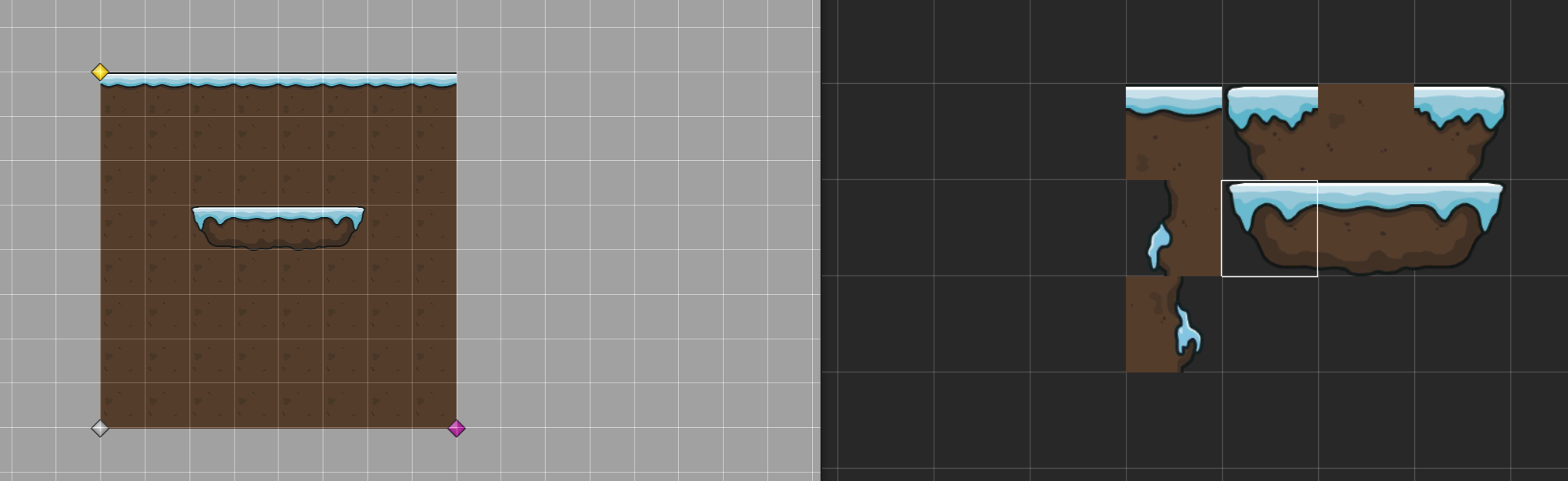
@fast wolf I'm not really certain I understand the problem, I have no problem layering tilemaps and painting them over each other as long as I am on the right axis. A picture maybe?
https://prnt.sc/uzfxq3
This is what I could do with a foreground tilemap and a background tilemap on the same grid, and when I shoot a raycast towards the grid I just look for the specific layer I want using tags or something and pick that tile to switch out.
 fast wolf
Looking at the top 6 tiles in a line. from top left to bottom right. Tile 1-3 is on "base" tilemap, tile 4-6 is on "Tilemap" tilemap. base has a position of (0,0,0), tilemap has a position of (0,0,1).
tile 1 is at Z level 0
Tile 2 is at Z level 1
Tile 3 is at Z level 2.
Tile 4 is at Z level 0 (Relative to "Tilemap")
Tile 5 is at Z level 1
Tile 6 is at Z level 2
As you can tell, they all are drawn to the same Z level
I'm thinking this is a bug or a messed up setting. Something I forgot to apply. Every guide I've seen just has the Z position work.
@grand cove I don't honestly know what's going on. I started a new scene, plopped down a new Tilemap and its working fine. I must have adjusted something to screw it up
grand cove
might be some tilemap setting or something, not exactly sure
it seems that chunkmode can not handle sorting of single blocks, so might be something
fast wolf
It wasn't chuck mode. That messes with sorting, not draw location.
heavy token
@elfin sandal I think most people use Shaders for that
this is an example of it for a 3d game, but it should work for 2d aswell https://www.youtube.com/watch?v=OJkGGuudm38

In this video, we explore how a common effect from Stealth Games could be realized in Unity.
Support me on Patreon:
https://www.patreon.com/DanMoran
Follow me on the Twittersphere:
https://twitter.com/DanielJMoran
Get the Assets for this Video here:
https://drive.google.com...
elfin sandal
Damn i suck at shaders
eternal hamlet
@fast wolf are you trying to raise the tiles? Shouldn't you be raising the y and not the z? Or is z height in tile maps?
fast wolf
Z is height in tilemaps.
 shell wadi
Excuse me, Im making an Asteroids game in unity, however, when I try to destroy the asteroids it doesnt work, here I will post my code
https://pastebin.com/DXUcW36r for the Asteroids
https://pastebin.com/pirR0Hbn the OnCollision script
Pastebin
Pastebin.com is the number one paste tool since 2002. Pastebin is a website where you can store text online for a set period of time.
Pastebin
Pastebin.com is the number one paste tool since 2002. Pastebin is a website where you can store text online for a set period of time.
vocal condor
Why have an RB component if you aren't using it?
 spark geyser
game dev rookie here having trouble getting a collider to stop bouncing across my tiles when it lands on the ground at an angle. https://streamable.com/e589vl

I'm also not sure why I can't seem to apply and rotational force to the shield he's throwing once I'm done bouncing it off the walls, but I'll probably have to provide a lot more context, and code, for you all to help with that
 thin prism
Hey folks, when I make an isometric tile palette, my tiles are floating above the grid. Anyone know how to fix this?
 sweet swan
tile pivots should be centered for both the palette and the tilesheet
thin prism
tyty
 vapid pine
my player disappeared behind my tilemap
ive only been working with unity for about a month , but ive checked everything i can think of. the sorting layers seem correct
grand cove
@spark geyser Do the disc know if it has hit the ground compared to a wall or ceiling?
If that is the case, you could potentially tilt the disc and make it lie flat, since I think the capsule collider just counts any of the rounded sides as "upright", but since it looks like you are using the physics engine it can't stabilize the disc since it's standing on a rounded collider.
Potentially at least. I'm not the best at the built in physics since I do most of mine not using the materials and such that unity provides.
You could also freeze the discs position in case it hit a ground collider
 languid elm
Does anyone here have experience with using Isometric tiles? I'm trying to create my own set, but the edges just don't look smooth when painted together. I've been trying for around 3 hours to get them to line up and I'm having no luck.
orchid ore
Any idea why this is giving me this error?
Nothing in the code destroys this game object. All that happens is it being set to active/inactive
heavy token
post the code where you assign it
elfin sandal
Does this mean the composite shadow caster is the parent?
spark geyser
@grand cove i tried changing it to a box collider and it's the same behavior, the corner of the collider just keeps bouncing in and out of my tiles, and for some reason the physics never causes it to lay flat. I can't figure out why the shield gets no rotational force once it hits the surface it's going to rest on
grand cove
Does it have mass? It looked like it was flying very straight, so I'm guessing not, and then it will never fall flat. since it's kind of like throwing a disc in space.
You could potentially add mass temporarily until the character picks it up @spark geyser
 smoky coyote
Trying to get the angle between 2 points given a forward direction Vector2 targetDir = target - source; float angle = Vector2.Angle(targetDir, new Vector2(0, 1)); Wondering how given the values of source = 3,1 and target = 2,5 I get a positive result of 14.03623 when 2 is less than 3 on the X axis. This should be a negative angle
spark geyser
So the shield has a finite number of "bounces" before I enable gravity on it. When is flying straight, it has zero gravity. When it hits it's max number of bounces, I set gravity to 5. The mass is always 1.
I tried tweaking mass, gravity, and drag, but nothing seems to prevent it from bouncing in and out of the tiles when resting on the ground if it falls at an angle.
orchid ore
post the code where you assign it
@heavy token the object just exists in the scene
I simply drag the p1 pointer to the script on p1, and the p2 pointer to the script on p2
heavy token
Play your game with the inspector open and try to find out when it gets turned to null
spark geyser
Also, I confirmed that there's no update code acting on it that manipulates it's velocity or rotation in this state
orchid ore
it happens when I press play
actually, no
it happens after I stop playing the game
so when I stop playing it in the inspector
grand cove
@spark geyser I see that the disc itself changes rotation when hitting a wall though, and it seems to be in a locked state at that point, have you made so that the rotation is frozen or something?
spark geyser
I keep thinking that has to be it, but I'm not "locking" the rotation anywhere. The only time I even set the rotation is behind this:
void LateUpdate() {
    if (isFlying)
    {
        this.gameObject.transform.rotation = Quaternion.Euler(0, 0, staticRotation);
    }
}
yeah, but on the rigid body, have you frozen some axis there?

if Z is frozen in your case, you might have to rotate it yourself or alternatively stop all movements when it hits a ground collider.
spark geyser
is isFlying gets set to false as soon as the last bounce collision is hit. I know this happens because that's also when the gravity kicks in.
No, I have not explicitly locked any of the axes
grand cove
yes, but this constraint overrides gravity
hm..
Tried setting the mass back to zero when it hits the ground so it wont try pressing down on the colliders?
oh wait
spark geyser
hmm, i can give that a shot, but it doesn't explain why it doesn't rotate when it hits the ground at an angle
grand cove
the drag is still set to 0 when it hits ground?
drag defines how quickly something will get halted when affected by friction. So that might help you out too.
spark geyser
it is in this screenshot, but I've tweaked that value from 0.001 to 200 and it doesn't impact hte bouncing
the shield material has a friction of 4 in case that was your next question
grand cove
I would probably just freeze the disc after the ground hit or just rotate it flat at least. seems like it does not like the edges. I find it very weird that the object is not rotating either, it's just stuck in an angle.
spark geyser
is rotating the gameObject as opposed to the rigidbody2d part of my problem potentially? Admittedly, I don't really understand the distinction when it comes to the physics.
and when I attempted to do the same code by rotating the rigidbody2d, it wasn't rotating
grand cove
Wait...I'm seeing some old post here in regards to animators conflicting with the rigidbody 2D physics....
spark geyser
I am using the animator to make the shield appear to spin while it's flying, then an idle state once it hits max bounces
maybe i can try killing the animator when it hits max bounces...
grand cove
Try deactivating it just to test?
spark geyser
holy shit, that did it! Thank you SOOOOOOO much @grand cove!
grand cove
Wow, I wonder if that is defined by how you animate it, you could try using code to animate it, I would actually recommend that.
you get more control 🙂
especially if you are doing just simple 2D frame switches
between sprites that is
spark geyser
That's damn crazy that even putting it in an idle state threw it off like that
grand cove
yeah, not sure how the animator editor works actually, got scared of all the arrows and have always animated using code since.
spark geyser
i really liked it for animating my player, works really smoothly and let's me set up well-defined, discrete transitions. Not sure how it went so sideways with the shield (no pun intended)
grand cove
The game looks cool though, looking forward to see the progress :)
And you can look into this https://answers.unity.com/questions/597001/rigidbody2d-not-falling-anymore.html
It's where I found the hint.

Unity is the ultimate game development platform. Use Unity to build high-quality 3D and 2D games, deploy them across mobile, desktop, VR/AR, consoles or the Web, and connect with loyal and enthusiastic players and customers.
spark geyser
Thanks for the help, hint, and compliment! I used to do dev evangelism for a mobile dev SDK/framework, so I know community members like you are the unsung heroes of platforms like Unity that keep people like me from quitting.
 real pilot
hey, i want to write my on Tile class that can wait a random amount of time between playing the tile animation
how can i get this to work? i can't think of a way the Tile can handle this for itself, since you can't use Coroutines and don't have an Update function in a Tile class
 robust crest
Can anyone give me at tip on a good "from start to finish" tutorial on a 2d game? Platformer/RPG, doesnt matter.
Anyone here doing a 2D platformer?
grand cove
Anyone here doing a 2D platformer?
@robust crest A lot of people are.
And unity has some good getting starter guides for this by themselves, they provide assets and everything
robust crest
Can you link me one/some, that is pretty "up to date"? I've been trying to find a good starter tutorial but it seems they use methods etc that you dont use nowadays? Or I maybe messed up when trying myself 🙂
@grand cove
 violet orchid
Yo, I need some help.
grand cove
I mean, it depends on how advanced you wish to start with, but considering that you are a student I would start : https://learn.unity.com/

Unity Learn
Unity Learn provides award-winning free tutorials, sample projects, and full courses for mastering real-time 3D development skills with Unity Learn to make video games, VR, AR, and more.
@violet orchid The best way to get help is to ask a question. 🙂
violet orchid
So right, when I try to wall jump it doesen't work. All I have it set to right now is if wall sliding is true, then wall jump is true.
It is not small enough to fit here.
I'm sorry. I forgot to put it in Update. I think that should fix it.
 obsidian finch
Use hatebin, we're not gonna download a text file to look at your code
violet orchid
I figured. I didn't know where to copy it so now I know.
heavy token
Does one of the objects have a RigidBody2d?
orchid ore
Yes, one does
But I think I got it
I was ignoring the collision between the game object
And itself
1 sec
Okay it's working now lol
 open depot
(should be 1 from project)
fast wolf
Hey, my Tile palette disappeared after closing the window. Its no longer under Windows> 2D > Tile Pallet. It was there, now its now. Has anyone experienced this?
Same issue as this question. https://stackoverflow.com/questions/58864291/unity-2019-2-12-tile-palette-missing

Stack Overflow
I'm missing tile palette feature. How do I get it? Am I missing any other features?
I've seen others have this similar issue, but I never really saw it get solved.
Also on school computer so can't
 tender spade
I made a tilemap for the floor and added a collider to it so the player can walk, but it's... choppy? if the hitbox is square the player's corners get caught up on the floor, how can I fix it?
sweet swan
add a composite collider to it
if it adds a rigidbody too, change its type from dynamic to static
that way all the individual box colliders get treated as one big polygon, removing the edges
tender spade
in addition to the tilemap collider?
tender spade
ah, cool, thank you
do I need to twiddle any properties? I'm still getting stuck on things
sweet swan
- set the default physics material to one with zero friction under project settings > physics2d
- enable collider gizmos and make sure the composite collider is working
 dense ruin
Hey does anyone have some good tutorials or code I could use to start my game, the tutorials I watched haven't helped much, im trying to make a 2d platformer (metroidvania)
Also to i have to download assets or is there a way I could just use blank blocks
vocal condor
Should probably find some free assets to use as substitutions until you get your assets.
dense ruin
Fair enough, i just figured using blank blocks till I got a block actually moving would be easier yk
Also i don't wanna do pixel art, I wanna do like art and assets based not tiles yk
 blazing lion
public class SpringPad : MonoBehaviour
{
    Collider2D cl;
    public float SpringForce;
    public AudioSource spring;

    void Start()
    {
        cl = GetComponent<Collider2D>();
        cl.isTrigger = false;
    }

    private void OnCollisionEnter2D(Collision2D collision)
    {
        cl.isTrigger = true;
        print("Spring collision detected, bouncing player");
        collision.rigidbody.AddForce(transform.up * SpringForce, ForceMode2D.Impulse);
        spring.Play();
        cl.isTrigger = false;
    }
}```my spring pad goes boing now
im proud of myself
first ever SFX
 last carbon
using System.Collections;
using System.Collections.Generic;
using UnityEngine;

public class birdy : MonoBehaviour
{
    public float velocity = 1f;
    public Rigidbody2D rb2D;

    void Update()
    {
        //tıklamayı algıla
        if(Input.GetMouseButtonDown(0))
        {
            //kuşu uçur
            rb2D.velocity = Vector2.up + velocity ;
        }
    }
}
Error:
Assets\Scripts\birdy.cs(16,29): error CS0019: Operator '+' cannot be applied to operands of type 'Vector2' and 'float'
how i can fix it i am watching youtube tutorial i did same as in video but still not work
 inland jacinth
@last carbon Try multiplying it instead
 modest ledge
I have a rigged a 2D character and clothes separately in a different texture that use an identical rig, I would like to attach these clothes to the character during runtime.
Attaching clothes to the rig works in the inspector by manually replacing the bones of the cloth object with the characters bones in the Sprite Skin component, but it doesn’t seem quite that simple in the script.
Any tips on how this should be done?
 brisk hemlock
hello i have a problem, when i say public movescript and then i save it, and then i go to unity to assign the script i cant??
echo vigil
Heyy. I'm back here about the line stuff. I was recommended a free asset called UI extensions which has a UI line renderer with it which does work perfectly fine except for the fact that I can't add a hover event or anything to the line which I want to do. I don't know any other alternative except for the paid asset called "Shapes" but that requires "Screen space camera" canvas to be used which I don't want to use.
It's really annoying that there isn't a proper UI line renderer
distant pecan

Unity's Line Renderer Component doesn't work in the UI system... So, let's create one that does...
Interior Mapping Shader - https://www.youtube.com/watch?v=dUjNoIxQXAA
Photo Real Assets - https://www.youtube.com/watch?v=Y538_YYhC1A
Fixing Grid Layouts - https://www.youtube.c...
You could try using this as reference and updating the code as you like
echo vigil
Yeah I've watched that video before but the finished result doesn't look very good In my opinion
spark geyser
hey, is there any easy way to make empty gameobject trigger colliders visible at all times in the editor? Like just be able to give them a solid coloir backgfround or something that won't actually appear in tyhe game, just to make them easier to keep track of
 outer onyx
hey there, how do i stop my 2d character from jumping higher and higher from its own collision box?
 drifting elk
 austere iron
@spark geyser you can use OnDrawGizmos method to show debug info in the editor or the game. I believe there is another method as well...
spark geyser
oh yeah, duh, thanks @austere iron
austere iron
I use it for a field of view script...
 wicked fractal
Hey all, i have a problem with understanding how the CapsuleCast works...
I just got this small piece of code:
RaycastHit2D raycastCapsule = Physics2D.CapsuleCast(new Vector2(transform.position.x,transform.position.y),new Vector2(0.23f,0.58f),CapsuleDirection2D.Vertical,0f,Vector2.one,0.58f,whatToInteractWith);
isInteractableNear = (raycastCapsule.collider != null ? true : false);
This should usually set the Var: "isInteractableNear" to true if i'll touch something with the specified Layer "whatToInteractWith".
All of the parameters (Vectors) i put in the CapsuleCast method were derived from a capsule collider i put around my player, just to get some plausible numbers. (See screenshot)
Unfortunately the CapsuleCast Method does not create the exact same Capsule as the capsule collider from the screenshot.. otherwise "isInteractableNear" would've been set to TRUE at least once.
So i think it's a problem of my understanding of the CapsuleCast Method.
Honestly i have no idea what the 5th and 6th parameter should be - those 2 parameters just make no sense to me.
Hope to find here someone that could explain to me the paremeters direction and distance.
Thanks so far! ❤️
grand cove
@wicked fractal So I don't think you have used the right values in the parameters for the capsule cast.
(one edge of the capsule, the other edge of the capsule, radius of the capsule, direction, max distance (optional), layer mask to search for (optional), Query trigger (Optional))
That code seems to set the first value to the center of the game objects position, and then to a specific world position and the radius seem to be just the value of which side the capsule edges extends towards.
I would suggest you use https://docs.unity3d.com/ScriptReference/Debug.DrawRay.html
When debugging raycasts, it helps a lot. you can add the values you place in the capsule cast in a form of a ray to physically see when you are debugging where you are measuring from and shooting this ray from for example.
 light lark
Hey Im learning about raycasting and I wrote this code :
    {
        RaycastHit2D firstHit = Physics2D.Raycast(position, direction);

        Vector2 secondDir = Vector3.Reflect(direction, firstHit.normal);
        Vector2 secondPos = firstHit.point;

        RaycastHit2D secondHit = Physics2D.Raycast(secondPos, secondDir);

        Vector2 thirdPos = secondHit.point;

        line.SetPosition(0, position);
        line.SetPosition(1, secondPos);
        line.SetPosition(2, thirdPos);
    }```

but in some cases the "thirdPos" i.e. third position of line is same same secondPos , so it looks like this when it hits. I cant figure it out its been 2 days , i have searched everything i could on googlei want it to work like this
 hollow crown
you may want to make sure that the second raycast isn't immediately intersecting
that might require you moving it away from the wall (probably in its own direction) by a very small amount
wicked fractal
@grand cove Thank you for the response! I think i got the correct parameters - you're referring to the Physics.CapsuleCast - but i'm using the Physics2D.CapsuleCast which is using the following parameters:
origin    The point in 2D space where the capsule originates.
size    The size of the capsule.
capsuleDirection    The direction of the capsule.
angle    The angle of the capsule (in degrees).
direction    Vector representing the direction to cast the capsule.
distance    The maximum distance over which to cast the capsule.
layerMask    Filter to detect Colliders only on certain layers.
minDepth    Only include objects with a Z coordinate (depth) greater than this value.
maxDepth    Only include objects with a Z coordinate (depth) less than this value.
In this case i don't understand the parameters direction and distance. Maybe someone could explain them to me - preferred on my example but not a must have 🙂
hollow crown
 ruby karma
direction is a ray (normalized vector). meaning you tell your capsule to go in some X,Y,Z direction.
distance is a float. Meaning whats the amount of distance you want to cover on the provided direction
tropic inlet
wtf
I've never seen this Vector.Reflect function
i gotta check it out
Oh, I see. . .
It basically just gets the angle between the vector and the normal, then rotates it by said angle * 2 then negates it
or something
wicked fractal
@hollow crown So in my case i'll have this parameters (see sreenshot) - i just want the CapsuleCast to float around my player.
What about the parameters direction and distance in my case? Would it be distance = Vector2.zero and distance = 0.58f ? Or what should they be?
hollow crown
use https://docs.unity3d.com/ScriptReference/Physics.CheckCapsule.html if you don't want a cast
light lark
Holy Shit i solved that problem after 2 DAYS omg cant believe it xD
All i had to do was use that code in fixed update instead of udpate
 fading prairie
haha
 wet light
Hey, its my first time creating a 2D game before. I decided to use someone else's character controller because i was too lazy to make one 😬 . I just got about 6 errors all(apart from 1)saying that the character controller already defined some of the movement. Is there anyway someone could help me?
There's probably something extremely obvious to this that i cant seem to find.
 jade galleon
I need urgent help on the Internet I have found nothing to my problem. How can I keep a player in a 2D game inside a square. I hope you understand my problem.
 vagrant nexus
Two positional clamps would work
float xClamp = Mathf.Clamp(transform.position.x, min value, max value);
float yClamp = Mathf.Clamp(transform.position.y, min value, max value);

transform.position = new Vector3(xClamp, yClamp, 0f);
okay
vagrant nexus
Make sure that is running after any movement related code
and of course, swap out my clamp values for whatever you want there
@wet light It seems like you might have imported it twice?
wet light
It was the first time importing it
It doesnt seem like i imported it twice
Ok so it runs without the code
Ill see once i import it again if it works
Still gives me errors
Oh nvm i found it
I was stuipid and had the same piece of code renamed
wicked fractal
@hollow crown Oh boy.. i finally managed to fix my problem with Physics2D.OverlapCapsule ... i just had a really buggy understanding of the raycasts.. thanks for your help and the input to reflect my mistake
 keen skiff
Okay so I have this script
public class PlayerScriptThing : MonoBehaviour
{
    public float MovementSpeed = 1;
    public float JumpForce = 1;
    private bool IsRunning;

    private Rigidbody2D rigidbody;

    private void Start()
    {
        rigidbody = GetComponent<Rigidbody2D>();
    }
    private void Update()
    {
        var movement = Input.GetAxis("Horizontal");
        transform.position += new Vector3(movement, 0, 0) * Time.deltaTime * MovementSpeed;

        if (Input.GetButtonDown("Jump") && Mathf.Abs(rigidbody.velocity.y) < 0.001f)
        {
            rigidbody.AddForce(new Vector2(0, JumpForce), ForceMode2D.Impulse);
        }
        {
            {
                if (movement > 1(IsRunning = true));
            } else
            {
                (IsRunning = false);
            }
        }
    }
}```
And it keeps giving me this error"Assets\PlayerScriptThing.cs(27,15): error CS1513: } expected"
I have no idea where the } goes
 mint geyser
im trying to read this
uh why is there a { after the first if
you have like ```cs
if (...)
{
//whatever
}
{
{
if (...);
} else
{
//whatever
}
}
and i dont where those brackets are coming from
vagrant nexus
Yeah, it doesn't have to look that confusing. Typically curly braces cascade downwards / upwards @keen skiff
like
if ()
{
  if ()
  {
    if ()
    {

    }
  }
}
Trying to set up the standard way makes it much easier to catch missing bracket errors
austere iron
@keen skiff your braces are out of place. Check that your open and closing braces match...
You have two extra open braces after your first if statement...
keen skiff
okay thanks I'll work on it
 wet umbra
is dragging a prefab into an instantiator script the only method of adding the prefabs?
just wondering cause one-time my project reset and I have to remap a lot of things
light elk
wanted to discuss on color swap thing
how would you do it
for modern sprites high res
wet light
I was creating code for the movement of my character and these errors came up.
My code as well:
austere iron
Rigidbody, not RigidBody. SpriteRenderer, not spriteRenderer... @wet light
wet light
Thank you guys 😄
 static karma
You could read some of the code in the 2d sample code
 gaunt hawk
Yea that makes sense
static karma
Tbh I am trying to learn more atm as well, but that is about the best I have been able to find this morning
https://github.com/Unity-Technologies/2d-extras/wiki If you haven't already given a perusal

GitHub
Fun 2D Stuff that we'd like to share! Contribute to Unity-Technologies/2d-extras development by creating an account on GitHub.
wet light
All though the console doesn't show any error, it seems that my ground check doesn't detect the ground. Maybe I've missed something in the code. Is there any way i could fix this?
heavy token
what is the 1 << Layermask line?
remove the "1 <<" and see if it works
your VS and Unity is still not connected btw
wet light
what is the 1 << Layermask line?
@heavy token So the line cast doesnt react with any other objects and just the ground.
heavy token
but LayerMask.NameToLayer("Ground") already does that
you change that to something else with 1 <<
wet light
When i removed it, i couldnt jump.
heavy token
wasn't that your problem before?
my guess is it "works" because the linecast thinks your player is the ground
because that what your 1 << line does. It gives you the Ground Layer and then you take the layer that comes before that with 1 <<.
you could also add a public LayerMask myLayerMask; and assign it in the inspector
and why it still doesn't work, make sure the groundCheck transform is low enough to detect the ground and the ground has a collider
light elk
got no clue why its doing this

i already checked out the auto sync on project settings
anyone faced this weird bug
not finding any error or anything in my code
light elk
vagrant nexus
It's hard to tell exactly what the issue would be since it's a long script, but I am 100% sure that the script logic is at fault
 leaden sand
Hey, I'm trying to make some aiming but I'm having a problem with aiming up.
Here's a video and my current Aiming script.
using System.Collections;
using System.Collections.Generic;
using UnityEngine;

public class Aiming : MonoBehaviour
{

private SpriteRenderer sprite;

private void Start()
{
    this.sprite = GetComponent<SpriteRenderer>();
}

    // Update is called once per frame
    void Update()
    {
//Aiming Up Code
        if (Input.GetButtonDown("AimUp"))
            {
                transform.position = transform.position += new Vector3(-.14f, .2f, 0f);
                transform.eulerAngles = new Vector3(0, 0, 90f);
            }
        if (Input.GetButtonUp("AimUp"))
            {
                transform.position = transform.position += new Vector3(+.14f, -.2f, 0f);
                transform.eulerAngles = new Vector3(0, 0, 0);
            }
//Crouching and Shooting at Crouched Position
        if (Input.GetButtonDown("Crouch"))
            {
                transform.position = transform.position += new Vector3 (0, -.17f, 0);
            }
        if (Input.GetButtonUp("Crouch"))
            {
                transform.position = transform.position += new Vector3 (0, .17f, 0);
            }
}}
It's not working properly for me for some reason.
Also, feel free to ping me if you care to help. I'm working on making a baseline because I want to make a cool concept of being a biological researcher stranded on an alien planet. 2d of course, or i wouldn't be here.
 gusty bluff
Hi, I am making a game where my sprite automatically moves to the right, and switches to the left when I tap the screen, then switches to the right if I tap the screen again and so on. I wrote this code and it worked for GetMouseButtonDown but I cant get it working for Touch input. can someone help me?
void Start()
    {

        rb = GetComponent<Rigidbody2D>();

    }


    // Update is called once per frame
    void Update()
    {
        if (Input.touchCount > 0)
        {
            Touch touch = Input.GetTouch(0);
            if (touch.phase == TouchPhase.Began)
            {
                changeDirection = true;


            }
        }
    }

    void FixedUpdate()
    {
        if (changeDirection)
        {
            currentDirection *= -1;
            changeDirection = false;
        }

        rb.velocity = new Vector3(currentDirection * moveSpeed, rb.velocity.y);

    }
@light elk you should make your force and moveposition variables public so you can see them in the inspector for testing
im going to guess it's this line that's causing problems,
_movePosition.y = -hit.distance + _boundsHeight / 2 + _skinWidth;
since that's the line adding y height
i would add in some debug logs to see how many times that line is getting called, maybe it's being called multiple times and thats why it's raising..or it could be that the value is just too high when it is being set
or it could be your CalcMoving function
wicked fractal
Hello 🙂 does anyone know how to start with procedural map generation for a 2D platformer? Any kind of information like articles, coding examples etc. would be very helpfull - Thank you 😊
 vast lynx
How do I spawn the trails behind the parent object and have it keep it's own rotation?
gaunt hawk
Is there any tutorial on internet on implementing the rule tile system to a normal gameobject grid?
I am somehow managing to do what I want, but I believe my code is performance poor, and I really couldn't understand how rule tiles do work
By looking at it's code
vagrant nexus
@vast lynx Spawn them at (-yourParentObject.transform.right * someDistance), and just simply don't parent it
if you want it to keep its own rotation
vast lynx
@vagrant nexus Will I have to manually parent it then?
Also why -yourParentObject.transform.right and not transform.left?
vagrant nexus
just to make sure you know what object I meant
if your spawning script is on the parent object, then yeah you would just do -transform.right
but, when I said don't parent it, I mean don't parent it at all. Do the trail particles actually need to be parented at all?
 torpid jay
Can someone send me a good code without animation of a 2d character movement without rigidbody? I cant find a good one online
vagrant nexus
hmmmmmm
 tall current
@torpid jay I uh, don't really get what you mean by that?
Well, why don't you want a rigidbody?
If you're making pong for example, I'd understand
but seeing as you wrote "character movement" I feel like the movement should be a little bit advanced
and movement without a rigidbody can't be that advanced
torpid jay
Okay thanks @tall current I just added a rigidbody
 thick jolt
So, I'm attempting on making a health system for my game ||called Insignia||, and after the character dies, and respawns, and dies again, the last "heart" doesn't actually change.
this is how it's meant to look (focus on the top-left corner)
and this is how it looks after the first death
https://hastebin.com/fezudetatu.csharp //the health system script
https://hastebin.com/guyehiroko.csharp //the respawn system script
thick jolt
Should I just try doing some debugging?
 flint hawk
@thick jolt Always try and debug first imo
Condition code might not be accurate just yet
thick jolt
I basically can't tell anything from the debug code
for the first time, it just simply becomes empty, but for the second time, it doesn't
meh, I give up for today
tall current
@thick jolt Does it always happen on the second try? and third, fourth, so on
but never on the first?
thick jolt
yes.
It only works on the first try
meaning, that this must be a problem with either the respawn system, or the health system...
tall current
I think there's a script missing
I don't see how the player dies
I only see hearts reducing and code making the player respawn
but never the code that runs when the player dies
thick jolt
oh right, I'll send that too
tall current
that's gonna be really important
thick jolt
        if (HP.health <= 0)
        {
            Instantiate(deathParticle, transform.position, Quaternion.identity);//Particle play
            gameObject.SetActive(false);//Player killer
            FindObjectOfType<AudioMaster>().Play("HitSound");
            IsAlive = false;
}```I have a suspicion
thick jolt
that's it
tall current
is this inside of Update?
thick jolt
yes.
tall current
ah...
thick jolt
Could it be a problem with physics calculation again?
thick jolt
Cause before, I had a problem with the health system that I wrote, where the HP decreased by 2 instead of 1
tall current
When coding, it's important to seperate different actions into methods
for example, you should write a method called PlayerDie() and only call that the instance when the player dies
the problem with your current code is that everything is inside of Update()
and on seperate scripts
thick jolt
the physics statement OnTriggerStay2D is twice as fast as Update() and so before the invincibility became true, it just decreased the HP twice
the problem with your current code is that everything is inside of Update()
@tall current uhm.... not exactly?
like, what do you mean all of it?
tall current
well, what's not in update?
thick jolt
like the hit detection isn't inside Update for a normal reason
thick jolt
yeah, the only things that are inside Update are the respawn system and the death statement
tall current
you need to structure the code differently and only call code when needed.
thick jolt
wait no
you need to structure the code differently and only call code when needed.
@tall current yeah, I get what you say
tall current
I'm not trying to bash on your code. But for example, checking if the player is dead every Update is a really bad idea
what you instead want
is to check if the player dies when updating the health
thick jolt
yeah...
tall current
so when the player is hit, check if the health is too low
thick jolt
So I should make the player death a method
tall current
yes
 foggy wadi
guys can anyone help me with this thing (tilemap on the Scene)
tall current
The player's death should be a method
the respawn should be a method
you can't have too many methods
tall current
not trying to be condescending, but have you used methods?
you can call methods on other scripts from a seperate one
thick jolt
it's just that I never really understood how to make a method
or at least never tried inside Unity
but could this help with the issue that I'm having?
heavy token
It won't fix the problem but it can make your code easier to read and therefore easier to find the problem
tall current
@thick jolt Yes, this will fix the problem actually. The problem you're having is (probably) the Updates going off at unpredictable times. The death script updates before the healthscript does, and therefore the healthscript can't update the hearts before it's disabled
if you structure everything so that it connects without using Update, this can't happen
heavy token
Disabling and Enabling a script probably puts it at the back of the queue. It starts off infront but once it's toggled it gets put at the end.
@thick jolt you should look at Properties and (Unity)events. Or atleast how to call code from another Script
thick jolt
I do indeed know how to call methods, or just other stuff from other scripts
just like with the health
but events?
what exactly do you mean?
heavy token
public int Health
{
  get
  {
    return health;
  }
  set
  {
    health = value;
    UpdateHearts();
    if (health <= 0)
    {
        PlayerDied();
    }
  }
}
private int health;```if you do it like this UpdateHearts() is only called once Health is changed instead of every frame
thick jolt
yeah, I see
heavy token
Events aren't necessary, but they make the code more modular
tall current
that might be a bit hard to understand now though
but damn it's gonna improve the code like crazy
thick jolt
I know about {get; set}, yes, it's just that I never needed to make a method in Unity yet
so I didn't
but uhh...
how am I meant to do that with the kill method then?
actually, I'll look forward to an answer later.
I'm really tired for doing code
but thanks for the help!
 limber mantle
Hey, I'm making a 2D top down game, and I've created a menu and a game scene, however when I start the game the menu buttons show over the game scene.
I want it so when I start it shows the menu scene first, instead of showing the game. Basically how do I prioritise which scenes are shown on start.
(The first one is what happens)
(The second one is what I want to happen)
Can anyone help?
 brazen hill
If you put your game scene in the first place in "build settings", it will load first
so invert those
this one loads first
 plain sleet
So i'm making a mobile test game where you play as a cube and you have to grapple on things. So is there a simple way to add a UI button that instead of pressing a location on the screen it would just swing the grapple hook to the closest available hook block (the block which the hook can attack)?
limber mantle
@brazen hill That doesnt seem to work
brazen hill
@limber mantle you did mean that when you launch your game, you want the menu scene to appear first, right ?
brazen hill
ah, not at all, i meant after the build :p
If those are two different scenes anyway, you got to be on your menu scene for it to appear when you press play
limber mantle
i have my menu scene set as 'active' and it still prioritises the player's camera over the menu's
heres my hierarchy if it helps
 unborn abyss
hello, i need rotate a object depending at one destinatation position, basically i need a gameobject looknig a destinatation pos
limber mantle
@brazen hill
brazen hill
What do you mean by a scene being set as active ?
you can't have two scenes running at the same time
brazen hill
Oh o: didn't know that
Well then what's the advantage of having a menu scene and a game scene at the same time ?
Why don't you just play your menu scene, and add a button to load the game scene ?
limber mantle
how do i do that
heavy token
SceneManager.LoadScene(1);
shell wadi
Excuse me, the asteroids in my game wont break but they can kill me, how can I fix it?
https://pastebin.com/ZSNr29fd OnCollision script
https://pastebin.com/a6U9R0kY MainGame script (attached to the camera)
Pastebin
Pastebin.com is the number one paste tool since 2002. Pastebin is a website where you can store text online for a set period of time.
Pastebin
Pastebin.com is the number one paste tool since 2002. Pastebin is a website where you can store text online for a set period of time.
heavy token
@shell wadi you heard of OnTriggerEnter, OnCollisionEnter?
 kindred prism
If I want a circle that when a player clicks on it and holds something happand, should I make it as a UI button or a prefab?
grand cove
what
kindred prism
I'll try to explain myself, atm when you hold leftclick on mouse and move, you draw a line untill you release the mouse button, I want it to only draw a line when you start holding the left mouse button on a "circle" (a gameobject)
What will be the right way to do so
tropic inlet
The first thing I would think of raycasting from the mouse position
but idk how to raycast from mouse to some object
kindred prism
Im creating the line with line renderer, tried making a button that when its clicked the rendered will work, but when you click and hold a button it dosent register as a click, only if u release right away
grand cove
I would also suggest a raycast, just shoot a raycast in the same location that detects if you are on that circle
while mouse button 1 is held, if pointer on circle, draw.
kindred prism
Never used raycast, how does it work?
 wide remnant
Hey everybody! I just saw Jabrils(https://www.youtube.com/watch?v=Xe_7b9pRKY8) last video and it really got me inspired to do something similar, but in 2d. If anybody knows their shit, and is willing to help/tutor me, I would greatly appreciate it! DM for contact
I am NOT trying to do anything with quantum stuff.
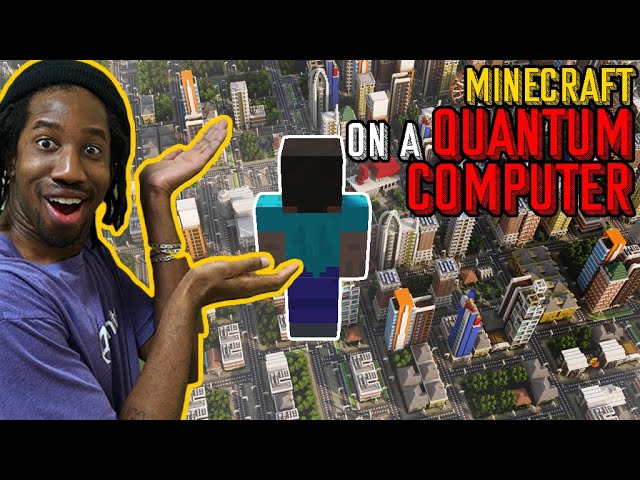
Support this channel & check out Qiskit: http://qisk.it/jabrils
Quantum computers are right around the corner, so the question must be asked, what could a game like minecraft look like on a quantum computer? We teamed up with @Qiskit, who has public Quantum Computers to use t...
grand cove
@wide remnant I barely have any time in the world to even program on my own game I want to release, so can't mentor you, but whatever he's doing is for sure feasible without "quantum" BS.
Learn the unity DOTS system and mix that with the Wave algorithm and you can make a 2D version of this relatively quick. It takes a hell of a lot of time to work out all the rules for the tiles though.
light elk
btw when making a 2D platform conroller
use rigidbody 2D vs not using it
which is better
 random comet
hi guys, can someone help me? I can't make that if my player walks into a cube the dubug log debugs "Guy".
I have a box Colider and the Is trigger is already check. it still doesn't work
light elk
@eternal hamlet it was typo on my end
lol
float rayLength = _boundsHeight / 2f + _skinWidth;
there the plus was written as multiply
eternal hamlet
@light elk good stuff
 torpid marlin
    void FixedUpdate()
    {
        if (transform.rotation.eulerAngles.z > minClamp
        || transform.rotation.eulerAngles.z < maxClamp)
        {
            transform.Rotate(Vector3.back * degrees * Time.deltaTime);
}``` does anyone know why this just rotates forever? I cant figure out how to do the rotation and euler angles btw I have the clamps both set to 10can i get the object from hierarchy through code and assing it to a variable of type transform?
opal socket
can i get the object from hierarchy through code and assing it to a variable of type transform?
@still tendon yes you can
still tendon
I know that i can make the variable public and than drag it in the slot
But i i dont think is very clean
Is there any function that can search an obj in the hierarchy by name? Like idk SearchInHierarchy("tree") or smth like that
opal socket
You have FindObject(s)OfType, Find, FindObjectWithTag
But I strongly advise against them
vagrant nexus
dragging it into the slot is like the cleanest you can get, code wise
for simple reference stuff
heavy token
@still tendon you can use Reset() it's a Unity function that gets called when you add the script to an object or press the reset button. You can use GetComponent or FindObjectOfType in there.
That's how Unity autopopulates their components
 limber shoal
Does anybody know how I would go about doing this? Locating the nonobscured corners of a 2d box or sprite?
 worn forge
Me and a friend are trying to recreate Among Us for learning purposes. Currently I'm trying to make the part where you drag on a wire and attach it to the other side but I can't figure out the logic of how to do that, does anyone have anything that could point me in the right direction?
https://sample.wtf/i/05hm5.gif
 heavy token
https://docs.unity3d.com/ScriptReference/MonoBehaviour.OnMouseDown.html to detect clicks on the wires, while the player holds down the mouse button draw a line with a LineRenderer from the origin to MousePosition. If the mouse is released above another wire endpoint connect them.
 fossil axle
how make missile lol
i need an object with collider to spawn in front of my space ship, infinently. please how do this
heavy token
@fossil axle check out the Space Shooter Tutorial https://learn.unity.com/tutorial/introduction-to-space-shooter#
fossil axle
k thx
 austere belfry
I have a script that scales up a circle sprite on click, and scales it back down on a second click.
But when I try to scale two of these circles up, it first makes the initial circle scale back down even if I click on the second
Any idea why?
still tendon
does it register which circle is clicked?
or only the click disregard of what is clicked?
austere belfry
It registers the click I guess, I copied the script and added slightly different debug messages
So I click circle 1, then I click circle 2 and i get a debug message that should be from circle 1
austere belfry
I just control it with booleans and colliders, not sure why it would do that
I have the collider expand with the circle so maybe, but im looking at the radius and it shouldnt be that big
okay its the colliders
 real umbra
Does anyone know how to code in a "grab and throw" element inside unity
eternal hamlet
@real umbra detect nearby objects and highlight the closest, detect if grab key is pressed, move object to position of hand or wherever, detect release button to throw, add force to Rigidbody on the object
 alpine frigate
Hi I'm trying to make a 2d miner game and I want to make the global light intensity go down as I move on the y axis so I get a nice smooth fade whenever I go up or down. Basically what I want is: the global light fade's out when I go underground and fade in when I go to the surface.
so when the player's position is 0 or above the global light intensity is going to be clamped at 1.3
when the player goes down on the y axis the global light gets darker and darker until it passes the the y position of -4 (where it cannot get darker if you go below it. (The intensity is clamped to 1.3, 0.2)
--
please someone help me... im super stuck
Ive tried a lot of stuff but I still dont know how I can acheive that effect
real umbra
@real umbra detect nearby objects and highlight the closest, detect if grab key is pressed, move object to position of hand or wherever, detect release button to throw, add force to Rigidbody on the object
@eternal hamlet thx
worn forge
https://docs.unity3d.com/ScriptReference/MonoBehaviour.OnMouseDown.html to detect clicks on the wires, while the player holds down the mouse button draw a line with a LineRenderer from the origin to MousePosition. If the mouse is released above another wire endpoint connect them.
@heavy token i was saying more of how to draw the wire
i tried scaling it and what not but i couldnt get the left side to stay in place
eternal hamlet
You could probably create something using hinge joints
still tendon
How would I get started on a 2D game?
vagrant nexus
make a 2D project, and start programming
still tendon
H-how?
vagrant nexus
"How" to the programming part?
still tendon
Just how do I even get started
hollow crown
There are tutorials pinned to #💻┃unity-talk and #💻┃code-beginner
Just pick and choose the general and 2D ones
still tendon
Thank you!
tropic inlet
The easiest thing is to just make a project and start trying things
kindred prism
How can I destroy the line I create with linerenderer when it hits itself? Like Im able to draw, but I want the line to be destroyed when it touches itself or another line created before
still tendon
how i can draw on the screen a square using debug?
vagrant nexus
you can create a method that draws 4 lines between a top left and bottom right point
but I dont think there is a built-in box gizmo
still tendon
😞
still tendon
but I dont think there is a built-in box gizmo
@vagrant nexus it is actually
or not really
It sGizmos.DrawCube()
it should be a cube
but in 2 d it looks like a square XD
vagrant nexus
I remember for 2D I had to make my own gizmo methods for drawing stuff
But I guess if that works...
 chrome lintel
So when screwing with Inverse Kinematics and such is there an "easy" way to hotswap one rigged set of sprites with another?
Like say I want an animation where the characters front is to the camera and theyre facing the right, then I want them to throw a punch with their right hand. A natural animation would be to turn their torso and face their back to the camera to extend their right arm further. Obviously you'd need art for their back and all that jazz but just assuming its all there
 shell frost
hi guys, im kinda new. can someone help me with this? :))
i copied it, im kinda new to coding
 brittle lagoon
I've build a health system in my game. But It's not working. So what to do?
The point is that everytime I travel outside the map it resets my player. But I want him to lose health aswell.
https://hatebin.com/ovnmjvqiuf This is the code for reset. Maybe this is the right one to send
vagrant nexus
you would need to make your player have DontDestroyOnLoad, or a health manager that persists through scenes
because loading the scene will reset everything in it
including your player
alternatively to loading the scene
you could just move the player's transform position (and deal damage)
But only if it works to not reset the whole scene... not sure if that would work for you though (gameplay wise)
brittle lagoon
It's not suppsed to reset the whole scene. But I take one thing at the time hehe. I'm a n00b at coding. So I have a lot to learn
vagrant nexus
Just for the record, all those if statements could be one single if statement
Vector2 pos = transform.position;
if (pos.y > 1200 || pos.x > 2560 || pos.y < -3200 || pos.x < -7000))
{
  // Use a reference to the player's health script, deal damage here
  // Reset player's transform.position to wherever you want here
}
but this is basically what you would do
brittle lagoon
Yeah I know, but "||" I'm not sure how to write that sign on a keyboard.
brittle lagoon
//
vagrant nexus
oops, I meant back slash
brittle lagoon
If i hold shift ">>"
vagrant nexus
Interesting
Well, either way
You shouldn't reload the scene when you exit the map, just reset the players position (and damage)
brittle lagoon
LoadPosition = Reset just the player? Right?
vagrant nexus
yeah, player.transform.position = whatever
and then, right next to wherever you call LoadPosition, you could also deal damage
however you want to go about doing that
light elk
this is weird i got a not all code paths return value for no reason
all i did was making a private bool X method
grand cove
Did the method return a bool? :p
grand cove
You run VS code or Studio?
grand cove
Studio grants you more help out of the box for sure.
 lean estuary
@grand cove Don't post reaction gifs
grand cove
:<
light elk
lol
wide remnant
How do I detect what sprite is one unit to the left and down of the current gameobject?
opal socket
How do I detect what sprite is one unit to the left and down of the current gameobject?
@wide remnant do you have grid system in place?
wide remnant
I do not have a tilemap setup, but I could if thats what I need to do.
@opal socket
opal socket
No code shown
I do not have a tilemap setup, but I could if thats what I need to do.
@opal socket
@wide remnant then what are you exactly trying to detect?
wide remnant
How do I detect what sprite is one unit to the left and down of the current gameobject?
Gameobject the script is on: "Hey you, one unit down and left of me! Who are you? "
That's literally all I need to find out.
@opal socket
heavy token
with 1 unit do you mean 1 world space unit?
if that is so you can do a raycast if the sprite gameObject has a collider
opal socket
Gameobject the script is on: "Hey you, one unit down and left of me! Who are you? "
@wide remnant You mean, you want to detect object type (like "are you an archer? or a knight?")? Or just a sprite?
heavy token
looks like you have two scripts called PlayerDeath
heavy token
select one and press 'del' on your keyboard
 split bolt
no, I dont have it up on my visual studio
and idk where it would be
umm
nevermind
i think I got it
thanks
wide remnant
@opal socket Archer or Knight
opal socket
You probably have subclasses of those objects, just check what type it is by using GetType() (it will return Archer, Knight, Mage etc)
split bolt
hey
1 more problem with code
sorry to bother btw
i just kinda suck at code sometimes
this is 2nd level btw
i am thinking that I have to put the name of the level or something
 calm wyvern
you should not destoy the object that the script is on if you are not done with youre code
calm wyvern
or your LevelManager is missing
calm wyvern
no
are you sure that you have The Scrpt called "LevelManager" in the sene where you get the error?
calm wyvern
i cant see the line numberrs of your code so its just guessing
split bolt
nah wait
i added the levelmanager
but it didnt help
wait
i got it
nvrmind
thanks
so much
actually
calm wyvern
glad you got it working 🙂
limber shoal
Does anybody know how I would go about doing this? Locating the nonobscured corners of a 2d box or sprite?
calm wyvern
for a cube or any shape?
eternal hamlet
is there an easy way for smooth camera movement using 2d pixel perfect, pixel snapping and cinemachine? does cinemachine have an option anywhere that i'm missing
wide remnant
ok. So imagine I have a gameobject, and I want to find/edit components of the gameobject one unit to the left of it. How would I do that?
eternal hamlet
@wide remnant you COULD find every game object and check it's position, but that would be incredibly slow...so there are multiple other ways depending on your needs
can you explain a little more what you are doing?
limber shoal
@calm wyvern sorry it took so long, specifically for boxes.
wide remnant
I COULD have you watch a 10 min video that inspired me, or I could just explain. gimme a sec
eternal hamlet
tbh if you gave me a 10 min video to watch then i wouldn't watch lol
wide remnant
So, Minecraft and other procedurally-generated games use Perlin noise or other curvy methods. As a programming challenge, I wanted to set up a bunch of rules each cube has to follow when generating. For example, to create a flat plain: Grass blocks must generate grass on every side, air on the top, and dirt below. Dirt must have more below it.
Right now, I'm trying to detect if the block below the grass block isn't dirt, and if so, convert it.
Should you have time: insert video link here
eternal hamlet
you need to create an array to keep track of your tiles
wide remnant
Quality = 100%
eternal hamlet
it would be a 3d array, then to get the the tile below you just get the tile from the array with y - 1
wide remnant
... I'm dumb. Can you give me a code snippet?
I've tried using GameObject[,,] target; but idk what to do
eternal hamlet
Unity Learn
Using arrays to collect variables together into a more manageable form. This tutorial is included in the Beginner Scripting project. Previous: Instantiate Next: Invoke

If you are a complete beginner and want to learn how to make games click on the link below and start learning by creating your first game in 40 minutes
https://www.awesometutsgamedevacademy.com/from-scratch-to-game
Our Website (You can download the tutorial assets from here)
...
here are a couple short vids to help
wide remnant
Thanks, imma eat dinner brb
eternal hamlet
ah for some reason i thought you were doing 3D, but this is the 2D channel so you would need a 2D array, not 3D
wide remnant
shoot I started in 2d but converted, but forgot to change channels lol
wide remnant
Thanks, moving to #💻┃code-beginner
light elk
@eternal hamlet cinemachien and pixel perfect does not work together so far i know
eternal hamlet
they do work together if you add the cinemachine pixel perfect component
but with pixel snapping then the camera movement is jittery because it's snapping to the pixels
but that's not to do with cinemachine, that's just the pixel snapping
i've improved it...but it's not good
 sacred elm
I'm trying to get the object to move along with the cursor but the object keeps going back to the center of the camera view. The x, y values are really small such as 0.02 or 0.6. (SOLVED: I'm sorry my camera was in perspective not orthographic)
fossil axle
im instantiating a missle... how do i skip setting the quaternion or not change the current angle?
austere iron
When instantiating, by default, it spawns with the rotation of the prefab. If you want no rotation, use Quaternion.identity...
 calm orchid
how to make Text glow on unity 2018
calm orchid
thanks!
light elk
@opal socket i suggest use using something like this
to make short urls
TinyURL.com is the original URL shortener that shortens your unwieldly links into more manageable and useable URLs.
 balmy creek
Hi guys ! Can I ask question about an issue here ? 🙂
fossil axle
does it have todo with 2d-code for unity?
grand cove
@balmy creek The description of each channel describes what goes into them.
 daring tree
Hallo, why my conditions is true ? if move > 0.3 flip()
https://hatebin.com/jqkrhcztqb
balmy creek
Ok wasnt sure about the exact topic of my issue , but I finally just fixed it, thanks for the response 🙂
@daring tree move is equal to Input.GetAxis("Horizontal"); so if you press for instance the "go to right input" , move > 0.3 flip() will be true (move equals 1)
*move will be between 0 & 1
But I dont get what you're trying to achieve here
daring tree
@balmy creek i know.... but my player is in correct flip, when i run the game player flips! .....
i wrote this code in another project and it is all rights! in this not
if write the conditions move >0 ... <0 ..... the code works well
balmy creek
Oh he flips at the start because the initial values are : move = 0f, isFacingright = true , so line 53 will be executed and your player will flip
daring tree
i try writing
public float move;
public bool isFacingRight;
yeah but default value for float is 0 and for bool is false so that's change nothing
balmy creek
why do want 0.03 and not 0 ?
balmy creek
If I understand what your trying to achieve I'd wrote something like that :
float move = Input.GetAxis("Horizontal")
if(move > 0)
sprite.flipX = false;
else if (move < 0)
sprite.flipX = true;
You can of course encapsulate the "flip code" within a function
private void Flip(float inputH)
{
.....
}
balmy creek
Np 🙂
 obtuse briar
 severe pilot
Hi, could i get some code for a 2d sidescroller for]\ movement. Thx :D
alpine frigate
Hi I am making a 2d miner game and I want to make a procedural world generator with ores. I want something like this so I can make every color a type of block. for exemple: Red is coal, yellow is stone, blue is dirt, green is gold, etc...
https://cdn.discordapp.com/attachments/586628335619276800/768617488187392030/Gyuqs.png
Would anyone know where I could learn how to do something similar?
Ive been looking arround google, youtube, reddit, etc... But I cant really find what I am looking for...
Since my game is focused on mining down, the width of the map is only 50 blocks but the height will be arround 1000 blocks for the moment
https://cdn.discordapp.com/attachments/586628335619276800/768618343812300820/Nouvelle_image_par_points.png


I would extremely appreciate some help on how or where I could learn how to acheive what I want properly
eternal hamlet
@alpine frigate it's quite easy to do that, this guy has a basic script you can see
https://answers.unity.com/questions/1165427/2d-top-down-perlin-noise.html
Unity is the ultimate game development platform. Use Unity to build high-quality 3D and 2D games, deploy them across mobile, desktop, VR/AR, consoles or the Web, and connect with loyal and enthusiastic players and customers.
to get different ores, you can simply check the perlin float for different values
e.g, if (perlin >= 0.5f && perlin < 0.6f) then it's iron
i usually add layers of perlin noise on top of each other to define it a little more and create a bit of noise
you should have a scale variable too, and you multiply your x and y inputs by the scale...like Mathf.PerlinNoise(x * scale, y * scale);
then you can adjust the scale to make the generation smaller or larger
 rotund viper


 violet lark
hey
why is this returning null?
    private void OnTriggerEnter2D(Collider2D collision)
    {
        if (collision.tag == "lamp")
        {
            Canvas canva = collision.GetComponentInChildren<Canvas>();
            Text text = canva.GetComponentInChildren<Text>();
            text.enabled = false;
        }
    }

    private void OnTriggerExit2D(Collider2D collision)
    {
        if (collision.tag == "lamp")
        {
            Canvas canva = collision.GetComponentInChildren<Canvas>();
            Text text = canva.GetComponentInChildren<Text>();
            text.enabled = true;
        }
    }
using System.Collections;
using System.Collections.Generic;
using UnityEngine;
using UnityEngine.UI;

public class TreeEvolving : MonoBehaviour
{
    public Sprite[] Sprites;
    int t = 10;
    Image image;
    RectTransform Scale;
    public RectTransform shadowScale;

    // Start is called before the first frame update
    void Start()
    {
        Grow();
    }

    void Grow()
    {
        image = gameObject.GetComponent(typeof(Image)) as Image;
        Scale = gameObject.GetComponent(typeof(RectTransform)) as RectTransform;

        for (int i = 0; i < Sprites.Length; i++)
        {
            StartCoroutine(TimeBetweenChanges(i, t));
            StopCoroutine(TimeBetweenChanges(i, t));
        }
    }

    IEnumerator TimeBetweenChanges(int position, int time)
    {
        yield return new WaitForSeconds(time);
        t += 10; //increase the time with 10 sec
        Debug.Log(time);
        image.sprite = Sprites[position];
        Scale.sizeDelta = new Vector2(50, 70);
        shadowScale.sizeDelta = new Vector2(80, 80);
    }
}
i want this code to wait 10 and then change sprite and scale, and after that to wait 10 sec more that the last time
but after 10 sec, the coroutine exectuted twice
it should show in debug after 10 sec, 10, and after 20 sec, 20
but after 10 sec it shows
10
10
why not just do
image = GetComponent<Image>()
eternal hamlet
@still tendon you are stopping the coroutine before it gets to t += 10
Remove the stop coroutine line
still tendon
that s all?
eternal hamlet
I think so
eternal hamlet
Let me look again
Ok looks like you are starting the coroutines before t is being added to
Do debug.log t instead of time
still tendon
i don t understand
eternal hamlet
Time is the variable you are passing to the function but you start the coroutines before it adds to t
Once your first coroutine hits wait for seconds, then it exits the coroutine and continues
Which will then start the next coroutine
still tendon
so how i need to change the code to work?
eternal hamlet
I'm on my phone so can't write code... But you could start one coroutine from the start function which will loop through your sprites, then waiting 10 seconds and repeat
still tendon
i don t understand
😥
@eternal hamlet
 void Start()
    {
        StartCoroutine(TimeBetweenChanges(i, t));
    }
so i have this
IEnumerator TimeBetweenChanges(int position, int time)
    {
        yield return new WaitForSeconds(time);
        t += 10; //increase the time with 10 sec
        Debug.Log(t);
        image.sprite = Sprites[position];
        Scale.sizeDelta = new Vector2(50, 70);
        shadowScale.sizeDelta = new Vector2(80, 80);
    }
}
i have this in the coroutine
@eternal hamlet
using System.Collections;
using System.Collections.Generic;
using UnityEngine;
using UnityEngine.UI;

public class TreeEvolving : MonoBehaviour
{
    public Sprite[] Sprites;
    int t = 10;
    Image image;
    RectTransform Scale;
    public RectTransform shadowScale;

    // Start is called before the first frame update
    void Start()
    {
        image = GetComponent<Image>();
        Scale = GetComponent<RectTransform>();

        for (int i = 0; i < Sprites.Length; i++)
        {
            StartCoroutine(TimeBetweenChanges(i, t));
        }
    }

    IEnumerator TimeBetweenChanges(int position, int time)
    {
        t += 10; //increase the time with 10 sec
        Debug.Log(t);
        image.sprite = Sprites[position];
        Scale.sizeDelta = new Vector2(50, 70);
        shadowScale.sizeDelta = new Vector2(80, 80);
        yield return new WaitForSeconds(time);
    }
}
this should work?
nope
is not working
eternal hamlet
first one was correct but you should put the for loop inside the coroutine
you want to start ONE coroutine, then use the for loop to loop through the sprites.length, and yield return new waitforseconds in the for loop
still tendon
oh
let me try
eternal hamlet
pretty much put all of your coroutine code in the for loop
so you no longer need the (int position, int time) as parameters in your coroutine
because you will be doing all the looping inside the coroutine
vocal condor
Loops are always preferred over recursively calling a function (not to mention starting a coroutine) if the intention is really to loop.
eternal hamlet
no worries, it would be a good idea to do a quick tutorial on coroutines so you understand how they work properly
 orchid matrix
How to freeze position x when my player died?
heavy token
does the object you want to freeze have a rigidbody?
 spice plover
Greetings, could somebody help me with the weird problem?
Basically, I have a List of strings called option. And I simply want to create a button for each element, text of button i is option[i].
Now the weird things: this code works one time. First set of buttons appear. On the second iteration, when I clean first set of buttons via foreach Destroy(child.gameObject);, Debug.Log says that new set of button is instantiated, but they do not appear in the scene.
            Button curButtonTemplate = buttonTemplateBasic;
            int buttonSpacing = 20;

            for (int i = 0; i < options.Count; i++)
            {
                Button button = Instantiate(curButtonTemplate, parent:GameObject.FindGameObjectWithTag("ButtonController").transform );

                Debug.Log("Instantiated " + button);

                button.transform.localScale = Vector3.one;
                button.transform.localPosition = new Vector3(0, i * buttonSpacing, 0);
                button.name = "" + (i + 1);
                button.gameObject.SetActive(true);
                button.GetComponentInChildren<TextMeshProUGUI>().text = options[i];
                button.onClick.AddListener(TaskOnClick);
            }
@spice plover How are you actually getting the children objects when you destroy them
certain methods also return the parent object
unless that is obviously not the issue
heavy token
I'd recommend instead of Destroying the buttons disable them and keep them in a List. look up 'Pooling'.
spice plover
@spice plover How are you actually getting the children objects when you destroy them
@vagrant nexus
I've gotButtonList objectwhich is set to be parent of all instantiated buttons. As it's dialogue system I'm implementing, after pressing one button all the rest are supposed to be cleared, so
void TaskOnClick()
        {
            SceneEngineScript engine = GameObject.FindGameObjectWithTag("Engine").GetComponent<SceneEngineScript>();
            // Engine handles number of dialogue option which was chosen via button
            engine.handleAnswer(Int32.Parse(EventSystem.current.currentSelectedGameObject.name));
            // Destroy all buttons
            ButtonListController controller = GameObject.FindGameObjectWithTag("ButtonController").GetComponent<ButtonListController>();
            foreach(Transform child in controller.transform)
                Destroy(child.gameObject);
        }
(I'm a beginner to this side of things, while I have some experience in pure coding)
I'd recommend instead of Destroying the buttons disable them and keep them in a List. look up 'Pooling'.
@heavy token
Actually, I doubt that at any time there will be more than 10 +/- objects to destroy as it's dialogue options I'm talking about... but it's a useful pattern anyway, so I'll check it out, thanks.
Though even with my screwed-up architecture I don't see reason it shouldn't work... it's weird it works only one time and yeah, it might have something to do with deleting objects like that.
heavy token
@spice plover also make your ButtonTemplate a prefab instead of having it in the scene. Maybe you are accidentally destroying that as well.
spice plover
@spice plover also make your ButtonTemplate a prefab instead of having it in the scene. Maybe you are accidentally destroying that as well.
@heavy token
Okay, thanks, it stays in the scene, but prefab is a better way to go, I'm just figuring how to create it...
In the meantime, I guess I found the thing. Changing Delete to SetActive(false) revealed that I actually deleted all the buttons right after handling the creation of them :DDD
foreach(Transform child in controller.transform)
                //Destroy(child.gameObject);
                child.gameObject.SetActive(false);
you create prefabs by dragging the object into your assets window. Then delete the object in the scene and reference the new prefab from your assets
spice plover
Ah, that's simpler than I thought, thanks a lot
 brave creek
how would i separate values in a local multiplayer game when it's the same script for 2 players. when i land with one player it also counts for the other, how would i change it so it would count only for itself?
vocal condor
We don't see code so likely we cannot help you. Logically, you would make it so landing for one player does not count for the other; which you've already thought of but simply need a implementation we cannot give without knowing the design mechanic of your land.
brave creek
mine is only a "onGround" bool that turns true on ontriggerenter and turns false on ontriggerexit, but currently it changes all values with the script attachted to it
 wanton sparrow
Anyone able to help me with something i cannot figure out in my code?
heavy token
@wanton sparrow Post your code and the question
wanton sparrow
Thank you gruhlum i've managed to figure it out. I was not declaring a variable if the if statement never triggered causing an error of me not setting it to anything. >.<