#📱┃mobile
1 messages · Page 31 of 1
 iron acorn
I only have Advertisement package
 eternal violet
iron acorn
eternal violet
iron acorn
hmmm no clue
eternal violet
this they say to ensure like
iron acorn
where did you find it?
eternal violet
mhmm
is been eamiled to me by unity
mhmhm...
also
BannerAD or VideoAD are not our default ids, for a project that enabled ads, video and rewardedVideo are the default ids.
lol, i dont have the project enabled ads, so idk unity said that
iron acorn
well, I'll look it up when I have time
eternal violet
i think it may be something to do with the fact that
i have linked the project to an existing project ad service
which was done so long ago, for like... some gfame i think i have deleted dunno if its stil there
so maybe, i will just make a new project ad service
iron acorn
I can't even find that package in the package manager
iron acorn
nope, can't find it
eternal violet
hymm...
iron acorn
iron acorn
aaah
iron acorn
here's what I've found regarding it: https://forum.unity.com/threads/how-should-i-install-unity-ads-in-my-game-asset-store-package-package-manager-or-services-window.699005/
iron acorn
I assume it's the same thing
as the Advertisement package
although they do say that we shouldn't install them both at the same time
iron acorn
well, if it says update, I guess you do have it installed.
 ember rain
I'm making a mobile game with two move buttons, and i want to move cube by holding one of this buttons, but theyre not holding, only click works fine
and when i click, cube is moving infinitely
so... how to make buttons able to hold?
iron acorn
afaik buttons don't have a ~OnbeingHeld callback, so you'll have to implement the logic yourself. Consider button down as the start of holding, and button up as the end.
iron acorn
what's not working?
eternal violet
God damn it, the unity ads arent working for me
event with the defaults ads
why is this? im on unity 2019.4f LTS
not the latest
iron acorn
how are they not working again?
iron acorn
I mean, I don't remember what the issue was.
Did they not appear at all? Like not even test ads?
eternal violet
ye
they dont appear at all
and i dont even get errors
@iron acorn
i have advertismenet installed, even on the latest version
iron acorn
do you initialize them properly?
eternal violet
well yes, i coped the code fromn a working one
and switched game id
(i have sent code to the experts, they said its fine)
iron acorn
is the script even in the scene?
eternal violet
idk why it doesnt work, btw this is on 2019.4f lts
iron acorn
I'm on 2019.4 as well, so it should be fine
eternal violet
maybe the new version kinda messes it up... mhmhm.
iron acorn
I'd debug the script if I were you
eternal violet
idk why it doesnt work, btw this is on 2019.4f lts
maybe the new version kinda messes it up... mhmhm.
Wait...
WAIT
iron acorn
Like make sure the initialization and Show parts actually run
eternal violet
Yo
i frogot, that i need to reset the
inspector script
for like the adjustments to bool values
to be made on inspector ya know
i will try now
eternal violet
thats realllly anoyign
i hate tah untiy feature
why does unity not like
udpate it?
xd
or maybe have some label taht isnt same as on code or something
iron acorn
wdym? It's there to help us work faster.
well, you should always consider serialized fields as being set in the inspector
iron acorn
If you want I can have a look at it. Just remove all of the sensitive information.
eternal violet
public class ADmanager : MonoBehaviour
{
    string gameId = "a";
    public string placementId = "a";
    public bool testMode = true;

    void Start()
    {
        Advertisement.Initialize(gameId, testMode);
        StartCoroutine(ShowBannerWhenReady());
    }

    IEnumerator ShowBannerWhenReady()
    {
        while (!Advertisement.IsReady(placementId))
        {
            yield return new WaitForSeconds(0.5f);
        }
        Advertisement.Banner.SetPosition(BannerPosition.TOP_CENTER);
        Advertisement.Banner.Show(placementId);
    }
}
honestly
i think its probs best i contact unity
about this, and maybe send my project
for em to fix it
its probably some package issue
maybea unity bug
super frustrating
iron acorn
you probably want to implement the IUnityAdsListener interface and add your script as a listener
to see the responses for your requests
public class AdsManager : MonoBehaviour, IUnityAdsListener
Advertisement.AddListener( this );
Also just put debugs in the start after initialization and in the coroutine after the while loop
eternal violet
idk man
iron acorn
wdym? Are you too lazy to debug? Unity's not gonna help you with that if you don't even provide any error messages or undefined behavior to them.
iron acorn
obviously you need to implement the methods, but you should try with the debugs first, as I mentioned
eternal violet
ok
public class ADmanager : MonoBehaviour
{
    string gameId = "a";
    public string placementId = "s";
    public bool testMode = true;

    void Start()
    {
        Debug.Log("ha");
        Advertisement.Initialize(gameId, testMode);
        StartCoroutine(ShowBannerWhenReady());
    }

    IEnumerator ShowBannerWhenReady()
    {
        Debug.Log("ha2");
        while (!Advertisement.IsReady(placementId))
        {
            Debug.Log("ha3");
            yield return new WaitForSeconds(0.5f);
        }
        Debug.Log("ha4");
        Advertisement.Banner.SetPosition(BannerPosition.TOP_CENTER);
        Advertisement.Banner.Show(placementId);
    }
}
ok so ye, it prints ha3
never gets to ha4
no errors
eternal violet
- i used test ads, so that shouldnt matter, 2. yes
]and i even switched project ad service link
iron acorn
like this:
eternal violet
iron acorn
and placement id matches the one you use in the script?
eternal violet
i tried both test ads and the real ads, and they match yes
if test ads dont work
then real ads wont
iron acorn
I don't think there are any aside from the ones you're creating placements for oO
eternal violet
yes there is, i ahve done this before
but all of a sudden it don twork
could be a new update
which changed this
theres proof even
if u install the asset one, u will see u got a new resource foldler with the images
of test ads
iron acorn
these are the ones shown when you call your own placements when in test mode as far as I know...
eternal violet
yes those can be done also
but i wouldnjt bother
if u dont even have ur test ad working
btw unity had a page for the test ad unit ids
iron acorn
I mean these ARE the test ones
eternal violet
but i cant seem to find those anymore
and so idk if thats the update
that caused it
iron acorn
you need your OWN placement ids there
iron acorn
Advertisement.Banner.Show( bannerID );
when u put ur own placement ad
iron acorn
this here
eternal violet
it would show the real ads
however it wouldnt count them for real vioews
as its on test mode
iron acorn
has to be the exact placement id you have in your dashboard.
eternal violet
well ye
iron acorn
dude
iron acorn
I did this literally yesterday
I was getting test ads
with my own placement id
that's exactly how you are supposed to test
eternal violet
lol well maybe now days
but 2-4 weeks ago
it worked with test ads ids
and if u put ur real one
it would show it
iron acorn
why do you think there's a test parameter when you initialize the Advertisement?
iron acorn
nowhere in the Ads manual it says that you need to use some secret test placements. Here's the section about testing:
Testing
Prior to publishing your game, enable test mode by following these steps:

From the Operate tab of the Developer Dashboard, select your Project.
Select Settings > Project Settings from the left navigation bar.
Scroll down to the Test mode section and click the edit button on a platform(Apple App Store or Google Play Store), check Override client test mode box, then select the Force test mode ON radio button.
In the Unity Editor, click the play button to run your Project and test your ads implementation.

Note: You must enable test mode before testing ads integration, to avoid getting flagged for fraud.
And here's the section about placements: https://unityads.unity3d.com/help/monetization/placements
Note, that there's not a single thing about "test" placements.
iron acorn
well, either they removed any trace of it or you're just imagining things 😄
eternal violet
yes ofcourse im imaging reality
iron acorn
perhaps you were testing without specifying placements at all. That would pick the default one.
eternal violet
hmm hold on
i tried doing the over riding client
test mode
and still it dont work tho
using the same placement id
iron acorn
you still need to specify the correct placement id
iron acorn
or none at all
eternal violet
i will restart unity
iron acorn
try with none
eternal violet
see if it helps
okay lemme just restart hto
YESSS!
ALRIGTE
tahnk you for your help @iron acorn
I HAVE IT WORKING NOW
Xd
i did the lcient over ride thing
and now it works
btw never have i ever done that, and i had it work so, who knows, probs a new update
eternal violet
and also i mea
it would make sense right
coz they released the 2019 lts
a few weeks ago or so
wwhich may have also had the advertisment updated
eternal violet
ye sometime before 2019 lts came out
id say like 3 weeks before 2019 lts came out
idk how would i check when my app released
 rain gulch
@iron acorn it is working now
iron acorn
what is?
rain gulch
remember my problem?
rain gulch
I just downloaded the lastest release of gradle, set it as external tool in unity editor and BOOM!
 pale kayak
Has anyone here used a virtual mac service online for pushing an app to xcode & appstore?
Something like: https://www.macincloud.com/pages/xcode.html
I want some opinions on whether it's worth going for that or buying an old mac
MacinCloud is a Mac rental service that provides PC and Mobile users remote access to our Mac servers through the Cloud.
So if anyone can tell me their experience thatd be grand
 glossy sluice
How to optimize the load time of WebGL in mobile browser
iron acorn
afaik it's not even supported on mobile browser.
It's a wonder you even managed to run it
glossy sluice
created and executed in older version it was working fine but now its lagging a lot..
iron acorn
Note that Unity WebGL content is not currently supported on mobile devices. It may still work, especially on high-end devices, but many current devices are not powerful enough and don’t have enough memory to support Unity WebGL content well. For this reason, Unity WebGL shows a warning message when trying to load content on mobile browsers (which can be disabled if needed).```You probably won't find anything about mobile webgl, but you could try and optimize your game in general
use the profiler if you can connect it
eternal violet
@iron acorn the expert contacted me when i said how i solved it, and they said they dont even know of such a method of overiridng the client for testing
and also i vividly remmeber my self changing ad id in to the real ones, in order to have my app published
there even was a website for this im certain of it
this is proven, by the fact that i have a project of mine with no override
and it has ads working fine
iron acorn
you don't **need **to override,
it only overrides the client test state
Ads will work regardless of that
whether in test mode or not.
eternal violet
what
iron acorn
the point was about placements ids, not about test mode override
eternal violet
ye there were test ad ids
in unity
they even had a website for it
i vividly remember this
iron acorn
I donno. It's the first time I heard about it and there're no evidence in the internet that it ever was a thing...
eternal violet
also u say they should work, when they dont
iron acorn
wdym?
eternal violet
they only started working
when i turned on
the client test state
when i forced it
so who knows, maybe a bug
iron acorn
perhaps because there's another problem.
eternal violet
such as?
iron acorn
live ads might not be working for you then
iron acorn
with the test mode override?
eternal violet
well ye?
u force it on
for testing
and then u force it off
when publishing
i wouldnt publish a game
iron acorn
exactly
iron acorn
but when they're off, unity will send you live ads
eternal violet
ye?
i never had to do this
with any of other iolder
projects
even the expert aint aware of this
neither am i evert
iron acorn
so, if it didn't show you any adds when it was off, means that you have some problem with live ads.
iron acorn
did you read the description of that option?
eternal violet
ok so why do u decide then if there was no test ads
when i have used it since
then
and know from experience
iron acorn
I don't know what was a month ago, but I didn't see anything related to that on the internet.
iron acorn
okay okay, let's say there was. Look, I don't care if there was or not. There aren't any now and that's what matters.
eternal violet
lets say? bruh
im not saing it
u take it as an opinion not a fact
ye true tho
there arent any now
which suggests there were before some
btw I even dmed my self
the test ad ids
from long ago, i will screenshot
iron acorn
Lol, why are even bothering to argue about that?
you're way off topic. This channel is not for discussing who's right or wrong.
eternal violet
Ye it is when you began saying it isnt
tho
Whats wrong in discussing that, its best to know the right answer isnt it wtf
even above, DISCUSS
quite clear
And ur only saying that, coz u dont like to be told an opposing view i see, and arent willing to take in the other prespective and instead make up more excuses to fit your narrative
 left wigeon
Using this lines of codes i am currently making my player move(using keyboard) but now i want to make the input touch (mobile screen)
What changes should I make ?
 robust hamlet
@left wigeon it really depends on how do you want to move the character on mobile. Maybe using a component as joystick, some kind of swiping , button clicks, by clicking left / right part of the screen and etc
left wigeon
@robust hamlet I want use joystick
robust hamlet
@left wigeon have you tried this free asset: https://assetstore.unity.com/packages/tools/input-management/joystick-pack-107631 ?

Get the Joystick Pack package from Fenerax Studios and speed up your game development process. Find this & other Input Management options on the Unity Asset Store.
it will help you with basics
 hazy heart
Are you guys capping your games at 30FPS? seems choppy to me
eternal violet
@hazy heart
dod..
mobiles are made for 30fps
they cant display any more fps than that
lol
so if u go over 30fps, ur wasting perfomance
hazy heart
really? Cause i changed a game from 30 to 60 and it seemed waay smoother
eternal violet
well idk if there are phones with that, but most are 30 fps
 warm adder
I dont think its true
" All mobile platforms have a fix cap for their maximum achievable frame rate, that is equal to the refresh rate of the screen (60 Hz = 60 fps, 40 Hz = 40 fps, ...). Screen.currentResolution contains the screen's refresh rate."
from here
 warm adder
they are capped, but maybe some of them can handle 60 fps
eternal violet
mm
hazy heart
warm adder
You can for example set targetframerate to 30 in place in your game when its not visible, like menus etc and to 60 where you think it should be 60 😉
eternal violet
btw molioo how long to a publish a game again? for it be reviewed
hazy heart
elements can have different frame rates on the same screen?
warm adder
no, but for example different scenes can have different frame rates
warm adder
on google play?
eternal violet
yes
warm adder
haven't updated any app for last month so I'm not sure how long it takes now
eternal violet
mhm i see
OH also molioo, an update on my progress, so far i made 0.15 pence
;P
warm adder
that's something 😉
eternal violet
yes 😉
theres actually 5 people
who have my apps installed rn
and iddnt uninstall
which is great
hazy heart
how much extra work is it to put a game on the google play store. I've only done IOS but thinking about doing both
eternal violet
not much really
u gotta do your images
for promotion
logo
maybe a promotion vid
hazy heart
but its the same code?
warm adder
yeah u build an apk from unity
eternal violet
Most time when publishing an app is spent on graphics desingin for ur images
aint it? xd
atleast i spend alot on that
hazy heart
like just build it to andrioid instead of IOS? i am not doing anything specific for ios right now in terms of functionality
eternal violet
Then android i guess ye
warm adder
yeah,maybe you will have to download Android SDK and some JDK for build to succeed
eternal violet
oh also
make sure u got a key for when publishing via the aab file
which google play uses
aab file is in build settings
google play store
requires it
 dense flint
I tried my first 3d (usually 2d) build on two android devices but the screen is black on both? I can hear sound though, its just the default scene with a cube and audio source (added for testing).
Any ideas on what might be going on?
 sterile storm
Set your color space to gamma ig
Cause Android doesn't seem to like linear according to my experience
 rich idol
hey thats me
 devout aurora
hi im making a 2d platformer game but the player movement is f'd up can someone help
 weak idol
hi, i have a problem installing/using the Android target
(unity 2019.4 on Windows) - i installed the Android SDK via Unity Hub but i still don't have the target available in Unity's build menu. it tells me i still need to install the SDK via the Hub, which is what i did already
restarting both Unity and Windows didn't help
 mossy oak
@weak idol when you install the android module, did you click on the drop down thing and also click the sdk?
weak idol
yes, it's all selected
weak idol
yeah, but that shouldn't matter. when i click on External Tools in the Preferences it doesn't show any SDKs either
trying to reinstall Unity now
mossy oak
install 2019.3
weak idol
why
weak idol
2019.4
mossy oak
wait that exists now
weak idol
damn
mossy oak
maybe update to 2019.4.2? idk
weak idol
doing that now anyway
 analog marsh
Hey, I am new to mobile game development and I've been thinking this whole day about what type of game I should make.. i am more on the programming side rather than modeling, so I want to make some good looking game with minimalistic builds, is this possible? And if so, any ideas about what type of game it could be?
 nocturne trellis
I also want to do a game but my head is empty and I got no clue on how to make a game
 austere wigeon
hi, i have a question about project settings for android
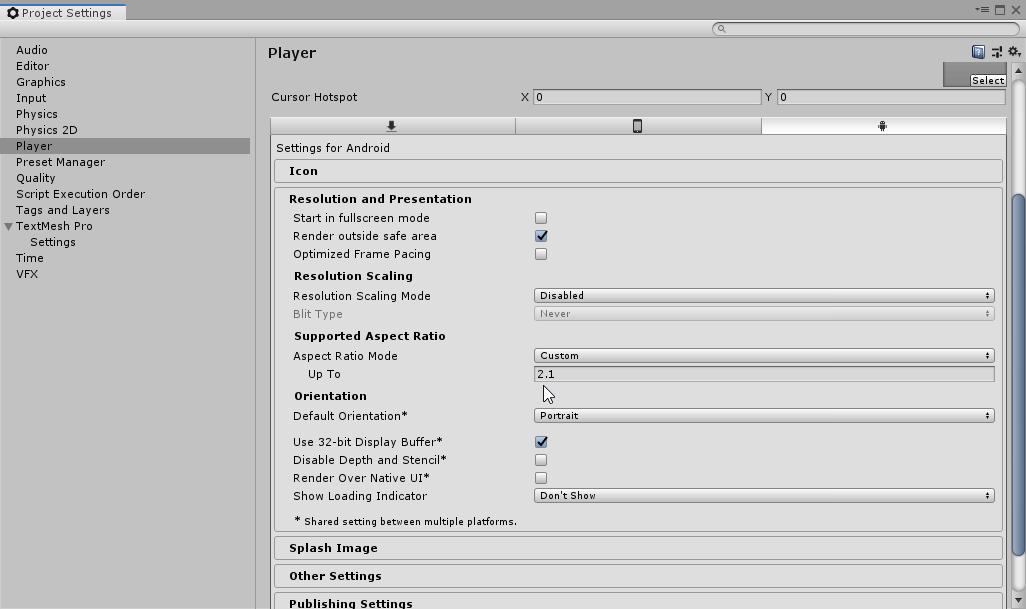
how can i force my app to stay locked at 9:16 aspect ratio?
i tried going to Project Settings -> Player -> Resolution and Presentation -> Supported Aspect Ratio and setting Aspect Ratio Mode to Custom
but idk what "Up To" means in this context https://i.imgur.com/o6xnqYv.png
 rugged wagon
how would i keep my dynamic joystick restricted to one side of the screen?
nvm got it
 elfin fjord
anyone know how to properly remove Unity Ads from a project? I removed the package from the package manager, did a clean build for iOS and there are still UnityAds related files in the Xcode project causing problems
elfin fjord
no
never even used Unity Ads... Unity just likes to ad the package to new projects
did a clean pull from the git repo with it out of the package manifest so i'm hoping doing a build now from that will not have any lingering unity ads stuff
eternal violet
wiat what
@elfin fjord ok so when u
went to the ad services
u enabled it, and it automatically
installed it?
elfin fjord
nah i never even enabled it
in the services window
it was just in the package manager
elfin fjord
along with the unit testing stuff. i'm not sure if they are doing it in the latest version, but for a while, Unity would include those packages in all new projects you'd create
elfin fjord
yeah it was in the project via package manager
elfin fjord
well it shouldn't be
elfin fjord
dude don't worry about it. it was installed by default.
elfin fjord
try making a new project from Unity Hub, then open the package manager. its not empty
elfin fjord
i've already explained it several times
eternal violet
Explained waht several times? that u see the advertisement package in package manger by default? idk waht point your trying to get across, im genineunly askign those questions
elfin fjord
the ads package was included with the project by default. IN THE PROJECT. not just listed as an available package in the package manager. it was INSTALLED BY DEFAULT.
ok got that part?
now
the ads package causes the build to FAIL when submitted to APP STORE CONNECT
because it includes the deprecated UIWebkitView class
if i remove the ads package from the package manager and do a build, the ads package stuff still ends up in the build and then causes the build to FAIL submission to APP STORE CONNECT
THUS
it is stupid for unity to include the ads package by default. maybe they don't even do that in 2019.4? this is an old project that is in 2019.2
eternal violet
Ah interesting, ye i only used unity after 2019.3.14
elfin fjord
welcome to unity... there are bugs around every corner
elfin fjord
good idea
 grand adder
Hey, I've been working on this 2D racing game, so far its a pc game but I want to make it a mobile game. In my code, I have for example: if(Input.GetKey("w")), and then I have other If statements inside that if statement. Is there any way for me to add buttons inside if statements, instead of using functions. Making buttons behave like keys?
 vivid citrus
Hey, I've been working on this 2D racing game, so far its a pc game but I want to make it a mobile game. In my code, I have for example: if(Input.GetKey("w")), and then I have other If statements inside that if statement. Is there any way for me to add buttons inside if statements, instead of using functions. Making buttons behave like keys?
@grand adder yeah you can always put ORs in If statements for mobile buttons or stuff also
 gray halo
I wanted to ask that how to put touch controls in a game for mobile. Can anybody help me.
iron acorn
iron acorn
nope
iron acorn
it's just docs for the GetTouch function.
iron acorn
that's a completely different question and there are many tutorials that answer that.
Here's Brackeys tutorial for example: https://www.youtube.com/watch?v=bp2PiFC9sSs
easily googleable.
gray halo
Actually I have to move it in 3d
From controls
That is for 2d. I have seen that tutorial
iron acorn
that would be almost the same thing. And you only need to change the google search words to get what you want.
basically you can have a look at mouse controls tutorials and just change the mouse part to touch input
 coral lava
Hey! I want to make it so i have to use 2 fingers in order to move/drag my player. How can i do it?
    Collider2D col;

    void Start()
    {
        col = GetComponent<Collider2D>();
    }
    void Update()
    {
        if (Input.touchCount > 0)
        {
            Touch touch = Input.GetTouch(2);
            Vector2 touchPosition = Camera.main.ScreenToWorldPoint(touch.position);

            if (touch.phase == TouchPhase.Began)
            {
                Collider2D touchedCollider = Physics2D.OverlapPoint(touchPosition);
                if (col == touchedCollider)
                {
                    moveAllowed = true;
                }
            }
            if (touch.phase == TouchPhase.Moved)
            {
                if (moveAllowed)
                {
                    transform.position = new Vector2(touchPosition.x, touchPosition.y);
                }
            }
            if (touch.phase == TouchPhase.Ended)
            {
                moveAllowed = false;
}```Right now i also have mouse movement script because my remoteunity doesn't work. tho when building the game to android without mousemovement script, i cant move my player at all?
 ruby robin
if you want 2 fingers, why are you getting the touch with the third index?
and you could improve that by using the mid position between the two touches, but that makes me wonder, if the touch position is in screen space, in what space should be the position of your transform, shouldn't you convert positions between lets say screen space and world space?
oh you're doing the space conversion, sorry about that, didn't notice
coral lava
Ok 😄 so im new to unity and basically copied that out of blackthornprod's video
so i need to do what?
I have a mouse movement script too on my player that makes my player position where my pointer is. when i build my game without mouse script enabled i cant seem to move at all even with touches
glossy sluice
Hello people! I asked this on general but I think this channels is a better fit.
Our app has received a warning from Google saying that the Hot Start time of our app exceeds the average and we should fix it. Have anyone deal with this already?
Is something on the Unity side I could be missing related to this? Cold start times look okay.
glossy sluice
Hey @eternal violet thanks for the answer but sadly no. We dont even have admob in our project. Any other ideas?
robust hamlet
@glossy sluice it really depend on what are you doing while starting your app, what native plugins do you have and etc
glossy sluice
@robust hamlet thank you for your answer! It has to be related to what plugins we are using but what is weird to me that the only metric where this shows is in the hot start. I would think that cold starts would be affected by the same thing but no signs there. 😦
warm adder
how long does it take for your app to cold start?
Do you have a lot of references or objects in your first scene?
 hardy trellis
hey, dose any one know how to implement a Flag_Secure?
OnApplicationFocus() didn't worked 😫
coral lava
just build it and transfer apk to phone. thats what i do
get's frustrating after a while but oh well 😄
 chrome hull
Hello fellow humans, I have a problem with ar. I am wondering if it is possible to change the position of an object to move in a big world. I want to make a story game where you can move around it. I haven’t tested a lot with this and I think that a regular movement controller will work, but I was wondering if any1 knows what I have to connect it to in order to achieve this effect
If any1 replies to this @ me plz cos I have to go get some sleep.
Sorry, wrong time to post
eternal violet
@coral lava @glossy sluice No
u dont have to build it to test it
go to unity remote 5 rn
and go to where it tells u on screen, and make sure u selected any devices
and test then
coral lava
i have done that
eternal violet
Ye so it should work then
or do u get errors
Ok btw
is ur phone connected
via a usb
cable
coral lava
yes it is
eternal violet
do u get the message of: somehting like can this pc access something idk
but do u get a popup
on ur phone
when u do so
coz it has to be some specific usb cable
also on yo phone make sure ur on developer mode and usb debugging enabled
coral lava
yea i can choose if i want to charge or use as usb transfer device ptp etc
eternal violet
hold on lemme see waht message i get
so i can tell u
it says
"allow access to phone data"
"the connected device wil be able to access data on this phone: deny or allow"
coral lava
Yea i've tried it many times
eternal violet
ok do u get any errors?
ruby robin
try using 3 fingers while the third one to touch the screen is on your collider that you want to move 😄
 final lava
im trying to reduce lag using a coroutine https://cdn.discordapp.com/attachments/497874004401586176/730428509398368376/unknown.png

not sure why it does that
Here is the code
IEnumerator LoadSprite( string pathData, Action<Sprite> onLoad )
{
  yield return new WaitForEndOfFrame();
  var path = MakePath( pathData );
  var bytes = File.ReadAllBytes( path );
  var tex = new Texture2D( 2, 2 );
  tex.LoadImage( bytes );
  tex.Apply();
  var rect = new Rect( 0, 0, tex.width, tex.height );
  var sprite = Sprite.Create( tex, rect, Vector2.one / 2f ) ;
  onLoad.Invoke( sprite );
}
I imagine the reason is that File.ReadAllBytes is blocking the main thread until the file is loaded
the fact that it's in a coroutine doesn't change anything
final lava
any way around it ?
i did add a variable delay, to avoid reading 10 files in the same frame, it improved it by a lot, but i still can notice the lag slightly
activeReaderIndex ++ ; // static
yield return new WaitForSeconds( 0.01f * ( 1 + activeReaderIndex ) );
activeReaderIndex -- ;
var bytes = File.ReadAllBytes( path );
How do I test without creating .apk everytime?
I tried using unity remote 5 on my android phone
Even though i followed all the steps properly
The game is not being played on mobile screen
Need help
ruby robin
@final lava you could read the files async
@left wigeon my experience with unity remote 5 has been somewhat similar, works properly on some devices, and can't get it to work on others and I'm not sure how to troubleshoot it to be honest
ruby robin
some things you could try if you are using android are to enable developer options and usb debugging for your device, make sure the computer you are using is authorized by the device. Also check your android sdk path in the unity preferences, I've noticed that it can be */AndroidPlayer\SDK instead of */AndroidPlayer/SDK which could cause problems
left wigeon
@ruby robin I checked that
its not an issue
Do I have to download android studio for SDK
that makes no sense, no right??
ruby robin
nah, the one that comes with unity should be fine
left wigeon
Then what should I do ?
left wigeon
yes
eternal violet
of the game not showing on unity r-
okay
so basically
go to the unity remote
and look where it tells u on
screen to go to
and then select any android device
or any device
eternal violet
any errors?
left wigeon
no errors
left wigeon
what module?
eternal violet
ok go to edit > preferences
and do u see 3 tick boxes?
jdk, ndk, sdk
scroll down
left wigeon
Ha yes through unity hub
eternal violet
ah right then
left wigeon
yes its added, i meant that only
eternal violet
mhmmmmm... u got usb debugging
left wigeon
left wigeon
mhmmmmm... u got usb debugging
@eternal violet yes
eternal violet
Ok, try unchecking sdk box, saving unity, close unity, open unity, tick sdk box, save unity, and test remote 5
Then if that dont work, try use other phones if available
and then if that dont work, try making unity remote work on a new project
and also if u didnt, try having them on a newer unity version
left wigeon
Nope still not working
I am currently using the latest version of unity
According this, I have downloaded the command tool @eternal violet
And step 2 is this
Can you explain me what exactly it says?
Btw this is unity doc
eternal violet
If u added the modules and u made sure to include everything in the mobile thing
then u surely have the sdk done and ready
mmm
left wigeon
Yeah, but then I thought to give it a try :p
eternal violet
hmmm
do u get any
pop up when u connect
ur phone to pc
like which asks: allow this pc to access data from phone
kinda of thign
and u either deny or enable
allow*
@left wigeon
eternal violet
have u tried connecting phone first, opening remote, and then unity?
left wigeon
wait
hazy heart
is there a way to make URP unlit materials look good to use for a whole game?
im trying to figure out the least expensive shader to run a 3D game at runtime.
and does anyone know the overhead from simple unlit to simple lit?>
 cosmic jungle
Hello everybody, is someone here using the OnDemandRendering feature without any problem ?
I try to make it work on Android but, despite the fact it's technically working, I've got a visual bug which make it dirty for an official usage.
I did not find any clue why it's happenning and ... nobody seems to complaint about this.
My problem is, when I skip a render frame, the next rendered frame seems to "merge" all the skipped render.
Alpha UI is opaque, and moving UI elements give me a ghost effect.
Did I miss something ?
 indigo sierra
Anyone else utterly unable to use unity remote? I have no issue compiling and deploying the project to the tablet though...
 latent adder
Can I build my game made with Unity 2018.4.23f to iOS ? Because I heard that you need the newest Unity to build games to iOS. Is that true ? 😦
 frail hornet
@latent adder no that's not true
But you'll need a mac
Unity basically exports your project to a xCode project(xCode is anIDE for developing iOS/mac applications) which from there you can build the game to your device or upload on appstore
latent adder
Yeah, I just wondered if this works with my MAc even with an older Unity version. Thanks @frail hornet
glossy sluice
hey can anyone help me get android set up on untiy
rugged wagon
whats wrong @glossy sluice
how would u make the joystick not take mouse input only touch input
latent adder
How do I make proper REAL joysticks ? Currently I have 4 buttons to control the players walking direction and 2 buttons to rotate the player. The last buttons is to fire
I have a top down view game
 royal dome
Anyone knows where to install OpenJDK for Unity, bc im trying to do it with unity hub, and it tells me it´s installed but then it says it does not find it
Then, when I go to the path unity Specifies, it´s empty
Im trying to use unity hub to install it but I really don´t know why it tells me it has installed but it does not install
So maybe I can install it with other methods?
 gentle thunder
Does anyone know how to use cinemachine freelook with mobile input?
 elfin salmon
Hey i have an issue when i install Aniamation rigging package and build project for android then it not build and get errors but if i build without installing animation rigging then project successfully installing why it is happening ???
warm adder
it would be good to check what errors do you get
 hollow coral
@elfin salmon have you actually looked at the burst errors? None of your screenshots have the errors selected, they come with more info if you select them, and reading errors is #1
elfin salmon
iron acorn
@elfin salmon you need to **click **the error to see more details in the window below
elfin salmon
see
elfin salmon
elfin salmon
where ?
iron acorn
here:
 merry acorn
Hi, i am developing a 3d mobile game i need to make a third person camera amd controller that will be moving with either tapping or joysyick . The player will move on a terrain and i want him to move only on the road using navmesh (or not if you have better suggestion). Anyone has suggestion how to do it?
 limber parcel
Hi, does anyone have a good read for licensing in mobile apps with unity? I want my users to have option to buy premium support (B2C), but I would also like to bulk sell license keys (B2B), or do giveaways (key generation)
for example, I'd like to know how that goes with Google Play or App Store payment policies. If I'm going to sell B2B I'm not going to do IAP but directly invoice the client, how then the transaction fee would work, is it even possible to do it like that?
 rough kindle
I have a problem with multiple touch.
I have a script with a Joystick that moves a Player around.
And I have a script, when I touch my screen the player shoots a Bullet to that position .
But when I use my Joystick I can't touch my screen to shoot .
Can someone help me pls or dm me?
 latent violet
Hello can anyone help me I've got issue to build with IL2CPP on Android
robust hamlet
What's your issue?
rough kindle
I have a problem with multiple touch.
I have a script with a Joystick that moves a Player around.
And I have a script, when I touch my screen the player shoots a Bullet to that position .
But when I use my Joystick I can't touch my screen to shoot .
Can someone help me pls or dm me?
latent adder
@rough kindle Pretty Common Problem. You can look at some Unity threads.
 shadow kernel
Anyone who works with Webgl could take a look at this https://forum.unity.com/threads/urgent-cant-make-game-fill-all-available-space.929109/ ?
Unity Forum
If I try to resize the game to fill all available space on the screen, the game goes black. I tried messing with the unityContainer div and the #canvas...
pretty please
 teal orchid
Hello, can anyone help me please?? I want to make a top down game, with two joysticks, one that moves you and the other one rotated you. I’ve already made the one that moves you, but I can’t find any video or code that rotates you. I am new to unity and code, so please can someone help me??
latent violet
@robust hamlet when i try building with IL2CPP, my build fail..... It doesn't even show building gradle or exporting, it just shows building native binary with IL2CPP and then it stops working
But when i opened up a new clean project, it builds well with the IL2CPP
But on my work project with plugins and stuffs.... It doesn't work
iron acorn
@latent violet what a are the errors?
latent adder
@teal orchid I have done the Dame kind of Game. I did it like that:
I think this is better. I don’t like the normal joysticks, they feel akward, especially the right one. I might replace the left buttons though soon
rough kindle
@latent adder can you send me pls a link U ganz find that thread
shadow kernel
Hey guys
Does anybody know how to keep the camera view regardless of the device's orientation?
what I mean is
when the device is on portrait, it looks a certain way. Then if it's on landscape, the camera seems to zoom out
I want it to look exactly the same, but showing more because you have a wider view on landscape. But not zoom out the camera
Like, if you create an empty scene with a cube in front of the camera. See on the game view at a portrait aspect ratio of your phone, then see it on the game view at a landscape aspect ratio(just invert the numbers)
you will notice that on landscape, it's as if the camera zooms out
the cube seems to get smaller
merry acorn
Hi, I have a simple question. I am developing a 3d mobile game, will using Linear color space impact performance for me?
 scenic crow
@shadow kernel it will work fine on mobile without doing anything
It looks different only because of the edges in editor
If you really want to do something with it, use gyroscope to get rotation or rather search in settings
Then just change camera position or size with scripts
latent adder
@rough kindle Let me give you a quick tip. You should better code what you can code by yourself. You should not just copy everthing. Of course a beginner, just like me, cant do that. But get the answes in small steps so you really understand.
Just search "Joystick Unity" and youll find it
scenic crow
I have created a simple low poly map, but it's square and doesn't look good - you can see that there is nothing on the edge. I don't want to draw something fancy to fix that, it would take much processing power for nothing. What should I do to make it look good?
I have an idea to make it an island, but I don't know how to make the ocean horizon effect without using much processing power. Anyone knows how to do that?
shadow kernel
@scenic crow No man. Look at this video https://www.youtube.com/watch?v=mhZBkdPVfWc . It shows the problem, notice how it zooms out on landscape


 scenic crow
It's because of the black edges you see
Try building the project with the cube only, open the app and rotate your mobile
If it's not what you want, then I don't know how to otherwise help you
@shadow kernel
shadow kernel
It's because of the black edges you see
@scenic crow There is just the cube and the camera, nothing else. I need the camera, I can't remove it.
I am building right now, but I will take some screen shots to show you
shadow kernel
@scenic crow
scenic crow
if (Screen.orientation == ScreenOrientation.Landscape)
{
//Change size of camera
}
else
{
//Change size of camera
}
@shadow kernel experiment with best sizes
 floral palm
Can someone Help me with something?
When I build my game to APK, this errors apear in the console

latent violet
@iron acorn
floral palm
the error that comes up to you is almost always the one that is causing everything
latent violet
Oh
@floral palmdo you know how I can solve it..?
@floral palmwhat unity version you use.?
@floral palm it's like we're both having same issues
latent violet
@floral palm when you try build with mono... It works fine...... But when you try IL2CPP it gives you the error..... Right?
floral palm
@latent violet bro, i just changed it to mono and it says "Gradle build failed. see the console for details"
latent violet
@floral palm is your internet connection on.... Cuz i remember using it to build on mono and it worked and ever since then, it has been working for me......but on IL2CPP..... It's a different story
But to tell you the truth, if you're building for mobile, then mono isn't useful cuz you can't use it to submit to the app store /play store
Mono consists of only 32 bits..... While IL2CPP consists of 32 and 64bits and app store / play store requires both..... So IL2CPP build is what they need
robust hamlet
mono is useful only while testing, because it builds much faster than il2cpp
latent violet
@floral palm someone once had the same issue we're facing with IL2CPP
And he said the solution.... Is to run the IL2CPP as an administrator
go to C:\Program Files\Unity\Editor\Data\il2cpp/build/il2cpp.exe path right click on il2cpp.exe -> properties -> compatiblity -> select run this program as an administrator and change this setting to all user -> apply -> ok
Hope this will work."
 thick viper
Hello, I wonder how or even if it's possible (by some built-in solution) to have UI buttons that work as input controller. I just need a left and right button that can be held down by touch input and constantly receive input to simply move a Rigidbody2D left and right. I am using the new input system with this project and have no experience with touch input. Looking forward toget some help here since YouTube is full of tutorials covering the new input system with keyboard/gamepad input.
So, the ship moves, but I have to repeatetly press the buttons again and again insted of holding down, which is obviously not satisfying.
thick viper
Okay, I figured it out by myself. I will quickly share my solution with you, maybe it will be useful for someone:
- I added On-Screen Button components to the left and right buttons and assigned A for left and D for right to the Control Path.
- Then I created a new Input Action with a 1D-Axis composite for my strave action and assigned the A and D keys to it.
- I wrote a simple script to receive the input from A and D keys to move the ship with it's attached Rigidbody2D component:
public class ShipController : MonoBehaviour
{
    PlayerActionMaps playerActionMaps;
    public float speed = 30f;
    Rigidbody2D rb;

    public float straveInput = 0f;

    void Awake()
    {
        playerActionMaps = new PlayerActionMaps();
        rb = GetComponent<Rigidbody2D>();
    }

    void OnEnable()
    {
        playerActionMaps.Enable();
    }

    void OnDisable()
    {
        playerActionMaps.Disable();
    }

    void Update()
    {
        // Read input values
        straveInput = playerActionMaps.Space.Strave.ReadValue<float>();
    }

    void FixedUpdate()
    {
        // Move the ship
        rb.AddForce(Vector2.right * straveInput * speed);
    }
}
- I added the ShipController script to my Ship GameObject. Set the public speed value of the script to something greater than 1 but keep the straveInput at 0 since it's just a quick and dirty indicator for the input. If you go into play mode now the ship can be moved with the UI buttons and also the A and D keys on the keyboard, because we set the UI buttons's Control Path to these keys.
 golden remnant
hey! Any ideas how can I add an background image on my game? I tried some things and did not work properly. Help!
indigo sierra
Hi, any way to make Unity Remote 5 work? Couldn't make it work since I last tried ages ago. I see lots of threads in the unity forum telling of the issue but nothing works consistently. So how do you debug using unity remote? Or maybe there is a better way to debug than that or just deploying the app (which takes ages).
ruby robin
The way it works for me is enable usb debugging for the device, connect to pc and authorize it with the device (first time only), if it doesn't start working right away when I hit play mode, restart unity and hit play again, usually at this point it works.
But a lot of people are having issues with that, I guess not everyone is as lucky
indigo sierra
I managed to make it work, no idea what is really working but I:
1 unchecked every related uri to local sdk/ndk and linked them back to what they were (but with backslash instead of forward slash)
2 rebooted
3 Connected the device BEFORE launching unity
Only the tablet seems recognized, not the phone (Fairphone 3), no idea what to do to make it worh with it.
ruby robin
I was testing this with the uri-s as well but it doesn't change it for me, what makes the difference when it doesn't want to start working is restarting unity while the device is connected
floral palm
unity remote 5 never worked for me 😦
floral palm
@latent violet I already made the solution you gave me but it still doesn't work
 hybrid cosmos
is anyone here from austria?
floral palm
glossy sluice
Do you know if unity has planed to update the IAP plugin to use the Google Play Billing v2.2 ?
 wanton quail
how can I play video ads with Unity advertising using c#?
iron acorn
@wanton quail look up the unity monetization manual.
iron acorn
wanton quail
oh, thats possible, thank you
final lava
anyone knows an efficient way of working with textures ?
im having massive performance issues when trying to implement flood fill to a 2048 texture
doing it recursive on large regions gives me stack overflow
while running coroutine of a IEnumerator implementation takes few minutes
wanton quail
how can I make auto-fit transform to screen hight/width
final lava
Rect Transform can be starched to fit canvas size
wanton quail
how? I don't find this
final lava
iron acorn
@final lava you'd need to give more details. What are you trying to do?
wanton quail
oh, ok
final lava
flood fill a texture
i have a texture with white outlines
feeding in the x & y i scan the texture for white via GetPixel
and in the same time i check if its not the target color ( eg Red )
if both are true i "SetPixel"
iron acorn
this kind of operations are best done by shaders
iron acorn
or you should do it async with a coroutine
iron acorn
probably not too difficult, although I'm a noob when it comes to shaders, so can't help you there.
final lava
same
iron acorn
a few minutes is too long
final lava
yep...
iron acorn
I'd try profiling
it doesn't makes sense that it takes few minutes for something that simple
final lava
can i post the code ?
iron acorn
Sure. In a snippet or post to hatebin
better do it in #💻┃code-beginner though, so that more people can help you.
final lava
direction checks are my attempt at optimizing the code
to avoid unnecessary "GetPixel" calls
yield return at the end of each of the while loop cycles
readTexture - the texture white the white outlines , sourceColor - is white [ this works to scan the walls ]
writeTexture - same size of the readTex , fillColor - ...
tollerance - right now it checks only the alpha value
x & y the starting point of the flood fill
OnComplete - gets called once the coroutine has finished
the idea of direction is to avoid scanning previous pixel ( eg : moving right , scan next only UP,DOWN,RIGHT while excluding LEFT )
iron acorn
one thing I can advice right away is to cache the read texture colors ahead of time, instead of checking each pixel every time.
here's what the GetPixel docs say:
If you are reading a large block of pixels from the texture, it may be faster to use GetPixels32 or GetPixels which returns a whole block of pixel colors.
but do profile to see if it has any effect
use Profiler.BeginSample/Profiler.EndSample for that.
same thing with SetPixel
final lava
profiler works inside a coroutine ?
iron acorn
If you're constantly regenerating a texture at runtime, it may be faster to generate an array of pixel colors and set all of them at once with SetPixels.
profiler works inside a coroutine ?
@final lava yes
should be
iron acorn
here's the whole description:
Sets pixel color at coordinates (x,y).

Call Apply to actually upload the changed pixels to the graphics card. Uploading is an expensive operation, so you'll want to change as many pixels as possible between Apply calls.

If you're constantly regenerating a texture at runtime, it may be faster to generate an array of pixel colors and set all of them at once with SetPixels.
you don't even need 2 textures
final lava
i do - the texture with outlines has to be kept unchanged to allow "Undo" operation so i add those filled regions "behind" the original , so it appears like regular fill bucket operation -_-
iron acorn
you can have 1. Read from it at the start of operation and save into an array of pixels, then run your algorithm on that array, and assign the new modified array of pixels to the previous texture.
or to a new one
whatever you want. The point is not to read/write pixels one by one.
final lava
i'll try GetPixels and SetPixels , hopefully 2048 x 2048 won't crash a mobile phone x.x
iron acorn
bullshit. You underestimate computers.
iron acorn
I'm also not sure what you do with this:
yield return ++ iterations;
and this:
yield return 0;
float = 4 bytes x 4 ( rgba ) x 2048 ^ 2 = 67108864 bytes = 65536 MB = 64 GB ...
iron acorn
lol, if that was true, we'd still be stuck in the 90s in terms of computer graphics
iron acorn
I don't think so
final lava
?_?
iron acorn
your gpu wouldn't handle that too
final lava
2048 texture tho
i will try that on my shitty android , if it won't crash - modern phones should be fine 👌
yield return gives a value
iron acorn
i think you skipped kilobytes in your calculation
final lava
when implementing IEnumurator it should return a computation ( as far is i know )
oh lol true
phew ...
iron acorn
According to my calculation it's just 64 kb
final lava
not mb ?
iron acorn
nope
final lava
well ok
wanton quail
Rect Transform can be starched to fit canvas size
@final lava can I do this also with GameObjects? (Not UI)
final lava
67108864 bytes
65536 KB
yea lol
@wanton quail u could project Canvas coordinates to world space and fit it to screen
iron acorn
well, modern phones can handle that without problem
it won't be instant for sure though
final lava
as long as it is going to faster then few minutes ...
ill try Profiling the Get/Set pixel now , then ill try the PixelS methods
iron acorn
also, as I said, your coroutines yields are weird.
final lava
they are useless tight now i guess
since im not using them inside for loops
idk how unity handles them internally
implemented them by C# standards
does returning null is normal ?
iron acorn
you should probably check how much time passed for processing in this frame and yield return null.
"null" though, not "0"
ruby robin
why not yield return 0 😄
iron acorn
never tried that, but something tells me it wouldn't work...
ruby robin
well in my experience the result is the same as null
iron acorn
hmm.. Googled it now and it seems like it... Weird but true...
ruby robin
i do that when I'd like to wait for next frame and do not want to allocate with new WaitForEndOfFrame()
iron acorn
this answer though:
Both yield return 0 and yield return null yields for a single frame. The biggest difference is that yield return 0 allocates memory because of boxing and unboxing of the 0 that happens under the hood, but yield return null does not allocate memory. Because of this, it is highly recommended to use yield return null if you care about performance.
hmm good to know
iron acorn
but the other one "yield return ++ iterations;" doesn't make any sense.
ruby robin
I was wondering about that as well, not for Unity
final lava
those are for the foreach * loops
iron acorn
even if it was a for loop. I still don't get it.
final lava
GetNext is a function that IEnumerator has
so it keeps calling them until it reached the end
yield return is the return value for the GetNext
so technically im returning the index value
ruby robin
it depends on how you run that coroutine
if you use StartCoroutine, then it doesn't make sense to send anything else than what unity expects
final lava
yea i figured that much
IEnumerator in c# is somehow different
unity uses it in its own way perhaps ?

Stack Overflow
Can anyone explain IEnumerable and IEnumerator to me?
for example, when to use it over foreach? what's the difference between IEnumerable and IEnumerator? Why do we need to use it?
ruby robin
it expects certain type of yield instructions, but haven't gone in that rabbit hole to know it good enough
final lava
Wait for end of frame implements it
and it is the deepest you could go
[UsedByNativeCode]
iron acorn
In any case, you'd probably better go with StartCoroutine and yield return null
final lava
i just tried that
same times
i was using StartCouroutine before as well
did replace it with nulls just now
no difference
final lava
eh ?
ruby robin
probably yield return any int results in a frame wait
final lava
oh ...
ruby robin
haven't tested it tho
iron acorn
that's why I told you to yield only when you've processed for several ms this frame.
final lava
ill remove it
so i had something like this :
IEnumerator Exec()
{
  yield return null;
  while( ... )
  {
    ...
    yield return null;
  }
}
and ill remove the yield inside the while
iron acorn
you still need to make sure you make several cycles a frame
as many as you can fit in fact
iron acorn
I bet it will be even quicker
ruby robin
but does it spike the frame duration
final lava
ruby robin
probably because it waits for the cpu to finish
there was this video about profiling, pretty useful gotta watch it again 😄
final lava
just tried a larger region - it lags for a split second there
defeats the whole coroutine purpose ...
ruby robin
https://www.youtube.com/watch?v=uXRURWwabF4 this, recommend for anyone that has the time 😄

Profiling is one of the best ways to optimize your game. Learn how to use Unity’s highly effective profiling tools and how to interpret the data they produce.
Speaker:
Ciro Continisio (Lead Evangelist, EMEA)
Ask your questions here: https://on.unity.com/2SWT8ph
Did you find ...
final lava
seems like i'd need to yield return null each 10k scans or something
ruby robin
btw the fact that you're doing it in a coroutine doesn't change that it is happening in a single frame
if you want to reduce the lag spike and increase the time it takes, you need to yield at some point
final lava
makes sense
iron acorn
/// class field
public float processinTimePerFrame = 0.01f;

/// in the end of the while loop
if(Time.time >= nextYieldTime )
{
    yield return null;
    nextYieldTime = Time.time + processinTimePerFrame;
}
try that
ruby robin
yeah, that looks great
but what I wonder is does the deltaTime change during the while loop, if the main thread is blocked by it
iron acorn
you could also apply the current pixel array to the texture in that if statement, for the user to see progress.
but what I wonder is does the deltaTime change during the while loop, if the main thread is blocked by it
@ruby robin oops. I think you're right.
should probably check against Time.time
ruby robin
I guess he could split the yields based on the expected workload and how much work should be handled in a single frame
or this
final lava
maybe there is sometimes for coroutines like there is dps time for audio ?
AudioSettings.dspTime
fixed it!