#↕️┃editor-extensions
1 messages · Page 69 of 1
 waxen sandal
Okay good, apparently if you don't override OnGUI it doesn't break
 whole steppe
white background, black text
waxen sandal
I mean the inspector
whole steppe
sorry, I didn't get it
waxen sandal
So if you create a button you have several components: RectTransform, Image, Button, and some others
whole steppe
yep
whole steppe
ok
 lofty seal
hey everyone, I dont know why but I when i go to create in assets I cant find input actions
anyone know where I need to go to create a new input actions file?
 gloomy chasm
Are asset guids safe to use as references? Do I need to worry about them changing? From reading about them, they seem good to use. But I want to double check.
gloomy chasm
Alright, that is what I thought, thanks. Yeah, I only need it for in the editor.
Had to make it a bit ugly to get around the fact that AssetDatabas.GuidToPath cannot be used in OnDeserialize :/
 onyx harness
Maybe a good sign to overhaul your design
gloomy chasm
I am making a node graph, and serializing it to json. I have a node that has a GameObject field. So there isn't too much to be done about it.
I originally had it so that there was a ScriptableObject that had a serialized dictionary of IDs and gameObjects, and when serialized it would put the gameobject from the field in to the dictionary. But that was really ugly and led to a lot of problems with with undo, and serialization and stuff.
onyx harness
Maybe put a string near the GameObject
When the GO is set, you set the GUID
When deserializing, no extra work
@gloomy chasm
gloomy chasm
That is basically what I am doing now. The problem becomes when needing to deserialize, like when converting from json to c# objects. How to I set the field to be the GameObject once more?
Right now I have a method that sets it with AssetDatabase that I call in the OnEnable function of an EditorWindow. Not ideal, and I am sure there is a better place for it. But I put it there for now to see if it would work. And it does.
@onyx harness
gloomy chasm
@onyx harness Well I'll be! I could have sworn it didn't work. In the json is says it is serializing the instanceID, but it keeps the reference even after closing and reopening the editor, so maybe not? Either way, it works. Thanks man!
onyx harness
Lol no, it serializes the ref to the Object, which ends up with a LocalID and a FileID.
@gloomy chasm JsonUtility uses the serializer internally. So what the Inspector can do, it does as well
gloomy chasm
oh, well good to know. Thank you again @onyx harness
 severe python
I'm trying to generate a set of materials at edit time because I have a large number of textures that follow a naming scheme
so I'm trying to generate instances of a new material, but the resulting file seems to be unrecognized
this is is how I'm doing it, I don't see what I'm doing wrong here
 visual stag
are you missing the .mat extension?
severe python
ah
that was it! thanks
to go from non to tons of materials in a flip of a switch!
oh thats wicked, Unity detected my many many usages of normal map textures that were not correctly defined as normal maps and let me fix them in bulk automatically, now that is some superb user experience
visual stag
wow, good UX existing in Unity? Wild stuff
severe python
though,I think I did this wrong, these textures don't look quite right sadly
 deep wyvern
Do custom Editor scripts still need to be in the Editor folder? I made one for a SO and it still works so I guess no... or am I missing something? Saw it mentioned in a turoial on learn.Unity
 split bridge
@deep wyvern Editor scripts need code in the Unity.Editor namespace - this code isn't available in a built project. When you do a build Unity automatically excludes code in folders called 'Editor'. So, it might be working now but not when you try and build.
You also have to be careful your runtime code doesn't have any references to your editor code
You can use #if UNITY_EDITOR ... #endif around code if you don't want to move the code into the editor folder - again, just got to be careful not to reference anything in those blocks at runtime as it will be stripped out.
waxen sandal
You can also mark assembly definition files as editor only
And it'll work just as well
split bridge
wasn't sure whether to mention asmdefs... 😅 - potentially bit of a rabbit hole but yes 👍 💪
waxen sandal
Also they do work if you don't put them in an editor directory or editor asmdef
But you won't be able to build your project
deep wyvern
@split bridge Very helpful, thank you!
severe python
where are those graphing guides people been using nevermind, found it
 novel knot
i dont know where to post this, the a-holes at EBS wont help, the Odin people wont help either... can someone please help me with inventory pro? i don't need a two year old video that tells me how to install it, im getting red text and it keeps telling me to connect a database which i did 20 times, I'm using 2020.1.11.
onyx harness
If you come in here asking for help, please at least provided the necessities. Like what is the red text?
So we don't ask obvious question and waste back & forth
 civic river
Hi, I'm using UI elements to try and update an old editor script, I'm being met with a completely cryptic error -- not really clear to me what I'm doing wrong. Simply, I'd like to be able to click on an item and see a more detailed editor for it (Either as a popup or inplace in the editor)
Here's my original (working) code:
https://hatebin.com/knlvhzzfbs
And my new code (First one is snippet, second one is full code)
https://hatebin.com/daolqbdkrj
https://hatebin.com/ueinohqhmw
And the completely cryptic error I'm getting:
the problem line is editor.DrawDefaultInspector(); but I'm completely unsure why or how to work around this
 copper lava
Does anyone know if "go to all" exist in visual studio MAC? Do you guys prefer visual studio code instead(once again talking abt MAC)?(windows keyboard shortcut Ctrl + T) https://tutorials.visualstudio.com/vs-get-started/navigating-code
Learn about Microsoft developer tools
waxen sandal
This channel isn't about IDEs but I prefer Rider
deep wyvern
So I am writing a PropertyDrawer and I'd like to have a 3 prpertyfields next to each other in the same line. Since I cannot use EditorGUILayout how do I do that?
waxen sandal
You just calculate the position?
You get a position as a parameter
So you just adjust the width and the x position for each element
waxen sandal
What's your question
deep wyvern
Labelfield with the property name called pitch is on the same y as the delayedfloatfield
but not in the inspector
And I am trying to get them on the same row
waxen sandal
Why not just use the label of the delayedfloatfield?
deep wyvern
Because I want another float field in there^^
Well I just subtracted the singlelineheight from the y value of the pitch label which brings them on the same line but I absolutely do not understand why and I am pretty sure thats not how I am supposed to do it
waxen sandal
I think your code looks fine
I'd cache the positions into a local variable and then debug to see if they're correct
 keen pumice
I'm invoking the following inside an OnGizmoSelected call. It displays fine, but no matter where I click on the button, it fails to register the click and set the "SelectedControlPoint": if (UnityEditor.Handles.Button(enterPoint, Quaternion.identity, size*0.1f, size*.15f, UnityEditor.Handles.DotHandleCap)) selectedControlPoint = 0 + i * 3; Any idea's why it might not be registering the click?
(In editor, NOT play mode)
@restive ember from what I recall the order in which they are in the scene hierarchy will affect the order in which they are drawn. The other option is to adjust the distance from camera (or just the Z position value, for canvas stuff). Not sure about this tho.. been a while.
novel knot
@onyx harness i said "the red text tells me to connect a database." ive done that 20 times and still asks me
i get rid of thins that wont work, no time to keep playing with stuff that will NOT work
 odd vessel
I have a custom struct with custom property drawer, and it works.
But when it's a property on a behavior that's part of a prefab, and I do apply, it still shows as bold (unapplied).
Is there something specific I should do about it?
waxen sandal
Code?
odd vessel
Pretty much this:
SerializedProperty layerIndex = property.FindPropertyRelative("mLayerIndex");
EditorGUI.BeginProperty(position, GUIContent.none, property);
layerIndex.intValue = EditorGUI.LayerField(position, layerIndex.intValue);
EditorGUI.EndProperty();
Hmm, I think that should just owrk
odd vessel
Well it mostly does, but the prefab thing is always bold. As if I need applyModifiedProperties or something like that
waxen sandal
I'm assuming you're doing that if it was changed right?
odd vessel
doing what? apply modified properties? no, I'm not doing it all
from what I can tell that method should be called when you create a custom Editor (where you also have serializedObject, which I don't)
waxen sandal
Oh right of course
odd vessel
how can I use something like EditorGUILayout.PropertyField with an editor-only property? e.g. backed by a field inside an Editor class
 hard acorn
oki i need help with bolt for unity i making a when i click on button an game object in the mouse position but i want to make it so it stucks on my mouse until i let go when i let go the object will stay there i tried to do it but failed ping me or dm me if you can help.
civic river
Heya, I'm using UI elements and I was wondering if there was some way to tell if a mouse event clicked this little wheel or not
Currently the event fires if I click anywhere in the rect
I want it to fire only if I don't click the circley bit
It also still passes double clicks which... doesn't seem possible to stop?
waxen sandal
If it's your own control you can just make it a separate element and subscribe events on that one
waxen sandal
Yes
civic river
Yeah, it seems like there's no way to consume events like in... every other event system
I guess I'd have to engineer my own solution ;/
Thx for the input ^^
waxen sandal
You can probably find the element that's drawing the click area
But only if it's been updated to UITK
civic river
Yeah, I can access the element but there's no way to unsubscribe it's events or stop the event propogating to it >..
Even prematurely disposing the event throws an error but only after the actions fire, so they're earlier in the event path anyways
waxen sandal
Shame
odd vessel
I'm looking to create a trampoline-like object. Currently I'm "faking" it using collision detection + animation + add force, but it definitely don't look natural.
Any ideas on how to make it part of the physics engine?
odd vessel
oops sorry, thought I was there.
 real ivy
U guys know about the subasset rename parent change bug?
https://issuetracker.unity3d.com/issues/parent-and-child-nested-scriptable-object-assets-switch-places-when-parent-scriptable-object-asset-is-renamed
With some codes i think i can fix this, but how do u guys do it?
Or if there's actually simple solution?
How to reproduce: 1. Download and open the attached project "1189089.zip" 2. Create a parent Scriptable Object Asset (Right-click -&...
 mighty oasis
anyone know how to get all VisualElements under mouse position?
severe python
Panel has some calls
If I recall correctly, (sorry not at my personal pc atm) you can acquire the Panel from any visual element
and then on the Panel type there are calls to check the mouse position agaisnt all visual elements under it
 split bridge
@real ivy yea I recently hit this - didn’t realise there was already a bug filed. V annoying but quite easy to get round by setting the main asset to be the main asset again via assetdatabase before reimporting (I think)
real ivy
@split bridge How do u listen to that "before reimporting"?
I think i have a OnPreReimport callback something i did in another project, maybe it's that
But not sure if that gets called in both renaming SO and dupe-ing?
split bridge
I mean you manually call AssetDatabase.ImportAsset after adding the child and setting the main asset
real ivy
Oh i dont have the problem when adding child. The parent is maintained in this case
It's only when rename and dupe-ing
Oh this
AssetPostprocessor and OnPreprocessTexture types
split bridge
If via editor script using AssetDatabase.SetMainObject should help. If it’s using built-in editor ctrl+d that’s super annoying
real ivy
This fixes it
 leaden perch
Is there anything nicer I can do inside an OnValidate() other than spam log messages? I've got this right now, but it just sends tons of log spam when you're in an invalid state. WBN to just block the change, highlight the field red, or what do people do here?
private void OnValidate()
{
    if (attackMax < attackMin) {
        Debug.Log("Attack Max should not be less than Attack Min");
    }
}
 short tiger
@leaden perch You could log a warning/error and fix it by clamping it so it doesn't keeps spamming
Or not log it and just silently clamp it
leaden perch
@short tiger ah of course, i can just clamp the values here. yeah feels much better just silently clamping it, thanks!
leaden perch
@onyx harness why's that?
onyx harness
OnValidate() is not maintainable.
Not reusable.
Ugly.
leaden perch
yeah ok. what's really ugly though is building a custom Editor that edits ScriptableObjects that contain arrays of ScriptableObjects displayed by ReorderableLists. i tried for a few hours this morning wedging PropertyDrawers into that but for now I'm happy to have found OnValidate for this particular case
mostly comes down to needing to wrap SO's like this: https://forum.unity.com/threads/custom-propertydrawer-for-scriptableobject-type-property.736643/
Unity Forum
Hello,
I am trying to create a custom PropertyDrawer for a ScriptableObject type property. Unfortunately I am unable to get this working.
I have a lot...
onyx harness
What is the relation with your current issue?
leaden perch
this is a rat hole, but i didn't find a satisfying way for PropertyDrawers to exist in what I currently have. i'd have to wrap all of my data as Properties or each SO in a wrapper like that link.
basically i can't use a PropertyDrawer because of the way this stuff is ultimately being rendered
 trail dawn
I'm starting to jump into editor scripting. Question, what's the best way to handle an object that was just deselected?
onyx harness
Remember it
onyx harness
Question is very vague, please be more specific
trail dawn
Sure. I'm pretty new to editor scripting.
I have a basic script in my editor folder with the following (trimmed down for clarity):
public class EditorTest : Editor
{
    private ComponentPath currentSelection;

    protected virtual void OnSceneGUI()
    {
        if (currentSelection != (ComponentPath) target)
        {
            currentSelection = (ComponentPath) target);
        }


        EditorGUI.BeginChangeCheck();
        // Draw some bezier curves logic ...
    }
}
When I cache currentSelection it remains null, since I assume editor scripts can't actually contain a reference to a scene object.
onyx harness
What is CurrentSelection?
Because basically, when you cast target to ComponentPath, if the cast fails, it will be null.
Therefore your condition will compare CurrentSelection to null, which might be true.
Then you assign null to it.
waxen sandal
Editors get destroyed when you deselect the object
trail dawn
Ah ... hence why it's returning null on the next selection.
waxen sandal
That's a hard cast by the way so it'll throw an exception
onyx harness
Then, Navi is right, you need to find a way to 'remember' it
trail dawn
Yeah, that makes sense.
How does this typically work then, is it best to just have an editor object in the scene to manage caching?
That the editor script passes things to?
waxen sandal
It depends what you're actually trying to do
trail dawn
In short, I have a component ComponentPath on some objects. I aim to create an empty object with a bunch of GameObjects as children (to visualize the path) when selecting it in the hierarchy.
When I select a different (any) object, I wish to destroy that holder.
waxen sandal
So why not create in OnEnable and destroy them in OnDestroy?
Be sure to mark the as HideFlags.DontSave
trail dawn
OnEnable is called in Editor when selecting an object?
trail dawn
Right right, sorry, I have to wrap my head around that fact.
Okay, thanks for the hints, I'll give it a try.
Thanks both!
trail dawn
Yeah, that helped me understand. I didn't realize the Editor was a new instance per selection.
waxen sandal
Exactly 😉
trail dawn
I'll probably be back with more questions, but I'll start tinkering for now.
Years of Unity experience, and I've never gotten into editor scripting. Lol. But no time like the present.
severe python
If you're on Unity 2020, you're lucky
Editor scripting is actually not a terrible experience in 2019+
I'd even go so far to say as its a pretty nice experience overall
if you're not using the old imgui stuff that is
trail dawn
Yeah, I'm on 2020! 😄
Brave new world.
Okay, so I've now understood that OnEnable/Disable is called on the editor script as well. Mind blowing stuff, but I think that's more than enough I need to do this very basic visualizer.
 next stag
Hey people, im looking to find a texture array editor, would like to be able to export multiple different arrays and easily be able to edit them later, anyone know of one?
 balmy wigeon
(Solved)Hope im in the right section, im learning A* pathfinding atm, just made the first agent on a simple tilemap 2d scene. I used the aipath&destination setter script to get my enemy gameobject moving towards my character. but now when i run the editor, the game doesnt run smooth anymore.
When i build and run the game it works fine tho. Any possible causes why running in the editor suddently laggs?
or any possible fixes?
balmy wigeon
already tried disabling anything that has to do with A* , restarting pc, 3 youtube videos on general lag fixes. but no change :((
so i think i finally fixed it? i reduced the 1000x1000 nodes to 100x100 and it went away. it didnt come to mind that this affects things as it was not lagging before using the same node size when i was trying to script the pathfinder and failed lol. im guessing now aipath cares alot more about node ammount
odd vessel
how can I create a moveable box in a custom editor, like the one in a rect collier (2d) ?
mighty oasis
@severe python Sorry it took so long to thank you. But thanks so much!
 queen violet
I'm trying to bind a UIElemenets Listview to a list of scriptable objects, and for each show the ObjectField, doesn't seem like I can bind directly to the object? Expects binding path ?
real ivy
@queen violet
https://discordapp.com/channels/489222168727519232/533353544846147585/730783338570317866
Maybe this is related?
https://pastebin.com/Lw85b1Vm
This is a snippet of mine, a nested ListView tho, so it's kinda complicated
But hopefully u see somethings that u can use
If it's just showing SO ObjectField, i do this
ObjectField skillField = new ObjectField("Skill");
skillField.objectType = typeof(ScriptableSkill);
skillField.value = skill;
skillField.RegisterValueChangedCallback((t) =>
        {
skill = (ScriptableSkill)t.newValue;
        });
v.Add(skillField);```
Pastebin
Pastebin.com is the number one paste tool since 2002. Pastebin is a website where you can store text online for a set period of time.
deep wyvern
I got my PropertyDrawer to display the way I wanted it to but when editing the float field they snap back to the value form slider and I am not sure where the flaw in my logic is
waxen sandal
EditorGUILayout.DelayedFloatField returns the new value
Rather than modifies the value you passed in
civic river
I'm not even sure how to describe this problem
Editor will not edit one particular kind of scriptable object
I haven't the slightest clue why
Uneditable object: https://hatebin.com/zzokhodtiv
Object that's totally fine: https://hatebin.com/bupqirbjbn
deep wyvern
You posted the wrong script for the uneditable obj
well technically it IS uneditable but I don't think that's what your question is about, is it?
Because that is just the abstract class
waxen sandal
I'm getting a discrepancy between EditorGUIUtility.labelWidth (which seems to be 150 always) and the built in Unity fields, even after setting EditorGUIUtility.labelWidth to 0 (which should reset it) it still is set to 150 even though built in labels are wider
Any ideas what might be causing this?
 steady crest
How do I change the visibility of layers in the editor?
waxen sandal
Tools.lockedLayers?
steady crest
ah, Tools.visibleLayers thx
waxen sandal
Oh right I was thinking locking them for some reason
steady crest
i typed in tools and found what i needed. didnt know where it was. now i just need to figure out how to make it hide a certain layer
not too familiar with bitwise operations
waxen sandal
Should be enough out there based on physics layers
steady crest
I'll find it. I was just unable to find the location of the layers in the editor
queen violet
@real ivy i found the solution at that link you posted back in July.
private void BindItem(VisualElement arg1, int index)
{
var field = arg1 as ObjectField;
var test = SPBlends.GetArrayElementAtIndex(index);
field.Unbind();
field.bindingPath = test.propertyPath;
field.Bind(test.serializedObject);
so thanks for that old post haha
trail dawn
So I've been looking more into Handles, and I'm getting a better understanding of it. But I'm wondering if Handles does ultimately support creating a transform gizmo that can act with the same functionality of moving an object in the scene.
Mainly, the ability to focus on it (with F) and use the snap to vertex/surface features. I'm questioning it since they're not actually representing a physical objects.
Would there be some way to hack that in if not supported?
waxen sandal
Sure that should be possible, there's no built in way that I'm aware of though
gloomy chasm
Handles have a Handles.PositionHandle that is just like the transform position handle. Even supports vertex snapping.
steady crest
if I execute this on a scene, can this under heavy load crash unity? Im scared to click it 😦 ```cs
FindObjectsOfType<Renderable>().ForEach(renderable =>
{
renderable.PrepareObject();
});
(on a button in the editor)
gloomy chasm
As far as I know, no.
steady crest
should probably give this too ```cs
[Button("Reset")]public void PrepareObject()
{
for (var i = transform.childCount - 1; i >= 0; i--)
{
DestroyImmediate(transform.GetChild(i).gameObject);
}
    foreach (var swapData in prefabs.Where(swapData => swapData.prefab))
    {
        Instantiate(swapData.prefab, transform);
    }
}
I see nothing wrong with that.
trail dawn
Okay, thanks both. Will look into it, and see what I can come up with.
steady crest
it could just take a while, it shouldnt crash the editor should it?
gloomy chasm
Correct
steady crest
that's fine, its not something I need to use a lot
gloomy chasm
btw, Monobehaviors have a void Reset() if that is relevant. It shows up in the context drop down on the component header.
steady crest
im aware @gloomy chasm , thats doing this. the null needs to be set by my artist and afterwards it instantiates th objects to be swapped at runtime```cs
private void Reset()
{
foreach (var vName in Enum.GetValues(typeof(Dimensions)))
{
prefabs.Add(new SwapData((Dimensions)vName, null));
}
}
So many different resets
steady crest
Reset function resets the monobehaviour, the button resets the scene data
its more like a force update on the data its holding rly
im just instantiating the gameobjects n the editor and setting them correctly, so I dont need to call PrepareObjects in the Start function @waxen sandal
waxen sandal
You should make a buildpipeline that resets everything for you before building
waxen sandal
Regarding my earlier question, it's because EditorGUIUtility.HierarchyMode was false
Which influences how wide the label is (Calculated based on contextWidth or whether it's fixed (150))
trail dawn
So it turns out, Position.Handles does actually support surface snapping. I swear I had tested this yesterday ... but maybe I was tired and not realizing it.
The last thing is really just looking into how to focus on it.
 barren spindle
Does anyone here use Unity Teams and can help me quickly ?
queen violet
Does binding path not work on a scriptable object ?
Looks like i had to get the object and do .BindProperty(obj.FindProperty(floatvaluename))
Seems like it works on normal Serializable C# classes
trail dawn
Is it possible to set the actual size of a PositionHandle?
steady crest
I have a system like this https://hatebin.com/jpwjfdfivu that allows me to call the PrepareObject function whenever the lists value changes, however this does not include when the gameobjects properties change. and I would much prefer to actually make it affect that as well.
So the problem is, how can I call my PrepareObject function when anything in the prefab changes, preferably from this inspector class? 🤔
if the prefab is changed, as in the referenced object is changed, it works. but if the prefab is edit its not. how would I get this to work?
civic river
@queen violet Works fine, it binds the scriptable object though not the values
If you want to inspect the values make sure to set the type
var scriptableObjectField = new ObjectField
  {objectType = typeof(YOUR SCRIPTABLE OBJECT TYPE)};
scriptableObjectField.BindProperty(property);
var scriptableObjectInspector = new InspectorElement(property.objectReferenceValue);
anyone know why this is throwing (and preferably how to fix it to get it to work) TargetException: Object of type 'System.RuntimeType' doesn't match target type
    [ValueDropdown("GetFunctions"), OnValueChanged("SetAction")] public Type function;
    public Action Use;

    private void SetAction()
    {
        Use = () => function.GetMethod(nameof(IUseable.Use))?.Invoke(function, null);
    }

    private static IEnumerable GetFunctions()
    {
        return AppDomain.CurrentDomain.GetAssemblies()
            .SelectMany(s => s.GetTypes())
            .Where(p => typeof(IUseable).IsAssignableFrom(p)
                        && p != typeof(IUseable));
    }
What line
steady crest
the SetAction method is throwing that error
presumably because Invoke(function, null) is not valid
waxen sandal
Idk seems fine
steady crest
full error: https://hatebin.com/rleforgqpa (too long for discord it seems)
This being the function I am trying to invoke @waxen sandal
    interface IUseable
    {
        void Use();
    }

    class Potion : IUseable
    {
        public void Use()
        {
            Debug.Log($"{nameof(Potion)} was used.");
        }
    }
How is that going to work when your don't have a static method
onyx harness
The first argument
steady crest
so I need to somehow pass in a class reference from the type 🤔
onyx harness
Type is not an instance
steady crest
ah
Use = () => function.GetMethod(nameof(IUseable.Use))?.Invoke(Activator.CreateInstance(function), null);
^
steady crest
xD
I mean, I wanted to replace UnityEvents with delegates for item effect invocations.
onyx harness
UnityEvents requires a target (the instance)
waxen sandal
You should fork and add action support to my serialized func impl
That I shared with you before
steady crest
maybe I should, this wouldnt serialize anyway
onyx harness
It's not hard to serialized a Type or any meta reflection
onyx harness
but anyway you need a target
steady crest
by target, you mean a class to execute the function or a class to execute the function on?
onyx harness
an object to execute the method on
From the beginning this is wrong
The field "Type" is named "function"
steady crest
well yea, the name of that variable is indeed not very good
I tried to store the action in there but I couldnt since it needed some processing @onyx harness
the method will be executed on the scene, mostly on the player object, but I can pass that in from the game manager thats holding a reference cant I 🤔
or I could do as Navi suggested, use his serialized functions thingie and add Action support to it
waxen sandal
But don't you already have an instance of a potion somewhere?
Like in your inventory?
onyx harness
Try to rethink what do you want to do.
You call SetAction when function is modified.
You want to call Use() on "something".
What is that "something"?
steady crest
that something will be a scene object in all cases
in some cases the player, like the potion. or if its a key it'll be invoked on a door
@onyx harness
the player will need to interact with the door, and the option will be provided to use the key. if they choose to use it, I will open the door.
in case of a potion, it will target its invoke onto the player
now that I think about it, I need to pass in parameters
waxen sandal
Then you need to invoke the method on the instance (The key or the potion)
onyx harness
now that I think about it, I need to pass in parameters
@steady crest This parameter, this is the target
But you are talking like gameplay stuff, and not editor stuff
steady crest
yeah, thats gameplay stuff.
 timid sapphire
hi guys, I made an editor window for my artist to help with his workflow. I'm using GUI.contentColor = myColor to set the color of a GUILayout.Label(...). On my PC the color works fine, but on my artists Mac the color doesn't change (all of the text stays the default color)
any clue? I've googled and didn't find anything
pls @mention me if anyone knows - thanks a lot 🙂
oops, I should mention I'm using 2020.1.1f1 in case that matters
queen violet
I'm using a list of scriptable objects so I can bind in UIElements, but I don't need to save them as assets. Do they serialize into prefabs / scenes ?
onyx harness
@timid sapphire Are you both using the same skin? Light or dark?
I'm using a list of scriptable objects so I can bind in UIElements, but I don't need to save them as assets. Do they serialize into prefabs / scenes ?
@queen violet Nope
queen violet
Hmm, seems like they do
What's the point of the binding system if you can't bind to a custom class
Any work around?
Regretting wasting time on UIElements instead of just IMGUI
timid sapphire
@onyx harness I am using Dark skin, he is using Light (although he will be using dark soon, just found out its becoming free haha)
Does that affect the GUI.contentColor? 🤔
Definitely will test that out!
onyx harness
Does that affect the GUI.contentColor? 🤔
@timid sapphire as stupid as it sounds, yes.
queen violet
Objectfield OnSelectedPose change the value isn't pushed to the serialized object yet. Is there a post bind update event to listen to ?
RegisterValueChangedcallback i mean
 silk jolt
Where are the latest UI Toolkit examples?
 brave moon
Does anyone here know how I could display other script/variablles of it in inspector by editor?
civic river
@queen violet You need to write your own binding element to bind to a custom class
The native bindings are only for ... natives
Lists still a WIP though
queen violet
What i mean is, if I listen to Objectfield.RegisterValueChangedcallback, the event fires before it published the value to the bound property.
Just odd how they decided to build their API without things like BeforeChange, AfterChange etc.
Looks like the magic is to use _root.schedule.Execute(); to fire something after the next update
civic river
Interesting, can you not call
objectField.binding.Update();
to publish the changes?
I'm still figuring out this whole system as well, it's a bit weird.
queen violet
no idea, the documentation is crap, no tutorials at all
This is when I update the chosen object in the editor and the Change event fires, I'm bound to an item in a list so I want to build my listview with the updated values in that moment, but the bound item isn't updated yet at that point.
But firing the schedule method on the root let me do what I needed.
 feral karma
For anyone interested, I created a "Compilation Visualizer" and added it as package to OpenUPM:
https://twitter.com/hybridherbst/status/1293639093004513287
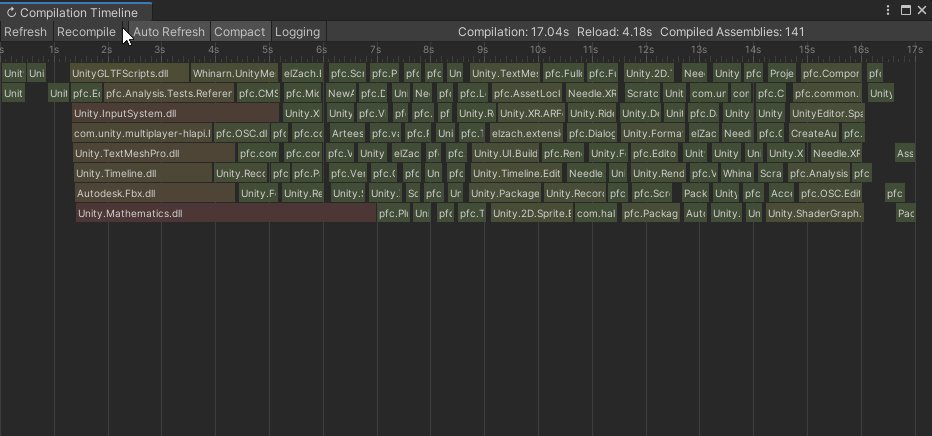

Finally found some time to wrap this up and release it –
a Compilation Visualizer for @unity3d!
This is helpful to check and optimize dependencies between AsmDefs & Packages 🌵
Available on #OpenUPM: https://t.co/LBn1wq8VrT
Based on initial code from @KarlJamesJones https:/...
Likes
109
 Twitter
waxen sandal
Twitter
waxen sandal
Oh nice! Do you have to force a recompile from the window?
Or does it pickup Unity triggered compiles as well? @feral karma
feral karma
It just shows whatever is currently compiling - so e.g. when you change a script, you'll see which assemblies needed to be recompiled because of that
Super helpful to debug dependencies between assemblies and stuff
civic river
@feral karma Nice dude! This is great 😄
queen violet
Interesting, can you not call
objectField.binding.Update();to publish the changes?
@civic river That also did the job in the moment, I guess Update would be called after the event by the framework, but it looks like I can call it in the event to do what i needed also.
This method will probably be useful later on. Thanks
 short raft
Hey is there a way to make it so that my own variable type can be displayed as a drop-down in inspector?
waxen sandal
Write a property drawer for it
short raft
Thank you!
queen violet
I was finally able to use Custom Class for binding my BindableElement, but if i want to switch bindings, I have to manually update the paths which I Didn't have to when binding against a ScriptableObject. Must be a bug in 2019.4
timid sapphire
@onyx harness updating to new unity with Dark Mode fixed that gui editor window color issue 👍 thanks for the help!
 blissful hill
Anyone written a custom inspector for a custom filetype?
It'd be nice to show data of the file along with some buttons in the inspector
visual stag
sure
Read or import the file and display the data, not sure where the question comes into it
blissful hill
@visual stag I haven't written a custom editor for a custom filetype before. https://forum.unity.com/threads/unsupported-file-inspector.441581/#post-2857379 seems like a good starting point but from there I'm not sure if there's a nice way to draw a class in OnInspectorGUI(). All I've seen are examples on how to draw each property of a class.

Unity Forum
Hi all,
I'm currently working on a SVG to PNG converter in unity to optimize the workflow in our project. Currently I can already convert these files,...
visual stag
You can draw whatever you want with the GUI and EditorGUI functions
if you want to create an editor for a single serialized type you can make a PropertyDrawer
and use EditorGUI.PropertyField to draw that
blissful hill
@visual stag thanks - is there a way to draw a plain old class or do I have to draw each property of it?
visual stag
EditorGUI.PropertyField draws the default Unity inspector for a serialized object if there is no property drawer for it
if something is not serialized in Unity then it has to be drawn completely manually
 tender crypt
Hey all. I saw the recent video Unity published on the GitHub addon, and installed it. It was working fine -- connected to the repository, all that good stuff -- but now the addon is blowing up
Having the widow for the addon open is throwing thousands of errors related to trying to draw GUI stuff
I went to the Package Manager to yank it, but ... it says it's not installed, yet it clearly is still here, as I've got options to open the GitHub window. Tried to 'import' it again to see if something got borked... but after taking forever, that failed
so I can't uninstall it, but I can't install it, and I can't use it
visual stag
Reopen Unity
visual stag
This channel is for extending the editor, I would continue the conversation in #💻┃unity-talk
blissful hill
@visual stag I don't get how I turn my custom class into a serialized object. A SerializedObject depends on that class being a UnityEngine Object
visual stag
no, it requires it to be serialized in one
or be one
https://docs.unity3d.com/Manual/ScriptedImporters.html is the API for creating your own importer for a custom object
blissful hill
I'm not sure that a custom importer makes sense in this case as all I want to do is view the data in it and have some buttons. If I were going to create ScriptableObjects with that data on the other hand it would make sense.
I'm not having any luck drawing my custom class https://hatebin.com/uczvfmusqd
visual stag
your savedLevel field needs to have [SerializeField]
and needs to be [System.Serializable] on the class
and also you will need to dispose of the serialized object in OnDisable
also I would use EditorGUILayout instead of EditorGUI
blissful hill
Huzzah that's pretty neat. Thanks @visual stag!
 blissful burrow
okay how the heck do you make a color field in OnSceneGUI?
I think I'm slowly going insane
I have a custom editor that draws color fields in the scene view
waxen sandal
I'm assuming EditorGUI.ColorField doesn't work somehow?
blissful burrow
clicking it opens the color picker, but it also deselects the object, and thus stops drawing the color field UI
waxen sandal
🤦
blissful burrow
I tried change checking and consuming the current event
I tried making an invisible button behind it to catch the mouse event
also didn't work
what the heckity
I have other buttons that work just fine
waxen sandal
What if you check for the click event and then restore the selection directly afterward the user clicks?
Or what if you make it a normal button that then manually opens the color popup
blissful burrow
how do you open the color picker without a color picker button?
waxen sandal
Just a little bit of reflection and this https://github.com/Unity-Technologies/UnityCsReference/blob/master/Editor/Mono/GUI/ColorPicker.cs

GitHub
Unity C# reference source code. Contribute to Unity-Technologies/UnityCsReference development by creating an account on GitHub.
waxen sandal
If just showing it manualyl doesn't work either you can try a different show mode
steady crest
lol, Freya. I just saw you appear in my twitter feed. thats interesting
that shape thing is rather interesting
 glad dagger
Has anyone used BoxBoundsHandle with more than 1 visible at once? I'm getting horrible performance when BoxBoundsHandle.DrawHandle() is called like 10 times.
oh, nevermind im stupid...
didnt realize OnSceneGUI gets called once for each selected object
its still slower than expected though
blissful burrow
@steady crest oh, Shapes? thanks!
steady crest
I tried to look for more info on it but the only thing I could get to was the forums @blissful burrow
hang on im blind
blissful burrow
oh, wait, the unity forum thread or the feedback page?
anyway http://acegikmo.com/shapes is the main page!
blissful burrow
(also please don't shame people for having reasonable prices set on asset store things, almost everything on there is severely underpriced)
waxen sandal
I just love this comparison
steady crest
I meant more in a "its expensive, but defo worth its price" @blissful burrow srr if it came across the other way
blissful burrow
haha, thanks @waxen sandal
waxen sandal
Anyways, did you manage to get the color picking working?
steady crest
im debating whether to get it or not. It looks hella powerful lol
waxen sandal
Don't buy things you don't have a use case for @steady crest
blissful burrow
also, there's always the option of waiting for sales if you're not sure
waxen sandal
Sales confirmed?
blissful burrow
it'll definitely be on sale in the future!
steady crest
thats also fair rly. I dont have an immediate usecase for it but im gonna bookmark it in case I do xD
blissful burrow
@waxen sandal haven't done the reflection yet, I'm about to
steady crest
I tend to go a bit too wiild with assets at times @waxen sandal I need to chill a bit
waxen sandal
Yeah I thought you were one of those
steady crest
😬
I have so many assets on my drives that i dont even rly use. I bought em, and afterwards was like
I bought this cuz it looked cool, but I have no use for it
I guess im a bit impulsive
waxen sandal
I bought a bunch of things i don't really use because I don't do much game making in my spare time 😛
I just make some tools every now and then
steady crest
I have a bunch of synty store 3d models, great for prototyping lol
production not so much. cuz you know, kinda generic and it stands out if they dominate a scene
(most of the things on my website are synty models tbh, if you remember)
blissful burrow
okay I feel like deeper things might be wrong with my approach for OnSceneGUI or something
detecting pressing tab, and using the current event
still passes through and lets the editor tab away from the scene view to the scene search field
I feel like this isn't, the way it should work?
unless I've missed something
waxen sandal
That might be some weird interaction between IMGUI and UITK
I'm assuming that the menubar is UITK now though
blissful burrow
cries in imgui
blissful burrow
okay heck
what am I missing
trying to reflect ColorPicker.Show()
public static void Show(Action<Color> colorChangedCallback, Color col, bool showAlpha = true, bool hdr = false)```but for some reason it is very sad
actually I think I found a thing
that might be wrong
ignore me
steady crest
the infamous rubber ducky method
 sudden coral
Hi, I'm trying to use the UI Builder Package, but apparenly I can't figure out, how to add my built UI to the scene. Has someone any experience with this?
blissful burrow
is the asset store upload tool known to include broken dependencies or this on my end? it adds a dependency for "Package Manager UI", not only that, but a version that has errors (???) which, I have no idea where or how it thinks I have a dependency on that
blissful burrow
I'm on 2018.4 LTS
waxen sandal
Did you get the color picker working by the way?
blissful burrow
yeah!
blissful burrow
reimporting it in a clean project
clean import
part of errors seem to look for UIelements:
this is importing into 2019.3
gloomy chasm
Is there a way to have some items in a reoderable list be movable while others are not? Is it also possible to restrict where items can be moved to? I assume no to both, but I figure it can't hurt to ask.
(I have two different object types that are almost the same, and I would like to have them in a single list, but in a organized and clean way)
gloomy chasm
@onyx harness Do you mean the onMouseDragCallback? It takes a ReoderableList and returns nothing, I'm not exactly sure how to use it tbh.
onyx harness
Put a log in there and observe the behaviour
gloomy chasm
Good thinking.
onyx harness
I'm not behind my computer, I need you to analyze and understand to know if it is useful or not
gloomy chasm
Well darn, there doesn't seem to be a callback that can be used to clamp or restrict where an item can be dragged in the list. I can 'stop' a reorder from happening, but only after the user releases from the drag.
 graceful gorge
Hi, I'm trying to use the UI Builder Package, but apparenly I can't figure out, how to add my built UI to the scene. Has someone any experience with this?
@sudden coral You mean to use UI builder for run time UI ? I don't think this is supported by Unity yet.
onyx harness
@gloomy chasm Try when drawing
gloomy chasm
@onyx harness Good thought! I but a log there and it does indeed have the drag position. It may end up being pretty janky, but I think I can get it to work how I want. Thanks for the help!
Now that I know that I can, I must decide if I should 😛
 digital spoke
What's the best way to draw a class onto a custom inspector (a class that isn't a monobehaviour)
would a custom property drawer be the best way?
onyx harness
PropertyField?
onyx harness
Yes PropertyDrawer is good @digital spoke
 brisk crest
How do you access the Hierarchy Visibility of an Object? this is a relative new feature to Unity and I don't know how to access it by code
onyx harness
Check the code via dnSpy
brisk crest
I think I found it
https://docs.unity3d.com/ScriptReference/SceneVisibilityManager.ToggleVisibility.html
 little blade
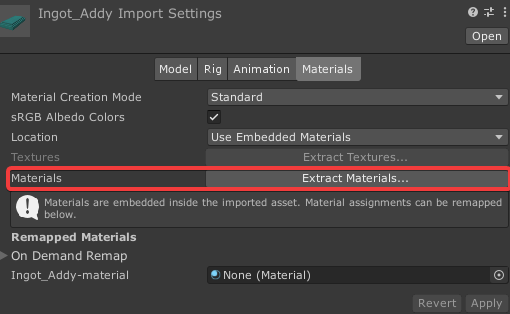
Does anyone have an editor import script to auto extract materials to the materials folder on import for all objects?
Edit: Its a .dae
https://i.imgur.com/aQoDX5Z.png
 gloomy chasm
Does UIToolkit not have a reoderable list?
severe python
no, but its not too hard to make one in UIT
gloomy chasm
I just wanted the styling from it tbh 😛
civic river
You might already know this @gloomy chasm but you can wrap IMGUI components into UITK
bit of a hack but it'd get you the style ;p
 plucky nymph
simple question, but what is the best way to do a nice looking sprite field for a custom inspector? Best example that I like is a texture input for a shader, but i cant seem to replicate it
onyx harness
What mean nice looking sprite field? It's just an Object field
plucky nymph
my current field makes it look like this:
Whereas im looking to make it so you can actually see what the sprite is
onyx harness
The height
plucky nymph
Sorry, how do I change the height? My current implement is :
beast.icon = (Sprite)EditorGUILayout.ObjectField(beast.icon, typeof(Sprite), false);
Last argument use a GUILayoutOption. Height
plucky nymph
ah. I need to go find my notes on that, havent actually used that yet 😛 Thanks for giving me a path to look into!
oh hey thats perfect!
Thanks mate 🙂
sudden coral
@sudden coral You mean to use UI builder for run time UI ? I don't think this is supported by Unity yet.
@graceful gorge Oh okay, I was pretty sure reading about it somewhere and also found this https://www.youtube.com/watch?v=t4tfgI1XvGs so I thought it would be possible.

A single, unified, UI editing tool in Unity – that's our goal for UIElements. In this session, we cover what's available now, share what we're working on, and give a glimpse of what's coming in the future. Learn about UIElements for runtime, new UI authoring workflows, and how...
civic river
@sudden coral It's "in the works" you can make it work with the current implementation, but it's missing most of it's features and isin't really stable
sudden coral
Oh okay, thank you 🙂 @civic river
 wanton citrus
I have a question. I have a game where you collect items that are worth a certain value and on some days are worth more if they have a specific category. Currently, I am thinking of making a script that's attached to a prefab to hold that data.
Would it be possible to make a custom editor to have a list of all the prefabs (with a certain tag or similar) & being able to edit values, change categories?
wanton citrus
Ah thanks! Just found something on Odin (AssetListAttribute) that can filter on tags so it may be a good excuse to really start learning that 😄
waxen sandal
You'd obviously still have to save the data in some monobehaviour or scriptableobject
wanton citrus
Yes, I think I'll just use a mono script on each prefabs which holds the data and tally up the value on pickup
queen violet
Can you add onto the default inspector with UIElements? Instead of recreating the entire thing.
Looks like not, work around was posted here thankfully : https://forum.unity.com/threads/property-drawers.595369/#post-5118800
Unity Forum
Hello!
I was wondering if there's a (new? better?) way to implement property drawers using UIElements instead of the good ol' IMGUI.
Thanks!
steady crest
Should I keep expanding my XNode node editor and full custom system. Or should I adapt it to function within Bolt? Considering unity now owns bolt and we can use it for our projects 🤔
It feels like I am reinventing the system with making a state machine given that Bolt kinda does just that if I would tailor my system to work with it
waxen sandal
Bolt is a programming system while yours isn't though
steady crest
Are you sure? isnt a programming system a state machine with extra steps? @waxen sandal
cuz the way I see it, the stuff I do inside of my nodes are nodes on their own in Bolt
waxen sandal
I mean technically you can just making methods that are like ShowBubble with some parameters
But I doubt you can just get the nodes and put that into your system
steady crest
I was thinking more in the sense of getting rid of XNode and replacing it with Bolt altogether
so I dont have to worry about making nodes for everything anymore, and I can use their custom node functions for the few that I do need and they dont have 🤔
like if nodes for everything, and function executors for the most part
I have not used bolt extensive enough to make a full decision on it. Im not sure about this whole thing.
I just wanted to consider it as an option, before I actually took my node graph in production @waxen sandal
waxen sandal
I probably wouldn't 🤷
steady crest
I probably shouldn't.
severe python
Is there a way to have unity build your scripts for release?
severe python
Perhaps put another way, is there a way to invoke the compiler and add and remove compiler directives?
civic river
@severe python Yeah, you could do custom code analysis and hook preprocessor directives. That sounds like a very bad idea though, if you didin't want the compiler directives why did you put them their ;p
you'd need to do code injection from their
during the build
severe python
Its just an unusual situation, I'm making a modding kit, tbh I'm could just be thinking about this all wrong
but I've been coping the compiled dll out of the Library/ScriptAssemblies folder, which results in UnityEditor only code being in the assembly, which I had not considered
I suppose the appropriate solution is to execute a build?
civic river
I'm not completely sure I understand what you mean, but you can use asmdef's to split up the resulting .dll into different segments
So you can asmdef out the unity editor code
Which is probably good practice anyways
severe python
already use asmdefs, but I don't see a way to prevent the compilation of unity editor code in the way I'm doing it
queen violet
I'm adding a Editor to my EditorWindow, everything binds perfectly except the enum field (which binds fine in the inspector). Anyone ran into this ? Using UIElements
queen violet
Got it, have to forcefully bind the editor after adding it
_poserEditor = Editor.CreateEditor(poser);
_poserRoot = _poserEditor.CreateInspectorGUI();
root.Add(_poserRoot);
_poserRoot.Bind(_poserEditor.serializedObject);
waxen sandal
@severe python You might be able to with csc.rsp files
glad dagger
is there any (sane) way to implement something like SelectionBase but conditionally?
 steel lantern
Probuilder: how do I add vertexes to an edge? Not with subdivide edges, I want to click exactly where I need a vertex
civic river
Hey guys, bit of an odd question
        [SerializeReference]
        public Type t;
Super cool feature unity added, it gives a dropdown for all the types loaded in the assembly.
I'd like to limit the search to specific parameters, is this possible?
steady crest
@civic river not to my knowledge, you can probably override the attribute to add a parameter but i dont know how complex that would be
civic river
I did try something a bit hackish in that regard
But unity doesn't seem to recognize property attributes on properties that aren't serialized natively
plucky nymph
hey, im making an inspector for a scriptable object, and it keeps reverting a specific set of values. I am updating/modifying the serialized object, as well as setting the object to dirty. Can someone please give this a once over, see what Im doing wrong? Specifically, its reverting the addition of damagestat and armourstat variables, seen in the second half of the script
adding asset database save and refresh didnt work either...
if (setDirty)
        {
            EditorUtility.SetDirty(beast);
            AssetDatabase.SaveAssets();
            // Refresh to show changes in the editor
            AssetDatabase.Refresh();
        }
@civic river is that native unity or odin?
@plucky nymph if you want to do serializedobject.apply you need to use serialized properties
As a quick fix you can do editor gui begin change check and do undo record object
civic river
@waxen sandal native
 carmine furnace
Hi everyone, I'm making a [Required] attribute (similar to Odin Inspector), to display an error help box in the inspector when a variable hasn't an object reference value. It's working, but I want to display that help box on top of the label. Anyone have any idea about that?
Here is the code ```[CustomPropertyDrawer(typeof(RequiredAttribute))]
public class RequiredDrawer : PropertyDrawer
{
public override void OnGUI(Rect position, SerializedProperty property, GUIContent label)
{
EditorGUI.BeginProperty(position, label, property);
        EditorGUILayout.BeginVertical();

        if (!property.objectReferenceValue)
        {
            EditorGUI.HelpBox(position, "Error", MessageType.Error);
        }

        EditorGUILayout.BeginHorizontal();

        position = EditorGUI.PrefixLabel(position, GUIUtility.GetControlID(FocusType.Passive), label);

        EditorGUI.PropertyField(position, property, GUIContent.none);

        EditorGUILayout.EndHorizontal();

        EditorGUILayout.EndVertical();

        EditorGUI.EndProperty();
    }
}```
Don't use guilayout in propertydrawers
You need to calculate the positions and override GetPropertyHeight to return your height
You can use https://docs.unity3d.com/ScriptReference/EditorGUIUtility-singleLineHeight.html to calculate the height
carmine furnace
Is there any reason to not use guilayout?
waxen sandal
It's not supported
carmine furnace
I see now why it doesn't works XD
 brave gull
hey folks, is there any way to add custom icons to the top toolbar?
onyx harness
hey folks, is there any way to add custom icons to the top toolbar?
@brave gull NG Hub Free in the Asset Store
brave gull
thanks @onyx harness ! does it contain the source code in a readable format that I could replicate? I'd prefer to use my own implementation
(i.e. is it buried in DLLs or just in plain script?)
carmine furnace
Finally it's works 😄
Here is the solution I find ```[CustomPropertyDrawer(typeof(RequiredAttribute))]
public class RequiredDrawer : PropertyDrawer
{
public override float GetPropertyHeight(SerializedProperty property, GUIContent label)
{
float height = base.GetPropertyHeight(property, label);
        return !property.objectReferenceValue ? height *= 3 : height;
    }

    public override void OnGUI(Rect position, SerializedProperty property, GUIContent label)
    {
        position.height = EditorGUIUtility.singleLineHeight;

        EditorGUI.BeginProperty(position, label, property);

        if (!property.objectReferenceValue)
        {
            GUIStyle errorStyle = GUI.skin.GetStyle("HelpBox");

            errorStyle.fontSize = 13;
            errorStyle.richText = true;

            EditorGUI.HelpBox(new Rect(position.x, position.y, position.width, position.height * 2), $"<b>{property.displayName}</b> needs a reference to work", MessageType.Error);

            position.y += position.height * 2;
        }

        position = EditorGUI.PrefixLabel(position, GUIUtility.GetControlID(FocusType.Passive), label);

        EditorGUI.PropertyField(position, property, GUIContent.none);

        EditorGUI.EndProperty();
    }
}```
(i.e. is it buried in DLLs or just in plain script?)
@brave gull DLL
brave gull
ah darn. thanks anyway. I wanna just write some small editor scripts to load in via my own packages, rather than import another asset every time
gloomy chasm
@brave gull There is this. https://github.com/marijnz/unity-toolbar-extender

GitHub
Extend the Unity Toolbar with your own Editor UI code. - marijnz/unity-toolbar-extender
brave gull
oh amazing! thanks @gloomy chasm, I'll take a look 🙂
brave gull
worked a treat, cheers @gloomy chasm. it's still another package to import though... but the fact that the developer had to do some hacky workarounds to get it to work suggests to me that it's the best solution I'll find unless Unity add official support.
waxen sandal
Eh it's not that hacky
brave gull
I'm just going by the git page saying "Please note that it's quite hacky as the code is relying on reflection to access Unity's internal code."
gloomy chasm
Took a quick look. It only reflects like 3 properties. That isn't too bad at all.
onyx harness
Unity does not provide any API, you are on your own
severe python
@gloomy chasm nice library, it'd be a shame if I had to steal and use it for being nice
I'm sure Mikilo would have liked to kjnow that exists previously
gloomy chasm
@severe python I have never actually had cause to use it, though I want to find one. But it does indeed seem nice. (Not mine to be clear).
onyx harness
Wouldn't make money out of if I had seen it ! 😄
Anyway, my asset existed since Unity 5 :)
No shame
severe python
I'm definitely going to be using it for ThunderKit, so that I can put a little drop down menu for all the deployments (build targets kinda) in a thunderkti project
I was going to pester Mikilo about it, now I don't have to 😄
gloomy chasm
Thunderkti?
brave gull
oh damn @onyx harness I didn't actually realise that you made that asset!
onyx harness
oh damn @onyx harness I didn't actually realise that you made that asset!
@brave gull check NG Tools Free, bunch of tools where you might discover solution to problem you didn't know you had! 😁 (if I can advertise somehow)
whole steppe

A simple website for pasting text, mainly code snippets.
how can i make it so only the fields for the list item are folding out instead all items in the list
onyx harness
GetPropertyHeight I would say
waxen sandal
Yep
severe python
@gloomy chasm ThunderKit is a unity mod kit development kit with interoperation setup for a Web fronted database called Thunderstore
gloomy chasm
Oh
severe python
somethign I've been working on for the past year ish (not in actual dev time really)
it basically lets you point at t unity game that uses the same version of unity you're running thunderkit in, and then copies in all the assemblies the game uses as well as the games core assemblies. Then provides tools to help you build an API for that game that deals with the issues that come up when pulling in assemblies that way
Also lets you setup the game into a debug build mode so you can do some more advanced stuff
but I have this type called Deployment, which is like a build target, or a run target, that lets you build out the asset bundles and libraries, then deploy them to the modding framework for the game and also launch the game
waxen sandal
Also @whole steppe You should use SerializedProperty.IsExpanded for the foldout
severe python
so I'd like to put a drop down next to the play button that lets you run those deployments, right now you have to right click on the deployment in the hierarchy to run it
brave gull
@brave gull check NG Tools Free, bunch of tools where you might discover solution to problem you didn't know you had! 😁 (if I can advertise somehow)
@onyx harness oh yeah I don't doubt the quality of it! unfortunately though, my current goal is to find a simple solution I can write myself as I'm building up some packages of my own for cross-project tools.
severe python
I'm tempted to make NG Tools Free a part of it, it seems like it would fill some valuable gaps, like connecting the unity editor to the game and getting a view of the data
I'm not sure that it exactly fits
onyx harness
No worry, if you can learn from the repository above, go for it, that's even better
severe python
that is how that remote thing works right Mikilo? I can put NG Tools in an empty Unity project and then connect to a debug build of a game?
whole steppe
@waxen sandal i will try that out Navi, sounds good
gloomy chasm
In UIToolkit, the PopupField<T> what is the generic meant to be?
onyx harness
that is how that remote thing works right Mikilo? I can put NG Tools in an empty Unity project and then connect to a debug build of a game?
@severe python yes, if the build contains my server, yes you will be able to modify it in the fly
But, modifying implies to have the Pro version
Free only allow read-only
severe python
ahhok, so if the game isn't built with it, can I load the server into it
Does the server code just need to be running inside the game is what I'm saying
onyx harness
No, my server is mandatory
severe python
Sorry, perhaps I'm being unclear, I can load any code I need into a game, so I could build a method to load the server into the game and launch it
onyx harness
It is the one extracting the information and communicating with your Unity
ahhok, so if the game isn't built with it, can I load the server into it
@severe python yes you can load my server, manually you mean?
severe python
yeah
onyx harness
Yep, you can
onyx harness
A modder contacted me years ago, telling me that I saved him a shitton of works, thx to Remote Scene
I can basically turn the server into a mod
@severe python exactly, mod stuff 🕵️♂️
severe python
oh thats supppperrrr
onyx harness
It's a kind of hack....
onyx harness
Oh yeah
severe python
Is there a place I can talk to you about your tools, you got your own discord or anything
this seems a bit off topic for the server
severe python
I sent a friend request because I don't think we are suppoesd to link discord servers on here
onyx harness
Done
 tough juniper
gloomy chasm
tough juniper
gloomy chasm
@tough juniper I believe this will help if you are talking about in the editor. https://docs.unity3d.com/Manual/PositioningGameObjects.html
brave gull
hmm I feel like this question is obvious now... but how do I open a folder via script in the Project tab?
I've managed to find it (AssetDatabase.LoadAssetAtPath)
then ping it (EditorGUIUtility.PingObject)
then select it (Selection.activeObject = obj)
but I want to actually expand the folder. is that possible?
gloomy chasm
There is EditorUtility.FocusProjectWindow()
gloomy chasm
oh my bad, I thought that was the one that focused on the object
severe python
there must be a way, but you'll probably have to dive into Unity source and do reflection
gloomy chasm
What exactly are you wanting? What do you mean expand the folder?
brave gull
there must be a way, but you'll probably have to dive into Unity source and do reflection
@severe python oh no, not this again 😂
What exactly are you wanting? What do you mean expand the folder?
@gloomy chasm basically I'm making shortcuts to open specific common folders in my project. instead of having to browse to them in the Project tab and open them, I just want to click a button and be inside that folder.
gloomy chasm
ProjectWindowUtil.ShowCreatedAsset(Object o)
severe python
is there a way to acquire a folder asset?
gloomy chasm
I think that will do it. Idk, he said that he got the folder though 😛
brave gull
I think that will do it. Idk, he said that he got the folder though 😛
@gloomy chasm tried it but nope, it just selects it
is there a way to acquire a folder asset?
@severe python yeah you can just use AssetDatabase.LoadAssetAtPath
gloomy chasm
@brave gull a bit of googling found this. Good give it a look over and see if it would help https://forum.unity.com/threads/tutorial-how-to-to-show-specific-folder-content-in-the-project-window-via-editor-scripting.508247/
Unity Forum
I wanted to find a way to show a specific folder and display its content in the Unity project panel from custom editor code. Too bad, there is no...
brave gull
thanks! I've tried this out but there are some compile errors..
The type or namespace name 'MethodInfo' could not be found (are you missing a using directive or an assembly reference?)
gloomy chasm
You need to include using System.Reflection; namespace
brave gull
gotcha, thanks
success!! thank you guys!
so using that script all I need to do is get the instance ID of the folder then pass it into their method
gloomy chasm
Nice!
brave gull
closes 100 firefox tabs
thanks for your help today everyone! time for some dinner now :)
see ya!
severe python
So that link got you there?
I'd actually like to use this as well, I can see use for it in my project
whole steppe
i have no clue how to implement what Navi and Mikilo recommended :/
brave gull
Yeah it's super useful! I dread to think how much time I spend clicking through folders haha
@whole steppe Did you check out the git hub link?
It has some sample scripts. That's what I used, and just modified them
onyx harness
i have no clue how to implement what Navi and Mikilo recommended :/
@whole steppe We're gonna need more than this code you provided
whole steppe
which github.
i am not using any extra assets
shoudl i post the whole custom script
brave gull
@whole steppe ah sorry I thought you were talking about the same thing they helped me with
whole steppe
no problem
onyx harness
@whole steppe what you are trying to do is simply not possible
Because you are using a ReorderableList, which is height-fixed
whole steppe
oh no!
onyx harness
When you [un]fold, it will still keep the height per element
whole steppe
yep this would be another problem.
whole steppe
that does not sound good. I really want to keep the ReorderableList. So there is no other way right?
onyx harness
ReorderableList can't do what you want
You must code it yourself
ReorderableList with dynamic entry height
whole steppe
Allright, i don´t think i can do that. Doesn´t sound so simple.
whole steppe
Not hard for you, yeah 😉
onyx harness
It involves knowledge about drag & drop, Editor, IMGUI
Not particularly advance
Look at the code of ReorderableList
whole steppe
Will dive into it then. Thank you so far Mikilo
gloomy chasm
@whole steppe What is your problem? is it just having different heights per item?
whole steppe
well first i have to make it so that if i press on the fold out only the properties for the item are shown . Right now all of them are shown, if you take a look at the gif i sent
gloomy chasm
If you have a SerializedProperty (which is what is best to use instead of target) it has a isExpanded property used for exactly this.
@whole steppe serializedObject.FindProperty("items").GetArrayElementAtIndex(i).isExpanded
gloomy chasm
Yeah
whole steppe
i have no clue how to use it to be honest, i see it is a boolean and thats it.
gloomy chasm
SerializedProperty itemProperty = serializedObject.FindProperty("items").GetArrayElementAtIndex(i);
if (itemProperty.isExpanded = EditorGUI.Foldout(new Rect(rect.x, rect.y + 80, rect.width, EditorGUIUtility.singleLineHeight),itemProperty.isExpanded, "Foldout"))
So instead of setting your own fold field you set the one in the property instead.
whole steppe
amazing. it works.
Thanks alot friends. See you soon!👍
Here is how it looks like.
severe python
am I crazy for thinking there are issues with async await in the Unity Editor 2018.4.16? I've been trying to set something up to download and install some files and it didnt' seem to execute the tasks. so I migrated to explicitly creating tasks and then monitoring them in EditorApplication.update
However, I'm still having issues with that, is there something that I need to know about the state of tasks and/or async/await ?
severe python
okay, nm, I got that all worked out
real ivy
So in an AssetPreprocessor, i do this
    {
        Object activeSkill = AssetDatabase.LoadMainAssetAtPath(assetPath);
But this returns null. Is that even possible?
I also do this
AssetDatabase.SetMainObject(so, assetPath);
And even after doing that, LoadMainAssetAtPath still returns null
Why?
And i can't do AssetDatabase.SaveAssets because that causes reimport, which makes an infinite loop bcoz this code are in Preprocess
Unity is the ultimate game development platform. Use Unity to build high-quality 3D and 2D games, deploy them across mobile, desktop, VR/AR, consoles or the Web, and connect with loyal and enthusiastic players and customers.
But nope, assetPath is correct and with extension too. Still null..
civic river
I'd like to make a field for System.Type that can be displayed in the inspector
Any thoughts how I'd go about it?
So far my experiments haven't panned out ;p
real ivy
I'd just make an enum, and map it with a switch to create derived SO (at least this was my use case)
civic river
Hehe thanks @onyx harness But I really just need a way to show a type
onyx harness
Oh shit
You just want to display the Type, not changing it
Well, PropertyDrawer
Or decorztor
What API from there?
This is not editor-extensions, is it?
 pastel osprey
@real ivy Bit late now, but you will get nulls on LoadAsset in preprocess if that asset is new (never imported before). This is in Asset Pipeline V1
I know this because I was relying on this behaviour and it doesnt do that in V2 😅
real ivy
It's not a newly imported. I was trying to do a workaround with MainAsset getting jumbled when renaming/dupe-ing SO with subassets
But i got it working now
I now use static void OnPostprocessAllAssets
real ivy
But yeah i guess when rename/duping and it gets "reimported", it's also treated as "not loaded yet"
Yep
Cheers tho!
pastel osprey
Nw, glad you got it sorted 🙂
 twin marsh
Hey guys, has anyone figured out how to resolve the "Could not establish connection with the Package Manager local server" issue?
I've been struggling to access my projects for weeks now.
Thank you in advance 🙂
blissful burrow
does anyone know if there's a DidReloadScripts-like thing that is called after the first time import of all assets?
I have an issue where I want to do a first time import check (as well as on every script reload), but it depends on being able to read from a scriptable object in the project
it looks like DidReloadScripts happens before the SO is imported, so it can't find it
onyx harness
Just use EditorApplication.delayCall to postpone your callback
Or maybe look at this one:
https://docs.unity3d.com/ScriptReference/AssemblyReloadEvents.html
onyx harness
No
pastel osprey
Anyone know how to calculate mousePositionSS in Editor on multiple displays? Im using:
EditorGUIUtility.GUIToScreenPoint(evt.mousePosition) but the ScreenPoint is relative to the main display?
So I get negative X values when on a display to the left of the main for example...
pastel osprey
Yea I guess I should add more details. Im then using sceneCamera.ScreenPointToRay(mousePosition) and then getting an intersection with Y0 to spawn an object
var sceneCamera = SceneView.lastActiveSceneView.camera; btw
But that ray origin is way off when not on my main display
so im guessing its expecting that screen point to be relative to the current screen, not the main screen
onyx harness
But in the end, what are you expecting?
pastel osprey
To be able to take evt.mousePosition and convert it into a ray origin in the scene view
That doesnt care where the scene view is because its relative to that view
Im not seeing why you think I would expect what im getting? Or how this is the "right position"?
Both these pages:
https://docs.unity3d.com/ScriptReference/GUIUtility.GUIToScreenPoint.html
https://docs.unity3d.com/ScriptReference/Camera.ScreenPointToRay.html
...say this is a screenspace coordinate in ranges of 0 - pixelWidth / pixelHeight
When clearly what im describing is not that?
onyx harness
event.mousePosition gives a position relative to the current drawing window.
When you use GUIToScreenPoint. It converts this position to a position relative the current screen.
For now, it is logical.
You, you would like to get a position of the mouse, relative to the main screen only.
No matter where your mouse is, you would like a position relative to the top-left corner.
Is that it?
pastel osprey
I want to convert evt.mousePosition into a world space ray where origin is where mouse position is in the SceneView Viewport
regardless of what display Unity is on
if I use screen space as an intermediate space (as there is no direct GUI > Ray because it requires a camera viewProjection matrix) I expect the input and output to match
onyx harness
I guess I'm not understanding something somehow
Under what window do you receive the event?
pastel osprey
A custom one that I open from a context menu
onyx harness
It means the mouse position is not above a SceneView
pastel osprey
the event is Event.current on a SceneView.duringSceneGui callback
on a DragPerform onto the SceneView
onyx harness
Oh
onyx harness
This detail changes everything
pastel osprey
Vector2 mousePosition = GUIUtility.GUIToScreenPoint(Event.current.mousePosition);

// Calculate nearest screen edges
var dockX = (int)Mathf.Round(mousePosition.x / Screen.currentResolution.width);
var dockY = (int)Mathf.Round(mousePosition.y / Screen.currentResolution.height);

// Offset window away from the nearest screen edge by its size
mousePosition.x -= dockX * position.width;
mousePosition.y -= dockY * position.height;
Different use case. This evt is from a window I create, then offset based on which screen quadrant it is in
Screen.currentResolution is the resolution of the current display
GUIUtility.GUIToScreenPoint(Event.current.mousePosition) is the position position relative to the main display
therefore this code fails on secondary displays
pastel osprey
This has nothing to do with the scene view
this is a custom window I open then position to make sure its never half off the screen
it is opened at the mouse position when a MenuItem item is selected
onyx harness
I'm sorry, I barely able to understand your issue
pastel osprey
Dont worry about it. Thanks anyway.
onyx harness
While it sounds very simple
 rapid locust
I am trying to overhaul my stats, and when I remove and re-add the script it adds the missing components enforced from the following:
[RequireComponent(typeof(Range))]
How would I go about doing that for existing components so I don't have to add them all manually, is there an extension that checks for this?
onyx harness
Nope
but the code is not hard
Go over all your prefabs, getcomponents, check the attribute, execute.
rapid locust
sounds like I might be trying to make an extension lol
onyx harness
It's the idea
 next canopy
I take it theres no way to override how object focussing works?
onyx harness
what is object focus? The selection?
next canopy
yes
when you press F while you have an objected selected
I have something that makes use of handles but they're all in context to the parent, was wondering if there was a way to change where the camera focusses to
onyx harness
The SceneView has method to 'frame'
next canopy
@onyx harness you're editor savvy, what are all the cool kids using to make their inspector Ui now-a-days?
onyx harness
The next gen thing Unity is pushing forward is UI Toolkit
 formal fjord
hi, I want to save the foldout state of certain elements in a custom inspector, I've ended saving the state in the target monobehaviour within a preprocessor directive, is there even a better way (other than using EditorPrefs)?
waxen sandal
SerialiedProperty.IsExpanded
formal fjord
wow thats much simpler, didnt know it existed, thanks !
severe python
hopefully SerializedProperties and SerializedObjects are going to go away eventually, and hopefully we get a unified binding framework
 warm pilot
i am unable to see unity errors in vscode
syntax issues show up in the problem window but not anything concerning unity
rapid locust
@onyx harness I'm a noob at unity but I did it
https://github.com/paul-mcnamee/RequireComponentChecker/blob/master/Assets/FourthMouse/RequireComponentChecker/Scripts/RequireComponentChecker.cs
haven't published anything on the asset store yet so setting it up there for free is the next step

GitHub
A unity editor script designed to find all of the components which are currently in the scene and have missing components marked by the RequireComponent attribute. - paul-mcnamee/RequireComponentCh...
onyx harness
@onyx harness I'm a noob at unity but I did it
https://github.com/paul-mcnamee/RequireComponentChecker/blob/master/Assets/FourthMouse/RequireComponentChecker/Scripts/RequireComponentChecker.cshaven't published anything on the asset store yet so setting it up there for free is the next step
@rapid locust it's quite good, but I would rather use AssetDatabase than Resources
GitHub
A unity editor script designed to find all of the components which are currently in the scene and have missing components marked by the RequireComponent attribute. - paul-mcnamee/RequireComponentCh...
They don't work and have the same purpose
rapid locust
alright I'll take a look at that then, thanks for the suggestion and the inspiration
onyx harness
Resources provides Object available in memory
Or loaded if you prefer @rapid locust
rapid locust
so AssetDatabase would somehow then allow you to check other resources not loaded in memory then?
onyx harness
AssetDatabase provides the paths of all existing assets in the project.
I said path, not Object. The distinction is important
It is possible that Resources doesn't return a complete list of Object of the given Type.
Only the ones loaded in memory.
If you make your test and the test is quite small, you might have the illusion of it working.
Because there is a great chance you selected the assets through the Project or else. Biasing the test
rapid locust
yeah that makes sense, I'll look into searching via the paths from AssetDatabase then
onyx harness
It is reliable. Not Resources
You use Resources on other scenario, different purpose.
 wintry badger
Good day! I have a custom editor window that is exhibiting a strange issue with it's color. Basically, all of the windows, buttons, and fields appear lighter than they should. You'll notice in the picture below how the regular inspector looks in Dark Theme. The window the left is my custom one; it's somewhat atypical in that I am using PreviewRenderUtility to cover the entire window with a "scene like" view, then the GUI controls are drawn over the preview. All buttons, fields, and most other elements are not using custom GUIStyle's, so they should appear exactly like the default inspector. The GUI control windows are using an image that I had to make significantly darker than it "should" have needed to be, in order to get the color to match the default inspector color. Anyone have any ideas on what could be going on? The preview is drawn with these two lines of code (the lines aren't one after the other like they are here):
preview.BeginPreview(pos, GUIStyle.none);
preview.Render(true, false);
civic river
Heya guys, curious if anyone's aware of a hack or way to make editor-mutable const?
        private const int blackboardInitialDataAllocationSize = 100; //There's no way to make this field mutable AFAIK

        private object[] blackboard = new object[blackboardInitialDataAllocationSize];
        private Type[] blackboardTypes = new Type[blackboardInitialDataAllocationSize];
Just want a way to select per-object array allocation sizes
 crystal timber
maybe just remove const-qualifier and do a reallocation in OnValidate()?
if these arrays are used only at runtime, allocate them in Awake() maybe
civic river
@crystal timber OnValidate seems like a fine option, I can probably make that work yeah. Cheers =]
        #if UNITY_EDITOR
        public void OnEnable()
        {
            blackboard.Initialize(blackboardInitialDataAllocationSize);
        }
        #endif
I've seen more elegant approaches but it works ;p
Ah I'll also have to use on validate here when the value changes
seems good
crystal timber
Is there a way to Debug.Log with a link to specific asset?
 peak summit
 civic river
AssetDatabase.GetAssetPath(someObject);
It's not a proper link but at least you can find it
crystal timber
Ah but the ctx argument seems only work with object in hierarchy? Thing is, I'm making a ScriptedImporter to import custom assets and want to generate some warnings to the asset, but dont know what to pass to it
something like this, i want the asset be highlighted when clicked this log, is it possible
 analog vessel
Hey i am new with unity is anyone here familiar with Tiled2Unity ?
civic river
yeah, I've looked for that sort of thing as well, but I haven't found anything to that effect yet koto
If you find anything like that LMK
waxen sandal
Pretty sure the context parameter works with project assets as well
But not 100% sure
onyx harness
        #if UNITY_EDITOR
        public void OnEnable()
        {
            blackboard.Initialize(blackboardInitialDataAllocationSize);
        }
        #endif
I've seen more elegant approaches but it works ;p
@civic river for that kind of purpose, use Reset()
(Reset() for prime initialization, OnValidate() for verification)
civic river
@onyx harness never heard of reset before but it looks purpose built for what I was doing. Cheers =]
waxen sandal
There's a bunch of unknown hidden callbacks 😭
whole steppe
trying to draw the ToolBar inside each List item. I am using Reorderabel List
A simple website for pasting text, mainly code snippets.
onyx harness
GUILayout
whole steppe
Hmm am i not using it already.
waxen sandal
You shouldn't be using it
whole steppe
Do i need to use this instead:
SerializedProperty itemProperty = serializedObject.FindProperty("items").GetArrayElementAtIndex(index);
waxen sandal
No you need to stop using GUILayout
split bridge
TIL (in case anyone else runs into it) this is a thing:
GUI.TextField(position, editString);
TextEditor te = (TextEditor)GUIUtility.GetStateObject(typeof(TextEditor), GUIUtility.keyboardControl);```
This is *not* a thing:
```cs
EditorGUI.TextField(position, editString);
TextEditor te = (TextEditor)GUIUtility.GetStateObject(typeof(TextEditor), GUIUtility.keyboardControl);```What's that?
whole steppe
i am so lost 😉
onyx harness
Stuff to handle the cursor in text
whole steppe
how else am i going to draw the Toolbar
Maybe it is not possible to implement it in the reorderable list because you can have the Toolbar only in the GuiLayout?
onyx harness
split bridge
@waxen sandal as Mikilo says - for handling e.g. selection in a textfield. No docs and no warnings so took a while to find out GUI.TextField is supported, EditorGUI.TextField is not (unless via reflection). EditorGUI.FocusTextInControl does seem to work with GUI.TextField though 👍 . What a mess 😅 .
waxen sandal
Ah yeah
Never had to deal with that luckily
If you really want to use GUILayout in a unsupported area then you can use https://docs.unity3d.com/ScriptReference/GUILayout.BeginArea.html
whole steppe
Thanks @onyx harness , @waxen sandal
you saved my day.
This will save me alot of space and scrolling.Glad it worked.
onyx harness
One day I will write a blog about Editor tutorials
Unfortunately I don't how to build up a blog XD
Specifically for tutorials
waxen sandal
I'm writing some sort of blog/book type of thing on how to approach editor scripting
whole steppe
You should definetaly do, the custom editor scripting is by far one of the hardest parts of unity.
waxen sandal
Instead of just being tutorials on how to get to some point it tries to explain how the individual components work
Starting with fundamental things like serialization
onyx harness
I have in mind a different approach, visualizing a Unity Editor, clicking on a part to see how it works
and yeah, deep stuff will come along
waxen sandal
Yeah that works as well
wintry badger
Posted this yesterday but there was no activity, hopefully today is better . . .
Good day! I have a custom editor window that is exhibiting a strange issue with it's color. Basically, all of the windows, buttons, and fields appear lighter than they should. You'll notice in the picture below how the regular inspector looks in Dark Theme. The window the left is my custom one; it's somewhat atypical in that I am using PreviewRenderUtility to cover the entire window with a "scene like" view, then the GUI controls are drawn over the preview. All buttons, fields, and most other elements are not using custom GUIStyle's, so they should appear exactly like the default inspector. The GUI control windows are using an image that I had to make significantly darker than it "should" have needed to be, in order to get the color to match the default inspector color. Anyone have any ideas on what could be going on? The preview is drawn with these two lines of code (the lines aren't one after the other like they are here):
preview.BeginPreview(pos, GUIStyle.none);
preview.Render(true, false);

 wintry badger
What happens if you draw nothing>
@onyx harness If I draw nothing it will just show the Preview Render background. If I offset the preview render background there is a space that looks like the correct color (color similar to inspector)
I think it's an issue with the PreviewRenderUtility class but not sure how to fix it.
 high flax
Guys, I'm trying to make an editor for a bezier drawer and I'm having troublee with drawing handles at the transformed points. Could anyone tell me why they keep sliding, even when I don't change anything?
Guys, I'm trying to make an editor for a bezier drawer and I'm having troublee with drawing handles at the transformed points. Could anyone tell me why they keep sliding, even when I don't change anything?
Here's the code:
[CustomEditor(typeof(Curve))]
public class CurveEditor : Editor
{
    private void OnSceneGUI()
    {
        Curve spawner = target as Curve;
        EditorGUI.BeginChangeCheck();

        for (int i = 0; i < spawner.Points.Length; i++)
        {
            spawner.Points[i] = spawner.transform.TransformPoint(spawner.Points[i]);
            spawner.Points[i] = Handles.DoPositionHandle(spawner.Points[i], spawner.transform.rotation);
        }

        if (EditorGUI.EndChangeCheck())
        {
            Undo.RecordObject(spawner, "Changed point");
        }
    }
}```You're continuously overriding and transforming the position
You should probably change it to work in localspace and whenever you need to it transform it to world space
high flax
er, sorry but I don't understand what you mean
I really need to transform these points, as the curve object might be moving around
waxen sandal
You have a point, then you transform it to be localspace and save it in that variable same variable
Then you transform it again next frame
And again
And again
You should only transform it once
Plug that into your handle
Then transform it back to localspace and save that in your variable
high flax
Okay, but here's the thing. How can I only do it one frame?
waxen sandal
??
high flax
Oh, nevermind, it was easier than I thought 🤦
spawner.Points[i] = spawner.transform.TransformPoint(spawner.Points[i]);
spawner.Points[i] = Handles.DoPositionHandle(spawner.Points[i], spawner.transform.rotation);
spawner.Points[i] = spawner.transform.InverseTransformPoint(spawner.Points[i]);```👍
high flax
Thanks a lot for your attention, though!
 jagged bison
Hey how can I enable grids? I see many people having grid in their Scene, cannot find it in Gizmos
whole steppe
How can i align the TextArea to the right, just like the other fields?
EditorGUI.LabelField(new Rect(rect.x, rect.y + 100, rect.width, EditorGUIUtility.singleLineHeight), "Description");
item.description = EditorGUI.TextArea(new Rect(rect.x, rect.y + 100, rect.width / 2 , 40), item.description);
the Label is behind the TextArea right now 😉
waxen sandal
Just change the X?
Probably should add EditorGUIUtility.labelWidth to it
and make the width EditorGUIUtility.fieldWidth
whole steppe
Let me try
broken
item.description = EditorGUI.TextArea(new Rect(EditorGUIUtility.labelWidth, rect.y + 100, EditorGUIUtility.labelWidth, EditorGUIUtility.fieldWidth), item.description);
I really don´t know why the default TextArea does not have a String.
Just like all other controls have
 rapid basin
Hi! How can I duplicate an object with a script in the editor? Instanciate don't work
graceful gorge
Can you be a bit more specific ?
formal fjord
Is this kind of glitchy visuals (blue background) normal in reorderable lists?
onyx harness
not supposed to be
formal fjord
It works fine but man it does bother me so much 😄
waxen sandal
It's because our elements have custom height somehow
onyx harness
just disable it
waxen sandal
Idk how you managed that
IIRC they have to all be the same height
Unless they changed that recently
formal fjord
yes if they are all the same height it works fine, but i'vev been trying to use a list of polymorphic objects
onyx harness
ReorderableList does not handle that
waxen sandal
Yeah it should not work but apparently it does?
onyx harness
Maybe he is using GUILayout
formal fjord
i'm relatively "new" to editor tools but I've used this serialize reference attribute that came out last year i think

GitHub
This is a test project where I use the SerializeReference attribute to make a custom editor with a reorderable list of polymorphic objects. - CristianQiu/Unity-Editor-PolymorphicReorderableList
onyx harness
oh
formal fjord
this is the project
waxen sandal
Yeah that's completely something else
waxen sandal
We thought you were talking about the built in reordablelist
Which looks kind of the same
onyx harness
But apparently not 🙂
formal fjord
it is the built in, thats my project