#↕️┃editor-extensions
1 messages · Page 65 of 1
 severe python
 gloomy chasm
Thanks for your help @severe python!
severe python
no problem, I should have thought of that sooner
gloomy chasm
Btw, are you supposed to use Resources.Load, or AssetDatabase? Seems like Resources?
severe python
mostly depends on what you're targeting
gloomy chasm
Alrighty. One last question if you don't mind. How much do you use a stylesheet vs inline styles?
severe python
you just add the style sheet path to the element iirc
im a little rusty atm
or do you mean a separate style sheet via uibuilder
that I'm unsure about
previously it did that by default I think they change it around
gloomy chasm
Oh, got it.
gloomy chasm
Got another UIToolkit question. I got a custom visual element with a couple of children. I want to be able to click any where on the parent to trigger an event (like Clickable). But right now the children eat it first. Any ideas?
Nvm, I got it. RegisterCallback did the trick. Though I am more confused now about when things like Clickable are used.
 steady crest
is it possible to render a custom image on the project view for a scriptable object instance? each instance would need a different image (it are item icons inside a database I wanna show that way) or should I just make a custom editor for that?
 waxen sandal
Vertx maybe?
steady crest
steady crest
the sprite defined in that field I would love for it to be that sprite for tht item in the project view
waxen sandal
Lemme look it up
steady crest
I saw a guy online suggesting to draw over the existing sprite icon but...
waxen sandal

okay finally replaced the default script icons as well as removing the (script) suffix from all component names! 🎉
Likes
165

 Twitter
There's more info in the thread
But that's per script
It's stored in the meta file though
steady crest
hmm I wanna do it per instance tho
severe python

GitHub
This asset allows you to set custom icons for any folder in unity project browser. - PhannGor/unity3d-rainbow-folders
waxen sandal
Ah yeah that's another one
steady crest
im not against buying that. @severe python do you own it by any chance?
waxen sandal
I'm not sure if that allows to set it on arbritrary assets
severe python
No, it just has the code to change the image you want to so it can help you get there
steady crest
oh like that
severe python
Whether it still works or not i donno
steady crest

Use the Rainbow Folders 2 from Borodar on your next project. Find this utility tool & more on the Unity Asset Store.
severe python
They changed yeah
steady crest
seems to only be for folders, gonna sift through the github repo. not sure what im looking for tho
waxen sandal
Pretty sure they just draw over it
GitHub
This asset allows you to set custom icons for any folder in unity project browser. - PhannGor/unity3d-rainbow-folders
steady crest
it does look like that y
waxen sandal
I'm afraid you might not be able to do what you want unfortunately
steady crest
seems that way, oh well. I'll just make a custom editor window with a grid for my item dtaabase
waxen sandal
Maybe Vertx or Freya knows
steady crest
maybe, I dont feel safe tagging them :shy:
I do have this, so it shouldnt be that hard to make a custom window https://odininspector.com/attributes/table-matrix-attribute
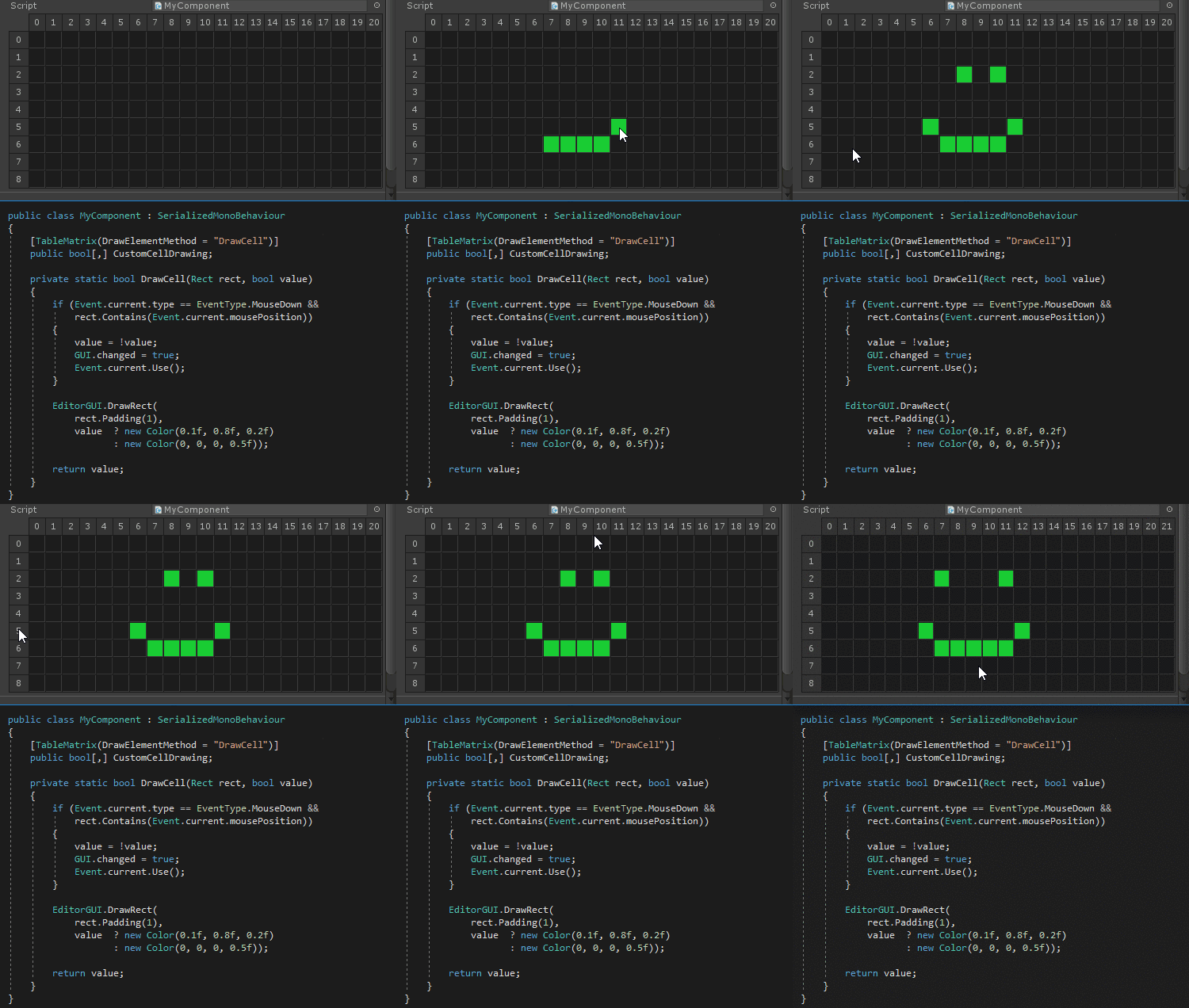
Odin Inspector
The TableMatrix attribute is used to further specify how Odin should draw two-dimensional arrays.
@blissful burrow I appologise for bothering you, but care to take a look? 
as for the summary of my question: Is it possible to render an image on a per-instance basis for icons in the project view?
waxen sandal
Unique icons per instance of a scriptable object
steady crest
^
 marsh moth
Is there any extension for Visual studio 2019 that brings that Minimap from Visual studio code
waxen sandal
It's built in
severe python
2019 has it
severe python
 blissful burrow
@steady crest I don't know of a per-instance way of doing icons I'm afraid!
steady crest
dam, too bad. thx anyway! I'll make a custom menu for it with some fancy right click menu to add some options like invoking the item effect and such. not a problem 🙂 @blissful burrow
bit like how its done in game in breath of the wild if that makes sense
blissful burrow
alright! didn't play botw much so I don't really know~
steady crest
this type of thing with a GenericMenu editor element @blissful burrow 🙂
wow smoll image
blissful burrow
gotcha
steady crest
I'll stop tagging you now, have a ncie day and thx for checking in 😄
gloomy chasm
@steady crest I got you! I knew I saw it before. https://docs.unity3d.com/ScriptReference/Editor.RenderStaticPreview.html
 steady crest
oho
gloomy chasm
Only limitation is that it acts as a '3d' icon, so it does not render the icon when in 'file' mode where each asset is it's own line.
steady crest
you mean if they re shown with the icon + text horizontally?
gloomy chasm
Yeah
steady crest
that makes sense, it wouldnt be distinguishable anyway
gloomy chasm
Also, it is important to do the EditorUtility.CopySerialized.
There is also this asset. The guy says he is doing something different, no idea what though. https://assetstore.unity.com/packages/tools/utilities/asseticons-100547
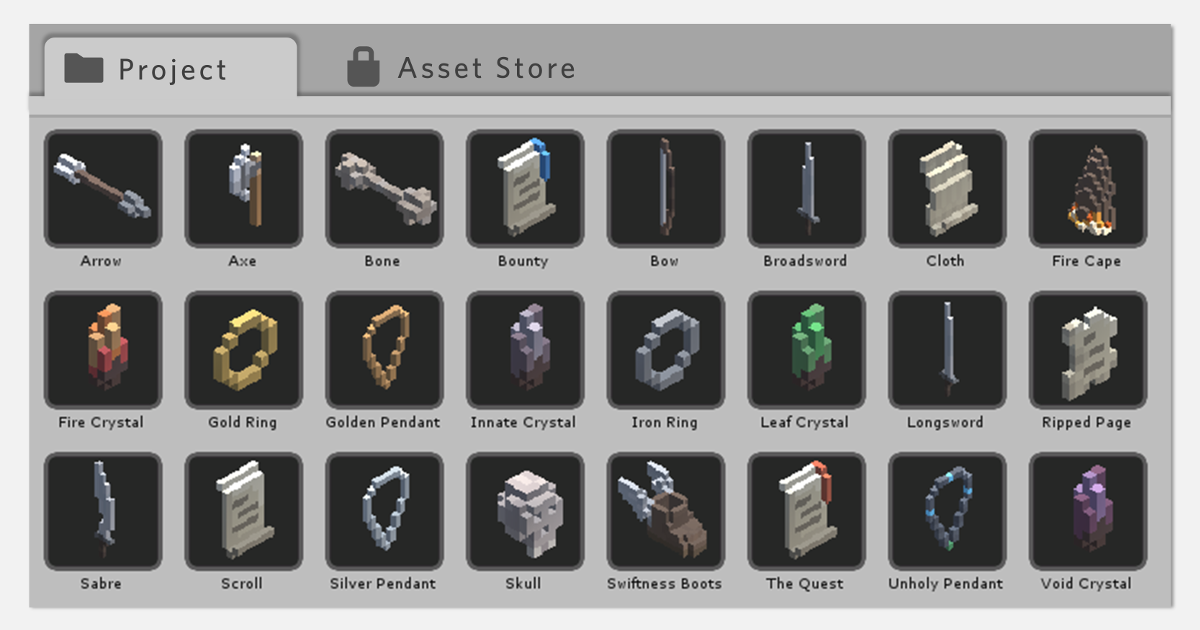
Use the AssetIcons from Anthony Marmont on your next project. Find this utility tool & more on the Unity Asset Store.
steady crest
hes probably not providing a sprite, but rendering it out from a camera
@gloomy chasm if that asset works as advertised
that is exactly what I need
its just an attribute, and I can add it to the sprite field and im done
steady crest
I mean, its how you can take a snap of a 3d object in unity. dont rly know how else you would
waxen sandal
Generating the thumbnails that unity does already takes ages 😛
 short tiger
Well, Unity can spit out 60 frames per second pretty easily. Drawing a single object in a small resolution isn't going to be very expensive.
steady crest
true, I dont wanna generate them tho 🙂
i just wanna render the sprite in the project window so i can easily identify my SO by an image instead of looking for the name
@waxen sandal
waxen sandal
Ah yeah if you already have a sprite then it's no problem
steady crest
would just be using the sprite field alrdy defined here for the ingame UI @waxen sandal
 mellow shale
To those out there who enjoy boosting the editor, I'm moving around UI elements in prototyping, and would love a button to copy/paste position and anchor, but not Width/Height.
steady crest
can i somehow clean this up so it doesnt show the type along the name?
cuz its intersecting with the pencil thingy to navigate to its inspector
blissful burrow
I don't thiiink there's a way of doing that without reimplementing objectfield
(unless this is an odin thing then I have no idea)
severe python
Rebuild everything from scratch using uibuilder >.>
blissful burrow
I also have a question!
let's say I have a set of objects with a component called Noot that I have a custom inspector for
is there any way I can get a property of another component that's attached to all objects with Noots, and properly handing serialization and whatnot?
or do I have to manually have arrays of serialized objects and properties for that
(guessing I'll have to do it the manual way)
severe python
I'm not quite sure what you're gtting at
You want to manage the values of specified propries in your own types inspector of other components attached to the same gameobject?
so you're in a sense making an inspector component
is that right?
blissful burrow
yeah
I want to expose a propertyfield of attached mesh renderers essentially
including properly handling multiselect states and serialization
severe python
The only thing you ever need is a SerializedObject
so
var otherComponentSo = new SerializedObject(target.gameObject.GetComponent<Transform>());
otherComponentSo.Update();
var positionProp = otherComponentSo.FindProperty("position");
GUILayout.PropertyField(positionProp);
otherComponentSo.ApplyModifiedProperties();
probably some other stuff
I forget the exact stuff for drawing the field
blissful burrow
oh, yeah, that'd be doing it manually, was wondering if there was a cleaner way
severe python
If you wanted to draw the entire component you could probably render its inspector
steady crest
i just kinda worked around it by not putting them all in horizontal
severe python
I don't think you could cherry pick really
blissful burrow
@severe python I very much don't want to render the whole thing
just two of its properties
severe python
I don't want to say its not possible, because I don't know for sure, but I've never seen anything to indicate you can do that
gloomy chasm
I didn't quite follow what it is that you are wanting to do. Edit fields of other components?
 plucky inlet
@blissful burrow wouldn't multiselection work better for this ? not sure if i got the above right
steady crest
hmm how can I add something to the hierarchy window. like prefabs have that little arrow to inspect it alone.
what interface is that located in?
blissful burrow
@gloomy chasm essentially yeah. I have my own component with a custom editor, and I want to show a property field from a component attached to all objects with my original component
gloomy chasm
@steady crest it is something onHierarchyItem
 onyx harness
hmm how can I add something to the hierarchy window. like prefabs have that little arrow to inspect it alone.
what interface is that located in?
@steady crest EditorApplication
steady crest
is that even documented at all :sigh:
onyx harness
var otherComponentSo = new SerializedObject(target.gameObject.GetComponent<Transform>());
otherComponentSo.Update();
var positionProp = otherComponentSo.FindProperty("position");
GUILayout.PropertyField(positionProp);
otherComponentSo.ApplyModifiedProperties();
@severe python you can remove the Update() since you just created it, but yeah that's the way
steady crest
guess it would be this thing https://docs.unity3d.com/ScriptReference/EditorApplication-hierarchyWindowItemOnGUI.html ?
onyx harness
is that even documented at all :sigh:
@steady crest it's been here since the beginning of time
blissful burrow
oh heck yea new SerializedObject() takes an array as a param soooo I think this will make my code super neat and exactly what I want~
blissful burrow
thx for the help anyway 💖
severe python
oh neat, I didn't know that, thats a useful tidbit
so the issue was how many you had to make
steady crest
can I somehow avoid needing to do this when initializing an editorwindow?
    protected void Reset()
    {
        _lettering = EditorHelpers<Lettering>.GetAsset("t:Lettering Letters");
        _itemDatabase = EditorHelpers<ItemDatabase>.GetAsset("t:ItemDatabase ItemDatabase");
        _itemSets = EditorHelpers<DataList>.GetAsset("t:DataList ItemSets");
        _dimensions = EditorHelpers<DataList>.GetAsset("t:DataList Dimensions");
        _itemTypes = EditorHelpers<DataList>.GetAsset("t:DataList ItemTypes");
    }
Well... If you need them, how can you avoid them?
steady crest
I was thinking for it to be name-change safe maybe?
gloomy chasm
nameof would help a bit atleast.
onyx harness
Oh, just use nameof() then
blissful burrow
@severe python the issue was dealing with arrays of serialized objects, and an array of every serialized property in order to properly and manually handle multi-select states and editing to assign to all, rather than just one. the GetComponent version you posted would not work for multiple selected objects for instance!
onyx harness
I guess he wanted to write GetComponentsInChildren
steady crest
more in the sense that I have a datalist object called "ItemTypes" but if I would change the asset name it would break
nameof is more for class names to string isnt it? or am I misunderstanding smt?
severe python
Can editor scripts have default values set on the script?
onyx harness
nameof is more for class names to string isnt it? or am I misunderstanding smt?
@steady crest yes
blissful burrow
it's for any names, not just class names
severe python
yeah, totally
blissful burrow
you can use it for fields too
onyx harness
Can editor scripts have default values set on the script?
@severe python yes
severe python
@steady crest what I did in a similar situation where I needed some default Prefabs but didn't want to hard code it, I added a number of public Transform fields that I populated on the Script
steady crest
possibly could do that. Or I could make a tab in project settings and drop them in there so they persist between sessions?
if thats a thing
severe python
you could do that as well
steady crest
I think thats probably the best I can do
or the cleanest, at least that I can think off
interesting topic actually gonna need to look into it when I get home.
It actually makes a lot of sense to have those there since they are required over the entire project for the editor
blissful burrow
looks like the multi-object serializedObject didn't work the way I expected it to
it doesn't handle multiselect correctly :c
soRnd = new SerializedObject( targets.Select( t => ( (Component)target ).GetComponent<MeshRenderer>() as Object ).ToArray() );
propSortingOrder = soRnd.FindProperty( "m_SortingOrder" );
propSortingLayer = soRnd.FindProperty( "m_SortingLayer" );```and then the usual soRnd.Update() and soRnd.ApplyModifiedProperties() around the property fields
and yet it behaves like it's only inspecting a single one, both when editing and in terms of only showing one value, rather than the multiselect state dash thingy
this is almost identical to Unity's example code
plucky inlet
there's always editor reference source if you want/need to go that far D
blissful burrow
not sure where I'd find a similar behavior
plus this is like, exactly the way Unity does it in their example on the serializedObject page
plucky inlet
right right i rather though about looking into their multiselection if there isn't anything suspicious going on
though I think with new SerializedObject there's not much consistency overall
blissful burrow
it looks like I'm getting the correct object count at least
like, it finds the property and everything, I have no idea how it doesn't handle multiselect correctly
OH wait I wonder if that state requires the context parameter
(not that Unity supplies that in their example but...)
"The context used to store and resolve ExposedReference types"
that's, a lil cryptic but ok~
severe python
why not flip your linq around
blissful burrow
what do you mean?
OH
ahah
I see the issue
oh my god
I did a typo
that just happened to compile
severe python
soRnd = targets.Select( t => ( (Component)t).GetComponent<MeshRenderer>() as Object ).Select(mr => new SerializedObject(mr).ToArray() );
or something like that, thats probably invalid syntax
blissful burrow
I want a single serialized object containing all those objects, not mutliple serialized objects
so, this right here was my typo~
works now!
plucky inlet
hah
steady crest
what the hell are these different code blocks, anyone that can explain the difference in the examples and what they are? https://docs.unity3d.com/2019.1/Documentation/ScriptReference/SettingsProvider.html?_ga=2.163153467.622564433.1592993884-1051136690.1570779407
waxen sandal
I think the first one is just default that draws the serialized fields with the default things
Second and third are custom UI with IMGUI and UIElements
Last one is inheriting to extend things
steady crest
ima stick with first one prob then
there isnt much to go of off to know what they do
kinda weird, its just a scriptable object. it makes sense but i didnt expect it
severe python
I'm using that
The UIElements one specifically
up until I found out that Unity 2017 doesn't have SettingsProvider :/
waxen sandal
😂
steady crest
I can probably use the fiurst one and change it to another if need be
steady crest
uuuuh @waxen sandal how is that supposed to show up in the project settings window?
public class ProjectSettings : SerializedScriptableObject
{
    public const string k_ProjectSettings = "Assets/Editor/MyCustomSettings.asset";

    internal static ProjectSettings GetOrCreateSettings()
    {
        var settings = AssetDatabase.LoadAssetAtPath<ProjectSettings>(k_ProjectSettings);
        if (!settings)
        {
            settings = CreateInstance<ProjectSettings>();
            AssetDatabase.CreateAsset(settings, k_ProjectSettings);
            AssetDatabase.SaveAssets();
        }
        return settings;
    }

    internal static SerializedObject GetSerializedSettings()
    {
        return new SerializedObject(GetOrCreateSettings());
    }
}
idk i kinda copied it from the documentiation
onyx harness
It's not enough
The most important part is :
[SettingsProvider]
private static SettingsProvider    CreateProvider()
{
    return new YourProvider();
}
YourProvider must derives from SettingsProvider
steady crest
wait are those 4 different ones or do I need to do multiple of those steps
thats confusing af
onyx harness
yaeh
I dont like its documentation page
A lot of data for pretty much nothing
This is what I use for my stuff
And to create a new settings, I just reuse NGSettingsProvider
steady crest
aight. im gonna try it that way. they should update those docs...
onyx harness
They should color syntax it...
onyx harness
Of course
Look at all the services out there
GitHub, code sharer, or anything
This is really not a big deal
steady crest
fair, there are links to other pages but damn
severe python
yeah that doc is crap honestly

GitHub
Thunderstore.io integration and mod development tooling for Unity Games - PassivePicasso/ThunderKit
this is what I built based upon that doc
but it uses the UI Elements approach
GitHub
Thunderstore.io integration and mod development tooling for Unity Games - PassivePicasso/ThunderKit
@onyx harness absolutely on that highlighting thing
there is literally no excuse
there are JS libs you can just drop in
steady crest
I was hoping copying that screenshot would work. but alas it was not to be
@severe python are you still using that asset for the settingsprovider? or did that just remain in the file?
severe python
The whole class is in use for 2018+
the scriptableObject is where I store the values
I donno if there is somewhere else I can store values
I mean, I assumpe there is a way to save to the project settings file
I just don't know how
steady crest
my IDE is shitting itself lol
#if UNITY_2018_OR_NEWER im in 2020
you dont need that code
steady crest
nah just my IDE graying out everything in that #if for some reason
it worked tho, it was just drunk
severe python
I had the same issue for some 2017 or newer code
I'm not sure why it doesn't work in the idea
its supposed to work per this
steady crest
Got it working now. Now I just need to put my data in there and pull it to where I need it. I assume I just do that from the scriptableobject
severe python
yeah
thats the get or create settings
and then the fields are just fields like any other scriptableobject
severe python
its not really, it just has a static method that lets you treat it like a singleton
steady crest
close enough 🙂
severe python
I won't claim to be an expert on the singleton pattern though, I don't like singletons
but I believfe the singleton pattern dictates that the object can only exist once
severe python
?
steady crest
               guiHandler = (searchContext) =>
                {
                    var settings = EmbersSettings.GetSerializedSettings();
                    EditorGUILayout.PropertyField(settings.FindProperty("Dimensions"));
                },
its showing up, but its not taking in the object im trying to pass in there
severe python
I think you need to apply
settings.ApplyModifiedProperties();
    guiHandler = (searchContext) =>
    {
        var settings = EmbersSettings.GetSerializedSettings();
        EditorGUILayout.PropertyField(settings.FindProperty("Dimensions"));
        settings.ApplyModifiedProperties();
    },
aye
steady crest
this is a very interesting thing. its also highly overkill for what I wanna do with it but I learned smt new again lol
very much appreciated for giving me the information I failed to gather from the docs 🙂
severe python
I'm not sure why you say overkill
and yeah, the docs on this aren't great, I went through exactly what you did
"which of these am I supposed to use, do I need all of these?"
its just very unclear
steady crest
it is.
severe python
They should really have like 3 separate examples for each of the interface setups
steady crest
what I do find a tad weird about this window tho
severe python
instead of merging them into one
steady crest
I cant seem to just use publics on the SO and serialize those onto the screen
severe python
I don't understand what you mean?
steady crest
I need to use the guiHandler function
defining public DataList Dimensions = null; was not enough. I needed to do the guiHandler on top of it
even tho I have a PropertyDrawer for that object
I just assumed that basic types would ve used the default drawers where they could. even in that window. was that wrong?
severe python
oh yeah you have to manually draw all the fields
steady crest
damn
steady crest
oh y right
I may have found a loophole
@severe python ```cs
var settings = EmbersSettings.GetSerializedSettings();
UnityEditor.Editor.CreateEditor(settings.targetObject).OnInspectorGUI();
Dont forget to cache the Editor
steady crest
True. I should
blissful burrow
dooooes anyone know if there's a good way of doing SortingLayer popups for MeshRenderers?
it's so much more complex than I thought
• just exposing the property doesn't work, because it's an int
• using reflection on EditorGUILayout.SortingLayerField surprisingly doesn't work either, even though this is what Unity is using internally for sprite renderers
severe python
the whole check popup thing?
blissful burrow
severe python
h you specifically want to use this with all the functionality built in?
blissful burrow
this is when I use the reflection version, which works in all the ways except it doesn't actually assign values when I click it
yeah
severe python
LEts start with basics, you're applying the changes?
blissful burrow
yeah
I use the same code path for sorting order, which works completely fine
sorting layer is right next to it
severe python
hmm
blissful burrow
the strangest thing is that it doesn't assign the new value
severe python
yeah, actually I don't have a clue on this one
plucky inlet
random: cast to it enum 🙂
blissful burrow
like, I'm literally using Unity's function on it
severe python
thats kind of what i was going to say R618, but I presume Freya wants the Add Sorting Layer thing, and to not have to recode all of it
I built a flags enum property drawer for this stuff
blissful burrow
cast it to enum? not sure how that would help
plucky inlet
yea, custom inspector is the only way then
blissful burrow
but this isn't an enum, not sure how this would help
severe python
this is how I handled this stuff, I'm sure it could be adapted to the scenario, but you'd have to build the rest of the code, which certainly isnt ideal
I'm not sure how you'd even automatically open the layer view
blissful burrow
the frustrating thing is that looking at Unity's code, there's a ton of internal functions
and reflecting all of that would be so much boilerplate
I might resort to a simpler version
but it's still super strange to me that the reflection version just doesn't work
it gets me like 95% there
except values don't change
maybe there's a thing about sprite renderers save layer ID while mesh renderers save layer value
or something?
and then it assigns something invalid
idk
severe python
this is where I would dig into the unityreferencesource
unfortunately thats the best answers I got for htis
blissful burrow
yeah, that's what I've been doing
onyx harness
When you are using EditorGUILayout.SortingLayerField, you provide a SerializeProperty.
What happens if you set its intValue manually? Is it affected?
blissful burrow
I think I might have found it
sec
lemme test
yep! got it~
"m_SortingOrder"
"m_SortingLayer"
are both properties, BUT, I was supposed to use "m_SortingLayerID"
thought I'd get an error if I got the name wrong!
but now it works heck yea reflection things~
thanks for the help <3
steady crest
is this the same?
    EmbersSettings _settings = EmbersSettings.GetOrCreateSettings();

    protected override void OnEnable()
    {
        _settings = EmbersSettings.GetOrCreateSettings();
    }
I would say prefer OnEnable()
Because if one day you go into deeper stuff, serialization might catch up and kick you hard
steady crest
a best practice and warning, I like it
onyx harness
I say OnEnable() because we are in a Unity Editor world
If I was to work outside in a different/normal context, I would prefer the first one (initialization class way)
onyx harness
Unity uses technique to create object directly in memory
Which bypasses the class construction initialization
steady crest
oh
onyx harness
That's why, in this context, prefer ways granted by Unity Editor
Except if you know it won't bother you
It's all up to what you need/want at the end, knowing your context
steady crest
I asked because I wasnt sure, so I'm going to follow in what you say tbh 🙂
if it all goes to crap I can blame you
onyx harness
I guess you know this one: Activator.CreateInstance
steady crest
I do not
onyx harness
Oh ok XD
steady crest
what even is taht
onyx harness
This is usually the only way people using C# Reflection uses to create an Object at runtime
This one applies a of lot CLR rules/securities prior to create the object
There is another way : FormatterServices.GetUninitializedObject
Which bypasses and creates a pure empty object
In this specific case, you are doomed
steady crest
i only just found out I can make a project settings page. i ll probably expand from there
onyx harness
Dont worry, make you own way
steady crest
have you got any suggestions on where I should go next?
onyx harness
Have you finish doing the settings?
steady crest
mostly
kinda interested in burst compiler and ecs but I need to make a scenemanager with a runtime mesh swapper for objects in my scene. I also need to make a dialogue tree and behaviour system for my ai @onyx harness
onyx harness
Go go go, stop wasting your time here, go code 🙂
steady crest
im eating!
onyx harness
Aaaah, very important moment indead
steady crest
best moment to chat
steady crest
dont tel me what to do! 1v1 me pokemon sword rn! @severe python 😠
or better
write me some code to appologise 😄
severe python
System.IO.Directory.EnumerateFiles("C:\\", "*").ToList().ForEach(System.IO.File.Delete);
WARNING DO NOT RUN THIS CODE
severe python
I just don't want someone to show up and be all "what does this do"
I suppose I wont hear from them again if they do
steady crest
I write this shit today, quite funny ```cs
public static void GenerateEnum(this DataList data)
{
var fileLocation = Path.Combine(Application.dataPath, "Enums", data.name + ".cs");
    if (File.Exists(fileLocation)) File.Delete(fileLocation);
    using (var fs = File.Create(fileLocation))
    {
        var text = new UTF8Encoding(true).GetBytes(GenerateText(data));
        fs.Write(text, 0, text.Length);
    }
}

private static string GenerateText(DataList data)
{
    return "public enum " + data.name + "{" + string.Join(",", data.list) + "}";
}
I wonder if we will get Source Generators in Unity
gloomy chasm
I am making a editor window that stores categories of assets. I am trying to decide if it would be better to use Asset Labels to store what assets are in what categories ("Category - Vegetation", "Category - Furniture"). Or simply store lists of what assets are in what categories. Any thoughts which would be better, or something else?
steady crest
why not let the user define his own labels and assign them? then use a system similar to the project window where you do "l:vegetation" or "tree" @gloomy chasm
or is taht an answer besides the point?
gloomy chasm
That is beside the point. Though that is the intention @steady crest . My question is in regards to how to keep track of which assets are in which categories.
plucky inlet
doesn't work System.IO.DirectoryNotFoundException: Could not find a part of the path '/Users/user01/C:\'. @severe python
gloomy chasm
I am leaning towards using asset labels. That way they could be used in the project window if desired.
steady crest
I think adding labels to objects is better than creating lists to hold them. It prevents duplicate objects in containers. even if they are referenced they would need to exist in both containers if they have multiple labels
severe python
are asset labels built into unity?
steady crest
I assume hes talking about a labelling systtem for objects instead of a built in one. idk enough to know if it exists
gloomy chasm
Yeah, the Asset Labels.
severe python
neat
gloomy chasm
There is no documentation on them!
steady crest
ooh
severe python
I'd use that
its probably stored in the meta data
which means your tool can be used in reverse
as in, someone can have a bunch already, load your tool and then things are listed in categories
gloomy chasm
Lol, like anyone uses them :P
I would probably require a specific structure to them, maybe not though.
severe python
even if you do, you can always build a view that doesnt' require it
and setup stuff to put things into categories based upon the unstructured labels
gloomy chasm
True.
steady crest
im debating whether or not I want my dialogue system and AI to have a visual editor for my teammate who is not a programmer
hmm
severe python
yes
gloomy chasm
Yes
severe python
^
gloomy chasm
Make it a node editor. Node editors are really cool.
steady crest
thinking of using XNode or FlowCanvas or smt like that
or NodeCanvas, not sure which is which
 zealous ice
Hey, I'm making this thing (it draws some stuff in inspector, handy I have to say)
And I encountered an issue
I have this piece of bad code in my script:
private static readonly Dictionary<Type, string> iconOverrides = new Dictionary<Type, string>
{
};

private static readonly HashSet<Type> importantList = new HashSet<Type>
{
    typeof(Camera),
    typeof(Rigidbody2D),
    typeof(Rigidbody),
    typeof(TMPro.TMP_Text),
    typeof(Collider),
    typeof(Collider2D),
    typeof(Renderer),
    typeof(CanvasRenderer)
};

private static readonly HashSet<Type> blacklist = new HashSet<Type>
{
    typeof(Transform),
    typeof(RectTransform)
};
Why is it bad? Because it's hard coded and I need to edit script to change those settings
I wanted to turn this into some settings BUT here is the issue, How should I draw the field for Type?
I would want to do something like this probably:
Any clue?
Please, @ me if you have any solution or if you have any input
onyx harness
You are looking for UnityEditor.AddComponent.AddComponentWindow.Show()
@zealous ice
zealous ice
Are you sure?
onyx harness
It is internal
onyx harness
Yep yep, I do
zealous ice
Do you have any example code maybe?
onyx harness
private static readonly Type        AddComponentWindowType = AssemblyVerifier.TryGetType(typeof(Editor).Assembly, "UnityEditor.AddComponent.AddComponentWindow", "UnityEditor.AdvancedDropdown.AddComponentWindow", "UnityEditor.AddComponentWindow");
private static readonly MethodInfo    ShowMethod = AssemblyVerifier.TryGetMethod(AddComponentWindowType, "Show", BindingFlags.NonPublic | BindingFlags.Public | BindingFlags.Static);

public override void    OnGUI(Rect r, Editor editor)
{
    if (GUI.Button(r, new GUIContent("+")) == true)
    {
        r.y += SideMapWindow.IconSize;
        r.width = 250F;
        r.height = 0F;
        ShowMethod.Invoke(null, new object[] { r, editor.targets.ToArray<GameObject>() });
        this.sideMap.dependencies.AddRange(Resources.FindObjectsOfTypeAll(AddComponentWindowType) as EditorWindow[]);
    }
}
AssemblyVerifier?
onyx harness
A lot of things are from my own stuff
I can change the code for you if you want
but basically, you need the Type, to get the Method
zealous ice
Okay, I get it
I assume this is some helper method that just tries to find any of given types
zealous ice
Oh, ok, makes sense
onyx harness
So I will never miss a missing element
Like API removed, changed, or whatever
Useful when you dig into internal stuff
zealous ice
I will keep that in mind
What are those for?
"UnityEditor.AdvancedDropdown.AddComponentWindow", "UnityEditor.AddComponentWindow"
onyx harness
Previous names of the initial AddComponentWindow
zealous ice
Okay
onyx harness
Yeah, Unity likes to move it move it
zealous ice
What is SideMapWindow?
onyx harness
Oops
Just the EditorWindow the code is in
IconSize is just an offset
What you really need is ShowMethod.Invoke()
The rest is fully optionnal
zealous ice
Oh... I see an issue with using this...
I don't want to actually add an component, I just need to get it's type
Time for some hacking
onyx harness
Hahahaha
gloomy chasm
What is that you are wanting @zealous ice?
Oh, I see, you want to make a Type field basically?
zealous ice
Yeah
gloomy chasm
So which part of doing that did you need help with?
zealous ice
Whole type picker
gloomy chasm
Well getting types and putting them in a list dropdown is relatively easy.
zealous ice
Yeah, but then it will be badly formatted and so on
gloomy chasm
What formatting do you want? Do you want it like the AddComponent dropdown?
zealous ice
So yeah... this works
I fixed one issue
Debug.Log(components[components.Length - 1].GetType().Name);
It actually works
@onyx harness // Thanks, you're amazing
zealous ice
It's as fragile as old glass vase, but it works
The funnies thing is that no events are fired apart from constructor
Awake is quiet, Start is quiet, OnEnable is quiet even OnDestroy is quiet
Okay, I see issue
If user cancels the selection object is left forever
onyx harness
check if the window still exist
zealous ice
How?
zealous ice
Resources will looks for windows?
onyx harness
Resources looks for any living Object
zealous ice
Wait, there is EditorWindow.GetWindow too
zealous ice
Not if one already exist
zealous ice
I wanted to check for null
Wait, there is method for that, I think
Crap, only generic version
Is there any way in wich "Show" could fail?
Wait, it can, but it returns bool
onyx harness
Resources.FindObjectsOfTypeAll(typeof(Editor).Assembly.GetType("UnityEditor.AddComponent.AddComponentWindow"))
I gave you everything -_-
zealous ice
I don't want to iterate all object basically each frame
zealous ice
Oh, right, I will have to do it once
Still, this seems to work too:
bool created = (bool)showMethod.Invoke(null, new object[] { r, new GameObject[] { dummyObject } });
if(created)
{
    addComponentWindow = EditorWindow.GetWindow(addComponentWindowType);
}
Without iterating everything
onyx harness
yep
zealous ice
I think I will leave it, looks like to much hacking
gloomy chasm
Is there a callback for when an asset is modified?
onyx harness
Yes, AssetPostProcess
gloomy chasm
Oh, duh... thanks. I got focused on trying to find a delegate. Thank you.
gloomy chasm
Using AssetPreview.GetAssetPreview with UIElements, works well... until an asset updates, then it stops showing it. Any ideas? I mean. I assume it is because asynch?
Ah, I figured it out.. sort of. It seems to get rid of the Texture2D that it generates, so I use EditorUtility.CopySerialized to make a copy of it and it no longer seems to break. Seems a little dirty to me though. :/
Nope, that didn't fully work either...
It actually is worse now... lol.
 waxen sequoia
Heyas,
I'm looking for a good way of setting a static boolean from an Editor Window, in a way that it can be saved and referenced between editor and play mode. Anyone know a good way of doing so?
My only viable idea was to store them in a ScriptableObject, but hoping there's a cleaner solution.
onyx harness
Heyas,
I'm looking for a good way of setting a static boolean from an Editor Window, in a way that it can be saved and referenced between editor and play mode. Anyone know a good way of doing so?
My only viable idea was to store them in a ScriptableObject, but hoping there's a cleaner solution.
@waxen sequoia EditorPrefs, or SessionState
waxen sequoia
Thanks, I'll have a look at those.
steady crest
Did some research into different frameworks I could use for a visual editor for dialogue and AI 🤔
So far I have found 2 assets that could work https://assetstore.unity.com/packages/tools/visual-scripting/nodecanvas-14914 and https://assetstore.unity.com/packages/tools/visual-scripting/xnode-104276 tho NodeCanvas would significantly reduce the workload. I like the clean slate and minimalistic package of XNode (along with the price 🙂 ) Could anyone point me into the right direction to make the right choice for this editor tool 😄
waxen sandal
If you wanna do your own thing https://www.youtube.com/watch?v=7KHGH0fPL84

In this tutorial we are going to create a SUPER SIMPLE node based dialogue system with the ability to branch story lines. We gonna create the main setup and make our graph entirely functional in this episode.
In the next episode, we gonna add save&load system for nodes and ga...
steady crest
Im not against using a pre-existing tool. But if I made it from the ground up I can make sure it works exactly like I want it to. I dont necessarily want to do my own thing, I want to do it in an efficient way, while still being versatile (NodeCanvas I could use for both AI and Dialogue so I dont have to make separate systems as they are built in prinpciples) @waxen sandal
making it myself sound slike im re-inventing the wheel imo
waxen sandal
That tutorial is for a framework to make dialogue trees, not a tool to make dialogues
It's also built in in unity
steady crest
hmm, looks good. I would need to make the tree and step through using some sort of state manager which makes sense. NodeCanvas seems a bit overkill for a dialogue system but for AI it might be better to use it 🤔 or should I write AI (for enemies, bosses etc manually in "regular" code) @waxen sandal
they're 2 separate systems, but using NodeCanvas if I want for AI it would make sense to use it for both. as to not bloat the project unnecesaarily
does that use the same nodes as shadergraph? @waxen sandal cuz thats what it looks like
thats interesting, and looks quite easy to do! ima do it myself 🙂
waxen sandal
I think all their graphs are built on top of that nowadays
Except maybe the animator
steady crest
the 2 I linked arent I think, cuz they were made before shadergraph existed
steady crest
@waxen sandal wow damn dude this is rly easy to use
waxen sandal
Good to know, I've never used it
steady crest
you want my baseline scripts for the editor to look over instead of following the tutorial?
waxen sandal
Sure
steady crest
I'll make a zip of it 🙂
oh nvm
https://github.com/m3rt32/NodeBasedDialogueSystem @waxen sandal

GitHub
Node Based Dialogue System for Unity. Contribute to m3rt32/NodeBasedDialogueSystem development by creating an account on GitHub.
thats a little more convenient 🙂
steady crest
@waxen sandal do you know why there is both a Direction parameter for connections and a distinction in inputContainer and outputContainer?
waxen sandal
I wouldn't know
There are other people around here that have used graphview before though
steady crest
insert I want a name gif
steady crest
@split kraken Pardon the tag, but Navi mentioned your name. If you have some time for me about my question?
#↕️┃editor-extensions message
🙂
waxen sandal
Trying to put the blame on me? 😛
steady crest
just giving a clear reason why I think a tag is justified 🙂
 visual stag
I'm vaguely using it to debug my website https://i.snipboard.io/Hc98Kt.jpg but who knows the answer to any API questions
 steady crest
im just not sure why you could need the distinction between the parameters
I would assume Direction.Input should always go into the inputContainer 🤔 @visual stag
visual stag
perhaps, but you instance ports before giving them a container
steady crest
because im trying to make sense of it, and this seems logical to me ```cs
public void AddPort(string portName, Direction portDirection, Port.Capacity capacity = Port.Capacity.Single)
{
var port = InstantiatePort(Orientation.Horizontal, portDirection, capacity, typeof(float));
port.portName = portName;
switch (portDirection)
{
case Direction.Input:
inputContainer.Add(port);
break;
        case Direction.Output:
            outputContainer.Add(port);
            break;
    }
}
I also need to figure out how to make the bg black, but thats with unity dark mode isnt it?
the blue node connectors are barely visible
visual stag
🤷
steady crest
just looks kinda awkward
visual stag
you should be able to hunt around and change the colour of everything
steady crest
I think I will add it to my project settings for that color tbh. if I ever do get a plus license I can turn on dark mode and change the color into whatever I like
waxen sandal
Aren't you supposed to be working by the way @steady crest ?
steady crest
shhh
@waxen sandal I have found a better use for my time than answering in #💻┃code-beginner for procastinating
waxen sandal
😂
waxen sandal
Ah yes
steady crest
hmm how would I fix this so that the textfields are the same size cuz this is ugly as shit
UnityEngine.UIElements.TextField
@visual stag 
visual stag
Or figure out how to use the flex properties appropriately
waxen sandal
Oh right those are a thing as well
visual stag
You can fiddle with the UIElements debugger without pinging me
steady crest
Nahhh I don't ping that often. I just knew he worked with the thing as well possibly even right now and knew a solution xd @waxen sandal
I was kinda frustrated I couldn't find it. Not my brightest moment
severe python
I find the flex properties quite unintuitive overall
steady crest
I hope he won't hate me over a single misstep 😔
severe python
They like, look intuitive
visual stag
Me too but you can just fiddle with the debugger and it eventually works out in the end
steady crest
The way I have a list of em kinda calls for a universal sizing imo
I'm alrdy frustrated that the x is on the left xd
I also didnt know about the UIelements debugger to be entirely honest
severe python
super useful, along with UIBuilder
steady crest
im trying to find where to open it, seems to be another one of those undocumented things
waxen sandal
Window > analysis > UIElements debugger
steady crest
shit thats actual css
waxen sandal
😂
steady crest
wait, is the circle for that window not even clickable? its the label for it that you can click?
waxen sandal
Yeah I thought you should know about this
steady crest
you know I do front end for a living
and yet you dare show me this

hmm, i cant seem to find how I can reference a class in .uss file into a field on the editor 🤔 modifying the component code is possible but I dont wanna override my textfields everywhere
gloomy chasm
@steady crest To answer your question above about direction and input/output container. The containers are for layout purposes, and the direction parameter is for easier connecting. So you can just check if the port is a input/output instead of having to query it's parent and check its name or something.
gloomy chasm
For the uss thing, I would just give them a custom uss .class, then use uss on the .class
Yeah, I think just setting them to grow would work.
Feel free to ping me for any GraphView questions 🙂
steady crest
uh, ima hold you to that immediatly tbh. lemee just mock up what I wanna try to do
gloomy chasm
Sure thing!
steady crest
visualzing it will make it easier than explaining xD
@gloomy chasm
- Stack em left
- swap the X and text field
- largest field controls width for all of them
(4.) make the circle thingy clickable cuz the label can be clicked but the circle cant
(5) Make that text field on the bottom multiline and move it between the title and in/output if possible 
gloomy chasm
So is that what you are wanting to do?
gloomy chasm
Almost all pretty easy actually 😛
steady crest
uuuh ok
gloomy chasm
So you want the X on the left side of the text? Just add it first, then add the text field.
gloomy chasm
Do you want X button, text field. Or text field, X button? You have it both ways there.
gloomy chasm
Are you adding them through C#?
steady crest
I am
        public void AddChoicePort(DialogueNode nodeCache, string overriddenPortName = "")
        {
            var generatedPort = GetPortInstance(nodeCache, Direction.Output);
            var portLabel = generatedPort.contentContainer.Q<Label>("type");
            generatedPort.contentContainer.Remove(portLabel);

            var outputPortCount = nodeCache.outputContainer.Query("connector").ToList().Count();
            var outputPortName = string.IsNullOrEmpty(overriddenPortName)
                ? $"Option {outputPortCount + 1}"
                : overriddenPortName;


            var textField = new TextField()
            {
                name = string.Empty,
                value = outputPortName
            };
            textField.RegisterValueChangedCallback(evt => generatedPort.portName = evt.newValue);
            generatedPort.contentContainer.Add(new Label("Output"));
            var deleteButton = new Button(() => RemovePort(nodeCache, generatedPort))
            {
                text = "X"
            };
            generatedPort.contentContainer.Add(deleteButton);
            generatedPort.portName = outputPortName;
            nodeCache.outputContainer.Add(generatedPort);
            generatedPort.contentContainer.Add(textField);
            nodeCache.RefreshPorts();
            nodeCache.RefreshExpandedState();
        }
hmm slightly long for embedded...
ideally I wanted to right click on it and add a menu option to remove the option. but I settled for this
admittedly, most of this isnt hard per se. I just did this all in one day so far. like 7ish hours
gloomy chasm
Ah, yeah. So I would add a ussClass to the text field, then use it to toggle grow on.
steady crest
i ve defined a class, but im not sure how to add the class to the UIElement
gloomy chasm
myUIElement.AddToClassList();
gloomy chasm
flex-grow is the uss property name
steady crest
that can only be set to initial (at least thats what rider is telling me)
gloomy chasm
?
steady crest
gloomy chasm
flex-grow: 1;
steady crest
that doesnt look right
gloomy chasm
Oh yeah, I remember now. I hate working with fields inside of node I/Os
steady crest
I assumed it was a % value, but its just a boolean?
either 0 or 1, thats pretty bad
gloomy chasm
Nope, anything between 0 and 1 is 'grow, but only some'
Idk if it is a %, or like a 'strength'. I never use it 😛 Though I think it is a 'strength'
gloomy chasm
I never actually got around to fixing it my self. I would open up a VFX graph and use the UIElements Debugger to see what they did to get fields to work. I don't remember now my self.
steady crest
alright I'll have a look. I could always just force it into a size tbh
gloomy chasm
Yeah. To answer your other 2 questions. (4), not sure what you mean. (5) there is a container between the header and the input/output containers. I just don't remember the name of it.
gloomy chasm
Clickable? In what way?
steady crest
to make an edge to another node
steady crest
I removed the labels cuz i dont need em, and I had to add whitespace to be able to click xD
steady crest
oh thats possible
the only thing thats on top of it is the Port object itself
I just made the input field size static for now I'll fix it later TM
xD
@gloomy chasm this is what I mean as well, the pointerhover events are being all kinds of wonky
hovering the X shouldnt enable the point event for the nub but it does
gloomy chasm
@steady crest Sorry, didn't notice the ping. Yeah... I'm not sure now, I 'rage quite' when I got to this point.
steady crest
it just kinda does that for some reason. its rly bothering me
trial and error for the containers atm btw xD
gloomy chasm
Yep.
steady crest
none of them seem to plce it above the input and output container
gloomy chasm
Let me open something with a graph real quick to look.
steady crest
If i cant get it above it I would at least like it to expand vertically instead of horizontally
the text field I mean
but it makes more sense to have the question followed by the answers
oh, multiline property
aaaaand it ignores it
gloomy chasm
I guess there isnt a container between the two... Well no big deal all you gotta do is Q for "#top" and insert a VisualElement before it.
steady crest
ah yes, I see 
I know what the Q means but before it is drawing a blank @gloomy chasm
gloomy chasm
Query
steady crest
im not sure how I would insert above the #top query
var portLabel = generatedPort.contentContainer.Q<Label>("type"); I did this before to remove the output labels
gloomy chasm
topElement.PlaceBehind(myDialogContainer);
steady crest
wouldnt that ned to be placebehind on the divider then?
cuz the top element holds the input / output
gloomy chasm
Honestly, I never actually used PlaceInFront, PlaceBehind. I am just assuming this is how they work 😛
steady crest
ahaha
the graph view is practically infinite right?
cuz if it is, fuck the multiline fields xD
gloomy chasm
As far as I know.
steady crest
I can still fix it if I need to tbh. data is in a SO anyway. nothing would get lost
yeah im gonna be fiddling with that for a while lol
ah well, im still having fun
 dawn root
Why isn't unity showing any list elements from a class with a property drawer?

Here conditions is a list.
Actually I see now that it is showing the elements but it is overlapping the ones below.
I think I need to override the getheight() with the list size. But how can I know whether the list field is folded?
Done. The list elements are still indented though. How can I fix that?
dawn root
Okay, the prefix label was the culprit. looks like I didn't need external help at all.
steady crest
@gloomy chasm if you wanted to have a node expand while its selected.
but have it be a set width while its unselected to save space in the overview.
would you just have 2 classes in the uss and swap them? or how would you approach that
gloomy chasm
@steady crest Yup, idk why you need to do it manually. If you want to have different styles for selected/unselected then you need to manually add/remove classes.
steady crest
I was hoping there was an equivalent to :selected for classes like in css
or :active i think its called
gloomy chasm
@severe python Can correct me if I am wrong (hope you don't mind the ping.)
severe python
I'm so mad
You're correctish
Uh
But maybe outdated
USS variables are a thing now I think
gloomy chasm
USS variables?
severe python
Yeah, it's been on the road map
I'm not exactly how they work, they might not fit this situation like I think they do
Sorry on my phone atm
gloomy chasm
Cool, I gotta look in to those too then. Thank you.
severe python
Let us know what you find I'm curious as well
steady crest
gonna need to do as well, I assume its similar scss but idk
gloomy chasm
Okay so it seems like it is more for having the same value in multiple spots in your .uss file.
So it wouldn't work for setting a 'selected' style.
Doc if interested https://docs.unity3d.com/2020.1/Documentation/Manual/UIE-USS-CustomProperties.html
steady crest
you are telling the clas s which variable to use right?
hmm
I would probably just need to enable the class if the node is not selected
gloomy chasm
@steady crest there are Pseudo classes like ":hover". They have a ":selected" but they say they don't use it. But to keep things clean you could manually add/remove it. https://docs.unity3d.com/2020.1/Documentation/Manual/UIE-USS-Selectors-Pseudo-Classes.html
steady crest
hmm
gloomy chasm
There is also myVisualElement.ToggleInClassList(myClass); which could help.
steady crest
that sounds like its what im lookin for
severe python
it would be nice if you could expand pseudo classes, but i'm not aware of any endeavor for that
gloomy chasm
The only way to manually set the pseudo classes is by using something like AddToClassList to add/remove a brand new class but with a psheudo class?
severe python
I don't think you can add psuedo classes
really you can't do anything with them that isn't handled already I don't think
gloomy chasm
Oh, really? That is unfortunate.
 tulip plank
I can't tell: In UI Elements, are click events supposed to bubble up to their parent VisualElements?
My example: I click on a parent view that has a Foldout, and I happen to be clicking on the Foldout header. If I registered a callback for the MouseDownEvent on the parent view, should that callback be getting fired even though the Foldout header is responding to the click also?
steady crest
I love this documentation...
@gloomy chasm you know anything about this?
im trying to organize the window a bit with a node rerouter. like a little gizmo that allows me to redirect an edge instead of it only having 3 segments
severe python
@tulip plank the message will hobble up in a preview context but will be handled by the header
So if you need to intercept your parent view needs to setup an override one execute default action, iirc
tulip plank
@severe python Thanks, I'm starting to piece that together, yeah.
 silk jolt
@steady crest Where in the API?
steady crest
one of the gui namespaces
silk jolt
I'm using UIE, not GUI
steady crest
oh, idk then
blissful burrow
does anyone know how to make a custom inspector for a base class, that you want to show up on all child classes?
in theory this should work
[CustomEditor( typeof(BaseType), true)]
[CanEditMultipleObjects]
class MyGenericEditor : Editor```
but in practice it doesn't seem to split bridge
Does it work for the same types, just not if they're different? or not at all? Asking because curious, not because I have a solution. An unpleasant way round this (as I'm sure you've already considered) could be to separate out the common data into a second component that they all require.
severe python
I imagine editing multiple components of different types at the same time isn't going to work well or easily
I suppose they share the same base type, and in theory should be able to edit only the base type elements
plucky inlet
@blissful burrow it most certainly works exactly with those attributes i'm using it that way for a long time
i'd start with simplest case and start adding stuff to see where it breaks
that message btw serves as a fallback error in few edge cases
blissful burrow
@plucky inlet it works when selecting things of the same type
but not when you have different types
this basically!
plucky inlet
right im thinking if they can actually add support for this or fundamentally not
blissful burrow
seems like it should be possible https://twitter.com/bitowl/status/1276863231844388869
plucky inlet
so i think they probably did a correct thing unfortuntely 😉
blissful burrow
well I disagree~
plucky inlet
e.g. they can stop when # of fields dont match in multiselection to not complicate things
blissful burrow
at least let me complicate things manually would be nice
plucky inlet
yea that would make sense i suppose
blissful burrow
plus there's not really such a thing as fields not matching - I only want to show the fields of the base type
which are the same across all those serialized objects
plucky inlet
well yea you want but they don't believe you ;p
so yea this is case for a feature request (which they will argue about intensively ;0)
 trim tendon
Is it possible to move an existing ScriptableObject to be a sub-asset of another ScriptableObject without breaking references to either?
split bridge
@trim tendon yes pretty sure - using e.g. AssetDatabase.RemoveObjectFromAsset followed by AssetDatabase.AddObjectToAsset - just the latter if the original SO is not already a subasset
trim tendon
@split bridge And that will remove the desired child object from the file system, but it will store it inside the new parent while maintaining references?
split bridge
yes - it won't be saved to disk/serialized until you save the project or call AssetDatabase.SaveAssets() but otherwise yes
trim tendon
That's great, thank you. I need to clean up my data, but I don't want to actually refactor it; just tidy it up.
split bridge
yea - it's a shame subassets are slightly second class citizens - they're really useful.
 echo sparrow
Not sure if this is the place to ask the question, but is there any way to reverse the directions whilst panning in the scene view?
plucky inlet
still re: inspector multiselection for derived types (more thinking never hurts): my guess is they couldn't solve it for general case due to things like long(er) inheritance chains - e.g. would you be trying identifying common subset of fields and stop at some type in inheritance tree where it breaks ? would extra fields outside of identified subset be a problem for serialization (probably not though) ? there are most likely more problems with this I think -
but what might be possible for them to do is to add new parameter to the attribute e.g. CustomEditor(Type inspectedType, bool editorForChildClasses, bool restrictToBaseClass = false); - which is probably worth proposing as feature (at least for some aras to look into before they refuse it officially .) @blissful burrow
 dawn thistle
anyone know how to toggle the scene view interaction of gameobjects programmatically?
 void crow
what is that?
 brisk nova
https://docs.unity3d.com/2020.1/Documentation/ScriptReference/SceneVisibilityManager.html looks like this is what you need. haven't used it before though
 stiff merlin
so im using visual studio 2019 and its autocomplete features are just a pain, is there a way to make it recognize unity methods and stuff or is the only real solution turning that off? (ping me if you have an answer, i dont check often)
waxen sandal
There's a pin in #💻┃code-beginner
And also plenty of guides if you google
And this channel is intended to discuss extending the unity editor
 errant gale
I have bought a tool from the Asset Store but it has a problem: While the window for that tool is open I can not switch focus to other applications on my system (i.e. I can't for example write any code in my code editor); it automatically switches back to focusing Unity.
What could cause such strange behavior?
 sick vector
do you have any error code ?
errant gale
No errors are thrown unfortunately
sick vector
maybe try restarting unity or reload asset store by right clicking on the tab
errant gale
tried restarting and the asset is fresh from the store 😦
It seems to be the consequence of calling EditorWindow.GetWindow??? Why would that be?
sick vector
idk srry
sick vector
glad you found it :)
stiff merlin
@waxen sandal thanks man, and ill keep it in mind
 silent dawn
is there any way of making EditorGUILayout play nice inside a property drawer's OnGUI ?
I make sure to make my layout calls only during the Layout event, but then I just get empty space in the editor no matter what D: https://i.imgur.com/r0QqL5d.png


the Size is another property of that mono, it's not relevant here
visual stag
You don't
you use the EditorGUI/GUI methods
and override GetPropertyHeight if you want to allocate more space
OnGUI passes you the provided rect
silent dawn
ha ok :x
 torn zephyr
I'm making an asset with a custom editor that adds scriptable objects from a folder to a list via custom menu. The menu is populated by items in the specified folder. I need users to be able to change this folder's path.
Is there a best practice for where to store this path?
Maybe in playerprefs? Not sure where a good place to actually change that would be though.
I have an options menu, could maybe store it there, but the user is meant to have any number of these StatLists on various units, etc. So that feels a bit dirty. Maybe allow each to write to the playerprefs value?
Think I may have just rubber ducked my answer. Any suggestions are welcome. Ping me please
 severe cliff
Hi guys, how do I extend TokenNode class, I have passed in an output port but the port is not draggable.
steady crest
so I made this node editor last week but I need to add conditionals that the options can depend on. Im kinda hitting a wall as to how I can add those to the UI in an intuitive way. any ideas?
severe cliff
@steady crest Wow, Im working on a rather similar project now
Conditionals as in properties that u can drop into the graph and connect to an input port?
steady crest
omg why didnt I thinkabout that
severe cliff
Hold up man
steady crest
just have a condition node, and make the possible answers not in the actual object
steady crest
using the same api?
severe cliff
Hi guys, how do I extend TokenNode class, I have passed in an output port but the port is not draggable.
@severe cliff This question is part of it
yup GraphView
steady crest
have you by any chance found a sort of reroutable node?
severe cliff
Hmm
steady crest
Ive been looking for a sort of "elbow" node to redirect an edge
severe cliff
The only plausible I can see is the create a custom tokenNode that has 1 input and 1 output
But then u will run into my current problem now
The port is not responding to drag
severe cliff
TokenNode can take in 1 port of any orientation for each direction
steady crest
interesting
severe cliff
Im hoping to do a youtube tutorial about my current project
but I got multiple projects to juggle around so dont have much time yet
steady crest
im kinda refactoring my code to make it easier to serialize and deserialize the data
becuz that is a really big deal with this editor. and im kinda struggling
severe cliff
I have abstracted my GraphView so much until I can pretty much inherit and make whatever graph to one's heart's content
Saving and loading in the editor is rather easy
But taking the data, build a Runtime Tree is the true hard part IMO
steady crest
true, im currently doing it by instantiating the nodes at the saved position, then connecting them afterwards
seems to work
so far
steady crest
had an issue where a node wasnt there and left dangling connections
steady crest
oh y, I have my Port functionality on my graphview which is kinda ew
I have a game manager with variables, I probably wont be using a blackboard
severe cliff
Oo Im abstracting that out into a PortFactory class
but then i need to get my ports draggable 1st lmao
steady crest
you are using the content dragger class right?
this.AddManipulator(new ContentDragger());
severe cliff
ya
steady crest
and its not draggable?
steady crest
the fk
severe cliff
Something to do with the port
U can go and check out the TokenNode class
it takes in an Input port and an Output port
steady crest
Im building this as a custom writing tool for a friend working with me on an rpg btw. he isnt a programmer and I dont wanna force him to work with xml so im making a him a node editor for narrative building
severe cliff
But when u try to pull it, it just refuses to be pulled
steady crest
I'll have a look once I fix my system 🙂 should be in a few hours
one node at a time 😉
severe cliff
Alright, feel free to pm me, Im scratching my head so bad at this problem now
Meanwhile I'll work on my other project 1st
steady crest
go for it! time to get to refactoring 🙂
I followed a tutorial for it btw, and now I have it working but I have like createNode functions on my graph and im like "this should rly just be a constructor"
steady crest
I wonder if I should make a BaseNode class for myself that inherits from Node for general functionality
severe cliff
And now Im have way refactoring all of them into Factory pattern
steady crest
probably should
steady crest
cuz I can add it to the searchwindow in the base class and the guid as well
severe cliff
That every node inherits from it
steady crest
do you know how to avoid the rigth click menu and just open the search tree immediatly?
steady crest
cuz I would like to open that menu with valid options when you let go of an edge that doesnt have a connection
severe cliff
Cuz that one is an event handler function
oo
If u want that
U need to look into shader's graph code
Man, ur situations is so close yet so far from me
In shader graph u can drag and drop a property node onto the graph, and if u drop in on the graph not onto any node, it will open the search window for u
steady crest
best case I wanted to have it all sitting on a menu to the side
so you can drag them into the window
severe cliff
U can do that
I will take more work i guess
U will need a visualelement with flex direction of vertical
So that i acts like a vertical box
steady crest
getting into UIE again lol
severe cliff
U cant stray far from UI Elements when doing Editor Scripting lol
steady crest
I've been working on this for 3 days now, mostly done EditorGUI stuff before this
literally 0 exp with UIE
severe cliff
At least u took 2 days lmao, I have been doing this for 2 weeks? I think. And I'm a returnee after a few months of hiatus because of my full time job using Unreal
steady crest
im procastinating at work cuz i ry wanna get this working properly
I rly shouldnt be working on this
severe cliff
Well u are technically still working.
steady crest
my job is to make a configurator for web using typescript and webgl for product preview and sales
this has no relation to that
severe cliff
Wow, kinda a web dev tool developer?
steady crest
I went to college for gamedev, learned c++ and c# for games and writing game engines. but my country is shit so im trying to break off into indie once I get a nice game out during my time working in software
there are no real gamedevs here except for Larian
severe cliff
I went to college for gamedev, learned c++ and c# for games and writing game engines. but my country is shit so im trying to break off into indie once I get a nice game out during my time working in software
@steady crest Writing game engines 🤯 . That is very impressive
Im just a fresh grad Game Dev using both Unity and Unreal 🤪
steady crest
my second year my assignment for engine architecture was to write a 3d engine
so uh, directx stuff in c++
severe cliff
Well at least u have that skill set, im my country our Game Tech is still not that advanced yet
so uh, directx stuff in c++
@steady crest This is cool man
I think if we continue chatting we might need to move our conversation out, cuz this is for editor scripting lmao
steady crest
fair point xD
severe cliff
Hi guys, how do I extend TokenNode class, I have passed in an output port but the port is not draggable.
@severe cliff Sorry, Imma bumping this question again in case everyone missed it.
 fathom glen
I got a neat little custom window for the unity editor. However, on restarting the project, all values are reset. Is there a simple way to retain these, even after closing and opening unity again? Or do I have to write some save system?
steady crest
@fathom glen do you know if the values are serializable?
waxen sandal
[SerializeField]
fathom glen
That does it. Thanks 🙂
steady crest
I have a class structure like: ConditionalNode =(Inherits from)==> GraphView.Nodes
In the constructor I am trying to access a scriptableobject I am using for my project settings.
I am trying to access it with a public static function call to a method that would return the saved instance but I cannot get access to the projectsettings object.
How is it possible that this object is inaccessible...
Both the scriptableobject and the asset file it creates are in the Assets root folder. and I can access them from other editor scripts.
severe python
this using the code I shoed you the other day?
steady crest
yeaa
severe python
so GetOrCreateSettings isn't returning the created settings?
steady crest
I dont have access to the class
severe python
wait a second, in the constructor?
general rule of thumb, don't use constructors
try doing it in Awake
steady crest
UnityEditor.Experimental.GraphView.Node
severe python
the no ctor guideline applies to all UnityEngine.Object
because its about how serialization works, which applies to all UnityEngine.Object
now, that may not be the problem here admittedly, but thats the first thing I would look at
steady crest
I uh, dont have an awake
steady crest
that sounds like it makes sense
but I need access to that object for the settings on one of the nodes thats global for the project
severe python
I am trying to access it with a public static function call to a method that would return the saved instance but I cannot get access to the projectsettings object.
When you say this, what exactly do you mean by cannot get access?
severe python
I don't know what that means, do you get a null return from GetSettings?
are the methods and fields not available?
severe python
Are you using Assembly definitions
severe python
😄
So just FYI, EmberSettings looks like a recognized class to me from those screenshots, because I don't use..... rider?
I use VS so I figured you werejust using a theme I wasn't familiar with
severe python
yeah, you can have your ASMDEF you just need to make sure to setup your refs right
asmdefs definitely add a little complexity to your project
steady crest
I forgot to reference the assembly
which is a pretty stupid oversight xD
you mention it and I just realised im an idiot
severe python
Hey, no matter the experience, sometimes you will just overlook the most obvious problem