#↕️┃editor-extensions
1 messages · Page 64 of 1
 severe python
public APIs are less likely to change
itys not a big deal, and I have to deal with a version string from FileVersionInfo anyways
 shadow moss
How do I add a button after the object field?
I don't see anything interesting in the EditorGUI class
Okay, it's using EditorGUILayout.BeginHorizontal, along with GUI.Button, then EditorGUILayout.EndHorizontal
 mint basin
hi, i think this is an editor extension? i'm a little lost, where would i put this script to be able to use it in my project? (sorry for double post) https://pastebin.com/ZamBm844

Pastebin
like which folder
shadow moss
Look at the base class.
It's a MonoBehaviour. This is meant to be ran during gameplay. But also look at the static method with the attribute, MenuItem
Basically Unity will search for that attribute and create a menu item
This script is weird because it makes sense to just make it an editor script. There's nothing else that shows that it's to be used during runtime
 onyx harness
Okay, it's using
EditorGUILayout.BeginHorizontal, along withGUI.Button, thenEditorGUILayout.EndHorizontal
@shadow moss You can't mix GUILayout and GUI
shadow moss
@onyx harness Is the EditorGUILayout use incorrect then?
onyx harness
Yes
[Editor]GUI is meant to draw UI by providing an area.
So the layout is done by you, manually.
[Editor]GUILayout do the layout automatically, you don't handle it
Mixing those don't make sense, except if you know what you are doing
Stick to one, and forget about mixing, until you properly understand how they work
 upbeat otter
Stick to one, and forget about mixing, until you properly understand how they work
@onyx harness Agreeing with you, i'd go further and say that even when you do, you usually don't. GUI events don't even properly register in GUILayout. It's really not worth the effort.
Even when forced to used GUI methods (for property drawers for example) I hack my way to use GUILayout because it works just fine
What you need for your button @shadow moss is using GUILayout.Button instead of GUI.Button
onyx harness
I usually use GUILayout for prototyping, then GUI for production
upbeat otter
@onyx harness is it better practice ? (real question)
onyx harness
For performance reason most of it
If your UI is simple, stay with layout. If you start to draw list, array or anything that might scale high, forget about layout
upbeat otter
I see, it's what I expected. I usually care much less about performance in the inspector and generally avoid putting vas amount of data into a single ui, so I feel it as a edge scenario but thanks for your insight
 static zodiac
who here uses sublime text with unity autocompleteions
severe python
is there a field that can accept an assembly?
onyx harness
An assembly is an asset, no?
severe python
man I dunno how to do this
onyx harness
Do what?
severe python
I'm trying to setup some more tooling on my modding kit, I want to have it do an assembly generation from a menu
but
I
nevermind, I just figured it out
 jovial elk
wanted to get some thoughts about something i was working on. i was making a simple scriptableobject cinematic handler, where you could add a bunch of steps to the cinematic, like character A says dialog Foo at time T blah blah. anyways, I wanted to add character A walks to position P but i realized that would require me to have an object in the scene to refer to as P. but that breaks scriptableobjects because they can't hold references to scene objects
curious how people would go about this
i thought about turning the scriptableobject into a component and attaching it to a gameobject, but that seems like a hack...
jovial elk
how do you mean? i thought about having an enum, but the truth is i could have hundreds of positions eventually, and that would be a mess to maintain
onyx harness
Yes, that's why don't use enum for something dynamic
Enum is suppose to be constant
jovial elk
yeah, but then what sort of ID would work? i want something where if i remove the position by mistake the reference breaks
so that rules out things like string names of gameobjects etc
onyx harness
Unity released this thing:
https://docs.unity3d.com/ScriptReference/GlobalObjectId.html
Never used it before, but it is suppose to identify Object
jovial elk
oooh
wow very cool
will poke around with it.
hm, doesnt seem like there's a clear way to create an EditorGUI field to input a GlobalObjectId
five google hits for "GlobalObjectId" unity isnt very promising lol
oh, maybe i could use it for serialization and deserialization 🤔
man, if i figure this out im going to be the first person in the history of the world to do this 👍
onyx harness
GlobalObjectId translates from an Object to a string, then tries to convert the string to the Object
It kind of requires a Object/string field.
Depending on what you are willing to do
 wraith token
@jovial elk You say you want to record the position P in a scriptable object. While you can't have reference to a scene object, you can have a vector3. Maybe i'm not understanding what exactly you're trying to do, but can't you just take the positional data from the object and save it to the scriptable? Do you need to save the entire object?
 austere nest
I'm trying to make a custom Inspector for a serialized non-Monobehaviour class through the use of a PropertyDrawer, but it has this weird side effect.
If I have a List of this class, the inspector adds spaces between the List size and the first element equal to the size of the list (when List size is 3, the space is smaller, when List size is 7, the space is larger).
Is there any way around this? I've tried reducing the PropertyDrawer to just a skeleton and it still has this same behavior.
Slightly annoying and unsightly if I have a large List of these
This is the image showing the smaller and larger spaces
onyx harness
Without code, we can't help you @austere nest
But it seems you are misusing PropertyDrawer
 jaunty raptor
hello fellows, is there a way to detect whether my "Properties" window on my script is open via script?
 visual stag
It's newly introduced in 2020
jaunty raptor
@waxen sandal yeah it's quite a new feature that's why I am asking. I am trying to avoid making an editor window. It seems they want us to use CustomEditor instead. It'd be nice to distinguish between a windowed and docked state though.
@austere nest you've got to provide more context for us to help you with this.
The way you're presenting the problem now is so specific that only someone who had the exactly same issue as you do now, will be able to help you.
 lilac python
Is there a clean way to use SerializedProperty on classes that aren't part of a UnityEngine.Object?
I'm trying to make a inspector for tiny C# classes that aren't linked to any ScriptableObjects
Pretty much
public abstract BaseAction {
  public abstract void Execute(...);
}```and you want the BaseAction to be attachable to the components list in the inspector area of a game object in the hiearchy?
lilac python
No, I'm trying to make an editor window that can execute user defined actions on objects
like, do some stuff to all materials in the project
and I want those actions to be able to define data that can be controlled via the editor window (i.e give it an inspector)
I would rather not have to create ScriptableObjects or Components as these would be pretty temporary settings
jaunty raptor
is it Editor only functionality?
lilac python
Yes
jaunty raptor
you can make an EditorWindow that gets loaded with the base class type and do a property window on each concrete class
in which you set your targets you want the action to be executed on
lilac python
Ah so
  BaseAction serializeThis;

  void Meow() {
    serializeThis = new SomeUserDefinedType();
    var serObj = new SerializedObject(this);
    var serProp = serObj.FindProperty("serializeThis");
    RenderIt(serProp);
    ....
  }
}```something like that?
Or do you mean a class for each implementation of BaseAction?
jaunty raptor
well, you still have to save the object somewhere if you want to serialize it
lilac python
I thought EditorWindows were serialized already?
jaunty raptor
so I don't think that to make persistent setup you can avoid SOs/Mono containers
lilac python
I don't need it to be persistent
or well if I do I'll probably just use JsonUtility and store it in EditorPrefs
ok
I guess I might just roll with BaseAction being a ScriptableObjects, and use temporary instances that I never save as assets
jaunty raptor
oh in that case yes it'll do. I was thinking of something more in lines of
class TheWindow : EditorWindow {

  BaseAction a;

  [MenuItem("concrete 1")]
  static InitConcrete1() {
    a = new b();
  }

  [MenuItem("concrete 2 and so on")]
  static InitConcrete2() {
    a = new c();
  }

  void OnGUI() {
    // InspectorStuff
  }
}
Ok, basically what I want is just to hijack the serializing to render the fields of the BaseAction impmentations
preferably without needing to define more than the actual BaseAction Implementation
I'll do a test with the normal classes and see if I can get it to work, otherwise I'll roll with the temporary ScriptableObject solution
Thank you, @jaunty raptor.
jaunty raptor
@lilac python in that case consider
void OnGUI() {
  Editor.CreateEditor(a);
}
edit.: wait no that only works for Object, nevermind
onyx harness
hello fellows, is there a way to detect whether my "Properties" window on my script is open via script?
@jaunty raptor I would say yes
And by script, you mean differentiate from opening with the mouse, is that correct?
If so, you would need to check the stack trace.
jaunty raptor
well all I want is to be able to distinguish between the two states so that I can draw one version of an inspector for the inspector version and one for the windowed version
and that's a good proposition! I'll check it out, with a bit of luck the stack trace doesn't change all the time 😄
onyx harness
Oh, that's totally different
You just wanna know if it is a custom window or an Inspector
Just check the EditorWindow.focusedWindow
jaunty raptor
yeah that won't work
onyx harness
Why is that?
jaunty raptor
we're talking about different things
in UNity 2020.1b there's a way to open the "properties" window of a script
it's not a custom editor window
onyx harness
Explicit your question then, because yeah I understood 2 things
jaunty raptor
onyx harness
Hum.... I am unfortunately not behind my computer
I can't provide you the code to fetch the current drawing window
What you are asking is to get the GUIView
jaunty raptor
that's a good idea also
I wasn't really thinking about it this way yet, I am hoping there's a convenient boolean for such thing 😄
onyx harness
For that you need some Reflection, nothing insane
jaunty raptor
I'll look into it. If anyone has a nice little bool prop for this though, I am all ears ❤️
thanks @onyx harness
onyx harness
I'll ping you with the code later
lilac python
@jaunty raptor I got it to work with normal classes using SerializeReference
or well so far I haven't encountered a case where it doesn't work
onyx harness
As long as it is serializable
lilac python
wait.. it doesn't seem like it actually writes to the fields
Ok, I think I'm just missing a function marking them
Yup this did the trick
EditorGUILayout.PropertyField(actionProp, includeChildren: true);

if(EditorGUI.EndChangeCheck()) {
    serObj.ApplyModifiedProperties();
}```I find it interesting that includeChildren is needed to render any of it's fields, probably a good reason
I could understand if it didn't render the parent or subclass fields
But it seems to be both
jaunty raptor
I know it's uncalled for but you might consider using these instead for editor things
using (var changeCheck = new EditorGUI.ChangeCheckScope()) {
  EditorGUILayout.PropertyField(actionProp, includeChildren: true);
  if (changeCheck.changed) {
    serObj.ApplyModifiedProperties();
  }
}
I feel the ChangeScope is so ugly, that I will never use it
lilac python
I've used those as well as something akin to
  ...
}, () => {
  // changes
});```But I never really liked it
onyx harness
That's already prettier, even if I will never write code in such manner
lilac python
specially given that you can't enforce disposable types to warn if you miss the using()
(as far as I know)
jaunty raptor
yeah usings feel like you're doing the cleanup right 😄
lilac python
I guess it's also makes me feel like I'm generating more GC, which is a stupid thing to feel
given that it's the immediate GUI which already allocates so much
and that it's editor code
 waxen sandal
It's usually fine unless you're doing something high performance or complicated
onyx harness
If you start thinking editor code is less important (in term of performance), one day you will end up with a project with dozens of plugins wrongly coded that will slow down your project, thanks to bad practice
lilac python
Yeah, normally I don't bother unless I do something like fold = EditorGUI.Foldout(fold, string.Format("Collection: {0}", collection.Count);
waxen sandal
In my experience those issues usually aren't due to GUI drawing
onyx harness
Not GUI drawing, editor code in general
lilac python
Hmm, I haven't really encountered that much performance problems with editor tools
waxen sandal
It depends what you're doing
lilac python
Mostly it's Gizmos, saving assets and doing changes on multiple prefabs
waxen sandal
@onyx harness I thought you were referring to your previous message about GUILayout allocating garbage, but yeah I agree
onyx harness
I understand, it was clearly including it
But my statement was very large
Too many times I read code from big company doing seriously bad code
(Facebook, Substance, and I also include Unity)
lilac python
Well compared to running on a console, you do have more room to do things
in editor code (unless of course it's something that's running all the time in the background)
onyx harness
in editor code (unless of course it's something that's running all the time in the background)
@lilac python it only need one bad script that runs often (like an Editor that you use a lot), to make your experience less... Fluid
lilac python
That's fair
onyx harness
Sum it with many plugins and you will end up with a project taking 5 6 seconds to enter Play (as an example)
lilac python
I guess I haven't really encountered it, since we tend to mostly write our own things
I mean, isn't the enter play delay just having huge scenes?
onyx harness
Nope
waxen sandal
Not necessarily
onyx harness
Editor code plays a lot
lilac python
sure
onyx harness
Having a lot of windows opened can impact a lot
lilac python
What I mean is, if you have like 50mb scenes without any editor scripts
wouldn't you already have bad time to play performance?
onyx harness
Settings for example was slowing things badly in its early version
lilac python
What do you mean by settings?
onyx harness
You will, but it adds on top of it
lilac python
Also I haven't really tried since they added the ability to disable the C# reload
lilac python
As in ProjectSettings?
onyx harness
Yes
lilac python
ooh, ok
lilac python
yeah, I don't tend to upgrade until the stable has been out for a few weeks
onyx harness
The new UI Element was not yet mastered
lilac python
Hmm, I'll make a note to try and switch my Node editor not use GUILayout
and see if I can notice any performance differences
Thank you for the tip
waxen sandal
You should profile it before you spend lots of time doing it
lilac python
I don't think the change would require that much change, but yes. I would of course compare them
If it's nontrivial I will probably not do it unless there's a direct need
onyx harness
GUI is much more cumbersome than GUILayout
I have to admit, it's not a pleasure to make the convertion
lilac python
Well this is a case where I just iterate a SerializedProperty, so I need to track the height
But every node in the graph are rendered while the editor is open
onyx harness
I'll look into it. If anyone has a nice little bool prop for this though, I am all ears ❤️
@jaunty raptor
Type    GUIViewType = typeof(Editor).Assembly.GetType("UnityEditor.GUIView");
if (GUIViewType != null)
{
    PropertyInfo current = GUIViewType.GetProperty("current", BindingFlags.Public | BindingFlags.Static);
    current.GetValue(null, null);
}
Check the type of current's value. You will have your drawing window.
austere nest
@onyx harness @jaunty raptor Thanks for the reply on my issue above, I can reproduce the spacing issue with just this code (including a skeleton OnGUI method):
https://pastebin.com/GwiAf2T5
I wouldn't be surprised if I was misusing PropertyDrawers, it's my first time working with them, I have been following along with the docs here: https://docs.unity3d.com/ScriptReference/PropertyDrawer.html
austere nest
Thank you @onyx harness . Do I just guess a float value until it looks good? I didn't see that method in the example doc
austere nest
Setting it to zero makes the issue go away, but that feels like a misuse... or at least odd usage
onyx harness
No no
It doesn't work like that
It sets the height that your are going to use
You need to know in advance what height you need
And when drawing in OnGUI, you use the height provided.
austere nest
            EditorGUI.BeginProperty(position, label, property);```
This should use the height provided right?Setting the GetPropertyHeight value to anything >0f just adds the empty space before the first element of the list in the inspector though...
and doesn't appear to affect anything else
austere nest
With
        public override float GetPropertyHeight(SerializedProperty property, GUIContent label) {
            return 0f;
        }```
I get the desired result (despite the code smell of returning a 0 height):Well, that's the problem
You must use the Rect provided in OnGUI
And for that, you must use [Editor]GUI
austere nest
I thought that's what I was doing with EditorGUI.BeginProperty(position, label, property);
onyx harness
To be honest, I never used Begin/EndProperty
austere nest
me neither 🙂
onyx harness
And I did a shitload of Editor stuff
waxen sandal
Same, not sure what it does
If you really want to use guilayout you can use https://docs.unity3d.com/ScriptReference/GUILayout.BeginArea.html

But you'll still have to calculate your area height properly
austere nest
Honestly, I have a hack that gets me the desired result and I'm not much interested in editor scripting, so I'm probably just going to stick with that for now
onyx harness
No problem, just use the method above
austere nest
Thanks guys
visual stag
Begin/End property is great, I think it marks the things you draw so that they're appropriately set up with context menus to do with that property
getting all the prefab override stuff into custom controls
 frank cloud
anyone know if there's a way to override the error that gets thrown when you try to remove a component that another one depends on? I.e., trying to remove a rigidbody before a joint. Using an editor tool to remove most components from an object and this is getting in the way
 radiant sinew
 scroll = EditorGUILayout.BeginScrollView(scroll, true, true);
            EditorGUILayout.TextArea(historyTree.activeTrace,
GUILayout.Height(100)
,GUILayout.ExpandHeight(true));
EditorGUILayout.EndScrollView();
any idea why that results in a cut off scroll view
onyx harness
Height(100) + ExpandHeught does not make much sense
radiant sinew
i was testing nothing works even with out
i was trying things that didnt make sense cause was suppose to work wasnt working
onyx harness
Hum...
Try ExpandWidth(true) + ExpandHeight(true)
remove Height
And remove "true, true"
radiant sinew
  scroll = EditorGUILayout.BeginScrollView(scroll,GUILayout.ExpandHeight(true),GUILayout.ExpandWidth(true));
            EditorGUILayout.TextArea(historyTree.activeTrace,
GUILayout.ExpandHeight(true));
 scroll = EditorGUILayout.BeginScrollView(scroll);
            EditorGUILayout.TextArea(historyTree.activeTrace,GUILayout.ExpandHeight(true), GUILayout.ExpandWidth(true));
EditorGUILayout.EndScrollView();
and then endscrollview()
onyx harness
Strange
It kinda works in my end
not perfect, but at least I have my bar appearing
radiant sinew
exact same code?
onyx harness
Almost
I don't remember why I had to use GUI.skin.area, maybe it is useless
This is the result:
radiant sinew
got it
onyx harness
Good
 random lagoon
So basically I'm new to it but can anyone help me how can I make it so that I can select a colour and the code will make a material of that colour and apply it to the object
 blissful burrow
@random lagoon I'd start looking into new Material( shader ) and AssetDatabase.CreateAsset!
and then you'd assign it to the object by assigning it to the mesh renderer etc
depends a little on what your use case is
also I have a question!
does anyone know if it's possible to make a FloatField show the little dash thing that PropertyFields do when you've selected multiple different objects with different values?
I have a bit of a special case, I kinda can't use property fields for this, I think
!
I think I found it
heck yea
waxen sandal
You seem to have talent for finding problems and fixing them shortly after 😛
 keen pumice
Looking for confirmation: SerializedProperties CAN provide access to an object of type List<>, but CANNOT provide access to an object that implements the IList interface. Is this correct?
onyx harness
Interfaces have been made serializable recently
Before that change, I would say yes, this is correct
After that change, I can't tell
keen pumice
hmm .. my initial tests are showing this does not work. When I get the SerializedPropert for a List<> the SerializedProperty's .isArray member is true. But when I represent an IList, nwith my SP it is false. I know we can now serialize REFRENCES to interfaces... but I can't get this "array" stuff working with an IList. Where I'm stuck is trying to get a SerializedProperty for a list ELEMENT, since I cannot use GetArrayElementAtIndex() when .isArray is false. Any workaround ideas?
I'd think getPropertyRelvative would come into play.. but how would I even use that on an "indexer"...
waxen sandal
If you print the property part for an array element you'll get a specific syntax
Perhaps you can use FindPropertyRelative with that same syntax?
keen pumice
good idea, I'll let you know how it goes.
keen pumice
alas, no go.
I even did a while (property.Next(true)) loop to check out all the sub properties it contained. While it did see my IList's private internal array, and make properties for THAT, it would not consider the IList itself and array or list.
onyx harness
Use that if you want to easily output every paths for the next times:
namespace NGToolsEditor
{
    public static class CSharpExtension
    {
        public static void    OutputHierarchy(this SerializedObject so)
        {
            SerializedProperty    it = so.GetIterator();

            while (it.Next(true))
                CSharpExtension.PrintProperty(it);
        }

        private static void    PrintProperty(SerializedProperty it)
        {
            if (it.propertyType == SerializedPropertyType.String)
                Debug.Log(it.propertyPath + " " + it.stringValue);
            else if (it.propertyType == SerializedPropertyType.Integer)
                Debug.Log(it.propertyPath + " " + it.intValue);
            else if (it.propertyType == SerializedPropertyType.ObjectReference)
                Debug.Log(it.propertyPath + " " + it.objectReferenceInstanceIDValue, it.objectReferenceValue);
            else
                Debug.Log(it.propertyPath + " " + it.propertyType);
        }
    }
}

 onyx harness
Hello old friend
@wind brook hahaha how are you doing?
onyx harness
Not much quarantined here in Canada, crazy shit happening in my life, but beside that, still doing NG Tools ;)
 wind brook
oh boy
similar on my side
still BattleBit
haha
last time I was kinda remaking the game
well, it paid off

Some gameplay footage I have recorded and edited today.
here is the game's state now
onyx harness
It's damn nice :)
Love the part where you destroy the wall by hand :)
I check every time you @ everyone for a poll X)
onyx harness
That's very cool
onyx harness
Lol don't do that here
visual stag
It's blocked, also this conversation is not relevant to this channel, perhaps you should take it to DMs?
onyx harness
Yep yep we shall we shall
wind brook
yap definately.
 minor herald
Does anyone have some tips for optimizing UIElements?
I'm currently working on a node based editor with UIElements & When I drag the grid to move all the nodes I'm seeing an impact in performance.
I'm already using https://docs.unity3d.com/ScriptReference/UIElements.UsageHints.DynamicTransform.html
But was wondering if people might know about other ways to increase performance
 split bridge
Is there an equivalent of AssetDatabase.SaveAssets() just for a single asset? In my case I'm deleting a subasset and want to save the main asset without necessarily forcing all other changes to user assets to be saved at that point.
I'm also struggling to add Undo support for the deletion.
split bridge
awesome, thanks @waxen sandal
 brazen umbra
Hello you wonderful people
How does one save changes made to a prefab using a context menu?
I use my context method to find and reference some stuff, but as soon as I leave the prefab the fields reset
waxen sandal
Use serializedobjects or make the object dirty
There might be some helper methods in PrefabUtility or PrefebStage
brazen umbra
I was looking for a way to make it dirty and or save it but with no luck
 near pumice
hey has anyone used umotion pro for 2D animations
i mean as long ur sprites has bones
brazen umbra
PrefabUtility.SavePrefabAsset(gameObject);
Crashes saying it's a prefab instance, but it's on the prefab itself, nonsense
onyx harness
Because the Object that you are modifying, is an instance of the prefab.
Even if it is in a PrefabStage
 dapper fox
I'm a bit out of the loop on the whole stuff about PlayableGraphs and such
I remember they were being pushed as a new utility to visualize graphs and such
I'm wondering if I can use them as a visualization aid for a tool
or if they've been marked as [Deprecated]
waxen sandal

In this tutorial we are going to create a SUPER SIMPLE node based dialogue system with the ability to branch story lines. We gonna create the main setup and make our graph entirely functional in this episode.
In the next episode, we gonna add save&load system for nodes and ga...
Is that what you're looking for?
dapper fox
I remember something like this, but if the graph engine behind the Shadergraph can be used for general purposes like that dialogue system then that's what I was looking for
what happened to Playables btw?
waxen sandal
Playables powers timeline
dapper fox
Ok, thanks
severe python
Does unity have a way to extract Zip files?
it must right, because UnityPackage is just a zip file?
onyx harness
I don't think Unity has a specific library for that
More like C# has it
Or Standard 2.0
severe python
doesn't seem to work in 2017
that said, it doesn't exactly work right in 2018 either, you have to do some hacky bs
waxen sandal
It's not included by default
severe python
yeah, I can't seem to include it either
I tried adding it via csc.rsp and msc.rsp but that didn't work, and its apparently a bug
I guess that means I have to make yet another pre-config step assembly which can pull in those when necessary
waxen sandal
Just putting it in the project worked fine for me before
waxen sandal
Yeah
severe python
Is there a way to detect changes to a target framework?
is there a precompiler directive for it?
or ven just a variable I can check?
near pumice
do u ask for 3rd party plugins like doozy ui and etc here too?
severe python
if you mean to make a plugin like that, yes, if you mean using one, thats probably general-unity or general-code
waxen sandal
Or official support
There's probably something in UnityEditorInternal for that
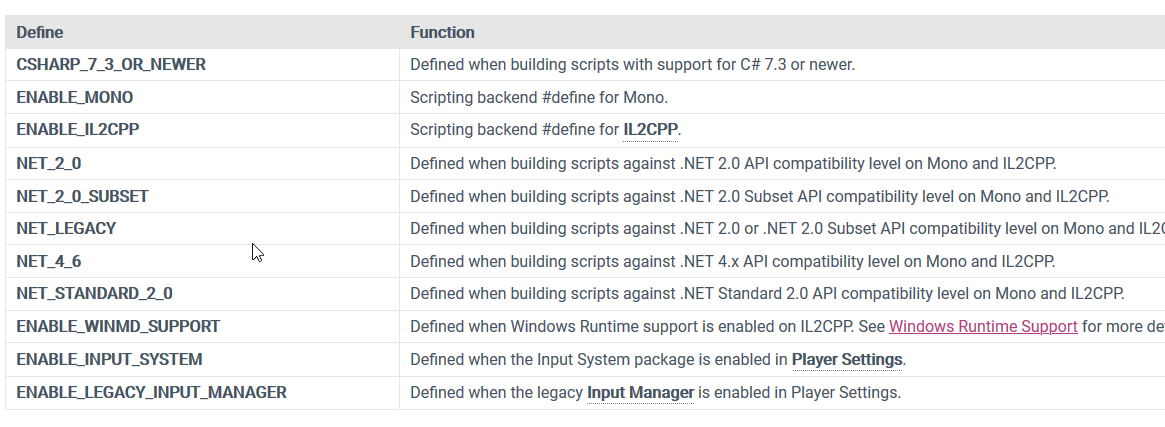
Or these
severe python
yeah, this is how I'm going now
I hate compiler directives, but what can you do
tbh, I'm not sure I need this
the files I'm looking for exist here, in multiple sub directories
C:\Program Files\Unity\Hub\Editor\2017.4.40f1\Editor\Data\MonoBleedingEdge\lib\mono
waxen sandal
There's [Conditional("UNITY_EDITOR")]
severe python
but there is that Gac folder, which also contains them, which maybe is always going to be the right one?
waxen sandal
But you still need to wrap usings that might not be supported
severe python
now I'm even more confused, why doesn't the stupid mcs.rsp or csc.rsp work in unity 2017 😦
onyx harness
Parse the .csproj file
waxen sandal
[Conditional] doesn't remove your code by the way just removes the calls
onyx harness
the most reliable I found
waxen sandal
csc.rsp or mcs.rsp should work if they're in the root
onyx harness
Instaed of looknig for Framework in your computer
severe python
define root
onyx harness
there is so many
severe python
ProjectFolder?
ProjectFolder/Assets/?
waxen sandal
Assets/csc.rsp
severe python
unfortunately, that also assumes .net 4.x
waxen sandal
mcs should also work
waxen sandal
Weird
severe python

Unity Forum
Hi,
https://docs.microsoft.com/en-us/dotnet/standard/io/how-to-compress-and-extract-files
is supposed to be available through...
waxen sandal
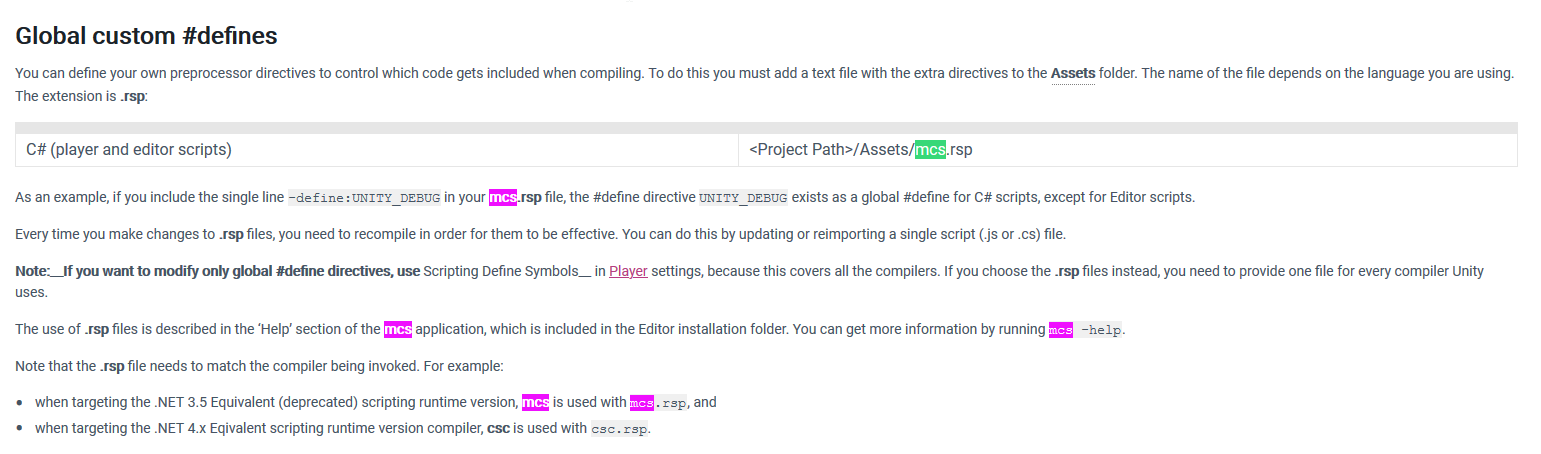


 severe python
yeah, I've been over that page a hundred times
its broken in 2017
per that thread linked above, confirmed by Josh Petereson
 native imp
@severe python yours extracting unity packages? Check out my tool the packs them. Might help you out
severe python
technically no, I'm extracting zips, but its all the same right
native imp

GitHub
Exports Unity3D packages without the need of Unity3D. Perfect for build automation and CI. - Lachee/Unity-Package-Exporter
severe python
ah you get around it by including ICSharpCode.SharpZipLib
that was an option, but I didn't want to add dependencies
native imp
Yee
severe python
I gave up
native imp
Well I wouldn't recommend creating your own unzipped because security , so tough call I guess
severe python
yeah, I mean I'd love to support 2017, but I ended up running into a bunch of other problems
and it seems pretty unfeasible at this point
native imp
AssetBundles are also a thing as a reminder, but probably not what you want
severe python
nah, I'm trying to download zip files and extract them to get certain dependencies
 humble pond
any way to generate a list of drop downs with predefined values in the editor for a script comp? Not sure if I really need an editor extension script for this
waxen sandal
Not out of the box
waxen sandal
This channel is intended to discuss development of editor tools
 vast geyser
Anybody know how to update nested prefab that has a missing scripts on it? 🤔
i'm trying to batch clean them
shadow moss
Has anyone had any luck with getting System.Diagnostics.Conditional to work with assemblies?
I have an assembly with a static method that has the System.Diagnostics.Conditional attribute
Even if enabled, it looks to be compiled out when referenced in other assemblies
onyx harness
I'm not sure 100%, but I think Conditional is handled at compile time, isn't it?
shadow moss
Yes it is
So let's say that the assembly A has the conditional function Foo
If B references A and Foo is called somewhere inside B, then the issue is that Foo isn't ever called
Even if MY_DEBUG is defined for [Conditional("MY_DEBUG")] static void Foo() { ... }
It's only when I remove the Conditional attribute does it work
I'm thinking there's an order?
onyx harness
I was more thinking, when you compile A, and MY_DEBUG is not defined, Foo might be stripped already.
What do you see if you look at the compiled assembly A?
shadow moss
Actually, I think I figured it out!
So the problem is that MY_DEBUG needs to be added to
In the Scripting Define Symbols
onyx harness
Well, obviously, it needs to be set somewhere X)
shadow moss
Yeah, it was actually being set within the .cs file that's inside assembly A
Thanks for stepping me though this
 next slate
I want to implement a unity animator style preview based on selected gameobject in play mode. How can I get that callback?
waxen sandal
Use the Selection class
minor herald
Does anyone know how I can add a custom function to a port(GraphView) if it gets connected to another port?
https://docs.pumachen.xyz/unity-doc/ScriptReference/Experimental.UIElements.GraphView.Port.html
 desert arrow
anybody know why I can't build unitypackage while running editor from command line?
trying to have jenkins build pipeline build unitypackage -- not seeing any errors
(it also builds a zip file and that part works fine)
using AssetDatabase.ExportPackage()
aaah -- think -quit is closing unity before it's finished
 hasty urchin
howdy! does anyone know if there is an API available to set the editor search text?
I've got a useful editor window that would be handy to have a find references in scene button, replicating the context menu item from the Project panel.
I've spent some time looking for this today but haven't found anything yet
hasty urchin
hey i found a Reflection based approach because apparently these are some protected APIs.
https://stackoverflow.com/a/29579388/101855
 verbal spire
Hello I'm having trouble getting intellisense to work in VSCode on Ubuntu 20.04; does anybody have it working? I have all the 3 reccomended extensions installed and C#.
Is it perhaps because I have NET CORE 3.1?
verbal spire
for anybody having the issue I had within Unity go to Window -> Package Manager -> Visual Studio Code Editor -> Update I'm now at version 1.2.1 and it works now.
I also updated Mono to the most updated stable version and am still on 3.1 SDK.
cheers
 willow ether
how do i get the visual scripting window?
 ember rock
Anyone know of any tutorial about how to create a editor extension that allow for paint 2d map in the scene view (similar to Unity Tilemap system)?
severe python
Mikilo, you put some controls up next to the play control buttons, how difficult was that?
I'm limited to IMGUI in this case
I also need to do some wizardy stuff
waxen sandal
Only way without UIElements I know is something like Harmony
severe python
wizards are easy, thats good toknow
onyx harness
I display a borderless window @severe python
And draw the background the same as the Unity Editors
It's a complete illusion, but works so well nobody noticed
severe python
I mean that works for me tbh
I want to display run targets that can be executed
kinda like in VS
how did you esnsure it stayed positionally syncd?
win32?
onyx harness
I get the main window
From there I get its Rect, then draw at the right position which is always the same
Unfortunately I'm not behind my computer, but will drop you the code to get the main window, its hidden in the GUIView
 tulip plank
Is there any reason why I couldn't make use of Unity's built in Sprite Atlas stuff for use in an Editor-only tool?
 kind linden
does anyone know a dynamic flexible way to add inspector buttons? Rn I need to ceate a whole new script just to add another button.
onyx harness
Use Decorator as a way to draw Button?
 craggy holly
Hi, not sure if someone can help me.
I want to use "array field" inside a editor tool, but I'm using just this variable within the editor tool class.
I know how to use a serialized property from other classes but I'm not solving how to obtain it in the same class.
waxen sandal
You can just create a serializedobject from your current instance e.g. new SerializedObject(this)
But keep in mind that your array is currently not serialized
craggy holly
Ok, thanks, that was the problem (the array wasn't serialized) @waxen sandal 🙂
humble pond
is it possible to only add stuff to a script's inspector UI without removing the ones generate for the scripts fields?
visual stag
sure, just call DrawDefaultInspector or base.OnInspectorGUI
and you just draw stuff after that
humble pond
ah nice, thanks :}
minor herald
Does anyone know what the namespace is for EditorCoroutines?
Documentation says it's Unity.EditorCoroutines.Editor but Visual Studio tells me it doesn't exist
split bridge
I believe it's a package - have you installed it via the package manager @minor herald ?
minor herald
Yes i installed the package
split bridge
then other suggestion is to regenerate csproj files (via editor->preferences->external tools)
 lusty vault
Hello, I am not sure if this is the right channel to ask but is it normal for Visual Studio to don't understand any of the Unity Classes/Namespaces?
lusty vault
Looks like regenerating files fixed the issue
waxen sandal
It's not normal and it's also not the right channel
 arctic wyvern
anyone have a favorite package on the asset store for enhancing the hierarchy view? looking for a way to make certain items stand out easier, etc. there seem to be a lot of options, but no obvious standout
 unreal phoenix
I don't know if this is the correct place to ask about uielements stuff, but for some reason, unity is telling me that UnityEngine.UIElements.Template (in umxl) does not have a factory function, did this change to something else and the docs did not update?
Element 'UnityEngine.UIElements.Template' has no registered factory method.
UnityEngine.UIElements.VisualTreeAsset:CloneTree()
I copied the example from https://docs.unity3d.com/Manual/UIE-WritingUXMLTemplate.html
in particular
<engine:UXML ...>
    <engine:Template src="/Assets/Portrait.uxml" name="Portrait"/>
    <engine:VisualElement name="players">
        <engine:Instance template="Portrait" name="player1"/>
        <engine:Instance template="Portrait" name="player2"/>
    </engine:VisualElement>
</engine:UXML>
nevermind, I found out the issue. You have to have templates declared at the root elements, and to make them show up, you must have a template container with the template attrib set to the same name as the included template.
onyx harness
anyone have a favorite package on the asset store for enhancing the hierarchy view? looking for a way to make certain items stand out easier, etc. there seem to be a lot of options, but no obvious standout
@arctic wyvern NG Tools Free ;p
unreal phoenix
Is this still valid? I cannot seem to get it to work, even changing to objectType or object-type in the uxml?
<uie:ObjectField name="Texture2D" type="UnityEngine.Texture2D, UnityEngine.CoreModule" binding-path="icone" label="Object" allow-scene-objects="false"/>
https://answers.unity.com/questions/1625662/in-objectfield-created-in-uxml-uielements.html
Unity is the ultimate game development platform. Use Unity to build high-quality 3D and 2D games, deploy them across mobile, desktop, VR/AR, consoles or the Web, and connect with loyal and enthusiastic players and customers.
 torn pecan
How can I display and edit an object in the inspector without using SerializedProperty? I want to modify AnimationCurve using EditorGUILayout.CurveField to make use of the Rect parameter to limit the range of the sliders. CurveField only takes a AnimationCurve object :/
 weak bone
I can view the object using Editor. OnPreviewGui function and it shows some texture error...
I want this preview to be selectable..
Like if there are 3 object previews I want to select one and store it's index as we do in Toolbar .
Is it possible?
minor herald
Does anyone know how I can set the theme of a UIElements in code?
native imp
isnt that set by the editor theme itself? ie: you can't
minor herald
In my custom UIElements version of my tool the theme is set to light
When I use GraphView API the theme is set to dark😅
 cinder oracle
I have a script that runs in the editor, setting some properties for preview. Currently, it naively reverts to original values just by setting the properties back when leaving the preview. However, this causes the modified properties to still show up as (unnecessary) prefab overrides if the object in question is a prefab instance.
Is there a way to record an object or objects's state and set it back to exactly that later?
or some other way in which I can prevent these redundant overrides?
brazen umbra
If I understand correctly I have an inspector error
If however you think it's a serialization error instead, do tell, I'm not sure
I made an ObservedList<T> : List<T>
I also made an empty [Serializable] ObservedListMyType : ObservedList<MyType>
The name of my field of type ObservedListMyType shows up in the inspector, but there is nothing to fill
If I understand correctly, the serialization happens, but the inspector cannot show my concrete derivative of List<T>
Is there any way I can make it happen?
severe python
Is there a way I can have assets in my project that I need for display while in the editor, but prevent them from being added to the assetbundles?
I build my bundles through code, so perhaps I can remove those assets before executing the build and then replace them?
 zinc peak
I have a very weird problem
when i build seperatly , some things don,t work , but when i build directly it works
 tulip mantle
@Anybody ... Assuming this is the correct place for custom Inspector Editor coding here is my issue/question ... I have a multi-select MaskField of textures (terrain layers) that works as expected. However, if I switch to another game object and then come back it loses my previous selections (textures are still there). Everything else in all of the other fields persists ... but the MaskField looses the previous settings. Any ideas???
waxen sandal
Sounds like you're not dirtying the object or using serializedobjects
tulip mantle
Only 'Serialized' properties in the non editor code is one class
waxen sandal
How are you modifying the field?
tulip mantle
... But it does remember every other property without issue or loss.
mtp.mainclass.Population = EditorGUILayout.IntField(tContents, mtp.mainclass.Population);
... on the Editor side
waxen sandal
You got 3 options then
Use Undo.RecordObject, EditorUtility.SetDirty, or use serializedproperties
tulip mantle
So just add [System.Serializable] to the offending property?.
waxen sandal
No
They're a way to modify the data that unity serializes
Should really just look up documentation on it
tulip mantle
ok... need a reference then I guess 😉
Thats what I mean ... not finding any code references ... but I can look up those three choices 😉
tulip mantle
@onyx harness ... I have ... public LayerMask PlantTextures; ... in the non-editor code.
I have this in the editor side ... mtp.TreeSetup.PlantTextures = EditorGUILayout.MaskField(tContents, mtp.TreeSetup.PlantTextures, TextureNames); ... which works just fine ... inspector works and updates as expected.
The Problem is if I switch over to another game object in the scene and then switch back to this object ... it looses all my settings for the LayerMask/MaskField obejct only.
onyx harness
I'm sorry, can't help much. I asked for code and you gave me one line
tulip mantle
@onyx harness I gave you the relevant lines...
Main Class public LayerMask PlantTextures; ... which is a property in a Tree_Setup class declared as...public Tree_Setup TreeSetup;
This is the code in the Editor Classmtp.TreeSetup.PlantTextures = EditorGUILayout.MaskField(tContents, mtp.TreeSetup.PlantTextures, TextureNames);
Well ... it looks like you can't use [SerializeField] / serializedObject.FindProperty on MakeFields ... moving on to other suggestions 😦
tulip mantle
OK ... problem solved ... on the editor side ... I forgot to wrap the property (see above) in InternalEditorUtility.ConcatenatedLayersMaskToLayerMask(mtp.TreeSetup.PlantTextures); ... All better now 😉
 trim tendon
Does anyone know of a tutorial for writing a custom Sprite Editor module?
 topaz lagoon
hi there, is there possible to selected a bunch of gameobjects and keep showing one component on inspector that it is only attached to one gameobject ?
i tried to use caneditmultipleObjects but it seems not to work like i want
 mellow trail
what is the necessary extensions to add in vs code for unity
 austere adder
I'm working on a PropertyDrawer
I managed to figure out that you can use
EditorGUILayout.ObjectField(property.FindPropertyRelative("object name") ) to draw object fields
but I can't figure it out how to draw enum fields using EditorGUILayout.EnumPopup
if I try EditorGUILayout.EnumPopup(property.FindPropertyRelative("tween"))
I get cannot convert from 'UnityEngine.SerializedProperty' to 'System.Enum'
visual stag
you're going to have issues in drawers if you use Layout
you need to use the provided rect and use EditorGUI/GUI functions
override GetPropertyHeight if you need more space allocated
use the fields on SerializedProperty to pass the appropriate data to the specific functions
like .intValue or whatever it may be
austere adder
...
time to delete everything then
visual stag
or use the generic https://docs.unity3d.com/ScriptReference/EditorGUI.PropertyField.html
which will display the field appropriate to that type
austere adder
What would I use as an alternative of EditorGUILayout.BeginHorizontal()
visual stag
maths on Rects
austere adder
I have a PropertyDrawer that needs to draw a field that has already a custom drawer made. Can I draw that field using the OnGUi method of that field's drawer?
waxen sandal
Use PropertyField
waxen sandal
Editorguiutility.singlelineheight
 trim charm
Do you have to be from the EU to publish to the assetstore?
Or is it anywhere in the world?
waxen sandal
Anywhere afaik
trim charm
And the payment methods?
waxen sandal
Idk, should be in the docs somewhere
onyx harness
PayPal, wire.
austere adder
can I use Gui.Button in a PropertyDrawer?
onyx harness
Yep
Anything from [Editor]GUI
But, if there is an equivalent in EditorGUI, prefer this one.
austere adder
there isn't as far as I can tell
onyx harness
Not for Button
but take TextField for example
In the Editor, prefer to use EditorGUI.TextField
austere adder
👍
 lost dove
Hi, I'd like to make it so that when I move an object in the editor, its position is anchored to int values (as of I'm moving an object on a grid)
I tried to write
CombatElement element = (CombatElement)target;
element.transform.position =
  new Vector3(Mathf.RoundToInt(element.transform.position.x),
      Mathf.RoundToInt(element.transform.position.y));
in the OnInspectorGUI method, but it doesn't work properly. Does anyone has any idea how to do it?
Oh wait, nevermind, I just learned that I just need to hold control when moving an object to get that result x)
severe python
Can I scan assets in a project, such as prefabs, and gameobjects in a scene, to see if they reference any assets in a set of folders?
 gilded meteor
I'm trying to walk through a prefab and scale up the transform on all the children on it. I think I figured out how to walk through all the children by doing prefab.GetComponentsInChildren<Transform>(); and getting the localScale, changing it and then assigning a new value to it. When I call another function to walk back through them, the scales say the new value. But the actual prefab in the editor still shows the old values. Do I need to somehow commit it or call some other function to get the editor to realize it changed?
humble pond
I'm clearing and filing a list at a press of a button, but the editor doesn't realize the list was changed, how can I make it detect that?
humble pond
oh, I was doing it wrong xD modifying the script instance's list instead of modifying the serialized property in the editor... even though the results showed up fine, up until I ran the game and they vanished xD
waxen sandal
@severe python There are a bunch of different methods to find dependencies
Like AssetDatabase.GetDependencies or EditorUtility.CollectDependencies
topaz lagoon
could i use Gizmos on ontoolgui
cause i wanted to draw a rotated cube and i cannot use Handles.drawwirecube
split bridge
UI Builder 1.0.0-preview.1 is out. Multi-selection support on other niceties but be aware UI Builder is now configured by default to be used for runtime UI. As such, many Editor-Only controls will not be available in the Library. - you change this in Projcet Settings -> UI Builder if you're working on editor stuff.
split bridge
Anybody know what the bool returned by serializedObject.ApplyModifiedProperties() means? Nothing in the docs afaics
split bridge
seemed to always return false when I checked but I could be wrong
minor herald
Does anyone know if there is a cs reference for ShaderGraph?
I'm trying to use the GraphView API and was wondering how a node is added to the graph in ShaderGraph
 short tiger

GitHub
Unity Graphics - Including Scriptable Render Pipeline - Unity-Technologies/Graphics
minor herald
Thanks 😄
minor herald
Does anyone know how I can use this piece of code in my own script?
public Vector2 ScreenToViewPosition(Vector2 position)
{
       GUIView guiView = panel.InternalGetGUIView();
       if (guiView == null)
       return position;
       return position - guiView.screenPosition.position;
}
GUIView is not accessible and the my graphview panel does not have an accessible method for InternalGetGUIView
This function is used by the VFXView Script for the VFX Graph
https://github.com/Unity-Technologies/Graphics/blob/master/com.unity.visualeffectgraph/Editor/GraphView/Views/VFXView.cs
GitHub
Unity Graphics - Including Scriptable Render Pipeline - Unity-Technologies/Graphics
onyx harness
Just use some reflection
 left gate
How do I set (clear) an asset reference from the SerializedProperty?
onyx harness
object ref?
left gate
nope I get a warning doing objectReferenceValue = null; type is not a supported pptr value
onyx harness
Try the Id one (set the value to 0)
left gate
nope same issue
onyx harness
What is the PropertyType giving?
minor herald
Thanks @onyx harness for the response
I used reflection before but not sure how to use it here
Do you have any code sample/links on how to use apply reflection in this situation?
onyx harness
MethodInfo method = panel.GetType().GetMethod("InternalGetGUIView", BindingFlags.Instance | BindingFlags.NonPublic);
object guiView = method.Invoke(panel, new object[] {});
Thanks
torn pecan
Anyone know why my PropertyDrawer renders like this:
override public void OnGUI(Rect position, SerializedProperty property, GUIContent label) {
            EditorGUI.BeginProperty(position, label, property);
            SerializedProperty tileProperty = property.FindPropertyRelative("Tile");
            SerializedProperty DepthProperty = property.FindPropertyRelative("Depth");
            SerializedProperty WeightProperty = property.FindPropertyRelative("Weights");
            var tileRect = new Rect(position.x, position.y, position.width, position.height);
            var depthRect = new Rect(position.x, position.y + position.height, position.width, position.height);
            var weightRect = new Rect(position.x, position.y + position.height * 2, position.width, position.height);
            EditorGUI.PropertyField(tileRect, tileProperty);
            EditorGUI.PropertyField(depthRect, DepthProperty);
            EditorGUI.PropertyField(weightRect, WeightProperty);
            EditorGUI.EndProperty();
      }
That's the code for it
ok I found out its because I use the full height for every element. Is there a way to do something like EditorGUILayout in a property drawer?
torn pecan
Anyone got advice on working with property drawers and arrays.. This is really not working out
torn pecan
That I found out. Now I am struggeling with arrays.
Weights should be an array, but somehow its not displaying its contents
I've managed to get this far, but arrays are still not displayed
waxen sandal
What's your code?
torn pecan
override public void OnGUI(Rect position, SerializedProperty property, GUIContent label) {
            EditorGUI.BeginProperty(position, label, property);

            SerializedProperty tileProperty = property.FindPropertyRelative("Tile");
            SerializedProperty DepthProperty = property.FindPropertyRelative("Depth");
            SerializedProperty WeightProperty = property.FindPropertyRelative("Weights");
            foldout = EditorGUI.BeginFoldoutHeaderGroup(new Rect(position.x, position.y, position.width, EditorGUIUtility.singleLineHeight), foldout, tileProperty.name);
            if(foldout)
            {

                  var tileRect = new Rect(position.x, position.y + EditorGUIUtility.singleLineHeight, position.width, EditorGUIUtility.singleLineHeight);
                  var depthRect = new Rect(position.x, position.y + EditorGUIUtility.singleLineHeight* 2, position.width, EditorGUIUtility.singleLineHeight);
                  var weightRect = new Rect(position.x, position.y + EditorGUIUtility.singleLineHeight * 3, position.width, EditorGUIUtility.singleLineHeight);
                  EditorGUI.PropertyField(tileRect, tileProperty);
                  EditorGUI.PropertyField(depthRect, DepthProperty);
                  EditorGUI.PropertyField(weightRect, WeightProperty);
            }

            EditorGUI.EndFoldoutHeaderGroup();
            EditorGUI.EndProperty();
      }
WeightProperty is the array
waxen sandal
What's your object?
torn pecan
[System.Serializable]
    public struct TileChance
    {
        public MineableTile Tile;
        public int Depth;
        public float[] Weights;
}```You'll probably need the height calculations too:
 override public float GetPropertyHeight(SerializedProperty property, GUIContent label)
      {
            if(!foldout)
                  return EditorGUIUtility.singleLineHeight;

            return 4 * EditorGUIUtility.singleLineHeight;
}```Hmm, looks fine to me
torn pecan
There's two issues: The weights are not being displayed(their content) and when I click one foldout, all of them expands(which I assume is because the foldout field is saved as a field, shared by all of them)
Weights is an empty array(sorry I forgot to say) but I'd like it if displayed it like it does in the editor with a count
waxen sandal
foldout should be property.isExpanded
What if you set includeChildren on the array property field?
torn pecan
That did something, but now the height calculation is off
waxen sandal
Which one of hte 2 causes that?
waxen sandal
Now use this https://docs.unity3d.com/ScriptReference/EditorGUI.GetPropertyHeight.html for the array height
torn pecan
Do I just return that from GetPropertyHeight?
waxen sandal
Nah, it's probabyl like 3 * EditorGUIUtility.singleLineHeight + EditorGUI.GetPropertyHeight(arrProperty)
torn pecan
 override public float GetPropertyHeight(SerializedProperty property, GUIContent label)
      {
            return EditorGUI.GetPropertyHeight(property, true);
      }
This worked 😄
waxen sandal
Uhhh
torn pecan
Not sure how expensive it is, ie if it renders twice
waxen sandal
I'd expect that to be an infinite loop
torn pecan
It definitely renders it twice.
How can I save the result of that computation, without effecting all properties sharing the class?
(as happened with the bool)
waxen sandal
You don't
torn pecan
So where would the 3 * EditorGUIUtility.singleLineHeight + EditorGUI.GetPropertyHeight(arrProperty) go?
waxen sandal
Instead of this 4 * EditorGUIUtility.singleLineHeight;
torn pecan
Ah so I'd get the arrProperty in the GetPropertyHeight
torn pecan
Alright thanks a lot 😄
waxen sandal
No worries, that's what were here for
torn pecan
Is there an easier way to do this? Rather than having to calculate the offset for each entry
EditorGUILayout was not working properly
waxen sandal
I usually write some helper methods
torn pecan
Right
waxen sandal
Like draw all children except this one
Calculate the size of all children using that GetPropertyHeight method except this one
torn pecan
Seems like functionality that should have been built in 😛 Isn't Unity using this as well?
waxen sandal
Those helper methods aren't that useful if you want to do more custom behaviour
torn pecan
But still for people who get lost like me 😄
severe python
Uielements is what solves the layout struggles
waxen sandal
Some struggles 😛
 signal estuary
how do i create a face between vertices in probuilder i have tries both edge bridge and filling holes as well as joining vertices none of which do anything
 silent dawn
is there some way to override what happens when you create a scriptable object in editor ?
waxen sandal
??
silent dawn
because I'd like to do some codegen based on a list of scriptable objects, so I need to know when those scriptable objects are created
onyx harness
@silent dawn asset post process
silent dawn
I mean the creation of the asset @waxen sandal
and I looked at AssetPostprocessor, why does it have a message for every asset type except scriptable objects 
waxen sandal
tulip mantle
@Anybody ... need a editor MaskField expert... My LayerMask is skipping over a value ... I.E. 1, 2, 4, 16, 32 ... skipping over 8 :S
And the 'Everything' selection returns 823 ... any ideas?
I'm passing in a string array of 5 textures into the MaskField on the editor side.
MaskField displays correctly but position 4 & 5 return 16 & 32 vs. 8 & 16.
 gloomy chasm
@tulip mantle This channel is for extending the edit, custom inspectors, and editor windows and such. You may have better luck in #💻┃code-beginner.
However if memory serves, the LayerMask is a bitmask. So if you are setting them manually with an int value, it could be messing it up.
tulip mantle
This is an extended custom
editor. Passing in a string array of 5 items.
Using Mask Field on editor code and the concatonation xlators to/from the LayerMask.
And yes I know it's a bit mask... as stated above the bits I'm getting out of the LayerMask are not correct.
I should be getting 1,2,4,8,16 ... but I get 1,2,4,16,32 for the respective bits. And the 'Everything' selection returns 823 when it should return 31 (e.g. all bits set).
waxen sandal
Show your code?
blissful burrow
okay how the heckity
do you deal with asset dependencies on the asset store?
seems like there's no clean way to do it
the best way seems to be "tell users in the description that it requires TMP"
one small part of my asset has a dependency on TMP, and it's like, I can sort of get the code side done and fine with the assembly dependency defines and compile code out, but, this is 2019 only, and not 2018. on top of that, I want one of my example scenes/code to use a TMP font and the TMP dependent code
but can I even have TMP assets if TMP isn't present?
other alternatives seem to be messy systems of like, put the TMP dependent assets in a .unitypackage and have people only open it if they know they have TMP or something
and it just feels really, hacky?
I would love to have a way for this to just work, as in, if you have TMP, the text things don't show, if you have TMP, they do
waxen sandal
You can write some tooling to import that package if it detects that TMP exists
But yeah it's far from ideal
blissful burrow
hmms, feels like there should be a system built in on the asset store for this type of stuff
blissful burrow
except the package manager doesn't seem to be a thing that works with asset store assets, right?
blissful burrow
so then it's back to being a mess :c
I was also really surprised at how underdeveloped the git URL support was in the package manager. I thought it would be like a nice little submodule you could hit a button to update and switch branches etc.
but it locks to a specific commit, and you need to fiddle with json files to unlock it and update
anyway sorry for ranting~
waxen sandal
Nah no worries
I've going through the same pain
We've written some tooling to make it easier to update those packages and add them at work
But it's still far from ideal, there's also some open source package that adds better git support
waxen sandal
But they do really hacky things with compiling their package
I'm not sure if they do it for every assembly definition but for at least theirs they hotswap the compiler to ignore access checks
blissful burrow
alright
I just wanted to include a lil TMP support thingy why is this so hard ;-;
waxen sandal
What I'd do is do a quick check if the manifest.json contains TMP, if not show a popup and do Client.Add(TMP)
Trying to use the Client API for more complicated things is a mess as well
It's all async but there are no callbacks afaik
So you have to manually check whether it's done
It's just easier to do a contains on the manifest.json
blissful burrow
hmmms possibly yeah
why can't we define dependencies on a per-asset basis? :c
very close to just saying heck it and tell people they have to have TMP otherwise it won't work
waxen sandal
Why not just make an extension that depends on Shapes as a separate package?
Would have to require the user to install it manually though
severe python
the locking to a commit thing is to protect you
so that if the git repo is updated and made incompatible with your project it doesn't immedatiately break your project
waxen sandal
Right but it wouldn't auto update anyways
So having a decent option to update your project to a later commit is fine
severe python
it does
if you remove the lock in the manifest.json and your project refreshes it gets a fresh copy
its how I've been developing one of my packages lately
waxen sandal
I know but who wants to manually edit the manifest.json
severe python
honestly, I think you must be able to do it cleaner with versioning
but I'm lazy (sorry, cat attack)
waxen sandal
Also if you tag your releases then you have to update the tag in your manifest.json
Which is even more annoying
severe python
either way you have to edit something
waxen sandal
Well if the tagging way was officially supported then they could show the versions similar to other package versions
waxen sandal
Wrong channel
tulip mantle
@gloomy chasm @waxen sandal ... Here is a zip containing the baseline code. Instructions to follow...
- Unzip this in a new/empty project/scene.
- Attach the main script to any available game object (or create one).
- Make various selections on the layer masks.
- Click the 'Log Current Values' button to see the values of the Layer Masks.
waxen sandal
So neither work or just your custom values one doesn't?
tulip mantle
What you will see is...
1st selection = 1 ... OK
2nd selection = 2 ... OK
3rd selection = 4 ... OK
4th selection = 16 ... should be 8
5th selection = 32 ... should be 16
Neither work as expected
waxen sandal
What's InternalEditorUtility.LayerMaskToConcatenatedLayersMask
tulip mantle
It is the unity converter they call for in their manuals ... from/to layermask to mask field and back.
waxen sandal
0.o, pretty sure I've done that in the past without those methods
tulip mantle
Unity is the ultimate game development platform. Use Unity to build high-quality 3D and 2D games, deploy them across mobile, desktop, VR/AR, consoles or the Web, and connect with loyal and enthusiastic players and customers.
Trying to find the link to the 2019 documentation ref.
Ok ... looks like removing BOTH of those clears the issue ... still testing :S
waxen sandal
😂
tulip mantle
Why the heck would they say to use them if you shouldn't :S
Only reason might be if you are working with the actual Unity layers (and in my case I'm not) there might be a special case where the offset is needed :S
ThanX for the second set of eyes 😉
 uncut barn
Hi, I hope this is for Inspector questions. In 2D, why does Unity scale a sprite down when you try to tile it in the inspector? It does the same thing when you try to slice it?
waxen sandal
How else do you expect it to tile?
Also you're looking for #archived-art-asset-showcase
uncut barn
ah I would expect it to retain the same scale and add tiles next to it.
100x100 image would still be 100x100 and the 3 tiles would be 300x300
waxen sandal
It's the opposite
You got to pick either one
And the opposite one makes sense in 3d
Any other shape than cubes or squares don't make sense
uncut barn
k thanks
 azure ginkgo
im trying to follow a unity tutorial on the new input system. he presses alt + enter in visual studio to bring up this
but pressing alt + enter doesnt do anything for me in visual studio code
also, i tried manually typing using UnityEngine.InputSystem; at the top of my script but that is also red underlined
onyx harness
Here I press Ctrl + .
or Ctrl + ;
depending on the keyboard language
Or you can right-click...
azure ginkgo
oh LUL
well also i restarted my unity project and it accepts it now
i guess you have to restart after you import the package
wait nvm its underlined still
what is the option under the right click menu?
 split kraken
Hey, I created a simple node graph using Unity's GraphView and I want to add Undo features (Unity's Undo system, if possible), how do I approach it?
I want to delete/restore nodes, change values back, etc..
Do I need to register every variable myself? is there a way to pass Undo the object itself (the node maybe)?
waxen sandal
Not sure if this tutorial talks about that but it's usually what we recommend for GraphView https://www.youtube.com/watch?v=7KHGH0fPL84
In this tutorial we are going to create a SUPER SIMPLE node based dialogue system with the ability to branch story lines. We gonna create the main setup and make our graph entirely functional in this episode.
In the next episode, we gonna add save&load system for nodes and ga...
I don't know specifically how GraphView works myself though
waxen sandal
Shame, will have to wait till someone shows up that has used GraphView then :/
split kraken
Thanks anyways! gonna try messing around with it anyway
Gonna update if I will find something if it will interest anyone
gloomy chasm
I got you @split kraken ! I have spent far too much time working with GraphView, and looking at the source for ShaderGraph and VFXGraph.
I am not familiar with that tutorial, so I'm not sure how they have it set up. But what Unity does is have the Graph data inside of a ScriptableObject while 'open' in an editor window. Then, they use that as the target object to register Undo with.
Oh, and yeah, you need to manually register undo for each field. What I would do (and what Unity does) is to make a custom field element for each type of field that handles setting to undo, that way you can just use those custom field elements and not have to worry about setting undo for each field. You just need to do it once for a field type.
If you got any questions feel free to ask. I either know, or probably know where to find out. 🙂
split kraken
@gloomy chasm Thanks man that is really helpful!
tulip mantle
@Anybody ... In reference to my most recent discussion ... when do you actually need to use these converters??? InternalEditorUtility.LayerMaskToConcatenatedLayersMaskIs this only used when working with the actual Unity LayerMask? In my case I was creating a custom MaskField selector completely unrelated to the layer mask list.
blissful burrow
does anyone know how to properly set up multiselect handling for serialized vector4 properties?
where if I multiselect something that has a vector4 field, I want to be able to see multiselect states for each component individually
which, that works, but if I change one component, it assigns to all components for all selected objects
oh, it has children!
so each component is a serialized property in and of itself
so then prop.vector4value is just a shorthand for iterating all children of a vector4 one and getting their values? :0
okay yeah, looks like it, new question: assigning to floatValue of the child serialized property of a vector4 property doesn't seem to do anything, anyone know what gives?
I know this code executes and the i++ logic works
but it doesn't seem to save that it assigned
ah, got it, nvm
thanks for coming to my ted talk 💖
gloomy chasm
lol, glad you figured it out.
blissful burrow


 brisk crest
Hi, Do anyone know how to select objects ? the Inverse to "Selection.GetTransforms"
I have a List of Transforms, I want to set that list as the current selected objects in Scene.
basically the opposite action to Selection.GetTransforms(), with this I can GET the selected objects, I want to SET them.
a use case example:
"I select a lot of objects on scene view, read the selection inside an editor window, choose some of them, then I want to only keep selecting the chosen ones"
visual stag
Selection.objects
brisk crest
Selection.objects
@visual stag
Thanks it Worked I just had to convert from a list of Transforms to GameObject[]
onyx harness
For GameObjects you have Selection.gameObjects
brisk crest
For GameObjects you have
Selection.gameObjects
@onyx harness Thanks, tried that, but is Get only
onyx harness
Alright
waxen sandal
Anyone knows if the UPM supports deprecating or unpublishing packages on your remote?
Visualizing it I mean
waxen sandal
Unpublishing does seem to be respected but deprecated packages are shown as normal packages
 uncut snow
Hi, not rly editor coding but custom serializtaion. Im using ISerializationCallbackReceiver to serialize custom classes. In OnBeforeSerialize i convert that class to json string and write it to a [SerializeField] so unity just stores the json info by it self. And OnAfterDeserialize i read the string and restore the object. At first moment it seems to work. But i cant change the variables in the inspector. https://gist.github.com/SradnickDev/f11e340d5f7f2e4d780829f8c61c0d16

Gist
SerializedScriptableObject allows to serialize stuff that unity cant like, inheritance for custom classes in e.g in lists. With the use of https://www.newtonsoft.com/json - SerializedScriptableObje...
waxen sandal
Don't you need a custom editor for that?
uncut snow
Yes but atm not. since the default values from the base class are visible and enoguh atm.
waxen sandal
Does your serializeddata actually contain the right data?
uncut snow
yes
If i delete line 85 m_index = 0; I'll get an out of range exception but then the inspector works fine and also the serializtaion prcoess.
waxen sandal
That's... weird
uncut snow
Not even the example https://docs.unity3d.com/ScriptReference/ISerializationCallbackReceiver.html works like i thought it would do. With this example its the same problem, cant change inspector values.
Solved it with a simple flag, only desiralize after Serialize has been finished
updated gist^^ for solution
 fair zephyr
Is there any way I could get an old version of Probuilder for Unity? It's no longer on the Asset Store (please ping me)
onyx harness
Is there any way I could get an old version of Probuilder for Unity? It's no longer on the Asset Store (please ping me)
@fair zephyr https://github.com/Unity-Technologies/com.unity.probuilder/releases
fair zephyr
@onyx harness That is magnificent!
thank you
 toxic anchor
was wondering on how I can get intellisense for unity functions (like transform) using vs code
it used to work before, like couple months ago
short tiger
@toxic anchor Do you have VS Code set as the external script editor in Unity's Preferences?
toxic anchor
like having vs code to be my unity editor through preference?
 flint vapor
Hi, how to make a Handle.Label() clickable? I want to be able to replicate this kind of looking but customizing from code color of the gizmos
Any help will be appreciated guys. Thanks in advance 🙂
 weak spoke
the hacky way would be to add invisabable button over / behind it
 meager dirge
honestly.. that's what I'd do lmao
 shadow violet
Is there a way to make Editor.CreateEditor(obj).OnInspectorGUI(); stretch to the width of the window? For some reason it seems to want to just snap to less than half of the right side of the panel, while the default inspector will stretch with the width of the panel
(I literally commented out every single line of code except for the for-loop and that line above which actually shows the component, so I can confirm its the only thing influencing it, unless its not meant to be used in OnGUI?)
 wraith crane
Guys I am trying to make a property drawer (read all the message to see what this drawer is for). This is an example of the code
{

}
public class A : Base
{
    public int number;
}
public class B : Base
{ }

public class GameMode : ScriptableObject
{
     public Base base;
} ```

How can I make a property drawer that let me choose which class (A or B) to choose for the base variable inside GameMode? (And then display all the variables of that class so I can change the values)I want in GameMode to select between A and B basically
I am making the property drawer "universal" (basically using reflection it finds all the classes that inherit a class)
waxen sandal
Serializing derived types isn't supported unless you use scriptableobject or serializereference iirc
wraith crane
Ok thanks, I'll check what serialize reference is :D
waxen sandal
Other than that, it shouldn't be too hard. Use reflection to check what types derive, put them into a list, show a dropdown, on change instantiate a new instance and put it in that variable
wraith crane
Ok I am getting an error if I try to pass the type to a function, the error log is at the end, the problem line is 25:
https://pastebin.com/FzQHVFhG
This is the simplified version of the code, not the real one
Pastebin
I am trying to set the value of the variable (marked as SerializeInheritanceEnum) to the instance of the class based on the selected value
waxen sandal
do int index = i and then use index in your lambda
wraith crane
Ok ty, it works (I don't understand why this works but ok)
It also works using a Foreach instead of the For
waxen sandal
Correct
wraith crane
And SelectClass() gives me an error (line 38), it says I can't convert from "MyClass" to "UnityEngine.Object"
I need to create a new instance of the class from the selected type and set it to the value of my property basically
 pastel osprey
Does anyone know of a way to redraw the asset labels section of the inspector from an editor script? :/
waxen sandal
Look into Activator.CreateInstance @wraith crane
wraith crane
Ok ty :D
waxen sandal
@pastel osprey Can't you just call redraw on the inspector window?
pastel osprey
Nope, Repaint and SetDirty do not redraw that section
waxen sandal
Can you show which section you mean specifically?
pastel osprey
repaint on the preview also doesnt do it (it seems to be part of the preview section in some way)
waxen sandal
It's this class afaik https://github.com/Unity-Technologies/UnityCsReference/blob/master/Editor/Mono/Inspector/LabelGUI.cs
GitHub
Unity C# reference source code. Contribute to Unity-Technologies/UnityCsReference development by creating an account on GitHub.
But what are you actually trying to accomplish?
pastel osprey
Im settings labels from an EditorWindow but it doesnt refresh unless I change Inspector focus
The labels set fine, just that GUI doesnt update
But I would have thought s_AssetLabelsForObjectChangedDelegates should hit on AssetDatabase.SetLabels
visual stag
Odd, it seems to work fine in 2020.0.a12 for me
visual stag
I have an editor window focused and a selected object locked in the background
and a plain SetLabels repaints it
pastel osprey
Heh, ok thanks for that xD
Im building this tool in a live game env in 19.2 ...it could well be a bug
Ill try it in 20a
pastel osprey
Yea ill check it, thanks guys
just to be sure, you are not forcing the repaint right?
visual stag
string[] strings = AssetDatabase.GetLabels(Selection.activeObject);
AssetDatabase.SetLabels(Selection.activeObject, strings.Length == 0 ? new[] {"Test"} : Array.Empty<string>());```(in a UIElements toolbar button)
pastel osprey
perfect, thanks 🙂
waxen sandal
If you do think it's a bug, please check if it's reported already 🙂
pastel osprey
Yea ill check if its in 19 LTS, if its fixed there ill ignore it
waxen sandal
👍
wraith crane
Look into Activator.CreateInstance @wraith crane
@waxen sandal
property.objectReferenceValue needs to be "UnityEngine.Object", Activator.CreateInstance gives me "object", if I try to cast it, it gives me an error: https://pastebin.com/3c6p0xhN
Probably objectReferenceValue isn't what I need to change
waxen sandal
There's another value iirc for serializedreferences
wraith crane
I have this guy's same problem:
https://answers.unity.com/questions/1483244/how-to-properly-check-serializedpropertyobjectrefe.html
Unity is the ultimate game development platform. Use Unity to build high-quality 3D and 2D games, deploy them across mobile, desktop, VR/AR, consoles or the Web, and connect with loyal and enthusiastic players and customers.
split bridge
I also hit this problem sometimes...
wraith crane
The problem is that I can't set the value of the variable with objectReferenceValue neither with managedReferenceValue, it always gives me errors
waxen sandal
I don't know enough about serializereference to help you with it :/
flint vapor
Hi, this question is related to unity gizmos, I want to be able to set the gizmos of an object automatically. I found from a unity forum answer that I can call the internal SetIconForObject method. This function requires an object and a texture. I want to be able to create a texture that has small circle in it.
unity gizmo
the size of the gizmo resizes depending on the length of the name of the object.
Hi, this question is related to unity gizmos, I want to be able to set the gizmos of an object automatically. I found from a unity forum answer that I can call the internal SetIconForObject method. This function requires an object and a texture. I want to be able to create a texture that has small circle in it.
@flint vapor this is the snippet of codepublic static void SetIcon(GameObject go, Texture texture) { var editorGUIUtilityType = typeof(EditorGUIUtility); var bindingFlags = BindingFlags.NonPublic | BindingFlags.Static | BindingFlags.Public | BindingFlags.InvokeMethod; //texture.; var args = new object[] { go, texture }; editorGUIUtilityType.InvokeMember("SetIconForObject", bindingFlags, null, null, args); }I want to pass a texture that looks like a square for simplicity and then color it which way I want. Is there any other support for doing this without manually setting every pixel color?
waxen sandal
@steady crest do this https://discordapp.com/channels/489222168727519232/533353544846147585/593023533337280522
 steady crest
interesting
waxen sandal
Then you can change your inspector to debug internal or something
And see if you can see the variable
That defines that guid
steady crest
it looks like it cant open the asset interface btw. which is super weird
this one, so you know exctly what I mean
steady crest
steady crest
I just created a new one and even there it wont open
waxen sandal
Uhh
steady crest
with the same error, the fk
NullReferenceException: Object reference not set to an instance of an object
UnityEngine.InputSystem.Editor.InputActionEditorWindow.OnGUI () (at Library/PackageCache/com.unity.inputsystem@1.0.0/InputSystem/Editor/AssetEditor/InputActionEditorWindow.cs:596)
🤔
waxen sandal
Impressive
steady crest
just gonna uh
uninstall the package and reinstall. redo the input I have
@waxen sandal
waxen sandal
Nice
steady crest
when internal package stuff cant locate its editor. thats kinda fucky
shadow violet
Im having some weird issues with Editor.CreateEditor(component) - I have a editor script that will let you search components, and when listing them, the labels show up at like 1/4th the width of the window and everything scales with the window rather than stretching like the inspector does - but when I list all the components, the right hand size is almost locked to the right of the window when resizing, but its width doesnt stretch with the window, so it looks less than half the size of the inspector, any ideas how I could fix it? Iv tried messing with GUI.skin.label and that oddly didnt seem to affect it at all
 stable trench
Is it at all possible to create a Property Drawer for System.Numerics.Vector2 . I've been trying for so very long and would love an answer. Am i just chasing an impossible solution?
waxen sandal
Probably not since they probably don't have serialized properties
wraith crane
If I have the FieldInfo of a variable in a class, can I display it in the inspector?
EditorGUILayout.PropertyField() requires a serialized property
Basically I want to show a variable based on a list, I am using reflection to get the list.. I know which variable to display, but I don't know how to display it
waxen sandal
If it's not serialized you can't
Unless you check the type yourself and pick a drawer
If it's serialized, you should go through serializedproperty/object
wraith crane
I am using [HideInInspector], is the variable considered not serialized?
waxen sandal
Is it public?
wraith crane
Yeah
waxen sandal
Then it's serialized
wraith crane
But I don't want to access it using GameManager.myVariable, I want to use reflection to get myVariable
waxen sandal
Really need to know more info
wraith crane
I have some variables in a class. Based on a EditorGUILayout.Popup(), I want to show one of those variables.
To get the names of the variables (that are displayed in Popup) I use reflection ( FieldInfo[] fields = typeof(GameModeAsset).GetFields()
I put those fields in the Popup, so that I can choose which variable to show
Now I know the index (EditorGUILayout.Popup) of the variable to show in fields array, so I basically have the FieldInfo of my variable.. how can I display it on the inspector?
waxen sandal
I feel like you're going on about this all wrong
Do you have an instance of GameModeAsset?
wraith crane
I am writing the code on pastebin to make it clearer
Do you have an instance of GameModeAsset?
@waxen sandal yeah
waxen sandal
So why not use serializedobjects and serializedproperties?
wraith crane
How can I get an instance of serializedobject? Do I need to create an instance from the editor class?
waxen sandal
It depends, is it an editor for GameModeAsset?
wraith crane
No
waxen sandal
Otherwise you can just do new SerializedObject(asset)
wraith crane
It is an editor for a class that has a variable of type GameModeAsset
waxen sandal
If GameModeAsset is a unity object
wraith crane
It isn't
waxen sandal
Otherwise you need to do FindProperty on the SerializedObject of the type your editor is for
wraith crane
This is a simplified version of my code: https://pastebin.com/UxgkFTs1
Pastebin
waxen sandal
Then do FindProperty with _gameModeSettingsAsset
Then you can use FindPropertyRelative to find all serialized fields
wraith crane
The problem now is that I can show in the inspector the SizeGrowing variable, but I can't access his variables (PlayerScoreScaleDifference in this case)
Pastebin
waxen sandal
You can solve this with serializereference iirc but again, I don't really know how it works
wraith crane
Ok, it still doesn't work, but thanks for the help :)
onyx harness
Get the field type, and based it, draw with the appropriate GUI
gloomy chasm
I got a really dumb UIElements question. Why would the UIBuilder and actual window show differently? It is like the flex grow is not being applied.
severe python
check out the container you're working inside of
I bet you a property of the UIBuilder container for your UI is changing the layout
gloomy chasm
So I made it really simple. Two empty VisualElements. Both set to flex grow. They grow in the UIBuilder but not in the editor window...
Oh, it is because there is a "TemplateContainer" that is not set to grow.....
How do I not have that....?
severe python
the ui builder makes itself so they setup some preconditions
maybe also because you're in runtime mode instead of editor mode for the type of UI you're making?
gloomy chasm
@severe python I just checked. It is in 'default' and not 'runtime'. I also looked at the UXML it generates and there is no TemplateContainer. So I am not sure where it is getting it from :/
severe python
default is runtime
Unity Forum
UI Builder has been out as a preview package for a while now and we've kept working on it since we revealed it at Unite Copenhagen 2019. Going forward,...
if you're on 1.0.0
gloomy chasm
Oh, I am on 0.10.1, let me update and see if that fixes it.
Oooh, it has icons now!?
@severe python Nope, it looks nicer now. Bit still doesn't grow properly. Would it be because I am using empty VisualElements?
I guess even if that was the case, it wouldn't explain why it is adding a template element