#↕️┃editor-extensions
1 messages · Page 62 of 1
 gloomy chasm
It feels preview in the sense that it is not considered the new standard, even by unity yet.
 severe python
no its certainly not, I think after 2020.2 LTS releases it will be considered "feature complete"
well, i'm hoping atleast
gloomy chasm
That would be nice.
severe python
Right now I take every opportunity to use it over IMGUI because I can generally get way more done
but sadly I'm trapped in 2018 where its an experimental feature, and I can't get button events to work
gloomy chasm
Come to 2019.3, we have nice editor features.
severe python
:*(
I have to convince the developers of RoR2
But they use UNet
so its kinda a problem
gloomy chasm
Oh, very sad.
severe python
very much so, there is sooooo much more I can do in 2019 with the tech I've created
gloomy chasm
Unrelated, but I can't wait until 2020.1 comes out. Have you seen the pretty gizmo improvements!?
gloomy chasm
They will be added in the 0.9 beta update
gloomy chasm
One second, let me find it again
severe python
oh wow I didn't realize how much they did to the scene view
oh they gave us a window for custom tools?!
wtf bro
man
gloomy chasm
What?
severe python
I don't want to see more, just more stuff to make me sad about being stuck in 2018
gloomy chasm
That's old I think
severe python
and the grid improvements...
The quality of life features in 2020 are real
its honestly painful how many
theres snap settings finally...
gloomy chasm
Finally found it @severe python https://aras-p.info/blog/2020/04/11/Various-details-about-Handles/
Aras' website
Oh it will ship in the 2020.2 alpha 9
gloomy chasm
It is amazing, I love it so much.
 split bridge
@severe python thought you were right but after a restart, doesn't look like UI Toolkit stuff shows in custom editors by default 🤷
severe python
what do you mean?
what did you try to do
you wouldn't be able to just make UXML stuff if thats what you mean
You still have to make a custom editor
propertyDrawers wouldn't be able to make a new editor for all Vector3s for example, because all the built in controls have their content being built in IMGUI via an IMGUIContainer
split bridge
yea for my stuff I have a UItoolkit based property drawer - they talked about at some point making all the windows uitk based and rendering existing stuff in imgui containers so that property drawers would work - that's what I thought you were saying they had done
severe python
no no, just the root for the Inspectors
so you can make a CustomEditor and have that build a generic one size fits all editor
you'd have to make override editors for all the built in Unity stuff you want your custom property drawers to show up on
theoretically you could do that easily
split bridge
yea I have an alternative to MonoBehaviour you extend if you want the generic drawer.. looking forward to when I don't need it
severe python
Oh you don't need to do that

GitHub
An automatic templating and binding system for rapid Unity3d (2020.1a8+) UIElements composition - PassivePicasso/VisualTemplates
This will become a default fallback for all custom monobehaviours
as in, this is what will get used automatically
split bridge
yea.. but as this is for an asset, I need it to be opt-in - so rather than Monobehaviour it's just something else
severe python
so what I would do in that scenario is not make a type ontop of MonoBehaviour
I'd suggest users extend my custom editor
so if you wanted an editor for Transform for example
    [CustomEditor(typeof(MonoBehaviour), false)] //note the change to false here
    public class AutoEditor : Editor
    {
        //UIelement base stuff
    }
    [CustomEditor(typeof(Transform), false)]
    public class TransformEditor : AutoEditor {}
that's what I have currently 👍
severe python
that way they don't have to add a layer to their actual MonoBehaviours, just the editors
split bridge
hey wait, no it's not
severe python
oh sorry
split bridge
that means creating an editor for everything
severe python
I missed one thing
there
yeah, but whats worse adding a layer to MonoBehaviours which impacts game code
or to an editor which stays inside Unity and doesn't affect your build
you have to extend something somewhere either way
split bridge
impacts game code? i'd prefer an empty abstraction of monobehaviour over creating a custom editor every time..
severe python
its a minimal impact admittedly, but there was an editor asset previously that did that, I personally ran into cases where that paradigm caused me issues
It was a long time ago, I don't remember the specifics admittedly
split bridge
well.. I'm hoping it's a very temporary solution and when you just want to use part of my code base in your own monobehaviour with the nice drawer quickly - you'll be able to still create a custom editor that extends the generic one or hopefully Unity will just sort it out soon
severe python
oh I remember
I had to move off it for some reason
and then I had to update a crapload of my classes
instead of just removing a bunch of editors
 jaunty furnace
ok, thanks i think i made it work 🙂
 tulip plank
I know this is an old request but just hoping that fresh eyes may know: Is there a way to detect when an EditorWindow is moving? Let's pretend I have a second EditorWindow that I want to move whenever I move a first EditorWindow (and no, docking isn't an option).
severe python
Are you opposed to using win32?
Unity doesn't provide a facility for this as far as I'm aware
To be clear, I'm not omniscient about the Unity GUI libraries
tulip plank
I'm not opposed to it, no.
Hah no problem, you've been extremely helpful--invaluable, even.
severe python
So in Windows, a window can have a parent and an owner
I can't remember which at the moment, but setting one of those will force a window to be positioned relative to the parent/owner
it will also force it to be always on top
I do this in my professional software (wich is not unity based, its a C# WPF application)
for high performance needs, you'd actually want to use a WinEventHook, and SetWindowPos
You'll have to find the IntPtr Handle to the window so you can supply it to the win32 calls
tulip plank
Okay, yeah, I may have to dive back into p/invoke fun.
severe python
its going to be the most performant solution, but you'll be hard locked to windows
tulip plank
Oh hah, foolish me, most of my customers are on OSX (/cry) so it's a non-starter.
severe python
Of course, this is assuming unity isn't doing something that causes this to be weak
oh lol yeah nope
tulip plank
Hah well okay, I can live with a certain level of jankiness for now. I'm probably being too much of a perfectionist.
severe python
So how I figured out the tooltip thing was just crawling around the reference source
😄 I like you
tulip plank
Hah thank you, right back at ya.
severe python
I'd suggest going into the Unity reference source, opening up EditorWindow, and going up the inheritance tree to see if you can find anythign that could be attached to to get position up\dates
tulip plank
That sounds good, I will use Reflection to its fullest potential. 🙂
 waxen sandal
I'd just subscribe to editorapplication.update and check the pos of the window
Which should be available as a rect
Not sure however what you're trying to do based on window movement, seems a little like an anti pattern
severe python
hmm
update the position of a popup dialog from a combo box if the window moves
more or less
not exactly
not sure why you'd call that an anti pattern, I suppose its not really a necessary feature
tulip plank
I will try that out. And yes Navi, I'm trying to compensate for functionality that isn't supported out of the box in Unity.
tulip plank
Good point, Twiner
tulip plank
Hah yes, I don't know why I didn't think of that
severe python
I totally understand how you got there lol
when you can see all the little details, sometimes you get hung up on details that have no point in existing
"its damn good, but this isn't perfect, I can fix it"
tulip plank
Exactly 100% this 🙂
waxen sandal
@severe python Anti pattern isn't correct phrase, it's more along the lines that there is almost no reason to something like this
severe python
and then 3 hours later you're like "wtf am I doing"
tulip plank
@waxen sandal In this case maybe not, but in many cases you need to do weird things to get around existing limitations.
 void jetty
I'm kinda weirded out
why the hell EditorGUILayout.PropertyField isn't affected by gui skin? J_J
 onyx harness
Because... Styles are put in cache?
void jetty
yeah, but I can't style it like TextField or any other
 whole steppe
Anyone know what the best way to go about hooking into serialization/reimport for prefab would be? The usecase is that I need to catch all inheritors from an interface (IAssetLabelProvider) that runs some logic to generate asset labels for a prefab.
I think overridding the AssetPostProcessor to catch all assets might not be the best idea - I'd need to load in all assets and then scan for the interface. ISerializationCallbackReceiver doesn't give me context on where I'm saving to...
onyx harness
yeah, but I can't style it like TextField or any other
@void jetty because they are hardcoded
Anyone know what the best way to go about hooking into serialization/reimport for prefab would be? The usecase is that I need to catch all inheritors from an interface (
IAssetLabelProvider) that runs some logic to generate asset labels for a prefab.I think overridding the AssetPostProcessor to catch all assets might not be the best idea - I'd need to load in all assets and then scan for the interface.
ISerializationCallbackReceiverdoesn't give me context on where I'm saving to...
@whole steppe AssetPostProcessor is your best bet
whole steppe
@onyx harness But how would I avoid loading all assets that get reimported, and only those that are prefabs with the specific script?
The ideal would be to somehow have a global post-serialization step for a given interface
onyx harness
They are imported, they are already loaded
The ideal would be to somehow have a global post-serialization step for a given interface
@whole steppe which doesn't exist
whole steppe
They are imported, they are already loaded
SurelyAssetDatabase.LoadAssetand variants do "more" loading if I go through the batch of assets I get fromOnPostprocessAllAssets?
onyx harness
You can filter by '.prefab'.
I'm not sure they do more work,when imported you are suppose to be ready to use them all
 wintry badger
Does anyone have an idea on how to free editor memory manually? I have a tool which generates terrains in the scene, converts them to prefab assets, then deletes the terrain game object in the scene using GameObject.DestroyImmediate. I have tried using EditorUtility.UnloadUnusedAssetsImmediate() and GC.Collect, but profiling the editor shows ManagedHeap.UsedSize just growing and growing. The tool should be useable with hundreds of terrain in one go, but now it crashes after a certain point.
It seems like the scene is holding onto a reference to the terrain game objects but I have no idea why, the terrains are only referenced in my tool, and all these references are stored in a basic C# object which is nulled out after the tool is run. But even calling those two memory freeing methods after the tool runs, the memory is not freed.
severe python
Is there a way to get the currently running unity editor's folder?
onyx harness
EditorApplication.applicationPath
severe python
ah yes
wintry badger
Anyone?
onyx harness
I would say, I would test gradually.
Creating things, removing things, one by one and checking the memory
 hoary surge
@wintry badger So I'm going through my C/C++ days so bare with me.. but my thought is that what ever is being generated with terrain/prefab assets can't be removed by a simple Gameobject.Delete call. We are talking about meshes, and textures, and UV's...
In addition to that there is some Unity Editor cleanup that I've run into that actually never happens... it creates lots of leaks
Anything containing a reference to an object you want to delete right this second.. will be ignored
be it the editor generator function or some level 21 levels later.
wintry badger
@hoary surge thanks for the help! It seems like if the underlying game object that uses the textures, etc. is destroyed those other objects in the scene should be destroyed. But I do see the texture count and object in scene count going up so I'm sure you are correct.
"Anything containing a reference to an object you want to delete right this second.. will be ignored" I'm not understanding this, could you elaborate?
hoary surge
So lets say I have a game object in my scene with a reference to Jimmy
and then another game object I have also has a reference to Jimmy
Now Jimmy is a stupid animation of a dude at a movie theater
but it's a prefab
So if in GameObject1 I say Delete(jimmy)
Jimmy is still refered to in game object 2
so the C# garbage collector won't set it aside as something that needs to be unloadeed
wintry badger
Ok, yes that makes sense and in that case I would expect Jimmy to hang around
hoary surge
So if you are seeing leaks with textures, I'd think it would be material related
which would mean you are accessing .material instead of .sharedMaterial
Every .material call creates a new instance of a material
as I remember
wintry badger
In my case the code that generates/references Jimmy is a C# object that is generated via editor code. Once the code runs that object is no longer used, so all references in it should be unused.
Hmm, maybe something with how I'm accessing alpha map texture of the terrain is doing the equivalent of calling .material instead of sharedMaterial
waxen sandal
Have you used the memory debugger to see what is actually being kept in memory?
hoary surge
It's possible
hoary surge
yea the new 2018/2019 profilers for both debugging as well as visual profiling are sooooo much better these days
The Unity Editor does have a number of well documented leaks
wintry badger
Ok cool, I'll check that out
Thanks for the help, you're the first one to actually offer some assistance!
hoary surge
but you can usually force a reload to clear it all out if needed.
No worries, good luck
hoary surge
Entering play/exiting play is usually enough most of the time
hoary surge
If there is a leak it could potentially accumulate between the two
but you should be able to catch it fast
hoary surge
That said I've done some terrible things in the past that wouldn't show up like that 😛
for example.. I had some code that under particular cirsumstances would violate the 2gig boundary
meaning my List<> or array[] would contain more than 2gb of data.
which would cause everything to go boom
wintry badger
Yikes
hoary surge
heh well it made me laugh at the time but yea yikes is right
void jetty
is there a way to correctly handle editor GUI fields when they overlap each other?
here when I try to click on filelds in foreground node, my clicks get hijacked by the one in background instead
waxen sandal
IIRC you need to draw them in the correct order
void jetty
they are drawn in the correct order
one in foreground is drawn after the one in background
the worst thing is -- this behaviour is highly inconsistent -- sometimes clicks go where they should, sometimes they go under
I can work around this issue and disable fields in nodes that are not currently selected, but I think it will lead to a pretty crappy user experience
ok, scratch that about inconsistency
fields in background always hijack input
 zealous coral
anyone encountered/solved this issues ? (im on unity 2019.2.14f1)
i have a gameobject with multiple monobehaviours, and those monobehaviours' HideFlags are HideFlags.HideInInspector. Everything works fine at this stage
Now, i made this gameobject into a prefab. The next thing i realized is that those "HideFlags.HideInInspector" dont work anymore. By debugging it, i found out they were all changed to "HideFlags.HideInHierarchy".
For some reason, attempting to change HideFlags of these monobehaviours in the prefab doesn't work as well. It will be reverted back to HideFlags.HideInHierarchy automatically
(I tried both serializedObject+m_ObjectHideFlags way and monobehaviour.hideFlags way)
 zinc venture
I am making a custom editor plugin. To accomplish my purpose I need to know if a component is added or removed in the editor mode.
I used the OnValidate() method to be notified if the component is newly added to the scene or its state has been changed from the Editor. But I also need to have a callback in the Editor when the component is removed. For example, if some Monobehaviour extender is removed by the user in the Editor mode, I want it to receive a callback.
The problem is that OnDestroy() is not called in the editor mode. I cannot use the [ExecuteInEditMode] attribute either because I am making an extended version of MonoBehaviour which will be used instead of MonoBehaviour throughout the application. And so using [ExecuteInEditMode] would make a chaos in the Editor.
This is a super simple question which in my opinion should be resolved with a simple callback method provided by the MonoBehaviour. But after extensive research I am desperate. Can anyone help?
onyx harness
There is no direct callback when adding/removing Component, but OnValidate is a good start
Since you just want to know this only information, just do a GetComponent check every single time
It's no big deal
 unreal phoenix
Does anyone know if you can point the HelpURL attribute to a relative local MD file or etc? It worked when I pointed it to that using an absolute path, but I would like to be able to do it relative to the script loc.
waxen sandal
Perhaps file:/// would work?
unreal phoenix
"C:\my_unity_project\Docs\ProprietarySystems\OpsiveFirstPersonAnimations.md" worked, so it's a bit confusing on how you'd use the file:// protocol
severe python
Does the Editor folder even matter when AssemblyDefinitions are involved?
I've a problem where I have code in an Editor folder, and it has an AssemblyDefinition, and when I run an AssetBundle build, it tries to compile that code and errors out because of the editor libs being unavailable
I do have Windows 32bit and Windows 64bit selected as well as Editor in the platforms for the AssemblyDefinition.
I don't want to have the windows options selected, but if I don't have them selected I don't get access to System.IO.Compresison
and I need those to conduct zip operations
hoary surge
So I feel like I've seen this before in either a tip or on a website but I can't seem to google any decent info up on it. I've got a script that allows me to edit verts on a mesh and move them around... unfortunately useability wise it's an absolute nightmare... (Like when you run a unity project and you click on a sprite and have to iterate through 30 other things that are behind it before you get to the right thing). I'm wondering if anyone knows of a way to make interacting with these vert gizmos a bit more... friendly? I honestly don't want to have to tab through 200 verts to get to one..
gloomy chasm
@hoary surge I am trying to picture what you mean, and what the problem is. But I am having a hard time. Not exactly sure what you mean. Are you able to provide a screenshot, or gif, or something of the problem?
waxen sandal
@severe python pretty sure it's because of having windows 32bit/64bit selected
Perhaps if you enable override references you can manually select System.IO.Compression?
You could also use response files to add extra references
severe python
Would anyone have any insight on how VSTU connects to a player build?
I would like to be able to launch a unity game and then automatically connect to a VS debugger with it
initiated from the game
I've been trying to find source for VSTU and other tools that do it, and I've had little success in figuring out what exactly is needed
waxen sandal
@last musk Perhaps you might?
 potent wigeon
how can i make a custom build step (i.e. a method hooked to IPreprocessBuildWithReport) show in the build progress dialog here
i've seen some unity extensions do things like this (see image) but i haven't found any way to do it on the documentation
 visual stag
https://docs.unity3d.com/ScriptReference/EditorUtility.DisplayProgressBar.html
(and the associated methods)
Make sure you cancel it using a finally block
potent wigeon
alright, thanks
 shadow moss
Is there a way create sprites from a sprite atlas via a script?
I have an sprite atlas, and I need to cut it via a script
shadow moss
Anyone?
 mental wind
hey! i'm using Graphics.DrawMeshInstanced to draw a bunch of colliders in my scene, but I can't figure out how to get it to stop rendering the meshes! this feels like a silly problem to have but I'm lost. any ideas?
the documentation claims that it only renders for one frame, but at least in the editor that isn't true
zealous coral
@shadow moss u will first need to read the sprite atlas file, then do Sprite.Create (https://docs.unity3d.com/ScriptReference/Sprite.Create.html), and AssetDatabase.CreateAsset (https://docs.unity3d.com/ScriptReference/AssetDatabase.CreateAsset.html)
something like this (https://answers.unity.com/questions/1139254/how-to-set-sprite-or-texture2d-assetpath-in-editor.html)
 eternal nexus
Would this be the place to ask about the profiler?
Or will that be something for #💻┃code-beginner ?
waxen sandal
#💻┃unity-talk perhaps
 short tiger
@mental wind You mean you're trying to draw them in the scene view?
I think I remember someone else having this issue. I don't remember them finding a solution other than just using something else to draw it. Maybe using a CommandBuffer on the scene camera?
mental wind
@short tiger yep, in the scene view! I tried DrawMeshNow at first, which worked but was too slow, so I set up instancing. would using a command buffer allow batching?
short tiger
CommandBuffer has a DrawMeshInstanced command that works the same way as Graphics.DrawMeshInstanced
mental wind
aha! Ok, I'll give that a shot. thanks so much!
short tiger
@mental wind I'm remember one thing that might be what that one person did to fix this, which is to pass in the scene camera as a parameter in Graphics.DrawMeshInstanced. Were you doing that already, maybe?
mental wind
oh no, I wasn't. Let me try that real quick
wow, that worked! I kind of can't believe it
@short tiger thanks again! That was an extremely strange problem and an almost as strange solution
short tiger
Nice! I'm surprised I remembered that, to be honest.
mental wind
Haha, I'm glad you did
wintry badger
Can anyone explain how to make Unity reuse memory in an editor tool that is running in a single "editor frame". For example the following code creates 4000MB of new data, (400MB per new array), rather than allocating 400MB once and then reusing that memory for each new array:
Is this possible?
I've also tried calling Resources.UnloadUnusedAssets() which doesn't work
waxen sandal
That's probably more a C# gc thing
Should probably use this overload https://docs.microsoft.com/en-us/dotnet/api/system.gc.collect?view=netcore-3.1#System_GC_Collect_System_Int32_System_GCCollectionMode_System_Boolean_

Forces garbage collection.
To make sure it's blocking
But calling GC.Collect manually is not really recommended
wintry badger
Thanks for the help, unfortunately using that overload makes no difference
I don't think it's a GC specific thing, or at least I think this is related to Unity as it does not seem like Unity allows the GC to run under these circumstances.
I just tried using Editor Coroutines and those make no difference either, so it doesn't appear to be an issue with executing the code in a single "editor frame".
 broken hollow
Hello guys, not sure if this is the correct place to ask, but I just updated to unity 2019.3, and wanted to use vscode this time (been using monodevelop before this), and was wondering do I need to tick any of the boxes here?
waxen sandal
Depends on what you're doing
void jetty
is there a way to add "/" to menu?
I have other arithmetic functions already and I don't really want to change them to "add", "subtract" and "multiply" instead of beautiful "+", "-" and "*"
split bridge
have you tried unescaping it? e.g. \/ - no idea if that works in a menu
split bridge
can confirm it doesn't work 🙂
⁄ works for me (it's not the same as /) 😄 @void jetty
(U+2044: Fraction Slash)
void jetty
thanks!
 chrome forum
Not sure if this gonna be as helpful to other ppl as it was for me, but I created a tool to help optimize binary size and draw call when dealing with sprites (UI / Sprite Renderer)
https://github.com/badawe/SpriteAuditor
Let me know if is help anyone 🙂

GitHub
Sprite Auditor its the helping tool you need when optimizing your binary size or draw calls, give you visibility of what is happening to the game. - badawe/SpriteAuditor
 sonic gust
Hi everyone! Is there a right way to let someone enter a calculus in an editor window, to save it into a scriptable object, or is it just absurd ?
 stark geyser
@chrome forum You can post it in #archived-resources , no need to repost it everywhere.
sonic gust
To be more precise, I want to generate a set of tiles proceduraly, following a set of rules. These rules are parametrable and saved into a scriptable object. So, for exemple, I can enter the size manually, or set the size to be randomly selected between a min and a max value. There parameters are accessible from the editor window of the scriptable object, using some enums and Intfields. So a user can set the parameter as he wants. But I wonder how to do, if I want the size to be something like x + y * z where every parameters are selected by the user
The editor window would be something like number selected by user, operator selected by user, ect ect, the result would be a calculus saved into the scriptable object
Is it just 🗑️ ?
waxen sandal
I feel like you're over complicating things
And a "calculus" is not a thing
An equation is probably the word you're looking for
sonic gust
Ah thanks, english is not my first language 😛
chrome forum
@stark geyser sorry, didn't know about that! But i just posted here an on 2D that I tough made sense
stark geyser
It would last longer there though and will be searchable.
sonic gust
So, I'll try to clarify. For now, a user can enter a number if he wants the size to be fixed on this number, or enter a min and a max number, if he wants the size to be randomly selected between these values. I would like the user to have more complex choice, mixing fixed values and random values. That's why I'm thinking of something like an equation or a formula
waxen sandal
I mean, you can make such a system
It'll probably just be over complicated for what you want
sonic gust
Yeah I see. I don't even want to try something like a freetext zone when the user type anything.
The way I see it, it could be an enum for the operator, an enum to choose between fixed and random value, and a field to select the values. Or maybe I should reconsider my career choice 😅
Thank you 😄
gloomy chasm
I don't quite get what you want. But if you did want to do a 'freetext zone'. You could use Regex expressions pretty well.
 dim meadow
how would you do that? I’ve always wondered how people coded their own calculators
sonic gust
@waxen sandal Thanks I think you are right. My equation will probably always have the same form, x + y * z, where y is random and x and z are entered by the user. So I just need display these fields to the user if he selects this option !
waxen sandal

The way we write mathematical expressions is infix notation. Operators have precedence and brackets override this precedence. Many programs require the parsing calculation on the fly. One very good way to do this is to convert from infix notation to some intermediate format. I...
 tidal crescent
visual stag
tidal crescent
visual stag
The editor also has this https://docs.unity3d.com/ScriptReference/ExpressionEvaluator.Evaluate.html
severe python
would be nice if it had more documentaiton
oop, I guess it provides everything you need
sonic gust
😮
 barren moat
Anyone else sick of the string-based animator API? I created a tool that automatically generates a wrapper for programmers. We've been using internally for months. Would love to hear your thoughts!

GitHub
Code generation tool to create type safe wrapper for Unity3D's Animator API. - rhys-vdw/unity-destringer
waxen sandal
Looks like incorrect UVs
e.g. Blender(?) uses different UVs that that are used in Unity
No clue why though
visual stag
Also, it is the wrong channel. This channel is for creating extensions for Unity.
#🔀┃art-asset-workflow would be the relevant channel
 eternal phoenix
sorry will move there now
 uncut snow
Hi, is there a way to let unity serialize/deserialize custom ICollections, or like any callbacks or interface to define how unity should serialize this ?
visual stag
uncut snow
k thx @visual stag
split bridge
Anyone know the best way to handle different styles for light & dark skins with UI Toolkit?
My current approach is to add 'pro' to class list for the root element based on EditorGUIUtility.isProSkin then have two styles .something & .pro .something - I couldn't seem to find an existing dark/light class and I think Unity changes which css file is applied to the panel - all presumably to stop people easily changing to pro skin
visual stag
I just load different sheets
split bridge
I'm not a fan of that workflow while using UI Builder and splitting out shared and unique styles fragments it further but it's good to know how other people are doing it 👍 .
severe python
the trick is to not modify values that would be affected by the light/dark
severe python
I think the general idea is to use the unity styles they setup and their controls as much as possible so it just works
 weak bone
Is it possible to get all the prefabs in the selected folder in assets?
severe python
you can find the currently selected folder
and then from there you would be able to find all the assets
 left panther
m_prefabs.Clear();


DirectoryInfo directory = new DirectoryInfo(m_currentDirectory);

FileInfo[] files = directory.GetFiles("*.prefab", SearchOption.TopDirectoryOnly);

foreach (FileInfo f in files)
{
    string path = f.FullName; // Example /Users/User/New Unity Project/Assets/Test/sign 1.prefab
    int pos = path.IndexOf("Assets/", StringComparison.Ordinal);
    path = path.Remove(0, pos); //After Remove Assets/Test/sign 1.prefab

        GameObject prefab = (GameObject)AssetDatabase.LoadAssetAtPath(path, typeof(GameObject));
        if(prefab != null)
    {
           m_prefabs.Add(prefab);
        }
        else
        {
      Debug.LogError("Couldn't load prefab at " + path);
        }

}

return m_prefabs;
@weak bone
waxen sandal
Should just be able to use AssetDatabase.Find with GameObject as type iirc
left panther
this lets you search per directory. But that might work. haven't tried
 wispy delta
Does serializedProperty.enumValueIndex not store the actual enum value? All of my editor code works by casting enumValueIndex to the enum which seems to work, but my runtime code is always off by one
Here's the enum
public enum SerializedMaterialPropertyType
{
    Invalid      = -1,
    Bool         = 0,
    Int          = 1,
    Float        = 2,
    Vector2      = 3,
    Vector3      = 4,
    Vector4      = 5,
    Color        = 6,
    Texture      = 7,
    FloatArray   = 8,
    VectorArray  = 9
}
I'm grabbing it in the editor like so:
var propertyTypeIndex = propertyTypeProperty.enumValueIndex;
var propertyType = (SerializedMaterialPropertyType)propertyTypeIndex;
but when I read the actual enum at runtime it is off by one
Here's the full script for context: https://hastebin.com/tapipuceya.cs
You put it on a renderer and add overrides to a list that are applied via a material property block
If I add a float override, it is displayed correctly in the inspector, but the non-editor code that applies the property is storing the override type as an Int which comes right before the Float in the enum
It's so weird because I'm looking at how it's serialized in the scene file and it's incorrect, but I'm printing what I'm setting the enumValueIndex to and it's correct. I feel bad because this makes me think it's a dumb mistake, but everywhere I print the enumValue index it is correct
wispy delta
Agh so I guess I should have guessed that enumValueIndex wasn't storing the enum value. I wish there was an easy conversion from/to index/enum :/
visual stag
I use the int value in the SerializedProperty
 wanton kindle
is there a way to access the Label string value passed in to a PropertyField constructor, in the PropertyDrawer?
visual stag
do you mean the GUIContent label passed into the OnGUI and GetPropertyHeight functions? label.text?
wanton kindle
UIElements
visual stag
Ah
 misty sundial
So I could make a property drawer that displays a list of strings, and then puts whatever string I select into the string variable?
visual stag
yup. You could even make a PropertyAttribute that takes string params as an argument as use those I think
if you wanted to have different options per field
misty sundial
So I would make the list of strings in just the one place, and then I would just add a reference to it above my public variable declaration to make the inspector use it?
Is that basically how it works?
visual stag
either you specify them in your PropertyDrawer, or in the constructor of your PropertyAttribute
one's hard coded in the drawer, the other you could [StringOptions("A", "B", "C")]
misty sundial
I'd rather code them into some class in some variable and then access it from anywhere that I need to select one of these strings.
visual stag
you can't share the same ones across attributes without making something more complex
but you can make your property drawer retrieve them
just not the attribute's constructor, as they are compile time constants
misty sundial
Makes sense.
Thanks for the help...I think I have enough to go on to look for the rest.
Sometimes you know what you want but don't know the actual terminology so don't know how to actually research it.
split bridge
Wow, just in case someone else wastes their time with this - with UI Toolkit: Foldout's internals use a 'Toggle'. Meaning if you have Foldout and a Toggle, and query for a Toggle, you'll possibly get the Foldout.
waxen sandal
Yeah, should always search for class/name
split bridge
Don't agree with always. In fact, I mostly prefer not to.
 foggy perch
Trying to have a object field where you can assign a game object.
I did typeof(GameObject) but im getting this error.
Any ideas?
referenceObject is a gameobject btw
 minor herald
referenceObject = (GameObject)EditorGUILayout(referenceObject,typeof(GameObject),true); should be it
foggy perch
Oohohhhh
Ill try that, thanks!
"-invocable member 'EditorGUILayout' cannot be used like a method."
Sooehh
minor herald
referenceObject = (GameObject)EditorGUILayout.ObjectField("Name", referenceObject, typeof(GameObject),true);
This works for me @foggy perch
foggy perch
Huh. What version are you on?
minor herald
2019.3.5f1
minor herald
Nice
minor herald
I seem to have a problem with my editor window.
I moved all the scripts related to the editor window to a custom package folder following this tutorial:
https://www.youtube.com/watch?v=q6IDmmiLoBg
But now when I use EditorWindow.GetWindow with my custom editor window type it opens the custom editor window
But it also gives this error when that line is called
NullReferenceException:Object reference not set to an instance of an object
UnityEditor.EditorWindow:GetWindow(Type)
If anyone knows a solution, please let me know
Just Here To Plug My Social Media Stuff:
https://www.patreon.com/dapperdino
https://www.twitch.tv/dapper_dino
https://twitter.com/dapperdino4
https://github.com/DapperDino
---------------------------------------------------------------------------------------------------------...
waxen sandal
Code?
minor herald
Code:
   [OnOpenAssetAttribute()]
    public static bool OnOpenAsset(int instanceID, int line)
    {
        //if a dialog database object is opened open the dialog window
        if (EditorUtility.InstanceIDToObject(instanceID) as DialogDatabase != null)
        {
            //opens the dialog editor if no dialog editor is open
            DialogEditor dialogEditor = EditorWindow.GetWindow(typeof(DialogEditor)) as DialogEditor;

            Undo.RecordObject(DialogEditor.dialogEditorSettings, "Change Dialog Database");
            DialogEditor.dialogEditorSettings.loadedDialogDataBase = Selection.activeObject as DialogDatabase;

            EditorUtility.SetDirty(DialogEditor.dialogEditorSettings);
            EditorUtility.SetDirty(DialogEditor.dialogEditorSettings.loadedDialogDataBase);

            dialogEditor.loadedDialogTree = null;

            dialogEditor.DrawEditorWindow();
            if (DialogEditor.dialogEditorSettings.loadedDialogDataBase.dialogTrees.Count > 0)
            {
                dialogEditor.dialogEditorToolbar.UpdateDialogTreesToolbarPopUpField();
                dialogEditor.rootVisualElement.schedule.Execute(e => dialogEditor.dialogEditorToolbar.LoadDialogTree(DialogEditor.dialogEditorSettings.loadedDialogDataBase.lastLoadedDialogTree));
            }
            return true;
        }
        return false;
    }
DialogEditor dialogEditor = EditorWindow.GetWindow(typeof(DialogEditor)) as DialogEditor;
This line is giving the error
It worked before moving to the new folder.
split bridge
I'm not sure if it would give you that error but is the file for your DialogEditor class called DialogEditor.cs? If not, be sure it is 👍 @minor herald
minor herald
It is
split bridge
Other steps I would try (which I guess you've already tried): Check class inside an Editor folder, Restart Unity, if still not working potentially delete library folder and restart
Further to that I'd try renaming DialogEditor in case it's clashing with something unobvious and I'm assuming you don't have any other compile errors.
minor herald
Tried everything you mentioned still not working
waxen sandal
Does it work when you try to open it somewhere else?
Or if you put it in EditorApplication.DelayCall?
minor herald
Looks like some of my uxml with references to other uxml files were causing the issue
When moving uxml files they are removed from other uxml files that were using them
severe python
Interesting, was UI Builder openw hile you moved stuff around?
 hard arch
Guys, I want to use the TileMap system, but I want to draw the map with prefabs rather than sprites and etc
Is there a native way for it?
minor herald
@severe python project was closed and moved all files to new folder during that time
severe python
what do you mean by "they are removed from other uxml files"
because if I'm interpretting that correctly, then you mean the other uxm files were modified
which would require something being aware of the changes and updating those files
if you moved them along with their meta files that may have allowed that to happen after the fact
how are you referencing other uxm files?
via templates?
minor herald
They were added via UIBuilder to the other uxml file
severe python
so they were referenced as a tag?
tulip plank
@severe python Have you tested SearchSuggest on MacOS? 
severe python
No, I have no ability to
I do have a bunch of win32 experience, and I think I applied some of it
Indirextly
tulip plank
No problem. I adapted your code to make a custom control and it's not working on OSX, but it's okay, I will see what's going on and allow it to work for both.
tulip plank
@severe python Yeah, it's looking like the ShowAsDropdownWithoutFocus bit works on Windows, but doesn't display anything on OSX.
Yeah, while it kills me, with all the issues I'm having, I think I'm going to modify this auto-suggest control to work fundamentally differently (namely, without the Popup)
severe python
yeah, thats rough, I suppose maybe this is why they haven't tackled the problem
due to the cross platform nature solving such a problem may not be trivial
and in some contexts would be nonsense, like on mobile platforms
tulip plank
True. Well, unfortunately our team lead is a Mac guy so my dream of us migrating mostly to Windows is probably unlikely to ever come to fruition.
tulip plank
Any idea why the default UIElements TextField has labels with a minWidth of 150?
severe python
I don't know why they have them, but I did change it
you ahve to change a min width value in uss somewhere
override the untiy setting
just inspect their uss stuff
tulip plank
Oh yeah I've done it before, just curious what their thinking was, and if I was going too far against the grain by changing it.
tulip plank
I'm not sure what flexBox settings I need to get a row (flex-direction:row) of multiple TextFields to have their text input fields stretch to fill all available space.
I've tried manually setting the flex-grow of all the TextInput fields to 1 to no avail.
And if I set the flex-grow of any of the parent TextField elements, it just hogs all the space mercilessly.
 native imp
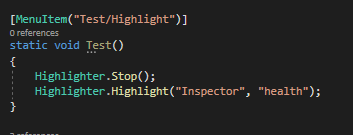
oh I should be asking my question here. Anyone know how to get Highlighter.Highlight to work? My attempts just dont work or leave a glitchy outline
native imp
my current progress
I want to eventually just highlight 1 field (or component depending how I end up implementing my thing)\
 native imp
OooOh
waxen sandal
It own't work for specific elements but should for components
native imp
that might be better.
hmm but thats just pinging the gameObject, i want to highlight hte component specifically
native imp
what the C# library or the unity.exe, because i tried that before and it was not a fun time 😛
i assume the C#

GitHub
Unity C# reference source code. Contribute to Unity-Technologies/UnityCsReference development by creating an account on GitHub.
native imp
cant seem to find anything... hmm
native imp
any suggestions how to achieve a highlight effect on either a entire component or a field in the component?
waxen sandal
Because it's not a Unity Object
waxen sandal
Is there an easy way to copy/paste behaviour similar to color copy pasting?
 edgy aspen
ok i made it a scriptable object but i also want toı add a header but im making it via property iterator
waxen sandal
Code?
onyx harness
Is there an easy way to copy/paste behaviour similar to color copy pasting?
@waxen sandalComponentUtility.CopyComponent
waxen sandal
That's not the same
onyx harness
What are you looking for then?
waxen sandal
If you have a serialized color field
Then you can right click it and copy it
And paste it somewhere else
onyx harness
Oh, a per field copy
waxen sandal
Yes
onyx harness
isn't it a feature implemented in the latest version? (2020)
 icy jackal
Hi everyone
I'm trying to follow this unity tutorial

Unity Learn
In this recorded training session from October 2016, we explore the basics of editor scripting, with a focus on creating tools which improve workflow for programmers, as well as for artists and level designers. We'll create simple tools to optimize the asset import workflow an...
but the first example doesn't seem to work for me, nothing happens
has something changed since this was released?
visual stag
@icy jackal it works fine for me, I make a folder named Sprites, I put a texture from my project in there and reimport it, it switches to Sprite (2D and UI)
 fallow dirge
Anyone know how to get intellisense for VS Code so that unity scripts auto complete?
icy jackal
thank you vertx i actually got it to work
I do have another question though, If I had a build script would there be any way to set certain game objects variables when this runs? for example, if I have a GameManager class with a boolean variable called 'debugging' is there a way to set this equal to false in a build script?
I tried the normal GameObject.Find().Getcomponent method but that didn't seem to actually change it in the build
visual stag
@icy jackal it should work fine if you dirty the component properly using EditorUtility.SetDirty or SerializedObject.ApplyModifiedPropertiesWithoutUndo
icy jackal
Thank you! I will try that
native imp
I have a component in a scene, how do I get the AssetPath of that commonent's script? AssetDatabase.GetAssetPath(component) returns "". (please quote or ping me as I am about to head out for lunch).
visual stag
@native imp AssetDatabase.GetAssetPath(MonoScript.FromMonoBehaviour(component))
native imp
ah, awesome thanks 🙂
 iron light
@dire pond get the bounds of the selected tiles and get the selected tiles
so I can use public void SetTilesBlock(BoundsInt position, TileBase[] tileArray);
 dire pond
@iron light is this for the player to access the pallet? or just for editor ?
visual stag
So do you want to change the selection bounds on the tile palette window?
iron light
no I want to read from them
tulip plank
If you have a custom EditorWindow with some UI Elements and close it, is it supposed to destroy all of its contained UI elements?
(I'm using UIElements fyi)
I ask because for no explainable reason, some UI elements (specifically within a ListView) are maintaining their old state when I reopen the window.
native imp
just showing off my progress https://i.lu.je/2020/NywmDEeQNd.mp4
🎉 im using Roslyn to find references of a MonoBehaviour within unity directly.
 buoyant pilot
Wow well done
split bridge
@native imp v cool - couple questions if I may. 1) How much work is it to get that working and 2) It obviously depends on Roslyn but does it work out the box with what Unity installs or do you need to install any additional packagse? Many thanks.
native imp
@split bridge it took a fair bit of tinkering because unity didnt want to support all the required libraries and I use the unity-roslyn project for the binaries https://github.com/mwahnish/Unity-Roslyn

GitHub
The Microsoft C# binaries compiled for Unity. Contribute to mwahnish/Unity-Roslyn development by creating an account on GitHub.
im planning to eventually open source my tool once I finish a few more features. I will be sure to give you a ping with the repo when its ready 😉
split bridge
Ah thank you. Mainly asking because I'm making a tool and it would be useful if it could report usages in code. For my purposes (avoiding other dependencies & time) I may just do a simple regex through scripts for an approximate answer. Good to know this is possible though 👍
native imp
@split bridge here is the code I used https://gist.github.com/Lachee/f461031cecd5b20d934fda8aa8453490. It manually loads every script because I couldn't get MSBuild to work within unity (and therefore didn't have the option to load the .sln file directly), but if you manage to get it to work then it would be a lot simpler.
split bridge
ooh interesting, thanks, I'll take a look
edgy aspen
I'm iterating through the inspector using PropertyIterator but Header attributes overlaps. can I draw some Headers while looping through it?
waxen sandal
Yes, I asked you before to post your code
edgy aspen
@waxen sandal oh did you didn't see it before
this is the Scirptable Object code
this is the element callback
waxen sandal
You cna use EditorGUIUtility.GetPropertyHeight to get the correct height
void jetty
is there a way to show any existing menu as context?
for example, Game Object menu or Window menu
to clarify: I'm showing a context menu when user right clicks in scene and I want to be able to create cubes or empty GOs from this menu
waxen sandal
You need to use GetPropertyHeight per property that you draw
 daring glade
is it possible to get "Application.persistentDataPath" from editor somehow?
severe python
What do you mean exactly

persistentDataPath only points to a few specific locations depending on what platform you're going to be on
So its value is somewhat meaningless in the editor, as its not the built platform and your data persistence issues are different while working in the editor
So I think it really matters what your goal is here
daring glade
the goal is to use it for testing purposes
manipulating the save files from custom editor window
severe python
Is this for use in a deployed environment like a modding scenario?
I've been doing that kind of work lately, and my general solution to similar issues is to prompt the user for some setup information, such as launching a file dialog to get the user to locate the game dir
 topaz lagoon
hi is there a way to check via code a menuitem is checked on editor ?
i mean if it was activated before or i have to activate it
onyx harness
is it possible to get "Application.persistentDataPath" from editor somehow?
@daring glade yes
tulip plank
Do EditorWindows try to remember their state (maybe through serialization/deserialization) when you close/reopen them? For as long as I've been using them, it always throws me off that I can't reliably just close a custom EditorWindow and be done with it; when I re-open it, it always seems to have remnants of a former instance. I'm not sure what I'm doing wrong here, but it's leading to hours and days of debugging.
And to add insult to injury, if I layer on all sorts of EditorWindow.KillThisThingForRealNoIReallyMeanItThisTime() calls, it smirks at me as it tells me that I can't kill it because I already have.
onyx harness
Not exactly as you might think
waxen sandal
It serialized to survive assembly reloads iirc
onyx harness
It does save it, but only on a domain reload
tulip plank
Only a domain reload, hmm oh you mean like if I make changes to the code and it recompiles/etc.
onyx harness
If you close the window, no state saved
tulip plank
But if I haven't done that, and I just close the window and then re-open it, it shouldn't, for example, repopulate a ListView with previous data...
Hmm okay, this is a mystery, I'll dig into this a bit more.
I suspect my DI/IoC framework might be the culprit.
tulip plank
Exactly, hence the puzzle
severe python
Are you keeping a static reference to the scriptable object?
public class MyEditor :EditorWindow {
     public static MyEditor instance;

    [menucrap]
    void OpenWindow(){
        instance = GetWindow<MyEditor>();
    }
}
something like that
I donno why I'm saying this, I don't have a direction
tulip plank
The one weird thing I'm doing is that I keep a MyWindow class, a plain class object, and it "has" the Unity Editor Window as a member.
severe python
but its a thought, you may be keeping a static instance of it around or something
tulip plank
I do this so that I can properly enable that MyWindow class to be created with dependency injection, etc., without all the baggage of an EditorWindow subclass.
I have a couple things to inspect, fingers crossed I will embarrass myself with it being something simple, and not some complex web of references holding onto references from event handlers etc.
LocStringEditorWindow.Factory factory = StaticContext.Container.Resolve<LocStringEditorWindow.Factory>();

LocStringEditorWindow locStringEditorWindow = factory.Create();
locStringEditorWindow.Show();
Note that LocStringEditorWindow is a POCO, not an EditorWindow sublass. It has an EditorWindow as a member.
severe python
LocStringEditorWindow is not a UnityEngine.Object?
tulip plank
Nah, it's just a System.Object
tulip plank
Every .NET object without exception inherits from System.Object
tulip plank
Nah, that would be funny, though
I will solve this and reveal my embarrassing mistake (hopefully).
onyx harness
manually inheriting
@waxen sandal O_o
waxen sandal
Yes
 swift pagoda
I am working on a Match-3 variant game. I was wondering if there was a middle ground between hitting Play to see the Dynamically generated game and using the [ExecuteInEditMode] attribute (which will persist Dynamically generated content)
It looks like this may be an option https://docs.unity3d.com/ScriptReference/HideFlags.html (gameObject.hideFlags = HideFlags.DontSaveInEditor) combined with https://docs.unity3d.com/ScriptReference/Application-isEditor.html if (Application.isEditor) might do the trick
tulip plank
Pretty sure I solved my problem. I have a repository of objects that's a singleton in the DI framework. I create viewmodels from those objects, but the viewmodels hold a reference to the original objects, so when I modify the viewmodels, I modify the objects in the (singleton) repository.
Then when I re-open the EditorWindow, it's pulling from that modified repository.
mental wind
hey, is it possible to get a callback in an editor window any time the scene is modified at all?
onyx harness
By scene, you mean the content inside the scene or the hierarchy?
mental wind
the content inside the scene -- like, any transform moved, anything like that
really the only events i need are transforms moving or colliders being modified, but my hunch is that it'd easier to check for literally any change
mental wind
dang
even something that like, the undo manager tracks?
there's no way to hook into that?
onyx harness
Undo has an event
mental wind
hmm. is there any way to listen to changes on a particular gameobject? could I maybe add & remove listeners as the user selects and deselects objects?
onyx harness
You can monitor things yourself by hooking when selecting/deselecting as you suggested
mental wind
okay
I think that might not be worth it for this use case, but thanks for your help!
 surreal wolf
how would I change the colour tint of material ui raised button:
https://gyazo.com/52472959eb60c24f483521201ce81d47

more channels need to be active then just #💻┃code-beginner
 barren elk
you are in an area of the discord i don't see active much, so expect wait times, you are definitely going to have to wait to get an answer.. you've caught #💻┃code-beginner at its busiest, it isn't always like this.
surreal wolf
ok
onyx harness
Or just maybe people don't have the answer here
visual stag
This channel is one of the ones where questions are most answered I'd argue. It has a few experts who will answer complex questions if they are awake and see the answer
Whilst general code is active, so many things are unanswered or answered over the course of hours instead of minutes
@surreal wolf need more context, is this UIToolkit?
gloomy chasm
Yeah, I would actually say that the majority of questions asked here are answered. Not all, but more often than not.
edgy aspen
how can I get this work
i have a custom editor code that edits a manager code
looks like this
Stage Parameters is this
but headers will overlap in the editor, I've been told that GetPropertyHeight would fix this but im kind of confused
this is the MANAGERs editor code, not the data class' code
or making it short: how do I use the data class that is rendered as a reorderable list
hoary surge
Hey, I was wondering if anyone might be able to help me with a problem I'm having. I've got a script that's using FreeMoveHandles, and while moving one if I get close to another vector in 3d space I'd like it to stop/snap to that vectors position. I feel like I should be able to do this without a custom handle but I can't find any information out there. Perhaps I'm using the wrong google keywords.
The handle just allows me to continue to move things as long as I'm dragging it.
gloomy chasm
First thing that pops in to my mind would be to just loop through all the other points, and check the distance between the moving point and the point in the loop, if it is within x then set the free move to it.
hoary surge
Hrmmm..I can give that a shot.
gloomy chasm
I'm not sure how many points you have, and truthfully I am not 100% sure how it would handle trying to move it further away.
Once snapped I mean
hoary surge
yea I'm trying to adjust a procedurally generated mesh on like 11 levels where the logic failed due to designers not following rules
 static hamlet
how would I change the colour tint of material ui raised button:
https://gyazo.com/52472959eb60c24f483521201ce81d47
@surreal wolf for a second i though my mouse glitched and i had 2 of them, lol
waxen sandal
It really is the wrong channel to ask UI questions
surreal wolf
well its an extension
native imp
Tada, more progression: https://i.lu.je/2020/c1vL42cOob.mp4
Need to tidy up the UI some more and add icons. Suggestions on features you would like to see? I already plan to add a basic "reference count" feature too.
topaz lagoon
Hi there, do u know a web or something where i can find info about how to make a editor tool that when u click an object on scene it is added to a list and when u click it again it is removed from it ?
i mean i want to made an editor tool that works on scene window and when i click on the window detects the gameobject i was clicking and it is added and removed from a list (depending if it was added before or not )
topaz lagoon
thanks man and one more thing
how can i get monobehaviour script on editortool class
i mean
ontoolgui
function
i tried to cast target to my script
but it fails
topaz lagoon
Hi again
i am back
i was working on a fix
an it looks like only happens when i activate the tool from the inspector. when i activate it on scene toolbar works properly
i mean
sometimes detect the cast and other fails
i am not sure why
topaz lagoon
could someone help me with editor stuffs
i mean
what is the property way to attach an editor tool bar to a custom inspector
properly*
tulip plank
I'm having a hard time understanding how a UIElements ListView sizes its elements. It seems to hardcode each item with a 30 pixel height, for example, and regardless of what I tweak, I can't get each item to expand vertically to fill its contents.
severe python
you set the item height on the listview
tulip plank
For example, here is a ListView with only 2 ListViewItems. Each item consists of a row of controls (the text fields), and then a long label underneath. But as you can see, the label contents get cut off by the next ListViewItem.
severe python
   public class ListView : VisualElement
    {
        public new class UxmlFactory : UxmlFactory<ListView, UxmlTraits> {}

        public new class UxmlTraits : VisualElement.UxmlTraits
        {
            UxmlIntAttributeDescription m_ItemHeight = new UxmlIntAttributeDescription { name = "item-height", obsoleteNames = new[] {"itemHeight"}, defaultValue = k_DefaultItemHeight };

            public override IEnumerable<UxmlChildElementDescription> uxmlChildElementsDescription
            {
                get { yield break; }
            }

            public override void Init(VisualElement ve, IUxmlAttributes bag, CreationContext cc)
            {
                base.Init(ve, bag, cc);
                ((ListView)ve).itemHeight = m_ItemHeight.GetValueFromBag(bag, cc);
            }
        }
so in your UXML, not in the USS
tulip plank
Ah, the docs say that the itemHeight needs to be the same for all ListView items. That breaks the functionality I need.
severe python
<UXML>
  <ListView name="MyListView" item-height="60" />
<UXML>
yeah, thats because its virtualized and they are trying to avoid the jankey scroller problem
tulip plank
Hmm okay. It looks like I might need to use a custom control instead of a ListView, then. That will come with its own problems, though.
severe python
If you want to avoid it you can just make your own non-virtualized list view, which is really just adding elements as children
it could be a performance monster
tulip plank
Yeah, it will be non-virtualized and hopefully it won't bog down people's systems.
severe python
ideally you make your own virtualization setup
it may be possible to convert WPF's VirtualizingStackPanel to UIToolkit
tulip plank
That would be cool--though I vaguely recall that not supporting smooth scrolling, though that's probably not a big deal here.
severe python
no small feat mind you
there are guides out there for simpler virtualizing containers in C# though
tulip plank
Yeah that's probably too much for this project, so I'm going to think of ways to simplify this control. It needs to list a bunch of loc string IDs while showing all the game objects (in a generic sense), that use these loc strings.
I mean, I could make it just list the number of items that use these loc strings, and have a tooltip which displays the long list of them. 🙂 I'm hoping it won't be too gigantic of a list.
severe python
anyone knoe how to change the Realtime Lighting Realtime Global Illumination checkbox and the Mixed Lighting Baked Global Illumination Checkbox on the Lighting tab from code?
    Lightmapping.realtimeGI = false;
    Lightmapping.bakedGI = false;
I thought it would be these, but changing them doesn't seem to wokr.
it seems to work after a domain relaod
as in, if I make a new scene and set these from code, if I then compile some code the checkboxes will be unchecked like they should.
tulip plank
Is there a way to customize the location of the tooltip that appears over a control? It would be convenient for it to appear by the mouse cursor instead of in the center of the control being hovered over.
split bridge
Anyone know the editor callback for when you start editing a prefab? i.e. I think when the current Stage changes
@tulip plank I don't think messing with tooltip location is possible but it also sounds like a bad idea imo as it's designed to automatically move into a clear area (should it otherwise by clipped at the edge of the screen for instance). If you have a very large control then you could add a smaller element with the tooltip or even multiple depending on your design.
in answer to my own question is looks like I need to use UnityEditor.Experimental.SceneManagement.PrefabStage? :/
severe python
I need to make a field that provides a list of options, from a type of ScriptableObjects in the database and I want to do it as a propertydrawer
I want it to be like na object field where you would pick from the popup, except the popup doesn't list assets in Packages
gloomy chasm
Which part do you need help with @severe python?
gloomy chasm
Ah, well glad you figured it out. Nickifying those entries could help with readability. Though idk if it would not be suitable for what you are doing.
severe python
Nickifying?
I could just rename those assets tbh, but I have an unfortunate convention requirement in the naming
because I don't want to add superfluous organizational data to the ScriptableObjects, and I don't actually own those types (they are derived from RoR2 types)
onyx harness
Nicifying
severe python
oooooh
onyx harness
that timing, as always
severe python
very neat, yes I'll do that
is it possible to hide MenuItem's added by a DLL?
much nicer
Okay, new question, I tried to make this update whenever an instance of this type of ScriptableObject is created
in my PropertyDrawer I have an InitializeOnLoadMethod which registers an event handler on EditorApplication.projectChanged to update a cache of these ScriptableObjects
This technically works as expected, however due to the nature of the setup, I need to update the cache when the name of the objects change as well as I determine which set of results to display by a naming convention (I know, its terrible)
I can't figure out what event I could use for that
onyx harness
is it possible to hide MenuItem's added by a DLL?
I would say no
severe python
I figured that'd be the case
I can do it, but its a little scorched earth, I can add a lib preprocessor which patches out the attributes
onyx harness
@severe python You can try UnityEditor.Menu
visual stag
I think you may be able to do it
If you reflect to find them all you can call the remove functions in that class ^
I recently made a gist for adding to it programmatically https://gist.github.com/vertxxyz/22a7e5fb6ea6ec907afdfd6993deeb5c
onyx harness
From my little tests, Menu is not super reliable
visual stag
hopefully you can do the opposite
severe python
I don't really see how you could invert this
you'd have to short circuit the call?
visual stag
There are other methods
severe python
oh is there a remove menu item perhaps
visual stag
there is
onyx harness
I can't figure out what event I could use for that
@severe python There is nothing to detect a name change automatically.
Except postprocessor modification
severe python
UnityEditor.AssetModificationProcessor
yeah, this works, it detects a name change as a move which is expected
onyx harness
It detects an asset modification, if the user saves, so yeah
severe python
it seems to cause problems
I suppose I have to implement the actual move?
Hmm, what is the proper way to clear a value in objectReferenceValue?
visual stag
set it to null and apply
severe python
it yells when I do that
visual stag
Really? Odd
waxen sandal
Was there a way to get a propertydrawer to draw the whole array rather than each element?
I'm using PropertyAttribute by the way
visual stag
nope, you have to make a wrapper class
waxen sandal
Thought so :/
 lean wagon
hi, this is a long shot question but I wonder if anyone here knows
I'm generating a SpriteShape and I want to break up the generated sprite at runtime into pieces
is it possible with the current SpriteShapeController API?
waxen sandal
If you modify the spline then it might?
lean wagon
I'm not sure I follow. What I mean is I have this sprite
is it possible to get enough information from the SpriteShapeController about the renderer sprite to break it up in different sprite components at runtime?
waxen sandal
Oh like that
I doubt it
But you should probably ask in #archived-art-asset-showcase
 pastel spruce
This is not the correct channel to ask. You should also look up character controllers on youtube before you ask here, because there are full guides already out there
tulip plank
I would like a way to warn a user, after they click the 'x' to close an EditorWindow, that they will lose unsaved changes. Is there a way to do this? It doesn't seem like there is.
onyx harness
As you stated, "after the click", it means the process of closing is already occurring
You can show a dialog in the OnDestroy/Disable if you want
tulip plank
Ah, that's tragic, I wish it had a "Closing" event.
onyx harness
But you can't cancel the closing
tulip plank
Oh yeah I suppose at that point I still have a chance to save the changes. Nice, I didn't even think of that.
It's moments like this I doubt my competence.
onyx harness
Yes you can save, OnDestroy/Disable is there for that
tulip plank
Thank you very much.
onyx harness
Don't, we all learn stuff everyday 🙂
native imp
GUI.font = fontawesome <- Setting the GUI font is so incredibly slow. Is there an alternative? I mean I guess I could use my icon font and just extract the sprites but they come in SVG and would be annoying . Is there a way to set the base font to be inherited of the existing one? That way I could set it once on the OnGUI.
https://i.lu.je/2020/9Y7o5WArRt.png left Side is where i do that already (because the lists are inherently massive) and the right is where I only do it for the buttons (the really slow one)
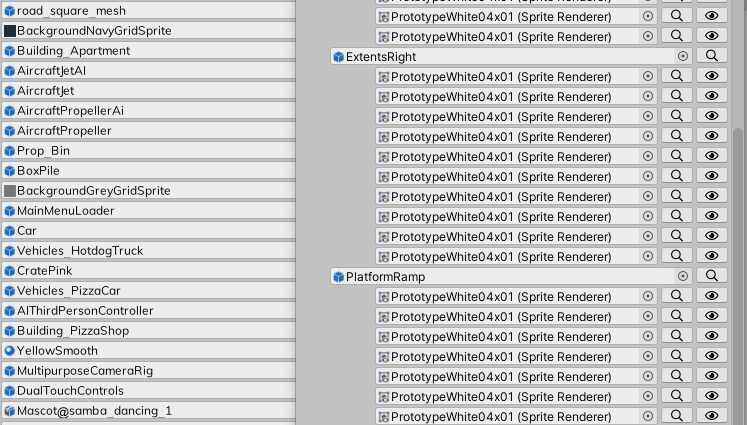
you can see the font is different in the object field
native imp
ok, I resolved it by getting off my lazy ass and turned the SVG into PNG
its smooth now
any suggestions on how I could improve the Reference Count window? I plan to add more filter support too (the reference navigator will get it too)
onyx harness
Profile, narrow down to the culprit, optimize
If it is lagging, it's only due to your drawing not handling scroll area
You need to cull
native imp
the lag was 100% because I was switching GUI fonts multiple times per entry, but yeah culling would be a good idea.
whole steppe
help i put advanced fps counter in my projecmt and my fps dropped a lot now i cant delete it
 dusk summit
Hey I have a small problem, I'm using an input field, and I'm trying to parse the value to a float, but it keeps saying "Input string was not in a correct format.", but I only wrote numbers, without spaces or anything else
waxen sandal
WRong channel
 kindred walrus
I'm using Unity 2019.3.7f1 and i can't see Visual Scripting ESC package in package manager? Why?
severe python
its not available in the package manager yet
its still on a forum based drop setup since its highly experimental and undergoing rapid and significant changes
kindred walrus
Ok thank you
severe python

Unity Forum
Drop 9 of Visual Scripting for DOTS is ready for you to try!
Hi everyone, this time around we focused on events and tracing, which we hope you will...
 worn magnet
hi I'm struggling to find info on google since I can't figure out the proper terminologies
I'm trying to bake different navmeshes on the same terrain for different agent types, I have a humanoid and my custom agent type, but can't figure out how to create the mesh for the individual agent types
or if it's even possible?
severe python
what unity version are you working in?
GitHub
High Level API Components for Runtime NavMesh Building - Unity-Technologies/NavMeshComponents
if you're in a supported version, use this package
severe python
also refer to this: https://docs.unity3d.com/Manual/Navigation.html
and maybe this

Unity Forum
Problem
Hi guys,
I have a problem with Unity NavMesh and several agent sizes. My game uses both small human characters and large monsters. Monsters...
which I found by binging for "Unity3d NavMesh multiple Agents"
 past mica
Hey guys, does anyone know a nice way to add extra inspector elements to fbx models?
I was able to hook into the header gui for the inspector and i could use that to draw my extra settings on the heading, like so:
    [InitializeOnLoad]
    public class AssetInspectorGUITest
    {
        static AssetInspectorGUITest()
        {
            Editor.finishedDefaultHeaderGUI += EditorOnFinishedDefaultHeaderGui;
        }

        private static void EditorOnFinishedDefaultHeaderGui(Editor obj)
        {
            EditorGUILayout.BeginHorizontal(EditorStyles.inspectorDefaultMargins);

            EditorGUILayout.LabelField("legal");
            EditorGUILayout.EndHorizontal();
        }
    }
but i was wondering if there is a way of having my UI to draw after the header
topaz lagoon
how can i change scene drawmode via code ???
waxen sandal
@past mica Only way I know of is patching the editors using e.g. harmony
topaz lagoon
is there a way to get an event when an editortool is stopped to use ?
i mean , when u change to another or something like that
because i want my tool to set a specific draw sceneview mode and get back to the user one when he stop using it
waxen sandal
I'd look at the decompiled code
past mica
@past mica Only way I know of is patching the editors using e.g. harmony
@waxen sandal Thanks a lot man, I tried creating a new AssetImporterEditor that draws the extra UI and forwards the important calls to another ModelImporterEditor using reflection just to realize that some important calls could not be forwarded. I managed to get it working apart from the apply/revert. In the end I realized that hooking into the header call and getting a reference to the target's ModelImporter will be enough to what I need to do.
also, the editor seems to be picking up changes that I make to the importer and the apply/revert buttons are reacting accordingly - which is a free bonus for me.
 obtuse rose
Anyone got any idea why I can't reference scripts outside the Editor folder?
I've tried everything, reinstalling VS, reimporting everything, rebuilding the project, moving folders, making sure no namespaces were missing, everything.
Unity throws 0 errors, VS however, will reference Unity types perfectly fine, but when I want to reference say my custom handle type, nope.
None of my editor scripts will work with my types outside the Editor folder, even in new projects
But, get this, normal scripts work perfectly fine
onyx harness
AsmDef?
obtuse rose
I checked the assembly refs and they seem fine, I tried adding the first pass myself to the editor, but the option isn't there
It was working fine a few days ago but the second I moved something it broke everything
No matter how many new projects I make it's broken for editor scrips
I tried updating unity
Dudes over in the Brackeys server are just as stumped as I am so I came here hoping someone might be able to figure it out
If you happen to figure it out or something ping me
obtuse rose
That's my helper library for Unity
obtuse rose
It's basically a regualr cs script in the project
Like any other
Minus the monobehaviour
severe python
show us your project window folder structure with the files in question visible along with any AssemblyDefinitions you've created
alternatively, if you have a project up on github
severe python
these tiny little snippets into the world are hard to work with since it doesn't realyl give us all the facts
obtuse rose
obtuse rose
Ahh mb
severe python
wait
you're trying
oka
You're trying to Reach what type from what type in these two pictures?
to get to the point, you can't reference something outside of the plugins folder from inside the plugins folder
plugins are compiled before everything else
obtuse rose
HandleEditor needs to access types inside here
waxen sandal
I think they secretly made editor things require asmdefs
waxen sandal
Yep
obtuse rose
So I need to stick them in an assembly def?
waxen sandal
Only fix I know of
obtuse rose
Weird, it used to work fine without them, then one day poof
onyx harness
One day you brought one and the disaster appeared
obtuse rose
I remember moving the Editor folder around and after that it just broke
waxen sandal
There's probably something that you can do to fix but it's probably not worth it to fix
To figure it out I mean
waxen sandal
0.o
obtuse rose
Like I can make changes and reference the types
But VS will scream at me and Unity will let it slide
For instance
Visible confusion
waxen sandal
Weird
obtuse rose
I've tried reinstalling VS, that did nothing
Created a new project fresh
Nothing
Updated unity
You get the point lol
I honestly am just stumped
onyx harness
VS relies on the .csproj
If Unity fails generating them, something is wrong in the configuration
obtuse rose
I've wiped the solution and csproj twice, and forced Unity to rebuild the project
waxen sandal
Does it have the reference though?
obtuse rose
I did
When I was removing the solution and stuff
Since it sits in the folder so I thought why not
My idea failed
I tried moving the plugins so see if they were causing any issues
Same result
waxen sandal
What if you move the editor folder to Scripts?
So it'll be Scripts/Editor/HandleEditor
waxen sandal
Figured
obtuse rose
I tried moving the folder to the root Assets folder but that didn't work either
I guess I could reinstall Unity again
waxen sandal
Doubt that'll fix it
waxen sandal
Assembly definitions
obtuse rose
Oh right yeah
Weird
Whenever I make one it breaks the plugins
And now VS crashed
Oh fuck me
onyx harness
using System.Text;
using UnityEditor;
using UnityEditor.Compilation;
using UnityEditor.PackageManager;
using UnityEngine;

namespace NGToolsEditor.Internal
{
    static class PrintAssembliesSources
    {
        [MenuItem("Tools/Print Assemblies Sources")]
        public static void Print()
        {
            var list = Client.List(
#if UNITY_2018_1_OR_NEWER
                true
#endif
            );

            while (list.IsCompleted == false);

            //foreach (var item in list.Result)
            //{
            //    NGDebug.Snapshot(item);
            //}

            Assembly[]        playerAssemblies = CompilationPipeline.GetAssemblies();
            //StringBuilder    b = Utility.GetBuffer();
            StringBuilder    b = new StringBuilder();

            foreach (Assembly assembly in playerAssemblies)
            {
                //NGDebug.Snapshot(assembly, assembly.name);
                Debug.Log(assembly.name);

                b.Length = 0;

                for (int i = 0, max = assembly.sourceFiles.Length; i < max; i++)
                    b.AppendLine(assembly.sourceFiles[i]);

                Debug.Log(b.ToString());
            }
        }
    }
}
Run this script
And copy paste the result here, I will try to see who lives where
It lists the assemblies in the projects and their files.
obtuse rose
Yeah ik, I've messed with assembly stuff when making modloaders, I thought I had a good grasp, then this happens lmao
onyx harness
Open the editor log and paste the content here
obtuse rose
Wasn't sure what you wanted sorry
onyx harness
The first log is for the Assembly.
The second log is its files
That's why I need the whole thing
onyx harness
analyzing
obtuse rose
Aight, I'll go make a cup of tea, thanks for taking the time to look at this lol
obtuse rose
Sure what's up
onyx harness
Your script Handle.cs is part of Assembly-CSharp
obtuse rose
Yup
It's used on objects to make then grabbable
The HandleEditor is an extension of the inspector for it
Saves me lots of time
onyx harness
And MemeUtils.cs is also part of Assembly-CSharp
obtuse rose
Yeah it's used for anything, it doesn't use any editor related stuff though
But it does ship with the assembly-csharp yes
onyx harness
Your images are so confusing, since you just cropped a small part of your script, we don't know where it comes from
obtuse rose
It's a file that contains static classes
Hang on I'll show you where it sits
Oh wait column thing
onyx harness
Again, please stop cropping like hell, give us the context, it helps a lot
obtuse rose
onyx harness
Not the bottom part XD
obtuse rose
perhaps
obtuse rose
I'll move it out and see if it changes anything
obtuse rose
Moving scripts did nothing
onyx harness
Newtonsoft is a DLL
onyx harness
Assembly-CSharp contains the following files:
Assets/A.cs
Assets/Demo/Examples/TriggerHandleTest.cs
Assets/LNS_VRPhysicsFramework/Resources/Scripts/Core/ControlModule.cs
Assets/LNS_VRPhysicsFramework/Resources/Scripts/Core/Hand.cs
Assets/LNS_VRPhysicsFramework/Resources/Scripts/Core/VRInput.cs
Assets/LNS_VRPhysicsFramework/Resources/Scripts/EventListners/HandleListner.cs
Assets/LNS_VRPhysicsFramework/Resources/Scripts/Grabbing/GrabbableBase.cs
Assets/LNS_VRPhysicsFramework/Resources/Scripts/Grabbing/Handle.cs
Assets/LNS_VRPhysicsFramework/Resources/Scripts/Grabbing/HandleData.cs
Assets/LNS_VRPhysicsFramework/Resources/Scripts/Other/AngularDrive.cs
Assets/LNS_VRPhysicsFramework/Resources/Scripts/Other/ChangeColourOnGrab.cs
Assets/LNS_VRPhysicsFramework/Resources/Scripts/Other/OnCollisionSetMass.cs
Assets/LNS_VRPhysicsFramework/Resources/Scripts/Other/PositionalDrive.cs
Assets/LNS_VRPhysicsFramework/Resources/Scripts/Posing/Bone.cs
Assets/LNS_VRPhysicsFramework/Resources/Scripts/Posing/DynamicPoser.cs
Assets/LNS_VRPhysicsFramework/Resources/Scripts/Posing/FingerBone.cs
Assets/LNS_VRPhysicsFramework/Resources/Scripts/Posing/PoseData.cs
Assets/LNS_VRPhysicsFramework/Thirdparty/Plugins/MemeUtils/MemeUtils.cs
Which means they are not part of an AsmDef
Which is not good since you use them
severe python
be warry of NewtonSoft
onyx harness
The fact that MemeUtils.cs is in Plugins and not in Assembly-CSharp first pass
is already something wrong
waxen sandal
Did you perhaps add something else that had an asmdef? Perhaps Unity expect you to use it for everything once you have one
Probably not though
obtuse rose
When I create an asmdef it breaks steamvr
waxen sandal
??
obtuse rose
My thoughts exactly
waxen sandal
Define breaks
severe python
and then setup the appropriate references between AsmDefs
waxen sandal
^^
severe python
basically
Add AsmDefs everywhere for things that can be contained chunks of code
then resolve dependency requirements between those defs
its a pain, but it does have a number of benefits
it reminds you regularly to put code in the right places in the code base
it minimize complex dependency issues
obtuse rose
I'll give it a go
severe python
code compiles faster, because less code gets compiled each time it compiles
obtuse rose
Thanks for taking the time to help out my dudes, I'll let you know how it goes
onyx harness
Yep, it's a "don't use at all" or "use them all"
severe python
they presented it like it was a slow opt in thing
but either it didn't actually work or they lied
waxen sandal
Well you can kind of slowly opt in
Everything in outside of an asmdef references the asmdef
So as long as everything in the asmdef is self contained
It works
This obviously breaks once you start doing slightly more complex thigns with editors and stuff
waxen sandal
Yes
Note that Plugins are DLLs, and that it's not necessarily true depending on how your asmdefs are defined
obtuse rose
So youse will never guess what
It was a Unity bug
I updated to 2019.3.14f1 and it's fixed...
Now if you'll excuse me I'm going to go cry in the corner
severe python
is there some kind of search box for imgui?
visual stag
https://docs.unity3d.com/ScriptReference/IMGUI.Controls.SearchField.html
It's a little stateful
visual stag
you new one, and call OnGUI
severe python
okay
visual stag
(or OnToolbarGUI depending on the style)
visual stag
should be able to
severe python
man, Ihate imgui I don't understand it
visual stag
are you caching the SearchField?
severe python
I am instantiating it in awake
severe python
[CustomEditor(typeof(Manifest))]
public class ManifestEditor : UnityEditor.Editor
{
    SearchField searchField;

    private void Awake()
    {
        searchField = new SearchField();
        searchField.autoSetFocusOnFindCommand = true;
    }

    public override void OnInspectorGUI()
    {
        base.OnInspectorGUI();

        var rect = EditorGUILayout.BeginVertical();

        searchField.OnGUI(rect, "Search fo Dependencies");

        EditorGUILayout.EndVertical();

    }
}
I can focus it with control f btw
I just csnt click in it
Am I supposed to handle it manually
visual stag
I've only used them in editor windows
I think the problem is you're not allocating any height
try:
var rect = EditorGUILayout.GetControlRect(false, EditorGUIUtility.singleLineHeight);
searchField.OnGUI(rect, "Search fo Dependencies");```Ok
visual stag
Also, it returns a string so you will need to use and cache that
severe python
Can I use this for a custom search? I'm intending to hit a web api for results
visual stag
using UnityEditor;
using UnityEditor.IMGUI.Controls;

[CustomEditor(typeof(Test))]
public class ManifestEditor : Editor
{
    SearchField searchField;
    private string searchString;

    private void OnEnable()
    {
        searchField = new SearchField {autoSetFocusOnFindCommand = true};
        searchString = "Search for Dependencies";
    }

    public override void OnInspectorGUI()
    {
        var rect = EditorGUILayout.GetControlRect(false, EditorGUIUtility.singleLineHeight);
        searchString = searchField.OnGUI(rect, searchString);
    }
}```would be how I would set it up