#↕️┃editor-extensions
1 messages · Page 58 of 1
 lucid hedge
there is logic in the error
I only get the error when the material change makes the conditional 'true'
lucid hedge
Yeah that's right
 onyx harness
Put a debug log of the event type. And check where exactly is the error spat
And just before the condition, put a log as well of the name
lucid hedge
It's because I was putting a debug.log in the OnInspectorGUI and then again right before the conditional
onyx harness
And what about the name?
lucid hedge
the name of what exactly?
lucid hedge
alright something is definitely weird on my end then
This is when I drag a 'desktop' material variant onto the object
I get 4 of these 'mismatched' errors in a row, then finally this
and then the error stops
So it seems as if for a while it's 'unsure' which material is applied, or switches back and forth or something
Ah.. so the error only shows up (and keeps showing up) when I have the material selected, drag it over the object, and then keep holding it
but once I release the mouse, the error is over
But now I know that's the issue, I think I'll be able to figure it out
onyx harness
XD
lucid hedge
Alright, errors gone and all is good.
I'm sorry for all the questions I ask Mikilo, you've helped me so much already (and others too in this channel) since the start of this server ❤️
onyx harness
How did you fixed it?
I mean, I knew it was related to the name, but I still feel something is missing out
lucid hedge
So in the conditional I checked if the shader name was equal to "Shader Graphs/Stylized Water For URP Desktop" right?
I changed it to a bool
and then I set the bool value in another function
that isn't called as often as 'OnInspectorGUI'
And I believe that did it
but I'm unsure tbh
onyx harness
You change the boolean in a non-GUI method i guess
lucid hedge
Yeah I do
 waxen sandal
That should fix it
 gloomy chasm
So, I was wondering, how do you load assets in the editor, without hardcoding all the paths?
onyx harness
You need a path to load it
Or you need a hard link
Through ScriptableObject
Or else
 visual stag
searching using AssetDatabase.FindAssets with the type and name is how I do it
 dull summit
Not sure if this goes here, but anyone familiar with checking/updating a prefab only when it's drug into a scene?
I want my editor script to check the prefab when someone drags it into the scene in the editor. Not when the game is running. But I don't want to do this a bunch of times. Just once, because it's a time consuming thing and I don't want that to keep happening over and over again.
 past sky
I created a ScriptableObject by editor, it works in editor mode, but will become null after load, how to fix that?
onyx harness
the particle seems not saved
onyx harness
hum... not sure
visual stag
@past sky please only post in one channel at a time.
I have removed your other messages
past sky
Ok,sorry
visual stag
Have you dirtied the object with Undo, SerializedProperties/Object, or SetDirty?
past sky
Yes, I dirtied all the scriptableObjects
visual stag
The object in the scene though
past sky
EditorUtility.SetDirty(target)?
visual stag
sure
visual stag
I would just make an asset out of the SO, I've not worked with serializing SOs inline before, and I imagine that's the cause of your problems
past sky
I would create a large amount of SO, I don't want such a large amount of assets
How do Mesh and Material realize that? They would't be lost after loaded.
I knew they were inherited from UnityEngine.Object, but I tried my custom Object, still lost on load
onyx harness
"after loaded"? From where?
 unreal phoenix
I can't seem to find this anywhere, but does anyone know if it's possible to reuse the default unity icons for buttons created through UI-Elements stuff, i.e. if I do
# in .uss

.myToolbarButton {
  background-image: url("stylesheets/northstar/images/toggle_bg.png");
}

# in .cs
var myToolbarButton = new ToolbarButton();
It can't seem to load it, even though that's what is shown when I inspect other elements in the editor via UIE tool.
There are other styles that are applied correctly, but the background image explodes / is not found.
past sky
"after loaded"? From where?
@onyx harness Maybe from scene?Isn't SO serializable?
onyx harness
Mesh and Material loaded from scene?
They are loaded from the project, not from the scene
Or am I missing something?
@past sky
unreal phoenix
@past sky You have to manually save the scene for SO's to serialize to disk, unless you force the asset database to save.
past sky
I tried save scene, they're still lost after play
unreal phoenix
i.e.
EditorUtility.SetDirty(myScriptableObject);
AssetDatabase.SaveAssets();
AssetDatabase.Refresh();
They are loaded from the project, not from the scene
@onyx harness I tried new Mesh or new Material, never lost after loaded even they have no assets in project;
unreal phoenix
The mesh / material stuff is serialized into the scene itself, IIRC, the same way any serialized object is that is stored on another object, unless it's in a prefab
Could it be that you're newing up / setting it onenable or awake or etc?
past sky
Oh!I remenber there are "sharedMaterial" and "sharedMesh", are they storing the reference of Material and Mesh?
visual stag
it's the non-shared that copy
onyx harness
Oh yeah, I'm stupid and tired X)
 wispy phoenix
is there a fix for the Debugger for Unity not working in VS Code? It's been acting up for days and I don't even know what's going on
 craggy sedge
Microsoft changed like the internal name for the C# extension recently, which the debugger and some other things depended on
In my case after an update to the Unity extension it's working again but takes a long time for Intellisense to start working, like 5+ minutes
When it first happened I had some luck reverting the C# extension to the previous one (1.21.12 I think), but since the package name changed you won't be able to do that using the in-app menu, you'll have to download the VSIX installer manually
waxen sandal
I haven't noticed anything
 severe python
oh great, as if UIElements wasn't already a confusing name
UI Toolkit, lets make it as generic as possible so people can more easily confuse this with the other multiple ways you can develop UI in Unity
Unity UI, Unity UI Toolkit? which are you using? do you even know?
what is the canvas system called?
waxen sandal
UGUI
severe python
Unity UI
waxen sandal
What's Unity UI Toolkit though?
severe python
its UIElements
waxen sandal
What
severe python
"We are renaming UIElements to UI Toolkit. The new name better describes the set of features and functionality that the UI Toolkit contains. UI Toolkit now lets you create runtime UI with the same tools you can use to create Unity Editor extensions. We are also moving UI Toolkit to a package, which will be available in Preview later in the Unity 2020.1 beta cycle. For updates, keep an eye on the UI Toolkit forum."
so we have
Canvas: Unity UI
UIElements: UI Toolkit
IMGUI: IMGUI
yeah, this isn't confusing
 short tiger
Many people won't have heard of UIElements though, so it will just be UI Toolkit to them.
severe python
Unity UI is a really stupid name
Its not that its confusing because it used to be UIElements
Unity UI != UI Toolkit, totally separate incompatible technologies
IMGUI however is compatible with UI Toolkit, but is not part of it
oh and then theres this fantastic part
waxen sandal
Got a link?
short tiger
Would a more descriptive name for UIElements/UI Toolkit be better?
severe python
waxen sandal
At least you can google it then 😛
severe python
Navi, its in the blog post they just put up
honestly, MS, the issue is that they just keep making new, crappy, kits
UIElements is great, and should really be the only option
severe python
yes
short tiger
Are you saying the name UIElements is great, or UIElements is great?
Because if UIElements is great, then UI Toolkit is great
severe python
UIElements the technology is excellent, the name isn't really important other than that they have 3 GUI frameworks which compete with eachother and have significant overlap and one of them is stupidly named Unity UI
severe python
Well yes, both Unity UI and IMGUI should be deprecated
They can't yet, they don't have enough coverage
there are a number of things you simply cannot do with UIElements only because of how they positioned it
there is no concept of windows, so you have to be able to get down to a lower level system if you happen to need windows
which may actually mean they can't deprecate the old systems...
short tiger
I can't see them deprecating IMGUI in favor of UIElements
severe python
They are basically soft-deprecating it
the UI in 2020.1 is mostly replaced with UIElements
The actual Window and Tab tech is still basically IMGUI though
that might not really be accurate to state
 split bridge
I don't mind too much about a name change.. I just want something good for googles... not sure I love toolkit or elements for that
 bleak flicker
Hi :)
I'm trying to get a basic Editor Script with a TextField to run (for an XNode Graph), but the field always loses focus immediately when redrawn, so I cannot type any text. Is this a known unity EditorGuiLayout problem or am I missing some basic thing?
My code looks line this:
_newKey = EditorGUILayout.TextField("Key", _newKey);
where _newKey is a private string field in the editor script
onyx harness
We need more context
This line of code is not enough to understand your issue
Because its on you
bleak flicker
Context is the OnGui Method of the EditorWindow which gets spawned by xNode
But that is just a standard EditorWindow with some added functionality, so a simple input should work fine. In theory
this input just will not keep the focus
 shadow moss
Somehow I didn't see this channel
I have a .png asset, and I'm trying to update it by writing some pixels to it. I've already loaded the asset in as a Texture2D
But without enabling the write flag in the texture importer, I can't update it
Is it possible to load the texture, clone it so I can't write to it, then replace the original asset and keep the same GUID?
I guess literally the only option is to write to the file itself...
short tiger
@shadow moss Ultimately, you'll have to write to the file if you want to end up with a modified PNG file.
 tough cairn
how to set up a texture for IMGUI so it will support 9 slicing in code ? right now i just make a 1x1 pixel texture for solid color , was wondering if something like a 9x9 texture with a single pixel in the middle for the color and the rest for the border is doable from within c# ?
tough cairn
ahhh
true that
totally missed that one
cheers
That what i am currently using
sBtn = new GUIStyle(GUI.skin.button);
sBtn.fontSize = Mathf.FloorToInt(14 * scale);
sBtn.normal.background = Texture2D.grayTexture;
sBtn.wordWrap = true;
wasn't expecting a gradient
short tiger
Change the filter type of the texture to Point
tough cairn
var tex2D = new Texture2D(3, 3);
for (var x = 0; x < 3; ++x)
    for (var y = 0; y < 3; ++y)
        tex2D.SetPixel(x, y, Color.white);
tex2D.SetPixel(1, 1, Color.black);
tex2D.Apply();
sBtn.normal.background = tex2D;// Texture2D.grayTexture;
right
lucid hedge
Hmm so UIElements is UI Toolkit now
I like the new name
@bleak flicker what is that colored dot on that editor window
waxen sandal
It's internal mode
aka hacker mode
If you open the about window and type internal you unlock it
lucid hedge
aah that's why I've already seen it in presentations of people working at Unity
cool
is it useful?
waxen sandal
It has some useful features
Like a different debug inspector
And some internal/alpha editor windows
shadow moss
@short tiger Yeah, that's what I ended up doing... thanks
visual stag
@lucid hedge I'm ready and pumped for all my code to break and ready to insert #if defs to support all the inbetweens 
waxen sandal
So excited
 radiant sinew
hi question
im making a custom editor for some odd reason my changes on unapplied prefab properties get lost when entering playmode
works fine on non prefabs and works if i apply changes but if i enter playmode with some unapplied modified property changes things get lost
any idea why im assuming im missing something api wise
visual stag
can you link to some code?
radiant sinew
ohhh gg
i found the bug
gonna make a ticket
looks like its a seralizedreference bug
it looks like the property in question is a seralized reference if you do not apply modifications of it to the prefab and enter play mode changes will be lost
sigh, so so unfortunate
gloomy chasm
How do you make it so when setting the background in a style it doesn't stretch the corners? Every time I need this I forget how and have to ask again 😛
tough cairn
anyone knows about addressables ? im puzzled on when do the profiles are getting used
 lyric hamlet
I've been using tiff files named after scripts in the GIZMOS folder to get custom icons for my scriptable objects, so I can tell them apart at a glance. In 2019 this doesn#t seem to work anymore - it uses the icon for the script file, not the scriptable object. Anyone have an idea to get that to work?
 dusk path
Someone good with Puppet Master?
 unborn bluff
Bah! Do anyone of you know whether you can use Graphics.DrawMeshNow or Graphics.DrawMesh in an EditorWindow?
I am currently using Graphics.DrawMeshNow in OnGUI and nothings seems to work.
short tiger
@unborn bluff If all else fails, you should be able to draw to a render texture and then draw that texture using one of the GUI functions
unborn bluff
@short tiger oh, I was talking about whether I could execute those functions from within an Editor Window. I was not certain you had to use them in an Update loop or something similar. I just tried using Graphics.DrawMeshNow in OnGUI in an EditorWindow, which did not work. Luckily, it seems to work for Graphics.DrawMesh though.
short tiger
You want it to draw in the editor window or in the game view?
unborn bluff
In the game view
short tiger
Oh. Yeah, Graphics.DrawMeshNow will draw a mesh in the current context, which would probably be the editor window. Although it's also likely that OnGUI is called before any rendering is done and just queued up to render later, so the mesh wouldn't get drawn anywhere
unborn bluff
Ah, makes good sense.
visual stag
@fresh yoke you can use the EditorTool api to get it under this, but I'm pretty sure that's not what you're looking for?
visual stag
Mikilo's more familiar with it than I am, I'd probably just hack it with UIElements
 fresh yoke
yeah, I know he has some solution for that on his tool
anyway, thanks for the heads up
visual stag
the internal Toolbar.toolSettingsGui seems like an easy way to do it actually
internal static event Action<Rect> toolSettingsGui = delegate(Rect rect) {};
fresh yoke
I'm mainly looking to add few buttons for sending meshes to different apps
(live links for DCC)
but could just do keyboard shortcut I guess
 scenic elbow
just read about the rename to UI Toolkit
i guess searching for info wasn't hard enough yet
 mellow bridge
Anyone here know how i could find a button that is currently hovered over? (highlighted)
in script
waxen sandal
Has anyone written any large/complex editors?
In UIElements?
Wondering whether the PackageManager being slow af is a UIElements issue
split bridge
somewhat complex but I don't find PackageManager particularly slow? In interaction generally or..?
short tiger
It's often been slow to download the package list and show it, but I doubt that's UI related.
waxen sandal
Not sure if it's UI related, that's what I'm trying to figure out
It is abysmally slow though
We have our own package repository
And it takes minutes to open the window
I tried profiling it
And I got a 90gb page file because it was trying to swap before it crashed
Profiling the package manager with just the default package repository already has terrible results
There's a bunch more related things to the package manager but that's neglectable to the thousands of allocations
short tiger
Feels pretty fast to me now though, maybe because I'm recently using 2019.3 or maybe it's been cached. What Unity version are you using?
waxen sandal
With just adding our package repository to the manifest.json it increases to over 500mb allocated
And millions of allocations
2019.1.14
I'll try a newer version soon
split bridge
hmm.. yea I'm on 2020 and been a long while since 2019.1 so definitely worth a go
in editor I have what looks like about 7kb/frame due to an immediate renderer within UIElements from what I can guess... mb's of gc sounds v bad
waxen sandal
What about when you refresh it or open it
split bridge
for the first frame of opening yea it's about 20mb
waxen sandal
Yeah that's the issue, whatever they're doing there
split bridge
that's causing you an issue? one frame of 20mb gc?
waxen sandal
Probably creating thousands of UI Elements
No the time that that is taking
I couldn't care less about the GC
But they're doing so much shit that it's crashing the profiler
split bridge
fyi takes ~130ms on my machine for that first frame
but I do have a v fast ssd & 3900x
waxen sandal
i7 8700k and a very fast ssd as well
But opening it with the default packages is fast enough
But with our own package repository it's just terrible
split bridge
interesting
waxen sandal
Like if you open it you can just go get a coffee and have a chat
And it'll still not be done
That's my swap file after trying to profile it
split bridge
wow, ok that's what you mean by an age 😅
split bridge
sounds like some recursive horribleness?
waxen sandal
I'm not sure I would want to know
split bridge
some manifest cyclical dependency or something...? I have no clue
waxen sandal
For some reason it also depends how many packages you have included in your project
This is just with adding our repository
I'm not sure if I dare to enable deep profiling
split bridge
hmm
waxen sandal
Might as well
split bridge
see you next week 😆
split bridge
I'd try with e.g. 2020.1 as a start to see if it's a bug/edge case that they've fixed
if it's the same, I'd guess there's something within your own package that's malformed or a cyclical reference or something.. in which case I guess you'd have to pair it back and gradually introduce things back to see when it messes up.. which would be v painful I assume
waxen sandal
I doubt that's the case
It seems like without my package repository and deep profiling
It just shits the bed as well
 solid thicket
Can I use custom PropertyDrawer with EditorWindow?
If not, is there another way to create custom field for EditorWindow?
waxen sandal
EditorGUI.PropertyField?
waxen sandal
Seems like it's shit like this that causes the issues @split bridge
My swap file has now grown to 100gb
split bridge
How do you set ShouldProposeLatest Versions to true? 😅
split bridge
yea.. that would do it
waxen sandal
split bridge
def worth making a forum post about this... though not sure what would help you in the short term
waxen sandal
200 thousand calls to a where query!
And this is without any custom repository
It's iterating over more than 7 million items in total
Every time you refresh the package manager
split bridge
All I can offer is sympathy 😬 - it's a shame given how long upm's been around now. Def make a forum post about it. That said, in order for the window to take e.g. 5mins to open in Unity.. that means it's doing 1000+x the work for when you add your package than the work for all the existing packages? So something's still up there right?
waxen sandal
It's the same thing as Corona, log scaling
solid thicket
@waxen sandal for PropertyField I can't seem to get the SerializedProperty for it, how can I get it?
I saw examples with serializedObject.FindProperty but I don't have a serializedObject
waxen sandal
You can just make a new SerializedObject of the target object
fresh yoke
a totally separeted note: I recently tried package manager on 2018.4 and it's WAY snappier to use there than say, on 2020.1.0b2
solid thicket
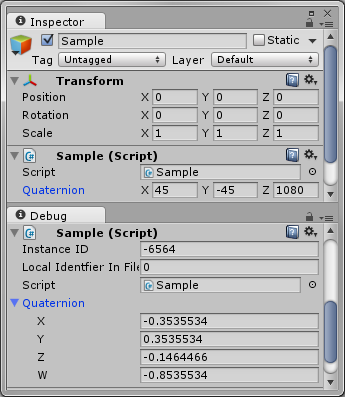
@waxen sandal I am trying to make this work:
https://gist.github.com/eral/f64399a2b6859a29f9f3
Gist
Quaternion Euler Property Drawer. GitHub Gist: instantly share code, notes, and snippets.
fresh yoke
I guess the amount of packages and dependencies all over is taking it's toll
solid thicket
but Its not a serializedObject, does it matter?
Should I create instance of QuaternionEulerPropertyDrawer or QuaternionEulerAttribute?
waxen sandal
How do you currently get the field that you're trying to draw?
@fresh yoke Oh no 🙈 😭
solid thicket
I didn't I used Vector3Field
If you mean the value itself, its from transform.eulerAngles
or localRotation
waxen sandal
I'm assuming you have a transform or something you're drawing right?
solid thicket
Yeah
split bridge
so with the expo linq calls and Unity adding packages over time, it's got slower.. probably it was <50ms.. now it's closer to 300ms... ( @fresh yoke I wonder if it might be because a lot of packages are disallowed with older unity versions rather than the upm code being better) but for adding your package to make it jump to 30,000ms... that just doesn't sound intuitively like the same order of magnitude to me 🤷♂️
waxen sandal
m_LocalRotation
solid thicket
I dont have that value
I meant, I am getting it from the transform itself
of a GameObject
That is what I am trying to display but in a custom field
waxen sandal
var so = new SerializedObject(transform); EditorGUILayout.PropertyField(so.FindProperty("m_LocalRotation"));
Something like that
solid thicket
You sure?
because there is nothing to link it with
Gist
Quaternion Euler Property Drawer. GitHub Gist: instantly share code, notes, and snippets.
 half karma
i need help with editor
 mighty lily
Guys, how to show radius variable in inspector? Do i need to override OnInspectorGUI or it can be done another way?
waxen sandal
Need to write your own editor
mighty lily
Can i just add fields to current panel editor or i have to do it from scratch?
solid thicket
Anyone know how to get rid of the space between?
I used EditorGUILayout.LabelField and EditorGUILayout.FloatField
tried styling with GUIStyle applying fixedWidth (to 0 and to other numbers) with no effect, and stretchWidth with no effect
tried using this as well:
var textDimensions = GUI.skin.label.CalcSize(new GUIContent(label));
EditorGUIUtility.labelWidth = textDimensions.x;
Again, with no effect
 smoky atlas
@mighty lily you have to start from scratch
shadow moss
I'm trying to add an object field to a scriptable object, but the scriptable object is not an asset
So I can't drag and drop into the object field
However, it seems to be embedded into the file's .meta file
fileFormatVersion: 2
guid: dd423314c345bb540a165b4ea497c87c
ScriptedImporter:
  fileIDToRecycleName:
    2800000: Atlas_Spritesheet_1
    11400000: _TilesetScriptObject
How do I allow for the file (inside my project) reference _TilesetScriptObject?
split bridge
I don't really follow your issue but if you want to get hold of _TilesetScriptableObject, it's a file identifier within an asset (that has a guid) so I think what you're looking for is the AssetDatabase.TryGetGUIDAndLocalFileIdentifier method 🙂
or... sorry, perhaps AssetDatabase.LoadAllAssetsAtPath
which returns an array of UnityEngine.Object's
shadow moss
Ignore the ScriptedImporter type
The _TilesetScriptObject is of type SuperTileset
Using AssetDatabase.LoadAllAssetsAtPath wouldn't work if I don't know the path, right?
Nor the GUID
split bridge
var allObjects = AssetDatabase.LoadAllAssetsAtPath(AssetDatabase.GetAssetPath(yourMainScriptableObject));
split bridge
then loop through the results and find the one of type SuperTileset 👍
split bridge
wait... unless you're not talking about loading the related asset... if you have a serializedObject you can do e.g. serializedObject.FindProperty("_TilesetScriptObject")
split bridge
can't you use the type to restrict what goes in there?
shadow moss
I tried
split bridge
serializedObject.FindProperty("_TilesetScriptObject").objectReferenceValue I think would be what you want
if you put full code up on hastebin or something, might be able to help a bit easier too
shadow moss
I'm looking to see how to convert the object to a SerializedProperty
Sure, that would be helpful
SerializedObject
shadow moss
@split bridge Gah, it works...
Apparently the damn asset was bugged. I force reimported, and the type works
Simple SuperTileset
split bridge
nice one
shadow moss
Frustrated, but it works... wasted 30+ minutes. Now I guess I'll force reimport if anything fails like this again
Thanks again for all the help!
I guess hopefully last question, but is there a way to have ObjectField only list folders? I'm using DefaultAsset, but it shows files as well
Files that I guess aren't associated with a type
severe python
Is it possible to include a layout with a package?
onyx harness
The layout is just yaml file
Could you write code to setup a custom layout?
@severe python yes you can setup it yourself via code
where are layouts stored?
@severe python in the AppData
Don't remember where
The layout is just EditorWindows stored in a file.
 ancient spoke
Hello, can somebody tell me how can I shoot a ray from the camera trough the cursor position in the editor that works in 3d? I'm trying to find some information on google but with no luck. I want to get the point in a mesh where the mouse is and I have no idea how to do it ..
 wheat brook
Im trying to import Prototype Materials pack to my new project but all the textures are missing
what am i doing wrong? im just pressing import in asset store
shadow moss
I have a Window, and when ever I compile, the window disappears
Even though my window is located under Assets/Editor/MyWindow
And I'm making changes to Assets/Scripts
Is there a way to keep the tab/window present without having to reopen it every time?
half karma
Hi, I have problem with Unity. When I start any project, the editor loading window stays for 5-7 seconds and disappears. Can you help please?
visual stag
@half karma This channel is for creating editor extensions, your question's better suited to #💻┃unity-talk , though you might have luck by looking around the logs which are pinned to that channel
half karma
Ок
 whole steppe
My own custom sprite mask:
https://www.dropbox.com/s/24i5ow8ggqnb1v0/bandicam 2020-03-22 23-33-10-119.mp4?dl=0

 minor herald
Does anyone how I can tell a ContextualMenuManipulator to not bubbles upwards?
I currently have a grid which has a context menu and on this grid I have nodes which also have a context menu.
If I right-click on the grid I get only the menu actions for that context menu but if I right-click on the node I will get both menu actions for the node and the grid.
Nvm the answer was the StopPropagation function😅
 wispy delta
I'm guessing this might not be possible, but would there be a way to intercept a double click on a file of a certain type in the editor? Could be determined by extension or by asset type. Just need a way to intercept the opening of the file so I can do something else with it
onyx harness
Gui callback for project @wispy delta
wispy delta
EditorApplication.projectWindowItemOnGUI @onyx harness?
onyx harness
Yep
wispy delta
check Event.current in there?
onyx harness
Yep
wispy delta
A+, thanks!
waxen sandal
Isn't there a way to register whatever is done with the asset on double click?
split bridge
@wispy delta ```cs
[UnityEditor.Callbacks.OnOpenAsset(1)]
public static bool OnOpenAsset(int instanceID, int line)
Was about to link that 😅
split bridge
🙂
wispy delta
well that's nice, thanks @split bridge !
 brave moon
Quickie question:
How I display List in custom editor? (not serialized or whatever called)
visual stag
if it's not serialized you need to iterate over it and draw all the fields manually as far as I know
 ancient sable
Does anyone know of a modern way of getting the rect of the inspector without having to use reflections. My last bit of sanity says I should ask (^)
brave moon
@visual stag , when you say all frields.. what exactly im supposed to draw here? I tough you could just make it like
scriptName.listName = GUILayout.Propertyfield("name here", scriptName.listname) ; or something but ofcourse doesnt work like that.
visual stag
PropertyField requires serialization
 quaint zephyr
Setting up a PropertyDrawer. Can someone give me a quickie about making my field takeup whatever space is available in that row?
Say I have a Label with a fixed width, some spacing, and then a field that will just take up the rest.
quaint zephyr
Or A label fixed width, field take up whatever, and a space following for a small icon?
 timid whale
Anyone here think it's worth building a node system using UnityEditor.Experimental.GraphView (Unity's new Graphs are all using that, I think), or will I be in danger of the API going private like Shader Graph?
minor herald
Is there a way to draw lines on of top visual elements?
gloomy chasm
@timid whale No, you should be in 0 danger of it going private. Shadergraph, VFX graph, and their new visual scripting all use it, I can't imagine them making it private. I, my self have been working on a graph system using it.
severe python
As you can see this isn't really a concern, they know they have people using GraphView, it was released as a tool for non-unity developers and unity developers to use to make more and better tools
there was some great piece of documentation someone linked in here...
waxen sandal
Thought we pinned that but apparently not
severe python

In this tutorial we are going to create a SUPER SIMPLE node based dialogue system with the ability to branch story lines. We gonna create the main setup and make our graph entirely functional in this episode.
In the next episode, we gonna add save&load system for nodes and ga...
waxen sandal
@visual stag Can we pin that?
severe python
oh lol, it was shared by AbsoluteTundra right here
I do hate how much footwork their ui library makes you do
I hope they get a good binding setup
Suddenly, I wish I could have youtube display its video on my monitor in some corner ontop of other stuff like you have on the phone...
gloomy chasm
Yeah, you really do have to do a lot of setup. I mean it is less than doing it manually of course, and it is very flexible. But I wouldn't mind if they handled a bit more of the leg work.
severe python
My first step would be to make a node that is capable of being bound to some object
and have its content automatically rendered from a template or something
timid whale
Thanks for the replies! My concern arised because I had customized Shader Graph scripts and they made that API private so I thought I'd ask before diving in.
minor herald
Sorry I didn't respond I didn't know if they would make it private or not
severe python
I don't think ShaderGraph is really positioned to be an API, but GraphView definitely is
quaint zephyr
Making custom editor.
If I start drawing my own custom layout just using EditorGUI, it's working just fine. But afterwards, I just want to quickly pop in a couple buttons at the bottom using EditorGUILayout, but the layout system treats them as if I drew nothing with EditorGUI and overlapping occurs.
How can I tell EditorGUILayout where I want to start drawing instead?
Or am I going about this wrong?
onyx harness
@quaint zephyr Use EditorGUILayout.Space() to tell GUILayout that you consummed some space already
quaint zephyr
Like, after I draw all my EditorGUI content, add up total height that it took and pass that into EditorGUILayout.Space()?
onyx harness
Yep
quaint zephyr
My man! You saved me hours of research haha. Thank you! @onyx harness
waxen sandal
 quaint zephyr
@waxen sandal I just started scripting, I'm still not sure how to use GetRect and GetControlRect despite reviewing Unity's documentation on it multiple times over.
I guess I just need someone to translate it in plain english for me 😛
waxen sandal
GetRect is pretty much letting unity calculate how big something should be based on the content
I'm not exactly sure what GetControlRect is useful for
Someone else can probably tell you
quaint zephyr
So I should use GetRect when implementing EditorGUI items?
quaint zephyr
I know. I'm just trying to go for a speedy workflow.
waxen sandal
I'd prefer GetRect if you're going to be mixing things
And want pretty standard behaviour
Then you also don't have to deal with the SingleLineHeight and WideMode
quaint zephyr
Oh, I think I see how it works. First I setup the UI Item that I want, then I call GetRect with that UI Item. Unity does the magic. And pass that return value in the draw method?
waxen sandal
Pretty much yeah
quaint zephyr
Sounds simply enough. Thanks. I'll try this method out.
@waxen sandal It seems as though using GetRect by passing GUIContent it always sets the width to be full. What if I want to layout some GUI items on the same line without going in the next line?
waxen sandal
You can pass a guilayout.width
Not sure how to deal with things next to each other
Mostly use guilayout myself
quaint zephyr
Yeah I would default to layout as well, but in this case, I can't get layout to do what I need done, so I have to resort to plain old EditorGUI instead 😛
onyx harness
@quaint zephyr Use EditorGUILayout.BeginHorizontal()
quaint zephyr
I wrapped them with that, and it still gave me the same result using GetRect
onyx harness
Show me your code then
quaint zephyr
Oh, I think that would work if I draw using Layout instead of just EditorGUI.
Let me try.
It works, but it doesn't fit it all inside the window.
I'm gonna go for lunch break. Let me post what I got with that method...
for (int i = 0; i < map.buttons.Length; i++)
            {
                // Name Label
                EditorGUILayout.BeginHorizontal();

                EditorGUILayout.LabelField("Name:");
                map.buttons[i].name = EditorGUILayout.TextField(map.buttons[i].name);

                EditorGUILayout.LabelField("Key:");
                map.buttons[i].code = (KeyCode)EditorGUILayout.EnumPopup(map.buttons[i].code);

                EditorGUILayout.EndHorizontal();
            }
It puts lot of space on the fields...how can I control that using Layout?
onyx harness
It puts lot of space on the fields...how can I control that using Layout?
@quaint zephyrEditorGUIUtility.labelWidth
quaint zephyr
@onyx harness I set EditorGUIUtility.labelWidth = 1 and I still get too much spacing. It's better, but not what' I'm looking for.
Oh and I tried 30 and 50 and 100 and they don't change much unless I go over to a higher pixel value.
quaint zephyr
What if I wanted to make a small "x" per row that is clickable and will execute action like Button but not look like a button...?
Would I draw a button, but style it somehow?
onyx harness
Button, with a Label style yes
Strange, EditorGUIUtility.labelWidth is suppose to change it exactly
quaint zephyr
Yeah I thought so too, but for some reason it won't go lower than 30 ish.
I decided to scrap it and just go the EditorGUI way instead.
visual stag
Does anyone know how to remove a RectTransform from a prefab asset via code? DestroyImmediate doesn't work. Not sure if there's a utility method somewhere, or whether I would actually have to edit the file. I think the Remove Component part of the context menu is also all extern
 weak bone
Any idea why error doesn't display when q = 0 and I hit the create button?
visual stag
Because it's immediate mode
there would only be a single instant when the button is pressed
weak bone
So, how can I display the error after the button is pressed ?
Direct it to another function which checks whether q = 0 and display the error?
visual stag
you need a state that you save if that has happened, that is queried and displays the help box
just picture the GUI loop is called all the time, an if statement needs to be true all the time to display the thing inside of it during that time
weak bone
Oh, yeah .
Thank you.
onyx harness
Does anyone know how to remove a RectTransform from a prefab asset via code? DestroyImmediate doesn't work. Not sure if there's a utility method somewhere, or whether I would actually have to edit the file. I think the Remove Component part of the context menu is also all extern
@visual stag have you tried reassigning the mono script of the RectTransform?
visual stag
Nope, though I suppose that would work. Never done it via code though.
Would you just do it via serialized property or is there a different method?
onyx harness
Use ScriptableObject of the RectTransform, get the property of the file, get the MonoScript of Transform, set it.
Dont if works though
visual stag
I'll take a look when I'm next with unity. Good suggestion
onyx harness
Set the ScriptableObject's mode to internal. I don't think the file appears if it is not in internal mode
Not sure though
 woeful spruce
Is there a way to open text file from the editor with another application instead using visual studio?
 spring dagger
Is there a way to open text file from the editor with another application instead using visual studio?
@woeful spruce You can Listen to OnOpenAsset (https://docs.unity3d.com/ScriptReference/Callbacks.OnOpenAssetAttribute.html)
Here's a simple example from some time ago. Should help you get on the right track 🙂
woeful spruce
@spring dagger thank you, it's perfect. Sidenote for others interested: it has an external dependecy that you have to download from the Asset Store (BitStrap)
spring dagger
@spring dagger thank you, it's perfect. Sidenote for others interested: it has an external dependecy that you have to download from the Asset Store (BitStrap)
@woeful spruce Yep, but is easily modifiable, if you don't want to use bitstrap. You could just hardcode the path in the script or create your own little editor window 🙂
 subtle ether
Hello, I would like to hide some "ScriptableObjects" (not modifiable outside of code) from the "assets" folder and I found that setting the object's hide flags should work (I've also verified in the asset's meta file that objectHideFlags' value is correct) but the objects are still visible. There is also a EditorHideFlags but I don't know what it is or how to set this one 🤔
 lean berry
Hi all, can I save my colour palette manually into the .color swatch file for unity with HSV, RGB0-255 or Hex, or do I need to convert the colours first to 0-1 float values?
 astral hemlock
How do I make a ScriptableObject that always exists, similar to the DynamicsManager or AudioManager or anything the ProjectsSettings directory?
I want to build a system that spawns reactions (i.e. particle systems / plays audio) when 2 objects collide. And the reaction would be based on the colliding object's "effect material"
whole steppe
post processing stack v2 gives like 400 errors
any idea how to fix?
i think i need to update to newer version or something but i don't know how
the asset manager doesn't have an option for updating
 summer basin
What are the errors saying?
whole steppe
wait
@summer basin
498 errors
apparently im not the only one who is having this problem edit: more like these, problems, haha got it? ok sorry
summer basin
Phew ye looks like a bug on unitys side
whole steppe
is there something i can do about it?
i paid like 13eur for this extension, i HAVE to get it working
waxen sandal
That's not a psot processing stack throwing errors
That is probably just missing a reference to post processing stack
whole steppe
how can i fix it?
waxen sandal
Is there an asmdef file in that plugins folder?
whole steppe
what plugins folder? @waxen sandal
waxen sandal
Assets/blackant/playmaker postprocessing or w/e
waxen sandal
try t: asmdef
whole steppe
nothing
waxen sandal
That's probably the issue
whole steppe
i don't even know what an asmdef is ( i probably don't need to know )
but how can i add it?
waxen sandal
You can just create one and add references to the things you need
But that's hard to figure out if you don't know how these things work
whole steppe
should the a be capital? does it matter?
whole steppe
should the folder be asmdef or Asmdef
whole steppe
when i click on create, an "asset" doesn't show up on the list of things i can create
is it a C# script?
waxen sandal
It's probably called assembly definition file or something like that
onyx harness
Hello, I would like to hide some "ScriptableObjects" (not modifiable outside of code) from the "assets" folder and I found that setting the object's hide flags should work (I've also verified in the asset's meta file that objectHideFlags' value is correct) but the objects are still visible. There is also a EditorHideFlags but I don't know what it is or how to set this one 🤔
@subtle ether HideFlags does not hide from the Project. Only from Hierarchy.
subtle ether
I played with the flag and it did hide them from the Assets folder
onyx harness
Which flag? O_o
subtle ether
hideFlags
onyx harness
I know, but which one?
subtle ether
HideInHierarchy
whole steppe
@waxen sandal i can't even open the assembley definition on visual studio
subtle ether
and HideInInspector, I set both on so I dunno which one it is exactly x)
subtle ether
Well I thought so too, but it did hide them for me 
Let me test it out one more time
whole steppe
it says that it is incompatible
onyx harness
Interesting
subtle ether
Do you happen to know what "EditorHideFlags" is ?
I saw it in the .meta file of my asset and it is always 0
onyx harness
dunno
subtle ether
Seems like this should be the one but I can't find any information on how to use it 🤷♂️
whole steppe
@waxen sandal i tried this but there is still an error
wait i did something else and i no longer get errors but i still cant use the features of the extension
oh wait now i have 26 errors
i feel like i'm talking to myself
 manic pewter
Does anyone here know how to force a repaint for UIElements every frame?
I was suggested MarkDirtyRepaint but can't get that to work.
Trying to get a IMGUIContainer with a PreviewRenderUtility to refresh every frame but can't seem to figure it out
severe python
this might be being stupid
but how would I go about verifying the actual data in a monobehavior when I"m seeing an issue in the editor
severe python
of course
so somehow I'm creating extra data and assigning it to things it can't be assigned too...
IComponentData isn't a ISharedComponentData
I'm surprised this is even possible, I was assuming this was just a UI bug in my ui code
which means this must be a bug with my SerializedProperty management?
Is there a good example of how to correctly work with arrays via SerializedPropertys?
severe python
so
void AddItem(object value){
  serializedProperty.arraySize++;
  var indexProperty = serializedProperty.GetIndex(serializedProperty.arraySize);
  indexProperty.managedReferenceValue = value;
}
lets just pretend serializedProperty actually exists in this scope
visual stag
GetArrayElementAtIndex, but sure
severe python
right
visual stag
and that would be arraySize-1
severe python
right, of course
derp
thanks for calling it out or I would have probably just done it not thinking
visual stag
I think I usually one-line it var otherProp = prop.GetArrayElementAtIndex(prop.arraySize++);
I haven't used managedReferenceValue before. Is that a handy way of just setting values or is it explicitly for the serialized ref attribute?
severe python
I'm doing so much with SP in this code
its the SerializedReference backing value
settable only
its what I'm using to allow assigning IComponentData and related interfaces to an array in a struct
primarily just to explore it while I also work on VisualTemplates
oh
So this is really stupid of me then eh:
            int arraySize = boundArray.arraySize;
            boundArray.arraySize = arraySize + 1;
            boundArray.InsertArrayElementAtIndex(arraySize);
            var cdsp = boundArray.GetArrayElementAtIndex(arraySize);
there's your double 😛
severe python
oh its glorious, I think that fixes the last bug in VisualTemplates
Still, its facinating that doing this causes the wrong data to be populated in an array which can't technically support it
its also fascinating that unity handles that without apparent issue
VisualTemplates is a go, time to commit and update some projects
the way that loops is really confusing
its even ui builder compatible thanks to Mr.Damian
weak bone
Hi,
I store some string values by playerprefs at runtime..
I will know the key names but how can I edit it by adding that many string fields ( I mean EditorGUILayout.TextField) at runtime?
Number of values stored may vary so depending on the number of values how can I add that number of string fields?
 keen pumice
@weak bone you could create a loop to go through all the strings you have stored, an use https://docs.unity3d.com/ScriptReference/EditorGUILayout.TextField.html to draw a text control for each one inside the loop.
(this means you may need to count how many string you have, before being able to start the loop- but you also mentioned you klnow how many that will be- so maybee not)
I have a question myself: (EDIT: FOUND ANSWER)
I’m using EditorGUI.Vector3Field to draw a vector. I had been incrementing the Rect passed in here by a single line height, which usually works well, but if the inspector is made narrow, it is drawn on two lines (one for the label, one for the x,y,z fields).
I thought there was some kind of GetLastControlRect function, which would work fine, but I can’t find it in the docs now.
How do I determine the height of the control will require when drawn?
(I'm NOT using SerializedProperties here, so cannot use plain ol' GetPropertyHeight)
also.. not even sure if a GetLastControlRect function would work, since I'll need to adjust the height of the rect I pass to draw the Vector3Field function BEFORE I actually draw the field)
 whole saffron
Hi there, I'm looking for a way to replace a script with another script (in prefabs) using an editorscript. You now like, when you put the inspector in DebugMode and then replace a script and every reference is kept? I want that, just as an Editor script.
So far I can open the assets and find the component with GetComponentsInChildren and then comparing it with the Script I'm searching for ( using MonoScript.GetClass() )
I'm just stuck and can't find a way to replace the script. Any ideas?
keen pumice
@whole saffron Does AddComponent<newScriptType> not fit what your looking for? If not, what DOESN'T it do?
whole saffron
I want to replace the current script with the new one without loosing assigned properties, references etc.
the scripts I want to swap are basically identical, just in a different package
keen pumice
I don't see how thats possible, unless you manually assign the new component values, before removing the old (or after recording the old values). hmmm.. I guess you COULD use reflection to find members of the two components with the same name and type, and copy over that data in a loop. Would be a bit trickier, but would be more generalized.
whole saffron
hmm sad :( I thought because unity basically does this in the inspector there would be an easy way to do it and I'm just googling the wrong keywords or something. Appreciate the help! :)
keen pumice
https://answers.unity.com/questions/530178/how-to-get-a-component-from-an-object-and-add-it-t.html?_ga=2.156998971.1215613895.1585133208-1758085936.1506183559 found this guy.. example of that reflection method I mentioned.
Unity is the ultimate game development platform. Use Unity to build high-quality 3D and 2D games, deploy them across mobile, desktop, VR/AR, consoles or the Web, and connect with loyal and enthusiastic players and customers.
not EXACTLY what you need, be seems very similar
whole saffron
thanks! I'll look into it :)
whole saffron
I found a way! :) https://answers.unity.com/questions/1374678/how-to-switch-script-in-editor-via-code.html
Unity is the ultimate game development platform. Use Unity to build high-quality 3D and 2D games, deploy them across mobile, desktop, VR/AR, consoles or the Web, and connect with loyal and enthusiastic players and customers.
I haven't yet checked a real use-case but it works in my test and it seems promising
keen pumice
nice, thats MUCH simpler! (dont forget to upvote Q and A if helpful)
hmmm.. I guess you'd need to make sure that the two versions of the component serialize/deserialize the same way, to use this method.
onyx harness
https://answers.unity.com/questions/530178/how-to-get-a-component-from-an-object-and-add-it-t.html?_ga=2.156998971.1215613895.1585133208-1758085936.1506183559 found this guy.. example of that reflection method I mentioned.
@keen pumice don't use the Reflection method, use the utility instead
Unity is the ultimate game development platform. Use Unity to build high-quality 3D and 2D games, deploy them across mobile, desktop, VR/AR, consoles or the Web, and connect with loyal and enthusiastic players and customers.
keen pumice
somin was asking actually, but what Utility are you refering to? we couldn't find one (edit: in the API).
@whole saffron note above ^
onyx harness
somin was asking actually, but what Utility are you refering to? we couldn't find one (edit: in the API).
@keen pumice there is either the manual way (Reflection), or the utility.
Look at the 2nd answer in your post
severe python
Is there anyone here who is actually intereseted in VisualElements and its progress?
I know atleast a few people have starred/watched the github, I presume most came from here or the forums
wispy delta
I've got a plain class stored in an EditorWindow, which I'm serializing with a SerializedObject. I can find the serialized property for the POCO via serializedObject.FindProperty(...), and would like to access the actual object on said property at a later date so I can call a function on it. Is this not possible?
I see property.managedReferenceValue but it doesn't have a getter
onyx harness
Use the target, and fetch using Reflection @wispy delta
wispy delta
i've got a bit of an odd setup. this is all happening in an EditorWindow so there isn't a target property
onyx harness
You said you serialized using a SerializedObject
wispy delta
yea, i'm creating one in the window in OnEnable and passing the window to the constructor so that i can work with serialized properties
private void OnEnable()
{
    so = new SerializedObject(this);
    seedProperty = so.FindProperty("seed");
    containerProperty = so.FindProperty("container");
    modeProperty = so.FindProperty("mode");
    radialProperty = so.FindProperty("radial");

    Undo.undoRedoPerformed += Repaint;
    SceneView.duringSceneGui += OnSceneGUI;
}

private void OnDisable()
{
    so.Dispose();

    Undo.undoRedoPerformed -= Repaint;
    SceneView.duringSceneGui -= OnSceneGUI;
}
so, you have the "this" available
Either I don't understand you, or you don't understand me, or the problem is not clear
wispy delta
the only reason i'd like to reference the object via the property is because it will make my code a lil less messy. i can grab the field directly, but part of my gui is switching on an enum and drawing a single serialized property based on the result of the switch.
if i can just grab the object from the serialized property that'd be nice, but no biggie if i cant
onyx harness
"would like to access the actual object"
You can't.
You need to fetch it from the target, but since you already have it
keen pumice
@wispy delta looks to me like so = new SerializedObject(this); is the SO that would normally be the "target", in an inspector editor.
Use the target, and fetch using Reflection @wispy delta
@onyx harness ( so this suggestion might actually work for ya )
severe python
ManagedReferenceValue, which is the backing store for SerializeReference doesn't provide a way for you to get the underlying object value
They gave some reasons for it, I don't recall what they were, but it seemed reasonable to me
however, you can set ManagedReferenceValue to anything, even if it violates the types structure
which is probably bad
quaint zephyr
Writing a custom PropertyDrawer for a Class that uses getters/setters. Is there a workaround to force the ability to have the custom PropertyDrawer script write/treat the getters/setters as regular values so I can trigger them when updating them (exposed) in the inspector?
onyx harness
@quaint zephyr no
Getter/setter is a method. Not a field.
But you can apply a SerializedField to auto property.
quaint zephyr
It's not auto.
I figured out a workaround though. Got super messy at first...but after fidgeting, got it to work how I wanted 😉
onyx harness
Then the property is a simple method. Simple as that
quaint zephyr
?
onyx harness
Meaning you can't get the PropertyDrawer (PD) to handle the property as a value. Since it is not serializable
quaint zephyr
🤔 But I think I just did...
Maybe we are talking about 2 different things? 😛
I was trying to get the Custom PD to write to getter/setter (not auto), instead of just plain ol` properties.
And the getter/setter has a check that will fire an event 😛
quaint zephyr
Well, now I'm running into another issue. It works as I wanted, except for whenever I hit "Play" the values reset or reinitialize. So they don't carry over whatever I set in the inspector before Play mode. And when I exit playmode, they remain in reset.
Is there something I need to do to prevent this and have the values stay as whatever I put them in edit mode?
visual stag
you would need to update the serialized property
visual stag
which would need to be called after your modifications
you may need to call SetIsDifferentCacheDirty before that too.
Not sure if it would work
quaint zephyr
No, it didn't work. And it won't because I am not going through the traditional way. I attempted to write a drawer that will use the getter/setter fields instead of properties. Although I succeeded, I am running in to the setting it dirty/updating issue now. If you saw my script, you'd understand what I mean...and probably laugh too haha
onyx harness
the getter/setter fields
That sounds wrong O_o
quaint zephyr
Oh god lol. Should I just paste it all here? Or is there a more cleaner way?
visual stag
Large code blocks should be posted as links to services like:
quaint zephyr
Ok. Here is the class: https://hastebin.com/zudolumoge.cs
And here is the Custom PD for it: https://hastebin.com/iwilotuhec.cs
Ends up looking like this. Just how I want it. (visually speaking)
onyx harness
_value is not serializable
quaint zephyr
That's why it's not saving?
visual stag
serialization == saving
quaint zephyr
All I gotta do is slap a [SerializeField] thing?
visual stag
same with Unit
quaint zephyr
Holy guacamole! It worked!
visual stag
Though it still won't save properly I don't think?
quaint zephyr
haha. I get to use getters/setters on property drawers now! Woot woot!
onyx harness
What happens if you remove your Begin/EndProperty?
quaint zephyr
I just tested it. and it saved
You want me to test it without begin/end prop wrapper?
onyx harness
What does it do to the result yes
quaint zephyr
Sure on sec.
Didn't do anything diff. Works just the same.
Guess I don't need them
visual stag
I have no idea how that would make any sense
do you have cs sO.SetIsDifferentCacheDirty(); sO.Update();?
quaint zephyr
Nope
onyx harness
Now, make a change, save your scene/prefab. Restart Unity
quaint zephyr
Confusing huh?
onyx harness
See if the change persisted
onyx harness
Or if you prefer, just make a change, save, open the file, and analyze the YAML to see if the change is in there
quaint zephyr
Made change. Clicked Play, value persisted.
Saved scene
closed unity. Restarted. Value still there!
onyx harness
Ok
visual stag
I really don't know how that would work
you're not even dirtying the object in any way
quaint zephyr
Thank you @onyx harness & @visual stag You guys saved me a bunch of head wall banging
onyx harness
@visual stag Me too, I would have thought the same. But maybe we are being fooled due to PropertyDrawer != Editor
quaint zephyr
Nope. I seem to have found a magic bug 😛
Yeah, just FYI, this is not a Custom Editor, it's a Custom Property Drawer.
visual stag
I really don't know how that would make a single bit of difference
do you also have a custom editor?
quaint zephyr
Me neither. I was just trying to sound smart
I have custom editor. but not for this class
🤓
visual stag
But, is it around the property
quaint zephyr
No
visual stag
so, this property is on a default editor?
visual stag
Bizarre
onyx harness
I would say, doing through an Editor, it is required.
Maybe the default Editor is doing stuff for PropertyDrawer
That's the only explanation I have
quaint zephyr
Want me to draft up a custom editor script for the script where that property sits on?
onyx harness
No no, it's fine
quaint zephyr
I will just do a base.OnEditorGUI or DrawDefaultWhateverItscalled()
see if data persists.
Mikilo you brought up a interesting point. Maybe default does the magic. But if I were in a position where I had both custom editor and drawer, you say I would need to call the .Update() function?
If so, would I be needing to call SetIsDifferentCacheDirty(); and Update(); in the property drawer, or the editor?
onyx harness
Yes.
You need to call Update first, to force the SerializedObject to update its "representation".
Then live your life.
Then apply if dirtied
visual stag
you would use a ChangeCheckScope to only do that if your fields change
I'm looking at the default editor right now and I don't see anything special that bypasses my knowledge of how things work 😛
quaint zephyr
Oh boy, more shit I need to learn about...just when I thought I had this down lol
So would I call Update on the editor or the property drawer?
onyx harness
Update is on the wrapping object (The SerializedObject)
visual stag
The way I understand it is that if you modify a field value whilst using a serialized property you need to update the serialized property representation. Calling Update
and often Update will not know things are dirtied so you may also need to call SetIsDifferentCacheDirty
severe python
wait is that why I get those diff tree messages?
visual stag
Perhaps you're lucky and the update cache has never been dirtied for your object, and then ApplyModifiedProperties that's done by the Editor never overrides your changes
onyx harness
Just tested on Unity 2017.4.
It behaves as we expected @visual stag. Something is different in his rig.
visual stag
and then you're dirtying the object somehow, which is applying it appropriately
severe python
Can I just say, I feel like the SerializedProperty documentation could be better
maybe I just suck, but they seem really arcane
visual stag
it's very very verbose
and it does feel ridiculous to use at times
if you do have questions though I think Mikilo and I have learnt over time how they work 😛
severe python
like, I feel like you shouldn't be able to increment arraySize, and tbh, I'm not sure why I thought that couldn't lead to a problem
and I understand that at this point its a backwards compatibility issue so it can't be solved
quaint zephyr
Well thank you for the help anyway. I feel a little more at ease now with your explanations.
severe python
wait, if I use insert does it not duplicate?
the duplication issue is something I have to constantly work around
it causes messy problems with SerializeReference
visual stag
Insert would dupe too, yes
but I don't think insert works for the last index
might be wrong though
severe python
thats probably why I incremented the array
well, I guess thats what happens when you're hacking a solution
onyx harness
@quaint zephyr Could you tell us which version of Unity you are working on?
quaint zephyr
The latest 2019.3.61f I think
I didn't update to the newest one released today/yesterday
yet.
Quick question. Am I allowed to customize the native components? Say I want to do a CustomEditor on typeof(Rigidbody)?
visual stag
you can, you just need to create an editor of that base type and then redraw it if you want to keep what's there by default
quaint zephyr
What's wrong with this code?
using UnityEngine;
using UnityEditor;

[CustomEditor(typeof(Rigidbody))]
public class RigidbodyInspector : Editor
{
    public override void OnInspectorGUI()
    {
        //base.OnInspectorGUI();
        EditorGUILayout.HelpBox("OVERRIDE!", MessageType.Warning);
    }
}
Nothing happens. The Rigidbody stays the same. With or without the base.OnInsepctorGUI()
Script is located in Assets/Editor/RigidbodyInspector.cs
visual stag
works fine without
quaint zephyr
Hmm...
Oh!
I see what went wrong.
I had my inspector "Locked" to that same object. After I "unlocked" it, the component changed.
quaint zephyr
When attaching a custom editor on rigidbody, even though I'm passing in base.OnInspectorGUI() or DrawDefaultInspector(), the component does not draw the Constraints section as well as the Info section.
They appear as soon as I take out the custom editor.
Is this a bug? Or is there something I need to do extra to keep Rigidbody fully intact when making Editor script to it? All I want is just a helpbox on top to display some messages, is all. But the rest I want normal.
quaint zephyr
Oh. I see. I apologize for not catching that at first. I will try it now.
onyx harness
This is the Rigidbody's OnInspectorGUI(). As you can see, it does things manually. That's why you need to follow @visual stag's recommendation.
public override void OnInspectorGUI()
{
    base.DrawDefaultInspector();
    Rect controlRect = EditorGUILayout.GetControlRect(new GUILayoutOption[0]);
    EditorGUI.BeginProperty(controlRect, null, this.m_Constraints);
    this.m_Constraints.isExpanded = EditorGUI.Foldout(controlRect, this.m_Constraints.isExpanded, this.m_Constraints.displayName, true);
    EditorGUI.EndProperty();
    base.serializedObject.Update();
    RigidbodyConstraints intValue = (RigidbodyConstraints)this.m_Constraints.intValue;
    if (this.m_Constraints.isExpanded)
    {
        EditorGUI.indentLevel++;
        this.ToggleBlock(intValue, RigidbodyEditor.m_FreezePositionLabel, 1, 2, 3);
        this.ToggleBlock(intValue, RigidbodyEditor.m_FreezeRotationLabel, 4, 5, 6);
        EditorGUI.indentLevel--;
    }
    this.ShowBodyInfoProperties();
}
This is a little over my head. I think I will just copy @onyx harness code for the time being.
I just tried @visual stag part about the defaultEditor and got StackOverflowException and unity crashed lol.
I think there are some other things I might have missed?
onyx harness
Don't copy my code.
visual stag
I don't know how that could occur, so you must have done something wrong
quaint zephyr
That's for damn sure lol
visual stag
also, yeah, that code won't work
onyx harness
I just gave you one single piece. You fill face a zillion more issue if you continue this way
quaint zephyr
lol ok
Well this is what I tried:
using UnityEngine;
using UnityEditor;

[CanEditMultipleObjects, CustomEditor(typeof(Rigidbody))]
public class RigidbodyInspector : Editor
{
    private Editor defaultEditor;

    private void OnEnable()
    {
        if (defaultEditor == null)
            defaultEditor = CreateEditor(targets, System.Type.GetType("UnityEditor.RigidbodyInspector, UnityEditor"));
    }

    private void OnDisable()
    {
        if (defaultEditor == null) return;
        DestroyImmediate(defaultEditor);
    }

    public override void OnInspectorGUI()
    {
        //Rigidbody rb = target as Rigidbody;
        //float pounds = Mathf.Round(Convert.MassToPounds(rb.mass));
        //string msg = string.Format("This object weights {0} lbs right now", pounds);
        //EditorGUILayout.HelpBox(msg, MessageType.Info);
        defaultEditor.OnInspectorGUI();
    }
}
hrm
visual stag
RigidbodyInspector is not a thing
quaint zephyr
Oh. I typed in RigidbodyInspector in my Visual Studio and IntelliSense pulled up a class from UnityEditor
So I figured it was a thing. What would I replace it with?
onyx harness
This is not RigidbodyInspector, but RigidbodyEditor
quaint zephyr
Sorry, I'm not a seasoned coder at all. I'm learning as I go. I'm not even sure what I am doing with the defaultEditor, I'm just blindly trusting your code 😛
@onyx harness , just typed in RigidbodyEditor, and everything worked.
Thanks guys! I appreciate it very much
https://i.pinimg.com/736x/43/c7/38/43c738b17972e3adec62a943bb7b9043.jpg
as a thank you for your efforts 🙂

 onyx harness
It's fine, we all started somewhere
weak bone
@keen pumice
I had tried this too, but if I edit one value all the value gets edited
keen pumice
@weak bone well, it sound like you have two "layers" here, the runtime array you store the strings in, and the playerprefs that store these values persistently... which one(or do both) of these have all it's values change when you edit one?
weak bone
I append strings into a playerprefs string...
After each string there would be a space to divided the whole text into parts (substring) .
So, I will append a new string every time a playerpref is created..
So, now I know the number of playerprefs stored and their names...
Now, I want to display and edit these .
So, If I do
for (i=0 ; i<numberOfSubstrings;i++)
Val=EditorGUILayout.TextField("Edit",substrings[i]);
That many fields will be created but the value in each will be the last value that is substrings[numberOfSubstrings - 1]....
keen pumice
not sure what Val is.. perhaps... Val=EditorGUILayout.TextField("Edit",substrings[i]); -> substrings[i]=EditorGUILayout.TextField("Edit",substrings[i]);
weak bone
And if I try to edit one field, every fields gets edited
Val is a string
I'm assigning substrings as the value for Val.
keen pumice
yeah, I dont see why.
don't you want to put the new value into the substring array element?
weak bone
Yeah I will do it later, but the problem now is all value gets edited if I edit one...
I can send you a video if you need after 10min
keen pumice
AFTER you run the loop, and have adjusted the values in your substrings[] array, rebuild your PlayerPref string using string.join(substrings)

Concatenates the elements of a specified array or the members of a collection, using the specified separator between each element or member.
(I'm assuming you created the substring array from the storedPref array using https://docs.microsoft.com/en-us/dotnet/api/system.string.split?view=netframework-4.8)
Returns a string array that contains the substrings in this instance that are delimited by elements of a specified string or Unicode character array.
weak bone
Yep, I did.
keen pumice
great so "workflow" would now be : convert playerPrefString to substring array-> display & modify substring array -> use join to convert substring array to playrprefstring -> store playerpref
weak bone
Well, the problem is with display and modify...
Sending a video in 5 min.
keen pumice
yes, I know. you are not modifying the array, your modifying Var
Val=EditorGUILayout.TextField("Edit",substrings[i]); is, I think, wrong, and should be substrings[i]=EditorGUILayout.TextField("Edit",substrings[i]);
onyx harness
Or just use Begin/EndChangeCheck
quaint zephyr
Anyone on right now?
visual stag
There are always thousands of people on btw, it's a useless question
severe python
 warm gale
I'm using Unity 2019.3.5f1 and was adapting one of my editor scripts, it didn't seem to be working. Then I realised I didn't have gizmo's active in the scene window and it worked when activated.
My question is with respect to Editor.OnSceneGUI() should it only fire when gizmo's are enabled or is this a bug?
If not a bug is it possible to work around?
weak bone
I made a script which spawns objects randomly on a sphere and box.
There's an uneven terrain on which I have to randomly spawn objects like trees.
How can I achieve this?
weak bone
I don't want it to spawn where I click...
Instead, I wanna spawn "randomly"
Oh, i can also raycast from the camera, and spawn things.
Is this what you meant?
waxen sandal
For example
Or get the bound of the terrain
And raycast from the top downwards
Then you can also check whether you're hitting the terrain rather than some other object
weak bone
Yeah, this thing didn't flash in my mind..
whole steppe
restarted unity and it works now idk
 jade island
Does anyone know of a simple/easy method of adding a horizontal divider in the inspector?
I found this page: https://forum.unity.com/threads/horizontal-line-in-editor-window.520812/
And I really liked the look and (supposed) simplicity of alexanderameye's solution however I can't seem to get it to work.
I added the function, and when I go to call it, thats where I don't think I fully understand how to implement it.
Any ideas would be greatly appreciated! 🙂

Unity Forum
How do you make Horizontal lines like in Unity's lighting window in an EditorWindow
I found a few ways by searching but none look as good as the...
onyx harness
EditorGUI.DrawRect is pretty simple
 daring bough
I have a few variables that I want to hide/show depending on which enum a variable has selected, how would I do this? I have the custom editor class made but I'm not sure what to put in the OnInspectorGUI method
waxen sandal
Look up IMGUI
quaint zephyr
Using EditorGUI.Foldout in the PropertyDrawer script. How do I get it to work without it overlapping neighboring variables in the native EditorScript?
So it behaves something like this without having to write up a custom EditorScript
visual stag
you need to override GetPropertyHeight appropriately
visual stag
you're in complete control of the rects
quaint zephyr
I guess all is left is for me to believe that haha.
It's just a matter of manipulating the position Rect huh?
Hang on, let me try something and if I have no luck, I'll pop back up.
quaint zephyr
Alright! So far so good!
Couple questions.
- When I click on the Weight label, the Foldout toggles properly. But when I click on that arrow icon next to it, nothing happens. How can I make it react to that arrow?
- Tolerance uses a
Slider, But it is maxed out atrightValueparameter. Is there a way to detect if the user attempts to input a value higher than that so I can expand the slider accordingly?
scenic elbow
there's this button for changing editor grid settings (at least in 2019.3 dunno if it was there before)
on the right side of the toolbar
does anyone know if these settings can be changed from code?
no idea what to look for
even just toggling enable/disable would prob be good enough because i want to turn it off and replace with my own grid system without making user (dev) press another button
EDIT: solved, apparently there is SceneView.showGrid
still interested if anyone knows how to modify the actual settings tho
 left gate
Can you get the currently focused VisualElement
severe python
yes
I forget how at the moment, but I do know that elements that are VisualElement.focusable can be focused
if its not focusable it cannot be focused, and there is a FocusEvent and BlurEvent for when things become focused and unfocused
if you acquire the FocusController from your visual tree root, which is accessible from any VisualElement, then you'll be able to use the focusedElement member to get the currently focused element
left gate
I ended up registering a callback
Area.RegisterCallback<FocusInEvent>(evt => focused = ((VisualElement) evt.target).parent);
 real glacier
I'm making a dialogue system. Initially, it all was great, but then I began to work on the localization, and shifted the dialogue text from the scriptable objects that stored it to a separate text file, leaving behing only string names. It instantly made things significantly difficult. Can I edit the code for the object so it would fetch the required strings from the file when selected? Here's a mock-up of what I want:
The code's is currently this:
using System.Collections;
using System.Collections.Generic;
using UnityEngine;
using UnityEngine.UI;
using TMPro;
using Platformer.Core;
using Platformer.Mechanics;

namespace UnityEngine
{
    [CreateAssetMenu(menuName = "Platformer/Conversations/ConversationPhrase")]
    public class ConversationPhrase : ScriptableObject
    {
        [SerializeField] public bool pauseDialogue = true;
        [SerializeField] public EConvNames speakerName;
        [SerializeField] public Sprite speakerPortrait;
        [SerializeField] public EConvSide speakerSide;
        [SerializeField] public AudioClip soundclip;
        [SerializeField] public float delay;
        [SerializeField] public bool doesTriggering = false;
        [SerializeField] public string triggerKey;
        [SerializeField] public string[] speakerText = new string[1];
    }
}
 covert heath
Hi! would anyone have a script to replace a prefab/asset by another prefab/asset in unity 2018.4 ? found one on the unity forum but it wont work in 18.4 it seems 😒
thanks!
onyx harness
@covert heath NG Asset Finder
There is a free version
Or you go manual way, and replace GUID with what you want
covert heath
Thanks ! Oh GUID didt think of this thanks Im guessing its a file I can notepad?
quaint zephyr
there are some labels that you can hover mouse over click and draw value...how can i add that effect on mine?
onyx harness
Thanks ! Oh GUID didt think of this thanks Im guessing its a file I can notepad?
@covert heath Open the prefab's meta, get the GUID, replace by text
quaint zephyr
any1 know?
visual stag
GUIContent takes a tooltip parameter
quaint zephyr
@visual stag was that for me?
visual stag
Yes
quaint zephyr
Oh I'm sorry I made a typo, I know about the tooltip, thanks for that. But I mean click and drag the value.
Kind of like a slider...except without the slider lol
visual stag
there's nothing you can do to do it that I know of without manually writing the code to do it or calling internal functions
visual stag
https://github.com/Unity-Technologies/UnityCsReference/blob/master/Editor/Mono/EditorGUI.cs#L1956 is where it is internally
quaint zephyr
Oh right on. Thanks I'll check it out!
quaint zephyr
@visual stag How do you find this stuff so quickly.
visual stag
I know it's on a float field, so I go look at that and navigate down to the method. If you keep a local copy of that repo it's really quick to navigate
 swift steppe
Hey guys got a question. Currently working on a project to import MDL files into Unity using ScriptedImporter and so far it's going great, but I'm just getting stuck up on adding the mesh bones.
The model is made up of several meshes, so I combined them all into a single mesh and threw that into a SkinnedMeshRenderer and also added the bone transforms to the SkinnedMeshRenderer but it's still not quite working.
So my question is: Where does Unity expect to receive the bones data about the mesh? Clearly I missed that step somewhere. I already added the boneWeights but that didn't help much.
weak bone
Can the color of the text that will be displayed by different enumpopup, intfield etc can be different ?
If yes, how ?
weak bone
GUI.color changes all the texts...
I only want 1 to change
swift steppe
Pretty sure you gotta reset the GUI.color after you draw the colored text
weak bone
🤔
If I create a new guistyle and change its normal.textcolor and pass it as the argument the value color of that label changes...
Similarly I need for the label...
I created a new editorstyle variable and tried to change the label color.. But was not able to
swift steppe
Update regarding my earlier question (https://discordapp.com/channels/489222168727519232/533353544846147585/693734534784483379): I found that SkinnedMeshRenderer has bones, so I tried adding all the bones to their corrosponding Transform but that doesn't seem to change anything either.
If anyone has any experience or knowledge with generating skinned meshes or just in general messing with Unity bones and u can help out, would be much appreciated! 🙂
 haughty surge
Does anyone have a clue on how to get something to happen on a scene between entering play but right before static batching?
I'm using IProcessSceneWithReport, but that interface is unreliable as it's running asynchronously with the static batcher
whole saffron
Hi folks :)
I'm trying to replace some scripts in my scene that did not compile with the ones that do. (I want to replace existing scripts with ones from a package. But as they are duplicate at the moment they won't compile)
Whenever I get the compoment though it will return null. (I'm using "GetComponentsInChildren<Component>( true )")
The inspector shows the script that failed, so the info is there somewhere. Any idea how to get the component even if the script that is assigned failed to compile?
onyx harness
@whole saffron Inspector relies on data from the C++ side.
You won't be able to fetch a Component that is not "known" or broken at runtime.
whole saffron
oh, no, its in the editor
onyx harness
Anyway, if the Component does not exist. Unity won't fetch it to you
whole saffron
mh. damn :)
onyx harness
in your case, it exists, but is broken
whole saffron
well, all i really want is the name and the properties assigned to it... and then to replace the "m_Script" with the working one
thing is, it works if i do it manually in the inspector. I just don't want to replace 1k scripts manually in all my scenes...
whole saffron
can you elaborate? I'm not sure what you mean by that. In the metafiles?
whole saffron
huh, interesting. I'll look into it! thanks :)
onyx harness
If you are switching between plain C# files and DLL
Use NG Missing Script Recovery to auto-repair your project
whole saffron
ah, no I basically just moved scripts into a package to share between projects. So its still the same files basically
minor herald
@real glacier Use a dictionary with a key type string which wil be a unique ID you can use to find the correct dialog and the value of the dictionary is the dialog and all the other data you might need.
than you can do dictionary[id].dialog for example or dictionary[id].speakerName
 remote garden
Hi, I'm making a motion-guide for a sprite moving on a path and I want to show a preview ghost of the sprite so our animators can line stuff up.
But I can't get the sprite texture to stay at the same size as the sprite.
Texture text = fSpline.previewGhost.sprite.texture;
GUIContent content = new GUIContent(text);

float size = HandleUtility.GetHandleSize(pos);

style.fixedWidth = text.width * size;
style.fixedHeight = text.height * size;
style.contentOffset = new Vector2(-text.width / 2, -text.height / 2);
Debug.Log(size);// ????
Handles.Label(pos, content, style);```I looked at HandleUtility but it's going off of some constant that I'm unaware of.
waxen sandal
GetHandleSize might not work properly for 2d things
remote garden
It was just the 1st thing on Google
remote garden
Sounds like a memory leak. How does it work only in Editor mode?
waxen sandal
Yeah it's only in Editor
And obviously you'd destroy them if you no longer need them
But they won't be saved in your scene and the user can't interact with them
remote garden
I don't understand how to get it to behave exactly like a Handle.Label though. Seems like I'm jumping through a lot of hoops to invent a wheel when my initial problem was the wheel being the wrong size.
weak bone
How to display editor window when asset is imported for the first time in unity ?
minor herald
@weak bone this might be what your looking for
https://docs.unity3d.com/ScriptReference/AssetPostprocessor.html
minor herald
Yeah and you can loop through all imported assets and see if it matched your file type
weak bone
Thanks 😃
 upper basalt
guys, how do I access the selected PSD file via script?
Selection.activeObject is showing the correct file, but how do i get it to return this settings component
onyx harness
SerializedObject
 rain crystal
Might just be googling the wrong phrase, but can you specify where an item from CreateAssetMenu attribute goes? Does it need to be like filename="Assets\Folder\DataObject"?
The answer is yes 🙂
severe python
Is it possible to load an assetbundle inside unity as a data source?
like, if I want to package up a bunch of shaders, can I put them in an asset bundle and load them in the editor for usage?
keen pumice
EditorStyles.foldoutHeader.normal.textColor EditorStyles.foldoutHeader.onActive.textColor Neither of these control the text color of an expanded Foldout field's label. Which GUIStyle & GUIStyleState, should I use for that?
Alternatively, and probabably even better... is there a way to change the color of ALL labels.. weather for a foldout or not? (EditorStyles.label.normal.textColor does NOT seem to do it)
short tiger
@severe python Load them in the editor and have them persist, you mean? Or just load them during play mode in the editor?
severe python
not playmode, I want to produce a set of assets that can be used in the editor and in a game, but can be used to create new content in the editor
ideally the user couldn't cause that to fall apart
short tiger
The issue there is that the shader source isn't included in the asset bundle, just the compiled shader. I don't know what will happen if you load the asset bundle and get the shader and try to save it as an asset.
Maybe Unity will let you use it, but I kinda doubt it.
severe python
well ignore the shader aspect at the moment
I used an unnecessarily specific example
I want to have a variety of things, if one didn't work and required an alternative setup that'd be fine
short tiger
You can say the same thing about most assets. The source files are compiled into some binary format that Unity recognizes.
severe python
but could I package up assets like textures, meshes, etc. and load them at Edit time, so they can be correctly referenced by assets that will deploy to a different AssetBundle
and then both of which woudl be loaded at runtime in the game
basically I want to make an asset library that can be used to create new assets
short tiger
And the user would be able to see the assets in the project as if it's any other source asset?
If so, what would happen if the user tried changing the import settings? The asset has already been "imported" and packaged.
severe python
They would have to be able to place prefabs or something in the scene, utilize textures, etc. yeah
onyx harness
Alternatively, and probabably even better... is there a way to change the color of ALL labels.. weather for a foldout or not? (EditorStyles.label.normal.textColor does NOT seem to do it)
@keen pumice GUI.color?
keen pumice
@onyx harness alas, no visisble change in the inspector with that one.
thats was incorrect.. there WAS some unexpected changes.. but still showing the wrong color for my foldout
I found this one based on your suggestion @onyx harness, which doesn't effect backgrounds. But the "tint" it applies to black text always comes out black (seems almost like it's multiplying the text color and the tint color, rather than Lerping between them)
keen pumice
think I found it: looks like the onNormal GUIStyleState is for an expanded Foldout. Now I just need to figure out to change the little trinagle icon color.
 pearl sentinel
Hi! I have certain game objects I don't want to move on one axis in the editor. While I can override the transformation inspector by providing a CustomEditor for Transform, I also want to override the scene view tool gizmo and hide the axis. Does anyone know an approach how to do this?
keen pumice
not sure how to hid just one axis of the transform gizmo... but you could always make it non functional by adding a monobehavior to them: hook the behavior to EditorApplication.Update, and in that callback revert the position coordinate to the starting value, if a change is detected. @pearl sentinel
quaint zephyr
So I got to the point in my scripting, where I now need to use the static class to keep a list of all instances. And this works good when the application is running. However, the issue that I am running into is while in Editor, the inspector is throwing errors specifically because it doesn't register the instances to the static class, so when I make calls to Static.Get(instanceId), I get NullReference exceptions.
It seems when I get out of Play mode, the Editor (for some reason) doesn't honor the constructors of my instances, which assigns that instance a unique id and registers it to the static list. Can't seem to figure out a work around for this. Has anyone else ran into this sort of issue, it would seem that this would be a common speed bump? And if so, what would you recommend be a good remedy for this situation?
quaint zephyr
Ugh this is so frustrating. So I tried a couple things and no avail. The last thing that I tried was that I created a separate class that would act as the manager. In the main class that I am working on, the constructor would instantiate an instance of the manager class and save it as a singleton in the static if it doesn't exist already.
And then the manager class which is [System.Serializable] and all it's privates are [SerializeField], would then just keep track of the instances. Again, works flawlessly during play mode, but in edit mode, it's still throwing NullExceptions. Apparently, in Edit-mode, it DOES NOT execute ANY of the constructors of that class structure. Apparently I don't think I understand Unity's protocols of executing scripts while in edit mode. BTW, none of these classes inherit from MonoBehaviour They are just naked classes.
onyx harness
Because Unity allocates them directly in memory? Not constructing the Object
waxen sandal
Yeah don't use constructors for serialized objects
onyx harness
Use the callback ISerializableCallbackReceiver
remote garden
Is there any way to access the AnimationClip window? (the one with the keyframes)
I've spent the past week transcribing a Flash animation into a Unity equivalent - and I'm doing a lot of repetitive tasks to make keyframes that use linear or stop-frame animation. It's very frustrating.
I've googled for ways to manipulate or automate the AnimationClip window but it's called something else - or bits of it are referenced (like the gameObject recorder) but I can't find the object that owns it.
pearl sentinel
@keen pumice Thanks, that would have been my fallback plan as well. However if someone could point me to the transform gizmo class that would be even better, then I could at least disable the tools and use my own without having to rewrite the entire transform tool.
keen pumice
@pearl sentinel Though it would be faily simple to create your own gizmo to do this using an (otherwise empty) monobehavior with OnDrawGizmos(), I was unable to find anyway to disable the builtin transform gizmo neither in this article, google in general, nor poking around in the unity editor. LOOKS like they do it in the article, but still not sure how: https://naplandgames.com/blog/2016/08/27/unity-3d-tutorial-custom-transform-inspector/

Hi everyone! One of the awesome things about Unity is you can customize the editor to add all sorts of cool
pearl sentinel
yeah i looked through that too. You can somewhere set the static Tool.current to none (and reset on de-selection) and then it won't show any of the tool gizmos
but then i'll still need to rewrite 90% of the original gizmo. that's why i'm also wondering where it's currently implemented.
unborn bluff
So, for some reason I can't drag a Transform, from within the Prefab Editor, into my custom EditorWindow object field, but I can do it in the regular inspector window. Anyone have an idea why?