#↕️┃editor-extensions
1 messages · Page 56 of 1
 tough cairn
@steady crest screen shot above
also tried moving the max_w into horizontal scope, no dice
 steady crest
are we bringing back horizontal scrollbars 
tough cairn
is it a common problem ?
 onyx harness
What happens if you remove EditorStyles.textField ? (just as a test)
tough cairn
one sec
onyx harness
Here, we got only one GUI layout, maybe one of the remaining GUI is requesting the width
tough cairn
i know its the button >_<
onyx harness
what if you remove max_w?
tough cairn
nope
tried no max_w , 1 on each , both
tried button , textField
same results
once the element inner label is bigger then the window with it will overflow and force horizontal scroll bar
im looking for something that will allow it to overflow but hide it
like in screen shot 2
onyx harness
lol
but that's normal
The button, it looks like a TextField, but is requesting the necessary width for its label
What you can try, is getting a rect based on the remaining width, and display the button within
tough cairn
ok thanks
onyx harness
Does it work?
 daring glade
Is it possible to run the game from editor starting with empty scene?
If I select option from menu, it's meant to start a game on temporary new scene with a single GameObjext I create on it
tough cairn
@onyx harness nah i just removed the scroll
tough cairn
@onyx harness yep
float width = Screen.width / EditorGUIUtility.pixelsPerPoint - style_label_width - 5 * 3 + 3;
if(GUILayout.Button( preview_folder, EditorStyles.textField, GUILayout.Width( width ) ))
5 x 3 : gaps
+2 : layout pixel perfect fix
+1 : handle docked window
sadly it breaks again once the scroll bar is visible x.x
 severe python
if I wanted to draw a prefab in the scene view, but I didn't want serialize the prefab and instead load it from Resources later by the path, is there a method for doing that?
 waxen sandal
Hideflags?
Custom editor that spawns the prefab and sets the hide flags
Or something like that
severe python
oh right of course
now I just have to prevent the serialization of the prefab reference
nm, thats ez
 minor herald
Does anyone know if UIBuilder has an option to add a popup field?
Can't seem to find it only one that looks like a popup field is the toolbar menu but I'm not sure how to fill that one with options in C#
severe python
What do you mean bya popup field? do you mean like the old enum fields?
minor herald
In UIElements C# this exist
It's similar to the EditorGUI.Popup
Looks like it's not supported yet according to the last comment
https://forum.unity.com/threads/why-is-popup-and-enumpopup-in-editor-and-not-runtime-and-more.765737/

Unity Forum
Title pretty much sums it up, this my seem a bit rant-ish but I always appear to sound agressive, it's just my nature (when I don't sleep for 2-3 days...
severe python
Do you specificlaly need it for runtime
You can always make it yourself, its pretty easy to make new behavior with uielements
minor herald
It was for inside the editor
I currently add it via c# but it needs to be the first child of the visual element and I don't know how to change the order of childs in a visual element.
severe python
just change it
uhm
its a function
PlaceInFront is also an option
everything in UIElements derives from VisualElement
minor herald
PlaceInFront is for z pos right?
severe python
tbh, I think the PopupField is shoddily (read uselessly) implemented in UIElements
Z order is specifically determined by element order
Drawing order
The elements in the visual tree are drawn in the following order:

parents are drawn before their children
children are drawn according to their sibling list
The only way to change their drawing order is to reorder VisualElementobjects in their parents.
first is drawn first IIRC?
so the element order is a direct representation of draw order
so if you want something to be ontop of everything, you want to put it at the root element at the very end
That said, I think the PopupField is pretty shite, because its an element inside the window rather than an actual window popup
I ended up doing a bunch of reflection to build a proper popup class
if you're curious how that works, the code for it is in here
minor herald
Ah thanks l will use that then
The naming confused me
Well the PopupField Element is more like dropdown menu.
Do visual templates appear in UI Builder?
severe python
my stuff? yeah more or less
I just talked to the UI Builder devs, I have some pending changes to make VT work better with UI Builder
I have like 5 projects going on atm though, I keep meaning to get around to putting out a patch for VT
but VT isn't acutally templates itself, its just a templating system
to basically provide the concept of DataTemplates from WPF/MVVM to UIElements to fill in a gap in their data binding solution
which hopefully they will actually fill themselves, because it would really just make it significantly better
minor herald
Never heard about WPF/MVVM 😅
Something new to look into😃
severe python
WPF is a UI framework for windows based upon composition and XML, and an admittedly crappy styling system, but the general concept is around an idea of "Blendability" a controls function and how it looks are separate overall, so you should be able to change how something looks without damaging its function
MVVM is about disconnecting business logic from display logic, and maybe more pointedly, removing having to make logic coding decisions for your presentation
its not related to Unity, but from what I understand from what I've read on the forums, the developers took inspiration from WPF for UIElements
They resolve the crappy styling problem by replacing the styling with CSS (really USS their custom CSS implementation)
I'm not a UIElements evangelist I swear
😄
they are not paying me either, though maybe they should be
minor herald
Haha xD
l recently finished a dialog editor(IMGUI) and I'm thinking about moving it to UIElements.
Really like UIElements combined with UIBuilder.
the separation of visuals and code is really nice.
Would really help clean up some code😅
Also it would allow me to maybe make a standalone version when they are finished with Runtime UIElements😃
severe python
UIElements is just so much better than IMGUI its crazy
Honestly, I am a huge fan of WPF/MVVM, and have long encouraged people to use it, and while UIElements isn't quite ready, its so very close to being so much better than WPF/MVVM
 whole steppe
Hey everyone !
Is there a tool to enable a sort of automatic Rotation adjustment ? So if I drag and drop an object into the scene in edit mode it would copy the Rotation of the object underneath it .
This would be interesting when using decals 🤔
 dim walrus
There's no built-in tool for that but you can make your own with Editor Tools API
I've used it to make a "Nav Mesh Transform"
whole steppe
I'll take a look at that , thanks 👍
 sleek berry
Does anyone here use the test framework? I'm trying to figure out how to EXCLUDE a specific class of tests
I've tried -testFilter "^(?!MyNamespace.SomeTestClass).*" But this seems to have no effect
 oak grotto
Hello there
i dont have Add Velocty (Tangent) in my visual effect graph
i have unity 2019.3.0f6
and i use Visual Effect Graph 7.1.8
 rocky arrow
Hey guys, has anybody ever done a node graph style editor using the new UIElements?
waxen sandal
There was some discussion above about similar things
And apparently a great video about the graph api
rocky arrow
there's a graph API?
waxen sandal
Yeah
waxen sandal
This is what was linked before

In this tutorial we are going to create a SUPER SIMPLE node based dialogue system with the ability to branch story lines. We gonna create the main setup and make our graph entirely functional in this episode.
In the next episode, we gonna add save&load system for nodes and ga...
Not sure about much else
 marsh grove
how does unity store? https://docs.unity3d.com/ScriptReference/EditorGUILayout.MaskField.html
can I just do
if((maskInt & 1) == 1) its true;
and what direction does it store
tough cairn
" there's a graph API " - wow ... O.o , wish i knew that earlier
marsh grove
got it working. So no help needed anymore 😄
 arctic wyvern
hey all... I've got a monobehaviour with a few serialized AnimationCurves and they are very dense animation curves that I've pulled out from an AnimationClip. i noticed that when the object with this script on it is selected, the Inspector seems to slow the whole editor down. I tried using [HideInInspector] in the hopes that it would prevent the chugging from drawing those curves, but its still just as bad. anything else i can do to avoid this?
 brittle sorrel
deselect everything when you hit play or play maximized @arctic wyvern
 gloomy chasm
Anyone happen to know of a way to have a custom extension for a ScriptableObject?
 visual stag
what's the error?
 lucid hedge
ah, I should use 'PrefabAssetType'
visual stag
I mean, a Prefab is just a GameObject
lucid hedge
error was 'The name 'Prefab' does not exist in the current context
'
but PrefabAssetType seems to work
visual stag
It's an enum so you can get the name of it, yes
but that doesn't mean anything to it working in that function (it won't return anything)
visual stag
<GameObject>
lucid hedge
I always thought a prefab was a separate type
visual stag
nope
lucid hedge
thank you
tough cairn
i have set a custom lightmap index to a MeshRenderer, is it possible to reset this process to make the object use real time lighting ?
( this wasn't done in runtime )
tough cairn
ok i think i found it
anyone knows how to set auto generate lightmaps to true
found it:
Lightmapping.giWorkflowMode = Lightmapping.GIWorkflowMode.Iterative;
 lethal breach
Hello. Is it possible somehow to put an ObjectField in the Material GUI ? for Editor use only.
lucid hedge
I'm using this code to open an editor window on import
But the issue is that the support window relies on other files that get imported, and so when the support window is imported, it tries to open but errors get thrown because not all the necessary files are imported yet. Is there some other way I could use so that the support window will only open when all of the imports are done?
 harsh void
You could try delaying the opening of the window by a frame using EditorApplicaiton.delayCall
lucid hedge
That seems kind of hacky? Isn't there a way to make my editor window open just when the complete import is done?
But I thought 'onpostprocessallassets' already was a function that was only called when all assets were imported..
harsh void
The documentation does state that OnPostprocessAllAssets is called when the import is complete. I couldn't say for sure that doesn't get called multiple times for what seems like one import
Can you not change the window to display a "waiting for assets" message and just check if the assets exist before trying to use them?
lucid hedge
Yeah because the import is in multiple 'stages' right?
And yeah I could find a work around
 odd spoke
You could hook up a callback to EditorApplication.update and in there constantly check if EditorApplication.isUpdating is true, if it's not, then open your editor window
@lucid hedge
something to try out..
lucid hedge
will try that! thanks
onyx harness
@lucid hedge be careful in your code, your property showWindow is calling GetBool for every assets, this is CPU consuming for pretty much nothing.
And using EditorApplication.delayCall/update is not hacky, if it works, it works
lucid hedge
Thank you for the tip, will try
odd spoke
@onyx harness @lucid hedge showWindow would only be evaluated if the "strings contains" is false, so not needed to change anything
onyx harness
@odd spoke yes it is needed. The showWindow should be checked first outside the loop.
And a break is required in the condition scope.
onyx harness
marijnz is right, it is only evaluated if the imported file contains "SupportWindow".
But still, the code is not good
If showWindow is false, why do you even process the import?
onyx harness
Now this is really a detail, but replace Contains with EndsWith
To make sure you work on a C# file and not a related file.
lucid hedge
I like that change! Learning a lot 🙂
onyx harness
It is also faster 🙂
lucid hedge
@odd spoke using the EditorApplication.update callback and isUpdating check seems to work!!
thanks
odd spoke
Great :)
 hollow spruce
picture for reference
not sure if is this correct thread, but im pretty sure i need to create my own custom inspector or something
but lets say i have a scriptable object
which i just need to store some vector 2 stuff
it store several stuff like texture name,
default camera rotation etc
but to make my life easier, i would need to create a "viewer"
that allow to pin point what value for that vector 2
but i dont want that texture to be a part of the scriptable object
*basically, i need a system to put label on a cubemap, but cube map are stored in asset bundle, SO only store position of the label. (although i dunno how do i get normal version of texture, while i already set to cubemap)
 whole sapphire
Is it possible to make options in my editor window only accessible to people on a white list or on a discord server with a specific role?
whole sapphire
Hmmm 🤔 is there any references I can go to on learning to code a licensing system? And there is never a perfect way to keep it secure lol
 smoky radish
Hey guys,
What is the reason this piece of code doesn't work properly ? (It doesn't destroy pre objects)
[ExecuteInEditMode]
public class Test: MonoBehaviour
{
    [SerializeField] private GameObject _objPrefab = default;
    [SerializeField] private int _number = 10;

    private List<GameObject> _instantiatedObjs = new List<GameObject>();

    void OnValidate()
    {
        CreateObjs();
    }

    private void CreateObjs()
    {
        if (_objPrefab == null)
        {
            return;
        }

        for (int i = 0; i < _instantiatedCoins.Count; i++)
        {
            UnityEditor.EditorApplication.delayCall += () =>
            {
                DestroyImmediate(_instantiatedObjs[i]);
            };
        }

        _instantiatedObjs.Clear();

        for (int i = 0; i < _number; i++)
        {
            GameObject obj = PrefabUtility.InstantiatePrefab(_objPrefab , transform) as GameObject;
            _instantiatedObjs.Add(obj);
        }
    }
}```Also this error: ArgumentOutOfRangeException: Index was out of range. Must be non-negative and less than the size of the collection.
At this line: DestroyImmediate(_instantiatedObjs[i]);
waxen sandal
There's a weird thing with lambdas and indexes
tldr: create a local field index var index = i and then use index in the lambda
smoky radish
@waxen sandal
You mean this 🧐
for (int i = 0; i < _instantiatedCoins.Count; i++)
{
    var index = i;
    UnityEditor.EditorApplication.delayCall += () =>
    {
        DestroyImmediate(_instantiatedCoins[index]);
    };
}
Yeah
smoky radish
No change @wanton fulcrum
 ivory crater
@smoky radish did you try to do this?
for (int i = 0; i < _instantiatedCoins.Count; i++)
{
    var objectToDestoy = _instantiatedCoins[index];
    UnityEditor.EditorApplication.delayCall += () =>
    {
        DestroyImmediate(objectToDestoy);
    };
}
```I'm not sure but it's maybe a closure of the _instantiatedCoinsthe index doesn't matter cause it's an struct, but the _instantiatedCoins is reference type
smoky radish
@ivory crater Nice. You are right but I didn't understand the reason.
ivory crater
lambdas share references internally, this way you can access class members from other classes when those lambdas are called
environment in which it was first created - i.e. it can still use the local variables etc of the method which
created it, even after that method has finished executing. -- Jon Skeet```just that, lambdas does closures :d, well delegates too xD
smoky radish
Hmm, I think I get it. Thanks.
ivory crater
You are welcome ^^ ❤️
smoky radish
SendMessage cannot be called during Awake, CheckConsistency, or OnValidate UnityEditor.PrefabUtility:InstantiatePrefab(Object, Transform)
Also I get this warning at this line:
GameObject obj = PrefabUtility.InstantiatePrefab(_objPrefab , transform) as GameObject;```
Any idea ?nope, sorry
smoky radish
Another question.
How is it possible to execute code in Editor mode when just change one specific field ?
OnValidation works when any field value changes.
ivory crater
I guess you should store active state and then see if that specific field changes
I'm not sure if there is another better way
 stark geyser
There's this, if you want to run manually something on the property after you change it https://docs.unity3d.com/ScriptReference/ContextMenuItemAttribute.html
smoky radish
What if I want to do it automatically after changing the field value ? @stark geyser
stark geyser
Then what Vin said 🙂
smoky radish
Oh, I didn't see his message. Thanks.
What do you mean by active state ? It means storing that field value and compare it with current one ?
@ivory crater
ivory crater
yup
 outer kraken
Hey people, I have a question about GUIStyleState..
I want to add a background texture, no problems until that point, but whatever I do it won't scale, I also tried it with using scaledBackgrounds, but when using scaledBackground nothing shows up, when using background together with scaledBackground it's exactly like using only background..
I also looked up on Google but I couldn't find something helpful (doesn't mean there isn't anything helpful)
Also Unity Docs couldn't help
I also tried copying existing guistylestates where the scaling is working (helpBox, box, button etc) and replacing the backgrounds, but it doesn't work
The use case is nothing complicated, only a plain white texture with an outline
 radiant sinew
perhaps a bug but when making editor scripts if the field im trying to access in my editor has the SerializeReference attriube attached then SerializedProperty.FindPropertyRelative(path) returns null this is imediatly fix if i use the regular SeralizeFieldAttriube
smoky radish
When using OnValidation() and [ExecuteInEditMode], unserialized variables are reset ?
radiant sinew
nvm anyone that this issue i found out why that is
            // A serializedobject is a serialized version of a UnityObject. A serialized property is a view on that serialized object.
            // All operations and all that a serialized knows about are around that serialzied view of the managed world.
            // Managed references in the context of SO/SP does not have the same semantics as C# references. All the references are
            // serialized properly but the original C# reference is lost in the process and cannot be retrieved unless e.g. cached locally
            // on the C# side (i.e. in this file). BUT this would not world properly or involve tricky reconstruction with domain reloads
            // after which all those C# references would have to be reconstructed etc.
            // So for now we dont allow getting a managed reference.

            // If we ever wanted to add one though, the approach would be to add an explicit setting that takes an reference ID and an object instance as
            // input, this would allow serialized properties to edit relations between managed references. We would also need a method to get
// an instance from a managed reference id along with a nice safe API around it.```Anybody knows an answer to my above issue? I have an idea of a workaround but that's not too effective
radiant sinew
who ever on unity commented that is amazing
if you use the seralize reference attiribute ona field and want to access it through a seralizedproperty you have to explitictly set the managedreference field on the property
onyx harness
SendMessage cannot be called during Awake, CheckConsistency, or OnValidate UnityEditor.PrefabUtility:InstantiatePrefab(Object, Transform)
Also I get this warning at this line:GameObject obj = PrefabUtility.InstantiatePrefab(_objPrefab , transform) as GameObject;``` Any idea ?
@smoky radish
The error is explicit, you are instantiating the prefab inside a OnValidate, and it is not allowed.
waxen sandal
@outer kraken IIRC there are some "border" properties, did you set those?
outer kraken
@waxen sandal hey, ty for the answer, I just found out the issue haha..
I missed to slice my sprite..... So dumb
So I finally found the solution, which is somehow obvious, I had to slice my sprite AND set the border in the guistyle to the corresponding values of slicing..
severe python
wait
if you have an POCO object, and you assign it to a ManagedReference, if you modify your original POCO is not not communicated into the SP?
 split bridge
UIElements - any thoughts on how to maintain a square aspect ratio of a button but have height flexible?
severe python
There seems to be an Aspect ratio property in CSS, that'd be ideal if it was in USS, but I'm betting its not
this might work
split bridge
thanks @severe python
severe python
np, I knew there had to be a simple solution, but I couldn't brain it atm
Also, just FYI, I googled this, I searched for "CSS Aspect ratio" which revealed there is an aspect ratio attribute in CSS
then I assumed that USS didn't have it (I don't actually know) and searched for "CSS aspect ratio with aspect-ratio" which in hindsight, I realize I didn't put in "without" like I intended to
and that lead me to that w3schools page
split bridge
yea.. i can't get it to work that way tbh - that looks like the height is set by width rather than width set by height too
gone with hard-coded sizes for now 😦
severe python
I bet you could flip that
height:100%
padding-left: 75%;
that'd invert the control I think
waxen sandal
Isn't there an event for when a control changes size
If so you can set the width then
And I'd assume Twiner his suggestion would work as well
severe python
I'd probably set this up by making a custom control specifically for manaing aspect ratio
and then children could just be set to width/height:100%
waxen sandal
^
 trim pagoda
hey guys. what extensions do I need for VS 2019 Community to fully integrate with Unity? I got C# Methods Code Snippets, Visual Studio 2019 Tools for Unity and also installed CodeMaid, but I still don't get the OnEnable in dropdown that I need for a beginner tutorial I'm working through. I could type it out manually, but I'd love to make sure I had these setup correctly for the future.
 vernal lake
If anyone here is proficient in the GraphView api, send me a PM. I have a quick question. Thank in advance!
severe python
if you go into the VS Installer modules there is a list of options for various content packs, one of them is Game developmetn
thats what you use for integration
trim pagoda
ok. let me look for that one
I did install Game development with Unity at install, but I didn't do Game development with C++. Should I grab that pack?
I doubt that's it. strange. not sure why the OnEnable doesn't generate for me.
oh actually... it seems to be working now. interesting
smoky radish
@smoky radish
The error is explicit, you are instantiating the prefab inside a OnValidate, and it is not allowed.
@onyx harness Thanks. So you think it is better to implement it in CustomEditor ?
onyx harness
@smoky radish If you don't care at all, just defer the instantiation in EditorApplication.delayCall
smoky radish
Oh, nice.
Do you think it is better to write these codes in custom editor or class with [ExecuteInEditMode] is good enough ?
@onyx harness
onyx harness
In all honesty, I never had a use case for ExecuteInEditMode.
smoky radish
Me too 😄
onyx harness
If I can stick to EditorWindow/PropertyDrawer, I will
Almost never use Editor as well
onyx harness
In your case, I would use a PropertyDrawer (or Editor if you don't want a PD)
Just because OnValidate can be pretty heavy
And you are destroying/instantiating array of GO, which is heavy already
@smoky radish
smoky radish
@onyx harness
Oh, I didn't know that OnValidation is heavy.
Okay, thanks.
Another question, it is a very basic one but I always have this problem.
As you saw in my code, there is a list which stores instantiated objects. When I use Editor, I should define the list in main class and then access to it by SerializedProperty to not to reset after playing ?
onyx harness
OnValidate() is called everytime you change a property in the Inspector. So yeah, it can be intensive
Why is playing an issue?
smoky radish
Because everything serialized /deserialized and the things which are not serializable reset to the default value ? 😄
smoky radish
In my OnValidation code it was private variable so it is reset.
And if I define it in my Editor class as a private variable it is reset too. Am I right ? So I should define it in the main class ?
onyx harness
Yes, if not marked SerializeField, it will be set to the default value.
Who is your main class?
smoky radish
I mean the class which CustomEditor is written for it. Like Test and TestEditor, the Test is main class in my messages.
onyx harness
Oh
Oh yeah, if the purpose of the variables are purely Editor, don't put them in the runtime scope.
smoky radish
Hmm, I didn't get it. If I want to store my instantiated objects in the list I should define the variable in Editor class or the main class ?
smoky radish
And how to serialize it in Editor ? I should define it as a public variable or put [Serializable] besides it ?
onyx harness
Wait, you need the elements in the list to survive a domain reload?
smoky radish
Yup 😄
onyx harness
Okay, now the picture is clear
Editor is not meant to survive a domain reload
There is different levels of "storage survival":
- Compilation
- Entering Playmode
- Restarting Unity
Which one do you want to survive?
smoky radish
Because when I change number of instantiated objects I want to destroy previous one and create the new one. Is it wrong ?
Or I can keep them and if the number is more than current instantiated objects, create new ones and if it is less, destroy some of them.
onyx harness
The latter is much much better
smoky radish
I think I need the list for all of the storage survival levels.
But still I need to have a list forever ? 😄
onyx harness
Well, if you need Test to know, it must remain in the Test class then. Will Test do something with the list?
smoky radish
No, I don't think so.
onyx harness
The list exists to keep a link between the TestEditor & Test.
Do you generate the GO under Test's GameObject?
smoky radish
What do you mean ?
onyx harness
Where do you generate them? Under which GameObject?
Or what you can do, is wrap your list between #if UNITY_EDITOR
Job done.
smoky radish
I don't think so if I want to use that list in Test class I just want to store that list and use it whenever I change number of objects which should be instantiated in scene in Editor mode.
The thing which I want in simple way is determine number of object which should be instantiated and then instantiate them in scene. If the number changed, update number of instantiated objects.
onyx harness
But still, the list in Test is purely Editor. You don't want to embed it in a build.
Keep it in Test, but don't embed it.
smoky radish
Yup, just need it for scene and design stuff.
So then I should define that list in Test class and then access to it by serializedProperty in TestEditor class ?
onyx harness
Yep
Or use the list directly. But you better stick to one technique and not switch between the 2.
Or you know what you are doing and understand the mecanism beneath.
Using SO/SP handles Undo. It is convenient, or you can implement it yourself
smoky radish
Okay, thanks. Why there isn't any ways to define it in TestEditor class and also can survive those levels ?
onyx harness
Because Editor is generated by the Inspector window.
Whenever you select a GameObject, it will create the according Editors (1 for each Component).
It barely survives a selection, don't even think about a domain reload
Editor & PropertyDrawer are very ephemeral
smoky radish
Okay, thanks. I appreciate.
Sorry to waste your time.
I've heard in 2019.3 serialization is changed (Actually interface serialization added). I want to know if the approach we were writing editor stuff is changed to or it is just an upgrade for interfaces ?
onyx harness
If I understand you correctly, it is just an upgrade of the serializer, they handle more stuff and for that purpose provided us the attribute new attribute.
It's fine 🙂
I never had the chance to use the new serialization opportunity, I am still stuck to old versions, I have to wait 2 more years... T_T
smoky radish
Is there any links which I can read about new stuff ? Like if pre issues are fixed and they are not a pain in the ass anymore 😄
Why 2 years ? 😄
onyx harness
I really don't know, I read random stuff in this Discord, sometime the forum and take notes in my head. This stuff looks great, I also see a lot of people having issues, like not knowing how to use it, I don't know if I can blame the devs or Unity
Because as a publisher, I will soon have to support 2018.4 LTS as a minimum and drop support of older versions (hurray), but this new serialization thing is +2019.3, and for that I need to wait for 2019.4 LTS, which is... one year starting from april? Oh shiiiiit, it's only a year! :DDD
smoky radish
I have written many editor codes until now (Not as much as you are 😄 Very little than you :D) and figured out many issues and solve them but still I forgot them. I don't know if it is because of my brain or there is a problem in the system and stuff.
Yay, only a year 😄
Another question :D
If I want to check if specific field value is changed in Editor. I should use OnInspectorGUI and store the value and then compare it with new one and do the stuff. Or there is a callback for field changes ?
I'm so sorry to ask so many questions 😄 You always help me and now you are online and I have many questions to ask. LOL
onyx harness
there is a problem in the system and stuff
Define "system & stuff" XD
smoky radish
Not that system :D
I mean Serialization system
onyx harness
Unfortunately, OnValidate() is really poorly designed, you have not a single clue what changed.
Either you store the data and monitor any change or you don't use Editor at all and implement a proper system using PropertyDrawer 🙂
Editor is too wide, PropertyDrawer is very narrowed, you have much control over it
And of course, you can reuse it
smoky radish
I don't understand what is the PropertyDrawer use case in my situation.
OH
I always consider PropertyDrawer and PropertyAttribute together. Now I know what you mean
PropertyDrawer itself 😄
onyx harness
PropertyAttribute on your list.
PropertyDrawer for the attribute above.
In the drawer, you check if a change happened, and kaboom execute the necessary operations
smoky radish
Nice, thanks. I should read about it because I've never considered PropertyDrawer and Attribute for these problems 😄
onyx harness
Oh man
You are missing a huge part of the Editor world
PropertyDrawer is a wonder while Editor is just a big pile of 💩
onyx harness
I used Editor once, and because I had no other choice.
In my asset NG Missing Script Recovery, I have to show a button in the Component to fix it.
https://assetstore.unity.com/packages/tools/utilities/ng-missing-script-recovery-102272
visual stag
I just look at the CS Source and use the debuggers if I want to make something that Unity's already made
just looking at the source is a great way to learn about it all
onyx harness
Any links for faster learning 😄 ?
@smoky radish Not really, but to master the Editor world, you need to understand how things run internally. And for that, it's just a lot of curiosity and digging into the Unity code as vertx suggested.
smoky radish
I should do what you guys suggested :D
Another question if you don't mind 😄 (I know you are tired of me :D)
What is the reason to create custom serialization system ? Like what Odin devs do.
visual stag
It allows them and their users to serialize so many things Unity doesn't by default
Unity's serialization has been particularly bland
onyx harness
Unity's serializer is very... weak in terms of features.
But it is efficient.
I had a talk with "superpig" in the Unity Slack last year. I argued with him not knowing he was the man behind Unity's serializer.
While I still stand my claim, he explained to me some of the choices they made (performance > features), and things became clearer
smoky radish
👍
visual stag
I wonder how bad the import times are with a large project running Odin
I've never used it personally
waxen sandal
I'm not sure if it was Odin their fault but I imported Odin in a project once and boot/compilation time started taking ages
 short tiger
@smoky radish You should be able to do serializedObject.FindProperty("targetBlock.value")
Or if you have a SerializedProperty for targetBlock, then you can do targetBlockProperty.FindPropertyRelative("value");
 plain estuary
Is it possible to have an editable reorderable list of strings?
Without displaying the List as well as the Serialized Property ReorderableList
So I can just edit Element 0/1/2 directly and drag them etc. without having the List above it
smoky radish
@plain estuary It is what you want ?
https://github.com/dbrizov/NaughtyAttributes#reorderablelist

GitHub
Attribute Extensions for Unity. Contribute to dbrizov/NaughtyAttributes development by creating an account on GitHub.
smoky radish
How is it possible to add new items to the existed SerializedProperty array by iteration ?
I know how I can write whole the array but I think I don't understand SerializedProperty iteration very well.
public static void WriteArray<T>(SerializedProperty property, T[] array, SerializedPropertyType propertyType) where T : UnityEngine.Object
{
    int i = 0;
    SerializedProperty iterator = property.Copy();
    iterator.arraySize = array.Length;
    SerializedProperty end = iterator.GetEndProperty();
    while (!SerializedProperty.EqualContents(iterator, end) && iterator.Next(true))
    {
        if (iterator.propertyType == propertyType)
        {
            iterator.objectReferenceValue = array[i];
            i++;
        }
    }
}
never had a use for ExecuteInEditMode?
man, I use that as my defacto rapid testing configuration
short tiger
I often use it when I'm drawing meshes in script using the Graphics.DrawMesh methods or command buffers. Otherwise, I would have to go into playmode to see it.
onyx harness
@smoky radish just increment the arraySize in the right SP
smoky radish
@onyx harness Thanks for the reply. I should check it out later.
I have another question.
Is it possible to create a class with custom editor and then other classes which inherit this class, the custom class which is created for parent class works for them ?
onyx harness
I would answer yes.
But to be honest I barely understood ''the custom class which is created for parent class works for them?''
@severe python to execute any code? Or runtime code?
For editor rapid test, I tend to use MenuItem or InitializeOnLoad
severe python
if I'm doing code that I would want to execute on command against the project, I woul duse MenuItem
but anything that just affects a specific behavior, I do it on the behavior
like, for my parametric modeller, I add a boolean to the model which I can toggle in the inspector to have it regenerate its model
now I don't need it anymore, since I build the entire editor system for the parametric modeling, but in my early development it was a fast easy way to do that
smoky radish
I know, I explained it really bad.
Assume there is class which is called Test, it has custom editor which is TestEditor.
There is another class which is Test2 and inherits Test (Test2 : Test)
Now I want to know if TestEditor works or not ?
@onyx harness
onyx harness
TestEditor have a custom editor attribute, on which you can choose to use it for derived classes or not. @smoky radish
Same logic apply for property drawer, it has it as well
smoky radish
You mean I should put those derived classes in CustomEditor attribute in TestEditor ? @onyx harness
onyx harness
Nope, there is literally an argument in CustomEditor's constructor
Isn't it?
I'm not behind a computer can't check
smoky radish
I mean this:
[CustomEditor(typeof(Test))]
[CustomEditor(typeof(Test2))]
public class TestEditor : Editor
@onyx harness I'm probably going to opensource a thing that'll let you fix script references if you go from DLLs to assetdatabase script. Want me to ping you once I do, in case you want to use it in your dll fixer asset thing?
onyx harness
@smoky radish just write that:
[CustomEditor(typeof(Test), true)]
@waxen sandal i already have a working solution, what technique do you use to fix broken references?
waxen sandal
Don't you just have scripts to dlls?
onyx harness
Yep, NG Missing Script Recovery
waxen sandal
I'm doing it the other way around
onyx harness
Dll to script?
waxen sandal
Yeah
onyx harness
Which is exactly the same 'work' no?
waxen sandal
Yeah it's very similar
I already wrote it a while back so might as well opensource it and make it usable for others
onyx harness
You will make people happy 😊
But I'm more interested by the technique you are going to implement
severe python
what is this?
waxen sandal
I wrote something to allow you to convert from a DLL based workflow to a script/package based workflow where Unity compiles our scripts
severe python
could that work against a compiled game?
waxen sandal
Not really
severe python
well dern
waxen sandal
For a compiled game you'll still miss assets/scenes
severe python
thats solvable with other tools
waxen sandal
But it's really useful if you want to switch to a packages based workflow
severe python
honestly the biggest problem atm is shaders, and that doesn't appear to be a solvable problem unless someone makes a decompiler for Shader Lab code
waxen sandal
In that case it'll probably work
severe python
it doesn't result in a functional unity game
since shaders can't be extracted correctly, and scripts don't work right
waxen sandal
Or you'll be able to apply the same logic to fix references
severe python
so there is a big problem with the compiled scripts you have, where they don't get loaded properly
tbh, I'm not even sure I want to know that this would work lol
waxen sandal
Haha yeah
onyx harness
Some people already used my asset to reconstruct a decompiled Unity game
severe python
if it results in being able to completely reconstruct a game project, that is a little worrisome
smoky radish
@onyx harness I'm fucking dumb.
severe python
most people are, its okay
onyx harness
My current asset only fixes prefab
But I just finished implementing fixing ScriptableObject, Prefab & GameObject as well
waxen sandal
@onyx harness You can easily reconstruct the "fileId" that unity uses to reference scripts that are in a dll, Once you have that fileId you can just find everything that matches that specific fileId and replace that with a fileId that refers to the assetdatabase and fix the guid
waxen sandal
Yeah you have to modify the yaml files to fix it
But that's fairly simple
Since assetdatabase scripts have a constant fileid (115000 or so) and just get the guid from the monoscript
onyx harness
Modifying the file works, but its quite heavy if you have to recover a lot of broken assets
waxen sandal
Yes that's true
onyx harness
I found a technique that does not involve YAML, therefore rewriting the file on disk
I fix it directly in the C++ side
waxen sandal
Right but Unity would still rewrite the yaml in the end right?
onyx harness
Just once, when you press Save The Project
I haven't tried in a big project yet
but I think it might be very quick
waxen sandal
I've tried my method in a probably 15gb project
And it finished in 20min or so iirc
But of course you skip some assets that are purely model data
onyx harness
ouch
waxen sandal
Not that bad actually
might even be less I don't recall that well tbh
And that wasn't really optimized since it just did regex on each line
onyx harness
ouch
waxen sandal
I'm assuming your method mostly utilizes SerializedObject right?
onyx harness
I do
waxen sandal
But that doesn't work for scenes right?
onyx harness
But the trick is not into SO particularly
the trickiest part is how to have a SO on an Object that is null?
waxen sandal
It's not null though
onyx harness
But that doesn't work for scenes right?
@waxen sandal That's right
Well, the Object is null, there is no doubt
waxen sandal
Sure but the GO still contains the data for the GUID and the FileId
onyx harness
In your case, you focus on GameObject, what about a ScriptableObject?
Because yeah you are right, GO still contain the data
waxen sandal
Right yeah but those are still assetdatabase assets
onyx harness
Clearly they exist, but if you can't work on an Object, you will never have your FileId
Or there is a technique I dont know X)
waxen sandal
I mean you can probably do something hacky that'll make it work
Or use some undocumented api
Ok I did it
onyx harness
Did what? XD
waxen sandal
Load an asset that doesn't have a script assigned
onyx harness
An asset? Was that a SO or a GO?
waxen sandal
SO
A GO is childsplay
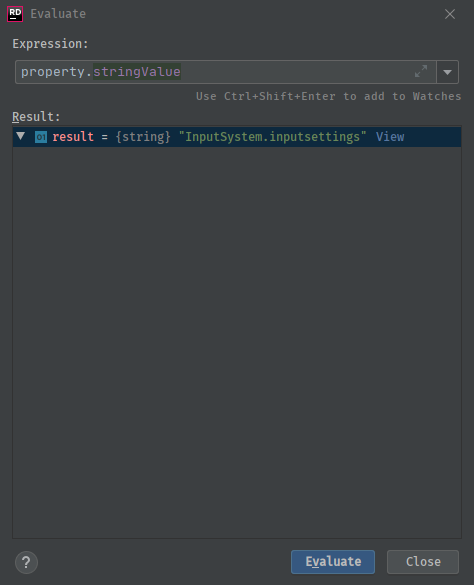

That's the name property by the way
IT's actually not the correct thing
It's some fallback thing Unity implemented for some reason
onyx harness
You can't rely on the name unfortunately =X
waxen sandal
Yeah I fucked up and got too happy too early 😛
I did find a way to get the scriptableobejct that you have currently selected
onyx harness
Hehehe now it sounds interesting
What trick did you use?
Because Selection eases our life a lot
waxen sandal
It's not selection actually
onyx harness
but only for 1-by-1 stuff
Inspector?
Because relying on the Editor generated by the Inspector is also not reliable
onyx harness
I am still wondering how Editor can have a non-null Object
I looked at the code, but nothing point to it
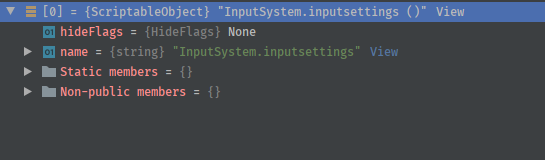 onyx harness
"is also not reliable", I mean it is reliable, but I don't want to rely on the Inspector
Yeah I know, the Editor manage to have a non-null target, while its SerializableObject's target is null
waxen sandal
Yeah I know what you meant 😛
onyx harness
At this moment, I have no good way to extract the FileId from a broken SO without looking into the file
Selection.instanceIDs is the only way I know, but it implies to select it "by a human hand"
 tulip plank
I am struggling to position a custom UI Elements control. I may be asking the wrong question, but I'm wondering how to get a reference to the owning EditorWindow from a VisualElement in the visual tree.
waxen sandal
You might be able to get the intptr of the null object and create an SO from that
@tulip plank Go up the tree is the only way I know
onyx harness
How do you get the pointer if the object is null? X)
waxen sandal
Oh @onyx harness Unity can cache serializedobjects by instanceid
Not that far yet 😛
onyx harness
Oh @onyx harness Unity can cache serializedobjects by instanceid
@waxen sandal Won't work
onyx harness
Because you need that InstanceID...
@waxen sandal I found a way to get the InstanceID.
tulip plank
@waxen sandal At this point I'd be happy to go up the tree, but... well lemme double check, I didn't think I could get the EditorWindow that way.
onyx harness
AssetDatabase.GetMainAssetInstanceID
waxen sandal
Oh, you can't get the editorWindow instance that way
But you can get teh rootvisualelement
@onyx harness Oh yeah that makes sense 😛
onyx harness
And it works. Wonderful, job done 🙂
You said you had a fallback object, it does not matter
As long as you have an InstanceID, you can recover everything
waxen sandal
The fallbackobject had a different instanceid though 😛
I checked
But you still can't get a SO from that though right?
tulip plank
@waxen sandal . Exactly. I need the EditorWindow, because I'm popping up a "drop down menu" which is a separate EditorWindow, and I need to position that drop-down-menu-Editor-Window relative to the EditorWindow that's spawning it.
tulip plank
Hah and here I am.
onyx harness
Can't you use EditorWindow.mouseOverWindow ?
But you still can't get a SO from that though right?
@waxen sandal I can
tulip plank
Hah well yeah, it seems to be "a Unity Joint" for sure. But is there something you'd prefer to UI Elements?
onyx harness
How did you get a different InstanceID? O_o
waxen sandal
Because the fallback object was just a Editor that would show you that something failed
It was just cleverly disguised
Anyways, how do you get a SO from a instanceId?
onyx harness
https://pastebin.com/e9CHZpyC
This is what I use to get the current drawing EditorWindow
tulip plank
Oh @onyx harness that's beautifully hacktastic and it just might work! 😄
onyx harness
It works well with IMGUI, dunno about UIElement
waxen sandal
And still, if you can't fix scenes then it's not that useful. At least in our cases the scenes are the largest objects
tulip plank
Ew, IMGUI is even worse in my opinion. But, well, it's like picking between two 💩s.
onyx harness
I discovered you can do this:
ScriptableObject    temp = ScriptableObject.CreateInstance(type);
MonoScript            monoScript = MonoScript.FromScriptableObject(temp);
Object.DestroyImmediate(temp, true);
Debug.AssertFormat(monoScript != null, "MonoScript for \"{0}\" was not found.", type);
Object                fakeTarget = new Object();
FieldInfo            m_InstanceID = typeof(Object).GetField("m_InstanceID", BindingFlags.Instance | BindingFlags.NonPublic);
m_InstanceID.SetValue(fakeTarget, this.instanceID);

SerializedObject    serializedAsset = new SerializedObject(fakeTarget);
I can't fix scenes without reading it, but I can fix the current opened scenes
waxen sandal
Right yeah, I think you can do that with serializedobjects as well
But you'd need intptrs
onyx harness
You don't
waxen sandal
Maybe not actually
onyx harness
That's the beauty of it
SO relies on instanceID to get the representation of the C++ Object
When I tried this trick, I really wasn't putting much hope in it, but hell yeah, it works like a charm
From that, I can get the m_Script and recover everything on the fly
It works for both GO and SO
And you don't need to read & rewrite the YAML
You leave this task to Unity
I leave you this last piece in case you wonder how to get the m_Script for both SO/GO:
PropertyInfo        inspectorModeProperty = typeof(SerializedObject).GetProperty("inspectorMode", BindingFlags.NonPublic | BindingFlags.Instance);
inspectorModeProperty.SetValue(serializedAsset, InspectorMode.Debug);
SerializedProperty    m_Script = serializedAsset.FindProperty("m_Script");
Wait, you need the type?
onyx harness
No no, the Type is one you want to assign
onyx harness
The code above fixes the broken asset
All you need is the InstanceID and the Type you want to put it in
Oh sorry, I forgot the last part:
m_Script.objectReferenceValue = monoScript;
serializedAsset.ApplyModifiedProperties();

m_Script.objectReferenceValue = monoScript;
serializedAsset.ApplyModifiedProperties();
Why are you setting the inspectormode?
onyx harness
Without it, you won't have access to m_Script
It does not appear for GameObject in scene
onyx harness
yes
 keen pumice
I have compiled a UnityEditor DLL that uses the MenuItem attribute.
When this DLL is used in a project, and re-imported, the following warning pops up:
Cannot add menu item 'File/menupath' for method MyClass.MenuFunction' because a menu item with the same name already exists.
How can I prevent this warning from popping up when someone reimports the dll?
 onyx fog
hey guys do you know if I could use this library with unity https://www.codeproject.com/Articles/5835/DotNetMatrix-Simple-Matrix-Library-for-NET
A set of C# classes providing basic matrix operations
onyx harness
As long as it is compatible with the framework
onyx fog
it was created in 2003 x)
onyx harness
should work
keen pumice
@onyx harness on the nose!! had another (with the wrong filename that I had failed to delete) [I did check that before posting, but obviously missed it]
onyx harness
@onyx fog Just copy the files in your Unity project, might work 🙂
whole sapphire
So is it possible to make an editor window auto update when people open their project?
whole sapphire
I mean, if I make a change to it and want them to have the change as soon as possible
Is it possible to push an update that they get notified of and lets them download?
onyx harness
Update the code?
Yes, possible
But the push, you will need to implement some stuff
More like, your EditorWindow will request your server
whole sapphire
Okay, do you know a resource or video I can use to learn how to do something like this? I have a website I can store the file on for it to request.
onyx harness
On your website, you will need a page or anything that your EditorWindow will check
If the result of the HTTP request requires an update, you update
whole sapphire
Alright, thanks
Is there a video that explains it well? I am still new to coding but want to learn as much as I can :3
onyx harness
There is no video explaning such system
Updating code can be quite complex
Also very simple, depending on your case
whole sapphire
Alright, well I appreciate it. I will do my best to figure it out ^^
onyx harness
@whole sapphire https://forum.unity.com/threads/using-unitywebrequest-in-editor-tools.397466/#post-4485181
A convenient way to request a web page in Unity Editor.
Page, or any resource.
tulip plank
Hey @onyx harness , you saved me days of work today, thank you. I was previously needing to pass a parent EditorWindow around to a billion different custom UI controls and thanks to your solution I don't have to do that anymore.
onyx harness
What solution? XD
tulip plank
Just using EditorWindow.mouseOverWindow (which I'll admit, makes me a tad uncomfortable but also seems to work flawlessly) instead of passing the parent EditorWindow along to all the VisualElements that require it down the chain (including VisualElements who have children that require it)
tulip plank
I used to have just one of this custom MyEditorWindow at a time so it was a lot easier to get a reference to it, but now that I support multiple simultaneously, it's trickier.
Okay, I will keep that in mind.
onyx harness
Wait it's worse than you think
tulip plank
😐
onyx harness
This can throw a null exception:
if (EditorWindow.mouseOverWindow != null)
  EditorWindow.mouseOverWindow. //{do something}
You must reference the variable before using it, and not just check the property
tulip plank
I'm guessing this is because Unity.
onyx harness
Kind yeah
tulip plank
In my case I just need the position of the window, so I assign
var parentWindow = EditorWindow.mouseOverWindow.
// do something with parentWindow.position...
Another option I can consider in the future which avoids the need to pass the parent EditorWindow around everywhere, would be to have the root VisualElement store the parent EditorWindow, and then any other element that needs it can search up the hierarchy for that root element, and maybe cache it if they need.
onyx harness
I don't know much about UI Element, almost never touched it yet
tulip plank
Haha okay, I was just about to say: "I'd love to see what you've created using UI Elements", but it looks like I'll have to wait.
I like the promise of it because it's much more in line with how I think of UIs, but it very much feels like a half-baked solution which doesn't support data binding to any degree that I'd like, doesn't have enough custom controls, events, etc.
I do think the UIElements Inspector is an invaluable tool, though, and kudos to whoever created it.
onyx harness
I will switch from IMGUI to UI Element in april. When the Asset Store Team will force publishers to move on 🙂
I know I have Twiner around, this should be fine 😉
To be honest, I could stick to IMGUI, even if it is not the best system
whole sapphire
Thanks!
onyx harness
Hey vertx how are you doing?
visual stag
making a multi column list generator
drag and component or asset into a window, generates an SO that you fill out with a SerializedProperty search and some visual settings
refresh the window and then you get something like this
onyx harness
I guess columns are sortable?
visual stag
yup
tulip plank
@onyx harness Okay so now I have to ask for clarification about your previous comment--about the fact that it's not enough to check if the reference is null, but you have to actually... access it? I mean, I'm not sure how to do that without causing an exception to be thrown. I have a situation now where something similar is happening.
I often encounter these situations in which an EditorWindow is not null, but is also not valid, so if I call Close() on it, for example, it'll throw a NullReferenceException.
onyx harness
If close throws an exception
You need to Object.Destroy the EditorWindow instead. This works.
@tulip plank
The property mouseOverWindow can be null. When using a null window, you will throw an exception
It is not accessing the property that throws
tulip plank
Oh okay, yeah checking for null is easy. I'm more worried about the non-nulls that still throw exceptions.
But that's good advice re: Object.Destroy, thank you.
whole sapphire
I found out what my issue was @onyx harness. The command I was trying to use was a MonoBehaviour not Editor option.
Does anyone know if there is a way to call this:
IEnumerator LoadTxtData(string url)
inside of an Editor window? That way I can use IEnumerator to read an url. With MonoBehaviour it was done with:
StartCoroutine(LoadTxtData(URL));
but I cannot do that in Editor...
whole sapphire
Or an alternative to IEnumerator I can use
https://docs.unity3d.com/Manual/UnityWebRequest-RetrievingTextBinaryData.html
Basically I am trying to do this but in an Editor Window and then save the text as a string
onyx harness
@whole sapphire the link I gave you, literally do what you are asking
whole sapphire
Ah okay, my bad! Thanks so much
 earnest anchor
how do i find out which method of which class sets the default values for a specific component (in my case, RectTransform)? i'd like to override the defaults only on creation, so is maybe my approach wrong?
tried doing it by starting this way [CustomEditor(typeof(RectTransform))] public class RectTransformChangeDefaults : Editor
but it completely overrides the appearance even with an empty class, so i must be doing something wrong from the get go
onyx harness
How different?
earnest anchor
removes the formatting / visuals
i'm probably googling for the wrong thing, is there a step by step on what does what rather than how to do xy
harsh void
Setting the custom editor for the RectTransform will replace unity's built in editor. RectTransformChangeDefaults I assume is empty?
earnest anchor
ah, thats an important bit of information that i just now realised i overlooked from the manual A custom editor is a separate script which replaces this default layout with any editor controls that you choose.. its even bolded my gosh.
yeah its empty
i think i realise what i have to google for now
visual stag
the editor does not control the default position of a transform anyway
harsh void
^ Yeah. Normally I'd use Reset or something like that on a custom component. Overriding defaults for a built in component is tricky
earnest anchor
i want to change the anchors and pivot defautls
visual stag
I would just make your own menu item to create and reposition them
You can also probably make a function with a menu item like:
[MenuItem("CONTEXT/RectTransform/Position How I like")]
and that would appear in the rect transform's right click menu
earnest anchor
i thought the best approach would be to either override or detect when something with RectTransform component is created and change the values, but that proposal could work neatly too with an extra click per object creation
still tho, is the previous question answerable: how do i find out which method of which class sets the default values for a specific component (in my case, RectTransform)?
harsh void
From my knowledge of Unity there is no exposed way to do that. The defaults are likely just the ones in the class itself by the constructor / initializor
earnest anchor
or might be in the menu creation bit
harsh void
Here is a very straight forward shortcut for modifying the anchors of the selected game objects ```[Shortcut("Anchors/Set Them Nicely", KeyCode.Keypad1)]
private static void SetAnchors()
{
foreach (var go in Selection.gameObjects) {
var rt = go.GetComponent<RectTransform>();
if (rt != null) {
rt.anchorMin = Vector2.zero;
rt.anchorMax = Vector2.one;
    }
}
}```
That would be activated by pressing 1 on your numpad
earnest anchor
nice approach, ill look into events a bit more and then if i cant work it out ill fall back either to hotkey or menu item solution. thanks for the help from both of you, much appreciated!
onyx harness
i want to change the anchors and pivot defautls
@earnest anchor What about Preset?
https://docs.unity3d.com/ScriptReference/Presets.Preset.SetDefaultPresetsForType.html
visual stag
Presets could be appropriate actually 👍
smoky radish
Hey guys,
If I store a field value and compare it with current one to call a function in OnInspectorGUI then undo doesn't work ?
onyx harness
Nope
smoky radish
So I should use PropertyDrawer if I want undo ? 😄
onyx harness
Except if you actually register the Object containing that field value
smoky radish
What do you mean ?
smoky radish
Oh, I should do it manually.
onyx harness
This is a way
smoky radish
Is there any other way to update when changing specific field value and have auto undo ?
@onyx harness
onyx harness
PropertyDrawer is a good solution
smoky radish
How can I check the field change in PropertyDrawer ?
onyx harness
You store the value in a non-serializable field of your PropertyDrawer, then if the current value is different, you do your thing
earnest anchor
@onyx harness wow that seems to be the thing i was searching for, nice find, greatly appreciated!
onyx harness
Because I think, if Undo applies, your serializable fields will be undone, and your non-serializable fields will remain untouched.
@smoky radish
smoky radish
Thanks.
onyx harness
Keep me in touch if the above statement is correct
earnest anchor
though weirdly the preset isnt applied on creation even when set as default, but reset still works
earnest anchor
it's alright, i can live with it for now, must be that transforms are a special case or something
smoky radish
@onyx harness I didn't test PropertyDrawer but your statement is correct. I changed storing variables to non-serializable and Undo works now. Just one time call before and after playing which I don't think so if it is really important 😄
onyx harness
Glad to hear it
onyx harness
@waxen sandal I confirm the speed of my trick, it's orders of magnitude faster than analyzing the YAML
waxen sandal
Nice
smoky radish
How can I make my PropertyAttribute works with [SerializeField] ?
 zinc coyote
I'm having a weird issue. In the inspector, buttons onclick's is not showing. I think it appears before under the navigation->automatic/visualize thing
onyx harness
@smoky radish what do you mean?
smoky radish
I made a PropertyAttribute but it doesn't work with SerializeField, I want to know what should I do. @onyx harness
onyx harness
Show me code @smoky radish
smoky radish
@onyx harness https://github.com/ATHellboy/ScriptableObjectDropdown

GitHub
Dropdown for ScriptableObjects. Contribute to ATHellboy/ScriptableObjectDropdown development by creating an account on GitHub.
onyx harness
This is what you use, but what have you done with it? @smoky radish
 neat shadow
Hello, I have a question for you guys
I'm building my level through an editor script and generating meshes
and I want to run NavMeshBuilder.BuildNavMesh(); after they are built
is there a simple solution for yielding a frame in the editor itself?
maybe the best way is to use an async function
neat shadow
@waxen sandal Interesting I had no idea either of those existed. Thanks!
whole sapphire
Debug.Log(w.downloadHandler.text);
Is it possible to take the string and instead of have it posted in debug, reference later in another part of my code? Basically turn it into a public string.
I am still so new to code, but I would love to get this to work as I have a bunch of people using my modified app and it would make their life a ton easier.
whole sapphire
That is all I need left to do is turn that into a public string to call upon later
 wanton cipher
How would i set the size of a Handles.PositionHandle?
 split mural
Hmm - how can I extend the editor to automatically add a component to the button whenever a button is created in the hierarchy?
I guess the closely related behavior currently is when you use the RequireComponent attribute in a monobehaviour - but I'd like to do this for a Button component 🤔
onyx harness
Preset is suppose to do it @split mural
split mural
oo - this would work for my case thnx 🙂
waxen sandal
@wanton cipher position handle uses GetHandleSize internally to size it IIRC :/
wanton cipher
Oof
 grave orbit
how do i install
waxen sandal
You don't install those?
Those are builtin in Unity
You can look at the source of them if you extract those
grave orbit
how can i use them in unity @waxen sandal
waxen sandal
Create a material and select the shader you want
grave orbit
ahh thanks
 surreal quest
Does anyone know if theres a way to have a Type and an object that can be cast into it, and to be able to draw whatever the default inspector would draw by just passing in the type? I know i can in odin, wanting to in default Unity
keen pumice
@whole sapphire sounds like you want to use a "static member" variable, of type string. That's about as close as you can get to a "global" variable in c#.
@surreal quest if you have a SerializedProperty that represents the object to draw, invoking EditorGUI.PropertyField, and passing in that property, should draw it using the stardard property drawer.
you can also modify what is drawrn by the PropertyField function, by defining a CustomPropertyDrawer for a given type (https://docs.unity3d.com/ScriptReference/CustomPropertyDrawer.html)
waxen sandal
@surreal quest Editor.CreateEditor might work for you
whole sapphire
Thanks Glurth. I will do some research on that now
keen pumice
@whole sapphire great! hit me up afterwards if you still have questions.
surreal quest
I need it to be generic, like if I'm given literally just an object and a Type, on a.. I think I would use a property drawer for this yes. Then on that, for any number of a list of objects and Types I can generically draw them @keen pumice
Let me look into that @waxen sandal
keen pumice
@surreal quest indeed, not ALL objects can be easily used to create SerializeProperties. But, I think doing this without them, is going to be tough. They do pretty much exactly what your looking for, but only with objects that can be represented by SerializedProperties.
surreal quest
I haven't delved into this too much - how does it work exactly? I wasnt expecting everything ofc - like i wont be able to do anything that isnt marked as [Serializable]. but that tracks as normal for Unity
Just for reference, I created this asset for the Odin asset, and now I'd like to transfer it to work in default. https://github.com/7ark/BetterEvents

GitHub
A replacement for UnityEvents that are: better. Contribute to 7ark/BetterEvents development by creating an account on GitHub.
keen pumice
(using them also gives other advantages-FYI.. like undo) heheh nice suit!
keen pumice
lol, wait... from that Jim Carey movie!
surreal quest
Yeah lol
Don't remember the name offhand, but the one where he's god
Anyway. Do you have any kind of example on how this would work? It's not something I've done too much in. @keen pumice If you don't, a link to the relevant docs?
keen pumice
yeah.. lemme finda a FEW relevant docs link
surreal quest
ty
keen pumice
https://docs.unity3d.com/ScriptReference/SerializedProperty.html (these objects reference fields in your SeriliazedObject- know's it's own type- draws control based on that, stores foldout-state, has undo capabilities)
https://docs.unity3d.com/ScriptReference/SerializedObject.html (SerializedObjects "contain" SerializedProperties - or rather, have SP's created from/for their fields) https://docs.unity3d.com/ScriptReference/PropertyDrawer.html (used to specify how a SerilaizedProperties that represents a particular TYPE should be drawn. This is what is used to draw FIELDs inside other objects.) https://docs.unity3d.com/ScriptReference/Editor.html these drawn "whole objects" e.g. components on a gameobject, assets in the project folder. These are NOT used when drawing a FIELD of the same type, that in another object- for those an ObjectField is drawn) https://docs.unity3d.com/ScriptReference/CustomEditor.html (attribute applied to a custom Editor class, that specifies what type it draws) https://docs.unity3d.com/ScriptReference/CustomPropertyDrawer.html (attribute applied to a custom PropertyDrawer, that specifies what type it draws)
surreal quest
Right I'm familiar with these to some degree, but rather the question is how to configure it to show a propertydrawer based on a value i pass in, one that might not be a variable that exists in a class
waxen sandal
I don't think you can without inheriting from that event class and creating a specific editor for the derived type
They're fixing that in 2020.1 though
iirc
keen pumice
As far as I know, there is no way to do that builtin. If you cannot make it a SerializedProperty-you'll need to check it's type/draw it manually.
surreal quest
Hm, unfortunate
waxen sandal
@surreal quest I do something similar here https://github.com/JurjenBiewenga/UnityGameArchitecture

GitHub
Contribute to JurjenBiewenga/UnityGameArchitecture development by creating an account on GitHub.
GitHub
Contribute to JurjenBiewenga/UnityGameArchitectureSample development by creating an account on GitHub.
tldr: base class that has the value as an object, custom editor that that class. Generic wrapper around that
Then a non generic class that implements the generic wrapper with a custom editor that inherits from the base class his custom editor
If I remember correctly at least
whole sapphire
@keen pumice will do!
onyx harness
@waxen sandal I got more feedback now on the repair trick
It does not work perfectly, if the GO has broken Component in it while you repair one, it will spit an error, harmless, but still the log is there
waxen sandal
Damn that sucks
onyx harness
and the data seem to get reset
waxen sandal
Oof, so it's not consistent?
onyx harness
For now, I'm trying to find a way to fix all Components in one shot and not get the data reset, without writing into the file
onyx harness
It was the first test case, yes, it works fine for ScO (ScriptableO), because they are "alone"
GameObject, I create an SO for the broken Component, and if it has broken siblings, the error is written
waxen sandal
What if you make a SO from the GameObject and then go through the component using serializedproperties?
onyx harness
This is my intention
waxen sandal
Okay, let me know how it goes
tulip plank
I give up: In Editor Mode, how do I get the dimensions of the current display? Reason being, I need to position 2 EditorWindows relative to each other in a "sensible" way, but I need to know where one of the windows is positioned relative to the screen in order to figure out where to place the other.
onyx harness
this.position?
tulip plank
Screen.width etc. doesn't work, I think it just returns the Game view window's dimensions.
tulip plank
I can get the size and position of an EditorWindow, but how would I know if it was "on the right half of the screen" vs "on the left half of the screen"?
I couldn't calculate that without knowing the screen size.
onyx harness
Use that
There is a GetEditorMainWindowPos() in there. This will give you the position of the main window
Or you can use Screen.CurrentResolution
tulip plank
I am looking for the current screen's dimensions. The Unity Editor window is not the same.
tulip plank
oh sorry, I missed it
The whole window
yeah I'm outputting that to see if its the actual screen or the Game view
Oh beautiful, the second one seems to work reliably. ❤️
onyx harness
To instantly check static API, I use NG Static Inspector
Convenient tool to check static code
tulip plank
I just need to "dock" a second window in a sensible position with the best chance of it being visible to the user. I used "dock" in quotes because I'm not actually docking it.
tulip plank
NG Static Inspector, hmm, I've never heard of that but it sounds promising.
Yeah, positioning for sure.
Wow that tool could be very useful!
onyx harness
Its' part of the asset I showed you last time (NG Tools)
tulip plank
Ah nice, thank you again. 😉
onyx harness
Positioning a window around an area and still being visible, use this:
private Direction    FindSafeDisplayArea(Rect origin, Vector2 size, out Vector2 outputPosition, out Vector2 outputSize)
{
    Vector2    windowSize = Utility.GetEditorMainWindowPos().size;
    float    xMaxLimit = windowSize.x;
    float    yMaxLimit = windowSize.y;

    // Check right.
    float    xMax = origin.xMax + size.x;

    if (xMax <= xMaxLimit)
    {
        outputPosition = new Vector2(origin.xMax, origin.y);
        outputSize = size;
        return Direction.Right;
    }

    // Check left.
    float    xMin = origin.x - size.x;

    if (xMin >= 0F)
    {
        outputPosition = new Vector2(xMin, origin.y);
        outputSize = size;
        return Direction.Left;
    }

    // Check below.
    float    yMax = origin.yMax + size.y;

    if (yMax <= yMaxLimit)
    {
        outputPosition = new Vector2(origin.x, origin.yMax );
        outputSize = size;
        return Direction.Bottom;
    }

    // Check above.
    float    yMin = origin.y - size.y;

    if (yMin >= 0F)
    {
        outputPosition = new Vector2(origin.x, yMin);
        outputSize = size;
        return Direction.Top;
    }

    // Fallback on right.
    outputPosition = new Vector2(origin.xMax, origin.y);
    outputSize = size;
    return Direction.Right;
}
Whoa, did you pull this from existing code or just whip it up super fast?
onyx harness
I think most of the challenges you are and will face, I faced them already
tulip plank
Haha, very good
onyx harness
Just replace windowSize with the Screen.CurrentResolution, as you want to be in the monitor's rect, not the Editor
tulip plank
That makes sense, thank you yet again
onyx harness
@waxen sandal Bad luck, this trick can't work properly without spitting a log
SeO on a GO provides the Component, but it does not provide a way of assigning the m_Script.
For that I need to SeO the Component, which is a sub-part.
And when applying the sub-part, boom a log -_-
waxen sandal
Why does it not provide a way of assigning the m_Script?
onyx harness
Not from the SeO representing a GO.
But from a SeO representing a Component
I guess writing to the file is the only way T__T
And I just realized that manually recovering a script through the Inspector resets the values
waxen sandal
Only if it doesn't match up 100% right?
onyx harness
What do you mean?
If the recovering Component is the only one in the GO, yes it works fine
waxen sandal
If the type and the serialized fields are the same it doesn't reset the values afaik
waxen sandal
Really? I'm fairly sure I've done it before and it worked fine
onyx harness
Strange, this is not the result I see
onyx harness
Which version?
onyx harness
I thought the same, I dont know why U2018.4 is not cooperating
Here is how I do it:
1- Set Inspector to Debug
2- Drop the MonoScript on the field
3- Values are reset
Do you confirm?
waxen sandal
After dropping the monoscript back I assume you mean?
It doesn't reset in that case
onyx harness
Let me try on 2019.3, this sounds strange
Same result in 2019.3.2f1
I will just quit this trick, and work on the good ol' file-based solution
waxen sandal
Weird, no clue how that works
tulip plank
So one wrinkle in my EditorWindow positioning efforts... I don't see how you can determine which display an EditorWindow is displayed on. I have three screens, and my MainEditorWindow appears on Screen1, but when I try to set the position of the ChildEditorWindow, it's always relative to Screen2 (which is probably the default screen).
tulip plank
It's odd, there doesn't seem to be any way to place an EditorWindow on a different display.
onyx harness
Unity does not provide a way to get the existing screens (not that I know)
If I'm not wrong, you can place, but you will never know if it is in a safe position or outside lost in the wild
Or if you wanna go a little deeper, go for https://docs.microsoft.com/en-us/windows/win32/api/winuser/nf-winuser-enumdisplaymonitors
tulip plank
Yeah I was digging deeper there. 😦 I need to somehow know which EditorWindow is on which Display, and then change their Displays if necessary and position them on that display. It's become so involved that I'm questioning if the feature is even worth the effort required.
 ancient sable
How do I find the width and height of the inspector ?
ancient sable
Thanks, How do I do this from inside a custom editor script 🤔
onyx harness
Use Resources.FindObjectsOfTypeAll(typeof(Editor).Assembly.GetType("UnityEditor.InspectorWindow")) as EditorWindow[]
ancient sable
That looks like it makes sense. Well, after 6 years of working in unity and creating more than 50+ editors, I am floored. absolutely floored. Just to get the width and height of a window we must jump through such hoops.
Screen.width and Screen.height used to return the correct values for editors. but now they must not be use in editors. And i remain confused by the naming of position( The Rect) as the name of a rect.
Thanks again
onyx harness
It's more like, InspectorWindow is not really suppose to be used by devs
ancient sable
Even though we are able to create custom inspectors
ancient sable
ah, yes custom Editors
onyx harness
They could have left a lots of classes public
It's a bit sad they hide it, because anyway, we can access it through Reflection
split bridge
Just found out that there doesn't look like a way to move a sub asset between assets (whilst maintaining references) other than some awful manual yaml editing - just wanted to check in case I was missing something
 rustic belfry
How do we focus on a specific textfield for example when the custom window is opened?
onyx harness
GUI.SetNextControlName & GUI.FocusControl
rustic belfry
Seems half baked
visual stag
https://docs.unity3d.com/2019.1/Documentation/ScriptReference/UIElements.Focusable.Focus.html
Though I've never managed to use it successfully 😛
rustic belfry
Yeah 😓
just tried to use that but no luck!
Actually i may have made some progress! 😄 now it focuses the textfield parent, but i need to get the actual field 😄
Seems it wont get called on OnEnable()!
but it will work in OnFocus()
SUCCESS!
@visual stag https://gyazo.com/5497c4e5eff6b0a2170b8171b47f6720
Opening the window with CTRL+G
If you're curious, it's a little hacky but!
    void OnFocus()
    {
        this.rootVisualElement.Query<VisualElement>("unity-text-input").First().Focus();
    }


 split bridge
@rustic belfry fyi you can also do e.g. textField.delegatesFocus = true; textField.Focus(); - though tbh I'm not sure of if there are any negative ramifications for doing so
split bridge
yea - what you've done is fine - I just prefer to avoid relying on the element always being there with that name
visual stag
You should be able to use the const name from the TextField/InputField or whatever anyway
slighly more robust to change
rustic belfry
I'm not gonna lie, i'm out of my depths 😄
what exactly is the const name? and Timboc, in your example what exactly would textField.Focus(); be? "textField"
split bridge
in your case, something like rootVisualElement.Query<TextElement>().First().delegatesFocus = true; rootVisualElement.Query<TextElement>().First().Focus(); or something - basically if Unity at some point were to rename that inner textfield or something potentially your code would stop working - but that's somewhat unlikely I would guess - the documentation is a little sparse but.. https://docs.unity3d.com/ScriptReference/UIElements.Focusable-delegatesFocus.html
rustic belfry
ah! that could be good 😮
Also i am just now finding out that Q and Query do not have access to the same things...
split bridge
oh? tbh I have just been using Query all the time but the docs say it's just a Convenience overload, shorthand for Query<T>.Build().First() - what are you seeing that's different?
rustic belfry
for instance, with Query i had error thrown for RegisterCallback<KeyDownEvent>
but with Q, it wasnt there 🤔
using Q also doesnt appear to allow .First() either
split bridge
see above - Q gets the first result by default
rustic belfry
Ahh silly me
sadly
root.Query("Field_Name").First().delegatesFocus = true;
root.Query("Field_Name").First().Focus();
``` did not work 😦are you sure root.Query("Field_Name") is returning a TextField?
split bridge
that might be focusing the parent of the textfield potentially - works fine for me - would recommend using root.Query<TextField>().First() to be sure
rustic belfry
Ah yeah i guess it will be focusing the parent because in the UI Builder package, you make the parent, but cant access the children
which is why its #unity-text-input
split bridge
hmm, no but assuming Field_Name is a TextField you dragged in, that should be exactly what delegatesFocus does - weird - I guess go with what works 👍
visual stag
@rustic belfry I meant all the constant variables defining the class names
rustic belfry
ah right! I'm currently figuring out how to use this 😄
does it go in the Query itself, or?
visual stag
Yeah, I mean your earlier code Query<VisualElement>("unity-text-input") could have been Query<VisualElement>(TextField.textInputUssName)
which would mean that if Unity decided to change the name your code wouldn't break
rustic belfry
That's great! do you know why i cant .Focus() that though ? @visual stag
visual stag
Yeah I don't know why Focus doesn't work the way I expect it should 😛
rustic belfry
uff
So it's like.. There are cleaner ways to do what you're doing... but they don't work
oh wow actually
root.Q<VisualElement>(TextField.textInputUssName).Focus(); works
So as long as its the first TextField that you want it to focus on.. then you're okay 😄
tough cairn
are there any alternatives for lots of variable names and serializedObject.FindProperty ? I'm using string names like so, which is not the best method ...
propertyNames = new string[]
{
    "background", "individualChannels",
    "distanceMin", "distanceMax", "allChannels",
    "redChannel", "greenChannel", "blueChannel",
    "redMin", "redMax", "greenMin", "greenMax", "blueMin", "blueMax",
    "texture", "textureWidth", "textureHeight"
};
properties = new Dictionary<string, SerializedProperty>( );
foreach(var prop_name in propertyNames)
    properties.Add(
      prop_name,
      serializedObject.FindProperty( prop_name ) );
/// ...
EditorGUILayout.PropertyField( properties[ "texture" ] );
 feral karma
@tough cairn looks like a use case for attributes if you want to filter what to show etc. That's essentially what most of the "inspector helpers" do
If you want to show all, you can iterate over properties
@split bridge regarding you subasset question, which part is not working? you can add / remove subassets from assets so moving should just be a matter of "remove from A then add to B"
onyx harness
@feral karma no,you can't transfer an asset. You can add, you can delete, but not transfer.
Beczuse for that a lot of things are involved.
 elfin heath
so I have made some headers for my player attributes and some settings, is there any way to set that header to be collapsible?
short tiger
You'd have to make your own attribute that mimics the Header attribute, but makes it collapsible too
elfin heath
gotcha, ill give that a shot
elfin heath
alright, only problem is still here. am i able to show a boolean's state with the custom inspector? like i dont want to be able to change it, i just want to view it and keep it under the foldout
short tiger
@elfin heath You can show a toggle within a disabled scope
Or just a toggle which you don't do anything with the return value
Not the SerializedProperty kind then
elfin heath
how would i show the toggle within a disabled scope? sorry, this is my first time doing something like this
short tiger
@elfin heath
using (new EditorGUI.DisabledScope(true))
{
    EditorGUILayout.Toggle("My Toggle", someBoolValue);
}
@short tiger well now i cant activate them so thats good, but they wont update either to become activated through game input
rustic belfry
Anyone know how to set this icon in c# by any chance? or simply not possible/is a massive pain
elfin heath
not sure why, and i just commented out the entire script to see if i messed up in the base code but it works there. its weird because those 2 bools are the only things that are broken right now
@rustic belfry you may want to scroll past the old stuff, but i think this may be what you want
https://forum.unity.com/threads/editor-script-to-set-icons-impossible.187975/
Unity Forum
Greetings,
Can I access these via an Editor Script?
[attach]
I have read up on Gizmos, Handle.Label and such, but none of them are suitable. I...
rustic belfry
Thanks! Guess it might be out of my depths but i'll take a look
elfin heath
yeah its a bit confusing haha
rustic belfry
welcome to unity editor scripting
elfin heath
pretty much yeah haha
rustic belfry
I'm not sure how to be honest 🙂 @onyx harness
onyx harness
What have you tried at this moment
rustic belfry
Honestly i havent tried anything quite yet lol
rustic belfry
Yes!
onyx harness
SerializedObject so = new SerializedObject(gameObject);
so.FindProperty("m_Icon").objectReferenceValue = texture2D;
so.ApplyModifiedProperties();
Theoritically, it should work
Using a SerO, you can access & modify a lot of data
Usually more data than the conventionnal object you are working on
@rustic belfry
rustic belfry
Oh i can try that then maybe!
 upbeat frigate
I want to have a custom window with an editor showing important things such as stats, buttons that calls methods, game settings and so on. I know similar things can be done in inspector but I need it to be in its own window and also the things it displays will not nescesarrily be in the same class/game object. If I'd do it in the inspector I would need a specific game object to be selected.
Would that be very Complicated with Unity editor scripting?
Would it even be possible without a backing class that gathers and exposes info (I don't know how it could expose a value that should be set in another class)
Would Odin facilitate this?
rustic belfry
is there a difference in making a serialized object and just instantiating some object/empty? @onyx harness
because right now i am doing
Undo.RegisterCreatedObjectUndo(newParent, "Make Group");
onyx harness
These are 2 different things @rustic belfry
SO handles a lot of stuff, and represent the C++-side of the Object
Creating an Object, well you create an Object
rustic belfry
All i'm doing is created an empty, basically
i just wanted to then give that empty an icon 😄
rustic belfry
Makes it sound so simple 🤔
onyx harness
You have your code above to create your GameObject
I literally gave you the code to set the icon
What more do you need?
rustic belfry
Sorry i'm multitasking
rustic belfry
@onyx harness Wowww, thanks a bunch. That actually worked so easily!!
and yet searching on google comes up with barely anything, and just super complex stuff that doesnt actually work
onyx harness
You see, not that hard 🙂
Because most people do not understand what they are doing, simply as that XD
rustic belfry
The documentation could sure use some updated info too
onyx harness
@upbeat frigate Not difficult. This is the purpose of EditorWindow.
feral karma
@onyx harness I was curious why moving subassets wouldn't work and tested it - works fine. I can move ScriptableObjects around between parent ScriptableObjects and everything keeps being cleanly referenced. Or did I understand you wrong?
vernal lake
Does anyone know of any good resources for how to use a DropdownMenu? I'm getting stuck trying to add actions to one
Actually, a better question; Could anyone help me create a dropdown menu when right-clicking on a GraphView?
PM me if you think you can help, thank you muchly!
onyx harness
What api did you use? @feral karma
feral karma
onyx harness
By reference, inter-assets reference?
From the code I see, reference might be saved. But I need confirmation from you
feral karma
yeah if I reference the subs from anywhere those references still work after moving
feral karma
reference between assets, as I said, "reference the subs from anywhere". tested with both other scriptableobjects and monobehaviours
feral karma
Yeah I was sure I used that in the past - good to have it as minimal example though :)
whole sapphire
If you have a local string such as www.downloadHandler.text is it possible to make that usable in other methods?
whole sapphire
okay thank you
so this should work right?
string LatestVersion = www.downloadHandler.text;
onyx harness
yes
whole sapphire
thanks
whole sapphire
oh, how would I make it a field then?
onyx harness
class ClassName
{
  string field;
  string Property { get; set; }

  void Method()
  {
  }
}
As I told you earlier
visual stag
Does this question have something to do with editor extensions btw?
whole sapphire
ah okay, yeah I still have a lot to learn