#↕️┃editor-extensions

1 messages · Page 53 of 1

wispy delta
#

right. I guess I should just throw a GUI.changed check before applying. @waxen sandal how do you go about drawing properties/registering undos in an EditorWindow? This seems like the best way I've seen.

Prior to discovering I could manage my own serialized object, every gui field followed this structure and made it really time consuming to develop:

using (var check = new EditorGUI.ChangeCheckScope())
{
  var newToken = EditorGUILayout.PasswordField("Token", token);
  if (check.changed)
  {
    Undo.RecordObject(this, "Changed Token");
    token = newToken;
  }
}
waxen sandal
#

Propertyfields should register undo just fine

#

But if you want other things then you'll have to register it yourself

#

Applying a SO registers with Undo as well

wispy delta
#

gotcha. yea I guess that's why its weird to me that EditorWindow doesn't come with a serializedObject member 🤷‍♂️

visual stag
#

@wispy delta the Editor scriptable object is of the Object it is targeting, yours appears to be the window itself, so they're entirely different concepts

wispy delta
#

I see, thanks 👍

visual stag
#

Editor window serialization is a weird one though. I'm not actually sure what method they intend you to use.

#

I suppose it's flexible as always

waxen sandal
#

We just save it to a scriptable object at work

#

Then load it back

gloomy chasm
#

If you just want to save fields between reloads you can just save them in a ScriptableObject instance, but never save the SO.

visual stag
#

The EditorWindow is a scriptable object already so you can just serialize it to the editor window depending on how much you want the data to survive, as Beans is doing

burnt dove
#

I have an array of ScriptableObjects. How can I check in a PropertyDrawer (that means, using SerializedProperty) if one of the element of that array is null, and so, create an instance of that type to fill that "slot" of the array?

cedar reef
#

You can use GetArrayElementAtIndex

visual stag
#

If it's not a UnityEngine.Object it is never null

cedar reef
#

Oh yes, also that

visual stag
#

If it is, just check if the SP's .objectReferenceValue is null

burnt dove
#

@visual stag , I know that part, but if it's null, I want to instantiate an ScriptableObject and assign to it. But I can't do .objectReferenceValue.GetType() becuase objectReferenceValue is null

visual stag
#

You didn't mention that part was your concern. If you don't have the type, ou either need to cast the type string to a type, or find what the fieldinfo is and get the type from that. PropertyDrawer has a fieldInfo so you can go down and find the type from that

burnt dove
#

OMG, I didn't know it has a fieldInfo, that is amazing!!!

burnt dove
#

When using PropertyDrawer, I noticed that property.IsArray is false even if the field in the Monobehaviour is an array, which is logic because the property drawer is per element of the array.
However, I noticed that fieldInfo.FieldType is array, through property.type is a pointer to a non array, but I was not able to find in which index of that array I am. How can I know that?

visual stag
#

get it from the property path

#

which is a field on the SP

#

Arrays+Property Drawers is ugly code time 😛

burnt dove
#
  1. Good idea, didn't know.
  2. What do you mean?
onyx harness
#

FieldType is the type of the field, which is your array.
When using SP, you are 'in'. Globally you understand well how it is in there

visual stag
#

it'll look something like like: yada/yada/Array.data[2]

#

you'll have to get the index from the string

#

Unless someone has a better way

burnt dove
#

ok

onyx harness
#

To have your array type, have you tried arrayElementType?

#

The path has no '/', only dots

burnt dove
#

.arrayElementType is... empty

onyx harness
#

Either Unity failed, or you are not in the right context

burnt dove
#

It produces "Invalid property to get array Element" and then return ""

#

Unity fail

onyx harness
#

Wrong context then

#

Invalid property means that you can not extract it from this current type. Unity has something else in mind

#

I'm not behind a computer, can't dig it, later maybe

visual stag
#

They're looking at an array element already

burnt dove
#

Done. In order to assing an object to the element I do. ((Array)fieldInfo.GetValue(propertySerializedObject.targetObject)).SetValue(ScriptableObject.CreateInstance(fieldInfo.GetElementType()), int.Parse(property.propertyPath.Split('[').Last().Replace("]", "")))

onyx harness
#

But as Vertx said, it is suppose to be not null. What kind of array are you working on?

visual stag
#

you shouldn't need to use SetValue when you have the objectReferenceValue

#

the only reason you're doing the fieldInfo stuff is to get the Type for CreateInstance, no?

distant atlas
#

anyone know of an easy simple way to play sound in the editor? like I'm hoping it's just a matter of getting a reference to the AudioClip and calling a static method from some editor class to play it. I want to play a sound after assetbundle building is done and when building the project is done. what I found so far is a lot of workarounds like using reflection to get some obscure utility method or creating a gameobject then playing sound on it

onyx harness
#

UnityEditor.AudioUtil.PlayClip

#

If you see Reflection as obscure, you don't have the right mindset

distant atlas
#

no it's just that there's never a guarantee it'll always be there in future unity versions but I guess this is the best thing for now

onyx harness
#

People often think like this, but it's not true.
This very same logic applies to any other feature.

#

Nothing is guaranteed

distant atlas
#

no it's different between undocumented and documented API methods, undocumented means unity doesn't provide any guarantee it'll stay there the way it is in future versions

#

I mean why wouldn't they just make that method public

#

what's the harm

onyx harness
#

The only difference between a public and internal API is the application of a Obsolete attribute before it is getting removed

#

Luckily, we have access to beta and alpha, therefore, this concern is not true anymore

#

what's the harm
Well, great question 🙂

distant atlas
#

oh cool, thanks

#

I wish the official docs would say what version a class/method/field was introduced

onyx harness
#

The 2 tools above can give you that

distant atlas
#

yeah it looks useful

onyx harness
#

Public APIs at least

#

But now that you mention it, they just implemented a kind of versionning in the doc

distant atlas
#

you can switch what version of unity api you're looking at in the docs but that's it

onyx harness
#

They highlight the color no? Giving you an idea of the introducting version

#

In the 2 tools above, Sabresaurus gives you a handy web tool to check the range of any public API.

#

In mine, you can check your whole source code at once

distant atlas
#

oh you're right, I hadn't seen that before

onyx harness
#

yep

#

They wrote a blog post about it recently, or I don't remember how I discovered it

severe python
#

thats been around for some time now

#

atleast since 2019.1 came out I think

keen pumice
#

ok, heres a funky one I've not seen before... I have the following code in the OnGUI of a custom PropertyDrawer:

#
            Debug.Log("found vectors array sp, size: " + vectors.arraySize);
            SerializedProperty objects = property.FindPropertyRelative("objects");
            Debug.Log("found objects array sp, size: " + objects.arraySize);```
#

but I get different output depending on if I'm in laymode or not:

#

the 4000 is correct.. the 40 is not.. why does/ might it change when hitting play?

#

ah found it... my Monobehavior was instantiating the array in Start()... move it to Reset().. working ok now.

small tusk
#

How do I know if user is running light or dark theme?

#

cant find anything on API

waxen sandal
#

IIRc there's something in EditorApplication

#

Or EditorGUIUtility

small tusk
#

thanks!

rustic belfry
#

in USS, how do you exactly add Background-image:

#

like if your path is background-image: Resources/Icons/Icon.png for example

blissful burrow
#

is there a way to override Unity's selection outlines with something custom?

#

I'm doing vertex offsetting as well as, well, not using _MainTex.a for transparency, so it's incredibly off and distracting

#

or as a fallback, disable it on a per-object basis

tulip jetty
#

I'm having a problem where my custom inspector script loses variable data every time it redraws.
The inspector script simply has a private List<ElevatorCell> m_currentCells = new List<ElevatorCell>();
It can be populated. But every time I click to open some other object's inspector, and then click and come back to this custom inspector, the list loses all its elements. What's the cause and workaround for this?

keen pumice
#

@tulip jetty If that lives in your inspector script.. you cannot be sure that the instance of the Inspector itself will persist when you view other others. The list would either need to be static (the same for all instances), or created/filled during OnEnable, or store it the object you are displaying, or use a Dictionary to link the object you are displaying (disctionary-key) with your list (dictionary-value).

#

4:20? brb

tulip jetty
#

@keen pumice Why does the inspector itself not persist? I'm imagining for each object in the Hierarchy, it will have an inspector that persists until the unity editor is closed?

burnt dove
#

Any idea why this doesn't work?

public static void AddObjectToAsset(UnityEngine.Object objectToAdd, string path)
{
    path = path.StartsWith("Assets/") ? path : "Assets/" + path;
    Directory.CreateDirectory(Path.GetDirectoryName(path));
    AssetDatabase.Refresh();

    if (AssetDatabase.AssetPathToGUID(path) == null)
        AssetDatabase.CreateAsset(asset, path);
    else
        AssetDatabase.AddObjectToAsset(objectToAdd, path);
    AssetDatabase.Refresh();
}
visual stag
#

There are pretty heavy restrictions of what can be a subasset

#

and what it can be a subasset of

#

But other than that, can't really tell straight up what's wrong with it

burnt dove
#

Can be an ScriptableObject?

visual stag
#

Yeah, it only really works with them

#

If you add subassets to things that are not .asset then the importer will delete them when the object is reimported

#

Also I tend to just do AssetDatabase.ImportAsset( when adding one asset

keen pumice
#

@tulip jetty as shown by your error, it clearly does not persits as long as the editor is open. Why? dunno- memory I guess.

visual stag
#

I can't even begin to imagine how many editors there would be in a large project if every single one was persistent

#

One for every single component on every single object

#

Not only in the hierarchy but also in the project

#

that would be insane

keen pumice
#

vertx agrees, with flair!

zealous ice
#

When it comes to nesting assets, I think you can add everything that inherits from UnityEngine.Object to everything that inherits from UnityEngine.Object

tulip jetty
#

Good call. Didn't realize it can be for performance reason.
@keen pumice I do find it better to store the list in the target object. But can you explain what is the dictionary approach you mentioned?

zealous ice
#

I don't know about custom types, but maybe you can add to them, like for fbx files

visual stag
#

@zealous ice GameObjects are UnityEngine.Object types and you can't nest to Prefabs, Models, etc

zealous ice
#

You can't?

visual stag
#

No, I explained why already

zealous ice
#

Oh... really?

#

So unity uses different system for built-in nested assets?

visual stag
#

.asset files do not need to be modified on import

#

because they are the same data saved to the Library

#

Every time you reimport another asset type the imported Object files are rebuilt and rewritten to the Library in a way that's predictable

#

So if you add something to it, it'll just be destroyed when it reimports

zealous ice
#

Oh, so fbx files are recreated then?

visual stag
#

Yep

#

The fbx file isn't, but the imported Prefab is

zealous ice
#

Oh, that's new to me. Seems inefficient.

onyx harness
#

@tulip jetty Because whenever you change the selection, the Inspector is renewing the active Editors, therefore your PropertyDrawer will be recreated. Hence your problem of persistency.

onyx harness
#

@zealous ice You can add almost any asset to an .asset.
Except GameObject and non readable stuff (like textures)

#

As an example, you can add a Shader, a Material, a readable Texture, a folder, C# script, a DLL or even a scene

rustic belfry
#

When adding a <Foldout> in UXML, whats the thing you can add to give it a name next to it?

severe python
#

as in change its label?

rustic belfry
#

yeah its label

#

i just write label = "..." ?

severe python
#

one sec, I'm actually unsure

#

its an attribute named either label or text

rustic belfry
#

label didnt autofill, but i'll try both

severe python
#

also, I'd suggest getting UIBuilder

rustic belfry
#

ah its text

#

yeah i looked into it the other day but theres no way currently of selecting an already made USS file?

severe python
#

I think thats a bug kinda

#

it was better in previous versions

#

but basically, name your USS and UXML file the same and put them in the same directory

#

just in case, back up your USS file

rustic belfry
severe python
#

Open the UXML in UIBuilder, then save, it will give you a buncha fields and just hit save

rustic belfry
#

i tried with but it didnt pick up the style one, is there a naming convention i need to follow?

severe python
#

and it will resolve it

#

same name

#

ExampleWindow.UXML
ExampleWindow.USS

rustic belfry
#

ah got it

#

Guess i will redownload it then! 😄

rustic belfry
severe python
#

So no, but why?

#

or yes?

#

it depends on how you look at it and why you're asking

#

what is it about that you want?

rustic belfry
#

Just curious because we get foldout, but the default styling isnt the same as foldoutheaders

severe python
#

then just change the style

rustic belfry
#

guess i could 😄

severe python
#

thats what makes UIElements easy, is that is a trivial change

#

make a class

#

.foldoutheaderstyle {
background-color: #ddd;
}

#

add that class to your Element

rustic belfry
#

yeah, is there a way however to use already the "EditorStyles.foldoutHeader"

severe python
#

it probably isn't that code exactly

#

I don't know if there is a converted style

rustic belfry
#

according to that documentation

severe python
#

the latest version of unity migrated to UXML overall

#

so you can probably dig out an existing style that matches if you can find that element in the ui

rustic belfry
#

ah yeah i did but its just an IMGUIcontainer

#

sadly

#

dont know what to do with that information 😄

severe python
#

you're really just changing a background of a single element

rustic belfry
#

ah wait, it uses so maybe i can find it haha

severe python
#

well those are the USS files

proud widget
rustic belfry
#

give a reference that isnt null

#

on line 27

severe python
#

bleh, seems the hierarchy window is still all imgui yeah

rustic belfry
#

yep

severe python
#

so is the header foldout specifically for the inspector behaviours

#

lol, so they haven't bothered to recreate that style I'm guessing

#

but honestly, just add a style to foldout

rustic belfry
#

i mainly just wanted the styling as easy as possible so i can make my extension fit in haha

#

also is it a bug or should a name really look this ugly if you rename a prefab's name?

severe python
#

that is a bug

#

my stuff doesn't look like that

rustic belfry
#

interesting

#

what could it be that this isnt 100% width?

#

ah its the padding of the parent i guess

#

its funny how you figure things out straight away when you type them out 😄

severe python
#

Rubber Ducking

#

It is the Way

#

its simple really

#

In your attempt to formulate a question that can be answered correctly you analyze the problem so you can make that question which causes you to realize the problem

rustic belfry
#

this is the way

severe python
#

it forces you to look at the problem from the perspective of knowing nothing

rustic belfry
#

yep!

opal raft
#

Hey guys, how to change the opacity of a visual element from the script?

onyx harness
#

Twiner, where are you, this is your field :p

visual stag
#

surely you just change the alpha of the color property in the style

opal raft
#

Ok, when... how to work with styles? xD

visual stag
#

visualElement.style is the inline way if you don't want to just use USS

steady crest
#

The css styling isnt in the editor yet right? I cant seem to find a preview package

visual stag
#

it's existed forever

steady crest
#

waiiiit

#

wut

#

xD

visual stag
#

it's the basics of UIElements

steady crest
#

oooooh, I saw a video on it and thought it was new...

onyx harness
#

Forever forever... I guess around Unity 2017

visual stag
#

UIElements are relatively new, but ever since their introduction which is ages ago, it's had styling

steady crest
#

makes sense actually, the guistyles classes wrap around the css code to make it easier to use I suppose

visual stag
#

GUIStyle and USS are unrelated

steady crest
#

damnit... I thought i understood

visual stag
#

I also don't think there's any interoperability between the two

onyx harness
#

2 different worlds

steady crest
#

I dont know if its worth learning to use, the gui( & layout) classes are pretty easy to use and can do pretty much everything afaik.

visual stag
#

Well, it's the replacement for UGUI

#

so you'll be learning it sooner or later

steady crest
#

I may have gotten my ui systems confused. the UGUI is the canvas in the game window right?

visual stag
#

Yes

steady crest
#

oh yeah, I know how to use that, just been doing layout in c# scripting. but saw smt about css type styling and it caught my eye

onyx harness
#

UI Element is suppose to replace both IMGUI & UGUI, that's why vertx said that

steady crest
#

Ah right, I was just confused than. fair enough (so many different terms lol)

visual stag
#

UGUI is your gui, IMGUI is my gui, UIElement is a confusing mix of both you and I elements

steady crest
#

im not even gonna bother to express my frustration as to why there is a GUILayout and EditorGUILayout class that have different functions lol

visual stag
#

It makes sense 🤷‍♀️

#

I just make macros to stop me mistyping GUILayout.Button GLB and EGLB do the same thing 😛

opal raft
steady crest
#

yeah haha, that makes sense to me. maybe I should do that as well.

visual stag
#

An always true if statement 🤔

#

Oh, I'm wrong.

onyx harness
#

"=="

visual stag
#

Goddamn redundant equalities

opal raft
#

just for well reading

steady crest
#

to me it just kinda makes it worse lol

visual stag
#

I saw grey and was like "must remove"

opal raft
#

xD

onyx harness
#

2 schools out there

#

Don't worry Gangsta, you are not alone 🙂

steady crest
#

I do have a bit of a question of my own, unrelated to previous conversation.
I am trying to make a grid based game with hexagon tiles in 3D. I have prefabs that are all the same sizes, and I want to snap them in the viewport when I drag them out of the folder. Cant rly figure out how to get snapping in the viewport at runtime (kinda like in progrids but hex tiles)

visual stag
#

I'd probably make a window that would make the point the drag happens extremely clear, and could have a nicer UI than the project does.
But you could manage it from the project window, it's just a question of how hacky it would be to get that entry point to I thiiiiink... SceneView.duringSceneGui

steady crest
#

I should probably make a selector window for the prefabs taht I want to use the system right

#

just so I dont have editor code running every time I pop in a prefab

visual stag
#

It's what I would do, but 🤷‍♀️

#

It really won't matter that much 😛

steady crest
#

i was trying to use the Update function and have it run as ExecuteInEditMode. not my brightest idea

#

i can check duringSceneGUI if the mouse has selected a prefab, and execute based on that presumably

visual stag
#

I would just start it when you drag, and stop it on mouseUp. If you wanted snapping to always happen when you selected these objects though, I'm not sure what the best way is

#

Probably check Selection.selectionChanged/EditorWindow.OnSelectionChange()

steady crest
#

that would probably work., does duringSceneGUI work same way as oninspectorGUI as in that its a function definition in the file. As the docs mention its a callback, it could also be a += delegation type thing

visual stag
#

it's a delegate

steady crest
#

right, that works for me, the unity documentation on it is a bit sparse. granted its not a widely used function so.

steady crest
#

what kind of events trigger that duringSceneChange? is that documented anywhere (except in its name, so I know what exactly triggers it out of curiousity)

#

@visual stag

visual stag
#

You mean duringSceneGUI?

steady crest
#

oh oops, yes

visual stag
#

It's whenever the scene repaints

steady crest
#

alright, was just wondering about the actual events that are fired for it. Mainly on the internal workings of the delegate, less about the usage tbh

#

but when the scene repaints makes sense

onyx harness
#

Scene repainting means :

  • Repaint manually invoked
  • Mouse moved if enabled
  • Mouse clicked
  • Keyboard pressed
#

This is true for any On*GUI()

steady crest
#

given I am making a grid snap for hex tiles, mouse move event processing might be useful. your message implies it would not be enabled by default

#

which makes sense for performance reasons

onyx harness
#

I forgot :

  • Mouse enter/leave the window
steady crest
#

I see, I have a sort of related question about this project as well. When do I use a propertydrawer (or a custom one) like f.e. [ReadOnly] instead of writing an enable/disable group. are there differences or nothing noteworthy?

onyx harness
#

Is ReadOnly Unity native?

steady crest
#

it isnt

#

I have that drawer from Odin

#

maybe I should use an example from unity native, but my point still remains

onyx harness
#

Where do you call enable/disable?

steady crest
#

inside that drawer

#

oh

#

heh, lol

onyx harness
#

I'm sorry, I don't understand the question

steady crest
#

consider a custom inspector, with a variable with read-only propertydrawer to the inspector (so it is visible but cant be changed in the editor)

#

Is it worth it to write a propertydrawer for this purpose, or should I just use the DisabledGroup?

onyx harness
#

Is DisableGroup an attribute as well?

#

Or are you talking about EditorGUI.DisabledScope?

#

Or EditorGUI.BeginDisabledGroup?

steady crest
#

I was referring to EditorGUI.BeginDisabledGroup

#

I should have specified the namespace to make it more clear

onyx harness
#

Using a PropertyDrawer means you defer the task to Unity.
It will know when drawing, what do to based on the SerializedProperty's attributes.

Begin/EndDisableGroup means you are doing it manually on your side.

#

In my opinion, anything automatic is better. Preventing redoing the wheel.

steady crest
#

true but can you apply a property drawer to a custom inspector element?

#

as in define an ObjectField and have that with a propertydrawer?

#

I may be asking weird questions lol

onyx harness
#

When rendering GUI, select a specific PropertyDrawer for a SerializedProperty?

steady crest
#

yes

onyx harness
#

Then yes. But it does not exist in the actual API.

#

You need to dig deep into the internal API.

steady crest
#

arf

onyx harness
#

If you want to know, the API is this one:
ScriptAttributeUtility.GetDrawerTypeForType

#

This one fetches the right PropertyDrawer for a given Type.

steady crest
#

oh man, talk about limited documentation right there. I cant even find that in the docs

onyx harness
#

It is internal stuff

#

But I feel I did not answered your question

#

I even feel I am far from it

steady crest
#

I mean, kinda went on a tangent lol

onyx harness
#

When you draw a SerializedProperty, since your are drawing, you can do whatever you want.

#

You have full power over it

steady crest
#

If i think about it. I think it depends on what it is. I would assume for the ReadOnly example it might come up more often. which could warrant a drawer. So you dont have to make a custom inspector for everything that uses that kind of field

#

as you mentionel with "redoing the wheel"

onyx harness
#

Oooooooh

#

Yes, never go manual, always use PropertyDrawer

#

In my whole life of Editor scripting, I almost never used Editor.

#

Only EditorWindow and PropertyDrawer.

steady crest
#

From your server group I assume you write your entire gui from the basics of unity?

#

I have odin, but for stuff on the asset store. thats a big nono

onyx harness
#

Well, yes I do write my stuff, and reuse a shit ton of it.

I am an Asset Store publisher, specialized in Editor tools.
What do you mean a big no no?

steady crest
#

well, it would make it hard for people to run your tools? with licensing and whatnot

onyx harness
#

Wait... we are still talking about choosing between PropertyDrawer and manually draw things?

#

Odin wrote a shit load of PropertyDrawer, you don't seem to struggle with it, no?

steady crest
#

no, I am just extrapolating since I am using some of the odin inspectors in my custom inspectors and was wondering if you wrote everything yourself

#

its not related to my inital question

onyx harness
#

Yes I did wrote everything myself 🙂

#

A good way to learn

#

Long, but good way

steady crest
#

I wanted to try and write something a bit ago. but got stuck...

#

basically when you have a monobehaviour with a custom inspector script

#

I wanted to draw both those script fields on the first line

#

so the monobehaviour and the editor script as well

#

but I couldnt find out how to make it a thing that would work on everything

onyx harness
#

To be honest, your goal is hard to achieve without a wide knowledge of how Serialization, PropertyDrawer, SerializedObject/Property work

#

You were willing to merge the 2 first fields of your MonoBehaviour

#

This is not an easy task

steady crest
#

[Monobehaviour] [Editor script (if it exists)]

#

thats kinda what I was hoping to make

#

so I can access both scripts from the editor and not have to look through my editor folder when i wanna change smt

onyx harness
#

Funny task 🙂

#

Well now that I understand clearly your goal, it is not that hard X)

steady crest
#

yeah I shoulda just given an example sooner of what I wanted xD

visual stag
#

Make a propertydrawer for monoscript? 😛

#

(not sure if that would work 😄 )

onyx harness
#

Not sure too

#

But the idea is here x)

#

In the OnInspectorGUI() of your Editor, at the very beginning you draw your first line "[Monobehaviour] [Editor script bla bla]"
Then draw the rest excluding the first line.

#

Simple as that.

steady crest
#

yes, but how do I apply it to every custom editor object?

visual stag
#

Just tested it and it doesn't seem like my idea works, sad ):

onyx harness
#

You simply can't

steady crest
#

oh wait, I should not ignore vertx

#

damn

onyx harness
#

He was joking X)

steady crest
#

that seemed like it coulda worked

visual stag
#

I wasn't!

#

I had vague hopes

steady crest
#

moderators never joke 😄

onyx harness
#

But when you think about it, m_script is a string

#

And it does not represent a MonoScript

steady crest
#

isnt the script field an ObjectField?

onyx harness
#

Hum...

steady crest
#

ObjectField of type MonoScript iirc

onyx harness
#

Oh yeah, you're right, m_Script is an Object

steady crest
#

I would need to override the base class for CustomEditor wouldnt I?

onyx harness
#

Yes. Make your own.

steady crest
#

wait, if I inherit from it and extend

#

that could work

onyx harness
#

all the Editors deriving will have your intended behaviour

steady crest
#

yeha but uh

#

it needs to show the childs value in the editor

#

wont it show the base class?

visual stag
#

it says PPtr<MonoScript> ObjectReference

#

Not sure why the property drawer doesn't work for it then

steady crest
#

I would call it an oversight, but I dont think anyone thought about using it the way I want to xD

onyx harness
#

There is a big chance this one is particular and is done manually

visual stag
#

Totally

steady crest
#

could be, and editing an internal class isnt possible is it?

#

its not smart either, cuz updates would remove my code

onyx harness
#

I wouldn't say that x)

steady crest
#

I would love to add it in there so I dont have to inherit from a different class, but than again thats kinda how inheritance works

#

lol runtime decoration xD

#

editor extending is such a rabbit hole tho xD

onyx harness
#

It gets way more fun when you know how to handle the beast, because you don't stop on stupidities

#

But it is also way more challenging

steady crest
#

I like doing it, but its got a pretty steep learning curve

onyx harness
#

It is, it takes some time to grasp the whole concept

steady crest
#

I ve done a fair bit of custom inspectors. but what I asked first is something entirely new to me

#

the hex grid snapping, in case you werent here when I mentioned it

onyx harness
#

I saw it i saw it

#

I did one once, but it was 7 years ago =X

steady crest
#

ah ok 😄

#

oh, you dont have it anymore than I assume? (or its not good enoguh/compatible with current version probably)

#

crap, slight issue

#

how do I draw the script field + the editor script field first. and after that draw the rest of the editor

#

because base.OnInSpectorGUI() will draw the script field again...

visual stag
#

DrawPropertiesExcluding(serializedObject, "m_Script");

steady crest
#

omg thats a thing

visual stag
#

(cache the params array)

steady crest
#

not quite sure how to get that to be entirely honest. I usually do var tar = target as EditorScript

visual stag
#

get what?

steady crest
#

the params array as a serializedObject

visual stag
#

... that's not a thing or what I mean

steady crest
#

oh, I may have misunderstood

visual stag
#

"m_Script" is passed as a params argument

steady crest
#

I had a brain fart there

visual stag
#

params are put into a new array every time the method is called

steady crest
#

serializedObject is a thing that just exists in the object

#

i thought I had to pull it from the object, that wasnt good

#

hmm, I cant do it the way I think

public class ExtendedEditor : Editor
{
    public override void OnInspectorGUI()
    {
        DrawPropertiesExcluding(serializedObject, "m_Script");
    }
}
[CustomEditor(typeof(MeshController))]
public class MeshControllerEditor : ExtendedEditor
{
    public override void OnInspectorGUI()
    {
        var tar = target as MeshController;

        EditorGUILayout.Separator();
        if (tar.NodeData)
        {
            CreateEditor(tar.NodeData).OnInspectorGUI();
        }
    }
}
#

that just overrides the inspector again, ignoring the base class

visual stag
#
[CustomEditor(typeof(MeshController))]
public class MeshControllerEditor : ExtendedEditor
{
    public override void OnInspectorGUI()
    {
        var tar = target as MeshController;

        base.OnInspectorGUI();
        EditorGUILayout.Separator();
        if (tar.NodeData)
        {
            CreateEditor(tar.NodeData).OnInspectorGUI();
        }
    }
}```
#

you have to actually call it

#

Or, make another abstract method and seal OnInspectorGUI

steady crest
#

not a call to defaultInspector, but to OnInspectorGUI. that makes sense

#

sealing it seems a bit unnescessary, or do you consider that cleaner?

visual stag
#

CreateEditor needs to be cached and destroyed btw

steady crest
#

it does? huh didnt know

#

oh you might know this as well. thats the custom inspector with 3 gameobject fields on a scriptableobject. do you know why there is so much margin on the bottom?

visual stag
#

🤷‍♀️ use the debuggers

#

(info pinned to the channel)

steady crest
#

alright. that'll work

#

oh god, the code I had was creating anew inspector on gui every time

#

thats bad

visual stag
#

yahuh

steady crest
#

oh, I found it by accident. the SO was being rendered with the script field for it. but the script field wasnt being rendered

#

so the spacing was there, but the element wasnt, weird

#
    public override void OnInspectorGUI()
    {
        EditorGUILayout.BeginHorizontal();
        EditorGUILayout.ObjectField(MonoScript.FromMonoBehaviour((MonoBehaviour)target), typeof(MonoScript), false);
        EditorGUILayout.ObjectField(/*EditorScript of child class*/, typeof(MonoScript), false);
        EditorGUILayout.EndHorizontal();
        DrawPropertiesExcluding(serializedObject, "m_Script");
    }
#

The question is how do I find a reference to the editor script linked to the monobehaviour?

onyx harness
#

Use Editor.CreateCachedEditor

#

You need to find it using serializedObject.FindProperty("m_Script")

steady crest
#

seemingly CreateCachedEditor requires a type. VS isnt doing any autocomplete

#

(2nd parameter)

onyx harness
#

Well, you are yourself the requested Type

#

What is bothering you?

#

Or maybe I am saying shit

steady crest
onyx harness
#

Why do you need to create an Editor, inside your Editor?

steady crest
#

oh GOD

#

that screenshot LOL

onyx harness
#

Nice setup 🙂

steady crest
#

thx xD

visual stag
#

If you want to find an editor for an object you can reflect into CustomEditorAttributes.FindCustomEditorTypeByType

onyx harness
#

You have your MonoScript, from it you can retrieve your data for your cached Editor

visual stag
#

Though actually, you already have the editor, you're rendering it 😛

steady crest
#

hmm CustomEditorAttributes inaccisible due to protection level xD

visual stag
#

I did say reflect

steady crest
#

I am in the child class yes

#

what if I store the editor in a variable thats protected in the base and call from there?

#

I ve never "reflected a function". I know what it means, but no idea how that works

visual stag
#

Just do: MonoScript.FromScriptableObject(this)

#

then you have the MonoScript for the Editor you are currently

steady crest
#

wow what? FromScriptableObject returns the editor script. UnityChanConfused

#

ok, its confusing but it does exactly what I need. TYVM

visual stag
#

Editors are ScriptableObjects

#

it's just getting the script file for it

steady crest
#

huh, interesting. Now I kinda wanna make those object fields into buttons that open up the scripts xD

visual stag
#

just double click them 🤷‍♀️

steady crest
#

yeah true. But now that I am in this deep I am just messing about with it really

onyx harness
#

wow what? FromScriptableObject returns the editor script
No no, it returns the MonoScript from a SO, that's not an Editor

#

But from it, you have a Type, which in return can give you an Editor

visual stag
#

It literally returns the MonoScript for the Editor

#

that's what they want

steady crest
#

yeah, thats what I wanted exactly. Trying to see if I can style it like a button. just for giggles

onyx harness
#

Who is "they"? O_o

steady crest
#

they is the generic pronoun for any gender

severe python
#

You realize you're the one who brought it up and applied an opinion on it right?

steady crest
#

eeeeeh

#

I mean, uh.. yes... but no... AAAAAAH

#

the pronoun thing is fine right?

#

or delete better as well?

visual stag
#

It's fine. I'm not sure what Mikilo's question was referring to

onyx harness
#

It literally returns the MonoScript for the Editor
that's what they want
I guess I misread it O_o
I read "from the Editor"

#

They = The methods vertx was referring to

steady crest
#

oh I thought it was the genderless pronoun lol

onyx harness
#

I know, you were very far from technicality

steady crest
#

which is true... but not a topic for a coding channel

onyx harness
#

but Twiner made me laugh, it's fine 🙂

steady crest
#

Twiner scared me a bit

visual stag
#

Oh I was definitely talking about you, and not the method. Glad we got it all sorted

severe python
#

keep your political opinions out of here

steady crest
#

thats what reddit is for

severe python
#

also, They has existed as a word long before that concept was normalized

steady crest
#

AAAAANYWAY. I want to make a button that opens the script in the IDE from the objectfield. is that a thing? (for research purposes)

#

casual subject change

severe python
#

that doesn't really make sense

steady crest
#

I know it doesnt xD

onyx harness
#

Either you use the double-click as vertx suggested

severe python
#

I don't even know what you could want from that

#

but what is being opened in the IDE?

#

the Object?

#

you don't open an object instance

steady crest
#

oh a script

severe python
#

so the script that the object has?

steady crest
#

but as Mikilo saids, its redundant

onyx harness
#

or you get the MonoScript, from it the path, and open it manually

severe python
#

It drives me endlessly mad that I can make scripts composed of scripts

steady crest
#

the only reason I want it, is because the text from the script field cant fit on the screen

severe python
#

I'm sure there are lots of good technical reasons for it being the way it is

steady crest
#

triggers my OCD

#

i would rename it to "script" and "editor" making it fit nicely onto the gui layer

#

I am full aware how stupid it sounds, dont worry lol

keen pumice
rustic belfry
#

How do i query a ColorField in c#?

#

i can query <Button> but not <ColourField> 😕

severe python
#

UIElements right?

rustic belfry
#

yeah

rustic belfry
#

yeah

severe python
#

<ColourField> wont yield any results, just in case you copy and pasted that

#

Color* no u

rustic belfry
#

american english

severe python
#

was that the issue?

rustic belfry
#

so what do i put in the <> if it's not colourfield?

#

for example with buttons i set them up after i query them with

#

var toolButtons = root.Query<Button>();

severe python
#

ColorField?

rustic belfry
#

But it doesnt work apparently

severe python
#

what do you mean by doesn't work, you get no results?

#

it wont compile?

rustic belfry
#

well i can continue typing it, but it wont autofill for example

#

will check if it works 1 min

severe python
#

again, ColorField, no u

#

not ColourField, ColorField

rustic belfry
#

yeah haha

#

i like how you have to type "no u"

severe python
#

just be glad you're not trying to mod in UnityEngine.UI guis into an existing game

#

I'm missing UIElements hard right now

rustic belfry
#

I'm new to a lot of this stuff, so i cant imagine even trying to do that 😛

#
colourFields.ForEach(SetupColourPickers);```
#

wit this, would colourFields be an array or something?

severe python
#

honestly I don't recall, look up Query in the scripting reference it should tell you everything

#

uh, well that isn't as simple as I made it sound or thought it was

#

its this

#

so it looks like it returns a QueryBuilder, and QueryBuilder is a struct from which you can acces the results of the query

rustic belfry
#

my head is ready to explode at the moment

severe python
#

so if you want an array from it you can do...

#

colourFields.ToList().ToArray()

rustic belfry
#

Can you help me figure out something a sec just logically?

severe python
#

otherwise if you just need an enumerable you can just do colourFields.ToList()

rustic belfry
#

basically all i have is this colour field and a button, i want it to fill the vertex colours with the colour that is set up there

#

i have the code for the button set up i just need to get the colour from this value in here

severe python
#

erg, okay so like, based upon your description, I feel you probably have created a problem in your overall design

#

UIElements have a common attribute for all elements which derive from BindableElement, bindingPath

#

or in UXML binding-path

#

binding-path connects the UIElement to a field in the inspected GameObject's Components

#

assuming you're working in the inspector

#

now if you didn't do a buncha crazy stuff, then all you gotta do is fill in binding-path with the name of the field

#

so if you have

public class OhBehave :MonoBehaviour {
    public Color VertexColor;
}

then your UXML for it needs to be

<ColorField binding-path="VertexColor" />
rustic belfry
#

ohhh

#

this seems easier

severe python
#

I don't connect my objects to my views with code, ever

#

its all binding paths

#

You'll benefit a lot from learning to do it "the right way"

#

you'll be able to focus more on the look and feel, and less on stupid crap like making sure the values are updated, or your Undo works

#

if you're not working with custom inspector and its a custom editor, then you'll have to Bind the objects to your editor in order for binding paths to work

rustic belfry
#

Now i wonder where exactly i can "learn the right way"

#

all of the documentation just uses the old C# method of doing all of the xml/uss stuff still

severe python
#

If you make a new project you can acquire my VisualTemplates package and my VisualTemplatesExamples and it will demonstrate much of it

rustic belfry
#

ohh, was this the ones that come up in the package manager?

severe python
#

You have to add it via a git url, and its currently targetting 2020.1

rustic belfry
#

ah, im on 2019.3

severe python
#

but if you just want to understand these things, then you can just have a copy of 2020.1 for the purpose of looking at this

rustic belfry
#

Thanks a lot!

#

You seem to be the go-to for all of this info

#

is there only me and you who know about UIElements? 😂

severe python
#

I tried to comment the examples enough to make clear how it all works, though I focused mostly on using VisualTemplates

#

Everyone still thinks IMGUI is fine

#

They are all suffering from Stockholme syndrome

rustic belfry
#

oh no

severe python
#

no one will convince me otherwise, IMGUI is a BAD ui framework, period

#

If you look at your iteration time alone, its bad

#

and that doesn't even account for all the other factors, such as incredibly difficult event handling for anything beyond completely standard

#

or difficult layouting

rustic belfry
#

also you have in your code above, as MonoBehaviour, is this still something that will work with : EditorWindow ?

#

my goal realistically is to learn to make editor window stuff to help artists

sand spindle
#

Does anyone know how to solve this error?

-----CompilerOutput:-stderr----------
/home/dimitris/Unity/Hub/Editor/2019.2.17f1/Editor/Data/Tools/RoslynScripts/unity_csc.sh: line 89: 139092 Aborted                 (core dumped) "/home/dimitris/Unity/Hub/Editor/2019.2.17f1/Editor/Data/Tools/RoslynScripts/../../Tools/Roslyn/csc" /shared /noconfig @Temp/UnityTempFile-cee4341b38a479a539ab1fe5f99a2ded
-----EndCompilerOutput---------------
- Finished compile Library/ScriptAssemblies/Assembly-CSharp.dll```
severe python
#

I have no idea

rustic belfry
#

i guess look for something on line 89 lol

sand spindle
#

I appears blank on the editor

#

it*

severe python
#

I'm not sure about your question Ryan

#

more specifically, I'm not really sure what you're asking

rustic belfry
#

so basically, my tools are inside an EditorWindow script

severe python
#

Okay, so its not in an inspector?

#

So you can still do it

rustic belfry
#

not that i know of, i think thats when you inject it into unity and override stuff, right?

severe python
#

but its a bit more complicated

#

not much more

rustic belfry
#

mine is like this, its own window

severe python
#

are you using the Selection class to get a selected object?

rustic belfry
#

Selection.transforms

severe python
#

so you need to bind those to your editor root

rustic belfry
#

that part works fine

#

oh

severe python
#

so uhm

rustic belfry
#

right now in my functions i am just using a refernce to Selection.transforms

severe python
#

its super easy

#

based upon your examples so far

#

root.Bind(Selection.transforms[0])

#

would bind to the frirst selected transform

#

I donno how you'd deal with all of them simultaneously

rustic belfry
#

i just loop through them

severe python
#

that may step outside the binding system

rustic belfry
#

so maybe not binding is better?

severe python
#

maybe not in this situation

rustic belfry
#

i will always have access to Selection.transforms

#

and so far i didnt have an issue with it

#

i just need to bind the colour value 😄

#

which i think you explained above, i just need to type it out

severe python
#

I imagine ColorField has a value

rustic belfry
#

yeah i think it has .value

#

in the binding path i dont need to include .value or anything?

severe python
#

nope

#

the binding wont work though

rustic belfry
#

okay so im even more confused i guess haha

#

i bind my colour value to VertexColourField for example

#

then when i click the button next to it, i just need that value

severe python
#

so Query for the button

#

add a click handler to it that extracts the value from the ColorField and sets it to wahtever you set it to in your selection

rustic belfry
#

the part im not understanding is hwo to extract that colourfield value

#

it needs to go inside these brackets button.clickable.clicked += () => FillVertexColours( )

severe python
#

root.Q<ColorField>().ToList().First().value?

rustic belfry
#

ah that could work

#

but apparently root does not exist there.. hmph

severe python
#

Sorry, ignore like everything I said about binding, I don't think it makes sense in your context

rustic belfry
#

okay!

#

type or namespace ColorField cant be found

#

😩

#

and somehow root doesnt exist there either, darn

severe python
#

yeah, I donno there, you're just gonna hve to do some debuggin

#

sounds like a missing namespace as far as ColorField

rustic belfry
#

well ive got no idea how to fix that so 🤔

#

actually

#

using UnityEditor.UIElements; i do!

#

in case you need it in the future its Q<ColorField>().value;

#

however, it only seems to work with the default value...

#

i think i know why! i'm setting up the button to use the value when its made, need to get the value and use that later instead, silly me
🎉 And it works!!!!

outer kraken
#

I have a question,
If I want to allow an interface to be a serialized field in the inspector, is it enough to write a property drawer for it or do I have to make a custom inspector?

rustic belfry
#

maybe try that first idea and if it doesnt work, make a custom inspector? 😄

severe python
#

no

#
  • Custom non-abstract, non-generic classes with the Serializable attribute
#

an interface is abstract

#

This rule isn't really true starting in 2020.1

#

but for all versions before that it has many problems

#

you can work around it, but its non-trivial

rustic belfry
#

@severe python Hey sorry, hope you don't mind me tagging you, do you know whereabouts the "objectType" is in UI builder for a objectfield

severe python
#

I have no idea what you're even talking about tbh

rustic belfry
#

ah

severe python
#

I don't use object fields often so I'm not familiar with it

rustic belfry
#

ah

#

nevermind then 🙂

#

if anyone does know, im wondering how to set the ObjectField's objectType in UI Builder

severe python
#

I don't know what that field is, but if its not listed on the right hand side, then you may still be able to set it in the UXML itself

rustic belfry
#

good point, i'll try and do that, hopefully the changes will stay if i update it in the editor afterwards

#

the documentation is bad though lol, doesn't tell me the types of stuff i can input there 😄

#

no luck so far

steady crest
#

Does anyone know why this does not seem to be working (Its Odin propertydrawers but it doesnt seem to do anything)

#

The HideLabel should work, but it does not

rustic belfry
#

just a guess but is it because its private and not public?

#

documentation seems to also have them written separately like this too:

[HideLabel]
[ColorPalette("Fall")]
public Color WideColor1;

[HideLabel]
[ColorPalette("Fall")]
public Color WideColor2;

[Title("Wide Vector")]
[HideLabel]
public Vector3 WideVector1;
steady crest
#

private serializefield does more or less the same as public. it exposes it in the editor without making a class member right?

rustic belfry
#

no idea im just guessing to help you out 😄

steady crest
#

the smiley helps to figure which emotion was behind that statement lol

#

it sounded a little bitter xD

#

I changed it to [HideLabel] public ScriptableMeshData nodeData = null; nothing changed

rustic belfry
#

Maybe you'll have to get in contact with the developer

#

just something i noticed, and idk if it makes a difference for you here but you have nodeData and NodeData

#

i guess they are different things though 🙂

steady crest
#

they are ^^ its a private field with public accessor for the custom inspector

rustic belfry
#

Odin has a discord by the way

#

you could join that

steady crest
#

I asked in help chat just now. but ive never gotten any replies

#

when I ask there its just dead

rustic belfry
#

ah :/

steady crest
#

even when I tag the devs it just kinda gets ignored...

#

well, wasnt using latest versoin. lets hope updating does anything

#

guess not

steady crest
#

Well than

#

@rustic belfry appearantly, if you have a custom editor, you need to inherit from their class to make use of their propertydrawers

#

you need to inherit from OdinEditor, instead of Editor

rustic belfry
#

at least you figured it out!

steady crest
#

yeah, but I hate the way it works

#

now I need to inherit from odineditor if I wanna use it. whats the whole point in having propertydrawers if they only work on very specific things

#

it must have a reason tho, but just seems weird

rustic belfry
#

no idea! i dont use odin editor personally

#

i'm just new to all of this, and making my own custom tools/windows

steady crest
#

how do i find the name of a serialized property? so I can exclude it in DrawPropertiesExcluded?

#

or an equivalent in another way would work too

#

oh wait, HideInInspector...

onyx harness
#

PropertyPath

#

They request to use their in-house Editor because of Unity lack of features. Simple as that

steady crest
#

I ended up looking at the code and writing my own property drawer. using the Odin serializer, but im not using the property drawers for now, just for reference @onyx harness

#

There were a few issues with existing editor code and it was easier to do it manually than to change everything to Odin code. I might end up doing it this way for everything tbh

meager chasm
#

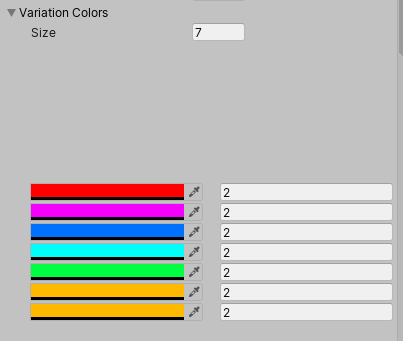
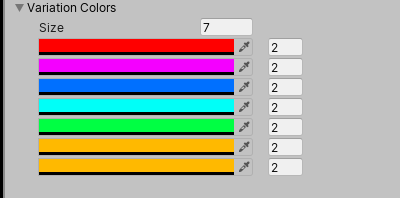
Does anyone know why i'm getting this empty space in my custom editor?
https://i.imgur.com/gu1z61x.png
The code for the property drawer is

public class VariationColorDrawer : PropertyDrawer{
    SerializedProperty mColor, mIntensity;
    
    public override void OnGUI(Rect position, SerializedProperty property, GUIContent label){
        mColor = property.FindPropertyRelative("mColor");
        mIntensity = property.FindPropertyRelative("mIntensity");
        EGL.BeginHorizontal();
        EGL.PropertyField(mColor, GUIContent.none);
        EGL.PropertyField(mIntensity, GUIContent.none);
        EGL.EndHorizontal();

    }

}
onyx harness
#

I think the error is elsewhere

visual stag
#

You can't use EditorGUILayout in a property drawer

meager chasm
#

oh, what am i intended to use?

visual stag
#

EditorGUI

#

and GUI

#

using the position that is passed in

meager chasm
#

that was surprisingly easy to switch over to, The space is gone now, so im assuming

    SerializedProperty mColor, mIntensity;
    
    public override void OnGUI(Rect position, SerializedProperty property, GUIContent label){
        mColor = property.FindPropertyRelative("mColor");
        mIntensity = property.FindPropertyRelative("mIntensity");
        EG.BeginProperty(position, label, property);
        EG.ColorField(position, mColor.colorValue);
        EG.EndProperty();
    }

}```
Is the correct manor of doing it?
onyx harness
#

mIntensity is gone?

meager chasm
#

good point LOL

visual stag
#

Also you're not reassigning the colorValue when you do that

#

Just use the EditorGUI version of the previous code you had

#

except you'll need to make your horizontal alignment manually with the position rect

meager chasm
#

Which would be better? using editorgui, or assigning the color value?

#

or did you mean my editorguilayout version?

visual stag
#

The first code you posted

#

just make that EditorGUI instead of the layout version

#

and remove the group, because you're gonna do it manually with the rects

meager chasm
#

is there an inline way of adding to a rect? like rect + vec4(), or do you have to make a new rect that is a copy of it and manually change the .x .y .width .height?

#

also is this what you meant?

    SerializedProperty mColor, mIntensity;
    
    public override void OnGUI(Rect position, SerializedProperty property, GUIContent label){
        mColor = property.FindPropertyRelative("mColor");
        mIntensity = property.FindPropertyRelative("mIntensity");
        EG.PropertyField(position, mColor, GUIContent.none);
        Rect p2 = position;
        p2.x = p2.x + p2.width;
        p2.width = 50;
        EG.PropertyField(p2 ,mIntensity, GUIContent.none);
    }

}```
onyx harness
#

your mColor is taking 100% of the width

#

divide the width by 2 first

meager chasm
#

It worked without changing the width, but thanks for the fix, and suggestions

onyx harness
#

Impossible, mColor is using the original position, mIntensity is overflowing

#

I think your "worked" is an illusion

#

You can reuse position, instead of creating p2.

visual stag
#

I would agree with that assessment

onyx harness
#

To avoid being too verbose, use the following:
p2.x += p2.width (It makes it clearer)

meager chasm
visual stag
#

If you were to display them outside of that context they would be off the screen

#

the Size property is taking up the full width

meager chasm
#

so essentially this? ```
public class VariationColorDrawer : PropertyDrawer{
SerializedProperty mColor, mIntensity;

public override void OnGUI(Rect position, SerializedProperty property, GUIContent label){
    mColor = property.FindPropertyRelative("mColor");
    mIntensity = property.FindPropertyRelative("mIntensity");
    position.width = position.width/2;
    EG.PropertyField(position, mColor, GUIContent.none);
    position.x += position.width;
    EG.PropertyField(position ,mIntensity, GUIContent.none);
}

}

onyx harness
#

Use this if you want 50 width for the intensity:

position.width -= 50F;
EG.PropertyField(position, mColor, GUIContent.none);
position.x += position.width;
position.width = 50F;
meager chasm
#

ehh, its not that important lol

onyx harness
#

It is not, but just so you know

meager chasm
#

fair enough

#

Is there an easy way to set a shortcut for a GUILayout.Button? or to make pressing enter activate said button? Or run some code when someone presses enter while the EditorWindow is focused?

onyx harness
#

No easy way, you need to handle your own system of shortcut.

#

By handling Event at the beginning of your script.
Or sending a custom Event and handling it near your Button() call.

#

Custom Event sent from a MenuItem shortcut, or any other way of triggering a shortcut

meager chasm
#

how do you set the menuitem shortcut to enter? ive tried both return and enter

onyx harness
#

Hum.. Unfortunately you can't do keycode like Enter via a MenuItem

sand spindle
#

Should my game be published on the google play store for the services to run or is it fine if I have set them up on draft?

visual stag
#

@sand spindle This channel is for developing extensions to the editor. Perhaps you want #📱┃mobile

sand spindle
#

Oh sorry mb

ivory crater
#

the don't touchy thing

twilit dome
#

I've added a selection grid to a custom inspector I'm working on, but the buttons don't stay active once you click off the gameobject. Functionality remains, its just the visual that doesn't stay. How do I keep the previously selected button 'pressed' even after focus change?

twilit dome
keen pumice
#

trying to do something like

.. draw editor controls... 
EndTextColorTint()```

Given that some of the controls may be drawn using a specific custom GUIStyle, and some may use the default:
Is this feasible?  Would I need to modify all possibly-used skin's textColor (for all GUIStyleStates that each skin contains)?  (I was hoping for somthing like GUI.contentColor, but for Editor fields.)
visual stag
#

@twilit dome make them toggles and style them like buttons

#

Ah sorry, missed that you found the answer

#

You can also use a GUI style and explicitly draw it in repaint with whichever states you want

#

But then you have to draw your button first but without a style at all, and draw the other style over it. Lots of fun IMGUI tricks

#

@keen pumice does GUI.contentColor not work?

keen pumice
#

@visual stag I wrote this to test, but text was still all black... GUI.contentColor = Color.red; int newInt = EditorGUILayout.IntField(targ.anInt); GUI.contentColor = Color.blue; string newString = EditorGUILayout.TextField(targ.aString);

visual stag
#

Hrm, sadly I think you might have to then

onyx harness
#

ContentColor does not work well in light skin

#

Use Color

#

Or the background color

#

Or change the style's color and restore

keen pumice
#

Sorry, guys I was unclear, and my tests sucked. I had switched to testing just “Labels”, because that’s the text I actually want to change the color of. I switched back to text fields, for my tests, and lo, SOME of the color changes are working, but none seem to affect the labels of the controls, only the “data”-part of the field... Here is my current test code, and results. Still no idea how to change the color of those labels, nothing seems to be working...

        redText.normal.textColor = Color.red;
        GUIStyle redLabel = new GUIStyle(GUI.skin.label);
        redLabel.normal.textColor = Color.red;

        EditorGUILayout.TextField(new GUIContent("std txt fld before any changes"),"static text");

        Color contentCashe = GUI.contentColor;
        GUI.contentColor = Color.blue;
        EditorGUILayout.TextField(new GUIContent("std txt fld AFTER settings GUI.contentColor"), "static text");

        Color colorCashe = GUI.color;
        GUI.color = Color.green;
        EditorGUILayout.TextField(new GUIContent("std txt fld AFTER settings GUI.color"), "static text");

        EditorGUILayout.TextField(new GUIContent("std txt fld with GUIStyle in param"), "static text", redText);
        EditorGUILayout.LabelField(new GUIContent("std label with GUIStyle in param"), redLabel);

        GUI.color = colorCashe;
        GUI.contentColor = contentCashe;


        GUI.skin.label.normal.textColor = Color.red;// = redLabel;
        GUI.skin.textField.normal.textColor = Color.red;// = redText;
        EditorGUILayout.TextField(new GUIContent("std txt fld AFTER settings GUI.skin styles"), "static text");
        EditorGUILayout.LabelField(new GUIContent("std label AFTER settings GUI.skin styles"));```
#

ah.. found a test error.. didn't reset the color soon enough... moving it up allowed the label EditorGUILayout.LabelField(new GUIContent("std label with GUIStyle in param"), redLabel); to actually draw the label red. hmm.. so, why doesn't setting the GUI.skin.label style ALSO work, by changing the default label style? GUI.skin.label = redLabel; //GUI.skin.label.normal.textColor = Color.red;// this doesn't work either GUI.skin.textField.normal.textColor = Color.red;// = redText; EditorGUILayout.TextField(new GUIContent("std txt fld AFTER settings GUI.skin styles"), "static text"); EditorGUILayout.LabelField(new GUIContent("std label AFTER settings GUI.skin styles"));

#

ah look! setting GUI.skin styles IS doing, well, something (I don't reset it). So close! why wont it show like that red label at the bottom in my test editor?

steady crest
#

I have a bunch of 3d meshes, that represent letters of the alphabet and signs. I am trying to create them at runtime (and in editor) but am unsure where to start. should I add them all to a scriptableobject and reference them? or do I just use the filepath? What do you think would be the best approach to turn a string input into a 3d mesh.

#

or something different even, just trying to find the most modular design to use. All the FBX files are the same size so it wont be hard to place them relative to each other. just unsure about the correct way to approach storing this kind off data

#

I am going to be using the icons in the form of <itemname> identifiers in my string, if that gives some kind of idea and letters can just be converted 1-1

keen pumice
#

@steady crest should I add them all to a scriptableobject and reference them? I like this idea.. that way you have a concrete object to work with in code (to generate strings with), but have the flexibility in th editor to change meshes for each letter easily

steady crest
#

using a dictionary in there would give me a lot of flexibility, which is what I was thinking of doing, I can set it up like that and have easy access without needing an ordered list

#

afaik dictionaries are unordered for searching right?

keen pumice
#

@steady crest a Dictionary<char,Mesh>? sounds like the perfect data structure. Note unity cannot seialize Dictionaries (I have a serilizable one, if ya need)

steady crest
#

I am using odin, im pretty sure their dictionary is serializable, but I would need to doublecheck

#

I might need to ask on their discord about taht tho

#

there is always the serializeabledictionary asset on the store as well

#

I ve used it before, its pretty good

keen pumice
#

never used odin.. but that asset sounds good- has an inspector to go with it?

steady crest
#

Odin is basically a bunch of propertydrawers and layout helpers

#

its pretty good. but I am only using the serializer

steady crest
#

I will have to make the inspector, but I have all the necessary parts to do si

shy charm
#

Can someone say me a addon for making menus?

steady crest
#

@shy charm what exactly are you looking to make?

shy charm
#

A menu

#

A main menu and an options menu

steady crest
#

I mean, just use unitys built in system?

shy charm
#

Yeah but i mean something to do it easier because is horrible to make interfaces

steady crest
#

if you find that hard I think you ll need to do a lot more learning about how unity works.

#

There are assets, but to use or implement them, you need to know how they work

shy charm
#

Im new in unity i only have 2 months of experience

#

But tutorials helped me a lot

steady crest
#

are you trying to get into scripting or are you more of an artist?

shy charm
#

Scripting

#

Im trying to do it functional more than artistic

steady crest
#

main menu tutorial right here, I do want to mention this channel is actually for editor extensions. which is a way of scripting tools into the editor. What you are doing is related to the gameplay and falls under #💻┃code-beginner

shy charm
#

Thanks im going to see it

steady crest
#

you may want to look on that cahnnel for other tutorial on various subjects, brackeys is a very good channel for the basics of programming. after you know how to code a bit. you can do just about anything when you find the right documentation

shy charm
#

Ok

#

Thanks men

steady crest
#

no problem, good luck with it!

onyx harness
#

@keen pumice have you tried PrefixLabel?

woven knot
#

Any addons they detect all your TODO comments for you?

onyx harness
#

VS?

woven knot
#

Where in VS can you see that

#

I can’t find it anywhere

onyx harness
#

Ctrl +W Ctrl T?

woven knot
#

Does nothing

onyx harness
#

Look for "Task something"

woven knot
#

Nothing

onyx harness
#

Look harder then

#

it's not like it's something special

woven knot
#

Todo messages are special though, it’s a tag

#

For the sole purpose of being added to a list somewhere

onyx harness
#

This

woven knot
#

Yeah Ctrl w doesn’t do that

woven knot
#

Found it, thanks

whole steppe
#

Hey! trying to create a script here for unity, i need a programmers help i cant seem to find any repositories anywhere with any useful information.

whole steppe
#

@visual stag ,

steady crest
#

you might wanna explain your issue before you tag them. pretty sure you entered too early xD

visual stag
#

@whole steppe do not ping people out of conversation.
This channel is for extending the Editor. If you have a question about code ask in #💻┃code-beginner .

whole steppe
#

I am extending the editor.

steady crest
#

he is still typing his question, its to do with assetbundles loading in the editor

whole steppe
#

Yeah

steady crest
#

but i ll let him explain, he dmd me about it.

whole steppe
#

Sorry vert

#
using UnityEditor;
using UnityEngine;

public class SojaAssetLoaderClass : EditorWindow {
    public static string _path;
    public static AssetBundle _bundle;
    public static GameObject _object;
    [MenuItem("Assets/SojaLoader/Load", true)]
    public static bool SojaAssetLoaderValidator()
    {
        _path = AssetDatabase.GetAssetPath(Selection.activeObject);
        return Path.GetExtension(_path) == ".asset";
    }
    [MenuItem("Assets/SojaLoader/Load")]
    public static void SojaAssetLoader()
    {
        if (_bundle)
        {
            _bundle.Unload(true);
            Destroy(_object);
        }
        _bundle = AssetBundle.LoadFromFile(_path);
        foreach(Object obj in _bundle.LoadAllAssets())
        {   
            _object = (GameObject)Instantiate(obj);
            GameObject obj2 = new GameObject();
        }
    }
}
#

See, This method doesn't work with streamed scene bundles

#

i am trying to load an asset bundle that is a scene,

whole steppe
#

Does anyone know how to load a streamed scene with the same kind of result

keen pumice
#

@onyx harness (from yesterday) I'll give Prefix label a shot for the "test", but I DO need to change the label text color for ALL controls, (until I change it back). If it DOES work for PrefixLabel.. would that be a clue on why it's not working for all controls?

ivory crater
keen pumice
#

@onyx harness result: PrefixLabel text color unaffected by changing GUI.skin.label .normal.textColor ==Color.red, nor is it affected by passing in a GUIStyle, with normal.textColor = Color.red..

#

@ivory crater set what part?

ivory crater
#

the option at sceneview to not being capable to click or select that gameobject

keen pumice
#

@ivory crater hmm.. best I've got is how to hide it from the hierarchy view... "HideFlags"

ivory crater
#

yeah but if I hide it I don't show its menu, I guess Ishould make a representer to edit by third

#

still if I instantiate it by this representer it won't have that no touchy thing

keen pumice
#

ah.. so you DO want to be able to "select" it in the heierarchy tree.. just not the scene view?

ivory crater
#

exactly

#

cause it's a thing on the background and I need to not be editable so it won't break anything

#

the not-touch thing makes it not selectable on sceneview, if I can do it by script I can just hide it and set it and use a representer so a game object will be on the hierarchy but not editable in any way it's not by the editor of the representer

#

arghh I say nothing I think I can reach the same with the hide and not editable hideflag

keen pumice
#

hmmm.. kinda of a "hacky" idea.. but you could set the behavior to executeInEditor mode.. then in update check to see if it is the selected oject.. and DEselect it if so. Not sure how to find the "previously" selected item though.. guess you could also record that in update if the item in question is NOT selected.

ivory crater
#

that doesn't work, it appears on inspector and dissapear (tested xD)

keen pumice
#

oh..wont let you select from heierarchy that way, nevermind

ivory crater
#

yeah the approach I will follow xD hide and noteditable

keen pumice
#

looks like this part is the critical code.. checks all selected objects.. and removes locked ones from the list, then assigns it back...```foreach (Object testObject in Selection.objects)
{
bool doAdd = true;

            // Check if selected object is a game object and then if it is locked
            if (testObject is GameObject)
            {
                if (ObjectIsLocked(testObject as GameObject))
                    doAdd = false;
            }

            if (doAdd)
                newSelectedObjects.Add(testObject);
        }

        Selection.objects = newSelectedObjects.ToArray();```
ivory crater
#

still unselect things won't reach me find the inspector

#

that why I should use a representer

ivory crater
#

@eager star I don't know which is that one but I use one very similar nice to code Firacode

#

I like very much its ligatures

#

at windows iirc it's just download them and rightclick install

#

or that or copy/paste to root:/windows/fonts/

#

I don't remember but if not double click should do the work

ivory crater
#

how can I know if on awake I'm at prefab mode? I'm having an issue setting parent that makes the editor instantiate another prefab instead of enter on prefab mode

keen pumice
#

@eager star in VS check it at tools ->options->environment->color & fonts

#

(mine is "Consolas")

#

@ivory crater not sure what you mean by "prefab mode"... you want to see if the object that is awakening, is an instance of a prefab?

ivory crater
#

no sorry

#

I almost solved it already but it still give me an issue

#

it gives me that cause I moved it from script but I want to move all the prefab not the inner state of it

#

I can do it by hand I mean just move it in hierarchy and it will be fine, but if I move it from script it gives me that error if I try to edit that prefab

ivory crater
#

ok I found the issue, I'm using editmode and it will be executed if it's on the prefab or the instance (being or not in the hierarchy)

ivory crater
#

ok found a trick to know if it's on prefab mode :d

steady crest
#

Is there a unity variant of Directory.GetFiles? Trying to go from the assetdatabase

#

i know that function is c# dw xD

hoary barn
#

hi! new around here. does anyone have any go-to recommendations for Animation marker editing in the editor? mostly looking for attaching and previewing markers at specific frames for audio, visualfx, and custom gameplay events (like when a character lands a punch or fires a projectile)

#

the built-in way of attaching events via the animation import settings doesn't have a decent enough preview, and the new Timeline features seem to be geared more towards cinematics and less about attaching stuff to individual animations

onyx harness
#

@keen pumice when I will be on a computer I will tell you why

onyx harness
#

@steady crest why needing a variant of Directory.GetFiles?

steady crest
#

Kinda was trying to avoid needing to go through the windows file system. I thought there would be a function in the asset database to do the same thing. But opted to use the normal one. Idk what I was think rly. @onyx harness

#

I just had to strip the absolute path from the get files array before I could use it. But that worked just fine rly.

onyx harness
#

Well, you have the AssetsDatabase.GetAllAssetsPath @steady crest

#

From there you can filter out

steady crest
#

Oh... Maybe I should exchange them than. Thanks for that!

fresh shell
#

is there a way to add to the property field context menu on a custom inspector?

#

like the menu that pops up when you right click on a int field or whatever

ivory crater
#

@onyx harness oh I didn't know it, I just didn't found it I was in a hurry, can you tell me how to do it without that trick?

#

vertx told me about something but if it happen to be a different thing I will cover more scope :d

fresh shell
#

@visual stag awesome thank you! I think that first one is exactly what I was looking for!

onyx harness
whole steppe
#

oof,

dim walrus
#

Anyone knows how unity console does so if it finds two logs that are the same the get stacked?

#

What it uses for that?

#

The stacktrace?

onyx harness
#

It is done internally

dim walrus
#

I know but i want to do a similar tool and i was just thinking the best way to compare two logs

onyx harness
#

2 logs are equal if the content and the stack is similar.

dim walrus
#

And was wondering how unity handles that

#

Does it have to be the same or just similar?

#

Never found a case where it "packs" two logs that are similar

onyx harness
#

if you prefer, "exact"

#

Let me double check

#

Yep

#

that's correct, same content & stack

dim walrus
#

Okay thanks

lucid hedge
#

Hey Mikilo

#

I've been using UI Builder for my project for a while now

#

and I can report that its fun to use and quick to create beautiful UI's, preview in light/dark them all very nice

#

But unfortunately there are several bugs

#

that are kind of annoying... Several times my uxml file didn't want to save or got corrupted or something and I lost my progress, so yeah I think it still needs some time but the tool is promising 🙂

shadow violet
#

What might be the best way to show a collapsable hierarchy (Foldout) of a specific gameobject in a custom edtior window? So far my idea is to use a Dictionary<GameObject, List<bool>> for each child object, but I feel thatd create very large data in memory, so I donno if its the best approach?

onyx harness
#

@lucid hedge oh thanks for the feedback. I think I'll wait for unity 2018 LTS, seems to be a secure move

lucid hedge
#

good choice

onyx harness
#

Very large doesn't matter. Dictionary access is O(1) @shadow violet

lucid hedge
#

atm I'm making a neat window that checks the user's installations

#

to make sure everything is well 🙂

shadow violet
#

Oh ok great, then it shouldnt be much of a problem - thanks

#

(and that window looks very clean, Alex!)

lucid hedge
#

Thank you, UI Builder makes it super easy to iterate fast and polish

lucid hedge
#

I'm very pleased 🙂

zealous ice
#

@lucid hedge // What is this for?

wispy delta
#

UI Builder works for editor stuff? oh baby that's exciting

#

I'm making a menu item in a custom editor that is supposed to automate converting from a component to one of its derived types. It looks a bit like this.

class A : MonoBehaviour {}
class B : A {}
...
[MenuItem("CONTEXT/A/Convert To B")]
static void ConvertToB(MenuCommand command)
{
  var a = (A)command.context;
  var b = a.gameObject.AddComponent<B>();
  // transfer shared properties from a to b...
}

I can manually store all the fields that need to be copied over, but I don't think this is a great solution since every time I add a new field I'll have to remember to update the method. I'm curious if there'd be a way to completely automate this via serialized objects/properties.

visual stag
#

You could probably automate it with SerializedProperties, and you can definitely automate it with reflection

#

The best part about the UIBuilder is previewing dark and light mode with a switch

#

It's still not the smoothest thing to use and has kinks everywhere though ):

onyx harness
#

@lucid hedge make sure when the text changes, the layout does not.
It's very triggering when you click and the whole UI shifts

feral karma
#

@wispy delta you know the "hack" of entering Debug mode + changing the script asset to a derived type (or, any other type for that matter) there? This will keep all serialized data, without the need for any editor tooling. Could probably be put into tooling if needed (it basically just takes the serialized data from the serialized object and writes it into the new object without any type checks)

onyx harness
#

Basically changing the meta m_Script: {fileID: 11500000, guid: b77f1f50cd3adb14ea582da8e0cbfb14, type: 3} with your new script GUID.

lucid hedge
#

You're 100% right Mikilo! Fixed it 🙂

wispy delta
#

Whoah nice! I had no idea! @feral karma @onyx harness

exotic vault
#

Hey every one! Does any body know how can I trigger a function when my EditorGUILayout.Slider value has changed?

#

I've tried OnInspectorUpdate() but I can't get it to work

dim walrus
#

Use EditorGUI.BeginChangeCheck() i think it's called

#

And EditorGUI.EndChangeCheck()

visual stag
exotic vault
#

I found a way to solve my problem
I just call the function beneath the EditorGUILayout.Slider in the OnInspectorGUI()

#

Thanks for your answers @visual stag @dim walrus I think your solutions are better than mine, performance wise

whole steppe
#

Hi! I have never touched before something about the editor, but it is possible having an enum in a object script changing the material in the editor? For example a cube with a script that has a enum with red and blue, and changes the material to one red or blue

onyx harness
#

Yes.

whole steppe
#

Any hint?

dim walrus
#

Make an enum field that when it's changed, it modifies the object's material color based on its value

shadow violet
steady crest
#

whats the use case difference for BeginChangeCheck and ChangeCheckScope? arent they the same thing?

#

I get that one is a disposable with a variable declaration, but whats the point

dim walrus
#

One you must call begin and end, and with scope you can use its interface IDisposable to use it with using

onyx harness
#

I personnally prefer the first

dim walrus
#

So you don't forget to call the EndChangeCheck

#

iirc all methods that have a begin/end have a scope counterpart

steady crest
#

it probably changes the way the GC handles them

#

but idk

dim walrus
#

I think it's just the way you are most comfortable using them

#

Other than that i don't think there is any difference

steady crest
#

if anything, its probably pretty minor

#

was just wondering about it, since you were talkingabout it earlier

onyx harness
#

Just IDisposable, that's all, look at the code.

steady crest
#

fair

visual stag
#

I prefer the scoped versions as they don't let you screw stuff up. But it's personal 😛

steady crest
#

I should probably look around for the scoped version of BeginHorizontal. I constanlty forget to close those xd

onyx harness
#

Start by being consistent.
Open > Close
Initialize > Uninitialize
Start > End

It's always the same, being consistent will fix a pretty decent list of bugs

#

Forgetting EndChangeCheck is less violent than EndHorizontal/Vertical/Group/Clip/Area

steady crest
#

mhmm. I see, trying to make a gridview for a filtered list of textures in an editorwindow right now. Will have to try and do it well

severe python
#

Anyone know why data that is serializing fine inside unity, meaning I can copy objects with it, save and unload scenes and reload those scenes and still have my data, While when I export thata data to an AssetBundle all the arrays of structs disappear?

brazen umbra
#

Hello! Having a bit of a issue with CustomPropertyDrawer on PropertyAttribute. The "OnGUI" method is never called... Does this mean anything to anyone?

#

The debug is never called

fervent jacinth
#

I can't seem to be able to load an asset from a folder starting with "."

#

AssetDatabase.LoadAssetAtPath<T>("Assets\.BuiltAtlasses\" + thisname);

onyx harness
#

It does not exist for Unity

fervent jacinth
#

I can create the asset in said folder, but it seems to not be able to load

onyx harness
#

Same as folders .git, .vs and similar

fervent jacinth
#

I want to do it like this, so that said asset does not go to the build nor the collab

#

since it's a 300 mega generated asset

onyx harness
#

To go to the build, it must be referenced

fervent jacinth
#

to avoid it going to the build, I can also put it inside an Editor folder

#

but then it goes to collab

#

I will try moving it out of said folder, reading, then moving it back in

#

reading from Assets\TMPBuiltAtlasses is also not working, the issue might be something else

onyx harness
#

dont forget the extension

fervent jacinth
#

the name of the asset is: "e7543d3ba734634458f669d5aff3f653-Atlas ALBH.asset"

#

could this be an issue?

onyx harness
#

nope

fervent jacinth
#

I wish it wouldn't fail silently with a "null"

#

I wish it told me what's the issue

#

this guess game is terrible

onyx harness
#

make a simple test

#

rename it to Assets/a.asset

#

Or show me the code

fervent jacinth
#

barely big enough but was marked as a spam

#

the 'AssetDatabase.ImportAsset(tmpfolder + thisname);' made it somewhat work

#

but now I have no mip maps, probably because the asset was moved back after importing