#↕️┃editor-extensions
1 messages · Page 41 of 1
 forest vortex
they used to support that
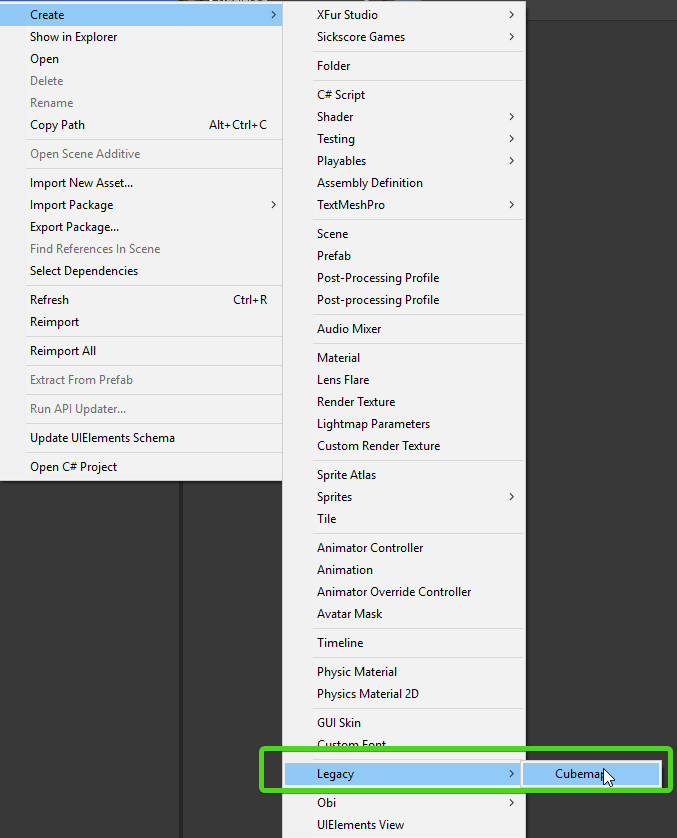
2018.2 still has it
no idea if they will work in HDRP tho
haven't tested that
 slow zodiac
they changed the cubemap in the hdrp as i remember it got "exposure" and now when you create a new cubemap its just looks like this and not usable
so if i put the textures in this, nothing happening
forest vortex
yeah gonna test using legacy if 2018.3 ever loads
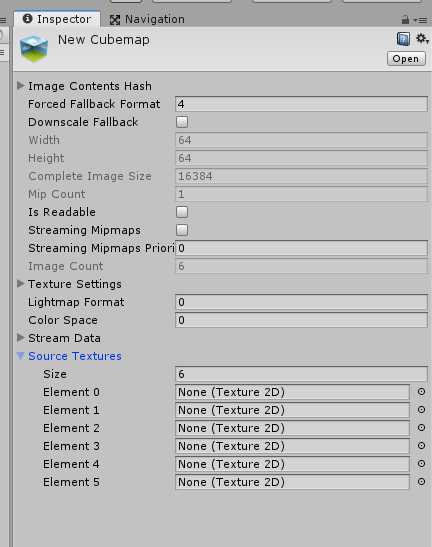
it's still there in 2018.3 as well
slow zodiac
but imported cubemaps are works, i just can't create news to attach the textures
forest vortex
you have to pick legacy cubemap
slow zodiac
yes
forest vortex
like i showed in the pic
slow zodiac
thats what i'm doing but if i attach 6 texture wil lnothing happening
just for clear, element 0 is +X?
slow zodiac
i think i not attached them as needed but as you can see the cubemap is stil lempty
forest vortex
well that's just the preview
lots of previews are broken in HDRP
so i'm not convinced it's not working
need to try it in something
but i have no idea of anything in HDRP that uses cubemaps
i thought maybe coat mask would
but i don't see a cubemap slot
slow zodiac
i wil ltry to make cubemap fro mscript maybe that wil lwork
forest vortex
making something in Shadergraph to test with
yeah i can confirm legacy doesn't work for HDRP
too much to wish i guess
slow zodiac
anyway how can i make with photoshop? is there a template or something?
forest vortex

you just need to combine them into one of the formats shown there
probably the single vertical or single horizontal column is easiest
you can then drop the image in unity and set Shape to Cubemap and tada
slow zodiac
alright, so these textures are 4096x4096, i need to make a 24576 empty in photoshop than adding them one by one?
forest vortex
basically
 zealous ice
Are you able to draw ScriptableObject's inspector in property drawer?
 visual stag
Yes, you can get the entire editor with Editor.CreateCachedEditor/CreateEditor
You need to dispose it/them when totally done
Or else you get leaks
I'm unsure at how to best draw the inspector as you don't have access to Layout
which would be the main problem, but I think I've done it before, I just don't have any code on hand...
 fresh shell
Hey guys I know that when doing a [MenuItem] I can set the priority but for some reason it’s not changing the parent folder’s priority.
Ie: [MenuItem(“GameObject/MyFolder/MyTool”), false, 1]
Doesn’t change where it shows up in the GameObject Menu. Anyone know a way to change where the “MyFolder” part shows up in the menu?
visual stag
They're in the hundreds, you kinda have to either fluke it or find some old forum posts where some things are detailed
forest vortex
asking that type of thing is basically against the server rules
 ancient sable
its best not to do that, to be honest
forest vortex
you do realize this is the official Unity Discord and all the hardworking devs are sitting here watching you ask for how to hack their work?
forest vortex
sure
 dusky plover
Why delete the message, now we can't know what got everyone so riled up 😦
 waxen sandal
I'll put my bets on hacking the dark skin
ancient sable
😂
 craggy kite
Attributes
 supple willow
Oh thanks
@craggy kite and can we use them to group our variables?
I mean like parrent and children
Like what we can do with our game objects
Grouping them
U got what i mean? Or i'll send u an image of what i mean?
craggy kite
There's a [Header("Group Name")] for that purpose
supple willow
(Sorry for m bad en)
@craggy kite not like that
Its what i mean
To be able to simply hide'em / show'em by clickin the header
craggy kite
Ah so that's more having a serializable struct or class in the component being edited. I don't know of any property drawers that do that for arbitrary fields built into Unity
supple willow
Thanks , anyway💓😋
 onyx harness
@supple willow i might have a solution for you
 cloud wedge
is there a way to make "Build and Run" execute twice? That way I could create a NSFW version of my game, and a SFW version of my game? The thing that decides which is which is the setting of a bool on a prefab
atm, I have to "check it, build, zip, uncheck it, build, zip" to get my two versions.
visual stag
https://docs.unity3d.com/Manual/BuildPlayerPipeline.html I think is what you want
cloud wedge
cool, thanks
visual stag
@supple willow https://github.com/dimmpixeye/InspectorFoldoutGroup
there's probably a few more floating around on github
cloud wedge
is it possible to run tests when I build my game and exit early if any of the tests fail?
 maiden blade
@cloud wedge https://answers.unity.com/questions/308245/how-do-i-stoppausebreak-a-build-automatically-on-e.html
Unity is the ultimate game development platform. Use Unity to build high-quality 3D and 2D games, deploy them across mobile, desktop, VR/AR, consoles or the Web, and connect with loyal and enthusiastic players and customers.
You can attach Unity and Visual Studio, to catch exceptions and break. VS will show exception info. If you're not familiar with exceptions: https://docs.microsoft.com/en-us/dotnet/csharp/language-reference/keywords/try-catch
onyx harness
@visual stag InspectorFoldoutGroup is too restrictive. It uses a custom Editor on Object.
For many people, it won't work.
visual stag
It's an implementation that you need if you want to do stuff like that. If you've seen other implementations feel free to post them
Drawers and stuff should still work as it's using PropertyField, so unless you're overriding Object yourself it shouldn't be an issue
onyx harness
I implemented one using only attribute
visual stag
if you're making your own editors you can implement the foldouts yourself
I think I did too actually, but you had to put a HideInInspector tag on every other variable that was in your group
onyx harness
Well, mine doesn't need to hide others, they are just automatically handled
I will drop you the code if you want
visual stag
Sure
onyx harness
Mine is not perfect, but fits 80% of people cases
visual stag
wait, can you iterate the SerializedProperty that is passed into a PropertyDrawer
and it will keep that state when it exits
if so, then that's how you would do it
onyx harness

The only problem is fields already having a CustomPropertyDrawer. For that I need to use an other attribute (InGroup)
visual stag
Oh you do have to put an attribute on every variable
yeah, that's what I'd be trying to avoid
I think it's probably neater to use HideInInspector in that case
onyx harness
Having one attribute gathering everybody and use HideInInspector for all the others?
It's basically the same as putting an attribute on everybody, no?
visual stag
I'd probably have [Group("Group Name")] on the first one and just [Group] on the following
I wish there was a way to return an iterated SerializedProperty so you could get it to skip over stuff
onyx harness
you can, no?
visual stag
If you could then why would you not have [Group("Group Name")] and then nothing until [EndGroup]?
onyx harness
I did this implementation because it was the most natural to my eyes
visual stag
and it would automatically iterate and draw until [EndGroup], then the editor would take over again
onyx harness
Doing just Group() is easy to implement.
But EndGroup is not possible and I see what you were saying
Yeah, we can't skip a field by design
visual stag
yeah they must pass a copy in to stop us doing it 😛
Edit: yup, a property.Copy()before they pass it
onyx harness
We are oblige to set an attribute to have control over it
You know what, I like the idea of not repeating an attribute
I will implement Group()
 wintry aspen
Does anyone know why when i select multiple gameobjects and change a particular value it'll result in all the other values in all the selected gameobjects changing unexpectedly? The particular value i change is saved in all gameobjects but all the other values in the selected gameobjects looks like they've almost been "resetted" or have changed.
       [CustomEditor(typeof(EnemyCombat))]
       [CanEditMultipleObjects]
        public override void OnInspectorGUI() {
            serializedObject.Update();

            ....

            serializedObject.ApplyModifiedProperties();

        }
 wispy delta
that all looks fine. the issues is likely where you put the ellipsis
wintry aspen
Damn alright i'll look into the code inside that. Good to know that the provided code isn't the problem 👌🏼
cloud wedge
@maiden blade not sure how to use that information you shared with me. I guess if I knew how to run the test from C sharp then that information you sent me would automatically work but I don't know how to run the tests from C sharp
 split bridge
Morning! An asset I'm writing generates code using reflection to extend public properties & fields of both Unity & user classes. This works great right up until something like UnityEngine.Light where it finds properties such as 'shadowRadius' which are editor-only (and assert only at build time when they're stripped out). I'm really struggling to find any approach that can catch this. Is there a way to search the build assemblies? Or a reflection trick for finding define symbols? Or perhaps an approach I haven't thought of? Thanks in advance!
split bridge
^So... not exactly ideal but it works so far - all files matching UnityEngine*.dll within ../Editor/Data/PlaybackEngines, using Assembly.ReflectionOnlyLoadFrom to see if the type and property exist or not
onyx harness
GetProperty() != null does not work?
split bridge
Unfortunately not because edit-only properties like Light.areaSize are in the editor's UnityEngine.CoreModule.dll but not in the same dll you'll find in a build
supple willow
@visual stag oh my god😍😍 thanks a world, i never thought it is that easy!!!!! Thanks man😍😍😍😆😆( about foldout groupin)
 real flint
Is there any way to cancel build proces in IPreprocessBuild?
 leaden oar
You can catch the action of the user trying to build to test things and do or not the build.
@real flint
real flint
Thank you! It works!
 whole steppe
My dear unity gods, is there a way to put button on this empty area without massive reflection thinkering?
forest vortex
you want buttons where you drew the light blue line?
have no idea how that would be accomplished.
 whole steppe
that is exactly where I want to shove stuff @onyx harness !
Please teach me master!
onyx harness

NG Hub gathers all the shortcuts you ever wanted in one magic place. (See the screenshot to understand)
It has 2 window modes :
- Normal window, same as any other Unity window.
- The Dock Mode is gonna blow your mind! It takes all the place around the buttons Play|Pa...
whole steppe
Dude, this is amazing
onyx harness
😃
 young falcon
Does anyone have experience with Timeline?
I have a subclass of UnityEngine.Timeline.TrackAsset that has a UnityEngine.Timeline.TrackClipType that I've created that (obviously) inherits from UnityEngine.Playables.PlayableAsset.
When I right-click the track, the context menu gives me an option to create the PlayableAsset. This is fine. What is not fine is the fact that there are other options to create the PlayableAsset for all of the UnityEngine.Object members of my class.
I want to remove the other options an only keep the one related to THE PlayableAsset.
I should probably add that this behaviour is new to Unity 2018.2. In earlier versions, only the expected option would be available.
visual stag
So your Clip is PlayableAsset, ITimelineClipAsset? @young falcon
[TrackClipType(typeof(XClip))]
public class XTrack : TrackAsset{}

[Serializable]
public class XClip : PlayableAsset, ITimelineClipAsset {
    [HideInInspector]
    public XBehaviour template = new XBehaviour ();
    public override Playable CreatePlayable (PlayableGraph graph, GameObject owner)
    {
        var playable = ScriptPlayable<XBehaviour>.Create (graph, template);
        XBehaviour clone = playable.GetBehaviour ();
        ...
        return playable;
    }
}

[Serializable]
public class XBehaviour : PlayableBehaviour {}``` is my usual setupor, depending on my needs:
[TrackClipType(typeof(XClip))]
public class XTrack : TrackAsset{}
[System.Serializable]
public class XClip : PlayableAsset, ITimelineClipAsset {
public override Playable CreatePlayable (PlayableGraph graph, GameObject owner) => Playable.Null;
}``` crystal laurel
Hey everyone! 👋 I'm having a bit of a weird issue at the moment, I've got an editor script set up, that toggles debugging features - when it comes to compiling/building for Android (for example, haven't tried other platforms), I get a nice NullReferenceException: Object reference not set to an instance of an object EditWindow.DebugMode () (at Assets/Unity Accessibility Extensions/Scripts/Editor/EditorWindow.cs:130) error, despite it being an editor script.. that in theory, shouldn't be included in the build for Android?
for reference, here's a little breakdown of what I'm doing - ```cs
GameObject confObj;
private void OnGUI()
{
confObj = GameObject.FindGameObjectWithTag("GlobalConf");
}
private void DebugMode()
{
ConfDbg = EditorGUILayout.Toggle("Enable Debug Mode", ConfDbg);
if (confObj.activeInHierarchy)
{
if (ConfDbg == true)
{
confObj.GetComponent<GlobalConf>().SetDbugTrue();
}
else
{
confObj.GetComponent<GlobalConf>().SetDbugFalse();
}
}
} with line 130, beingcs
if (confObj.activeInHierarchy)
It doesn't sound like it's including it, it sounds like it's interrupting your build in OnGUI (or whenever DebugMode is being called)
perhaps just check whether confObj is null and return if it is
then it can't interrupt anything if it is and hopefully you'll be able to build @crystal laurel
crystal laurel
Thank you 😄
 green shoal
hey, I have this abstract class "item" from wich there will be some scripts, if I code this item editor, the classes wich inherit from item will have the same editor or will I need to code every editor for every child?
 celest gale
Anyone know why I am getting "Editor" errors while trying to build
 rustic remnant
@celest gale Devdog has a Discord server, you might want to ask there. It seems you imported the plugin incorrectly.
Tbh it looks like you're referencing editor only assemblies in your code and during build time the compiler can not find them.
celest gale
It is odd because it is giving errors for EVERY editor folder
even the one containing my own scripts
 hardy locust
@celest gale AsmDefs?
celest gale
I think so.. Not really sure how to fix it though
celest gale
Think I got it. Had to move an .asmdef file.. It was picking up my imported packages
rustic remnant
Yup. Those files include everything in their directory and directories beneath them, excluding those that have their own definition files. Easy to fix thankfully.
 desert arrow
any workaround for "Unrecognized assets cannot be included in AssetBundles"? trying to include a file used by a plugin
rustic remnant
What kind of file are you trying to include?
If they're files that Unity normally recognizes then you might want to try to reimport them. Could be they have an invalid or outdated serialization in your Library.
desert arrow
looks like it's a zip file with renamed extension
rustic remnant
Do you get an error if you try to reimport it?
desert arrow
renaming it .bytes might have worked, let me test to see if I can load it
there's nothing to reimport, it's not a unity asset
just a file
rustic remnant
Yes, but even on assets without importers you can use the Reimport option in the right-click menu. It will rebuild the imported version of the asset in the Library.
Renaming it with a .bytes extension might work, since those files have a diffrent importer.
maiden blade
This autodetects archive types, you could give it a try https://github.com/norseware/VikingZipIt

GitHub
A simple Unity Editor tool that can extract files from almost any archive type. - norseware/VikingZipIt
#shameless lol
@desert arrow
 copper lava
Has anyone else had issues with prefabs? I can't use fonts since everything is so small. Font-size 1 is even too big. The sprite is rendered on the main object "CharacterController". You can see the hair on the char-sprite... The char-sprite itself is set to 16 pixels per unit with 2048 max size.
 karmic notch
How often do you have the problem that you get randomly logged out from the editor? For me it happens every few weeks once 🤔
 stark geyser
@copper lava You can additionally scale fonts. TextMesh Pro fonts scale very well.
@karmic notch I used to have this problem when opening several Unity copies before Unity Hub. Now The Hub tracks logins, never had this happen since.
karmic notch
If I am logged in the hub I am not automatically logged in the editors I start from it
whole steppe
Hi guys, how can I save a .mesh at runtime? I'm trying to stream lot of meshes and gave up on custom format hoping than AsyncResourcesLoad, because it's from the engine, can do it efficiently. But now I don't know how save a mesh without AssetDatabase...
onyx harness
That?
var m = new Mesh();
AssetDatabase.CreateAsset(m, "Assets/test.asset");
@whole steppe
whole steppe
@Mikilo sorry it won't work in release build right?
Seems like I can't ping people on my phone ^^'
@onyx harness oh I can like this
onyx harness
Oh, no, AssetDatabase is Editor only
You need to learn the protocol of an FBX or OBJ
whole steppe
Yeah need the bin serialize for runtime
whole steppe
Fbx is overkill though I just need the mesh
And it probably won't change. It's not going to be inside the resources file
So I'll need to un serialize it myself, and I can't do it efficiently in another thread
 ebon blaze
hey guys, so I was thinking about doing a similar inspector tool, but instead of a circle it would be a polygonal shape and not necessarily store color information
I looked at the github for post processing and saw something using materials/shaders but it seemed very confuse to me. I appreciate if someone can help me out on this
 gloomy chasm
Which part are you not sure on @ebon blaze ?
ebon blaze
on how can I make a trackball in the inspector but using a custom shape, i.e. a square or triangle
but maybe this is too advanced for me idk, from what I could understand they have a shader (trackball.shader) that creates the trackball in the inspector
and since I lack knowledge on shaders and editor scripting it's complicated for me
I think I will just put this aside and come back when I learn more about it
 desert grotto
So I have a palette swap material/shader that has a _PaletteTex property. I'd like to extend unity's default Image component and give it a new property that changes _PaletteTex in a similar way that the sprite field changes _MainTex
Ideally, I'd have just the 1 material, and each of the images would have its own overriden palette texture in the same way that normal images have their own sprite...
desert grotto
^I actually figured this out, but I have a minor issue where duplicating an object that has the palette swapped image component will copy the material reference instead of making a new one with the same properties. Any callbacks that I can use to declone the material?
wispy delta
I'm not shader savvy, but I think you should use the same material but change the texture via c# using a material property block. otherwise you'll have a bunch of extra draw calls.
https://thomasmountainborn.com/2016/05/25/materialpropertyblocks/
gloomy chasm
@ebon blaze idk how unity does it. But I would do it by using GUI.BeginGroup. Then get the left click event, and see if the mouse is inside the group. I would do some maths so that you could convert the top left of the group to be 0, 0, and bottom right to be 1, 1.
Idk if that makes sense. If you have any questions, or my explanation was too muddled. Let me know.
ebon blaze
thanks I will look more into that
 digital talon
Hi, guys ) I have a question. Looks like it for this channel. I would like to found missing references (not scripts!!!) in gameobjects and prefabs and I found some old script where checks all SerializeProperties and check .objectReferenceValue == null and .objectReferenceInstanceIDValue == 0. But it not working anymore, because for None properties and for Missing properties this 2 values the same (null and 0). So, maybe someone know how to separate None properties and Missing?
visual stag
would GameObjectUtility.GetMonoBehavioursWithMissingScriptCount and GameObjectUtility.RemoveMonoBehavioursWithMissingScript do?
digital talon
no, it's will get missing scripts on gameobjects and I would like to find missing references in serialize fields of gameobjects
like this one
 onyx timber
Is there a way to implement an editor script that is not unloaded when changing between play and edit modes? I'd like to setup a TCP connection between multiple instances of the Editor to be able to remotely trigger a recompile and play. But when I do this, the editor scripts are reloaded, the tcp connection is closed and destroyed.
whole steppe
Something crazy. I have one camera in the scene. In the Scene mode, the camera shows what I want. In the preview camera, I get what I want. BUT in the Game view, the camera shows something else. There is no animation, just one model , one light and one camera. Any idea why is this happening?
Solved! had to select the current scene. save project and restart! the weird things of Unity 😃
 errant slate

anyone know why I'm getting this error?
the textures all have the same packing tag
visual stag
These are not editor scripting questions. Editor scripting is about extending the Editor - like Property Drawers or custom Inspectors/Windows
 quasi monolith
anyone know what this feature is called?
I thought it was EditorTools but that seems like it's the new api for making another tool like the transform/rotate/scale tools?
green shoal
Hey, I'm hacing an error while trying to build that is related to editor
Assets\Script\Editor scripts\SalaEditor.cs(7,27): error CS0246: The type or namespace name 'Editor' could not be found (are you missing a using directive or an assembly reference?)
anyone know why is that? how to solve it?
it does the same thing for the methods like OnInspectorGUI
waxen sandal
Put it in a folder named Editor
green shoal
wow, it worked, thanks a lot
 lucid hedge
in an editor window
how would I get the dropdown of shaders?
that are available in the project
in a scriptable object btw
wispy delta
I'm not really sure @lucid hedge , but you could always call ShaderUtil.GetAllShaderInfo for an array of all the shader names and maybe use PopUpWindow to draw the list of shaders
But I guess that wouldn't include the shader "folders" without extra work
This might be it tho, the answer is from freya holmer who made shader forge so she probably knows what she's talking about
https://answers.unity.com/questions/307421/select-shader-in-custom-editor-gui.html
Unity is the ultimate game development platform. Use Unity to build high-quality 3D and 2D games, deploy them across mobile, desktop, VR/AR, consoles or the Web, and connect with loyal and enthusiastic players and customers.
lucid hedge
Yeah I read that answer too but it was from 2013 so wasn't sure if it was still valid, but will try it out
 summer dagger
is it possible to create Custom Inspectors for specific File Types?
Long Story: i really like the Scriptable Object Inspector for data changing. first i thought about use the ScriptableObjects for GameData (Weapons, Items etc.) - which works pretty good.
then i thought about saving and loading "runtime Data" (like Character stats, Inventory), but ScriptableObjects can't be saved at runtime. :S
Soooo now i work with a JSON & SO Solution -> Save and Load from JSON and convert the Data into my SO.
The Scriptable Object Inspector / Asset Inspector
The JSON Inspector
Short Story: i would like to create a inspector/editor for JSON File, which looks and feels like the SO Inspector above.
Problem: custom inspector seems to only creatable Skripts and no Filetypes.
visual stag
you can create custom importers for file types, and hook into the asset processing. You can also make an Editor for DefaultAsset and selectively use it for your file extension. I'm not sure if .json imports as TextAsset but if it does that would be the type to make an inspector for
summer dagger
you talk about scripted Importers https://docs.unity3d.com/Manual/ScriptedImporters.html ?
visual stag
Sure - but I'm not sure if you can be selective about which ones you import in that way or whether you could edit the resulting asset
the problem is that an imported asset is essentially fixed - only ScriptableObjects and the importer's meta file gets modified
Like, would you want your inspector to edit the json file?
summer dagger
yeah
in best case i just would use SO, but they are not designed for "user created data" ^^
visual stag
I would made an inspector for DefaultAsset or TextAsset (depending on what it imports as)
summer dagger
i tried some tuts arround ScriptedImporter
my values seem to be read only.
do you have any good tutorials for custom inspector for DefaultAssets/TextAssets.
couldnt find a good solution.
ScriptedImporter is in a Experimental Stage.
(tried [CustomEditor(typeof(DefaultAsset))], but no result)
visual stag
I did warn you than an imported asset is fixed! But that would enable you to make an editor there that could both create a scriptable object and edit the original file. (The SO would be readonly like an imported model)
I'm fairly certain that .json files import as TextAsset
so you'd need to create a custom editor of that type
summer dagger
yeah you are right
summer dagger
yay TextAsset works. thank you
lucid hedge
is there a way to check if a gui element in editor window is selected?
so for example this color field
visual stag
https://docs.unity3d.com/ScriptReference/GUI.GetNameOfFocusedControl.html documents it pretty well
lucid hedge
tyvm
 glad quiver
Why in the world aren't we allowed to customize the recording process of Unity's recorder?
Why does it have to be an internal Unity class?
Because, sorry, the "high" bitrate config in Unity's internal recorder is actually really low. I want more.
The legacy one allowed us to do so, what's the big idea with the new one?
onyx harness
@glad quiver I can provide you a class that can generate class wrappers, with it you can easily invoke anything persistently.
lucid hedge
hmm so how would I detect if the focus inside an editor window changed?
GUI.changed does not check the focus
I wonder if there is a clean way with beginchangecheck
or maybe I will just have to check if 'GetNameOfFocusedControl' changes value
okay yeah fixed
onyx harness
@lucid hedge You have a controlID that gives you who really has the focus. But it's harder to manipulate than just GUI name
lucid hedge
anyone ever attempted to make a section slider like the LOD groups?
so with resizable colored sections
visual stag
Yeah I mean you can draw coloured rects very easily - but you can also look at the source for such a thing https://github.com/Unity-Technologies/UnityCsReference/blob/9c7b88327d1b48000ea94dc52a405068a140980f/Editor/Mono/Inspector/LODGroupGUI.cs
lucid hedge
yeah I have the source open
shouldn't be too hard to replicate it
will give it a go 😃
visual stag
You could do it with EditorGUI.DrawRect too
lucid hedge
I see 2 scripts, LODGroupGUI.cs and LODGroupEditor.cs
lucid hedge
okay thank you!
 sick kelp
Hi team
I'm trying to figure out if it is possible to detect a VR app's input system (SteamVR, OpenVR, Oculus)
so that I know which interaction system is in use
does anyone know how to do that?
@timber apex hi mate ^ dunno why I'm pinging you else to tell you this is generally how I use the discord.
wispy delta
@sick kelp this channel for for extending the editor, try #🥽┃virtual-reality.
sick kelp
Ok thanks @wispy delta
 tight elm
hey has anyone here have any experience with using bundle files ?
cloud wedge
I've got this bug where I selected a bunch of assets and checked a checkbox. When I saved, a completely unrelated field was changed. The thing about that field is it has its own drawer. I'm wondering if my drawer has some sort of bug where you lose data if you select multiple items and change something? https://pastebin.com/YT08DwVU

 torpid sable
Is it possible to update a part of the navmesh ? So if i destroy a object it not need to rebake the whole map.
visual stag
@smoky radish UIElements doesn't change the styling APIs sadly so nothing about the logic behind a PropertyDrawer changes
There are not any nice ways to do it without wrapping the list in my opinion
 smoky radish
Oh, it is really annoying and weird
What do you mean by wrapping the list ? Could you please explain it ?
visual stag
Like, how you described by creating a structure around the array
smoky radish
Aha
visual stag
Perhaps @onyx harness has seen some nice ways of using property attributes/drawers with lists/arrays? I know there are some painful ways of doing it, and that one
smoky radish
I've seen someone created custom attribute system but I think making it is time consuming.
https://github.com/dbrizov/NaughtyAttributes

GitHub
Attribute Extensions for Unity. Contribute to dbrizov/NaughtyAttributes development by creating an account on GitHub.
Oh, if @onyx harness can help, it could be really great.
Thanks for your help @visual stag. At least I know nothing is changed about PropertAttribute and Drawer in new system 😄
Also I just moved my question from wrong channel to the correct one.
"Hey guys,
As you know guys PropertyAttribute doesn't work for array fields.
I've searched and noticed I can solve this problem by making parent class and put that array in it and PropertyAttribute for parent class.
I want to know if there is any other approach to achieve it ?
Also do you guys know if using PropertyAttribute for array added to new Editor system ? (UI Elements)"
 visual walrus
Anyone know how to add additional buttons on the editor itself, for example next to the play/pause/next frame buttons?
gloomy chasm
@visual walrus there is this. From what I understand it is rather hacky though because it is not really supported to do it. https://github.com/marijnz/unity-toolbar-extender

GitHub
Extend the Unity Toolbar with your own Editor UI code. - marijnz/unity-toolbar-extender
gloomy chasm
Oh, looking at the code. It is much simpler than expected
visual stag
You can inject elements anywhere, but it's much more convoluted :p
it's kinda silly to me that you'd make that and not just allow people to inject UIElements
instead, using boring ol' IMGUI
visual walrus
@gloomy chasm Thanks, l'll give that a spin
 digital spoke
Tryna improve a plugin posted on /r/Unity3D called floorplan, which is a sim-esque modular building system , for myself.
One of the improvements I'm adding is instead of a single wall, floor, pillar and arch tile, they are split up into categories so you can have "any" amount of walls, pillars etc.
I want to choose between each category by choosing a tile from 3 drop down menus for each respective category but I also don't want to be able to place two tiles at once so my solution is that when you choose an item from the list, any other choice gets set back to none.
eg: if I were to choose a floor tile, it would set wall tile and pillar tile to NONE and vice versa for the different categories
In OnInspectorGui, I check to see if the int returned by EditorGuiLayout.Popup is higher than 0 (since the 0 index is NONE) in any of the categories and do stuff dependent on that. Issue is, if one category is selected, it creates an infinite loop setting the other categories to NONE
Here's my current code. How can I stop this infinite loop?
        if (floorTileIndex > 0)
        {
            wallTileIndex = 0;
            pillarTileIndex = 0;
            script.curWallTile = null;
            script.curPillarTile = null;

            script.curFloorTile = floorTiles[floorTileIndex - 1];

        }
        else if (wallTileIndex > 0)
        {
            //Reset other tile values to 0 (since we don't want to place two at the same time.
            floorTileIndex = 0;
            pillarTileIndex = 0;
            script.curFloorTile = null;
            script.curPillarTile = null;

            script.curWallTile = wallTiles[wallTileIndex - 1];
        }
        else if (pillarTileIndex > 0)
        {
            floorTileIndex = 0;
            wallTileIndex = 0;
            script.curWallTile = null;
            script.curFloorTile = null;

            script.curPillarTile = pillarTiles[pillarTileIndex - 1];

        }
do something similar to:
using (var cCS = new EditorGUI.ChangeCheckScope())
{
    EditorGUILayout.PropertyField(enumProperty); //Your enum field
    if(cCS.changed){
        if(enumProperty.enumValueIndex != (int)EnumValue.NONE){
            //Reset other properties
        }
        serializedObject.ApplyModifiedProperties();
    }
}```where you only reset the properties if the field is modified
digital spoke
thanks! i was looking for something like only updating when a variable is changed but didn't know how to phrase it 😛
 loud steppe
I want to rotate my camera with mouse.
With this line I rotate horizontally:
transform.RotateAround(transform.position, Vector3.up, rotateHorizontal * vel);
and this rotate vertically:
transform.RotateAround(transform.position, Vector3.right, rotateVertical * vel);
But when both are togheter, z-axis is being modified, creating a tilt in the camera.
How to fix this?
I corrected a typo in the vertical code, sorry
gloomy chasm
I am not sure how to fix it sorry. But I think this would be better suited for the #💻┃code-beginner channel. Someone who does is more likely to see it sooner there
loud steppe
Ok, tks
onyx harness
@visual walrus check this out : https://assetstore.unity.com/packages/tools/utilities/ng-hub-free-101011
NG Hub gathers all the shortcuts you ever wanted in one magic place. (See the screenshot to understand)
It has 2 window modes :
- Normal window, same as any other Unity window.
- The Dock Mode is gonna blow your mind! It takes all the place around the buttons Play|Pa...
onyx harness
@smoky radish Oh sorry it took me a while to know where the Discord pings came from
Unfortunately there is no easy way to achieve such a simple thing.
onyx harness
The culprit is this method :
UnityEditor.PropertyHandler.HandleDrawnType()
Which calls :
propertyType.IsArrayOrList()
You can try to modify Unity code, but I wouldn't advice that 😃
 quaint basalt
Is there anyway for me to know when a PositionHandle is clicked and released?
smoky radish
Thanks @onyx harness , It is really weird
 lone quarry
So... I have this base class 'UIElement' and my derived class 'DefaultSpawnUI'.
Now how can I add an instance of 'DefaultSpawnUI' to an Array of 'UIElement' in the inspector?
 idle anvil
you probably need to wait a couple of week for a more detailed information about it
onyx harness
@smoky radish Not weird, it is intended.
PropertyDrawer on array worked few years ago, but then they 'fixed' it.
I remember the log change stated 'sorry for that change' X)
I wasn't sure if it was for me
visual stag
@lone quarry unity serialization doesn't support inheritance. You have to use a ScriptableObject or a Monobehaviour if you need it.
 wild mica
Hey guys. I'm trying to create an ID system just like in a database for my ScriptableObjects.
Do I have any sort of hook on Creating a ScriptableObject (not instantiating, creating) and Deleting them (Deleting the actual file, from the editor). To make it clear, the Awake/enable/disable aren't the answer here.
split bridge
@wild mica I do it through an OnEnable call in the SO to a static method that serializes a list of ids (from AssetDatabase.TryGetGUIDAndLocalFileIdentifier), sorted by ID and then I use that index. AFAIK there isn't some kind of file delete handle that would help but you but it's quick to rebuild the list every recompile for example
wild mica
So building this list of Ids would only work in the editor? And if you need the ID at runtime, you'd have to set it from the editor on a separate SO field? (not that that's a problem, might be an ok solution, just making sure I got this right)
split bridge
so my solution works at runtime by essentially serializing an array of SO's with a guaranteed order determined by their file id's - so a scriptable object that itself serializes references to other scriptable objects. Each SO OnEnable calls a static method that automatically ensures that main indexing SO has a reference to itself.... does that make any sense at all? haha
wild mica
It does, but I thought the AssetDatabase class is only accessible at edit time? (I actually worked with it just once, might be wrong) hence my confusion about functionality at runtime.
split bridge
no you're right, that part is... sorry this might be a bit tricky to explain
wild mica
You generate and save the IDs at edit time, then use them at runtime? That's what I figured.
split bridge
yes
wild mica
I see. Ok, it's interesting. I might give it a shot. Not what I was hoping for, but I don't think what I hoped for is possible 😄
split bridge
All I can say is that you're not the first person to want this - this solution took me about a week to arrive at but imo works well. But then it is in the context of a full SO-based library (ala Ryan Hipple) so it already has concepts like an Array SO. I would say that by doing it this way or similar, you keep it within Unity's ecosystem. It's also v quick (you don't need to wait seconds for all objects to be registered etc).
wild mica
Yes, it's a very frustrating and confusing land between the enorced order of a database and the flexibility of using SOs, and it seems to be hard to get the best of both worlds.
I want my items to have ID, so that I can edit them over time and they are properly linked to other things, and I don't want the option to somehow mess up those IDs by setting them by hand - so DB is the way to go. But I also want to actually SEE how the item looks instead of seeing the path to an image in the DB, and edit it quickly and safely directly from the editor - pointing to SOs as the desired solution.
And I'm trying to somehow get the best of both worlds here, but there isn't much support for that.
split bridge
yea - feel your pain. Though I have to say we only found this db/asset indexing necessary once deciding to support multiplayer. It could be depending on your situation there may be an easier route?
wild mica
I don't have multiplayer yet, but I do intend to add it, and I rather have all the setup done now. And that's exactly why I need IDs.
split bridge
👌 groovy - good luck!
wild mica
Thanks 😃 We'll see what turns out.
zealous ice
I'm creating custom editor for my game, how to call OnSceneGUI only once when [CanEditMultipleObjects] is added
I have this code
    [CanEditMultipleObjects]
    [CustomEditor(typeof(Observer))]
    public class ObserverEditor : Editor
    {
        private Observer[] observers;

        private PropertyInfo angle;
        private PropertyInfo radius;

        private void OnEnable() {
            observers = new Observer[targets.Length];
            for (int i = 0; i < observers.Length; i++) {
                observers[i] = targets[i] as Observer;
            }
        }

        public override void OnInspectorGUI() {
            base.OnInspectorGUI();
        }

        private void OnSceneGUI() {
            foreach (var observer in observers) {

                var serializedObserver = new SerializedObject(observer);

                float angle = serializedObserver.FindProperty("visionAngle").floatValue;
                float radius = serializedObserver.FindProperty("visionDistance").floatValue;

                Handles.color = new Color(147 / 256, 188 / 256, 1, 0.2f);
                Handles.DrawSolidArc(
                    observer.transform.position,
                    -observer.transform.forward,
                    Quaternion.Euler(0, 0, angle * 0.5f) * observer.transform.up,
                    angle,
                    radius);
            }
        }
    }
It works fine for one object
But breaks for multiple ones
visual stag
@zealous ice OnSceneGUI is called once per target
zealous ice
Each time with correct target?
visual stag
Yup
visual stag
Yeah, that's why you'd use the target
dusky plover
@zealous ice Perhaps you'd want to try using OnDrawGizmosSelected instead?
Which will only display the debug information for selected objects.
zealous ice
No, vertx's way will probably work (I need to try it out), I need OnScene for drawing
split bridge
Hi! I'd like (on gui button press) to open a scriptable object in a new inspector window... struggling to find the exact syntax - any pointers in the right direction?
waxen sandal
Use the selection class
visual stag
@split bridge https://hastebin.com/uhonomecug.cs has some code I've written in the past for doing stuff with the InspectorWindow or duplicates
you want to do something similar to LockAndDuplicate, but as Navi says, use the selection class to set the inspectors to your ScriptableObjects.
split bridge
Thanks both. I saw AssetDatabase.OpenAsset would do it if there was a way to open in a new inspector window but it seems the trick is to do a ScriptableObject.CreateInstance with the type of a standard window... then there's something in the selection class to select an asset with the corresponding new editor window?
visual stag
inspectors will display what you have selected if they are not locked, that's it 😛
split bridge
ugh yea... good point! hmmm guess I may have to create a custom editor window then if I don't want my current inspector to change without locking it
 grim monolith
Hey guys, quick question. Is there any wat to add a context menu on a custom editor (not on the MonoBehaviour)?
I'm talking about an option on the menu that appears when you click the cog button on the top right corner of the editor
waxen sandal
Isn't there an attribute for that or is that only for monobehaviours?
stark geyser
@grim monolith https://docs.unity3d.com/ScriptReference/ContextMenu.html Works on scriptable objects as well.
grim monolith
Was that added on newer version of unity? DOesn't want to work on 2018.2.14
stark geyser
Not sure about its origins, it works on 2018.3 for me
 modest sapphire
ContextMenu is an old feature i believe it even existed in back Unity 4
grim monolith
I know it's an old feature. I meant for custom editors. I'm asking how to add that functionality on a custom editor not on the scriptable object itself.
onyx harness
@grim monolith Well
I might have an answer
About the context-menu itself, I don't know any solution.
Because it is calling
EditorUtility.INTERNAL_CALL_Internal_DisplayObjectContextMenu
Which we don't have the code.
But, you technically can add an button near it
using System;
using System.Collections;
using System.Collections.Generic;
using System.Reflection;
using UnityEditor;
using UnityEngine;

[InitializeOnLoad]
public class TestHook
{

    static TestHook()
    {
        FieldInfo    s_EditorHeaderItemsMethods = typeof(EditorGUIUtility).GetField("s_EditorHeaderItemsMethods", BindingFlags.Static | BindingFlags.NonPublic);
        IList        list = (IList)s_EditorHeaderItemsMethods.GetValue(null);
        Type        delegateType = typeof(Editor).Assembly.GetType("UnityEditor.EditorGUIUtility+HeaderItemDelegate");

        if (list == null)
            list = (IList)Activator.CreateInstance(typeof(List<>).MakeGenericType(delegateType));

        MethodInfo myMethod = typeof(TestHook).GetMethod("HeaderItemDelegate");
        list.Add(Delegate.CreateDelegate(delegateType, myMethod));

        s_EditorHeaderItemsMethods.SetValue(null, list);
    }

    public static bool HeaderItemDelegate(Rect rectangle, UnityEngine.Object[] targets)
    {
        EditorGUI.DrawRect(rectangle, Color.blue);
        return false;
    }
}
Just as a warning, this code set the list at startup.
It means, it overrides the real stuff.
You need to populate it first then add your stuff.
For that you need to call the code at EditorGUIUtility.DrawEditorHeaderItems.
grim monolith
Hmmm I like this idea. I'll play around with it. Thanks!
onyx harness
This is what I have on my end
torpid sable
How can i conver hex to color ? myMaterial.color = "hexString", xml in my case. materials[a].color = reader.GetAttribute("mat" + a)
torpid sable
already tried
ColorUtility.TryParseHtmlString(reader.GetAttribute("mat" + a), out myColor);
visual stag
What format is reader.GetAttribute("mat" + a)?
torpid sable
mat0="16A53A"
xml
writer.WriteAttributeString("mat" + a, ColorUtility.ToHtmlStringRGB(actualObj.transform.GetChild(0).GetComponent<SkinnedMeshRenderer>().materials[a].color).ToString());
visual stag
You want to pass it something in the format #16A53A then
The documentation pretty well describes what you need to pass to it
torpid sable
If i debug it, the htmlString is correct but the color is wrong, TryParseHtmlString(string htmlString, out Color color);
but now with the #, mat0="#FFE0BD the color is not just 1,1,1,1 like without # symbol
visual stag
well,
if(ColorUtility.TryParseHtmlString("#16A53A", out var color))
    Debug.Log(color);```
prints `RGBA(0.086, 0.647, 0.227, 1.000)` which is correct#FFE0BD also prints the correct value. So i'm really not sure what's going wrong on your end
torpid sable
RGBA(1,000, 0,878, 0,741, 1,000) #FFE0BD by me
visual stag
which is correct
torpid sable
hm then maybe i search the error at the wrong place, thank you
 crisp oracle
 split bridge
It seems you can't do e.g. Selection.activeObject = x; in the OnSelectionChange callback - there's no current event that needs consuming or anything - does anyone know if there's a way to immediately change selection? I can do it via OnInspectorUpdate but immediate would be better.
onyx harness
@split bridge that's not its purpose, the problem is more on your side /design.
split bridge
Thanks @onyx harness - it's true I'm trying to achieve something a bit unconventional - perhaps there's a better way? I have certain ScriptableObject assets that I'd like to have appear in their own editor window (if it's open) but use the default inspector if it's not. This is because I want it to be possible for a user to edit the asset without losing focus with what they're currently working on. Odin achieves something similar to this where if you right-click on the pencil it will pop open a new window with the selected asset rather than steal focus.
onyx harness
@@split bridge You can use EditorApplication.delay maybe.
split bridge
Looks like it's still too glitchy - may abandon the idea but thanks for the hint - didn't know of delayCall's existence
onyx harness
@split bridge what do you mean by glitchy?
I did had some issues when I was dealing with it.
Sometime I had to double delay a call. It happens :)
split bridge
It's somewhat obvious with hindsight but you see the other object selected briefly which causes the panel to go from game object to SO, to blank, back to gameobject - in real terms this feels like a bigger flicker than I hoped. I'd have to do is intercept the click before the SO was selected somehow - even if possible is definitely a step too far 😃
onyx harness
If I understand correctly, you want to click on a button and it opens an Inspector with the Object locked on?
split bridge
yes 👍
onyx harness
And to achieve that, you change Selection?
split bridge
So, let's say clicking an 'open' button, opens the relevant custom editor window and sets the asset to display... my hope was that once that window was open, if you selected another asset in the project, only that window would be updated
seems like that's a bad idea
split bridge
The opening a new window for the asset works fine 👍
onyx harness
Have you tried to lock the current Inspector, open new one, change Selection?
split bridge
I like the idea but it wouldn't quite work. Essentially my ideal workflow would look like an inspector window and a MyScriptableObject inspector - if you select a texture, gameobject etc, the inspector panel would update as usual, if you selected a scriptable object that was of type MyScriptableObject, instead of the inspector window updating, having the MyScriptableObject inspector window update. I can see why this is problematic, it would just be the nicer way to work.
onyx harness
I understand, but it is hardly doable
Or you're gonna have the flick
If it is only for you, I don't see where is the issue, is it?
split bridge
for an asset for the store - it's ok, easily cut from the list of nice-to-haves
@onyx harness just did a quick screen capture to make it more tangible - was going to wait for the higher res version to finish processing but actually you can still see the idea from this blurry mess - https://youtu.be/i90W-dyxkfU
 split bridge
totally not keeping this! hahah
onyx harness
Anyway, you would have run into a lot more troubles
You saved yourself a lot of time
split bridge
Likely so
 spark zodiac
So, I've been using Event.current to handle sceneview/editor mouse input for my custom editor.
Normally you can do Event.current.button or Event.current.keycode to tell which mouse button is being held/pressed/released - but what if I want to know if 2 keys or mouse buttons are being held simultaneously? Do I need to track this info and save it for myself on a "press/click" event?
onyx harness
@spark zodiac event tells you what just happened, not what is happening. You need to handle it manually.
spark zodiac
@onyx harness Thanks! Aw schucks, I was hoping there was some editor update that offered functionality a bit more like the play-mode Input system.
onyx harness
I don't think it has a plan in the horizon. X)
onyx harness
@spark zodiac but it exists a solution on Windows to know what is being held in the Editor
spark zodiac
@onyx harness Like System.Windows.Input? Eh, I think I'd like to stay more platform independent., if that makes sense? (C# not my key lang outside of Unity programming, tho, so maybe I'm missing something?) Thanks for mulling it over more, though!
I've just been keeping an Event variable for each key I'm interested in, and then just updating one whenever Event.Current gets me a new press/release event for that specific key. It's working pretty well!
onyx harness
@spark zodiac Oh sorry I completely forgot to drop you the code:
[DllImport("user32.dll")]
public static extern Int16    GetAsyncKeyState(Int32 virtualKeyCode);
Thanks!
onyx harness
I use it in EditorApplication.update
But I think it works from anywhere
Since it's not Unity-related.
 somber oxide
Anyone know how to hide/change ui buttons? The Console's new "Clear on Build" I'd like to shorten.
onyx harness
You... Can not really with the old IMGUI, but I guess with UI Element it's doable.
IF the console was made of it
somber oxide
I don't think that's been converted. I'd like to convert them both to: "Clear on: | P | B |"
I guess I have to wait.
onyx harness
If I'm not wrong any good console on the Asset store does that
visual stag
EditorGUILayout.Foldout?
Oh so you want to draw the whole list? Why not just use a PropertyField?
Why would that be? Also, there is no simple way other than serialized property to draw the list. It's just a combination of fields and foldouts drawn automatically by the PropertyField
There's nothing in here that says you cannot use serialized properties
Just cache serializedObject.FindProperty("Characters"), and use a PropertyField and it should work fine
You'd want to add a [Range(10, 100)] above the max health field
you will need to also use serializedObject.UpdateIfRequiredOrScript(); and serializedObject.ApplyModifiedProperties(); if you're not familiar
Remember to pass true to the PropertyField's includeChildren parameter
well then you just need to do the first part and then EditorGUILayout.PropertyField(charactersSP.GetArrayElementAtIndex(i), true);
though you really shouldn't be combining serialized properties and normal fields in this way
it isn't often advised to use anything other than serialized properties if you can
If you're already in too deep just draw them using Foldout, IntField for the size, and whatever else for the sub properties
It's either draw using Properties or draw everything manually
The thing you will have to perhaps worry about are conflicts with updating some fields via SPs and others via fields - but it can be quite easy to work around / not actually be an issue
just something to watch out for 👍
sweet, also for future reference on discord you can have colour formatting with
it may be worth putting a ChangeCheckScope around the property field and only applying if it's changed, though I'm never sure if it's how I should be doing it - I need to check how much that varies in the docs
onyx harness
You are right, without that the above drawer will induce noticeable lag at some point.
I might say the same about Undo.Record, but I'm not sure about the internal implementation. I need to confirm.
visual stag
Doing it for Undo.Record is kinda a pain in the ass seeing as it's sorta backward, you have to cache the result, then in the check Record and then apply
I tend to just always wrap my editors in the entire Record or Apply, but when in cases like these I have a lot of Updates and Applies I do it properly
onyx harness
Yeah, it's cumbersome to write, but I guess it's a good habit to have
People's projects tend to have more and more plugins. And with Package Manager it's gonna be even easier to add more.
The problem of the scripting packages in the Asset Store is that we have no limitations, no rules, no guidelines to follow.
Devs might not notice/understand why their Play button is taking a slightly longer moment to enter.
Same logic for recompilation.
Here, slightly can become seconds and even more.
Bax plugins can increase a lot those timings.
gloomy chasm
I am making a tool where I want to have a scene view inside of a editor window that has other things too. But not quite sure how to go about it.
I don't even really need to be able to move the camera like you can. But I do need to be able to have handles.
visual stag
You can use PreviewRenderUtility
I'm unsure if that'll do entirely what you need as I haven't used it to draw the scene view
but there is a renderFullScene boolean in its constructor
that may do what you need
You typically use BeginPreview, DrawMesh, and then EndAndDrawPreview
gloomy chasm
Alright, thanks. I will look in to those!
visual stag
let me know if it works out btw, I've not used the utility in that way (only to draw mesh previews to rects)
Otherwise I'd look into just highjacking the sceneview camera momentarily for renders into a RenderTexture
 craggy sedge
I’ve used it for some simple stuff, the main limitation to be aware of is that it’s still not a ‘real’ scene view so you’ll have to do some work to select objects inside it or do many of the things the normal one can do
I’m also not sure if you can draw handles into it
(It’s also possible some of that has improved in 2019.1, we’re on 2018.3 at work)
visual stag
Sadly one of the undocumented parts of the engine
onyx harness
Hey everybody, does someone know if there is a way to catch the event when Unity is being invoked from the browser?
Whenever you import an asset the browser calls:
com.unity3d.kharma://
Which then call this:
"C:\Program Files\LAST_VERSION\Editor\Unity.exe" -openurl "%1"
It opens the window Asset Store.
Nevermind, I found a smarter way.
 distant atlas
how can I implement a custom preview like this? I want to use it for a prefab, I have a custom Editor for it already. I tried overriding Editor.RenderStaticPreview and Editor.OnPreviewGUI but they don't work, at least, they don't work like I expect them to
got it fixed, I didn't realize I needed to override HasPreviewGUI
 vast epoch
Greetings, I'm not sure where to post this question but TileMap Rendering is glitching kinda bad. I would like some help 😅
gloomy chasm
@visual stag So, sense you asked. I got things to render using both the PreviewRenderUtiliy and also using Handles.DrawCamera but neither will draw the sceneview handles. The only way I can get one that will draw the sceneview handles is by using GUI.DrawTexture and using SceneView.lastActiveSceneView.camera.targetTexture. However interestingly that seems to only be the handles of the currently selected GameObject and nothing else. Not even any meshs. And (unsurprisingly) I can't interact with them which is what I really want.
 true hemlock
any one know why drawing to a RenderTexture with DrawMeshNow in an Update tick will only works sometimes and not others?
is i call the method from an editor button it always works. (this is all happening in edit mode)
distant atlas
@true hemlock maybe you need to call Repaint() or SetDirty something
true hemlock
i solved it by not using GL.LoadProjectionMatrix/GL.modeview and manually sending a View Projection matrix to the shader. GL has some wonkiness in editor mode I guess.
visual stag
@vast epoch this channel is for extending the Editor, #💻┃unity-talk is usually better suited
gloomy chasm
Does anyone happen to know how to recreate or access the prefab subscene editing scene window thing?
gloomy chasm
Hmm, what I really want it looks like is a preview scene.
Though interesting API for the prefabstage. Thanks btw.
From reading the description of it, it even uses a preview scene. I'm just not sure how to go about setting the current rendered scene to be a preview scene. Any ideas?
visual stag
Argh I thought they had exposed the stage API by now, but no, it's just Main and Prefab
It's good to know what's coming I suppose though :/
I imagine you'd add a camera of your own to the preview scene and manually manage the rendering
Sorry if I'm not entirely understanding the question - did you mean rendering the scene view as the preview scene?
gloomy chasm
What I really want is to be able to have a scene view render with interactable gizmos in a custom editor window. But getting the gizmos/handles to show and functional was too hard. So my second thought was to force the scene view to render some sort of custom render or something that looks similar to the prefab stage scene. And then just draw on to the sceneview what ever extra options I was going to do in the custom window. Or just make the options a separate window.
visual stag
I think Handles.DrawCamera may be able to draw a camera with handles and gizmos, but all the tools I've made in the past have just worked in the sceneview so I'm unsure as to the details
gloomy chasm
Yeah, I did try that. But was unable to get it to draw handles
visual stag
Did you try other DrawCameraModes?
I swear I've done this before but I cannot remember what for, but I seem to remember using Textured
gloomy chasm
Doesn't seem to
Even if I did get them to draw I would still need to do something about making them function. So I thought just doing something like the how editing prefabs works would be simpler. But maybe not?
visual stag
Is there a reason you cannot just do this in the scene view?
You seem to want to draw the scene view already
gloomy chasm
The only reason not to use the scene view is simply because of all the game objects on the scene.
Worst case I could have it forcibly change scenes to a empty scene.
to give you an idea what I am doing. I am making a tool for my self that is basically speed tree for plants
visual stag
Have you tried the previewScene approach with
Handles.SetCamera
in the middle, then drawing your handles, then ending the preview
That may have been what I did in the past - I wish the docs really linked all this together nicely and it wasn't just a case of either finding ancient code where you or someone else figured it out in the past, or jumping across the docs hoping to find the right combo of things
gloomy chasm
Okay, so using Handles.SetCamera as you said works! How ever only if I use SceneView.lastActiveSceneView.camera
And when I do that it doesn't seem to render meshs
only the handles
visual stag
Hrm, well I think I'm all out of APIs and you'll just have to figure out the right combo
Can probably google the functions with some other keywords to find what others have done
gloomy chasm
Yeah, well I really appreciate your help! I will see what I can come up with
 meager iris
Hello guys, I just wondering that how long you wait when you change a script in your project ? I am designer and still learning this proccess. I try to understand assembly definations. It is not improve my existing project.
visual stag
~6 seconds on this project
meager iris
@visual stag How many script in your project ?
meager iris
I have 2200 scripts with all plugins. and waiting 30 sec Is it normal. What do you think ?
visual stag
Perhaps, I think certain things can add to the time that aren't script reloads, anything with InitialiseOnLoad gets called and everything reserializes I think. Some others could weigh in on it. But it's probably a #💻┃code-beginner topic - this channel is for extending the editor
meager iris
Thanks I will
 zinc kelp
Quick question, I'm trying to add a gameobject to a prefab from a script, while inside the prefab in editor mode (prefab stage). I've tried a lot of things (making objects and the scene dirty, placegameobjectincurrentstage) but it seems the object just doesn't get saved to the prefab. Either it appears in the inspector for a brief moment and immediately disappears, or it appears but is gone when I reopen the prefab asset. Anyone got any clue?
zinc kelp
Solved it, I had to retrieve the prefabstage.prefabcontentsroot then set that + the scene dirty
visual stag
Slides 45 and onwards are a good resource for anything prefabs https://www.slideshare.net/unity3d/technical-deep-dive-into-the-new-prefab-system-123785944
Just for future reference @zinc kelp
 blissful burrow
I'm getting grumpy over IMGUI : < Does anyone know how to get past BeginHorizontal() seemingly having a minimum height? The lowsest element there with Pos X should be way smaller. The ones on top are GUILayout.Labels with a box style. They set their height perfectly fine
I've also tried using my own GUIStyle instead of GUI.skin.box with (0,0,0,0) margin and padding
visual stag
I'm out right now, but it's worthy to note that some styles have minimum heights you have to override too
If you post some code I can get back to you in ~20 with a code answer
blissful burrow
There's no min height as far as I can tell in styles
However! I did notice that if I use style.fixedHeight I can at least force it to be smaller, which, works in my case ✨
That's uh, great alignment right there, thanks UI 
Time to hardcode some offsets~
onyx harness
Have you tried using the GUI debugger to see what is being drawn?
visual stag
That was going to be my suggestion once home
onyx harness
I'm off to bed. If tomorrow you still have not find the answer, poke me
visual stag
If you search "GUI debugger" I have posted the code to open it a few times
blissful burrow
Ah, neat, haven't seen this one before
Also holy heck if I had this when working on Shader Forge
visual stag
Yeah, I discovered it internally one day and shouted into the abyss at the pain of wasted hours
onyx harness
I don't know since when this debugger exists, @visual stag do you?
visual stag
Uh, I remember discovering it, I have a tweet I made the day I did I think. It was just before they exposed the UIElement one
So not that long ago really
Thus is why I semi regularly "read the dictionary" by just scrolling down ILSpy for interesting things :P
blissful burrow
Haha, yeah, the amount of times ILSpy has saved me
Made a lil' gist/snippet for a MenuItem to open the debugger in case anyone wants it
https://gist.github.com/FreyaHolmer/60d76ed842a6c4f8f1ed424d6866575b
visual stag
Beat you to it 😛 https://gist.github.com/vertxxyz/203ee44a3f0b4eab2371c74b225ff4f5
https://twitter.com/vertexxyz/status/1020134797178359808 found them in June apparently
blissful burrow
Gee, fine, okay, you get a medal for being first. Here, take it > 🎖. I don't need it anyway~
visual stag
👐 yoink
blissful burrow
Layout is now good~
Discord did not like that .gif. The original works at least!
visual stag
very pretty!
blissful burrow
Thanks!
visual stag
What's this for exactly?
Looks similar to cinemachine's noise module
except looks like you're just tracking player motion or something
blissful burrow
In this case it's tracking a rigidbody, yeah, but it can track anything!
Working on a plugin called Tracker, meant to function as a visual extension of Debug.Log
visual stag
Ah sweet, I have always wanted a graphing debug, and have made some crappy ones in the past
blissful burrow
If there are any features/use cases you'd like, let me know! I've got a bunch planned, but, it always helps with more input
visual stag
Extended history (ie. compresses things further back in time) so yo you can see a whole lot of time
blissful burrow
I've got values, graphs, histograms and mathematical plots so far. Still missing things like a 2D plots or simple drawing of shapes and such
As in being able to scroll back in the graph? Currently you can zoom in/out, the one in the .gif is pretty zoomed in
visual stag
Like, instead of things going out of the history buffer (not sure if this is what you're doing) the older history gets compressed and time on the graph looks exponentially shoved towards history if that makes sense... I'll see if I can find an example
can you add arbirary things to a single graph for comparison? That's the main thing
(unrelated to the previously mentioned request)
blissful burrow
Ah, I see what you mean! Currently I don't have infinite history like that, though I don't really see what use case it would have
Arbitrary things as in comparing two graphs or being able to mark moments in time / mark values / thresholds?
visual stag
Something as simple as wanting to log two player's y values onto the same graph so you can compare
blissful burrow
Ah, you can do that already!
visual stag
Sweet, just making sure 😛
blissful burrow
Track.Graph( "Graph (Multi)", "Player A", Color.cyan, transform.position.x );
Track.Graph( "Graph (Multi)", "Player B", Color.red, transform.position.y );```(In this case I just used a single transform but, yeah, you can shove any values into it!)
visual stag
I think the compressed history thing is just good for being able to compare averages across large time frames, like if you're graphing frame-time for example you can go through your entire game and see a large historical average, now, perhaps there's a few ways of doing this, perhaps having some built-in method to retrieve a graph's values might be a helpful starting point
That way you could retrieve the history, average it how you want, and then put it in another graph if you wanted
blissful burrow
I've planned to add averages/mean/mode tracking
In addition to histograms!
(With a slider for bucket size)
visual stag
can you pause the graph and inspect the values with a cursor/playhead?
visual stag
Oof
blissful burrow
Hey that one kinda works in Discord
visual stag
that's the shit I'm here for 👌
blissful burrow
Good!
That's why I'm making tools~
(I mean not for you specifically, but)
(You know what I mean)
visual stag
I wish I could put as much effort into games as I put into the tools 😛
How about sceneview graphing?
blissful burrow
No scene view nor game view nor build graphs at the moment. Currently I consider it to be a bit out of the scope of the tool. I'm leaning pretty hard into it being simply a visual console while in editor
I want it to replace all your lines of Debug.Log( someValuesThatWouldBeBetterWhenVisualized );
visual stag
Yeah totally
blissful burrow
Oh, yeah, I forgot, it has a list display as well
In case you have a list of things you want to debug
visual stag
The only other things I can think of are that there could be a use for being able to place a playhead to compare multiple values, and what's the deal with the x-axis?
visual stag
Yeah, I assume you can label it in the call
blissful burrow
Wait, now I'm confused, what call?
visual stag
Graph.Log or whatever
blissful burrow
I was talking about the x axis of the graph itself, not a value I'm tracking
visual stag
Yeah, that's what I mean, shouldn't you have the option? It's probably relevant to see what time something was logged or if I want to graph something entirely different not in Update for example
blissful burrow
Ah, gotcha! Yeah I'm thinking it'll be visible on hover
Both frame number as well as Time.time
But then I ran into the issue of like, wanting to track both the physics update as well as the render update
Because now it's kinda, unrelated to those. It tracks absolute time, regardless of what loop/timing you're using, since there's no concept of a "frame" in the tracker at the moment
So I'd need to add that and think about how I want to structure the user interfacing for it!
visual stag
You should perhaps just let people provide the X value seeing as it might not even be time-based, I could graph something I generate in a single frame for example
blissful burrow
For that you'd use the plot instead of the graph
The graph is specifically values over unity time
visual stag
Hah, so many different graphs
blissful burrow
Yup!
visual stag
Seems like you've got everything covered! If I think of something else I'll let you know 😃
blissful burrow
The one thing I don't have covered is like, data on what things people use in practice in Debug.Log, that could be visualized
It's hard to simply ask for suggestions, since, well, people tend to think of neat/cool looking ideas rather than the actually useful things they've tried in the past
And feature creep
visual stag
Yeah, I wish I could remember
onyx harness
@blissful burrow Was your issue solved?
blissful burrow
@onyx harness Yep! Thanks
 queen crag
thats looking good @blissful burrow
blissful burrow
Thank you @queen crag !
queen crag
it's been a while remember when we did this? https://pbs.twimg.com/media/B00W49LIQAALF7P.jpg:large all those years ago
also graphs in the editor are fun
lucid hedge
I will never get how you guys make such complex stuff
blissful burrow
Oh gosh, I remember that chart!
blissful burrow
Also rip deadname
waxen sandal
😦
blissful burrow
Also that looks super neat @queen crag !
onyx harness
@queen crag How did you implement the shadow under the joystick? I guess it must be a simple texture or is it not?
queen crag
yeah it's just baked into the texture of the nob
 fading garnet
Has anyone seen a problem where script B on object B is interfering with script A on object A unless you stop and start script B during runtime?
fading garnet
Scripting error, nvm, found it.
 coral juniper
I'm trying to build a DLL in Visual Studio by referencing UnityEngine.dll from 2019.1.0f2 and getting an error about UnityEngine.UI not existing in UnityEngine. Anyone else run into this before or know what could be causing this?
error CS0234: The type or namespace name 'UI' does not exist in the namespace 'UnityEngine' (are you missing an assembly reference?)
Other references are fine including UnityEngine.Events, and UnityEngine.Networking but UnityEngine.UI doesn't appear in the intellisense list either.
craggy sedge
You might be running into the modules thing
There’s a bunch of separate module dlls, as well as extension ones (I think the UI one is the latter)
They’re nearby the normal UnityEngine.dll in the install directory somewhere
coral juniper
@craggy sedge Yeah, I am a bit confused about that actually. Did UI get split out into it's own module and I should be looking for a separate DLL that contains that now?
craggy sedge
For 2019 I'm not sure if it changed, I thought it was already in a separate DLL
coral juniper
I see a directory with modules, one is called UnityEngine.UIModule.dll, although I'm just guessing at this point.
craggy sedge
Yeah I was gonna say I think that's the one
The issue you might have is that depending on which UnityEngine.dll you referenced, you might have trouble using that
There's another folder with the extension dlls
Like Timeline and UnityEngine.UI
Outside of the 'Managed' folder, in 'UnityExtensions'
coral juniper
Hmmm.. So I referenced the one in the parent directory, Contents/Managed/UnityEngine.dll, I'm on a Mac.
craggy sedge
Yeah I think that's the one you generally want
The other one inside the folder is the 'split out into modules' one which does weird stuff
coral juniper
Yeah, that one seems to be fine with everything else except UI.
craggy sedge
The UI one is outside that folder, under Contents/UnityExtensions/Unity/GUISystem/UnityEngine.UI.dll
There's also UnityEditor.UI in the editor folder but you probably won't want that one
Unless you're writing editor stuff in your separate dll
coral juniper
Oh, interesting. Good to know as I may need that later. Let me try that one first as I didn't know about it. Thanks!
craggy sedge
One word of warning on that, Unity's support for external c# dlls is not particularly awesome. It's a lot better than it used to be, and almost all the bugs where like you couldn't use MonoBehaviours that came out of dlls and stuff have been fixed, but you may run into strange issues occasionally that don't seem to have any good explanation
In particular, I had lots of trouble with custom Playables that came out of dlls
Some would work great, others I'd get spurious "we couldn't load this because the script name didn't match the class name!" errors that would cause entire timelines to become un-editable without manually gutting them with a text editor
coral juniper
That worked great, thanks! Error's gone and build complete. 😃 Thanks for the heads up, yeah, I figure I'm treading into some potentially hazardous areas here. 😉
craggy sedge
Cool, glad it worked!
coral juniper
This is step 1, actually having to build this DLL containing runtime code so I can complete the build of an editor code DLL that references this one. Sounds silly. 😉
Here's a better explanation of what I'm doing in case anyone's curious as my explanation above wasn't the greatest:
https://forum.unity.com/threads/dll-with-editor-scripts-only.95793/#post-624610
Unity Forum
I am preparing a submission for the asset store. Beside the runtime classes it contains a lot of editor scripts. I would like to bundle those editor...
craggy sedge
That should work just fine
It's worth noting that the restriction of ScriptableObjects not working out of dlls should no longer apply, I don't recall having any trouble with those
coral juniper
Yeah, that's what I'm hoping as I dug up another old thread indicating so.
https://forum.unity.com/threads/editor-dll-dont-need-proxy-classes.239713/
Unity Forum
Hello community!
Earlier you must create some proxy classes if you wan't to make a dll with editor classes.
If you don't know what I mean, read...
fading garnet
Here's a question I have not been able to find the answer to yet. Why, if I have a player1 animation controlled by GetButton and then hit another key for a player2 animation, the GetButtonUp for player1 doesn't fire unless I hit the key again? And how do I get around this? Thanks.
waxen sandal
This sounds like a #💻┃code-beginner question
This channel is intended for extending the Unity editor and not writing gameplay code
fading garnet
Ah, ok. Thanks.
 soft bane
how could one create custom thumbnails for textures?
soft bane
basically i plan to disable alpha channel from some texture thumbnails based on the label that has been assigned to the texture
onyx harness
@coral juniper i might have a tool to fulfill your issue
I use it to deploy my project over many Unity and publish in the asset store
coral juniper
@onyx harness I'd be curious to check it out, what does it do?
onyx harness
coral juniper
Cool, link/info?
onyx harness
It was free on the Asset Store, but Unity decided one day to reject it X)
Let me show you a screen
coral juniper
Interesting, so it compiles DLL's from within Unity?
onyx harness
Yep
coral juniper
Why'd Unity reject it from the store?
onyx harness
I used a Unity icon as my main screenshot
Didn't want to do any graphic for this asset, so I did not updated it
coral juniper
Oh, that's an easy fix. 😃
onyx harness
I mean, I gave this tool for free for publishers
whole steppe
Would Rewired fall under this category?
whole steppe
Editor scripting
coral juniper
I don't think it's Unity not wanting the tool but rather rules about using their graphics. Just use something like this:
https://material.io/tools/icons/?search=archive&icon=archive&style=baseline

Material Design
Material icons are delightful, beautifully crafted symbols for common actions and items. Download on desktop to use them in your digital products for Android, iOS, and web.
 surreal quest
I think the concern was using the logo might appear to be some kind of official Unity asset
For my Unity assets I just made up a really basic image
coral juniper
I noticed you have a Resources section, does it allow embedding of image resources in the DLL as well?
onyx harness
Nope, what I do is generating a DLL for runtime/editor.
These are copied to a path.
The resources are just copied to the path as well.
Nothing special
Giometric talked about issue when dealing with DLL
I generate DLL all the time (My package "NG Tools" is based on that), and never had any issue
I guess because I know how it works
coral juniper
I see, yeah, I could see this being helpful to save time. I did get my solution working in Visual Studio but I had to hunt around for the right reference DLL's from Unity.
onyx harness
I understand people can find it blurry and hard to manipulate if you don't understand how assemblies work.
I handle references automatically
coral juniper
One thing I'm looking into now, not sure if it's worth it, but is including my graphics inside the DLL as well.
onyx harness
I don't embed resources inside the DLL
They are copied along with it
Simply because I work on Unity Editor
Assets need to be "readable"
coral juniper
Yeah, in my case it's in the editor as well but the assets aren't used for anything other than the editor window so they don't need to be exposed.
So I figured, if I'm making a DLL anyways maybe I'll look into sticking my images in there as well to keep things "clean".
onyx harness
To embed textures, I used raw Base64 hardcoded.
I have very few icons, 1 or 2. So it's not a hassle for me
coral juniper
yeah, I have more than a handful so thinking of just including the images as resources
coral juniper
yeah, was just reading up on it myself so will give it a try
Maybe you should try re-submit your tool to the Asset Store, think it'd still be useful and easy if it's just an icon switch. I see you're using an obfuscator which is a good idea for a DLL. Hadn't thought of that yet.
onyx harness
I can send you directly
I don't wanna bother myself resubmitting it to Unity
(Just give me minutes just to implement resources)
coral juniper
Thanks, I'll give it a try. As mentioned I already have my VS solution working so I'll probably just use that but always curious to try other tools.
whole steppe
@onyx harness ?
lucid hedge
How would I change the way that collider bounds are drawn in the scene
I want the bounds to be drawn always, not only when they are selected
but this only when the collider is on a gameobject that has a specific script
is there a way to override how a collider is drawn?
onyx harness
@coral juniper Hey, still there?
coral juniper
Yup, still here.
coral juniper
I'm building with Unity 2019 for now, so .Net 4.x.
For release I'll probably go back to support 2017 LTS, not sure I'll go back any earlier than that.
zealous ice
I figured out this:
(InterfaceWrapper)fieldInfo.GetValue(property.serializedObject.targetObject)
onyx harness
This is for field, not property
zealous ice
Yes, but having this I can get property
I do this finally:
var type = ((InterfaceWrapper)fieldInfo.GetValue(property.serializedObject.targetObject)).TargetType;
onyx harness
oh
You are using the wrong wording
When you ask about property and SerializedProperty, you are confusing people
lucid hedge
so no way to override how collider bounds are drawn?
maybe as a solution I could just draw a gizmo on top of it
 rain tartan
Anyone here use Odin?
 edgy tulip
Anyone know the internal asset name for this 3d gizmo?
 grand matrix
Why Unity(2018-2019) lost links to prefabs in ScriptableObject instance after "Library" remove ?
And every time it is a new links, it is random.
edgy tulip
@visual stag THanks😁
 daring glade
is it possible to make custom inspector and asset in Assets folder for asset (Texture2DArray) which "returns" this asset but operates on different data?
I need to have Texture2DArray with few 4k textures in it, attempting to make it directly update and serialize such texture array instead of just using references and updating it GPU side only is not really technically viable
craggy sedge
You could create a custom ScriptableObject asset, or importer for a custom file type, that creates a Texture2DArray on import as a sub asset
leaden oar
Hello !
Do you think we can ask for a specific channel dedicated to UIElements ?
onyx harness
You should ask that in #531949462411804679 I guess
waxen sandal
I'm not sure how UIElements doesn't fit in #↕️┃editor-extensions
leaden oar
It's not that it doesn't fit, but I suggest that we could use a specific channel for this tech. In Editor scripting, there is nearly everyone only working on IMGUI which doesn't facilitate the exchanges on this new tech.
idle anvil
i agree
beside, it's really confusing the way it work
especially how different the preview and the final version are
no mention that google keeps auto-correct the "UIElements" to "UI Elements" everytime i do a search....
which make the search more difficult -_-;
onyx harness
If you are aware Google corrects it, it should not be a difficulty
young falcon
When building with Unity via commandline on a Mac, Unity starts multiple Xcode instances and doesn't close them upon completion. Has anyone seen this before? Is there anything that we can do about this in the short term?
hardy locust
@waxen sandal unity is going to put UIElements also in runtime
onyx harness
I would love so much to work on UIElement... T___T
Just the fact that is is interpreted and make your UI being rendered instantly....
Shame I'm a publisher and I have to support old versions
leaden oar
And Unity doesn't release a lot of documentations, examples and video
The source code of their 2 demo video don't have the same architecture
making it difficult to understand
leaden oar
I ask for a dedicated UIElements channel on server feedback so we could share our experiences with that tech and our tries in a special space to learn from each other
feel free to +1 it so it may happen
gloomy chasm
I went to go see about learning how to use UIElements. But decided to just wait because there is so little info on it. And the 'quick start' on it showed 3 or 4 really different ways to do the same thing without saying much about them or what is recommended.
+1ed it
visual stag
UIElements fits here.
 foggy stream
Anyone know if there is any good way to copy the functionality of the Project window, would be neat to do some improvements that are better suited for your project .e.g. with single clicks etc.
onyx harness
@foggy stream one day I will post gif WIP of my own Project prototype, I intend to improve the Project like an explorer
If you are interested, poke me
distant atlas
I'm making a utility that tells the user all walk animations that don't loop properly for our project. Is there any way to get that red "no loop match" as a boolean? I looked at UnityEditor.ModelImporterClipAnimation and it doesn't seem to have that
distant atlas
there's AnimationClip.localBounds but the value is always "Center: (0.0, 0.0, 0.0), Extents: (0.0, 0.0, 0.0)" no matter what animation I look at
distant atlas
figured out a way to do it for anyone curious: I manually retrieve the first and last position of the animation and check if the delta is past a threshold:
foreach (var binding in AnimationUtility.GetCurveBindings(animation))
{
    if (binding.propertyName.Contains("RootT.z"))
    {
        AnimationCurve curve = AnimationUtility.GetEditorCurve(animation, binding);
        if (curve.length >= 2)
        {
            var difference = curve[0].value - curve[curve.length - 1].value;

            if (Mathf.Abs(difference) >= 0.25f)
            {
                // translation is too much. Z-axis movement does not loop
            }
        }

        break;
    }
}
The "RootT.z" there is always present for animations configured with Humanoid rig type.
 uncut barn
How do I get MS visual code to auto complete things like Random.Range(?
onyx harness
Ctrl+Space?
uncut barn
it sees the c# snippets but not unity specific
looks like it is being classified as a miscellaneous file
onyx harness
If it is set as a misc file, you need to make sure the file is part of your project.
uncut barn
@onyx harness thanks I think something else is wonky. uninstalling everything..... and trying again
I had 2015 installed from a long time ago and there is some sort of omni error
Failed to find up to date dotnet cli on the path.
rror: The reference assemblies for framework ".NETFramework,Version=v4.7.1" were not found. To resolve this, install the SDK or Targeting Pack for this framework version or retarget your application to a version of the framework for which you have the SDK or Targeting Pack installed. Note that assemblies will be resolved from the Global Assembly Cache (GAC) and will be used in place of reference assemblies. Therefore your assembly may not be correctly targeted for the framework you intend.
okay 1 error gone...
still not autocompleting no error
done fixed thanks listening.
had to install all the dot net libraries, reboot, and reload all assets
Is there a way to tie Visual Code to the documentation so I can just hit a button and it loads the docs?
uncut barn
okay got the search api function connected...
visual stag
This is not an #↕️┃editor-extensions question btw, #💻┃code-beginner is the place.
Editor scripting is about extending the editor.
 wary briar
Is it just me or undo, thus saving, has just stopped working for custom editors of ScriptableObjects? Unity 2019.1.2f1
[CreateAssetMenu(fileName ="Foo", menuName ="Game/Foo", order = 1)]
public class Foo : ScriptableObject{
    [Header("Input")]
    public string str = "a value";

    [CustomEditor(typeof(Foo))]
    public class FooEditor : Editor{
        Foo foo;

        private void OnEnable() {
            foo = (Foo) target;
        }

        public override void OnInspectorGUI() {
            DrawDefaultInspector();

            serializedObject.Update();

            if(GUILayout.Button("Set")){
                Undo.RecordObject(foo, "test");
                foo.str = "other value";
            }

            serializedObject.ApplyModifiedProperties();
        }
    }
}
You should not use a combination of serializedObject and Record, as they are conflicting
You're not using serialized properties so get rid of the SO functions
@wary briar
tight elm
looking to make a road tool for my paths , not sure how to go about getting the terrain to form to the path , is there known ways to achieve this ?
 wet ember
Are there any way to add additional functionality in this menu?
PS: I know ContextMenu does the job, but I would like to add some icons directly in the marked place in the screenshot.
visual stag
@wet ember if you search EditorUtility.INTERNAL_CALL_Internal_DisplayObjectContextMenu Mikilo has some code to help
in 2019.1+ you could inject your own content using UIElement, but it's difficult if you're not familiar with that technique
wet ember
Hey @visual stag thank you for your answer. So I guess there aren't any less invasive way than that, except perhaps UIElement, which is not thoroughly documented yet?
visual stag
It's not that difficult, but you'd have to:
-Get the inspector
-Create a callback when the selection/inspector changes
-Get the root UIElement and querty it for the appropriate VisualElement
-Inject your own button at the correct position
wary briar
@visual stag Thanks for the answer. SerializedObjects methods were my attempt at trying to fix the problem. Undo record seems broken even for the barebones scriptable object editor::
[CreateAssetMenu(fileName ="Foo", menuName ="Game/Foo", order = 1)]
public class Foo : ScriptableObject{
    public string str = "a value";

    [CustomEditor(typeof(Foo))]
    public class FooEditor : Editor{
        Foo foo;

        private void OnEnable() {
            foo = (Foo) target;
        }

        public override void OnInspectorGUI() {
            if(GUILayout.Button("Set: " + foo.str)){
                Undo.RecordObject(foo, "test");
                foo.str = "other value";
            }

        }
    }
}
@visual stag Hmm. I will take a look at that. But of course it won't be backwards-compatible, right?
visual stag
No, the way the inspector is drawn has changed since 2019.1+
and will continue to change as time goes on
So the earlier invasive version is likely the "stable" solution, though it's likely to change too, it's less definite
@wary briar that works and supports undo just fine?
wary briar
interesting
 crystal raven
If that doesn't work, try adding EditorUtility.SetDirty() call. According to the docs it shouldn't need it, but I recall having to add it nevertheless.
wary briar
SetDirty does work, but I need undo functionality
I'm looking into other things that could make it broken
visual stag
Try using the SerializedObject version, and see if that works instead
wary briar
@visual stag @crystal raven thanks lads
problem was a function that changed the ScriptableObject fields through the reference
void ChangePreffix(ref string str){
...
}
changing it to
string ChangePreffix(string str){
...
return str;
}
fixed the problem for some reason
onyx harness
@wet ember Hey, what you are looking for is :
using System;
using System.Collections;
using System.Collections.Generic;
using System.Reflection;
using UnityEditor;
using UnityEngine;

[InitializeOnLoad]
public class TestHook
{
    static TestHook()
    {
        FieldInfo    s_EditorHeaderItemsMethods = typeof(EditorGUIUtility).GetField("s_EditorHeaderItemsMethods", BindingFlags.Static | BindingFlags.NonPublic);
        IList        list = (IList)s_EditorHeaderItemsMethods.GetValue(null);
        Type        delegateType = typeof(Editor).Assembly.GetType("UnityEditor.EditorGUIUtility+HeaderItemDelegate");

        if (list == null)
            list = (IList)Activator.CreateInstance(typeof(List<>).MakeGenericType(delegateType));

        MethodInfo myMethod = typeof(TestHook).GetMethod("HeaderItemDelegate");
        list.Add(Delegate.CreateDelegate(delegateType, myMethod));

        s_EditorHeaderItemsMethods.SetValue(null, list);
    }

    public static bool HeaderItemDelegate(Rect rectangle, UnityEngine.Object[] targets)
    {
        EditorGUI.DrawRect(rectangle, Color.blue);
        return false;
    }
}```
Which ends up like this
wet ember
Oh wow, that's spiffy! Thanks @onyx harness really appreciate your effort here!
onyx harness
@wet ember Someone asked for that before you, that's why X)
I just copied what I've done earlier
wet ember
It still counts :)
onyx harness
@wet ember One last copy:
"Just as a warning, this code set the list at startup.
It means, it overrides the real stuff.
You need to populate it first then add your stuff.
For that you need to call the code at EditorGUIUtility.DrawEditorHeaderItems."
wet ember
@onyx harness are there any way to determine the component it was clicked from ?
wet ember
Yeah, it gives the game object
onyx harness
Just the GO? I'm surprised
When I print targets to my console, I see the Component it is being called on
@wet ember
wet ember
Oh yeah, my bad, I'm a little bit tired :) sorry for inconvenience
onyx harness
No problem get some sleep 😃
wet ember
I printed name and expected the component name -,-
onyx harness
Shits happen
 wild drift
unsure if this is the right chat, but when you are working with sprites, what is the pixel per unit standard so no sprite looks altered compared to other sprites, do you leave all sprites to be one pixel per units size? Where can you set how large a unit is?
Id love to know since im working on a sprite 2d game and id love if the boxes were 16x16 pixels consistenly
craggy sedge
The pixels-per-unit value you use is up to you
Unity defaults to 100 but you can set it to anything - the trick is making sure that you do so consistently
If you set your PPU to 16, your 16x16 sprite will be 1 unit by 1 unit
wild drift
where do you set your ppu defaults? Its kind of a hassle to change it with every new sprite
 sage burrow
Not from what I've seen..... And I'm doing a different PPU.
 languid umbra
Is there any way for a static script to draw on the game view outside of play mode? (much like for scene view SceneView.duringSceneGui)
I'm not looking for anything interactive like a button, just a bit of text informing devs
 midnight edge
would asking about automated headless builds fit in this channel or a different one? I'm hitting an editor crash on mac headless builds but the errors are strange to me.
 prisma chasm
seems fine - whats up?
midnight edge
I may have figured it out. I was hitting a crash right around when building player would start, but I narrowed it down to most likely being an issue with NGTools trying to do editor window stuff while headless.
would blow up on
NGToolsEditor.HQ:ResetAssets()
UnityEditor.EditorApplication:Internal_CallProjectHasChanged()```@midnight edge Hi
I am the author of NG Tools
Tell me more.
That's funny that you came in Unity Discord to look for help instead of sending me an email or going to NG Tools Discord X)
midnight edge
I'll know more soon. I'll send you an email with what I find out.
onyx harness
(I don't handle headless, it never came to my mind, I can investigate if you want)
(Send me the logs, and I will try to see what is happening)
midnight edge
Yeah something there is trying to access UnityEditor.GUI which I don't think it can during headless.
I'll send full logs in the email
This does not seem to occur on headless builds on a windows server, just our mac server.
 plain marlin
hey guys OnSceneGUI I want to be able to draw a panel on the bottom left that will contain some buttons. what should i use for that.
Sorr remembered GUILayout.BeingArea
distant atlas
how do you detect if a UnityEngine.Object came from a loaded AssetBundle? I know there's a AssetBundle.Contains, but I don't have access to the AssetBundle variable in the part of code I want to do it in
 toxic prism
Hey düdz, how do I reference the parameters of a function that's called by an animation event that was created in the editor?
I think I need to reference the animation clip which I think is stored in RuntimeAnimatorController.animationClips[], but.. Im not sure where I can see which clip is stored at which index?
 hot whale
        {
            PropertyInfo[] properties = typeof(UnityComponent).GetProperties();
            List<string> propertyNames = new List<string>();
            foreach (PropertyInfo property in properties)
            {
                propertyNames.Add(property.Name);
            }

            return propertyNames.ToArray();
        }```
returns all of the properties. Say it's a CanvasGroup, is there a way to get only the alpha, interactable, blocksraycasts, and ignoreParentGroup? AKA the elements only shown in the inspectorYou can't not really
@hot whale Those are shown from a custom Editor, it means it's kind of hardcoded as far as I know
Like a Transform, it only shows you nice Position, Rotation, Scale, while there is a lot hidden behind
You can look at their code, to check if those properties have some clues like attribute to tell you their story
But it would be surprising
hot whale
Where would I find the code?
Also the interesting thing is, the ones seen in the inspector are the ones at the beginning of the list...So I think there IS something that defines them
- defines them as specially marked for the inspector in some way
onyx harness
This is what ILSpy or dnSpy is giving me about CanvasGroup
I guess they are public
onyx harness
In your GetProperties, add Bindingflags.FlattenHierarchy
No, you are getting all properties, from Type and parents Type.
By default, GetProperties fetches public members.
hot whale
That made nothing show up :/
onyx harness
BindingFlags like an option
If you state only FlattenHierarchy, it will look for members on the type
hot whale
But you are not telling it what else
So it is not going to look for Instance or static or non public or public
Add BindingFlags.Public | BindingFlags.Instance
hot whale
correct sorry
BaseViewComponent<UnityComponent> : BaseViewComponent where UnityComponent : Component
In my current situation UnityComponent is CanvasGroup
onyx harness
oops i'm stupid
FlattenHierarchy is for flattening static members
Use DeclaredOnly instead
my bad
hot whale
you are the GOAT my friend
thank you @onyx harness
guess I gotta brush up on my knowledge of BindingFlags
onyx harness
Yeah, look for it, it is pretty stupid & simple stuff, practice some, you will see it's not that hard
If you are dealing with a lot of Reflection, it's gonna happen more & more
toxic prism
Hi all, how can I reference the parameters of a function that's called by an animation event that was created in the editor?
I think I need to reference the animation clip which I think is stored in RuntimeAnimatorController.animationClips[], but.. Im not sure where I can see which clip is stored at which index?
I have an animation clip that calls WeaponSwitch function and I need to pass in which weapon Im switching to
Is this the right section for a question such as this?
distant atlas
@toxic prism if you want to read what's the current values set to the parameters, you can get them from the AnimationClip.events array, go through that which is an array of type AnimationEvent, and look through the properties like AnimationEvent.intParameter, or AnimationEvent.stringParameter, etc. if you want to modify the values of the parameters during runtime, yeah that's probably a question for a different channel
maybe in #💻┃code-beginner
 hot crane
Is there a way to filter findobjectsoftype so it works with the nested prefab workflow ?
e.g. when in the scene objects of that type that are underneath a prefab are not found, and when in prefab editing mode they are
 regal jasper
@whole steppe you're probably searching for this: https://docs.unity3d.com/ScriptReference/AssemblyReloadEvents.html
 ionic valley
Any ideas why HideAndDontSave applied to a Component appear differently than any other combination of flags? It looks like this: https://i.imgur.com/RQ20czo.png



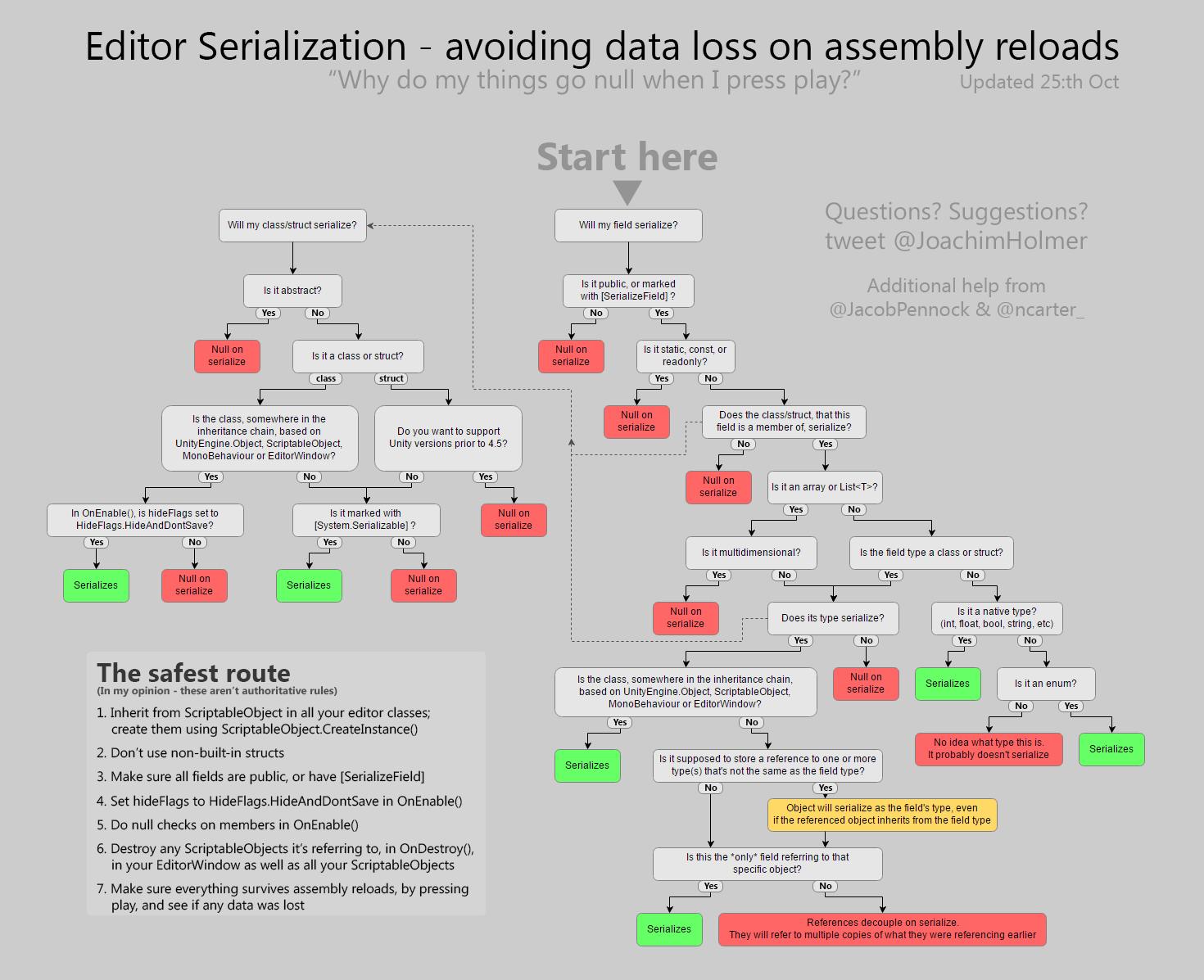


When it should be at least hidden.
prisma chasm
Anyone know if you can twiddle this via script?
visual stag
@prisma chasm
GameView
private void SnapZoom(float newZoom)```
is what you wantYup
prisma chasm
thanks!
visual stag
For future reference the way I found this was to use the GUIViewDebugger https://gist.github.com/vertxxyz/203ee44a3f0b4eab2371c74b225ff4f5
Then I used ILSpy and found out what that was calling
Then it checked whether anything public was calling it
onyx harness
@visual stag have you ever try dnSpy?
visual stag
@onyx harness nope, are the search and find reference features better? Caus that's all I really use ILSpy for, it's fast to do those few things
onyx harness
Better better, I wouldn't say better better.
But it has dark theme. 😎
visual stag
I'll give it a shot later and report back, I need to sleep first
onyx harness
Sleep well sleep well
hot crane
Is there any reason that comes to mind that parenting via script would not take when on a Prefab Stage?
hot crane
turns out I was using a dirtying method that only hit the underlying scene not the prefab stage.
 summer oyster
Hello there, I apologize for the inconvenience, but, I'm making an Editor Window, and I wondered if there was a way to use EditorGUILayout.ObjectField to accept a json file?
I'd even be ok with just getting the path of the file
Ok I guess I can use the EditorUtility.OpenFilePanel, nevermind 😄
lucid hedge
if I have this
GUILayout.HorizontalSlider(timeProgression, 0, 1);
and I want to only call a method when that slider is being dragged
should I do that with a EditorGUI.BeginChangeCheck
okay yeah that works
another question
so I have this material editor in an editor window
is there any way quick way to display the same values, but without them being editable?
like MaterialEditor.editable(false)