#↕️┃editor-extensions
1 messages · Page 40 of 1
 visual stag
because you have to add the additions where appropriate
outside, and inside v2f, vert, frag
 whole steppe
Ok, thank you!
whole steppe
@visual stag Maybe I post my shader I have started with again:
Shader "Unlit/Transparent Override Color" {
    Properties {
        _Color ("Main Color", Color) = (1,1,1,1)
        _MainTex ("Base (RGB) Trans (A)", 2D) = "white" {}
    }

    SubShader {
        Tags {"Queue"="Transparent" "IgnoreProjector"="True" "RenderType"="Transparent"}

        ZWrite Off
        Lighting Off
        Fog { Mode Off }

        Blend SrcAlpha OneMinusSrcAlpha

        Pass
        {
            SetTexture [_MainTex] {
            ConstantColor [_Color]
            Combine Texture alpha * constant }
        }
    }
}
I have looked in the builtin shader and added your lines, but nothing has changed 😅
visual stag
yeah I don't really know what those passes mean, I think you will have to actually make a vertex-fragment shader
it shouldn't be difficult to modify the Internal-GUITextureClip shader
to have a _Color property and to just col *= _Color; immediately after fixed4 col is defined in the frag function
 bronze mason
Thanks for the ideas @forest vortex @whole steppe
whole steppe
I do not really know it either 😄 But what it does, it takes the color from a fixed value and replaces every pixel of the texture with it. But the alpha values stay, So the texture gets not tinted but overridden in color. (That was my aim)
So I made the mistake to assume that I could just add your lines to my shader.
visual stag
so... just use alpha
ignore colour?
something like this: https://pastebin.com/XCQRSgji
I'm unsure why _Color is already defined in that shader's variables but not used or in properties, so it may fail in some way
(I haven't tested it, just hand edited)
whole steppe
*override color.
I tried to change the color of icons I draw in my editor, no matter what initial color they have. Tinting doesn't work, as you can't tint black icons (they stay black).
Basically:
- Ignore color of texture and replace it with given color (gets set in GUI commands for the editor with Material.SetColor(...))
- keep the alpha of the texture to keep the shape of the icon
and it's just a mistake, that _Color is already defined, please ignore this 😄
visual stag
nah I mean in the internal shader I modified
I think my edited shader should do what you want (as I said, untested)
whole steppe
Maybe it will work after I've catched some sleep. Thanks for your support! 👍
@visual stag I couldn't rest and made one more attempt. The "Unlit/Transparent Override Color" shader you've posted worked!
Sorry for the mess 😅
Thanks again and have a great day/evening! ❤
visual stag
sweet 👍
bronze mason
Is there any way to get the material under the mouse position in the scene view?
visual stag
#region PickGameObject

static GameObject PickGameObject(Vector2 position) => (GameObject) pickGameObject.Invoke(null, new object[] {position});

static MethodInfo _pickGameObject;
static MethodInfo pickGameObject => _pickGameObject ?? (_pickGameObject = sceneViewPickingClass.GetMethod("PickGameObject", BindingFlags.Static | BindingFlags.Public));

static Type _sceneViewPickingClass;
static Type sceneViewPickingClass => _sceneViewPickingClass ?? (_sceneViewPickingClass = Type.GetType("UnityEditor.SceneViewPicking,UnityEditor"));

#endregion```then get the renderer and get the shared material
you can also use:
static IEnumerable<GameObject> GetAllOverlapping(Vector2 position) => (IEnumerable<GameObject>) getAllOverlapping.Invoke(null, new object[] {position});
static MethodInfo _getAllOverlapping;
static MethodInfo getAllOverlapping => _getAllOverlapping ?? (_getAllOverlapping = sceneViewPickingClass.GetMethod("GetAllOverlapping", BindingFlags.Static | BindingFlags.NonPublic));```which will help when the first object is a canvas or something and has no material but there might be other objects behind it
all of which should be public methods but Unity hates tool developers clearly 😛
bronze mason
@visual stag thanks a lot, I'll try it
 reef crane
I didn't know that PickGameObject method was available through reflection, so thanks from me too :p
 grim monolith
Everything is available through reflection 😉
reef crane
I mean i didn't know it existed 😛 Things that don't exist aren't available!
grim monolith
Perfect, good to know. That is looking really good
 ancient sable
i call this a condition system. whenever a condition is met, a unityEvent is invoked. The source code to this will be available a bit later on.
 wispy delta
If I delete an object that is stored in a list and then undo the deletion, the serialized property for the list is updated correctly to store the "un-deleted" object, but the actual list in memory isn't updated and doesn't have the object. As soon as I change something in the custom inspector that draws the list, the serialized data is applied to the actual list but I feel like it should be updated when the undo is performed. Is this a common problem with list serialization, or have I done something wrong to create this issue?
 forest vortex
is EditorGUIUtility.TrTextContent() fairly new? I tried to install something in Unity 2017 and it says it can't be accessed due to it's protection level.
i'm not even seeing that in the docs for 2018.3
wispy delta
I thought it was internal
forest vortex

GitHub
Modified Unity Standard shader implementing Procedural Stochastic Texturing - UnityLabs/procedural-stochastic-texturing
i downloaded the latest copy of this and seems it uses it
maybe it's public in 2018.3 i'll have to see
wispy delta
on 2018.3 and yea its there
forest vortex
ahh ok
visual stag
but yeah, it appears whenever they need something in a package that they've been using for years internally as if it's normal they just expose it
forest vortex
what does it do exactly?
visual stag
it's a GUiContent cache
wispy delta
looks there's a whole set of tr methods
how is it different from storing your own guicontent?
I always create a Content class with a bunch of static readonly content for my editors
forest vortex
so what would be an alternative for using it? i'd like to have this on 2017
public static GUIContent albedoText = EditorGUIUtility.TrTextContent("Albedo", "Albedo (RGB) and Transparency (A)");
like this line for instance
visual stag
I actually also think it might include localisation of some sort in addition to caching
just new GUIContent() would do it
forest vortex
public static GUIContent albedoText = new GUIContent("Albedo", "Albedo (RGB) and Transparency (A)");
so that basically
visual stag
yup
forest vortex
ok cool, thanks
ancient sable
I found the need to have serializable Methodinfo and call MethodInfo.Invoke at least once per frame. both make no sense out of the box but using The SerializableMethodInfo.cs and SerializableTypes.cs you can find herehttps://answers.unity.com/questions/1159523/saved-methodinfo-variable-resets-on-compile.html , along with some useful info by Jon Skeet here https://blogs.msmvps.com/jonskeet/2008/08/09/making-reflection-fly-and-exploring-delegates/ and another post by Josh Twist here http://www.thejoyofcode.com/Performance_of_Method.Invoke_vs_a_Delegate.aspx . i was able to get both working nicely.
i will see if i can share a short video or image of the result
in the inspector is where i made use of the serializable methodinfo and delegates to create a system which extends UnityEvent functionaly so that i can use data from the node canvas and in parallel with the new extended event system to trigger events in the scene 😬
 cloud wedge
I'm really stuck on this, so if anyone can help, I'd appreciate it! https://forum.unity.com/threads/editor-directories-dont-work-under-an-asmdef.642130/

Unity Forum
This is basically the same question as https://forum.unity.com/threads/asmdefs-whats-the-proper-way-to-add-new-plugins-when-you-also-have-tests.642082/...
visual stag
you have to make seperate Editor-centric assembly definitions
check any of the other packages for an example of this structure
cloud wedge
are there official docs about this? I'd like a thorough understanding. Because it seems to me that as soon as I create my first asmdef, it "pollutes" the project, and if I install new libraries, I have to find the Editor directories in there and copy them over to my "Editor-centric" asmdefs
visual stag
if you have content under an assembly definition that controls the assembly it ends up in, that's all it is
cloud wedge
I'm a little confused by that statement, but all my production code is in an asmdef, and it seems like that means it can only access other code that's also in an asmdef that is referenced
so if I install a library/package, my production code can't use it, unless I put the library/package in an asmdef, too
am I doing this wrong?
"check any of the other packages for an example of this structure" I get what you mean now. Open the package directory and look around
ok I'll give that a shot
ah ok, this kind of makes sense
visual stag
Code not in an assembly definition will be able to use an assembly definition's contents, assembly definitions can reference other assembly definitions - but I don't think code under an assembly definition can reference general project code
cloud wedge
so I guess it's a convention for every package/library to have its editor stuff in its own asmdef and its production code in another asmdef
visual stag
I might be wrong on that one though. But yes, that's the convention now, an Editor and Runtime folder
cloud wedge
yeah that's what I'm finding, too
visual stag
with two assemdefs
cloud wedge
ok cool. So I'd have three I suppose: Editor, Runtime, and Tests
visual stag
Yep
cloud wedge
here's something that confuses me: I have a TextMeshPro dir under packages, and another one under Assets. The one under Assets doesn't seem to follow this convention, but it has a Resources dir that stores the settings for the whole project.
I don't really get how this will work when setup correctly with respect to TMP. I think there'd be issues accessing those settings
whatever, I probably have enough info now to figure it out on my own
thanks a lot for the help
visual stag
The Packages directory is read only, TMP deploys the scriptable objects and settings to the project
It likely doesn't deploy any code
If you reference the assmdefs in the Packages dir that is the code for the settings objects and therefore you can reference them properly
cloud wedge
so the scriptable object in the assets dir doesn't count as code?
the settings seem to be a scriptable object
visual stag
It's an asset based on the code
cloud wedge
ah so it doesn't follow the asmdef rules that code would, I'm inferring
visual stag
Seeing as it's not code it doesn't get compiled or put into an assembly, just the code it's based off does (which remains in the package)
cloud wedge
now I've got this tricky situation. Every time I install a library, I've been copying its editor directory into my Assets/Editor to get it to compile cause I didn't have this information. Is there a way to say, "reinstall all the dependencies?"
or better yet, reinstall this ONE dependency
visual stag
Non-packaged libraries are just files, this is why we're moving to packages
To avoid issues like these
cloud wedge
hm
I'm taking that to mean, "it depends how the dependency installed itself"
well, fortunately (unlike most devs), I have a thorough test suite, so I can try this and see if I break anything
visual stag
It just unpacked the files, nothing more, there are no dependencies in old asset structures other than the ones code requires to compile, which is not what you mean
cloud wedge
there's one thing that makes me weary: I have this file in Assets/Editor called PostprocessBuildPlayer. Is that a unity file? Should I keep that one around?
visual stag
No idea sorry. I've got to head off, good luck :)
cloud wedge
thank you for your help!
 bleak wolf
Hi everyone, I'm trying to do a simple something that looks not implemented yet with the new prefab workflow - while inspecting a gameObject, I need to know whether I'm in the regular scene, or editing a prefab (in prefab mode). I thought there would be a relevant getter in the PrefabUtility class, but apparently that's not the case :(
Did anyone encounter this as well? Thanks a lot
Also, PrefabUtility.GetPrefabAssetType() returns the same result (PrefabType.NotAPrefab) for original objects and mere non-prefab objects, so it can't help either
ancient sable
@lucid hedge , i did
cloud wedge
I could not get this thing working yesterday
no matter what I did, the Fungus editor scripts were looking for classes in parent directories that they couldn't find
I made a Fungus.Runtime at the root, and a Fungus.Editor in the Editor subdirectory. I made the Fungus.Editor depend on Fungus.Runtime, but I still got the error that I need to move certain editor classes to Assets/Editor
forest vortex
asmdef setup gave me nightmares
someone showed the other day that coming in 2019 version they add some more asmdef features that should make it a bit easier.
Scripting: Added support for Assembly Definition Reference Files (asmref). These allow for adding additional source code directories to an existing Assembly Definition File (asmdef).
but will have to wait for that
Basically what I ended up doing is putting asmdefs where i could, and then putting one in the root of the assets folder as a 'catch all' for everything else
so probably 50% is all in one assembly but at least it all works
and i get some benefit
visual stag
@bleak wolf https://docs.unity3d.com/ScriptReference/Experimental.SceneManagement.PrefabStage.html is the class you are looking for
https://docs.unity3d.com/ScriptReference/Experimental.SceneManagement.PrefabStageUtility.html
@forest vortex if you put one in the root of the assets folder you're nullifying any Editor folder that is in the project as they'll compile to the target specified in the above/beside assmdef
forest vortex
right, that was the point
i can't give every folder an asmdef, there's too many interdependencies
so i let half the project just be compiled into a huge glob as if i wasn't using asmdef at all
i only separate out the parts that are truly self containted and can support that
visual stag
And moved all the Editor scripts you probably have to another location?
forest vortex
yes editor scripts are with their respective packages
i don't try putting them all in one folder
visual stag
By packages are you meaning folders under Assets, or are you actually using Packages for all external APIs?
forest vortex
yes by packages i mean folders
visual stag
And you created Editor platform assembly definition files for each of them and linked them to an assembly definition for each "package"? Because as I said, your root Assembly Definition will nullify all the Editor folders
forest vortex
no i don't make files for the editors specifically. just for the whole package/folder
visual stag
Well, attempt to make a build and any Editor code that is not under its own Editor-platform compiling assembly definition, but is under another platform (no matter whether it's in a folder called Editor) will cause the build to fail
forest vortex
every editor is with it's package so it has that packages' asmdef
and anyway editors aren't included with builds
so i don't see why it would be an issue
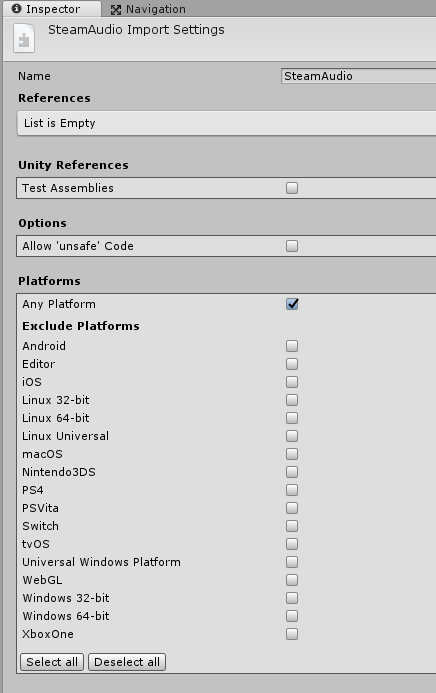
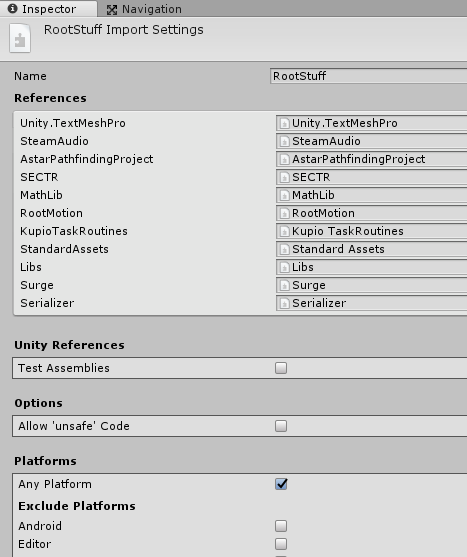
for example, steamaudio is self contained so it gets it's own asmdef
 visual stag
And any Editor code it has will attempt to be compiled for a build under "Any Platform" and Unity will throw the classic errors about editor code being in the build
forest vortex
but these packages are too interdependent, they all call each other back and forth so they are all in the 'root'
you could be right, I've never tried to build since i added them
let me give it a shot
yeah i guess this is so. I get a lot of missing assembly reference errors
and most are editor scripts complaining
```Assets/_Shaders/Lux 2.02 Plus/Lux Scripts/Editor/HelpDrawer.cs(5,31): error CS0246: The type or namespace name `MaterialPropertyDrawer' could not be found. Are you missing an assembly reference?
for instance
visual stag
The errors with Assembly Defs are likely less verbose than the old ones - I imagine it's because UnityEditor doesn't exist in the build context
forest vortex
so you have to put an asmdef in the editor folders too?
i'm about to give up on these things, they are too crazy to deal with
visual stag
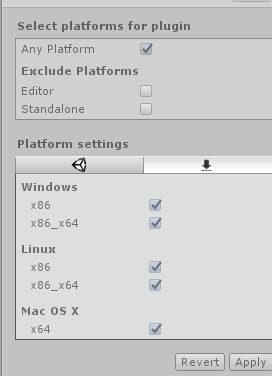
Yeah, look at a Package's structure - not sure when Unity Timeline became a package but it's a good example
 visual stag
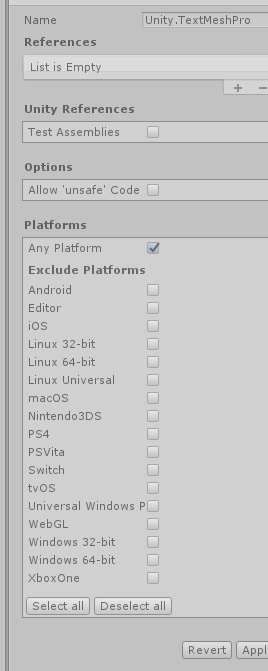
It's more that all the Editor code is underneath an Editor-only assembly defintiion
 visual stag
everything else is under everything because it can be used under both
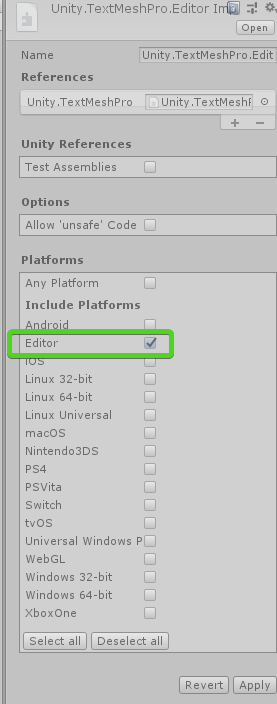 visual stag
I think the easiest way to transition to assembly defs is to just use it for code you think is self contained, package it up, and then keep everything in the root Assembly-CSharp.dll "Assets" context
forest vortex
and it references the build asmdef
visual stag
ye
unless you want to manage assembly definitions for every single external API that is not a package, It'd be difficult to move your entire project
forest vortex
guess i'll have to do some more work on it then
visual stag
the more things become packages the easier this will all become
forest vortex
yeah it's mostly my own code that's the problem heh
i have a lot of systems that could potentially be separate, but i tend to love just pulling things in and using them
until the point everything is itnerconnected
it's not bad in itself, it's when it gets circular
where a is using B and b is using A
you can't set up asmdef for that, it complains of circular references
why i gave up and just made them all one big default heh
visual stag
I really do wish assemblies and compilation just worked in an intuitive and non-irritating way
but sadly we live in the hell world
forest vortex
yeah it's better than nothing i guess
 distant atlas
Is there a way to tell Unity to ignore certain properties like the transform of certain game objects when it comes to detecting overrides of a prefab? these are bones and I'm animating the prefab instance in the editor, it's just noise to me that it's reporting overrides on these. I'm hoping it has something with the same concept as a .gitignore file
looking at it again, it looks like there's no difference between the two values, so it looks like it's just floating point error
bleak wolf
@visual stag thanks a lot! This seems to be it
 lucid hedge
are propertyfields used for when you 'don't know' the type of the variable?
Because I have a list of variables and I don't know their Type
and I want to display them
visual stag
they are used for displaying serialized types using their inbuilt or extended property drawers
doesn't matter if you know their type or not
lucid hedge
Alright so I could use them for this purpose then
visual stag
So effectively yes
visual stag
Just imagine a PropertyField as how the inspector displays all serialized types by default
so yes
visual stag
you should really be using them all the time, only when an inspector needs something custom that a PropertyDrawer couldn't do do you not use them
in the context of drawing fields of course
lucid hedge
Yeah I use them all the time to draw fields. Just wanted to make sure that I understand them correctly
 digital spoke
I want to make a small editor tool that'll automatically add a namespace to all of my scripts in my script folder.
Basically, all I want to do is:
Loop through script folder and all children folders of it
Add a namespace definition(?) to each script based on it's parent folder. eg: 'PlayerController' inside a folder called Player would get a namespace called Game.Player
How can I edit a .cs script programmatically to do something like this?
distant atlas
is there a way to make PropertyDrawers like this, showing a custom tooltip that's being drawn above the properties below it, this is just a photoshop edit. anything I draw always gets drawn below the succeeding properties
visual stag
Are you manually drawing this tooltip?
because tooltips should not do this
Use the built-in tooltip functionality enabled with GUIContent
visual stag
Otherwise you need to draw your tooltips after drawing all the other content, which you cannot do with a property drawer
at least, not without some major major hacking
grim monolith
You can use an EditorWindow for your tooltip. That way it's drawn above everything, but you need to do all the logic for it
Here's my implementation in one of my assets
distant atlas
hmm I'll see if EditorWindow.ShowPopup will work
visual stag
There is an internal ShowTooltip method that might be more suited if you can't get that to work out
distant atlas
I actually managed to make it work, thanks @visual stag, @grim monolith !
visual stag
👌 what was the reason you couldn't just use inbuilt tooltips btw?
distant atlas
definitely had to use ShowTooltip, ShowPopup would steal the window focus
visual stag
Good to know
grim monolith
Yeah, I thought you wanted to use some custom window, why you didn't want to use the default one?
distant atlas
I just hate it, it doesn't always show up, look at the 2nd time I try to bring my mouse to the "Bounce Threshold" property here
had to shake the mouse before it even recognized
visual stag
Hm, I suppose - It's one of those small things I barely notice 😛
I wonder if the UIElement tooltips are much better now hover support is a thing
I should run a test some time
distant atlas
and sometimes I'm never sure if a property actually has a tooltip or not, so I leave my mouse on a label waiting for a tooltip that I'm not sure will show up
grim monolith
Well, that's what editor scripting is for to make our life easier. So kudos to you for making it work
visual stag
Well that part you could solve with your icon having a default style tooltip
but yeah, it's good to even fix these small problems when you can
grim monolith
That's one of the things I love about Unity, how easy is to modify the inspector for anything in any way you want
visual stag
Me too - except that they go and make so many wonderful things internal 😛
distant atlas
very true
grim monolith
True, at least we have reflection
visual stag
I feel like a god now UIElement is a thing
I can inject UI into anything at any time
now when we have the new inspector I'm hoping it'll just become an extremely natural thing
grim monolith
Yeah, that and that with packages they keep giving us more and more source which has helped me a lot
visual stag
now they have less and less reasons to write C++ code in general editor modifications and understanding implementations is just getting easier and easier
 tardy kernel
This class is serializable. Why doesn't Unity respect default values set in script? For example by default this checkbox is TRUE in script.
Why isn't this the case here?
 light bluff
Probably because you changed it in the editor
distant atlas
has it compiled a 2nd time already? that instance will keep the value it already has instead of using the default value because it's been instantiated already
tardy kernel
I don't think you understand.
If I create a class under the monobehavior and set default values (again under the monobehavor script) they preserve like they are set in script.
This object (mra on the screenshot) is NOT the part of monobehavior. Is just a regular class that has [Serializable] on top. Then this class is used in ANOTHER monobehavior class. You can see that this object has a little arrow so it expends its values in the inspector.
No matter what values I set to default in script.. Unity won't populate any of it. Strings are empty, ints are zeros, checkboxes are unckecked.
Again this is not the case if the class is directly part of monobehavior but this is just a regular - serializable class.
visual stag
If it has serialized once at all on that object and in that location then those values are the ones that it will use
this is what the others are trying to explain
if the path to the variable is the same then the value will be deserialized from the representation on disc
You may be able to test it by Resetting the script
or adding it to a different object
if you still have the issue then 🤷
wispy delta
When using ui elements, in what case should I use uxml/uss vs creating visual elements from c#? Does it not really matter?
 waxen sandal
Depends what paradigm you're following
With MVVM you shouldn't touch the view from C#
But that's kinda hard to do in Unity since you can't bind to everything
visual stag
It doesn't matter, it completely depends on what you're comfortable with
I am not embracing uxml, but I enjoy uss because the syntax is similar to the C#
if I was working with artists I would likely use uxml
but me myself, I don't want it and I dislike the workflow so I'm sticking with what I'm comfortable with
uss has the flexbility of runtime modification, and also the styling being completely seperate and usable across multiple controls in a consistent way
I find C# is already good enough for reusing controls, but it lacks the niceties when it comes to unfied styling
of which uss is good for
distant atlas
I've always just been using the classic and messy immediate mode UI and now I'm curious about this UI elements 😬
visual stag
it's only worth using if you're using 2019.1+
before then it's experimental and the APIs are slightly different
ancient sable
I want to jump into using Ui elements but i need to complete my imgui editor tools first 😕
waxen sandal
Sssh, just rewrite them into UIElements
ancient sable
i cant reshape the ui of my current project yet but I'll probably open up a new project and slowly build up there
forest vortex
hmm, first I ever heard of UIElements. I'll have to look into it when 2019 drops
Is this an industry standard system, or just another form of Unity-custom UI?
(and why isn't there an industry wide system for UI design, there really should be)
we have industry standard formats for models, textures, sounds
should be the same for UI layout
Maybe Unity can lead the way heh
making the format XML is a good first step
wispy delta
thanks @visual stag I'm starting to use it finally and its really cool. I still feel like I'm doing some stuff wrong though. I'm not sure if I'm connecting visual elements to properties correctly. I set it up so the property updates in OnValueChanged but then if the property is changed somewhere else, the visual element will be out of sync. I saw there was a some bind method, but it looks like it takes a serialized object, which I may not always want to use
ancient sable
I use my own API in parallel with the unityEditor gui to draw my editor ui. The api i use seems far more flexible but not as fast as UI elements. if you check my storyteller asset ui you can see the result .
my big problem with imgui is how slow it is.
and the garbage collection that you need to handle sometimes.
wispy delta
Another small thing: every time I want to make a float field I have to create a visual element and add a label and float field to it. I guess I could make my own class that encapsulates that, and the extra control is nice, but it seems kinda tedious to have to write 30 lines of code every time I want to draw a float field. Maybe I'm missing something. I still think the api is super cool so far, I just need to use it more I think
ancient sable
i think it needs to mature more. i could be wrong. i will find out more once i try it out instead of looking at examples
forest vortex
once someone makes a proper WYSIWYG editor for it, it will be a breeze
imagine just plopping down fields and moving them into place how you want, it spits out the UXML and all you have to do is drop that into your project.
wispy delta
some dude just made a pull request on my transform editor that converted my two 36x36 editor textures into a base64 encoded strings so that they didn't get added to builds lmao. I feel like I have to merge just to pay respect
visual stag
@wispy delta jesus just use the asset database, christ
wispy delta
that's what I'm going to tell him haha
visual stag
give me a moment to find a PropertyField example
PropertyField propertyField = new PropertyField(assetItem, null);
propertyField.Bind(assetItem.serializedObject);
lRoot.Add(propertyField);```just randomly from my code
wispy delta
ooh ok. of course there's a property field visual element!
that makes things much easier
visual stag
also they released a UIElements Example window (2019.2?) that might be worth looking at
wispy delta
I was looking at a window example from Unity, but I think it was old. A lot of the stuff they were doing was deprecated or completely changed. Can you link me to the one you found?
wispy delta
coolio I'll check it out, thanks 👍
 gloomy chasm
Anyone know if there is a way to draw in the scene from a property drawer?
 digital void
You could potentially attatch code to SceneView.onSceneGUIDelegate from your propertydrawer
gloomy chasm
Yeah, that is what I was thinking too. But no luck
digital void
:/ is it even supported anymore? I looked it up on in the scriptingAPI and cant seem to find it on the SceneView class
gloomy chasm
Yeah, afaik
whole steppe
i'm trying to show a preview of a sprite in my property drawer, but it only shows the sprite if my mouse hovers of the window. If I move the cursor out of the window, it just shows an empty box.
This draws the object picker for the sprite csharp sprite.objectReferenceValue = (Sprite)EditorGUI.ObjectField(spriteRect, GUIContent.none, sprite.objectReferenceValue, typeof(Sprite), false);
cloud wedge
hello, I'm still stuck trying to make sense of asmdefs. I've installed Fungus, and it puts everything in my assets folder. It takes a long time to compile, so I want to put it in an asmdef. If I do, I get errors about the Fungus editor code not being in a correct Editor folder or whatever, so I put an asmdef in the Editor folder with only editor checked and all the errors go away. But once I create an instance of a Fungus flowchart, I get this error:
Those files are in my Fungus Editor directory with the asmdef that only has Editor checked
why is it saying it SPECIFICALLY has to be in Assets/Editor?
fine, whatever, I move all those classes to Assets/Editor and it fixes the issue
But my understanding is I shouldn't have to do this. Can anyone tell me what I'm doing wrong?
forest vortex
i don't think you're doing anything wrong, as much as the writers of Fungus did something strange.
I guess the way they wrote it you can't move it to a new folder
cloud wedge
ok I was starting to come to the same conclusion, because the explanation I got here earlier made perfect sense and I thought I understood it, but when I tried it didn't work
thank you
can I say that unless there's a gatekeeper for packages (like there is for iphone apps), I think it's really dangerous to have all libraries move in this direction. People like the fungus guys will create their libraries incorrectly and if they're packages, I can't fix their code.
It's because the fungus guys didn't create a package that I can fix their mistakes
if this same code was a package, I'd be screwed and have to delete all asmdefs in my project
and then their library would prevent my ability to write tests
distant atlas
@cloud wedge the error message is probably just badly worded, because any folder named "Editor" should work. you could put a subfolder inside Fungus named Editor and move the files there and it should work too
distant atlas
in that case, I usually just create a separate asmdef that compiles to editor only and put editor-related scripts there
visual stag
which is what they said they did
@cloud wedge I expect you've done something I've done very often which is tick all platforms which means it becomes "exclude platforms"
so you've likely created an assmdef that is excluding Editor and not exclusively including it
distant atlas
I mean, you don't need the folder to be named Editor anymore in that case, the asmdef ensures the scripts inside it only go to the editor assembly
what I mean is two asmdefs, one for editor scripts and another for everything else
cloud wedge
@visual stag i don't think so. I can show you every one if you want
@visual stag actually, you might be right... I tried to put it back the way it was and things worked
cloud wedge
@visual stag I must have been doing that over and over again, because once I paid attention to that detail, everything started working the way I expected. I think this UI could be more clear by having a dropdown/radio button that lets you pick "Include" or "Exclude." Since you have the problem yourself sometimes, do you know if there's a feature request to do something like that? If not, should I create one?
visual stag
I'll create one now
visual stag
@cloud wedge I've made a report, so we'll see what comes of it in due time
 bright crow
2018.3.6f - New prefabs workflow question:
Prefab contains scripts with OnValidate logic.
Each time anything is saved(scene, other prefabs, etc) it calls reimport of all prefabs with OnValidate logic.
Also link to this prefabs(stored in scriptable object) is lost from time to time.
Any ideas what's going on?
gloomy chasm
I am trying to lerp a scene view Handles object position over time. But I am just completely blanking on how to do it and can't find it online. Anyone got any ideas?
wispy delta
You'd probably wanna hook into the EditorApplication.update delegate
wispy delta
I believe you can use Time.time in the editor, but if that doesn't work you can use EditorApplication.timeSinceStartup
gloomy chasm
Ah, using EditorApplication.timeSinceStartup worked. Thanks @wispy delta
cloud wedge
@visual stag neat, thanks
 nimble stag
    {
        for (int i = 0; i < m_Levers.Length; i++)
        {
            if (m_Levers[i].GetComponent<LeverAnimationCode>().LeverState == m_LeverStates[i])
                return false;
        }
        return true;
    }```
What I do wrong? 😄
CtrlV.cz nabízí nejrychlejší ScreenShot a PrintScreen online jen pomocí webového prohlížeče a to bez doplňků.
 prisma chasm
you're assuming m_Levers.Length and m_LeverStates.Length are the same size
oh nevermind you have the prefab there
prisma chasm
Log out m_LeverStates.Length and confirm
nimble stag
Yeah I see ... I have script assigned on another object and the size is 0, I forget declarated ...
 surreal quest
Anyone know in a custom editor if you can display a variable as it would be defaultly shown if you just have the variable?
I have a class that I'm making an editor for, that class has a scriptable object variable passed in from the inspector. I want to show a very specific variable from that SO but I'm not sure how, I've gone through a couple things that haven't seemed to work
grim monolith
Did you tried using SerializedProperty.FindPropertyRelative?
visual stag
A little confusing a question but you get the appropriate SerializedProperty and then use a PropertyField which will display that how the editor usually does
surreal quest
That didn't work, but I did find a solution
I was able to create a new SerializedObject based on the SO I needed
I am having this issue where GuiLayout is putting it not quite correctly fitting in the BeginArea
 maiden blade

GitHub
A Unity Editor Plugin that analyzes your project and displays how much space files take up specified by custom categories. - norseware/VikingReSize
Code is fully commented, enjoy picking apart the editor code if you want - to see how some things are done.
maiden blade
GitHub
A simple Unity Editor tool that can extract files from almost any archive type. - norseware/VikingZipIt
surreal quest
Long shot, and I couldnt find anything on it, but I don't suppose theres a good way to have GL drawing work properly in a ScrollView for a custom editor
Anyone have any idea why in my custom editor, even tho im reserving a EditorGUIUtility.GetRect with a width higher than the inspector width, the horizontal scrollbar doesnt automatically show up?
whole steppe
I think you have to use BeginScrollView/EndScrollView. Not sure https://docs.unity3d.com/ScriptReference/EditorGUILayout.BeginScrollView.html
wispy delta
@surreal quest Try passing GUILaout.Height. Sometimes the layout overrides the rects size
surreal quest
Yeah did. I ended up giving up lol
 unkempt sleet
Hi 😃 First time posting here for my first C script of my life. Context : I'm trying to get a more structured material editor for my custom shaders.
So I have 2 different lines of code , one for the text , one for the texture slot.
The thing is I would like to get them next to each other, is there a way ?
Here is the lines :
    materialEditor.TexturePropertySingleLine(textureLabel, ColorTexture);```

Thanks you in advance for any light on the subject@unkempt sleet
GUILayout.BeginHorizontal();
GUILayout.Label("Color Texture", labelStyle);
materialEditor.TexturePropertySingleLine(textureLabel, ColorTexture);
GUILayout.EndHorizontal();
unkempt sleet
Oh , yes ! That works well. Thank you. ♥
visual stag
Use the scopes people! They're much clearer blocks, and enforce disposal.
https://docs.unity3d.com/ScriptReference/EditorGUILayout.HorizontalScope.html
https://docs.unity3d.com/ScriptReference/EditorGUILayout.ScrollViewScope.html
 green shoal
I need my ObjectField to get anything that inherits from an abstract class, if I just put said class in the type it just does not work, I was tryng something with monoscript but couldn't get the object with the right type doing so, just the monoscript object.
I don't know what to do, can someone help ?
visual stag
can you post your code attempt
Is it the code that doesn't compile or the object picker that fails to do what you need it to?
green shoal
I figured I was trying to do the wrong way, the object picker needs an instance, it was way easier to instantiate my script than get a reference to where the script is and then instantiate it. Should've figured it before, I lost a lot of time trying to do something unecessary
visual stag
Oh yeah, you definitely cannot pick certain scripts with an ObjectField. It's only for instances
green shoal
I was trying to make the object look cleaner while on inspector so the "manager" where I was trying to put the script reference instantiated everything at the start of the game, but it just took a lot of time and I could've made it take all it needed from child Objects, my OCD screws me up sometimes
 real ivy
Hi guys, i've researched this through many forum threads/answers but, for some reason the changes i do to a variable in an editor script doesn't get saved/dirty'd. Even selecting another thing then back to the object with the editor script, the change's back to initial value..
The difference with mine is,
this is a normal variable IN the editor script
public class TheEditor : Editor{
    [SerializeField] string currentName;

    void OnEditorGUI()
    {
        currentName = EditorGUILayout.TextField("Name: ", currentName);
        if(GUI.changed)
        {
            // Tried EditorUtility.SetDirty(this),
            // UnityEditor.SceneManagement.EditorSceneManager.MarkSceneDirty(UnityEngine.SceneManagement.SceneManager.GetActiveScene());

        }
    }
}```Yeah it wont get saved like that
You can use EditorPrefs tho
private string currentName;

void OnEditorGUI()
{
    currentName = EditorPrefs.GetString("CurrrentName");
    currentName = EditorGUILayout.TextField("Name: ", currentName);
    EditorPrefs.SetString("CurrentName", currentName);
}
Thx yep found this: https://forum.unity.com/threads/custom-editor-variables-not-saving.513406/
Unity Forum
I am creating a custom editor. Variables do not seem to save when entering play mode or when recompiling scripts. The unity documentation is very...
Haven't tried EditorPrefs but i think i can't use it. It'll have more than 1 instance MB
surreal quest
Well each instance should have some kind of id right? So you know which one is which? So you use the Set/Get string with that id
real ivy
I'll try that later, thanks.
I ended with these variables in the Editor script because before i couldn't get
bodyName_prop = soTarget.FindProperty("bodyName");
to work, because it was in OnEnable. Moved it to beginning of OnInspectorGUI and it seems to work but... when i button to call a function in the "target" to update bodyName there and do this after
EditorGUILayout.PropertyField(bodyName_prop, new GUIContent("Body Name"), false);
it seems to show the correct values only when i repeat that button 3x?
i did soTarget.ApplyModifiedProperties();
right after the if(button), and/or at the end of the OnGUI. I just don't get why the 3x button to get the correct values in inspector...
real ivy
Ok i think i got whats wrong, finally pinned it down
Was using GUI.Popup to an index property.
After if(GUI.changed) i should always .ApplyModifiedProperties before using what's changed further. Explains why i change index from Popup but it goes to the wrong index.
Still can't understand why it goes to the "right" index after 3x tho, but it works now so ok
visual stag
@onyx harness out of interest how did you go about drawing your UI? Is there a way to make Editor Windows transparent?
visual stag
ah
the only other way I can think of doing it is the method where you get the screen pixels and use them as a background
 onyx harness
You must play with Window handles parameters, and toying with them to let them allow you to draw transparent stuff
visual stag
but it's inflexible
onyx harness
I thought about that, but whenever the background is changing/dynamic, the magic is gone
onyx harness
It would have worked, if we could capture the editor without any sub-windows, but after the first capture, we are stuck
I never targetted Mac, that's maybe why it never really hit me
visual stag
I think you can't really do that with an editor release sadly - the only other tool I imagine that can do it is that editor fullscreen one
Maybe if you had a fallback for mac it'd be alright
get rid of the lines and make each option a seperate editor window 🤣
onyx harness
One of my main problem is a don't own a mac, so I just cant implement for them
Don't laugh, I thought about tricking like that
onyx harness
But I really wanted to have complex shapes, and not just rectangles 😃
If I continue the prototype, I can drop you the code, so you can see the mess behind the scene
visual stag
The other way you could do it is the absolutely dumbest way you could do it and it's kinda cracking me up
and that's injecting UIElements into the base of every window you want to draw on (multiple windows if something crosses the border) 😆
onyx harness
Injecting your UI into others? Can we? (I work on Unity 5.6)
onyx harness
Theoretically, doable, but you will run into so many sync problems XD
visual stag
UIElements have hover states so it'd probably be fine - but it's an awful idea that... I kinda wanna try as a joke
onyx harness
Keep me in touch, it sounds fun
Hum...
I'm not 100% sure, but if I remember well, we can draw GUI among many windows no?
visual stag
what do you mean?
IMGUI can only really be put inline in code
UIElements can be put anywhere you have access to
seeing as they have state
onyx harness
If I draw GUI in a EditorWindow, I can (not sure) "overflow" on a side EditorWindow
I've seen this few years ago on one of my script, I was surprise, maybe it was a bug
visual stag
I don't think you can draw over the edge of a panel... though actually there is a clipping shader that the UI uses
I wonder if you remove it whether it's still just constrained to the window
I assume it is
onyx harness
hum...
visual stag
the only time I've seen it screw up is with the Preview under the Inspector
but I assume that is a part of the inspector and so the overflow only happens onto the inspector and nowhere else
onyx harness
Well, they share the context
yep
(@visual stag Out of context, I PM Blaine to request a Asset Store Publisher rank, he replied to send a screenshot of my dashboard which I did, but got no more reply, I guess I should recontact him again?)
visual stag
He's probably just out, give it a day if he's not got back to you by then ping him again
cloud wedge
I have this class:
using System;
using System.Collections;
using System.Collections.Generic;
using UnityEngine;

[Serializable]
public class CharacterAccessory
{
    public string name;
    public SpriteRenderer[] spriteRenderers;
}
and this Drawer
using System.Collections;
using System.Collections.Generic;
using UnityEditor;
using UnityEngine;

[CustomPropertyDrawer(typeof(CharacterAccessory))]
public class CharacterAccessoryDrawer : PropertyDrawer
{
    public override void OnGUI(Rect position, SerializedProperty property, GUIContent label)
    {
        EditorGUI.BeginProperty(position, label, property);

        var indent = EditorGUI.indentLevel;
        EditorGUI.indentLevel = 1;

        var nameRect = new Rect(position.x, position.y, 150, position.height);
        var spriteRenderersRect = new Rect(position.x + 155, position.y, position.width - 155, position.height);

        EditorGUI.PropertyField(nameRect, property.FindPropertyRelative("name"), GUIContent.none);
        var labelWidth = EditorGUIUtility.labelWidth;
        EditorGUIUtility.labelWidth = 50;
        EditorGUI.PropertyField(spriteRenderersRect, property.FindPropertyRelative("spriteRenderers"), new GUIContent("Sprite Renderers"));

        EditorGUIUtility.labelWidth = labelWidth;
        EditorGUI.indentLevel = indent;

        EditorGUI.EndProperty();
    }
}
How do I get the Sprite Renderers to look normal?
it looks like this:
waxen sandal
I think you have to use something like https://docs.unity3d.com/ScriptReference/Editor.CreateEditor.html
cloud wedge
so PropertyDrawers don't work if you've got an array in your property?
waxen sandal
I don't think unity inlines custom editors in property drawers
cloud wedge
yeah I think you're right: https://answers.unity.com/questions/1585678/how-to-edit-arraylist-property-with-custom-propert.html
Unity is the ultimate game development platform. Use Unity to build high-quality 3D and 2D games, deploy them across mobile, desktop, VR/AR, consoles or the Web, and connect with loyal and enthusiastic players and customers.
visual stag
@cloud wedge pass true to your property field to draw child properties
cloud wedge
@visual stag wait so is it that the thing I found was out of date and this is a new feature?
visual stag
No idea, I didn't read it
Seems like that person just doesn't know what they're doing to be honest - but if passing true doesn't work then I'm mistaken
cloud wedge
it works!
but the height stays the same, so the text overlaps
I think there's some function I'm supposed to override to fix that
visual stag
Yup you have to calculate that yourself. Yeah
cloud wedge
seems tough, but I'll look into it
this works:
    public override float GetPropertyHeight(SerializedProperty property, GUIContent label)
    {
        SerializedProperty nameProperty = property.FindPropertyRelative("name");
        SerializedProperty spritesProperty = property.FindPropertyRelative("sprites");
        float totalHeight = 0;
        totalHeight += EditorGUI.GetPropertyHeight(nameProperty);
        totalHeight += EditorGUI.GetPropertyHeight(spritesProperty);
        return totalHeight;
    }
well, there's a little gap between each row and I don't understand why, but I'm ok ignoring that
I don't know why my google-fu is so weak.. Can someone help me with this? I'm trying to find a GO and set its active state, but I can't find an example of doing so:
using System.Collections;
using System.Collections.Generic;
using UnityEngine;
using UnityEditor;
using UnityEngine.SceneManagement;

public class UpgradeSceneMenuItems
{

    [MenuItem("Tools/Upgrade Scene/Main Menu")]
    private static void MainMenu()
    {
        //what do I do here?
    }

    [MenuItem("Tools/Upgrade Scene/Main Menu", true)]
    private static bool MainMenuValidation()
    {
        Scene currentScene = SceneManager.GetActiveScene();
        string sceneName = currentScene.name;

        return sceneName == "Upgrades";
    }

}
Can I just use GameObject.Find?
prisma chasm
yep
cloud wedge
it didn't seem to work
prisma chasm
GameObject.Find() won't find inactive objects fwiw
cloud wedge
good point. But in this case it's active
prisma chasm
FindObjectsOfTypeAll will
cloud wedge
this log statement gave me a NPE:
using System.Collections;
using System.Collections.Generic;
using UnityEngine;
using UnityEditor;
using UnityEngine.SceneManagement;

public class UpgradeSceneMenuItems
{

    [MenuItem("Tools/Upgrade Scene/Main Menu")]
    private static void MainMenu()
    {
        var mainMenu = GameObject.Find("MainMenu");
        Debug.Log($"mainMenu={mainMenu.name}");
    }

    [MenuItem("Tools/Upgrade Scene/Main Menu", true)]
    private static bool MainMenuValidation()
    {
        Scene currentScene = SceneManager.GetActiveScene();
        string sceneName = currentScene.name;

        return sceneName == "Upgrades";
    }

}
here's my hierarchy:
oh wait! It is inactive
I'm sorry. Normally it's not. That's the whole reason I'm making this script
prisma chasm
👍
 gleaming zenith
Anyone has an idea on how to speed up the PrefabUtility.SaveAsPrefabAssetAndConnect call? I have to save multiple prefabs (~1000) and this takes very long because the method is so slow.
visual stag
why on earth are you creating so many prefabs
If you want to just save a prefab call SavePrefabAsset
it'll still take a while
gleaming zenith
We generate a world and create dummy prefabs for every object that is created so you can modify the objects prefab and all 100~1000 instances get updated (default use case of a prefab)
We are generating a huge world.
~200km^2
visual stag
Dummy prefabs for every object? I'm confused, surely these objects are prefabs beforehand, and then they're in the scene - why do you need to prefab them again?
The explanation isn't clear to me, sorry
gleaming zenith
We generate a new scene with new objects and new assets
*multiple scenes
When we can find a fitting prefab for the object we instantiate a prefab for this object. If we cannot find a fitting prefab we create a dummy object and make it a prefab
visual stag
well, saving prefabs requires import of the assets and this is slow, not sure about the connecting part anyway. The actual method that does all the work is internal so save a miracle you're stuck with it. If you need better performance I'd make a bug report or a thread on the forum detailing your use case. Because even though you've explained it to me I still find it weird as heck
gleaming zenith
It is weird but it is what our customer want.
cloud wedge
can anyone explain to me why there's a gap above the checkboxes? Even without the checkboxes, that gap is there:
[CustomPropertyDrawer(typeof(CharacterAccessory))]
public class CharacterAccessoryDrawer : PropertyDrawer
{
    public override void OnGUI(Rect position, SerializedProperty property, GUIContent label)
    {
        EditorGUI.BeginProperty(position, label, property);

        var indent = EditorGUI.indentLevel;
        EditorGUI.indentLevel = 1;

        SerializedProperty nameProperty = property.FindPropertyRelative("name");
        SerializedProperty spritesProperty = property.FindPropertyRelative("sprites");
        SerializedProperty topProperty = property.FindPropertyRelative("top");
        SerializedProperty bottomProperty = property.FindPropertyRelative("bottom");

        var yPosition = position.y;
        var nameRect = new Rect(position.x, yPosition, 175, EditorGUI.GetPropertyHeight(nameProperty));
        var spriteRenderersRect = new Rect(position.x + 180, yPosition, position.width - 155, EditorGUI.GetPropertyHeight(spritesProperty));
        yPosition += EditorGUI.GetPropertyHeight(nameProperty) + EditorGUI.GetPropertyHeight(spritesProperty);
        var topRect = new Rect(position.x, yPosition, position.width, EditorGUI.GetPropertyHeight(topProperty));
        var bottomRect = new Rect(position.x + 80, yPosition, position.width, EditorGUI.GetPropertyHeight(bottomProperty));

        EditorGUI.PropertyField(nameRect, nameProperty, GUIContent.none);
        EditorGUI.PropertyField(spriteRenderersRect, spritesProperty, true);
        var labelWidth = EditorGUIUtility.labelWidth;
        EditorGUIUtility.labelWidth = 70;
        EditorGUI.PropertyField(topRect, topProperty, new GUIContent("Top"));
        EditorGUI.PropertyField(bottomRect, bottomProperty, new GUIContent("Bottom"));
        EditorGUIUtility.labelWidth = labelWidth;

        EditorGUI.indentLevel = indent;

        EditorGUI.EndProperty();
    }
    public override float GetPropertyHeight(SerializedProperty property, GUIContent label)
    {
        SerializedProperty nameProperty = property.FindPropertyRelative("name");
        SerializedProperty spritesProperty = property.FindPropertyRelative("sprites");
        SerializedProperty topProperty = property.FindPropertyRelative("top");
        SerializedProperty bottomProperty = property.FindPropertyRelative("bottom");
        float totalHeight = 0;
        totalHeight += EditorGUI.GetPropertyHeight(nameProperty);
        totalHeight += EditorGUI.GetPropertyHeight(spritesProperty);
        totalHeight += EditorGUI.GetPropertyHeight(topProperty);
        totalHeight += EditorGUI.GetPropertyHeight(bottomProperty);
        return totalHeight;
    }

}
 grave hingeBOT
You can format your multiline code block with C# highlighting! Just add cs to the start of it. Highlighting example below!
class Fluffs : FluffyCat
{
    public void PetCat ()
    {
        Debug.Log ("Petting Cat.")
    }
}
you're clearly adding name property and sprites property together
when they are horizontally aligned.
Use the height of sprites only as that will be the one that expands. @cloud wedge
 dusky plover
Anyone has an idea about how I can instruct the editor to clear the inspector window? As in, not display any inspector information as if no object is selected for inspection? Or just resetting which object is selected would also be great, but Selection.activeObject = null; doesn't seem to do anything.
visual stag
Selection.objects = new Object[0];
for example I have:
[MenuItem("Edit/Deselect All %`", priority = 301)]
static void DeselectAll() => Selection.objects = new Object[0];```
that deselects when I hit CTRL+`Weird tho, I remember = null working for me in the past
visual stag
It has caused issues with me on varying unity versions so I set to an empty array
also I'm setting a different variable than they are
also apparently now we have Array.Empty<Object>() as of .NET 4.6 which is apparently better
dusky plover
I remembered = null working as well. But then again it seems like the empty array doesn't work for me right now either. I guess it has to do with my code in that case.
Any ideas come to mind why we wouldn't able to deselect the inspector during asset import processing?
visual stag
nope unless the code isn't getting run 🤷
dusky plover
It is.
visual stag
I've tested activeObject = null (on 2019.2.0a6) and it works too, so I've no idea
dusky plover
What's happening is that I'm trying to run an asset importer on an svg file, create a gameobject out of it and then build an asset bundle of that object. Import works fine, but when I build an asset bundle, the inspector goes haywire, claiming that the target object is null, the same way it usually does in custom inspectors/editor windows after compilation and reference loss.
visual stag
Perhaps try EditorApplication.delayCall'ing it
dusky plover
That's what I'm doing.
Sorry I can't post code, the discord server just removes my messages immediately if I do and then bans me if I try again ><
visual stag
you can post in something like hastebin
prisma chasm
is hastebin faster than pastebin?
prisma chasm
😄
dusky plover
lol
Well, it's actually working now. What fixed it was putting the deselect code inside the delayCall as well.
prisma chasm
I was going to go park that domain till I realized its actually a thing already
dusky plover
Previously it was outside the code, with the asset bundle build code being inside.
visual stag
Yeah that was what I meant by putting it in the delay call 😛
good that it's working now 😃
dusky plover
Thanks 😃
visual stag
hah it was not a typo Jason!
prisma chasm
TIL
dusky plover
Oh wow, it's actually a thing haha
cloud wedge
I'm considering writing a script that edits my game state as I'm playing. e.g., give me additional gold. Is that as straight forward as it sounds? I have already created menu items that do SetActive on objects. Would I just need to get the object and set its value?
I'm going to try it and see
cloud wedge
why don't these keyboard shortcuts work? It works fine if I click manually:
hm, extra gold works, but skillpoints don't
yeah... I can't get any shortcut I try to work
reef crane
I assume ctrl shift S is blocked by Save As
Haven't done that myself, so thats just a guess. Try a different shortcut?
cloud wedge
yeah that's it'
it's really hard to find what's taken
I've got another question:
I've got this drawer that seemed to work fine, but when my list of properties get too long, typing in one of the fields makes the inspector scroll up and sometimes lose focus? Here's my code: https://pastebin.com/EPnBXe3T

and here's a gif of it happening:
anyone know why typing into a text box at the bottom causes this?
cloud wedge
I put a lot more info here: https://forum.unity.com/threads/when-i-type-why-does-my-drawer-input-lost-focus-and-the-scrollbar-jump-to-a-different-spot.648811/

Unity Forum
I've got this drawer that seemed to work fine, but when my list of properties get too long, typing in one of the fields makes the inspector scroll up...
 zealous ice
reading text fields content out of curiosity 🤔
cloud wedge
hm ><
let me restart unity and see if I can still get it to happen
@onyx harness you added enough fields so there was a scrollbar, right?
yep on a fresh restart, it happens
I'm using 2018.3.0f2
are you not trying on the latest for some reason?
onyx harness
Yes, I added enough to be out of the screen.
Oops a typo, I mean 2018.3.7f1
cloud wedge
wait... that's a newer version than mine
why doesn't unity tell me there's a newer version
oh wait yours is an older version
well I've confirmed that if I comment out both drawers, it doesn't happen
if I leave either one on, it does
I mean, if you really want to help me out, you could get the latest and see if it breaks
cloud wedge
I think the f1 is what matters
all I know is it says I have the latest
Here's what happens to me when I ONLY have the UnlockableDrawer on:
onyx harness
To me, Unity is suggesting me to download 2018.3.9f1
You seem to have a Height issue
Reduce even more your drawer
forest vortex
2018.3.9f1 is the latest
i wouldn't trust the updater, i think it only checks for newer major versions, not subversions
best to use the HUB it will always show the latest subversion available
cloud wedge
jesus
ok, good to know
what do you mean by "HUB" though? I was just going to google for the latest
forest vortex
Unity Hub is how everything is done going forward
it installs/uninstalls versions, loads projects, and all that jazz
2019 and above hard require it
as the project loader that's built into 2018 and lower is removed
cloud wedge
cool
forest vortex

Unity
Unity is the ultimate game development platform. Use Unity to build high-quality 3D and 2D games, deploy them across mobile, desktop, VR/AR, consoles or the Web, and connect with loyal and enthusiastic players and customers.
if you go to the DL page you can see every version has a green "hub" button to suggest you get the hub instead
and use it to install
cloud wedge
yeah I'm getting the hub software now
thank you
I hope it'll magically fix my problem
If I'm on a PC I can make a Mac build?
I assumed that wasn't possible
forest vortex
you can
cloud wedge
wow
forest vortex
you can cross compile to any platform unity supports
cloud wedge
my coworkers always said you couldn't make iOS apps on a PC
so I assume that applied to this
forest vortex
generally that's true, but Unity made the magic happen for their games 😃
cloud wedge
for sure
forest vortex
shader support, etc
cloud wedge
wrong channel, but what do you think of that SO vid?
I'm getting mixed messages on whether it'll inform or misinform me
cloud wedge
yeah
forest vortex
i'm just extra careful about new concepts, i like to test them and feel comforatable
cloud wedge
no offense intended with this, but how come you didn't already know about that?
forest vortex
and decide if it's worth rewriting my whole system just to use it hehe
for something new, i'd probably use it
cloud wedge
are you not a unity employee?
forest vortex
no I'm not a unity employee
cloud wedge
ah
forest vortex
volunteer moderator 😃
cloud wedge
I guess even if you were, that wouldn't mean you'd know the technique either
forest vortex
yes, everyone has their specialties
cloud wedge
ok so with 2018.3.9.f1, it still flickers
I'll look at the height
yeah I dunno. I'm stumped. To me this looks straight forward. I don't know where the bug could be
onyx harness
Have you tried commenting the indent?
Or Begin/End?
I personnally never rely on Unity when I draw GUI.
cloud wedge
what do you mean you never rely on unity?
onyx harness
I do everything myself.
I use Layout only for prototyping.
When it comes to final code, I convert everything to bare GUI
cloud wedge
I'll try that
onyx harness
I don't let Unity do the work. I do it myself (Calculating height, width, x, y, etc...)
Much more cumbersome, but at the end, I have total control of my flow
cloud wedge
even when I comment out this part, it flickers:
        var labelWidth = EditorGUIUtility.labelWidth;
        EditorGUIUtility.labelWidth = 110;
        EditorGUI.LabelField(labelPosition, new GUIContent("Unlockable"));
        EditorGUI.PropertyField(successCountRect, successCountProperty, new GUIContent("Success Count:"));
        EditorGUIUtility.labelWidth = 90;
        EditorGUI.PropertyField(needDataRect, needDataProperty, new GUIContent("Need Data:"));
        EditorGUIUtility.labelWidth = labelWidth;
that makes it so the properties aren't even rendered
but if I comment out the annotation, it works as expected
onyx harness
If you comment Unlockable's Drawer, does it work?
cloud wedge
yes
gonna comment out the whole body
even that flickers
using System.Collections;
using System.Collections.Generic;
using UnityEditor;
using UnityEngine;

[CustomPropertyDrawer(typeof(Unlockable))]
public class UnlockableDrawer : PropertyDrawer
{
    public override void OnGUI(Rect position, SerializedProperty property, GUIContent label)
    {
    }

}
I'm tempted to restart my computer
onyx harness
Wut? If the drawer is empty it still flickers?
cloud wedge
yes
onyx harness
Comment line 6.
cloud wedge
I have many times, and it stops flickering
onyx harness
Start to modify your Accessory's drawer
cloud wedge
it's already off
cloud wedge
I have Fungus
onyx harness
can you reproduce your bug in an empty project with only the bare necessities?
cloud wedge
good question. Let me try that
cloud wedge
shoot
it doesn't flicker
that sucks. How the hell am I going to troubleshoot this now?
I'll install the preview packages I'm using first
see if that breaks things
it didn't
onyx harness
I am sure you must have a foreign plugin messing your inspector
cloud wedge
yeah :T
cloud wedge
gonna delete my library dir and see if that fixes it
...
that fixed it
thanks for the help 😃
cloud wedge
so, I think I could put a button on a scene that's only there when run in the editor right? Then I could make clicking on it change some state. What Unity concept do I need to learn to build this?
is that "OnGUI"?
visual stag
in the SceneView?
onyx harness
You need some OnSceneGUI
cloud wedge
@visual stag scene or game. I guess game would be more convenient for me, but not required
let me tell you what I want to do
visual stag
drawing in the game view at edit time in an interactive manner is probably too difficult. Use SceneView.onSceneGUIDelegate or SceneView.duringSceneGui depending on what's not depreciated in your version. You can subscribe a method with an InitializeOnLoadAttribute or an InitializeOnLoadMethodAttribute
then it's just IMGUI from then on
cloud wedge
i'm building a wardrobe system. When you start the game, most of the clothes are locked. I created a menu item to unlock them, but it's really really hard for me to find a free shortcut, so I haven't assigned one. I'm thinking the 2nd best thing would be to just put a dev-only button on the screen I can click called, "Unlock all accessories."
what's "edit time" mean? I'm talking about play time
visual stag
Oh you mean only in the Editor as an stripped
this doesn't need to be editor-scripting really
cloud wedge
oh
visual stag
you can just make a button that fires a method in a normal way and tag it EditorOnly
visual stag
yup
onyx harness
What kind of call are you going to make?
cloud wedge
call this with 5000 passed in
    private static void SetSuccessNeedCountsTo(int count)
    {
        foreach (var character in ScriptableObjectLoader.LoadAllCharacterData())
        {
            var gameStats = Repository.instance.gameStats.GetStatsForCharacter(character.characterName);
            foreach (var needData in ScriptableObjectLoader.LoadAllNeedData())
            {
                gameStats.SetSuccessCountOfNeed(needData, count);
            }
        }
    }
What I can suggest you would be to use the tool NG Hub from the package NG Tools
cloud wedge
honestly, on second thought, I'd prefer to have this a keyboard shortcut. Is there a way to see which shortcuts are unassigned?
onyx harness
 cloud wedge
ooh
visual stag
or you could put a button on any of your editors
cloud wedge
yeah but I don't want to click to get to that button
I would if it's less commonly used
onyx harness
Or you can implement a MenuItem somewhere. It's a 2-clicks thing
visual stag
there's a shortcut API in 2019, before then you have to know what's unbound to find out
onyx harness
Yeah... It took 13 years to Unity to implement a proper shortcut system
It's a miracle
cloud wedge
yeah I have a menuitem right now, and it's still too inconvenient for me.
2019 sounds awesome
onyx harness
The best would be to use MenuItem <> hotkey
Since you got the MenuItem already, I don't get why is it an issue to you
visual stag
apparently finding an unused shortcut is hard? Just choose something obscure, it really shouldn't be very difficult
hardly anything on the right side of the keyboard will be used
cloud wedge
ohh
well I kept wanting things on the left
like, 10x in a row it was already used
that plugin still looks nice, I think I'm going to get it if it's free
oh that's your tool
onyx harness
There is more than 20 tools in there, few of them are totally free.
But even for the limited ones, they are still usefull
cloud wedge
cool cool, thanks
 slow zodiac
Hello!
I would like to use the "procedural-stochastic-texturing-master" but after import the editor script gives "INVALID_UTF8_STRING" any idea?
slow zodiac
its usable just the editor show this
 west parrot
Hey guys!
Do anyone knows if any assemblies from the MonoBleedingEdge folder ever gets into the final build?
cloud wedge
I'd like the Generate MipMaps to be off by default. Is there a way to do that so I don't have to remember to uncheck it by hand?
forest vortex
you can create a settings template and apply it to everything in your project. Not sure if you can set one as default yet.
cloud wedge
I've never heard of a settings template, but what I think you're telling me is I'd have to remember to use it every time I create a new sprite?
forest vortex
more or less yes
though you could just make a lot of sprites then apply it to them all at the same time
let me open 2019 and see if any defaults creation has been added
cloud wedge
I could do that either way, right?
forest vortex
I don't keep up on every detail
template can have many custom settings
so applying the template does all at once
not just one setting at a time which is the manual way
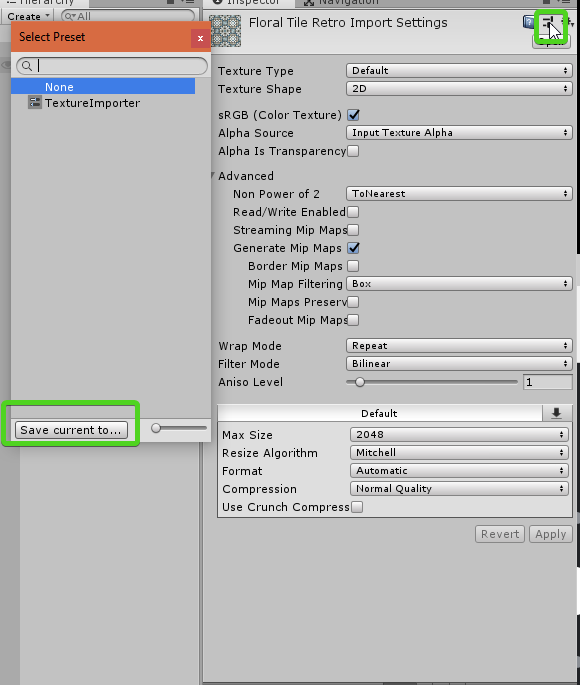
this is how you make a template, you click the template icon in upper right
cloud wedge
cool cool
forest vortex
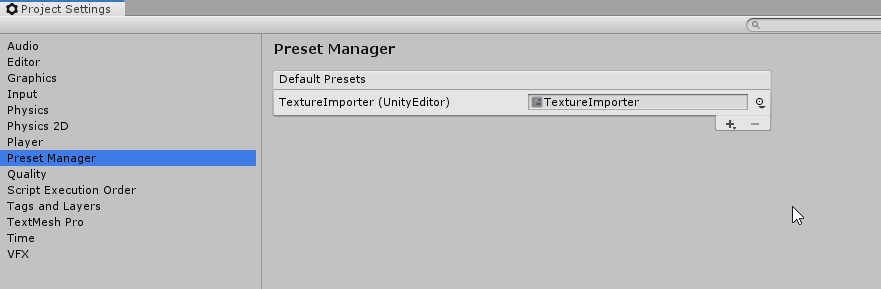
seems in project settings there is a 'preset manager' but not sure what adding a preset there does
ok it does seem like you can set a preset to be default
whatever you set in the preset manager is the default I guess
you can create templates for a lot of things, textures, models, Transforms, etc
actually just about every inspector item
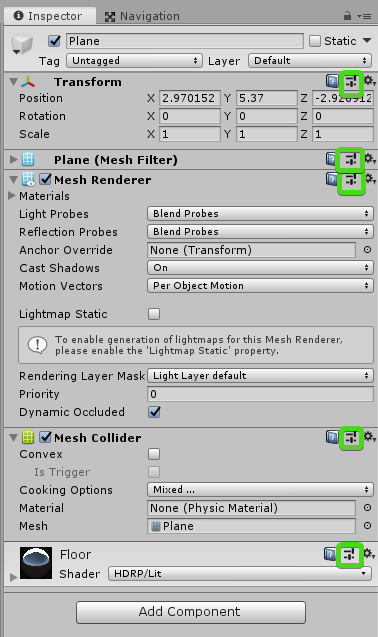
anything with an icon
wonder if that's in 2018.3 I never checked
cloud wedge
that button is there
when I click it it opens up a dialog asking for a preset
I get the impression that I have to do that for every new asset?
new topic
I have a custom drawer that's putting all these bools on one row. But it's kind of hard to tell which label is associated with which checkbox. I think aligning the label's right would help, but I'm not sure how to do that:
cloud wedge
did I put this in the correct forum? https://forum.unity.com/threads/how-do-i-align-the-label-text-in-a-property-drawer.649987/

Unity Forum
I have a custom drawer that's putting all these bools on one row. But it's kind of hard to tell which label is associated with which checkbox. I think...
visual stag
use serializedProperty.boolValue = EditorGUI.ToggleLeft(pos, "label", serializedProperty.boolValue);
if that doesn't work draw your own label and bool field without a label
cloud wedge
thank you!
I've been checking the wrong things all day. Let me try that out
@visual stag actually, I have no idea where to put that line. Which line should it replace?
SerializedProperty neckProperty = property.FindPropertyRelative("neck");EditorGUI.PropertyField(neckRect, neckProperty);
visual stag
2
cloud wedge
ok I found an example, too. Thanks
that works well, at least for the first one 😃
it's beautiful:
thanks
 wintry aspen
In custom inspector what's the best way to set only 1 bool to true out of a bunch of bools so that only 1 bool can be active? Was thinking of using if statements but thought there'd be a more elegant way of doing it.
visual stag
In a way wouldn't that just be a Popup https://docs.unity3d.com/ScriptReference/EditorGUILayout.Popup.html
wintry aspen
That's definitely possible! However, i do recall there was a way to group our bools together in a group and have it so only 1 could be set to true at once. i just can't seem to find it
visual stag
I'd probably just have my bools in an array and display them in a way that when clicked every one is set to false except the ticked index. I don't believe there is a control that does this by default
wintry aspen
Oh np. Maybe i'm just remembering something totally different haha. Thanks for the response bud!
real ivy
@wintry aspen
https://docs.unity3d.com/ScriptReference/EditorStyles-radioButton.html
That?
wintry aspen
@real ivy oh thank you lol
real ivy
With some example code:
https://forum.unity.com/threads/radio-button-inspector.55333/

Unity Forum
var abc : float = 0;
This can be adjusted at inspector.
Also int too.
And boolean generate checkbox.
Then is there no radio button?
visual stag
I honestly would much prefer making UIs with popups and enum dropdowns and contextually hidden content. It's funny that the radio button control doesn't seem to be used anywhere in the entire inspector.
the only time the radio button TEXTURE is used is if you enter developer mode - it's used as the repaint indicator
wintry aspen
yeah, i think popups are the way to go. i almost never see radio buttons but both solutions are good. 👌
 bitter mural
So I’d like to have two buttons somewhere in the editor. When one is clicked, it either enables or disables all gameobjects in the scene that have a certain tag.
How would I have the buttons?
wispy delta
You can add a method to the SceneView.onSceneGUIDelegate delegate that draws the buttons. @bitter mural
If you search "draw gui in scene view unity" there's a forum post that shows how to do it
at the very top
bitter mural
Ok
dusky plover
Anyone knows which part of the code is responsible for showing the read only part of an imported object?
As in, if I have an FBX or an SVG imported for example and have look at its inspector I see this:
But if I go to the importer's custom editor script and delete everything from its OnInspectorGUI, then I'll still see this:
Question is, who's in charge of drawing the Imported Object section, and can we override it somehow?
visual stag
so are you overriding the importer's editor?
there should be a boolean showImportedObject where you can turn it off - at least, there is on the internal editors
dusky plover
So based on the callstack it seems that we have no control over it. It's an internal process.
visual stag
I'm not sure how custom importers work
yeah, I think you should be able to override showImportedObject if you want to disable it
dusky plover
Seems you're right, but unfortunately my goal isn't to hide, but rather to enable it, making it not read only.
visual stag
I'm not sure if you can as its properties are created through the importer itself
editing them wouldn't really make any sense as far as I understand
like, the asset is imported into the library and that is the representation you see there
dusky plover
That's what I'm trying to find out, since normally you would be right, but in my case I set up an import pipeline that takes an SVG file imported into the project, converts it to a 3D model in a way that the object is saved as the root of the SVG asset.
Basically meaning that when you import an SVG into the project you don't see it as an SVG or an image or an imported asset, but rather as the object itself.
So if you put an SVG into the project, and then drag the asset from project view to hierarchy, then it will act just as though as it were a prefab.
visual stag
You know there is an SVG package on the package manager btw?
dusky plover
Basically what I want to do is get access to that same object to allow for manual editing of a component on it to allow for different settings on the prefab itself.
Yea, that's what I'm working with. I extended the SVG Importer package to support creating of meshes from the SVG data.
visual stag
Ah, I thought that's what it already did - but cool 👍
dusky plover
Unfortunately not. The default implementation creates a sprite, and our project required some material /shader work that we couldn't achieve with sprites.
visual stag
I'm still a little confused at how your import is any different in the non-readonly sense.
An importer takes the original non-unity ready asset and imports it into the Library, where the AssetDatabase interprets it as new assets. You cannot modify these assets without the use of an importer because they're constructed using the importer. If you wanted to edit them you'd need to edit the importer or the original asset.
Unless there's something I'm missing here
dusky plover
You're probably right, but there should still be some way to access the asset that is being inspected itself, shouldn't there?
I mean, even if I don't edit the asset itself, I can draw an inspector for it as part of the importer's editor, serialize it and deserialize it upon creating an instance from said importer.
But for that I just need to know which asset is actually being inspected, but as far as I can tell the entire inspection process is done internally and the asset I'm actually looking at in the project view is an asset of type AssetImporter.
visual stag
I mean accessing the asset itself is as simple as AssetDatabase.LoadAssetAtPath
but you shouldn't be able to serialize any of that data back to the asset
Like you could make it create a prefab as a part of the import process 🤷
and attempt to not override the meta file for it 😛
dusky plover
I mean, if I'm able to override the type's inspector to do this, and have this value persist for when creating an instance of the asset, then I don't see why I wouldn't be able to just use the default inspector for the class.
Even serialized properties appear as disabled, though this works fine.
(The slider is a control I draw from the custom inspector of the ColorioLevel script, and the rest are from the call to base.OnInspectorGUI())
visual stag
I'm honestly not sure what the best way is to go about what you need - but as far as I understand the imported asset is readonly. Anything present in the meta file (which should be data only from the importer) is all that constructs the asset that you see in place of the file
does it persist truly though? If you reimport that asset surely that gets reset
dusky plover
Indeed, it'll get reset on reimport, that's another thing I'll need to tackle.
visual stag
and that's the problem - you're able to change the Library representation of the asset, but that is intended to be defined by the importer
changing that representation possible but it will always get reset on import
like it's an untacklable issue really - what you need to do is just extend the importer to support the modifications you need
or make a prefab of it and modify that asset
dusky plover
That's probably true.
visual stag
It's as simple as understanding that that original asset has a meta file and that's the only thing that defines what that asset looks like (in addition to the original asset itself) when imported
and the only thing saved in that meta file is data from the importer
I could imagine a world where the original asset was also a prefab on top of that level - and not just a "model prefab" or whatever it's called
but I don't think we live in that world sadly
dusky plover
I think that the important thing to understand about it is the fact that the asset you see in the project view is actually the AssetImporter type, which can be extended by in code and in editor.
But you're definitely right, setting extending importer settings is probably the way to go here.
cloud wedge
I've got this thing working correctly in my propertyDrawer:
        if (GUI.Button(removeButtonRect, "Remove"))
        {
            Debug.Log("Clicked the button for " + nameProperty.stringValue);
        }
But how do I make it actually remove the element from the array/list? I don't know how to get access to the array/list
this is the class with the list:
public class CharacterAccessories : MonoBehaviour
{
    [SerializeField]
    private List<CharacterAccessory> accessories;
...
But nothing stops me from having another list of accessories. How can I universally create a "Remove" button in a property drawer?
gloomy chasm
Because it is a private list you will need to use reflection to get the list.
cloud wedge
well I have a getter
I can call that
but call it on what?
how do I get access to CharacterAccessories?
gloomy chasm
Oh, you mean from a propertyDrawer?
cloud wedge
yes
gloomy chasm
normally property.FindPropertyRelative("yourFieldname")
So like List<CharacterAccessory> propertyAccessories = property.FindPropertyRelative("accessories") as List<ChracterAccessory>();
cloud wedge
no...
the whole point of this question is I've got a with many bs
and the property drawer is on b
how do I get a.list inside the b propertydrawer?
cloud wedge
correct
gloomy chasm
as far as I know you can not get the array of an object like that
The add/remove button is handled by the collection
not the element
cloud wedge
can I pass the list into the propertydrawer?
I want to remove long mohawk:
I've got like 20 things below it
it'll be a pain in the ass to not have a remove button
this'll come up again
gloomy chasm
Oh for sure, I get that.
wispy delta
I haven't read your entire thing so apologies if I'm missing something, but if you have a SerializedProperty that stores an array you can just call SerializedProperty.DeleteArrayElementAtIndex
No reflection required
gloomy chasm
Nope, he is working on the element not the collection
cloud wedge
the array is in the parent
wispy delta
Gotcha
cloud wedge
I can't be the first person who wants to do this
yet I can't find anyone asking to on google
wispy delta
So you have a serialized property and you want to remove it from a serialized array, but you don't have it's index?
cloud wedge
I've got a with many bs
and the property drawer is on b
how do I get a.list inside the b propertydrawer?
gloomy chasm
You may be able to do something with a custom Add method and a delegate...?
cloud wedge
I assume you're saying there's a way for a to get access to b's property drawer?
I'm fine with that
gloomy chasm
But honestly I would just do a custom property drawer for the array/list
cloud wedge
I didn't realize you could do that
wispy delta
SerializedProperty has a c# property called serializedObject you could use that to access the list
cloud wedge
...
wispy delta
I thought you needed access to the list from the property drawer? OnGUI is passed a serialized property, from there you can access the properties serialized object, from there you can access the list
gloomy chasm
No he wants to access the list from the property drawer of the item inside the list
wispy delta
yea that's what i'm saying
cloud wedge
@wispy delta can you show me some sample code?
gloomy chasm
Oh I see what your saying
cloud wedge
just a line of code would help
wispy delta
I think this should work
public override void OnGUI (Rect position, SerializedProperty property, GUIContent label)
{
    var list = property.serializedObject.FindProperty ("list");
}
hm..
ok I'll try that
I would have assumed that this property is a reference to b, not a
wispy delta
the property is a reference to a but a.serializedObject is a reference to a's container object which should hold the list
cloud wedge
you mean b every place you typed a
wispy delta
a yes, sorry
cloud wedge
let me rewrite that
the property is a reference to b but b.serializedObject is a reference to b's container object which should hold the list
wispy delta
yes 👍
wispy delta
I think the thing you may be confused on is that SerializedProperty is not the same as SerializedObject
gloomy chasm
serializedObject is the object that serialized the property (in this case a list) right?
cloud wedge
ah
wispy delta
SerializedObject is the thing that contains everything serialized in the asset. It contains SerializedPropertys. SerializedPropertys can also contain SerializedPropertys.
cloud wedge
ok do you know how to get the list out of this? Debug.Log(property.serializedObject.FindProperty("accessories"));
this returns something, so I think i've got it? I just don't know how to use it
wispy delta
Is accessories an array?
cloud wedge
it's a list
cloud wedge
i could change it to an array if necessary
wispy delta
nah, it's serialized the same regardless afaik
so you want to remove a serialized property from the accessories list?
cloud wedge
yeah
well
I want to remove an element from that accessories list
I don't know if I'm saying the same thing as you
        if (GUI.Button(removeButtonRect, "Remove"))
        {
            Debug.Log("Clicked the button for " + nameProperty.stringValue);
            Debug.Log(property.serializedObject.FindProperty("accessories"));
        }
I want that remove button to make this disappear
wispy delta
Because the accessories list is a serialized property that contains a list of serialized properties, i'm saying you want to remove a serialized property (*one of it's elements) from it. Does that sound right?
cloud wedge
yes
all I really need is to get the reference to the list
I know how to do the rest
wispy delta
SerializedProperties kinda abstract access to the literal data (in this case, a list) in memory. Any changes you make should be via the SerializedProperty. So instead of trying to get a literal list and calling Remove on it, you need to remove the element via the SerializedProperty api, otherwise your changes wont be serialized (saved). Gimme a sec to type something up
cloud wedge
great, thank you for the help
wispy delta
Actually, before I type anything. Try doing property.DeleteCommand(); I've never used that, maybe it'll handle removing it from the list automajically
Just make sure you save, idk how it works lol
cloud wedge
ok let me see
seems to have worked? Let me see when I hit play
yeah that worked
ok much easier than expected
wispy delta
haha great!
 random hollow
I'm calling Application.dataPath in an editor script; my intention is to figure out the folder path. However, it seems like it's... buggy? I'm on a Windows computer, and I have to do this to prevent it from blowing things up
// We need to make sure that the directory separators
// match the system default. Otherwise, it will use
// the Unix scheme ('/') instead of the Windows scheme
// ('\') on any system.
return Regex.Replace(
    Application.dataPath,
    "[/\\\\]",
    "" + Path.DirectorySeparatorChar
);
Back when I was on a Mac, I could just use Application.dataPath and it worked just fine
reef crane
Application.datapath has worked fine for me for years. What are you trying to do with the returned value?
if you're adding a filename or path at the end you should use Path.Combine (Applicatino.datapath, "thing.exe")
random hollow
In this particular case, I am using it to convert absolute paths (which were required while manipulating files using C#'s StreamWriter class) into paths which are relative to the Assets folder for the project. One that is done, I compare the result against a path generated by AssetDatabase.GUIDToAssetPath, which uses the system directory separator
 meager iris
Hello guys When I save a prefab or add component to prefab , It take long time any experience like that ? Unity Version 2018.3
wispy delta
Is there a way to get the style used to draw GUI.Box? I want to draw a vertical layout with that style. Right now I'm using EditorStyles.helpBox, but it doesn't match the style of the drag and drop rect below it, which is drawn with GUI.Box
waxen sandal
Put "Box" in the guistyle field iirc
ancient sable
Question, strangely enough ive never read mouse position on screen outside of any perticular editor window. How do we fetch the mouse position on screen 🤔
not mouse position local to an editor window
waxen sandal
Not easily
But IIRC if the gameview is open you can get it in OnSceneGUI or something like that
visual stag
@ancient sable GUIUtility.GUIToScreenPoint(Event.current.mousePosition)
ancient sable
this looks good. I'll test it now.
funny how many function i haven't fully made use of 🤔
ancient sable
just tested in my particular setup . this works quite nicely, thank you
green shoal
So, I made an editor for a dictionary containing dictionaries, but whenever I press play, reload the scene it deletes my dictionary, everythin is working fine, the add buttons, the slots to edit keys and objects, it just does not save.
I'm using target.theDictionary = theEditeddictionary at the end of OnInspectorGUI
anyone got any clues on why this is happening, the "same" script worked just fine with my <Color, Tile> dictionary
ok, just checked, it didn't work fine for the other too, is there a way for me to save the dictionaries? right now it just vanishes with everything I changed
visual stag
Dictionaries aren't serializable. There are serializable dictionaries out there on github or wherever. They use ISerializationCallbackReceiver in a similar way as the docs do https://docs.unity3d.com/ScriptReference/ISerializationCallbackReceiver.html
Also setting the target's only gonna dirty the object if you record an undo (which I hope you're doing too)
green shoal
yeah, it stores a copy of the last one, I always forgot about serialization, I think I'll create a struct with the current and old dictionaries and make that serializable then, it will make my life easier and hopefully work
visual stag
yeah but the dictionaries inside the structs will still not be serializable...
green shoal
oh, so even when saving the struct the dictionaries will still be the same as before?
visual stag
You just need to use a SerializableDictionary of sorts in your target object
dictionaries will not serialize otherwise - it doesn't matter what object they are in
green shoal
ok, so how do I use the OnBeforeSerialize() and OnAfterDeserialize() on the link you showed?
visual stag
http://wiki.unity3d.com/index.php/SerializableDictionary
https://github.com/azixMcAze/Unity-SerializableDictionary
https://github.com/TheOddler/unity-helpers/blob/master/SerializableDictionary.cs
First couple of google results for serializable dictionaries for unity
green shoal
oh, got it, it is a method that is called by unity, I don't actually need to call it
thanks a lot, I had no clue what to do
visual stag
No worries, serialization can be a pain in the ass sometimes
green shoal
well, I tried with this link http://wiki.unity3d.com/index.php/SerializableDictionary
I tried using like this:
public Dictionary<roomType, IntTexture2DDictionary> MainDictionary
    {
        get { return mainDictionary.dictionary; }
        set { mainDictionary.dictionary = value; }
        //set { mainDictionary.dictionary = value; }
    }
    [SerializeField]
    RoomtypeDictionaryDictionary mainDictionary = RoomtypeDictionaryDictionary.New<RoomtypeDictionaryDictionary>();
it didn't save still, and when I changed to
public Dictionary<roomType, IntTexture2DDictionary> MainDictionary
    {
        get { return mainDictionary.dictionary; }
        set { MainDictionary = value; }
        //set { mainDictionary.dictionary = value; }
    }
    [SerializeField]
    RoomtypeDictionaryDictionary mainDictionary = RoomtypeDictionaryDictionary.New<RoomtypeDictionaryDictionary>();
whenever I click on the object with the script, unity crashes, I am really confused with all this and have almost no cluw as what to do next, didn't expect the problem to go this far
visual stag
I think the last link has the clearest implementation and usage (in the comments above)
they should all really be used like that
where you declare the non-generic class that is serializable
and then you use that as a variable (making sure it's either public or [SerializeField])
I'm not very familiar with that first implementation, with the whole .New thing
green shoal
now it finally got me an error on the script I got from the site, it probably didn't work after all, I'll use the last link's and try again
green shoal
it is not saving, I checked, the enum and both dictionaries are serializable, is there a way to debug what is going wrong?
visual stag
if you're using it like:
[System.Serializable]
class MyDictionary : SerializableDictionary<KeyType, ValueType> {}
public MyDictionary _dictionary = new MyDictionary();```
Then it should just work[SerializeField]
public RoomtypeDictionaryDictionary MainDictionary = new RoomtypeDictionaryDictionary();
[System.Serializable]
public enum roomType
{
spawn,
boss,
item,
secret,
special,
way,
fill,
}
[System.Serializable]
public class IntTexture2DDictionary : SerializableDictionary<int, Texture2D> { }
[System.Serializable]
public class RoomtypeDictionaryDictionary : SerializableDictionary<roomsLibrary.roomType, IntTexture2DDictionary> { }
the classes, the enum and how I started the class
if (addDictionary)
        {

            EditorGUI.indentLevel++;
            GUILayout.Space(5);

            //displays the field for int choosing
            roomsLibrary.roomType newEnum = (roomsLibrary.roomType)EditorGUILayout.EnumPopup("Index to add ", myScript.newEnum);
            myScript.newEnum = newEnum;

            //the finish button
            GUIContent finishContent = new GUIContent("Add");
            if (Button(finishContent, buttonStyle) && !thiDictionary.ContainsKey(newEnum))
            {

                IntTexture2DDictionary empty = new IntTexture2DDictionary();
                thiDictionary.Add(newEnum, empty);
                addDictionary = false;

            }

            EditorGUI.indentLevel--;
            GUILayout.Space(5);

        }
how I'm adding dictionaries to the dictionary
myScript.MainDictionary = (RoomtypeDictionaryDictionary)thiDictionary;
at the end so it adds to the original script
visual stag
I literally did
Undo.RecordObject(targetO, "Dict Change");
TargetO.IntTexture2DDictionary intTexture2DDictionary = new TargetO.IntTexture2DDictionary {{256, Texture2D.whiteTexture}};
targetO.MainDictionary.Add(TargetO.RoomType.item, intTexture2DDictionary);```and it worked
the whiteTexture I added doesn't seem to want to persist but that could be something else
it just goes back to null
but the rest of the values persist fine


 visual stag
well, mine's working fine 🤷 you'd have to post your whole code to find out why (use hastebin or something, don't post large code here)
as I've said before though, if you aren't dirtying with Undo functions this will not work
green shoal
ok, so I got it all wrong at the beginning, I don't really know what these undo functions do, I thought you asked something like if I was storing it somewhere in case I needed to go back
damn, just by adding that one line it worked
visual stag
Everything needs to be serialized and then Unity needs to be notified when something changes (ie. the object needs to be dirtied) this is handled automatically with SerializedObject/SerializedProperty, but when using target you need to use the Undo functionality
green shoal
there were other simpler editor I wrote without it that worked, I feel so misled, I'll correct everything now, is it something like the serializedObject.ApplyModifiedProperties(); ?
visual stag
yeah, but that's an entirely different API, you need to use one or the other
combining the two is just complicated
if you modify targets you shouldn't modify SerializedProperties / call SerializedObject functions
- the other way around
green shoal
thanks, I feel really dumb right now but am way too happy that it worked to get down by it
visual stag
it's alright, as I said, the whole thing's complicated 😛
green shoal
thanks a lot, I hope I get used to editor scripting soon, right now I'm just getting lost every day. You saved me big time
ancient sable
Question, how do we go about getting the combined screen resolution width of a multi monitor setup ?
visual stag
Screen.currentResolution will get the current screen's res but I don't think it's easy to get a function for the entire monitor setup without it just being windows only code
ancient sable
I've tried using that function before but as expected only returned the resolution for one monitor and it was the resolution of the monitor the Unity editor wasn't running in.
visual stag
it's whatever the current window's center is in as far as I understand
reef crane
Have you tried the Displays API? Has a static property for all the displays connected
visual stag
that returns the displays that the game view cares about
reef crane
I'm not sure if it behaves differently in editor, since the game window lets you select displays 1 - 8
visual stag
it's not editor friendly sadly
reef crane
Damn. If it's windows only you might have to use windows APIs. Not sure how you'd go about it on mac or linux though
visual stag
yeah, well then I don't think there's a solution that's readily available as far as I understand
reef crane
Maybe an asset or github project that wraps the windows APIs if you're lucky
If you do go down the windows API route, its only a couple of methods. I've done it recently for changing layout of displays, but i can't share the code. There's the EnumDisplayDevices method in User32.dll, and then EnumDisplaySettingsEx for each device. Also in user32
im heading out to lunch now, but will be back later.
ancient sable
any info is great, so I'll be checking those and seeing how far i can get with info i gather.
i mainly wanted to simply position a custom tooltip at mouse position . all was going well but i needed to ensure that my tooltip never draws beyond display area. so if i knew the resolution i could say tooltip x position = resolutionWidth - tooltipWidth+ padding 🤔
if i roll a dedicated windows function then I'll need to have a specific function for mac and so on. on Mac I've had the pleasure of discovering a major update bug regarding the Screen class which saw Screen.width no longer functioning correctly on Macs that used some weird resulution setting. So basically any unity editor that ran Screen.width or height would be broken.
i dont know what else Apple has done so i would have preferred to rely on the unity API and not try to use code for a platform that I'm not familiar with.
I'll figure something out and share the solution
reef crane
Yeeeah, i can't help you with the Mac side of things. I develop exclusively for windows
ancient sable
no problem, thanks for your previous info
ancient sable
hmm, unitys editir toooltips also render with portions off screen if the hovered control is close to the edge of the screen
i guess they too haven't a solution 🤔 oh well 🤓
how do you feel about tooltips that read out the text inside using a tts function?
wispy delta
text to speech tooltips?
ancient sable
yup, if one has blurry vision or can't make out small text in the tooltip
i usually try to design my tools to work as well as they can for people who have some form of physical disability
ancient sable
wow, the tooltip is now rendering within the window at all times. by using a popup editor and setting the width based on character count, the editor "tooltip" window seems to reposition itself exactly where it needs to be at all times. I'll share the code later on my unity forum post about my editor tool.
wispy delta
I guess if it's optional that's cool, but idk how anyone with impaired vision could use Unity in the first-place. Tooltips aren't any harder to read than the rest of the editor imo
But far be it from me to tell someone to not make their stuff more accessible haha
whole steppe
guys i have this problem https://cdn.discordapp.com/attachments/545210052689264652/561263697427955723/Screen_Shot_2019-03-29_at_20.01.21.png

 visual stag
Never seen that before. What did you do to cause it?
forest vortex
I've seen that when opeing a project saved in 2018.3 or newer, with 2018.2 or lower
older unity doesn't understand the new Prefab system from 2018.3+
 still cedar
Okay
slow zodiac
Hello!
Any idea about how to make cubemap from script? i have a bunch of skybox which has 6 picture but in hdrp i can't make a working cubemap to attach all 6 picture so i would like to combine somehow them from script
forest vortex
don't suppose you have access to photoshop?
slow zodiac
i have but i have 30-40 x6 images so i would liek to find an easier way if avaialble
forest vortex
yeah fair enough
slow zodiac
maybe this will work:
https://docs.unity3d.com/ScriptReference/Cubemap.SetPixels.html
and i can attach them one by one