#✨┃vfx-and-particles
1 messages · Page 24 of 1
 low anchor
 light siren
Uh, how did i miss the color over lifetime option for trails?... 😮 thanks!
And yes the magicky is right, other people mentioned it as "cartoony", i guess there is really something to it. :)
Thickiness + saturation might help i think, will try when im at my pc again!
light siren
yep, just checked.. i did use the color over lifetime, but i keep forgetting that it supports alpha, so i just gave it a color and moved on 😂 Thanks again
 prisma lodge
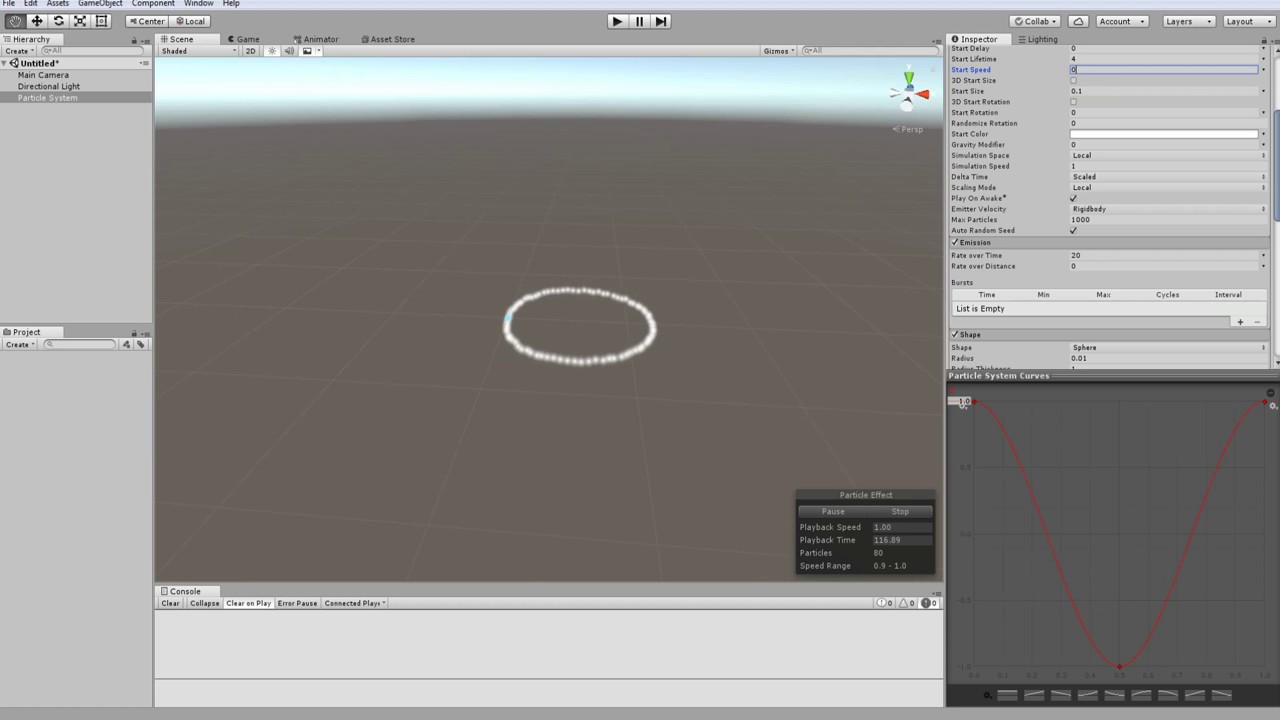
In the particle system, how can I kind of just move particles around their spawn point?
Right now they just keep moving away
but I want them to roughly stay in the same spot
got something to work by setting speed to 0 and activating noise
 languid pasture
Hey guys
I've been playing around a bit with the VFX graph, and I absolutely love it.
I made the following effect, which I'm quite content with.
https://www.youtube.com/watch?v=vo7-R0NSVpc
However, I wanted to try to see what it looks like if the blocks aren't placed randomly at initialization, but on a grid, so at the flat parts, it looks like one uniform mesh.
I feel like a bit of a doofus, but I can't seem to figure out what block to use to make this happen 😅
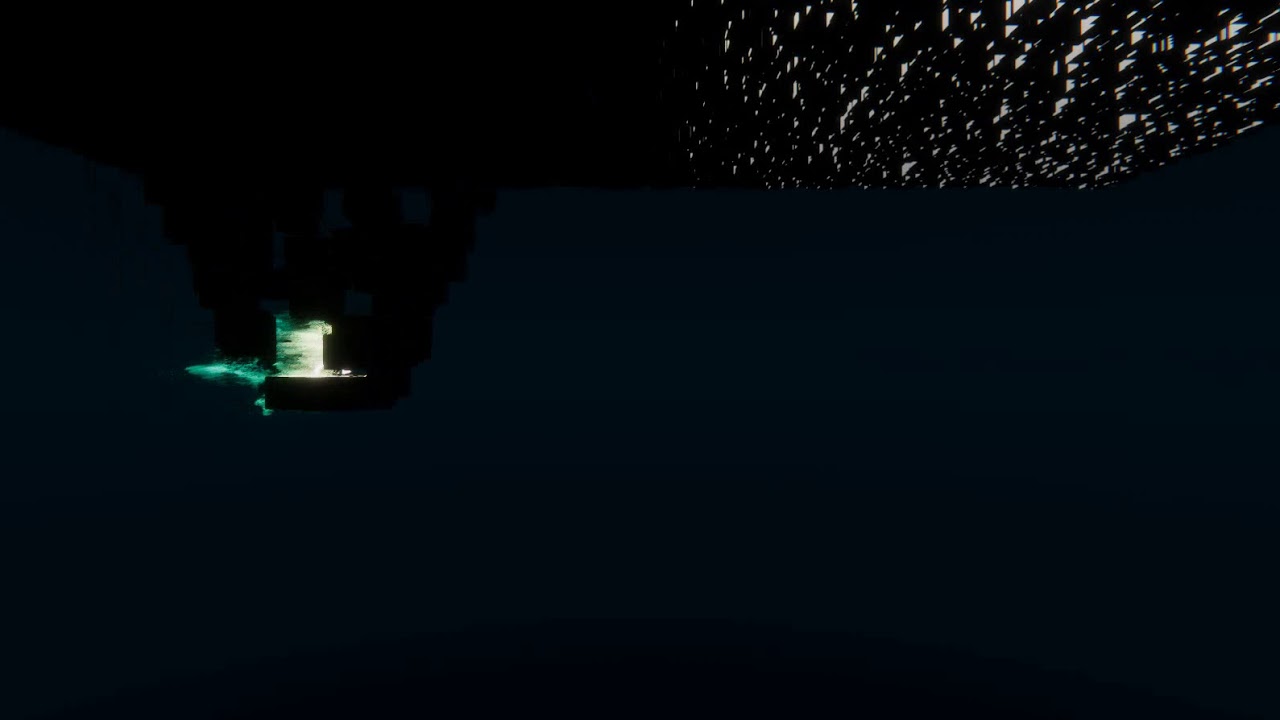
This is what I'm currently using for Initialization
If anyone can give me a nudge in the right direction, I'd really appreciate it 😊
 elfin pilot
try position sequential (You may need to activate experimental blocks in vfx preferences)
Wont be a circle though but you can probably discard (using set alive false) some particles in init to get a circle
languid pasture
@elfin pilot You, sir, are a gentleman and a scholar, thank you for the advice 😃
I indeed had to active experimental blocks and make use of the Position Sequential
 frank garden
Hello ! Does anyone know how I can apply an animated texture on a particule trail with Unity ?
 eternal flower
Did anybody try the ellipse and rectangle tools from Unity's Shader graph? I so, would they slow the game down a significant amount compared to rasters?
 feral zodiac
 primal ivy
I went to the package manager and the visual effects graph doesnt show there, can someone help me?
 prime dome
Hello i need a suggestion please look in #archived-game-design
 neon jungle
@primal ivy u might have to show preview pckges
 vagrant juniper
how can i start particle effect via code?
primal ivy
When i create a visual effect graph in my scene and then place it in the hierarchy, the particles wont show from it, can someone help me?
neon jungle
@primal ivy need more information, are you using standard/legacy unity rendering, LWRP or HDRP
you have to goto Edit > Project Settings > VFX and ensure that the Render Pipe Settings path is appropriate for your project
it defaults to Packages/Visual Effect Graph/Shaders/RenderPipeline/HDRP but if you are using LWRP it would be Packages/Visual Effect Graph/Shaders/RenderPipeline/LWRP and if you are on a version that supports legacy it is Packages/Visual Effect Graph/Shaders/RenderPipeline/Legacy
You can also add your own custom support for anything, but there is no documentation, it is entirely possible though.
 quick quiver
someone bumped the staging package up by 90... https://bintray.com/unity/unity-staging/com.unity.visualeffectgraph/6.99.0-preview

 inner linden
@vagrant juniper You can SendEvent or Play/Stop a VisualEffect trough code, see : https://docs.unity3d.com/2018.4/Documentation/ScriptReference/Experimental.VFX.VisualEffect.html
If you are referring to "ParticleSystem", there is an equivalent interface "Play/Stop" : https://docs.unity3d.com/2018.4/Documentation/ScriptReference/ParticleSystem.html

 golden robin
Download a dynamic real-time rain FX for Unity for Free!!
Hi,
This is a link to the GitHub of a dynamic rain FX for car windshields. It is free and I hope people download and improve it if possible.
https://github.com/D4N005H/RealtimeDynamicWindshieldWaterFX
Regards,
MrDanO
This is a demo of the rain FX in my indie Unity3D project.
https://www.youtube.com/watch?v=GjkCOBWZC1A&feature=youtu.be&t=190

ATG:KIsh is a driving simulator software, And here its physics for normal fast driving tested in the Nordschleife - Nürburgring race track. Cars: BMW 4 serie...
quick quiver
@golden robin just wanting to note that you can't really use GPL for license with Unity, using GPL for project files would require also Unity be GPL licensed which simply isn't possible (Unity licensing doesn't allow relicensing)
you can use MIT, BSD, MPL, CC-BY though
or pretty much anything but GPL, LGPL or CC-BY-SA
btw, I did follow the original thread, didn't immediately realize it was the same thing 😄
as a side note, I've wanted to do similar effect myself using compute shaders but never had time for it, haven't checked if new visual effect graph would let you do something similar easier either
one question after looking at the video... why are the pedals in plastic? 😄
golden robin
@quick quiver Thanks for the heads up. I was not aware of this. You seem to know more about this issue, which license do you think is best for this project?
Good to know you've followed it before! Indeed this will save your time a lot by not trying to re-invent a wheel IMO and designing a similar FX from the scratch. Moreover, the community would appreciate if someone could improve it. I personally would try to continue improving it but I don't have time for it!
About the plastic cover... that wheel is expensive! l think it'll remain fresh longer that way.... I guess... lol.
quick quiver
MIT is pretty common pick for projects like that
it doesn't restrict others from using it but your copyright has to remain there
issue with GPL is that it "pollutes" everything it touches and it's in general incompatible with commercial game engines
also since DOTS and burst especially are here, I've also considered doing 2D physics sim for this myself
one could do the sim so much cheaper and it wouldn't have to be in scene
you can still represent the windscreen curvature with vector field or basic math to keep the drops flowing in the right direction based on your vehicle speed, you don't need 3D sim for it
golden robin
@quick quiver already tried with Physics2D and found out that its precision is not the best. Had I had more time, I'd have investigated it more.
BTW, Thanks for the info about the licenses. I too think MIT is the best alternative, I'll change it after some more research. Thanks again.
 random cove
hmm so I'm having trouble getting the depth collider to work in the visual effect graph (Using LWRP), and there doesn't seem to be any documentation on it
elfin pilot
@random cove Unfortynately, depth collider is not working with LWRP yet, only HDRP
random cove
Thanks, looking forward to it being implemented!
golden robin
360 Video background VFX test
https://www.youtube.com/watch?v=TddHxMGeaX8

Some tests on an early version of "Around The Ground: Kish Island" simulator indie video game. In this test, you'll see Unity's 360-degree video background e...
 dry dove
Looking for some help with a particle system.
It looks like these particles shouldn't move, but they go move up in world-space Y.
🤷
oh nvm
clearly those curves are setting the velocity 🤦
 turbid mango
Looking for an vfx artist to join our team, lil' Shermans fxs need a complete overhaul. DM me, This is for rev-share only.

Today we release our latest Alpha update v0.2 What's new in the update: New terrain layout. Action tower defense elements of game play are introduced. New en...
 bronze wraith
Anyone else using 2019.3 a10? For some reason I can't see the bounding box or the emission shape of any VFX Graph asset like you could before.
Not sure if it's a VFX Graph bug or the editor itself.
 signal gazelle
Does anyone know how I'd be able to make the camera a solid colour without covering it with a panel or something of that sorts?
And if so, how would I be able to adjust the colour with a script?
 molten grotto
Anyone knows a tutorial on how to make retro glow effect ( or whatever its called ) ?
 true shore
you mean bloom?
molten grotto
ye, thanks
molten grotto
@royal dagger more like the building effect, but they look the same to me ( as u might have guessed i don't know much about vfx )
 royal dagger
they are definetly not the same 😄
one is a burst of particles with varying colours from white to light blue
the second one i don't really know what it is, if i had to guess, an animation? not sure
 fast roost
I have a particle effect that for whatever reason if I change the material color it renders out, if I try to do color by lifetime this effect doesn't work as intended. 😦
Anyone know why?
 sinful monolith
@fast roost if it helps, the colours affect each other. So if you make it blue as a material then fade it white to black, it will actually fade from blue to black because of the base material colour. But you have a lot of control over how a particle shows it’s colour based on the shader of the material.
If that is what you mean?
fast roost
I have the default color white
So I was hoping to be able to transition to a darker color, using the gradient
@sinful monolith
It isn't working
But yes I understand the concept you are expressing.
sinful monolith
@fast roost ah yeah that’s because the default Shader is set to a weird blend mode. It makes dark not dark. You have to change the shader
You’ll need to do that for smoke and dark materials
fast roost
@sinful monolith thank you I will try to look at changing the shader, I know my campfire particles are working right, so between the two should be able to figure out how to get it working.
 lime mantle
How do I make this laser ?
Can anyone link me to a tutorial or something like that
I want to add it back to my car when I'm boosting
Please @ me so I can see the msg when you send it 😊
neon jungle
@ VFXGraph devs, when will VFXSRPBinder be non-internal?
lime mantle
Anyone ?
neon jungle
theres differernt ways, it could be a quad that is camera aligned, it could be an actual cylinder mesh with al ot of bloom applied
lime mantle
What should I do
neon jungle
you could also use a shuriken particle system, and have the renderer shape be aligned to velocity so it will create a long streak/beam
 sullen sluice
Is there any good resource for gamedev-related houdini tutorials? There's some on the official site, but nothing akin to what I'm looking to do
neon jungle
They're less common definitely, what sort of info are you looking for?
fast roost
Having trouble with particles not keeping same direction as parent gameObject
the side of the square should be at a 45 to the back of the object
So it is flush side meets side, not corner meets side.
I need it to emit in world space so that way it will give the trailing effect
rather than just stick out like fading spike.
The particles not rotating with the parent is cause the effect to look very rough.
trying to do a really smooth wind slice effect
but you can see the space between the particles, instead of it looking like smooth lines.
I have the particles up to nearly 1k per slice, so I really think it is the rotation that is to blame mostly unless I am wrong.
 ember oracle
If you just want a simple trail take a look at Unitys Trail Renderer. It pretty much does what you need, but much more performant than lots of particles @fast roost
fast roost
@ember oracle , kk will do thank you.
fast roost
@ember oracle I looked into to Trail Renderer, looks like exactly as it should, unfortunately, I go to addkey to make it smaller towards the end and it doesn't work like the tutorial video.
I right click, select add key and nothing happens.
sometimes I can get the following error but not every time:
UnityEditor.CurveEditor.CurveGUI () (at C:/buildslave/unity/build/Editor/Mono/Animation/AnimationWindow/CurveEditor.cs:1082)
UnityEditor.CurveEditor.OnGUI () (at C:/buildslave/unity/build/Editor/Mono/Animation/AnimationWindow/CurveEditor.cs:949)
UnityEditor.LineRendererCurveEditor.OnInspectorGUI () (at C:/buildslave/unity/build/Editor/Mono/Inspector/LineRendererCurveEditor.cs:156)
UnityEditor.TrailRendererInspector.OnInspectorGUI () (at C:/buildslave/unity/build/Editor/Mono/Inspector/TrailRendererEditor.cs:63)
UnityEditor.UIElements.InspectorElement+<CreateIMGUIInspectorFromEditor>c__AnonStorey1.<>m__0 () (at C:/buildslave/unity/build/Editor/Mono/Inspector/InspectorElement.cs:494)
UnityEngine.GUIUtility:ProcessEvent(Int32, IntPtr)
ember oracle
@fast roost honestly i have never used the trailrenderer, i just knew it exists :D
so i have no idea how to modify the trails
@lime mantle maybe just do a raycast and put a small circle where the ray hits? it also returns a normal and stuff, so that should help placing the circle. all the semitransparent stuff around it is probably bloom... or put a spherer there, then the normal doesnt matter... just takes more polygons
lime mantle
But I need the laser to get bigger
I want to put it at the back of my car @ember oracle
ember oracle
like a big rectangle trail?
lime mantle
yes
Whenever I'm boosting
I want like a boost effect
I've been trying for days to make it but I don't know how
fast roost
@ember oracle kk maybe someone else in here knows 😃
ember oracle
@fast roost can you maybe show the code in the line of the error and maybe some before that? maybe ill spot sth
fast roost
I didn't make any code it is unity default trail system
lime mantle
I want something like this
@ember oracle Is there a tutorial that can teach me this
ember oracle
@lime mantle that just looks like a sprite to me... paint that in photoshop and fade it out... or create a shader that fades it out more cleverly
but im not sure
ember oracle
thanks... i dont really know any tutorials though...
ember oracle
that was a typo
just create a quad, add a material with a texture... create that texture in photoshop or krita or whatever 2D tool you prefer
lime mantle
thanks
ember oracle
the laser one looks like a material with a bright emission value + postprocessing stack with bloom
ember oracle
@fast roost huh... that sounds like its broken. have you tred restarting unity or sth? xD i really have no idea, but if its caused by you adding a key it might be the editors fault
@lime mantle its one of the primitive meshes you can add in the editor. its just two triangles next to each other. like a plane just with less triangles
lime mantle
thanks
ember oracle
@lime mantle if you are really new to how to create visuals in unity it might be worth to download their example projects and just take a look how they approach everything
lime mantle
Thanks man I'll take a look at it ❤
fast roost
@ember oracle yeah I will give that a try unity sometimes is buggy, thanks again.
ember oracle
@lime mantle i was more talking about this content:
https://learn.unity.com/
there are lots of great projetcs to dive into and analyze... its really worth the effort before you start working on your own ideas

Unity Learn
Unity Learn provides award-winning free tutorials, sample projects, and full courses for mastering real-time 3D development skills with Unity Learn to make video games, VR, AR, and more.
lime mantle
Oh ok thanks
 shut cliff
Ongoing confetti project 😃
lime mantle
How do I make the black parts transparent
how do I make the black background transparent
 opaque knoll
Create layer, set that below the blue lightning thing.
Then set the blue lightning layer's layer mode to additive or something
lime mantle
ok
opaque knoll
Is it possible to set CustomData to particles spawned from Emit()? It's not in EmitParams, it seems
 hearty flare
It's selection highlight in the gizmos dropdown, top right of the scene view
lime mantle
❤
How do I make particles start at the same position
Because it makes this effect that I don't like
opaque knoll
Depends on a lot of things. Maybe you have a start speed? Or in the Shape module it's got a shape. Change to Sphere and make radius to 0 to make it spawn only from 1 point
shut cliff
@lime mantle I don't have a full oversight of how your effect is set up, but try this:
- Disable/untick Shape
- Try to make a small fade-in for the Color over Lifetime
shut cliff
Okay, hmm.. The particles might be going too fast from the start as delgelato mentioned. You could try fading them in slightly in the start, or double the amount of particles emitted if it's looping, and instead halve the lifetime.
lime mantle
oK
Does this look right ?
How do I make the line shorter
It looks bad on play mode
Why do the particles get weaker when they are in "MyCar" game object ?
shut cliff
If you have collision enabled on particles they might be colliding with the car? Otherwise it could be the Soft Particles setting making them fade out too much around the car (check the material settings)
shut cliff
Select the material you use for the flame and experiment with soft particles near and far fade: https://puu.sh/E2McG/e1991e0217.png

if it's enabled at all
lime mantle
❤
 deft marsh
Hey!
How can I achieve an infinite swirl effect that gets bigger and bigger the further it gets??
Something like this
Not as detailed of course
But a swirl effect like this
 pliant coral
You could get magical with shaders to get that cloudy noise looking texture but to get the general idea I would start with a particle emission rotating circular like a sprinkler would, you set speed over lifetime to be fast at first and decrease over time,. Then set total lifetime of the particle emission to be whatever and lastly your particle could just be a beam that follows the world space simulation so it twists around.. super rough you'd have to do some tweaking on your own with the speeds and sizes etc
So yeah, I would try using particle system @deft marsh
deft marsh
Well yeah, I know that, but I’m not quite sure how to do that, I’m new to particles and I’m really struggling
shut cliff
A good place to start is using Velocity over Lifetime (this example with particle trails enabled) https://puu.sh/E3ww4/0c8caf859d.png
 pliant coral
Can get pretty finicky with specific property details I would search up a tut on tornados as a similar approach to get you comfortable
shut cliff
Coupled with a circle Shape emitter
shut cliff
https://twitter.com/Archanor/status/1160188398696636416?s=20 gif was too big to upload in here 😦



@deft marsh If you want it to be more calm, try changing the Simulation Speed at the top part of the particle system
deft marsh
Omg thanks so much! How could I make the lifetime infinite
Would that be a smart idea?
Or would it cause too@much lag
shut cliff
you could set Simulation Speed to 0.01 and increase lifetime of particles
or just 0 I guess
 thorny copper
Question about effects:
Is it possible to have an effect which leaves prefabs in each particles last location before it dies?
So imagine killing an enemy, Ondeath it does a little explosion and yellow energy sparks fly out and then where they die 'coins' or some other prefab spawns and sits on the floor.
Or something along those lines?
shut cliff
Maybe this could be helpful: https://docs.unity3d.com/ScriptReference/MonoBehaviour.OnParticleCollision.html
thorny copper
Ah i managed to do it without, adding force to rigidbody. I'll just replace the cubes with an effect and oncollision instantiate the 'coins' at their position.(or maybe raycast)
 sinful tiger
Hey guys I'd like to use VFX graph in my project, but I'm using the standard 3D pipeline and I heard that VFX graph used to only work with HDRP, is it still the case ? On top of that, I'm pretty lost with the difference between standard/LWRP/HDRP, are these important as a beginner ? What's so special about them ?
neon jungle
Vfxgraph has legacy (standard) support
You will need to change that in preferences
I think standard is fine to start with, LWRP is a good choice too but still being developed
 neon osprey
i need some help with particles
im making a top down shooter
and when i kill an enemy
i want to instantiate a particle system
destroy the enemy
and have that particle system push particles in the direction they were hit and killed from
and then slow down and stop
like the enemy was split into parts and pushed a little
 white tapir
That would be a circle emitter with some velocity over lifetime that decreases to zero
Very small radius
Oh, saw the direction thing
You could do a cone and just orient your emitter accordingly
shut cliff
For slowing down particles to a stop, use Limit Velocity over Lifetime, set Speed 0 and Dampen to something like 0.2
opaque knoll
Ah is this the channel specifically for VFX graph or anything FX?
Anyways, i'm trying to make trails in vfx and can only find the Line Output, and can set "target position" for the line's end position. But is there a way to add "points" per line? And if there is, would that be set in Update?
 astral willow
I have a question, its probably (hopefully) simple, but i want to create a ambient floating lit dust practical effect in my environment, i got almost everything working however i would like to have the partials randomly drift in different direction (they don't need to change directions, i just don't want all of them drifting in the same direction like i have now)
https://i.gyazo.com/b12c13cdb0f9248486160711d3eb9a3d.gif
Is there any way to have the partical pick a random direction to move upon its creation instead of all the same direction?


NVM just figured it out, if anyone is also wondering here is hot to do it
shut cliff
you could enable Noise to make them curl around a bit too
astral willow
good thinking!
https://i.gyazo.com/a828109ef5509ffdc4a048febeffd66f.gif Turned out quite good imo 🙂
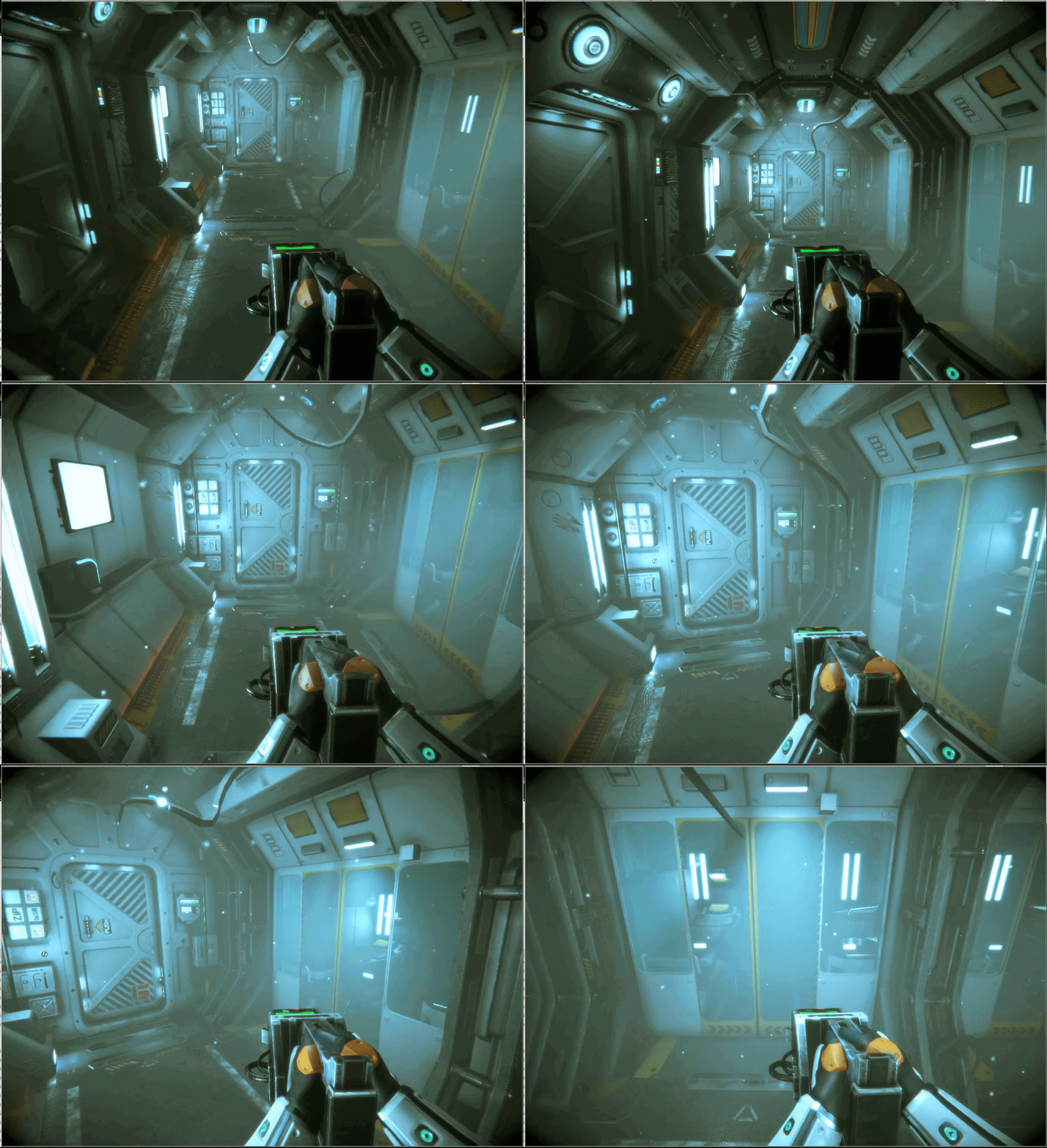
(the floating boxes will be random junk, and the wavy tenticles will be loss wires (they are ment to be kind of unnatrual and creepy in the way they flow, adding a demonic/unnatrual feel to the ship, as the ships AI is the "monster" in this horror game)
shut cliff
Looks pretty good. Maybe I'd reduce the size of the dust a a little more unless it's very stylized
 weak iron
after switching to LWRP and updating the materials I have some trouble getting the trails to fade out without them getting very dark beforehand
changing the emission mostly fixes it, but is there a way to do it, so that I wouldn't need to make a new material for every colour of the trail?
 stiff glen
Hello, I have a question. I can't figure out what's different between Transform and Rigibody on Particle System's Emitter Velocity.
I have read the tooltip and Manual as below, but I still don't understand what does it mean.
tooltip
stiff glen
I have another particle system's question. I use "pause" of culling mode. It doesn't pause, even though my particle is out of screen.
 cobalt scarab
@stiff glen You want to use Transform if your particle system isn't using physics system and vice versa.
Culling could be considering editor window and/or it's cubic boundaries. Turn away both game window camera and Editor to test.
stiff glen
@cobalt scarab Thanks, as for the second question. My camera view doesn't show the particle. But in Scene window, I can still see particle is runing.
cobalt scarab
You have to turn away scene camera as well
stiff glen
@cobalt scarab It works! Much appreciated!
royal dagger
What??? i just saw this plus sign in the particle system
does this select a random mesh for each particle??
well i just answered my question by trying, haha, that was it
weird i never noticed that plus sign 🤔
 fair iris
What would be the best type of base texture to create a water projectile?
weak iron
a texture used for water surfaces should be a decent starting point
opaque knoll
Hi guys. In VFX graph, is there a way to do a branching + switch operator?
Say i sample from texture. That pixel is RGBA.
Then i have a int parameter as my "enum" selector. Say 0 = R, 1 = G, 2 = B, 3 = A.
I want the sampling to use the pixel's channel accordingly. Is there a way to do this other than having 4 Branch operator?
Cheers
opaque knoll
NVM! It's a simple switch then. My node-based knowledge is a complete beginner...
 mortal quiver
hey guys, i wanna start learning VFX do you have any good tutorial suggestions on where to get started? like any good youtubers or websites i should look into? would be a huge help Thanks
opaque knoll
Do u mean vfx in general or specifically vfx graph?
mortal quiver
in general im new to this area
cobalt scarab
@mortal quiver https://www.youtube.com/user/Brackeys Has a lot of useful tutorials including on visual effects stuff.
opaque knoll
Hi guys. Anyone using VFX graph?
I have a vfx that's supposed to have permanent(infinite) lifetime.
And at some point i wanna signal it via c# to change the lifetime to like 2 seconds (not an immediate destroy)
Anyone have idea how to arrange the graphs?
opaque knoll
NVM figured it.
opaque knoll
In vfx graph u can't change the shader used?
prime dome
How come I can't see VFX in my game? My card supports up-to Shader Model 6.4 so I know it's not that it's not supported... I just don't see anything happen when I create a VFX Graph and drag it into the scene.
nvm I see them now. They blended in with my dark background lol.
RIP hahaha
prime dome
Well I do think this is a bug - all the particles are simply dark or don't show at all.
Ah it's the Post process Exposure. For some reason it's overriding the particle color, so it simply appears dark. I guess that means I need to figure out how to add emission to particles to see them
prime dome
How to use sample curves to make the vfx particles follow the curve?
To create something similar to a spiral
shut cliff
Not exactly sure what you're trying to make, but you can apply radial velocity in Velocity over Lifetime iirc.
You might need to set the Shape to a circle or cone first
prime dome
I couldn't find radial velocity anywhere, just the angular one which chanes particle's angle
I wanted to make a smoke that would flow in a spiral shape
shut cliff
what version are you on?
@prime dome do either of these effects look like what you're after? https://puu.sh/E9IIM/e7da812c63.png
 prime dome
The right one looks perfect
shut cliff
The most important settings for this effect is in the Shape module. Set the Shape to Cone emitter, then the mode to Loop and Radius Thickness to 0.
prime dome
Thanks
opaque knoll
Whats the most free way to create Vector Field?
Vfx graph has the unity box example and i wanna make that
 silk trellis
I've been trying to do the same lately @opaque knoll Tried the Density Volume texture but the 3d texture didn't work well with VFX Graph https://forum.unity.com/threads/feedback-wanted-visual-effect-graph.572110/#post-3824113 Will try Houdini & https://github.com/Unity-Technologies/VFXToolbox next.
Unity Forum
Feedback Wanted: Visual Effect Graph
The Visual Effect graph is the next-generation entry point for visual effects in Unity. It is targeting modern...

GitHub
Additional tools for Visual Effect Artists. Contribute to Unity-Technologies/VFXToolbox development by creating an account on GitHub.
Does anyone know the best way to affect only some particles.. Like every n + x particle?
 midnight remnant
Anyone had any success using LWRP VFX graph? A significant amount of the nodes just throw errors in the console for me. I was wondering if anyone had any experience
Using Latest version of unity 2019.2
Latest version of shader graph (via package manager)
Latest version of vfx graph (via package manager)
silk trellis
What kind of errors?
midnight remnant
ArgumentNullException: Value cannot be null.
Parameter name: key
System.Collections.Generic.Dictionary`2[TKey,TValue].FindEntry (TKey key) (at <ad04dee02e7e4a85a1299c7ee81c79f6>:0)
System.Collections.Generic.Dictionary`2[TKey,TValue].TryGetValue (TKey key, TValue& value) (at <ad04dee02e7e4a85a1299c7ee81c79f6>:0)
UnityEditor.VFX.UI.VFXCopyPasteCommon.GetFields (System.Type type) (at Library/PackageCache/com.unity.visualeffectgraph@6.9.1-preview/Editor/GraphView/Views/VFXCopyPasteCommon.cs:177)```
When trying to add any of the systemsIt appears the package is configured wrong? maybe? I just setup an empty project with LWRP template and installed latest versions of LWRP and VFX graph
silk trellis
Never ran into that before. My current project uses HDRP on Unity 2019.1.12 but lemme try to reproduce that.
 last drift
i didnt see it in the patch notes, does VFX Graph have lit particle support for URP (LWRP) yet, or at the very least still on track for 2019.3?
midnight remnant
I haven't been able to find any mention of Lit particle support for LWRP/URP. Maybe they will announce it at Unite Copenhagen
last drift
this is what the roadmap from GDC says
but i dont think thats still the case
hopefully more news at Unite Copenhagen like you said
midnight remnant
Oh wow didn't realize that. I wonder what they mean by compute only
opaque knoll
@silk trellis
Modulo the particleId? Branch depending if id > n+x?
Houdini is not free, right?
@midnight remnant
I got LWRP working with vfxgraph. Did you change the path in ProjectSettings/VFX from /HDRP to /LWRP ?
midnight remnant
Yes @opaque knoll Can you create a system in the vfx graph
I can get some extremely basic particles working but not much above that
Tried with 2019.2.2f1 Shader graph 6.9/vfx graph 6.9
opaque knoll
Will try when im on my comp
last drift
compute only means it only works on devices that support compute shaders (Metal, OpenGL ES 3.1, OpenGL 4.3, DX11, Vulkan, Consoles)
they said they would add a CPU fallback down the road but not high on the priority list
opaque knoll
@silk trellis
I gave up with making vector field, it seems..
Gonna make somewhat similar effect with point cache.
So point cache is still a thing right? I read somewhere that in an update, you dont need it anymore?
silk trellis
@opaque knoll Yep actually just realized to mod it after asking .. while downloading Houdini apprentice which seems to be free and don't need a license either? Will check in a bit.
In the Unity vfx samples, they were using a point cache to initialize
opaque knoll
(Forgot i didnt finish my sentence)
Unity said they'll add tools to make .VF from within Unity, so i'll just wait for that.
There's point cache baker already built in that i'm gonna try soon.
There's also https://github.com/keijiro/Pcx
, but maybe this is outdated and was made before the built in tool was there
And all this wouldn't be relevant if the update note i read somewhere saying point cache is not the way to go anymore and you can directly use custom mesh, but i still can't find it O_o

GitHub
Point cloud importer & renderer for Unity. Contribute to keijiro/Pcx development by creating an account on GitHub.
I wanna try to use the point cache, but use it as a "target position" instead. And add force towards the point position. This should work similar to having .vf like the unity logo example
neon jungle
The point cache are just textures fed into vfx graph along with number of active points and texture dims
So any information you can get into a texture or render texture can be fed into vfxgraph
 dull obsidian
@midnight remnant compute only means that VFX graph will only be supported on devices/platforms that support GPU compute shaders
 lucid tide
^ Correct
dull obsidian
in other words there's no backwards compatibility / CPU fallback for older devices nor is it on the roadmap for the near future anyway
also for what it's worth, LWRP was recently renamed URP / universal render pipeline and certain silly limitations were lifted like the 4 lights per object maximum... anyway going forward we'll see VFX graph support for URP / universal render pipeline not lightweight just so you don't go looking for old info
lucid tide
^ also correct
last drift
https://forum.unity.com/threads/lwrp-vfx-graph-support.598675/#post-4004485 according to this, CPU fallback was at least planned at one point

Unity Forum
I googled around, and looked all over this forum, and I can't seem to find any definitive answer, currently I'm developing a vr project which prefers...
 noble moth
Is there an ifdef to check for Visual Effects Graph in a project?
dull obsidian
@last drift interesting. There is also a project to implement the entirety of Vulkan in CPU software so ostensibly that could be a shoe-in later on just to handle compute with some sort of interop

@noble moth not sure but worse case scenario i'm sure there is a way to check some json for vfx graph or any package in the installed packages
dull obsidian
@warped wraith I personally use Houdini but I've been meaning to check out Blender again, the latest releases look really nice
opaque knoll
Is there a way to set custom attribute per particle other than a float?
 warped wraith
i think should check houdini
dull obsidian
@opaque knoll i havent tried it but yes you can apparently. this example shows a boolean custom attribute.
https://forum.unity.com/threads/feedback-wanted-visual-effect-graph.572110/page-11#post-4539481

Unity Forum
Indeed, exposure weight is missing, seems broken. Using any kind of exposure in your project makes particles invisible with additive or black with...
 forest wasp
anyone know why it's doing this every time I bake point cache. I am using unity point cache baker
it happens to every mesh I bake for some reason
opaque knoll
Hmm, i still dont know how to make CanSpawn anywhere. In the blackboard?
Yesss got it! Create CustomAttribute, then click it, then edit it in inspector. Who would've guessed, but it works nicely!
@landon.vfx#0001 Thx! I've actually seen that post but was still skeptical for some reason
 tame turtle
These vfx graph particles color is red but they appear black in a lit scene. Any ideas why? I'm using Quad Output so lighting shouldn't matter right?
Looks like it has something to do with hdrp exposure. Kinda sucks that (from what I understand) you need crazy exposure settings to compensate for the really bright lights in hdrp but vfx graph, which only works with hdrp, doesn't play well with that
If anyone knows a good solution to this I'd love to hear it!
Looks like ticking "Using Exposure Weight" in the inspector for the output context takes care of the exposure issues!
 earnest bridge
Does anyone know how to make a particl effect essentially orbit all particles around a point at a given radius?
Im trying to essentially make a sphere of fire at a constant radius.
Im using LWRP unity 2019.2 btw
 foggy phoenix
@earnest bridge Usually I will use a small script to rotate the transform of the particle system. Spawn the particles on a spherical emitter locally with no velocity. There are lots of other ways to do it depending on the look you are going for.
earnest bridge
@foggy phoenix thanks
 abstract bramble
Hello, I'm trying to create the effect of flaming skull, but I don't understand what I'm doing wrong. I picked fireball thrower effect from Unity particles pack, slightly modified it, but I can't make it work as intended, it's acting weird. In editor during simulation it looks okay, but when I start the game, it looks right only at the beginning, before I start moving the skull around
After I moving the skull, flame direction suddenly starting to increasing in Y axis
I also tried to create separate particle for creating the trail, but it's acting the same
Why is this happening? This is my params
Also I don't understand how to make the flames to not make such long trails, I played with different values but they always left such long trails, it has to do something with particles lifetime but no matter what I pick it always remain the same
shut cliff
You reduced your simulation speed to 0.5, and with particle lifetime set to 0.5, the particles will linger for a whole second
I would keep Simulation Speed at 1.0 and then change the Lifetime to a value you think is proper
somewhere around 0.3 often looks nice for fire trails
abstract bramble
Even with 0.3 and 1.0 it's still for some reasons keep increasing in Y axis
shut cliff
they move by themselves in one direction?
Oh. Set Start Speed to 0. It's near the top
Some more tips: If you want them to spread around a bit more, you could set the Shape to be a sphere. You might be using a cone or box shape
if you want the trail to be a bit less random when it's moving, you can set the particle system to emit particles over a distance instead of over time (Under the Emission tab)
shut cliff
Oh. You could untick Velocity over Lifetime or change the values there. It has some forces pushing it that direction
abstract bramble
Increasing even with unticked Velocity
shut cliff
So the skull isn't moving? It's not attached to a rigidbody object in free fall or anything?
abstract bramble
Shit, you right, there was rigidbody on the skull, removed it and now it looks okay so far
shut cliff
😄
abstract bramble
Thanks, but there is still problem with trail
It's too long
I need it something around here
shut cliff
You'd have to experiment with the Start Lifetime again
if you want to have a shorter trail you simply reduce the lifetime
somewhere between 0.05 to 0.2
abstract bramble
thanks, it was really helpful!
I only need to figure out now how to add glow effect
And why skull looks like there is no material on it
 wary jungle
hi everyone
silk trellis
Will VFX Graph support Conform to Skinned Mesh Renderers? Found a package but it doesn't work well with animated meshes https://unitylist.com/p/k6u/Mesh-To-SDF
Convert a mesh to an SDF for the Visual Effect Graph (Unity) in realtime
dull obsidian
@silk trellis i got aman tiwari's Mesh To SDF working with a Leap Motion skinned mesh hand though it was pretty finicky to line up the scale and offset
from what i understand VFX graph (by design) won't support any direct interaction with arbitrary meshes for performance reason, not without some sort of conversion to a 3d texture or buffer anyway... i think they plan to add some features like Mesh To SDF into VFX graph officially at some point
abstract bramble
Can someone explain me why I can't add multiple sprites to my particle effect? When I'm trying to add multiple sprites, it shows this warning
I tried to put my sprites on a single image, but now I can't add it because Unity doesn't recognize it as game object
 pine ridge
A Sprite isn't a gameobject
"Object" in the sprites field of the particle system refers to the overarching Object class, almost everything is an Object
opaque knoll
So i found these circle options, but there is no Sequential ArcCircle, it seems...
Is there a place to suggest nodes?
dull obsidian
@opaque knoll here I suppose. I and many other would also like to see the ability to create custom nodes on the fly via the graph editor, even something like (create a new custom node based off this node) when you just need to add functionality to something that's mostly there like this. Technically you can create custom nodes now it's just a fairly involved process working within a largely undocumented framework (currently)
Unity Forum
Feedback Wanted: Visual Effect Graph
The Visual Effect graph is the next-generation entry point for visual effects in Unity. It is targeting modern...
opaque knoll
Thanks!
Are Branch in vfx graph very bad in terms of performance?
I wanted to do some Compare, hoping the result is 1/0 for true/false, so i can directly connect that to multiply. But it's not...
dull obsidian
@opaque knoll avoid branching if possible and instead say, only multiply based on attribute / uniform / sampler instead --but if you must branch know that newer, more modern GPU architectures will generally have better performance optimisations for branching than older GPUs.
still i don't believe any GPUs have branch predictors by design, they have just gotten just a bit better at hiding latency from having to execute both the if and else branches
(when the threads within the same warp/thread group don't all match just the if or the else branch.)
silk trellis
@dull obsidian been struggling with figuring out the scaling, this is at half scale. Any idea on how to keep it at 1 but increase the bounds for the SDF? The resolution didn't seem to do it.
dull obsidian
@silk trellis looking pretty cool so far, though!
silk trellis
Thanks!
dull obsidian
I don't recall exactly it was something where i would adjust scale on a param somewhere and everytime i did that i had to adjust some offset params (like X and Z) of the meshToSDF to get the mesh back in the bounds of the SDF texture
silk trellis
Yep it's exactly that, but pretty new to SDF so was wondering if there's a way to increase SDF texture bounds?
dull obsidian
I'm sure there's a way to do it more programatically respecting the world space bounds of the VFX graph object or something but it maybe require modification of Aman's MeshToSDF
Could also open an issue on their github repo and ask about it
For now it's just a bit time consuming / clunky
I might get around to modifying myself but can't make any promises
silk trellis
All good, I'll give them a nudge thanks!
dull obsidian
Right now I'm actually extending @knotty lily's texture3D preview to work with real-time render textures which should complement this component among others
So you can see the entire volume you're working with at a glance not just a slice
silk trellis
Nice!
dull obsidian
It's working but it flickers and has some error about not cleaning up previewEditorWindow or something properly
Another thing that I believe should be on the roadmap to just be built into Unity Editor @steel valve ? ( simple raymarched texture3d + 3d rendertexture preview )
opaque knoll
So im using 3 SequentialCircle for this.
1 for BOTH sides of the loop circle(just mul/negate the center/up per pId), and since i need to know the start and end of the straight "bridge", i need 2 for that.
There's a Branch whether to use the arc-ing circle, or the bridge, based on which pId, etc.
I honestly dont like the complexity of the nodes (im new to node stuff). For prameters, there's OffsetStart for the gap before arc starts on the red side, and OffsetBridge for when it should follow the lerp straight in the blue side
I still need to adjust the distribution as seen in the arc or the bridge is uneven.
But before i do that, anyone wanna suggest how they'd tackle this?
Should i just use pointCache? But the sequential index really helps..
forest wasp
does anyone knows how to convert blender's .pc2 to unity .pcache?
I'm trying to bake it using blender instead of unity because it is giving me a weird bug
abstract bramble
I'm trying to make 1 particle to move in circle like here - https://twitter.com/vladimirneykov/status/971786728125140992 But I don't know how to properly use orbital and radial velocity


Orbital/Radial velocity for particles coming up in #unity3d 2018.1. https://t.co/ENMkUCSsZc
Retweets
225
Likes
1102
 Twitter
I found only this tutorial - https://www.youtube.com/watch?v=J3vFCpZ-Ims And it works, but it uses linear velocity
Unity 3D - Tutorial This simple tutorial will show you how to make particles move in a circular motion without any code.
Also, how can I force particle to exist infinite time? It seems to respawn at every loop and destroy the trail I made
I tried to select bursts with infinite loop, but it still respawning
opaque knoll
you can type Infinite on the lifetime
abstract bramble
start lifetime?
abstract bramble
you mean word Infinite? it accepts only numbers
abstract bramble
inf, right
but making it infinite suddenly change the direction...
now it just fly straight
opaque knoll
You're using the radial orbital etc?
Because they use lifetime to sample the curve to apply the curve
abstract bramble
oh yes, i was using linear, but i switched to orbit and it finally works
thanks!
but there is a new problem, trail now doesn't fade out
opaque knoll
Can you try to not make it circular but with some variations so you can see the complete trail instead of it overlapping
But yeah i was wondering how trails would behave with INF lifetime too..
https://answers.unity.com/questions/42052/creating-infinite-particles-with-trails.html
Maybe don't use trail on the main PS. Try with sub emitter, emit over speed, and in that sub particle, use trail with ribbon. And in that child sub emitter, choose your own lifetime
Unity is the ultimate game development platform. Use Unity to build high-quality 3D and 2D games, deploy them across mobile, desktop, VR/AR, consoles or the Web, and connect with loyal and enthusiastic players and customers.
Keep a lookout for sub emitter, emit over speed has to use World space simulation for it to work
abstract bramble
Do I understand it right that sub emitter is just another particle system that spawn on birth and other events?
I tried to create another particle system with trail and add it as subemitter, but it doesn't work
opaque knoll
Change the simulation space to World, and the child's emission to Rate over distance
dull obsidian
@forest wasp The only DCC software currently supported for .pcache and .vf export is Houdini, though I imagine Blender and others will be added eventually: https://github.com/Unity-Technologies/VFXToolbox
GitHub
Additional tools for Visual Effect Artists. Contribute to Unity-Technologies/VFXToolbox development by creating an account on GitHub.
According to this readme, you can use Houdini 17 Apprentice (the free version) https://github.com/Unity-Technologies/VFXToolbox/tree/master/DCC-Tools~/Houdini
GitHub
Additional tools for Visual Effect Artists. Contribute to Unity-Technologies/VFXToolbox development by creating an account on GitHub.
So you could either create your point cache directly in Houdini or if you need Blender in the pipeline right now you only need to figure out a suitable interchange format from Blender -> Houdini to export the .pcache
forest wasp
ahh I see, thank you!
I guess now is a good time to learn houdini
I also need it to create vector field so I might as well learn it
dull obsidian
yeah Houdini has been and still is on the forefront of VFX content creation.. though Blender is catching up in several ways that's a recent thing and the industry adoption isn't yet there with the same force
dull obsidian
@opaque knoll what is the end goal / result supposed to look like? particles emitted from a local origin that follow a path along that moebius like shape in a loop you have there?
 silver marten
hey gang, has anyone here successfully procedurally generated point cache as an input for vfx graph?
dull obsidian
@silver marten yes
silk trellis
I imagine you'd just need to change the values in the .pcache file ?
dull obsidian
but not me, actually.. i'm doing everything in engine aside from some obj import for lit meshes
silk trellis
I just created one right now copying the format of pcache imported by the Point Cloud Bake tool and changed the values by script and it works
silver marten
@dull obsidian sorry, what do you mean by that second statement? To be clear, i am talking about generating pcache inside the engine
@silk trellis cool, sounds like a good starting ground, will try to see if i can recreate what the baking tool produced, programmatically
dull obsidian
@silver marten i haven't used pcache files yet personally but i know that are people here that have, and i've read documentation and watched talks about the whole process.
but I see why what i said was confusing, sorry I forgot that you can generate pcache files in Unity / in engine not just export from Houdini.
silk trellis
@silver marten
format ascii 1.0
comment Exported with PCache.cs
elements 1
property float position.x
property float position.y
property float position.z
end_header
0 0 0```Elements 1 = total point count
then after the header are all the positions of xyz
silver marten
@dull obsidian ah gotchya, i think i see what you are saying
@silk trellis thats awesome, very helpful
hopefully the will increase the flexibility of this so you can just pass in a more general data structure instead of having to create a pcache file
 pastel trout
i'm trying to get VFX particles writing to the camera's depth texture, but not having any success
in the file VFXParticlePoints.template it has the line "${VFXInclude("Shaders/ParticlePoints/PassDepth.template"),USE_OPAQUE_PARTICLE}"
but it doesn't seem to work
i assume USE_OPAQUE_PARTICLE is set from the Blend Mode in the Point Output node of the VFX graph, but it doesn't seem to be working
does anyone else have this issue? or am i crazy (mostly asking as a sanity check)
it may not be implemented yet, or something is wonky on my end
opaque knoll
@dull obsidian the picture in the back is the reference logo. I just need to figure out the path and index them like so(either red-blue-red or red-red say, as 0-1)
I got it already tho, and from there (hopefully) i can use it for various vfx like just single burst permanent particles, or have it move along the path, or use as force target, etc.
But the nodes i ended having, man, is a big spider web..
Maybe make single layer point cache, probly with unity's builtin or perhaps i gotta learn houdini. I just cant be bothered, assuming unity will have their own (better) pcache generation. I especially need to control the indexing
dull obsidian
@opaque knoll honestly for a logo i would just generate an sdf texture / volume. the same as the built in utah teapot and unity cube logo in their vfx graph samples
opaque knoll
https://forum.unity.com/threads/visual-effect-graph-spawn-particles-from-skinned-mesh-surface.651748/
Julien mentioned that too on 2nd post. But 19.3 is already out and i still cant find more info about mesh point spawner
Unity Forum
Hi,
I'm playing around with the VFX graph samples, and while the point cache approach is really nice for static meshes, I can't find a way to spawn...
How do u generate volume? And can u control the indexing for volume or .vf?
dull obsidian
@opaque knoll similar to point caches, you can either generate volumes with Houdini and export them as .vf files to import to Unity, or you can generate them procedurally within Unity as a 3D texture using a shader or C#
neon jungle
Just render a skinned mesh using UV as xy clips pace position and write the world position. Fast animated point cache 👍
Can also write to slices of a render texture array for storing tangent & normal w/ sv_RenderTargetArrayIndex or use multirendertexture targets
dull obsidian
@opaque knoll in vfx graph volumes are typically used for particle forces, attract / adhere / advect / direct, etc i guess hypothetically you could have some sort of zone indexing stored in a volume / 3D texture as an attribute map if you really needed it ...but if you just want to emit / spawn particles then use point cache
opaque knoll
I think i'll make a pointcache(?) manually by code, because the indexing is very important. As in, it's a 2D texture, containing RGB as position (and A as color index to another texture but i dont need it in this case). This is point cache, in concept, right? But its called something else..
dull obsidian
@opaque knoll you may be able to use attribute maps for at least part of it? those can be 2D or 3D textures and you can sample them based on position or other attributes / coordinates.
I wouldn't use a point cache for anything beyond setting the initial particle spawn/emit positions and attributes
opaque knoll
Yess attribute maps, that's it.
This is kinda unrelated to vfx, but now i'm figuring out some editor code to generate that infinity logo (with the offset, bridge etc) as path, and distribute even points along that path as array then make a texture asset from that array.
Should be easier than doing all this in node.. ugh the spider web..
But.. anyone know a better way to do this? I'll be doing a lot of "convert a line art/nurbs to even distributed point array".
This infinity symbol as an example, maybe there's nurbs in blender that some part can be weighted bezier, then linear straight for the bridge, and weighted bezier again. Modifier to generate mesh poly along that nurb, but the poly needs to be a single vertex all along the path. Or if i can import the nurb itself to Unity.
Or if there's a Unity asset to make such nurb and can also even distribute it along path?
dull obsidian
@opaque knoll nurbs can be exported in an fbx but i don't think unity or most any real-time engine will import them.
@opaque knoll sounds like this might be a bit of a wandering X Y problem to be honest.
happens to all of us, regardless of experience or intelligence
opaque knoll
I think i got how to do it, but, what's a wandering X Y problem?
dull obsidian
"situations in which the real issue, X, of the person asking for help is obscured, because instead of asking directly about issue X, they ask how to solve a secondary issue, Y, which they believe will allow them to resolve issue X. However, resolving issue Y often does not resolve issue X, or is a poor way to resolve it, and the obscuring of the real issue and the introduction of the potentially strange secondary issue can lead to the person trying to help having unnecessary difficulties in communication and offering poor solutions."
no fault, blame, just something to be aware of as a possibility. i find myself asking questions like this to my colleagues all the time
especially when i feel like i'm getting close to a solution down a particular rabbit hole
opaque knoll
Hmm yeah ok. I'm gonna base the path making with this https://github.com/SebLague/Path-Creator, to in the end make the edit-time attribute map texture. The infinity logo is just what i'm working on for a friend, since i'll be working with artists that will provide me with their art, i can ask in lineart form.
And since i need to use their line art (so, volumes/pcache/.vf are not needed), im figuring out (and making a tool) to automate the process.
I'm fairly certain i dont need pcache/volumes since these are mostly logos, and im confident i can make more attribute maps as needed for extra definitions of the line
Thx for the description. I think learning Houdini n stuff to get the pcache/.vf is the issue Y i almost end up doing. Although it's a great tool that i should learn anyways, indexing is just that much more important and the points are only gonna be around 30 anyways
silver marten
in case anyone is looking, this script is a great starting ground if you just want to bake some procedural points to a 2dTexture (to set Pos from attr map) https://github.com/keijiro/Pcx/blob/master/Assets/Pcx/Runtime/BakedPointCloud.cs
GitHub
Point cloud importer & renderer for Unity. Contribute to keijiro/Pcx development by creating an account on GitHub.
@opaque knoll I think you may have been asking about this earlier?
No need to make a pcache or anything like that
opaque knoll
Hey thanks. Yeah my use case is for splines/line art, i guess i didn't emphasize that enough in the beginning.
That code's good, but have you seen it? I just don't understand the i2 132049. Mersenne prime? What's that and what's it doing here O_o
silver marten
@opaque knoll Im not exactly sure but it must be related to packing the texture correctly with a proper index. Those i values are used in the initial check to come up with the index
 var i = i1 < _pointCount ? i1 : (int)(i2 % _pointCount);
 var p = positions[i];
someone else probably has a better explanation
opaque knoll
Haha yeah. i2 at any point in the loop would equal that 132049 * i1
And i1 > _pointCount only happens on the last index in case the result of squared width equals +1 than total _pointCount due to the Ceil..
Confusing!
dull obsidian
lol back to packing data into textures. classic. whatever works for now i guess until vfx graph has more flexibility in terms of data structures. e.g. compute buffers / StructuredBuffer
at a certain point comes the question of extending or forking vfx graph into a compute shader graph you can use for virtually whatever / however you want, with integration to the forthcoming visual scripting graph.
opaque knoll
Its fine tho. For this case it's just static data.
For another use, i got compute shader thingy taken from keijiro's Lasp for his audio bands into renderTexture, and from there can be used for other animated data into RT for VFX. If that's what you mean, i'm pretty new on this area
dull obsidian
@opaque knoll yeah, it's fine and in some cases ideal if your data is image like anyway, but not always
10+ years ago it was basically the only way for storing data in large buffers for GPU programming
but say you wanted to create your own data structure and perform work on the gpu, data defining say, a bezier curve with all sort of extra attributes about how to render them requiring 5 float3s, 1 float4, 2 halfs, and 2 integers, packing that data structure into a several textures, each a fixed grid array of exclusively float4 / vec4 pixels turns into a messy abstraction to read / write your data.
right now you can do that you'd just need to write all your own compute shaders directly, and implement / emulate vfx graph functionality as needed on your own, but i think there are many use cases for a middle ground.
opaque knoll
I'm pretty new to vfx graph, like 1 week old. I guess what i'm doing now is finding the new tricks n techniques. Compute shaders, i dont know enough of the many ways it can be used.
Oh btw, Lit Mesh Output is broken (in LWRP) ?
Lit Anything Output actually..
elfin pilot
@dull obsidian We are aware that point cache data layout is not ideal now. We plan to add a more convenient way to pass data to VFX Graph using buffer and struct description
@opaque knoll Are you sure your LWRP and VFX Graph package are in sync (the exact same version) ?
dull obsidian
Thanks @elfin pilot. I'm glad it's on the roadmap.
elfin pilot
For basic point cache baking (static mesh surface or masked texture), we have built in tools to do that within Unity. We will add more options as the development advances. We have in our roadmap a mesh volume baker and a SDF baker for instance.
dull obsidian
Cool, great to hear. And thanks for your work in general. Visual Effect Graph has so much potential and is already really coming together -- It's a major deciding factor when evaluating real-time VFX workflows available today.
@elfin pilot @opaque knoll last I checked VFX Graph (currently) only supports Unlit Output types on URP / LWRP, unless Lit Output was just added recently?
opaque knoll
Yeah, i can only find those files in the /HDRP folder, but not in LWRP.
I tried just simply copying them into the LWRP folder and it's not importing properly (meta file not generated)
Tried re/install many time and now decided i'll just use HDRP
Oh and GPU Event "Always" only works sometimes. Now even restarting Unity doesnt work.
I have
Arocks (GPUEvent Always) => Bfire (GPUEvent OnDeath) => Csmoke
When i set Bfire's lifetime to 0 or minus, Csmoke spawns instantly. But lifetime anything > 0 doesn't work. Also, editor starts being sluggish. Even after restart.
Now gonna restart the laptop see what happens
Nevermind. They're actually going at infinite speed because for some reason my Set Mass is on 0.
I dont think Set Mass and Lifetime's min value should be able to be 0 or less?
dull obsidian
@opaque knoll there are a lot of parameters that accept 0 or negative values that conventionally wouldn't ever need to... Although, there is a concept of negative mass + energy in theoretical physics.. could be used as a repel force in an N body simulation..
Maybe I'm giving the benefit of the doubt, though? --it may just be a minor oversight while VFX graph is still in preview.
silver marten
2019.3.0b1 the vfx graph on this release loves to crash my mac laptop lol
to be fair its not the strongest + its a beta release
opaque knoll
Maybe make min 0.01 or smthing, with a checkmark "isNegativeMass". Because 0 would simply make them disappear to the edge of the uni(ty) verse
opaque knoll
Can vfx component store and update data? Not per particle.
Like a merry go round, all particles move in a circle and the vfx keeps the total rotation so far. This rotation can sometimes stop and start, and go slower/faster too.
So exposed parameters only feed in the speed, but the vfx component keeps the resulting and maintain its own updating?
opaque knoll
Actually that can be handled in CPU updating an exposed parameter. Not a big deal
And also wanna confirm. If i'm making a fire FX, they can't emit light like the ParticleSystem counterpart, right?
So to fake it, im gonna also use classic PS, not rendered but with Light module, moving somewhat close to how the VFX particles
dull obsidian
@opaque knoll support for cpu readback is on the roadmap anyway https://forum.unity.com/threads/vfx-graph-accessing-particles-data-in-scripts.651709/
Unity Forum
Hey there,
I'm trying to use the VFX graph to filter out and modify input particles, so I can access a reduced amount of the initial particles in...
Then you could read back the attributes of a handful of particles and instantiate lights on their positions
But yes confirmed that's not built into VFX graph right now. And your interim solution sounds reasonable.
opaque knoll
Good to hear you approved =D
And i hope cpu readback is fast enough tho. And instantiating lights is better than a single light used by the Light module in classic PS?
My VFX fire particles will be a lot, but i'll be spawning at most 1 PS(with Light module) particles in 32 positions/frame, at most 1sec lifetime. So basically my fire's shape is defined by 32 spawn points
Even with the cpu readback, wouldn't using PS's Light module be better than instantiating lights? Unless that's what you actually meant
dull obsidian
@opaque knoll performance wise I imagine it's the same thing... the particle system light module just makes set up easier vs scripting light creation or instantiation based on particle attributes on your own
either way, real-time lights are extremely costly in forward rendering, --better to use deferred rendering whenever doing this sort of thing with a bunch of lights spawning and flying around
Unity could potentially add some sort of "light module" to VFX graph output that integrates directly with deferred rendering and skips CPU readback altogether --It would be more performant by keeping it all on the GPU that way.
the trade-off being those GPU only "lights" would be invisible to any C# methods on the CPU that might try to find or access them
opaque knoll
That's fine if cpu can't access them yeah. Just need the CPU to send what it wants and it's purely for rendering results. Yeah that'll be great.
But for now i just need to fake it, and the little lights shouldnt have too big of a range each.
There'll be only 1 "far" light that'd be from the center of the fire body
I wonder if these "GPU side" can even define a new "light point" like that (i'm so new to GPU stuff)
I thought shaders n stuff only handles how to deal with lights, or at least re-define how it reacts to light.
Because, well, if i can somehow define a light point in say a shader, then all other shaded objects will need to take them into account too
dull obsidian
@opaque knoll yeah that's correct that a conventional render pipeline wouldn't let you do this but the point of the scriptable render pipelines is to allow for advanced features and optimisations like this.
compute shaders aren't really shaders per se either they are actually compute kernels... just general purpose compute on the GPU.
dull obsidian
@wary jungle .vf files are just a format to store a Texture3D so you can import from other DCC applications.
You can use any Texture3D in Unity to hold vector field data to use in VFX graph, even a real-time RenderTexture.
wary jungle
crash coursing through it now, thanks landon
wary jungle
all roads lead to demo scene
wary jungle
pretty interesting..4 crashes without ability to relaunch the project so far. deleting library seems to solve it though
anyone else getting into jams with vfx pipeline projects?
dull obsidian
@wary jungle are you running on macos / metal?
wary jungle
running the beta but nothing else
not doing any scripting anymore..before was hacking some ffmpeg thing but now have a clean project with just the .vfx
its very random when it crashes..just hangs forever. Once on import of some assets and another whiile adding exposure to Volume
dull obsidian
I only ask because there have been some known crashing issues with vfx graph + mac os / metal. Though some have been resolved in the last few 2019.3 betas
dull obsidian
ah there i put a space ha
wary jungle
still interesting how you can blow up projects with some random move or edit
dull obsidian
well you can turn off auto compile anyway, that helps in some situations if you say, enter a crazy value that will definitely create a buffer that can't fit in your GPU memory
I also typically work with 2018.4 LTS.. seems to be the most stable to me. on Windows 10
wary jungle
thanks for the .vf bit by the way.. feels like past 2 days have just been getting head around acronyms
got this thing now
dull obsidian
nice!
wary jungle
i started unity last week after seeing keijiro stuff and its been a lot of pain
feels like i jumped on during the big renderpipe changes
dull obsidian
you did! but that's okay. you get to be a part of it. with us. lol.
silver marten
following this discord + the exp. graphics sub forum in unity definitely helps
wary jungle
still feel like someone putting lego blocks together compared to what i see on shadertoy or twitter
playing around with keijiro visual grraph samples and your own sdf is pretty rewarding though..for now
changing around a vfx grid and having it autosave is kind of annoying imo.. seems like all edits are saved immideately
wary jungle
is there a way to slot in nodes into connections in the graph?
how about saving blocks of connections as a preset (for example some sort of timer or complex effect you would reuse) - or do we just open old .vfx graphs and copy paste?
silver marten
taste i believe there is a concept of sub graphs that you should look into
wary jungle
thanks
also wondering if its possible to create your own nodes or feed outputs to a script asset. I know you can make exposed .vfx nodes for the main editor but can we go the other direction? (so i dont have to set foot in the editor hehe)
wary jungle
might be the answer - https://gameacademy.school/visual-effect-graph-parameters-and-binders/
 neon jungle
@taste u can make your own node/operators in c# but package manager will nuke your changes next time the editor loads. So you'd have to copy the vfx package to your projects packages folder and rename some things in the manifest.json. I think this is a general problem unity may address at some point.
@wary jungle you can also expose the source of compute/ shaders for hand editing, it might still have to be enabled in editor preferences
 olive jewel

Hi everyone I'm Ty. I'm new to this Discord and Discord in general. I'm so excited to be part of this community tho!
I'm currently learning Unity and vfxg rn so yeah nice to meet everyone 🙂
I actually had a question regarding visual effect graph !
Does anyone know how to see the numbered output of a node?
I have arithmetic node series setup but without doing the math I really have no idea what value is coming out of the output and knowing that would be super handy for debugging a graph
One guy on Reddit said to plug the node into another graph and use flipbooked particles with numbers on them to get a readout but that is a little too inaccurate for my liking
thank you, any comments are appreciated
olive jewel
also, does anyone know how to spawn by frame and not by time (seconds) ?
I noticed that through 'Constant Spawn' I'm getting gaps in spawning and it kinda makes the graph look weird on a long drag.
There is definitely enough cap space for these particles.
hearty flare
The Sample #01 - Unity Cube example https://blogs.unity3d.com/2019/03/06/visual-effect-graph-samples/ goes into that
wary jungle
cool @neon jungle . Was thinking if editing manifests is a trick to stop reloading of original files. A lot of times things from github are broken or out of date with current API
 pearl galleon
I made another VEG doodle a bit earlier, thought I'd post it here too. https://twitter.com/i/status/1171408509314969600


Needed a break from coding and made another neon themed pattern generation study with #VisualEffectGraph in #Unity. No external scripts or compute shaders in this one, just some math in VEG and line output😃. #vfx #realtimeVFX #madewithunity #gamedev #indiedev #generativ...
Twitter
 lilac elm
I have a question about the line renderer. Does anyone know how to tile the texture on the line. I can't find for the life of me how to do this.
shut cliff
lilac elm
@shut cliff that doens't work. you'd think it would.. 😦
shut cliff
hmm.. do you have your texture's Wrap Mode set to Repeat?
lilac elm
got it thank you
 brave wadi
hey folks! is there a way to set the lifetime of particles to infinite in VFX graph?
pearl galleon
don't set lifetime?
I think it should work, just check you don't have color over lifetime or such set up, I think you might get some wrong value and don't see your particle.
Visual Effect Graph, infinite lifetime
shut cliff
Someone mentioned typing in "infinite" the other day, but it might be for shuriken
pearl galleon
something like that, for example.
wary jungle
wow
probably offtopic but stumbled on this gem of a comment on shadertoy
`This code is near unreadable: lines starting with non-alphanumeric characters (especially semicolons, which are supposed to /terminate/ a statement), minimal whitespace and overall very dense and cumbersome to try to make sense of, inconsistent (and minimal) indentation.
You just took someone else's work and made it a LOT more difficult to read and understand, while also making many of the patterns much worse looking.`
~demo scene things~
olive jewel
@hearty flare oh wow! I didn't even notice that ! thank you so much!!
.
Sorry for asking this again because I think everyone just browsed over it
Does anyone know how to see the output of a node as a numbered read out?
wary jungle
i'd like to know too.. was confused yesterday about the sine wave node (thought its automatically iterating values). just figured it out by plugging and unplugging
olive jewel
@wary jungle lol oh ok, I'm not the only one
Idk if you saw it but one guy said to output the specified node to a flipbooked graph with numbers on each particle but I hope there's something better
wary jungle
wut.. it makes a flipbook of your number readouts?
olive jewel
yeah on Reddit, he said to make the particles flipbooked and give them a number texture so each particle emitted from the graph is numbered
which makes sense but it's inaccurate and a lot of work
wary jungle
thanks i hate it
olive jewel
@wary jungle lmao I'm sure someone knows. I might ask on Unity forums
wary jungle
what node are you talking about though
olive jewel
any node really
wary jungle
just any number ?
olive jewel
yeah whether it's a vector or whatever
wary jungle
maybe using that damn 3d text object i keep getting shoved in my face
olive jewel
My search was sparked when I had a series of arithmetic nodes setup and I was like, 'wtf how do I see the output'
lol yeah it's not the worse I guess if there's no other solution but still
.
I feel like it'll speed up development of these graphs ten fold if it was integrated
wary jungle
tbh i was surprised there isnt just a simple node for it
like a data readout
but also im noob
olive jewel
ikr I was so suprised
lmao yeah me too, I'm thinking it is probably a node but I don't know what to look for
wary jungle
frankly speaking i was shaken to my core
olive jewel
ditto
wary jungle
coming from bitwig and maxmsp its like the #1 thing
in max you can mouse over cables to see live outputs now
olive jewel
oh wow damn
I haven't used either
vfx graph is my intro into all of this 3d bamboozlement
wary jungle
hope unity devs have
wary jungle
they are for music making mostly
olive jewel
oh ok did not know that
wary jungle
although max just got a gl3 package so you can at least load up shadertoy stuff
must usually people just interface them to unity
olive jewel
oh that would make sense
especially if the workflow is faster than Unity's
yeah I've seen Bitwig before
I make music and am a sucker for Logic
wary jungle
their node stuff in latest release is sweet
olive jewel
lol oh dang it's been a minute
wary jungle
use it to sequence stuff
olive jewel
oh ok yeah that makes sense
that would be way easier than Logic's
Logic ~ you still have to send things
olive jewel
oh sorry I see
like just using the graph ?
olive jewel
oh sick yeah it's fun hey?
wary jungle
yeah super nice
olive jewel
lol yeah it's similar I suppose
I figured anyone that had worked with racks would ease right into this
wary jungle
pretty bored of using panels and whatever
wary jungle
yeah so happy everyone is into it now
olive jewel
and easier to setup an interactive system
wary jungle
too dumb to program
wary jungle
although it would be good to make your own nodes
and happy its very easy in unity
and hopefully gets better
olive jewel
hey I guess we could make a node if we can script it
it's not too bad integrating custom scripted nodes?
wary jungle
yeah i just saw a thing about it yesterday
for going from graph to the editor you expose your nodes in the vfx object
so you can keyframe it or whatever
olive jewel
oh yeah I've been doing that !
I followed that one vfx graph tut by Will something lol and it explained how to link them
It's great
I got it so an empty I created controls the particle spawn point and attracts them towards it as well
pretty dang neat
olive jewel
yes that's the one lol I've been using
wary jungle
although didnt look into yet..hopefully its not JUST for custom scripts and you can just take any field from a gameobject and plug it in
olive jewel
yes you can
wary jungle
do you have to use scripts?
wary jungle
ok cool
olive jewel
you just match them up, it takes two seconds maybe four
wary jungle
i was hoping you don't have to write some intermidiary script to watch some property
sik
olive jewel
nah they're making a super dope vfx system
olive jewel
yeah my goals today are to smooth out movement on my graph and port it to mobile
lol nw guy
I'll try and write a script to display output
If it works I'll post it here
wary jungle
was hoping that you don't have to only use nodes for certain stuff
and graphs for something like a bouncing ball
or like 5 math nodes to figure out some physics thing or smooth movement
so you could just use unity physics somewhere off screen or a script and feed that back into the graph
olive jewel
hmmmm
I'm not sure
Oh sorry I understand
yeah I guess you could!
yes although I don't believe vfx graph is really designed for that
I believe you're supposed to use the Shuriken particle system for physics based particle interactions
So my plan is just to use them in unison
I was bummed to hear that but it's no big deal and will probably be better for the targeted system
wary jungle
is shuriken super optimized?
i was just thinking if i have a shader that has some animation effect i could use unity physics to feed a variable to the graph without having to use my brain for some smooth movement
olive jewel
it should be yeah, I'm not too familiar with it but I believe it's used for mobile
.
I think yes that should be no problem through binding
or just through nodes
like for instace
.
if you had a ball on fire
if you binded it to your vfx graph the movement of the ball would influence the flames shape just through changing the position of the spawn
.
my graph rn is setup so when velocity increases of an empty it adds more particles
wary jungle
awesome
wary jungle
what do you need shuriken for?
olive jewel
lighting I think
wary jungle
just wondering
olive jewel
well personally
wary jungle
woah ..
olive jewel
I'm working on a project rn to develop my Unity skills lol
wary jungle
thought its only like mechanical physics
wary jungle
for shadows and stuff?
olive jewel
yes I believe so
vfx graph does emit shadows btw
just fine
but I want to use shuriken to emit light
I don't think vfx graph is capable of that
it's just the illusion of added light
but I don't think it actually lights a scene
wary jungle
over the rest of your game objects?
wary jungle
maybe only if its some shader trickery
olive jewel

Brave is available November 13 on Blu-ray & DVD Combo Pack and HD Digital. Pre-order your copy now: http://di.sn/h2X Like Brave on Facebook: https://www.face...
wary jungle
oh JUST that
olive jewel
oh yeah it could be possible
lol well like make a nice looking wispy thing that can light a scene
but make it look nicer because this film is starting to get a little older
wary jungle
those totally dont look like they emit any light on the scene
olive jewel
no they don't right
wary jungle
cheap ass pixar
olive jewel
It's in my head but idk what would be a good example lmao
wary jungle
using a shader
olive jewel
lol yes cheap af
wary jungle
in after effects
olive jewel
oh jeez
wary jungle
JIM WE NEED THIS IN 5 MINUTES
wary jungle
UHH ok! (downloads wisp preset from google)
wary jungle
industry feels
olive jewel
dude yeah lol
I met a guy that worked for EA a while ago
and he seemed depressed when I was like , 'whoa cool!'
because I think he thought I was gonna tear him apart lol
but it was really neat
he directed the cutscenes for a lot of games
like all the Battlefield games
stuff like that
but yeah, industry gets a little harsh on their work env.s and staff
ANYWAys lol
wary jungle
the Genie and Portal examples kinda look like they cast light
but havent checked if its some weird link to a light probe in the scene thats linked to a particle or something
or particle shader linked to a probe object
olive jewel
yes the genie definitely looks like it
honestly I have no idea lol
I'll find out I guess when I put it in a forest
wary jungle
yeah nice
olive jewel
but I think post-processing helps it out a lot
wary jungle
i was under the impression shuriken was some old thing
olive jewel
mm not quite
It's still capable and is needed I think
because it's doing everything on the cpu
but perhaps they'll just integrate Shuriken and vfx graph into one that can automatically use both CPU and GPU
wary jungle
true..gotta keep that in mind
olive jewel
lmao annoying
wary jungle
do you have an OS or group of mobile devices you are targeting?
olive jewel
some guy ported a vfx graph to an android tho so I hope it's possible
oh
mmm
probably oldest iPhone 7
that's my plan
wary jungle
nice
olive jewel
because that's what I have have lmao
wary jungle
whatever runs on APPLE TV too prob
olive jewel
oh true lol
wary jungle
cause i guess thats launching soon with gamez
wary jungle
playing match 3 on a 70 inch plasma in your mansion
wary jungle
ok back to work
olive jewel
do you think this is like spotify for game developers?
ok lol yes
talk to you later
olive jewel
I really don't know how discord works lol so see you when you're back
oh ok mmm
hopefully that pays well
wary jungle
i dont think im rage quitting any time soon
olive jewel
lmao I feel but yeah I'll check back in a few hrs
wary jungle
unity seems pretty healthy and fun right now
wary jungle
o/
wary jungle
EA on apple tv?
well they arent going anywhere and they will continue being a cringe factory since they have always been that since 90s even
olive jewel
lmao aw I mean I loved Skate
but yeah lol they got greedy af and it's sad, they completely deserved Anthem smh
also
(found out you can copy/paste nodes from different graphs open in different projects)
wary jungle
wish you could just save them as some kinda presets though
also dont get how to make your own templates in unity
other than making a blank project and copy pasting it
olive jewel
oh I think you can kind of, just copy/paste the vfx graph out of the project and put it in folder
but I guess you can't like natively I don't think lol
Oh yeah I was wondering that too, I'm sure there is a way but that's a good point
.
I think people mostly make different things each time they start a new project but it'd be super handy for someone like an architect technician
wary jungle
yeah but the unity defaults have some weird stuff for specialized projects
like why do i need analytics if im making renders or archviz
olive jewel
oh true or like every-time you make an HDRP you friggin' get a whole whack of assets lol
Actually I guess I can just make a private server that way we don't fill this chat up lol
 lavish marlin


So! @Werti500x
has been recreating the overflowing water effect shown in @JasperRLZ
's great video on Mario Galaxy 2! Came out super nice. Absolutely loving the atmosphere it creates!
#gamedev #indiedev #vfx #madewithunity #rpg #indie #3D #unity3d #retro #water #morehash...
Twitter
did some shader work these past days!
https://streamable.com/t502k here it is uncompressed


 olive jewel
I love the standing water, that looks awesome 👍
weird, I accidentally set up a node section wrong but it resulted in this kind-of-cool force field blast effect lol
sorry, didn't realize the framerate is so slow
wary jungle
looks better then that cheap pixar wisp
olive jewel
lol thanks, progress is way slower than I thought it'd be. Kinda bumming me out but nonetheless I'm learning lots
wary jungle
have you checked the Adam, book of the dead and heretic demos?
olive jewel
hmm heretic
I'm not sure
oh lol sorry
Book of the DEad yes
I'm obsessed
and Adam maybe
looking at Heretic now
.
damn Unity's presentation team is insane
do they model everything in Blender?
olive jewel
sorry for the spam but watching those inspired me to fix my problem and I have now found a solution so thank you 🙂
wary jungle
hah cool - i was gonna say - if you were kinda bummed out, just wait till you see those.
silk trellis
Good to see more vfx graph artists joining 🙂
wary jungle
shader is life
 long saddle
hello everyone !
 still shard
👋
 jolly root
@wary jungle Words to live by
 gloomy badger
👋 Lured here from the Real Time VFX group 🙂
neon jungle
Most of that add on stuff is defined in the json file in assets/packages so u could keep a copy of the setup u like to save time. Also things in project settings are in a folder outside assets
Any packages are cached in your user folder and also get moved to library/package cache if referenced in the json
dull obsidian
welcome @gloomy badger
wary jungle
anyone from demo scene here?
 cedar radish
Hey everyone !
neon jungle
@wary jungle 🙋
wary jungle
😰
neon jungle
Not active, that was mid 90s to early 2000, what got me into art & grafx
wary jungle
did you hear about notch?
cobalt scarab
#497872469911404564 also not a great topic
wary jungle

dull obsidian
@cobalt scarab I actually think it's on topic? real-time VFX pipelines don't exist in a vacuum inside Unity.
Even though it has its own real-time renderer, you could use Notch as a DCC for rendering flipbooks or vector fields for Unity much faster than a DCC more CPU bound and feature laden like Houdini.
@wary jungle Notch also has some things that i'd really like to see in vfx graph, "field nodes" https://manual.notch.one/0.9.22/en/topic/nodes-fields -some of these concepts are already on the roadmap for vfx graph. and i've been working on some custom integrations myself.
Notch Reference Manual
Introduction A field is a grid of voxels. A voxel is a 3D pixel that contains the following data: “Ink” – RGBA Colour information...
e.g. This is a realtime 3D fluid simulation rendering velocity to a 3D RenderTexture that is sampled by VFX graph's vector field to advect particles with Lit Mesh output
wary jungle
damn that looks nice
i tried it but it was horrible compared to the fun i've had with unity so far
notch i mean
was mainly doing modular analog video stuff in past 3-4 years and then got into maxmsp visuals
but it has really bad support for depth cams so everything just collected dust on that front until i saw keijiro's stuff..so doing some cool stuff in unity
dull obsidian
thanks! and that's my next step, to add interactivity with kinect or leap motion or similar
wary jungle
ive been trying sensel and the intel cam
all works very well
still gotta integrate midi into the graph but i got an idea how to do it but gigs are rolling in hard now so had to stop research
dull obsidian
@wary jungle I would start with Keijiro's MIDI Klak component and then get that data packed into a texture to sample from in VFX graph
wary jungle
(or OSC)
oh interesting
because i was thinking of using silly connectors to the editor
i keep forgetting what its called
graph -> editor is exposed node and editor -> graph is something something
but probably thats a bad way to think of it
since all data is probably shared
dull obsidian
Unity will add structuredBuffer support for VFX graph at some point so you can maintain a sensical custom data structure, JulienF mentioned here, but for now the currently available route is to pack data into pixels and sample them with attribute buffer.. or you can create point cache every frame i guess but i have a feeling there's some major performance overhead doing that.
wary jungle
@olive jewel was saying you just link vfx graph to whatever field you want in 2 seconds
btw did you see if you can use .vf
in flipbooks?
dull obsidian
yeah i mean If you only need one or two midi channels or CCs just use an exposed float parameter on blackboard, etc
but if you want to take in reams of MIDI data you'd be better off packing it into pixels / texture
olive jewel
Oh hey, are you guys controlling midi data with a vfx graph?
wary jungle
yeah true.. i dont even need midi to be modified from graph..its more for meshes
dull obsidian
like, say, all 88 keys with their own velocity and other attributes
wary jungle
i still feel i'd rather do metaball type of stuff with meshes instead of shaders
dull obsidian
@olive jewel just talking about it.. I've used Keijiro's midi Klak on instanced geometry via C#, etc but not in VFX graph yet
wary jungle
but id rather avoid doing timeline stuff and just use dynamic stuff from vfx graph. altho keijiro has dynamic animations
dull obsidian
@wary jungle for metaballs I would look into marching cubes or surface nets for that.. procedural meshing of a volume... something else Notch has that would be really great to have in VFX graph
wary jungle
i saw unity japan is working on it more
dull obsidian
you can find CPU and GPU compute based marching cube examples for unity on github anyway
wary jungle
skinned meshes its called..but its in his unity5 experiments and it works super well even in 2019.3
dull obsidian
they just don't readily integrate with anything else
wary jungle
im hoping its not just metaballs you are confined to, and can easily convert meshes to be used by that script
dull obsidian
because the ones i found anyway use their own custom compute buffers / structurebuffers for basic 3d texture type data only because Unity used to only allow RenderTextures for Pro licenses which was a major bonehead thing to do for their community.. ended up with all these hacky workarounds that people did so they could share their examples. at least they corrected this after realising it was bad for their developer community
olive jewel
oh whoa, these are like dynamic meshes. I didn’t know about this, thanks guys
dull obsidian
yeah, it's a huge deal
olive jewel
does this use the CPU?
dull obsidian
to be able to do this in real-time anyway
@olive jewel "you can find CPU and GPU compute based marching cube examples for unity on github anyway"
whichever
olive jewel
oh sorry 😂
dull obsidian
no worries
olive jewel
So you could split the load?
dull obsidian
mmmm i wouldn't do that
but yeah hypothetically you could
in the HPC industry that's referred to as heterogeneous compute
olive jewel
is it bad to do that because then you create conflict in data flow?
wary jungle
here is what i found before i had to wrap it up https://github.com/mmerchante/sdf-gen-unity https://github.com/i-saint/Unity5Effects/blob/master/Assets/TestMetaball.unity https://github.com/i-saint/BlendSkin

GitHub
A signed distance function generator running inside Unity - mmerchante/sdf-gen-unity

GitHub
Contribute to i-saint/Unity5Effects development by creating an account on GitHub.
GitHub
Contribute to i-saint/BlendSkin development by creating an account on GitHub.
dull obsidian
but it's not really that easy to implement in game engines / graphics APIs
olive jewel
damn that’s crazy, I guess because they’re interactive
dull obsidian
yeah, the memory synchronisation is the issue.. you can deal with it there's just a performance penality and you can't share the same code currently
olive jewel
oh ok yeah that makes sense lol
dull obsidian
with say.. OpenCL, you can but then you are dealing with some OpenCL interop for graphics API to get data in and out
ends up being a lot of trouble
though some people are working on a CPU fallback for Vulkan, it's not really available yet
olive jewel
man I have a lot to learn 😂
dull obsidian
a lot of it isn't applicable to the here and now, don't listen to me trailing off about the future lmao
i.e. don't go learn about most of what i just said lol
olive jewel
lmao it’s ok, I have time to kill
Is Vulkan a stand-alone engine?
Or is it like a component that could be used to optimize
dull obsidian
no no, it's just a new graphics API
wary jungle
i think its an alternative to opengl
dull obsidian
like OpenGL
dull obsidian
OpenGL is to Vulkan like DirectX 11 is to DirectX 12
dull obsidian
there's a huge difference in the jump from the older to the new APIs
yeah, Khronos group
dull obsidian
Vulkan is much more like DirectX12 than it is like OpenGL
olive jewel
ooo ‘over multiple CPU cores’
dull obsidian
it's barely a graphics API.. it's a low level GPU compute api
you need to explicitly program all the boilerplate to actually render a triangle or quad
olive jewel
oh mm that does not sound fun 😂
dull obsidian
takes a few thousand lines of code
yeah though it allows you to do crazy optimisations and explicit GPU control.
olive jewel

Vulkan API supports multithreading, which is particularly important for mobile platforms. Multithreading enables the system to balance the workload across mu...
well yeah check this out
That’s crazy the difference
that would totally change mobile gaming
dull obsidian
and yeah, provides much better CPU multi-threading.. so say hypothetically you could have an 8 core GPU, with each CPU core dealing with the CPU overhead of one VFX graph particle system and fully saturating the GPU
right now I don't think Unity has added that optimisation yet? though they could... it's currently much better to try and have everything in a single VFX graph if possible to reduce overhead is the recommendation from Unity anyway in one of their GDC talks
ah yeah huge efficiency improvements for mobile as well
olive jewel
oh ok that’s super interesting. So you could send -traditionally rendered on cpu graphics- to the gpu?
so like a physics instance could be processed through the gpu?
Or am I understanding it incorrectly?
wary jungle
dull obsidian
you can do that now already, with OpenGL and compute shaders... Vulkan is just more efficient with marshaling that data with lower overhead and having better control over synchronisation.. so you don't have GPU cores idling waiting for work at the next sync
(similar to how hyperthreading on CPUs works)
olive jewel
ohhh ok cool lol
wary jungle
member when people were getting old graphics cards for physx
wary jungle
that lasted maybe half a year hehe
olive jewel
but I did just watch a rabbit-hole yt video of Steve Jobs presenting the 2000 macbook
wary jungle
damned i cant run the atomic heart demo because my 800 dollar 1080ti doesnt support dx12
dull obsidian
@wary jungle it does... something else is wrong
olive jewel
dude you guys are so cool, thank you for enlightening me on all these demos and technology 😂
dull obsidian
maybe i drove this a bit off topic now though, trying to get it back to VFX lol
olive jewel
😂
wary jungle
we got schooled
dull obsidian
the atomic heart demo sure has great VFX... can't wait for raytracing support for VFX graph :)