#🔊┃audio
1 messages · Page 8 of 1
 dusty night
what's the catch? (horrid license fees etc) and would it work with Unity's up coming ecs stuff? I guess so
 whole pewter
they call it 'AcousticMesh' in reference
dusty night
can't find licensing fees bit
whole pewter
it's apache license ]

GitHub
Resonance Audio Source Code. Contribute to resonance-audio/resonance-audio development by creating an account on GitHub.
would assume that unity sdk is the same
whole pewter
GitHub
Resonance Audio SDK for Unity. Contribute to resonance-audio/resonance-audio-unity-sdk development by creating an account on GitHub.
dusty night
seems so much better than built in, surprised it's not
whole pewter
you have package just go thru intro:
https://resonance-audio.github.io/resonance-audio/
dusty night
you guys all plan to move to it, right? it's the best thing for audio?
this doesn't really solve the physical materials thing I was talking about but seems to solve all the general purpose audio mixing, but isn't that sort of what unity is doing with the ECS and DSP graph stuff coming?
whole pewter
I had to look at it because people wanted it to work with my asset (at probably 2 occasions -)
so I just looked to integrate it and run demo scenes
dusty night
what is your asset?
whole pewter
it has proper spatial sound - that's its main point
I'll DM you a link if you want - don't want to plug here intesively )
dusty night
just spam and blame me
 hasty cloak
i liked steam audio, but Resonance in a side by side test has superior spatial separation IMHO
also Steam audio has a bug i don't like
dusty night
this sounds like something unity is keen on using DOTS to do themselves which is a better call IMHO because it's probably going to be close to the audio graph
hasty cloak
yeah if that happens it would be great
whole pewter
haha ok - it's general purpose thing more than anything - integration with resonance ( former gvr audio ) is basic and it won't help you for this ;0)
it's this one: https://assetstore.unity.com/packages/tools/audio/audiostream-65411
hasty cloak
interestingly enough Unity built Resonance into the engine
whole pewter
as for unity dots/dspgraph - definitely
hasty cloak
you can pick it as the spatializer in the audio settings
but you still have to use the package to get the components
whole pewter
you can pick it as spatializer, but you won't get all capabilities
hasty cloak
yeah they added it in 2017
whole pewter
resp customization from the sdk
dusty night
what capabilities are missing? I don't like using external packages if at all possible
whole pewter
on top of that - they work together - i.e. you pick spatializer in audio settings and import unity sdk
I think I deceived you : you have to import the package I think
whole pewter
yaah that's it
dusty night
I don't need ambisonic thingy?
hasty cloak
that's odd
whole pewter
it's good to have
hasty cloak
maybe your platform doesn't support it
dusty night
windows?
whole pewter
demo won't work without it
hasty cloak
windows should work
dusty night
I'm on windows with windows build target for now
whole pewter
(they have audiomixer ambisonic plugin)
everything from it goes thru unity mixer in fact
hasty cloak
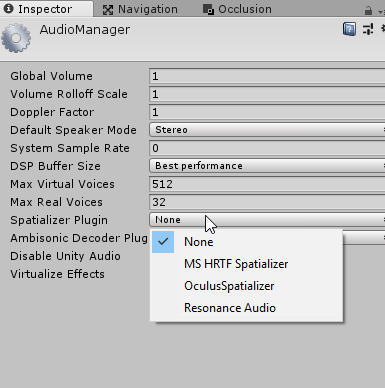 whole pewter
^^ seems about correct
hasty cloak
2018.2 what version are you on?
dusty night
but it says it's for vr for daydream and cardboard, specifically
hasty cloak
well they can be used for anything
dusty night
I'm doing an open game with lots of movement and locations
hasty cloak
i'm targeting desktop, and i want it for spatial sounds
I've tested it with headphones, works great
but yeah it's important for VR for obvious reasons.
whole pewter
so back to your question: it's main purpose is spatial audio - so all dots questions kind of miss the point - it's separate from it
( and dots won't have ambisonic/proper 3d until google - in this case - doesn't update this, or unity themselves integrate it )
but you should be able to at least set AcoustiMesh materials and see how it behaves
hasty cloak
also as to your question about do you need the Ambisonic plugin, you probably don't unless you use Ambisonic sounds, but wouldn't hurt to have it configured
Ambisonics are like a sound field, with all the sounds of an area pre-defined in 3d space.
whole pewter
but yea another contender for audio materials is probably steam audio and usual bunch - fmod/wwise - which I would only assume support it
dusty night
I have a feeling this won't work on consoles will it?
currently I'm emulating occlusion with pass filters
bit of raycasting etc
hasty cloak
it might, XBOX is just a glorified PC
dusty night
ps tho
hasty cloak
but would have to try it out
dusty night
wails and can't really hear his own wail properly
hasty cloak
hehe
whole pewter
you'd probably have to query google for console support
I'd enable ambisonics at least to run the demo
hasty cloak
i'm irritated now i can't remember who makes the demo with the rolling/tumbling barrels
i thought i saved some info about that to revisit it one day but can't find anything. I have the digital equivalent of a hoarder's stash
whole pewter
btw spatial sound like this really makes a difference compared to primitive horizontal only resolution of fmod/unity default spatializer )
hasty cloak
definitely. you can tell if sounds are behind you, above you it's very realistic
i remember Creative's old Helicopter demo
thought it was the most amazing thing. And definitely want that supported in my game
dusty night
your hoarding skills are clearly sub par
what kind of older man are you? hoarding and stalking skill trees should be maxed at this point
 whole pewter
lol
hasty cloak
figured id try to replicate the idea one day
dusty night
lol
hasty cloak
just never got around to it so far
dusty night
its pretty basic but you know, if the game is stylised, perhaps that's a good thing?
I mean you don't really want nuances of insect mating calls occluded by a crisp packet when trying to stab an npc with a rusty blade
I think there's such a thing as uncanny valley for audio or it's easy for audio to feel a bit too important than it should be
hasty cloak
i agree
hasty cloak
so you're not going to make your character say "num num num, yummy!" when it eats food to gain health? 😛
dusty night
I am actually
whole pewter
oh - the sounds of rolling barrels sounded kind of out of place but if you consider the surface material they kind of make sense
dusty night
rolling is just a looping sample but what can we do for different weights or speeds of rolling?
whole pewter
there's a demo for fallin gobjects of various sizes in resonance package - try it already 😃
hasty cloak
yeah, i liked the idea you could have different sounds depending on the type of physics interaction
dusty night
I think perhaps rolling sounds the same for everything but we could modulate it with pitch/filters for weight and speed?
hasty cloak
you could yes
dusty night
same for sliding things
whole pewter
i think they're doing something similar in conjunction with physics
dusty night
rolling and sliding is basically just weight and speed, doesnt matter what is causing it only the surface recieving it?
yeah thats what i solved here but its basic atm and i dont want to push on it much if unity is going to do it
I have the idea that for a lot of sounds I can modify them using unity's graph with realtime inputs like scale of object, weight, rotation speed... and in the graph it'll much a couple of samples and deliver something vaguely dynamic
am I wrong?
hasty cloak
i think it could be done, yes
dusty night
hmm best I wait a bit I think, I can afford to
hasty cloak
but you'd have to pick the right base sounds to get a believable range
dusty night
yeah I think I would need a few base sounds and it'd mix if needed in graph
perhaps for speed
a slow crunchy gravel roll would be different from a lighter fast hiss
but I could blend both nicely ish maybe with a graph and inputs
whole pewter
yea you can pass parameters to a runnin gjob and dsp node can call back too - so you can know e.g. when sample is finished
dusty night
when is all this stuff hitting package manager? post GDC I guess?
whole pewter
nobody knows ;0
i hope for some gdc resolution, but don't expect this to be available until .2 at best, more likely .3
dusty night
Sounds reasonable...
whole pewter
overall i'm rather skeptical given the amount of work for DOTS that unity themselves will do anything more than handful of base effects (similarly as what's by default available now)
e.g. for audiomixer their assumption was that 3rd party effects would pick up and there'd be more mixer effects and integrations available over time (asset store and stuff) - but that didn't happen for some reason
so if you roll your own 'audio materials' right now - if you don't want/need all resonance stuff - you might adopt it for DSPGraph once it's ready ;
although I think resonance like plugins will coexist with dspgraph for some time once it's out
people craved for VST plugins mainly - that'd be something
hasty cloak
yeah that would open up some floodgates
there's so many VST plugins
i used to have like 90 installed when i was really into audio hah
dusty night
Resonance has no guarantee of working on consoles for extended period of time so I best remain native
Or working at all (it only lists binaries for mobile and desktop)
hasty cloak
yeah it was a longshot
i don't intend to touch consoles with a 10 foot pole
so i'm fine with that
whole pewter
yea I looked into Plugins but console stuff is not usually publicly listed in SDKs; so googles might compile it for you ;P
whole pewter
ha-hah
... but i found forum thread where you were asking this very same thing a google employee who stated that they indeed don't have support for consoles - pity !
dusty night
yeah it was a while ago so I was reassessing
still feels a bit risky to me though
drake.gif etc
now ecs...
hasty cloak
here i thought all this time i was risk-adverse ;p
you make me seem downright adventurous 😛
dusty night
You throw caution to the wind, and actually get laid more than once per decade, you are my hero that I never knew I needed.
hasty cloak
lol
whole pewter
🤣
hasty cloak
take a risk. use an API that might depreciate... come on, you know you want to....
dusty night
I have, it's called unity
hasty cloak
😝
 surreal nebula
Welp, ouchie, seems like I posted my questions in the wrong group. As such, I'm reposting it.
I need some explanations on how Audio Mixer works. Docs on them are pretty scarce. I have 3 questions in particular:
- By enabling Wet Mixing on effects, are effects automatically disabled when the wet mixing value is 0?
- Similarly, is blending skipped when wet mixing is set to 1 (leaving only effects at play)?
- Can we write our own effects for the audio mixer? If so - then how do we do that with efficiency and support for multiple platforms?
The whole audio mixer stuff is extra clunky for me. But, unfortunately, it is quite impossible to have efficient audio effects without relying on it. Can't really achieve batched audio effects with OnAudioFilterRead.
The Unite talk for Unity 5 tells me this, but even then it seemingly contradicts stuff said in the manual and the tooltips, not even talking about that not a lot of info is given.
hasty cloak
i have no idea what 'wet' even means. Hopefully someone with more knowledge will come along. But i always say, experimentation is the best teacher.
surreal nebula
If wet mixing is 0, then effects do not contribute to the output, leaving the original stream to play. 1 means that the effects fully contribute to the output. Anything in-between is blended.
hasty cloak
i see.
i guess if you're asking if a playing sound source is in the wet mix at 0 does it stop playing
i would assume not
it is just not mixed in
might be tricky to test it though
if a tree plays in a game, and no mix is there to hear it, does it continue making sounds? 😛
effectively no
surreal nebula
Not quite. Audio sources send the streams to the Audio Mixer Groups, where they are processed in a batch/group. Wet mixing is set there. It is known that if no signal contributes to the group - the group and its effects are not processed.
hasty cloak
as for #3 there are built in effects

you can 'sort of' make your own by directly manipulating the DSP stuff
but it's kind of limited
surreal nebula
I wondered if we have the same behavior with Wet Mixing, where at 0 we have effectively no effect playing.
hasty cloak
However Unity has a new ECS based DSP system coming (maybe announced at the upcoming GDC, so stay tuned)
will be node based
hasty cloak

Unity
Get insight into our future plans, and when you can expect access to new services, features and functionality in the Unity platform.
surreal nebula
Heck, now I fear that the traditional MonoBehaviour design will be left out. Fingers crossed that I'm wrong.
hasty cloak
well hell, it was on the roadmap the other day
maybe they didn't mean for it to show up lol

For those of you joining us from home, we will be streaming selected sessions live from Los Angeles! Day 2 schedule (Wednesday, October 24 - PST): ▶️09:00AM:...
some brief mention here
DSPGraph
they mention C# DSP also
so hopefully both
surreal nebula
I am concerned about all this C# DSP stuff. They say that burst is used to optimize the DSP processing, but in the end it feels like a giant bandaid instead of a proper solution. What if burst is not supported on a platform? What if it breaks?
It's IL2CPP all over again during the Unity 5 days, minus the fact that burst will be immensely important for the performance of this one.
Does it really? Those packages work for me without the installed Burst package, and I don't see it as a dependency in those same packages.
surreal nebula
But anyway, Burst code falls-back to the usual C# in case if it is not supported. That's the problem with the DSP stuff, that it will be full-out managed C# by that point.
hasty cloak
yeah that doesn't sound optimal
surreal nebula
But anyway, even if it will be in Jobs, those are still underperformant compared to something like native calls from Fmod right on the audio thread.
Unless they will come up with a way to dispatch those jobs right from the Fmod thread and make the overhead as little as possible.
Still, it's the usual managed C# code, so still concerns about that.
Speaking on that matter, the whole "High Performant C#" thing seems extra effy to me. Even with Jobs, how can you make the mono runtime run faster than something native? I mean, there is Burst and IL2CPP (which is still treated as mono) and all that, but again, it really feels like a bandaid that is really easy to rip off. Just by shifting the paradigm into the DOTS doesn't make you faster than C++ or Assembly.
hasty cloak
I guess we'll have to see when more details are available
whole pewter
@surreal nebula you're thinking about it the wrong way - it's not the mono runtime, it's a subset of c# vectorized by burst where/if possible;
it's slightly different than il2cpp in what code is compiled at final step ; and it's definitely not band aid )
but not having burst at given platform would surely sucks - one of the reasons it takes some time to get it right
current audio mixer plugins (and mixer SDK) are here: https://bitbucket.org/Unity-Technologies/nativeaudioplugins/
having to compile each plugin/effect for each platform separately currently surely sucks
DSPGraph should eliminate that as well
surreal nebula
I still don't get how moving to DOTS makes C# in mono faster than C++, without burst.
whole pewter
you need burst for that
btw FWIW I think DSPGraph nodes correspond to fmod dsp processors - as for interop hard to say, but IMHO they will be setup and called directly from engine
surreal nebula
There, exactly why I feel that this is a giant bandaid and a boilerplate. Going all the way to the low-level is bound to bring some trouble along the way, and the more platforms it'll need to support the worse it'll be.
whole pewter
do you want magic wand instead ? 😃
the only other option would be to use roslyn native codegen and similar which does not cover necessary platforms anyway
fwiw I think it will be full of bugs when released, too 😃
surreal nebula
Maybe I would've liked something as Godot or UE4, written in C++, with targets ckmpiled as a native code, without IL and Mono which is God knows how many years old.
I can see UE4's runtime being ported just fine to all the systems.
whole pewter
but you'll get something which nothing in current c# can give you - semantic thread safety
and c++ for that matter
surreal nebula
UE4 doesn't need to translate its code to assembly or another language. It's straight up, bonafide, native C++ on the end, and it performs bloody great.
Meanwhile unity couldn't run on Switch okay for a year
whole pewter
nothing stops you from writing said c++ plugin/s if you want..
you'd get more headaches, free deadlocks, single platform and all that jazz with it though
surreal nebula
Which are still crosstalking with the mono runtime. Don't see enough profit.
whole pewter
properly setup c# struct layout processed by burst translates directly to assembly - you can't have this correspondence guaranteed in c++ compiler
but anyway: i rather believe m.acton since he kind of seems to know what he's doing ]
and there's no mono runtime in the end btw
there are p/invoked / marshalled calls at worst from user code 0 but this is happening in compiled c++ only
surreal nebula
Why do we need Burst to reach that performance? An assembly compiler, running in JIT that requires a ton of tuning on the per-platform basis which guarantees broken things? I fail to see a ton of potential.
whole pewter
i don't know what their bindings are about to look like for fmod dsp boxes but I would think it's not p/invoke & co. stuff
you need burst for eliminating cache misses 😃
surreal nebula
I mean, performance, yay, but it promises to bring headache in the future.
whole pewter
i recommend reading up a little bit about it
JIT does not exist in il2cpp, won't in DOTS , there's no mono runtime
- disclaimer about JIT - not sure about DOTS/burst 100%
dusty night
we shouldn't be explaining it to him since that's the job of unity, there's gigs of stuff about dots there now
just read it

Unity Technologies Blog
This is one of several posts about our new Data-Oriented Tech Stack (DOTS), sharing some insights into how and why we got to where we are today, and where ...
even on front page of blog
it even explains why faster than C++
wtf guys
even explains why it's a better idea to do it this way instead of C++ for cross platform.
 dusty night
yeah I don't mind a chat but he was asking every single question answered there lol
whole pewter
honestly i couldn't remember
i read lucas's blog before this came out, but this is written slightly more approachable
 lament nimbus
Hi all! So I'm a generalist getting into audio now. I'm currently struggling a bit. I've been looking at equipment and realize I need a DAW first. Most people say I should use Reaper, but others recommend Ableton Live. What do you guys think is better? And what equipment do you suggest I need to get started? Like I said, I'm new to this, and want to try and learn as much as possible
hasty cloak
if your're just starting out and have never done this, i'd try something free to start out, before spending a ton of money
a good free DAW (or what us old timers call an audio editor), is Audacity
whole pewter
fruity loops
lament nimbus
Thanks for the Help. I'm actually getting a MIDI keyboard for my birthday with Ableton Live Lite included, so I might try that, but I have used Audacity before for simple sound effects and such for other projects, but not for anything like music or such
hasty cloak
oh yeah if you want to compose music, that's a whole other thing
lament nimbus
Yeah, that's why I've been looking at Ableton and Reaper, as 2 recommended. In any case, I'll try out both since I have spare time in my degree studies, and I have a ton of online courses to help me learn
lament nimbus
Never heard of Reason
hasty cloak
really? it's been around a long time

Record, edit, mix, remix and finish your music with Reason. It will help you along the journey, from inspiration to mixdown. Try Reason free for 30 days.
i had reason 3
was just amazing. but they are like up to 8 now
can synth every instrument under the sun
lament nimbus
I'll take a look at it. I've heard of Ableton, Reaper, FL Studio, Pro Tools, Ensemble (Adaptive Music Middleware), Nuendo, not Reason
Well, I can also give it a try
hasty cloak
heck i guess they are up to reason 11 now lol
I've really lost track of it
it's been out since 2001, a granddaddy
whole pewter
it's rather different game than traditional daws though; and each one has more or less different approach
live is good starting point
and GarageBand for that matter too (!)
hasty cloak
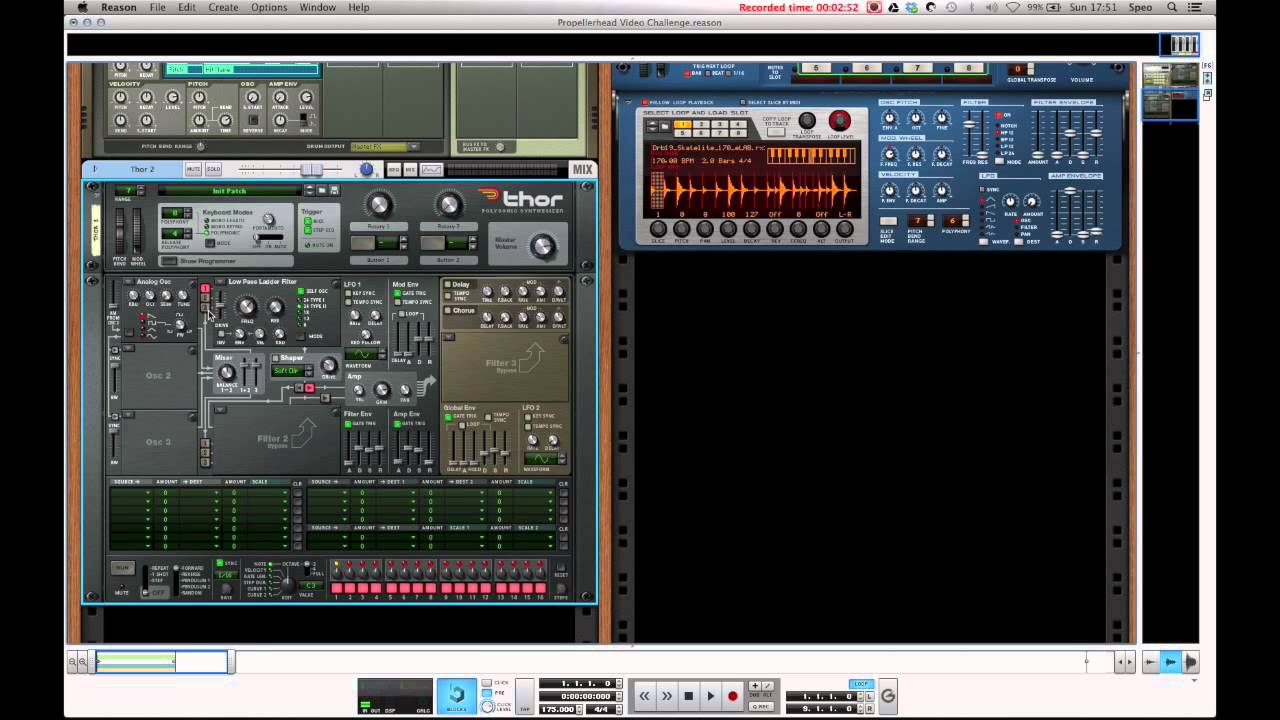
This is my contribution to the Propellerhead Video Challenge! It's been fun but I had to cut a lot of ideas I wanted to get into this video due to the 5 minu...
lament nimbus
Don't have apple
hasty cloak
simple tut but gives you the idea of how it works
lament nimbus
I'll check it out
I'm only in the 2nd year of my degree study (Doing bachelors in games, but learning more by self-study than actually attending classes) so I got a lot of free time. I'm currently waiting to get my Novation Launchkey 61 MK2 MIDI Keyboard
whole pewter
can't advice on HW unfortunately
although i should get one (meaning keyboard, i used to play it), it's also more comfortable to work with authoring sw that way
lament nimbus
I did some research on those. Best I can get is some Focusrite Scarlett's audio interface, AKG headphones & amplifiers, some studio monitors, and maybe a few faders, drumpads and other devices that could be beneficial later once I've learned the basics.
I've already built up a few sound libraries
whole pewter
seems like you're set hw wise atm :-]
lament nimbus
Yep 😂 When I research a topic, I make sure I cover everything as possible hahaha.
whole pewter
all that's missing is an iPad 😛
lament nimbus
Now if only an Ipad didn't cost like... 15K in my local currency
whole pewter
i'm only half-joking, daws on it are comparable to desktop apps
lament nimbus
I actually want an ipad or a wacom cintiq for drawing though
would make my life a bit easier
whole pewter
it depends whether it suits you with workflow, there are some nifty apps e.g. from korg, and synthetizers (reason is on iOS too ), some even open source
it's nothing necessary, but nice to have when you know what to expect
lament nimbus
Honestly, I haven't found my workflow yet. I'm a person that jumps around constantly.
I mostly blame my ADD for that 😂
whole pewter
yea, plenty of choices; that's why i won't recommend sonic-pi as well ;D
lament nimbus
Too late 😂 I think I saw somebody use that arounnd here
but I'll wait till I get a raspberry pi
to mess around with that one for fun
whole pewter
it's great stuff for programming oriented people , especially if they didn't have musical education i'd say lol
it runs on ruby though which i don't know much
 forest hornet
Ableton is really as good as it gets
 misty flicker
@lament nimbus you could check Cakewalk by Bandlab out too
it's used to be called Sonar (Platinum) before the acquisition, they rebranded it, removed some third party VSTs from the bundle and made it free
whole pewter
haaaah 'Inspiration'
misty flicker
which is a nice deal for a tool that used to cost 500 bucks for last decade
dusty night
but can it antialias? no, it cannot.
 green roost
fmod studio 2.0 is out. New features: global parameters, lfo modulation, preset effect chains, auto-save, custom shortcuts, Reaper integration
whole pewter
@misty flicker what unity do I need to install the megacity audio preview ?
if I install it the package manager automatically resolves and downloads all dependencies - this works correct ?
misty flicker
@whole pewter latest 2019.1 beta
current 2019.2 alpha doesn't work
if it shows up in PM, just install it through it
it needs certain level entities package but I think it has dependency for it
whole pewter
brilliant, thanks man!
misty flicker
@whole pewter not sure if it's worth testing right now, keynote is live in 10.5 hours
so if we are going to get MegaCity project, they might announce it there (but it's not granted of course)
whole pewter
they have to ! :)
and beta will stay beta very likely still (though I don't have good overview of its current state)
misty flicker
2019.1 is scheduled to launch in April afaik
whole pewter
hmm it doesn't show up in PM
side question: is it possible to browse/see current public registry ?
(all packages, and preview packages selected)
whole pewter
hm seems to be nowhere to be found in google, anyway - will wait for the keynote for now
will bother you then @misty flicker if needed ;]
misty flicker
@whole pewter https://bintray.com/unity/unity

unity, by unity. Smartly served to you by Bintray.com. Unity's central package registry
that's the regular registry
anything you find there you can put manually in your manifest
if you use staging, you have to conf the staging registry separately in the manifest
whole pewter
👍 thanks !
 crimson stag

Its a soumdtrack wich I made with FL mobile ( still in proggress) any kind of using this song without premmision has consiquences in the afterlife :-)
A soundtrack that i made, take a look
 proper salmon
annual GDC sonniss pack: https://sonniss.com/gameaudiogdc19/?mc_cid=66d1f93c82&mc_eid=5e453fd60e

 silver temple
Hey I was wondering if anyone can give me some feedback on this short little song I made. Its got a super 8-bit theme and I really want to make this piece AAAP (as awesome as possible)
 past jacinth
great
crimson stag
Listen to Soundtrack_cries | FL mobile by johnmrston #np on #SoundCloud https://soundcloud.com/johnmrston/soundtrack_cries-fl-mobile

Listen to Soundtrack_cries | FL mobile by johnmrston #np on #SoundCloud
Check out my soundtracks please
 late cedar
Wouldn't mind getting some feedback. Recently released a soundtrack for a commission and it be nice to get some new ears to listen in.
https://soundcloud.com/stevenbbell/final-rush-ost-commissioned

A commissioned track made specifically for Blitzkrieg (Link provided later)
 balmy tapir
Think the things that sound like "sonar pings" that start at 0:28 could stand to be a bit more rhythmic. It's a little upsetting to hear something sound like a sonar and not have a more regular beat
overall nice tho - would use for lobby music 👍
late cedar
I got'cha. Will possibly need to look into it once I've got the other two finalized and do my remaining editing and renders. Cheers for the feedback. ( If that was for me.)
late cedar
I did. The much older soundtracks that I have, way down at the bottom are from Magix before I learned how to use FL, so most of the new ones are made with it.
About a hour's worth to make this one, but that was mostly trying to get the feel of what my guy wanted aha. And I ain't much of a pro, just some guy trying to learn, but glad you like it too!
crimson stag
Listen to Gametrack_06 | FL mobile by johnmrston #np on #SoundCloud
 summer light
Anyone know how a submarine engine would sound...?
hasty cloak
there's two main types, diesel and steam powered (from nuclear reactor heating water)
so they would sound exactly like those types of engines
but generally subs are designed to not have any sound at all
since enemies listen for the slightest sound
 stuck frost
Whats a good app to create audio
hasty cloak
they for the most part are silent
stuck frost
Thats easy to learn unlike FL studio
late cedar
Fl studio isn't too bad for sound. If you know where to look and what plugins to use.
Plus Audacity tends to be one of the major things people use these days.
 queen garnet
Reaper is free and great
misty flicker
Reaper is $60 (individuals, education) or $225 (commercial)
but the author doesn't enforce the trial period
it's kind of like WinRAR of DAWs, but it does technically have a price tag
queen garnet
full version is free to learn, if you end up using it as your main daw, its time to pay
thats how i see it
misty flicker
of course everyone can bend their own moral like they want, just stating what their site says
so wouldn't advertise it as free
this is very similar to WinRAR which I mentioned, they got free trial period and if you use it after that, you should buy it. But since they never enforced the trial days, most people just keep using it without paying
it doesn't make WinRAR free tho
queen garnet
thats tru, "wouldnt advertise it as free" but thats kinda how they get advertised tho, part of their business modell
try it out full version is "free"
misty flicker
for 60 days
it literally says so on the site 😄
I mean, I dunno why this is even for a debate
everyone can make their own mind about what that means
misty flicker
I'm only correcting the statement so people don't think Reaper is a free option
there are few truly free DAWs around tho
queen garnet
and thats fine, i didnt debate what you said, even agreed with it
no point in keeping this up 😄
all has been said
misty flicker
LMMS, Cakewalk by Bandlab (ex.Sonar), Tracktion are all free
probably missed a bunch 😃
dusty night
did someone mention reaper?

The Reaper Rap from Bill and Ted's Bogus Journey (1991). Station.
You might be a king or a little street sweeper but sooner or later you'll dance with the reaper
crimson stag
Listen to Testtrack03 by johnmrston #np on #SoundCloud
https://soundcloud.com/johnmrston/testtrack03
Listen to Testtrack03 by johnmrston #np on #SoundCloud
summer light
anyone got some good advice for starting out with some electronic music (FL studio maybe?)
tutorial or something maybe?
proper salmon
This channel is GREAT for getting started https://www.youtube.com/channel/UCIWNozFjO8yVdJFsGKVmPgg

YouTube
Point Blank is The Global Music School, with courses in London, LA, Ibiza & Online. Voted "Best electronic music school" - DJ Mag.
late cedar
Should mess about a bit too.
Nothing wrong in exploring yourself all the plugins and making up beats, it's how I started, then gradually went through some basic tutorials on youtube.
proper salmon
Some other audio programmers and I have made a discord to learn/share :)
HMU for an invite if you're interested.
late cedar
This for both Indie developers and freelancers and such?
proper salmon
yes definitely :)
Most countries don't have AAA industry, so it would be pretty ridiculous to limit it. I'll send you an invite
green roost
I would also love to have an invite 😃
stuck frost
@proper salmon I'm in 😄
 untold elbow
Implementa un potente y sencillo sistema procedural de audio en tu vídeo juego. En ésta oportunidad crearemos un sistema de audio gestionado por eventos mien...
summer light
I’d like an invite also @proper salmon
 sacred cliff
Please invite me as well @proper salmon 😃
dusty night
Just checking in to see what the reactions were from the audio squad regarding GDC if anything new for you lot
 placid rose
Were there any annoucements around audio graph? I haven't heard anything more since Unite LA. Looking forward to that being released...
dusty night
Not sure. I'm thinking anything dots is probably related :)
proper salmon
I played with the Microsoft reverb cloud data baking tool thing
was a weird demo 'cause audio sources ONLY had reverb, so interactions all sounded a bit off without everything else that happens to audio in a space
Also they seemed to have it working well in Unreal, but Unity was a bit slow :S
Interesting to know that Microsoft is working in Unreal so much. Google dev tools are more often demo'd w Unity and other lower barrier tools like Reaper
This is the project I'm talking about:
https://docs.microsoft.com/en-us/azure/cognitive-services/acoustics/what-is-acoustics
A lot is cool in a sort of research level, but not a practical game making level.

Project Acoustics is an acoustics engine for 3D interactive experiences, integrating baked wave physics simulation with interactive design controls.
I was asking about workflow and iteration, and each time you change something it takes 20min to bake the fuckin thing again. Also having to send all your data to the server is good for how it then deals with data, but sending it seemed to take a while too :/
Which is totally unintuitive to how audio people usually work with quite rapid iteration
whole pewter
there's no unity audio specific talk on gdc vault
couple of DOTS talks (Tiny & overview/ roadmap)
misty flicker
I didn't spot any audio things on booth sessions either (which Unity will upload to their Youtube later on)
 polar raft
Is there any system that helps put audio that is not so taxing in Unity? Ambient sound alone takes so much of the resources...
(ideally 3d/surround sound)
proper salmon
Using smaller file sizes and switching between them to avoid loops, can help you keep less in RAM
Also a mate wrote this article on import settings:
https://www.gamasutra.com/blogs/ZanderHulme/20190107/333794/Unity_Audio_Import_Optimisation__getting_more_BAM_for_your_RAM.php

A guide to using Unity's audio import settings to help improve game performance.
But yeah.. audio is big 🤷
polar raft
Thanks. It is not easy to not loop certain ambient sounds.
Nice article, I have read a couple about this, looks like he put everything together.
 tulip pivot
Time to get nostalgic
placid rose
Looks like 2019.1 uses the new DSP graph internally and we can expect it in 2019.2 👍
proper salmon
Yes it does! But I want the node programming :(
Afaict the graph is just a visualiser
misty flicker
I wish they made it a package originally too
now we can only run megacity audio setup on 2019.1 as it indeed only exists in 2019.1 internally
2019.2 doesn't have it
placid rose
The Unite LA talk mentioned a 100x speed increase compared to OnAudioFilterRead, so I'll be interested to see how we can convert existing OnAudioFilterRead scripts over to this new system and benefit from the Burst compiler. Yeh, the DSP graph view/editor could be really interesting. It has the potential to open up the audio programming pipeline to non-coders, just like Shader Graph is doing for shaders.
dusty night
sounds like you would best benefit if your code is also dots
placid rose
Yeh. Can projects be moved over to dots in stages? I mean, is there a way to get these performance gains by re-writing only audio scripts for example to use ECS? Did I just ask something nonsensical... 🙄
misty flicker
that's the best strategy right now probably as the DOTS is still missing a lot of needed systems anyway
but audio isn't one of the systems that's good pick right now 😃
we got megacity audio sample that's not going to be 1:1 what Unity provides us later with and it only runs on 2019.1 (you can't use megacity audio for example in 2019.2 as only 2019.1 got DSPGraph included in the internal dlls and future versions are still waiting for a package to do it...
whole pewter
so, your other code doesn't have to be dots in order to use IAudioJob - those jobs are like any other jobs - independent from the rest of the ECS, if you want
and yes converting project gradually to ECS is supported and they consciously support this scenario
so you can have your old monobehaviours and other whatnots like usual and having DOTS running only for presumably performance critical parts - which audio might, or might not be
placid rose
Interesting, thanks for the info.
whole pewter
no worries !
this talk is about gradual ECS-fication of an existing MB only project: https://www.youtube.com/watch?v=QbnVELXf5RQ
placid rose
Oh nice one, thanks!
 fierce zealot
I have seen some cool stuff extracting spectral data from an audiosource. Is it possible to import a stream of data as an "audiosource" and apply FFT to the signal?
I'm trying to analyze muscle data
whole pewter
see AudioClip’s SetData; once you then play the AudioSource call GetSpectrumData on it
(you most likely would want to wire its output to silenced mixer group too)
fierce zealot
thank you @whole pewter! i'm looking at the GetSpectrumData and the example that's within the Update Loop. this could work pretty well
fierce zealot
@whole pewter do i need to play the audio for it to run the FFT? or can I just fill the AudioClip, run FFT on it, and get the results as a vector, without incurring audio out?
whole pewter
you need to play it (unfortunately ? - depends how are you presenting the data etc etc) - if you want to do this in static way you'd have to do FFT on your own - in that case you most likely don't want anything from audiosources & co. though
 waxen field
Alright, so I'm playing a video, other than the slight desync off the start everything is fine. That is up until I try to screen record something or full screen the game window with a video running, then this happens with the audio: https://seth.doesnt-have-a.life/345coty.mp4. It wouldn't be so bad if it didn't completely desync from the video.
 silk obsidian
I don't know why they don't have a cull and remove all the clearly legacy stuff, its all across the learn docs
proper salmon
it sucks it's the second tutorial :/
stuck frost
i love this channel
misty flicker
then again, there could be users upgrading from Unity 3 or 4
isn't audio system somewhat the same still as on Unity 5?
proper salmon
yeah, 5.5 was the last big upgrade
 light hamlet
FYI I've shared one useful article on audio in #archived-resources
placid rose
It's a shame #7 "Prevent pops when using Audio Mixer Snapshots" only resolves the issue in the editor. But I suppose this will become a redundant issue with the new audio system. 🙂
proper salmon
Yeah I'm looking forwardto new system. Hopefully it makes it easier to make grain synths too!
 lament sparrow

Après les plaintes, après la taule, le nouveau bail est lancé
crimson stag
https://youtu.be/qN4nq300De8
This is a fan art music, meaning that the graphics are origins, but the musics are by #me , i removed all the sounds and added my own ones... i hops u guys like it, took a lotta time... aaaand share if u liked, don wan any subscribe or like button

Its a fan art ( or better to describe it as a fan MUSIC) that we made it. The musics are originally built on FL mobile on ANDROID! This game, 41148, was some...
light hamlet
Hey guys! Is there any way to optimize OnAudioFilterRead other than moving the code to native?
I heard there was some ongoing work on ECS audio - is there any eta, or info?
I'm having the issues of audio stuttering on Android (using csharp midi synth)
Could this be related to wrong bitrate or buffer size setup?
proper salmon
DM'ing an Audio programming discord that might be helpful 😃
 drowsy ember
Is there a way to play audio from other channels of an AudioClip WAV?
So that we could have different layers of music all in a single WAV and switch between them (say, a "normal" battle theme and a "low health" variant?)
proper salmon
hmm, like if you had a quad track?
I feel like it's something unity SHOULD do. But haven;t seen it done.
like, it's usually easier to convert things to mono yourself, than do it in UNity
Are you just trying to keep the track in sync?
whole pewter
you would have to do it manually, unity does nothing with channels
no idea how panning works though in this case/with multiple channels tbh
proper salmon
Yeah I think you may as well have four seperate stereo music tracks.
so you also get a nice stereo mix.
whole pewter
by manually i mean you can filter needed channel in user code in pcm callback
but it's questionable if it's really worth it
 drifting notch
Does anyone have any idea or experience in using rear speakers in a 5.1 setting? I am only using the 2 front + 2 rear speakers + sub (center speaker is not connected) . My sound moves around the camera depending on controller input to give the user direct feedback about which way they are moving. My AudioListener is attached to a parent (of camera) GameObject which doesn't ever move or rotate to keep things simple. I have switched to Prologic DTS from 5.1 because it seems to work with the rear speakers better but generally when I move my sound to the farthest corners behind the AudioListener, the sound is still audible in all other speakers.. even at the distance of MaxVolume setting...
Here is my audio source:
The AudioSource is a mono sound.
I think the main problem is panning left/right doesn't seem to do anything.. the listener volume level on the AudioSource is the same on both sides of the AudioListener...
Adjusting the Stereo Pan slider on the AudioSource does absolutely nothing.
drifting notch
oops my rear speakers were physically flipped.. a bit better now.. but panning is still very odd, or perhaps i don't understand how panning is supposed to work...
drifting notch
Ok I went with Google's Resonance Kit and it seems to work a bit better with the panning... guess i'll go with that.
whole pewter
that's most likely correct course of action
panning behaves weirdly at other places too
stuck frost
I am in need of voice work
proper salmon
Soundlister is a great resource of audio workers

Find talented Voice Actors from all over the world here. Hear demos, read about their experience, references - and easily find great audio professionals!
There are lots of lists of voice actors around though:
https://voicestable.com/voice-over-artists/
VoiceStable voiceovers worldwide voices accents artists search
and different agencies
can even search on twitter haha https://twitter.com/search?vertical=default&q=voiceover artist&src=typd
3h ago @BTVA tweeted: "Hiroshi Yanaka is the latest voiceover a.." - read what others are saying and join the conversation.
 Twitter
 stark jackal
Hi ! 👋 everyone . Does anyone know how to create vocal FX like Amon Tobins voice at the 5minute mark of this video ??? https://youtu.be/WLrt7-kIgIM

Trailer for Amon Tobin's all new, highly ambitious, breathtaking 'ISAM' live show. Tobin will be stepping away from previous DJ centric performances, and ins...
(Not necessarily in Unity)
Any help would be greatly appreciated thanks
proper salmon
the "lalalalalala" which is a couple of pitched up layers?
or the "this is the strangest thing I've ever" line, which is like slightly bit crushed
stark jackal
@proper salmon sorry it’s at the 1:50 mark. - the robotic Sounding voice
 open verge
I don't know if it goes here but how do i make my game play random music every time in a scene?
proper salmon
You'd have one audiosource that plays from an array of different tracks you have
Or your audio manager would reference this array on play, and create an audiosource then
stuck frost
this good?
stuck frost
also the version for unsupported versions of windows.
also pirated game version
ok i will stop
stuck frost
here is crash audio (email beeped out for safety)
????
wat
y
why tho
its supposed to be 13S
not 0S
 static sun
Hello everybody i would like some feedback to this Soundtrack Mephres made for me.
It's supposed to be used in a level of my FPS game.
 flat mulch
that's a lot of bass
proper salmon
I think it's cool, but you'd be getting it to loop for your game, yeah?
I wonder if it's a bit slow, and how that might impact the player.
A technically effective thing about it, is that it leaves a lot of room for all the sfx to have clarity on top
 dusky island
Guys for some reason when my audio loops, the 2nd play is a lot quieter and then it remains at that volume?
I am in the audio mixer and the music still appears to be at the same volume in the mixer at around -55 to -60 dB
But the volume is clearly reduced by at least half, maybe more in my headphones
proper salmon
hmm, maybe you have two audiosources present or something. There might a sneaky one hiding somewhere that isn't set to loop?
misty flicker
also, this is stock Unity components we are now talking about and not some 3rd party audio manager?
proper salmon
hehehe. I only know it 'cause I've done it!
static sun
Ok here is the finalised version
I might use it for the Main Menu instead now that i heard the finished product
late cedar
I've made a couple of soundtracks for a game (paid commission) and wanted to know if I should post the list here, or potentially somewhere else? Thought it be nice to share it.
proper salmon
if it's #archived-works-in-progress or #502171626805133312 maybe there?
stuck frost
i extended the bitventure intro
well i tried extending it
here is the original one
stuck frost
Is there any posibility to change speed of all sounds by script?
Im working pn slowMo and everything works perfectly but i need to slow down sound too
whole pewter
umm well.. you can use pitch shifter mixer effect , but the 'all sounds' part would be a problem
you'd have to wire all needed audiosources separately
proper salmon
if all the audiosources are routed to the mixer, you can pitch shift that, which would make that al ot easier heh https://forum.unity.com/threads/solved-changing-the-pitch-of-audiomixer-by-code.332070/
Unity Forum
Hi,
Can we change the pitch of an AudioMixer by code (C#)? We can from the inspector.
It's seems like the AudioMixer object don't have any method for...
 grave star
Here's a utility script that can search a scene and return a list found components.
https://gist.github.com/darktable/1819e126b0abd3b8a5afc6fcedcf7645
There's also Object.FindObjectsOfType
https://docs.unity3d.com/ScriptReference/Object.FindObjectsOfType.html
But that will only return active gameobjects.
Don't know which is faster.

Gist
A utility script to find every component of a particular type in a scene. Not sure what the results will be if you have multiple additive scenes loaded. - Helper.cs
proper salmon
@daring bone phone speakers suuuuck. They totally cut the low end, and the high end just peaks hugely.
So, when mixing audio, you want to make it sound good in this spectrum:
 daring bone
Oh damn I don’t know what this is
proper salmon
You could even put a low pass filter and a high pass filter on the Unity mixer and see if that helps on the phone speakers. Because then at least then the shitty phone speakers won't be trying to push out tones that it can't.
daring bone
I am only using an audio source LOL
proper salmon
In that case you can add them as components:
set the low pass to 15k
and the high pass to like 100
Unity.. why you have such silly defaults :/
daring bone
Awesome! Thank you very much @proper salmon
proper salmon
Don't thank me yet! I hope it works for you >.<
daring bone
Lol
proper salmon
and it's not some other weird android thing..
daring bone
Will this like affect the quality of the music?
proper salmon
yeah, so you should hear it on your computer as well. It's a bit of a hack to get it to sound a bit better on phone speakers.
The ideal solution is that whoever made the music makes a mix that sounds okay on bad speakers.
daring bone
Ah cool
But how come it works with headphones?
Oh never mind lol
Stupid question
daring bone
Lol
proper salmon
but yeah, THAT'S what made me think, oh it's a mix thing, and not a driver thing.
daring bone
Btw you mean 100k or just 100 @proper salmon ?
proper salmon
just 100
daring bone
No difference on pc so far
proper salmon
You can see in the lil image I posted, that "frequency" goes up on a logarithmic scale.
daring bone
Ok cool
proper salmon
hehe, well maybe you can play with the values until you notice it. But I reckon try build with these to mobile, and see if you notice the difference there.
daring bone
Yeah hah
proper salmon
like, if you put the values at 1000 and 500, you should notice it. If not then hrmm, maybe you have to implement those components some other way
daring bone
Yeah at high values you can barely hear the music anymore lol
Also another issue I am facing is latency. Ugh audio sucks lol
proper salmon
oh really? What are you doing that's making it lag?
daring bone
No idea
proper salmon
where are you noticing it?
daring bone
Any time a sound plays
Like when I click a button
There is a very small delay
But noticeable
proper salmon
weird. Is there any silence at the start of the actual clip?
daring bone
Not at all
proper salmon
and it happens when built as well?
proper salmon
nah that's weird 🤔
proper salmon
when you're triggering the sound for the buttons, do you do it on click, or is it on an animation or something like that. 'cause maybe it's triggering slightly later than it should 🤷
daring bone
I do audioSource.Play()
proper salmon
yeah but when?
daring bone
On Click
proper salmon
yeah okay that seems normal 🤔
proper salmon
Unity hates audio :/
daring bone
🤣
daring bone
A bit better now @proper salmon ! Though still not clear
Should I increase the High Pass Filter?
proper salmon
I'm glad it's better!
daring bone
😃
proper salmon
so the high-pass filter is blocking the lowest sounds, and letting anything higher than the value you assign to "pass".
The low-pass filter blocks high sounds, and allows anything lower than it to pass.
So, if you think the bass is still bad, then you increase the high pass filter. But if you think the high still sounds bad, then decrease the low pass filter.
proper salmon
unfortunately, as I said earlier, it's a bit of a band aid on the problem. There might be some tones in the mid that are ringing out, that you can't fix unless you know audio a bit more and can do it in some audio software.
daring bone
So if I download an audio software, what exactly should I be looking for @proper salmon ?
proper salmon

this vid goes through equalising 😃 which is what you're doing. Looking at frequencies and ducking them if they're too loud.
If you can hear a sound on your phone speaker that is sticking out, you can go in to audacity and use this tool to lower the volume of that sound a a few db.
this video is more in depth https://www.youtube.com/watch?v=PUax7FvCC3Q

GSmaniamsmart teaches how to make your voice sound better using the equalization and compression effects in Audacity for either singing vocals, commentary, o...
but yeah I imagine there's some sound in your track that's sticking out too much and you might duck it a little like this:
if you have to do it this much:
Then because you don't have all the instruments split out like the musician.. I dunno try different music heh.
Other might disagree, but making such a big mix change blocks out all the other isntruments at that frequency, so much so I can't imagine it still sounding okay 😅
daring bone
Oh man you are just awesome!
misty flicker
if there any affordable tool that would let me modify the pitch in curve?
I know some adobe tool does allow that but I'm avoiding extra subs, would prefer perpetual licensing
I'd be fine with linear ramp too, in Audacity there's way to set the start and final pitch but the dialog it stupidly put so that you don't have preview option for it
so you'd have to open the dialog, edit values, apply, test, undo, open dialog again, edit again, etc...
it's like most unintuitive workflow you can imagine
the reason I ask this is because I have a ton of clips I need to loop that does have different pitch at start and end and they'd need to loop perfectly
I have Sound Forge, Sonar, Vegas Pro here too, but I don't think I've found any better approaches on these
this is rather straight forward task even, Audacity has the code to do the actual task, it's just seriously lacking on the tooling (but that's the OSS curse really, had to make a macro for Audacity to even do proper Crop)
oh, you can do this on Sound Forge
first thought you can't even loop the sample in it's preview but turns out that if you enable clip looping on the main window before you open the dialog, it loops on dialogs preview too
anyway, thanks for rubber ducking 😄
I think I know why I didn't look SF further for this before
it's because it only supports 2 channels
but I can work around that
 honest needle
If Audacity has the stuff already, you could always open an issue on their GitHub so they can add options to do it.
misty flicker
tbh, what I see in Audacity is what I see in all open source apps
it's just incredible hard to get any reasonable usability changes to any of these tools as people are super fixated on keeping things like they were (unless it's completely new tool)
altho in Audacity's case, it's mainly missing a preview button for one dialog 😄
honest needle
As an open-source dev, I wanna say that we're not fixated on keeping things as they are, we enjoy changing things to fit our users needs, to make the users happy and potentially get more users and a better program. We just need users who engage with the software, with issues and suggestions. But I don't work on anything anyone uses, so whoops, I might be wrong.
misty flicker
I stopped trying to get free and open source tools better by providing feedback a long time ago, it's just not worth the time
honest needle
That makes me sad to hear.
misty flicker
the typical case is that when you DARE to propose some better approach, you first get community wrath for daring to tell there's something wrong and you should just use the tool like the devs made it
then you hear how entitled you are and that there's nothing wrong
you see this mentality in almost all bigger OSS tools
I'm surprised that blender has evolved as much as it has as this also happens there all the time.. but I guess that's the reason why it took two decades to get the UI half decent
they still can't do basic things right there, things people have complained for years
Blenders file dialog is one good example, or any place where you select objects from list
they only have like a lasso tool
you can't like, click first object from list, hold shift and click last object, like in about any other tool
no, you have to manually lasso around to get the items selected if you want to pick bunch at once (and I'm not talking about 3D view now)
lasso would work unless you'd inevitably have always cases where you can't just fit every item on the screen at once (not to mention it's tedious and not intuitive at all)
in that case, the person who made the lasso tool spent sooo much more time implementing that than doing the simple thing people would logically expect to be there
quick google search also show that many people really miss this option too
but nobody cares
but to get back to the topic
Sound Forges pitch bend too isn't ideal either
you can edit the curves there by mouse but there's no way to enter specific values, you just have to drag around and see the value on the tooltip
which would be fine for individual files, but if you have like ton of files with same setup, would be nice to make it faster by just entering the values
honest needle
Makes sense. I hate when programs have drag-able things but no entry boxes. Like with the Unity polygon collision boxes.
proper salmon
I was away 😅 but yeah I don't know of any very affordable tools that would do pitch bends nicely in bulk. Reaper has a pretty good interface for doing bulk stuff 🤔
You could put each clip on its own track and group them, then put the pitch bend effect on the whole group, and bulk export that, if all the clips are the same length
misty flicker
hmmmm, I could probably do it on Sonar too
but it's not really intuitive to use for making loops itself, so would have to do multiple passes
you'd think making loops is such basic task that we'd have some easy to use tools for it though 🤔
I'm thinking of having some automatic frequency match and dials to mix the transitions etc
most useful thing for looping has been Audacity's automatic zero crossing selection thing
I can do all this work manually too, but a programmer in me just screams that it would be so much easier with proper dedicated tool for this purpose
maybe there's market for such thing?
proper salmon
Yeah, the audio industry is pretty bad at the whole "affordable" thing. But also most people in technical audio make their own plugins.
Maybe you could make your own tool in Projucer :)
The stuff you're describing is pretty easy to do in the DAW I use, Ableton. But that is NOT affordable ahahah
Game audio houses make lots of plugins in stuff like Projucer, Pure Data, Max MSP, stuff like that.
I like Projucer because making Unity plugins is native, and I like real-time stuff.
misty flicker
I have that cakewalk as DAW but haven't really used it for much
that juce thing, it's free?
proper salmon
Yeah :)
proper salmon
Yeah. Cause you're also okay with C++ right?
misty flicker
never done VST programming
I'm fine on c++
been doing it first like 2 decades ago
proper salmon
Yeah I thought you were, that's why I suggested this route heh
misty flicker
I'll definitely consider this, thanks for the tip 😃
proper salmon
Juce is fun :) there's some good community
misty flicker
I'm not going to lie, I don't really enjoy tool (or framework etc) development, I'd rather build actual game content 😃
but more you do things, more you find yourself doing more things that enable you
because.. there's just so limited time to make everything manually the hard way
(and most things you tend to need for some reason don't tend to exist in form you get access to them)
proper salmon
Yeah it's sort of unavaidoble with Unity. Unreal has heaps of audio stuff built in, but Unity I feel like I have to reinvent the wheel every time. So I use a lot of tools heh.
misty flicker
unreals new audio engine is nice for sure
proper salmon
Lmk if you ever wanna put your audio tools to market :D
misty flicker
heh, I dunno if I care to polish that much
actually selling a product is a huge time sink when you consider all support you need to give
proper salmon
Yuuup
proper salmon
Haha I read that as "cute" and was like "yaaay, cute tools!"
misty flicker
lol
proper salmon
The first things I learnt in C++ was making colours and all MY tools are definitely cute
misty flicker
also, after downloading the zip, I found .git files, so.. I'll just clone this instead from https://github.com/WeAreROLI/JUCE
misty flicker
wait...
Building JUCE Projects
* Windows: Windows 8.1 and Visual Studio 2013 64-bit```😄
I hope it still builds when upgraded to VS2017
there's like no way I'm installing VS2013 for this
proper salmon
Lol it does!!! I'm using 2019
Also you can use the Jet Brains stuff, but it's only beta
misty flicker
I don't have rider or the other thing
ah, it actually comes with VS2013, VS2015 and VS2017 solutions
whole pewter
.and solutions tend to upgrade gracefully - and yea use github
misty flicker
most do yes
whole pewter
(that way you can disable GPL check, but shh)
misty flicker
this is GPL? 😄
whole pewter
they have define for commercial build, but it's GPLed otherwise
misty flicker
If you want to use JUCE under the GPL without signing-in, you can recompile the Projucer yourself and change this flag.
ah
whole pewter
I kind of had a look around but it's no other that any other xplatform framework with bit more polish for plugins
it might be a good choice for audio plugin or standalone batch something processor though
the thing with batch pitch processor as you mentioned above is that most sane audio folk are on mac because of latency - and since you can script e.g. logic with applescript... too small market I think 😃
whole pewter
well.. that's not end of the world, but you better know what you are kind of doing at that point for sure )
misty flicker
well, it kinda beats the purpose of getting some of the cost back for random sales tho 😄
may as well keep with the gpl version then
whole pewter
lol yea - that's the usual conclusion I think
stuck frost
Some metal music for ur fast guitar needs
misty flicker
@dusty night I dunno if there's a doc for it, but there are bunch of GDC talks about it

During GDC 2019, Epic’s Aaron McLeran walks through the Unreal Engine team’s development process for the new audio renderer, which includes balancing live Fo...
you can see the main points on the slides
proper salmon
Unreal's existing stuff is pretty thorough too though, not just the new stuff.
Overview of the audio system used for playing in-game sounds, including the use of SoundCues node-based audio assets.
a lot of sound cue stuff built in as well. sigh 😆
 bold salmon
Did 2019 change how to mute editor audio? :S
I can't test any sounds at runtime (though they're playing in build).
 quasi dust
Good Morning everyone. I'm hoping for some help. Shortly after I got Unity 2019.1, Bolt 1.4.3f2 and .NET 4.x installed and running, I discovered that I could no longer import any audio files into Unity. None. I have tried to adjust the timestamps but that doesn't help. Also I spent an hour with Microsoft fishing around in my system remotely, and they assure me that the Media Pack will not help, it's not their stuff that's not working, and I have Windows 10 Home which does not qualify for the Media Pack anyway. Any insight?
proper salmon
@quasi dust maybe check theimport settings?
https://docs.unity3d.com/Manual/class-AudioClip.html
@bold salmon omg that sounds wack. I don't have that issue at all! Maybe check the mixer in editor isn't muted or something, but I don't understand how it could be in build!
bold salmon
I know right, it's really bizarre. I've (somehow) managed to get it back after doing drivers and reinstalls. I'm going to just chalk it up to Unity being weird, because that's the easiest. Lol
proper salmon
also windows drivers audio drivers are pretty weird 🤷
quasi dust
@proper salmon Well, after wrestling with this for untold days I followed some good advice and upgraded from Unity 2019.1.0f1 to the current build .7f1, and after sacrificing a goat and 3 chickens to the dark godz of DahTahh, behold! I can import audio files once more!
It's all Dark Magic.
whole pewter
some good advice hmmm
quasi dust
@whole pewter 😉
 pearl trellis
hey i have a question
so ive used unity before in the past and im somewhat conferrable with it
and my strongest area is of course programming
but i was wondering, are there any easy ways to make music for games? or any programs that make it easy
i see so many indie devs out there with some stunning Music in their games all made by them.
proper salmon
There's lots of cool phone apps for sure
I wrote a thing about making music for programmers, when I taught a workshop a long time ago! https://www.maizewallin.com/news/you-can-make-music

Maize Wallin
This is where you can find any newsletters, my gig guides for each month, and any other cool updates!
Might help a good start
 naive thicket
@mossy patrol Question is more suited for this channel.
But yea, a lot of sounds are made using usual objects and distorted afterwards. There are free libraries as well. Sonniss releases every year sound libraries for free use. Their download sources can be found somewhere on reddit.
 mossy patrol
didnt see this channel sorry
naive thicket


Taking another quick, 20 minute stab at an ice spell. Piecing together something using only my ice sounds I've been recording the past month and a half or so,
#gameaudio #sounddesign https://t.co/tzblFCO9rs
Retweets
1474
Likes
6379
Twitter
stuck frost
Hello i need a suggestion please look in #archived-game-design
proper salmon
it had nothing to do with audio 😐
 viral orbit
I have a smg that shoots fast, the problem is that it shoot so fast that at some point its gun fire sounds goes mute, i guess unity has a limite of sounds it can play at the same time but then how do you do ?
 idle harness
Can you do a script that checks if it’s playing and only plays it if it’s not already playing. Or keep track of how many instances are playing and stop it at a limit
idle harness
Well I’m thinking like a queue where you have an event on fire you push into the queue something indicating the sound is playing and an event when it stops playing that moves it out of the queue. So if you hold the fire button down it’s constantly moving things into the queue as it begins and moving them out as they stop playing
You don’t stop any from playing once they are in the queue but once the queue reaches a certain size you don’t allow any more to be added until one of them finishes
So all the ones that play will play and finish but you won’t go over that limit
viral orbit
but this means that you can't have a minigun in your game anyway 😄
idle harness
Lol for a mini gun I’d think you’d want a “brrrrt” sound that just simulates a lot of bullets
idle harness
Could be. One short bullet fire sound that repeats over and over very quickly but doesn’t overlap, followed by an ending sound that plays if they aren’t holding the button
viral orbit
oh my smg track is anormaly long too that can't be good
yeah i'll start by trimming the track but i guess i'll have to make some compromises if i want something else than a gun shot i my ears at the time 😄
 trim notch
make sure your soundfiles have the 10kHz+ range trimmed off
Speaking from experience, after listening to- and editing gun sounds long enough you can get some pretty nasty hearing loss
@viral orbit
most of my gunshot sounds esp. for SMGs are 0.5-1.0 seconds
viral orbit
@trim notch what do you mean by the 10kHz+ range trimmed off ?
Yeah i trimmed the sound to a 1.0 seconds there is no more muting now
I dont know how many AudioSources it takes from my improvised pool from the firerate of the gun tho
Maybe looping the sound on one AudioSource can be a good fix but i wonder how peoples do their Audio management
idle harness
I think 10 kHz will cut off high pitched noises. For volume tho I think you would want to lower decibels
And honestly while I don't work in a gamedev shop I do C# development for a living and the answer is honestly probably "however they can get it to work" lol
There's always a multitude of ways to solve the same problem. So you're not going to find a magic bullet
I know that's not actually that helpful but in lieu of someone being here who has actually done it that's all I got lol
I'm a professional C# dev just starting to learn Unity so I'm mostly spitballing trying to apply general dev concept to Unity without actually having done it lol
But if I were to make a wager I'd bet you'd want a sound for a single bullet and a different sound for many bullets and simulate many bullets instead of actually firing a sound for each one
Scenario dependent.... if it's a slow fire then sure. But something like an SMG if you just have a "pfftpfftpffllttt" sound I imagine it'd be fine lol
viral orbit
Yeah i guess i'll resort to this if it uses too much AudioSource it could also be my audio card that can't take this much or maybe i should make a true pooling system i made this quick thing for the audio manager but i didn't used the Queue class i dont understand what it accomplishes
 fierce finch
Hello! I am just curious about loudness of SFX and such. What are the LUFs for those typically?
green roost
From my understanding (maybe I'm wrong), there is no standard for loudness in videogames, but sony has tried to push -23 LUFS in the last years. You should measure the loudness of a gameplay session (minimum of 30 minutes) instead of single sound effects. Oculus recommends -18 for Rift and -16 for mobile.
 plush peak
Hello. I am playing a sound in front and behind the audio listener, but they sound very similar. Is there a way to make a sound feel more "behind" the listener?
whole pewter
you will get presumably better results only with more advanced spatializers such as resonance, steam vr, oculus .. @plush peak [there are more on the asset store, but these are more or less ok]
proper salmon
you could also pop a low pass filter on stuff as it goes behind you. For a more perception kinda effect rather than physics.
But agreed, Google Resonance is my goto
plush peak
Good ideas. Thanks. I will try them out
open verge
Is freesound.org a good place to get game sounds?
proper salmon
they generally need a bit of editing, and not all the licenses allow you to use the audio for whatever you want, so make you check.
A Sound Effect is a good place for high quality sounds.
or even the Unity asset store. But make sure you always check the license
I use FreeSound, knowing I'm going to have to edit and clean the sounds, and also search for a WHILE for high quality stuff.
open verge
So freesound.org is you can have all sounds for free, we dont care?
proper salmon
no, each upload says its own license
open verge
So A Sound Effect requires no licenses?
proper salmon
gegnerally on A Sound Effect the licenses are open for use, but you still have to check on each upload
proper salmon
there's lots of free stuff on the unity asset store as well. That should need little-no editing. But again, whenever you're using someone else's assets, you have to make sure you know what the license is.
open verge
Ok well technically
I just need sound effects
Like birds chirping or cave sounds
I wrote the music myself
proper salmon
same applies 🤷
any website that sells sfx is going to have different licenses. Some licences say you can use it for whatever, but credit the uploader, some say no credit, some say only some projects etc.
 pseudo moss
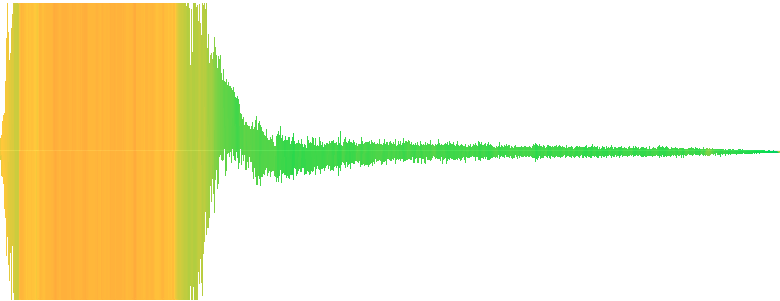
Hey everyone, I find most sound effects that I need are of the type start - loop - stop effects, and I'm wondering if anyone has any good info on how to create these from a single sound source. Take for example: https://freesound.org/people/qubodup/sounds/163119/ I've attempted (using adobe audition) to split that up into 3 sounds (a start, loop section and stop) but I can never get the loop sound to actually sound correctly while looping. Anyone have any tips for doing this?
Freesound
On FLAC and OGG Vorbis formats.
Anti-Air Gun.
Extracted from a video () by a US Government agency, thus public domain.
Find many more military sounds in my military sounds pack, also located on Freesound.
Contact me if you have interest in specific sounds for open source ...
 molten ginkgo
 lofty coral
Any idea why playing the first 3D sound effect in my scene causes my music track's volume (2D audio source) to be attenuated permanently?
proper salmon
maybe play with the priorities on the audio sourceS? And see if you have any settings on your mixer
 rancid flare
opinions?
plush peak
Is there a nice way of queueing audio samples to play? For example a clock where audio clips can be re-used "fifty" + "one" for fiftyone.
PlayScheduled seem to stop the currently playing audio on an audio source.
Do I really need multiple audio sources for this?
whole pewter
no there is not a nice way of queueing audio samples to play
you can use PlayOneShot to play multiple clips on a single audiosource though
plush peak
Does it have a play delayed function?
plush peak
Thanks
proper salmon
@sage flare Audacity is really great for a lot of bulk changes that I have to make. Stuff like normalising, squashing to mono, coverting file type
it also has some editing capabilites that you can clean up audio with
 sage flare
Thanks, I'm going to use it for learning to work with audio a bit
proper salmon
cool 😃
 cosmic burrow
I have always been curious how Grant Kirkhope did the music for the N64 Banjo games
proper salmon
he's pretty active on twitter, if you have nay specific q's :P
https://twitter.com/grantkirkhope

Scottish 🏴, BAFTA nom'd composer, The King's Daughter, Mario + Rabbids, Banjo Kazooie, Kingdoms of Amalur, Goldeneye, Perfect Dark, Repd by GSA
Tweets
44903
Followers
78121
Twitter
 halcyon pawn
guys is there a way to control audioclip play speed?
proper salmon
yah, pitch on the audio source is speed
halcyon pawn
ok, got it
halcyon pawn
now why doesnt my sound source sounds differently based on distance from it
i have logarithmic rollof
proper salmon
- Do you have more than 1 listener in the scene?
- Is the spatial slider set up to 3D?
proper salmon
you're welcome 😛
halcyon pawn
ok, and how do i say to audiosource to play clip only once
halcyon pawn
playoneshot huh. i just need to make a system where random idle sounds wont be itnerrupted and repeated
 solid glade
whole pewter
solid glade
whole pewter
just saw that just released fmod added Core API - PS4 - Added ResonanceAudio plugin for PS4 - maybe @dusty night might want to notice
(it's separate stuff form either unity or google resonance package it seems for now though)
 glossy portal
why should sound effects be in WAV format?
 high pelican
because it's uncompressed.
 hard cypress
hey guys where do you find music for your games that u can use comercially
 cold needle
It depends on the licence. Do you want to use royalty free music or with another licence?
 gray jungle
Hi! I need a quick way (in developement), to blend between different audio clips (just like animation blend trees). Can anyone recommend any assets? Is AudioMixer capable of this or do I need something else?
Context: chainsaw, start -> idle, idle -> running (speed and volume based on trigger press), running -> cutting (slower, lower when actually cutting a tree)
*(to develop)
 severe wadi
I lag ALOT when adding <AudioSource> to all these cubes. Any reason why ?
whole pewter
@gray jungle is there any reason why aren't you using mixer snapshots for this ?
@severe wadi lm guess - maybe because you have ~ 100 of them ?
severe wadi
@whole pewter Yes, but I didnt know they where that demanding. What else is there to use?
gray jungle
@whole pewter I've never used mixer snapshots and have a tight schedule so there is no time for experimenting or learning stuff. Looking for something ready to go 😛
whole pewter
uh you can experiment and have ready to go in half an hour
if you actually bother and read something about them of course
you spend probably that + more with an asset or some such, but don't know exactly 1] which one 2] if it exists but maybe it does
gray jungle
I'll take your word and give it a shot then 😃
whole pewter
@severe wadi there is less AudioSources to use 0) --
do some optimization - possibly use one AS and PlayOneShot on it: - see e.g. #1 here https://johnleonardfrench.com/articles/10-unity-audio-tips-that-you-wont-find-in-the-tutorials/
if you're feeling adventurous you can pick apart megacity demo where they have building sounds using DOTS
but it's rather an adventure since it will work only with particular unity + dots versions right now
and for snaphots see #7 there too @gray jungle
severe wadi
I created an array of sounds, that solved my problem 😛
 sharp temple
Hey dudes... I am not really a Unity user(intruder alert)
I basically have no interest in programming or anything like that, however
I want to change the voice files in the game Outward, to ones that are my own voice :p because I'm self centered and also the partial voice acting in the game is annoying.
Sooo is there a non complex way of doing this?
Like extract the files, replace the files with ones that have the same names(but sound different), repackage, bam done!
whole pewter
no easy way unless the game was made to be modded easily
 potent jasper
Hello! I am trying to compose a song with Bosca Ceoil but I have some kind of beat and some melody but I don't know how to continue. Anyone that wants to give me some help?
 copper gulch
Hello to everyone
I'm sound engineer and designer, music producer in the field of post production and music industry...
I want to learn Unity for audio.. I need to learn how to implement audio in gameplay and how Unity handles audio.
I want to learn Wwise, Fmod and C# basic skills also. Wwise I think is getting to be industry standard
If I’m not wrong, I should learn C# basic skills (I have no knowledge of C#) in order to implement audio in gameplay
Could someone give me advice of a starting way for a newbie? What shall I do?
Thanks in advance
green roost
Follow Unity's tutorials their website first, they are great to understand how Unity and basic scripting works. After that partecipate in some jams and focus on the audio implementation. Even if you feel like you don't know much, you will learn by practicing and become better jam after jam. You will have to read and understand other people's code, you will have to write your own code for very specific audio behaviours. It's a hard and time consuming process when you are starting out, but will become easier over time. It might take you a few months to a year depending on the time you can invest on this. Since you have good music productions skills start out with FMOD, it is easy to understand and feels a bit like a DAW. Wwise can be overwhelming when starting out.
 solar cloud
Anyone here with experience building Unity FMOD projects for WebGL? (Probably more of a programming question, but I'm not getting any bites there)
copper gulch
@green roost Thank you so much for reply . I have good music production skills, and i'm advanced Cubase user. What do you think about C# ? Should i learn C# basic skills at first or Unity?
green roost
C# and Unity go hand in hand. Learn both, here are some good courses and tutorials: https://learn.unity.com/

Unity Learn
Unity Learn provides award-winning free tutorials, sample projects, and full courses for mastering real-time 3D development skills with Unity Learn to make video games, VR, AR, and more.
copper gulch
@green roost Thank for sharing . I can invest on this everyday that's why i would like to collect tutorials at first so i can move on continuously .
@green roost Where can i find free Unity project templates ? I would like to use them during learning lessons.
green roost
you should find projects "templates" here I guess: https://assetstore.unity.com/essentials

Category
like the 2d or 3d game kit
copper gulch
@green roost thank you
stuck frost
ok so, in the unity editor evertime i press play it turns the toggle audio on or off button to off, and i cant hear any audio. its not muted, i checked my audio mixer settings in windows, and im using the latest version.
ive tried with other versions as well and nothing works
wait
wth
it just stated working?
ok nvm then
copper gulch
Hi there. What is the latest version of Unity ? I'm newbie
I already have Unity 2019.2.1f1 (64-bit)
stuck frost
@copper gulch I think you're good. Latest is 2.2f1. Open hub, go to installs and check it for yourself
copper gulch
@stuck frost Thanks for the information. I would like to download Fmod but it seems that download link is dead in the official web site. Where could i find it else ?
stuck frost
I think you need to sign in or register first
 vapid owl
Anyone have a tutorial about how to make video game music? Like not just that but what goes into overworld, underground, house, ect?
As in 8-bit.
stuck frost
There's a couple Udemy courses on the subject that I think are pretty good. Around 10 or 20 bucks each. Other than that no idea
stuck frost
For production whatever you're most proficient in. To implement the music in the game there are a few options
vapid owl
Anyone know a free harpsichord plugin?
stuck frost
I don't sorry
copper gulch
@stuck frost I'm already registered user there but it doesn't help either.
stuck frost
How strange, I tried to download it myself earlier and it worked
copper gulch
I will try to register again with other email.
@stuck frost no chance . As soon as i click the download button, i get this type of error
stuck frost
or try with different browser? I have no idea what this is sorry
copper gulch
@stuck frost yes, it helped. my bad !
Thanks for advice.
@stuck frost Should i learn Fmod or Wwise for industry standart? What do you think?
I'm totally newbie
stuck frost
Both are widely used, for what I know. I'm currently studying Wwise in depth, but I have a grasp of both, and I will go deep in FMod next. FMod is probably easier for someone coming from the linear DAWs.
copper gulch
I'm advanced Cubase Pro user and i use DAWs such as Pro Tools, Nuendo, Ableton etc..
stuck frost
As I said, I think in the end you'll need to be proficient in both, so I'd say start with what inspires you
copper gulch
I want to build a path for Unity audio but I don't know where to start.
- Learning C# basic skills
- Learning Fmod / Wwise
- Unity Audio Implementation
I will be glad if you could recommend me a learning steps.
At the end of day i think that i should have C# basic skills for audio impementation if i'm not mistaken
stuck frost
Don't be bothered with C#, it's tough and slightly off topic. if you're doing sound design, you're likely going to have someone else taking care of the straight programming.
copper gulch
I check many vacancies in the game companies , they always ask for C# basic skills . I can't get it 🙂
stuck frost
I would start in parallel with Unity Audio and one of the two Sound Engines. They need to be integrated in Unity and they replace the Unity audio side
copper gulch
Thank you. It sounds so great.
stuck frost
well c# is a programming language, not sure it depends on where you want to go with your learning path.
stuck frost
so you're not going to produce the audio assets, you just want to implement them, am I correct?
copper gulch
I will produce all audio assests, Fx sounds, background musics and implement them
both of them
stuck frost
I would learn the authoring tools first, then perhaps coding will help with the nuances of Unity, but I am leaving it for later, as for myself.
copper gulch
You are totally right i have learn authoring tools first.
https://www.youtube.com/watch?v=rK96gLoZMEY 23:27 . Here is tutorial for Wwise and he applies coding skills

A comprehensive tutorial for sound designers on how to use the popular middleware Wwise and integrate it with events in the Unity 3D game engine. Tutorials b...
stuck frost
I would start with basic audio in Unity
then perhaps look into FMod and then learn how to integrate FMod into Unity, then WWise, then integrating Wwise into Unity
that's my two cents, but I'm still studying myself, so I might be wrong 🙂
copper gulch
Could you give me advice on basic audio tutorials in Unity ?
stuck frost
Unity Learn
As a game developer, you tend to focus on what your players see on the screen, but half of what you give them is the audio, so it really pays to put in the effort to create compelling soundscapes for your players. In this project, Unity Audio Fundamentals, you'll be creating ...
Unity Learn
The basics of audio playback and perception, using Audio Source and Listeners, as well as the Import settings for an audio clip.

Unity Learn
Unity’s audio system imports most standard audio file formats. It allows you to mix and master in real time, and it can replicate 3D spatial sound effects like echo, object movement (like the sound of a fast-moving car), and reverb. In this tutorial, you'll prepare in impor...
Unity Learn
AudioMixers allow us to control the signal flow of audio sources in a Unity project. Using an AudioMixer one can change volume levels, route signals into groups and process sounds with audio effects. In this lesson we'll cover the basics of creating and configuring AudioMixer...
there might be more
have fun! 😉
copper gulch
@stuck frost I really appreciate. I will dig more
stuck frost
👌
copper gulch
First i'm going to start to learn Unity audio basics then FMOD w/ Unity then Wwise
It sounds fine
stuck frost
glad I could help 🙂
vapid owl
aah finally finished this song for my game, only took 5 hours.
 light wren
 stuck frost
Cool, I like azia better, (matter of taste 😉 )
 open glade
🎷🐛
 wintry rover
if both combines together it would sound more perfect
just need to tune a little bit more to fit
stuck frost
I agree with Edwin, there some dissonant harmonies in hmhd , thought you liked it that way though
 rapid berry
hey i'm trying to extend the VFX for the car in an endless loop. any tips on how to do that?
copper gulch
@light wren Do you compose 16bit/8bit melodies by VSTi ?
stuck frost
Mostly on trackers, otherwise bitcrusher for me
@rapid berry
-
Cut any parts of the loop which have complete silence (in the start & end of the sample)
-
Cut the loop in two parts from about the middle of the loop
-
Switch the places of the two parts like shown in the image; the first part of the loop goes behind the second part
-
Do a crossfade between the two parts of the loop (If in FL Studio, just overlap the second part with the first one -> right click the corner of the sample -> "Crossfade With" -> select the other part of the loop from the list which pops up)
rapid berry
thanks i'll try that
rapid berry
i also need to pause the background music and turn it back on whenever the player pauses the game. any advice?
rapid berry
never mind i just need to put Pause in a Bool and then add Play on Resume
 kindred bay
Hi, i have access to high quality car engine sounds from a customer, what approach would you suggest in order to create the engine sound at different rpms ? like in a racing game, for example
green roost
In theory it's just about creating seamless loops at different rpms, then pitching and cross-fading the loops based on a RPM variable in-engine. If you are using something like FMOD or Wwise it's easy to set up.
stuck frost
Are you working in Unity or using a sound engine?
misty flicker
it's not impossible task even without fmod or wwise (also remember that Unity's stock audio uses fmod under the hood)
modern racing games tend to use synthesized engine audio, but the old school way is to just loop the samples at different rpm's like alexzen mentioned, add more variation with different samples on load and unloaded
@kindred bay
for the synthesized sounds, it works so that you got tool that analyzes the harmonics from audio sample which you use for training, basically you just ramp up the engine RPM on the sample and the tool analyzes it and then uses it for synthesis
two popular such tools are:
https://www.audiokinetic.com/products/plug-ins/crankcase-rev/
https://lesound.io/product/audiomotors-fmod/

Le Sound
Armed with unrivaled pitch analysis, our granular engine reproduces engine cycle in a pitch-synchronous manner. The analysis stage is manipulated offline using the provided authoring tool such that game audio engine is only responsible for real-time synthesis. For car engines...
just don't expect them to be cheap
I don't think there's a public price on REV but I'm under impression that AudioMotors plugin is cheaper out of these two...and it's pricing starts from 800€ (for under 100k budget title / first platform) and go up to 4300€ / first platform for bigger productions
as a side note, if anyone know any open source equivalent, please drop me a note 😄
kindred bay
thank you all, i haven't been able to get online until today; i am using unity i doont knoow what fmod is
i dont need to create the sounds, i have the car producer assets
i was just wondering how to "pitch" the engine sound
proper salmon
Just reference the pitch value in the audiosource that you play the sounds out of. Or alternatively, you can also do it on the mixer.
misty flicker
well, you need actual car sounds for the synthesized thing as well, they are used for the analysis, but yeah, old school way you just alter pitch and layer different samples
 crude acorn
stuck frost
crude acorn
stuck frost
Hi there, hope someone can help.
I'm experiencing weird behavior from native effect plugin (granulator) added to audio mixer group:
- the audio source works fine on its own; I add the plugin to the output group and tweak it: all works fine.
- If I close the Unity project and reopen it, the signal doesn't pass through the plugin anymore, and the only way to have the signal back is to delete and re-add the plugin from scratch (and re-tweak it).
- If I bypass the plugin, the dry signal path is just fine.
Any idea what's going on here? Thanks in advance!
whole pewter
provided unity behaves itself it might be problem with/in plugin
- unity scans all audio plugins at start and loads them, this apparently doesn't survive adding to the mixer too at this time
where do you have the plugin from ?
.. the plugin might be problematic esp. if e.g. builtin effects added to the mixer survive unity restart
stuck frost
Hi and thanks for getting back so quickly!
I've imported plugins directly into project assets folder after exiting the project.
Granulator is added to the mixer group where the audio source is routed to, it was added to the master at the beginning, same behavior.
Forgive me I'm not familiar with what you're saying here: the plugin is there when I reopen the project.
The audio source is not seen by the plugin, but everything else, the settings etc. are still there.
I think the anomaly (forget my rookie terminology btw) is in the granulator not seeing the input sample. If I bypass the plugin, the sample will play no problem. But the plugin is there with my settings and everything.
whole pewter
you (can) import anything while the editor is running, only updating native plugin is problem, so it's usually advised to update / overwrite native libs while editor is closed
next what you wrote does not make much sense tbh 🙂 - the plugin doesn't care and doesn't see any audio source - it's just used as effect on a mixer group - nothing else - that you have an audio source routed to the mixer is fine, but has nothing to do with the plugin
if i got this right, that is
I thought original issue was the plugin is not seen on the mixer when you restart the editor
now it seems that it ignores input when placed on the mixer
well usually things are not ignored by themselves ) - check if the input is indeed being passed to the effect
(something's not attenuated, send levels are correct etc)
whole pewter
there was (is?) a bug when mixer parameters were not applied correctly from Awake, but you're probably not using custom/user parameters from scripts with the mixer so at this point apart from checking mixer settings i'm not sure what's causing this
stuck frost
Hey thanks for the insights. I'll be trying to look in further depth at the SDK as soon as I'll be getting some competence in scripting. For now I think I need to live with that...
I used the verb "to see" related to the plugin only because you have a screen in its interface showing the scrolling sample while it gets granulated. That screen stays black when I reopen the project. If I remove and re-add the granulator, it shows up again. I should have been more specific, forgive me, English being not my first language. 🙂
whole pewter
ok I see.. still i'd maybe expect it to display wave only while playing, but idk how it might work, do you have link for the plugin ?
stuck frost
Here is the main resource I think: https://docs.unity3d.com/Manual/AudioMixerNativeAudioPlugin.html
BTW: I noticed the plugin is post fader
whole pewter
ohh it's a builtin effect ?
hmm which version of unity are you using ? i can't see granulator among effects
better question would be where did you download it from maybe ? )
stuck frost
It's native but not built-in, I downloaded it from the link provided in the page...
whole pewter
yea but which link ? 😉 : the only relevant link is pointing to bitbucket repo which implies you had to compile it yourself
that's why I was asking for link to binary if you indeed downloaded it
I'll try their native examples later if I find time
stuck frost
Well, that's where I downloaded the whole bunch from 😄
Thanks for the support! I appreciate it
whole pewter
so it's probably one of the sample plugins - ok, at least D
stuck frost
my course instructor just passed me an updated version which might be more stable. Fingers crossed
whole pewter
hmm I'd have to get hold of 2019.1/2, neither of which I have installed rn - the sdk sample scenes don't work for me in .3 beta and in LTS
let know the channel if you find it still unstable/unusable
stuck frost
Sure thing! Thanks again, I'll be posting over here as soon as I go back to the project
 gentle tapir
Does anyone know a good and simple sound editor to turn my voice into a narrator and take out the outside sounds? If you answer please mark me
proper salmon
ah i didn't know there was a granulator! cool 🙂
stuck frost
In any daw you can use a gate?
proper salmon
yes
 naive schooner
is here someone with a good audio quality, a good english and a good "radio" voice? i need someone to record 1 to 2 phrases for a game trailer 😄 Contact me
gentle tapir
;o
 signal raft
Can i ask audio programming related here?
I cant find a good tutorial how to pitch and time shifting runtime on unity. Ive already using soundtouch c# library to manipulate the bpm and the pitch.
But the audio now has a silent gap because of time and pitch shifting. Can anyone help me how exactly to manipulate the wav in a byte array form?
whole pewter
use AudioClip's GetData and SetData to get/set its floats (probably (IIRC you won't get byte[] array directly)), but then you're on your own I'm afraid
signal raft
Yes, i already use audioclip.getdata and then apply soundtouch time and pitch shift. But the problem the audio now has a silent gap on the end of the audio (the pitch and tempo has changed but im not sure, its a correct tempo or pitch). So right now im just confused, how exactly to do the right step to manipulate the audio data