#archived-hdrp
1 messages · Page 38 of 1
 ripe fable
Will have a look, I also noticed the denoiser will still denoise, even if the checkbox is off (seems like it doesn't toggle anything at all)
ripe fable
Alright
 heavy ice
then i can tell you what to do
ripe fable
It looks fine for me on those settings btw, I've got the scene open here.
heavy ice
Do you have a local clone of the repo? or a package?
ripe fable
Local clone of HDRP/staging
ripe fable
you can throw it on pastebin if that works
heavy ice
 ripe fable
Which file btw?
Got it by the way (ScreenSpaceShadowManager), seems way more usable now.
Yep, perfect for my use case. Can even get away with a little sun angle without exposing any noticeable noise. 🙂
Thanks @heavy ice , really appreciate it.
ripe fable
Another thing by the way, there's a discussion going on about emissives. I've also set up a test scene with an emissive cube with max emission intensity, and even with all lighting (environment + directional) disabled, it barely seems to light up anything. Even when I move the cube just above the floor. Is that expected?
ripe fable
Both on 1.0, but I just remembered I had this issue in the old DXR version from April. Emissives won't contribute to GI with a sample count of 1.
Works when I set it to 2, I guess that's expected.
heavy ice
can you post a screenshot?
 turbid matrix
I'm curious why we can't set sample counts at all on Tier1 reflections
is it hard coded or just variable value (so it can't be set because of that?)
heavy ice
that is weird
ripe fable
I wonder if there's some way to get closer results between sample rates, just having more noise as a sacrifice (when using less samples)
heavy ice
you have denoised enable?
ripe fable
ripe fable
Hmm yeah that helps a bit
heavy ice
and second denoise too
and you should be fine with 1 sample
otherwise i'd be curious to see your scene
ripe fable
It helps a little bit.
1 sample
4 samples
Turning up the emission intensity works, but that will result in scenes being too bright on higher end hardware (2080 / 2080 Ti) which will use higher sample rates
turbid matrix
I'm trying this on my end, was the intension to swap the whole block inside cs // Apply the simple denoiser (if required) if (m_CurrentSunLightAdditionalLightData.filterTracedShadow) { ... }
or just the spatial denoiser part of that?
if it's just spatial part, it would look like:
ripe fable
ripe fable
yep, pretty sure that's it.
turbid matrix
so that basically fully removes the temporal part and only does the spatial one in different order and then blits it from one buffer to another
hmmm, I'll actually try this on my motion blur test project
someone also hardcoded the temporal denoiser samplecount to 2 on the forums 😄
(for GI I think)
I'm still wondering about the temporal filter, is this somehow that different from what we do with TAA when we can omit results that have larger than accepted motion vectors
 fair socket
I've got a super weird bug where when bloom is enabled, everything is red
Brand new project with HDRP template selected
Unity 2019.2.1
I turn off bloom and it goes back to normal
Also noticed that after making a new project with HDRP enabled, it requires a rebuild of the lightmaps
Otherwise you have odd colored reflections
Oh, also looks like rebaking lightmaps fixes the crazy red colors
turbid matrix
updated my quick DXR test project on the github for latest staging + tier1: https://github.com/0lento/Unity_DXR_Test/tree/tier1

GitHub
Test project for Unity 2019.3.0b1 and DXR. Realtime Sponza and HDRP Example scenes. - 0lento/Unity_DXR_Test
master is still setup at Tier2
tier1 branch has that faster denoiser hack mentioned here
it seems to work nicely on that HDRP test scene at least
raytraced reflections downgrade on Tier1 is real tho
it's quite blurry even with full resolution
and that's without denoiser which I can't use at all with RT reflections as it doesn't really work that well
I also get these errors now with the deferred updates on Tier1 (I think I mentioned this before as well?):
UnityEngine.GUIUtility:ProcessEvent(Int32, IntPtr)```I think contact shadows got similar nag as well but I dunno if they are even supposed to work with this as you already get raytraced shadows now
I also noticed that GI denoisers make the image a LOT brighter, I guess this is normal but the change is quite dramatic
turbid matrix

GitHub
Add early Path Tracing support to staging.
Before merge, should add serialization of the path tracing settings.
Velocity-based criterion for accum reset is also not very satisfying.
Katana:
https:/...
ripe fable
Oh nice, I wonder how we'll enable that. I'm on the latest staging as of now.
Got it to work, no colors/materials though.
Also, I see volumetric fog is now deprecated? Is there an alternative? 😛
ripe fable
Also, this is with GI and AO disabled, raytraced reflections still seem off somehow.
(in the mirror)
 jovial mulch
Hi guys, I need help with the LWRP. I created a terrain after upgrading the render pipeline to use LWRP asset, but the Terrain doesn't shows up in Editor run mode
ripe fable
Found the issue with the reflections. Materials from the measured materials library appear black in reflections. Is this a known issue @heavy ice ?
 lyric ravine
Maybe they have wrong (random) shader property names? At least for lightmapping you need to be very aware of which property names are actually used
heavy ice
We only support The Unlit.shader Lit.shader Lit.shaderpgrah Unlit.shadergraph Fabric.shadergraph
for reflections and GI
ripe fable
Alright, thanks.
 scarlet hull
Just teasing a bit with the Custom Pass feature that is comming in next HDRP version (already on the Github Repo). I made a "selection/highlight" effect :
turbid matrix
@ripe fable volumetric fog is now just toggle in regular fog
I'm not huge fan of this setup as it doesn't tell what kind of fog it's by default even
also, this probably means there's no linear vs exponential setting?
this was also just merged to staging https://github.com/Unity-Technologies/ScriptableRenderPipeline/pull/4528
GitHub
Making sure that light probes and lightmaps are used in reflections when available
Removing usage of screen space shadows for volume scattering (bug)
Correcting a shader compilation bug on metal
master and staging are on 🔥 atm
was pretty slow for a while, seems like there's some serious crunching going on for Unite
scarlet hull
There was also summer vacations
 remote forge
was pretty slow for a while, seems like there's some serious crunching going on for Unite We are trying to whip a release in order for 19.3....
 dawn sorrel
Just wanted to let everyone know Unity was able to replicate a bug in HDRP: Lerping Procedural Skybox exposure. The values would change in the editor, but not reflect changes into the scene or gameview.. So if anybody asks - please let people know the issue was replicated and a fix will eventually be coming out for it.
turbid matrix
so 2019.3 release coming up?
dawn sorrel
I suppose so @turbid matrix : according to the roadmap it has only one thing left and that's some UNET Encryption (why they are putting that idk: as UNET is being deprecated).
remote forge
@turbid matrix We have a feature cutoff for 19.3, but still a few months of beta + bug fixing.
dawn sorrel
What does a feature cutoff mean?
remote forge
WHen we come up to a release we see what is ready to go into the release (like features that have had some QA and we think are okay enough to go into a release). For example we have a bunch of features on branches that are maybe 1/2 done and things like that. What we do is we take the ones we think are 'done' and put them into the main branch. We then 'lock' the branch from new features and only allow bug fixes into the release. This gives us a few months to stabilize a release without risking stability by landing big new features.
dawn sorrel
Oh I get it now, I appreciate the insight. That makes since! Hope the new Asset Store window importer thing is great... Almost had one finished awhile back but then I came to the conclusion after getting most of it done that I believe I needed some 'secret' links that I didn't have access to, to make it work lol.
turbid matrix
I can name one of such things: virtual texturing 😄
I'd really want to get pleasantly surprised but it just doesn't look likely to land on 2019.3
@dawn sorrel as for asset store, you can download bought assets now with package manager on 2019.3, if that's the thing you've seen before
dawn sorrel
Yeah I know, just scared to move my official project over to a beta lol..... But what - virtual texturing? Like Substance Painter type texturing?
turbid matrix
no
dawn sorrel
Yeah then I have no idea what it is then hahaha
turbid matrix

Stay ahead with advanced texture streaming
Unity acquired Graphine like half a year ago
and they've been working on integrating their virtual texturing tech to Unity's SRPs since
dawn sorrel
oh niceeee sounds amazing from what I just read in the first paragraph
turbid matrix
there's WIP branch on github but it doesn't work with engine versions we get
this would be great when coupled with Unity's ECS as both can reduce level loading times by big margin
dawn sorrel
Definitely agree
Honestly though, Unity should just pay the MapMagic creator like a hundred grand and put that into Unity as default terrain system coupled with the new Terrain Tools. That would just so epic.
Definitely worth it
The time it would take the team to make it, and make it very efficient would cost more than that
 glad tartan
I see Shader graph getting a Blackbody node, this would also be nice in the VFX Graph for HDRP allowing for physical values with heat/energy base effects
https://github.com/Unity-Technologies/ScriptableRenderPipeline/pull/4513
GitHub
Purpose of this PR
Why is this PR needed, what hard problem is it solving/fixing?
This adds the blackbody node to the node library.
Release Notes
Please add any useful notes about the feature/fix ...
a lot of cool stuff popping up
 frigid cypress
when I wrote that node a year ago I didn't think anybody would want it c,: happy tear to my eye
glad tartan
might just be that not a lot of people know or think about needing something like it, but this will help a lot
Thanks
scarlet hull
And what about that one @frigid cypress ?
😛 https://github.com/Unity-Technologies/ScriptableRenderPipeline/pull/1845
GitHub
Add a Rounded Polygon node.
Katana link
frigid cypress
are you psychic @scarlet hull ? I'm literally in the process of rebuilding the branch right now...
scarlet hull
Huray \o/
turbid matrix
GitHub
Scriptable Render Pipeline. Contribute to Unity-Technologies/ScriptableRenderPipeline development by creating an account on GitHub.
 weary fog
A dither option for opacity when using opaque mode on the HDRP Lit shader would be nice 😃
scarlet hull
@weary fog I'm trying to figure out what would be the use for this ?
weary fog
Transparency is a pain sometimes and I'd rather my object have a dithered transparency pattern to "fake" transparency
turbid matrix
I know UE4 lets you do this, I dunno about the use cases either 🙂
as a side note, https://github.com/Unity-Technologies/ScriptableRenderPipeline/pull/4468 breaks current hybrid renderer with HDRP
GitHub
Purpose of this PR
Add a scalable setting framework.
Applied the scalable setting pattern to:
Light: shadow resolution
Light: use contact shadow
FrameSettings: LODBias
FrameSettings: MaximumLODLev...
I just reverted the commit for the time being as didn't feel like patching the hybrid again 🙂
dawn sorrel
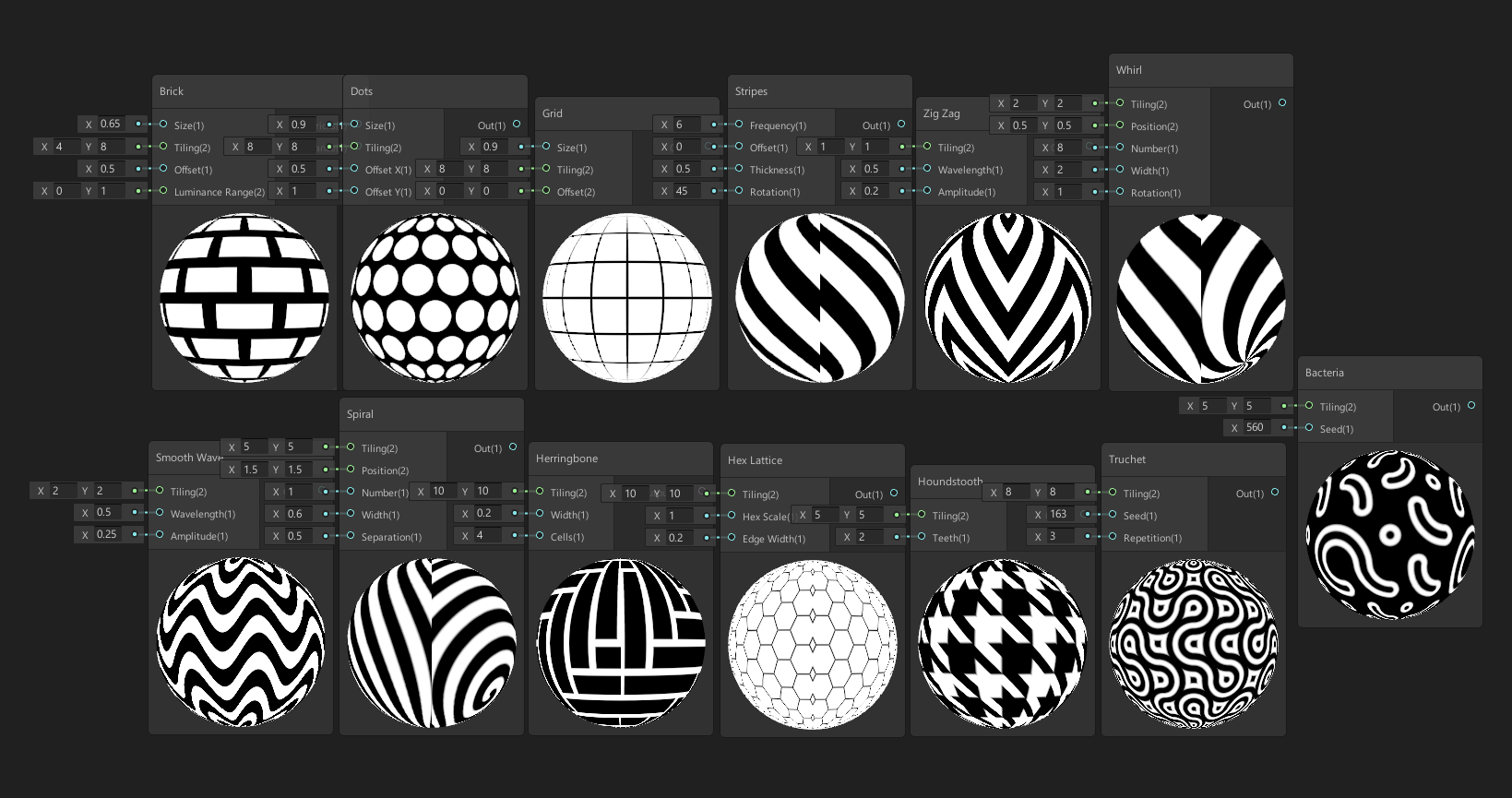
Should add a Hexagon Node in shader graph, I can see it being useful for quite a few things such as making procedural shaders that can change values and create a mesh based off it - to create like Hexagonal Mesh Terrains and using the hexagon with all sorta height blending information to make their meshes.
I mean yeah we can always import our own Hexagon I suppose lol. But be easier to simply have a hexagon node built in and possibly even gradient options with it as well.
glad tartan
That will be available soon You can see the Hex node at the bottom middle
https://user-images.githubusercontent.com/39529353/64389583-199bf100-cff8-11e9-89d2-cb013a56ef51.PNG
 lyric ravine
@scarlet hull @weary fog I actually have a bug report open about HDRP dither not using Alpha to Coverage - that would hugely improve dither quality with MSAA, mayor usecase in AEC/Automotive
Dither with AtC+MSAA is basically "all the good things from opaque plus having transparency"
turbid matrix
GitHub
This repository contains a preview DXR project. Contribute to Unity-Technologies/SmallOfficeRayTracing development by creating an account on GitHub.
ripe fable
Oof nice, have you checked it?
turbid matrix
still cloning it
but it's obviously the old sample updated to current HDRP
I've done that manually myself already
lyric ravine
Haha @Olento I get why you like reading through the changes/commits - sometimes it's really funny
turbid matrix
that do not merge is common note when they are still waiting for some c++ side PR to land
once they merged such PR and immediately reverted it
it's not common that they forget to edit the PR's topic before merging
lyric ravine
Yeah, still reads funny 🙂
turbid matrix
those hackweek projects commits were fun
until someone noticed they were public and they just hid all of the hackweek things from github
dawn sorrel
@glad tartan Oh heck yes 🙂
How do I make the sceneview and game view look the same in HDRP? Not entirely sure what happened here.. They used to look the same, and I've noticed the volumes appear to affect both scene and game view, but SceneView is super dark.
Or perhaps GameView is super bright, not sure which is the real color because of this lol.
Just determined turning off the volume for the post effects (bloom, etc) makes sceneview brighter, hmmm, strange
Interesting - It's the Exposure script. It's at 10.27, but shouldn't they reflect both in the scene and game view the same?
Yeah the Exposure is (only) working on the SceneView
yeah I've determined the entire Volume is only working for the SceneView
glad tartan
You have to enable post processing in scene view. Select this button - The dropdown next to it allows you to select specific things to enable/disable in scene view @dawn sorrel
dawn sorrel
I ticked it - didn't help 😦 .. But that is the problem - the post processing is only affecting the SceneView.. For example - if I crank the exposure up - it only reflects the changes on the sceneview, but the game view stays the same..... Is there a special component for the Camera to read the Post processing?
i started a new scene to check - didn't see anything
Interesting, it appears to only be scene related at least
dawn sorrel
Yeah, that's what I was thinking too. Apparently something I did triggered a bug lol.
I mean it is in Preview, so it's expected lol.
glad tartan
Yea, but that's have happened to anyone before from what I know
must have been a really specific combination of things
dawn sorrel
Yeah I might bug report my entire project, because breaking it down might ruin the order of what caused it. hate to upload a 4 gig project though lol.
Uploading it now... hate to send a project like this, but as you said, it had to be a special combination of things to have caused it and I feel this is the only way to really find the root cause.
Well so much for that
lol
lyric ravine
I ❤ bug reporter bugs
turbid matrix
I don't think I've ever sent that big project 🙂
I've recently wiped library before sending the reports
mainly because it takes forever to upload and I've verified the issues reproduce with cleanly regenerated library
dawn sorrel
Attempted to re-submit, if it fails this time I'll try the library trick.
Appears faster this time
At least it's generous enough to not close the window after the bug haahahah
Yeah bugged again lol. Time for library wipe
lyric ravine
Pro Bug Reporter Tip: submit a bug report without project and mention in the comments that you want an upload link
They'll send you an URL on their cloud storage where you can directly upload the project
Recommended for giant and/or NDA projects
dawn sorrel
Ah okay, thank you. If the library wipe don't work I'll do that. Appreciate the tip.
dawn sorrel
Well I just prefabed everything and moved it over to a new scene, works now lol
 indigo summit
say, is CustomTexture are supported in any SRP now?
turbid matrix
yes
I dunno what has changed because when I last tried it, I couldn't get it to work
but then I found a project in the forums that does it for LWRP and I quickly ported it to HDRP and it worked it with as well
project was for 2019.1
@indigo summit oh wait, can you tell what you mean by custom texture now?
you mean like just custom made texture, or customrendertexture?
if you mean CustomRenderTexture, then this is the example I meant: https://forum.unity.com/threads/graphics-blit-with-shadergraph.724112/#post-4837361

Unity Forum
As MR-Heavy originally asked on the shadergraph thread - with no answer as far as I know:
"Is it any good way to force "Graphics.Blit(Texture2D,...
I actually just tried it the other day (you can also see my comment last on that thread)
I'm wanting this for exactly same use case as what the person used it on the demo, altho I'd need bit more fancy setup
(I wish people would always just slap some license to the thing so would know right away if parts of the project are reusable or if one has to redo the whole thing from scratch)
as a side note, still kinda bummed that bloat attack is licensed to be noncommercial because could reuse the water shaders math on HDRP water too
I mean, it's just gerstner waves under the hood, there's nothing secret about it, it's just nicely tuned setup already which saves a ton of time vs when you implement same thing from scratch
indigo summit
@turbid matrix ah sorry, i mean CustomRenderTexture
well he already put a license to the repo it seems
indigo summit
dangit still waiting for tesselation support 😒
turbid matrix
@indigo summit oh that happened right after I wrote the message 😄
indigo summit
yeah i think so 😄
 drifting vault
Someone know how to works mask for HDRP LayeredLit?
4 channels
1 - Green
2 - Red
3 - Blue
4 - White or Black?
turbid matrix
docs tell you how the masks work
should anyway
Layer Mask
Assign a Texture to the field to manage the visibility of each layer. If you do not assign a Texture, the Material uses the maximum value for every channel.Alpha channel for the Main Layer.Red channel for **Layer 1.
• **Green channel for **Layer 2.
• **Blue channel for **Layer 3.
• **```@drifting vault
drifting vault
thanks!
drifting vault
maybe i did something wrong in texture or material settings?
@turbid matrix weird.
Alpha layer - main road
Red - orange road line
Green - White Road Line
Blue - Road side
 simple vine
I might have some grave misunderstandings about the SRP
I'm currently digging around trying to write my own barebones SRP and I use the CoreRP package for some common stuff.
But I can't seem to make the transformations functions work
I just include the SpaceTransforms include, as usual
And try to do some manipulations
However, I get an error that a matrix is nowhere to be defined. What gives? Doesn't that include need that variable to be already defined?
Where is it defined then? Or do I need to do it myself?
simple vine
Anyone?
 mortal horizon
Is there a function to update all Materials to HDRP?
I upgraded my Project to HDRP and downloaded some Free Assets for testing something.
All the Assets are now pink and I need to upgrade all the Materials to HDRP. I don't want to do this manually...
indigo summit
there's a tools for that. I think it should be under Edit>Render pipeline menu if i'm not mistaken.
mortal horizon
but this is not working with the most Materials.
@indigo summit
for example:
I donwloaded this Asset and put it into my HDRP project. The System do not upgrade all Materials to HDRP and I need to do it manually. I don't want to do it manually because I will download more Assets.
For me that means... I can't use 99% of the Assets from the Store with my HDRP project...

News, support, updates
Discord
Unity Connect
Donation
Hi everyone, my name is Kutcenko Dmitry i am 3d artist and game developer about 14 years
I started develop this pack assets for help indie game developers, and everyone who loves to create FPS or RPG games for...
indigo summit
Hmm i never have problem converting materials with that tool. are those assets using built in standard materials?
mortal horizon
I think not
indigo summit
they use custom shaders?
indigo summit
ah the old mobile diffuse, i'm not sure if the tool are support that shaders or not
drifting vault
i upgrade almot all materials from asset store 40+ GB
only custom shaders not working while you upgrade it
@mortal horizon convert that shader to standart shader and then upgrade to HDRP shader
 stark elbow
has there been any changes to use of this function
LocalLightShadowAttenuation(light.index, positionWS);
I get an error for the light.index - I've tried changing it to GetPerObjectLightIndex but then I get an error forLocalLightShadowAttenuation
mortal horizon
@drifting vault
I know that is working but I don't want to change >all< Materials >manually<.
That is my Problem.
I can do it manually but I don't want to do it for all Materials.
drifting vault
then dont use HDRP =/
mortal horizon
@drifting vault
good idea...
and your next answer is... use Unreal Engine?
drifting vault
my job is travel from one company to other and force they work from UE4 to Unity 😉
3 company that i worked stop parthenship with EpicGames and start use Unity HDRP
mortal horizon
and now you tell my to not use Unity because there is no function to automatic update >all< Materials to HDRP?
Good solution... Really.
You are sure that I don't have other problems with other Engines?
drifting vault
@mortal horizon if you are LAZY to update materials - problem in you personally
how HDRP devs will know with CUSTOM materials will do users in Standart shaders and how its upgrade to HDRP shaders?
mortal horizon
@drifting vault
did you understand my problem? no?
I asked for a function to update >all< Materials to HDRP. >All< means >all<
There is no function? right?
I need to do it Manually? right?
drifting vault
How code will understand how to upgrade all materials by made random users in asset store to HDRP?
@mortal horizon you can take 10000$ and do AI that will understand how to upgrade all not official materials to HDRP and then sell it to Unity Technology for 30000$ 😛
So for now you can only do it mannually
mortal horizon
@drifting vault
that is not a answer to my question...
Yes or no?
drifting vault
im already answered - you have to upgrade all custom materials manualy
mortal horizon
@drifting vault
Thank you!
ok I will write a Script for me
drifting vault
Not sure if Script will help you upgrade materials correctly .
You still will need to tweak materials manually to get better visual result
mortal horizon
give me 1 minute
stark elbow
I recently changed over to HDRP for another project and I would also say changing them by hand is usually best for the most part, unless its just a stock base texture normal etc and no additional data due to the way in which HDRP mats work you will normally have to manually tweak at least one additional parameter in order to get the look you want
are you using stock shaders for your materials? e.g standard shader? because you can upgrade those in bulk
edit > render pipeline > pipeline (hdrp for you) > upgrade project materials
mortal horizon
@drifting vault
Script is working.
Thank you
stark elbow
oh so you were using standard shaders then?
drifting vault
@mortal horizon im see how its works xD
mortal horizon
@drifting vault
its original
look here
https://assetstore.unity.com/packages/3d/environments/industrial/rpg-fps-game-assets-for-pc-mobile-industrial-set-v2-0-86679
News, support, updates
Discord
Unity Connect
Donation
Hi everyone, my name is Kutcenko Dmitry i am 3d artist and game developer about 14 years
I started develop this pack assets for help indie game developers, and everyone who loves to create FPS or RPG games for...
drifting vault
In asset store its looking fine. In your upgraded version UV tiling or offset gone
mortal horizon
nope
drifting vault
go to that object and do screenshot again
mortal horizon
drifting vault
Im see that there something wrong with textures
mortal horizon
tell me please what?
stark elbow
yeah one of the maps is wrong
drifting vault
LOL ARE YOU REALLY DONT SEE IT?
mortal horizon
no sorry
what?
mortal horizon
what is the different?
drifting vault
let me know your bank account - i will donate money to you for fix your eyes
stark elbow
send the texture used for the base map
mortal horizon
mortal horizon
but tell me what is wrong
drifting vault
only 15% of barrel have light texture, other is pretty dark
mortal horizon
there is no sun?
indigo summit
seems like the original material use decal or funky tilling setting in the material, @mortal horizon is it possible to post screenshot for the original material settings? before it was converted
mortal horizon
nope but you can download it self and look.
@drifting vault
is it now better for you? I activate Light...
drifting vault
much better
indigo summit
did you just clear the lightmap ?
mortal horizon
nope
indigo summit
well anyway it looks correct now
mortal horizon
ok good
thanks
indigo summit
yeah what ever happened it seems only on the scene view, because from your screenshot, the material thumbnail are looks fine.
turbid matrix
@mortal horizon did you actually use the official convert materials to HDRP script?
or try it
mortal horizon
@turbid matrix
no that was not working
turbid matrix
then it was custom shaders
turbid matrix
that old?
indigo summit
seems the material converter only works with standard materials
turbid matrix
I see no reasons why the automated conversion should even work on non-pbr materials
you get something from that but it's not correct and it would give people impression that's fine and then people blame HDRP for looking bad
like, that's zero reasons to support that
 chrome hawk
@turbid matrix Hi. I dont know about you, but I am still using latest release/7.1.x branch even though they've marked it as requiring beta 4. I dont have any obvious console errors like I've had in the past when somethings changed on the editor side and we dont have that version yet. I just hacked all the package files to only require beta 2, so I could keep trying latest raytracing tweaks!
turbid matrix
@chrome hawk is there anything special on that branch vs hdrp/staging or master?
I've mainly looked where the DXR fixes have landed and I think they've just mirrored the staging merges to 7.1.x
chrome hawk
staging & master had moved on to 7.2.0 last time I looked, but it was slightly confusing at times on github this week (eg they put a release date for 7.11 in the changelog but then kept working on it after that date)
anyway all of this was mostly just my roundabout way of saying watch out for latest versions on github needing a beta we wont get for a while
and my experience of everything mostly still working with beta 2 despite what the package files say about compatibility
I suppose I got some ideas fixed in my head because I was anticipating 7.11 being released, solving a problem with people not being on exact same pipelinr/talking about '7.11' on the DXR thread as if it wasnt still changing every day and had been released, when it hadnt. And then I got caught off guard by the package file requirements changing, first to require beta 3 and then more recently to beta 4.
anyway I will probably stop driving myself crazy and stick to the latest version I got today, and use that to build some raytraced scenes this coming week
 whole fossil
I have question considering decals in hdrp. I've created shader with shadergraph using Decal Master node. It using emission - but the problem is that despite the fact that some of the materials have "receive decals" option turned off they still receives emission from that decal. Is it a bug?
Is there any workaround?
turbid matrix
sounds like a bug
whole fossil
should I submit a bug then? make an issue on github or something different? What is the preffered way?
i am using hdrp 7.1.0 with unity 2019.3.0b2
turbid matrix
you can't make github issues on SRP repo, they removed the option
if you can repro it on any released version (7.0.1?), you can submit issue report with simple repro project
whole fossil
right. will do it. thanks!
well, It was indeed 7.0.1 (not 7.1.0) so I'll make a simple repro project tommorow
turbid matrix
@whole fossil what did you mean by receiving emission tho? if you mean like getting emissive glow from decals when baking lightmaps, then that's normal as emissive decal is acting as a light source anyway
whole fossil
@turbid matrix - no, no really. As you can see on this gif. Shader used by the decal is outputting red symbol on base master node input, and white on emission master node input. The cube has "receive decals" option turned off
whole fossil
yeah
turbid matrix
you could put two decals to the sample
where other has that emissive and other doesn't
whole fossil
sure 🙂
turbid matrix
it makes it super simple to repro for QA
whole fossil
I'll do it right away
this illustrates the issue even better. I'll prepare a repro project & submit bug
scarlet hull
Thanks !
whole fossil
Bug report was submitted. Case 1182885 - if someone could confirm that is valuable & contains necessary info it would be great. I haven't submitted a lot of them 🙂
turbid matrix
@chrome hawk re: beta 4, the bump is apparently because enlighten and vfx: https://github.com/Unity-Technologies/ScriptableRenderPipeline/commit/cb00c63e417e28b1030ac7dd14c4ded9d2a837f4
chrome hawk
yeah, cheers. I've given up on Enlighten already, and I started testing VFX Graph to see if it still worked - it did, but my testing was not comprehensive
(given up on Enlighten already = its not going to work with HDRP in future anyway, so I already deprecated it in my own mind)
whole fossil
whats going on with HDRP PPv3 bloom bluring whole image?!
whole fossil
I mean the effect in the newest HDRP. There isn't treshold control anymore and large bloom intensity blurs whole screen. Is that intended? If so - how can we achieve bloom used in PPSv2 ?
turbid matrix
@whole fossil it's intended
basically you only ever use low intensity values for the bloom unless you want that smudged effect
use intensity values between 0.1 and 0.3
I prefer setting mine to 0.1 and then scattering to 0.4
you can boost the emissive materials themselves if you need to do unrealistic glowy effects with this
whole fossil
@turbid matrix - well, despite the intention isn't clear to me - what is the purpose for values of intensity over 0.3 since bloom then blurs output image? I cannot wrap my head around it. I'll try to port the effect from PPSv2 - is it possible even in your opinion? What are the pitfalls ?
turbid matrix
@whole fossil it's supposed to be physically accurate like that
I don't know the theory so can't tell if that true in real life or not
I'd suggest trying with the low intensity values and material tweaks first
this new setup annoyed me a LOT at first
but I'm now used to it
I still liked the old more artist friendly setup more
but you can get nice results with the new bloom as well
if you really have to go back to v2 style bloom, you could try to port the old bloom effect using HDRPs new custom postprocessing pass (still only on github but will be on next 7.x release afaik)
whole fossil
@turbid matrix thanks for the clarification. For me it is really annoying especially because I am making a stylized project using hdrp. Since I am using modified pipeline it will be relatively easy to port v2 style bloom and inject it into the pipeline itself. I hope so ^^
turbid matrix
even if you run modified HDRP and if you can use 7.x and it's custom PP pass, it'll be way simpler to maintain 🙂
whole fossil
@turbid matrix you are right of course 🙂 I haven't dig into custom pass - maybe it is a good idea since my pipeline is based on 7.0.1. Thanks for your help
turbid matrix
I don't think those custom passes got into 7.0.1 but they will be on next release afaik
they are already on github master
(tested custom pass myself already for fullscreen blur effect)
 junior venture
Should I remove LWRP if URP is installed?
ah found the upgrade guide here https://docs.google.com/document/d/1Xd5bZa8pYZRHri-EnNkyhwrWEzSa15vtnpcg--xUCIs/edit

Google Docs
Upgrading from LWRP -> Universal RP is designed to be relatively simple, this is done in a few ways technically, this guide will help explain how to transition to Universal RP. Generally projects will upgrade nicely, but some user action may be required if you have handwritte...
 inland ferry
I was wondering, how does unity make there internal shaders work across all pipelines?
And I guess more to the point, how do we? Is it possible? Are they doing some black magic behind the scenes?
 barren kindle
what capabilities does dxr currently have in hdrp anyway?
turbid matrix
works on static meshes
DXR reflections, ao, gi, recursive rendering, shadows (for some light source types) kinda work
main issue on game use is with the denoisers atm, especially for GI, ao and reflections
there's a modification for shadows to work relatively nicely now with denoiser but the hack is not in the SRP itself
also some minor things like shadow culling taking only main scene into account so you get popping shadows in the reflections as culling doesn't take view in the reflections into account
and reflections dont get DXR GI's lighting, so what you see in the reflections is similar to non GI setup
 viscid pumice
I was wondering, how does unity make there internal shaders work across all pipelines?
And I guess more to the point, how do we? Is it possible? Are they doing some black magic behind the scenes?
I asked someone internally who suggested using shader graph which will generate shaders for whichever pipeline you are using
you could also look in the com.unity.render-pipelines.core/ShaderLibrary package to see what shader code is common between the pipelines
inland ferry
Thanks @viscid pumice what I am wanting to do is make a shader that works on Built-in, HDRP, or Universal. Cause I want to use it in a editor tool (like the terrain brush shader)
viscid pumice
I think that it would be difficult. If you have specific vertex/fragment functions you want to reuse, you could probably stick them in .inc files and use them in their appropriate places for each. Shader Graph only works with Scriptable Render pipelines so no luck with builtin there
junior venture
I'm at the end of my rope here, I've been trying to get a kind of "view character behind wall" working in URP
inland ferry
Alright, that is what I was afraid of. Well thanks for the help.
junior venture
Is the Scriptable pipeline using stencil buffers making them not available for using to hide walls to reveal things behind?
turbid matrix
@junior venture custom passes are coming, including with one user settable stencil bit
these will make custom effects easier
custom passes are merged in master already, stencil rework PR hasn't been merged yet
junior venture
Great!
turbid matrix
as another topic, saw this on the forums: https://forum.unity.com/attachments/upload_2019-9-9_16-15-4-png.480680/
there really isn't angle limiter on HDRP decals to prevent this?
 turbid matrix
I have no idea on the LWRP side of these things, maybe someone else will know and respond
junior venture
In your experience, what would be the best way to find a way to have this "see through wall" effect, Reddit, the forums, this Discord, or anything else?
turbid matrix
oh right, those custom passes and stencil things I mentioned, they were for HDRP only
LWRP already got those things you've pasted
but I have no idea what you can do with them
I'd guess forums would be best place to ask such questions
junior venture
Perfect, thanks.
whole fossil
as another topic, saw this on the forums: https://forum.unity.com/attachments/upload_2019-9-9_16-15-4-png.480680/
there really isn't angle limiter on HDRP decals to prevent this?
Yeah, that bothers me too. Would appreciate greatly if we could do something about it
turbid matrix

 thorn lodge
that reminds me of an SVN commit I made during daylight savings time and wrote the log like a star trek captain going backwards in time
no one said anything about it other than "it was amusing"
ripe fable
GitHub
Purpose of this PR
Disable PBR sky below ground to avoid rendering garbage.
Comments to reviewers
Maybe worth doing it on the CPU? Thoughts?
Yesss, finally.
Lower half of the PBR sky was rendering on top of everything else for me. 😅
 nova flare
hiya if standard assets is deprecated - is raymarching part of the current toolset?
 empty star
@inland ferry if it is an editor tool the shaders don't need to be cross-pipeline, but for runtime shaders you'd have to organize all code into include files and likely zip the shader files so the user can use the one for their pipeline.
inland ferry
@empty star oh, they don't?
empty star
Assuming you're calling graphics stuff yourself in editor code it should be ok
For modifying textures etc
inland ferry
So like using Graphics.DrawMesh with the shader would work?
empty star
drawMesh pushes it through the camera culling like any unity renderer, so it would run through the pipeline, for editor tools you'd want to use DrawMeshNow (assuming this is a command buffer or sequence of graphics commands)
the only potential gotcha is Graphics.Blit it uses the legacy unity matrices, and HDRP uses its own matrix naming conventions, so the blit may look different. In cases like that you'd just set the unity matrix prior to the blit (or use a graphics.drawprocedural style blit or some other method)
I guess ultimately it really depends on what you're doing with editor tools & rendering, but the tools i've made work with and without SRP without needing any special versions of shaders
inland ferry
Oh, I see. That all makes sense. I get why DrawMeshNow works because it 'skips' the rendering. Right? I am wanting to make a shade that sort of looks/acts like the Terrain brush shader
empty star
im not too familiar with the terrain stuff, is it the newer terrain tools? i would be surprised if they are pushing their editor brush visualizations through SRP, i'm guessing it is just a command buffer they are executing via editor scripting
if it is the terrain tools package you can probably dig around and see if they are making any Graphics.ExecuteCommandBuffer calls or similar
inland ferry
it is just the standard stuff. Though I think the brush visuals may be new in 20.19
I dug through the source and if I remember the are using DrawMeshNow for it
jovial mulch
Any idea why my camera doesn't render anything ? Does it comes from the error of WSA ? Tried to changed all the settings of the LWRP assets but nothing worked
Precision, here i'm running the app in the editor, when not running everything looks fine
jovial mulch
Ok seems to be a bug, see https://www.gitmemory.com/issue/microsoft/MixedRealityToolkit-Unity/4880/502202975
scarlet hull
About the normal filtering for decals :
It is something we know that is needed, but we need to find a way to implement it "elegantly".
Decals (opaque) are drawn in their buffer after the Z prepass, and at that moment, the only way to do normal filtering would be by calculating the normal from the Z buffer.
While it would be possible, it would still be an approximation and add cost to it.
whole fossil
can anyone pass me a link to info about new custom pass in hdrp? I would like to dig into that 🙂
scarlet hull
The PR about the feature is here : https://github.com/Unity-Technologies/ScriptableRenderPipeline/pull/4317
GitHub
Purpose of this PR
Implement custom passes in HDRP
Release Notes
This PR adds a new component called Custom Pass Volume that allows you to inject custom passes in the HD graphic pipeline. Currentl...
whole fossil
@scarlet hull awesome, thank you
scarlet hull
Note that we still need to fully test it 😉
whole fossil
probably I'll be a part of test team by myself since I cannot be more excited about it 😄
turbid matrix
@whole fossil do note that there's also custom postprocessing pass as well
so you need to pick the one that's more relevant for your use case
the functionality overlaps a bit as well but you can't do like after PP pass using "custom pass"
only before PP
you get going by using the templates and the notes on the PR's tho
(to use these, you have to make shader templates using the right mouse click menu
and for PP, you need to generate your own script to drive it
for custom pass, you can also make custom script but it's not needed if you can just hook fullscreen pass shader to it (like I did for fullscreen blur)
whole fossil
@turbid matrix - right thanks. good to know. I'll figure it out. really appreciate the help you guys are providing 🙂
turbid matrix
@scarlet hull you know if there's going to be ANY example on how to do multipass effects with these?
how these are structured is that you just implement some custom shader function but these don't give you control over the passes
when I tried to stack two custom passes to counter this, my second pass got the exact same source data for the screen color as the first pass (so I didn't get the results from the first pass anymore since second pass overwrote it)
I'm guessing the right way to do this is to blit to custom RT on postprocess pass and do the magic on it?
but some recommended workflow would be nice as this is something many will need to figure out, especially on PP
in the old renderer, you could just write all the passes on same shader file but same approach doesn't seem to be supported now
also on the decals, is there expected to be a fix for that for full HDRP release on 2019.3 or is it going to be shipped like it is now?
current setup is borderline unusable for many dynamic decal setups (for static you can just carefully handplace these)
also, would love to know what's the deal with PCSS being forward-only setting? I've been trying to find the reason why it's not on deferred but haven't seen any explanation
I know others are implementing it on deferred so it can't be impossible task but I also doubt Unity just omitted it from deferred side without a good reason
scarlet hull
PCSS in deferred : the team was waiting for a multicompile in compute shaders feature to allow to handle this without a crazy handling of the code
 robust drum
does anyone know what the equivalent of vertex buffer objects are in unity?
Do I have the possibility to pass custom data to my shaders? (I want to pass a few floats indicating where some neighboring vertexes are)
what I mean is that I want to add my own field to app_database and fill that from my normal monobehaviour script when creating the mesh
chrome hawk
One thing in 2019 so far really left me lost and confused about HDRP roadmap:
In April GDC Roadmap talk, at about the 38 minute mark, 2019.2 HDRP improvement to area lights was discussed - including support for volumetrics. But since then I've heard nothing about this and attempts to ask on the forum have been met with silence.
on the slide it was just described as 'More area light types and better support' but the presenter explained that better support meant support for volumetrics

Product Managers Arisa Scott and Will Goldstone discuss Unity's 2019 road map and give you a broad overview of Unity's 3-year vision. Watch to learn about up...
I dont mind delays (some are inevitable) but the lack of info about what happened to this, and whether it is still scheduled for a future version, is doing my head in 😦
turbid matrix
I wonder if nonDXR area light shadows are still like they were on on the first versions of the shadow implementation
those only worked if the area light was close to perfect square
if you put one side notable longer than other, shadows totally break
chrome hawk
I dont know, I know some of the UI terminology changed (since when they first got implemented I think they were called raytracing in the UI even though it wasnt DXR stuff)
its been a while since I tried
turbid matrix
basically furter you put the area lights sides ratio, less shadow you get, at some point the shadows vanish totally
but it doesn't look right even when it starts to go away
I haven't tested this recently tho
chrome hawk
yeah, I was waiting for other improvements before typing again, but since I no longer have faith in those other improvements arriving (or rather, their schedule), I'm a bit lost
trying, not typing lol
I could see from pull requests that went nowhere many, many months ago that they got someone in to do all sorts of things to area lights, but I dont think they liked the results (or the code). This was before shadows I think
big shame that textured area lights stuff doesnt seem to work with DXR at the moment too
turbid matrix
I just don't think those things were big priorities
they have a lot on the plate right now, trying to get DXR in some state and HDRP in stable state out for 2019.3
chrome hawk
yes
turbid matrix
I can see how different area light shapes would not be a huge priority there
chrome hawk
I dont mind about changed priorities, I do mind the terrible state of the roadmap info these days.
turbid matrix
that goes to all Unity roadmaps atm
chrome hawk
yes, its embarrassing and previous complaints by me were met with nothing but vague words about a new roadmap system in future
turbid matrix
roadmap talks at Unite's are the only real information source right now
not meeting estimates is fine tho
chrome hawk
yeah I am totally cool about the realities of development timetables slipping
turbid matrix
I mean, that happens on all software and I'd rather get some estimates than nothing at all
chrome hawk
I still need timely info though
turbid matrix
yeah, the official roadmap could just be deleted at this point (and I mean the roadmap webpage now)
it's useless
it doesn't even get updated for already released feats in time
chrome hawk
LWRP/Universal tried their own roadmap on a different website system but that soon fell into neglect too
turbid matrix
tbh, there's only one feat that I'd really really want to get some estimate on
and that's the Granite integration
been following the github branch for a while now but there's no official word when it's going to be merged to main releases
chrome hawk
I'm sort of assuming that they want to make a big deal about virtual texture stuff at Unite Europe
turbid matrix
I dunno, they didn't really mention it much on GDC when announcement for acquiring Graphine was made, it was like smallest announcement ever, and then they didn't mention it at all on next Unite even tho they had it running on SRPs already by that time
like, in some state, there's been constant progress now
but it would be a good time to announce it now, considering that UE 4.23 got full virtual texturing now
you gotta give the users some info or they start thinking Unity is falling behind the competition
chrome hawk
I'm sort of used to getting less info in the buildup to Unite Europe because they want to save stuff to make a big song and dance about there, but its all just guesswork on my part
turbid matrix
yeah, I know they do that
well, I guess I'll know about that first hand then as I'm attending
chrome hawk
ool
cool
I shall be watching from home, which usually means I dont get to hear the roadmap stuff for a while
turbid matrix
I try to see the roadmap myself as that's like most interesting part on the sessions along with the keynote
chrome hawk
perhaps you can share the info with us here 😉
turbid matrix
I'll see if there can be leaks 😄
chrome hawk
maybe they will announce a new roadmap system 😄
I do love the pipelines though, even though its probably turned into a bigger/longer mission than they originally expected
turbid matrix
yeah, HDRP is year late already
and they are still refactoring it
so, I don't really expect super robust 2019.3 version despite it leaving preview
chrome hawk
I do think that refactoring at this stage makes a mockery of the whole preview/experiemntal tags thing. Its arbitrary timescales that dont matcht he dev realities!
turbid matrix
yeah, realistically thinking, it can't be production ready with the amount of changes they've done recently
chrome hawk
exactly
turbid matrix
they have a great team but there are realities on amount of issues that creep in when you do these things
2019 has been kinda Unity's mission to get things out of preview tho
chrome hawk
yeah its understandable
Universal renaming, change of post-processing etc was not great timing regarding production ready either
like I said before, just makes the tags look arbitrary and not something people should place faith in
turbid matrix
like, they got addressables out of preview, but it's still quite raw, LWRP got out of preview and now it's been refactored in 2019.3, input system is targeting to leave preview on 2019.3 and it's binding is still far from ideal (you get total nonsense on it if you bind anything but common gamepads)
so, it indeed feels like they just want to remove the preview tag but it's not really an indication of the tool being any more production ready than the versions before it
besides for the docs of course
as they do have better docs on released systems
chrome hawk
I suppose support/bugfixes are another area which should be different when things are out of preview, but I dont know how true that actually ends up being either
anyway yes I do love the teams that made these things, and the general 'death to black boxes' agenda
turbid matrix
I'd rant a bit on new black boxes, like on new input system's native code but it's not a topic for this channel
we've gone to quite #497872469911404564 already 🙂
chrome hawk
oh I dunno, I was trying to stick to ipelines 😉
robust drum
is my above question about vertex buffer objects in some sense stupid or hard understandable? I really need this and also already asked on the forums but I do not get answers
chrome hawk
but yes the entire 'modular unity' approach has some obvious limits which LWRP & HDRP dev journey has deomonstrated - editor side changes required for them to make their pipelines work, so what chance do people developing their own pipelines from scratch have?
robust drum
this seems like such a basic thing that probably everyone knows?
chrome hawk
I would help if I could but I dont know that side of things at all, sorry
robust drum
thanks very much, wasn't targeted at you, just trying to understand if I am doing something completly wrong
 alpine bluff
Oh, @turbid matrix, I do love when you say "besides the docs of course"
@robust drum - I don't know. Have you tried in #💻┃unity-talk or in #archived-shaders?
robust drum
not in general but in shaders
chrome hawk
@robust drum I had a brief look into the subject. Most custom vertex stuff in Unity I see is for the particle system. Perhaps you can (mis)use one of the other existing appdata_full things to hold your custom data instead of trying to create your own? using info from places like https://forum.unity.com/threads/passing-parameters-to-cg-shader-through-appdata_full.169132/ or https://docs.unity3d.com/510/Documentation/Manual/SL-VertexProgramInputs.html
Unity Forum
Hi all,
I'm using some mesh parameters to forward some values to a CG shader. I need to use as much parameters as possible since this way I can avoid...
Unity is the ultimate game development platform. Use Unity to build high-quality 3D and 2D games, deploy them across mobile, desktop, VR/AR, consoles or the Web, and connect with loyal and enthusiastic players and customers.
robust drum
thanks! yes I also already thought about maybe just using the colors array for example as I do not need it
but I am pretty new to shaders and did not know if this is how it is supposed to work and what one would do in case one needs all the stuff
thanks very much for looking into it
chrome hawk
are you learning from non-unity specific graphics programming resources? probably best to start with things done int he unity way from the start otherwise you'll spend a lot of time trying to work out how to make the lower level stuff work with unitys choice of higher level abstractions
robust drum
well I did a few unity tutorials on how to do the basic lighting shaders yourself (lambert, specular) and some small exercises, which was a lot of fun
now I really want to do this water here:
https://www.youtube.com/watch?v=5yhDb9dzJ58

In this tutorial I take you step-by-step through my implementation of low-poly water using OpenGL! The demonstration code used in this video is written in Ja...
since it looks great. in opengl it seems to be a no-brainer to just pass an additional per-vertex-array to the shader and so I was confused that it does not seem to be possible in unity
and after reading your posts (very helpful thanks) and using a few words in there to do further research it now seems as if it really is impossible to define additional vertex data in unity ( https://forum.unity.com/threads/passing-extra-vertex-data-to-a-shader.190448/ )
Unity Forum
In UDK there is a thing called "Dynamic Parameter" for particles which acts as a second
vertex color: It's generated by the particle system and passed...
I would really like to understand why that is not possible, I guess they made that decision deliberatly
turbid matrix
@alpine bluff but it's true 😄 docs aren't as big prio while things are in preview
there still are some docs for most systems in preview too but there's a clear change in the way the things are presented on released packages or packages that are about to release
but of course you'd know the best how it goes from all people from here
chrome hawk
I just got moderately excited about Snaps Art HD packs, only to read that they dont work with 2019 versions of HDRP. Things really need to settle down in 2020
 viscid egret
tilemap editor in 2019.3 beta not rendering, known issue?
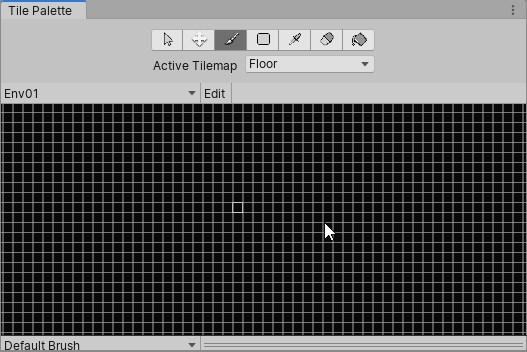
also GUID [9802e36ef1c38064d9bcd7bf2e01cccb] for asset 'Packages/com.unity.render-pipelines.universal/ShaderLibrary/Deprecated.hlsl' conflicts with: 'Packages/com.unity.render-pipelines.lightweight/ShaderLibrary/Deprecated.hlsl' (current owner) We can't assign a new GUID because the asset is in an immutable folder. The asset will be ignored.
¯_(ツ)_/¯
chrome hawk
that last one has been fixed on github: https://github.com/Unity-Technologies/ScriptableRenderPipeline/pull/4426
GitHub
Purpose of this PR
fixed Deprecated.hlsl GUID as they were both identical in LWRP and Universal RP fogbugz link
Testing status
N/A small one file fix
Overall Product Risks
Technical Risk: Low - s...
viscid egret
ah looks like i can remove LWRP, they just changed "2DLight" to "Light2D" 😄
or, maybe not
chrome hawk
if you know how to edit your pipeline files then you can just do the fix yourself manually by changing the GUID in one file: https://github.com/Unity-Technologies/ScriptableRenderPipeline/pull/4426/commits/e06c8edc4d8d9359e6a22b805ef6f7b7b2695713

GitHub
Purpose of this PR
fixed Deprecated.hlsl GUID as they were both identical in LWRP and Universal RP fogbugz link
Testing status
N/A small one file fix
Overall Product Risks
Technical Risk: Low - s...
lol I wasnt expecting a photo there
Discord too clever for its own good
viscid egret
no problem, clearly I dont need LWRP as well URP, but sadly the tilemap editor is still not rendering with URP
chrome hawk
LWRP 7.0.0 is just a stub to enable easy upgrading to Universal 7 (there is an upgrade guide here https://docs.google.com/document/d/1Xd5bZa8pYZRHri-EnNkyhwrWEzSa15vtnpcg--xUCIs/edit )
Google Docs
Upgrading from LWRP -> Universal RP is designed to be relatively simple, this is done in a few ways technically, this guide will help explain how to transition to Universal RP. Generally projects will upgrade nicely, but some user action may be required if you have handwritte...
viscid egret
im using URP shaders, pipeline assets and 2d renderer config are all freshly created as per the docs
no issues in the scene or game view, just the tile palette window
Tilemap tiles no longer appear black when you use the 2D renderer.
GitHub
Scriptable Render Pipeline. Contribute to Unity-Technologies/ScriptableRenderPipeline development by creating an account on GitHub.
7.0.0
so that's weird
turbid matrix
yeah, I wish discord would be more smart on github commit emdedding
even if the person who made the commit didn't have a photo, they still put that huge icon there, it just takes too much space and isn't really needed here
dawn sorrel
Does anybody know if Graphics.DrawMesh handles culling or is that something I will need to deal with on my own?
nova flare
total noob, but i saw culling in the material options lately
empty star
@dawn sorrel drawMesh uses culling, it pushes a draw call through the pipeline. DrawMeshNow doesn't
dawn sorrel
Alright, thank you!
 stuck imp
Hello world! I'm having an issue trying to show a renderTarget in a RawImage in the LWRP. You can read the full description here: https://forum.unity.com/threads/transparency-issue-with-rawimage-render-target.739604/
Unity Forum
Hi! I'm rendering a preview of a character with a dedicated 3d camera to a render target and present it in the UI with a RawImage component. The camera...
I think this might be a bug, I have a test project for it a repro steps
but I don't know if its a bugs or me not understanding what is happening, so I would appreciate if an expert eye took a look at the project in case I'm doing something stupid
before actually reporting
 obtuse cave
Updated from 2019.3.0b1 to 2019.3.0b3 And get this:
All custom shaders seems broken. Surely there must be an upgrade solution I'm missing?
 true zealot
Check if you have the pipeline settings asset assigned in the graphics settings
ripe fable
Seems like 2020.1.0a3 is out with a fix for DXR crashes.
turbid matrix
tbh, I haven't had much DXR crashes on 2019.3 betas after they fixed the light removal thing
is there some 2020.1 specific DXR fixes there?
I already tried it on DXR earlier today, seemed to work just like the 2019.3 betas for me
altho I haven't updated the HDRP to latest on github yet
there were some small PRs for DXR there
 trim light
hi guys
I am trying to optimize my vr game, and we have a bunch of skinned characters with blend shapes always on-screen.
My question is , does GPU skinning also move the blendhsapes over-head from cpu to the gpu? We are using blendshapes for facial animations.
also what is the right configuration for enabling multi threaded rendering along with graphics jobs. should both be turned on along with dynamic and static batching?
I am using the default rendering pipeline btw.
none of the new RPs.
lyric ravine
Hey, is someone at Unity aware that URP + Android + VR + PostFX doesn't work at all? Neither on 7.0.1 nor on latest master, neither in Build nor in Play Mode.
There's one case that works - Edit Mode in Editor ...
Getting funny double-quadruple-octuple images from what looks like post effects stacking on top of each other with wrong double-wide layout.
Reproduction is as easy as it can be: switch to Android, enable VR, press Play, enable Postprocessing on Camera (doesn't even need to have Volume)
whole fossil
about decals in hdrp. Do anyone know if there is a work even planned for layermasks or something for them? imo there are pretty much useless without it 🙂
scarlet hull
I know we already had this discussion internally.
While we are not against the idea, it's not as easy a it seems to implement without additional cost.
We might have a solution, but then you won't filter by the layermask, but using the light layers (8 available). Do you think it could be enough ?
whole fossil
thb I haven't used light layers yet - i don;t know what are the advantages/disadvantages. Are they coming with any performance cost or so? putting that a side - everything that could help filtering decals will be better than not having this option. Filtering them by layermask would be more convenient tho
 karmic mango
Does anyone know anything about how the LWRP 2D lights are implemented? Why cant i change falloff values by script?
drifting vault
@scarlet hull i note one problem with HDRP
when you do animation on huge areas, characters become shaking
I was think like its problem in Unity Limitations like floating numbers
but when i import that scene in Standart render pipleine - characters was fine
turbid matrix
been testing custom render textures on HDRP again
this is so weird
there's this sample project on github where it works on LWRP
and if I port it to HDRP, it "works"
but immediately once I wipe library and regenerate shadercache, it just doesn't work anymore
so there's some old cached LWRP shader etc on library's shadercache that still works with HDRP when used with custom render texture or something silly like that
last time I tried just rendering HDRP shader graphs on custom render textures, I couldn't get it to blit anything there, so getting initial success on porting this LWRP project was promising
I definitely got the results needed while running HDPR
I guess this requires further debugging to get to the bottom of this but would be nice if it just worked out of the box, considering HDRP is moving out of preview and custom render texture is a basic Unity rendering feat
turbid matrix

GitHub
No XR support right now - needs separate fix for PS4
turbid matrix
as for the custom render texture, just adding URP to HDRP project and running the unlit graph through URP shaders on HDRP seems to work 😄
so, I expect there to be some way to manually at least author a shader for HDRP that works with this as well
indigo summit
what? so you have to install both srp?
scarlet hull
IMHO, shadergraph is not ment to work with the custom render textures.
Writing you own shader for it would be better.
I made an experiment a while ago to make a CRT master node ... worked, but it never was finished
lyric ravine
Cross-post of the #🥽┃virtual-reality channel since the topic applies to both -
Collection of Android + VR + URP + PostFX bugs
https://forum.unity.com/threads/case-1183936-android-vr-postprocessing-bug-collection.744287/
Unity Forum
So for everyone also trying this out, and to help Unity with the current process of manually testing everything for non-Editor-Desktop platforms,...
turbid matrix
@indigo summit @scarlet hull yeah, it's a hack now, but I figured that since LWRP unlit works, I could just look at LWRP's unlit pass and mimic it for special custom render texture shader if that would do the trick
@scarlet hull is custom render texture graph something Unity would consider in the future?
it's a powerful feat so kinda sad to see it's not supported by the SRPs natively
scarlet hull
Well, it's as much supported by SRP as built-in : if you write your own CRT shader (using the examples), it will work
turbid matrix
I've maintained manual HDRP shaders between versions few times and I gotta say, I absolutely don't like it
turbid matrix
but I guess custom RT shaders wouldn't change in similar fashion as the CRT has remained somewhat the same(?)
scarlet hull
yep
turbid matrix
so CRT material/shader is totally independent from current pipelines I assume?
if I used standard shader with it, would it work still or do you still need to use SRP shader includes in it?
scarlet hull
yes
indigo summit
which mean old/legacy CRT should work by default in SRP?
turbid matrix
well, in that case I could just use like Amplify Shader Editor to author custom shader for it
scarlet hull
Standard with CRT ? I don't see the use here, as there is no lighting when updating a CRT (or a RT)
It's basically just blit commands
turbid matrix
oh I don't need lighting, I just need to splat data to custom RT which I then use for ground rendering
think of snow and sand tracks for vehicles
indigo summit
or water
turbid matrix
^
I guess you could do these in compute shaders too but that gets pretty involved quickly
scarlet hull
I get that, I just didn't understand why you would use a standard material in a CRT.
The opposite is more comprenhensible : use a CRT as input to a standard material
scarlet hull
yes ?
turbid matrix
not sure if there's some communication issue here: I'd just want to use any kind of shader (I don't care where it comes from if it works with unlit data) to modify the CRT... and then use it as source data for HDRP SG
and since regular HDRP shader graphs don't qualify for the CRT material, I was thinking if I could just author shader with ASE to use with built-in renderers shaders, if CRT accepts those
right now I can just author LWRP unlit shader graph and it works on CRT
but if I use the same Unlit graph (not the HDRP Unlit) using HDRP only, it doesn't have a pass that would work on CRT
scarlet hull
Ok.
Well, to answer short : CRT doesn't care about the pipeline. If the shader is compatible and renders something in it, it will work.
No matter if it's custom code, amplify or shadergraph
turbid matrix
ok, that confirms it
is there any documentation on what the CRT needs from the shader?
scarlet hull
Doc and examples : https://docs.unity3d.com/Manual/class-CustomRenderTexture.html
turbid matrix
oh right, it came with the sample, my bad
I keep somehow thinking again about HDRP variants and you can't use those includes on HDRP shaders
but since it works without HDRP specific things, that's not going to be an issue
scarlet hull
Only throwing toughts here, but maybe HDRP/Unlit "ForwardOnly" pass would work
scarlet hull
okay 😅
turbid matrix
LWRP unlit pass does work tho
scarlet hull
It's pretty old and will maybe not work anymore with current shader graph code, but if you want to investigate what I did : https://github.com/RemyUnity/ShaderGraph/tree/CustomTexture

GitHub
Unity ShaderGraph project. Contribute to RemyUnity/ShaderGraph development by creating an account on GitHub.
turbid matrix
you tried it already?
indigo summit
yep
turbid matrix
cool, this makes things so much easier again
turbid matrix
only if you use LitTessellation
or LayeredLitTessellation
but you're pretty limit on what you can do with those
indigo summit
yeah i generate a heightmap using CRT
turbid matrix
I wonder if I could just add the tessellation to ASE's HDRP template
indigo summit
a dynamic heightmap, using default lit i can't regenerate normal from height
turbid matrix
ASE's HDRP stuff is contained in single file template, so it's easy to duplicate it and make variants with it
tessellation support itself didn't change all that much the HDRP shaders if I remember correctly
indigo summit
is ASE HDRP supported tesselation?
turbid matrix
so it might be possible to hardcode your own variant to always do tessellation
it doesn't
but I mean, you could probably hack your own template for it with it
easier than with modifying HDRP and SG
it's basically just one file to change on ASE
of course main issue with ASE and HDRP is that it's always dragging behind if you use bleeding edge HDRP
I've manually updated their template for newer beta's HDRPs in past, it works but it's bit time consuming
turbid matrix
I bet it's buried on some backlog along with other "would be nice to have" -things
we did get POM on 2019 finally, so that's at least something
or was it on 2018 already(?), can't remember anymore
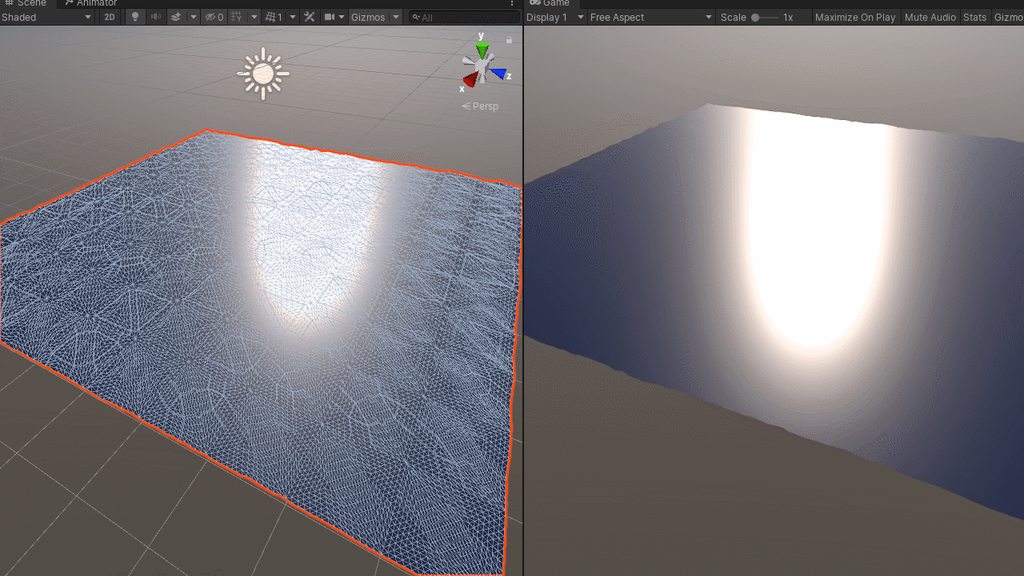
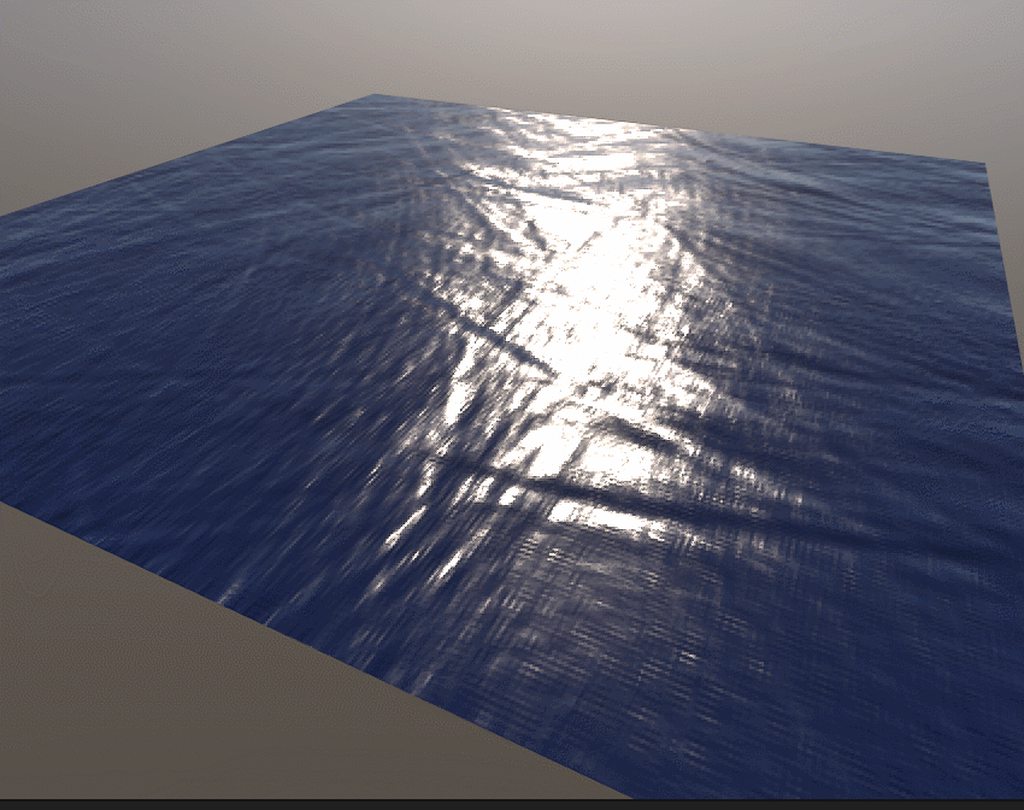
but tessellation would be awesome for things like ocean etc
alho there are bunch of workarounds for that ocean example
 scarlet hull
Tessellation in shadergraph is ... comming
 turbid matrix
@indigo summit used height to normal node?
indigo summit
yep
 still swan
Hi, has anyone used GPU instancing with sprites?
turbid matrix
oh, 7.1.1 is out
weird
they have it on package manager
but not in github releases
frigid cypress
afaik 7.1.1 was just triggered manually on our internal services haha
turbid matrix
ah, I'm just too ahead of things again
fyi, it doesn't show up in PM yet, but the packages are on bintray
frigid cypress
you need 19.3.b4 to see them in packman, afaik
turbid matrix
oh right
forgot about that
well, I manually updated to it now
altho I've been using git master/staging normally anyway, just testing this on test project
turbid matrix
ah ok, now I do get those errors due to api change
so I guess b4 it is for stock 7.1.1
I usually just revert changes like this on my local git fork when I test these
but reverting individual commits isn't option on PM packages :p
chrome hawk
yeah I knew I was pushing my luck with 7.11 github stuff a week ago without the right beta version, of editor, so I stopped updating then. I look forward to getting back up to date when we have beta 4
although by then I will want to use the HDRP/staging work in progress 7.2.0 because thats where the latest DXR stuff has been going, including a pull request for spot cone shadows today I see
new docs recently too
chrome hawk
well it turns I only had to throw of XR code to be able to try the most recent DXR stuff from HDRP/Staging and the Spot Cone branches on beta 3 instead of waiting for beta 4 😄
oops, that should have said 'throw away a little bit of XR code'
dawn sorrel
Not sure if this is a bug or an intended result... But I had a left the standard camera in HDRP scene as I was working on my level... Well I go to delete the camera and drop my player prefab into the scene (as it has its own camera), well long story short - all the scenes Volume components stopped working - UNLESS I copy the HD Additional Camera Data component from the original Camera to the prefab player camera.
Ahhh I think i see why it might have broke - probably because I copy-pasted the prefab from normal unity project into HDRP so despite it giving it the HD Additional Camera Data component, I don't believe it gave it the values it needed for whatever reason.
turbid matrix
so, if anyone is using latest HDRP from github, just revert this commit on 2019.3.0b3: https://github.com/Unity-Technologies/ScriptableRenderPipeline/commit/31740c9eab8b4f0b5bbd9eca15f9bb9514f86336
it'll undo this change in particular:
apparently they backported that change into b4 but it's not in b3 so you gotta use the old api still
turbid matrix
hmmmm
I just tried DXR in build
and there's this huge delay in raytraced reflections shadows on the build only
if I play in editor, the delay isn't there
this is with RT shadows... I do have the temporal denoise hack here tho, not sure if changes anything
ok just tested it without screenspace shadows, it happens on stock shadow mapping as well
turbid matrix
bit crappy quality clip (had to compress it a lot for discord) but one can probably still notice the shadow jittering behind. if you watch this full screen, note especially the paint cans shadows
ripe fable
yep, that's weird.
turbid matrix
meanwhile, this does work on windows IL2CPP builds (just tested)
I mean, the clip is from IL2CPP build and same thing happens on Mono build too, just haven't tested IL2CPP in a while with recent HDRP
just tried the DXR build with -force-d3d11 command line argument, it gracefully runs it without raytracing
I get SSR in place of raytraced reflections
also quickly tested this build on win7 machine with GTX670, works just fine there too
you'd probably want still different setup for DX11 but nice to know DXR doesn't just crash or glitch when left enabled on unsupported device
(like happened on the early experimental DXR editor but it wasn't really meant to be used for production either)
weary fog
@turbid matrix I recommend uploading to streamable then pasting the link here
turbid matrix
well, I could upload it to many places, I just don't like keeping things on my accounts 🙂
even dropbox embedding works afaik
but I just overdid the scaling on that clip, it was 0.15 MB when discord would allow up to 8 MB 🙂
 cerulean wolf
Hey there, I have a two question about the Scriptable Render Pipeline. I am currently making trying to make a portal system but I am a bit stuck at the moment.
-
Is it possible to do a early Z rejection of fragments? What I needed this for is that the fragment shader would increment a counter with the ID of the portal, this way I can Cull out portals which are behind walls.
-
When reading back the ComputeBuffer which I the count per ID in. Do I need to place additional Fences to wait of for the shaders to finish running? I was guessing it did. But in the
CommandBufferAPI I only found the 'modern' functionWaitOnAsyncGraphicsFencewhich the docs says is only for GPU synchronization. AndWaitOnGPUFencewhich is Obsolete and takes a different type of Fence.
Any pointers would be hugely appreciated!
 candid basin
I'm using this, and all default 'UniversalForward' shaders work as I want
but my custom shader graph shaders don't
what tagId should I add to the list for them to work?
cerulean wolf
I'm sorry I don't know where the ShaderTagId's are defined. What you can do is inspect the shader source, by pressing the cog icon and selecting "Edit Shader". Maybe you can see where those id's are defined.
candid basin
okay thank you!
cerulean wolf
In the small off chance that someone wanted to know the answer to my question above. I have figured out that in shader model 5.0 #pragma target 5.0 you can put the attribute [earlydepthstencil] above the fragment shader like this:
[earlydepthstencil]
fixed4 frag (v2f i) : SV_Target {
np! 🙂
I also did not manage to find a way to sync the CPU to the GPU. The docs say that for GraphicsFence(https://docs.unity3d.com/2019.1/Documentation/ScriptReference/SystemInfo-supportsGraphicsFence.html) only the PS4 is supported. Even though when you Debug.Log(SystemInfo.supportsGraphicsFence) and have the Vulkan graphics API selected it will return true.
The GraphicsFence class contains a boolean property passed which I assume would be used like this:
while (!myGraphicsFence.passed) ;
However, even Vulkan throws an exception even though the SystemInfo.supportsGraphicsFence says it is supported
lyric ravine
Interesing, thanks for posting!
cerulean wolf
HOWEVER PLOT TWIST
I just tried the Debug.Log(SystemInfo.supportsGraphicsFence) again, with Unity's alpha version 2020.1.0.a3 which is returning true even in dx11 mode! Also trying to access the GraphicsFence.passed property no longer throws an exception!
I have not tested if it actually works, only that it doesn't directly crash btw
🙂 I don't have time anymore today, but tomorrow I will certainly try it and report back!
empty star
@candid basin if u view the source of one of your SG Shaders check what the Lightmode tags are set as, that's what shaderTagId looks at, unless it has changed since 2019.2
@cerulean wolf is reading the count related to culling portals? I wrote a portal culling/rendering system with SRP but it uses the clipped frustum approach, I'm curious if you're planning on gpu culling using compute
cerulean wolf
I was going for the stencil buffer portals yeah. With the clipped frustrums indeed. My idea was to have the pixel shader of the portal be essentially a depth only pass. Where at the end of all the geometry the portals would be checked against the depth buffer. And the stencil value would be set. Then if at least 1 pixel would be valid I would see that per portalId in the ComputeBuffer. By reading that buffer back I was hoping to get really efficient culling data. Because rendering another camera will involve rendering the scene twice (I'm doing it for VR).
So that was kind of my idea, to both keep it simple and have something I hoped to be effective.
What did you @empty star write it for if I might ask?
empty star
@cerulean wolf it's for my project (Memory of a Broken Dimension) The way I handled multiple views is by first culling portals by checking the frustum clipping planes, and for each visible portal (almost a 2d rect) modifying the planes (trimming them down to the portal being view through). That builds out a list of PortalViews, a struct containing the matrix & modified planes. Then on the SRP side just 1 camera renders, but it also renders the portal views
i also use context.Cull when building the portal views, and store the culling results for use later with context.drawrenderers
it ended up being pretty fast (and better than treating each portal as a unique camera / SRPcontext)
Context.Cull uses the modified clipping planes, there is a bug I've reported (still unfixed after a couple years) with setting custom clipping planes, it is hard coded to only expect 6, but the documentation says you can set up to 10, so I had to only modify the 4 side clipping planes. If it worked as stated in the documentation then the culling would fit tighter to the clipped portals.
things would also be better if Unity had more access available to what is inside CullResults
lyric ravine
Just to get that right - you basically rendered different parts of the scene with different clipping frustums? So everything in a specific world has it's own frustum?
empty star
yeah, kind of like the image on the left https://wiki.frictionalgames.com/_media/hpl3/game/portals.png It starts with the main camera frustum, then recursively loops through portals within the frustum, storing a clipped version of the frustum for each visible portal


so the potential visibility gets smaller and smaller
cerulean wolf
Thanks for the information! I should probably test some levels before I start optimizing. I was kind of afraid of the cost of portals if they are still in the camera's frustum but also fully behind the wall.
Indeed their Culling system seems quite closed down, Which I think is a bit of a shame. I wonder if there is some middleware which is able to give more control to devs. I know for example BF3 uses a low rez software rasterizer which would solve my problem of portals behind walls, or like you said go full compute and GPU cull it!
I will be doing a bit more research, for me it's still early in the project in order for me to dive into the efficient details just yet!
empty star
as I do that I also cull (from the main camera, but modified) and store unity's CullResults to be used when rendering each visible portal
it sounds potentially bad to be modifying the main camera matrices and calling CullResults.Cull multiple times, but I haven't seen a major performance impact
(i was referring to context.Cull but forgot it is now CullResults.Cull)
yeah I think the GPU culling would be great, I think a full-implementation of it would replace Unity's Renderers completely
the renderers would just be used maybe for setup, but never actually rendered (it would all have to use some style of draw procedural or draw instanced)
where the GPU decides how many of each mesh to draw based on culling
maybe with the upcoming mesh API stuff it will help, https://forum.unity.com/threads/feedback-wanted-mesh-scripting-api-improvements.684670/
Unity Forum
Hi! We are thinking of making some improvements to the Mesh C# API (finally, eh). Here's a google doc with current API outline and status:...
cerulean wolf
Ooh thats certainly a step in the right direction!
All this gpu culling stuff always reminds me of "mesh shaders", a new feature by nvidia also released on their rtx cards. But I guess largely overlooked because it's not raytracing(and probably the fact that it's not out yet for DirectX). It's essentially throwing out the modern vertex/geometry/tessellation shaders and replacing it with one compute like shader which is able to generate the draw commands on the gpu, this would mean no round robin from cpu<->gpu. But yeah it's still early days.
here is a demo I will see if I can find the talk, not sure if it was siggraph of gdc or something else
NVIDIA Developer Blog
The NVIDIA Asteroids demo showcases how tje Turing GPU's mesh shading technology dramatically improves performance and image quality in complex scenes.
empty star
yea the mesh shader stuff sounds really cool, in a lot of AAA engines they seem to do this manually in compute shaders, basically managing lots of little chunks of triangle mesh data and culling very granular
though I think that is mainly to be optimized for console hardware
(there's some ubisoft and EA/Frostbite papers on it)
^^^ that's what your mention of the Portal ID compute stuff reminded me of
cerulean wolf
Oh right that presentation was really good, I looked at it a year ago when I was looking at the HTile hardware optimization and how to make it work on PC (spoiler I didn't). Yes now that I think about it Mesh shaders are more of a structure for compute to render stuff. We already have the tech for DrawIndirect. So I assume that doing advanced stuff like automatic LOD etc would be feasible
lyric ravine
At Unity devs, hopefully:
It looks like there's only hotfixes being added to the 7.1.x release branch of SRP. Please note that all of the VR modes for Desktop and Android are broken right now with that version. https://forum.unity.com/threads/case-1183936-android-vr-postprocessing-bug-collection.744287/#post-4966478
 tawny silo
LWRP has GetMainLight() does HDRP have an equivalent?
indigo summit
SRP just bumped to 8.x.x???!!! for 2020?
lyric ravine
Yay, which means most of the team is not working on improving 2019.3/7.1 anymore! ...
lyric ravine
I know that it's like this in theory. I've seen this on all of the recent version transitions though.
The moment the new alpha comes out most bugs just stay in the previous beta/release versions
turbid matrix
That being said, 7.x is not likely to get new feats anymore, but definitely will be getting fixes for a while
7.x is more special than earlier previews tho.. As it is not a preview anymore
lyric ravine
That's what I posted about above.
I'm regularily testing the 7.1.x release branch and it's pretty broken for me, tons of regressions to current 7.0 in all VR-related areas
empty star
@robust drum if you're talking Mesh data (putting data into the mesh object) you'll have to put stuff in the available UV channels, they can hold float2, float3 & float4 I forget the limit on how many texcoord channels you can use.
There is some work being done on custom mesh buffer/formats. Another option you have is to use StructuredBuffers and similar (via unity's ComputeBuffer type) which lets you push huge linear arrays of data to be used on the GPU (in all shader stages I think, not just compute). ComputeBuffers are different to the "float arrays" or "matrix4x4 arrays" & are much more flexible IMO.
you can also assign MeshRenderer.additionalVertexStreams to add in extra mesh data that isn't in the original FBX (or whatever format) file, which is useful.
indigo summit
hmm i hope the plan to release HDRP stable for 2019.3 are not canceled
turbid matrix
I doubt they can even cancel the release anymore
they've removed the preview setup long time ago from 7.x.x and announced it's release, it would be really time consuming and bad move to postpone it at this point
what happens instead is that we get what we get and it's marked stable regardless 🙂
I'm a huge fan of the package workflow on Unity but what bugs me the most is that they still keep all native code in single binary for UnityPlayer
they'd have all the flexibility they could imagine by letting each individual system to update their native code in a package but they are not doing that
this means, features get cut of the old engine versions as they can't change the API post release anymore
if the native code for that api was shipped along with the packages, this would be way more flexible
jovial mulch
What is the status of LWRP and Hololens ? Is LWRP supported on Hololens ?
indigo summit
@turbid matrix EEekkkk 😒
empty star
Where is the best place to report bugs on HDRP ?
the _PixelCoordToViewDirWS matrix doesn't work in XR when camera relative rendering is disabled
well, not "doesn't work" but is calculated wrong
lyric ravine
@empty star unity wants all bug reports to go through the bug reporter. Just prefix the title with [HDRP]
lyric ravine
Or reply "yes it's broken but that's by design since we didn't get to that yet" (sarcasm off) 😅
turbid matrix
@empty star *through bug reporting tool IF it's in some released HDRP package
if bugged only in github, you get told not to do that 😄
not ranting about it, just making it clear
lyric ravine
That's one of the things I want to talk about with the team at Unite. No way to flag issues in unreleased versions, and all latest releases had serious regressions at first (as the issues I was unable to flag just stayed in)... and then I could report them as bugs
remote forge
Note about 7.x.x vs 8.x.x - 7.x.x will the LTS version where we will be backporting fixes for the next 2 years, including fixes to VR and similar. We will not be adding new features to 7.x.x, but lots of bug fixes on the way.
lyric ravine
@remote forge thanks for clarifying. How's automated testing for Desktop VR + Android VR coming along? Is that coming in 7.x.x timeframe?
remote forge
We have test suits now for Desktop, but android is lagging behind. Goal is asap.
lyric ravine
Test suites for Desktop or Desktop VR?
remote forge
We have both for URP: https://github.com/Unity-Technologies/ScriptableRenderPipeline/tree/master/TestProjects
GitHub
Scriptable Render Pipeline. Contribute to Unity-Technologies/ScriptableRenderPipeline development by creating an account on GitHub.
lyric ravine
Hm, maybe you can explain a bit how that works: these projects only contain reference images for Desktop, not Desktop VR, as far as I can see
Curious about that for quite a while now
remote forge
The stereo project is runs on desktop but is configured with vr project settings
so the reference images are VR reference images

GitHub
Scriptable Render Pipeline. Contribute to Unity-Technologies/ScriptableRenderPipeline development by creating an account on GitHub.

GitHub
Scriptable Render Pipeline. Contribute to Unity-Technologies/ScriptableRenderPipeline development by creating an account on GitHub.
lyric ravine
Ah, I see, I think I was not seeing the "GfxTestStereo" folder. Thanks
Are ShaderGraph tests in a separate place?
remote forge
https://github.com/Unity-Technologies/ScriptableRenderPipeline/blob/master/TestProjects/ShaderGraph/Assets/ReferenceImages/Linear/WindowsPlayer/Direct3D11/ArtisticNodes.png ShaderGraph test project

GitHub
Scriptable Render Pipeline. Contribute to Unity-Technologies/ScriptableRenderPipeline development by creating an account on GitHub.
lyric ravine
Ok. But what about using ShaderGraph in XR?
remote forge
We have some tests to still add to the backlog for that. We can't run every dimension of the matrix (platform / package / feature / vr) as it would mean our automation would take a long long time to run.
We likely will add one or two tests to the xr test suite that have shader graphs attached.
lyric ravine
Well, but a single ShaderGraph + VR test would show that it currently breaks 🙂
Are you accepting pull requests for tests by any chance? I'd actually be willing to contribute some
remote forge
Yes we are 🙂
Goal behind our test philosophy is to have simple scenes (not too much data) that allow us to pinpoint what breaks and when just by looking at test name / comparison image.
lyric ravine
I understand, just have too many cases where everything breaks with just two clicks for me and I'd like to avoid that.
Ideally at least one test for each combination would be great, I totally understand that not every permutation can be tested.
But, like 9 tests - these 3 with Singlepass/Multipass/Singlepass instanced -
- "does ShaderGraph at least work in VR in PBR and Unlit"
- "does Postprocessing at least work in VR"
- "does a VR project for Android even compile"
would have already saved me days of debugging and bug reporting. Actually, weeks
whole fossil
Hello again. I am attempting to port bloom from PPSv2 to embedded one in HDRP. But all the compute shaders and down/up scaling kind of freaks me out for starters. Does anyone can help me to just get started?
lyric ravine
Oh, and one last question @remote forge - if I make tests for things that currently break, should I just have a "broken" reference image? (as I probably won't be able to even create a "working" one for some of them)
remote forge
Create the test with no reference image 🙂
 foggy plaza
Hey guys, in which Unity version is VFX Graph supposed to work with Android VR? It doesn't seem to be working in 2019.2 and 6x
lyric ravine
@remote forge sorry to ping you again. Is there any (even a little bit) of docs for how to run the GfxTests? I just tried deleting some random object from a test scene and then re-running the tests, but they still all succeed, and the "Result Window" just shows "Test OK or not run".
remote forge
It's a little bit of tribal knowledge:
- Tests are scenes, the scenes that are run are the ones enabled in the build window (so if the scene isn't there it won't run)
- To run: Open up the test runner and go to the 'play mode' tab
lyric ravine
Yep, that's what I did
Problem is: all tests succeed both in Play Mode and after building when I purposefully want to break them (I deleted an object from a test scene)
remote forge
On the camera (or in the scene somewhere) there is an option to select the threshold for image pass / failure
maybe it was set to low for this test?
lyric ravine
Aah I see. Yeah, that was it. Kinda unexpected that the clipping test would not fail if one of the spheres was just not displayed at all - setting the background to red fails the test.
I think that means "per pixel threshold" doesn't really mean what it says? I would have expected that to fail as some pixels are very different to what they should be (the ones where the sphere is now missing)
This still succeeds. Hm.
empty star
Do tests support a sequence of frames? (for things that flicker/artifact with camera movent, viewing angle etc)
 sharp scroll
hello! I don't know if this is the correct channel for this or #archived-shaders but here is my question: What would be the best way to fade out objects close to the camera if the object to fade is a chunk of a voxel terrain that can have multiple materials in the same renderer component, and will probably have child objects like water, items, buildings etc... ? Because currently lower level of detail objects are overlapping on the higher ones too, and will probably stay like that
Currently what I'm thinking is write a master shader that does the fading, and write further shaders on top of that like water
sharp scroll
getting there with the shader (Triplanar with a top overlay), this is similar to what I'm trying to achieve, just LOD by LOD, it fades in from a starting point and fades out at an ending point with some noise to make it blend better with the other LODS
glad tartan
TAA Sharpen strength is being exposed
https://github.com/Unity-Technologies/ScriptableRenderPipeline/pull/4666
GitHub
Purpose of this PR
The sharpen strength value is hard-coded and has been tweaked for non VR content.
This PR expose it in the UI of the camera (following the same pattern as SMAA Quality).
Increasi...
weary fog
Hoorah
cerulean wolf
yayy!
 sweet lark
sorry for the noob question but can I enable editing the materials from the lightweight RP?
ah I cant edit default materials, sorry
turbid matrix
@glad tartan finally 😄
I wish they wouldn't be that protective for the other settings
it makes 0 sense that they don't expose them
like, if you want to noobguard your artists, put them in advanced section which hides them by default
altho I guess they can hardcode the shaders now as they are treated as consts instead of variables
I dunno if there's any measurable perf advantage of that tho
but when dealing with things like AA, I'd prefer having more options to tweak it instead of some micro-optimization
drifting vault
@sweet lark you can export materials
 quasi mulch
@remote forge
Re: TAA etc and people asking for yet more...
Personally I think Unity shouldn't be exposing these parameters via the UI, but via code if they want to design out initial artist mistakes yet not eliminate those who want to go further. It is trivial for an artist to pick up a single script or component or read the docs where such an example might live, after all.
I get this is a good one for UI because of VR, but in general, it's probably a question that pops up a lot.
lyric ravine
@remote forge got one more question about the Testcases, hope you don't mind.
I see that the parameters for testing are written into "suite.properties".
How can I actually run all tests with all color spaces / runtime platforms / etc? Do I need to manually switch those settings in Unity and re-run the tests / how does the testing infrastructure handle that?
heavy ice
I think you asked for it at some point here is the documentation for the experimental version of ray tracing in unity HDRP @turbid matrix @ripe fable (can't paste a link com.unity.render-pipelines.high-definition@7.1/manual/Ray-Traced-Reflections.html)
turbid matrix
@heavy ice I'll definitely welcome all documentations on this, thank you for sharing 🙂
@quasi mulch well, expose via code depends a lot on the system, if you need to fine tweak the values, hiding them behind scriping api will just require people to implement the same UI on their end anyway to be able to do that in usable way, of course it would be better than nothing but it would still be pretty poor UX
I'm now not talking about toggling some booleans but actually finetuning float values on the fly until they look good
of course that's super trivial to expose from your own scripts, just feels counterintuitive to me
true zealot
turbid matrix
ah, 7.1 docs are online as well
true zealot
HDRP docs are looking pretty good
turbid matrix
definitely improved a lot
those 7.1 docs are still missing info about the custom passes and custom postprocesses
I hope they get there before the final release as the information on those is basically what they templates and github PRs give you
sharp scroll
hello! what does this do? and what string do I input there? any docs on it? I couldnt find any
lyric ravine
@remote forge I submitted pull requests #4675 and #4679 to the SRP repo with tests for ShaderGraph (currently breaks on 7.1.x) and PostFX (breaks everywhere)
Thanks for the kickoff help.
junior venture
@sharp scroll I have been looking into that as well. I could also not find any documentation on it, however, to use it (I think), is you can right click an shader field in a material and select something like "view code" (I don't remember exactly) but the point is there you will see shader code like Pass "DepthOnly", you can use these specific pass names to render that layer mask with that Shader Pass
I guess you could do something like add a specific pass to multiple shaders. Let's say, Pass "Highlight, and then in your Render Feature you could apply this "Highlight" pass to each material of a specific Layer Mask or Stencil Ref. The nice thing is that you would not have to implement that Highlight pass for each shader in the same way, for example buildings might have a glow effect, but units might have an outline effect
But don't take my word because I might be completely wrong
sharp scroll
hmm interesting, but I was hoping for it being some type of image effect list, like a per-layer image effect
junior venture
It can be, this image effect would be a specific pass that you have to define in each used shader
or, you could just overwrite the material, and always apply the same shader
but again, I have been working with Unity just for 3 months or so
sharp scroll
but I would need a "Fade" pass that fades out a rendered layer based on its distance to camera
I dont think I can achieve that with an extra pass
I would need to do that on either the rendered screen layer or inside the main pass
junior venture
I would not know that yet unfortunately, but from my previous similar use case: I was trying to fade out a specific part of a layer to reveal a unit behind it, but it was apparently not possible due to not having a true depth prepass (as I was told, I am not experienced enough to actually know anything about that yet)
I've heard about maybe using render textures or raycasting
but personally did not explore those concepts yet
sharp scroll
well, thanks anyways! at least I got an answer to my question 😄 I'll do it with multiple cameras I guess, maybe I'll make the further cameras lower res too, and call it depth of field to further optimize lol 🙂
junior venture
pixel art
sharp scroll
well not rly 😄
junior venture
😉
turbid matrix
hmmmm
GitHub
Removing the Ray Tracing Environement Component
Adding a Layer Mask to the ray Tracing volume components (Ao, Reflection, GI, Recursive tracing and path tracing) and using those layer mask to defin...
it does make sense to put the masks to the individual components
it's kinda weird setup now
 sleek pulsar
Is there any way in the existing SRP (LWRP or URP) to replace the color target that gets used after a pass happens? I want to have a pass that happens before Post Processing that either upsamples or downsamples the color target and have Post work on that target rather than whatever it previously had.
It seems like I'd have to modify the actual Scripted renderer in order to support that.
 idle robin
Is there a working method of capturing 360 stereo using HDRP? the usual cam.RenderToCubemap(cubemapLeftEye, 63, Camera.MonoOrStereoscopicEye.Left); cam.RenderToCubemap(cubemapRightEye, 63, Camera.MonoOrStereoscopicEye.Right); doesn't seem to work.. both create the exact same image!
glad tartan
Is this what will get HDRP shadows back to what the were?
GitHub
Purpose of this PR
Allow shadow sampling using "real" typed data. Previous attempts either left shadow sampling incompatible (mixing half and float interfaces in the plumbing bet...
few updates ago they got a downgrade as many others have noticed
turbid matrix
2019.3.0b4 out now
so can use github branches now as is
latest HDRP/staging does seem to run on it despite it being 8.x /2020.1 version
lyric ravine
Yep, also with URP 7.1.1. And, as I warned about for months now, all VR modes are broken with post effects, both on Desktop and Android.
dawn sorrel
I have a question about HDRP's Mask Maps
How do I know that they are good?
I'm making my textures with Substance Painter and then using HDRP texture set to export them but how do I tell if it's good or not?
How is it supposed to look like?
turbid matrix
@lyric ravine there was recently single pass vr improvement for hdrp
Probably not in 7.1.1 yet
turbid matrix
hmmmm, recent HDRP/staging works in editor but I get white screen on the actual build when using 2019.3.0b4
(could be some other system causing this issue but testing next with 7.1.2 as it's actually marked compatible with b4)
lyric ravine
I've seen white screens with certain posteffects in VR on this latest release (e.g. DoF with Gaussian mode)
turbid matrix
no VR in use here tho
also 7.1.2 was the same
still doing builds while trying to find the cause
oh wow
I know what it is now
it's the Havok Physics package
this could be intentional, considering they don't want commercial games to use it yet
it's currently distributed as package only for evaluation
but you'd think people would want to test it on actual builds as well :p
DXR reflections shadows are totally messed up on 7.1.2 + 2019.3.0b4 build still
for some reason they work fine on the editor
but once you do a build, they lag a LOT when you look at the reflection
 exotic plume
Hi everyone ! 👋
Just saw there blogpost about URP and it said that it supports Visual Effects graph !!!!
Is this true?!?

Unity Technologies Blog
We have renamed the Lightweight Render Pipeline in 2019.3. It’s now the Universal Render Pipeline, a powerful solution that delivers beautiful graphics and...
turbid matrix
@exotic plume vfx graph should have worked for a quite while now
 timber hinge
Does UWRP's Volume script in 2020 Unity work?
quasi mulch
Question: in HDRP shadergraph possible to get pixel height for decal shader? failing that some kind of scene normal? I want t blend out artefacts from vertical faces the decal touches.
 raven bay
guys, I'd like to try on LWRP(URP) but I also read a lot of complains about bad performance on low end devices, especially androids. Is this better now? Is there any published games using LWRP that I can take references? Tks in advance for your support 😄
 smoky orchid
I'm really interested into switching to URP now, I hope it won't mess everything up
quasi mulch
URP is amazing tbh
It's finally at the point where I'm feeling positive about recommending it as a proper replacement to built-in. Because, honestly it's limitations are things any decent game would have. People have grown to even think multiple cameras are somehow normal. they never were! unless in slow unity land.
smoky orchid
the thing is that i use a custom skybox for day/night cycles and it uses the current unity shader graph. Will it mess my shaders if i change ?
exotic plume
@smoky orchid yes. Shaders are different
 fading rose
URP is really performant. I do not know about certain Android devices, there are billions of android devices out there. If these devices are super popular with your players, and they spend a lot of money on your game, then it is a problem. This has to do with certain titles and applications. not all devices are affected not all games are affected.
sleek pulsar
I wonder why ShaderGraph code is all private. New node types can't be created unless they're in a fork of ShaderGraph?
 tawny verge
I'm new to the different rendering pipelines. I'm working on a tech demo that's low poly, so I don't think I need the HDRP, but I'd like more capabilities than the LWRP. Does not using a pipeline mean that I can't use the ShaderGraph?
glad tartan
Yes, Shader Graph only works with URP and HDRP
frigid cypress
well, Shader Graph only works with scriptable render pipelines. you can add shader graph support to a custom render pipeline if you fork the repository, but we don't have much support documentation as we're currently updating a lot of the under the hood code for the tool (which is why it's all private)
if you use universal as a base and add onto it, shader graph should continue to work in most cases, @tawny verge
@sleek pulsar you can add a custom function node in 19.1 and higher to add custom node calculations to your graph using hlsl or cg includes
sleek pulsar
Over-encapsulation is something Unity does often though. But it means making changes can be obnoxious at time.
tawny verge
@frigid cypress would you recommend URP though? You don't find it too limiting?
sleek pulsar
Likely that's what I'll have to do is create just random node code instead of making a nice node that lets me illustrate what's actually happening.
frigid cypress
well I don't make any games using the SRPs, i just work on shader graph, so I don't have much point of view production wise c: but you can check out the unite keynote to see some demos using URP (my favorite is Boat Attack)
tawny verge
Thank you!
 tall hamlet
Hi! I'm totally noob at this and I tried to put the LWRP on a 2D project and it gave me a conflict error when trying it :/
it doesn't match with the tutorial I tried for shadergraph
is there any other tutorial I can follow? (I'm trying it at 2019.3)
 long wagon
There are examples of 2D Shadergraph shaders in https://github.com/UnityTechnologies/ShaderGraph_ExampleLibrary but they are broken in 2019.2.6f1 at least.
Haven't looked into why, maybe shaders themselves will work in .3
@tall hamlet
tall hamlet
it's something with the pipeline :/
long wagon
😦
tall hamlet
tall hamlet
@long wagon do you know anything related to this?
long wagon
Oh no, I haven't encountered anything like this. Is this just from trying to use 2D pipeline Shadergraph shaders in .3 ?
@tall hamlet Maybe killing Packages cache would help?
tall hamlet
I guess I could try to uninstall universal one?
long wagon
those meta files conflicts means they are in the Library, no?
tall hamlet
🤷 sincerely I didn't touch anything that way before xD
long wagon
Kill the Library, let it rebuild
maybe packages list as well
to make sure only new ones will be installed by default
 mental oyster
anyone around at the moment?
need a little help with HDRP, bent normal maps
want to check everything i am doing is correct, from bake, to import settings, to material settings
i am baking with Substance, but i am getting very dark, bad looking shading when bent normals are supplied to the materal
this user on the forums seems to be having a similar problem:
Unity Forum
Hello all,
First time poster on the unity forums. I have been very impressed with the HDRP implementation and its been very promising to learn so far....
im not sure if the guess or response are correct but either way ive found no solution to this yet
i am thinking of trying Knald for my bake and see what happens
but wondered if anybody had run into this and if they had solved it
because its certainly nice to have, if it works right
mental oyster
nobody using bent normals here?
weary fog
I can't even figure out how to bake bent normals in Substance Painter tbh