#archived-hdrp
1 messages · Page 37 of 1
 turbid matrix
 stable vale
https://gyazo.com/d7242b9ac2da72c4e6d0932ef10746fe my editor costs me 59% in me current scene, and iirc back in standerd editor only cost me around 35%

this means that the same FPS in standerd and HDRP in edtior would result in significantly more FPS for HDRP in a final build
Unity's FPS measuring tools are very unreliable because they try to guess what your FPS will be in a build. not tell you what your real fps are in editor (becouse knowing your real fps in editor is kind of pointless)
turbid matrix
heh, the stats windows fps is all off
I don't remember if it even gave right results on standard
on HDRP it's definitely off
stable vale
Ive had it tell me 100 FPS when it felt like 5, and it tell mne 5 FPS when it felt like 100 😛
9k Tris.... SURE.... sure HDRP.... 9k.... more like 900k lol

also shadow casters 0....
that cable is not casting a shadow.... its just... casting unlight
definitly not a shadow caster 😛
i think the only stat that is correct in the entire panel is number of skinned meshes. visible
turbid matrix
HDRP perf is kinda hard problem tho.. I mean it definitely has bigger initial cost for sure.. but Unity has gotten a lot of crap in the past for not having great visuals partly because there's nothing enabled on PP etc by default. HDRP tries to put some sensible defaults in now but then people are like: this runs like crap (and then compare to vanilla Unity renderer which doesn't have these things enabled)
so, you can't really please all sides at all
I guess they could make different templates I suppose
UE4 kinda does this
stable vale
Honestly i think what they did is great, LWRP and HDRP. the problem is most people dont understand what they should be useing. DO NOT use HDRP if "u want 2 make gam3z" Its kind of like a classic sportscar, it can give you everthing you want and more, if you tune it properly, but its definitly not for everyone, and its not for the person who does not want to tune it
 pastel fiber
Right now I'm trying another asset
The FPS btw were on built projects and the FPS was the nvidia default
stable vale
if you want better graphics then LWRP and better performance, but don't need the flexibility of HDRP, then use ShaderOne... srsly... its awesome. https://assetstore.unity.com/packages/tools/visual-scripting/shaderone-beta-120661

Crazy Summer Price - 75% off until end of July
Support Development of ShaderOne by Ordering Today!
Works with unity 5.6 and up
Shader Model 3.0
Supports Forward Rendering
ShaderOne allows you to create a single customizable shader that you can use on everythin...
pastel fiber
And it was pretty vainilla HDRP (except volumetrics on the sun) vs built in with some heavy shaders and PP
stable vale
vanilla HDRP comes with most things turned on
pastel fiber
Isn't that forward rendering only ?
stable vale
Not sure, but its definitely worth looking into, especially with the latest's things the dev added, like texture based lights.
they run faster then default unity spotlights lol

it may be forward only but the light per object maximum is higher then unities max for deferred rendering
pastel fiber
My projects uses many lights, forward is pretty prohibitive
stable vale
i think he supports around 80+ lights rendering at once
pastel fiber
Per pixel or vertex ?
The difference in quality is pretty big
As far as I know unity's forward renderer has like 8 per pixel lights
I can't remember exactly
stable vale
better to follow up with him, I am not developing on it just yet so i cant comment to much, I'm still finishing my game in HDRP it was to far along to switch now, but I'm planning my next game to be using his pipeline.
but i would definitely recommend checking it out, if it could work for you its definitly the best option if you are not interested in really getting into the gritty details of scriptable render pipelines.
imho*
pastel fiber
In my project I'm using many custom shaders, I was just trying to test HDRP before starting to switch (mostly because Unity will start to focus only on SRP)
turbid matrix
they've focused mainly on SRP for few years already 🙂
pastel fiber
I tried converting some of the most heavy assets I use, Dark City 2 was one of those assets, at first I thought it was because the shaders, changed them to use the standard lit, and still it was pretty bad
turbid matrix
again, disable all the fancy HDRP feats first
pastel fiber
I'm quite happy with built in, just wanting to "keep up" with technologies
turbid matrix
if you do comparisons
turbid matrix
unless you manually disabled bunch of items from HDRP, there are
pastel fiber
the only stuff I have is SSR and volumetric (and not high quality)
turbid matrix
what kind of system are you testing this with?
pastel fiber
I disabled planar reflections, decals, sss, transmission
turbid matrix
volumertic is super expensive
stable vale
have you considerd useing bilboards for the background buildings etc?
turbid matrix
don't use it if you try to compare perf
pastel fiber
It's only 1 light, and there can't be 10 frames vs 144
turbid matrix
@stable vale well, this isn't really about optimization now but comparing the perf afaik
pastel fiber
I'm using a i7 laptop with a 2080 max q
stable vale
somthing is very not normal then lol
pastel fiber
yup
turbid matrix
yeah, something is totally wrong
pastel fiber
In built in, it's refreshing at max rate
turbid matrix
I got even more on book of the dead on my old gtx970
and that's probably as heavy scene as you can make in unity
pastel fiber
That's why I'm asking here
stable vale
you need to check your profiler
turbid matrix
^
stable vale
open up each tab and see where the costs are
pastel fiber
Even the ship demo ran at around 100
turbid matrix
you could have some brute force setting set to too high value
pastel fiber
I'm starting a new HDRP project and I'll import it
turbid matrix
profiler should tell you which tho
stable vale
or somthing silly like multiple camuras rendering eeven though in editor they are hiden
turbid matrix
you need to profile things, otherwise it's just blind guesses
stable vale
that has got me a few times
 true zealot
Did you look at the console at all?
pastel fiber
No errors
It actually builds
I've tried porting other assets, and while the performance drops (and no really noticeable visual impact) this one just destroys it
Maybe there are some weird shaders
But seeing as is one of the most taxing assets I thought about giving it a try
stable vale
just open the profiler
stable vale
just sort by what's costing the most ms and start looking from the top down
pastel fiber
I didn't attach the profiler to the build
stable vale
in editor i mean
pastel fiber
weirdly enough the built in build it's almost 500mb bigger
I deleted it from my HDRP test project, because it's the only one giving me real problems
I'm going to try again when it imports
stable vale
What's the advantage for using forward, deferred, or both for HDRP? Forward offers AA and soft shadows, which seems like a massive improvement, and i cant seem to see any noticeable difference in FPS for forward, deferred, or both,
my game is a sci fi horror game aiming for high quality visuals, the rooms are quite small and lots of doors blocking visuals so there is never lot to render, meaning i can really pump up the quality while maintaining great fps.
here are some visuals for reference (the character and arms and multi tool are placeholder)
https://i.gyazo.com/bfb43711e964a55605e5ee4240dd9f47.mp4
turbid matrix
HDRP's forward-only mode is mostly just better than deferred
sadly you need deferred for DXR so that will not work there
 lyric ravine
Also note that even in HDRP Deferred there's a hard limit of 24 lights per tile. Kinda opposite of one would expect from a deferred pipeline, so that advantage of deferred (many many lights) doesn't apply in HDRP.
turbid matrix

GitHub
Scriptable Render Pipeline. Contribute to Unity-Technologies/ScriptableRenderPipeline development by creating an account on GitHub.
see especially the part "Differences between Forward and Deferred rendering in HDRP"
but TL;DR: less artifacts, more accurate everything in forward
it's roughly the same speed, but that totally depends on the scene and your setup
if you use forward, also worth noting that SSR and MSAA don't play ball together atm (unless they've fixed that recently)
that's not an issue if you don't need MSAA (SSR itself works in forward, just not with MSAA)
pastel fiber
lol I had realtime reflection probes for some reason, fucking hell
pastel fiber
Now it stopped working while opening a prefab, I swear HDRP does't like me
Though the built in scene also had realtime reflection probes 🙄
turbid matrix
really?
you sure?
that makes no sense
well, if it's like capture at start, then maybe
but it shouldn't be set to something that updates each frame
pastel fiber
It's a test scene that came with an asset, I am just testing HDRP
Though built in handled it like a champ
stable vale
thanks @turbid matrix and @lyric ravine that makes a lot of sense when i was testing i was getting better FPS in forward and i was super confused.
pastel fiber
Had no idea that HDRP deferred supported less lights, that's quite counter intuitive.
stable vale
nore did i
pastel fiber
Building the scene again to see the differences
Without the realtime reflection probes lol
Still amazed that built in did handle the realtime reflections that well
Then I'll try a build using forward to see the differences
144 frames
Yup, apparently that was the big problem
Still not using the custom shaders though
stable vale
😛
that asset looks better then i remember it, i may eed to update it and check it out again
pastel fiber
It's honestly one of the best urban assets I got (and I bought many), and the shaders it comes are pretty great (also HDRP compatible thanks to amplify)
 dawn sorrel
@turbid matrix Thanks mate I appreciate it! I'm going to make the terrain into a mesh and make a splat map shader I suppose.
 viscid egret
getting some crazy spikes in HDRP in my project https://i.imgur.com/s1CmpME.jpg
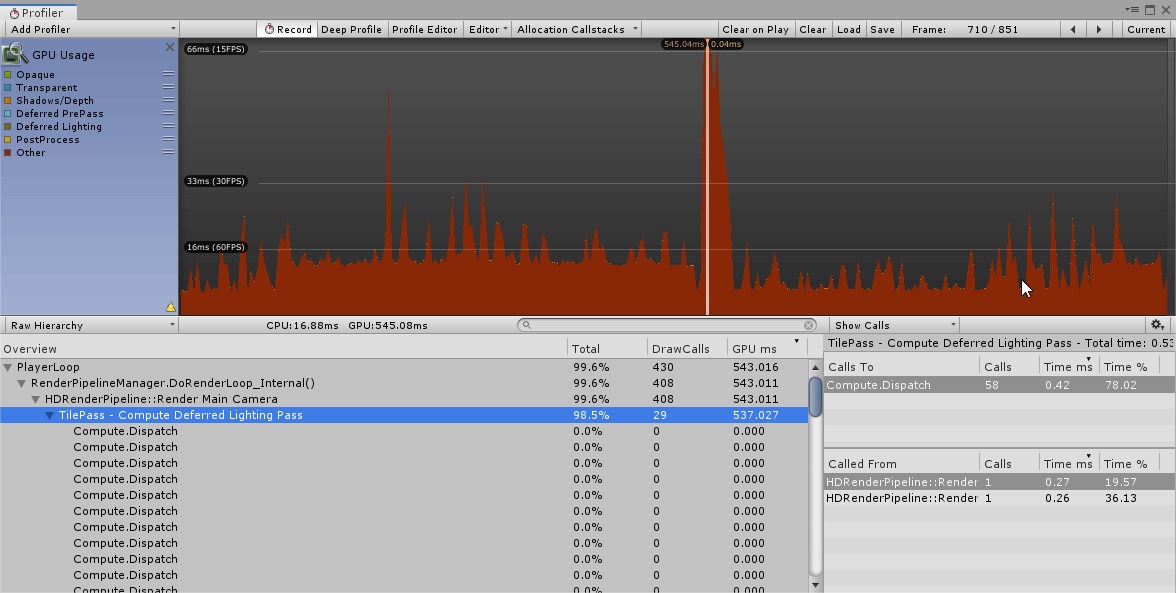
seems to happen when im animating a light intensity
tho not consistently
 obtuse cave
Added Color Grading to a post fx volume in a LWRP project on 2019.2.2 - Console blew up with this:
And game view is black.
 weary fog
@turbid matrix I'm pretty sure real-time reflection probes are used for racing games
 ripe fable
@heavy ice I'm on the latest master with the directional shadow map sampling bugfix and new temporal filter in, but the GI/reflections flickering is still present. Was the fix among these PR's?
ripe fable
I made a mistake setting up my dependencies, sorry for the tag.
turbid matrix
@weary fog some do, like grand turismo does that
forzas use SSR
but in Unity, you can't use real time reflection probes for that, even on old standard renderer, it's too perf heavy (I've tried this in past for this exact purpose)
the issue here is that you'd really need to only capture few sides of the cube for this to work on most cases, but Unity doesn't have option for selective capture
and if I remember right, HDRP doesn't even allow sequential capture (where you capture one side of the reflection cube at each frame)
altho that would be too slow for racing games anyway
you may know that I'm making a racing game myself, I'll just stick to SSR as that's good enough on HDRP for my use cases
and I want to add DXR reflections for RTX compatible cards (that can handle it)
reflections is by far my most wanted raytracing effect, I'll definitely play with the other RT feats too but reflections are what I really want
as for the reflection capture, there are some Unity mobile racing games that have cubemap reflections but they aren't using realtime capture
@viscid egret HDRP has always had pretty bad situation on generated garbage, you can help that a lot by just enabling the incremental GC on 2019.1+
but 2019.3 has gotten several improvements on HDRP so that it'll not generate as much garbage
I dunno if some landed for 7.0.1, next release definitely will have multiple fixes
it doesn't seem like reducing GC load for HDRP has been huge focus before this first release they are doing for 2019.3
they recently fixed the motion blur's garbage issue, it had been there since 2019.1 I think
I dunno which versions got the fix backported
(that fix was like month or two ago I think since I think I reported it this summer)
 thorn lodge
oops
turbid matrix
since git makes difference between the two but windows doesn't, I can't even sync the right one
thorn lodge
WSL to the rescue?
turbid matrix
WSL?
thorn lodge
windows sub-system for linux
turbid matrix
ah no
but they really need to clear the mistake branch out or they get issues with this
people will otherwise merge PRs on both and that's not good
@scarlet hull is this a known issue?
this does explain why I wondered earlier why what I saw on github wasn't in line with what I saw locally 😄
but now it makes perfect sense
(I just ended up cherry-picking the missing commits from the other branch)
weary fog
Is it just me or does HDRP 7's TAA look much cleaner
turbid matrix
it's a tad different algo
for me, it ghosts even more
or wait, you compare to HDRP 5 / 6 TAA now?
or just against the old PPv2 TAA?
they did move the TAA out of compute on v7 but I thought the algo itself stayed the same as on HDRP 5 and 6 (versions with dedicated HDRP PP)
@weary fog
weary fog
I went from 6 to 7
I didn't test anything in motion because it was just a blank project
It was just the HDRP default scene
When I converted it to 7 the first thing I noticed was that it looked much sharper
turbid matrix
ah, they may have enabled the sharpening feat from it on 7
it was always there but it was disabled by default
(you can't set it yourself unless you modify HDRP source code)
I'm kinda objecting what HDRP team does for the PP's configurations
they hide WAY too many useful things from the UI
I think the focus is to keep the options simple so artists don't get confused
but like, option to use sharpening with TAA should be there as it totally depends on your content and art how you want to tweak it
hmmmm
GitHub
Purpose of this PR
Re-enabled sharpen on TAA.
Testing status
I don't think it's necessary to waste katana resources on this PR, the change doesn't affect any of the existin...
that was backported to older HDRPs I think
been there since 6.7 and 5.16
weary fog
The second thing I noticed was how much better the PBR sky was compared to the Procedural Sky
(Excluding the bugs)
turbid matrix
it should be, but it's bugged for sure
weary fog
At high multiplier values the sky just breaks everything
turbid matrix
I get some bright dots even on the default settings
weary fog
I tried setting it to 20,000 lux and everything broke
turbid matrix
I'm currently sticking to the 10k value which is the new default for HDRP
but even that makes wonky things on the new sky
ripe fable
0lento, quick DXR question, are you noticing lower performance compared to the older experimental version? I recorded a lot of footage in 60 fps (I'm also creating a racing game/sim) on the older version. Trying to setup a simple sponza scene right now and I can't even get the framerate above 30 with just GI (1 sample)
turbid matrix
sorry, I never measured perf properly on the old version
in fact I was just about to remove it as I can test on the new one now
ripe fable
Ah yeah. Keep in mind, point lights still crash when you delete them. Disable the gameobjects before deleting should do the trick.
turbid matrix
ah, that's nice trick 😄
anyway, I don't think I'll test the experimental editor at all now, it has nothing of value at this point for me
I mean, even if it did something better, there's zero updates to it and I need 2019.3 for my project
better just keep reporting issues on 2019.3 instead
hmmmm
 weary fog
I think you're right about the sharpening, I just noticed that there is no option for sharpening in HDRP 6
turbid matrix
@weary fog there's no sharpening ui option on the new one either (unless they exposed it), it used to be a define on the shader itself
weary fog
There is no sharpening option on 7, that was the first thing I looked for when I first opened it up
Maybe it's just placebo 🤷
turbid matrix
what I mean, they definitely have sharpen filter on TAA enabled now
it's just not something you can toggle from the ui
sharpen pass used to be disabled on some older versions
shader code itself for that was always there
 trim bone
is dxr now included in hdrp 7 or is this from the srp github?
turbid matrix
on 7.0.1 but most here probably test from github staging etc
 trim bone
is that groundwork for the hybridrenderer?
turbid matrix
commit I just linked? no
it's just work being done to jobify reflection probes
I'd love to see more work like this been done on HDRP
and with BurstCompile + new math lib
trim bone
i always assumed this stuff was mostly jobified already 🤷
turbid matrix
before this change, there's been only one IJobParallelFor on the whole SRP repo and even that is in test package, not in the SRP itself 🙂
 scarlet hull
@turbid matrix Not the first time we have casing issues on github : I also have the issue locally, where Sourcetree absolutely wants me to push to "hdrp/..." and I have to manually replace by "HDRP/..."
I forwarded the info, thanks for spotting
ripe fable
Has anyone gotten raytraced area light shadows to work by the way? This is what I'm getting:
turbid matrix
@ripe fable btw, did you update to 2019.3.0b1?
it might have some unlisted fixed for DXR
(I wouldn't know as I've been testing other things now)
 indigo summit
beta 1?
indigo summit
oh, it's not showed up in Unity hub
turbid matrix
that link has install with hub option that should work
it'll still install using hub
that is, unless they got similar licensing issue with this as they had on a12 initially :p
indigo summit
well it did install with hub though
let's see how it is
just wondering why there's no announcement
turbid matrix
it'll come
it usually takes a while for them to come up with the official announcement
beta 1 is listed here too 😄 https://unity3d.com/alpha/2019.3
you get a strong feeling that they still do these site updates manually
you'd expect this kind of setup to be totally automated
but it doesn't appear that way
also it boggles me how bad the Hub's own new version discovery is
it can be stalled for days before it even finds the new version on it's own, so I've just used the manual hub links for a long time now
indigo summit
Oh yikes
i totally didn't reallized that the alpha test page are using Beta version
turbid matrix
they will rename it eventually
indigo summit
huh
Asset Import: Starting with the Unity 2019.3 release, direct import of Cinema4D files will require an external plugin.
interesting
are they planning to add external plugin for each 3d apps?
oh shoot this is SRP channel 😄
sorry
turbid matrix
(they just added blog post about 2019.3)
 drifting vault
is someone know - i can do something like snow crow on top surface of rock with standart HDRP materials?
 quasi mulch
moved to 2019.3 beta
the sky is totally fucked up
lots of banding with exposure increased
scarlet hull
Sky in HDRP 7.x has greatly changed. Deprecated procedural, for PBR sky
quasi mulch
Yep, but when I increase the exposure of the new PBR sky, I get banding
my main light is a physically accurate value for lux on sun, but the physically based sky train wrecks everything
scarlet hull
Oh yeah. we know this bug, and it is already fixed for next version : In theory you shouldn't have to modify the exposure, as it is controlled by the "sun" and the athmosphere settings
turbid matrix
@drifting vault if you really want to use the standard shader, you have to texture the whole rock manually with unique UV's
but you could just as well use shader graph and build a custom shader for your use case
drifting vault
@quasi mulch i had same problem with PRB sky. Change to HDRI sky
alright, thanks @turbid matrix
turbid matrix
I'm currently just using the default HDRI sky
will tackle the sky later on
should probably report some of the physically based sky issues properly tho
because right now it's totally unusable for me
quasi mulch
nice, thanks remy, but I do have to modify the exposure for HDRI as well, I guess that needs fixing in a similar way (seems I need 14 exposure for any form of sky, and 12 fixed exposure for rendering)
turbid matrix
you need to modify exposure if you use HDRI sky
just put same exposure to the hdri sky as you put on your volume exposure (if you use fixed value)
ah, I've used same value myself
you can compare the values if you put 0 to both
does that look same as your 14 + 12
quasi mulch
I had to make them a little different for aesthetic purposes, the character's SSS was too dark otherwise and so on
quasi mulch
shadows seem considerably worse in 7.x hdrp
in 6.x i was able to have detailed shadows from close up to 4096 without visual artefacts, seems impossible now.
(and those shadows in 6.x were on an atlas of 2048 - just clever borders)
now its a dithered mess that doesn't render
which also now has gaps and floats above the ground
not sure how thats moving forward
I see..
you've ignored indirect
turbid matrix
they also did simplify the shadow bias settings at some point
I can't get as nice soft shadows as before
quasi mulch
that's not it though. it's big change from 6.x and they havent tested it with just indirect only
turbid matrix
but it's ok'ish
quasi mulch
its not ok ish here it's just crap (tm)
its visually worse and only patched up if you don't use indirect but go full shadowmask instead
i suspect the change is much more related to caching the shadow masks
which i'll support and work with ofc
turbid matrix
so, there's new HDRP and URP forums
https://forum.unity.com/forums/high-definition-render-pipeline.386/
https://forum.unity.com/forums/universal-render-pipeline.383/

Unity Forum
Discussion around High Definition Render Pipeline (HDRP)
Docs | Learn
quasi mulch
thanks! just posted
Assertion failed on expression: '(int)indices[kStaticLightmap] + staticOffset >= 0 && indices[kStaticLightmap] + staticOffset < kLightmapIndexInfluenceOnly'
no idea what that is either
dawn sorrel
@turbid matrix are you a fan?
Making those forums were a bit of a nightmare as moving threads in Xenforo is not too great
turbid matrix
@dawn sorrel fan of what? forum change?
I dunno, I guess it's ok, considering URP, SRP and HDRP topics don't usually mix that much
and for the overlapping topics there are Shader Graph and Visual Effect Graph subforums already
I'm not a huge fan of forum use in general, altho I do have over 1000 messages there
I mainly use whatever channels I get to contact Unity staff on specific feats, I don't really care of the medium there, I just try to find solutions
quasi mulch
Forum's fine for sticky information and gj on the new forums for hdrp etc, maru
 alpine bluff
I love the forum split! Means I can stop reading threads where I’ll be of no use :p
dawn sorrel
Do we think that split would also be useful here?
I've seen it suggested a couple times...
Personally I think it would be useful that way everything has a set place and you know when it lights up white you know exactly in refence to what it's about, E.G. (HDRP, LWRP, Standard, etc).... Now not sure if you need to do an HDRP Shader Graph and a LWP Shader Graph as I'm not sure if they use the same stuff to work
quasi mulch
Discord isn't really a place for drilling down on details though, more of a quick question sort of format
dawn sorrel
Yeah I suppose that's true.
How's it going @quasi mulch been awhile sense I've been on the forums lol.
Well while were on this topic though, according to my research last night - are custom image effects locked out of the current HDRP version? From my research this is the case.
quasi mulch
not bad @dawn sorrel just pottering about on my game
dawn sorrel
Heh same here bro
quasi mulch
currently moaning about how 7.x HDRP wrecked shadow quality for deferred
and I mean wrecked, it's just a total shit show
I hope its merely bugged
dawn sorrel
RIP, hmmmm. Was that what I saw above with that blue like distortion stuff with the wall?
quasi mulch
No, just really bad range code I think
plus volumetric options on lights for toggling on/off don't work at all so I suspect a lot of bugs are there
dawn sorrel
Interesting, I can toggle them on and off.
dawn sorrel
Uhmm my message just got like deleted or something
quasi mulch
Discord does that to me too sometimes
dawn sorrel
haha wow
The gist of what I said was - I'm not on the beta so that might be why everything works for me... But my main issue so far with lights is simply the shadows are to dark.
quasi mulch
any gi or ambient?
dawn sorrel
GI I know for sure, even added that volume thing for indirect lighting, it makes my textures seem burnt red though.. Ambient Mode I have set to static..... It does say to add a Static Lighting component (which I don't see anywhere) so that might explain that.
quasi mulch
Wow that sounds nasty. DX12?
dawn sorrel
yeah lol.. Naw I left it on DX11 (or at least that's what the editor says up top), should I force it to DX12 or Vulkan?
quasi mulch
Nope, DX12 is where pain levels up
dawn sorrel
hahahahaha dang bro
quasi mulch
you know it really irks me. 2 days ago I finally got things looking perfect, then I decided to check out 2019.3 to see if there were no surprises (on a clone of the project ofc)
should've known better
dawn sorrel
Deleted my message again, sheesh lol... But yeah man, should have haha
Btw I found that lighting component thing, wasn't there before, decided to check again - helped a lot lol.
quasi mulch
I see, the shadows are now directly being affected by camera clip planes for reasons unknown.
dawn sorrel
Yeah man, go back to 2019.2.1f1 unless you're trying to find the issues to bring it to Unity's attention.
quasi mulch
Yep gonna head back, just keeping my eye on things just in case.
I'm just not man enough for this abuse lol
dawn sorrel
Yeah, does this beta have anything way better than public release that makes it worth the jump to the beta once them issues are fixed?
lmao yeah ahhaah
quasi mulch
well it does have lot of things I would love: fast, fast domain reload etc, terrain holes and better gi baking
but those all are not worth the loss of shadows

Unity Technologies Blog
The last beta release of the 2019 cycle, Unity 2019.3b, is here and it comes packed with new features, improvements, and a completely refreshed interface. ...
dawn sorrel
Ahhh the terrain holes, I knew I heard something about that and was wondering where it was lol.. oh nice the domain reload will be faster 🙂 but yeah shadow problems I ain't risking it on that lol.
Man it pops up with new editor icons but doesn't say DARK THEME FOR FREE USERS lol.
Omg yes asset store stuff in the package manager, been waiting for this
lyric ravine
@dawn sorrel I also think the split would be useful here, especially since I have multiple projects with URP + multiple with HDRP ongoing and it's pretty confusing to ask questions in a single channel (they're just too different)
quasi mulch
But you risk people who know all pipelines simply never answering you. Because it's too segregated.
when doing a community you first need to look at the traffic, if it's heavy, then you split the road. if it's not then you don't.
lyric ravine
Well this is one of the most active channels that's not full of random noise
turbid matrix
@quasi mulch oh right, forgot that HDRP deferred doesn't do PCSS :/
I still don't know why not
but it's a bummer because you need deferred for DXR
and I'd be fine by just using PCSS and not waste resources on DXR shadows
 mighty swift
I'm actually excited for DXR shadows. Like 2/3rds of my GPU frame budget (on one project) was shadow maps.
trim bone
yeah tato made an amazing pcss asset for stock unity, surprised its not default in hdrp? good for tato though
mighty swift
If I could cast a single ray per pixel for hard shadows? 👍
mighty swift
Oh. Hey. 2019.3 with HDRP and ECS actually builds now lol
turbid matrix
if you mean hybrid then I think it was fixed on previous hybrid release
@trim bone well, HDRP does have PCSS
just not on deferred only mode
if you use forward path, you get PCSS there
I have no idea why they limit it to forward as it's not a requirement by the shadow filtering tech itself afaik
if I had to guess, they must be running out of some resources on deferred
trim bone
re: building ecs + hdrp - is it just me where the il2cpp windows stuff isnt in the package manager by default for 19.3?
turbid matrix
it's been missing from Hub itself since a11
you can manually install IL2CPP after you've installed the engine tho
that's what I've done for past 3 releases
trim bone
yeah doing that now, ive grown so reliant on the package manager, trawling through the unity site to find the dl was a little confusing
trim bone
not package manager, meant hub
turbid matrix
ah ok, just checking 😄
trim bone
too many things to remember 😄
trim bone
does dxr just work once its setup in the hdrp wizard and you have a raytracing component like global illumination added to a scene volume?
viscid egret
PBR sky is a mess eh https://i.imgur.com/6d0iafL.jpg
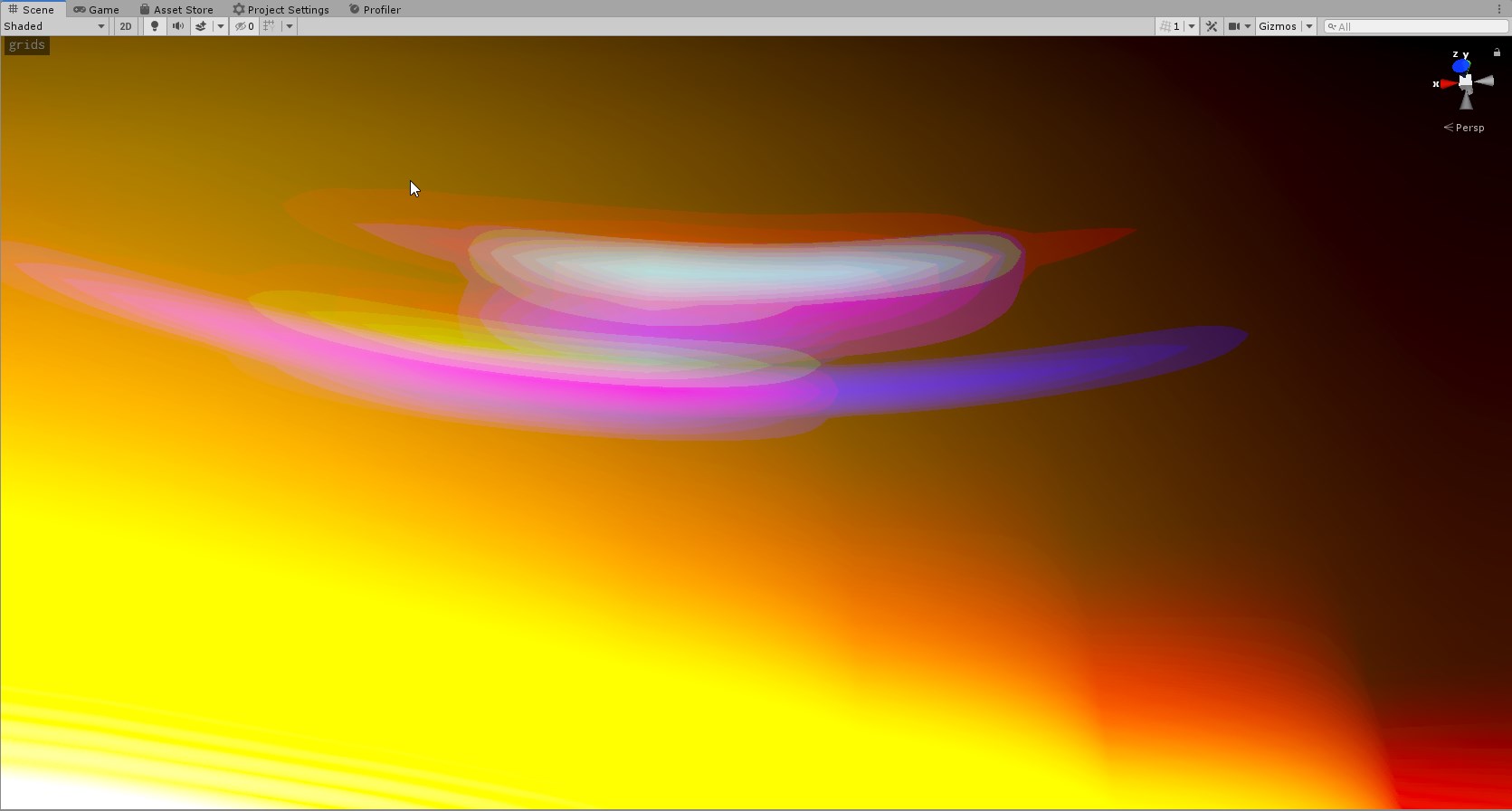 trim bone
well i mean just for enabling it
 barren kindle
what
oh i see. you can have 256 lights, but it is still max 4 per object
why tho / i dont understand / what
lyric ravine
I'd really like Unity to document this stuff properly. Right now it's trial and error to find these limits.
(They kinda make sense architecture wise - the point is that they can efficiently shade 4 per object in a single shader pass for URP)
URP 256 lights => actually max. 4 per object
HDRP 4096 lights => actually max. 24 per tile
At least the URP doesn't start showing crazy glitch artefacts once you go over that limit 🙂
turbid matrix
@trim bone yes, like mentioned, it's super crash happy
true zealot
@lyric ravine https://docs.unity3d.com/Packages/com.unity.render-pipelines.lightweight@6.9/manual/lwrp-builtin-feature-comparison.html LWRP has specifications for light limits here, not sure about HDRP though
lyric ravine
Yup, just saying it's not very obvious - takes a lot of digging when you hit one of those hard constraints to figure out what's actually going on.
That being said, HDRP has the tile debugger by now which helps a lot, for URP there's a hack week project with a debugger (not sure if that works on recent versions though)
alpine bluff
Ah, @true zealot, beat me to it!
@lyric ravine, I'm going to refactor the Universal docs soon, including lights. Where would this information make sense to you? Where would you consider it "documented properly"? :)
lyric ravine
I think the main problem with the current docs around that is the lack of visual explanations
There's a lot of technical terms that only make sense once you understood them already
Good example of that is the recent Beta blogpost:
"We’ve also increased the Light Limit in the Universal Render Pipeline forward renderer to 256 visible lights, with the exception of mobile projects, where the limit is now 32. The pipeline can up shade up to 8 per-object lights."
A novice basically will only see "yeah, 256 lights!".
But actually the interesting thing is "The pipeline can shade up to 8 per-object lights" which is written in way that technically makes sense but is not easy to understand
So, for this to be understood, you would need at least a couple nice graphics.
Those graphics should belong on an introductory page for "Lighting in URP" / "Lighting in HDRP"
Along with
a) what the caveats are
b) how to debug what is shown in the pictures
c) how to work around those limitations (e.g. bake some of the lights, have multiple things that look like light sources but actually just one light source, ...)
Additionally, there should be a FAQ section with stuff like "Why are some lights ignored on my objects"? that point to the right place where the relevant information resides
+, very important in my opinion, someone needs to be responsible for actually updating that FAQ sections with things that pop up often in Discord/Forums. And not with "stuff marketing likes" but actually with "how to get things done" (a lot of the current documentation for SRPs feels like the devs are talking about what works but don't want to talk about what doesn't work at the moment since they want to get to it later - while that is good, it doesn't help to get things done)
One thing that I tend to do a lot with students is example projects on "How to break stuff"
This is something that is unfortunately super hard to "officially" do upfront as company (been there, done that, I worked on public facing SDKs + their docs before)
An example
(1) create a project with URP template
(2) duplicate the Construction Light five times and place them around the center
(3) go to the URP asset and move the "Additional Light Count" slider around.
(4) move one of the Construction Lights around in the scene and observe how lighting pops in and out of objects
Boom, limits of URP reached and immediately understood by everyone
Video of that as example: https://www.youtube.com/watch?v=c_-C-fbZUF0&feature=youtu.be
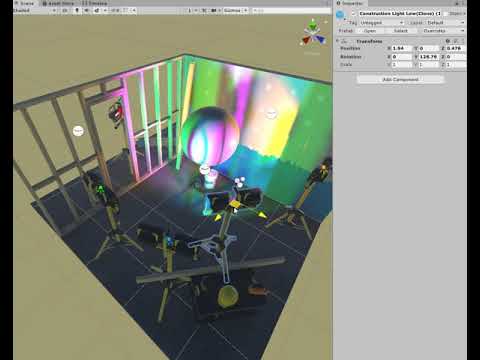
And that immediately shows all the weird corner cases that are especially bad for beginners
To really explain why this is happening a hour-long dive into "how rendering actually works" is necessary
But at least the docs could show + tell
This is where documentation would at least have a link to "how to actually debug this" (HDRP has tile debugger at least)
.
Just as additional note: I have really mixed feelings about the current state of Tutorials/Learn in their current state - they show you the one shiny path towards something that works without ever deviating into how things can go wrong.
Stuff like this is really hard to explain but yet you hit that pretty much immediately when playing with the SRPs
alpine bluff
😍 thanks for all of this feedback!
turbid matrix
hdrp/staging merged now on master, so can just use master for DXR testing now 🙂
(until there's new staging :p)
scarlet hull
(simply use staging then :p)
turbid matrix
I guess 😄
barren kindle
the trick with universal render pipeline would be.... to space the lights out far away from eachother, so that an object would never be affected by more than four lights
so to be able to take advantage of the 256 light limit, you would need an insanely huge map and huge draw distance
(?) sounds silly to me
lyric ravine
Sounds silly but I think it's correct. Also if you have more than 4 lights they better don't move, as you'll get a lot of light popping on objects then (seems lights per object get collected based on distance to bounds center). Same if your objects move. So the actual limit per object is more like 3 to be able to move between lights without popping (so one light can join the party only after another one is fully gone). Takes quite some planning I'd say!
turbid matrix
testing DXR GI on sponza
the denoiser delay is real on scene view for raytraced shadows 🙂
turbid matrix
not yet
 exotic plume
Hi 👋!
Been a while since I’ve been here
A lot has changed about the render pipes!
Current question: How can I get Raytracing/Global Illumination to work as a volume override ?
When I add it I get the red stop sign with “The current HDRP asset does not support Ray tracing “
I’m using default asset
Do I have to enable that for the default asset?
Or in the default asset setting rather?
turbid matrix
@exotic plume https://forum.unity.com/threads/how-to-use-ray-tracing-in-2019-3-b.735308/#post-4905617

Unity Forum
How do we use Ray Tracing in 2019.3 b? I can't find any information on how to actually use it...
exotic plume
Or is raytracing only available in a forked editor build?
turbid matrix
well, most people testing this atm are using HDRP from github
2019.3 editor itself supports this since a11
but better try it on beta 1 now
exotic plume
Yup I’m on beta1 thanks so much for the link @turbid matrix - super helpful and on point as always! 😉
Wow! The posts on that Link are super fresh! Last post was 40min ago!
And first post was yesterday
turbid matrix
@exotic plume like mentioned on main DXR thread, I'm assembling some sample project for this so that people who want to try it and can't get it running have something to test it with
still adding stuff so probably done in hour or two
turbid matrix
sure
weary fog
Anyone know what version automatic light probe placement is supposed to come in? I could've sworn it was supposed to be 2019.3
 solar nest
Hay, i have problem with VFX on HDRP (Unity 2019.3.0a4 and VFX Graph 6.9.1)
For example
i have simple system:
And this VFX doesn't work in the game or the inspector
Inspector:
Scene:
Any Errors
Everything works at LWRP
exotic plume
Oooooh! So this is what DXR is!: https://sites.google.com/view/dxr-vis
Slipped under my radar
Is this a replacement for EditorXR?
weary fog
That's a different DXR, the one that everyone is talking about is the raytracing one
turbid matrix
@exotic plume https://github.com/0lento/Unity_DXR_Test will have Sponza + HDRP example scenes once it's done uploading
it also includes current HDRP master from github, so no need to manually grab it
ok, should be there now
https://github.com/0lento/Unity_DXR_Test/archive/master.zip for direct download
 empty star
@solar nest is the render pipelines path set correctly in vfx graph project settings?
turbid matrix
@exotic plume ah, if you got that last night, please do get it again
it seems that pushing to git and reorganizing the folders brought up bunch of issues, should be fixed now
I should have tested this on fresh clone but was bit tired so just checked the local project generated library fine and worked on my end
I should have known better 😄
turbid matrix
GitHub
Purpose of this PR
Alpha channel is now properly exported to camera render textures when using FP16 color buffer format.
Testing status
Added a new graphics test (9007)
Katana Tests: Running
Manua...
solar nest
@empty star yeah, i guess
solar nest
solar nest
I dunno when, but it came up(?)
UnityEngine.GUIUtility:ProcessEvent(Int32, IntPtr)
Sorry for my English mistakes, but i need to use google Translator
turbid matrix
I wonder if there's anything that can be done about the DXR denoisers, they seem to be so heavily temporal based setups that they make their use in actual games impossible
unless you only have static screens on your game that is
especially GI and shadows lag behind way too long for them to be practical for anything but some slowly moving visualizations
I haven't tested these on actual build tho, only in editors play mode (which itself is tad faster to update these than the scene view)
ripe fable
I'm testing it right now and it seems horrible in the current state yeah, but should be fixable as it was fine in the old version.
Directional lights have also started flashing for me again, even with the latest fixes included lol
turbid matrix
I feel that the denoisers themselves should just ditch the data immediately if the motion vectors are too big
now it feels they are still trying to reuse the old data regardless how much camera moves
having more noise in motion would be always better than having some ghost image on top
ripe fable
yep
turbid matrix
hmmm
you don't get DXR reflections for items rendered through Hybrid Renderer on ECS
you also don't get DXR reflections for some objects if they are marked as static
that's kinda weird
as you'd expect the raytracing to like static objects
 heavy ice
Ray tracing is not related to the static flag
With what kind of light sources are you using it?
did you disable static batching on your project?
@turbid matrix @ripe fable
ripe fable
I haven't tried static objects yet, I did submit another bug report (regarding area lights) through fogbugz.
heavy ice
what is the bug id? otherwise it will take a while to come back to me
ripe fable
1179953
heavy ice
Static batching should be disabled otherwise the result will be wrong
ripe fable

Unity Forum
I think I found a shadow bug that affects all recent github versions that we can try with DXR in 2019.3 alphas, including active code work done in...
I included some extra info in that post, kind of a workaround I found after trying to get it to work.
ripe fable
Ahh ok cool, thanks.
heavy ice
but your scene is probably not set up correctly if you are getting that weird result with GI
i shared a video of what the expected result looks like
make sure this is off
ripe fable
Alright, will do.
I'm also getting a lot of "moving" noise (even with a lot of filtering) through my raytraced area light shadows. Is that a bug in the filtering? Pretty sure it wasn't like that in the old (april) version.
turbid matrix
@heavy ice yeah, the static flag felt weird but objects just vanished from the reflections (on play mode only) if static was set
hmmm, wonder if it's srp batcher related ?
it definitely showed the objects in scene view
heavy ice
No, not related to srp batcher. That mode is not compatible with ray tracing
must be disabled
weary fog
Speaking of SRP batcher, it says I have negative batches in the stats popup when I have it on
turbid matrix
I'll try
ok, disabling static batching definitely helped
I still get shadows culled from the reflection if they are not in the camera view itself
but that's probably harder to solve
happens for both RT and regular shadows on directional light
ripe fable
Yeah I noticed the same thing, that's not related to static objects though (not sure if yours are still static?)
ripe fable
I also noticed the GI denoiser isn't working. The secondary denoiser works, but it introcudes some weird artifacts in the reflections.
heavy ice
The disappearing shadow maps is a known problem yes @turbid matrix
turbid matrix
@heavy ice Hybrid Renderer objects not showing in DXR reflections is probably not something Unity is planning to support any time soon, I assume
these are all experimental things on their own after all
heavy ice
Nothing was done to make both of them work yes, so that is expected
lyric ravine
Hm, URP has Volumes now - great! But - seems no Skybox blending, is that correct? Just the old way of setting one skybox for the camera
 junior venture
Hi I hope this is the correct place to ask, I've just upgraded to the 2019.3.0b1 Personal Unity version. I've started to receive this error now. The actual game does not seem affected by it, however it seems like it indicates a problem. The High Quality Renderer was added with two Renderer Features in the previous 2019.2 version (also beta). I did not yet try recreating it as it would be quite some work to re-do it. Any suggestion? I have not been able to find any information on it.
lyric ravine
I'm getting the same, doesn't seem to have an impact so far
 sleek pulsar
Is there any chance the latest SRP / 2D pixel perfect changes will be back ported to support 2018.x LTS?
Even USRP hasn't been released for 2018.4 and there have been a lot of breaking changes in master branch for 2019 specifically.
turbid matrix
pretty much 0% chance
unless someone from the community does it
which is very unlikely as well
also do take into account that we are getting close to 2019.3 release, which will turn into 2019 LTS eventually
better question is rather, why stick to 2018.4 at that point?
sleek pulsar
Major version jumps mid project are dicey. As it stands 2019.2 does not work with my current setup. In order for it to work or even consider it I need to assess whether those changes make my project viable in 2019.x. I will likely try the 2019.3 beta to confirm they fix the issues but with deadlines being set there's no guarantee that can happen. I'm not even using SRP at all right now so that alone is a massive risk.
I'm fairly certain I can get SRP working though with what I need if the rest of the changes work.
The major hurdle with back porting these changes is that Unity opened up some classes that were once internal (they're obsessed with over encapsulation).
So if those changes happened in 2018.4 LTS it would be much more possible. The other bulk of the issue is removal of the Experimental namespace.
That's a simple fix
turbid matrix
well, major tech changes mid project are risky too, and even more if you want something that isn't supported by your version 🙂
I'd really recommend just trying it on 2019.3 if you really need it
sleek pulsar
Oh I fully intend to. Honestly I'd rather be on 2019. I took a day and a bit to investigate 2019.2 for this exact reason. I'm not as afraid of version changes as some. But I've done it enough times to know there are sometimes caveats.
Also I'd rather push back at those dates 😉
But not entirely my choice. I can only offer suggestions.
exotic plume
I think everyone should go ahead and make the plunge to 2019.3 just to get used to the drastic change in the editor UI!
 sleek pulsar
Agree. I love the new style.
empty star
I doubt they will backport, isn't 2018.4 on 4.x of SRP? The best you can do is copy the package, edit the json to a custom version and start cherry picking things you want while also making LWRP classes non internal.
There is some naming changes but a lot of it can be back ported as needed
You might run across some engine internal stuff that 2018 doesn't have but can't think of anything at the moment
turbid matrix
that would be a technical nightmare
 graceful gate
Anyone have an idea on how to make the background blurry behind a ui image (overlay) panel when using HDRP? Before you could do that with a shader based on screen grab.
 rich spade
@graceful gate you would do same in HDRP, anything you did before can be done in HDRP and the same principles generally apply.
graceful gate
What can I use instead of grab pass? I LWRP it seems like you can access the _CameraOpaqueTexture but in HDRP this is not available.
rich spade
@graceful gate I have to admit I've not delved deep into HDRP, but a quick google shows that there is the ability already built into the standard shaders. It also seems you can do same via the graph which now I'm side-tracked, I'm looking into.
https://www.youtube.com/watch?v=E31H5WuA-d4
https://forum.unity.com/threads/creating-refraction-in-hdrp.711407/

Find out more about HDRP: https://ole.unity.com/hdrpblog Step by step guide: https://on.unity.com/2zpHdXJ The High Definition Render Pipeline (HDRP) is a hig...

Unity Forum
Hello guys,
I am creating an underwater surface with shader graph and HDRP, but I can't find anywhere in google, wiki, etc any explanation on how to...
graceful gate
@rich spade Doesn't seem like any of the HDRP standard shaders work with overlay UI. And not using overlay canvas adds a thousand other problems again so can't go that path either. Same goes for Amplify shader editor. Looks like the only shader template that work is the Legacy/UI.
rich spade
@graceful gate that's unfortunate, one of the main problems is that these new render pipelines are still being built and eventually it will probably be possible. Depending on how quick your project is progressing it's perhaps something to re-visit later. I've similar issues and spent some time looking at LWRP / UDP, which appears more stable and does what I need in 2019.3 beta. But the beta itself is not stable, so do I ignore it, revisit later or try to run with it.
lyric ravine
@graceful gate I've posted a custom HDRP UI shader previously on this channel that renders after Post Effects (e.g. for screenspace camera UIs that shouldn't be affected by AA postfx). You should be able to modify that to get what you wanted as at this point all the Opaque + Transparent buffers are already in RTs
It's not a graph shader though
herbst 31.07.2019 - search for "UI-Default" in this channel
drifting vault
hdrp 6.9.1 Unity 2019.2.2f1
Someone know why planar reflections works in Scene view only?
Scene view photo
Game view
graceful gate
@rich spade Yes, we've still got some time but it's time to show off work again so would be lovely to be able to sort this one out :)
@lyric ravine Found it. I'll check it out and see if I can modify it to my use.
lyric ravine
@graceful gate made a gist here in case you have comments / want to change stuff, it was highly experimental but worked for the project we needed it for
https://gist.github.com/soraryu/8435cd6de5adc25e535b187cba3ee1b4
turbid matrix
@graceful gate you cant make ui shaders with shader graph atm. There is upcoming feat for fullscreen pass graphs but it probably dont make it into 2019.3 yet
Custom pp via code will
But you could always put a mesh right next to camera that did this effect and use shader graph for it
graceful gate
@turbid matrix That's actually not the worst idea. At this point in time I only need a fancy screenshot to impress our investors so a well-place mesh could work for now ^^
turbid matrix
There are scene color nodes in shader graph
Could try them in translucent sg
UI blur filter is something I need for HDRP as well but I've been waiting for official custom pp support before getting my hands dirty
And once it is out, chances are that someone just beats me to it so not in a hurry at all
@graceful gate related pr https://github.com/Unity-Technologies/ScriptableRenderPipeline/pull/4317
GitHub
Purpose of this PR
Implement custom passes in HDRP
Release Notes
This PR adds a new component called Custom Pass Volume that allows you to inject custom passes in the HD graphic pipeline. Currentl...
Not merged yet + apparently there are issues
graceful gate
@turbid matrix Yeah, i saw that pull request. Looks very promising. Yeah, I think I'll just wait for someone else to solve this as well.
 green rover
Hey everyone !
Im making a project using LWRP and I was wondering, is that possible to render multiple materials with DrawMeshInstanced() ? I have the classic material for the object and an outline material (I could not make the outline work another way)
 uncut root
@green rover As far as I know, DrawMesh has to be called once for each submesh or material
turbid matrix
I actually tried that custom pass PR
merged it on recent hdrp/staging (had to fix some changes)
it kinda works but I have no idea how to get scene color in the fullscreen pass shader
example didn't have that (which should be like totally basic thing :D)
ripe fable
I just tried the latest HDRP/staging for DXR and I'm afraid I can't even post a video without a serious warning. The flashing has gotten worse 🙈 bug report time
 upbeat badger
in URP you can declare _MainTex in shader and it will get scene color when you do Blit pass
rich spade
I didn't notice the scene color node till today, it just dropped into place where the opacitytexturegrab was. No messing
weary fog
@graceful gate I tried doing this too, I just ended up using an object in front of the screen like 0lento suggested.
For the shader I used an HD scene color node and turned the lod up which gives a nice blurry effect
It's not perfect, but it works
graceful gate
@weary fog yeah thats a fair solution if you are either going to blur the entire screen or your ui is not movable. Also works for test purposes. Actually it got me trying other opaque alternatives that I think I like better.
dawn sorrel
I think the directional light in HDRP is bugged. The moment it hits 0, 180, my scenes geometry turns insta black and then fades like it should as the sun continues to rotate. So it's not fading between 359 and 0, and not fading between 179 and 180, it just has a big abrupt shadow spike.
 warm wagon
Hello, is anyone using LWRP or HDRP on android? I'd like to know a LWRP/HDRP version as well as unity version which works properly with a built project. I'm having 300+ms lag by just having an empty scene with HDRP or LWRP on 3 android devices. Already tried disabling every option i could think of on these pipelines which could be the cause of lag to no avail.
warm wagon
Finally found the reason for the lag from LWRP on android after 10h of debugging ☹ . If you're using LWRP, make sure to set Render Scale in the pipeline asset to 1 or below 1. Made an increase of 1000-2000% in performance.
 wispy juniper
Hello, I am having a problem after upgrading to LWRP. I can't set colours of material in runtime.
I tried material.color = color;
SetColor("_BaseColor", color); and SetColor("_Color", color);
none of this works. And I tried SetPropertyBlock also.
using LWRP/Unlit shader.
Shader "Lightweight Render Pipeline/Unlit"
{
    Properties
    {
        _BaseMap("Texture", 2D) = "white" {}
        _BaseColor("Color", Color) = (1, 1, 1, 1)
        _Cutoff("AlphaCutout", Range(0.0, 1.0)) = 0.5
Property is called _BaseColor though.
turbid matrix
@wispy juniper Material.SetColor should have worked
I'd double check you got the ref for it right
wispy juniper
Yeah, before upgrade @turbid matrix it was SetColor(_Color, someColor). I looked it up it got changed to _BaseColor
but it's not working.
I don't understand either.
turbid matrix
can you how actual code you use to change the color?
wispy juniper
sure
Renderer.material.SetColor("_BaseColor", _settings.friendlyHighlighted);
all references are there.
it is just that, I was using it everywhere before upgrading to LWRP
turbid matrix
I'd try to get the renderer and material ref on separate lines and see they get what you expect when you put breakpoints to them
or I guess put on same line if the IDE detects them there
either way, use debugger
wispy juniper
Renderer set on initialisation there is no change to that after that.
turbid matrix
also can you be 100% certain the value you are setting it is something different?
wispy juniper
Because I can get to my custom shader which is standart unlit but colored, it works with calling _Color
when I change materials back to LWRP and change property to _BaseColor
it doesn't
turbid matrix
yeah, LWRP uses _BaseColor if you use default shaders
wispy juniper
they are.
turbid matrix
if you use your own shader graph, it's whatever you set for the properties
just making sure, this should be super simple :/
which LWRP and Unity version you have?
wispy juniper
i thought so though. Maybe I need to update unity into a different version to see if any difference it'd make
2019.2.1f
last version of LWRP for 2019.2
turbid matrix
which is?
wispy juniper
let me check
turbid matrix
just curious because people say always latest version but it could be anything then 🙂
wispy juniper
6.9.1
turbid matrix
ah, that is the last on 2019.2 indeed
have you tried reproducing that on new project?
like if you do that on LWRP template, it still doesn't work?
wispy juniper
oh, I didn't upgrade project. I did open up a new one with LWRP
than move into it
then*
something is fishy I know
turbid matrix
so minimal repro for this would be:
- make lwrp project
- have mesh with unlit LWRP shader
- have script on the mesh that uses that material.setcolor?
wispy juniper
yeah
turbid matrix
I'll check it out
wispy juniper
it should. Thank you.
turbid matrix
still installing 2019.2 but should be ready soon
turbid matrix
@wispy juniper this definitely works for me ```cs
using UnityEngine;
public class ChangeMat : MonoBehaviour
{
void Start()
{
GetComponent<Renderer>().material.SetColor("_BaseColor", Color.red);
}
}
so I suspect you are not getting the right renderer ref there
wispy juniper
Let me check what I have.
if GetComponentInChildren gets first child then I shouldn't have problem.
turbid matrix
definitely check first that you get:
a) right renderer
b) right material if it's multimaterial mesh
wispy juniper
        public void Initialize(Vector3 position) {
            _settings = GameManager.Settings.gridSettings;
            Position = position;
            Renderer = GetComponentInChildren<Renderer>();
            Debug.Log(Renderer.gameObject.name);
            Renderer.enabled = false;
            Outliner = GetComponentInChildren<Outliner>();
        }
Renderer debug is true there. it is Quad not other child.
Don't mind Renderer.enabled = false;
it is for init
I don't understand.
turbid matrix
so the code itself works
if you change that same color field in the editor while not playing, does it do anything?
lyric ravine
Do you have srp batcher on?
turbid matrix
@wispy juniper
lyric ravine
Is there an animation with the color as well?
Like, an Animator
Usually you should not change color on materials directly, but instead use MaterialPropertyBlock on renderers
What you're doing (direct material setting) works but will be overriden by any MaterialPropertyBlocks. Usually there will be a little hint at the bottom of the material on the renderer if that's the case
wispy juniper
yeah
it is
i can see couple colored mini areas.
okay then I will have a static class that handles that.
let me check if it works.
        public static void ChangeColor(Renderer renderer, Color color) {
            var block = new MaterialPropertyBlock();
            block.SetColor("_BaseColor", color);
            renderer.SetPropertyBlock(block);
        }
this should work right?
turbid matrix
I wouldn't advice to use use MPB unless you truly need it
also that srp batcher will not support it afaik
@wispy juniper did you try to change the color in the editor for the same material
?
 ionic glade
hello, does anyone know how to get the current camera in OnWillRenderObject, in HDRP 7? In the built-in pipeline I used to get it from Camera.current, then in earlier versions of HDRP I got it by saving off the current camera by subscribing to RenderPipeline.beginCameraRendering, but now thats gone. i've been searching through the code but i cant seem to find a way to get to it anymore.
drifting vault
PP not working in URP?
I disable and activate tonemaping in sample scene and nothing happened 😦
ah its not working in scene view - sad
true zealot
I've not tried it with the volume framework
but do you not need the layer to be set up properly?
turbid matrix
@true zealot you dont need that on hdrp volumes at least
turbid matrix

Learn how to create a first person shooter style camera in Unity that will not clip through walls, without using multiple cameras. This FPS camera is created...
"Learn how to create a first person shooter style camera in Unity that will not clip through walls, without using multiple cameras. This FPS camera is created using Unity's Lightweight Render Pipeline or LWRP using scriptable render passes. Download the demo project here: https://ole.unity.com/FPSDemo"
turbid matrix
I'd want that for HDRP as well
wonder if you can do something like that with the upcoming custom passes
weary fog
I have a bad feeling that HDRP's version of this will be over complicated
 nova flare
hi all
drifting vault
Hey
nova flare
had some question about rendering effects but since im on the 2nd day in Unity ever, i came to the conclusion I can't just drop a PostProcessing volume on a camera of a project from Keijiro
nova flare
got another similar issue
Trying to get https://github.com/keijiro/TestbedHDRP/tree/update-2019.1 to work in 2019.2.3f1

GitHub
Testbed project for Unity HDRP (High Definition Render Pipeline) - keijiro/TestbedHDRP
getting this error "Assets\Basic\Decal\StickerController.cs(31,50): error CS1061: 'DecalProjectorComponent' does not contain a definition for 'm_Material' and no accessible extension method 'm_Material' accepting a first argument of type 'DecalProjectorComponent' could be found (are you missing a using directive or an assembly reference?)"
but the api https://docs.unity3d.com/Packages/com.unity.render-pipelines.high-definition@6.7/api/UnityEngine.Experimental.Rendering.HDPipeline.DecalProjectorComponent.html says there is an m_Material for the decal projector...
indigo summit
since unity starting to promote fps renderer with SRP will there going to be a custom shadow pass for render object pass?
for example for the FPS renderer it would be nice if we can specified custom shadow for that renderer with higher resolution and no cascade
it should make the shadow more sharper on fps renderer
drifting vault
By following that guide we found a but https://www.youtube.com/watch?v=5AmI2yOx0Nc
Learn how to create a first person shooter style camera in Unity that will not clip through walls, without using multiple cameras. This FPS camera is created...
When shadows dont have Cascades - its working fine
when shadows have two cascades - i see shadows behind gun
I found some same issues in Unity and Bug Tracker - problem still not solved.
indigo summit
that would be a global shadow rendering isn't?
yeah there's no shadow override for the render pass
at least for now (i hope)
indigo summit
No wait sorry i thought you were talking about custom shadow pass
but yeah there is an issue with cascaded shadow and custom forward renderer
quasi mulch
and with deferred renderer in 2019.3 for me at least. shadows are so broken I can't actually use them on my hardware
2019.2 is fine though
turbid matrix
nice that they redid the template, I was wondering about the proper usage before when I tried that
also was wondering why after PP didn't do anything
I guess this explains it :p
ripe fable
Does anyone remember why screen spaced shadows sometimes didn't work in the recent raytracing hdrp versions? I think I had this issue before.. but there have been so many workarounds I forgot how to fix this one lol
Screenspace shadows are enabled in my asset.. all RT features seem to be working except for shadows
(currently trying to port my main project)
The screen space shadows checkbox and the raytracing shadows checkbox both don't seem to do anything at all
turbid matrix
they did work when I tried them
ripe fable
Yeah it seems to be the same bug again where I can only enable it in the hdrp debug view but it's not persistent no matter what I do. Resetting the HDRP settings/creating a new asset doesn't fix it this time.
Also, are shadows kinda broken/fucked in the latest HDRP? I think I read some messages about this before and I'm experiencing it myself now
(normal shadows, non-raytraced)
ripe fable
You can see it inside the front bumper here.. bottom is the old (6.7.x) HDRP, they also seem lower quality (in 7.x), even though the settings are the same.
turbid matrix
I'm testing the custom pass here
since the pass is done in separate function instead of separate subshader pass, I dunno how one would go about doing a multipass effect with this
having to make 2 separate shaders and applying them to as separate custom passes seems like total overkill
you need two passes for gaussian blur tho
I also totally don't get the effect I want on the scene or game view
but the actual custom pass preview window looks right
so, go figure
turbid matrix
hmmm, I get simpler blur working, so could just be issue with my code
ripe fable
Got my stuff working now, skinned mesh renderers and 100+ submeshes in DXR 😛
Finally no more reason to stick to the 'old' DXR build, just got to get the PBR sky to work, it's doing something weird, might be worth a bug report
Bottom half of the sky is rendered on top of everything else.
indigo summit
@quasi mulch wait are you talking about URP or HDRP?
lyric ravine
Anyone else experiencing tons of issues with narrow spotlights glitching around in URP? Even slight camera motions (in editor and build) make objects go black, lit particles disappear, downright ignore some geometry and not others
It looks like there is weird stuff going in with internal calculations for what shines on what - any idea?
 daring siren
Hi guys,
I just created a HDRP project and I got some scaling issues. The same seem to be the case with LDRP though. Whenever I import assets that I used normally in the past, they are like a hundred times bigger than what they should be. Is this normal? Thanks in advance
 glad tartan
Help - Does anyone know how to access the texture properties of an HDRP material in code? I want to dynamically load some textures to a material at runtime and can't figure out how to access the texture properties to feed the textures.
trim bone
is there any info on hdrp & splitscreen support?
turbid matrix
@glad tartan doesn't that work just the same way as on standard?
get material ref in code from your mesh renderer, use it's functions to apply the thing
@trim bone it should work
altho it did work for me even before it was officially supported 😄
trim bone
ok thanks
turbid matrix
you basically just set camera viewports to fill half / whatever size you want
split setups are supported officially afaik, but you can't like overlap multiple viewports
like picture in picture isn't supported (unless you do it via rendertextures)
do note that last time I tested this was on some early 2019.1 version so if it's broken since, I wouldn't know
but it's supposed to work
trim bone
ahh always wondered exactly how it was supposed to work, thanks for clarifying 😃
turbid matrix
yeah, you basically just have one camera per players view and manually adjust it's viewport to fill the part of the screen you want
glad tartan
I tried the with the documentation the have on the standard material but that didnt work. So I'm thinking I'm missing some part of it
GetComponent<Renderer>().material.mainTexture = texture;
wouldn't mainTexture be different for HDRP?
actually might have been checking the wrong thing in the docs
yea, I was definitely looking at the wrong thing in the Docs. It's working now following the correct one
turbid matrix
@glad tartan was there a setter for it?
I know you need setter for color
as another topic: https://www.youtube.com/watch?v=DoKOCgNel7E

In this video, learn how to use the experimental ray tracing features introduced in the 19.3 Unity beta without getting bogged down in algorithms! Learn more...
finally got the video for this
we got the slides before

This video teaches you the benefits of using LWRP, how to set up your project for it, and how to extend it for custom rendering effects. Learn more about LWR...
glad tartan
I didnt set the color since I just wanted to get the texture loading up and running.
I was using the wrong thing to set the texture
turbid matrix
what was the right one?
glad tartan
was doing
GetComponent<Renderer>().material.mainTexture = texture;
when I should have been using
GetComponent<Renderer>().material.SetTexture("_BaseColorMap", texture);
Not really a programmer, actually recently started coding just because I needed to in order to create an app to aid my workflow.
So small things can easily mess me up
uncut root
I can't for the life of me get post processing to work in the scene view in URP 2019.3
Sound familiar to anyone?
glad tartan
Yea, that's how it is so far with URP. No Post Effects in the Scene view yet.
turbid matrix
@glad tartan yeah that's what I meant with "setter" before
Setter = set function
@uncut root @glad tartan you know that urp comes with it's own pp now?
You need to add generic volume component now (not pp volume)
Old postprocessing package does nothing on urp
(or in hdrp)
glad tartan
yea, but the issue isnt failing to set it up. It's that the effects only show in the Game View and missing in the scene view
turbid matrix
Ah, my bad then
glad tartan
yea, I've been messing with URPs Post effects since it was available on GitHub only
turbid matrix
It could be by design atm
glad tartan
yea, most likely something that will be fixed
turbid matrix
HDRP missed some effects on scene view at first as well when it got it's own pp
And hdrp still fails on dxr if you got both scene and game views active at the same time
glad tartan
is that the cause of the black flickering as well? Not sure you've encountered that
it happens mostly with translucent materials and sometimes with Ray traced reflections
uncut root
Am using the volume set up
Perhaps its because the scene camera always has an active render texture. But seems like an oversight, hope it gets fixed 🙃
ripe fable
I'm getting a lot of weird colors w/ DXR reflections (non-rt, so default SSR setup doesn't do this), has anyone experienced this?
For example, I'm seeing a lot of green here, but I have no idea where that's coming from.
Currently trying to reproduce the issue in a test project
Does this look like a bug?
(kinda hard because I'm colorblind)
 zinc jay


 turbid matrix
hidden pepsi ad
@ripe fable did I ask you before if you are working on racing game? (are you?)
I have a faint memory of this but I'm not 100% sure
ripe fable
Racing simulator, using a physically based tire model I've been working on for a few years.
@turbid matrix
turbid matrix
ah, that's cool
I'm on the same boat 😄
not a sim tho, more to arcade/simcade but I do simulate the whole vehicle
so we both want reflections for similar thing 😄
@ripe fable btw, did you notice github has shadow fix for DXR?
no idea if it helps on the things you had issues with tho
ripe fable
Nope but I see it now 😛 will give it a shot once merged
I've found a lot of other issues too.. I have a whole folder with screenshots/videos but creating test scenes for bug reproduction takes so much time
turbid matrix
I have non graphics related question for you, do you mind if I DM?
ripe fable
Go for it
 surreal galleon
hey folks this is my first question on this server so please help me if i am doing anything wrong or exploiting any rule.
I am trying to use the scriptable render pipeline with the new Universal Render Pipeline.
I have made a Custom Scriptable Render Pass and added it to the custom forward renderer and used that custom forward renderer in the Universal Render Pipeline asset.
I understand most of the things of the new SRP and Universal Render Pipeline. But I don't know if there is any way(any api) to get all the passes from the current forward renderer..
i have gone through most of the source code of Universal Rendering Pipeline and i didn't find any function or property, There are some methods or property which may come in handy but they are either internal or protected so I can't use them in my mono behavior.
dawn sorrel
I'm trying to make a day night cycle in HDRP and I'm having problems.
In standard Unity this exact script works as intended - sun rotates around the level.
But in HDRP: when the sunsets - the world is still very visible and the ground looks more so reflective. (Like dark gray/shiny).
But this only happens when I turn on my time of day cycle, if I just rotate the sun by hand everything looks correct.
So something tells me I can't just adjust light intensity E.G.
sun.intensity = someValue;
I also notice inside the inspector that the intensity value is never adjusting to reflect the intensity value. So there must be some other option to adjust it in code. (or this is bugged).
turbid matrix
@dawn sorrel do you update your reflection captures?
dawn sorrel
No idea, I just no it works if I rotate the sun on my own by hand. (i'll post the code in the #💻┃code-beginner channel ) it's not much.... But yeah it works rotating by hand so not sure why this would be much different.
turbid matrix
oh, just read from the forums that terrains don't contribute to raytracing
and indeed, I can't see terrain in RT reflections
turbid matrix
also still having issues on custom pass thing
I'm trying to get multipass effect for blur but custom pass setup seems to be designed so that you can only do one pass per shader
so I put option on shader to let you do the thing with different material values and added the same shader twice as two passes
(with different parameters)
but it still only does the last pass now instead of doing them one after another
I think it's because both get same source data and second doesn't get the result AFTER the first custom pass
so, I'm kinda bummed on how you can do about any complex PP effect with this
as many rely on multiple passes
turbid matrix
well, I got the simplest blur effect by just doing:
float _BlurSize;
float4 FullScreenPass(Varyings varyings) : SV_Target
{
    float depth = LoadCameraDepth(varyings.positionCS.xy);
    PositionInputs posInput = GetPositionInput(varyings.positionCS.xy, _ScreenSize.zw, depth, UNITY_MATRIX_I_VP, UNITY_MATRIX_V);
    return float4(CustomPassSampleCameraColor(posInput.positionNDC.xy, _BlurSize), 1);
}```_BlurSize just controls the LOD value
it's actually pretty nice looking
got this idea from @weary fog's earlier comment
turbid matrix
@wispy juniper did you solve the material color setter?
came across this HDRP thread: https://forum.unity.com/threads/hdrp-changing-color-at-runtime.739316/
Unity Forum
Hi,
I've got an issue at changing the color of a material at runtime. I use the following code to set the color of the material using the HDRP Lit...
apparently you need to ref sharedMaterial ?
that's for HDRP but SRP materials properties probably work in similar fashion on both
heavy ice
@turbid matrix Yes terrain is not supported for the moment.
@ripe fable The behavior you have with the sphere is unexpected. Can you fill a bug and give me the number?
Is there any other bug that you happen to have encountered?
ripe fable
@heavy ice sure thing, I'll get to it in a few. I've collected a couple of bugs, I'll see if I can reproduce them in a test project
heavy ice
the version with the latest fiixes
is the one in this PR
GitHub
Correcting a bug related to shadow maps when a screen space shadow is enabled
Removing exception when deleting a light
Correcting visual artifacts related to xr matrices
Ignoring disabled lights wi...
it also fixes the crashes when deleting a light
turbid matrix
ah nice
I actually cherry-picked the commits from that earlier today
didn't test it extensively yet
@heavy ice is terrain support something that is expected for 2019.3 release or something that will addressed in the future?
and as always I'm not looking at any promises here, just current estimate 🙂
ripe fable
@heavy ice 1181714 (fogbugz), report for reflection color issue
turbid matrix
ah, the crashfix for light removal was added only hour ago
I'll grab that one too then 🙂
ripe fable
Seems like the latest PR fixed most of the issues I was having.
So, if the reflection color issue gets resolved, the only things that makes it currently unusable (in my main project) is the rt shadow denoiser lag and shadow flickering in reflections. I managed to reproduce both in the test scene.
turbid matrix
oh, I just realized I had the raytracing mask figured out all wrong
I thought it was "these layers receive raytracing"
but instead it's "these layers are used in raytracing"
so if I don't want object x to show on raytraced results, I omit that layer on raytracing environment
this is kinda counterintuitive
I was hoping I could just mark which materials have raytraced reflections, but now it's not possible as every reflective material itself receives DXR reflections automatically if it's smooth enough surface
and I only need the RT reflections on few select objects
so it seems kinda waste having to have it enabled for everything
just to say this more clear, if I remove object from raytracing layer, it will still receive raytraced reflections
it will just not contribute to reflections itself
ripe fable
Hmm
I'm also wondering if this gap between the shadows in the reflection is supposed to be here.. maybe I'm just being stupid.
heavy ice
@ripe fable in the second screen shot, you have ray traced GI right?
ripe fable
You mean the latest screenshot right here?
It uses the full raytraced stack (reflections, GI, AO and directional shadows)
I just reported a seperate case for the the rt shadows denoiser performance issues (fogbugz 1181748)
heavy ice
on the right side it is not black, because ray traced GI brings the lighting that is missing. If you disable GI, you'll get that result on the left. So yes that is the behavior that is expected unlkess you have light probes
@ripe fable i can look into the flickering, but for the moment the lag will not be solved for the experimental version
ripe fable
Ah that's too bad 😦
The flickering seems to be gone, I guess it was related to UI
Is this gap supposed to be there though?
I think if I turn off the denoiser and the reflection color issue gets resolved it should work for now.
heavy ice
what is the resolution of your shadowmap?
ripe fable
Bumping it up from 512 to 4096 solved it, thanks
ripe fable
Nope, yeah, just the reflection color thing I submitted. The interiors of my cars all seem to reflect green even though there are no green materials present.. very weird
It seems to happen when a reflective object tries to reflect another reflective object and it defaults to green or something.. I haven't quite figured out the cause yet.. but I'm hoping my bugreport from today (1181714) is exactly the same issue.
heavy ice
Looking into it
So there is no bug in your scene @ripe fable, you clamp value is below 1
make sure it is at least 1 or higher if you want bloom from reflections
the orange on the bottom is the lighting of the bottom part of the cubemap given that we only do 1 bounce
ripe fable
Alright. It was already on 1 on my main project so it must be something different then. 😦
heavy ice
DXR on the left, ssr on the right
ripe fable
No idea where it's coming from, maybe it has something to do with the glass.
heavy ice
how does it look without raytracing?
ripe fable
You're right, it's still there (minimal) without RT, so it must be related to something else. Could be because I updated the measured materials library from the asset store to the github version or something. Sorry about that.
turbid matrix
is the green tint related to the diffuse profile again?
I also got green blobs on some of my reflections
@ripe fable
Unity Forum
Unity 2019.1.of2 and HDRP 5.13.0
Measured Materials Livrary FabricSuedo Shader looks green.
you can see the bottom of balls.
[ATTACH]
I create only...
ripe fable
Thanks, that must be it
lyric ravine
Do you have SSS on some materials there? Green is for some reason the default color for incorrectly assigned SSS profiles. The regeneration upon Unity restart was/is broken in some of my projects where you have to manually remove and reassign the profiles on each restart
glad tartan
Staging got merged into Master on GitHub so all the DXR fixes are there along with the new Ray Tracing Shader Graph Node
heavy ice
Also if you have performance issues with ray tracing, make sure you are in tier1 in the hdrp asset and enable deferred on ray tracing effects
that impacts quite signficantly the performance
turbid matrix
wait, you don't have to use deferred for this?
heavy ice
I am not referring to the Lit rendering mode
ripe fable
Is the difference between tier 1 and 2 documented somewhere?
turbid matrix
I'm guessing tier 2 is for industrial visualizations?
heavy ice
documentation is being written and will release soon with details on everything
yes tier 2 industrial, video production
tier 1 games
turbid matrix
maybe worth presetting it to tier 1?
heavy ice
it won't help with ghosting(it is what you call lag), it helps with performance
turbid matrix
I mean it defaults to tier 2 now, altho I'm not sure if the main target audience for this is industrial stuff atm 🙂
what deferred setting are you referring to tho? @heavy ice
I only see Realtime Raytracing and Raytracing Tier settings on HDRP
or was that option just added?
@glad tartan I don't think the latest DXR fixes are in master yet, they are in current HDRP/staging tho
this is missing from master afk: https://github.com/Unity-Technologies/ScriptableRenderPipeline/pull/4465
what's nice is that the custom pass is now on staging 🙂
glad tartan
yea some things are missing that didnt get merged into staging. But the fixes that were in staging are now in Master
especially for the Raytracing Resources asset
turbid matrix
yup, I'm super excited about getting that custom pass in now tho 😄
just wish I'll get some response on the multipass effects
I made a forum post about it (https://forum.unity.com/threads/feedback-wanted-high-definition-render-pipeline.560653/page-19#post-4929833)
glad tartan
that cause a lot of people trouble setting up Ray Tracing
ah yea, a lot of work still needs to be done
turbid matrix
@graceful gate I'll tag you as well as you asked about the HDRP full screen blur before (current HDRP/staging on github has that custom pass, and link I just put on the forums has simple blur shader for it... well, the important part of it anyway)
forum post is mainly missing the property field from top: cs Shader "FullScreen/FullScreenBlur" { Properties{ _BlurSize("Blur Size", Range(0,5)) = 0 }I just didn't want to bloat the post with all the unrelated stuff
glad tartan
Custom Post Processing via scripts
https://github.com/Unity-Technologies/ScriptableRenderPipeline/pull/4484
GitHub
Purpose of this PR
Custom Post Processes
Release Notes
To add the a new custom post process you need to use the context menu to create a new Custom Post Process Volume C#:
here is the C# code tha...
a part of custom render pass that's coming
ripe fable
@turbid matrix I applied the new diffusion profiles which came with the updated measured materials library but the green tint is still present, I guess I'll revert to the old library to see if things go back to normal. 🙂
glad tartan
you also have to select fix for the diffusion profile on the materials
also check if the materials don't have a diffusion profile applied
those are the other two things that would cause it to still render green @ripe fable
turbid matrix
there were ways to fix that but I had one project where official fixes never worked for me
for what it's worth, I never import things directly into main project
it prevents important files from getting overwritten etc
I have temp projects for different types of assets which I use as middle men
@glad tartan and yeah, that's what the forum post and snippet was for 🙂
(not sure if you linked that because of the comments or just otherwise)
I used that custom pass to make fullscreen blur shader
bit offtopic: ue 4.23 just released, they got some nice DXR optimizations there
it seems like they got most of the rendering feats working on DXR already
glad tartan
yea they just got terrain rendering and animated mesh in 2.23
Will be a while for unity to reach there as theres a lot of things to do and Unreal already had a 1 year start
turbid matrix
they also got virtual texturing on 4.23 now
I'm jealous now 😄
I kinda hoped we'd have Granite integrated to Unity by now but 2020 it is apparently
I hope they come up with some VT news at this Unite
glad tartan
also the video for those new ray tracing features for those interested in understanding - https://www.youtube.com/watch?v=ObjsnVw0QBY

Epic's Juan Cañada, Lead Engineer, and Patrick Kelly, Senior Rendering Programmer, offer an up-close look at ray tracing in Unreal Engine 4.23, and demonstra...
same will be applied for Unity
oh, I didnt know they set a date for VT yet. i remember seeing they started work on some shader graph implementation as well as HDRP implementation
turbid matrix
they haven't set any date for VT
in fact they haven't given any word on it anywhere officially other than the 15 second announcement on GDC for acquiring Graphine
but looking at the github branch and I seriously doubt it's going in for 2019.3, makes it pretty obvious it's going to be 2020 feat
HDRP is releasing on 2019.3, I don't see Unity adding more experimental feats besides DXR at this point
I'd really really want the granite tho
I got Unity plugin for it but it's for built-in renderer only
they were going to add SRP support but then Unity acquired them and further dev on the plugin halted
of course this is way better in the long run, just impatient 🙂
glad tartan
yea, it will be very useful.
Every now and then I see it pop up in the most recently updated branches on GitHub and I take a peek to see whats going on
I wonder if it will be used for the terrain by default or I guess they might add it as a option to use with terrain
turbid matrix
the old Unity plugin supported both meshes and terrain I think
I only tried it for meshes
but it would make sense to support all
still actively worked on, last commit 13 minutes ago 😄
last time I tried that, it missed tech from engine side
so it's engine changes were definitely not fully merged with current editors we get
turbid matrix
ok, now I'm confused
GitHub
Purpose of this PR
Custom Post Processes
Release Notes
To add the a new custom post process you need to use the context menu to create a new Custom Post Process Volume C#:
here is the C# code tha...
they have custom fullscreen pass but also custom postprocess volume
Added Custom Post Processes with 3 injection points: Before Transparent, Before Post Process and After Post Process
turbid matrix
ah, I see the deferred setting on reflection component now
it does give this error tho cs Compute shader (RaytracingDeferred): Property (_CookieTextures) at kernel index (1) is not set UnityEngine.GUIUtility:ProcessEvent(Int32, IntPtr)
this Tier 1 setup doesn't let you add more samples for it tho
so if you don't denoise, it's super noisy now
lyric ravine
Anyone know how to get custom URP passes work in scene view? Seems they only work in game view, even Unity's own examples (e.g. the blur pass one)
 broken hazel
using LWRP, is it possible to write to the depth buffer in a fargment shader outside of a Depth Pass?
drifting vault
Oh i dint know that Unity HDRP can do that height maps blend with other 3d plane model
scarlet hull
Magic of depth offset 🙂
turbid matrix
I wonder if SSR's sky reflection will be ever fixed
right now it's totally useless option as you get really nasty artifacts on all the objects edges that are against the sky
heavy ice
@ripe fable i have a trick for soft ray traced directional shadows withtou lag
ripe fable
Oh cool, what is it? 😄