#archived-hdrp
1 messages · Page 35 of 1
 turbid matrix
did people notice this? https://github.com/Unity-Technologies/MeasuredMaterialLibraryURP

GitHub
Contribute to Unity-Technologies/MeasuredMaterialLibraryURP development by creating an account on GitHub.
I haven't checked it but naming and texture names strongly imply it's Universal version of the car material lib that was HDRP only
 lyric ravine
@woeful raven welcome to the Quest-LWRP-Issues club. Make sure that the renderpipelineasset you have assigned at build time is an "uber" asset, so it contains all others you want to assign at runtime (has all options you'll ever need enabled). Only the variants needed for the build time asset are actually included in the build
turbid matrix
wonder when they'll add support for the new input system for HDRP
I get this if I disable the old input from player settings: InvalidOperationException: You are trying to read Input using the UnityEngine.Input class, but you have switched active Input handling to Input System package in Player Settings. UnityEngine.Rendering.DebugManager.SampleAction (System.Int32 actionIndex)
kinda silly to have to have both input managers active just to keep HDRP's debugging tool happy 😃
(I should probably just mod the HDRP itself for this)
@scarlet hull is this a known issue btw?
 scarlet hull
@turbid matrix Well, thanks for reporting this, the new input system went like totally "under our radar" :D
For the moment in the current 2019.3.0a10, the new input system is still marked as preview. We will support it, once it's out of preview (an out of preview package is not supposed to depend on a preview one)
turbid matrix
@scarlet hull that makes sense, just mentioning this as the new input also has ETA for 2019.3 as well but it's been delayed before (you guys probably know better)
ultimately, it would make sense if the HDRP debug manager worked with both input systems as you can already add define if the package detects another package so putting a toggle in the code should be simple enough
 drifting vault
Someone know what is tat line on middle of screen?
Reflection probe + group light probe
drifting vault
that problem was in PRB sky
turbid matrix
@drifting vault was there an option to disable ground rendering for it?
drifting vault
@turbid matrix not sure
 indigo summit
Is DXR included in HDRP now?
turbid matrix
nah
a lot of things are there, but not the acceleration structure
I dunno if one could build some mixed setup with the experimental versions structure 😄
indigo summit
then why Render Pipeline Wizard asking me to activate DXR 🤔 ???
turbid matrix
I also don't have RTX gear to test it myself
but it complains about missing structure if I enable it, like it did before the experimental version
@indigo summit well, you are using version that's going to have it when HDRP is officially out
they need to put things into place beforehand
not the last minute
indigo summit
ooh
turbid matrix
I mean, when 2019.3 releases, so does first official HDRP version
but DXR support is still experimental on it
you can also see some DXR effects on your volume components now
indigo summit
it's just now there's 2 error in the console related to DXR and it stuck
turbid matrix
yeah, just remove the define from your player settings and it'll go away
indigo summit
ah
restart editor
of course
😄
sometimes i forgot working with an alpha version
turbid matrix
so... more a2 branches appear on SRP git:
wonder if that a2 is some codename
which it could be, considering they have comments like these:
Unity does comments like these when they do modifications to the SRP that only exist for some tech demo
for BOTD they had "forest begin" and "forest end"
drifting vault
eh sad, Cinemachine broken again in Unity2019.3.10a
turbid matrix
it's not the only package (hybrid renderer package breaks as well)
and it's expected
they changed the HDRP namespace due to it leaving experimental
it requires minor changes to work
when you use alphas and betas, you are going to face things like these 😃
it's a real issue only if these things happen and are not immediately fixed on actual releases
drifting vault
Is Planar Reflections can reflect baked light probes?
drifting vault
reflection probes *
 alpine bluff
Nice to see you’re still on your game, @turbid matrix ;)
turbid matrix
you mean speculating a2 ? 😄
 candid basin
any reason why post processing is not working in latest version? 2019.3.10a and 7.0.0 SRP
candid basin
so what do I do lol
turbid matrix
it comes with it's own PP now
candid basin
I am indeed on URP
turbid matrix
use volume component
candid basin
ah, will take a look
candid basin
gonna check it out, sounds fun
uhmm so there is only MSAA?
in ppv2 there was option for FXAA
turbid matrix
check camera for pp aa
candid basin
this is my camera
and this is my asset
I can just check/uncheck MSAA
and the 'global volume' does not have any AA settings
turbid matrix
see the camera again
enable checkbox for "Render Post-Processing"
it'll give you option for fxaa and smaa
candid basin
candid basin
yeah SMAA works nicely but FXAA resizes it
oh well, thank you for the help 0lento, MSAA is fine for now 😃
I am getting these errors
turbid matrix
yeah, I saw those as well
at this point, I wouldn't worry about too much, this is still alpha
candid basin
yup
turbid matrix
URP's own PP is super new thing
they are still rolling out fixes for it on github
it was same for HDRP
(when they swapped the PP on 2019.1 for it)
 trim bone
so hdrp and urp each have their own pp now?
turbid matrix
Yes
trim bone
was hoping they would unify it
turbid matrix
pretty sure the extending will be somewhat unified
like, they are working on SG PP thing
we don't know about the script based PP extending yet but would expect similar structure for access points at least
current camera callbacks are generic to SRP afaik, not specific to URP or HDRP
so would make sense they would keep up with similar concept
but I do agree that especially for the true PP effects, it would have made sense to keep them unified across URP and HDRP
URP is getting mainly noncompute stuff now where HDRP is getting compute versions
but both could have benefits for having both options for same effect
you URP is definitely going to get "cheaper" to run effects on the long run
and I doubt scalability will ever be the strong point of HDRP or it's effects
 inland ferry
I am getting to the point of needing to select a pipeline for my project. I think I may just stay with the default one because URP and HDRP both seem quite unstable right now. :/
turbid matrix
do note that URP is officially a thing once 2019.3 launches, LWRP itself is stable by Unity's own definition, don't get scared by our comments on running it with alpha editor versions
if you start right now and haven't used LWRP or HDRP, you may be better off starting with 2019.1 and it's versions (5.x for HDRP and LWRP)
2019.2 is about to release any moment now as well
inland ferry
Oh really?
turbid matrix
well, it's just my speculation but 2019.2 was originally targeted to be out already
indigo summit
we use alpha version of the editor, that is our main problem of getting a lot of problem 😂
but in my experience using stable unity version with stable SRP version. Well it's pretty much stable
alpine bluff
@inland ferry - I agree with @turbid matrix’a advice. You could start out with 19.1 and the verified LWRP package. We’re aiming for a pretty seamless swap from LWRP to URP later on.
Also yes to PP in URP working “pretty much” like in HDRP. There are some differences. Docs coming soon. (Literally met with the responsible dev yesterday to work on docs.)
 thorn lodge
Is the LWRP -> URP transition why stuff like camera stacking hasn't landed yet?
alpine bluff
Hmm. I’m not the right person to answer that. I just document what goes in. Not so much involved in roadmaps :)
inland ferry
Oh, well that is good to know that it should be mostly seamless. I was just looking at the LWRP - Built-in comparison. Does LWRP really not support AO right now?
turbid matrix
well, technically URP is just rename for LWRP but of course it evolves all the time
 ripe fable
@turbid matrix have you seen this?
I wonder if it'll actually be usable. I've done a lot of stuff with DXR so far but a small update until the big preview/experimental release in october would be great.
 woeful raven
@lyric ravine by "uber" do you mean the highest quality asset? Otherwise, I do not see a way to bundle the different quality assets together. Anyway, I did this (Graphics SRP Setting - LWRP-Highest), and on launch the quality is switch to Medium which works fine, but when I try to change it while it's running, it the screen freezes. Interestingly, the game itself is still running (audio and interactions work), but the screen just stops updating.
 somber shale
Hey guys, I have this strange behavior on a fresh new 3D project that I upgraded to LWRP:
How come there's no override available there?
 glad tartan
@somber shale Not sure what you are trying to do. Versions of LWRP earlier than 7.0.0 don't have any volume profiles or anything to do with volumes
 boreal yew
has anybody else using HDRP had issues with their visual environment sky ceasing to work?
I'm on the latest 2019.2 beta and the VE override is completely ignoring any procedural or gradient sky overrides I add 🙁
glad tartan
@boreal yew did you just update from an older version of HDRP?
Things that could be the problem
- Check to make sure your Visual Environment is using the same Sky type as the sky you added.
- Make sure the sky exposure and your (Actual) Exposure are at a level that makes the sky visible
@somber shale Yea, not sure whats happening there. You aren't on 2019.3 (based on your UI) so you wouldn't have access to be using LWRP 7.0.0
boreal yew
"actual exposure"?
@glad tartan I didn't update from an older version, this is for a project created on a fresh install of the latest beta
glad tartan
ah
boreal yew
changing the exposure in the sky override doesn't seem to have any effect
glad tartan
so I'm guessing you havent used HDRP before or since 2019.1?
boreal yew
that's correct
glad tartan
Your skys exposure is separate from the scene actual exposure. So of like a post processing effect but not really
boreal yew
I actually had my sky break earlier and I was able to fix it by uninstalling the HDRP package and reinstalling it in the project, then restarting unity
glad tartan
boreal yew
but that doesn't seem to be working now
boreal yew
whoa
ok increasing my exposure beyond 1 made the sky visible
hmm alright thank you for the tip about checking the exposure, that seems like it was the issue
I'm new to HDRP and not really sure what these values mean, but thankfully there are docs
glad tartan
HDRP uses Physical light Units and this goes for Exposure as well. So if you stay within the physical lighting units it's easy to tweak the exposure and other properties. Otherwise you have to know what you are doing or just play with the settings until you get what you want
Go to
Window-> Analysis - > Render Pipeline Debug
Select fix all on the popup
(If you get more Popups) Select Create
This will create default settings for HDRP that will be applied to new scenes so you dont always have to set it up from scratch
boreal yew
I opened the Debug and Wizard though neither had a "fix all" popup prompt
glad tartan
ah my bad
boreal yew
however the wizard had green check marks next to everything in the HDRP configuration
glad tartan
It's the Render Pipeline Wizzard
boreal yew
so I think that means that things are setup correctly
glad tartan
ok thats good. So your defaults are set. It's just creating custom skies that you have to dial in the values for
boreal yew
I created a new HDRP project from Unity Hub so my guess is it set everything up for me
glad tartan
yea the new projects come with a default setup
boreal yew
yeah it seems like understanding and tweaking exposure values is what I need to do next
thank you very much for your help with this
I doubt I would have figured it out
glad tartan
Setting the exposure to automatic and only messing with the Sky exposure and light intensities is easier. If you want to work it manually then you will have to understand the basics of Physical Light Units
boreal yew
thanky, I'll read up on this
glad tartan
No problem. I know those numbers can seem confusing but you dont have to stick to them but it helps if you do. Alternatively you can always set the Sky and Scene Exposure to 1 and that will be the perfect exposure for whatever sky you add
boreal yew
yeah I had my scene set to 14 and the sky to a value near that seemed to work well
setting to 1 for each works well too though I had to scale other light sources down as expected
glad tartan
Yea this is why I mentioned that if you goo off the physical units you will have to play around with the Light intensities.
the default value is setup correct though. 14 - 16 EV is what a sunny day sky would be
boreal yew
I see
I'm not really sure how to set the exposure for my scene, it's more abstract
it's like a synthwave sort of aesthetic
so who knows what that really corresponds to
so given that these aren't meant to be realistic lighting values my guess is it probably doesn't matter that much as long as values make sense relative to each other
glad tartan
Yes, once you go off the actual light intensities it's up to you to you to find the right intensity to match. This goes for other effects that rely on the lighting and exposure, for instance Bloom
boreal yew
I see, yeah I figured things like emission intensity would need to be scaled accordingly
turbid matrix
@ripe fable nah, I've missed that, that's nice... ...now I only need to get that RTX gpu 😄
boreal yew
it seems when objects or the camera moves in my project, I get after-images of each frame of movement that quickly fade away
I tried disabling all of my overrides but it still seems to happen, so I'm not sure if it's HDRP-related or what
it's definitely not my monitor as I took a screen recording and it shows up when pausing the video
has anybody seen this sort of behavior and know how to disable it?
turbid matrix
@boreal yew for ghosting, it could be TAA, motion blur or ambient occlusion
but I'd always suspect TAA first
as it definitely ghosts
boreal yew
thank you @turbid matrix I'll check that
turbid matrix
well, the AO ghosting is only possible on 2019.3 / 7.x
old algo didn't have temporal component
boreal yew
I'm on 2019.2 so I guess it's not that
turbid matrix
check if your camera has TAA setup
turbid matrix
yeah, it's pretty typical for TAA
boreal yew
I wonder what sort of games that'd be good for
turbid matrix
it works fine for some content but fast movement on noisy background is pretty much guaranteed to ghost
turbid matrix
it's the noise that makes TAA break
it's not just Unity
it's same on every engine that uses TAA
boreal yew
right
turbid matrix
but some engines have better antighosting done for it
Unity's setup isn't that great for that part
boreal yew
I'll have to read more about the TAA alg, I'm curious how it works now
turbid matrix
this is how unreals TAA used to work in UE 4.15
that's a extreme example, I just know it breaks in case like that
turbid matrix
it's better on their newer versions but it's still quite blurry there
same engine version with MSAA
and the TAA I get with HDRP and Unity is even worse than you see on the first gif I linked now
it just bleeds in all directions
boreal yew
yeah I'm sure it would be
you'd be able to see the white ghost trail of the car travelling downward
turbid matrix
they also hid the control sliders for it when they moved the PP to HDRP from PP package
that I don't get at all
because we would need to fine tune the thresholds to balance the ghosting/antialiasing

Amazon Web Services
Game developers like to customize their technology to deliver the experiences they want to share with players. The Grand Tour Game was no exception. Starting with many of Lumberyard’s rendering features, we added new innovations to the engine to achieve the results we wan...
I implemented some of the hacks from that article on HDRP's TAA a while back, it definitely helps on hiding the artifacts
but it's super hacky approach IMO
boreal yew
interesting, yeah it seems like a bunch of different bandaids
though the end result is definitely much better
 modern fiber
TAA is definitely very sensitive to the content.
In my experience TAA algorithms also tend to hate fast spinning wheels.
turbid matrix
fast spinning wheels tend to go bonkers for motion blur even more
it's due to the motion vectors not being able to predict angular movement
they just do linear estimates, so motion vectors "escape" from the wheels geometry and this causes all kinds of wonky looking artifacts
there was a workaround for this on PPv1
they shipped it with custom wheel shader that spoofed the motion vector data to align with the wheel movement properly
modern fiber
Having custom motion blur for spinning objects could look pretty nice.
turbid matrix
GitHub
Contribute to Unity-Technologies/MaterialLibraryHDRP development by creating an account on GitHub.
looks like a placeholder (empty repo atm)
ripe fable
Yeh saw that one, I wonder what it is. I'm already using the measured materials lib
candid basin
In urp, how would I make it so that spotlights have hard edges?
So no falloff
What would be a good approach
lyric ravine
Well you could globally change the attenuation behavior for all spots right in the lwrp shaders
.
.
In HDRP, is there a good approach to get "realistic" behavior of transparent objects? They don't seem to behave physically plausible or energy conserving at all
Especially regarding thin and thick glass (refraction, blurriness etc looks pretty good)
 inland solstice
@candid basin I forget exactly where it is and I can’t look right now but you’re looking for a component on one of your in scene prefabs called Volume which controls a lot of things. Shadows being one of those things
That’s how it is in HDRP anyway. I would assume it’s the same in URP
candid basin
yeah they did add volume component
but I don't see anything in there related to falloff curves
like herbst said the falloff curve should be defined somewhere in LWRP/URP
just need to find it
if anybody knows where this is defined, let me know because I have a hard time finding it
maybe CommonLighting.hlsl
Still, changing the SRP files feels hacky since they are read-only
glad tartan
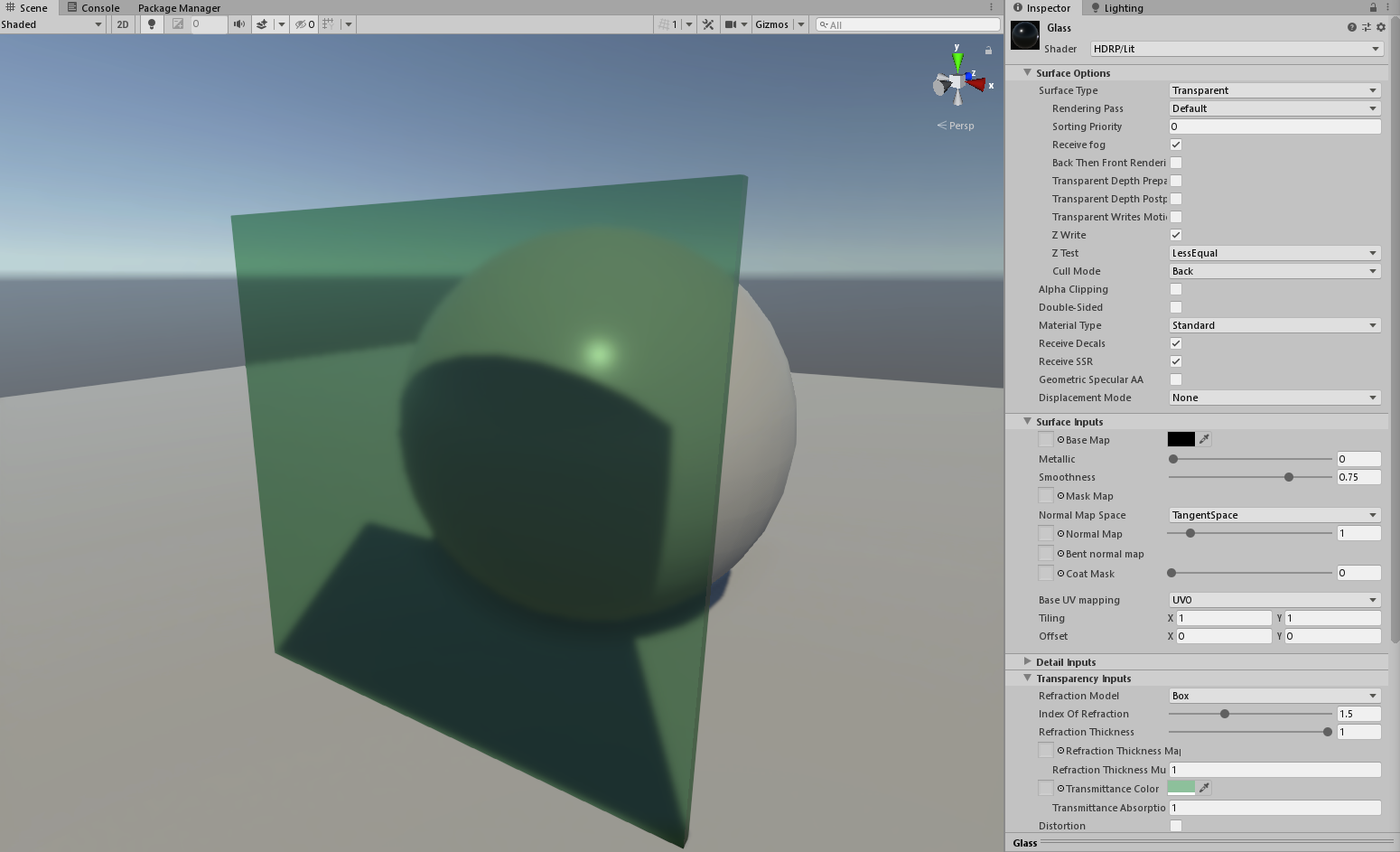
@lyric ravine Add a Screen Space Refraction component to one of your volumes. Other than that it's just tweaking the material
- Set it to Transparent
- Change the Base Color to Black (Alpha for opacity)
- Set the smoothness (Lower Values = Blur)
- Set the IOR
- Set the Glass Color
 lyric ravine
@glad tartan thx. Might have been missing the SSRefr component - will try
@candid basin search in all files for "attenuation", can't remember which one it's in right now but played with it. There's two methods, DistanceAttenuation and AngleAttenuation iirc
candid basin
Yeah but I think what attenuation means wrong
when the light hits an object
and like a circular area is 'lit' in the case of a spotlight, I want that area to have hard edges and not have a falloff from the center to the edges
but I can get that with attenuation?
 graceful gate
Hi. Does anyone have any experience using a world/camera space canvas using HDRP? I'd love to draw the UI on top of the game without being affected by PP. Post: https://forum.unity.com/threads/hdrp-world-camera-space-canvas-rendered-on-top-without-pp.716267/

Unity Forum
Our game is using HDRP and I'm experimenting with canvas in 3d space.
What is the correct approach to this with HDRP? I don't want the UI to be...
turbid matrix
@graceful gate at least on recent HDRP versions (6.x+) you can set unlit shaders to render after PP
graceful gate
@turbid matrix Hmm, I haven't seen that before. But how would you suggest I take advantage of that for my particular problem?
turbid matrix
@graceful gate I dunno if you can easily like draw on top of everything while still using screenspace but you definitely can render unlit after PP so PP gets ignored
 lusty portal
Oh ! wow !
all right !so i am writing my own custome pipeline from basics and i am doing it on 2019.3.0.a
Can someone tell me how to attach shaders to my pipeline and render things ?
based on that ?
candid basin
@lusty portal
I do this on LWRP/URP

GitHub
This project contains a collection of Custom Renderer examples. This will be updated as we refine the feature and add more options. - Unity-Technologies/LWRP-CustomRendererExamples
lusty portal
... i am kinda writing my own
like using
i dont have that
literally i have to define each of those properties
candid basin
hmm, then I can't help you, sorry
lusty portal
at the moment
candid basin
you following this?
A collection of tutorials for people who want to learn C# and shader programming in Unity. Useful to both novice and experienced developers.
lusty portal
aww ! well thanks for that 😄 @candid basin but yeah as i progress i will keep asking questions and hopefully answering a few if that is fine ?
! oh i was following that ! for the custom pipeline tutorial but a lot of the functions have been deprecated or changed over time that he implements.
so my basic job right now is to upgrade that tutorial to a newer version of the script
i am just haveing a few problems such as the fallback code not working and so on
turbid matrix
the thing is, only handful of people have tried to do what you do now so you are not likely to find common solutions from people 😃
I'd guess your best bet is to examine how URP and HDRP work on 2019.3 and try to mimic their setup for the things you need
ripe fable
@turbid matrix are you currently using any fix for wheels + motion blur? I've had that problem for ages.. that's why I don't use motion blur at the moment. Had a workaround using separate "blurred meshes" last year but it feels hacky and takes a lot of time to set up.
turbid matrix
@ripe fable which renderer you use?
for built-in, you can just use the PPv1 custom solution (it works with PPv2 as well on built-in renderer)
ripe fable
HDRP, latest
turbid matrix
well, that's difficult then 😃
I tried porting that motion vector hack to HDPR earlier but kept having issue where it would always just render whole buffer into it's place, I think it's due to how SRP shaders work, I couldn't just put motion vector pass alone there
I think it should work if I modified existing shader to include the custom movec pass tho
ripe fable
Hmm
turbid matrix
I've postponed testing this because HDRP is constant evolving
will tackle it at some point
there are bunch of options for this
as for motion blur, it has additional issues for vehicles in HDRP
fcifacia fixed some of them once I sent a sample project to Unity
but even still, the motion blur can mess up with the car mesh if you follow it by camera
ripe fable
Damn, haven't tried that yet haha
I kind of got it to work by lowering the max motion blur speed to the point where it wouldn't create any major artifacts but it loses a lot of it's effect
turbid matrix
I've worked around this by excluding car's materials from motion blur pass using stencil buffer
but it's quite hacky
it would let me put manual solution to wheel blurring tho
this is extreme example 😄
ripe fable
Wow
turbid matrix
this doesn't look that bad with recent version as some of the issues got fixed
but you still get artifacts if you quickly move the car body on the camera
like rotate and have slower camera follow
one part of that breaking in that case is also the motion vectors being jumpy due to frame measurement being inaccurate
this is kinda fundamental issue and it's not easy to fix even
but I don't really mind omitting the whole car from motion blur
it only bugs me a little for other cars that move fast by as they should get motion blur but it's a compromise I'm willing to accept
also do note that the clip I showed was using quite high motion blur values, if you use more conservative values the artifacts aren't that big
unreal does have this kind of setup: https://docs.unrealengine.com/en-US/Engine/Rendering/Materials/HowTo/RadialMotionBlur/index.html they do it all on material (shader)
Taking a look at how to set up Radial Motion Blur.
it's quite clever setup actually
I tried to mimic it on shader graph but too many things broke on SG back then, mainly subgraphs has always been pain for me
pain because they break all the time, I constantly find new items that just silently fail on subgraphs that work on main graphs and there's no errors
glad tartan
@turbid matrix Is accessing the stencil buffer in HDRP easy? I remember there was some limitation on it or something similar, so checking to see how it is now.
turbid matrix
you need to modify HDRP a bit but actual access to stencil isn't difficult, writing to it yourself is another deal then...
I think TAA shader got changed to noncompute because they needed to write to stencil
I don't quite know the reasons for this because SMAA has compute shader part and it still uses stencil as well
when I experimented with this, I just reused existing bits, like the SSR exclusion bit
but now TAA has it's own exclusion bit as well which helps me as I was going to make this myself eventually
only need to figure out how to write the thing for motion blur when I do another pass at this
I'm postponing further modifications atm, there are constantly some changes on the repo and I don't want to waste my time trying to keep up with the changes, will just do these mods later on closer to release again
the initial tests were more like prototypes if these things help because.. I was curious if it was difficult on HDRP 😃
the mods I tried were easier than I estimated but then again, I'm no rendering engineer so I don't really have much experience on this type of code
turbid matrix
glad tartan
I was wondering how the process was since the Custom Render Pass API isn't in HDRP yet.
glad tartan
No not so far. I but when LWRP was getting its initial Render Pass API it was stated HDRP would have something similar to (This was before LWRPs Custom Render Pass API change into the giant it is now)
Isnt the render graph just for visualizing the render setup?
I was hoping the render Graph would be the way to deal with custom passes and such
turbid matrix
@glad tartan
glad tartan
ah, Barrier Intersection into rendering So this should be HDRP's version of Custom Render Passes but even more advanced
candid basin
In LWRP when I do progressive lightmapping
I never see like the scene 'being lightmapped' gradually
like this
I just see it baking and then switch to end result, why is that?
turbid matrix
is there a difference between gpu and cpu PLM?
candid basin
both don't show any visual gradual progression
just this
I mean it's no big deal, I liked the visual progression though
 zinc jay
Well, it looks more like light bugs that visual progression 😄
 mighty swift
@turbid matrix wtf???
Could be a "whoops also had this other change that I committed" thing but.
trim bone
interesting find, i use !=null all the time 😩
 desert yew
I use it a lot too. Never knew it created garbage
trim bone
well i think scott implied could be a mistake but ill let someone else chime in 😃
inland solstice
There’s nothing wrong with using != null. That has nothing to do with “creating garbage.” Garbage is data with no references to it in code.
As for the code in the screen shot the odd part is that they switched it to do the opposite thing. Using equality operators or Equals only matters if you’re comparing reference value or contents and in the case of null it doesn’t matter
999 times out of 1000 you should use the operators not the method. You can all sleep soundly lol
To be more specific when you’re using value types like null, int, double etc there’s no difference but you should use the operator because that’s what everyone does
desert yew
thanks for clarifying!
inland solstice
To edify some more, Equals will only matter if you compare reference types in other words objects
Note that string actually is an immutable reference but it’s special and these rules don’t apply to it. For this purpose it behaves as a value type
Using == or != will compare two objects of the same type and tell you if they are the same instance regardless of the values inside them
Equals() will compare the values so two different instances of an object with the same value will show equal
 true zealot
@mighty swift aren't those not even the same thing, one is not equals to null, the other is the opposite? Or am I misreading
inland solstice
In 12 years of professional development I’ve never had to use Equals(). It’s mostly used by little shits who think it’s fancy and don’t know what it does lol
@true zealot you’re not misreading. The change is doing the opposite thing
true zealot
Hopefully that was a bug fix and not just what the top-level commit message reads
mighty swift
I do "blah is null" or "(blah is null) == false" whenever I'm allowed.
Now I'm wondering >.>
inland solstice
That works the same but is a newer thing. It exists so you can overload the == operator but still check for null normally
If you haven’t overloaded == there’s no difference
mighty swift
Cool
inland solstice
Normally you use is to check a type of an object. Null is a special weird case where it also happens to work
Like if you’re using polymorphism and know the base type but want to do something different based on the subclass
mighty swift
It's times like these where I unironically say that C++ is more straight-forward. :\
inland solstice
If I was doing a code review I’d tell you to use == because that’s the standard but you do you lol
mighty swift
Or, as I said several times, the IDisposable pattern...
inland solstice
Depends on your mindset. C# tries to do a lot for you. C++ throws you in the deep end and says do it yourself lol
So there’s nothing to complicate really
mighty swift
Yeah C++ is "you can do things very simply... btw here's a thousand guns to shoot yourself with"
inland solstice
To give an example of where is and == are different, in SQL programming null and NULL field in the database are not the same thing
mighty swift
If you're diligent -- like, never type new, delete, malloc, or free, and you always use standard primitive containers and good iterating patterns, etc. -- then you're great.
Yeah and DbNull
inland solstice
Ah yeah you got it
mighty swift
My day job is mostly maintaining a VBdotNET application... and its project files are SQL CE.
(Enterprise / manufacturing)
It's come up a bunch.
Like I see these huge multi-page long stored procedures and it's like "You could really do all of that with three four-liners".
But because they wanted one function to do everything, it's like ten times the size.
All the inner joins, etc., that could have just been a for-loop in memory.
inland solstice
SQL is a tricky beast. I’d have to see the proc but sometimes longer is better because unlike compiled languages you have to take SQL by the hand and explicitly guide it for good performance
mighty swift
Yup.
mighty swift
Oh wait a minute... wouldn't that change actually throw an exception if value is null?
What the heck was that commit even doing?
 low fiber
Any chances to get AO working in LWRP?
 barren kindle
yes. someone made https://github.com/PinkPanter/LWRPAmbientOcclusion
tested. works in vr. pretty cool
low fiber
Oh, it is updated from last time!
I tried it like one month ago but it wasn't working properly
 weary fog
Does LWRP really not have AO? It's such an essential PP effect imo
 summer notch
Hi everyone! I was wondering is there any way to make any image effect working on LWRP mobile VR(Go/Quest)? Is it even worth to put efforts in it? Or is it better switch to Builtin render pipeline and dont waste time?
Why not PPSV2? That's why LightweightRenderPipeline.cs lines: 216-218.
 opaque niche
heya guys. I been looking around online about global illumination, and real time. Im a bit confused, as i was reading about enlighten having real time GI, but , it seems real time GI still means , baked maps. is there no such thing as GI without baking maps?
true zealot
There are non-precomputed implementations https://github.com/sonicether/SEGI
graceful gate
Has anyone done UI that is not using "overlay" in HDRP? How do you deal with post-processing effects such as DOF and motion blur? Is there any approach to this at all or am I doomed to use canvas as overlay? (I'm making UI/HUD that is relative to the camera, not 3d positioned panels in the game world).
opaque niche
@true zealot Cheers mate. Worked like a charm. What would i do without ya. 😛
opaque niche
though it will throw an error if you are in unity 2018+ and set it to Low Res.
can be fixed with this...
int threadGroupSize = Mathf.FloorToInt(destinationRes / 8); threadGroupSize = (threadGroupSize > 0) ? threadGroupSize : 1; mipFilterCompute.Dispatch(mipFilterKernel, threadGroupSize, threadGroupSize, 1);
turbid matrix
siggraph raytracing course slides: https://sites.google.com/view/arewedonewithraytracing
ripe fable
Ooh I'm gonna enjoy that, thanks 😃
 edgy harbor
Did anyone here play around with danymic resolution yet?
 strange heath
Hey, I have a problem :) maybe you guys can find out a solution
Is there any workaround/fix for that?
Making separate camera for UI only doesn't help, because it disables blur in game camera aswell.
scarlet hull
@edgy harbor I did some testing on it, why ?
@strange heath You mean that a custom shader for a raw texture in screen space UI doens't work ?
strange heath
@scarlet hull it works, but HDRP motion blur and DOF blurs UI aswell
Oh wait
Yeah
It doesn't work in screen space
It works only @ world space
But on worldspace there's a blur over ui
edgy harbor
@scarlet hull I tried to change the example script from the documentation in a way so it scales down when the game cannot hold 30fps. Anything you would change there? http://bit.ly/2Kdr9wE (No idea if it actually works, my test devices werent GPU bound yet, should probably do some testscene for that)
www.paste.org - allows users to paste snippets of text, usually samples of source code, for public viewing.
scarlet hull
Well, that seems correct to me.
edgy harbor
Anything you found out testing your script? Is it even worth it to use such a thing?
scarlet hull
When I said testing, it's testing the feature. I hooked the dynamic resolution scale value to a UI slider to check that it works properly.
edgy harbor
oh alright :D
lyric ravine
@scarlet hull @strange heath to rephrase the question as I had the same, "How can I prevent a World Space Canvas from receiving Post FX such as Temporal AA?"
strange heath
@lyric ravine this
scarlet hull
Before I investigate on this, I want to ask : what happened with screen space overlay ? I tried adding a raw image with a custom shader, and it works like a charm.
strange heath
Use sprite
And apply HDRP motion blur
Or DoF
Or both
Set DoF to custom to make the blur more visible
Then look around
Bam, UI is blurred
lyric ravine
Screen space overlay is fine for some situations but not all. Sometimes you want worldspace UI without post fx. In Built-In pipeline this was super easy (add a 2nd camera that only renders the UI with Clear Color)
strange heath
I have an idea
Can't test it now tho as I'm at work now
Make second cam like you used to do in legacy render pipeline
Make it output into rendertexture
Raw images seem like not receiving postfx
So you'll end up with 2 canvas
Screen space and world space
lyric ravine
@strange heath running into the next bug there 😉 in HDRP all Cameras do the full Light prep code pass, resulting in giant performance increases for RenderTextures that actually don't want to use any lighting information
scarlet hull
To render only screen space UI you can use the "fullscreen passthrough" toggle on the camera
scarlet hull
UI camera set to passthrough, render to render texture, applied to what you want in world space.
scarlet hull
Hum ... yeah
But you can make a very simple unlit shadergraph, with the rendering pass set to "After Post Process"
strange heath
I'll try!
Another thing that bothers me
Is that ui tend to break when in worldspace, because of Z axis
Sprites overlap each other randomly when looking around
And moving them in Z axis displaces them slightly
lyric ravine
@scarlet hull that's all just hacks, do you really would want people recreate all UI shaders with that to get their world-space UI working without blur? (e.g. Text, TMPro, Image, RawImage with all their masking + stencil + etc. features ... no way)
scarlet hull
No, we're not expecting that. I suggested this as a workaround for the moment.
We are aware of those issues and will work on it.
turbid matrix
@lyric ravine what's the issue with custom ui shader?
well, obviously I'd expect TMP to come with it's own variant for this
but I'm pretty sure it doesn't yet
lyric ravine
The issue would be that you have to add a custom shader to every single piece of UI - supporting all UI features, e.g. fonts, masking, stencils, clipping, vertex colors. That's not even possible to build with ShaderGraph
turbid matrix
I'd probably understood this better if I had actually used Unity's UI more 😃
I don't get how stencils are involved here since HDRP doesn't use stencils for UI anyway
what I do get is that TMP has special shaders for fonts and that would require custom support not possible to implement with SG
but it might not be that difficult to manually swap the rendering pass for the existing TMP shaders
(this hasn't been relevant for me so far so haven't checked it out yet)
oh wait, TMP shaders are precompiled? if so, that would complicate that a lot
 uncut kayak
Hey guys, not sure if this is the right channel, but here goes. In our game we have a lot of these static objects w/ a mesh filter and everything, let's say about 50 of them in the screen. We changed the mesh to one with a lower vert and triangle count hoping to improve performance. But when I check the Stats window the Tri and Vert count remain the same for whatever mesh I use for that object, even when we completely remove the mesh the count is still the same! We are using LWRP if that matters. Why is this so? Thanks 😃
lyric ravine
@uncut kayak Take a look at the frame debugger to see what's going on
turbid matrix
new Hybrid Renderer is still incompatible with HDRP 7.x / 2019.3.0a10
this isn't super surprising tho
strange heath
VFX graph question: same problem as with UI before
can i somehow add custom shader to VFX?
or set it's render pass to after post-processing?
graceful gate
To some extent I'm glad to see I'm not the only one finding HDRP difficult to work with. The UI stuff is driving me mad. I'll make sure to post the solution if I ever find out or someone pokes me in the right direction.
lyric ravine
@scarlet hull and everyone interested in "non-blurry non-overlay UI in HDRP" -
Just tried the "2nd camera with no AA and separate culling" approach in HDRP and it breaks antialiasing on the 1st ("actual scene") camera.
RenderTexture approach is not working because it would require custom forwarding of events to the camera rendering into the RT (since the RT'ed camera isn't targeted by the EventSystem).
I also tried the "custom UI shader with AfterPostprocess" approach and it works for very special usecases (namely, if I don't want to use any stencil/masking features).
Modifying the "UI-Default" shader with the Queue for AfterPostprocess and the right pass names works for images (even with clipping) but breaks Text in interesting ways (haven't even tried TMPro)
top one is the modified UI-Default shader
turbid matrix
@lyric ravine what do you mean by stencil?
lyric ravine
Most interesting UI features in Unity (scroll rects, masks, ...) need stencil support.
(that's from UI-Default shader)
turbid matrix
yeah, but has HDRP ever supported that?
there's no UI mask on HDRPs stencilbitmask atm
lyric ravine
Hm, I don't think Unity rewrote the whole UI rendering for LWRP/HDRP
Also, ShaderGraph shaders use stencils (you see that on decompiling)
Got a version of the UI-Default shader that "kinda" works. Caveat is that I can't get it to work for BOTH text and images, need to comment/uncomment the BlendMode (documented in the shader) for one or the other.
lyric ravine
After some more hours of fiddling I have a version that works for both text + images for me. Random trial + error on the blend mode. Not sure which other things are broken now...
graceful gate
This explains a lot why the RenderTexture approach doesn't work anymore. The FinalPass.shader simply ignores the alpha values and hardcode them to 1.0.
How to reproduce: 1. Open the "RenderToTextureBug" Scene in the attached "Test2019_2.zip" Project 2. Click on the "Camera" GameObjec...
scarlet hull
@edgy harbor I just realized that the script you showed for dynamic resolution was for the built-in renderer. Did you want to use the HDRP dynamic resolution feature ?
edgy harbor
LWRP, it is mostly just this script from here: https://docs.unity3d.com/Manual/DynamicResolution.html
scarlet hull
Okay. i asked because in HD there is an other dynamic resolution system
turbid matrix
btw, bit old news already but only now spotted this is now populated: https://github.com/Unity-Technologies/MeasuredMaterialLibraryHDRP
GitHub
Contribute to Unity-Technologies/MeasuredMaterialLibraryHDRP development by creating an account on GitHub.
wonder what in it requires 2019.3
strange heath
So, I'll repost my question
Can I somehow change material in VFX graph to after postprocessing render pass?
edgy harbor
https://github.com/UnityTechnologies/LWRPScriptableRenderPass_ExampleLibrary did anyone get this to work in 2019.2? The reflections look so nice in that pic..

GitHub
Contribute to UnityTechnologies/LWRPScriptableRenderPass_ExampleLibrary development by creating an account on GitHub.
 whole fossil
hi, I am trying to modify hdrp to be able implement custom post processing. I've managed to fork hdrp pipeline and plug it back to unity. The problem is that my old shaders used StdLib.hlsl from PostProcessing stack 2 and there is no ppsv2 anymore for me to use. Is there something like migration guide or something? Where do I find macros that I need?
I am using 2019.2 with hdrp 6.9.1
edgy harbor
@scarlet hull Tried the script out. CPU Frametimes seem to be in miliseconds. The ones for the GPU stay at 0.000 and swap to something between 1-2 sometimes accrording to the ui element... doesnt seem right
scarlet hull
clearly not ...
edgy harbor
https://issuetracker.unity3d.com/issues/android-vulkan-frametimemanager-returns-implausible-gpu-time Okay... So thats not gonna work anytime soon :/
Unity is the ultimate game development platform. Use Unity to build high-quality 3D and 2D games, deploy them across mobile, desktop, VR/AR, consoles or the Web, and connect with loyal and enthusiastic players and customers.
 dawn sorrel
How come when my scene camera gets close to a speedtree in HDRP the scene view camera goes black?
I had used the speedtree HDRP exporter. Imported into 2019.2 HDRP project. Changed the maps to what the docs said, converted toHDRP Materials and that's when the issue started.
dawn sorrel
Also just noticed it only happens when the camera actually renders the mesh its self, not the shadow or anything. So if I zoom in close to Terrain. I see the shadow of the tree and everything is fine. But the second I look up and the actual mesh is visible - the scene view goes dark. Not dark in the sense that it goes black. But in the sense that it's as if the Directional Light is getting turned off as I can still see outlines to things.
From the grid
Also only happens when you're somewhat close to it. Not extremely far out.
 quick hinge
Does hdrp not work on Mac? 🤔
zinc jay
isn't it DX11 only?
 wide moss
i'm messing with preview packages... Sprite Shape and 2D lighting in LWRP, and the Color of the Sprite Shape Renderer doesn't seem to be supported by the Sprite-Lit-Default material, would i have to modify the lit sprite shader somehow?
it also seems to have broken the Pixel Perfect Camera from that preview package
inland solstice
Upgrading from Unity 2019.2.0b7 to 2019.2.0f broke my entire project, lol. I'd at least expect the beta and the final to be similar. Not a complaint per se but just like... wow
for HDRP
turbid matrix
@inland solstice did you also upgrade your HDRP version?
 frigid nova
hey guys what do u think about the new ambient occlusion on 2019.2?It seems to me way better than the original and way more detailed looks almost as good as the one we have on our inhouse studion engine
turbid matrix
when it works, it's really good
in my limited testing, it can be quote tricky on some content however
artifacts where it can't resolve the data from screenspace data are more apparent than with the old setup
@frigid nova this is the technical paper for the new AO on HDRP: http://iryoku.com/downloads/Practical-Realtime-Strategies-for-Accurate-Indirect-Occlusion.pdf
like, it's using the same algo
when it works, it works really really well
left is offline render, right is GTAO
indigo summit
Anyone read Rockstars Atmospheric Rendering Slides?
lot of cool stuff in it
wondering if Unity will implement similar stuff for dealing with Volumetric rendering in HDRP
frigid nova
@turbid matrix i noticed it work really good even to distant objects emulates the occlusion of light great i would love to see more lighting implementations from unity
inland solstice
@turbid matrix initially stuck with 6.9.0 which was broken then updated to 6.9.1 which was still broken
It’s all good. It was just a POC project so I’ve just started fresh. But yeah it pinked or blacked everything lol
glad tartan
For 2019.3 a11 I have reinstall HDRP 7.0.0 for it to work. Otherwise you are faced with missing script references, null shaders, etc.
Not sure if anyone else tried it yet or ran into this but incase you do this is the solution so far.
 upbeat badger
anyone got raytracing working with a11 and hdrp 7.0.0?
i got this error
and this in raytraced shader inspector
despite of i have DX12 in API List
ripe fable
I'm going to try it right now, I'll keep you posted
turbid matrix
@upbeat badger did you restart the editor?
because I got that only on first run
after that I got random errors about DX12 not supporting arrays for mipmapping etc 😄
but I tried it on a) github master with one commit reverted b) I don't actually have RTX supported GPU 😄
I just wanted to see if the acceleration structure was there and apparently it is
ripe fable
I got about 384 errors that wouldn't clear on 7.1.1, but I'm installing the latest (7.0.0) from the package manager now.
turbid matrix
@ripe fable you mean github master by 7.1.1?
ripe fable
Few commits behind master, which I tested (and worked) on a10 first
turbid matrix
a11 only requires you to revert one change

so if you've cloned this with git
revert that change
ripe fable
I did point the acceleration structure to the experimental namespace which solved a bunch, i'll check your link
turbid matrix
you can do it manually too
also make sure you restart the editor after initial run
ripe fable
yep, will do
upbeat badger
i restarted editor but it didn't change anything
turbid matrix
@upbeat badger it's possible the needed things are not on 7.0 yet
ripe fable
I'm not getting any errors but I don't know if it's working
turbid matrix
@ripe fable add raytracing environment to the scene
and then use volume to add effects
some RT effects are under raytracing submenu on volume components, reflections appear to be under screen space reflections (there's additional RT toggle)
frigid nova
This new ambient occlusion is insane good,looks like baked occlusion and emulates DFAO so it will be perfect for trees and foliage.(this is just a washing machine pipe inside a box everything real time nothing baked).This can only get better from now on its so good that can replace any baked ambient occlusion and now real time global illumination is actually usable with the the new AO
ripe fable
@turbid matrix yeah I had everything set up but I can't seem to get the shadows to work (I think)
weary fog
@frigid nova that looks really good, what settings are you using?
ripe fable
Yeah, reflections work like they should.
frigid nova
@weary fog
weary fog
So basically max settings lol
turbid matrix
these settings are very context specific btw
you could never use that radius for things that need finer details
weary fog
Does this implementation also take thickness into account like in the technical paper
frigid nova
for me it work in smaller details like the light switches or really tiny cables
this is perfect for my needs ,but urs my differ
For comparison this is the same scene without AO
fortunately the new AO has a cascading effect,that means if u go closer to a smaller detail it changes and makes the AO work and look better in the small detail,if u zoom out it goes back to the general shape of ur environment
 digital scaffold
Anybody knows how to get flat shaded triangles (normals) from world Position? for flat shading squares you would use cross(ddy(WorldPostion), ddx(WorldPostion)), but I need triangles....
turbid matrix
@digital scaffold the cross product you posted already works on tris
if you don't see them, your source mesh is probably originally in quads
(and renderer itself works on tris always, quad models get converted to tris anyway)
but what I mean, you don't spot the tris if they are aligned the same way inside a quad
digital scaffold
@turbid matrix could you create a shadergraph as an example?
turbid matrix
you could 😃
digital scaffold
@turbid matrix please ,help! https://forum.unity.com/threads/low-poly-water-flat-shading-triangles-shadergraph-image.720932/
Unity Forum
Could anyone help me out with the shader :
should be done in vertex - you can take the vertex position in object space and convert to uv (+...
turbid matrix
@digital scaffold like mentioned, that crossproduct already works on tris
the issue is not in that part of the math
digital scaffold
@turbid matrix i'm using default unity plane. nothing special. I just need to figure out a way to get the neighboring vertices, based on them I will create a face normal (currently in use - vertex normal)
scarlet hull
You can't do that in vertex shader
the ddx/ddy trick is what you need
What's the point of this ?
digital scaffold
I have tried different normal calculations, that is just for debug purposes
scarlet hull
Oh, I think I know what is your issue with normals : the normal you're calculating is based on the displacement calculation. And this is a smooth change, and not "flat" from vertex to vertex
It shouldn't look like in the preview, but it won't do flat shading either
Doesn't it work if you connect a "world position" node as input for the ddX/DDY nodes ?
Also, why don't you simply use the "Normal from Height" node ?
Or maybe the ripples are more complex then just a height change ?
digital scaffold
ripples are just a simple noise function from - a few sines based on x and z of new worlPosition
when I'm taking the simple world position -
but when I changed to
doesn't work with Normal From Height :
is there is a way to force fragment part to not interpolate values in shadergraph?
scarlet hull
I don't think so
lyric ravine
@digital scaffold might be time to look up barycentric coordinates and their might powers for triangle-based effects
digital scaffold
@lyric ravine exactly! already found a tutorial for geometry shader but how can I get next vertices in shadergraph?
@scarlet hull I think - if we cannot force to not interpolate, than the next what I can do - is to take everything into fragment part, but again, I still need to get other 2 vertices from somewhere
lyric ravine
You'll have to bake some barycentric info into the mesh and access that from your shader
digital scaffold
@lyric ravine alright, I will try it
scarlet hull
I'm trying with 2019.1, and doing this to get the normal (and having deformed vertices) gives me a polygonal looking shape :
digital scaffold
it will give you the flat shading effect,dot product with light direction and you are off to go! but for triangle shape - I'm powerless
digital scaffold
another way - is to use normal map - with repeating set to true - than you can just sample the normal map (tile and offset it if you wish) - I will try it later today
scarlet hull
You must then sync your normal map with the waves
digital scaffold
@scarlet hull that's the trick - you can first calculate the phase of wave + new WorldPosition , from new WorldPosition - tile and offset it with the Wave - still need to figure out how to do it, but it seems doable
scarlet hull
Also : why instead of doing this with shader, you don't simply convert the mesh to be flat shaded (no shared vertices) ?
No forget that, was throwing ideas out, won't help a lot.
candid basin
will decal projectors ever come to lwrp?
digital scaffold
@candid basin it is a requested feature, they will probably include it in the next - universal render pipeline (LWRP/HDRP will be merged into one pipeline)
candid basin
great to hear
turbid matrix
@digital scaffold ^
I mean, I'd personally love if they could just merge them :p would solve so many things
but yeah, it's not planned
could just pick between compute and noncompute solutions
HDRP scaling down on weak platforms is and has been one of my major concerns
it's mainly issue on PC space but issue none the less
in few years time, avg consumer has better hardware already so it's not really a huge issue for people who are just now starting out (and shipping within few years)
 noble osprey
Hi. I need advice .
I start a new project and need to choose a pipeline for the next two years of development for my team. I tried lwrp, hdrp and even experimental features from urp and I can't still choose anything cause of their limits and bugs. I want to use custom render pipeline for posterization and outline effect to use it on realistic assets (Megascans etc.). Hdrp quality is amazing but I can't find a solution for production-ready outlines. On the other hand, lwrp have light per object limit and in compare to hdrp have big visual limits.
What would you recommend to do? Just stay on the standard pipeline cause of its stability and forget about srp features or is there hope for stabilization soon?
 hot jungle
Got a weird question. can you use the Lightweight RP 2D lights in a 3d scene alongside default unity lights
 empty star
@noble osprey get comfortable customing what you need is the best way imo, take LWRP and make it your own. HDRP would work for that too but it is a larger amount of code to get familiar with, I would wait until HDRP has switched to a render graph structure.
the light limit in LWRP can be raised, there was info on that in this channel, also it is entirely possible to look up tutorials on tiled lighting (Forward+) and implement that into a custom version of LWRP, etc
right now LWRP has the cleanest structured imo
with HDRP you are dealing with a BSDF and more complicated lighting compared to the BRDF in LWRP
edgy harbor
Does anyone else have a problem to get post processing (lwrp) working on OpenGL3 devices? Vulkan works fine, but GLES3 not at all
frigid nova
@turbid matrix Hey dude i just say a new tab called "raytracing" on my hdr scene settings does that mean that i can use that now on the gtx 1060 3gb?
frigid nova
man olento u are the unity info guru or what?all the people ask u stuff and you have the answer
turbid matrix
I only know limited topics
I'm looking to get 2070 super for RT experimenting
still bummed that nobody sells those here for the nvidia's MSRP
most have 50-100€ extra on price
glad tartan
I'm just waiting a little for it to work in master without having to mess with too much. Shouldn't be too long I think
candid basin
in URP/LWRP, is this HDR toggle in any way related to depth?
because my depth based outlines are shown differently when I toggle this on/off
 scenic jay
Is there any other way to get the depth values inside a rendertexture without modifiying the HDRP render pipline / Post processing scripts?
Modifying is just causing error for altering just one space in a random place...
noble osprey
@empty star Thx for your answer 😃
scarlet hull
@scenic jay Look at the AOV api. Here is an example project using it : https://unitylist.com/p/nsn/Hdrp-Aov-Test

Custom post processing effect with the AOV output feature of HDRP
 last cipher
using the LWRP and Shader Graph, im trying to create a shader whose alpha fades to 0 when close to the camera. depth doesn't seem to work. here's a screenshot of what i have. the thin part of the wall sometimes renders on top of the main wall, which i do not want. any ideas on how to fix it?
upbeat badger
Use alpha test and dithered fade instead of alpha blend. With alpha blend you will always face sorting issues like this.
last cipher
can't say it looks great, but it works! thank you very much!
 grand orchid
Hi guys, just one question, im making a game with graphics similar to Zelda's Twilight princess, anyone has tips for what render can i use?
i was thinking in lightweight but i dont know much about it
 celest sky
Anyone know anything about hdrp decals? Is it possible to pack a bunch of decals into a single texture?
scarlet hull
@celest sky Yes you can do that. Make a decal material that uses your decals atlas an either use the Tiling and Offset parameters of the decal projector, or use custom decal meshes.
scenic jay
I have a project that requires rendering a image of an object / scene with alpha channel in a RenderTexture.
The original project was in unity 2018.2.16 with HDRP 3.0.0-preview and Post Processing 2.0.13-Preview.
The RenderTexture did look like this:
Color:
https://forum.unity.com/attachments/screenshot-78-jpg.462947/
Alpha:
https://forum.unity.com/attachments/screenshot-77-jpg.462950/
But in the current HDRP for 2019.1 / 2019.2 the alpha channel is allays just blank.
Is there any way to recreate this result in a current unity / HDRP version?
I do not need camera stacking , i do the compositing with other textures myself.

 empty star
in 2019.3 what is the "Custom Render Pipeline" monobehaviour field for in the Quality settings? 🤔
scarlet hull
@empty star It's where you define the currently used Render Pipeline Asset. We have a bug case listed for this, as it should display "Render Pipeline Asset" in the field, and not "MonoBehaviour"
lyric ravine
@scenic jay there was some recent discussion about this. IIRC, Unity said they intentionally fill the Alpha and it's "by design since we have plans with the alpha channel at a later point".
https://issuetracker.unity3d.com/issues/hdrp-camera-color-alpha-variable-is-ignored-when-using-hdrp-5-dot-10-dot-0
Would be great if you can open a new bug report - I think it's a bad design decision as it prevents a lot of common usecases for compositing / custom rendering
How to reproduce: 1. Open the "RenderToTextureBug" Scene in the attached "Test2019_2.zip" Project 2. Click on the "Camera" GameObjec...
scenic jay
@lyric ravine Thanks for the information. looks like we are stuck with the old version then, my tries to modify the HDRP to do what i need did not got so well.
Especially like one many games displaying something that is render inside a rendertexture in the UI will not work properly anymore.
I would have to create a demo project for the bug report, the current project is to big and uses specialized setup / hardware.
Maybe modifying the HDRP is a option.
turbid matrix
I'd rather get some definitive answer on what their planned alpha usage will be and why it can't be optional for people who actually need it for other things
hardcoding things out without explaining it isn't very encouraging 😃
lyric ravine
@scenic jay I submitted a new bug "(Case 1174660) [HDRP] RenderTexture alpha is always 1, not possible to do compositing, breaks industry workflows"
celest sky
@scarlet hull Awesome! Thanks so much 😃
 fossil roost
scarlet hull
fossil roost
scarlet hull
Did you assign a render pipeline asset in the graphic settings ?
empty star
@scarlet hull i have a pipeline assigned, it's a second field in quality, just was checking if it's a new work flow etc 😁
whole fossil
hi guys. do you know if there is some kind of buffer in hdrp containing info about volumetric lighting? Ideally i would like to access volumetric fog density in screen space. Searching through source code I've noticed something about so called VBuffer, but I barely scratched the surface
empty star
I think hdrp uses frustum orientedvoxels so I imagine there is, easiest would be to use renderdoc and capture a frame with volumetric visible, then dig through to where the volume pass is applied and see what resources are in use
whole fossil
well... thanks I guess 😃 that one sentence messed so much with my brain that I should possibly just sleep it off a day or two 😃 Meaning - I am understanding every second word at best =]
but with less joking - could you please elaborate a little bit more about renderdoc stuff and digging through? Seems like a way to better understand how the pipeline works but I don't quite get where to start
ah, okay, Sorry for being so needy. I've just googled it and it led me to unity documentation. super embarassed 😃 Will try it out but propably will come back with some following questions 😃
lyric ravine
Memo to myself: don't accidentally paste the ShaderGraph nodes you just copied into the name field of a property
Note to @scarlet hull: I think it makes sense to limit the property name length to something reasonable 😃
 unkempt halo
Anyone knows how to turn on raytracing on 2019.3.0a11 ?
I made a new HDRP project, switched to Dx12, HDRP 7.0
If I add raytracing to a volume it tells me The current HDRP Asset does not support Ray Tracing but I don't find any option in the asset to enable it
Adding HD Raytracing Environment component is just empty
Thanks
ripe fable
None of the RT features are currently working.
unkempt halo
Aaah, alright thanks
turbid matrix
@unkempt halo you can get some of the RT feats working if you are willing to play with custom github version
I'm still waiting for 2070S to ship so can't try it out myself
apparently people got RT AO, reflections working, somewhat
but yeah, would expect more once all the DXR work lands on master / 7.x
as another topic, I see they bumped this now to 2019.2: https://github.com/Unity-Technologies/ScriptableRenderPipeline/tree/BookOfTheDead/2019.2
lyric ravine
Good to know 😃 actually, I found Unity crashes after double clicking on the property again
turbid matrix
what pains me the most are the property UI's where the actual setting is super short name but takes almost whole dialog width.. and then the property description is longer and doesn't fit to the narrow space reserved for it
scarlet hull
Are you trying to inject code through the name field of a property ? 😄
turbid matrix
SG and HDRP have a lot of these
hmmm, apparently the custom function node is now fixed on SG
and on HDRP asset, things actually have long names on settings
but then again, they really really don't need to be long
see how the descriptions don't fit because repetition on description and setting name?
"Reflection Cubemap Size" -> "Cube Reflection Resolution 256"
this could just be "Reflection Cubemap Size" -> "256"
same with Planar Reflection and Sky Reflection
if these were shortened, left side would actually fit to the reserved space without having to widen that thing to 1/3 of the screen width to be able to read the whole name (which is frankly pointless)
glad tartan
The VFX Graph Spaceship Demo is now on GitHub - https://github.com/Unity-Technologies/SpaceshipDemo
GitHub
Spaceship Demo - AAA Playable First person demo showcasing effects made with Visual Effect Graph and rendered with High Definition Render Pipeline - Unity-Technologies/SpaceshipDemo
turbid matrix
oh, nice
upbeat badger
GitHub
Scriptable Render Pipeline. Contribute to Unity-Technologies/ScriptableRenderPipeline development by creating an account on GitHub.
 noble sage
how do get rid of this white background on my sprite someone plz help https://gyazo.com/dea43218c04cfdd09c240c9571bdbd28

 noble sage
yes it is white in the file itself @formal charm
 formal charm
Should be this
Grayscale checks the image and implies what should be alpha
If you dont know where to find that ; Click the file in the Project view and the inspector will reveal the properties of that asset
noble sage
ok thx bro
 pine bloom
Is there any reason why my camera is controlling the location of that pink objects shadow? O.o I get that theres no proper material to render on it (before it was just a standard shader/material from the default render pipeline, before I upgraded to HDRP), but I dont think that should make the shadows respond to the position of the camera?
scarlet hull
Wild guess : The shadowsmap pass of the material is still working with HDRP, but since HDRP is using camera relative position, the shadowmap shader is "bound" to the camera position.
But it's probably better to simply fix the material 😄
pine bloom
Hmm... Yeah well, I can fix the materials just havnt gotten around to it yet, still fixing some other code problems :p but I was curios on why it would be doing that, that does answer my question tho, so thanks for that =)
digital scaffold
Anyone help! How to offset and tile the rectangle shape with Tiling and Offset?
scarlet hull
plug the tiling and offset output to the UV input of the rectangle shape node
lyric ravine
Kinda similar question while we're at that: how would I create a "pseudo-random tiling of rectangles" - instead of just regular xy tiling?
scarlet hull
hum, not a easy question ...
lyric ravine
I was looking into https://developer.download.nvidia.com/books/HTML/gpugems/gpugems_ch20.html
scarlet hull
Tiling, is basically taking the UV, and multiplying by a constant. To have a "pseudo random tiling", you'll have to multiply by an input that keeps the UV growing, but in a non linear way...
lyric ravine
Well, this part is easy with SimpleNoise etc, but the overlap seems complicated to build with ShaderGraph - will continue to try
scarlet hull
Not so easy if you want to keep continuity in the UVs
turbid matrix
@lyric ravine you know there is that stochastic texturing thing?

Unity Technologies Blog
Have you ever tried using tileable textures to cover large surfaces or add fine-scale detail to your meshes? If so, you’re probably familiar with the visib...
there's SG version of that too but it's for 6.7 I think and custom
so need to maintain that yourself if you go that route
not same as texture bombing but used for same reason
ripe fable
I think they removed the custom shader from that one too so you might have to revert a couple of commits.
turbid matrix
if you need non SG one and for built-in then yes
well, actually I think the actual repo missed files
lyric ravine
Yeah, I know it exists but also saw that it's not currently really supported/working on SG based on comments. Also, I don't want the masking part, just plain texture rects
turbid matrix
but they are in releases if I remember right

GitHub
Modified Shader Graph package implementing Procedural Stochastic Texturing - UnityLabs/procedural-stochastic-texturing
so could just grab one from there
I wouldn't trust random users comments on this
I mean, avg technical level of people who try these things isn't very high, so if there's some initial setup involved, people just say it's broken
lyric ravine
Yeah of course, but my confidence in Unity repos older than a month still supporting recent SG versions is on an all-time low currently, so I didn't even bother trying yet 😃
But I'll see what it does
turbid matrix
oh it doesn't work out of the box on newer
noble sage
@formal charm that didnt work bro
turbid matrix
but if you are qualified to roll that level shader on your own, you can update that SG just fine
lyric ravine
sure, I could, but who's got time for all that custom adaptations...
turbid matrix
I thought you were asking on how to do something similar from scratch 😄
I mean that sounds like one got plenty of time then
IMO, knowing how to mod SRP you use is a good skill as you may need to do some modifications at some point anyway
lyric ravine
@Olento haha, exactly as I thought - from the stochastic texturing readme:
"Since it isn't possible to add files to Unity packages in Library/PackageCache, this version is distributed here as a custom package containing ShaderGraph 6.7.1 entirely, with our added code. It requires using Unity 2019.2 or later, and a project that has either the LWRP 6.7.1 or HDRP 6.7.1 package installed. Make sure to update your render pipeline package to that version in the package manager."
turbid matrix
that's what I said too 😄
"there's SG version of that too but it's for 6.7 I think and custom"
but yeah, maybe it wasn't clear
lyric ravine
Yeah, sure, I just mean that's exactly what I'm used to currently how Unity distributes those things - hacked into a hardcoded version of ShaderGraph since the system is not as extensible as they thought themselves
turbid matrix
you can do these on stock SG tho
people have done it

This asset adds a new node to Unity's Shader Graph, which allows you to easily add Stochastic Height Sampling to your shaders.
What is Stochastic Height Sampling? It's a technique that eliminates all visible tiling from textures. Once installed, you can use this node ins...
lyric ravine
keep in mind the goal was to have a rectangle distribution, not stochastic sampling per se 😃 I'm gonna stop trying the stochastic stuff from Unity right now, integrating it into a newer SG version looks like at least 1-2hrs of carefully fixing references and namespaces.
 rich spade
I might be misunderstanding exactly what you are trying to achieve, is it just tiled without seams and adding on another layer of noise to mask that it is tiled?
if so can't you just use position world node as UV input and have two textures with different tiling and offset then blend them together.
What you often do with a water / ocean shader for example
drifting vault
hmm if that happened only with me?
Unity 2019.3A11 with HDRP 7.0 not respond + i have that error in few folders at Assets and Library locations
lyric ravine
@scenic jay I had some back and forth with QA about the "alpha is always 1 on RenderTexture" bug - unfortunately they closed the bug again and said they consider it as feature request, not a bug.
I totally don't agree but can't doch much about it at this point. Curious @scarlet hull what your opinion is about that / do you see any workarounds besides completely custom SRP?
scarlet hull
@lyric ravine Can you maybe send me the ticket number ?
lyric ravine
(Case 1174660) [HDRP] RenderTexture alpha is always 1, not possible to do compositing, breaks industry workflows
formal charm
@noble sage did you enable grayscale is transparency
digital scaffold
@scarlet hull the water shader with displacement of vertices and normal map works! Here is the example shadergraph :
@scarlet hull aslo the normal map -
@scarlet hull could you help with the offset for vertecies? I cannot move them uniformly in one direction ... (for example only x.y(1,0))
 stable vale
<3 HDRP
scarlet hull
@lyric ravine I agree that the missing of alpha channel. The devs are going to see if they can fit that in the 2019.3 release, but as you've seen in your answer, it's considered as a feature request, sorry about that.
I haven't tried myself, but did you try disabling rgb111110 in your HDRP settings ?
lyric ravine
Yep - the other format (R16G16B16A16) has the same alpha behaviour even when the format clearly has an alpha channel
Thanks for talking to the devs directly! Much appreciated
scarlet hull
@digital scaffold I'm looking at your shader and ... well, I don't have waves
digital scaffold
@scarlet hull nothing to worry - if you disable the vertex position and only use the symmetrical normal maps (anything even irregular shape) - it will take the appearance of motion (normal doing their jobs!) - and it does look almost perfect!
scarlet hull
I still don't have waves but something more like an uniform moving stuff. Anyway, if it fits you, okay, it still seems wrong to me on how it's made.
lyric ravine
Wew ... HDRP shader compilation times are still so crazy. ~5 seconds per HDRP/Lit variant on a high-end machine, thousands of variants to go... any way to speed that up?
turbid matrix
it takes like 1.5 hours to build them for me
I try to make the initial build for the version in use when I don't need to do any other heavy processing
hoping it'll get better once I get my new rig
but... HDRP team is very aware of this
GitHub
Purpose of this PR
This PR remove the FPTL variant in forward opaque pass to reduce the number of variant required to build a player. This improve shader build time at a small performance cost for...
been following that discussion with fear 😄
I use forward-only myself as main setup
so I'm not super happy if they make it slower just to makes shaders compile faster
it should be optional at least
ah, they changed the setup already
they initially planned to remove tiled rendering from forward opaque
 solemn vessel
I'm having issues with lighting in LWRP
Using 2019.2. 2 realtime spotlights and no directional or ambient lights
Can't seem to figure out what's wrong. From what I understand LWRP should be able to handle 1 directional light and 4 real-time lights per object and 16 visible at any given time?
 rocky lintel
How can I Blit an antialiased rendertexture's depth buffer to a non-antialiased rendertexture, so that I can use it later in a shader? I'm using de legacy forward pipeline in Unity 2018.4.5f1.
If there is no antialias in the depth buffer, I can do this and it works:
// renderTextureDepth = new RenderTexture(camera.pixelWidth, camera.pixelHeight, 24, RenderTextureFormat.Depth, RenderTextureReadWrite.Default);
// renderTextureTarget = new RenderTexture(camera.pixelWidth, camera.pixelHeight, 0, RenderTextureFormat.RFloat, RenderTextureReadWrite.Default);
comandBuffer.Blit(renderTextureDepth.depthBuffer, renderTextureTarget.colorBuffer);
But if renderTextureDepth has antialias (MSAA) it doesn't work, and I want to use MSAA.
Thank you
turbid matrix

As reported within the official blogs, social media accounts, and forum of Unity Technologies, the implementation of Enlighten global illumination within the Unity game engine has been officially announced for cease of support and removal.
drifting vault
When Unity2019.3A12 or maybe Unity2019.3b1 ?
empty star
@whole fossil with renderdoc once you follow the unity doc and get the capture button visible, in scene view with volumetric fog visibly rendering, hit the capture button.
Renderdoc will open and there should be a capture thumbnail, double click it to load the capture.
In the left panel there is a binoculars icon, click that and it shows Find Event type in volume and hit enter.
it will expand the event browser tree and put binocular icons next to all occurances of Volume.
The one you're probably interestd in is Volume Voxelization or Volumetric Lighting which is a bit further down.
rocky lintel
If it doesn't open or there isn't a thumbnail (that's what happens with me), open renderdoc manually and attach it to Unity
empty star
Expand Volume Voxelization there is a Dispatch call, which means it is a Compute Shader. Click on Dispatch( and a green flag marks it. Now click the Pipeline State tab/panel (it will still be on the localhost - Unity captures panel)
In Pipeline State, select CS on the far right. You should see a list of Resources, UAVs, Samplers and Constant Buffers. The resources are things going into the Compute Shader, UAVs are being written by it. There is one UAV, VBufferDensity, type Texture3D.
If you click arrow at the far right Go it will jump to a view of that texture. Select Slice/Face dropdown, then hold arrow key up/down to scroll through the volume texture.
I think the fog eventually is applied in the Opaque Atmospheric Scattering pass (The event is further down) it uses the 3D texture result from Volumetric Lighting just under the voxelization pass
whole fossil
@empty star whoa, don't even know how to thank you. Ive had set up the renderdoc, examined it a little bit and eventually felt a little bit overwhelmed. I'll give it another shot tomorrow based on yours info. Again - much appreciated
turbid matrix
@drifting vault it'll be 2019.3.0a12 (if they release it publicly)
it shows up in issue tracker now
they got hash of a12 here: https://issuetracker.unity3d.com/issues/see-all-versions-button-is-missing-in-the-package-manager
so it's actual release
drifting vault
Thanks
digital scaffold
@scarlet hull sure, so am I ) but if it works - than that's good for me. Also, do you know how to make an additional pass in shadergraph - or it only works with new materials (each pass requires new material to be added?)
scarlet hull
It's not possible to make multipass shaders with shadergraph
lyric ravine
Is there a workaround to use a ShaderGraph shader in a Graphics.Blit operation? It seems e.g. HDRP/Unlit SG just shows as black no matter what I do (guess the pass tags etc. don't match what Blit is internally expecting)
And I guess the same question in different words: can I already hack my own Shader Templates into SG if I know what I'm doing / has anyone done that?
scarlet hull
You can create your own master node if you'd like to.
lyric ravine
Cool. And that's kind of a template, e.g. I can specify which passes I'd like to have et cetera?
scarlet hull
You'll need to create you own master node code, and how it generates a shader lab string is up to you. Either build it fully from c#, or inject lines in a template
lyric ravine
Sounds good, thank you
Sth different: where did the default Frame Settings go to in HDRP 7.0.0? Seems it's not on the HDRPAsset anymore
@noble sage is that a transparent image or not? Open it in Photoshop or similar and make those pixels transparent
scarlet hull
It's in the project settings now
lyric ravine
White background is white background, if you want it to be transparent mask it
@scarlet hull hm, that's a bit weird, as it means it's way harder now to switch between different presets - wasn't that the whole idea of moving those settings into an Asset?
please go ask in the right channels, you're in the render-pipelines channel here
I'd say #archived-art-asset-showcase . Good luck
scarlet hull
It will be scalable. You'll have different "quality" levels, that can depend on each other. Each of them will indeed be a HDRP asset, but we thought it's better to display all the settings in one place.
lyric ravine
But that means the Frame Settings are now "baked" into the Project Settings, not an asset right now? Is that gonna change back if I understand you correctly?
scarlet hull
It is still in the asset, but hidden, and displayed in the settings window
lyric ravine
Oh-alright. So editing it there but switching to a different asset is gonna switch the Frame Settings in Project Settings? ... I can't say that this makes sense or is intuitive
scarlet hull
Still not sure about how we are going to handle it, but ideally, in the future, everything will be in the project settings, and you will not have to bother with HDRP asset any more.
 uncut root
@lyric ravine It could be that Blit nowadays expects the input texture to be named "_BaseMap" instead of "_MainTex"
lyric ravine
@scarlet hull I actually do like that the HDRPAsset is a separate thing. That's a great improvement over the old way of having everything in project settings. Makes it so much easier to e.g. switch render settings for different scenes!
@Staggart no that didn't matter unfortunately
digital scaffold
@scarlet hull you were right about the water graph - it does not include the view direction - just add this into the shadergraph - NormalResult= lerp(NormalResult, NormalResultFlipped, cross(ViewDirection, NormalResult))
 warm wagon
hello, does anyone know if android is supported by LWRP properly? I just built an empty scene and sent it to the Samsung Galaxy A6+ via build and run. The scene lags with 200 - 300 ms. due to GPU stalling for some reason. Without LWRP, the lag is just 14ms.
last cipher
i've never had any trouble with the LWRP, even on an Android-based VR headset. did you try creating a new project to test if that works?
warm wagon
@last cipher would you mind sharing your unity version and LWRP version? I just built on 2019.1.9f1 and 5.7.2 as well as 5.16.1. The 5.7.2 crashes if using any shader graph shader and has considerable amount of lag even in a scene with just a cube in it and 5.16.1 still has 200-300 ms in an empty scene.
glad tartan
Just made a build with HDRP 7.0.0 and it's showing DXR shaders being compiled when it's not enabled.
glad tartan
Early version of the Custom Render Passes seems to be working - https://github.com/Unity-Technologies/ScriptableRenderPipeline/pull/4317
GitHub
Purpose of this PR
Implement custom passes in HDRP
Release Notes
This PR adds a new component called Custom Pass Volume that allows you to inject custom passes in the HD graphic pipeline. Currentl...
turbid matrix
I find it weird they added yet another volume for that
and not like, let people use existing one
that's super odd workflow IMO
I like it otherwise but separate volume just feels hacky
glad tartan
Yea, maybe later it will be added to the Volume Component and right now it's separate?
 white latch
question
is it possible if i have a HDRP project, to switch to LWRP
(assuming i have all my materials using shadergraph)
mighty swift
Uh... if you use the Lit node, then definitely not.
I do think they have portability for unlit (like 99% confident) and PBR (like 90% confident) though.
 ionic flume
Will switching to the lwrp make performance better on mobile devices?
white latch
wdym with "lit node"?
thorn lodge
@ionic flume - LWRP should be more performant on mobiles, although some specific devices may have issues. The LWRP team considers any performance regresssion against the older built-in pipeline to be a bug.
ionic flume
Ok nice to know
turbid matrix
@ionic flume hdrp only supports few high end mobile phones afaik
It requires compute support from device which isnt something majority of phones can do
So for regular mobile game, just pick lwrp
 daring siren
hi guys, first of all, apologies ahead, I'm a newbie.
I just got an Oculus Rift S, and I really want to get into making some experiences.
My question is regarding MicroSplat. It seems like an amazing addon and I bought the Anti-Tiling feature, as that's like a gamechanger for visuals.
The problem is that I was trying to get it running with LWRP, but I always just got a pink, failed result. I reinstalled everything, new project, new scene, only one terrain, only MicroSplat, still bugged out.
Now I tried with the normal "3D With Extras" template, and it works. Do you think it's feasible for PC VR experience in terms of performance if I try to keep things simple?
Thanks a lot in advance 😃
lyric ravine
- write the MicroSplat developer and ask about LWRP support (that's not something which just magically works, the asset developer has to support it)
- for the time being, stay with built-in pipeline (3d with extras) if you need MicroSplat and don't need any special LWRP features (you probably don't)
daring siren
Awesome, thanks for ur reply 😉
ionic flume
@turbid matrix I'm coming from standard not hdrp
My OnePlus 3t lags when I move my character around on standard 😜
Thanks though
mighty swift
@white latch There's a handful of base shaders that can be used to create materials. "Lit" is kind-of the default for HDRP, and it can be configured in many different ways, such as anisotropy for metals. It is very much not compatible with the LWRP.
@turbid matrix I think PBR is portable across "Universal" (LWRP) and HDRP, right?
Or will you need to remake your materials if you transition over?
turbid matrix
@mighty swift regular PBR and Unlit graphs work for all LWRP/URP/HDRP
mighty swift
Cool that's what I thought.
turbid matrix
you may need to open and save those
but graphs can be the same
there can be LW/U specific custom functions from people tho
like for example HDRP being camera relative changes things a bit
I think they are moving URP to camera relative at some point as well but for now, it's different
(you mainly need to care about this if you do things with positions
mighty swift
Why isn't URP camera-relative anyway?
Seems like it just makes sense ex: in terms of z-fighting.
turbid matrix
I think it's more about accuracy near the camera than anything
mighty swift
It's to add precision as you leave world-origin, which causes Z-fighting because the renderer has progressively less confidence about who is in front of who... more things appear to be the same value.
The question wasn't about what camera-relative rendering is, though. I was asking why Unity didn't use it with LWRP when they rewrote their rendering code.
Too slow?
turbid matrix
probably them trying to keep things more similar to what they were on built-in
HDRP has had camera relative from day one I think
mighty swift
Ah okay that's the rub... easy onboarding for legacy.
And yeah HDRP had it as long as I've seen it. It's a good setup.
stable vale
I have an issue where the shape, scale, range gismos do not show on any of my lights in HDRP. the lighting channel couldent figure out and recomended i post it here, ive alredy reset all UIs to factory settings and restarted everything a few times, it happens to all my lights new and old. https://cdn.discordapp.com/attachments/497873729578336276/610031251457572884/unknown.png


(notice the spotlight is selected, but no cone UI exists to show its range, diamiter, etc
 surreal barn
Hi everyone! I'm learning HDRP, I have a quick question, how do I get the directional lighting to go through transparent materials (like glass) in real-time?
I have a bright directional light outside but inside my glass dome it's pretty dark. Changing the directional light rotation doesnt change the lighting in here either. I feel like to the engine thinks it is not transparent 🤔 I probably made a stupid mistake, plz help 😄
Imagine spending hours trying to get an answer then finding the solution minutes after asking for help xD
I enabled Alpha Cutout and now the light goes through!
drifting vault
@surreal barn
surreal barn
oh thanks I'll get my dude to adjust the model cos the glass isn't separate
surreal barn
I also have this issue, not sure if it's due to the model like the normals or something? thanks
 silver talon
Does anybody know if there's any plan to add a "Lit" shader type to Shader Graph in LWRP? I want to do my own custom lighting model, and apply my own shadows by getting the shadow attenuation from the light. However right now to do custom lighting, I need to use Unlit, but that means I don't get shadows... and to get shadows I need to use PBR, which doesn't allow me to do a fully custom model.
lyric ravine
@silver talon https://blogs.unity3d.com/2019/07/31/custom-lighting-in-shader-graph-expanding-your-graphs-in-2019/

Unity Technologies Blog
With the release of Unity Editor 2019.1, the Shader Graph package officially came out of preview! Now, in 2019.2, we’re bringing even more features and fun...
drifting vault
also water not wroking in Unity 2019.2 from that project
 idle heart
does everyone now why my sprit render is acting all funny
 valid quail
How would I add a command bufffer to a specific camera instead of all cameras?
I know about RenderPass in the RenderPipeline, but that seems to apply the effect to all cameras.
valid quail
I have a camera that's rendering to a render texture, and I want to apply a render pass or command buffer only to the camera rendering to that render texture..
turbid matrix
but... 7.0.1 was out like 17 days ago
and a11 has RT already
well, the engine side stuff
my RTX 2070S should arrive this week, just in time 😃
hmmm, that 7.0.1 thing is most likely just note that it's first version with any DXR support that works with recent alpha
 fluid adder
Is post-processing supported in URP? I can't figure out how to activate it.
The docs say that the package is already included, but I don't see its components. So I install the package, add a volume object to the scene, put it on the PP layer, add a layer component to the camera and set it to PP layer. Still no effects to see.
I'm on a11, URP 7.0.0.
candid basin
You need to add a global volume GameObject>Volume
then create a VolumeProfile
and then you can add some PP
or another volume (box/sphere) ofc if you want that
PPv2 is deprecated so this is the new way of adding PP in 7.0.0
fluid adder
Oooh, I haven't even noticed the GameObject->Volumes. All working now. Thanks!
fluid adder
Why not in the camera settings?
candid basin
in the camera inspector you can turn MSAA off or use pipeline settings
so you need to set the settings in the pipeline asset
or is your question why URP doesn't have the AA settings in the camera inspector?
fluid adder
No, I mean the camera inspector has FXAA and SMAA and in the pipeline asset there is MSAA. I can choose one or the other, can't I? Or is the AA in the camera inspector deprecated?
glad tartan
You are probably using LWRP 7.0.0 use URP 7.0.0 (Maybe this is only available in a11)
candid basin
I am using URP
candid basin
ah wonderful!
glad tartan
Ah ye ^^ you have it in your screenshot didnt noticed
candid basin
it's there, thank you
fluid adder
No problem 🙂
glad tartan
URP also got ported to the camera stacking branch they had for LWRP on GitHub. For those who wanted camera stacking it's coming
https://github.com/Unity-Technologies/ScriptableRenderPipeline/commits/universal/camera-stacking
GitHub
Scriptable Render Pipeline. Contribute to Unity-Technologies/ScriptableRenderPipeline development by creating an account on GitHub.
turbid matrix
I think the URP camera UX is silly
they should have done it like HDRP did
just have option for "none" but show all PP AA options out of the box
I absolutely dislike hiding common options behind some checkbox like they did with AA now
it's just poor design IMO
glad tartan
Yea, the UI designs that could be unified across both RP should be.
turbid matrix
what's funny about this current design is that it doesn't even save UI space
you still got row for that checkbox
could just expand the settings based on the selection instead
more usable and clear for everyone
if I had to guess, there's some programmer logic behind all this 😃
candid basin
has anyone tried making a renderer feature that only affects certain layers?
I think the examples on github from unity have an example of that, will check that first
oh nvm, I must be blind
there is a layer option right here, that works for me
oh wait no, that just makes it so that isn't renderered..
I want my renderer feature to not be applied to some layers
hmm this video seems to have it https://www.youtube.com/watch?v=szsWx9IQVDI, sorry for rambling

Let's learn how to render characters behind other objects using Scriptable Render Passes! This video is sponsored by Unity ● Download Project: https://ole.un...
indigo summit
is planar reflection ever works?
i never manage to make it works 😒
it's always broken :/
ohh wait, it's per object?
silver talon
@lyric ravine That's the blog post I was following. It doesn't solve the issue, even Unity's example project does not have shadows as they are all "unlit" shaders. The LWRP options are either Unlit (custom lighting, but no shadows) or PBR (not fully custom lighting, but shadows). It seems weird that they assume all lit surfaces should be PBR. That's quite limiting from a creativity point of view.
surreal barn
Any1 know how to fix these artefacts, Im using HDRP and bked these static objects
 modern bronze
Hello guys, I came here for an answer I thought you could help me with. Do you think that HDRP is "production ready" ? :PP
candid basin
it's still in preview
and hmm, I can't figure this out, if anybody knows how to keep this renderer feature from rendering over certain layers, let me know
modern bronze
So, do you think sticking to LWRP is much more of a wise decision ? I have seen that HDRP isnt that customizable though.
candid basin
I mean, if you want to choose between LWRP/URP/HDRP I would think about what devices you want to target
and what specific features you want
not about if it's in preview or not
lyric ravine
@silver talon two options: you can render custom lighting from PBR, just set albedo to black and put everything in emissive; or if you dare so make your own ShaderGraph template for "unlit with whatever features you want"
silver talon
@lyric ravine - Oh! Did not know about that emissive trick. Any performance issues with using that channel on mobile? I guess it's going to add it on top of black for each pixel so a wasted calculation? I'll look into ShaderGraph templates, but it does sound scary. Would rather something official. Thanks for info!
lyric ravine
Yeah performance wise it's a waste of the "regular" lighting calculations. For most purposes you should be fine unless you're already in performance trouble
silver talon
@lyric ravine - Unfortunately the emissive trick doesn't really work, because it's emissive it's rendering on top of the shadows. So now I lose those. Ugh 😃
lyric ravine
Maybe I didn't quite understand what you want to - you'll have to factor the shadows back in if you do custom lighting anyways
silver talon
checks shadergraph Did I fail to do my own shadow attenuation? Yes. Yes I did. 😃
It's working! Awesome! Happy to use this workaround and hope Unity provide a standard "Lit" graph at some point in the future. Thanks for the info - much appreciated!
fluid adder
@candid basin Do you have a
public LayerMask layerMask;
inside your feature settings? You use it later in your pass:
m_FilteringSettings = new FilteringSettings(renderQueueRange, layerMask);
Look into the RenderObjectsPass.cs inside the URP package. It's a great example.
candid basin
Yeah I looked at that and they pass filter.LayerMask into their RenderObjectsPass constructor right, but then they use the m_FilteringSettings in a context.DrawRenderers method
but I don't use that method in my renderer feature

Pastebin
this is my feature/pass
fluid adder
Maybe you could compare your feature layer mask with the culling mask of the camera inside Execute()?
empty star
@candid basin RenderingLayerMask is more suitable for isolating renderers since it doesn't use the physics layers (so you have a full 32 layers to play with just for rendering) https://docs.unity3d.com/ScriptReference/Renderer-renderingLayerMask.html
It gets set on the FilteringSettings which filter what gets rendered in a context.DrawRenderers call
I guess if the rendering layer mask isn't exposed by the LWRP inspectors then you're stuck with layerMask, they really should add the renderingLayerMask though...
you could do the context.drawRenderers in a ScriptableRenderPass
i think they should be part of the outline pass IMO
it would draw objects needing an outline, then do the blit for whatever that is doing currently
RenderingData is a custom LWRP struct that packages up the culling results + some other structs
then your custom ScriptableRendererFeature is more of what is exposed to the LWRP inspector, for setting up settings of that outline pass (there can be multiple passes used in a feature but what the user sees is just an outline feature with settings)
- also I think by default LWRP only renders layer 1 of the renderingLayerMask so in theory you can still use another layer for your pass
candid basin
I gotta process this, I'm very new to graphics rendering
So what I want is that the scene is rendered like usual, but then an outline is rendered using the outline material on top of objects of certain layers I can specify.
So I do a context.drawRenderers as well in my outline pass based on some layermask settings, and that will only draw the objects on those layers, and after that in the same pass I do the outline material and so only the objects on those specific layers will be affected?