#archived-hdrp
1 messages · Page 31 of 1
 fading rose
Yeah maybe because that implementation is not that great. Perhaps now that RTX comes around they may put some effort back in their SSRR tool.
While it is exciting, you must also keep in mind that not everybody is interested in Raytracing and such.
So if they didn't have many people actually buying their product then it makes sense they would stop support. Sometimes because we see 10-20 people in a forum discussing about something we think it is the next best thing. Not necessarily so. Keep in mind there are millions of developers out there. 20, and even 100 are not enough to keep supporting a tool, especially if you are a small team .
 turbid matrix
I feel that DXR is great, it needs to happen
but of course it's not a thing for this generation
fading rose
I do not think so, but it is definitely a great marketing tool.
turbid matrix
but early work has to be done for it to have room to evolve
imagine they getting like 20x the RT processing power in the future, you could do things with that already
fading rose
There is no significant difference. And it is so much resource intensive. I want it to work too, but not because I think the results can't be reached in a different less demanding way.
turbid matrix
it'll still take like half a decade for avg gamer to have good enough gear to run it tho
but this isn't sprint
fading rose
when you are a software house and you are spending serious money each month to bring your product to the market first, believe me, it is. 😄
If you are an indie that does this on the side, no it isn't.
turbid matrix
yeah, but only reason to slap DXR support today is for marketing, you don't do it for your players
fading rose
Even if it happens in 3 years, who cares?
turbid matrix
well, I care, as I want this tech to be feasible for avg customer at some point 😄
fading rose
The players do not benefit out of it really.
turbid matrix
and more people adopt, easier it is to make that happen
 scenic jay
I will use it 😃 for commecial projects
fading rose
in a couple of years everyone will have an RTX enabled card.
turbid matrix
well, there's a reason so few games do realtime GI today even
most gamers don't care
you can make the wow factor otherwise
fading rose
Yeah I use it for commercial projects too.
scenic jay
some car companys as customers so ... there you go
fading rose
Yeah exactly only developers care 😄 and founders who want to impress the investors with the latest buzzword 😄
turbid matrix
I mainly want DXR for one reason only: reflections
it's also a thing that can be slapped on for people who can run it
of course the ao and shadow stuff is nice, but it's not a painpoint even with modern tech
gi would be nice tho
fading rose
But that is the only real benefit out of it. Which makes it not so important. 😄 Reflections are important, but accurate reflections not always.
scenic jay
point perfect shadows? i take that too
fading rose
real time GI is exactly he same category as RTX.
turbid matrix
I'm fine with PCSS 😄
I mean, it's not perfect, but it doesn't bug me like the old Unity shadows
fading rose
fascinating but blah 😄
turbid matrix
GI is kinda hardest thing to sell for game use
scenic jay
you can tweak PCSS only so far and some edge cases it would be nice to have the option to go the extra step even i it cost performance
turbid matrix
everything else you can swap and the art and lighting can work somewhat the same
gi changes all that
for easily swappable stuff, it's no brainer to just add option to use it if it's not too costly to test and tweak it
plus you can then market your game as DXR supported title for those nerds who are into this stuff
what I wrote makes sense if you use engine that supports DXR out of the box, it's more difficult decision if your engineers need to make the support happen
well, of course granted the game benefits from these things in the first place
fading rose
In the larger studios I worked for, when we decided what advanced features to use it was mainly about these two factors: A: What our developers wanted to have fun with, and B: A prediction about how many users would have the ability to use these features at the time our product came to market.
Promoting a feature that users can't experience or excluding users based on advanced feature availability is not good.
It's probably like Unity decided that LWRP should not support AO because it is expensive on mobile platforms and VR is really a tiny fraction of the use cases.
turbid matrix
heh

GitHub
Purpose of this PR
m_LastFrameActive was set too early, breaking UpdateAllViewConstants() frame count logic and previous frame constants.
Overall Product Risks
Technical Risk: Low
Halo Effect: Low
someone else did the exact same PR than I did 15 hours ago
fading rose
😄
turbid matrix
it's fun to see others use this bleeding edge stuff
I mean, it's been broken for 1-2 days in master so far
fading rose
absolutely, and it is a pain in the.. when you want to use it too and your engine thinks its not time for you yet to do so 😛
i.e. why couldn't we have a standardized implementation of that in LWRP?
https://github.com/UnityTechnologies/LWRPScriptableRenderPass_ExampleLibrary

GitHub
Contribute to UnityTechnologies/LWRPScriptableRenderPass_ExampleLibrary development by creating an account on GitHub.
fading rose
For instance I want to use the planar feature on water puddles on my terrain shader.
turbid matrix
HDRP offers it out of the box
turbid matrix
I'm guessing they try to proof the engine more from ignorant users
if you hide all perf heavy stuff, nobody whines the solution tanks your perf
fading rose
That is how you can build some sort of compatibility between the two modes.
turbid matrix
well, they whine still but it reduces the odds :p
fading rose
hehehe absolutely I am certain that hearing us whine is definitely a deterrent hahahahaha
 grave spade
does anyone know if youre able to use bindless textures in unity3d? probably with hdrp?
https://mynameismjp.wordpress.com/2016/03/25/bindless-texturing-for-deferred-rendering-and-decals/
Binaries) To Bind, or Not To Bind Unless you’ve been in a coma for the past year, you’ve probably noticed that there’s a lot of buzz and excitement around the new graphics APIR…
 long blade
is there an easy way to programmatically disable shadows in LWRP?
turbid matrix
yes
I'd imagine you can at least do that per light source
I can't remember if there were a global setting for that on the LWRP asset
 ionic remnant
there is a cast shadows option on the asset
turbid matrix
if there's a global setting, better use it then
and yeah, you can access all these via code
ionic remnant
Hmm, so I'm trying to get LWRP working with multiple shadow casting lights, and I seem to get pretty severe popping of the the shadows on any lights besides the main one
 barren kindle
myeah lwrp isnt really made for... dynamic lights
whats the realtime light capacity? four?
 plush pilot
are you asking if there are four lights?
 cursive tulip
the LWRP asset limit is 4 lights per object
cursive tulip
Of course you can reduce the limit
turbid matrix
this is about shadow casting now tho
not about light source amount
I mean, there's a correlation but it's not same thing
barren kindle
so maximum 4 lights would not give him maximum 4 shadows? 
cursive tulip
so whats the problem
turbid matrix
I mean, there could be different limit for light source amount vs light source amount that cast shadows
barren kindle
he has a lot of shadows but they pop in and out. thats the problem
cursive tulip
How many lights does he have?
barren kindle
@ionic remnant enlighten us :3
cursive tulip
Maybe some lights auto-convert to Vertex lights when reaching the maximum light count.
turbid matrix
Supports up to 4 vertex point lights.```from year old blog post
no idea if there's a new matrix that shows these
cursive tulip
These are the LWRP settings he has to tweak. He probably has to increase the light limit,or remove some lights. I also had this problem using default render pipeline,on Forward rendering path because i had too many lights. Increasing max light count almost removed the problem and switching to Deferred (no light limit) removed the issue perfectly. Well LWRP uses Forward,so he is forced to use less lights.
turbid matrix
but still that text doesn't say anything about shadow casters
cursive tulip
Well,vertex lights cant cast shadows.
and the lights may switch to vertex if the pixel light count is higher than the limit.
Or maybe is just a LWRP issue with a shadowmap count limit.
Check the light bias
ionic remnant
sorry got pulled away, so looking at it a little further I think it's popping cascades for the additional lights, increasing the shadow res for the additional lights seems to help as well
I'm looking at ideally just 2 shadow casting lights for my target (main light + one other) though I would like to maintain the full 4 lights as per-pixel if possible
ionic remnant
Single Directional, and Spots for the secondary (point's don't support shadows in LW)
cursive tulip
how much spot lights do you have
ionic remnant
in the test scene there are about 12
cursive tulip
12!?
that is too much
Forward rendering (even in default RP) is limited to 8 pixel lights
ionic remnant
LW is 4 per object
don't think I'm exceeding that as that change is pretty obvious
the two things that seemed to fix the issue were upping the shadowmap resolution, and bringing in the nearplane
on the lights that is
cursive tulip
here is documentation Forward Rendering
path renders each object in one or more passes, depending on lights that affect the object. Lights themselves are also treated differently by Forward Rendering, depending on their settings and intensity.
Implementation Details
In Forward Rendering, some number of brightest lights that affect each object are rendered in fully per-pixel lit mode. Then, up to 4 point lights are calculated per-vertex. The other lights are computed as Spherical Harmonics (SH), which is much faster but is only an approximation. Whether a light will be a per-pixel light or not is dependent on this:
Lights that have their Render Mode set to Not Important are always per-vertex or SH.
Brightest directional light is always per-pixel.
Lights that have their Render Mode set to Important are always per-pixel.
If the above results in less lights than current Pixel Light Count Quality Setting, then more lights are rendered per-pixel, in order of decreasing brightness.
Rendering of each object happens as follows:
Base Pass applies one per-pixel directional light and all per-vertex/SH lights.
Other per-pixel lights are rendered in additional passes, one pass for each light.
Well,maybe thats not the problem,maybe is just a bias or nearplane or resolution thing.
ionic remnant
yeah tooling around with things now it looks like maybe the cascades were just popping, and it was exasperated by having a really low resolution map
ah ok I think I know what is going on, I think that the secondary lights share a single shadow map texture
so as the lights are culled from the scene the resolution available for the remaining lights increases
 quasi mulch
any noise about LWRP 2D?
 mighty swift
You mean beyond what they said at GDC?
turbid matrix
@quasi mulch LWRP 6.6.0 already has these two:
(WIP) Added an experimental 2D renderer that implements a 2D lighting system.
(WIP) Added a Light2D component that works with the 2D renderer to add lighting effects to 2D sprites.```2D master node for shader graph is still not merged to master afaik, but it is on wip branch https://github.com/Unity-Technologies/ScriptableRenderPipeline/tree/2d/render-setup
 dawn sorrel
are there any plans for making a non-pbr master node for lwrp?
 drifting vault
Im working in Unity 2018. 3 hdrp 4.10. I worry to update 2019.1 with modern HDRP render. I saw on forums that projects was gone after update from 2018. 3 to 2019.1. Its true?
turbid matrix
@drifting vault obviously you'd always have a backup / version control before you update
but that just sounds like people didn't know what they were doing
upgrade doesn't just delete content
basically when you upgrade to 2019.1, you swap to newer HDRP version, 5.12 or something like that now
main painpoint in that jump is that 5.x HDRP doesn't use separate postprocessing package anymore, so you have to redo your PP setup using the HDRP PP
drifting vault
@0lento#8809 thanks
fading rose
@drifting vault gone no, BUT in LWRP all my Albedo/Base maps were disconnected, and the tiling and colors were reset. My custom shaders remain intact. All the other material channels (normals spec etc.) didn't have an issue.
One more reason why you should make your own shaders in Unity from now on.
Looks like they messed up in the "translation" of certain values.
Thing is the previous texture and tiling is still there somewhere. you can see it clearly in cases where you are using alpha clipped tiled textures for rails and fences. Although there is nothing showing, you can still see the previous material tiling.
i.e. in this image you can see exactly what i say. the outline shows the original (pre upgrade) material base alpha clip and tiling. and it was showing that even before i reconnected the base color. that is when the clipping should not be there at all since the base color was disconnected from the material.
Depending on the size of the project this can be resolved fairly quickly but it is a nuisance since you will have to tune all your materials from scratch. What is really troublesome, is that the Progressive CPU Lightmapping is botched (in most of my projects that I have tried to upgrade ) , and doesn't look like they are going to fix it in this version. Progressive GPU and Enlighten works fine.
turbid matrix
@fading rose the albedo color issue only affects LWRP
they apparently changed the serialization for it so those values got dropped
fading rose
Ah ok. Only the most commonly used new RP which is final. 😛
turbid matrix
this shouldn't happen again as now the package isn't anymore in preview officially
they did the change a while ago already, reported too but apparently it was an issue they were fine with
I think it happened around 5.7.x
fading rose
I do not want to say something more publicly. But....
turbid matrix
anyway, it does suck but they probably give backwards compatibility guarantee only from now on
like, for upgrading stuff
quasi mulch
until 2019.3 expect changes a lot
Staff said they anticipate less changes to project from 2019.2 onward so HDRP 6.x +
turbid matrix
well, for HDRP yes
but they also can't guarantee there will not be bigger api changes
I mean, they obviously designed the thing to be used as is on early 2018 versions, then figured out they need to change and redid a lot of things, in the late 2018 and again now a lot of things got changed due to VR and DXR
doesn't mean they can't come up with a new reason to reorganize it all for DXR even
 stoic depot
actually, have people been making their own render pipelines? I'd hoped to hear of more custom options coming out when i first heard it announced
just a random thought here
 true zealot
Yes, there are many people who have modified the render pipelines to fit their needs
fading rose
@stoic depot There are probably some (links?) , yes. "many"? I wouldn't use that word.
Perhaps a few more have experimented with it. but most people I have talked with are waiting for HDRP to be finalized. Although I am not sure if most of them are actually going to use it in production. It appears many have linked the progress of SRP with HDRP if we can judge by the various comments on social media and outube. .
stoic depot
that makes sense
fading rose
Not sure how it makes sense since it is LWRP that most people are going to use.
stoic depot
just wanted to figure out if anyone had done some stuff using the APIs, i tried but its not my thing at all
fading rose
HDRP seems to be right now more of a "PR show" product, suitable for automotive VR and such.
stoic depot
also yeah part of me wishes i used LWRP for this project alright ha ha 😅
yeah they're really gunning for archvis and vehicle showcasing as well as AAA
fading rose
It is very easy to switch, but if you do it, do it after you upgrade to 2019.1
(it breaks during upgrade)
true zealot
Call of Duty: Mobile and XRA's Memory of a Broken Dimension are two projects using custom SRPs off the top of my head
stoic depot
oh! thats neat as heck!
i should have considered studios using their own engine dev people to tinker with SRPs to finetune the setup
fading rose
They use LWRP not custom if i remember correctly.
fading rose
cool
true zealot
you start with the LWRP and tear it apart
fading rose
So you mean the recommended setup is to hire more graphics and engine programmers?
true zealot
well, XRA is doing it solo 🤷
fading rose
Small teams will love this 😄
stoic depot
but yeah I'm already in HDRP on 2019.1, I'm just afraid the baked lighting quality dropping, since i need my game to have global illumination for changing light and all that
i remember testing it before it finished and not being totally pleased
fading rose
Hmmm yeah well. That may not be such a great idea. But give it a try again.
stoic depot
yeah, i will, because HDRP is overkill in a LOT of ways lol
I'll comr back tomorrow or the day after with more info
fading rose
(CoD Mobile looks really bad and low btw. So not sure what kind of customizations they did. LWRP can look so much better.)
 royal tusk
linear color space on lwrp in ARF is super grainy for me
gamma is perfect, although the colors have a weird tint
using lwr_support 2019
drifting vault
HDRP not allow to change material metalic/emisson in animation?
I tired to animate emission from 0 to 2 but its not working
quasi mulch
well if it won't then just animate a script variable that sets it
it's the sort of thing I do to just move forward while unity is being difficult and having a tantrum
so are you setting the colour itself?
drifting vault
Why when i render, i render a editor icons etc ??!?!?!?!?! HDRP 4.10 Unity 2018.3
i never have that problem before...
true zealot
Just untick the Gizmos button on the top right
drifting vault
@true zealot i cant see gizmos icon on game view
true zealot
I have extreme doubt that that is the case
drifting vault
oh
true zealot
seeing as it's in the pictures of all the documentation, I have it in the corner of mine in 2018.3.12f1
dawn sorrel
Hi there devs, I just installed Unity 2019.1.0f2 I install the Core RP and then HDRP and I get like 6 warnings and 23 errors what am I doing wrong ?
fading rose
Probably nothing. Try deleting the relevant folder in the PackageCache folder in the Library.
I don't think you need to install Core RP though. If I remember correctly, after 2019.1 only the HDRP package is needed. If there are any dependencies they are automatically installed.
turbid matrix
@dawn sorrel your core and HDRP versions don't match
- you don't have to install core manually at all like yiannis said
core was automatically included on 2018.3 too, don't remember further than that
dawn sorrel
@turbid matrix that's strange I used the package manager to install them so I thought they'd be the same version
@fading rose will give it a try
turbid matrix
@dawn sorrel you can clearly see the version mismatch on your screenshot, technically you couldn't install core or shader graph separately at all 😃
when you select the HDRP package, it lists the dependencies, these are the things that will be automatically installed when you install this package
dawn sorrel
Thanks for all the input somehow it worked thanks @turbid matrix @fading rose
stoic depot
okay I know I've asked a bunch of really stupid questions, but is 5.10 the release version of LWRP? It's the newest I can get in 2019.1, but it doesn't have any of the built in post processing like the HDRP did
Or is there a newer version?
turbid matrix
LWRP doesn't yet have built-in post processing
you still have to use the other package like in past
only HDRP got it's own PP
@stoic depot
turbid matrix
LWRP PP is coming
but it's not out yet
currently Unity estimates it'll be out by 2019.3
stoic depot
ah fair enough
LWRP is definitely more like regular unity to work in, I just miss all the post processing stuff, the lack of compute shaders hurts ;-;
so yeah, my choices are LWRP for static lighting and less PP (for now), but with nice ease of use, while HDRP for overkill prettiness that's also kinda hard to use at times
this is baked indirect on LWRP, which looks better than I would have thought
 polar kernel
hello anyone awake? 😃
 empty star
@stoic depot @fading rose yea I made my pipeline which has optional clipped portal frustum culling & stencil portals + some other features, I used the ScriptableRenderer.cs as inspiration from LWRP & also pulled in some utility functionality of HDRP (HDCameras, RTHandle system, the HLSL code generator etc)
the LWRP is really customizable, they did a nice job cleaning it up
fading rose
Great to hear that. I like LWRP too. It's quite flexible and powerful. The upgrade transition to 19.1 spoils it, but I have found a workaround.
Btw, I really love the look and feel of your game, very unique.
empty star
thanks 😄 i had some fun upgrade stuff happen with 2019.1 (mainly the addressable assets having to be completely re-made though i guess that wasnt directly 2019.1's issue)
a lot of class names changed with the render pipeline stuff in 2019 but it was all resolved using a lot of these #if UNITY_2019 using FilterRenderersSettings = FilteringSettings; using DrawRendererSettings = DrawingSettings; using CullResults = CullingResults; using SortFlags = SortingCriteria; using RendererConfiguration = PerObjectData; using ShaderPassName = ShaderTagId; #endif
so it makes me wonder how much of current LWRP could be back ported to 2018
drifting vault
It's funny when customers like your idea to use Unity3d HDRP for create simple movie and cartoons inseard of waiting for render one image per half hour on maya or blender xd
And work on complex scenes on laptop with gtx1050 =D
 grave crater
In lwrp, After upgrade latest version of unity , In all materials base map are missing . Any experience like that ? 2018.3 to 2019.1
grave crater
This is bad thing 😦 @stoic depot
stoic depot
yeppp
the others here were saying its due to a change in serialization for the maintex and its color iirc
ionic remnant
So I'm trying to poke at the SRP to roll a custom shadow solution to integrate into LWRP, is that a reasonable starting place or is there an easier way into that?
fading rose
To all those who are facing the wretched LWRP upgrade issue, (resets pretty much everything except some textures) one solution is to create an exact replicate of the Lit shader in SG, assign them in 2018.3 and then upgrade to 2019.1. Shaders made in SG do not get reset like the standard shaders do.
 shrewd meteor
Not sure if this is the correct place to ask, but the SpriteRenderer has an option to render using Pivot rather than center. Is it possible to recreate this functionality myself such that a textured quad behaves the same way?
(meaning that setting Transparency Sorting Axis to sort by Y position, and sort these quads based on its "pivot" or zero point rather than its center)
 whole fossil
hi guys. I am in the middle of upgrading our project to 2019 (in hdrp).1 and now it struck me that something big has changed in post processing. Is there any way to achieve custom post processing in hdrp (5.13) ?
grave crater
Post proccess is working with Lwrp in 2019.1 There is something wrong When I use it I see black screen. :/
turbid matrix
@whole fossil as discussed on the amplify forums, HDRP (5.3+) PP isn't extendable atm
unless you manually modify the HDRP source code that is
drifting vault
im release that sometime HDRP Unity Recorder render broken frames sometime
Just for one frame =/
Someone have that problem?
HDRP Render,Full HD Resolution, 60 FPS, Image by image render, Unity2018.3
turbid matrix
I think I only saw recently fixes for HDRP and Unity recorder
so it's possible it's only been fixed for 2019.x versions
@drifting vault
GitHub
Purpose of this PR
This PR implements Record for HDRP. Now every type of Recorder captures will work.
Testing status
Katana Tests: https://katana.bf.unity3d.com/projects/com.unity.render-pipelines...
apparently that fix is only on 6.5.0 and newer right now
wonder if they forgot to backport it to 5.x and 2019.1
GitHub
Purpose of this PR
Set the cascade cull blend modifier back to the value it was fixed at in engine.
Release Notes
This should sync with the Unity engine PR that expose this modified value.
Testin...
that doesn't have the cascade blend exposing part implemented tho
turbid matrix
#if UNITY_2019_3_OR_NEWER
            // This used to be fixed to .6f, but is now configureable.
            splitData.shadowCascadeBlendCullingFactor = .6f;
#endif```that's the PR on whole
quasi mulch
yeah is that them hardcoding it in?
wonder why not expose it for ppls taste?
can't be an optimisation
"Release Notes
This should sync with the Unity engine PR that expose this modified value."
turbid matrix
that's for 2019.3, seems like they plan to expose it there
quasi mulch
yeah
just a bit of prep i guess
well I can confirm it's a very lovely tweak I like to use :D
completely shut me up
drifting vault
@turbid matrix thanks, will upgrade my project to 2019.1 and last HDRP
turbid matrix
well, I don't think it will help right now, I don't see the fix on 2019.1 version either @drifting vault
it's only on 6.5+ for 2019.2
it's tagged to need backport for 2019.1 tho, so either they forgot, didn't have time or are still going to do it eventually
but it's almost two months since that have been merged and usually they backport the things marked for backporting few days later...
drifting vault
weird rendering
broken render + only one weird error in log
tomorrow i will spend a lot of time to fix that weird problems i think...
that funny...
drifting vault
when i use Light Layer Default on planar reflection, its going bugged to green color =/
true zealot
@drifting vault change the default diffusion profile
It may be this issue https://forum.unity.com/threads/hdrp-stcklit-master-node-is-not-work-well-measured-materials-livrary-fabricsuedo-turn-green.663046/ that 0lento has mentioned way back on this channel
drifting vault
so solution its only create new project and import old files? @true zealot
true zealot
I don't think so, you just create a new one Assets > Create > Rendering > Diffusion Profile List and assign it to the HDRP Asset's Diffusion Profile List property as far as I understand
 woven sonnet
@drifting vault I believe that it's the same issue than this one: https://forum.unity.com/threads/translucent-material-issue-unity-2019-1-0f2-hdrp-5-13.663763/ as mentioned in the thread, try to turn off the "compute material variants" option in the HDRP asset

Unity Forum
Hello,
yesterday I switched to the newest Unity Version and also updated the HDRP to Version 5.13 and came across a really odd problem. The...
drifting vault
so ok. i create new project HDRP 2019.1. Upgrade HDRP to Unity5.13 and its broken again.
true zealot
I'd delete your HDRP folder from the Library/PackageCache, perhaps that'd fix it
 ember breach
Try to reatart Unity after every update of HDRP, it solves all errors for me everytime
drifting vault
I found problem, but no idea how to fix that.
SubSurface materials turn all to green
i tired create Diffusion Profile and replace, but that not fix my problem
 sly atlas
Okay probably stupid question but with lwrp is now out of preview is it now, Is it safe to move from standard to lwrp
like can I get same quality from lwrp like standard(I am not targeting mobiles but pc games)
turbid matrix
technically it being out of preview means Unity expects it to be production ready and will give normal support for it
if you think bit more bigger picture, you have to understand that 2019.1 will not get support for long, so in the long run, first LWRP that will have long term support is the one you can use on 2019.3 / 2019.4 LTS
I'd personally treat current tech releases as previews for full years LTS as that's where the full support will be
each tech release gets support dropped once next tech release gets out
 unkempt bane
Is there some document I can refer to for details on what's happening internally in HDRP? (i.e. with deferred you can kind of understand what's happening but it's much more difficult with HDRP shaders)
Even in the keijiro examples here: https://github.com/keijiro/TestbedHDRP it seems to mostly work on the geometry and vertex shader and not do anything with the fragment.
Maybe I should read more about custom render pipelines and look at how HDRP is declared

GitHub
Testbed project for Unity HDRP (High Definition Render Pipeline) - keijiro/TestbedHDRP
 versed ivy
has anyone seen this error when trying to do hdrp + vr in builds?
NullReferenceException: Object reference not set to an instance of an object
  at UnityEngine.Rendering.PostProcessing.RuntimeUtilities.get_copyMaterial () [0x00013] in <a4bc2dbcb36c4784a5864cdcd2b29524>:0
  at UnityEngine.Rendering.PostProcessing.RuntimeUtilities.BlitFullscreenTriangle (UnityEngine.Rendering.CommandBuffer cmd, UnityEngine.Rendering.RenderTargetIdentifier source, UnityEngine.Rendering.RenderTargetIdentifier destination, System.Boolean clear, System.Nullable`1[T] viewport) [0x00046] in <a4bc2dbcb36c4784a5864cdcd2b29524>:0
  at UnityEngine.Experimental.Rendering.HDPipeline.HDRenderPipeline.Render (UnityEngine.Experimental.Rendering.ScriptableRenderContext renderContext, UnityEngine.Camera[] cameras) [0x01864] in <444a1e099d6844f69e345cac5b60b105>:0
  at UnityEngine.Experimental.Rendering.RenderPipelineManager.DoRenderLoop_Internal (UnityEngine.Experimental.Rendering.IRenderPipelineAsset pipe, UnityEngine.Camera[] cameras, System.IntPtr loopPtr) [0x00023] in <780acbdfab1d441d95f18133007790cd>:0
also annoyingly it was "just working" but now i see nothing in builds
ionic remnant
So using scene depth or scene color in a shader doesn't seem to work with VR in the new LWRP, is that a tracked issue? none of my searches seem to be turning anything up
 gloomy finch
in single pass? https://issuetracker.unity3d.com/issues/lwrp-vr-shadergraph-scenedepth-doesnt-work-in-single-pass-rendering
Steps to reproduce: 1. Download and open the latest attached project(StereoDepth_BugReports.zip) 2. Open scene "depthBug" 3. Enter P...
 cloud bear
hello all, does I am trying to use graphics blit with the new HDRP
but it seems OnRenderIImage is not called with this pipeline, any ideas>
quasi mulch
check forums it explains what is missing, in the experimental area for graphics
also the replacements
I'm afraid I don't know the specifics
cloud bear
@quasi mulch thanks, will check there
quasi mulch
they have a list in one of the pinned threads
turbid matrix
@cloud bear there's a callback on SRPs that fires after either camera or frame has been rendered
that's only on latest SRPs tho
it's at least on 2019.2 (6.x.x) but probably on 2019.1 (5.x.x) as well
cloud bear
@turbid matrix have you an idea where this is documented. Just downloaded latest Unity and playing with SRP so should be on the latest version
turbid matrix
not sure if that's really the same thing you are after
it's more of counterpart for OnPostRender
cloud bear
very useful, thank you. Looks like i'm going to need to reassess. I am trying to make some changes to the normal gbuffer and use my shaders to sample normals from this instead of the normal maps.
but its probably futile experiment as I am working in forward anyway
which means I probably have no gbuffers to modify anyway
here's a side by side of what I am doing in legacy
turbid matrix
well, right now you can't even implement custom HDRP PP without modifying the HDRP source code
turbid matrix
HDRP PP isn't extendable by design right now
cloud bear
right is world normal buffer
turbid matrix
and old PPv2 doesn't work on HDRP since 5.3+ / 2019.1
cloud bear
I must say its beautiful
but quite different than unity 4- 2018
care to tell me what that occlusion probe repo does?
looks quite interesting
turbid matrix
it's basically baking 3D texture to store baked occlusion from the word

I'm going to tweet a bit about some fun things I did for the Book of the Dead teaser, but first I think I need a vacation 😴
Stuff like: here's how much Occlusion Probes contribute
- OP off
- OP off, cranked up SSAO
- OP on
https://t.co/BTiLZAmVX7 #unity3d
Retweets
153
Likes
625

 Twitter
ionic remnant
Twitter
ionic remnant
@gloomy finch Thanks that is exactly it, don't know why it didn't come up with the search!
turbid matrix
@cloud bear editor only, it uses CPU progressive lightmapper for baking the volume texture
ionic remnant
Is there an easy path to upgrading speedtree shaders in the LWRP?
ah found a thread: https://forum.unity.com/threads/speed-tree-on-lightweight-pipeline.536414/
Unity Forum
There is no Nature/Tree Creator Bark alternative on lightweight pipeline?
All my speed trees are pink.
turbid matrix
easy path is to wait for release that supports speedtrees in LWRP
LWRP shaders were merged in 2019.1 branch on github 8 days ago
would expect 5.14 to have support
(not released yet)
 exotic plume
Does @anyone know how to make substances work in HDRP?
turbid matrix
I dunno if they got substance plugin to support HDRP natively yet
nothing stops you from manually mapping the substance material channels to be HDRP compatible yourself tho
exotic plume
Ya I just tried it and it doesn’t seem to work
turbid matrix
you just wont get HDRP material automatically
exotic plume
Ya I know I guess I will have to bake out the maps and plug them into the HDRP lit shader
turbid matrix
you can still use the plugin
it has channel mapping tool now I think
just need to setup the material manually
HD Lit and old Unity standard shaders have almost identical channel mapping anyway
exotic plume
Oh really? How do I map the channels?
turbid matrix
but I dunno if you really have to do that
oh right, they export things in separate textures for standard shader :/
they could have channel packed those already on standard
HD Lit requires the packing for mask
exotic plume
Ok thanks for true prompt info- I’ll give it a go
turbid matrix
if you need more specific instruction, you could have more luck on Allegorithmic discord 😃
turbid matrix
well, this is weird
Unity just released 6.5.2 SRPs on regular registry
despite they already released 6.5.3 earlier there
wonder if there's something breaking on 6.5.3, never seen them make a move like this before
 pastel tulip
guys why the heck dont i have
Assets > Create > Rendering > High Definition Render Pipeline Asset
as an option
i installed the package
 zinc jay
@turbid matrix maybe 6.5.2 is for older versions of unity
 scarlet hull
@pastel tulip Any errors in the console, like compilation issue ?
turbid matrix
@zinc jay all 6.x.x are for 2019.2 tho
And latest available alpha can run 6.6+ already
quasi mulch
is there no comment node for shader graph? I need to add comment blocks for other users, and simply letting the graph explain itself by way of sub graph is not sufficient because I need to often reuse same result from different parts of a sub graph (I can't use a sub graph often).
So I need note/comment/other way to better comment.... though group seems to do this
pastel tulip
@scarlet hull actually yes 5 errors
Library\PackageCache\com.unity.render-pipelines.high-definition@5.13.0-preview\Runtime\Sky\SkyManager.cs(133,42): error CS0117: 'CoreUtils' does not contain a definition for 'GetAllTypesDerivedFrom'
scarlet hull
@quasi mulch Yes, your closest choice is the group functionality, comments are comming.
quasi mulch
awesome ! I'm finding comment node is good enough though, I no longer need more - just needed to find that :D
scarlet hull
@pastel tulip Let me guess, you imported both rederpipeline core and HDRP with packman ?
quasi mulch
I mean group node (don't mind me sorry, I'll get coffee x100)
pastel tulip
uh, think yes
Core RP library is a dependency
so i installed that, and hdrp
in package manager
scarlet hull
you don't need core
pastel tulip
however, I seem to be having this problem due to my project being on unity 2019
scarlet hull
it gets imported automatically (gut hidden), when you import HDRP.
Getting them separately can cause conflicts in versions
pastel tulip
i see, I'll try removing core
it all works fine with a 2018 v. of unity tho, I get the rendering menu option under assets with 2018
scarlet hull
It might work also, but I don't recommend it.
pastel tulip
i get more comp errors after uninstalling core and hdrp and only reinstalling hdrp
different compilation errors tho
quasi mulch
@scarlet hull any chance of the node docs links being updated? I press F1 on a node but have to bounce to another link then search for it
scarlet hull
Sorry, I don't know
quasi mulch
takes you here: https://github.com/Unity-Technologies/ShaderGraph/wiki
GitHub
Unity ShaderGraph project. Contribute to Unity-Technologies/ShaderGraph development by creating an account on GitHub.
np and thanks anyway :)
pastel tulip
@scarlet hull I removed ShaderGraph and it's working now!!! ty
scarlet hull
Oh yay, that one is a dependy too 😃
 alpine bluff
Docs!
Just so you all know, we're moving towards deprecating the Wiki, as it's often out of date.
You can find the newest docs pages for any package on this summary page:
https://docs.unity3d.com/Manual/PackagesList.html
This is the direct link to the always latest Shader Graph manual:
https://docs.unity3d.com/Packages/com.unity.shadergraph@latest/index.html?preview=1
true zealot
Omg that first link
alpine bluff
We are VERY MUCH AWARE that clicking the blue book in Inspector windows redirects to 404s. For ShaderGraph, I think they did some hard coding stuff. But that's not a usable solution across the board.
true zealot
And @latest! 😮 things I wish I knew earlier!
alpine bluff
So we're working on a solution for the Book icon to link to the proper manual pages.
But we're basically dealing with the hassle of Packages docs living separately from the Manual Proper etc etc arghrhgrhgrhgrhgr facedesk
And @latest! :open_mouth: things I wish I knew earlier!
I know, right?!
We've not been the best in class at communicating these things. SO I just try to inject my knowledge whenever I can :p
@quasi mulch ^ FYI
quasi mulch
You are the hero I never knew I needed but secretly hoped for. Your quill will lead us out of the darkness for the quill... is mightier than the sword, specially if you stick it in the enemy's eye or use te feathery bit to make them sneeze etc
(thanks for update!)
alpine bluff
You know I'll always jump on any chance to talk about docs :p
quasi mulch
:D

whassup doc
small bug maybe with SG: lots of options like SSR aren't really valid for master node if transparent
alpine bluff
Oh, btw, @true zealot - there's a bit of fiddly-ness with @latest links, which is why I sent you the summary page.
If you CLICK on any of the @latest, it directs to you to the latest version of the newest promoted package (currently 6.5). So if you redirect to anywhere from there, it'll be version dependent to that specific version.
But!
YOu can still use @latest for specific pages, if you don't mind some manual text injection.
For example, this is the most updated page for how to configure LWRP to be used:
https://docs.unity3d.com/Packages/com.unity.render-pipelines.lightweight@6.5/manual/configuring-lwrp-for-use.html
BUt if you want an evergreen version, you can change the @6.5 bit to @latest/index.html?subfolder=/, like so:
true zealot
Yeesh
quasi mulch
Can someone forward to Unity that I honestly believe in all my decades of game dev, that Unity's concepts for graphs are overall the best I've abused? basically everything is really well compromised. There's never going to be a perfect way to make graphs but after a few weeks on shadergraph and vfx graph, I really appreciate a lot of design decisions that improve over UE4 and other similar graphs.
alpine bluff
But what if I want version specific docs, that aren't just for the latest promoted package? Well, my friend. Package Manager > your package of choice > your version of choice > View Documentation
Also, @quasi mulch - I'll screenshot that and share with people :)
quasi mulch
haha blushes you're a terror
It's just people aren't really paying attention to the excellent beast Unity is becoming and should
true zealot
The part I miss the most is the quick creation of nodes with letter keypresses like shaderforge. I was also quite fond of the scrolling behaviour that menu had now I think about it...
The graph view team have definitely got the UI down though, whenever I see any other graph in Unity (I'm looking at you DSP graph) I'm asking why it isn't as slick
pastel tulip
hey guys can any texture be upgraded to hdrp? I'm trying to upgrade https://assetstore.unity.com/packages/2d/textures-materials/floors/hand-painted-grass-texture-78552 but I cannot

Hand Painted Perfectly tillable grass texture !
Features:
-
2048px by 2048px ( easy to downsize to 512*512px )
-
TGA format
-
Tillable
-
Hand Painted
-
Normal Map included
ALSO SEE
TEXTURE SET VOL.01 ROCK
TEXTURE SET VOL.02 WOOD
TEXTURE SET VOL...
it may be because I have no idea what I am doing
maybe because I'm using it on my terrain ?
scarlet hull
HDRP doesn't really upgrade the textures, but packs together metal/smoothness/AO maps
It does nothing to the albedos and normals
And yes, does nothing with terrain either
What version of Unity are you using ?
pastel tulip
2019.1.0f2
I tried the Upgrade Project Materials to High Definition Materials option but that didn't really upgrade anything, everything still pink.. then I tried messing with many settings on the material but no luck
and, I read this https://github.com/Unity-Technologies/ScriptableRenderPipeline/wiki/Upgrading-to-HDRP#ManualConversion but I don't really understand it, that is probably a me issue
GitHub
Scriptable Render Pipeline. Contribute to Unity-Technologies/ScriptableRenderPipeline development by creating an account on GitHub.
quasi mulch
you should learn what pbr is then the solution will be clear as day to you
in HDRP the choice was made to use 1 texture that is 4 greyscale maps combined. This is what they call a "mask map"
so to start why not make a new HDRP material on a sphere
and your own maps
it could be it's easy enough for you to adapt your own textures and just manually convert
Usually it is just putting greyscale maps into the same texture but a specific channel
stoic depot
There's 2 files here that everyone using HDRP should throw into your project: It adds a window for combining textures directly in Unity
 quasi mulch
Mask map reference
GitHub
Scriptable Render Pipeline. Contribute to Unity-Technologies/ScriptableRenderPipeline development by creating an account on GitHub.
So it's usually just the mask map. Albedo and normal should not require additional work as per what @scarlet hull said
turbid matrix
I wonder, if there's both LWRP asset + HDRP asset on same project, does their shader stripping codes work individually on both or does this mix things up?
GitHub
Purpose of this PR
The variant stripper was stripping shaders based only on the HDRP asset assigned in the graphic settings.
If the user had code to switch to other HDRP assets that were either ref...
which means HDRP does currently strip it's own shaders if they are not used by HDRP asset that is assigned to default asset
but after this change they use all HDRP assets to strip the right shaders
but I wonder if LWRP has currently some similar design (does it depend on the assigned LWRP asset right now?)
https://blogs.unity3d.com/2018/05/14/stripping-scriptable-shader-variants/ Furthermore, the Lightweight render pipeline for Unity 2018.2 has a UI to automatically feed a stripping script that can automatically strip up to 98% of the shader variants which we expect to be particularly valuable for mobile projects.
should probably just try this
quasi mulch
quick question: are 16 bit normals supported in HDRP?
I know unity can use them but importing them hasn't been possible in the past
turbid matrix
I'd expect not
wish it would tho
UE4 got option to use them when they did the McLaren project
 candid basin
any reason why this is not working in lwrp?
the debug message does get through
and 'renderer' is set as
gameObject.GetComponent<Renderer>();
in void Start()
turbid matrix
@candid basin I'd guess there's no _Color property on LWRP shader you try to set
you should be able to use SetColor tho
just feed it name that matches whatever LWRP shader uses for base color
it used to be _Color in past, they changed it around 5.6 or so
stoic depot
I had this same thing
I just gave up and made a shader graph shader that used _Color because I was too silly to look at the shade I was using and see it used _BaseColor instead
quasi mulch
it should be spelled colour, like your imperial masters demand
sips tea
plus! it's french
turbid matrix
wonder if this is supposed to work on 2019.2: https://github.com/Unity-Technologies/ScriptableRenderPipeline/pull/3464
I merged it into release/2019.2 and it totally broke SSR, it's full of streaks now
to be fair it's supposed to go to master so I guess I'll try it there 😃
well, same for master, enabling sky reflection shows even more clearly how it breaks atm
tbh, sky reflection has always been kinda useless as it just brings too much artifacts
turbid matrix
also current HDRP VR seems to be broken, I get both eyes on both eyes
like, both eyes view rendered for each eye, split in the middle of the view
that with 2019.2 and latest version from github, using single pass rendering, if I put single pass instanced, it will render view only on left eye
https://github.com/Unity-Technologies/ScriptableRenderPipeline/wiki/VR-in-HDRP implies that both single pass modes will be supported on 2019.2 but of course it's not released yet
turbid matrix
https://github.com/Unity-Technologies/ScriptableRenderPipeline/pulls?utf8=✓&q=is%3Apr+is%3Aopen+xr+ suggests there are quite few issues atm so I guess it's just worth waiting for a while 😃
this makes me wonder tho: https://github.com/Unity-Technologies/ScriptableRenderPipeline/pull/3453
GitHub
Purpose of this PR
single-pass instancing is a superior solution to double-wide : less intrusive, less bugs, more performant
Testing status
Katana Tests: green
Manual Tests: What did you do?
Ope...
if they remove this and single pass instancing only works for windows, it means basically that HDRP VR will only be efficient on windows? or do they force instancing to work on other platforms now as well?
empty star
single pass instancing works on other platforms 👍 but i think mobile devices tend to use use multiview
turbid matrix
when I enable single pass instancing on editor, it says it works only on windows
it doesn't say the same for single pass (double wide)
quasi mulch
@turbid matrix so will SSR be fixed? I didn't really get a conclusion from you
i too have various sky problems
also SSR does not include my VFX pass for some reason, sadly
quasi mulch
wish there was a list of available shader graph buffers and their costs. I know there's a "grabpass" we can get by defining a specially named tex property, but that's actually expensive and does a cpu copy still. i don't want that. i'm just after existing buffers that won't cost me, that HDRP keeps around from previous frames for optimisation purposes
am I asking or pushing in this area too soon for HDRP development?
turbid matrix
@quasi mulch SSR works right now (besides the artifacts around objects if you enable sky reflection on SSR settings
It is the upcoming optimization that breaks it
I hope it is still wip as it is only PR atm
quasi mulch
well
my problem is it doesn't work on transparency
and doesn't include transparent in its own rendering
so its pretty rubbish for water
turbid matrix
tbh ssr isnt great for any other water that small puddles etc
quasi mulch
well i tested it on opaque and its very nice for my local reflections for dynamic things... its fine
its not for far off relfections, i got probes for that...
turbid matrix
You cant use planar reflections for water?
quasi mulch
just trying to avoid rendering a nearby planar probe
esp given i already use ssr
and SSR buffer is kept around (i read a comment by seb)
turbid matrix
ssr will make that nasty artifact on the screen edges if you use it for water
quasi mulch
its to maintain parity between forward and deferred so SSR result from prev frame is kept
i know
im looking at it
my water is choppy
its OK
i know the limitations
what is silly is i can't use it so much
its either opaque or nothing
and if i'm using planar why would i bother with SSR
also.... planar is super expensive and I'm using SSR to try to avoid the cost.... maybe its best we dont use SSR and spend perf on planar?
i dont think i should use both.....
Part 1: Dissecting a Frame
Part 2: LOD and Reflections
Part 3: Post-Effects Level of Detail If there’s one domain where Rockstar outperforms …
what do you think of their approach for water ?
can I reproduce it in HDRP? seems like they blend different maps
"First, a “planar reflection” map is generated. It is very low-resolution, 240x120, and the process is similar to the one of the cubemap generation but this time just one buffer is generated and the ladder and the characters are present."
turbid matrix
btw, you can opt out for SSR for select materials, it writes those to stencil buffer but I dunno if it really save much perf
quasi mulch
i see... well maybe I should just avoid SSR completely
turbid matrix
I mean, it writes the object mask to stencil buffer, not the reflections 😃
quasi mulch
problem with SSR you need to be handling reflection probes everywhere to patch up damage (it thankfully blends with them at least)
this planar reflection lark, I could render it all the time but only for a few meters near player etc
maybe 8 meters around player
the problem with planar relfections is "where is my y value" ?
turbid matrix
well, ue4 blends reflection captures to their SSR as well but it's really far from seamless look
you can always spot that
quasi mulch
yeah unity has done it since unity 5 as wellk
it will blend SSR with probes
but it won't blend planar probe with reflection probe like GTA 5 is doing cos no alpha support?
 ripe fable
I saw someone post a message about HDRP + VR problems earlier.. it's a bit of a mess indeed. I was certain it did not work (latest hdrp + post processing), you can get the older versions to work with VR (4.10.x) but they also break if you update from Unity 2018 to 2019. Somehow, after updating packages step by step and turning checkboxes off and on I finally got the latest HDRP + PP to work on Unity 2019 in VR.. but simply recreating the project from scratch will result in a black screen lol
Also, does SSR work in VR? I tried AO and it seemed fine, but SSR in VR did nothing.
turbid matrix
@ripe fable ah, HDRP VR did work a while ago, it's kinda thing they keep working on so it also breaks occasionally
I dunno if it still works with say 6.5 HDRP
I'm current on latest from github
so things are bound to break
ripe fable
Yeah exactly, I got 2019.2 + HDRP 6.5.3 + PP 2.1.6 to work, but it took me like two days lol.
turbid matrix
I dunno about SSR, you'd think the artifact differences per eye would bother you in VR
ripe fable
Really wanted to keep trying because I want to prepare my project for DXR (in non-vr mode) as much as I can
turbid matrix
well, if you use HDRP 6.5.3 that PP package does absolutely nothing
turbid matrix
I'm positive
you are tweaking HDRP's own PP if you see some effect
old PP v2 haven't worked on HDRP since 5.3 change
it only uses it's own internal PP now
you can uninstall that PostProcessing package if you use HDRP now
ripe fable
Alright, I'll give it a try to see what happens
turbid matrix
I'd also recommend to get rid of it as it does nothing good there 😃
you still need it if you use LWRP
turbid matrix
as another note, current HDRP's SSR flicking while not in playmode is super annoying
ripe fable
Just uninstalled PP and you're right 😃 and yeah, I'm on the same stack.. noticed the flickering..
turbid matrix
they are aware of it, I put a note about it on SSR PR and Seb commented it
I guess it would be good to just roll back to 6.6 or to some version few weeks back at this point, wait for 6.7 to mature
turbid matrix
hmmmm
it's actually alternating the SSR between scene and game view when the game is not running
if I don't have both views open at once, it works properly in editor
 agile river
ug lightmap baking keeps crashing with LWRP 😦
drifting vault
@turbid matrix i upgrading project to unity 2019.2 beta. Which HDRP version most stable on it?
 indigo summit
@turbid matrix lol are you unofficial HDRP tech support now? 😁
 hardy lily
🤷 Probably.
indigo summit
well i guess since he love to live on the edge regarding HDRP
turbid matrix
@drifting vault 6.5.3 is latest you get without using staging
stable, 2019.2 and HDRP don't fit in single sentence tho 😄
you do get a lot of crashing while you setup it
if you use staging, you can use 6.6.1-preview
woop woop!
GitHub
Scriptable Render Pipeline. Contribute to Unity-Technologies/ScriptableRenderPipeline development by creating an account on GitHub.
Graphine guys started to implement VT for LWRP
they still use Granite to describe it, so it's probably going to be modified Granite at first
"requires latest graphics/virtualtexturing engine branch" probably means it's going to be pretty long till we get access to this
drifting vault
@turbid matrix thanks !
turbid matrix
well, at least the SSR bias PR is now fixed
no more artifacts 😃
I mean, beyond the things expected from the tech itself
 short sapphire
hmm... can someone explain to me why directional light directly from above appears to be much weaker than if you emit light at angle? (Unity 2018.3 default rendering)
rotation: x = 50, y = -30, z = 0
rotation: x = 90, y = 0, z = 0 (directly from above)
hmm... nevermind, I was generating normal values horribly wrong (from array index instead of array values)
quasi mulch
Regarding variable resolution in HDRP, why aren't the axis separate?
scarlet hull
That would produce weird artifacts, no ? I don't see the use case for this.
exotic plume
👋 hi! I’m having an issue in HDRP (2019.1.0f2) : in default HDRP scene(small construction set) spot, area, and point lights work fine. BUT if I make a new scene (blank) only directional lights work. ... What’s the deal here?!?
exotic plume
Anyone else run into this problem ^^ or have any idea what might be causing it?
exotic plume
Just tested on 2018.3 in HDRP and all lights work.... 💡
Installing 2019.2.0a13 to see if the problem persists
turbid matrix
@exotic plume probably fine either after restart or after wiping library once
I've had that quite a lot on 2019.2 when upgrading HDRP
it does settle eventually
as totally different topic, I wonder if they port the upcoming pbr sky to LWRP as well
would be nice to have some feature parity between LWRP and HDRP even if they don't do that for high end feats
like, imagine you ship to multiple platforms, you'd have to redo a lot of work if you have to use LWRP on some and want to use HDRP on some
I feel like Unity's answer to that is "just use LWRP for everything then"
exotic plume
@turbid matrix thanks
exotic plume
I didn’t think it could be a Library issue Because it did the same thing with a fresh new project
quasi mulch
@scarlet hull I just noticed on a digital foundary breakdown that several AAA games offer split axis for it, some, - doom 2016 for example apply scaling on Y. it seems like it would be odd but I was just curious. I'm very happy with the current situation but I'm a curious cat/hippo

Dynamic Resolution Scaling (DRS) started out life smoothing performance on console titles by lowering rendering resolution on the fly. But the technique is c...
exotic plume
@turbid matrix I have had a huge amount of crashes in 2019 today... I’ve had it... I’m rolling everything back to 2018 .... I don’t have time to deal with this many crashes .. ugh - also the light problem keeps happening even with fresh blank projects on a different computer
turbid matrix
for 2019.2, it's still alpha, HDRP is still preview
barren kindle
thats weird. when did hdrp get separated from post processing stack?
 frigid nova
why the SSRR dont get blurred according to the surface roughness?and the depth the object is?also the cutout of the reflection according to the screen fall off is reduced.Unity downgraded their reflections from unity 5?
barren kindle
i am confused. i'll just create the project from a fresh template and dont update hdrp 
what causes this?
frigid nova
barren kindle
i have had this a million times but never understood what causes it
its because part of the shiny surface is out of... screen space @frigid nova
frigid nova
its the default settings of unity,what i do is delete it and then update and create my own hdrp settings
i know it is but it does not reflect what is in screen
and does not take into consideration the roughness and depthof the objects,its like fully optimized for mobile not for quality
true zealot
The bloom issue I think is the same issue when everything goes black, when the shaders/pipeline haven't imported properly. Either you reimport them (sometimes partially helps) or restart
barren kindle
restarting the editor™ fixed it.
exotic plume
So my investigation of light problems in HDRP 5.10 continues...
I’ve come to a realization. Apparently in 2019.1 f the area,point and spot lights don’t show anything unless you crank the intensity values to ridiculous numbers! For instance my spotlight - I had to crank intensity to 50,000,000
Is something wrong?
Should I just make a fresh new HDRP settings file???
dawn sorrel
when in doubt, delete library folder and replace settings file
that is basically my go to troubleshooting steps for anything package manager
exotic plume
Ok @dawn sorrel thanks I will give it a shot. Can I get confirmation from anyone that this is not how lights are supposed to work in HDRP? Seems crazy to have to jack the intensity into the millions...
turbid matrix
@exotic plume it depends on your exposure value
By default I think Unity defaults that to fixed 14.0 on new scenes if you've setup HDRP properly
Exposure at 0 / disabled will be what it used to be in older versions
(From volume settings)
 frigid cypress
GitHub
Scriptable Render Pipeline. Contribute to Unity-Technologies/ScriptableRenderPipeline development by creating an account on GitHub.
HDRP uses physical light units, which behave very differently from the standard intensity light units from built in or light weight
@exotic plume see also https://github.com/Unity-Technologies/ScriptableRenderPipeline/blob/master/com.unity.render-pipelines.high-definition/Documentation~/Light-Component.md
GitHub
Scriptable Render Pipeline. Contribute to Unity-Technologies/ScriptableRenderPipeline development by creating an account on GitHub.
 manic turtle
Hi here, quick question concerning HDRP and filtering lighting by layers. The directional has a slot for "Light layer" but it is greyed out. Same as in the HDRP .asset file , the line concerning the layers is greyed. How does anyone proceeds to exclude an object for their directional light ?
exotic plume
@turbid matrix the exposure setting your talking about is from the sky in the volume component of the renderSettings object. Which is independent from the lights. It only affects the exposure of the sky environment. Also you said if I have setup HDRP correctly but I’m using a default HDRP scene from the HDRP project template..
@frigid cypress thanks for the info and yes I realize light units are different- but not THAT different that I’m experiencing having to boost into the millions - which isn’t necessary in 2018 HDRP
turbid matrix
@exotic plume that's a separate setting
there's (optional) exposure that's setup by default on scene volume settings
if you don't aim for realistic lighting values, you can dial down the sky exposure to 0 or 1 (can't remember which gave proper results) and also remove the exposure component form volume settings if it's there (in default HDRP scene, it's under post processing settings etc)
so, technically exposure is a component like the sky is on those volumes
exotic plume
Oh it’s a post process ya. I suppose I could use that to compensate so I don’t have to jack the light intensity up so high.... it’s just frustrating because I would typically add post effects after I have setup the environment, sky, lights, volumes and shadows..
dawn sorrel
are there any plans for an hdrp framegraph/rendergraph?
scarlet hull
@manic turtle Check the support for light layers in your HDRP asset
@dawn sorrel Working on it : https://github.com/Unity-Technologies/ScriptableRenderPipeline/tree/HDRP/render-graph
GitHub
Scriptable Render Pipeline. Contribute to Unity-Technologies/ScriptableRenderPipeline development by creating an account on GitHub.
dawn sorrel
ooooh nice! 😄
indigo summit
current LWRP + VR\Daydream , Is Linear+HDR+Tonemapping work for GoogleDaydream?
true zealot
Is it possible to make a ScriptableRenderPass that renders objects including their alpha cutout values?
I'm trying to make a mask pass and am working with LWRP/Unlit shaders and I've managed to get them to render completely solid (by RegisterShaderPassName("DepthOnly") and drawSettings.SetOverrideMaterial(... but this doesn't include the cutout.
The docs aren't really there yet in this aspect and no examples I've seen help me out. I've definitely done this sort of thing before with replacement shaders in legacy
(I'm in 2018.3.14f1 with LWRP 4.10)
turbid matrix
@true zealot have you seen this? https://www.youtube.com/watch?v=szsWx9IQVDI

Let's learn how to render characters behind other objects using Scriptable Render Passes! This video is sponsored by Unity ● Download Project: https://ole.un...
I don't really know much about LWRP myself so can't really tell if that's relevant to your question directly
the video is about LWRP custom render passes tho
true zealot
Fairly certain that doesn't exist in my version
true zealot
It's 2019.1 (6.0+?)
true zealot
But yeah, I have seen all that and am supremely jealous
turbid matrix
it's relatively late addition but current 5.x releases have it
is there a reason to stick to 2018.3?
true zealot
Yes, 2019.1 crashes a shittonne
turbid matrix
ah :/
it's just that LWRP is finally out of preview on 2019.1, sucks if it's not stable
true zealot
I've been on 2019.1+ for ages on all my other projects, but this one just upgraded to .3 and now when moved to 2019.1 just became extremely unstable. I was looking at the logs at the time and there was like four different crash reasons. Current build just hangs on quit and crashes when I look at the Frame Debugger so we're not all sunny back here either, but at least it's not constant 😛
turbid matrix
I've got 2019.x crashing a lot when I've upgraded SRP / project from version to another
it's been pretty stable after the everything is settled
but upgrades are pain
true zealot
I would like to try upgrading again, but the removal of the camera stacking without a good replacement really pissed off the other dev so they're pretty against the change 😛
indigo summit
isn't camera stacking added in the latest LWRP?
true zealot
I don't think so, but we're not on the latest 🤷
 inland ferry
Lol I was about to ask people how stable 2019.1 was. Guess I got my answer 😛
true zealot
It's entirely based upon your project. I've been using 2019.1 for a very long time for entirely different things and it's been fine. This project just didn't seem to agree with the upgrade. It took me less than an hour to try and revert so I'd just advise to do the same 🤷
inland ferry
That's fair. I may very well try it.
true zealot
I think if it's stable for a project those aforementioned LWRP upgrades are amazing, and if you do editor work having UIElement out of preview is great. Those are my two personal wants on this project
Also I want incremental GC...
 glad tartan
HDRP getting matcaps. Was wondering what it would be for when it popped up a few days ago
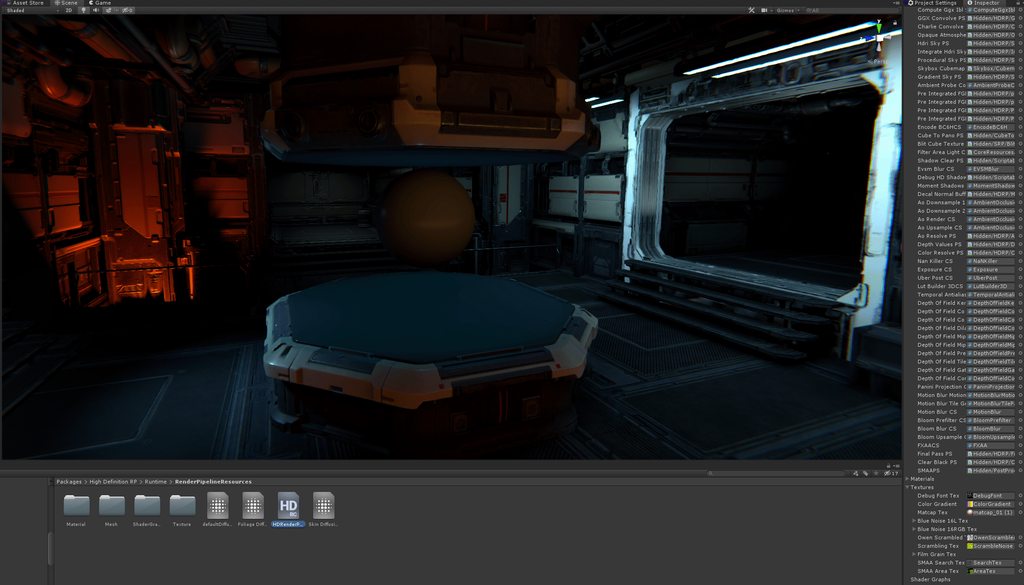
 dreamy fox
Keep in mind this is strictly for debug reasons. The idea is to use it as opposed to the "No Scene Lighting" debug view as a mean to explore the scene easily
indigo summit
ooohh interesting
empty star
@true zealot is the end result you're after basically a mask RT which has alpha cutout stuff as 1.0 ? (would opaque non-cutout stuff be represented as well or strictly alpha cutout materials?)
true zealot
I'm looking to create a mask that has functioning cutout that reflects what I've got going on in the final render
I don't care about transparencies, and don't plan on adding them to the mask
But if it's zero hassle supporting that is fine too
@empty star basically a mask with opaques and cutouts rendered into it
indigo summit
say is there any good dithered alpha example for HDRP? trying to get nice hair shader 😒
quasi mulch
why is HDRP forcing "simple" for reflection probe blending, anyone? :)
 still swan
@quasi mulch it's a bug
turbid matrix
welp
recent HDRP on github + 2019.2 fails to run the build
ERROR: Shader Shader is not supported on this GPU (none of subshaders/fallbacks are suitable)WARNING: Shader Unsupported: 'Hidden/Nature/Terrain/Utilities' - Setting to default shader.
Fun part is that I don't even have terrain on this project
few lines above that error: WARNING: Shader Unsupported: 'Hidden/Nature/Terrain/Utilities' - All passes removed
sounds like shader stripping fail
I don't think that's what crashes the build tho
on top of the stack trace:
0x000001EC0C4B1AF6 (Mono JIT Code) (wrapper managed-to-native) Unity.Collections.LowLevel.Unsafe.UnsafeUtility:Malloc ```at the end: ERROR: SymGetSymFromAddr64, GetLastError: 'Attempt to access invalid address.' (Address: 00007FF63ABC11F2)
still swan
@turbid matrix What GPU do you have
exotic plume
@indigo summit There is already a hair graph built in. Try that yet?
Ok next issue. Does anyone know how to get light bounces ? I mean - what if I want this spot light to cast light beams onto the wall on the right after bouncing off the mirror ball?
Sorry maybe I should post this in the lighting channel?
indigo summit
@exotic plume i did, but using simple alpha clip are not good, want to make the alpha transition smoother via dithered alpha/hashed alpha
turbid matrix
@still swan GTX970.. it's not that it wouldn't be supported by HDRP
it builds for older versions
but I'll check what is the part that actually crashes it now, was too tired last night to go to issue hunting mode
Ah, it's the new Entities/Collections combo
not HDRP
turbid matrix
hmmm, SRP batcher still breaks on actual builds?
(on high poly meshes with more than 1 material
alpine bluff
Is your Shader SRP Batcher compatible? And all your Matierials in a single CBUFFER?
frigid nova
guys does anyone know why SSRR is nerfed to a small square in the mid of the screen?
royal tusk

GitHub
This project contains a collection of Custom Renderer examples. This will be updated as we refine the feature and add more options. - Unity-Technologies/LWRP-CustomRendererExamples
big play
prasbe
turbid matrix
@alpine bluff it works on editor, just not on build
it only affects a mesh with more than 65k polys
there used to be an issue with that before with SRP Batcher but it got fixed
I dunno if it somehow creeped back into the standalone player
I'll see if I manage to make an easy repro on it and will file a bug report
my earlier bug hunt for ECS crash was all for nothing as it turned out to be a known bug that was already fixed on 2019.3.0a2 :p
which of course wasn't anything I would have known, tried searching for forums and issue tracker for it but didn't find any entry
support didn't even tell any estimate when it will be backported to 2019.2, they just closed the ticket 😄
there is one user on the forum who has similar issue, altho it's not yet clear if the mesh setup is similar
(some mesh shows in editor but not in build if SRP Batcher is used)
 wispy juniper
Hello, I have a shader that doesn't work in LWRP how can I get it working? Any ideas?
empty star
@wispy juniper what does the shader do? In general I'd recommend putting the functionality from the shader code into a new HLSL include file and then creating a LWRP compatible shader that can include the HLSL file and call the function(s)
wispy juniper
It's a outline shader that renders object invisible with a counter coloured with parameter.
@empty star https://pastebin.com/ghEZkGEU that is.

Pastebin
it does this.
empty star
i see, so it would be a LWRP Unlit (as the base)
wispy juniper
I'm a noob about shaders, I found it on internet but it doesn't work with LWRP. I'd very much like to learn, because it is a necessary thing for project.
@empty star can it be done via shader graph, you say?
empty star
if shader graph can work with the stencil buffer then it can
wispy juniper
Is it possible to learn this power?
empty star
asking in #archived-shaders I'm unfamiliar with shader graph so I don't know how limited it might be
the custom renderers link just a few messages up is related to what you want to achieve @wispy juniper
im taking a look to see what issues there might be 👍
wispy juniper
@empty star Thank you kind sir.
empty star
yea it looks like no stencil support yet, but might be coming: Direct control over render state Agreed, weve been back and forth on this a lot, but with upcoming changes to render state already planned for the near future, ill be pushing for some sort of "advanced mode" to handle these cases (although it does get complex very quickly, to which passes does the custom state apply? In HDRP for example, setting it on all passes will break everything. Different use cases want it on different passes, how do you handle that etc etc)
wispy juniper
@empty star Bad news then. I'll try to come up with a solution then.
empty star
so the first step is to make a copy of the Unlit shader in Packages/Lightweight RP/Shaders and bring it into your Assets/Shaders folder
but the issue is the # include HLSL paths will be relative, they need to be absolute since the shader copy exists outside of packages
so they get modified, like in this version i just copied: https://pastebin.com/5193t3fp
Pastebin
the problem will be, the stencil passes can be added but they wont get called by LWRP
damn..trying to open the custom LWRP renderer examples but it just crashes unity each time
wispy juniper
I think it can be a version issue.
stoic depot
Random Q: Are custom Renderers gonna be a LWRP thing only?
dawn sorrel
hdrp render graph might help on that (being worked on), but a completely custom hdrp would be a tall order for many people it seems
might as well fork it entirely and modify it
empty star
@wispy juniper i got it workin with LWRP
i was curious how this would be handled in LWRP so it was a good exercise, i'll upload the files and explain

basically LWRP has the RendererType in the RenderPipelineAsset
It can be set to Custom, and pointed to a Forward Renderer asset
the forward renderer asset allows setting up custom rendering features
For that outline shader, I was able to use LWRP's existing Render Objects (Experimental) feature
in the CustomForwardRendererData I added 2 Render Objects features... one where the Event is Before Rendering Opaques and one where the event is Before Rendering Transparents
Then both features have 2 shader passes, in the same order as the original shader, OutlineStencil then OutlineExpand
The Queue is also set to Opaque and Transparent as needed, and layer mask everything
the most important part is the Shader Pass names, those refer to the Tags{"LightMode" = "OutlineExpand"}
for the actual shader I copied the original LWRP unlit shader and added in the 2 passes from the original shader, modifying them to use the current way of doing things, that is in Outline.hlsl
I also had to copy the UnlitShader.cs and modify it for the material inspector.. it would be cleaner if UnlitShader.cs was not internal, as it could just extend from that inspector
I think you could also do this using Shader Graph, because the Custom Forward Renderer allows overriding the stencil buffer without doing it in the shader, so that would be even better
@wispy juniper for homework u could try to reproduce what I did using shader graph to handle the outline vertex extrusion & coloring, and looking at the Stencil { } parts of UnlitOutline.shader to set those on the Custom forward renderer stencil overrides.
Then you wont need Outline.hlsl, UnlitOutline.shader & UnlitOutlineShader.cs
wispy juniper
@empty star Wow, sir if only there was a give gold button. I'll accept that as homework. Thank you.
sly atlas
SO I was testing LWRP but game screen is completely blue even though camera preview shows correctly. Any idea why this is happening ?
Ahh Got it Lwrp do not support multi camera yet
quasi mulch
in this case there's very little stopping you from using a regular reflection probe if its not dynamic
for dynamic obviously planar is best
quasi mulch
any ETA on a fixed procedural sky for HDRP? it's a royal pain balancing exposure currently.
drifting vault
@quasi mulch like shadows too dark???
 autumn stratus
Hello, just switched over to the LWRP and my code for changing a textures base color no longer works. I have tried a few different variations with no avail. I must be missing something. This was my original code with Unity's stock pipeline. homeProv.GetComponentInChildren<Renderer>().material.color = playerColor[i];
autumn stratus
Ahh I figured it out!! I had to change it to SetColor. homeProv.GetComponentInChildren<Renderer>().material.SetColor("_BaseColor",playerColor[i]);
sly atlas
LWRP is out of preview but I cannot find IAfter interfaces in the namespace?
 uncut root
@sly atlas Unfortunately this seems to have been removed since version 5. I'm not sure what the equivalent of that is now
 somber shale
Hey guys, I quickly setup a HDRP project to test the realtime planar reflection current implementation to see if it fits my project needs:
As you can see the cube emission isn't replicated on the reflection: anyone knows why and how to fix this if in anyway possible?
scarlet hull
@somber shale : This is known issue. The emission is properly rendered by the planar reflection, but it gets truncated (the reflection buffer isn't in float format). Not workaround for the moment.
somber shale
@scarlet hull Therefore I'll just have to wait for it to be fixed: is it something planned or should I consider building my own implementation?
scarlet hull
It is planned, but no ETA for the moment.
somber shale
thx for the info
quasi mulch
I find myself using the planar probe more than any other because of performance in updating it. Would be nice though to have re-lightable probes like far cry has, so you'd have a cube reflection probe but it can be re-rendered for different lighting conditions practically for free as it has a normals buffer. This makes the probe a little heavier on memory but far preferable to multiple time of day probes that would replace it, or rendering more than we have to.
I would then just combine it with a planar probe for the occasional char reflections.
indigo summit
isn't that how enlighten works?
scarlet hull
I don't think so.
indigo summit
oh they are not probe based?
quasi mulch
reflection probes are cubemaps and enlighten is updating lightmap at runtime, that hasn't got anything to do with updating reflection probes at runtime
in testing, I'm really enjoying using hdrp planar reflection probe. I can work well with this, and GTA V also does similar locally for water. But the general purpose world probes need updating or caching, and then these I would like to blend with the planar probe. So planar for dynamic, and re-lit box probes for everything else merged would be an AAA solution that many games do that I'd love to have done for me in unity
the idea is te planar will capture the dynamic local stuff (this could be SSR for some projects) as you can keep this minimal or use proxies
then relight just the general level probes
as I can't do that without deep dive expertise and HDRP is still in flight, I have chosen to go mostly with planar and proxy geo for world. it should work out if lacking a bit of visual finesse
grave crater
Guys do you know how to access QualitySettings via code ? All documentations are very old in unity. I can not access QualitySettings. "using UnityEngine;" not give to me access quality settings. I am using render pipeline maybe this is cause
Ok I solved it I made a mistake :/
 edgy harbor
Does anyone know if LWRP supports Speedtree in the current version?
turbid matrix
@edgy harbor speedtree changes for LWRP are still only in github
5.14.0 and 6.7.0 LWRP's will have it
edgy harbor
Alrighto! Is there any kind of roadmap that shows all upcoming changes + added Features to HDRP and LWRP in general?
quasi mulch
I'm cutting down my game's scope because there's just too many things in Unity that make it too painful to go too big right now without staff / making a crappier game cos I'd be spending all my time on boilerplate Unity hasn't done yet
edgy harbor
Just grabbed the Github branch again today and now it works :) Now I got to figure out why everything is so dark. But the FPS gain is IMMENSE
- a new watershader... but that should be doable!
 mossy torrent
If I wanted to start a new project for LWRP, am I fine with 2018.3.14 or should I go for 2019.1?
turbid matrix
2018.x is never going to get LWRP without preview status
2019.1 is first one
future updates for LWRP will be for 2019.x cycle
only thing going for 2018.3 right now is that it's going to be bumped to 2018.4 LTS that itself will get two years of updates
where 2019.1 support ends when 2019.2 gets out and same goes on until 2019.4 LTS is out
@mossy torrent
mossy torrent
Yeah that's what I was trying to get at Basically, given LTS is any day now, is the version that exists on 2018.3 stable/have enough features it's fine, or if given that it's a new project it's just worth starting on 2019.1 and rolling with updates + features from there
 trim bone
anyone else getting terrible performance with hdrp lights that have an emission radius > 0?
mossy torrent
From what my various searching as turned up, it looks like 2019.1 is going to be my best bet.
drifting vault
someone know how to fix that?
Scene(Editor) view just gray and i get spam of that error
HDRP 4.10
turbid matrix
@drifting vault could you try with more up-to-date editor version or do you have to use 2018.3.9?
I think 2018.3.14 is latest from 2018.3 right now
but 2018.4 LTS should release soon as well
drifting vault
will download. most funny project was work fine 1 hour ago
drifting vault
yea, its not critical, i have it before.
i open one time cloth editor mode. play with cloth physic, and then leave (dont save anything). After that i get gray window
drifting vault
@turbid matrix im update to last unity verion and its dint fixed 😦
turbid matrix
@drifting vault on new project?
that error doesn't shout it's coming from HDRP at all
but if there are issues with other assemblies, you can't run it properly
HDRP not rendering before going to play mode isn't all that uncommon, especially if there's been some updates
dawn sorrel
when in doubt, delete the library folder
usually when I get unrelated errors like that but HDRP feels like to be the culprit, deleting the library folder makes those unrelated errors go away
turbid matrix
it would be way more convincing that the HDRP is at fault if the only errors didn't point to Procedural Worlds
hence suggesting to try on new project
it might not be HDRP related issue at all
dawn sorrel
honestly with any package I get entirely unrelated errors that gets themselves fixed after deleting the library folder
entire thing is wonky in my experience
turbid matrix
sure, I tend to wipe library always if I upgrade from major engine version to another
I don't even think twice about it
also often if I move from HDRP version to another
edgy harbor
Does anyone how i get this imported to Unity 2019.1? https://docs.unity3d.com/Packages/com.unity.render-pipelines.lightweight@5.2/api/UnityEngine.Experimental.Rendering.LWRP.html
"using UnityEngine:experimentalRendering.LWRP" doesnt seem to work by itself
grave crater
Is there any method to fade vr camera in lwrp ? UI and image not working well do you know any other solutions ?
drifting vault
Funny. Now when I want to open lighting panel, my unity just stuck. Task Manager cant close it. Only restart PC XD
frigid nova
what is up with the 2019.2 b1 and the hdrp 6.xx version
why they crash all the time?
even the alpha used to wrok with 5.xx but now the beta does not even work for the version 5.xx
Also im dont want to report anything to unity crash report,casue they take a month to replay,and then i forget what was the problem(happened multiple times XD)
turbid matrix
I usually get reply for my issue reports within workingday
sometimes it's takes few days but that's more rare
2019.2 has been pretty crash happy with HDRP so far, but if you wipe library when you upgrade, it usually is fine on next editor run
frigid nova
i start with a fresh project for all my new tests,and with 6.xx never worked for some reason,what else should i delete?
 bold harness
Anyone had any issues with LWRP and reflection probes on iOS? It seems it's only sampling the skybox
glad tartan
HDRP 5.14.0 is out on Staging
turbid matrix
turbid matrix
yes
they are first doing LWRP
that stuff also requires custom editor right now
so can't test it early 😃
can't wait to get HDRP supported for it
I bought their Unity plugin in past
but it doesn't support HDRP
altho as soon as they do the resolving pass for HDRP, I could technically reuse it with the old plugin
indigo summit
yeah i believe we need the VT tools to be integrated first before we can testing them
turbid matrix
well, Granite basically consists of few parts, there's editor tools that are C# interface for native code plugin that processes the atlases etc, then there's camera resolve pass in c# that tells granite what to stream in and then there's the actual VT implementation on native dll
kinda bummer that it's still mostly on native code and not like Amplify Texture where it was all c#
as it means less source code access to us
but one can hope they would do some c# jobs/burst implementation some day
indigo summit
i guess right now they are in the process of integrating them natively?
or via package manager maybe
turbid matrix
yeah, I think they just merge the native dll's to unity's player and native editor code
and rest will be merged to LWRP and HDRP out of the box
I don't think they make separate package for this
indigo summit
true, i think they will go with native integration
turbid matrix
they mainly need the editor scripts and camera resolve passes, latter need to exist on LWRP and HDRP
I guess the editor scripts could still exist on separate package but there really isn't all that much code there
it's a cool tech, I'm happy that Unity acquired this 😃
Graphine used to be really late on Unity plugin updates so their Unity support wasn't all that great
now that they can merge it in properly, it means no more waiting for individual engine versions once it's published
it's not just Graphine though, same issue exists to some extent for almost all more complex 3rd party tooling in Unity
people don't support betas at all
indigo summit
well at least for graphine, now they should
turbid matrix
some like Amplify do update their tools fairly quickly after full releases but you still have to wait for that
stoic depot
Back at it again with the q's that are really obvious to someone but somehow not me: why is the default point light really really bright in HDRP 5.13? And why does the indirect effect take ages to fade away when the light is disabled?
https://streamable.com/xy31j 600 lumen light
 stoic depot
Okay it seems related to realtime GI
exotic plume
@turbid matrix Virtual Texturing ?!? 😱
turbid matrix
granite is awesome
also great timing as UE4 is getting it's own VT usable soon
(mainly nice to see that Unity keeps up with the competition)
there's been faults with Granite integration itself but since they now got whole different level access to engine and rendering teams support, I expect great things from Graphine
ionic remnant
in the LWRP custom renderer is there a way to filter render features besides layer mask?
exotic plume
@turbid matrix I checked out the github link. On it but I still don’t quite understand what VT is
Is there documentation ? Where can I find out more about it and what it’s capable of??
turbid matrix
oh, you can't use it yet
if we are lucky, it'll make to 2019.3 earliest, but I expect 2020.1 tbh
 pastel scarab
 exotic plume
Right but I want to know about tech coming down the pike should I just look up Granite on asset store to find out about it?
turbid matrix
they deprecated the asset when Unity acquired Graphine
have you heard of megatextures from id?
exotic plume
Nope , is it like Mega scans from Quixel?
turbid matrix
nope
just mentioned that because it's same concept (nothing to do with quixels megascans)
virtual texturing lets you stream in higher density textures in small chunks depending how close the chunks are in the rendered on screen and keep lower resolution maps for far objects. it sounds first similar to regular texture streaming but this isn't tied to specific objects distance but actual texture regions, it basically lets you put a fixed gpu and cpu memory buffers for streaming that are constantly updated based on what is shown at screen

Stay ahead with advanced texture streaming
oh wait, meant to link this one instead https://graphinesoftware.com/blog/2017-10-12-our-take-boy-and-his-kite-epic-games-powered-granite-unreal-engine
Stay ahead with advanced texture streaming
that's ue4 demo but granite texture streaming uses same concept on unity too
basically as long as the camera resolve code works properly, you will get maximum quality textures on nearby objects and don't need absurd amount of RAM from your GPU to do so
in more traditional setup, GPU's with less memory get lower resolution textures even with regular texture streaming
at the age of scanned materials and higher resolution materials, virtual texturing solves the GPU memory consumption issue
you can just stream in what is needed on demand
it doesn't solve how to store all those textures tho and if you make a big game with lots of individual textures, your installation size will still be huge
so games like Far Cry series use virtual texturing for runtime prog gen terrain texturing, they don't store the final terrain textures on disk, they composite it on fly to VT
for that, I dunno what Unity's plans are
Granite has been mainly a VT streaming solution
exotic plume
@turbid matrix ah ok that makes sense and that is really cool and useful tech! Thank you so much for your contribution to this channel. I will check out the video
- ah ya build size would still be a problem
But if VT worked with substances then it could solve that issue as it proc gens at runtime
The maps and then could chunk stream it
turbid matrix
right now Granite textures need to be prepared beforehand in special atlases, there are editor tools that do that in editor
but I can't remember if you could stream in new things runtime
but what limits the old Granite for Unity implementation may have had in past, might not apply anymore, we don't really know what they are going to do here
most likely scenario is that they first merge properly their existing solutions tho
exotic plume
Ya understandably, I was just spitballing theories and speculation since I’m a Substance enthusiast
turbid matrix
I used to be in past too
my excitement kinda died when Adobe acquired them, now I'm just waiting for the bad news to arrive when future licensing is decided for the tools
they still have best game texturing tooling tho
exotic plume
Ya me too. I hate subscription based software and I was deeply saddened by the buy out news. Fortunately .sbsar’s don’t require licensing to use them once they’ve been made tho 😉 and neither does using maps in your game that are made in painter.
turbid matrix
yeah, I got perpetual licensing throughout 2019 so I'm covered for now
just hope that they still got the offering if I ever need to go for their pro licensing 😄
ionic remnant
So is there a way to subscribe to when a release will be coming through, e.g. when 5.14 hits the package manager?
turbid matrix
Finally testing why that SRP Batcher fails on some meshes, haven't yet found a pattern
but it fails to draw anything I export from Modo now on one of my projects
even basic cube
there's like 12 sides, one material, not much to it 😄
frigid nova
how come the beta does not work with any hdrp package?Also the polybrush works pretty good for a preview vertex painted a wall with different bricks and stuff ,really nice ,the shaders are a bit bad ,but im sure they gonna fix that
turbid matrix
2019.2 beta works with recent 5.x and 6.x HDRPs
technically you should use 6.x.x with 2019.2 but 5.x still seems to work
I don't think there's any other HDRP package than 6.5.3 on the package manager tho
6.6.1 is latest release
(on 6.x series)
or well technically 6.5.3 is released after it as it's a bug fix release that came after 6.6.1
it's bit confusing
as for the SRP batcher, I sent a bug report on it with repro project
it does work with 2019.1 and HDRP 5.13 but it fails on some meshes on 2019.2 and HDRP 6.5+
case ID 1153573 for those who do something with that info
frigid nova
i tried everything and i get errors with 5.x with 6.x without hdrp ,everything
turbid matrix
well, I'm using it here 😃
if you want super clean way to setup HDRP for new Unity version, just create empty 3D project with Hub, no HD templates, nothing
then:
- install HDRP using package manager
- create new HDRP Asset from the right click -> create -> rendering menu
- assign that HDRP Asset to graphics settings
- open window->analysis->render pipeline wizard
- hit fix all button, answer yes if it asks
- create a new scene
@frigid nova
by clean I mean, it doesn't add anything extra, it still has some extra steps from ideal situation
frigid nova
okey ill try and if i get errors im gonna post them here and see if any discord wizard fix it
turbid matrix
technically you also need to change gamma to linear but I think 6.x can spot it for you and change it on your behalf so I didn't list it separately there
there can be some random errors on the first time you setup it but they should be gone after you restart the editor once
frigid nova
it does not detect it
it just does not work for me ,always grey screen and a lot of errors and my engine lags
turbid matrix
@frigid nova have you installed postprocessing package manually?
turbid matrix
I dunno then. If I follow the steps I listed, it works for me on 2019.2.0b1
There could be some PP setting that fails but defaults work on my end
Is that mac?
Or linux editor?
I've only tested on windows/directx myself
frigid nova
windows followed the steps u did and also changed linear color space
im gonna wait for unity to come up with a more stable version
turbid matrix
well, they can't fix what they don't know is broken
frigid nova
for now i use the alpha of 2019.14
turbid matrix
I can't repro that issue on my end :/
frigid nova
no worries
turbid matrix
@frigid nova you get that error even if you restart the editor?
frigid nova
yep
turbid matrix
I did look at the error, it basically breaks on this line https://github.com/Unity-Technologies/ScriptableRenderPipeline/blob/6.5.3-preview/com.unity.render-pipelines.high-definition/Runtime/PostProcessing/PostProcessSystem.cs#L511
frigid nova
i tried every possible fix i could think of
turbid matrix
that just hints something isn't initialized properly on HDRP PP's end
turbid matrix
ah
frigid nova
its not a 6.xx specific
turbid matrix
but only on 2019.2?
turbid matrix
wonder if there's some issue with your installation
turbid matrix
I'm definitely running beta1 on my end with that same HDRP here 😃