#archived-hdrp
1 messages · Page 28 of 1
 iron hollow
o.O
ok well then move the weapons, even easier
or do you mean they have paws/tentacles 😛
 quasi mulch
sure but it wont solve it, I need to correct the rendering unfortunately for me
its a minor tweak really
just prevent other items from rendering closer to camera than own items
problem with this all or nothing approach is that where the other item should be closer like you have no shield in the way, it should still draw so I should learn how to do stencil in HDRP....
is it possible?
I have no real experience in that sort of thing
iron hollow
not sure, but really i think magic no-intersection things look so very phony
iron hollow
so still physically interacted, just cleaning up any partial intersection
quasi mulch
I dont need big changes just to fix the most irritating glitches, every game has them if you go looking, but they usually will have tried to disguise it at least
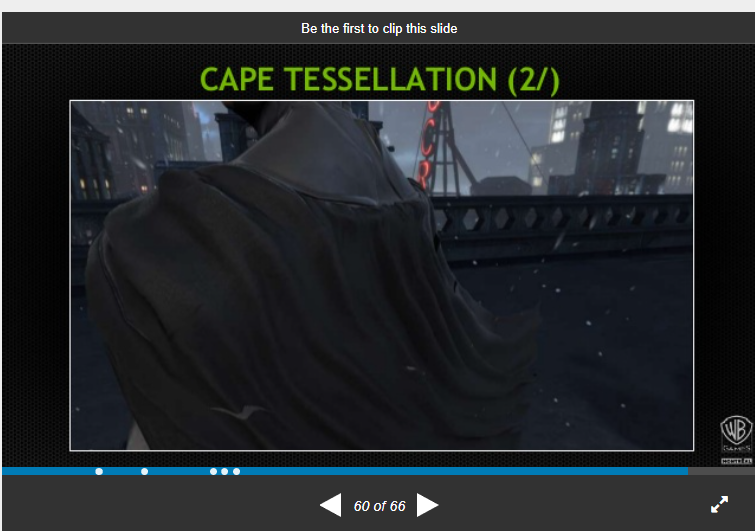
for example batman games, the cloak weirdly doesn't intersect with bats if you notice (but it does, all the time)
and it recieves the correct shadow / lighting
iron hollow
i seem to remember seeing a GDC on that
quasi mulch
it's just a fixer-upper I'm looking for, something like that
I am doing most of what I should like moving it away near walls etc
iron hollow
well they focused on the snow (which is also cool in that game)
quasi mulch
i liked the snow thing
they rendered a camera under it facing up
to get the little batsy toes etc

 quasi mulch
ooh i meant first ever bats
funnily enough I should ask unity's console staff since they did the ports for the first batman
but that would entail logging into dev net and begging for something totally off topic. and likely my ip addy changed since so i have to beg sony's webmaster
I'm an idiot I should make crappy games without polish, i bet it would still be fun
(that one has the snow tho)
iron hollow
oh ok
if it was a very old game, i assume they just rendered the cape last
so it was always overtop
you could do that in unity by changing the render queue
and still can in HDRP
there's a render order parameter
 glad tartan
@mighty swift from what I heard shadows and AO are the cheapest things to render for raytracing. In some cases it's faster than cascades so maybe that would help you a bit but again that's in certain situations. Saw this from a talk Epic did at GDC on raytracing and they gave a lot of info on it. They got the videos uploaded as well so if you guys wanna see it, most likely something close to this we will get with raytracing in Unity.
https://youtu.be/EekCn4wed1E?t=660

As of Unreal Engine 4.22, Unreal’s renderer will support the new DXR API for real-time ray tracing. During this Unreal Engine Learning Theater session at GDC...
iron hollow
thanks, will check that out
glad tartan
There's also another on their implementation of raytracing and how they optimized perf, limitations with raytracing so far, etc if you guys wanna take a little deeper look into it. Not many talks like this out yet
 mighty swift
@glad tartan Yeah... especially hard shadows. Just one ray per light if you don't want shadow AA.
And I'm currently fill rate bound, even at the lower cascade resolution, so yeah if I can relieve pressure there I can spend more time on the GBuffer.
glad tartan
You tried using contact shadows on smaller objects and larger ones use cascades?
mighty swift
They're all large objects lol.
There's some stuff I could do to reduce overdraw but yeah.
Btw I should note that even though I'm fillrate bound, I'm still talking about >200 FPS.
glad tartan
Maybe you can use an LOD or separate mesh for shadow casting then.
mighty swift
Yeah that's my thought... although fill rate's almost entirely "how big is your object" rather than how many vertices.
And my object is several frickin' buildings lol
And trees.
Although that does give me the option to drop big planes between the rooms and on the outside (minus the window frames, which will need to use the render mesh to shadow)
But that still doesn't help the issue of rasterized fragments.
glad tartan
wait so it's not using any form of occlusion culling?
mighty swift
It's more just "I have this tool to do it perfectly over here, which uses 0 rasterization" :p
Right now no. I'm planning on using ECS to create a "what can I see" mask and doing occlusion by hand. The building has some... interesting patterns to it.
quasi mulch
what pipeline?
mighty swift
HDRP
glad tartan
yea, you'll just be limited by the amount of cards supporting raytracing.
mighty swift
Oh don't get me wrong -- I'd have a setting to use rasterized shadows with various quality levels lol.
quasi mulch
I struggle with open world shadows (I have 4096 view distance and need mountains to cast shadow, would love a performant approach to it)
mighty swift
But to get real crisp shadows that match the art style, I'd need like an 8k texture. 4k's already 2.5ms.
mighty swift
Thanks for the tip @quasi mulch . I'll see if depth prepass helps.
quasi mulch
prepass is designed to render everything with a super cheap depth shader then test against it in the regular shader, it helps prevent overdraw as I understand it, only pays off if you have expensive shaders and are not vertex bound etc
it was essential for book of the dead
quasi mulch
this will still help i think
quasi mulch
re shadows I do recommend you set the cascades up surprisingly fat but fix the close shadows with contact
mighty swift
Yup
quasi mulch
dir light set to 2048 here and its pretty good
mighty swift
The nice thing is that the high-resolution shadows are limited by the size of a building floor, so I can set my second cascade to almost that level and know that the player can't really get further than that, because they'd run into the other wall.
iron hollow
how do you implement depth pre-pass, is it a setting? or something you need to do in a custom shader?
mighty swift
Or the fence around the building if they're outside.
glad tartan
it's a setting on the HDRP asset
quasi mulch
@iron hollow it's on by default in forward, or if you use decals in deferred, otherwise you can force it with the setting.
for shadow quality outside you don't really want deferred if having time of day because forward will factor in vertex normals when calculating bias while deferred only has the buffer normals
all this does though is patch up the worst of the damage
glad tartan
For some reason I get lower performance from forward than deferred. I'm just running a scene with a single directional light
quasi mulch
forward is slower than deferred but not by much and it should be mostly the same if your lights don't overlap much
i suspect you just got the hit from prepass
which will save you later on when more stuff is added so it will balance out
mighty swift
Yeah just a single directional light probably won't help much... you're not cutting out too many lighting calculations unless you have a lot of overdraw.
glad tartan
it's about 20 fps slower
quasi mulch
make sure you begin to measure around 60fps or so, I mean if you're measuring 200fps in a largely empty scene and it drops to 90 you'd be forgiven for thinking its terrible
but
it's not.
it just means you're not really thinking of rendering as bandwidth
mighty swift
I want to measure in the 200s for a specific reason though lol
quasi mulch
lol
mighty swift
I'd need to go in DMs to elaborate though
quasi mulch
well there's a real fps cliff that hits you with even a small amount of pressure but it levels out well
should worry when its a full scene really
and the number of textures you use will for sure impact it, so a full scene with not placeholders :P
mighty swift
Basically it's a fairly simple game environment, but I want to use high-end rendering features on it.
mighty swift
Yup
quasi mulch
actually I think really everything needs to use HDRP, except mobile, switch, vr (for now)
mighty swift
Gave you a bit of supplementary explanation in a DM btw.
iron hollow
that unreal video is interesting
the idea of being able to only turn on raytracing for certain lights is nice
also they said a phrase that would make hippocoder swoon lol
and also by the way, if you have raytraced shadows on an outdoor environment, there is no maximum shadow range, you will never see the sahdows fade out in the distance, like we've all grown used to in the last decade. you're going to have an infinite shadow range at all times, and it might actually run better.
glad tartan
Yea, that was a nice surprise as well when I watched. I thought raytraced shadows would have a cutoff point because they would be expensive
glad tartan
Also correct me if I'm wrong but it seems raytraced shadows have a set performance like post processing does. I saw a video a few days ago and in the scene looking at details close up or from a far with long view distance performance seemed to stayed the same. Gonna try and find the video again
quasi mulch
is that UE?
glad tartan
yea
glad tartan
it's just general knowledge about raytracing though so same should apply to any engine
ok here's the video I was talking about. So here he has GI, AO, and shadows on. and as you can see the frame rate stayed relatively the same looking at the smaller objects and when you see the whole scene
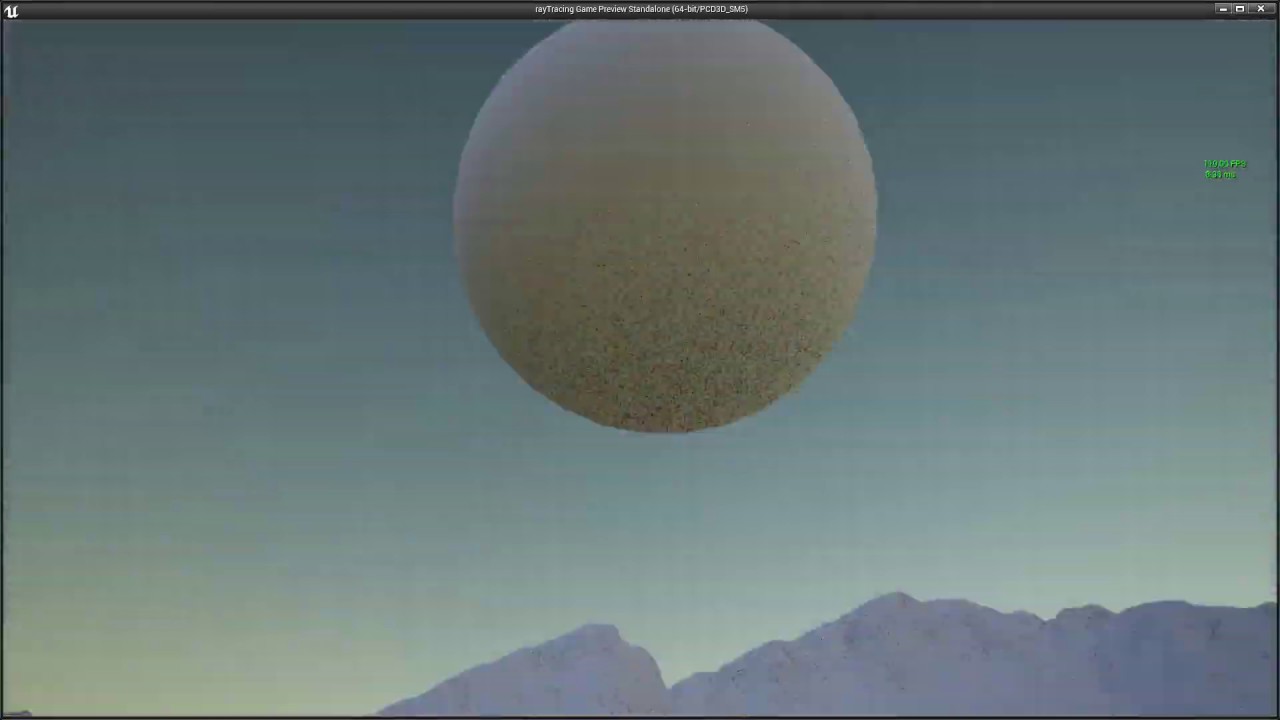
Another quick test. I was wondering, how well can raytracing handle shadows. Especially far away, which is classic limitation of classic cascaded shadow maps...
it goes all the way out so you can see the mountains casting shadows and all
glad tartan
haha, just keep in mind this is coming soon and youll be fine
quasi mulch
of all the threats in the universe, a threat like "oh no hippo is leaving causing internet drama for ue4" is the most unlikely possible
I'm stuck with unity and they're stuck with me and I might as well try to improve Unity if I can :P
the scenario tthere is something I have solved though shadow wise, mostly, at that quality
my problem is now of course... GI

Unity Forum
I've even set light bounce to 0 for each light.
[ATTACH]
We can see enlighten is consuming ridiculous amounts of time. Why is that, can someone help?...
I'm not even trying to update the gi either
in fact I'm trying not to
 turbid matrix

GitHub
Purpose of this PR
Add mode for low resolution transparency (1/2 x 1/2 res). There are a couple of (simple) options although it'd be nice to explore some more once we have better test cases.
Up...
quasi mulch
love that PR
been asking for that sort of thing for a long time
I have no detailed transparencies and most of my transparencies are far from the highest mip anyway...
i'd expect no visual change but a lot better perf where vfx has overdraw
mr trans is awesome <3
I wonder if we can have it on geo though rather than just you know, billboards etc
Love all perf increase options. I tend to use them all aggressively but then tweak like crazy and change my end to try and reach previous quality...
I guess its a mindset you get into if you've done mobile or console stuff
glad tartan
getting all the perf and quality you can should always be the mindset. I agree with that
quasi mulch
yeah I wonder why Unity has no proper realtime GI? I see all the big games having it now and talking about 1ms frame times on consoles, and that's very, very exciting.
So just wondering why not good old unity?
the realtime aspect is just amazing - imagine destruction, and best of all never having to deal with a lightprobe ever again
glad tartan
Yea, I'm actually looking forward to that GDC talk but so far not many GI solutions work for every/Most games with really good perf as Unity would want it to. Same probably goes for UE4 (although 4.22 will has Realtime Screen Space GI). Only game I know that uses a custom realtime GI on console is The Division and The Division 2 they know that their GI will always work for a Division game or something like it.
 frigid nova
i summon @turbid matrix to tell us if its possible to run raytracing on unity with 1080 3gb
frigid nova
so what do i do?do i sell my graphics card?
frigid nova
well unity need dxr to run the 4th of the month pack they gonna release
turbid matrix
but... I'd say, wait till nvidia rolls out the drivers with support for the other cards
we still don't know if it's fully blocked on lower end pascals or if they just don't advertise it to work for them
I'd still guess it wont run at all
frigid nova
if its running im good with it even if its a bit slow
cause the unreal video above looks really nice dude like really nicd
glad tartan
Some of the 10 and 16 series cards will have raytracing support with a driver update in April. Will probably only run Shadows, AO, and maybe reflections. Most likely release around the same time Unity will be making raytracing available on GitHub. UE4.22 is also releasing around that time with raytracing support so I'm guessing that's when the driver would be released
it says Basic RT effects so that's why I'm guessing Shadows, AO, and maybe Reflections because those three are the fastest to run. with reflections being the most demanding even if only for the most reflective surfaces
mighty swift
Ohkay... TIL that cascaded shadow mask resolution is per cascade... so 4k 4 cascades generates an 8kx8k texture
quasi mulch
they're in panic mode cos amd strolls a long with fast mem and goes "oh... we didn't need turing whatever"
wtf is wrong with nvidia these days, I mean I only buy their cards but...
jeez
mighty swift
I'd say AMD is having more problems... can't keep their compute cores loaded in conventional 3d
quasi mulch
they can but they want you to buy their old crud fully before being forced to reduce margins
they're really that bad all of them
one day we'll be viewing a quantum future, son
or have
turbid matrix
well
lets think about the RTX deal a bit
would people have bought RTX series as much if they knew it would run on their existing 10x0
RTX cards came with premium price too
it does make sense that the driver support for older GPUs arrives only later
but they need the older GPU support for devs to care at all about DXR
I wrote this on the other channel here but current steam hw survey says ~1% of the pc gamers got RTX gpu, but 11-26% got DXR capable nvidia after the driver update rolls out
glad tartan
yea, plus performance will be pretty bad or really low quality for most of it. In return raytracing might get more optimized if devs try and make it run will on the older cards
turbid matrix
11-26% because steams hw survey doesn't differentiate 3GB and 6GB 1060's
and those got 15% share
iron hollow
well I see it from another angle. The backlash against 20xx has been huge, people wanted more FPS and didn't get it. so sales of 20xx have stalled I imagine as people keep their 10xx. So natural solution to get RTX pushed out to more people? move it to 10XX
turbid matrix
I haven't seen people pissed of the perf
unless you mean raytracing perf specifically
iron hollow
on reddit that is all you see
turbid matrix
well, on reddit everyone complains
iron hollow
was incredibly infuriating
turbid matrix
actual benchmarks tell they perform nicely
glad tartan
you see the same on any video benchmarking anything with raytracing support
turbid matrix
but they are faster than previous gen
iron hollow
(and yeah i know it's stupid because Raytracing, duh)
i tried to argue and argue people needed to wait for software that supported the new features and got shouted down every time
turbid matrix
also by somewhat the same margin faster than usually when nvidia brings new gen I think?
glad tartan
benchmarks are mostly over 60fps but I think the people complaining thought they would have the same perf as without raytracing with RT effects running
iron hollow
that's not what people were reporting
i don't know if i can dig up some of the old threads
iron hollow
not on reddit but the general gist:
2080Ti is about 20% better than 1080Ti but at twice the price (or more)
iron hollow
yeah well dollar per fps yes lol
mighty swift
Well no... price bump is because the 2080 Ti is more expensive than the 1080 Ti to make
turbid matrix
people just can't dial their expectations right
iron hollow
then they see battlefield's half-ass implementation and figure it's worthless
mighty swift
1080 Ti was ~475 sqmm. 2080 Ti was just under 800.
turbid matrix
probably that too
which is why 1600 series exists
but there has to be some R&D costs included too
iron hollow
oh of course
turbid matrix
it's all about business
mighty swift
That means you get ~half the chips from a wafer if you can cut them proportional to the loss of surface area. Also, because the number of errors are constant, each chip overlaps with twice as many manufacturing defects... making them waste more bad chips and down-clock the rest.
turbid matrix
well, next gen will be better for that
but I doubt they lower the prices
that has like never happened
mighty swift
Yeah. Smaller transistors, if all else is equal, will allow you to print the same complexity on smaller dies.
This means fewer errors per chip, so you can get more and bin better.
turbid matrix
I still remember decade ago you got top of the line nvidia single chip gpu for like 400€
those times are long gone 😄
iron hollow
eh it was a blip
turbid matrix
it inflated GPU pricing
iron hollow
that's long over now
turbid matrix
yeah, but prices will not drop still
"oh, people really are willing to pay this much for these... well..."
iron hollow
intel needs to make a competitor that actually works for $199
and force the market back down
that was the nice thing back in the VGA days
was so many 3rd party brands that kept pricing honest
right now it's a Duopoloy
turbid matrix
matrox was still king if you wanted good DA converters
not matrox
what was it
matrox is the hdd thing 😄
mighty swift
Nope. Matrox
iron hollow
actually I think Matrox is right
mighty swift
You're thinking Maxtor about the HDD
iron hollow
you're thinking Maxtor for HDs
mighty swift
Just a few seconds ahead of CeeBee each time lol
mighty swift
Matrox is still around, though. They sell cards based on AMD GPUs though
turbid matrix
it's some workstation thing now?
iron hollow
Number Nine Visual Technology Corporation was a manufacturer of video graphics chips and cards from 1982 to 1999. Number Nine developed the first 128-bit graphics processor (the Imagine 128), as well as the first 256-color (8-bit) and 16.8 million color (24-bit) cards.The na...
In 2013 Francis Bruno from Silicon Spectrum tried to fund an open-source GPU based on a #9 Ticket To Ride IV derived design. Started on the crowdfunding platform kickstarter.com, the campaign was unsuccessful as only $13,000 of the requested $200,000 was gathered.
lol that would have been trippy if that had succeeded
i think i had a GXE 64
it went bad but was still under warranty, i sent it in and they sent it back repaired, complete with jumper wirest taped to the surface lol
true hand crafted repair
turbid matrix
GitHub
Purpose of this PR
This PR allows part of the frame to not execute TAA, but go straight through with just the unjittered sample of the scene color.
The client for this is particles, so the tagging ...
I know reviewers are not in this week, but I thought of opening the PR anyway for book keeping
expect to see PR's to stack again 😃
iron hollow
yeah i saw that
turbid matrix
wonder if that's the mandatory vacation after GDC crunch
alho, there's not much left from this week :p

GitHub
Purpose of this PR
Release LOD Bias and Maximum LOD Level in FrameSettings
Testing status
Katana Tests: ABV Running
Manual Tests: What did you do?
Opened test project + Run graphic tests locally...
I forgot they did max lod level there too
that'll be handy for scaling to lower hw somewhat automatically
ue4 got the lodbias thing too, but I don't think they let you limit the lod levels from global setting
unless that's changed lately
quasi mulch
pretty sure nvidia set the expectations to begin
iron hollow
lets you disable lod levels for debugging?
quasi mulch
with all these rtx ons and offs and how it would be slower to raytrace without their hw
turbid matrix
it lets you force to skip the highest quality lods for lower end platforms I'd assume
quasi mulch
can't expect gamers to be devs
iron hollow
oh hmm
quasi mulch
even on unity forums i said to people way way way before these came out "it will be slower" and nope nobody listened
everyone was like lalalalalalal
i could see their eyes rolling back as they went lalalalala
turbid matrix
 iron hollow
but every single thing I've watched about RTX says it's faster
where are you getting it's slower?
quasi mulch
hahahaha
iron hollow
and why would they bother making it if it was slower
quasi mulch
it is slower but its about quality
if you do the same technique on general gpu it's going to be slower....
turbid matrix
he's talking about DXR/RTX now
iron hollow
you realize your 2MS GI thing you covet is based on RTX right?
turbid matrix
not about the gpu's perf otherwise
quasi mulch
funny how its running 1.6 ms on xbox without rtx then.
iron hollow
then why isn't it in unity right now?
quasi mulch
EXACTLY
iron hollow
but anyway it was your video where he said it was RTX based
iron hollow
though i only had the slides to go by, his accent is way too thick 😛
turbid matrix
merged the PR for testing
iron hollow

Gaijin Entertainment shows off it's Enlisted MMO running on GeForce RTX, using Vulkan to do a custom global illumination algorithm that's enhanced by Nvidia'...
quasi mulch
its just he's bragging in his vid tha it works on both newer xboxes, latest being 0.6ms at 4k res, but that's not on rtx hardware unless i'm a total idiot
iron hollow
this is the 2ms guy
quasi mulch
maybe I'm just unaware there's nvidia rtx consoles
iron hollow
well it's PC Gamer so i think it's about PCs ;p
quasi mulch
I mean the intro to his gdc 2019 talk
mighty swift
The Switch is an NVIDIA console lol
iron hollow
64 sq KM
quasi mulch
right now, unity!
iron hollow
that's large area
quasi mulch
yep its insane
0.6ms
on latest xbox
4k res
removes need for probes etc too
i give up, putin can have me
I'm defecting
turbid matrix
hmmm
quasi mulch
you don't even need AO
turbid matrix
this max lod level mode isnt going to really work unless all your LOD'd assets have same amount of lods
quasi mulch
you save 1ms from AO...
iron hollow
 turbid matrix
otherwise it'll just cull the mesh when other is showing still something
iron hollow
game is "Enlisted"
site doesn't say anything about XBox
it's PC only, and maybe one day Mac
quasi mulch
well his fancy vid does claim these numbers
iron hollow
yes on a PC
quasi mulch
says xbox clearly
iron hollow
where do you see xbox lol
glad tartan
He said consoles

This session describes the dynamic global illumination system that Gaijin Enterainment created for 'Enlisted'. Its implementation is based on a regular light...
iron hollow
i can't understand him, volume of the video is too low, and his accent is too thick
but at least the game in video i linked, isn't made for consoles
quasi mulch
yea
glad tartan
so it cant be using RTX if it's on consoles
quasi mulch
no there's 2 vids...
glad tartan
the video you posted before was from last year when everyone was showing what they are doing with RTX
iron hollow
yeah well my video isn't about Xbox
glad tartan
that video he used Vulkan and RTX
quasi mulch
in any case I want his special secret slavic sauce splashed all over my stupid face ASAP
iron hollow
lol
glad tartan
GDC talks are said to be up next week so we should see his talk then
iron hollow
It's important to point out that this is running with no precomputed lighting, which is part of why the non-ray-traced version looks so flat and bad.
lol
iron hollow
hardly a fair comparison then
quasi mulch
so the non rtx looks shit
glad tartan
for that shot it looked like ambient lighting was turned up a lot
quasi mulch
but if you have a top quality AAA game developed without RTX, and you enable RTX, the differences have to be looked for carefully since it will be hard to tell them apart in a fair fight.
it'll be more about fixing qualiy
mighty swift
Unless you're doing dynamic time of day with a cartoon art style lol
iron hollow
i hope one day i get to see hippo's game
quasi mulch
one day when i finish it and stop begging for gi
glad tartan
Yea, for Metro Exodus the difference in some scenes/conditions aren't noticeable
iron hollow
because from the little pieces he drops i picture guys with no arms fighting with swords and shields in a huge jungle.
quasi mulch
metro is the worst example for it I think
glad tartan
why's that?
quasi mulch
because they've been bought lock stock by nvidia
in return for huge promo they show way shittier before shots
iron hollow
Shadow of the Tomb Raider just added RTX support
quasi mulch
yeah and it looks lovely with or without
quasi mulch
its honest
glad tartan
yea but they didnt make a bad looking game to make RTX look better
quasi mulch
the thing with metro is what pissed me off is that the devs delibertely didn't enable things like AO in the non rtx shots
it was pretty cruel and making it uglier than it needed to be
thats life and business tho
i'd do it for cash
glad tartan
ah well I'm talking about retail versions and non devs covering the differences
not the Nvidia showcases
iron hollow
there's this one but it's not side by side so hard to compare.
more about comparing stats
glad tartan

Tested on Asus ROG Strix RTX 2080 Ti High praise indeed, but 4A Games' phenomenal engine, paired with Nvidia RTX ray tracing technology powers Metro Exodus o...
iron hollow
oh there is some side by side at the end

Nixxes, the Dutch developer known for its PC ports of Square Enix games like Tomb Raider and Deus Ex, announced today that the latest Shadow of the Tomb Raid...
glad tartan
or this

Metro: Exodus marks the arrival of RTX Global Illumination in a game. We're here with technical analysis of Metro: Exodus' RTX Ultra vs. High vs. Off graphic...
quasi mulch
and really you can spend that same fps on enhancing the classic renderer to the point it gets to look the.... same ish. ... but for anyone
its like someone shouting HDRP is god as if the builtin renderer can't look just as nice with some effort
looks guilty
see
occlusion probes could fix that fine.
iron hollow
even on the long landscape shots i can't see any diff
quasi mulch
no special hw
glad tartan
Yea, if they had a realtime GI solution it would match RTX
quasi mulch
yeah that is why hip is crying
glad tartan
haha
quasi mulch
now join my special club that will hassle unity for gi
ceebee joined last night by accident
now you
iron hollow
lol
glad tartan
but for things like, reflections, translucency, and shadows
it's hard to match those
quasi mulch
i'll make do with ssr tbh
glad tartan
I'm already in. I want GI as well
quasi mulch
its nearly ok enough for most cases
and really not everything is a mirror :P
is not ALWAYS raining
its not sim blade runner
quasi mulch
but i find tomb raider is much more honest about it all, for me metro is a bit biased as if they actually just "ok lets multiply rtx on top of what we have and not combine it properly and call it how the game should look..."
its lazy while tomb raider made a first class effort
glad tartan
yea, actually raytracing is faster on really reflective surfaces than rougher ones as well as reflective surfaces with normals. The dev talked about this in the video about raytracing in UE4
quasi mulch
we need GI in unity and Unity has seen my trolling for it by now. Yes you have.
points vaguely at unity staff
glad tartan
it's why the Cryengine demo only had reflections in water, glass, mirrors and anything above 0.8 smoothness it looked like
turbid matrix
unity does this for HDRP SSR as well
iron hollow
this is Nvidia's spin on Tomb raider:

Watch real-time ray traced shadows in this exclusive stage demo from NVIDIA’s Gaming Celebration event in Cologne showcasing Shadow of the Tomb Raider and th...
turbid matrix
it only uses SSR for highly reflective surfaces
glad tartan
yea but you can change it for SSR
iron hollow
'oh look, nothing has shadows, turn on RTX. everything has shadows!'
quasi mulch
there's other benefits to a purely realtime GI approach: save on redundant post processing you don;t need, probe processing etc... all of the extra processing done right now amounts to a millisec anyway so going pure realtime gi might actually end up faster overall since you're measuring not GI vs nothing.... but GI vs <current crappy GI>
yeah funny that innit ceebee? its clearly obvious if they wanted such a dark look, a dev of that calibre is very capable of making a dark look. but no, the rtx version has to look different! unlike tomb raider which simply does it properly
you're a dev you know how this works :P
 upbeat cobalt
Does anyone here have any experience with the LWRP? I just have a quick question, I started using the pipeline, and I'm making a first person shooter. For some reason after using LWRP, it doesn't allow me to use culling mask in order to keep my weapon from clipping into object. If I change the depth on the "WeaponCamera" to higher than the "MainCamera", the WeaponCamera just overrides everything, but if it's the same or lower than the depth on the MainCamera, the weapon doesn't show up at all. For now, I'm just tolerating the clipping, lol.
 true zealot
There's a camera layering system now - not sure if it's released yet though https://drive.google.com/file/d/1J8ChJIsAXdXdmOPtNF_FIqd9exYD0kql/view?usp=drivesdk but it'll behave like this in the future at least
There's no support for it currently
You'd have to do it manually
upbeat cobalt
I ended up just having to widen my characters collider radius for now, no biggy @true zealot , thanks!
turbid matrix
yeah, we discussed about that layering setup just a while ago but I guess it got hidden behind the RTX talk 😃
turbid matrix
has anyone ever promised it would return?
I mean, it's been all vague
I think people who said it will get back has been working on LWRP so it doesn't necessarily mean it'll return for HDRP
 indigo summit
well LWRP have it isn't? just waiting for the PR
or in HDRP we need to use the promised custom render pass?
speaking of, 6.6.0 is not in staging yet isn't?
glad tartan
6.6.0 isn't released for staging yet
indigo summit
@quasi mulch even minecraft have an raytracing GI now
https://twitter.com/notglacier/status/1111845895287365632


they added ray tracing in the new minecraft shader dev build i am absolutely shitting myself https://t.co/sEbY78Vuz5
Retweets
3950
Likes
12920
 Twitter
indigo summit
Twitter
indigo summit
well he said he play it with GTX1070
 haughty bay
holy fuck that is pretty
indigo summit
oh wait, it's not an official dev build
my bad
it's a custom dev build from Sonic Ether
quasi mulch
GI realtime <1ms on a recent console is proven already at GDC, so really I think unity resists adding it due to the fact it will be quite diffuse and people will ask for fine grain detail and uniy cannot give them that. but i think unity should also accept their AO is very much without fine grain detail and just add it for us.
indigo summit
a realtime pathtracing GI. . . . 🤔
quasi mulch
you've seen the russian bloke show off his 0.6ms open world GI with 4k res on xbox brag, it surely must mean you are in fact, the 4th member of our "we want realtime gi" club
quasi mulch
it's just before we could scoff and go "hah unreasonable expectations" only that there's not only proof now but non patented technique
so its viable now
even necessary in a world of streaming dynamic dots content...
indigo summit
yeah, i prefer to not let CPU spending time with enlighten :/
quasi mulch
enlighten cpu will work fine but you must omit terrain, you must omit pretty much anything big, and you have to actually control what it refreshes all the time while also making sure you do lightprobes properly, which are broken as fuck anyways
the existing system is just only usable for small titles
indigo summit
or static daytime
indigo summit
😄
quasi mulch
and having to faff around with splitting meshes, and doing all sorts just to make enlighten happy (and it's never happy)
indigo summit
it make me wonder how frostbite deal with time of day with enlighten
indigo summit
really?
quasi mulch
in any case they have the resources for everything
i'm aware that I ask for unrealistic things, but part of using unity is asking for that
unity's only job, their only job, is to make their engine the best
they don't make games
indigo summit
oh let's not start with that topic
quasi mulch
yeah although to be fair they do work closely with a lot of developers and their staff have made plenty in the past
mighty swift
Realtime GI would be cool on the CPU if you could make it run on extra cores in a constantly rolling update way, pre-empting for other jobs.
Kinda the same way that object-space lighting works.
In that case, rather than forward or deferred, lighting is done onto textures on the 3d models. Rasterization just collects the output shaded texel and selects it as the rendered pixel.
The idea is that silhouette is more important than lighting information... so you just need to stop the lighting calculation and preempt it with this frame's rasterization. The lighting information might lag a few frames but it's probably just about the same as it should be anyway.
In this case, I'm talking about something CPU based and only for indirect lighting, but y'know.
quasi mulch
yeah that's not a dumb idea with ecs mesh api
dots
per vertex is not a terrible resolution for gi actually
all theoretical but people have done general radiosity work with verts
Repository of productions, tutorials and articles of Inigo Quilez on computer graphics, fractals, demoscene, shaders and more.
 brave tusk
I am using ARKit with unity & I get this error when trying to create mesh in runtime. Can someone guide me with this ? -> https://gitlab.com/snippets/1840576
 turbid matrix
@indigo summit 6.6.0 isn't released yet anywhere
you'd see it here first https://github.com/Unity-Technologies/ScriptableRenderPipeline/releases
but it would also almost immediately show up on staging
quasi mulch
I imagine it's all on pause until april 4
they are focusing on the raytrace stuff
i see lots of bugfixes

GitHub
Scriptable Render Pipeline. Contribute to Unity-Technologies/ScriptableRenderPipeline development by creating an account on GitHub.

GitHub
Purpose of this PR
Release Notes
Added smooth raygeneration for raytraced reflections
Added nvidia filtering for smooth reflections
Requires graphics/raytracing/dxr/reflectionfilter Editor branc...
seems old, wonder what happened to it
 drifting vault
someone know how to activate plane refraction mode?
just how i did its dint work or just black
only by that method i made its a bit blury but still no reflections...
and one more problem...
Progressive GPU cant see my GTX 1050 on laptop, only Intel HD graphic....
drifting vault
@quasi mulch cant see that check box
 sick spoke
So after updating to 2019.xb it broke the LWRP support for AR would there per chance be a updated version somewhere. Or could some one help me update these files? https://github.com/Unity-Technologies/arfoundation-samples/tree/lwrp_support/Assets/LWRPSupport There is no docs or info on some of the things that have been broken.
GitHub
Example content for Unity projects based on AR Foundation - Unity-Technologies/arfoundation-samples
 blazing flicker
@turbid matrix I'd be very surprised if having the memory profiler package installed would cause any crashes. Yes it is preview and yes, especially before 2018.3.0f2 the native capture code in unity (&mono) did have some stability issues. But most of them got resolved by now (note, you can still OOM during a capture as managed memory isn't streamed) But besides that the only thing the memory profiler package does unless the window is open is to inject MetaData capture code in InitializeOnLoad
That said, if Unity does crash, please try to report it using the bug reporter tool.
turbid matrix
@blazing flicker ah, you mean the very old messages I sent? You work on the memory profiler?
I dunno, back then stability increased a lot once I stopped having that package around but of course it could have been a weird coincidence. Also my experiences were from the very first versions so if those issues have been fixed then it's probably way better already 😃
true zealot
There are a few Unity staff who should really find the email that gets them the Unity Staff tag 😛
turbid matrix
@true zealot it's always possibly they just joined and applied for it, it's not instant
@blazing flicker my plan was really to put the memory profiler in test once I need to start optimizing my current systems 😃
blazing flicker
I actually applied to it way at the beginning and never really got to step inside this server/ startup Dsicord since then. not sure what happend to my batch
but yeah, I do work on the UI for the Profiling tools
and @turbid matrix yes, those old messages, since I just fully joined the server, I just searched for "memory Profiler" to see if there was any feedback/questions I've missed out on 😄
And I think in preview.1 the EditorWindow for the mem profiler still had a memory leak...

So, last Wednesday we were finalizing the release of the new #MemoryProfiler for @unity3d when we realized it was leaking memory. So we used the #MemoryProfiler to profile itself... Well, at least now we know it works as it let us track the leak down and fix it in time. #u...
 Twitter
turbid matrix
Twitter
turbid matrix
ah
blazing flicker
that one never went "visible" but some might have used it through editing the manifest file
turbid matrix
I probably used first ones in staging already 😄
I mean, they are not promised to be stable
yeah, I'll give it another go, been meaning to but it's not been a priority atm for me
blazing flicker
yeah, but the *Profiler packages are weird with the preview tag. It mostly means that key functionality is still getting ironed out, not that one should avoid that if one wants stability to be able to ship on. They are only editor functionality and don't affect final builds
they shouldn't crash though 😄 so please file bugs if they do
true zealot
pft if you're not living on preview you're not living
blazing flicker
and feel free to raise/ping https://forum.unity.com/forums/profiler-previews.199/ once you do. QA might sometimes not know how to deal with just a snapshot file or a callstack but we might still be able to deduct what's up from that
Unity Forum
but ideally do not share snapshots on the forum. they contain your entire mono memory as a dump and you might not want to share that much publicly 😉
turbid matrix
is there some target for this to get out of preview atm?
blazing flicker
We're currently still processing feedback from profiler and optimization roundtables we did during GDC as well as a survey we did. With that we'll hopefully have a better idea of what the base feature set is that our users expect from this. We'll prioritize and make a plan based on that.
turbid matrix
 quasi mulch
I'd like to develop my own tools for certain things and to do this, I need to generate a height map of the current scene top down in high resolution depth, in ortho. Is this possible with HDRP, and if so, how ?
turbid matrix
no idea on ortho stuff
it's always been kinda wonky
both of course also on staging registry

(testing package)
quasi mulch
5.11 = 6.6.0 but without multiple contact shadows, right? AFAIK that wasn't backported due to some difficulties (I am not bothered, since I'm experimenting with not using contact shadows)
turbid matrix
there are some small differences, I'm not sure if 5.x got all VR improvements
quasi mulch
how long til PM release I wonder? a week or so I would guess
turbid matrix
well they are on staging already
I wouldn't hold breath for 6.6 popping up on regular registry before 2019.2 goes to beta
they haven't put a single 6.x.x SRP there yet
quasi mulch
re: depth
seems just making a tex with DEPTH_AUTO and plugging it into a camera will just work
what the hell is this futuristic time saving thing?
I had had fully expected to reinvent the wheel several times.
how dare unity save me time and make me happy? I might even be forced to smile slightly when nobody is looking
(no idea if this is the best way to generate depth or even what format it really is... r16?)
indigo summit
@quasi mulch generating realtime top down depthmap or baked?
quasi mulch
baking it for later sexy time
indigo summit
in the boat attack demo there's a script for that i think
quasi mulch
but realtime is needed in the sense it should be interactive for editing
(for authoring etc, if it's a bit slow it's ok)
indigo summit
that's how he baked the worldspace depth map for the ocean
quasi mulch
Ah nice yeah that's what I'm up to. I'm using it for shadow experiments
I figure so long as I have height, I can do a pretty good shadow from that
I just need moving open world shadows, for silly distances and height seems a good fit to generate something like that
and the world is static in that respect so real shadows are overkill aren't they
and I only need an approx for distance
indigo summit
wait how do you post snippet in discord 😄
quasi mulch
Always wondered that :/
indigo summit

GitHub
Demo Project using the Lightweight Render Pipeline from Unity3D - Verasl/BoatAttack
find this "public void CaptureDepthMap()"
indigo summit
which is?
quasi mulch
shadows, water outlines, vegetation rendering
indigo summit
and rain effect occlusion
quasi mulch
and rain effect occlusion
4!
so much can be done when the problem is just 2D
when you only worry about height., it's much quicker
iron hollow
I don't see how unity drawing the shadows or you drawing the shadows will make any difference. it's going to be the same amount of work either way (and i'd wager unity knows how to do it better)
iron hollow
that doesn't make shadows
you have to calculate what areas are occluding the light and all that jazz
it's not just 'get depth buffer and blend it in'
quasi mulch
not really need to worry about that so much, it will blend nicely
the terrain can shade itself
cookies are also an option
it's only for far off approximations so it should suffice. close up i get regular shadows, which will be more accurate and have really high res and higher perf
iron hollow
also even if you could use that for shadows, it's not really going to solve your 'shadows in several km range' issue
because the depth map will be the same resolution as your screen
iron hollow
so the farter out you get from the camera the features become smaller and smaller
quasi mulch
tex
iron hollow
until they are just tiny pixels
quasi mulch
nope its rendered top-down
indigo summit
bake every nth time?
quasi mulch
with respect I think you're not really thinking of the same trick I am
indigo summit
explain. . .
quasi mulch
we get a heightmap from birds eye view, top-down then from there are able to use the sun direction to stretch the texture along an axis either by sampling again or just skewing the projection in 2D
iron hollow
well you didn't mention that part ;p
quasi mulch
it's just a hack, not real
indigo summit
ooooh. . . like what they do in the old Chase demo?
iron hollow
you said you were doing it with the depth map (implied only)
quasi mulch
did they do that in chase demo?
yeah using depth to render top down is best precision for a heightmap I think
iron hollow
I've always wished they gave out the chase source
indigo summit
there's a weird trick to draw shadow in the chase demo, they project a shadow texture from light direction
quasi mulch
yeah thats my cunning plan sorta
iron hollow
could be stencil shadows
indigo summit
to the road below the vehicle, and the road was transparent
iron hollow
or his trick yes
but I've been told stencil shadows are expensive
by a certain expert 😛
quasi mulch
everything's expensive
quasi mulch
I have good results for cascaded shadows in open world for 4-5km but the performance is largely wasted for a lot of those cascades so I feel an approximation is the answer for anything around 400 units onward
iron hollow

GitHub
Shadow Volume for Static-Scene-Object of Unity. Contribute to chengkehan/ShadowVolume development by creating an account on GitHub.
indigo summit
actually i was thinking about this https://blogs.unity3d.com/2013/01/15/bladeslinger-pushing-the-boundaries-part-i/ @quasi mulch , when you talking about shadow at the beginning

Unity Technologies Blog
Luma Arcade's recently released Bladeslinger for iOS (and soon to be on Android) pushes the boundaries of what can be achieved on mobile hardware - soft sh...
iron hollow
this was the example I showed him, I was curious about the technique
quasi mulch
ah I remember bladeslinger
iron hollow
it acutally sounds a bit like what you described
it extrudes a mesh out along the shadow direction
slaps a texture on it
quasi mulch
huh I even have it stared for some reason, I must have passed over this in my madness a while ago
*starred
iron hollow
works good, but I have no idea how it would fare in a huge scene
quasi mulch
epic solved this built into the engine - they have high perf distant shadows all integrated, but unity does not
iron hollow
this is what Tato said about it:
Primitive shadows is different, primitive shadows uses analytical functions to compute objects shapes and distances directly in the GPU thus doesn't require caster redraw. ```yeah
indigo summit
is that about the shadow volume?
iron hollow
yes
quasi mulch
I guess even rendering a new "shadowmap" from height in 2D is not going cost much time. Blending it with hdrp's own shadow pass would be a pain, perhaps cookies can be exploited
quasi mulch
i could just throw all this in the bin and make a crappy retro pixel bleeping affair but i've done that a lot :P
iron hollow
or you could do what most games do and find ways to limit distance to 500m or less ;p
sprawling vistas are great and all but hard to do peformantly
indigo summit
retro pixel bleeping battle royale
quasi mulch
lol
iron hollow
that game Kona used the fact there was a snowstorm to keep visibility to around 150 meters lol
indigo summit
now i'm wondering how it would looks like
iron hollow
they were smart
quasi mulch
but yes I need the distance in my game, for a specific reason, even if not so detailed, because it's extremely important
iron hollow
I wouldn't say be that drastic
but even some distance fog can help a lot
and it's realistic
quasi mulch
I'm afraid it cannot be negotiated and i'm willing to drop even player details for it.
indigo summit
silent hill
quasi mulch
must see far :D
 violet cave
somone knows if there is any plan to extend the visual effect graph to LWRP?
indigo summit
i think it's support LWRP already, but only on compute shader capable device
turbid matrix


Trying Unity VFX Graph with LWRP on iPhone X. It runs on compute shader compatible devices. https://t.co/Jx1rRngHAJ https://t.co/0OnnglcogR
Likes
482
Twitter
violet cave
Wow that's really nice, thanks
quasi mulch
One thing about cascades are that really, I only need 2 cascades: what happens near the player, and blending that with a cascade that overlaps it like a cookie would, because the bad thing about cascades in unity is how they join - it's awful really, and gets worse the larger the screen and larger the distance
i suppose i will wait cos in 2019.3 might be safe to dip into the srp level of things
Ideally I'd have a projected texture over the whole world, that i update at my own pace... that blends nicely with existing shadows
like a cookie that does not require a light :P
then i could do cloud shadows and stuff with it too
I'm not sure unity would appreciate the performance of drawing a huge decal over everything :D
quasi mulch
this is basically what I was thinking of doing - I didn't realise horizon also did it
iron hollow
tahts' what Tato does with NGSS
quasi mulch
it just makes so much sense because you're doing very little and can blend the distant one
my problem is unity gives no access to cascade 3 or a clean way to blend a third cascade
iron hollow
maybe not crossfade, but whatever blend he uses is nice, you can't see the transition at all
well he blends all 4 cascasdes
but of course he's replacing unity's default shader library
which is why it's trickier for LWRP/HDRP
quasi mulch
Well it's too time consuming for me to research further so I will have to accept it
iron hollow
you could ask the expert how he does it 😛
quasi mulch
too much work :)
iron hollow
hehe
well hopefully be end of year he will have HDRP version
and you won't have to lift a finger, just your wallet 😛
quasi mulch
I don't think this is much of a priority at unity because of raytracing
and if I had to pick between gi that actually ran nice and fast or shadows, I'd pick gi :P
iron hollow
yes you would
quasi mulch
heh horizon zero dawn has true realtime gi on ps4 classic and i never realised it
it costs nothing to them

The people behind the development of Horizon Zero Dawn describe the way they coped with various technical challenges encountered during the production.
quite clever
seems to validate some hacks i was thinking of too (bending volumes for 4 times of day)
 harsh stone
Hello pipeline devs
I'm having a bit of a conondrum
So I have a Midtown Madness clone im developing, same concept as OpenNFS
Midtown Madness 2 hoewver, has about 4000 textures in the game files , and uses around 5-700 at a time
even using combined meshes, dynamic batching, culling (via distance and MM2's culling data) and material instancing, I'm still getting around 2500 draw calls
The main reason is that things are not being rendered in an order that can be instanced / batched. I only have around ~150 materials at once ("only", but that s houldnt be resulting in thousands of calls)
using a scripted render pipeline, would I be able to take control and render things in an order that's best for batching / instancing?
also note: this is a clone of the original game code, written by me. I'm not stealing assets, or c ode. Therefore everyt type of optimization must be reasonably achievable at runtime
quasi mulch
Turn on texture streaming and use LWRP
the mip streaming makes the texture problem go away while SRP makes the batching problem go away
2500 isn't really much of a problem for SRP, at least in my tests
you'd also enable static batching OR instancing
harsh stone
@quasi mulch Both yield around the same results
I'm thinking with a custom render pipeline I can control what is rendered when
And not render it all funky and out of order, if I could just render a bunch of meshes with one SetPass call I'd be down batches by 10 fold
I'd also have to redesign my custom shaders for LWRP
Though it may have to come to that
iron hollow
@quasi mulch Funny you were talking about Depthmap shadows this morning and then today tato posted this:
I'm prototyping a Depthmap shadow caching feature for directional shadows to save drawcalls for static objects. And update the depthmap only for dynamic ones.
This will save CPU time a lot because only dynamic meshes will get rendered to depthmaps, static meshes will only rendered once. This will once for all surpass Unity shadows performance by a very large marge.
In the future give you control over which depthmap (static or dynamic) renders when. My initial prototype is displaying a gigantic perf gain, specially on large populated open areas and VR gaming.
Shadow Caching is coming for v2.1.```sounds like he's stealing your idea 😛
true zealot
large marge
 empty star
@harsh stone what is the majority of draw calls, is it mostly unique meshes, or mostly unique materials being applied to common meshes? also how is it being rendered funky and out of order?
With rendering a bunch of meshes & wanting the most control over instancing you can do that using Graphics.DrawMeshInstancedIndirect or the CommandBuffer version
if it is mostly unique meshes then instancing wont save you anything & merging static meshes by shared materials would be the next step, so at least you'd get 1 draw call per material
true zealot
It's unique meshes
We discussed it in #💻┃unity-talk a bit back, I speculated they were likely pushing the limits of dynamic batching, and couldn't use instancing because all their meshes are different. I referred them here because of the SRP batcher
They're already merging things via materials within their city groups, but I think the batches are coming between groups - with each group contributing once to a draw call per material
(or once, ignoring any lighting or whatever else is doubling a batch call)
harsh stone
I can't merge sections because then culling wouldn't work btw
There's a culling file that says which section is visible from where
I think anyways
quasi mulch
hard to believe hdrp is almost 3 years old now
or maybe realistic given the amount of work all the SRP stuff needed
indigo summit
@quasi mulch woah i totally missed the part that they use irradiance volume
i'am talking about the HZD article you posted above
quasi mulch
I know, we're being short-changed tbh the current decision making from Unity is way too generic
it's better to have a scheme for indoors and a totally specific outdoors one. the outdoors one likely will work for any outdoor game
the best result I had so far was seeing a proof of concept with 1x far shadows via the light cookie (because cookies blend and it's proof of concept) with 2 cascades close up for detail. and it totally backed up what the HZD pdf is talking about
you end up with less gpu pressure and way higher quality because the difference between near and far cascades should be quite big, thus just using a dumb approach like cascades will never look as good nor perform as good
it's frankly a generic and shitty technique that seems to hit a limit at around 500 units which coincidentially is what hdrp defaults to
its better to have one general shadowmap that blends on top of fewer cascades, then these cascades don't need to be skewed to useless places just trying to fix where they meet, you know?
you get to fix the problem with where the detail is allocated without adding more gpu work
plus the far cascade can be less than the close cascades
suits probably all typical open world games (and would work fine inside too tbh)
quasi mulch
Unity Forum
[ATTACH]
Please :)
Would solve every shadow problem I have in my open world game. Inside, I only need first 3 cascades anyway.
I used a dir light...
 dawn sorrel
a bit off topic, but still relevant, fortnite (both versions) have only 1 cascaded shadow map up to 8 meters, then for everything else it uses distance field shadows
its a game that has both indoors and outdoors, it works pretty well for them
quasi mulch
Yep but that's more work for HDRP's design I think maybe....?
dawn sorrel
slapping 3-4 cascades and calling it a day isn't ideal for anything imho
dawn sorrel
on top of that, unreal has far cascades, for really big objects
quasi mulch
forces more work on top to patch up damage
dawn sorrel
honestly, I wish HDRP would get something like distance field ao and shadows
they have limitations sure, but they are really awesome if you adhere to them
quasi mulch
well the horizon zero dawn approach is likely higher perf given it's running on a gpu from 2013
dawn sorrel
plus you can get gpu collisions for gpu particles with them
yeah, cascades are simply too expensive, especially when there are a lot of objects
quasi mulch
I can manage the objects but it is not possible to manage the quality
some games (mine especially) require shadows from terrain and huge structures to be visible 4+ km away
iron hollow
second time you pointed to that
and I still don't see what is any different than what unity has now, other than the blending
quasi mulch
its entirely different
iron hollow
it's just 4 cascades
and in unity you can adjust the differences to match those #s if you want
quasi mulch
I'm sorry but there's a huge quality and perf difference
iron hollow
based on....
iron hollow
you can't just say 'it's higher quality and more perf' without giving a reason why
quasi mulch
its only unity still using the dumb approach still
even tato is trying to fix it dude...
iron hollow
by using new techniques
quasi mulch
this is not out of date.
quasi mulch
cascaded shadows is a fancy way of saying "we'll use an atlas"
dawn sorrel
with better blending you can get a much better result with csm and get a better overall performance instead of brute forcing your way with adding additional cascades
quasi mulch
yeah and you can avoid using contact shadows
iron hollow
i agree blending removes the ugly transition
quasi mulch
contact shadows are just a band aid and have artefacts of their own
iron hollow
but putting that aside, where is the greater performance and quality coming from you speak of
they are both doing shadow mapping
both doing 4 cascades
i dont' see how one can be 'better' than the other
iron hollow
ok and what are they doing to get way higher quality?
dawn sorrel
Honestly, I was expecting HDRP to have much more tweakable settings, like being able to manually setting cascades without making major modifications, but that was my misunderstanding I suppose, as everything seems to get hardcoded
iron hollow
(i'm trying to get you to define the problem, because just pointing at a vague powerpoint isn't going to make anything happen)
quasi mulch
-
you want detail around player so you will want at least 2 cascades close up.
-
doing this means you are forced to have a really harsh band where your detailed close up maps meet the far off maps.
-
HZD's approach blends on top of that with an apporoach that does not require rendering the objects into a buffer every frame so you gain perf and eliminate all band issues
iron hollow
ok so if i understand what you're saying, it's not that they are blending between cascades, it's that they are overlapping cascades and blending them?
as in cascade 2 is also covering alloy
quasi mulch
The far "cascade" is just an inaccurate height based rep projected as shadow so it doesn't need to rerender anything
iron hollow
as is cascade 1
quasi mulch
so it supports time of day at the cost of basically just rendering one thing
iron hollow
not the unity way where cascade 1 would cover alloy, and cascade 2 would pick up where cascade 1 ends
is that correct?
quasi mulch
blacksmith did the aloy approach by separating char shadows from first cascade and blending back in.
we can;t with HDRP
iron hollow
yeah i showed the blacksmith way to tato
he said it was horribly slow and inefficient ;p
quasi mulch
yeah cos... its not built in
quasi mulch
thats what i'm asking unity to do, to allow that freedom, they have the tech for it and staff
iron hollow
i bet i could get it working on HDRP if i tried
but i'd rather have a built-in solution
dawn sorrel
yeah, I doubt that'll happen though, didn't they disable temporal aa settings completely because people were screwing them up? 😄
quasi mulch
we dont need to use cascade 0 (I don't plan on doing so) as I don't have as much detail as aloy and i'm not always in third person
so for me I would have:
1-2 cascades close, and a final overall cascade from height or SDF
iron hollow
well HZD was 3rd person also
iron hollow
but it depends how far camera is
quasi mulch
so i wouldn't use the char shadow cascade.
instead i would just use that as a regular cascade
it's only the far cascade that has true value for me
iron hollow
i'll be honest, even as much as tato has helped shadows in unity, they are still my least favorite part of unity
although it was you yourself who said HDRP shadows are way better than legacy 😛
quasi mulch
in HDRP one can't even use medium or high quality :)
why?
because the blurring process halts at the cascade boundary
and it looks REALLY bad
REALLY clipped
so you end up wanting to use low quality shadow for less blur clip
iron hollow
yeah i know how bad cascade borders can look
quasi mulch
HZD's approach fixes the shit out of that.
and you can test how that looks just using a cookie
hzd basically is a cookie, projected from height field
iron hollow
but HZD's approach is going to use a lot more memory for shadow maps
quasi mulch
no its not the same
iron hollow
so i don't know that unity will go for it
quasi mulch
it's not tato's approach at all
its not static sm
its a height texture they calculate projection from to generate the shadow since terrain doesn't really need a 3d componment
iron hollow
the point of cascades (from unity's view) is to save memory, by allowing the use of lower res maps for each succeeding cascade
but HZDs is using the same or more
quasi mulch
the point of cascades is purely for quality
dawn sorrel
seriously, they are faster than csms
quasi mulch
u cannot get the resolution where you need it with classic
and will run out of ram like you say
iron hollow
yeah tato has shown some of his SDF/primitive shadow work, it looks great.
quasi mulch
if I use 1x 8192 it will still not look as good as bunched cascades fitting inside 4096
dawn sorrel
wait wat, any chance is it going to be in hdrp?
quasi mulch
cos i simply have no use for high resolution 4 miles away
iron hollow
that's his eventual plan @dawn sorrel
dawn sorrel
ooooh thats nice
iron hollow
he's working in stages
quasi mulch
but tato's isn't really that useful for time of day is it?
its basically baking shadows to a cache tex
dawn sorrel
distance field shadows are really high quality compared to csm, and are pretty performant
quasi mulch
tato's static shadows are SDF?
iron hollow
he hasn't released any SDF based stuff yet
quasi mulch
tell him to work harder
iron hollow
he's only shown a prototype
quasi mulch
lol
iron hollow
but it's on his agenda
you saw his quote i posted above
he plans to have that by summer
so yeah it's slow going heh
but only 2.1
by 2.9 he will have all the candy (maybe in 2 years 😛 )
quasi mulch
wyatt mentioned that unity has no plan for terrain vegetation at present, they had some C++ but it needs to be redone in dots
iron hollow
ah
quasi mulch
so i might as well move forward manually
iron hollow
kind of what i suspected
quasi mulch
so that means: 1. suck it up with unity shadows 2. just do my own thing
the unity shaows thing is just too much engineering for me tbh
you have seen tato
he works hard on just that
iron hollow
yep
quasi mulch
I've stopped my shadow whinefest tho... even you joined the song for a few bars
iron hollow
hehehe
quasi mulch
its good though to know where I stand.
iron hollow
i'm with you on that
unity needs way better shadows
i converted some things from Unreal to Unity a couple months ago
iron hollow
and i looked at them in Unreal, and then looked at them in Unity
quasi mulch
:(
iron hollow
and the biggest thing was, how much nicer the shadows are in unreal 😛
(otherwise they were on par)
dawn sorrel
well, to be fair, ue4 currently (actually for the past few years) has issues with shadow biases
it craps out when you add 4th cascade and without setting distances right
just an fyi 😄
quasi mulch
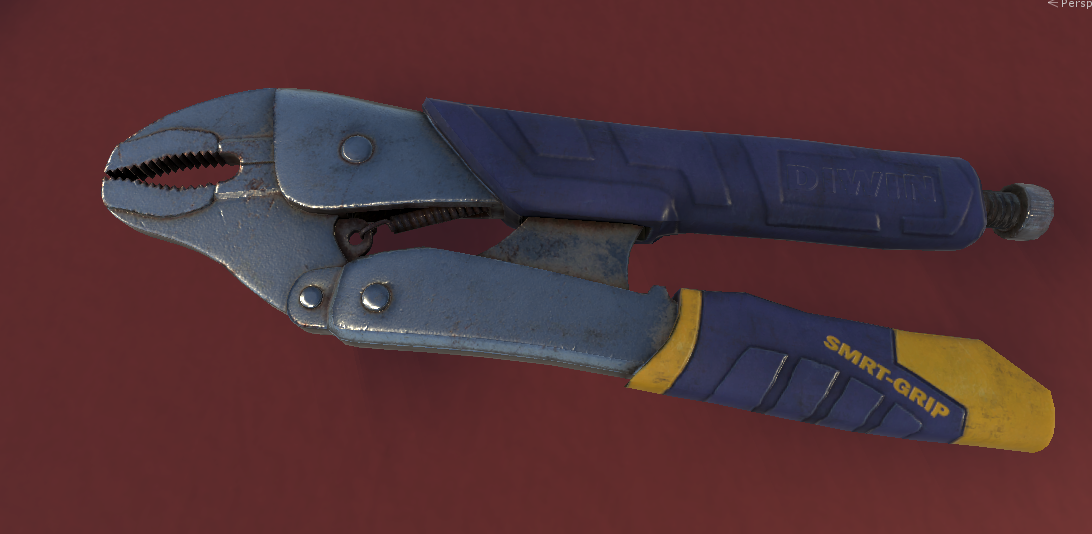
because i wanted higher closer resolution in my shadows in order to avoid using contact shadows (which fade out at screen edges if you have not noticed yet, making them not so hot)....
iron hollow
 quasi mulch
you can see the ugly join
dawn sorrel
probably the reason why epic depends so much on distance field shadows tbh, even on vanilla ps4
iron hollow
unreal: https://i.imgur.com/OYcqrdI.png
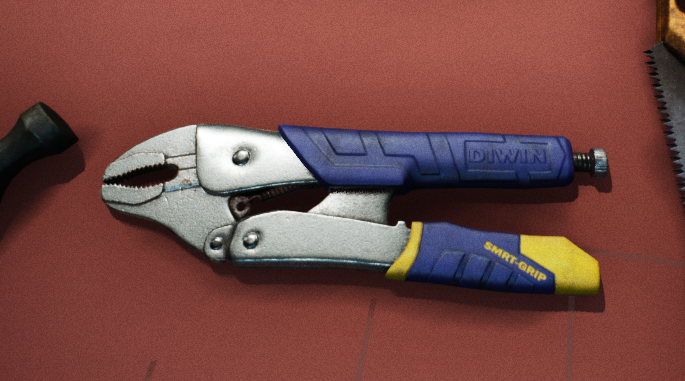


you can argue the lighting isn't the same
but the amount of shadow should be ;p
quasi mulch
not bothered about pbr accuracy tbh
I don't actually know of any games AAA wise that are all PBR accurate
i dont care if there are minor issues
quasi mulch
in HZD (again) they make the admission that half of it isn't really totally correct but the game is stylised anyway
dawn sorrel
well, even movies aren't always pbr accurate, even with all that rendering power
iron man suit was non-pbr
quasi mulch
yeah true
it'd be black at night with little white spots
hardly fun
or just completely weird
indigo summit
the director : you know, just make it looks good!
quasi mulch
same for game directors too
indigo summit
yeap
and then we starting getting to this phase
Director : it's looks great and everything, but why the fps are slow!?
quasi mulch
lol
turbid matrix
yeah, I wouldn't say it's nicer there at all
oh, this was scrolled back again (was replying for ue4 shadows)
quasi mulch
Unity Forum
[ATTACH]
Please :)
Would solve every shadow problem I have in my open world game. Inside, I only need first 3 cascades anyway.
I used a dir light...
Currently there is no smooth blending across cascades for me, but if someone else could test?
it would be perfect then and I would require no fancy hacks.
quasi mulch
unity confirmed that improvement is on the way. finally cascades will be worth using
might even be able to use 3 in some cases
iron hollow
that's good
quasi mulch
this has been a thorn in my side for too long
now......... magnum GI
witness as tom selleck retro particles bounce from surface to surface
iron hollow
And Higgens sends the shadow hounds after it?
quasi mulch
I managed to dig it out you can fade between the borders how you'd like
just tweak it for your scenaio I suppose
it actually looks like magic
true zealot
as in it doesn't look horrid 😛
true zealot
I do wonder why it couldn't just be done in general
quasi mulch
dunno i'd only blow it on contact shadows and other nonsense trying to disguise it
(whatever perf it cost)
quasi mulch
played a lot with it
its good enough to shut me up (tm)
it costs in fill rate I guess
it controls how much overlap as far as I can tell
decided to tweak first and second cascade overlap, and this is sufficient, i can ignore thre rest
all happy
iron hollow
so that's in 2019.1 HDRP?
quasi mulch
yep
current, just go to debug and fish it out
I just needed to know it was there, and his post implied it was so I went rooting for it :P
if olento can, I can :P
anyway it's really nice
no more cut effect if you know what i mean
it tapers together
iron hollow
oh it's hidden behind the debug toggle? :\
quasi mulch
yeah inside hdrp asset, under debug you can pick hdshadow asset from an exposed arrray, and double click that. then use some sliders like jimi hendrix
well input drag :P
iron hollow
hehe
quasi mulch
you know what i'm on about next don't you?
GI of course.
blending prebaked ones seems fun
iron hollow
there's a debug setting for that too?
quasi mulch
i wish :P
iron hollow
😛
quasi mulch
enlighten is a bit buggy I think
dawn sorrel
Is there a known workaround to have transparent objects receiving dynamic shadows?
 scarlet hull
In what RP do you want to do this, because in HDRP it works out of the box.
quasi mulch
if you do not need transparent behind transparent then render them opaque but grabpass existing buffer
but render in later pass
so it's technically opaque then but pretending to be transparent
quasi mulch
Its the 4th of april, which is like independence day for raytracing or something
4th of april, democratizing raytracing day
 faint kraken
GitHub
Contribute to Unity-Technologies/Unity-Experimental-DXR development by creating an account on GitHub.
scarlet hull
yes ?
indigo summit
@scarlet hull in 6.6.1 HDRP Exposure are giving me this error when switching to anything other than fixed
Compute shader (Exposure): Property (_InputTexture) at kernel index (2) has mismatching texture dimension (expected 2, got 5)
Ow, that's bad ... We have a lot of issues with this version and It's hard to test everything. That's what the staging registry is for.
But thanks for reporting, I'll have a check.
indigo summit
it was working fine in 6.2.0
turbid matrix
It's been like that for a month or so in master
Yes
Probably broken somewhere between 6.4 and 6.6
scarlet hull
Bugfixes, but not enough -_-