#archived-hdrp
1 messages · Page 27 of 1
 iron hollow
 turbid matrix
yeah, official stance is to take it to the forums now
 elfin osprey
ok then wait until we have fixed our forum situation then please 😛
iron hollow
not that the feature request wasn't yelling your wishes into a bottomless well anyway ;p
 frigid cypress
also sometimes a feature request comes in that we already want to add so it goes unanswered for a while 😅
iron hollow
true hehe
turbid matrix
yeah, I put a long post there
never got any reply
some of those concerns have been addressed now tho
like, subgraph output node naming
that drove me nuts
(pun intended)
elfin osprey
for a start tho
 candid basin
just option to add a little note in your graph
elfin osprey
lets move this to #archived-shaders channel...
turbid matrix
isn't there something for that?
 carmine dune
is it possible to increase the number of (tube) lights in a scene?
 quasi mulch
Best way to get features is meet up with unity staff in real life.... then slide an unmarked brown envelope across the table.... Stuffed with cash
carmine dune
is that in response to my question?
iron hollow
nope. but might help if you explain what a 'tube' light is. Unity only supports point, spot, directional and area lights.
iron hollow
fancy. I hadn't heard that mentioned before
i didn't think HDRP had any light limits since it's either Deferred or Forward+
carmine dune
how do I set it to deferred rendering?
iron hollow
in the pipeline asset
you click it to get at the settings
Looked into HDRP/Lighting/LightLoop/LightLoop.cs. Seems like there's a maximum of 4 directional lights, 512 "punctual" lights (point or spot lights), and 64 area lights... on screen.
so i wonder which category tube falls in
area i would guess
carmine dune
yeah if those are the numbers, then area seems right
 fading rose
How could we create something similar to planar reflections in LWRP ?
The way reflections are applied, even when set as box, is not that great if someone is trying for a bit of realism while maintaining optimized performance.
carmine dune
so, is it possible to change that max number somehow?
fading rose
Yes, it is. You have to change some values in a script.
iron hollow
you could try. i don't know how deeply ingrained into the architecture it is
we got luckly on LWRP shadows ;p
but light count is something else. it could be hard coded into the shaders and everything
no way to know but to try
but if you need that many lights, i'd go to deferred
it's made for that
or use baking more
carmine dune
where do I find the values that I should tweak?
fading rose
@iron hollow I actually increased the amount of Direct lights too 😄
iron hollow
no idea, but i guess that quote has a place to start
he names the file where he found the limits
carmine dune
like that, or do I need to change it somewhere else as well?
carmine dune
2018.3.6f1
 indigo summit

GitHub
Contribute to UnityTechnologies/LWRPScriptableRenderPass_ExampleLibrary development by creating an account on GitHub.
fading rose
Thank you @indigo summit
indigo summit
cheers
iron hollow
@carmine dune https://i.imgur.com/34VWnQK.png
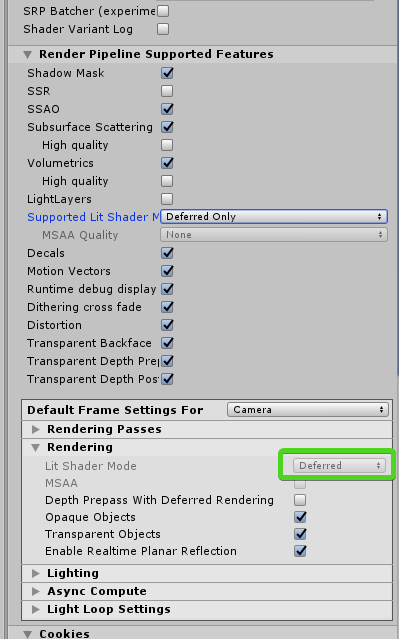
as long as you see deferred down there, you're good to go
if you choose both, you would set it there
carmine dune
alright, done that 👌
now the other thing, I found the file with the limits, would I just edit that file? (which I found in the program files of unity)
iron hollow
if you switched to deferred, the limits don't apply anymore
deferred allows unlimited lights
iron hollow
well it should. unless unity made a very funky version of deferred
whole point of deferred is unlimited lights
indigo summit
tube length? light intensity?
carmine dune
everything is set like it should (as far as I know)
indigo summit
those part got me once while trying to add light on daytime scene due HDRP using high exposure value
carmine dune
it definitely is not showing all lights and it's not the tubelength/light intensity that's wrong
iron hollow

Unity Technologies Blog
In a recent blog post, we introduced the concept of Scriptable Render Pipelines. In short, SRP allows developers to control how Unity renders a frame in C#...
well reading here, i maybe see why
HDRP comes with a new lighting architecture: It uses a hybrid Deferred / Forward – Tile / Cluster renderer. These words mean that it scales way better than built-in Unity rendering with the number of lights in the scene. This new lighting architecture is focused on performance.
seems it's not true Deferred
so i guess you could try modifying it, though I strongly recommend not doing that. LWRP maybe can get away with it, I doubt HDRP can. make sure you make a backup before trying.
it's probably a better idea to either bake the lights, use a different type of light, use emissive meshes, or just use fewer lights. within camera view.
carmine dune
yeah, I think I'm going to switch back to emissive meshes
kinda stupid since the reason I switched to hdrp was because of the tube lights
iron hollow

GitHub
Scriptable Render Pipeline. Contribute to Unity-Technologies/ScriptableRenderPipeline development by creating an account on GitHub.
this page also talks about the differences between forward and deferred as it relates to HDRP
it's not quite as clear cut as it used to be on legacy i see
turbid matrix
they could add to that page:
"shadergraph:
- fast on deferred
- sluggish on forward" 😄
(I'm joking, just discovered an issue with SG on HDRP's forward)
iron hollow
yeah i saw your posts about that heh
carmine dune
for some reason what I try to do seems to not be possible. The 'only' thing I want to do is being able to have good looking laser light rays
carmine dune
does that light surrounding objects?
iron hollow
if it's emissive it would yet
indigo summit
that light limit isn't per object limit?
iron hollow
though technically a laser doesn't light surrounding objects 😛
since the light is all directed forward 😛
indigo summit
and how many lights do you have on your scene actually?
carmine dune
probably around 100
indigo summit
all tubes?
carmine dune
yea
iron hollow
yeah there seems to be 64 light limit to area lights
carmine dune
iron hollow
you know in legacy area lights were baked only
so you'd have had to have used emission 😉
carmine dune
yeah I used emission on a 'beam mesh' before I found out about hdrp and the fact that hdrp had tube lights
iron hollow
was nice they added them but they are very costly, so i guess they limited them to be used in special circumstance where needed
iron hollow
well that's what i initially thought, that deferred should be unlimited
but they tried that and said it didn't work
carmine dune
as you can see from the screenshot I sent (every colors line on the left should be a working tube light on the right)
iron hollow
not sure that I see light coming from all those in your SS
hard to tell with the icon covering them
indigo summit
yeah tube light did that
on the edge of the tubes
it darker, so i guess the light tube are neon ish
not a capsule
lowering the range remove the artifact
indigo summit
ohh surprisingly this amount of light also work on forward
indigo summit
iron hollow
but question returns to why they can't get it to work in their project
indigo summit
judging from your screenshot and video the tube light specular did work
but it doesn't lit the area
seems you get the same artifact as i do when multiple light range are overlapping
carmine dune
what does "the tube light specular did work" mean?
indigo summit
the line reflection on the floor
carmine dune
how does it both "work" and "doesn't lit the area" at the same time? 🤔
iron hollow
yeah that looks like some kinid of bug
i'd report it so unity can fix it.

Unity
Unity is the ultimate game development platform. Use Unity to build high-quality 3D and 2D games, deploy them across mobile, desktop, VR/AR, consoles or the Web, and connect with loyal and enthusiastic players and customers.
HDRP is still in preview so it has some problems still
indigo summit
well realtime rendering are mostly smoke and mirror, we need to get better result using less 😄
carmine dune
that seems like a lot of work for a very slim chance of it getting fixed
indigo summit
depend
iron hollow
it has zero chance of being fixed if not reported
it's a serious issue actually so i'd say if they know about it, it has a very good chance of getting fixed.
indigo summit
as long as the problem are not in unity side but on SRP stuff, there's a chance it would be fixed on the next release
carmine dune
"it has zero chance of being fixed if not reported" that is very true
would this be "a problem with the unity editor"?
"how often does this happen?"
always?
those are some very vague questions
iron hollow
it's a problem with HDRP
carmine dune
the reporter doesn't have that option
turbid matrix
well
iron hollow
i hate forms like that, they never cover every possible thing
turbid matrix
we had discussion about this the other day
indigo summit
the light are not lit
turbid matrix
it's not clear Unity wants bugreports for HDRP, especially if it's not for released version
I've been told to not send them
indigo summit
well that's weird
iron hollow
lol i agree
carmine dune
that's very weird indeed
iron hollow
though i can see the wisdom if they think it's probably something they already fixed
turbid matrix
it could be something with me using their bleeding edge versions a lot tho :p
indigo summit
us : hey we found a bug. . .
them : keep it for your self
turbid matrix
I've spammed the reports on forums and here
iron hollow
might have to wait until it releases in 2019.3
turbid matrix
I dunno, it's been pretty snappy 😄
iron hollow
and see if it's still there, then report it 😛
carmine dune
nah, I'll report it now and if it's not appreciated/ignored then whatever
iron hollow
sounds like what I do :p
turbid matrix
they wont ignore it
iron hollow
either people listen to me or they don't
turbid matrix
@scarlet hull can you shed a light on this?
what's the preferred way to report HDRP issues today?
and when should one put official bug report?
I'm trying to find the old forum discussion but I've written so many messages on forums recently it's like finding a needle on a haystack
carmine dune
are bug reports public?
turbid matrix
ah I found the old discussion
the thing was to not report errors for packages on staging
so if you use package from package manager (without staging registry), that's fine I suppose
@carmine dune original reports are not unless you share the link (you shouldn't as it contains your details)
some issues go to public tracker and it's abstracted to not include your personal details
carmine dune
alright good to know, thank you 👍
turbid matrix
I wish I had better memory, this makes more sense now 😄
 alpine bluff
So, I haven’t forgotten my promise, @turbid matrix, but the person to ask was OoO today. But! In my reading through all the slack conversations that had piled up while I was on holiday, they did mention that bugs should be reported via the QA bug reporter, so it goes to our internal bug handling tool.
So I reckon that you’re right - the message would probably have been about staging packages, not promoted ones.
turbid matrix
@alpine bluff yeah it makes more sense now
sorry for confusion 😃
I've been so much on the wip side and have horrible memory so I mixed it so it eventually meant the same thing on my head
carmine dune
wow 'uploading the report' takes forever
carmine dune
uhm, I can try
 split cobalt
@carmine dune DM please?
turbid matrix
you need to read #📖┃code-of-conduct
stop for second to think what channel would be the most appropriate place to ask your question
ask it only there
split cobalt
okay sorry
turbid matrix
don't tag random users from multiple channels to solve your issue
split cobalt
you mean #↕️┃editor-extensions right?
turbid matrix
no, that's for writing custom editor scripts
turbid matrix
your issue would go into #💻┃code-beginner if it's code issue, or #💻┃unity-talk if it's some generic thing
alpine bluff
@turbid matrix - no worries. It was a fair question to ask.
 dawn sorrel
I've had this problem for a while now and am at a loss on how to fix it, with a deadline fast approaching
All of my HDRP assets are invisible in the editor
No clue why
Here's an example of an asset
 true zealot
I can't remember what it looks like if you don't have a render pipeline asset assigned
but make sure you do
dawn sorrel
Yeah it says it is
Right here ^
I'm also set to forward VR single-pass stereo rendering
dawn sorrel
Maybe Unity 2019.2.0a9 doesn't work with HDRP?
turbid matrix
it definitely works with HDRP
but, you should really use 6.x.x on 2019.2
(yet there's no promoted 6.x.x version so it doesn't normally show up in your package manager
but 5.10 works on 2019.2 atm too
dawn sorrel
Hmm
Really wish I knew why this is happening lol
If I create a new Cube it's also invisible
turbid matrix
going to ask the stupid question if you entered the play mode?
also which HDRP version are you running there?
dawn sorrel
Yes, and preview 5.10.0
turbid matrix
5.10 ran for me on 2019.2.0a9 the other day when I tested it
dawn sorrel
I'm only getting one error but I have been for a while
turbid matrix
"only" 😄
dawn sorrel
```C:\buildslave\unity\build\Runtime\Jobs\Managed\IJobParallelFor.cs(30,13): error: Internal compiler error while processing function System.Void Unity.Entities.GatherChunks::Execute(System.Int32)
While processing function Unity.Jobs.IJobParallelForExtensions+ParallelForJobStruct1[[Unity.Entities.GatherChunks, Unity.Entities, Version=0.0.0.0, Culture=neutral, PublicKeyToken=null]], UnityEngine.CoreModule, Version=0.0.0.0, Culture=neutral, PublicKeyToken=null::Execute(Unity.Entities.GatherChunks&, Unity.Entities, Version=0.0.0.0, Culture=neutral, PublicKeyToken=null|System.IntPtr, mscorlib, Version=2.0.0.0, Culture=neutral, PublicKeyToken=b77a5c561934e089|System.IntPtr, mscorlib, Version=2.0.0.0, Culture=neutral, PublicKeyToken=b77a5c561934e089|Unity.Jobs.LowLevel.Unsafe.JobRanges&, UnityEngine.CoreModule, Version=0.0.0.0, Culture=neutral, PublicKeyToken=null|System.Int32, mscorlib, Version=2.0.0.0, Culture=neutral, PublicKeyToken=b77a5c561934e089)`
While compiling job: System.Void Unity.Jobs.IJobParallelForExtensions/ParallelForJobStruct`1<Unity.Entities.GatherChunks>::Execute(T&,System.IntPtr,System.IntPtr,Unity.Jobs.LowLevel.Unsafe.JobRanges&,System.Int32)
Compiler exception: Burst.Compiler.IL.Syntax.BuilderException: Internal compiler error while processing function System.Void Unity.Entities.GatherChunks::Execute(System.Int32) ---> Burst.Compiler.IL.CompilerException: Unexpected exception while trying to compile function System.Void* Unity.Collections.LowLevel.Unsafe.NativeArrayUnsafeUtility::GetUnsafePtr(Unity.Collections.NativeArray1<T>)` ---> System.StackOverflowException: The requested operation caused a stack overflow.```
turbid matrix
you can probably fix that by updating your ecs setup
 leaden isle
Hello guys,
Currently, I have problems with the LWRP (5.10) and terrain rendering on mobile (Metal and Vulkan). In editor I can see the terrain but I get always the message that there is no details shader found for my render pipeline. This has the effect of not seeing details on the terrain. But in the devices which render with Metal or Vulkan the terrain is not drawn at all. Does somebody is experiencing the same?
 scarlet hull
@carmine dune @turbid matrix : What's happening is probably that you're hitting and other hard limit : maximum of 24 lights can lit a single tile on screen. So even if you can have (can't remember ne correct number) 50 tube lights (those are indeed area lights btw) on the screen, if they all have big range that overlap, the issue you showed will appear, because some tiles will reject lights after the 24 limit is attained.
So sorry, it's not a bug, but a limitation 😦
carmine dune
ah, thanks for the info! So really there's no way to get the result I'm looking for without either: reducing the range; reducing the number of overlapping tube lights; using emissive materials instead of lights?
 north scarab
Hey guys! Anyone knows why volumetric fog doesn't work on my project? I tried to change all values but it's nowhere to be found. I'm using the HDRP
Also, does anyone have a ready to use Density Volume texture?
dawn sorrel
What would be the best way to control the order in which 3d objects are rendered?
 twin spire
Hello!
I would like to use TranformGizmos in runtime but they are just not showing in runtime, i'm using HDRP 4.10.0, i'm missing simething or just its not working correctly?
its working on a non hdrp normal project
scarlet hull
@carmine dune I don't know the finale rendering you're wanting to achieve, but I guess that the best would be to try to fake as much as possible. With transparent/additive line renderers maybe ?
@dawn sorrel Probably with the renderqueue
@twin spire What is this "TransformGizmo" you're talking about ?
dawn sorrel
all i want is my player and his gun to render above everything else, i will take a look at the render queue
twin spire
@scarlet hull https://www.youtube.com/watch?v=IUQqhS8tsNo
 carmine dune
yeah, I'm currently doing that rn 👍
twin spire
maybe my issue come from shader but the line shader are seems to correct in hdrp too but don't drawing
scarlet hull
@twin spire Didn't look in detail at the code, but it appears that this tool is using shaders aimed to work with the Built-In renderer, not HDRP. Thus why it doesn't show up.
@dawn sorrel This case is a specific issue that we plan to handle, and isn't as easy to solve, sadly...
dawn sorrel
@scarlet hull right now i was trying to use a two camera approach and that works with the player rendering above everything else but then it receives lights but not shadows, so now i feel like i hit a wall 😦
scarlet hull
Could be worth having a look on how it's done in the FPS Sample Project
GitHub
A first person multiplayer shooter example project in Unity - Unity-Technologies/FPSSample
 livid crag
@scarlet hull im having actually the same issue as @dawn sorrel
is there any way to solve it like in the fps-sample project when using the standard deferred render path in unity? ):
scarlet hull
I didn't have time to examine how it's done in the sample myself, so the best would be fore you to have a look there
livid crag
@scarlet hull
do you know if there is any blogpost regarding this solution by any chance? (:
dont have any space on my drive for the 18 GB project right now ):
scarlet hull
@twin spire I think I got the issue (no need to spam in #archived-shaders ) : The rendering is done with GL commands, in OnPostRender and this is simply not handled and all in HDRP
twin spire
@scarlet hull post removed from shaders, thanks, maybe can i do something?
twin spire
@scarlet hull i changed to OnDrawGizmos the OnPostRender and now its working
scarlet hull
But this method will probably not work in a build
twin spire
i'm making a build now than we will see, no other way to get this work?
its not working in build
carmine dune
is it possible to make a bright blue not get a purple color?
all the other colors make the center white, except for blue
scarlet hull
I tested, and on my side it's the default tonemapping that does this
It's an expected behaviour of the ACES setting in the tonemapper
carmine dune
I’m not really sure what all of that means :S
 primal jacinth
What's your tonemapper set to in your post-process settings?
carmine dune
ah, yes ACES
primal jacinth
Switching to Neutral should help
scarlet hull
@twin spire Sadly, I think it will not be easy to convert this to work with HDRP. You should better find an other way to manage your in-game handles. Maybe with meshes ?
carmine dune
ahh, yes it does, thanks @scarlet hull and @primal jacinth
twin spire
@scarlet hull alright, thank you, i thinked about to replace the lines with a cilynder mesh i will try to create it later
fading rose
LWRP 4.10 2018.3
maybe this is a better channel for this question.
While Real Time reflection was working fine, I started seeing this message. Any idea what may have happened?
quasi mulch
If it is realtime, the slice option may not be available any more so get a ref to the probe and call bake. In older HDRP the functionality was not present, but I cannot be sure about LWRP.
fading rose
It was working just fine until a day back. But after enabling a second one, it turned black and this message started showing. Disabling the second one does not change it.
quasi mulch
create a new scene with two probes, one box
fiddle about
if updating LWRP is an option then it would be a good idea to jump to 5.10, which is a fair bit newer than 4.10.
what you have probbaly has a lot of bugs, it is not a release version after all
if showing preview packages in Package Manager does not reveal a newer version then you will not be able to upgrade until your version of unity is upgraded
fading rose
yeah there is no higher version than this for 18.3. But it was working just fine... 😦 Will roll back to .9 and see what happens.
quasi mulch
It's rough for those of us who are developing against something unfinished
fading rose
probably something I changed somewhere. doesn't make any other sense. It was working fine.
Interesting. It doesn't work even as baked.
quasi mulch
You tried play mode or just editor so far?
north scarab
Hey guys, anyone knows why Mirror has problems with the HDRP?
My player won't work right after upgrading to HDRP
fading rose
both i think I will delete the cache and see maybe that fixes it.
quasi mulch
By mirror, do you mean the network thing?
north scarab
Yep
quasi mulch
I suggest restarting the editor
otherwise mirror should use a namespace. If it doesn't tell mirror to use a namespace.
north scarab
I tried it, @quasi mulch, but it didn't help.
quasi mulch
what is the error in the console (there likely are a few)
And was HDRP already present or are you grafting all this on just now?
turbid matrix

GitHub
Purpose of this PR
Added the 2D renderer, which implements a 2D lighting system.
Most of this PR are purely additions, but a few LWRP files were touched slightly too, mainly to give our renderer t...
^ merged now in master
fading rose
Great! I am not into 2D games but I always wondered why this was not possible.
@quasi mulch I deleted the package folder from the cache and restarted the editor. Real time reflections worked fine, but after I hit play they stopped... 😦
How do I make real time reflections rotate along with the object they are attached to?
As it is now it is a bit problematic. i.e. a guy sitting in front of a mirror, rotates along with the mirror but the reflections react erroneously.
north scarab
@quasi mulch The problem is this (sending pic). I also upgraded from 2019.2a7 to a9
quasi mulch
try clearing the console
(clear on play and error pause are the buttons that should be enabled by default tbh)
north scarab
Yeah, I tried
that's the only error that pops up
Ok, it seems like if I disable the vertical mouse clamping the problem goes away
but it's not a fix for sure
quasi mulch
this is a problem with your assets not HDRP though
did you also change unity version?
actual error
its not even running man
I don't think mirror is any good but that's not a render pipeline question so try fixing those errors in other channels and forum first
north scarab
@quasi mulch that problem is older (sorry). Mirror's working, now.
this is the current log
UnityEngine.Transform:set_localRotation(Quaternion)
BarrarosaShooter.FirstPersonCharacter.MouseLook:LookRotation(Transform, Transform)
BarrarosaShooter.FirstPersonCharacter.FirstPersonController:RotateView()
BarrarosaShooter.FirstPersonCharacter.FirstPersonController:Update()
perhaps try #💻┃code-beginner for that one :)
north scarab
Ok, thanks :)
quasi mulch
I am looking forward to the next release of HDRP.
dawn sorrel
So, I still can't find a fix for all materials not being visible, so I guess I'm going to try downgrading Unity versions. But usually when I do this it breaks prefab connections. Is there a way around this? I'm also worried that the implementations of packages will break since they are all more recent than the older versions
turbid matrix
fix all errors first
 carmine ermine
Hello,
Will there be support for decals in LWRP ?
 inland ferry
As far as I know. That is not planned. But from what I understand it is not too hard to implement your self.
inland ferry
I could use a bit of help figuring out which pipeline would be best for what I want. I am targeting pc/console /switch. It's pretty stylized art style.
No real need for PBR stuff. So I feel like HDRP would be overkill for what I need and just make it not run as well. But I really, really like the volumetric fog it offers.
LWRP seems okay, but I keep hearing it is lacking features. But I can't figure out what features I would be missing if I was using it.
So maybe the default render pipeline?
turbid matrix
why HDRP is overkill?
inland ferry
It seems like it has a much of things that I would not be using at all.
But I'm not quite sure because it is not clear what all it does and doesn't do.
Also, using HDRP seems like it could make it hard/not possible to port to switch in the future. But I could be wrong about all this. I don't know a lot about the rendering side of things.
quasi mulch
OK fair enough
decals in LWRP could possibly made to work using @elfin osprey https://github.com/Kink3d/kDecals - but please don't consider this official, it's just a staff member's own work going on.
Perhaps it could serve as inspiration for LWRP decals?

GitHub
A forward projector Decal system for Unity. Contribute to Kink3d/kDecals development by creating an account on GitHub.
elfin osprey
Now that scriptable render pass architecture is in, this will totally work now. I just havent got around to it yet.
quasi mulch
Seems like such a clean and meaty codebase like that would see some great use eventually
turbid matrix
well, this didn't last long 😄 https://github.com/Unity-Technologies/ScriptableRenderPipeline/commit/2f507eaaaefc10e7072771ad60097bec44523c73

GitHub
This reverts commit 1836bcd465d08bd7c504a82aec574ea65fb8f892.
turbid matrix
GitHub
Scriptable Render Pipeline. Contribute to Unity-Technologies/ScriptableRenderPipeline development by creating an account on GitHub.
last commit from Feb 22
iron hollow
what is a PBR sky exactly?
turbid matrix
new better sky setup
iron hollow
it's not like the sky needs metallic qualities ;p
PBR just sounds like the wrong term
iron hollow
so basically like a HDR sky but procedural?
turbid matrix
well, there's procedural sky already 😄
but it's the old unity sky setup ported to HDRP
iron hollow
ok, soooo then what's new
turbid matrix
they don't like the old implementation
so, I'm guessing the new one will be more physically correct :p
iron hollow
fair enough i guess hehe
turbid matrix
I'm mostly curious if they do any cloud tech in this
there isn't any code for such yet
quasi mulch
I was just being playful, but yes a correctly hdr calibrated procedural skybox render would be nice - currently I disable the sun disc and really, I probably don't want their clouds either, I'm enjoying using billboards at the moment to control how things look. But I wouldn't say no to a nice solution.
There's a very very nice solution for builtin renderer right now - https://forum.unity.com/threads/overcloud-volumetric-sky-and-lighting.650248

Unity Forum
[IMG]
Hi there!
I'm making this thread for my volumetric sky plugin, OverCloud, which is a complete lighting and sky solution for Unity's default...
I think that'll end up being the best for builtin. You don't get much control over cloud placement but you do get high perf and it apparently will work with everything in builtin land including VR.
observes @iron hollow reaching for asset store
iron hollow
yeah i saw that in the top items list today
quasi mulch
it is nice innit?
quasi mulch
I have UNDERCLOUD which means I can't see any and my sky is rubbish :P
iron hollow
well as i said before I have Envrio, and i think it does a nice job with teh sky and clouds
but still waiting on HDRP support
quasi mulch
What techniques does Enviro use? I haven't ever poked it I don't think
iron hollow
we talked about it once, and came to the conclusion it uses some type of volumetric cloud
rest is just unity procedural sky stuff
iron hollow
so yeah i'm curious what changes they may make
quasi mulch
Looks nice, can they intersect geometry?
quasi mulch
Like a castle on the side of a crumbling cliff
iron hollow
oh sure, don't see why not
quasi mulch
can you fly through them?
and hows perf?
sorry for Qs
I'd give this a go and even help the author dev it if he plans HDRP
might be a huge time saver
iron hollow
i don't know about flying

Enviro - Sky and Weather for Unity 5.6+ Enviro - The complete dynamic AAA sky and weather solution! https://www.assetstore.unity3d.com/en/#!/content/33963 As...
quasi mulch
thing is, it's suspiciously cheap
iron hollow
i mean in the video they have fog
i am not sure if that's based on the same thing or not
but i'm pretty sure it's not meant for flying simulators
quasi mulch
Right yeah no worries, I did want to be able to be above or below and can happy endure fading in fog inside
quasi mulch
Seems like this one flew right over my head :P
iron hollow
but generally that kind of thing is specialized, so i don't tend to expect it
the ones ive seen that do work, are ridiculously expensive to render.
quasi mulch
Yep not a deal breaker by any means
quasi mulch
seems a bit heavy though with all this extra cruft like networking
iron hollow
rain that doesn't fall inside houses 😛
quasi mulch
That's one reason I still use shuriken alongside vfx, for situations I need runtime collision handling. Kind of scares me since I wonder if shuriken will get an update for the new collider types in dots...
iron hollow
hmm good question
quasi mulch
so shuriken does my rain and collidery things. I know VFX can use primitives or expose variables but collision with general world is not its thing
(if dynamic world or big world)
 glad tartan
Depth Collision would work for some situations with VFX Graph particles
quasi mulch
The depth collision - do you know if it is generated per frame or using the existing prepass/depth buffer?
That sort of thing is excellent for sparks or localised effect, not so much for rain still
iron hollow
well that's why i'm not super excited about ECS yet. it seems like it's years away from having everything it needs to be really viable
quasi mulch
true yes
glad tartan
that I'm actually not sure of
iron hollow
well depends how much of the engine you want to write yourself 😛
quasi mulch
but if it uses the existing depth buffer that's already rendered for collision then it's more than suitable for a great number of effects locally, but rain needs very clear definition where it can fall even off screen where there is no depth buffer, so shuriken lives on longer :)
We can use both so its good. I only hope Unity Physics and Havok Physics collider representations are going to be compatible with shuriken going forward (I see no logic why not)
glad tartan
Yea, Shuriken will be here for a while
quasi mulch
Else we would all suffer with gpu readback latency
"wait a minute while I wait for the gpu to finish what it's doing first ... then maybe I'll send you information if this patiently paused raindrop should splash or not"
yeah dots needs a LOT of extra work
turbid matrix
enviro dev has HDRP version on the works
I have wip HDRP version of older enviro
but it would be nice to have something like this built-in
as it's kinda thing many games need
more games need clouds and nice sky rather than volumetrics for example

GitHub
Purpose of this PR
Objects rendered during the AfterPostProcess pass while TAA is enabled will no longer use the jittered projection matrix. In order to avoid jittering around depth tested edges, t...
iron hollow
that's amazing, I consiered taking a video of something i saw in Metro Exodus
there were these glasses on the bar on the moving train
and I noticed as the train swayed, the glasses seemed to deform in a funny fashion
thing was it was only the glasses, nothing else
and i was thinking to myself it was probably caused by motion vectors or postprocessing
i wonder if that's something similar
i should have made that video
might can go back some chapters and do it
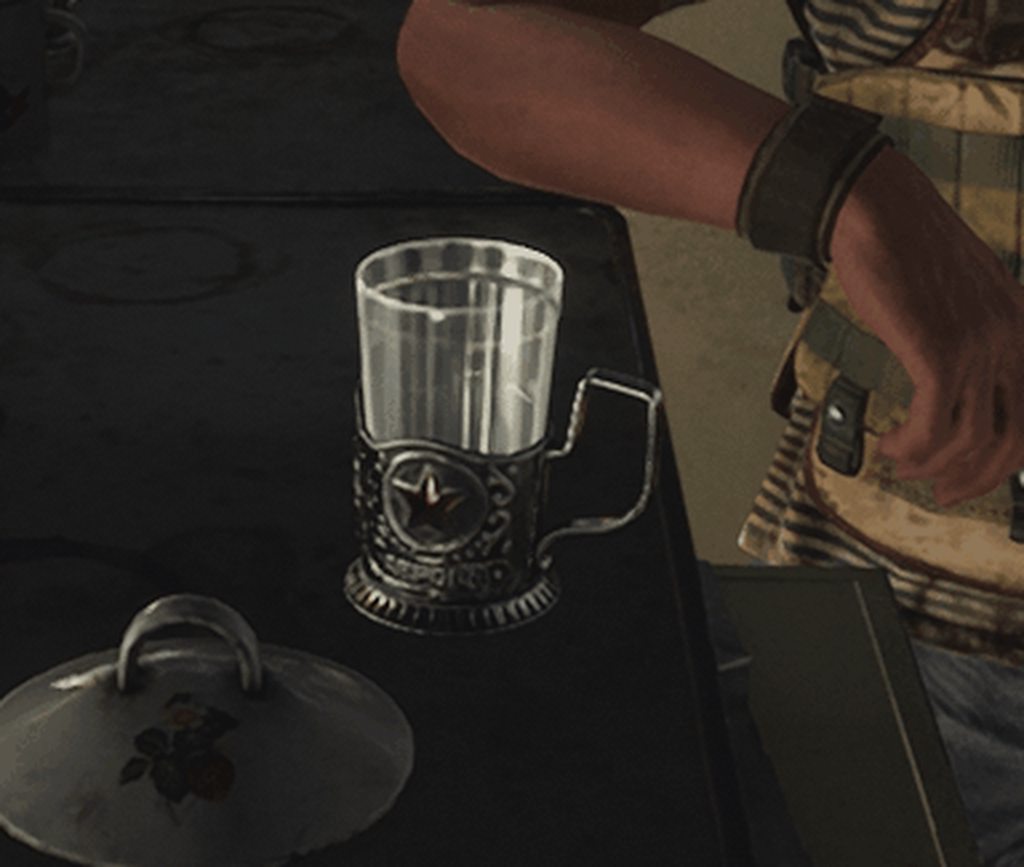
when I clip out most of the scene it doesn't seem as bad, but you can see the train moving and the glass kind of not moving with it lol
makes the glass kind of look like it's made of jello
 thorn lodge
or the glass really is made of jello.
It's after the apocalypse maybe they have to make all cups out of stiff jello now
iron hollow
lol
metro exodus has a lot of little problems like this, I saw bad shadow bias in one scene
hair z fhighting with the head or window in another
and there was a level in a swamp that showed classic issues with using SSR with large bodies of water
 mighty swift
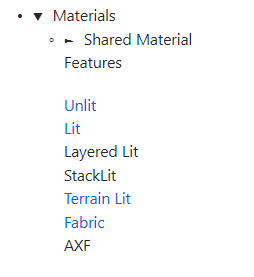
So... I know that we're supposed to use either Lit or Unlit for HDRP... although I've seen a Unity talk that said PBR is also supported as an HDRP Shader Graph base. My game's not shader bound so it doesn't matter for me... but does anyone know of good pros/cons for using PBR instead of Lit?
PBR obviously has fewer options, but, if it does everything you need, is it a good idea to use it versus just using Lit all the time and just turning everything cool off?
 mighty swift
Yeah that was part of why I ignored it until now.
But if you make one, it'll work. (Sometimes get a compiler error but it works regardless.)
iron hollow
so you mean through shadergraph
mighty swift
And I saw a Shader Graph talk where they said there's three bases.
Yes.
One second I'll dig up the talk.
mighty swift

Shader Graph lets you create beautiful shaders visually, with a node-based workflow. This talk covers what happens under the hood, shares tips to avoid commo...
turbid matrix
you can use them for both LWRP and HDRP
iron hollow
if you make your own shader, it's what you have to use
there's no other lit choice
other than that super mega thing olento linked to 😉
oh that's not the blog post
on the blog, it's the Lit AF node
turbid matrix
I also didn't link anything now 😄
iron hollow
oop hehe

Unity Technologies Blog
With the release of 2018.3, Shader Graph introduces a new Master Node for the High Definition Render Pipeline (HDRP). This new Master Node (called Lit Mast...
they added the lit master node later, it's the one with all the candy
but yeah you should just use whatever you need. in the end it doesn't matter
if you don't need all the fancy stuff, no sense using that node
turbid matrix
like I said PBR and regular Unlit graphs work for both SRPs
HD Lit and HD Unlit only work for HDRP
latter have few additional things
especially HD Lit Master is fancy
iron hollow
yeah
mighty swift
The question was more like "Has anyone seen a good reason, besides compatibility with LWRP, to use the PBR node versus just the bare-minimum settings on the Lit node"?
turbid matrix
if you don't need anything from HD Lit Master, then nope
but if I remember right, PBR graph doesn't support instancing
so that's a reason alone for many
HD Lit Master does
iron hollow
i'd use it so i don't have a lot of shader overhead for stuff i'm not using
mighty swift
Nope I'm pretty sure it does support instancing.
 stoic depot
Hey, I've been trying to run the Megacity Demo
Just to poke around and all that
and I'm getting an error I don't think I should be getting
I have the HDRP installed, and when I try to install the SRP Libraries package it throws up even more errors
mighty swift
You shouldn't need to include SRP. HDRP brings those dependencies in.
stoic depot
I thought that as well
mighty swift
Their UI could explain that a little better.
stoic depot
I did end up uninstalling it
mighty swift
Which editor version are you using?
stoic depot
2019.1 b9
stoic depot
It's just weird that all it's missing is Unity.Rendering
how could a namespace like that be gone?
mighty swift
I don't understand the question?
turbid matrix
@stoic depot megacity sample is already configured right out of the box
it included rendering.hybrid package
stoic depot
ah that's missing
turbid matrix
{
  "dependencies": {
    "com.autodesk.fbx": "2.0.0-preview.6",
    "com.unity.audio.megacityprototype": "0.0.1-preview.3",
    "com.unity.burst": "1.0.0-preview.6",
    "com.unity.cinemachine": "2.3.3",
    "com.unity.entities": "0.0.12-preview.29",
    "com.unity.jobs": "0.0.7-preview.8",
    "com.unity.mathematics": "1.0.0-preview.1",
    "com.unity.package-manager-ui": "2.1.1",
    "com.unity.render-pipelines.core": "5.8.2",
    "com.unity.render-pipelines.high-definition": "5.8.2-preview",
    "com.unity.rendering.hybrid": "0.0.1-preview.9",
    "com.unity.shadergraph": "5.8.2",
    "com.unity.timeline": "1.0.0",
"com.unity.xr.legacyinputhelpers": "1.0.0",```well, it's not really missing unless you removed it
mighty swift
Ah I'm guessing you accidentally delete the Packages manifest file.
stoic depot
like I took a bland scene and copied all the stuff from the zip and just kinda kept adding the missing packages
so I guess lol
mighty swift
Nonono
You just open up the zip as a project
You don't make an empty project. It is a project.
stoic depot
oh
lol
this is my second crack at it and it's still wrong
last time I put the assets only into a 2018.3 unity project
my FPS cried
turbid matrix
basically easiest to just unzip it somewhere, then open it with Unity Hub
stoic depot
ah
turbid matrix
make sure hub opens it with 2019.1.0b9 on the first run
mighty swift
In Unity, a "Project" is the folder that contains the /Assets/ folder (and the other folders)
turbid matrix
tbh, if you haven't used Unity before, looking around megacity project will not tell you much 😃
stoic depot
I'm kinda comfortable with Unity, I just wanted to understand the ECS system
also the shader graph examples are pretty good
I love the mask map setup for smoothness and albedo
 lunar stirrup
I'm getting a weird issue when I build my game with the HDRP
mighty swift
What issue @lunar stirrup ?
lunar stirrup
oh ye forgot to paste part of the log xD
  at (wrapper managed-to-native) UnityEngine.ComputeShader.FindKernel(UnityEngine.ComputeShader,string)
at UnityEngine.Experimental.Rendering.GPUCopy..ctor (UnityEngine.ComputeShader shader) [0x0000f] in G:\UniUnityWork\Dissertation\Library\PackageCache\com.unity.render-pipelines.high-definition@4.10.0-preview\Runtime\Core\CoreResources\GPUCopy.cs:16 ```UI comes up fine but anything using the pipeline is broken :/
attempting to reimport all the materials
oopps
seems the HDRP needed reimporting
mighty swift
Yeah a lot of these issues are "delete your library folder and let Unity rebuild everything" things.
iron hollow
I had that when my shadergraph and HDRP weren't the same version
make sure all your packages are matching versions
glad tartan
PBR Sky getting some updates again
quasi mulch
I think i've finally given up on unity's realtime GI
its good for smaller scenarios I guess
occlusion probes could be super interesting though
dawn sorrel
Isn't SRP core api and render graph fundamentally does the same thing. So whats the difference? Both extend the rendering pipeline.
One is definitely programmers vs artists.
Any other difference??
true zealot
I assume it's the same deal as shadergraph or VFX graph. You can do these things already in code, but making a UI for them enables their ease of use and expands the demographics of people utilising that sort of content
Also can serve as a launching off point for programmers in some cases
 remote forge
A render graph allows you to in a (programatic) way track resource usages and dependencies. It allows recycling of render textures, memory aliasing, and barrier insertion into rendering. A render graph isn't a graph like shader graph or vfx where a user hooks things together; it's a graph in the data structure sense where you have a tree of dependencies and connectors. You still program the rendering with code, not via UI.
true zealot
Well I'm definitely making a UI version then 
dawn sorrel
Thanks for info @remote forge
turbid matrix
hmmm, the HDRP LOD bug still exists on latest master
should probably try it with brand new scene
but this time I checked it breaks the lod transitions on both forward and deferred only settings
looking at the github, there's only the upcoming lod bias thing and old https://github.com/Unity-Technologies/ScriptableRenderPipeline/commits/lod_transition_update
GitHub
Scriptable Render Pipeline. Contribute to Unity-Technologies/ScriptableRenderPipeline development by creating an account on GitHub.
anyway, I'll do more detailed repro tries on this later on, see where it breaks
remote forge
@true zealot https://www.ea.com/frostbite/news/framegraph-extensible-rendering-architecture-in-frostbite

Electronic Arts Inc.
Talk by Yuriy O’Donnell at GDC 2017.
 merry island
Hi all. We are working on an AR project and decided to test the LWRP to see if we gain a performance boost.
After switching, most of of our shader where broken because most of them where custom shaders. Anyway, for the sake of quick testing, I replaced most of them with the Simple Lit shader in the LWRP shaders. After doing some profiling, it seems like instead of getting a boost, we got a decrease in performance. On all accounts: FPS, Draw Calls and memory.... any ideas as to what can be the problem?
dawn sorrel
@merry island Do you have any specific information? The performance decrease could literally be anything.
Also; what did your Custom Shaders do before?
merry island
What information are you looking for?
dawn sorrel
Screenshots, Videos, Profiler Data, etc
merry island
Basically simple stuff like diffuse and so on, just super light
dawn sorrel
Simple Lit is more complex than a Diffuse Shader
dawn sorrel
Yes, it does shadow calculations, etc
What exactly did your custom shaders do before? Just diffuse lighting? Shadows?
Baked Lighting?
merry island
This is one of our shader (all our custom shaders are created by amplify plugin)
merry island
We have a few veriasions of this shader, some with added normal map etc
Do you think recreation our custom shaders using shader graph (so it will support LWRP) will help?
dawn sorrel
Possibly; your shader doesnt look that complex. Also re-writing it in LWRP Libraries should be straightforward.
merry island
Ok. Thanks Andy. We will try to do that and see if we can get better results.
merry island
My discord is on my phone so it was faster 😅
quasi mulch
:D
So, I'm finding visual colour clipping with volumetric lighting in HDRP using R11G11B10 but I suspect it's because they have not got to tweaking volume code yet with that in mind
quasi mulch
@olento are you alive? questions abound
Anyway... not using enlighten realtime GI any more, but I am using HDRP's ambient gpu probe. What I next need to do though, is figure out a way to prevent that probe shading in areas like huts, buildings etc - it's primarily an outdoor probe after all.
(can't use any enlighten for this game scenario)
Any tips really welcome
mighty swift
So what changed your mind on realtime GI?
quasi mulch
Realtime GI is feasible based on the millisecs reported at GDC so yeah I'll take it.
When people talk about SEGI and think 16ms is acceptable for GI I think "what a bunch of idiots"
but when seasoned developers come forward with <1ms GI then, yes, I want it.
pretty logical really lol
Also, at least currently, GI is unusable performance hit with HDRP
even with a modest environment
with CPU set to low for it
mighty swift
So performance.
quasi mulch
Was seeing >50ms spikes every few frames as the sun moved, and yes I did stagger it
perf for realtime GI is great... if you are in a room or need very little detail
but in my case it was just too shitty looking at that point
mighty swift
Yeah.
quasi mulch
if you have no time of day but still need GI for example point light moving, then enlighten is fantastic
but when you move the directional light for time of day in open world, it is not feasible of course
mighty swift
Like I was saying last week -- I'd like ambient light volumes. :\ Let me control it. (That said I'm doing toon shading so I have an unusual advantage.)
quasi mulch
Naturally the dir light is going to hit every single system in enlighten
It's not got anywhere near the control I need exposed so I can't use it for this scenario
and if I don't update dir light contribution, then any building with windows will look day lit at night time inside
mighty swift
Yuuuup
quasi mulch
so that forces me to make proxy meshes to fake it...
anyway long story short I said "fuck it"
I'm pretty sure moving forward AAA won't use enlighten either
it's time is over
mighty swift
Depends on how quick raytracing can nip its ankles.
Raytracing for GI is sketchy though... multi-bounce.
quasi mulch
Well for me it's not just bounce but also occlusion, I mean HDRP is currently doing a good job with it's ambient dynamic probe but that's just for outdoors
now my main pain point is... how do I get rid of that indoors?
can't win
what did you go with?
mighty swift
Just the typical procedural sky... I bake it to something that looks good for morning/afternoon. I don't handle evening or night yet.
quasi mulch
the time of day thing is a pain. Part of me is wrestling with it's removal
then I can just go full baked and not care
mighty swift
It'd be fine for me if I can do my own ambient region by region.
So I'm just limiting the first milestone to not need it, and hope I can add it in later.
iron hollow
that's why most AAA games don't do day cycles
it's way too difficult to manage and keep things looking good
there's exceptions of course, like skyrim
indigo summit
i wonder how ubisoft did it though 🤔
post AC unity it seems they overhaul the GI system
and used on all of their engine
are they still rebake probe every frame ?
mighty swift
There's definitely ways to do it. The one people keep asking for, and I've seen a couple assets in the asset store do, is tween between lightmaps.
Wouldn't work in my case, though. GI is "not toon enough".
indigo summit
hmm ambient volume + local probe lighting might work i guess
mighty swift
Yeah ambient volumes is what I'd want.
indigo summit
at least if unity decide to add mesh proxy the proxy shape volume
right now it limited to box and sphere?
mighty swift
Control the fill lighting with script. Add a directional light for outdoors. Punctual lights accentuate. If I want to transition from one room to another, I could use a spot light with a cookie.
Proxy shape volumes won't work though...?
You mean adjusting the post-process, right?
indigo summit
not only post pro, but also for reflection probe
mighty swift
Problem with post process is it only affects how the viewer sees the lighting.
iron hollow
yeah their engines are specifically designed with that kind of lighting in mind
and unity is just missing some stuff that makes it really viable
case of jack of all trades, master of none
indigo summit
just want to make sure you are not talking about AC : Unity right? but Unity engine?
iron hollow
it does a little of everything but not one thing great
indigo summit
God that confusing
mighty swift
It's got to be confusing with Ubisoft, though, because they have like... what... four engines on the go?
iron hollow
they have one engine they keep making slight upgrades to then rebranding it
but don't be fooled, it's the same engine really heh
mighty swift
I was under the impression that's not the case.
iron hollow
it is, I worked with a group that made unpackers
only slight differences between pretty much all their games
all AC games, Rainbow 6, you name it
mighty swift
Yet Dunia is a fork of CryEngine o.O Others are not.
indigo summit
except Farcry and Division i think
iron hollow
farcry and ac do diverge a little
but not much
there's really no benefit to them to split their workflows up
why make 3 engines when 1 does it all
mighty swift
I mean they could use the same packing format to keep consistent for their artists... but that's like saying every engine that uses glTF is the same.
Or, to a lesser extent, FBX.
mighty swift
That's what I'm saying, it's weird, but they are.
iron hollow
what besides Dunia do they claim to have nowdays
mighty swift
There's also that one from the new game... crap
Main characters are Jade and that pig guy. I can't remember its name lol
iron hollow

Snowdrop is a proprietary game engine created by Ubisoft for use on Microsoft Windows, Nintendo Switch, PlayStation 4, and Xbox One. It was first revealed at E3 2013 with Tom Clancy's The Division, the first game using the engine.
mighty swift
Yeah Snowdrop too
iron hollow
i guess they claim The Division uses 'Snowdrop'
but sounds more like a build name
like Android uses "lolipop' etc
it's still android 😛
mighty swift
Beyond Good and Evil 2... that's what I was thinking of
mighty swift
And yeah they probably share asset pipelines, modules, etc.
indigo summit
Snowdrop seems a fork from anvil
iron hollow
like i know when they made Deus Ex: Mankind divided they called it one engine
mighty swift
But they're different forks and often started from different codebases AFAIK.
indigo summit
an old fork
iron hollow
then when they made Hitman (2016) they named it another engine
but it was the exact same engine in reality
i see it all the time
i think for hitman they called it Frostbite
i forget the name they used for Deus Ex
indigo summit
Frostbite is Dice's
mighty swift
Frostbite's also the basis of SEED, at least at the moment.
indigo summit
ah Glacier engine
iron hollow
Dawn engine they called it for MD
mighty swift
Hitman was not Frostbite.
iron hollow
yep
oh yeah they actually admit it here:
Mankind Divided runs on the Dawn Engine, a game engine designed for eighth-generation gaming hardware.[41] It was built on Glacier 2, an in-house engine created by IO Interactive.
Dawn is just a mod of Glacier 2
mighty swift
That also depends on how specific you want to be about "what makes the same game engine"
iron hollow
i'd really hate to see the code for these things
mighty swift
Like... is every web browser today the same engine?
iron hollow
they stack crap on top of crap over and over
indigo summit
oh btw isn't Frostbite also use enlighten?
iron hollow
'upgrading' it, until i bet it's an unholy mess
not sure, quite a few engines do
I know Neir: Automata's custom engine does
indigo summit
Electronic Arts Inc.
oint talk with DICE and Geomerics about real-time radiosity in Frostbite 2 using Enlighten.
mighty swift
Frostbite does use Enlighten, yes.
indigo summit
o yeah they did
mighty swift
Started with BF3. Frostbite and Unity were kinda the two big implementations of it.
mighty swift
It was the Johan Andersson engine.
iron hollow
was simpler when everyone just used either Unreal, 3Drealms or ID engines ;p
mighty swift
Who later moved to SEED, who later left EA entirely and is now working with Patrick Soderlund's indie team.
iron hollow
(may 3DRealms rest in peace)
mighty swift
Wasn't 3d Realms a fork of IDTech?
iron hollow
oh they are still kicking, i thought they were long dead

3D Realms
3D Realms is a publisher of bad-ass video games. Firepower Matters.
mighty swift
Nope. They sold IP to Gearbox to stay afloat. They're apparently now making a game in the original Quake engine
Going the indie route.
iron hollow
they still exist though
which is what i mean
the name lives on hehe
i find it annoying when i clearly show something exists and someone says 'nope' lol
mighty swift
Ah I guess 3D Realms did make their own Build engine. Hmm.
iron hollow
kind of a pet peeve of mine 😛
mighty swift
Oh you're talking about me.
I said "Nope." as in "Nope, you're right, they're not long dead."
iron hollow
oh ok
mighty swift
But yeah back on the topic of render pipelines lol.
It really would be nice to add my own fill light with volumes. "Anything in this region has a base light of <blah>"
mighty swift
It's just frustrating because I know what the base light should be lol.
I can emulate it with two rectangle lights, although that's a bit slow and it has some weird edge effects.
I could just make a box! Blah! :p
Good thing is all of these things can be done in userland with modern Unity (ex: scriptable render pipelines, editor scripts, etc.)
You just need to get enough funding to maintain an SRP lol
mighty swift
Several community SRPs made by volunteers (/crowdfunded) lol
iron hollow
yeah the inevitable forks because someone doesn't like something 😛
mighty swift
Well right now there is zero SRP available for toon. There are hacky ways to sort-of get certain effects on LWRP and HDRP, though.
iron hollow
yeah you can still use the old techniques
mighty swift
It was even mentioned on one of Unity's SRP talks -- I think GDC 2018?
iron hollow
but they dont' really touch the pipeline
mighty swift
Not really... a lot of the toon aesthetic involves changing the BSDF/BRDF
LWRP and HDRP are both PBR
The toon shading effect is often caused by shortening the gradient between lit and unlit, rather than smoothly transitioning via the dot product.
It looks like crap if you have too many lights, though, as in pretty much more than one.
But... that's toon.
You can still do things like outlines and stuff, though. That's just a geometry effect.
iron hollow
true
BRDF is still something I've not explored in writing shaders. it seems complicated to make your own
iron hollow
yeah i figured as much
i use Amplify/Shaderforge, and with those you can
but i ended up using one of their pre-defined BRDF nodes in the end
iron hollow
they have some basic stuff, like Phong, Lambert, etc
and a node that is a very close approximation of Unity's std lighting
but they use the customlightng feature of Surface shaders so you can modify it how you like.
which is what i ended up doing, i used standard as a base, and then worked in my anisotropic and Fresnel stuff along with some custom specular to make a silk/satin shader.
turbid matrix
this is slowly getting together https://github.com/Unity-Technologies/ScriptableRenderPipeline/commit/d05c239563e9dd52634629c7256c82373802f0e4


 quasi mulch
ST8 looking good.
what advantages are there for ST8 with this? I am hoping that it'll mean performance.
turbid matrix
I think they fixed the material setup
I don't really remember how ST7 was on Unity but it was a nightmare on UE4
they got tons of extra materials that did nothing
quasi mulch
ST7 in unity was just a standard GO with all the crap poured on top
+grotesquely generic shader
looks fine but it's not really anything that makes you care it was a speed tree object
turbid matrix
I kinda wonder why they don't do same setup as UE4 does
quasi mulch
Unity then or now?
turbid matrix
just add speedtree nodes in shader editor
quasi mulch
if it's then it's because nobody really worked on gfx much compared to now
turbid matrix
instead of making fully custom shaders
custom shaders just suck when you want to extend them
true zealot
You clearly haven't met my rocket powered trees
quasi mulch
only sticking point would be "how does it move" and "how shall we resolve SSS?"
any maybe bark :P
rocket powered trees?
now I'm inTREEgued :P
quasi mulch
duh so it takes longer to compile of course
turbid matrix
we got already tons of shader variants and that's slowing the compilation times
yes
quasi mulch
lol
true zealot
You'd hope it's on the cards to make a graph solution
quasi mulch
yeah now in 2019.2 we've improved compile times so you can make lunch AND go for a walk before it's done
true zealot
It does make a lot of sense
turbid matrix
if anything, I'd hope for some explanation what they do there that they couldn't have done on SG nodes
true zealot
Do they just drop support for the legacy pipes?
quasi mulch
I get it though in the nuclear future of dots, we will have immutable materials which are basically the shader for the job, so it will cut out most variants
turbid matrix
built-in got speedtree shaders already
also for ST8
I'm guessing they want the separate shaders so conversion setup works seamlessy
and tree imports
as they probably don't want to import shader graphs with the trees
quasi mulch
I get the impression Unity kind of has hit a wall with variants, and we saw this with terrain holes: they couldn't provide both the fast and slow path for terrain hole rendering without seriously impacting how long all this will take to build
I mean it get to a point where even optimisation might suffer a bit because they don't want more variants
turbid matrix
well, it's not really a wall
quasi mulch
they can't optimise it more, so
turbid matrix
building shaders takes way longer on UE4 and people still tolerate it 😄
quasi mulch
but they did make a commit
and that commit message mentioned not optimising one thing because it added just too many variants. So to me that signals a wall.
turbid matrix
it means they are aware it's a pain point
quasi mulch
but it also means terrain is shipping a bit slower than it could be :)
(re: holes in HDRP)
turbid matrix
in which case they need to carefully consider each addition, especially if it multiplies compilation for some reason
quasi mulch
depth prepass etc
turbid matrix
just use meshes 😄
btw, about the forum discussion
most of the AAA games still use baked setup
quasi mulch
yeah well the problem with consider carefully is you're making a decision due to the fact a) unity legacy material system is unpredictable shite so they have to do all the variants and b) choosing to be less optimal because the pain is at build time
They are not going to fix this without letting us describe precisely the options a material can have. If they do that, then we can ourselves, hint to shader compiler pipeline that perhaps we only need a handful of variations.
Not a problem for dots future, but an immediate problem outside dots, right now
turbid matrix
I kinda wonder about the Heretic demo too
if they used VXSM on it, it's still baked data despite them telling it ran on realtime lighting
so, maybe they didn't use it
or they just didn't consider it as such
quasi mulch
That reminds me, do you guys know how I can prevent the gpu-dynamic probe HDRP bakes for env from making my interiors look like they're basically outside? it's the only flaw with my lighting right now...
it's under ambient mode. setting this to dynamic means hdrp kindly and quickly bakes a probe for general purpose outdoor gi
the problem is it makes all my indoor environments have outdoor lighting :/
turbid matrix
I hacked something with the ambient probe on the occlusion probes
I have zero idea what I was doing with it, I just mirrored BOTD changes
quasi mulch
I got time of day though otherwise I'd just use lightprobes I guess
turbid matrix
but technically you do have access to BakedGI input now on HD Lit master node
so you could spoof things there
quasi mulch
but how?
what with?... what should I use?
local reflection probes?
it's a chin scratcher
remote forge
@quasi mulch The variant issues with Unity are caused by a few things, but the root issue comes down to legacy issues with how unity at it's very core is architected. Things can always be fixed but we have to make some tough decisions like: "Oh cool we can fix variants but it will literally break every existing Unity project" for some people that's like "fuck yes lets do it" but other people are like "I need to update between unity versions with minor pain". Ripping out a shader and material system and replacing it is a big pain to put people through even if there are massive gains.
The biggest issues are:
- In most game engines you have a type of rendering that happens (forward, deferred, clustered, tiled, lightmapped, GI, VR modes). But it's generally locked down for the whole game in Unity we often allow these settings to be changed per scene, or even per camera. What that means is that the base shaders have to support all those shader variants out of the box. So when you add this all up we start with a large number of shader variants just to support all the out of the box options Unity provides. We can do stripping here now (yay) but this happens during build time and content creators can still shoot themselves in the foot if they don't know what they are selecting. The Unity build pipeline also doesn't make it easy to do analysis here to tell people up front the variant cost. We can put it in the build report, but at that stage it's already taken a long time to build the project. The real solution here is to migrate engine level features into a new area of unity that can't be modified per scene or camera. On build this can be looked at and this would immediately reduce the number of variants included in the build + make it much harder for user to get variant explosion
-
No uber shaders. Right now we have the standard shader and lit shader. These are nice for users as they make things press button but they have so so many variants just by existing (max count for HDRP is something like 8Trillion due to exponential counts). In reality we should use the shader graph here and have simple well crafted and specific shaders for content.
-
This would leave just quality settings type stuff which could possibly remain variants or could be hard coded / stripped on a per platform basis (i.e. xbox renders like this, pc renders like _this).
true zealot
I'm big on change, but I know how badly change like that would go with the rest of the userbase
dawn sorrel
I think Joachim mentioned in a talk that Unity has plans of writing the entire engine on top of DOTS and also mentioned that you started with the rendering part of the engine.
My guess is if you write the core architecture on DOTS isn't that going to all the problems mentions in (1)? But I see DOTS is not production ready yet and the changes in the api might be a problem atleast atm.
But again it would not really solve problems of updating Unity for the existing projects.
turbid matrix
I'm actually huge fan of the flexibility to swap the renderer on the fly between forward and deferred
But right now HDRP's forward-only is good for both vr and desktop so it isnt as big of a deal like in say, ue4 where their forward renderer is so limited you'd main use it for vr
Engine devs often neglect devs who want to have additional vr mode on game that runs fine without as well
In ue4, people usually then just run vr in deferred due to this on such games (look at assetto corsa competizione for example) and miss only functional AA option for VR
In hdrp, you get the choise already, you want faster shader build times? Pick forward only or deferred only. Really need both? No problem either
Flexibility has always been Unity's strenght, would hate to see it go away step by step
glad tartan
Staging DXR is merged into master now. Guessing people can now use Raytracing?
turbid matrix
I dunno about that, it looked like just changes for the GDC demo
I wouldn't be surprised if it still missed some assembly like before
glad tartan
ah alright
turbid matrix
upcoming LWRP camera stacking: https://drive.google.com/file/d/1J8ChJIsAXdXdmOPtNF_FIqd9exYD0kql/view

Google Drive
mighty swift
@dawn sorrel Yeah. If "HPC#" is fast enough, then it would make sense for Unity to rearchitect the engine into modules and push that all out to user space. Those could be turned on, turned off, replaced with a homegrown solution, or bought from some Asset Store seller. Good example is particles: what if you want some data in a collision that Unity doesn't provide?
@glad tartan Experimental HDRP build on April 4th... so a little under a week from now.
Personally, I hope we can use RTX for 1) Mirrors of course but also 2) Hard shadows. I have a lot of high-frequency shadowcasters on a directional light. Rendering shadow maps is over half of my entire GPU load... and it's still not enough resolution to hide artifacts.
Maybe it's possible to find a cascade setup that hides it but... I haven't yet lol.
quasi mulch
@remote forge thanks for the insights, appreciate it a lot. Regarding HDRP (specifically the pain of it's forward compile times) do you think it will be possible to have a toggle which actually doesn't build the ubershader? we've never used the ubershader in full, and would happily just make small, tight graph variants, or will that just have no effect right now?
iron hollow
how do you know if you only need Deferrered only, or forward only, or both? is it still like in legacy where if you needed deferred, anything transparent was still done in forward, so you always needed both. or is it more complicated now?
can Deferred only still do transparency?
quasi mulch
in HDRP there is feature parity
iron hollow
I think I like it better when I only had to choose Forward or Deferred, and the rest sorted itself out
quasi mulch
it's a big plus of it
dawn sorrel
Wait....Isn't HPC# as fast as c++ in its current state? @mighty swift
iron hollow
if Forward and Deferred both have the same features, why would you ever choose "both"?
quasi mulch
with HDRP you choose to be forward+ or deferred or both, so you can decide where you have quality. In deferred only, it will still have a forward pass for transparencies and stuff but all the shaders you make will be compiled to deferred.
with mixed, it will allow your shaders you make to be forward+ or deferred
with forward, it will remove all the deferred stuff but you still get clustered tiled forward+ optimisations so generally it's the same speed but you also get higher quality
as i have a lot of vegetation and decals, I will be using depth prepass, and depth prepass is optional in deferred. When you use depth prepass in deferred (which is not optional if you use decals) then the speed improvements of deferred gets a lot less
with book of the dead it was in deferred but they chose to enable depth prepass so that foliage rendering had no overdraw
at cost of draw calls cpu side
so if you are making a HDRP game which maybe doesn't rely too much on huge shadow jobs / vegetation, or maybe doesnt rely on decal system, or maybe has a ton of lights, you could use HDRP in deferred else use forward for quality
its really just one enum for me
"both" is if you need some things in deferred and some things not, you can pick it in the asset what runs on what
its very customisable
in my case i stick it on forward, done
you can even change it per scene
or same scene
iron hollow
so you're saying with both i could have a cube and a sphere, and set the cube to render as deferred, and the sphere to render as forward.
even though they are both opaque lets say
also define 'higher quality'
scarlet hull
No
iron hollow
pretty sure a red cube will look the same in forward or deferred
scarlet hull
But you can change the render path use on the camera
quasi mulch
+probes i think etc
turbid matrix

GitHub
Purpose of this PR
Add exposure and HD scene color nodes
Update the scene color node to add HD scene color node test + mip test
Fix the scene color node affecting the GI (now returns black)
Fix th...
iron hollow
i'm not getting then why you would ever want 'both'
if you can only use one at a time
turbid matrix
I wouldn't want them at the same time
scarlet hull
An what if you have multiple cameras rendering ?
iron hollow
but camera stacking doesn't work anymore right?
LWRP is getting it
but does HDRP have it
turbid matrix
but if deferred was say, better suited for desktop experience and forward for VR, I'd want to be able to swap that on the same build
quasi mulch
I really don't want camera stacking though, I don't even understand the use cases for it...
quasi mulch
not me
scarlet hull
Stacking doesn't work, but you can render in a RT and display it later. UI Minimap for example
quasi mulch
it wouldn't solve my weapon rendering properly really would it?
iron hollow
fair enough @scarlet hull
I'm just trying to figure out the use cases so i can know if that's something i'd want to do in a project
quasi mulch
Same, what do I need it for?
iron hollow
well that was what i was first thinking
if you could render the weapon in fowrard
and the rest as deferred, maybe it would
quasi mulch
I guess it is an easier way to construct a texture using a virtual camera and sprites, say for water ripples or vegetation bending?
(cam stacking thingy)
scarlet hull
Yeah, lot of stuff can be done with this.
iron hollow
food for thought hehe
quasi mulch
I did do similar on ios 10 years ago but it was 2D so didn't really have a hit from multiple cams
iron hollow
well my current project on legacy does use camera stacking
(maybe 0lento was referring to me 😛 )
quasi mulch
I know though that classically the cost of multiple cameras would go up with fustrum culling which you can't turn off
and all the callbacks
iron hollow
if i do switch to HDRP, i'd probabably have to rethink that whole strategy
quasi mulch
@scarlet hull is camera stacking coming to HDRP at all?
iron hollow
(it really wouldn't be hard to remove it, i don't think)
quasi mulch
Still in HDRP there isnt anything stopping you from having another camera somewhere, rendering to texture as usual though
turbid matrix
LWRP is getting tad different approach now but there's no word on HDRP
I'd assume HD team would be very much against it
quasi mulch
But you can still just make another camera and route the output to texture
can give it custom frame options
turbid matrix
I dunno what Unity saves on stacking but it's far cheaper than doing RT for one camera and overlaying it on top of other in PP etc
quasi mulch
it might not be relevant for HDRP because HDRP gives a lot of knobs and buttons for what a camera will be doing
LWRP doesn't go that far so it needs stacking
iron hollow
well HDRP is getting that Render-thing also
i forgot the name already
command-buffery like thing
quasi mulch
anyway my existing problem of rendering a mesh on top of everything else with shadow support isn't solved yet. thinking of stencil at this point
iron hollow
Render-Graph
quasi mulch
don't think that solves it
iron hollow
yeah i don't know enough about how it works to guess if it does or not
if it only lets you insert data, probably not
but if it lets you extract data at various stages, then re-inject it
it could
quasi mulch
I'll have a good old think about it, might just do the cheat after all and suck it up
what even is the right way to do weapons on top right now?
sg might work if I can pretend the depth of what I am drawing extends to the camera a bit
then it will discard the wall that covers it
iron hollow
well 0lento isolated their trick for making the gun tiny
i still haven't tried that graph yet myself
quasi mulch
yeah I know the tiny gun trick, it's not a good one except for shooters in particular and nothing else
it fails totally for melee games for instance
iron hollow
well for deferred it's probably the only way
the forward trick involved using two cameras
so that's kind of out too
no more stacking
quasi mulch
I'm in forward but HDRP doesn't want to give features to forward that won't also work in deferred... which i personally feel is a stupid mistake.
iron hollow
so really what I see most games do is make the gun physical
it collides with the wall, and pushes down out of sight as you get closer to a wall
everyone does it now, i have seen it in many games lately i've played
most recent was Metro Exodus
quasi mulch
yeah I have that working too but it's not just the wall u see?
guy lunges with sword
passes through shield
iron hollow
well yeah that's a whole other thing
quasi mulch
i can't just drop it... like i say... its ok for fps
its ok for shooters
not melee games.
iron hollow
i'd make the shield and the sword physical
quasi mulch
they ARE
iron hollow
so they can't intersect
iron hollow
then they shouldn't be intersecting
iron hollow
sure you can
quasi mulch
no.
iron hollow
if they are physical and their collision shapes match the visual shapes
and you have continuous collisonn on
there's no way they could every possibly intersect
quasi mulch
- you can move while attacking
- he can move while attacking
- halting both so they have zero intersection chance makes game laughably unplayable.
so no
iron hollow
moving doesn't change the physics
quasi mulch
for an action title its completely infeasible
iron hollow
it's still just two colliders colliding
quasi mulch
the only solution is to correct the visual issue
iron hollow
well th en do that
quasi mulch
I am trying though :)
iron hollow
use bounding box calculations
and check their intersection every frame
and force them apart if intersecting
(which honestly the physics engine should already be doing)
(but if not, do it yourself)
what is that class

Bounds class
you can put in the bounding box data from the colliders