#archived-hdrp
1 messages · Page 23 of 1
 fading rose
 alpine bluff
Basically play around in the Asset, I'd say: https://docs.unity3d.com/Packages/com.unity.render-pipelines.lightweight@5.6/manual/lwrp-asset.html
You can try increasing the shadow resolution, a higher cascade count or play around with the cascade split distances.
fading rose
Thanks. I did that. But I am working in a large open space with detailed buildings and the quality of the shadow even at the best setting is not good enough. I wish there was an easy way to increase the shadow resolution, without having to use a different RP.
I can tune it either for one use case, or the other, but none is satisfactory for both. Hence the only solution I can see is increase shadow resolution.
 hallow belfry
hi guys does anyone have experience with the new stocastic Shader?
i used it and i get a weird effect on the shader:
i use the standard render settings no special template
 iron hollow

Unity Technologies Blog
Have you ever tried using tileable textures to cover large surfaces or add fine-scale detail to your meshes? If so, you’re probably familiar with the visib...
they suggest you ask for support in the dedicated thread for it: https://forum.unity.com/threads/procedural-stochastic-texturing-prototype.628522/

Unity Forum
This is the feedback thread for our research prototype implementing Procedural Stochastic Texturing. Use this space to ask questions, offer feedback...
as it's a research prototype and not actively developed.
 quasi mulch
It's interesting but I don't really see a place for it. It sits in an uncomfortable land that bridges tiny textures (useful for mobiles) with expensive shader (not useful for mobiles).
Desktop games of all kinds solve this with classic stuff like blending it out in the distance + bigger textures so tiling isn't a problem.
The other issue is, it's only suited to a narrow range of textures, so it still wouldn't solve anything where there's definition like chunky stone or bricks.
Bandwidth wise it makes a lot of sense to have smaller textures but we also have mip streaming and that's quite good too.
Instead of bothering with all that, I would simply solve it by having a procedural shader with some nice masking going on. These can be super fast (see sunset overdrive gdc talks) and as simple or complex as you like.
Reason being, a controlled effect is better looking than tossing the dice with stochastic
+perf
 turbid matrix
new SRPs out (6.5.0 and 5.7.0) on github & staging
HDRP:
https://github.com/Unity-Technologies/ScriptableRenderPipeline/blob/6.5.0-preview/com.unity.render-pipelines.high-definition/CHANGELOG.md
https://github.com/Unity-Technologies/ScriptableRenderPipeline/blob/5.7.0-preview/com.unity.render-pipelines.high-definition/CHANGELOG.md
LWRP:
https://github.com/Unity-Technologies/ScriptableRenderPipeline/blob/6.5.0-preview/com.unity.render-pipelines.lightweight/CHANGELOG.md
https://github.com/Unity-Technologies/ScriptableRenderPipeline/blob/5.7.0-preview/com.unity.render-pipelines.lightweight/CHANGELOG.md
(nothing new on core)
that custom forward renderer on LWRP seems like a nice addition for LWRP folks
 robust mirage
nice stuff, can't wait until I can use it in production man.. "Removed remaining experimental namespace from LWRP" gives me the feeling it's coming closer 👌
turbid matrix
well they do target 2019.1 release
for LWRP, Core and Shader Graph
HDPR will stay in preview for the end of the year
probably same with VFX package (altho I'm not sure if Unity has even set any public target for it)
don't remember SRP repo getting PR's this stacked before
 thorn lodge
perhaps I missed it somewhere, but why are there two releases with the same changelog information for both pipelines? Is it just compatibility with different Unity versions?
turbid matrix
must be the SRP releases today + GDC coming up
robust mirage
They will support VFX for LWRP right?
turbid matrix
@thorn lodge it's just github oddity on their release pipeline
the reason is that they got multiple packages on the same SRP repo, some have preview tag and some don't
thorn lodge
ah
turbid matrix
so they mark the whole release with both
you don't see that on actual package manager packages
like on regular or staging registry
robust mirage
SRP is the complete SRP package I guess, they could've just made 2 repos using the SRP core as a submodule 🤔 but I guess that's just me
turbid matrix
a lot of the changes rely on other packages
like, they've moved things between core and HDRP / LWRP
and same with shader graph, some of the things exist on SRPs and some on SG
I think postprocessing used to be in the main SRP repo initially but it got moved away
thorn lodge
yeah I remember them saying they were consolidating everything to one repo sometime last year
turbid matrix
anyway, it does make a lot of sense in keeping these together in same repo, development wise
thorn lodge
oh totally,
(and subrepos are an extreme pain if not considered well and used for the express use case they were designed for)
turbid matrix
only thing that I could see getting moved to separate repo is VFX Graph but apparently even that relies on specific SRP version
so it might be good idea to keep it around

GitHub
Purpose of this PR
Add support for per-object occlusion probes
Release Notes
Add support for occlusion probes.
Testing status
Katana Tests: Katana tests are running. A test scene for mixed lighti...
there's no OB implementation, so it either means they still release it separately or they've actually implemented the probe in the future editor
also, support only for LWRP
quasi mulch
GDC Unity works in mysterious ways.
hallow belfry
@iron hollow yep i mean that one.. but yea i thought it's already maybe useful 😄
iron hollow
yeah it definitely has it's uses
 glad tartan
The two release is because LWRP is out of preview/dosent have the tags anymore so it gets a clean version number while HDRP still have -preview at the end and uses that one. So it creates two release versions. You can still use the HDRP version from the non -preview tag on GitHub but you can't get it from modifying the manifest/package manager you just get errors. Tried this a few weeks ago
turbid matrix
well, it's just a github tagging difference really
 frigid cypress
the two release versions of 6.x.x and 5.x.x are entirely based on engine version compatibility c:
5.x.x targets 19.1 and 6.x.x targets 19.2
turbid matrix
even if you look for non-preview HDRP on the release, the package itself would obviously have preview tag still
that doesn't say 6.5.0 for the version, it says 6.5.0-preview despite the SRP tag
(what I try to tell is that it's just tagging oddity due to all packages being inside same repo, it doesn't actually change the individual packages preview or non-preview status in any way)
turbid matrix
yup, hope they get them merged in now again as they got 5.7 and 6.5 out of the way
currently running this setup
staging doesn't really contain anything but the POM stuff for SG
(for my interests that is)
glad tartan
yea, POM is what I've been messing with as well
Waiting for the merge as well. A lot of cool stuff in the other branches
quasi mulch
yeah but you know, the branch doesn't fall far from the tree
 elfin osprey
POM for sg? :/
quasi mulch
Don't seem to see a 6x package for HDRP in 2019.2 alpha 7... it's stuck on 5.6.1 - is this expected?
frigid cypress
They’re on staging, you’d need to have your package manager configured for staging
I totally don’t know how to do that from end user side of things but I know that you need to...
turbid matrix

GitHub
Purpose of this PR
Add a slot for the depth offset in HDRP master nodes.
Add a ParallaxOcclusionMapping node in HDRP shader graph
Testing status
Katana Tests: running
Manual Tests: What did you ...
quasi mulch
thanks, I've put staging back on and reopend PM and 6.5 is there!
this had better work vader
turbid matrix
it shouldn't throw errors on a7
quasi mulch
you'd think someone invented a better way to smooth the look between shadow cascades by now
I don't really any detail in the far cascade but blending that to the closer ones is a chore that pulls quality away from where it's needed just to fix the transition
iron hollow
NGSS 😛
it totally eliminates shadow cascade borders... shame it's standard pipeline only atm 😛
quasi mulch
why isn't it stolen and built in?
iron hollow
he said he offered it to unity but they turned it down
i think because it was only std pipeline at the time probably and they just started on SRP
or maybe he asked a million dollars for it, who knows 😛
quasi mulch
the truth is more of a penumbra
 ancient mortar
hi guys, I would like to change the color of a GO when my mouse is over but when I use the same way as the one of the 3D pipeline but in HDRP, it doesn't work at all, and it does nothing, do someone has an idea?
that's the first time i publish on the server so I don't know if there's ways to write questions
iron hollow
what is the way you used on the standard pipeline?
ancient mortar
    {
        rend = GetComponent<Renderer>();
        startColor = rend.material.color;
    }
    void Update()
    {

    }

    void OnMouseEnter()
    {
        rend.material.color = hoverColor;

    }
    void OnMouseExit()
    {
        rend.material.color = startColor;
}```I don't see why that wouldn't work. but let me test it out on my machine
ancient mortar
okay thx
iron hollow
yeah it's not working here either. let me look into why
I'm using HDRP\Lit shader, is that the one you're using?
ancient mortar
sorry but how can I know?
i've seen smthing on google with that but it looks like they can create a color object, if i understand
iron hollow
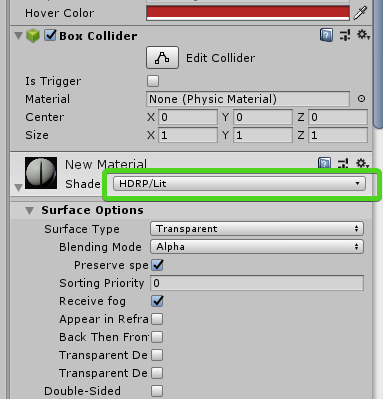
the shader type is listed on your material
anyway it doesn't matter, I see the issue
the built in color function was for standard pipeline and HDRP doesn't use that system at all
to change any shader values for HDRP, you have to use direct shader variable calls.
so this will work:
 void Start()
    {
        rend = GetComponent<Renderer>();
        startColor = rend.material.color;
    }
    void Update()
    {

    }

    void OnMouseEnter()
    {
        Debug.Log("in");
        rend.material.SetColor("_BaseColor", hoverColor);

    }
    void OnMouseExit()
    {
        Debug.Log("out");
        rend.material.SetColor("_BaseColor", startColor);
    }
to find the names of the variables it's a little bit awkward
but you can go to your material
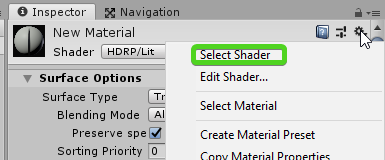
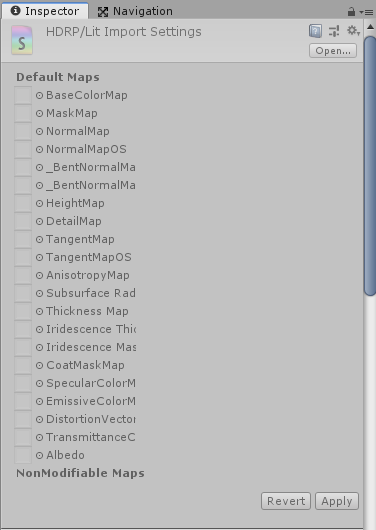
click on it's gear and choose "Select Shader"
 iron hollow
that will jump to the shader and then all the variables and their names will be visible
ancient mortar
that's what i didn't understand
ancient mortar
i thougt they created smthing with "_baseColor"
iron hollow
instead of choosing select shader
choose Edit Shader
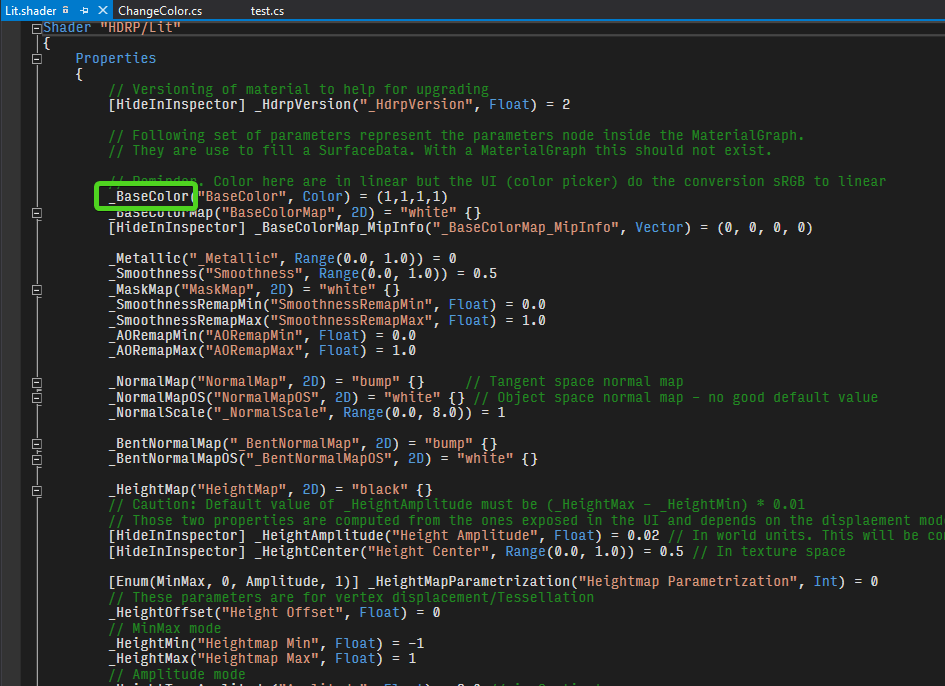
then you can see the variable names
iron hollow
there's other functions like SetFloat(), etc

can see them all listed here (as well as GetColor()/GetFloat() too)
so yeah that's probably one thing that needs to change too
startColor = rend.material.color; won't work
ancient mortar
yep it works now
iron hollow
startColor = rend.material.GetColor("_BaseColor");
the other will always return white no matter what
ancient mortar
yep it works like that thx for your help
iron hollow
no problem
@ancient mortar there is one factor to be aware of I just noticed.
Note: accessing .material at runtime will cause Unity to replace the given material with a copy for that runtime session. Use .sharedMaterial at runtime to change the original material on a temporary basis.
so basically if you use .material, it will change only that object's color, even if other objects use the same material
if you use.sharedMaterial, it will change the color of every object that uses that material.
something to be aware of
ancient mortar
yep, nice to know that!
turbid matrix
this kinda makes me wonder https://github.com/Unity-Technologies/ScriptableRenderPipeline/commits/hdrp-xr-volumetric-wip
are they really trying to put volumetrics to VR? that's already pretty expensive on desktop
quasi mulch
well that's like saying "pah why bother adding DXR! tis expensive..."
I just want my SSR back
turbid matrix
5.7.1 released on github + staging
fading rose
VR whether some people realize it or not, is the future.
Sure, there are no massive games and gamers didn't flock to it, BUT Gamers on PS have shown clearly that at the right balance of quality Vs investment they adopt VR quite nicely, and all next gen consoles will support VR. Even Switch 2 apparently. So there clearly is interest and growth there.
Not to forget that since there is so much interest in LBE business and content for these and other similar purposes, if Unity wants to maintain its share in that, they better start taking things more seriously.
And that is why you see me often ranting about LWRP. 😃
I am looking forward to see more support towards VR and LWRP becoming a more robust and versatile solution. Being able to scale upwards a bit more.
HDRP (while I truly appreciate what it can do), is not for everyone. LWRP is, and that aligns it with Unity's main goal. Democratizing game development.
 drifting vault
@quasi mulch what is that - DXR?
turbid matrix
I believe VR is to stay but it'll stay niche thing for a long time
unless the tech radically changes that is
quasi mulch
No radical change, just evolution much the same length as classical computing.
from the 60s til now, computers evolved to the point that they now need to change to get to the next stage. VR will need a similar time span to get to it's conclusion
I imagine in 20 years, if we're still all here, it might be safely directed into the eye from external source.
turbid matrix
the issue right now is, that VR's hardware development is pretty slow, seems like Oculus canned Rift 2 and Vive is getting only minor updates
quasi mulch
I doubt having a neurological invasion will be as mature as directing a stream of images at the eye by then
turbid matrix
it's partly to blame the market situation for
it didn't explode like they estimated
quasi mulch
well it's not the market's fault, it's just a new thing. computers cost so much at first
turbid matrix
but then again, they ruined their markets themselves
they should have sold the devices at net cost on launch
quasi mulch
nah they had no choice, you have to carve a hole before you can fill it.
turbid matrix
instead of trying to get money from r&d
if VR had launched with price these cost now, it would have been different story
quasi mulch
because even if they sold at net, the consumer awareness is not there, the software is not there, frankly the hardware really isn't there for most people
so selling at net would result in same uptake and kill your business
its not a console in high demand
its an invasive device
u have to just let vr take its course slowly
like AR is now on every phone by default
turbid matrix
I wonder what would have happened to Oculus if FB didn't buy it
because from where I look at it, FB only had a negative impact
quasi mulch
dunno its fairly irrelivant for gaming (sony's device outsold them 10:1)
Sony won this round with ease due to closed platform
if you go by websites
we dont know the true numbers but most souces will say sony's vr actually made a profit
it was also made far cheaper
think about it: you have the right hardware, you have the controlled software, it's all controlled which is what vr needs
right now we have thousands of indies making VR games and using things like unreal or hdrp, it majorly drives up hw cost to run it within 90fps
turbid matrix
yet, for VR fans, PSVR is the crappiest option of them all 😃
it's like starter kit for VR
quasi mulch
yeah this is where all your mistakes begin "vr fans". those are very few - usually the developers
so that's why sony knocked it out of the park
you know about betamax vs vhs yes? great story
turbid matrix
yes
also HDDVD vs bluray
I really liked HDDVD presentation better altho BR did have size advantage
just the menus and how it worked was so much more consumer friendly on HDDVD
quasi mulch
oculus has decided to "pull a sony" but it won't actually succeed in this. their latest gambit is to properly control (TRC) game launches now
if they don't like it early on it's refused early on
truth is we just have to be patient until its cheap... 800 bucks for decent VR?
for real?
and the computer costs more if you want to run any indie stuff lol
it's same anywhere i guess
there is a market for luxury goods like high end sports cars or home theater and it trickles down in the end
it funds the research into cheaper versions
 dawn sorrel
facebook was probably a good thing for oculus, production costs a lot of money, I don't think going vc would've allowed them to release the device like this
plus vive came into picture partly because of that
I mean, even now, they are still piggybacking on cellphone panels, no vr device uses their own built for vr panels
quasi mulch
best let mobile absorb the cost of that, they're doing bendable displays, and tech has it's own arc for that - would be reinventing the wheel tbh
it's not like anyone wants vr or mobile to be separate... in the end they're going to be the most practical pairing
those panels for mobile are really from tv research anyway
dawn sorrel
its not like I'm criticizing their choice to use cell phone panels, its just that, even with facebook money, they still couldn't afford developing vr specific panels for production
quasi mulch
truth
dawn sorrel
vr and cellphone usage cases are very different, needs are very different
quasi mulch
that's the reality of it, rift had no chance of survival really
fb was utterly essential
and when people hate capitalism, well they're not really understanding true human nature, the desire for instant gratification far outweighs the longer vision that capitalism provides.I'm not knocking either approach, but this is on topic... it allowed us to push through a wall that ideally shouldn't be there
if facebook didn't buy, then the research would've got bought anyway
iron hollow
@fading rose you're assuming hardware will stagnate. If that was true, you'd be right. But I forsee a day in the future when HDRP will run on VR with ease.
fading rose
No. That is not what I am "assuming". In that sense, you are assuming too. 😃
What I am simply saying is that we should not ignore todays production. for a future that is still far away from us.
Because simply in production and costs terms, if we ignore today, the future will never come. 😉
How many studios do you think can ignore todays production needs, for projects that may never come in 2 years from now?
iron hollow
well yeah nobody is ignoring today
they have LWRP
doesn't mean the future should be ignored
fading rose
No they do not. It is not production ready. They are simply pushing it out, calling it ready while it is missing many things, and focus on HDRP, in every way. From development, to PR.
iron hollow
well to be fair HDRP isn't production ready either, so nobody is being favored 😛
fading rose
Yeah that is what I am saying.
iron hollow
preset and future deserve equal attention and I think they are getting that
so far as Unity is able
fading rose
So, you are promoting HDRP, you are inviting people in with these visuals, and then you say "oh sorry it is not production ready" what do you think will happen? 😃
iron hollow
if you only focus on the now, by the time you look up, you're fallen behind, in the past
and Unity is in a race whether they like it or not, with Unreal.
fading rose
I am ahead of my times for 15 years in a row 😃 So I want to believe that I have a good sense of what is now, and what is ahead of us.
iron hollow
maybe you should go work for Unity then 😉
fading rose
I have confidence in the people working with Unity, for they are doing amazing work.
But I feel the strategic choices when it comes to development focus may need to be re-evaluated.
I understand that they need to present visuals as powerful as Unreal, and they can, there is no doubt, but this is not going to help change people's mind about which engine has better visuals, especially if what they promise does not correspond realistically to what Unity can offer in a large scale production today.
iron hollow
yeah people have their tribal loyalties, and often choose based on the most whimsical differences. such is life 😃
fading rose
Not really. Real professionals don't do that. They choose tools which are stable, and produce fast the results they need. Because another product out of the door with nice ROI is what keeps the studio open. Especially a small studio.
And that brings us to the "hobbyist" mentality we were talking about yesterday.
iron hollow
well I said people, not professionals 😃
it's hobbyists who are the ones that decide in the court of public opinion which engine is "Best". Professionals are too busy to bother with that 😃
fading rose
😛
And talking as a producer, if you disturb my pipeline and studio focus and my artists with tools that look great but lead me to a dead end you are not doing me any favors. 😃
iron hollow
hehe
fading rose
Professionals do their job with the tool that fits their needs. In our case, we are using both major engines. Each has its pros and cons, but the cons of the other are closing rapidly. 😛 and HDRP is still 2 years away.
Did you see that amazing video I posted in "off topic" ?
iron hollow
of unreal? yes
looks good. Though Not really any better than tons of cutscenes I've seen in modern games
turbid matrix
we are still doing the pro vs hobbyist talk, hoped we got that done yesterday :p
lets not get to "real" pro's then who build their tools and actually use bleeding edge tech that they build themselves
the reality is, we have all kinds of people working on this industry, you can't just put them all in simplified bins where you label one as pros and other as hobbyists
people have totally different types of projects, some you can't even make with tools that you get out the shelf
fading rose
I am working from mobile with students and indie teams, to visualization, consoles and VR with startups and larger teams, so I know well what you are talking about.
turbid matrix
if it's not obvious by now, I personally dislike labeling people for how they do things, I've seen people doing very homegrown things and making a fortune on it... and same time seen really organized by the book people on this same industry who have failed miserably
would I say the first examples persons were less pro? they do it for their profession so I wouldn't go saying they are something less
fading rose
I say Survivor Bias 😃
turbid matrix
yeah, I've seen that it's getting to a pissing contest, I'm not going to go there
fading rose
it's not a pissing contest. It is the same as thinking that people who drop school become billionaires.
But that is not relevant to render pipelines 😃
turbid matrix
all I'm saying, one don't have to do things your way to be a professional on this industry
fading rose
Professional for me means systematic, purposeful and responsible.
It has nothing to do with a specific way.
turbid matrix
to get back to channel topic, Unity put 5.7.2 to github and staging
5.7.1 and 5.7.2 were just minor LWRP fixes
quasi mulch
regarding ignoring or not, this problem was designed out a long time ago - games have scalable asset pipelines, so you can make a game pretty much run on anything. also it's pretty common for AAA to target a future spec they dont have yet and again that's OK
cos you can just fix it in assets
with HDRP, there's a lot of switch optimisations in there now, and more get added so I can only assume that it's going to turn out quite well perf wise
in fact I'd say VR is doable with HDRP, which is a different subject to what one wants to throw at it
there's also more optimisations possible with HDRP than there is for LWRP (compute, async)
plus it has robust forward+
if you remove all lights and slap a skybox on, add a little baking, some dusting of icing sugar probes ...
fading rose
Doable/Passable/OK is not good enough.
When you invest a lot of time and even a good chunk of money on a project, "doable" and "OK", is really not what you are aiming for.
But anyway. Different people, different teams, different goals, different projects, different standards. That is all ok.
Thing is, out of the blue I am having what appears to be a weird problem .
I am using LWRP but the problem also appears in the standard rendering and the shader is not really what makes a difference because on a different material with the same shader everything works fine.
Anyone may have a clue why suddenly some materials regardless of shader type, have turned black?
And not just the materials have turned black, but even reflections somehow seem broken. 😦
 slim flicker
could someone point me to the absolute simplest implementation of a custom frag/vert shader in HDRP? (hand-written, not shader graph)

GitHub
Scriptable Render Pipeline. Contribute to Unity-Technologies/ScriptableRenderPipeline development by creating an account on GitHub.
this wiki mysteriously ends right where the section on converting shaders is supposed to be

GitHub
Testbed project for Unity HDRP (High Definition Render Pipeline) - keijiro/TestbedHDRP
I've searched keijiro's testbed repo as well and it seems all the custom shaders here are hundreds of lines long
iron hollow
Unity Forum
Sorry if this has been asked before (can't find anything) but how do I convert my existing project to the SRP HD pipeline?
Unity dev posted a "Minimal Unlit shader" for HDRP there
turbid matrix
Hdrp shaders require tons of boilerplate
iron hollow
post #26
yeah it's not something i would try to write by hand
that's why shadergraph exists
turbid matrix
If possible, I'd suggest still using shader graphs as middle tool to wrap your own custom shader code to hdrp
slim flicker
oh yeah I guess there are code nodes
turbid matrix
Upcoming custom function nodes let you include whole shader files
slim flicker
alright, I'll try it, thanks
turbid matrix

GitHub
NOTE: DO NOT MERGE BEFORE #3051
Purpose of this PR
Adds Custom Function Node
Refactors Subgraph Output Node to support all port types and renaming
Adds ReorderableSlotList View to handle the above...
Should be merged to master next week apparently
here's example of the file I use for occlusion probes atm with that new custom function node ```cs
sampler3D _OcclusionProbes;
float4x4 _OcclusionProbesWorldToLocal;
sampler3D _OcclusionProbesDetail;
float4x4 _OcclusionProbesWorldToLocalDetail;
void SampleOcclusionProbes_float(float3 positionWS, out float occlusionProbes)
{
occlusionProbes = 1;
float3 pos = mul(_OcclusionProbesWorldToLocalDetail, float4(positionWS, 1)).xyz;

if(all(pos > 0) && all(pos < 1))
{
    occlusionProbes = tex3D(_OcclusionProbesDetail, pos).a;
}
else
{
    pos = mul(_OcclusionProbesWorldToLocal, float4(positionWS, 1)).xyz;
    occlusionProbes = tex3D(_OcclusionProbes, pos).a;
}
}```
well, basically this is the main thing to know here: cs void SampleOcclusionProbes_float(float3 positionWS, out float occlusionProbes)
iron hollow
Vector1 really bugs me
turbid matrix
it requires that kind of syntax (also note that in my case, I had the file in custom packge, you'd have to use Assets folder path if you have the shader in the actual projects Assets-folder)
iron hollow
i mean i know it's correct, but it seems bad to me
iron hollow
i don't known of any programming languages that have a vector1 type
quasi mulch
control freak :P
I gave up caring about what Unity calls things
surely they could think of a better name...
.... and don't call me shirley
iron hollow
Hey, that's my line! 😦
 hardy lily
Riddle me this!
I'm trying to make my baked lighting different, from this.....
To THIS!
What line of code do I need to go for that?
I already did for Realtime, but I'm looking for baked lighting.... Taken THIS is for a mobile game.
turbid matrix
that sounds like shader/post processing thing rather than lightbaking issue
hardy lily
There's that, for sure.
turbid matrix
briefly tested HDRP VR on 6.5.0 and at least it appears to work now without any special setup 😃
do note that I've previously tested some early 5.x.x version that required you to modify the SRP manually for camera relative settings or the shadows would be all off + had all kinds of wonky things with it like flipped Y axis on some version etc
I'm sure there are still HDRP asset level changes that you'd need to do with HDRP VR to work all properly + some PP effects probably don't work
oh, they have actually updated the HDRP VR doc recently! https://github.com/Unity-Technologies/ScriptableRenderPipeline/wiki/VR-in-HDRP
Unity 2019.2

You must use Single Pass Stereo rendering for VR in HDRP.
Not supported

    Multi-pass rendering
    Deferred rendering
    Volumetrics
    Depth-of-Field
    Render and viewport scale
Unity 2019.1

You must use Single Pass Stereo rendering for VR in HDRP.
Not supported

    Multi-pass rendering
    Single-pass instancing
    Clustered lighting
    Deferred rendering
    Volumetrics
    Post-processing
    Render and viewport scale
and yeah, they are working on deferred implementation and the volumetrics support (wonder what the HW requirements will that have for 90Hz stereo as it's quite demanding on desktop use already) and DOF support was added 11 days ago (https://github.com/Unity-Technologies/ScriptableRenderPipeline/pull/3072)
actually most of the not supported things are getting addressed now as there's dynamic resolution fix in works for HDRP as well
so that not supported list must be tiny once 2019.2 is actually shipping 😃
for VR games, most of the 2019.2 lists feats are nonissues, you'd mainly want the dynamic resolution to work. multipass is way slower than instanced single pass, you get MSAA with forward so deferred wouldn't really work (and there's really no other nice AA solution for VR from Unity), volumetrics must be really perf heavy and hardly an requirement in VR, also why would you even need DoF in VR?
iron hollow
did you mean to paste 2019.2 twice?
drifting vault
while im rendering 4k 60 FPS video on HDRP i get something like broken frames.
Im render image by image in JPG and then convert to MP4 video
its happened for only 1 frame
iron hollow
are you using some kind of tool to do this?
drifting vault
im use Unity Recorder
iron hollow
well, 4k 60fps and saving to disk, that's a pretty demanding operation.
drifting vault
ohhh
iron hollow
not surprised you're getting some skipped frames
drifting vault
yea im stop rendering, cuz that pretty weird...
iron hollow
hope you have a SSD 😛
drifting vault
im rendering it on SSD xD
iron hollow
good
still, i'm not sure what you could do to ensure no skipped frames in that situation
why many use tools for this kind of thing, to step-frame through it so there's no chance of that
it's slower but gives more accurate results
I happened to note this new asset recently: https://www.assetstore.unity3d.com/en/?stay#!/content/137778
which I faved for that very reason
"Deckard doesn't render in realtime and is suited only for exporting images or movies."
there's probably others around, but it's new so came to my attention (because I like looking for new things, and for some reason very few new things make it to the 'new' showcase.)
turbid matrix
@drifting vault I didn't even know Unity Recorder worked for HDRP yet
this was merged in hdrp staging 9 days ago: https://github.com/Unity-Technologies/ScriptableRenderPipeline/pull/3111

GitHub
Purpose of this PR
This PR implements Record for HDRP. Now every type of Recorder captures will work.
Testing status
Katana Tests: https://katana.bf.unity3d.com/projects/com.unity.render-pipelines...
iron hollow
this one is free, and supports offlien rendering
might can give it a try
oh heh: (This Free Version allows up to 10 seconds of capture and has no watermarking!)
well can see if it works at least
turbid matrix
I'd stick to the official tool if it works
and yeah, I checked the recorder fix is still not even on master, it's only on hdrp/staging branch atm
it'll get merged eventually
iron hollow
there's nothing wrong with using 3rd party tools
especially for something like this.
nothing is going to make 4k 60fps capture work well
it's just too bandwidth intensive
you definitely would do better with an offline renderer.
I really don't get the Nazi mentality when it comes to tools
"only use the one pure tool!"
it's narrow minded really
I don't care who makes a tool, as long as it does the job I need to be done.
turbid matrix
there's plenty wrong in using 3rd party tools if you have built-in thing that does the job
for starters, you add another layer of dependencies to people maintaining a 3rd party plugin, if there's change in Unity, you need to wait for third party to fix things - if they are able to or care enough
of course if there's no alternative, then it's simpler choice
but for example, the choice we get today for virtual texturing with Unity isn't all that great
there's only one option, Granite
and their updates usually lag a lot behind
turbid matrix
right now we do have 2018.3 plugin for Granite but that's rare that they got thing out so quickly
(and granite doesn't work on SRPs + is DX11 only and only for windows on the deal we get on their affordable version)
iron hollow
also Granite isn't the only alternative
turbid matrix
well, you can't get Amplify's solution today
iron hollow
Unity has built in support for sparse textures, which is the same thing
iron hollow
yes it is lol
turbid matrix
it's similar thing but with more limited use case
iron hollow
"Granite for Unity adds Granite SDK, the most advanced texture streaming system, to Unity 3D. By automatically loading texture tiles that are actually visible, Granite can handle massive amounts of texture data "
how is that any different than sparse textures?
sparse isn't just for Terrain you know
can only see a small area of a sparse texture, then only the tiles that are currently visible need to be in memory.```also amplify's beta is still available for download
turbid matrix
yeah, I read the page, it doesn't really give much info about it
iron hollow
though I don't know if they put a license on it to not use it or soemthing
turbid matrix
and while you can get trial for older amplify version (which still works, I tested it), you can't do anything with it as Amplify will not sell you a license for it
iron hollow
yeah that's not suprising
i'm going to look into sparse textures because I keep meaning to, and no time like the present.
turbid matrix
I'd really like built-in VT solution
the info Unity gives on the sparse textures is minimal
iron hollow
I asked about it once and got an answer of sorts from someone
turbid matrix
I got the sample and it's all nonsense (not a typical gameplay scenario)
but it's pretty minimal so I can at least go through the api and see what it does
but it doesn't seem like anything as fancy as amplify texture or granite for the tooling itself
drifting vault
thx @turbid matrix and @iron hollow for help
turbid matrix
ah, the api docs are better than the other docs
reading at this (and looking at the sample), it looks like sparse textures in unity are just system to break big texturemaps into chunks and load parts of it on demand
iron hollow
but it's not, it's literally just not rendering the part out of the frustrum
turbid matrix
this is like 1/10 of the implementation you need for this
iron hollow
sure it's not as full fledged as a dedicated solution
but it's still very compelling
turbid matrix
I dunno, I don't really have time to implement the missing part
it would take months
iron hollow
actually not sure what you mean by 'no automated streaming'
turbid matrix
Granite's solution works on built-in renderer but even that throws errors on console "by design"
iron hollow
it's literally streaming the texture tiles in and out of video memory
or do you mean from disk to conventional memory?
turbid matrix
hmmm, I'll load granite sample so I can demonstrate this
iron hollow
i'll grant nothing is automatic, you have to script all the tile generation yourself it seems
it's not as simple as dropping a 16k texture on everything and pressing play
turbid matrix
Amplify Texture and Granite are almost 100% identical for the workflow
they got all tools to build the VT atlas texture sets (Unity has nothing on this), both can solve what parts need to be streamed in on current scene and when so they only load lower mips on the distance etc
Sparse Texture solution on Unity seems like the texture management system but misses all the automated solutions that make it actually feasible to use in production
iron hollow
can use them without special modification and they can have mipmaps, use all texture filtering modes, etc.```seems mipping is handled automatically
turbid matrix
right now, that built-in sparse texturing thing is probably only feasible for terrain use as that's somewhat easy to script yourself
iron hollow
well I'm sure it could be used for more, but sure, it would take some effort.
turbid matrix
that's not the mipping I mean now
iron hollow
i'm not allergic to hard work 😛
turbid matrix
I mean, Granite would and stream only the lower mip data their systems demand for that part of the world
I'm not allergic to hard work but I have limited time and resources so I choose my battles
implementing full VT solution would take months, maybe even half a year for me
iron hollow
of course you do see the irony of being all about 'only use the engine features', but then saying Granite is the only way, right? 😛
turbid matrix
that's not something I want to do
well, that was my point really
that there aren't always options besides 3rd party solution
iron hollow
that I can agree with
turbid matrix
and even then the 3rd party solution can bring pain as you are on the devs mercy
this is especially painful with Granite as they don't give you sources
like Amplify did for their thing
iron hollow
yeah I don't like not having source
turbid matrix
I would have paid triple price for Amplify Texture to Granite just because of that
having no sources for a fragile thing like this sucks big time
it took them like 6 months to update for newer Unity versions at some point
and there was nothing you could do yourself
as their solution is partly native code
iron hollow
My decision tree is something like this:
- does unity support it.
- can I do it myself with a reasonable amount of time and effort involved.
- is there an open source alternative
- is there an asset on the store.
I don't go right to the store for anything. but only when I feel nothing else going to give me what I want
turbid matrix
2 is kinda conflicting thing
you can do almost everything yourself if you have infinite amount of time
iron hollow
yeah well, I should probably edit that one to be clearer.
turbid matrix
I only do things from scratch if there's no acceptable solution on market
otherwise I try to use something that exists and hopefully modify it for my own needs
iron hollow
i spent a good 2 months honing my own inventory system, because i wasn't happy with anything I found on 1,3, and 4.
turbid matrix
yeah, that's still doable
iron hollow
even asset store inventory systems are either junk or overly bloated
turbid matrix
also if it's central thing on your gameplay, it does pay off to know how the thing works
I didn't really think of this kind of work here
more about techy stuff
iron hollow
yes i agree
turbid matrix
but it's still a valid point
you need to build all kinds of small frameworks for most games
those are usually built from scratch
iron hollow
yeah I've made lots of systems for my game
an interaction system, a reusable pooling system, a dynamic UI system, and Input system, etc
(i however probably should have just bought Rewired, i didnt' really realize how complicated an input system would be)
(it's all done now so oh well heh)
i wrote my entire 3rd/first person hybrid controller
but in the end i hated it
so after trying out a lot of controllers, i finally settled on Invector's 3rdP
it had the feel i was looking for
biggest issue there is, they have a lot of stuff i don't want
so have to peform surgery to remove their stuff and replace it with my own
turbid matrix
I've kept postponing the input thing
iron hollow
i was tempted. but it touches so many things, i felt like i need to do it early
turbid matrix
I kinda have my own setup on one proto but I need to rethink it on final implementation
I'd really not want to use Unity's new input system either
iron hollow
and i am not sure that was the best idea, ti's broken a few times due to unity upgrades and my own code changes.
but i just keep fixing it hah
i looked at Unity's new input
at first I hated it, but the more I've looked, the more it grows on me
turbid matrix
one thing I do like on it is that you can apply filters like you want
that's really cool IMO
iron hollow
i don't know that i will ever go to the trouble of changing my input code to use it though.
what i have works, i'll probably stick with it
turbid matrix
to get back to granite, when you run it, it throws these errors:
Graphine said it's a unity bug and nothing they can do about
but I hate to get these even on final builds logs
iron hollow
odd
turbid matrix
I want my console clean
iron hollow
yeah I just got an update to LipSync Pro
and it's throwing constant erorrs like that
Thread group size must be above zero
seems to be due to blendshapes
and so far the guy has just said "well it's working, ignore them' lol
it's something to do with this call. and I think because of 2018.3 they added GPU blendshape support
so it very well may be an internal bug
turbid matrix
nah, that's been on Granite before 2018.3 already
I mean, it's probably a bug
or a thing Graphine could do differently to not trigger that
for the automated VT chunk streaming, I meant these tiles:
their debug tile draw is bugged but you can see how it splits the elements dynamically
if you turn the debug off, those textures look fine, it just breaks the rendering with them enabled for some reason
hmmmm, I could do test granite now with HDRP with the new SG custom function node
as you can now include code outside the function it calls as well
at worst, I could just stick to ASE as there it's really trivial to make a custom HDRP template
iron hollow
oh i didn't mean my bug had anything to do with your bug. just that i know how it is to have a stupid repeating error and the dev shrugs.
turbid matrix
just copy / paste the one template file and modify it
oh my bad, I misunderstood it 😃
@iron hollow have you tried the free Oculus lipsync thing?
it's pretty nice and it works in real-time
iron hollow
i haven't heard of that
turbid matrix
they've used machine learning to recognize the right things
it can detect if you laugh even
it's free
iron hollow
i'll have to look into it, sounds interesting
I was tracking an interesting project as well on github
turbid matrix
that oculus thing could be fun on co-op online games
you could use that on other players chars coupled with VOIP
iron hollow

GitHub
An Open Source Modular Framework From Face to FACS Based Avatar Animation (Unity3D / Blender) - NumesSanguis/FACSvatar
can analyze video to generate facial mocap
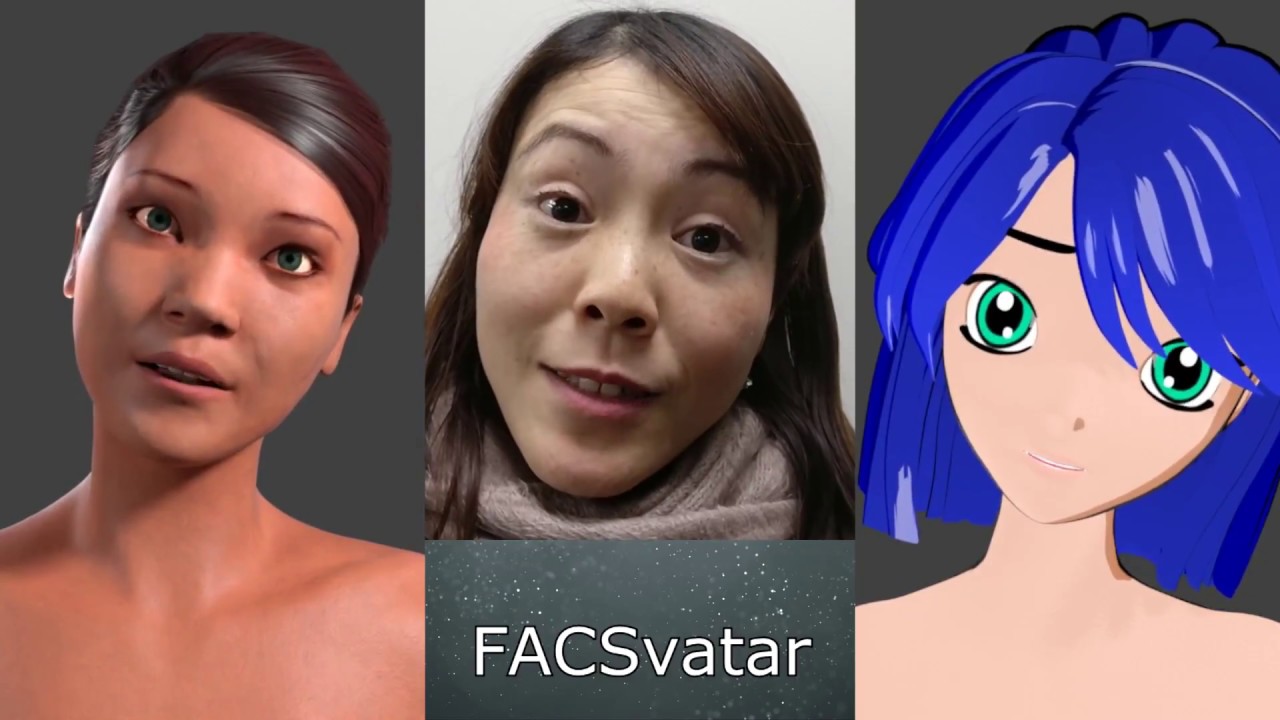
** Newer demo video **: https://youtu.be/J2FvrIl-ypU FACSvatar smoothed expressions and head movment test using data based on the Facial Action Coding System...
video demo
turbid matrix
yeah, that looks nice 😃
you still need awesome rigs for things like these to work nicely in game
iron hollow
yeah she was using the Manuel bastoni Blender rig
which is pretty nice, but he threw a tantrum and closed his system and website recently 😦
i was glad i didn't pick it as my main character system, I almost did
i think it could be adapted to other systems though
i picked MCS
but they went dead, then pulled all their stuff off the store
however, someone noticed they put a banner on their website, says they are going Open source, check back April 1st
so not sure if that's real or a joke lol
i can still use the MCS stuff i have
but would be nice if they go open source so a lot of bugs can be fixed
There's also UMA
but i just feel the quality of the model isn't quite up to par with MCS
i plan to use UMA for npcs only
if at all, still on the fence about that
i'll have to do tests to see if the two styles mix well
or can be made to
 outer wigeon
I've been following the SRP-Batcher post (https://blogs.unity3d.com/2019/02/28/srp-batcher-speed-up-your-rendering) and I don't know what to do with the UnityPerDraw CBUFFER . Anytime I declare anything inside it (say, unity_ObjectToWorld), I get an error saying that it's already been declared.

Unity Technologies Blog
In 2018, we’ve introduced a highly customizable rendering technology we call Scriptable Render Pipeline (SRP). A part of this is a new low-level engine ren...
What am I doing wrong?
quasi mulch
this is why 3rd party sucks
(re: assets that stop working)
it's not their fault but at least with built in, you have absolutely got some protection from that
iron hollow
what protection?
quasi mulch
LipSync Pro / Granite / Other
whenever I felt tempted with those I thought "I bet it breaks"
iron hollow
well i mean, even though MCS is 'gone' (temporarily), i still have their stuff to use
quasi mulch
the truth is you love a good bag of swag
iron hollow
that's the nice thing about the asset store license, even if someone decides to give up, you can stil use it
quasi mulch
true
iron hollow
i do, I'm a Hollywood douche at the Oscars level swag bagger ;p

Forbes
This year's “Everyone Wins” Nominee Gift Bag has already been sent to the 25 Oscars nominees in the acting and directing categories. Find out what's behind the extravagant price tag.
they said ppl fight over them like they are in the thunderdome lol
quasi mulch
two men enter, one man leaves
 quasi mulch
I guess that makes you master blaster
iron hollow
just imagine someone like Patrick Stewart with one in his bathroom
he probably has one now LOL
iron hollow
"Make it flow, Number two!"
fading rose
btw, LipSync Pro is working just fine we are using it on our project. I just wish they wanted to support more languages. At least EFIGS...
iron hollow
yeah it's just throwing hundreds of errors in 2018.3 if you use GPU Skinning. I already reported it.
 uneven forge
can i test hdrp shaders on Iphone X?
fading rose
@iron hollow Hmm I am using it in 2018.3.6f without any issues.
BUT, in some rare cases, something glitches in Unity and it throws these "www" errors and some UI warnings. Which I know for a fact they had been fixed as I had reported them some time back and they created a fix right away. And that is why I assume it is Unity glitching in the background.
turbid matrix
@uneven forge I dunno what metal-status for the HDRP is right now, it might work
but do note that HDRP isn't going to be great pick for mobile unless you only target select high end devices, not every device has gpu compute support which is requirement for HDRP
(I know almost nothing about mobile development tho so that about what I know about that topic)
as another topic, 5.7.2 is now available in package manager for all 😃
uneven forge
I want on only Iphone X. unfortunately my client's project version is 2018.2 so hdrp version will be lower
"Megacity" demo was built on Iphone X? did they use HDRP or LWRP
turbid matrix
2018.2 is big ouch
you are forced to use some ancient HDRP version
which probably has even worse metal support if it runs at all
I dunno if they mentioned the renderer used on the mobile version of MegaCity
why do you want HDRP?
using HDRP right now is super risky, but using ancient version of it, on barely supported hw and for client? that's so many no no's 😄
if it were my client, I'd convince the client to either use built-in renderer or LWRP
turbid matrix
if you have to ask, then probably no
I don't think there are skin, hair etc shaders for LWRP
there are for HDRP and third party ones for built-in
uneven forge
so i have to write it from beginning
fading rose
@uneven forge I updated my quite complex project to 18.3 without major issues. Try cloning your project folder and upgrade it, see what brings you.
uneven forge
my client is not updating the project 😦
fading rose
I was a client who was not upgrading the project. 😃
My tech team upgraded it and recorded performance and other improvements and convinced me to upgrade. (And it was worth it)
But if it is only for a character then I suppose it is not worth updating. You probably can get that quality with the standard Renderer, but probably not the hair.
uneven forge
yeah the hair is a real headache
fading rose
I am not very happy with the hair shaders in Unity. They are not very realistic. However I have found a couple which are nice.
this one: https://assetstore.unity.com/packages/vfx/shaders/sas-standard-anisotropic-shader-hair-128739

Upgrade for Standard Anisotropic Shader, (SAS) Added new variant for hair shading. It features double specular lobe, vertex color tint, alpha to coverage by distance and translucency.
All the content seen in the images is included. Check the documentation for more info...
and this one: http://standsurestudio.com/unity5content/
uneven forge
@fading rose thanks
glad tartan
Mobile version of Megacity was running on LWRP
glad tartan
Was in one of the Unite LA talks. Can't remember which one
actually i think I might remember where to find it and at what spot. Gotta check
glad tartan
Memory was a little off on where in the video it was mentioned but I found it

Learn how we built the Megacity demo in this Unite LA session. Get an introduction to the editing tools developed for streaming worlds and how we utilized ne...
quasi mulch
Anyone getting really excessive realtime GI issues or bad performance in 2019.1 ?
I'm finding with realtime gi on, 2019.1 is spiking 30-40ms in profiler for GI, something that never occured before. With HDRP (don't think it's relevant?)
 earnest granite
Wasn't there some regression fixes in the last 19.1 releases ?
turbid matrix
still waiting for HDRP's GI pass before touching that
HD team is aware it got issues
altho I was more of thinking that they aren't happy with the enlighten etc integration on whole
it sounded like it's been on backburner since the initial implementation for HDRP
quasi mulch
Enlighten doesn't even work with light temperature in my tests
but the real problem is the 30-40ms spikes when dir light updates GI from rotation etc... this wasn't present in my 2018 build long ago
I don't know which since I only implemented time of day in 2019.1... surely a few boxes doesn't cause 30ms spikes
naturally gi is disabled for terrain
might be related to "ambient mode" set to dynamic?
(in HDRP volume)
 indigo summit
oh hey 6.5.0-preview adding Area Light Shadow
quasi mulch
5.7.2 coming down the pipes for 2019.1 b6
what's the equivalent version to it in 2019.2?
turbid matrix
@indigo summit yeah, that's pretty cool
but in 6.5 it only really works for square shapes
if you make a wide rectangular shape, the wider you make, less shadow you get
I dunno if that's a bug or limitation of the implementation
I'm guessing latter
at 5 width and 1 height for the area light, there's practically zero shadow anymore
would have wanted to use that for fluorescent lights, like:
but if you do setup like that, you have to split it at least into two lights that make the first and second half of the light
otherwise there's no shadow and even still, the shadow quality suffers a lot if it's not perfect square
indigo summit
yeah the current area light shadow are kinda weird
elfin osprey
Hopefully I didnt break anything 😛
indigo summit
@turbid matrix so. . . . . . you can share the occlusion probe nodes now? 😄
glad tartan
Nice! guess the next main Shader Graph merge will be Async Compile?
turbid matrix
@indigo summit as soon as there's at least staging release for 6.6.0-preview (as then I can then setup sample scene that refs to that stock HDRP package instead of having to put custom HDRP in the repo again - kinda the point here that you don't need such anymore)
I'm also waiting for nested subgraphs to get merged 😃
I mean, in general, not related to the occlusion probe thing
@indigo summit it might be short lived fun though as https://github.com/Unity-Technologies/ScriptableRenderPipeline/pull/3179
GitHub
Purpose of this PR
Add support for per-object occlusion probes
Release Notes
Add support for occlusion probes.
Testing status
Katana Tests: Katana tests are running. A test scene for mixed lighti...
that's currently only for LWRP and it doens't include the baker setup
really curious where Unity is going with that
indigo summit
ah, then i better wait for 6.6.0 then
elfin osprey
Fyi nested subgraphs will probs be before async
turbid matrix
cool 😃
indigo summit
@elfin osprey any news for tesellation on SG?
indigo summit
really need it for my personal piece :p
turbid matrix
that + built-in PP graph are things I'd really want to see happen
indigo summit
well ASE can do it, eventhough it's only support 4.x.x now
turbid matrix
I'm still compiling another engine(tm) atm, will check if I can break that current master branch later on 😃
turbid matrix
(UE4)
been cleaning my fork whole day, been super slow as usual
currently porting VXGI from one version to another
glad tartan
Is there a way to convert procedural nodes like noise, or shapes to a texture in shader graph?
turbid matrix
you can render the shader into custom render texture
you'd think it would work in SRPs too
can't remember if I've tested that
elfin osprey
It does
We have a branch of shader graph where the master node outputs to custom texture
but the branch is VERY stale right now
turbid matrix
I kinda expected that but can never be sure
glad tartan
hmm I wanted to plug it into the height slot for POM node. Render texture will work for that?
elfin osprey
yes
turbid matrix
sure, you can feed in RT's as texture inputs
you know how the POM node works?
I think they put docs to it
glad tartan
ah alright. Gonna give it a shot. Well first gotta look how much code I gotta dig into cause I'm pre noob on that
turbid matrix
but it does work the same way as POM node in UE4 for example
glad tartan
yea I've been using it for a while now
turbid matrix
ah, nice
glad tartan
just wanted to get crazy and make fully procedural material in shader graph
turbid matrix
oh, now I get what you are after
glad tartan
need the height for some materials
turbid matrix
yeah, you need texture input for that node
glad tartan
haha yea
turbid matrix
this would be faster to update tho 😃
glad tartan
yea. I made a few materials already with default nodes in SG
Car Paint, Hammered Metal, and Galvanized Metal
turbid matrix
looking good
iron hollow
yeah that's basically how blender's Cycles rendering works, you make materials via nodes
it's all the craze these days
there's an open source thing i keep meaning to try but haven't got around to

GitHub
3D PBR Texture Painting. Contribute to armory3d/armorpaint development by creating an account on GitHub.
they made this PBR node based painting tool, sort of a free version of substance designer and painter rolled into one
and turns out it was made to supplement their own game engine, Armory Engine
turbid matrix
hope they improve it enough by the time Adobe makes Substance tools painful to license
iron hollow
but I have a feeling the materials could be used in any engine, I haven't tested that theory yet
glad tartan
From what I remembered Armor Paint was paint at least for now. Guess if you compile it yourself it's free?
turbid matrix
well, they are PBR materials...
iron hollow
yeah like i said i haven't tried it. but i assume once you paint, it saves the materials as textures
glad tartan
you mean the raw materials created to paint with in the program?
iron hollow
which then could be used anywhere
glad tartan
Might be integrated with the Engine he's working on
iron hollow
afaik it's standalone
glad tartan
yea, I mean the materials like you were saying they could be used in any engine
if anything it would be integrated with Armory or i guess auto import to blender
iron hollow
well if it's anything like going Unreal to Unity, you'll have to re-arrange some channels, and maybe flip the normal map Y channel
but nothing that can't be done with a little photoshop
glad tartan
Guess I misunderstood you somewhere cause now I'm lost with what you're talking about. I know Armor Paint can export textures like Painter but as for materials if it can export them, they would most likely work with Blender or the game engine he's working on as well
iron hollow
well yeah I doubt it can do self contained materials like Substance
but most people don't texture their models that way anyway, it's pretty inefficient.
you'd have to have a material per substance
so say if you had an object with Wood, metal, plastic, glass, and fabric on it
that's 5 materials
which = 5 drawcalls
but if you do the painting offline and create 1 texture with those 5 materials on it, your model only needs 1 material
1 drawcall
of course i guess it depend what you want to prioritize, texture memory or drawcalls
turbid matrix
that's not all black and white though, you pay for having more unique materials as there's limited amount of RAM + for some work you do want some layered materials for higher texel density that regular prebaked materials can offer
yeah
iron hollow
i get there, eventually lol
turbid matrix
also overall distribution size gets affected
if you didn't care of the game's overall size at all (I care very little myself), virtual texturing is there to salvage you for the ram part
iron hollow
still, i don't think having dedicated materials like that pays off unless they get reused a lot
turbid matrix
it's a lot simpler setup for sure
without VT, you really can't do that for everything on your game unless it's really tiny world
Unity got texture streaming on 2018.2 but it can only do so much
that built-in streaming is bit bugged in editor too
it's messed my alpha clipped materials alphas many times in editor
I haven't noticed the same on builds
glad tartan
I thought you wanted to export the materials you make to paint with. Since in the app you have to create materials as you would in something like shader graph or Blender then you can paint with that. That's the material I thought you wanted to export.
iron hollow
no i mean using it like substance painter, where you paint your models and export the result, the material for the model
glad tartan
yea
iron hollow
i have substance painter, and I love it
but they just got bought out by Adobe, so the future is uncertain
good to see alternatives coming about
glad tartan
yep same here. Switched to painter in 2014 and havent looked back so far
iron hollow
this Armor paint is a bit unique because it basically combines Designer and Painter
glad tartan
although I'm still only on a 2017 license
iron hollow
which is a paradigm i like
glad tartan
yea for sure
wonder how detailed the material editor will be
seems it's only creating basic materials so far
iron hollow
yeah no idea, i still haven't had time to try it
but the gun looks nice if that's any indication of it's capabilities
quasi mulch
hdrp is currently murdering my cpu time randomly every few frames
the gpu time is fine
glad tartan
Lookdev Window coming to HDRP or is this something new? https://github.com/Unity-Technologies/ScriptableRenderPipeline/commits/HDRP/lookdev
GitHub
Scriptable Render Pipeline. Contribute to Unity-Technologies/ScriptableRenderPipeline development by creating an account on GitHub.
iron hollow
sounds familiar but i forget what it is
turbid matrix
like, lookdev obviously but that's quite broad term
glad tartan
seems it's the same look dev as the current one but for HDRP and UI done with UI elements
glad tartan
yea it looks like it's just an updated version of that
ah
it had a big show at a Unite a few years back as well as an HDRI pack on the asset store for it
turbid matrix
I kinda missed whole 5.x cycle when it was a thing tbh
was busy with ue4 back then
iron hollow
so for developing looks
like Blue Steel and Magnum 😛
zoolander's favorite tool
fancy word for a preview window
glad tartan
Yea but it helps. Not too long ago Star Citizen team made their own Look Dev tool to preview models and such to get them signed off by the director. So mostly teams who are really serious about how their art is authored or bigger teams might use it.
if the material validator is also integrated in it that would be really nice as well. Dont remember the old one having it
iron hollow
yeah i approve
it's a pain to work up several environments to check against every type of lighting
glad tartan
for sure
turbid matrix
Some work will be done later (re-projection, density volumes culling, optimizations, etc).``` (from: <https://github.com/Unity-Technologies/ScriptableRenderPipeline/pull/3200>)Just stumbled on this by accident. it's a system for generating noise textures and writing them to a texture file lol
even node based
glad tartan
oh that's nice.
Could come in handy at some point. Thanks
 hard timber
Hi
Can anyone tell me if the native video player in Unity works with the LWRP?
Are there any demos or tutorials on using video assets with the LWRP?
iron hollow
To reproduce: 1. Open the project, attached by the user (Bug_VPlayer_HD.zip) 2. Open the "SampleScene" 3. Enter Play mode 4. Observe...
fixed in unity 2019.1
quasi mulch
I just want a good sky at this point
one that doesn't stall the entire pc whenever it updates
turbid matrix
is this a typo?
Fixed normal blend edition handles on DensityVolume
should that say editor?
quasi mulch
yeah
turbid matrix
(looking at changelog on git repos hdrp/staging
quasi mulch
HDRP team struggle with the brutality of barbaric languages
turbid matrix
they got some proof reader there
quasi mulch
that's all stuff that will probably change a bit anyway
go through a ux team
any progress on sky?
turbid matrix
upcoming 6.6 is looking great for SG and HDRP though:
https://github.com/Unity-Technologies/ScriptableRenderPipeline/blob/HDRP/staging/com.unity.render-pipelines.high-definition/CHANGELOG.md
https://github.com/Unity-Technologies/ScriptableRenderPipeline/blob/master/com.unity.shadergraph/CHANGELOG.md
quasi mulch
yeah you didn't have all the time ever either + "Added depth offset input in shader graph master nodes" is cool
I guess it's the same as offset in the older shaderlab
 dusk hare
why can't i disable ssr even after i remove it from scene settings in hdrp?
is this a bug?
btw my current unity version is 2018.3.7
alpine bluff
@turbid matrix and @quasi mulch - I need you to type lots in this channel so I can't see that typo anymore. :p
turbid matrix
@alpine bluff I'm sure there are more :)
@quasi mulch depth offset was needed for that POM
turbid matrix
there's some irony in Unity finally starting to merge occlusion probes, one year later after BOTD demo You can now use Light Probes for occlusion. This means that baked lights can now occlude dynamic objects. https://github.com/Unity-Technologies/ScriptableRenderPipeline/commit/014e604d2f99b89834273afd620cd87ab6142ae7 when it's also first time you could manually merge it to your project without HDRP changes 😄
altho granted, the git branch is only for LWRP now but I can imagine it'll be ported to HDRP soon after
turbid matrix
@dreamy fox just noting that recent change in HDRP/staging broke SMAA: ```Shader error in 'Hidden/PostProcessing/SubpixelMorphologicalAntialiasing': 'SMAAColorEdgeDetectionPS': cannot implicitly convert from 'Texture2DArray<float4>' to 'Texture2D<float4>' at /Unity/ScriptableRenderPipeline/com.unity.render-pipelines.high-definition/Runtime/PostProcessing/Shaders/SubpixelMorphologicalAntialiasingBridge.hlsl(54) (on d3d11)
Compiling Vertex program with SMAA_PRESET_MEDIUM
Platform defines: UNITY_ENABLE_REFLECTION_BUFFERS UNITY_USE_DITHER_MASK_FOR_ALPHABLENDED_SHADOWS UNITY_PBS_USE_BRDF1 UNITY_SPECCUBE_BOX_PROJECTION UNITY_SPECCUBE_BLENDING UNITY_ENABLE_DETAIL_NORMALMAP SHADER_API_DESKTOP UNITY_LIGHT_PROBE_PROXY_VOLUME UNITY_LIGHTMAP_FULL_HDR
Staging is worse than released Preview, so these things are bound to happen.
@turbid matrix "there's some irony in Unity finally starting to merge occlusion probes, one year later after BOTD demo " how about the irony that we are almost out of Q1 2019 and the latest version of Unity is still 2018.3?
turbid matrix
I'm aware it's a WIP branch, just giving an heads up it broke, not demanding a fix asap or anything
2019.1 has always been targeted at this March or April (target is now set to April)
2018.3 got delayed though but it just means 2019.1 release will be closer to 2018.3 release and not the other way around
 woeful ice
does anyone know a way to render to a texture (RT or otherwise) from a shader in HDRP? Im seeing that LWRP now has the scriptable render pass, but HDRP doesnt. Any workarounds?
 dreamy fox
@turbid matrix Yup, aware of it and it is being dealt with. Also, keep in mind there was a problem, that will be fixed as well soon.
 trim bone
was lookdev removed from 2019?
glad tartan
@dusk hare You have to disable SSR on the HDRP Asset. In the newer versions of HDRP you have two places you can disable it.
Earlier versions. Lighting -> SSR
dusk hare
Well I mean I know that but it's for certain scenes where I won't use ssr
And for some reason I can't disbale it
glad tartan
ah for that you disable it on the camera
dusk hare
Only way is to untick receive ssr from all material
Well ssr is on scene settings in hdrp
PPS ssr doesn't support scritable rendering pipeline yet
dusk hare
Yes in hdrp
dusk hare
Well the issue even after I remove ssr from scene settings the ssr still works
I'm talking about the new issue with ssr on hdrp
Ssr is not on camera but on scene settings and my issue is that even after I disable or remove ssr from scene settings it still doesn't disable it
Which is probably a bug
glad tartan
I'm gonna send a picture showing it
dusk hare
Are you using hdrp?
glad tartan
yea, I've only been using HDRP and LWRP at times since 2018.1
Ok so on the camera in your scene select Custom Frame Setting. and in the lighting foldout if you have SSR enabled you will have a checkbox next to it. Select it and then disable it and that scene wont have SSR
dusk hare
But you do know that ssr settings are on scene settings and not on camera , If we disbale it from scene settings , It should have disbaled by defualt
That's only for lighting
And in background it still runs to process
dusk hare
But why doesn't it remove ssr even after removing from scene settings
Shouldn't that be fixed too?
glad tartan
if you want to test it run your game and open the debugger ctrl + backspace
then use End and Page Up to go through the menu. When you reach your Camera go down to rendering with the arrow keys Up and Down and Left and right to fold out. Go down to SSR and disable it (press enter) and you will see your FPS go up.
well the scene setting is to control SSR
dusk hare
What about script reference to disbale it at run time
glad tartan
The HDRP asset is to enable SSR for the render pipeline
The Camera control is to enable it per camera/scene
dusk hare
Wait checking documents
glad tartan
not sure about that. I dont touch scripting so can't speak on it
dusk hare
Alright thanks man but I still feel having option to disable ssr from scene settings would have been a better option
But since it's a preview package, I shouldn't be complaining about it
glad tartan
It made sense after you start using it.
You could have everything enabled for the HDRP asset and then disable and enable what you want for the camera frame setting as graphics options.
would be like games that have in game cutscenes and you see the quality goes up for cutscenes and then back down for gameplay. Since everything is enabled on the HDRP asset you could easily do that for a game
dusk hare
Can't seem to find script reference to disbale that settings at run time
glad tartan
you searching on the Github Docs? The main Unity scripting docs wont have this yet
glad tartan
found this page but not sure how much it will help. Didnt see and code scrolling through
GitHub
Scriptable Render Pipeline. Contribute to Unity-Technologies/ScriptableRenderPipeline development by creating an account on GitHub.
dusk hare
Thanks will look at it
quasi mulch
EW @ HDRP latest AO still doing bars and stuff, I can reduce the effect by having the intensity close to zero but pointless having it then... thoughts why it happens?
It only also happens in play mode.
iron hollow
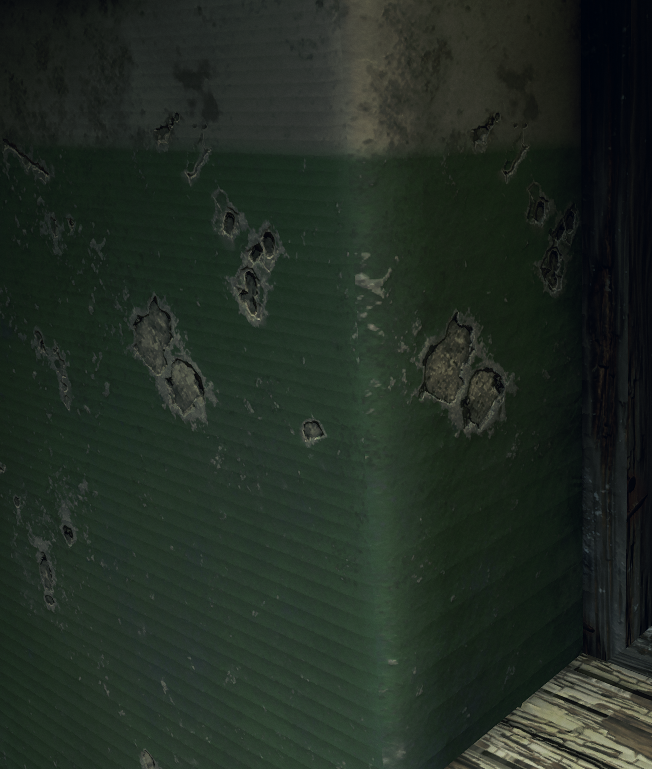
makes me feel a bit better knowing an AAA game like Metro Exodus can't even do shadows well 😛
shadow bias is such a pain to dial in
I had this exact issue in my game in unity and was such a pain to fight it
you can get rid of the banding, but then you have everything peter-panning all over the place
glad tartan
In a few years Raytracing will save the day
quasi mulch
Not for me either, I have code that dynamically adjusts all this in realtime so I don't get biasing
glad tartan
I've had that with directional lights as well
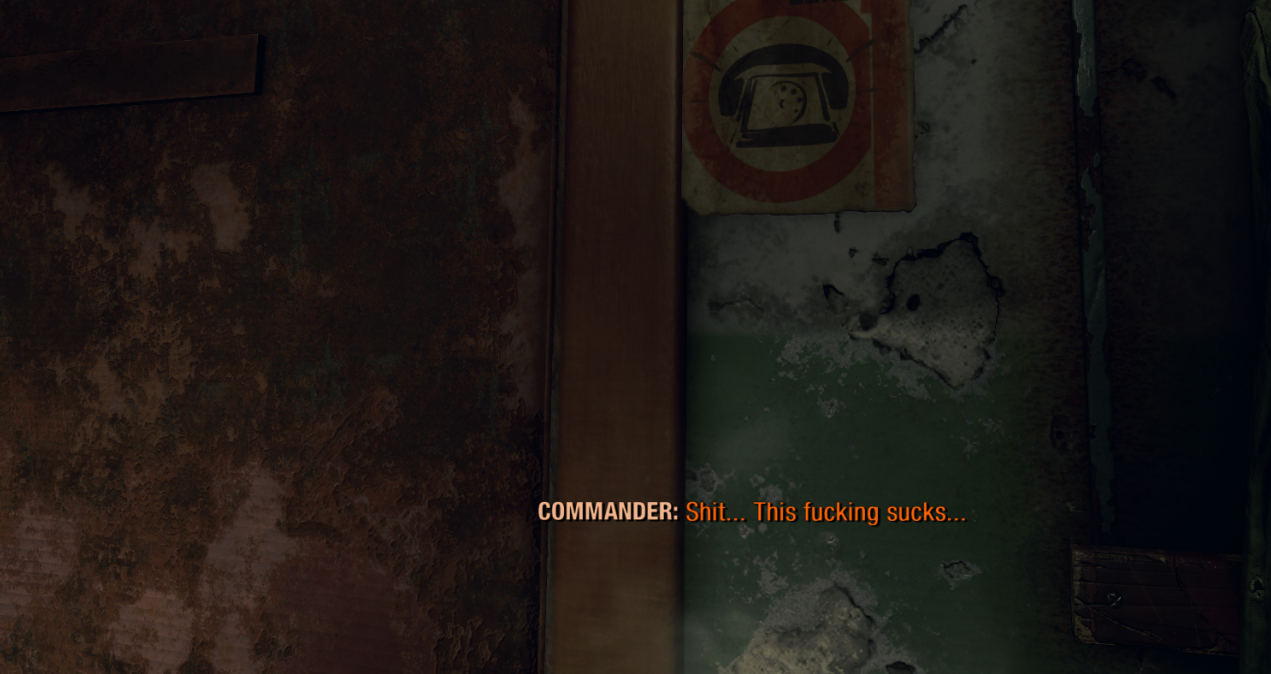 quasi mulch
that's something you should script, bias is never a one size fits all
it should be adjusted for the area
glad tartan
You added it to the volume settings?
iron hollow
unity is TERRIBLE about peter panning
quasi mulch
volume settings should be multuple volumes you don't alter the same volume
indeed it's not possible to do so, HDRP will clone it
your advice to that dude above was wrong
the dude above should make one volume with only SSR on it and blend it off when he moves to the new area.
this overrides the default in a correct way
in addition you can control per material, what gets SSR
you do this by setting the SSR threshold where it kicks in, in the hd pipeline asset, then adjusting the smoothness on the material
so there's a lot of fine grain control
(I don't get panning either)
iron hollow
you do, you just probably dont' look hard for it 😛
quasi mulch
(and it's 4096 shadow distance) - you can find the right settings.
and its full time of day
you really have to alter it every single frame
iron hollow
make an enclosed room with a single spotlight, put cans on a table within 2-3 meters of the light
glad tartan
isn't that just another way of doing it? He wanted to disable it for the whole scene
iron hollow
and say you don't get peter panning 😛
iron hollow
proof!
iron hollow
lol
quasi mulch
august maybe
for pix
I should mention I'm using contact shadows and edge fix option
edge fix might not be on normal pipeline
these patch up the damage, then just add some code to lerp the various biases per area
iron hollow
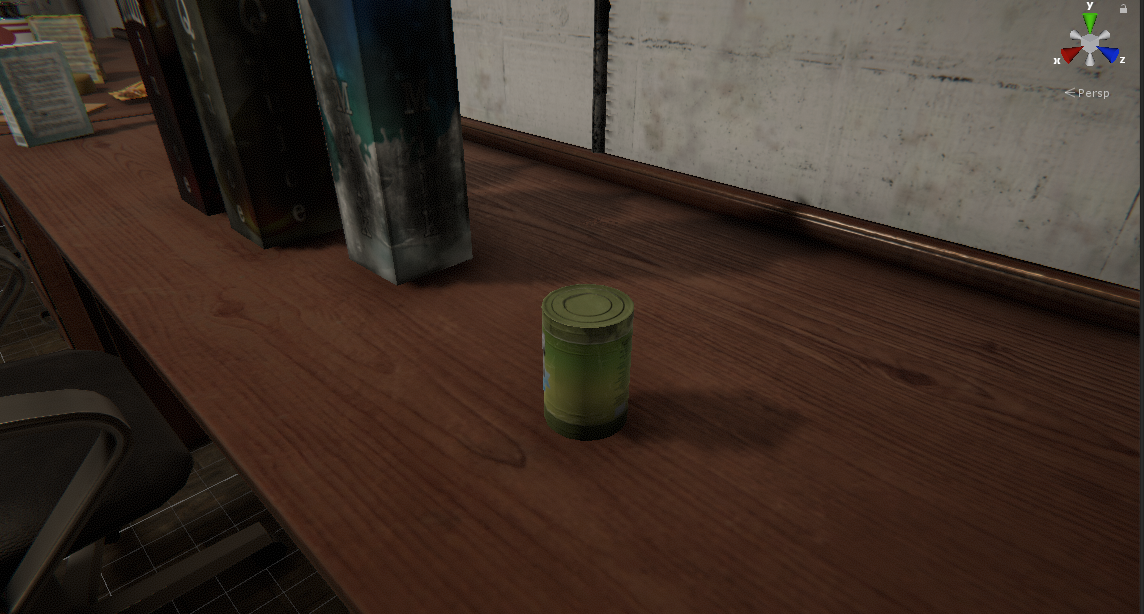
this is best case scenario
it's still peter panning
no banding
but it's touching just enough you might not notice
quasi mulch
hdrp does shadows differently though
iron hollow
yes well not using HDRP
quasi mulch
well thats why we're not agreeing :P
quasi mulch
come to the land of the true pipeline
abandon old crust
The One True SRP
why no tato fix for that?
tato's fault
iron hollow
You must not turn your back on the old ways, they are tested and true!
yeah actually have 40 back and forth emails with tato about it
we made some progress
but there's only so much that can be done with what unity provides in legacy
iron hollow
nah that's SRP only
iron hollow
yeah I bet they do
quasi mulch
the peter panning is virtually unnoticable with edge leak, I'm not sure what the details are though, perhaps it's just a little hack?
maybe something can be done to add it
iron hollow
well to honest, contact shadows help fill in the gaps
quasi mulch
I do remember having a nightmare with it before
iron hollow
I didn't have it on in that pic because we were testing 2.0 beta of NGSS at the time
but contact shadows are screespace so it's not a perfect fix
quasi mulch
contact shadows upset me a little because they either solve far range bugs or solve near range precision but not both well
iron hollow
yeah
iron hollow
yeah i'm not sure what he's currently working on
quasi mulch
your game seems quite far along
iron hollow
last demos he showed were of primitive shadows
I have a lot of systems done
but there's still a lot to do
I've only really started building up the first level a couple months ago, before that I was working in a junk scene
and I've had setbacks with my character models, that's all kind of up in the air atm
waiting for April to see what MCS does, they claim they are going open source
but I dunno. April 1st is a bad date to claim that
if they go open source I may forge ahead with that, if not, I may have to go an alternate route
glad tartan
Occlusion Probes is in the master branch now
quasi mulch
for a lot of things it will be better perf to just bake the light occlusion - this is more for something real time of day
perhaps bake to vert cols is a nice performing option for vegetation
quasi mulch
I have a great automatic approach for probes
I scan the navmesh edges and build them around playable places
I also generate rotated box reflection probes (stretched etc) from that too
glad tartan
Nice!
As for whats available, there's a few scripts for probe grids.
elfin osprey
i procgen all the geometry so probes arent an option.... the best solution lol
quasi mulch
grids are not useful
if grid, probably best to use LPPV
you and your proc-gen :P
The problem with grid is you will get issues with probes in dark places or inside geometry, and it's also the best way to make probes leak lighting from outside, inside (in short it's busted)
glad tartan
There was talk a little while back (Think it was at a Unite event or maybe GDC) about tools to automate things like probe placement as such. Haven't seen anything on it since then
quasi mulch
I had a chat with unity about it before, they know current probes are shit
There's no way to block probes, but perhaps the occlusion probes might help there too
For example you have a house, and outside the house is sunlit but inside the house it's not but the probe is interpolating from the ones outside too. I've tried a horrific number of things to fix from triangulating it myself to weighting with more probes inside to influence it, to even having fake inside wall probes...
just when you fix one thing, it pushes a problem elsewhere like increased density causing spikes in dynamic object lighting
every fix causes a problem elsewhere
(it's not a problem for any env with thick walls I guess)
Unity's Robert said he realised there were problems like this way back when shortly after adding them, but it was the best they could do at the time
glad tartan
yea, I'm not sure how they will go about doing this. In UE4 they just use a massive grid of probes
Might not be too much of a problem soon
Currently most games dont even use baked or precomputed realtime GI
turbid matrix
now waiting for HDRP occlusion probes out of the box..
iron hollow
still waiting for someone to explain what an occlusion probe is used for
turbid matrix
😄
it's essentially baking a 3D texture that contains that areas occlusion data per 3D texture pixel
so you can map a volume with occlusion data that is baked from the scene geometry, apply it to objects that can't be practically lightmapped
botd used it for trees mainly
but they got cheaper grass occlusion too
turbid matrix


I'm going to tweet a bit about some fun things I did for the Book of the Dead teaser, but first I think I need a vacation 😴
Stuff like: here's how much Occlusion Probes contribute
- OP off
- OP off, cranked up SSAO
- OP on
https://t.co/BTiLZAmVX7 #unity3d
Retweets
154
Likes
623

 Twitter
iron hollow
Twitter
iron hollow
i see, but shouldn't the shadows really handle that?
turbid matrix
Each probe is just a scalar of how much the sky is occluded at a given point. It's stored in a 3D tex spanning the entire forest and used to occlude direct sky contribution. We do some tricks on the lightmapper and the script side to avoid self-occlusion and other artifacts.
if you can bake the lighting - yes
turbid matrix
yes, but that's nowhere near that fidelity
iron hollow
except in Hippo-land where shadows are perfect and everything tastes like candy canes 😛
at any rate i'll move my official stance on Occlusion probes from indifferent to Eager.
(for a complete list of my stances on engine features, send a self-addressed stamped envelope to Cebee-Stances P.O. box 23948, San Jose, CA 95129)
elfin osprey
You live in San Jose? Or just really good at remembering/lying about zip codes? 😛
iron hollow
i do in fact live in San Jose hehe
question is how did you know that was the right zip :p
elfin osprey
Sharks fan
frigid cypress
i'll confirm cause i just booked my hotels there for next week
turbid matrix
I'm guessing we have to wait till GDC to know if occlusion probes will have editor components or if it's the same script thing as before
iron hollow
oh yeah you guys are coming to GDC, i should have thought of that
frigid cypress
eh, it's nvidia
elfin osprey
its also San Jose 😛
iron hollow
ooooohh ok
i remember getting an email about that now
but i didn't even pay it mind
i guess it's no coincidence they made the dates the same
turbid matrix
yeah, 40 minutes ago
it's nice, now this stuff will be for sure in 6.6 and 5.8
kinda wishing nested subgraphs would make into it but will see

GitHub
Purpose of this PR
This PR enables nesting of sub graphs. It should also improve on the stability of sub graphs. We now bake everything we need to know about a sub graph at import time, such that S...
my local version right now