#archived-hdrp
1 messages · Page 21 of 1
 quasi mulch
Currently HDRP 5.4 crashes with 2019.1 b3, so I might have more luck with 6.x on .2?
quasi mulch
I can't even use package manager, it freezes unity when I open it :/
Which means I have to remove staging from manifest
 turbid matrix
2019.2 alpha is super crashy on my use but it's possible the issues I've had would happen on earlier versions too
should prepare some repro for prefab crashes as that's currently crashing for me on almost every second operation
and I think it's caused by the funky mesh I have there
quasi mulch
I just want to work on my game but it's necessary for me to keep up to date with HDRP especially with lighting changes
turbid matrix
hard crashes are my number one annoyance about not having source code access to engine code
as it would be so much easier to identify the issues if you had that
quasi mulch
so my min version I can use is 5.3.1 with V3
turbid matrix
there really isn't any major advantages in terms of HDRP right now in 2019.1 vs 2019.2
 elfin osprey
if youre using HDRP, stay on absolute latest imo
turbid matrix
custom bakes crash atm on 2019.1 so occlusion probes baking doesn't work there but I'm sure they'll sort it out before release (I sent bug report on it)
well, 2019.1 does get most of the new commits backported atm
obviously that will be lesser amount the further the development goes
but yeah, if you target 2019.3 etc release, it makes sense to stay on bleeding edge
turbid matrix
ah
how does that even work? I mean, you still keep providing fixes and some improvements to 4.x.x even, but I guess you mean like bigger feats?
surely 2019.1 SRPs still require a lot of love before final 2019.1 release
(but I'm guessing that means it goes into maintenance mode as long as 2019.1 tech stream is alive)
quasi mulch
I'm also wondering about how much time and effort it takes to backport HDRP - why is this even worth it?
elfin osprey
in fact, i guess as far as youre concerned this just isnt true, well still be backporting some features, just not until weve stabilised for the editor build
turbid matrix
I'd assume the SRP releases get minor updates as long as the TECH streams and LTS versions are alive, I mean at least bug fixes
quasi mulch
For HDRP I was thinking since the release for that would be 2019.3, it would be a safe assumption that people developing with HDRP would target a final release with 2019.3 as well, so beta/alpha only would be fine...
Maybe save the gfx squad some needless work
turbid matrix
and tech streams are only getting updates until next one is up.. so I'd assume zero 5.x.x SRP updates next summer when 2019.2 is out etc
elfin osprey
Thats pretty much it 0lento yea
We update the latest dev version (2019.2 now) and the latest live version (2019.1)
turbid matrix
@quasi mulch worth noting that 2019.3 is still only target, it's not a hard promise
elfin osprey
but at some point we stop delivering features to live
quasi mulch
I know Olento, Seb mentioned it but it's the best target so far.
turbid matrix
now only if we had 2019.2 version that could run latest master as is :p
but yeah, I know alphas are now stalled for few weeks
turbid matrix
one can wish 😄
elfin osprey
well we need it to work with trunk (our very latest editor build)
quasi mulch
hehe I am not brave enough to use github version as from time to time it relies on versions of Untiy I will never have :D
turbid matrix
well, I don't mean functional alphas, just bummed that we only got one alpha and now the next two alphas will be skipped from public distribution due to PM issue
this is my 2019.2's HDRP repo's commits now:
quasi mulch
When will PM stop hanging my entire Unity editor - anyone know when that will be fixed btw? (sorry for offtopic)
turbid matrix
two for occlusion probes, and 3 reverts because a4 can't use those commits due to being stuck to older API
and don't take that as a complaint, I'm aware why these things happen 😃
also super happy that regular engine users now get this bleeding edge access to things in general
(only thing better would be actual source code access to the engine :p)
(and yeah, I know it's available for $$$, but I'd assume that it is out of my budget)
@quasi mulch git versions are great though, even if you only use some release from it, you can still fix minor issues yourself or extend some minor things from it easily
or cherry-pick some fix from some other branch if it's applicable
this becomes twice more important if you ship a game using these SRPs
as you usually don't want to risk changing the engine version that much anymore and you get "stuck" to the version you launched with, but you can still keep getting bugfixes back to it
 frigid nova
wait will the occlusion probs be in engine now and work?
turbid matrix
@frigid nova not that I'm aware of, but it doesn't take big SRP changes to use it on 2019.2
I'm sure some Unity rendering engineer will cry a little if they see how I feed the occlusion probes data into new baked GI input but it seems to do the trick 😄 I haven't compared the results side by side so it could be totally off but seems clean enough
(on shader graph)
frigid nova
i hope they had them in as they said back at 2018.2
turbid matrix
on my screenshot, the other needed commit is for adding the callback in SRP, I don't think there is any built-in callback in right position that I could reuse for this, and other commit is for adding Matrix4 property type to shader graph so I don't have to feed in four Vector4's for it
they are working on voxelized lightmaps for 2019.1 but it seems to be LWRP feat at first anyway
and it's bit different concept too
 iron hollow

 alpine bluff
<3
turbid matrix
😂
iron hollow
his coffee is hazelnut, of course 😛
turbid matrix
(just dont offer me hazelnut coffee irl, I'm allergic)
iron hollow
awww
alpine bluff
Okay, I’ll drink your hazelnut coffee for you.
quasi mulch
Hey all, is it possible to omit terrain or specific meshes from contact shadows? I doubt it due to the technique but I thought I would ask. It's because I've got them set up just how I like for both far and near, however the terrain doesn't look so hot with them so I'd like to just omit them for this element.
iron hollow
contact shadows only work on what is visible in the screen view, so, i think to do that you'd have to find a way to eliminate that object from whatever data is being used (depth pass or whatever). Not sure that would be easy
quasi mulch
Yeah as it's using depth, I wondered if there was a separation per material available, there is some work here in HDRP already, for example it can be used to filter decals or SSR
worth an ask I guess
I am really liking using contact shadows for open world near and far (far is 2048) as it's allowing me to mask what would be a horrible transition from using only 2 cascades
iron hollow
yeah it would be nice if you could do that
quasi mulch
using contact shadows to repair, the quality at 2k shadowmap with 2 cascales is same quality as 8k shadowmap with 4 cascades
which is an absolutely substantial perf increase
iron hollow
yeah it can really help a lot
iron hollow
this was a pic i took with NGSS's contact shadows
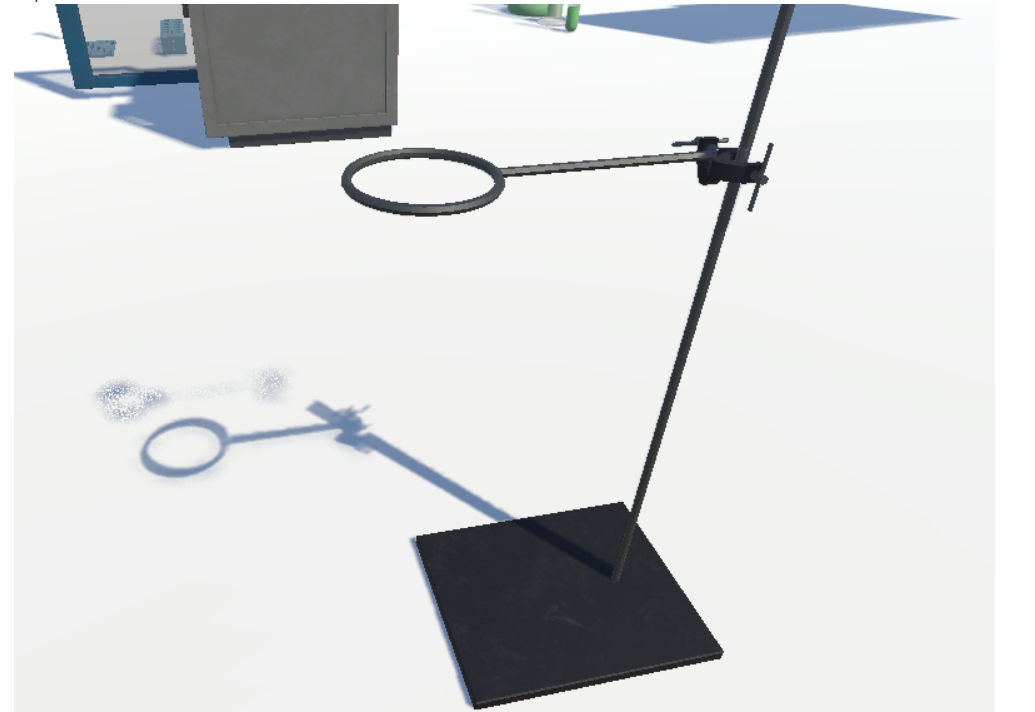
was explaining to someone how if the object goes off screen you don't get contact shadows anymore
so you can see the quality difference contact makes heh
maybe showing the original would help lol
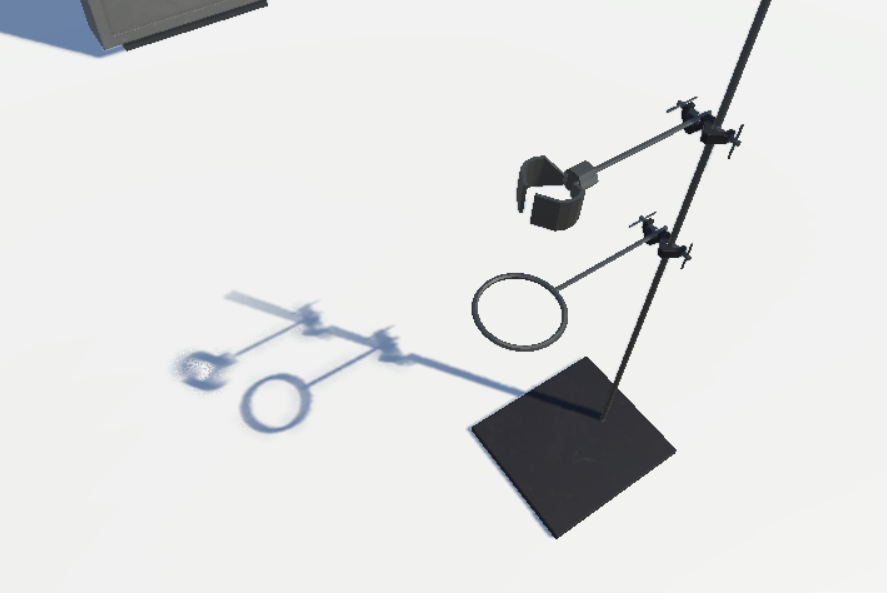
there's two arms on that beaker stand
quasi mulch
yeah it's a little fixer-upper for all things
I can't imagine I need it all that much indoors
indeed it'll only apply from the most important light
iron hollow
that will be a nice thing with raytraced shadows, it will allow rendering shadows for things off-camera
quasi mulch
yeah that's very nice
iron hollow
in a contact shadow context
though you wouldn't want to go too crazy, or you're not helping really
quasi mulch
raytracing in general for gpus has now had the ice broken so we can probably see over the next few years just less hacks using classic shaders and more real thing going on
iron hollow
yep
quasi mulch
TBH AAA is already at prerendered quality so the quality improvements aren't really going to be out of this world
but that doesn't mean we can't have it <3
iron hollow
hehe
yeah i watched the video of what was it, Battlefield or whatever that has RTX support
it really didn't make any striking difference
but there were subtle things
quasi mulch
it does on the promo shots because they've natually emphasised it a lot while tanking the framerate, and they could just approximate that fine at full speed but didn't there
iron hollow
mostly it made for a much nicer replacement for SSR
quasi mulch
nvidia's not sold as many as they'd have liked
perhaps because it probably costs 4 times more than my car is worth
iron hollow
well the goon squad on Reddit regularly talks it down
because they don't get 'bigger framerates' compared to 10xx
they don't get that bigger framerates are not the point 😛
quasi mulch
they don't uderstand how any of it works
iron hollow
yep
quasi mulch
they expected it to be an additive thing
its nothing of the sort, it's just a completely different technique
iron hollow
not to mention few games even support the RTX features yet
so they aren't going to see any benefit from it yet.
quasi mulch
its fantastic for things like substance designer or business right now - I've read about companies adopting it hardcore for those purposes
its really sped up authoring workflows
iron hollow
yeah, it will become more apparent as more software leverages the features
I heard this HUGE leak that Unity is adding RTX support, apparently it's a HUGE SECRET SHHHHH 😛
iron hollow
yeah that's a huge gain
quasi mulch
cheaper than a renderfarm
swap gpu, done
going to see most of the film industry properly cuddling up to game engines and hardware like this I think
quasi mulch
it'll trickle down to gamers
 thorn lodge
So when do we get to SDF rendering for all-the-things?
I think the world is ready to completely throw away all of the existing tooling and authoring workflows for perfect scaling resolution volumes
iron hollow
reminds me of that company years ago, that said they developed a game engine that used infinite resolution or something
what ever happened to them?
[HD version of the other video] Hi everyone. We've been working very hard and we hope you like what we've made. This is just our 1 year report, after which w...
these guys
they said you could go down to the grain of sand level, to the continent level at perfect resolution
thorn lodge
OH YEAH. I assumed they were trying to make some kind of SDF renderer, but they apparently never figured out animation and just sorta... disappeared
iron hollow
last video was this one
from 2 years ago: https://www.youtube.com/watch?v=4uYkbXlgUCw

A small Australian Company has found a way to give computer graphics unlimited power - no one believed them, but they are now using this technology to make r...
looks pretty blocky to me 😛
thorn lodge
seems like they still exist:
just not making a game engine, more static hologram stuff.
I can't tell if their render is SDF or some kind of high-res voxel system
iron hollow
if they really wanted to prove it's real, they would have released a downloadable demo
but they never did
thorn lodge
https://en.wikipedia.org/wiki/Euclideon
looks like it's some sort of point cloud/voxel system

Euclideon Pty Ltd is an Australian computer software company best known for a middleware 3D graphics engine, called Unlimited Detail. Euclideon is also the parent company and operator of Holoverse, a 'holographic entertainment centre' located on the Gold Coast, in Queensland,...
they don't seem to be doing anything game related at the moment
iron hollow
yeah i recall at some point they decided to take the tech 'private' which was very convenient for them 😛
i don't doubt they made a voxel system, i just don't believe it can handle the scale they claim
if it could they would be licensing it and making bank
but the fact they refuse to, smells bad lol
thorn lodge
people shouldn't be claiming to replace traditional rendering unless it catches on and begins to replace traditional rendering
this just looks like a high-res point cloud scan + renderer
quasi mulch
I guess with AI and ML you can make crysis out of mashed potato because it'll just render it perfectly
HDRP 5.5 spams console with diffusion profile meta file errors
turbid matrix
@quasi mulch what do you do to get those meta errors?
quasi mulch
nothing. it seems to have occured by itself. I think it's due to converting the older diffusion profile from one asset to many
turbid matrix
just curious because I put 5.5 on hd template on 2019.1 and didn't spot any (although it'll always errors on the initial run after swapping the SRP, but restarting the editor cures those)
quasi mulch
yeah probably needed to be using subsurface scattering etc
these errors kept happening though periodically
thankfully it's stopped for now
turbid matrix
I do get ArgumentException: Object at index 0 is null now every time I add an item on volume profile
when I try again, it always adds it on second try (but first one always errors out)
seems like SSR is broken on 5.5.0 HDRP's forward-only mode as well (unless there's some hidden settings needed for that to work now)
turbid matrix
also, why does the dynamic resolution option limit the max screen percentage to 100%? You'd think it would be nice to be able to run 150-200% if the system allows it (and get that SSAA effect from it)
turbid matrix
after investigating this, found out that forward-only SSR breaks on this PR: https://github.com/Unity-Technologies/ScriptableRenderPipeline/pull/2908. Once reverted that commit, SSR works again, so issue lies somewhere there. Filed a bug report on that (case #1129196)
turbid matrix
noticed that HD Template 3.1.0 is at staging, gave it a go (it's for 2019.2). Default Post-process and Scene Post-process gameobjects both setup the same volume component: Exposure
so it's setup twice and the prio will pick one of these, but it's hardly ideal for a template to do errors like this (as people will inevitably sometimes try tuning the exposure from volume setting that got overridden and it'll not do anything)
quasi mulch
My main problem is finding some concrete footing with the sky contribution
turbid matrix
I'm bit puzzled on the bug reports now (hippo knows the thread I'm talking about). Got staff recommendation on the forums for not reporting issues on staging. I get that many minor things may be obvious that they are broken but where do we draw the line? In past I've just commented them in HDRP thread if they've been on wip branches but now filed issue on fogbugz as the thing was broken on multiple releases (but there's no guarantee they make past staging)
it's kinda weird spot as you'd think specific reports wouldn't do any harm and just make people aware that they might be issues but obviously don't want to burden Unity staff if they don't want feedback on things that are still only on staging
I do get that they are not final releases and normally these would be treated as github issues but the SRP repo already moved to fogbugz on this (maybe worth updating the SRP readme to not file bug reports on anything but what you can access on regular registry then?)
 scarlet hull
I think I know the post you're talking about, and that I answered.
It's not an easy answer for us on how users should handle bug reports for HDRP. I mean : It's still in preview ; But package versions are released ; package staging versions are also publicly available ; the git repo is publicly available !
We can't prevent anybody from using the bug reporter for bugs on the latest master branch for example.
But internally, we prefer to use the bug reporter for released package versions, and other ways (favro/google docs ...) for staging or in development branches.
But we take any input you're giving us, bug reports, forums, and now discord.
At one moment we had issue open in github, but that was confusing the managed so we decided to close it ...
turbid matrix
ah, just confused how these should be reported if it's not something that pops up in regular PM
so forum posts are still fine for wip things?
@scarlet hull
scarlet hull
Yes, forum posts are still fine 😃
 dawn sorrel
Hehe, I actually met the guy who runs the Euclideon Tech at Gamescom about 5 years ago. Same guy who does the voice in their videos. Interesting conversation!
At the time; one of the biggest blocks of their tech actually being used for games is you couldn't animate any of it.
Atleast, in a reactive way that games require.
For example; their video does a comparison between grass-cards swaying with game-wind and then their static and stiff grass rendering that looks significantly better.
This is the bit im talking about: https://youtu.be/00gAbgBu8R4?t=240
[HD version of the other video] Hi everyone. We've been working very hard and we hope you like what we've made. This is just our 1 year report, after which w...
it feels like '2 steps forward, 3 steps back and then a big step to the side'
'Better by a factor of about 100 hundred thousand times' (Except we failed to mention that everything will be static and you can't move any of it so its ultimately useless for stuff that animates and moves like Foliage, Vehicles, Characters, and the vast majority of things in a game world etc)
 twin cargo
Yeah everybody should know by now that it was a big ass scam. Doesn't seem like they have learned since they're still making those big claims in their newer presentations
 small gyro
So, this is probably something really silly that I'm missing... But I'm trying to save a RenderTexture to a file, and then load it back into a RenderTexture.
This is my very simple code:
            Texture2D tempTex = new Texture2D(seenMaskTex.width, seenMaskTex.height, TextureFormat.RFloat, false);
            Graphics.CopyTexture(seenMaskTex, tempTex);
            return tempTex.EncodeToJPG();
        }

        public void SetSeenTexture(byte[] data) {
            Texture2D tempTex = new Texture2D(seenMaskTex.width, seenMaskTex.height, TextureFormat.RFloat, false);
            tempTex.LoadImage(data);
            Graphics.CopyTexture(tempTex, seenMaskTex);
        }
```The saving works fine, however I get the following error when loading: ```Graphics.CopyTexture can only copy between same texture format groups (d3d11 base formats: src=0 dst=39)```What am I doing wrong? Both textures are set as RFloat.
This is the RenderTexture in the inspector:
 plush pilot
I've found CopyTexture to be extremely finicky
if this isn't super performance intensive, Blit is a little more reliable
small gyro
Seems the problem is with saving TextureFormat.RFloat as JPG. Any other ideas on how to serialize and deserialize such a texture?
 scenic jay
@small gyro do you man for saving on disk? you could just write the raw data to a file and read it back. no need to have it as a other format.
small gyro
@scenic jay The texture is used in the game all the time (its a mask for explored areas in the fog of war). But then when you save the game, I need to convert it to a bytes array and save it with all the game data, and later load it back to the RenderTexture.
Anyway, I figured it out. There were many issues there.
The biggest issue is that Graphics.CopyTexture only makes a copy of the texture in the GPU and does not update the RAM. So when you use EncodeToJPG, it doesn't have the updated texture. Very weird scenario where the texture in the GPU is different from the one in C#. I need to use ReadPixels to get the pixels from the RenderTexture into the Texture2D.
The second issue was that a texture of format RFloat cannot be saved as JPG. There is no error, but the resulting JPG is just blank. So I had to replace it with an ARGBFloat texture type. It still performs well with large textures, and can be saved as JPG just fine.
I also had a bug where the byte array that was passed to SetScreenTexture was empty 😃
scenic jay
thanks for the update 😃
quasi mulch
how long does backporting typically take?
I mean is it released at the same time as usual package manager updates or a couple of weeks later (for HDRP backports)
(kinda want SSR but on 19.1 atm)
turbid matrix
@quasi mulch it's already backported on https://github.com/Unity-Technologies/ScriptableRenderPipeline/tree/release/2019.1
so, will be included on next 5.x.x release
5.5.0 and 6.3.0 were only releases where it's been recently broken and those never left staging afaik
quasi mulch
is it out on 6x now?
turbid matrix
only in master
but there might be 6.4.0 soon
been testing that custom function node whole day now (I merged it manually to master for testing)
quasi mulch
I hope not too many nightmares for kink
turbid matrix
I've been bugging him little more than I should 😄
quasi mulch
I take it this node refactor has been a pretty big headache to merge?
turbid matrix
but yeah, this is a good addition once the next PRs land that fix remaining issues
quasi mulch
I want to be able to dissolve things that break line of sight between camera and player (like all the posh AAA games do) so I think I'd need a custom node for that...
turbid matrix
I wouldn't have any clue how much work this stuff is, just happy it's happening 😃
quasi mulch
unless it can be done in standard graph now?
turbid matrix
I've never done that kind of effect so no idea 😃
quasi mulch
It'd have to be spatial (radius+position) rather than per-object
turbid matrix
but what would be the limiting factor?
you can do math in SG just fine, and feed in properties you want
quasi mulch
not sure just not experienced enough with graphs
turbid matrix
well, you know how you'd code in built-in's shaderlab?
quasi mulch
planning to apply to opaque, a sort of dithered falloff cutout, which hopefully uses jittered blue noise (that's built in, I think?)
yeah I know how I'd code it
well if you think it's all available I'll give it a go instead of custom node
turbid matrix
custom node is not yet merged though 😃
PR's were opened yesterday, I just manually merged the PR for testing
that textbox gets bit crowded and it's bit pain to navigate without scrollbars but it works
I could have put extra lines there though
 frigid cypress
if you have more functions in the text box than fit by default, you should put it in an include file anyway :p
cleaner
frigid cypress
yeah i suppose, maybe it's just me but if i'm writing enough hlsl to stop fitting within that box then i want to look at something with actual IDE formatting instead of plain text anyway
lines that long in plain text are a pain to interpret
quasi mulch
I thought custom nodes would be done in regular files instead of trying to ram it inside there...
Not worried just worried that's all. I can imagine a couple of asset store authors frowning :D
frigid cypress
you can do both -- you can either put a small function directly in the text box or point to an include file
quasi mulch
Nice - can point to include directly from the node interface or have to like before, register the node somewhere?
turbid matrix
@quasi mulch yeah, there's option for string (textbox) or file
frigid cypress
no you can do it directly from the node interface. there's a drop down there and if you set it to "file" then you just put directly in the function name and filepath
quasi mulch
Oh handy!
turbid matrix
should be way easier now
quasi mulch
this cuts down on mess too
Often you want to just get some math done, and that's 2 lines not 20 nodes :D
turbid matrix
yeah, I actually had most of the custom node screenshot in nodes originally on SG
but it was quite a mess
quasi mulch
I do prefer this over old surface shader style coding though, I don't want to exclude artists and with this node stuff, I don't buy it should be slower than coding an entire shader yourself assuming you want to use a lit variant
turbid matrix
in fact, you could do that all without custom nodes
but it would fill few screens with nodes
frigid cypress
that's kind of the goal of the custom nodes, not necessarily to give functionality that didn't exist before, but to be able to streamline it for people who have a better idea of what they're writing
quasi mulch
yeah, my old water shader in amplify got a bit unweildy but their feature of using "aliases" or little temp nodes that would hold a result allowed for a much cleaner graph
Allowed for shaping a graph much better with way less wires but functionally the same
 upbeat badger
can we now change input types in regular nodes like in vfx graph?
frigid cypress
what do you mean "change input in regular nodes"? like, on an add node change the input type?
upbeat badger
yes
frigid cypress
well most nodes in shader graph are already dynamic by default -- anything with a vector 1 input will automatically upcast for any other vector input. but on a regular node you can't change a vector input to like.. a texture input
the types on the nodes that ship are static and users can't change them, but you can change the type on the custom node and subgraph input/outputs
upbeat badger
hmm, i thought it would discard y and z if i connect vector1 and then vector3
frigid cypress
no, it upcasts the vector 1
upbeat badger
ok thanks
turbid matrix

GitHub
Purpose of this PR
Add support for dots instancing in Lit master node
There is a new option on Lit master node to enable instancing compatible with DOTS / megacity.
Note: The instancingOptions adde...
upbeat badger
it means megacity didnt used instancing?
turbid matrix
it means megacity's instancing is now included on main repo
they probably used custom SRP for the demo at Unite LA
all these Unity's tech demos tend to run on customized RPs but they've got a lot of complaints for it, so if they can make the demos run on as stock SRP as possible, it's all better
iron hollow
I don't see much wrong with them using custom srps for shows, if it helps them through development. but once it's released to us end users, it shouldn't be on a custom srp.
turbid matrix
wonder if they still release 5.6.0 and 6.4.0 today
they updated the changelogs for both to this date
iron hollow
any features that were cool enough for them should be cool enough for us ;p
turbid matrix
the issue with custom SRPs is that people who see the demos think they can do that with Unity out of the box
which isn't really true
altho since we get the custom SRPs, technically we can use them
iron hollow
right which what I mean, those features should become part of stock
turbid matrix
but it's not always trivial to maintain bigger changes
iron hollow
well alternatively they should remove whatever can't be stock from the released demo
which seems to be what they have done a couple times
turbid matrix
that's not really great option 😃
iron hollow
I know Book of the dead was released with most of it stripped out heh
turbid matrix
 iron hollow
yeah hehe
iron hollow
i'd still love to see a full playthrough of the original BOTD
seems only people who went to that show got to see it
turbid matrix
ah, you mean the assets
like, the whole experience
I thought you meant like technical side only
iron hollow
yes the experience
turbid matrix
afaik, we got most of the tech
 glad tartan
Isn't it still being worked on? We only got a teaser and the environment demo
turbid matrix
time will tell
iron hollow
it's basically done and over with afaik
they released the environment and that was that
they hinted there would be followup posts
but never happened
glad tartan
Hmm I was thinking we might be seeing it in the future GDC or sometime after. The full playthrough/build
iron hollow
I kept hoping too, but i'm resigning myself that it won't come
it's like half LIfe 3 ;p
glad tartan
😄 too much hype on HL3 they cant make it until everything can 100% be simulated as the real world. We finally getting Ray/Path tracing so they might be prototyping
iron hollow
yeah somehow I think they are too busy rolling around in their piles of steam cash to make it.
glad tartan
Haha, steam sales erase the thought of HL3 always.
Still have some hope for BOTD though. It's been different teams working on the other demos from last year so the Demo team might still be on BOTD finishing it or maybe on a new project and waiting to reveal the final version of BOTD
iron hollow
knock on wood hehe
glad tartan
haha yea
I'm more looking forward to the new stuff they will be working on and showing for HDRP, LWRP and the editor. Things are getting interesting
iron hollow
yes, they are 😃
turbid matrix
6.4.0 now on github and staging
https://github.com/Unity-Technologies/ScriptableRenderPipeline/blob/6.4.0-preview/com.unity.render-pipelines.high-definition/CHANGELOG.md (only few changes for other packages)
frigid nova
i just want an occlusion probs for unity,or indirect shadows,since realism needs that,so we wont be able to make fully realistic games without something like that,since shadows now will be flat colored,also you cannot bake a whole scene with foliage ,so the probs that showen would be great ,anyone know is we ever get them officially ?
turbid matrix
@frigid nova you know about the voxelized shadowmaps?
talking of which, apparently HDRP is now getting some love on those too https://github.com/Unity-Technologies/ScriptableRenderPipeline/commit/e64798f32dd5ad6df8daa82438bb9d73e24de339
 quasi mulch
so what are they doing?
iron hollow
I don't know, I don't see anything about voxelized shadow maps
2016 paper, but again about volumes
actually the same guy as your paper heh
quasi mulch
Once a man has his obsessions he rarely lets them go
iron hollow
oh I know this technique
there was an open source implementation for unity 5
very neat idea, but it had some big drawbacks
quasi mulch
basically taking the old stencil extrusion lark to an async more useful place
quasi mulch
yeah!
iron hollow
I tried to port it to 2017 but I never quite got it working
quasi mulch
you had to make sure your meshes were watertight and being inside the volume would also create endless problems which I assume he's solved all of
iron hollow
something changed about scale I couldnt' figure out
mesh was too small to do the trick
but the problem with that implementation is he made the mesh by hand
quasi mulch
oh this looks nice for resolution. the current volumetric fog kind of craps out unless you are quite attentive and fade your volumes etc
iron hollow
it wasn't generated at runtime
so it was more proof of concept than anything
it did work well though on 5
really nice shadows
wonder if I can find that project again
quasi mulch
I have a reasonable compromise right now with 3 cascades, I found 4 were not worth it because at those distances were 4th made sense, it was already covered by 3rd's resolution and 3 works better under more circumstances. I guess I never understood why some games went with 3 even on max settings, but now I do
iron hollow
lost to the sands of time
quasi mulch
gone never to return
iron hollow
well will be neat to see it implemented properly in HDRP
quasi mulch
Well I'm looking forward to it. I guess its faster and better looking?
they can shovel all of this on compute can't they
async
iron hollow
probably
but yeah basically it casts vertices as 'rays' and where they don't strike is considered shadow
inside areas that do strike
so you get basically infinite range (or at least as far as you tell it to cast)
with no loss of fidelity with distance
quasi mulch
So what's the catch?
iron hollow
all that casting
quasi mulch
must be fun at high resolutions
iron hollow
the higher rez the more points yes
so the more casts
the reasons it's 'voxelized' is because the points are on a grid
so it basically is breaking the area up into blocks
quasi mulch

Unity Forum
I was really unhappy with the quality and performance of Unity's shadows. I tried a few ways to speed it up but they all relied on unity's lighting in...
iron hollow
yeah I've been watching their SEGI thread for some time
quasi mulch
He didn't do SEGI though
iron hollow
maybe i'm thinking of the wrong thing
quasi mulch
he has a gi thing but it's not sonic's
I was wondering if he uses similar techniques, if so it would be a nice quality increase indeed
iron hollow
oh yeah my bad HXGI
quasi mulch
The argument being "this was too slow to use before" but now I'm doing things on new gpus and using much higher quality settings than those times in the past so this voxel technique may well end up being good perf
iron hollow
SEGI HXGI I get them mixed up all the time lol
quasi mulch
yeah, how dare you have a life
iron hollow
yeah I think on high end hardware it will be just fine
upbeat badger
voxelated shadows, cool. Finally we will get nice soft shadows from particles and volumetrics
quasi mulch
Now for at least a month of asking the driver if we're there yet.
upbeat badger
iron hollow
that Unreal?
upbeat badger
yes
upbeat badger
yes, but selfshadowing of particles is very buggy
iron hollow
that could be true
iron hollow
I see

This turned out to be a lot more involved than i originally anticipated. But Mission Accomplished! Custom particle shader which flaps the wings of a simple m...
i wrote a particle shader to flap the wings of my moth and it took me some work to get shadows working on it
but was a must have
i still need to go back and add translucency as well
quasi mulch
procedural sky is coming along nice, had a nose about on github
stuff like planet radius
iron hollow
yeah sounds interesting. are they adding stuff like cloud generation too?
quasi mulch
Not reading anything abou drinking pints or beers law
seems just the scattering stuff and procedural sky without clouds so far
iron hollow
seems like the old stuff will have to be relied on then
gotta have clouds ;p
i'm still learning thigns about the old sky
like i had no idea you could make it rotate on it's own lol
i figured i'd have to make my own skybox to get it moving
quasi mulch
Ihttps://github.com/Unity-Technologies/ScriptableRenderPipeline/pull/2725

GitHub
Purpose of this PR
Why is this PR needed, what hard problem is it solving/fixing?
This is a scriptable render pipeline part of terrain surface mask (aka terrain holes) PR https://ono.unity3d.com/un...
reading this is a bit of a concern about the mess going on
even adding terrain holes is both a perf hog and a problem with build times. And I don't know if holes are a performance problem in view, or in distance and so on. I mean how can we optimise this stuff?
iron hollow
shader compilation. yeah that's always a problem
upbeat badger
i saw conversation in twitter between unity and other developers about problem of shader variants, dunno if its even possible to solve
quasi mulch
Not without destroying compatibility with builtin and redoing it
I guess they wanted to build on the existing foundations and from a time pov it makes sense
but compiling variants performance, that's something that could improve a lot, right?
iron hollow
yeah I mean....
quasi mulch
Still, for me it's only 1 hour sitting about then sebsequent builds are fast
iron hollow
i probably don't know nearly enough about it. but i don't get why they can't tell which variants your game uses and just compile those.
instead of compiling every possible thing, used or not
quasi mulch
I guess it's because if an option is exposed on a shader such as render nipple mapping, that variant would be hard to detect
iron hollow
i think there's a tool on the asset store that does this
and maybe they need to invest in that guy's tech ;p
quasi mulch
How would the shader compiler know if you intend to toggle a feature on or off?
Frostbite totally never has this problem: every shader is lean as hell and only does that specific thing
BUT.... naughty dog actually don't do that and have 1 consistent ubershader for everything with a consistent cost, with some minor variations
iron hollow
yeah i'm reading about it
seems it just gives you an easy pane to toggle variants on and off
you still have to know if you should or not yourself
quasi mulch
Unity has a growth of some sort that went from fixed function into the horrid tentacle it is today
iron hollow
but even giving an easy pane would be an improvement
because right now I have zero idea how i would even turn a variant on or off lol
quasi mulch
I agree, I know what my game needs so if it just let me exactly specify, I would be happy. But it does not.
iron hollow
i know they did a blog post about it
but i really didn't follow it well

Unity Technologies Blog
Massively reduce Player build time and data size by allowing developers to control which Shader variants are handled by the Unity Shader compiler and inclu...
when they pulled out the algebra, my eyes glazed over
upbeat badger
aras mentioned some new material/shader runtime in his blog. maybe this will fix problem of shader variants
quasi mulch
It's the definition of having a huge tech debt.
It's got to be solved though
it's clearly got the point where Unity doesn't want to add any features because it can't without doubling how many shaders are built.
They can add features but it's a hard on/off only, so you end up having either good perf or bad perf. You can't use it situationally and get good perf with the feature
iron hollow
makes me wonder about something
quasi mulch
Its harming the unity product, if not now then absolutely going forward.
 quasi mulch
I guess we'll all be raytracing with the One True Material in the end and it won't matter.
iron hollow
i wonder if doing that removes any shaders associated with them
if so it may be worth doing moreso than ever
quasi mulch
I dunno, I think they would have be in the build, right? or referenced
iron hollow
well yeah you shouldn't disable something you're using
but say you don't use terrain
twin cargo
If you're talking about those equations in the blog post, that rotated M means sum, and the parallel I is a product, that's it
iron hollow
would disabling terrain remove all it's shaders?
but i get what you're saying, if you're not using terrain, would the shaders be compiled or included anyway? i'd hope not but...
i call the rotated M a funny E 😛 i know it means Epsilon
but i don't relish having to deal with formulas in a situation like that
quasi mulch
As far as I know unity scans anything saved in any scene, and in Graphics project settings (where there's lots of included shaders). If it isnt here or in a saved scene included in the build or used by a prefab you link to in some way, it will be stripped.
 stone charm
IDK why, but summations were my most difficult subject in calc
iron hollow
i just want to know what button to push to make it all better 😛
quasi mulch

we know all that I guess, but it still doesn't solve the problem where you don't want to add a feature because it will bloat, and it becomes an all or nothing thing
iron hollow
a very smart guy on the blog asked how you're supposed to know what shaders your project uses.
but nobody ever answered him

😛
quasi mulch
lol
iron hollow
well i take that back, i did get an answer of sorts
quasi mulch
it's possible to design it out: just prevent materials changing keywords during runtime, forcing a shader/material change for that
but because of that one feature they can't do any of it
iron hollow
but the answer is to do something that should be automated
quasi mulch
now asset store is a monolithic beast they won't change any of this legacy tech debt
its too late
iron hollow
log what variants are used, and plug them into the variant thing
quasi mulch
yeah or hint variants somehow, just reference a list of keywords the shader uses
you can go in and delete defines so making that presentable somehow would go a long way
I think that would be a solution really
you can just remove the keywords but in a nicely presented window
no text
iron hollow
well i think they would do what I do. deal with it as is until legacy is depreciated and they can dump all the old stuff ;p
quasi mulch
they can't though
since all the current stuff is then the old stuff or they break all the projects past and present and all of asset store
iron hollow
at some point they will make a version without legacy
not anytime soon
but eventually
quasi mulch
when the sun is swollen and the seas of the earth become faded printed memories on parchment used to light fires miles below the scorched crust.
upbeat badger
they can develop new shader thing in parallel as they doing with new ecs systems
iron hollow
LWRP and HDRP need to be finalized and stable. Asset store needs to become at least 75% SRP ready. and who knows what other things.
quasi mulch
Apparently LWRP and HDRP don't get much traffic at the moment. FOOLS! little do they know of the delights that dance beyond their limited fov tweaks.
present company excepted of course
iron hollow
hehehe
upbeat badger
Does this mean new material system for entities? I dont think they will change anything with current materials.
 faint kraken
if I remember right, material overrides is for changing a property of a material without making a copy of it (it's seen in the fps sample)
https://github.com/Unity-Technologies/FPSSample/blob/master/Documentation/SmallEditorTools.md

GitHub
A first person multiplayer shooter example project in Unity - Unity-Technologies/FPSSample
quasi mulch
Joe's right of course, why would I ever doubt him
material overrides sound exactly like volume overrides
and would allow Unity to track easily
like I was talking about with the whole material thing earlier, that's the start of the madness, so this would solve that problem too, since the materials themselvs don't change and can thus be tracked
upbeat badger
yeah, its like material instances in unreal. but it will be official feature instead of what they did in fps sample
 trim bone
to anyone using hdrp 5.5.0, are you cloning it directly from github or grabbing it via the package manager?
quasi mulch
PM
I have staging that I added to PM, which I don't recommend unless you want Unity to pause for ages. Apparently a fix is on the way
trim bone
er do you mean just adding
"com.unity.render-pipelines.high-definition": "5.5.0-preview" to the manifest?
pm cant seem to find 5.5
turbid matrix
5.5.0 is so last season now ;D
GitHub
Scriptable Render Pipeline. Contribute to Unity-Technologies/ScriptableRenderPipeline development by creating an account on GitHub.
and yeah, these are only in github and staging atm
@trim bone this would work but be always cautious on staging packages as they are not "approved" for release yet (and are often versions they skip if there's some issues on them):json { "registry": "https://staging-packages.unity.com", "dependencies": { "com.unity.render-pipelines.high-definition": "5.6.0-preview",
trim bone
ahh so thats staging thanks!
turbid matrix
also sometimes the staging packages don't even work out of the box with the engine versions we've got, in such cases it's often reason for staging package being released before engine version with the needed API changes and then usually the next beta will run the new package again
so, if you get bunch of errors when you try them, that can be one reason (for example current 6.x.x packages on staging will not run on only available 2019.2.1.0a4 without modifications)
 spring jasper
guys for some reason the post processing effect doesnt work on my lightweight render. I copied the stuff from the Unity LW sample.
I think it might come from the color space in unity project set to Linear while mine set to Gamma
Any ideas how i could solve it?
trim bone
yeah i was using 5.3.1 which wasnt officially on the package list and had some errors, thought I might as well continue forward instead of backwards, and 5.6 did fix my issues! murphys law will probably find different errors later but thats not tonights problem 😃
turbid matrix
@spring jasper set color space to linear on player settings?
I dunno if gamma setting is even supported by SRPs (LWRP might support it)
spring jasper
@turbid matrix Any other option than that ? Changing the the color space option do weird things to the camera (everything turns black) in both scene view and game view
glad tartan
Did you set the proper layer for the post processing?
spring jasper
@glad tartan yes I did, like the Unity sample. Set post processing layer on the post process volume object, then set the post process layer on the camera to that layer
spring jasper
The bloom effect doesnt work
glad tartan
@spring jasper is the Post Volume also set to global?
spring jasper
yes @glad tartan
glad tartan
Ah alright. Odd bug you're having then
turbid matrix
made forum post about this custom package here: https://forum.unity.com/threads/occlusion-probes.531573/page-2#post-4244413
dawn sorrel
FPS Sample project has a Material Override System in it that works with HDRP. 😃 Can be easily extracted too!
 bronze python
Hey all does anybody know if any glTF importer works with HDRP?
turbid matrix
@dawn sorrel this one? https://github.com/Unity-Technologies/FPSSample/tree/master/Assets/Tools/MaterialPropertyOverride
GitHub
A first person multiplayer shooter example project in Unity - Unity-Technologies/FPSSample
I've been aware of it having that system but I never tried it in practice
dawn sorrel
@turbid matrix Yep! 😃
They used it for consistency across various sections of the environment; most of the modular pieces use it for some kind of color tinting.
turbid matrix
you now if that's a selfcontained thing or does it require some other changes?
dawn sorrel
AFAIK, Its self contained; the only thing it points to external to the scripts in that folder is the shader you want to set properties on.
In FPS Sample; this is HD Lit.
turbid matrix
ah, that would rule out package setup unless one can implement the needed changes on SG
that being said, I don't see such changes on HD Lit here
oh, you meant the other way around
I'll take a look
as a side note, isn't HDRP VR now camera relative on 5.3+?
if so, maybe this doc page could be updated: https://github.com/Unity-Technologies/ScriptableRenderPipeline/wiki/VR-in-HDRP
now that page tells to modify the camera relative off (which is still correct for 4.x releases)
but then again, I'm guessing that page hasn't been updated because HDRP VR is constantly getting updates now for 2019.1 (so it probably makes sense to wait for doc pass until it's stabilized a bit / 2019.1 is closer to release)
upbeat badger

GitHub
Purpose of this PR
This PR introduces area light shadows for the real time rasterization pipeline.
It uses EVSM to minimize VGPR pressure for everything else and to provide very soft look.
It is po...
great stuff
turbid matrix
yeah, been waiting for something to give area lights realtime shadows for a while 😃
btw, got that material property override thing to do something on HD Template, but not quite sure how it's helping yet
will take a look at fps sample (once it opens on current 2018.3 version) how it was used there
dawn sorrel
@turbid matrix Why would it rule out package setup? You literally just set a new shader for it to use. It works with Shader Graph Shaders too.
turbid matrix
@dawn sorrel it wouldn't, I thought you had to modify shaders to include it but realized you meant it the other way around
from what I briefly looked at it, it's just few scripts, should wrap into package format nicely
I'm thinking I could make some "one-for-all" package repo for things I've ported and have like branch directory on the welcome page
I don't have that many freely distributable things (I have like 30 I've ported that can't redist) but might still be nice
I from ones I can redist, I have Unity's AutoLOD, Alloy shaders, Occlusion Probes, Steamworks.NET and ECSPhysics converted to packages
ah, so, this property thing lets you have like global access to specific shader values and ties them to assets that hold them
FPS Sample uses this for few layered materials that repeat across the level, letting you tweak the overall tone of the section
like those big pipes orange color
I'd love to have like true material instances, like on UE4
also, while not exactly the same thing, this property override lets you do similar things as https://docs.unrealengine.com/en-us/Engine/Rendering/Materials/ParameterCollections
altho I do think the setup on UE4 is bit slicker (but then again, it's built-in feat there)
in Unity you play with global shader values traditionally for something like that
turbid matrix
heh, tried 5.6.0 LWRP on the stock LW Template
got brand new look here
what's weird is that it actually renders fine, somehow all the in scene materials got converted to 0.5 gray base color
if I manually change the materials, they show color again
for some reason, it cleared the both base colors texture and color value, but left all other maps like mask, normal and occlusion in place
here's after putting the safety helmet albedo texture back + changing it's color/tint to white:
frigid nova
@turbid matrix wait i see voxel to hdrp if they do that its gonna be insane
turbid matrix
@frigid nova you mean the voxelized lightmaps?
they started working on HDRP implementation for that this week
(or who knows when they started it but showed up in github)
kinda hard to get excited about it before knowing what it's about though
frigid nova
Dunno what would actually happen in the end but if its implemented correctly then it would fix lightmaps ,global illumination of tilable materials.GI in trees in big cities man this could be the answer.Is there any new update for the lighting inside unity?
turbid matrix
well, checking out on LWRP atm
basically they have three types of shadow map scripts, one for each light type (directional, spot and point)
no clue yet how you actually get that resource it relies on though
turbid matrix
spot and point light scripts are still stubs (only implementation for directional right now)
but there's still nothing here that would let you generate that needed scriptable object for this
iron hollow
so they have the voxelized already functional?
turbid matrix
no idea how functional this is 😄
iron hollow
😉
turbid matrix
also, could swear I saw another stub repo on github for this but can't find it now
quasi mulch
actually funny you mention this
I was thinking of generating a heightmap from the terrain plus any objects that are unchanging, and baking that at editor time
then using it to extrude shadows for a flat shadowmap I'd apply to the dir light cookie of the sun. good or bad idea?
since it's the sun we can make a lot of assumptions
I'm interested in doing this because having CSM for 8192 units is not exactly optimal
and unity doesn't do any warping to make the joins nicer between splits
putting it in via the cookie is a bad idea but I'm not sure how else to combine it with the dir light without fuss
Another bonus of this is I can easily render shadows from clouds
hmm it would mess up with sun light rotation so cookies are out I guess
iron hollow
sounds a bit like shadows done using the stencil buffer
I have seen an implementation of that before

GitHub
Shadow Volume for Static-Scene-Object of Unity. Contribute to chengkehan/ShadowVolume development by creating an account on GitHub.
That's the old technique used for shadows, also called stencil shadows as it uses the stencil buffer. It was replaced by shadowmaps for a number of reasons. The biggest one it can eat fill rate a lot due to overdraw and works only on solid meshes, if there's a hole you will see artifacts. Another drawback of this is that is draw directly to the display buffer, you can't get the shadows and modulate light/spec, etc with. Unless you are re-rendering the scene twice which will make these even less optimal. Worth notice that shadows volume won't save you from drawcalls as you need to redraw your shadow mesh and your scene mesh either way.
 fading rose
Isn't "Material Parameter Collections" the same or similar with "Shader Variant Collection" ?
Why would you want to have these "true material instances"?
turbid matrix
the material property override isn't exactly same thing
but you get access to material properties you've overridden per object
and can control those globally
or globally is wrong word but for every asset that has set that same property override asset
fading rose
Hey @turbid matrix are these Vx Shadows from 19.1 ?
quasi mulch
ooh
turbid matrix
so yes, but it's not merged yet
I feel like this branch is missing the asset baking tool though
elfin osprey
i might be wrong (i doubt it) but this looks like itll get merged after we stop updating the templates for 19.1
turbid matrix
as I didn't see any way to make the required resource
I'd ask if you knew more details about this but you probably couldn't tell even if you knew 😛
elfin osprey
about how it works? or about release schedules? 😛
elfin osprey
oh i have no idea lol
turbid matrix
and can imagine it's voxel based shadowmapping
elfin osprey
havent looked at it
turbid matrix
so, basically 3D shadowmaps that are probably baked somehow
quasi mulch
come to think of it, i don't really need or want any shadows to cast over the 8192 visible range, just cast the shadow of one single object across that distance... perhaps someone has an optimisation they know of or trick?
turbid matrix
fading rose
voxel based lightmapping sound so much better than the crappy proxies.
turbid matrix
this looks very similar to occlusion probes with difference to not containing AO only
quasi mulch
if it's on LWRP I imagine it's better perf than CSM
turbid matrix
also there's an option to run shadows on this alone or blend it with regular shadows
so it would let you opt out on the regular shadowmapping
elfin osprey
so its a baked shadow representation, so you can have a smaller CSM for dynamic objects with a closer max distance and blend it?
makes sense
turbid matrix
that's from the vx directional light script
welp
they removed the public access to this https://github.com/Unity-Technologies/ShadowMapsVoxelizer
so, I don't think we can test it quite yet
pretty sure that's required to author the needed resource file for this to work
elfin osprey
yes, it is
turbid matrix
this proposes a data structure for precomputed shadows.
but yeah, that repo was a stub when I looked at it originally
well, it's a waiting game then :p
fading rose
Well, that sounds like you found something that was meant to stay hidden 😄
turbid matrix
even if you reverse-engineered the structure from that SRP branch, you'd still need utility to bake it right and in that case, may as well wait till Unity actually launches this thing :p
this isn't super secret though as the SRP branch development is public
fading rose
yeah I just wish there is more about LWRP as it is obviously going to be the bread and butter of Unity. So far I really like it, but can't replace the standard renderer entirely without custom shaders.
turbid matrix
I still wonder about that LWRP Template think on latest 5.x releases and 2019.1.0b4
why could it remove all the albedo textures?
it seems like some material upgrade tool is overagressive and updates everything to changed 0.5 albedo value
elfin osprey
Guess: It changed the serialized name of the texture prop
And color i guess if it set to 0.5 (default for LWRP)
turbid matrix
this will be really painful if it does that on actual projects 😄
elfin osprey
doesnt matter though, template is currently being updated
turbid matrix
imagine having hundreds of assets that reset the albedo
yeah, I'm not really worried about the template
more about projects
elfin osprey
well, sorry to say it but this might happen
turbid matrix
I know 5.5 and 5.6 LWRP does this on the LWRP template that ships on current 2019.1, but I don't think 5.5 or 5.6 are past staging yet
elfin osprey
this is our last chance to make breaking changes to LWRP
elfin osprey
and were going to make them 😛
fading rose
I have a huge LWRP project, that is only meant to grow more. I would hate to not be able to upgrade to the latest in 2019.x because of breaking changes.
turbid matrix
but yeah, your guess sounds reasonable, considering it's only missing the base color value
all the other material slots seem intact
elfin osprey
you could also write a script that does it automatically
but im afraid, this is what preview means
turbid matrix
well, the issue here is that it automatically does the change when you open the new one
quasi mulch
I see, I have time of day, so this would not work so hot I guess
turbid matrix
does it still contain the old material values even if it's not mapped to current shader?
I mean, I dunno how you'd script it in this case
fading rose
I am fine with previews that last a few months . Not so fine with previews that last 1.5 year 😄
turbid matrix
ah, so run the script outside of unity
turbid matrix
but can you assign the assets values for properties that don't exist on that version?
elfin osprey
well at that point youd just edit the serialized version directly
turbid matrix
I guess you could make a temp shader that has both types available
elfin osprey
then when it goes to import with the new shader version the ref is in the right place
bit of a pain in the arse
but pretty sure itd work
turbid matrix
but yeah, I'm going to guess forums will be flooded about this 😄
I don't really use LWRP just casually noticed this while looking at that vxsm
(it did do this on regular 5.6.0 LWRP too, vxsm is based on some 5.5 version)
@fading rose there probably could be upgrade tool that handled this gracefully out of the box... but since it's not released package, should Unity really spend a lot of time building such?
also this is all speculation why this happened to me, it might be isolated case too
(altho I doubt it)
after it's released, backwards compatibility will be more important
quasi mulch
Well it seems like so long as the objects don't move, vxsm would function normally, right? the light can move ?
if so it's going to be pretty great for outdoor games
fading rose
yeah we do not know what will happen at that time, this is still beta.
But since they include LWRP in their regular release packages I think they ought to.
If things are not supposed to be used, you should not provide standard templates with them.
turbid matrix
@quasi mulch I'm going to assume VXSM will work for dynamic objects too, they just don't contribute to the shadowmapping itself but will receive it
that's how occlusion probes work anyway
quasi mulch
yeah it's just i have 8 miles of static geo i could happily use this with
doesn't need to be high resolution just artefact-free and blended with regular close up shadows from dynamic things
turbid matrix
I dunno hows the memory consumption would be on things like these on bigger worlds
quasi mulch
i'll try if HDRP team stick it in
fading rose
I have a large city block with trees and whatnot. and it is only going to grow larger and larger. in which case it would be super useful.
turbid matrix
on occlusion probes, you could have additional higher resolution volumes for specific targets
fading rose
HDRP will take even longer to get out of preview. So I do not even bother touching it.
quasi mulch
CSM works with 8 miles but it's actually a perf hog I really don't need to be doing
turbid matrix
I don't mind previews as long as it's not totally broken
quasi mulch
and the splits are pretty glaringly obvious at those scales no matter how hard you try if you want reasonable res close up
this is exciting
how dare unity actually solve problems before I whine about them?
outrageous
turbid matrix
I'm still going to wait out what this will be before hopping on to the hype train 😄
quasi mulch
oh I'm max hype about unity stuff tho
elfin osprey
🚋 🚋 🚋
turbid matrix
also reason why I try these things early on if possible to know where to adjust the expectations
quasi mulch
choooo choooooo
I regret though I did hype over unet and it turned out to basically be under-resourced, if that's the nice diplomatic way to tell it?
turbid matrix
I'd still love to have some dynamic solution for this which you could bake like for over longer period of time, it wouldn't have to happen all in few frames
quasi mulch
In fact whenever there's problems with dev we could just blame it on resources, a fuzzy and vague concept that surrounds us all
turbid matrix
for time of day kinda thing
iron hollow
if by 'splits' you mean shadow cascades, NGSS completely removes the transitions between cascades
quasi mulch
yeah also another really quite big issue is a fast implementation of procedural sky lighting + clouds tyvm
iron hollow
with his magic they are simply gone
quasi mulch
well tell him to stop arsing around and port it, tato knows me so tell him to hurry
iron hollow
lol 😃
turbid matrix
😄
iron hollow
he said he's focusing on SPR next
iron hollow
lol
iron hollow
yeah probably if they are going to break more stuff
quasi mulch
this vxsm stuff and goodness knows what needs a good looking at
turbid matrix
I just pointed out that he could release 2.0 on built-in as SRPs are still in preview at least until 2019.1 (there wasn't target for HDRP back then)
he agreed
iron hollow
and yeah I showed him the vxsm but he seemed unphased
quasi mulch
nothing will phase him since he's been obsessed with shadows for around I think 6-7 years
iron hollow
hehe
quasi mulch
since his mobile thing
turbid matrix
HDRP didn't even have PCSS when he got it running there in some wip state
must have messed up with his plans a bit when that happened though
quasi mulch
I can't really use PCSS with my scales because it causes more artefacts with 4x CSM for 8km
turbid matrix
but there's still a lot other things you can do with shadows
fading rose
Shadows are a huge pain in large scenes.
quasi mulch
What's Very High do? it looks like some kind of ugly raytraced version? HDRP 5.6 shadow option
it changes the options again on the dir light - check it out
there's 4 settings now
turbid matrix
one sec
turbid matrix
GitHub
Scriptable Render Pipeline. Contribute to Unity-Technologies/ScriptableRenderPipeline development by creating an account on GitHub.
check the shadow filtering part
Point/Spot: Use High for their Filtering Quality.
Directional Lights: Improve Moment Shadows.```What are "moment shadows" ? that fleeting moment before you grunt and switch it back?
turbid matrix
so, PCSS for the spot and point lights, and moment shadows for dir light
quasi mulch
in any case I've only had poor results from it and it nukes the framerate
turbid matrix

Shadow map aliasing is a common artifact in games. Moment shadow maps can improve on this situation. Similar to exponential variance shadow maps, they can be...
quasi mulch
interesting but I'm not feeling it quality wise
turbid matrix
that Very High had issues on either forward or deferred when I tried it, can't remember which one it didn't work for
that might be different now
also I think PCSS (High setting) is forward only atm
quasi mulch
On forward at the....moment
i'll try again
because ideally this is perfect for sunlight isnt it?
turbid matrix
this is still the thing I'm most excited about on shadow front atm :p https://github.com/Unity-Technologies/ScriptableRenderPipeline/pull/3056
GitHub
Purpose of this PR
This PR introduces area light shadows for the real time rasterization pipeline.
It uses EVSM to minimize VGPR pressure for everything else and to provide very soft look.
It is po...
quasi mulch
ugh tanks my fps
turbid matrix
(fixed the link)
quasi mulch
looks nice - I'm glad we have all these options for great gpus, not so hot at perf though. I'm trying to use HDRP in a way that's perf friendly
turbid matrix
I'd want those area lights for my pet project but I'd really need shadows for them
quasi mulch
perhaps CSM should not be used with moment
turbid matrix
that needs fully dynamic lights and having garage lights not casting shadows isn't really an option
of course, nobody forces on putting long rectangular lights there :p
quasi mulch
I love they add all this
its like grown up xmas every day they do
not having great luck with moment shadows and smaller objects
turbid matrix
I really dig how PCSS looks on my main project
fading rose
there used to be a "micro-detail" feature in HDRP at some point but I do not see it anymore.
turbid matrix
you mean contact shadows or that specific tech they added?
quasi mulch
quasi mulch
moment shadows are soooo slow, I must be doing something wrong
turbid matrix
or maybe it's just really perf heavy
😄
after all, it's the highest setting for now
PCSS isn't exactly cheap either
elfin osprey
bear in mind it might be for film
turbid matrix
btw
about those micro shadows
GitHub
Purpose of this PR
Added micro shadowing support that fakes some directional light shadowing based on AO and normal data. This is based on "The Technical Art of Uncharted 4" [Brinck and M...
quasi mulch
same as uncharted 4, right?
turbid matrix
https://user-images.githubusercontent.com/43168857/45868948-5b9c3a80-bd87-11e8-9d4b-77a52463f797.png
I hope they add some doc page for that
I feel like the "Shadows in HDRP" doc should mention the option for this
quasi mulch
its been in for a long time
turbid matrix
it's kinda niche feat, so it probably got overlooked on some docs pass
if you don't know that PR, you'll not know it's based on this: http://advances.realtimerendering.com/other/2016/naughty_dog/index.html
so probably will be obvious at all how to use it either for majority of the users
iron hollow
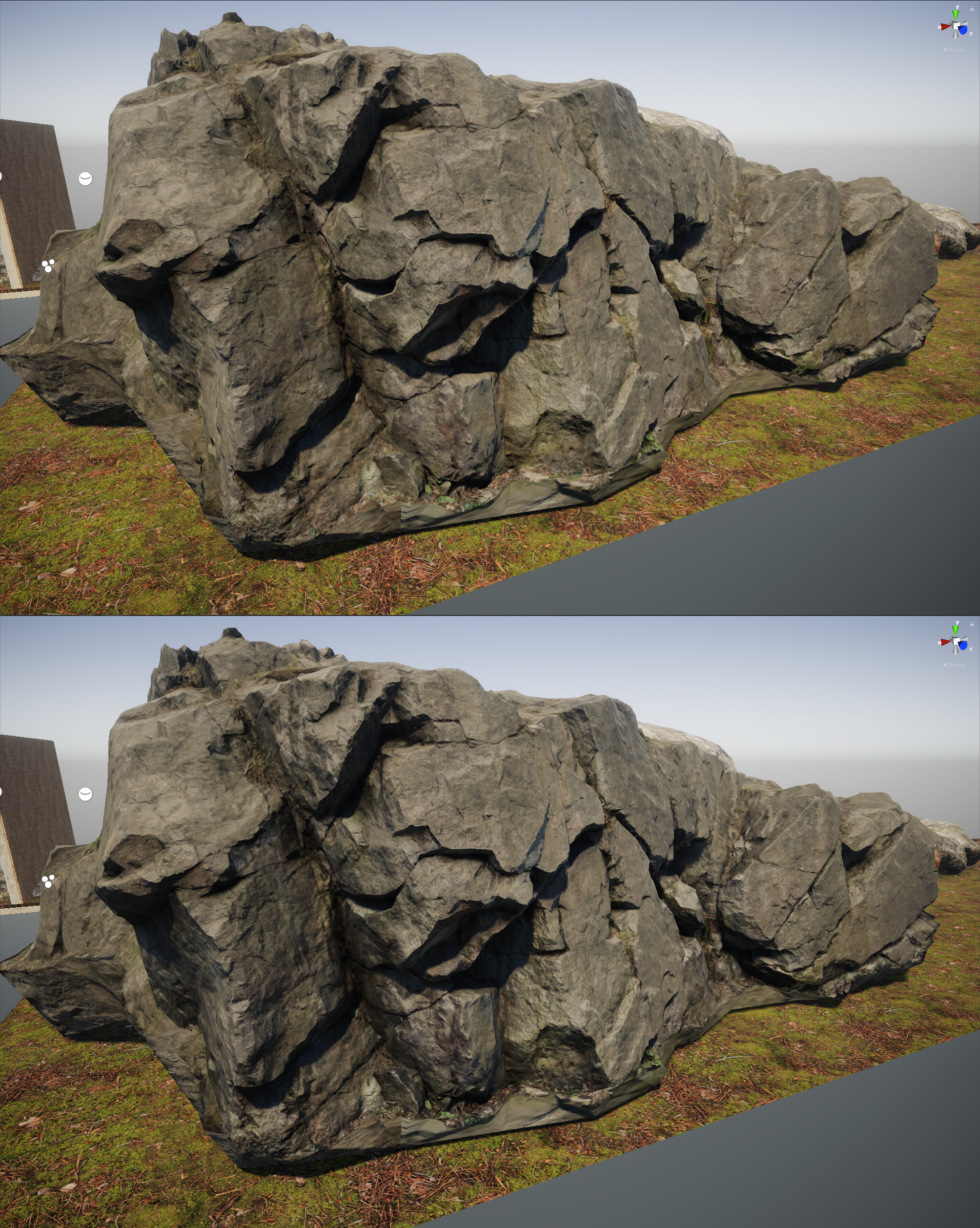
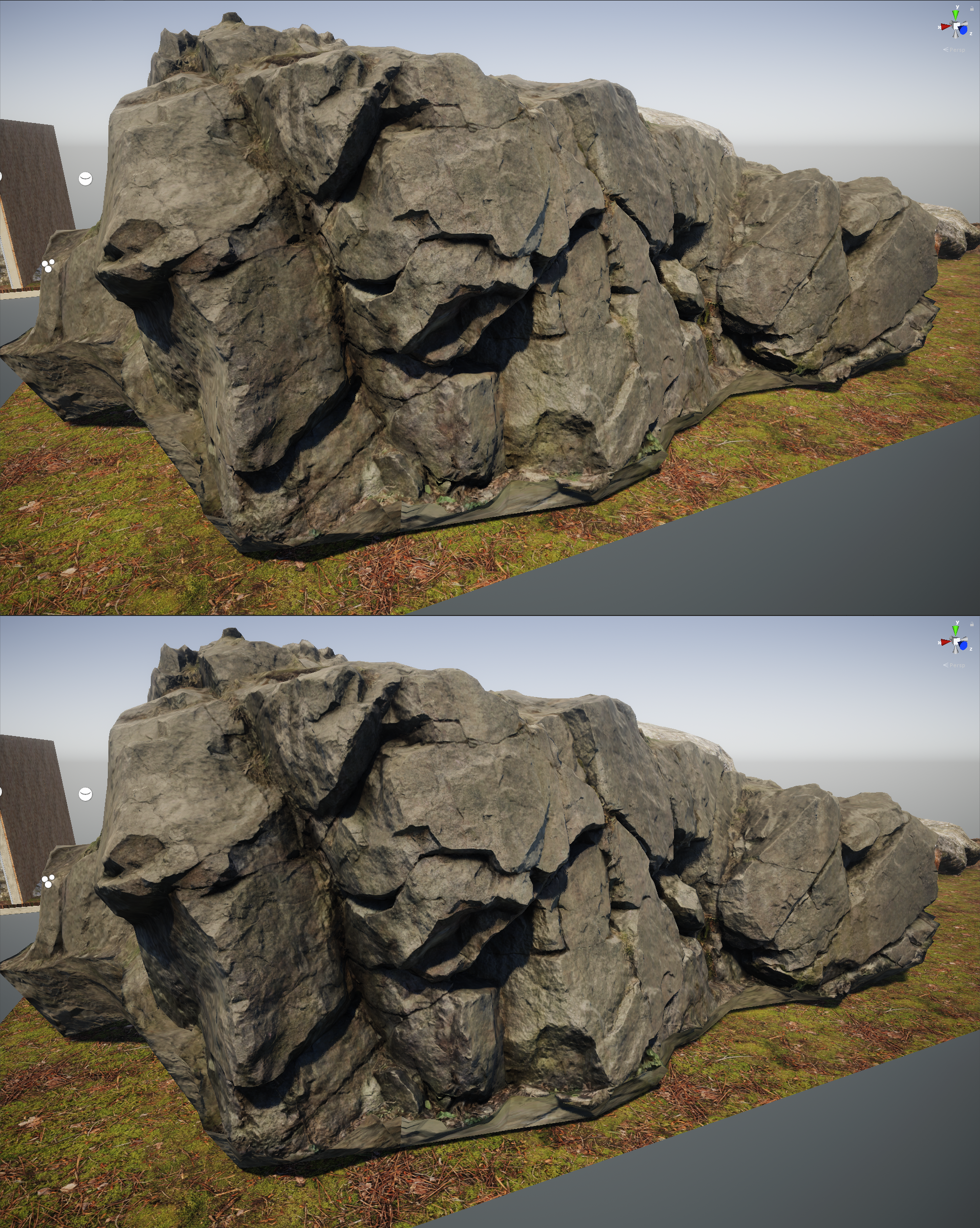
I'm feeling moment shadows. very nice
and I don't see any difference between the two rocks at all
turbid matrix
moment shadows look nice with bigger light angle on the dir light settings
(testing that atm)
turbid matrix
but it's SUPER heavy on my almost empty scene 😄
I get 150 fps on PCSS, but 50fps with moment shadows
quasi mulch
it's had it's moment ... off with it
turbid matrix
altho this is in editor
quasi mulch
it's been overshadowed by pcss
iron hollow
i take that back, i do see a very slight difference in one spot. but it's so subtle i have to say it's probably not worth the trouble.
quasi mulch
@iron hollow it is worth it, that's just an awful example
turbid matrix
I'm kinda confused, are we talking about those micro shadows or moment now 😄
iron hollow
micro
turbid matrix
on the rock images, it's pretty clear
you get fine smaller (micro) details on shadows with it
also kinda thing that contact shadows offer (but bit different effect)
quasi mulch
it really makes sense for guns or close up stuff with dir light
turbid matrix
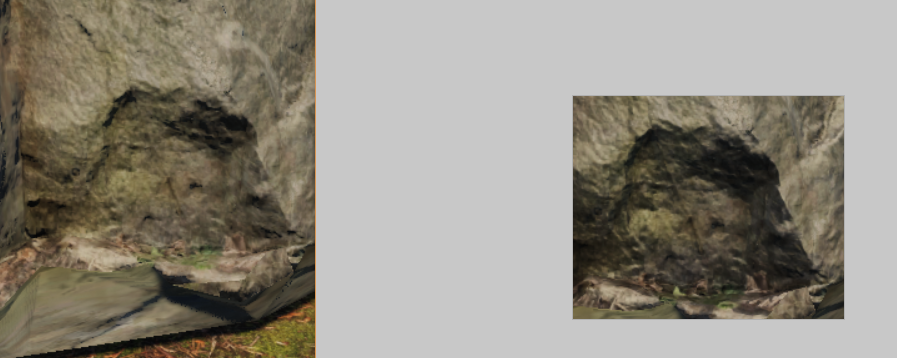
shadowmaps don't have enough resolution for this


 iron hollow
in fact it looks wrong
iron hollow
wouldn't be that much shadow at such an oblique angle
quasi mulch
yeah been using it since 4.3 or something like that
makes a positive impact on my scene
turbid matrix
well, luckily there's a slider for amount
iron hollow
but if it's using AO, might be bad AO that caused it
turbid matrix
bad AO?
iron hollow
too heavy
turbid matrix
so, this requires baked AO maps to do anything, right?
iron hollow
yeah well at least he admits it's flawed heh
i'd have to try it out in my project, see how i like it
quasi mulch
i'm ok with all flaws, game is stylised after all
iron hollow
i love Uncharted 4, it's a gorgeous game
turbid matrix
considering that rasterized rendering is all smoke and mirrors anyway, I'm not really judging too hard if people spoof things
quasi mulch
runs on the equivalent of a toaster at 30fps (60 for mp) and they admitted it could've all been 60 but they ran out of time
so HDRP is a bit of a slob perf wise in comparison
iron hollow
hehe i'm glad PS4 doesn't have a framerate monitor
i'd probably croak if i noticed it was 30fps
but on a TV you can't really tell anyway
quasi mulch
I don't like 30 either but I'll have to accept it with hdrp for a lot of devices
iron hollow
(despite what PCMR would have you believe)
quasi mulch
HDRP brings a lot of visual quality to the hands of just a couple of devs so I can't skip it
turbid matrix
some PC games made mainly for consoles have that 30fps cap and it just feels so bad :/
good think I'm not a console gamer I suppose
I'd always trade the fancy graphics to have 60fps
iron hollow
well i think if you get used to playing at 60 and then switch, it's noticeable.
quasi mulch
kinda sad as consoles came from arcade and 60fps was the norm for the longest time until things went 3D
iron hollow
but once you get acclimated to 30, it's not bad really
iron hollow
personally i don't start seeing big issues until framerates drop below 20
then it gets stuttery looking
turbid matrix
Forzas default to 30 on PC and every time I've tried new one, I think it's lagging or broken because of that, until I remember they have 60fps toggle in the menu :p
well, I guess that's only on Horizons and not for Motorsports
but still
quasi mulch
unfortunately my game feels bad to me at 30fps
iron hollow
more is better of course
turbid matrix
but who would default to 30 on PC if there's 60fps option and dynamic scaling for graphics....
iron hollow
but it also depends on the game
iron hollow
with racing i could see it being a problem
quasi mulch
mine's a platformer rpg similar to mario but with a lot more rpgness and smashing around with physics fun, quite nippy in pace... so 60fps feels just right for this arcade feel
turbid matrix
or anything where the camera pans around slowly
iron hollow
things are always moving at a high rate of speed
turbid matrix
yeah, I'd really draw the line on camera movement speed
quasi mulch
if it played plodding like dark souls, 30fps would've been fine
fading rose
HDRP is what most people would like to be using but won't be using it, and the nomenclature is bad, because it makes the LWRP sound like a bad choice while in fact is is the better choice for the vast majority of projects out there. Anyone who is using LWRP will be called out as using an inferior option and HDRP not being efficient enough.
fading rose
That exactly is the problem I am talking about. The internet is packed with unprofessional behavior and remarks 😛 And that does not help Unity shake off the stigma of "bad graphics". I have investors who are nothing more than clueless wallets, calling me out for using Unity for my project.
iron hollow
oh i know
fading rose
Every imbecile with money or ideas comes up with the same idiotic remarks. "but it is called "lightweight" isn't this bad?"
iron hollow
tell them it's Literally Wonderful Render Pipeline 😛
and that the other is the Haphazardly Demanding Render Pipeline
fading rose
No they want Raytrace everywhere and the guys at you know which company told them its the next big thing 😛
iron hollow
that will flip the script
fading rose
They want raytrace even at the leaves of trees 😄
iron hollow
lol
slap a little SSR on it and tell them it's raytracing
they won't know the difference 😛
fading rose
They litteraly wouldn't be able to tell the difference...
fading rose
hahaha yeah. when I told someone we would have real time shadows on glasses they were like "but how? Unity does not support raytrace" they are all experts these days. They watch the videos! 😛
iron hollow
wait does LWRP have that?
fading rose
yeah of course. you just enable it.
iron hollow
i wish we had that on the legacy pipeline
but hopefuly i can move up to the SRPs eventually
fading rose
Well you still need to use the proxies like in standard pipeline. But works just fine. LWRP is better than the old pipeline in many ways.
iron hollow
maybe this is something i'm not familiar with, which proxies do you mean?
fading rose
Sorry meant reflection probes.
iron hollow
ah ok got ya
quasi mulch
@fading rose annis what's the best possible visual you have for LWRP? as someone used to faking it, I'm interested where LWRP peaks
@anyone tbh
iron hollow
best I've seen for LWRP is the boat demo
quasi mulch
right then that's not even close to HDRP
iron hollow
and it is modified LWRP

Boat Attack is a Unity mobile project that is a small vertical slice of a boat racing game, complete with raceable boats and island environment, that was cre...
i mean it doesn't look bad
quasi mulch
yeah it's not quite book of the dead or that film quality demo with that little girl
and those are a year old
iron hollow
video is badly done, by an end user
i'm surprised Unity didn't put a video of it out
i tried to build that when 2018.3 came out, and by then they had already moved the demo to 2019 😦
so it totally wouldn't work anymore
quasi mulch
well I've seen better from the ancient LWRP forest demo tbh
quasi mulch
thats just a staff member's personal project though
iron hollow
is it?
they featured it on the 2018.3 announcement blog
was the only reason I knew about it
yeah i guess it's not in their official git
quasi mulch
yeah some chap, bless his socks just wanted to show it
iron hollow
still it sucks to say "2018.3 is here! check out this cool demo you can use on it!" and then you go and it's broken
quasi mulch
he's rightfully proud of this litle wave race side project i think
yeah
I'm not confident LWRP is faster than HDRP
I mean, it obviously IS for no post effect
but HDRP does everything it can async and LWRP doesn't take advantage
so it wouldn't take much post effects and hacked in AO to make LWRP lag behind HDRP depending on project
iron hollow
well I see LWRP as 'standard +'
in that it's covering that range, just as standard did, of mobile on up
HDRP is 'standard on steroids'
in that it covers the high end of standard and beyond
quasi mulch
I thought about that a lot over time funnily enough, but came to the conclusion that due to the rate of gpu progress and propagation, it becomes more sensible to eye HDRP as the successor to builtin, with LWRP just an example of very light usage of it for constrained devices
iron hollow
i think they both overlap standard coming from different ends
quasi mulch
I think it's becoming weighted though
it's not a 50/50 as time goes by, HDRP will fly like stuff off a shovel
It's really scalable and the proof will be if they ever got something quite nippy running on switch.
if that happens then LWRP has only got a niche place
in fact it's inevitable
else you'd have to hold a finger up and say "uh huh! no progress! all you gpu guys stop improving"
iron hollow
i mean if you take HDRP and just not use some features, how different would it really be from LWRP?
quasi mulch
well there's camera relative rendering for a start
iron hollow
yeah that's a point
quasi mulch
LWRP just can't do as stable rendering
I'm actually surprised at the experiments i have here
0.1 to 8k is no problem for it at all, even slightly
and my framerate didn't change (wtf)
it seems to me that HDRP is built to scale very well so ut has this really heavy up-front cost
but adding more to the scene really doesn't hurt it
has proper prepass
highly performant projected and mesh decals
volumetrics
all of this and the post is a lot better visually than LWRP but not much of a change in fps so far
iron hollow
nods
quasi mulch
But if I was doing a game like the new doom I'd try to do it with LWRP.
iron hollow
i'm guessing you mean the old doom
not the new doom ;p
the new doom used every rendering trick in the books to pull off it's beautiful graphics
another example of that gorgeous Tech 6 Engine I am always lusting after.
If Tech6 was publicly available I'd make it my waifu and drop Unity in a heartbeat (sorry UnityChan :P)
fading rose
There is a hell of a lot more you can do with LWRP than you think.

A high-level overview of the technology behind the new Scriptable Render Pipeline (SRP) and demonstrate how to set up the Lightweight Scriptable Render Pipel...
HDRP is not going to be ready in another year from now judging from the pace it is moving. And as for its performance, I am yet to see it performing even close to what I am getting from LWRP on a 1080. I seriously doubt my project would go over 30fps with HDRP.
iron hollow
well yeah i'd hope LWRP was more performant, or they may as well only have HDRP lol
I think the point hippo was making is that HDRP can still perform at a higher visual level
but yeah i wouldn't expect it's going to perform as well as LWRP in a direct comparison
fading rose
It is far more performant. On my project, I am talking about 30-40% over the standard pipeline, and last time I checked, at least 20-30% over HDRP.
Hippo was talking theoretically.
iron hollow
yeah i see in the video where he's comparing batches and other stats, to standard
and they are substantially reduced with LWRP
setpass calls
fading rose
I am talking about performance on a real project. Dense open city, large crowd, and traffic.
iron hollow
right well, real or not, if you have fewer batches and fewer setpass calls, you're going to get more performance 😃
fading rose
when ECS kicks in properly, then it may be worth revisiting HDRP but again, this is not happening earlier than a year from now.
quasi mulch
Thats precisely where HDRP will start getting more perf. HDRP is really resilient to overdraw scenarios and has aggressive use of async so at specific point, I expect HDRP to keep performing better, for example if you target 60fps with a 980 card? works well here
fading rose
I am targeting 90fps on 1080 😃
iron hollow
hell, i can do 60fps on a 980 even with the std pipeline ;p
so i hope HDRP can do better ;p
fading rose
Not yet, that is what I am saying. It will do in combination with other things, but all this is at the sphere of hype, and real production wise, in a year from now.
iron hollow
well i'll happily wait for it to be finished anyway. I'm not ready to move off Std. yet anyway
fading rose
If your plan is to launch next year in summer, then HDRP may be something you can consider safely for your project.
But if you plan to launch any time this year, your best bets are standard and LWRP. (with lots of custom nodes)
HDRP is the future no doubt, but we are still some way from that future.
iron hollow
yeah i have time 😃
glad tartan
@fading rose is your project aiming for graphics the same or better quality than the environment demos Unity released? Fontainebleau or BOTD demo? Those ran on older versions of HDRP with less optimizations than whats available now. I got around 90fps running at 1080p so this should be possible for a project at least now, especially with the SRP Batcher and such.
quasi mulch
It's worth bearing in mind that LWRP doesn't do a lot of optimisations because it targets gpus which do not have compute, though I have read that it's possilble to make that a little relaxed at least for post (AO etc?)
thorn lodge
I suspect we'll get a LWRP + Compute option at some point, which will close the gap if you want the material costs but still want async post-process / other effects.
because at some point, the market share for android devices that don't support compute will become negligable
glad tartan
Yea LWRP was confirmed to have Compute for 2019.1 (well for the most part) release as well as support VFX graph because of compute (CPU version will come later)
turbid matrix
PPv3 is supposed to come to lwrp as well
Altho time will tell how similar it'll be to one on HDRP
glad tartan
It's supposed to be specific to LWRP so I'm wondering what will change for it as well. Each Pipeline will have their own version of Post
turbid matrix
yeah, mainly curious if they'll make the post run async there like on HDRP