#archived-hdrp
1 messages · Page 20 of 1
 turbid matrix
also like how the 2 years only for bugfixes and sdk upgrades (LTS) got totally dismissed here when it sounds like exact thing this user wants
 elfin osprey
It should be noted that a huge reason SRP was developed in the first place was we had a tonne of renderer bugs that couldn't be fixed because people were now reliant on the incorrect behaviour. Being able to correct the renderer and evolve it to be competitive in 2019 required this work. Sometimes the big picture is hard to see, but we can't stop moving the product forward...
 true zealot
I can't imagine how poorly Unity would be if this latest burst of all the beta/alpha/preview tech hadn't happened
ever since Timeline I've been lapping this stuff up like I'd die without it
elfin osprey
I would happily admit that the switch to package based incremental releases hasn't been the smoothest :P
But every paradigm shift has its issues...
turbid matrix
I know I jumped to UE4 from Unity when it came out as Unity felt really outdated in comparison back then (Unity 4)
but then again Unity 4 had free tier that was so gimped that it was a no brainer really
Unity 5 came then trying to fix that but it was too late for people who jumped already
true zealot
Has the PM settled enough now for it to feel natural to develop in this way?
turbid matrix
PM?
elfin osprey
Getting there :P
true zealot
package manager
turbid matrix
pacman?
elfin osprey
Compared to shader graphs first release, this is like butter now
true zealot
it's only been a strength for me ever since dependencies worked properly
which has been a new thing sadly 😛
turbid matrix
My main annoyance with PM is the way you have to setup your demo assets
it's not ideal if you distribute some sample on git
as you can't have scene files directly in these packages
or can but you can't open them
so the workaround it to pack them in old unitypackage and expand that
true zealot
I'd like it if you could reference git packages within a folder
elfin osprey
Ah you can now
true zealot
oooh this is news to me
turbid matrix
that's the unitypackage thing
elfin osprey
Nope
turbid matrix
?
last time I checked, it adds a button on package manager that expands unitypackage
true zealot
the whole git thing needs to work smoother before I'll properly jump on it either way
elfin osprey
It's a new section in the package definition, define samples folders
Then these get pulled into assets
turbid matrix
oh, they expanded on that?
I saw some early version that practically did that but used only unitypackage
turbid matrix
if you can have real files and folders there, that's way better
true zealot
if it's in a unitypackage it isn't real 👻
elfin osprey
Yup
turbid matrix
as that was the biggest painpoint from distribution approach, extra step to include new binary asset for each change
elfin osprey
Well it's a pain to work with in got yea
Git*
Can't type...
Sat on the tarmac at Heathrow
No idea how many hours ago I left home...
 quasi mulch
that's your fault
if you were smart you would lock yourself into a nice cave
soothing in the gloom, illuminated by the gentle warmth of LCD
quasi mulch
btw
Any ETA when custom nodes return because I need to try and solve vegetation (possibly using vegetation studio because I don't have any idea what Unity is planning here with vegetation)
turbid matrix
I realized that I might have use case for that camera layering now
3D HUD will be wonky with HDRP's SSR as it will also reflect the HUD itself to 3D objects
There are games like Forza series where they just draw the 3D HUD in SSR effect but it just feels wrong
(altho it's not technically wrong)
quasi mulch
no....
you can clamp the threshold at which SSR will be used and further control it per material
I find this is sufficient amount of control with some fiddling
turbid matrix
it doesn't work that direction
SSR will still reflect the text itself, the smoothness setting is only there to limit what surfaces receive the SSR but the SSR itself will use rendered frame's data
in Forward's case, I'd assume it's reading it from previous rendered frame
only way I could imagine I could hack this is to write the HUD stuff only to stencil buffer and then use that as PP effect (as SSR probably uses data before PP is done for the frame)
quasi mulch
try transparent if you can, that will be omitted I think
turbid matrix
I'd know how to do that in UE4 but in Unity that will be like many times harder because afaik, they don't expose a) stencil buffer in editor b) let you write custom PP effects using SG (yet)
nah, it won't change a thing on forward
quasi mulch
really? since I'm on forward and I can see it right this second in front of my face being omitted
turbid matrix
in deferred that could work, depending on the implementation
quasi mulch
when I change the sphere from transparent to opaque it appears in the reflection for SSR
This is with forward only as lit shader mode
turbid matrix
for me it still renders the SSR for the color it had for the shape behind the transparent object
quasi mulch
is it due to guassian or such?
turbid matrix
same happens with TextMesh Pro, it doesn't reflect it if the text is against sky (as long as you don't have sky reflection setup on SSR)
quasi mulch
hmmm
turbid matrix
but if there's any object behind it, it draws it for that part
I actually dunno why this works like this now 😄
quasi mulch
You know it might not be the wildest idea in the universe to go with a planar reflection sometimes
turbid matrix
I'd do that if it worked in motion on my vehicles body surfaces 😃
quasi mulch
you really can't win can you 😄
turbid matrix
well, the 3D HUD getting reflected isn't the biggest issue now, just realized that extra rendering pass would solve it
quasi mulch
the 3d hud being reflected in game is really sucky though
turbid matrix
technically I can do the extra pass already with RT's and it might not be absurdly costly even considering there's not much to render there
well, Forza's got away with it 😄
turbid matrix
yes, as long as you got shiny bonnet on your car
turbid matrix
their basic hud doesn't show on SSR as it's "fake 3D", just tilted thing on the sides and rendered separately
but if you have like racing line assist or player names on top of the cars, they show up in SSR
(real drivers don't use racing line assists :p)
quasi mulch
People training by that have no idea how to overtake
 iron hollow
yeah that's true.
I prefer running the cars off the road anyway ;p
Forza: Thunderdome
turbid matrix
well, Forza Horizon's would let you offroad :p
turbid matrix
I really liked Horizon 3, too bad it's crashing to desktop every 15 minutes on pc :p
iron hollow
i would go out into a lake and just do doughnuts forever
turbid matrix
also, I actually don't think H3 had the same SSR thing as Forza 7, as that was the first time I noticed it
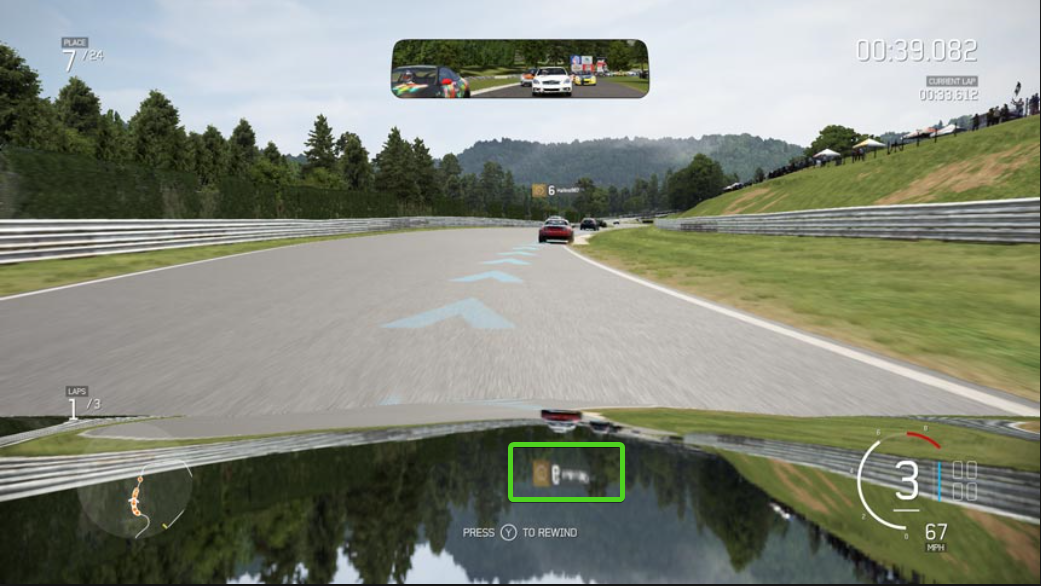 turbid matrix
I'm not the biggest fan of 3D HUDs in general as it kinda breaks the immersion, but if you have online mode, many will want to see the opponents names on top of the vehicles
yeah, that thing 😄
you could still render those names on regular HUD, it's not even super difficult
(if it's fine to have them face the camera all the time)
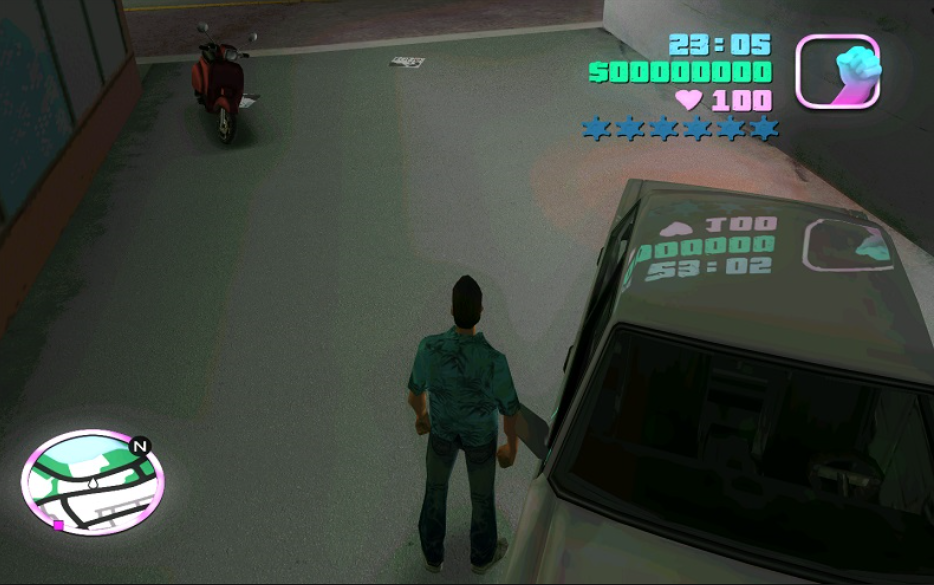 turbid matrix
😄
I had that on my first UE4 project before I realized the 3D hud was doing that (it wasn't that obvious)
iron hollow
i'll have to keep it in mind, i'm using worldspace canvases in a few places
never thought about what may happen with reflections
i mean if it's something that you want to exist in the world it's fine
true zealot
I find this cheesy in a good way in that GTA mod 😛
iron hollow
but something only for UI purposes, not
turbid matrix
hmmmm, apparently they've fixed that on Forza 7 now, it definitely was there before
for the nametags, racing line is still reflected
quasi mulch
pretty annoying, i guess they found it wasn't worth fixing
 rain flower
Why you need to fix those reflections? Why it is reflected? Is this something with screen space reflections?
turbid matrix
it's because of SSR, and it would look nicer without those as that's dynamic effect that doesn't really exist in that world it tries to show
once could argue that since it's rendered there, it should get reflected too
quasi mulch
as with my melee weapon penetration issues, it's not game breaking but it would be nice to not have undesired visuals
turbid matrix
but I'd see it as artifact
anyway, it's not a big deal (I can already work around the nametags by faking the 3D position)
rain flower
So SSR are applied after all cameras?
turbid matrix
SSR in forward most likely uses the previous rendered frame as source
regular UI is rendered separately in screenspace so it doesn't get included in this
rain flower
Rendering 3D GUI to render texture using separate camera with same depth buffer as world camera and then using that texture to overlay it on top of screen should do the trick, right?
I'm not doing 3D games but I'm curious if that would work
turbid matrix
yes, that's what I briefly mentioned before
in general, you'd want to avoid full screen resolution RT captures from cameras but since that kind of thing is just minimal amount of polys, it probably wouldn't be super heavy
but if Unity actually does make doing custom rendering passes easier, it'll be even better
rain flower
Rendering something to Render Texture requires more resources than rendering something directly to screen? Why?
turbid matrix
oh, HDRP/Unlit has option to render after PP
this will make it not affect SSR
of course, you have to have unlit things for it to do you any good 😄
also obvious downside will be that you'll not get PP for it then, not even FXAA or TAA
rain flower
Rendering to RT would solve FXAA problem, you can run a compute shader (or something like that) over them
turbid matrix
sure, but I'll still postpone this, see if Unity comes up with something handy 😃
wonder what happens on 23rd:
also yay 😃 Fixed "Attempting to draw with missing UAV bindings" errors on Vulkan
turbid matrix
both also on staging atm
seems like we'll be getting some faked realtime shadows for arealights (unless I understood the intent of the branch wrong)
- additional PBR sky option (which I'd guess will be their sky replacement eventually for HDRP, now it's only stub)
iron hollow
is that the new type of area light, or the legacy one
new one i guess
legacy gets no love ;p
turbid matrix
why would it? 😄
and it's for HDRP area light., from the branch name I'd guess they are doing similar what UE4 does, lets you use spotlights shadow tech for area lights
right now if you use area lights, you'll not get real-time shadows for them, only baked
iron hollow
yeah. i use custom area lights anyway
on legacy ;p
and they have shadows, probably nearly the same way, similar to spotlight
so i'm missing nothing i guess
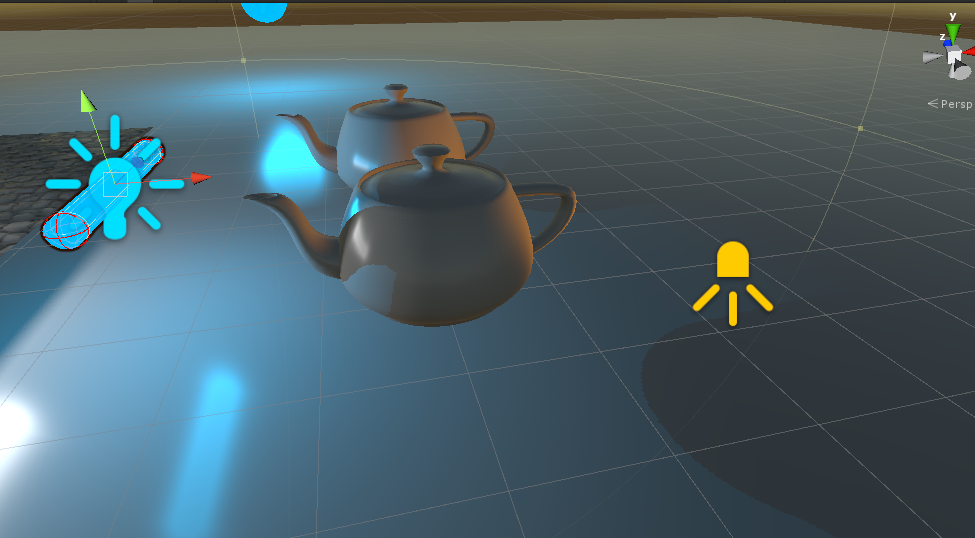
area light on the left, the blue tube
(was helping the NGSS fellow test 2.0 with non-standard types of stuff)
quasi mulch
Love the LWRP docs, wonder if Unity would do the same for others? Devs need docs of this quality.
Speaking of which... is 5.3.1 up yet? It's tiring checking 😄
 alpine bluff
It’s not. Afaik.
 scarlet hull

But you need 2019.1.0b3 to be able to get it through package manager, because of a bug about version checking.
Or update the version number manually in your manifest.json
quasi mulch
I see! thanks Remy, I guess it's the same for other pipelines as well - just need 2019.3 to uncork it. What was the issue with PM?
I figured semantic versioning would work fine still
scarlet hull
Silly bug : when we release a package we can target a minimal Unity version. For 5.3.1 it was Unity 2019.1.0a14 ... but for some reasons that I don't know, 2019.1.0.b1 (and b2) was prior to 2019.1.0a14 for packman
Not a big deal tough
quasi mulch
Yeah gonna try .0b3 - thanks for the heads up 😃
quasi mulch
5.4 I guess is latest
I sure am behind in the times.
Or is it another Unity version trap? up is down, forward is back.
alpine bluff
Thanks, Remy!
quasi mulch
(w/c)
turbid matrix
@quasi mulch 5.4 is on github and staging atm
quasi mulch
porting my proj to 5.3.1 at the moment, I spy 5.4 ... but I dunno if's safe enough. I have given my dir light 10,000 lux, and interestingly it's absolutely fine with new exposure enabled on volume
this is a good start
I'm going for 100% proper physical lighting, not going to fight it at all, but once I'm there, can tweak back to the stylised visuals we'd like. That IMO is the correct way to dance with HDRP
iron hollow
sounds like a good plan
iron hollow
What does the "Diffusion Profile' Do in HDRP?
turbid matrix

GitHub
Scriptable Render Pipeline. Contribute to Unity-Technologies/ScriptableRenderPipeline development by creating an account on GitHub.
iron hollow
thanks 😃
turbid matrix
this probably explains it better https://blogs.unity3d.com/2018/12/19/unity-2018-3-shader-graph-update-lit-master-node/

Unity Technologies Blog
With the release of 2018.3, Shader Graph introduces a new Master Node for the High Definition Render Pipeline (HDRP). This new Master Node (called Lit Mast...
around halfway they describe that
afaik, the idea is that you can make multiple premade profiles and reuse them on your materials/graphs
like one setup for foliage, one for skin etc
turbid matrix
"A Diffusion Profile List contains a set of 15 Diffusion Profiles that you can edit and assign to your Materials."
it's basically just one asset
iron hollow
yes.
quasi mulch
Like all plans, it's gone horribly wrong somewhere 😄
turbid matrix
not in a way that you can run it
there's a lot of DXR code in 5.3 and newer versions already
and git repo is full of DXR PRs nowadays
so chances are we might get something to try around GDC (as they are clearly going to show some of the DXR stuff there)
@elfin yew ^
to get some idea, you can look at https://github.com/Unity-Technologies/ScriptableRenderPipeline/pulls?utf8=✓&q=raytracing
that doesn't list all, raytracing was just easiest keyword for the relevant PRs
and for example, this (early) PR https://github.com/Unity-Technologies/ScriptableRenderPipeline/pull/2658 tells what was added initially (they probably have more now):
the major features included in this PR:

    * Light Cluster Build and Debug
    * Raytraced Reflections
    * Raytraced Ambient Occlusion
    * Raytraced Area Shadows
    * Screen Space jittered  2Dx8 Noise textures
    * Support for Shader Graph Master Node HDLit
    * HD raytracing Environement  & Custom Inspector
    * Ao Nvidia denoiser
    * Bilateral Filter for denoising
    * Per-Camera Raytracing Filters
    * Raytracing Manager that handles reconstruction and update
    * Lit and Unlit Shader support
* Mipmap LODs for raytracing```just to make this more clear, the actual DXR integration for HDRP is there but unity doesn't ship all key components for it yet. meaning, you can't just enable it (using the scripting definition for it) as it will be missing part still (probably something they haven't enabled on shipped unity binaries)
talking of this, SRP repo is nowadays filled with two main things for HDRP: raytracing related things and VR related things. it's really looking as they want to showcase both at GDC as they keep pushing both a lot now
as another topic, this looks nice 😃 https://github.com/Unity-Technologies/ScriptableRenderPipeline/pull/2958

GitHub
Purpose of this PR
Update the SRP API to send render ScriptableRenderContext to BeginCamera/FrameRender and call new EndCamera/FrameRendering methods.
Testing status
Katana Tests: Running
Overal...
now only if we could extend the PPv3, that would be twice as useful on HDRP 😄
turbid matrix
GDC spoiler: ||Unity actually leaked some GDC DXR demo project earlier on github, it was set for public for like 10 minutes until they noticed 😄||
elfin osprey
@turbid matrix could you pay a little less attention plz 😛
Cant slip anything by you 😛
alpine bluff
I like Olento's updates here. Keeps us on our toes :p
 glad tartan
I'm always on GitHub checking the HDRP updates but I missed that repo slip. Looking forward to Unity at GDC though, should be a lot of cool stuff shown there
turbid matrix
as another topic, Occlusion Probes crash the editor on 2019.1, will still check the logs but I absolutely hate debugging editor crashes (would be so nice if you actually had the sources when this happens)
I'm guessing the root cause is on the callback itself not being ok on newer SRPs
basically these things but on 5.x.x HDRP: https://github.com/0lento/OcclusionProbesDemo/commit/21668ed153a15df88cde661df437ec87027417c2
I upgraded it to 3.0.0 back when I created that repo (botd still uses 2.05 on v1.1) and that still worked on 2018.2
I don't remember if I ever tested 4.x.x and 2018.3 for this
0x00007FFD7E13A251 (ntdll) RtlUserThreadStart

========== END OF STACKTRACE ===========```TBH would just be nice to have a procedural sky that's actually worth using with HDRP. The builtin one that was ported simply isn't set up for EV100 or 16, and I find I need to guess the settings plus remove the sun disc renderering in order to get it to even play ball in new HDRP.
 bronze python
Hi all. I have the same issue with refractions with multiple unity and HDRP versions, see the glass sphere on the left, refraction 'disappears' as it comes to the edge of the screen. Is there a way to fix that? https://gyazo.com/b19b52be80e35b93fa457363eeb3350d
quasi mulch
This is an artefact of SSR
To fix it it, add a reflection probe so it falls back when it has no screen data.
or bake it if that's what I can see there
Or try tweaking SSR's falloff
For reflection, HDRP will compose the reflection in this order: SSR>Probe>Sky
It's weird it's fading in that shot due to the obvious presence of a probe
Do the probe bounds encompass the rendered object?
bronze python
They do yeah, thank you! I'll give it a try
quasi mulch
Make sure the probe is baked, try turning off Auto an just baking manually - this will save the file at edit time
It's because HDRP is WIP and might not work so hot with auto at the moment (outside of play mode at least)
bronze python
It was baked but I rebaked it just in case. Also disabled SSR in HDRP settings, nothing changed unfortunately
quasi mulch
That doesn't seem to make much sense. Do you have a way for me to reproduce your findings?
I would like to try and fix it my end
bronze python
https://gyazo.com/6534e03d459af99d2886b2cbfb628d20 I could zip this project and send it over if you'd like
quasi mulch
I ssee
bronze python
I forgot the term but it looks like it's culling other objects too early
quasi mulch
try that
then set the box up well to encompass
What's happening there is the reflection isn't matching the surrounding. In fact for water you would want a planar probe
You'll need to re-bake it
(either method but try ticking that first)
it is falling back to probe, but the probe is not projection-correct
bronze python
"Same as Influence Volume" checked on all probes but I'm missing a proxy volume
quasi mulch
dont need it
place the probe center at center of water
then adjust + bake
if I'm right it's just really you should use planar probe for this particular job
hehe people still share my old water demo from 1999/2000

This is a short clip from an old DirectX7-based engine called Blitz3D (such an easy engine, too bad they discontinued it). The demo is probably like 5 years ...
so simple but effective
bronze python
2000? sweet..
quasi mulch
Yeah was done with an early ver of blitz. I modified mesh verts in code, and generated a cube map each frame. the world was exported from 3d package but with helper naming, so I parsed the imported geo and placed lights in code
good times, your vid reminded me
It's funny though how the simplest stuff can still look fine
bronze python
Simplest stuff always looks the best
https://gyazo.com/9a9714255100dad0f8a848a9df84fae0 same result with planar probe,it can't be baked though, only realtime
quasi mulch
Isn't it reflecting grey as it should?
bronze python
issue here is not reflection but refraction
with refraction turned off it works as expected
I can send it over in 15 mins if you like
quasi mulch
busy at work again :[
Good luck fixing it though, I think perhaps try forward as well in HDRP to see if it's a pass issue
turbid matrix
@quasi mulch re: sky, I think I linked this the other day https://github.com/Unity-Technologies/ScriptableRenderPipeline/tree/HDRP/pbr-sky
they started working on new sky setup, that's going to be additional to current sky options
still early on that but it's nice to see they started on it
@bronze python I didn't read all the messages but if you added SSR component to your scene volume settings, you can tweak how far on the edges it will fade the effect, it's often worth adjusting this based on your gameplay (and what player can usually see)
in my use cases, the default fade is too much, I can get away with values closer to zero (unless there's big water planes I guess, but then I'd try to use planar reflection)
iron hollow
i curious, how would you prevent the SSR from overlyaing the planar reflection? or would you just let it occour?
using volumes?
 desert yew
can't SSR be disabled on the material?
desert yew
just checked, it can:
desert yew
oh, no the standard pipeline doesn't have an option for that
iron hollow
yeah I'm still on Standard, so was curious what strategy would work if you used Planar reflection with SSR
turbid matrix
@iron hollow it's an option on HDRP materials, yes
iron hollow
i guess it makes sense now why they are integrating PP stack with HDRP
allows for things like that
turbid matrix
@desert yew well, technically we could debate if standard pipeline even has built-in SSR as the one PP stack 2 is useless in all projects I've tried it 😄
I mean, for the SSR
iron hollow
that's probably a good point. I use Stocastic SSR project myself
turbid matrix
it just gives blobby mess for me
desert yew
yeah, the ssr in the post processing stack was kind of blurry
turbid matrix
like black artifacts and no reflections
iron hollow

GitHub
Contribute to Xerxes1138/StochasticScreenSpaceReflection development by creating an account on GitHub.
desert yew
hdrp's ssr seems much better
turbid matrix
yeah, I've used that
iron hollow
far bettern than Unity's implementation
turbid matrix
that stochastic is best I've seen on standard
desert yew
ooh, that looks nice
turbid matrix
it has it's issues on fast motion due to it relying on temporal filtering though
iron hollow
yeah i've noticed that
i may end up using PP2's in the end tho
if I don't finally move to HDRP at some point
i really would love to move to HDRP but a lot of cards have to fall in place
turbid matrix
talking of PP's, someone linked this on the forums https://github.com/MaxwellGengYF/Unity-Ground-Truth-Ambient-Occlusion

GitHub
A physically based screen space ambient occulsion post processing effect - MaxwellGengYF/Unity-Ground-Truth-Ambient-Occlusion
would be cool to have that on HDRP too
Amplify Occlusion 2 uses that same tech and they let you run it on PPv2
iron hollow
oh i hadn't seen that, i'll have to check it out
turbid matrix
but 2019.1 dropped PPv2 support on HDRP
iron hollow
not surprising
turbid matrix
yeah, they got PPv3 integrated
it's just, there's no built-in way to extend it like PPv2 has
hope they get that in soon
turbid matrix
now if you want to extend it, you literally edit custom HDRP package
they will, it's just not the biggest prio atm
iron hollow
yeah makes sense
turbid matrix
HDRP is going to be out of preview for 2019.3 unless they postpone it again
technically they could get away until then for not having it extendable
turbid matrix
btw, this fork seems more updated (haven't tried either): https://github.com/haolange/Unity-Ground-Truth-Ambient-Occlusion
well, the previous target was 2018.3 😄
but it's good they didn't rush it
quasi mulch
Whenever ground truth is mentioned, the truth is the framerate plummets to the ground.
quasi mulch
How do people feel about using contact shadows for vast open world shadowing? I think it would be a tad too expensive to be using CSM for this
iron hollow
you should check out the work tatoforever is doing with NGSS
he's had contact shadows for awhile now, and they are great
quasi mulch
But for vast distances?
iron hollow
but he's currently developing a raytraced solution that basically has infinite range at very little cost
yes
quasi mulch
yeah that's going to be like UE4's approach and I need to do something like that for my open world shadow effort, with CSM for very local stuff - probably a couple of hundred meters at the most
I can't use tato's stuff because HDRP
iron hollow
 quasi mulch
And HDRP has contact shadows already, so I was thinking - why not solved?
iron hollow
Frustrum Traced Point shadows
i forgot, this is for point lights
but his idea is you can just use a apoint light to replace directional
Also this isn't for HDRP yet, but it's planned in the roadmap
quasi mulch

This video shows how Fornite makes use of Distance Field Soft Shadows to get shadows far into the distance for a dramatic Day/Night cycle.
iron hollow
yeah it's a simliar approach
he said "In the video I pushed the point light far out of view and shadows remain sharp because is frustrum based. Also the light falloff is disabled in the video so we can visualize extreme out of view shadow ranges for local lights."
he was referring to this other vid tho
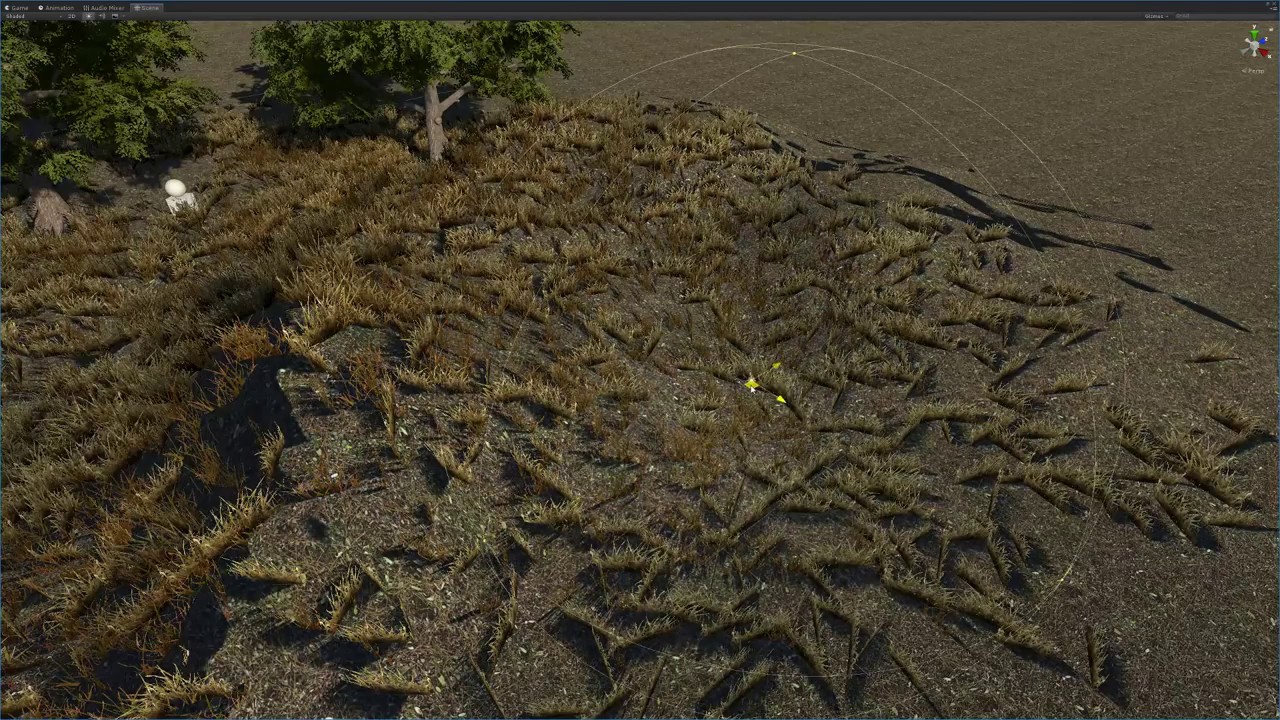
Infinite shadows range at will. After all it's raytraced! :D
quasi mulch
I dont really need to solve ground close by, contact shadows do that, but far distant rendering of shadows, say 8 miles away
iron hollow
i asked him if because it's a point light it still uses 6 shadow maps and he says it doesn't.
yeah I see, i don't know how this approach would work for that.
his regular contact shadows seem nice but their range is the same as your shadow distance setting.
quasi mulch
Yeah I decided to mess about with world creator and liked what happened and figured I'd give open world another chance (not for general gameplay - that's silly, but for downtime, pottering about and travelling to the next interesting place of adventure)
Unity did a lot of nice terrain updates but now I'm finding out to my cost that there's no functioning vegetation for HDRP
and shadows are a huge problem perf wise :D

 bronze python
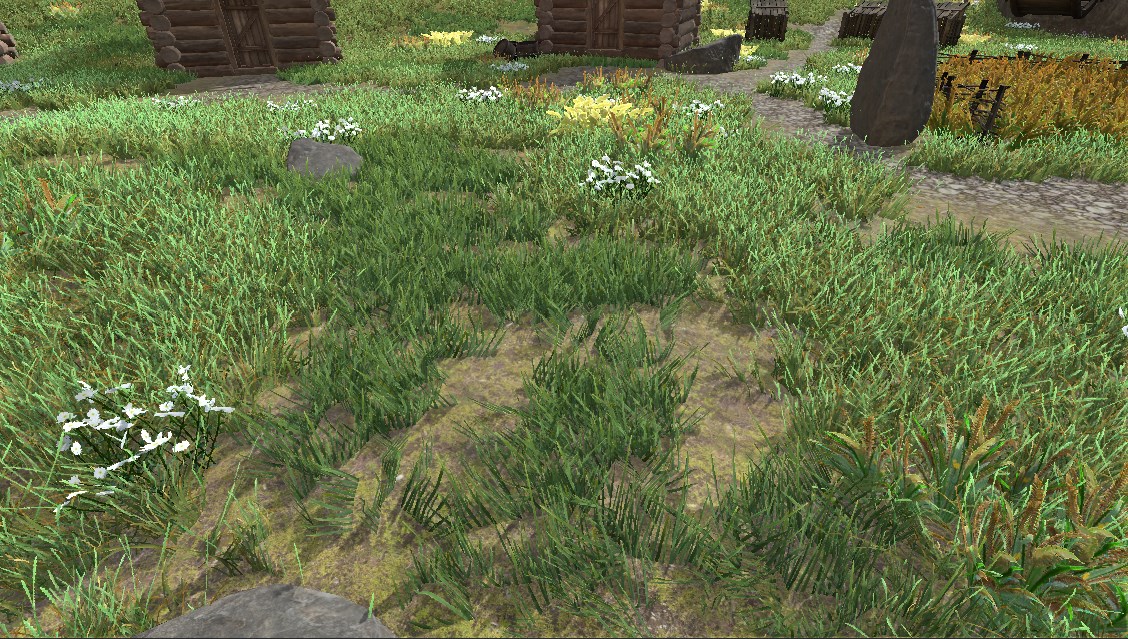
Okay so tweaking SSR distance in the volume settings just makes the fade edge more sharp, but doesn't stop the weird culling. Also disabling "Receive SSR" on the material does not change a thing 😮 I'm not sure if I'm making sense but could this be related to frustum culling? I see that anything below this line is exactly out of camera's frustum. Which makes sense if it's screen space refraction. All I want to achieve is the same old-fashioned normal map based refractions we could achieve with a grab-pass, which is no longer an option unfortunately
turbid matrix
@bronze python just to make sure there's no confusing: the material toggle is for the material that receives the SSR, you can't opt out materials from appearing in the reflections with it
bronze python
oh i see
turbid matrix
so, if you don't want water plane to get SSR, you just disable it from the water planes material/shader
but you can't have like a house by the lake to not appear in the SSR reflection on the water plane by tweaking the house's material
unless... you actually use new unlit material that has "after PP pass" option (discovered this the other day, it's fairly new thing)
bronze python
yeah but I guess that's not really the issue here:( anything appearing near the screen edge of a refraction (not a reflection) gets culled too early
turbid matrix
that's kinda what you get with screenspace effects
it's same with SSAO too
you can't make effect without getting the data for it
bronze python
I see. However it's kind of unusable in my scenario if there's no way around it
turbid matrix
this is one reason why DXR is a thing
as then you can raytrace the reflections outside of the screenspace
bronze python
Could I 'fake' my screenspace to be a little larger and only show center portion of it on the actual screen though?
turbid matrix
you can see this issue on tons of games though, just look at ue4 games like pubg, ark or fortnite and they all have this issue if you have water that goes from screen edge to other
technically the planar reflection is best option for water if you can afford it and get it running
then you have the manually placed reflection probe option which was mentioned here earlier
and yeah, what you asked is technically possible but I don't know any game engine that does that (I don't know why as it would feel obvious solution)
but technically even then you'd have issues on the edges if the reflective surfaces near the edges have normals in angle that make the reflections go way out of the screen
bronze python
just to be clear, you keep mentioning reflections while the issue i have is with refractions, does that in principle work the same way / same reason behind the problem or?
turbid matrix
oh, sorry
I thought it was reflection issue, my bad
yeah, SSR toggle in materials wouldn't do anything then
(I didn't read all the past discussion)
bronze python
Yeah I figured 😄 so if you would see my last picture ( just a couple of messages above), the ground below gets distorted by the refraction in the water, when it appears close to the edge of the screen it just cuts off. My understanding is that since the camera can't see what's below that line (due to it being out of frustum), the refraction doesn't know what to show there and just shows the skybox or baked probe data. i.e. you could clearly tell that parts of the paint bucket should still be visible in the refraction, but it's culled
Which is kinda very troubling in my case. I saw LWRP had _OpaqueCameraTexture which can be used to fake refractions, built-in pipeline has grab pass and in HDRP I'm really out of options 😦
https://gyazo.com/fa293183d42d6929e10200c8fd1095fb checked that it really shows the probe data if it's baked. I kinda get why that's happening but just hoping for any ideas on how to work around this hehe..
glad tartan
@quasi mulch New sky is being worked on (actually got updated a few minutes ago but the repo popped up a few days ago) - https://github.com/Unity-Technologies/ScriptableRenderPipeline/tree/HDRP/pbr-sky
GitHub
Scriptable Render Pipeline. Contribute to Unity-Technologies/ScriptableRenderPipeline development by creating an account on GitHub.
glad tartan
Seems Raytracing is enabled now Don't have an RTX card to test though- https://github.com/Unity-Technologies/ScriptableRenderPipeline/commits/HDRP/Raytracing6
GitHub
Scriptable Render Pipeline. Contribute to Unity-Technologies/ScriptableRenderPipeline development by creating an account on GitHub.
 maiden plume
Anyone else having issues with LWRP and Unity 2018.3.5f1? All the LWRP shaders are listed Failed to compile -> Lightweight Render Pipeline -> ... in the shader dropdown and SimpleList does not work at all.
turbid matrix
@maiden plume you are using LWRP 4.x.x?
maiden plume
Yes, I am on 4.9-preview
turbid matrix
ah ok, just checking as that would have been obvious reason to fail if it was some older SRP
maiden plume
Actually the SimpleLit shader stopped working once I updated to 4.9.0
I can go back to 4.8.0 but still the shaders will be listed as "Failed to compile"
glad tartan
Maybe reimport the package. Right click on the package in the Project Window under Packages and select reimport
 frigid nova
what is up with CPU and GPU lightmapper guys?How come Enlighten gives better results ?
glad tartan
Are you using the denoiser with them? Currently 2019.1 can use the Optix Denoiser for the CPU Lightmapper and 2019.2 can use it for both CPU and GPU
I did this bake yesterday with the GPU lightmapper using the Optix Denoiser came out fine
that's also using HDRP so no problems with it for that SRP
frigid nova
im doing some tests now and i have updated everything,and it seems that a lot of stuff do not work for me at least,the GPU lightmapper always revert to CPU for some reason,and also the CPU lightmaper has a lot of noise ,only the enlighted seem to have decent output ,can u post ur settings if thats possible?
 prisma sleet
If you're in a pinch, and have an nVidia card, I have heard good things about Bakery (it's a 3rd party GPU lightmapping tool for Unity)
only works on nVidia tech though
frigid nova
i have a gtx 1060 but it seems that its not supported somehow
frigid nova
no for the default GPU unity lightmapper
glad tartan
Yea, you need a certain amount of VRAM to use the GPU lightmapper I forgot what the minimum was
prisma sleet
Does anyone here know why the LWRP would be batching a set of 2048 identical meshes with GPU Instanced materials up to a maximum of 373 at a time?
The default should be 500, and the default rendering pipeline does it in batches of 500 (same shader, same GPU Instanced materials, same meshes)
Also if I explicitly tell my shader to batch in groups of 10 maximum, the LWRP will listen to that. But if I try to explicitly tell it to batch anything higher than 373, it will not do it.
frigid nova
thats a bummer i have the 3gb version so that means i wont be able to use it?
prisma sleet
Meanwhile in the default rendering pipeline, I can tell my batches to go to 1024 at a time if I want to, and it will listen.
DementorJeff that does sound possible. 3GB is on the lower end for that particular card.
I know there is a 6GB 1060 variation
glad tartan
@frigid nova Not sure but you can ask in the Lighting Channel
frigid nova
thanks man ill do that right away
prisma sleet
The Frame Debugger also doesn't give me any indication as to why it's creating a new batch after the 373 mesh batched draw call.
Typically you'd see something like "Exceeded max number of meshes in a single batch" or something like that, if I was reaching the default ceiling of 500.
turbid matrix
@glad tartan I don't think the whole deal is even on that Raytracing6 branch yet
it still throws errors on missing 'RaytracingAccelerationStructure'
also for 'RaytracingShader'
glad tartan
Ah alright
turbid matrix
finally updated hd template on staging now
- Updating HD package version

## [2.4.0] - 2019-02-11
- Graphics API for LInux is now manually set to Vulkan.

## [2.3.0] - 2019-02-08
- setup post processing v3
- remove post processing v2 profiles
- apply TAA on the camera
- tweak sunlight color and intensity
- reset HDRP asset default values
- change max shadow distance and cascade settings to fix https://fogbugz.unity3d.com/f/cases/1098489/
- keep only one quality setting
- populate HDRPDefaultResources folder for the new "New scene" workflow
- Player settings : uncheck "Clamp blendshapes"
- Graphics settings : tier settings reset to default
- Preset manager : Remove default presets for diffusion profile asset and light

## [2.2.0] - 2019-02-04
- Corrected some default values in project settings.

## [2.1.0] 2019-02-01
- Fixed `-preview` tag on HD version 5.3.1
- Updated default settings in HDRP Asset

## [2.0.0] - 2019-01-30
- Updating HD version 5.3.1
- Enable HoloLens `depthBufferSharingEnabled` by default.```but looking at package.json, something tells this isn't going to be final :p json { "name": "com.unity.template.hd", "displayName": "High-Definition RP (Preview)", "version": "2.5.0", "type": "template", "unity": "2019.1", "description": "This template utilizes the High Definition Scriptible Render Pipeline. Making it a good starting point for people focused on high-end graphics that want to develop games for platforms that support Shader Model 5.0 (DX11 and above). \n\nBeyond being tuned for High End visuals this project includes\n▪ Shadergraph \n▪ Post Processing V2 Stack \n▪ Presets \n▪ Example content",
they still mention PPv2 on the description but this isn't even compatible with PPv2 anymore
true zealot
Kink's ears prick up
turbid matrix
😄
welp, this is setup for 5.4.1 HDRP, but it's not even on github yet (let alone on staging)
it does make sense though, because 5.4.1 is out when this gets released
oh, I wasn't aware you could split the volume into multiple parts (have multiple global volumes at the same time)
new template has directional light setup for 500 lux (still far from realistic sun value) but still way higher than the old 10 on previous template (or was it 3.14)
anyway, it's pretty similar setup to what we used (besides lesser light strength) when we tried this out
they've disabled sun disc from procedural sky and set it's exposure on 7 + set autoexposure on volume itself with compensation of +0.5
they've set bloom to 0.2 which IMO destroys the image quality already (blurs whole frame a bit, noticeable when you toggle it on/off)
0.1 is still fine
tagging @quasi mulch for the 500 lux directional light value :p
(we discussed about sensible dir light values in past)
glad tartan
if you use the defaults from the Render Pipeline Wizard you get closer to real world values. 100k lux, Exposure fixed at 14, Sky Exposure also at 14
turbid matrix
they have a wizard? 😄
I've just ignored it
wonder why they don't go with it on the template then
and yeah, 100k-120k lux should be accurate for direct sunlight according to the data found online
(which is what we tested this earlier with)
glad tartan
it comes with the new versions of HDRP. Window -> Analysis -> Render Pipeline Wizard You can then delete the old settings (Diffusion, Post Processing) then select the Fix All button and it will generate those files for you with the Defaults. This also makes it so that when you create a new scene it's already setup with the default Post, and Scene Settings
turbid matrix
I think I've seen the entry, just never actually run it or tought more about it
@glad tartan thanks for the heads up
quasi mulch
5.4 is dodgy on staging so I guess 5.4.1 fixes a few bits
Just need new procedural sky now
I'm using 32k sun value with exposure set to auto and it's fine. I don't touch anything else and use proer values. Their lighting I think is a bit weird because procedural sky is still messed up
That's interesting, my bloom is 0.2 as well. It doesn't cause a smear here, but the exposure is set to physical camera, and sun at 32k
procedural sky needed some exposure tweaks but thats all
 indigo summit
wait is 5.4 are available in packman? or you guys edit the manifest manually?
 strange edge
Does anyone know why switching to lwrp is causing my entire scene view to turn pink including shaders that are build in shader graph and the skybox?
alpine bluff
- What did you switch from? Built-in or HDRP?
- If from Built-in, have you upgraded your Materials to LWRP?
- Have you tried Re-import All? Sometimes, previews still use Built-in Shaders, because they load before the render pipeline. Should be fixed by re-importing.
strange edge
Awesome i did upgrade from built in. I’ll try that thanks @alpine bluff
alpine bluff
If none of that works, let me know, please!
Also, to upgrade:
- Open your Project in Unity, and go to Edit > Render Pipeline.
- According to your needs, select either Upgrade Project Materials to LightweightRP Materials or Upgrade Selected Materials to LightweightRP Materials.
(just found from Docs and copied)
strange edge
I tried the upgrade tool but it didn’t change anything the it printed a whole lot of “can’t upgrade x material” when I tried.. I’ll let you know if reimporting changes anything
alpine bluff
Thanks!
 fading rose
@Olento i have noticed many such issues have to do with the installation of the package. 😦
Some times, restarting unity fixes it, OR remove all relevant packages, restart Unity, and re-install.
These things are sadly becoming "part of life" and they shouldn't be happening. Package installations are supposed to be the new clean and "sure" way.
HDRP is far from final. I only hear that LWRP is about to be final. HDRP will be the focus of 2019.
alpine bluff
Minor correction ^
LWRP and HDRP will both be the focus of 2019. LWRP is coming out of preview - but it won't be final. It just means that we've got it stable enough that we assume we won't introduce API-breaking changes; so we can recommend that you start using it in production. We're going to keep adding and honing and adjusting to LWRP for all of 2019, aiming for feature parity with the built-in render pipeline.
fading rose
This is what makes it difficult for shader developers to bother with it. We do use LWRP in production with nice results and great performance boost. However apart from few exceptions it is hard to find any LWRP/HDRP shaders on the store.
One would expect people would have jumped on it, but not really. Not yet.
alpine bluff
Heh, yeah, I keep hoping to be told of a sudden surge on amazing Shaders being made!
fading rose
Having said that. We need a good LWRP hair shader 😄
I feel a reason why there are not many shaders is because there is barely any documentation or any good tutorials on the subject.
All tutorials I have seen so far, are merely showing how to connect a texture to the albedo channel and how to use the scrolling feature but these are not really hard for anyone with a semblance of intelligence to figure out. It is as simple as dragging and dropping a texture in the classic material slot.
But how do I fake anisotropy in LWRP?
quasi mulch
Have you looked at shader graphs from other engines? When I was doing water it was a handy reference.
alpine bluff
Are you referring to documentation/tutorials on how to use Shader Graph or on the Shaders delivered with LWRP and HDRP?
 warm widget
Urgh! Why is ShaderGraph still so broken? And I mean the basic stuff? I'm trying to rewire in some basic Vec3 math, but as soon as I drag off an out-Vec3 socket, all the in-Vec3 sockets grey out, so to connect it I need to reconstruct THE WHOLE SHADER from that offending in-node, and I mean all the way to the Master output. Is there a workaround or should I just abandon ShaderGraph for another year?
 violet cave
hey! anyone has experienced builds stopping in compiling shader variants in HDRP?
like stopping here forever
this started once we switched to HDRP
 last cipher
i get the thing that Wahooney is talking about sometimes
 faint kraken
@violet cave it just take a long time to compile the shader variants (1 minute to 30 minutes)
if you make another build, you'll don't need to wait for them to compile (except if you update the HDRP package)
warm widget
@last cipher @indigo summit I think I figured it out. It seems that Unity may be putting some kind limit on being able to use the same nodes in vertex position and shader properties, as soon as you use a node on vertex position you can't use it on pixels anymore. This is pure speculation, but so far it holds. (if it is the case some kind of feedback would be nice)
indigo summit
Ooooh that's a weird limitation
violet cave
@faint kraken thanks, it's just supper strange because I had long shader variant times without hdrp but now it has been on that 140 of about 2880 for like 10 minutes
fading rose
"Have you looked at shader graphs from other engines? "
@quasi mulch I shouldn't have to look into the documentation of other engines in order to understand how things in my preferred one work. Makes sense no? 😄
And yes I have used similar systems many times, (Rendeman SLIM, Maya, 3dsmax, Unreal, etc.) but they all provided a unified way to create your shaders and it was up to you to create an optimized shader or super complex one. i.e. in this case, i need anisotropy to create a nice hair shader in LWRP but it is not possible since it is not available in LWRP, at least not out of the box.
@alpine bluff I mean all available resources, both from Unity and even tutorials from users. With less than a handful of exceptions they all mainly help you figure out the obvious.
Of course, there is nothing Unity can do about 3rd parties, but a great tutorial series about creating shaders for a series of use cases, (covering all classic materials per use case, weapons, vehicles, wood, grass/ground, skin, hair, glass, ) perhaps grouped by use case (fantasy, photorealistic, cartoon with outline etc, in both LWRP and HDRP) would be great. Not only that, but it would be an amazing resource for the community and people would go to your website to find how to do proper materials, instead of going to Unreal's website. 😛
 fallow quail
Why is the shader graph only working with the LWRP?
alpine bluff
@fallow quail - which version of Shader Graph are you referring to? It's worked with HDRP since 4.something, I believe :)
fallow quail
oh okay, I have read in a tutorial that its only working with LWRP. Glad to hear that its not true.
fading rose
yeah old tutorials. the scourge of internet 😄
fallow quail
But is there a Shader graph implementation planned, which supports the current shader model/RP? Or is the LWRP and HDRP going to replace it?
alpine bluff
As in - will Shader Graph work with the built-in render pipeline?
fallow quail
yes
alpine bluff
No, it won't. It's built on scriptable render pipeline technology.
Also, @fading rose - I see your point. I could start going on about the differences between documentation and tutorials etc., but honestly, it'll boil down to this: You're right. That'd be effing great. Fingers crossed we'll get more good stuff out. :)
 cinder basin
Feel like this is a bit like what Wahooney encountered this morning.
Just started experimenting with moving an Amplify shader into shader graph, and already running into weird limitations.
Not sure if am I doing something wrong, or if the shader graph just still has a ways to go? If I can successful multiply the position by a sine node float, not sure why I can't multiply it by a sampled RGB channel?
quasi mulch
@fading rose it has nothing to with documentation and everything to do with technique.
Graphs are graphs, so if you wanted to know how water shaders work, you would best learn by looking, well, at how water shaders work.
fading rose
oh wow! smart answer! 😄
quasi mulch
Yes.
The graph itself isn't the stumbling block for most people and if there's a decade of resources that can be applied, I'll apply
fading rose
Apply ahead. This is not about you though. It is about many others who want guidance, and if they find this guidance elsewhere, that is where they will go.
It is not the location of buttons on the UI that a talented young artist with zero experience wants to learn when they reach the documentation, but a set of best practices for the type of work they do, that will make their art shine using Unity.
quasi mulch
The graph docs is what you want?
I mean: you asked if you could do anisotropy in a custom way, right?
This a technique not a built in feature unless you use the HDRP graph
So I wanted to share some graphs I'd found that could be translated but I was mistaken sorry
 frigid cypress
right now nodes that are being fed into position can't also be fed in pixel and visa versa, i realize the lack of on graph feedback is frustrating but we're working on it
can't promise any timeline but we know it's a high user pain
 dawn sorrel
@warm widget There are some nodes that can't be output through Position slot. For example: Sample Texture. Its intentional that it would stop you if the nodes aren't 'compatible'. Just like you can't plug a texture asset into a vector 1, boolean toggle into a Sample Triplanar etc
@fading rose As one of the people who have been making example projects and such on Shader Graph; I learn almost everything in Shader setup from watching videos of other tools, engines and softwares. Especially if the tool is still being made or the examples haven't been made yet. I think the examples I originally released were the very first Shader Graph samples. 🤔 Its a chicken and egg scenario; can't make examples and docs without first making the examples and docs! haha! 😄
fading rose
These were good enough for start if you have absolutely no idea, but only enough to accompany a release blog really.
frigid cypress
it's a lot harder to make example materials before all the fun features we want to show off are even finished yet :p
dawn sorrel
Yes; and we have started releasing some more 'complex' shaders and content for people to digest. Ive been working on HDRP Shader Graph examples all week! They are almost ready to be released; have examples of Sub Surface Scattering, Screen Effects, Translucency, Coat Flakes, Fabrics (Silk and Wool) and almost finished a Decal Shader Graph
Need to add an Anisotropy and also Hair examples. 😃
fading rose
Oh believe me, as an AD and Producer I have been creating documentation for tons of things. I know what you are talking about exactly And I also know how if this is not your primary task things can quickly get out of hand.
You need to add everything necessary to create the most amazing realistic character Unity can pull off. 😃
Then A car.
Then A house.
Then A castle.
Then A lab.
Then a Dungeon. 😄
classic use cases that will be the most useful to artists.
Show some love to LWRP first which right now is the more robust and chances are most people will dare using that one first.
(VR/mobile/PC)
dawn sorrel
LWRP is getting some awesome features in 2019.1
alpine bluff
We do have writers on both HDRP and LWRP for docs. But we’re right now so overrun with just describing what’s in the actual pipelines and UIs (which are technical requirements for docs), that we can’t spend much time on prime examples.
But believe me - we try. Whenever I write anything for LWRP, eg for shaders, I’ll be asking my resident technical artists for use cases.
Actual tutorials are for our evangelists and Learn departments, though.
dawn sorrel
Scene Color Node in HDRP 5.3.1: https://gyazo.com/ac1b572feea58f0415335880d408cc25

Also works in LWRP
Being used for a Black And White screen filter
Very similar to 'GrabPass'
fading rose
Nice but not so useful 😃
It is not often that someone will use something like that.
really cool though.
dawn sorrel
Well, its useful for people making toon-like games.
Which vastly outweighs the number of people wanting to make PBR games. 😄
Anyway; its more like a simple example of using Scene Color for something.
Some more HDRP shader graphs: https://gyazo.com/c0047fb9df337200398ba93af68e0892


 fading rose
yeah as a screen effect maybe
dawn sorrel
With LWRP you can blit the graph to the screen in 2019.1: with no code!
@fading rose Did you check out this project? https://assetstore.unity.com/packages/2d/textures-materials/unity-measured-materials-library-138814

Initial release:
The Unity Measured Materials Library contains 300 realistic materials supporting the new HDRP Stack Lit shader for superior visual quality. All materials make use of the Shader Graph system and can be copied and edited within Unity to create custom materials...
fading rose
Actually it is a catch 22 the more you show such examples, the more people are linking Unity with such graphics and the more will use unity for such purposes. Of course the user base of unity is vast and diverse, but impressions, impressions, impressions 😄
dawn sorrel
Most Unity users are making 2D and Toon-style mobile games.
And thats partly for reasons: in my experience of visiting studios/game developers all across the world the biggest reason is that PBR art is too expensive for most companies.
fading rose
as I said, it is a catch 22.
you will attract what you preach. 😃
dawn sorrel
And they don't want to compete with those AAA companies that do make PBR Art REALLY well; such as DICE.
fading rose
yeah it is. And as for the project Measured Materials package. Yes, that is the kind of material that is very helpful.
dawn sorrel
All the materials in the project are Shader Graph HDRP; super useful!
fading rose
The question is not only what your customers want, but also what the aspirations of the company really are.
If what you say is the only thing that matters, what is the purpose of HDRP?
What is the point of showing demos like book of the dead?
Or creating amazing short sci-fi films?
iron hollow
the game i'm making is PBR realistic, I guess i'm bucking the trend heh.
but I agree, it's 100X harder to do well
why I expect it will take me 5-6 years to finish
labor of love 😛
alpine bluff
The best kinds :p
 shrewd meteor
In shadergraph, if I have two SampleTexture2D nodes both referencing the same texture2D and just use the alpha of one and color of the other, is that sampling the texture twice or does it compile down to a single sample pass?
It's hard to keep the graph clean with single nodes sometimes, it would be nice to be able to break the same information into several nodes to reference in different places.
scarlet hull
I think that this counts as two samples ...
turbid matrix
@quasi mulch re: bloom blur, it's not huge issue on 0.2 intensity but first put it to 0.5 and toggle it on/off, you know what it does, then dial it down to 0.2 and toggle on / off
there is still small degradation on visuals while bloom is at 0.2 (but that's about as high I'd ever put it myself on current setup), at 0.1 it doesn't change visuals in any notable way on parts that shouldn't get affected by bloom
if you don't have like high resolution textures, the issue will not be as big
it just makes everything go out of focus in seemingly linear manner the higher intensity you put
quasi mulch
Yeah 0.1-0.2 is a good place to be without vasline, boosting the emission on the material to compensate
 obsidian zinc
Hey everyone! Just jumped right into the discord discussion!
I have some questions (obviously) that maybe some Unity wizard may know how to solve. In th VFX Spaceship demo I can see an XRay shader and was wondering if that's something possible within HDRP and Shadergraph or if it may be a custom solution for demo purposes.
https://youtu.be/rqMcPZoEc3U?t=19

The Visual Effect Graph gives artists of all experience levels the power to create amazing visual effects. This node-based system is both easy to use and fle...
iron hollow
i'm not sure what you call x-ray, but if you mean drawing models with transparency, then yes, HDRP can do that (as can legacy pipeline)
it may or may not require some customization depending on what you want, like, if you want to hide internal geometry, that would require some custom shader work.
there's some free examples of this on the legacy pipeline here: https://www.assetstore.unity3d.com/en/?stay#!/content/103737
and the same techinques could be applied to LWRP or HDRP

GitHub
A library of Shaders created using Unity's Shader Graph. - UnityTechnologies/ShaderGraph_ExampleLibrary
there's also some examples of custom shading for LWRP (which can be easily adapted to HDRP)
obsidian zinc
Hey @iron hollow thanks for the answer! Yeah, so in the video you can see that there are some pipes (around sec 20) that are drawn on top of everything , we have an scan effect on the game we are porting to HDRP and we need some way to have that fresnel/transparent effect to be drawn last on the view. My first attempt was to have a transparent/rim shader with a high render queue but, it will still be clipped by opaque geo, so just wondering if there was something that could be done to replicate the effect on the Spaceship Demo
iron hollow
ah yeah i see
i don't know precisely how they achieved that, but if i had to hazard a guess, there's a few ways.
the shader on the pipes could use a distance fade to switch between rendering normally and rendering 'x-ray' style.
they could be using a custom screen-space camera effect to render such items like that on command.
it reminds me of something....
trying to remember what
frigid cypress
iirc those were made in the vfx graph
iron hollow
makes sense due to the nature of the video, but can you share more info how exactly? i'm curious myself.
frigid cypress
i wish i could, i don't remember how they were made 😅
iron hollow
i still think of the VFX graph as a way to do lots of particles
but i guess it can do a bit more than that
i'm just not sure how it would alter the look of already instantiated geometry
i'd think the simplest way to do it is with simple shader replacement. from regular to x-ray and back
frigid cypress
yeah i totally misremembered, was more likely an additive pass of a custom shader
iron hollow
that sounds reasonable
but yeah i think your average shader wizard should be able to come up with something for an effect like that.
frigid cypress
@obsidian zinc i'd ping in #archived-shaders
obsidian zinc
Thanks a lot @frigid cypress will do! And yeah, I guess it’s got more to do with a custom render pass which I think is not necessarily something out of the within Shader graph, will definitely share the answer when I get it 😃
dawn sorrel
ello people. Does anyone have problems with the Scene Gizmos not rendering on a custom pipeline with unity 2019.1 and srp 5.2.3
they were rendering properly on 2018.3 with 4.6.0
 dreamy narwhal
Hi all,
anyone here managed to have a nice toon shader with the new LWRP?
I've tried a few things with nice result on pc but as soon as I build on android there's shadow everywhere (my guess is the custom node for light is not supported anymore?) and no soft shadow :/ even though I've set soft shadow in both the direct light object and LWRP asset file.
By toon shader I mean cell-shading, like, super basic cell-shading
 polar condor
What is your build parameters ?
dreamy narwhal
Well, for the LWRP this is what I have
polar condor
And what about the player settings ?
dreamy narwhal
You mean the quality settings? Well, this is the lowest one, but all the lighting setting should have moved to the LWRP right?
polar condor
No I was talking of the "Other Settings in the PlayerSetting panel of your project setting
Since your problem is happening only when building the app, I assume that the problem is coming form the parameters of build and not from the LWRP
polar condor
The API level can change may thing in the way lights and shader are or are not used . I had many issue because the API of my projects was too low for some feature to be active
iron hollow
Did I read the other day there's not yet a way to make custom nodes for HDRP shadergraph? I think I did.
frigid cypress
the codefunction api that was used for custom nodes is currently deprecated and the replacement isn't released yet, so on 2019.1 currently there is no way to make custom nodes for any shadergraph
frigid cypress
i think the CodeFunction api still works on 2018.3 (but i don't remember for sure 😅 ), but if you're planning on upgrading to 2019.x any time soon i really wouldn't bother
iron hollow
ok, thanks 😃
cinder basin
Sparajoy is totes right - it is still available in 2018.3, but I suppose you will have to rework/update anything you plan to carry over to 2019
iron hollow
yeah I thought about playing around with it for a non-critical project, but it can totally wait 😃
quasi mulch
As far as I know there's a plan for custom nodes to work in 2019.1 by the time it is done in late March.
frigid cypress
custom nodes are definitely not gone forever, but they needed a serious facelift 😄
iron hollow
I can wait until shadergraph comes back with a prettier nose (node?) 😛
cinder basin
🤞 for more intuitive bridge between Unity's node API and HLSL
turbid matrix
@iron hollow new custom nodes are at least in this wip branch https://github.com/Unity-Technologies/ScriptableRenderPipeline/commits/sg/new-api, they kind of work there but would wait for that to get merged to master before even trying that (I've only tested that out of curiosity)
new setup will be easier, especially for trivial few liners as you can put the shader code directly into the node on SG (or opt to read the contexts from shader file you link there)
iron hollow
yeah it was mostly for a 'to see if i can pull it off' type thing, and should i succeed, i'd rather not have to redo it later 😛
turbid matrix
just pointing out that the new alternative already exists in wip state instead of it still being on the drawing board 😃
as latter can mean it will not happen any time soon
turbid matrix
yeah, I wouldn't even recommend using it (for anything else but testing) 😃
it does pain me a bit that branch is based on such old HDRP version though, I'd want to test one thing that requires newer change no it but I doubt it'll be trivial merge
iron hollow
merging gives me hives 😛
turbid matrix
I've already tried merging it on git and there's minimal amount of merge conflicts, but the work done in that thread uses some older API etc so would need to manually update things I don't really know anything about
I've done work like this in past but it's really not worth it in cases like this as it'll happen eventually anyway
quasi mulch
Looks like physical cam setup is the only setup now. I like V3's manual DOF- this offers perfect game-like control that's needed. Notice 5.3.1 (and 5.4) have problems with shadows popping in the distance.
I tried contact shadows on the far distance as well, and it does work, but it could be massaged to work even better IMHO and solve the whole far off open world shadow problem.
For me, contact shadows are arguably the most important shadow contribution in the image because it's through those I get my vegetation shadowing (there's no way I would be dumb enough to enable real shadows for grass) and the far distance (about 4 miles for cam far clip)
...or is it silly to use contact shadows in this manner?
iron hollow
if someone can see a blade of grass from 4 miles off, then it should have a shadow. 😛
but can people really see that far in such detail in your game?
quasi mulch
The grass shadow is for close up. The far shadow is for the entire world.
You know mountains cast shadows, right?
so do buildings, rocks
iron hollow
yes... ;P
quasi mulch
and the large monolithic structures...
and it has time of day so I don't have a choice :P
iron hollow
but you said vegetation shadowing
quasi mulch
yeah but that was for close up
iron hollow
so figured that whas what you were focusing on
really i don't think contact shadowing is going to work for large scale structures
quasi mulch
yep but also why npt use it for other things too?
it doesn't get more or less expensive over distance as far as I know
iron hollow
no but at least the implementations I've tried, don't do well with regular shapes
there's too many artifacts
it's fine for irregular stuff like trees
grass
quasi mulch
so for far shadowing it's reused, and as far shadowing has a little blur to it from dof, I'm finding this acceptable and want Unity to consider a slight massage for further use cases
this would allow me to dramatically improve regular shadows and bring them much closer
for a result of higher framerate and higher visual quality
quasi mulch
it's working fine and does not require the expense of a signed distance field
but then perhaps this will be generated for VFX anyway
iron hollow
it's why i follow tato's work on NGSS, he has some nice ideas for raytraced shadows
i hope his work pans out
also primitive shadows
he has a working demo of that already
quasi mulch
well everything will be path traced in 5 years anyway
waste of time innovating at this point
iron hollow
probably true
quasi mulch
Tato absolutely loves what he does tho
iron hollow
with 2.0 he's focusing on bringing HDRP/LWRP support
quasi mulch
I used to be like that but then I got older sooner than him :D
iron hollow
so i'm going to watch with interest
quasi mulch
I still prefer non asset store, no disrespect to him, because he is 1 man and if he can't or won't develop further at any point, that means I basically made a lot of work for myself
iron hollow
yeah i know how that goes
iron hollow
he's developing for his own game as well, so at least for the meantime, he's invested
it's always good when a developer eats their own dogfood 😛
if something happens i'm out a happy meal
so i'm willing to take the risk heh
turbid matrix
well... I got Occlusion Probes now to work on 2019.2.0a4 using 6.1.0 Shader Graph
had to hack it a bit as you can't expose the Matrix 4 with current SG, so I had to expose four Vector4's which I set on c# :p
this still requires minimal HDRP modification for the baking itself but not really for the runtime
I could hack this to work on stock HDRP too by swapping to built-in renderer during the lightmap bake but I dunno how much special things Unity does for light bakes on HDRP itself (or does it even do anything differently for it on that)
iron hollow
didn't we know about it like days ago heh
oh spoiled unity's lol
the worst kept secret ever?
there's been stuff in the public repositories for months
turbid matrix
yeah, it's not really a secret 😄
iron hollow

Unity Forum
Question: Is there a way to create an if inside of the UnityShaderLibrary.cginc that would allow you to switch the samplers per frag #define value...
from September lol
quasi mulch
well duh @ raytracing
anyone even slightly familiar with dev knows that it is expected surely lol
iron hollow
i agree with the guy who commented the article
iron hollow
whoever that may be 😛
quasi mulch
what a tart ;)
iron hollow
lol
turbid matrix
can I somehow read the command buffer from HDRP without SRP modifications? I mean, into another script on the project itself?
 small gyro
Hello render experts.
Can anyone recommend a book, tutorial, or series of lectures that explains in great details the default render pipeline? I'd like to know about the different passes, the order in which objects are rendered, the queues, the buffers, culling, shadow passes, light passes, and so on. The more technical and detailed the better. I find that most of my problems in writing shaders stem from not understanding what happens behind the scenes.
iron hollow
I think this series of tutorials is pretty comprehensive and starts from the assumption you know nothing and goes all the way to advanced shader techniques: https://catlikecoding.com/unity/tutorials/rendering/
A collection of tutorials that cover how to write your own shaders in Unity.
small gyro
Thanks, I'll check it out.
quasi mulch
catlike is a solid resource
turbid matrix
4.10.0-preview on github and stagin
quasi mulch
ahhh
I'm on 2019 these days. I've become posh.
4.10.0 is so 2018
I tried 5.4 for a while but it spams my console with missing meta file nonsense.
strange edge
@shrewd meteor reimporting my project fixed the everything is pink issue I was having sorry for taking so long to get back to you!
strange edge
@small gyro Alan Zucconi has some great tutorials and published a “shader cookbook” if you’re interested
 tacit wagon
is there a published list of compatible platforms for the new render pipelines?
 thorn lodge
@tacit wagon - Hey Lily!
This (somewhat outdated) wiki has information on the individual pipeline pages for supported platforms:
I haven't found a good matrix that shows what the platforms are at a glance however.
GitHub
Scriptable Render Pipeline. Contribute to Unity-Technologies/ScriptableRenderPipeline development by creating an account on GitHub.
GitHub
Scriptable Render Pipeline. Contribute to Unity-Technologies/ScriptableRenderPipeline development by creating an account on GitHub.
main points being:
- HDRP requires compute capability.
- LWRP Supports everything, but doesn't require compute (there seems to be discussion of having a "compute capable LWRP" or toggle in the settings to use compute if available in a future version.
tacit wagon
@thorn lodge: oh hey, you're in here :) thanks!
small gyro
Thanks @strange edge I'll check that out too. From an earlier quick look at "Shader Cookbok" it didn't have an organized chapter explaining the rendering pipeline.
strange edge
Yeah it doesnt specifically mention the rendering pipeline because it was published prior to scriptable pipelines.
turbid matrix
@small gyro for SRP, check that catlikecoding site. There are tutorials on building your own SRP step by step

A collection of tutorials that cover the scriptable render pipeline of Unity.
small gyro
@strange edge I wasn't referring to scriptable pipelines, only the standard built-in pipelines (forward/deferred). It's important to understand those to figure out how to write shaders correctly (for example, I had a lot of issues with a transparent shader and shadows, because I didn't understand how those shaders were utilized by unity and in which order. I still don't completely understand this).
@turbid matrix thanks! You're the third one to recommend catlike so I'll definitely chek it out.
turbid matrix
A collection of tutorials that cover how to write your own shaders in Unity.
That is for built in
And yes, this site is very good
People dont make well structured text based tutorials anymore so this place is golden if you are looking for such
 drifting vault
someone know how to convert PBR material parts lika AO, Metalic, Opacity in Mask map in HDRP?
quasi mulch
Yeah, a mask map is simply each channel contains a monochromatic texture, so that's 4 greyscale textures, one in R, G, B, A. https://blogs.unity3d.com/2018/09/24/the-high-definition-render-pipeline-getting-started-guide-for-artists/

Unity Technologies Blog
In this post we will explore authoring a scene to be rendered using Unity’s High Definition Render Pipeline, also known as HDRP. We’ll walk through starti...
The blog post explains fully.
Any art package should allow you to pack these easily, or use https://github.com/andydbc/unity-texture-packer if you're used to editor scripting.
GitHub
:hammer: Utility to combine color channels from different textures into a single output. - andydbc/unity-texture-packer
The reason mask map exists is because performance for PBR shaders are typically limited by bandwidth, and the 4 textures that otherwise would be needed (metal, AO, detail mask, smoothness) are going to be greyscale anyway so it's a big performance improvement to just fit 4 mono textures into 1, a common thing with graphics engines/shader design.
drifting vault
@quasi mulch thx you
sorry @dawn sorrel for tag you, but can you please ping that message? Maybe it will help to someone else 😃
turbid matrix
@drifting vault fun fact: HDRP's HD Lit's mask is same as on built-in standard shader besides the mask also containing detail map mask (blue channel) on HD Lit
although granted most didn't use it like that
but if you look at the texture input channels on built-in standard shader, you'll notice you could use single packed texture there for metallic (R), ao (G) and smoothness (A) just like on HD Lit
 left fiber
has anybody successfully made a build with planar reflection probes? having a hard time getting it to show up as i build. works fine in the editor
iron hollow
hah I stumbled on the post I remembered seeing where they list all the differences (bug fixes) between standard pipeline and HDRP.

Unity Forum
Sorry if this has been asked before (can't find anything) but how do I convert my existing project to the SRP HD pipeline?
i need to save that somewhere
(it's also where i saw it stated you need to rework your textures to convert to HDRP @turbid matrix )
(it's also the only place i ever saw them try to show you how to write HDRP shaders by hand lol)
turbid matrix
I kinda of disagree on that
iron hollow
I was hoping for more info on that as time went on, but as soon as I Saw shadergraph, i knew we'd never get it.
turbid matrix
if you got proper PBR textures, you'd not go redoing them
they should be physically correct already
iron hollow
yeah i know you disagree, just saying that's where i got that idea.
turbid matrix
you probably want to tweak some values on shaders/lighting though
ah, I don't really remember the discussion about this 😄
iron hollow
i think the reason he says that is because if you use a lot of tools like Substance painter, you're going to go 'by eye' to tweak it just so
and then it's tweaked to the flaws of std pipeline
like i said before, it's probably tiny diference, but for some it may matter
i still have yet to do a microscope comparison to see if i can see any difference
turbid matrix
only cases where you'd have to worry about that is if a) you are porting older project to HDRP b) want to do something unsupported like have HDRP and built-in on the same project for scalability reasons
I may still do b) myself despite Unity warning against it
iron hollow
can you do that?
or you mean just removing SRP and going back and forth
not both running at once
turbid matrix
well, I haven't tried HDRP and built-in, but I've done proof of concept project where I swapped LWRP and HDRP on the fly
iron hollow
yeah that makes a bit of sense you could do that
turbid matrix
they haven't designed it so you can do this
it's more like side effect on how this works 😄
iron hollow
yeah i mean most people wouldn't ever want to
turbid matrix
the idea is that you can swap the pipeline assets for different settings, like if you have VR, you could have HDRP asset for it to swap a lot of settings and then another HDRP asset for desktop mode
in such case it would make more sense to swap the SRP asset instead of tweaking all the values from code
but this also allows you to swap into totally different SRP too
but obvious side effects is that you have to swap all materials to use different shaders, redo lighting, redo custom shaders etc etc
iron hollow
yeah, sounds painful
turbid matrix
this isn't as big of an issue as Unity staff wants us believe though because you have to redo that stuff anyway to some extent if you do scalability modes for weaker platforms
and on the crappiest graphics setting, you are not really that focused on getting it to look 100% same as the highest settings, you mainly want people to be able to run the game
many games have very different look on lowest graphics tier
and if you make your custom shaders in like, Amplify Shader Editor, you can actually port those between pipelines with little extra work unlesss you rely on some HDRP specific shading feats
turbid matrix
yeah, I'd still rather have that than not support as weak platforms at all
but yeah, there are lots of options for this
one could also just make some super stripped down version of HDRP
and swap to that on weaker platforms
but that would require a lot of work and maintenance
@iron hollow you meant to post that vid here? 😃
iron hollow
probably
i think my channels got mixed up for a second lol
Joey recruits resident Witcher expert Jake to guide him through The Witcher 3's lowest graphics settings (with some brothel-related detours). Ultimate Graphi...
fixed ;p
turbid matrix
and yeah, that would have looked so much better with some alpha clipping 😄
iron hollow
strange, i typed something about witcher and i don't' even know what channel that went to now.
ooh it deleted when i deleted the video hah
yeah i really have to wonder how often people will tackle the job of writing a whole custom SRP
elfin osprey
We have some analytics on that. Its early but it looks like only bigger studios are working towards shipping on custom RPs right now.
Bare in mind SRP isnt out of preview yet 😃
turbid matrix
yeah, it's not really feasible option for smaller teams 😃
but stripping down existing SRP could be
(still HDRP is complex beast)
elfin osprey
yea, and honestly it shouldnt be necessary for most
we expect most to start with LWRP and scale
or just use HDRP with minor tweaks
iron hollow
no, it looks like HDRP/LWRP are pretty full feature
turbid matrix
my main concern is really how low HDRP will scale
as it's bound to have some initial overhead that is bigger than built-in renderer has right now
like, on really weak systems
elfin osprey
time will tell 😃
iron hollow
need a guinea pig 😛
turbid matrix
well, I'll just do hacky workarounds if needed, like always :p
elfin osprey
me too friend, me too 😛
turbid matrix
btw
since you are around
is there some set guidelines on what should work on subgraphs and what shouldn't?
I have stumbled a lot on trying to run about any queries on subgraph side without it doing anything once connected to main graph
wondering if I'm just doing things wrong if it is that limited by design
turbid matrix
well, like position nodes, samplers, baked gi node now on 6.x.x
samplers crash it, baked gi does nothing, I think other query types have done nothing in past too
turbid matrix
ok, expect flood of reports soon then ;D
granted, I've recently tried it on 2019.2 alpha so some things like the crashy things could be related to that (but should still file reports for them I suppose)
elfin osprey
yes please, but given the time prioritising 19.1 bugs if youre in those packages is much appreciated
especially subgraph bugs
turbid matrix
yeah, I'll try repro the issues on 2019.1 first
turbid matrix
yeah, must be hectic there this time of the year
(I've sensed pretty serious crunch from previous events :p)
elfin osprey
haha, its pretty mild compared to most of the industry 😛 but yea, lots to do every year
turbid matrix
btw, I got botd occlusion probes running on 6.x.x SG
still wishing for that Matrix4 property type 😃
elfin osprey
hahaha, i know i know 😛
but at least youre using the matrix construction node i spent so long writing 😛
elfin osprey
lovely 😛
you can hack in the matrix property pretty easily if you want to go custom SG 😛
in fact i think its a one line change 😛
turbid matrix
sounds very believable 😄
well, technically you still need minor SRP modification for occlusion probes as I don't think there's any built-in callback in right place one can use for it
so minor SG mod would still fit in there
turbid matrix
well, it's sunday after all 😄
elfin osprey
precisely 😛
and 2moro if presidents day apparently so im not doing it then either 😛
ok its 11 lines of changes
if you want to do it add this to BlackboardProvider L208:
gm.AddItem(new GUIContent("Matrix4x4"), false, () => AddProperty(new Matrix4ShaderProperty(), true));
then use this for property node
elfin osprey
probably anything since 2018.3
turbid matrix
ah
elfin osprey
theres a block of similar lines in there
propertynode.cs probably also hasnt changed
but you can just copy the changes over, its the if(blah = matrix) bits
turbid matrix
btw, tested subgraph on latest 2019.1 branch on SRP repo, subgraph crashed the editor there too if you add texture samplers to it
should I report bugs using latest SRP repo branch or 5.3.1-preview etc?
turbid matrix
yeah, I tested 2D and 3D samplers, both crashed
elfin osprey
yea its the default input slot
amusingly you can import a subgraph previoiusly made with a tex sampler node and it still works 😛
just cant create them lol
turbid matrix
I can imagine that :p 😄
oh, we have "Baked GI" node on 2019.1 too
or rather 5.x.x
elfin osprey
yup, it replaced the light probe node a while ago
turbid matrix
oh right, custom bake api is still crashing on 2019.1 betas, this is why I tested this on 2019.2
funnily enough, custom bakes work on 2018.2, 2018.3 and 2019.2 but not in 2019.1
but still possible the regression was fixed on 2019.2 and fix hasn't yet been backported to 2019.1
I made a bug report for that :p
elfin osprey
thanks 😛
iron hollow
you still need to fix that problem with Fresnel causing food poisoning. :p
that was wyatt, nevermind ;p
turbid matrix
one this that also bugs me on sg is the wires that get frozen if you remove the pin from the node it was connected to
I'd expect the wire to get deleted too
but instead if just sticks there and you can't delete it or anything
elfin osprey
ah if you remove the slot?
turbid matrix
yes
elfin osprey
like on a subgraph out node?
turbid matrix
also false alarm on the baked gi node, it does work on subgraphs
wonder if I forgot to save some graph in right order because I didn't get it working before
quasi mulch
LWRP is so powerful, that Unity staff use it to render entire planets, and this is a fact.
turbid matrix
@elfin osprey tried that Matrix4 change, works great, thanks again 😃
elfin osprey
no worries 😃
turbid matrix
also good tip on the sample thing not being broken on earlier versions, seems to work on 2018.2
I might get the occlusion probes related stuff on single subgraph now on 2019.2
elfin osprey
yea its a messy workaround but at least it works for now 😛
turbid matrix
oh one more thing, there isn't like append node I'm missing?
so if I want to move Vector3 to Vector4 and add value to the last part, I need to do Split and Combine instead?
(this is what I've done now)
altho granted I couldn't use that on the latter one anyway
elfin osprey
yea im afraid its that for now
turbid matrix
that's fine, just checking I'm not missing anything 😃
turbid matrix
hmmm, I'm getting errors on the subgraph now because Matrix4 type doesn't have default set, will try to find where these are set
turbid matrix
😄
elfin osprey
dont expose it you numpty xD
turbid matrix
I need to expose it though
elfin osprey
LOL oh...
ahhhh, i see what youre doing
theres more work you need to do, to bubble it out from subgraph
although maybe not actually
so youre exposing it on the subgraph blackboard, but not the main graph?
turbid matrix
this is my main graph now:
and my occlusion probes subgraph:
I'd really love to not having to expose that Matrix4 and Texture3D from subgraph if I could just set them in subgraph directly as they just clutter the main graph
and it's properties
anyway, I'll test this now 😄
elfin osprey
LOL
well thats not going to work
add this to Matrix4ShaderProperty.cs
public override string GetPropertyAsArgumentString()
        {
            return "float4x4 " + referenceName;
        }
thanks, now it works on that setup I posted
elfin osprey
yep, tested working on my end
turbid matrix
well, this will do for now, hope some day we can use global properties directly from sub graphs to keep things cleaner + be able to rename the subgraph outputs (I know this one is happening) 😃
the ASE version I did for this in past looks the same now except I don't have to make the extra properties (for those two values set from c#) on the main graph there
frigid cypress
you know one of these days @elfin osprey will actually go a whole weekend without doing sg code
turbid matrix
yeah, I kinda feel bad about asking about that question now 😃
frigid cypress
nah he does that sometimes lol just can’t put it down
turbid matrix
hmmm, 6.1.0 and 6.2.0 HDRP's can't build standalone because of this: ```com.unity.render-pipelines.high-definition\Runtime\RenderPipeline\Camera\HDCamera.cs(265,32): error CS0103: The name 'HDRenderPipelinePreferences' does not exist in the current context

GitHub
Purpose of this PR
Current master doesn't build for standalone due to the Scene View AA change. This PR fixes this by limiting the Scene View's AA to Editor only.
Release Notes
Testing...
frigid nova
Does anyone use octane for unity 2018 or up?
quasi mulch
wondering if this functionality will get built in:
 upbeat badger
where did you get this
turbid matrix
@upbeat badger it's from https://unity3d.com/alpha/2019.2
I see megacity got night mode
turbid matrix
Well.. Except it isnt even night.
Heh
They are teasing
I hope we get megacity as gdc bonus :)
But could go to following Unite
upbeat badger
yeah, some info about c# in tiny editor at least
i m hoping
release of new esc rendering components would be awersome
unity.com is down or the problem is on my side?
elfin osprey
works fine here
 uncut stag
I get
Library\PackageCache\com.unity.render-pipelines.high-definition@5.3.1-preview\Runtime\PostProcessing\Components\Exposure.cs(17,16): error CS0246: The type or namespace name 'AnimationCurveParameter' could not be found (are you missing a using directive or an assembly reference?)
When installing HDRP. Anyone?
uncut stag
nvm. Downgrading to 5.2.1 solved it
turbid matrix
@uncut stag 5.3.1 preview should work, are you using some older 2019.1 version?
uncut stag
I tested 2019.1b and 2019.2a
turbid matrix
well, you can't use 5.x.x SRPs on 2019.2
they require 6.x.x
and 5.2.x are problematic on 2019.1 betas
when I tried that combo, selecting camera object and hovering mouse cursor over scene or game view would flood the console full of errors with 5.2.3 at least
uncut stag
pp?
uncut stag
it doesn't matter whether it's installed or not
turbid matrix
HDRP 5.3.1 comes with PPv3 integrated, you can't even use Post Processing package with it
uncut stag
behaviour does not differ
turbid matrix
hmmmm, let me try on 2019.1.0b3
I know 5.4.0 had issues but don't remember 5.3.1 having such
@uncut stag I don't get those errors on 2019.1.0b3 with HDRP 5.3.1-preview when using the stock HD Template
it did crash the editor while trying to open the sample scene on first try though 😄
but it ran on second try
uncut stag
ok thank you!
turbid matrix
re: building fails on 6.1.0 and 6.2.0 HDRP's. That quick PR I sent got merged and it fixes this but I'm frankly surprised that HDRP team doesn't do build tests before releasing a new version
that would seem like a thing that would be easy to set on some automated test setup
I mean, this isn't new issue, there's often some editor stuff left behind that breaks some releases on builds
they get always fixed when someone actually notices it but it could be checked automatically too
turbid matrix
hmmm, seems like latest master broke SSR on forward again (but granted I had to revert few commits from it due to no access to a5 or a6 so can't tell if this is my own fault or not)
turbid matrix
turbid matrix
also, I really don't dig how the HDRP asset ordering changed on latest 6.x.x versions, it was logical order before, starting with general settings, then to rendering and only then to specific frame ones
now it starts on frame settings that rely on the rendering settings which you need to set FIRST but get listed now somewhere in the middle of the asset
 barren kindle
in shader graph, how can i make a material move a tiny bit closer to the camera? i am trying some decal work
turbid matrix
@barren kindle you should try #archived-shaders for SG, may get more answers there
barren kindle
oh they are for the lightweight pipeline. i am on hd. but i will see what i can do
barren kindle
yeah but not the example library
its fine. example library did not have any examples involving camera view directions or any directional stuff
turbid matrix
what is example library?
barren kindle
my apogees, i thought you said i should try the example library
turbid matrix
I have no idea what that is even 😃
dawn sorrel
@barren kindle Shader Graph Example Library? If yes, you are correct that there is now Camera View Directions examples in it; I haven't had time to add any more and have been busy with other things. 😦
Actually, the Fresnel Node uses some Camera View data.
barren kindle
the only directional usage i found was the snow shader. i must have found an old asset then
ah yes. i found https://github.com/natalieburke/ShaderGraph-FeatureDemo-2018-2. thanks for hinting to it <3 i will check it out
wait a minute.. this only have four graphs
turbid matrix
btw, there's a typo on this one: https://github.com/natalieburke/ShaderGraphFeatureDemo_LitMasterNode
"This Project is intended to work with Unity release 2013.3."
elfin osprey
lol retro
dawn sorrel
@barren kindle Fresnel Node: https://github.com/Unity-Technologies/ShaderGraph/wiki/Fresnel-Effect-Node
GitHub
Unity ShaderGraph project. Contribute to Unity-Technologies/ShaderGraph development by creating an account on GitHub.
alpine bluff
Muah, I'm super-enjoying your diligence, @turbid matrix!
turbid matrix
@alpine bluff I still think I spam this place too much but good that not everyone finds my comments etc that painful to read 😃
quasi mulch
That'd be me. I find Olento's noise comforting and soothing, allowing me time not to race around gathering important info.
elfin osprey
I enjoy seeing what branches you find, and which you seemingly havent discovered yet 😛
turbid matrix
lol, well, I kind of ignore some new branches, I mainly look into things that interest myself
alpine bluff
- It gives this certainty - whenever we're making new things and think no-one will care, I quietly think "Olento cares."
- My primary role is to try to figure out what users need and want to know, in order to write docs. So having a real-time representation is aces ;) I just wish you cared more about LWRP :p
quasi mulch
We need a poster or something. Olento Cares.
turbid matrix
yeah, I don't really care about LWRP personally =/ I mean, it's very much needed, just not something I'm going to use myself unless HDRP fails me on some major way
turbid matrix
don't quote me on that 😄
alpine bluff
Hey, at least that means my typos might go unnoticed on GitHub :p
quasi mulch
Yeah there's loads from Kat. She just grimly tortures the dictionary to death. Grammar knew not of sanctury nor hope under her unyielding brutality.