#🏃┃animation
1 messages · Page 61 of 1
 buoyant merlin
 proper mango
lol I have an idea. Make it a parent of an empty game object. If you rotate both 180° then it compounds to 360°.
Don't actually do that because it is wasteful. Just a joke.
buoyant merlin
It's already inside an existing skeleton anyway, and I ain't gonna start toying with that.
 hybrid tinsel
@proper mango You're trying to do something kinda out there technically; you might get more useful responses from the coding channels.
proper mango
Yeah, I thought I asked in the wrong section. Really I only want to know whether non-animated bones can be controlled via script or does mecanim take full control of the rig.
hybrid tinsel
Non animated bones can be controlled by script, yes.
proper mango
@hybrid tinsel Thanks!
lol I already asked in the code section
should've waited a bit longer
 crimson bear
nobody to help me with my animator issue??
hybrid tinsel
@crimson bear If you want to make it more likely to get help, try posting a more detailed description of the problem so people might be able to figure it out?
crimson bear
I post a video, I think the issue is clear ^^ my character goes down when I interrupt a transition to another state
crimson bear
@jade dew we don't apply root motion on our Animator, our Root Transform Position (YH) is setup to Bake Into Pose and Based Upon Original
I though I miss somethings with the Transition Interruption Source, I should not understand well how it works :/
 jade dew
its possible the animation in question moves the object on the Y axis
i have a link on interruptions, u might have read, its from unity blog

Unity Technologies Blog
I recently investigated a tricky bug reported by a user involving the combination of empty states, override layers, and transition interruptions. As I was ...
but idk if they should affect
the exact motion
just the transitions yea
crimson bear
I read it 🙂
crimson bear
I use that to better understand how it work (really nice article)
jade dew
hmm
if the translation occurs only in the animation
its safe to say its an animation y position issue for me usually
or perhaps are u doing any sort of
IK
crimson bear
maybe, but why it happens only during an interruption? and not in all other case
jade dew
hmm no from the vid it looks
like a animation pivot issue for sure...
sorry but thats all i can say
hmmm
whats the interruption source
is it interrupted by the next state?
crimson bear
nope, By Current state
jade dew
u double checked all the animations that it can be interrupted?
for the root Y bake
thats all i can think of... otherwise at a loss
crimson bear
I Interrupt the animation by the same animation :/
(I restart the same animation)
there is a little movement in the Y for the root but it's a part on the animation
jade dew
that could be why... hmm. but unchecking root motion bake didnt fix?
crimson bear
nope
 austere atlas
So I have a issue relating to animation integration. I'm trying to import some animations, but for some reason the animation won't play in the Animation preview, and won't work in my game. Any solutions?
hybrid tinsel
@austere atlas by 'won't work in the game' you mean that when added to a state machine nothing happens?
austere atlas
@hybrid tinsel Actually looking into it further, it's seemingly due to both animations I have have different root bones
I'm not sure how to get both to work on a single mesh with different root bones
hybrid tinsel
If they are humanoid animations you can retarget using mecanim
 warm flame
Hello, how do I stop a ragdoll from activating? I saw online that it stops when you play an animation but that's not working at all for me
hybrid tinsel
by 'not working' can you be more specific about what you tried, and what the result was?
warm flame
So, I've got my ragdoll set up. Well, a handful of character joints, rigidbodies, and box colliders really; My character isn't humanoid. I created and idle animation for the little guy and set it to default. When I started the game, he did that think of sort of "exploding", y'know? His limbs flew everywhere but tried to stick together, and he went flying.
hybrid tinsel
Did you not set the rigidbodies to kinematic?
warm flame
@hybrid tinsel Unfortunately that removes his ability to ragdoll
Should I script them to change between kinematic and non-kinematic based on if he should be ragdolled or not?
hybrid tinsel
Yes. Set it to non-kinematic when you disable the animator
warm flame
Aight, thanks!
austere atlas
@hybrid tinsel Could you explain retarget? Not an animator, just working with Animation implementation.
hybrid tinsel
@austere atlas retargeting is adapting the animation of one character to another which might not perfectly match it. They both have to be mecanim humanoids to make it work, though.
austere atlas
The issue seems to be that basically the animatons are set on to one path, but if there's a way to make it so the path is directed on the same path as the other animation, I think that would solve the problem.
hybrid tinsel
The animation files are just text files
hybrid tinsel
Once it is brought into unity it is converted to a unity anim file.
You can make a copy from the locked one in the fbx file and edit it.
I've never used maya, but you might be able to just fix it there too?
 ripe halo
I created such a drone. And I wonder how to animate it effectively. At the beginning I did it with blendtrees and it looks even good but in the script I will have to set parameters every frame (I don't know if this is not wasting resources). Since the animation is so simple (all in all, just a change of rotation) should I not do it from a script(I mean everything from scritpt without animator)?
 sharp stone
Hi, i'm trying to make a blend animation with Running animation and attack. We use a trigger for the attack animation. Any know any tutorial or how to deal to make blend animation with run + attack? thanks
 fiery moon
Is unity able to Key Frame?
 twin musk
https://www.youtube.com/watch?v=hkaysu1Z-N8 try getting some info from here maybe
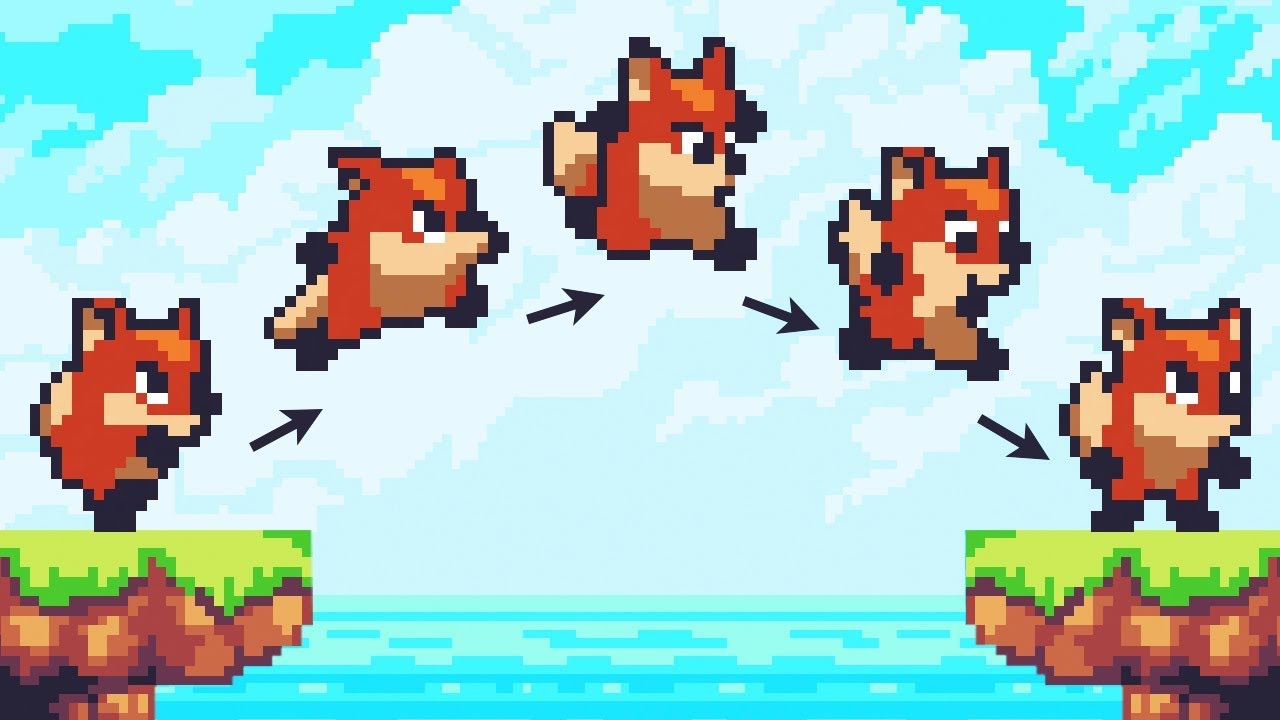
Let’s animate our character!
● Check out Skillshare: https://skl.sh/brackeys8
● Watch Player Movement: https://youtu.be/dwcT-Dch0bA
● Download the Project: https://bit.ly/2KK5AG8
● Character Controller: https://bit.ly/2MQAkmu
● Get the 2D Sprites: https://bit.ly/2KOkwjt
♥ ...
somehwere at 7mins
twin musk
can i see the code?
 trim hatch
        {
            anim.SetTrigger("shoot");
            //insantiate bullet to side
            //Vector3 bulletpos = new Vector3((box.bounds.extents.x ), (box.bounds.max.y ));
            Vector3 endpos = new Vector3(transform.position.x + .35f, transform.position.y, 0);
            Instantiate(bullet, bulletspawn.position, Quaternion.Euler(new Vector3(0,0, angle)));
            anim.SetTrigger("shoot");

}```btw I put another settrigger to see if it would fix it
twin musk
try disabling has exit time
twin musk
so if you hold mouse you shoot?
trim hatch
if I press mouse I shoot
twin musk
you have anim.SetTrigger("shoot"); twice
twin musk
honestly i couldn't tell you, just watch some YouTube tutorials, i don't remember the last time i used unity animations 😄
trim hatch
that's not very helpful if you don't know how it works
trim hatch
not like you could have
twin musk
you gave like no info of you code (one part of it) you get upset that a person tried to help but dosent see a problem from the info you have given and you get upset?
trim hatch
I get upset that you tell me to watch videos
twin musk
THATS HOW YOU LEARN
trim hatch
you think I didn't already try that?
twin musk
it happens to the best of us that you miss one simple thing. so from videos you can find the problem
trim hatch
if you can't help then don't say anything
twin musk
ok, well good luck in your game development journey, don't think you'll get teammates 🙂
 celest crag
@trim hatch Please be respectful in the community. If you don't like the help you don't have to be rude about it.
trim hatch
is telling me to watch videos really help?
celest crag
If you don't like the help you don't have to be rude about it.
trim hatch
that's like saying ask someone else
 dense crest
Anyone using the Kinematica package?
 south anvil
for some reasons my animator plays the animation of the object that is selected in the hierarchy, does anybody know how to fix it?
hybrid tinsel
@ripe halo You'll have to decide if whatever efficiency gains you might be able to squeeze out are worth it, I guess.
@trim hatch 99% of the questions we get in here are basically 'something doesn't work, I won't tell you nearly enough info to help, and will complain when asked for details.'
south anvil
at the first of all stop being rude
trim hatch
k what info
@hybrid tinsel what info was I supposed to provide?
nice
and when did I complain about being asked for details?
hybrid tinsel
I personally am not a fan of that video, but it does provide a decent checklist for this sort of problem.
So do you have the correct animator linked to that script? Did you check the state machine to see if it wasn't being set?
And yeah, you were just rude and whiny. Nobody here is being paid to help.
trim hatch
it was being set everytime I clicked
everthing was linked properly
eventually I just gave up and set a bool that would always be true after the animation ended
hybrid tinsel
So if it is being set, what is the problem? Did you not have a transition using it?
hybrid tinsel
Ok. So in play mode, with the animator selected, in the state machine window you are saying that the trigger was triggered but there was no animation transition happening?
If that is the case, it probably means that the conditions for the transition are set incorrectly.
 silent lark
Hi, I have a general question. I want my NPC agents to be able to go to a desk and sit down properly. How can I create an animation that will work no matter in which angle the agent is approaching the chair. The desk looks like this.
 mild imp
if i have a rig on a character, how do i attach a sword to his and ad that sword follows his actions? do i just make the sword a child of his hand armature?
 snow cedar
how to create root motion from mixamo animations ?
importing it blender creats a root bone but its the hip not on the ground... unity only understand feet root bone
silent lark
if i have a rig on a character, how do i attach a sword to his and ad that sword follows his actions? do i just make the sword a child of his hand armature?
@mild imp yes, you could parent the sword to the hand bone or you could use the IK system
 covert igloo
I have a text animation set to scroll (sort of like a credit sequence), but at the end it's automatically looping. Old online topics about this mention an 'on Loop' checkbox in the Inspector, but I don't find that anywhere in mine; using 2019.3.15f1. Any ideas on what I could be missing?
hybrid tinsel
@covert igloo You need to check the inspector for the actual animation file.
covert igloo
@hybrid tinsel I wondered if that might be the case, but I'm not able to bring it up in the Hierarchy view; is there another menu (somewhere in Projects, maybe?) where I can select it?
hybrid tinsel
Where did you save the file?
covert igloo
Nvm; I searched the animation in Projects and was able to uncheck it there; thank you so much! I knew I had to be overlooking something.
hybrid tinsel
I really wish you could play multiple objects' animations simultaneously
While animating
Would make things so much easier
 frosty flint
Hi, I have a Base Layer in the Animator and a Layer Synced to it, if the transition in an animation clip in the Base Layer has 0.5 Transition Offset to the next clip, will it also be implemented in the Synced Layer?
 clear pagoda
Quick question. I made some animations for the doors in my game. However, the animations are rigid. Which means that if I rotate the door 80 degrees to fit it into another part of the scene, it requires me to make a whole new animation for 80 degrees because the previous animation I made is fixed at 0 or whatever it's recording position was. Is there any way to fix this?
I don't want to have to make a new animation for every angle I put a door at. I figure there has to be a way to make rotation animations relative to the orientation of the door.
 quick flare
you could parent the door to an empty object? i dont know if animations are in local or world space but assuming they are in world space, you would just have to orient the empty object instead of the door @clear pagoda
clear pagoda
That's an interesting idea.
I'll try that out later today. Though, the animation is only affecting the rotation, but maybe if values of the door itself stays the same and only the parent object is rotated, then perhaps that will fix it.
I guess I'll find out later.
quick flare
guess so.
anybody know good upper body joint limits? i.e. elbow, shoulder, shoulder to body?
clear pagoda
@quick flare Just tested it out...works perfectly. I didn't even consider doing that, so thanks.
Wish I knew more about animation. It's something I'm learning now.
quick flare
i've not done much with it either, just was thinking about things in different spaces. when you think about a moving-things problem, it becomes either a lot harder, or a lot easier when you think about it in local and world spaces.
clear pagoda
Yeah. I've been working in Unity for many years now and that's some I still screw up from time to time.
quick flare
yeah, god, nearly 2 I've been using unity for. how time flies
twin musk
hey guys i have a 2d animated character with 4 sprite walk cycle what is the most optimal speed?
should my animation speed be 20 frames or 30 or
what is the most normal to use
quick flare
i would just mess around until it feels right tbh
clear pagoda
That's the best way to do it.
Play with values until you find something that feels right.
twin musk
@silent lark animations for both right and left side entering, chair holds 2 position points where NPC first walks then starts animation to sit down? if NPC needs to move around with chair then maybe with script chair follows NPC?
hybrid tinsel
@frosty flint I believe so, but I'm not in unity to test it right now.
@twin musk measure the stride, and match the speed so that the distance the feet move matches how fast you move the character
What I did was use a floor with a ruler texture on it to make it really easy to see if the feet were 'slipping'
 weary compass
Quick question, how do I implement a turn animation, like when the sprite flip I want to have an animation there so that the flipping wont look so rigid
frosty flint
@hybrid tinsel I tried it with the synced clip starts at 0 and starts at the supposed to be 0.5 transition, I'm not noticing any difference, but will try again as well.. Thanks 🙂
@weary compass Maybe try changing the scale to a negative value through animation?
weary compass
can you elaborate further Im not sure im getting it
frosty flint
@weary compass do you flip the Sprite through the Sprite Renderer flip?
weary compass
yeah
hybrid tinsel
In most cases, you'll probably get better results using scale.
But in any case, how you make a turn animation depends a lot on the style and the sprite.
frosty flint
Agree with @hybrid tinsel , my suggestion revolves around the scale transform because sprite flip in Sprite Renderer is just instant, it's just a boolean flipping, unlike the scale which is a float that you can increase/decrease by varying amounts. 🙂
hybrid tinsel
Well, flipping using scale can be instant as well(I flip instantly using scale in my game.)
frosty flint
Oh yes, hehe, I mean there's an option to lengthen the process.. Thanks for the correction..
hybrid tinsel
I tried a 'turn' animation but it made my game control terribly
So I would probably save it for a different type of game
weary compass
Thanks for all the info but how do you use scale to flip?
silent lark
@silent lark animations for both right and left side entering, chair holds 2 position points where NPC first walks then starts animation to sit down? if NPC needs to move around with chair then maybe with script chair follows NPC?
@twin musk Thank you for the ideea. The NPC does not need to move around witch chais, just sits and types at the computer
Thanks for all the info but how do you use scale to flip?
@weary compass set it to -1 as far as I know
hybrid tinsel
@weary compass Specifically, multiply the transform's scale by -1 on the axis you want to flip(usually x)
twin musk
@hybrid tinsel ah thx thats actually a good way to measure, never thought of that tbh
twin musk
Hey guys. I hate to ask despite this being the ART & CREATIVE topic, But i was going to ask: Where do you post your artwork? for either your projects?
I'm still new here although i joined Last year, Just never got to hang around
frosty flint
Does avatar mask work in a sync layer?
silent lark
Hi guys what is the reason the character's foot slide between a sitting down animation and an idle animation
Is is because root motion?
https://streamable.com/j2d7bn the link
 twin musk
nvm, I'll upload some Character Animations here
 torpid nymph
does anyone here know how to use events on seperate animations? for some reason i cant figure it out if its possible
frosty flint
You mean this one @torpid nymph ?
https://docs.unity3d.com/Manual/script-AnimationWindowEvent.html

Does avatar mask work in a sync layer?
twin musk
any tips for how to deal with this?
this is my first time really using Timeline, or even doing animation work for 3D
so far i've been creating my clip by just recording on the timeline and then converting them to clip tracks
but then i noticed that those don't become separate objects, they are nested in the timeline asset
so i tried to create an animation clip independent from the timeline asset and drag it it, and while that works, i just can't record keyframes with it
 outer topaz
Hey guys!
Anyone here has experience with 2D animation tools? I have IK Manager and a tentacle-like rig inside unity. I want to move a bone via script but it doesn't seems to move.. Anyone has any idea why?
twin musk
@outer topaz are you trying to move it in the editor? could it be that the script for moving would only trigger during runtime?
outer topaz
I'm testing it at runtime
code:
            float step = speed * Time.deltaTime;
            Vector3.MoveTowards(baseBone.transform.position, target.transform.position, step);
}```if distance GREATER THAN max distance?
twin musk
also if it's an ik script why are you trying to move the base bone? isn't usually that the bone that stays put?
like you would move a target bone, and all the other ones would change except for the base bone
maybe your ik script is resetting the base bone's position
outer topaz
its a stock script
by unity
I wanna create a tentacle like thing
that wiggles around as idle
but can also act like a trail
a trail with a moving end if that makes sense
twin musk
yeah i get that
i was just trying to undestand what you're trying to do, it's not very clear to me
from the code that supposedly doesn't work
outer topaz
is it a bit clearer now? 😄
outer topaz
am I approaching this from the wrong direction
twin musk
i believe so
alright,
code:
            float step = speed * Time.deltaTime;
            Vector3.MoveTowards(baseBone.transform.position, target.transform.position, step);
        }```
should be:
transform.position = Vector3.MoveTowards(baseBone.transform.position, target.transform.position, step);
i'm going to bump my problem in case anyone can help me
any tips for how to deal with this?
this is my first time really using Timeline, or even doing animation work for 3D
so far i've been creating my clip by just recording on the timeline and then converting them to clip tracks
but then i noticed that those don't become separate objects, they are nested in the timeline asset
so i tried to create an animation clip independent from the timeline asset and drag it it, and while that works, i just can't record keyframes with it
 subtle tangle
i am importing mixamo animations and i find the rig mapping is not correct, is der way i can write a script to map the bones accordingly
?
twin musk
Hi guys what is the reason the character's foot slide between a sitting down animation and an idle animation
@silent lark i was facing the same problem with a foot sliding, and according to this video https://youtu.be/wf6vtCgLk6w?t=2796 you have to bake into the pose and it wont slip

View this lesson in context at: https://unity3d.com/learn/tutorials/modules/intermediate/live-training-archive/character-animation-setup
In this session, we will look at the basic steps needed to import and setup a rigged character with Unity's Animator system.
jade dew
very cool video @twin musk, its nice to see some basic workflow
twin musk
yep it definitely is helping me too, plus its an official tutorial so it has everything u need xd
jade dew
great tips and tricks in there too
twin musk
yep indeed
jade dew
the 45 degree angle strafe thing he did was a question i had
twin musk
ohh cool, glad u got it fixed, im actually watching it too now
 primal glen
Hello everyone, I'm sorry if my question should not be in this channel but it seems to be the best one.
If have a problem with the Unity Package "Animation Rigging". For no apparent reasons, when I move a little bit my character (by dragging it in the scene view or just by code) my tps character will slide at a huge speed. And I don't know why it's happening, because it's only the tps character that is sliding, because I have an Empty gameobject for the root of my character, which is moving normally and my tps character as child and he's sliding. If someone has a solution ! Thanks
EDIT: When I disable the rig builder the issue stop (but I can't use the package..)
jade dew
anyone got any ideas on
how i can smoothly interpolate the root motion
of two animations
case in point:
when I jump, and my character lands, the root motion for that instant before it blends back into the running animation is zero
so theres this abrupt stop in the movement
is it possible to do this by just finicking with the transitions?
anyone dealt with this kind of thing before?
hybrid tinsel
@outer topaz Which IK script are you using? The FABRIK one?
Normally you would move the base and the target objects, not the bones directly
frosty flint
Does avatar mask work in a sync layer?
jade dew
see those little moments of loss of motion/momentum
how can i avoid those? i am applying the root motion via my script
and since it is using the root motion, the transition animation causes that little hiccup there
hybrid tinsel
@jade dew Can you make a separate transition for a running landing?
jade dew
this is the separate transition haha
perhaps its a question of whether the animation perfectly lines up in terms of velocity with the running animation?
jade dew
it's weird i can't find anything abt this... perhaps it's my issue? maybe im misunderstanding smth or my animation isn't correct
can't seem to find any info on seamless motion when using root motion
mild imp
@jade dew transition time?
jade dew
ye I'll fiddle around with all of it more again later
would appreciate input from someone who's doing similar thing
frosty flint
@jade dew Suggestion, Maybe try removing the exit time and adjust the transition offset depending on the time you wish to transition.. Transition offset is normalized so transitioning directly to 1 second instead of 0 (in a 2 second clip) is 0.5..
jade dew
this is the falling -> running landing
running landing -> running
yea i suppose i need to offset
though i do lose some of the actual "landing" animation to the blend that way
hybrid tinsel
I don't have that issue, but I also don't use root motion
frosty flint
May reduce the offset as needed, it's up to you.. Or use avatar mask..
frosty flint
Does avatar mask work in a sync layer? Anyone? hehe..
twin musk
hey i have a blend tree for walking but i also want to transition into running, does anyone know the best approach to this?
twin musk
IDK why I still confused about animation after I have made animated characters
Do I need to connect that with that or that with that
jade dew
@twin musk u can add an extra blend tree
to the same one
and make parameters choose the blends
twin musk
i made this in 5 minutes some stick figures fighting it out
*this is my first animation
jade dew
nice
silent lark
@silent lark i was facing the same problem with a foot sliding, and according to this video https://youtu.be/wf6vtCgLk6w?t=2796 you have to bake into the pose and it wont slip
@twin musk Hi I watched that video some time ago when I first started with unity mecanim. I baked all the animtions into every pose( Rotation, Y and XZ) but the issue was not solved
View this lesson in context at: https://unity3d.com/learn/tutorials/modules/intermediate/live-training-archive/character-animation-setup
In this session, we will look at the basic steps needed to import and setup a rigged character with Unity's Animator system.
sitting down
sitting idle.
https://streamable.com/j2d7bn the link
@silent lark this is the video with the foot sliding issue I am experiencing on the transition between sitting down-> sitting down idle
 jade dew
its probably smth bc of the root motion bake seems to me
bc the origin is being translated
silent lark
Yes, that is what I am thinking too
jade dew
and baking means that the translation will occur in the animation
try not baking for both the animations
the root motion xz
at least the ones with loop match as red
silent lark
Ok it dit it.
This was because baking the XZ was ensuring that the root node was at (0,0,0) right?
Thank you @jade dew
jade dew
baking the xz ensures the translation occurs in animation space
ie its not related to the actual object space
jade dew
uhhh i dont know how to explain it exactly
those are just my own words
but wait lemme see if i can find
something to explain
silent lark
you mean the gameobject is not being affected?
jade dew
yes, when the motion is baked, it means the animation mesh will move but not the actual root object
here
maybe can help clear up
im having trouble finding the words to explain it haha
sorry
silent lark
https://stackoverflow.com/questions/39312228/whats-root-motion-and-how-it-works here is says something that when you bake sth the gameobject does not record that translation.

Stack Overflow
I'm reading Unity Animation cookbook book. And I'm stuck at "Root Motion" topic. All I can understand now is Root motion allows the GameObject to move with the motion clip without coding. and it de...
jade dew
yes, like that
jade dew
With this option selected, horizontal motion will be treated as a visual effect of the animation and will not be applied to the game object. this sums it up i guess
silent lark
Ok. But the gameobject translation applies also when previewing a transition in the animator? It seems like the object in the preview is an actual gameobject to me
jade dew
root motion is applied to the gameobject if u have "apply root motion" selected
or u can apply it urself via script
silent lark
I agree with that, my question is when previewing animations in animator window.
jade dew
btw its easy to be confused about this, dw
in the preview window
it respects the root motion option
of the selected gameobject animator
u can tell
if its root motion
if it seamlessly loops
ie the object doesnt snap back
to the start position
once the animation ends
usually
silent lark
Ok now it make more sense.
jade dew
here u can see that when the xz is NOT baked
the camera follows the object's root
when i bake it
the root stays at the same position
0,0,0
like u mentioned earlier
but the translation is still applied as a visual effect
like that link u sent mentioned
silent lark
I see you use mixamo animations as well.
jade dew
yup. lol
prototyping rn so
its cool to use
the animations pretty quality, i like them
silent lark
me too, also you can easily swap avatars
jade dew
might not even have to make custom anims for most cases
twin musk
@twin musk u can add an extra blend tree
@jade dew
to the same one
@jade dew
and make parameters choose the blends
@jade dew
that sounds complicated af 😅 how do i do that lol
jade dew
its pretty simple, for a simple walk/run
so ur parameter is going to be speed
and ur blend tree is going to blend between the walk and run animation
based on speed
theres plenty tutorials on this online too
twin musk
thx
 north crest
So, I have the following script:
    {
        if (Input.GetKeyDown(KeyCode.Mouse0))
        {

            gameObject.GetComponent<Animator>().Play("hoeSwing");

        }
    }```
But it only works once. Why?either change to Input.GetKey for holding down key
or make sure you have the "loop" checkbox enabled in ur animation
otherwise i have no idea 😄
subtle tangle
my head animation rig is not looking at the target properly, it always points down instead of target .
 gentle sigil
Is there a way to use script on the Animation Rigging Package from Unity ? ??
 opaque skiff
how come my unity doesn't have a sample part, was it a update? im trying to make a one frame jump animation and i keep seeing this in the tutorials, just wondering if someone could point me in the right direction ?
 acoustic obsidian
has anyone used blender for animation? is there anyway to make a component disappear at certain keyframe?
it can be hidden at the viewport, but once it is imported into unity, the function doesnt seem to work
 graceful lantern
keyframing object visibility is probably not supported by FBX @acoustic obsidian
acoustic obsidian
so there is no other way round about it?
graceful lantern
do that particular animation in Unity
acoustic obsidian
so maybe the object is only inserted at certain keyframe rather than "revealing" it
do that particular animation in Unity
@graceful lantern ok, will try, but doing it in unity is kinda annoying since theres quite a bit of stuff to do
 acoustic obsidian
how do you make a button where it plays animation1 and stops when clicked, then when the same button is clicked again, animation2 plays and so on
how do you map the state machine?
opaque skiff
hay guys i got a problem with my Players Jump animation i was wondering if someone could help? the animation works and logic and rigging has gone though, its just too fast and i was wondering if someone could have a look at it. A fresh pair of eyes could really do the trick?
trim hatch
can animations from mixamo be used in other models?
I tried it with the ethan model but it messes with the mouth
how do I fix it?
jade dew
try downloading the animations and make them use the ethan humanoid rig
instead of rigging in mixamo
jade dew
did u set the loop time and loop pose settings
on the animation clip
u can also try messing with loop cycle offsets etc
trim hatch
oh now it works, thanks
hm I can't find a pistol fire animation in maximo
I guess I should just settle with a muzzle flash?
opaque skiff
hay guys i got a problem with my Players Jump animation i was wondering if someone could help? the animation works and logic and rigging has gone though, its just too fast and i was wondering if someone could have a look at it. A fresh pair of eyes could really do the trick?
hybrid tinsel
@opaque skiff are you gonna show it to us?
opaque skiff
its difficult to show, cus it goes so fast
in a call i could show people what's happing
the frame forthe jump is moving way to fast
ill take screenshots
opaque skiff
@hybrid tinsel
    {
        horizontalMove = Input.GetAxisRaw("Horizontal") * runspeed;

        animator.SetFloat("speed", Mathf.Abs(horizontalMove));


        if (Input.GetButtonDown("Jump"))
        {

            Jump = true;
            animator.SetBool("is_jumping", true);

        }

        /*if (Input.GetButtonDown("Dash"))
        {
            Dash = true;
        }
        if (Input.GetButtonDown("Crouch"))
        {
            Crouch = true;
        }
        else if (Input.GetButtonUp("Crouch"))
        {
            Crouch = false;
        }*/

    }


    public void onlanding()
    {
        animator.SetBool("is_jumping", false);

}```sos for delay
im of to bed
jade dew
btw what's too fast
the actual jump anim
u can modify all the state speeds, as well as the transition speeds
 sharp verge
how do i animate a whole character? my character has bones, like the problem is that it only lets me animate per bone.
hybrid tinsel
@sharp verge You would need to put the animator on the root object.
Animators affect all children of the object with the animator on it
sharp verge
Wdym root object? Parent of the objects or the parent of the bones?
 distant carbon
i need some clever tips from you animation pros.
we have done some simple animation, we imported the generic animation of a character with a ball. - we play the clips with statemachine...
the character has a humanoid rig but the ball not.
so on generic it works kind of but the character has footsliding and the ball is of synch. i have no idea how to correct this. any tips appreciated.


 brittle garnet
i mean add more keyframes in order to make the movement smoother
brittle garnet
i didn't know, well, you would have to modify it in unity
idk i never made any 2d project
 fleet aurora
before doing any of that
the arms
look at these ARMS
I had to darken them a lil bit otherwise it would blend with the body
and then it wouldn't look like arms anymore
brittle garnet
idk arms look good to me
brittle garnet
im trying to be nice, it could be improved but its ok
fleet aurora
don't be nice, i know it looks like dogshit
i have no idea how to improve it
i just matched the run cycle
in the background

brittle garnet
idk know how this works srry
opaque skiff
i think my players jump animation is to fast or ever not playing when it should how can i fix this?
brittle garnet
espace the keyframes
opaque skiff
espace?
what does that mean?
@brittle garnet what i think it is it doesn't understand when the player is in the air to play the animation?
opaque skiff
i have a vid but its to big
the jump is not playing fully
can i show you in a call
brittle garnet
send me a link pls
brittle garnet
ok i've seen it, try making sub-states as in the 2nd image i posted
and maybe try not making double arrows between states
opaque skiff
ok
 maiden hinge
Hey all, I rigged a pixelart character and it turned out OK (example attached), but I'm on iteration 2 and I can see myself wanting to re-use a lot of animations, e.g. running with some tweaks for each character, instead of re doing the entire animation sequence for each. The latter involves a lot more work :)
Is there a way to 'reuse' a stored animation against a character, but then to modify keyframes if the IK Limb Solvers are a bit out of sorts?
opaque skiff
@brittle garnet why do i need a sub-State machine?
opaque skiff
my jump animation only plays when i hit the jump button, as i only hit it for a second it don't play the full animation how can i make it play the full thing ?
https://youtu.be/hkaysu1Z-N8
Let’s animate our character!
● Check out Skillshare: https://skl.sh/brackeys8
● Watch Player Movement: https://youtu.be/dwcT-Dch0bA
● Download the Project: https://bit.ly/2KK5AG8
● Character Controller: https://bit.ly/2MQAkmu
● Get the 2D Sprites: https://bit.ly/2KOkwjt
♥ ...
jade dew
does ur transition have an exit time/condition
weary compass
Can anybody help me on how to do a 2D turn animation?
hybrid tinsel
@weary compass depends on the style and what sort of animation.
weary compass
im doing a 2D sprite animation, similar to Hollow Knight I think
I have a clip of the turn animation but I dont know how to time it right before the sprite flip. Tried Coroutine but its still not working properly
hybrid tinsel
That is kinda tricky.
Maybe use an animationevent in the turn animation to time the flip, but that can be tricky since events at the every end don't always fire
weary compass
yeah it is  d
d
hybrid tinsel
Anyone else in this channel getting spammed by some doofus wanting you to join their server to make a game for them?
 plucky plank
I was wondering how do I implement an animation for an enemy which has a follow script attached?
hybrid tinsel
@plucky plank Pretty much the same way as you would with a player, except you use the follow script's movements instead of player input
plucky plank
I've copied the one from the player in which it it's left or right/up or down depending on if the code returns 1 or -1
hybrid tinsel
Well, I don't know your code.
plucky plank
movement.x = Input.GetAxisRaw("Horizontal");
movement.y = Input.GetAxisRaw("Vertical");
    animator.SetFloat("Horizontal", movement.x);
    animator.SetFloat("Vertical", movement.y);
    animator.SetFloat("Speed", movement.sqrMagnitude);
that's the players
hybrid tinsel
Ok. So what you'll want to do is take the sign of the horizontal and vertical velocity of the follower
plucky plank
animator.transform.position = Vector2.MoveTowards(animator.transform.position, playerPos.position, speed * Time.deltaTime);
if(Vector2.Distance(animator.transform.position, playerPos.position) > distance)
{
animator.SetBool("isFollowing", false);
}
that's the enemy
I dunno how to tell it that 1 or -1 without input
hybrid tinsel
for that code you could use the sign of the x and y of animator.transform.position-playerPos.position I suppose, to get which horizontal and vertical direction it is facing.
hybrid tinsel
That will technically make it always face the player rather than follow the direction it is moving, but as long as it is chasing the player the two will always be the same 😄
plucky plank
k thanks
hybrid tinsel
@frail cedar ?
 icy imp
can i give my sprites a gleam animation without manually drawing each frame?
something like this gif
oops
 hybrid tinsel
You could do that with a shader, @icy imp
icy imp
cool thanks ill look into that
 steel pecan
Excuse me, I'm having problems with the animation transition in my project. I have already made the animation montages with sprites, animation for idle, walking and jumping. I'm using the animator for the transitions and a float and a bool for the character standing on ground. My problem is that every time I start the game, my character falls to the ground but is still on the jump animation, even if it touches the ground and I can't move.
editor
in game
Can anyone help me, please?
hybrid tinsel
@steel pecan is the grounded state actually triggering in the animator?
steel pecan
no...
hybrid tinsel
The bool is not changing?
hybrid tinsel
That reason would probably be that you aren't setting the grounded bool to true from your script
Also that is an incredibly long transition
Dunno if that will cause other problems
To the left there is the list of all inputs on the state machine, it will show the state of the grounded bool
If it doesn't turn back on when you land, that's a problem with the script.
If it does, I'd shorten the transition.
hybrid tinsel
What do you mean, you 'booled the grounded'?
You mean you set it manually or you confirmed that the script is setting it or...?
I'd suggest maybe adding some debug code to your script, have it log something with Debug.Log when it 'lands'
 stuck elm
All I see there is you declaring it. You need to actually set a value to it for the animator to update.
Can you paste the full script?
hybrid tinsel
You can just copy the code into a pastebin
Much easier
You misspelled FixedUpdate() as FixUpdate(), so it will never get called.
And you never change Grounded at all. You literally only refer to it once. Every frame you set the bool in the animator to false, because it will always be false.
steel pecan
right, thank you
icy imp

anyone know why this animation event screen looks like this? v2019.4.1f1. There should be more options right?
icy imp
that screenshot was from somebody else, my screen of the same file looks like this
hybrid tinsel
@icy imp It depends on the function being called.
A function that takes no arguments will have no argument fields
At least as far as I've seen
icy imp
thats really weird then because they should both the same file and same code
ive always had the extra options though even when there are no arguments called so it might be a problem with my install
hybrid tinsel
or maybe I do
icy imp
no i think something happened with git, the animation event isnt attached to the script
alright i fixed it thanks for the help
twin musk
Hey! Would anybody be up to discuss animation commissions?
stuck elm
This is the right place to show em I think, at least.
twin musk
 hybrid tinsel
Neat stuff.
 modern cargo
does anyone know why my images arent adding in as frames when i drag them into my animator window..? as in, nothing happens
hybrid tinsel
@modern cargo is there a sprite renderer?
twin musk
yo im having some trouble with the unity animator it keeps thinking IsCrouch is true and then thinks its false over and over can anyone help?
hybrid tinsel
It probably isn't a problem with the animator, @twin musk. That sounds most likely that your script is sending conflicting information.
twin musk
im not getting any errors tho it just keeps flashing but it works when i press s
hybrid tinsel
It going back and forth constantly isn't an error?
twin musk
yea
 vernal pond
Is it possible to do animations in relative space?
What i mean is, instead of moving my canvas from anchoredposition.x = 0 to anchoredposition.x = 100, can i make an animation move my canvas from the position it is atm 100 units to the side? So a from anchoredposition.x = x to anchoredposition.x = x + 100 kinda in a way?
opaque skiff
got a problem and i wondering if you could help. my player plays the animation but never transitions back also he only plays the first key frame not the hole thing
jade dew
whats the transition back look like
its probably not set up
also check if the jumping animation clip is looping
 flint vault
hello?
jade dew
whats the problem
hybrid tinsel
@vernal pond What you're looking for is 'root motion.'
vernal pond
How would i accomplish that? or could you give me some more intel?
hybrid tinsel
@opaque skiff which animation? And are you constantly transitioning to that state every frame?
vernal pond
@hybrid tinsel this sounds like it needs an full on avatar with muscles and all. In my usecase i want to apply it to a canvas in my UI to move it around with 4 animations rather than making 16 or so
hybrid tinsel
@vernal pond Muscles? No idea what you're talking about.
An animation with root motion enabled will have relative motion of the root transform from the animation. One without will have local motion only.
vernal pond
I just stumbled accross it in this https://docs.unity3d.com/Manual/RootMotion.html
 stiff moss
I have a really dumb problem that I need a clean solution for in my Animator
it might not make a lot of sense, but, I want to pretty much cut off an animation early to blend into the beginning of the same animation
Not sure if I'm going about it the right way.
I have two ideas but not sure if they're right
one is to do something like this, https://i.imgur.com/FzP4Duu.png
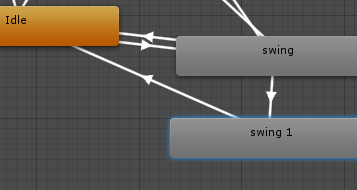
the other is to split my swing animation into two pieces, and allow the second half to get interrupted back into the first half
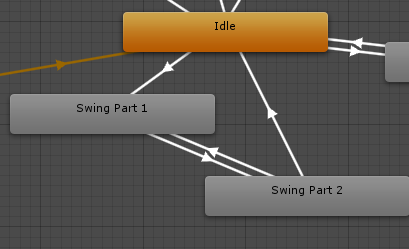
like this
jade dew
could u try an anystate transition perhaps
which have a trigger, 'swing'
i assume u want to be able to interrupt the same swing and restart it
stiff moss
yea, but idk, i want to make sure I'm not interrupting other animations, just the swing
it's a hard choice
I'm experienced with coding but using unity's animator is a bit iffy for me
hybrid tinsel
@stiff moss The latter method is basically how many games handle jumping/falling
So it def. works
jade dew
u can make sure it dont interrupt others with correct parameters
stiff moss
@hybrid tinsel you mean the version with part 1/ part 2?
Also I thought about it a bit, it'd allow me to expand into having combos and whatnot
 rose pagoda
hi has anybody here tried using the 3d game kit? I want to change the character to something from mixamo but the animations are a bit off I was wondering how I could fix this
this also doesnt just apply to this opening spawn animation, the attack animations also slightly rotate the character. normally the character just attacks at the direction where the camera is currently facing
stiff moss
I can't get an example screenshot, but if you open the animation in the inspector, there's some dropdowns that might help you there
rose pagoda
is the gif not showing?
I dont know what's up with it coz the 3d game kit has the characters animation and rig set to generic so I changed it to humanoid
basically what the gif is showing is how the animations look right now
hybrid tinsel
 hybrid tinsel
Not me. I have no idea how to solve your problem, sorry.
Unless a puppygirl helps somehow
rose pagoda
I think it has something to do with root motion but I didnt change anything other than the animation type. . .
I could really use some help on this. . .
hybrid tinsel
There's a good chance that the animations are just not aligned the way the ones the original project used.
But I really can't give specific advice, I've not even touched 3d animation really
rose pagoda
waiting on someone with some 3d animation chops
i've tried various discord channels and I dont know if its just a 3d animation thing or what but nobody seems to have any answers
 dusky hedge
@hybrid tinsel thats pretty cute lol
hybrid tinsel
@rose pagoda A lot of the problem is that you're using a fully developed asset that none of us have looked at 😄
rose pagoda
I was hoping that this was just a settings thing or maybe somebody's had a similar problem before
hybrid tinsel
It might be. Have you tried posting in the forums maybe, since it is about one of the unity assets?
Or maybe even checked the comments/thread for the asset itself?
I mean, surely someone else has tried combining it with mixamo
rose pagoda
I've tried reading the posts first but it seems like nobody's found a fix for this
I think i've found something that might just be a fix 🙂 I didnt realize that there was a root motion node on the motion options on the animation import settings
hybrid tinsel
@odd blaze does the transition take long enough that you are getting a loop back to the start of the initial animation?
 pure abyss
hi! is it possible to assemble avatar mask at runtime?
and furthermore - set that mask in a layer of animationcontroller?
graceful lantern
I don't see why not
pure abyss
i am unable to find a way to get/set avatar mask from animator
all I see is GetLayerIndex, GetLayerWeight and so on, but nothing regarding layer mask
and AnimatorControllerLayer seems to live inside UnityEditor
graceful lantern
sorry, didn't see you already tried that
pure abyss
yeah, unfortunately
it is really weird.. i would like to assemble and apply AvatarMask at runtime, but it seems it isn't achieveable
while I think I could reference AvatarMask directly it would require separate AnimatorControllers for each characters which is a no-go for me
 dark pier
i got animaiton from maixmo and i dont know how to use them can anyone help me maybe a tutorial video link?
btw im new to unity so i might not understand what you are saying
hybrid tinsel
@pure abyss What exactly are you attempting to do that you need to assemble an avatar mask for?
There might be some way around that
stiff moss
@hybrid tinsel I finally implemented the swing part 1 and 2 into my animator and it's so much better

only took a minute or two, but ive been spending all my time helping in #💻┃code-beginner XD
hybrid tinsel
Neat. Needs IK on the feet I think.
stiff moss
these are placeholder animations I yoinked from Mixamo
I'm going to do my own animations later on, once my rig is done
oh, just turned on foot ik in unity
much better
 fringe nacelle
Has anyone had success with animation in Unity?
 languid peak
what do you mean by success?
whats the most animators you guys have had running? im going to want a hundred or more but animators are quite heavy
pure abyss
@pure abyss What exactly are you attempting to do that you need to assemble an avatar mask for?
@hybrid tinsel - i have dynamic animation controller when I swap clips at runtime. And I would like to adjust avatarmask based on a clip that I am injecting.
 ornate bridge
Hello it is possible to make animation on blender working on unity ?
graceful lantern
Yes.
 burnt field
Which is generally "better" to use, legacy animation or animator?
mild imp
I have an object. the player can pick up the object and place the object. When the player places the object, and animation plays. but its wonky, it doesnt animate how i set it up to. ive tried culling transforms, culling completely, apply root motion. nothing works
Anyone have any idea of how to fix it?
mild imp
Actual animation. @jade dew
Whats currently happening.
it just disapears
or if i try cull transform, it does the animation completely wrong.
jade dew
are u sure the animation is playing at all, correctly?
put the culling mode to always animate
jade dew
id check first if the animation plays at all
can u show the animation clip settings too
also: is the physics enabled when the animation plays
mild imp
It just sorta flys away
And i dont know why. it should just animate where it is
@jade dew
mild imp
gravity is enabled on it, bujt it is kinematic
jade dew
hmmm
it kinda looks like its not getting set kinematic to me
can u double check?
right after the animation starts, pause and check if all the stuff is set up ok
mild imp
it is not kinematic. you are right.,
ill do that and check again
@jade dew it is actually kinematic. im lying
ObjectInSlot.GetComponent<Rigidbody>().useGravity = false;```so thats done before the animation begins
right?
it might be bc of the orientation of the object
do u orient it to be the same as at the start of the animation
before u start it
mild imp
its set kinematic before the animation is enabled
no @jade dew the orientation of the dropped object will 99% not match the starting position ofthre animation
jade dew
u should make it match
bc i see u use root motion
therefore i imagine the animation plays relative to the orientation
so if the object is facing to the right, itll play the animation towards the right
get what i mean?
mild imp
ive also tried not root motion
jade dew
even without possibly
try to orient it and then try
so u first move it and rotate it to its initial place
then start the anim
 valid tulip
someone can help me with something about 2d rig animation? i want clothes to move with my rigged character
 hardy phoenix
Did you seriously just ping the admins and community mods group because you were missing help?
Did you read the rules on how to request help here?
Unless there are community issues, you don't just ping the entire mod and admin groups
You did it again
Please stop
No one is here for your help
People help if they can
But no one is paid to do this. So please, respect peoples time. Don't make unreasonable demands. Don't spam @'s
Anyone who needs help believe their problem is important
hybrid tinsel
@pure abyss can't you just make avatar masks for each clip and swap them in when you swap in the animations? Why do you need to make them dynamically?
pure abyss
@pure abyss can't you just make avatar masks for each clip and swap them in when you swap in the animations? Why do you need to make them dynamically?
@hybrid tinsel There is no way to set AvatarMask on an animator at runtime. Assembling an AvatarMask seems to be doable, but not setting those in Animator
hybrid tinsel
Why not just use different animator layers?
And you don't need to quote the entire reply when it is literally right there 😄
pure abyss
you are right, sorry 🙂
I can't use animation layers because it will link directly layer with avatarmask. and it won't be something nice to work with.. it would require me to have as many layers as I can create avatarmask variants
mild imp
I still have my issue listed above. Nothing works :/
hybrid tinsel
@mild imp is 'animate physics' checked?
hybrid tinsel
In the inspector, what happens to the object when it 'disappears'? The position changes, the scale changes?
ah, ok
@valid tulip The usual way to do that is to rig the clothes as well.
trim hatch
can anyone tell me why my character is doing this?
when I press forward the value goes greater than 0
but when I let go and it goes to 0 it keeps looping between animations
when it's less than 0 it should stay in the neutral position
jade dew
whats the transition back
jade dew
its not going back?
trim hatch
it's looping
trim hatch
I did
trim hatch
oh wait that fixed it
thanks
another question
when I let go of forward the animation goes on until it's finished
nvm I think I fixed it
jade dew
exit time probably
if exit time is on, it will wait until the animation reaches specified time in animation before transitioning back
twin musk
So I don't know if this is the correct place to ask this but I am having some issues with Animation Rigging. This is in a brand new project on 2019.3.0f6
I have the rig component on a child gameobject of the animator object. The two bone ik constraint is also on a child object of the rig component object. Then the rig builder is on the animator gameobject as well. All proper procedures have been conducted but yet still get these errors.
Can anyone help me please
jade dew
id check animation clips loop time and loop pose
hybrid tinsel
clear pagoda
Quick question...if I want to know what state is next or what transition is coming, how do I get that info? AnimationStateInfo does not provide that information in an easy to get to manner.
 vapid loom
Hi, my unity is in english but im working on some models with japanese blend shapes and seems to be breaking how its displayed, im unable to reference it in an animation, when adding it it doesnt actually add it to the animation, i tried recording mode too
^ pls dont lynch me if that isnt japanese XD
dusky hedge
@vapid loom you wont get lynched, I'll confirm that it is in fact japanese 🙂
vapid loom
 thank you
dusky hedge
何でもない!:) @vapid loom although im not quite sure where your issue lies. what do you mean unable to reference?
vapid loom
When I try to add the blend shape to my animation by pressing the "+" button in the circle it just doesnt add it
@dusky hedge
dusky hedge
I'm not that well versed with the unity animator im afraid. All I can think of that could cause it is the japanese characters not being supported maybe?
have you tried installing the japanese language pack for the editor? @vapid loom idk if that would help, but its worth a try. Does it work with regular english stuff?
vapid loom
I can confirm it does work with some of the added blend shapes that are in english, where can I install the japanese language pack btw @dusky hedge?
dusky hedge
I think its in the installer, if you go to the hub you should be able to add it to an existing installation @vapid loom
 dusky hedge
haha, the first one
Japanese, korean and chinese. In that order @vapid loom
Tho it might just be that that allows the editor to display certain languages it could be that it helps with the rendering.
Im kinda guessing, but its not that big of a download and seeing as enlgish works...
vapid loom
That ddnt do the trick sadly :/ what I'll try next is to check if I can reference it by adding an english one and replacing the character with the japanese character
dusky hedge
in that case the language packs are probably just display language, damn
languid peak
looks awesome
hybrid tinsel
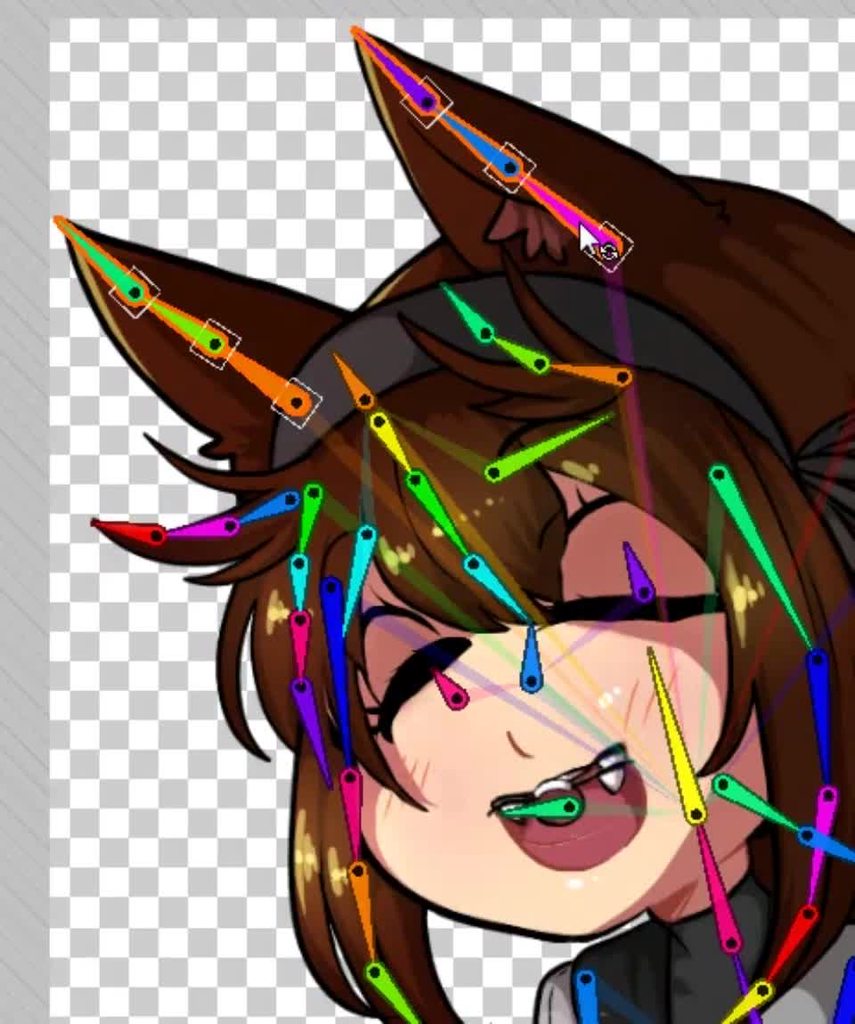 dusky hedge
god damnit pinball
u just too good at this spine thing @hybrid tinsel
ima do it too this weekend, but use bendy for testing
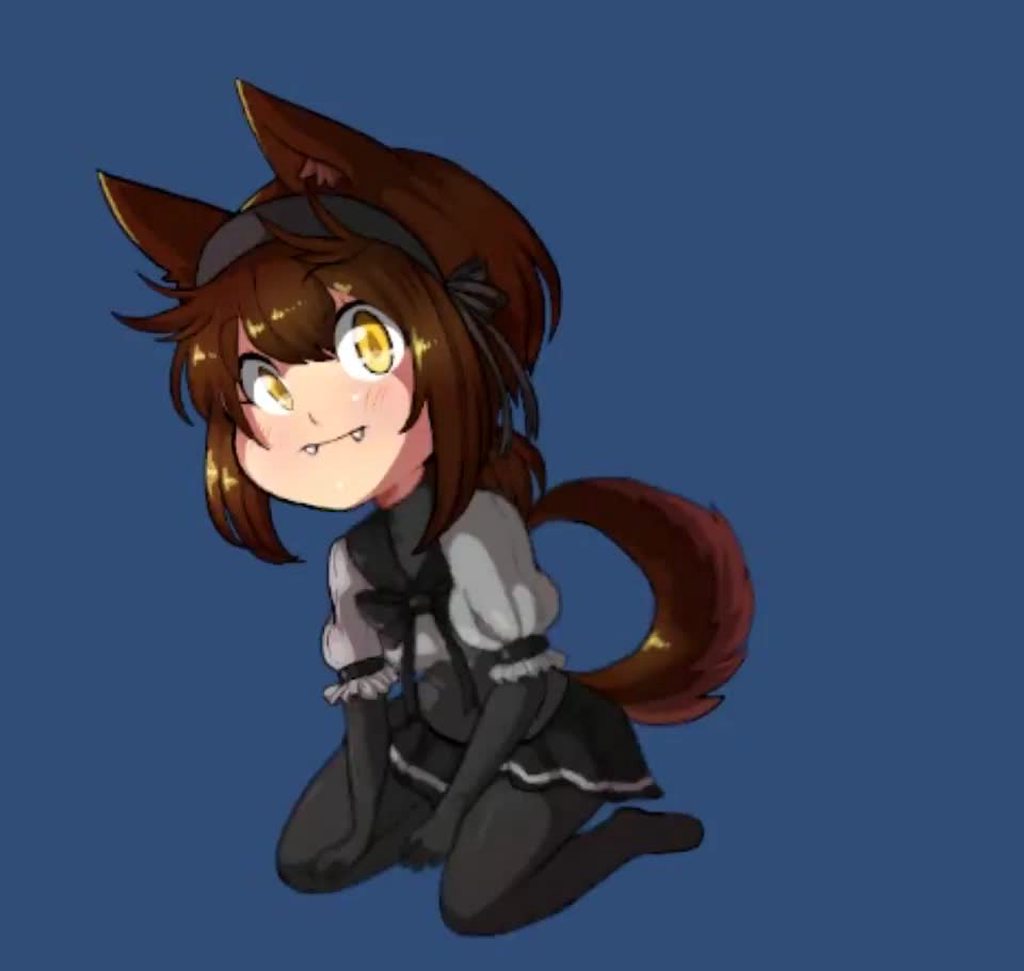 dusky hedge
jeezus, shes breaking her neck there @hybrid tinsel
hybrid tinsel
 twin musk
Hey guys, i have a timeline animation that when it finishes continues to play whatever the animator is playing.
But if i set the timeline to start with play on awake or to start because i tell via code for the playable director to play i get 2 different results
I am a bit lost and dont know what to do to fix this issues, i tried so many things and timeline keeps giving me issues. My unity version is 2018.4.16f1 for reference
hybrid tinsel
@twin musk what are the two results you are getting? And is upgrading not an option?
twin musk
@hybrid tinsel upgrading is not an option. The result that i get is that the facial animation bones (controller by a layer of the animator) explode all over the place after the timeline is done. They are good before the timeline (playing normally by the animator), during the timeline (they are played in a clip during the timeline) and then after (when the timeline is over with no wrap mode) they are all deformed all over the place and the animator seems broken.
This does not happen if the timeline plays with play on awake
hybrid tinsel
Weird.
twin musk
if i keep the timeline with a hold wrap mode then this behaviour is not present but ofc we dont want to be forced to do that
I done a very simple door animations, simply rotating it on an angle to act like its opening, but when I put it onto a timeline it just freaks out, and completely breaks?
The animation works perfectly in the "animation" tab, but the second it enters TimeLine it just vanishes
something is going on and i have been going at it for a while and cant seem to find the source
The door somehow ends up moving randomly for what seems like no reason
twin musk
So I'm hitting an issue and Idk whether this would go in animation or physics. Basically I'm making a ferris wheel, and it's gonna spin. My issue is I need to somehow have the little compartments moving appropriately to gravity as the wheel spins. Idk whether it'd be better to animate it in Blender somehow (maybe with a circle empty...? I got no clue), or use gravity physics in Unity for it. Because it seems like I would need actual physics to animate them in Blender without looking weird, but then how do you loop a physics simulation? guhh
I'm modeling it with an array and symmetry in Blender, but I realized I can't do that for those which need to always be upright.
I may just go with stationary though, because it'd make more sense in an abandoned theme park.
trim hatch
is it possible to edit the animation to look down when aiming down?
changing the object in the hirearchy through script doesn't affect it
trim hatch
guess I have to use IK
so I can only rotate the IK of hands?
how do I rotate the spine?
or is it only the hands that matter?
or can I use this to rotate the spine?
what's the humanbone parameter?
how do I get it?
trim hatch
void OnAnimatorIK()
        {
            if (IsAiming)
            {
                m_Animator.SetFloat("walkR", m_RightMove);

                //set IK
                Quaternion handRotation = Quaternion.LookRotation(lookatobj.position - transform.position);
                m_Animator.SetIKRotationWeight(AvatarIKGoal.RightHand, 1.0f);
                m_Animator.SetIKRotation(AvatarIKGoal.RightHand, handRotation);
            }
            else
            {
                m_Animator.SetIKPositionWeight(AvatarIKGoal.RightHand, 0);
                m_Animator.SetIKRotationWeight(AvatarIKGoal.RightHand, 0);
                m_Animator.SetLookAtWeight(0);
            }
}```so I tried this code but it's only moving the hand
how do I move the entire arm?
can anyone help me?
well I used setposition but now the hands are too far apart
how do I fix this?
trim hatch
if (IsAiming)
            {
                m_Animator.SetFloat("walkR", m_RightMove);

                //set IK
                Quaternion handRotation = Quaternion.LookRotation(lookatobj.position - transform.position);
               // m_Animator.SetIKRotationWeight(AvatarIKGoal.RightHand, 1.0f);
                //m_Animator.SetIKRotation(AvatarIKGoal.RightHand, handRotation);

                //float reach = animator.GetFloat("RightHandReach");
                m_Animator.SetIKPositionWeight(AvatarIKGoal.RightHand, 1);
                Vector3 offsetv = lookatobj.position - new Vector3(armoffset, 0, 0);
                m_Animator.SetIKPosition(AvatarIKGoal.RightHand, offsetv);

                //m_Animator.SetIKRotationWeight(AvatarIKGoal.LeftHand, 1.0f);
                //m_Animator.SetIKRotation(AvatarIKGoal.LeftHand, handRotation);

                //float reach = animator.GetFloat("RightHandReach");
                m_Animator.SetIKPositionWeight(AvatarIKGoal.LeftHand, 1);
                offsetv = lookatobj.position + new Vector3(armoffset, 0, 0);
                m_Animator.SetIKPosition(AvatarIKGoal.LeftHand, offsetv);
}```so I tried using an offset but it isn't working
what should I do instead?
 manic cliff
I only started using Unity a few days ago, and I'm trying to make a simple project. I want my place holder character to move forward and play a walk animation. I understand basic controls but I'm struggling to get the animation to play?
I dragged the animation into the Scene (The model on the left) and it doesn't play at all. It just remains still in what seems to do the first frame of the animation.
I have no clue what I'm doing wrong, could anyone help?
trim hatch
did you add an animator controller too?
manic cliff
Yes
I made a empty animation default to be idle, then I linked my Walk animation to it
trim hatch
post the animation keyframes
manic cliff
I'm not exactly sure how to do that. I made the animation With Mixamo so like it auto rigged and applied the animation to my character for me
I have the animation as a .fbx file
manic cliff
Hm
If I click on my animation asset a preview window comes up in the bottom right and it plays fine?
So the animation seems to me working correct in general, but not in the scene I guess
 charred flicker
Hello, Im trying to use Optimize Game Objects on Rig import window so my characters are more optimized, but it does not remove the transforms just unparent them, on the other object it works fine..., anyone has idea how to fix it? thanks
charred flicker
I think it just also broken my fbx file what?
 lost oasis
Yo guys
Question
How do I make an animation play at a random time on different objects?
hybrid tinsel
@twin musk In unity you can apply an inverse of the parent's rotation to have them remain upright
lost oasis
This channel can be for blender animations aswell correct?
hybrid tinsel
Sure; just don't get annoyed if nobody is able to help.
lost oasis
Yea, its alright, I always seem to manage haha
Is this a relatively easy thing to do or do I need a script?
hybrid tinsel
In unity or in blender?
In unity it is easy but requires a script.
using System.Collections.Generic;
using UnityEngine;

public class randomAnimOffset : MonoBehaviour
{


    // Start is called before the first frame update
    void Start()
    {
        Animator anim = GetComponent<Animator>();


        AnimatorStateInfo state = anim.GetCurrentAnimatorStateInfo(0);//could replace 0 by any other animation layer index
        anim.Play(state.fullPathHash, -1, Random.Range(0f, 1f));
    }

    // Update is called once per frame
    void Update()
    {

    }
}
That's the one I use in my game
It is stupid simplistic, but it should provide a decent start 😄
lost oasis
Thanks man 👍
twin musk
To animate anime hair, should I use the 2D Animation package (sprite rigging) or Anima2D?
I'll just follow this tutorial. https://www.youtube.com/watch?v=Ed8CoET9b6U
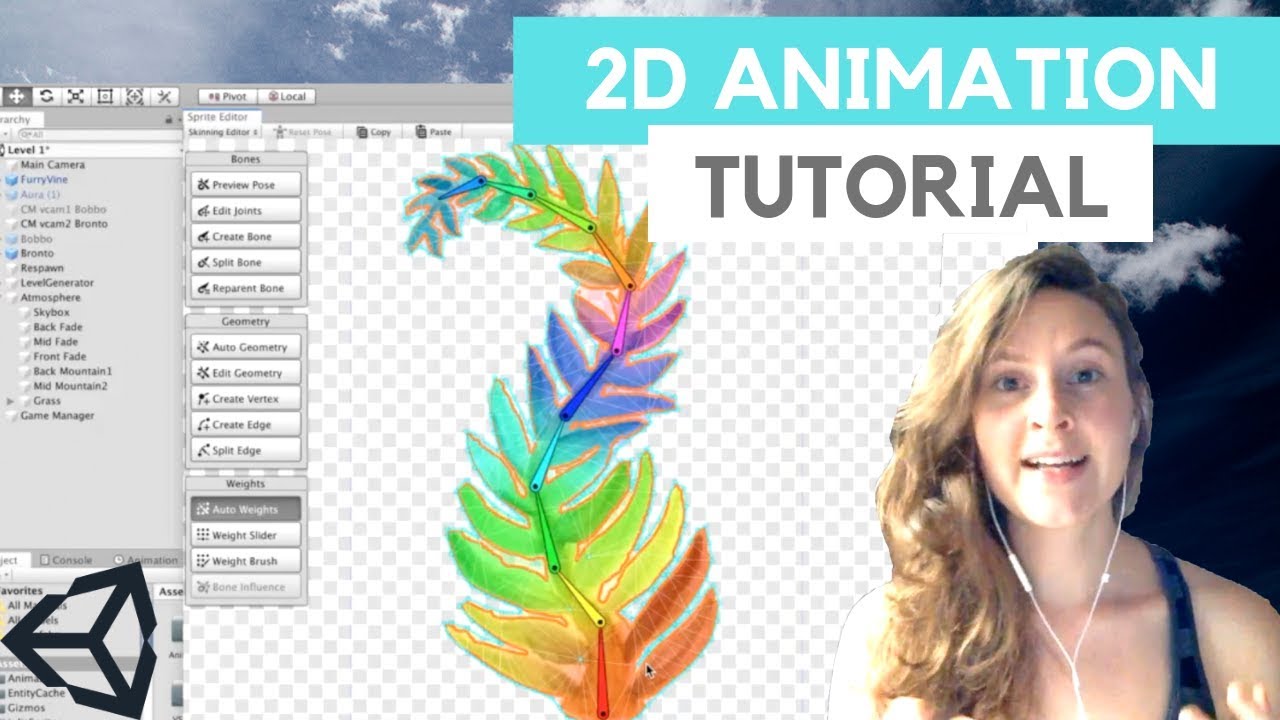
Trying something a little new! Thought I'd make a more in-depth tutorial about the 2D Animation package in Unity that I've been using a lot lately. I go through a simple flat png import with one solver and also a layered PSB file import with potential for multiple solvers.
S...
twin musk
Just skimmed the tutorial. Looks like it only works with Sprite Renderer and sadly not Image (my use case was for images). It's pretty good. I might use this, there's manual work for each "character" or "hair" but I guess I need practice in making it look good.
twin musk
Anyone know any tricks to animate the hair quickly? I will have the hair as a separate layer/image to the head. My approach is to make a shader and just wobble it, so I can use it for all characters.
twin musk
@twin musk In unity you can apply an inverse of the parent's rotation to have them remain upright
@hybrid tinsel huh... I'm having a hard time envisioning how that would work. They'd need to follow the wheel turning but stay upright at the same time. Sounds a bit like a paradox to me but I'm a noob hah
hybrid tinsel
@twin musk Have them be children of the rotating wheel, and have a script that rotates each child the opposite direction as the wheel turns
twin musk
oo
hybrid tinsel
@twin musk 2d animation package is a repackaged version of anima2d after unity bought them out.
hybrid tinsel
@twin musk A shader might be a good idea, depends on what kind of animation. I use bones for hair mostly.
@twin musk you could also cheat and just use a constraint that always sets the rotation to point down, if you don't need any inertia or anything
It can get to be a bit bone heavy.
I might try shader hair next time
twin musk
cooot
hybrid tinsel
If you aren't using any physics you can get away with far fewer bones.
In some cases even, like, one per chunk of hair if you are clever with weights.
twin musk
I might need to just team up with a proper programmer before I try pulling this concept off. I'm such a noob at scripting.
twin musk
@twin musk A shader might be a good idea, depends on what kind of animation. I use bones for hair mostly.
@hybrid tinsel Thanks for this useful info! It's pretty hard for me to make the hair looks nice using bones (I have no animation experience). I assume you had the hair separate layer to the rest of the character?
I might use some kind of wobble shader. I achieved mediocre results so far but I will try more later.
Reasons why I will use a shader over the Anima2D:
- My use case is images not sprites. Easier to use images.
- No manual work, code shader once.
 severe bluff
If I'm looking into making modular clothing (think a game where you can change your gear involving clothes, shoes, hair and stuff) Would I need an animation controller for each different clothing item?
hybrid tinsel
@severe bluff No, lascif, you shouldn't.
@twin musk The hair in that picture was... five layers, I think?
Plus three more for the ribbons and ears
severe bluff
Should I assign my gameobject of the item to the same animator but somehow use that to play a different animation based on the gameobject?
twin musk
I see, I'm really bad with it and when I try the CCD Solver, the animation doesn't look good. Guess I will make a shader.
My plan is:
- Make a shader to wobble the hair, more wobbling "below" the eyebrow, less wobbling above it. Provide a variable to adjust this.
- Make a shader to apply to the whole camera/body (not sure how to do this, need to research more about how camera/shaders work). This shader would do some very "slight" wobbling on the entire anime character body.
For (2), I relied on https://www.youtube.com/watch?v=AKTcF6-R9jQ Jelly FX 2DXFX, but might implement my own if I separate the layers.
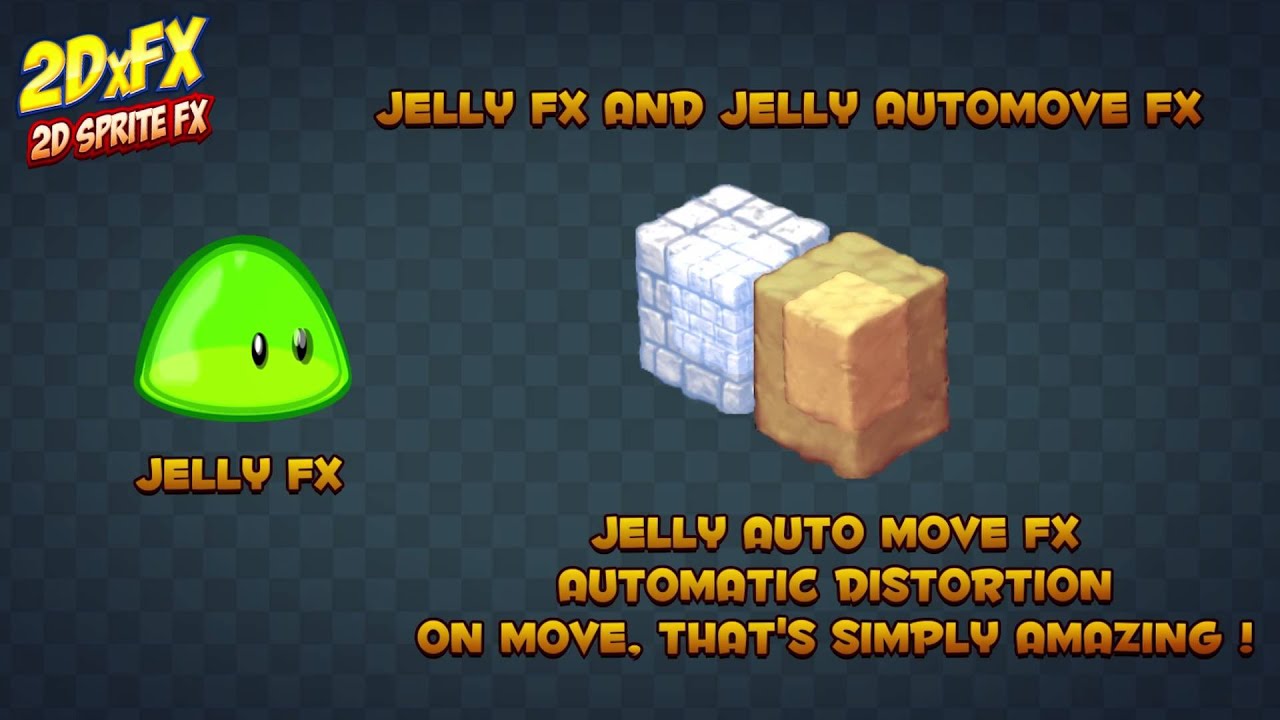
New version 1.5.5 with 2 new filters - Jelly FX and Jelly AutoMove FX
https://www.assetstore.unity3d.com/en/#!/content/42566?aid=1011lNNB
hybrid tinsel
@severe bluff Have you looked at this? https://docs.unity3d.com/Packages/com.unity.2d.animation@2.2/manual/SpriteSwapIntro.html
I don't use IK for hair
severe bluff
The problem is that I don't want to change the whole sprite
I want to keep my base sprite always the same one one gameobject and then have another gameobject directly on top that is a different sprite
so the base sprite is always there never changing
hybrid tinsel
Ok, a big question is whether the modular clothing needs to be rigged(flexible) along with the bones, or if it is rigid pieces that can be attached to specific bones.
If you just need to attach, say, weapons and armor pieces to specific bones, you can just add them as extra sprites on top.
severe bluff
I believe I'm not using bones at all as this is pixel based
hybrid tinsel
Ah. So then yes, you can just add sprites on top; as long as they are in the same hierarchy they will be able to share the animator. If you want them to have their own animations to match the base sprite independently you might need to do more though.
severe bluff
It's a set animation that should play relative to the parent player object
twin musk
how do i change the FPS of an animation?
severe bluff
So I have those animations made and done but it's getting them to be the ones shown just for that gameobject
At the moment by sharing the animator it just defaults to something else
hybrid tinsel
@twin musk Shader hair seems pretty limited, but for just a sway/wobble it should be fine I guess.
I don't think it would be good for something like this, though. https://i.imgur.com/VaTi4Y8.mp4
I used physics for that, which is why I used so many bones. If I was hand animating it, one or two bones per chunk of hair would be plenty.
twin musk
help me please its like the most basic thing
severe bluff
I wonder if I need a script for each clothing gameobject that updates the sprite?
twin musk
@hybrid tinsel that looks really good. I need more practice then! I guess there needs to be lots of hair layers, some hairs on the back, some in front. I can't draw so I hire freelance artists.
Yeah shader hair will be limited. If it's too hard I might skip the hair animation but I'll still give it a try to see what it will look like
ok then ill h ave to figure that one out somehow
hybrid tinsel
@twin musk Top right corner of the animation window, there's a menu
It's in there.
You want 'sampling rate'
@severe bluff I suppose it depends on how you're handling the clothing in general, but you'll probably need some sort of script to manage things if it is at all complex 😄
twin musk
yup i found it
severe bluff
I've figured out about layers regarding the animation component but I can't seem to get it to show up the animation
severe bluff
So I've figured out layers however it completely hides the other layer when I want it to continue to show the other layer. What am I doing wrong here?
 young seal
is your animation doing anything to the opacity or something? @severe bluff
that should work
hybrid tinsel
@severe bluff layers need to be additive. Also, if the animation changes the sprite, there is no way to blend that- it just changes the sprite
severe bluff
So to close this I was unable to do it this way however I have done it via scripts. If anybody is searching this discord and has the same problem then feel free to pm me and I'll explain in detail how I fixed it.
It involves animation events on the character walking animation which then changes the sprite of a gameobject on top of the player and that works!
twin musk
@hybrid tinsel ¿What program do you use to make animations?
 split citrus
im trying to add animations for when my 3d character is walking and i wanted to try using Animation Rigging to do it but i cant get to the package manager in the project settings window
is there a way to fix this or is there a better way to do the animations
 potent imp
@twin musk did u get support how to trigger those
for 2dfx plugin?
does anyone have a good tutorial how to make sub states and etc
and animation layers
then linking and etc
2D animation system in unity
i got all rigs for my characters imported from spine/spriter
now i got this huge list of animations



so was looking for a proper guide
twin musk
for 2dfx plugin?
@potent imp You can trigger them via scripting, the docs are meh. I also wasn't able to get 2dxfx working with multiple images at once (i.e. canvas group).
potent imp
yeah nothing written on the guide about how to trigger via code
can u give me examples
i have that plugin
but due to not been able to use the effects via code
never really used it
i only see the fade option
what else is there?
the docs are crap on their website for writing code
twin musk
 public _2dxFX_Smoke FX_Smoke;

    protected override void UpdateEffect(EffectParams ep, float frac) {
        FX_Smoke._Value2 = 1 - frac;
        base.UpdateEffect(ep, frac);
    }
Their code in the docs are outdated and often wrong
have u tried emailing support?
it's a decent 4/5 plugin but they haven't responded to my feature requests
They made a new plugin though, not sure if that's any better.
 sick hollow
I created an animation in blender that I rendered to a bunch of pngs, I want to make an animation out of them in unity easily.... anyone know how?
I thought I could just drag the images into the animation tab like it was a key frame but I guess not
twin musk
what you mean, you can create a spritesheet
then create an animation from that spritesheet
how many frames is it, might be a large file-size ._.
hybrid tinsel
@twin musk Yes. I cut the layers out in photoshop
twin musk
@hybrid tinsel I want to talk with you in private
potent imp
i wonder how they achieved this camera and style
Back Savior on Kickstarter here: https://www.kickstarter.com/projects/starsoft/savior-4
This is the Kickstarter campaign trailer for our action adventure game, Savior. Explore the lost world of Arcadia in a quest to rebuild a desperately divided civilization.
Wishlist Savior o...
looks really amazing
 gentle wind
Hey guys- how might I make my locomotion driven movement
less "realistic"? It feels too realistic, and the gameplay suffers with what seem like delayed reactions
I was thinking of doing an override so I have my snappy movement layered to the legs (so I can time (blend) transitions with sudden player movement) and using the IK as upper body only
hybrid tinsel
@gentle wind probably you don't wanna use animations to drive the movement
potent imp
is there any other way of doing animations
instead of setting darn thing in animator tab?
i mean my character is done with his animations
can i avoid animator tab xD
twin musk
@hybrid tinsel how many frames is the anime girl animation you posted? My avatar is 300KB each (one frame), so I can calculate if it's worth getting someone to animate them in an external software (if I only have 20 avatars, 30 frames each, 300kb per frame, then 20 * 30 * 0.3 = 180MB, which is, quite big)
It would be easier for the artist to animate their artwork in After Effects and export it into a spritesheet/PNG frames to me.
twin musk
I'll take a look :). I need a way for an animator (no coding experience) to be able to make animations for me. The closest thing I found was an asset that exports After Effects animations to Unity.
also the 2d Animation thing in Unity (based on Anima2D) bones, is there a workaround to have it placed in the UI Canvas (Image), since it seems it only works with sprites.