#📲┃ui-ux
1 messages · Page 46 of 1
 sharp oracle
 wise brook
Does anyone know how to put a background (preferably a 9-slice sprite, but could also be a solid color) behind some inline text in Unity? This is the effect I eventually want:
I can do pretty much everything except the inline background in TextMeshPro, it looks like - bold, margins, etc. However, the only thing I saw that was similar to background color was the mark tag, which is more of a highlight that goes over the text (and doesn't seem to have any padding of its own)
 rapid ferry
Can anyone tell me how to make it so that my UI Canvas doesn't Z-test over literally everything else in the map?
They are world-space UI canvases and they were fine before in Unity 2017. Since updating to Unity 2018 tho they overlay literally everything else in the map including themselves. Help? How do I fix this so they render like normal objects would? Image for comparison.
rapid ferry
Huh, okay it only shows this way in the editor it seems
rapid ferry
Ah I see
 craggy jungle
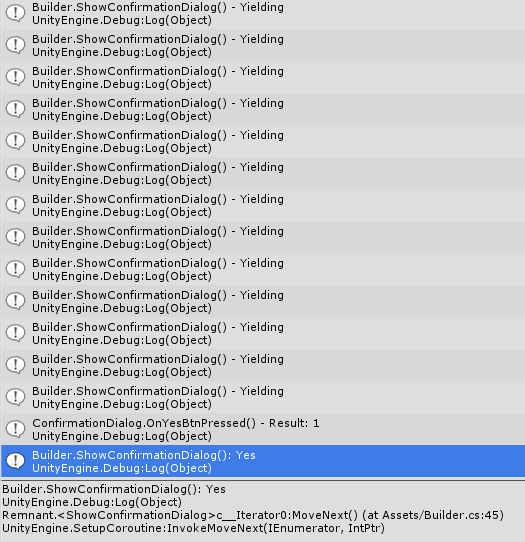
Whats the best way to do a confirmation window for selling an item?
Unity Forum
So, I allow the player to place buildings in my game. Once they have clicked and decided on a spot for the building, I would like to confirm that they...
trying to follow this thread right now with the IEnumerator function
but I'm not sure if this is the best/how to actually use the result from the enumerator
 languid depot
Hi anyone know, if you are making several components of UI (canvas) How do you effectively import each components?
My issue - Im making a button with few small components, so I basically create UI > Image, and change the canvas. Apparently everything doesn't follow it's position and scale. Is there anything I can do to properly adjust this?
 woeful remnant
 stoic grotto
Has anyone here worked with setting up pixel perfect UI for a mobile game? I have a 2D pixel art project that needs to run in both portrait & landscape and has UI elements that follow game objects (i.e. speech bubbles). I haven't been able to find a solution thus far; world space canvases don't support pixel snapping, while screen space canvases don't match the game objects' pixels-per-unit ratio.
 olive tapir
Hi guys, is it possible.... I want to tell a 3d object to fly towards a position on screenspace where a ui element is. What kind of approach would you take. The objects are on their own layers and have their own collider so no connection to the environment
Like a 3d object fly's into the inventory ui
 opaque zealot
hi, I'm making an inventory system, something similar to an rpg. The player has its inventory panel, and you can loot enemies and chests, which also have their own inventory panel. I used some tutorial to start with it and make the player's inventory
There are 6 parts. In order to select an item in the inventory and move it, every slot in the panel has a "OnMouseDown" event, which does logic to move, change the selected item
Nothing new here  It puts the selected item into another slot which follows the mouse, classic
Now I need to do the inventory panel for enemies when you loot them. But the way I implemented how you select items is making me wonder how I will do it. Can someone help me with it ?
``
Basically, when I'm clicking on a slot, if there is an item in this slot, it will move it into a "selected item" slot. It doesn't affect the actual inventory, the list of items.
When looting an enemy, their inventory will be displayed, and you can select an item and put it into your inventory's slots.
The problem is that when you click the enemies slots, it puts the selected item in the "selected item" slot. And when you move this item into your own inventory by clicking on one of your slots, it doesn't move the actual item into your actual inventory, because it doesn't affect the inventory itself.
How should I handle this ? I was thinking about making something like this :
Adding a variable called "Action" which contains what action to do when clicking your own slots.
When clicking your own slots, action will just be "move the item".
When clicking an enemy slot, Action will be set to "Add the selected item to inventory".
I've never been so unclear in my life
opaque zealot
Welp, guess I'll do weird things and hope it works
 gritty seal
how can I make the square be at the center of the hole?
what calculations do I do?
gritty seal
I know the center of the circle in pixels (279 from the top, 169 from the bottom), but not the RectTransform position of that point.
 onyx prairie
why can't you move it manually or use top anchor and put 279 in the Pos Y?
onyx prairie
Is it possible to have a ScrollRect that increases it's size according to a text component that is in the viewport up to a certain max height value? If this max value is reached it would use the viewport with a scrollbar
 lyric thunder
For some reason the UI Mask isn't working for me
I have a gameobject with an image component
And it has Maskable checked
And I have another gameobject with the mask component
But it has no effect on jt
I've tried spitting it above and below ok the hierarchy
No effect
???
 jagged monolith
Have you tried moving the mask object further down the hierarchy @lyric thunder?
Unity UI is layered top down
jagged monolith
Your mask looks completely transparent in the preview?
lyric thunder
IDK why I'm using the UIMask texture that comes withunity
I've used it before no problem
tried chaning it to something else
didn't work
gritty seal
why can't you move it manually or use top anchor and put 279 in the Pos Y?
@onyx prairie Because RectTransform is not in pixels. And moving manually won't make it be at the exact center.
Is it possible to have a ScrollRect that increases it's side according to a text component that is in the viewport up to a certain max height value? If this max value is reached it would use the viewport with a scrollbar
@onyx prairie Probably a combination of content size fitter/similar UI component, and a script that keeps it at the maximum.
onyx prairie
@gritty seal I expected I had to use scripts for that, but wondered if it was possible without lol
@gritty seal what if you put your sprite with preserve aspect
The pixel should match in this setup, I believe
gritty seal
it already it in preserve aspect.
But I can't figure out a way of converting pixel positioning to RectTransform.
the sprite is 448 pixels tall, but in the UI the RectTransform is 200 units tall.
jagged monolith
Try making the graphic a child of the mask @lyric thunder
gritty seal
it is, but the UI object is 100x100
the sprite is 338x448
and also there's the issue of the square's pivot point affecting its position value
lyric thunder
I got it figured out
jagged monolith
How @lyric thunder?
 paper jolt
What are the best styles for buttons?
And also, does somebody have a strong experience with Adobe XD? Or, are at least have a lot of knowledge about layers?
I need help with layers
 lament wyvern
how do you guys handle memory usage of dynamic font assets? The dynamic font assets references the source font files and so Unity would load them into memory. The source font files for languages such as Japanese, Chinese and Korean consumes a lot of memory just to handle the edge case that the player's names may contain such characters.
 echo vapor
anyone know any resource that can help me fixing this (aliasing)? The image is 500x500 so it shouldn't be like that
 frosty pewter
don't use point filtering
echo vapor
i don't know what to use/try, I tried every combination possible of that options the result aren't different
well, i will ignore that since I'll have to mess with shader and particles and that will certainly obfuscate that one
rapid ferry
Hello guys, Can anybody here help me understand the role of a UX/UI Designer in game development? TIA 🙂
 eager cave
@rapid ferry that's the kind of thing you should be searching full-sized guides for, discord isn't suited for that kind of in-depth writing
Anyway, I have a bug: Whenever I try to create a new UIElements editor window, I get the error
ArgumentException: An item with the same key has already been added. Key: UnityEditor.U2D.Layout.ScrollableToolbar_isHorizontal_TypeSystem.Collections.Generic.Dictionary`2[TKey,TValue].TryInsert (TKey key, TValue value, System.Collections.Generic.InsertionBehavior behavior))
rapid ferry
@eager cave What's a full sized guide? and is there a rule where it says discord issn't suited for such questions? 😑
 gilded moat
what is the simp thing est way to render text to a cube.
say i want to make a sign or something.
eager cave
@rapid ferry it's a very complex, detailed question with a lot of nuance. This discord is more suited for quick answers to specific problems. Speaking of which:
@gilded moat if it's 2d, make a new canvas as a child of the cube and make it into a worldspace canvas. In 3d, you'd need to look into render to texture
 unique flame
Hey all, quick UI Toolkits (UI Elements) runtime question
Can I load XAML and USS at runtime from a file? not a unity asset
 velvet smelt
 mighty ingot
how do I change the default shader globally?
rapid ferry
how would I go about doing a starcraft-like healthbar
eager cave
Whenever I create a worldspace canvas and scale it, any attached Text components don't scale at all, staying at their previous giant size. I've worked around it by changing font size to 0.2, but I don't want to have to keep adjusting size for every single text component
eager cave
If I scale the text component itself, the actual text doesn't change size
paper jolt
@paper jolt
 azure jay
ok so I put a uneven image for my slider and it wont will in the background properly with out stretching it
 tawny pike
iv done a pause menu for my game but when I play it has the pause menu already loaded how do I fix this ?
tawny pike
my main menu doesn't render when playing in a build version of my game, its just the UI
how can I stop this from happening ?
 north swallow
Do you have some special material on the background?
Looks like your shaders are not supported
tawny pike
@north swallow I have a PNG as the background
it the boxes too
and its the same with the pause menu, and I don't have any special materials for that
rapid ferry
i need some suggestions on improvement. in my game, the player controls a physics-based sphere, and they roll around the levels to defeat goomba-ish enemies, some of which can only be defeated by hitting them when going fast. i have a speedometer-ish thing that keeps track of the player's current horizontal velocity at the bottom of the screen; and i plan to use it somehow to show how fast the player needs to be going to defeat certain enemies. at the top, i have a health bar that goes down if the player gets hurt, and the lives counter goes down when the health hits 0- at which point the health gets filled back up to full; so it indicated basically how much of this specific life is left. currently it all looks really distracting though, as the speedometer tends to flicker and pulse alot as the velocity changes alot.
im intentionally going for a VCR / "hi-8 camcorder menu" look
 marble cliff
@rapid ferry maybe take an average velocity of the past 0.1 or 0.2s and change it in the UI only after that much time. Alternatively, don't display a text velocity, put a wind type white particle or sprite effect around the player when they are going fast enough...add sparks coming off when going really fast...and maybe affect the player's color. If you plan to let players pick their own sphere color/skin, you could still make a special overlay to change the appearance/color for different speeds.
Suggestion for camcordery effect, maybe pause the game for 0.8s second on death, overlay camcorder rewind static over the screen during that second to make it obvious when you die. Or do this when picking up special items.
I'ts a little hard to differentiate the foreground from the background, maybe your background needs darkened, faded, or to be out of focus, like the camcorder is focussed more on the foreground.
The red bar behind lives seems a bit much, maybe change it to a small battery charge bar indicator like on old camcorders and have it beside the word LIVES, where each bar is a life?
rapid ferry
good feedback man- thanks. those are all really good suggestions @marble cliff ; i'll keep em' all in mind. 😄
 real galleon
Can a canvas with Rendering mode of World Camera be scaled according to the resolution ?
 jaunty quail
Hey guys, do you recommend any UI design books, courses, or is anyone doing mentorships?
 neon wind
Why is the UI rendered only on the left eye on VR when using single pass instancing on HDRP?
rapid ferry
Hey guys, I'm having an issue with the Content Size Fitter. I made a panel that should change width and height depending on its child object that contains text. However, the box changes Y position as it grows and make it go up and out of the screen.
How would I keep it locked to the Y position? Hope this picture helps understanding the issue.
jaunty quail
Did you check the boxes Transform anchoring? If it's not anchored to the top left/right/mid it will change Y value as it changes size.
rapid ferry
They're both anchored to the top left
tawny pike
my main menu doesn't render when playing in a build version of my game, its just the UI. how can I stop this from happening ?
neon wind
@rapid ferry Does the parent have a LayoutGroup component?
rapid ferry
It does
neon wind
Which child allignment?
Having a LayoutGroup in the parent and a ContentSizeFitter in the child often leads to wrong layout updates. However, this is the only way to make a dynamic panel afaik. What I often do is to enable the Layout component one by one from the lowest level to the highest with a yield return null in between them. Not beautifull, but it works
rapid ferry
Let me give it a go, thanks
 spring fulcrum
Hey hi, I'm really struggling with simply UI design in Unity. I'm curently working on an app version of a print and play solo mode for a boardgame, here's my current main screen, my current object tree, and what I actually want (scalable with resolution):
https://ibb.co/kcyNMYH
https://ibb.co/WV0xsSH
https://ibb.co/1KryXdx


ImgBB
Image unity-UILayout-Is-Haaard-objects-Tree hosted in ImgBB

 frozen leaf
hey guys,
is there any "best practice" you professionals could share with me when it comes to UI panel design?
I am rather new to it all and are working on my ingame UI. I create a panel on the bottom for example using a gameobject with an image component. Now I would like to add a border to it, as well as make rounded corners.
Should I do all this in gimp/illustrator first then import that, or use the Outline component in Unity? I also saw I can use sprite masks etc. I get there are a ton of ways to do it, but whats you experts classic approach to UI "panels" that need to be styled, and might contain more panels/images within them? thanks! :)
and I guess "outline" component is not ideal in my case, as it adds color on the whole panel if I have any transparency on the panel image color? 🤔
should I add a second image under it but a bit bigger to create the border only and transparent in centre?
or should I make it a fixed size in gimp then import and just use it as a sprite? This way I thought it might get messy if the UI scales down and such?
spring fulcrum
When you create a panel in unity, an image component is automùatically added with a default "sliced" image.
frozen leaf
yepp that much I know :)
but what about border and rounded corners?
also should I even consider material for these panels and tweak things via that too?
spring fulcrum
What about using an image format with transparency?
frozen leaf
ok I am probably missing something here now. Unity allows me to add a border already somehow via color/image settings?
I see if I change image type to sliced it has "this image doesnt have a border", is that what I can config in the sprite editor?
I kinda assumed that was a different kind of border
like for tiling or such
just found a tutorial vid on 9-slicing, I guess thats what I need to look into right?
neon wind
The message refers to the borders in the sprite editor for stretching or tiling the image in the middle when using sliced/tiled ui images. I often create a square texture in GIMP where the corners are fix/"special" (eg rounded) and the image in between can be stretched.
Yes 9-slicing is the keyword for that
frozen leaf
thanks @neon wind !
 floral hatch
How would I go about making sure that while the blue part stays the same size, green can fill the rest of the layout group but can't get smaller than the red line?
setting minimum width for green and preferred width for blue did not seem to work, and setting preferred width for green simply makes it take up space from blue
Figured it out, Horizontal Layout Group's Child Force Expand overrides Layout Element settings
spring fulcrum
I have a similar issue 😛
floral hatch
I'm gonna write a guide on github pages on how these things work
because it complicated
frozen leaf
So I made a 1000x1000 px rectangle with rounded corners to test with.
In unity whenever I resize the panel using the sprite the 4 rounded corners get weird unless its close to 1:1 aspect ratio.
So I tried slicing it into 9 grids, set borders etc by checking out some tutorials and playing with the sprite editor. I figured I wanted the sprite to be "multiple", but then the image Im using only reads 1 sprite at the time?
anyone have any hint how I can get the corners to remain static size wise but resize the center fill for my sprite?
should I set each grid pivot, and somehow use sprite atlas?
do I really have to use a layoutgroup and 9 seperate sprite images?
 rocky grail
can you share a screenshot of what's happening?
floral hatch
Started writing a guide on Layout Groups, Layout Elements and their settings
frozen leaf
@rocky grail yes ofc, sorry here you go
I tried a lot of different things now but not sure how to get a rounded rectangle with sprites, that can be resized
I made a "multiple" type of sprite and split it into grids and all
rocky grail
for starters, it says it's not a power of two
frozen leaf
but how do I use it? an object with image can only use 1 sprite
rocky grail
plus, you don't have to split it up into multiple sprites
I'll send you a screen of how it should bedone
frozen leaf
thank you!
also gg Unity with gridlayout, cant set 3 columns for ex and then use auto size (depending on parent object) 😅
have to use a fixed size for each cell 🤦♂️
rocky grail
consider this, a 64x64 sprite set to single mode
frozen leaf
aye
rocky grail
Click on the sprite editor, and edit the borders so it looks like this
frozen leaf
aye
rocky grail
what's important is that you have to keep the corners at least one pixel away from the first pixel from which the corner starts
in other words, keep the lines away from the corners
rocky grail
once you've done this, set the button to sliced, like this
frozen leaf
so on the image type I set to.. ?
right
done, looks really bad, parent need some component/setting too?
rocky grail
post a screen
frozen leaf
rocky grail
maybe you need to change the pixel ratio on the canvas
rocky grail
ok wait a sec
frozen leaf
oh yeah
changing from 1 to 10 made it look ALOT better
ah that works great
at least now I know how to tweak it
so I did kind of the right way at start, but never changed the pixel ratio :(
thank you! :)
rocky grail
btw, do not put components right into the object that holds the canvas component
frozen leaf
yeah np, I have a main canvas at root for all UI things. Its just a bit messy now when I been testing
do you guys use multiple canvas for the ingame scene UI?
I am using 1 now to scale with screen size and 16:9 ratio
then for each panel an empty object with an image
and I figured inside that panel I add more UI elements
This OK pracctice right?
rocky grail
if you plan on using post-processing effects, or if in general you plan on keeping the UI untouched by anything that happens in game, two cameras are alright
so that like, you can do things like vignetting without affecting the UI
frozen leaf
yeah thats what I started with, a main camera for the game then a UI camera
thanks for the guidance!
 storm stream
I have a pause menu with the buttons "Resume, Options, Credits, Pause" which I'm designing to work with controller. But for some reason when I've selected options and I move up to Resume, the options button still appears highlighted and appears to be pressed when I press the resume button.
@rapid ferry are you using UnityEngine.UI?
storm stream
can you send your code?
storm stream
huh
storm stream
oh yeah probably
storm stream
maybe use public TextMesh scoreText? not too familiar with tmp
storm stream
ok?
storm stream
sorry my unity is stuck importing so i cant test it yet
storm stream
ye
rapid ferry
Ok so
I tested it
And sadly it dosen't work with textmesh pro
the textmesh is something else
storm stream
oh ok
rocky grail
maybe UI and UIElements are conflicting with each other
keep only UnityEngine.UI, take UIElements away
see if the problem still appears
spring fulcrum
Anyone knows of any documentations or tutorials explaining how to design and implement a UI how you want it to behave?
rapid ferry
i took them away
 heady hatch
tmp has its own thing
its using TMP;
i think
or no
either that or using UnityEngine.TMP;
hold on im checking
text mesh pro isnt part of the unity engine ui its its own thing @rapid ferry
oh its using TMPro;
public TextMeshProUGUI textVarNameHere; for the variable
at least i think thats what text is
rapid ferry
Thanks Dude
rapid ferry
Also can you help me with another thing?
 olive scroll
i think its kinda hard to see but i like what ur going for
i need help on starting the ui i tried to look up some ui tutorials from brackeys but it was outdated i think i couldnt do it for some reason
anyone got an idea how to start one?
lyric thunder
Yeah I was thinking about remoing the glow around the text to make it look sharper
I can help ith that
Just a nomal UI ight?
olive scroll
o okie and then?
lyric thunder
what do you want on you UI?
buttons? text
For anything you want you need to do Create > UI > "whatever you want"
And then child it to the UI
and use the transform tool to make it within the bounds of the UI Canvas
olive scroll
uhh just a simple start button for now
im jsut getting started like i dont understand anything at all lol
olive scroll
ok
olive scroll
w?
lyric thunder
To change the text
olive scroll
ohh
lyric thunder
go into the button gameObject's childern
olive scroll
k
lyric thunder
and there's a text component gameobject
olive scroll
so i add a child text?
or can i change it somewhere in teh right side
oh wiat its all good thx so much :)
lyric thunder
No problem I'm pretty good at UI so DM me if you need anymore help
Im quicker to respond to DMs
frozen leaf
if I am using icons in .png format with a simple color, and I want to be able to change the color in Unity with good results - whats the best color to use on the icon before import? white?
thinking about it now Im not even sure why I ask, makes sense eh 😅
I guess I was thinking maybe there is some import settings that can control that, I dont know what a lot of the import settings are for when importing images for sprites :)
spring fulcrum
I can't make my UI work as I want, any tips to get the following (2 big panels, displaying cards, and four buttons under the right one): https://ibb.co/1KryXdx
spring fulcrum
The Unity UI components really make no sense for I, in the example above:
1 I have a panel, child of the canvas, that takes all the room (stretched) and it has an horizontal group layout
2 Under it I have left and right child, so I was under the impression that thanks to the horizontal layout in the parent, both will take half the room of the panel, which it doesn't.
3 Also, I align the left child on the right, so that it's just on the left side of the middle of the panel, but it just go all the way to the right, that makes no sense.
I'm really struggling with all this and this is just some simple layout. Any complete guide on how to do it correctly, and please don't tell me to search more, I'm not a monkey typing randomly to get the complete work of H P Lovecraft, thanks. 😦
 median iris
@spring fulcrum hey, idk if you solved your problem, but I recommend checking out Jason Weimanns YouTube Channel, he has at least one tutorial about using Layout Groups and stuff
https://m.youtube.com/watch?v=8uLSGlNQHo0
This shows you how to use layout groups and content size fitters, once you understood them you can easily adapt to your situation

Join my Game Architecture Course Today and get free bonuses! - https://bit.ly/2WIyE4v
Master the HorizontalLayoutGroup and ContentSizeFitter components by building an expandable window with a custom header and footer.
We'll make a UI window that works across differe...
spring fulcrum
I think I've seen this one I'll check it again. I advanced a bit on my own but it's quite of despairing to do things randomly until it works. 😛 Thx for the link.
 hallow sun
Hey, I am trying to spawn an image at one image on my UI and then move it to another image on my UI. I am having difficulties trying to do this as there is anchoredPosition, etc. Can anything please refer me to a good tutorial/explanation or help me? Thank you!
rapid ferry
How I can do using a script to enable or disable parts of the game? I am trying to make a Game Tutorial using blackthornprod script he used in the video. But my game has buttons that you need to press and the problem is the player can press on different buttons making the game tutorial useless. Anyone can help?
 alpine cave
i think buttons has "Disable" property, you can set it to true or false
 limber quail
i'm new to programing, i need help creating a level select system. Can someone please help me
 woeful sandal
any mobile game ui designers have time for a short voice chat?
tawny pike
got a problem with my ui when I build my game, anyone seen this bug before?
 karmic laurel
 broken gyro
Try debugging.
tawny pike
@karmic laurel I'm using a image of the BG
@broken gyro this is in the build so I can't debug
rapid ferry
any idea of how i can improve this?
cuz now is kinda empty
sould i make the buttons bigger?
this is better?
but now?
rapid ferry
final result
 real orchid
Scripting a dialogue box. works off of dialogue data that can be passed by a dictionary key (string name of the dialogue sequence) and has features like skipping line, skipping dialogue, color changing border + source name based on dialogue data / debug functions.
Also have a little SwayData on it that a SwaySystem processes. I'm loving data oriented programming :D!
PS: you might also notice the little skip, next, and close text icons on the bottom uwu
Tell me what ya think uwu
 rugged comet
I'm getting a weird blurry background when using TextMeshPro, anyone know what could be causing it?
rapid ferry
heya, does anyone know about UI>canvas>image? im using a material as an image but it doesnt show up in game veiw, only scene veiw
spring fulcrum
@rapid ferry Doesn't it have anything to do with a change of render pipeline? There must be a menu item somewhere allowing you to update each texture. Also try changing the image you use from texture to UI maybe?
@real orchid Watch out to not make the texts too unreadable, it can be a strain on the player if you animate the text too much.
rapid ferry
i am using HDRP. the material is using a HDRP shader @spring fulcrum thanks for the suggestion though. any other ideas?
rapid ferry
Someone knows why if I have 2 scenes and I play the first scene then in game with a play button I am going to the second scene and there my wait function and the start fade won't work but in the first scene the fade plays
spring fulcrum
@rapid ferry What do you mean by "it shows in scene view but not game view", do you see the camera colour in the game view and the image in the scene?
real orchid
@spring fulcrum would you say it moves too much? I tried to make it minimal just to make the box feel more alive.
I can tweak everything about the sway and i thought maybe just a bit slower still would be better?
spring fulcrum
I just meant that you had to watch out to not overdo it, test it with several people and check their feedback. 🙂
If it's just a sented or two here and there it should be fine but if it's like an rpg it may get tiring after a while.
 void solstice
@rapid ferry make a parallaxing background
I do t k ow what kind game it is, but like, if its a space game, just have like a planet in the corner with moving stars in the background or something
rapid ferry
@spring fulcrum thank for the reply. It turns out the issue was the if you put a material on a ui image it doesnt render it in the screen space but instead in world space. Documentation doesnt say anything about that but thats what happened. I fixed it by changing the materials tex to a sprite and used sprite insteaf of material. Cheers
spring fulcrum
Yes! Cool! 🙂
Is there a way to make a UI background image that:
1 Will take all the room of the display whatever the ratio/resolution
and 2 keep the same ratio
Like be centered and take the maximum room without letting the camera colour appear, but still keep the image aspect ration.
Making it "tiled" covers everything but I wonder if I can make it so that it zooms the image (losing the image left and right parts) instead.
spring fulcrum
Also, I have several panels on the right of my screen, I need the right one to be made of a top panel that takes most room and two smaller ones. What's the best way to do it, keeping control of the proportions?
Oh, I may have found something for the fitting background image: there's a component called "aspect ratio fitter" that seems to do the trick. Apart from the fact that I get small banners on top and bottom once I've resized the screen enough in free aspect:
https://ibb.co/WxR7nZT
Any idea why it does that? Seems perfect otherwise.

Oh ok: putting a 16/9 ratio in the Aspect Ratio property does the trick. 😛
 gray birch
Hello guys, can you help? i want to create button to reload scene, but it must emerge when i m lost or dead... how can i do it?
spring fulcrum
"Emerge"? You mean appear?
I guess you have to connect to the lost/dead event somehow
Or maybe just display the button through your handling code
Like a game manager that keeps a link to said button and when ingame you become lost/dead, the manager just sets the button as visible.
rapid ferry
Is it me or the Canvas Scaler suffers a case of "Bad defaults"? I rarely use something other than Scale with Screen Size -> Expand
jagged monolith
And then the reference resolution defaults to 800x600... yeah agreed
hallow sun
Anyone gotten this issue with TMPro before? Ive searched it up and gotten no real fix. All that I could find was "update to the latest version of TMPro" but I have that and have reinstalled it, etc. It makes it so that sometimes it doesnt show the text at all.
spring fulcrum
@hallow sun Maybe try uninstalling the package then reinstall?
hallow sun
I have done that
 stable zenith
I need some help. I have 6 buttons where each should change the variable fileNumber to a new integer value (1-6 respectively). It is first assigned 0 in Start();. The functions are assigned on the buttons using OnClick. These are the functions each are calling respectively. However, when clicking them the functions do not change the value, and fileNumber remains 0. Any help would be appreciated.
jagged monolith
Have you verified that the functions get called @stable zenith?
stable zenith
@jagged monolith I've added a Debug.Log to the functions and they are being called
@jagged monolith But having fileNumber being Debug Logged in Update() shows it is always 0. The same for the inspector. Not sure if both of those are lying though, because Player Pref reports the variable being changed.
jagged monolith
Try printing fileNumber in the click functions
Most likely you are overwriting it somewhere else, like in the update function
Also make sure you're referring to the correct variable, so you're not working with a local variant
stable zenith
@jagged monolith There is nothing in Update().
I found that the fileNumber will only change when I close the editor (stop "Play"). I have no idea what to do. I even tried creating another integer and attempted to change it during gameplay with the buttons, but it only updates the value once I stop Playing
I need buttons that can change a simple integer while playing the game
jagged monolith
That doesn't sound right at all... Is this running in a MonoBehaviour?
stable zenith
Yeah, it is MonoBehavior
jagged monolith
Could you share your script on hatebin?
 rare quail
Hey guys, I made a few menu templates that you can use it your Unity projects
I'd be happy to have some feedbacks 🙂 https://github.com/TheTeasel/UnityDOTween_Menus
GitHub
This is a set of menus for Unity using DOTween for animations - TheTeasel/UnityDOTween_Menus
 primal hazel
is it a bad idea to use uielements for my runtime ui?
or is it somewhat ready for runtime now?
its hard to find examples and tutorials for using it in runtime apart from the one Unite Copenhagen demo
spring fulcrum
Apparently you can already, it's just not final.
I desperatly more thorough UI tutorials myself. 😛
Can't make it work like I want it too, it seems uselessly complicated UI in Unity.
 visual axle
I have a rather basic question, but I'm confused about how to deal with function calls with dropdown menus. The Dropdown in the Inspector has an OnValueChanged, but how is the given option sent to my function? I thought it was through an int32, so I made my function take an int as an argument, but now it is asking me to choose a manual value in the inspector for what value that int should be given.
So, if I have 3 options, how can I send to the code which one has actually been chosen?
spring fulcrum
OnValueChanged is an Event. It's a pointer to a function (or list of functions) that will get called when the value of your dropdown changes.
so TheDropdown.OnValueChanged + = (or just = for one method) TheMethodToCall(argumentsForOnValueChanged)
"TheMethodToCall" is the method that YOU have to write to handle when the value of the dropdown changes.
That is, if I understood what you said. 😛
spring fulcrum
That OnValueChanged is a Unity Handler then? I didn't know that.
visual axle
The field with the 0 in it. I have 3 options on my dropdown, and the function being called has this header:
public void SwitchGame(int gameType)
What does the documentation says about this?
Well, all this means is that when the value changes SwitchGame will be called with 1 as its parameter.
(sorry, 0, not 1)
visual axle
So, I guess I'm not sure why that field is appearing in the inspector. (It does not in any of the corresponding videos I've found; the selection # is simply passed into the int in their called function.) The field being there means that I don't appear to have any way to access the promised int32 from OnValueChanged.
(Did that make sense?)
spring fulcrum
You don't access the value, it's actually passed to your SwitchGame method through the delegate
The Delegate being the OnValueChanged(int)
WHen the value changes
Uh wait, I think I'm osing it
:p
Yea, actually here you specify the parameter value, unity delegates are a bit peculiar.
Where is that onvaluechanged?
visual axle
It's built into the unity dropbox
spring fulcrum
Yea ok I see
Well that particular one is a unity delegate and it's not as complete as regular ones
here you just speficy a parameter, in that case 0, when you call the subscribing method.
visual axle
But then how do I determine which dropdown option has been selected?
spring fulcrum
For a more complete example (and related tutorial), check this: https://docs.unity3d.com/2019.1/Documentation/ScriptReference/UI.Dropdown-onValueChanged.html
 visual axle
OH I THINK I FOUND IT
spring fulcrum
In that case, all the related info will get put into "change" here under
void DropdownValueChanged(Dropdown change)
visual axle
the dropdown.value field.
spring fulcrum
Oh you needed the new value? Ok. It is indeed accessible in your switch method
visual axle
Very odd that the int32 won't be passed in as a parameter, but that is an acceptable workaround.
spring fulcrum
Sorry I misunderstood what you needed. :p
You sure it isn't? But as I said, that parameter means absolutely nothing.
visual axle
Thank you for trying to help me! I know it's tricky in these chats, and it's much appreciated in any case 🙂
Oh, maybe that's not it. I have to go now, though 😦
spring fulcrum
You'll find I'm sure. 😉
good luck
Check the link I left if you need more generic delegates.
 agile grove
Is it possible to just pass through editor stuff in the app? Like if you want to make a text editor in the program can you just make the editor tools possible in the game/app?
stable zenith
Does "Export Package" include OnClick() functions assigned in the inspector? Or will I have to reassign those in new projects?
 marsh quail
Is this the appropriate place to discuss the development canvas UI?
 sullen jewel
@marsh quail I'd say so
 stark badge
Is there a way to manipulate z ordering of UI gameobjects? I tried RectTransform.localPosition.z both positive and negative high values and didn't get any results 😦
I can't change the ordering because I use a (horizontal) layout group. 🤔 My first thought was that the layout group overrides children z's but it doesn't affect the gameobject I want to z order
 sonic garnet
Yeah, rendering order of UI is independent of z values. I'm kinda confused about how you're using a horizontal layout group and need to have the objects ordered on top of each other. It may help to see a visual of what you're trying to accomplish
 lethal granite
Does anyone have any experience with UIWidgets?
lethal granite
like, is there any alternative to Unity's UI system? Is there another way?
 real arch
@lethal granite i have used NGUI before unity did there current ui, but cant recomend it anymore scaleform was a AAA sollution for vector based UI's made in flash, not sure if it is even available anymore, Then there are some that try to use a HTML renderer to do UI ... not tested them so far.
you can allways do your own but the question is if you have so big benefits of it that outweighs the time you would need to invest to get the the same feature state that untiy UI brings with it
lethal granite
I need to build a whole app, with only some Unity features. I've tried to use Unity as a Library in a native app, but it is really difficult and unreliable
real arch
I have done quiet a lot of mainly UI based apps in unity , but if that is for you depends on your app content / style
lethal granite
Yeah I'm wondering if that's feasible at all. The issue is that the app is kind of big, with chat functionality, multiple screens, probably long lists to scroll that render according to server data, etc
real arch
i have seen some apps that swith between unity content and a html based native UI
But i never tested how hard that is to do
lethal granite
Yeah same here, I didn't want to go that route, it's not ideal, and I doubt it's as fast as it could be
I guess if you just put webviews in Unity you can do basically anything
I think somebody could build a whole business around a good solution to this problem
real arch
I think somebody could build a whole business around a good solution to this problem
@lethal granite agreed
gray birch
Can anyone help me? I realize button to restart level (scenemaneger).... it works, but there is a bag... level really restart, but doing nothing next... do you know what it can be?
craggy jungle
Why is it so dificult to have the UI scale properly with webGL? am I doing something wrong? these are my scaler settings
and the UI looks perfect in unity, but when I build it It's not even close to correct
 analog smelt
Does anyone know why I can't seem to set color on a ui image component using a custom color?
If I do uiImage.color = Color.yellow; it works great, but if I create a public Color var and tweak it in the inspector, it doesn't seem to work
rapid ferry
Why does the scroll view not go down further with the new panels i have added. is there anything i am missing, if so then @ me and please tell me how to fix it : )
spring fulcrum
I need help with above layout. I thought it was really simple but I can't wrap my head around how Unity UI Layout works.
As seen I have two cards showing then a group of controls on the side.
Currently I have a left and right panel (both horizontallayoutgroup) under a general panel (horizontallayoutgroup), and under the right panel I have the card then another panel with the controls (verticallaypoutgroup) I'd really like the buttons to be way smaller, to leave more room to both the cards. How do I do that? I really don't understand how the different options work and I'm fed up randomly changing them unti I get what I need.
sonic garnet
@rapid ferry The scroll height is based on the height of your content rect. You'll need to increase the height of your Content RectTransform. If you anticipate adding to it at runtime you could consider a ContentSizeFitter
rapid ferry
Thanks!
rapid ferry
Can someone tell me why the scene is called DontDestroyOnLoad, and not Managers like the .unity file is called
sure i added a DontDestroyOnLoad script - but i dont want it to be called that in the hirachy 😒
I mean.. if i added a collider i wouldent want that to be the name either lol
sonic garnet
Don't destroy on load is a special scene for all objects marked as such. It's not renaming your object, it's containing it
For example, call this method on another object. You'll see it's a sibling of manager.
craggy jungle
Can anyone help with this? I'm trying to scale my UI for webGL build, I have a canvas scaler set up in unity that should scale properly, and everything seems to work except the one brown panel any idea why? Do I have to do something special for panels?
Fixed it! setting the anchor to the center of the panel did it
rapid ferry
@sonic garnet oh I see.. is there a way not to have it behave like that?
sonic garnet
not to my knowledge, no. aside from not marking it DontDestroyOnLoad
 sudden pendant
Is there away to get ui stop deforming when dragging.. or should i use Images.. im using a slider but when its dragged the size and width deforms it appears that its childs does not stay centered when dragged
sonic garnet
@sudden pendant that'll depend largely on your anchors. If a child is anchored top left and positioned centered it will not hold that when the parent changes in size. If you need an object to maintain a centered position in reference to it's parent make sure you're using a center anchor
 edgy agate
How to make those angle brackets that follow the target like in Elite Dangerous game. They are i think in 3D space, probably image but when u see ship form side there are 2 of them otherwise 3(u can see it on vids on yt). So basically it is image in 3D space that follows position/orientation of the ship. My idea(but havent tried it yet) is to achieve the effect using additional camera with orthographic projection(dimension of the brackets must not depend on distance of the target ship from main camera) using somehow depth buffer of main camera and copying position/rotation of the ship into position/rotation of the image? Is this possible to do it this way or is there some easier solution? Is possible with the same camera to draw some object in perspective and other object in orthographic projection? Not sure should i post my question in this or some other channel - but it is all about ui and symbols that follow the target
 jaunty turret
hello! how can I achieve a UI setting where if I put a button on the canvas it scales with the screen's proportions to a 1:1 ratio? currently it looks as if it scales twice as much as it should and it goes into the negative
my canvas settings:
if I turn on the canvas scaler it still goes negative just on the height
both buttons are set to stretch anchor mode
my goal would be something like if a button took up 10% of the screen on the x axis or y axis when I made it, then it should always take up 10%, on all resolutions
jagged monolith
You can actually set it percentage wise to be perfectly aligned @jaunty turret
Use the min and max anchors, set the max x to 0.1 and you got it
jaunty turret
Ahh! okay, thank you so much! 🙂
 velvet zinc
Is it possible to have a Image instance acting as the healthbar fill but not have it clip through the left side of my healthbar? Right now I'm using a premade image as fill which means I can't use a gradient to change its color
 rigid rock
@velvet zinc I think I did something like that at one point using a sprite mask
 inner latch
Guys, is there a good tutorial for UI Grids in unity ?
 jaunty jay
Does anyone know of a really good source for learning how to dynamically change the size and position of your UI? Not the basics, I'm very familiar with editing canvas ui elements, but I'm developing for mobile and I need more flexibility
rigid rock
Whats the white line on the left @patent thorn
 patent thorn
it's a meter for the light @rigid rock
rigid rock
So a visibility meter?
patent thorn
Yeah but it is also a health meter
rigid rock
If the user will be looking at it a lot I'd prefer the first one
Does anyone know if there is a way to make a child object fill out the rest of the parent box? Say I have an image taking up 1/3 of the size, then I'd want a text box take up the remainder 2/3
eager cave
Is there a reason my TextMeshPro text isn't scaling with the size of the object? If I try to resize the text screen the text itself stays the same size (giant) which is even more of a problem for a worldspace canvas
frozen leaf
If you guys have a lot of UI info windows/texts and multiple action buttons (imagine a classic RTS game with order/unit detail action buttons on a UI panel and such):
Do you have some kind of system for instantiating and generating/redrawing UI windows and buttons and do that while game is running or do you have all examples and possible combinations and conditions premade and hand tailored in the editor first, then just hide/show depending on when they are needed?
My UI part is growing very fast and Im beginning to think I might have to make a better pipeline for myself to easier throw in new and change old UI elements as I progress in my project? Appreciate any advice from more experienced devs :)
 azure flame
@frozen leaf You want to reuse existing panels. Use CanvasGroup to switch on/off UI in a performant way and make sure highly updated elements have their own sub canvas to not refresh entire hierarchy. And pooling for health bars and stuff like that. More on the subject https://learn.unity.com/tutorial/optimizing-unity-ui
 limpid sapphire
Can I make a sprite mask work on a UI?
azure flame
UI has own masking script
limpid sapphire
I've added a sprite to a panel, but it doesn't display in the game view. I know there's an Image component I could add the the panel, but I can't use Sprite Masks with the Image component.
@azure flame From what I can see, that only allows a single, show inside mask to be created. i need something like the SpriteMask in the video attached.
spring fulcrum
Does anyone know how to use game events with scriptable objects like it's been explained in some talks but adding parameters to it. Like when the UI updates and it should update certain sprites depending on changes made in game (to be short I'm doing a boardgame solo helper with just a deck of cards and the top one is updated each time we click a button). Rings a bell to anyone?
spring fulcrum
For regular events like when some panels must be displayed or not it works fine, but at one time the next card is drawn and I need a clean way for the UI to know which Sprite to display next.
eager cave
I'm pretty sure you can pass a parameter into a Unityevent
spring fulcrum
There are alternate UnityEven signatures with up to 4 parameters but I'll have to make as many other SO GameEvent of it, also I'm not sure how to struture it, should I make a message with all the UI that could change with each their value? I'm using the GameManager singleton for this for now. I'll search further.
onyx prairie
Hello, for the UI Image component, is it possible to preserve aspect only of the height? I want to increase a box's width without changing the aspect height. Using borders does not work
Hm decreasing the Pixels per unit multiplier gave me the result I wanted, but only for a specific size. As soon as the size changes it's scaling again
spring fulcrum
I guess you need to fiddle with anchors
Use anchors to specify the limits of where your panel will be (using anchors) then use a way of displaying your panel (one of the presets when you click on the big icon)
 radiant hornet
Why is it that when i add a mask to a GUI object my screen goes completly black at random times... ive been on the question for 6 hours now.
spring fulcrum
Then I must have overanalyzed what you said sorry. What do you mean by "preserve aspect only for the height"?
onyx prairie
well on an image I can use borders to prevent the four edges to distort/scale
(for UI Buttons for example)
so I can scale my image the way I want without the edges distorting
But the thing is I need the left and right part to always have the same aspect, and not only the edges
like this
So Preserve Aspect is partly working because it keeps the sides the same but th width will depend on the height and its not what i want
(it keeps the same aspect ratio on width and height)
using borders it will do this
instead of this
spring fulcrum
https://docs.unity3d.com/Manual/9SliceSprites.html You mean you want to use 9-sliced sprites but without the middle horizontal part?
onyx prairie
This is what I named "borders" and already tried, sorry I was using the wrong word
And yes in a way, we can say without the middle part
 vernal grove
Hi I have a question about the grid layout group, I add buttons to my element and want to lay them into a grid, which works fine however the spacing is off (or the buttons arent completely filling their areas?) everything I've tried will either push them onto the next row or the very least not decrease the spacing between the buttons
If someone knows how to remove all the space between my buttons that would be great
(it also has a content size fitter set to unrestricted size)
onyx prairie
content size fitter does nothing if it is unrestricted afaik
You can set the number of cell per row (or columns) of the grid, why isn't it working?
vernal grove
i set the cell size to width of the field / amount of buttons on a row
so it should scale properly, it does if i rescale any of them any larger as they weill move to the next row
So its something like that they are actually the size they need to be but arent displaying it properly? it might be an issue on the button gameobjects
 whole night
Hey guys, I am having some performance problems with UGUITextMeshPro. I have some benign UI elements that are just 2 UGUITexts and an image (3 elements total), and the data they show changes once a minute or so (using an event, not Update()). However, the Profiler shows that my canvases are being rebuilt every 5 frames or so. Can anyone shed some light on what would be causing frame spikes like this
 cloud lintel
How can I set a Canvas using Screen Space - Camera to match a camera that has a smaller viewport rect? My rect has X: 0.3 and Y: 0.3
 undone pawn
Is there anyway to have a world space canvas have no back? If the player looks at the backside of it, I don't want them to see anything (instead of seeing the mirrored version of the image that currently see)
azure jay
how do I make a render texture on a UI not render the UI or camera because I'm having that problem even tho I have my own Layer
tawny pike
anyone know why my buttons are different sizes?
@tawny pike
anyone know why my buttons are different sizes?
 terse crow
Does anyone know a way to get the "box" to be the same size as the actual panel? I've been at it for hours but with no luck
The "box" is causing a collision issue with OnPointerEnter
 halcyon stone

Why am I getting weird anti aliasing problems
trying to make a grid layout system
 knotty phoenix
Any idea why my textmeshpro font is blurry in scene but fine on ui? Been looking all over and trying different fonts etc, can't find a solution.
 abstract solar
I think you have to tick a box somewhere in the text mesh pro menu sorry i can't be more precise I'm not at home
knotty phoenix
@abstract solar Not sure of what checkbox. will keep messing with settings i guess... lol
knotty phoenix
looks like the issue has to do with 'post processing'
 silver summit
Does anyone have a handy design pattern for implementing stack for UI views, to comfortably show / go back the view, including between the scenes?
 pseudo apex
I just use a toggle interface to keep track of each views state. It kind of depends what UI you wish to use.
Like WoW type of UI that allows several windows, a menu UI which has a certain flow from one menu option to the other or a UI that only shows one menu at the time.
With a statemachine I can for example add rules saying "inventory and status are allowed up at the same time" but if the user presses anything else they check if that new item replaces another window.
silver summit
I have certain "main" views that should be visible only one at a time, going like 5 views deep, as well as pop-ups that can be on top of another
this is mobile btw
there is also one option to switch to another scene, so I would somehow need to keep references in the stack from the previous scene
pseudo apex
As a mobile developer, I despise pop-ups...but I mean, that depends how they are made. But yeah, it for sure seems like you need a state machine keeping track of each and every window and when the windows should be shown or toggled off.
I hope you have checked mobile UX guidelines when it comes to menus, they are quite complex to get right since you have to think a lot about how chubby fingers people have and keep most items near the thumbs and so on ^^;
A lot of games I have played bloat their screen with all kinds of buttons and to me that's a UX nightmare, I can't even press most things properly.
silver summit
thankfully I'm not doing the design, but I have to program this and was looking for something to start, since I've never done UI that can be nested so much
do you have any keyword for me to start googling?
like "UI state machine"?
pseudo apex
Just a sec.
https://sassybot.com/blog/the-fragments-of-him-interface/
I think most searches on Unity UI state machine will lead you somewhere okay, but this one shows a work in progress for example. I personally like to do everything in code by just using a class that controls all the bools that decide if a window should be shown or not.
Sassybot is a small indie development studio from the Netherlands.
silver summit
awesome, thanks for the tips, I'll start looking into it! 🍻
spring fulcrum
Anyway to keep some data linked to a Dropdown item beyond just a label and a sprite?
 vital root
Hello, I'm having an issue with my UI. When I parent an image to text, the image is displayed in front of the text. So, I parent the text to the image. But now I cannot interact with the button on my image. How do I fix this?
rapid ferry
simple question

why do my buttons do this, like spam on and off
nvm
its because the size is increasing so when the size increases the button size also increases and re triggers itself
pseudo apex
There could be a lot of reasons why this happens, it depends on how you create and stop the animation and how the hitbox looks like for example.
 odd kayak
is there a way to press 2 buttons which are on the same position?
because right now the only the button on top will be pressed
the problem is:
there is a bug with toggle groups
the buttons in this group get called twice when you press them, i had this problem already in other projects.
also its wheter they are triggered twice or they are not triggered at all
super annoying
pseudo apex
why would you ever have two buttons in the same position?
odd kayak
i dont want it to
but i got a work around with this annoying toggle group bug
i use animation transition for the toggles, but they are super buggy
they are not getting called, called twice and as addition they go back to normal state when you click anywhere else on the screen^^
odd kayak
yeah, i hoped anyone else already did go through this bug, but hmm
ehhm
well the normal one
19.3.15
pseudo apex
as in, not the one that looks like html
odd kayak
is this the old one?
i saw in a Unity video about a really new UI, but i never installed it
it looked like some work to get into it
pseudo apex
well, it's very much a preview, the one you are using is more comon, but why do some colors have children and others not?
odd kayak
all colors have children
that are the toggles, i named them with color names
and they are duplicated because i tried to make the "2 buttons on the same position" thingy^^
so i guess you dont know some solution for this?
wheter the toggles group bug or the 2 buttons on same spot?
pseudo apex
Well, I don't fully understand why you have duplicates, if it's a toggle that will show if the color is chosen you don't need to switch out the entire button, just a styling switch.
You can have one button that handles "set color as active" and then just switch some styling on the button. It's hard to picture the entire problem just by seeing that.
If a button is activate twice it must be because of the code most likely, since I have never seen any of these problems before.
odd kayak
yeah i know its hard to tell what i mean. give me a second
if i select a color out of the toggles, the toggle flies via an animation transition to the spot on the top right as seen in the pic
ther eis now the turkis one
there is one color manager which is handling the colors
thats the code
quite simple
could be better but im a somehow average programmer^^
there is no other code which triggers the toggles, this is sure. i had this problem already 2 times in other projects and its known in some forums. without solutions so far
pseudo apex
wait, you move the entire button with an animation up in the top box and disable it?
pseudo apex
No, I think I understand, but wouldn't it be both easier to make and easier to understand for a player to just place a frame on the active color? O.o
or is that too easy?
odd kayak
well, i was about to do it in the first place^^
but i accidently made some cool effect with animations and wanted to keep it
it feels somehow good to see the colors flying in the frame
well, it looks better than just a frame :p
in my opinion
but somehow while the animation is on going, the script is not always working
its sometimes not called and sometimes it is
and this is not making me happy 😄
well if someone have experience with button animation transitions please tell me :p
hmm i also just saw the problem might be that the "is On" state within the Toggle in the inspector is not always activated correctly
sometimes it goes to true, some other times its not
pseudo apex
To me it seems like what could be the problem is how the animation process is handled between frames or something, it feels weird that a simple task of just moving a button from one point o the other should cause this much problem otherwise. Yeah, the toggle thing might be your main issue, I mostly use code to handle everything and barely rely on the editor at all, so can't say much regarding the editor animator sadly.
But I think you are in the right track if your bool is sometimes "resetting"
odd kayak
yeah i also thing there something wrong while the animation is running.
this is super strange
if you want to check the "double triggered" just create a simple toggle group with2-3 toggles and press one of them. in the code just write a debug and you will see its called twice
just if you might interessted in the one bug~ or what ever it is
pseudo apex
Is the bug known in the unity forum?
odd kayak
yeah i saw it a few times
always get to the same page when googling^^
but without solutions
well, i will see what workaround i will find
pseudo apex
Might be better to just use buttons TBH if the toggle group is botched.
odd kayak
i really want to keep the animation, its just a way better feeling than just a frame snaping here and there
yeah, it would work then for sure^^
well, thanks anyway for your time and quick response mate
pseudo apex
yeah, just have a script that keeps track of the active color and switch the active color depending on the button pressed. And no problem, have never used the toggle group, so don't know if there are any known bugs, but there are always other ways of doing the same task 😄
odd kayak
indeed^^
odd kayak
@pseudo apex i found why toggles are called twice
the toggle event is triggered by "on value changed" means, if one turns off, the other one turns on
both of them changed their states and get triggered
on a button there is an "on click" event, so there will it only called once
pseudo apex
Makes sense.
 queen ore
Anyone know how to show unicode emojis to show in Unity using TextMeshPro? Specifically stuff like 🍆
pseudo apex
<.<
 rugged sphinx
how well does UIElements work in Runtime currently?
alpine cave
not great
i was using it for a while for production
then list view stopped working properly, i even opened a topic about it in forums
so i moved to classic
spring fulcrum
Hi, I need help for UI. I have some sort of main menu. First line is a deck selection formed of a dropdown and an edit button and second line is just a button:
https://postimg.cc/LhRgqkXC
I put an H Layout Group so I get neat lines.
But then I want the first line to have two elements, the dropdown and the button, but with the button taking less room:
https://postimg.cc/B8BsRF0b
How do I do that? If I put a layout element on the button I can't make it less than 50% of the width (with a V Layout Group), which sucks. :(
These things are so hard to get right...


 remote rune
I am writing a piece of code with unityengine.ui that will display twitch chat as an overlay ontop my game, now im wondering, is there any way to dynamically add sprites to a TextMeshPro assetbundle? I really need this for the emoticons, because twitch has for different channels. Also, if this is the wrong channel, please do direct me to another one
SpriteAsset*
 ornate zinc
haloo, im trying to implemented urp on my 2d game, so i can easily cast a shadow to my enemis when player passing, but seems like canvas cant work with it, if i try use overlay its show up but its cover up entire game, if use camera, its diddnt show up, even if im trying to modify its sorting layer
any help
 low marlin
How do you get custom anchor points for UI? I'm trying to get my UI to scale uniformly
All the tutorials appear to have an anchor control, but it doesn't show up for me
I want this
but I only have this
 thorny tartan
hey so, I'm using a sprite to change what the image texture is, but it squishes it to fit the original size of the square, is there a way I can workaround this so it works with the images native size?
 stiff hornet
Anyone know if there is a way to update UIElements window without reopening it all the time?
 polar grove
Hello, I've a map in one scene, I want that map to stay in the background all the time when I move to Settings and Character customization for example. In character customization I've a 3D model and that what is creating the problem. What I did is I made the map (which is a 2D sprite) DontDestroyOnLoad. So now it stays in Background, but it comes on top of the character
How do I fix it?
pseudo apex
@polar grove just make sure you spawn the map and the character on the right layer?
polar grove
@pseudo apex how exactly? I've have the character simply sitting on the scene
pseudo apex
Just google unity layer and you'll find plenty of examples, you should probably check the positioning of the player vs the map too, to make sure it's in between the camera and the map
 dry shadow
If I create an "Input Field -TextMeshPro" and use the inspector to add an event under the box that says "On End Edit (String)", it works great! But, if I then create prefab from that Input Field, the prefab doesn't call anything On End Edit. It goes back to having "None(Object)" and "No Function". Why is this? What if I want to make lots of objects that do things "On End Edit"?
 upper moss
Anyone know how to add Undo features to my custom GraphView?
spring fulcrum
@dry shadow It's probably due to the fact that said object is in the scene. Reference is of course lost when you prefab the object. Either link to the prefab itself or you'll have to set it each time you use the prefab.
dry shadow
@spring fulcrum thanks zoidberg!
spring fulcrum
You're welcome, hope that helped.
dry shadow
@spring fulcrum ah, but the thing my input field wants to send events to is the "Event System". I feel like I shouldn't be making a lot of those? But I think you have correctly identified the problem
spring fulcrum
Mmh, you want to send an event that another object will listen to. The best way to do that is not through direct dependency, have you heard of ScriptableObjects?
@dry shadow Read this (especially the architect for events part): https://unity.com/how-to/architect-game-code-scriptable-objects I think it'll be of use to your present issue.

Unity
Keep your code flexible, manageable, and easy to debug by architecting with ScriptableObjects.
 mild pilot
How do u guys avoid that 1 frame before layout rebuilding and tweens?
 restive rampart
hey, I'm trying to build a vertically grouped sidebar that consists out of contentsizefitted groups, anyone know if it's possible without scripting? So far no luck . II'm generating a color palette at runtime, the object expands but the menu underneath does not make room for it in the parent vertical layout group . Apologies for the exceptionally rudementary sketch
restive rampart
i added some scripting in the end. It's not too bad. there's no taking into account of other menus so it's not too painful
spring fulcrum
Quickie: when you use a Scrollview, how do you make it so you start at the far left side instead of being aligned in the middle of the content?
Never mind, found it. Anchor the content panel on the left. 😛
 deep scaffold
I'm having an issue with this slider
As you can see when the value of the slider is very low but other than 0 it's out of the actual slider

 boreal moat
Is there a way for UI objects in a world space canvas to have different rotations but to still respond to UI events (like OnPointerEnter)
terse crow
Anyone know how to translate from mouse position to position on a world space canvas? asking for a friend
pseudo apex
@terse crow https://gamedevbeginner.com/how-to-convert-the-mouse-position-to-world-space-in-unity-2d-3d/#:~:text=In Unity%2C getting the mouse,bottom left of the screen.
Literally the first thing that pops up if you search "mouse position to world space unity"
Find the best method for converting the mouse's position on the screen to a real position in the world in my comprehensive guide.
rapid ferry
not sure if this is the right place to ask, but does anyone know if it's possible to make an in-game screen that displays something from a camera
im trying to make a spaceship game and want the cockpit to have screens instead of a canopy
restive rampart
ello peeps! my eventsystems navigation is generating errors and also not displaying any more navigation lines on some buttons. there any way to fix / reset it?
pseudo apex
depends on how you built it and is it really a UI question?
spring fulcrum
I have an input field and I want to set its text property but when I do the placeholder text is still displaying at the same time. How to make so just the text I set programmatically displays? And more importantly how to do it correctly (I have a feeling that setting the placeholder text directly isn't great).
Oh found it:
inputField.text = ...
I originally set the sub object text property directly, setting the text from the input field takes care of it automatically.
 still sphinx
I'm working on a project which will require interaction with an external website. So you can go onto a website and setup content to view in the games UI. Ideally I could display the web based UI in unity so I wouldn't have to make it twice. Is this possible?
sonic garnet
There are some implementations of that in the asset store. UniWebView is the one I've seen used on a few projects at work.
^ @still sphinx
still sphinx
Sweet, I'll take a look
 royal aspen
hallo guys am i am totally new to unity and i need for my project to make a slider automatically move when i am placing objects with different values. imagine it like sim city. i am placing and power plant with an energy value of +5, so the slider moves to +5. , i am placing a house with -3, so slinder moves now from 5 to 2. can someone help me . i watched so far videos about coin counter and sliders but i did not find the right script and so on...
 thick fern
- Continued from #497872469911404564, can't copy paste the conversation bc of anti spam *
I'm a little confused here. I want to have a health bar (using an image) to be positioned above the player's head. The player is outside of the canvas. I thought that you can't position UI outside of the canvas so what would be my solution?
azure flame
You can use sprites and 3d text UI elements to show UI in world view.
But also it is trivial to convert world space position in relation to canvas to position actual UI
thick fern
Would it be easier to position all of my game's tilemaps and stuff in the canvas?
azure flame
you can create a game entirely in the UI, but tilemap is a world space component
azure flame
Look up UI tutorials, it's a complicated topic to master.
thick fern
ok thanks
 fossil niche
How do I change the opacity of the text in a TextMeshProUGUI?
// Let's say I have a
public TextMeshProUGUI PlayerName;

// And I want to change the alpha like ths:
PlayerName.alpha = 0.3f;
This isn't working, what am I doing wrong?
I have tried using SetAllDirty
 gentle tartan
Im not in front of unity atm but does the material thats assigned to the TMP have a transparency option?
I think you'd have to reach into the the material instance to set that
fossil niche
It has a field in the editor called "Vertex Color", which supports transparency
I tried updating the color field but no luck
gentle tartan
Interesting so vertex color uses RGBA?
fossil niche
Yeah
I've used it with the animator for fade in-out effects
It doesn't seem to be the material I need to modify
gentle tartan
So when you modify the vertex color in editor it goes transparent but not by script?
gentle tartan
did you try setting color to color.clear?
you should be able to send the alpha value in with the color
fossil niche
Yeah I'll try using a color32, and that as well
gentle tartan
Rich text documentation for TextMesh Pro.
TMP also does rich text with color and alpha apparently so maybe you could append an alpha value adjustment to the text string?
fossil niche
I'll try that
That's not working either
I think something's wrong with those specific boxes for some reason
gentle tartan
hopefully the underlay you have isn't affecting it
 autumn geyser
I came from Unity 2018 , I hope unity team get back the Older Ui
fossil niche
I'm having UI issues galore, so many elements are not scaling properly with aspect raitos
Even when I resize things in the editor
I'm not sure how I'm supposed to make things scale appropriately, I have set anchors
This vs
this
I'm going to try fiddling with the canvas scalers
I figured it out!
My problem was in the canvas scaler scripts, I had it set to fixed pixel size instead of scale with screen
I also set the reference resolution to the dimensions of the canvas
 ripe relic
What are the limits to the UI? is it possible to have a text field the player is typing in - fire events after each stroke? so that the program is running validation checks as they're typing? instead of after they're done. To save them the trouble I experience when I type something in, and have to click outside the text field to see if everything checks out.
 astral bough
Hello anyone know alot about TextMeshPro and fall back languages?
pseudo apex
I don't know what those two have in common tbh...textmeshpro is only a visual element to display text, it should not have anything to do with the input inserted to it...unless I'm completely off.
ripe relic
if you're talking to me, I don't see why a text field wouldn't have a "on focus" event, or "onChracterUpdate" event much like how buttons can have a "on selected" or "on moused over" event
pseudo apex
Was talking to @astral bough
But @ripe relic check out https://docs.unity3d.com/2019.1/Documentation/ScriptReference/UI.InputField.html
@astral bough I operated an app previously that used fallback languages if you still need help, we operated in about 16 countries in Europe and some in South America ^^;
It's usually not complex, You only need to check if there is a translation existing, for a word, otherwise you pick the "default" translation for the same word, basically.
We had a super simple structure for it too, it was just the "key" being the word we used in code, "description" which was describing what the word needed to be translated to and then we had one translation for each language code we operated in. So we checked which one was used by the user if it had a translation and wasn't empty, otherwise we would just default to English.
astral bough
@pseudo apex this is the issue https://forum.unity.com/threads/text-mesh-pro-fallback-localization.921551/
Unity Forum
Hello I am using TextMesh Pro with font X. Font X does not contain the Asian characters so i have NotoSerifCJKjp from google which should have all the...
i have changed it so i am actually changing the font and not realying on fallback. Seems like a better way to do it but I think fallback should have worked aswell
pseudo apex
You never need to rely on the inspector, all you can do in the inspector you can do with code. But I think there might be a case where you manually have to set something when you change the localisation maybe? Just a hunch based on the error code though, never worked with this type of fallback, usually I change the entire font. ^^;
 stuck crescent
is there any way I can make a mask apply to the fill value here?
nvm I just had to switch from a rect mask to a mask
ripe relic
dunno where to ask this, but can I have a game that's not filling up the entire screen - be borderless on windows and linux?
 gilded path
Unity Forum
[IMG]
[GET IT]
Intro
A small and simple package for making Unity frameless apps from script.
Containing two script files and a sample scene...
ripe relic
that only works for windows though
i fully expect some people to be on Linux that use my program
ty though
maybe i can find a linux solution and use them both?
gilded path
Well, it might be a start.
 ashen wagon
anyone know if svg is supported yet with Unity UI?

 pure bough
Maybe scale it before u hover like when u start onawake
 bold bear
its supposed to autoresize based on the text size
i fixed it in a scuffed way by disabling it and reenabling it again right after you hover over it xd
 patent ether
For point and click I think a constant menu for the items is good as long as you design the game around that idea and you make the inventory out of the way @rapid ferry
gritty seal
Anyone know a good way of displaying 3D models on UI? I've looked all over google, and all I can find is using RenderTextures (which involves having a second camera somewhere in the world looking at the object), or using a world space canvas. I remember in one of my old projects I achieved this pretty easily, but I no longer have the files, and I cannot remotely remember how I did it.
patent ether
Yeah @rapid ferry
I see a lot of those types of games do that and it isn't an issue
Though for mobile it may need to be done differently
Like a button that brings up the inventory or something like that
gritty seal
I made an Unlit SG shader to display a gradient, but when I apply the material to my Sliders' background, it doesn't show in the game view.
I moved it -0.1 on Z (hence why the gradient is over the handle) because when it was on 0 it wasn't even showing up in scene view.
 heady tinsel
How i can turn off selecting buttons using keyboard (WSAD) while they are layouted by horizontal Layout group?
heady tinsel
I solved it by myself:
I have to set navigation mode in button to none.
patent ether
@rapid ferry I think you should make two versions of your game. The only difference between them is the ui. So you have your desktop specific ui and then your mobile specific ui. If you want to do it that way it may be a bit of extra trouble
That is if you want mobile really badly
heady tinsel
He'll get sick from these buttons. Could sb tell me why this doesnt wok?
for (int i = 0; i < size; i++)
        {
            var button_obj = Instantiate(Button_Instance, this.transform, false);
            var button = button_obj.GetComponent<Button>();
            button.onClick.AddListener(delegate { button_event(i); });
        }
    }
Why when i add listener to new button instance it throwing me button_event(6) for every button?
It looks like it is taking i by refrence and after iterating over last for index i takes value 6. But why? How I m able to fix it?
heady tinsel
ok. I fixed it too.
 rancid beacon
Can you bind to a Button's label with UIElements?
gritty seal
What's the current go-to way to display 3D meshes in the UI, while using URP? (I'm using Unity 2019.4.0f1)
I tried old techniques like using a "Screen Space - Camera" canvas, but that was just all kinds of borked. Also using a camera spaced canvas seems to completely ruin the quality of TextMeshPro text.
I'd also prefer not to use a RenderTexture, so that I don't have the meshes hidden somewhere in the scene out of sight (mainly because I have a directional light which tints everything in the scene).
gritty seal
I'm looking for the same thing Asset Forge does. Displaying a model in a square and rotating it.
opaque zealot
How do you make a "responsive" UI with unity ?
No matter what I try to do with anchors, it does weird stuff
alpine cave
responsive as in ? like scale with resoluiton ?
opaque zealot
Ye
alpine cave
well, you do it with anchors 😄
opaque zealot
Mmmmh
alpine cave
i will give you some examples, just let me open my project
A guide to walk you through how to set up a Unity canvas to scale fully to any screen size on any device/platform with any aspect ratio. Grasp this and you can be confident your UI will look great anywhere!
you can follow these actually, they would explain better than i do
gritty seal

spring fulcrum
I feel dumb but how to have a really tall image in a scroll rect but the image has to always take the most possible room in width?
spring fulcrum
CurrentManual is the very tall image I want to be able to scroll in the scroll view. What do I have to add where so that it scrolls and that it takes the most width in the content panel?
1 I can't make it take the maximum room in width
2 I can scroll it but the instant I release the mouse button it snaps back into its original place.
sonic garnet
If the scroll position is snapping back it's likely not actually scrolling but just pushing the elasticity of the default scroll component. Your Content object is very likely not being resized. You can enforce that with a ContentSizeFitter component. You can also add a vertical layout group here and control child width to fill the width of the container as described. On the manual image make sure to check the box go to constrain aspect ratio to keep the height proportional
spring fulcrum
Well I don't understand how content size fitter works, I've been fiddling with this forever and it doesn't make any sense. 😦
Sontent panel is stretched both sides, Content size fitter is on image and set to preferred size for both horiz and vert and I have two big spaces o nthe sides that I can't get rid of.
(Scroll view is itself where I want it by the way)
Pretty sure it has to do with the width of the content panel: it seems it doesn't span enough space for the picture to take the whole width.
sonic garnet
A content size fitter matches a parent transform to the size of it's children. If you put it on the content game object it'll grow to contain the image rect
rapid ferry
I have a question about a part in the ui pro mesh (button / text)
Basicly i wanted to use the text in a script but i was only able to use the standard ui text not the pro mesh why is that ? Is the text mesh pro not considered as text ?
sharp oracle
It's a different component
You need a using TMPro in your script, then the component is called TextMeshPro_UGUI I believe
 ebon sundial
does anyone know how to make an animated ui sprite like this?

are sprite sheets the only way to do it?
is there a shader that can just scroll through a seamless ui sprite?
 fallow remnant
If it's just a scrolling image style button, one option may be setting a mask and animating the sprite behind it, loop the animation at a certain point and it should give a seamless effect, but I am sure there are probably better options out there 😅
https://forum.unity.com/threads/animated-gifs.10126/ This is another option, just cycle through images
Unity Forum
Does Unity support Animated GIFS?
If yes, is there anything special I need to do in order for the animated GIFS to actually function properly on...
 narrow charm
Anyone know how to get toggle's to retain their selected state? A toggle group works for those in it. But once you click on something else, it unselects it.
spring fulcrum
A content size fitter matches a parent transform to the size of it's children. If you put it on the content game object it'll grow to contain the image rect
@sonic garnet Whether I put the csf on the content or the image, I don't get what I search for. 😦
So how should I do it?
1 I had the Scrollview and place it where I want on the parent panel
2 I had the image under the content and strech it both directions and set preserve aspect
3 Where do I put the CSF and which ways? ALso do I have to change the stretching of the content panel?
Also the scroll works but the instant I let it go it scrolls back and I don't understand where this behaviour comes from.
What about the new UI Framework, is it easier to use?
 sly aurora
Not sure if this is the place to put this question...but I was practicing adding sprites to unity for a visual novel and for some reason the sprite disappears whenever it's in front of the background. I just can't figure out why. I'll post some pictures.
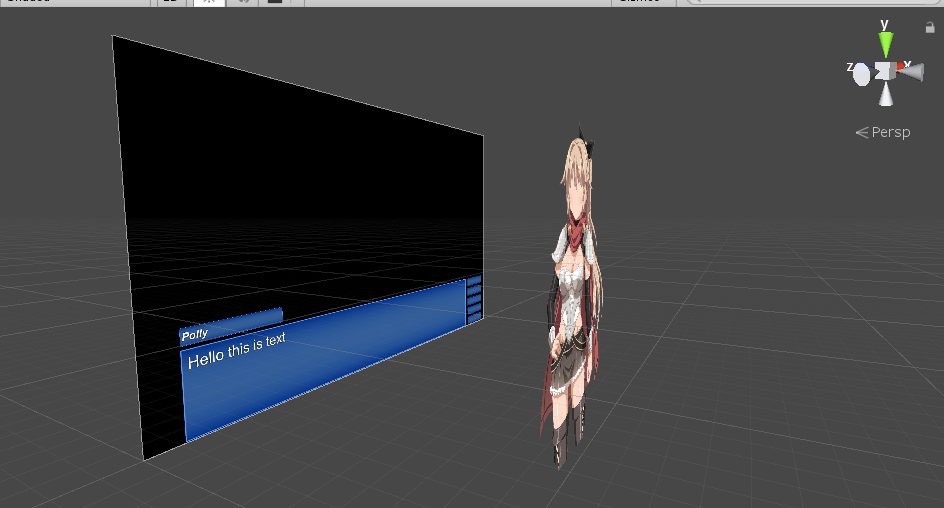
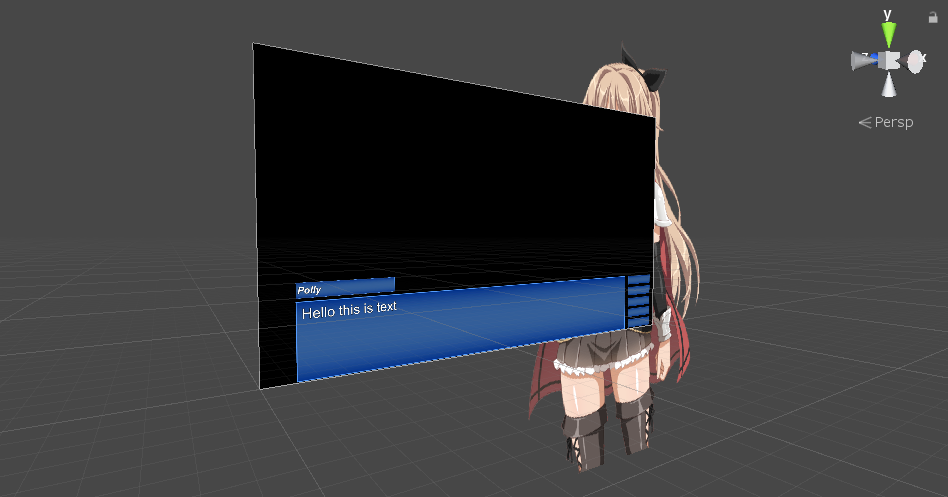
I didn't move the sprite, just the camera position.
 swift dagger
What effects do you add to your UI to make it look nice?
 dire elm
anyone knows how to reproduce this card border from hearthstone in a 2d environment?
 rocky roost
probably something to do with shaders
so i have this thing set up to load a scene but the button is doing nothing at all
i tried adding a debug.log to see if it does anything but it doesnt do that either
spring fulcrum
Here's a list of flags in a horizontal layout group, how do I make it so that they stick together aligned on the left?
so i have this thing set up to load a scene but the button is doing nothing at all
@rocky roost Is the eventsystem object available at that time? Do you have something in the console?
spring fulcrum
Oh maybe it wasn't the event system linked to the current canvas?
rapid ferry
hey all. can i get some ideas on how this UI can be improved (or possibly replaced with less game-y visual queues?)
the 3 important peices of info i want to convey to the player are:
1.the velocity they are going horizontally (so they know how fast to roll into an enemy, as thats how some enemies are defeated);
2. how much health they have left in their current life (currently indicated by the red bar behind the lives counter)
3. how many lives they have left
the player is that ball in the middle of the screen; and they roll using physics
rapid ferry
gif of the UI in action: https://i.imgur.com/kbNQLUi.gif
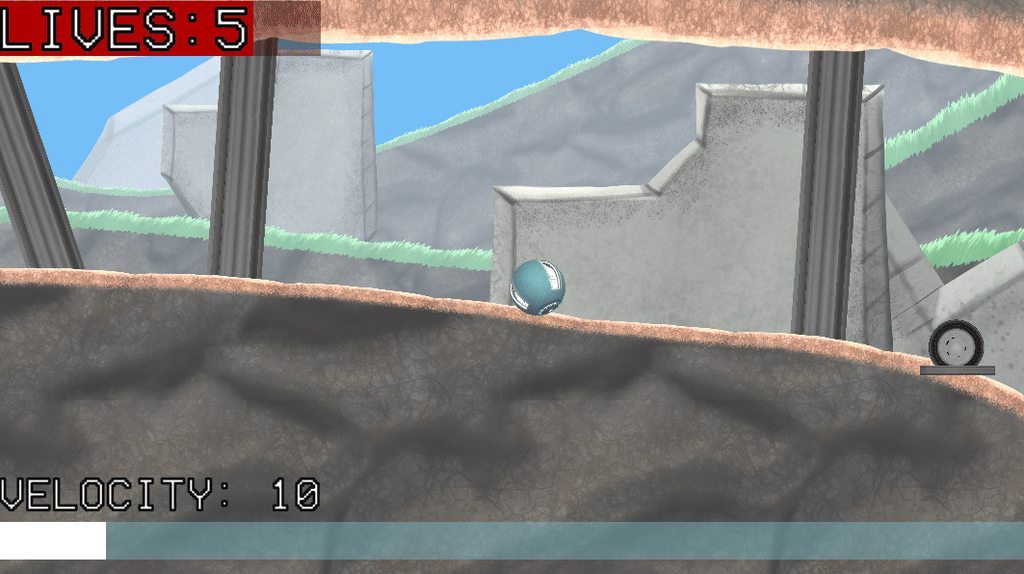

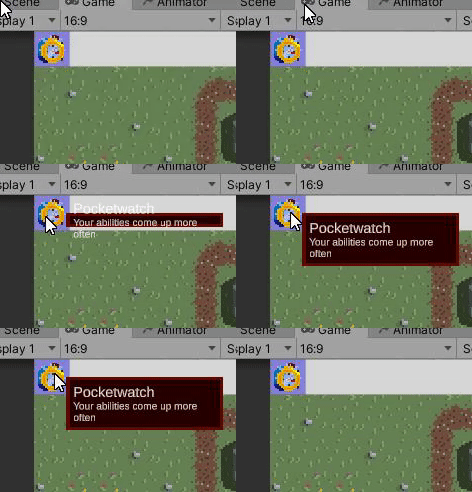
 spring fulcrum
For the needed velocity some kind of indication they are in the "correct zone" to damage the level's enemies could be a nice starter.
Don't use more than one different per level though.
Energy and lives seem fine.
Or maybe instead of the velocity gauge, some particle effect on the ball indicating they have reached the velocity needed to destroy enemies on the level. No need for a gauge then and they're already looking at the ball.
rapid ferry
Or maybe instead of the velocity gauge, some particle effect on the ball indicating they have reached the velocity needed to destroy enemies on the level. No need for a gauge then and they're already looking at the ball.
sounds like a great idea. thanks
gritty seal
What's a way of doing a click-off/off-click functionality in UI? I want to open a window when I press a button, but then close that window if I press anywhere that isn't part of the window.
pseudo apex
@gritty seal you could try having a transparent background behind the window so that whenever it is clicked, the window just closes. there won't even be a need for an X button if this is the case. People will just find it naturally.
basically just a collider panel behind the popup
This way doesn't work if you try doing a lot of popups though, then you have to use state machines or something
gritty seal
yeah the window I'm trying to close is a popup on another window, which itself is a popup in the corner of the screen. ;_;
pseudo apex
what the heck is that UX
But anyways, if there is a one way in and one way out scenario, as in, they should not need that window open ever, then it's totally fine doing that.
gritty seal
User Experience
pseudo apex
Otherwise you could have a state machine remembering the windows open and which order they are opened in, and then depending on where they press you remove a window or all of them.
And I know what UX means, I'm just saying your UX sounds a bit scary
Not a big fan of many pop-up's
gritty seal
it's a dropdown (but sideways) inside an options menu that the player can toggle to customize some stuff.
could I somehow cheat it a bit, by having the dropdown window focus when it's activated, and whenever it's unfocused, it closes?
like using SetSelectedGameObject()
pseudo apex
Never used that tbh, so wouldn't know.
ripe relic
if I made a canvas for each of these, would I have all of my bases covered?
and when a person "resizes" a window by mouse on the edge of the programs frame, can I have it snap to the nearest ratio as they're dragging it?
or have just have it stay in the ratio it was on before they dragged it?
 plucky rover
is it possible to render UIElements in 3D space?
I have this simple vital UI (please spare me, I am new at Unity's UI lmao)
and I came across Unity's UI Builder and their UIElements. I've done a decent amount of web design and I am familiar with HTML and CSS so the UI Builder was refreshing.
This UI thingy uses the standard canvas game object and just has it displayed onto a camera to achieve the depth effect
can this also be achieved with UI Builder?
frosty pewter
https://docs.unity3d.com/Packages/com.unity.ui.runtime@0.0/manual/index.html
Currently, UIElements panels can only be displayed as an overlay to the game view (equivalent to Unity GUI Screen Space - Overlay mode).
plucky rover
thank you!!
I was looking for that clarity. I was browsing through their roadmap and I believe it's planned for 2020 LTS?
frosty pewter
Looks like it can target a render texture so you could try to do it that way
it's not ideal though
plucky rover
I scaled up the UI to see it a bit better
I want to be able to achieve the depth effect but also use the new UI Builder
rapid ferry
Hello, can anyone help me make sense of the Canvas component when set to "World space"?
I have one with the same resolution as my editor "Game" window, 1920x1080. Scale is 0.0025. It sits at 0,0,0 position.
Yet the button inside, which is set to cover the whole canvas, takes 33% of the width and the height of my Game window. I expected 25% with the scale I set.
What's going on?
it's not just buttons, a simple panel will have the same issue. And it's not just 0.0025 scale either, any value I enter will produce a result that covers more than what it should.
For example 0.005 scale will make the canvas and its contents cover significantly more than 50% of the width and height of the Game window.
Nothing I try fixes the issue, I can't wrap my head around it. I have already shipped a project before all the way to Google Play, but the World space canvas always seems to act weird. What am I missing?
 gaunt storm
Hey, I'd like to use a UI Button to make my player move(for a mobile game), but I don't know how to make the button work when held down. Does anyone know how to solve this?
frosty pewter
If you want your rects to be scaled to be maximised to their parents then remove the offsets from the parent
 sage notch
really lost here, I dont need an adaptative UI I usually dont mess with this stuff
sage notch
the parent is the canvas tho
rapid ferry
you can ctrl + alt + click
sage notch
Okay, I see what you mean
sage notch
that works for the BG
rapid ferry
to apply those
sage notch
but I have like 40 other elements
rapid ferry
what is the left bar inspector
sage notch
The 3 buttons
rapid ferry
you have to set that to anchor left, stretch height
frosty pewter
if you use this then you can hold alt and click the bottom right option and it will maximise that rect and remove the offsets
rapid ferry
the middle section should be stretched as well
and adjust the left value so it's past the left container
and top and bottom too if you need to add space
sage notch
yeah but thats the thing, why is unity not letting me set my default canvas size as the one it should scale to the correct size
if I started designing with the canvas scaler set right I wouldnt need to do redo the design
rapid ferry
it is doing that
for the canvas
but not for the items inside it
yeah, if you started doing it correctly it wouldnt have broken
big think
sage notch
thats so backwards
rapid ferry
although if you Shift click the objects you can surely re-size more than one at a time
sage notch
they arent being resized
rapid ferry
and then set the width
no no
let me finish
select match width or height
and set the match to height
(1)
sage notch
wtf
I tried this like 3 minutes ago
sigh
@rapid ferry thank you, you saved my ass
rapid ferry
basically your canvas will now act as if the height of the screen is 540
but should still stretch horizontally
you may want to check that part
 gritty igloo
Someone explain to me what is this raycast padding ???
 pearl isle
does anybody know a tutorial on how to make a start menu
pseudo apex
@pearl isle try youtube and search "start menu unity"
There are so many ways to do this.
pearl isle
ok thanks
pseudo apex
@gritty igloo Can't even find it in documentations of the image, but it sounds like padding for the area which should be able to get hit by a raycast?
 fleet fern
does anyone know how to make good looking ui in gimp without making pixel art?
sonic garnet
the number of times i've created a bigger empty transparent image to hold a too-small-to-accurately-hit icon for a large touch screen display setup... buh gawd, i wish i'd thought of adding raycast padding to the image behaviour
@fleet fern that's a really big subject.. like, the whole field of graphic design for UI. but, i guess for basics i'd look to tutorials on web design in gimp as the concepts are mostly portable
rapid ferry
not sure if this is the best channel but; im wondering if people with aspect ratios my game doesnt support will still be able to play it? like, even with black bars or something- as long as it still runs thats ok, but i dont know if it will or not. i ask because i have a hard time designing UI that scales well to other aspects without being weirdly and badly positioned, so i tend to just lock my games at 16:9 since that's my monitor's aspect.
thoughts...?
fleet fern
thanks kPan
gritty igloo
Ok thanks
 spring thorn
Can't see my text in canvas anyone got any idea whats going on?
 dusky yarrow
Anyone know how to make the transparent pixels of a button non-interactable? I have a button that has a circular shape, and the sprite has quite a few transparent pixels of padding that contribute to its clickable area.
rapid ferry
see this website?

Active Youth Association
Active youth association is brought together by a common goal - to create opportunities for youth via international exchange & social initiatives.
im trying to do a better ux for it
this is low fidelity ux sketch
any advice tips critique?
 tired crest
What are the goals you’re trying to achieve with the re-design?
Are there particular areas you would like the user to focus more on, or specific problems/concerns the original design has that you’re trying to avoid?
pseudo apex
@rapid ferry There are not many problems with this website as far as UX goes, maybe make it more clear in the top for a quick button to "join the club"...but that's about it, I think your main issue will be converting this website to a mobile friendly version. That is where the UX becomes more important IMO.
It's a bit hard to know which things you should prioritize from our point of view since we don't know the backstory behind the company wanting the site and so on, but basically it has to cater to their needs and audience, right?
So I noticed at one point it has "events" in the middle of the scroll, is this something a new person who comes to this site would look for before even joining and so on? In short, the priority of the content is always important and if the join button is all the way in the bottom, some people might miss it. Especially if those buttons in the top don't move you down there.
rapid ferry
@pseudo apex well I disagree. This website homepage so far has no decent goal, It doesn't have a rational structure, some parts like "team" is completely irrelevant to new user or a potential client. It misses the mark to introduce their services or goal etc. Call to action is almost always in the bottom because you create a journey/story almost every company (paypal, slack, revolut, headspace etc.) has cta at the bottom.
this is the right structure for a landing page: 1. Grabbing attention 2. Introducing myself 3. Establishing credibility 4. Talk about the problem 5. introduce solution 6. Show benefits 7. Show proof that solution works 8. Call to action
pseudo apex
Oh, I only checked the UX sketch, didn't care about going into the content of the page.
rapid ferry
@tired crest at the moment I am just making up the goal and trying to nail it. So with that lo-fidelity ux I wanted to introduce a company and to sell their main/biggest service which is a membership. And my goal was to make that membership look beneficial for both sides.
pseudo apex
But is this a webpage that will only focus on new people or active users?
Having call to action on landing pages at the start is way better for an active user of the site, but for a site that is only a cashgrab landing site, then your statement is true.
rapid ferry
new users since this almost like a landing page with a goal to generate more leads to a membership
pseudo apex
If that the case, do you even need the top bar then? Since you want them to scroll down anyways.
rapid ferry
I mean its not like i know what they need Im just making a hypothesis that they need more money and I am trying to make a design that fits their need if that hipothesis were true. And this is only one sketch. Im doing another one right now which will be more like a homepage which doesnt try to sell anything. at all, just to introduce themselves and to prove that what they are doing is making an impact, and maybe ask users to leave their email for newsletter or something.
yea i would still need a menu navigation, because i cant make it 1 service selling landing page unfortunately its more like a hybrid between a landing and a homepage
the thing that im doing is I just found a website then 1. made up some problems that they may potentially have, using my imagination, and then 2. designing UX as a potential solution to their problem which might work in THEIR case so 3. I dont just remove half of the stuff, i dont do drastic changes, I try to make it real, modifying it to make an improvement rather than redoing the website from scratch.
rapid ferry
so the current hypothesis was that company goal is to get more members to their club. So solution was to make a homepage/landing page which sells a membership by introducing themselves as well as the benefits of a membership. Like merge them into one.
pseudo apex
Well, every single page except 1 has a contact form, so that is very clear.
But this site doesn't have membership, it's more like a job contact.