#📲┃ui-ux
1 messages · Page 43 of 1
 long wave
 placid forge
those only change the font and button size. i'm talking about resizing the viewport
placid forge
NM i found the solution. you just stretch out the Template and not the viewport
 tropic kite
I created UI element with few buttons and checkbox, but after exporting and importing this asset to new project for some reasons interactable elements not working anymore. Why this can happen?
Oh, i got it, there was no event system in new project
 mental swallow
Hey guys, does anybody know what is wrong when my text mesh pro font is rendered with squares instead of letters?
 sonic garnet
https://forum.unity.com/threads/what-causes-text-to-be-rendered-as-blocks-instead-of-letters.555085/ @mental swallow

Unity Forum
Hello,
I have been using TMPro for year and from to time the game will start but all the text is shown with blocks instead of letters. Next game...
There are a few things that can result in this.
The first is Unity somehow losing reference to the texture of the font atlas. This is an internal Unity issue and not related to TMP. From TMP's perspective, the texture is still valid but it happens to be some empty texture. This can be timing related as resources are being loaded.
The second is potentially related to non-uniform scaling of the text object or the Scale X and Y located in the debug section of the material inspector being set to a value of 0.
This is also possible when using texture compression (which should be avoided with font atlas texture).
The biggest challenge here is being able to reproduce the issue to isolate the cause.
 harsh cradle
I should be using crunch compression on almost every 2d sprite in our game, shouldn't I?
 strong sable
anyone know if it's possible to change font in a text in the editor??
 gilded path
you can with textmeshpro, at least
 fossil bough
Is there a way to display the same UI on two or more screens?
 dreamy plank
use two or more cameras ?
 sudden pawn
what would be the best way to align objects on a canvas in a way similar to the three icons above the player's head, other than setting it manually?
as I tried layout groups, but they only work vertically or horizontally
 random escarp
@sudden pawn Layout groups are super expensive. and every change to a unity canvas in terms of an object changing position compounds that problem exponentially
Personally I've resorted to using UI Anchors and a tool called Ruler2d from the asset store to get performant UI
you can manually place stuff, it's just timeconsuming and tedious
sudden pawn
I’ll check that ruler asset out, as it sounds good
 deep scaffold
Hey any way I can hide the white | line when im typing in an input field
And also how can I get an event when I do enter within an input field?
deep scaffold
anyone?
 azure flame
@deep scaffold Selectable UI objects fire events which can be captured by implementing an interface on the script on that object, like this one https://docs.unity3d.com/2017.4/Documentation/ScriptReference/UI.Selectable.OnPointerEnter.html
deep scaffold
@azure flame What i meant was I dont wont to remove the cursor i just want to have the invisible | line when typing in input cuz its annoying
deep scaffold
??
 kindred hemlock
idk why but when i build my game the ui texts get invisible buttons are still here but every ui text is not rendered any idea why ?
deep scaffold
Does anyone know??
deep scaffold
@azure flame can u help please
azure flame
@deep scaffold Please don't ping people out of conversation to your issues.
deep scaffold
I mean I wouldn't but I'm sitting here for 24 hours and no 1 said anything
azure flame
Did you try to google your issue instead?
It sounds like somebody would definitely came across this.
azure flame
The class also has related properties, like blink rate.
Should always lookup the code reference first
strong sable
@deep scaffold https://answers.unity.com/questions/960937/how-can-i-disable-the-inputfield-input-caret-in-un.html
Unity is the ultimate game development platform. Use Unity to build high-quality 3D and 2D games, deploy them across mobile, desktop, VR/AR, consoles or the Web, and connect with loyal and enthusiastic players and customers.
is that what you're looking for?
deep scaffold
Yeah it is
strong sable
Has anyone used TextMesh Pro to change the font mid text? I got " test <font="PoppinsLatin-Black SDF"> newFont </font> old font " and it's not working
rich text editor is on
sonic garnet
it needs to be in the loadable path for text mesh pro
iirc it uses resource loading by font name
Settings documentation for TextMesh Pro
strong sable
Ohhh, so the font is in the wrong folder... Thanks, I'll let you know if it worked :)
 eternal bison
[SOLVED] Just had to set Navigation to None
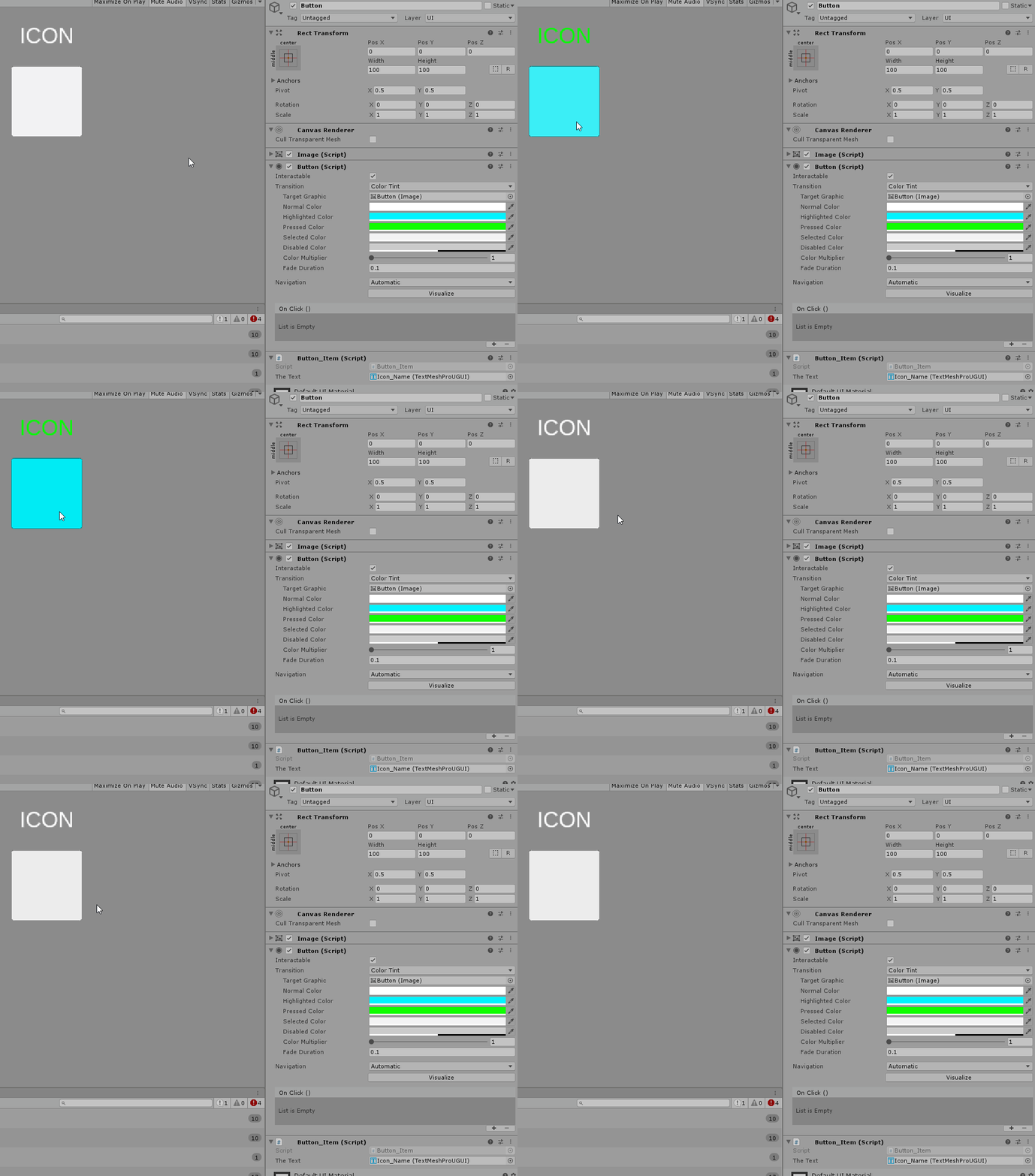
*QUESTION: Why does my Button not turn blue on hover (highlight) after I clicked it?
Colors:
- Normal = White
- Highlight = Blue
- Pressed = Green
The Button turns blue when i hover it, white when i leave it.
However after having clicked it once it stays white and hover doesnt work unless i click somewhere randomly into the screen.
 formal plume
because the button is now "Selected" and using its selected color
eternal bison
Ah it stays selected, mhm
formal plume
no idea how to fix
eternal bison
So if the purpose is that on click it just runs its function/script. How do i get the button to not stay in "selected" incase anyone knows 😄
Tyvm @formal plume for the first part already 😄
Ah solved it, Navigation to "None" and it works
formal plume
note that you've now disabled controller support for your game's UI
but if that doesn't matter to you, that sounds like a great solution
 frosty pewter
@eager arrow use the rect transform's anchors to tie to percentages of the screen
The positions are offsets from the anchors
 eager arrow
Oh wow, I didn't even know there was a channel for this!
Awesome! perfectly worked. Is this feature meant solely for processing in the editor or does it have scripting usages?
frosty pewter
The scripting side is a little more confusing, but it should work the same way
I always have to muddle through it whenever I deal with it
eager arrow
Not that I'm going to attempt changing panels dims in scripts, but theoretically I could create everything via script if I felt like having a bad time
frosty pewter
it's not as familiar as the interface and sometimes won't update unless you tell it to manually
eager arrow
Thankfully inputsystem has that bad time thing covered for me
strong sable
@sonic garnet your fix worked, thank you for the assist!
sonic garnet
np =)
 steep dragon
is it possible to start the game with the scroll view's content at the top?
for some reason it keeps moving its view to the center of the content
I have to keep dragging the content down so the top item shows
steep dragon
I found it, it's called pivot
 verbal breach
Has anybody run into this issue while working on their UI? It seems to be across Unity versions and the Windows and Linux editor
I'm guessing it's something I've got misconfigured rather than a Unity bug but it's been frustrating to get anything done on my UI
 unborn hull
UI in Unity 2019.3 is pretty wack atm, iirc. haven't used it much because of that
verbal breach
Well shoot eh. Guess I'll delay working on my UI for now. Thanks for the reply
 leaden minnow
Can someone help me with some UI stuff I am going mad. I am just trying to have a text box resize automatically vertically upwards as the content increases. I can't get it to work, I have read about the vertical layout element and content size refitter stuff but adding that doesn't give me the desired result. I suppose it has to do with the anchors or pivot but nothing I have tried gets me the result I want

all I want is for it to behave like I show at the beginning dragging it up
 jagged monolith
Should work if you just set the y pivot to 0 @leaden minnow
Or, it should at least scale the right way
 jagged prairie
For anyone here who uses Text Mesh Pro, is there a way to get around the objects? I can't find a Raycast Target checkbox, and it's blocking my buttons
sonic garnet
@jagged prairie you need to expand the ExtraSettings on the behaviour, there's a checkbox called Raycast Target
jagged prairie
Ah, thank you! I was looking in the area far under that
sonic garnet
yeah, there's just so much there with tmpro it can sometimes be hard to find the right thing
 rapid ferry
Could anyone help me with Ui in unity? im trying to get it to where the players camera doesnt go pass a border. but rn it does
frosty pewter
If this is 2D a straight forward way of doing it would be with Cinemachine, and a Cinemachine Confiner, as talked about in this post: https://blogs.unity3d.com/2018/07/17/cinemachine-for-2d-tips-and-tricks/ under Confining a Camera
 timber elbow
Hey people! Does anybody have a clue why LayoutRebuilder.ForceRebuildLayoutImmediate() takes more than 1 call to rebuild the UI completely?
Here's an example
You can see the character sheet on the right not rebuilding properly when I open it for the first time
i call LayoutRebuilder.ForceRebuildLayoutImmediate; in OnEnabled. So theoretically it should be done properly every time...
 stuck grove
Can someone help me setup a GUI that works with most resulolutions?
because its out of control now
timber elbow
Nvm, solved my issue somehow...
stuck grove
My general GUI setup is the canvas, and a image as a background
strong sable
use anchors in every object within a canvas
then change the canvas' render mode to Screen Space - Camera
stuck grove
But if the user changes resolution dont some objects squish into eachother?
Because for example my menu buttons are pretty close to eachother
strong sable
if they are anchored to the same spot then they shouldn't
if they do then the screen is too small or the buttons too large :/
random escarp
Anyone here ever have a problem using unity sliders as progress bars in their game/product? My issue is that the artist put a fair amount of detail and a curve into the progress bar so when you get close to 0 on the input range it squishes and distorts. I tried a few ways to deal with it today, using the UI Mask (with the default unity UI mask) but that solution caused the left part of my progress bar to vanish after I hit around 70% fill.
Another solution I tried which almost worked filled from the center out in both directions which is not exactly what I wanted.
I checked a bunch of tutorials and what not today but didn't find an answer
sonic garnet
It might also help to see the asset or a similar mocked up asset if you don't want to share it
Sometimes it's helped me in nailing down an animation if I do it in something like Photoshop first, just using the animation tools there to decompose the thoughts into actions without getting too tied around the axle of components and code
stuck grove
Is there a way to show a 3D object on the UI?
Im trying to show a cube in the UI thats turned a bit
sonic garnet
You can apply a render texture to a RawImage component
stuck grove
Does that actually show a cube in perspective?
sonic garnet
It'll show whatever the camera it's targeting is rendering
So if you have a perspective camera looking at a cube, then yeah it will
stuck grove
Ill try xD
 turbid ferry
Quick random question. A friend of mine asked me to make him some UI elements, though I'm not at all familiar with making UI's. He told me to just make each element individually in its own group and he would handle it from there. This is what I came up with but I want to make sure it'll be functional when I hand it off to him:
Each element of the window is in its own group, so each of the "items" sections can be replicated as many times as you like and the scroll bar is in two pieces (one for the bar and one for the little scroller). If I hand this off to someone who's experienced with unity, they will be able to use it, right?
 bronze marlin
Is there a clean way to keep a rect transform inside another rect transforms bounds? Seems like there's a lot of things that you have to take into account in the calculation: what is their lossyScale, are their anchored positions relative to the same point in space, where is their pivot, how do the anchors affect the size delta, do they have any rotation. For my specific scenario I can assume the pivot/anchors will be in the center and there won't be any rotation, but even with those assumptions I'm not sure how to tackle it. Figuring out the actual size and position of rect transforms has always seemed harder than it needs to be.
sonic garnet
do you need to worry about scale changing and rotation of the objects you're containing?
bronze marlin
The local scale of one of the objects can change yes. Neither of the objects will be rotated tho
sonic garnet
as long as it doesn't change dramatically (pinch zoom sorta stuff) you can play with https://docs.unity3d.com/ScriptReference/RectTransform.GetWorldCorners.html
rotation is the big ugly one for that sort of control, because you'd need to keep changing what your unwinding is as they rotate the object
bronze marlin
Thanks, that looks helpful. I wonder why Unity decided to have it return an array instead of a custom struct or just getting passed a ref to a list of Vector3s
oh it doesn't return one duh
it literally does what I was complaining that it should do lol
sonic garnet
haha, it happens. good that it matches up with what you're expecting =)
the reason i mention pinch/zoom on that is because i recall having a ton of struggle trying to constrain a scalable movable picture in the background without ever showing a margin. but for the most part it'll get you where you need to be
bronze marlin
Good to know. Thanks
kindred hemlock
How to have a scrollview automatically scrolling down to the last text added ??
sonic garnet
https://www.youtube.com/watch?v=IRAeJgGkjHk this is probably a reasonable place to start

Here's a little tutorial I put together on how to create a text window that displays messages. In this video I show you how to create a script that runs the ...
the ui layout stuff starts around 6:30
kindred hemlock
im gonna have a look thanks for the tip
 dire pivot
Hey devs,
I'm prototyping a unity game and would like some more power behind my ui tools. Something to help speed up the process and make things a bit more presentable for future play-testers.
Asset store has LOTS of options. Can anyone recommend one in particular?
Current leader is : https://assetstore.unity.com/packages/tools/gui/ui-gamestrap-28599

Website
|
Unity Thread
Gamestrap UI is a Unity pack that helps you design User Interfaces by providing you with the resources and tools to make something professional in less time . Whether you are an indie developer, student, freelancer or a game studio, we beli...
sonic garnet
i've always been impressed by Beffio https://www.beffio.com/ui-builder
Real Time 3D Assets by beffio studio
UI Builder is a revolutionary, customizable UI-kit that contains ready-made elements to mix, match & build your own User Interfacefor an App or a Game. It is also a great set of UI elements for quick & easy creating and slicing high quality GUI skins & sprites for new Unity G
 round steeple
VRTK_UIPointer question:
Is there a way to block ui raycast from vrtk_uipointer to a panel (within a vrtk_uicanvas) with many ui elements on it? I've tried simply putting an image that has raycast target set to true on top of the panel ; but that does not block the ui elements below it from being interactable
 graceful minnow
Does anyone know how to remove post processing from a world space UI in HDRP, I have been searching the forums and it seems as though second camera for UI is not possible on HDRP, are there any other ways to remove the pp render pass on these UI elements?
 dry berry
rapid ferry
dry berry
rapid ferry
Is there any way to get textmeshpro to not scale with gameobjects?
I'm trying to set gameobjects to certain widths and heights depending on which ones are active
But that also squishes the text
Full size
Half
 dawn jolt
Hi, right clicking on my UI sets the mouse pointer to 0,0 no matter where I click (a grid of buttons), any idea as to why? Middle mouse click doesn't do this, and I cannot find anything online about this.
dawn jolt
ok, standard assets was setting it to locked when pressing mouse 2, so disabling that fixed it, just an fyi
sonic garnet
@rapid ferry I would recommend that you rethink your approach to the screen here. Instead of scaling look into layout groups.
azure flame
I think this is the best thing right now. Has support for Bezier curves as well https://bitbucket.org/UnityUIExtensions/unity-ui-extensions/src/master/
gilded path
I was looking at that, but just wanted to make sure I wasn't missing something really obvious that everyone knows about
rapid ferry
https://geedees.succ.world/i/y67z.png
Everything is super small when I use the canvas scaler
do I resize everything and dont owrry about it?
because rn its supposed to look like this: https://geedees.succ.world/i/gjh5.png


 median iris
@rapid ferry
Yes just resize
rapid ferry
Alright, thanks man
 proud zenith
@rapid ferry https://docs.unity3d.com/Manual/script-CanvasScaler.html
This might help with adjusting your UI based on screen size
rapid ferry
Thanks, I'll check it out
placid forge
Yup it does work.
i seam to had the exact issue GeeDee did but i used Jakboob's solution and it's worked
 tight gazelle
Is there a code that I can implement into the button ui so that it cannot be clicked until a certain amount of time (i.e. fill amount) and repeat after it is clicked?
placid forge
@tight gazelle have you tried
"GetKeyDown." then "float FillCounter += Time.deltaTime" then use FillLimit as a stop counter.
"if (FillCounter >= FillLimit)
FillCounter = FillLimit;"?
tight gazelle
No. How do I do that?
placid forge
can i see your script?
tight gazelle
I placed this script inside the button Ui. should I have not
As its own script that is
placid forge
Take "if skills" out of "if Input" and put it in FixedUpdate.
add 3 public floats "FillBase" for the base number it'll start at, "FillCounter" will count down this number by how much time the button is pressed down, and "FillLimit" this will be the Limit to how much it can be filled.
if(Input.GetKeyDown (KeyCode.Alphal) && FillCounter < FillLimit)
{
FillCounter += Time.deltaTime
{
if (FillCounter >= FillLimit)
{
FillCounter = FillLimit
{
in Fixed update put in
Skills[0].currentCooldown = FillCounter;
tight gazelle
Like this? But what about the errors? @placid forge
tight gazelle
Alright
tight gazelle
I've tried everything, no luck
rapid ferry
@placid forge @proud zenith so I should use constant pixel size?
proud zenith
I use scale with screen size
This is what I have, it might not be the best setup, but the values I have are perfect for right now
rapid ferry
So I should just resize with my phones width and height?
I got a pretty huge phone, I got the OnePlus 7 pro
So smaller phones would probably work too right
proud zenith
If you are talking about the reference resolution, itd be preferable to set it to a good resolution like 1080 x 1920, if you mean what unity sees for screen size, you dont have to adjust it since the canvas will properly scale your UI to fit all screens
rapid ferry
ah
tight gazelle
Any way to make a progress bar that fills up based on amount of seconds. Then, resets by the click of a button? The bar I have is pre made. Just need a certain code to make it fill up based on a timer's seconds and then repeat on button click
Code I have so far
jagged monolith
Did you look at the progress bar ui object @tight gazelle?
tight gazelle
Yeah, i figured it out
placid forge
sorry @tight gazelle i couldn't figure out the problem for your script
tight gazelle
No worries. I appreciate it regardless
 fluid notch
This seems like a silly question, but is there a good way to handle a UI Prefab that contains dynamic text, if I want the prefab to be an indefinite size? Meaning:
- I have a prefab with two overlapping textboxes. One left-aligned and one right aligned. (Label and value)
- The label can be anything. (Obviously, the value, too)
- I want to be able to reuse this prefab in multiple sizes. Getting the width to react is working fine, as my labels and other assets in the prefab will resize when set to stretch horizontally.
- What I need to happen, however, is for the fonts sizes to change, proportionally, when I modify the prefab's height. I'm using TextMeshPro text - but using Auto Size isn't an option, as that sets the font based on the text content, and not the parent.
Is there a good options here, to make this prefab work how I want?
 hallow sun
So I have TextMesh Pro installed and am wondering on how to use 2 different fonts in the same sentence? Any help would be appreciated!
sonic garnet
Rich text documentation for TextMesh Pro.
 fossil jackal
I've got a question about text mesh and fonts. I have a text mesh on an intro type screen, but on the sides of the letters i'm getting a few artifacts, it looks like its some pixels from another letter. If the letters are huge, like full screen, you don't see these artifcats, but if the letters are smaller, like subtitle sized, you notice these artifacts.
Is there a way to get rid of these artifacts? Is it an issue in the font itself? Can I expand the padding of the lettersor something?
I tried another font, it seems to be how Unity is placing the font onto the font texture sheet
sonic garnet
my recommendation to clean up most of these issues is usually to import your font with text mesh pro at a size roughly equivalent to what it would be rendered at on screen
that comes from some ancient tmpro documentation videos, but the advice holds pretty steady
pretty sure he talks about it in this video: https://www.youtube.com/watch?v=pEnz6UAtLdw

Video going over all the options found in the Font Asset Creator (Beta 0.1.35). The Font Asset Creator is used to create the bitmap font atlases or Signed Di...
fossil jackal
Ok, that looks like its a plug in, text mesh pro. Is there a similar thing for the built in Text Mesh system?
(this project is still using a unity 2017 install, to where the text mesh pro isn't part of it)
bronze marlin
I've recently had to switch my root UI canvas from "Screenspace - Overlay" to "Worldspace" so that the camera can move/zoom around the UI. This is an issue because I still have UI that should be in screenspace. As is often the case, the hierarchy of the UI is important. I have 10 screens (sub canvases) so splitting each canvas into two canvases (for screenspace/worldspace) and moving the specific elements into the screenspace canvas will be a pretty large & messy endeavor. Am I approaching this the correct way or is there a simpler solution?
Here's a recording showing the issue. The top left header & the info button on the far left of the screen should be relative to the camera (screenspace) and the background and popups shouldn't be tied to the camera's position (worldspace)
 wheat lichen
@bronze marlin Can't you jsut put the header and info button in it's own screenspace canvas? Everything else can be in a worldspace canvas. Or is there also stuff in your sub canvases that needs to be in screenspace?
bronze marlin
@wheat lichen I can but I have 10 different screens (sub-canvases), each with their own header and info button. They each also depend on a canvas group for controlling interactivity/alpha.
I guess since the only thing that changes between each header/popup is the text and an icon, I could create a single version and change the text/icon on the fly. Then I'd only be managing one new canvas.
Although this wouldn't be a good longterm solution because the displayed info might become more unique to each screen in the future
 wind jasper
Im trying to make it so my buttons have a gradient to them, is there any moderately easy way to make it so when the button is generated (from a prefab) that i can choose two colors to horizontally gradate between
i thought the solution would be in a shader, but not only could i not get it to work properly, but it seems like its not possible to change one button that uses the shader, without changing others that use it
 tiny rune
How would you guys go about making an HP/MP bar?
 subtle patrol
@tiny rune I'm just starting out coding myself, but I found this tutorial to be very helpful. https://www.youtube.com/watch?v=5thNo-7Q7Js
Summary - Set the Image Type to Fill then update it's value with code something like this:
GetComponent<Image>().fillAmount = health/100;

This tutorial teaches you how to make the health bar scale with screen size and make the bar lerp when health is reduced or gained. Click the link below to d...
 unborn seal
quick ui question. Why do reference pixels affect the 'stretch' of a 9 part Sliced sprite? https://streamable.com/4xvw8

@ me if you know, please
frosty pewter
If you mean organising that list, you can't do it
 sudden spoke
I have this code as a function:
public void ShowNextHouse(char direction)
    {
        int offset = FindNextHouse(direction);
        House nextHouse = m_houses[m_houseDisplayed + offset];

        ui_image.GetComponent<Image>().sprite = Resources.Load<Sprite>(nextHouse.imagePath);
        ui_address.GetComponent<Text>().text = nextHouse.address;
        ui_availability.GetComponent<Text>().text = nextHouse.availability;
        ui_rent.GetComponent<Text>().text = "$" + nextHouse.rent.ToString();
        ui_description.GetComponent<Text>().text = nextHouse.SharingToString();
        print(nextHouse.SharingToString());

    }
Other public void functions in the same class show up and I have the game object that the script is attached to in the on click menu. Does anyone know why ShowNextHouse wouldn't show up?
ope i took the wrong image
sonic garnet
My guess off the top is that char isn't serializable for the inspector, but I have to say I've never checked that
sudden spoke
I tried string but that also wasn't working, unfortunately
steep dragon
@sudden spoke could it be because the editor doesn't show chars? change it to string and gather the first character of the string. that may work instead
after some testing, I have a suggestion. instead of doing all the calculations inside of the ui function put the data in a different function and call the function you want like i'm doing here.
public void ShowNextHouse(string direction)
    {
        ShowNextHouse(direction[0]);

    }

    void ShowNextHouse(char direction)
    {
        int offset = FindNextHouse(direction);
        House nextHouse = m_houses[m_houseDisplayed + offset];

        ui_image.GetComponent<Image>().sprite = Resources.Load<Sprite>(nextHouse.imagePath);
        ui_address.GetComponent<Text>().text = nextHouse.address;
        ui_availability.GetComponent<Text>().text = nextHouse.availability;
        ui_rent.GetComponent<Text>().text = "$" + nextHouse.rent.ToString();
        ui_description.GetComponent<Text>().text = nextHouse.SharingToString();
        print(nextHouse.SharingToString());

    }
I'm having a problem with textmesh pro text. I can't seem to get my inputfield to fire the submit event. I tried subscribing to the event in two ways, through code and through the editor
it's just not firing when i hit enter and i'm confused
hallow sun
hallow sun
Think I figured that one out
Does anyone know how or why; When I create a button and have an image as a child of the button, it doesnt 'fade' when the button is pressed?
jagged monolith
@hallow sun the button component looks for an attached image component, and changes the colour of it. It does not propagate this to its children. You would need a script that gets the image component of the childrenand sets those to the same colour as the button itself
hallow sun
Interesting. Thank you for the response
Why does this work for text that are a child of the object?
When you create a Button UI object, it comes with a Text object as its child
that works correctly
jagged monolith
It might look that way because the surrounding colour changes, but it actually stays the same @hallow sun
hallow sun
Oh, wow - I never knew that was actually the case
jagged monolith
Colours are relative :)
 dawn gate
I'm trying to add a RawImage to a UGUI based UI. I'm using a custom unlit Shadergraph shader. On the left, you can see it renders totally fine in the Scene view... but on the right, in the Game view, it renders as solid back. I'm seeing this exact same issue happen when using any ShaderGraph shader. Could anyone give some pointers on what might be up here?
dawn jolt
@dawn gate , I think you have to set your Canvas to screen space camera and not screen space overlay
dawn gate
@dawn jolt Aye that did it, thanks!
 trail hull
guys does anyone have that bug in 19.3 Beta 6 that when using Scale with Screen size is turned on in the canvas and you press play the text or any UI that is within the canvas spawns out of the canvas completely, tried using the scale with Screen Size in 2019.2.5 and worked just find so this is officially a bug. Please fix.
 lyric bramble
Hey guys, can someone help me with getting the UI to be the same pixel-size as the game?
My canvas scaler has the same reference PPU as the game's ppu
but still the pixels are really small
 limber knoll
I'm having this issue on my UI where there is a blank line even though one should not exist, any help.
I have no idea why it's there and it doesn't show up in the editor. This is where it would be at:
limber knoll
Nevermind, I forgot to sanitize inputs to remove excess whitespace.
So yea, turned out it was code end.
 long nest
Heya everyone ! Does anyone know if UI elements work at runtime yet?
Or still just for editor?
 merry oar
Hi, I have a bit of struggle with using Screen Space - Camera UI. I can't seem to find how to make it scale properly with the screen size, no matter what I do the Scale Mode, the Anchors, or the Camera used, do you have some tips?
Here's the way my UI is set up
Constant Pixel Size is the best I could find, but rescaling the view vertically moves the texts out of view
merry oar
Please ping me if have any ideas
rapid ferry
Hey guys!
We're making a card game i Unity (yupp... we're craaaazy)
Our backend/gameplay code is pretty good at this point, but the front-end UI code... ugh....
There are still a lot of problems with the UGUI system... and we don't want to write our own UI system at this point...
UI Elements seems to be the future... but we don't really have time to wait...
Are there any 3rd party UI systems for unity that:
- Have good reviews
- Has a lot of users
- Has been out for a while?
 eager saddle
@rapid ferry i author a community CCG called spellsource, you should probably stick to uGUI or study the CCG Kit asset store plugin a bit
UI Elements is retained mode for the editor only
 placid kiln
how to disable interactIcon(image) when the clue pop ups
rapid ferry
UIElemenent for Game Runtime is on the roadmap
rapid ferry
if you're interested to read about the UI roadmap
Oh wait... maybe I'm breaking some rules by posting files. Let me check real quick
Nope, seems to be in the clear
deep scaffold
For some reason I am not able to type in the input field
Doesn't let me
i can see it but cant click on it or do anything with it
 faint torrent

A single, unified, UI editing tool in Unity – that's our goal for UIElements. In this session, we cover what's available now, share what we're working on, an...
 waxen plank
@merry oar you're actually better off not using constant pixel size if you want your UI to work for different resolutions (aka window sizes). You wanna use "scale with screen size". And I recommend using 1080p as a reference
Then you have to check your rect transforms of your UI elements
The default anchors don't stretch. So you have to figure out how you want your item to position itself and how you want it to stretch as the screen size changes
Left click on this icon and you can select the stretching and positioning very easily
Where you put the pivot is important for how it will scale
If you make it only stretch horizontally and your pivot is in the middle it will stretch left and right
If you put the pivot left it will only stretch to the right
deep scaffold
I need some help
https://gyazo.com/f55171c0ca2b11a3fc1619d77200cbdd
In my animation there is this weird buff
And i'm pretty sure it's because how I manipulate the text and input field
it's not really visible there rip
But it's really annoying
https://hastebin.com/xuqekudede.cs


The user inputs something in the input field and if it's not the right word the animation plays
 plush horizon
Looking at the hastebin, what exactly does input.activateInputField do for you? Have you tried removing it and seeing wether the problem is still there?
deep scaffold
Eh it focuses on the input field so I don't have to press enter twice to type in again
But it might be breaking something
I'll see
deep scaffold
But i think this line is messing it up somehow
            if (called)
            {
                all.Remove(all[0]);
                all.Add("______");
            }
actually it looks good now wtf
plush horizon
Yeah, those lines might be the problem. Still I have no idea why unity would update their ui within the update function (instead of only when the update function has run through)
deep scaffold
Still a problem -.-
rip I thought i fixed
is itbetter if i ask for the help on their website @plush horizon
plush horizon
Sure
 low pike
Does the new UIElements do world space UI?
low pike
^ found the answer on the forums -> not yet.
https://forum.unity.com/threads/regarding-runtime-ui-elements-and-referencing-it.739847/#post-5047832
 quartz drift
Scrollview - Does anyone know how to allow for Movement Type: Elastic, but modify exactly how elastic, or restrict exactly how much overscrolling is allowed?
Context: I have a scroll view here, but if the user scrolls too far, the bottom of the background image is seen:
 woven hare
Hi, I have a UI with a general panel in which I have a set of buttons. Each button toggles the active state of a sub-panel. At any given time I'd like only one panel to be open. So if I clicked a button in the general panel while a sub-panel is already open it will close and open the current panel. I've achieved this by attaching the following script https://pastebin.com/MW9F2Mbn to all the panel opening buttons. Now I'd like to split this into two scripts one that does the toggling and one that does the deactivation of other sub-panels. how would I do this? or is this a better to achieve what I want to begin with?
 sonic garnet
@quartz drift you can implement your own version of a scroll view, inheriting from this: https://bitbucket.org/Unity-Technologies/ui/src/2019.1/UnityEngine.UI/UI/Core/ScrollRect.cs will probably get you access to the data you need to create that specific constraint
quartz drift
@sonic garnet sweet, I will look into that. Thanks!
sudden spoke
Does anyone have a hello world for UIElements? I looked around a bit and it seems like the answer is no, but I was wondering if anyone was working on a tutorial
quartz drift
@sonic garnet Ugh, the data I need to access is private… is my option at this point just to copy the script, rename it, and modify the script to what I need? (Which doesn't sound right)
 prime dirge
ya, i wanna start using UI builder and need a start from scratch tutorial. i was trying to find this Panel Renderer in the components. i installed the preview package
sudden spoke
I'm working on one as I figure it out. Might as well learn and share
@prime dirge So far I've just been watching and rewatching the Unite Copenhagen talk.
prime dirge
@sudden spoke i watched that too. i have the UI builder window up but its not showing up in the game scene.
sudden spoke
oh pull it out
it's a new window, you might be better off dragging it over the game scene
sudden spoke
this?
prime dirge
when you actually press play or open the game tab. the UI from the UI builder doesn't show up. it looks like you need a Panel Renderer component in the Hierachy
prime dirge
been able to find it at all @sudden spoke ?

 inland mortar
when using an imported font with the TextMeshPro asset generator, I get these black boxes around each letter
my settings:
what am I doing wrong here? please tag me
 valid star
does anyone know if CanvasRenderer support for MaterialPropertyBlock will ever be a thing?
 mystic umbra
i believe they said TMPro isn't fully supported yet or such. but will be
 formal grove
Hello, guys! I have a little problem in my project: i want to add a system particle to my UI. How can I achieve this?
Thanks in advance
 nocturne parrot
Hello, I'm trying to make my UI but for some reason the UI in the game is not displaying the same way as in the editor :/
In the editor the UI is much smaller and in the game much bigger like "zoomed"
when I click on "game" panel the UI in the editor is normal and once I click anywhere in the editor it becomes small again 
 raven stream
@formal grove https://answers.unity.com/questions/840538/how-can-i-draw-a-particlesystem-over-the-new-unity.html
Unity is the ultimate game development platform. Use Unity to build high-quality 3D and 2D games, deploy them across mobile, desktop, VR/AR, consoles or the Web, and connect with loyal and enthusiastic players and customers.
Is old but it works unless there is a new way
formal grove
@raven stream Thank you! I’ll try it. Hope it solves my problem 🤞🏻🤞🏻
jagged monolith
Lol I just did the same thing @formal grove
I used this plugin and it works https://github.com/mob-sakai/ParticleEffectForUGUI
GitHub
This plugin provide a component to render particle effect for uGUI in Unity 2018.2 or later. The particle rendering is maskable and sortable, without Camera, RenderTexture or Canvas. - mob-sakai/Pa...
 karmic wigeon
Hi everybody, i would like to know if there is way to make UI Buttons transparent on a canvas with an image in background below the buttons.
Because i've try but i wasn't able to make it work. I'm on Unity HDRP 2019.1.3 f1
thank you in advance for the feedbacks 😉
jagged monolith
If you have an image blocking the button then you can set 'raycast target' to false @karmic wigeon
karmic wigeon
@jagged monolith thank you, i will try. But you mean to put it on the button? or the image?
jagged monolith
On the image. It means when you click on the image, the raycast will pass through it
karmic wigeon
@jagged monolith thank you!
formal grove
@jagged monolith Does that plugin work fine with mobile? I'll check it 😄
jagged monolith
Yes I’m running it on a Samsung S7 @formal grove :)
formal grove
Thank you so much, @jagged monolith! You helped me a lot. I've just added the plugin to my project, and it works totally fine 😄
 delicate sundial
Hello, I want to create full menu GUI for my game in Unity and I wanted to ask, if I create this whole UI only using animations and animator, will this be poorly optimised?
How do you normally create entire UI, only C#?
 pseudo apex
Well, you would be limited in what you could do in the GUI if you only use animations. @delicate sundial
I always do mine using script since it's easier as a programmer
pseudo apex
So I'm in the process of making a cross platform game and I noticed that the flexibility of a button is quite sad. I was thinking of using buttons as the main "clickable" object in the UI, makes sense I thought. But I noticed a button can not by standard set several inputs and the on click senses which input you clicked. This way it would be easy to notice if the user right-click and B-clicks (controller) the button making optional choices in inventory system very easy to build.
Anyone who has tackled this problem before or if there are any extensions that make it possible to at least have hover / exit button features work on controllers too?
 fleet edge
Hey guys. I have a question... So with my game in the "Main Menu" I won't to have another menu that will allow me to change the color of my Cube (Main Player) and my Background. I don't know how I would do this nor how I would get this to work. This question is for both Designers and Programmers.
pseudo apex
Save a global variable that is your cubes color that doesn't get deleted between each scene and then when you spawn your player, you set it's material to that color.
fleet edge
Hmmm xD
I am very VERY new at this so I am completely confused. Is anyone able to give me a call?
 deft hare
Looking for some UX design patterns if anyone knows of any
random escarp
I realize this is the art/creative section...but I've been toying around with the idea of using timeline for UI animations... (ran into an asset that does something similar: https://assetstore.unity.com/packages/tools/gui/ui-timeline-animations-139039?_ga=2.162420668.1874835533.1571969080-692040320.1482083038). I'm wondering from an art/design standpoint if it'd be a better approach than the unity animation driven approach I'm using now.

If you've ever built a UI for a game, you've always run into creating the same tweens over and over again: translations, scales, alpha fadings... Ever wish you could automate these tweens and trigger them nicely in sequences, easily editable?
UTA is an outside the box Time...
(sorry I didn't mean for that to look like an advert)
it's not
 velvet lintel
how do i make my ui less opaque?
pseudo apex
@velvet lintel press the color of the object, it's usually an alpha that is set to like 50% on each panel for some reason.
rapid ferry
i have a ui, and when i build my game, the ui doesnt scale correctly with the screen. does anyone know how to fix this?
jagged monolith
@rapid ferry Is your canvas scaler set to "Scale with screen size"?
rapid ferry
yup @jagged monolith
jagged monolith
You should share some images of expected looks and actual looks, so we can see what's wrong
rapid ferry
ok
mystic umbra
do you need 2019.3 to use new UI in gameplay mode?
 quasi steppe
I'm feeling really stupid, but for UIElements and uxml file built with UI Builder, how do I put the UI into scene? I can't find Panel Renderer in components, nothing even remotely resembling what I need… I'm on 19.3b8.
Update: It is part of the future runtime package. Okay, waiting…
faint torrent

you should be able to put that manually to your manifest if you don't see it on package manager when you enable preview packages
that is, if you use new enough engine version
quasi steppe
Thanks, I will check it. How new is enough though? 🙂
proud zenith
So, attempted to use a world space canvas to have a computer screen the player can interact with real time. Ran into some problems, created a custom solution, and boom, got it working
rapid ferry
Hello, im currently trying to get my button to change colors as soon as i click it. Cant seem to get it to work, Can someone help me please
this is what i have so far
proud zenith
Instead of changing the color of the image directly, change the normal color on the button as that is directly controlling the color of the image
rapid ferry
i wanted to text my function, and the function of getting red color as i hover over it
proud zenith
Ok, so if you're trying to set the color to change when you highlight the button
Change the Highlight color in the button component
rapid ferry
anyone alive?
is there a way with UIElements to check if "ANY' field has changed easily, without registering handlers with every single VisualElement field.. with IMGUI you could do this with a BeginChangeCheck/EndChangeCheck
rapid ferry
@rapid ferry images should also have an CrossFadeColor(). The button script will be overriding your color with this call though it's canvas renderer.
So setting a color directly on the graphic tied to the button will tend to fail.
In code you can access the colors via the ColorBlock (button.colors).
Like so:
            var block = btn.colors;
            block.normalColor = Color.white;
            btn.colors = block;
i @rapid ferry 🤔
im a little new to c#
currently im trying to get it to where if i hover over the buttons, it changes colors. Is there a binding ability for that?
The button itself should already have that built in though.
but most of that exists in the Selectable baseclass, which you can inherit from as well.
hmm
i mean i can hover over the white button and it turns grey a littw
so ig it works. but how do i access that so i can set color?
since a little new im unsure on how to do that specifically
one sec
ok
just change the colors under the transition dropdown when it is set to "Color Tint" mode.
hm
its that easy?
yes
: (
i feel stupid
i think it's just oversight
yea, i didnt even notice that there
thank u tho
 undone coyote
Hey guys, how do I make a UI object take half the width of its parent?
rapid ferry
ui object as in UGUI or UIELements?
undone coyote
@rapid ferry I mean an element that you put in a canvas
rapid ferry
for RectTransform, you can set MinAnchor to zero and MaxAnchor to (0.5, 1)
for the left half
and MinAnchor(0.5, 0)
MaxAnchor(1, 1)
for the right half
or I can launch unity and demo it if I am confusing
undone coyote
@rapid ferry will try that, thanks
@rapid ferry how do you see where the pivot is?
undone coyote
@rapid ferry dw about it, thanks for helping 🙂
rapid ferry
is it working for you though?
by default your pivots are set to 0.5/0.5, which would be the center of your transform
there should be a marker showing you where that is when you set the editor to 2D mode.
blue circle on left side shows your pivot
and on the inspector is how I set left split anchor
and then the right side
undone coyote
@rapid ferry are you sure blue circle is pivot, because i change the settings and it doesnt move
rapid ferry
if you set pivot on the rect transform to 0.0/0.0, that circle should move to bottom left corner.
also
make sure your transform mode is set to local ... not Global
... i mean "Not Center"
so if you set your pivot to (0.1, 0.1) (10%), you should see it move to a place like this:
undone coyote
@rapid ferry that worked, thanks.
rapid ferry
cool
 distant hill
I have an horizontal group with an image and a text.
(a) The image should appear on the left, with an aspect ratio of 1:1. The height is derived by the parent (root)
(b) The text should appear with some spacing to the right of image, up until the end right.
how can I do that? I'm mostly having issues with doing both of these things together..
 clear monolith
im trying to make a ui and i have a button and text that works but when tested text only says pressed when button is pressed (im trying to make a counter
hallow sun
I have a bug. I am using Overlay mode for my Canvas and am centering an object on Start()
I am then moving the Gameobject which is a child of Canvas dynamically to move up and down when the beat of music happens
it is supposed to be centered but is does this
all of the parents and anchor points are correct using 0.5 and 0,0,0
The only thing I can think of is that it is not using its place in Overlay and instead using the World space to determine its position?
its positioning to -540, -960 even tho I set it to 0,0
Is it different for Overlay canvas mode?
rapid ferry
centering? using which anchors and pivots (on parent). Everything is relative to anchors and pivots in RectTransform.
@hallow sun
if you set min and max anchor to zero, and pivot to 0.5,
and in the parent container, pivot 0.5,
then set position to zero - you would be centered.
but your screenshot appears to show your transforms achoring to a bottom left pivot (on the parent)
also - are you moving using "Transform.Position" , or "AnchoredPosition"?
because world origin is where a canvas starts.
hallow sun
I am using Transform.Position, should I be using AnchoredPosition?
All of my Min and Max Anchors are set to 0.5
Except when i run the game and it does this but idk if that effects anything? @rapid ferry
rapid ferry
yes you should be using anchoredposition
and you should be moving an element inside canvas and not the canvas root itself
hallow sun
Yeah I used a gameobject inside the canvas
Hey thanks so much for the help @rapid ferry
rapid ferry
hmm negative margins actually work in UIElements, so we can do dropshadows easily.
too bad fonts don't render correctly at all.
distant hill
I'm using 3 toggles inside a toggle group to create a menu,and I can't get the keyboard arrow keys navigation to work.
Looking at the navigation of the toggle, it is set to automatic, and pressing visualize shows arrows up/down between the menu items, which I think is good.
I can highlight and change selection between the menu items (toggles), but arrows keys does nothing. What am I missing?
 mortal flax
Does anyone know how to make a custom shaped button?? ive been searching the internet and cant seem to find anything
frosty pewter
I think buttons are defined by the alpha of the underlying graphics used
so you just make a custom image and the button is shaped that way
mortal flax
When i do it takes the shape of the rectangle containing the shape
frosty pewter
Ah, I might be wrong there. There seem to be solutions that exist https://forum.unity.com/threads/none-rectangle-shaped-button.263684/ some in this thread that hopefully aren't so dated they don't compile
mortal flax
Thank you for the help, ill see what i can do
long nest
Anyone find any training on the new UI builder for runtime yet?
frosty pewter
@long nest nothing more than the few videos you can find on youtube from GDC and https://docs.unity3d.com/Packages/com.unity.ui.builder@latest
 proper prawn
Guys, I'm making a software in Unity. In my software, when a menu pops up I want my software to stay inactive but should be visible. I tried pausing but even it is paused, all the buttons stay active. I want all the buttons in my scene to deactive. I as thinking it like my entire software could be included in a one canvas and the pop up menu in another canvas. so is there a way that I can freeze all elements(including buttons) in one canvas until the pop up menu disappear
undone coyote
How to scale UI uniformly?
 rigid fossil
@undone coyote https://docs.unity3d.com/Manual/HOWTO-UIMultiResolution.html
@proper prawn , you can use canvas wide Panels to implements your popup prompts/dialogs. the panel can be set to block the raycasts and put on top of rest of UI in hierarchy. and you can then enable/disable popup panel to block/unblock the input for rest of the UI without having to account for enable/disable per interactive UI element.
proper prawn
@rigid fossil thank you for your response. I solved it by overlaying a transparent image as a mask in such a way that it to active when I don't want anything else to respond
rapid ferry
@proper prawn button use unscaled time for transitions and are designed to always function even when paused (otherwise the concept of a "Pause Menu" would never work).
The only wait to block input is to either disable the eventsystem, use NonInteractive (Interactable = false) Canvas Groups, or display a raycastable blocking graphics over all the UI to block mouse interactions with graphics behind it.
proper prawn
@rapid ferry u r right. I already tried that. That's why I asked for an alternative solution other than pausing. And now, it's working fine by using a transparent mask which covers all buttons when I don't want them to respond. Because those masks prevent buttons from being accessed by the user
rapid ferry
I think the easiert way though is to simply turn off the current ImputModule
 night bear
Can someone help me? I cant get this error to go away even after changing all the images to Wrap Too many sprite tiles on Image "Panel". The tile size will be increased. To remove the limit on the number of tiles, set the Wrap mode to Repeat in the Image Import Settings
 wet dragon
Hi, could I make a app that only uses UI? I am working on a Police CAD/MDT and found this would be the best way. I just don't know if it is possible
 small urchin
Guys how do i put a gameobject inside of a canvas to act like ui and put it in front of the ui
 sage viper
@small urchin Ui is ordered based on the hierarchy, with objects lower in the hierarchy being rendered above the previous ones.
 digital panther
I'm using a CanvasGroup to tween the alpha of my UI, but this isn't working for the sprite renderers that are child objects.
Any way to fade an entire Canvas to include the spriteRenderers?
bronze marlin
Is there something that could cause a scroll rect to have "phantom" velocity? I have a popup with a scroll rect and whenever I open it, the scroll rect has scrolled to a different position with a bit of velocity.
I did a find-all-references command on ScrollRect.velocity and the literal only time it's modified by my code is to set its value to Vector2.zero. I even tried setting the verticalNormalizedPosition and velocity to zero when the popup is opened (and closed), but it didn't do anything different.
The weird thing is that when I put the code that resets the position/velocity in a coroutine that waits a frame it works
I'd love to understand what's going on rather than relying on something hacky tho
 sharp kestrel
Hi, how would make a similar "joystick" to that of mighty quest for epic loot? I guess it's an animation which will get set to a playtime based on the distance of the finger to the center of the joystick, then it'll just get rotated to fit the direction? I hope you understand my thinking ^^
Here's a video of mighty quest, the bubble thing is the joystick: https://youtu.be/RB5XHfNFLT8?t=286

Subscribe for daily content: https://goo.gl/5ybthp mail: brian@touchgameplay.com twitter: https://twitter.com/touchgameplay Facebook: Touchgameplay Discord: ...
sudden spoke
It looks like it responds to touch. So on a finger press you would draw the circle where the finger press is, then if they drag their finger the circle deforms. I would guess you use the Touch API, spawn the circle object when/where the touch begins, and then figure out a way to deform it on the deltaPosition
sharp kestrel
@sudden spoke I figured out so much, thanks. The deform part is what I'm stuck on :/
sharp kestrel
Probably gonna use the line renderer, something like this: https://youtu.be/UIiUxEYK1js?t=2

In this Video I want to show you: How to show a line while draging. You can use this for a power indicator in a golf game e.g. ♥ Support me on Patreon https:...
fossil jackal
I've got a question. I'm trying to update a loading type screen, where there is a sprite graphic. This sprite is 128x128, and set to 64 pixels per unit.
I want to replace this sprite with a 512x512 version, would that mean I need to put 256 as the pixels per unity on the new sprite? That way it still is just 2 units? Unfortunetly this Loading screen I can't really test in the editor without making a new build so I check it out.
 wanton turret
Is the only way to order on UI with sibling sorting in the heirarchy?
I have a slot/item prefab (inventory) in a structure like this, and when I drag item 1 then it drags render below slot 2... Since they are not in the same parent setting the sibling index doesn't work.
- container
-- slot 1
--- item 1
--slot 2
--- item 2
sonic garnet
usually the solution when you're dragging and dropping is to have a secondary active drag layer which is higher in the sort order than the other inventory slots.
so in your drag handler, you'll reparent to the drag parent, and then when you drop you'll reparent to the slot, or whatever target you'd like them to attach to
wanton turret
Thanks kPan - makes sense.
 coarse shore
I have an issue when trying to calculate the position of an object on my UI
I've described it here https://stackoverflow.com/questions/58770017/calculate-object-position-in-screen-space-camera-canvas

Stack Overflow
I'm in need of calculate the correct position of a 3D object which I'm displaying over a RawImage in my UI. If I put my UI image in the center of the screen I can calculate it perfectly, if I move my
 idle wren
Hey, I'm building a level based game, and right now I have 3 levels, so when the player first enters the game, they won't be allowed to enter level 2 and 3 yet - only once they complete the level previous to that. I have no issues with the UI for going to the next level after each level completes, however, I am struggling with the buttons in the Main Menu. I want to disable the level 2 and 3 buttons, with only level 1 active. But after each level is complete, I want the buttons to become active again in the Main Menu.
Right now I have the Main Menu as one scene, level 1, 2 and 3 as each individual scenes. I've tried to SetActive on the object but obviously it wouldn't work that way as they're all in separate scenes. Anyone happen to have some ideas maybe?
 glossy copper
You can use your LevelManager to get the index of your scene (their indexes are in your project settings for reference). You can basically disable, or show a fake level button or something.
So if the scene index isn't greater/equal to your menu buttons, then render a disabled button.
idle wren
hmm okay, i'll give that a try, not sure how it works as i'm quite new to scripting as well hahaha :)
hallow sun
I have a question. I have tried different methods but think I may be doing it wrong and then getting confused in trains of thought. I have a Coin prefab ingame that you can collect. I want it to have the effect of getting added into the UI in the corner by flying to it. I understand that there is Camera.main.WorldToViewportPoint(); to convert it from World Space to Viewport Space but it is simply not working (as again, probably getting lost in trains of thought). Any help would be amazing!
 waxen frost
I am delivering camera feed on a RawImage. The material on RawImage is generated by unity & after the camera is stopped, the last image on that material is stuck with it. This causes other UI material to display that on an Image [https://docs.unity3d.com/ScriptReference/UIElements.Image.html]. Is there a way to reset the material or perhaps create a new material for the camera feed?
Thank you
sonic garnet
Are you talking about feeding the material with a RenderTexture?
waxen frost
Yeah @sonic garnet
sonic garnet
can you show a screenshot or two of the issue you're describing? I'm having a bit of trouble conceptualizing the issue
random escarp
@hallow sun You need to figure out in what coordinate system you are in. If the coin prefab spawns in world coordinates than moves to the UI's screen coordinates you need to use camera.WorldToScreen() (this will not sort out z order issues for you though as I recall). If the coin prefab spawns in in screen coordinates.. then no conversion is needed. If on the other hand the coin is spawned in screen coordinates and moves to world coordinates you have to do camera.ScreenToWorld(). Now because of z-ordering, sprite layering, camera filtering and what not the thing you may want to see might not show up.. but at that point its not about coordinates.
 copper grove
anyone have any good references for updating UI based on DOTS component data?
 autumn kernel
Hi, I have a problem with UI Image, when creating a grid and using Drag & Drop the elements overlap. I need to put it in the foreground, but when I change the parent, thanks to the dynamic grid, everything moves. Any advice?
 boreal lake
These elements are part of a vertical layout group. However, when I update their text through script, the grey background sprite doesn't update.
 minor osprey
Is it possible to mask a text mesh pro(not UI) in a 2d sprite(also not UI)?
Without it being just a rectangle, the sprite has a specific shape
I know this channel is for UI but I don't know where to ask and this was the closest.
pseudo apex
Do you mean mask as in place a sprite before the text mesh pro?
minor osprey
Like, the sprite would be a thought bubble and the text mesh pro would be words(text) in the bubble, and ideally the text can't be visible outside the thought bubble
pseudo apex
@minor osprey just add the text object as a child of another object that acts as the speech bubble background....no? You can also make the bubble adapt to the content.
minor osprey
I don't follow
Right now it is a child of the bubble background(mask), but it doesn't do anything
pseudo apex
do you have the right z index? depth that is
minor osprey
@pseudo apex It is the exact same as the mask, which is 0
pseudo apex
@minor osprey and what do you think happen if you were to place objects in the exact same position? Try moving the text in front of the speech bubble
minor osprey
It shouldn't make a difference, if anything it should be the same z
I moved it in front, it didn't do anything
pseudo apex
Wait, what was the speech bubble?
Mask? Why not just use a image sprite?
There only thing the mask does is that it hides content that is outside of it's container
minor osprey
Yes, that's what I need. I need to hide the text that goes outside the bubble
pseudo apex
Huh, but you see no text at all?
minor osprey
No the text is there, but I don't want it to appear out of the bubble
Imagine a cartoon where the character has the thought bubble pop up and he's thinking of a memory
The memory stays within the confines of the outline of the thought bubble
I want the text to stay inside the bubble
minor osprey
And I can't make it UI because the bubble is in 3d space
And no, just be masked by the bubble
Cuz there's a scrolling menu
Inside the bubble
pseudo apex
Ah... But that's odd, I think I added my mall to the background. I'm not entirely sure. I'm using it for my inventory and it works just fine. Should mask any other game object.
Tried switching place of them so there mask is the child? Would kinda make more sense of it was in front... Considering the name, but I can't check my computer now sadly ^^;
Nvm, should be in three parent.
I think you should be able to place a canvas in the world space though to advice it, but I'm unsure, I'm using mainly 2d and can just use rectmask2D for that
pseudo apex
some people use canvases in place of panels....it's really weird...
I prefer using one canvas and have the different ui elements being panels.
azure flame
You want to have sub canvas for every element that is being redrawn very often, to increase performance.
pseudo apex
@azure flame oh? So you have a canvas for the screen, but each element on the screen could have a separate canvas if it's being hidden and shown often?
I'm just using alpha and removing interactivity to remove it, is that a bad choice? ^^;
azure flame
Don't know how efficient it is. But I think just disabling canvas should have very low cost on deactivation/activation. You can read up more here https://learn.unity.com/tutorial/optimizing-unity-ui
quasi steppe
Interesting… So if I add "com.unity.ui.runtime": "0.0.3-preview", to manifest.json it just works in runtime. So it is basically "hidden" package?
pseudo apex
@azure flame Thanks!
quasi steppe
I wonder if UI Builder is going to have its inspector merged with the main inspector? Right now on a small screen (laptop) it's really hard to do any UI work…
rapid ferry
I´m making a cardgame, i´m using the canvas UI system and sprites. My card has a backside and frontface sprite, but when i rotate it around one sprite is always on top
I tried adjusting the sorting at runtime, wich dosent seem like the right way to solve it at all
Anyone know what the correct way is to do this?
 pastel trellis
are you using a 3D card that physically flips or are you switching from back sprite to front sprite?
rapid ferry
I pulled the cards apart for this gif, just to give an idea
The star side/back is always rendered on top
pastel trellis
are they on different layers? Because this will obviously always put the top layer on top
rapid ferry
Setting to same layer or not seems to have same effect
Obviously im doing it wrong - but how would you go about it?
pastel trellis
lol I'd go on github and look for a script I could use XD I'm not sure why it's doing that, I'm not very experiences with sprite rendering and stuff yet sorry. Hopfully someone else can help you better- they might want to look at the script as well
rapid ferry
No problem 🙂 None of this is scripted, just using the UI system
So far im thinking of solutions like writing a shader (wich sound like alot of work) or switching the gameobject for the front sprite when the card is turned 90 degrees
But that last one will require checking the rotation of the gameobject all the time 😒
pastel trellis
other than trying to find a tutorial I dunno what to suggest sorry
oh wait... are you using 2 objects that rotate
Ah, so you don't actually have 2 images back to back like a card you have one 'card' facing forward behind another card facing forward.
you have A->B-> NOT <-AB->
so when you are spinning them round they are spinning in their own locations, not actually swapping places
so I think what you have to do is have 1 'card' with the back on it, play the turning over animation and then change the sprite using a script to the front of the card
rapid ferry
yeah thats what i ment, you switch the sprite when its 90 degrees to the camera. But tbh i dittent think this would be an issue at all xD
So if i could just add a mask in the middle of the "card sandwich" or something else that would be better imo
pastel trellis
whatever you do you have to do it with code. You could switch the sprite out or you can have the 2 layers and disable one to reveal the other. However you choose to do it you'll need to code it in
bronze marlin
So is changing a scroll rect's normalized position still janky in 2019? I still can't set the scroll rect's normalized position on the same frame that it's enabled and have to wait a frame in a coroutine. I'm also trying to tween the position, but it has no effect until I do some minimal interaction with the scroll rect, like dragging on it a bit
bronze marlin
like look at this. every time it's opened a tween is played that nudges the horizontal normalized position, but nothing happens until i drag on the scroll rect
Calling snapScrollRect.OnBeginDrag(new PointerEventData(EventSystem.current)); to force it to think input was performed on it makes it work 😒 on subsequent openings, but not the first...wut. there's even a massive delay between when the snippet of code is called and the tween actually runs since the snippet is run the moment the dot is clicked and the tween only runs after the popup is fully opened
rapid ferry
@pastel trellis i did it using Sprite Mask, proberly more dumb luck than anything xD
quasi steppe
UIElements runtime doesn't work for me in b11, it does with b8. Nothing changed, just upgrade Unity. It displays the UI for a fraction of a second (but definitely more than 1 frame) and then disappears. Any ideas? There is nothing fancy, just stock PanelRenderer and UI with a single button.
 tropic oyster
I don't think it's quite ready for primetime yet
sonic garnet
Hey y'all, in general what's the best way to make a slot machine style reel in the unity UI these days? I haven't done it for years, back then it was using geometry with no back faces (gravitating towards UI because I'd like to have tmp text on the reel faces)
 spice bloom
Someone knows why my UI is scaling when I chose a different resolution
but when i just change the aspect ratio it works fine
 spice bane
Any got any tips or tutorials on layout design for mobile games?
 brittle shuttle
Hey, so I'm using a pixel art bitmap font, and I want to use Textmesh Pro, but I don't know how to go about making a bitmap font into a vector font or how to make a bitmap font that TMP actually accepts
 woeful remnant
opinions on my UI?
woeful remnant
ping me if responded
 dawn gull
I installed the UI Builder package via PM, the editor window is available for me to build and edit the UXML/USS files. However, the component Panel Renderer is missing. What do I need to install to get it and render my UI during runtime?
Nevermind, it is not yet in PM. One has to manually add "com.unity.ui.runtime": "0.0.3-preview" to the manifest.json
Sadly, the Panel Renderer doesnt render anything on screen. I assigned a uxml and a uss file to it, to directly render this initial tree, but it is not showing anything, while in UI Builder the elements are visible.
rapid ferry
any1 know how to make a moving background in main menu with creating a mask and move seamless image on the background ??
Never tried it b4 if any1 can hand me any t ips
 north heath
I answered this. :/
rapid ferry
@north heath
i have a video i made
i just want to put it a background at starting menu
north heath
Then use a videoplayer component like I suggested.
If you take 5 minutes to look that up, you will see it is extremely easy.
north heath
Did you suss it out, @rapid ferry ?
rapid ferry
@north heath am working on it atm mate ❤️
@north heath
sorry for asking too much
oh ok ok
north heath
Hm?
 stray osprey
Hey, are ui animations also talked here?:D
Looking on a tip on how to achieve a certain menu effect
Generally I have a "tetris" border on my UI's menu. I wanted to create an effect that after u die and the menu pops up, the rest of the screen is also getting "covered" with the tetrises, but very fast. Do I make it by like moving it one by one? OR is there any other way of doing it with AE
 hushed spear
Question about button interaction. The last button clicked/touched will stay pressed, but if you click/touch any other UI element (even no button) it removes this state from the button. Can you prevent that from happening?
pseudo apex
@woeful remnant Make sure it's actually PS and not the compression in the sprite import, when using pixel images make sure to use as little compression as possible to make the edges sharp.
But yeah, that looks like photoshop...
weird square parts.
woeful remnant
It is ps
pseudo apex
Are you drawing pixel art for the UI elements?
pseudo apex
Yeah, I tend to use more simple tools than PS when drawing pixel art since the images can be rather small, and you could potentially make that image much smaller if you are using a 9-patch file btw, unless it's a complex sprite on top 🙂
woeful remnant
It is, it’s 50x50
pseudo apex
sweet
woeful remnant
Idk why it won’t select all white it’s weird
pseudo apex
PS uses a lot of shading and such, when drawing simple objects compared to more simple tools like Aseprite or Paint. So I think it get's confused when you try to cut out certain parts...Never been a fan of PS but I do know it is a powerful tool if you know it well ^^;
CodeAhoy
A simple step-by-step tutorial for creating 2D pixel art in Adobe Photoshop.
This might help you 
 zinc acorn
good morning, i have a special question regarding my unity prj ...
its a simple car movement / testprj.
1st.: I have installed the xbox one controller to my pc laptop under windows10 - it runs, also in unity
2nd.: I wrote / copied from a youtube tutorial the script
https://pastebin.com/PPy2DX3V
to my car - everything runs under the pc standalone built prefs:
I am able to drive the car using the left joystick ...
3rd.: my problem is when I am switching to UWP game ...
I caNt use the Joystick and I caNt use the keyboard keys, too.
I asume there are a small difference between the controller setting using a xbox controller (xbox one controller by the way) in the pc stand alone way and in uwp mode .... isNt it?
2nd thing is, that the light in the scene will be a little more blue when I switch to uwp ...
thx in advance for any tipps ...
pseudo apex
@zinc acorn Might be hard to find your answers to this in the UI-UX channel.
zinc acorn
o man ... sry ... 3pm ^^
 left halo
I'm trying to set up the new Input System to work with my UI, and I'm having trouble capturing events ("Confirm" and "Cancel", specifically)
I was thinking I had to use an Event Trigger component that links those events to specific functions, but the functions are never called
 rough valley
How do I get canvas stuff to appear on my camera
I change the canvas settings and it starts looking like this
No clue why only part of the image is rendering, it's a completely solid rectangular image
timber elbow
I've also seen that your text doesn't have material applied, so that might be the problem.
rough valley
Should Sprites-default work?
timber elbow
Default should work
rough valley
with sprites-default
pseudo apex
Is the canvas fit to the screen?
timber elbow
There was a material on the text object, but, the text component was not using it.
rough valley
it's just the image is covering it
rough valley
Yeah it's covering it in both before I press play and after
gonna be honest, wasn't thinking creating my title screen of an image with some text over it to take this long lmao
How do I get my text to appear on top of an image?
rapid ferry
Has anyone seen an issue before where the UI rect transforms (when inspected in the editor) have rapidly decreasing values...
It feels like an editor bug... but I don't have a script running on the UI
 rapid ferry
Interesting, the way to repro is: Open a UI prefab in the prefab editor. Create a child gameobject for the Canvas. Move the existing Canvas children under the new game object. Navigate back out of the prefab editor.
2019.2.12f1
 fluid marlin
I have 2019.3 installed but I cannot seem to locate the package for UI Builder
frosty pewter
"com.unity.ui.runtime": "0.0.3-preview",
fluid marlin
frosty pewter
Add it to your manifest.json file
fluid marlin
Thank you!
dawn gull
@frosty pewter 0.0.3-preview from the runtime is working for you? Sadly for me, the Panel Renderer doesnt render anything on screen. I assigned a uxml and a uss file to it, to directly render this initial tree, but it is not showing anything, while in UI Builder the elements are visible.
quasi steppe
Ui runtime stopped working with b11 I think
dawn gull
Weird, the same PanelRenderer instance renders the uxml from the TanksSample project. So it has to do with my uxml probably. Which contains no more than a VisualElement and a nested Button. I'm using B12 btw
I compared the two UXML for the syntax, but can't spot changes which cause a break.
quasi steppe
For me it displays UI for a fraction of a second and then nothing
dawn gull
Also the sample ones you can install from PM? UI Builder is 0.9.preview btw
quasi steppe
Didn't try those, but it was all working in 8b, and after that I didn't try 🙂
Ensure you have default.uss in the renderer
dawn gull
Working UXML and none working UXML both refer m own USS. Need to try with default
quasi steppe
I mean the base one:
dawn gull
With same you mean Tanks works but custom not? I’m on Win, so not Metal
quasi steppe
Nope, none works
Same I mean it is displayed for a moment, and then disappears
I tried with render texture, it does update it
unborn hull
✋ im having the same issue on macOS with Metal. about to test OpenGLCore
UIElements works with OpenGLCore, but not Metal. good to know. is there a place to check if a bug report has been filed for this?
or, is this just not implemented yet?
quasi steppe
it worked fine in b8
 vital summit
Is there a way to recenter a RectTransform on it's pivot?
They tend to slide away...
fluid marlin
Does UI Builder still not support runtime use in 2019.3?
Looks great in the preview, goes to hell when running the built project
Or is that only in reference to when 2019.3 comes out of beta for official release?
currently using "com.unity.ui.builder": "0.9.0-preview", if that's of any consequence
fluid marlin
NEVERMIND Just updated to the new non-beta release and it's working fantastically
dawn gull
@quasi steppe had the chance to test now with leaving the default.uss in place for the stylesheet and use just my own UXML. This actually works. So it seems, that just the generated uss from UIBuilder or the PanelRenderer lacks reference to defaults and therefore shows nothing?! This might be also the reason, why the Tanks example is working, as everything is laid out with inline styles?!
quasi steppe
@dawn gull I think it is desgined to be like this. Default is something base, and your USS would be on top of that. Unless you want it entirely different, and then you probably need to look into default.uss and see what makes it work
May be inspector labels are a bit misleading as well
@fluid marlin what is "non beta" release? and where did you get non-beta runtime?
dawn gull
@quasi steppe and custom USS is referenced by the UXML itself, so no need to change the default.uss ref in the PanelRenderer. Sounds logical, misleading labeling then though, right.
quasi steppe
You can add additional uss in the renderer
dawn gull
@quasi steppe Hell, true. How have I overseen, that I can change the count and then get fields to add elements
quasi steppe
Well, that's usual array thing in Inspector 🙂 You can also drag and drop over the caption of the array to add elements
unborn hull
im working on creating a mask component for UI Elements but im having some trouble getting the VisualElements background image. i've tried setting the position to absolute, the color to red, and the texture, but they all return default values. any ideas where i could be going wrong?
here's the code where im checking the style properties
https://hastebin.com/virabohiqi.cpp
hastebin only colored c++ code so i just left it like that
please ping me if you have any ideas.
 mild pilot
Anyone know how to add custom tag for TMP?
I found this
https://forum.unity.com/threads/attempting-to-add-custom-tags-to-the-rich-text-system.540862/#post-3565956
But don't have TMP_Text.cs on mine
Unity Forum
Hello,
I am trying to add a custom tag to the rich text system which would allow for more functionality based on a specific tag. I was attempting to...
frosty pewter
UI later in the hierarchy appears over things earlier
rough valley
I did that, still doesn't work
rapid ferry
I am using TextMeshPro and I placed a Text Field for players to chat. However, when I compiled the game to Android and try to type in the field, the virtual keyboard never shows, nor does it show the cursor in the text field.
mild pilot
Hi all. Also a TMP question.
Does changing text, rebuilds the mesh?
Because i'm animating the vertex, and even when i do in this order:
tmp.text = "newText";
foreach(TMP_MeshInfo mi in tmp.textInfo.meshInfo)
mi.vertices set all = Vector3.zero;
The vertices are not set...
Until next frame
long nest
😕
Helloo everyone! I'm excited I finally got my hands on that Panel Renderer for UIelements @runtime . But I have a question. How do I use the "Binding Path" field of toggle switches and sliders - I'm hoping to use UI builder to make UI that controls things during runtime.
I found a bit of documentation from Unity- but Im unsure how to actually use it? I would want to tie it to several things. but for starters just to turn a game object off and on would be nice. then sync to a game objects parameters float values.
 dense marlin
mild pilot
dense marlin
mild pilot
It seems TMP rebuilds on the first frame when it's inside ContentSizeFitter and everything...
 half flower
Anyone know any guides on making game (rpg) like interfaces?
I've always created interfaces for business like applications or websites and I don't really know where to start with a more game like interface
pseudo apex
@half flower What specifically are you aiming for, the functionality of the interface or more like looks/design/flow?
half flower
Looks/design/flow
pseudo apex
@half flower So best to do is to actually play the games themselves or watch gameplay of different RPG's, I've played so many during my time that it's very obvious that there are no concrete formula to the best interface.
Depending on the platform which it is released on there are several things to think about.
There is also the tricky part with the consumer base, depending on which type of RPG, certain types of interfaces work the best.
Most players like a minimalistic interface when it comes to roleplaying games that doesn't rely on information as it's main key of gameplay, but if you wish to have a more stats heavy rpg, then a very nice to navigate interface is key to making the game feel nice to play.
So it's very hard to just say that "this is the design you should go for"
half flower
Thats good advice, thanks. What about achieving the actual look and textures?
I know some games go with fancier borders or bezels and I'm not sure how to actually create those.
pseudo apex
Look and textures is not that difficult nowadays, if you look at most AAA games now, almost all of them uses super simple backgrounds like a slightly faded black just to enhance that there is a window there. If you want the more traditional look you can just look at world of warcraft where they have more detailed windows and decorated frames for items and such.
Comparing this to for example Skyrims UI which is more stats focused and sorts all items in a list basically for easier readability.
To create a border, just head into any paint program that can spawn a transparent background and make a square shape that you like and in unity you can then create something called 9-slice or 9-patch image that stretches to your liking without distorting the image borders 🙂
https://soywiz.com/content/images/2018/07/Screen-Shot-2018-07-25-at-00.24.07-1024x648.png
This is a good example of how 9patch work, they stretch the areas that are green, but let's the corners stay the same resolution and remain untouched.

The blue area on the side is where the content should fit
pseudo apex
NP, good luck, takes some time to work out the perfect UI for a game, and I would preferably design your UI with that in mind so it's a bit modular, so you can remake it if needed later in development.
quasi steppe
@pseudo apex hey, soywiz 🙂 👋
pseudo apex
wut
quasi steppe
Or was it random image from the web on 9 patch?
quasi steppe
Ah, sorry then, I happen to know the author. Thought he is here and is you 🙂
pseudo apex
Heck no, just random image x)
quasi steppe
👌
quasi steppe
So, UIE runtime is being postponed to 2020.1… That's unfortunate… https://forum.unity.com/threads/uielements-roadmap-update.784388/
 brave island
Is it possible to snap a Text label to a grid at runtime if the size isn't known in advance? I want to keep my text labels positioned on a grid and centered, but I won't know the content of the text until runtime
woeful remnant
I need some opinions on this. I know for sure the -1 IP buttons are too small (this is iphone X resolution) and some of the text on the left where the upgrades are are too small. I don't want to have scrolling upgrades since that would annoy users. How can I fix this?
mild pilot
On the left, theres definitely gonna be 3 upgrades?
Anyhow, use a canvas scaler on the parent canvas, specify maybe the highes possible phone resolution and adjust from there in pixels(with anchors). Then once it looks good on that highest res, try switch to lower res and see if that looks ok
Make sure theyre the same aspect res
woeful remnant
https://cdn.discordapp.com/attachments/601661979350007839/651278700783861782/unknown.png messed around with it and got rid of useless header space to get this

my next question is, should i do white glows around all buttons, headers, objects, etc or should i use that black border i used for the upgrade menu, not sure what would be more appealing
long nest
@quasi steppe Pushed to 2020.1 yes. But they did make the demo project available on github though. Which I’ve been messing with and can’t figure out how to use the “Binding path” option to tie elements to game object parameters. Does anyone know how to accomplish that?
sonic garnet
Have you looked at this? https://docs.unity3d.com/Manual/UIE-Binding.html
quasi steppe
What's in demo project is essentially the same as 0.0.3-preview package available for quite some time already, but only via manual manifest.json change
And it's not working with Metal for me in latest Unity 2019.3
unborn hull
i asked about it and it's a known bug. they claim that there'll be a fix soon(ish)
https://forum.unity.com/threads/ui-elements-not-rendering-with-metal-macos.785348/#post-5227772
Unity Forum
Yesterday, I updated my project to Unity 2019.3.0f1 and downloaded the UI Builder and Runtime packages (I love the usability so far, so thank you, UIE...
 chilly quiver
Can anyone recommend a good UI visualizer for dialogues/conversations? We've got our own system to keep track of conversations but we want to replace our temp/dumpy looking UI with something nicer.
long nest
@quasi steppe what do I need to add to the manifest json to get the UIE runtime package in a new project??? Didn’t realize that was option.
@sonic garnet ya I read through that already can’t seem to work out how to actually bind anything in the UI builder with the Binding path field.. ???
frosty pewter
@long nest "com.unity.ui.runtime": "0.0.3-preview"
(update it yourself after you add it, I cbf checking what's latest :P)
quasi steppe
You can check latest version here: https://bintray.com/unity/unity/com.unity.ui.runtime
long nest
Cool thanks @frosty pewter + @quasi steppe
dawn gull
How would I access elements in the runtime? I get the visualTree from the PanwlRenderer or from its IPanel, but UiElementsExtensions.Q always returns null if I query for a name
Like changing Label.text for instance from code
 topaz mountain
Hi! I'm very new to both the UIElements/World builder and html/css stuff as well. A few questions here. When doing menus where you can go back n' forth, is the proper way to do different xml and renderers, or keep it in one? I'm also thinking of having a generic popup box (like you have to press OK, and is sort of overlay), which can span scross multiple menus etc - is it possible/should I have two renderers for this?
 rancid geyser
hello fellow UI Designer !
How in Unity could you achieved this kind of snapped list
with custom animation inside ?
I don't know which comp I need to use !
 lucid lotus
What do you mean by "snapped list"
rancid geyser
Hum I don't know if will be very clear, an scroll list but you can't free scroll you can only scroll and stop at each step
When you press left arrow you scroll to the nearest song
but you can't free scroll
lucid lotus
Oh, I get it
I once made similar thing
The best approach would be to make custom system for that
That way you will have your own custom list thingy
It's not hard to do, don't worry
Now, about snapping and buttons
Let's start with snapping
You need to store currently "selected" element and when player lets go of a list, you lerp towards it
Good way is to store list position as float
0.0 is first element, 1.0 is secodn and so on
Let's say that list is at 5.0
If player moves it to 4.9 and lets go, select 5th element (4.0) and lerp towards it, it will make UI nice
@rancid geyser // Does this seems clear to you?
Arrows are easier actually, you just need to lock manual list dragging for a moment and you change selected item
Lerping will solve the rest
You can directly change position to add some nice curve to it
rancid geyser
Ok thanks I'm gonna try that
 chrome silo
unity ui extension have perfect solution for that, it is free iirc
lucid lotus
Oh, I wasn't aware it existed
topaz mountain
Regarding UI Builder and in general how to create UI, would you say setup your viewport in builder for e.g. 1920x1080 and work with that type of font-sizes, and then scale with reference screen size in the game to support higher/lower res and different aspect ratio?
rancid geyser
@chrome silo thanks it's exactly what I wanted so I trash my bad code and used the UI extension
 true shore
Nyello. Anyone here to help?
I need to make several UIs for my Clicker game. I got one, but how do I make another canvas that I can switch the camera to?
 dawn gull
Playing around with the UIBuilder / UIElements Runtime, I created a UXML, which is rendered beautifully and Labels get updated from code. However, I added a Button and registered an anonymous function as btn.clickable.clicked handler (as in the Demo). In the game, the button looks and acts as it is disabled. I did not find an option or possibiity to change that. clicking is not possible and the handler is not called. Any1 working with the Runtime yet?
 placid mason
I'm facing scaling issues, does anyone knows how to prevent the right edge from scaling ?
https://cdn.discordapp.com/attachments/497873819898478596/653952746390552586/unknown.png

the source image is a 5x5 png with a transparent pixel in the middle
canvas scaler is set to 1 scale factor and const pixel size
canvas render mode set to [ Screen space - overlay ] + pixel perfect
the issue arises only when i set the rectTransform to a very wide aspect ratio
ok aspect :
the strange part is that its only the right edge that gets scaled, and it gets worse the bigger i set the rect transform size ( width in this example )
placid mason
solved it - uncheck "fill center" under the sliced image type
dawn gull
Dear @dawn gull Remember to always also add the Event System Behaviour to you GameObject with the PanelRenderer. Solved.

 pastel trellis
you're not setting them inactive anywhere? The object for them is active etc?
pastel trellis
try creating a new canvas, keep the old one, just make a new one and see what happens
pastel trellis
yeah, canvases are weird, when you move them around and stuff they tend to break. Making new ones usually fixes it 🙂
topaz mountain
For like submenus, do you create multiple canvases or enable elements in one? (UIelements)
true shore
What do you mean?
pastel trellis
I would have 1 canvas and put all the elements on that, you don't really need more
just disable/enable the elements for things like pause menus etc


 pastel trellis
it depends what you're doing. Yeah you could have a 'pausemenu' canvas and enable that etc
true shore
Well, I am making a clicker game to learn. And these are the things that run at the same time. They are the different tabs for buildings, resources and so on
Any way to fix it without remaking the entire canvas?
pastel trellis
... so use the new one
true shore
That would mean remaking all the elements.... Right?
pastel trellis
no just drag them from the old one to the new one
true shore
Ah. Fair enough. Let me try
pastel trellis
you can move elemets- you can't move the canvas
once you move a canvas in the hierarchy it tends to break and need replacing but that shouldn't be an issue adding other elements to it
g2g for a bit best of luck
topaz mountain
@pastel trellis Cool! : ) That's what I'm doing right now. I'm very new to CSS & html, so I don't really know where I should take out a sub hierarchy as a xml or only use style classes. Like if I have buttons, do I use normal button and add a few style classes or do I make it it's own xml and use it as a prefab?
rancid geyser
Hello, I have an issue with my UI. So I have my scroll snap list using Unity UI extension which work great ! Basically I'm doing an song select screen for a rythm and when you select one song it expand to show the current song difficulty but I don't know how to anchor my song select object to anchor it at the center to make sure that the selected song is in the middle of the screen and not at the left and more you scroll through song, more offset is appearing so if anybody knows why !
Here's the setup of my UI
And even if I set at each song the correct anchor so middle when I press play it's automatically set to up left
 rotund vine
Does anyone know if it's possible to change UI Elements Text Field background or text color in UI Builder or USS/UXML?
topaz mountain
@rotund vine yes
I asked this question on forum 1-2 days ago^^
You use selector for the child
rotund vine
@topaz mountain Awesome! Thanks. Do you recommend using UI Builder (in general)? Or should I just use text editor for the time?
topaz mountain
I've just started with UI building, so not really the person to say. Not sure how instant feedback is when you use the uxml file directly? UIBuilder seems to be slow from time to time however, but I feel like it's simple to use so far : )
placid mason
anyone knows why do i get two times performance drops when using the canvas ?
i created a selection box for my RTS units - simple 5x5 png
without it getting around 150fps
once i use my mouse to set the selection box the frame rate drops to 40
topaz mountain
Hard to picture what you're doing
But if you have everything under same canvas it will redraw everything when you update one element in canvas.
So for better performance use multiple canvases, everything that is static can be in one and split the other parts as you seem fit.
Also performance check in player and not in editor.
And use profiler 😛
rancid geyser
I'm sorry to repost a message but I'm so lost with UI x)
I want to dynamically change the size of one element of my content using Unity UI extension scroll snap
and I want to keep my element in the center and not be offset to the left
 scarlet zephyr
unsure if right channel but here i go.
when using a render texture, how would i zoom in to only a certain part?
 broken elm
Hello!
I am trying to create an interactable phone for the player to be able to use. Two of the screens I want to be ''email'' and ''text'' area where they'll be able to reply to messages.
I want to have a section to the left of the little phone screen to have buttons that can scrolled up or down to select from. Like when you scroll your emails up and down or your contacts. Any advice of which specific UI features would be best to look into to achieve this would be greatly appreciated, I'm still unity and trying to find the specific feature to do what you want within the engine can be a bit daunting
broken elm
Nevermind, I found a solution! 🙂
 supple sentinel
i always have issues getting UI to scale correctly, can someone help me out?
this is what i want it to look like
this is what happens when i scale down slightly
i want the bottom panel to stay uniformly sized, and just scale to the width and height of the screen
proud zenith
On your canvas, change the UI Scale Mode to Scale With Screen Size, then adjust the resolution to fit what you are going for and the UI should uniformly scale with screen size
@supple sentinel
proud zenith
Personally, I don't know why
true shore
Perhaps it was intended to be put on maps and objects, maybe? Dunno. Just speculating
rotund vine
I have created empty game object with vertical layout group component and added textfield + button to it. Can anyone tell me why spacing between those elements isn't zero even though I set it to 0?
Here is inspector for button and text field if that helps:
Maybe I shouldn't create empty game object as container, but some specific UI object?
Like panel?
Or is it ok?
rotund vine
Ok. So I figured that if I decrease height size to be smaller than sum of elements height then spacing begins to start working correctly. Super confusing.
 whole basin
Starting a new game today. Planned released within 2 year. What is the recommendation for UI? Should we start building with UIElements (love it) even though there is no official runtime or is the recommendation to stick with the old system?
 glad imp
I have a Canvas with a Image on it in my editor. I have a png (with transparency) in my Assets folder. However, I cannot drag the PNG into the "Source image" of the image on my Canvas. Is there anything else I have to do to like convert it into a sprite?
 fervent rapids
Thoughts? making the status UI for a space ship game. Blue bar is for current power consumption to power generation, red is ship integrity. Then i got battery charge, estimated remaining fuel and speed. What can i improve?
 winter shoal
I think for consistency the battery should be the same height as the font, and the 1 in KWH should not be bigger either.
Otherwise, maybe make the light/dark red and blue have bit more contrast between the light and dark parts.
@fervent rapids
fervent rapids
@winter shoal thanks a ton!
 crystal ridge
how could i make text within a canvas act as a text input field. The normal input field is ugly and i want to make something that goes with the rest of my ui. Thanks
pastel trellis
You have to use a text input fields, but you can change how it looks with am image behind it and change the colour from the standard white etc
there's no reason you can't change it to fit your aesthetic better
 sturdy jackal
@pastel trellis Yo man. i know this is kinda out of no where. but do you have a portfolio?
@winter shoal you too xD
winter shoal
I'm a programmer, not an artist haha
sturdy jackal
damn. kk xD
pastel trellis
What for?
sturdy jackal
@pastel trellis well if your good then my team might be intrested in giving you a offer
pastel trellis
yeah, good at what? sprite art, 3D art, game design, programming, UI design... just saying 'do you have a portfolio' isn't super helpful. Also who are you and you team, what do you do, wheres your portfolio?
sturdy jackal
@pastel trellis UI
i contacted you on this channel for a reason xD
yea. im the guy asking the questions here man. answer with your portfolio first and we can start a conversation
pastel trellis
Haha so you randomly ask for a portfolio and say you might make on offer, not considering that I might already have a team, and then won't even tell me if you're a game designer or what? I thank I'm good
And I'm more a games designer, so while that obviously entails UX/UI I'm not a specifi UI components designer/creator
sturdy jackal
well the thing is. im a env artist at the team. we've been working together for a year now. and i have a lot of work. so i cant spend to much time just chating. thats why im straight forward
i ask for the port and i go from there
we're looking for some one that can do modern interactive UI/UX in unity. if you can be so kind and tell me a bit more about your skills then we can maybe have more talks in dm
pastel trellis
That's fine, I just feel its more straight forward to say "I work with [company]' than to spend ages explaining why you don't want to tell me. I don't know anyone who would just give someone a portfolio for not reason not knowing who the person was
pastel trellis
Well you still haven't told me who you are, what your company is
pastel trellis
you need to fix your website, none of the homebar buttons work
sturdy jackal
its not done
only home page. game isnt done xD
We're working on a medieval based open world survival game. We have a fairly good amount of the game done. But for most of the features at the moment we would like to not set up our inventory scripts for example on block out temporary UI and want it fully done since our deadline is march. So kind of wanted to check if you're interested cause then we could start working together,etc.......
dead line for a preview playable version of the game. not the full game
pastel trellis
The contact Us button doesn't work, the about button doesn't work. Don't make those options live if they don't do anything
sturdy jackal
god damn it dude could you chill tf out. xD.
its not to be given to public
but you asked too many questions so i thought il share it. its fine
pastel trellis
I'm just telling you they don't work just in case you didn't know
pastel trellis
That could be a big deal if you weren't aware of it.
sturdy jackal
its fine. could you just answer my question man. i dont have all day
pastel trellis
stop calling me man
sturdy jackal
im being friendly
i could be serious and official. but its called being relaxed and friendly when you're out of work
pastel trellis
I'm asking you to stop referring to me as 'man', I wasn't saying that you weren't being friendly
pastel trellis
this should probably move to DM because I have questions
sturdy jackal
well could i say a port folio first.
I wont initiate a conversation about the studio,etc..... until i see something that makes me think that you could be a valid employee.
pastel trellis
well you'll hve to hold on then while I compile it and it would still need done in a DM
sturdy jackal
you dont have a artstation?
pastel trellis
This is not a question about Unity UI, we need to move to DM or to offtopic because we're now clogging the discord chat
 main iron
Why my game view looks like this:
But the scene view is like this:
might have a clue...
When I put 'Free aspect' in the game scene, the UI is not scaling properly
pastel trellis
then don't put free aspect. :p check what your UI elements and canvas are set to, there's an option called something like 'scale with screen' this might work better for you
main iron
I found that in fact, it was my Render mode, in World Space all is good.
 lilac crystal
Hey i need some help with creating a popup that is relative to a position.
I am completely new to unity and is trying to create some sort of idle game.
Basically what i can't seem to make is a popup like this where the text is always at the same position inside the box. The box will popup whenever i hover over a object where it should. But can never seem to fix it so the text always follow it. I've made it work but then i realized it's fkd up on other resolutions.
I've tried googling and using different solutions but i can't seem to find one.
Right now i think i am using a sprite and then i put the text objects inside of it.
If this is the wrong channel please let me know,.
pastel trellis
it seems like the anchor of your text is off in relation to the background box
lilac crystal
Right now it seems weird the box that i can move around the sprite with is like a million times bigger than the actual sprite.
How do i change this?
Since i started using unity super recently these are the issues i get stuck with. Since i don't know all the controls and all that.
pastel trellis
there's a sprite and there's a canvas, make sure the 'box' isn't the canvas because you don't want to move that
main iron
Hey any clue on how to change this discussing default UI appearance ? I'd give it a more cyan-transparent effect
pastel trellis
Just click on the Input Field object and there's a big list of options for colours and stuff in the inspector @main iron
lilac crystal
LethalKitten what do you mean?
Also the issue is that it all looks good when i am in this window.
But when i build and run the project the text will not be inside anymore
pastel trellis
is your text a child of the box
lilac crystal
This is what happens when i compiled and run the game
Maybe i am doing something wrong when i change position of the sprite
pastel trellis
is your text a child of the box
pastel trellis
you should be sure- is it joined to it in the hierarchy
pastel trellis
so they are children of it, that's good
your text items are UI elements I should imagine, and they sit on a canvas?
lilac crystal
Not sure right now i think it's a sprite renderer 🤔
I think i tried a canvas earlier but i was too confused.
pastel trellis
the text?
pastel trellis
Well you should know how you made them, was it a UI > text element
lilac crystal
I think it's a textmeshpro text right now.
pastel trellis
ok so your box should be a UI element as well, like an image and they should all be on a canavs
*canvas
main iron
correct
main iron
sorry oops lol
lilac crystal
So what i got is a canvas i call overlay