#⛰️┃terrain-3d
1 messages · Page 12 of 1
 sacred coral
thing is it sounds like you're trying to have it all and you should know that's not possible
Great Looks, Great Peformance, Huge World. Pick two.
 wind garnet
horizon zero dawn has it all on potato hardware
I'll have all 3
and prove it at the end :P
sacred coral
lol
well... I wouldn't call a PS4 a potato
maybe a nicely cooked Pomme Frite 😛
still, HZD's engine is very cutting edge, and while Unity may be getting there, it's not there yet.
there's still a lot of cruft that needs refined at the edges.
(a team of hundreds of artists, technical wizards and programmers doesn't hurt either)
wind garnet
Yeah although open world rendering requires surprisingly little resources art wise from us
nature is pretty much solved off the shelf
sacred coral
true, it's just scatter some seeds around randomly and stuff grows ;p
wind garnet
lol
sacred coral
(but not where people walk, not on rocks, not in rivers, not on sides of steep inclines, hey wait it's not simple at all!)
wind garnet
I didn't want amplify imposters either since I generally just sulk and wait magic built in
want not wait
sacred coral
i'd say wait on it
they haven't updated it once since I got it last year
and it's still in beta
wind garnet
huh really?
sacred coral
I kinda feel like they abandoned it
unless I somehow missed an update
yeah still 0.94 beta
wind garnet
Seems worth waiting. All I'm missing really is some nice perf from Unity regarding drawing lots of things on terrain
sacred coral
it did have an update this year I guess
but it was minor
added some sample scenes
couple bugs
wind garnet
does it do anything special for all the instances like using an array with culling etc or does it just use unity's regular mesh rendering?
sacred coral
mmmm I forget. let me load it and see
I notice 2017 takes like double the time to load as 2018 does
yeah it uses regular mesh renderer
and Unity's LOD component to switch between the impostor and the regular
it's really only a magic shader that shows the right square on the impostor spritesheet
most of the magic is in the baking
it bakes a sheet of the object from every angle in a way that's seamless when rotating around it
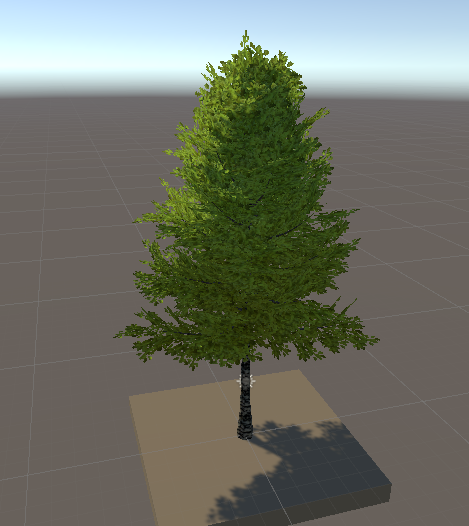
for example this tree
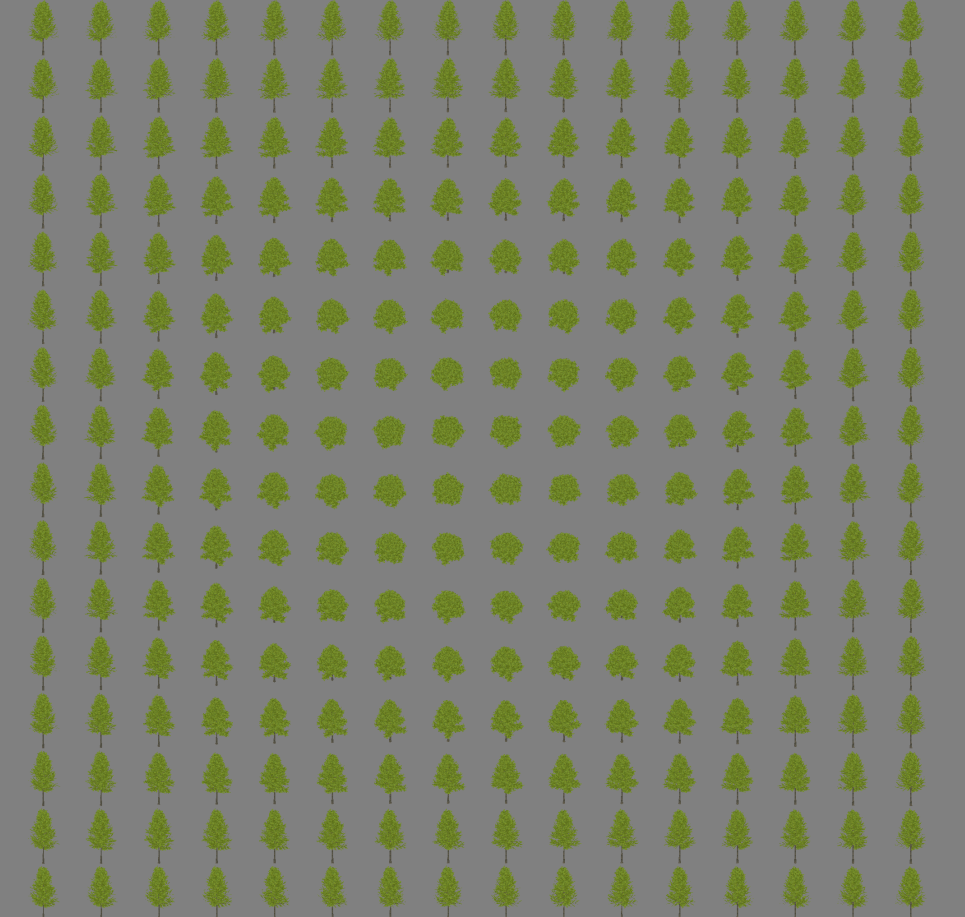
and it's spritesheet
it also creates an 'impostor' mesh to render the sprites on
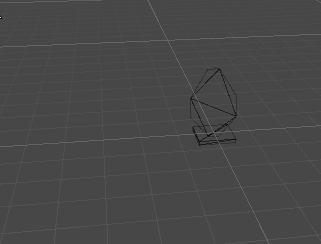
which is very few tris
compared to the real tree
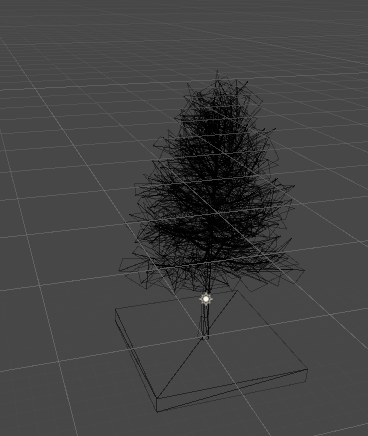
and so really that's all there is to it
to unity it's just any old mesh object with LODs
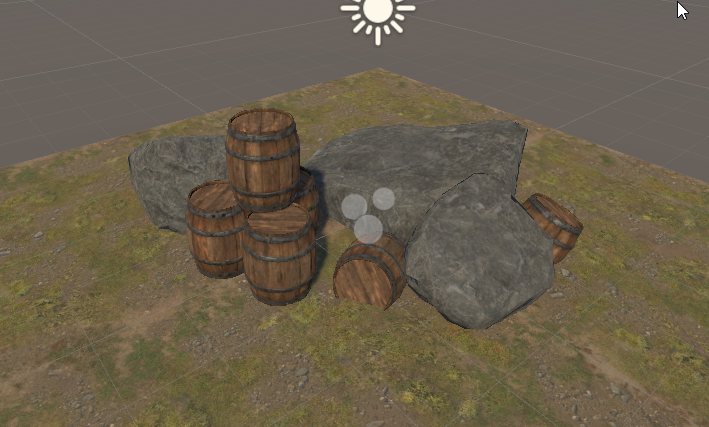
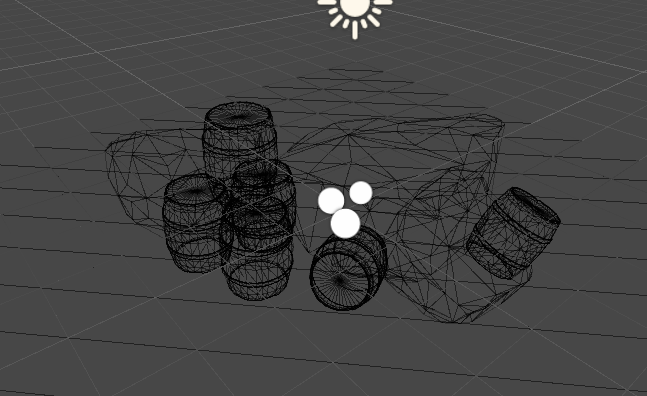
hard to show the impostors on this one
the boulders go to literally a flat plane
so do the barrels
oh yeah this is a billboard type
always faces the camera
just the sprite changes as you rotate around
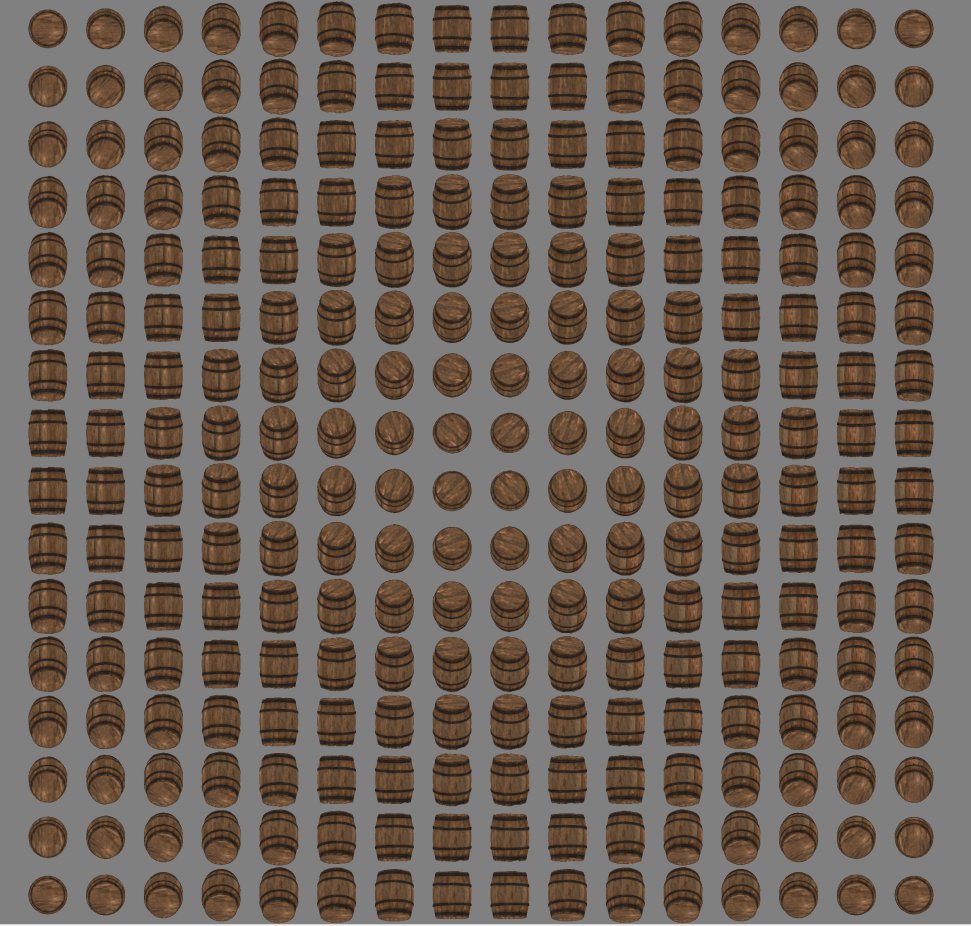
barrel one shows it pretty clearly
I think it doesn't just switch sprites, but literally blends between them based on angle
it's very smooth and hard to tell it happens
if you look close though you can see it
it's a lot of textures though
they do a sheet for every map, diffuse, metallic, normal, AO/Emission
and they are at least 2048x2048
so it adds up to a lot of additional maps, because you need those in addition to the regular model maps
so that's the main tradeoff, you use more texture memory
but for something like a forest of trees, it's probably a very good tradeoff
(as long as every tree is identical 😛 )
i'd probably only use it for things that are rather high poly, frequently used and uniform in looks
or something large that's seen from everywhere
great for like 'the big ass smokestack that towers over the valley'
sacred coral
you brought up HZD, and did you ever really look at their map
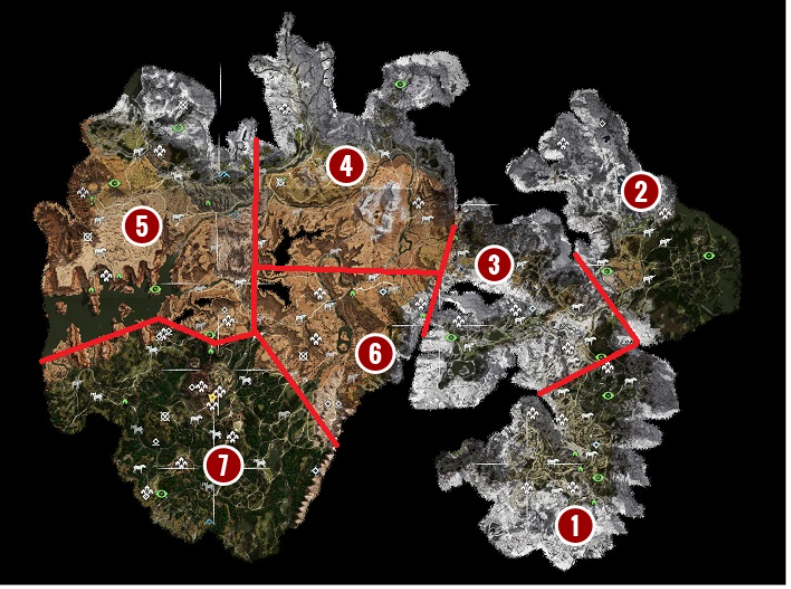
they did the smart thing and used geological features to break line of sight
so it's very difficult to see across the whole map at once
it's big area, but in most instances only maybe 1/3 is ever drawn
and they use all the good tricks of losing detail meshes using LODs and basically not rendering stuff half a map away
but they were really good at making it seem like they didn't do that ;p
wind garnet
I never brought up HZD or whatever it is :P
Oh I did!
I thought the abbreviation was some crappy zombie game
but that's similar
true yes and it is also tiled (64 terrains or something)
wind garnet
it's supe hard to design a terrain like that
sacred coral
yes it is
 warm radish
i also thought HZD was a zombie game at first
 flint pagoda
Hey Zombie Day?🤔
 cunning raven
@sacred coral i love impostors i used it to render large scale room with many chairs on occulus go. works like a charm
sacred coral
Enviro has an update today, they say among other things "Preperation for future SRP support upgrade."
so i'm hopeful hehe
wind garnet
any recommended values for occlusion culling against a large world? or is it best to just simply omit the terrain from the culling solution?
(my instinct is the latter)
open world brings back vertex pressure
sacred coral
terrain has it's own system for reducing vertex count based on distance
so yeah i probably wouldn't try to add occlusion culling on top of that
in fact i'm not even sure you can
terrain will cause objects to cull
say, objects behind a tall hill
but terrain itself won't be culled
anything static by default will get culled by terrain
well i take that back, i guess you have to set the terrain as a static occluder
so i guess in that capcity it should be included
 haughty linden
Any idea how much overhead a single terrain has? Is it possible to have tons (100+) of small (10x10) terrains in a single scene?
wind garnet
er not really no.
try for around 64 or 128 tiles at the most with at minimum something like 512 to 1024 scale / heightmap +1
there is still overhead of processing all that, don't use it for a purpose it's not intented for because the whole reason terrains are a special case is to intend for that problem
 hushed wedge
Hey, does anyone know if Unity is working on tessellation + draw instanced?
So far, if you do a tessellated shader + draw instanced, it doesn't render
EG
(edit: the hole below should be showing tessellated terrain - the range from the camera where tessellation is activated, now this range is nothing)
 vague dragon
@hushed wedge I recall hearing from the MicroSplat dev that he's bugged Unity about this previously and still hasn't gotten anywhere with them sadly
I too would love to have this combination as well
wind garnet
hey all, any movement on terrain vegetation rendering with Unity? :) I recall for the longest time Unity said it'd bring vegetation rendering improvements first before terrain improvements, and the terrain improvements came and went, we got instancing then some hardcore quality AAA tumbleweed, with a gentle sort of silence :)
(and no I'm not demanding, just a gentle prod for info) :D
sacred coral

Unity Technologies Blog
We now have a team dedicated to terrain, and our initial efforts will soon be publicly available! Unity 2018.3 will ship with an update to the terrain syst...
reviewing what was new, I see nothing about vegetation improvements
i think they said that would come in the second wave of improvements.
they aren't' done improving it yet.
wind garnet
Yep just a little concerned as I will not be using vegetation studio pro (it is way overkill for our purposes, and has too many bugs so I feel a vote of not quite for this project)
wind garnet
undo flat out doesn't work for anything for a start
tested in 2018 and 2019
instead of undo, it just selects the previous object
various other twitchy things we could live with but I think here we have an author that is working super fast, super hard but hasn't really got the time to devote for these smaller issues
( i like the product and recommend it still )
but in my case I don't need everything it has, just performant trees and larger bushes, maybe some rocks. That sounds awfully like something Unity can handle well.
(I'm handling grass, which is a lot faster than vegetation studio's approach, but shader-driven with tricks)
(same as battlefield 2's technique)
or similar
sacred coral
i see
wind garnet
I think it's a bit ridiculous to place every batch of grass, it's insane overhead that's in no way needed
can just place them based on heightmap
no need for cpu involvement
sacred coral
something has to place them either way though?
wind garnet
place clusters of them that conform to surface in shader
(pretty much no cpu time spent. some, but nothing important)
<0.1ms
flint pagoda
hmm the roadmap doc doesn't even include any vegetation tools
just. . . terrain holes
and that's it
sacred coral
yeah i dunno, maybe part of HDRP was new vegetation shaders
perhaps it was wrapped in that package
flint pagoda
man do we really have to create our own foliage renderer using drawmesh indirect? :/
sacred coral
that or buy one off the store 😛
flint pagoda
and that's just to render grasses. . . . .
yikes
@wind garnet what kind of tech you use for placing/render grass? is it built in terrain grass tools or custom gpu instancing thingy?
wind garnet
the long and short is:
I bake a top down heightmap of the terrain first. then I create a bunch of pre-merged grass "batches" these are usually around 5m square and are lots of premade grass meshes, you know, a whole section of grass. not too big. One mesh.
in vertex shader they calculate wind and read the texture I baked for height. anything that shouldn't have grass is simply optimised out by the gpu as degenerate triangles if scaling, or you can also just throw them down outside camera clip.
These big batches simply spawn in cells around the cam as it moves around, usually there will be 9 meshes to render at a given time, perhaps more if you fancy having another ring of them. not enough to pressure vertex much, not enough to pressure draw calls, work all done in vertex in shader.
the vertex read of the heightmap can be considered a bit of a sticking point if microoptimising and the texture is large but it's never been a noticable point
i did this 5 years ago in unity and found it had no impact on my fps.
its super simple, super fast
you can vary the batches of grass with flowers, rocks, any old crap
you could lod them easily as well if you wanted, i never bothered might do this time round
all of this is way faster than whatever grand nonsense people think is clever with ecs tbh
but it's only really any good for small things you'll be fading out. it doesn't suit long grass or trees
so a mix of both I think is best
dots for bigger things
flint pagoda
oh interesting
flint pagoda
i need a way to generate grass for meshes terrain
wind garnet
huh i need to make some tooling for that too
thing is though I'm not sure this approach is faster than.................
using vfx with the same approach
so i'm gonna test it with vfx this time round
wind garnet
yeah and that's not optimised, so we can probably have a mess about with it
got a link?
flint pagoda
it's on github
wind garnet
(i'm totally not experienced with vfx yet)
flint pagoda
hang on

GitHub
Visual Effect Graph - Samples Project. Contribute to Unity-Technologies/VisualEffectGraph-Samples development by creating an account on GitHub.
flint pagoda
well . . . i'm an artist actually ¯_(ツ)_/¯
wind garnet
Voxelized Terrain : Interactive Terrain
that mean your programming is dirty!
yea wow that grass in vfx is nicer than expected
 signal heath
Hii,just a quick question, is it possible to make a spheric water? I mean a spheric water soo that objects float on it?
 formal cave
Maybe?
Create a spherical trigger for the water and while anything is in the water enable a buoyancy script. The buoyancy script could just be adding upwards force to a rigidbody
@signal heath
I’ve been working on an ocean game for the past few months so if you need any help with water then ask me 👌
 dusty solar
I think they're getting a bunch of Juvenile delinquents to do it
signal heath
@formal cave soo im quite new in unity and i always wanted to make just a spheric planet with water soo i can float with a ship, soo i did spheric planet with gravity but the water is a other issue, i realized that i never seen a spheric water before 😄, soo what is necessary for a spheric one, can i take a script from a other flat water?
formal cave
Well it depends on what you’re doing
Having a player that can swim might be a bit advanced but just floating to the surface would work
signal heath
@formal cave how could i do that, i mean the floating of objects,
Im not ready yet to make characters swiimm
signal heath
@formal cave yeah, my ship hase one
 formal cave
private Rigidbody rb;
public float floatForce;
private Vector3 forceV3;

     void Start()
     {
           rb = GetComponent<Rigidbody>();
           forceV3 = new Vector3(0, floatForce, 0);
     }

     void FixedUpdate()
     {
          rb.AddForce(forceV3);
}```It might have errors because I did it from the top of my head
signal heath
This goes to the sphere right?
The water sphere
The ship hase these scripts
And the water this one
formal cave
The floating object script would go to any object that is inside the water
Whenever an object goes into the water it enables the FloatingObject script and when it leaves the water it disables the script
I’m not really sure how colliders work too well though
wind garnet
Wrong chat mate.
It's got nothing to do with terrain and you should use pastebin for code, not a mobile phone screen grab. You didn't even bother doing a proper screenshot? you're not going to get help doing that.
- use pastebin 2. post in correct area of discord. Set your rank to generalist if you can't see where to post code.
signal heath
@wind garnet there isn't a water chat right, I though terrain includes water
wind garnet
No it doesn't.
Terrain is sculpting a terrain and rendering the trees or grass on it, there is no water part of terrain, and terrain doesn't mean water :P
For water you want #⚛️┃physics if using physics or #archived-shaders if rendering it... or maybe one of the programming sections
signal heath
Oh alright, thanks than
warm radish
terrain holes was slated for 19.2 but we were pushing in a lot of features for unity overall and holes/clip mask didn't make the cutoff so now it's 19.3
wind garnet
Silly gdc
sacred coral
it was from this

a unity employee posted it on twitter, i forget who
Will Goldstone
wind garnet
Yeah, DW nobodys going to bang the table and demand it. I already tried and will called me Mr Simpson. So harsh!
sacred coral
don't you mean Mr. Burns 😛
warm radish
haha. aight cool. as long as we made it public. i can talk about stuff now
wind garnet
You don't need code names that you have to check the spelling for
warm radish
i never check my spelling
warm radish
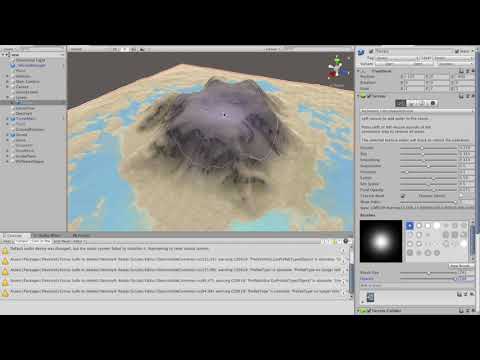
Unity Forum
Some free terrain tools I put together using the excellent terrain tool system included in 2018.3. The hydraulic erosion tool in particular wouldn't...
wind garnet
nice!
signal heath
Hello there, is it possible to rotate the terrain? Like for example 60 degree??
 acoustic crest
Yess
signal heath
How? When i do this to the terrain it doesn't rotate
With rotate i mean like flip it upside down
wind garnet
Nope.
signal heath
Nope as for yeah sure it does work?
warm radish
No you can't rotate it in the traditional manner
wind garnet
Short of modifying the shader and only having a visual change, no.
That's what you use meshes for. But if it's just a rendering change like curved world asset then it's possible of course.
(although that would need to be applied to everything not just the terrain shader)
Is it just a visual rotation? without gameplay on it?
warm radish
ya you'd have to modify the terrain shader. transform the verts after applying the heightmap
you'd have to do something else if you want physics to still work
Terrain -> Mesh + Mesh Collider
instead of Terrain + Terrain Collider
 half otter
Anyway to use terrain on mobile devices without a lot of lag?
warm radish
which version of unity?
signal heath
I never thought that i couldn't rotate the terrain in unity
The reason why i want it its because i want to make a World upside down and attach a gravity on it, soo i can see a island above
The only thing that i can do is make the terrain in blender, soo it could work but the island is too big and it would be many polygons, something that blender cand handle
sacred coral
or you could just turn the camera upside down
then you don't have to do anything special at all
warm radish
game trickery at it's finest
signal heath
Dont see how this would work to me, i want to create 2 Islands, one streight and one directly upside down above the firet island,,, would it work if i trun the terrain to mesh?
warm radish
ya. that could work
wind garnet
nah just download an expensive water asset from asset store, turn it upside down and get rid of all the watery bits and make it flat
I'm not totally serious, sorry
sacred coral
yes if you want up and down, one will have to be a mesh
either that or split the screen horizontally and have the top with an upside down camera and the bottom with a right side up camera and so some trickery to keep both cameras syneced on two different terrains
but that would probably be a nightmare to handle lol
wind garnet
anyone know offhand if we can set lightmap parameters on terrains via code?
half otter
@warm radish 2018.3
 acoustic mantle
has anyone experienced that the rotation tool for branches and leaves in the tree editor is not working?
warm radish
@half otter do you have instancing enabled on the terrain? you should also tune the pixel error setting for each terrain you have loaded
 craggy dawn
I found the solution, that is ridiculous, I download the navmesh from github, I still use the standard bake option, but now that is perfect
half otter
@warm radish Draw Instanced is not activated and pixel error 5. (Default values)
warm radish
@half otter try enabling draw instanced and see if that helps any
wind garnet
Hey all, noticed ST8 support in the works for HDRP, wondered if terrain is using dots behind the scenes to render everything optimally or should I roll some kind of solution? Just ST8 / HDRP related question, thanks :)
sacred coral
Unity Technologies Blog
We now have a team dedicated to terrain, and our initial efforts will soon be publicly available! Unity 2018.3 will ship with an update to the terrain syst...
they just added instancing to the terrain itself. nothing about using ECS/DOTS/Jobs
and pretty sure Speedtree8 support is jut that, not a complete rewrite of the tree spawning
you can see all the speedtree related changes here:
GitHub
Scriptable Render Pipeline. Contribute to Unity-Technologies/ScriptableRenderPipeline development by creating an account on GitHub.
i looked through all the commits, it's all 100% shader related
wind garnet
2018.3 terrain update getting started.... I bet staff are kind of releived that people really don't expect terrain stuff to move quickly. it's faster to move heaven but not earth :P
can't even move heaven atm since sweet time is taken over the procedural HDRP sky.
I might as well dig a hole
except I can't til 2019.3 a year after 2018.3's getting started
alright I'll stop teasing, it's fine :D
...
can't believe it took a hole year for a hole.
sacred coral
what, you didn't expect them to do the hole thing at once did you?
dusty solar
ba-dum-pish
dusty solar
slowclap
on-topic, would you say now is a good time to reintroduce Terrain to artist who used it in the 4.X / 5.X cycle and declared "this is absolutely terrible, we'll just make it in maya or whatever" and go "ok it doesn't suck anymore" or should I wait until later in the 2019.X cycle?
wind garnet
I think the terrain and workflows and tool extensibility at the moment is excellent and so is the API surface. What is not is any form of vegetation rendering. It's pretty fast too, and at the point where I don't really see much bump from using meshes
Hopefully they'll implement that atlas/cache thing so 8 splats performs like 1, basically.
dusty solar
I see, would it still be worth investing in something like amplify imposters for things like veg/tree rendering, especially if it's more stylized?
wind garnet
I've got vegetation studio pro so I can talk about that. I don't know really, about amplify only that ceebee mentioned it doesn't get many updates
wind garnet
UE has an official impostor system due to the requirement for it in fortnite
it allowed them to port to mobile
They're using it for anything - trees, bits, etc
I don't know the state of amplify with HDRP. If it's seriously quick then I'd consider using it for all my stuff.
Also don't know where dots is going.
dusty solar
ok, thanks
wind garnet
I'm interested in your own eventual findings as well, let me know what you're thinking at that point please
dusty solar
I will. We're using LWRP but I'm still in the processing of getting the band back together and out of concept phase.
Mostly I'm just scouting for better solutions to the issues we had in the past.
Amplify Impostors thread on the Unity forums seems reasonably busy, so I'm not concerned about support should we choose to go that route.
I'll forward Veg Studio pro links to my art team to see if they can make use of it
thanks!
wind garnet
veg studio pro is bloated and has niggling ui issues but the core tech seems performant
dusty solar
wow, looking through a few of these assets, you can really tell that a lot of the asset store developers are waiting for the 2019.1 shoe to drop since a lot of them haven't had official releases since early feb.
wind garnet
seems that way
sacred coral
yeah i think most are waiting for HDRP to be released
wind garnet
that'll be a while then
sacred coral
which happens when 2019.3?
wind garnet
maybe
if unity wasn't so opaque here it would be rather nice
just to know. I dont care when really only that I can see where we're at and make my own decisions.
sacred coral
i thought they said in that timeline doc
wind garnet
yeah for hdrp? it's a goal but I sense it'll really be more ready in 2020 from staff noises
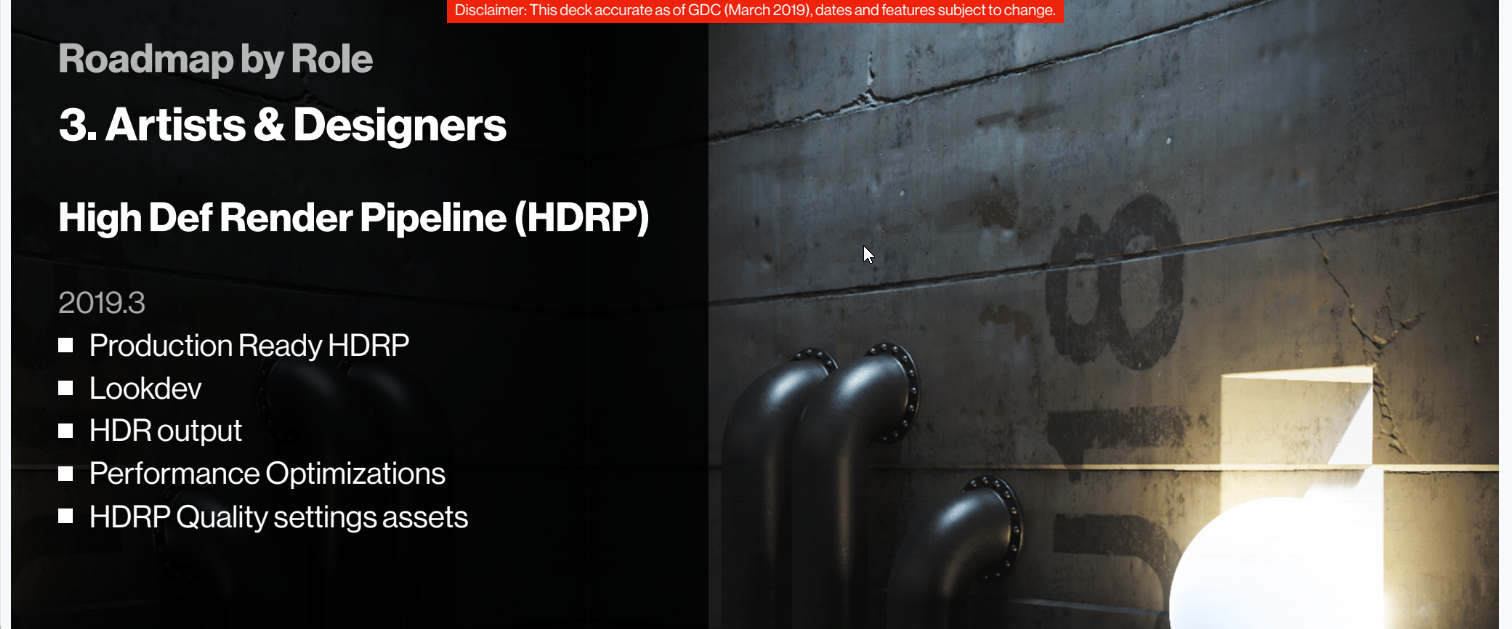
anyway the roadmap sadly seems useless and totally lacking information about a lot of things
I mean i don't even know what the plan is or if there's even work beginning or near end or whatever, terrain is entirely opaque
and I'm not one to ever be rude to staff so I refuse to pm or anything like that. would be pretty rude imo
 sacred coral
LWRP will be production ready in 2019.1
so maybe some will start the ball rolling with that
wind garnet
production ready means that it's about a year away from being battle tested for issues
it just means you can start making your game with it
like a beta basically
and that's fair
sacred coral
well it shouldn't have drastic API changes from that point
wind garnet
yeah that's what seb meant
sacred coral
i think that's what 3rd party devs worry about
nobody wants to spend weeks/months making a solution only to have it break
wind garnet
he spoke about it not being really a final thing by 2019.3 just no major api changes etc after 2019.2
so it likely will still have rough edges
I am using it in production now so if there aren't any HDRP tree shaders etc then that is 100% my fault.
but still, I need to know unity's plans for rendering a lot of vegetation, any billboard stuff etc etc so I can make my own decisions... is that not fair?
sacred coral
i think it's fair to expect they have no plans 😛
wind garnet
it would be fair to let us know they have no plans :P
I agree though, it's best to just move forward and do my own trees, I think amplify is looking like a solid bet for perf
wind garnet
exactly yeah I agree. It was worth putting some nets out to see if any info dropped to help the decision making process though
sacred coral
gives myself an extra internet point for using 'ipso facto' correctly in a sentence
wind garnet
:D
sacred coral
i always thought being a lawyer would be fun
being paid big bucks to pummel people with esoteric language sounds fun 😛
 nova kernel
How do I make terrain details cast shadows?
warm radish
we have plans
we had a good portion of the decoration updates done in c++ but are pulling that out of native source and into c#. currently looking at delivering in the form of a package (along with other stuff) for faster iteration times. the implementation relies on building patches with job system. not sure if it uses ecs. if not, that will probably happen at some point.
wind garnet
Hey @warm radish thanks for the update, any plans you can share will always be helpful for us deciding things (and we will take responsibility if you change the plan! :) )
sounds like the move to dots-packagemanager-all-things has set things back a bit time wise
warm radish
ya. times are funky
wind garnet
I'll handle my own grass and just use speedtree for now, see how far that takes me
sacred coral
reddit
0 votes and 0 comments so far on Reddit
sounds like a man after your own heart @wind garnet 😛
wind garnet
he's a bit too big
i'm staying inside floating point limits so around 5 miles?
I'm just basically making a small but perfectly formed world the player can have a laugh in, i actually hesistate calling it open world, but call it so just to explain it relatively well
its IMHO a really big level, basically
:D
now if unity solve origin shifting and streaming and all that... then yes I will ... be naughty and make big.
and so will you.
(might have to wait a hole year tho)
warm radish
that's not holely true
warm radish
@wind garnet regarding your GI question on the forums, which are you looking to modify in specific? or i guess what are you trying to do
wind garnet
I am just trying to have GI for my game, but it seems to be giving 50ms readback spikes as the procedural sky changes, and there's nothing I can do to prevent it other than not using a procedural sky.
I have the lowest possible settings as well
or close to lowest possible as advised by training materials for gi params
no gi enabled for terrain at all, just a few cubes lying around. it's just somehow linked to procedural sky and pausing with profiler babbling about async
50ms pauses
HDRP 5.10 - if that matters with gi set to realtime and indirect 0 on the only existing dir light (for testing)
 vivid kettle
Do you have reflection probe updates that might be tied to that sky change? I noticed a huge jump with GI whenever the reflection probes updated, both in draw calls and on the cpu
wind garnet
no, and it's not noticable in editor, just builds
it is noticed in editor sometimes but weirdly often not
some async nonsense
wind garnet
the terrain layers sound intriguing as if I could delete the features of a higher layer and restore an underlying layer, depending on blend mode of layer @warm radish if I am not mistaken?
bit like ye olde ps with blend modes?
I think I chatted with you guys before about it briefly on forums
warm radish
yup. pretty much like photoshop
wind garnet
But here's the thing
Can we move those layers like PS? that would be outstanding to be able to dev heavily on one area... then just move the bastard?
That would actually convert us to doing a full in-unity sculpting approach because it's the iteration time we fear at the moment. This makes it nondestructive if we can also pan those layers around...
So it would be perfection.
makes kissy finger gestures
wind garnet
THIS IS SO HOT. I am willing to use this on our production title for playstation if you like. I think it would be a lot of fun.
assuming it's tooling or such I can add
warm radish
most likely via package (if that's what you mean by adding)
wind garnet
Sounds fantastic, sometime in 2020?
wind garnet
sedimentation on the cards?
warm radish
ya. we have erosion brushes along with others that we are going to be releasing soon hopefully (also a package). there would be layer equivalents for that system which would definitely be after 2019
wind garnet
Sounds brilliant, something you could use without fear of change because a carefully sculpted terrain does take time to look good, and reduces iteration potential currently
What about splat generation, is that a thing you're looking into or is it strictly user side? Also appreciate any links to decent splat generation so I could perhaps code it myself :)
or use an asset if there's one
(preferbly focussed)
warm radish
you mean procedural splat generation? can you give me more info on what you mean by strictly user-side and what the other side of that spectrum would be?
oh i guess you meant are we looking into it or leaving it up to the user to figure that out
wind garnet
yeah!
it wasn't covered in the slides, so I wonder if it's even a thing considered really. And if you have any recommendations out there in the wilds that might help us solve it ourselves anyway
warm radish
ya we have splat generation in mind. 19.1 will be heightmap based brushes. 19.2 we aim to release material/splatmap brushes to that same tool package. those would both have equivalents for the layer system
you should be able to do that on your own too should you have needs that differ from the solutions we end up providing
the brush stuff is currently possible with the TerrainPaintTool API
material stuff we started working on includes depositing material from erosion (not just height), sediment stratification, noise-based painting of materials, and painting based on slope and height
wind garnet
nice maybe I should just wait a little on splats, rather than charge in, thanks for the heads up :)
warm radish
not quite sure what else we are going to do for the material brushes so if you have something specific in mind, go for it
there's API for painting texture that's similar to heightmap
 hearty axle
can i apply erosion to the whole terrain at once with this new brushes? Also as wind erosion is using direction would be cool if we can specify 3d vector field for direction.
and we could potentially use same vector field for the grass and trees animation in future
out of curiosity, is layered terrain will be dots only or is it evolution of current terrain system?
 lyric flower
whats a good free software to creat an nice looking terrain?
warm radish
no 3d vector field for wind erosion (yet). we were looking into this.
wind garnet
these are minor pain points though really what we all want is access to layers :D
that is such a game changer
being able to for example have one layer that's just roads that just digs a small bit using subtract, that works even if we scroll a base layer
heck maybe even import and export to the .psd format would be all kinds of weirdly interesting but niche... perhaps one day
flint pagoda
huh? terrain have new brushes? is the repo got updated?
warm radish
it's gonna be a new repo
one that we contribute to more regularly
and working to get it as a package in Package Manager
flint pagoda
is it public already? i'm a bit behind actually on terrain part
what are you guys talking about exactly? 😄
warm radish
not public yet. we've been working on more brushes and tools for terrain. these will be an iteration of the terrain tool samples we released in october of last year ( https://github.com/Unity-Technologies/TerrainToolSamples ). the new repo/package will come with a couple more brushes and tools as well as workflow improvements. this includes hydraulic, thermal, and wind erosion, noise, shortcut support for tools, and sceneview brush controllers. this is the plan currently for 19.1.
for 19.2 we are looking at tools and brushes for painting texture on terrain like material erosion (carrying of sediment related to the textures and materials defined by Terrain Layers that are added to a Terrain), noise-based material painting, and possibly a few others
this might be a public repo and package via Package Manager
GitHub
Contribute to Unity-Technologies/TerrainToolSamples development by creating an account on GitHub.
part of the noise and erosion brushes we've been working on is "filling" a terrain or all the terrains in a group with one of those operations (think paint bucket fill from photoshop). we could easily extend that to the other tools
warm radish
the stuff that hippocoder is talking about is literal terrain "layers" much like photoshop layers. we're going for non-destructive, easy-iteration and programmable terrain generation
--
which issue is that?
flint pagoda
hmm i'll take a new screenshot, i think i posted it in the forum long time ago but it got ignored 😒
warm radish
sorry. i try to stay on top of that. let me know and i will check on the status of it
flint pagoda
no no i don't think that was a bug (at that moment), so i didn't create any report. But now i'm not quite sure.
the problem is when smoothing the terrain, it smooth the heightmap, but not the normal map
warm radish
was there material painted on the terrain?
warm radish
did those have normal maps on them?
oh
what about lighting? were you using baked lighting?
flint pagoda
yep
warm radish
was that rebaked after smoothing?
warm radish
aight
flint pagoda
okay i think it fixed though
i guess it was a known issues and someone already fixing it when i'm asking in the forum
basically it something like this
BeforeSmoothing
AfterSmoothing
previously on the smoothed area there's still somekind of remnant from the previous normal
and i can't get proper smoothed terrain
but i guess that was fixed tho
flint pagoda
no problem
i totally forgot about that issue anyway 😄
oh btw
what is this mean A — Smoothness (Diffuse Alpha becomes Density)
on Mask Map
warm radish
that's on the terrain layer right?
flint pagoda
yep
warm radish
that's something that HDRP uses (and maybe LWRP)
the alpha channel of the mask map texture is the smoothness value for the terrain layer if a mask map texture is specified, otherwise it's the alpha channel of the diffuse texture
if a mask map texture is provided, then the alpha channel of the diffuse texture becomes the channel for storing density values
 twilit ivy
Hey guys. If I need a terrain about 256x128. Would you do it with one terrain or would you do two terrains 128x128 each? Are there any benefits of using multiple terrains instead of one huge one in general?
warm radish
i don't think there is much of a difference at the moment. main benefit to having different ones might be streaming individual terrains. you could also have more variation in environments since each terrain has it's own set of 8 terrain layers and set of trees and details.
also, square terrains are probably better with our terrain system too (as far as painting with correct dimensions goes) so in this case id say use two terrains that are 128x128
each terrain tile handles the culling of it's own mesh data via a quadtree so eventually, if you just keep adding a bunch of terrain tiles, you might see overhead for iterating over all those tiles and invoking their rendering routines but i dont know exactly what that number would be and varies from machine to machine
twilit ivy
Okay thanks.
Just have another question. Currently when I run the terrain on a Samsung Galaxy S5 it is not showing the details and I see error logs about Texture not accessible. Any idea about that?
wind garnet
I see that VT for terrain is heading to 2019.2 ! exciting
warm radish
@twilit ivy does it say which texture? like if it's the detail texture? or does it just give you that vague error
flint pagoda
anyone know why HDRP terrainLit are darker, like it doesn't get ambient light at all?
Oh now this is weird
shouldn't it be the opposite?
warm radish
ya the shader might not be sampling GI at all. i know the LWRP shaders were like that at one point
flint pagoda
ah
i think i found the problem
but this is mostly HDRP related i think
i need to add this component
but again yeah, it seems the terrain only receive global ambient light, not GI
no wait, actually it did sampling GI
need to change these option
also using CPU PGLM
if using GPU PGLM the lightmap are incorrect
yikes
twilit ivy
@warm radish It just give me that error "Texture not accessible". It does not say which one or what is actually wrong.
But for some reason it works now. I mean the texture read/write. Maybe this was needed or something else was causing it. But now I see the details.
warm radish
Weird. If you could, send me some steps to reproduce this. That would be greatly helpful
vague dragon
Sorry in advance that this is a re-post from #archived-lighting, but I figured that since it's terrain related that maybe it would be worth asking here as well
Any one here have experience with custom materials for Unity terrain + GI? I've tried my hand at using two terrain shader assets (CTS + MicroSplat) and both outputs seem to have the same problem which makes me wonder if it's the API that's the problem
The issue is that when the terrain starts to be chunked by Unity because of texel size and lightmap settings, each chunk has the same lit clusters
For example:
Terrain (top), lit clusters of 2 x 2 with custom terrain material, and lit clusters of 2 x 2 Unity Standard terrain material as a sanity check
wind garnet
@warm radish wondered if you know when https://github.com/Unity-Technologies/TerrainToolSamples is coming (if it's for 2019.1) ? I might be mistaken on dates for improved tooling
GitHub
Contribute to Unity-Technologies/TerrainToolSamples development by creating an account on GitHub.
warm radish
We're gonna talk about that this week
It will be separate from that repository
it'll be for 2019.1 and 2019.2 (this one will come later since we still have to do much of the work for that release).
wind garnet
nice really hungry for it because I'm finding it's basically brilliant with a little experimentation and thinking outside the box
What is coming to 2019.1? new brushes I'm assuming
 tall pawn
Anyone know why my foliage looks like this? I tried a simple custom shader with a solid color, nothing seems to work. I'm using LWRP. If I drag the model prefab in the scene, it looks fine. Just doesn't work as foliage in my terrain.
warm radish
@wind garnet ya new painting tools and terrain manager window. 19.2 will be painting tools again and 19.3 is terrain holes. I don't think much new will happen for this version of terrain beyond that list
wind garnet
sounds brilliant tbh much needed
warm radish
@signal heath how are you modifying the terrain to get those extra polygons?
--
ya. it should at least bring the painting stuff closer to par
wind garnet
@warm radish feed me! when do I get the 2019.1 stuff and what form is it in?
The heightmap importer is super brilliant - it will chunk it for me, right?
warm radish
haha. hopefully not too long after 2019.1 is out of beta. and it will be a package manager package
ya it will chunk for you
split into smaller terrain tiles, that is
wind garnet
I was thinking if only I could just load a base heightmap then paint my heightmap to alter it, but when I erase, it erases to the original heightmap...
warm radish
hmm. that would be interesting
starting to touch on layers
we have been messing out with similar ideas. like having "sediment" and "hardness" layers that you can define
wind garnet
cos I get world creator to do the 90% but I feel I just need to be iterative with just my own on top
in fact it would remove the need for the big terrain layers concept even
warm radish
affects how the terrain height/material is painted
wind garnet
I just want to erase to a the imported heightmap instead of flat basically
warm radish
it would probably remove your specific need for layers haha
wind garnet
yep
warm radish
but not everyone elses
wind garnet
true but maybe I could hack this together? any suggestions? I would SOOOOO love it now
willing to work for it
i guess it really needs 2 terrains doesn't it?
wind garnet
it might be easy to do too, you think?
warm radish
you could them modify the tools to take a max between that heightmap and the painted heightmap
ya pretty easy
wind garnet
awesome I'll try now if you throw me some tips?
warm radish
don't even think you'd need another terrain. just the heightmap to compare against
wind garnet
great! what do I get started doing?
maybe this should be built in too!
extra option
warm radish
if you have the heightmap region that maps to the terrain tile (either the entire terrain or a subregion) you can get the rect for the base heightmap from the PaintContext you get from painting on the target Terrain. Modify the target heightmap PaintContext.destinationRenderTexture as usual then do a final pass that just takes the max of the base RenderTexture and destination RenderTexture
ya maybe we could do this for 19.2
wind garnet
max might not work: what if the alteration is to dig as well?
just clamped multi maybe?
yeah make it a native thing so you define a "ground truth" heightmap... and anything you do erases to that
warm radish
whatever the blend op is, you would just run that on the base and modified heightmap rendertextures, blit that to a new temp rendertexture and then copy that back into PaintContext.destinationRenderTexture
let's say for the noise tool, the code-like pseudocode would be:
PaintContext baseCtx = TerrainPaintUtility.BeginPaintHeightmap(baseTerrain, brushXform.CalcBrushBounds(), 1); // grab the heightmap region from the base terrain
PaintContext ctx = TerrainPaintUtility.BeginPaintHeightmap(terrain, brushXform.CalcBrushBounds(), 1);    // grab the heightmap region from the terrain that is being painted on

Material mat = GetNoiseMaterial(noise.fractalType);
noise.SetupMaterial(mat);

Graphics.Blit(ctx.sourceRenderTexture, baseCtx.destinationRenderTexture, mat, GetPassIndexForNoiseType(noise));  // get the new heightmap modified by painted noise. also using baseCtx destinationRenderTexture to avoid unnecessary creation of temp RenderTexture since this one isn't used

mat = GetFinalPassMaterial();

mat.SetTexture("_BaseTex", baseCtx.sourceRenderTexture);

Graphics.Blit(null, ctx.destinationRenderTexture, mat, GetFinalBlendPassIndex()); // this will perform a final blend operation of users choosing

TerrainPaintUtility.EndPaintHeightmap(ctx, "Noise - Blended Height with base Terrain");
TerrainPaintUtility.ReleaseContextResources(ctx);
TerrainPaintUtility.ReleaseContextResources(baseCtx);
I see
Graphics.Blit(null, ctx.destinationRenderTexture, mat, GetFinalBlendPassIndex()); // this will perform a final blend operation of users choosing
This is a great example, thanks!
warm radish
and then the shader you use for blending between the base heightmap and painted heightmap (the one used for the material returned by GetFinalPassMaterial()) would be pretty simple. just a bunch of different passes you define
could be max, min, whatever you want
wind garnet
Perfect, so the best place to put this is in the same tool bar drop down thing as a brush
(using I assume the github stuff)
warm radish
you'd want to put this in the tool itself. i'll have to check if we are making the repo public. you could download the package and copy-paste the contents in a new file probably
wind garnet
sounds perfect. I'll make sure HR quadruple your salary for unrelated reasons at once @hasty jasper
joking aside this is awesome! could even think about having multiple "mask" terrains that you can erase to ...
erase being the wrong word now really
clone from heightmap tool sounds perfect?
warm radish
clone in what sense
wind garnet
well it's really just blending the value from the unaltered source heightmap isnt it
warm radish
ya
wind garnet
like ps clone stamp tool without the spatial part
where do I grab the source texture, if I wanted those to be different? I suppose make a container component on the terrain go?
seems less pain than butchering the terrain tools
just the one is fine i think tbh for now
warm radish
ya you might be able to do that
have it check if the heightmap has changed at all probably using terrain.terrainData.heightmapTexture.imageContentsHash or something
could be an editor only script that executes in edit mode
that way you don't have to touch the terrain tool code. you'd probably be doing a full-size blit on the rendertexture though
oooooooor!
which version of Unity are you on?
if you are on 19.2, you can use the TerrainCallbacks API
// add your heightmap changed function to TerrainCallbacks. This will get called when the terrain is painted on
// the function signature is as follows: heightmapChanged(Terrain terrain, RectInt region, bool synced)
UnityEngine.Experimental.TerrainAPI.TerrainCallbacks.heightmapChanged += OnTerrainHeightmapChanged;
those might be in 19.1 as well
so have your component hook in to that in OnEnable and take a reference to the base Terrain or heightmap that will be used for the blending
warm radish
no problem. the API might be available in 19.1. cant remember
wind garnet
While working I sometimes have the basemap turn black so I see these squares appear per terrain lod segment, of blackness
can test by dragging the basemap distance slider so it's that
what might cause a basemap to render black?
warm radish
can you share an image/gif/video
warm radish
Ya. The base map isn't generating. if you press play what happens?
Might be async shader compilation though that tends to result in a blue material
wind garnet
Same with play mode
warm radish
Hmm. Ok
wind garnet
Done the restart dance and also prayed to the lord torvalds
wind garnet
I haven't tried funnily enough. It see,s obvious now I think of it.
I just made one with checker then created a material much later
warm radish
Ah so a custom material?
warm radish
Gotcha
wind garnet
I hate terrain's terminology :/
warm radish
Ya haha
We tried changing it to Terrain Material but it was too much if a change. Didn't want to break anything
wind garnet
in 2020 we're bringing out mew terrain audio files you'll use to place trees.
warm radish
Haha. I'll write that one down. You expect some form of it in2020
wind garnet
nooooo
warm radish
You can expect*
wind garnet
I actually have np problems with this terrain overall, it's far higher quality than I'd expect
It maybe would be a good thing to have more complex materials if we would have VT?
since it'll get optimised from 8 splats to 1 or something?
warm radish
Ya
wind garnet
Painting makes it draw the entie terrain with grass layer but when I let go the black squares return
warm radish
Aight. We don't draw the base layer when painting texture and also go to heighest LOD when painting height so that makes sense
wind garnet
I do get error when painting in above video:
Failed to create Object Undo, because the action is too large. Clearing undo buffer
UnityEngine.GUIUtility:ProcessEvent(Int32, IntPtr)
clearly gremlins have been breeding past midnight in the code
I will reimport HDRP see if it clears up
warm radish
What's the callstack? And res of your terrain alphamaps?
Might be running into that exception before the basemap is generated and exits early
wind garnet
not sure, I didn't paint anything previously - it's just my testbed scene
warm radish
Remove the terrain layer. Save and close and reopen then add the terrain layer again
 warm radish
Actually that wouldn't overload the Undo stack
What's the resolution of the splatmal?
wind garnet
2048
i've maxed whatever I can for a single terrain
Do you want me to follow the remove terrain layer step above?
warm radish
Sure. I wanna see if there's an error there
Check the basemap when it's just the checkerboard too
Before adding the terrain layer again
wind garnet
same problem
it has no layer
if I load our other terrain scene which was working fine before and is a complete terrain, it has this problem
so the maps are probably OK
wind garnet
I am not on that yet, I'm upgrading to that tomorrow
I did move from HDRP 5.10 to 5.1x
warm radish
ok. are you able to go back to 5.10?
wind garnet
for testing or general dev?
warm radish
for testing
wind garnet
yes I'll do that
warm radish
thanks
wind garnet
huh maybe the terrain shader for basemap wasn't backported or something
warm radish
It works in 5.10?
wind garnet
@warm radish it is fine in 5.10
warm radish
alright thanks. i can take a look tomorrow to see if something was left out. i'll make a bug report at least
wind garnet
Great thanks
wind garnet
@warm radish On 2019.2 / 6.5.3 there is no problem, so it's just that backport. I'm probably going to stay on 2019.2 now
 flat dirge
Is Unity's terrain and built-in tree system (not SpeedTree) acceptable/performant for mobile usage?
twilit ivy
Depends on your target device. But the terrain defnitly works. I reduced the resolution alot and did not made a super huge terrain and it works. Play around with the settings and reduce as much as you can. I even have details on that. I didn't uses the trees from the terrain, because I just not had a nice assets for that. Because it needs the billboarding as well.
But give it a try, it is worth it. I use it together with LWRP.
wind garnet
2019.2 is too broken :P will wait a tiny bit
warm radish
GitHub
Purpose of this PR
Fixed wrong terrain basemap generation: use vertexID to generate the full-screen quad vertices/texcoords.
Added 1603_TerrainLit_BaseMap test scene to cover terrain basemap render...
wind garnet
great stuff, thanks
signal heath
@wind garnet
I did this with an asset but i got this weird edges, cant figure it out how ti fix
wind garnet
- report terrain scale in units. How big is it?
- report your heightmap size in terrain settings
signal heath
The polygons are 2 times higher than in a normal map
wind garnet
I need the information above
does it smooth out if you use smooth brush?
perhaps the tool or heightmap was simply an imprecise format or whatever?
signal heath
No it was a low poly asset, someone suggested me to cut the mesh resolution to 1/4 but it didn't change nothing
Im just making a new mesh soo i can tell you how big it is
This is the data of the mesh
 craggy granite

Designing landscapes for your games can be difficult. Unity's new Terrain system helps make that process a lot easier. Learn how to make your workflow faster...
flint pagoda
what's with the brush flickering when painting the terrain?
wind garnet
@signal heath perhaps the input texture is too low resolution. try using smoothing brush
but
the asset is for low poly so I can't really help...
warm radish
@flint pagoda where do you see the brush flickering?
flint pagoda
@warm radish oh in the video @craggy granite posted above, when she demoing the adjust height brush
flint pagoda
ah i see, because for me that's really annoying 😄
warm radish
we thought so too haha
flint pagoda
well i'm glad that was changed then
also in the end of her demo the terrain layer flickering on top right part, i assume that's also fixed right?
warm radish
one can hope. it's probably an issue with HDRP terrain and it's basemap generation
flint pagoda
Ooh, that's a good point. i didn't even notice that demo was using HDRP. Hmm 🤔
warm radish
i haven't checked HDRP terrain in a bit so I am unsure. We just submitted a bug fix for basemaps in HDRP yesterday but that issue looks to be different
flint pagoda
let's hope that was fixed then, eventhough i do notice she use alpha for the demo, i just feel bad for her finding some bugs on demo session 😄
that's a big yikes
wind garnet
@warm radish any idea when pen pressure support might be added to terrain? last I heard was some package shenanigans
wind garnet
also https://www.youtube.com/watch?v=qUk2islpbLI ETA? :D
Designing landscapes for your games can be difficult. Unity's new Terrain system helps make that process a lot easier. Learn how to make your workflow faster...
warm radish
i will probably be looking into pen pressure stuff in the near future
but ya, reason we didn't have it already is because it would be a package and we couldn't have the editor depend on a package. we can have package-to-package dependencies though
as for an ETA for the Terrain Tools package, we have 60 triaged GitHub issues so maybe when we get through 50% of those? haha
wind garnet
oh dear
warm radish
20 of those are high priority so probably less work than i made it sound like
wind garnet
Vague handwaving guess - a month?
warm radish
sure. hoping to get stuff out by the end of the month
i'll ask the team tomorrow what they think
wind garnet
thanks will be awesome to get our hands on it
flint pagoda
still no news for instancing foliage/object brush for non terrain huh? 😦
warm radish
no, unfortunately
flint pagoda
poly brush?
warm radish
that's one option
flint pagoda
but there's no update from poly brush for a while
warm radish
they just came out of preview or beta right?
flint pagoda
that was a year ago isn't ?
warm radish
hmm... i dunno then
flint pagoda
welp
flint pagoda
oh btw @warm radish i notice now unity have a default checkerboard texture for terrain, is that texture accesable from texture browser?
 jolly tulip
Polybrush is in the package manager and it's being updated. Currently a preview package
I think the first package manager version was for 2018.3
or maybe it was early 2019.1 alpha
flint pagoda
ah i never check the PM version
wind garnet
checkerboard textures are these things that breed and multiply inside any engine
+various blob textures including the older dark blob
Oh and the party isn't complete without cloud crashing in with his mates noise and LUT
warm radish
can't have enough!
flint pagoda
well checkerboard texture are good to check assets scale on the game world 😄
wind garnet
the vfx sample has the same heightmap in multiple folders so lets not forget that guy
 final wadi
I was having a lot of lag trying to update the terrain heightmaps every frame to update the vegetation position (via ApplyDelayedHeightmapModification), but I figured out a work around. take the paint context destination rt after you blit to it, sync it to the cpu, convert to nativearray, pass it to a job, and interpolate the height based on the heightmap values that way :P
https://i.imgur.com/5LPLiSU.mp4
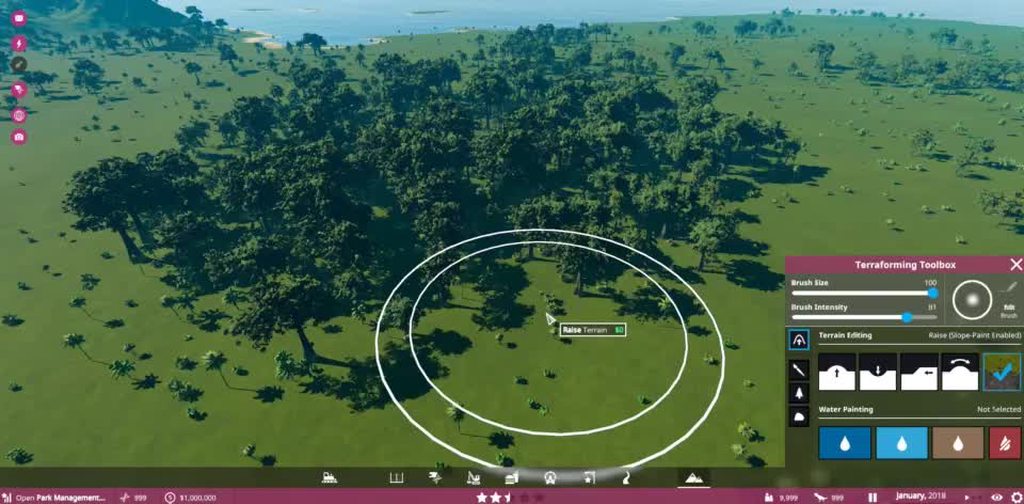
there is still some jitter since I'm just getting the raw pixel value basically and not interpolating anything
but hey it works and is smooth at runtime
probably a very convoluted way to go about it though
there's probably a way to do it all on the GPU, might try that next. was a good intro to the job system
 jagged bobcat
Is there a way for a non-designer codehead like me to procgen some okay looking terrains?
 cerulean wigeon
any one know the texture format of the heightmap?
nvm found how to get it
terrainDetail.heightmapTexture.format
final wadi
moving all my logic from last night fully onto the gpu. is there a way to pass the actual internal heightmap representation of the terrain to a compute shader? can I just pass terrainData.heightmapTexture, or will that do pipeline syncing of some kind?
and is the heightmapTexture RT the actual RT that the painting operations are writing to i.e. paintContext.EndPaintHeightmap. or is that synced later
 stoic sigil
Does procedurally generating cityscapes count as Terrain? 😉
Culmination of weekend's work so far...
final wadi
all my vegetation height adjustment logic is now entirely on the GPU. since all the vegetation is gpu culled and rendered with instanced indirect, I now adjust the heights of the vegetation when sculpting the terrain by reading the heightmapTexture directly from the compute shader and updating the relevant portions of trees. works even better now
flint pagoda
@final wadi your gif looks familiar, what game is that?
final wadi
well then I'm glad, we are trying to achieve a similar quality 😃
flint pagoda
well afaik yours looks better 😄
in term of art syle and rendering part, i prefer yours 😄
final wadi
thanks, that means a lot 😃
flint pagoda
also it remind me to the latest jurrasic park game (i forgot what it was called)
cool stuff man.
final wadi
jurassic world evolution. yeah. we were already working on our game when that was announced, but we are more similar to zoo tycoon 2 and games like that so we fill our own niche. we spoke with the JWE/Planet Coaster guys (Frontier) they are nice folk
flint pagoda
they also use unity isn't?
final wadi
I don't think so, but maybe
flint pagoda
hmm yeah not sure either, i just remember i've seen some dev diary on a theme park management game using unity long time ago 😄


 rose sentinel
anyone knows why the terrain is not getting rendered in build time when using Draw Instanced?
i am using defered + build in pipeline + adressable
 plucky hare
hello
the tree terrian the leaf is wind moving but then I save and close it and it wont moving at all when I open it. help??
wind garnet
if anyone is wondering, vegetation studio now supports hdrp @lusty palm
should fill in the void
craggy granite
did he solve the custom function node issue?
ah
The nodes should work on both LW and HD SRP from 2019.1
so that would be yes then
lol, they let you do this? 😄
well, that's even more hacky solution now
 lusty palm
@craggy granite Updating the AssemblyInfo.cs file in the ShaderGraph package allows you to set the assembly containing the nodes as friend and gives you access to the internal API.
craggy granite
yeah, I noticed 😃
I guess that gives you little more time before you have to go for new approach 😃
rose sentinel
any workaround for terrain draw instanced in deffered rendering?
final wadi
So the Brush UX improvements listed for 2019.1 in this GDC video: https://youtu.be/qUk2islpbLI?t=275
Designing landscapes for your games can be difficult. Unity's new Terrain system helps make that process a lot easier. Learn how to make your workflow faster...
Can't seem to find them, even in 2019.2 beta
Or will this be included in some standalone package that isn't released yet
Guess it is a package: https://forum.unity.com/threads/new-features-from-gdc.658687/

Unity Forum
Is there any information about the new features regarding terrain tools? It doesn't make any sense to implement anything if in the end it will turn out...
lusty palm
@craggy granite The new Custom Function node is not really flexible. No good way to inject pragmas and code when you want to do some more advanced stuff
craggy granite
yeah, we briefly discussed about that on the forums (I'm rizu there)
new node is nice for some things, but your use case is pretty special (would love to be able to include code directly in master node, without wiring it to any current inputs)
 upper pasture
It won't even solve things for relatively simple use cases. For instance, my stochastic sampling node has the following options:
- Which channel to pull the texture data used for blending from (R, G, B, A, or use the luminance of the RGB)
- Should this be normal decoded?
- If so, tangent or object space
This is basically to make it look/act like a texture node.
I converted this to the new custom node stuff before hacking at the assembly like lennart does. Basically:
- Since I can write code based on those options, every option combination becomes a new node I have to write. So now instead of 1 node with options, I have 5 * 2 * 2 nodes to cover the same functionality. So you have "StochasticSample2D_A_Regular" etc.
- I have to write an HLSL function for every one of these variants, instead of just having some code that says "if channel == A write .a to the code"
Overall, it sucks. And if unity really thinks closing the API is acceptable, then they should re-do all of their own nodes this way instead of using the API themselves, using it only for intrinsics of the language as C# nodes.
ironically, when they announced SRPs would mean the discontinuation of surface shaders and thus no abstraction between SRPs, Tim@unity suggested I rewrite MicroSplat and MegaSplat as nodes in the graph - those have hundreds of enumerations, and millions of shader combinations..
wind garnet
sounds like it's still an issue for now
plucky hare
Hello! I have a terrain tree issue..the leaf was moving like wind but then when I save it and close it then when I open it and the leaf does not moving at all...help??
jagged bobcat
is there some software that will procgen terrain from some sort of mspaint?
 glacial stone
Hello
warm radish
hi
@plucky hare how did you set up your wind in your project? and is the tree a gameobject or is it a tree on the terrain and painted with the Paint Trees Tool?
plucky hare
@warm radish Hello, Yeah Terrain and painted with the paint Tree tools!
warm radish
and what version of Unity are you using
plucky hare
the lastest one
i get from app store

This package contains 4 conifers derived from Unity's Book of the Dead Demo – reworked, optimized and imported using the Custom Tree Importer to make them compatible with the "legacy" rendering pipeline.
Rendering
The trees support (deferred) translucent lighting, ad...
it's free
wind garnet
Lots of people seem to have a problem with this asset, why?
flint pagoda
@warm radish can we get path tool for terrain? some kind like the bridge brush, but use spline?
 thorny swift
basically you can use the points generated with spline and use bridge brush and loop through those points maybe, in theory it should work, dont really know if it would be performant but should do its magic
warm radish
@flint pagoda eventually yes. i don't think we will be able to fit that into our upcoming Terrain Tools release
flint pagoda
ah well
thorny swift
Hmm I found another problem, so I am back home on and work on terrain, So I am back to generating normal map from the heightmap, the weird thing is, even that the texture is 16bit the normal from height node makes it in 8 bit
warm radish
i can tell you how to do it with the Terrain API now. I wasn't at my computer before and gave you the incorrect function for populating the normal map render texture. You want to use TerrainPaintUtility.CollectNormals(...)
// get the render texture for the generated terrain normals for the region beneath your mesh
PaintContext normals = TerrainPaintUtility.CollectNormals(terrain, brushRect);
// assign the generated normal map to your SG material property
mat.SetTexture("_NormalTexture", normals.sourceRenderTexture);
for the bug you say you found, it's going to 8 bit output from the Normal From Height node?
thorny swift
yes, I am now using Normal From Texture so its 16 bit
It works now, I have the normals from terrain, thanks
Now figure out how to assign them because last time I tried it didn't really worked
warm radish
Do you mean you have to now assign them to the material?
thorny swift
I have it in shader, I can use it but how do I do that
I use world UVs to map it with terrain, so its at same positions
and then I lerp between terrain normals and mesh normals
warm radish
ya. you will need to convert worldspace.xz into texture space so you can sample the normal and heightmaps correctly
worldSpace.xz of the mesh fragment => texture space for the normal and heightmap
thorny swift
I did that
warm radish
you will need to pass the brush origin and brush sizes to the shader as well
thorny swift
I have it done, now I did the correct lerp so I have good normal map
warm radish
ah ok
so you have the y position of the mesh fragment and the y position of the terrain?
warm radish
lerp could be something quick and easy like this:
float t = saturate( meshFragmentPos.y - terrainFragmentPos.y ); // put blending logic here
float3 n = lerp( terrain.normal, mesh.normal, t );
or did I missed something?
warm radish
what does the graph look like for "terrain mesh frag y pos" and why are you negating the terrain normal?
thorny swift
When I use the terrain normal out pf the box its not in correct format, also its upside down
Terrain mesh y frag pos is world space y pos plus height map
warm radish
alright. can you plug the lerped normal into albedo to debug
thorny swift
I am not on the pc at the moment :/ I will send it tomorrow, also if u wanna take a loot at the shader I can send it to you
warm radish
sure. i am hoping to have a go at this myself sometime this week so i will let you know my findings
thorny swift
I also looked up for a lot docs about terrain blending stuff, and no one is talkin how they went about correcting normals 🤔
Okik, I will experiment tomorrow, saw someone blending mesh object normals with terrain normals so I will look if that will give something
thorny swift
Good point, I'll try that thanks
thorny swift
tried to normalize it, it does not change anything
also tried blend normal node, which did not helped and had same effect just it wasn't masked so I had to do it after, still I got same result
thorny swift
this is the normal I have from terrain assigned into color
the problem here is that I cant assign it into normal correctly, I tried different spaces, custom normal transformation but I have no idea where I made mistake
all I know is that it must be object space normal, because in debug mode its the same that is on terrain
thorny swift
closest match, (hdrp debug mode)
thorny swift
that looks better
this now removes the seam between terrain and plane
but other meshes even cube still does not use it correctly 🤔
masked
hmmm
upper pasture
it's not as simple as just lerping the normals. Depending on what lighting mode your using, you have to consider things like the spherical harmonics, which are computed per vertex. So if your lighting model uses SH data, you have to blend that as well.
And I don't think you can get access to that stuff in any shader graph that I know of..
wind garnet
Sounds like shadergraph is fantastic for mainstream users but is a giant cock block when you want to just get hands-on. I guess if you were working on inhouse, you'd just roll your own SRP and be done with it.
upper pasture
SRP wouldn't help that much, you'd have the same issues. Shader Graphs are just not made to expose every detail of shader coding- basically, that's why they are easier to pick up than manual coding- it's an abstraction, like C vs ASM, etc.
Which is fine if your not forced into a graph, which is kind of where Unity is heading for a lot of use cases.
Graphs are great for one off shaders, but terrible for shader systems, essentially.
thorny swift
yea but what I would just want to achieve this and I rly think that somehow I can do this
thorny swift
this is what I should basically try to accomplish, use it as normal map
and then somehow, offset this vectors with terrain normals, this way its should be easier, and able to accomplish it in Shader Graph
 blissful yoke
having issues painting on my terrain,
any quick fixes for that?
cerulean wigeon
i'm in 2019.2.0a9 and notice, if terrain height is 600, the brushes will be clamped to that range (0-600), but if i use TerrainData.CopyActiveRenderTextureToHeightmap i can set the height up to 1200 (double!)
seems strange
wind garnet
How goes the 2019.1 tools update? looking forward to it :)
cerulean wigeon
the new terrain tools are much nicer, especially since lots more can be done on the GPU so there is faster feedback.
but i'm actually writing (free) terrain tools that will make all the current tools mostly useless 😄
final wadi
terrain alphamap textures are black by default aren't they?
cerulean wigeon
i think it starts black, but when you add your first texture it fills the terrain with it, causing the texture to look red, since the red channel is the first splat layer
wind garnet
I like the sound of your tools
but that's unity's plan, to have people make it instead as they are evil overlords of bone idleness (I jest)
upper pasture
Honestly I wish they would do that more. When Unity makes a tool, they usually leave it at the 90% mark. I'm more interested in them working on the foundational stuff that you build on top of than anything else (which they are also doing..)
warm radish
@blissful yoke are you using a custom paint tool? it looks like the format for the alphamap texture is messed up
@wind garnet we are starting to wrap up our 2019.1 release of the Terrain Tool package. couple more bug fixes and UX items to work out. and quite a bit of documentation
blissful yoke
@warm radish im not, just plain old unity terrain (2019.2.0a13)
im also using a standard (built in) brush
warm radish
Paint Texture brush? Weird. Which platform and Graphics API are you using?
blissful yoke
windows machine, with vulkan gfx api
warm radish
hmm ok. not sure we have done much with vulkan and terrain yet. does it happen with all of the textures that you are using or specific ones?
blissful yoke
with every, except the first one i add (basically the first layer)
thorny swift
I have weird problem here, I am on 2019.1.0f2 and I set my terrain to not be instanced because it didnt wanted to bake lightmap, so I changed it and now it crashes everytime I open the scene
any way to fix it?
warm radish
@thorny swift are you able to reproduce that in a new project?
as a side note, you don't need to disable instancing on Terrain in order to exclude it from light baking. You would want to go to your LIghting Settings and disable the autogenerate lighting feature
wind garnet
static has a drop-down list to include/exclude baking and terrain has a tickbox to also control that same thing (shortcut) any idea why that's not viable?
wind garnet
that's a bug I reported before @warm radish that Unity's now fixed in a newer ver
it's the basemap
thorny swift
So I tried to disable instancing to try if that helps because it did before
wind garnet
you can test it by changing basemap distance
thorny swift
So I should assign some textures and that fixes it?
wind garnet
no, an update will fix it. until then change the basemap distance.
if it's "black lightmap" that means the whole terrain will be black
is that something you have? entire terrain black? or parts
thorny swift
It's not black, only lightmap
wind garnet
post screenshot
thorny swift
When I get to open project somehow I will, caus everytime I open the scene it crashes unity so I will make new scene
wind garnet
post a bug report and QA will help, it sounds like you have a simple workflow issue?
Remember, terrain that stretches for miles might take a while to lightmap
craggy granite
did people try out the terrain tools already?
thorny swift
I tried them, only erosion did not work right, you can see screenshot above
craggy granite
first package been on staging for a while https://bintray.com/unity/unity-staging/com.unity.terrain-tools/0.1.0-preview
hmmm, but your post was older than the package
was there some preview somewhere else?
thorny swift
ou this is preview, I will look into that, just found out Unity have bintray lel
craggy granite
you need staging registry to try that out if you manually edit the manifest
alternatively you can just grab the package for testing from bintray directly and place it on your projects packages folder
hmmm, that throws this error on editor launchSystem.Reflection.ReflectionTypeLoadException: Exception of type 'System.Reflection.ReflectionTypeLoadException' was thrown.
I tried on latest 2019.2 alpha, but that should run on 2019.1
thorny swift
that is so weird, I tried adding it, it imported and everything and throwing error that local package cannot load, the tranport one I added aswell, but it worked without terrain tools, I did something wrong here probably
craggy granite
well, when you deal with staging packages, anything can happen
they aren't cleared by QA yet
thorny swift
fuu okay
craggy granite
or whoever tests these
it's common to see packages to arrive staging that never go to regular registry
thorny swift
oh wow, the problem was that the terrain tools were in manifest after com.unity.transport, I rearrange it and it works fine
craggy granite
you sure there wasn't some typo, or missing comma etc?
json format is super specific on these
order you list things shouldn't make any difference as Unity also reorders these on it's own
thorny swift
yea, it opens in vs code and there was no error, literally just put terrain tools up one line and it works hmm
warm radish
well how'd you get a hold of that @craggy granite
warm radish
i know but...
craggy granite
I just look around https://bintray.com/unity/notifications occasionally, to see if there are any new fancy things
warm radish
ah well haha. i called this out yesterday and was like... someone's gonna find out and here we go
craggy granite
tbh, I saw this yesterday already, just forgot to try it 😃
warm radish
ya we pushed a test package yesterday
thorny swift
I cant seem to find com.unity.transport in there, so there are not all of the packages that are on git right?
craggy granite
usually most packages that are on regular registry are also on staging
but there could be some exceptions I guess, never seen that happen myself
also, some things that are still experimental aren't on bintray at all
that's not uncommon at all
warm radish
like terrain tools was haha
craggy granite
@thorny swift did few searches and you are correct, that package doesn't exist on bintray yet
it's been like that for many new things so far
warm radish
i guess since the cat is out of the bag, were you able to use the tools at all?
craggy granite
like input was only on github for a long time
I got the toolbox open but didn't really try them
should probably open in 2019.1 in case that reflection error was 2019.2 specific
I've been pretty out of loop on what's been happening with the Unity's terrain
it's great that it gets some love finally
been like decade mostly untouched before the 2018.3 updates
or around that ballpark
was 2019.1 the original estimate for these tools?
I have a faint memory of such target on GDC roadmap but these things tend to shift
thorny swift
not like full release, it should be worked on until 2019.3 where there will also be like material painting, so steepness taken into a count finally and etc.
craggy granite
I've said this elsewhere too but I feel like every 2019.x TECH release is more of a beta for 2019.3/.4 LTS
you get only limited time support on tech releases and LTS is where it's targeted at
also therefore very anxious to get my hands on 2019.3 alphas
warm radish
I'd request that you don't actively share that link for the staging package as they are still in development and not necessarily ready for the public to use
warm radish
Thanks haha
craggy granite
I'm always trying out new things, I really appreciate that they are there for testing despite the stuff on staging can be fairly bugged at times
but that's part of the deal IMO
warm radish
Since you've found it, feel free to try it out. Just don't want users thinking it's been released and evaluating it based on that state
craggy granite
yeah, I try to put disclaimer that it's not real release when I post about these findings on this group
warm radish
Aight cool
thorny swift
hmmm I am ghost here, just gonna leave with those secrets and it will be my ring that I will protect
warm radish
Haha
craggy granite
no errors on 2019.1.1f1 at least
is there some new API needed for these tools that not on 2019.2.0a14 yet?
there's also some other regressions on 2019.2 alphas atm so that's not all that shocking
warm radish
umm i don't think there are any API changes between 19.1 and 19.2
craggy granite
also are there going to be more terrain related tools? seems odd to have a submenu for terrain and then only have one entry under it