#🥽┃virtual-reality
1 messages · Page 37 of 1
 gusty basalt
 pine bison
@hard carbon Pretty sure this is not possible yet, but it might be at a later time
 rain lotus
 wraith shale
open vr got a mention on HDRP release blog post:
 indigo hill
excellent
 high wagon
anyone have experience with unity refusing to install a package that was previously installed?
im trying to readd oculus for android after i had imported google vr
and now it wont install at all.
 rigid yew
i tried to use steamVR interaction example (for teleport, snap turning, interaction etc)
i have problem with it vibrating like crazy in the new scene
i combined it with curved ui so i can interact with UI from far away with laser pointer
so anyone can explain logic on how haptick feedback work? that would be great
high wagon
well i fixed my issue somehow..
now i need help with google vr ability to click on a UI menu by either staring or pulling down on the magnet.
all the tutorials ive watched completely do it differently and have a bunch of other uncessary interactions (like a cube spinning or changing the y position) in the script itself.
anyone can point me in the right direction?
rigid yew
there is VR gaze free plugin that allow you to interact with UI world canvas
maybe give that a try
wraith shale
there's some serious irony here 😄
# About the Mock HMD XR Plugin

The Mock HMD XR Plugin enables you to build VR applications without a device.

It provides stereo rendering support by mimicking the display properties of an HTC Vive HMD.```they don't do OpenVR plugin for the new XR management but they do a dummy plugin that tries to mimic devices that would use that OpenVR..
wraith shale
https://learn.unity.com/project/vr-beginner-the-escape-room
https://assetstore.unity.com/packages/essentials/tutorial-projects/vr-beginner-the-escape-room-163264

Unity Learn
In this project, you will: Review basic navigation with your VR controller Explore a basic VR prototyping environment Add teleporters, interactable objects and sound effects to the prototyping environment using the XR Interaction Toolkit Review how to set up Unity to add UI el...

This VR Beginner project introduces users to exploring a VR environment and working with assets in a prototype scene. Create your own VR environment with this fun, “Escape Room” themed project made by Unity. This project is compatible with HTC Vive, Oculus Rift, Rift S, and Q...
 unreal smelt
Has someone built VR Beginner: The Escape Room on Oculus Quest? I seem to be getting a black box that doesn't go fullscreen when trying to run. By changing to Oculus Android package, I at least get it to run, however, the controllers do not seem to be responding properly then.
 maiden crypt
@unreal smelt I have been trying to solve this problem for the past 2 hours. Same situation.. though I have run into this before, I can't remember exactly what the issue was
I have not had much sucess so far with URP and the XR interaction toolkit
I have also never built a project using vulkan.. which the Excape Room suggests
 hollow sigil
how do i make my player prefab from the steamvr plugin not dontdestroyonload
high wagon
@rigid yew where exactly? i googled it but nothing came up.
@maiden crypt turn off vulkan and try ?
maiden crypt
@high wagon tried that, same result
 livid zodiac
Stupid question ,but what should I use that's not VRTK, since it's becoming less useful?
rigid yew
@high wagon
https://assetstore.unity.com/packages/tools/gui/gaze-ui-for-canvas-70881
i dunno if this will fix your issue, but it is something you can look into
 static girder
Hi, anybody has experience on oculus ovr grabbable snap position with custom animation?
high wagon
@rigid yew i was able to get it to work eventually from rewatching a tutorial for like three hours lol
But now my loading scenes is really bad. But at least it's semi functional
 hearty iron
anyone got any news on the Valve XR plugin? I cant seem to find anything
 carmine owl
it's still in development I think.
Hey guys, I'd like to convert a little vr project from oculus integration to XR. seems doable for the most part, but I'm wondering if there is a free asset I can use for vr hands.
maiden crypt
the XR toolkit comes with some controller models
i'm sure you can take the hand models from the oculus integration
carmine owl
that's a good idea, I'll try.
Couldn't find any models though, only scripts in the packages
 lone knoll
@carmine owl r_hand_skeletal_lowres & l_hand_skeletal_lowres
from CustomHandLeft and CustomHandRight
carmine owl
@lone knoll ah there they are. now onto trying to get the animations working in XR
lone knoll
@carmine owl check out the Hand script in the oculus SDK , specifically the UpdateAnimStates() method, this should speed up the process
carmine owl
will do, thanks for the tip!
 storm ether
hi there, if someone has something nice for VR on Google Play please reach out. I have community (600K+) of VR gamers on android and I need to feed them new content.
 deep yew
Does anyone know how to get the index of a controller within the SteamVR Player object?
 dusty jetty
so if I go into ovrcamerarig and set HandTracking Support to Controllers and Hand. So I add OVRHandPrefab to left and right hand anchors so I can see the hands, what do I need to add if I decide I want to use controllers as hands?
high wagon
@storm ether i believe the app i worked on should still be on the play store
maiden crypt
for anyone interested, I managed to get the VR Escape room to build properly
i just have no idea why...
high wagon
what was the problem?
maiden crypt
I think the oculus integration with the new XR system was bugging out
i changed between multiview and multipass and it suddenly built correctly
Though I'm positive I did that yesterday and it did absolutely nothing.
 hard carbon
Hey all, trying to stream oculus content over a cable (audio + video). Any suggestions?
deep yew
how the hell do i do controller vibrations reeee
gusty basalt
ANYONE KNOW HOW TO FIX ERROR CS0115
 magic jay
are ppl moving away from VRTK?
hard carbon
@gusty basalt Ask in general code. Its an inheritance error
This channel is for VR specific
gusty basalt
yea that question was a vr program however i got it fixed
hard carbon
Good to hear 🙂
unreal smelt
@maiden crypt Thanks, I'll give it a go. Are you using the XR or Android plugin for Oculus?
I'll just have to reset all my weird settings I tried :D
unreal smelt
Seems it doesn't work. Can you share your settings @maiden crypt ?
unreal smelt
Well, I managed to get it work by transferring all the files to another project and building from there, but still not sure what the difference is other than I have Oculus Android package on older project and Oculus XR plugin for the Escape Room. However, the controllers work on the older version much better than having Android package on new.
maiden crypt
I am using everything exactly as they mentioned in the tutorial, and on the forum page
something weird happened with the XR plugin options for oculus though, and it removed a bunch of options like dashboard support etc and suddently started working
high wagon
anyone know if its a good idea to use HDRP 2019.3 for oculus quest?
hard carbon
Its going to depend on your implementation, but it will really limit what you can do. HDRP is going to put a considerable strain on what is essentially a powerful mobile running VR. If you are using link, then you could build for rift, and use the PC power but that really gets rid of the mobility advantage
high wagon
any examples of what youd consider a strain?
are you talking about the lighting?
it says vulkan is now supported
magic jay
i think they're just saying be careful bc performance is priority on quest
magic jay
is urp the new pcvr standard then? would it be worth it to use hdrp?
 severe saffron
frankly Ive been getting poor results with URP lately... the oldpipe is where its at
magic jay
thats kinda good to hear bc aura doesnt support anything but default pipeline atm
hard carbon
Sorry, at work so I can be in and out 🙂 HDRP pushes everything towards quality, which means it uses more resources when calculating lighting passes, blit passes + effects such as post on top of that. So even without doing anything fancy, the resources available for you to build on are decreased. As Tront says, this especially true on a mobile chipset which has limited resources from the get go. I cant speak for URP vs base atm, im still running 2019.2, but im having good results here so I can recommend it.
high wagon
i just rollled back my project at work because it didnt seem worth it 😄
harsh deadline
i rather not get stuck
severe saffron
are the new renderpipes even out of preview? I wouldnt use them at work!!!!
its not mature yet
hard carbon
2019.3 is out out preview
I wouldnt call it mature though
Oh, sorry misread. I think they are both out of preview for certain versions yeh
Latest version is almost certainly a bit weird 😛
 celest jetty
Using 2019.3 and started a new VR project (using the normal old rendering pipeline, not URP or HDRP) and I'm experiencing a strange distortion around edges (It's not AA, more like ASW).
I have a Rift S, I get this using multi-pass or single pass. It's most prominent when moving, the edges of surfaces literally wiggle. It's an empty scene with a cube. In a build it isn't nearly noticeable, but still slightly there. In editor when playing, in the headset view it's awful. Should also mention instead of going with the XR plugins, I imported the now deprecated Oculus integration tool asset. And I'm just going in the scene and moving my head, not any code moving anything. Anyone have a solution?
Consensus online seems to be ASW. But it’s an empty scene with a gtx 1070. Shame.
magic jay
maybe its a performance thing @celest jetty i think i notice that same thing in BaS when getting performance hit
oh glad u figured it out
celest jetty
Can’t say I solved it though, just seems to be what most people are saying is the issue. Also just found someone online saying the oculus integration tool caused it.
carmine owl
I'm trying to use the XR toolset for my application but I'm getting some serious performance problems. my scene is nearly empty and EarlyUpdate.XRUpdate takes about 30% cpu time. any immediate ideas?
Edit: damn, this is super confusing and inconsistent. Now the problem is gone (for now)
maiden crypt
anyone successfully get any post processing working with URP and the new XR interaction toolkit? nothing i seem to do works, and I read somewhere that unity did some successful internal testing of this
i'm also building for quest, if that makes a difference
 vast thorn
Hi! I'm doing a 360 video player for my client for use on Oculus GO headset. Use case: employee onboarding -> lots of devices.
The client wants to update/add videos to the app via website (large videos, 2GB each or more).
Now, my problem is that the GO headset automatically goes into sleep mode. I don't want my client to sit inside the headset and watch the download bar for 15 minutes. Changing manually settings in each new device to 4h sleep time is not an option (you need developer settings for this as well I think?)
Did any of you implement background downloading for GO? (i.e I've found this, but not sure if it'll work since it's still for gear vr? https://developer.oculus.com/blog/tech-note-downloading-data-in-the-background-on-mobile/)
 onyx berry
Hi folks! I'm pretty new to unity and VR in general and was wondering if someone could recommend a tutorial for coding an item spawner in a VR game
Thanks!
 worn thicket
@onyx berry try to google how to spawn items, besides the actual interaction itself VR and a regular game are the same especially regarding spawning stuff.
(not a actual error just used logerror)
does anyone know why this still wouldnt pass this if statement
been looking at this for like an hour and i can't figure it out
asking here cus its the new xr input system
high wagon
hello, does anyone know how to reduce the number of crap that unity builds ?
i just noticed it builds a bunch of uneeded stuff from OVR
and all i have is a simple scene
like avatar assets
i dont have avatar in my scene just a camera rig.
 fervent rapids
I'm using unity and i have the andriod sdk, when i select the sdk, unity says cannot detect sdk. Help?
 sharp oxide
does anyone know how do disable recentering on the oculus quest?
sharp oxide
there is a 'allow recenter' checkbox on the OVRManager script on the OVR camera rig but unchecking it does not disable the recentering
sharp oxide
I think its a bug, this guy can't do it either
https://forums.oculusvr.com/developer/discussion/86700/how-to-disable-quest-recentering-in-unity-xr-2019-3
Oculus
Join the Official Oculus Discussion Forums and talk about Oculus Rift, Oculus Touch, Samsung Gear VR, and virtual reality.
 compact cove
What's the best way to allow quest users to play your vr game
Sidequest or sending apk or something like that?
sharp oxide
sidequest for sure
but you could also just have an apk download if you wanted, but you'll get more people with sidequest
 quaint sentinel
With 2019.3, what has happened to the SBS view in the Editor as in 2018.3.14:
 wheat imp
hi all
im looking for a tool to open doors, ideally car doors in vr...
lone knoll
@sharp oxide what's the deal with Sidequest ? Do we need to add anything to our project so the siderquest users can play our game ?
( i own the rift-s , don't have the quest )
sharp oxide
@lone knoll Here is a guide for submitting a game to sidequest: https://github.com/the-expanse/SideQuest/wiki/How-To-Submit-Games

GitHub
A open app store for mobile android based VR devices such as the Oculus Go, Oculus Quest or other android based devices. - the-expanse/SideQuest
If you want to make it a paid game, you go through itch.io first, otherwise you just put in the download link to the apk
you don't have to change the game in any way to make it work
lone knoll
how reliable is it to publish the apk without testing it on the quest ? ( assuming the game runs well on the rift-s )
sharp oxide
hmm are you expecting a full VR game running on a gaming pc to run on quest?
because it won't
lone knoll
lol ofc not
i know the limitations
just curious about the process
( thanks for the link btw, just joined their server )
sharp oxide
well i doubt it would work without testing it at all tbh
lone knoll
controllers are similar why not ?
sharp oxide
it just seems unlikely that taking a unity project developed for PC and building it to android/quest would run without at least a little debugging with the actual hardware
lone knoll
sure, i mean what if i would take few primitives and solid colors as materials ( unlit )
performance aside
do you have the quest ?
sharp oxide
yeah
lone knoll
do u have other vr headsets as well
sharp oxide
nope just the quest
lone knoll
oh nvm then
sharp oxide
🙂
lone knoll
thanks for the info again 👍
sharp oxide
yw
worn thicket
@gusty basalt havent looked at the txt but a nullreference means it cant find something. So probebly didnt assign properly
 versed needle
what are people's opinions on VRTK
wheat imp
its great! does it work with the latest unity?
 tawny bobcat
Does vrtk do the same thing as unity xr interaction toolkit?
 ashen valley
It serves the same purpose, to abstract the VR implementation. XR is trying to go further as XR includes VR and AR.
wheat imp
im in between xr or vrtk
maiden crypt
it actually does
If you have Oculus software installed it will default to opening using this but you can go into your Player Settings (in the XR Settings) and change the order you want it to try launching the project. If you move OpenVR/SteamVR higher in this list you will be able to run it through SteamVR.
 shell kayak
The XR Management system doesn't support OpenVR. But in 2019.3, the regular XR support in Unity is still available and that still has OpenVR support like the previous versions.
The regular XR support will eventually be deprecated and replaced by the XR Management system and hopefully by that time Valve will have finished their plugin for the new system.
maiden crypt
you are still able to use openVR with the XR interaction toolkit
I literally pasted a responce by a unity dev from the forums
versed needle
anybody encounter SYSTEM_THREAD_NOT_HANDLED when using the Oculus Rift S?
pine bison
In VRTK, all interactable objects have a property called "Grabbable by", where you can set it to left, right or both. A system like that might be useful
 dusk flower
Yo guys, new guy going from UE4 into Oculus Quest development inside Unity. I've tried out the different sample scenes etc. for hand tracking, but I've come across a problem. When using the Oculus InteractableToolsSDK inside the OculusSampleFramework, the touch zones on the fingers don't actually update with my finger tips when moving my hand(the entire OVRSkeleton works fine and hand mesh updates no problem). Anyone had similar issues?
And this is true for whatever tool i set up(FingerTipPokeToolMiddle, ....Pinky, ....Ring etc.)
dusk flower
As far as I can see, the issue resides in the FixedUpdate() of OVRSkeleton, not updating the OVRCapsules correctly
 tired dock
(Oculus Touch) Anyone know how to stop a controller from going idle and turning off when the player is not using it / moving it? Because it creates a bug where the other controller can not interact with anything. Cant seem to find a solution on google at all : /
high wagon
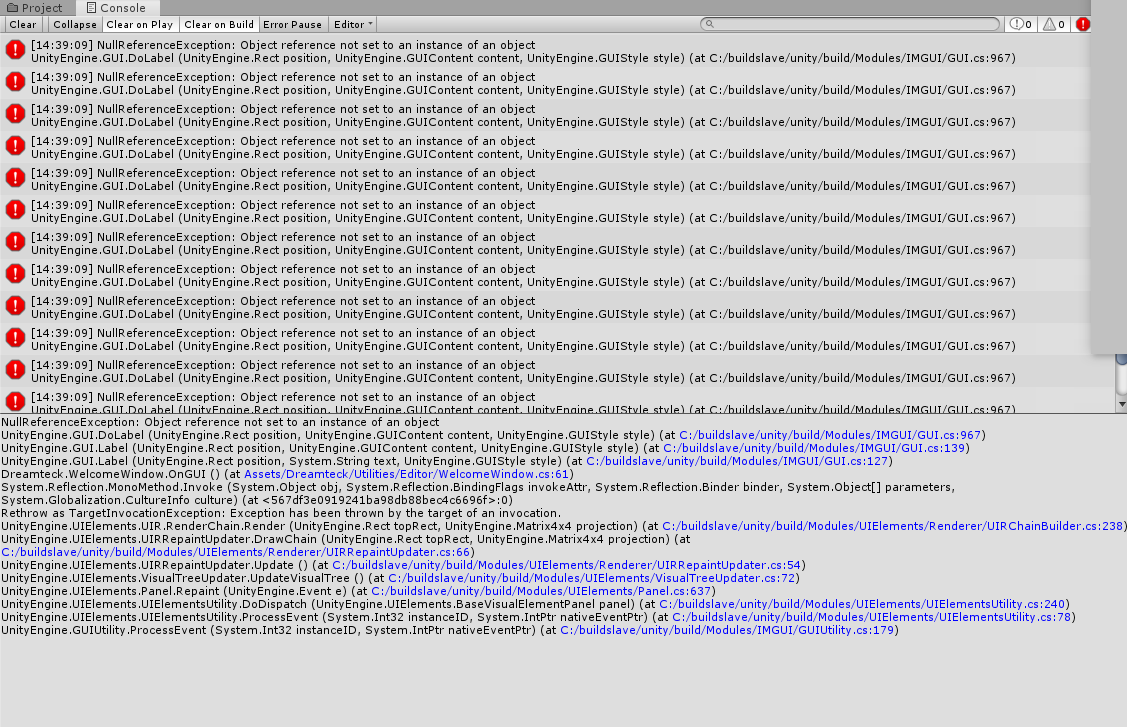
anyone know why unity might show its building, but not show any updated builds?
i think im having issue with the OVR plugin, but not getting any obvious errors.
i am seeing this though https://i.imgur.com/L2PgCS4.png
 dusty jetty
would someone have suggestions how to go about grabbing something realistically using handtracking
when using the controllers I can accomplish this by getting my object that I want to grab and creating an animation for the hand and snapping the object in place, then when I go to grab that object it knows to use that animation, I am interested in something like this https://youtu.be/Wz3eLmJcX0M?t=120
Should I be adding collidors to the fingers, then when I grab something it stops the rotation of each finger when it collides or is there other ways to accomplish this? thx
hard carbon
Couple different ways, all pretty janky. You could set the normal hands invisible, then attempt to move a 'physics' hand to the current state of the normal hand. You would essentially move all the bones using physics.Then, they would stop at whatever blockage there is. Of course, this creates a disconnect between the players actual hand and the hand they are seeing
You could just add colliders to the normal hand, but because movement is straight forward, it will clip through and spin out whatever you are trying to grab
unless you were v careful
celest jetty
You could also do that with inverse kinematics.
hard carbon
^
 wanton copper
lmao, is there any way to use Vive / OpenVR with 2019.3 ?
any info i find online seems to just go in circles
oh ok it's because the XR plugin thing was installed & blocks the other way of setting it up in Player
dusty jetty
so I have been able to figure out that I can do custom poses with hand tracking by using the OVRCustomHandPrefab, I can create animations by rotating each joint
hard carbon
Hey thats cool 🙂 I might give that a lookit
 errant forge
I have a player gameObject that flips when you go left or right (cause 2D) can I somehow prevent its children from flipping with it?
hard carbon
@errant forge Is this in VR??
errant forge
Uh..no, it's 2D, but I figured it out, I edited the player movement script I downloaded from a tutorial to change the Player sprite's direction instead of local scale whatever that is
hard carbon
@errant forge all good mate, but you are in #🥽┃virtual-reality . For future issues, check out #💻┃unity-talk
errant forge
Oh geez sorry I thought I was still on general Unity, my bad
hard carbon
all g 🙂
 livid dew
Noob question, I'm trying to align game objects in my scene to my headset and my hands. (The game objects are joint data from a azure kinect, I want to align my Kinect body tracking to my VR body tracking).
Currently I take the normal of the triangle between my head and hands, and rotate my kinect gameobjects towards that normal. is that the right approach? Cause there's still a small offset and I'm not sure if it's just the hardware or my lack of 3d math knowledge
code is
void Calibrate(){
Vector3 kinectNormal = GetNormal(rightHandKinectPos.position, leftHandKinectPos.position, HeadTrackingPos.position);
Vector3 VRNormal = GetNormal(leftHandVRPos.position, rightHandVRPos.position, HeadsetPos.position);
Quaternion rotationOffset = Quaternion.FromToRotation(kinectNormal, VRNormal);


trans.rotation *= rotationOffset;
}
   Vector3 GetNormal(Vector3 a, Vector3 b, Vector3 c)
    {
        // Find vectors corresponding to two of the sides of the triangle.
        Vector3 side1 = b - a;
        Vector3 side2 = c - a;

        // Cross the vectors to get a perpendicular vector, then normalize it.
        return Vector3.Cross(side1, side2).normalized;
    }
hey guys, I have a few problems with XR teleportation areas:
- I'd like the reticle to scale with the teleportation area scale, but it seems this is not possible?
- when the teleportation trigger is "on select exit", while I hold the select button I can only teleport to the area I aimed at when I pressed select, all others are invalid.
Got some tips on any of those?
celest jetty
@livid dew I could be way off base here with Quaternions but they are noncommutative. So A * B != B * A
what you're doing here is multiplying trans.rotation * rotationOffset
but I think you would want this:
trans.rotation = rotationOffset;```
BUT I might be way wrong so yeah... I do use a lot of code similar to this.
For example
```Quaternion newUp = Quaternion.FromToRotation(transform.up, Vector3.up) * transform.rotation;
transform.rotation = Quaternion.Slerp(transform.rotation, newUp, Time.deltaTime * _speed);``` icy nest
Anyone here actually use SteamVR and understand the chaperone config files and how they work? For years I have tried to reliably sync up two or more HMDs/PCs to use the same exact chaperone file and it works except sometimes one or two of them will be rotated incorrectly. Cannot figure out why. I just transfer the config folder and it works perfectly about 25% of the time
wraith shale
came across this on the new input system repo: https://github.com/Unity-Technologies/InputSystem/pull/1083/files
I did try to put that package manually to manifest but it doesn't exist on public registry yet
but it's nice to know that there is already a beta openvr package in testing
 coral token
Is it normal that Unity crash a lot when I'm trying to play a scene from Oculus plugin assets.
wraith shale
OpenVR XR package here apparently: https://github.com/zite/TestPackage
wraith shale
 pastel vessel
Hey I'm new to game developing and I'm currently trying to work an a VR project and I'm currently working on picking up objects but i cant get it to work would anybody be able to help?
 next atlas
@wraith shale hold up is that the official package Valve is going to provide?
wraith shale
it's beta
also, I totally expect this to not be supposed to be out yet :p
there's two branches on that repo btw
seems to be still wip
but it does render things on HDRP now (quickly tested on 2020.1.0a25)
 brittle lake
What's the correct way to call the get each aspect for the XR toolkit
For a mouse it'd be x = Input.GetAxisRaw("Horizontal");
But for the VR XR tookit it'd be

 distant zealot
Important fix for FFR and MSAA onb Oculus Quest/Go has arrived in the SRP master branch on Universal RP!
https://github.com/Unity-Technologies/ScriptableRenderPipeline/commit/42d6b37d0cb6c9a98b24dc3ea914da11e7b7c956

GitHub
-
- Handled targetTexture dimension not compatible with XR in URP case.
-
- Addressed comments.
-
- Fixed render scale not working in XR case https://fogbugz.unity3d.com/f/cases/1219886/
*...
 pearl bluff
Hi all, I have a teleportation question. I'm using the Quest for development. OVRPlayerController is being used, and the character camera constraint component is defined on the OVR Camera Rig. The issue I'm having is that throughout the experience, we have teleportation nodes. If I remain stationary in the real world, everything is fine when I teleport. However, if I physically move around in the guardian space, when I teleport, I end up in a wall or somewhere that looks to be offset in the virtual world by the space I've moved in my physical world. Any idea as to what to look for to make this not happen?
I should mention that I'm using Unity 2019.2.x, not the latest XR Toolkit
 warm owl
I'm about to jump in to creating an offscreen indicator system, and I'm curious if there are any common pitfalls I should try to avoid.
Stuff I'm thinking about right now:
- Do you use the left or right eye? Or calculate distance/direction from both eyes' frustums and use the closest one?
- I'm guessing different HMDs occlude different parts of their displays. Does this cause issues where UI/indicators are hidden by the physical headset near the edges of the display?
I'll figure out answers to these questions eventually (and run into additional unknown problems), but if someone has already dealt with them I'd love to hear about it 👍
and by "offscreen indicator system" I'm referring to the graphics that show on screen to show where something is that isn't on screen. an example could be flying a space ship and getting arrow on the edges of the screen showing where enemy ships are when not in view
shell kayak
Like anything in VR, you should consider how it would work in real life. Are you imagining that the player is wearing some kind of visor with a display on it?
warm owl
for some more context, the system is trying to give spatial context to events for people who struggle to hear audio cues or have a hard time knowing where things are happening. I'm not thinking the system will be "canon" in the world if you get my meaning
shell kayak
So you're not flying a space ship in this game, so a high tech visor wouldn't make sense?
warm owl
you got it 👍
the style of the effect is secondary to the functionality, and the functionality doesn't need to be driven by anything besides usability. VR is new to me, so general advice on how to handle screen space elements that tend to sit at the edge of the player's view is welcome
although I guess nothing is screen space in vr 🤷♂️
shell kayak
My recommendation is to avoid it as much as possible, because it just doesn't make sense in real life
You can see some examples from Pistol Whip. I think they do a combination of a faded gradient from the side to draw the attention of your periphery vision and a sort of UI element that is still 3D, I think.
warm owl
thanks! I'll take a look 👍 I agree that it may be a frustrating feature for people that don't need it, but if it's optional and helps some people play that normally couldn't I think it's a net positive. In the best case scenario I can iterate on the design and find ways to minimize visual noise and other annoying aspects
And these cues will likely be few and far between - and hopefully never constantly on screen. They should be concise visual nudges
 candid sorrel
has anyone here used leap motion's interaction engine?
compact cove
I'm trying to build to quest, but I'm getting this problem
I downloaded 2019.2.4 and the android SDKs along with it but i still get this error
compact cove
I remember I ticked the SDK and NDK one
compact cove
warm owl
@compact cove You can double check pretty easily in the hub. It's by far the most likely cause you're getting that error
compact cove
Thanks beans I'll try that soon
sharp oxide
@warm owl be careful, parenting UI elements directly to the camera is well known to cause motion sickness
you might want to do some kind of easing; like how the unity logo works when you start up the game (at least on my quest)- its not directly parented to the view but follows it around with some delay and smoothing
warm owl
@sharp oxide good to know, thanks!
shell kayak
I haven't heard of motion sickness being caused by elements fixed to the camera
If the whole world is fixed to your head, sure. And maybe if you have enough elements, the brain will begin to perceive that as the world as reference.
It's just not good UX practice, because people aren't used to having information fixed to their heads
So they will turn their head to look at it and it will move away from them.
warm owl
gotcha. fwiw i agree with your reservations, but i've got my marching orders.
that being said, if the visuals appear briefly and the player does end up trying to look at them they'll just end up turning their head in the right direction which seems like a good thing
but if you have other ideas on better ways to direct players attention beyond good level design and audio cues I'm all ears @shell kayak
shell kayak
Well, those two are the only subtle ways to do it that I can think of.
gusty basalt
hey so im trying to create a minimap...it doesn't show on my scene area, but it shows on the game area. however, when i start playing the game, the minimap no longer shows. Any idea how to fix this?
pine bison
Is this in VR @gusty basalt?
 molten gulch
I made a water shader with shader graph and in editor its fine but when i look via VR i get this wierd reflection!, it shows the occlusion mesh camera? Anyone knows whats happening ?
this is how it should look
 fierce heart
do you use screenspace reflection in your shader ?
storm ether
Anyone doing VR development able to point me towards some training videos that cover VR exclusively? Last night I was reading the Oculus Integration docs and got it up and running, but the links to unity tutorials were focused on general game development. Been trying to find something structured and more VR specific.
molten gulch
@fierce heart no but it looks like it.
fierce heart
anything screenspace related doesn't work in VR iirc. We had a similar issue and we removed the screenspace reflection to remove that.
compact cove
@warm owl There's no "Add Module" button?
I'm trying to add them to Unity 2019.2.4f1
distant zealot
More testing of Android Vulkan with URP coming! Should mean better Vulkan for Quest/Go https://github.com/Unity-Technologies/ScriptableRenderPipeline/commit/071823ffc67a4d89de29bc400c67e4eac135f358

GitHub
-
Adding smaller project with 4 scenes for running on mobile
-
using latest android image
-
Disabling SerializationRoundtrip_AllFieldsAreSerializedAndDeserialized test for now
-
adding mob...
warm owl
@compact cove what version of unity is it?
warm owl
@compact cove this could be relevant
https://stackoverflow.com/questions/56817573/cant-add-modules-to-installed-unity-editors
compact cove
Oh I think its cuz i had to externally install this version
warm owl
that'd do it
lone knoll
@gusty basalt did you write this script ?
gusty basalt
yes
lone knoll
do u change active Mode outside this script ?
gusty basalt
no
lone knoll
then that's your problem
gusty basalt
okk how do i fix that?
lone knoll
why do you think it* will not run ?
where do u set active mode ?
where do u check for active mode ?
what prevents you from moving the player ?
gusty basalt
hold on i think i found an error in another script that may affect this
lone knoll
@gusty basalt #💻┃code-beginner better suited for this problem
gusty basalt
ohh ok but im using it for virtual reality purposes
lone knoll
u doing classical coding here, nothing from the script is vr related
but from what i see u never change active mode
u init the value of the active mode to be none
and never change it
( u did say u don't use it outside the script )
so the if condition will never become true
 rapid haven
Does anyone know how to get oculus quest controllers to work with the new unity input system? I have tried a bunch of stuff that does not work now.
rigid yew
guys, i have simple question
lets say in your games have many type of gameplay mechanic
do i need to come up with several actions set
or i just use 1 and change the gameplay based on that action
for steamvr2.0 btw
 terse rock
https://gyazo.com/35900f16fb8df5017720e5677064543b i keep getting these errors while trying to make a vrchat world and thats also preventing me from publishing it

 vital cypress
Anyone does Oculus dev?
 chilly scarab
I do
chilly scarab
Hey so I'm trying to do a thing where an axe is in your hand but when you throw and release grip the axe throws. How exactly would I do that? Cause I'm SUPER new to unity
 odd tusk
anyone use the steamvr plugin ?
vital cypress
@chilly scarab I'm not in front of my computer, so I can't get the exact code, but I can explain what you need. Oculus provides the velocity of the controller's movements. You can apply that to a rigidbody.addforce after you get the trigger release input event.
vital cypress
I'll help you once I'm in front of my computer
chilly scarab
ok
vital cypress
also, remember that Google (or whatever search engine) is your friend. Most, if not all programmers, rely on it for most programming needs. @chilly scarab
chilly scarab
ok
chilly scarab
@vital cypress r u at ur pc yet?
vital cypress
@chilly scarab I won't be for a while. I'd suggest googling i told you.
chilly scarab
aight
 silver lynx
Does anyone know if it is possible to run two concurrent Unity games at the same time using Steam VR 2.0 SDK?
 summer crescent
It keeps generating all these random control modes
How can I permanently get rid of them
and second question, how do I bind default controls? Some users say the controls dont do anything and they cant bind them :/
lone knoll
@summer crescent what's that ?
summer crescent
the menu for defining VR actions
is there no way to just poll physical buttons directly? instead of needing to define actions and then make the player map them to hardware?
shell kayak
@summer crescent SteamVR used to work like that, but they force developers to now use the new input system with actions.
The player doesn't have to make bindings if you, the developer, have already made bindings for their hardware.
shell kayak
When you're editing the bindings, there's a button labelled "Set as default" or something like that
odd tusk
does anyone know why the "stats" on the game screen's frame timing doesn't match the openvr advanced settings one?
was thinking it could be the compositor but i saw a case where openvr advanced settings was showing like 3ms and unity was saying it was like 5.5ms
shell kayak
@odd tusk What does SteamVR's frame timing window say?
 tiny niche
@odd tusk there might be a frame diff? so in unity you're looking at a different frame than in openvr
 bold marsh
Could someone help me out here?
https://forum.unity.com/threads/steamvr-controller-input-not-working.846934/

Unity Forum
I imported SteamVR plugin from the assets store, then I dragged the 'Player.prefab' into the scene.
Normally I should be able to use my controllers...
bold marsh
My controller buttons arent working in unity using steamVR plugin.
Could someone help me out with that?
vital cypress
I only use Oculus, sorry
 zenith echo
Does anyone know how to make controllers show up with the SteamVR plugin?
tiny niche
check the samples, hopefully they sent prefabs
zenith echo
They have 1 prefab, but the controllers do not show up in it.
zenith echo
There is a controller prefab, but this is how it is placed.
The 2 cubes are supposed to be the controllers.
zenith echo
I figured it out, I just had to reinstall.
storm ether
hi guys, i want to grab and play my 360 videos who are locally saved on oculus go. I´ve tried some paths like /mnt/sdcard/myfolder to grab the vids, but nothing works. Does someone have a clue which path is the right?
odd tusk
@tiny niche what did you mean before about looking at a different frame ? i was just looking at the timings in realtime
 formal solstice
Hi all, a curious question to those of you who develop for Oculus Quest. What interaction frameworks are you guys using? Are you using the Oculus Integration or are you using something else?
pine bison
I use VRTK, which has more features out of the box
formal solstice
Yeah, I have also had a little bit experience with VRTK. Are there any other alternatives? We use an old and hacked version of SteamVR.
pine bison
The new Unity framework is interesting, but it's gonna be a while before it's as feature rich
storm ether
in SteamVR your hands collide with eachother and other objects however if you pick up an object with your left hand and then try to hit an object in your right hand then there's no collision, can i make it so it does?
like i have a jar in my left hand and a knife in my right and i want the knife to bounce against the glass
formal solstice
@pine bison the Unity framework? Not sure if I have heard of it. Something specific you a refering to?
pine bison
Then I have some great news for you https://blogs.unity3d.com/2019/12/17/xr-interaction-toolkit-preview-package-is-here/

Unity Technologies Blog
The XR Interaction Toolkit enables you to add interactivity to your AR & VR experiences, across our supported platforms, without having to code the int...
formal solstice
@pine bison much appreciated! I will certainly take a look at this.
candid sorrel
does anyone here has a varjo headset?
tiny niche
@odd tusk even if you look at it in real time, one of your tools might be buffering a frame before displaying the values, so it could be a frame behind the other tool as a result
odd tusk
all the frames are around the same time so i dont think thats the situation
im not moving the headset or anything just sitting it on a table
btw does that new xr interaction toolkit thing have finger tracking built in ?
or i guess that would be up to the companies that need to implement the plugins
@storm ether i think you need to set a flag in the Throwable script. Its called like velocity movement. it will allow it to collide with stuff.
storm ether
@odd tusk just set velocity movement on both objects and it had no effect, keep in mind they already collide with other objects even without the flag just not with objects in one of your hands
odd tusk
oh ok dunno then. but at least when i used it they didn't collide with other objects unless you put the flag on...
because it needs to use velocity on the rigidbodys for the collision. otherwise it just uses moveposition which doesn't collide using the rigidbodies. it still detects the collision on scripts though i think.
@storm ether
are you sure they were really colliding with other objects without that? like if you tried to wave a sword through a wall it would not go through it ? You are using the SteamVr Interactable system ?
storm ether
Ah, it goes through solid objects but it physically affects loose objects without the flag
Yes using the intetactable system
odd tusk
oh ok i didnt try that but you might be right
but yea just in case you were wondering if you use velocity movement it should prevent it from going through solid objects
thats why i thought it work work with the hands
i never actually tried it myself with the hands
storm ether
They still go through solid objects even with the flag
odd tusk
do they have a rigidbody
bold marsh
@vital cypress I am also using oculus
odd tusk
i guess if you have Throwable on them they need a rigidbody right
i believe maybe have kinematic off
bold marsh
Is anyone here able to troubleshoot with me. I really want to make a unity game especially since I have corona vaction since yesterday.
I only need my controller buttons to start working.
I am using an oculus rift cv1 with the touch controllers. They are tracked in unity with the steamvr plugin but the buttons arent working
storm ether
Ah I guess you were confusing the kinematic with velocity flag
candid sorrel
does anyone here has a varjo headset?
odd tusk
@storm ether what do you mean? does it work now ?
I wasn't confusing anything I think you need both velocity and non-kinematic rigidbody
 tall fox
so im following a tutorial to make a quest game on unity, but i cant find avatarGrabberLeft or right, has this been updated to something else, and if so then what?
storm ether
@odd tusk yes, with kinematic flag to off and and turnoffgravity to on
Without velocity movement
Ah, velocity movement makes it better Howe ver
Thanks
odd tusk
i dont know what howe ver means but np
storm ether
However*
odd tusk
oh ok
still not sure how it would prevent it from going through walls without velocity on
bold marsh
I am getting extremely frustrated.
Ill pay 10 euro to whoever helps me with this
Unity Forum
I imported SteamVR plugin from the assets store, then I dragged the 'Player.prefab' into the scene.
Normally I should be able to use my controllers...
bold marsh
 tall fox
ok im really struggling here and i dont know hy
every tutorial i follow doesnt work or doesnt do what i need
the most recommended one by valem has a bit about localAvatar but this seems incomplete
it also doesnt have the AvatarGrabberLeft which is a bit of a problem
vital cypress
@bold marsh I meant I only use the Oculus SDK
 toxic grail
starting work on my first full Oculus Quest game and I've just run into an issue. For some reason when I click File>BuildSettings then Build & Run, it loads for about 5 seconds and doesn't do anything. There's no error pop-up saying it couldn't export the game but instead just doesn't export it as a .apk Google isn't being too helpful at the moment so I was hoping someone here might know what to do about this.
pine bison
Have you looked in the console @toxic grail?
Have you looked in the console @toxic grail?
Have you looked in the console @toxic grail?
Have you looked in the console @toxic grail?
Errors aren’t always pop ups
toxic grail
yes
yes
yes
yes
mesh needs to be marked as readable
how would I do that?
google really isn't being nice to me today
toxic grail
-_-
hard carbon
It could be that you simply need to do a project/computer restart. Ive had Unity continually read a resource before so nothing could access it, which was annoying AF.
Otherwise, if you look at the second option down in the "Meshes" part of the inspector (when the mesh parent is selected), you can see read/write enabled.
Im gonna ping you to make sure you see this, but im not gonna make it a continuous thing 😛 @toxic grail
 compact helm
anyone want to make a VR battle game?
im a pretty good designer but dont have vr, exept PS VR
 rare igloo
hello
Im making a scene for Oculus VR and im using locomotion.
I also created a trigger box when i walk into i get teleported to a specific location
in my case 0/1/0
but for some reason it is teleporting me to 11/0/36
I am at the end of my wisdom.
i really would appreciate if somebody has some wisdom or help to share about this?
( PS... i tried to compensate for the offset by typing -11/0/-36 .... but it does not matter. same result)
tiny niche
@rare igloo you're moving the tracking space to 0/1/0, but your headset is nowhere close to that
or you should be moving the tracking space, but maybe you aren't?
rare igloo
May i msg you?
pine bison
Oh my god im so sorry @toxic grail my discord had some major issues yesterday
You can make a mesh readable in its import settings
storm ether
_throwable.onDetachFromHand.AddListener(Method); gives me a NullReferenceException even though _throwable is not null but a live throwable object
How is this possible? I've been debugging this all morning and I'm desperate
storm ether
Yes, ofc it's null but you make it not null by adding a listener which I can't do because of nullreferenceexception..
Talk about catch-22
shell kayak
@storm ether UnityEvent isn't a delegate, it's a class.
You have to create it to use it.
storm ether
Create it how? It's declared as public UnityEvent onDetachFromHand; in the standard Throwable class
shell kayak
public UnityEvent onDetachFromHand = new UnityEvent();
storm ether
Why doesn't the throwable class do it like that by default then? That's weird
shell kayak
I don't think it will be null if you've added a listener through the inspector
That's probably how the person that wrote the script intended for it to be used. It's also not crazy to think that Unity would initialize it for you even if it's empty, like it does for arrays and lists, but apparently not.
storm ether
Anyways thanks for letting me know the culprit
bold marsh
Hello earn easy 10 euro help me pls
https://forum.unity.com/threads/steamvr-controller-input-not-working.846934/
Unity Forum
I imported SteamVR plugin from the assets store, then I dragged the 'Player.prefab' into the scene.
Normally I should be able to use my controllers...
 midnight saffron
Hey, I'm a solo game developer who is releasing my game next month. I'm looking for someone who owns the Valve Index + Knuckles, as well as the Vive Wands, to try out my game and help me with custom binding compatibility. If you're interested, please let me know! Thank you and stay safe 🙂
 dusty pumice
this is movement tutorial section in a vr game im working on, its still a long way from finished though. the main story and gameplay of the game is inspired heavily from a few zelda games (twilight princess, ocarina of time, link between worlds, skyward sword, and the zelda randomizers), as well as little bits from some other games like chrono trigger was another big inspiration. if you are interested in seeing it progress and trying test versions of it, you can message me and ill give you discord link 🙂 https://www.youtube.com/watch?v=2ys-prmJi1M&feature=youtu.be
 rare igloo
i have the OVR avatar hands and i made them grab stuff and i made a cube being able to be grabbed...but then i intent to grab the cube the cube flies away or i am not able to grab it
i used that tutorial: https://www.youtube.com/watch?v=sxvKGVDmYfY

▶ Support my work and get the source code on patreon : https://www.patreon.com/ValemVR
▶ Join the Valem discord channel : https://discord.gg/5uhRegs
ANNOUNCEMENT : A lot of things have changed since I have published this video so I have decided to give you an update by making...
what could be wrong?
rigid yew
@bold marsh
Had you try the interaction system scene first at least?
It is good idea to see example given together in SteamVR before creating anything from scratch
If you still have problem even in that scene, then i suspect probably your steamVR software (the one with game store) or controller binding.
Also, be wary of steamVR version because they seem revamp alot with 2.0, and it made some plugin on asset store not working properly with it.
I have rift cv1 too, testing steamVR stuff isnt that hard tbh.
rare igloo
no, im not using steam VR
its OVR
i forgot to make my hands trigger...so now i can grab it, but when i use my left thumb stick i get pushed away
oh...just saw... you are talking to NubeBuster
my bad lol
formal solstice
To those of you who are developing for the Oculus Quest - How do you tackle jaggy edges? In our applications, when objects are near the camera they look fine. But when you increase the distance between an object and the camera, flickering jaggy edges start to appear. My assumption is that it relates to anti-aliasing, so we have already cranked those valves up. It did improve the visuals, but I am far from happy with the result. What is your experience? Any other alternatives we could try?
pine bison
I haven't really had issues with this after using 4x anti-aliasing. Do you have a screenshot?
formal solstice
@pine bison I just tried taking a picture of it, but it actually looks much nicer on an image or video than it does within the headset.
Facepalm I adjusted the MSAA settings but I didn't set that quality settings to be the default one. Now it looks brand new!
pine bison
Noice
 raven compass
Hi everyone!
(i'm from Colombia, so excuse me for my english)
i need help with a game
it's a game made in Unity to help autistic children, the game uses Virtual Reality
and i want a little explain in a topic
 nova rock
how do i use simple trigger events with new XR toolkit? i use XR simple interactable component but i think its enabling rigid body physics so its not the correct one i guess
midnight saffron
hi everyone! i just announced my vr game that i've been working on for the past year and a half on twitter: https://twitter.com/WuchiOnline/status/1240412766654976001


I'm thrilled to announce Hooplord, a labor of love that combines boss battles and basketball into a hybrid #VR experience that's unlike anything you've ever seen or played before.
Hooplord releases on April 9th. Wishlist now on SteamVR: https://t.co/ZVmVXAJ4mz https://t.co/M...
 Twitter
if you know anyone who is interested in indie vr games, please share with them! thanks ❤️
 olive ingot
anyone know a way to get the joysticks on WMR controllers to work with SteamVR?
dusk flower
hey guys, is there a way to stop Unity from using OpenVR(SteamVR) when playing in editor? I've have my Quest connected to the computer with Link and want to use that in the editor with handtracking
ashen valley
I'm not sure you can do that.
I read something about a preview mode in Unity for hand tracking, but I don't think you use Link. Link makes it behave like a Rift, which doesn't support hand tracking.
Mmm, I'm wrong. With the latest version of the Unity Integration, this is no longer a problem. Link can pass through hand tracking to the Unity editor, so simply pressing “Play” will let devs rapidly iterate on hand tracking interactions. Interestingly, Quest still doesn’t pass the microphone through Link, which would seem to be an easier task.
dusk flower
I have had it working before
however after I connected an Index and installed SteamVR I cant get the same project to stop launching SteamVR
the index headset has been disconnected and only have the oculus quest linked
and uninstalling steamVR each time I wanna dev in Unity seems like a bad solution 😛
pine bison
My colleague @granite zodiac has this working, he might be able to help
 granite zodiac
Make sure the Oculus SDK is at the top of the list of SDKs under XR settings in the player settings. (I was only using Oculus, I didn't have OpenVR installed at all)
First make sure the latest version of Oculus Integration is installed. Then make sure the Quest has Link enabled (top right in the dashboard). Next, make sure the controllers are out of sight (it'll tell you they're required, but just ignore this), I just put them behind me. Then make sure the Quest is awake (cover the proximity sensor, I just stuck a sticky note on there) before you press play in the Unity editor, and it should work!
nova rock
Is post processing not working with URP on VR?
shell kayak
@nova rock It's working. What Unity version are you using? And are you on mobile or desktop?
nova rock
Im using 2019.3 and its on oculus go-vr so mobile-android @shell kayak
shell kayak
Well, it's working on PC. Post processing on mobile VR has always been shoddy and Unity hasn't been eager to fix it because you shouldn't be using post processing on mobile anyway, it's too expensive on a tiled renderer
nova rock
i only need bloom..
 radiant bone
does anyone else experience play mode crashes when removing rift hmd in unity? can repro using oculus integration tools 12,13,14 + unity 2018.4 and 2019.3. doesn't happen every time, but very frequently. behavior does not occur in exe build.
happens on blank projects with only OVRPlayerController prefab added to scene and default camera removed. My best guess is that OVRManager script doesnt properly handle for hmdunmounted in Unity play mode, but I welcome any suggestions. I would love to be able to tweak the scene while in play mode but this definitely prevents that from happening. If there's a better place to ask these sorts of questions I'm all ears
shell kayak
@nova rock If you look at Quest games, you'll find a lack of bloom
Because it's too expensive
nova rock
i used "fast mobile bloom" script on built in renderer and it wasn't that heavy on fps. so i think i can afford it somehow. but i believe your word and am looking for other options. and i think URP is not ready for production on VR so im planning to switch back to built in renderer. what's your opinion on that?
 glacial wasp
Hey everyone would anyone be able to help me with a problem I cant seem to figure out involving VRTK and Oculus quest, I am very new to this and I am working on a project for a client of mine. I am basically just building the "InteractableObjects5" test scene to the Quest atm and it builds fine, but when I actually run it in the quest the camera is always spawned in the ground, I tried to fix it by changing the camera Y-axis in unity which worked fine until I actually had to teleport around in the scene to move, when I teleported the camera would go right back into the ground again, I have been stuck on this for a while and would really appreciate any help 🙂 thankyou
glacial wasp
I think I may have fixed it
pine bison
On your OVRController, you probably need to change tracking type from eye level to floor level
glacial wasp
Yeah I did try that :/
 potent escarp
Hi guys, anyone tried getting microphone to work using oculus link?
for me, unity crashes when i try to start virtual microphone
works well with built-in computer mic
 solemn plover
Hey all, i have a problem
I'm using VRTK_SlideObjectControlAction for locomotion but for some reason i cant climb stairs
anyone has a fix for this?
PS: I made a ramp collider
 rain belfry
Hey guys, bit of a daft question here. I've got to make a VR game for one of my final year university projects. We've been advised to do something for Cardboard but I've got a Rift S and want to have a play around with that. If I was to develop something for the Rift S, how hard would it be to port that to a Quest (as the University owns one so it stops me from taking my Rift S down to Uni).
pine bison
You can develop with a Rift S as if it was a Quest, they behave exactly the same. Only thing is that you would not have an indication of the performance
rain belfry
So basically run all the models at low/med graphics within unity and hope for the best 😛
pine bison
Basically  if you have the quest available at school you can do some tests along the way hopefully
rain belfry
implying my uni isn't under lockdown because of the big cough virus
Closed every building including the library until further notice
pine bison
Oh sure, of course
rain belfry
So it looks like the OVRManager can detect the targeted platform (Android/PC, Mac and Linux Standalone) and actually do something with it regarding knowing what devices it can run on
pine bison
Yes, it changes with your target platform
rain belfry
That's good then!
pine bison
But you can still play in editor with a rift when you are targeting android
rain belfry
Oh right, so there's no real point in switching back to the PC target?
pine bison
Not unless you wanna build a .exe file
rain belfry
It's more than likely gonna be a .apk
 junior plinth
I am moving a VRTK app over to use XR Interaction Toolkit. Anyone know how I would get the controller velocity so I can set the haptic strength on my controller object when making contact with an object?
 reef beacon
Calculate it yourself 😛
junior plinth
I beleive that is part of the controller data already but not sure how to access that with the new toolkit.
junior plinth
For anyone searching later controllerReference.inputDevice.TryGetFeatureValue(CommonUsages.deviceVelocity, out velocity);
rain belfry
@pine bison quick question, I'm using this tutorial to get me set up, however I'm getting a NullPointerException. Could you please give me a hand? :P
https://www.youtube.com/watch?v=a-v1eFwWRoo
Quaternion iconRotation = gazeIcon.rotation;
NullReferenceException: Object reference not set to an instance of an object
OVRGazePointer.LateUpdate () (at Assets/Oculus/VR/Scripts/Util/OVRGazePointer.cs:225)
rain belfry
Anyone else able to help, it would be appreciated
rain belfry
My what now?
pine bison
I haven't done that tutorial so I don't know. Are you developing for mobile? Also make sure your oculus utilities are up to date
vital cypress
Anyone else in the Oculus Start sponsored program?
 slate swallow
can you, like, develop VR stuff without owning a headset
 livid mason
I kinda need help here...I want to make a library but each time I put the books (prefabs that I made) on the shelves they just climb up and refuse to stay on it...any tips?
👆 frogot to say I'm doing this on the Oculus Quest
tiny niche
@livid mason sounds like you have an issue with the bookshelf colliders
i would also consider turning off physics for the books on the shelves
livid mason
@tiny niche what do you mean by "turning off physics"?
tiny niche
removing the rigid body
may not need individual colliders on the books either, if they aren't interactible or there's nothing else that might fit on the shelves when a book or 2 has been taken out
livid mason
Ok, let's say I want one book to be interactible? Like in this case I want the player to take out the book on the shelve and throw it in a fire
lone knoll
What happened to OpenVR in 2019.2 ? I can't start start development no matter what i try
~~```
XR: OpenVR Error! OpenVR failed initialization with error code VRInitError_Init_PathRegistryNotFound: "Installation path could not be located (110)"!
this on a fresh project with the latest SDK version on the latest oculus Desktop app on 2019.2.16f ( the project was build for this specific version )
nvm , i fixed that 👌
tiny niche
@livid mason you could have all the books be physically inactive until you move your hand over one and grab it. you'd then either grab the book and add a rigid object to it, or destroy the book and replace it with one that has a rigid body
your players wouldn't be able to tell, unless they can knock a whole bookshelf over
livid mason
Ok...I'll try that, thank you 🙂
pine bison
You can @slate swallow, but I wouldn’t recommend it. You really need to know what you’re doing both in terms of gameplay and optimisation
slate swallow
thanks for the tip @pine bison
does developing for iOS has like fees attached when you upload to the App Store?
if so then I'd just develop for Android
pine bison
There’s a fee to hold an iOS developer certificate, and there’s a fee to register as a developer on the google play Store
tiny niche
yea, there's a fee pretty much no matter where you release
 radiant magnet
Hello i'm starting to learn vr.. don't know from where to start.
Should i use individual platform sdk build game individually for them.
Should i use vrtk?
Should i use unityXRInteraction tool kit? questions are too many not answered pretty well on internet.
any help?
 sweet hamlet
i suggest doing any tutorial to learn the basics and then using this tutorial for steamvr: https://www.youtube.com/watch?v=5C6zr4Q5AlA&t=849s

▶ Support the channel on Patreon : https://www.patreon.com/ValemVR
▶ Join the discord channel : https://discord.gg/5uhRegs
I’ve condensed into two videos everything you need to know about SteamVR and you are watching the first episode of this new tutorial serie. In today’s vi...
radiant magnet
what if i wanted to go for cross platform?
sweet hamlet
i think it lets you build for both
anyone have any good resources for setting up a decent looking scene in VR? I understand the basics of the programming, but I'm trying to make a somewhat decent interior and don't know where to start with assets/lighting/etc
radiant magnet
well that's great.. if that's the case then i should be using it. in general scenario htc and occulus are the two mostly used device in the market. so if steamvr is targeting both device than it's better to use steamvr as a starting point and what about unity xr tool kit has anyone used it?
midnight saffron
hey, is anyone interested in playtesting my game? https://store.steampowered.com/app/1246710/Hooplord/ need people who would be willing to play it through to the end, which typically takes testers 25 to 45 minutes depending on how quickly you pick it up. looking to see if i fixed an AI issue for the final boss. let me know if you're interested, thanks!
nova rock
whats the difference between multipass and multiview? using multiview on oculus go causes left eye to not render.
 random cedar
Nvm All Solved!
bold marsh
I have been having an issue for over a week now. Could someone help? The forums aren't really replying
https://forum.unity.com/threads/steamvr-controller-input-not-working.846934/
Unity Forum
I imported SteamVR plugin from the assets store, then I dragged the 'Player.prefab' into the scene.
Normally I should be able to use my controllers...
vital cypress
@bold marsh lol, i thought you "fixed" it
bold marsh
@vital cypress I did, but it broke again. Dont know how I fixed it, dont know how it broke again
junior plinth
With the XR Interaction kit or or perhaps even base XR support for Oculus Rift , the transform.forward seems to be along the flat part of the controller and not aligned with grip. How do I draw a ray alinged with the grip like you would hold a sword?
 balmy gust
Transform.up?
balmy gust
Anyone know if there is a speech recognition for commands on the oculus go? Like can we use the google API or is there a special thing or is the go android just too old?
formal solstice
Hi guys, have anyone had the chance to play around with Unity's XR Interaction toolkit? https://docs.unity3d.com/Packages/com.unity.xr.interaction.toolkit@0.9/manual/index.html
tiny niche
@junior plinth take the up vector and tilt it forward by roughly 15-20 degrees
oculus ships controller models with their sdk that you can use for alignment
junior plinth
Thanks for the suggestion @tiny niche. We were using VRTK before with the Standard Oculus SDK and this seemed to handled. One other thing I noticed in one the XR Interaction demo scenes (tree with apples and sword) the ray and pointer on the left control seems to be oriented in the way I want to see it but I havn't groked how they did that yet.
 fluid gust
Hi, new to discord here. Do I ask my VR related issues here?
@bold marsh SteamVR2 controllers are always breaking. Its why I use Legacy SteamVR1.2.3. I never have a problem with them, but controller schemes is something you make on your own.
Has anyone released their VR app on steam supporting multiple headsets under the same OS? Did you also have to make two separate builds zipped under 1 common folder? Is there a way to make a single build with more than one .exe since each headset requires different objects in scene and preprocessor define symbols (ie Vive.exe, Rift.exe, Oculus.exe in one build)?
warm owl
What's the best way to go about detecting how far out of the players view something is? I've been converting the target object's position to screenspace but it's been hard to massage the vector into a usable value. Ideally I could make a method that just returns a float for how far offscreen a world position is; where 0 is directly in front and 1 is directly behind.
Different HMDs and the different ways their build occludes the displays is an added complexity that I'm ignoring for now
For now I've also been assuming that different IPD values won't make a significant difference 🤡
reef beacon
Just dot product with the main camera direction?
warm owl
I guess the issue with that is that it won't respect the aspect ratio of the displays or the frustum of the camera. could be fine if it's tweaked on a per hmd basis, but if there's a hardware agnostic way I'd love to try that
@reef beacon
reef beacon
Yeah but you could factor the fov into the calculation
warm owl
fair enough, that's a good thing for me to test!
i've been in the "convert to screenspace" headspace for too long
terse rock
I'm trying to make a program that can let people import some images or footage into a square around them and export out a equirectangular render of it for vr use, how hard would that be to do?
they would have to import 6 images to go on each part of the cube
so i really just want to learn how to import the image onto each part and export it as an equirectangular image
 sharp sierra
Is there any good tutorial for making a vr game for the oculus quest? The last one i watched made the hands track rotation but not movement.
vital cypress
Has anyone released their VR app on steam supporting multiple headsets under the same OS? Did you also have to make two separate builds zipped under 1 common folder? Is there a way to make a single build with more than one .exe since each headset requires different objects in scene and preprocessor define symbols (ie Vive.exe, Rift.exe, Oculus.exe in one build)?
@fluid gust You can make a script change the SDK per platform. You can use VRTK which handles that for you.
Is there any good tutorial for making a vr game for the oculus quest? The last one i watched made the hands track rotation but not movement.
@sharp sierra Use the LocalAvatar and OVRCameraRig / OVRPlayerRig from the Oculus Integration
tiny niche
@terse rock what would people use it for? a standard box unwrap would provide less distortions, unless the goal is to view it on a flat plane
terse rock
It is- the program im trying to make into vr is very limited! And the only way to make it happen would be to change the FOV to 90 and render from six different sides
sharp sierra
@vital cypress That’s what i did and disabled the player model, now the hands dont work
vital cypress
@vital cypress That’s what i did and disabled the player model, now the hands dont work
@sharp sierra What player model? You need the OVRCameraRig or OVRPlayerController. You also need to put an app id into the Oculus settings.
sharp sierra
Ohh the app id thing wasnt mentioned in the video i watched, thanks!
vital cypress
Does it work now? @sharp sierra
sharp sierra
I havent tried it yet i dont have my quest with me sorry
vital cypress
It wasn't mentioned because it's kinda new. Ok
fluid gust
@fluid gust You can make a script change the SDK per platform. You can use VRTK which handles that for you.
@vital cypress Hi, Thank you for your response. Managing the SDK is something I made from scratch and is working well without VRTK. Do you know if Unity can make build with more than 1 .exe?
vital cypress
I do not, unfortunately. @fluid gust
 lethal orchid
How do i make a project vr compativle? in the past i used openvr, or whatever its called in the package manager, but it says something about it being outdated and how i have to use some alternative plugin stuff
vital cypress
@lethal orchid Unity just made the XR Plugin, which deprecated Steam VR. Oculus is still compatible.
wraith shale
there is this wip branch for OpenVR plugin for the new XR management system: https://github.com/zite/TestPackage/tree/TestBranch
it did seem to work on HDRP / windows when I tried it, but no idea if it still misses something
lethal orchid
So I just use the XR Plugin?
vital cypress
Yes @lethal orchid
balmy gust
Anyone in here experienced in calculating a VR project? It is just out of interest for a maybe upcoming customer to be at the right track about costs?
tiny niche
@balmy gust even if we could give you an average number as the baseline cost, you'd still have a variance of 10-1000% depending on your team's skills
long story short: plan it out and eek out as much as possible from your customer
and since vr dev is quite risky at the moment, make sure that the profit margins are huge
balmy gust
@tiny niche i was seeking for someone that I can explain my situation, app concept and that just can give me an estimate of it
tiny niche
@balmy gust well i could give you an estimate if i was going to do it, but you're the only one that knows your team and what they're capable of
or are you planning on outsourcing it? but if that's the case, you'd really want to know this in detail, since you'll end up having to manage the contracts
 torpid nimbus
Hello guys..gonna start development on a VR Project Targetting Oculus Quest and PC VR.. Which is Better to use Unity's XR Interaction Toolkit or VRTK and Why?
Really appreciate some help..Thanks..
tiny niche
@torpid nimbus i'd go with unity xr and target 2019.3 with urp
its not on oculus recommended list yet, but unless you're really fast, it will be by the time you release
torpid nimbus
We're gonna use 2019.3 with URP but i'm in dilemma with using XRTK or VRTK
balmy gust
Just messaged you if you are ok with it @tiny niche
tiny niche
@torpid nimbus by unity xr i meant xrtk
and i mentioned the rest, because the alternative is targeting 2018.x and using vrtk
pine bison
XRTK is still in preview. You get a lot more out of the box with VRTK as it stands now, I'm still waiting on XRTK to come out, until then I'm sticking to VRTK
torpid nimbus
@pine bison Thanks..
and i mentioned the rest, because the alternative is targeting 2018.x and using vrtk
@tiny niche is it not advisable to use VRTK v4 with 2019.3?
tiny niche
vrtk has one leg in the legacy bucket right now, but the 2019 release has enough issues that unless you plan on using the latest and greatest, then i'd go 2018 and vrtk
but for a quest project that's not a great idea, since you need the performance and oculus is putting in some real effort to make vulkan work well on it
 simple girder
Hi Guys, I'm trying to make a menu system for HTC Vive cosmos, but I'm unable to use the remotes to select/interact with the menus. Can anyone help?
All I need is the menu that I have made to be usable with the HTC vive cosmos's remotes
 small nova
Hey I have a quick question about VR input using the new Input System.....
I'm on Unity 2019.3, and it looks like I have to use the new Input System, is that right? Because I can't use the old Oculus Integration, and that was how I used to get the Oculus Go controller's input. So is this the only method now or am I missing anything?
storm ether
?
 low creek
I currently have a problem with hand tracking. Some of my players are unable to see their hands using mostly the oculus quest with a link cable or oculus rift s with a few vive users. I'm using the latest version of steamvr and i cant seem to find a solution to fix this
 brittle tapir
I'm on Unity 2019.3, and it looks like I have to use the new Input System, is that right? Because I can't use the old Oculus Integration, and that was how I used to get the Oculus Go controller's input. So is this the only method now or am I missing anything?
@small nova the current oculus intagration should just work with the old input system. Did you upgrade an existing project or setup a new one? (for an old one, maybe update the oculus integration)
small nova
@brittle tapir Thanks for the response! When I moved from the old 'Oculus Integration' asset in 2018, to the XR Manager in 2019 I didn't seem to be able to get info from 'OVRInput.Get (OVRInput.Axis2D.PrimaryTouchpad);' anymore. But I'll check again when I get home.
brittle tapir
@small nova I remember having the same setup and it was working. When upgrading Oculus integration completely removing it first is a good idea sometimes
small nova
@brittle tapir ok great, I’ll try reinstalling.
 sinful ibex
How would I go about replacing the desktop view of a VR game with a third person camera, while keeping the VR view unchanged? I'm trying to make an asymmetrical VR game
Kinda like Panoptic, I guess
sinful ibex
That makes sense, I’ll try that
 cyan shard
I can't find AvatarGrabberLeft and AvatarGrabberRight in my assets, where can I get them
cyan shard
help
hard carbon
make sure you have the oculus packages, and the oculus integration package (2 different things, one is off store, one is from package manager)
formal solstice
Hi everyone, have anyone tried the Unity XR Interaction Toolkit and got it working? I just can't get anything to work, not even the example projects. The example projects compile and load fine, but in playmode everything seems partially broken.
In the WorldInteractionDemo:
- I can't teleport, regardless of what buttons I click
- When I try to teleport it only seems like it register my controller input occasionally. Sometimes the blue indicator shows, sometimes it don't
- My player seems to be 2 meters in the air. I have double checked and my headset is calibrated
I sit onl Unity 2019.3.0f6 and I am using an Oculus Rift S
Have anyone had any experience with it? Any knowledge about this framework is much appreciated.
pine bison
That's a pretty old version of 2019.3, I'm not sure if that might be part of the issue
pine bison
Yeah, there has just been a lot of issues with the 2019.3 versions. I didn't have any issues like that when I tried, but that was on 2019.3.2 I think
formal solstice
@pine bison I just tried with Unity 2019.3.6f1 - Same problem.
pine bison
That's strange. Do you have any errors in the console?
formal solstice
Nope, no errors at all.
Oh lord, I just realised that I was just using some wrong buttons when it came to teleport. Who would have thought that you need to click "Y" and then the trigger button to teleport. Is that now a thing?
pine bison
... according to unity it is yeah. We'll see if that sticks around
reef beacon
What's the new endpoint for https://docs.unity3d.com/ScriptReference/PlayerSettings-virtualRealitySupported.html ?
 distant zealot
@formal solstice @pine bison You can change the hookups for the teleporting yourself you know, you can make it on analog stick up + release of analog stick
Just read the documentation a bit or send me a message
 half charm
Hello everyone. I have installed the Oculus XR plugin, XRInteraction toolkit and XR Managemeent plugins. After installing them I am getting this error - 'BasePoseProvider' does not contain a definition for 'TryGetPoseFromProvider' and no accessible extension method 'TryGetPoseFromProvider' accepting a first argument of type 'BasePoseProvider' could be found.
How can I resolve this?
 foggy phoenix
Hi all i have a question im developing a VR game. When i click on the play button i dont want to look into my headset but instead test it on the game tab. How do i enable this?
I didn't have this issue before now it only runs within the headset
i just want to test it as a normal 3d game when i click play
tiny niche
@foggy phoenix you just remove the vr plugins from the list, then it wont try to launch in vr mode
lethal orchid
Im trying to get into vr development with a htc vive, how do i go about using the recommended plugin that unity has?
I looked at the one i used 2 years ago and it's gonna be outdated come the 2020 release
of unity that is
pine bison
Valve is working on a new version of openXR that will be released soon, to work with the new XR management system. Until then we use the old one
foggy phoenix
@tiny niche which kind of vr plugins do you mean? sorry
and which list
thanks in advanche!
lethal orchid
What’s the XR management system
 spring harbor
is there anyone here that wouldn't mind helping with with a basic unity xr question?
tiny niche
@wary junco at least pastebin it with c# highlighting if you want ppl to take a look
thats discoord chat, google pastebin
brittle tapir
What does it fails mean? If you meant it get's stuck its because you are never hit the exit condition for your while loop
You have to let all the other systems (in your case the input system) run their update routines too. If you keep Unity in your update loop, the input system will never run and isn't able to check if the button "XRI_Right_TriggerButton" is pressed. So the while loop isn't what you want for this check
Remember Update() is running constantly, so this is your while loop by default. So for the button press an if is the thing to go 😉
Or in a function called by the update loop
just not in a while
and reading further you're probably stuck in the IsDoneCreating() method ?!
there's another while 😁
Than your code got there first^^
you maybe want to have something like this
And maybe go to the programmers channel, that's not really a VR problem 🤐
brittle tapir
😘
formal solstice
@distant zealot what documentation are you referring to? There is no documentation in the GitHub repo which I would expect: https://github.com/Unity-Technologies/XR-Interaction-Toolkit-Examples

GitHub
This repository contains various examples to use with the XR Interaction Toolkit - Unity-Technologies/XR-Interaction-Toolkit-Examples
brittle tapir
Docs on XR Toolkit are very sparse
https://docs.unity3d.com/Packages/com.unity.xr.interaction.toolkit@0.9/manual/index.html
better check out the example projects directly
formal solstice
The issues was that when I tried the example projects, I just coudn't get teleporting working, until I realised I need to use a button combination of "Y" + "Trigger". An unusual interaction scheme and there was no documentation for the example projects that told me the teleporting was setup that way.
brittle tapir
Yeah, their setup feels strange to. The have multiple interactors on the hands and deactivate/activate with certain presses
maybe that's how you could get a press & release, without custom code 🤷♂️
I'll see if I can come up with somthing later today 😁
wheat imp
I would like to create some machines that move with levers, buttons, I wonder if there is a set of tools to do this? Like ForkLift simulator?
brittle tapir
@formal solstice found out, how you're able to but it on on button. In the example project there's a second pair of controllers which becomes active when you press the teleport button. Just set the same button on "Select Usage". On the "Teleport Area" Object there's a field "Teleport Trigger", if it's "On Select Exit" it will trigger, once the select button is released. I set both on "Primary Axis 2D Up" which is more Oculus style.
I currently try to make it even more Oculus Style, with the turn Thumbstick for direction after teleport. Will report back once I'm there^^
lone knoll
@wraith shale OpenVR XR Plugin (Steam) - any hopes it will be out before Q3 ?
spring harbor
welp I fixed my issue and will post it here incase anyone else is having the same issue. When developing for the occulus rift s, it wouldn't detect controller input unless I actually had the headset on
While it was sitting on my desk it wouldn't detect anything
wraith shale
@lone knoll you mean the one for new XR management system?
if so Unity said it'll release shortly, meanwhile there's a wip branch here: https://github.com/zite/TestPackage/tree/TestBranch which at least worked for me when I briefly tested it
I tested it on 2020.1 with new XR management + HDRP
lone knoll
huh ... openvr_api.dll , XRSDKOpenVR.dll
so i guess there will be no oculus support ?
reef beacon
There's already oculus support
shell kayak
This is the OpenVR plugin
lone knoll
the only oculus info i found is in the openvr_api ::
EVRInitError.VendorSpecific_UnableToConnectToOculusRuntime;
EVRInitError.VendorSpecific_OculusRuntimeBadInstall;
which is something i guess
@reef beacon ?
XR supports oculus
using the existing Oculus api , right ?
reef beacon
There's an oculus plugin just like there's going to be a openvr plugin
reef beacon
And since oculus supports openvr you can probably run oculus through openvr as well
lone knoll
it kinda looks like they are planning to do so
/// Runtime/DeviceLayouts.cs
[InputControlLayout(displayName = "[OpenVR] Oculus Touch", commonUsages = new[] { "LeftHand", "RightHand" })]
public class OpenVROculusTouchController : XRControllerWithRumble { .. }
@reef beacon It's the other way around, SteamVR supports Oculus.
reef beacon
openvr isn't steamvr
lone knoll
while having the oculus app open
...
so its basically api overload - OpenVR -> SteamVR -> Oculus Dekstop App -> Rift HMD
( as far as i understand )
distant zealot
if so Unity said it'll release shortly, meanwhile there's a wip branch here: https://github.com/zite/TestPackage/tree/TestBranch which at least worked for me when I briefly tested it
@wraith shale you're a legend thankyou for this
brittle tapir
@formal solstice and the rest who's interested. I fixed something up for XR Interaction Toolkit Teleporting. Feel free to use & extend (and check the instructions 😁 )
https://github.com/JanLoehr/XR-Interaction-Toolkit_Extensions/tree/master/Teleportation

GitHub
A set of extensions for Unitys XR Interaction Toolkit - JanLoehr/XR-Interaction-Toolkit_Extensions
lethal orchid
should i be worried
i installed the openvr desktop package
is that the right one?
 unborn ocean

 forest panther
For some reason every time I have a project with the SteamVR plugin installed, it works perfectly fine for a couple days then seemingly randomly makes the entire project unplayable, crashing instantly when I click play.
It seems to be the Player prefab, when I disable it the game doesnt crash
forest panther
turns out moving the StreamingAssets folder into the Steam VR folder breaks it
brittle tapir
i installed the openvr desktop package
@lethal orchid means you have the new type of XR integration and an old package installed, which aren't compatible. If you want to use the new XR Management package OpenVR isn't working with that right now
odd tusk
i think i posted this once here before but never really figured it out, does anyone know why the frame times on the stats thing on the editor game screen doesn't match the frame times steamvr actually gets ?
low creek
I currently have a problem where im getting this constant error <b>[SteamVR]</b> GetSkeletalActionData error (/actions/default/in/SkeletonRightHand): InvalidHandle handle: 1152923428752196041 in builds of my game. Its causing the controllers to not track and be visible. Is there any solution for this?
 proven latch
Hey, does anyone have any tips for how to best recreate the movement systems in things like Oculus Medium and Quill?
Specifically being able to use the grip button to move and rotate the world around, and holding both grips to do a sort of pinch-to-zoom thing
shell kayak
@proven latch When the person grabs, save the local position of the hand, relative to the camera rig and save the world position of the camera rig. Then while they are grabbed, get the difference between where they grabbed and where their hand is now and add that to the saved world position of the camera rig to get the new position for the camera rig.
 dreamy wagon
I'm trying to use the VRChat SDK
there should be the option to login on VRChat from the VRChat SDK option at the top
for whatever reason its only giving me this option though
everything else has been done to prepare this model for upload
tiny niche
@proven latch basically imagine a line between your hands, the length delta affects scale, the position delta of the midpoint affects translation and the rotation delta affects the rotation of the world. there's matrix operations that'll allow you to feed in the before/after positions and get the matrix you want as the result
 sharp estuary
Hey everyone I have decided I want to learn the right skills to be able to start building my own VR Experiments so I am wondering if you could give me some advice. As far as I am aware unity is using C# and Unreal is using C++. So what would be the best move going forward? I have already built a Oculus Quest experience in Unity and I found the stability lacking. Had to use a very old version of Unity and without many of the features Oculus and Unity both have said is supported. I am sure you are all aware of these hurdles. So yea, I'd like to really start getting the basics sorted so that I can better understand what's actually going on under the hood. Any advice would be super appreciated! 🙂
please excuse the spam if you are on similar other discords that I have posted in ✌️
 wet dirge
Anybody have any idea on executing code based on when I grab or drop an item?
(Using the Rift S and Unity 2019.3.7f1 Personal)
I have the OVRGrabbable script added to the object i want to grab, and I can pick it up
but I cant figure out how to run code when i pick it up
 tepid python
@wet dirge did you buy the code or could you send it here?
wet dirge
let me take a look real quick
one sec
also thanks for helping out
Alright, so i found those two blocks of code
but if i add code here, wouldnt that apply for all objectst that have the grabbable script with it?
pine bison
Yes indeed
You have GrabBegin and GrabEnd in the OVRGrabber script also, though. So that is another way
wet dirge
where would i call those?
pine bison
And you have access to the grabbed object, so you could add some checks for tags or scripts or whatever to add custom behaviour
If you need to run code when you pick something up, this is just one way to do it
However. Anything you modify in the Oculus scripts will be overwritten the next time you update the plugin. So I would probably write the behavior in another script, and just add some events to the OVR script
wet dirge
sounds like a good idea
brittle tapir
@wet dirge To not get trapped with not being able to update the Oculus scripts, the correct approach would be to create your own Grabbable and derive from the OVRGrabbable. You can than override GrabBegin and GrabEnd (as they are virtual) and add your own UnityEvents there (still executing the base.GrabBegin, to not lose that functionality). If that's beyond your coding knowledge I can elaborate further 😉
formal solstice
Hi all - I need your advice. I am working in a consultant company where we develop VR training for different companies. For one of our customers we have to develop 4-5 different training scenarios and all scenarios revolves around the same location. Our artists have then made a high-fidelity model of this location which we plan to reuse for all 4-5 training scenarios. Each scenario can vary GREATLY. One may be multiplayer, the other may be only singleplayer. Another one may need to support both VR and iPad etc.
My question is, what is a good workflow between artist and developers in such pipeline?
My ideas:
1: All development happens within one unity project. The artist create a high fidelity model and all 4-5 scenarios are implemented in the same unity projects but in different scenes: However, I can't help but fell this may create trouble because too much functionality and different use cases is to be mashed into a single Unity project.
2: The artist create a high fidelity model in a separate Unity project and this high fidelity model is then shared among the scenarios where each scenario is implemented in their own Unity project. This will make it much simpler to implement each scenario because a single scenario only contains code and functionality necessary for that specific scenario. However, this puts more workload into establishing a pipeline between the artist unity project and the scenario unity projects.
Do anyone of you have some experience with this? Can you see some pitfalls or approaches that I don't?
I know it may not be vary VR specific, but I have a feeling that this usecase is more present among VR developers who work within B2B.
Also: We have internally experimented with approach 2.. It works 'okay' but there are some kinks here and there which is why I am reaching out to you for inspiration for alternative methods or improvements of our pipeline.
pine bison
@formal solstice Is the main question the pipeline of getting the artist assets into Unity?
I don't know about your specific project and how big it is but I don't see the problem with number 1, you can divide the whole project into parts and so components for specific modules are in their own folders etc
And I can't help but imagine how much of a pain it would be to copy shared components between five different unity projects hehe
formal solstice
@pine bison that is one of the kinks we are facing, yeah. Right now we have achieved a workflow where artists create the work in a seperate "Artist" unity project. We then create a git submodule out of the Assets in the "Artist" project. Each scenario unity project then clones the artist git submodule into each scenario project. When the artist make a change, they commit those changes to the submodule and all of the scenario projects can get those changes by pull the submodule changes.
pine bison
We let each artist set up everything in Unity with our template folder structure, and then they export a UnityPackage which is very easy to import for us developers. And easy to update with new versions
formal solstice
So you technically also have two different unity projects? What is your reason not to let artist loose in the same project as the developers?
pine bison
Hm, well we started doing that now that we are working from home. And it's working so far. It's just that the artists tended to mess up git more 😅
And yeah the unity project on the artists PC doesn't really matter, as long as they have the right shaders for setting up materials. I like how UnityPackages decouples it
Now that we are trying to work in the same Unity project through git, they work exclusively in the project window and not in the main scene to avoid conflicts
So I think it can work either way, but I wouldn't consider git submodules for our team, I just think it would add little more than complexity
brittle tapir
I did (and would again) go for the submodule route, too. If you got that running right now, what's the issue with it? Or why are you questioning it?
I wouldn't want to have our Artists mess with the "Main Repository" as the broke theirs more then once^^
reef beacon
Submodules only have been trouble for me
I'd rather use packages or something similar
brittle tapir
I don't like the manual overhead for versioning there. Do you do that? (anyways, artists don't like versioning other than appending _1, _2, _3 to their files 😂 )
reef beacon
Our CI handles patch versioning
brittle tapir
Talking about the files, not the app packages
reef beacon
Files?
brittle tapir
Packages comming from the artists
brittle tapir
How do you get your artists files there?
reef beacon
Get them where?
They have their own git project
CI pulls that project
Makes a package and pushes it
reef beacon
We use bamboo but it'll work with any
And we use Verdaccio as package server
Then it's just using NPM to package the package and push it to your server
brittle tapir
Gotcha, sounds interesting
reef beacon
And in your end project you add your package server as registry/scopedregistry
We also wrote tooling to auto update our own packages in the end projects
formal solstice
Sorry, I was off to a meeting. One of the troubles we have with our pipeline is that the graphic projects needs to be reusable for many different scenarios. The artist then needs to dress the scene with prefab variants and not just prefabs. The artists can then dress the scene how they like, add particle systems to their models LODs etc. All changes they make will be reflected into the scenario projects, however, the developers needs to make variants of the artists variants in order for the developers to have a set of prefabs the developer can apply scripts to. So we often have a setup in the form of:
FBX/Model --> Artist Variant --> Developer Variants
This have worked for us so far, but I am not sure what trouble that will bring us in the future.
@reef beacon care to share a bit more about that pipeline? Sounds interesting but also a bit elaborate. What is the purpose for the CI and package manager in your situation? What benefit does this bring you?
wet dirge
@brittle tapir thanks man thats super helpful! 🙂
im kinda new to C#, but I noticed when making a new script, if i did
public class RollDie : OVRGrabbable
The same properties showed up under that script as they did in the original OVRGrabbable script in Unity such as the "allow offhand" boolean. Is that what you meant by derive? or did you mean copy the script entirely?
 red halo
Hi everyone, quick VR question.
I have a shader that creates an outline around an object and is visible if throw out of view.
How would I make it so the shader is on only when pointed at and turn back when grabbed?
reef beacon
@formal solstice We mostly use it for code and we have 50 or so separate projects that are all used in different projects
So dependency management and automatic building and testing of these projects is pretty important
And since we already have that infrastructure adding art should be easy
Currently we're only doing animations but you could very easily do the same for models
red halo
Hi everyone, quick VR question.
I have a shader that creates an outline around an object and is visible if throw out of view.
How would I make it so the shader is on only when pointed at and turn back when grabbed?
Anyone?
brittle tapir
im kinda new to C#, but I noticed when making a new script, if i did
public class RollDie : OVRGrabbable
The same properties showed up under that script as they did in the original OVRGrabbable script in Unity such as the "allow offhand" boolean. Is that what you meant by derive? or did you mean copy the script entirely?
@wet dirge yep, that's what you'd expect 🙂 now you should be able to override grabbegin and grabend and extend them
brittle tapir
Should be something like:
public override void GrabBegin(OVRGrabber hand, Collider grabPoint)
{
YourUnityEvent.Invoke();
base.GrabBegin(hand, grabPoint);
}
This way you get a UnityEvent in the Inspector you can add a listener to 🙂 (you have to declare it as well as a public UnityEvent YourEvent of course)
Anyone?
@red halo you could swap out materials when your object is hovered. How to determine if it's hovered and grabbed depends on the Frameworks you use
red halo
That was the plan yeah, Just need to figure how to do so
brittle tapir
And what's your question then?
simple girder
Hi Guys, I have a made a simple menu in unity 360 scene, but the buttons keeps getting invisible from different angles and then comes back. Happening with all the menu items in all menus. Please help 😦
shell kayak
@simple girder Sounds like a transparency order issue
Are you using a Canvas for these buttons?
shell kayak
But they are transparent, so Unity has to order them based on their distance from the camera
But as I understand it, the Canvas should be managing the order
simple girder
Yes, I have manually placed they between the camera and canvas background
still they are acting weirdly
@shell kayak
simple girder
Does anyone know how to disable/hide the Vive controllers in Unity? Since I already have the hands, I don't want the controllers to be appearing
simple girder
The hands and the controller are out of sync, the controller appears at a distance when touching some object. How to fix?
HTC VIVE
 placid needle
Hi. In terms of saving the engine from doing extensive work, what is the best method of lighting a large interior scene for VR?
tiny niche
@placid needle lightmaps
or an ambient light value of 0, but that might be a bit boring
placid needle
@tiny niche I'm not too familiar with these techniques, but is it a must for all models to have a unwrapping pre-made before importing to prefabs for the lightmaps to work?
tiny niche
no, but they wont look good if you don't
you'll also need to know the scene layout ahead of time, since lightmaps is just the light information pre-rendered to textures
placid needle
Hmm, okay. So we've got a long and huge room filled with multiple floors, railings, stairs, bridges, etc. I se there is "Generate Lightmap UVs" setting for meshes. Could this work, instead of taking the time to unwrap coutless of meshes? Would like to make the lighting as easy for the system as possible while keeping the worktime limited.
The models are all layed out already, and the player will be moving on a rollercoaster path, so the layout is decided.
pine bison
Yes @placid needle but it won't be perfect
placid needle
Alright, maybe it will be "good enough" for our case.
pine bison
When you bake, you have the baked lightmap debug view which can show you how the lightmap looks
It's usually fine
placid needle
Are there comparisons videos/images to see the difference in action?
Oh okay
Good to know
pine bison
There are wayyyy more videos on this in unreal than in unity
placid needle
I can imagine
pine bison
Almost all my lighting knowledge I've brought over from Unreal
And a lot of the same things apply when it comes to things like lightmaps
placid needle
Unreal is quite good at lighting compared to Unity right?
In terms of possibilities
pine bison
It's definitely better out of the box, but unity is catching up with HDRP
Unity gives you easier control over the tools to get better performance in my eyes
placid needle
Right
I remember being told that reflections in glass material also may take some toll on the system. Could these have applied a gradient blue to white, just to imitate the daylight in a simple manner?
shell kayak
You can easily use a static cubemap reflection
Which can be of the skybox if you want
Or of the room/environment, using a baked Reflection Probe
pine bison
Yeah baked reflection probes are good
placid needle
Okay, thanks for the input 🙂
red halo
How would I detect if a hand is held over and object then change the material in OVR?
Been looking into VRTK but it seems so deprecated
 cyan parrot
I can't find an answer on google for this. Im using steamvr2.0 and using the Player prefab. I want it to be able to jump but I cant find out how to do it
anyone can help me out with this?
storm ether
@cyan parrot I've not worked with steamvr before, but every VR thing I've seen so far consists of empty 3D components to represent head and hand tracking, which lives under an empty parent object. I suspect applying force to that object like you would a normal 3D game should get you there.
You might want to be careful with velocity. I used some of the First Person Shooter pawn in Unreal Engine and it's jump was too fast for consumer use as-is. It's also a lot easier for people to get sim sickness once their virtual feet leave what should be the ground, if they're looking down.
tiny niche
up/down movement and acceleration is a bad idea in that aspect
so basically don't jump unless you have to
but proximity to large objects worsen the effects, so you can get away with it if you avoid that (think Windlands 2)
storm ether
It's definitely jarring if the jump is too high. Average person doesn't jump anything like game characters, which tend to have very exaggerated jump heights. I've had some good test results with short bunny hops though when testing that stuff out.
Using climbing mechanics is probably better if you need the player to ascend.
cyan parrot
thanks. the problem i have is that i have blocks laying on the floor that the player can grab to build some kind of stairs to get on a platform
storm ether
Build a ladder maybe? 😄
cyan parrot
right now i have it that you can walk against it and the player moves om top of it. But thats very buggy
hehe
storm ether
For walking up and down, there should be some variable to control the incline degrees they can traverse.
cyan parrot
yes the Character Controller has these settings
storm ether
If you have that going with thumbstick walking locomotion, you might be able to just dynamically increase that in physical areas.
Have some collision detection in the area that increases it in the section the stairs should be.
cyan parrot
thats a good one. however how would the object react if i throw it away
the invisible stairs would collide?
storm ether
Ray casting or anything would work. You don't want the collision object to block other object, just detect if the player is in a certain spot and adjust whatever that slope variable is called.
There's multiple ways to do it. Even without collision, you could detect proximity of the player to an area.
cyan parrot
i will look in that!
 outer portal
Posting this here too since it's also VR related: Hey everyone, I'm using SteamVR 2.5 & PUN 2.0 and I'm wondering if anyone ever encountered an issue where the master (and probably anyone else) opening the SteamVR dashboard would delay the sending of events or network view updates to other clients? I've already disabled SteamVR_Settings.instance.pauseGameWhenDashboardVisible So I'm not sure what's happening
Update: Seems the behaviour is inconsistent as in it's not doing it anymore... weird
odd tusk
anyone use hdrp with vr? seems if you use forward renderer performance isn't very good.
tiny niche
@odd tusk hdrp is supposed to look good, not be fast
but i would expect the deferred renderer to have even worse performance in vr
odd tusk
well it has a much better framerate
the main reason its not good in vr is because of the aliasing
it can't do msaa
cyan parrot

reddit
2 votes and 7 comments so far on Reddit
anyone who got an idea why this is happening?
silver lynx
Is it possible to disable the HMD in a running SteamVR game (leaving tracker telemetry only) so another instance can be started?
Can SteamVR be set to run "headless" using command line args?
When I refer to SteamVR, I am referring to the SDK running inside of a Unity game -- not the SteamVR runtime.
 jovial cradle
Hey I'm having a problem where I cant rotate the camera, even though I can see in the inspector that the values for the rotation are changing I face the same direction the whole time. Anyone knows what's wrong?
I'm using STteamVR Player prefab
lone knoll
hi I noticed the quest was getting quite few updates recently plus having side quest matured, can anyone share the upload times it takes to delevop for the quest from unity nowdays ? do you still need to compile and upload ? or are there mirroring methods like streaming PC over WiFi or something like that ?
( currently using the rift-S , I'm used to test a project under 1/2 a second )
pine bison
You can use your Quest as a rift now through Link @lone knoll so that’s what I do during development
lone knoll
@pine bison how much time does it take for it to compile and see the results in the HMD ?
pine bison
When you build and run? Depends on the size of your project. Only a couple of minutes for me
But if you're using Link and playing in the editor it's instant
vast thorn
Hey, so I've got asked if it's possible to do a VR conference for 100 people - and all of the users should have an avatar (can be really simple, just to feel the presence), and be possible to voice interact with each other as well as hear the main speaker.
Would syncing 100 people in one room be possible? Anyone did a multiplayer for such scale?
pine bison
We're working on it now @vast thorn but it still in progress 😉 it's possible in theory though
vast thorn
Hm, could I get some more info on private? Maybe we could join forces if our client would like to cooperate
pine bison
Sure I'll DM you
 vestal widget
Hey,
What is the best RP for VR right now ? I tried to use LWRP(URP) when it was in preview, today I looked at HDRP but i am not sure features yet and performence. Or should I use legacy RP.
pine bison
Is this for production @vestal widget? At work we are still on legacy RP, URP is too unstable still. But it's heading the right way with both URP and HDRP. Just still not production ready, as I see it
vestal widget
At work I use legacy for VR, but I would like to use ShaderGraph and VFX graph in my side project. It will not be in production for a long time. Just want to setup the project and so.
pine bison
I think for side project it's worth checking out URP or HDRP, depending on your computer :)
vestal widget
Thanks. @pine bison I will try URP I read some blog post about it on Oculus blog that performence should be similar or better, but wanted to know some exp 🙂
Btw @pine bison do you have exp working with Oculus SDK and SteamVR in same project? Or should I split projects per platform and share code via modules.
pine bison
Whenever I’ve worked with cross-platform I’ve only worked with VRTK @vestal widget
But it doesn’t make sense to me to split it into different projects, there are several ways you can keep it in the same
tiny niche
@vestal widget the choice between urp and hdrp is pretty straightforward: targeting the top 1% of the pc market and need the features? hdrp, otherwise urp
vestal widget
@vestal widget the choice between urp and hdrp is pretty straightforward: targeting the top 1% of the pc market and need the features? hdrp, otherwise urp
@tiny niche Thats what i thought. Thanks 🙂
 buoyant jolt
VRTK here too
And regarding conferences absolutely. We’ve been doing social vr a while, 100 people is fine, just be smart about what data you are sharing out
But yeah @vast thorn just try to predict as much as you can, and share as little data as you can.
Audio is much trickier than positional data.
odd tusk
@vestal widget ive actually been testing and comparing urp and hdrp in vr the past 2 days or so, urp performs like multiple times better
frame times in hdrp are like 4 times as high as urp if not more
in forward rendering
if you use deferred it might be usable in vr but then you'd have to use temporal aa
vestal widget
@vestal widget ive actually been testing and comparing urp and hdrp in vr the past 2 days or so, urp performs like multiple times better
@odd tusk that's quite huge.. Yeah, Forward is only way for VR right now.. TAA is the worst. VR needs MSAA. Thanks for info
odd tusk
yea although hdrp also looks much better out of the box with volumetrics and ambient occlusion
if you disable those you will get some frame time back
 midnight knot
Hi! I am new to vr game development and I wonder if anybody could send a good tutorial that is up to date or anything that helped you out in the beggining (I have an Oculus Rift S).
vestal widget
if you disable those you will get some frame time back
@odd tusk that's true. But it is easier for me to be on URP right now, because I am trying Quest Link. Do you have any exp with this and unity?
 verbal minnow
@midnight knot use VRTK
midnight knot
Ok, thanks!
 loud patrol
Hi, are there any basic VR templates with SteamVR and basic room setup available?
odd tusk
does anyone know if there is an built in unity thing to make a vr door? I was thinking hinge joint but that doesn't support like the door "sticking" to the 0 degree when it hits that point does it ( assuming 2 way opening door ) ?
or i guess i can just use a hinge joint and deactivate it when it hits the 0 degree, and reactivate when the player grabs the handle
@vestal widget sorry I don't
i can tell you that best looking anti aliasing is like msaa x 8 + smaa high at least imo
not sure about the quest but i imagine it would be the same on all headsets
hard carbon
dia i have seen someone make a kinda janky door by making a cylinder attached to the hinge, then parenting the door to it. Add rigidbody to the cylinder, freeze movement and rotation, but keep rotation on y open. you now have object rotating around the cylinder
making hands physics objects, you just push it open
brittle tapir
@odd tusk what do you mean by sticking? Isn't Spring what you're looking for? What I do with doors, is to decouple visuals from physics. so have an invisible rigidbody/collider/hinge and then only follow the y rotation with the visuals. That way you eliminate position- or weird rotations on you door
@odd tusk that's true. But it is easier for me to be on URP right now, because I am trying Quest Link. Do you have any exp with this and unity?
@vestal widget Both URP and HDRP work fine with oculus Link. If you want to run it on Quest standalone HDRP is not an option right now
odd tusk
yea spring is similar, wasn't exactly the same but might be ok to use. i wanted something like even if you slammed the door it would stop at 0 degrees
i guess spring would probably bounce a bit if you did that
brittle tapir
But it should open in both directions? Otherwise Limit would be the thing to go. If it should go both ways, I guess you have to script it
odd tusk
yea, thats basically how it worked in half life alyx
shell kayak
You can use a Configurable Joint to create a more extensible hinge joint
odd tusk
interesting might try that
it has more options but still doesnt think it has the out of the box ability to do that
shell kayak
A configurable joint can do anything any of the other joints can do
The other joints are just pre configured
odd tusk
yea i know but the point is none of the other joints can do that. anyway i got what i wanted by adding an extra script in addition to the joint
balmy gust
Did anyone fiddle around with oculus quest hand tracking?
Like is it already reliable to use?
hard carbon
fairly reliable yeg
*yeh
use it professionally at work. More reliable than leap at this stage id say
Unity implementation is clear, so messing with it is surprisingly easy
pine bison
For sure, well worth looking into
 red swift
Hi guys,
I'm an experienced UE4 VR dev wanting to try out Unity. I'm looking to build a prototype for a Unity local multiplayer VR game. What would be the ideal workflow ? I can't seem to find good resources online ( feel free to link me some if you have ! )
vital cypress
@red swift I'd recommend using the Oculus Integration with Photon. https://doc.photonengine.com/en-us/pun/current/demos-and-tutorials/oculusavatarsdk The code is a bit old, but you should be able to fix it quickly. If not, DM me.
distant zealot
I would recommend the XR Interaction toolkit as you can always take inspiration from the Oculus Integration as much of their code can be referred to
https://blogs.unity3d.com/2019/12/17/xr-interaction-toolkit-preview-package-is-here/
For the platform-specific plugins, the XR Plugin management offers this functionality out the box in Unity and is easy to manage
https://blogs.unity3d.com/2020/01/24/unity-xr-platform-updates/
storm ether
Heyo
Can someone here please explain to me soon how to make a vr game (oculus)
Ive tried tutorials before but they dont cover lots at all
and are ALL outdated
 crude frost
@robust furnacekey3771 not sure why i can't tag you, but you are right on a lot of tutorials being outdated. However, i can give you the link to a guy who is doing tutorials using the latest and greatest. One moment while I find him

YouTube
Hi there, My name is "Dilmer" and I'm the founder of Dilmer Games. I've been creating indie games for the past 5 years and gathered critical information abou...
storm ether
Thanks man!
The reason you probs cant tag me is my name
lemme change that
/Nick slimkey3771
There
 plucky talon
Hey guys
don't know if I should ask here, ui-ux or in render-pipelines. 😅
I'm making a VR game in HDRP and I have a worldspace HUD. How can I render it after all the scene objects and post processing effects? Would be best if no further cameras are needed.
I'm using Unity 2019.3.5 with HDRP 7.1.8 and Oculus XR Plugin 1.2.0
compact cove
What's the best way to implement hand physics, like item weight and not allowing your hands to move too far when grabbing something heavy or doors/lockers
hard carbon
@plucky talon you want a shader with a higher priority. I cant remember the exact process, but just google "unity shader render on top".
@compact cove Probably to make the hands not directly tied to player input. Instead, you want to move the hands towards where they should be.
thats the basic idea at least. Have fun with implementation, theres not too many wide spread techniques for this yet
odd tusk
@compact cove probably not the full solution, but the SteamVR plugin has a velocity movement mode where everything is done with velocity instead of exact position syncing so rigidbody forces will affect your hands simulating weight, in this case, you can set weight using rigidbody mass
it also has other flags that allow you to make it so hands stick to objects rather than the objects sticking to the hands
compact cove
Ah ok
 stuck isle
Can I test VR compatibility without a VR headset?
shell kayak
@stuck isle Yes, with the Mock HMD
It's one of the VR providers you can choose from, including Oculus and OpenVR
stuck isle
What else do I need to do?
I have it enabled and set the render mode to 'multi pass'
but do I just build for desktop? How do I know it's building for VR?
shell kayak
@stuck isle Oh you mean you want to actually be able to play in VR?
I thought maybe you wanted to check if shaders were working in single pass or something
Mock HMD is a fake HMD, it won't work with actual VR
stuck isle
Yeah I only want to check if the shaders work in VR
but I don't see any difference when I build the project
So I'm not sure if I enabled everything correctly
So I got PC as target platform
Then in the 'XR Plug-in Management' settings I enabled 'Unity Mock HMD'
Looks like this
Then I just built the game