#archived-dots
1 messages · Page 108 of 1
 stable fog
The edit time aspect is the Conversion workflow?
 zenith wyvern
Are you saying you eventually plan for us to be able to add/remove components at runtime via the editor? Or only edit values?
 coarse turtle
Ah that's very cool - I think being able to edit values on runtime is a pain point currently, (the new play mode settings do help with iteration times if you want to try out different values for game settings on entities, especially if they're getting converted)
zenith wyvern
Huh, I actually had no idea. There's like no information available about subscenes right now it feels like
coarse turtle
Ah I see - hmm that's a nifty little feature I might want to start using (subscenes - been kind of avoiding it atm 😅 )
 vagrant surge
@digital scarab the value is that you can easily debug things or tweak at runtime
for example, it also gives you unparalleld iteration speed on stuff
want to see what happens when someone dies? set HP to 0
the death system should pick it up and make the whatever die
same with a bunch of other things. I also used it to iterate on things like speed or variables
same thing. For example testing an "inmortal" tag or "onfire" tag, things of the sort
adding/removing components at runtime lets you literally change the simulation, which is crazy useful
i still point to the entitas video for people who want to check ecs
the only thing that isnt that relevant is the focus that entitas has on "reactive" systems
because entitas is slower than unity ecs (tho its still fast enough for most games), its main way of working is through reactive systems that only do stuff when stuff changes
like a reactive system that checks changes to Position, and updates the gameObject that holds the mesh (entitas does not have meshes or anything, its hybrid)
zenith wyvern
adding/removing components at runtime lets you literally change the simulation, which is crazy useful
@vagrant surge
I feel like this is one of the biggest selling points for unity. Especially when you're learning being able to add and remove things on gamesobjects at runtime is incredibly useful while you're prototyping
Being able to do it with entities though a nice straightforward interface would be fantastic
vagrant surge
the thing is that with the way entity components work (plain data), stuff works much, much better
i once built a spell system (on unreal tho) with components, and it was a customized magic system. Players could add/remove entity components to change behavior of the magic
and it was super cool
add Homing, and then your projectile spell homes on enemies
 mint iron
quick question, do the performance times shown in EntityDebugger include the time of any jobs scheduled from its update method?
 autumn sleet
@digital scarab Editor support and efficient debugging. Entity indexing, reactive systems without dancing with magic stick, proper View support without proxies and stuff.
Entitas is way ahead of Unity ECS
vagrant surge
yeah, and reactive systems are pretty slow. They are adding things into temporal lists
 dull copper
@digital scarab ultimately what people want to do is
a) be able to pick entities from scene viewport (now scene view doesn't reflect what's really happening on the game view with entities)
b) visualize the select entities component values (this partly now work with dots editor package but only if you use the subscene conversion and select the items from hierarchy, not from screen)
c) tweak entity component values live
vagrant surge
the thing is that reactive systems are fairly neat at-scale, because then you have like 100 systems where none of them actuall runs
until stuff changes
dull copper
this would make ECS work like current monobehavours
autumn sleet
All perf coming from T[]
vagrant surge
@autumn sleet even burst-less ECS is significantly faster than entitas
 safe lintel
@digital scarab i do think being able to add/remove components in the debugger would be really really handy for debugging(esp with undo support), I dont want to write excess systems just to debug some minor behaviour issues
dull copper
right now what we have feels like hacky workaround all over the place where you have to jump to different editor tools to visualize the data
vagrant surge
entitas model is really not that fast
I did some experiments, and entitas model works to around 10k entities
more than 10k stuff starts getting slow
unity model goes to the millions
Entt (c++) goes to 100.000s
autumn sleet
I worked for 1.5 years with Unity ECS
And switched in favour of game making not jiggling around with proxies and hybrid stuff
It does not matter
zenith wyvern
The "authoring" is the same thing
autumn sleet
It is the only way to sync model and view
vagrant surge
@autumn sleet what do you do now, just old-unity? or something different
autumn sleet
@vagrant surge Entitas ECS with a bit of MVC approach
Entitas does not know about Unity, it is abstracted
vagrant surge
classic
the main pain point of entitas is the codegen
the free one suuuuuucks
quite a smart way of monetizing a library
autumn sleet
I got Roslyn one, works flawlessly
Ton of features like Events sync, and entity indexing
You can literally call something game.GetEntityWithId(id);
vagrant surge
cant you just make a global hashmap and be done with that?
autumn sleet
It is done for you already, in HashSet
You can also have something like game.GetEntitiesAtPosition(Vector3);
vagrant surge
but what is that id. a name or a tag?
autumn sleet
Anything can serve as a key, primary or not
vagrant surge
so its basically like a hashmap
autumn sleet
Except it already checks if Entity was deleted etc
No need manual removes inserts
So you more focused on your game
Not on glueing features to Unity ECS
vagrant surge
its just a lot more solid
autumn sleet
What takes me 6 hours with Unity ECS takes me 1 with Entitas. And yes we can endlessly hear (preview things will change) but they don't. I really wish Unity focus on Editor integration because we don't make 100k boids games.
vagrant surge
significantly more games made with it vs unity ecs
entitas also makes super easy to add hybrid stuff with the way it works
 opaque ledge
Are you guys here to promote Entitas 😂
vagrant surge
well it is the ecs channel
zenith wyvern
More than fair to compare them I think, Unity wants to be better than the competition
vagrant surge
i personally think that its 2 years since stuff started, so it definitely should be as good as entitas already
but i do understand stuff can take time
autumn sleet
I used it for 5K players MMO layer, yes Unity ECS provides raw performance , I was able to hit good numbers , like tracking changes on 500k entities and replicate 1k in each AOI
zenith wyvern
Good to know
autumn sleet
I have a post
Old one, but covers the idea
One sec
@vagrant surge
https://forum.unity.com/threads/showcase-enet-unity-ecs-5000-real-time-player-simulation.605656/
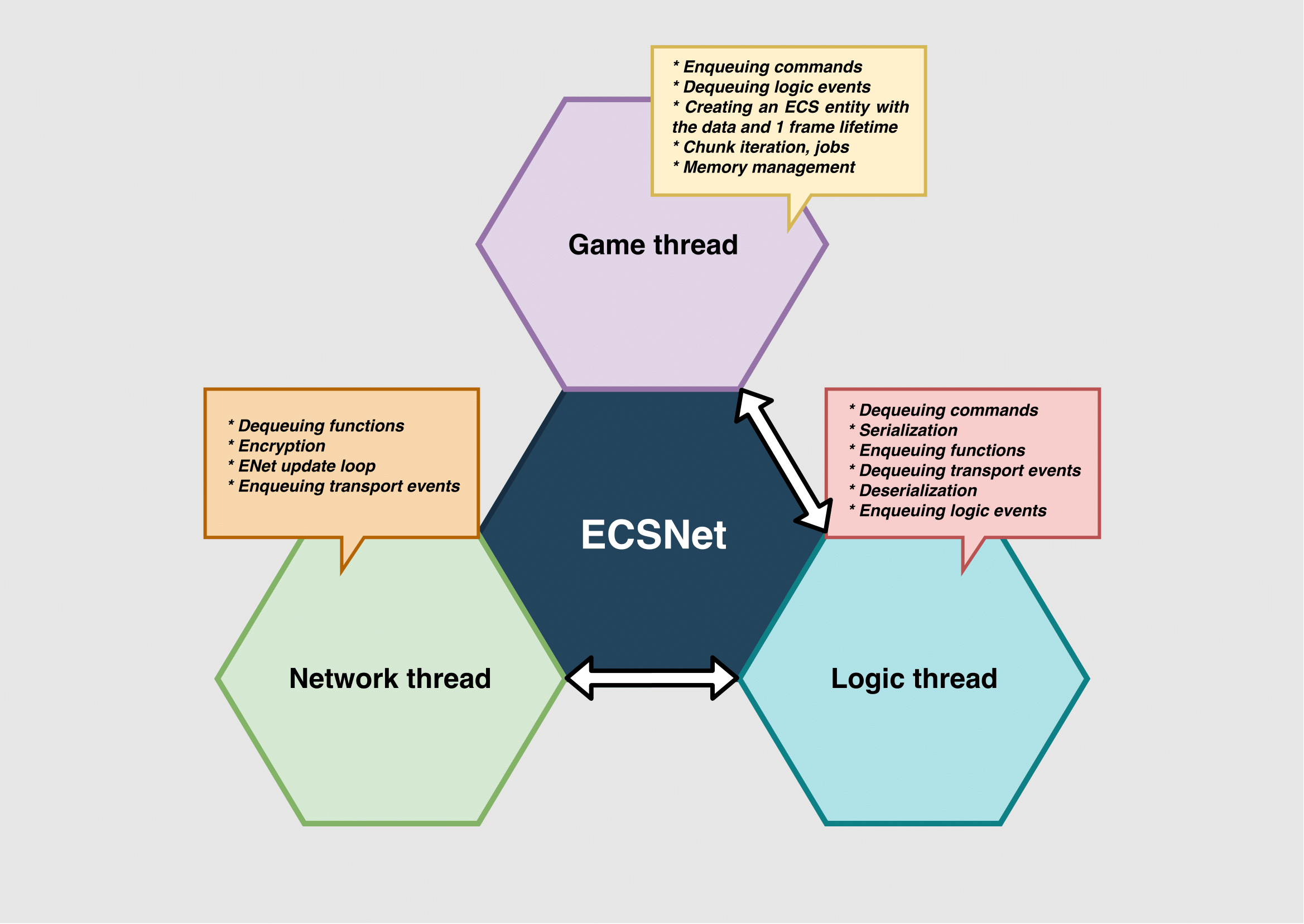
Unity Forum
Happy holidays everyone.
I would like to show you my progress in creating a high level api based on Unity ECS on top of the ENet network library.
The...
vagrant surge
i worked with some guys on a wow pirate server made from scratch, done with ecs and job system (but c++ ones, not unity). It feels like such a natural fit
 amber flicker
A few thoughts @digital scarab but pretty sure they're all things you've thought a lot about. 1) Runtime click-selecting in scene view to see entities feels important, 2) Entities out of subscenes falls a bit in no-mans land atm - not everything will have 1-1 GameObject relationship so relying on the conversion flow for changing entities hits that snag for me a bit but.. 3) I think most people haven't seen live-edit-convert in use and I do think it goes a long way. 4) One downside of packages is people don't have (or know about) Dots Editor either
vagrant surge
like... you see just how well ecs models work with mmo, and you think like why do anything else
dull copper
one thing that pains me on the Unity DOTS is that to get the full benefit or the conversion workflow, you have to still use hybrid rendering now.. which doesn't support all SRP features
I get that's going to change eventually
vagrant surge
@autumn sleet lovely
dull copper
but it's still really far away
vagrant surge
but were those 5k players sending data to each other?
zenith wyvern
Yes...for the love of god please SRP/URP support for Hybrid
vagrant surge
the N^2 would be quite huge
zenith wyvern
It's been so long
autumn sleet
@vagrant surge I was able to send 300k packets a second from server to 5k clients in 60hz
vagrant surge
nice
autumn sleet
Now I switched to Eventual Consistency design
And left only 1 IO thread
Serialization/Deserialization is done in jobs
@digital scarab I really wish Unity borrowed some ideas from Entitas about view sync. Like View is readonly able to react on the changes on the component. ECS side does not even need to know that is is being drawn
vagrant surge
@digital scarab you can do click select on unity scenes with tons and tons of gameobjects, why not entities. Also, what about giving entities that you want to be "editable" a component?
for those 200k cases
dull copper
even if there's perf issues on that, it's editor only thing
vagrant surge
have a component tag you can add to entities (maybe also a Name component), and this way they appear in inspector much more easily
dull copper
whole point is to make the editor experience useful
autumn sleet
Click select can be just a Mono view with UnityView link.
vagrant surge
also, in entity inspector, can you do queries?, i dont remember
dull copper
and not having people navigating that clunky entity debugger
like, you don't even have to have like full entity list on editor at once, just even let people pick entities from screen and only show their properties live if rest is impossible
any chance we could get any sneak peeks? 😄
vagrant surge
btw, multiple authoring components per file is being worked on?
having 1 file per comp when most comps are empty or are like 3 lines is super annoying
ye
amber flicker
Thanks @digital scarab but I'm not sure what the number of entities has to do with selection? A performance concern? I wasn't imagining you would be able to see any of a million gameobjects, just the entity when selected
vagrant surge
i think also not-codegenned, as monobehaviors have to be one per file anyway
autumn sleet
I would migrate to Unity ECS asap if I saw proper Editor support, so the only way is to wait 🙂
@amber flicker Jobs support I assume, if they are running and you change the value
vagrant surge
not really @autumn sleet . Its same as entitas, editor stuff is like after the end of the frame
autumn sleet
Might cause stalls, because dependencies need to be completed
 trail burrow
@digital scarab nice bait and switch 😄
autumn sleet
@vagrant surge all single threaded
trail burrow
honestly the major issues i've ran into is the job scheduling atm
autumn sleet
Comes to a cost if parallel
vagrant surge
🤔
trail burrow
that is like the #1 concern i have atm
dull copper
the thing me that pains on current scene view not being actually any part of ECS world is that it really limits the usefulness of that. Without it working on live gameplay would just mean there shouldn't even be a separate scene and game views anymore, or at least it's usefulness is greatly reduced now
this was one of the main things I always liked on Unity vs UE4 (to be able to pick objects from scene view while the game was running, examine the values, edit, change things etc, add gizmos..)
or CE for that matter
autumn sleet
@vagrant surge imagine you have a huge path finding
vagrant surge
but you wouldnt do that on the ECS normal systems
because if you do, you cant add/remove components
as those force a singlethread sync
autumn sleet
But you edit values
Is the same, deps will need to be completed
So you can safe read/write
It might cause stalls in certain projects , but yeah not a big of a problem since you don't change much manually
trail burrow
I've designed an ECS system for my little MMO backend which allows me to do multi threaded add/remove without a sync point, but of course it is purpose built to solve a specific thing
@digital scarab Is there any way to force the job system to use N threads? Even if the machine deosn't have that many cores/virtual CPUs ?
zenith wyvern
EntityDeltaBuffer
autumn sleet
@trail burrow have you tried set worker count more than the machine has?
trail burrow
i havent actually
autumn sleet
@trail burrow what would be the use case? Wouldn't it cause thread contention?
vagrant surge
maybe testing?
trail burrow
determinism
i wanna be able to set an exact amount of workers count
which has to be respected no matter what
autumn sleet
Ah I see
trail burrow
not a min/max
but an actual, use X workers, no matter amount of cores on the machine
opaque ledge
huh what is the reason for that tho ?
like are you going to use number of thread for some game logic ?
but perhaps you are writing something low level stuff
dull copper
@trail burrow that settings should do exactly that (edit oh right, you need to be able to set more than few? I was thinking of the past discussions where you only wanted to run this on main thread or few at most)
the max value is just the cap
you can set it to 1 worker if you want
my painpoint with this is just that it's hard to visualize two dozen worker threads at once on 3900x so I tried to limit things with that setting, but it still keeps spreading the work on random worker threads on the profiler window
like, it does only ever use the amount of worker threads I set it to use and it doesn't scramble the workers after I've started the editor, but the initial positioning is random, so it's hard to debug when you have to scroll the profiler few screens up to find single worker
I mean, it looks like this then https://cdn.discordapp.com/attachments/497874303463850004/670813598922178601/unknown.png

 latent bramble
Anyone have any idea why burst doesn't want to compile my job? https://hastebin.com/timagimahi.cs it throws this exception https://hastebin.com/ahelipogis.txt
zenith wyvern
@latent bramble Not 100% but it could be
 public static readonly float3[] directions = new float3[9]
    {
        new float3(1,0,0),   //0
        new float3(1,0,1),   //1
        new float3(0,0,1),   //2
        new float3(-1,0,1),  //3
        new float3(-1,0,0),  //4
        new float3(-1,0,-1),  //5
        new float3(0,0,-1),  //6
        new float3(1,0,-1),  //7
        new float3(0,0,0)    //8
    };
I know it's readonly but it's still a managed array
latent bramble
ah that could make sense
Thanks @zenith wyvern based on this post I think you are correct https://forum.unity.com/threads/how-to-create-and-populate-static-native-containers-at-compile-time.637924/

Unity Forum
Hello,
I'm currently developing a Voxel-Engine with Heavy Use of Jobs and the Burst Compiler.
One Thing the Engine does is UV-Mapping from an Texture...
yep that fixed it
 lost lagoon
Should I be using ScheduleParallelFor (https://docs.unity3d.com/ScriptReference/Unity.Jobs.LowLevel.Unsafe.JobsUtility.ScheduleParallelFor.html) to kick of IJobParallelFor jobs? The IJobParallelFor docs use Schedule (https://docs.unity3d.com/ScriptReference/Unity.Jobs.IJobParallelFor.html). I've been using Schedule and just came across ScheduleParallelFor by accident!
Looking again it takes JobScheduleParameters, not a JobHandle, and seems to be more an internal call.
 hybrid portal
With the multiplayer NetCube sample, if I add a child object with a mesh to the default player Cube which has a GhostAuthoringComponent attached, everything breaks and I get spammed with the following error:
Unity.Entities.JobChunkExtensions.ScheduleInternal[T] (T& jobData, Unity.Entities.EntityQuery query, Unity.Jobs.JobHandle dependsOn, Unity.Jobs.LowLevel.Unsafe.ScheduleMode mode)```
Does Ghost Authoring not support GameObjects with children? twin raven
I use Entities.ForEach and access native collection inside the lambda (.WithReadOnly(col)). I cannot call Dispose because I get error that it is in use, but if I don't call dispose I get memory leak
return collection.Dispose(previousJob);
 warped trail
there is .WithDeallocateOnJobCompletion(col)🤔
 plush portal
Is there a safe and efficient way to create a new entity world and transfer entities between it and the default world? How will systems react to having two entity worlds in the same scene?
 covert raven
Has anybody run into an issue where the entity is doing client prediction (moving it) and both the client and server are getting the input but the server isn’t actually moving (translation is always the same). This basically makes the client world snap the entity back into place.
twin raven
@warped trail for some reason that did not work with NativeMultiHashmap<int,SomeIComponentData> type
warped trail
there is .Dispose(JobHandle inputDeps)🤔
twin raven
Yes that is what worked
opaque ledge
So i have a burst and SIMD question
i have this piece of code:
public float deltaTime;

        public void Execute(DynamicBuffer<MarketDataBuffer> marketDatas)
        {
            for (int i = 0; i < marketDatas.Length; i++)
            {
                var marketData = marketDatas[i];

                //CalculateNewPrice

                var multiplier = (marketData.supply - marketData.demand) / (float)marketData.demand;

                multiplier = math.select(math.abs(multiplier) * 10, 1/multiplier, multiplier >0);
                multiplier = math.clamp(multiplier, 0.1f, 2.0f);

                var targetPrice = marketData.basePrice * multiplier;

                marketData.currentPrice = math.lerp(marketData.currentPrice, targetPrice, 0.04f * deltaTime);

                //Calculate Level and Trend
                var priceDifference = marketData.currentPrice / marketData.basePrice;
                var trend = marketData.currentPrice / targetPrice;

                MarketPriceLevel priceLevel =
                    (MarketPriceLevel)math.select(
                        math.select(
                            math.select(math.select((int)MarketPriceLevel.NORMAL, (int)MarketPriceLevel.BELOW, priceDifference <= 0.9f), (int)MarketPriceLevel.FARBELOW, priceDifference <= 0.5f), (int)MarketPriceLevel.ABOVE, priceDifference >= 1.1f) , (int)MarketPriceLevel.FARABOVE, priceDifference >= 1.5f);

                MarketPriceTrend trendLevel =
                    (MarketPriceTrend)math.select(
                        math.select(
                            math.select(math.select((int)MarketPriceTrend.STILL, (int)MarketPriceTrend.INCREASING, trend <= 0.9f), (int)MarketPriceTrend.HIGHLYINCREASING, trend <= 0.5f), (int)MarketPriceTrend.DECREASING, trend >= 1.1f), (int)MarketPriceTrend.HIGHLYDECREASING, trend >= 1.5f);

                marketData.priceLevel = priceLevel;
                marketData.priceTrend = trendLevel;

                marketDatas[i] = marketData;
so what does this do is.. changes the current price depending on supply and demand
When burst is off, it takes 0.05 ms, when burst is on its also 0.05 ms
 frosty siren
how can i use EntityManager.GetComponentData<T>(Entity) if i only knows T at runtime? In my case i have Type[] array and want to get data of all those types.
opaque ledge
now its not a big difference but i was wondering how could i change this code so there would be SIMD instructions that burst could generate
you dont know the entity ?, you just want to get all the T components in the world ?
 hollow sorrel
@opaque ledge this doesn't answer your question but make sure you test for difference with large amount of data (like 100k+)
0.05ms sounds like what entitydebugger will show for a near empty job too (dunno if this is job schedule overhead or safety checks or what)
 pliant pike
that's a lot of math.selects 
opaque ledge
yeah, there is like only 35 markets so 😄
yeah, normally i did it with (bool) ? true_experission : false_experession, but i watched burst video the other day and the guy in there said dont use if statemens, use math.select, any, all etc. so i tried to do it in hopes of to see SIMD instruction somewhere 😄
 mystic mountain
Enabling burst seems to randomly crash my editor when in playmode for some reason, I can't see any helpful output in the Editor log file. Anyone got any idea to get to what is crashing it?
hollow sorrel
nice thing about dots is you can easily create a lot of fake data for testing, because (ideally) everything is seperated so you don't have 100 dependencies you have to create first like in oop
pliant pike
ok cool, I guess I'll try that using that instead then
covert raven
Anyone know how well Unity.Physics works with NetCode? Tried adding a physics body to NetCube and it always snaps back to original landing position.
 pseudo epoch
@opaque ledge which video ? can u send a link ?
opaque ledge
@pseudo epoch
https://www.youtube.com/watch?v=Tzn-nX9hK1o&list=PLX2vGYjWbI0S1wHRTyDiPtKLEPTWFi4cd&index=4
https://www.youtube.com/watch?v=BpwvXkoFcp8&list=PLX2vGYjWbI0S1wHRTyDiPtKLEPTWFi4cd&index=13

If you've heard about Burst but aren't sure how to start using it in your games, then this is the talk for you. The first part of this session is hands-on in Unity and Visual Studio. Lee starts with a simple game, then ports game code to the C# Job System and speeds it up usi...

This session addresses how we are expanding the scope of the Burst Compiler to enable even the most demanding, hand-coded engine and gameplay problems to be expressed in HPC# via direct CPU intrinsics. Andreas shares the reasoning and use cases; as well as discussing implemen...
first link is more beginner, 2nd one is more advanced
zenith wyvern
Has anyone tried making a turn based game in ECS? I'm struggling with how to handle it
I tried recreating the traditional "main loop" you'd use for it but it definitely does not play well with the job system and entity command buffers in particular. Since consuming systems often wouldn't see the data they need until the next frame I can't just block on the input loop like you normally would
coarse turtle
I have a "pseudo turn based game"
zenith wyvern
Do you have any kind of "main loop" or are you handling it some other way?
pliant pike
Get a high-level overview of the Entity Component System (ECS) and turn-based game loops, and see a proof of concept built using ECS. The session covers some of the pitfalls and also shows concepts of ECS in a slightly exotic context.
Speaker: Florian Uhde - Three Eyed Games...
I knew I remember seeing something about it
coarse turtle
I do have a kind of main loop - but for some time sensitive data - I have a few systems which produce "messaging entities" that are consumed for the turn player
zenith wyvern
@pliant pike Thanks for that, I haven't seen that
pliant pike
they show a couple of different ways to do it
zenith wyvern
@coarse turtle So you do a main loop but handle special cases where things might need to update outside it via events?
coarse turtle
yes
just took a look at the video - the way I'm building my game is similar to the variant 2
I do agree you'd get order related problems since I had that issue for sometime in my game: which prompted me to order my systems like so:
- Systems enact on all event entities
- Consume event entities
- Produce event entities
zenith wyvern
This is what I've been trying for my main loop. The "systems" here are ComponentSystemGroups with the relevent systems added. Because I'm skipping the updates based on game state then certain groups fail to process command buffers properly. It "looked" right at first but I think this is definitely the wrong way to go.
coarse turtle
ah - i tried that initially - it didn't seem to scale well for me and I did have certain groups miss their timings when manually updating the loops
zenith wyvern
Alright, thanks for the input. I'm going to watch this video then and hopefully I can figure it out
dull copper
these were on 2020.1.0a22 release notes: ```md
- Kernel: Optimisation for Job system when main thread is waiting on jobs to complete.
- Kernel: Reduce number of scheduled jobs by merging cleanup jobs into complete tasks where possible.```
coarse turtle
@zenith wyvern I'll pull up my project tonight and see what I can pull up - I've gone through a few rewrites on how I handled turns on my nightly branch (still working out my networking side too)
stable fog
nice
I really need to get going on getting comfortable with DOTS
I still find much of the design rather confusing
mystic mountain
@covert raven Physics with NetCode works fine. Now I haven't looked at the quickstart, but did you update the authoring component and gernerated the scripts again?
zenith wyvern
That video is interesting but the second solution doesn't seem great as is. Having to manually tag every entity that ever needs to act seems like it would be a nightmare to maintain as your game scales up
stable fog
So thats a part that I found confusing
it seems like the idea is to use components to define active behavior
such as, if you have targetting, you'd create a component that has an Entity Target as a field
you'd create a system for that component to set directional values?
those directional values would be on another component, movement?
zenith wyvern
You can have multiple values in a single component
stable fog
Yes absolutely
zenith wyvern
You can and should I would say if they are all relevant to what the system is going to use the component for
stable fog
but a given component only has 1 system right?
I suppose movement always has positional targetting, so that example is poorly thought out
zenith wyvern
No. You can create generic components that, composed together with other components, define an entity that a system is concerned with
stable fog
right, systems can operate on sets of components
coarse turtle
Yeah @zenith wyvern - it's not ideal - chunk splitting is also an option and you just enact on separate chunks for different turns of the game (depends on how much you're filling into the chunks tho - so its not the best solution for small games)
zenith wyvern
Two different systems might operate on the same component type, but used with a different combination of other component types
covert raven
@mystic mountain to give some context. I took the started project and simply added physics mass and physics collider without client prediction. Create a plane with physics collider. Generated the code, place the cube higher and hit play. Cube falls based on server data as expected, but the original movement logic with WASD now doesn’t work. The client presentation you can see the cube move, the data is fed to the server, but for some reason the translation doesn’t change on the server entity. If I uncheck PhysicsVelocity from the ghost author, the cube no longer falls but now I can resume moving it.
zenith wyvern
Actually now that I think about it with the batch query operations the "CanNowAct" tagging might not be too bad
As long as you avoid trying to create any kind of special cases it should be possible to make everything flow pretty smoothly without making it confusing
I'll have to think about it
stable fog
So perhaps you could break this down for me
if I wanted to make a survival wave game for example, you'd need monsters and a player
mystic mountain
@covert raven I think it depends on how the server handles the input and positions in relation to the physics system, will check in a sec
stable fog
you'd need to spawn those monsters, and then have them move towards the player and ultimately attack them
So your monster and players would be Entities, and they would have Translation components
You'd need a target location specified, a target entity
and now I'm stuck lol
zenith wyvern
That's what tagging is for. Your monsters want to target a player. So you give your player entity a "Player" tag (A component with no values). Then your monster ai system queries for all entities with a position and a player tag
stable fog
just to be clear, tagging isn't anything special
zenith wyvern
Correct
stable fog
its just a Component which is itself the data you need
You'd also give monsters a tag component then yeah
zenith wyvern
You could very well have a Player Component with a bunch of data on it that the monsters don't care about
mystic mountain
@covert raven works when you have client prediction
zenith wyvern
Queries let you find entities based on the components they have, so if anything needs to find anything else and you want to narrow down the search you have two options - add more components or search all relevant components and filter based on their values
The second option is less preferable but don't dismiss it outright, it makes sense in a lot of cases
mystic mountain
@covert raven A lot of things that are questionable of what you're trying to do if I understand you correctly. But the movment in this example is contained in the PredictionGroup, so it should only work for predicted entities.
covert raven
@mystic mountain was just trying to add basic movement with standard physics. Move the cube but still be affected by gravity. Didn’t go into impulse movement. So you have all 3 checked for all physics related data? Server, interpolation, and client prediction ? I had that at some point and it wasn’t working. Cube falls and I can see it. But as soon as I do WASD, the client moves, but server snaps it back to place.
Also, the physics being server side shouldnt affect the Translation movement though right? I mean Translation still has ClientPrediction on, and the movement reflects on the Client side. Is it just not recommended to move physics body using translation? I mean it works fine outside of NetCode and in-fact, it looks like it all works on the client side (in NetCode). Just that the server seems to not honor it. Something about adding PhysicsVelocity basically breaks the Translation movement logic. So client predicts cube movement, server receives input data but doesn't move the cube, and sends a snapshot back that it hasn't moved.
warped trail
@opaque ledge i think you can do this instead of yours Selects😅 cs float4 A = new float4(1.5f, 1.1f, 0.9f, 0.5f); float4 B = new float4(priceDifference); bool4 mask = A <= B; int4 Y = math.select(new int4(0), new int4(1), mask); int result = math.dot(Y, new int4(1)); // from 0 to 4
opaque ledge
Is this code a dark ritual to summon hellish creatures 👀
thanks, i will take a look 😄
opaque ledge
so i wanted to ask
doing, double / double and double4/double4 are only 1 instruction right ? when compiled with burst ?
same goes with + or * or any other aritmatic operations
warped trail
1 instruction?
opaque ledge
yeah, 1 SIMD instruction in assembly
coarse turtle
I think its best to look at the burst inspector 🤔
warped trail
in the video it says 2 doubles at ones 🤔
opaque ledge
i wish i knew how to read burst inspector 😭
i guess i will just make 100k of the component and see the performance difference 😄
warped trail
i think in the burst inspector purple means very good 😄
opaque ledge
ooh will check 😄
safe lintel
@dull copper thanks for the heads up, a22 is feels like an improvement over a21 though i didnt make any detailed measurements and am just eyeballing fps
mint iron
i think the gist of it is, its best to do a calculation with double4 (1 instruction) rather than double 4 times (4 instructions)... its probably faster if you're doing 2 or more. But I'd imagine it also depends on if you're doing extra work to pack them into a double4 for processing or if they're naturally being stored there (added instructions to copy stuff around).
oh hai 😄 its great to see Unity staff floating around in here.
dull copper
@digital scarab it doesn't support AVX
I know because I've requested it many times
last time I talked with the Burst guy at Unity CPH and response was along the lines "if you need doubles four wide, you are doing something wrong"
which implied that they are not considering it 😄
right now we get SSE4 on windows
which means, doubles two wide
which makes it barely worth the effort
well, that being said, I don't think burst even tried to SIMD doubles in any way because of that
there are plenty of reasons to want doubles tho.. like if you do proper sims, you need accurate math
ah, that's interesting
kinda beats the purpose of using burst tho :p
like, if you need to do the hard work yourself anyway
stable fog
So, I'm totally commenting from ignorance
Why is it believed that its not a benefit for games?
dull copper
pretty much that you can get away with using single precision floats with bunch of hacks to achive the same things people would want to do with doubles (like use them for big open world simulations)
if you do say open world game, you can always shift the origin to keep things from exploding due to floating point inaccuracies at the edges of the world
but if you do say, a space sim, it would be so much simpler to just use doubles to begin with
it is faster
but it's not always about the perf only
well, HDRP is camera relative already
there's also matter of doing things on multiplayer... if you got origin shifting on clients, your server cant usually do that as it needs to hold the world at once
so your options are do lesser accurate world on server side, split the world on chunks and sim them separately on server etc
it's going to be a mess
but if it were on doubles, it would just be so much simpler (as long as the system can run it)
having need for big world doesn't always mean there's tons of simulated content on it
most of the space is empty for example
I've done my own physics solvers on doubles and converted them to floats for rendering
again, it's not always about the perf 😄
but if you could get "free" AVX extra perf for them, why wouldn't you want it
vagrant surge
origin reset is still useful when using doubles. Lets you avoid having to do camera-relative every frame
dull copper
I mean, in comparison to not using SIMD for doubles
vagrant surge
and you get those galactic scales for the game code (space sims)
dull copper
anyway, I don't really have origin shifting related case myself, I really only want doubles for the extra precision on physics math
perf has never been issue there (on my use case, I don't mean physics in general)
but like mentioned, wouldn't mind getting extra efficiency still
opaque ledge
So to test stuff i was trying to create an entity multiple times like this:
        var testMarketArchetype = entityManager.CreateArchetype(typeof(MarketDataBuffer));
        var testMarkets = entityManager.CreateEntity(testMarketArchetype, 10000, Allocator.Temp);
``` Idk why but EndSimulationEntityCommandBuffer starts taking time even tho none of the systems that process on MarketDataBuffer doesnt use it, it starts to take 50 ms on 10k enttity, 600 ms on 100k entity 🤔because the entity IDs still have to get registered with the global sytems
opaque ledge
so how people get 60 FPS with 100k entity while my FPS drops to 2
Well i am neither
they must have special powers 🤔

apperanty to my job
well i guess i should use profiler to to actually profile and not to entity debugger 😄
i know right 😄
covert raven
Question on RequireSingletonForUpdate, if I define two of those and access both of them in the Update loop, it looks like the second one always gets infinitely queried and grows the query view in the entity debugger. Is that an issue? I get around this by requiring them, but separately creating a EntityQuery to then retrieve the through query.GetSingleton<T>(). But if I just do this.GetSingleton<T>(), the second Singleton blows up the EntityDebugger with a bunch of blue queried entries and it keeps growing. Unsure if this will cause issues eventually but doesn't sound good.
opaque ledge
what is your job package version ?
this was a bug from previous job version, it was fixed in last version i believe
covert raven
I see. Not next to my computer right now, but I believe I have whatever came with 0.5.0 entities. I tried upgrading to 0.5.1 but that broke NetCode
opaque ledge
Yeah, i had the same issue and it was gone when i updated my job package to 1.2.1
covert raven
Ill see if I can just upgrade jobs alone later tonight
opaque ledge
but entity 0.5.1 may not be compatible with it, so i cant really say if it will break entity package
but prolly not, gl
covert raven
Thanks. at least it's just a bug that will eventually be sorted out as everything becomes compatible. Thought I was doing something wrong.
opaque ledge
Also, about the convo few hours ago, i tried to update my markets 4 by 4 using float4s etc instead of 1 by 1 but i couldnt really see any difference, both were taking 0.05 ms with burst, 4 by 4 was taking 600-700 ms and 1 by 1 was taking 300 ms without burst. But maybe its something about my implementation
was a good experiment tho, had my fun
opaque ledge

📌 Download the project files and assets from this video: https://tmg.dev/DOTS_Roll-A-Ball 📌
🎮 Let me know what other topics you want to learn about 🎮
👇 See below for time stamps 👇
- 0:00 - Introduction and Project Demonstration
- 1:47 - ECS Overview
- 3:10 ...
covert raven
So general question with Unity Physics. Is it bad to move the PhysicsBody by updating Translation or should it only be done through PhysicsVelocity for movements? And if I generally only care about making sure the PhysicsShape is grounded (going up and down slopes), should I just apply manual "gravity" through Translation.Value.y over deltaTime when not grounded? Basically building a basic CharacterController with gravity. For the most part, the goal is to achieve basic joystick movements that are linear. There's no jumping requirement.
mystic mountain
@covert raven I mean, as long as you know you can move where you can with translation that is fine, but that is usually regarded as a teleport or by doing some raycast checks beforehand. If so, you should either do it before BuildPysicsScrene or after endstep, this includes changes to PhysicsVelocity. So if you want something that accelerates, and doesn't need any logic to walk up stairs etc you can go for adding velocity, else I would use/implement a character controller which uses raycasts to figure out what is good movement.
pliant pike
is there some kind of bug with physics movement currently I get sudden jerky movement sometimes?
mystic mountain
@pliant pike no network involved? Not that I know of.
pliant pike
no networking, maybe its my implementation
covert raven
@mystic mountain Earlier you said you managed to get the NetCube moving using Translation, was that with PhysicsBody? I see PhysicsBody making the cube fall when set at Y=10, but after it lands and I try moving it with basic Translation, the client moves it but the server snaps it back. I have Server, Interpolate, and Client Prediction checked on all components for GhostAuthoring. The snapshot received by the client from the server then snaps it back to 0,0,0.
mystic mountain
@covert raven Yep , I just reset the project, can give you the steps I did to achieve this in a sec.
covert raven
Thanks
 gusty comet
did they remove the EndPresentationCommandBufferSystem? Or did it never exist?
mystic mountain
@covert raven No wait, I don't actually understand, it has physics from the start? x)
gusty comet
@covert raven there is a character controller utilty from unity. You can find it in the physics examples. It uses a kinematic body and solves the groundsupport/groundfollowing with a special solver (so it does not move with physicsvelocity)
mystic mountain
In many cases it would be overkill, but depending on your scenario.
covert raven
@gusty comet I'll take a look at that. @mystic mountain The NetCube example doesn't have Physics, I was just playing with adding a PhysicsBody to it and see how it would react. The YouTube demo of NetCube was with PhysicsBody for the purpose of seeing the Sync between the fall, but was disabled when it came to the movement. So I wanted to combine it to see how it would perform, but I just couldn't get pass that. Cube kept snapping back into place because of PhysicsVelocity.

Dive deep into the networked future of Unity using DOTS. Hear how we made the DOTS Sample a networked game, and what we learned on the way.
Speaker:
Tim Johansson - Unity
Learn more about the Data-Oriented Tech Stack (DOTS): https://on.unity.com/2lraugz
mystic mountain
Nvm, cleaned wrong repo. Sec
@covert raven So if your baseline is from the NetCode sample https://github.com/Unity-Technologies/multiplayer/tree/master/sampleproject/Assets/Samples/NetCube you just enable the PhysicsBody and BoxCollider, click Update component List, then click Generate code
covert raven
yep
Well I didn't clone that Repo for testing. I just ended up using the getting started snippets
Follow all of that. Added physics body and physics shape. Update component and generate.
also made the plane physicsshape and entity
mystic mountain
And you didn't foget to add "[UpdateInGroup(typeof(GhostPredictionSystemGroup))]" on MoveCubeSystem ?
mystic mountain
Show an image of your ServerSimulationSystemGroup in entity debugger.
covert raven
only with physics body, it snaps back
I'll share one later tonight. Currently not home, but will definitely share it.
mystic mountain
You can share your project in DM if you want and I can check as well if you don't find it till tomorrow.
 fallow mason
Anyone know if you can still use editor extensions in tiny projects? I'm making a top down camera controller (where moving your mouse to an edge of the screen moves the camera in that direction) and I'd like to be able to visualize and edit the dead zone in the scene view.
 floral crest
are there any example videos or projects of the new input system being used with ecs?
zenith wyvern
There's not much to it, should look pretty much like this
floral crest
thank you!
zenith wyvern
Am I crazy or can you not add a component to an entity with an EntityCommandBuffer?
Like, the function actually exists but you literally cannot call it
floral crest
another question, the input can be multithreaded?
or does it have to be on the main thread always
zenith wyvern
Reading the input has to be on the main thread
They are planning to integrate it with ECS better at some point, but not anytime soon as far as I know
floral crest
ok thanks
zenith wyvern
Hahah, thanks! I just realized I hadn't actually changed my component to an IComponentData yet. I was ready to make a post about it and everything. Brain not work good today
opaque ledge
I am going to try to write some bridge between ECS and UI today, scary day for me 😭
zenith wyvern
My condolenses
opaque ledge
@digital scarab i actually kinda forgot to check it, but probably not given that both 'implementation' was taking same 0.05 ms
floral crest
has anyone else had problems with datacomponents not displaying their fields in intellisense?
im using vscode
gusty comet
hello,
does exists an alternative for Physics.OverlapSphere as JOB?
mystic mountain
PhysicsWorld.CalculateDistance would work.
 slow epoch
Or SpherecastCommand
plush portal
Is there a way to get an component without looping for it every frame in a onupdate system?
Right now I am doing two foreachs in a system, one for getting an event and the other to use the event's data on multiple entities.
mystic mountain
@plush portal You can use EntityQuery and ToComponentDataArray to get an array of the events, and then loop over the other entities and add them to all.
But it's hard to give advice if you don't know the full problem, so if that doesn't work for you maybe try explain the whole thing.
plush portal
So basically, it needs to handle and delete the first event it finds, so if for some reason there are two events at the same frame, it will handle the second one on the next frame.
Rect selectionRect = Rect.zero;
Entities.ForEach((Entity entity, ref ObjectMultiselectionEEvent eEvent) =>
{
    selectionRect = new Rect(eEvent.SelectionRect.c0, eEvent.SelectionRect.c1);
    PostUpdateCommands.DestroyEntity(entity);
});

if (selectionRect == Rect.zero) return; // Only continue if there was a selection.


Entities.ForEach((Entity entity, ref Selection selection) =>
{
  // Stuff that uses selectionRect
  // etc.
Right now, it's "overriding" every event that's on the same frame. I want to only use the first event I find(And turn that into a job)
mystic mountain
@plush portal So then you make the query a requirement to the system, only use the event at place 0 and remove it.
mystic mountain
Anyone know the performance implications of having many entity prefabs? I have a case where I have different visuals for objects and need different physics layers on compound colliders (which afaik can't be changed runtime), so to keep everything away from managed code I would need for every object generate X( up to maybe 16) visuals plus Y(up to lets say 16) colliders for each object that I add to the game. Lets say I have 20-30 different objects in the end. Many of these prefabs won't ever get used in the game, but are required to make the code Jobified.
dull copper
pretty sure you can change the collision setup runtime, can't just do that through the stock authoring component
mystic mountain
Last time I checked on forums you couldn't change compound colliders filter, which was like 6 months ago, and as that is blobasset, it would change for all entities using it as well, so would need to copy the colliders, probably doable - if it works to change filter that is.
dull copper
### Added
- Enabled lower precision variants for `pow`, `sin`, `cos`, `log`, `log2`, `log10`, `exp`, `exp2`, and `exp10` when `BurstPrecision.Low` is specified.
- Add CPU minimum and maximum target for desktop platforms Standalone Player builds.
- Append a newline between IRPassDiagnostic messages, fixes pass diagnostics readability in the inspector.
- Add a new attribute `[AssumeRange]` that lets users tag function parameters and returns of an integer type with a constrained range that the value is allowed to inhabit. `NativeArray.Length` and `NativeSlice.Length` have automatic detection that the property is always positive. This assumption feeds into the optimizer and can produce better codegen.
- Enabled support for DOTS Runtime SharedStatics. Due to the nature of DOTS Runtime, only the generic versions of `SharedStatic.GetOrCreate<TContext>` are supported.
- Add a new intrinsic `Unity.Burst.Intrinsics.Common.Pause()` which causes a thread pause to occur for the current thread. This is useful for spin-locks to stop over contention on the lock.
- Add some new Burst aliasing deductions to substantially improve the aliasing detection in the compiler, resulting in better codegen.
- Add syntax colouring to WASM.
- Add `IsCreated` to the `FunctionPointer` class to allow checks on whether a given function pointer has a valid (non null) pointer within it.
- Add AVX2 intrinsics```- Add some missing intrinsics from SSE, SSE2 and AVX
- X86 intrinsics from SSE-AVX2
- AVX and AVX2 CPU targets are now available for x64 AOT builds
- Allow handle structs (structs with a single pointer/integer in them) to be inside another struct as long as they are the single member, as these require no ABI pain.
- Added support for `Interlocked.Read`.
- Added a new intrinsic `Common.umul128` which lets you get the low and high components of a 64-bit multiplication. This is especially useful for things like large hash creation.
- Menu option to allow all burst jobs to be more easily debugged in a native debugger.```### Changed
- Upgraded Burst to use LLVM Version 9.0.1 by default, bringing the latest optimization improvements from the LLVM project.
- Upgraded Burst to use SLEEF 3.4.1, bringing the latest performance improvements to mathematics functions as used in Burst.
- Improved Burst performance in the Editor by caching compiled libraries on-disk, meaning that in subsequent runs of the Editor, assemblies that haven't changed won't be recompiled.
- Update the documentation of `CompileSynchronously` to advise against any general use of setting `CompileSynchronously = true`.
- Take the `Unity.Burst.CompilerServices.Aliasing` intrinsics out of experimental. These intrinsics form part of our strategy to give users more insight into how the compiler understands their code, by producing compiler errors when user expectations are not met. Questions like _'Does A alias with B?'_ can now be definitively answered for developers. See the **Aliasing Checks** section of the Burst documentation for information.
- Align disassembly instruction output in Inspector (x86/x64 only).
- Renamed `m128` to `v128`
- Renamed `m256` to `v256`
- BurstCompile(Debug=true), now modifies the burst code generator (reducing some optimisations) in order to allow a better experience in debugging in a native debugger.
### Fixed
- Fix a bug where floating-point != comparisons were using a stricter NaN-aware comparison than was required.
- Fix inspector for ARMV7_NEON target.
- Fix some issues with Burst AOT Settings, including changing the settings to be Enable rather than Disable.
- Fix an issue where WASM was being incorrectly shown in the disassembly view.
- Fixed an issue where if the `Unity.Entities.StaticTypeRegistry` assembly wasn't present in a build, Burst would throw a `NullReferenceException`.
- Fix issue with type conversion in m128/m256 table initializers
- Fix inspector source line information (and source debug information) from being lost depending on inlining.
- Fix occasional poor code generation for on stack AVX2 variables
- Fix `xor_ps` was incorrectly downcoded
- Fix reference version of AVX2 64-bit variable shifts intrinsics
- Fix reference version of SSE4.2 `cmpestrz`
- Fix bitwise correctness issue with SSE4.2/AVX explicit rounding in CEIL mode for negative numbers that round to zero (was not correctly computing negative zero like the h/w)
- Fix calls to `SHUFFLE`, `SHUFFLE_PS` and similar macro-like functions would not work in non-entrypoint functions
- Source location information was offset by one on occasions.
- Debug metadata is now tracked on branch/switch instructions
- Fix poor error reporting when intrinsic immediates were not specified as literals
- Fix basic loads and stores (using explicit calls) were not unaligned and sometimes non-temporal when they shouldn't be
- Removed the  `<>c__DisplayClass_` infix that was inserted into every `Entities.ForEach` in the Burst inspector to clean up the user experience when searching for Entities.ForEach jobs.
- Fix background compile errors accessing X86 `MXCSR` from job threads```/ spam
I'm super curious about the AVX stuff now
I mean this: "AVX and AVX2 CPU targets are now available for x64 AOT builds"
AVX2 is super niche even today, but AVX should speed up things nicely
I doubt they still do any optimizations for doubles on unity mathematics with them but still nice to see
also sorry for hiding your question @mystic mountain :
Anyone know the performance implications of having many entity prefabs? I have a case where I have different visuals for objects and need different physics layers on compound colliders (which afaik can't be changed runtime), so to keep everything away from managed code I would need for every object generate X( up to maybe 16) visuals plus Y(up to lets say 16) colliders for each object that I add to the game. Lets say I have 20-30 different objects in the end. Many of these prefabs won't ever get used in the game, but are required to make the code Jobified.
coarse turtle
@mystic mountain are these like "gameObject converted" entity prefabs?
mystic mountain
@dull copper Found the thread, and saw that I actually got an answer but that didn't work for me at the time. https://forum.unity.com/threads/unity-physics-discussion.646486/page-16#post-4901891 Will check if the code has changed.
plush portal
@mystic mountain Okay, thanks.
By the way, you said that I should use ToComponentDataArray, but when using queries, how can I get the component data and the entity that goes with it?
plush portal
Oh, thanks
coarse turtle
🤔 Don't think it would have a huge impact - also maybe im confused - but if the prefabs won't ever get used why do they need to be in?
mystic mountain
E.g. a player only owns one of the cosmetic visuals, but they can be a combination of different meshes.
 balmy garnet
I am having a really weird issue with a Rotator script. When I attach it to a parent of a MeshRenderer the entity beneath it does not get linked to the parent. Is there a way to enforce the relationship?
mystic mountain
The object exists only for a player on one physics layer, so if that player is the only one using the object, the other 15 "collider prefabs" are unused.
The thing is I don't know these things beforehand, but all info of what cosmetic, and physics object they use are generated from databases of what cosmetics they own and use, what team they are on etc.
coarse turtle
Ah - I don't think that would have too big of an impact - I imagine the physics package would ignore 'disabled' entities when doing the physics step update, you might have wasted space as those unused entities are in their own chunk (supposedly) tho
mystic mountain
So sort of like SpaceshipA {Collider, VisualA, Visual B ... etc} SpaceshipB { ...} SpaceshipC {...} ChairA { ...} TurretA{} TurretB{ ...} ConsoleA {...} ...
Hmm, ok.
coarse turtle
yeah I think ultimately you might want to see how it rolls when the game scales up and if the perf is in your acceptable range - (maybe splitting up entities to hold smaller compositions of archetypes happens to be better in the future)
I'm in a similar situation too where my player entity is composed of too many archetypes from old architecture - which honestly I believe can just be split up
mystic mountain
Hmm, yeah. But I also want to have a good foundation to build things on x) Anyone knows if you can copy a blobAsset?
dull copper
missed this initially when reading through those burst changes: Take the `Unity.Burst.CompilerServices.Aliasing` intrinsics out of experimental. These intrinsics form part of our strategy to give users more insight into how the compiler understands their code, by producing compiler errors when user expectations are not met. Questions like _'Does A alias with B?'_ can now be definitively answered for developers. See the **Aliasing Checks** section of the Burst documentation for information.
this is super cool
we need more meaningful errors
balmy garnet
Sorry for the repeat of my question: but is there a reason why an entity does not get linked with its children for rendering? I'd love to rotate a mesh under a parent, but the hierarchy is being ignored....
safe lintel
can you show what both the parent and child look like in the entity debugger?
balmy garnet
what the heck. yes i can, @safe lintel but by doing so I found a "bug" i guess? it works when I remove the collider from my mesh
safe lintel
oh
colliders get flattened out
so traditional hierarchies dont work with dynamic colliders
safe lintel
youre gonna have to get the translation & rotation manually
balmy garnet
yeah, when I add the script to my mesh entity directly it works as expected
Is there also a way to have the local rotation in an entity? when I modify "rotation" it always seems to be world space
safe lintel
well translation & rotation are local but if it doesnt exist in a hierarchy its also "world"
i will point out the ever handy transform docs that explain it better than i could ever hope to 🙂 https://docs.unity3d.com/Packages/com.unity.entities@0.5/manual/transform_system.html
balmy garnet
thanks a bunch!
mystic mountain
@balmy garnet If you have a parent with child colliders, you can add a PhysicsBody to the parent, and you can rotate it I think. If static the colliders will become a compound on the parent, and the children will contain the rendering.
Some notice that colliders work in localspace i.e. on the translation component, so if you parent it after conversion it will still operate in local space (which can be advantageous for some problems^^)
safe lintel
but if you want everything moving independently you will need to make your own system to copy the parents transform to any "child" collider entities and I dont think the current authoring workflow works well with this
mystic mountain
It would also be weird to have static things moving as a side note.
safe lintel
the dots fps sample has an attach entity system that they use for hitboxes on characters, its more or less what I use for my own
mint iron
thats interesting, in my project i was spawning entity prefabs that contained a parent-child relationship within them. That works fine because its all collapsed. But if you then try to in code attach them to another entity and setup a parent-child relationship; then rotate the parent. i couldn't get it to work.
mystic mountain
Yep, it's because the PhysicsSystem(BuildPhysicsWorld & ExportPhysicsWorld) reads and writes data from translation component into the physics world.
mint iron
i ended up making a separate entity 'world anchor' TRS, and just combining it in my move system.
safe lintel
well you cant use the actual parent child component on the physics entities themselves(edit) if that's what you were trying to do for hierarchical dynamic colliders
mint iron
well its the system the system they provide, but it only works when contained within a single prefab hierarchy, which is design time. If you want to use those systems dynamically at runtime i don't think you can?
safe lintel
i should note, i meant for dynamic, non static physics entities
mystic mountain
You want dynamic entities with a parent that rotates them?
mint iron
You should just be able to spawn some entity prefabs (each potentially with their own internal hierarchies. Then attach them after instanitate to some game element you already have positioned in the game. Surely this is a pretty common use case.
mystic mountain
If that game element has the physics that's fine.
In my case e.g. I spawn in physics colliders on an entity, then move those components to the parent.
mint iron
mmm, ill definitely have to try it again then.
my case was:
spawn entity prefab A (some game object)
A moves around from gameplay
spawn entity prefab B (particle effects and stuff)
manually set B as a child of A.
move A
expectation: B moves when A is moved.
if i recall correctly, they were moving, but the physics colliders were not so raycasts were all failing.
balmy garnet
hm, how can I get the euler angles from a quaternion with the new math library? quaternion.euler just creates a quaternion...
safe lintel
@mint iron might need to be setting the translation+rotation of B with A's values manually, if colliders are involved, rather than relying on the transform system to do it for you
@balmy garnet there are euler components(again transform system docs have a bunch) like RotationEulerXYZ to set those rather than decomposing a quaternion
mystic mountain
So if B has colliders that won't work, as mentioned before physics work on local translation.
balmy garnet
@safe lintel but those seem to work in local space? I already got the full float4x4 transform and rotation quaternion in world space. all I'd need is the Y rotation in world space...
or I'm reading the docs on this wrong
safe lintel
afaik there isnt a bultin way to get the euler angles from a quaternion, answer from the devs was basically a shrug https://forum.unity.com/threads/is-there-a-conversion-method-from-quaternion-to-euler.624007/#post-5152019
Unity Forum
Title. I can't find it in math / quaternion. Just making sure that there isn't one that I've missed.
Edit: This is what I've came up with in a...
balmy garnet
got it: math.mul(targetTransform.Rotation, targetTransform.Up); returns the rotation vector
safe lintel
also @mint iron https://forum.unity.com/threads/any-longterm-plans-for-integration-with-the-transformsystem-also-ignoring-inside-hits.787151/#post-5241875 could always add your complaints in if you have any 🙂
Unity Forum
Are there any longterm plans for rigidbody/colliders to better coexist with the transform system's array of components like parent/child relationships,...
mint iron
Excellent, thanks, it looks like lots of people hit the same hurdle.
Sounds like they just don't want to have to rebuild the BVH to insert things. They could do a dynamic insert, perhaps not super optimally positioned and just pick it up next frame. They're already rebuilding the entire thing every frame...
mystic mountain
Can anyone spot any problems with this code? I get weird info from colliderPtr type and filter saying it's a terrain, and not correct numbers in the filter when it is simple blocks.
https://pastebin.com/H7Jpf4aR
plush portal
@opaque ledge It's not really hard to connect traditional UI with ECS, if you use SetComponentData and GetComponentData in a MonoBehaviour. And if you want to complicate things a bit, you can also make a scriptableobject addressable and retrieve it in your systems.
opaque ledge
yeah, i tried some stuff today, its probably going to work alright 🙂
 solemn ice
Is it possible to add a [ReadOnly] on a collection if it's a local variable that you use in a Entities.ForEach job?
ok, just found .WithReadOnly, it's probably it
opaque ledge
that can only be put in job structs i think, for ForEach lambda you can use WithReadOnly(variablename)
trail burrow
@mint iron rebuilding the BVH is expensive af
plush portal
Cool @opaque ledge 👍
mint iron
which is why i'm surprised they're doing it every frame; something like this https://github.com/jeske/SimpleScene/tree/master/SimpleScene/Util/ssBVH could have it incrementally rebuilt as needed.

GitHub
Simple 3D scene manager in C# and OpenTK / OpenGL. Contribute to jeske/SimpleScene development by creating an account on GitHub.
stable fog
I wish we had a bvh solution we could just drop into things, I need to custom nav mesh generation for a project I'm using and I think BVH might be the best way to solve it
mint iron
if you wanna mess around, here's the source i had, had to redo a bunch of it to make it work in burst, and its got bugs, but for the lols - https://github.com/jeffvella/UnityNativeCollision/blob/master/UnityNativeCollision/Assets/Plugins/Vella.Common/NativeBoundingHierarchy.cs

GitHub
SAT Collision in C# for Unity3D Burst Compiler. Contribute to jeffvella/UnityNativeCollision development by creating an account on GitHub.
stable fog
Thats your "fixed" version?
mint iron
its based on the ssBVH but using native stuff so it can be updated in burst.
trail burrow
@mint iron the reason they do it is because they want stateless physics
as it makes rollbacks much easier
vagrant surge
its perfectly possible to rebuild bhvs every frame, but it does have a cost
when i was doing my godot bullshit, for a while i did rebuild every frame
what i dont know is what structure it is
trail burrow
yeah its just expensive, we have the same 'problem' in quantum
trail burrow
yes it is a BVH
vagrant surge
because grids get built crazy fast in mt
then i guess they just do the sorting algo
trail burrow
we use something different in quantum
vagrant surge
what do you use?
trail burrow
i invented my own stateless SAP
vagrant surge
nifty
trail burrow
i tested 4 different implementations
Grid, BVH, Loose Octree, My Stateless SAP
the SAP wins almost every use case
mint iron
awesome
vagrant surge
for a tech demo i had with boids, i first had a hash-grid
trail burrow
we used to use a grid also
vagrant surge
later, because i wanted fully multithreaded creation, i did something more or less the same, but through sorting
vagrant surge
so i would calculate lists per-grid, and then sort everything through morton code
parallel build and parallel sort
after that, finding a given tile was a binary search
trail burrow
ours is also fully multi threaded ofc, etc.
mint iron
do you have anylinks to reading material on SAP by any chance?, i haven't heard of it before.
trail burrow
SAP is Sweep And Prune, @mint iron
but ours isn't really a SAP... it's more loosely based on it
SAP is usually stateful
we also use a non-uniform grid that is built by the broadphase at the same time was we do the actual broadphase pass
the non-uniform grid is used for raycasting and overlap queries, etc.
@mint iron https://github.com/mattleibow/jitterphysics/wiki/Sweep-and-Prune simple explanation of how SAP work
@mint iron http://www.codercorner.com/SAP.pdf full article on how to build an efficient SAP
mint iron
thank you!
stable fog
So let me ask ya'll this, ya'll seem smarter than me
I'm trying to do some spatial analysis on geometry in order to place vertices which will later be used to generate a navigation mesh, right now that system uses a lot of raycasts, linecasts, sphere casts and overlaps
All its basically doing is evaluating whether or not at a given vertex, can a character be spawned and fit without intersecting with geometry, characters range from a 1m,1m capsule, to a 20m sphere
is BVH actually going to resolve those checks faster?
am I going to still have to use *casts to run those checks anyways, rendering it moot?
balmy garnet
Is there a way to have "global" shared components? I'd like to have a single directional light direction that I can use on my entities (to know from which direction the sun shines).
the docs say that it shouldn't be overutilized. Is that something you should do as a component or better left to a singleton in the main thread?
mint iron
@balmy garnet I've tried a few things, and singletons would work but it got annoying pretty fast retrieving them in multiple systems, and dealing with the the exceptions when they didn't exist in new test scenes. You can use SharedStatic to setup global access which isn't that dangerous as long as its being used read-only.
balmy garnet
can I not have a DirectionalLightSystem that can be retreived in my ComponentSystems? no static ".Instance" usage at all
mint iron
you mean like using GetExistingSystem<MyDirectionalLightSystem> and retrieve your stuff via public methods?
balmy garnet
yes
trail burrow
@stable fog what are you trying to do?
mint iron
that works, i ended up doing it that way for interface management systems. just to have it all in one place.
opaque ledge
just have a singleton ?
trail burrow
you want to be able to query if something X can fit in a certain spot?
stable fog
@trail burrow make procedural levels for risk of rain 2 (just for clarity, the dev's are completely aware of my efforts)
balmy garnet
@opaque ledge afaik singletons are getting even more complex with the fast play feature since statics don't get cleared
stable fog
They have this thing called NodeGraph which they generate using a series of physics tests to evaluate links between vertices
trail burrow
@stable fog a good starting point is a quad or octree for spatial quering, espc if the data doesnt need to update live during runtime they are good options
stable fog
so BVH is specifically good for a changing environment
mint iron
i believe BVH is good at dealing with situations where you have clusters of high density with large gaps in between.
trail burrow
They all have different trade-offs
a loose quad or loose octree is the fastest one i found for environments with a lot of changes
stable fog
I don't really want to implement these solutions myself
though I really probably should try to
 night cargo
I find it quite useful to postpone the removal of components to the beginning of a frame
stable fog
Anyways, thanks for the comments, this is a bit off topic for the chan, so I'll depart and actually put some more thought into this
 solar spire


Love Burst? Love debugging?
Coming very soon.. but not in today's release (1.3.0-preview.1)

 Twitter
stable fog
Twitter
stable fog
can burst not be debugged atm?
trail burrow
correct
stable fog
well, thats a bfd
opaque ledge
whats bfd
stable fog
an acronym for it being important, high value, etc.
balmy garnet
there goes my idea of "big f-in disappointment"
opaque ledge
ah 😄
solar spire
It is frustrating to have to toggle burst to debug, but at least this is on its way to fix all :)
opaque ledge
all i want is Debug.Log 😄
 stiff skiff
Does burst allow compiling for other standalone platforms yet?
Last time I checked it kept failing a cross platform build, with no option to have it instead skip burst and build.
solar spire
I think I saw that they were making Debug.Log work too. But logging is much less important than debugging :P
opaque ledge
Well, logging is a mini debugging yeah ? 😄
stable fog
so, when I do logging from my own software, (using Serilog) its pretty fast, and generally doesn't impact performance even if I'm logging an absurd amount of things. Is there a reason I don't understand, or perhaps I have a false perception, that Debug.Log seems pretty slow?
opaque ledge
and yes, i heard from somewhere that on next release it will be supported
solar spire
Debug.Log is very slow because of the stack trace generation. Turn that off and it's alright
safe lintel
@digital scarab any chance of the entities development stuff going to public repos like srp?
 solar rune
I’m fairly new to unity, made a few small games using MonoBehaviour components; but should I be learning DOTS instead?
I know about the ECS system, but I haven’t made anything in it, will it phase out MonoBehaviour in the future?
safe lintel
monobehaviours arent going anywhere, so much stuff relies on them
opaque ledge
imo, if you are new to unity learn Monobehaviour, ecs is a new technology and it requires good understanding of Data Orianted Programming plus its a preview technology
but i am not really an expert, but imo you should learn some basics, like fully understand the capacity of the unity engine
solar rune
That’s a fair point.
I’ve yet to figure out how animator works, should probably make a few full games before delving into dots
safe lintel
imo if you are learning give it a go, just know that its in preview so not meant for production use yet
opaque ledge
i havent touched animators as well 😄 i am not really an expert on unity, but.. i dont know your experience with unity, i am using it for a year now and know stuff, but didnt complete any project
and yes, if you are just hobbyist you can go for it
trail burrow
@solar rune no you shouldn't tbh, if you are new to unity focus on GO/MB system
DOTS/ECS isn't even close to ready yet
it will be eventually, but I'd expect several more years before DOTS is the 'default' way
when it is, it'll be cool, good performance, nice architecture, etc.
but it's nowhere close to ready
mint iron
@balmy garnet there is one other option i just remembered; if your config data is reasonably fixed, you can add it in as a normal component; lock the chunk so it can't move and grab all the pointers directly to the components. Then you'd just need to stash them in some easily accessible place or pass them into your jobs and it's lightning fast.
balmy garnet
phew, that sounds kind of overkill haha
right now it would only be a float3 for the light direction
trail burrow
@mint iron or just allocate the memory by hand...
and be done
then u can pass it everywhere, get it from everywhere, etc.
everything doesn't have to be an entity/component
mint iron
just depends if you want to be able to include it in a query
balmy garnet
i want to use it in the job, not for querying. hence the singleton alternative. it's globally shared state
opaque ledge
wait so i dont understand why you cant make it singleton ?
or perhaps you could make it shared static ?
thats what i use for my prefabs
balmy garnet
yeah i think I'll go for a shared static. can you access them from monobehaviors as well?
opaque ledge
yep
balmy garnet
cheers, thanks!
opaque ledge
you dont have to 'pass' it to jobs as well, you can simply reach and read it from inside jobs
balmy garnet
without affecting burst compilation?
opaque ledge
yeah
balmy garnet
right now I'm using the ForEach stuff anyways, so I don't know what they compile to under the hood
opaque ledge
you can use .WithBurst() before run/schedule it to burst compile
i think default is without burst
not entirely sure
balmy garnet
huh? okay, i thought default is with
@opaque ledge so the SharedStatics use a context, does it matter which class I provide it with? currently have this:
public class LightSync : MonoBehaviour {
    public static readonly SharedStatic<quaternion> Direction = (
        SharedStatic<quaternion>.GetOrCreate<LightSync>()
    );

    private void Awake() {
        Direction.Data = transform.rotation;
    }

    private void Update() {
        transform.rotation = Direction.Data;
    }
}
sorry i dont really have a good experience with shared statics i simply copied their example from their manual 😄
balmy garnet
well, seems to work as advertised. now I only need to know why conjugate does not seem to work. I want to get the reverse of the direction (a quaternion), wasn't it math.conjugate(LightSync.Direction.Data) ?
balmy garnet
yeah no, doesn't work. wouldn't expect it to . it just resets to identity
opaque ledge
what about just.. multiply by -1 ?
balmy garnet
conjugate just inverts X, Y and Z individually
opaque ledge
😄
balmy garnet
Fixed it. just rotate X by 180degrees 
hm, is there a way to JUST set the world rotation? I don't want to completely overwrite the TRS matrix as I would like to change scale in another system for example
mint iron
uhh i think you can just write to the Rotation component?
balmy garnet
i thought rotation is just in local space?
mint iron
let me double check before i give you bad advice 😄
balmy garnet
if I read section 2 in the transform docs correctly it should be relative to the parent, not the world (https://docs.unity3d.com/Packages/com.unity.entities@0.5/manual/transform_system.html#section-2-hierarchical-transforms-basic)
mint iron
yeah, i don't know what i'm talking about 🙂 it was my understanding that you could choose to write directly to LocalToWorld, or use Translation/Rotation which were always in world space. Some of those hierarchical examples further down are complicated.
balmy garnet
yeah i am doing the direct writing right now. it just seems like I am losing the scale though? The LocalToWorld only returns Rotation and Position getters from the matrix...
pliant pike
what about Blobs? for the global data
balmy garnet
aren't those prebaked? for my solution i needed something that updates every frame
pliant pike
yeah true, they are best for global data that doesn't change much if at all
gusty comet
The Unity Netcode matches the ghost type on client side by entity archetype (counts the matching components).
Isnt this really slow if you have a high number of ghosts and components per ghost?
Seems a lot more complicated than sending an id and a table lookup.
Any thoughts?
There is also a problem if you have two different ghosts with the same components!
 ember sable
Does anyone else have performance issues while running the DOTSSample project? The one located here: https://unity.com/releases/2019-3/dots-sample

Unity
Learn what’s new for DOTS-based projects in Unity 2019.3, including DOTS-powered animation, FPS netcode, Conversion Workflow, Unity Live Link and more.
I was thinking that it may have been the HDRP causing the lag but the low fps seems to be from the CPU and not the GPU, at least in the profiler.
dull copper
@ember sable that DOTS sample repo readme says this: ```Tips for getting better performance in the editor
When running the project in the editor, there are a few things you can do to improve the performance. The most impactful is to disable editor attaching (the ability to attach a debugger to the editor). You can do that in Editor > Preferences > External Tools. Also, it is worth turning off Leak detection (Jobs > Leak Detection), Burst checks (Jobs > Burst > Safety ) and the jobs debugger (Jobs > Jobs Debugger). If you do not need to look at the game view and the scene view at the same time, it can also help to close the scene view or put it in a tab behind the game view when in play mode.
Be aware that the burst compiler is compiling code in the background so when you enter playmode it can take a while for full performance to be achieved. Turning on Burst timings (Jobs > Burst > Show Timings) will give you a log item for each completed burst code piece. When they stop appearing everything is bursted and performance is as good as it gets. If you prefer, you can also turn on Jobs > Burst > Synchronous Compilation which will wait for all burst compilations to finish before entering play mode.
At present, the project is configured with the define ENABLE_SIMPLE_SYSTEM_DEPENDENCIES that was introduced in entities version 0.3. This provides better performance in the editor since most gamecode is still tied to the main thread. See the changelog of entities 0.3.0 for more information.```
but TL;DR: it's not going to perform great on editor
ember sable
alrighty, i just pulled the sample wuthout reading the readme... that's on me
thanks for that
coarse turtle
yeah i am doing the direct writing right now. it just seems like I am losing the scale though? The LocalToWorld only returns Rotation and Position getters from the matrix...
@balmy garnet if you want scale take the diagonal of the 4x4 matrix
C0.x, C1.y etc
 spiral nacelle
#⚛️┃physics but also considered its the gravity?
 bronze cairn
Ah my apologies. I was using the dots physics system so I thought that would be applicable here. I will move my question to that channel.
safe lintel
@ember sable yeah my perf was kinda terrible in editor(with a 1070 and 8700k). imo 2020 is vastly improved for editor play mode performance but i have no idea if the dots sample is compatible(experience with my own dots project)
dull copper
hmmmm, I'm trying to test Burst 1.3 here for doubles
first of all, I did check that Burst does do SIMD on doubles, even on SSE2 and it's still faster than not bursting your jobs
what I do wonder tho that if I examine the asm for SSE4 vs AVX I can clearly see it does put double math 2-wide on SSE and 4-wide on AVX, just as I hoped
but when I actually run this, either in editor or on built player, there's like zero difference on perf if I use SSE4 or AVX, which makes me wonder if it even lets me truly swap between these
oh snap, I had x86 builds for standalone, I thought Unity defaulted to x64 😄
well, at least I see some diff now, should try with different math to see if this could be made to scale better. right now my test job that uses double4 for math gives me:
~37ms with SSE4
~28.7ms with AVX and
~28.5ms with AVX2
it's not a huge improvement between 2 and 4 wide
but will see if I can come up with some job that lays out data better for it
for the ref, same job without burst takes ~160ms
so it definitely does accelerate double math too (and considering that even SSE4 gets quite nice results, should have tested this earlier)
ember sable
What is your memory setup for your tests, if you don't mind me asking
dull copper
I'm allocating two nativearrays where other is readonly data and other stores the results, using IJobParallelFor for this test (no ECS, just burst + jobs)
and bunch of math going on the job using unity mathematics
ember sable
i mean't your physical ram stup, are you runnning dual, tripple, quad channel in your pc?
dull copper
ram is just dual channel (ryzen 3900x), but I also limited the worker threads for 3 on this test as extra workers just made it harder to visualize the results
anyway, I just tried the exacly same job using floats this time:
~12ms on SSE4
~11.9ms on AVX and
~10.6ms on AVX2
there's barely any scaling on floats between these but I didn't actually check if Burst even goes 8-wide on floats when using AVX (nor did I feed it any that wide vectors)
what's bit weird is that if I don't use burst at all the doubles version is way faster on jobs, I get ~237ms for the float job (vs ~160ms on doubles)
dull copper
as for job with regular floats, I don't think the auto-vectorizing worked at all, but I'm not really familiar how you should even lay out the data for it to do that reliably
ah, I actually see now that it didn't as there's a note about it 😄
so...math.sin and math.atan made it break auto-vectorization, if I have such I get note on LLVM RT Optimization Diagnostics about line: loop not vectorized: instruction return type cannot be vectorized
this feels... weird, I thought the new math lib was there to handle cases like these specifically, I'm now wondering what I'm missing
according to LLVM docs, at least sin should work
ok so, it did vectorize the double version, just not the float one, I guess this is why the perf difference on that last case wasn't that big
dull copper
I did additionally test how long the same double math operations would take without jobs and burst and got to 605ms, and also tested it on full 24 hw threads, jobs and burst and it's down to 6.9ms, so there's almost 100x speedup but of course it's not really a cpu avg gamer would have either (hence testing earlier with only 3 workers)
opaque ledge
0lento is talking with the language of the gods 👀
 magic frigate
Steam hardware survey has half of all machines at 4 physical cores. Being around PC gaming enthusiasts all the time has made me forget what the average PC is actually packing
dull copper
Yeah, that is really what I'd expect. Some of those have more hw threads tho
trail burrow
@dull copper FWIW when going from 128 to 256 bit wide instructions and seeing almost no benefit, its usually because youre memory limited
additionally when say you go from single thread to 24x threads + SIMD, the max theoretical improvement is something like (24/2) * 1.3 (SMT giving 30% perf improvement on avg) * op_width which for float would put it at about x62 when using SSE, if you're seeing more than that it usually has to do with things like inlining or not measuring properly
And that is assuming that the CPU can hold the same multi-core speed as it can single-core, which usually isn't the case
vagrant surge
on one experiment i was doing on data structures based on bitsets, i tried to speed bitset checking with SIMD
it ended up useless
basically just bitwise AND 2 arrays of ints
memory bound so simd was worthless over just iterating the int64s one by one
dull copper
@trail burrow ah do note that I didn't even test single thread perf with Burst enabled
I also don't expect my measurements were all correct, I should have checked Burst actually generated all code properly on all cases and double checked everything but trying to do that math with the actual worker amounts I had (23 vs 3 + mainthread) and those figures seem to be somewhat accurate
trail burrow
I'm not saying your 100x isn't possible
What im saying is that 62x is around the theoretical max on a 24 HW thread system from jobs + burst
assuming all other code is identical
but then burst can do more optimizations on top ofc
also that doesnt account for some OPs being speed up more than others using SIMD, etc. so.. /shrug
also assuming no memory bottlenecks, on either end, etc.
dull copper
I guess the closest comparison was for the jobified and nonbursted values
trail burrow
the best way to test job+burst vs not, is to do one normal IJob vs. IJobParallelFor that do the same computations
IJob = regular, nothing.
IJobParallelFor = bursted
dull copper
ah, yes
trail burrow
IJob will run on 1 thread, IJobParallelFor should use all and then burst on top
that also lets you account for scheduling overhead and such
dull copper
but do note that even on my testing, IJobParallelFor with 3 worker threads + main did give me 160ms result, where nonthreaded gave 605ms
there's a small diff definitely on the code execution as I didn't run it on job struct on that 605ms case but didn't feel it was that out of the range
trail burrow
yes, but as you add more threads you will eventually become memory limited
scaling from 1 to 4 is much easier than 1 to 24
i.e. having almost 4x speed up going from 1 to 4 is... fairly "easy"
but as you increase the thread count, the scaling isn't going to keep up
due to other parts of the CPU/pipeline becoming limiting factors
such as memory transfer speeds, etc.
dull copper
to be fair, 24 thread test was just for lol's, there's a reason why I only used 3 workers on most tests
trail burrow
yeah it makes no sense to build at more than 1+3 workers
dull copper
for testing, yes, but for actual game, I'd totally leave it uncapped
trail burrow
most people wont have a 24 or 32 thread machine
dull copper
why wouldn't I want the players CPU's to not scale
trail burrow
i would do all my dev locked to 4 tbh, and then sure you can uncap it when you release
maybe even locked to 2
dull copper
basically on that test run, I got 4x perf with 6x more threads
28ms (3+1 threads) vs 7ms (23+1 threads)
of course in real game code, I'd not have anywhere the same amount of iterations, it's was totally synthetic test
trail burrow
yeah that seems about realistic
since you can't have linear scaling as other things start hitting perf bottlenecks than just raw instruction execution speed
dull copper
and yeah. what you said about dev testing, that makes sense and is what I try to do as well. I even have 2 core 4 hw thread i3 here for additional testing 😄
but easier to try things on dev computer
even putting this cpu to windows power saving mode craps the perf really well
it caps the max core speeds
but yeah, in the nutshell, really happy that we finally got that AVX support and get to do doubles with it 🙂
I did see some perf bump on doubles with it which makes sense as it now goes 4-wide instead of 2-wide on SSE4
on floats the results were almost identical between these
anyway, right now I'm actually most curious why the math.sin didn't autovectorize on floats, will try to do some miminal test case for it and see if it's an actual bug
having bugs on their special code paths after upgrading practically all systems on Burst 1.3 wouldn't really surprise me
dull copper
so... it basically fails if I feed data from a NativeArray to math.sin... if just enter a value in place instead, it vectorizes it
this fails: ```cs
[BurstCompile]
public struct VectorizingTestJob : IJobParallelFor
{
[ReadOnly]
public NativeArray<float> dataArray;
[WriteOnly]
public NativeArray<float> result;
    public void Execute(int index)
    {
        result[index] = math.sin(dataArray[0]);
    }
}```
hmmm, burst docs say:```md
The alias analysis in Burst is currently relying on a few constraints that your code needs to follow in order to let the auto-vectorizer to work correctly:
- Only NativeArray<T> is used and only the property Length and or the indexer this[index] are used```
so you can't use any other than the Execute's index for array indexing if you want it to vectorize? or does that just mean general NativeArray indexing?
in my case, I have bunch of magic values I need to insert to the equation, I guess this means I should just insert them all as separate values to the job then
somehow it still manages to vectorize that if I use doubles, it just fails on floats
it's same result on Burst 1.2.1 as well, but I also gotta say, Burst 1.3's Burst inspector is sooo much nicer to use. It actually shows the c# code lines on generated assembly clearly, and the optimisation diagnostics gives more info as well
so basically I should be able to do that array[0] inside job and it should vectorize?
I'm not sure I understood that doc language all correct
the error I get on diagnostics is: loop not vectorized: instruction return type cannot be vectorized
I can paste the whole snippet somewhere, one sec
it's a silly example but the code I ported earlier had all magic values in array instead of feeding them one by one so I just quickly tried to do the same
technically that array wouldn't need to be even allocated each update but that's not the thing breaking it
if you swap those float's to use doubles, it vectorizes it again
opaque ledge
I am getting this error after i updated burst to latest preview 😭
System.InvalidOperationException: Burst failed to compile the function pointer Int32 DoGetCSRTrampoline()
gusty comet
hello,
how can i write RaycastCommand as IJob to using with [BurstCompile] ?
dull copper
RaycastCommand (like the rest of the batched physx queries) is a special job, all you can do afaik is to chain them with other jobs through it's handle
also do note that it does the raycasts using physx, which is optimized on native code already
gusty comet
so ... does not need to use with Burst?
dull copper
it can't, it's not burst compatible kinda thing, nor would it benefit from it like regular jobs we write on c#
physx already does it's own optimization and the raycast command does use unity's job system to spread it over the worker threads
so there's really nothing burst can touch
gusty comet
and what about physics overlapsphere? i have many zombies that use it and eating much cpu against of players 😄
dull copper
same deal if it's on that command set, they are all physx queries
oh wait you mean regular physx overlap check, yeah you can't even run that on any type job
spherecastcommand is the closest to it, like mentioned twice in past when you've asked about it 😄
gusty comet
ok ... so sphere cast command is optimised and does not need Burst things??
dull copper
I did check the implentation I see on math lib which just used system.math for it but I always assumed burst swaps these for handbuilt things?
(for the math lib)
or is the math lib just structured so that it's just going to play nicely in general?
there is for atan tho and that fails the same
also sin is listed here: https://llvm.org/docs/Vectorizers.html#vectorization-of-function-calls
I'd understand if it's just not possible but burst does vectorize if it's a double
it only fails on float
and it also only fails on float if you feed it a nativearray index
if you put regular float to math.sin, it vectorizes just fine
huh?
let me check. the diagnostics definitely doesn't pop error for it and I'm pretty sure I checked the asm (not for that snippet but similar case)
diagnostics say this on doubles:
on floats it says that it failed on it
ah ok, so it's a diagnostics fail then?
does this mean we should roll out our own trigonomic functions for Burst jobs?
I totally expected Burst and new math lib to do this for me
after all, it's advertised to do manual optimizations for us so we don't have to
gusty comet
so, does physics commands are optimized?? 😄
opaque ledge
is there a guide to how to read these assembly stuff, i mean i know what assembly is but i cant understand what spills are or reloaded are, and i cant hardly find my code's assembly
 tawdry tree
If you look up assembly (the language), you can probably find tutorials and stuff, but while it might be interesting and even useful to understand such low-level programming, I would assume you probably don't need to know it, and unless your use case involves squeezing out all the perf you can (and I mean 120%), then being able to see the generated assembly also isn't all that useful.
vagrant surge
@opaque ledge basics of assembly lang (how registers and syntax work), and the rest is just google
no one knows exactly what every instruction in simd does, there are literally hundreds of them
but you put
"vaddpd" on google
Add two, four or eight packed double-precision floating-point values from the first source operand to the second source operand, and stores the packed double-precision floating-point results in the destination operand.
so we pretty quickly see that its doing vectorized double-float Add
this one is also a great source https://software.intel.com/sites/landingpage/IntrinsicsGuide/#techs=AVX
it even gives pseudocode
dull copper
my pain right now on decoding this generated asm code (when I don't recognize the instructions out of your head - which I would if I wrote this kind of code manually myself) is that for example in that math.sin case, it splits the function all over the asm, there are those notes now on Burst 1.3 for which lines of cs these things apply to but in this case the math.sin line splits it in ~15 different places, it's just a lot to follow if you don't know what you are looking for
opaque ledge
Well tbh, i dont want to deal with assembly or gain performance, i just want to understand if i am doing something wrong or correct, and understanding these stuff could make me a better developer at Unity/ECS because since we want to write code that machine will understand easily.
and from what i could understand is.. instead of doing 4 calculation one by one with 4 instructions, we can 'pack' them and make those 4 calculations done with 1 instruction right ? so thats basically 4x peformance boost
and i would like to reach that if possible 😂
but perhaps i am getting over my head(hope this is the correct saying) i should probably focus on assembly stuff after my game is close to release
tawdry tree
For the most part, burst and the libraries should be doing that for you, where possible.
So what you need to learn, if you want to optimize for that, is how to hekp it. And to learn that I'd start by focusing on best practice and such.
Don't get too stuck on ultra-perf unless you need it, though; chances are you can optimize plenty at the highlevel. IF you need to, that is.
Premature optimization is the root of all evil
does not mean you should never optimize, or try to write good code. It means you should focus on writing good code (primary goal: maintainability and readability) that works, following best practice etc, and if you think you need to optimize, you profile to make sure, and only then will you 'actively' optimize.
dull copper
the reason I'm looking into this is because I'm looking to do a lot of trigonometry math with doubles and wanted to see if burst can handle it
and tbh, I still can't tell just by looking at burst generated code that it really didn't vectorize that math.sin, but I can definitely tell there's no specific SIMD instruction it uses for it
also, last time I've actually written asm myself has been for a microcontroller 😄 those things have very limited command set and registers so everything is nice and simple there
opaque ledge
can someone give me advice on how to raycast ?
i keep getting this error:
InvalidOperationException: The previously scheduled job Broadphase:AdjustBodyIndicesJob reads from the NativeArray AdjustBodyIndicesJob.HaveStaticBodiesChanged. You must call JobHandle.Complete() on the job Broadphase:AdjustBodyIndicesJob, before you can deallocate the NativeArray safely.
vagrant surge
last time i did asm myself was when developing a gameboy emulator
512 total instructions
and thats including stuff like mov A,B and mov A,C as separate instructions
real structions more like 20-30
 hollow oasis
Hi,
I've just got started with dots, and I'm following the Unite Copenhagen video about the workflow of converting GameObjects into Entities, but when I want to set a Translation to my entity, visual studio just tellls me that Translation doesn't exist. I'm using Unity.Entities (lol idk how should I write, but you get it I guess :D).
opaque ledge
Translation lives in Unity.Transforms
hollow oasis
Thank you
 nocturne blade
Does anyone know how I can set values of a RenderMesh component without using "SetSharedComponentData()"?
Or, alternatively, how do I wrap my head around who this is shared by? Every entity with that specific component?
I'm trying to instantiate two different types of entities from slightly different archetypes and giving them different meshes + materials
zenith wyvern
Shared components are shared by value. So if two entities have a shared component that has the same value, that means they both have the same shared component
If you then change the value of one of those shared components, it creates a new one.
The entity then gets moved to a different chunk. Even though both entities have the same TYPE of shared component, the values are different so they are put into different chunks
nocturne blade
but is there any way to set it without doing that?
it seems not matter what I do the RenderMesh component just has the mesh that I last set for it, and I cant seem to give different entities different meshes
zenith wyvern
If you were to give an entity a different mesh you would be giving it a new shared component and it would move chunks. There's no way to avoid that behaviour, it's the entire point of a shared component. Unity is working on giving us the ability to provide per-instance data to our rendering entities without changing the RenderMesh, but I doubt you would ever be able to provide a "per-instance mesh"
If you need something like that you probably want a custom rendering solution
nocturne blade
well I guess not per instance
currently its just two different ones
I'm looping through the entities I just created and checking for a specific tag component
if the entity has it, use mesh a, if it doesnt, use mesh b
that sort of thing
zenith wyvern
Why can't you use SetSharedComponentData for that?
nocturne blade
so only two chunks I guess?
when I do that
they all end up with mesh b as far as I can tell
zenith wyvern
It sounds like you may have an error in your logic then
zenith wyvern
Yeah, that looks correct to me. As long as you've made 100% sure the mesh and material you're passing in are always referring to the same ones
hollow oasis
I'm making a game where the levels are made up by a lot of squares(of course not just simple squares but with stuff on their surface). I wanna make it DOTS based, so it will run smooth even on an older phone. But the problem comes here into the system: I made a custom editor to edit my levels easily by selecting a specific square type I want to use, and then if I click on a square in the scene view, it will swap that to the demanded one. But then I generated some prefab as an entity, and realized that I can't even select them in the scene view. Is there any solution to use my custom editor and DOTS at the same time?
 left oak
Give this a read: https://gametorrahod.com/game-object-conversion-and-subscene/

Game Torrahod
GameObject based data are not ECS compatible. It would be great if it is easy to author the data like before but instead getting ECS data at runtime so that we could work on them efficiently.
hollow oasis
Thank you, I definetly will
nocturne blade
@zenith wyvern turns out my way of checking if the object had a certain tag was wrong and never fired, which I naively failed to double check. Problem solved 🙂
plush portal
How can I rotate an object with a euler offset value inside a job, like I would do normally with Transform.rotate?
opaque ledge
Rotation component
plush portal
Yes, but the problem is that's a quaternion
opaque ledge
in ECS there is no transform, its seperated to 3 components, Translation which is position, Rotation which is rotation, Scale and Uniform Scale for scale componenets
safe lintel
RotationEulerXYZ
opaque ledge
its Rotation.Value
plush portal
@opaque ledge Basically I want to find a way to change that quaternion with an euler float3
Oh thanks @safe lintel
safe lintel
many other transform components detailed in https://docs.unity3d.com/Packages/com.unity.entities@0.0/manual/transform_system.html
like components for offseting pivot etc
plush portal
That's nice to know, I might need to do exactly that later(offsetting pivot)
Interesting, I didn't know the transform components worked that way
hollow oasis
@left oak So I should generate and edit my levels as regular GameObjects, and then convert them to Entities?
left oak
That seems to be the compromise they have in mind. You can use livelink to convert without hitting play, so you can see what will happen.
hollow oasis
And maybe this could be done in a baked way as well, the player doesn't need to process the convesation
(in my case)
left oak
I think that is the intention with livelink
that way you're not waiting till playtime to convert
you'll need to compose stuff with subscenes
opaque ledge
In what cases its good to use AlwaySyncSystem attribute ? when we are reaching out for UnityEngine API ?
 verbal pewter
Trying to figure out why my code isn't throwing an error (yes, you read that right lol). I have a function that takes a NativeArray as an argument, but no error is thrown in the IDE when I pass a NativeList instead. Are these interchangeable or something? If you tried doing this with a regular array/List it'd throw a "cannot convert" error.
zenith wyvern
A NativeList is a NativeArray under the hood. The rules around it are a bit strange, it's okay to read a nativelist as a nativearray, but if you try to dispose the nativearray it won't work (and will give you a very unhelpful error)
@opaque ledge You need [AlwaysSynchronizeSystem] if your system needs to synchronize on the main thread. There's a few reasons why you would want that, the main one being if your system reads or writes to any data on the main thread that is used in a job. In that case if you don't synchronize your system you'll get dependency errors. Bad ones too, since it won't actually give you any hint on why.
Synchronize meaning it will automatically force all jobs to complete before it runs your [AlwaysSynchronizeSystem] systems
opaque ledge
Thanks 👍
verbal pewter
@zenith wyvern Interesting, thanks. And by try to dispose, do you mean if I pass a NativeList and try to dispose it as a NativeArray there'll be an error?
zenith wyvern
Correct
 karmic pilot
has anyone here had success calling Graphics.DrawMesh() from parallel jobs? Is it possible or restricted to main thread?
zenith wyvern
    protected override JobHandle OnUpdate(JobHandle inputDeps)
    {
        var ints = new NativeList<int>(Allocator.TempJob);

        inputDeps = new IntJob
        {
            ints = ints
        }.Schedule(inputDeps);

        inputDeps = new Reader
        {
            deferredList = ints.AsDeferredJobArray()
        }.Schedule(ints, 32);

        return inputDeps;
    }

    struct IntJob : IJob
    {
        public NativeList<int> ints;
        public void Execute()
        {
            for (int i = 0; i < 500; ++i)
                ints.Add(i);
        }
    }

    struct Reader : IJobParallelForDefer
    {
        public NativeArray<int> deferredList;
        public void Execute(int index)
        {
            int val = deferredList[index];
        }
    }
@zenith wyvern
Main use for for using a List as NativeArray ^
verbal pewter
Thanks, good to know about it throwing an error when it's disposed like that, cause that's exactly what I was about to do 😂
opaque ledge
@zenith wyvern so, in that pong video, the person who was shooting the video said that its better to Run than Schedule if the 'job' you are going to run has low amount of entities. I made a system that does raycast and player goes to where raycash was hit, but as you can see there is only 1 player so i dont want to Schedule it and simply Run it since i dont want to have the overhead of creating job, but the thing is Run doesnt get want any job handle since its going to run on main thread, but the job itself still access some data that some other job might be accessing at the time, so using AlwaysSyncSystem attribute is appropiate here ?
right now it works without any issue without AlwaysSyncSystem, but i was simply wondering how the behaviour would be
opaque ledge
pong video in Unity's channel, i dont intend to call Run, its just if i understood correctly he said since scheduling a job takes an overhead its better to do Run if your job is small
its 12 am for me so i am going to sleep, so i cant find where he said that right now
zenith wyvern
Yes, basically if you're writing to shared data (like a component or a nativearray shared between systems) inside a job with .Run, that means you're not returning a job handle so Unity has no way to properly handle the dependency aside from forcing a sync point. As far as I understand it at least
Just try it by writing jcs which writes to a component in a .Run job and a different system which accesses the component inside a scheduled job. If the first system doesn't have [AlwaysSynchronizeSystem] you can get dependency errors
opaque ledge
👍
 honest spruce
Hello, trying to figure out through conversion API to solve such problem, but can't find proper method. I have a gameobject which was converted with IConvertGameObjectToEntity. I have another gameobject which has reference to that gameobject in MonoBehaviour which is also converted the same way, but to be able to add proper component to that gameobject I need to get an Entity assigned to my referenced object. Is there a way to do this? Is it even possible to know in conversion time or should I consider different way of initialization.
    {
        public Entity Parent;
    }

    class ReferenceParent : MonoBehaviour, IConvertGameObjectToEntity
    {
        public GameObject Parent; // << this one is converted with the same IConvertGameObjectToEntity interface

        public void Convert(Entity entity, EntityManager dstManager, GameObjectConversionSystem conversionSystem)
        {
            // ... How can i get an entity assigned to my converted Parent object

            dstManager.AddSharedComponentData(entity,
                new ReferenceParentData {Parent = ??? GetEntityAssignedToMyParentWhichIsAlreadyConverted(Parent) });
        }
}```@honest spruce ```cs
class ReferenceParent : MonoBehaviour, IConvertGameObjectToEntity, IDeclareReferencedPrefabs
{
public GameObject Parent;
    public void DeclareReferencedPrefabs(List<GameObject> referencedPrefabs)
    {
        referencedPrefabs.Add(Parent);
    }

    public void Convert(Entity entity, EntityManager dstManager, GameObjectConversionSystem conversionSystem)
    {


        dstManager.AddSharedComponentData(entity,
            new ReferenceParentData { Parent = conversionSystem.GetPrimaryEntity(Parent) });
    }
}```

Uncover the process of converting GameObjects to Entities and how this can be extended and customized.
Find the code samples on GitHub: https://github.com/Unity-Technologies/unite2019-scenedatatodots
Speakers:
Simon Mogensen - Unity
Fabrice Léte - Unity
More about DOTS: ...
honest spruce
Would that work not with a prefab, but with actually instantiated gameobject in the scene hierarchy?
warped trail
it should work🤔
honest spruce
Thank you, will try that
 olive garden
Anyone aware of a decent VR tutorial/example project on DOTS? Not really finding much.... My issue at the moment is adapting the OVRPlayerController into ECS. I've got the hand locations as entities and am now working through a grabbable system but adding physics triggers is proving difficult. Would love to see how someone else approached it.
zenith wyvern
Anyone know of a better way to sort an array of entities than this?
struct PlayerCompare : IComparer<Entity>
{
    EntityManager _em;

    public PlayerCompare(EntityManager em)
    {
        _em = em;
    }

    public int Compare(Entity a, Entity b)
    {
        return _em.GetComponentData<Player>(a).number.CompareTo(
            _em.GetComponentData<Player>(b).number);
    }
}
By better I mean less ugly I guess
opaque ledge
@zenith wyvern i have nevet tried it but perhaps this can help:
https://docs.unity3d.com/Packages/com.unity.collections@0.5/api/Unity.Collections.NativeSortExtension.html
plush portal
Is there a way to create a GameObjectEntity from a system?
left oak
GameObjectEntity will be deprecated. I'd avoid getting used to using it.
Unity Forum
I read in a lot of threads here and there that GameObjectEntity will eventually be deprecated in favor of ConvertToEntity. We've just started the...
plush portal
Okay thanks, I haven't used it yet, and my idea wouldn't work anyways. I wanted to instantiate UI elements from the entity world, but that's pretty dumb.
I might make an ecs UI.
opaque ledge
you can still make monobehaviour UI and call EntityManager to do stuff
in fact thats what i am working on right now
mystic mountain
Would there be any difference in using SharedComponentData vs normal ComponentData for something only storing an BlobAssetReference?
pliant pike
I doubt it the blob asset reference is the storage isnt it? The componentdata data is just a reference to that blob, sharedcomponent would be pointless I would think
pliant pike
I dont suppose anyone knows how to use a GameObjectConversionSystem, I just get an error warning "Object Reference not set to an instance of an object"
coarse turtle
looks like something isn't set when you're iterating over the objects during conversion?
pliant pike
but the strange thing is I've commented out all the code, within it and I still get that error
coarse turtle
hmm does the stack trace say anything more?
pliant pike
to be honest I don't have a clue what the stack trace is
coarse turtle
think of stack trace as a history of function calls up until the current point of execution - usually your console - if you have an exception being thrown will print out the preceding calls
So like line 50: the exception was thrown
But the function being called was in like line: 127
pliant pike
I see so the code down the bottom in the console
coarse turtle
Here's an example of a GameObjectConversionSystem I have tho: https://github.com/InitialPrefabs/UGUIDots/blob/master/Core/Systems/Conversions/ImageConversionSystem.cs
ConvertToEntity is placed on the Canvas and foreach image converted I do a bunch of stuff that need to be added to the entity
pliant pike
its weird because I have it working in another project almost exactly the same
coarse turtle
can you copy the console log and paste it here?
coarse turtle
one sec lemme just look at the gameobjectconversionsystem
pliant pike
you want to see the actual code?
coarse turtle
yea sure
pliant pike
with all that commented out I still get that error
coarse turtle
o - if you need to override OnCreate() you have to call base.OnCreate() because the GameObjectConversionSystem has dependencies
to the mapping system
coarse turtle
np
plush portal
@opaque ledge Me too, that's why I felt doing the opposite would be fine at first. But I'm in a situation where entities handling a part of the UI would be preferable over monobehaviour handling entities.
I want some sort of popup window that can be spawned in a technically infinite amount. Sure in a normal situation, there's not gonna be that much, but since entities are handling like 90% of the work on that popup thing, it would be a waste to have it need to go back and forth.
I wanted to try using game object entities, so buttons could work(while entities would still have power on the positioning of the UI), but I might just either make an entity cursor, or make event responses for monobehaviours to read, like I am already doing, but have the events themselves be empty.
Anyways, I'm having issues with the cursor on controllers with things like sliders, so I might just do the former by making custom sliders, and that would fix it.
opaque ledge
gl^^
plush portal
Thanks
opaque ledge
So... i had a 'event' system, system checks if event should be fired and if yes then it would do another query inside the query.. So nested ForEach, but i implemented that in ComponentSystem, now that is (going to be) deprecated i moved to JobComponentSystem, but nested ForEach isnt allowed there, so i had to split it into 2 jobs, anyway, i made a native array that i pass to those 2 jobs, 1st one writes to it if event should fire, and 2nd job checks if event should fire then it fires it, but the thing is.. 2nd job runs whatever event should fire or not (i simply return if event should not be fired), so i was wondering if i could somehow make 2nd job not run at all if event shouldnt be fired.
its not a big deal but think of it as more of a rhetorical question
i could do job1.Complete and read native array if it should be fired or not but i belive that would beat the purpose of the job itself right ?
zenith wyvern
Is the actual condition based on logic or based on the existence of a component or entity?
If it's the latter you can use entityQuery.CalculateEntityCount to check if any exists and early out before you ever get to the second query
warped trail
why not split this system into 2, first one checks and spawn some entities, second one updates only if this "spawned" entities exists? 🤔
zenith wyvern
That feels like the better option to me. Systems are designed around the idea of not running if the thing they're looking for doesn't exist
You should rely on that behaviour whenever you can
You can also use "RequireForUpdate" to force a system to override any implicit queries and only update when the query you give it has entities
opaque ledge
Well, logic i think, its a timer event and when certain time is reached, event is fired. But.. i give the event data to listeners one by one, maybe i should make it a singleton and then do RequireSingletonForUpdate
warped trail
check for time in InitializationSystemGroup and instantiate "EventEntities" and make listeners query for this EventEntities👍 😅
zenith wyvern
Giving event data to listeners doesn't sound right. Your listeners should be systems that are watching for the event entity and running when they find it
warped trail
no events, no updates👍
mint iron
maybe post some code if possible curly then we can help more
zenith wyvern
It's annoying to have to write all the code to do it but keeping your event consumers decoupled from your event creators will save you a headache in the long run
opaque ledge
Yeah Sark, thats why i was wondering if i should make a 'master event' singleton entity and simply put data(also singleton) in there for 1 frame and let others who is interested in this event read it through singleton access
zenith wyvern
That sounds reasonable
mint iron
UnsafeList .Contains() removed with no mention in changelogs :S
now i know why its called unsafe!
hollow oasis
@left oak I'm about at the half of the document you sent me tomorrow, and I got stucked at a point. If I select Convert And Inject GameObject at the conversion mode enum of the ConvertToEntity script, then I will have the gameObject still in my scene. Then what is the gisp of this conversion?
And also tbh this document is a bit weird to me, because it seems it presumes that I know every keyword and basically it tutors me about DOTS as I would know almost everything about it lol
left oak
The gist is you get an entity and a gameobject that are coupled, I think. That's cause 5argon does know everything about DOTS, and helps us learn 🧙
pliant pike
yeah its good for something like a camera and other things which don't fully work as an entity
zenith wyvern
@hollow oasis If you find any resource to be too much you can always review the manual or the ecs samples. They are aimed at pure beginners and help you understand the terminology better
Speaking from experience trying to teach the basics of ECS while also teaching a higher level concept is not easy. There's just way too much to cover.
pliant pike
or just do what I do and use stuff while barely understanding it at all, it usually works, mostly
opaque ledge
Calabi is my new idol now
mint iron
mmm i have a problem, wondering if anyone has thoughts on how to restructure the way i have conversions working
so they used to have it so GetPrimaryEntity would have processed downline conversions before the parent; now a few versions ago when they rewrote conversion to also handle any Unity.Object it broke and they don't bother.
I have an object that has all the level data including all the assets that would be used on each level.
so i would loop through each level and create an entity for it.
pliant pike
for the static stuff like level environments I would just use a subscene personally
mint iron
that makes sense, the problem with that for me is the level content is dynamically generated, and i wanted it to be remotely configurable, so its loaded in from addressables.
the gameobject addressable with level definitions is instantiated, and that triggers a conversion automatically where i can convert it into an entity representation
maybe i should just give up on having it accessible as entities/components
left oak
Couldn't you do that with blob asset references?
mint iron
sounds plausable 😄
pliant pike
and maybe a GameObjectConversionSystem?
mint iron
so there you can see 3 levels, each level can have 1-n block prefabs, which are themselves IConvertGameObjectToEntity prefabs
and the block prefabs are re-used on multiple levels
im calling GetPrimaryEntity on the block prefabs (e.g. AncientBlock), and it does give back an Entity, but the Convert() has not yet been run on it
which means it has no components.
pliant pike
if its a prefab you can instantiate and convert them on their own
mint iron
mmmm, i could put them in an addressable group maybe - all possible block types, and instantiate them all in advance, then they would have been pre-converted.
pliant pike
I'm just using this code to store a ref to prefab for instance
[GenerateAuthoringComponent]
public struct PrefabEntityComponent : IComponentData
{
    public Entity prefabEntity1;

}
then I can just use that to get it and instantiate it
mint iron
this is my authoring script
public class BlockArchetypeBuilder : MonoBehaviour, IConvertGameObjectToEntity
{
    public MovementSettings MovementSettings = MovementSettings.Default;
    public BlockDefinition BlockProperties;
    public GameObject FracturePrefab;
    public AssetReference Icon;
    public AssetReference OnDestroyParticleEffect;
    public AssetReference RewardEffectPrefab;
    public AssetReference RewardTrailEffectPrefab;

    public void Convert(Entity entity, EntityManager dstManager, GameObjectConversionSystem conversionSystem)
    {
        if(!dstManager.HasComponent<BlockArchetype>(entity))
        {
            dstManager.AddComponent(entity, typeof(BlockArchetype));
            dstManager.AddComponent(entity, typeof(BoardPosition));
            dstManager.AddComponent(entity, typeof(MovementOffsets));
            dstManager.AddComponent(entity, typeof(RotationOffset));
            dstManager.AddComponent(entity, typeof(LocalRotation));
            dstManager.AddComponent(entity, typeof(Interactable));
            dstManager.AddComponent(entity, typeof(SelectionVisualReference));
            dstManager.AddComponent(entity, typeof(DefinitionIndex));
            dstManager.AddComponent(entity, typeof(BlockState));
            dstManager.AddComponentData(entity, BlockProperties);
            dstManager.AddComponentData(entity, MovementSettings);
        }
    }
}```well i just added the hasComponent to try out if i could just call Convert manually when i need it, and it will be skipped the second time when conversion gets around to it later - its a bit nasty though to do that
pliant pike
so you have a single entity with all that, it seems a bit bloated
mint iron
it does; started slimmer then added lots of effects and associated things
pliant pike
I'm guessing you have to manually convert an array into a entity's dynamicbuffer or whatever as that's to complicated for the usual conversion systems 🤔
mint iron
right, thats what i was doing earlier and it was working but at the moment trying to upgrade everything to the latest verions!
thnx for the ideas, and i think this is getting too out of control;
might look at using a subscene.
and/or breaking it out into one level per game object with its own conversion rather than pulling it all from one array of levels
 low tangle
if its static level data you should actually use blobs
that gives you full array structures and access in jobs
heck even if its generated data
if its static for a bit, it might make more sense to be a blob
pliant pike
I wish there were ways to view blobs in the entity debugger
pliant pike
that may be beyond my abilities currently
low tangle
no worries
I'll add it to my tools list
did updates to the runtime entity inspector
blob browsing would fit in
pliant pike
yeah Debug.Log works fine for now
left oak
That's so much better than reading the console
I intuited that blobs would be good for that issue, but I had no idea how I'd do it, myself
That feels like ecs in a nutshell, to me
I know what I should be doing, but I have no idea how I'll actually do it 🤓
left oak
Research and development sounds a lot like trial and error to me, haha
pliant pike
that's part of the fun
low tangle
No pain no gain
hollow sorrel
subscenes still make you edit in gameobject land, right?
i want to make editor tools in ecs as in, spit out entities directly instead of going through conversion
am thinking of serializing entities > saving result to a gameobject in scene, then have that loader gameobject deserialize into ecs world on runtime scene load
or is there a better way?
or instead of saving to scene could maybe save to a folder and load it from there when scene loads
tho i guess that's basically what entitycache was for right
plush portal
Woah I just learned the existence of AddHybridComponent while searching for the opposite.
About searching for the opposite, how can I create entities from prefabs? I tried using EntityManager.Instantiate(prefabGameObject), but it creates empty entities.
plush portal
@hollow sorrel If I'd want to achieve that without any tool, I would probably have a loader monobehaviour(or scriptable object that's used by that monobehaviour) holding SerializeFields for all values I need to create the entity. And then I would use EntityManager.CreateEntity and EntityManager.AddComponentData for every component.
But the issue with that is that I would either need to know exactly every component data I need(or create a different loader for every entity type) or have a monolithic loader with togglable components.
So maybe design your tool in a way that fixes that issue?