#archived-dots
1 messages · Page 76 of 1
 low tangle
for sure
 dull copper
you can't find anything else that's even close to it (when you have systems that are not early previews)
low tangle
I do everything I can to preserve them. automate the time it takes to see changes and you can actually stay in flow so much longer
dull copper
of course the more experimental you go, more things you build yourself but I've gotten to a point where I accept that no engine will do more than first half of the work on it's own anyway
low tangle
yeah pretty much
plus if the games scope gets too absurd you have to
I really wish I could redo unity's asset system
dull copper
they are redoing asset pipeline atm
altho I dunno if you even mean the same thing now
that's more of how you get things to unity and out
low tangle
I want a db style system with much easier to manage data plugin like elder scrolls
I've made it a few times in unity, but it really gets bottle necked by the few assets you can't create at runtime from raw data
dull copper

Unity Forum
What is asset database v2 and what improvements, features, changes, etc are contained?
I cant find any info on it anywhere and it sounds like it could...
low tangle
interesting as hell, thanks for the heads up
dull copper
There will be more information coming on the new pipeline at Unite Copenhagen this September.
that's still quite far away 😄
low tangle
I try to support modding and assetbundles really don't work well for it. but its all I've got
dull copper
but they talked about this on previous 2018 Unite's
low tangle
addressables are just paint on those old bastards
dull copper
like, being able to do parallel imports and stuff
low tangle
oooh yeah I remember that talk
making the import times faster + being able to async on demand import stuff
dull copper
I think there's different set of packages for syncing between some DCC tools
and frankly not sure if it's a totally different thing
I haven't installed any of these packages
so don't really know what's in them, just seen them around
low tangle
👌🏻
 solar spire
There's also the whole scene streaming thing, I remember ages ago them talking about import on demand and then I didn't hear about it for forever, I was wondering if that just amounted to scene streaming
I was expecting the import on demand stuff by now
or at least it to be at the last major unite
low tangle
yeah expected it faster as well
sounds like they just wanted to up front finish it and release at least
dull copper
I'd wish some proper way to sync between DCC tools that got adopted by current tools
I've briefly tried Modo's Unity Bridge and it's useless
solar spire
Almost all the DCC tools have a unity bridge now
dull copper
it orders things in was that it's not feasible to use in real projects at all
 dull copper
that's new Inference engine for ML Agents
dull copper
it replaces TensorFlowSharp on builds
(barracuda that is)
or well, it replaces it on both editor and builds but actual training is still done with tensorflow
solar spire
0lento posted that one earlier
dull copper
staging itself is full of all kinds of test packages, if you find some with dummy name, it probably doesn't contain anything of value
 frosty holly
Can someone point me in the right direction for changing the material properties in ECS particularly color at object creation and potentially at run time when a tag is added or removed.
It appears the MeshRender component is a shared component and I'm not sure about how to go about changing it with Colors that are defined in an external file
dull copper
should get some link there that would just send the package to Unity's package manager
low tangle
SetSharedComponent GetSharedComponent?
dull copper
can't you just get the material from rendermesh and change the property using regular unity api?
(haven't tried this)
or is the material converted to DOTS format too?
frosty holly
        Material paintBrush = getMaterialReference(Color.white);
        for (int i = 0; i < entityArray.Length; i++)
        {
            Entity entity = entityArray[i];
            ...

            if (i % 3 == 0)
            {
                paintBrush = getMaterialReference(Color.red);
            }
            if (i % 5 == 0)
            {
                paintBrush = getMaterialReference(Color.green);
            }
            if (i % 7 == 0)
            {
                paintBrush = getMaterialReference(Color.blue);
            }

            entityManager.SetSharedComponentData(entity, new RenderMesh
            {
                mesh = mesh,
                material = paintBrush
            });
        }
    Dictionary<string, Material> starMaterials = new Dictionary<string, Material>();

    Material getMaterialReference(Color color)
    {
        string key = ColorToString(color);

        if (starMaterials.ContainsKey(key))
        {
            return starMaterials[key];
        }
        else
        {
            Material newMaterial = new Material(baseMaterial);
            newMaterial.SetColor("_BaseColor", color);
            starMaterials[key] = newMaterial;
            return newMaterial;
        }
    }

    string ColorToString(Color color)
    {
        return $"{color.r.ToString("###")}{color.g.ToString("###")}{color.b.ToString("###")}";
}```Oh what a mess give me a second to format
The top piece of code is in start on a normal monobehaviour
Essentially I am trying to create a new instance of material each time I find a new Color. Then I assign this color to the entity that I am creating
I was wondering if there is some alternative to the RenderMesh component that I should be using instead or if I am trying to use it incorrectly
 golden heron
@frosty holly the requirement is in the shader, i think.
To beable to change any statistic of a material the material needs to be receptive to scripting commands.
ok, apparently that doesnt apply if its just the colour.
You might find it useful to look at material property blocks, change values on a material without affscting the material file.
 dry nymph
I guess there are 2 options
1- Use Unity Rendering V2 (which you are trying to do, requires a new Material per color & as far as I know also GPU instancing enabled) - what is not working?
2- Use MPB (requires a shader that accepts this + customized version of Unity Rendering - I have not done this for V2 and don't know if anyone else did, for V1 there are many solutions available)
Depending on your needs, V1 might still be ok to use --- I for example did not need LOD, culling and used basically a very simple Graphics.DrawMeshInstanced system that batched the meshes & MPBs in 1023 arrays
Today, I would go with Option 1 and wait for Unity to provide MPB support
dull copper
If I remember right, MBPs dont batch using SRP Batcher
Just something to think about if you are going to rely on then
golden heron
good point olento
frosty holly
All of them end up being the same color
golden heron
There is a more complex way to do it, via a shader
but you are gonna be basically passing a colour to the shader to apply in the shader direct, so i imagine it may still result in not being compatible with gpu instancing
dry nymph
@frosty holly It sounds you want to go with Option 1 (use current Unity Rendering) and you have to debug what is going wrong. Your approach should work.
Why don't you create 2 materials with different color by hand and get 2 entities render with different colors. Then debug, what goes wrong with your script (i.e. check entity debugger, debug log, etc.)
 eternal dune
If your meshes are small you could also do this through the vertex color. This way meshes can use the same Material and can be batched (but not instanced).
Just create one instance of the mesh per color
golden heron
i think im finally getting a handle on the rotation stuff
beets ECS MANUAL WRITER wiv big stikks
 glad solar
I need to put the things i want in my todo board. I'm thinking way too ahead of where my current knowledge is.
Anyway, anyone can point me a good mindset to how i should create my project if i plan to open the game for mods?
I know ECS doesn't support LUA yet (was in the form for feedback) which would be great for modding, however i think if i setup an entire project to then work a way to open it for mods, its going to be a hell of a change.
 tawdry tree
For modding you probably either want to make your own system for parsing some custom scripting language, or make an API and enable modders to write DLLs to be loaded. Assuming you want anything resembling ECS perf on modded code, anyway. Depends on what you want moddable, I guess.
 safe gate
@glad solar Read this: https://www.gameprogrammingpatterns.com/bytecode.html
It's exactly what you need
tawdry tree
Some kind of custom, interpreted something yeah. As I stated, depends on what they need/what, there's pros and cons to different apporaches
safe gate
Of course, but it explains how to create something LUA-like
As he showed intertest in LUA-like modding
tawdry tree
You don't really need it to be LUA-like, even. Personally I'd probably go for JSON for at least the overall structure, for most modding needs. I guess the paradox grand strategy games are good examples of this. hang on, lemme find an example...
safe gate
But can you create behaviour with Json?
I know some games that enable modding through Json, but only for values. They don't let you add behaviour
tawdry tree
This here defines a regular, defensive army
defense_army = {
    defensive = yes
    is_pop_spawned = yes
    health = 1.25
    damage = 1.50
    morale = 1.25
    collateral_damage = 0.0
    war_exhaustion = 0.0 # No WE from defense armies
    icon_frame = 1

    [cut out game-specific stuff]
}
For behaviour you can tap into stuff in json, setting up events and triggers and whatnot, but for deeper/more custom stuff you need to, if nothing else, have custom types that serialize to json
If that is a need I'd probably just expose an API and let modders tell the game to load DLLs in their mods' json
Again, depends on what you want and need; 90% of all modding can be done at the level that you can easily serialize to json or something like it, and the last 10% you can solve in many different ways
safe gate
How would you approach a DLL based modding?
tawdry tree
For that matter, nothing stopping you from defining stuff that serializes to json and an interpreter can turn into proper code
safe gate
I've never seen that
tawdry tree
I know KSP (Kerbal Space Program) has a bunch of mods that use DLLs, usually by utilizing one of the 'library' kinda mods (that do nothing on their own). Not sure if it's built in or not, but it happens.
The general idea I'd go with is:
- Define some interfaces (publicly known) and expose an API that modders can use
- Give them some way to tell the game to load a DLL (ex: in game.mod:
load_dll: "my_mod.dll"). - When the game starts, it would load as normal, then load the mod definitions for all mods in the mod folder, and depending on which mods are turned on, load the rest of those mods' files.
3a. When it's time to load a DLL, it loads it as normal, then calls some predefined method (interfaces, remember) to get metadata and verify that it is, indeed, made for your game, and hook up and triggers or whatnot, however you go about doing that
 safe lintel
modding is one of the areas I wish unity had official support for
safe gate
But what official support would be?
safe lintel
easy way to load content into the game, I dont think the work in getting external code is outrageous, but stuff like animated meshes is 🤷
tawdry tree
That's the question, huh.
I'd approach it from another angle, though:
Define what a mod is (in general terms since it will apply to all games using the support)
Then, what would it mean for unity to support modding?
Never actually tried to load assets, but it should not be terribly hard.
Should as in ought to
glad solar
i'm back.
@safe gate thank you for this! will be helpful.
@tawdry tree I really wanna avoid the use of DLL, but i'll be researching if there a way to import new 3D models for modders.
safe gate
Working with assets at runtime is kinda nuts
There are lots and lots of things you can't do
safe lintel
a mod is kind of a broad term, id rather not define what it is specifically because that should be left to the modder, at least when I think of modding I think of doom / quake era stuff, from things ranging to simple model or sound replacements to basically entirely new games
safe gate
But if you can't define what a mod is, how can Unity support mods? 😛
glad solar
I agree with @safe lintel.
The execution on ECS could add a module which you can load external functions/variables/objects which you can bind what it can do in that part of the code.
safe lintel
well ok my definition of a mod is the editor itself being used to create easily added on content that loads seamlessly into the original product
tawdry tree
Loading external code? You mean like a DLL? 😛
Okay, so you want the Unity editor to be able to make standalone content packs (as in, separate from the game, needs game to work, obviously), essentially?
glad solar
Lua allow you to write your own code to be executed inside the engine. I like it, because is simplier for a modder to build something diferent in a game.
i'm not excluding DLL's
but decreasing the efford for a third party to interact with your game would be nice and better IMO
tawdry tree
This note from the article linked is interesting, though:
"Use it when you have a lot of behavior you need to define and ** your game’s implementation language isn’t a good fit** because [...]" (emphasis mine)
Well, as stated I'd make some json-like structure be the default for that 90% of mods that don't need deep, advanced access to your code
safe lintel
tbh i wish there was an option for unity not to bundle assets into those .asset or .res files, and just leave the raw content there to be easily changed
tawdry tree
You can get a long way with just that
safe gate
Game Programming patterns is essentially a must read for everyone that does game programming. And it's free
glad solar
@safe lintel true
tawdry tree
Also, beware overengineering - You could make the most amazing modding support any game has ever seen, but that's time not spent on making the game better
safe gate
Yeah, I would make the game good first, then modding
tawdry tree
And as an example to why actual programming languages are not necessarily bad for modding, see Minecraft
safe lintel
i toy with the idea sometime after release, i might just to throw all the source and content on github and allow people to build/modify their own stuff from it if theres demand
safe gate
Doesn't make sense to make modding support when you don't even have a solid game. Althought structuring your game to be able to easily attach modding later is a good idea
tawdry tree
A good modding groundwork (you know, defining stuff as numbers, colors, models, etc) can be used to make the game better, and can let designers work in their natural (non-codey) environment
And +1 to keeping it in mind so that you have a foundation you can attach modding to without excessive use of duct tape
glad solar
IMPOV you gotta build you game first (that's true) and the modding later, but create the whole structure and logic keeping in mind that you will work on the mod feature.
One project that i wrote i keep that in mind so my logic is ready for modding later
 ember moth
Are there any Cinemachine ECS samples around?
safe lintel
heh forum was renamed to Data Orientated Tech Stack
tawdry tree
Dots, more dots, more dots, mages, 'locks, apply dots, all the dots!
 twin raven
InvalidOperationException: The writable NativeArray TargetPosJob.Iterator is the same NativeArray as TargetPosJob.Data.positions, two NativeArrays may not be the same (aliasing).
I have a job that outputs queue of TargetLine components that have origin and target positions (The job is: TargetPosJob : IJobForEach<Translation, TargetEntity>)
I pass ComponentDataFromEntity<Translation> positions; to the job so I can map the entities to the target translations, but I get the above error
I had nonjobified code using GetComponentData<Translation>(entity) but I wished for better performance
I have readonly attribute before positions
Maybe my approach is wrong. So the whole picture is that I my unit entities can have TargetEntity component, which contains the target entity. Now I want to draw lines between the units and their targets and wanted to first arrange the data for the mainthread system that draws the actual lines
tawdry tree
Hmm, if you can pick out the position of both you could probably make the line with a shader
twin raven
Okay got it to work 😃 instead of using IJobForEach, I made a IJobParallelFor and got the data beforehand for the job using GetEntityQuery
Result: with 5000 units each targeting another unit, the time it took decreased from 1.6ms to 1ms using jobified code.
EDIT: from 1.6ms -> 0.6ms. Didn't put a [BurstCompile] tag before the IJob but only the parenting class.
EDIT2: instead dequeueing the queue in while(queue.Count > 0), but using (while queue.TryDequeue(out item)) the time went to 0.4ms.
Interesting how small things like this can squeeze that precious ms 😄
safe lintel
are those new foreach jobs that include buffers write only for the buffers? getting 'The native container has been declared as [WriteOnly] in the job' but I'm not specifically marking anything as read or write only
 shut python
Hey guys, I'm trying to get into the ECS. How do you set a random Position when creating an Entity by code?
            float collectablePositionHorizontal = Random.Range(-10, 10);
            float collectablePositionVertical = Random.Range(-10, 10);

            entityManager.SetComponentData(collectable, new Translation
            {
                Value.x = collectablePositionHorizontal,
                Value.y = 0.5f,
                Value.z = collectablePositionVertical
            });```

This is not working, I get the following error

`Cannot initialize type 'Translation' with a collection initializer because it does not implement 'System.Collections.IEnumerable'`@shut python I think you might have to change your foreach loop to a for loop
        for (int i = 0; i < entityArray.Length; i++)
        {
            Entity entity = entityArray[i];

            entityManager.SetComponentData(entity, new Translation
            {
                Value = new float3(Random.Range(-8f, 8f), Random.Range(-5f, 5f), 0f)
            });
       }
@frosty holly sorry, it's a for loop :/
    void SpawnCollectables()
    {
        int collectableAmount = Random.Range(5, 20);

        EntityManager entityManager = World.Active.EntityManager;

        EntityArchetype collectableArchetype = entityManager.CreateArchetype(
            typeof(RotationComponent),
            typeof(Translation),
            typeof(RenderMesh),
            typeof(LocalToWorld)
        );

        NativeArray<Entity> collectables = new NativeArray<Entity>(collectableAmount, Allocator.Temp);

        entityManager.CreateEntity(collectableArchetype, collectables);

        for (int i = 0; i < collectables.Length; i++)
        {
            Entity collectable = collectables[i];

            float collectableRotationSpeed = Random.Range(1, 5);

            entityManager.SetComponentData(collectable, new RotationComponent
            {
                rotationSpeed = collectableRotationSpeed
            });

            float collectablePositionHorizontal = Random.Range(-10, 10);
            float collectablePositionVertical = Random.Range(-10, 10);

            entityManager.SetComponentData(collectable, new Translation
            {
                Value.x = collectablePositionHorizontal,
                Value.y = 0.5f,
                Value.z = collectablePositionVertical
            });

            entityManager.SetSharedComponentData(collectable, new RenderMesh
            {
                mesh = collectableMesh,
                material = collectableMaterial
            });
        }

        collectables.Dispose();
}```@shut python Try
Instead of
                Value.x = collectablePositionHorizontal,
                Value.y = 0.5f,
                Value.z = collectablePositionVertical```
try
```cs
Value = new float3(collectablePositionHorizontal, 0.5f, collectablePositionVertical)
yes this seems to work, but what is the correct namespace for float3? I think I have to install some extensions for Visual Studio Code ..
frosty holly
I believe its using Unity.Mathematics;
shut python
thank you @frosty holly
frosty holly
Does anyone here know of any good tutorials for Unity.physics. I have had a look at the ECS Physics sample repo but was wondering if there was anything else
safe lintel
what specifically are you looking to do, maybe we can help
dull copper
It is early preview atm, wouldnt expect to see tutorials for it yet
@frosty holly do check the pinned message on this channel for physics manual and api docs though
frosty holly
@safe lintel I have created a simple scene with 2d objects using the mesh renderer. I am wanting to to change the color of the entity and possibly call some Monobehaviour code when you hover over them
@dull copper The pinned message is awesome (didn't realize there was some). I already have had a look at the documents but I don't believe they mention raycasting. If I remember correctly they explicitly state that raycasting isn't covered in the docs
safe lintel
the mousepickbehaviour.cs(i think its called this anyway) in the samples has raycasting(its the point click and grab part of the physics demos)
dull copper
@frosty holly vehicle sample uses raycasts for the wheels I think
frosty holly
Yeah I might have to have a go deconstructing it.
dull copper
Also check RaycastQueries from unity physics api docs
Manual should have some info as well
safe gate
So, I changed the movement system to use physics instead of directly changing the translation
Right now I am constantly doing this
public void Execute([ReadOnly] ref PhysicsMovementDirection direction, [ReadOnly] ref PhysicsMovementSpeed speed, ref PhysicsVelocity velocity)
{
    velocity.Linear = direction.Direction * speed.UnitsPerSecond;
}
This probably isn't the best way. But right now I'm facing a bigger issue, that is the player and enemies start rotating when they collide (which they shouldn't). How can I freeze the rotation like the rigidbody monobehaviour could? Create a system that constantly zeroes the angular velocity?
I'm also setting the player as kinematic and the enemies as dynamic, is this correct?
 hollow sorrel
@safe gate you can set PhysicsMass.InverseInertia = float3(0); to freeze rotation
and i think if you set player as kinematic it won't be pushed back by walls and whatnot
i thought at least
safe gate
Yeah, it does go through. I am changing back to dynamic then
When do I set this field?
hollow sorrel
it's just a property like mass so i think you can just set it once and forget about it
but it's not exposed in editor so would need to through code
ohyeah and it's a thing on the PhysicsMass component
safe gate
The last field?
safe gate
Nope, the moment they collided, the both vanished from existence 😅
hollow sorrel
yea try setting the inverseinertia then
safe gate
But how can I get it from script?
How do I know if the entity already has the PhysicsMass when I query for it?
hollow sorrel
same way you have ref PhysicsVelocity velocity and stuff
just add ref PhysicsMass mass
shouldn't have to query for it manually
safe gate
But should I update those everytime?
I mean, isn't that a field that doesn't get updated often?
hollow sorrel
yea i dunno enough about ecs yet to tell you how to only change it on creation
maybe you could add a monobehaviour with converttoentity that sets it on conversion once
safe gate
@hollow sorrel it works perfectly. Thank you a lot!
hollow sorrel
👍
safe gate
I just constantly update the InverseInertia to zero on JobComponentSystem.OnUpdate
Not the most elegant solution, definitely not the most efficient but it works 😃
 stuck saffron
Does anyone know the performance difference between a frozen entity vs non frozen?
 odd bay
Is there a rule of thumb on what I should be burst compiling in ECS?
stuck saffron
Everything you can I would imagine. Burstable Jobs
golden heron
The general idea for burst compiling is that it works well for things which are mathematical in nature, thats its primary bonus, memory allocations and the like can make it seem slower. For example,
float x = 1;
float y = 2 * x;
float z = 2 * y;
Would seem slower than
float x = 1;
float z = 2*(2*(x));
Also, excessive usage of the entity command buffer can seem to have little effect by looking at the systems timers, but thats not where that slowdown is counted, its counted in the buffer system, sometimes spiking heavily when asked to do a lot.
@odd bay
 mint iron
that's probably because the entity command buffer doesnt run in a burst job, it just queues up commands for later then the actual work runs as slow normal code elsewhere in the loop.
 crystal zephyr
As I know call to the command buffer are actually not support by burst and you get errors on a burstCompiled job which is using a command buffer.
mint iron
last i checked u can do a few things, like add a component, but not others. Its just that internally they use a class for looking up type indexes, you can rewrite it to hack that part out and it works, but the commands still wouldn't be run inside the job 😦
crystal zephyr
Sure the command will run in the command buffer system. But it is already annoying that if you do nice burst-able math and as a result you need to call a command buffer to remove an entity or a component. And this will block you from using Burst.
mint iron
yeah definitely annoying
 vagrant surge
@golden heron your example should generate exactly the same code, as long as you arent using the Y after the statement
that kind of transformation is literally the first path a compiler does
shut python
Hey guys, this might be a stupid question (I'm new to ECS) but I have these two systems
public class PlayerInputSystem : ComponentSystem
{
    protected override void OnUpdate()
    {
        float horizontalInput = Input.GetAxis("Horizontal");
        float verticalInput = Input.GetAxis("Vertical");

        Entities.ForEach((ref MovementInput movementInput) => {
            movementInput.x = horizontalInput;
            movementInput.z = verticalInput;
        });
    }
}

public class MovementSystem : ComponentSystem
{
    protected override void OnUpdate()
    {
        float deltaTime = Time.deltaTime;

        Entities.ForEach((ref Rigidbody rigidbody, ref MovementInput movementInput, ref MovementSpeed movementSpeed) => {
            float3 movementDirection = new float3(movementInput.x, movementInput.y, movementInput.z);
            rigidbody.AddForce(movementDirection * movementSpeed * deltaTime);
        });
    }
}```

and get these errors

- Assets/Scripts/Systems/PlayerInputSystem.cs(12,26): error CS1661: Cannot convert lambda expression to type 'EntityQueryBuilder.F_E' because the parameter types do not match the delegate parameter types

- Assets/Scripts/Systems/PlayerInputSystem.cs(12,45): error CS1678: Parameter 1 is declared as type 'ref MovementInput' but should be 'Unity.Entities.Entity'

- Assets/Scripts/Systems/MovementSystem.cs(11,26): error CS1593: Delegate 'EntityQueryBuilder.F_E' does not take 3 argumentsHow can I fix my systems =?
Thanks for help!
tawdry tree
Well, what it says on the tin is that your lambdas, ie the (arg1, arg2 [...]) => { /*some code*/} things does not match the delegate parameter types.
A delegate is just a bit of (logic) code that you can pass around.
A common use is something like a sort function, which would let you send in not only objects (usually an IEnumerable or implementation of that, like a list), but a function to tell the sorter which bits to actually compare. It wouldn't necessarily know how to compare a list of Foo, but if I have a function, a delegate which draws out Foo.Bar, which is an int? Yeah, it can compare that.
I'm not sure I get the idea across, but I find that delegates are a really handy tool in your programming toolkit, so I advice reading up on it.
As for your actual question, it complains that you're using three arguments.
Entities.ForEach((ref Rigidbody rigidbody, ref MovementInput movementInput, ref MovementSpeed movementSpeed) => {} The three refs are those arguments.
I'm kinda in the process of going to bed, so wrote this a bit hastily, but the short version is that you can't use three components like that. Unfortunately I don't know the actual way to do that, perhaps aside from switching to using jobs
shut python
@tawdry tree thanks for your explanation but how stupid am I ? .. this guy is able to do it, no?

Learn how to get started using Unity ECS. ✅ Get the Project files and Utilities at https://unitycodemonkey.com/video.php?v=ILfUuBLfzGI Unity DOTS Explained h...
I really can't see the difference / I'm stupid / I should go to bed 🤔
tawdry tree
As far as I can see, he only uses two arguments, which might be it. Does it still complain if you change it to only use two arguments? Obviously it wouldn't work the same way, but if it doesn't complain then you at least know what the issue is
I hope you find a solution, and if not that someone else can help you, but I really oughta get some shuteye before tomorrow, so best of luck 😃
shut python
Assets/Scripts/Systems/MovementSystem.cs(11,26): error CS1593: Delegate 'EntityQueryBuilder.F_E' does not take 2 arguments
So it seems that won't fix it 🤔 so maybe someone got an idea 😃
twin raven
For me it compiles fine
tawdry tree
Then it could be a version issue? Are you at the latest ECS version, Garzec?
PS: If it's also late for you then as with all programming it might be best to just move on (to bed?) and the solution may or may not hit you in the face while you're doing something completely unrelated tomorrow/later
/Hod awaaay!
shut python
@twin raven @tawdry tree I use Ubuntu 19.4. and had some issues with the newest alpha version of Unity so I switched to 19.1.3f1 (today) and installed the ECS packages some hours ago ...
The Entities package is on 0.0.12
dull copper
all public entities packages are 0.0.12 previews
twin raven
Can I use EntityCommandBuffer.Concurrent in IJobParallelFor, or is it only for IJobForEach 🤔 ?
dull copper
we got preview 32 as latest one for 0.0.12 package
final 0.0.12 hasn't been released
shut python
hm well, this didn't help 😦
 sonic oyster
Hey guys :)
I have a problem: queuing the same exact job in the same script AFTER calling Complete() and disposing NativeArray gives memory leak. Script only works first time, after queuing it again it breaks. Any ideas?
twin raven
I have "com.unity.entities": "0.0.12-preview.31", and followed code monkeys tutorial
sonic oyster
For example, I'm calling a void GenerateMap() which starts a job
twin raven
@sonic oyster so you want to run your job twice in the systems OnUpdate?
sonic oyster
That job returns NativeArray<int>
Then in lateupdate I call jobhandler.complete()
And when I want to use GenerateMap() again
It gives me error that previous job still tries to write to my NativeArray, thus producing leak
And yes, I disposed the array
I tested it using bool that turns itself to false and calls GenerateMap(), so even waiting 15 minutes straight after calling it first time will create memory leak
I have no idea what should I do, just started to look at optimizing
twin raven
And you are allocating a new nativearray?
sonic oyster
Yeah
twin raven
Paste the code here or somewhere I can take a look with a fresh pair of eyes 😄
sonic oyster
It looks like that: calling GenerateMap()
Blocks = new NativeArray<int>(1024, something)
Then constructing the job
var job = JobMapgen() {
blocks = Blocks
};
JobHandler = job.start();
Sorry for pseudocode, I'm not on PC now
Just wanted to ask if that's normal or not
Then in lateupdate:
if (!JobHandler.IsCompleted) {
JobHandler.Complete();
}
//functions and stuff
Blocks.Dispose();
And calling again GenerateMap() throws error
twin raven
Cannot see anything particular. You are not accidentally disposing the blocks in the lateupdate from the running job?
Should you put all the functions and stuff inside the brackets where job is completed 😄 just throwing guesses 😄
 gray warren
Could anyone teach me some basic c#? and has a mic because it is hard to learn when you dont have a mic
twin raven
What I meant to say that if you have some checks to let your job run for a couple of frames, but then after the first complete some checks will still go through even though the second job should be left alone 😄
safe lintel
@shut python you cant use ref on a class so its Rigidbody rigidbody not ref Rigidbody rigidbody
and you also need the movementSpeed parameter, like rigidbody.AddForce(movementDirection * movementSpeed.Speed/*or .Value or whatever the actual variable is */ * deltaTime);
sonic oyster
@gray warren for basic c# I suggest going through tutorials for visual studio, you can easily learn syntax in no time, just don't disencourage. I had a hard time switching from VB to C# years ago, but it paid off :D
shut python
@safe lintel thank you very much ... stupid mistakes
golden heron
Quick question... Throughout ecs, there seems to be extensive use of the var keyword for declarations instead of rigid types, and, i asked before whether it makes a difference, i was told "its faster", but, the question i have is this - Is it faster to type, or, does the system gain some speed benefit when working with a variable type compared to a rigid type?
@shut python You are not stupid, you are learning, there is a difference. Do not build mental barriers for yourself :) Every person on this discord will have, at some point, have had some item they needed to learn that really didnt wanna go in, i am sure. It is not stupidity, it is the nature of learning.
If it was easy, it wouldnt offer the same amazing satisfaction when it works :)
shut python
yeah 😛
golden heron
:)
shut python
but there are currently many things I'm asking myself "How would I solve this using ECS instead of "old school" code?"
regarding the reusability etc.
crystal zephyr
@golden heron It does not make any difference on runtime. If somebody says it is faster, than because of typing not performance. The var will be even resolved by the compiler. The resulting bytecode is the same.
golden heron
So, if i wish it, i can return to my general style of rigidly typing every variable? I prefer to know when the compiler has errors sending stuff where its not meant to go. var makes those errors not appear cos the variable can take any type, inclusive of a drastic type change.
(Oh, and thanks @crystal zephyr )
I keep getting similar, @shut python im starting to put together libraries of my own now, im using some aggressive inlining settings to reduce external method calls and stuff as well, but its a pain to make it all work hehe atm i am writing a physics engine from scratch, not fun.
twin raven
@sonic oyster let me know if you get it to work 😄
@shut python I spent the last 1.5 weeks figuring out how to do stuff in ECS and tbh I still am. But now I feel whole lot more confident as I know how to add componentdata to existing entities or create new entities in jobified systems
Code monkeys videos were helpful and up to date. The biggest struggle when finding examples comes from that the old code is depracated so quicky, so old examples are not valid.
low tangle
@golden heron var is the same as auto in cpp as in that its just short hand for what ever static type is on the right hand side of this statement. the compiler 100% knows what type it is and will tell you when something is wrong.
C# does have a type that can be everything, 'duck' typing is what its called sometimes, much like javascript or python. its called Dynamic and you almost never use it in gamedev c# as its fully runtime checking
newer visual studio even has a option to use explicit types instead of implicit (var) as a option for code cleanup
golden heron
Oh, nice, so it'll aitomatically replace the var usages?
low tangle
yep, here's an example
for dictionaries and larger type names its just so much easier to write var
golden heron
Also, whats the best way to translate a vector in world coordinates into local coordinates for the entity being processed? Its a directional vector, i only need the direction, not the distance.
low tangle
localtoworld matrix * vector
sonic oyster
@twin raven sure, I'll tell you :D
Atm at work, can't do things :c
And I'm motivated to program af
Like
GIMME PC
😂
twin raven
I feel you @sonic oyster 🤣
shut python
@golden heron @twin raven well due to the fact that the ECS is still in preview and the Linux support is not "native" I hope that it will be in some months ... that would be really cool
twin raven
Yes I understand that, but I'm too excited not to try things out 😄 loving it so far
 winter veldt
@twin raven i'm with ya there. ECS is very exciting, but a nightmare to try to learn via tutorial atm (and probably will be for some time, since old out-of-date tuts won't be removed from the internet any time soon)
safe lintel
@golden heron just want to add that using var is a godsend with chunk iteration, personally my only problems with it have been when a float could be an int or the other way around but personally it makes things much easier to read
safe gate
@hollow sorrel I found the solution to the 'make it happen once' problem. The system looks for the tag, it then updates the value and remove the tag, so it won't find that entity again. Unity uses this behaviour on the samples project
 solar ridge
Anyone here happen to have used the IJobParallelForFilter?
tawdry tree
var is still strongly typed, but it figures out which type at compile-time.
The general guideline is that anything you new, var is fine, if you use a GetSomeType method, it's fine, strings too. With primitives (so numbers and booleans) you want to make it clear which type you want, either by being explicit with the type (float foo = 1) or value (var foo = 1f). At least, that's my understanding of best practice. It's not 'magical' like you might know from javascript (In JS, everything is. Let me mention Javascript really frustrates. Not relevant, but y'know.)
sonic oyster
@twin raven are you there? 😃
twin raven
🤔
sonic oyster
InvalidOperationException: The previously scheduled job Chunk:WorldGen writes to the NativeArray WorldGen._blocks. You must call JobHandle.Complete() on the job Chunk:WorldGen, before you can deallocate the NativeArray safely.
and yes, i DID call the .Complete()
how do i format text to show code in discord btw? :x
 regal pond
you can use triple backticks
twin raven
test
you can flavor the code with csharp too:
sonic oyster
    {
        if (Native_blocks.IsCreated) {
            Native_blocks.Dispose();
            _counter.Dispose();
        }
    }

    float StartTime, EndTime;

    void GenerateChunk()
    {
        if (!_JobHandle.IsCompleted)
        {
            _JobHandle.Complete();
        } else {
            if (Native_blocks.IsCreated && _JobHandle.IsCompleted)
            {
                Native_blocks.Dispose();
            }

            StartTime = Time.timeSinceLevelLoad;
            Native_blocks = new NativeArray<float>(4096, Allocator.Persistent);
            _counter = new NativeArray<float>(30, Allocator.Persistent);
            Vector3 _ChunkCoordinates = new Vector3(pos.x, pos.y, pos.z);
            float Height_Dunes_ = (16) * 0.52f;
            float Height_Sand_ = (16) * 0.52f;
            float Height_Water_ = (16) * 0.5f;
            float Height_Dirt_ = (16) * 0.3f;
            float Height_Mountain_ = (16) * 0.7f;

            var job = new WorldGen()
            {
                random = new Unity.Mathematics.Random(0x6E624EB7u),
                _blocks = Native_blocks,
                Counter = _counter,
                ChunkCoordinates = new Vector3(pos.x, pos.y, pos.z),
                World_Size = new int3(16, 16, 16),
                Height_Dunes = Height_Dunes_,
                Height_Sand = Height_Sand_,
                Height_Water = Height_Water_,
                Height_Dirt = Height_Dirt_,
                Height_Mountain = Height_Mountain_
            };

            _JobHandle = job.Schedule();
        }
    }

    void LateUpdate()
    {
        if (!_JobHandle.IsCompleted)
        {
            _JobHandle.Complete();
            float EndTime = Time.timeSinceLevelLoad - StartTime;
            Debug.Log("Mapgen took " + EndTime + " seconds (Start time: " + StartTime + ", End time: " + Time.timeSinceLevelLoad);
            Native_blocks.Dispose();
        }
    }
first call of GenerateChunk() works fine
second and later, it breaks
shut python
Hey guys, I created this component
public struct MovementSpeed : IComponentData
{
    public float value;
}

public class MovementSpeedComponent : ComponentDataProxy<MovementSpeed>
{
}```

and would like to add it to my player in the scene but I can't because it says it has to derive from Monobehaviour. I thought `ComponentDataProxy` would solve it, no?Before I used the wrapper class but this seems to be obsolete so I switched to the proxy class
sonic oyster
-snip-
shut python
I looked it up here

In part 5 we'll begin implementing player shooting, which we'll complete in parts 6 and 7. You'll learn how to create a Unity ECS system that utilizes the C#...
(as an example)
sonic oyster
nevermind it then
safe gate
You need to create a proxy calss, which is a MonoBehaviour that implements the interface IConvertGameObjectToEntity
It also need to have the property RequiresEntityConversion
regal pond
Will that have the same effect though? That would convert the Mono into an Entity
and not a hybrid approach
shut python
btw. I added the "Game Object Entity" Script to the player
just for your information
safe gate
And the tutorial you are looking at is almost one year old. Its is really outdated
@regal pond I'm only working with pure, I don't know how to do a hybrid approach
 zenith wyvern
You shouldn't be using "DataProxy" or "GameObjectToEntity" any more, they are deprecated
twin raven
@sonic oyster In the beginning of the GenerateChunk() you call _JobHandle.Complete(); but don't dispose Native_blocks. So that time the function does not do anything but complete it. Next time you call GenerateChunk Native_blocks hasn't been disposed it? I am not sure though. Are you using generating data to Native_blocks and using it somewhere else.
zenith wyvern
It's recommended for all authoring now you use IConverGameObjectToEntity
shut python
@safe gate what would be the pure ECS? Creating EVERYTHING by the entity manager with archetypes?
safe gate
No, you can do it via the inspector
And Unity converts everything to an entity when you hit play
regal pond

Unity Forum
With the Unity.Entities release today, we are adding support for SubScenes and the new ConvertToEntity script. The main concept is that instead of...
safe gate
It is how they do it on the samples project
That is linked in the pinned comment
You should really take a look at it
shut python
yes I will do, thanks guys
safe gate
The only really up-to-date tutorial on ECS is the samples project (AFAIK)
sonic oyster
@twin raven
        if (!_JobHandle.IsCompleted)
        {
            _JobHandle.Complete();
            float EndTime = Time.timeSinceLevelLoad - StartTime;
            Debug.Log("Mapgen took " + EndTime + " seconds (Start time: " + StartTime + ", End time: " + Time.timeSinceLevelLoad);
            Native_blocks.Dispose();
        }
I do dispose it in here, should i move the dispose function?
shut python
is there a ECS roadmap when it will be "ready for everyone" / no preview anymore / > 1.0 / you know what I mean
zenith wyvern
Not really, at this rate I assume it will be a couple years at least
regal pond
Unity Forum
Is there a clear road map ? so we can know what will be the order of upcoming features?
right now we dont know if features we need will show up next...
safe lintel
basically sometime in the future 🤷
zenith wyvern
THey did say on the forums that we will "soon" be able to work with components in the inspector when they merge the work Tiny Unity has been doing
"Soon"
I think that will be a huge help
safe gate
Soon™
safe lintel
yeah that update was supposed to have been last week but what came out didnt have any of the editor stuff and was a minor ebtities release
shut python
Not really, at this rate I assume it will be a couple years at least
I thought the ECS is their main focus
now
zenith wyvern
And they are making huge strides, but they have a looong way to go before the documentation and API is beginner friendly
tawdry tree
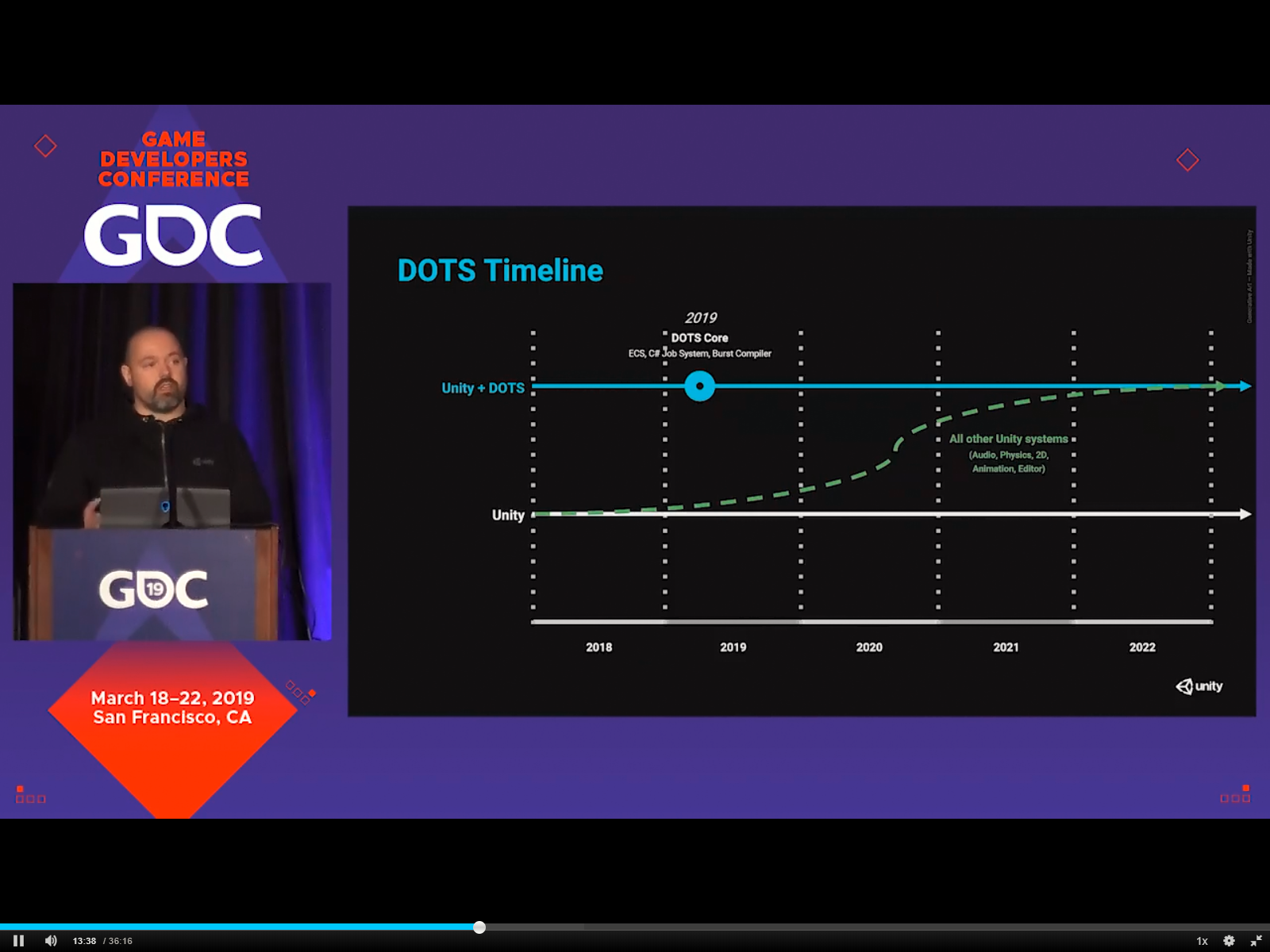
There is a timeline, I think it was 2022 for 'you can do 99,9999% of everything in ECS, pretty sure the editor was some time 2020
twin raven
@sonic oyster do you use the data somewhere else? is there a reason it is not Allocator.TempJob?
sonic oyster
Nah, i just changed it from TempJob to Persistent to not flood console
with >4 frames old leak
tawdry tree
Found the image, here's the timeline:
https://cdn.discordapp.com/attachments/497874303463850004/563862123420057620/unknown.png
 twin raven
Do you need to dispose it if it is persistent?
tawdry tree
You should still dispose when done, but obviously not before
safe lintel
i think even 2022 is for the big core systems like ui animation audio, and not necessarilly indicative of everything that exists in unity now
zenith wyvern
Is there a reason you can't use [DeallocateOnJobCompletion]?
tawdry tree
Well that'd dispose for you
sonic oyster
i use [DeallocateOnJobCompletion] on _counter
but if i use it on Native_Blocks i won't be able to read the output
twin raven
Oh I didnt even know there was a such attribute, thanks 😄
zenith wyvern
Then you just need to deallocate after you read from it
tawdry tree
As I understand that graph, 2022 is (as mentioned) 'You can do practically anything you want to in DOTS rather than the old style
twin raven
Sorry, cannot really tell why the error message is sent 😦
safe gate
And it will take a long time because unity internally will become ECS as well. So if you even keep using OOP (monobehaviours and such), Unity will run at ECS
sonic oyster
:c
regal pond
@sonic oyster I have a stupid question. Have you tried calling .complete() immediately in GenerateChunk and only dispose when _jobHandle.IsCompleted ?
sonic oyster
i think i found out the issue
it doesn't .Complete() the second call in LateUpdate()
it doesn't even start the job
second time
there should be an output for second call
there isn't
but there is also no error message to it
until i click third time
Unity.Collections.NativeArray`1:.ctor(Int32, Allocator, NativeArrayOptions) (at C:\buildslave\unity\build\Runtime\Export\NativeArray\NativeArray.cs:43)
Chunk:GenerateChunk() (at Assets\Scripts\Voxels\Chunk.cs:173)
Chunk:Update() (at Assets\Scripts\Voxels\Chunk.cs:70)
well. it looks like every time you schedule a new job
you're overwriting _JobHandle in the class
can only one job be going at a time?
each job has to complete before the next job?
sonic oyster
yeah
if you call GenerateMap() when the first job is running, stop it and dispose, then start new job
so basically, scrap the previous mapgen
tawdry tree
The thing that sticks out to me is that the first round is the only one that seems to do all of what it should
If you need to basically queue up stuff, may I suggest storing in a container, perhaps a, oh I dunno, NativeQueue?
sonic oyster
NativeQueue?
tawdry tree
Isn't that a thing? There's all kinds of native collections, and a queue is one of the basic and very useful ones
sonic oyster
oh i might know what is causing that
tawdry tree
Could probably just use a list. Depends on your logic, but you probably want to stop it from making too many, and you want FIFO. Could engineer around it, tho
sonic oyster
_JobHandle = job.Schedule();
shouldn't it be +=?
nope
can't do that sadly
how do i NOT overwrite that...
tawdry tree
Do you specifically need to not overwrite it? Do you need multiple concurrent ones?
sonic oyster
not in the same object
tawdry tree
Sounds to me like you need to have the ability to fire up an arbitrary amount of MapGen jobs and maybe do something when they finish, and that means storing them in a list, but...
sonic oyster
this Chunk script will be in >1024 objects at the same time
so >1024 jobs
but not in the same instance
tawdry tree
So each chunk (the map structure, not ECS chunk) will probably each need to run a copy of the job?
sonic oyster
yep
tawdry tree
May I suggest either changing their names, or at least referring to them as Map Chunks for clarity?
sonic oyster
sure, sorry!
tawdry tree
What else could affect your best solution... oh yeah do you need to do anything when the jobs complete?
Are they fire or forget or do you need something to run upon completion?
sonic oyster
rendering job
golden heron
@safe lintel I personally find it easier to follow using specific types
sonic oyster
Start > MapGen > Render > Wait for map/map chunk update > Render > Wait...
safe lintel
it gets super verbose in certain situations though
golden heron
It may do, but thats what autocomplete is for. Seems its just a case of personal choice tho.
sonic oyster
But the Native_blocks NativeArray should be stored until you close the game, since it contains blockdata
tawdry tree
Dictionary<int, Dictionary<string, List<SomeType>>>
Yeah, I have one of these in production code
which becomes really long when you also initialize and the name of the variable is descriptive
safe lintel
my brain gets frazzled after too much tbh, im happy var exists for my own use
zenith wyvern
Can't you have a dictionary of jobhandles keyed by map position and just treat each job completely in isolation?
tawdry tree
I like to have var where it's obvious or pretty clear what type it is, and you can always mouse over it(in a proper IDE anyway) to see the actual type
Evander, it sounds to me like you're binding things a bit too tightly
Do you just run mapgen once, at start?
sonic oyster
okay
that is weird af
the code FIXED ITSELF wtf
i just added
Debug.Log("test"); into job
Execute()
tawdry tree
in the job? Probably forces it to sync with the main thread or something
sonic oyster
No burst: only first call works
with burst: nothing works
i just feel demotivated
zenith wyvern
It sounds like you're just doing a bunch of random things and hoping it fixes it. What problem are you trying to solve exactly?
shut python
I just added the ConvertToEntity script to my player. For components I implement the IConvertGameObjectToEntity interface. But my Rigidbody component doesn't seem to be converted 🤔 So my MovementSystem will never run because there is no Rigid component
        Entities.ForEach((Rigidbody rigidbody, ref MovementInput movementInput, ref MovementSpeed movementSpeed) => {
            // ...
   });```

Is there another "ECS Class" for Rigidbody to use?@zenith wyvern i'm trying to make a working job that works under burst compiler and can be called more than once...
even a job that does nothing at all
tawdry tree
@sonic oyster I think I'd do something like:
When you need a chunk generated, spawn an entity to be a chunk, probably with a component of it's chunk position (chunk 0,0 next to 0,1 and 1,0 etc), and a GenerateComponent.
MapChunkGenerationSystem applies to all chunks with GenerateComponent.
The first thing it will do is to start a GenerateChunkJob and store the handle in the component.
For those that have a job handle, it will check if they are finished, if not, they are skipped.
For any complete handles, run .Complete() to make sure, then remove the component and add a GeneratedTagComponent or something.
At that point some other system could do rendering or whatever
sonic oyster
just something that works
safe lintel
@shut python are you using inject? or destroy?
shut python
I use destroy
zenith wyvern
You're saying if you have a job and do a for loop where you schedule it a bunch of times in a row it doesn't give you the expected results?
sonic oyster
@zenith wyvern no, i just have a bool that sets itself off when i click it in editor
and that calls the job function
first click works but only without burst compiler
safe lintel
cant use a physx rigidbody in a pure ecs entity, you would need to use the new ecs physics package or use inject and keep the gameobject around
tawdry tree
@sonic oyster Did you see my slightly long idea?
I think you're stuck on the problem and could benefit from taking a step back and/or pause, and might want to re-approach the problem from some other angle.
sonic oyster
@tawdry tree yeah, i'm reading that right now
tawdry tree
Ask me if I wasn't clear about something
sonic oyster
@tawdry tree
For those that have a job handle, it will check if they are finished, if not, they are skipped.```
I am doing that.
I am instantiating chunks with positions and then call Chunk.GenerateMap() on all of them, every data related to single map chunk is stored within that particular chunk.The entity physics system isn't really working with the latest ECS update btw
safe lintel
there may be some issues but im not encountering any of them(im not using joints)
zenith wyvern
It's been a bit but I remember it just spamming my console with exceptions when I tried to use it, but maybe I was being dumb
sonic oyster
from what i see
tawdry tree
What does Chunk.GenerateMap() do? The way i see it, a lot of the data used during generation is transitional, you only really care about the result, so probably vertices and triangles if it's 3D. And even to get there could easily be split into at least two jobs - whatever height/noise gen you have, and another that takes output from that and makes the model
sonic oyster
people are creating separate jobhandles
tawdry tree
Actually, what is Chunk.GenerateMap()? A normal method?
sonic oyster
@tawdry tree it returns array of integers
block ID's
then i calculate the index to get XYZ coords
tawdry tree
And what input?
sonic oyster
atm, just a call that fills the array of blockid's
later on, if it WILL finally work
it will be filled with customizable values
shut python
@safe lintel do you have an example for the conversion to the physics package? or should I convert it to this
    private struct Data
    {
        public int length;
        public ComponentArray<Rigidbody> rigidbodyComponents;
        public ComponentArray<MovementInput> movementInputComponents;
        public ComponentArray<MovementSpeed> movementSpeedComponents;
    }

    [Inject]
    Data data;```

and loop through the data?because I think using the correct physics package would be better, no?
safe lintel
use ConvertAndInjectGameobject on the convertoentity script
(thats for hybrid ecs with old physx rigidbody though)
safe lintel
on the monobehaviour ConvertToEntity script theres a dropdown option to either destroy or to inject
zenith wyvern
@shut python Most of your questions can be answered by carefully reading the ECS Examples. There are plenty of examples for game object conversion and physics
In some cases they are complicated and hard to understand, but that is where DOTS is at right now
safe lintel
if you are wanting to combine physx physics with entities you want to use go with inject option
shut python
you mean these ones right?

GitHub
Contribute to Unity-Technologies/EntityComponentSystemSamples development by creating an account on GitHub.
zenith wyvern
Yes
shut python
ok, will read them 😃
zenith wyvern
That and searching the forums is the only up to date example of how to solve problems
tawdry tree
@sonic oyster consider breaking up your tasks and think of them as smaller units
//Pseudocode!
class ChunkGenSystem {
  OnUpdate(){
   Entities.WithReadOnly<ChunkToGenerateTag>.ForEach(
   (Entity chunk, ref ChunkComponent chunkComponent) {
      entity.RemoveComponent<ChunkToGenerateTag>();
      var  jobHandle =  MakeGenerationJob(chunkComponent);
      var newComponent = new ChunkBeingGeneratedComponent{
        JobHandle = jobHandle;
      };
      entity.AddComponent(newComponent);
   });
  }
}
That's (very roughly) how I'd do the first step. MakeGenerationJob would make a job with all the logic for generating the block IDs. Then I'd have a second system kinda like:
class ChunkRenderSystem{
  OnUpdate(){
   Entities.WithReadOnly<ChunkBeingGeneratedComponent>.ForEach(
   (Entity chunk, ref ChunkBeingGeneratedComponent genComponent) {
      if (genComponent.JobHandle.IsComplete == false) return;
      //Implied else
      genComponent.JobHandle.Complete(); //To make sure, I heard someone had issues with that
      entity.RemoveComponent(genComponent);
      var blockIds =  genComponent.JobHandle.result;
      var jobHandle = MakeRenderJob();
      var newComponent = new ChunkBeingRenderedComponent{
        JobHandle = jobHandle;
      };
      entity.AddComponent(newComponent);
   });
  }
}
And finally a system which does more or less the same, but adds whatever is needed to have the entity actually render (so render component with values) to the entity.
Doesn't need to be separate systems, BTW, but I believe it's considered good practice to split it up.
safe lintel
@sonic oyster i kinda havent followed too much of your problem but is there a reason it appears to be in a monobehaviour and not a jobcomponentsystem?
sonic oyster
the reason is: tutorials on google
i have no idea what i'm doing
with job system
i just want to move from dotnet's Parallel.ForEach
to job system
zenith wyvern
Read the ECS Cubes examples. They are incredibly simple and have very detailed readmes explaining everything that they're doing
safe lintel
yeah i think you should start on an easier problem to get a handle with job scheduling
tawdry tree
Yeah, a mapgen system is probably not the place to start if you're that new
safe lintel
i dont know how reliable IsCompleted is tbh for job scheduling, id rather use dependencies or changing archetypes for structuring chained jobs
sonic oyster
well without JobSystem my mapgen takes around 20 seconds to do its work
in coroutines and Parallel.For
i want to speed that up
zenith wyvern
If you're not actually using entities for anything then using a jobsystem won't do anything for you, if you're properly using IJobParallelFor with BurstCompile it should be all you need
If you're having trouble figuring out why it's not working, reduce your problem. Remove inputs until it works.
sonic oyster
i don't use IJobParallelFor
tawdry tree
Well if that's your objective, then ignore ECS and start by just jobifying the code. Make sure each method used is a pure function, then learn to start jobs. Chain jobs so that when generation is done it automagically does the render part.
tawdry tree
That miiight be part of why it doesn't work very well
zenith wyvern
Oh...well I have no experience using C# threads in Unity, all I know is you really really need to know what you're doing to make that work.
tawdry tree
Otherwise, if you want to learn ECS, do the basic samples and some 101 tutorials you find online, with a twist of your own to get a feel for it, then double down on anything specific you think you'll need/want to know
sonic oyster
well pure NET's Parallel.For works perfectly
it optimized my mapgen from ~90 seconds to ~20
but
zenith wyvern
Right but this is a channel for ECS. If you're not actually using Unity's Job system we have nothing to offer you
sonic oyster
i know Job System can optimize this even more
this is why i'm trying to start a job, return a NativeArray<int> from it
dispose it
and call the new job later on if needed
first call works, and only the first one
safe lintel
i have no idea how parallel.for works or if it even works with unitys job system
sonic oyster
@safe lintel it's just for loop but multithreaded
zenith wyvern
Oh I see, so your use of C# threads has nothing to do with your currrent problem, okay
tawdry tree
If you want to use jobs, you're gonna need to move away from the TPL
zenith wyvern
Then yeah, all I can say is go through the ECS Cube tutorials to get a feel for how they manage job scheduling internally
zenith wyvern
And based on the system you're describing it really sounds like IJobParallelFor with a NativeHashMap is what you want, so maybe find examples of how people are using that
tawdry tree
If you want a roadmap to get there, you should start by getting a feel for ECS and jobs, as suggested by multiple people.
Once you have that, strip all references to System.Threading and take the perf hit, then take that horribly singlethreaded code and jobify it.
If you want even more perf, then after that you could look at using entities.
sonic oyster
Okay, i think i really found out what's going on
altho no idea what's causing it
_JobHandle = job.Schedule(); is called correctly, and after it Debug.Log("...."); works
BUT
LateUpdate() seems to not recognize if JobHandle_ is completed or not
tawdry tree
Unfortunately it sounds like you're trying to have your code be/do multiple things at once, which doesn't really optimize. Alternatively, I think Task.Run() with pure functions and shoving them into a Queue might be a better way to use System.Threading, asuming you switch to the newer .NET runtime (is that still 'experimental'?)
sonic oyster
    {
        if (!_JobHandle.IsCompleted)
        {
            Debug.Log("LateUpdate(): !IsCompleted;");
            _JobHandle.Complete();
            Debug.Log("LateUpdate():  _JobHandle.Complete();");
            float EndTime = Time.timeSinceLevelLoad - StartTime;
            Debug.Log("Mapgen took " + EndTime + " seconds (Start time: " + StartTime + ", End time: " + Time.timeSinceLevelLoad);
            Native_blocks.Dispose();
            Debug.Log("LateUpdate():  Native_blocks.Dispose();");
        }
    }```

nothing from here appears in console after second call, but calling the schedule in `GenerateMap()` works, or at least seems to be workingIs there a reason why this is in-
Hang on, are you doing all of this in a single frame?
Because if not, why is this even in LateUpdate?
safe lintel
yeah i wasnt sure if there was stuff being initialised in update and trying to be completed in lateupdate
sonic oyster
Update() checks if ForceUpdate bool == true, if it is, set it back to false and do GenerateMap()
then in LateUpdate() check if the job has finished
safe lintel
also if something isnt completed you are calling complete anyway so the check isnt really necessary, really though you should just check out the samples repo and go through it
sonic oyster
i have readed that moving Complete() to LateUpdate() gives parallelism
if i call the job in a function and immeadetly after that use complete(), there's no parallelism
tawdry tree
These are heavy jobs, right?
sonic oyster
according to tutorials
tawdry tree
Because if they are you want them to be cross-frame
sonic oyster

Pastebin
tawdry tree
Meaning, you need to make the job, store the handle, and later check if they're done
zenith wyvern
Update and LateUpdate happen in the same frame. So you're scheduling a job, then checking if the job is complete (before unity has even had a chance to kick it off) then immediately calling complete on it
tawdry tree
Have you used tasks?
zenith wyvern
Don't do if(!IsComplete) jobhandle.Complete
Let the job complete on it's own then do whatever you want to do after that
tawdry tree
Tasks, and jobs in Unity ECS is really just a wrapper for work.
When you make a task/jobhandle, you say 'this is how to do some work'
When you schedule a job or run a task, something will do that work. To ignore tasks here, Unity wants to use multiple threads for you for that sweet, sweet parallelism.
Then that work will be done. You could ignore it, and it would eventually be done. Think of it as being a head chef and you tell someone to go chop vegetables or something.
At this point you could check in 'are you done yet?' and get an answer.
You could also say 'I need this done, now (.Complete()). THIS IS BLOCKING. YOU WILL DO NOTHING ELSE WHILE YOU STARE AT THE POOR COOK.
What you do here is glare at the poor cook until they're finished, while what you should do is to go off and do something useful.
zenith wyvern
Not unless you actually needs the job to be done right then.
tawdry tree
What you do is to go ask the cook "Are you done?"
Then you ignore their answer and tell them to finish while you look
sonic oyster
i created a bool IsJobDone = false; that is setting up as true at the end of job script
trying to see if that will work
    Blocks_Array.Dispose();
    IsJobDone = false;
}```I'm not sure what you're trying to do there, you can still check if the job is done with jobHandle.IsComplete
tawdry tree
try
if (jobHandle.isComplete){
  //Do stuff you want done after completion
}
The point is if you call jobHandle.Complete on a job it will force the job to finish right there, on the main thread. You will lose the entire point of trying to use a job in the first place.
safe lintel
you will make life so much easier for yourself just going through all the samples
tawdry tree
^
safe lintel
the boids sample is a nice advanced system that shows chaining complex jobs and i think even an array of jobs being scheduled
zenith wyvern
My brain is too small for Boids. That's some graphics programmer business
sonic oyster
@tawdry tree my point is, when calling
  //Do stuff you want done after completion
}```
you will actually do stuff you want done after completion even before queuing jobyeah its kind of advanced and might be right up evander's alley, my brain is also too feeble to understand it completely 😃
sonic oyster
every single frame
tawdry tree
The inner scope there should not run unless the job is indeed done. Do you mean that it doesn't work as it should, or that there is stuff you always want to do?
And don't confuse .Complete() (complete this NOW!) and .isComplete (hey, are you done yet?)
struct SomethingJob : IJob {
  //some logic
}

class JobifiedSomething : MonoBehaviour{
  JobHandle handle;
  void Update(){
    if (handle == null){
      handle = new SomethingJob.Schedule();
    }
    else if(!handle.isComplete){
      //Don't do anything, just wait for it to be done
    }
    else if(handle.isComplete){
     //Hurray, we did it! and it happened over more than one frame!
    }
  }
}
But yeah, you should look at the examples, really. And maybe avoid the boid sample, at least until you feel like you understand all the others; it's complex.
sonic oyster
Operator '==' cannot be applied to operands of type 'JobHandle' and '<null>'
tawdry tree
I should be getting into bed right about now, and haven't really touched on this particular branch of ECS, but you the point is just to know whether you have started the job or not
But! Turns out the Scripting API has some pretty simple antires for IJob and IJobParallelFor
https://docs.unity3d.com/ScriptReference/Unity.Jobs.IJob.html
https://docs.unity3d.com/ScriptReference/Unity.Jobs.IJobParallelFor.html
A bool jobStarted should be enough in my mini-example
tawdry tree
Too late for me to mock up a minimal example and actually make sure it's runnable code, or I'd do that. Good luck while I take the short trip to tomorrow
sonic oyster
okay, so
calling .Complete() just right below .Schedule() works
everytime
but when i want to move .Complete() or remove it totally, and just check if it completed on its own, it fails.
no idea why
my god
it's so fast
i think i got it
omg, 20ms
just did for loop, 1024 times my job
and used System.Diagnostic stopwatch
 untold night
has preview 33 dropped yet? like a lot of people I had to rollback to preview 32
twin raven
@zenith wyvern calling complete doesn't waste all the benefits of a job. And it won't be ran on the main thread. It will still be ran parallel but mainthread will wait for it to complete
At least that is my experience from looking at the profiler
I mean if it is IJobForEach or IJobParallelFor
If it is just IJob then yes calling complete right after scheduling it doesn't make sense
solar ridge
Calling complete for any of them in a job system needs a genuine reason
Because you can chain the dependencies to ensure they run in a desired order of operations
Otherwise you are causing a sync point
safe lintel
@untold night not yet but im beginning to think theres something weird with my project cos i havent needed to roll back yet
untold night
I had issues immedately, seems very much a YMMV situation
winter veldt
complete just blocks until the job is done. it can still use parrallel threads to try to do it faster, but it still waits until the whole thing is done before continuing.
i'm having an odd issue.
when i run EntityManager.AddSharedComponentData(entity, "some text"); gives me an error "can't convert Entity to EntityQuery"
why is it jumping to entity query when i send it an entity?
untold night
Sounds like a bad error message, but System.String isn't a valid ISharedComponentData either
twin raven
@sonic oyster did you figure it out?
This is from last year but maybe still relevant:
Tracing data ownership requires dependencies to complete before the main thread can use them again. This means that it is not enough to check JobHandle.IsDone. You must call the method JobHandle.Complete to regain ownership of the NativeContainers to the main thread. Calling Complete also cleans up the state in the jobs debugger. Not doing so introduces a memory leak. This also applies if you schedule new jobs every frame that have a dependency on the previous frame's job.
So even if the job has finished you should still call complete
I guess isDone is isCompleted nowadays
zenith wyvern
If that's still the case that's one hell of a gotcha, I can't imagine that's still true
twin raven
Allright, probably not true then 😄
zenith wyvern
I mean it could be, I have no idea, just saying if it is - that sucks
sonic oyster
Well
dry nymph
I did not follow the conversation, but I believe what @twin raven said is still valid
sonic oyster
I just don't wait for lateupdate
And Complete it in the same function
It works that way
But
I will move to IJobParallelFor later on
In my world script
It will transfer arrays to relative map chunks, and that way I can have clean multithreaded code
dry nymph
You can check if a job is complete with .IsCompleted() but if you want to gain control of Containers you have to call .Complete() (unless there was a sync point that already completed)
sonic oyster
@dry nymph i had problem with waiting for lateupdate to call complete on my job
First call worked, second call was fine but IsCompleted didn't catch the completion of job
Third and later calls were just pure errors
dry nymph
can you post the code that throws the error?
dry nymph
 if (job.IsCompleted()) {
    job.Complete();
    // do stuff)
}
I assume you have a job that runs over several frames? In this case // do stuff would mean also to schedule the next job --- how to format the code??? ```CS is not working ---> GOT IT!
sonic oyster
	JobHandler_.Complete();
	//doing stuff
	MyNativeArray.Dispose();
}```You're doing the opposite again
sonic oyster
It was like that yesterday
zenith wyvern
That's equivalent to job.Schedule(); job.Complete();
sonic oyster
I removed that
dry nymph
The NOT -> ! is wrong
you have to check that the job is completed and then call complete
unless you want to force completion, then you just call complete without the need to check .IsCompleted()
sonic oyster
But if I don't queue a job
And check if job is finished
I will still get true
I made a bool that sets itself to true after job is completed (at the very end of execute), then, in lateupdate I check for that bool, and if it's true, set it back to false and call Complete()
 mystic mountain
Back again with my ECS hybrid thoughts, and trying to understand the way to program this better. I have a character who can currently pick up an object, which he/she can then use an action on(left/right mouse button). I do this by keeping track of the entity I'm holding and adding a component on that entity when I'm pressing a button. If I'm not holding anything I do a default action. (pressing world GUI buttons in world) So I'm gonna expand this to have a "normal state" which is the above, and a "special state 1" which has an specific action (left/right) (Basically I have a repair tool that I can equip when pressing 2). This will drop currently held object, but also if picking up an object in this state will turn it to the "normal state". How would I deal with these "state" things, thinking expandable if I want to add another special state with special actions. I was thinking that I could use my existing action system and modify the "drop item" code so it won't work on these special items. So basically pressing 2 will Instantiate/Enable my item and place it in the hands, and then the existing systems will do the rest. Sorry for the long post, but any thoughts on this?
golden heron
Why are you using ecs, @mystic mountain seems you havent really got a complex enough scenario for it? In regards to your states, you can do many things, either a component data which contains some integer which by its value denotes the state, or, by adding and removing empty component datas as tags - the latter would be easier to make sense of during debugging.
You need to have a status on the entity to dictate what the system does with it, is that right?
mystic mountain
Yeah, so I will most likely move over to full ECS later, hence I want to enhance my understanding of how to solve these kind of problems that are close to gameplay as well. So my current thought is that each state should be separated into different systems. So I feel in that matter that the first option is the better of the two you are presenting, the second would induce a new component for each new"special state" that would have to be checked against and removed when changing states. The first method would however trigger all systems I think? Or is this a case where you can in some way activate a system based on a filter that looks on data?
golden heron
All filters seem to only look at the existence of the component data, and not its values. Also, the tagging method is not actually that cpu intensive, seems they've optimised the usage of empty datas so you hardly notice it. And yes, the first method would always trigger all the systems, with each system acting dismissively if your data is not set to the appropriate status. I had a similar issue...
i have a space game and i wanted background entities to only act once every few seconds. I also wanted to make sure that the systems were not just accessing eery entity but only moving the few, as it wouldnt really improve the processing speed much. So, it seemed the only way to guarantee that the system doesnt process an entity is to remove the components it looks for, just removing the tag will do.
That being said, i have plans for thousands of entities, if you are using less, you can pretty much do as you please, intensive processing on under 100 entities is difiicult to make it be slow
The point was to eliminate the job allocations altogether in my case, in your case those extra systems might not be noticeable.
dry nymph
@sonic oyster
I tried this and it seems to be working (although I am getting warnings for waiting more than 4 frames [Unity internal], this is likely because I am on an old ECS version, where this was not fixed)
    //[DisableAutoCreation]
    public class MultiFrameJobSystem : JobComponentSystem
    {
        JobHandle multiFrameJobHandle = new JobHandle();

        //[BurstCompile]        // disabled so the job execution is slower
        struct MultiFrameJob : IJobParallelFor
        {
            public void Execute(int i)
            {
                // you have to play with iteration count depending on your system speed
                for (int x = 0; x < 1000; x++)
                {
                    for (int y = 0; y < 1000; y++)
                    {

                    }
                }
            }
        }

        protected override JobHandle OnUpdate(JobHandle inputDependencies)
        {

            if (multiFrameJobHandle.IsCompleted)
            {
                multiFrameJobHandle.Complete();

                multiFrameJobHandle = new MultiFrameJob()
                {

                }.Schedule(100, 1); // you have to play with iteration count depending on your system speed
            } else
            {
                Debug.Log("SKIP FRAME");
            }

            return inputDependencies;
        }
    }
I'll try that, thank you :D
golden heron
I'd suggest in your case make a tag empty componentdata for each status, named something like StatusType so each begins the same, then apply the components when you need to. On equipping the item, add the component, and have the system add a request to the command buffer to immediately remove it, if you need a one shot action, or if it stays active, then just remove it again when the item goes away. @mystic mountain
@dry nymph is that to make jobs continue over multiple frames?
mystic mountain
@golden heron Yeah I see. Well for the second method it might induce multiple places where I have to add the Tags to EntityQuery which will make the code harder to maintain. My example will only affect players, that is maximum of ~50 entities. And this is specifically for changing equipment, which is very unlikely everyone is doing at the same fixed frame. So yeah I guess anything would do really, but it's interesting with your input to get some ideas flowing. I feel like I want to do my systems as generic as possible, so it might get to a point to have a "swapStateSystem" that handles all state changes, and then have reactive systems depending on the more gameplay related stuff.
golden heron
Yeah, that sounds good
dry nymph
@golden heron Yes - I never needed this myself, but the question came up earlier here and my understanding was that it works as I posted --- (note: I have not been using ECS since Feb, so I might be out of date)
golden heron
altho atm ecs is running in natural updates, not fixed updates, altho they intend to fix that
nice sngdan
mystic mountain
I've done a quickfix on that : )
golden heron
Hehe nice
how so?
@dry nymph you know how to use the localtoworld to transform a direction vector to local space?
is it just localToWorld.value * float3 ?
mystic mountain
Current workaround, doesn't give you the entityDebugger overview of the systems however.
https://forum.unity.com/threads/solved-playerloop-fixedupdate-jobcomponentsystem.670675/#post-4504240
dry nymph
@golden heron You would need the inverse (i.e. WorldToLocal) if you want to transform from world to local space
mystic mountain
So it's just math.mul(localToWorld.value, yourVector), no?
golden heron
apparently not, im using math.rotate(float4x4,float3)
dry nymph
I have not looked into the inverse function of the math lib. In very early tests, it was not included and I calculated worldToLocal & localToWorld directly from the transform components (pixel collision tests I did when the jobsystem & math came out, before ECS)
I guess you would need to do math.mul(math.inverse(localToWorld4x4), yourVector)
golden heron
its math.rotate, math.mul doesnt include an extension for float3x3 * float3
fancy taking a look at my system, see if you can see where im going wrong?
mystic mountain
Throw it out to the wolves ^^👌
golden heron
Haha, its quite... busy.
low tangle
means you should be breaking it up :^)
golden heron
shhh you !
And hi 😃
thanks for the tip on the localtoworld thing. Altho it proved a pain finding i had to use math.rotate not math.mul hehe
low tangle
yeah I was about to mention that earlier but I was second guessing myself
linear algebra is still my weak point
low tangle
I mean I took a course on it way back in college but I dont think it stuck super well
golden heron
So... takes deep breath here is my monster rotation system 😄
Its mostly a monster cos i like my code to read easy and i avoid those shorthand styles like the plague hehe
low tangle
what made chunk iteration a requirement?
golden heron
thousands and thousands of entities mostly.
low tangle
well skimming over this, 100% you can make this way more dots friendly
golden heron
But... thats not really necesary, atm im thinking about splitting the entities - this system processes two types of entity, it would be better to split the systems
low tangle
far too much in it
golden heron
YEah, but atm my concern is more just getting the angles to work hehe
low tangle
you should break it into multiple component types
golden heron
Once it works, i can worry about increasing efficiency
low tangle
its better for developing to make the changes in structure earlier
it screams for multiple jobs
point me to the line number
golden heron
fair enough, its already seperated into sections, i can make it into three systems at least, but i just wanna get to the bottom of the turning. Gimme a sec...
low tangle
I highly suggest you break it up, because of all those good reasons for performance and sanity. but also so you really get used to the dots tools
job chunks should only be used when you cant jobforeach, and then only for cases were you need to chunk iterate over far far more entites
my body sync system runs on 1m, and performance with burst isn't even enough in a foreach, but jobchunks cut the performance down into a reasonable setup
golden heron
Im using the jobchunks cos evetually itll be handling thousands of entities.
low tangle
main thread entitys.with.foreach for prototype or hybrid stuff, jobforeach, then jobchunks, jobparrellel job hashmap etc
golden heron
but that doesnt matter much really, i can change if necesary
golden heron
I intend to ...
low tangle
you will be able to handle 100k easy on a weak pc
golden heron
Before going too deep into all these efficiency suggestions, please bear in mind i have read loads on ecs, and am very much aware that this system is too large, but, during trying to get it to work, what with ecs being the walk in the dark that it is, it has been rewritten like 20 times, and i havent yet bothered to go through and remove stuff that can be removed... hence why i keep saying i need it to work before i can make it efficient. 😃
Atm, i just wanna get it to read the turning angles correctly, and apply the right thrust in the right angles, thats the major concern.
And the main reason it looks so long is because i broke it down into three seperate axis for the calculations.
Ill come back and tidy it up and split the drag and some other stuff out later. For now... I just need to see where in the process the confusion is beginning.
low tangle
one of the side effects of breaking it up is making it far far easier to understand what you are doing
even commented you got a lot of this then that, encoding logic that I don't know what your intentions are
I get the jist ofc
just sayin
golden heron
quaternion rotation = chunkRotations[i].Value; // current Rotation
                        quaternion newRotation = quaternion.LookRotation(rotationSpeed.directionToDestination, math.up());

                        float3 rotationDir = new float3(0,1,0);
                        float3 newRotationDir = math.rotate(math.inverse(local.Value), math.normalize(rotationSpeed.directionToDestination));
yeah, i'd have to say getting individual parts working individually would probably make things less confusing.
golden heron
this takes an externally set world position from the rotationspeed component, attemps to transfer this into local coordinates, and sets the forward local position.
float yAngle = math.atan2(rotationDir.z, rotationDir.x) - math.atan2(newRotationDir.z, newRotationDir.x);
then i use this to calculate a signed angle in radians for each axis
float3 thrust = MathHelpers.float3Math.Normalize(new float3(zAngle, yAngle, xAngle));
Then, using this line, i acquire the amounts of thrust, proportionally. Does that make sense?
golden heron
kk, moving on, all the drag stuff has been heavily tested independently, ill skip that
// calculate thrust
                        if (rotationSpeed.rotationSpeed.x < rotationSpeed.maxSpeed.x && rotationSpeed.rotationSpeed.x > -rotationSpeed.maxSpeed.x)
                        { // if our max speed is not exceeded...
                            if (rotationSpeed.rotationSpeed.x + thrust.x < rotationSpeed.maxSpeed.x && rotationSpeed.rotationSpeed.x >= 0)
                            { // if adding thrust wont exceed maximum, add thrust,
                                rotationSpeed.rotationSpeed.x += thrust.x;
                            }
                            else if (rotationSpeed.rotationSpeed.x + thrust.x > -rotationSpeed.maxSpeed.x && rotationSpeed.rotationSpeed.x < 0)
                            { // if adding thrust wont exceed maximum, add thrust,
                                rotationSpeed.rotationSpeed.x += thrust.x;
                            }
                            else if (rotationSpeed.rotationSpeed.x > 0 && thrust.x > 0)
                            { // else set speed to max
                                rotationSpeed.rotationSpeed.x = rotationSpeed.maxSpeed.x;
                            }
                            else if (rotationSpeed.rotationSpeed.x < 0 && thrust.x < 0)
                            { // else set speed to max
                                rotationSpeed.rotationSpeed.x = -rotationSpeed.maxSpeed.x;
                            }
                        }
                        else if (rotationSpeed.rotationSpeed.x > rotationSpeed.maxSpeed.x && thrust.x < 0)
                        { // else if rotation speed is exceeding maximum, but thrust would reduce it,
                            rotationSpeed.rotationSpeed.x += thrust.x;
                        }
this, on a per axis basis, basically simply assures a) we do not thrust ourselves over maxspeed, and b) we do not accentally set the speed lower if something external has made us spin too fast.
(im intending to add physics effects later, collisions and such)
low tangle
(would've been better to write this into a function that evaluates the 3 values and returns the delta, so then you could just call it three times on x,y,z)
golden heron
I was intending to do that, i have a function i was using before hehe called GetThrust, but i changed it so left it in the system for now.
 quaternion velocityQuat = quaternion.Euler(math.radians(rotationSpeed.rotationSpeed.x), math.radians(rotationSpeed.rotationSpeed.y), math.radians(rotationSpeed.rotationSpeed.z));

                        chunkRotationSpeeds[i] = rotationSpeed;
                        chunkRotations[i] = new Rotation
                        {
                            Value = math.mul(velocityQuat, rotation)
                        };
And finally, this uses the euler angles to provide a quaternion which is then the result of this frames turn, and applies it to the current rotation.
low tangle
at the start
// in radians
float yAngle =```are you doing all your logic in radians? or do you switch from radians to euler angles at some point
because you might be switching to/from at some point
golden heron
basically, thrust is calculated each turn using the radians, which i then normalise and use multiplied with the three axis acceleration speed to provide the resulting thrust, it uses radians and doesnt change back to eulers because the same angles in radians normalised result in the same from eulers
The maxSpeed tho is always in eulers.
low tangle
alright
just making sure you keep it in a form that doesnt switch often
causes subtle bugs
I'm not exactly seeing anything off
mystic mountain
I would make a DummyTag to add to the system and Log values of one entity to see what is off.
golden heron
I can see all their values already. im debug logging, hence why burst is currently disabled
from what i can see, the angles are all coming out correct.
Are all the axis rotations set up correctly? like, to roll, zaxis, and pitch, round the x axis?
low tangle
offhand cant say for sure
golden heron
ok, no worries
low tangle
would be best to look it up, make a new monobehavour to edit values and put the math into
that way you can get the math right without the long edit time
golden heron
it isnt taking long to edit, not really
low tangle
its faster than checking debug logs
but I get that it isnt that slow
the logic seems sound, so its def the math somewhere
eliminate the parts you know are too simple they cant be wrong and work back and check your assumptions on parts that are more complex
its likely the axis angles or something where you convert
mystic mountain
What I usually do when it comes to transform stuff is also to start with as many identity matrices as possible, so place object in middle etc, 0 rotation and so on, and work your way from there.
low tangle
yeah I do the same as well, start with simple cases that are easy to debug
0, 0, 0 focus on rotation, sort translation later
exact approach I took for my path tracer debugging a few days ago
safe lintel
so would you break up that system? or just separate it into multiple jobs?
low tangle
probably about 4 separate systems / passes over the data
calc the thrust, calc the drag, calc the new rotations all in separate systems so you can debug each stage separate from each other
golden heron
Thanks @low tangle
safe lintel
but at some point you will need to operate on larger sets of componentdata, 4 systems to process that seems a bit excessive though?
winter veldt
its sort of beneficial to have 4 separate systems when you're dealing with a ton of components. each system is meant to do a single thing, more or less, if it can be broken apart, it probably should be.
low tangle
I've currently got 40 different systems in my game. systems dont really have a cost when they are doing nothing, unlike monobehavours
tawdry tree
Ahaha, finally got around to updating my ECS Playground project from some old version of ECS and I have 18 errors from a whopping 4 systems, 1 static class with settings, one helper method and a two components.
Yeah... there might have been some changes since preview12...
safe lintel
its not so much the cost of doing nothing, its just from my own perspective being able to operate on larger sets of data is much easier than splitting it off into multiple avenues(for certain situations). i have a few systems that are similar where i just feel I need to be able to set a large number of components, if I were to split it up it would be harder to order things as well as need to create redundant toggles on my components to ensure that something can happen
low tangle
make sure you profile changes and look at timeline view for your jobs
need to look at the overall job time
I had a case where I had a system that did a bunch of stuff, burst compiled over a lot of data
figured I should break it up, did, added up the job times between the two and it was the same within 0.05ms
so performance wise it made almost no difference from one large job vrs two smaller jobs. but it did make the logic way cleaner and easier to maintain the code later on. I can go back and look at the system and understand what it does in a instant, even just reading the systems name is enough to understand exactly what it does
safe lintel
my most complex systems are for the player and usually only deal with a handful of entities 😬
low tangle
ah, thats what I'm running into right now
redoing my player systems to be cleaner and easier to manage
the main problem making mine complex are the fact that its very hybrid still
safe lintel
ive split up my jobs to manageable methods so while its long and good deal of components, its a bit more digestible, though i am violating the single responsibility rule
low tangle
 sharp blaze
Morning all, started using ECS today and trying to create a EntityQuery to do a bulk destroy using the entitymanager.destroy method. I couldn't find any info in the discord search either.
EntityQuery entityQuery = GetEntityQuery(ComponentType.ReadOnly<TerrainVisualizer>());
Error: GetEntityQuery does not exists in current context
Am I missing a library import? im trying to use this inside a method but it does not inherit ComponentSystem.
if there is a better way to batch delete entities, that would be appreciated too
Thanks
low tangle
GetEntityQuery is a helper method part of component systems
which you should be doing your logic inside of one :^)
but for your case you will just need to construct the entity query manually
found a helper method in the entitymanager
@sharp blaze
EntityManager.CreateEntityQuery(
ComponentType.ReadOnly<TerrainVisualizer>());```get a reference to the entity manager in that world
World.Active.EntityManager is the entity manager in the default auto created world
sharp blaze
thank you, it looks like im getting no errors now.
Still wrapping my head around the ECS design so excuse me for the poor setup!
Even worse, im trying to switch to pure ECS on a existing project
Appreciate it!
low tangle
no problem
if you have more questions just ask, I'm sure someone will be around to help
safe lintel
June, do you find you get occasional editor crashes with ecs? like not necessarily reproducible, but like occasionally after compilation changes or playmode starting/stopping. I really dont remember this amount of instability from the editor with regular monobehaviour land
winter veldt
@safe lintel well since you're dealing with multiple threads, there's a lot more potential for mem leaks and other issues. monobehaviors use the main thread and thus it worked or it didn't.. it's a lot less complicated. (and a lot less performant)
it's also not a released thing, so there's lots of potential for instability in general.
safe lintel
yeah im wondering if its me not shutting down systems properly? but sometimes ill just be recompiling and editor goes, ill restart press play and it crashes again, but then it will be stable for another few hours
i want to report every single crash but its not reproducible so probably pointless
winter veldt
it's quite possibly a mem leak. i've had issues where i forgot to dispose of a nativearray, and then until i restarted the editor, i would get memleak errors constantly. who knows if there's a couple things not tracked correctly... thats the problem with threads... there isn't much of a safety net by itself. it's up to unity to build it.
zenith wyvern
@safe lintel I've had this happening to me too, are you on the latest version as well?
safe lintel
its been happening with all the releases for me in my own project
winter veldt
i've noticed things are definitely less stable, but i've never had anything near frequent crashes with ECS projects.. i've even left them running by themselves for hours when i left the computer without thinking.. i haven't done anything insane with jobs yet.. but it seemed pretty stable as far as resource use.
safe lintel
i can run my game(at least while playing for short periods of time and also just leaving it be in the background for hours) and it wont crash which is great, its the editor
low tangle
@safe lintel yep
pretty common to have crashes while using this stuff
thankfully m2 ssd + newer unity starts fast enough
you will see this sometimes in your logs (build and editor)
Internal: deleting an allocation that is older than its permitted lifetime of 4 frames (age = 8)

(Filename: C:\buildslave\unity\build\Runtime/Allocator/ThreadsafeLinearAllocator.cpp Line: 313)
do you guys report these things(the more random and nonreproducible crashes) or just ignore
low tangle
this means they used one of the native buffers (native array, native queue) cpp variants internally and it didnt clean up
tends to happen mostly on frame skips
when you click back in from a code edit and it goes to recompile it does a domain reload which really mucks around with objects
objects that are holding on native memory
pretty easy for it to be buggy and crash
and I've reported reproduceable ones but the compile and reload ones are hard to trigger
I've got one currently in my game where on builds starting it switching to vr mode then leaving will instantly crash it every time
I made a new project to reproduce it and I cant
this is from a playerlog that I just crashed to make
thats less than a second switching to/from
safe lintel
ouch
low tangle
you can see where it starts
safe lintel
well the image seems to have gotten resized but ill take your word for it
well this is reassuring as I thought I was doing something wrong
low tangle
its just the overview on sublime text
I could post the real one as I think its pretty clear
thanks for bringing it up I noticed there are a few diffrent allocs in here so I'll attach that to my open report 👌🏻
safe lintel
im sure posting the real one would be lost on me 😃
safe lintel
oh yeah i do
tawdry tree
Hmm, what's the current ECS way to render stuff? It's the final piece left for me to have fixed all the errors from upgrading from preview12
safe lintel
hybrid renderer package
tawdry tree
Yeah, but more specifically? What procedure do you get to get the render component? What's the component called?
safe lintel
you mean how to create a RenderMesh component from code?
tawdry tree
So it's still RenderMesh components, hmm... I just need to convince visual studio that my assembly actually references the hybrid renderer package then, as it gave me red squiggles for that
There, no more squiggles in that part of the code after a forced reload
var result = proto.GetComponent<RenderMesh>(); gives error ArgumentException: GetComponent requires that the requested component 'RenderMesh' derives from MonoBehaviour or Component or is an interface.
That's Unity.Rendering.RenderMesh, so it should be one of those
I don't need to make a proxy or anything, right?
winter veldt
if you're talking actually converting gameobjects to entities, i think the newest is "Convert To Entity" stuff?
tawdry tree
I just want the render component from a prefab, and given how much boilerplate I could cut out after all their changes, I kinda assumed the SpawnFromEntity sample wasn't necessarily the simplest way to do that
Actually, it's not even that. I want my entity to be visible, and the simplest in monoland is to make a gray cube or something
Though, it might not be a bad idea to actually spawn an entity from the prefab, assuming I can make said entity not do anything (which shouldn't be hard, as, again, i just want visuals)
winter veldt
yeah, but mono and entities aren't the same thing. so the best you get is a gameobject becoming an entity, and having it's scripts turned into components..
the examples show you how to convert a prefab to an entity. (they also use an entity as a prefab to spawn the other entities) the problem is there needs to be a conversion i believe. you render with ECS or with Mono, they aren't the same thing
safe lintel
yeah you cant use GetComponent because a RenderMesh is a SharedComponentData not MonoBehaviour
winter veldt
as far as i know anyways
tawdry tree
A, herp derp. I figured Component as in ECS, but it's the normal GetComponent we all know and love
winter veldt
yeah i've confused that too
can you run ECS in the background and read it's data from Mono scripts?
tawdry tree
You can use systems and jobs on mono (and jobs from mono)
winter veldt
yeah it's such a confusing phase of DOTS dev. ECS is different enough from mono that when you add the ever-changing api they're creating.. it gets really hard to follow things
zenith wyvern
I'm having a heck of a time figuring this out. I'm attempting to make a fairly simple collision system in ECS - just circle overlaps. I've tested the pieces in isolation and it seems to run exactly how I expect if I do the same logic on the main thread. But if I run it via my JobComponentSystem it completely fails.
One shooter (JobSystem): https://imgur.com/PjoSVVV

Multiple (JobSystem): https://imgur.com/a/3MbM37J

Multiple (Main Thread): https://imgur.com/a/Gd52GuH

I know it's a fair bit of code but if anyone has any idea on what I'm doing wrong or how I can change my code to better figure out what I'm doing wrong
I've been banging my head for a few days now
winter veldt
oddly looks like the bullets are colliding with each other fine?
zenith wyvern
In the job system it seems pretty random. The fewer entities there are the better it works. It gets worse and worse with more bullets it seems
safe lintel
i dont think youve got job dependencies
you are just scheduling them without using jobhandles
so if they rely on each other, they dont know that
zenith wyvern
I am passing the job handle in as I schedule each one in succession (I think)?
        job = new BuildSpatialMap
        {
            spatialMap = spatialMap_.ToConcurrent(),
        }.Schedule(this, job);

        // Initialize the size of our keys list. We can't know the size of our list
        // during schedule time so we need to use "DeferredJobArray"
        // Example in Packages/Jobs/Unity.Jobs.Test/NativeListDeferredArrayTests
        job = new InitializeKeysList
        {
            list = keysList_,
            spatialMap = spatialMap_,
}.Schedule(job);```That's the right way to do it isn't it?
safe lintel
oh wait at the top you do sort of do it
hmm maybe just try to separate them? ive not seen the job reused like that, so should be simple to test against
zenith wyvern
You mean into separate systems? Or using CombineDependencies?
safe lintel
i was thinking of the variable job itself, instead of reusing it just create a new ones for the jobs and handles without reuse
zenith wyvern
Oh okay, I will try that
Nah that doesn't make any difference, I think the way I was doing it is equivalent
    protected override JobHandle OnUpdate(JobHandle inputDependencies)
    {
        spatialMap_.Clear();
        dataQueue_.Clear();
        keysList_.Clear();

        // Build our spatial map
        var spatialMapJob = new BuildSpatialMap
        {
            spatialMap = spatialMap_.ToConcurrent(),
        }.Schedule(this, inputDependencies);

        // Initialize the size of our keys list. We can't know the size of our list
        // during schedule time so we need to use "DeferredJobArray"
        // Example in Packages/Jobs/Unity.Jobs.Test/NativeListDeferredArrayTests
        var initKeysJob = new InitializeKeysList
        {
            list = keysList_,
            spatialMap = spatialMap_,
        }.Schedule(spatialMapJob);

        // Create our collision data (which entities collided) and queue it for the next job
        // We don't want to process immediately since that could potentially lead to
        // multiple threads trying to write to a one entity's CollisionBuffer component
        // at the same time
        var genCollisionsJob = new GenerateCollisionData
        {
            spatialMap = spatialMap_,
            keys = keysList_.AsDeferredJobArray(),
            colliderFromEntity = GetComponentDataFromEntity<ECSCollider>(true),
            posFromEntity = GetComponentDataFromEntity<Translation>(true),
            dataQueue = dataQueue_.ToConcurrent(),
        }.Schedule(keysList_, 5, initKeysJob);

        // Sets up the collision buffers for our collision handling systems
        var processCollisionsJob = new ProcessCollisionData
        {
            dataQueue = dataQueue_,
            collisionsFromEntity = GetBufferFromEntity<CollisionBuffer>(false),
        }.Schedule(genCollisionsJob);

        return processCollisionsJob;
    }
//Tip!
/*You can get*/
public void CSharp(Highlighting byAdding){
  //csharp
  //just after the first triple backticks.
  //you need a newline after that
}
```csharp
code goes here
```
Seems like you forgot the newline, or had a space between the backticks and csharp. Needs to be as in the example above
zenith wyvern
Doesn't seem to want to work
tawdry tree
Is there a space or linebreak between the backticks and csharp? They need to be right next to each other
zenith wyvern
Nope chsarp is on the same line as the backticks and then it's a newline and then code
Maybe it doesn't work if you edit it in?
tawdry tree
It works if I mess it up and put it back, so that sounds weird
Oh, any symbol after csharp will also break it, apparently
zenith wyvern
tawdry tree
Might be a space after the first line?
zenith wyvern
That was it
safe lintel
yeah im out of ideas for your system sorry, havent used hashmaps at all
zenith wyvern
No worries, thanks for the help
tawdry tree
Looks like it might be a order of operations/concurrency issue, shouldn't the simulation be chained after making the spatial map?
zenith wyvern
The "simulation" part happens in another system, it just destroys any bullet entities with "collisionbuffers" that aren't empty
This system just checks for collisions and fills the buffers accordingly
So no other system interacts with the spatial map - it gets populated then the jobs are chained after it to process it
tawdry tree
Are they chained, though?
zenith wyvern
I thought that's what I was doing in the code I posted above, am I wrong about that?
That code I just posted is the entirety of any interaction with the spatial map
tawdry tree
Might wanna check the signature for Schedule, from what intellisense tells me there are two:
job.Schedule(EntityQuery query, [JobHandle dependencies]);
job.Schedule(ComponentSystemBase system, [JobHandle dependencies]);
There's a lot more than that, based on the the type of job it is
tawdry tree
Meaning, BuildSpatialMap looks correct, InitializeKeysList should instead be (this, spatialMapJob), GenerateCollisionData's signature doesn't even show up, and ProcessCollisionData should also be (this, genCollisionsJob)
Though, that might not be quite right
zenith wyvern
I haven't checked the source for all of them, but I'm guessing any where you pass in the componentsystem is just so it can add the implicit entity query to it's internal list
tawdry tree
Either way, try slapping this as the first element where you don't have it
zenith wyvern
You don't have that option for IJob
tawdry tree
Oh, that might be why I see different signature, right
So I have a gameobject, convert it to an entity(which I can see in the debugger), it has RenderMesh (as I can see in the debugger), and World.Active.EntityManager.GetComponentObject<RenderMesh>(protoEntity); throws a nullref... is that not how you'd get the component? GetComponentData is a thing, but complains about RenderMesh not being an IComponentData
tawdry tree
Just figured it out, I feel dumb enough to let out an 'Oh' when i look at my other code, which treats it as a sharedcomponentdata
So yeah, you're right
zenith wyvern
Just remember if you change that at all it's going to start messing with your chunks
sonic oyster
Allright
i think i fixed everything i wanted
thank you guys! 😄
Now, regarding ECS
my original code had voxel data inside class with virtual voids, so i could inherit from it and override
is there any way to replace this with similar/the same functionality for Job System?
because of Job System i moved from that to ID system, but the problem is, original script contained mesh info and physics scripts inside, i can't seem to find a good way to handle this with structs
tawdry tree
To begin with, having a bunch of classes each with their own data is not very ECS, and for a voxel gen you should probably have been using ScriptableObjects to begin with.
Now, I haven't used ScriptableObjects with ECS yet, but they seem like a good fit, so it's something I want to explore
And I don't know if 'you should have done this earlier' actually helps you now, but it's at least something to investigate?
I'd suggest starting with something simpler: You make an entity as usual... but you populate its mesh with data from wherever you store that (in this case it'd just be vertex and triangle data for a single block). If you get that working you should be able to step things up.
A bonus of using ScriptableObjects(if you manage to) is massive reuse of definitions/code - very DRY.
It'd look something like
Block : ScriptableObject
-Texture texture (dunno what type this would be, ideally a reference)
-Color color
-CollisionMesh collMesh
-RenderMesh renderMesh
CollisionMesh : ScriptableObject
-float3[] vertexes
-float3[] triangles
RenderMesh : ScriptableObject
-float3[] vertexes
-float3[] triangles
etcetera
During startup, populate a nativehashmap you store in some data entity with something like this
struct BlockData : IComponentData{
  public NativeHashmap<int, BlockData> Collection;
}
Is there a sample with entitycommandbuffer?
vagrant surge
what you are doing there is a very classical data-oriented "trick"
layering information
instead of just having a Voxel struct or similar with multiple parameters, you have multiple arrays. And they dont have to be arrays, and they can be in different order or something
tawdry tree
Yeah, the point is to DRY (Don't Repeat Yourself), which means you create layers where stuff would be reused (a standard cubic block's model, for example), and make sure you use references instead of values, and that said values are only found one place
sonic oyster
i can't seem to find good examples with IComponentData
vagrant surge
one very typical error to avoid in unity ecs is that not everything needs to be a entity
for voxels, you probably want to have an entity per chunk, like 16x16 or similar
safe lintel
would you store each voxel in a buffer element?
vagrant surge
not actually in a buffer element, but in a map/array on a singleton
outside of the ECS engine itself
i think you can use that blob data stuff for it
tawdry tree
Command buffers are annoying me. There's basically no (easily findable, up to date) documentation or examples, but I finally got something working; my removal system! Just, that was never really an issue, spawning 1000 entities from the main thread, however...
Hmm, digging into it, it seems like an issue with random. I believe mathematics might have something for that?
safe lintel
https://forum.unity.com/threads/how-to-remove-a-component-form-and-entity-using-jobcomponentsystem.682282/#post-4565986 has an example for commandbuffers
Unity Forum
So currently whenever I create my Entities in the Boot monobehavior, I am adding a component onto the entity that will eventually let it be accessed by...
i missed the AddJobHandleForProducer so be sure to add that
tawdry tree
Nah, I have my cmdBuffer working, the issue is random in jobs
safe lintel
using random in jobs takes a little work
tawdry tree
I found an example of someone managing to use Unity.Mathematics.Random by newing it in a job and some trickery to send it seems, but I'm getting
ArgumentException: Invalid state 0. Random object has not been properly initialized. Fun!
There, managed to beat it into submission
tawdry tree
I now have 24002 cubes moving about and making interesting patterns
safe lintel
ok had something all ready to paste 😃
tawdry tree
Also, the most literal corner cases ever
And no, they're not supposed to do that. Or make that pattern. This is just the result of quick code in a pitiful attempt to cage them so that I can see how they behave when not flying off into the sunset
safe lintel
looks like a box of legos gone mad
tawdry tree
The camera is basically in the middle and has a really trippy view
For reference, this is how my job looks:
struct CreateThingyJob : IJobParallelFor {
  [ReadOnly] public EntityCommandBuffer.Concurrent CommandBuffer;

  public void Execute(int index) {
    var random = new Unity.Mathematics.Random(((uint)index) * 255 + 1);
    Entity ent= CommandBuffer.CreateEntity(index, _archetype);
    CommandBuffer.SetComponent(index, ent, new Rotation { Value = random.NextQuaternionRotation() });
    CommandBuffer.SetComponent(index, ent, new MoveSpeed {
      Value = random.NextFloat(Settings.MinSpeed, Settings.MaxSpeed)
    });
  }
}
Similar seeds give similar results, which is why I multiply, the offset by one is because it fails if the seed is 0.
Today was a productive day, and I wrangled code from preview 21 or something into runnable code, that is significantly more concise(Unity has certainly been removing required boilerplate!), and has (theoretically) higher perf to boot (because EntityCommandBuffer).
That means next time I want to do ECS stuff I have working examples for most of the fundamentals for myself, and a project with a couple utility methods. Yay!
vagrant surge
@tawdry tree you need some chunk parallel for, not i parallel for
if you do the chunk parallelfor, you can seed the rng once per chunk
with like chunk adress or something
but the best way to do rng is to have thread-local rng, im not sure how would that work with burst
 fathom trout
where is the best place to report a bug with the Unity Mathematics library? is it preferred to go through the Unity editor bug reporter?
dull copper
it's out of preview right?
fathom trout
yeah
dull copper
you'd think bug reporting tool would be proper approach then
fathom trout
i have a repro project that demonstrates the issue and difference to standard unity math, its a matrix4x4 (float4x4) multiplication order problem
dull copper
https://github.com/Unity-Technologies/Unity.Mathematics/ repo does have issues enabled
so I guess one could try luck reporting it there too (unless it's listed already)
fathom trout
hmm not listed, ill do the unity bug reporter and also github referencing the issue#
dull copper
well, this popped in github https://github.com/Unity-Technologies/DOTS-training-samples
GitHub
Samples designed as exercises to be ported from Unity GameObjects/MonoBehaviours to Unity DOTS. - Unity-Technologies/DOTS-training-samples
untold night
neat
 candid willow
Nice. I've been doing the same thing for training with the catlike tutorials
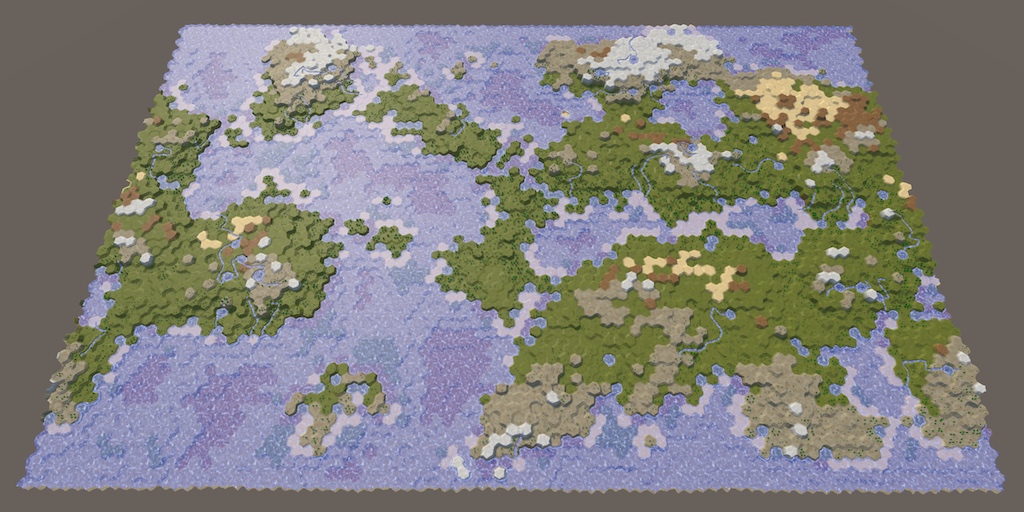
A collection of tutorials for people who want to learn C# and shader programming in Unity. Useful to both novice and experienced developers.
fathom trout
the mathematics issue i encountered is this, which maybe is correct behaviour ??? but odd that all cases work in standard Unity math:
`// incorrect, result is at 0,0,0 with no rotation
float4x4 result = (float4x4)d * (float4x4)c * (float4x4)b * (float4x4)a;
// has correct result
Matrix4x4 result = (Matrix4x4)d * (Matrix4x4)c * (Matrix4x4)b * (Matrix4x4)a;
// workaround for mathematics library:
float4x4 result = math.mul(d, math.mul(c, math.mul(b,a)));
// works:
Matrix4x4 result = (Matrix4x4)b * (Matrix4x4)a;
result = (Matrix4x4)c * result;
result = (Matrix4x4)d * result;
// doesnt work:
float4x4 result = (float4x4)b * (float4x4)a;
result = (float4x4)c * result;
result = (float4x4)d * result;`
safe lintel
i dont think youre supposed to be doing it without math.mul
odd bay
how do you destroy an entity and all of its children
safe lintel
command buffer or entity manager, I cant recall if destroying a parent automatically does the children on its own, but if they are linked then it will destroy any entities that are linked to it
odd bay
I destroy it through the command buffer, but it's children stay
Funny interaction, the children reset to 0, 0, 0 because their parent doesn't exist anymore
solar ridge
Not really a weird interaction. They are local spaces
When you remove the parent you lose that transform so you remove that multiplication from the chain
I remember problems removing children before but there may be something you need to add to wipe out the full tree
odd bay
I never said it was weird
In my case, my character's parent entity was somewhere else and when it died the child entity (its rendermesh and stuff) teleported back to the middle
untold night
In the most recent versions of the ECS packages, you can get access to the Children DynamicBuffer of the entity and iterate through that to destroy it's children
not at my home workstation so I can't remember if it's Child or Children for the IBufferElementData atm
safe lintel
its Child
fathom trout
ahh yea... so the Mathematics issue with float4x4 * float4x4 is not a bug, it treats it as float4 multiplication, not matrix multiplicatio
but unity's Matrix4x4 * operator treats it as matrix multiplication
so math.mul() is important 👍 makes sense now
 dull ruin
 sharp blaze
Can EntityQuery query a specific component with component Data value = x?
Trying to avoid querying all entities of component type then looping thru each one to find specific ones with a specific component data value