#⚛️┃physics
1 messages · Page 55 of 1
 undone lynx
u can add gravity in that same set
try the constantforce thingy too btw
maybe simpler
 unreal linden
Stresstest of my realtime Destruction system, 22 Million vertices on a 250 meter (820,25 feet) bridge.
 torpid prism
@unreal linden is this baked ?
unreal linden
@torpid prism What part of it ?
torpid prism
lol everything
torpid prism
ah i see
unreal linden
I do have a dynamic fracturing system wich baked this, but it couldn't run in realtime of a bridge this massive
Physics are realtime
torpid prism
is this ECS physics ?
torpid prism
good gear
you called it a fracturing system
does it scans the vertices of the mesh
unreal linden
Nope, it just does a voronoi
torpid prism
so u divide the points into voronoi regions ?
unreal linden
I am experimenting with Houdini tho for better fracturing
yeah, it just scatter voronoi points evenly
then breaks it
and then iterates on it
And fractures it again
4 iterations on that Bridge
undone lynx
very cool @unreal linden
unreal linden
Thanks !
undone lynx
is it running at the default physics tick rate?
undone lynx
it looks well optimized rn considering the level of detail
i imagine u could run it at like half tickrate and get okay results
 sour lark
Hello there i never had this problem but now the physics in 2D are getting annoying! In my editor I can play the game and set the rigidbody2D velocity to like 50. In the build the object with the velocity applied moves a lot faster than in the editor. The Canvas also scales different and the position isnt the same aswell. Even if I set the canvas scaler to fit with screen size. Can anyone help me out with this 2 problems
unreal linden
i imagine u could run it at like half tickrate and get okay results
@undone lynx Yeah, or set the iterations to 1 or use less pieces.
 foggy rapids
FixedUpdate is what makes your physics smooth on various devices. Release builds get higher frame rate and if there is movement code in Update() it's gonna get wacky.
The other problem is screen resolution and there are so many ways to deal with that it's a crap shoot.
I would set the camera's orthographic sized based on the width/height of the screen but i forgot the math
 livid skiff
Are there any "good" solutions to rigidbody character controllers "tripping" over seams between aligned colliders and shooting up into the air? The only real feasible one seems to be lifting the collider off the ground, raycasting, and manually aligning it over the floor but this feels like a hack and a lot of work with regards to managing all the states where I may want to push the character (jumps, getting hit, etc)
undone lynx
i actually do that
lemme link smth
an idea

While I haven’t run out of meaty animation topics yet I want to go into a topic that is easily underestimated and that is what is commonly used to move characters around in the worlds that we build. A...
theres one way u can have a collider off the ground
foggy rapids
the easiest one is to reshape the collider so it doesn't have 90 degree corners dragging on the ground
undone lynx
thats why capsules are most often used for characters
 stuck bay
Hmm
livid skiff
Yeah, I'm using a capsule for the character, not a box or anything, so no corners... but it still trips on "perfectly aligned" seams etc
stuck bay
@livid skiff is it 2D game ?
undone lynx
so it automatically moves up
foggy rapids
remove the seams is another good solution
livid skiff
Yeah, I haven't gotten to my step resolution yet (been hoping I can get away with ramps, but not sure yet) so not sure if it may just get solved by the same solution but I don't think so
It's 3D
undone lynx
thats what u proposed originally, code to do the alignment
btw give that article i linked a whirl
i use that approach for my rigidbody cc
to do steps
livid skiff
I can't remove seams because I'm using proc-gen and regenerating colliders at runtime for each configuration of "tiles" would suck
stuck bay
True that
livid skiff
Yeah, still reading through that article - thanks
foggy rapids
nothing is impossible :D
i'm actually going to need to solve that problem soon
was gonna try marching cubes first
undone lynx
i also think theres some reading for step resolution online, u can look into that too. i think thats the reason ur capsule trips up on the seams
bc it isnt actually stepping over anything
livid skiff
I've done a lot of reading on step resolution but the solution I'm planning has to do with detecting angles and such that I don't think will "trigger" in these cases, so I feel this will be an independent problem and looking for ideas before I implement either system haaha
undone lynx
heres a little how it looks like in action
basically just keeping the collider bottom a certain distance away from the ground point at all times
theres no actual step resolution code this way
no collision checking
livid skiff
Yeah, it's actually pretty close to the original idea I was trying to avoid, but the spring concept alleviates some of my hesitation etc. It still will require me to "disable" it in cases where I want to push the player, but I think I just have to deal with it... And yeah, if I build this I don't need to deal with stairs...
I was wondering if there are standard "alternatives" but seems most people use this approach
undone lynx
in my case i dont run the spring unless the character is grounded
its proven fairly versatile to me, considering the ease of implementation
easy to tweak when i want a bit different behaviour too
livid skiff
Yeah, I think it makes sense... just trying to weigh all my options before committing but seems like this is the way to go
undone lynx
the thing about concrete step resolution is
thats extra code
thats gonna run every collision
undone lynx
good luck tho
livid skiff
thanks 🙂
 graceful meadow
anyone know how to calculate a jump's initial velocity given jump height, gravity, mass and linear drag?
i figured out how to do it without the drag but drag is pain
jumpVelocity = Mathf.Sqrt(2f * Physics2D.gravity.magnitude * jumpHeight * body.mass);
 dusk token
I'm new to unity, so I'm still getting used to all the moving parts, I've got a 2D rigidbody (player) and an object that I want to be collideable
These are my components with the player in the first pic and the object in the second picture
Unfortunately my OnCollisionEnter2D isn't being called when within the area defined by this object
Anyone know what I'm doing wrong here?
 hollow echo
your collider is marked as trigger
dusk token
Neither should be marked as trigger?
hollow echo
Trigger colliders get OnTriggerEnter messages
not OnCollisionEnter messages
if there is a trigger involved in the interaction at all it's not a Collision
dusk token
Ok awesome, and how can I prevent the camera from rotating? I've got a topdown game and when my square player attempts to enter a U shaped doorway which is too small for it, the whole screen rotates since only the corner of the player can fit in. I want nothing to be rotatable
All I can find is people complaining about mobile screen orientation unfortunately
 willow vortex
don't parent the camera and have a script to move only the camera position to follow the player? ¯_(ツ)_/¯
dusk token
Well I dont want the player rotating either lol
willow vortex
look at rotation constraints in the rigidbody(?), those might work fine, or might glitch you out so horribly that it flungs you into the void xD
 languid obsidian
why am i still colliding with the particles system? i want the particle to act like fog and not get pushed by the player
 prisma ingot
Hi so i've started learning unity and i made a code that should make a ball jump and move but when i give a value to salto my ball goes out of the screen flying.
This is the code:
public class move : MonoBehaviour
{
public float forceValue;
public float Salto;
private Rigidbody rigidbody;
void Start()
{
rigidbody = GetComponent<Rigidbody> ();
}
void Update()
{
if (Input.GetButtonDown("Jump") && Mathf.Abs(rigidbody.velocity.y) < 0.01f);
rigidbody.AddForce(Vector3.up * Salto, ForceMode.Impulse);
}
public void FixedUpdate()
{
rigidbody.AddForce(new Vector3 (Input.GetAxis ("Horizontal"),
0,
Input.GetAxis("Vertical")) * forceValue);
}
}
willow vortex
your if() has a ; at the end which means the statement ends there, it doesn't apply the if() to the next line
VS should've warned you there... are you not using an IDE? 😛
prisma ingot
your if() has a
;at the end which means the statement ends there, it doesn't apply the if() to the next line
@willow vortex thx dude i didnt notice
dusk token
I've got a prefab called "NPC", when I drag it directly into the scene, its movement works fine, but for whatever reason when I Instantiate() one of these NPCs, its RigidBody2D velocity does not update.
My FixedUpdate contains body.velocity = movement * runSpeed;
And body is defined in Awake() as body = GetComponent<Rigidbody2D>();
Anyone know why?
 tiny wedge
ok i found a way to collide with an object which has no collider (but has a rigidbody)
i guess i broke unity
 forest flame
Does that rigidbody have a child object with a collider?
 lunar magnet
when using joints does it matter which gameobject has the joint componenet and which gameobject is the connected body?
does it effect anything?
willow vortex
@dusk token did you look at the instantiated object in the inspector after it was spawned? maybe it doesn't have the defaults you expect, like runSpeed = 0 xD
graceful meadow
@lunar magnet physically nope, but if you modify your joints with a script, it's more maintainable to put the joint and script on the same object
 little egret
i have an character that carrrys a rigidbody , i move the rigidbody every fixedstep away to a min distance from the character by the nearest mesh point, problem is, as soon as i move, my character detects the collision because the rigidbody haven't move this step, i can't ignore collisions with this rigidbody because when i walk to a wall and it get's stuck i don't wanna walk through it, it should collide. I have no idea how i should detect when to collide and when not without doing very complex collision solving on the rigidbody by myself. Any ideas anyone?
foggy rapids
try attaching it with some kind of joint
little egret
yes that's the next possibility but i don't really like it, because the rigidbody should rotate sometimes :/
foggy rapids
it will be difficult, but you can make a joint that does that
little egret
i have an idea but the problem is always the same, i know before i update the kinematic controller where i want to move him, i could move the rigidbody away, but i have to move it by force because collision detection is important and the kinematic controller isn't by force. I can add the movement to the rigidbody velocity, but i think because the rigidbody will update NEXT fixedupdate the problem will be the same
 neat swift
Been having lots of problems detecting collisions lately. Ive tried custom scripts to amplify collision detection beyond its default limits and modified the detection mode, but still, collision only gets detected sometimes while the same simulation takes place. Very frustrating and makes me wonder if my setup is wrong or anything odd like that.
little egret
and moving by setting the position will break collision detection
graceful meadow
check your collision matrix in project settings too
neat swift
The gif is showing 2 colliders where the ball obviously is going through the collider in slow speed while not being detected.
little egret
how do you move it hierkus?
neat swift
I havent modified it. Thing is that it works sometimes and sometimes it doesnt, it shouldnt be like that at all
I just move it with the mouse in that gif
little egret
no with rigidbody addforce or by setting the position or something
neat swift
Transform.translate. But you can test basic collision detection by using the editor in playmode, and the collision in the GIF above sometimes work and sometimes doesnt. It should be consistant
foggy rapids
well you could just always move both rigidbodies at the same time and always move the attached one first
neat swift
What?
little egret
MICKEN its no rigidbody , the character
graceful meadow
make sure both rigidbodies are either kinematic or dynamic too
neat swift
The ring has a rigidbody
graceful meadow
static ones dont receive collision callbacks
foggy rapids
doesnt matter what they are.
@neat swift collisions arent detected when you drag things around in the scene view afaik
little egret
hierkus 2 rigidbodys, set on continous collision detection and use force to push it through, im pretty sure it will accurately detect collisions
neat swift
They do for my editor, ive done that many times while testing
little egret
@foggy rapids maybe i'm missunderstand, if i move the kinematic by settings the position, it will be instant, but the force is not instant
that's the problem with it
i set the velocity, but that updates the rigidbody in the next fixedupdate, the character updates in the same, if i know a way to fix that, it would be easy
neat swift
Only the ring has a rigidbody, but ball and ring has a collider so they should work according to Unity's matrix collision
foggy rapids
whatever it is you do, always do it at the same time and always to the one you care about first
little egret
but how? i know no way to do it in the same fixedupdate without breaking the collision detection. What did i miss? @foggy rapids
dusk token
@willow vortex I ended up just not using instantiation. After the things were created the velocity seemed locked to 0 even though it was definitely being assigned to with a value greater than 0
foggy rapids
dont put it in fixedupdate, call it from some other script's fixedupdate
in the order you choose
@neat swift press play?
little egret
@foggy rapids sry if i don't understand maybe i missed that part, but what does it change to do it from another script ? The transform of the character will be moved with SetPositionAndRotation, the item that he carrys will get an rb.velocity = newvelocity, doesn't that mean: the character moves instant but the rigidbody will move NEXT fixed update? Is that wrong ? If yes i should try again and search for another error i made, because i already tried that.
to explain better maybe: first the function to add set the velocity will be called, but in this fixedupdate he will stay on his position (?right) and then the SetPositionAndRotation gets called and trys to move but the "old" position of the rb will be still in his way and will stop him.
neat swift
So i found out that collisions work, but not nearly as precise when using trigger mode. Only works every 3-4nth collision.
Is there anything you need to keep in mind when using trigger? Its weird how non-trigger collision detection works 100% but only ~50% with trigger
 fresh grail
now unity gives me option to fling my object in some dirrection or to not move it all. How do i get a nice acceleration between the 2? Applying forces doesnt work, because its unity we are talking about.
 fresh grail
if i apply 8.2 acceleration, how do i accelerate the object by 8.2
neat swift
Set the forcemode Enum to Acceleration
Then stop it when your desired velocity is achieved
fresh grail
i suspect you did not watch the video
neat swift
The video is 8 min long
fresh grail
and you didnt watch it for even a minute
neat swift
If you can formulate the question clearly, there is no need to watch a 8 min video lol
fresh grail
i apply 31 force. Object doesnt move. I apply 31.2 force, the object flies in the dirrection.
neat swift
Normally, it should move when force is applied, but you also need to consider the mass of the object you are applying force too. BUt i assume the mass isnt a problem since it "flies" like you say, when you apply just a little bit more force to it
fresh grail
the mass is 1000 and force is applied at 10 locations
there are 5 wheels on each side.
neat swift
Maybe you have something in the script that is causing it? I dont know
fresh grail
thisRigidbody.AddForceAtPosition(transform.forward * power, transform.position, ForceMode.Acceleration);
``` thats all there is to the script.power is 30 and object doesnt move. if its 40, it flies etc
if the forceMode is .force i have to apply like 8 thousand force at the 10 locations to move it
neat swift
That's the velocity required to move the mass
fresh grail
yeah
and still. With 8.2 acceleration it doesnt move.
I get it to move initially, then switch back to 8.2 and it kinda works
it can stop to 8 and immediatelly change its dirrection and still move in that velocity
neat swift
And you should multiply the velocity with time.deltatime to make sure it cover the desired velocity regardless of change in FPS
Unless you apply force in fixedupdate
neat swift
Maybe you need to be even more specific with the acceleration rate
fresh grail
i need it to accelerate at whatever speed i set it to. be it 0.5 m/s or 50 m/s. unity cant even move 31 force and it throws the object at 31.2
 rocky cave
How do i make a function that moves a gameobject slowly from one spot to another?
all i have found is how to do it inide void update but i want a function
willow vortex
@rocky cave coroutines? I dunno what you're looking for, Update() is a function too ¯_(ツ)_/¯
 frank juniper
How do I coordinate the rotation of the z axis of one object with the y axis of another?
 shut wind
What would be the best way to update a colliders mesh continuously? I've got some code that deforms a plane when an object collides, but when i try to update the colliders vertices it becomes extremely slow. Any ideas?
willow vortex
@frank juniper probably something like this? cs float otherY = other.rotation.eulerAngles.y; transform.rotation = Quaternion.Euler(otherY, 0, 0);
or maybe localRotation would be better ¯_(ツ)_/¯
frank juniper
I'll try it out thanks!!
stuck bay
is there any way i could simulate a 4d object in unity 3d?
 narrow relic
can someone tell me why this is happening? my coins are falling through the floor in the game but show up that they aren't in scene view.
willow vortex
they seem to dive even more on the lower platform, what the heck 😆
narrow relic
ik right so wierd
but when i check scene view they show up were they should be
and there collision boxes are also were they should be in game
willow vortex
when you make one appear can you pause the game and select a coin in the hierarchy so you can see its collider outline 🤔
 languid hull
how to do a 2 way joint
where both are treated as equal
each move to maintain distance
not just one of them as anchor
but they affect each other
Do I just attach them to each other
 fallow chasm
for some reason this line of code is causing a compiler error and idk why
float fX = fMovementSpeed * (float)Math.Cos(rotation)
missing ; at the end? you didn't post the error so one can only guess, and this is more of a #💻┃code-beginner question btw 😛
fallow chasm
the original code does have ;, I just forgot it when i copied and pasted it. and im not getting an error message, the only thing unity is telling me is "No amonoBehaviour scripts in the file, or their names do not match the file", but that can't be the problem because it works when I comment out that line
also sorry if this is the wrong channel, I just assumed that because this line was going to be used to make a vector 3 it belonged here
graceful meadow
@fallow chasm can you please link the entire class?
and it's more common practice to use UnityEngine.Mathf instead of System.Math
fallow chasm
it started working once I switch to Mathf, ty : )
I can still send you the class if you want
graceful meadow
ayy nice! and im good heh
narrow relic
@willow vortex i paused it and when paused they showed above ground. im so confused
 sleek storm
Does anyone have a suggestion on how to make a game object go in the opposite direction from where it collided with an object? Working with Rigidbody2D. I have the collision events written I'm just not sure what force or even how best to apply it.
foggy rapids
never tried it myself, but i would guess that the inverse of collision2d.relativeVelocity might suit your purposes
sleek storm
Thinking about it a bit more what I'm most having trouble with is how to detect the collision vector to reverse it in the first place.
foggy rapids
you might also try with the material's bounciness property
sleek storm
Oh, I didn't think about that, might be an easy way to handle this.
foggy rapids
from my experience with bounciness it's easy to get almost right, but nearly impossible to get perfectly right
sleek storm
Eh, just a weekend game jam, I'm not so worried about perfect lol
Thanks for the suggestions!
Bouncy material worked great
foggy rapids
🎉
 severe bay
Is new velocity just some x axis only value?
 burnt imp
no no. sorry assume all in vector3s
severe bay
I mean in the example its horizontal. Is it always horizontal?
burnt imp
honestly. i just need the direction of the "new velocity" i should be expecting
most likely... i guess not always huh.. im trying to figure out a grapple hook system where it would just swing my character around as they're falling
but i dont want to do it like. widowmaker's where it just
moves them to the target
severe bay
Why not just get a normalized vector thats the length of the grapple and move them based on their velocity prior to normalizing it?
burnt imp
i also dont need to accomodate for multiple periods. i think ill just apply the new velocity based on the "pendulum" for 1 period and then deattach
sorry can i DM you? i dont want to flood this channel
severe bay
I think the whole point of the channel is for this stuff lol
burnt imp
lol fair.. i just feel bad. feel ike im spamming it
but um. what would a normalized vector
of the length yield?
severe bay
let me draw something real fast
burnt imp
kk
sorry i havent done physics since taking it 8 years ago in college so im super rusty at it. really appreciate the ideas
severe bay
So in step 1, everything is set up, the player is moving based on their velocity
step 2, their velocity moves then farther than the rope. The rope is 5 units, but now the player is 6 units away
step three, you normalize the vector between them (make it have a length of one, then multiply by the length of the rope), and now they're in the right spot
which in unity is just myVec.normalized
burnt imp
sorry what do you mean by. "normalize the vector between them"
so do i subtract the grapply hook position and the player pos?
severe bay
So just rope.transform.position - transform.position or visa versa depending on how you're doing it
burnt imp
so im basically calculating for
the B? i guess?
i guess the easiest way would be to just grab the magnitude of init velocity.
then the new velocity just starts at that normalized vector * initial magnitude?
burnt imp
ohhh
severe bay
So you'll notice when I subtract their positions that way, the vector is the exact same as the rope
burnt imp
thats genius
severe bay
so you just check that, and if the distance of the vector is larger than the length of the rope, normalize it, multiply it by the ropes length, then move the player there
burnt imp
thanks man, that makes sense. im sure ill run into a bunch of pitfalls but. great place to start
severe bay
👍 You got it
undone lynx
ahh so its like, keeping the player inside a unit circle between the grappled point
 wooden bough
hi, iam a beginner, i have created a easy 2d jump and run, but the physics are terrible and it hangs a lot
the code for the player is: https://hastebin.com/ulamazoguz.cpp
ever white thing has a 2d box collider
and the player has a 2d box collider too and a rigidbody 2d
can someone maybe help me? thx
little egret
Anyone got a idea how to lift an object on a specific point (as example if i lift on the end of a bed, the start should stay on ground). i tried with different joints but had no luck. maybe the right name to search for is enough. Multiple Rigidbodys could be an idea but how should they be connected to each other?
graceful meadow
@wooden bough please try this instead! sorry for the english https://hastebin.com/diqinowomu.cs
graceful meadow
let me know if you have questions, and trying it out will hopefully make it easier to understand!
stuck bay
Do mesh colliders affect loading times - even if the collisions are very basic - and set to Convex?
I got a set of stairs and wondering if I should switch to box colliders
The stairs in question are maybe like 20-40 tris at best
When I set them to convex they turn into ramps lol
foggy rapids
they wouldnt change load time, but they might slow down collision detection a bit if the mesh is poorly made
stuck bay
got it. I'm developing a vrchat world and was told mesh colliders will slow down the time it takes to load into your world if you have a lot of them
foggy rapids
Make a test to find out anyways 😄
the bigger/more complicated the mesh the more performance gain you can get from using a box collider
 royal turret
im having a problem with my 2D character
when i have an animation attached to my character, he just slowly goes down (i cant even control him), and he even goes through colliders
 tranquil onyx
Ok I'm trying to make a physics character controller for a VR game and stuck on something that should be very simple. I have a sphere collider on the headset, and I want to have a capsule collider that is always directly below the head (in-between the head and the ground) but I don't want this capsule collider to be affected by the rotation of the head. I tried jointing them together and locking rotation but that didn't work. Whenever the headset rotated the capsule collider stays directly under it. The only thing I can think of is to move the collider to a target position (under the headset) by adding forces or modifying the velocity, but then the head and capsule collider could get disconnected on certain collisions
any tips would be very helpful!
graceful meadow
if nobody responds, there's #🥽┃virtual-reality
tranquil onyx
thanks, I may post it there. It shouldn't matter that it's VR though, I just need a collider to stay under another collider without being affected by the rotation of the other, while still being "connected" together. Really though joints would solve my issues, maybe they can and I'm doing something wrong Im not sure
graceful meadow
@tranquil onyx do you have your player set up like this?
if you put the rigidbody on the player, then moving the player will move both the head and the body
and rotating the head won't change the position of the body
tranquil onyx
ok I'm an idiot
tahnks
I knew it was something simple. I had the same hierarchy but had the movement code on the head still instead of the player
graceful meadow
glad it worked!!
stuck bay
how can i prevent this from happening? the player has a rigidbody, and it just gets stuck on the wall. i can't seem to figure out why this happens
@stuck bay Would it be because there's friction between the two when you push against it?
it happens when you're moving towards the wall
Yeah, that's what I'm thinking. Is the wall friction set to 0?
Nevermind, that might not be helpful
they aren't rigidbodies
Yeah
Hey guys, quick question - the character of my game keeps getting stuck on nothing and I'm unsure as to why. The player is just a square, and the ground is made of a tilemap + tilemap collider. Any suggestions?
I've tried setting the player friction to 0
Yeah, nothing I'm doing's working
Sorry if this is super obvious by the way
Update 1 - Appears to get stuck inside the center of blocks, but still not sure why
*or how to fix it
willow vortex
I can't tell from the video what part is the stuck part, is it supposed to slide on surfaces and not stop?
also, that WASD makes it seem like D is for down instead of right 😛
stuck bay
@willow vortex yep my mistake there, and let me clarify-
I'm holding down the movement keys the whole time, but it randomly gets caught on nothing
willow vortex
is that surface made of multiple boxes? if so, to narrow down the issue try a single sprite box thing and see if it has the same issues when you jump around in a similar way
stuck bay
that'd make it simpler to fix, but nope sadly
the ground is made of a tilemap + tilemap collider
willow vortex
I've never used those so I dunno what that means 😆 try it with a single surface regardless, it's for testing, not a fix
willow vortex
a simple box collider since that's pretty guaranteed to be smooth, tilemap collider sounds like it generates multiple shapes from the sprites it covers
or the issue is in the movement code where it stops reading your input for whatever reason until you press again? post that code too ¯_(ツ)_/¯
stuck bay
@willow vortex
    void FixedUpdate() {
        rigidBody.velocity = new Vector2(moveInput * speed, rigidBody.velocity.y);
        moveInput = Input.GetAxisRaw("Horizontal");
    }
That's essentially my movement script
willow vortex
whoa, the input lag on that 😆
Maybe doing moveInput += Input.GetAxisRaw("Horizontal"); in Update() and in FixedUpdate() you use it then set it to 0,0 afterwards
but that's unlikely to be the issue you're having
unless you're touching moveInput elsewhere
stuck bay
I created a basic sprite with a box collider
and I haven't managed to encounter the issue anymore
willow vortex
oof so it really is physics related then xD
stuck bay
Damn
willow vortex
you're in the right place, I'm out of ideas tho, as I said I've not used tilemaps so I'm not accustomed to their sneaky issues (which all things have tbh 😛 )
graceful meadow
just a hunch, but does it still get stuck if you add a composite collider to the tilemap?
if that still doesn't work then maybe try secretly giving the player a circle collider
graceful meadow
both would solve the issue if the edge of the- oop alrighty
stuck bay
Okay sorry for interrupting you before but thank you so much for the help! I can't manually recreate the problem now, which I hope is a good sign
graceful meadow
glad you got it working!!
stuck bay
Hi! I found this article and got curious about what kind of integration the physics systems use https://gafferongames.com/post/integration_basics/
Gaffer On Games
Introduction Hi, I’m Glenn Fiedler and welcome to Game Physics.
If you have ever wondered how the physics simulation in a computer game works then this series of articles will explain it for you. I assume you are proficient with C++ and have a basic grasp of physics and mathem...
foggy rapids
best answer i can find is semi-implicit euler
those are great articles btw keep reading!
unreal linden
Is there a way I can automatically replace mesh colliders on multiple objects at once with a different one ?
Because I have a fractured mesh with 2 versions : a collider one and a visual one and I want to replace the colliders on the visual one with the ones of the collider version.
foggy rapids
Set the mesh of the mesh collider to the collider version of the mesh
unreal linden
yes... but I have about 200 objects
Manually doing it would take a long time
Since it is fractured
foggy rapids
use a naming convention and write a script to do it
so that both versions have the same prefix or something
unreal linden
I don't know how I would make such script, it isn't my field of expertise... I am a VFX artist
So how would I do it ?
 uneven shore
I have a character with movement where movement follows the floor direction (so moving is the same speed on horizontal and 40-degree slope floor).
I'm doing that by checking for floor below my character every physics-frame.
It works most of the times, but sometimes when my character goes from straight-floor to down-slope-floor, he keeps going and I'm missing the floor.
Any idea how to solve this?
A really bad illustration on what's going on.
Brown is floor
Blue is character
Red is what I want movement to be.
Green is what it actually is
 uneven shore
@opaque siren check the friction on the physics material. Setting the wall material to 0 should be enough
foggy rapids
he probably needs that for the top of the tile
but he didnt give any details about his movement system
uneven shore
@foggy rapids Not necessarily. I have my tiles set to 0 friction and my character is walking fine, and I'm using rigidbody.
But yeah, more info about his movement system will make it easier to help him
foggy rapids
maybe wall grab is supposed to happen? if so the solution is really complex.
if you dont want any wallgrabbing at all dont let them steer while falling
 opaque siren
@uneven shore setting the friction to 0 doesn't fix it
uneven shore
@opaque siren
but he didnt give any details about his movement system
do that 🙂
opaque siren
okay so the player is moved by rigidbody.transform.Translate, the jumping is done by rigidbody.AddForce, and there is artificial momentum that is applied with rigidbody.transform.Translate
Let me see if the problem still happens when I remove momentum
Yeah it still happens even when I remove the momentum
Also all the Translating is done in FixedUpdate
foggy rapids
are you supposed to be able to grab walls?
opaque siren
no
foggy rapids
find the code that's making him stick to the wall and stop it from running when he has downward velocity
@uneven shore do you have isGrounded code running? you could make use of that and, as the last job in the frame, set the Y coordinate to a fixed distance from the ground
uneven shore
@foggy rapids wrong mention?
foggy rapids
talking about your picture above
uneven shore
oh. I'm already doing something like that. The problem seems to happen when the character moves too fast,
so that on frame X character is on the floor with normal (0, 1), while at frame X+1 the character is already in the air. I could set him to the ground, but it's still noticeable.
foggy rapids
it's a tradeoff. Using physics gravity you'll get the green line, but simulating your own gravity you can get the red one but then you also have to apply gravity manually
uneven shore
yeah doing my own gravity will probably fix that, i was hoping to avoid that though. Any other ideas?
foggy rapids
the way i did it when i was trying to clone sonic was to treat each piece of ground like a rail and follow it at whatever velocity until you jump and detect the next "rail"
uneven shore
Define "follow it" (the piece of rail)? how do you do it exactly?
foggy rapids
calculate the distance to travel in the frame then move that distance along the path defined by the rail
uneven shore
I thought about trying to predict the frame X+1, where character will be in the air due to high speed (can be done with ray tracing and velocity check).
But there's also the case where they may be holds, at which case you don't really want to follow the floor, so wasn't sure how to follow that idea.
foggy rapids
i had found some spline making asset that helped
uneven shore
mm I could create some "offline" (editor-code) spline data from the ground actually and use that yeah. I like that idea
opaque siren
@foggy rapids for some reason the clinging only happens when it is a 1-high wall and the player is approaching from the right
foggy rapids
figure out the reason and the solution will probably be obvious
@uneven shore i like your idea of predicting though.
you could come up with a formula to determine how many frames to predict based on the current velocity
and employ your existing solution on all those frames
opaque siren
Huh, it also doesnt happen with a regular boxcollider2D so I assume that means its something to do with it being a TilemapCollider2D
Okay I unchecked "Used by composite" which fixed it
uneven shore
@foggy rapids There is no amount of frames; currently due to speed it happens in a single frame.
foggy rapids
or generate sub-frames to do more fine grained ground checking
uneven shore
@opaque siren the secret of unity colliders. gratz on finding the solution though 🙂
@foggy rapids Yeah played with it a bit before. I hate that.
Why do you like the prediction over the "rail" idea btw?
opaque siren
@uneven shore well great... now I made a new bug. the same thing is happening now when its a multi-block high wall and you are approaching from the left
foggy rapids
the rail idea is good but not very extensible, plus you'd have to draw splines all over
uneven shore
@opaque siren just checked mine actually; what component did you check "Used by composite" on?
opaque siren
Tilemap Collider 2D
uneven shore
oh right I see it now; yeah mine's on too.
@foggy rapids Was thinking on making it mostly generated with editor code actually, with perhaps bit of manual editing (hopefully none)
Why not extensible?
@opaque siren I still think it's friction; I remember it happened to me when friction was on. Try to set the player friction to 0 as well?
foggy rapids
then your whole game is pretty much locked to that movement style
uneven shore
Also note you have multiple material properties: on the rigidbody and the colliders
@foggy rapids Only on the ground when player isn't jumping or something like that. That's pretty much the way ground movement works though.. What other cases are you thinking about?
foggy rapids
@uneven shore you're using tiles?
opaque siren
@uneven shore I just set every collider to a material with 0 friction and still nothing
uneven shore
Geometry Type / Generation type values?
opaque siren
Outlines / Synchronous
uneven shore
try Polygons instead of outlines
I remember switching due to another bug actually (character falling through the floor), but still
opaque siren
that fixed it
but now I need to make my grass tiles have perfectly square hitboxes since the player isn't able to jump up them while standing next to them
 uneven shore
that fixed it
@opaque siren cool. cool cool cool.
The editor view of the collider at the last frame looks a bit weird actually. Not sure why it's like that though
But your tiles should probably be perfectly square hitboxes (they look like it anyway)
opaque siren
the end pieces' hitboxes were like that
so it caused the entire polygon to look different
foggy rapids
@uneven shore Maybe instead of predicting you can refactor your movement to happen in fixed size steps (1, 1/2, 1/4, 1/8 tile size)
Then the faster you go the more steps you process in a frame.
that's more extensible than rails because you don't always have to follow a line
uneven shore
I actually just refactored my code where in the old code I used sub-steps. I really hated it, feels a lot more error-prone.
And I'm not really sure what's wrong with following a line; my plan also isn't to follow the line like a rail, it's more like using the current rail exterior / normal data.
 formal trail
Is it better to do crouching by player down or by having 2 caps colliders and the upper one moves down?
willow vortex
or resize the collider 😛
but be sure to check if it would hit anything if it expands or you'll get physics issues
you could also enable/disable the top collider too
but that won't work nicely if you expect the character to lift something up when they uncrouch
and probably neither does the resizing one, your moving of the top one would if you use rb.MovePosition
 plucky plover
Hey could anyone help me out?
I have a block placement method inside my 2D game. The issue is.... it places like 20 blocks inside one block because Im using update.
I tried using multiple 2D raycast methods to detect if there was already a block in the location... but nothing worked
currently... Im using this raycast:
    bool IsMouseOverBlock(Ray ray, RaycastHit2D hit) {
        bool returnBool = false;
        hit = Physics2D.Raycast(ray.origin, ray.direction, Mathf.Infinity);
        if(hit.collider.gameObject.tag == "Block") returnBool = true;
        return returnBool;
    }
Its giving me the error ```diff
- NullReferenceException: Object reference not set to an instance of an object
PlayerCont.IsMouseOverBlock (UnityEngine.Ray ray, UnityEngine.RaycastHit2D hit) (at Assets/Scripts/Player/PlayerCont.cs:37)
PlayerCont.Update () (at Assets/Scripts/Player/PlayerCont.cs:45)
line 37 is cs if(hit.collider.gameObject.tag == "Block") returnBool = true;
could anyone help me out?
Oh yeah, this is whats inside my update()
        ray = Camera.main.ScreenPointToRay(Input.mousePosition);
        if (!EventSystem.current.IsPointerOverGameObject()) {
            if (Input.GetMouseButton(1)) {
                if (!IsMouseOverBlock(ray, hit)) {
                    Vector2 mousePos2D = Input.mousePosition;
                    float screenToCameraDistance = mainCamera.nearClipPlane;
                    Vector3 mousePosNearClipPlane = new Vector3(mousePos2D.x, mousePos2D.y - 102.4f, screenToCameraDistance);
                    Vector3 worldPointPos = mainCamera.ScreenToWorldPoint(mousePosNearClipPlane);
                    float delta = 102.4f;
                    if (worldPointPos.y <= 0) delta = 0;
                    GameObject currentBlock = ObjectPooler.Instance.SpawnFromPool("Block", new Vector3(worldPointPos.x - worldPointPos.x % 102.4f, worldPointPos.y - worldPointPos.y % 102.4f + delta, 1f));
                    SpriteMask spriteMask = currentBlock.GetComponent<SpriteMask>();
                    spriteMask.backSortingOrder = 0;
                }
            }
        }
if there's nothing there, hit will return null
also i think you have to let FixedUpdate run for rays to hit new objects
plucky plover
@foggy rapids So should I put ray inside of FixedUpdate?
the variable
or the entire code
foggy rapids
do raycasts in fixedupdate and dont let the user place more than 1 block per fixedupdate
plucky plover
Thats what Im trying to figure out!
I need to allow drag placing.
but Im trying to use the raycast to limit it to only one block per "air"
foggy rapids
I'd make a class who manages information about blocks.
instead of using raycasts just make this class the source of truth for where blocks are placed.
It could be as simple as a matrix of bools and when you place a block you tell it the x and y coordinate on the grid where you placed it.
plucky plover
@foggy rapids here I tried what you mentioned earlier.
Would soemthing like this work?
    void FixedUpdate() {
        ray = Camera.main.ScreenPointToRay(Input.mousePosition);
        bool isMouseOverBlock = false;
        hit = Physics2D.Raycast(ray.origin, ray.direction, Mathf.Infinity);
        if(hit.collider.gameObject.tag == "Block") {
            isMouseOverBlock = true;
        }
    }

    void Update() {
        if (!EventSystem.current.IsPointerOverGameObject()) {
            if (Input.GetMouseButton(1)) {
                if (!isMouseOverBlock) {
                    Vector2 mousePos2D = Input.mousePosition;
                    float screenToCameraDistance = mainCamera.nearClipPlane;
                    Vector3 mousePosNearClipPlane = new Vector3(mousePos2D.x, mousePos2D.y - 102.4f, screenToCameraDistance);
                    Vector3 worldPointPos = mainCamera.ScreenToWorldPoint(mousePosNearClipPlane);
                    float delta = 102.4f;
                    if (worldPointPos.y <= 0) delta = 0;
                    GameObject currentBlock = ObjectPooler.Instance.SpawnFromPool("Block", new Vector3(worldPointPos.x - worldPointPos.x % 102.4f, worldPointPos.y - worldPointPos.y % 102.4f + delta, 1f));
                    SpriteMask spriteMask = currentBlock.GetComponent<SpriteMask>();
                    spriteMask.backSortingOrder = 0;
                }
            }
        }
    }
I already have a class that manages block info
Well
actually no thats for inventory
nvm
foggy rapids
maybe, but your logic is backwards? you create a block if !isMouseOverBlock
plucky plover
Sorry I edited it
I was returning in fixed update .-.
Im trying to be able to drag and place blocks
For quick building
but I only want one block to be placed per square
I kinda suck at C#... so I really dont know what to do here
 marble sail
do rigidbodies count as physics?
foggy rapids
yes
marble sail
then, i have this script ```csharp
using UnityEngine;
public class MovementScript : MonoBehaviour
{
public Rigidbody rb;
public float forwardForce = 2000f;
public float sidewaysForce = 500f;

void FixedUpdate()
{
    if (Input.GetKey("d"))
    {
        rb.AddForce(sidewaysForce * Time.deltaTime, 0, 0, ForceMode.VelocityChange);
    }
    if (Input.GetKey("a"))
    {
        rb.AddForce(-sidewaysForce * Time.deltaTime, 0, 0, ForceMode.VelocityChange);
    }
    if(Input.GetKey("w"))
    {
        rb.AddForce(0, 0, forwardForce * Time.deltaTime);
    }
    if (Input.GetKey("s"))
    {
        rb.AddForce(0, 0, -forwardForce * Time.deltaTime);
    }
}
}
huh?
marble sail
when i say "w" for example and stop, the character moves like it's on ice
foggy rapids
he probably is 😄
that behavior is determined by rigidbody properties and the physics material of both bodies
marble sail
what settings would prevent that?
foggy rapids
that will make it like ice. increase it until you get the movement you desire
marble sail
ok
even with mass 9999999 it's still sliding
after setting physic materials to 9999999 i still was sliding why?
little egret
ok anyone can explain this: i use the rb velocity to get the force of the impact, with discrete collision detection (which doesnt work well, because its very fast moving) i got in the first frame a velocity of 497, in the second frame 493 (as i expect, slowly decreasing), with continous or continous dynamic i got in the first frame 497, in the second something like 0.02 and at the moment of impact even 0,0,0. Why is that ? And how could i reliably measure the force of impact with ccd ?
trying a little slower the effect shows : is detecting the collision before it happens and "brakes" (in this case 2 frames before impact) , but how am i supposed to get the real velocity?
severe bay
What are you trying to do?
I'm confused as to why you dont just use the velocity you have before hand
little egret
i just want to have the velocity from the hit.rigidbody and it is zero when using continous collision detection, because it brakes before impact
i pause the game after every update and in the inspector i can see that the velocity on the rigidbody is close to zero 3 frames before impact
severe bay
Not sure you can really do anything about that since it's the built in stuff
foggy rapids
cache a few frames of velocity information -- problem solved
severe bay
You could save the velocity and double check it until you actually receive the collision
beat me to it lol
little egret
@foggy rapids thats what i do now, i cache 10 frames and delete the lowest 5, the 5 left i divide by 5
foggy rapids
another useful tool for this kind of thing is circular buffer
little egret
but i think i found out whats the problem if i detect the other way around (use oncollisionenter) i get the information, i just did it the wrong way i guess (that strange enough, works with discrete)
 golden star
If I check square distance between a projectile and my player on Update() instead of using a circle collider (assuming that adding a collider for the purpose I want requires significant work), will that be much less efficient or is the difference negligible
(In 2D space)
 loud moon
What's the point of Target Velocity for Configurable Joint. I thought it was to determine how fast the anchor should move towards connected anchor, but it seems to move at any speed regardless. Based on the Spring
undone lynx
@golden star shouldnt even be a blip on the radar yet
little egret
hello, i really have a hard time to understand how to use unity physics on an non physics character.
i made a lot of tests now, and can't find an solution.
In OnCollisionEnter:
i could use the direction from rb.transform to the object i hit to add a force in that direction.
i could also use the reversed collision.impulse to move it in that direction.
both ignore the angularvelocity, i guess there is no easy way to do that, if there is any.
there is still no impulse for contact points in the Collision object, even though it's exposed in physx, but not in unity.
it is impossible to add the right torque to an object without that.
so i decided it must be enough to fake it without torque, just adding an force in the direction between the two transforms.
BUT ... i need to know how much force in this direction.
i directly output collision.impulse in OncollisionEnter and a frontal hit results in a impulse.magnitude of 29, a hit on the left side of the character gives me an impulse of 69 ?
what do i missunderstand ? how am i supposed to get a indicator that show me how hard the object is hit ?
The relativeVelocity is useless because it ignores where the impact was, so a frontal hit would be the same than a litte hit on the bounds of the character and i see no other usefull information.
im thinking about using the yaxis difference between the velocity direction and the impulse direction, the smaller it is, the harder the hit but can i really not get that information from an Collision object?
stuck bay
Why doesnt this show anything in console:
            print("New zone");
}```are you using 2d? because OnTriggerEnter2D exists
stuck bay
im in 3d
graceful meadow
i'd check the collision matrix, contact pairs and make sure both objects have rigidbodies
stuck bay
rigidbody is needed for an is trigger?
graceful meadow
depends on your contact pairs
you can find them under project settings -> physics!
stuck bay
ok ill check it
graceful meadow
if none of that works, keep me updated because ive found collision questions are the hardest to answer 😩
stuck bay
it is in default
graceful meadow
try changing it to enable all contact pairs?
and for the object without a trigger and the one with a trigger, what rigidbodies do they have?
stuck bay
the without a trigger has a default rigidbody and the trigger had no rigidbody i added a default rigidbody but it seems to not affect
the all contact pairs doesnt work
in the code warnings it says that the OnTriggerEnter is callaed but never used that could be the problem?
graceful meadow
oh wait that's,,
hang on can you hastebin your entire code?
it might just be a misplaced bracket https://answers.unity.com/questions/1572481/ontriggerenter2d-declare-but-never-used-how-do-i-f.html
 ruby prawn
Hello how can I recreate the rb.AddForce function?, The goal is to understand how the force acts
i did something like this for gravity: https://codeshare.io/5wgge9
is the good practice ?, should I cancel the force once the object hits the ground?
willow vortex
rb.velocity += impulseVector * Time.deltaTime; is similar to AddForce() with impulse type, you'll need to divide vector by mass to get it similar to normal force I guess 🤔
the way your code is set up is going to simulate velocity on its own and ignore any other velocities that might come from bumps or whatever... is that intended?
and your Fgravity is too high, you don't need to multiply by mass since it's not a force, it's a velocity addition (acceleration) 😛
ruby prawn
so i should already moved the code into the update function? at first if I want to manage the physics dt?
the goal is to experiment a little physics, with the 3 law of netwon and the principle of Galilée
the example in the script I only want to apply the force of gravity that allows you to stay on the ground.
and so I did not apply any outside force, like the winds ect
ruby prawn
Vector3 Fgravity = Vector3.down * 9.81f;

velocity = velocity + Fgravity * dt;
position = position + velocity * dt;

rb.velocity = velocity;
rb.position = position;
is that correct?
willow vortex
why are you setting position too, that defeats the purpose of velocity xD
and I said nothing about moving to Update() 😛 I'm talking about the math and the logic
if you want to move something physically so it does collisions properly, rb.MovePosition instead
otherwise stick with rb.velocity only, and read it too if you want other things to be able to add to it, like in my first snippet above
 torpid rivet
how do you make a first person game
willow vortex
unitylearn has a FPS template
torpid rivet
thx
ruby prawn
Okay so the position will serve me just to determine this trajectory? so for him given a speed I don't need it
with velocity it's up to me to manage the third laws of netwon? (action reaction)
 leaden token
hey im super new to unity and idk anything about C# or anything like that and Ive been trying to get an active ragdoll working for the past like 2 weeks. Does anyone want to join a call and help me out a bit?
torpid rivet
me too
torpid rivet
here

Unity Learn
Join us for Create with Code Live, a free, four-week course that’ll teach you foundational skills in Unity, C# programming, and game design through a mix of self-paced learning and live instruction. Gain the skills to get Unity Certified. Register now (register one time to be ...
leaden token
this isnt really what i need but cool
undone lynx
@little egret i dont remember any details yet
but there were some forums of assets i skimmed a little
kinematich character controller or smth
and they use a physics query to compute depenetration

and i think u can get all the contacts in a collision too? u might be able to get away with using the total collision.impulse as an average
and spread it across all contact points
 modern iris
How to fix high speed collision detection?
undone lynx
changing the rigidbody collision detection to Continuous helps
graceful meadow
lowering Time.fixedDeltaTime helps too
undone lynx
one thing to note is
if its one sphere then i think itll be fine
but physics is hard to predict, u might want to cap the movement speed unless its absolutely necessary for ur game
try changing the collision detection mode to continuous on ur sphere and try tho
modern iris
okay thanks
little egret
@undone lynx i use this already for the character controller, i don't even care about the torque anymore, but i need information from an rigidbody collision that tells me if it is a full hit or just a grazed. And i can't see how i could get this from a Collision Object, which is very disappointing. I use the angle change of the velocity direction now, it works but it is not what i was going for.
undone lynx
u can compute the penetration no. and know if an object is "inside"
little egret
@modern iris 2 important things i learned last days, if it's really high speed: continous or continous dynamic / if it's still not good enough, raycast in transform.forward in the length of the next velocity to see if there is a collision next frame and if that is still not enough sweeptests. Also important: move rigidbodys ONLY by Force if you move by translate or set the transform you want have fun with rigidbodys. And if you do that all, it still sucks sometimes 😄
@undone lynx i can't see what the penetration test should help for this case, i just need info about the angle of the collision. i don't wanna solve collisions by myself. this works very good already with the character controller.
modern iris
thanks! well, im not making THAT fast game, i just set very high speed for testing and saw that my object is getting through collision so i thought better if i fix that even if player can't be that fast, and setting to Continuous helped
little egret
thats what im doing also dawiss, i use at least double the speed the player could go to make sure it works in all cases
you can
you can have the normals of any contact
undone lynx
hmm good luck tho
i dont think i fully understand yet
what u want to know is how "hard" the player was hit
right?
little egret
but that doesn't help with torque, because u have just the overall impulse. but again, that's not the problem anymore. i need to know how "hard" the hit is. And i can't see how with the given information. the impulse is shorter on a direct hit than on a angled hit. i test again later, maybe i can use that somehow.
undone lynx
but the data provided by the collision is not enough for u
little egret
right
undone lynx
The total impulse is obtained by summing up impulses applied at all contact points in this collision pair. To work out the total force applied you can divide the total impulse by the last frame's fixedDeltaTime.
can u try this value?
var force = collision.impulse / Time.fixedDeltaTime;
see if this is workable
little egret
tryed already
undone lynx
how does relativevelocity pan out for u>
little egret
its the same then impulse, just a higher number because you divide by 0.02
completly useless because the other object is not an physics object, but even when it is, it doesnt tell me anything about the angle or the quality of the hit
i dont even know hot to explain it 😄
undone lynx
perhaps u can try smth
heres a layman idea from me
u want the "hit" to be more impactful
if it is closer to center of mass
right?
upon a collision, u can perhaps scale the relativevelocity
if the relative velocity is similar in direction towards the center of mass
it will have more impact
u can try using the dot product of"relativeVelocity" and "contactPoint -> playerCenterOfMass"
get it?
would this work nicer
little egret
thats a good idea
undone lynx
and u can use a custom cutoff
little egret
basically what i do now , just with dot product
little egret
i scale the force i give to the kinematic character by that
so if its a direct hit it will be pushed far away
if its just a grazed hit i push him in the normal direction with a lower value
undone lynx
so can u try explain to me the situation
in which u want to have more info
i am curious, i would like to understand the issue
in which u want to have more info
as in the situation where the physics api falls flat
little egret
i try to make a video of the situation and show you then what i do. maybe i miss something important. it works btw now, but i don't like the way. i think there must be an easier way.
little egret
no
undone lynx
and u are trying to solve the physics where other object hits player
undone lynx
ahh
little egret
just a capsule collider that solves the collisions
BUT
i have an kinematic rigidbody in it
because of the problem
little egret
if possible yes
undone lynx
when u have a moment, let me know here about the situation
little egret
they work very good for solving collisions, pushing rigidbodys and so on
never thought the physics engine will make problems now, colliding with it
yeah i finish something real quick, then i try to showcase it better
my test class: https://hatebin.com/hkzrpfkzjk
basically in the scene are just 2 cubes with rigidbodys, both without gravity, one is kinematic one is collision detection continous / continous dynamic , the one that is not kinematic has this script on it
if you push H it will shoot and the rays will show all kind of info and some more info in the console
what i want is just tell: how "hard" was the hit (direct hit / grazed hit) and whats the impact force (to move the kinematic in the right direction with the right force)
you should maybe comment out: collision.gameObject.GetComponent<Rigidbody>().isKinematic = false; that was just another test, that doesn't help, basically i don't even want the kinemtic rigidbody, but without i couldn't get it work at all
also: if i use the first hit as a direction it sucks because i have to take the direction to the transform and that (if you rotate the cube you hit) give you complete false information
this is btw what im doing now: https://hatebin.com/lhprltsmtf
undone lynx
btw theres nothing wrong with using a kinematic rigidbody
thats what links u to the physics api
kinematic rb is as much as u can get to a physics connected object without actually being influenced by the physics
ill take a look at that later
little egret
ok i also see no downsides so far by using it.
formal trail
Can someone explain whats the difference between ForceMode.Acceleration and ForceMode.VelocityChange? Both are changing velocity over time wighout taking mass into account altho VelChange seems to be much more aggresive and I dont know why.
VelocityChange is basically Impulse but without mass?
thats what im understanding from the docs but im not sure its correct understanding
graceful meadow
velocity change sets velocity directly, not taking anything else into account afaik
acceleration probably does the same but for itself
little egret
Force Add a continuous force to the rigidbody, using its mass. Acceleration Add a continuous acceleration to the rigidbody, ignoring its mass. Impulse Add an instant force impulse to the rigidbody, using its mass. VelocityChange Add an instant velocity change to the rigidbody, ignoring its mass.
little egret
oh sry, most people don't scroll down enough
formal trail
like for example how fast does it change speed
its per second?
lets say i do rb.AddForce(Vector3.forward * 10f, ForceMode.Acceleration) does that mean that after 1 second my rb will have forward speed of 10f?
also does it try to "force" the change?
little egret
velocitychange changes to the new velocity, acceleration should give in that case 10f / sec to the velocity
but im not sure, should be easy to try it
formal trail
lets say that I would need an equal force of 10f when using ForceMode.Force, but there is another force on the body in the opposite direction of magnitude 10f, will ForceMode.Acceleration increase the effective force to 20f to counteract this another force?
little egret
just do it, and log the velocity in a list with time.deltatime or / time
formal trail
@little egret checked it and Acceleration works by applying force that would have resulted in wished velocity change provided no other forces act on the body
so if you place an 1f heavy cube in front of another 1f heavy cube that is being accelerated at 1f ForceMode.Acceleration the resulting acceleration will be 0.5f, the same as if you did 1f ForceMode.Force
little egret
ok , i think i never used it. But good to know, the documentation is sometimes not really helpfull
 copper zephyr
im using this code to change the scene, when i collide with a object the scenes change, but when i collide with the object the scenes dont change what is wrong?
little egret
ok need bed
willow vortex
@copper zephyr
when i collide with a object the scenes change
when i collide with the object the scenes dont change
you should clarify the above, if you still need help 😛
also use .CompareTag() instead, faster and will throw errors if you type an inexistent tag
graceful meadow
collisions are the abs worst to debug, but check your contact pairs, rigidbodies and collision matrix too
 shrewd peak
Hey is it possible to do IK with physics
I want to do a VR hand and think it would be easier to set the position of each end of the finger and IK does the rest of the finger and makes sure the parts of the finger don’t intersect geometry?
Is that possible
ruby prawn
Hello how to apply the force of gravity in unity? with useGravity disabled is without AddForce?
acceleration = Vector3.down * 9.81f;
velocity = velocity + acceleration * dt;
I did something like this, or once hit the ground I cancel the force
It's OK May, the OnCollisionEnter takes any collision, the thing is a car for example must be able to have the 4 wheels on the ground
 bitter schooner
For programming a grappling hook, I was thinking of pretty much using spring physics. Does that generally work out well?
Or would it be better to check the distance between the player and the length of the rope and just move the player back if they exceed that distance?
stuck bay
Hello everyone I tried to make this readable
is there any reason it shouldnt be working? I just doesnt move at all
ruby prawn
rb.AddForce(Vector3.down * (9.81f * Mass), ForceMode.Force);
shouldn't this define 9.81 m/s² ?
 twin wedge
hi all, I'm looking to spawn an images in a random (x,y) position in front of a canvas in camera space. can someone point me in the right direction? I want to make them fly in 3d space, or look like it.
 dusky stone
Can I get some help?
I've just modelled a table in blender and imported it into unity
I can't get the collisions and rigidbody physics to work though
and if I mark it convex it treats the entire area of the table as a cube
ignoring the space that is supposed to be air
little egret
just create 5 box colliders, and place them on the table and on the 4 table legs ?
@dusky stone
dusky stone
yo i got it
i seperate the meshes into seperate convex pieces in blender
so that they each have their own mesh in unity
then i can add a mesh collider
😃
little egret
for a table its much easier to add 4 box colliders, if you don't care about performance and don't need a lot of them mesh colliders should do it also 😄
dusky stone
ahhh okay
i just wanted to test that way since it is supposed to be much more performant in the long run
 late kettle
I think I've miscalculated some physics stuff
Basically, I'm making a Flappy Bird-style game.
With every obstacle passed, the gameplay speed will increase.
I've done this by having a gameSpeed variable that increases with each obstacle
The player's forward speed, gravity force and jumping force are multiplied by gameSpeed
In theory, this shouldn't change the trajectory of the player's jumps, just make them faster
But in practice, the player ends up jumping higher and higher
Anyone know how to calculate it right?
GameManager.Instance.SpeedUp();
                    rb.AddForce(0, 0, startSpeed * GameManager.Instance.speedIncrement); //this is the forward speed
                    constantForce.force = new Vector3(0, startGravity * GameManager.Instance.gameSpeed, 0);
                    flapForce = startFlapForce * GameManager.Instance.gameSpeed;
this part shouldn't be the problem , maybe it's the way you add the force? you can debug.log every force with vector3.ToString("F4") , should help you fast to find the problem, if the startFlapforce and startgravity are the same the problem should be anywhere else
also, i don't know if its what you want, you use 2 different variables that we can't see, speedIncrement and gameSpeed
late kettle
startFlapForce is 6.5, startGravity is -20
gameSpeed starts out as 1, speedIncrement is 0.05 and SpeedUp() adds speedIncrement to gameSpeed
little egret
you could debug.break() on Time.Framecount 20 as example, check the 3 vectors if the numbers are ok, if yes , search whereever you add the forces and check if you apply the same forces, try to disable everything that could influence it, like rigidbody.drag or whatever could, depends on your case
@undone lynx i'm still interested if you can figure out a better way for the problem with the rigidbody / kinematic rigidbody collision, whenever you have time
late kettle
@little egret My rigidbody has no drag, otherwise I don't know what these mean
This part is what sets the momentum when flapping
void Jump(int xDirection)
    {
        rb.velocity = new Vector3(flapForce * xDirection, flapForce, rb.velocity.z);
    }
why is direction an int? you multiply the flapforce there again on the xaxis to make it faster ? but modifying the velocity directly is not a good idea, maybe try addforce with forcemode velocitychange, also im pretty sure this is a lot easier for you without physics engine
late kettle
why is direction an int?
Because there's only three directions to jump: up, up-left and up-right
I can change it to addforce to see if it helps
How would this work without a physics engine?
little egret
you could use triggers for colliders and move by translate or setting positions, the physics will make a lot things easier, but also a lot harder, especially when you want to do something that doesn't really care about physics like the movement of a flappy bird like object, but that's just an personal opinion, i don't know whats your goal if you wanna experiment with the physics engine and learn from it, it's also ok to try it like you do
bitter schooner
Hey, I'm repeating a question. If that's not allowed, just let me know.
Or would it be better to check the distance between the player and the length of the rope and just move the player back if they exceed that distance?```I'm currently thinking that programming it like a spring will have benefits when I want to program the "draw player towards grapple point" functionality, because all I'll need to do is adjust a number when the player presses a button and the spring will pull them stronger as if the spring was more taut then it actually is.
undone lynx
@bitter schooner a spring sounds cool for that
reddit
27 votes and 6 comments so far on Reddit
heres some info on setting up a configurablejoint for it
theres a couple tutorials online, most of them have own way of things
bitter schooner
I want the physics to kinda behave like this, so I think a spring works.
https://gfycat.com/thunderousunconscioushorseshoebat

I'll look online and see what I can find. I was just curious if anyone here had experience with making their own grappling hooks.
 abstract aurora
does anyone know if there is a way to prevent joints from going beyond their limits ?
like for example if a kinematic object is pushing them, to have them i guess function as a straight up solid object when they are at their limit.
 marble blade
yep
@abstract aurora just leave the spring strength to zero for an infinite resistance
graceful meadow
@abstract aurora if you want joints to be more aggressive about holding distances, increase this
under project settings -> physics
abstract aurora
so what will happen if a kinematic object tries to push a hinge out of place, will it just clip through or something ?
graceful meadow
ive got no clue but m pretty curious to find out
abstract aurora
i dont know about the linear correction thing but i dont think benoits suggestion fixes anything, kinematic objects can still push joints out of place
graceful meadow
i think both would get pushed back a little as the hinge gets slightly displaced
alrighty
abstract aurora
well one is kinematic so it cant be pushed back
graceful meadow
distance joints are probably more performant than spring joints with zero strength too but mayb im missing smth
abstract aurora
i dont know what that is. i just checked it seems there is only a 2d distance joint
graceful meadow
oop that makes sense
abstract aurora
i dont think its so much as like an error or overshooting i think the joints are just designed to be able to be pushed out of place
marble blade
the collision has the priority on the joint, so if you push a kinematic rigidbody too hard, the joint will brake of course. This is only trying to resolve a non-physic simulation realisticaly
abstract aurora
if you have a hinge joint and like a door on it, and then a wall blocking the door, when you push the door into the wall it starts spazzing out and eventually some clipping will happen
marble blade
My advice works on a situation were bodies are not kinematic
abstract aurora
ok sure but is there some kind of standard solution people have figured out to avoid the joint breaking
like scripting logic
marble blade
this is all up to what you are trying to achieve
it is completly possible to have a script thath will replace your joint in it's limit, but it will be at a cost or another
if you force physics like this, the next frame will correct the situation back and you will have jitter
abstract aurora
is there a way to tell if the joint is "out of place" ?
marble blade
what kind of joint?
abstract aurora
well ive seen both fixed and hinge joints get out of place
like for example can i detect when it starts getting out of place and just set it to kinematic
and then i guess at some point try to figure out when to set it back to non-kinematic ?
marble blade
can't you solve the problem at its root, trying to find a solution where your kinematic body never push the joint unrealistically?
abstract aurora
probably just have to stop using joints tbh, its for vr
so the users head is kinematic
probably would be too motion sick to have the head follow unity physics
i guess i can just disable collisions with the head
marble blade
of course, but you can attach a physic head to the vr head
with a fixed joint for example
abstract aurora
ah i see and have the real head not do any collisions
marble blade
that will allow, for example, a physic hand no going into a wall, while the VR hand can go.
the physic hand could be teleported back to the VR hand when the VR hand does not collide anything anymore
abstract aurora
yea i understand i think that could work fine
although im just trying some stuff now (outside of vr) and i can still get joints to move out of place even with 2 non-kinematic bodies
marble blade
well this is a vast subject I'm afraid, with a lot of strange cases
abstract aurora
actually i guess its ok it depends on the mass
marble blade
About the joint, imagine a door, if you don't set any connected body, it will be connected to the world and won't be able to move
the limit, though, will be able to brake if you push it with a kinematic body, but you can avoid that in a script. If the limit is passed, just rotate back to the limit each turn
it may become more complicated for more complex joints, though
abstract aurora
ok thanks anyway i think your suggestion to attach stuff to the vr head and body will work
i was just testing stuff in the editor and it seems joints can still be pushed out of place if one of the masses is much larger than the other, but as long as that is not the case it seems to work pretty well
marble blade
have fun with joints, if you can !
abstract aurora
cool thanks
late kettle
@little egret I tried addforce with forcemode velocitychange, the problem now is just that it adds to the Y-axis speed instead of setting it
 rich turtle
Would anyone be able to lend some assistance with one side of, I'm guessing Physics that has broken when upgrading from Unity 4 to 5? Haven't used Unity in a few years
ruby prawn
what is the difference between velocity and AddForce?
foggy rapids
velocity is what the physics engine uses in it's integration.
AddForce modifies velocity.
ruby prawn
ok so if i want a constant speed of 1 m/s i should not be using AddForce? may rather velocity
foggy rapids
depends on the forcemode
check the documentation on those
nothing is wrong with setting velocity directly
ruby prawn
I just looked I ask because I did not understand very well
I want a constant velocity of 1 m/s so with velocity I do velocity = new Vector (0, 0, 1) = 1 m/s
so this cannot be reproduced with the AddForce function?
ruby prawn
ok so for gravity i did that
rb.AddForce(Vector3.down * 9.81f * Mass);
it's ok, but how do I go about canceling the force in contact with the ground? OnCollitionEnter detects any collision so if the object is a cube it will not be properly grounded
how does unity work with gravity on?
foggy rapids
with gravity on, objects accelerate Vector3.down at whatever rate you specified in physics settings
most people use the collision detection or raycasting to figure out if the object is on the ground and set a flag on the object for it. Then use that to know when to use the appropriate behavior
ruby prawn
okay is the force of gravity for a car for example on the ground it is 0? or it must be applied of 9.81N in constant?
is this force to be divided by the number of grounded wheels?
foggy rapids
that depends how you build the car
gravity wont make something fall through something it collides with
i dont recommend getting into vehicle physics though it's too complicated
ruby prawn
I don't recommend going into vehicle physics even though it's too complicated ? I didn't understand that sorry
i did something like that
int n = 4;

Vector3 force = (Vector3.down * 9.81f) / 4;

for (int i = 0; i < n; i++)
{
    Wheel wheel = m_Wheels[i];

    if (wheel.IsGrounded) n--;
}

acceleration = n * force;
i never said even
shrewd peak
so i need some help
i have 3 objects
right hand physics
left hand physics
and head physics
i want to "link" them
so if the left hand physics obj pushes down the head and right hand go up
 twilit idol
Added interpolation onto my game's rigidbodies and now the moving platforms have this "sticky" effect that slows the players move speed down. Anyway to fix this?
graceful meadow
i've never worked with interpolation before, but only the player has it turned on, right?
the docs mention this
It is recommended to turn on interpolation for the main character but disable it for everything else.
which means that it may behave weirdly otherwise
twilit idol
Everything is turned on. It works when the player's interpolation is off, but it doesn't matter when anything else is.
and if I turn the interpolation off that leads me back to my previous problem of the game moving stuttery
I was maybe thinking of having it to where if the player is parented under the platform it'll turn off interpolation?
opaque siren
I have interpolation on my player and platforms and my player doesn't have that issue, how are you moving the platforms and player?
@twilit idol
twilit idol
for player I do:
rigidbody.velocity = new vector2 (PlayerInput * runspeed , rigidbody.velocity.y)
for platforms I use transform.position = vector3.movetowards
twilit idol
my platforms are kinematic, I might see if that changes anything
opaque siren
I just made mine kinematic and it didn't change anything
I assume there's no friction on the platforms, right?
twilit idol
nah
opaque siren
are you using built in gravity?
twilit idol
maybe? Can you explain
opaque siren
does your player move down because you are making it move down in the code or because its gravityScale is set to something
twilit idol
gravity scale
opaque siren
I don't see any difference between my platforms and yours
twilit idol
I'd assume it's something in the way the colliders interact inbetween frames?
opaque siren
are you moving the platforms and the player in FixedUpdate()?
opaque siren
If so then thats probably it
twilit idol
nope
stuck bay
why aren't these sticks falling
hollow echo
because you've marked them as kinematic
stuck bay
oh yikes
twilit idol
I fixed the platforms! It was an issue with FixedUpdate ty @opaque siren!
 hardy gale
is there any built-in way in Unity to do a simple box raycast without any colliders/GameObjects/components?
I have a ray, and want to check if box at given position with given size will be in path of the ray
 brazen whale
Can anyone tell me why mesh colliders behave as if the collider is only at the edges of the mesh?
example: i have a small box trigger-collider and a big mesh collider in the shape of a box. When the small trigger box moves into the big mesh collider box, OnTriggerEnter gets called immediately when the boxes touch, but as soon as the small box is completely inside the big box, OnTriggerExit is called.
This is fixed by setting the mesh collider to convex, but this fix sadly doesn't work for me.
foggy rapids
it rarely does
what works more often is constructing your collider out of several box colliders
if your mesh is a box, might as well use a box collider anywy
brazen whale
yeah sadly the box was just an example. the reason behind this is that I want do do quick blockouts with proBuilder, which automatically assigns mesh colliders
and having to build the levels collision separately would kinda defeat the purpose
foggy rapids
the reason it's that way is because it follows your mesh's normals.
the reason there's the convex option is to tell unity that the mesh is actually convex (solid)
brazen whale
sorry could you elaborate @foggy rapids? I dont understand the connection between my problem and the mesh collider being based on the meshes normals
foggy rapids
mesh normals specify which side of a face is the front
if a mesh is not convex unity has no way of knowing which part is inside and which part is outside
brazen whale
mesh normals specify which side of a face is the front
@foggy rapids yes, that i do know, but even on a concave shape, isnt there still a clear inside and outside?
for example with this shape in 2d, or imagine a torus in 3d. both have clear insides and outsides, as far as my understanding goes. Am I missing something?
 winged steeple
visually yes, but it's more work to calculate it
dusky stone
Okay I'm being super silly. I'm trying to enhance collision detection with rigidbodies, but the code just destroys the bullet instantly. Can someone help me please? This should be working... It always destroys the bullet even tho the ray is super small and doesn't hit anything
    private void Update()
    {
        if(previousPosition != Vector3.zero)
        {
            float dist = Vector2.Distance(previousPosition, transform.position);
            Debug.Log(dist);
            Vector3 dir = transform.position - previousPosition;
            RaycastHit hit;
            if (Physics.Raycast(previousPosition, dir * dist, out hit, whatToHit))
            {
                if (hit.transform != transform)
                {
                    if(hit.transform.gameObject.GetComponent<Rigidbody>() != null)
                    {
                        //Add Force to GameObject
                        Vector3 _dir = hit.point - startPos;
                        Vector3 force = rb.velocity.sqrMagnitude * _dir.normalized * forceMultiplier;
                        hit.transform.gameObject.GetComponent<Rigidbody>().AddForce(force);
                    }
                    Debug.DrawRay(previousPosition, dir * 100f, Color.red);
                    Debug.Log("Hit: " + hit.transform.name);
                    Debug.Log("Destoying self because I hit: " + hit.transform.name);
                    Destroy(gameObject);
                }
            }
        }
    }
@brazen whale think of convex as shapes where
if you draw a line passing thru the shape
the line will only be inside the shape once
in that picture u sent, on the concave shape, u could draw a line that passes thru it, and goes outside it, and back inside
convex shapes, u can think of as "closed", in this way
willow vortex
@dusky stone what does the log say exactly? also you should move that to FixedUpdate() so it can raycast as it travels, and not raycast between rendered frames where it just does nothing most of the time depending on FPS.
 hidden comet
Hey, i have a problem, i want to build a aracetrack with modular parts, but on the edge between the tiles, my cart starts jumping. Does someone have an idea hof to fix this?
foggy rapids
combine the meshes
hidden comet
how can i do that?
foggy rapids
it's pretty complicated. https://docs.unity3d.com/ScriptReference/CombineInstance.html
I put a script and a mesh renderer and a mesh filter on the parent of all my pieces and put this script on it:
https://hatebin.com/yosovqyfal
hidden comet
hmm, shouldnt there be a easier way?
foggy rapids
load the whole track at once
move the next piece slightly lower than the one you're on
all of unity physics has this problem where colliders dont work well when tiled
the best solution is to use one collider/mesh so the closer you can get to that the better
or dont use colliders 😄
hidden comet
haha, thats the way to go i think^^
didnt they added a new way for implementing physics?
havok
foggy rapids
yeah, havok has it's own set of problems though. try both 😄
loud moon
Is a rigid bodies force against another spread out amongst its child colliders?
Aka a pinky only touching the surface would have force = 10, where two fingers the force would be spread out or something?
I have a jointed drawer with limits, and if i touch it only with my physics based hand's pinky it stretches beyond the limit, but if I hit it with more than one finger or with the entire hand it doesn't move.
brazen whale
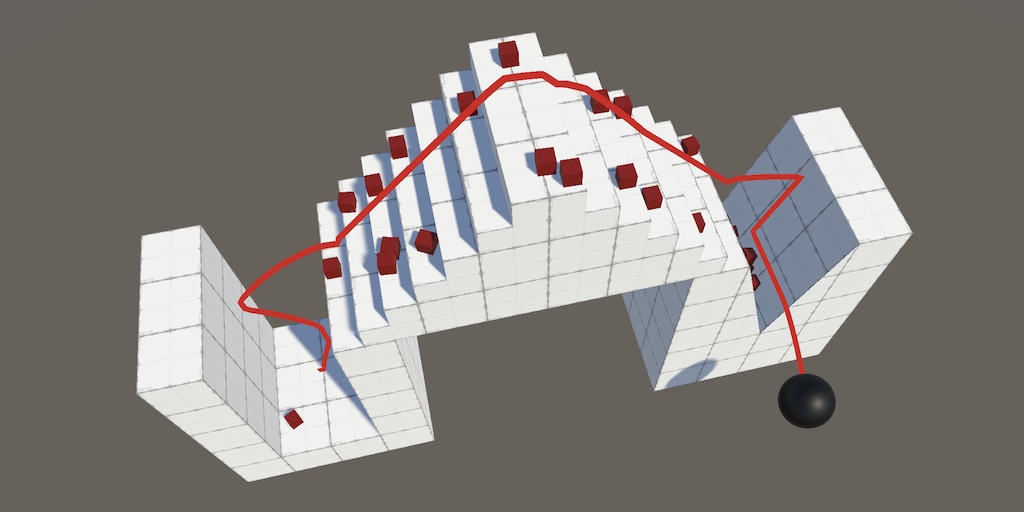
A Unity Movement tutorial about refining how a sphere interacts with surfaces.
 unborn narwhal
Hello, floating point operation results differ on different CPUs/GPUs and their architectures. Does the same hold for int operations as well? I'm curious whether writing deterministic physics and using a GPU to calculate the data is possible.
 rain tiger
I'm trying to make a bouncy ball in 2D, but the PhysicsMaterial2D asset doesn't show up in my Create dropdown. Am I missing something?
foggy rapids
try it on the devices you want to use and see. As far as I know cpu floating point operations depend on the architecture and compiler.
These days most languages implement the same ruleset for floating point operations though. For example if you compile a c# program and a go program on the same computer then their floating point operations will be deterministic.
 rugged rose
hey so 2D question: why does this weird gap happen on every one of my 2D projects ? The colliders are setup perfectly but the two GameObjects just don't seem to want to get any closer (for reference, the gap is just a bit more than .017f in height
(the red box is just a debug tool to represent the ground check)
 muted widget
hello
hidden comet
@brazen whale Thank you very much, i will try this later today
stuck bay
hi
anyone know how to control a softbody with nvidia flex
or possibly other softbody plugins?
I tried using the chracter contoller that built-in in unity
but it didn't work
only works for the rigid body
 rancid matrix
hi
guys do you know how do I do such this free fall
at step 2
stacking pill
I've changed gravity scale but it doesnt affect
 upbeat dirge
https://twitter.com/spikebor_comic/status/1291407684718059520
i've tried everything but no setting in configurable joint can let me make the chain intact



my chain be panik and kind of rubber : ((
i posted the joint setting in that same twitter thread, someone help pls
 inland rover
Im Working on a vr game, and have some problems with the hand physics. Ive found my exact problem here-https://answers.unity.com/questions/1680761/rigidbody-moveposition-lags-behind-another-rigidbo.html However i am not sure how exactly to do this.
        pos = dir.normalized * dir.magnitude * forceAmount;
        this.GetComponent<Rigidbody>().AddForce(pos);```

my hands use this^ to bring the model position to the hand transform, and use a configurable joint for rotation.
They do not pass through walls, or objects, but when I move the player, they lag behind. The player has a rigidbody for control, and the hands also have rigidbodies.Unity is the ultimate game development platform. Use Unity to build high-quality 3D and 2D games, deploy them across mobile, desktop, VR/AR, consoles or the Web, and connect with loyal and enthusiastic players and customers.
dusk token
When the F key is pressed, this getter is accessed to detect an interactable in front of the player. I've made the Raycast distance a large number for testing purposes, the thing I want to interact with
public Interactable GetInteractable
    {
        get
        {
            Vector2 dir = Vector2.zero;

            if (direction == Direction.up)
                dir = Vector2.up;

            RaycastHit2D rh = Physics2D.Raycast(body.position, dir, 3000, 8); // rh is always null
            if (rh.collider != null)
            {
                return rh.collider.gameObject.GetComponent<Interactable>();
            }

            return null;
        }
    }
The thing I want to interact with is on Layer 8 as is seen here
For some reason, it is not intersecting my raycast.
https://cdn.discordapp.com/attachments/497874004401586176/740982979148644363/unknown.png

At the top is the NPC I want to interact with, and below is the player
https://cdn.discordapp.com/attachments/497874004401586176/740983029563916348/unknown.png


 sterile horizon
How can I make a ball bounce forever without losing or gaining height? If both colliders are at .9 bounciness the ball eventually stops bouncing, but if they're both at 1, the ball bounces higher and higher each time
graceful meadow
does it work if the ball is at 1 bounciness and nothing else is?
also imprecisions might cause problems in the long run
foggy rapids
animation 😄
 amber kettle
When i apply box collider to object it changes center of mass of object, any help...
i need them same
foggy rapids
the center of the box should be where you want center of mass to be
if there are multiple colliders it choose a point in the middle of all of them
foggy rapids
make them children of the same parent, set their local position, then only move the parent.
you can use physics joints if it has a rigidbody
 frigid pier
your entire array is null and you are testing for an element
frigid pier
check if it returns an array in the first place
 naive gust
it does probably
inland rover
Anyone know what causes physics objects to lag behind others when moving? I have a VR game and am working on physics for hands, they work until I move with my physics player, which causes them to lag behind the player.
frigid pier
I think it wouldn't be null, yea, but with 0 elements. do LGRAB.Length !=0 check
@naive gust
naive gust
frigid pier
If you need a safe test for any item check the length
frigid pier
yes
naive gust
doesnt work
it just
apparently doest detect it
doesnt
oh wait
somehow works now
okay so
which constraint should i use for grabbing
like attach it to an arm
frigid pier
If you are moving objects with non-physics methods or in Update instead of FixedUpdate, their colliders might not be updated properly, and could miss collisions completely
frigid pier
depends on what you are trying to do. You can use hinges or set object to kinematic and parent it
naive gust
im trying to like
teleport it to the arms grab point
and make sure it moves with it
how would i do that
naive gust
oh no
i have a problem
setting iskinematic of a rigidbody to true works but
i cant change it to false
that works
but not
pinpointed the issue
seems like
e
is not working
seems like grabbedobject is always null even though i set it
 carmine robin
What are some common concepts for managing a maximum speed in hyper simple movement code? I've been browsing some examples to see if I can learn, but almost all of them simply end up adding force and don't care about clamping the speed.
At the very least, how do you guys recommend keeping track of the speed of a given object? I can go from there, but I'm still learning what all tools Unity offers.
Ah, I just learned of rigidbody.velocity. All my problems are solved, haha
foggy rapids
this what i do:
        rb.velocity += acceleration;

        if (rb.velocity.sqrMagnitude > (maxSpeed * maxSpeed))
        {
          rb.velocity = Vector3.ClampMagnitude(rb.velocity, maxSpeed);
        }
So you add to the velocity directly rather than applying force from a certain direction, hmm
foggy rapids
i integrate the direction into my acceleration
but adding forces is the same just skip the +=
carmine robin
Ah, so acceleration and velocity both contain a vector3, if I understand it right?
carmine robin
I see
So theoretically, if I have a floaty vehicle traveling forward and I want turning to feel a little more proper, I could make direct adjustments to rb.velocity to shift the momentum, as opposed to using... I guess newtonian forces
C# is a lot more powerful than what I'm used to, having this amount of control is a little overwhelming, but it's fascinating.
stuck bay
This might sound like a very dumb question, but why isnt my player colliding with the ground?
Player:
Ground:
foggy rapids
ground needs rigidbody too