https://drive.google.com/file/d/1ivqb0Z5X8EfQG_h41P9smzgQkXUjsbDh/view?usp=sharing (The video was too long for discord)
#⚛️┃physics
1 messages · Page 54 of 1
 river shuttle
 flat radish
Hi Guys! I am doing a tutorial for unity and I have a problem. A simple cube on a flat surface, friction set to 0. After AddForce for a cube, I noticed that it will rotate itself - in the y axis. I don't use any other force on the cube. Anyone had a similar problem? Script used to move cube: https://pastebin.com/XmxdUeZb
 foggy rapids
to restrict movement in physics use joints or rigidbody freeze settings
flat radish
@foggy rapids This will solve my problem. But I wonder why this is happening. The cube rotates left slowly, each time i run game.
foggy rapids
probably because of the cube touching the ground
flat radish
Can you expanda thought? in theory there is no friction so there should be no rotation. I also downloaded the project from the tutorial and the rotation also occurs despite the fact that this rotation was not in the creator youtube clip.
I mean this guide https://www.youtube.com/watch?v=j48LtUkZRjU&list=PLPV2KyIb3jR53Jce9hP7G5xC4O9AgnOuL

Want to make a video game but don't know where to start? This video should help point you in the right direction!
♥ Support my videos on Patreon: http://patreon.com/brackeys/
····················································································
This video is ...
flat radish
woo 😄
foggy rapids
if you dont want it to rotate, freeze it's rotation
just because friction is 0 doesn't mean they don't make contact
brackey probably set the rotation freeze and didnt tell you or you didnt notice
flat radish
I thought I was doing something wrong and downloaded the project from the author website. There is the same problem there.
It turns out that the easiest way is to block rotation and unblock it after collision for an effect 🙂
 willow vortex
@river shuttle your raycast penetrates everything in its path and returns all the hits, you inevitably hit environment so it will hide your text... I suggest just doing a regular raycast so you get the first hit only and if if it's not the type you expect or if it hit nothing then you can hide the text.
the raycast will probably hit your character tho, but you can use layers for that separation
alternatively: I'm not sure if RaycastAll() results are in hit order, but if they are you could fix your current one by checking if the hit is the player and doing continue then if it's the button you break after that no matter what, otherwise (no environment check needed) you simply hide instructions and break out of the loop.
come to think of it, return would work even better since you also need to check if nothing was hit aswell...
for(int i = 0; i < hits.Length; i++)
{
RaycastHit hit = hits[i];
if(hit.transform.CompareTag("Player"))
continue; // skip the player hits
// next hit is expected to be the button
if(hit.transform.CompareTag("DoorOpen"))
{
instructionsText.text = "E to open";
instructions.SetActive(true);
if(Input.GetKeyDown("e"))
doorButton.ButtonPress();
return; // button was hit, stop method here.
}
break; // other hits aren't relevant.
}
// if nothing was hit or non-button was hit then hide text.
instructions.SetActive(false);``` stable fog
I have extremely unreliable reluslts with raycasts
I'm trying to check if my ball is on the ground or not
grounded = Physics.Raycast(rb.position, Vector3.down, dist);
when dist is 0.5 or greater, it returns True, but when I decrease it and increase it again, it only starts working at around 0.75 or so
foggy rapids
sounds like conflicting mechanisms. You probably have something using grounded to affect the position, which in turn makes the ray cast require more distance
detecting if something is grounded is the easy part. Keeping it grounded is what people usually forget to do
stable fog
Ah. I think I used y instead of z in one place
Still, Debug.DrawRay doesn't do anything at all
foggy rapids
that's usually because people forget the Debug.DrawRay takes the distance and direction from the same vector
whereas Raycast does not :S
 deep warren
Hey, can anybody give me working c# script for picking and throwing objects on first person? I am trying to make a script but it doesn't work at all
 void adder
Hi @undone lynx , I did use it, but I did not get the effect I was looking for. The character still does a jerky up and across whatever amount of units I set in the (
x, y, x)
Specifically I did this
m_NewForce = new Vector3(50.0f, 50.0f, 0.0f);

this.GetComponent<Rigidbody>().AddForce(m_NewForce, ForceMode.Impulse);
not the cannoball/parabolic trajectory I was aiming for
 undone lynx
assuming constant gravity, it should give an exact parabolic trajectory
u might have changed some physics settings
just to try, make a new empty project if its possible, and try there
 ruby prawn
hello
I am an article on the power and torque of an engine and I don't understand this sentence (24 po in from the center of the shaft)
What does 24 po "mean?
is thumbs up?
 modest hemlock
i have 4 wheel colliders on my car and my problems is that when i drove up on a sidewalk, the wheelcolliders kinda snap up on the sidewalk instead of, like, doing it more smooth or what you would call it. ive seen so many tutorials on those stupid wheelcolliders but they still keep snapping up when driving up on something, and they also snap down when i drive down again.
im btw not interested in using something like a raycast, since i bairly have any experience in that (even do i could learn it). i just thought that it should be possible with the regular wheel colliders
 lapis plaza
the wheelcolliders kinda snap up on the sidewalk instead of, like, doing it more smooth or what you would call it.
@modest hemlock this is normal
it's a common limitation of vehicle suspension done with single raycast per wheel
imagine your suspension point shoots directly down a ray and it's all info it has to use for the wheel collision
this is essentially what happens underneath
to fix this there are few alternatives: get 3rd party vehicle solution that supports multiple raycasts or collider sweeps for wheel collision or build one yourself
modest hemlock
But i dont use raycast
lapis plaza
or...prepare your levels colliders so that each stair-like collision is actually a slope
modest hemlock
I just thought if you could do it without raycast
lapis plaza
you think you don't but you use wheelcolliders
they use raycasts underneath
it's literally one raycast per wheel
modest hemlock
Oh yea, if thats what you mean xD
So i should find a wheel raycast tutorial or something?
Where you make your own script
With multiple raycasts. Ill look into it tmr
lapis plaza
well, it's a complicated topic
modest hemlock
Ok
lapis plaza
doing raycast suspension is easy
doing it with multiple rays is harder
simulating the tire friction and rest are hard
modest hemlock
ok. Ill look into tire friction later. Right now i just try to get the suspension right
lapis plaza
people keep doing years of research and countless testing to get it right on games
do you absolutely need to fix that?
there are many even AAA racing games that don't
modest hemlock
I mean, it looks kinda weird. But i could also, like, add an invisible slope or something
lapis plaza
but simplest fix is to just change your level collisions
modest hemlock
ok
lapis plaza
yes
slopes for sharp edged colliders would fix it
but it does bring another type of artifact if you drive next to them
modest hemlock
Yea... hmm
But thx for the help so far
https://www.youtube.com/watch?v=RAwejRR63Zc alright. even do it's ue4, i see what you mean @lapis plaza

Demostrates how the pitfalls of single raycast vehicle wheels when driving over sharp edges (like a sidewalk) can be overcome by using a multi raycasting technique.
lapis plaza
@modest hemlock afaik there's no free solutions that do that for you so you either have to build it yourself or use 3rd party asset
for example 2 first assets from here would implement that https://assetstore.unity.com/?q=nwh coding
modest hemlock
ok thanks
ruby prawn
how should you handle the clutch in car simulation games ?
 west forge
So, I've been looking into SphereCast and I'm trying to figure something out
it seems that the returned normal in the RaycastHit is not the surface normal, but rather a vector representing the direction between the surface and the center of the sphere that caused the collision?
that works fine in some situations, but I've been having issues when it comes to standing near edges - is there any way I can find the surface normal of the actual point on the collider? I've tried using normal raycasts but that occasionally doesn't actually connect with the collider on edges.
foggy rapids
identify the conditions under which it fails and do something else in that case
smaller sphere might narrow down that case too
west forge
hmm, you might be onto something there!
a smaller sphere would reduce the variation, but also still hit the surface in the way a normal raycast wouldn't
I'll see if that'll do it!
foggy rapids
it's funny because we call these "edge cases" and in your case it actually involves edges 🤣
west forge
doesn't work :c
I'm still getting the same behavior
and yeah it's pretty funny
there are some situations where this is actually kinda nice
when switching between two hard edges, it's nice to have the direction gradually transition from one to the other
it makes it less jarring to go over a 90 degree bump, for example
foggy rapids
you're casting it in front of the character to find things in the way?
west forge
below, actually
foggy rapids
it works well when it hits a corner from the inside, but fails miserably when it hits a corner from the outside
foggy rapids
i see, in that case it would have trouble deciding which face's normal to give you
west forge
mhm
the thing is, I always want the top face
the bottom is fine, that's what it should be over the edge
(the red line here is the normal I'm concerned with)
on the top one, this is exactly what I want to avoid
foggy rapids
maybe try a combination of both.
if the spherecast normal looks fishy, (like in the top pic), cast a ray directly down from the middle of the capsule. if whatever it hits is too far away you know you've gone off an edge
no idea how you're gonna figure out if the spherecast normal is fishy though 🤔
west forge
part of why I'm using a spherecast in the first place was to avoid having to do a direct downward ray
I do want the player to be able to stand over an edge at least a little - if I did that, the player would be considered 'in the air' while still standing on ground
foggy rapids
what is the goal of this? If your objective is to simply prevent them from falling off you can use a Bounds component
foggy rapids
or surround the platform in rigidbodies with colliders but no renderer
that's how invisible walls are generally achieved in unity
west forge
I should clarify, this is a 3d game
I used a front view for simplicity's sake to clearly show the issue I'm dealing with
the point of this normal is to determine what kind of surface the player is standing on
whether it's flat ground or a slope, mainly
so once the normal starts rotating as you move over an edge, it's a lot easier to fall off, which isn't the goal
foggy rapids
oh, hmm
then maybe it would 100% work if you "rounded" the edges using slopes
then at least, fishy as it may be, the normal would be correct 🙂
west forge
eh, that's kind of an ugly solution :c
plus it puts a lot of restraints on how i can actually build levels
I guess i'll keep looking, but thank you for your advice 🙂
foggy rapids
np 👍 i always like solving problems via level design cause it's less work for programmer 😄
west forge
i'm the opposite - I'm trying to frontload all the character movement code before I get to work on anything else - that way it meets my needs perfectly and can be repurposed for similar projects
hmm, just stumbled across BoxCast... gonna see if this does it
foggy rapids
it'll probably break for the inside corners
west forge
breaks for outside corners, too
looks like any volume cast is going to have this same problem... sigh
foggy rapids
😄 I always envison using a RaySkirt but never have the opportunity to try.
cast like 36 rays going down and away just below where the feet touch the ground then you have all the information you need based on which rays are hitting what
 twilit meadow
nvm that
west forge
wait, i think I have a solution now
i'll share it if it works
okay, it works
i took the closest point on the collider, subtracted the collider's position (hit.transform.position), normalized that and scaled it way down, then subtracted that from hit.point again and fed that into a raycast to find the correct normal
it's kludged as all hell, but it works
the only situations I can see this being a pain in are like, terrain colliders
and even then, it's such a small distance as to be irrelevant
now I just need to make an exception for a couple cases to smooth things out :)
foggy rapids
brilliant
west forge
alright, that should do it :D
the exception I made is that, if the slope isn't too steep to be walkable and the angle of the normal from the spherecast is shallower than the normal of the raycast, I go with the spherecast
this should solve issues with rotated cubes and transitions between sharp angles
like this
that way, I can have the player running around on bumpy ground without issue
undone lynx
@west forge

While I haven’t run out of meaty animation topics yet I want to go into a topic that is easily underestimated and that is what is commonly used to move characters around in the worlds that we build. A...
this article and the blog its from can help u clarify a few things in the futre hopefully
was very helpful when writing my character
i also do experience the same issue with normals u have with spherecast right now
something u could try is, when a spherecast hits, cast a raycast in the same direction to get the true surface normal
west forge
that's exactly what I ended up doing
undone lynx
so the spherecast is used for ground detection, the raycast will output the normal
nice
west forge
the only issue with it at first was that the second raycast was inconsistent and wouldn't always hit even if I used the exact location on the object
undone lynx
i have the same edge-behaviour with single spherecast ground detection
i may go for an extra one to calculate the slope
since i want to make the character move slower up-slopes and a bit faster down-slopes
 zinc furnace
Anyone know why the rigidbody class just ignores that general calculations for acceleration? I input a known controlled force, to a known mass, and, i get some wildly different acceleration, which doesnt even match a linearly rescaled version of force = mass x acceleration
undone lynx
how do u input this
zinc furnace
?
 nimble holly
Vector 3 means it can access xyz co-ordinates?
foggy rapids
ForceMode.Force accounts for the mass of the rigidbody
but yeah i agree it acts weirdly, I just manage the velocity manually
 stuck bay
I often have this in my projects when a projectile collides with a player or enemy, the unit sometimes makes a slight jump in the air at the time of impact. Any idea why this is and how I can stop that?
foggy rapids
make the player's collider a trigger and use OnTriggerXxx callbacks
stuck bay
but what if it's a character controller or needs to do actual physics with other objects?
hmm
foggy rapids
well, you could increase the mass of the player or decrease the mass of the bullets
pretty sure the character jumps because the mass and velocity of the bullet is powerful enough
foggy rapids
there's your problem
stuck bay
what do you mean? CharacterControllers don't have rigidbody and shouldn't even simulate physics
foggy rapids
no idea, now you're contradicting yourself
you said your charactercontroller had a rigidbody
with no mass
foggy rapids
well in order for a projectile to collide with something it must have a collider and a rigidbody
so now i'm confused what the issue is
charactercontroller is just the name people use for whatever script they have controlling whatever is the character in their game
stuck bay
it's actually also a popular unity component
foggy rapids
gross
stuck bay
I'm thinking I could try disabling collision between projectile and player layer
but, it would still need to detect triggers, I don't know how I could disable collision for non-triggers only
stuck bay
ok I have it working
 green tiger
guys
how to fucking fix rigibody having stupid weird shitty behavours
yesterday it was speeding twice fast velocity than given in scsript
now its 3 times fast
like wtf
it keep changing everyday randomly
im kinda confused
 frigid pier
If you don't post code or details of your setup noone can answer you
 mossy wraith
hi guys. i've been trying to do a car with wheel colliders recently in unity. i've followed this tutorial https://www.youtube.com/watch?v=j6_SMdWeGFI, and my car moves very slowly, but i fixed that by getting more force. the car is still too jittery, jittery as in the rotation and position values change randomly by some decimals. it's pretty annoying. how do i fix that?
Values of the car gameobject:
Mass ( of the car) :1500kg
Motor force: 50
Mass (of each wheel): 100kg
wheel damping rate: 1
suspension distance: 0.08
Spring: 90000
damper: 9000
ping me if u think you can help
ruby prawn
hello, I'm following this tutorial on vehicle physics https://asawicki.info/Mirror/Car Physics for Games/Car Physics for Games.html
I just want to be sure that I don't make mistakes in the equations, so I'm in part: How do you get the RPM?
I'm told rpm = wheel rotation rate * gear ratio * differential ratio * 60/2 ft
The 60/2 pi is a conversion factor allowing to pass from rad / s in revolutions per minute.
example:
The wheel rotates at 17 rad / s.
The first ratio is 2.66, the differential ratio is 3.42, the crankshaft therefore rotates at 153 rad / s.
It's 153 * 60 = 9170 rad / minute = 9170/2 ft = 1460 rpm at the engine.
so in unity I should do:
// Drive wheel rotation rate.
float wf_rotation_rate = m_WheelColliders[2].rpm; // Wheel rear left rpm
float wr_rotation_rate = m_WheelColliders[3].rpm; // Wheel rear right rpm
float w_rotation_rate = wf_rotation_rate + wr_rotation_rate; // wheels total rpm

float rpm = w_rotation_rate * 2.66f * 3.42f;
view that the rpm of a wheel in unity and the rpm per minute,
I don't need * 60/2 ft?
I am wrong ?
game programming tutorial
 amber lintel
Has anyone use the "Generate Physics Shape" on sprite sheets?
I can't figure out how to get a collider or rigidbody to actually use that default shape. It seems like it doesn't actually create one and I HAVE to use the custom editor for each frame
nimble holly
What is difference between vector3d(floatx, floaty, floatx) and rigid body .addforcr(floatx,floaty,floatz
foggy rapids
vector3 represents an x, y, z coordinate and magnitude.
.addforce is a function of rigidbody to apply force in a direction using different modes.
 lunar bloom
if you're asking about the difference between AddForce(Vector3 dir) and AddForce(float x, float y, float z), there is none. The function is overloaded to accept different parameters for ease of use
ruby prawn
hello, it's been 1 week that I try implemented this tutorial in unity
https://asawicki.info/Mirror/Car Physics for Games/Car Physics for Games.html
I have enough complication being French and bad in English language could I have help? pleaze
game programming tutorial
stuck bay
Do rigidbodies not work well with mesh colliders or something? no matter what detection type I use they just fell through each other, was hoping a mesh collider would be ok but is a ring of cylinders supposed to be the way to do it?
foggy rapids
rigidbodies dont work well with non-convex meshes
chains like that are actually really hard for physics engines to do
stuck bay
i'll try a ring of capsules then, that should hopefully solve it, just a shame I need like 7 or 8 capsules for a single link lol
but i suppose once it's done it's a copy and paste job so meh
ill stop complaining
foggy rapids
or one capsule per link and a joint
your links are round so you could probably get away with a sphere
stuck bay
cool, i'll look into it
undone lynx
yes, itd be best to approximate the chain with primitive shapes and joints if u want
 bronze lynx
im new to unity and when i add a rigidbody to my player the player falls through the floor
lapis plaza
@stuck bay physx itself doesn't support mesh collision against other mesh collision (by this I mean non-convex mesh colliders) and Unity made additional rule to make it "simpler" where they only allow mesh collisions for static objects
you should get console error spam for trying to put those mesh colliders with dynamic rigidbodies
basically if you want to do something like that and keep it dynamic, you would just use contraints/joints to keeping the links together
if you need collision to them, just put small sphere collision to like every second link etc
undone lynx
@bronze lynx u need colliders on both player and the floor
 sage elk
Sir Mareck: I was part of your most recent webinar (just now). If I want to make the npc become a ragdoll, what do i do? Also if i want the npc ragdoll's limbs disconnect when it explodes, what should i do? Please mention me when you answer
 coral mango
I was wondering... is there a 'correct' way to have an object react to collisions but not to cause a collision for the object that hit it? That is, an object that can be passed through but which would react to it.
(Specifically in 2d)
undone lynx
that sounds like a trigger collider @coral mango
stuck bay
@lapis plaza Cheers, I sorted the problem, just made a bunch of capsule colliders around each link, seems to be fine now 🙂
stuck bay
except the moment I hit the chain with anything it all falls to the floor again....bah!
@lapis plaza Do you have any recommendations on relevant tutorials for joints? I assume if using a bunch of capsule colliders wont work then joints are the only way to go.
lapis plaza
I expected that to happen but didnt want to ruin it for you :D
You shouldnt try to treat game physics like real physics, but I get it can be hard to get out of that mindset if you dont yet know how physics engines solve these things
Sometimes quick hacks do work tho
You can probably find some unity rope with joints tutorial somewhere, shouldnt be too hard to find
@stuck bay ^
stuck bay
@lapis plaza
so use the same method as I would a rope, just use a chain, in honesty I expected to have to do this, i suppose I was trying to put off throwing another thing to learn on the pile lol.
So far learning C#, Unity, 3D Modelling, Texturing all from 0 experience with any of it has actually been great, but didn't want to overload myself, I suppose it's down to how easy it is to accomplish :P
I'll check some rope tutorials, thanks 🙂
lapis plaza
Many have started the same way, it is a constant learning path :)
In fact it never stops even after you have done it for a decade :D
stuck bay
especially now DOTS is about to be a thing in the newest big engine release they are planning lol
lapis plaza
And yeah I think rope is easier keyword for this
But you may find something with chain too
 loud moon
What is the best tool / workflow for creating mesh and or complex colliders for complex meshes
 white stone
I am stuck with a question, should I use a Rigidbody or a Transform to move my plane?
foggy rapids
that depends entirely on your game design
foggy rapids
the error tells you exactly what itmeans D:
compiler: Do you want UnityEngine.Vector3 or System.Numerics.Vector3?
programmer: yes.
 raw yew
How do you move a body part on a ragdoll so it pushes towards where the mouse is clicking?
But it wouldnt be too glitchy
 viral ginkgo
@raw yew AddForce(direction) towards position
and distribute -direction to whole mass so center of mass of the ragdoll remains stationary
raw yew
@viral ginkgo ok thanks😀
 calm ravine
Suppose I have two colliders, and I want to check if there's a clear line between them, that is I want to check if there's an obstacle between them
assuming the obstacle and the colliders lie in an appropriate LayerMask, is Physics.Raycast the only way to check for this?
Or should I just sidestep this and think in terms of grid cells, Bresenham's lines etc?
 late kettle
Moving this to more fitting channel
I've got a player object that's basically just a cube, and I have a piece of code to make it face its direction of movement
{
transform.rotation = Quaternion.LookRotation(rigidbody.velocity);
}```
But this makes the player jitter a lot while moving
The rigidbody is set to Interpolate@late kettle I assume your player model is a separate object from the rigidbody, correct?
late kettle
No, the rigidbody is on the model (a cube)
calm ravine
brb, pasta's cooking, but there's a problem with your approach
late kettle
It's just a placeholder, eventually there's gonna be a proper model
What would be the right approach?
calm ravine
you must never mix, on the same gameobject, Transforms and Rigidbody
imagine you have a physical cube in your hand
and it's moving towards a certain direction with a velocity of v
if you force it to rotate its transform towards the direction he's moving, the vector v is going to rotate with the object in that frame
the result will be that for a split second the cube will aim towards a different direction, before getting fixed back again by the Physics simulation
that's the reason of the jitter
viral ginkgo
@calm ravine You should be using either raycast or spherecast unless there's a good reason to implement something for that
Is your game grid based or something?
If your game is grid based, this could be a nice option
You might leave physics alltogether
And have your game running on 2d arrays
late kettle
@calm ravine What if I make the cube a child of the player?
Player script changes the cube's rotation
viral ginkgo
@late kettle Does the object jitter when your game camera is stationary?
Is this jitter due to rotation or movement?
Do you move the object by position anywhere in your code?
.
My current best guess is you have a camera following this object and the camera is updated in fixedupdate
@late kettle
And removing this line shouldn't fix the jitter:
transform.rotation = Quaternion.LookRotation(rigidbody.velocity);
late kettle
I haven’t coded the camera, it’s just a Cinemachine camera set to follow the player
Nothing is moved by position, just velocity
viral ginkgo
Can you set the camera so it updates in Update instead of FixedUpdate
I dont know if thats a thing
viral ginkgo
What happens when your remove this line:
transform.rotation = Quaternion.LookRotation(rigidbody.velocity);
@late kettle
calm ravine
@viral ginkgo not grid based for now, but I suppose that would be my next step since it would solve lots of stuff about collision, line of sight and line of fire
late kettle
@viral ginkgo The player stays at the same rotation unless it collides, but moves without jitter
viral ginkgo
@calm ravine If your game is like rimworld, prison architect etc etc then you might wanna discard physics alltogher i mean
calm ravine
@calm ravine What if I make the cube a child of the player?
@late kettle this is better, in general it's good practice to separate the visuals from the logic: your Rigidbody can live in the parent and the model can live in a child transform
calm ravine
@calm ravine If your game is like rimworld, prison architect etc etc then you might wanna discard physics alltogher i mean
@viral ginkgo it's 3D, but I have these automatic units with turreted weapons that need to check if the line of fire is clear before shooting; Physics.Raycast is working great for now, considering that it's not casting on the Everything layer, but the code to check whether it hit the target or not is prone to breaking, because it relies on the GameObjects ID
Also, for now it's not using Rigidbodies, I have no need for them
if instead of checking the ID i can just check on the grid cell, it would solve a lot of problems for me
late kettle
@viral ginkgo This is the whole movement code
using System.Collections.Generic;
using UnityEngine;
using UnityEngine.InputSystem;

public class Player : MonoBehaviour
{
    private InputMaster controls;
    public Rigidbody rigidbody;

    public float startSpeed;
    public float flapForce = 10;

    void Awake()
    {
        controls = new InputMaster();
        controls.Player.Jump.performed += ctx => Jump();
        controls.Player.Dive.performed += ctx => Dive();

        rigidbody.AddForce(transform.forward * startSpeed);
    }

    void Jump()
    {
        rigidbody.velocity = new Vector3(flapForce * controls.Player.Move.ReadValue<float>(), flapForce, rigidbody.velocity.z);
        // Debug.Log("We jumped!");
    }

    void Dive()
    {
        rigidbody.velocity = new Vector3(flapForce * controls.Player.Move.ReadValue<float>(), Mathf.Min(-flapForce * 0.75f, rigidbody.velocity.z));
    }

    private void OnEnable() {
        controls.Enable();
    }

    private void OnDisable() {
        controls.Disable();
    }
}```(rigidbody variable being the player's own)
viral ginkgo
@late kettle I assume it does not jitter when you dont press any keys?
late kettle
With the private void Update() { transform.rotation = Quaternion.LookRotation(rigidbody.velocity); }
it jitters at all times
But without this method, never
viral ginkgo
@calm ravine if(targetedObject == raycastHitObject)?
This comparison is no big deal?
late kettle
It's regardless of key presses
viral ginkgo
@late kettle Can you maybe try doing that in fixedupdate?
or wait
private void FixedUpdate()
{
rigidbody.rotation = Quaternion.LookRotation(rigidbody.velocity);
}
@late kettle
i believe setting transform stuff will mess with interpolation
but this should be fine
as rb.rotation is the value before the interpolation is applied
late kettle
I would think this would be considered graphics related
viral ginkgo
and if you use interpolation, you will need to set these values by rb values
@late kettle transform.rotation and rb.rotation will not be same
if you use interpolation
rb.rotation is synced to fixedupdate, should be set in fixed update
transform.rotation is for update, for displays
you probably dont wanna ever set that
because its the interpolated version of rb.rotation
same goes with rb.position, transform.position
late kettle
Just separated the model into a child object and this seems to work just as well
    {
        playerModel.GetComponent<Transform>().rotation = Quaternion.LookRotation(rigidbody.velocity);
}```Is it a bad idea to call GetComponent in FixedObject?
viral ginkgo
better have these stuff stored in variables
but it wont be noticable
it wont be the first thing your profiler shows you
late kettle
Made it a variable anyways
Model object is set in the inspector, then Awake sets playerModelTransform to playerModel.GetComponent<Transform>();
late kettle
Ah, cool
calm ravine
@calm ravine if(targetedObject == raycastHitObject)?
This comparison is no big deal?
@viral ginkgo I'm doingtarget.gameObject.GetInstanceID() == hitInfo.collider.gameObject.GetInstanceID()just to be sure I'm not hitting a similar component in the same gameobject (transforms are unique duh, but I might also do the same with another non-unique component)
 median spruce
Does anyone know if void OnJointBreak(float breakForce) is broken or something?
I've got a springjoint, set the joint breakforce.
I know the breakforce is exceeded because the cube drops, but OnJointBreak() isn't being called.
 little wraith
void OnTriggerEnter(Collider other)
    {
        Debug.Log("Area entered.");
        Debug.Log(other.gameObject.tag);
        var o = other.gameObject;
        if(other.gameObject.CompareTag("Player"))
        {
            Debug.Log("Other is a Player.");
            ...
        }
}```Anyone know why the collision does not register? wintry canopy
how to make thiese two colliders actually collide and not make it go through one another
that little circle on the bottom left is a moveable character, and im trying to make him interact with the house
not just go through
isTrigger is off
It works only when i give the moving character a rigidbody 2d component
nimble holly
Yeah
wintry canopy
but if i do that he starts falling off
wintry canopy
and put it to Kinematic?
wintry canopy
this is a top down game
wintry canopy
you see the green outline
nimble holly
Yeah
wintry canopy
that is the collider2d of house
nimble holly
Is the house a prefab?
wintry canopy
and when i make the character a rigid body with kinematic it goes through him
through the house
yeah im just playing around for now to test unity, learning
nimble holly
Give the box collider to the house
wintry canopy
why no polligon collider
nimble holly
Fine
nimble holly
Wait Dude
wintry canopy
btw i have a basic movement script for wasd controlls on the character
wintry canopy
it is running in a 2d unity engine
so i guess 2d
im trying to make a false sense of 3d like in pokemon, you know basic top down games
nimble holly
Like isometric?
nimble holly
You have to change the collider for char
wintry canopy
To what?
wintry canopy
ok
 tranquil oak
Is that house collider rotated somehow?
Or what
Why is it that shape and not square? Polygon collider?
Also show your inspector for the player and the house
wintry canopy
yes polygon
wintry canopy
i show
scroll up
what are layers?
i mean what layers
also the character has a movement script for wasd
@tranquil oak you there?
tranquil oak
yeah
I guess if you don't know what layers are then that won't be the problem
I need to see the house Inspector
As well as Players
So I can compare
wintry canopy
i already sent it to this channel
ill send it again
this is house
this is character
tranquil oak
Make your character non kinematic then
Or wait
You have a static RB for your house
So you need a Dynamic RB for your player
For collisions to work
At the moment you have a Static Rigidbody and a Kinematic Rigidbody, so if you look at the matrix I sent you earlier, you'll see that you're in this tile, which won't fire an event
Your character should be dynamic anyway if you want physics to affect him?
wintry canopy
true
but it starts acting really weird
it does detect collisions and works like you think
but i have to make the gravity of character 0
and then if i jam him on the edge of the house he kinda tilts
i think dynamic just makes it a platformer, which is something i do not want
unless i can make physics go on the z axis not the y axis
than it could work
@tranquil oak see?
tranquil oak
What are you trying to do?
wintry canopy
ok, no problem
at first i thought i had to make collisions in code myself
but i would probably never finish that
basically rewriting the engine
stuck bay
thisRigidbody.AddRelativeTorque(Vector3.up * Turning_Acceleration_Rad * Input.GetAxisRaw("Turn"));
How do i accelerate the object at certain acceleration speed till it hits certain max speed?
 craggy lagoon
I was wondering how do you make an active ragdoll i need it for a game im making
 gusty salmon
there are alternatives to rigidbodies for making 2d platformers, right?
 keen heron
I'm not sure how to approach a problem I keep having in my experimentation. (Am a beginner.) When I make an object move around and collide with things, the object will often go flipping over onto its face and it can't move anymore. I know that I can freeze rotation to keep this from happening.
However, what I want to know is: Is freezing rotation an inelegant 'easy way out' that I shouldn't rely on, or is it good enough for me to just go ahead and do that until I become more advanced?
undone lynx
@keen heron its not inelegant at all haha
for character colliders, u always want them upright
so its way easier to work with that way
u generally want things that u are controlling to stay aligned to the axes u are moving in
its not inelegant to do so, dont worry
keen heron
Gotcha. When I think about games with really complex knockdown/get-up animations like GTA, RDR2, etc. I have to imagine that their transform is actually always perfectly upright and tumbling is handled in some other way, but I wasn't sure if that was actually the case.
undone lynx
yup, in case of GTA
or rockstar's thing
i imagine the character always has the "character collider"
which is always upright
and when the character tumbles
this collider is disabled,
and it transfers control to the active ragdoll system
i dont know details, but thats how it looks to me
keen heron
Yeah... I figured out a way to actually avoid cougars mauling me in RDR2. If I'm fleeing, I actually want to be slipping and falling on little hills because when I'm in the 'slip' animation, it can't do its insta-death neck bite animation hahaha
So there's definitely some interesting things going on with colliders there.
undone lynx
btw u can look at this if u want some more
behind the scenes physics in games
While I haven’t run out of meaty animation topics yet I want to go into a topic that is easily underestimated and that is what is commonly used to move characters around in the worlds that we build. A...
related to character controllers
keen heron
Excellent, thank you!
undone lynx
theres a million ways to do things ofc
in rockstart stuff it might even be an upright collider, which unfreezes rotation when ur in the tumble state
and aligns itself again when u get up
if ur trying to replicate similar, u can play the game and try to see how it looks to u
can get a good enough approximation that way
keen heron
Yeah, something invisible (and a little bit odd) is definitely happening, because there are times when you're on an uneven surface that the get-up animation acts really janky for a split second. I guess that's the collider re-activating itself in the brief moment before we return control back to the player
undone lynx
the tech that rockstar uses for the active ragdolls is
called euphoria
^yes ik what u mean, the sudden jank
the character is switching between the active ragdoll, and the normal physics collider
keen heron
Well, now that I know that even the big boys in the industry work with frozen rotations, I'll feel comfortable doing so too XD
keen heron
After finding out how weird colliders can be even when you're just trying to walk across a flat surface, I now know why players get stuck on every single little rock and blade of grass in Bethesda games, hahahaha. My apologies to Todd Howard
undone lynx
stepping over things is hard
lol
theres a neat way to get step-over in that article i linked
keen heron
(I say a lot of mean things about him in jest, but now I understand how easy it really is to fall through the map and crap like that, hahahah)
 sleek creek
Hey I think this is the right place to ask this question. Lemme know if not and I'll delete and go somewhere else.
Pretty new to unity but I have added a bunch of animations using states/state machines and what not.
However my body mass spheres and ik spheres ( I think that's what they are called? haven't been able to find the answer yet) Either constantly sink if I don't have Y position locked on my rigid body, or just generally...move away from my character. Any idea how to fix it or what I should look into?
Pictures attached
Thanks a bunch!
 tender gulch
@sleek creek do you have rigidbodies on your bones/ik anchors(these spheres)?
sleek creek
I have a rigidbody as a component on the character but I didn't even know how to I could put rigidbody on bones/anchors
That hoenstly is more of a clue than anyone has given me haha thank you! Is there documentation I can find on checking that?
tender gulch
I didn't imply you need to put a rigidbody on them xD
tender gulch
It seems like you have several gameobjects there. One that holds the ik targets and another that holds the mesh and other stuff, is that correct?
Can you take a screenshot of your hierarchy?
sleek creek
Uh yeah of the character?
Or just everything haah.
Is there a quick command to open all drop down menus for an easy screenshot?
tender gulch
The character
You don't need to open everything. Expand it to the 2nd or 3rd branch should be enough.
sleek creek
tender gulch
You didn't need to expand the root. Anyways, is the animator + mesh on the parent GO?
sleek creek
Yes.
My animator settings. Even when I change update to normal culling mode to cull updates, they still get away from me.
tender gulch
Does it happen during an animation? Perhaps you should bake root motion.
sleek creek
like bake the y /x/zinto pose?
tender gulch
Or disable the apply root motion check.
sleek creek
Or is there something else I don't know about it.
tender gulch
like bake the y /x/zinto pose?
@sleek creek yes.
sleek creek
Disabling it does not fix it 😦
Yeah I have baked everything into pose.
Whoops. what I meant was, the only thing that seems to stop them entirely is when I freeze position on the rigid body
but y only helps them not sink, and x and z don't let me move.
sleek creek
Wow! Thank you I think that fixed it!
I didn't even know that was a thing, ahha. Sorry I am a student and this is my first time with unity.
I gotta go read what kinematic means x_x
But thanks a bunch!
tender gulch
Usually if you use animations and physics you should decide which one controls the movement of your character. Otherwise they're gonna conflict. Although, that shouldn't be happening with root motion turned off/baked imho.
sleek creek
Hm yeah, I baked them all in and also turned off root motion, but turning it to kinematic works
That means it no longer can be affected by outside force though, right? If I want any knockback or the like, I gotta use animation to control it?
tender gulch
It's not affected by physics simulation, but you can still do stuff like change it's velocity, position etc...
sleek creek
would Addforce still work? That'sreally the biggest thing I would need.
tender gulch
I'm not sure about add force. Might work in impulse mode..
sleek creek
Oh gotchya.
tender gulch
Just try it out and see for yourself.
You can always adjust it's velocity directly. Add force is just a sophisticated way for the physics engine to calculate it's final velocity.
sleek creek
Ok. I'll keep that in mind. But thanks you have been a great help!
median spruce
Could someone help me out with a hinge joint.
For some reason I just can't get it to work.
It's like it's stuck in another object and thus glitching out. But all it is is a scaled cube with a rigidbody and hinge joint component.
I've used other joints just fine, they work like I want them to.

And it's floating above the ground too. Forgot to mention that.
tender gulch
What are your joint settings?
median spruce
I think I'll just open up a completely empty project and test it in there. Maybe I just fucked something up without realizing it.
tender gulch
Perhaps.
median spruce
I'll do that first haha. Thanks though
tender gulch
I'm not a big joints expert, but it seems fine to me. Maybe someone else can tell more.
median spruce
Okay, I must've had 2 separate problems because I had the X and Z rotations frozen on my rigidbody. Unfreezing those fixed it... Hahah Oops.
 unborn narwhal
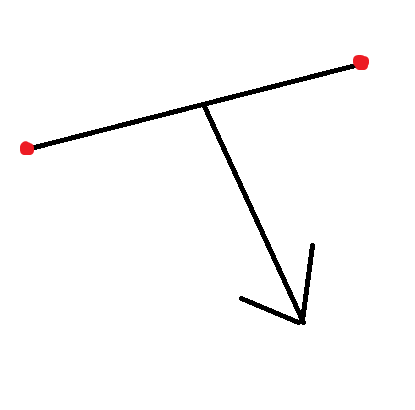
Hello, does anyone know how line casts are generally referred to in computer physics? In Unity linecast and raycast are synonymous. I have a line defined as a starting point and an ending point and i want to cast this line in a given direction https://i.imgur.com/5i0qSyP.png.
 foggy rapids
you can use a BoxCast to get that
willow vortex
yeah it's kinda confusing, raycast/linecast should be pointcast 😆
 onyx cypress
~~Hey everyone :)
I am creating a game where you can make your own vehicles, and I want to optimize how I apply forces. I can have quite a few things which generate forces, and I want to bring it down to applying 1 force to the rigidbody so it doesn't need to do a ton of calculations.
Pretty much all forces are position, direction, and magnitude. Forces can cause rotation as they are not necessarily centered on the COM, so equivelent of using AddForceAtPosition.
How would I go about combining many forces to be 1 single call on the rigidbody?~~
SOLVED
I decided to do a weighted average based on force and total forces applied for position, and for direction + magnitude just by total forces.
 coarse niche
Do I have to re-write the project to use havoc physics? My scripts use OnCollision/Trigger, Rigidbody methods, ...
onyx cypress
Havoc Physics uses UECS, so you will need to either convert your game to ECS, or hybrid ECS in order to use them. This means you will more than likely be doing a large amount of changes to get this working @coarse niche
coarse niche
Cheers @onyx cypress kind of expected. I guess we'll use havoc in a sequel 😄
onyx cypress
👍
 quick crane
Could someone help me understand how to correctly use forces? Right now I'm trying to make a 2D platformer sorta game, and I'm trying to get the horizontal movement working correctly.
From what I've seen in tutorials and documentation etc they all recommend you don't manually set Velocity, and instead use AddForce() on the Rigidbody2D with the correct force mode etc. However I'm not really sure what the correct force mode would be, and also from my (very poor tbh) testing it seems that doing it with AddForce seems to infinitely accelerate the object.
frigid pier
@quick crane Here's an example of a 2d physics driven controller https://hatebin.com/vyjqcfogly
Requires physics material setup for the character and surface to have almost zero friction.
quick crane
I'm trying to understand how that example actually functions, I'm assuming that the friction has to be set to a value where it essentially balances out the acceleration?
quick crane
I see that it's adding forces based on the user's input, and that the script slows down the player object when there's no input
frigid pier
yes, and high force/gravity values give it a nice fast reaction. It could be tweaked further.
While the character itself will react to outside interaction very naturally
quick crane
I don't have my project set up in a way where I can test that example right away, if the user were to hold down the move input would the object keep accelerating? Or would it reach a max speed and not go faster than that
frigid pier
No it uses Linear Drag = 1 it's in the comment
quick crane
Oh so the drag is what's keeping it from accelerating?
frigid pier
yes, that's what gives snappiness, and other things just compensate for the drag
quick crane
I was making my prototype by just modifying Unity's default robot prefab character, I think their Drag is like 0.05 or something so that might've been my issue
And it was using physics by just manually setting velocity etc, I was trying to mod it to use AddForce etc
frigid pier
Yes, other way to do it is using actual friction of the surface, but it causes problems when you are in the air
quick crane
Oh I see, thanks. I was wondering how it'd behave in the air, didn't know this example already solves that haha
Thanks again 👍
frigid pier
Also easy to handle wall hanging with this, by adding back some friction to the character
stuck bay
working with rigidbodies. 99% of the time, when the object is instantiated, it spawns and moves forward fine. but sometimes, it randomly flies off to the right. (also, i think it only occurs when its on position 1 (which is far right)). Any clues as to why this occurs? tried putting the rigidbody to sleep and waking it up after it is instantiated, but this still occurs. the ground doesnt have a rigidbody or collision, so i have no clue what its colliding with. also, mind the music xD
im dumb, figured out why. for one frame, the block spawned inside of the player, before teleporting to its location. thats why it had a collision.
stuck bay
so i have a gameobject with box collider that is trigger, i have a script for that gameobject, but trigger is hard to trigger, to trigger it you need to jump on it few times, i want it got triggered automatically when others gameobject box collider will collide with it
you can see how hard is it to trigger the trigger (trigger gets triggered when i teleport)
 rose trellis
How do i make it so my movement isn't lagging and that it's moving like sliding. with acceleration, breaking time etc.
ruby prawn
Hello, I create car games and I base myself on the toyota corolla ae86, however I do not understand the differential report I found this tech sheet:
http://tech-racingcars.wikidot.com/toyota-corolla-ae86- gt
it may contain 3 differential ratio
in my code to be brief i calculate the transmission ratio as am: gear ratio * differential ratio
I would therefore like to know the why of how this file contains 3 differential ratio?
please excuse me for my english, it must be awful
lapis plaza
@ruby prawn those are probably three different diffs they've used while using that car for racing
I'd try to find some specs for actual street car variant (if that's what you are after)
those gearings could be totally different too
ruby prawn
thank you for your answer, did you write a short word? because I use translation to communicate with you, and it's not great
I'd try to find some specs for actual street car variant (if that's what you are after) ? should I find the specification for this vehicle?
lapis plaza
what I meant is that you linked a page for that car's rally specifications, so the differential ratios listed are probably the ones they used in various rally's
if you aim to simulate commonly available ae86, it's not going to be rally spec
ruby prawn
ah okay thank you so in the end there is always a differential used
lapis plaza
also, even with street legal car models, there's often different differentials available for the same model, sometimes they change things like that for some newer year model for whatever reasons
I don't particularly know the history of that corolla for that but I've seen that happen for other cars
ruby prawn
ok thank you well it’s noted, do you happen to know any website that has the specification for the physics of a game? I often find the car data sheet it may not include the multiple gear ratios
lapis plaza
you won't find these for game physics context, it's just regular data you may find in random locations
ruby prawn
OK, thanks
ruby prawn
do I have to take into account the radius of the wheel of a wheel collider for the calculation of motorTorque or that is already done behind unity?
 buoyant loom
How do i make it so my movement isn't lagging and that it's moving like sliding. with acceleration, breaking time etc.
@rose trellis it's a little bit hard to say without seeing your code, but are you adding and subtracting values from the game object's position directly? If you would like acceleration, I suggest using rigid body's force
 crystal cargo
I cant get any of my sprites to collide with my tile map, it has a tile map collider and they collides with other sprites.
 vernal tulip
Anyone knows the formula I would need to find the FORCE needed to add to a rigidbody for it to reach a certain given height, while accounting for drag and mass of the rigidbody?
undone lynx
@vernal tulip you could look into
kinematic equations
could get u on the right track
sebastian lague has a small series on it
i used his explanation to calculate the required jump velocity to reach a specific height (under constant gravity)
idk abt accounting for drag or mass tho
vernal tulip
From what I see, the drag seems to be the real problematic bit unfortunately =\
undone lynx
@vernal tulip
also maybe this thread

Unity Forum
Hi all,
So things that I know/got:
- my object's position (start position) and the target position (end position)
- direction (target - my object...
might have more info for u
but yea
cant see much about incorporating drag
 torpid prism
Why ScreenToWorldPoint flips the X,Y,Z values to negative ?
torpid prism
ah nvm solved it
not sure why it works but i took the view port and camera to world in the same method
void FitVectorToRectTransform( RectTransform rect , bool keepAspectRatio = true )
{
    // Get relative screen size in world space
    var screenCorner = new Vector3( Screen.width, Screen.height, vector.Camera.nearClipPlane );
    // Based on the camera position at 0,0 we will get a point half size of the camera viewport in worldspace
    var wolrdSize = vector.Camera.ScreenToWorldPoint( screenCorner ) * 2f;


    Vector3[] corners = new Vector3[ 4 ];
    // BottomLeft, TopLeft, TopRight, BottomRight
    rect.GetWorldCorners( corners );

    // Compute size and position
    Vector3 rel_size = corners[ 2 ] - corners[ 0 ];
    Vector3 rel_pos = rel_size / 2f + corners[ 0 ];

    // Normalize relative to screen size and scale up based on world size
    // for position shift normalized value to [ -1/2 , 1/2 ] range
    rel_pos.x = ( rel_pos.x / Screen.width - 0.5f ) * wolrdSize.x;
    rel_pos.y = ( rel_pos.y / Screen.height - 0.5f ) * wolrdSize.y;
    // with its position at the origin
    rel_pos.z = 0f;
    // for size keep range at [0,1] and always 1 at the z-axis
    rel_size.x = ( rel_size.x / Screen.width ) * wolrdSize.x;
    rel_size.y = ( rel_size.y / Screen.height ) * wolrdSize.y;
    rel_size.z = 1f;

    // Inverse scale to reach 1:1
    rel_size.x /= vector.Collider.transform.localScale.x;
    rel_size.y /= vector.Collider.transform.localScale.y;

    if( keepAspectRatio )
    {
        var scale = vector.Collider.transform.localScale;
        var R_scale = scale.x / scale.y;
        var R_size = rel_size.x / rel_size.y;
        if( R_scale < R_size ) rel_size.x = rel_size.y * R_scale;
        else rel_size.y = rel_size.x * ( scale.y / scale.x );
    }

    // Apply parent container
    vector.transform.parent.localPosition = rel_pos;
    vector.transform.parent.localScale = rel_size;
}
left world space in Physics units that maps 1:1 to screen , right source rect transform in canvas world space
still puzzles me why it works , just kept hacking it together till the desired result yielded ... if anyone knows id like to know ( at some point ScreenToWorldPoint was returning negative values )
median spruce
~~I'm back with another Hinge Joint question.
I've got a "door" with a hinge joint.
It works like it should, except for 1 thing. If I open the door it works fine, but letting go of the door always makes it return to it's starting position (door is closed). It's like those doors in real life that you push open, and then it'll slowly close by itself again.
I want to disable that behaviour, but I can't figure out what's causing the behaviour.~~
median spruce
I see what I did. The anchor point made the wall and door clip with each other. Causing a bounce back effect.
 queen marsh
Does anyone know how to make the Articulation body joints available in Unity 2020 basically go limp? I've tried setting everything to 0 but they're still pretty solid
I know they aren't fully supported yet but the rigidity of the new joints is something I really need for my project
ruby prawn
hello
I have a little problem with my script when I speed up the RPM speed increase and too high
an idea please here is the part of my scripts:
// Ctrl
float throttle = Input.GetAxis ("Throttle"); // [0, 1]

// Calculate the average rpm of the wheels
float wheel_l_rpm = m_WheelColliders [2] .rpm;
float wheel_r_rpm = m_WheelColliders [3] .rpm;
float wheels_rpm = (wheel_l_rpm + wheel_r_rpm);

// Calculate the transmission ratio
float transmission_ratio = m_GearRatios [m_Gear] * m_DiffrentialRatio;

// Calculate the engine rpm
float engine_rpm = wheels_rpm * transmission_ratio;
engine_rpm + = m_EngineRpmIdle; // set engine idle

// Calculate the torque max for current rpm
float torque_max = m_TorqueCurve.Evaluate (engine_rpm);

// Calculate engine torque from throttle
float engine_torque = throttle * torque_max;

// Calculate Drive torque
float drive_torque = engine_torque * transmission_ratio * m_TransmissionEfficiency;

// Set motor torque on wheels drive
float motorTorque = drive_torque / 2;
m_WheelColliders [2] .motorTorque = motorTorque; m_WheelColliders [3] .motorTorque = motorTorque;

// Set state current engine rpm
EngineRpm = engine_rpm;
here is the config of the car
willow vortex
@ruby prawn that's not average tho: cs // Calculate the average rpm of the wheels float wheels_rpm = (wheel_l_rpm + wheel_r_rpm);
divide the result by the number of things you're adding (2) to get average
ruby prawn
@willow vortex I tried to divide by the number of driving wheel nothing to change, but the rpm always goes up at a crazy speed
willow vortex
yeah it does that, wheels usually spin way faster than they should, you kinda need some traction control to mitigate that
you could also limit how fast the engine RPM increases per second and use wheel RPM as an indicator of which way it should go and how fast it should do the engine RPM in that direction (up to that cap)
ruby prawn
okay thank you i'll look at that right now and try to figure it out
ruby prawn
I have a little ready solved my problem, in fact the biggest come that the wheel made only a mass of 20 I replace that by 75, and the distance of the suspension was at 0.003 I put them at 0.1
without using the traction control I already find that not bad
stuck bay
On 2d physics. What parameters can I tweak to fix that kind of jitter?
 tough rampart
Anyone here familiar with wheel colliders and terrain colliders?
 scenic sorrel
Does anyone watch the Coding Adventures on youtube crazy what that guy can do with coding with just math physics and code
 full swan
Do I need to create a new Ray every time in FixedUpdate()? My Ray wasn't triggering a condition until I moved it there.
At first I was just creating it in Start() and the Gizmo appeared correctly... ah fuck.
I just realized I was debugging the gizmo in FixedUpdate() but creating the actual Ray only in Start().
 marsh sigil
i need help
marsh sigil
my player is made up of multiple game objects so that i can animate the parent but when i attach a rigidbody and collider to the parent of the multiple game objects it acts weird
when i make the player kinematic, it moves properly but it refuses to collide with enemies made up in the same way as them
when i make the player dynamic (with gravity turned off) they start acting super strange; flying back randomly even when i try to cancel out the velocity every frame through scripts. i'll record a gif to elaborate if needed but for now here's what the player looks like
marsh sigil
nvm i managed to fix it
 mighty geyser
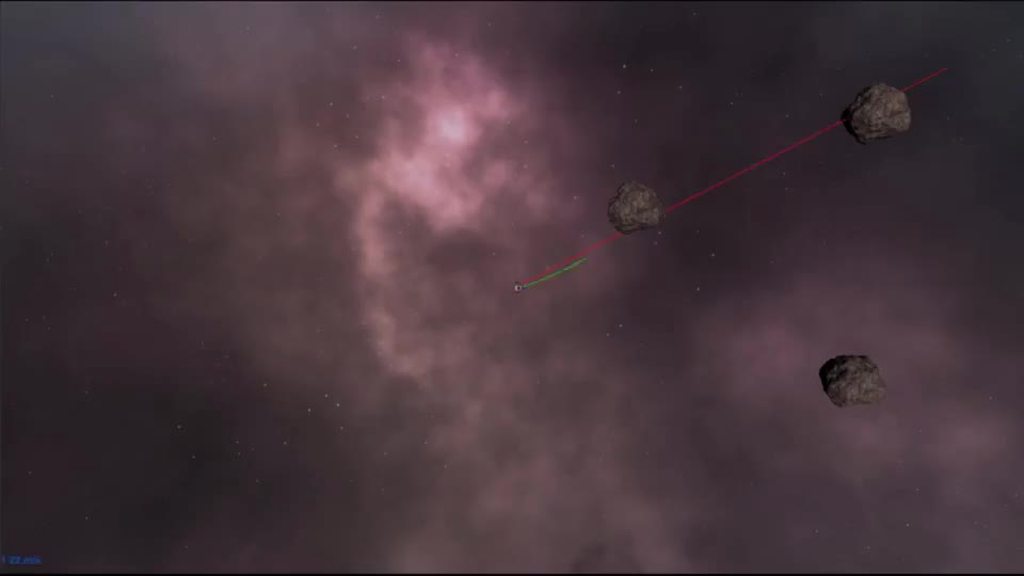
Hey guys. I'm working on a 2.5D physics based game. I want everything to stay on the X-Y plane at some Z depth. Freezing the Z position on the rigid bodies does nothing at all. I'd like to avoid writing a custom script to do this if possible Any other ideas?
willow vortex
can't you use 2D physics with 3D rendering? 🤔
mighty geyser
@willow vortex I had no idea that was possible. How would I go about that?
willow vortex
I dunno about the specifics, you should search about unity 2.5D and see what you wanna do, because I'm sure there's multiple styles each with its own pros and cons 😛
mighty geyser
I have looked around. Maybe I'm not using the right words in my searches. Most 2.5 D content is side scrolling. This is what I'm working on. https://imgur.com/1eJ1uTC.gifv
 loud moon
This seems like it should be trivial but can't figure it out. I'm applying angular velocity to a cube with a box collider and it doesn't roll. Has a non kinematic rigidbody.
loud moon
nvm, got it
ruby prawn
hello, please tell me if the following method and the correct way to have the pulling force with the wheel collider:
float wheel_radius = m_Wheel [2] .radius;
float wheel_mass = m_Wheel [2] .mass;

float traction_force = 0.0f;
for (int i = 2; i <4; i ++)
{
     WheelCollider wheel_collider = m_Wheel[i];

    WheelHit hit = new WheelHit ();
    wheel_collider.GetGroundHit (out hit);

    float u = transform.forward.z;
    float f = Mathf.Abs (hit.force);

     traction_force + = u * f;
}
hello how to create a this in Unity ?
stuck bay
does anyone know why my camera decides to shake all over the place whenever it hits a rigidbody at a fast speed? the camera focuses on an object at the top of my player, but that object isnt shaking, so i dont see why the camera shakes. the camera is fine, until it hits rigidbodies
willow vortex
@stuck bay Are you doing any scripting on the camera to rotate it?
stuck bay
yes
willow vortex
then that's the issue, the camera is already parented and therefore rotating towards target, rotating it in scripting will fight with that
stuck bay
oh. talk about overengineering 😂, thanks loads!
 next granite
I was following Brackys tutoral about how to get an object to move in a 2D area. I was working on the part where its suppose to collide with the floor but its falling through despite everything set right
stuck bay
is there any way minimize the shaking the rigidbody preforms when it runs into a wall?
its not my camera this time
 brazen pine
Are you using fixed update to move the rigidbody?
stuck bay
no @brazen pine
lapis plaza
there's your issue then
 hybrid current
Hi, I'm having a bit of an issue with Collider2D.cast detecting a collision when it shouldn't. https://forum.unity.com/threads/collider2d-cast-detects-incorrectly.930960/

Unity Forum
I have a problem where Collider2D.cast detects a collision when it shouldn't. Attached code is a bit of a disaster as I was trying my best to find a...
tender gulch
@hybrid current sounds like you're trying to reinvent the wheel. Why not use one of the common pathfinding solutions, like A*?
hybrid current
I only recently started learning c# and using Unity, so I want to practice sillly stuff. And now I really don't know why this is happening and would like to understand why.
tender gulch
Could you upload your code to hatebin instead of posting it as a txt file?
tender gulch
@hybrid current this code is so messy, it's hard to understand what it's doing and whether it's doing it correctly, making it hard to debug. Perhaps you should separate it into functions that have strictly one task.
That would be the best practice.
hybrid current
Sure, I could do that and clean it up from all the debugs too.
hybrid current
@tender gulch https://hatebin.com/gmzbhedzcs any better?
hybrid current
https://forum.unity.com/threads/collider2d-cast-detects-incorrectly.930960/ posted an update, I think I found what the issue is, but I have no idea how to resolve it.
Unity Forum
I have a problem where Collider2D.cast detects a collision when it shouldn't. Attached code ( a more readable version here...
hybrid current
I have made another post if anyone is interested. This effect can be reproduced with just two objects and a cast after moving one of them.
hybrid current
Yes, but it is after moving the object
So the other one shouldn't be in the line of fire after moving
 sharp swan
you need to sync the transforms of the colliders before casting
iirc Physics2D.autoSyncTransforms was on by default in previous versions
hybrid current
Oh, I will try that immediately, thanks!
sharp swan
I'm pretty sure the positions of rigidbodies only update at FixedUpdate()
can someone confirm this
undone lynx
on it
Physics2D.SyncTransforms(); after changing position fixes it
or i think u can do
sharp swan
neat
undone lynx
GetComponent<Rigidbody2D>().position = new Vector3(0, 5, 0);
the reason for needing the sync is bc u change transform position
confirmed it works perfectly with changing rigidbody position
no need for sync transform then
sharp swan
alright cool
sharp swan
to summarize:
change the Rigidbody2D.position
use Physics2D.SyncTransforms() if you absolutely must change the transform.position instead
hybrid current
I just tried calling Physics.SyncTransforms() right after moving transform, didn't fix. But indeed changing theRigidbody2D fixed it. Thank you very much!
undone lynx
btw
sharp swan
physics2D and 3D are the same except when they're not 😎
sharp swan
yes
undone lynx
Physics is the 3d physics engine, ie PhysX
Physics2D is the correct one, box2d, which the 2d engine uses
sharp swan
unity should absolutely rename to the class to Physics3D or Physics3
undone lynx
its a relic of the past
unity got concrete 2d support late
was a 3d only thingy back then
the 2d was faux 2d. still kinda is i think
hybrid current
Thanks again for that, much appreciated.
 rain veldt
Hello, I'm havin a problem with my mobile device and raycashit2d is it the right place to ask the question?
 solid marsh
 dusky prism
Hey guys,
Raycasting is better to be called in Update or FixedUpdate ?
I thought because it is Physics function, it is better to be called in FixedUpdate (And I always put it in FixedUpdate even when I have to use bools and they make my codes dirty) but I found this tutorial and it says FixedUpdate is not a good place for Raycasting. Is it true ?
https://learn.unity.com/tutorial/physics-best-practices#5c7f8528edbc2a002053b5b4

Unity Learn
In this lesson we will be looking at some best practices for when using physics in a game and some evidence to demonstrate why they should be used.
foggy rapids
use it in fixedupdate because if you used it in update you'd cast redundant rays due to lack of physics update between.
As long as you follow the rest of the advice in that tutorial you should be fine. One or two short rays/frame is perfectly acceptable but dont go nuts
 latent cape
Hey, is there anyway I can add physics material to a 2D top down game. I have a car and would like it to lose friction over time, but I cant get the car to interact with the ground unless its a trigger, and even then there's no friction to add or decrease.
deep warren
Hello guys.I have a little issue and i cannot find solution to fix it.I created simple collectible system, when u walk through game object with the script attached it destroys and u collect some points. However when i hit the object i collide with it for a second and then it destroys.So it kinda kills my speed.Can i make the object destroying more smoother? I mean no physics interaction with the object. I just wanna go through the object and destroy it without collide with it first.Thanks in advance!
deep warren
I tried, but that way the game objects doesn't want to destroy and my score doesn't update
foggy rapids
you need to change the function to OnTriggerEnter instead of OnCollisionEnter
deep warren
Thank you very much man!
 signal furnace
@latent cape Try using a PhysicsMaterial2D?
latent cape
I have, but it doesn't work with top-down 2d games unless you add it to a wall, but i was hoping to add it to the floor/road
signal furnace
Then you may have to do physics in code, that say has a vector3 called velocity and you do physical manipulation to that and add it to your player position
 toxic kite
For Physics2D settings, can Velocity Iterations and Position Iterationsbe overridden in any way per object?
 digital dust
in a rigidbody what determines the falling speed of an object?
tender gulch
Depends on whether it's 2d or 3d, but basically gravity
ruby prawn
Hello, I am having problems with the wheel collider actually as some people already know I am the tutorial:
https://asawicki.info/Mirror/Car Physics for Games/Car Physics for Games.html
short the problem and that the wheel rpm and long went up
and that in my gauge I voice that from 3000rpm to 5000rpm around the needle of the gauge make back and forth at high speed between it is two
may not be below or above i really don't understand why.
Here is my script I put them on codeshare for ease of visuals the part of everything is calculated is in the DriveUpdate function
https://codeshare.io/5vZPek
game programming tutorial
lapis plaza
@dusky prism that would totally depend on what you need raycasting for and how your system is implemented
People are often scared of doing things on each update or fixedupdate when others say it is bad
In reality you can write stupid code in all possible approaches if you dont understand systems underneath
Only rule of thumb that really applies IMO is that if you write any code that uses rigidbody forces constantly will absolutely need to be in fixedupdate to work properly
lapis plaza
putting this here for awareness: https://forum.unity.com/threads/experimental-contacts-modification-api.924809/

Unity Forum
Hi,
tl;dr - here is a custom build with the experimental contact modifications API exposed:...
TL;DR: There's experimental version of Unity editor that lets you use PhysX Contact Modification API to spoof / alter / ignore etc contact points upon physics collisions
it's only for testing atm, hopefully we get this in some future engine version built-in
 river cosmos
Quick question: can physics3D be used deterministically?
To give a bit of context: I have a heavily physics-reliant network multiplayer game, and want to make sure I can just pass the starting conditions and then simulate the same processes with reliably equal results in different devices, instead of having the host update the position constantly to all other devices.
lapis plaza
for networking, no
physx internal cache will pretty much make your rewinded physics run differently
you'd want to use Unity Physics package (DOTS) if you need to do that deterministically
it's stateless so no cache
foggy rapids
or do the physics yourself
lapis plaza
it's still not crossplatform deterministic though
doing deterministic physics on your own isn't all that trivial either
@river cosmos just to be clear, you only need to sync the starting point?
I haven't tested Unity's determinism in particular but unless they do some stupid things there, it should be deterministic on same platform (exact same player build) if the starting conditions are all equal
river cosmos
I only need to sync the starting point. It's basically a turn-based game, where each turn both the players set up a series of physical constraints and effects in a "paused" mode parallelly, and when the turn ends, the physics plays out, these objects and forces interact for a short period of time, and then the physics pauses again and a new turn starts.
A rather simple way of doing it, is simulating it non-deterministically, just f*ck it, and then sync up the positions and velocities during the first few seconds of the "paused" section of the turn, but I wanted to know if I could use it in a more deterministic way, that only required the starting condition in the first turn plus effects every turn, and if I could get the same result in any given platform after the same actions and turns have passed.
The flow's basically
instructions > simulation on > a short period of time passes > simulation off > repeat
Also, determinism would be great for purposes of saving replays in a simple manner, instead of saving the position and rotation of every object in every frame.
You mentioned the DOTS physics package, I'm not really DOTS savvy, is there a link somewhere where I could check it out?
lapis plaza
I don't know if that really changes things for you. Basically what you could try first is to setup stock physics so that you can step it yourself, this way you can make sure every client runs same amount of physics steps per turn
 shut locust
Hello, is there a way to get mesh colliders to work on webgl
 whole swift
hey guys
ive got a new problem with my 2d character controller
he stops moving very abruptly as soon as i stop pressing my movement
keys
here's my code
https://hastebin.com/exuxujawaz.http
 modest mirage
i want to make force based movement like shown in the following video but in 3d space instead of 2d:
https://youtu.be/-rwo_qdLag8?t=70
like shown in the video i dont want to apply force in a direction if i have already reached a certain velocity in that direction, but for example if i want to move in the opposite direction than i want to apply force.
how can i acheive this? i have already made some attempts but they have all failed. Here is what i have in code so far:
private void FixedUpdate()
    {
        rb.maxAngularVelocity = float.MaxValue;
        Vector3 targetAdd = new Vector3(Input.GetAxis("Horizontal"), 0, Input.GetAxis("Vertical"));
        targetAdd = soul.transform.TransformDirection(targetAdd);
        //velocity = rb.velocity;
        targetVelocity = (targetAdd * speed) * Time.deltaTime;

        float dot = Vector3.Dot(targetVelocity, rb.velocity);
        print(dot);
        finalVel = targetVelocity;
        if (Mathf.Abs(rb.velocity.x) + Mathf.Abs(rb.velocity.y) + Mathf.Abs(rb.velocity.z) > maxVelocityChange)
        {
            if (dot > 0f)
            {
                finalVel = targetVelocity * dot;
            }
        }
        rb.AddForce(finalVel, ForceMode.VelocityChange);

Here is a behind the scenes look at the creation of my most recent game!
● Download the Assets: http://devassets.com/assets/mayan-temple/
● Lava Flowing Shader: https://goo.gl/Wghv1B
● Unity Particle Pack: https://goo.gl/NQJy4C
♥ Support Brackeys on Patreon: http://patreon.c...
 astral glade
Hey guys, I am looking for some help when it comes to physics-based movement. And I feel this chat may have a better idea on where to go from here then #💻┃code-beginner
Basically, I am trying to get a ball to move locally, based on it's Y axis rotation, so if i look left and hold W, I'll go that direction, but it must be based on physics, adding force to the rigidbody, and not just editing the transform. Because I need the ball to roll around. As its a Physics-Based Puzzle Game
I've added both the Player Movement script and the Camera Following script to the following Pastebin link, any help is greatly appreciated. This is the only big hurdle I'm facing with my player movement, as I really don't want to lock the camera just behind the player.
https://pastebin.com/LeAigQKw

Pastebin
undone lynx
whats the hurdle?
astral glade
All tutorials i find that show rotation based on the Y axis are just directly adding to the transform, not adding a force via physics. And I have no idea how that would work, due to my currently limited knowledge on coding.
undone lynx
with the current code it doesnt work?
astral glade
I can move my camera around the player just fine. However the player goes based on the directional input for the world, not based off it's own rotation upon the Y axis.
If I hit W i will always go forward on the Z axis, not in the direction I would always want
undone lynx
ah so u want it to
roll
not like. just move
right?
or like
u want it to move towards the camera facing direction?
astral glade
Yeah, I want it move by rolling, which I currently have.
But I also want it to ALWAYS when moving forward with the W key, away from the camera.
right now, if i turn the camera to face the ball's left. then hit W. It will seemingly move left, (globally, it would be forward)
undone lynx
yes u need to
make the movement camera relative
let me show u my own code which does that
astral glade
yeah, thats what i need, lol. I'm just new
undone lynx
its not much code
// Since we're the player we wanna move towards the camera direction.
var dir = new Vector3(_moveDir.x, 0f, _moveDir.y);
var transformedDir = _camera.transform.TransformDirection(dir);
transformedDir.y = 0f;
so like the important part is
_camera is a private Camera _camera
and in the Start() function i do _camera = Camera.main
whats happening here is
the move direction is being transformed to the relative space of the cameras current transform
the y=0 is to keep the movement only on the x-z plane
astral glade
How would I apply this to my own code?
I've been attempting but nothing seems to be working
 dusk maple
Maybe check to see if the raycast can shoot through the square's layer
 dusky sparrow
How do I set a pivot point
I want to make a object unmovable and to make it only rotate back and forth
 feral tendon
Would using a single boxcast be better than using a lot of parallel raycasts on a big square shaped object?
undone lynx
@astral glade have u figured it out yet?
u already have the movement vector right
u need to transform it using the camera
as in the code i sent
@feral tendon depends on what the raycasts are doing
feral tendon
@undone lynx Imagine a very tall rectangular moving platform firing 15-20 raycasts.
undone lynx
i usually try to simplify many casts into one shapecast if possible
it all depends on what ur using the cast for tbh
one shapecast probably runs faster than many casts too
but if the data from the boxcast is not what u need then u might need those 20 raycasts
with that said it does seem like a boxcast situation if ur doing 20
willow vortex
you could also measure it (with Stopwatch) 😛 preferably do both and measure + log the results during a playtest where you'd actually use those to see which one is faster for your particular game
raycasts are also less accurate than a box
also raycasts are basically pointcasts, a point moves along a line... because boxcast is a box moving along a line aswell, it's not a box that appears and checks what collides with it, for that you use OverlapBox()
 eager olive
https://ghostbin.co/paste/8hv5h can someone please help me figure out why on earth my anchors are pulling some black voodoo shit
the line renderer is set to the same positions as I set the anchors of this DistanceJoint2D to
and yet they appear at different locations
dusky sparrow
I am trying to make a game where the tower tilts and you have to use your arrow keys to add forces to counteract the tilting, but I don't how to make the tower tilt but not move in any other direction.
viral ginkgo
@dusky sparrow I'd not use physics for that
You can try to think tower tilt as a point defined inside a circle with a radius
This point has velocity and it moves every frame
Player can change velocity via inputs
You get that going and then make a tower model that adjusts rotation according to that point
astral glade
@undone lynx yes I have!
 buoyant harbor
@dusky sparrow use rb.AddForceAtPosition(force,pos)
Where pos is the top of the tower and force is in the tilt direction.
 woeful dove
Hi, quick question, is there a way to add a force curve to addforce? like a logarithmic force, where the initial acceleration is far greater than when you hold it down?
where the acceleration would look something like this
instead of like
which is what it is right now since i'm using addforce and a clamp
foggy rapids
used to be easy cause they exposed the animation curve as a component
now there isn't one 😦
ForceMode.Acceleration might work.
If you apply each FixedUpdate using a function like log
woeful dove
damn
foggy rapids
no, i guess there's no easy way.
Either do the math manually or.... Animate some value on your script so you can actually draw curves
 dawn lion
Hey guys how are trains simulated in games? Do they use some kind of complex collision system to detect the tracks or are the tracks there just for looks with the train following some invisible bezier curves?
foggy rapids
in games most things are faked because realism costs too much performance 🙂
 gritty oriole
Lets say im making a racing game and my car drifts all nicely but after some ms since the drift started the car flips over. Any clue on why this could be happening ?
eager olive
Why does Physics.Raycast allow you to do out (RayCastHit) hit
but Physics2D.Raycast does not?
stuck bay
Hi! How do I make a mesh be the player? I tried checking a reference book, but it's too old.
willow vortex
@eager olive because the 2D one returns the hit instead, to determine if it actually hit something you need to nullcheck hit.collider - the docs page shows that too: https://docs.unity3d.com/ScriptReference/Physics2D.Raycast.html
 uneven shore
I'm trying to use Physics2D.CapsuleCast but for some reasons I'm always getting 0 results back. I put a breakpoint and checked all variable and it's in a place where there is a floor (tiles as part of tilemap), and colliders on the scene are standing on it.
What could be the issue with it?
willow vortex
AFAIK physics casts "spawn an object" and move it towards a direction and also any hits in the original position do not get read properly, either you get hits but with zeroed vectors or you don't get hits at all
if you want to check if a volume of a capsule has anything in it, use OverlapCapsule (or if you do need the cast, you might need the overlap too in the starting area)
uneven shore
Currently it always returns 0, when near it and when "in it". Sounds like increasing the distance should work when not "in it" though, so let me try that
willow vortex
did you draw a representation for start and end to see if it's doing where you assume it is?
uneven shore
I only drew the start. Gonna draw the end now as well
@willow vortex It works, and I'll also add the overlapping. Thanks!
I couldn't find it in the docs though where it says CapsuleCast it has issues with objects starting "in it". Did I miss it? or is it a bug or something?
willow vortex
no idea, but this is from experience and also from the unity standard asset's camera anti-clip script, they're also checking starting area with overlap first then they do a cast, my experience with that is from trying to do my own implementation of camera anticlip and saw that hits in the starting sphere (was using sphere cast) do not get proper data ¯_(ツ)_/¯
uneven shore
ah. Well as long as I could get it to work it's all good I guess :p thx again then!
uneven shore
Now that I'm using overlap, it seems to only return the collider.
How can I also get the normal of the surface of the collider, much like in a Cast call?
@willow vortex
undone lynx
smth u can do is
use the overlap to check the range
and if something is in the overlap
do a raycast from the origin of the overlap, to the colliders returned in the overlap
to get a normal
also the thing about raycasts not returning hits inside the collider it starts from
i think u can configure this behaviour in physics settings
"casts hit backfaces" or similar named option
willow vortex
@uneven shore 2 overloads of capsulecast have arguments for raycast hits list or array
stuck bay
Yellow tubes are turning and if unity used regular basic logic, the black object should move also in the red lines dirrection, but instead its moving in dirrection of green line. Any suggestions on how to work around unitys non-existing logic?https://cdn.discordapp.com/attachments/497872424281440267/734530796748013588/unknown.png

 wary void
does anyone know why my player character would jitter when stopping? the character just sets the velocity directly on the rigidbody2d. it's even being picked up by pixel perfect camera, so its really obvious.
 halcyon ruin
I have a question, Does having 100 raycast save performance than having 100 colliders?
foggy rapids
no
and depending on how long they are, it could be worse
but dont trust me, try it and see!
willow vortex
also 1 collider isn't functionally the same as 1 raycast, it has a volume 😛
and depends on usage too, if you wanna use a collider for fast moving objects (like projectiles) then it's gonna require continuous collision which probably impacts performance more than a raycast would
halcyon ruin
I'm just using them to get a script from other static objects generated nearby in their x and z axis , so one object has 4 raycast/colliders checking left,right,forward,and back
If I use colliders I'll probably use OnTriggerEnter ,
On the other hand I can use raycast on the Update method using some if-statements so it only works once
And they would return a script to modify
So a collider is better at this right?
foggy rapids
sounds like rays would be better
since you only need four
and it sounds like what they're supposed to hit is pretty close
willow vortex
not sure how raycast helps with that, sounds more like you need an overlapbox
 prime wind
Hi there! Can someone help me on this problem I have on my AI car? As you can see, the car seems to flop about and I am not sure how to correct this error. Much appreciate the help!
 dire eagle
Im trying to work on my Create with Code project from Unity. I added movement to my player but when I hit a collider, my player bounces back and kind of just looks like he was dropped off in outer space. Is there any way to fix this?
https://gyazo.com/c85509ab46f16fc3cc1284fed3a7b617


 foggy rapids
lol chillcat, just leave it that way and call it a reverse gangster
but clearly the back wheels are providing more forward force than the front wheels will allow (like pressing the gas and breaks at the same time in a 2wheel drive car)
prime wind
Haha, thank you! Will give you an edit now. Thanks for your time. 😄 @foggy rapids
Actually, I'm not sure what to edit. I'm assuming the torque again.
foggy rapids
make the front wheels easier to push, it's like there's something stopping them from rotating
prime wind
@foggy rapids Last time, I promise. I'm completely stumped. I tried playing around with the torques and still no dice.
 woven owl
My player is sliding down slopes only if I jump down the slope; they can walk up and down it, jump up the slope, or stand still with no issues. I figured out a workaround by doing a second check in the jumping state to see if they are grounded, but doing so made it so the jumping state only fires for one frame (obviously causing a bunch of other issues), so I undid that change and am hoping someone might have advice on the sliding? 😓
foggy rapids
i have no idea, i hate vehicle physics with a passion
maybe it has to do with materials 🤷
prime wind
No worries, thanks for your help! Now I know what to call the car file now: "Reverse_Gangster" xD
foggy rapids
lol
woven owl
Tried a few different material settings, no dice
Well, I couldn't really figure out the physics issue but I found a workaround to force it
foggy rapids
i dont understand your problem, you want it to stop sliding?
woven owl
Yeah. I figured something out that makes it work well enough. Thanks anyway
 white raptor
HI guys! Look at that object
and look now
it jumps when i start the game
It doesn't collide with anything else, and it does have gravity on even though it doesn't return to the initial position
can someone help me? plz
 robust plover
Hi! I am new to Unity. I wish I could blow 3D plants and trees created in Autodesk Maya. I tried the Wind Zone feature and it works only with imported store assets. How could I make it work with mine? Do you recommend any tutorial? Thank you
eager olive
why do they use Time.deltaTime and not Time.fixedDeltaTime here?
undone lynx
time.deltatime will be the same value as time.fixeddeltattime when it is used from FixedUpdate
For reading the delta time it is recommended to use Time.deltaTime instead because it automatically returns the right delta time if you are inside a FixedUpdate function or Update function.
foggy rapids
i wonder how much time it's wasting figuring out which update it was called from 🤔
undone lynx
probably doesnt do any figuring
it probably just sets time.deltatime to the fixed time when its running the fixedupdates
i imagine its like
deltaTime = normal delta;
Update();
deltaTime = fixed delta;
FixedUpdate();
ah
 faint acorn
// I seem to have some weird problems with physics stuff
// AddForce is not working
// otherBodyForce isnt 0 before you ask
// this bit of code runs in OnCollisionEnter2D btw
if (otherBodyForce != 0)
    collision.otherRigidbody.AddForce(
    ((Vector2)collision.transform.position - collision.contacts[0].point).normalized * otherBodyForce
    , ForceMode2D.Impulse
    );
collision.transform.position - collision.contacts[0].point = Vector3.zero
try without normalized
faint acorn
I debuged the code and((Vector2)collision.transform.position - collision.contacts[0].point).normalized * otherBodyForce gives the correct value
foggy rapids
Then the force isn't enough to move the object.
or it's in a direction which that body has frozen
faint acorn
the other rigidbody has a mass of 1 and it doesn't have any position constraints
 compact pine
I guys, I'm trying to use the mesh collider, but when I move fast my character, he pass through the walls. When I use the convex collider, that problem don't happen, but the convex collider is not good for some shapes. Can somebody please give to me a tip? Thanks.
willow vortex
what about making your collision from multiple shapes?
and are you really moving the character with physics or are you teleporting it? 😛
compact pine
Well, my character is a rigidbody, using the world physics. When I move my character slow, he don't pass through the wall (when my wall is using mesh collider)
But the convex collider works well in fast velocity ( but super super fast don't haha)
 cursive sundial
Has anyone ever experienced different physics results when running the same project on different computers?
I zipped my project, minus the library folder, and sent it to my buddy to work on. When he ran the game the player jumps like 10x higher on his computer than he does on mine.
It’s just a simple one time rigidbody.addforce in fixedupdate.
What could the issue be? Hardware?
willow vortex
@cursive sundial you should add yourself some hotkeys to change Application.targetFrameRate so you can test at different framerates to see if that's the cause or not
 little egret
can someone guide me in the right direction, i have an very fast rotating object, it often misses objects. to get rid of this i think i have to check the rotation angle in the last frame and then do an adjustable number of sweep tests from the last angle to the current angle. but how? how can i do multiple position / rotation changes in a single frame and check for collisions every iteration ? pseudo code is enough i just need the principle.
little egret
@cursive sundial if you really already use fixedupdate it should be frame rate independent, so the only explainable reason is that it happens more times on his computer (a common example is using input.getkey instead of input.getkeydown) to debug it, add a text or anything else every time you add the force to make it visible. check if it happens more then one time on his computer and if yes find the reason
cursive sundial
@little egret So it turns out to have been an issue with the way I set up the jump to be initiated through the new input system package.
What I had done was try to get the action to return a context of something similar to a input.getkeydown/up.
Like so:
InputAction.performed += ctx => myBool = true;
InputAction.canceled += ctx => myBool = false;
And then in my fixed update when myBool is ever true, it performs a jump.
Turns out this was not a good idea apparently lol
cursive sundial
Well I still gotta test it out on different controllers and keyboards to make sure I can be sure the fix worked.
You should give a try. So far I like it. The documentation feels a bit disorganized but Jason from UnityCollege has a good tutorial on it for the basics.
 tight matrix
if i use rigidbody.addforce, the acceleration should be the added force divided by the ridigbody's mass, right?
little egret
depends on forcemode
scroll down to the end of the site: https://docs.unity3d.com/ScriptReference/ForceMode.html
uneven shore
how can I get more info from an overlap test? e.g. from Physics2D.OverlapCircleNonAlloc I seem to only be getting the collider
little egret
maybe give Physics.ComputePenetration a try?
uneven shore
It's actually what I'm looking for (Penetration depth), but I need a 2d version and I can see Physics2D doesn't have anything like that.
Any other ideas?
foggy rapids
you can use the collider's bounds
Bounds.Intersects will tell you if two are intersecting.
Bounds.ClosestPoint will give you the closest point on the bounds to the supplied point.
(bounds1.ClosestPoint(bounds2.center) - bounds2.center).magnitude might give you the penetration depth
 shell jacinth
k, maybe someone got a tip, i have a trigger plane and i need it to be fairly large
problem is, when i increase the scale of the plane, the raycast doesn't hit correctly anymore
any ideas ?
okay, found it, was the y size.... me dumb
uneven shore
@foggy rapids The collider is a tile collider; are you sure it will work?
foggy rapids
it should so long as it meets all the requirements here:
Note: Trigger events are only sent if one of the Colliders also has a Rigidbody2D attached. Trigger events are sent to disabled MonoBehaviours, to allow enabling Behaviours in response to collisions.
I meant in regards to Bounds.ClosestPoint. I can see a situation where an overlap will return true for my character and the floor, while the wall will actually be closer (imagine a vertical rectangle)
uneven shore
I don't. I'm just running an overlap test and I only get back the collider
I thought about running a raytrace from the character position, but I don't have an end position either
(A raytrace after an overlap test, that is)
 hoary sedge
hello anyone here ?
little egret
is there a bug in 2019.4.4f ? Sometimes on collisions the collided object changes the scale and i have no idea why, i never change the scale anywhere
 glacial jolt
Found some extremely bizarre behaviour if anyone wants some light afternoon reading: https://forum.unity.com/threads/inconsistency-with-collision-impulse.936728/
Unity Forum
Aight so strap in this one is pretty damn weird.
Collision.impulse is described as:
The total impulse applied to this contact pair to resolve the...
little egret
i have an kinematic character controller that carrys a rigidbody, if i parent it, it goes through walls sometime (i think because its moved not by force), tried some solutions now but nothing worked well enough. what is the right way (without parenting) to make the rigidbody at least try to get always to the grab position vector ? Or calculate the force needed to move it to that position (the position can change fast and it shouldn't collide with the controller, so it needs to move in an orbit around it) or move it somehow else while making sure the collisions are correct. i really need an idea or a push in the right direction.
glacial jolt
@little egret kinematic rigidbodies do not use forces, as they are treated as if they have infinite mass (f = ma, where m = infinite, acceleration = 0). Do you mean you have a parent char with a kin RB, and a child char with a regular rb?
little egret
yeah i maybe didn't explain it well enough, i have an kinematic character controller (it doesnt use force at all and has no rigidbody) and it should carry a regular rigidbody
i want the rb to circle around the char always to char.transform.forward, but with force (i think no other way will work with proper collision detection)
to char transform.forward + a space variable that is half of the boundingbox center of the rb to be exact
glacial jolt
if you want a rigidbody's velocity to every frame be the velocity such that its position moves from currentPosition to targetPosition
rb.velocity = (target.position - rb.position) / Time.fixedDeltaTime;
little egret
i think i tried that already, let me check again, one moment
tbh that works already pretty good, thanks @glacial jolt
glacial jolt
👍
little egret
do you have a tip for the rotation also?
and also i would like it more if it slowly lerps to that position
glacial jolt
don't have the code off the top of my head, but the principle is the same. You take the target orientation, your current orientation, and calculate the quaternion between them, then convert that to angle axis (torque)
little egret
so i take the velocity and add it in some steps , should work right?
glacial jolt
yea
little egret
that helped me a lot already, thank you very much
 autumn radish
Hello! Just posted this on the forums and was curious to see if anyway here had any better ideas on how to implement this.
https://forum.unity.com/threads/how-would-you-simulate-paper-folding-origami-specifically.936800/
Question - How would you simulate Paper Folding (Origami Specifically)
Unity Forum
I know similar things have been asked before,
ultimately I'm trying to simulate paper folding in 3D. Here is what i've tried.
- Develop Inverse...
 drifting sleet
@autumn radish yeah you should use amanda's thing
autumn radish
Its not really as easy as copying.
drifting sleet
lol i know
she spent about 6 months doing that
it's tough dude
you're asking for a very challenging thing
autumn radish
Oh i know. Im not asking anyone to do it for me I'm asking what approach would actually result in something that works/looks good
drifting sleet
you're best bet is to just animate all the folds
autumn radish
Not really what im aiming for though
drifting sleet
i think it's the only way you'll have control of the look
autumn radish
that would be an infinite number of animations...
drifting sleet
not necessarily
i mean maybe that's what you need to change, maybe you just have specific folds you support
autumn radish
Even with specific folds
building folds ontop of each other would all be different
Its not like i could support 7 folds and just do 7 animations
that would be making a single thing
which is not what im aiming for
drifting sleet
i wouldn't even know where to begin creating a good UX for general origami
that would be a very avant garde HCI topic
let alone premise for a video game
like just making a touch-based or mouse-based folding interaction that is intuitive would probably take a few months
you could spend a few months just demoing a single fold
anyway i admire the ambition
 hollow egret
where do I learn about Euler angles and Quaternions?
hoary sedge
does anyone knows how to move a rigidbody at constant speed?
undone lynx
u can try setting its velocity directly, or use addforce with VelocityChange forcemode
theres also this small helper component i think
called constanforce
hoary sedge
that is bad though, gravity wont work
also velocity change force will make it accelerate
willow vortex
depends on what the goal is exactly, you could simply set its velocity for it to be forced to move at that speed in that direction with no acceleration up to that or anything
but if you want it to move realistically, being stopped would make it take time to get up to speed again and etc, then you need a speed cap