#⚛️┃physics
1 messages · Page 49 of 1
 ivory jetty
 pallid meadow
 lunar magnet
https://streamable.com/o4qslf my car keeps shaking how do i fix it

 foggy rapids
lasagna something probably has the wrong mass, or your joints are not configured well enough. It's really hard to say
good question @pallid meadow you can get around it by reducing the size of collider by 1 pixel
lunar magnet
it has a mass of 1000
foggy rapids
is it like built out of joints and stuff or is it all one rigidbody?
 distant coyote
@lunar magnet adding here too for context..
 devout patrol
Hey how are lenses and gun optics made? I play CoD MW and the way the scopes work its amazing but I can't figure it out how they do it.
Lets take the red dot for example when you ADS its not in middle during the animation but its always where the gun is pointing so the red dot is on different place based on the angle of the view
I moved my mouse so thats why its not aiming to the same spot but you get the idea
I cant find anything related to this on the internet
 tropic lily
Guys, how can I fix a entity rotation? Do I have to set the rotation to 0 on a jobcomponent?
 naive remnant
@tropic lily maybe this will help you https://forum.unity.com/threads/constraints-freeze-position-rotations.854635/
 runic lion
what's the link to paste code?
 steel pewter
Good morning everyone
can someone point me in the right direction on how to calculate a RB velocity based off of it's GameObject's movement?
I have a GameObject i'm rotating every frame, and I want to know how to calculate and set the velocity on the RB attached to it
please @ me
 round crow
@devout patrol I would just add an Plane in the Scope which is invisible and has a red Dot there
so it mooves totaly with the gun
then you can also see it in the first screen
which gives a bit more realism I think
just like A Window
devout patrol
no thats the thing 🙂 in the first picture (upper) it cannot be seen because it wouldnt aim where the bullets go
thats how to make it in easy way I can make that but I want to know how they make it real 🙂
irl the scopes work using mirror with some curviture
round crow
as I understand U currently switch between Crossair and red dot?
devout patrol
what? I dont understand
round crow
no thats the thing 🙂 in the first picture (upper) it cannot be seen because it wouldnt aim where the bullets go
@devout patrol
sounds like its only there when you aim. but why?
you should also see it when you dont look straight on it right?
round crow
but why do you want it that complicated?
devout patrol
basically if you keep the gun pointing in one direction with the red dot (or any other scope on same princip) and you look through the scope under angle you should see it point on the same point
and I want to know how it works in programming
round crow
you probaply need to learn alot about Optics and that kinda stuff
devout patrol
and I cant manage to find some article mentioning this problem
I mean I understand optics and mirror light in physics but I cant project it to programming language
well Ill try something but its still a mystery to me
https://www.youtube.com/watch?v=81X4dWcIM5c thats what I meant
 drifting sleet
@devout patrol i guess the answer is math, but in terms of the building pieces you can probably start with a shader for the glass/magnification effect and a world space canvas for the red dot
tropic lily
Hello guys, I've made a simple fps controller with character controller. I'm having a problem with physics: When I try to walk into a cube and then jump the jump is very glitchy. Do you have any advice?
foggy rapids
tweak the materials, mass, and velocities. hard to say without knowing what glitchy means
 frail mauve
Can anybody help me with this problem?
I have object A(Blue pilar) and Object B(White Cube). object A is rotating towards object B as shown in the picture and they are penetrating(you can see it on object B top right side).
I'm using Physics.CalculatePenetration and is returning me the direction I should move(the little red line at object A origin).
The question is, how could I calculate the needed rotation to separate the object when I only have: The last rotation offset and the separation vector from Physics.CalculatePenetration?
 neon grotto
hi can i create objects in unity that are not directly animated but driven by motors and muscles and depending on friction, like a car with real wheels where the force forward comes directly from the rotation of the wheel?
i would like to crate bugs that really walk around by moving their legs, and "see" lightsources
how do i call this kind of programming and objects? so i can look for tutorials
 mighty sluice
configurable joints vs articulation joints
 lapis plaza
former seem to be having a better party
kinda bummed that the dots physics didn't get featherstone solver
would be nice to have articulations there as well
neon grotto
thank you!
mighty sluice
this is comparing similar(mostly) damping and force values
but articulations use their own mass
with some tweaking i can get configurable joints to be almost as good, but it requires the sacrificing of some inertia realism
and yea, they configurable joints are really rocking out lol
@lapis plaza have you tried temporal gauss siedel?
in some situations it seems almost as good
lapis plaza
not much
I can't use the built-in physx because they don't expose contact modifications
it's a showstopper for me
if I could use built-in physics, I could use articulations too
mighty sluice
lapis plaza
I'm currently playing with unity physics (dots package) joints
they are quite wobbly
mighty sluice
set some high spring and damping values
lapis plaza
I only need prismatic joints but they bend in all directions 😄
mighty sluice
10k spring and 1k damping are stiff but good starting ranges
lapis plaza
nah, it's them moving in directions they shouldn't
prismatic joint should just act like slider
mighty sluice
ah i see
lapis plaza
but they rotate and wobble in all directions 😄
mighty sluice
can you turn the temproal siedel on?
lapis plaza
there's no such thing for dots physics
lapis plaza
(dots) unity physics package is super simplified physics engine
they got like bare minimum there
but on the bright side they expose all the data for you
mighty sluice
joints are kind of my whole shtick lol
lapis plaza
so can spoof physics data on all physics engine phases
mighty sluice
interesting...
lapis plaza
and I totally need that part
mighty sluice
featherstones algo might not bee that impossible to implement
lapis plaza
glitchy collisions isn't good when you make games with vehicles
mighty sluice
im pretty sure it;s just a solver with some hierarchy and force swapping
lapis plaza
it's still pretty complicated task
mighty sluice
indeed
lapis plaza
I'd guess it would take me month or two to do it on DOTS
mighty sluice
from scratch yea, that might even be conservative
lapis plaza
I was more of thinking of porting some existing code to it but yeah, it's quite different beast
mighty sluice
im waiting until mlagents can be used with dots before taking that plunge
lapis plaza
there are always some edge cases that make it pain
- need to integrate it with the traditional solvers would make it really tedious task
mighty sluice
will the automatic DOTS conversion script not work?
lapis plaza
that's not how the conversion scripts work
there's no regular code-> DOTS code conversion
mighty sluice
it kinda abstracts and simplifies it into dots versions then?
lapis plaza
they are only for converting existing objects on gameobject side to their already ported ECS counterparts
someone has made those counterparts already
mighty sluice
that makes sense
if you can set inertia tensors, that is a good place to tweak for joint stability
any oblong colliders fubar the values
lapis plaza
basically to convert something in code for dots, you have to manually move things from OOP -> DOD and also implement things in a way they work with ecs and unity job system + burst
and in this case, work with the practises on their DOTS physics
mighty sluice
hopefully the physics improves...
lapis plaza
joints are usually a thing that gets least focus
lapis plaza
anyway, I can workaround these glitches already, and am investigating if I could force some things on code to properly bypass the whole issue
mighty sluice
i feel like it's only with the physx updates (like temporal siedel) that they ahve even become useable
lapis plaza
it's just, would be easier if it were more stable
lapis plaza
the current proto I'm building is using just 4 prismatic joints to connect car wheels to the main body. The main gain of this instead of raycast suspension is that I don't have to spoof any forces the wheels as wheels can have their own mass and when I apply spring-damper to the joint axis, it works just like in real cars
I'm dealing with tire friction and stuff manually anyway, not spinning those wheels with rev joints or anything as that will not work at all in practise
mighty sluice
i would mostly be worried about relative mass problems
lapis plaza
what do you mean?
mighty sluice
low tire mass compared to the chassis
lapis plaza
ah, like that
mighty sluice
tends to be a reliable source of joint instability
lapis plaza
yeah, that's not really an issue
well, not on this case anyway
I guess if the wheels would stack on top of other dynamic objects
but now they mainly contact static geometry
and I do spoof their contacts a bit too as they would otherwise collide violently to collision seems at higher speeds (which is why most joint based vehicles don't work)
mighty sluice
was going to ask if you tried spring joints, but it sounds like lateral movement is what you want to avoid
lapis plaza
I just add spring forces to the both wheel and body
like happens in real world
relying on some premade components would prevent me from finetuning these forces
they are not linear
also, this part is not really an issue at all, it works fine
mighty sluice
oh so you're just using the joint itself to bind them?
lapis plaza
the main issue is that prismatic joints are not 100% solid in a way that they tilt the wheels if some external forces hit them
joints are just to limit the wheels so they don't extend too far and so that they follow the main body
mighty sluice
have you considered the axel?
(technically suspension acts on the axel at two places, which rigidly binds the wheels horizontally)
lapis plaza
for back end, yes
but this really gets more tricky with that approach
would require way more joints
mighty sluice
you might be able to get away with a fixed joint between the wheels
lapis plaza
and that potentially means way more instability
naive remnant
maybe joint with more constraints? 😅
mighty sluice
but it sounds liek you've pretty much got it figured out lol
lapis plaza
in ideal case, I'd build the whole suspension with proper joints like in real car
but for that to work even remotely well, I'd need articulations
mighty sluice
I'd build a model T ford death trap
no front crumpling simulation necessary
death at 20 mph collisions
lol
suspension doesnt exist yet
lapis plaza
@naive remnant there's actually a physx demo made by physx programmers where they multiplied some joints to make them more stable 😄
but I feel they knew exactly how to abuse the system as they built it
mighty sluice
did you see the muscle simulation recently?
lapis plaza
yes
naive remnant
viper?
mighty sluice
i would cut throats for it
muscles is all i simulate
all day every day
i implemented my own crude version in the past but it was buggy
naive remnant
isn't there a sours code released for demo?🤔
mighty sluice
i may reveisit it now that i have debugged articulations
lapis plaza
I don't think so
mighty sluice
i think they explain the gist or give some pseudocode
naive remnant
or are we talking about different things😅
lapis plaza
probably
mighty sluice
previous versions of similar stuff is out there
lapis plaza
chris is talking about the muscle sim
lapis plaza
my joint demo comment was just for the joint stablity issue in general
mighty sluice

❤️ Check out Lambda here and sign up for their GPU Cloud: https://lambdalabs.com/papers
📝 The paper "VIPER: Volume Invariant Position-based Elastic Rods" is available here:
https://arxiv.org/abs/1906.05260
https://github.com/vcg-uvic/viper
❤️ Watch these videos in early acc...
this is the one
mighty sluice
i think it's mujoco?
lapis plaza

GitHub
Open-source code for VIPER -- Volume Invariant Position-based Elastic Rods - vcg-uvic/viper
that's linked to the video
quite liberal license too
lapis plaza
"enabling the simulation of up to 26000 DOFs at 140 Hz in our GPU implementation."
I guess so
mighty sluice
was thinking about how i can use kernel math for thermodynamics environment calculations
sort of like imageprocessing
it makes sense given how much of a speed boost you can get with high volume data
lapis plaza
looks like it's c++
could try build it as library and wrap it to c# for use in unity
but it's also cuda only
so no AMD gpus
mighty sluice
what's next, blood sacrifice?
im almost certainly going to shamelessly copy this though
articulations used as bones is a really useful basis for this
basically just create anchor points on the bones, and then apply equal and opposite forces as muscle pulls
AddForceAtPosition() is all that is required basically
i have gotten used to extrapolating muscle in/out data from joint motors, but it gets quite tiresom
and im always dealing with force curves that need modification
as with your suspension
lapis plaza
btw, about the wobbliness on my joints
basically the wheels want to rotate if there's a physics grip to the wheels and ground etc because of the lateral force they make
so I've just put the wheel friction to 0 as I simulate the friction myself on code anyway
I'll then just apply the friction to the main body using relative position and this bypasses the wheel bending due to the friction on my case
it can still bend on external forces that hit it but to counter this, I could just have visual mesh for the wheel separate from the collider and force it to use the right angle always -> no visual vobble at all
it would still affect the sim on those extreme cases but it might not be any kind of issue
I'm also still investigating if I could just project the wheel position back to where it should be if it bends too much
physx has option like this
I just don't want to spend too much time fighting "small" issue like this because I know Unity is working on these joints atm (on DOTS physics), so what they come up with may actually help me in the future so don't want to invest too much time on this thing right now
mighty sluice
yea i would probably go with the renderer option and not worry about come collider wobbling
polishing minor and ultimately unimportant features is a project killer
lapis plaza
it shouldn't affect the sim in most cases, only if the wheel totally bends under the car, but there would need to be huge forces for that to even happen
yeah, tell me about it 😄
mighty sluice
lol
lapis plaza
hmmm, I guess this kind of issue is actually rooted from the mass relation:
I'm there actually pushing it down toward the ground there manually so it bends
it doesn't happen anywhere as easily with higher wheel mass
which does give me some ideas as I can now spoof some of these solvers
there's this great talk about Unity Physics + Havok Physics that also covers a bit of things you can do with their physics callbacks (so you can spoof various things): https://youtu.be/Uv7DWq6KFbk
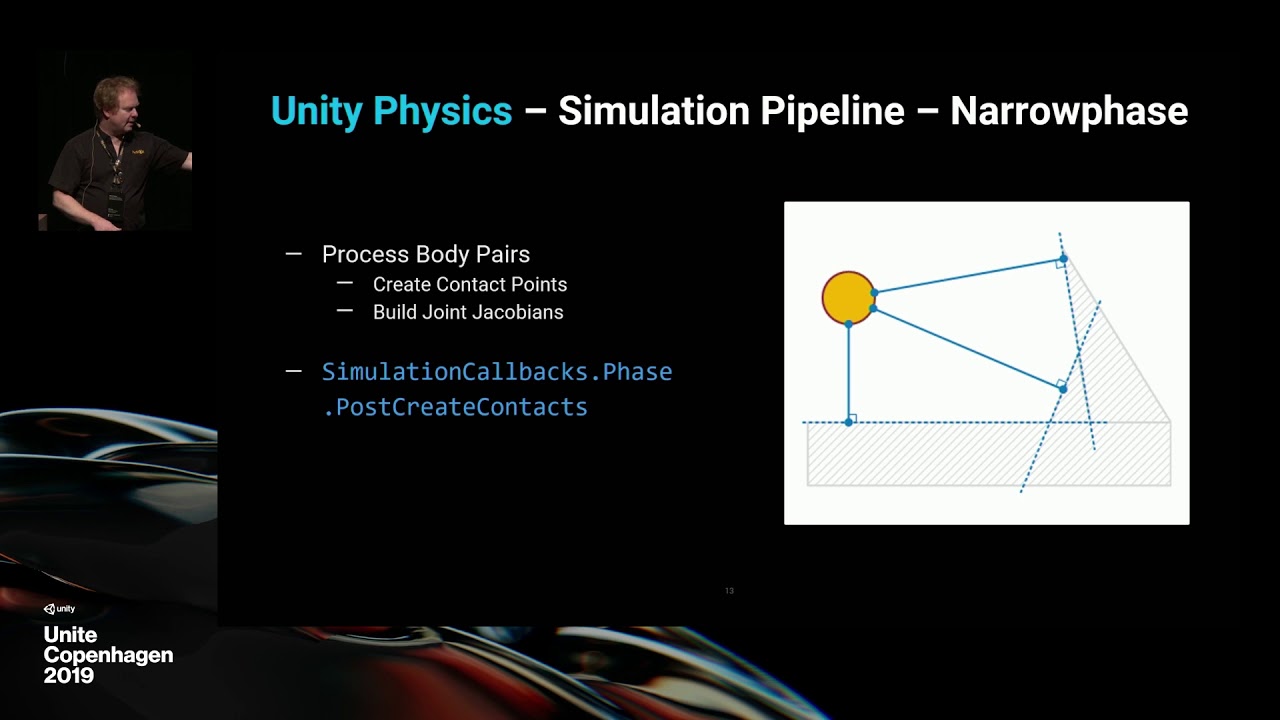
This session gives an overview of the physics systems and workflows powering our Data-Oriented Technology Stack (DOTS). Viewers will gain insight into design considerations underlying Unity Physics, how its use cases differ from those of Havok Physics, and how both offerings e...
also ECS samples repo has some physics samples where they do these things in practise
naive remnant
so much details, which player probably won't notice 😅
lapis plaza
suspension is actually second most important factor on vehicle sims feel, comes right after tire physics
neon grotto
why can this car not make the obstacle, this cube wheels should be able to get him over the cylinder? the cubes are on hinge joint motors
lapis plaza
lack of grip/friction?
unless the round wheels on back actually push it that is
there's very limited contact area on the cube wheels
neon grotto
yes! how do i add friction?
lapis plaza
by spoofing the physics I suppose 😄
the issue on the cubes is that you only get one corner to give very limited contact points, you can max the physics materials friction but I dunno if that is enough
neon grotto
yes but where i add friction?
lapis plaza
make physics material asset, assign it to your collider
or whatever unity calls these
I haven't used stock physics in years
neon grotto
i have rigidbody assigned to the cubes there is no friction tab
i think i will find it now, thanks!
devout patrol
hey I have a problem. I edited brackeys grenade script so you can "cook" the grenade but when I just instanciate it in my weapon holder it falls to the ground due to rigidbody so I tried rb.constraints = RigidbodyConstraints.FreezePosition; but its just in place :/ any other ideas?
since im new to unity I dont know many methods so if you could point me in the right direction and ill google the rest 🙂
foggy rapids
what's it supposed to do?
devout patrol
youre supposed to hold the grenade till you release the key
once you release the button the grenade will be thrown
using AddForce (velocitychange)
but right now its in one place and not in "hand"
foggy rapids
and what have you done to put it "in hand" ?
if that's what you're stuck on here's some ideas:
- attach it to the hand with a joint
- make it a child of the hand until release
devout patrol
I parented the grenade to the player disabled gravity while holding so it wont fall and when about to throw enable it back
but the grenade floats away when something pushes it
and if i want to make that joint which one should I use. Im new in unity
I guess fixed
devout patrol
ok and do I create the joint in script?
foggy rapids
make it part of the hand
devout patrol
done but I instantiate the grenade in script so how to I connect it to the joint
foggy rapids
set the fixed joint's Connected Body to the grenade's rigidbody
so i guess whatever spawns your grenade needs a reference to the joint component
devout patrol
the script which spawns the grenade in on the same place as the joint
so can I make osmething like gameObject.fixedjoint?
oh its getcompontent<fixedJoint>
right
now my weapon holder gets disconnected from my camera :/
 thin heron
how do you get around the problem of stretching space between chains from having linear drag on previous segments?
 sharp coral
Is it possible to have a collider that will call OnColissionXXX() while not applying any physics to itself? I want to use the collision information as a substitute for a "grounded" raycast
foggy rapids
you mean like a trigger?
sharp coral
No, trigger doesn't actually use the Colission class
foggy rapids
right but it has the same info when you enter it. trigger is basically a collider with "no physics"
except you get OnTriggerXXX callbacks
sharp coral
But the Colission class has the normal and collision point data
which isn't present when you use OnTriggerXXX
    {
        List<ContactPoint> contactPoints = new List<ContactPoint>();

        collision.GetContacts(contactPoints);

        Debug.Log(contactPoints.Count + ": Contact Points");

        if (contactPoints.Count == 0) return;

        Vector3 MeanPos = Vector3.zero;

        Vector3 MeanNorm = Vector3.zero;

        foreach (ContactPoint CP in contactPoints)
        {
            MeanNorm += CP.normal;

            MeanPos += CP.point;

        }

        MeanNorm = MeanNorm / contactPoints.Count;
        MeanPos = MeanPos / contactPoints.Count;
        if (MeanNorm == Vector3.zero) MeanNorm = transform.up;

        _AlinePoints.Add(new AlinePoint(MeanNorm, MeanPos));

    }
OnTrigger has a Collider as it's argument
which is the issue
foggy rapids
some reason you can't just freeze the rigidbody then?
sharp coral
I could Potentially, but it's going to be the child of an unfrozen rigidbody
So I don't know if that works
foggy rapids
it might work
sharp coral
Okay, put it as a child as a test, Frozen Position and Rotation
foggy rapids
but if it doesnt, you can still get trigger to work using Bounds methods
https://docs.unity3d.com/ScriptReference/Bounds.html
 sharp coral
and yet for some reason it moves away from the player
foggy rapids
bleh, even that doesnt have the info you need. Unity should really have a way to create Collisions yourself out of two colliders
sharp coral
Yeah, that seems like a useful tool to have
Does a collider still do checks if it hasn't got a body?
foggy rapids
i think so
sharp coral
Yeah it does
Or it might be inheriting the rigidbody of the parent
I guess I could have it move with the player but under different hierarchy
That seems to work, thanks
 round kernel
Has anyone already used Havok Physics in unity? How is it?
mighty sluice
@lapis plaza yea, relative mass is a problem for the solver that affects joint rigidity. The best fix is to bump up the inertia tensor of the wheels (and perhaps make the inertia tensor of the car or wheel be round)
setting rb.inertiaTensor to Vector3.one * (rb.mass/10f)
is a good starting ballpark
sometimes it's due to oblong inertia, sometimes it's due to relative magnitudes, and setting the inertia tensor to a high uniform vector fixes both of those problems
I cant promise doing that wont have strange effects elsewhere though...
if you have many colliders your angularInertiaTensor can get fucked up too IIRC
set that to quaternion.identity
(you can check the values in the info tab of rigidbodies in inspector)
lapis plaza
@mighty sluice oh, I don't want to actually adjust the inertiatensor at all
I want the sim to stay correct
but Unity Physics package lets me alter the jacobians on the solver stage, I can spoof things there for the contact resolving
I already got a solution that mostly works now
mighty sluice
for something like a tire it's an appropriate fix, given that it is round-ish
it's mostly a requirement for really oblong collider shapes
but, whatever works!
lapis plaza
oh the point I'm trying to make, I don't want to make things that change the rigidbody solving on regular sim when I can also just spoof that data only on place where it breaks (collision resolving)
mighty sluice
i guess you could factor out certain axes of the forces that result from collisions, but the joint itself will still have this kind of instability under certain mass and tensor shapes and ratios
lapis plaza
@mighty sluice here I prevented the regular bending but it still breaks when I force it to place where I can't go
mighty sluice
do the versions you're using have projection mode?
that could fix it
basically snaps them to an acceptable range
lapis plaza
nope, I said earlier that I'd want to implement it if it's possible, I know physx has projection
mighty sluice
if you can get into the configurable joints code, they have one in there
for angle and position both
lapis plaza
but the remaining issue I have now I can solve too
basically on that video I just force it to snap, but in real case it would just bounce back before that happens + actual vehicle body would collide before that happens
if I had open wheel or monster trucks, that could be different
but I'm not going to investigate this further for the time being, going to see how it works in practise with rest of the sim components in place
main thing is that can eliminate most of the unwanted behavior and if it still breaks in edge cases for real, I can investigate it further
mighty sluice
nice
lapis plaza
for now I've just allowed the wheel to sink a bit on the geometry by implementing "soft" contact
this for example prevents it going bonkers like in that clip I posted
it'll just sink a bit in geometry
mighty sluice
out of curiosity, what is the inertia tensor of the wheel?
unless there is like a factor of 4 difference in one of the values, it wouldnt be a cause to begin with
lapis plaza
I actually don't know that atm but it's what you get for the wheel shape
Unity Phyiscs is kinda wonky in a way that it lets you override it but it doesn't actually report the existing value
mighty sluice
you can see it in the info section of rigidbody inspector
but you're making this in dots right?
lapis plaza
you also have to override com, orientation and inertia tensor all three at once and it doesn't tell you the existing values 😄
yes, dots doesn't have that
I guess if I put this into Havok Physics mode, I could use havok physics debugger
it's just a toggle on dots physics
but it doesn't really matter, I know the intertia tensor is calculated exactly for that shape
mighty sluice
it's actually 1x1x1 i think
at least that's what old school wheel colliders yield
(which makes sense)
so it's just a relative mass issue
increasing solver iterations is therefore another...
probably not even an option...
lapis plaza
should be close what you see here for solid cylinder: https://en.wikipedia.org/wiki/List_of_moments_of_inertia#List_of_3D_inertia_tensors
Moment of inertia, denoted by I, measures the extent to which an object resists rotational acceleration about a particular axis, and is the rotational analogue to mass. Mass moments of inertia have units of dimension ML2([mass] × [length]2). It should not be confused with the ...
I guess I could spoof that for the wheels if this still proves to be an issue
mighty sluice
hmmm
lapis plaza
it just I'd rather use values that don't affect regular sim for angular motion
I also found that using Havok's solver makes this more stable in general
I can push it harder before it even bends
mighty sluice
you cant extract the current force the solver is applying?
if its > than the break threshold, you could eliminate the joint
or is it a runtime editing issue
lapis plaza
everything is more tricky on dots side 😄
mighty sluice
lol
lapis plaza
I actaully got havok visual debugger attached now
but it pratically makes Unity's game view a slideshow
can't even select anything nor change the sim 😄
I got the inertia tensor but it looks like it's vector 4:
wonder if that's a quaternion then
I don't have source code for havok integration but unity physics (dots) itself comes with full sources
this is what I have now
I have this on the contact jacobian solving point now:
// Disable all angular effects
jacobianAngular.Jac.AngularA = 0.0f;
jacobianAngular.Jac.AngularB = 0.0f;

// Soft Contact
jacobianAngular.Jac.EffectiveMass *= 0.3f;
if (jacobianAngular.VelToReachCp > 0.0f)
{
  jacobianAngular.VelToReachCp *= 0.7f;
}```again it wouldn't even wobble a bit if I drop it sideways, I really have to push it against ground sideways to break like that
it's not a typical scenario at all
I'll next add the tire forces back but apply them directly to the main bodys relative positions, so it won't cause stress to the joint solvers
should be fine
mighty sluice
looking pretty good
mighty sluice
looks about right lol
lapis plaza
that jacobian mod makes it all stable again
 strange cedar
Is someone able to help me, ive trying to edit a collider, i press the edit button, but it doesnt give me any handles to edit
 wooden hound
Hello! I've been programming my own basic physics interactions using Unity's colliders. However, my code has so far been written entirely in void update(). Should I move stuff like transform.translate and Overlapboxall() to FixedUpdate()?
 white sky
I'd say Update() is more acurate as it checks every frame
FixedUpdate() only checks based on a timer I think so I would keep most of it in Update()
wooden hound
Alright, even stuff that would traditionally be in FixedUpdate such as the OverlapBox function?
I'm guessing it's usually in FixedUpdate because it's used in tandem with other unity physics functions
white sky
probably
I honestly don't do a lot of collision checking like that so I don't know
That's just how I would do it
Based on how it works
wooden hound
Alright. Thanks for your help @white sky
strange cedar
Any collider, it just doesn't let me edit it
white sky
huh
strange cedar
Yeah. I tried opening it and closing it and it stayed the same
strange cedar
2d
white sky
if it isn't a polygon collider then you can adjust the height and width and x and y in the editor
strange cedar
I wanted to do a polygon to match the exact shape but it would give me the vertices
foggy rapids
@wooden hound you should do collision detection and movement in FixedUpdate then apply interpolation in Update.
Update - visual FX and input gathering
FixedUpdate - movement and physical interaction
white sky
@foggy rapids why is that
foggy rapids
fixedupdate doesn't even run at a constant speed either, it just works in a way that that adheres to a constant deltaTime. If you look at the actual time between FixedUpdates you'll see
wooden hound
@foggy rapids Even when most (all) of my physics are based on translations?
foggy rapids
so that your physics aren't tied to your framerate
everything you do in Update is framerate dependent, but FixedUpdate it's not
wooden hound
I tried moving my physics over to FixedUpdate, but the framerate seemed to drop significantly. Is there any way to have the best of both worlds?
foggy rapids
that's what i meant by applying interpolation in Update frames
wooden hound
Ah. So any interactions with boxcolliders etc go into FixedUpdate, while the lines of code that use translation or change my characters velocity go into Update?
foggy rapids
close. check this article:
https://www.kinematicsoup.com/news/2016/8/9/rrypp5tkubynjwxhxjzd42s3o034o8
it even has a drop in solution 😄
wooden hound
Wow. That's quite the resource. I'll definitely be looking into that. Thanks! 🙂
wooden hound
@foggy rapids I'd like to extend my thanks to you again. Reading and understanding that article has helped me immensly
 narrow osprey
Rigidbody character on moving Platform:
Hey folks, have researched this a lot but cant find a straight answer. I'm moving a rigidbody character with AddForce in FixedUpdate, which works fine in almost all cases, but when I step onto a moving platform it has strange behaviour like it shoots forward unexpectedly. I'm setting the character as a child of the moving platform, so when it's standing still on the platform its fine. I've also tried setting the character's velocity to zero on trigger-enter of the platform, but doesn't seem to help. Any suggestions appreciated
 edgy aurora
How do i rotate a vector using euler angles
 prime ermine
anyone got a clue as to what could be causing these Physics2D.ConvertCollision2DForScript calls? (ignore the fact that fixed update runs 4 times a frame to catch up, it's still a lot of GC garbage)
 proud nova
prime ermine
proud nova
prime ermine
I'm not, but I think it's a plugin using it
 whole orbit
Been looking into slopes for my character controller. When transitioning from walking up a slope to walking down there will always be an error in which the movement of the player is faster than the gravity pushing him down. I researched a few solutions and what it comes down to is a simple
cross(right, slopeNormal)
But there is still the initial error in which the player lifts off the ground. My solution would be to account for that and alter the players Position accordingly, I could also increase the gravity until I am grounded again.
I read here a while ago that setting the position directly will cause the Physics System to redraw all colliders. I wonder where I can do some reading on that? How would you tackle the problem?
steel pewter
hey all, I'm rotating around one axis to get my character to backflip
I've double checked the code, tried locking his rb rotation along the relevant axis, and checking his center of gravity
locking his rotation in the rb doesn't even really lock it... it still moves around
foggy rapids
most games reduce physics components to simple shapes and forces to make game mechanics and animations easier. For example the backflip i would push the character up + back with force and play a backflip animation
foggy rapids
@narrow osprey
http://angryarugula.com/unity/teaching/BasicRigidbodyPlatformer.unitypackage
@distant coyote has made an example with moving platforms, maybe it can help you with your issue
 obsidian warren
anyone know how to use IK
I want to make a simple first person game with multiplayer. So i need the other players to see me aiming up aswell
 viral ginkgo
@obsidian warren If you just sync the keyboard/mouse inputs, all animations should follow good enough for an fps
obsidian warren
I don't have aim up and down
 unkempt vale
Hi, I have a ConfigurableJoint with Free XYZ motion. I break it automatically when certain stretch length is reached. Is it possible to calculate the force PhysX joint will apply on a connected rigidbody at that specific stretch length?
Knowing that force, I could then figure out what is the maximum mass that joint will be able to lift.
unkempt vale
I'm not breaking joints using the maxForce field. I'm breaking them manually by checking the stretch length. I am happy with that. Also auto-breaking joints by using maxForce and/or maxTorque doesn't work on Free motion anyway. What I'm looking for is simply the PhysX joint formula for 'positionSpring' field force "scaling" based on the stretch length.
I'm unable to find it though... Maybe it's my english... 😄
I even tried looking here https://github.com/NVIDIAGameWorks/PhysX-3.4
alas, I don't know C++ and were unable to pinpoint any relevant code 😄
 lyric storm
If I'm writing my own physics for something, should I still use FixedUpdate() and fixedDeltaTime or should I be free to use just the straight Update() and deltaTime?
I think it'd be fine but want to make sure.
unkempt vale
@lyric storm I would still use FixedUpdate, since AFAIK any physics integration benefits from fixed time step. And that is "guaranteed" for FixedUpdate, not for Update.
So that way your custom physics simulation will be more accurate
lyric storm
Was thinking that, thanks much
 signal blade
so we are coding a game and right now we are having issues with the character moving all jittery if we push the movement button before he resets to original position.
 hushed oyster
Hello everyone
we are making a racing game like mario kart and we have faced a problem that we couldn't fix
the cars can lean on the wall and just drive forward with full speed, we managed to make it slow down or turn its face forward at some cases using **raycast **but the issue still there
we are using **capsule **collider, we can't fix this issue without changing our capsule collider because all our driving controls are built around it
thank you
video of the issue
 tall bramble
I'm thinking of making a EVE-Online Space game but with character player elements like walking and such. Do I start with making gravity first for the character avatar or make movement for the spaceship first?
 sweet dove
 left nimbus
custom mesh?
 silent mural
@tall bramble start with the easiest one so you see progress and dont loose intereset
tall bramble
Alright.
steel pewter
hey everyone
My character flips along the X axis perfectly fine if I don't lock their Z rotation, but as soon as I do they 'hiccup' and slow the rotation to a halt
I've tried locking it in the rigidbody and locking it in the script
in the gif above, I've displayed the Z rotation lock issue
the first jump is without (you can see him twisting off his axis) and the 2nd is with (you can see he doesn't complete the flip)
I'm thinking the angles are somehow varying ever so slightly and gets caught somewhere like a gimbal.
I would appreciate any help, please @ me!
locking the Y and Z in the rb prevent him from flipping as shown above, but locking it in script makes him fly up into the air transform.rotation = Quaternion.Euler(transform.rotation.eulerAngles.x, currentYOrientation, 0);
steel pewter
A small update: it appears my X can not go past 90 or -90
for anyone wondering, I believe I ran into Gimbal Lock
and am reading up on it here https://docs.unity3d.com/Manual/QuaternionAndEulerRotationsInUnity.html
"However sometimes it’s desirable to use Euler angles in your scripts. In this case it’s important to note that you must keep your angles in variables, and only use them to apply them as Euler angles to your rotation. While it’s possible to retrieve Euler angles from a quaternion, if you retrieve, modify and re-apply, problems are likely to arise."
 native epoch
Hi, i need help with the ezy-slice framework for unity, has anyone used it before?
 atomic sentinel
@steel pewter you're rotating a rigidbody by setting that parent's transform, which you shouldn't do
rigidbodies should only be moved by physics rather than directly moving them like you are
To control your Rigidbodies, you will primarily use scripts to add forces or torque. You do this by calling AddForce() and AddTorque() on the object’s Rigidbody. Remember that you shouldn’t be directly altering the object’s Transform when you are using physics.
@hushed oyster if you're using rigidbody physics you can try adding a physics material to the wall with a high friction
hushed oyster
@atomic sentinel it didnt work because we are using a capsule collider
atomic sentinel
Why is a capsule collider relevant?
hushed oyster
the capsule oval edges is what cause the car slide with high speed on walls
and friction cant stop it
atomic sentinel
I guess you can just apply a backwards force OnCollissionEnter() with the wall
thin heron
wow I'm feeling so dumb right now... I just spent over 6 hours to try to animate by myself a nice fluid and dynamic chain using a LineRenderer, only to finally end up with a bit of code that could fit on 2 lines... 
private void Update() {
    var parentPosition = transform.position;
    _line.SetPosition(0, parentPosition);

    for (var i = 1; i < _line.positionCount; i++) {
        var position = _line.GetPosition(i);
        var newPosition = (position - parentPosition).normalized * segmentSize + parentPosition;
        _line.SetPosition(i, newPosition);
        parentPosition = newPosition;
    }
}
 jade comet
Hey i am making a wizard game. the player can aim with the mouse cursor, move around and shoot. (movement red arrow, shooting direction blue arrow). I know that the physics make sense but it just does not feel right when the bullets move along the pink path. I know that the problem comes from how i set up the aiming and shooting direction calculation but i dont know how i could make it differently? any ideas? i could post my (very basic) code here
 onyx plinth
Hello guys, https://imgur.com/a/OSk3HBn i need to increase somehow the enemy ball that rotates around the cylinder
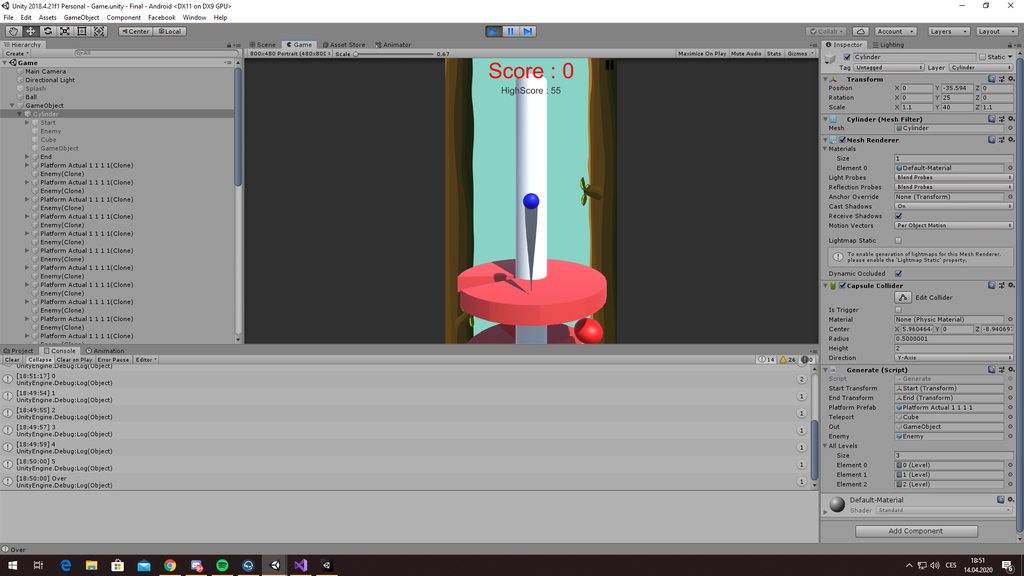 steel pewter
@steel pewter you're rotating a rigidbody by setting that parent's transform, which you shouldn't do
@atomic sentinel I'm actually only locking his transform rotation to prevent him from moving, the rotational flip force is all coming from AddTorque
I still haven't been able to solve the gimbal lock issue though..
atomic sentinel
I believe modifying the transform directly in any way will still interfere with the physics of it
onyx plinth
guys any idea how to solve my problem?
viral ginkgo
@jade comet Might wanna just use the animator
for any type of circular movement, you can just parent the projectile thing under an empty rotating parent.
I'd rotate, translate and adjust the childs distance to parent to archieve these animations
@onyx plinth
easy option:
Parent the ball to an empty object which is inside the shaft
then just rotate the parent thing
@jade comet You can also use splines
 stuck bay
I have a rigid body with a circle collider
and uh
it shakes by a few degrees
maybe less than a degree
when on top of another collider
the floor in this case
so like, my code relies on no rotation while on the ground
but IDK how to do that
stuck bay
@foggy rapids it is in fact light
How can i fix that?
I want it to be that weight
I'd need to change all my physics if I made it heavier
😦
foggy rapids
ok. try applying a material to your floor that has friction and no bounceyness
stuck bay
how do I apply a material?
foggy rapids
it's a field on the collider
stuck bay
there we go
the shaking has been greatly reduced
BUT
I still can't correctly detect anything
you know what?
I'll just change the code so it isn't dependent on any variable
I'll just do a raycast or something
problem solved
 frigid pier
@stuck bay It looks like friction reduces jump momentum when you are touching the side. There are number of solutions for this. Including using Effectors for the platforms which detect interaction only in one direction
stuck bay
ah yeah, that would make sense
stuck bay
@frigid pier Ive done some testing, nothing works :/
you have any idea on how to fix it?
frigid pier
Simplest thing you can do is set friction to 0 while player jumps up.
 wind berry
Hi everyone, I'm having some trouble getting hinge joint to work properly.
I have the following scenario.
1 Parent Rigibody, with 2 children rigidbodys (both at the first level of hierarchy).
Child 1 is attached to parent with a FixedJoint.
Child 2 is attached to Child 1 whith a HingeJoint, limited to -40 and 40 degrees on the Y axis.
I need to rotate child 1, using the physics engine, so I'm using the Rigibody MoveRotation method. (Rotation must be limited between -40 and 40 degrees)
However, even when staying still, the physics engine is doing some weird stuff, like applying random forces that send the object flying through the air.
Any ideas on whats is going on?
I've being researching this issue for a while now, but haven't found any solution yet.
I'm working on Unity 2017.4.3f1
Thanks in advance
 somber fossil
hey guys, anyone know why my raycast would normally work fine and occasionally return a really really small distance value? trying to make a laser pointer and it flickers
frigid pier
depending on interaction rules set possibly both, but one could be enough
foggy rapids
@somber fossil the ray is probably casting from inside a collider
frigid pier
if you are not actually catching the collider when jumping up, it should conserve the momentum, when just sliding against it
stuck bay
well, for some reason it doesnt want to do that :/
Ohh
Maybe
I think I know what goes wrong
Nope, thought because the platforms also had a ground tag, just like the "ground" that it stops us from jumping
doesnt
somber fossil
@foggy rapids the only colliders i have on those controllers are triggers, and even when disabling them i find the same problem
foggy rapids
did you find which collider it is? Maybe you can fix it with collision layer matrix
somber fossil
what's the command to find which object the ray is colliding with?
stuck bay
But anyway
I lifted the platforms up a bit
and now it works
for some reason
thanks anyway
strange cedar
Just wondering if there is a simple way to make custom colliders for tiles so that if it does not conform to a simple shape, it can be collided with how it should be, i.e an L shape in a rectangle only having the L be the collidable part, or will i have to do the colliders manually?
foggy rapids
draw your own polygon colliders
or i think you can even do it in the sprite editor for particular tiles
 neon glade
Discontinuity
Any idea what might cause that discontinuity?
gameObject.GetComponent<Rigidbody>().AddForce(startVelocity, ForceMode.VelocityChange);
Is applied once
strange cedar
anyone able to help me with an issue with rigidbody2d? if i hold a movement key down for abit then let go, the player seems to slide right in comparison to the direction of facing
foggy rapids
can you show us your velocity calculation?
@neon glade Even though you changed the velocity once, gravity still changes it afterward. If you want consistent velocity you have to apply it each frame
neon glade
@foggy rapids the velocity should change in a smooth continuous manner leading to a parabola
That is 2 straight lines followed by a parabola
Perhaps the frame rate dropped and the physics engine only ran for 2 steps
foggy rapids
no, it uses a fixed timestep. I'm confused what you meant by discontinuity then?
unless you did it in Update
i think i'm getting it a little better now. You want it to go straight for the first two lines then hand control back to physics for the parabola. I recommend doing just that: take control for the first two lines using position changes, then when it's finished set velocity in a manner that produces the desired parabola
neon glade
I'm setting the velocity in Start
The Vy should smoothly change due to gravity
The others shouldn't
The trail behind it should be a smooth parabola
Instead its a short straight line, following by a longer straight line, followed by a parabola
This makes me think that the lines were caused by the trail only having 3 points up to the point where it becomes smooth
likely because those were the only times that FixedUpdate ran
 obtuse crystal
anyone good with voxels?
viral ginkgo
@obtuse crystal just ask the question
obtuse crystal
How is this done & how would i pull something like this off: https://www.youtube.com/watch?v=TvKhYH9RDHg
Everything i look at is either a demo video or some type of voxel terrain tutorial.
 viral ginkgo
@obtuse crystal You'd need a cubic voxel system of your desires
And then you destroy the voxels in the system, Update the mesh of affected chunk and spawn the fake cube with rigidbody
There's an asset called Cubiquity in github
You have exactly this in one of the example scenes
If you want to build your own cubic voxel system, you might wanna look at Greedy Meshing Algorithm. Thats the one minecraft uses
obtuse crystal
@viral ginkgo perfect! thank you very much
 tough valley
hi! is it possible to have collisions taking normal into consideration so that a plane collides in a direction but not in the other?
 autumn jetty
Anyone know if TriggerHitJob triggers in order?
Edit: Answer yes.
 tribal raven
Is it just me or CharacterController is very hard to work with ?
I was using Rigidbodies for character controllers the whole time and mastered the physics math it implies.
I'm aware that CharacterController is the intended way to do it, but it doesn't seem to be the best way to do it ?
- Any force application has to be faked by hand, quite inconvenient.
- SkinWidth significantly offsets your character height. Having to adjust your visuals for that is a concern.
- It's kinda glitchy when player is trying to jump on top of things, like it's teleporting to the ground when running into something that conflicts with their StepOffset and SlopeLimit.
- It requires to be constantly simulated with gravity in order to keep isGrounded and velocity properties valid. But whenever it's simulated, obviously it overrides any transform.position changes.
- And most importantly, it loves to randomly clip through platform intersections during FPS lag. Character falls through the map and makes you look incredibly stupid when showing a demo to investors and publishers.
autumn jetty
Uh, it depends on your implementation?
If you do it with rigibody you'll have to fake the physics forces most likely as well. Depending how you implement it ofc, you can get into other annoying problems.
And most importantly, it loves to randomly clip through platform intersections during FPS lag.
Shouldn't really happen if you're doing some proper casts, and running it in fixed steps?
tribal raven
@autumn jetty From what I've read, CharacterController is already based on raycasts. So we'll be slapping our own raycast system on top of another raycast system.
It's not physics-driven either, so simulating it inside FixedUpdate might not make any difference to static collider detection.
This post is wrong ? https://forum.unity.com/threads/solved-unity-move-with-fixedupdate-more-efficient.386937/#post-2519174
Unity Forum
Hello guys,
I have been playing with characterController which is something new to me, and I noticed that as long as I am keeping my code into the...
autumn jetty
If you're using Unity CC you're gonna live with unity CC problems 😛
if you're rolling your own you can do spherecast, capsule casts etc to make the movement as solid and behave as you want it.
tribal raven
Aight, thanks for discussing this with me.
 torn birch
I have an odd issue, when my player or enemies (character controllers) get hit they have knockback, but if they get knocked off a platform by knockback their y direction is massive and can cause them to slip past a collider designed to catch them, and also looks unsightly with things teleporting downwards
I've tried swapping the character movement gravity to fixedupdate but it didnt do anything
torn birch
The reason this is happening seems to be that my players movement direction is multiplied by movement speed, is there a way to not multiply movement when using this code?
controller.Move(moveDirection * moveSpeed * Time.deltaTime);
@tribal raven unity is a little ill suited for FPS stuff
navmesh (the underlying technology for it) is more similar to the FPS movement technology in Unreal & Source Engine, or at least what it was in 1998-2007
depending on what you need to do
if you want to do FPS-style movement behavior you probably want to research it or find a high-quality plugin that supports that kind of behavior
for example https://unity.com/unity/physics

Unity
The Unity physics system for DOTS-based projects is built on top of Unity’s C# Data-Oriented Technology Stack, optimized through the Burst compiler, and created in collaboration with Havok.
tribal raven
@drifting sleet Thanks for the info. ECS is great, but it definitely adds extra challenge because we got so used to OOP and stateful objects. It involves a huge learning curve and hopefully at some point it'll be worth it.
Currently the platform I'm developing for has very limited threading support.
drifting sleet
are you trying to say WebGL or like Magic Leap
tribal raven
WebGL
tribal raven
No. Slow-paced side-scroller.
drifting sleet
i think you should take a look at Corgi 2.5D platformer from the asset store
we're talking like, INSIDE slow paced?
tribal raven
Yes. I'm using 3d physics btw.
drifting sleet
it really depends what's valuable to you. you said something about funders / demos, it sounds like you are pretty results oriented, it is the best package for this
yeah i think just look into it
tribal raven
Looking at corgi atm.
drifting sleet
it has a lot of functionality for Metriodvanias
which isn't really INSIDE
but it just means there's a lot of polish around how movement works
 upbeat lantern
Hey dudes, trying to make a player with a third person camera to walk on walls, the issue is that when the player walks on walls, the yaw rotation keeps rotating on Vector.up (world space) even if I change it to rotate on the wall normal, what am I missing here? thanks !
drifting sleet
you probably want to not parent the player camera to the character model for this behavior
maybe use a parent constraint instead
that you toggle on and off
or use just the translation and not the rotation constraint
upbeat lantern
Hmm the player is the camera parent
in my case
I will say that the camera kind of controls the player rotation, its locked on direction and not free look camera
the player rotates to wherever the camera
drifting sleet
you'll probably get a lot further with a parent constraint
for the effect you want
upbeat lantern
So you are saying I should keep the camera as a child of the player?
cuz it works great so fat except this part, but i think i am missing smth. it works great on the floor
just not walls or ceiling
viral ginkgo
@upbeat lantern Thats a little complex stuff imo,
I'd use Vector3.Crosses to find my way in 3d and find the cam position in the space
Vector3.Cross gives a perpendicular vector to the vectors you put in the paramaters.
It does help alot when finding your way in 3d
upbeat lantern
Yeah I already get the wallNormal with that
float yawDiff = Input.GetAxis("Mouse X") * mouseSensitivity;
float pitchDiff = Input.GetAxis("Mouse Y") * mouseSensitivity;
yaw += yawDiff;
pitch -= pitchDiff;
pitch = Mathf.Clamp(pitch,pitchMinMax.x, pitchMinMax.y);
Quaternion rotation = Quaternion.Euler(pitch, yaw, 0);
target.parent.rotation = rotation;
To what should I add the wall normal
viral ginkgo
you should figure out some "up" vector
where the character's "up" is
looking at wall normal
i'd do average of wall normal and vector3.up for example
so you do the wall run in an angled way
upbeat lantern
so if I add lets say -90 degrees to the pitch (as a base degree)
wall works
but the yaw rotation, rotates on another axis
should i use transform.RotateAround ?
drifting sleet
i'm saying you want to look at what a ParentConstraint is
drifting sleet
and it will help you solve this problem
upbeat lantern
Looks like a good direction
I thank you very much @drifting sleet @viral ginkgo ;]
upbeat lantern
Couldn't find the solution with ParentConstraints, sorry I will need more examples, this pic describe my issue
 left agate
hey
I am trying to make a door to open when some object is collided with it but it does not work
 plain mist
@left agate It looks like your box is kinematic, so I'm not sure it would trigger the collision.
left agate
@left agate It looks like your box is kinematic, so I'm not sure it would trigger the collision.
@plain mist thank you dude, that worked. But what does kinematic actually do?
I saw someone using this option and it worked for their door
plain mist
it makes it ignore physics
it's useful if you want to temporarily turn off physics for a rigidbody, you can flip it kinematic. Or oftentimes people will set things up like what you're doing, but with a trigger system
so instead of bumping into the door and having that move it, the player steps into a trigger which plays a 'door opening' animation
that would work with kinematic triggers
left agate
ohh that is what the trigger is for
foggy rapids
which is usually a lot easier to accomplish
plain mist
I remember having all these same questions 😄
 open oar
does anyone know how to fix this?Im trying to make gravity but it isnt working like in the tutorial
foggy rapids
dont use double in unity
open oar
what else should I use?
foggy rapids
float
foggy rapids
ooooh the other errors, i think you need to drag a controller of some sort onto an object that have a PlayerMovement script on it
probably "First Person Player"
open oar
ok lemme check
I already dragged First Person player onto it
I had already done that a long time ago
open oar
I wrote a few lines of code for ´gravity and then this started happenning
foggy rapids
there's a PlayerMovement somewhere without a controller
foggy rapids
maybe some script set it to null then
 elder meadow
Does anyone know how to stop my character from going through infinitesimally small gaps?
I'm using rb.movePosition
And he can squeeze through two box colliders whose edges are touching
 inland cipher
Hey does anyone here use a physics/bouncy bones asset if so which one?
inland cipher
I really wanna get one today but dunno what to pick
 quartz tartan
when using Collider.NearestPoint(Vector3 Point) is there any way to treat many colliders as one?
foggy rapids
not off the top of my head, but you could call that on each collider and choose the point that meets your requirements
 grim estuary
Hello! Currently, I am developing an ocean-based survival game built around Crest Ocean Simulation Asset from GitHub. In order to create the very first scene, the blender asset that I have created (a raft) has to be able to fall into the water and bob to the top smoothly. I have tried multiple C# scripts and .unitypackage files, but all of them either cause the raft to sink for infinity, or return errors. I need help with this problem and would appreciate answers as quickly as possible!
 hardy scroll
Hey! Anyone know how to fix this issue I'm having. I have a player which shouldn't be able to run through this object but whenever I get close to the object and hold foward, it makes the two colliders overlap? Is there a way for them never overlap? you can see in the gif, when i hold forward they overlap slightly and when i let go, it pings them back to not overlapping
I'm moving the player with rb.MovePosition(transform.position + transform.forward * Time.fixedDeltaTime * speed);
And he can squeeze through two box colliders whose edges are touching
@elder meadow did you ever work this out?
elder meadow
Oh yeah, just use FixedUpdate
And RB.MovePosition(RB.position + MovementVector * Time.fixedDeltaTime);
hardy scroll
ah cool, any idea on my issue above? where theyre overlapping if im holding forward?
elder meadow
I also have that problem, but I don't know how to fix it
My character is too small for people to notice
stuck bay
I'm having some trouble with my orbiting rotation script: https://pastebin.com/c9tK9rGu
The above gif shows what's happening.
For some reason, every time I start the game, the camera moves itself twice. It moves slightly left once, then left again.. around 1 second apart from each other, then stays there. I, however, want it to stay where it is.
Why is it doing that?
https://imgur.com/a/sEZggzp <-- the transform of both the camera and the cube (target)
The camera should stay where it is, but it moves twice every time the game starts

 stuck bay
So, this is a long shot, and I doubt anyone here will know this program because in order to do what I want to do I have to use programs back from the time of the wii, essentially deprecated programs, but in the rare chance you do know the program GlovePIE, which is an emulator, I'm trying to make a budget vr game for the app store which uses wii-remotes, and currently im using Wiimote.Yaw for the y-axis, Wiimote.SmoothRoll for the z-axis, and Wiimote.SmoothPitch for the x-axis. which I use these to rotate the wiimote. They work generally, yet there are some few outliers in the mix which appear for like one nanosecond and make the wii remote on my screen all shakey. If you know how to filter these outliers out from the rest of the longer, gradual, and more consitent values, please let me know by @'ing me and your help is very much aappreciated because I cant look anywhere else lol. 🙂
 hollow echo
@stuck bay please do not cross-post, and if your questions are not unity relaated they're probably meant to be in #497872469911404564
stuck bay
My bad, I apologize.
strange cedar
I was wondering if someone could help me with an issue im having. unity doesnt want to render the colliders when i zoom in, at a far away distance i can see them, but i need to be able to get close enough for more precise editting of the collision box
drifting sleet
@stuck bay sure. i would express it easily using UniRx (i.e. reactivex for .net). you'll want to Window over the changes in Wiimote measurements (i.e., the DIFFERENCE between frames of your Wiimote values) for a few frames, then apply one of many filters to it. for example, you can just average over the last few frames, but that typically introduces too much latency. you might want to look into a Kalman filter.
 stoic vault
Hello. I am trying to use Physics.IgnoreCollision through an OnTriggerEnter switch. Basically whenever a player triggers the switch, Physics.IgnoreCollision occurs for the colliders of the player and the door. Once they pass the door, they can't go back. The problem I have is the door isn't even ignoring collisions with the player to begin with.
strange cedar
could you have two game objects, one with the collider and one as the sprite, so when the player passes through the door, it enables the gameobject with the collider
stoic vault
Nope that didn't work.
stuck bay
I'm currently making an active ragdoll and my walk animation is being affected by physics of course. The problem is whenever the foot comes in contact with the ground it forces the player up like a kick. I tried increasing the mass and reducing the spring value but it ends up just being too much for the player and he can no longer walk/ends up kneeling down. I'm not sure what else to try and would appreciate some solutions.
 worldly turtle
okay
stuck bay

sorry about the quality
basically he just floats when he walks
Idk how to fix
@worldly turtle
worldly turtle
the quality does not matter anyway
worldly turtle
wait, my internet iz saking my as
stuck bay
oh sorry take your time
worldly turtle
sorry 2oo but i have to check on it myself
stuck bay
what do you mean?
stuck bay
could someone help me with my active ragdoll? It's not staying on the ground https://youtu.be/ZKzT6ij2AMk
anyone?
 hearty cairn
I just want keep it as normal line, only when any object collide with it it will behave like rope
 final cobalt
Then disable gravity for each object in the rope.
That should get you the result you're looking for.
@hearty cairn
final cobalt
Maybe enable gravity on collision?
hearty cairn
gravity is only can enable within rigidbody I guess
I used character joint btw . What if I use spring joint?
is it possible to collide with spring joint=?
ah got it
final cobalt
I don't know much about the individual joints, but this video helped me understand them better for what I needed to do: https://www.youtube.com/watch?v=MElbAwhMvTc.
Timecodes:
0:26 Scene Setup
1:15 Fixed Joint
3:33 Spring Joint
6:54 Hinge Joint
9:52 Character Joint
11:55 Configurable Joint
This is a tutorial for unity, that I wanted to make a long time ago. I would really wish that there was a tutorial out there, when I first used joints...
Nice.
hearty cairn
it is about 3d 😄 objects
hearty cairn
ok I have another question. Is it possible to collied any object with line renderer?
 opal cape
I want to create a tentacle in unity. I imagine the best way would be a string of connected balls like a pearl necklace. The distance of the string on a pearl necklace creates a rotation restriction. I'd use that same restriction to limit how far the tentacle can bend (but with code instead of a string). If each Ball Point representing segments of the tentacle can only rotate up to 45 degrees (arbitrary), then I imagine you'd have a tentacle that could move around and realistically interact with physics objects.
Does my logic make any sense? Are there pre-established ways of making this work better/easier?
@final cobalt 's joint video might actually be exactly what I need. I'll check it out.
 unreal whale
how would i ignore certain layer(s) when using a 2d raycast?
 hazy token
@stuck bay if you havent fixed the issue, just disable root motion box of the Animator component in the inspector.
stuck bay
@hazy token sorry for getting back to you late but what does that do and why does it fix it? Thanks again
hazy token
I will dm you
stuck bay
ok thanks
 hazy furnace
hi, I don't know if kinematics fall here
but I'm trying to do some basic IK thing
And .Rotate does not do anything
        var bDifference = target.position - armEndB.position ;
        var bDirection = armEndB.position - armStartB.position ;
        var rotationAngle = rotationSpeed * deltaTime ;
        var bRotationAxis = Vector3.Normalize(Vector3.Cross(bDifference , bDirection)) ;
        var bQuaternion = Quaternion.AngleAxis(rotationAngle , bRotationAxis) ;
        armStartB.Rotate(bQuaternion.eulerAngles , Space.World) ;
When I use Debug.Log, bQuaternion.eulerAngles is not null, and matches what I want
However, armStartB.rotation is left unchanged
(I initially tried to do the Quaternion product directly, but it left armStartB.rotation unchanged too and Unity docs recommended to use .Rotate instead)
Also, I can modify its position, but not its rotation, from within the inspector
stuck bay
could someone help me with my active ragdoll? It's not staying on the ground https://youtu.be/ZKzT6ij2AMk Sabre tried helping out but his solution didn't end up working
 dusk prairie
I have a weapon leveling system like cave story.
Should I have XP particles be actual particles and use particle collision to increase experience?
Or should I make them pooled gameobjects with rigidbodies?
 wraith token
foggy rapids
wraith token
foggy rapids
good to know physx is better at stacking cups 😄
naive remnant
i don't think that testing havok without fixed step is fair🤔

 queen marsh
in terms of joints, what's the difference between low spring and high damper?
like, instead of damper couldn't i just use a lower spring?
viral ginkgo
@queen marsh I think spring is a multiplier to the force the joint applies towards the target
and damper is damping the relative velocity
high damper should prevent overshoots and oscillations
strange cedar
Hey all, just needing a lil help. how do you get one entity to recognise when its colliding with a specific entity
viral ginkgo
@strange cedar use OnCollisionStay callback
from its paramater you canfind out know which object its colliding with
And then you can figure out if that objects is "the one"
strange cedar
@viral ginkgo can you show me an example, im looking at it and i cant figure it out, sorry if this is a simple question, just annoyingly struggling
viral ginkgo
just type oncollisionst
let the autocomplete complete it
@strange cedar
then look at paramater "collision"
put a "." next to it and you'll see how to get reference to colliding object
collision.gameObject
and also other stuff you might need later on
strange cedar
okay, so id do
if(collision.gameObject.Equals(GameObject))
{
  //Do Stuff
}
where GameObject is the object i want to check if colliding
strange cedar
Okay.... time to find this other bug then......
trying to have it say when collides with x object, -1 from health, and the health isnt subtracting
viral ginkgo
this is checking to see if the colliding obj is a spesific object
applies to only one object
if this is enemy or something you are doing it wrong
or spike pits
strange cedar
im trying to get it to say when enemy is hit by bullet (prefab)
is it something entirely different for prefabs
viral ginkgo
if(collision.gameObject.GetComponent<Bullet>() != null)
{
  //Do Damage
}
GetComponent<Bullet>() is retrieving the bullet component?
viral ginkgo
yes
if it can, then you know its a bullet
and you can do damage
thats one way of checking if the thing is a bullet
strange cedar
how would i make a bullet component? or does it just say this is a prefab?
viral ginkgo
when you object is touched by another object with component called "Bullet" this "if" will be true
strange cedar
How do i add a component bullet? Or can i just make a script called bullet?
strange cedar
Ah
viral ginkgo
you can make a script called bullet
strange cedar
Okay, makes sense
what if the bullet destroys itself on impact? do i need to edit something?
viral ginkgo
destroys happen at the end of the frame after your monobehaviour logic is executed
so you dont have to worry about such things
@strange cedar
When you call destroy, it marks the object to be destroyed and it gets destroyed before next monobehaviour updates and collision stuff
strange cedar
using System.Collections;
using System.Collections.Generic;
using UnityEngine;

public class BulletScript : MonoBehaviour
{
    private Vector3 mouse;

    // Start is called before the first frame update
    void Start()
    {
        mouse = Input.mousePosition;
        mouse = Camera.main.ScreenToWorldPoint(mouse);
        GameObject player = GameObject.FindGameObjectWithTag("Player");
        Physics2D.IgnoreCollision(this.gameObject.GetComponent<Collider2D>(), player.GetComponent<Collider2D>(), true);
        float velx = this.transform.position.x - player.transform.position.x;
        float vely = this.transform.position.y - player.transform.position.y;


        Vector2 rbVel = new Vector2(velx, vely) * 10f;

        this.GetComponent<Rigidbody2D>().velocity = rbVel;
    }

    private void Update()
    {

    }

    private void OnCollisionEnter2D(Collision2D collision)
    {
        Destroy(this.gameObject, .05f);
    }
this is my bullet script, so i could put the destroy in an if statement in the update, and have the bullet say if collider touching, die basically. this one currently doesnt work as it collides and destroys before any updates
viral ginkgo
I dont think thats the reason
strange cedar
i added the 0.05f delay because it wasnt working
viral ginkgo
If you comment out
Destroy(this.gameObject, .05f);
it should still not trigger the damage stuff
strange cedar
it does, the
Destroy(this.gameObject, .05f);
was recognizing collisions, without the delay it wasnt
viral ginkgo
I am not sure why, this shouldnt be the case
strange cedar
using System.Collections;
using System.Collections.Generic;
using UnityEngine;

public class BulletScript : MonoBehaviour
{
    private Vector3 mouse;
    private bool destroy =false;

    // Start is called before the first frame update
    void Start()
    {
        mouse = Input.mousePosition;
        mouse = Camera.main.ScreenToWorldPoint(mouse);
        GameObject player = GameObject.FindGameObjectWithTag("Player");
        Physics2D.IgnoreCollision(this.gameObject.GetComponent<Collider2D>(), player.GetComponent<Collider2D>(), true);
        float velx = this.transform.position.x - player.transform.position.x;
        float vely = this.transform.position.y - player.transform.position.y;


        Vector2 rbVel = new Vector2(velx, vely) * 10f;

        this.GetComponent<Rigidbody2D>().velocity = rbVel;
    }

    private void Update()
    {
        //if(destroy)
      //  {
       //     Destroy(this.gameObject);
       // }
    }

    private void OnCollisionEnter2D(Collision2D collision)
    {
        //destroy = true;
    }
}
``` This works, but for obvs reasons doesnt destroy the bulletthis whole
private bool destroy;
thing shouldnt be necessary
strange cedar
that was so it'd trigger the commented if statement. the same result happened when i had the Destroy(this.gameObject) statement in the collider
fixefd
instead of using OnCollisionEnter2D, used OnCollisionStay2D
seems to be nicer overall
viral ginkgo
Destroy() should be internally doing the same thing
strange cedar
yeah, but maybe the 2 collision detection systems have different timings
so collision enter may execute at the start of a frame, whereas collision stay may execute at the end
viral ginkgo
destroying the object should be done at the last stage i think

Function of Destroy and DestroyImmediate is same but there is small difference Destroy wait for the frame to end and DestroyImmediate immediately destroy
strange cedar
I dont know why then.. may be the collision type?
viral ginkgo
Maybe destroy tagged bullet isn't calculated in collisions but i never had issues with that before
strange cedar
idk
quartz tartan
how would i get proper air resistance on objects?
in the way that a piece of paper falls slower than a brick
foggy rapids
Best option I can see is area effector 2D
 idle vale
ConstantForce could work too
foggy rapids
ooo, wind zone
idle vale
Isn't wind zone solely for vertex animation ... ?
 placid anvil
Hi all, I wanted to ask if anyone had any thoughts on how I should go about making my vehicles work in my game.
I wanted to make driving game with shooting wherein the player does a lot of jumping off ramps and stunts. The physics don't need to be super realistic as long as theyre fun and control well. I was doing some stuff with unity wheel colliders but its difficult to get them working the right way, in addition it doesnt take ramps very well, I was wondering if anyone had any suggestions on how to go about this.
My current approach was to have the entire vehicle as a rigidbody and apply forces at each of the wheel points forward, and then left and right forces at the two front wheels for turning. Thoughts?
foggy rapids
focus on the fun control without constraint. Vehicle physics are a deep rabbit hole you dont want to get stuck in.
placid anvil
what do you mean by focus on the fun control without constraint
foggy rapids
for example it's much easier to slide an object along a surface or path than it is to roll wheels across it
placid anvil
well yeah thats why I was thinking of going with just having a single rigidbody that I push around
and try to fake the physics a bit
im asking for the best way to go about doing so
foggy rapids
that all depends on the specifics of your game design.
If you have ramps, your collider could be shaped in a way that facilitates the transition
or you could even write special code to facilitate it
placid anvil
Yeah I want a better fitting collider so I was thinking of having it such that hitting the ramp adds force upward and forward to the vehicle to assist it or something
but like
I still have to have the vehicle moving in a somewhat realistic fashion
do you think I just should go with wheel colliders and make them work as best I can
or try to simulate somewhat real physics by adding forces
or perhaps theres other options im just completely unaware of
foggy rapids
you could try, but if you were successful it might be harder to make that fun
foggy rapids
with the wheel colliders yes. I guess the point i'm trying to make is the more realistic vehicle physics you have the more difficult it is to be creative with control
placid anvil
very true
foggy rapids
(is it a driving sim with game features or is it a game with driving features)
placid anvil
combat game with driving features
but for it to feel fun it needs to feel atleast somewhat real right?
like I could just make it a hovercar with omnidirectional travel I suppose
but I thought the feel of a car woudl make it more enjoyable
i will say having spent the last 3 days trying to simulate vehicle physics and ackermann steering has been painful
regardless, thank you for your input
foggy rapids
i'd say get some basic movement worked out then focus on combat mechanics, then afterwards see how close to realism you can get without breaking those
 brave geyser
is it more appropriate to ask about UnityPhysics here or in #archived-dots ?
foggy rapids
does it have to do with dots or physics?
brave geyser
yes
foggy rapids
perhaps you should try #💻┃code-beginner until you know whether the problem is physics or dots
brave geyser
I mean, it's both lol
well here's the exact question, for collider casting using UnityPhysics, how do access the collider pointer, so that it can be used within a job
foggy rapids
sounds like dots problem
brave geyser
👍
 tidal linden
wont go into a whole bunch of detail buut if I want movement that is very constrained, is it ok to just outright say velocity = this. I understand that this will make things feel less physics-ey, but couldn't I add that stuff back in after its been constrained properly?
foggy rapids
the main tool for constraining motion is joints but they can be a pain to work with. I'd set a timebox and give those a try first
tidal linden
hmm, never heard of "timebox", but ill check it out. i will say that one thing im trying to do is to have the rigidbody's movement be constrained to a spline, and for it to always be aligned with it via its tangent. so far its pretty functional but certain things cause it to lose alignment.
foggy rapids
ah, that probably be easier to do yourself.
tidal linden
yeea, so I'll just try to get better with directly manipulating velocity i think
stuck bay
I posted this in #💻┃unity-talk but i feel like it's more appropriate in here ^^
Hello everyone, im having an issue that i can't describe, if i draw a certain shape with tiles, a invisible collider will appear but not in the editor, and i can't understand why.
It doesn't make sense but if anyone has the time for a screenshare in dms, i would be really grateful
I'll try to explain it with screenshots :
If i place the tile there (Black square) If, while falling, i press right against the wall, my character will get stuck
However, if I don't place it, my charater will not get stuck
tidal linden
this could be because two vertexes are being overlapped, and your character collider is getting caught on that overlap
my first guess at least
oh, but you're getting stuck on a different wall than the deleted tile? if so then nvm lol
stuck bay
Yes that's my problem ^^'
foggy rapids
try adding a compositecollider2d
then setting your tilemapcollider2d to used by composite
tilemapcollider2d almost never works on its own
lapis plaza
they don't need to visually overlap for collision to happen
this is what the contact offset on the physics setting does (altho I know nothing about unity's 2D physics settings, would still expect there to be setting for that too)
lapis plaza
@stuck bay Project Settings->Physics 2D->Default Contact Offset
stuck bay
Oh yeah, i modified that
(Look in #💻┃unity-talk ) I've tried lots of things and saw that this problem happens only if some tiles are set at specific coordinates, and it happens only with this tile
placid anvil
anyone have any tutorials on wheel colliders and vehicle physics using them that they would reccomend?
 proper herald
does unity allow you to ignore certain collision faces ?
stuck bay
It doesn’t, but take a look at the platform effector! Might be what you’re looking for :p
(You can add multiple ones)
And dont forget to check « Used by effector »
proper herald
for 3d
stuck bay
Oh i don’t know :/
@proper herald i maybe be able to help ya out, what side do you want your collision to br ignored?
If it’s top or bottom i can help
proper herald
ok well im glad youre interested
to give more context
im making a movement-focused game
and so i have a pretty long custom character controller
pretty similar to source games
and i ran into this problem a lot:
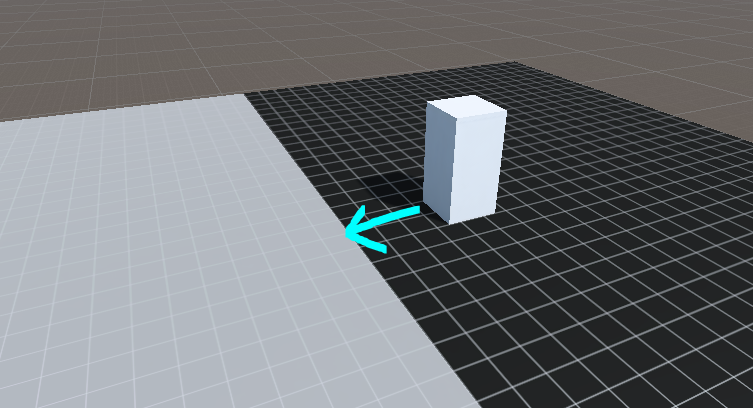
if the ground consists of 2 different colliders, the playerbox will always get clipped
and this is due to unity3d letting colliders sink into each other
if i print all collision normals, the player collides with the face of the white object that is facing him
i was just wondering if it were possible to ignore this collision altogether
stuck bay
I absolutely suck in unity 3D x) Im sorry :/
 copper sorrel
have you tried using or are you already using a capsule collider? I'm thinking that it wouldn't catch on the second ground collider due to the rounded / spherical base of the capsule
stuck bay
I found anyways thanks :3
This little annoying field got checked when i updated my project xD
 wraith crown
thouht I'd ask in here;
does anyone have tips about physically-accurate rudder/aileron models
i'm building modular vehicles so rudder might be on a plane or a boat (obviously in a boat forces will need to be based on water model not just the air)
but what's the "best" method? If I just apply a force in the direction of the rudder relative to the current velociy will that be a "good hack"?
stuck bay
Plot twist, It only got fixed in one scene, even the scenes are the same
Plot twist AGAIN, i fixed it... UUUHHHH
strange cedar
hey all, i know you can detect specific colliders during collisions, is there a was to see if a specific collider is not touching a collider?
stuck bay
2D or 3D?
strange cedar
2D
stuck bay
private void OnCollisionEnter2D(Collision2D col)
    {
        if (col.gameObject.tag == "ObjectTwo")
        {
           touching = true;
        }
    }

private void OnCollisionExit2D(Collision2D col)
    {
        if (col.gameObject.tag == "ObjectTwo")
        {
           touching = false;
        }
    }
You put this on the first object
Hope that helps :p
strange cedar
okay, brill
stuck bay
Might not be the best way
strange cedar
its works and thats all that really matters lol
stuck bay
NIce :p
I got a problem ^^' (yes another one today) If I walk too much toward an object while colliding with it, i clip through
The object has a rigidbody, here are the settings
 rugged rose
@proper herald if you find a solution to your problem could you ping me ? I'm also making a movement-focused game and since I'm generating a map from multiple predefined parts I'm having the exact same issue
thx in advance :)
 bitter atlas
Any one know of a good way to simulate wind on my own assets (not terrain) for mobile plateform ?
working with unity 2018.4
 mental knoll
Could someone help me with my problem? https://discordapp.com/channels/489222168727519232/497874004401586176/702569039062499408
I've tried many different ways but I can't figure out a solution
I just want someone to direct me to the right way not give me a solution
The reason why I want this behavior is because this enemy can only attack the player from the front but if I rotate my ship it will just go against the player tying to reach the front
autumn jetty
In DOTS Physics. What are the use cases for being able to have a physics object belong to multiple layers? And a bit of the same question of having it seperate by every entity. And for that not to bee enough, having extra material tags, feels like so many options how many do you really need? I feel like I'm stuck in an old way of thinking about it, anyone got any take on it?
@mental knoll I don't really understand your problem from that image.
 queen berry
How do I go about having a collider on something like a jar?
I want coins to be able to fall into it, but the collider uses the opening of the jar as part of the mesh
foggy rapids
does your jar model have normals on the inside?

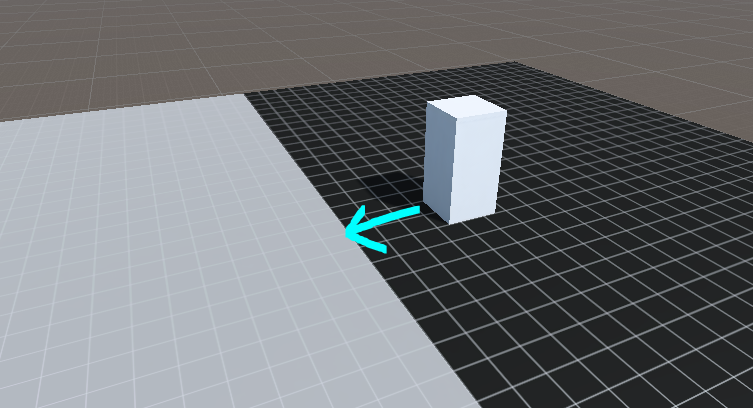 foggy rapids
a normal indicates which side of a triangle is facing out. Unity uses those to build the collider model. If there are no outward facing triangles inside the jar unity wont detect a collision (i think)
(triangles on the inside of the jar with normal pointing inside the jar)
queen berry
Hmmm, is there anyway to quickly like... mirror all of the normals and flip their direction?
foggy rapids
no, thats all in the modelling side of things.
queen berry
Hmm, alright.
foggy rapids
When ppl encounter this kind of problem the solution is usually to build a compound collider out of simple shapes to mimic the actual shape
or to have the modeller create a specific version of the mesh to use as a collider
queen berry
Alrighty, I'll see if I can take a crack at the first option there, thanks.
wraith crown
how do I override the mass of a kineticobject?
proper herald
@queen berry use a mesh collider with convex ticked, anime man
queen berry
That's what I've already got though. 
proper herald
oh, you want coins to fall inside
i would make the mesh in your modeling program
then duplicate the mesh without the part you want coins to fall through
use a mesh collider with the second mesh you made
it will retain its look
but not let objects hit the top
queen berry
That's why I'm confused though. The model doesn't have a mesh over the top of it
proper herald
o its convex thats right
queen berry
proper herald
it just "wraps" the whole object
so even if it has a hole
itll be in the collider
queen berry
It wraps it
proper herald
i wonder what happens if you wrap the collider in blender, flip the normal of the top face
and use that as a collider
queen berry
There isn't a top face though?
So how can I flip the normal of a face that doesn't exist though?
proper herald
duplicate the mesh, add the top face, flip that, export that
use the new mesh as the collider
and the original as the visual model
but again, im not sure if flipping normal will do anything given how mesh colliders work
at the end of the day, youll probbaly end up using multiple colliders