#⚛️┃physics
1 messages · Page 47 of 1
 drifting sleet
that is too narrow to fit the player, but tall enough
navmesh will not help you
the correct answer is to simply not design narrow openings like that
unity cannot help you with that in the general case, you can only heuristically solve that
A* Pathfinding Project will let you do one such heuristic, which is to voxelize the space
and query that grid
no
navmeshagent cooperates with character controllers / is a substitute for character controllers
it really depends on what kind of gameplay you want to achieve
you can always move around without navmesh
it was just, if you want to teleport
yes
 golden star
So Object A has a 2d circle collider, and object B has a 3d box collider. Object B has IsTrigger checked on, will collider events in a script on B activate if Object A collides with Object B?
 formal trail
hi, how do i check if a collider is convex?
I tried
MeshCollider mcder;
mcder = otherObject.GetComponent<MeshCollider>();
cvex = mcder.convex;```
but I get `The name 'convex' does not exist in the current context`nevermind, found a workaround
 uncut mantle
Hey guys, I'm having some issues with the rigidbody rotation constraints. I've got an object with a rotation constraint on the Y axis, but when it collides with something, it'll still rotate on that axis. I've made sure it isn't happening cause of a script, but it even happens with 2 default cubes colliding. Was wondering if anyone else had this issue before?
 autumn jetty
Anyone know if there are any performance implications of moving static entities in dots?
drifting sleet
@golden star the 2D and 3D physics system do not interact with each other, so no collision methods will be called
@uncut mantle i'm not sure, but maybe try a different constraint (like X or Z) and see what happens. try checking them all
@autumn jetty usually with the way DOTS is engineered, you have to explicitly ask for anything that has a cost. so my expectation is that moving static entities is free on DOTS, but actually using them in their updated location requires a call to something that has a cost proportional to the number of static entities in the entire scene and the number moved
golden star
Thank you, one of the objects in my game uses a cube for the visual model, however I would like to use a 2d collider. I have rotated the cube's transform to get it to look a certain way, is there a way to rotate the collider so it is aligned with the other 2d colliders in the scene? (aligned to X/Y axis)
uncut mantle
@drifting sleet The constraints only seem to properly work when all of them are active. Once I try to constrain 1 rotation axis, all of them keep rotating
I guess I can just overwrite it with a script 😦
drifting sleet
i think it's probably a physics simulation quality setting @uncut mantle
@golden star you can use a 2d collider with a cube that rotates, simply attach the 2d collider to a parent game object, and make the cube the child
golden star
Thank you
 silent mural
Hello people. i got myself a nice 3d cockpit amatur. now the problem is that i want its button to be pressable, but it turns out onmouseover doesnt work if any of its parent has a rigidbody
but my cockpit needs to be part of the ship and the ship needs a rigidbody. suggestions?
Solved it by myself. The button needs its own rigidbody, set to kinematic so it doesnt move away
google says the parents rigidbody overwrites all colliders childed to it that dont have own rigidbodys. Kinda helicopter mom. would have been nice to have a docu entry there saving me lifetime
actually, is there a way to leave any kind of comment on the docu? theres so often moments where literally 1 sentence would have saved me half a day of debugging.
 viral ginkgo
@silent mural button doesn't need rigidbody for raycast hits
silent mural
Yeah im switching to that tomorrow. Neither on mouseOver nor onmousedown are reliable
viral ginkgo
Just raycast
@silent mural
Have like a player controller that figures out input and feeds it in the ship
And raycasts on to ship panels n stuff
silent mural
Yeah still figuring out the structure of that. I have 4 ( maybe more later) ingame screens with buttons that i want full control over
also, can anyone think of a way of placing a whole bunch of moving objects (asteroids in my case) while making sure they will not hit eachother on their path? I thought about spawning in big cylinders the diameter of the asteroid and length of their precession range and have them fall with gravity onto a plane, stacking voer eachother, then freezing them and using that as the paths. like the game mikado.
i know thats a super dirty solution but honestly anything else just is above my intellect, at least what i can think of
viral ginkgo
I didn't understand really
silent mural
well you know i got these asteroids that move forwards and backwards on a random axis with a sinus function
i want the asteroid fields to move but the asteroids to be on paths that dont crash eachother
drifting sleet
@silent mural there are a lot of ways to do that
i think a lot of them are pretty mathematical
and you should probably try designing it by hand, for insight into the problem
it'll become obvious what you need to do after you try to solve the problem in the design tool
viral ginkgo
@silent mural
well in reallife asteroids shouldnt move like that
they should be in same orbit
isnt it better you did it that way?
silent mural
well technically they COULD move like that. same orbit time, different orbit shape causes that
nah, i dont want locked asteroids.
silent mural
the moving ones right now are set to 60 seconds period and its not really noticable that they "swing" like a pendulum
and it is cool to fly through them
viral ginkgo
@silent mural that will be awkward though
it will be arcadey
not realistic
you want arcady?
silent mural
at the moment it feels more realistic than any stationary locked asteroid fileds i have seen in other games though 🙂
and ill increase period time to match with planet orbit time so its as realistic as possible
viral ginkgo
asteroids should move in same driection with same speed when you observe a limited space with asteroids
like in saturn
silent mural
well but those fields in themselves move too
the thing is, i dont own nasa so i cant calculate 5000 asteroids ramming into eachother building rings
viral ginkgo
asteroids shouldnt be ramming into eachother regularly
because the ones that are in weird orbits have already crashed and fell off
silent mural
im 100% sure the fields move quite a lot
viral ginkgo
if you put yourself in saturns orbit, all asteroids will be stationary relative to you
@silent mural
silent mural
also reallife asteroid fileds are like 1 roid every 100 kms and super boring
i doubt that.
im 100% sure they move relative to eachother
viral ginkgo
@silent mural inner orbits will rotate faster and thats it
@silent mural remember the orbit equations from highschool?
your obit speed is only determined by body distance to gravity source
same height == same speed
silent mural
Yeah but most orbits arent perfectly round. They can be oval
And that creation motion to eachother bc different shapes
viral ginkgo
when you look at it locally everything will still be stationary relative to you
@silent mural
doesnt matter ellipse or not
you wont see different speeds in your view distance anyway
viral ginkgo
@silent mural
thats not the case with old galaxies
old asteroid fields
and saturns ring
silent mural
Well at least its a repeating function by time. Not sure if sinus tho but likely
viral ginkgo
@silent mural thats not a stable system
and wont remain long
in real life, if that was the case,
you'd expect frequent collisions and eventually
one orbit like saturns ring
silent mural
Well space is quite empty so collisions arent that problematic i guess
viral ginkgo
@silent mural in long long time and with many many bodies yes there will be collisions
silent mural
My sketch is extreme but most orbits are elliptical to some degree, and it does cause these sinus movements when looking from a local perspective
viral ginkgo
@silent mural ellipse orbit is fine
two ellipse orbits are not natural
silent mural
Idc lol i will have my preceding asteroids
Unless i find a better solution
Eff realistic asteroi belts. They are absolutely boring to fly through if you can fast forward
viral ginkgo
what long term
@silent mural you want dofferent asteroid fields in different fields?
viral ginkgo
@silent mural
so you dont want your asteroids to be templorary objects?
silent mural
Not if i can avoid it
and the sinus function allows storing them for despawning and respawn with corrwct rotation and position , as if they had never left
Since it just takes in time as a value
viral ginkgo
but sinus is weird on a straght line patrolling back and forward like weirdo
silent mural
Trust me, you dont notice it right now with 2 min period and you will never notice it if i raise that time
viral ginkgo
add like a cosinus term at least on perpendicular axis and make it into a small orbit, place a small planet
@silent mural but there are asteroids in reverse orbit and thats not physically accurate for the "saturn" reasons
@silent mural also in your solution,
if you mounted the asteroid, sitting and chilling
you'd see the asteroid slowing down a go backwards?!
silent mural
Well if you have an orientation point to look at yeah
viral ginkgo
i'd think the develepor was on lsd if i saw that in a game lmao
sin cos orbit could do it ithink for your case
and would be just as easy
but you have to have a small planet to orbit
@silent mural
if you want to be phyisally accurate and have it easy, you should just make the asteroids static
rotate the planet in the distance slowly
silent mural
My 3d space is static with a rotating pla et for fake orbits. I dont caclulate flight maneuvers into the orbit tho
viral ginkgo
and have like a particle system towards planet for fake distant asteroids, have them move forward slightly
also another one for other way
make them move backwards slowly
and you'll have the perfect orbit illusion around a massive planet
@silent mural
@silent mural your ship should be in same orbit as nearby asteroids
and if thats the case, nearby asteroids should be relatively stationary to the ship
However asteroids could have rotational velocity on their own axices
@silent mural
https://m.youtube.com/watch?v=pF5ffUhUbHI
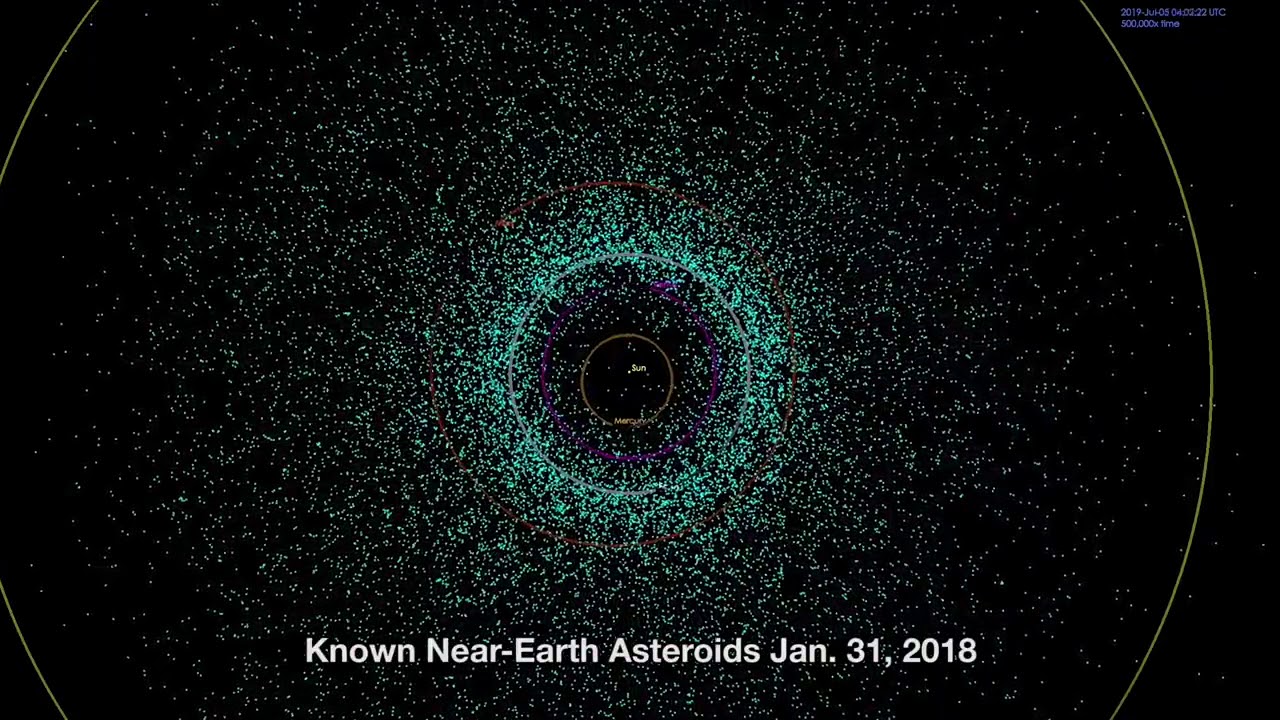
An incredible amount of asteroids have been discovered between 1999 to 2018. NASA’s Jet Propulsion Laboratory visualizes the increase in space rocks.
Blue = near-Earth asteroids.
Orange = main-belt asteroids between the orbits of Mars and Jupiter
Credit: NASA/JPL-Caltech
I can't* find an animaition how it would look like if you mounted one of these asteroids in realtime (this one is accelerated you know)
International space station should be completing its orbit around the earth every 90 mins from that altitude
(orbit period around same planet only depends on orbit altitude as i said)
You think you'd notice relative movement in nearby asteroids?
If you had an asteroid field on ISS orbit altitude
@silent mural
Hmm, now that i look closer, i see some relative movement in that video
But this is time scaled you know, every second is like 10 days maybe
drifting sleet
great @restive moat i'm glad it worked out
silent mural
Thats a really cool animation and a ton of roids lol
And you can complain all you want, i will not get rid of my sinus asteroids :D
 night leaf
How do you make an active ragdoll for a stickman couldn’t find anything good on yt
silent mural
apply gravity + current motion to every bone?
but do yourself a favor and restrict how far the bone joints can move in degrees so you dont get rotating heads n stuff
also i found this talk to be very interesting @night leaf https://www.youtube.com/watch?v=LNidsMesxSE

In this 2014 GDC session, indie developer David Rosen explains how to use simple procedural techniques to achieve interactive and fluid animations using very few key frames, with examples from indie games like Overgrowth, Receiver and Black Shades.
GDC talks cover a range of ...
 untold sand
any nerds that know how to implement a rigid body without any helper functions up to a private chat?
or a resource that shows you how to do that?
viral ginkgo
@silent mural thats not ragdoll
overgroth guy turns into a ragdoll only when hit by something
he's looking for an active ragdoll
@night leaf
you are looking to rotate every limb of the stickman via force
Here is a decent way you can archieve it:
have two ragdolls
one is your current one
second is same as current one but no joints, all limbs are kinematic, has an animator
then you will attach joints
connecting every limb in ragdoll to it's match in animated character
then you will
set your animation on animater character,
disable visuals on animated kinematic character,
and there you go you have your active ragdoll
these are called "active ragdolls" btw
use that term and google will help better
@night leaf
 warm birch
Hello guys, can somebody help me in Marching cube terrain collision detection?
silent mural
im sure bargos can. just give more detail on what you need
warm birch
okey so my mesh collider doesnt working in marching cube terrain what else can i try?
@viral ginkgo
viral ginkgo
@warm birch use set the mesh in the mesh collider?
meshCollider.sharedMesh
(keep tag me, i might miss)
warm birch
Thats the proble the generated terrain not registered as a mesh
Its shows int the mesh filter nothing
i dont know how can i fix this
so do u have an idea how to do it? @viral ginkgo
viral ginkgo
how is the terrain generated?
@warm birch
you need to access the mesh to set in meshfilter
warm birch
cube marching
warm birch
vertices and tris
viral ginkgo
you have access to it?
then you create a mesh object from that and set it in mesh filter
warm birch
via script?
now the collisions are working but watch this:
the mesh collider is messed up
@viral ginkgo(sorry for taggin u again)
viral ginkgo
@warm birch uncheck "convex"
 cosmic axle
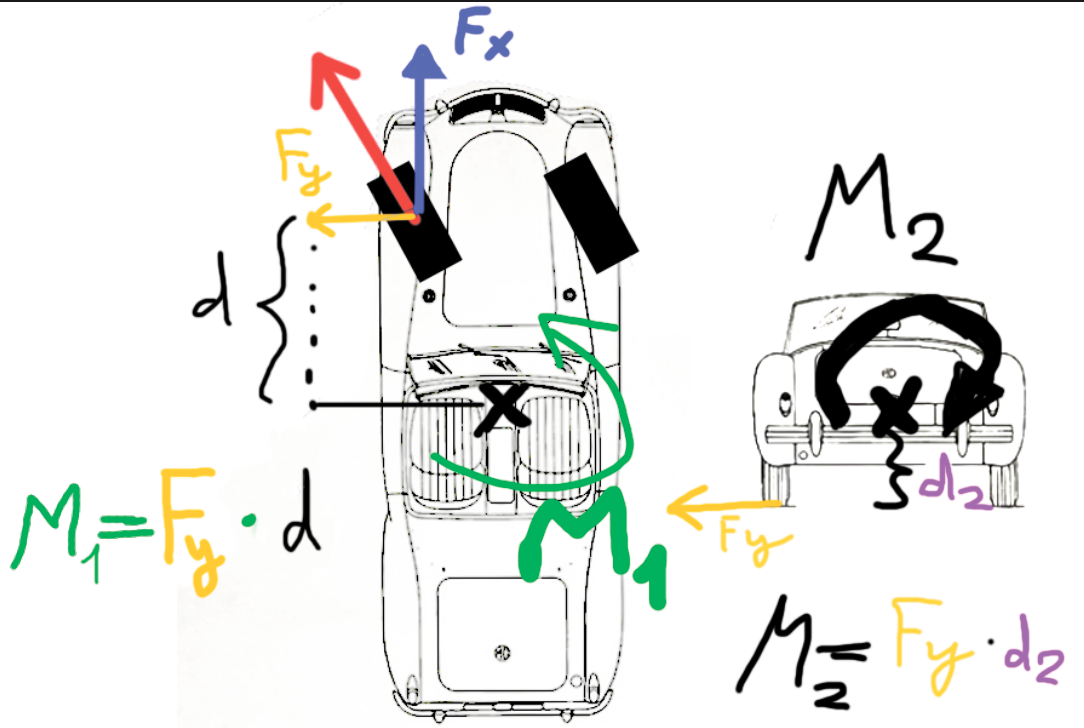
basically I want to cancel out the M2 moment, to prevent the car from rolling to the side. I thought by moving F_x and F_y to the center of mass (CoG) but then I have to manually apply the M_1 moment to the CoG as well.
- But cant I just alternatively not do anything with the wheel forces, leave them as they are and just apply a negative M2 torque and that's it?
- Or instead of doing that, I can just apply an orthogonal force F_y pointing down at the wheels position, right?
 viral ginkgo
@cosmic axle i can tell you how apply negative torque
Vector3.project(rb.angularVelocity, vector3.forward)
this is rotation velocity on m2 axis
cosmic axle
wait that simple, I dont even have to do math? Cant I just cancel rb.angularVelocity setting it to 0? @viral ginkgo
silent mural
if you find a way to correctly calculate needed torque for angularVelocity, please let me know.
viral ginkgo
thats the compinent of rotation on m2 axis
if you apply a reverse torque looking at also inertia on that axis, you can stop rotation on m2
silent mural
sooo angularVel.magnitude = - needed torque?
cosmic axle
wait why 0.9 ?
silent mural
still, ill test that idea
viral ginkgo
@cosmic axle you should probably *=0.9f
when car is airborne
viral ginkgo
when its hit by ball it will gain a small ang vel
cosmic axle
in the air I need rolls and pitches 🙂
viral ginkgo
if you constantly set it to zero, you wont have it
cosmic axle
in rocket league you can rotate the car in the air
then like this:
if(isGround)
angularVel = 0
viral ginkgo
@cosmic axle add bigger forces while doing
*0.9f
or set rotation directly
or set angular velocity components one by one
doing the vector3.project
splitting ang vel in 3 axices
modifying each by looking at player input
reconstructing a new angvel
setting it back
cosmic axle
wait I want the angular Vel in the air
but I dont want the M2 on the ground, so why just not = 0, I dont get it
viral ginkgo
then you will set m2 velocity to zero only on ground
leaving other two components untouched
cosmic axle
yes, as I said, in the air I need all moments on all 3 axis
I mena I need all angularVel on al 3 axis
viral ginkgo
thats your answer
right above
these 3 axices are:
rotation around transform.right, up, forward
cosmic axle
yea gotcha
transform.right I probably dont need since I dont have suspention
and the car cant physically flip forward
viral ginkgo
@silent mural
lets say you have a body
you want its forward to point at direction myForDir
you want its up to point at direction myUpDir
what you can do is
AddforceAtPos(myForDir, tr.pos + tr.forward);
AddforceAtPos(myUpDir, tr pos + tr.up);
and then you just apply the same forces in reverse direction to keep the body velocity same while you are doing angular force
and a little angVel *= 0.9f
to stop harmonic motion and make it stable
silent mural
im glad for your input but lets not confront my rotational rcs again right now, im trying to figure out my interactive screen system 😛
ill come back to it once i free my brain
viral ginkgo
@silent mural just save it
that worked pretty good for me
I dont know how you can have a "delta quaternion"
and use that to come up with a torque
i just have no idea
if i knew that would work, i'd choose that way
 lapis plaza
@cosmic axle there are two things that you can do to prevent the roll without nasty side effects. proper: make antiroll bar to counter this, easy: apply tire forces at com level so body simply doesn't get roll
both of these are way better alternatives than trying to counter the body roll by some counter torque force
last case basically prevents the roll from happening and first case is just physically correct way to do it
do note that I didn't read all past conversation
if you want to prevent the car rolling in air, there are also better ways to handle it than trying to balance the roll after it's detected
stuff like that make the handling feel fake
also, discord is just messed up right now :p
silent mural
what should i use to detect a mouseclick while looking at a collider?
i have a raycast called in update, but im not sure how to proceed
is there the chance that the script would miss the click if i use GetmouseButtonDown?
is there the chance that the script would miss the click if i use GetmouseButtonDown?
cosmic axle
@lapis plaza thanks for you input! Which forces would I apply directly on the wheels? The f_y directed to the ground?
drifting sleet
@silent mural if you want to detect clicks on objects, the eventsystem is very useful for this.
you will resolve basically a bajillion problems that EventSystem already solved

raywenderlich.com
Scripting is an essential part of making even the simplest of games. These small collections of code work together to do all sorts of things.
for event system basics
it works for 3D objects using a PhysicsRaycaster
viral ginkgo
@silent mural
raycast from camare
you can google to find the code
its easy to find
"how to raycast from camera"
 solemn anvil
Question: I'm making an 2D autorunner. The player has a rigidbody2d and box collider. When I try to test the game the player falls through the ground. The ground object has a box collider as well and I know the player controller isn't the problem because the problem occurs when the player script is inactive
 stuck bay
Hi! I've to make a rigidbody controller that has a desired max velocity and a time to get to said velocity from standstill. How should I go about calculating that fixed timestep's force/acceleration?
silent mural
addForce with ForceMode acceleration can easily be calculated into the time needed to reach that velocity
it raises the current velocity by the amount * time.DeltaTime -> += amount/second. therefor maxVel is reached after (maxVel/accelerationAmount) seconds
(or should be. its 1am dont quote me)
i gotta be honest, i dont remeber if you need the *time.DeltaTime. chances are the method already does that automatically
@stuck bay
 elder agate
Hey there! anyone here ever user the animators along with a ragdoll in 2D ?
viral ginkgo
@elder agate
You are looking at active ragdolls
Here is a decent way you can archieve it:
have two ragdolls
one is your current one
second is same as current one but no joints, all limbs are kinematic, has an animator
then you will attach joints
connecting every limb in ragdoll to it's match in animated character
then you will
set your animation on animated kinematic character,
disable visuals on animated kinematic character,
and there you go you have your active ragdoll
"active ragdolls"
use that term and google will help better
@night leaf and @elder agate
what you two are doing seems to be very similar btw
might wanna contact eachother
 frigid pier
@viral ginkgo Keep memes from learning channels, please.
silent mural
im fighting again with rotation, whats a method where i can put in an angle in degree and the axis to turn around?
and it has to return a quaternion which i can input into transform.rotation
i want to set an absolut angle to the object around its own, local transform.up
silent mural
the quaternions have won.
anyways i fixed my flickering screen and cockpit!
i added a second camera which renders the skybox and background and is overlayed by the first person cam.
and a third camera which renders the cockpit and the canvas with instruments. that one doesnt move so the canvas doesnt flicker
im actually thinking about creating a second complete ship with interior which will be locked at 0,0,0 and rendered as the cockpit. player can move around in it smoothly, experiencing no fast movement wobble or worse
 turbid quest
How can I stop my player phasing through the corners of my boundary? I don't get how the walls work just fine, but if I force my player into the corner for a couple of seconds I go straight through
I've tried just some basic box colliders, and a custom mesh:
Tried changing the width of the boundary as well, nada
They work in conjunction, but forcing the corner causes the player to spazz out
 proud nova
@turbid quest How is the player moved?
proud nova
Yea transform.translate doesn't respect physics at all
You are teleporting the player inside the collider
proud nova
CharacterController.Move or Rigidbody.AddForce/velocity
silent mural
If i want to detect the exit point of a raycast hitting a collider, google says i have to activate the backside detection im the physic settings. Is there any reason to not do that?
 fossil storm
Do you guys use wheels colliders at all?
I've been trying to make them work for a few hours now and from 1 solved problem 10 new spring up
I kinda wanna move on and code it by myself now...
fossil storm
I made it work, nvmd 😅
viral ginkgo
@silent mural
you wont be able to raycast from within objects as easier
if you ship does raycast hitscan shooting for example
from inside the hull
raycasts will hit in front of the hull
.
if you dont want to enable that setting:
you can do a double raycast to find the exit point
you'll get first raycast hits entry point
add more of raycasts direction on top it
cast a second ray from new point backwards
silent mural
okay got that to work.
another question: can i detect a collider with a raycast that is below the first collider hit?
my raycast has to first detect the atmosphere of the planet, and then the planet below
 unreal linden
How can I make 2 colliders ignore each other ?
 hollow echo
If you're using 2D make sure you use the right Physics settings
unreal linden
I am not using 2D
I am in 3D
And I am trying to get Multiplayer stuff done and it mostly works, except that players don't collide because of the way how I destroy a part of my player prefab wich contains the player controls. But the Capsule collider I am using for the players is a sub object of what I kill of, but it needs to be there for my player controller to work on the player of the local player, so I wanted to add a 2nd collider outside of the player controls, but they always intercollide.
Wich pushes the player away.
And nothing seems to work against it.
Solved it !
autumn jetty
Possible to get first contact point when triggers collide for DOTS Phyiscs?
 edgy aurora
i have this issue with my character controller
the character is standing on this ledge and is just outside the grounddetector sphere cast
i want the character to slide down instead of being stuck
how do i do this without increasing the size of the grounddetector sphere cast
 proud nova
Tried changing physics materials to very slippery?
autumn jetty
Is this a custom character controller? Or any of unity?
edgy aurora
its the unity character controller
using it
this is the code
physics materials dont work with character controller @proud nova
proud nova
I guess you could slide if raycast down doesn't detect ground within some distance?
Holes in the ground would be risky though
I would just ground in that situation combined with sliding when ground normal is at extreme angle
edgy aurora
i want the player to slide down when hes on a ledge like above
in the image
however because the sphere cast doesnt hit the ledge i cant get a ground normal
so how else would i be able to do it
proud nova
Resize your sphere cast to match the size of the CC
Make it about the size of the CC and offset it down just a bit
Or use CC's collision events/grounded
edgy aurora
im going to try using a rigid body because it handles it already
 hoary rampart
When working with non-kinematic rigidbodies (especially bouncy ones), there can be situations where collisions with static colliders and other rigidbodies result in large increases in velocity. This can lead to undesirable effects, such as objects suddenly "teleporting" to random parts of the screen or breaking through static collider scenery.
What's the best way to limit the velocity of a non-kinematic rigidbody?
Any idea or tips will.be helpful friends
 neat minnow
 ornate sapphire
Hi, I'm having a weird issue with a simple pickup script, when the object gets picked up it doesnt stay in the centre of the screen and for some reason it like, distorts? So sometimes I'll pick up the perfectly symmetrical cube and it will become a slim rectangle like I can't work out for the life of me whats going on its so weird 😂
https://pastebin.com/DbEW2zx4

Pastebin
The script is on my cube btw
 still pecan
Question: I want to make a collision but it only works for me if I set the rigidbody to be no kinematic. Both gameobjects have rigidbodys. I want it to be kinematic. What I can be doing wrong?
 potent canopy
I'm using an Overlap Sphere, but it's passing through certain Game Objects that I don't want it to, is there any solution to this problem?
viral ginkgo
@neat minnow
the code looks fine
that force will affect velocity after the velocity limiting though
if you are adding like too much force and try to limit velocity right afterwards, that will cause issues
because force is applied to velocity after fixed update has ended
not as soon as you call addforce
hoary rampart
@viral ginkgo sorry for mentioning you.....hi I m using impulse force when input is greater than some value I call a function applyimpulse to add impulse force to my ball.
Sometimes the ball goes like "flash" and passes through my static colliders
Like angrybird style when we release touch impulse force is added to my ball based on we aim but sometimes the ball goes like flash any help or tips will.be helpful
silent mural
@ornate sapphire do you child the object to the player and is that parent object scaled differently on one axis? Thats what would cause the warp
viral ginkgo
@hoary rampart try setting the bird rigidbody continious dynamic collision detection
discrete collisions might skip some collisions

Unity is the ultimate game development platform. Use Unity to build high-quality 3D and 2D games, deploy them across mobile, desktop, VR/AR, consoles or the Web, and connect with loyal and enthusiastic players and customers.
 steel sapphire
How do I test for a wall collision (so the character can turn around)?
Both the ground under piggy and the ground to the right are in the Terrain layer so both test positive to "Layer == Terrain".
I can think of options:
- Create a special box collider on all the bits of terrain that might be a wall and tag them "wall" so I test for that tag to decide if it's a side collision or a ground one.
- Get contact points where the y vector is greater than zero.
- Create colliders on the right and left of piggy to test for horizontal collisions.
stuck bay
There's a whole bunch of information on platforming movement with 6 raycasts here which might help:
http://info.sonicretro.org/SPG:Solid_Tiles
You could also split your horizontal and vertical movement up into two steps, then do a collision test after each one.
Move down, test collision, touching something, this thing must be a floor. Touched a floor!
Move sideways, test collision, touching something, this thing must be a wall. Touched a wall! → Turn around.
You can do that with a basic box collider.
 mighty sluice
I made this fish body but im a noob regarding how to best use it (blender). I just added articulation joitns to the bone hierarchy (cause articulations rely on hierarchy) and it just works, but I'm wondering if there are any steps I could take that would allow me to use the fish mesh as a collider instead of just a renderer surface, or if there is a sane way to cope with the hierarchy issue if i choose to use configurable joints instead of articulations (which rely on flat hierarchy)
mighty sluice
the issue is the masses and the collider
afaik it's one collider per mass
or rather, two masses cannot share the same collider
it seems like to make a truly collider and mass dynamic fish (e.g: getting hit on the tail deforms the tail), I would need deforming meshes at each level of the hierarchy
as it stands, i can just throw primitives on the bones, and that will make the fish collisions work right, but it would be so nice to use the fish mesh itself...
 stark bolt
so I have 700 static meshes making the scene
10-15 rigidbodies moving
the active constraints keeps spiking
is this normal?
viral ginkgo
@mighty sluice just all like small box colliders on each bone
don't try to have a mesh collider, there's no need for that
 cold light
Does anyone know how I can stop my players pushing each other around but still be able to collide with each other (like standing on top of each other)?
Also I want object to be pushable still
Help would be awesome! 🙂
 worn lily
Why is physics in my game causing lag spikes, while the only rigidbody in the scene is the player, and he's not even doing anything
 flat tapir
@worn lily probably some issues in your code
worn lily
Profiler should specify that
It's just saying FixedUpdate.PhysicsFixedUpdate
That's no help
 pallid path
Well it states BulletManager.OnTriggerEnter() 6.62ms
stark bolt
is active constraints spiking inaccurate?
I dont see how 15 rigidbodies can have 85k active constraints
 drifting ore
What's the correct way to move a gameobject in a script such that a capsulecollider component correctly collides with the world? I was just updating the transform in Update() but that doesn't seem to work...
drifting sleet
@worn lily it's still faster than 60FPS so maybe this concern is a little premature
most of your work is not in physics, but in instantiating bullets
worn lily
Yeah faster than 60fps
On a 4th day of the project with the scene of the size 25 units by 25 units, made of one capsule, 6 cubes, and 6 low poly models
It's gonna be way less than 60fps when the project is finished then
 tender marten
Hello guys,
If an object has more than one collider and with Queries Start In Colliders unticked, do raycasts it ignore all colliders or only one?
 austere rapids
Does anybody know how to change the LinierLimit on ConfigurableJoint through sript?
i cant use a float into it
 rare wedge
can you set the whole thing at once? CJ.linearLimit =
austere rapids
i figured it out
you have to input a SoftJointLimit
make a SoftJointLimit var then set a value to it later with SoftJointLimit.limit = 5 or whatever works
just did this
softLimit.limit = Vector3.Distance(transform.position , player.transform.position) - 1;
and it worked
stuck bay
So the OnTriggerEnter func doesnt work
silent mural
hey, i have a rotation vector and my velocity vector, and i want to figure out how much velocity i have left,right, up down, front back compared to the rotation vector (like when im flying backwards or sideways)
but i cant wrap my head around how to subtract (or whatever) the vectors to get the result i want
help 😄
silent mural
i figured it out, measure the angle between heading and velocity vector, use cosinus and hypotenuse (velVector) and you get the magnitude of the heading vector. subtract from velocity, get perpendicular vector.
do the same thing again for transform.right to further divide into left/rgiht + up/down
i wonder if theres a built in function that does that
hm maybe that one does that
mighty sluice
Fun fact: the shape of colliders (when too oblong) fucks soo heavily on the inertia tensors of masses that many many things will break
especially joints
solution: manually set the inertiaTensor (and the rotation inertia quaternion if necessary)
inertiaTensor = Vector3.one * 0.1f * mass is usually a good ballpark
formal trail
this is the second time this happens to me, the first was when I tried to change players collider when crouching, anybody know how to avoid these uncontrolled spins?
i thought it might be collider of the weapon, because character doesnt do that when you pick up the weapon normally instead of spawning with it, but disabling weapon colliders doesnt help
autumn jetty
@formal trail You need to supply with a lot of more info of what you're doing here for anyone to give you some proper answer.
formal trail
ive got a rigidbody character controller
and a pickup weapon system
how that system works is that weapon has a rigidbody and a collider that gets turned off when player picks it up and then weapon is child of a weaponHolder transform the player has
everything works fine until I try to spawn player already with a weapon in his weaponHolder transform
then the above happens
as I said this happened also when I tried moving upper collider cylinder down (my character has 2 colliders, 1 for upper part and 1 for lower)
autumn jetty
Is this your own character controller?
formal trail
yes
also, just noticed that this behaviour continues after I drop my weapon
which is strange because in that situation the character is in exactly the same state as if i never gave him the weapon
autumn jetty
So I'm not sure why your character would rotate from it's Y axis like this in any case
Do you follow the ground normal?
In any case, just log what you are colliding with, where this behaviour could arise. And see if it's the weapon or something else.
formal trail
In any case, just log what you are colliding with, where this behaviour could arise. And see if it's the weapon or something else.
@autumn jetty yeah, logging collisions is a good idea, ill try that
OnCollisionEnter() does not report collision with the weapon
god damn it this drives me mad
this spinning issue forces me to use retarded workarounds and it shouldnt even occur
autumn jetty
So you're not even colliding with ground?
formal trail
im colliding with ground
im saying im not colliding with weapon
    {
        foreach (ContactPoint contact in collision.contacts)
        {
            Debug.Log(contact.otherCollider);
        }
}```try limit rotation on your rigidbody to only Y axis
formal trail
this is what i put into the character controller script thats on the object containing collision mesh for the character
try limit rotation on your rigidbody to only Y axis
@autumn jetty done that like 3 weeks ago
autumn jetty
Well, if you're sure you've done this, and have checked it right now, then you know rotation is not from physics
formal trail
these are my settings
Well, if you're sure you've done this, and have checked it right now, then you know rotation is not from physics
@autumn jetty nowhere in my script do I even touch the tilt of my character and it tilts anyway lol
autumn jetty
Is the weapon parented to the character?
autumn jetty
And from scene view when playing you can't get some hints of what is going on?
formal trail
looks like I found a fix
froze characters y rotation
I dont see the problem anymore
altho I have a feeling framerate has dropped
also changed rotation code to this:
player.transform.localRotation = Quaternion.Euler(0, currentLook.x , 0);
to make sure x and z stay 0
autumn jetty
@autumn jetty nowhere in my script do I even touch the tilt of my character and it tilts anyway lol
@formal trail Well this was a lie then?
formal trail
i said tilt
tilt is around Z axis
I didnt change Z axis rotation at any point
neither X axis rotation
only Y
to look around
 serene locust
I need some help with player movement, currently you can change velocity in mid-air however i would like it so that the player cannot affect his/her velocity while in air, is there any way i can lock velocity while isGrounded is false?
i managed to make it 0 while isGrounded is false but i want the player to maintain momentum and velocity i just want it so they can't change it
serene locust
sounds good thx
formal trail
in FixedUpdate() function check if player isGrounded
serene locust
i have another problem now unity wiped everything i did from yesterday
formal trail
execute ground movement function only if he is grounded
serene locust
k thx
can someone explain in detail the difference between update and fixed update i have the general idea
serene locust
and isnt linked to fps?
formal trail
and isnt linked to fps?
@serene locust yes
formal trail
you can change FixedUpdate interval
yeah, its mainly for physics, but not only
in general for stuff that needs to done no matter what framerate you have
serene locust
ok thx
are transform units for scale and position in metres?
Should I be getting inputs in update or fixedupdate?
stark bolt
so is anyone aware of issues with the physics profiler reporting inaccurate values?
 verbal galleon
Do anyone know of any library that can do boxcast on arbitrary triangles? I can't use Physics.BoxCast for this one
drifting sleet
@stark bolt profiling is tricky in the editor. you have to profile built players
@verbal galleon what's your objective?
@serene locust inputs should come in update.
serene locust
ok thanks
stark bolt
@drifting sleet Im mostly asking because my active constraints keeps spiking to impossibly high numbers with only 15 active rigidbodies
from 160 to 83000 constraints, and then back down to 160
nothing fancy happening just some addforce, there arent even any joints in the scene
drifting sleet
Are you using asset store assets
verbal galleon
@drifting sleet I have these 4 raycasts, and I need to ensure that one of them is the highest point in the white box. Thus a boxcast that does not result in one of these 4 raycasts will declare the box as invalid.
The objective is to place a thin object on top of that (a slab of stone for instance), and I need to make sure that the ground will not be sticking out of it. I could make some raycasts and hope for the best, but i'd rather be sure of the result.
Some way of ensuring that the rectangle is 'flat enough'
stark bolt
@drifting sleet what kind of assets?
drifting sleet
@verbal galleon maybe just use 4 parallel raycasts then
@stark bolt any assets
Especially ones related to physics or effects
drifting sleet
Is it your city scene
Or an asset store city scene
Is there something animated in it?
Anyway, it’s hard to know
stark bolt
nothing is animated, its just 15 capsule rigidbodies with x,y,z rotation constraint
drifting sleet
The constraints don’t necessarily mean what it would appear they mean
Try creating an empty scene
And putting your capsule rigid bodies in it
And a simple plane geometry and see what happens
stark bolt
and if that doesnt help?
stark bolt
lmao there is no code
verbal galleon
@drifting sleet 4 parallel raycasts would miss any 'spike' sticking out in the middle. Adding a cross section would still miss some. I guess 3 parallel up/down + 3 parallel left/right + 2 diagonals would catch most
drifting sleet
So you’re saying boxcast isn’t working?
It’s just not clear why boxcast does not work
Try to not use concave geometry generally
stark bolt
@drifting sleet I think unity is not reporting accurate numbers
does this convince you Im not crazy?
drifting sleet
Okay, so it just doesn’t mean what you think it means
Also you have to profile a built player not the editor
stark bolt
so you dont know what it means?
the docs say its related to joints
which there are 0 of
also theres a bug report saying some versions might have a regression
65535 is one of those magic numbers
I suspect its a bug

austere rapids
anyone has any idea on why this happens?

it stops moving right at the end of the slope
oh nevermind
i had a configurable joint doing shenanigans in the background
still pecan
Hi! Can you help me with a spring joint? I'm trying to configure one like the one in Gravity Hoock so that the bomb attracts the player and it goes up.
cosmic axle
probably a stupid question but how do I calculate the forces at any given point? Do I simply
(current_Velocity - last_Velocity) * dt * m?
So F= m*a with a = deltaV * Time.fixedDeltaTime
silent mural
yeah, sadly unity doesnt keep track of the forces it applies, which is a shame. so you have to track and write down the positions of an object over time if it dooesnt have a rb, or get the velocity from the rigidbody over time to calculate accelearation etc
deltaVelocity * deltaTime = accelearation
acceleration * mass = force
@cosmic axle
cosmic axle
deltaVelocity * deltaTime = accelearation
acceleration * mass = force
@silent mural
Didnt I write the same in my question though? 🙂
silent mural
yeah i just wrote it down again from my mind to make sure we have the same thing 🙂
silent mural
if you find a better way to track forces, let me know
cosmic axle
nah, google said the same 😦
silent mural
its a pain to track them. i have a missile script where the missile predicts wher you will be with current vel and aims ahead and i want it to be able to calculate how far you could deviate from that with your max acceleration to make the tracking even more deadly. but logging the acceleartion is painful and not very precise
cosmic axle
hmm
silent mural
i mean, i dont get why there isnt a forces value for a rb. just like velocity.
silent mural
and you do rb.Forces and get the vector which is all forces combined
cosmic axle
they just apply forces to change the vel
silent mural
no, they apply impuls once at physics update and repeat that to simulate a constant force
cosmic axle
I dont see rb.Forces
silent mural
yeah, basically its a force added where you dont have a time variable.
cosmic axle
i am pretty sure impulse is not a force 🙂
silent mural
impuls over time is force
silent mural
the way things are you add impuls to an object by using rb.AddForce.
it applies instantly, with no time value and only once. therefor its an impuls 😄
cosmic axle
hmm never thought of that 🙂
silent mural
you can simulate a force by adding mulitple impulses over time, but they are still impulses and not forces
and that is a dumb and very confusing practice, especially if you name the method addForce
cosmic axle
well if you contantly apply impulses over time you do apply a force
an approximation of the force, p integrated
silent mural
if you average the whole thing, you can say "it experienced a force for x secodns" but if you look in detail, its still multiple spikes of impuls
eh anyways enough rant lol
lets just settle on "it would be nice to have a rb.Forces method to get the current forces applying"
cosmic axle
yea 🙂
but if you look in detail, its still multiple spikes of impuls
@silent mural
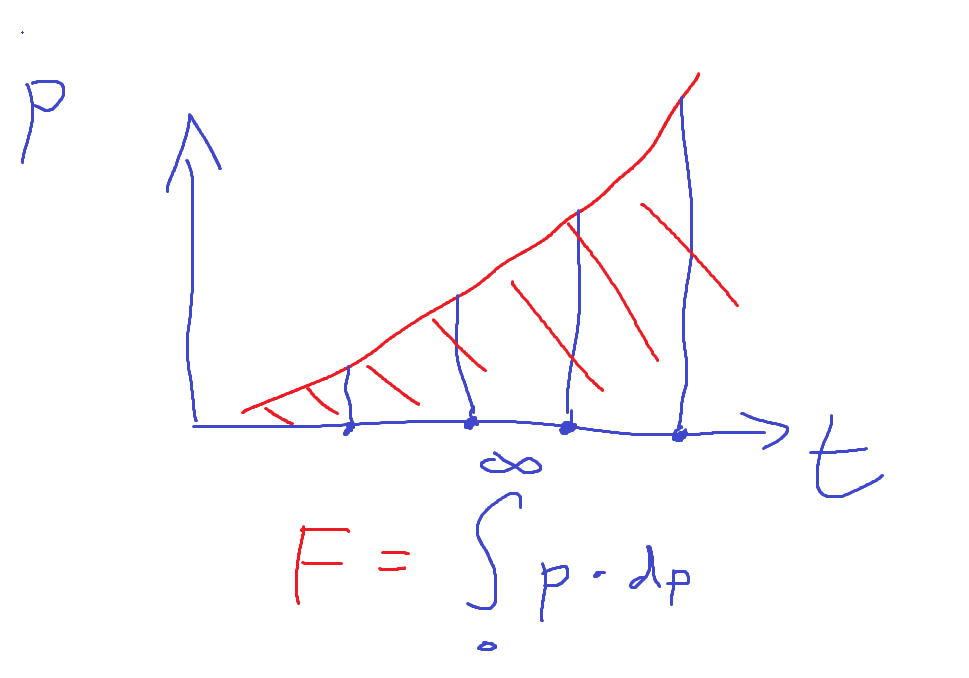
yep, you approximate a continuous F function with an integral over a quantized impulse samples
silent mural
the thing is, in reality you cant have instant impuls spikes, because deltaTime can never be zero
cosmic axle
I think smth like this
 silent mural
yup exactly
silent mural
y is p and f, x is t
cosmic axle
omg I am dumb, yea, y is p LOL
silent mural
eh, i havent touched integrals since highschool so i wouldn tknow lol
cosmic axle
I always "hated" physics but now I love it since I NEED it
silent mural
yeah its a lot cooler if you can actually do sth with it
cosmic axle
hated because why the hell do I need to calc. the friction forces for a cube on a slope in real life lol
yea exactly
silent mural
i almost failed grade 10 because of vectors and now im playing with them in my freetime
cosmic axle
if only I had this back then
 silent mural
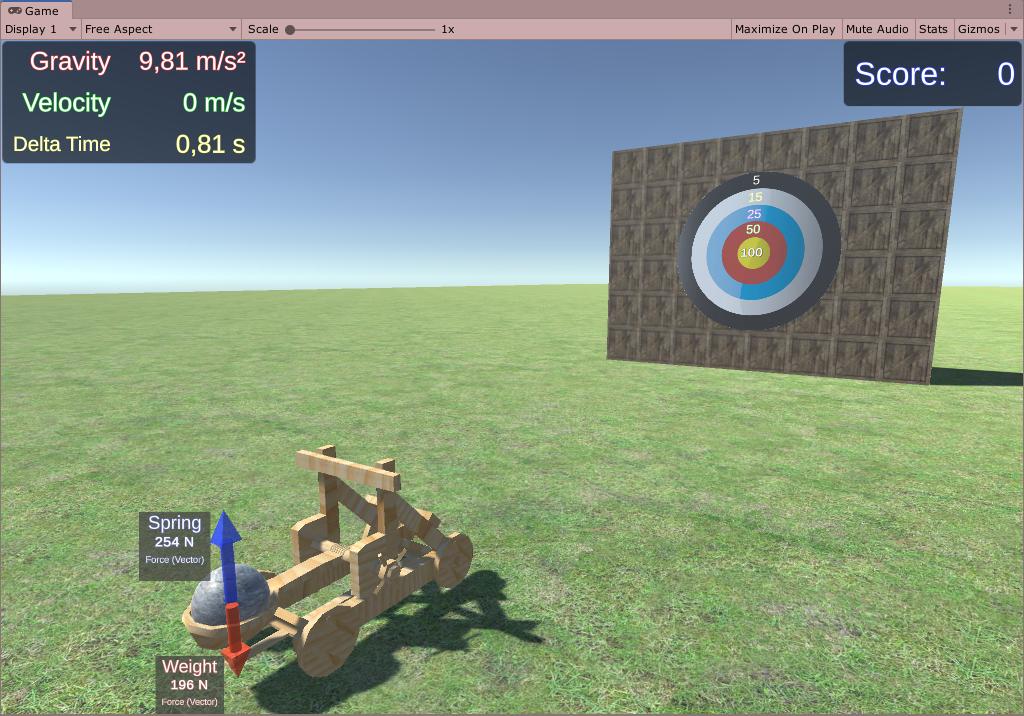
dude thats cool!
silent mural
thats really cool
cosmic axle
wow the forces work, almost 🙂
silent mural
can you send me your forces tracker if you re done?
i would like to steal it for my missle
cosmic axle
I only did this
_wheelVelocity = _rb.GetPointVelocity(_wheelContactPoint);
        _wheelAcceleration = (_wheelVelocity - _lastWheelVelocity) * Time.fixedTime;
        _lastWheelVelocity = _wheelVelocity;

at the end the forces bug out lol
white lines
silent mural
maybe you need a "close to zero -> dont draw lines" condition
cosmic axle
y
silent mural
i imagine if the forces it registers is super small, it might jump between negative and positive and thats where the flickering comes from
like, -0 and 0
silent mural
1 ms2 is not small tho
cosmic axle
it is much, the car is stationary, probably the code where I apply brakes
silent mural
what are the white lines showing?
silent mural
i gotta say, i really love how clean your debugging is. with te forces etc drawn out.
thats something i need to do myself and i just tend to not do it way to often lol
cosmic axle
thx, I did it out of necessity 😄
silent mural
Can someone help me with collision detection?
my projectile tends to sometimes not register the collisions with the target im shooting.
the proj. collider and rb are set to continous and interpolate, the target is at discrete.
i cant really recreate the times it glitches through tho, not sure whats causing it
silent mural
what does that do?
silent mural
oh nice, it works now
yeah my projectile moves at almost 2 km a second and i believe if the target collider was too small, it glitched through
it does seem to work reliable now.
Does that mean every object in my game has to have continous collision detection?
cosmic axle
the docu says then yes
you can try discrete for the target and let me know 🙂
but the docu says you should use cont. target with cont. dyn. rocket
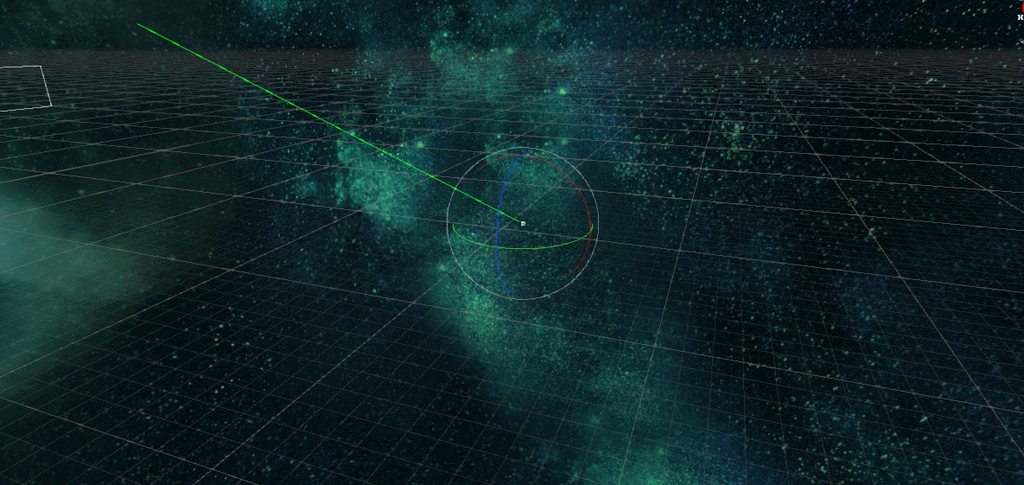 silent mural
now anwards to greater destiny. time to implement point defense cannons to shoot down missiles
cosmic axle
looks cool! I love space
if I disable gravity on my car I have basically a space ship with 5 DOF
silent mural
Yeah im a huge spacenerd
Thats why im building this project, implement everything as realistic as possiblr and then see and figure out how combat evolves
Probably a lot more chess game than star wars dogfights
autumn jetty
@silent mural are you using floating origin?
viral ginkgo
@silent mural I think if there would be space fight in real life now, people would use these kinds of weapons
https://www.youtube.com/watch?v=tyUh_xSjvXQ
Seems like the most efficient way to destroy something in space

Already deployed on the USS Ponce amphibious transport ship is the US Navy's first - in fact, the world's first - active laser weapon.
Not as cool as pew pew pulse lasers though hehe
silent mural
Yeah maybe, but i think lasers are easy to counter
Just slap a mirror on the front of your ship, right?
Instead, i would use a bunch of gbu equivalents. You fly towards the enemy, drop a bunch of self guiding bombs and the silently glide towards the enemy. Hopefully long enough undetected to hit
 naive remnant
silently in space😅
silent mural
Eh, i think its not that hard to have spme kind of material that reflects or disperses enough energy to counter lasers
Yeah i mean "undetected" lol
And they only start thrusting when close enough
Lol use the enemys laser to power up your own and shoot back
Thats a fun idea
naive remnant
i think easiest way to counter laser attack in spaces to warp space😏
silent mural
Thats a bit too futuristic for my case :P
Im using the values of todays tank cannons for my weapons atm
viral ginkgo
@silent mural missiles would be shot down with lasers though
unless they are covered with mirrors as well
naive remnant
you can power your warp engine through enemy's laser attack😂
silent mural
The missiles will ride eternal, shiny and chrome
So to conclude, space warships will be covered on chrome looking like ghetto pimp rides
viral ginkgo
and the chrome missiles are the supreme weaponry
silent mural
Eventually
viral ginkgo
maybe flak for missle defence
silent mural
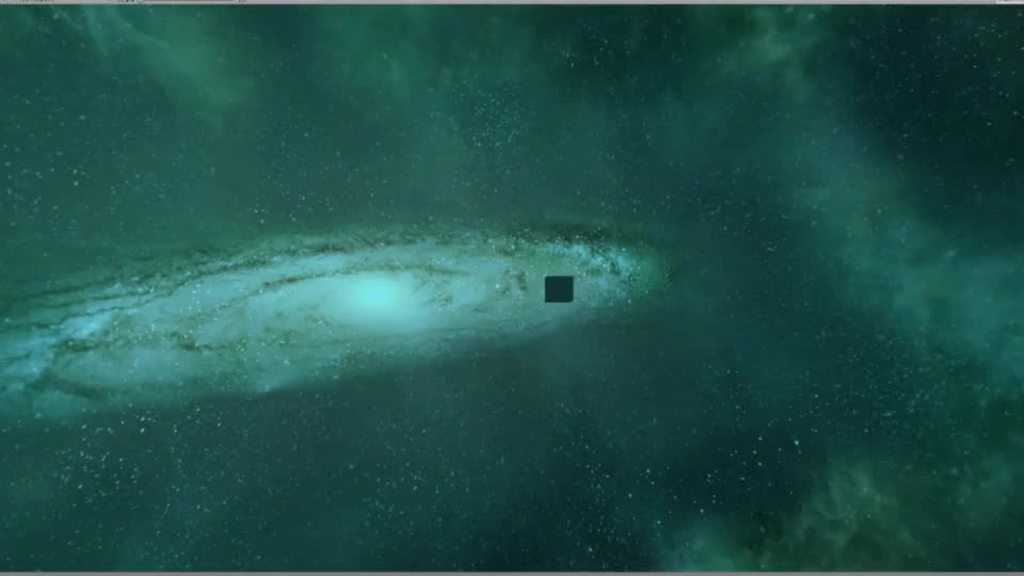 naive remnant
slow?🤔
viral ginkgo
the laser in gif is too slow for reallife orbit situations
silent mural
Thats tracer slugs tho. I added tracer effects for coolness
viral ginkgo
if the target alters its orbit randomly at very small pace, offset will be too big
silent mural
Its kinetic projectiles
silent mural
Yup
viral ginkgo
but orbit fights shouldn't be close range if it was realistic imo
silent mural
Im playing with the tought of implementing a kinetic railgun that shoots slugs at higher speed, like 3km/s but thats still slow for big distances
viral ginkgo
cant beat lights speed
or missile smarts
naive remnant
little mirror ships which will redirect your laser attacks😏
naive remnant
or long steel cables😅
silent mural
Like a net?
naive remnant
just long 1 cable at huge velocity
viral ginkgo
laser weapon would be like silencing the enemy
enemy would need to deploy the reflectives immidently
therefore coving most of the weaponry
silent mural
But it also eats tons of energy and gives off you position
viral ginkgo
maybe you have to repair some stuff real quick
like in FTL
patch some holes n stuff
actually ftl would be exactly how i imagine realistic orbital fight is
i mean like, no dogfighting and everything, position,velocity doesn't matter
better enginepower/mass, better projectide dodge chances
sort of like a turn based thing
trying to counter eachothers actions
@silent mural
 arctic totem
also working on orbital dogfighting https://mogacreative.itch.io/orbital-dogfight

 alpine jolt
Hello everyone, I have a bit of problem. For some reason, checking if a character is grounded is yielding crazy results.
My code:
arctic totem
how are you checking?
alpine jolt
grounded = Physics.SphereCast(cController.bounds.center, .01f, Vector3.down, out hit, myLayerMask);
I'm using the character controller.
arctic totem
.01f is the offset?
alpine jolt
It's the radius of the sphere.
arctic totem
and what are the funny results?
alpine jolt
It doesn't know when it's in the air. It knows it's on the ground, but not when it's in the air.
So it only checks when very close to the ground.
If I lift up the character manually to just a little above the ground, it'll be false and do the fall animation.
But if I take the character high into the air and drop them, it doesn't know it's in the air.
arctic totem
but if you know when its on the ground this mean that you know when its not with the same bool
a
alpine jolt
Yeah. It should work.
arctic totem
okay
alpine jolt
But it doesn't.
arctic totem
i know
Vector.down is a normalized vector meaning it has a length of 1
try Vector.down * 10f; ...
or take your height off the ground and multiply by 2f to make sure the raycast is always twice the distance off tghe ground?
might work
alpine jolt
Let me give that a shot.
alpine jolt
Doesn't work.
arctic totem
does it say grounded the whole time?
alpine jolt
Now it does.
silent mural
@arctic totem thats really cool
alpine jolt
It's always grounded.
silent mural
and the exact thing im trying to do, only that im not in VR
arctic totem
okay that is as expected
@silent mural Thank you. Big workin in progress
love to see your stuff
@alpine jolt okay ready
has a maxDistance overload you can add to your spherecast
silent mural
you can see what i have so far here, its not much but big progress for myself :)
https://imgur.com/a/noHRT9T
more of a logbook than a showcase 😛
alpine jolt
@arctic totem What would be the point of changing that?
arctic totem
you want to have the spherecast executing always... when the hit returns true; (wich it should always unless upside down or something) you can get the distance of that hit by using Hit.distance
alpine jolt
I guess I don't understand something fundamental about this.
arctic totem
if Hit.distance is greater then your character height then you are off the ground
its a simple fix
make this : grounded = Physics.SphereCast(cController.bounds.center, .01f, Vector3.down, out hit, myLayerMask);
grounded = Physics.SphereCast(cController.bounds.center, .01f, Vector3.down, out hit, 1000f, myLayerMask);
if there is a HIT your 'out hit' will be filled with hit information https://docs.unity3d.com/ScriptReference/RaycastHit.html
you simply say float distanceToGround = hit.distance; if(distanceToGround > characterHeight) { grounded = false } else {grounded = true};
alpine jolt
@silent mural Looks cool.
arctic totem
@silent mural okay taking a proper look now
alpine jolt
Ah. I see what you mean. Okay. Let me give that a shot. @arctic totem
arctic totem
@silent mural the lasers look good at that speed but I will point a few things out as I am now deeply immersed in the same topic(these only generally relate to your game.. i like your laser): OKay lasers are light, which not coincidentally travel at light speed, therefore any representation of lasers as 'bolts of light' moving at speed is utter bullshit BUT since gamers understand 'hot tracer round' style mechanics, making lasers 'look' this way works very for gaming despite it being totally unrealistic. A beam laser that was being pulsed might look closer but still.... in orbital dogfight I have tested shooting lasers (the same kind you are showing) while also moving at orbital speeds in actual orbit.... in this case the lasers look super weird...here is why: the ship is traveling at 2000+ meters per second. When I shoot a laser blast and the bolt is traveling to its target I am moving away from it at orbital speeds and it looks as though the shot came from behind me ,,
silent mural
ill stop you right there, they are not lasers but knietic projectils with tracers
alpine jolt
Ran some tests. Looks like it basically works, but for some reason the animator is really not doing it's job.
arctic totem
O they look sick then!
silent mural
i just added the tracers for cool looks 😛 but they are realistically behaving, scaled projectiles 🙂
arctic totem
@alpine jolt it may be because in this case the animator work restart with every true state..
silent mural
but the problem you are describing still applies, i didnt look into that yet 🙂
arctic totem
have you started on floating origin?
silent mural
idk what that means lol
arctic totem
o boy 🙂
silent mural
im just learning unity along the way
arctic totem
mee too 🙂
its an esoteric necesity of space games... some of them anyhow.. Kerbal Space PRogram
silent mural
ah, its the "move to far and shit start breaking" thing
arctic totem
THE KRAKEN
silent mural
i have it somewhat solved by locking my cockpit (and interior) in place and having the ship move around. that way you dont notice that stuff is vibrating when you get too far
arctic totem
shit starts breaking over 1000 meters if your shit is small.. like buttons in a cockpit
not a bad move
silent mural
well it doesnt solve the problem that the worldspace is too small. ill probably have to write a chunk/tile system at some point
i just havent gotten there, ill look into the floating origin thing
arctic totem
how about orbital mechanics?
silent mural
not a bad move
@arctic totem yeah my UI canvas was wobbling so bad already at start that it was unbearable
silent mural
the "gameroom" is just a 3d system and you cant escape it, ego fly towards the planet. but i do simulate the orbital mechanic of the comeplete gameroom, ergo the background and planet and sun move according to the "gamerooms" orbit
arctic totem
should try to only use those in LObby if possible.. a tip that took me a while to learn
@silent mural no just the two body system of the ship and planet?
shit have toi run be back soon
silent mural
nope. the ship does not experience orbital mechanics. the thing is, i want it to be multiplayer focused and form KSp i learned that anything with orbit takes forever to get somewhere
imagine you want to hunt someone on the other side of the planet, youll never reach him bc he can just do evasive thrusting a bit
and imagine having to wait one and a half hour for an orbital maneuver to get somewhere
i do have asteroids that simulate orbital mechanics and i have it planned to be able to adjust the asteroids orbit, but not for player ships.
autumn jetty
@silent mural Do you use floating origin?
silent mural
not yet
im at a state where you can move around in the ship a bit and shoot at the 5 asteroids that are close. thats all you can do at the moment 🙂 im still creating the very basic systems
i mean, i only learned how to use inheritance yesterday
alpine jolt
@arctic totem Thanks a bunch. Looks like I got it working.
arctic totem
@silent mural totally right... I have had to scale down the planet to make rendev times less insane.. my planet is currently 200km diameter, the atmosphere is 10k thick and orbital peroid for a small ship just in space is about 1minute 30 seconds.
naive remnant
you have to use futurama style engine. It is not your space ship moving through space, it is your ship moving entire universe😂
arctic totem
thats the one... what coming from GDC Kerbal Talks?@naive remnant
naive remnant
this is basically how you render 3d stuff 😅
arctic totem
for everyone who has not watched this and is interested in space game ... its a no brainer https://www.youtube.com/watch?v=mXTxQko-JH0

How hard can rocket science be, anyway? Creating a full-scale space flight simulation poses a number of interesting problems, like dealing with the vast scales of a solar system, maintaining a stable physics simulation and supporting player-created spaceships in the simulation...
 halcyon oyster
wondering a squirrely plane raycast math issue would go here, or general code
halcyon oyster
imma put it here since there's a lot of discussion already. I am trying to do a raycast from an arbirtrary point and direction. I am checking against multiple ui elements, each with their own complicated transform hierarchy. Some are scaled, others are not. Some are angled, others are not.
Each element has their own plane, aligned with their arbritrary forward (technically - forward, because they're all backwards). I create a ray from the source point and forward. I call plane.raycast against each plane. This gives me a distance, which I can use with the ray to calculate the hit point for the plane.
I am trying to figure out if the generated point is within the bounds of the objects mathematically. Right now I am using Transform.inversetransform on the hit point, and then checking against bounds I generate using collider.size * transform.localscale.
the issue is that it's just not behaving properly. Up/down works, side to side is not working. (collision movement)
it's like left/right movement is mathematically dampened by something
halcyon oyster
and it turns out i was just overthinking it. Once you inversetransform the point, you can check if it's in bounds of 1,1,1. No scaling, no fuss.
silent mural
@arctic totem the different spaces mentioned at 12:07 is actually exactly what i came up with too
tiny background planets, a "world space" and a interior space
arctic totem
@silent mural I think that is the way to go
silent mural
i also like their idea of multiple cameras for far view distances on terrain
arctic totem
its was getting tricky in VR for a while... too many cameras with both eyes to build up..
the new integration is making it simpler though
have to keep track of each others work.. you up on Itch or somewahere yet?
silent mural
no, the imgur logbook is the only thing i have right now
also my trello which i never update lol
Unbelievable how much time it cost me to get my point defense tracking system working
I wasted at least 2 hours trying to figure out why the hell my firecontrol computer didnt caclulate that targets velocity correctly. And then i noticed that the mock target i had moving had a rigidbidy set to lock position.... and glitched back and forth and messed up tracking
The damn target was broken not my firecontrol
arctic totem
porportional integral derivatives?
viral ginkgo
yes
arctic totem
I use those to control the orientation of my space craft
viral ginkgo
had told him about pids before
cosmic axle
Yeah im a huge spacenerd
Thats why im building this project, implement everything as realistic as possiblr and then see and figure out how combat evolves
@silent mural
Me too! If you want I can help with training AI with reinforcement learning do to attacking etc. I have plans for my next project to do combat in space, but I see you already doing what I was planning to do
viral ginkgo
@arctic totem
i had used pid for my active ragdoll limbs back then
but it was very bad and wrong
@arctic totem i couldnt pid control rotation correctly
cosmic axle
PID control is awesome, everyone should use it 😛
viral ginkgo
i was trying to pid control up and forward vectors
how did you do your rotation control?
@arctic totem
arctic totem
straight off my spaceship " public void AlignDirToVector(Vector3 dir, Vector3 ToVector)
{
float errorP = Vector3.Angle(dir, ToVector);
Vector3 TorqueAxis = Vector3.Cross(dir, ToVector).normalized;
errorP = AnyAxisMainPID.Update(errorP, Time.deltaTime);
Vector3 correctionTorqueP = errorP * TorqueAxis;
m_Rigidbody.AddTorque(correctionTorqueP);
    Vector3 am = m_Rigidbody.angularVelocity;
    float error = am.magnitude;
    error = AnyAxisErrorPID.Update(error, Time.deltaTime);
    Vector3 correctionTorque = -error * am.normalized;
    m_Rigidbody.AddTorque(correctionTorque);
}"
and
using UnityEngine;
[System.Serializable]
public class NavPID {
public float pFactor, iFactor, dFactor;

float _integral;
float _lastProp; // aka last error or amount we want to move

public NavPID(float pFactor, float iFactor, float dFactor)
{
    this.pFactor = pFactor;
    this.iFactor = iFactor;
    this.dFactor = dFactor;
}

public float Update(float proportional, float timeFrame)
{
    float derive = (proportional - _lastProp) / timeFrame;
    _integral += proportional * timeFrame;
    _lastProp = proportional;

    return proportional * pFactor + _integral * iFactor + derive * dFactor;
}
}
viral ginkgo
@arctic totem
thanks
only if i had this back in ragdoll days haha
arctic totem
np. I got most of it off Github so.. thanks to those before us
viral ginkgo
you the one who makes orbital dogfight?
arctic totem
yeah working on it
viral ginkgo
pasted in some other channel i think
arctic totem
yeah in VR sometimes
arctic totem
well its all using newtonian mechanics
Multiplayer will be hard across floating origin space and orbital velocities but im going for it
viral ginkgo
cool
should do snapshot interpolation probably
but you can also send velocities for extrapolation
so clients aim at right pos
arctic totem
yeah! I have a solver for the six orbital elements... I'll use that to extrap future position
viral ginkgo
if orbits are big enough
considering gravity may not be a big deal
can just do linear translation
for future pos prediction
arctic totem
you can go from ground to any height orbit that is not hyperbolic... but
kinda of aiming for a Kerbal /Warthunder/ elite dangerous baby
War Thunder has some great multiplayer mechanics
viral ginkgo
you wanna do contious math for this stuff?
arctic totem
probably be some kind of subsampling
viral ginkgo
doing the trajectory equations n stuff
it wont be super accurate
because unity physics intervals move objects linearly
arctic totem
Yeah I am cosidering double precision vectors
but for now my orbital prediction is close enough..
viral ginkgo
unless you handle it yourself, solving trajectory equations every tick
arctic totem
thats what I do
it still swings a bit with the error
as higher speeds the calculation begin to screw
viral ginkgo
@arctic totemits not about vector precision
50 linear physics steps per second is not going to be very synced with your trajectory equations
oh you say subsampling
arctic totem
ah but the trajectory is calculated in each step
viral ginkgo
oh i was about to say that
viral ginkgo
since you have the kerbal equations
you will also use those for predict
very nice imdeed
arctic totem
yeah I am working on using the Orbital Elements to configure orbits instead of the other way around..
arctic totem
Newtonian orbital mechanics with a two body solver to be exact
viral ginkgo
Newtonian orbital mechanics with a two body solver to be exact
@arctic totem
does this work iteratively?
arctic totem
hardest problem I have taken on... except these baby girls I have to put to bed
viral ginkgo
hahah
arctic totem
Nope is straight up does everything in one go
got all my math from http://www.braeunig.us/space/orbmech.htm
An overview of orbital mechanics including types of orbits,
mathematical formulae, and example problems.
viral ginkgo
allright
arctic totem
🙂
mighty sluice
something is going on with my physics updates... I'm using ML-agents, which has a python API that may or may not fuck with some unity settings... Long story short, when i am using the python API for training the physics updates happen faster than deploying the learned brains without python being active
it's quite strange because i cant locate any changes that reflect in project settings


this is what the difference looks like...
is there any straightforward way to track down the cause of my sparse physics updates?
when inferencing instead of training, the player loop is wrapped up in additional editor loops
mighty sluice
drifting sleet
@mighty sluice you can't profile the editor.
you can, but it will give you wrong answers
mighty sluice
I realize that some of the results will be skewed, but it still identifies an issue
i am profiling the editor twice, once with the python background in use
so im at least comparing like with like
the real issue is why the physics updates become more sparse despite everything else speeding up
i suspected that the python api might be altering a setting, but i cannot identify what
checked usual suspects like time scale, frame rate, fixed update, etc...
it could be that they are being altered and the editor values aren't updating
been looking into it, and i think this may be related to maximum allowed time step
silent mural
@viral ginkgo the floating point issue. The bigger your velocity or position relative to 0.0.0 gets, the more digits behind the comma you loose bc both are 32 bit numbers
Thats the resolution thing. Close to spawn, lots of resolution bc lots of digits behind the comma; very precise velocity and pos.
Get far out, go fast you loose precision and get wobble
Ksp guy mentions they also have "floating velocity" to zero out objects moving fast relative to eachother but i gotta be honest i cant imagine how that would work
If you move 1km/s and your target is still, you can zero out by moving you and the target at 500m/s. But thats literally it. You can half the speed, so double your maximum speed before engine breaks.
Not really a solution
viral ginkgo
oh i see
 timber python
What must I do with rigidbody physics to optimize it....
Unity doesn't allow to do it I guess
I have 100 cubes with rigidbody and the FPS drop to 20
😂 I have a potato rig, but that's a different issue
viral ginkgo
@timber python the not moving ones should go sleep any stuff
if you left them stacked somewhere and they are not moving most of the time, it should be fine
arctic totem
@silent mural its an OLD known issues. Check this out: https://wiki.unity3d.com/index.php/Floating_Origin
I think their floating Velocity system is just going on rails///
silent mural
Is there a reason why unity cant just make float store stuff in 256bit ir sth?
 fringe spruce
that's not at all how IEEE754 works
silent mural
It wouldnt solve the problem forever but make it large enougj to not matter i guess
I dont know how data stuff works, thatd just my first thought :)
fringe spruce
it's basically glorified scientific notation
and the hardware works with pretty specific sizes-- mostly 32 and 64 bit
silent mural
How about splitting it in 2 parts, and add together. 1457399392 becomes 14573 and 99392 and voila twice the digits available
Is the floating origin script multipöayer compatible?
I know jack shit about how multiplayrr works, just wondering
timber python
I am working on a game something like demolition racer, so it will be slightly physics oriented. Just rigidbody will be active on 20 cars! May not be a huge problem @viral ginkgo ..... Still game needs to be optimized 😁
It will be a problem for potato rigs though
viral ginkgo
20 cars should be fine on even mobile i think
@timber python
if you dont have some super funky code on cars
autumn jetty
You could go 64 bit floating point computation to erase the problem, but it creates longer computation for all math, so its a tradeoff, and somone has to rewrite all that code as well. There's currently a thread on the forums discussing this heavily.
I was thinking of going for floating point origin for my space game as well, but what do you know, traveling in 1000m/s + projecitiles going X that speed doesn't really bring interesting visuals and has gameplay problems. Either you're so far off the enemy is only a dot on your screen, or in a dogfight and one do a turn is almost impossible to keep up with.
silent mural
In the ksp video they say they fix the problen by having floating origin and translating the positon etc into doubles for storing
Couldnt physx use doubles from the start? I read that they are more performant too
autumn jetty
Where did you read this? https://stackoverflow.com/questions/4584637/double-or-float-which-is-faster
silent mural
proud nova
Seems like it comes down to 1. hardware implementation 2. how fast can that data be loaded to caches


 charred marten
Physics update only runs 50 times a second
(or whatever number you've set that to)
mighty sluice
according to fixed time step
charred marten
So if you run 100 frames per second, itll skip every other frame
if you run 25 frames per second, itll run fixedupdate twice per frame
mighty sluice
so that makes sense...
but...
im trying to figure out what is causing a difference between 'inferencing' and training with MLAgents
somehow, training results in faster moving physics, but time step appears untouched
during inferencing, there are no (or few) physicsless editor loops

 charred marten
that probably just means that inferencing costs more performance
so you're closer to that 50 fps
mighty sluice


280 fps vs 780 fps
training is slow despite having faster physics
slower computationally
charred marten
The statistics screen is inaccurate
Unity Forum
Looking at the Stats display, I noticed my program was running slower than expected, around 60-70 fps. However, when I opened the Profiler window, the...
use a script like http://wiki.unity3d.com/index.php?title=FramesPerSecond&_ga=2.124542402.939345135.1585417642-246594539.1542030173 to accurately display FPS
silent mural
Couldnt you just count the time.deltatime of update and calculate fps from that?
mighty sluice
According to that script, the FPS is 400 and 200 for inferencing and training respectively
silent mural
Or is there a time where update doesbt run every frame?
mighty sluice
that's what i just did basically
inferencing should always be faster; during training unity needs to pause and reach out to a python external api that handles learning
charred marten
Fair. Just making sure
I'm unsure then, using basic math FixedUpdate should run every 4 frames during training, and every 8 frames during inferencing
mighty sluice
indeed, but somehow inferencing decides to skip physics updates on some ticks
charred marten
well both of them will
mighty sluice
inferencing skips more
charred marten
yes, fewer physics ticks because there are more ticks in general
with inferencing running 400 frames per second, every 8th frame should roughly be a physics update
mighty sluice
but unity is settings its own framerate. so why would it sacrifice fixed updates to increase fps
charred marten
(50 physics updates per second, 400/50 = 8)
huh?
its not sacrificing fixed updates
its making it so that theres only 50 physics calls per second
no matter what, it runs the same amount of physics calls per second
with more fps, that just means that you have more frames without physics calls
mighty sluice
that all makes sense, but i still cannot explain why my agents are slower
charred marten
as in they move slower?
or they compute slower?
physics is framerate agnostic, framerate never impacts physics
what kinda code are you using to interact with the physics system?
mighty sluice
just monobehaviors
charred marten
if you're doing something like
void Update()
{
  rigidbody.AddForce(movement);
}
then ofcourse itll move slower if you have less frames because update isnt called as often
mighty sluice
not sure what the question is
im using articulation bodies, skinned mesh renderers, custom physics scripts, etc
charred marten
well im mostly just curious how you use the physics engine
because Unity's physics dont change based on FPS, only the scripts you write might
mighty sluice
what about maximum allowed time step?
charred marten
maximum allowed timestep might enable physics updates to skip if the framerate is too low
but you're running at 200+ fps so thats not the issue
mighty sluice
yea that's what i figured
my main suspicion is that the python API is flicking some particular unity setting that i cannot find
mighty sluice
only when it needs to do a backpropagation
mighty sluice
rarely, and no
charred marten
alright
then that shouldnt really be the issue
if your fixedupdate calls are really slow (about 10ms slow) it might skip physics updates
but thats impossible coz ur running 200fps
mighty sluice
my thoughts exactly
charred marten
Given that all our current conclusions are correct then physics should behave normally for you
And the framerate difference between 400 and 200 shouldnt make a difference
mighty sluice
I think i can confirm that fixed updates are happening more slowly during inferencing
fixedDeltaTime still reports the same
mighty sluice
so its as if the program is slowed.... but we know that is not true
everything leads back to these editloop updates that should have physics in them
it's the only thing making physics more sparse
is it possible that the very high fps causes it to start drawing a new non-physics frame, but that this takes longer than expected?
therefore the next fixed update gets delayed?
charred marten
no then fixedupdate would just catch up