#⚛️┃physics
1 messages · Page 46 of 1
 flat tapir
 proud condor
Anyone got idea how Navmesh algorithm really works in Unity?
 sly violet
A*
proud condor
I'm need to get every possible information related to Navmesh. Not A*
 wraith swan
Anyone knows how to trianglate a PolygonCollider2D WITH HOLES?
Or how to check if the path is hole and reorder it in CCW
 distant spruce
Hello, I have a question, I have a player rigidbody 2d that i move with velocity vector2 transform and a moving platform again with vector2 transform with material 0 friction and collisionenter/exit for parenting the player when he is on the platform
there is some stuttering that i can probably smooth with interpolation on the rigidbody
however if I do that, the player can barely move once on the moving platform
what options do i have to remove stuttering on the player while he is in calm state but the platform carrying him is moving
and if i want for the player to be able to move while on the moving platform freely
 reef junco
guys, from what i've researched MovePosition is optimal way for handling player controls but i have slight acceleration/decelleration at the start and at the end of movement.
is there a way to make it snappy?
or it's just how MovePos works?
@distant spruce don't move player with velocity
distant spruce
Okay
sly violet
MovePosition just puts you where you tell it to, if there's unwanted effects its most likely because you told it to.
 silent mural
Hey, i built a little cannon which fires a projectile. Im still trying to understand how the parameters of addForce f.e. translate to real world force. So in my fire script, i first use rb.addforce and then debug log rb.velocity. its always 0,0,0 even tho the projectile clearly travels. Why is that?
            Rigidbody projectileInstance;
            projectileInstance = Instantiate(projectile, barrelEnd.position, barrelEnd.rotation) as Rigidbody;
            var displayedEffect = Instantiate(fireEffect, barrelEnd.position, Quaternion.identity);
            projectileInstance.AddForce(barrelEnd.forward * projectileSpeed * 10f); //works fine till here
            Debug.Log("slug has velocity: " + projectileInstance.velocity); //returns [0,0,0]
if i call the velocity from the update method of the projectiles script it works, but why not right after applying force?
 keen kraken
Hey does anyone have any time to help me out with hitbox problems? If you do you can dm me since I don't want to write out a big problem on here
sly violet
So in my fire script, i first use rb.addforce and then debug log rb.velocity. its always 0,0,0 even tho the projectile clearly travels. Why is that?
@silent mural The effects of AddForce are not applied until the next physics simulation step.
 knotty raft
I have a gameobject that I use the mouse to move around the screen (just dragging, no script). Is there a joint that can simulate making the object heavier/harder to lift?
sly violet
I mean, you could FixedJoint a Rigidbody with a nice, high mass and no colliders.
knotty raft
maybe a joint isn't what I need
I thought maybe a spring joint could somehow make it harder to move an object away from the anchor point
sly violet
Sure. You didn't mention an anchor point before. But all of this is contingent on how you're dragging it, anyway.
knotty raft
i'm just using clicking the object with my cursor and dragging it around the screen in the X and Y
sly violet
Are you moving it with AddForce? If you're moving it with its Transform, MovePosition, or basically anything other than AddForce, then physics considerations won't work right anyway.
sly violet
...
In Scene view?
sly violet
Without a script.
knotty raft
yup
sly violet
That's not normal.
knotty raft
oh wait... sorry I had made some changes to my code (and it's been a while since I've looked at it)
I'm using MovePosition
sly violet
Lol. Okay. MovePosition just places the object at the target position. It doesn't respect joints, forces, colliders, etc..
knotty raft
okay, so i need to change it to AddForce instead?
sly violet
Might be easiest to just change what you're feeding into MovePosition.
knotty raft
curScreenPoint = new Vector3(Input.mousePosition.x, Input.mousePosition.y, screenPoint.z); curPosition = Camera.main.ScreenToWorldPoint(curScreenPoint) + offset; Vector3 mousePosition = Camera.main.ScreenToWorldPoint(curScreenPoint) + offset; curPosition.z = gameObject.transform.position.z; rb.MovePosition(curPosition);
That's all I'm doing basically
 ruby prawn
good evening I am a tutorial that I have a little trouble reproducing on unity to better understand physics and networking
would it be possible to have help on the first part Digital integration
here is the tutorial https://gafferongames.com/post/integration_basics/
Gaffer On Games
Introduction Hi, I’m Glenn Fiedler and welcome to Game Physics.
If you have ever wondered how the physics simulation in a computer game works then this series of articles will explain it for you. I assume you are proficient with C++ and have a basic grasp of physics and mathem...
knotty raft
@sly violet Can you click and drag with addforce?
it seems to just want to click, drag, and release to move
 hybrid beacon
I am trying to figure out how to use physics.ignoreCollision to allow my player to walk through a wall. However i am using a custom collision detection with physics.computePenetration and it doesn't look like ignoreCollision affects computePenetration. is there a better way to go about this?
 stuck bay
My add force is extreme when my sprite is facing upwards/downwards but barley budges when I try to add force with the sprite facing left or right. My drags are all 0 so thats not the issue. Can anyone help me out?
It's like a constant boost (making a rocket league like 2D game)
 frigid pier
@stuck bay Check the friction
 lapis plaza
@ruby prawn if you want people to help, you better describe the actual thing you are having issues with here and tell what you are struggling with it
more vague the help requests are, more likely people will just ignore your commnts
 steel sapphire
When I call AddForce() or AddTorque(), what's the duration of the force? I want to understand what change in velocity I can expect. I'm assuming it's equal to whatever the FixedUpdate() interval is, but can't see any documentation not confirm it.
 viral ginkgo
@steel sapphire if you add it like that it's just force added, it will add the same force no matter what
AddForce(myForce * deltaTime) would change frame to frame
sly violet
@steel sapphire There is no duration to the force. If you want it to act like a continuous force, you have to call it every FixedUpdate.
viral ginkgo
@steel sapphire
Also don't try to apply force and try to read the change in velocity
https://cdn.discordapp.com/attachments/497874196274348032/685257841556062228/IMG-20200207-WA0000.jpg

That's how force works
I thought you might be doing that, or do that later on
steel sapphire
What I mean is if I add a force of 1 to a mass of 1 I'll get an acceleration of 1, but for how long?
sly violet
There's no duration. It'll be applied in the next physics update.
If you want a duration, you apply it repeatedly every FixedUpdate.
steel sapphire
If the force is instantaneous, then the change in velocity is 0.
I'm gonna test it as soon as I get home.
Watch this space! I'm gonna do science.
sly violet
Maybe you should be digging into the ForceMode descriptions if you want a better idea of how these are applied.

For instance, if you use the default ForceMode.Force, it multiplies the force applied by the fixed delta time, normally 0.02. This is like applying a force/time over the duration of one physics frame, although strictly speaking there's still no duration, it's applied instantaneously.
 naive remnant
but it is applied during 0.02 seconds , so there is duration😅
sly violet
No, it's applied instantaneously at the beginning of the 0.2 seconds.
naive remnant
but even in the docs it says mass*distance/time 🧐
sly violet
That has nothing to do with whether the force is implemented with a duration.
That, BTW, is the unit of the force parameter in Impulse mode. That "distance/time"? That's velocity. So the unit is the change in velocity based on the mass.
This means in impulse mode the calculation works as follows:
velocity += forceVector / mass;
If you go into ForceMode.Force (the default) you'll see a different unit: mass*distance/time^2. Here we really do have a time factor, but there's still no duration being applied in the implementation; instead, whatever value you put in is multiplied by the fixed time step. I dunno, maybe that's what BanksySan was trying to get at. In ForceMode.Force, it's applied like this:
velocity += forceVector * fixedTimeStep / mass;
These are designed to be called repeatedly every FixedUpdate for as long as the force applies, and the units of the force are in seconds. In practice this simply means that by default ForceMode.Impulse is 50 times stronger than ForceMode.Force... But if you doubled the fixed time step that would be halved.
So for examples, if you want to jump, you typically use ForceMode.Impulse once, and if you're applying a constant thrust (like to run), you typically use ForceMode.Force every FixedUpdate. This lets you modify the fixed time step without screwing up either approach.
steel sapphire
@sly violet Yes. That's what I was getting at. I'm the real world the resultant velocity is the acceleration * time ². I wondered if I'm Unity the time in that equation is the fixedDeltaTime.
 prime flower
@steel sapphire physics are using PhysX as an engine if you're not using the new Unity DOTS Physics
I believe PhysX source code is now public
You can always look into it yourself through that
@steel sapphire https://docs.nvidia.com/gameworks/content/gameworkslibrary/physx/apireference/files/structPxForceMode.html#adaaafefe0478d829b816154c676e545
Time is the frametime so you are correct. Time would be fixedDeltaTime in this instance.
steel sapphire
Thanks @prime flower. I think I'll leave digging through C code for when I have some more time (& gumption).
Oh. It' just the enum.
Plus definitions. Awesome, thanks @prime flower
prime flower
🙂
steel sapphire
Does eIMPULSE have any meaning in the real world? I can't think of what it would represent.
prime flower
@steel sapphire same as eVELOCITYCHANGE but ignores mass
there's really only 2 difference options, acceleration and velocity
the other 2 are just variations that ignore mass
steel sapphire
Aye, but that's not a thing in the real world.
prime flower
right so ignore them. they are game specific thing
steel sapphire
It feels like it's just there for symmetry.
prime flower
for me, when I'm programming a game, there's certain physics calculations that I want to happen that i need to be consistent
if i decide the player needs to have more mass in order to change the effect of something, i might not want that to make the player jump lower
i want my player's jump to get them to the same height so that i can tweak mass independently
So as a programmer, I'm gonna use VelocityChange instead of Impulse
@steel sapphire does that help at all?
steel sapphire
A bit, cheers @prime flower. I suspect I'll be using the other three as well.
prime flower
if you're aiming towards a full on real world simulation, you'll probably never use the mass-independent ones
however, almost no games are true real world simulations 😉
 drifting wind
laughs in Microsoft flight sim 2020
 jade comet
hey, in my game the player can play these blocks that are generated where a raycast in the lookdir hits the green surface (and a few units above). i want to make a system that shows the player where the block would end up before he places it (accounting for collishion and stuff) also he should be able to rotate the block to fit his idea where and how to place it
viral ginkgo
@jade comet
I'd checkout this
https://docs.unity3d.com/ScriptReference/Physics.BoxCast.html
only boxes though, or spheres
silent mural
Hey, im trying to measure the impact angle of a projectile hitting an object. Both proj and target have rigidbodies and mesh colliders. Using this for the projectile:
    {
        Debug.Log("slug hit " + colData.gameObject.name);
        Rigidbody rb = gameObject.GetComponent<Rigidbody>();

        Vector3 normal = colData.contacts[0].normal;
        Vector3 vel = rb.velocity;
        float impactAngle = Vector3.Angle(-normal,vel);
        Debug.Log("impact with angle " + impactAngle);
}
problem is it logs false angles. how in the world could i get 110° impact angle??
viral ginkgo
@silent mural maybe try normal instead of -normal?
or wait hmm, what you did makes sense
silent mural
since the velocity goes into the target, and the normal goes outwards, i flip the normal
it doesnt explain why i get such random numbers
viral ginkgo
You might wanna debug with debugrays @silent mural
debug the velocity and normal
silent mural
ill try that
okay so it seems that my bullet only seems to be registered by the collider from 1 side. if i shoot the target from the back, it goes through and only when exiting is registered
lets play around with the colliders then.
sly violet
I think you might be using the wrong velocity. IIRC the velocity at the time of OnCollisionEnter has already taken the collision into account, but for a proper impact angle you want the velocity just before impact.
That would be available in FixedUpdate - IIRC it might not even be the last FixedUpdate, but the one before. I'd test that, though.
silent mural
you seem to be right. if i fire at perfect 90°, my velocity debug ray is tiny and offest by 90°.
logging the velocity wont be too hard since my setting is in space, so a slug wont change velocity once fired.
@sly violet you have been correct. im now storing the velocity once fired and call it on impact. thank you
@viral ginkgo same for you, debug rays helped a lot
silent mural
nice, im finally able to have a tiny explosion go off into normal vector direction of the hit target. Took me far to long to get along with quaternions
stuck bay
i watched a video on quaternions
i feel dumber now
https://www.youtube.com/watch?v=d4EgbgTm0Bg
I think this one, well it's not unity related but I thought hey maybe that will help
 arctic sandal
If I transfer assets from a project from a 3d template to a hdrp one, could it break the physics?
arctic sandal
so i have a project where the character is supposed to slide on a platform but just falls through, added box colliders to them both.
transferred the assets to an hdrp project
, worked before i moved to a hdrp one
 arctic sandal
Ok thanks
 proud tide
So, I'm looking to do something extremely complex for my game: deforming mesh collision.
This is needed for climbing large creatures that move around.
Is it technically feasible? Even if it drops frames to the mid 30s or 20s
lapis plaza
@arctic sandal you dont need to use hdrp template to use hdrp
Just install hdrp package and run hdrp wizard
 sonic mulch
Hello, there is one week ago, I post a video on this discord in the channel terrain. I had a pysic problem, so I post on the bad topic. Someone help me and sent me links but the problem persit. So maybe that someone here have the solution. My problem is that my character jump even if I don't press the jump button. He does that when he is in some slopes. I made a video about my problem
frigid pier
Try removing the bouncyness of the physical material
viral ginkgo
and friction maybe
sonic mulch
that doesn't work, he continues to jump
that doesn't work, but it is better than before
frigid pier
check both materials and/or how they setup to resolve both values.
 proud nova
Maybe make sure you are always applying some gravity (don't override it to 0 when grounded). You could also do movement based on the ground normal
sonic mulch
I did a mistake beacuase finaly even if I have the bouncyness and the friction removed, my character continues the jump. I did a test with trail renderer and so I am sure that he made the same number of jump. And I all my scripts and the gravaty is never to 0
stuck bay
Hi! I deactivated the get callbacks on disable for physics 2d but it seems not to work
 split dirge
anyone know how I can rotate the camera around my ball with right click, but then also apply new force vector to the ball depending on where the camera is? I know this has to do with world vector but dont know how to set it up. currently I can hold right click and rotate around the ball, but if I try to move forward it moves forward in the local direction or whatever and I want the movement to be applied in the direction the camera is facing
naive remnant
@split dirge this method will do exactly what you want Camera.main.transform.TransformDirection(yourForceVector);
arctic sandal
Oh, Tysm
split dirge
@naive remnant Thanks. So I have tried adding this. I currently get the input float values for Horizontal and Vertical axis. I want to make a new vector with the camera world transform direction and these inputs. Would I just add both of these vectors now and then apply this as force to the rigid body?
I thought I need to multiply the x and z compontents of the camera transform vector by the vector 3 moment (haxis, 0f, vaxis) vector
wait
I think I may have it give me a sec
actually nvm
naive remnant
maybe you want to normalize your vector which you got from Horizontal and Vertical axis
there is very good tutorial about ball movement 😅
split dirge
I feel like Im almost there
I have 2 vectors one for the world space camera vector
and 1 for the moment (horizontal input, 0.0f, vertical input)
I want to multiply these 2
then add the force to the rb
just not sure how to do that
naive remnant
This will make your input vector relative to cameracs var moment = new Vector3(horizontal input, 0.0f, vertical input); var result = Camera.main.transform.TransformDirection(yourForceVector);
but you have to make something like thiscs result.y = 0; result = result.normalized;
but i strongly suggest to to look at tutorial i linked, it has everything you need for you problem🤔
 still pecan
Hi!
I need to teleport an object that collides with the tag player, but this doesn't work and I don't see my error. Here's my code:
split dirge
Anyone have any idea why my ball is not detected as being on ground? currently I can't jump unless I manuall set onGround = true; I put a collider on the ball
 glacial jolt
@split dirge there's a lot of if statements before the character actually jumps—make sure each is being called. As well, you should put debugs in the OnCollision methods, to make sure they are correctly being called
steel sapphire
My game moves pieces at set, constant intervals. It ticks once per 0.5 seconds. Is changing the physics update to this a good thing? If not, is there a best practice way to have an Update() like thing called every 0.5 seconds? (Is it a coroutine?)
viral ginkgo
@steel sapphire What kind of game is that?
steel sapphire
@viral ginkgo 2D, a port of Blind Alley from the ZX Spectrum.
viral ginkgo
If you want 0.5f time interwals, just lock the fixed time step at 0.5f
steel sapphire
Cheers @viral ginkgo, that seemed like the correct thing to me, just wanted a second opinion.
viral ginkgo
project settings > Time >
set fixed timestep and maximum allowed timestep to 0.5f
@steel sapphire make sure you set max allowed timestep too
or your intervals will increase when the game lags
steel sapphire
The Speccy 48K could handle it. Hopefully i can make it runnable on a modern device!
viral ginkgo
@steel sapphire If you make a coroutine, you could slow the sim if device cant handle it
@steel sapphire fixed update will always try to catch up, if sim is not fast enough even a little bit, you get freezes (that's not very likely though unless you do some funky stuff)
steel sapphire
Ah, OK. I'll have a play. I'll go for the physics interval option first, if I get problems I'll look into the other options. Cheers @viral ginkgo
viral ginkgo
In coroutine:
        int time;
        while (true)
        {
            while (time < (int)(Time.time / 0.02f) == false) { yield return new WaitForSeconds(0.0005f); }
            time = (int)(Time.Time / 0.02f);

            SimulateUntil(time);
        }
    public void SimulateUntil(int time)
    {
        while (lastSimulatedFrame < time)
        {
            UpdateSim();
            lastSimulatedFrame++;
        }
    }
@steel sapphire This is how i did my own fixed update in coroutine
waiting for next frame like this maybe is a bad idea though i dunno
yield return new WaitForSeconds(0.0005f);
my frames look consistant though
steel sapphire
That looks good @viral ginkgo. Your suggestion of changing the fixed update time seems to be doing exactly what I want at present.
viral ginkgo
alright then
don't bother with coroutines
although
@steel sapphire do you simulate physics?
you have rigidbodies?
steel sapphire
Just collisions with box colliders.
viral ginkgo
no rigidbodies?
@steel sapphire 0.5f interval is too big for any kind of physics to behave good enough
I suggest you, you should iterate multiple physics updates for each 0.5 interval
steel sapphire
No realistic physics. Just one for "if collision then game over".
I may well not even use the physics engine at all though.
I can test for collisions with a bit board.
viral ginkgo
Okay then
Even if you don't use physics, 0.5f interval might be too big for any continous stuff
but i guess that might be fine with your game
i can't tell how it will work out
steel sapphire
There's no smooth movement either, just instant movement. The physics engine might hate that, it it does I won't use it at all and will just use the bitboard.
The more I consider it, the move I'm thinking that the bit board is the correct solution here.
 sweet dove
what is the proper way to have enemies and the player collide but not push each other ?
viral ginkgo
@sweet dove you could revert the collision forces in OnCollisionStay
but there will be a tiny bit of pushing still
the forces will act for 1 frame before you revert the forces
.
but i wouldn't do that
i'd write a simple viscosity-like behaviour code in oncollision stay
that code would lerp colliding bodies velocities towards eachother
they would be able to push eachother but not easily slip past eachother
sweet dove
I'd like them to not push at all
viral ginkgo
(did it for a football game where you could block your opponent)
sweet dove
just collide so they block, but not like one walk in front of the other and that push it backward
viral ginkgo
@sweet dove increase the mass if character stops?
and friction maybe
if you are okay with tiny pushes
or just fixed joint the body as soon as movement is finished (connectedBody=null)
sweet dove
nope tiny pushes look bad, I've seen a lot of posts from people with the same problem, but no valid solution so far
one was to set the body as kinematics on the collision, but that has other issues
viral ginkgo
@sweet dove you can revert a collision completely
but you need to keep track of previous position/rotation velocity/angvel on all colliding objects
so you can revert on them on collision
when a collision happens, you just revert it
you can make it work for the cases with multiple collisions at the same time too
sweet dove
I've seen an other solution where it's possible to say to the physics collider to ignore collision between 2 entities
but that would mean to keep that up to date all the time
using that
I'm surprised there is no "easy solution" on that issue as that seems pretty common in most games
viral ginkgo
i am not talking about ignoring a collision, i am talking about reverting the collision after it occured
so you can solve the collision yourself however you want from the "Collision collision" given to you in oncollision callback
@sweet dove
sweet dove
well as I dont want the collision to happen, that seems more logic to ignore or prevent it rather than trying to reverse it no ?
viral ginkgo
you maybe want to work with trigger colliders instead @sweet dove
you can still keep track of previous pos etc. to revert when trigger enters
so objects don't ever intersect, effectively blocking eachother
i think that's a decent solution and easy to do
sweet dove
ok cool thanks, I'll look into the 2 solutions tomorrow and see how that goes 🙂
keen kraken
Are there any good tutorials on hitboxes in 3D?
sonic mulch
Learn to make a fully-featured character controller, from input management to modular control schemes for walking, vehicles and flight. Designed for beginners and intermediate developers with a basic understanding of Unity and C#.
Learn the basics of why and how hitboxes work...
I think it is good @keen kraken
stuck bay
Yo, what's the state of the rigidbody velocity on the Oncol enter callback? Has it already calculated the new colision velocity or do I have to wait a FixedUpdate?
viral ginkgo
@stuck bay Collision has already occured, bodies have been moved, i am pretty sure about that
If you need to do something before collision is solved, you should cache the previous position,rotation,velocity,angVel and revert
If you are okay with hacky ways
keen kraken
@sonic mulch thx
 unborn narwhal
hello, while performing a spherecast, the area formed from the cast is a capsule, what kind of an area is formed when doing a capsulecast?
sly violet
@unborn narwhal Depends a lot on which direction you're casting the capsule, relative to its orientation. If you cast it straight along its own major axis, obviously it's basically the same as a spherecast, but you don't have to do that.
 torpid prism
is there any way to get physx 5.0 into unity manually ?
i seen people play around with 4.1 when it was in beta
just wondering if i should get my hopes up for beta testing in unity once nvidia publish the 5.0 sdk on their website
steel sapphire
Should the CharacterController be called in the Update() or the FixedUpdate() event? (or doesn't it matter?)
torpid prism
FixedUpdate called multiple times per frame
glacial jolt
@unborn narwhal a general term for this would be "swept", where a capsule cast would produce a "swept capsule"
unborn narwhal
yeah, that's what i keep reading in stackoveflow/physics books/Unity's docs. A bit weird to name it that for my purposes though, since a capsule is rarely referred to as a swept sphere.
glacial jolt
you'll actually see "swept sphere" here n there in some texts, mostly when dealing with continuous collision detection
 coarse hamlet
hm, so I'm watching lots of different tutorials on how to do 2d movement... I see some people use rb.AddForce and some use rb.velocity... is one of these better than the other?
nevermind, google'd a bit and found my answer.
my goal is to make a solid playercontroller that I can expand on and use in future projects, but for right now I just want it to be used in a simple platformer
sly violet
Personally I would say AddForce is almost strictly better than setting velocity directly. I see a lot of people setting velocity directly end up managing to push their bodies right through static colliders. Whereas almost anything you want to do with velocity, you can also do with judicious use of AddForce, with the added benefit that it interacts correctly with colliders and joints.
E.g., these two pieces of code are identical in a vacuum, but it seems the second one won't glitch the way the first one will:
rigidbody.velocity = targetVelocity;
rigidbody.AddForce(targetVelocity - rigidbody.velocity, ForceMode.VelocityChange)```my biggest issue with AddForce at the moment is that there is no clean way to cap an objects velocity.
I succeded in getting my jump and aerial movement to work the way I wanted it to by using some else ifs for 4 specific scenarios.
basically, I want the player be able to change direction in the air, but not have absolute control. If they tap the opposite direction they are moving, they will 0 out their x velocity, if they hold the opposite direction they are moving, they will max out their x velocity in that direction (the max being a predefined float)
the only issue I have with it now, is that in order to 0 out for velocity in the air, you have to press a direction for 1 frame only, and I want to make that a bit more generous, at least 2 frames
This is what I'm working with at the moment
private void FixedUpdate()
    {
        playerMomentum = rb2d.velocity.x;
        float moveHorizontal = Input.GetAxisRaw("Horizontal");

        //grounded movement
        if (isGrounded == true)
        {
            rb2d.velocity = new Vector2(moveHorizontal * walkSpeed, rb2d.velocity.y);
        }

        //aerial movement
        else if (moveHorizontal == 1 && playerMomentum == 0)//If the player is not moving horizontally and presses right
        {
            rb2d.velocity = new Vector2(moveHorizontal * maxAirSpeed, rb2d.velocity.y);
        }
        else if (moveHorizontal == -1 && playerMomentum == 0)//If the player is not moving horizontally and presses left
        {
            rb2d.velocity = new Vector2(moveHorizontal * maxAirSpeed, rb2d.velocity.y);
        }
        else if (moveHorizontal == 1 && playerMomentum == (maxAirSpeed * -1))//if the player is moving left in the air and presses right
        {
            rb2d.velocity = new Vector2(0, rb2d.velocity.y);
        }
        else if (moveHorizontal == -1 && playerMomentum == (maxAirSpeed))//if the player is moving right in the air and presses left
        {
            rb2d.velocity = new Vector2(0, rb2d.velocity.y);
        }


        //jump
        if (isGrounded == true && Input.GetKeyDown(KeyCode.Space))
        {
            rb2d.velocity = new Vector2(playerMomentum, jumpForce);
        }
        Debug.Log(playerMomentum);
    }
I wouldnt doubt there is a far easier way to do this though
 hollow echo
I don't know about your general issues but playerMomentum == 0 is bad. Comparing floats with equality isn't consistent, you should use Mathf.Approximately or an alternative instead.
coarse hamlet
well thats a very specific case for ==0
I should change it for the max air speed part, because I plan to make the player able to break their max air speed if they leave the ground going faster than maxAirSpeed
so it should be playerMomentum >= maxAirSpeed
everything is feels how I want it to feel, except for that 1 frame window
hollow echo
I'm not sure what you mean about it being a specific case. Just to confirm: any time you're comparing floats using equality it is likely a bad idea as floating point inaccuracies mean that extremely minor differences between numbers will make the inequality fail. Only numbers that have been explicitly clamped or rounded after calculations can be trusted to be equal
coarse hamlet
I understand why that can be bad
like, you can get a case where you are checking does float x = 0, but float x = 0.000000001
and that will return false
I guess it doesnt NEED to be specifically 0, aprox 0 would work just fine
//aerial movement
        else if (playerMomentum < maxAirSpeed && playerMomentum > (maxAirSpeed *-1))
        {
            rb2d.velocity = new Vector2(moveHorizontal * maxAirSpeed, rb2d.velocity.y);
        }
        else if (moveHorizontal == 1 && playerMomentum <= (maxAirSpeed * -1))
        {
            rb2d.velocity = new Vector2(0, rb2d.velocity.y);
        }
        else if (moveHorizontal == -1 && playerMomentum >= (maxAirSpeed))
        {
            rb2d.velocity = new Vector2(0, rb2d.velocity.y);
        }
there, I made it never directly comparing floats
 woven light
Hello guys, im new to Unity, im currently trying to develop a Computer Simulator programs which the user can assemble their own parts. Im currently stuck on how do you want to combine the parts together. I've researched about parents and child relationship and on how to apply onCollision method. But it still does not work, here is the screenshot of my scene to make it clear. The only guides i need is what technique to be applied to combine both of the objects together.
coarse hamlet
I have having a strange problem though... not sure what the cause is
isGrounded = Physics2D.OverlapCircle(feetPos.position, checkRadius, whatIsGround);

if (isGrounded == true && Input.GetKeyDown(KeyCode.Space))
        {
            rb2d.velocity = new Vector2(playerMomentum, jumpForce);
        }
my jump code is super simple... but it just.... randomly doesnt work sometimes...
I am having a rather annoying problem with wall interactions
like, if I am holding towards a wall and try to jump, I will only go up a tiny bit, and then just stick to the wall while I am holding towards it
sly violet
Can I just say that "whatIsGround" is my new favorite name for a LayerMask.
Most likely your issue with jumps randomly not working is placing Input.GetKeyDown in FixedUpdate. That will drop input based on the difference between your frame rate and your fixed time.
@coarse hamlet Typically you need to put Input calls in Update, set variables, and reset them in FixedUpdate. E.g., you set "DoAJump" to true in Update upon Input.GetKeyDown, but you leave it true in Update, and in FixedUpdate when its true you set it back to false and process the jump input.
Last... FFS I loathe "== true". It's already true or false. You don't need to do a further check.
coarse hamlet
fair lol
and I fixed the missed inputs issue, exactly how you said 😛
but
my big issue now is the clinging to walls thing
my x velocity is pushing my character against the wall, and preventing them from falling
how do I prevent that?
sly violet
Can I see that part of the code? Also, what's the friction parameters of the respective materials?
coarse hamlet
I'm not quite sure, I didn't know friction parameters were a thing?
private void FixedUpdate()
    {

        playerMomentum = rb2d.velocity.x;
        float moveHorizontal = Input.GetAxisRaw("Horizontal");
        //grounded movement
        if (isGrounded)
        {
            rb2d.velocity = new Vector2(moveHorizontal * walkSpeed, rb2d.velocity.y);
        }
        //aerial movement
        else if (playerMomentum < maxAirSpeed && playerMomentum > (maxAirSpeed * -1))//If the player is not moving horizontally and presses right or left
        {
            rb2d.velocity = new Vector2(moveHorizontal * maxAirSpeed, rb2d.velocity.y); //set their velocity to their max air speed
        }
        else if (moveHorizontal == 1 && playerMomentum <= (maxAirSpeed * -1))//if the player is moving left in the air and presses right
        {
            rb2d.velocity = new Vector2(0, rb2d.velocity.y); //stop horizontal aerial momentum
        }
        else if (moveHorizontal == -1 && playerMomentum >= (maxAirSpeed))//if the player is moving right in the air and presses left
        {
            rb2d.velocity = new Vector2(0, rb2d.velocity.y); //stop horizontal aerial momentum
        }


        Debug.Log(playerMomentum);
}```Apparently there's just one in 2d:
https://docs.unity3d.com/Manual/class-PhysicsMaterial2D.html
If your colliders don't have materials, I think the default friction is like 0.4. Thing is, if you keep pushing into the wall, the friction feels stronger.
coarse hamlet
do I just have to set 0 friction to all the walls on my game?
sly violet
Maybe? Not sure. Just a thought.
coarse hamlet
I mean, this seems like it'd be a super common problem
sly violet
Usually what I see when people are hard-setting velocity is that they push right through colliders.
coarse hamlet
havent had that problem
I am however having another strange problem
I applied a material with 0 friction and that allowed me to slide down walls as expected but
now I am just... sometimes sticking to the wall, even after letting go of the directional key
0 velocity, but stuck to the wall unless I press the opposite direction
and it doesnt always happen, I can sit here holding towards the wall and jumping over and over, and it only happens like 1 out of 10 times
sly violet
Is it detecting itself as grounded when that happens?
coarse hamlet

no, it isn't
if it was, I'd be able ot jump again, but I can't
there is a collider box on the side of my character (which is only there for testing some stuff, it will be an empty object later, like the feetPos object, used to detect if my character is close enough to a wall to wall jump)
hmm, seems maybe that was the issue
probably just like, the thinnest section of the collision box was getting pushed into the walls collision
sly violet
Gotta watch out for stuff like that. Flush colliders aren't really flush because the underlying systems are designed to quickly reach approximations.
coarse hamlet
mhm
the character itself is using 2 circle colliders
one for the top half of the body, one for the bottom half
I'm trying to implement a run button now
but I dont want it to simply multiply the walking speed value
I want it to initial multiply it 1.02, and every frame the dash key and a direction are held, increase that multiplier exponentially until it reaches 1.30
but then reset that value to 1.02 when the direction is key go of
I dont know how to do that incrementation though
never been good with exponential increases like that
stuck bay
Hey guys, Im having issues with the AddForce or AddRelativeForce with my 2D game (its going to be like rocket league for reference). The "boosting" adds force to the sprite when a button is held but stops in its tracks when the key is unheld/moves slow horizontally but really fast vertically. I have no drags or friction going on. Here's an example: https://gyazo.com/b79a3ce093ac595c0626dec292c9ed8a Anyone have any recommendations? (Note: moving without boost works fine and it keeps momentum [using AddForce], but just wont work for the "boosting" portion the same way...

 coarse hamlet
I dont really know how to word this, so I made a graph
the is the effect I'm trying to achieve, but I don't know how to do the math for it
stuck bay
also will def hire someone to be my help center for all things unity. im very new haha
@coarse hamlet could you do a Mathf function? put that into desmos (app on your phone) for the equation of the graph? Im also very new so idek
coarse hamlet
desmos? never heard of that, if there is an app that can figure this stuff out for me I'd love it
stuck bay
Got me through Calculus
coarse hamlet
it'd be better if there was a web/desktop app for it
stuck bay
but yeah you can make your graph you have there and get an equation from it
coarse hamlet
cool, I'll look into that and let you know if it worked for me
stuck bay
sounds good. if it works then that means I can use it for my games in the future
sly violet
@stuck bay Thing is, on line 36, every FixedUpdate, you set the horizontal velocity based on the input. So any horizontal boost will only last one frame. The vertical boosts, on the other hand, are left intact.
stuck bay
So I should put it in start?
that didnt work- nor did making rb.velocity a Vector3 and adding rb.velocity.x
@sly violet , sry idk if I should ping
coarse hamlet
I'm not understanding this ;w;
calculus is not my forte
speedMultiplier = 1.02(1+5)^x;
x++;
Does that seem right?
it just occured to me that unity might have a function to smooth into a number like this >_>
is that a thing?
viral ginkgo
@coarse hamlet Why bother trying to do continious math
When unity works in discrete time steps
@coarse hamlet
If you can't come up with a function for your graph,
a * x^2 + 1.02f
a * 0.25 + 1.02 = 1.35
a = 0.23/0.25
a = 0.92
f(x) = 0.92f * x^2 + 1.02f
coarse hamlet
well thats the thing, I don't really know how best to go about doing this
viral ginkgo
this f(x) will give the same values on the those two points
and its quadratic
coarse hamlet
I ended up just doing runSpeed *= runSpeed; every update
and I think that accomplishes what I want well enough
viral ginkgo
@coarse hamlet you should record the time when run has started
check the time difference to that every fixed update
feed that delta in f(x)
get your speed multiplier
@coarse hamlet you better use animation curves instead of math though
so you have more control
coarse hamlet
I'd love that!
no idea how to though lmao
also.... I did a build of the game to show a friend, and the player is jumping much higher in the build version than in the unity game port
viral ginkgo
@coarse hamlet then your code is framerate dependent
multiply time related stuff with time delta
hmm you are saying jump though
jump is a single frame thing i dunno
coarse hamlet
well actually, I amde my jump continuios, so you could short hop
and control jump height
naive remnant
there is good video about jump math https://www.youtube.com/watch?v=hG9SzQxaCm8&🤔
viral ginkgo
@coarse hamlet then it will depend on framerate
you need to learn about deltaTime usage and making things framerate independent
jump shouldnt be in multiple frames
you should make the jump in single frame
but walk speed may still depend on framerate
if you dont use deltatime
coarse hamlet
how can I make a jump variable then?
like, I want the jump to stop when the button is released
are you saying I should use Update/FixedUpdate for jump?
should I make my own update class based on Time?
reef junco
ok i have this problem that i need help with - basically what i want is to make player reach max height of jump faster but not jump higher, currently increasing jump velocity increases both. which propery should i be looking at? gravity? mass?
proud nova
There are guides for arcade jumping
reef junco
any guide u can think of that includes solution to my problem?
@coarse hamlet dirty but working solution to your problem would be increasing gravity whenever u KeyUp space untill player isGrounded
this way gravity would pull player body down right away
proud nova
Searching "better jump" should do.
reef junco
nah i've seen few tutorials about it and most of them advice reducing gravity pull during upwards jumping, also many of them are quite old and decrepit.
but that doesn't solve the problem, it still feels floaty
so "searching "better jump"" doesn't "do" 🙂
naive remnant
reef junco
@naive remnant this is too general and broad, since unity has very bad/limited physics engine i'm not being able to implement many of algorithms given in this GDC , i've tried many ways and watched many tutorials before asking question here so if what i wanted was in the broad sight and searchable by googling "better jump" i would find it, no matter what i do or which tutorial i follow - i don't seem to get to the point where jump (especially going up) doesn't feel floaty or jagged, be it either manipulating mass, gravity or something else. so reason i asked question is to hear from someone who has experience with this very specific issue if i'm missing something specific (some unity engine specific setting or feature/command that i don't know about for example), not to be https://just-fucking-google.it - ed which is rude and uncalled for.
Just Fucking Google It helps you help others to use Google and search on their own!
If you know exact answer to my problem and it isn't a chore to you to answer it politely, be my guest, otherwise noone forces you to answer right?! i think i'm being reasonable here - it's not the first time that some of you being rude in the same way to people who ask questions. even if they ask question which can be googled easily, even if that question was asked 1000 times, i still don't see how is it proper instead of answering politely or not answering at all, to bombard them with frowning faces. what possible personal growth one would gain from treating people like that.
 spice haven
Hello. Does the checkbox "Enable enhanced determinism" in physics parameters (since Unity 2018.3) really makes physics deterministic or I got something wrong?
silent mural
@reef junco do i understand correctly that it feels more like flying than jumping and thats why you want to shorten the time in the air without changing height?
reef junco
@silent mural to reach max height more snappy but without lag, if i remove gravity or increase velocity and limit height with raycast it just becomes not snappy but jaggedy as if it was 24 fps, if i don't do those it feels floaty.
silent mural
You could do gradual change to gravity and increase velocity. The player jumps, starts at 1g grav. The higher he comes, the higher the grav gets so he will slow down faster but gradual, no hard cap
Should level out the increased start velocity. Just an idea, im a coding noob
That way the whole jump tine gets shorter but height stays same
Btw mass itself is irrelevant for the jump, drag is important. 2 different masses take the same time to fall
viral ginkgo
@spice haven How is it wrong exactly?
spice haven
@viral ginkgo Can it be real determinism without physics based on fixed point math?
viral ginkgo
I believe physx should be more deterministic than you might think
if you aren't doing rollback resim type of stuff
@spice haven i mean it's not real determinism
physx is not
but it should be good enough unless you do something spesific
maybe it could be %100 deterministic on same device
spice haven
Just as I imagined it. Thanks for reply
reef junco
@silent mural i think i just realized something that i didn't knew, if that's the case i see where my problem lies, but just to make it sure - does linear drag also applies to air? i know it applies on X axis since player is moving against ground but does it also apply on Y axis during jumping when there's nothing on players path?
silent mural
I would guess that drag applies in all directions, always against axis of velocity.
reef junco
i mean i thought of unity scene as vacuum where gravity works but there's no air.
if there's air (simulation), then i see why every kind of jump i implemented felt the same, because i never touched drag since i thought of it as only "drag against something" feature.
silent mural
I dont know but i would guess drag isnt limited to collisions.
reef junco
well, worth a shot.
silent mural
It should really make that much of a difference tho, but try iz
reef junco
yeah, i hope it's because of drag, otherways idk what else to do. to put simply i want jumps to feel as smooth as it feels in godot engine out of the box. i even thought it might've been renderers fault (that character clips weirdly after a certain speed limit is reached). even forced engine from script to run at 240 target fps.
it's not hardware problem 100% sure since i run unity on 32GB ram, i9, 1070ti machine.
viral ginkgo
@reef junco Drag should be like air resistance
"Collision drag" is friction, set in physics material
 loud copper
I might be doing something completely wrong, as I'm trying to learn things, so please be patient.
I'm testing on a very simple scene with a ball (rigid body with sphere collider) which rolls over a surface (mesh collider) pushed by a force. When the surface is just one collider everything seems fine. But if I have a junction between adjacent mesh colliders, the ball "jumps" like there is a step or something at the junction line.
The meshes are contiguous, like they have matching vertices with matching normals in the point where they meet
I tried to Google but not sure what to look for
coarse hamlet
Hmm, I'm having a problem getting my wall jump to work
I have a empty object on one side of my character sprite.
when the characters movement changes direction, the entire player object is flipped via transform.eularAngles
I had a debug.log tell me when that emptyobject on the side of my character is overlapping with the terrain (isTouchingWall)
every frame, if isTouchingWall is true, stores the facing direction in a variable.
My problem is, whenever I press away from the wall, that if statement remains true for 1 more frame than I want it to, and it records the wrong facing direction
sly violet
@loud copper Unfortunately that's normal, just a consequence of how collisions and contacts are approximated in the physics engine. If you want a perfectly smooth connection, the colliders need to be combined; seams between colliders will always tend to act like they're not perfectly aligned.
coarse hamlet
I think I got it actually, its because I was checking isTouchingWall before flipping the sprite on each frame
loud copper
@sly violet oh I see. So a contiguous surface would better be a single mesh?
sly violet
Yeah. You can reduce the bump with various rounded shapes and stuff, but generally it's better to avoid the situation.
naive remnant
i think not a mesh but plane or box, cause triangles are source of this problem too🤔
glacial jolt
@spice haven PhysX is guaranteed to be deterministic on the same machine, same build with enhanced determinism. In my experience it is deterministic across different machines on the same architecture (and same build).
Unity, however, does all sorts of non-determ things, so making your game totally 100% reproducible takes a lot of work
 lofty hemlock
So, I have two objects which both have a Trigger-collider, a physics-collider, and a rigidbody. When I call OnTriggerStay, how do I check which object's trigger is being activated since it calls on both the trigger and the object that entered it?
 autumn jetty
With DOTS Physics is it possible to disable a dynamic body without a structural change?
loud copper
Yeah. You can reduce the bump with various rounded shapes and stuff, but generally it's better to avoid the situation.
Thanks for the help!
lofty hemlock
Nevermind my question, fixed by putting the triggers in child objects
coarse hamlet
Its very slight, but I've noticed my character sprite bounces slightly as it moves across flat ground.... the bottom collider is a circle, which might be the cause of this, but is there any clean way to solve this?
 coral mango
Use a raycast based movement system instead of a physics object?
That's pretty much the only way to be consistently smooth across situations.
viral ginkgo
With DOTS Physics is it possible to disable a dynamic body without a structural change?
@autumn jetty
Hey have you figured it out?
I need the same thing
autumn jetty
@viral ginkgo Not really, didn't look into it after I posted. Checking rn what difference in components vs kinematic is. My fallback will be to have seperate component where I can store the collider temporarly. And set PhysicsCollider's collider to null when I want to disable it.
viral ginkgo
Hmm, i see. That will do the trick for me
woven light
How do i highlight only the parent object of the object that have been hit with raycasts. currently it is highlighting all the objects that have selectable tag
autumn jetty
@viral ginkgo It seems the difference is 0 gravity and 0 inverse mass and inverse inertia.
So not sure if only removing physics collider will actually help, or it will still fall, but not collide or something
viral ginkgo
@autumn jetty I was thinking i'd disable gravity, set angular and linear velocities to zero and it should stay that way since i also disable collisions
May not have to bother with inverse mass/inertia
Inverse mass seems to be 1 for kinematic bodies
But inverse inertia seems to be different
autumn jetty
Hmm, I made 3 spheres of dynamic, kinematic, static, and the difference between dynamic kinematic was that dynamic didn't have gravity added(default is 1), but kinematic had gravity, set to 0, and didn't have damping (defaults 0), and 0 on inverse mass and intertia vector.
stuck bay
Hi! I'm making the gizmos of a meelee system I'm implementing into my game where I just use a physics 2d overlap all and I've been stumbling into some weird behaviour and I'd love your help confirming this: https://hatebin.com/sqcfvogwrr
 cosmic axle
is forward velocity Vector3.Dot(rb.velocity, transform.forward) ?
viral ginkgo
@cosmic axle yes
unborn narwhal
hello, does anyone know of any realtime collision resources for swept spheres? The only one i've been able to find is "Christer_Ericson-Real-Time_Collision_Detection". I'm looking to find a capsulecasting algorythm against a line segment.
cosmic axle
@viral ginkgo thanks!
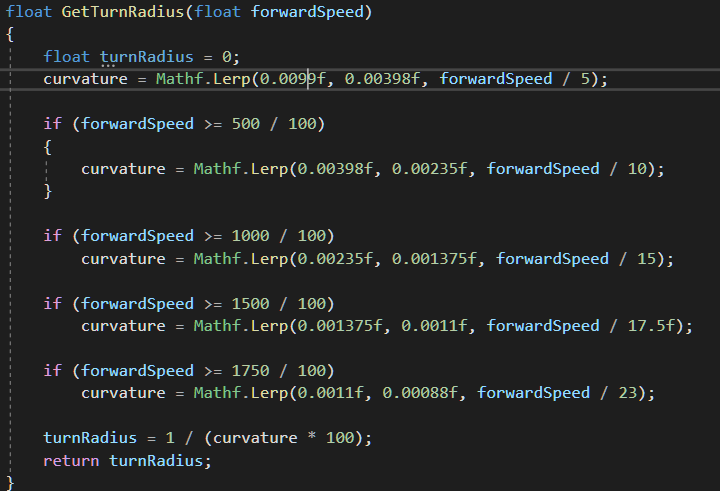
what is the easiest / clean way of programming the following interpolation in Unity?

so we linearly interpolate between break points, I tried using Lerp but then my way it too much code and probably not correct - https://i.imgur.com/hEChqel.png
 viral ginkgo
@cosmic axle turn it into if else blocks
curvature is updated in multiple if's
and reverse the order on if blocks
cosmic axle
yea I had it with if else with the reversed order but smth didnt work so I made it fool proof. The bug was smth else so the reverse order of if else is correct @viral ginkgo
is this they easiest way of interpolation the function?
looks clunky
I think my code might incorrect, since Mathf.Lerp(0.0011f, 0.00088f, forwardSpeed / 23) would give me 0.0011f when speed is 0, but it should be 0.0069f
I need the Lerp function where you give the range for the "b" value too
viral ginkgo
@cosmic axle you might be using the lerp wrong
naive remnant
i think this is not lerp😅
cosmic axle
this is correct
curvature = Mathf.Lerp(0.0069f, 0.00398f, forwardSpeed / 5);
naive remnant
it is more like remap
cosmic axle
yea, I need remap
float map(float s, float a1, float a2, float b1, float b2)
{
    return b1 + (s-a1)*(b2-b1)/(a2-a1);
}
if lerp interval is 0, lerp will output first value
if 1, it will output last value
viral ginkgo
forward speed doesn't sound like something you should be using for lerp interval
cosmic axle
but I need lerp where I specify the start range of the value in question, so the remap I given above, I think
I do, I calculate the turn radius based on forward speed
naive remnant
math has remap method😅
cosmic axle
Clamp?
google says one can use this
var result = Mathf.Lerp (10, 100, Mathf.InverseLerp (1, 5, 3));
mathf doesn't have map?
naive remnant
unity mathematics has remap method, but i dont know if it is what you want🤔
cosmic axle
what is the func called? @naive remnant
naive remnant
Returns the result of a non-clamping linear remapping of a value x from [a, b] to [c, d]
cosmic axle
name of the func pls?
naive remnant
Unity.Mathematics.math.remap
viral ginkgo
but you need Unity.mathematics
cosmic axle
lol
viral ginkgo
you need to get it from package manager
cosmic axle
is it part of unity?
cosmic axle
nah then I use this instead:
public float scale(float OldMin, float OldMax, float NewMin, float NewMax, float OldValue){

    float OldRange = (OldMax - OldMin);
    float NewRange = (NewMax - NewMin);
    float NewValue = (((OldValue - OldMin) * NewRange) / OldRange) + NewMin;

    return(NewValue);
}
just use math, jobs and burst😅
sly violet
My recommendation is to use a Physics overlap function to get an approximation (it can be a bit larger) of what colliders are in your target position before you teleport. Then, if you collide, you can bring it inside that collider and check again...
sly violet
That sounds about right.
 rotund urchin
Hi all, in a project I am working on crane simulator where you have to move a single large object using four different suspended hooks where you can move each hook independently from the others.
I ain't no physics wizard, which is why I am seeking your wisdom. How should I approach this? I have previously played with physics and mass spring systems so many of the concepts I am aware of. However, I am not exactly sure how to approach this still.
From my understanding, Unity's native joints will not work well for this, because we are talking about 4 x end joints that will have to manipulate a single rigid body. Because the order of how spring calculate their forces, I would assume this would start oscillating. Therefore, my current assumption is that I need to build the physics up myself. I found this guy's rope physics to start off with which does a pretty decent job at both rendering and simulating a rope: https://www.habrador.com/tutorials/rope/1-realistic-rope/
But, my mental capacity is reached when I begin to think how these 4 individual ropes should affect the single objects. Any suggestions? Should I sum up the forces of each rope and then apply each rope's summed force using Rigidbody.AddRelativeForce?
Also, I added a beautiful MS Paint style concept drawing, just to illustrate my problem. The red lines are the ropes and the large box is the object they have to maneuver arround.
This is a tutorial on how to create a swinging rope in Unity. You will learn how to create both a realistic rope by approximating the rope with springs and a more simplified rope. In this section you will learn how to create a realistic rope in Unity with C# code by approximat...
 timid spoke
Hey everyone. Quick question: If i have a collision between a fixed object and a dynamic object, why is the relative velocity of the collision not the same as the velocity of the moving object?
rotund urchin
Related to my above question, do you believe an asset such as Obi Rope could do the trick?: https://www.youtube.com/watch?v=kM36Q1m3jSA

Oriented particle physics for Unity, exceptional performance.
See the Asset Store page: https://assetstore.unity.com/packages/tools/physics/obi-rope-55579?aid=1011l34eQ
Visit the official Obi Assets website: http://obi.virtualmethodstudio.com
 halcyon grove
Can i make 2 layers that ignore raycast
viral ginkgo
@timid spoke if you want to calculate something like an impact force, project the relative velocity on collision normal
@rotund urchin That asset looks damn good
If you don't want to pay for it maybe you can consider "not segmented" ropes
it will just apply force between point A and B
A simple pid controller and some AddForceAtPosition() should do the trick
But you don't get that ropey wiggle waggle since you don't have rigidbody segments, but it should be very fast and efficent
Oh, if you want swinging rope though, i dunno
Segmented rope might look better for it, but if you just need it for hanging platforms only, simpler ropes might work
rotund urchin
@viral ginkgo What is a pid controller?
timid spoke
@viral ginkgo the problem is a little bit more complex and i was just wondering why the relative velocity would not be equal to the velocity of the moving object if the other object was fixed...
viral ginkgo
@timid spoke if the dynamic object is rotating, then relative velocity is probably velocity on collision point on the dynamic body
not sure but that would make sense
also i believe in oncollision enter, collision forces are already applied and velocity is modified
so if you did the comparison, if velocity on point wouldn't matter, i believe relative velocity wouldn't equal to rb.velocity
but it would equal the last velocity just before the collision enter
or point velocity if relative velocity is calculated using velocity on point's
timid spoke
The actual problem is here: https://forum.unity.com/threads/manual-bouncing-calculation-not-working.844609/ :)
Unity Forum
Hi everyone,
i am currently trying to find a way to let one object with a rigidbody bounce of a collider. Usually this would be done by using the...
viral ginkgo
@timid spoke do you also set friction to 0?
that would make sense in real life, i don't know about unity's physics though
i thought maybe some of the energy is going into angular momentum
viral ginkgo
hmm, i dunno
it should be bouncing without energy loss
timid spoke
Yeah, but it sometimes doesnt, thats my problem :)
viral ginkgo
if you lock the fixed time interval, it should improve i believe
@timid spoke your bodies are continious dynamic?
viral ginkgo
@timid spoke it's not, fixed update may call with up to 0.33 fixedDelta times, when your game lags
by default settings
timid spoke
Yeah but fixed update is the physics timestep
viral ginkgo
if you had a 0.33 physics timestep, you collisions might get weird
timid spoke
Why?
viral ginkgo
i don't know how collisions work really, at that detail i mean
timid spoke
The timestep size should not be a factor, especially when using continuos collision detection
viral ginkgo
you might need to implement your own bounce script if you really want super good persistency
something with spherecasts, Vector3.reflects and collision.normals if you know what i mean
timid spoke
Yeah, i did ecactly that, and it keeps loosing velocity randomly.
viral ginkgo
@timid spoke It has to be a factor when two dymanic bodies are colliding, but i don't know if their collision detection methods change when it's betten a dynamic and static body
timid spoke
It shouldnt be
viral ginkgo
it's difficult to know detecting when two dynamic bodies will collide, think about it
it probably requires iterations
timid spoke
Yeah its done by sweeping.
It is not the problem that collisions are missed.
Collisions are detected just fine.
I know how this works down to the last formula but it just does not work like it should ...
Thats why this is especially annoying :)
timid spoke
It might be on the right track: It seems like the velocity that gets reported by the collision object in OnCollisionEnter might in some cases already have the newly calculated velocity after the collision was resolved. If i save the speed from the previous physics frame and use that one instead it looks like it is working fine... now i just have to find a way to generalize this for all objects that need to be bouncy 🙂
viral ginkgo
@timid spoke
If collision reflect angle is always correct, you could use the previous speed to keep speed same
silent mural
im having problems correctly reading the rotation speed of an object. I want it to tell me how fast it moves on its own local axis.
rb.angularvelocity does not give me the results i want sadly.
viral ginkgo
@silent mural Vector3.Dot(rb.angVel, transform.right)
rotatuon on local right axis example
silent mural
will try, thank you
meh back to highschool math i go it seems lol
altough im glad unity already has methods for dot and crossproduct, so i dont have to write them myself
viral ginkgo
dot is just projecting a vector on another and checking distance
cross is returning a vector perpendicular to two vectors and thats enough info to make alotta stuff
silent mural
what exactly does the rb.angularvel vector tell me?
viral ginkgo
@silent mural magnitude of it should be its max angular velocity on its main rotating axis
hm, now that i think
if an object rotates in an axis 45 degree to right
and you dot its angvel on right
thats just weird to think about
dot will tell rotation speed is
1/sqrt(2) * rotationspeed
on right axis
silent mural
yeah your method tells the rotation speed on the specified axis.
it also is stable (other than angularVel) if i apply other axis rotations
what unit do i get from your dot method?
viral ginkgo
it means that you can sum rotation on forward and right (0,0,1) and (1,0,0)
and come up with this (1,0,1)
and its mag is sqrt(2) thats your new rot on
right + forward axis
@silent mural i don't know what unit is that really
i never needed to find out what unit that is
silent mural
i mean is it degree/second or turns/minute ?
viral ginkgo
maybe revolutions per second
silent mural
hm ill test a bit
i hate when stuff like that isnt obvious. took me 2 hours the other day on a similar thing to figure out it wants radians as input instead of degree
timid spoke
@viral ginkgo yeah, saving the pre-collusion speed is the solution i came up with :)
viral ginkgo
nice
silent mural
Thank god for you Bargos, i finally have a stabilizer system in my spaceship that i dont have to hate
now i just have to find out the unit of the dot product
viral ginkgo
@silent mural
this is the best stabilization system
rb.angVel *= 0.95f;
😋
silent mural
nah, then i can directly use angular drag. i want it to consistently decrease according to the thrusters strenght
also angular drag was bad bc it reduces the angular vel in an exponential function
so the closer to 0 you get, the weaker your stabilizer
very annoying for precise course plotting
viral ginkgo
Vector3 newAngVel = rb.angVel * 0.95f;
Vector3 delta = newAngVel - rb.angVel;
delta = Vector3.ClampMagnitude(delta, 0.1f);
rb.angVel = rb.angVel + delta;
you can limit the velocity change when using lerp
silent mural
dont quote me but i suspect the dot products unit is 2 pi = 1 rotation/second
so radians?
read online to not directly modify angVel 🙂
viral ginkgo
so you only want torque and force?
silent mural
yeah basically
silent mural
next step would be forceAtPoint so i can disable one of the maneuver thruster systems or destrtoy on hit etc
viral ginkgo
@silent mural you may not really want to make things that physically accurate
unless you want something like kerbal space program you know
space engineer is far from physically accurate for example
@silent mural
accurate physics may not improve gameplay and limit your options depending on your game design
 sterile patrol
Anyone know any good tutorials on programming in vaulting, wall climbing and running mechanics?
silent mural
yeah i know, but my game is literally supposed to be the crossover of kerbal space program and starmade (minus elliptic axis around celestial bodies)
i can always downgrade accurate physics afterwards, better to do it right from the beginning
well "game". its just a thought experiement. i wanted to see how warfare in realistic space looks like
viral ginkgo
@silent mural hmm yeah, no game ever seems to have realistic space fight
i wonder how that would be since ships have to be in orbit, they need to be very fast
and if they are not in the same orbit at same time, they can't fight:D
silent mural
yeah thats why i scrapped the idea of orbits
viral ginkgo
I'd keep the orbit idea and make the game into more casual-like
silent mural
give how complicated it is to get into docking (or fighting ) range with another ship, it would get far too complicated if your target starts evasive maneuvers
so now its just 3d space where you dont have drag or gravity
another problem with orbit was that for a multiplayer compatible game, the wait times to complete the orbits are just too long
and they scale to fast
silent mural
if you want to change your orbit you have to accelerate and wait half a turn to actually see the effect. its a chain of maneuvers and long wait times
viral ginkgo
i was thinking you'd fight without actually seeing the other ship
silent mural
with torpedos probably. (which i havent built yet)
with kinetic weapons its in visual range
viral ginkgo
or lazors (fast travel)
silent mural
so far i can tell that normal kinetic weapons are far to short ranged. even the mach 7 railgun of the navy is way to easy to dodge
viral ginkgo
@silent mural or just decrease the gravity so orbit velocities are slow
ships should be big and visible
silent mural
we`ll see how it all turns out 🙂 ill try to keep engagement ranges short enough to actually see something
viral ginkgo
and you'd just try to shoot into enemies orbit, see the projectiles accumiliate in enemies orbit
silent mural
otherwise i dont need 3d space
ill try and implement the more standard weapons first, lasers and torpedoes are probably the non plus ultra
viral ginkgo
enemy could overdrive force fields and headbutt the accumiliated projectiles n stuff
silent mural
cant dodge either, cant even shoot down lasers
i thought about force fields and weaponized debris, but i wanna keep it more at a "soviet tech in a space war scene" level, so thats probably ruled out
also, the more futuristic you go, the bigger the engagement ranges get and the less BOOM you can see
viral ginkgo
yeah
silent mural
one of problems right now is that my canvas i glued on a 3d cube as a screen starts to wobble at higher speeds
eventually so bad that you cant read anything on it.
viral ginkgo
does that cube move in Update with deltaTime
viral ginkgo
does the ship move in update with deltatime
so it's physics
does it have interpolation on?
the ship
silent mural
ship gets applied force and the physics engine moves it
has no interpolation on its RB
viral ginkgo
hmm
if you'd make a script on ui, camera objects
and move it with update() with delta time
at constant speed towards players ship
it should be fine
(not having camera parented to ship this way)
silent mural
i want that specific canvas to be part of a 3d cockpit if possible
viral ginkgo
oh, i see
silent mural
should i instead unglue the cockpit and move that at update with the ship?
sly violet
You might consider having the cockpit be drawn by a separate camera on top of the main camera.
Then it doesn't have to move at all.
viral ginkgo
interpolation should've fixed it though
@silent mural
you sure all rigidbodies might have an influence on camera have interpolation on?
silent mural
ill check again
sly violet
With single-precision floats for position, you have to worry about precision at about 10,000. Keep that in mind if your space is expansive.
I made a physics-y space game prototype. Not sure I'd call it realistic, though. I mean, I wouldn't. But it does have orbits.
https://pyrian.itch.io/orbiceptor
viral ginkgo
I believe physics simulation space much smaller
silent mural
the camera is smooth and so are the 3d objects, just the world space canvas is not
viral ginkgo
oh okay then, what i said was irrevelant
sly violet
What, exactly, is the point of having a world-space canvas and then childing it to the camera, anyway? Isn't that just a normal canvas with extra steps?
silent mural
well the canvas is childed to a 3d objcet and not the camera
so i can "move the head" inside the cockpit
oh boy the more i do the worse it gets
viral ginkgo
@silent mural
sounds like maybe you'd want to make the cockpit stuff with 3d texts (text mesh pro)
and sprites
silent mural
i will look into that
silent mural
im seriously considering locking the player and his cockpit in a fixed positon and have him "remote control" the ship
well, gonna look into it tomorrow
 edgy aurora
how do i fix the error
Non-convex MeshCollider with non-kinematic Rigidbody is no longer supported since Unity 5.
If you want to use a non-convex mesh either make the Rigidbody kinematic or remove the Rigidbody component. Scene hierarchy path "Player/Ship/Model", Mesh asset path "Assets/Models/FighterShip.fbx" Mesh name "Model"
i want to move a rigidbody using velocity
lapis plaza
use convex mesh collision or some physics primitive shapes (sphere collider etc)
wraith swan
How to pass a float2x2 to a compute shader?
I can only find Matrix4x4 in UnityEngine
I'm doing a GPU physics work, that need a matrix property
viral ginkgo
@wraith swan maybe you can pass float[4] and cast it to float2x2 just a guess
wraith swan
That might work if ComputeBuffer pass the property floats in just right order
I'll try it
silent mural
Would you guys recommend this idea to reduce performance impact with colliders:
i have a bunch of asteroids that do nothing floating around, i think about giving them sphere colliders with radius * 2 which activate the mesh collider on collision. that way the cheaper sphere collision is run permanantely than the mesh collider.
(or is that even needed?)
proud nova
Does moving them around move them out of sleep?
silent mural
they dont move, just slowly rotate
viral ginkgo
@silent mural I believe physics engine will firstly check for bounding box intersection, and then check for mesh intersections
Not sure but they must've made that optimization i believe
If they did this optimization already, i wouldn't worry about that stuff
silent mural
ah yeah that makes even more sense
viral ginkgo
You can also check the physics frame time with mesh colliders on vs sphere colliders on without any collisions
I believe it will make no difference
silent mural
what should i set the colliders to? continuous or sth else?
viral ginkgo
if they are small and fast, continious
silent mural
and for huge and stationary?
viral ginkgo
stationary things are rigidbodies?
silent mural
yeah
silent mural
okay
viral ginkgo
discrete collision detection will check pos every 0.02 ms when checking collisions
so if you shoot a fast thing into a thin plate, it's very likely to penetrate with discrete col
if you are going to have that situation, you use continiuos
silent mural
do both colliders that are part of the collsion have to check continuos for that?
viral ginkgo
the fast moving one needs to be continious i believe
@silent mural
you could maybe
turn continious if speed > somevalue
but worry about these when you actually have decent lag going on
ECS could have big advantage if you really want to have too many things and want to optimize it
@silent mural
But it's very difficult now imo, just because stackoverflow and unity forums dont have much info yet
stuck bay
Hi, I am using 1:1 movement from the mouse input (Topdown View 3D) to move a cube.
1:1 i mean when u move the mouse from top left to bottom right of the screen,
the cube would follow that exact same path / start and end (replay)
Now if I add obstacles it is not playing nice: If you go really fast with the mouse, the cube will zoom through walls ignoring collisions apparently.
I am using the MovePosition of it's rigidbody for this.
I know AddForce is a solution for this but I am unsure how to calculate the correct force and such so it still follows the same route.
sly violet
@stuck bay So, wait, it's not going through walls if you go slowly?
MovePosition usually goes through walls regardless...
Maybe you're not calling it every fixed update?
Then it might get ejected from the wall between calls.
...Anyway...
stuck bay
No. Moving slow is like its shaking at the wall
it might or might not be the case that I don't call it every FixedUpdate
It goes through the recorded input which may have gaps
So how do I do it with the AddForce ? 🤔
sly violet
So with MovePosition you're just placing it where you want. To accomplish the same thing with AddForce, you have to give it a net velocity that will theoretically place it where you want. You'll also need continuous collision detection and you'll probably want to run it every frame or it will fly off when you stop moving the mouse.
It's usually done a different way.
"Ghost hand" method:
Create a kinematic rigidbody without a collider and simply place it with MovePosition as you're doing now. Then, connect the box with a Joint, often a FixedJoint but you can get more flexibility with a Spring Joint if you want to tune it.
The Joint places the target box, so it will respect colliders and physics as normal. ...It still might need continuous collision detection, though.
stuck bay
that sounds needlessly hard
sly violet
...Which?
By my reckoning "ghost hand" is easy mode. You don't have to code anything you don't already have and the joint does all the work.
still pecan
Hi! I'm doing a game and I need to use Off Mesh Links. Does this need a separate code to work? I actually see the link in the navmesh but it doesn't work
stuck bay
Connect it to what?
viral ginkgo
@stuck bay
you can control the object just with force
you might get it pretty snappy if you use a simple pid controller to figure out the force
snappy enough so it's able to follow mouse as you want
silent mural
Whats ECS bargos?
viral ginkgo
@silent mural
What are the benefits of the ECS? The memory layout of data-oriented design ensures that the code generated by ECSperforms significantly fewer jumps between memory addresses than traditional object-oriented programming.
from google
it does increase performance alot depending on the case
silent mural
thanks, i will look into its manual once i run into performance problems 🙂
 pale stratus
I am having some issues with the rigid body usage
The gravity of the player works fine but the sad part is that it just goes right through the the other player known as the floor/ground (the ground being a cuboid)
How do I fix this

ping me while answering
nvm
I had box collider off for some reason
silent mural
I split my spaceship mesh into multiple smaller parts, is it possible for all of them to have own colliders? Or do i need one big "all in one mesh" collider?
coral mango
Depends on what you are trying to do; generally, if you use a rigidbody, it combines the colliders of children, unless you have a rigidbody on the child as well.
 viscid skiff
I am trying to do a 2d movement and collision with a wall for example I got this going on:
private void Update()
{
HandleMovement();
}
private void HandleMovement()
{
float moveY = Input.GetAxis(verticalInput);
float moveX = Input.GetAxis(horizontalInput);
Vector3 moveDir = new Vector3(moveX, moveY).normalized;
Vector3 targetMovePosition = transform.position + moveDir * speed * Time.deltaTime;
RaycastHit2D raycastHit = Physics2D.Raycast(transform.position, moveDir, speed * Time.deltaTime);
if(raycastHit.collider == null)
{
//Can move char, no hit
transform.position = targetMovePosition;
Debug.Log("Move");
}
else
{
//Can not move char, hit something
}
}```
but as soon as I added the raycast and if statement i cant move the character anymore could someone help me out reef breach
i added capsule colider to my character (humanoid) when i play my character automatically float in the air?
do i need capsule colider even tho i have character controller?


 silent mural
@viscid skiff have you tried debugging whicj of your code fires? Does it give false positives on hit?
silent mural
how does unity calculate intertia of a rigidbody?
trying to calcuate what torque i need to decelerate a rotating object but im kinda stuck
silent mural
um the rb.addForce method is really confusing me the deeper i dig down.
is it adding or applying force? it seems to be "apply", because if you call it once, the acceleration of the rb will go back down to zero.
also for how is that force applied? for the time.deltatime until the next physics update?
or for 1 second?
silent mural
whats the default if you dont specify a force mode? impulse?
it has to be. i only experience acceleration if i call rb.addforce(0,0,1) repeatedly.
the same goes for torque. it doesnt have a time unit either which implies its rather a rotational Impulse adding instead of rotational force
dont quote me on the torque tho
silent mural
okay i figured out the addForce at least. it does in fact apply the force for the duration of the frame (probably.) maybe a fixed time interval:
New stats are: mass 1 angular velocity 0 velocity 0
UnityEngine.Debug:Log(Object)
forceDebugger:Start() (at Assets/forceDebugger.cs:19)

applying force to body, vector(0,0, 0,0, 1,0)
UnityEngine.Debug:Log(Object)
forceDebugger:Update() (at Assets/forceDebugger.cs:27)

New stats are: mass 1 angular velocity 0 velocity 0,02
UnityEngine.Debug:Log(Object)
forceDebugger:debugStats() (at Assets/forceDebugger.cs:40)
//-> F = m*a = m * v / t
// -> 1N = 1 kg * 0,02m/s / t
// t = 0,02s (was run from update)
i gotta say, its kinda dumb to have the default method be "apply force for 1 frame". thats not at all intuitive.
 half rampart
What is an efficient way to query for all mesh colliders within certain distance from a point in all directions? (sphere)
hmm that masks based on layers, i wonder why not tags...
anyways, thank you, I will try this out.
i'm afraid I dont' know the answer to that... still a beginner...
half rampart
hmm for some reason Physics.OverlapSphere with layer mask doesn't work
Without the layer mask it finds collisions properly
I did something like
int layer = LayerMask.NameToLayer("LayerName");
Collider[] hitColliders = Physics.OverlapSphere(
  center,
  radius,
  layer );
That's not how you are supposed to do it?
I get hitColliders.Length == 0 if I do that...
stuck bay
@half rampart
layerMask A Layer mask that is used to selectively ignore colliders when casting a ray.
silent mural
i wrote a homing missile yesterday with realistic flight behaviour in space, ergo preservation of momentum and its starting to look a lot like space missiles are best to be spheres and not torpedoshaped tubes
since they need to turn fast to correct course on evading targets by thrusting perpendicular to the flight path
viral ginkgo
@silent mural missile should look at thrust direction
are you doing LookAt's or torque stuff?
silent mural
Lookat
Missile needs to look vertical to flight dir to change course left or right
Just like a spaceship too
viral ginkgo
@silent mural
If you figured out a thrust force the missile,
Then look at direction should be that thrust
silent mural
i dont know what you are trying to tell me, but my missiles work 😄
viral ginkgo
oh okay then
silent mural
you re right of course, the missile needs to thrust towards the target, the more complicated thing was correcting the course
viral ginkgo
@silent mural are you happy with missle trajectory?
silent mural
im still working out how much i want the missile to correct its course .
viral ginkgo
you heard about pid control?
@silent mural
silent mural
nope whats that
viral ginkgo
Vector3 p = target - myPos;
Vector3 d = -myVelocity

Vector3 force = p * 5 + d * 2;
force = Vector3.ClampMagnitude(force, maxThrustForce);

rb.AddForce(force);
transform.LookAt(transform.pos + force);
@silent mural
silent mural
what am i looking at
viral ginkgo
if you increase d corrections increase
less likely to overshoot but slower
if p is high, missile is more likely to overshoot
you will adjust the p and d multiplier that i set 5 and 2 there
and maxThrustForce
only 3 parameters you need to set
viral ginkgo
p = proportional
adds force toward target
d = derivative
tries to slow down missle proportinal to minus missile velocity
there can also be an integral component
that will help if there are gravity fields, or heavy dampening
silent mural
ill need to put that ingame with some debug lines, i dont undertand what it does lol
rather, if it has course correction or not
viral ginkgo
if you put this code in your missile
and set the target as your targets pos
missile should work
set maxThrustForce to 50 maybe
decrease it if missile thrust is too strong
silent mural
kk will try
I will not be happy if that works. My solution is like 100 times that
Life isnt allowed to be simple
viral ginkgo
@silent mural well this is supposed to work if you set reasonable p,d maxforce multipliers
i dont know what kind of solution yours is
shouldn't have been that big
if the target is moving slow and missile has high D multiplier,
missile may cruise right behind the target forever
if that ever is the case, you need 3 more lines to that code to include the "i" factor
silent mural
thank god, my method works better lol
viral ginkgo
how so?
silent mural
if i launch the PIDs vertically, they overshoot. my missiles will break and go on a straight course with the target
viral ginkgo
increase multiplier to d
silent mural
is the pid method expecting the missile to have drag?
viral ginkgo
no
if you put in another term, it will deal with drag better
@silent mural Set maxThrustForce to some very big number
Like 999999999
Then tune the P and D multipliers @silent mural
silent mural
yeah now its hits but also moves with 10k g acceleration lol
thats a pid (red) vs mine (green) targetting that station and launched vertically
viral ginkgo
then decrease both p and d multipliers in same ratio
@silent mural
silent mural
same maximum thrust
viral ginkgo
yeah
tune the p and d without limiting the thrust with maxThrust i mean @silent mural
silent mural
ill keep my method thanks
i mean i wasnt actually able to dodge any of my missiles so they re fine
but i will implement that p and d thing. i need a smooth way to change between "aim directily at position" and "aim at future target pos"
viral ginkgo
should've probably limited p and d seperately
in a way that d max value will always be bigger than p max value
so slowing down will always be main priority
silent mural
p = 1-d maybe?
viral ginkgo
p + d = 1 this is not necessary
float maxP = 50
float maxD = 60

Vector3 p = target - myPos;
Vector3 d = -myVelocity
p = p * 5;
p = Mathf.Clamp(p, -pMax, pMax);

d = d * 2;
d = Mathf.Clamp(d, -dax, dMax);
Vector3 force = p + d;

rb.AddForce(force);
transform.LookAt(transform.pos + force);
Something like this should limit max velocity
 viral pilot
Hello, Im trying to use new Unity Physics with entities, I tried changing every value but the entities still slide off, I dont understand whats happening... if anyone can help me sort this issue, thanks.
viral ginkgo
@viral pilot
Thats what you get with stateless physics apperently
I have the same thing going on
viral pilot
Ou wow, so every dynamic object on the map will just slide away, noice 😄
viral ginkgo
no
dynamic bodies on dynamic bodies will slide
your stacks cant go too high
i dont k ow how that can be improved
havok physics will probably fix that
(but its paid i think?)
viral pilot
Its not paid for now but when it will fully release it should be paid yep
i've put like 1000 cubes and its like fluid frekin simulation that wont stop 😄
viral ginkgo
You really need to stack these cubes? @viral pilot
viral ginkgo
Okay then, you'll be fine
proud nova
Afaik the Havok engine license for Unity is pretty similar to Unity's setup
If you don't have any need for stateless/deterministic physics engine and want higher quality physics, you probably wanna check it out
 formal trail
Is having 0 friction on a rigidbody player character a good practice?
i have a problem where if friction is not 0 character speed constantly changes and cant settle on target value
so i set friction to 0 and friction combine to minimum
viral ginkgo
i have friction = 0 on my rigidbody characters too
i believe it's very common
formal trail
thanks
sly violet
Thing is... We often use rigidbodies sliding along the floor to represent characters that are walking across the floor. Dynamic friction just isn't "right" for simulating walking/running. So yeah, zero friction is usually the way to go.
viral pilot
does havok physics solved the fixed update problem that Unity Physics has?
 shell night
what problem?
naive remnant
@viral pilot no
viral ginkgo
What's the "fixed update problem" though?
viral ginkgo
we can't put timedelta's in physics sim?
if i was updating manually
can i not adjust deltaTime in runtime?
naive remnant
#if !UNITY_DOTSPLAYER
  float timeStep = UnityEngine.Time.fixedDeltaTime;
#else
  float timeStep = Time.DeltaTime;
#endif```from StepPhysicsWorld
physics updates in regular update, but uses fixedDeltaTime
viral ginkgo
Then you'd need to adjust Time.fixedDeltaTime foreach SystemGroupSimulation update?
depending on how long previous SimulationSystemGroup update took
naive remnant
they added functionality to control systemgroups update behavior
you can make SimulationSytemGroup update in fixed time steps, but TransformSystem is in simulationsystem group😅
viral ginkgo
@stuck bay raycast doesn't hit backfaces afaik
if you tried to cast a ray from center of a sphere outside, it should not return that sphere but return the next thing it hits
that was probably not necessary
there this setting
I'm thinking ray doesn't return the thing because of this
Since you already dealt with ignoring the player itself, you can enable this and i believe your raycast wont miss
@stuck bay Can you maybe add another collider-only object as child?
And having the rigidbody in parent only
I have no idea if it will make a difference though
But i believe rigidbody in parent, all colliders in children is how it's supposed to be
If you wanna have multiple colliders i mean
I am not sure if it will fix it though
Wait
@stuck bay Do you mean it doesn't detect anything or it detects only the parent?
viral ginkgo
@stuck bay "collision.gamobject" is probably only returning the parent rigidbody
"collision.collider.gameobject" might be what you are looking for
I am not sure though, it's been since i last dealt with this stuff
 jovial river
I'm confused about joints. Do you attach the joint component to the thing that moves or the pivot point(what the object rotates around)?
 obsidian willow
Hi everybody
I'm trying to use transform.up with Rigidbody.MovePosition() but the object is moving up ignoring its rotation
transform.up should represents the green axis of my object, but don't matter its rotation it's just moving constantly to above.
Someone knows what could it be?
The line of code:
rigidBody.MovePosition(rigidBody.position + (Vector2)transform.up * Time.fixedDeltaTime);
it's a 2D game, top-down to be more specific
stuck bay
So you want it to rotate also? @obsidian willow
If you have it in the update it will move constantly you may want to set an if condition to stop it
obsidian willow
my problem is not the constant movement, actually he's moving only when I click the button
the problem is that the object is not moving on the direction it is facing, instead it's moving up, ignoring the rotation
:/
obsidian willow
I've just solved it..I'm feeling myself a dumb XD
I just had to change transform.up for Player.up
basically I was using the absolute transform.up instead of the object transform up
🤦♂️
anyway, thanks for the help
 violet rivet
how do i figure out the end point given the position of an object, the angle vector and the distance?
 lapis dune
anyone know how to get better/more accurate shapes from the tilemap collider 2d?
@violet rivet I would say something like transform.position + (angleVector*distance)
assuming angle vector is a unit vector
violet rivet
ah i've found a much simpler solution is to use relative position
and use LookAt to make the camera point at the object
lapis dune
yeah I think rigidbodies are required for OnCollision methods to be invoked
i dont think even OnTrigger will work w/o them but im not 100% on that
 thin karma
Hi, small question: Is there a way to get input events multiple times per frame? I have a physics simulation where I'd like to poll for keyboard events every 10ms (as opposed to 16ms each frame).
violet rivet
how do i make so when i'm looking at a cube, the debug log shows whether i'm looking at the right side (x+), left side (x-), etc.
I'm making a block placing system so I need to know how to do that, probably involves raycasting?
sly violet
Raycasting is overkill for that, you should be able to work it out from the vector between the cube and the camera in the cube's local space.
violet rivet
So if I want to apply to all blocks in the game do I have to attach the script for every block?
or is there a general way to do this?
since i can only look at one block at a time
sly violet
Then you only need one instance of the script. Maybe on the camera, or whatever UI element you're tying to the cube side.
Mind you, you might need a raycast just to determine what cube you're looking at.
violet rivet
yeah that's what i was thinking
what's the relation between camera vector and the cube's local space?
how do i deteermine the side from that?
violet rivet
alright i kinda got it working but the debug.log only works for one block once
is it because it's on FixedUpdate() ?
Alright nevermind it's working now
i was using the position of the object that i hit not the point of impact
formal trail
is OnCollisionExit guaranteed to always work correctly? or are there some situations in which it might break?
i mean is there 100% certainty that for every OnCollisionEnter there will be exacly 1 matching OnCollisionExit
prime flower
anyone know why cloth would not be interacting with sphere colliders?
the colliders are set in the component, the cloth moves during runtime by itself slightly, but the spheres just pass through it
 silver vector
Is there a way to merge tilemap colliders so that you cant have things slipping throught the cracks between them?
 hasty kiln
hi, I have a question, what is the exact formula that, with a rigidbody and a endpoint get the exact force to add that can reach the given point
let me provide some context, I'am working on a 3d game that use spaceships, the spaceships can be used by the player and the AI, so I added the standard unity physics system to the idea, adding rigidbodies to the ships and making the engines addforce with forcemode Impulse
I created my own pathfinder algorithm, based on A* that give the next waypoint, that seem to work well, but the phisics didn't work as newtonian physics, specially drag, I found this https://forum.unity.com/threads/drag-factor-what-is-it.85504/
wich I can understand, calculate the real (newtonian) drag each frame need the squared root at least two times, and the current drag give a good visual effect
so when I use the usual drag formula, the force is exessive and the ship end stamp on the obstacle.
specially when have a long distance to the obstacle and a close turn after that
when I tried a squad of 25 ships go trough meteorites was like...
so I need a formula that take the distance to the object, all the options (any needed) from the rigidbody, and give the force to jump that distance.
any ideas?
Unity Forum
What does the rigidbody.drag value represent?
Is is the Reynolds number or something arbitrary in PhysX? I can't find any info on it, besides "it's...
silent mural
do you even want drag on the ship?
and what do you need to know the drag for?
i dont know how its calculated but you could do some simple tests, give the object a push and see how far it floats
@hasty kiln
stuck bay
hey guys, i need help with my projectile it keeps going backwards xD
stuck bay
@stuck bay Well, you could look if your Projectile Speed is positive or negative😂
XD I fixed it xD
turns out it wasn't connected to one of my other scripts xD
 mossy stag
silly question that i'm just too tired to brain
i've got a falling boulder, and i want things to get damaged if they get hit by it.
but i don't want to apply damage if the player runs straight into it at max speed.
realistically the player would take damage if running into a large boulder.. but yea..
so.. i figured i'd just compare the velocity of the rigidbodies but they are already modified by the collision in onentercollision it seems?
stuck bay
How do I add more gravity to an object so that it falls quicker after it jumps in 3D?
viral ginkgo
@mossy stag
If you compare velocities inside OnCollisionEnter, collision is solved and they are already modified (i belive that is how it is from my testings)
You should use collision.relativeVelocity in OnCollisionEnter for that
If you only want to look at boulder velocity to determine damage, you should store the boulder velocity into some additional variable, so you'd look at that in OnCollisionEnter
 distant vapor
How do i move a non kinematic rigidbody cube a fixed distance like 10 units on z axis? ( It should use gravity and detect collisions and triggers)
silent mural
If ( dist < 10) addforce in z?
silent mural
Eddy how about a raycast in 8 directions and then pick the closest one to pop out that side?
viral ginkgo
@distant vapor if you wanna move objects woth force and have that as snappy as possible, you use pid controller
If you don't want to use force:
or just spherecast and stop the object at the point where spherecast is hit
Or set velocity on z axis directly until rigidbody has reached that point
While preserving x and y components
distant vapor
Okay I'll give it a shot thanks @viral ginkgo
formal trail
how do i check if a collider is of given type? tried
if (cder.GetType() == UnityEngine.BoxCollider)```
but unity says `'BoxCollider' is a type, which is not valid in the given context` drifting sleet
@thin karma you would have to use the new input system and https://docs.unity3d.com/Packages/com.unity.inputsystem@1.0/manual/Settings.html#update-mode
formal trail
thank you
thin karma
@drifting sleet thanks, i'll try that! 🙂
drifting sleet
@formal trail use if (cder is BoxCollider boxCollider) { /* reference boxCollider here */}
@restive moat it is very challenging to do what you want generally. My recommendation is to design areas, in the scene editor, that are always safe to teleport to. the problem is that unity does not store physics geometry like that in a format that makes it easy to answer questions like you're asking, and if it did, it would not be able to do so efficiently on anything but static colliders
drifting sleet
one easy way to do this is using the navmesh
and setting your character radius to the size of the thing that is getting teleported
the query you are asking for is possible with navmesh
there's a huge math problem disguised in the question your asking, and navmesh answers the math problem

just looking at navhmesh, especially in that doorway
or near the wall on the lower level
it should be really clear to you that the navigable area calculated by the navmesh is "safe to teleport to"
and observe the "agent size" parameters
which is meant to communicate, "not overlapping"
you can actually directly ask a navmesh "what is the closest point on the navmesh to this other point"
navmesh does support runtime re-baking, but if your stuff is static, it is fine
you can visualize everything in editor
@restive moat is this helpful?
yes
if you need a 3D version of a navmesh, it's more complicated
you would need to use a different package, like https://arongranberg.com/astar/
@restive moat you kind of have to know the math problem that's hiding under the question FindClosestToEdge to understand how navmesh is related to your issue
in unity most people just want to put geometry inside a game and let you move around
and things being pretty intuitive and natural
in Unreal and the Source engine, everything is 3d navmesh
versus unity, where you have everything is physics and optionally 2d navmesh
i actually don't know if there's a 3d navmesh (i.e. 3d octtree baking) for unity
so if you are making a game where you teleport around
you sort of have to just fake it
teleport around to a ceiling
like you have a teleportation gun
and then your character just teleports there