#⚛️┃physics
1 messages · Page 45 of 1
 silk sky
 undone crow
Hi!
So I need to code some sway bars for my car but I'm really stuck
If someone could help me out that would be so cool thanks
 wintry void
Can anybody help me with my groundcheck script? I know im close but im not there yet
also unity gives me checkbox for "isGrounded" and I have to check or uncheck it to allow jumping or to make me stop jumping
 full kite
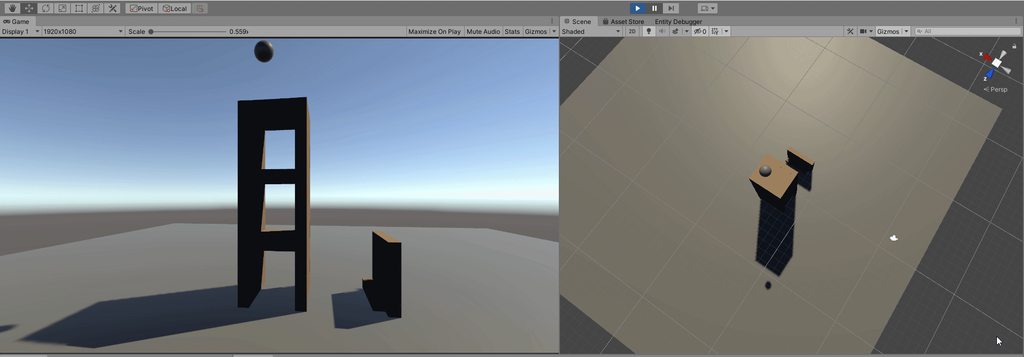
Hello I currently have this scene setup with several blocks. Each block is using the Physics Shape and the Physics Body from Unity Physics Dots package. The problem I'm experiencing is maintaining a velocity of 0. I'm force setting the linear velocity for each block to 0 inside of an update method. The block velocity is surely set to 0, however when the next iteration comes around the velocity is updated to a very small number such as .004. What would be the best method to maintain a velocity of 0 without changing the motion type or gravity?
full kite
I get some of the results I want when disabling and enabling gravity, however it creates some sideeffects that could be easily countered by just ensuring the velocity is at 0 unless truly acted upon another force. https://i.imgur.com/YxK1p6E.gifv
 full kite
public class BlockController : MonoBehaviour
{
    public Rigidbody rigidBody;
    void Start()
    {

        rigidBody = rigidBody ?? gameObject.GetComponent<Rigidbody>();
        rigidBody.isKinematic = true;
        rigidBody.constraints = RigidbodyConstraints.FreezeAll;
        rigidBody.velocity = Vector3.zero;
        rigidBody.angularVelocity = Vector3.zero;
        Invoke("SetActive", 3);
    }

    // Update is called once per frame
    void Update()
    {
        rigidBody.velocity = Vector3.zero;
        rigidBody.angularVelocity = Vector3.zero;

    }

    void SetActive()
    {
        if (rigidBody == null)
        {
            return;
        }
        rigidBody.velocity = Vector3.zero;
        rigidBody.angularVelocity = Vector3.zero;
        rigidBody.isKinematic = false;
        rigidBody.constraints = RigidbodyConstraints.None;
        Debug.Log("SETTING ACTIVE");
    }
}
I've swapped to native rigidbodies and the first image is what the cubes look like when they're perfectly aligned. The second image is the cubes after setting isKinematic false and removing the constraints. I'm trying to gets the cubes to be perfectly aligned and have collisions enabled so I can throw a ball for example at the cubes and have them fall.
 potent pine
@full kite why not enable the cubes only on impact of the ball ?
full kite
The problem is if the ball hits 3 cubes in the bottom layer and we activate those 3 cubes, the rest are left unactivated. Then it creates a mess of having to manually determine which cubes should be activated. If I could just get the cubes to stand still until a force is applied from anything, my problem would be solved.
 stark bolt
cant you just wake em all up when the impact happens?
potent pine
^^ and if you want specific events to happen maybe use a trigger?
place a single trigger collider encapsulating the entire cube
it looks like it only stops when it is about to exit the collider
 acoustic lynx
Hi i have a script that calls Physics.IgnoreCollision() for 2 objects' colliders inside a OnCollisionEnter() function
now what i'm observing is that the collision is ignored. but seemingly the first frame still has a collision
why is the physics system lagging one frame behind? isn't this a normal use case that you would like to prevent a collision when you detect it?
Ok it seems that normally that's where you would use triggers. but sadly these don't give me a exact collision point
stark bolt
I mean thats kinda whats expected right? The collision happens, and then you disable collision? Of course that first frame of collision is gonna apply collision response impulses
perhaps you can use a raycast or something to determine that a collision is gonna happen before it does?
acoustic lynx
yeah it won't work that way i'll be doing raycasts instead
 nimble frigate
can someone give me advice on how to raycast on ECS ?
i keep getting this error:
InvalidOperationException: The previously scheduled job Broadphase:AdjustBodyIndicesJob reads from the NativeArray AdjustBodyIndicesJob.HaveStaticBodiesChanged. You must call JobHandle.Complete() on the job Broadphase:AdjustBodyIndicesJob, before you can deallocate the NativeArray safely.
 naive remnant
Have you read documentation?😄
 zinc furnace
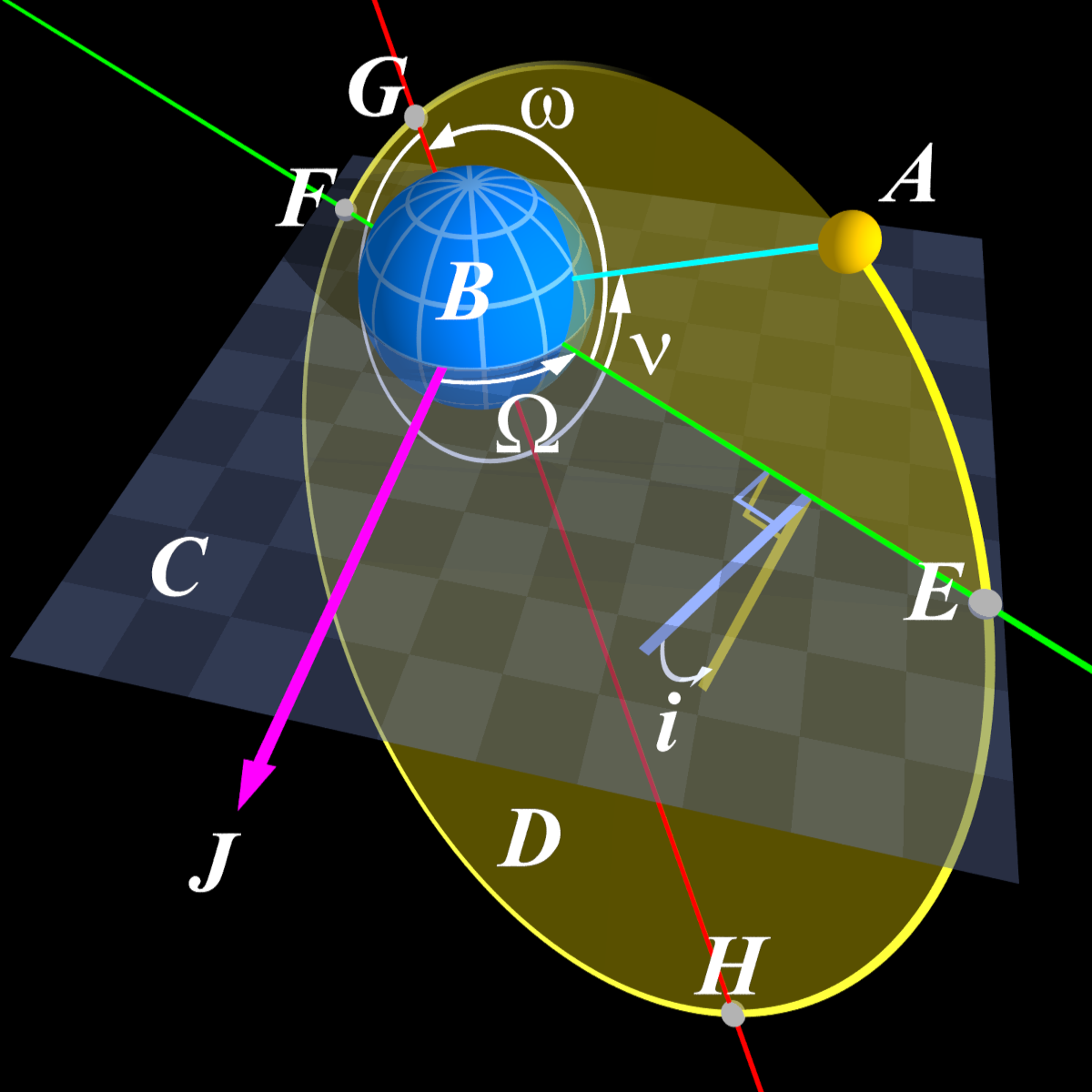
Has anyone here got any experience with orbital mechanics? Or celestial mechanics... both names are used.
I have a kinda simple question... if i can find someone who knows the answer 😛
@nimble frigate that error most often appears when you have failed to correctly link your job into the dependencies.
Its setting up the job, and scheduling it, but due to not being slotted into the dependencies it almost always gets completed at some later arbitrary time.
feck it, ill just ask... Does anyone know what a Vernal Equinox is in regards to celestial mechanics, and is able to answer questions about it?
I know what it is i just need another brain to poke hehe
nimble frigate
yeah i know but.. no matter what i try i get that error, i found a forum topic about it and tried to work with it, at first i only had 1 job that did raycasting which was working but then when i added another job that does raycasting it started to fail for some reason, only one of them works(at any given time) so thats why i asked for simple raycast example
nimble frigate
sooo anyone ? 😂
naive remnant
@nimble frigate https://hastebin.com/omevesiler.cs
SelfFilteringAllHitsCollector is from Physics samples
nimble frigate
InvalidOperationException: The previously scheduled job PlayerInteractionSelectionSystem:<>c__DisplayClass_OnUpdate_LambdaJob0 writes to the NativeArray <>c__DisplayClass_OnUpdate_LambdaJob0.Data.physicsWorld.CollisionWorld.Broadphase.m_BodyFilters. You must call JobHandle.Complete() on the job PlayerInteractionSelectionSystem:<>c__DisplayClass_OnUpdate_LambdaJob0, before you can read from the NativeArray safely.```this code works in my project🤔
nimble frigate
yeah but you have special powers, i dont 😭
nimble frigate
i tried raycastcommand but i think thats for mono, and not for ECS
it works now 👀
naive remnant
but is it ok to do this?🤔
nimble frigate
now imagine if my raycasts were not working because of this 😒
naive remnant
🤷♂️
naive remnant
i think its purpose is to debug jobs🤔
nimble frigate
another shocking discovery from my side 😱 wonder what this day holds for me
full kite
I'm trying out fixed joints for my blocks. I have the break force and break torque set to Infinity for each joint that's formed. A single block can form up to 6 joints. It seems no matter what I do the blocks fall apart immediately on start.
On a smaller scale they don't fall apart however they bounce around similar to jello lol
 gusty sleet
You should probably look for a custom physics solution for this rather than using Unity Physics
It's not really made for these types of things
 autumn jetty
Anyone knows why iterating children like this would give me invalid values (seeming that it accesses wrong memory?)
var physicsColliderPtr = intCollider.ColliderPtr;
var newFilter = new CollisionFilter()
{
    BelongsTo = filterInterior.belongsTo.Value << spaceShipData.crewGameID,
    CollidesWith = filterInterior.collidesWith.Value << spaceShipData.crewGameID,
    GroupIndex = 0
};

if (physicsColliderPtr->Type == ColliderType.Compound)
{
    var compoundCollider = (CompoundCollider*)physicsColliderPtr;
    compoundCollider->Filter = newFilter;
    SetChildFilter(ref newFilter, ref compoundCollider);
}

...

unsafe void SetChildFilter(ref CollisionFilter collisionFilter, ref CompoundCollider* collider)
{
    var numChildren = collider->NumChildren;
    for (int i = 0; i < numChildren; i++)
    {
        ref var child = ref collider->Children[i];
       ...

    }
}
Can someone help me to fix my gravity and movement problem in 2d game? The point is to walk around a planet 2D.
 topaz harness
i hate unity sometimes.... "Non-convex MeshCollider with non-kinematic Rigidbody is no longer supported since Unity 5."
do i really need to make compound colliders with primitive shape colliders for all my meshes?!?
 ocean horizon
@topaz harness Not a 3D physics dev but AFAIK it had that limitation for a while then the warning was added. I've seen this mentioned many times and I think the issue then becomes it spamming in the console. Unless I'm mistaking that warning for another one. 😉
 copper mortar
you dont need compound colliders per se, you can make a concave version of your mesh and optimize that for collision.
 viral ginkgo
Is there a way i can smoothly lerp after an object,
but not fall behind?
I have a first person character, the capsule is not moving smoothly
I still want to have a smooth fps camera on it
autumn jetty
You can interpolate your physics frames on a presentation group
topaz harness
@ocean horizon fyi -> got it working again because the new ECS Unity.Physics.PhysicsShape supports non convex mesh colliders and i was migrating to ecs anyways.
ocean horizon
got it working again
Glad to hear it.
i hate unity sometimes
This is physx. Nobody at Unity decided to remove something because we're terrible that way, Also, this was Unity 5 which was a long, long time ago.
 lavish escarp
Can I ask a question here? If yes then i have this problem :
I wanna make a bouncy object (like car tires or beach umbrellas in Fortnite) that will bounce you of (height of jump should not matter when bouncing, so it won't launch me higher if i jump from a higher location). I'm making a simple parkour game and this was my first idea there, help appreciated.
I tried making a physics material, but I don't know where should I put it so it works like I would like.
viral ginkgo
@lavish escarp Just set vertical velocity to a certain number on contact
without modifying velocity on x and z i mean
lavish escarp
thanks, i searched that on youtube and i'll try to make it work
 stuck bay
https://imgur.com/a/Fh69Bbp This feels wrong but I dont know exactly what. Could anyone help me here?
 naive remnant
too slow?😅
stark bolt
?
stuck bay
I'm thinking about reworking the dragging behaviour from a pos setting to addforce mode
autumn jetty
@red echo My braint can't comprehend what is going on in that video and how you managed to find a recorder with such a low resolution ... ._.
There is so much unknown in that footage, is it moving because of input? Are joints involved, fully rigidbody? What is it colliding with?
 sly violet
@stuck bay Yeah, I'm not sure what you're feeling, so it's hard to help. Worse, I don't know what you want to be feeling that you're not, if you know what I mean?
AddForce with drag is challenging, doubly so with lots of contacts. What you might consider instead is an invisible kinematic "ghost" object that connects via a strong, damp spring joint to the dragged object. The spring joint can give good following behavior while also respecting physics (no pushing through the floor).
 lapis plaza
@stuck bay I'm mainly annoying the high damping values on that (which Unity calls drag for whatever reason)
you could also just try higher gravity value to make it feel snappier
 craggy grove
Hey folks

Unity Forum
So I've been trying to see if I can make use of Wheel Colliders for the past several months now. As much as I've managed to figure out more and more...
Any suggestions?
 inner monolith
Why this happens with my cloth?
ocean horizon
@stuck bay I created the TargetJoint2D to cover this (and other) use-cases. You can find examples of mouse dragging/following on the github repo I maintain here: https://github.com/MelvMay-Unity/UnityPhysics2D

GitHub
Examples of various Unity 2D Physics components and features. - MelvMay-Unity/UnityPhysics2D
 stuck bay
@ocean horizon @lapis plaza @sly violet hey, thanks for all your input!
 dapper wigeon
Hey guys! I'm making a Mario Galaxy style game, with a ROLLING ball on a planet (not a walking character). Camera follows the ball top-down.
The question is: how do I apply an axis-input relative to its position on the planet? Basically: how do I apply .addForce in a specific Vector3 direction?
If I lock rotation it's pretty simple, but since the ball is rolling, I can't use .forward and such. The closest I've come is ".TransformDirection", but this can only be applied to a gameObject, not a Vector3 direction. I guess the solution would be to transform the input based on direction relative to the planet center, so does anyone know how to do this?
I'm pretty sure this is basic for experienced Unity users, but I can't find a solution
stuck bay
wait nvm that's just exercises

Stack Overflow
Some high school math concept has been forgotten, so I ask here.
If I have two points p1(x1,y1), p2(x2,y2), the direction is P1-->p2, that's p1 points to p2. To represent this direction by vec...
dapper wigeon
Ye, I dont think that does it. Transforming an axis-input is all I need
stuck bay
Well, you want the force to go perpendicular from the planet's gravity
You already have the normal plane with the direction of two points stuff
dapper wigeon
Ye, thats correct in a sense..
Its not hard to find the angle of the player relative to the planet - the problem is applying that angle to a axisinput, where z is 0 (since a only want to move in x & y relative to planet gravity)
stuck bay
Try doing a cross product with another vector (I think transform.left if using forward)
You'd be getting an equivalent transform forward for that planet
dapper wigeon
But the ball is rolling, so I cant use forward or any other like it.. If its rotation was locked I could
I have tried attaching a child object which does not roll, and using the .forward of that, but its not a good solution, and both lags and does funny physics
stuck bay
Well, you can still use world left but you'll get some weird physics when playing around with the placement of planets
dapper wigeon
Its just so weird that I can't find another way of transforming an input, using a specific vector3, and not the vector3 found in a gameobject, like this solution does:
Works, but needs a gameobject:
playerRB.AddForce(transform.TransformDirection(stick1_axis));
I want something like this:
playerAngle = Quaternion.LookRotation(transform.position);
playerRB.AddForce(playerAngle.TransformDirection(stick1_axis));
But since "playerAngle" is a quat (or even when transformed to a vector3), it doesnt allow it. But this is the solution I need, somehow :S
naive remnant
.TransformDirection() is simple matrix multiplication. Create 4x4 matrix representing LocalToWorld of your player and then just math.mul(LocalToWorld, inputDirection)🤔
stuck bay
Still, to find your input force you still want to do a cross product to the COP and any other vector still on the same plane as the COP's normal plane
dapper wigeon
Druid, that sounds like a possible solution. But mathf.mul does not exist?
dapper wigeon
Aha.. Ill try now 😄
Will the output be a vector4 also? And will .addForce accept that, or must I convert to vector3 first in that case?
naive remnant
yes it will be vector4😏
dapper wigeon
Sorry for being a noob 😛 But addforce accepts that?
naive remnant
it is easy to create Vector3 from Vector4🤔
dapper wigeon
Ye, I can do that xD
So I got a v4 for both my LocalToWorl and axisinput, but I dont how Matrix4x4 can apply one to the other?
As its not a function like Matrix4x4();
Is it something like: Matrix4x4.Translate(localToWorld) and then applying the axisinput after?
naive remnant
Matrix4x4 M = new Matrix4x4();
M.SetColumn(0, right);
M.SetColumn(1, up);
M.SetColumn(2, forward);```forward right and up is relative to your sphere
up is spherePosition - PlanetPosition
dapper wigeon
But then right and forward would be affected by the ball rolling again?
naive remnant
right is something like cross product between your camera's forward and -up(relative to sphere)
but im not sure because i dont know how your camera works😋
is your camera rotates around your sphere up axis?
dapper wigeon
The camera has locked rotation locally, but follows the ball from topdown
But the camera is irelevant, since I would want the same movement even if the camera was static all along
IE, inputing the axis to the right would make the ball roll around the planet constantly
naive remnant
i strongly recommend you to watch some basic tutorials about matrix and vectors algebra😅
stuck bay
Yep
stuck bay
@dapper wigeon what I say you'd try is doing this but on the reverse https://docs.unity3d.com/Manual/ComputingNormalPerpendicularVector.html you have the normal already, you've got to define one side annd you'll get the force to add
dapper wigeon
Will check it out! ^^
lapis plaza

GitHub
Contribute to Unity-Technologies/articulations-robot-demo development by creating an account on GitHub.
 slow parrot
Cool! Gonna check that out
 scenic minnow
Is this a good order on learning Mathematics?
First: Algebra and Analysis.
Second: Data Structures and Algorithms.
Third: Discrete Mathematics
sly violet
Hmm. Data structures and algorithms seems like programming rather than math per se.
stark bolt
indeed
scenic minnow
Ehh, still the same. Kinda
 versed sierra
I am having a issue with collisions randomy working and randomly not activating
mainly when a kinematic rigid body with a different tag is parented with another rigidbody that is not tagged
when it first collides it works then from a diffrent collider
versed sierra
I fount out it's the scene
stuck bay
Hey so I’m messing with physics in my movement script and I’ll followimg the Brackeys FPS Movement tutorial, I did exactly the same as he did but I clip through my ground and fall to the void
How do I fix?
And I will want to make a jump effect so gravity is a must
 storm steeple
So I have this cube, inside of a box collider. I am trying to limit the movement of the box to restrict it within this trigger collider.
I am currently doing a spherecast to find the edges blocking the direction of movement.
I then stop the movement, this works ok, but it stops movement entirely unless I move away from said wall. I want to be able to slide along this wall. have been at it forever but can't figure it out. Anybody here who can help me?
if (Physics.SphereCast(wallRay.origin, 1, wallRay.direction, out hit, edgeMargin, layerMask))
{
  Debug.DrawRay(wallRay.origin, wallRay.direction * hit.distance, Color.yellow);
  Debug.Log("HIT");

  //moveDirection = transform.position;
  transform.Translate(Vector3.zero);
}
else
{
  transform.Translate(moveDirection * targetMoveSpeed * Time.deltaTime);
}
This is what I am currently doing\
I tried subtracting the normal direction, but that results in very shaky results, I guess because of imperfect detection or so.
I am hoping there is some vector math trick I can use here?
naive remnant
storm steeple
@naive remnant perfect, thanks
or not really, that is just a box, I'm looking for something using any shape
still interesting
naive remnant
@storm steeple https://youtu.be/SHinxAhv1ZE 😏
storm steeple
:), I will watch
I have it sliding along edges, just need a solver for corners now
 steel sapphire
The four balls here are identical bar the value passed to a single AddForce() method called in Start() (that being 50, 75, 100, 125). They all have the same physics material attached:
Dynamic Friction:  0
 Static Friction: 0
      Bounciness:  1
Friction Combine: Average
  Bounce Combine: Maximum
Why do the three balls on the left with the smallest velicities all stick to the bricks, but the one on the right bounce as I expect?
Actually, anything over 100 will bounce, nothing under it will.
ocean horizon
@steel sapphire Try increasing: https://docs.unity3d.com/ScriptReference/Physics-bounceThreshold.html
steel sapphire
That's it, thanks @ocean horizon.
Ignore that. It was me putting the physics material on the GO not the prefab.
 pallid pawn
i'm working with 2d objects and i want to find if the object is colliding with a specific thing but all the codes i have tried don't work wtf is happening
steel sapphire
I know that with fast moving objects the physics engine can fail to capture a collision but I expected that to be in situations that are a bit more CPU intensive that this.
Is there a way I can prevent the ball from passing through the planes?
steel sapphire
Changing the Collision Detection to continuous works.
viral ginkgo
There isn't a clean way to revert a collision in OnCollisionEnter() right?
By revert, i mean revert the effects of collision in both objects affected
I just want to make an arrow stick into other bodies
That arrow has a collider as well (and i want to keep it that way)
lapis plaza
could just detect the trigger and then spawn the arrow on the hit point + hit normal
(or just fix it there)
viral ginkgo
but other object will be affected @lapis plaza
lapis plaza
how?
viral ginkgo
other object is already pushed back
oh you mean use ontriggerenter?
But if arrow is not fast enough or normal is not right, i want it to bounce back as a physical object
I need to use OncollisionEnter
lapis plaza
then have both
ah
you mean like that
you could still deflect it manually via code when it gets trigger event
viral ginkgo
I can't get it deflect realistically?
You mean by setting velocities or forces in psuedo ways?
Is there no clean way to do this in OnCollisionEnter?
lapis plaza
there is but Unity doesn't expose contact modifications on built-in physics :p
viral ginkgo
Yeah i remember that
lapis plaza
you could still do like raycast from arrow to the object and if the raycast seems to be hitting the thing in wrong angle, you change the collision from trigger to collide
viral ginkgo
I just need the other bodies transform,rigidbody information just before the collision
lapis plaza
like, only need to raycast the lenght of the travel from this to next fixed timestep
viral ginkgo
That could be last resort
lapis plaza
that's not even complicated
viral ginkgo
if other object is moving too, then that angle will change after that frame
if target object is a capsule, its more likely
lapis plaza
ah, that's true
 misty spoke
 true lichen
Im not sure if this is a physics problem but i have this issue where if i jump while touching a wall, and i meet the top of the wall, i just jitter a whole bunch and it doesnt let me get on top the wall. Any Tips?
ocean horizon
why isn't OnCollisionEnter being called??
Well at least you provided lots of information so we can help you. 😉
 native epoch
i'm making a vr game, and i have box colliders on my controllers. but when i collide with another object, oncollisionenter wont be called
ocean horizon
You didn't mention rigidbody so I presume you've not added those? If that's the case then they're all static (non-moving). Static doesn't collide with static because it's not supposed to move so there's no point.
native epoch
the object i'm colliding with has a rigidbody
ocean horizon
And the collision matrix and layers for these are set to collide?
native epoch
yes
ocean horizon
You've put a debug.log inside the callback that isn't inside any other logic?
native epoch
i didn't add a debug.log
native epoch
yes, i made it so that it plays a sound when they collide
ocean horizon
But I guess you've got logic around all that so it might be the culprit? Try adding a simple Debug.Log("I Got Here!") to see if it's called.
Is the Rigidbody kinematic?
ocean horizon
So you're getting a collision response then?
native epoch
no
ocean horizon
If you're getting no collision response then they're not set-up to collide.
Check your collision matrix again and the GO with the colliders on.
ocean horizon
Always worth stepping back and adding a few test ones in your scene i.e. two colliders to check they are colliding.
native epoch
ok
yea when my controller collided i got no debug logs
i put 2 cubes, attached a rigidbody and the script to them, and i got no outputs
ocean horizon
you don't need to add a script to see a collision response
a dynamic collider hitting a static one will collide
trying to reduce it to basics
presumably one of these cube falls under gravity but passes right through the other?
native epoch
it collides, and stands ontop the other
but no output from the script
physics work, script doesnt i guess
stuck bay
Hey there ! 👋
Is there a way to execute phyiscs for certain objects via script in the editor ?
ocean horizon
@native epoch Only thing I can think of then is that the callback isn't spelled correctly or is not using the correct case.
native epoch
ok
ocean horizon
It has to be "OnCollisionEnter", "OnCollisionStay" or "OnCollisionExit" (case sensitive)
native epoch
i know
but nothing is working
i even added a new script, it worked on colliding boxes, but not my controller colliding with said boxes
ocean horizon
you said nothing is working but then said it worked on "colliding boxes".
ocean horizon
"work" = get a callback?
ocean horizon
the callback happens on a script on the same GO as the collider/rigidbody.
native epoch
yes
ocean horizon
(just going over the basics really)
Post your controller script or maybe the callbacks?
native epoch
i have a collider on both objects and a rigidbody on the box
this is my controller script
ocean horizon
Know that those GetComponent calls are not cheap and there's a lot here. Also, it looks like you're doing physics stuff per-frame but physics runs fixed-update so there'll be a delay. Also see a bunch of reparenting going on which might affect it. hard to detangle it tbh
native epoch
ok
ocean horizon
divide and conquer. Maybe omit some of the stuff that isn't necessary and see what's causing the issue.
You only get a callback when the simulation runs.
See if you're getting Stay callbacks too maybe.
or temporarily try this in fixed-update as a test
native epoch
should i make a seperate script for this? the script i sent is for grabbing objects
ocean horizon
I don't follow what it's doing so cannot really advise.
Know that changing physics objects has side-effects. they are not simply properties.
native epoch
ok
i have an idea that might work, and its to have an empty object follow my controller around doing all the collisions for me, because it works with regular objects
ocean horizon
I would seriously advise to not repeat the same thing again and again and cache stuff i.e. don't repeat GetComponent<Interactable> several times when you can grab it once then refer to it. Also, grabbing the transform (which amounts to the same thing) again and again when you can refer to it once.
This is a performance thing really but it's also easy to make mistakes with so much "noise" in the code so doing this you might find an issue.
native epoch
ok
autumn jetty
ocean horizon
I don't work on that so no, sorry. 😦
true lichen
i have this issue where if i jump while touching a wall, and i meet the top of the wall, i just jitter a whole bunch and it doesnt let me get on top the wall. whats up with that?
 inland rivet
Does anyone know how to achieve this effect? https://preview.redd.it/7xe1yu48m1f41.gif?format=mp4&s=363fa2d5d4fdd00d2947c2766c7167940d98b1a9
When I've tried it, the player moves away from the ground/walls to accommodate the expanding piston, but not with any velocity that is maintained.
So no jumping effect happens, rather just a quick move out of the way, and then back to zero velocity.
I would like some momentum like this example.
viral ginkgo
@inland rivet I'd use slider joints
between 4 small bodies and the main cube
you extend the joint in both directions with same force
you retract it the same way
inland rivet
Thanks, I'll give that a try.
 polar citrus
so i have some config joints on a car im worcking on, for some reason the core rigidbody nolonger roles/angels with slopes. any help?
its rotation is locked on all axis but it is showing not locked in the editior or runtime
wait! it might be one of my scripts
 meager night
when i call 'OnCollisionEnter2D(Collision2D collision)' and use 'collision.transform', i get the gameObject containing the RigidBody2D, not the gameObject with the Collider2D that just collided. Can i access the Collider2D gameObject even though it doesnt have a rigidbody on its own?
ocean horizon
when i call
You are calling this?
and use 'collision.transform', i get the gameObject containing the RigidBody2D, not the gameObject with the Collider2D that just collided.
That'll be because your script is on the GameObject with the Rigidbody2D. The callback happens on both the Collider2D GameObject and (if it's different) the Rigidbody2D GameObject.
Can i access the Collider2D gameObject
Have you seen the docs which show you what you can access i.e. both colliders and both rb? https://docs.unity3d.com/ScriptReference/Collision2D.html
autumn jetty
@ocean horizon thanks anyway, hope someone takes a look at it soon x)
ocean horizon
Are you sure doing that is a valid behaviour? I have no idea.
Adam Mechtley is the man for this. Don't think he's on Discord though.
Maybe bug report assuming you've not already. In the meantime I can direct him to your post.
Ping'd him about your post sir.
autumn jetty
Thing is I asked a question 6 months ago on the forums, and was told to do it by iterating children. So I supposed it was valid. The conversion I'm not sure, but I don't see why not.
ocean horizon
The conversion code for 3D dots physics is mind-blowingly complex. At least to my eyes.
Probably some BlobAssetStore shenanigans.
meager night
Im on bus right now. But maybe if i use collision.collider.transform. Will try when i get home
ocean horizon
You get explicit properties .collider, .otherCollider, .rigidbody, .otherRigidbody
autumn jetty
The thing that baffles me about it is that it is valid to convert it over and over if there is no change, but if I change a value of the prefab by GetComponent, the blobAsset seems to get disposed/invalidated. So there has to be some check if something has changed, but I couldn't find it.. x)
ocean horizon
Yeah, there's some "diff" mechanism there as well so maybe that changes things. All sorts of hashing etc.
autumn jetty
I just don't want to create 16 prefabs that only changes the physics layer for X amount of prefabs x)
ocean horizon
We ship the conversion code so in theory you can single-step it to see where the blob-asset gets disposed?
Not saying the code is easy to follow. 😉
autumn jetty
Hmm, I think Rider didn't want to follow down the dark holes last time I tried, but might give it another shot.
ocean horizon
In your compound collider post, try some sanity checks such as when you cast to CompoundCollider**, check again that the type and other values are being referenced correctly. Also, unless I'm mistaken, take out that ref in the "ref CompoundCollider* collider"
I've not got the hang of using chars that discord uses as formatting. 😉
autumn jetty
It's over the first level of children the problem begins, I think I've tried with ref and not, but can check again.
ocean horizon
Very odd. I guess you've checked that the number of children it's reporting is what's expected? The children themselves are inside the compound-collider itself i.e. the blob-asset so if the compound header looks valid then I'm not sure. Check the compound-header stuff though; I think there's a sanity byte in there too. Sounds like corruption.
autumn jetty
I'll try with fresh project and see what happens.
autumn jetty
@ocean horizon First child, filters are all set to 0 in inspector.
and it's not the filter setting if you would suggest that, and it even gets other values next run...
Would rather have the other bug fixed though 🙃
 whole orbit
Hey, why do I need to make my Rigidbody "Kinematic" so it doesn't fall through the ground? My Ground has a Collider, too.
Doesn't "Kinematic" mean that it behaves like in space?
stark bolt
you shouldnt need kinematic
 white oracle
trying to make a simple button for VR. i've got my button connected to a kinematic rigidbody with a spring joint, but the button's rigidbody seems to go to sleep extremely quick before the spring has a chance to pull it back to its original position
true lichen
i have this issue where if i jump while touching a wall, and i meet the top of the wall, i just jitter a whole bunch and it doesnt let me get on top the wall. whats up with that?
stark bolt
what kind of collider?
true lichen
im just using the collision provided by the player controller
 glacial jolt
@whole orbit Kinematic RBs essentially have infinite mass. It shouldn't be necessary to make a RB kinematic to prevent it from going through the ground, as long as it's being moved via forces
 glacial tendon
is there a way to keep OnTriggerEnter from being called for every vertice on the same mesh?
 frigid pier
You can get the triangle that is being hit https://docs.unity3d.com/ScriptReference/RaycastHit-triangleIndex.html
exclude from execution when triangles are being hit that you don't want to interact with
 velvet palm
Can anyone help me , I have trouble for ai jump with navmesh
 split ginkgo
hallo! i recently upgraded my project from Unity 2018.4.x to 2019.2.21 - and the physics now behave somewhat differently now? for example, my very simple capsule-based character controller suddenly gets stuck on slopes which didn't happen before
anyone knows if there are some bigger changes in the physics from 2018 to 2019?
 oak axle
Hey folks! I'm running into an issue where my 2d character clips slightly through the ground upon landing sometimes. This causes the character to completely fall through the ground sometimes even. Currently using a raycast to detect the ground in fixed update when the ground is close, and then I set gravity to 0. However this doesn't seem to stop it. Any ideas how to fix this? You can see on the higher jumps for 1 frame or so it clips through the ground, then fixes itself.
autumn jetty
@oak axle Well, so if you want to run with your own character controller, you want to check from your previous frame to your current frame.
oak axle
@autumn jetty that sounds like a great idea. What do you suggest I look up in unity docs so that I can compare frames? Thank you!
autumn jetty
How are you moving your character? Only with your own scripts or some unity physics as well? If only your own you will check before you move + your intended move, there you have a vector. Make this vector into a raycast or collidercast.
oak axle
yeah I'm just adding to velocity for x axis on the rigidbody, and for Y just changing gravityscale of the rigidbody.
Ok that gives me a good lead, I can look into that.
Thank you!
autumn jetty
Mhm, not sure why you are not relying on the basic physics with colliders etc though.
oak axle
ha, wait i found a simpleer method rip me. I just set collision detection to continuous instead of discrete. that completely fixed it
thank you for the help at any rate! I can use the compare frame in the future now that i know its a thing 😄
oh, I am using 2d colliders on my tiles! Sorry that wasn't clear
oak axle
seperate topic: i'm tying to create a jump like this where there's slightly more hangtime, and faster takeoff. I can't really figure out the math and haven't gotten past where I am in the video above which is the first example in this drawing which isn't what I want. Any idea how to achieve something like this?
sly violet
Maybe add a "float force" that pushes upward for a fixed period of time after the initial liftoff?
viral ginkgo
@oak axle
This should be the general platformer jump behaviour
GetKeyDown(jumpkey):
apply big force upwards
GetKey(jumpkey):
apply small force upwards
i'm pinged?
but didn't get a msg
oak axle
oh discord ate my message. basically I'm doing that already, and just need to finesse it a little so I accelerate faster and hang longer
viral ginkgo
then increase the small force?
make the small force even bigger when velocity is downwards?
you want this going up and down symmetric?
oak axle
I think I'm doing that already: (it wont let me paste code but heres a pic):
oak axle
ohh
oak axle
        {
            rb.AddForce(Vector2.up * jumpForce, ForceMode2D.Impulse);
            jumpRequest = false;
        }
        if (rb.velocity.y > 0f)
            {
            rb.gravityScale = fallMultiplier;
        }
        if (rb.velocity.y > 0 && !Input.GetButton("Jump"))
        {
            rb.gravityScale = lowJumpMultiplier;
}```yeah lol got it
viral ginkgo
why do you apply forces and stuff only when character is going up?
is it a mistake? @oak axle
oak axle
isnt that the only time I need a force? To push the character up?
im new with all this so any tips are awesome
viral ginkgo
wait, i didn't understand it completely
oak axle
yeah once i release my key it applies the gravity scale thats increased
viral ginkgo
why are you messing with gravity though
if you just apply upwards force, it's pretty much the same thing
oak axle
some tutorial did that lol is it not advised?
viral ginkgo
i don't know, i wouldn't mess with gravity
oak axle
the gravity increase was so that I fall quicker than jumped
but youre saying I should just use a negative force instead?
viral ginkgo
if (Input.GetButtonDown("Jump"))
        {
            rb.AddForce(Vector2.up * jumpForce, ForceMode2D.Impulse);
        }
if(Input.GetButton("Jump")){
                rb.AddForce(Vector2.up * 0.02f * jumpForce, ForceMode2D.Impulse);
}
replace that whole thing with this @oak axle
and hold down space if you are jumping and you want to jump high and fall slow
quick press space for small, quick jump
oak axle
trying it out...
 strange raven
I guess that would give you lower falling speed
oak axle
great, this works well @viral ginkgo for the high jump, low jump, and i dont need gravity scaling now! fantastic. I just am a bit puzzled how to increase the speed when falling which i had before, and the longer hangtime
strange raven
but you would also jump higher with that code
oak axle
@strange raven yeah exactly
strange raven
ah you want a highjump? nvm
oak axle
I already had a high and low jump, i just wanted the hangtime
viral ginkgo
if (Input.GetButtonDown("Jump"))
        {
            rb.AddForce(Vector2.up * jumpForce, ForceMode2D.Impulse);
        }
if(Input.GetButton("Jump")){
                rb.AddForce(Vector2.up * (1 - Mathf.abs(rb.velocity.y) * 0.25f) * 0.02f * jumpForce, ForceMode2D.Impulse);
}
@oak axle try this
make 0.25 smaller if it's weird
increase it if its not doing any difference
oak axle
wow this works like magic @viral ginkgo holy hell thank you!!
viral ginkgo
np ask if you don't understand what it is
 rigid venture
hello there
im trying to set this up
the red is the player movement i already have done
ive tried to set up the hinge joint but nothing is happening
its not rotating in any direction
but it moves with the player as i wanted so thats good atleast
autumn jetty
You don't have it connected to anything?
rigid venture
i got it
the one with the hinge shouldnt be kinematic
but yeah that was a problem too thanks
 hollow crest
I need a way to like chunk iterate through a array of entities to do some math on them... But the problem is, I need to calculate every entity with another entity, so I have 2 nested for loops I try to optimize, but I fail with every approach. It already runs inside a Burst Compiled job, but if there are to many entities, its just slow as fuck
Im already skipping if the distance between 2 entities is to high... but thats not realistic...
In my simulation I want to attract entities (ECS + dots) to each other with newtons formula of gravity force = ((massA * massB / distanceA * distanceB) * G)
naive remnant
Why not use some field? Grandpa Einstein would be much happier😅
hollow crest
Field? 🙂
naive remnant
like 3d grid, every entity contributes to their respective cell.
like realworld fabric of space😅
naive remnant
you have 3d grid. Each entity add 'gravity' to the cell they are located inside. Then you generate flow field from this 3d grid, and your entities just reads from this flow field the direction they are attracted to
hollow crest
is it possible in ecs and dots with unity?
naive remnant
i think it is absolutely possible🤔
hollow crest
do you have a example for it?
ocean horizon
What you're describing here is an n-body problem, specifically dealing with gravity. Performing numerical integration on body/body pairs gets very expensive as the numbers of bodies grow. Wikipedia has a good breakdown of this and also offers solutions to the many body problem including dividing space up into grids: https://en.wikipedia.org/wiki/N-body_problem#n-body_choreography
In physics, the n-body problem is the problem of predicting the individual motions of a group of celestial objects interacting with each other gravitationally. Solving this problem has been motivated by the desire to understand the motions of the Sun, Moon, planets, and visib...
naive remnant
https://medium.com/@leomontes_60748/how-to-implement-a-fluid-simulation-on-the-cpu-with-unity-ecs-job-system-bf90a0f2724f this can help you with dividing space in grids🤔
 graceful anvil
Guys... I'm trying to avoid this "boucing" in "a propagated impact" using my RigidBody2d
Someone can help?
This is the setting on my rigidbodies 2d
gusty sleet
There's a setting that'll improve stacking
But unity physics isn't made to support stable stacking
Havok does support better stable stacking

Unity Technologies Blog
As announced at Game Developers Conference (GDC) 2019, Havok Physics is now available as a Preview package in the Unity Package Manager. This means that al...
 dire cave
How do I get OnTriggerStay2D to work as a coroutine? It doesn't seem to work when I create it as an IEnumerable instead of a void.
hollow crest
IEnumerator not "able"
dire cave
Works now. Minor slip up with that naming. Thanks.
I'm trying to find a way to have collision detection physics respond within every Update() frame instead of every FixedUpdate(). Is there a way to make that possible?
I thought it would be resolved if I set the collision detection as a coroutine that yields to WaitForFixedUpdate, but that didn't work.
hollow crest
you need to decrease the fixed timestep for a more precise collision detection
dire cave
I figured, but how far down can I decrease the fixed time step in a 60 fps update process?
Is there a penalty for lowering it too far?
hollow crest
sure there is
dire cave
Currently have it at 0.012, but no significant change.
dire cave
Somehow, even 0.010 doesn't rid the problem 100%. I have the update set to log itself each frame and the collision detector to do the same. If I see Update placed in the console log twice in a row, then I know it failed to stay stable.
hollow crest
where do you raycast?
dire cave
Not familiar with the term in 2d gaming. How necessary is raycasting?
hollow crest
ah you use the method provided by the monobehaviour I see
dire cave
Yes.
dire cave
Update methods. I had no need for rigid bodies for anything other than collision detection.
So I relied on transform.position
For movement
hollow crest
If you update a rigidbodies position, you need to do it in fixed update. And dont update the transform.position, always use forces or velocity to update the movement.
dire cave
I don't know why, but when I use anything other than transform.position, the movement doesn't flow well, even when I have VSync on.
hollow crest
VSync has to be off
and if you decrease the fixed timestep enough it should feel better
and activate interpolation on the rigidbodies
stuck bay
Hey there 👋
Just a quick question , is the blue transform arrow the 'forward' direction , scripts use ? ._.
stuck bay
thx !
dire cave
Then what's the point of having VSync at all? The flickering of my moving cursor is extremely noticeable if I have it turned off. And I'm certain I tested a move position method with a fixed time step of 0.016, and it still looked awkward.
hollow crest
VSync is an approach of trying to synchronise the frequency of your screen with the output of your graphics card. But its a old feature what was shitty from beginning ;)
If you disable it, you have more frames per second and it feels more performant
And try to enable interpolation on the rigidbody
and only do movement updates with velocity or forces and in fixedupdate
with time.fixedDeltaTime
dire cave
I concluded that I wont rely on deltaTime or fixedDeltaTime, as this will be for a frame dependant project.
hollow crest
You need to use the fixedDeltaTime to make it look good
Its the time between 2 frames
without it, it will be always out of sync with your frames per second
dire cave
It's for a fighting game, which many players take a heavy priority towards studying the frame rates of movements.
hollow crest
Sorry, I dont get your point...
I will produce a little example code for you to move a rigidbody ok?
dire cave
From what I've gathered, deltaTime is a time dependent feature. So if I had a slow computer that skipped frames, I'd see a lot of teleporting between moving objects. On frame dependent games, the movement stays pixel by pixel, but is noticeably slow. I wouldn't want either fault from a slow computer, but I would personally pick the later, if it allowed me the chance to still see what to expect in a slow framerates. I know a few games where that happens.
hollow crest
The deltaTime is used to eliminate the difference between a slow and a high end PC
Its the time you CPU needs to translate from frame to frame
And its used to calculate movement for example 😉
To make it not stuttering
dire cave
If I'm gonna rely on fixed update, can I also rely on it for sprite animation frame rendering?
Or is that preferred in Update()?
hollow crest
what? xD
dire cave
damn it. Like this... private void FixedUpdate() { gameObject.GetComponent<Rigidbody2D>().MovePosition(new Vector2(gameObject.transform.position.x, gameObject.transform.position.y)); gameObject.GetComponent<SpriteRenderer>().sprite = newSprite[nextFrame]; }
hollow crest
its the wrong approach I think...
You dont need to change the sprite
you can use Sprite Atlas to animate them
dire cave
example?
hollow crest
try something like this to move a rigidbody:
In 2D you need to eliminate one axis
dire cave
Will try. But I just want to know if sprite animation (or however sprite atlas controls the animation process) can also follow under the FixedUpdate() runtime rather than the Update() runtime.
hollow crest
I dont get what you are trying to do
You just need to update physics in fixed update
all the rest you can do in update
dire cave
So that when EACH frame the sprite moves, the sprites changes to a different image along with their movement.
hollow crest
You can change the sprite depending on the users input??
If he presses the walk right key, you can just play the walk right animation in the animator
If he presses walk left -> play walk left animation in animator
dire cave
I don't want my sprites accidentally updating twice before a fixedUpdate frame has processed.
hollow crest
... and so on
?
Google: Animator, Sprite Atlas animations, 2D Animation Rigs, Unity Animator how to
If the player walks forward you can say the Animator Component of your player "Play the walk forward animation"
dire cave
Say that there is a running man sprite with four images. 1:Left foot is on the ground. 2:Left foot is lifted up. 3:Right foot is on the ground. 4:Right foot is lifted up. Repeat step 1 in a loop.
hollow crest
you can loop animations inside unity no problem
and with animation events you can setup scenarios like "The left feet is on the ground now, so I want to call that function"
just google sprite atlas animations, animator tutorials and animation tutorials in unity
dire cave
Now during each Update, the order is called. Frame1, anim1. Frame 2, anim2. Frame3, anim3. Frame4, anim4. Frame5, anim1. Frame6, anim2.
hollow crest
If you always change the sprite on the renderer, you have a memory leak there... because it creates everytime you do that a new material for the renderer
Please read documentation on how to animate with unity and how to setup animators
dire cave
Is there a possibility that the FixedUpdate will suddnely read Frame1, anim1, Frame2, anim3?
hollow crest
what youre doing is totally wrong
dire cave
Because I don't want that.
dire cave
Doesn't the Animator component take up a lot of CPU power as well though?
hollow crest
oO
dire cave
Or so I've read.
hollow crest
In your scenario there is no performance issue at all
look at my galaxy...
that were 10.000 Gameobjects
with a nested for loop over all of them
THAT is costing CPU power
but your little animator with some animations
come on^^
youre over engineering and in the wrong direction with bad practices
try to use unity basics
a good guy in teaching things is Brackeys
look on youtube
he has some tutorials on howto do things
dire cave
Ok. But just tell me if the Animator runs at the same speed as collision detection or physics updates, and I will feel less confused about the whole thing.
hollow crest
The animator just plays an Animation you Setup in your Unity Project
In the speed you want it to be
You can check for Collision and Play Another Animation like a "hitanimation" or a jump animation if you press Jump
You can say "on frame 10 in the Walking Animation i want to Call a function "
Its very powerful
You can pass values like movement x y to it and calculate Inside the animator what Animation u wanna call
 primal hinge
sing System.Collections;
using System.Collections.Generic;
using UnityEngine;
public class movement : MonoBehaviour
{
private float speed = 10f;
void Update()
{
float horizontal_movement = Input.GetAxis("Horizontal") * speed * Time.deltaTime;
float vertical_movement = Input.GetAxis("Vertical") * speed * Time.deltaTime;
    transform.Translate(horizontal_movement, 0, vertical_movement);
}
}
How can i make jumps´?
im new in Unity
hollow crest
Google: How to Jump unity
primal hinge
xD
hollow crest
:)
As I already mentioned: Check brackeys youtube channel
He has Tutorials of almost every Basic
primal hinge
okay i going to check brackeys channel now and Fierya is the Code that i wrote good?
hollow crest
If you dont want to have Physics its Good enough
But for jumping u need rigidbodies
Or a charactercontroller
primal hinge
Okay ty 🙂
dire cave
I am now trying the animation component on a sprite with the sample set to 60. And it would seem the answer to my question about the animation working under each FixedUpdate() was a big NO.
There were times when the animation did not move to the next frame when I reviewed the step-by-step process.
Now I know the step-by-step procedure is based on each Update() run, but the Debug.Log still confirmed a collision was detected while the animator refused to animate.
hollow crest
Thats why you should use animators
dire cave
I see I have an Animator window on my console.
Any specific event I should add to read for Fixed Updates?
hollow crest
U need to set the properties on the animator for example: if you want to stop the Animation and Play another
It has nothing to do with fixed updates
If you want to do Things on fixed update you can pass in props to the animator and let him handle it with transitions
Just Google: brackeys animator tutorial
He explained it well to me
All of my Stuff i learned fein brackeys
From
primal hinge
omg ty Fierya 😄 brackeys is very good in explaning unity 😉
and i thought he would also explain so difficult like other
dire cave
Changing to a different animation under specific conditions, I can understand. The tutorial still doesn't explain how I can keep the animation in sync with every frame. Not unless I create multiple transitions in the animator that trigger to one image after each update, but that sounds incredibly overworked.
 gray axle
Hey team! Not sure if this is the correct place to ask, but I'll try anyways. Is there an easy way to get the same friction that one has on the ground in the air as well? as in you slow down while being in air?
the player is using a rigidbody to move around :)
dire cave
I've read that by setting the Update Mode to "Animate Physics", the sprite I'm trying to animate SHOULD update by each FixedUpdate() run. However, it would seem this condition changes nothing, and I have noticed that the blue bar for the animation in the animator console is NEVER consistent with its motion, The blue bar is always being random with its flow despite being set to move only 4 key frames. It seems to run by something like 3.75 key frames instead. Is this some kind of bug?
stuck bay
@dire cave I understand what you're going for, unfortunately you won't be able to achieve the control you're looking for in the long term using the animator, imo.
Generally for fighting games when frame timing is extremely important, you would write some sort of custom update loop to make sure that everything updates exactly how you want.
You can get away with a lot of simplified stuff if you don't plan on doing online play.
dire cave
I have been making my animations via self-made scripts from the start anyway. I was only using the animation component just now because someone here kept downplaying my methods because they weren't SIMPLE.
stuck bay
Ah, sounds good. You are on the right track then. Fighting game animation logic is going to be pretty different from frame rate independent delta time movement in standard 3D games.
dire cave
@stuck bay I of course do plan on building up to online play as production continues. So is there a problem I should be aware as to why it should probably be avoided?
stuck bay
If you want to have good netcode (rollback, GGPO), you'll need a way to tell your game to run an entire frame without rendering, or relying on FixedUpdate();
dire cave
No relying on FixedUpdate? Man, I was way ahead of ya there after deciding to go the frame-dependant route.
It's only the collision detection that's being problematic right now.
Because it possibly runs under the physics engine that triggers from FixedUpdate.
stuck bay
Assuming you've got FixedUpdate() firing at 60 it might be an alright place to start - should be easy enough to change in the future.
dire cave
Oh wait. You mean I SHOULD consider moving to FixedUpdate?
stuck bay
I stay away from it, I wasn't sure if you're using it or not using it anymore. If the game runs at 60, it's probably ok.
If you drop frames, you just might miss an entire update or something, not sure how Unity handles it.
dire cave
I went with VSync, so it'll be on update.
stuck bay
Could be catastrophic if it just skips a frame.
dire cave
It seemed to be the only way to prevent the jittering in sprite movement.
stuck bay
For collision, I would recommend using a custom hitbox solution. When a character updates, do all of the checks for overlaps on the opponent hitboxes instead of doing things like OnCollliderEnter2D() for example.
FixedUpdate() by default is 50 FPS (I think?) so that will lead to jittering since the game renders at 60 (or higher).
dire cave
Oh, I don't think that's the issue. I got the fixed time step at 0.016 (est. of 60 per second).
The jittery movement actually seems to just be a Unity problem overall.
I researched a helpful Unity program that shows the different types of sprite movements based on their transform.position or rigidbody.moveposition, etc.
transform.position with vsync seemed to make the most comfortable motion in the program.
lapis plaza
setting fixed timestep to 0.01667 will not make fixedupdate to be in sync with the rendering, despite it having same value
unless you actually interpolate or extrapolate your rigidbodies, your physics will appear stuttery
lapis plaza
there are like dozen reasons why things can stutter
using built-in physics without interpolation is one, not using vsync is one (exclusive fullscreen will give you best results), testing in editor is one, using built-in input for mouse look is one, gc spikes is one (can help a bit on this if you turn on incremental GC from player settings)
list would go on 🙂
badly designed char controller can be root cause too (none of the Unity provided ones work properly)
stuck bay
Something like this should be synced with rendering, avoid FixedUpdate(), and can be run whenever you want, for reference:
public void Update(){
  timeSoFar += Time.deltaTime;
  while(timeSoFar > timeForOneFrame){
    timeSoFar -= timeForOneFrame; // did an update
    // update EVERYTHING! (Characters, fireballs, collision, punching, animation...)
  }
}
This is my preferred approach for framerate locked games that need determinism.
Obviously can be massaged further but that's a starting point.
dire cave
I tried that too. I was never positive though if that was recommended, as no one gave any feedback regarding the choice.
lapis plaza
@stuck bay umm, that's basically what fixedupdate does under the hood and it's still not in sync with the rendering
that's literally the fixedupdate loop without interpolation
it's good to understand what unity actually does on fixedupdate, it's technically just what Liam just posted here
there's additional failsafe but it boils down to that
it's basically explained here: https://gafferongames.com/post/fix_your_timestep/
Gaffer On Games
Introduction Hi, I’m Glenn Fiedler and welcome to Game Physics.
In the previous article we discussed how to integrate the equations of motion using a numerical integrator. Integration sounds complicated, but it’s just a way to advance the your physics simulation forward by som...
Unity does all these for you
(if you use it like it's designed)
stuck bay
You don't want interpolation for a fighting game so that's fine if it's not interpolated, if I'm understanding you correctly.
But yeah this looks like a good reference site 👍
lapis plaza
I'm not talking about interpolation now like in context of smoothing networked data but in general syncing two physics states to rendering update
in practice, you'd need to mix these concepts to make the thing work smoothly, or just run physics at way higher update rate
if it's a fighting game, you'll only have very limited physics bodies around, so you can run it at relatively high intervals
I dunno how that plays with the netcode people usually use tho, I've not researched this type of netcode at all
also I could imagine you'd rather want to rather extrapolate the physics for a fast paced action game like that as it's all about reaction times (and regular interpolation does cause small delay)
stuck bay
Yeah generally the physics for a character in a fighting game is x, y, xSpeed, ySpeed, gravity, and not much else.
dire cave
I don't know why, but my rigidbody2D is not moving.
playerCursor.GetComponent<Rigidbody2D>().MovePosition(nPos);```The pCursorPos values are the new x and y positions.
Damnit. I know why. It's in Update()
Actually, no. It's not even working in FixedUpdate(). WTH?
Fixed.
sly violet
What was the problem?
dire cave
@lapis plaza About that incremental GC setting. I'm working with an older version, so I don't think I have that. It's 2018.2.20f1. The last time I updated was when Unity 2019.3 was officially released, but the damn update deprecated my UnityEngine.UI in Visual Studio, which made error finding very annoying. So I felt it was safest to revert to what wasn't broken.
@sly violet Some transform.position methods were in the way.
@stuck bay I have to get to my part-time job, but I'd like to continue the conversation another time, if possible. Your suggestions and understandings were quite helpful.
stuck bay
I'm back to work as well, haha.
No worries, happy to help where I can. I do fighting game dev for work.
See you around!
dire cave
see you.
viral ginkgo
[fixed it]
It looks like unity applies forces the next frame after you call AddForce()
Same goes with collisions, when a collision is occured, it's forces are applied next frame.
There seems to be a buffer for all the forces collisions etc.
I want a way to delete all the information in that buffer.
So that i won't see their effects the next frame.
How can i do this?
.
I want to be able to go back in time using a saved states of the scene
But that "buffer" is remained same when i switch the state.
solution was:
enableing and disabling the gameobject removed all the unapplied forces
 stone palm
When you set detectCollisions = false on a CharacterController, other CharacterControllers will still collide with it. How can I disable the collisions via code? I can't changes the layers btw.
sly violet
Maybe disable the colliders.
 opaque ledge
Problem: I get the inertia tensor, inertia tensor rotation, and center of mass.
Exit play mode. Then set all of those manually in script to the exact same values. Run the game again and yet things behave differently, almost as if it has a different mass (it doesn't).
sly violet
@opaque ledge Have you checked what the values ended up as in play mode after setting them all? I'm suspicious that the order may be important - like maybe it recalculated the tensors after you changed the center of mass.
sly violet
Guess it's time to dig deeper. What can you discern about what's different about its behaviors? What happens when you set just one of each of those values?
You've got to rule out possible causes and converge on exactly where the issue lies.
opaque ledge
Same thing happens if I set just the inertia tensor. So I believe that’s the issue. The behaviors is different, almost as if it has a different mass or center of mass. Forces applied to it don’t react quite the same. For instance we use a pid controller to hold a rotation, but once you manually set the inertia tensor (to exactly what unity calculates automatically) it then behaves differently with the rotation it holds, it becomes weaker and more bouncy
sly violet
What happens if you then call ResetInertiaTensor?
...Just checking: Are you adding, removing, or modifying any of the Rigidbody's colliders anywhere in this process?
dire cave
@lapis plaza I've tested my cursor movement once more using Rigidbody2D.MovePosition followed by setting the object to Interpolate. Unfortunately, the cursor still commonly flickers upon movement, even with vSync on. I'm really uncertain on why this result would differentiate from your expectations.
opaque ledge
Nope not touching any colliders. Can try resetting, will reply in a few
opaque ledge
So this is interesting @sly violet, if I just reset the inertia tensor the problem persists, if I just reset the center of mass the issue persists. But if I reset the inertia tensor and the center of mass, then behavior corrects itself.
To clarify I'm effectively doing this:
rigidbody.inertiaTensor = _inertiaTensor;```
and that causes the issue. sweet path
could someone help me with a trigger that wont work when two objects collide in 3d
im new
opaque ledge
@sweet path does at least one of the two colliders have a rigidbody?
opaque ledge
So you have an OnTriggerEnter() in a script thats attached to the trigger gameobject?
sweet path
yes this script is attached to the trigger object
opaque ledge
put a debug.log statement in there and see if it's firing
also make sure they are both on a layer that can interact
which one has the rigidbody?
sweet path
i have a debug.log statement where i created CompleteLevel function which is supposed to be firing
the object that is not the trigger has a rigidbody
and yes both are on the default layer
opaque ledge
is the script on the same object with the trigger volume? as in not on a parent or a child of it?
the on trigger enter script
sweet path
yes my trigger scipt is a component of my trigger object
this is the script where i created CompleteLevel()
opaque ledge
@sly violet Found the issue. Once you update center of mass manually through code then nothing else automatically gets updated, like the inertia tensor. I believe the inverse is true as well, setting the inertia tensor stops automatic recalculation of center of mass.
In my case, when using the pid rotation to hold a rotation, we were also manually setting the center of mass to a contact point, but the inertia tensor (which before would automatically adjust to the new center of mass change) was not being updated. So it revolved around it's original center of mass. This resulted in the strange behavior. Manually resetting the inertia tensor after changing the center of mass resolved it. Then when resetting the center of mass, we go back to the original inertia tensor (as opposed to recalculating because we want that behavior over what happens when auto generating inertia tensor)
sly violet
Thanks for the update.
opaque ledge
Let me clarify, setting the inertia tensor means that the inertia tensor wont automatically adjust to changes in the center of mass or colliders.
Same is true with the center of mass, setting it manually means changes to colliders or inertia tensor will no longer force the center of mass to adjust.
So if you set the center of mass, but not the inertia tensor, the inertia tensor will automatically adjust to the new center of mass. But if you set both, the inertia tensor will not adjust automatically to the new center of mass, you must either reset which will calculate based on new center of mass (if reset after you set the center of mass) or set it manually after setting center of mass.
sly violet
Yeah. We might've helped you better if you'd mentioned that there were further modifications to the center of mass before the issue surfaced.
dire cave
@stuck bay Since fixedUpdate is too heavy a contributor to all the sprite flickering and I can't create any consistent smooth motion, I'll consider resorting to Update methods. This also means I'll have to construct my own collision detection scripts, since the collider component does not act alongside the Update methods.
So while I'm researching, do you know what object to recommend creating for hitboxes? Such as cubes or spheres?
stuck bay
Is your fighter 3D or 2D?
Do you move around in 3D space or is it on a 2D plane with 3D models?
dire cave
The fighters will be 2D. But it's a platformer-based like Smash Bros.
So I'm still debating if I want the backgrounds 2d pixelated, 2d vectored, or 3d modelled (last one highly unlikely).
Nah. Overall, it'll be 2d rasterized.
stuck bay
I prefer working with hitboxes but spheres seem to be preferred for platform fighters for whatever reason. It's up to you.
Rivals is your closest comparison and they use spheres and ovals.
dire cave
I agree. HitBOXES are my preference.
And if I'm the first to go with rectangles in a platform fighter, so be it.
Still, I should at least consider circular collision detectors for my star-like character selection windows for the cursor arrow I made.
stuck bay
Yep it's pretty easy to try both.
dire cave
Trying out the sphere now. Looks like I can scale it to act as a circle.
Will give this a try. Now to begin writing up some detection finding scripts.
Incidentally, I'm curious. You mentioned you do fighting game dev for work. You got any accomplishments to share?
stuck bay
anyone want to help me figure out some object physics?
sly violet
How does one rotate a torque? Like, I've got a rotation Quaternion and a simple Vector3 to use as a torque, but it needs to be rotated by that Quaternion before being applied to the Rigidbody.
The rotation is not the rotation of the Rigidbody itself (that would just be AddRelativeTorque).
 mint hare
I posted for some help in #🔀┃art-asset-workflow by accident. If anyone can help me please go here
https://discordapp.com/channels/489222168727519232/497873833043296277/680233739598430251
I'm having issues staying connected and not bumping off ramps when going down them in my game
 onyx cypress
Hey everyone :)
Is there an easy way to clear out the cache / store state of PhysX without just straight up disabling and enabling game objects to force reset them?
I have a system which rewinds and then resimulates the game (multiplayer), and kind of want a nice solution instead of a hack
 wraith plaza
Hello, I am beginning with unity, and I try to make prototype to learn to use it.
There is 2 issue I am stuck with. If someone can help it would be welcome.
1st issue: The character get randomly suck at tiles junctions
Red tiles with X are wall, Orange tiles are grounds, the blue square is the caracter moving
The greens arrows are the key pressed to move the character
sly violet
Very common issue caused by the fact that the physics are a bit fuzzy, so it's easy to hit "flush" corners. If you're using tilemap there's a collider setting for that, IIRC.
wraith plaza
As "collider setting" you mean Tilemap Collider 2D ?
because i do not find setting related to this in the one I am using 😦
sly violet
@wraith plaza I think you'll need a CompositeCollider2d.
IMO tilemap colliders should always be used with a CompositeCollider2d, I have trouble imagining a scenario where you wouldn't want to do that.
wraith plaza
Ah! Great !!
I should have know about CompositeCollider like I did the Ruby tutorial, it seem to correct my issue. Thanks for pointing it out @sly violet
My second issue was about cinemachine camera confiner but It is corrected now so thanks for your help 😄
 civic monolith
Can anyone think of a reason a 2d character moves ridiculously faster in the air than on the ground? I'm stumped, they jump so far, but I can't figure out why
stark bolt
@civic monolith friction
ground has friction, air doesnt
same force against ground wont go as far as in the air
civic monolith
I dont think I gave the ground friction, unless Tilemap colliders have friction by default?
ah it does, 0.4, thank you.
civic monolith
Nevermind, still very confused. the difference isn't friction based. 0.4 is far too small of a number to cause this level of jumpiness. Also, changing drag doesn't really seem to fix the problem unless I set it to like 50, which just creates different problems.
civic monolith
Imma be real I've been trying to fix this for over two hours I'm really out of ideas. Anyone got anything that might help?
sly violet
Maybe post your code.
civic monolith
        {
            // Add a vertical force to the player.
              m_Grounded = false;
            m_Rigidbody2D.AddForce(new Vector2(0f, m_JumpForce));```

Jump force is set to 40 at this point.I'm thinking maybe I need something to reduce the horizontal force at the moment of the jump?
stark bolt
did you nuke all the friction? Also for a jump you might set velocity directly
m_Rigidbody.velocity=new Vector2(0f, m_JumpForce);
civic monolith
m_Rigidbody.velocity=new Vector2(0f, m_JumpForce);
seems to have improved the issue but it's not the vertical height or velocity that's the issue, it's the horizontal velocity
stark bolt
doing that line of code should have set the horizontal velocity to 0 during the jump - but uhhh, did you set the friction to 0 on the tilemap?
civic monolith
This is gonna sound real stupid but how do I do that? It's greyed out
Nevermind! Found it, I needed to make a material
stark bolt
👏
civic monolith
This doesn't make sense, the character still moves faster in the air when the friction is 0
civic monolith
maybe I just need to reboot unity or something? I'll try it
Nope, it's still weirdly fast in midair
civic monolith
honestly man it's nearly half four in the morning im done for now
stark bolt
some rested eyes will help
sly violet
Silly Beep! We need to see what's setting your horizontal velocity.
 ruby silo
Hi, I have a problem and was wondering if anyone has that sweet wisdom to help me out.
Info: I'm new to Unity and I'm setting up the basic functions for a hobby project 2d game. I have a gameobject TestPlayer with a sprite renderer, box collider 2d and a rigidbody 2d scripts attached, as well as a self written script for basic unit functions.
I am raycasting from screen at mouseclick towards the 2d plane of the game to select units. This works fine, as well as does moving around.
Problem: As soon as I add a gameobject TestEnemy to the scene (same components, different selfwritten script), the box collider of TestPlayer ceases working. What am I missing?
If this is the wrong place to ask, i apologize and dwould ask where i should go
sly violet
That's not normal. Most likely, something weird in one of your scripts.
ruby silo
That's whatI'd think as well but what confuses me is that the only way I'm interacting with box colliders at the moment through any of the scripts is raycasting at them from screen to do unit selection and getting a reference to the gameobject that way.
For what its worth, the box colliders for grid tiles still work just fine, and i can get their transform during runtime through raycasting at their box colliders as normal
The TestEnemy and TestPlayer scripts inherit both from a basecharacter script, but neither of them has anything to do with box colliders; yet as soon as testenemy is added to scene, the boxcollider for testplayer ceases to exist
but neither one or the basecharacter interact with box colliders at all
sly violet
One more question: What, exactly, is the Raycast looking at to determine what it hit? Tag, name, GetComponent?
Two avenues of attack:
- Wild guess - is BaseCharacter using any static variables? That's the most obvious thing that could get messed up when you have two BaseCharacters instead of one.
- When you say the BoxCollider2d for testPlayer ceases to exist, is that actually what happens? Like, pause the game, go into the Inspector, and check testPlayer. Is the BoxCollider2d there? Is it enabled? Is it using its normal parameters?
ruby silo
Its looking at the gameObjects name and tag. Tag for determining which action should be taken on user input (clicking on something tagged as enemy = attack, clicking on something tagged as walkable terrain = move). The name gets passed onwards as a string in cases like attack so I can get a reference to the gameobject in another script (since as far as I understood, you cant use gameobject references as arguments for methods).
Once an if statement has been entered due to tag recognition its also using getcomponent in some cases, but none of the if statements are entered since raycasting never recognizes TestPlayer after TestEnemy is added.
- I am not using any static variables.
- Ah, I suppose I was unclear. The BoxCollider2d still exists as a component of the gameobject and has normal parameters. But raycasting no longer hits it, and instead interacts with ground beneath where the box collider should be..
sly violet
...Are you using a one-result raycast?
ruby silo
Yes, the raycast returns one result. But the tiles should not cause a problem as they would be behind the testplayer boxcollider, and when there is no test enemy, the raycast recognizes the TestPlayer correctly with the raycast
sly violet
Like, I would typically use this function for this purpose:
public static int OverlapPoint(Vector2 point, ContactFilter2D contactFilter, List<Collider2D> results);```
That should return both the ground tile and the player collider.well I'll give it a test but I would have thought that since it works in the absence of TestEnemy, that would not be the case
sly violet
Mmm, just because you're displaying one behind the other doesn't mean the physics system isn't, well, 2d. If the order is arbitrary it may be modified by things you wouldn't expect to have that effect, like adding another object or running on a different platform.
ruby silo
Suppose youre correct, I'll give it a whirl later. Thanks for the help!
sly violet
I can't guarantee that's the specific issue you're having, but even if it isn't, it's likely to come up sooner or later.
Good luck. Hope it helps.
 hasty galleon
does combining rb forces with rb.MovePosition sound like a viable idea?
maybe mixing in some rb.velocity as well ^^
sly violet
Umm... That does not seem like a good idea.
hasty galleon
I cannot find any cases where it'd be super bad off the top of my head
but.. it sounds like it'd work, right? :p
sly violet
If you set velocity, then the forces don't matter. If you set the position, the velocity doesn't matter.
The sum of AddForce, velocity=, and MovePosition is MovePosition.
hasty galleon
so if I combine MovePosition with rb.velocity, I'll be getting 2 rb.MovePosition calls each FixedUpdate?
sly violet
Additionally, any of those but AddForce will mess with collisions.
hasty galleon
-- one internal, and one manual
which sounds ok too..
also If you set the position, the velocity doesn't matter. this doesn't seem to be accurate
rb.MovePosition is a manual iteration on the physics engine, from what I know.. it shouldn't alter rb.velocity at all
sly violet
The other way around. Velocity alters position; if you modify the position directly, it overrides the velocity. Similarly, forces alter velocity, so if ypu set velocity directly, it overrides forces. And collisions and joints operate through forces.
My rule of thumb is use MovePosition (and MoveRotation) for kinematic rigidbodies, and use AddForce (and AddTorque and AddRelativeForce) for non-kinematic rigidbodies.
Really it's not that hard to work from one to the other, anyway, in most cases.
hasty galleon
Velocity alters position; if you modify the position directly, it overrides the velocity. again, this doesn't seem to be accurate
sly violet
Like, if you know what velocity you want, calculating the position or force isn't tough.
hasty galleon
yeah, true.. Combining MovePosition with forces sounds appealing for extensibility purposes though
nothing too hard to do with an additional variable that calculates velocities from a list of forces, though
sly violet
When you call MovePosition on a non-kinematic rigidbody, it teleports it to that position, regard of the forces, colliders, joints, and velocities involved. It can cause a lot of things to not work the way you'd expect.
hasty galleon
ok thanks
 desert pecan
having a problem with Hinge Joint 2D Limits, this single joint keeps going over the limit and wobbling, don't know why https://gyazo.com/f8518415a6245e4c3e9176082d9c31ef

 hushed oasis
Guys, is it less processor intensive that a Collider using with 'Is Trigger' enabled as compared with is trigger disabled
stuck bay
hey guys my ragdoll model is a bit jittery even after I enabled isprojection does anyone have any suggestions?
mainly the head/neck area goes side to side when walking
also my ragdoll seems to randomly disappear when I get close to it even when I tried enabling updatewhenoffscreen in the mesh renderer
sly violet
Guys, is it less processor intensive that a Collider using with 'Is Trigger' enabled as compared with is trigger disabled
Yes - when things run into it.
viral ginkgo
It looks like unity is keeping a physics cache
This explains why oncollision events and addforce effects on velocity are applied to rigidbodies the next frame
My question is;
Do you think the state of the next physics cache depends on the previous state of the physics cache?
Or does it just depend on the bodies data like position, velocity etc. etc.
I am wondering if same velocity, position etc will result in same physics cache and then i'll see same results in next frame
true lichen
Hey i got a weird problem where whenever i jump next to something i jitter up and down and doesnt let me get up to whatever i was jumping to. anything to help?
autumn jetty
@true lichen 2d, 3d, rigidbody, charactercontroller, own stuff, image, video, using transform or forces or setting velocity, normal or ecs etc... ?
 wintry grove
this is real basic but im having issues restricting the movement of a physics button to just up and down within a little area
basically i have a Vector3 for its position
i want to like Mathf.Clamp the y value on update but that's for floats and the y is a double
glacial jolt
Vector3.y should be a float @wintry grove
 forest hazel
Hello, I hope this is the right channel. This may deal with code, but I don't really know.... my problem is unique in that I have two triggers and two player objects wherein the 2nd setup, though altered slightly, is copied and pasted from the 1st setup. The 1st works like a charm, but the 2nd doesn't even get triggered by anything crossing through it. The 1st trigger is meant to toggle from a first-person player over to a smaller player that is viewed from a 2.5D perspective. This swaps cameras and players just fine. The 2nd one is meant to reset the player's position if they should fall so they may try again. The 2nd trigger is not triggering from anything whether I filter by tags or not. Is this the right channel, and should I post my scripts?
sly violet
Sure, post your script. What did you alter? Usually failure to trigger isn't the script itself, though. I mean, it might be, but then a little debug should tell you straight away whether the event is getting called.
forest hazel
Well I do have a little Debug in there and it's certainly not calling it. I altered the size and position of the trigger (shouldn't matter), and obviously they run on differing scripts that reference differing objects.
So the first one that toggles from the first-person player and cam to the 2.5D one is here:
using System.Collections;
using System.Collections.Generic;
using UnityEngine;

public class ToggletoFlatworld : MonoBehaviour
{
    public GameObject ToggleFlat;
    public GameObject ToggleFPS;

    public void EnableFlat()
    {
        ToggleFlat.SetActive(true);
    }

    public void DisableFlat()
    {
        ToggleFlat.SetActive(false);
    }

    public void EnableFPS()
    {
        ToggleFPS.SetActive(true);
    }

    public void DisableFPS()
    {
        ToggleFPS.SetActive(false);
    }
    public void OnTriggerEnter(Collider other)
    {
        if (other.tag == "Player")
        {
            EnableFlat();
            DisableFPS();
        }
    }
}
``` I know there's some extra stuff in there. I'm learning, so it's just a reference for later. But this one works just fine and swaps the player/cam.Second script is much shorter and is just aiming to move the player's position.
using System.Collections;
using System.Collections.Generic;
using UnityEngine;

public class TwoDDeath : MonoBehaviour
{
    public Transform checkpointTarget;
    public GameObject flatplayerPos;


   public void OnTriggerEnter(Collider other)
    {
        Debug.Log("Triggered");
        flatplayerPos.transform.position = checkpointTarget.transform.position;
    }
}
```That looks like it should work, so more likely the trigger isn't getting triggered for some reason.
forest hazel
Yeah the trigger isn't triggering, and I can't figure out why.
They seem to share the same properties.
Both are untagged, which I would think doesn't matter.
sly violet
So, you changed the size and position, which shouldn't matter.
forest hazel
Right
sly violet
I'm wondering if the change to the player might have something to do with it? Have you tested it with both flat and FPS player modes?
forest hazel
I have, and nothing seems capable of triggering it.
sly violet
What's the GameObject setup of the triggers? Just the trigger collider and script?
Layers are the same, right?
forest hazel
Yeah
Only difference is in rendering, but I've toggled all kinds of things to no avail. Not that it should make a difference.
Gotta be something silly I'm overlooking somewhere.
sly violet
Yeah, those look equivalent, so what else could it be? Is there a difference in how the player is being moved at each point in time? Could the player be just skipping through it in a single frame, for instance?
forest hazel
That was something I thought too, so I put in a platform for the player to walk about in and out of the trigger.
The little blue cylinder is certainly within the boundaries for an extended enough time I think.
This is a strange issue indeed.
 mystic dome
Hey, folks. i want to create a prototype, where you can destroy objects into their individual voxels. unfortunately i didn't find a tutorial or anything like that, despite a big search in the internet. i hope you can help me.
sly violet
Here's a thought: Try swapping the scripts. Does the death script work on the other trigger, and vice-versa?
forest hazel
Interesting. I'll try that.
So the death script doesn't work either way, but swapping scripts caused the 2nd trigger to function.
sly violet
Huh. So it's the script.
sly violet
Maybe a weird character in it or something.
forest hazel
Now I can trigger it with my first-person player
forest hazel
Just a basic cylinder with a game controller.
Nope.
I've read that those are required, but what perplexes me is that neither player has one and the one can trigger things anyway.
sly violet
Honestly I'm a bit unsure why it would. Behind the scenes, all objects without rigidbodies are added to the same physics rigidbody, which can't collide with itself. So adding a kinematic rigidbody to your root player may fix the issue entirely.
forest hazel
That's incredibly strange. If I understand that correctly, my players shouldn't be able to collide with one another.
But they can.
What the heck did I break? 
So add one to the root player you say? That is the player that works fully so far, but if that makes sense to you I'll try it and see what we get.
No effect there. Let's try adding one to the other guy.
sly violet
If I understand that correctly, my players shouldn't be able to collide with one another.
Nah, they're using controllers.
Controllers just look for colliders and stop.
forest hazel
Hmm
sly violet
Perhaps the difference is in the Static settings? That can be important if there's no rigidbody.
forest hazel
Statics are the same.
Just Contribute GI
Rigidbody on root player makes no difference. Let's try on the other one.
Okay it worked once, but it was super glitchy. Let's change that collision detection and see what we get.
Okay I can see the next glitch, but this is progress
I think the player controller is interfering with my ability to actually move the player since they're actively falling. Can possibly get around that with a quick deactivation and then reactivate them upon exiting the trigger.
Sweet, it's working pretty flawlessly now!
Thanks a lot for the assist there, @sly violet 
true lichen
@autumn jetty i was using the character controllers hitbox and was setting velocity
 cobalt glade
Im having a bit of trouble linking two rigid bodies together. I need to lock one rb (drone) into another (carrier) and still give the latter the ability to move around the world freely.
Seems like a simple task, I must be just missing something. Ive tried parenting the drone object to the carrier and using joints. Neither seem to give the desired effect.
sly violet
That's a task for a joint.
wintry grove
how would i go about giving a cylinder motion like a button? where it's naturally up but when light pressure is applied by a rigidbody it can go down and spring back up when the pressure is lifted?
wintry grove
ive restricted its movement to only y-axis and only within a few units up and down of its start position, but i need to make it stay up like a spring
glacial jolt
@wintry grove Spring joints are the way to go
wintry grove
figured it out with help from #💻┃code-beginner, but thanks :)
 steady widget
Hey guys im stumped on some physics math hoping someone can help me out
        {
            Vector3[] results = new Vector3[_steps];
            results[0] = startPos;
            float timestep = ((_timeMultiplier * _timeMultiplier) / _timeMultiplier) * Time.fixedDeltaTime / Physics.defaultSolverVelocityIterations;
            Vector3 gravityAccel = Physics.gravity * timestep * timestep;
            float drag = 1f - timestep * _drag;
            Vector3 moveStep = _velocity * timestep;

            for (int i = 1; i < _steps; ++i)
            {
                moveStep += gravityAccel;
                moveStep *= drag;
                _startPos += moveStep;
                results[i] = _startPos;
            }

            return results;
}```so, with a time multiplier of 1, everything is fine, but I am losing performaance predicting too many steps per frame
my problem is when I change the time multiplier in between frames I am getting inaccurate results
or time per step I mean
naive remnant
i think this is very inaccurate method to predict physics🤔
@steady widget https://gafferongames.com/post/integration_basics/ I think this will help you🤔
steady widget
The initial code I grabbed from spaceapegames but its not good for performance. It does work perfectly though. Just need to space the time steps out. Will check out this blog post though might have to re do this
stuck bay
Is there any possible way of getting a callback when a rigidbody gets awake? and when does exactly does that happen? Is it on 1st contact?
steady widget
@naive remnant Thanks for the link man. Managed to get something working 🙂
lapis plaza
@stuck bay there's none afaik but you could couple https://docs.unity3d.com/ScriptReference/Rigidbody.IsSleeping.html with https://docs.unity3d.com/ScriptReference/Rigidbody.OnCollisionEnter.html to get something that does that
 sweet bramble
Has anyone experienced issues with rigidbodies being unexpectedly affected by gravity?
I'm using Transform.Translate() to move the player, which has the above settings.
Initially I checked freeze position Y, but that led to the rigidbody not paying attention to colliders when moving vertically
But with the above settings, the character responds to colliders as expected, but just falls otherwise
 hollow echo
you can't move rigidbodies using Transform.Translate
that will completely bypass the physics engine and produce strange results
sweet bramble
Ah, ok. Which way would you suggest? I had been using translate without much issues until now
hollow echo
If your rigidbody is not kinematic then you need to apply forces.
if it is then you can use https://docs.unity3d.com/ScriptReference/Rigidbody.MovePosition.html
Kinematic rigidbodies will not respond to collisions though, just cause them
sweet bramble
I had been using AddForce in other places, but I can keep that way in mind as well.
I'm not sure if Translate() is causing the player to fall, but I'll look into it more. Thanks
sly violet
Well, it depends on what you're doing with Translate, but yeah, that'll just override the physics. So the falling is maybe something in there?
sweet bramble
Yes, turned out I had a function I missed that was adding a downward force when the player was not grounded. Oops
 prime flower
Anyone know how physics timestep might effect joint spring/damper?
I went from 120hz to 60hz, and joint springs seems to be behaving differently. like they aren't as strong.
lapis plaza
that's expected
try 15 Hz and see them explode
altho 120 v 60 difference shouldn't be that huge
but if you think of what happens there, you are essentially reacting to the change slower on slower physics tick rate
this is main reason why it will in general react slower at lower update rates and eventually overshoot fully when you go past some point
naive remnant
may i ask how you controlling your update rate🤔
prime flower
@naive remnant what do you mean?
naive remnant
oh, you probably wasn't talking about dots physics😅
viral ginkgo
@stuck bay hinge joing for rope?
could be a single hinge joint, or you could make a rope with hinge joint segments
stuck bay
Okay I'll try these things out, thanks @viral ginkgo ! :)
stuck bay
heyo anyone knows how to do procedual destruction like in rainbow six siege?
or any tutorials?
 tired copper
@stuck bay not sure what R6 uses but I've seen what you're talking about (thinking of the torch tool melting metal) -- you could use a voxellized model and deform it using density modifications then use marching cubes or dual contouring to redraw the mesh. There may be more efficient ways to do what you want though.
sly violet
You could have rigidbodies with scripts that replace them with a set of chunks upon damage, combined with destructible FixedJoints.
stuck bay
hi guys i have a question here :dd im trying to make a physics realistic player movement using rb.addforce(... , forcemode.force);
i decided to use that because the game is gonna be full of explosion aswell as knockbacks and stuff like that
the problem ive encountered is
that after applying force and reaching terminal velocity the entity starts "sliding"
 //This method is responsible for entity movement.
    private void Move()
    {
        //This add extra gravity so sliding is smoother.
        if (currentPose == Pose.Sliding)
        {
            Vector3 extraGravity = -transform.up * moveForce * Time.deltaTime;
            rb.AddForce(extraGravity, ForceMode.Force);
            return;
        }

        Vector3 moveVector = GetInputVector();

        //This takes player inputs.
        float xAxis = Input.GetAxisRaw("Horizontal");
        float zAxis = Input.GetAxisRaw("Vertical");


        //This adds Counter Force to combat sliding.
        CounterMovement(xAxis, zAxis);

        //This will clamp player velocity. (change this)
        if (rb.velocity.magnitude >= maxSpeed)
        {
            xAxis = 0;
            zAxis = 0;
        }


        //This adds force in vector direction created by player input.
        var force = new Vector3(xAxis, 0f, zAxis).normalized * moveForce;
        rb.AddForce(transform.TransformDirection(force) * Time.deltaTime);
    }
public Vector2 FindVelRelativeToLook()
    {
        float lookAngle = transform.eulerAngles.y;
        float moveAngle = Mathf.Atan2(rb.velocity.x, rb.velocity.z) * Mathf.Rad2Deg;

        float u = Mathf.DeltaAngle(lookAngle, moveAngle);
        float v = 90 - u;

        float magnitue = rb.velocity.magnitude;
        float yMag = magnitue * Mathf.Cos(u * Mathf.Deg2Rad);
        float xMag = magnitue * Mathf.Cos(v * Mathf.Deg2Rad);

        return new Vector2(xMag, yMag);
    }
private void CounterMovement(float x, float y)
    {

        Vector2 mag = FindVelRelativeToLook();

        Vector3 velocityVector = transform.TransformDirection(rb.velocity);
        Vector2 stuff = new Vector2(velocityVector.x, -velocityVector.z);

       //Vector2 mag = stuff;

        Debug.Log("Vector 2: " + mag + "\nVector 3: "+ stuff);

        float counterMovement = 0.175f;
        float threshold = 0.01f;
        if (Math.Abs(mag.x) > threshold && Math.Abs(x) < 0.05f || (mag.x < -threshold && x > 0) || (mag.x > threshold && x < 0))
        {
            rb.AddForce(moveForce * transform.right * Time.deltaTime * -mag.x * counterMovement);
        }
        if (Math.Abs(mag.y) > threshold && Math.Abs(y) < 0.05f || (mag.y < -threshold && y > 0) || (mag.y > threshold && y < 0))
        {
            rb.AddForce(moveForce * transform.forward * Time.deltaTime * -mag.y * counterMovement);
        }
    }
but the last 2 methods were basically copied from youtubers video and to be frank i dont really like the way he solved the problem of sliding
is there a better way to write a movement code that doesn't rely on changing velocity of object?
because most of the codes i saw did just that and i think that this will complicate my work in future
thanks for your help in advance
 twin cloud
I want to control the rate at which the physics simulation happen. is the "Fixed Timestep" value in project settings supposed to change the physics framerate? because I changed it from 50hz to 10hz, and while it looks like 10hz, my frames stay about the same
naive remnant
are you talking about Unity Physics?
twin cloud
yes, how to change the timestep of Unity Physics
naive remnant
hook simulationsystemgroup to fixedUpdate, right now simulationsystemgroup is updated in regular update
 sullen zinc
i try to make destructable 2d terrain, i made one object which is map and second which is explosion effect with sprite masks i made "destroyed" terrain invisible and i have one last problem with colliders. I made research and i found something called composite collider but still don't knowhow to achieve something like this
viral ginkgo
@sullen zinc
destructable 2d terrains (worms terrains)
should best be done with quadtrees
you might find a free asset as well
sullen zinc
i can't use quadtrees bcs i have tilemap based terrain
 earnest walrus
yo i thought if you start a raycast inside a collider, that collider will be ignored
but my raycast keeps hitting the collider on the game object
boxcollider2d
 raven prawn
So I have a player and some ground with colliders and such, why is my player hovering above the ground? I have the colliders pixel-tight on the textures. It's only one pixel, sure, but it's fairly noticeable in the editor, so I'm sure it's worse when exported.
 ruby heron
Anyone know how I would go about creating a collider shaped like the red here on this object?
https://i.imgur.com/VT5zEH0.png
Flat 90 degree walls coming up from every side. Can't use box colliders to mimick it since they can't be rotated, and I really don't want to make a bunch of child objects with their own colliders because there'll be thousands of these rocks in the scene.
 outer furnace
@ruby heron That exact collider could be achieved with the Mesh Collider component(create a mesh and drag it into the component to mimic the red outline)
Though, honestly, my experience with mesh colliders is to use them sparingly, as they can be pretty heavy on performance, especially if you're going to have thousands of rocks in the scene.
What I would do in your case(If I understand the collider) is try to mimic the outline through a Box and Sphere collider. Maybe a skinnier, but tall box collider through the middle, and then a slightly larger sphere to cover the base of the rock.
 manic heron
Is there a standard way to keep fast moving projectiles from passing through an object in one frame and missing a collision?
viral ginkgo
@manic heron enable continious dynamic collision detection trough rigidbody component
you do that in inspector
 craggy shoal
Been thinking of making a game with skate boarding in it
Nothing too complicated, just a means of transportation
any suggestions on how to approach the physics?
 light light
hey all, I'm having problems getting collision detection working when doing raycasts along a linerender against tiles on a tilemap.
    {
        for (int i=0; i < 99; i++)
        {
            Vector3 position = satellite_track.GetPosition(i);
            Vector3 next_position = satellite_track.GetPosition(i + 1);
            Vector3 direction = (next_position - position).normalized;

            float pos_distance = (next_position - position).magnitude;
            Ray ray = new Ray(position, direction);
            RaycastHit hit;

            Debug.DrawRay(position, direction*pos_distance*4, Color.green);
            if (Physics.Raycast(ray, out hit, pos_distance*4))
            {
                Debug.Log("Raycast Hit!");
            }
            else
            {
                Debug.Log("No hit");
            }
        }
}```keep getting "No hit"
viral ginkgo
@light light You maybe wanna cast your rays with Physics2D?
(I am not sure if tiles in 2D physics, not very experienced with 2d api)
light light
I'll try that, thanks
@viral ginkgo - you da man. been beating my head against that for 3 days. Thanks!
I feel dumb
viral ginkgo
damn physics 2d
sly violet
@earnest walrus Physics2d.Raycast will detect the volumetric collider it starts inside. You can use the overload where you pass it a List<RaycastHit2d> and then exclude the hit with a .fraction of zero.
earnest walrus
it was actually due to a physics2d option
queries start in collider
or something like that
 cyan canopy
Has anyone else found that hinge joints behave a lot different depending on if they are set in the editor before run time, or if they are instantiated in a script while the game is running. I know there is a pre-processing option, but I've seen on the forums there are some problems with the joint physics in general.
I set the min and max limits to '0' for both but the script instantiated joint totally ignores this.
sly violet
Did you set "UseLimits"? You can't not set that in the editor, but instantiated, it's easy to forget...
cyan canopy
Yeah I've made sure that is set to true
I think for my purposes I might switch over to Fixed Joints which is what i was originally using
I'll just have to make more joints because when you connect more than 2 objects with fixed joints the objects on the edges start to lose a bit of their strength
craggy shoal
Joints in general don't work at high speeds right?
cyan canopy
Yeah they're pretty glitchy. I've managed to get the result I wanted by having a network of fixed joints between the parts in the assembly, basically making a complete graph, because using the Oculus Touch the joint 'priority' goes to whichever part you are holding otherwise.
 karmic parrot
guys, can somebody help me out? what can i do to make on triggerenter more reliable? the collision is recognized with slow moving projectile, but with the fast moving one it doesnt work
on my projectile i have rigidbody with continuous speculative
and the trigger zone is just a box collider with istrigger
i am moving my object with translation
craggy shoal
maybe decrease the physics timestep in project settings
karmic parrot
i changed it to 0.0138
should i go even lower?
i read that this is the optimal timestep for oculus quest
naive remnant
maybe you better move your object with velocity not just changing translation?🤔
karmic parrot
i had numerous problems with moving with velocity
i am trying now to detect with raycast the trigger cube
instead of actually colliding with it
 proud nova
@karmic parrot You are skipping physics if you move it by transform. Raycasting between current and previous position should work
hollow echo
You may need to set the Rigidbody's Collision Detection mode to Continuous Dynamic if you haven't already
karmic parrot
why would i use dynamic instead of speculative?
viral ginkgo
@karmic parrot speculative is for fast rotating long bodies
for pinball thingies
the stick things that hit the ball you know
karmic parrot
ohh, right, thanks
 median belfry
Hi everyone.
I have a bit of a problem.
And I guess this is the right channel.
I have a object, which is controlled by the player. I used AddForce(new Vector3(0, 8.5f, 0), ForceMode.Impulse) when the player inputs a jump. It works when used alone.
Then, I wanted to move the player. So in another script, I used 'rigidbody.velocity' to make the object move sideways in 3D. Left/right rotates it, up and down key move him either frontwards or backwards.
But those two things don't really work well together, because if I try to make it move in the air, that 'rigidbody.velocity' part of the code messes with the gravity, which I did knew would happen.
So I guess my question would be if there's a way to set the speed of a single axis, instead of setting the speed of X, Y and Z.
And no, I really don't wanna use "addforce" or any of that to make the object move, because it gives a ton of momentum and is horrible to control.
My overall experience with addforce is just failure after failure. The object slides all over the place, if I increase the 'drag' it's botchers the fall speed too
viral ginkgo
@median belfry
dont touch y velocity when moving
median belfry
Sorry, I don't get it.
viral ginkgo
when you are setting the velocity when walking
make sure velocity.y is left unchanged
@median belfry
median belfry
If it makes any sense, here is how I wrote it
rb.velocity = transform.TransformVector(new Vector3(0, 0, moveSpeed)) ;
moveSpeed is there so I could change it later
I'm literally only trying to change the Z one.
But as it 'transforms' the vector, it changes to 0 whatever speed Y had because of the AddForce Impulse.
viral ginkgo
before doing that, grab velocity on y
after doing that replace it
keeping x and z from that operation
taking y from before the operation
median belfry
How do I grab Y's velocity then?
Something like
float speedY = rb.velocity.y;
And then I put "speedY" in the place of that 0 in my vector?
Sorry if I'm asking too many things
 naive remnant
var y = rb.velocity.y;
rb.velocity = transform.TransformVector(new Vector3(0, 0, moveSpeed)) ;
rb.velocity.y = y;``` something like this i guess🤔@naive remnant
I probably should mention I'm doing this in C#, just to be more clear. And the code says it can't convert that 'y' into 'UnityEngine.Vector3".
Any idea about the kind of variable you're thinking about that 'y'?
naive remnant
oh😅
median belfry
Like, if it's Vector3, I tried it but it leads me to another error. :')
I appreciate the help though. I'll look here later today if anyone has any suggestion, been dealing with that problem for the latest 8 hours with no avail.
I'm getting crazy.
naive remnant
just work with horizontal and vertical speed separately 🤔
wait, this rb.velocity.y = y; whould work🤔
oh it shouldn't, my bad😅
 coarse tree
Anyone knows how to detect collider in child using "Physics2D.OverlapBoxNonAlloc"?
it only returns collider in parent not child 😦
median belfry
No problem. :')
And about working with horizontal and vertical separately, that's pretty much what I'm trying to do.
It's just not working out.
naive remnant
float y = rb.velocity.y;
rb.velocity = transform.TransformVector(new Vector3(0, 0, moveSpeed)) ;
Vector3 temp = rb.velocity;
temp.y = y;
rb.velocity = temp;``` like this i thinkI still don't know what type of variable that 'y' is supposed to be. 😅
Is that a float?
Thanks a lot for converting that :')
float y = rb.velocity.y;
rb.velocity = transform.TransformVector(new Vector3(0, 0, moveSpeed)) ;
Vector3 temp = rb.velocity;
temp.y = y;
rb.velocity = temp;``` like this i think
@naive remnant That literally solved my problem. You have no idea how much I'm grateful for that
And thanks Bargos for helping before hand too.
Thanks everyone. I'm free to sleep now. 😭
 unreal linden
Ahhh yes. Lorem Ipsum Physics in Unity.
craggy shoal
the lorem ipsum collision detection is top notch though
unreal linden
Yeah ! Lorem Ipsum physics also run really well.
lapis plaza
you won't get that in Unity tho
proud nova
Powered by Havok section is pretty hilarious too 😄
stuck bay
Hello, is it possible with the physicsShape to create a collision between two objects but only one object is affected, ie: Ball A collide Ball B, Ball B change their trajectory, Ball A continue like there is no collision. I've tried to manage the Collision Filter (for ball b set the collides with Ball A) but it's like there is no collision each other. If I set the collision Filter where the Ball A collides Ball B and Ball B collides Ball A, the both ball colide each other
sly violet
@stuck bay For that scenario, your best bet is to create another "Ball A2" that's kinematic and use MovePosition/MoveRotation every FixedUpdate to follow Ball A. Then, set the collision matrix such that Ball B collides with Ball A2, while neither Ball B nor Ball A2 collide with Ball A.
stuck bay
Thank you @sly violet 🙂
 cobalt turtle
I have a project where some entities have a vision system. Basically they detect and see objects around them up to a certain radius.
I have a question about the Efficiency of OverlapSphere vs Collider for vision system:
I have a lot (~200) living entities with a vision system and much much more simple inert entities (>10000). With that many entities, the vision system is clearly the bottleneck in my performances (confirmed with the profiler). Right now I'm using the overlapCircle (OverlapCircle2DNonAlloc to save a little bit in garbage collection) but some have recommended moving to a trigger Collider which would add entities in view to a list on enter and remove them from the list on exit.
Would that be more efficient and if yes do you have any estimate by how much ? I have the feeling that computation time would be similar since collisions would probably cycle over every entities anyways ? Is there others ideas I'm missing ?
proud nova
Well I imagine triggers being processed all at once with other physics stuff would be more efficient than randomly querying from C#
cobalt turtle
what do you refer to
 flat tapir

