#⚛️┃physics
1 messages · Page 42 of 1
 sly violet
The point in the 1st object, or the second one?
I think it's in World Space? But I haven't tested it. Might be Local Space. It won't be in the other object's space.
You can't have a non-convex collider on a non-kinematic Rigidbody. But you can have two or more colliders on a non-kinematic Rigidbody, that don't necessarily have to add up to a convex shape...
I made a game prototype with directional damage indicators, but I just used the position of the impacting body instead of reading the contact points. 🤷 Worked fine.
 stuck bay
Is there possibility to move NavMeshPlayer collider to other layer?
stuck bay
Is it possible to make Raycasts detect when they exit meshes?
Suppose I wanted to use a raycast to get the distance between one surface and another immediately below it.
sly violet
Nooo... But you could fire a raycast back from the second collider.
stuck bay
No, there's only one collider.
What I'm trying to do is.
I want to simulate faux gravity on something that isn't a sphere, so I can't just use the object's position as a centre of gravity.
sly violet
Oh, you could also fire a raycast back at the single collider from past it.
...That problem still? Why not just use the closest point?
stuck bay
Because I can't figure out how to use the surface normals without making my character rotate.
sly violet
I am so lost.
stuck bay
I'll try to draw it
sly violet
Anyway, yeah, I'm pretty sure you can't detect the raycast leaving the mesh, you'd have to fire a raycast back from the other direction.
stuck bay
Yeah...
sly violet
At least if you know what mesh you want to detect, you can fire the raycast directly from that mesh, which can be a lot cheaper than a regular raycast.
stuck bay
I didn't know you could fire a raycast from a mesh.
sly violet

It's a ray that only detects that collider.
Nice for querying bits of geometry like that.
stuck bay
The centre of gravity sucks them into the side, so they're always stuck on the surface of the mesh.
sly violet
Alright. So what's that about a rotation problem?
...And why do you need the thickness, anyway?
stuck bay
When I set gameObject.up = hit.normal, the gameObject is perpendicular as I desire, but it also turns it around on the new Y axis.
I need the thickness to make sure the gravity centre is always halfway through the mesh underneath the character.
Although theoretically I could just get the hit normal and position the centre of gravity in the other direction.
sly violet
Yeah, I think you'd be better off using a fixed distance beneath. Although, I don't know if your gravity has a distance component.
Like, if it's halfway through, you'd be much further from the center when you're standing on the side.
stuck bay
The cross-section of a piece of a torus is a circle, so that shouldn't be true.
sly violet
And the "fire-back" could give you the opposite side of the whole torus rather than the section you're standing on.
stuck bay
Hmm
If I could turn the rotation of my character using the surface.normal without this weird rotation, it would be great, but I can't.
sly violet
I'm not sure why you wouldn't just put the gravity directly ON the closest point of the mesh.
stuck bay
Hmmm
sly violet
If I could turn the rotation of my character using the surface.normal without this weird rotation, it would be great, but I can't.
Oh, I'm pretty sure we can solve that. We just need to apply the shortest distance as an angular adjustment.
A bit more involved than simply setting ".up" though.
stuck bay
Do I need to be good at math? I only have a basic understanding of stuff like trig and algebra.
sly violet
Well, it helps. Hey, have you tried just remembering the Y, performing the .up set, and then restoring the Y?
float saveY = transform.localEulerAngles.y;
transform.up = closestNormal;
Vector3 newEuler = transform.localEulerAngles;
newEuler.y = saveY;
transform.localEulerAngles = newEuler;```Yeah, there's probably a better way.
stuck bay
shouldn't newEuler be a Vector3?
sly violet
Yes. Sorry.
stuck bay
Is cool.
It doesn't work. Just rotates it 90 degrees on the y axis without rotating it to be perpendicular.
sly violet
Here's another possibility, using a Quaternion function:cs Quaternion rotationNeeded = new Quaternion(); rotationNeeded.SetFromToRotation(transform.up, closestNormal); transform.rotation *= rotationNeeded;
Just rotates it 90 degrees on the y axis without rotating it to be perpendicular.
That's weird. I can't figure why it would do that. It should absolutely go perpendicular when you set the .up, and then the y shouldn't change that.
I could see the y going weird, but not perpendicular?
stuck bay
I think it's possessed.
sly violet
I think maybe I just screwed it up, assuming the Y rotation would act rotated the way it does unrotated, when euler angles don't necessarily work that way.
Need to act on "sublocal" y, if you will.
stuck bay
What's sublocal y?
sly violet
Sorry, thinking out loud. Well, out type.
stuck bay
Basically trying to emulate this effect with faux gravity: https://youtu.be/cKUZE48eoIk?t=49

This video showcases Sonic Project Hero, a 3D Sonic Fan Game which implements Sonic, Tails & Knuckles as playable characters with abilities from past and pre...
 terse dragon
That physics looks stellar!
stuck bay
I'm green with envy.
sly violet
I mean, they "solve" the problem by just having him spin while he's sticking to surfaces.
sly violet
They're running manually though.
Seems to me when he's on his feet he's upright.
terse dragon
Animation is responding to physics for sure, feet slip when walking.
stuck bay
I've seen that effect in development, but forgot what it was called.
Some kind of wheel that syncs the animation to the rotation of a cross.
sly violet
I ran an experiment with "FromToRotation" and it definitely works better, but still kinda "pulls" towards a globally upright-and-forward position.
stuck bay
Is it possible I'm getting weird rotation because I'm not using localrotation due to the fact that I didn't make the character a child of an empty?
 hollow echo
Go through with a debugger and figure it out
 stable shadow
why? I can see all the values right here
hollow echo
Because then you can step through line by line
and see when it turns negative
and that will tell you why
stable shadow
I did.. and it doesnt
currently paused right when it becomes neg
its basic math
but no worky 😦
hollow echo
can you screenshot with it negative showing the values of what's causing it to be negative?
stable shadow
its that same screen up there
hollow echo
That's not a debugger
hollow echo
Yes, I mean with breakpoints and stepping over the code
stable shadow
I actually never done that 😛
but look at this
that verticla lerp wass same but negative the last frame
its not swapping now but it swapped between neg and pos every other frame before 😮
heh...
that shouldnt be right
wanna tell me how to debug this your way?
I know how to breakpoint but never had a need for em
oh i see..
hollow echo
stable shadow
thanks @hollow echo
sly violet
Yeah, thing is, you've got a bunch of values there, but they're not the values that were being used when Vertical Lerp was set, they've been changed.
That's why it's helpful to stop at the exact line of code and see what's going into it.
stable shadow
Dam this is nice
Cant beleive i went 7 yrs without it 😮
got it... typo lol
yaaaaaaaaaaaaay
stuck bay
Not sure if this is the right channel for this but, I'm trying to make a physics based game kinda like the way tabs units move. I'm trying to make something like that movement and a player controller. Does anyone know how to help me with this or does anyone have any articles/videos for this?
sly violet
"tabs units"?
stuck bay

Totally Accurate Battle Simulator is a wacky physics-based tactics game. Experience accurate warfare through the ages, TABS uses state of the art physics-based simulation to provide you with never-before-seen insight to our greatest battles of history.- "This doesn't look lik...
Price
$14.99
Recommendations
12035
The trailer shows the physics.
@sly violet
 timber prawn
Hey, how can I convert this code to hover off of 4 points rather than one?
// Ground normal
Vector3 groundNormal;

//Calculate a ray that points straight down from the ship
Ray ray = new Ray(transform.position, -transform.up);

//Declare a variable that will hold the result of a raycast
RaycastHit hitInfo;

//Determine if the ship is on the ground by Raycasting down and seeing if it hits
//any collider on the whatIsGround layer
isOnGround = Physics.Raycast(ray, out hitInfo, maxGroundDist, whatIsGround);

//If the ship is on the ground...
if (isOnGround)
{
    //...determine how high off the ground it is...
    float height = hitInfo.distance;
    //...save the normal of the ground...
    groundNormal = hitInfo.normal.normalized;
    //...use the PID controller to determine the amount of hover force needed...
    float forcePercent = hoverPID.Seek(hoverHeight, height);

    //...calulcate the total amount of hover force based on normal (or "up") of the ground...
    Vector3 force = groundNormal * hoverForce * forcePercent;
    //...calculate the force and direction of gravity to adhere the ship to the
    //track (which is not always straight down in the world)...
    Vector3 gravity = -groundNormal * hoverGravity * height;

    //...and finally apply the hover and gravity forces
    rigidBody.AddForce(force, ForceMode.Acceleration);
    rigidBody.AddForce(gravity, ForceMode.Acceleration);
}
// If not on the ground
else
{
    // apply gravity
It works perfectly for one point, but I've tried doing it myself by using a list of 4 empty objects (for points), and dividing the force applied by 4, but it resulted in the ship just flipping over. So not too sure on what to do since just one point of hovering doesn't look as good.
 cedar badger
Has anyone ever made a squash and strech thingy in unity?
 glacial perch
has anyone got the Havok Visual Debugger to connect to Unity?
tried turning off the firewall, etc.... not sure if this is a live feature or not yet. Every time it tries to connect i get the message
"5:16:16 PM Error Error: Network Connection Timed Out : Timed-out while trying to connect to "localhost:25001" (0xEDB00159) [EDB00159] [vdb.Connection.Network]
"
glacial perch
EDIT: it works! i was missing a configuration step for havok.
stuck bay
Not sure if this is the right channel for this but, I'm trying to make a physics based game kinda like the way tabs units move. I'm trying to make something like that movement and a player controller. Does anyone know how to help me with this or does anyone have any articles/videos for this?

Totally Accurate Battle Simulator is a wacky physics-based tactics game. Experience accurate warfare through the ages, TABS uses state of the art physics-based simulation to provide you with never-before-seen insight to our greatest battles of history.- "This doesn't look lik...
Price
$14.99
Recommendations
12125
video of tabs
 meager latch
Hi
Does anyone have any problem with Colliders in Unity , like OnEnter and OnExit triggers on the same time?
Nvm, I solved it.
glacial perch

joe rogan voice Hello friends - I had my desktop set up to record, and it seems like a good moment to do a quick video on a topic I'm studying.
nobody:
me: ^ dots havok physics setup tutorial
 lapis plaza
not having watched the vid but isn't that whole thing like: install havok package, swap havoc enabled in physics manager, open havok debugger from menu entry where other debugging tools exist?
 inner cloud
How can you make a ragdoll grab things with its arms with physics in 2D ? i made a script where you add constant force to your hand towards the object but obviously for physics objects it doesn't work and for static objects there is some kind of spring action
 soft ruin
if the calculation for a vehicle's engine turnover rate relies on the current velocity, how do i go about calculation if the velocity is low?
lapis plaza
you can use different setup at low speed and transition to main one after it's moving
this is basically what many often do with pacejka tire model because it has issues at low speeds
@soft ruin
soft ruin
what i've done now is have a seperate "fallback" rpm calculation that is merged with the proper one at higher speeds
so it uses the fallback at 0 kmh and the proper one at 500 kmh and fades inbetween
 slow parrot
are you trying to calculate engine rpm from wheel speed?
 coral mango
oh yes, 0 is 'no speed,' not low speed
soft ruin
how would other games do it?
coral mango
usually you wouldn't
I am not sure why you'd explicitly link two things that aren't actually directly connected
if anything , i'd link rpm to throttle input
soft ruin
engine turnover rate (rpm) = forward vehicle velocity * 60 * current gear ratio * final gear ratio / ((2 * pi) * wheel radius)
see how that calculation relies on vehicle velocity
coral mango
I'm pretty sure that that is for calculating speed of a vehicle
The motor will still turn when uncoupled from the drive train
And that will happen whenever the vehicle is in idle- you can push an idling vehicle(or have it roll downhill) and it won't affect the RPM at all.
soft ruin
there might be the possibility that i lack the necessary technical understanding
¯_(ツ)_/¯
coral mango
I think the important thing is 'what parts of the simulation are important here?'
soft ruin
well the above formula is for engine turnover rate in rpm, which is then used to calculate engine torque based on a torque curve
coral mango
The point is that you generally don't get RPM from the speed of the vehicle in most cases, because the motor is what is providing the force and so you start with an RPM and use that to figure out how fast the vehicle should go.
soft ruin
yes, which is why there's the weakness with the velocity
for now i think my solution will be enough
coral mango
I mean, if the vehicle is idling just pick an idle RPM probably.
soft ruin
yes
 uneven shore
Is there an easy way to treat multiple box collider 2d as a single collider, with single OnTriggerEnter2D / OnTriggerExit2D calls?
sly violet
@uneven shore Yeah, composite collider 2d:
https://docs.unity3d.com/Manual/class-CompositeCollider2D.html
uneven shore
I saw that, but it seems to force me to use Rigidbody2d, when using a simple box collider 2d doesn't.
Is there a way to not use it anyway? If not, how bad is it using one, assuming I set the body type to static?
coral mango
I think you'd probably need to set it to kinematic, not static.
 restive apex
wee
coral mango
And what I did was make a script for each sub object with a collider that passed any collision events along to the parent
uneven shore
@coral mango why kinematic and not static? Currently it's static and it's working. If it matters, I'm using the colliders as triggers only.
Anyway, I want them all to be a single collider so I don't have to deal with multiple OnTriggerEnter2D / OnTriggerExit2D, so using sub objects is the same as a single object with multiple colliders to me
sly violet
@uneven shore As I understand it, under the hood, what happens is that all colliders without a Rigidbody2d are assigned to a single kinematic Rigidbody2d anyway. Throwing a kinematic Rigidbody2d to group some colliders is not going to give you a performance problem - and if those colliders ever need to move, it'll actually make it more efficient.
uneven shore
I know the last part, but they never need to move. But if it's not a performance problem then I'm good with it, thanks
 latent siren
Hi Guys
Can someone please tell me what does this mean?
Cannot create Collider2D shapes if shapes already exist.
UnityEngine.Behaviour:set_enabled(Boolean)
Assertion failed on expression: 'GetShape() == NULL'
UnityEngine.Behaviour:set_enabled(Boolean)
I have a 2D Sprite, basically a square with box collider 2D and I'm getting these runtime errors, when trying to change the collider.enabled=true, right after collider.enabled = false in update function.
coral mango
Why are you turning it off and back on like that, @latent siren ? Is there an alternative?
 torpid prism
@glacial perch cool vid, what is this voice around 3:00 ?
Sounds like an attack SFX from an old fighting game
lol the CHM Help File
glacial perch
@torpid prism it’s the sound of Rick Ross going ‘ugh’, it’s my windows chime sound
stuck bay
Not sure if this is the right channel for this but, I'm trying to make a physics based game kinda like the way tabs units move. I'm trying to make something like that movement and a player controller. Does anyone know how to help me with this or does anyone have any articles/videos for this?
https://store.steampowered.com/app/508440/Totally_Accurate_Battle_Simulator/
Totally Accurate Battle Simulator is a wacky physics-based tactics game. Experience accurate warfare through the ages, TABS uses state of the art physics-based simulation to provide you with never-before-seen insight to our greatest battles of history.- "This doesn't look lik...
Price
$14.99
Recommendations
12444
torpid prism
@stuck bay look up unity procedural animations
@stuck bay if you get something going on, DM me ( i have been wanting to check out procedural animations for a while )
stuck bay
alright.
stuck bay
yo
I'm new to unity.
I'm trying to make simple platformet, but it seems that there are some limits for speed
I can't jump in "right way". I just skip up and then slowly fall down
 charred vault
@stuck bay try these I hope they help https://www.youtube.com/watch?v=dwcT-Dch0bA

Let’s give our player some moves! ● Check out Skillshare: https://skl.sh/brackeys7 ● Character Controller: https://bit.ly/2MQAkmu ● Download the Project: htt...
charred vault
where in the video is it
stuck bay
Character Controller, it's a second link
All movement happens in it
So I downloaded it
There were a strange tutorial I found that used MovePosition for moving and this function disables physic and stuff
charred vault
well in general damping is when you add a gradual increase to something's movement speed so that it doesn't go from static to instantly full sped. It makes things look a bit nicer.
It's used a lot for things like cameras that follow an object
stuck bay
heh, there is some parameters misunderstanding, there are 3 "velocity", so I didn't get it first time. Finally: current, target, speed, time. So for velocity it will be: current_velocity, target_velocity, acceleration, time. Yeah, inside unity sources (ha, I even go so far) there is acceleration of acceleration, like x^3 +x^2+x+C
charred vault
I don't know what tutorial you're using so I can't help you debug something. The sources decode the shorthands we use in order to actually do stuff so I'm not sure what the problem is or what you're getting at
stuck bay
I already found what I was looking for
 wintry void
can anybody help me with a problem i’m having using the character controller? Step Offset must be less or equal to <scaled height> + <scaled radius> * 2. my height is 1.2, radius is 0.6, and my step offset is 1, what’s going on?
sly violet
@wintry void Probably you have a Scale in your Transform. It's not just height and radius, it's height and radius adjusted by your Scale.
 pliant ruin
Hello everyone, I appreciate any help!
I am working with a dataset which has Z pointing up, Y pointing "away" and X to the right. Unity of course has Y up, Z "toward" and X to the left. How do I account for that with scripting? Do I need to create a rotation matrix for the dataset to adjust for this? How would you go about handing this problem. Again, thank you for the help!
sly violet
Well, you can live with it and adjust the camera and whatever else you need to in Unity, you can adjust your dataset at its source, you can adjust it as it's imported, or you can adjust it as its loaded. Which approaches are simplest is going to depend heavily on what else you're doing. Most typically we adjust any assets at the source, not in Unity at all.
pliant ruin
@sly violet well the source is from an outside party so it cannot be changed. I have two values, Theta and Phi. If they are created from a source with axes flipped from Unity, do I not have to account for that through a matrix? I do not feel that simply changing the camera angle would work
thank you for the help, btw
sly violet
I have two values, Theta and Phi.
As in an angle and a polar coordinate? ...Fun. You reading that in, in C# code?
I do not feel that simply changing the camera angle would work
Let's see, if your axes are correct and I'm doing this right, you'd end up mirrored, which may or may not be a problem. Flip the X-axis (well, negate, really) and you're just a rotation away.
...do I not have to account for that through a matrix?
If you don't want to do the matrix math (and I know I don't) you can simply apply Unity's Transform code (which is implemented with a matrix). Create a game object. Set the x-Scale to -1 and x rotation to 90. (I think. Might have to fiddle with that.) Then anything set in that object's local space will be corrected in Unity world space. You can use Transform.TransformPoint to simply apply that matrix transformation to a Vector3.
pliant ruin
@sly violet yep, they are Euler angles used to determine "spin axis": http://mathworld.wolfram.com/EulerAngles.html. Think of a spinning golf ball, I'm trying to show how it would look at the moment it is hit. If those values are created from an orientation with Z up, they would not work in a Y up world (I would assume).
I would have to account for the flipped axes
sly violet
Honestly "up" is pretty arbitrary, just a rotation. Direction of gravity. But you also have a, um, I think it's called "chirality" difference, that means you need to flip an axis.
But if it's really a golf ball - symmetric on every relevant measurement - it may be all irrelevant.
torpid prism
Is there anyway to speed up the burst compiler for ECS Physics ?
I takes ten times longer to compiler and even more when the play button is pressed until the simulation starts
 agile pier
i read that unity physics is deterministic and should be good for multiplayer authoritative servers. but from what i see, i cannot do a body.moveposition, only set velocities. i am confused as to how to implement it on the server with just velocities. the authoritative server needs to move everybody on tick, right, not set velocity right?
actually, just while typing this, i realize the velocities only need be set just before the physics step... hm..
imma try that out
lapis plaza
@torpid prism they are going to cache the burst compilation in the future burst/editor versions
afaik, right now it'll recompile all burst stuff when you hit play button
torpid prism
@lapis plaza is that available in 2020 alpha version or something ?
 autumn jetty
Is CollisionFilter immutable on Colliders?
torpid prism
not as far as i know
- emm.. i was thinking about the classical physics, idk about ecs @autumn jetty
How can i drive an ECS Ragdoll joint ? To make it flex or contract ?
torpid prism

Implementing a simple physics system using Unity's Entity-Component-System (ECS). Source code featuring friction, exterior forces, conveyor belts and more.
torpid prism
anyone knows where i can find info about ecs-Ragdoll-Joint ?
I don't understand what the gizmo representation suppose to display
and how come the limits angle move in runtime ?
Can't seem to find anything about ragdoll joint or ball and socket joint in the docs:
https://docs.unity3d.com/Packages/com.unity.physics@0.2/manual/index.html
torpid prism
⚠️ Found a bug : When setting the RagdollJoint Min & Max Twist Angles to the same value, will locked the body and after few seconds Unity will crash with no error messages.
uneven shore
A bit of optimization, but I'm assuming Physics2D.Raycast stops checking at the first collider, while Physics2D.RaycastNonAlloc() will not stop, since it's returning the amount of objects returned regardless of the supplied array size.
Is there a way to limit it so it would only check for a limited number of collisions?
 gusty sleet
If your array is only 5 elements long
It won't fill it beyond that
I'm not sure however if that would stop the rest of the raycast from executing
 ocean horizon
@uneven shore The NonAlloc and All suffixed0calls are tentative deprecated. All calls exist on the non-suffixed version if you look at the docs. For instance, Physics2D.Raycast has three overloads. One for single result and two for multiple results(one accepting an array and one accepting a List<RaycastHit2D>). On that note, all 2D physics queries accept List<T> and will increase the capacity of the list if required meaning if you reuse the same list, you'll get little to no memory allocated and no GC waste. https://docs.unity3d.com/ScriptReference/Physics2D.Raycast.html
In terms of how 2D queries like Raycast works, they will find all the results given the spatial parameters you specify and those results are sorted in terms of distance (for "cast" queries). The ability to return those results depends on what you provide. If the method returns a single value as the return value then you'll get the first hit. If you provide an array then only the results up to the size of the array can be returned. If you provide a List<RaycastHit2d> then all results will be returns with the capacity of the list increasing if required.
uneven shore
well correct me if I'm wrong, but I'm assuming when you use the method version that returns a single version, that the raycast will stop checking after the first hit.
However, if I need more than one (I need exactly 2), how can I do that? make the raycast stop after 2?
ocean horizon
I just told you what happens so why should I correct you?
uneven shore
you didn't actually.you said it will return the first value
I'm talking about execution, not only what's returning
ocean horizon
I said they are sorted by distance and you get the first one
I'm talking about execution, not only what's returning
What does that mean?
uneven shore
mm where do you see that in the docs?
ocean horizon
See what?
uneven shore
I can't find it in https://docs.unity3d.com/ScriptReference/Physics2D.Raycast.html anyway
that the results are ordered.
(which implies all the collisions are always tested, even on the single-version)
ocean horizon
So did you follow what I said above?
We find all the results, sort then return what we can based upon what you provide?
ocean horizon
That's why I asked what you mean by "execute" and you replied with another question about docs
uneven shore
I was asking that question after your first comment actually.
But what I meant about execution is what I was talking about from the beginning - collision detecting.
I'll write an example, hopefully it's gonna make things more clear:
Assuming you do a raycast from (0,0) to (10,0) (with all the correct params to do that)
Assuming you have 3 objects that will collide, at: (4,0), (7, 0) and (9,0)
what I'm wondering is - will all 3 objects will be tested for collision, always? regardless of the version of raycast I choose?
my guess was, that if i use the single raycast version, only the first object will be tested, which might not be (4,0) actually.
ocean horizon
I already explained what it does above.
they will find all the results given the spatial parameters you specify and those results are sorted in terms of distance
So yes, it'll find all the results first but can only return them in whatever you provide
It has to do this so it can get the nearest hit
uneven shore
if I understand you correctly, you're saying I'm wrong, and it will always return that, meaning all objects are checked, sorted, then (4,0) is returned.
If that is true, I was just wondering how do you know that? since I can't find it in the docs?
(Imagine this last sentence was written before what you just wrote)
ocean horizon
I wrote the 2D physics system integration here at Unity so I know how it works is my best answer
uneven shore
😮 I didn't know you were a team member
ocean horizon
Oh I hope I'm showing as an employee still! 🙂
uneven shore
mm if you are I don't know how to identify an employee as one then?
you're name color is yellow, but I have no idea what that mean
ocean horizon
Actually, I don't Discord that often so I'll have to check that myself. 😉
uneven shore
hehe. Well cool, thanks! Sorry for the long talk and thanks for taking the time with me! 🙂
ocean horizon
No it's okay. If you still have questions then feel free to ask. I'm actually on a day off today but sat in front of the PC with my morning coffee, checking forums etc before the busy day ahead.
And actually, you raise an interesting point. I'm not sure that it mentions results are always sorted. I thought it did though.
Also, if can be helpful to see a clean list of the queries that are available per-scene excluding all the non-alloc/all calls. Those are here: https://docs.unity3d.com/ScriptReference/PhysicsScene2D.html
uneven shore
That's really cool knowing staff at Unity are taking their time to help people btw. I know it's the business, but it's still not granted imo.
and yeah I can't find anything about sorting and raycast in the docs. It's probably good info to put there.
😮 I never heard about PhysicsScene2D. I'll have to do a quick check about it against Physics2D
ocean horizon
Well for 3D I believe nothing is sorted. 2D everything is sorted. Note that it's not always sorting either. Internally we have the ability to ignore results coming in that are further away if we know we're only finding the first result.
So a while back I rewrote both the 2D and 3D physics in Unity so that the single fixed physics world had the ability to be instanced i.e. you can have multiple independent worlds
these are tied to Unity scenes. When you create a scene you can ask for a local physics scene. These then contain a PhysicsScene (3D) or PhysicsScene2D
They can be simulated independently, queried etc
By default we create the default physics scene for you. This is the one you use without even knowing
You can actually access it via: https://docs.unity3d.com/ScriptReference/Physics2D-defaultPhysicsScene.html
Just means you can pass a PhysicsScene(2D) around and query/simulate it.
Sorry if that's too much info. 😉
uneven shore
not at all, the more the better 🙂
And now for my replies hehe.
you're saying "is sorted", but you're talking about calculation right? not about sorting the objects prior to the raycast and using it or something like that, right?
And if so - you said you have the ability to ignore results coming in; what decide that ability? Sounds like a good optimization. Is there some flag that can enable that?
And it's really cool about the local physics2d. I just assumed there's one world wide. Good to know there isn't though.
I'm also assuming Physics2D.<all methods> are using the default physics scene?
ocean horizon
2D physics is Box2D. Box2D already provides some of that feature wise. If you're looking for the closest hit then when you perform a (say) raycast, it returns the first results a distance. This can be anywhere along the ray. You can then tell the query to ignore things further than that distance and it'll only return same/closer ones. Next result you can see if it's closer and if so, keep it and specify no further than that. This goes on until you're left with the closest result.
I'm also assuming Physics2D.<all methods> are using the default physics scene?
Yes, those use the default PhysicsScene2D. In the engine we just call the methods on PhysicsScene2D passing the default physics scene 2D.
For instance, here's the code from the engine for Raycast:
public static RaycastHit2D Raycast(Vector2 origin, Vector2 direction)
{
return defaultPhysicsScene.Raycast(origin, direction, Mathf.Infinity);
}
uneven shore
ha, cool!
But wait, you're saying now using a raycast will "return the first results a distance" ? not the closest one? I thought it was sorted and I'm getting the closest, like we said before?
ocean horizon
For the Raycast that returns a single result you'll get the first hit long the ray (closest hit from the start)
Be careful with my explanations....
I'm simultaneously talking about what Box2D returns to Unity and then what we return to you
uneven shore
oh ok, need to watch out. I wasn't aware about Box2D btw, that's really cool to know
I think I got it now; the paragraph above about you explaining the raycast and ignoring, is about how Unity "communicate" with box2D ?
ocean horizon
Yes, absolutely. I should've been clear on that
Indeed, if you're interested then you can find an example of the Box2D code for raycast here: https://github.com/erincatto/Box2D/blob/ef96a4f17f1c5527d20993b586b400c2617d6ae1/Box2D/Dynamics/b2World.cpp#L1019

GitHub
Box2D is a 2D physics engine for games. Contribute to erincatto/Box2D development by creating an account on GitHub.
uneven shore
I guess it is clear once you've written enough engine code; I haven't 😛
Anyway that's really good to know. Thanks for all the info about raycast and physics and the engine! That would be really helpful 🙂
ocean horizon
You're welcome. I'm off for coffee number 2!
torpid prism
where does the PhysicsDebugDisplayAuthoring gets the draw code executed at ?
i can't look past BasePhysicsDemo:
protected void SetDebugDisplay(
    Unity.Physics.Authoring.PhysicsDebugDisplayData debugDisplay
)
{
    var entityManager = DefaultWorld.EntityManager;
    entityManager
        .SetComponentData<Unity.Physics.Authoring.PhysicsDebugDisplayData>(
            stepper,
            debugDisplay
    );
}
I'm looking for the debug joint gizmos / handles
Edit -- Found them: Assets\Demos\4. Joints\Scripts\Editors\RagdollJointEditor.cs
inner cloud
How do you make a ragdoll grab a rigidbody to drag it around ? isn't there a better way than using "the joint setup" ?
torpid prism
@inner cloud if you would like avoiding creating a joint between the ragdoll arm and the target rigid body, you could nest an empty game object inside the arm and copy its position to the target rigidbody at runtime, but this might result in some anomalies when the engine will solve the collisions
Hi, I'm trying to create a custom ecs physics joint
I see the following metadata in the Unity.Physics.dll : JointData.Create( Math.MTransform aFromJoint, Math.MTransform bFromJoint, Constraint[] constraints )
Which is being used in LimitDOFJoint and in there there is this line in the comments:
...This is achieved by combining the appropriate lower level 'constraint atoms' to form the higher level Joint.
What do the atoms mean ? where can i read more the constraints * input argument ? Is there an easier way creating custom joints instead ?
 raven solstice
Anyone know why AddForce would cause this "Skipped updating the transform of this Rigidbody because its components are infinite.", but only sometimes? Like 1 in 10 times.
 gilded fossil
Does freezing the angles of rotation for a physics object confer an increase in performance?
sly violet
@Strom#7880 It appears that this error occurs when some force or velocity reaches infinity somehow.
@gilded fossil Without testing, my off-hand guess is "yes, but very little".
gilded fossil
Are there things that can be done to more meaningfully impact performance while using Unity's inbuilt physics?
agile pier
Hey does anyone have examples of client side prediction with the new unity physics system? I'm guessing it involves talking control of the physics update step.
 modern valve
Hello, I was wondering If I can somehow stop this from happening
Can I somehow stop like the physics for movement or I am not sure how to explain I want them to stay on top of each other and when you move the top character to not move left/right
and just stay no matter of speed or something
charred vault
@modern valve wrap your movement stuff for both of them inside a public bool canMove Then when one lands on top of the other set canMove = false
that fixes the second issue- or set it's speed to 0 when it lands on top of the other one, either would be fine
you obviously don't want to disable the jump so do the speed instead the is statement if you need
modern valve
I fixed the falling on head and other positions by freezing Z in the rigidbody
And I will do the script for the 2nd one, thanks
modern valve
I tried something else
void OnCollisionEnter2D(Collision2D collision)
    {
        if (collision.gameObject.name.Equals("Platform"))

            this.transform.parent = collision.transform;

    }

    void OnCollisionExit2D(Collision2D collision)
    {
        if(collision.gameObject.name.Equals("Platform"))

            this.transform.parent = null;

    }
and Platform is applied to both the black and white platform
 frank forge
okay i have the problem where if i move against a wall
i stick to it and in 2D you just throw on some physics with 0 friction
but it doesnt work in 3D
charred vault
sometimes on box colliders the corners get stuck, see if a capsule works better
 worn storm
Hey, I am applying force to my players Rigidbody2D but they arent moving one bit
The rigidbody is set to kinematic
like
        float verticalInput = Input.GetAxis("Vertical");

        Vector2 movement = new Vector2(horizontalInput, verticalInput);

playerRigidbody.AddForce(movement * movementSpeed);```that's pretty standard for moving 2d rigidbodies
like everyone says to use this
hollow echo
Kinematic rigidbodies don't receive forces
worn storm
im going insane
charred vault
does it need to be kinematic for a reason?
charred vault
well if it doesn't then just don't set it to kinemantic
worn storm
idk man ive been selecting and deselecting random boxes for 30 minutes now wishing i could get 2D collision to work
charred vault
if you want to use AddForce then your rb2D can't be kinematic
charred vault
do you have a collider on both the objects that you want to interact?
worn storm
yep
charred vault
in what way does it 'not work'
worn storm
player phases straight through box and continues on and no debug messages print
charred vault
what do you want to happen?
worn storm
the player collides with the box
charred vault
you mean you want it to stop moving?
worn storm
well, yes
charred vault
are either of the colliders set to 'is trigger'?
worn storm
also if it could register the collision and print a debug message that would also be nice
alright if neither are set to trigger than they collide
charred vault
yes
charred vault
yes
worn storm
So OnCollisionEnter2D is being called, but its not printing what im asking to be printed?
charred vault
if it's colliding and you can see that it's colliding then it's colliding
worn storm
but then why are the messages not printing?
Do Debug messages not get sent to the console?
charred vault
if you want to post your onCollisionEnter code then I'll have a look at it
charred vault
no you're not
worn storm
I swear im missing something
they do obviously collide
My character bounces off the box and spins off into the distance
but i just dont get the debug message
charred vault
I have no idea why that's not printing a debug message
worn storm
Thank you for your time though
okay so no debug messages are being logged at all so this is probably some other issue
fixed it hooray
charred vault
woo
torpid prism
who should i ask regarding ecs-physics-joints ?
 granite urchin
how i make stick man move with physics
torpid prism
@granite urchin rigidbody + look up configurable joint and target rotation if using classical physics, otherwise any other joint and apply force - it will get tricky very quickly tho
torpid prism
try that see what you get ... ?
granite urchin
okay thanks first i just was using rb.addforce but edit hing joint rotation didnt get in my mind
torpid prism
had this infinite import loop bug
unity ecs physics samples
unity 2020
had to kill task and re-open the project - that solved it
nope still does that
...
earlier today i had about 5 unity projects opened in the same time
after putting the laptop to sleep and waking it, 4 of them crashed, this was one of the projects
something to do with graphics card memory problem ( don't remember now )
seems like all the 4 projects are stuck in this loop now
also, they all disappeared form Unity Hub
If anyone had faced a similar project load infinite loop - downgrade / upgrade the project if possible - this will solve the issue
well not rly 100% solve it, but at least it will get opened
lapis plaza
@torpid prism I've had that
basically you just wipe the library and open it again
for the physics samples, you can upgrade to latest entities + hybrid + urp and it'll render again on latest unity versions
torpid prism
@lapis plaza library as if the packages ?
lapis plaza
there's a generated library folder at the root of the project
next to assets folder
if things go bad, you just remove it and it reimports and regenerates all cached items
it can take a while depending on the project scale
but yeah, you got it open already
torpid prism
ah right, i always wondered what it was
gilded fossil
What should I do if I want to remove the forces from an object?
I'm having an issue where, when going off of a slope with MovePosition, the player gets some force that causes them to move in an undesirable way.
ocean horizon
@gilded fossil Typically you'd use a Kinematic body-type with MovePosition because you're directly controlling position in which case they do not respond to external forces. If it's dynamic then I'm curious whether you do indeed mean "force" or are talking about velocity and/or collision response. Again, f you don't want that then use a Kinematic body-type.
 novel belfry
can someone help me with a collide = kill script
gilded fossil
@ocean horizon When using the MovePosition, there are still small amounts of force added to the object, when bumping into things.
seemingly
 timber lily
how do I get a rigidbody to add/combine an objects mass that's on top of it to it's own mass? E.g a plane weighs 2, I place a cube that weighs 3 on top of it resulting in a mass of 5.
ocean horizon
@gilded fossil Sure but that's just the same thing as what you said earlier and what I said still stands. I'm not sure what else to say.
sly violet
@last aspen @novel belfry Describe your problem and maybe someone can help you.
 last aspen
i want a mobile left and right swipe and drag...like you swipe left the player moves left you swipe right the player moves right smoothly
sly violet
You can get the swipe location from Input.GetTouch. To smooth it out and respect colliders, you might try having a "ghost hand": A GameObject with a kinematic rigidbody and a spring joint to the player. The ghost hand gets controlled by the touch, and affects the player through its joint.
sly violet
Have you tried? Where are you at, really? Maybe you should go through a touch input tutorial? You don't want to know what I charge to write custom code for people.
 hallow frigate
Physic layers don't work for me and I feel i'm missing something simple
Like I have two characters with different layers X and Y
and made sure to uncheck the connection in the project settings
but they still collide with each other
coral mango
Is the collision based on physics, or on raycasts?
Are all sub objects of the characters on the correct layers?
A lot of character controllers override unity's physics so I'd check that to be sure.
 mighty sluice
does anyone know why displaying gizmos could affect the physics simulation?
like so
if i had to guess, i would say that the gizmo display is somehow slowing down the C# code execution, but not the physics forces
note when gizmos are on it drifts to the right
so its not just an fps thing
mighty sluice
figured it out... was using an update instead of a fixed update
 inner monolith
Hello guys,i need help,i'm making skirt for darth vader suit,and when i try use cloth component on my mesh,i can't edit my bounds.Some one help me?
Please guys,help
torpid prism
do any one has an example for dots/ecs physics netcode?
or how should i get started about it?
 short skiff
Hi.
In my project I have
- one ball (rigidbody with Continues dynamic)
- target (kinematic rigidbody, continues)
The issue is the following, when the ball is moving very fast "OnColissionEnter" is called even when the distance is too large between the ball and the target.
What would be the possible reason?
Have anyone faced with similar issue ever?
 short skiff
@torpid prism I have seen example github projects. Besides that I haven't found any resources. Tey to google it.
@inner monolith Hi. Thank you anyway. I think the only way is to calculate the physics manually. ))
inner monolith
thanks for what?
 iron gust
Hey guys! I am a programmer that have never been into creating games until a few days ago. I am auto generating multiple box tiles with edge collider, and having the issue as shown on the picture. My character will "jump" as he runs along the floor.
Does anyone have any fixes to this? I've done some researches online, but nothing seems to solve my issue.
lapis plaza
that's a typical collision seam issue
iron gust
Is there any fixes to it? Like simple methods to use to make that not visible anymore? @lapis plaza
lapis plaza
you could try lowering default contact offset from project settings -> physics https://docs.unity3d.com/uploads/Main/PhysicsSet.png

it's quite low value already tho
I dunno how low it even goes
you could also try different contact generation option there
iron gust
Thanks! I played around with it a bit, didnt seem to find the sweet spot so I assumed it would just lower the performance and ignored that and looked for new things
iron gust
0.0001 made my character still jump on that platform
lapis plaza
well, if you have character, I'd suggest to not use physics sim for it at all
iron gust
Somewhat frustrating that theres so little information about this issue online. Found a couple posts from 2013-14 and they werent really going into that
lapis plaza
you'll constantly fight all kinds of physics engine oddities and don't have full control over it's movement
there are ways to fix that properly but Unity doesn't expose physx contact modifications, so you can't use the best way to fix that on Unity
iron gust
I mean it makes sense and why it happens and itll probably be more issues related to physics I dont doubt that. But as the character is the midpoint of your camera at all time, I want that to look smooth at least for those things
lapis plaza
what you could try is making separate collisions for your meshes that have overlapping "wedge shape" on the seams
basically you'd want to avoid the hard 90 degree angle there as it's what makes physics engines go bonkers on seams
I could explain why but it would take a while
the reason why most character controllers are only physics query based is that you can have full control over them, and you never get issues with sliding them across the seam like that
iron gust
I appreciate you helping out, this issue has been bugging me and my friend for a while.
The wedge shape thing is that an effective way to use on those auto generated boxes then? Would that be the solution I'd go for?
lapis plaza
wedge shape might not fully fix the issues either, but it's one thing one could try
you cant autogenerate it from your visual meshes
at least, not unless you know how to script the shape generation for those
 lucid rune
he's microjumping, same issue as @iron gust has
player collisions:
@lapis plaza ^.^
lapis plaza
having capsule as your character collision (at least for ground) can help a bit but not cure the issue
box vs box seam is like the worst case
 stray hollow
Hello, I got a problem with a projectile going too fast for the collision detection. I got an object inside a shield which is supposed to protect him. The outside shield has a circle trigger collider, but my projectile is still touching the object inside the shield because it's too fast to be detected before. What are the usual solutions ?
iron gust
@lapis plaza Thanks man, I will try play around with these things you've mentioned!
ocean horizon
@iron gust Yes, this issue is caused by the way that physics engines handle contacts which is always collider vs collider. Multiple colliders next to each other don't form a continuous surface and it's possible (due to slight movements) to catch perpendicular edges (especially when using boxes). This means you can get collision normals in the opposite direction of movement or if you contact the corner vertex, some normal slightly towards the direction of movement which causes (in the case above) an upwards movement.
For 2D using a capsule/circle will reduce this issue but it won't remove it. A continuous edge is provided by the EdgeCollider2D so using that for a surface completely eliminates this issue however it's also very common to do the brute-force for surfaces and use a GameObject for each of these logical tiles that has a sprite and BoxCollider2D. This doesn't produce a continuous surface as well as being quite wasteful in memory and performance albeit convenient to author.
This is why I created the CompositeCollider2D to help with this. You can add it to the root of your GO hierarchy and set the Rigidbody2D it must have to Static body-type. Then you check the "Used By Composite" on all your separate child GO BoxCollider2D. All of the (box) geometry will be produced and blended together using the CompositeCollider2D. It has two geometry modes, "Polygon" and "Outline". Polygon will simply try to produce a simpler set of polygons and in many cases you'll get a single edge for your surface so the problem above goes away but because polygons must but convex, this isn't guaranteed. You can see this in the scene view gizmo though.
lucid rune
(I have the exact issue as him)
ocean horizon
If you set the composite to "Outline" then it produces continuous edges. These will completely remove the issue.
The downside to using edges is when you're using a Rigidbody2D with Discrete collision-detection. Because it's only a line, if you move too fast you can step over the line or enough so that the solver will move you to the other side of it. Outline mode (edges) don't produce colliders with any interior, they are just that, outlines. This means you won't move "out" of the collider it's outlining if you move too fast. You can of course use Continuous col-det which'll never let you move through the edge but be aware that this is much more expensive but if it's only for a handful of things then it really doesn't matter at all.
If you absolute cannot use the composite (for some reason) then you're only options are to use kinematic movement (use a simpler form of col-det using raycasts etc) or you can use capsules or boxes with a tiny edge-radius. Some devs have used boxes for their static geometry but set each one to have a minimum edge-radius. Still, a CompositeCollider2D is far better here.
If you're actually using 3D physics then there's no equivalent unfortunately. There's several online tutorials on how to use it.
lucid rune
I've added a Composite Collider 2D to the box, then I duplicate it via code and add them in a straight line (so I can walk on them), but I still see the strange jumpiness. I froze the box's rigidbody in place (x, y, z) so they don't fall
and my player "walks" on a circle
ocean horizon
Well you're not compositing if you're seeing the issue.
Your level colliders need to select that it is to be used by the composite. If you open the Info section on them they should have a shape count of 0. The composite should have >0 shape count.
lucid rune
mhm mine's at 0 rn
ocean horizon
As the warning says, don't use constraints to make it static. Just make it static!
lucid rune
oh right, body type!
ocean horizon
mhm mine's at 0 rn
What's at zero? Could you be more specific?
ocean horizon
So which colliders are using it?
The box you show here is disabled. Even if it were not, it doesn't have its "Used By Composite" checked.
Here's a video I put out years ago when I was creating it. Might help but there are far better videos that take you step by step: https://www.youtube.com/watch?v=H6RdrEb77cc

Adds the ability to composite multiple colliders into outline(s) or a group of polygons.
lucid rune
I have to be honest, some stuff confuses me, and I apoligize for that ^.^ I'll watch the video
ocean horizon
Not a problem. Watch the video above or better, find another. It'll soon click as it's actually quite easy but not obvious at first for sure.
If it's of interest, you can also use the Composite with a Tlemap and it's very common to do so just so you get continuous surfaces like so: https://www.youtube.com/watch?v=K9WEEGxwmM4
Enjoy the videos and music you love, upload original content, and share it all with friends, family, and the world on YouTube.
lucid rune
thanks!
lapis plaza
oh right, I didn't even think about 2D physics now
no idea which one the original question covered
as for 3D physics, this is one of the main reasons I can't use built-in 3D physics even
as that contact modification is not exposed
you can always try to workaround the seam issue there but it can still sometimes happen
and to make softer collisions there, you'd need to resolve collisions totally on your own
iron gust
@lapis plaza @ocean horizon Thanks a lot both of you guys!
lapis plaza
@iron gust if you use 2D physics, just trust blindly what melv says
it's what melv does at Unity (afaik anyway)
iron gust
@lapis plaza Yeah Im going to give it a new try as of today! Im sure I'll get it eventually 😄
stuck bay
anyone tried to create car physics like in gta 3 or san andreas?
 placid jewel
hey guys, how could I optimize out 10k rigid bodies and colliders that collide with each other eventually at some point?
performance obviously tanks at some point massively
I have coins falling down a plinko and come to rest in a box, I want them to pile up in the box. currently once they hit the box or another coin lying in the box +3s I enable isKinematic and replace the meshcollider with a boxcollider
however this is still tanking performance a lot for obvious reasons
collisiondetection for the kinematic objects is also changed to continousspeculative
discrete detection lets the coins falls down through the plinko but performs a bit better at best
placid jewel
right, improved performance by using compound rotated capsule colliders in child objects
 last quarry
I'm trying to make a fast paced game where your main movement is a grappling hook
i want it to be really fast paced
I'm really new to game making in general so I don't know how to go about doing this
I want you to gain momentum and velocity when using the grappling hook and falling
how would i go about doing this??
 midnight fjord
@placid jewel is it necessary to use a mesh collider in the first place? Can you use compound primitive colliders?
placid jewel
see last message
midnight fjord
Ah, pardon.
Is it practical to bake the coins falling:?
Or is it necessary that they're physically simulated
placid jewel
the latter
midnight fjord
Fair
placid jewel
there's some randomization and the amount is not predetermined
midnight fjord
Have you considered an ECS solution?
placid jewel
ECS?
midnight fjord
I have no clue if it would offer collider performance improvement
DOTS
Creating coins as Unity Entities under the DOTS
placid jewel
hmm
I don't think they share physics so I doubt of a benefit here
well, performance is still butt with compound colliders
midnight fjord
"Hear Shawn McClelland (Product Manager at Unity) and Joel Van Eenwyk (Field Application Engineer at Havok) explain how we partnered to build the systems on top of the DOTS framework, which enable you to create physics simulations that deliver exceptional performance compatible with modern networking needs."
It appears as though DOTS has a specific physics solution which is more performant?
placid jewel
however that'd mean I need to port everything over?
midnight fjord
I'm not sure. I know ECS/Monobehaviour hybrid programming is practical, I don't know if it allows for the full suite of DOTS
@last quarry Rigidbody components allow for physics based movement using things like Rigidbody.AddForce
placid jewel
once I remove colliders from an object with rigidbody properties what happens to the object
it won't collide anymore?
would it make sense to remove the rigidbody instead?
making it a static collider
midnight fjord
Doesn't rigidbody rely on collider?
placid jewel
yeah
I just wonder
I could create a compound collider for the box where the coins are falling into
with the colliders that are in the box
once they are more or less static in the box move the colliders to the box, attaching it to the box collider itself
I don't know if this will give any performance benefit but it might be worth a try
midnight fjord
Not sure how much performance that'd get you, you'd still have more colliders
placid jewel
ideally I'd somehow build a single dynamic mesh collider based on the coins in the box that are considered static
can you even do that
midnight fjord
Er.. That sounds like the domain of procedural mesh generation.
Which, I definitely wouldn't advise if your goal is performance increase
placid jewel
yeah
are boxcolliders more efficient than capsulecolliders?
should I switch to boxes instead
midnight fjord
I don't think there's much of a difference. Both are simple primitives represented by minimal maths
Capsules are basically elongated spheres, so you just compare to the closest centre point, which is like a few lines of code.
midnight fjord
You can set them via script
Reduces accuracy, increases performance
Doubling the timestep should halve the required processing power
placid jewel
hmm
it keeps counting my colliders as dynamic even if I remove the attached rigidbody
which is weird
ah, differerent issue.
placid jewel
well with optimizations it kinda sorta works until 20k
 agile latch
hey physics Gurus, I have a problem.
I have a script that lets stuff float form the asset store, and it needs waay to much performance. just letting one sphere float brings down the framerate to 30.
I dont need super accurate calculations so I tried to lower the fixed update rate, but i cant seam to be able to, the value just resets again everytime.
And idea how i could lower the phyisics update rate so i can get a better frame rate?
 split mauve
Hey! Any way to make joints not apply physics to the connected joint? Say I have a Player and a Sword, i want to use a Relative Joint to have the sword hover by the player side
I don't want the player to be pulled towards the sword at all, but I do need the sword to behave using the relative joint
placid jewel
@midnight fjord if you're curious, I kinda sorta figured out a way to deal with performance by reattaching the colliders of the coins to the boxes where they fall into and removing the rigidbody off the coins after a few seconds they touch the box. it's not ideal yet but I can drop about 20k without it completely killing my pc
I might run some code to remove colliders that haven't been touched for a while to ease up the static collider physics
placid jewel
I actually did that and it works pretty well. static colliders hover at around 6k and active dynamic at 540 it performs well enough. "fake it till you make it", in this case mostly fake it
placid jewel
actually found a better way by using periodic raycasting to check if a collider is above the current one to delete it. seems to work, too
placid jewel
why do I get this mesh collider when I create it via code
changing cooking options to something else and disable/enable it in the editor gives me this however
which is what I would expect to begin with
placid jewel
(import issue, scale of mesh too small)
midnight fjord
Nice, I'm glad you found a way to increase the performance
The raycasting sounds like a good solution
placid jewel
yeah I have a better solution, since I switched back to meshcolliders I attached a rigidbody to the box the coins fall into, made it kinematic, and attaching the meshcolliders as childobjects to the box makes it one giant unified meshcollider
no need to cull them manually, unity takes care of that
that works "good enough" up to 20k coins or so
 flint tendon
HI, what "phi " means in angular radian calcul context please ?
lapis plaza
3.14159265358979323846264338327950288419716939937510...
 bright ember
I'm dealing with some wonky physics right now. Trigger collisions using OnTriggerEnter() seem to be called late, sometimes multiple frames after the two objects overlap.
I'll explain what's going on in a bit more detail, maybe somebody here can see what the problem is.
The red box is moving left, which should be triggering a collision with the selected trigger box there. But it's not.
Next frame it is triggered. I'm not sure why it's late.
Here's the script I use for detecting collisions. It's probably faulty
Note that the level, or the objects triggers that the player should be colliding with, is being translated left real fast. If the objects were going so fast that they skipped over the player, that would be understandable.
sly violet
Hmm. You mention "frames" but not "FixedUpdate"s. Are you using extrapolation? (Or interpolation?)
bright ember
I'm using interpolation. Changing that option doesn't seems to have any noticable effect on the problem.
sly violet
I don't see a smoking gun yet. Something things to check:
- Frames and fixed updates don't necessarily go in sync. You could have a frame that's moving visually without triggering a physics update. Might try turning off interpolation to get a better view, or messing with the fixed time step to lower the amount of step-in you're experiencing.
- The way your code is written, your OnTriggerExit2D could potentially invalidate an OnTriggerEnter2D (or Stay) that happened in the same physics step.
bright ember
The way your code is written, your OnTriggerExit2D could potentially invalidate an OnTriggerEnter2D (or Stay) that happened in the same physics step.
Oh! good point. I had a feeling that script was faulty.
I guess I could fix it by having OnTriggerStay2D not being called do the same thing that OnTriggerExit2D is doing?
sly violet
When are you querying the information? That could work, although it'll leave the tag on until you make that determination. You could either just clear ALL the TouchingTag flags at the end of FixedUpdate (and count on them to be turned back on before you query them), or keep a separate array that you clear in that fashion and test against afterwards (again, before querying).
A more robust solution might be to track all the colliders and rigidbodies you're in contact with. Then, when you get an Exit, you can check to make sure that there's not another collider/rigidbody still there.
bright ember
When are you querying the information?
You mean when I'm checking the variables? That would be in another script's Update(). And since I recently learnt that "On..." collision methods are called on FixedUpdate, that could explain the delay..
And that first solution could work. Thanks! I think I'd have trouble getting the second solution to work, (I'm not a very good programmer mind you)
 signal briar
Does anyone know why objects in the "Passthrough" and "Player" layers would still be colliding with this setup?
Ah, "Use Collider Mask" is on in the PlatformEffector2D.
Silly me.
 prime flower
Anyone know how to calculate the angular velocity needed for one object to align with another?
    Vector3 destination = target.transform.position;
        _velocity = (destination - _rigidbody.transform.position) * _sensitivity;
        _rigidbody.velocity = _velocity;
I use this code to calculate the velocity needed to move from one position to another but need something similar for rotations. The goal is to have a rigidbody move around almost instantly like you were modifying the transforms, while maintaining proper collisions.
inner monolith
Help guys,why this black shit happens when i add cloth component? https://media.giphy.com/media/S5chEPzGGmCySza4E8/giphy.gif

 oblique hornet
is there a way to pass two objects through each other while still getting collision detection without using triggers
 proud geyser
Hello, I have a 3D Player model and I want it to have some sort of collision, what can I do? I tried adding a mesh collider to each object inside the model, but that didn't work as I am using a rigidbody
sly violet
@oblique hornet Well, that is what triggers are for. That being said, you can use the collision matrix to prevent two objects from colliding. Then, you just have to detect the overlap. In 2d, you can use Rigidbody2D.OverlapCollider, using the ContactFilter2D.layerMask parameter to detect the Layer you're not colliding with. In 3d there's nothing quite that convenient for this task (e.g. Rigidbody.SweepTestAll doesn't take a layerMask at all), but the various Physics.Check*, Physics.*CastAll, or Physics.Overlap* methods should be capable of achieving it one way or another.
 outer ocean
@inner monolith Does the cloth have a 2 sided shader? maybe the 2 sides are zfighting when the cloth moves
inner monolith
@outer ocean this asset have only one visible side,i mean backface in transparent,and i copy that mesh and flip normals in blender,then i split this two meshes in one,because idk another way to make backface visible.
Do you know method to make that?
autumn jetty
Is it possible to see exclude the physics system from a world in bootstrap? Like how would you go about to see if a system is a physics system?
sly violet
What exactly do you mean by "world in bootstrap"? You can stop the Physics simulation altogether. You can stop physics from being applied down to a per-component basis, by various methods.
Like how would you go about to see if a system is a physics system?
I don't know what you're asking.
autumn jetty
Ok, so in my project I have worlds {Client[], Server, Login, Communication }. By default all un-tagged(i.e not specified in what world with UpdateInGruop(typeof(ServerSimulationSystemGroup) etc) systems go into all worlds, including all systems in packages. So I don't want physics on my Login and Communication worlds as they won't use that.
Bootstrap referes to script derived of ICustomBootstrap, creating the worlds and sorting the systems.
Ok, so I found that I can simply check namespace on the Types
outer ocean
@inner monolith Maybe cloth system is applying physics and all that stuff to BOTH sides as separate vertices.i recommend you to have a single sided mesh with a double sided shader
inner monolith
@outer ocean yes you right,i try to connect
vertices between sides,and it works.Thanks anyway
 tight pike
In my VR game I made a toaster and i added a rigidbody because i wanted it to be picked up, but when i press Play it falls apart
someone suggested Fixed Joints but when i did that it broke it
unless i did it wrong
Thats my Toaster with Fixed Joints
sly violet
Umm, what's the goal here? If you don't want something to fall apart, you give it a single Rigidbody. It looks like you have a Rigidbody for each part. If you want it to be able to fall apart, but not do so easily, then yes, FixedJoints should be able to do that. Clearly something went wrong. Maybe they're too easily breakable? Maybe the pieces started in overlapping positions?
 ionic matrix
@tight pike you should try putting all the toaster parts inside an empty game object, then add a rigidbody to that empty game object
ionic matrix
ah ok nice 👍
 little panther
Hey guys, how do I get Rigidbody's speed through code?
What I want to do is to check if the Game Object is not moving, I tried velocity and magnitude but it didn't work
little panther
Ping me when you'll answer
ocean horizon
Please try to elaborate rather than just saying "it didn't work" as it cannot fail. I can only presume you're always getting zero for the magnitude because the velocity is zero and your movement isn't movement at all via velocity but instead you're just repositioning the rigidbody?
sly violet
@little panther Another tip is to check (MyRigidbody.velocity.sqrMagnitude < 0.0001f) rather than checking (... = 0f); they can still be moving very slowly for a bit (too slow to see), especially when springs and/or drag are involved.
little panther
It works ,thanks!!
Please try to elaborate rather than just saying "it didn't work" as it cannot fail. I can only presume you're always getting zero for the magnitude because the velocity is zero and your movement isn't movement at all via velocity but instead you're just repositioning the rigidbody?
Next time, I'll try to elaborate more.
The movement is made from moving the rigidbody. I checked if the magnitude/velocity was exactly, but the problem is now solved so I want to thank you all.
 halcyon grove
how i can use Physics2D.IgnoreLayerCollision method to make layers Collision or not Through C# Script
ocean horizon
@halcyon grove It's easier to go into the Project Settings > 2D Physics > Layer Collision Matrix and change it here. If you want to do it in script then what it is you're asking? Do you not know how to specify the arguments in the call? https://docs.unity3d.com/ScriptReference/Physics2D.IgnoreLayerCollision.html You just specify layer 1 and Layer2 and a bool indicating whether those layers should be allowed to contact as the docs state.
halcyon grove
thx
 serene orbit
Hello guys,
-I am coding a custom physics collision system for our platformer game.
The game character has tight movement control.
-Till now in the prototype, I have implemented the Collision/Trigger detection System using a Physics.OverlapSphere check followed by Physics.ComputePenetration(), which works fine for now.
-I found less resources online about custom Unity Physics/Collision for games. If somebody has implemented their own Physics Collision system or any resources then kindly advice.
-It would be great if I can get some feedback about the above approach or any issues that might come up with this process going forward.
gusty sleet
That's not really a custom physics collision system
And that's similar to how a lot of games do it
serene orbit
Thanks. I was using ChracterController for my character but faced some issues. So used the above code for player collision. But going forward, just wanted to make sure how reliable the above implementation will be if somebody has already implemented in their game.
gusty sleet
Eh, no one should use CharacterController
Most of the time you shouldn't need to do overlapsphere and stuff if you use rigidbody
serene orbit
I am planning on not using rigidbody. As I am moving the character directly by applying position each frame.
gusty sleet
Or you could use rigidbody and use MovePosition
serene orbit
Yes I can use that. However I needed more control on the character's moving.
-With rigidbody I can do the same by turning off and on the kinematics to enable/disable physics.
-Also needed to apply varying force on character at what angle the character hits edge of an object. Implementation wise it will be easier for me If I do not use rigidbody.
 dusky prism
Hey guys,
I'm trying to create physics based character (I think it is called active ragdoll).
The exact thing which I want to achieve is the character which its hands are up like when a police arrests someone. Its feet are stuck to the ground and by moving left and right and behind there are physics based movements which affects upperbody.
So it is done by active ragdoll ? I don't have any experience with it, if it is possible please give me some links to learn it.
 peak panther
I have a question. So if I had a rigid body collider with a trigger that was moving so fast that it jumped over another collider. Is OnTrigger2DEnter called? Something like this.
charred vault
don't ask the same questions in multiple places just because you don't like the answer. Jon give you a suggestion to use
stuck bay
no one gave me suggestion for my question, I'm sad
charred vault
it happens, people go to bed or it's busy and questions get missed
stuck bay
I thought like it's too hard
charred vault
I literally don't know what your question is
stuck bay
ocean horizon
@peak panther The answer is no. It didn't contact it.
If you want to detect triggers like that then you should perform a cast query.
stuck bay
I thought about making it gummy with a component but can't find anything
peak panther
Ya I looked into it and apparently it won't trigger unless the rigidbody is set to continuous collision
So the thing is that I'm trying to create my own hitbox script.
I'm using Physics2D.Overlap but in the case of fast moving objects it won't detect it.
ocean horizon
Continuous has no effect on triggers. Continuous is for detecting contacts and ensuring that the Rigidbody2D moves to the contact point and never penetrates. This obviously cannot happen with triggers as there's no collision response.
ocean horizon
Overlap don't help because if you were overlapped then you'd get a callback anyway
As I said, you can sweep ahead to detect collisions/trigger-hits
peak panther
So some combo of checking changes in position and Collider2D.Cast?
Is that what you mean?
ocean horizon
Use whatever cast method you like but yes, cast from the Rigidbody2D.position in the direction of its velocity * the time-step.
Rigidbody2D.Cast, Collider2D.Cast, Raycast etc.
Then you don't need to rely on callbacks and the above is effectively continuous collision detection
peak panther
So in the case of Hitboxes in something like a fighting game, do you recommend this type of detection as opposed to using Unity's regular triggers?
ocean horizon
I can't give a blanket recommendation for a genre. Depends on the set-up and what you're doing. In the end, understanding how the physics works gives you the power to make the decision. Collision tunnelling is a well known artefact of physics engines.
peak panther
Ya I get ya. It's just when there's so many ways to tackle this I'm kinda left with a lot of "oh god whats the best one for me?".
ocean horizon
Triggers just rely on overlaps at the end of the physics step. If you're not overlapped then you don't see any callbacks because to the physics system it didn't contact.
So bodies need to move slower, triggers need to be bigger or you perform shape casts through space to effectively give you continuous col-det.
peak panther
So personally, all I want to do is be able to detect a "hurtbox" at a specific moment during the fixedupdate that won't get messed up by the speed of it's own movement.
So I think the Collider casting that you suggested would be the best route.
I just hope it's performant.
It seems to be raycast based and from what I heard those things are insanely efficient.
ocean horizon
Yes, performance of shape-casts vary. polygon shape casts being the most expensive, capsule/circles better and points (ray/line cast) the best. Also use the versions of those methods which allow you to pass a List<> for results and resuse that list. This means you'll also get little to no GC activity.
peak panther
Alright will do.
By the way what is the difference between Rigidbody.Cast and Collider.Cast?
Rigidbody does all colliders on the object while collider does the specific one
?
ocean horizon
Yes.
Docs:
https://docs.unity3d.com/ScriptReference/Rigidbody2D.Cast.html
https://docs.unity3d.com/ScriptReference/Collider2D.Cast.html
They'll automatically ignore Collider2D attached to the same Rigidbody2D.
But you can control that with the final argument to those methods (ignoreSiblingColliders )
Again, I would recommend using the overload that accepts a List<RaycastHit2D> results
peak panther
Would it otherwise create a new array literally on every call instead of just populating the given list?
ocean horizon
The method that takes an array takes one you've created. It never creates arrays.
For other queries, don't use the queries that have the suffix All or NonAlloc as they're tentative deprecated. All the versions that accept either an array or list for multiple results don't use that suffix. You can find these in the docs and ALL 2D queries accept arrays/lists.
The All ones do create an array on each call (they return it) Horrible. 😦
peak panther
Wait so the version of Physics2D.Raycast that takes a List<RayCastHit2D> as one of it's arguments is just a flat out better version of Physics2D.RaycastAll?
ocean horizon
Anything that allows you to provide an array or list is better because the versions that return you an array mean it has to create and return the array which means it cannot be reused.
That returned array typically gets left to the GC which is obviously something to avoid.
Create a List<RaycastHit2D> and pass it to any 2D physics query and it'll ensure it has the capacity to return all the results and then it'll fill in the results. When you reuse it, if it has enough capacity it doesn't need to do anything and just fills in the results and the size is changed to match the number of results.
If there are no results then all that happens is the size of the list is set to zero.
If you use arrays (passing them to the queries) then you are forced to create one that is large enough. Often that isn't something you know so you have to create oversized arrays.
List<> avoids this.
peak panther
Alright perfect then.
ocean horizon
Anything that involves multiple results in 2D has an overload that accepts a List<>
peak panther
Dummy question though, do I need to do a Clear on the list before passing it to the method or will it do it internally?
ocean horizon
No, the size is set to match the number of results. It doesn't append or anything. This goes for all queries that use List<>
Note we also return the number of results populated in the list/array as the return value. This will always match the size of the list too.
That's convenient when you do if (Physics2D.SomeQuery() > 0)
 lusty oxide
Hi, i'm trying to make a pushable block. To limit the movement area i'm using mathf.clamp. But when the player pushes the block to the limit he can push it beyond the clamp value. And then the player can clip through the block and it's snap behind/next to the player. At a lower speed the player will clip trough the block less but it still snaps back when you are no longer pushing the block.
peak panther
Kk then. Thanks for answering all my questions. I appreciate it.
ocean horizon
np, good luck.
 unborn narwhal
hello, i've been in the works of making a runtime heightmap modification system for Unity's terrain. The biggest crux has been updating collision information with new heightmaps. Does anyone know if there's a way to update mesh/terrain colliders in realtime at a scale of about 1kk vertices? I've already made custom Raycast/Spherecast algorythms to work for collision detection by infering collision data from a NativeArray<float>, however, making custom physics and integrating them with controllers is very taxing on time.
 wary star
my extremely basic physics system breaks when building for android
nothing I change seems to have any effect
    {
        rb.AddForce(Vector2.up * playerJumpHeight);
        isJumping = false;
}``` {
float elapsedTime = 0f;
while (elapsedTime < rollDelay * Time.deltaTime)
{
isRolling = true;
transform.localScale = new Vector3(transform.localScale.x, 0.5f, 1);
elapsedTime += Time.deltaTime;
yield return null;
}
transform.localScale = new Vector3(transform.localScale.x, 1f, 1);
isRolling = false;
}```It breaks in that...? What goes wrong?
Pretty sure the physics code itself is identical in Android, so it's likely something else causing the issue.
stuck bay
How can I make cloth interact with non sphere/capsule colliders but with a custom mesh collider?
wary star
@sly violet I had a TouchHandler.cs that interpreted a touch on the left side of the screen as a left click with mouse and touch on the right side of the screen as a right click with mouse
I didn't realize that a touch on any part of the screen was automatically interpreted as a left click of the mouse
so when I would "right click" on android I would still jump, and when I would "left click" I would jump to the power of 2
for a while it seemed totally random but when I started using velocity instead of addForce it all made sense
my function WAS bool isLeftClick() { if (Input.GetMouseUp(0) || (Input.touchCount > 0 && Input.GetTouch(0).position.x < Screen.width / 2 && Input.GetTouch(0).phase == TouchPhase.Ended) { return true } return false; }
also bool isRightClick() { if (Input.GetMouseUp(1) || (Input.touchCount > 0 && Input.GetTouch(0).position.x < Screen.width / 2 && Input.GetTouch(0).phase == TouchPhase.Ended) { return true } return false; }
changed them both to bool IsLeftClick() { if (Application.platform == RuntimePlatform.Android || Application.platform == RuntimePlatform.WebGLPlayer) { if (Input.touchCount > 0 && Input.GetTouch(0).position.x < Screen.width / 2 && Input.GetTouch(0).phase == TouchPhase.Ended) { return true; } } else { if (Input.GetMouseButtonUp(0)) { return true; } } return false; }
IsRightClick() is hopefully self-explanatory
obligatory: I think when you ask for help on a discord and end up finding a solution (one way or another) you should explain your solution so people in the future can use the search feature and find what solved your problem
after smashing my head against the wall for any length of time I would like to spare just one person from that frustration
sly violet
@wary star Thanks for the explanation. There was basically no way anybody was going to be able to diagnose that from what you originally posted, but if you'd included the fact that you were getting extra jump force from a single tap I'd've instantly guessed it might have something to do with Unity mouse emulation. BTW, you can just turn that off if you want, but I usually leave it on and work around it one way or another because it's so convenient for UI code:
https://docs.unity3d.com/ScriptReference/Input-simulateMouseWithTouches.html
 coral ruin
Let’s say I have a pool game where when the ball passes through walls when shot at a certain speed (seems more likely to happen as ball scale is smaller). What should I look at to fix this? I cycled through the different collision detection modes of the ball but it didn’t make a difference
Oops, got an extra when in there. To clarify, the ball should never pass through walls 😃
sly violet
You could make the walls volumetric and large. Box colliders larger than the pool table.
coral ruin
That’s a good point. Let’s say I want to collide with other balls, but pass through them at certain speeds. In that case I can’t be cheeky with the colliders I guess, any ideas? 😃
sly violet
Hmm. That's what continuous collision detection is supposed to be good at, although I'm not sure it'll work so well in like a break situation where rebounds are hitting other rebounds at high speed. If it's pool and you just have like a dozen balls, you can totally just crank down the fixed time step, effectively reducing the per-step speed.
 lapis orchid
Hi, I'm pretty new to Unity. I'm making a top down game, and I want to be able to walk around and collide with other moving players, but I don't want to be able to push them.
So far, using rigidbody2D and transform.translate has given weird physics result, and using AddForce pushes the other players around
sly violet
Do players need to be moved by other outside forces? If not, you could just have them go kinematic while they're not moving.
Another thing you could do is run a sweep test based on your current velocity in advance of each frame and shut down your movement if you're going to hit another player.
stuck bay
did you make those sprites
ocean horizon
@lapis orchid : Never modify the Transform when using 2D physics components. When you add a Rigidbody2D you're asking for it to modify the Transform on your behalf therefore it's a proxy to the Transform so always go through the Rigidbody2D API i.e. add forces, set velocities or if you need to move to a specific position/rotation (typically with kinematic bodies) then use Rigidbody2D.MovePosition and Rigidbody2D.MoveRotation. Modifying the Transform overriding what the physics system wants to do and leads to poor performance.
lapis orchid
@stuck bay My artist did
@sly violet I thought about this, but I eventually want to have the other players get moved by an AI. Maybe making a sweep test would be the way to go, but how is the perf on that?
@ocean horizon Thanks for the explanation
Also, I don't like how the rigidbody has some slide effects due to the use of forces
I'll need to make some adjustments or just remove rigidbody altogether
ocean horizon
A rigidbody doesn't have slide-effects "due to forces". Could you explain what you actually mean? Adding a force just adjusts velocity. If you want explicit control over velocity then set the velocity yourself directly. If you want to control explicit positioning without any velocity then use the MovePosition as I showed above.
Removing a rigidbody means you'll have a static collider (non-moving) so well, don't move it.
Given the image above, it looks like you want to use Kinematic bodies moved with RB.MovePosition. You can use one of many queries available to determine if you can move to a target position. For instance, Rigidbody2D.Cast will cast all attached colliders on a RB through space. You can use this to determine if it'd collide during the next step. If it doesn't collide then you MovePosition to the full step. If it does then you can MovePosition to the point where it collides.
https://docs.unity3d.com/ScriptReference/Rigidbody2D.Cast.html
https://docs.unity3d.com/ScriptReference/Collider2D.Cast.html
torpid prism
I noticed if i don't set the animator IK target position it will revert to the current bone location in the character body location
Does it mean if i don't update the IK positions it will read the hands and foot positions ?
Looking for a way to get the default IK positions while still setting my own IK positions to the animation script
torpid prism
nvm, i figured it out, each IK pass the position will get reset unless you directly update them
 peak flax
Using Cloth physics on a coat skirt. Is there a way to stop the skirt from being crumpled when entering a new scene?
 glacial jolt
Does anyone know how to correctly calculate velocities for a chain of joints (hinges in this case)? I'm building a hand with dynamic digits, and I'm manually setting the angular velocity each frame to rotate each joint towards its initial position, but because joints further down the line influence joints earlier, the velocity calculation isn't correct, making the joints oscillate (wobble) around the goal
here's an example: https://gfycat.com/exaltedselfassuredivorygull

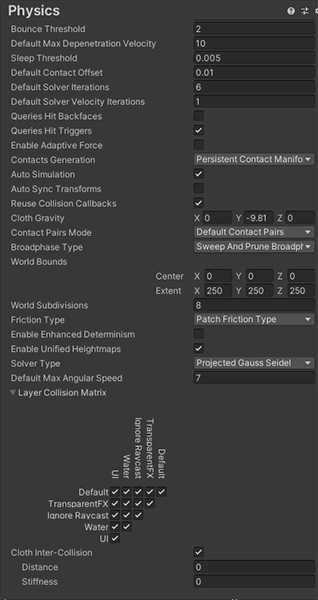
so floaty 😦
glacial jolt
decided to go for a simple solution for now by setting the Connected Mass Scale really high, allowing joints further up the digit to have a larger scaled mass
 tender gulch
Anyone has an idea how to make the parent transform(the capsule collider in this case) follow a child rigidbody(the ragdoll) without making the physics go nuts?
I tried setting parent transform to the hips position and resetting the hips local position to vetctor3.zero each fixed update, but that resulted in weird force being applied to the ragdoll after it was supposed to stop...
it does work properly if I do it after the ragdoll is not moving, but produces weird behavior otherwise...
Is there no way to make a parent follow it's children transform?
sly violet
Most people just disable the capsule until such time as the ragdoll is back on its feet.
 dark marlin
Hi i have problem with wheel joint.i want to make rc car that can drive high speed but whenever i achieve a bigger speed the wheel starts to be buggy.
lapis plaza
if you use joints for wheels, that's 100% expected
you'd probably get better results with physx articulations on 2020.1 as these should be more stable by design
just note that you can't make joint loops with articulations
@dark marlin
there are also other things you could do to try to minimize the glitching as well
like you could just slide the wheels on the surface, make the wheel friction 0 and calculate the wheels angular motion and tire grip manually, same way as you'd do with raycast vehicle
and at some point you'll realize you'll be fighting with all kinds of physics collision seam nonsense anyway and then opt out from collider + joint setup all together
do note that your RC example is really close to worst possible use for joint based vehicle
 vernal tulip
Hey, so pretty basic question, but I can't really find the terminology I need to search on Google:
If have a sphere with a radius of 1 and a mass of 1, and I want to resize the sphere to half the size (0.5 radius) and keep the same relative physics to it (As in, jump height relative to sphere height), would would the formula for calculating the new mass be?
Would drag even be affected by this?
stuck bay
mass is proportional to volume
volume is 4/3*pi*r^3
so the new mass will be NEW VOL / OLD VOL times as massful. that is,
(4/3*pi*(0.5*r)^3) / (4/3*pi*r^3)
times as massful as the previous mass. simplify (remove like terms) to get
.5^3 / 1
which is
.125 times as massful.
re: would drag be affected by this, drag is a function of, like, birds-eye-view-silhouette area (i don't know how else to describe it) iirc
so it would be impacted by the change, but you'd have to track the change in its relevant 2D cross section (a circle of radius R) and compare the relationship between [drag equation after] and [drag equation before].
sksksksk and i oop and i oop lmk if you hav any questions @vernal tulip
vernal tulip
Oh, wow, that's detailed. Thanks a lot 🙂
dark marlin
I forgot to say that this is a 2d game
Hi i have problem with wheel joint.i want to make rc car that can drive high speed but whenever i achieve a bigger speed the wheel starts to be buggy.
sly violet
@dark marlin Wellll... You could always reduce the fixed time step. 😇
stuck bay
Hi! I've been working a bit on my 2d fundamentals and I've been wordering what are my results to when I do a boxcast against a paralel plane. Are the contact points ordered? Can I trut a boxcast to work as edge detection?
sly violet
Umm... There's no such thing as a parallel plane in 2d. It all takes place in a single plane.
Are the contact points ordered?
A Physics2D.BoxCast (and other 2D casts) only return the initial contact point.
Basically the point at which the box first makes contact.
stuck bay
So how's the edge case of both the cast and the contacted surface having multiple possible contact points?
sly violet
You'll only get one, basically arbitrary as to which.
stuck bay
So undefined behaviour, gotcha
vernal tulip
Hey,
If I have a vector that I generated in regards to the normalized axis (XYZ = world right/up/forward), what function am I look for to translate that vector into a different coordinate system (As in, an axis with its own right/up/forward orientation that are also orthonormal to eachother) while keeping the same relation to the origin of the new axis that it had in the original one?
(Apologies if some of my terminology may be off. I haven't practiced linear algebra in a long time 😅 )
glacial jolt
are you looking to have the vector's magnitude be preserved, but have its rotation be affected?
vernal tulip
The magnitude doesn't matter to me as I need the resulting normalized vector anyway.
Managed to solve it using Quaternion.FromToRotation
private Vector3 getRelativeMovement()
{
Quaternion rotation = Quaternion.FromToRotation(MainCameraCache.MainCamera.transform.up, Vector3.up);
    Vector3 projectecRightAxisMovement = rotation * MainCameraCache.MainCamera.transform.right * Move.x;
    Vector3 projectecForwardAxisMovement = rotation * MainCameraCache.MainCamera.transform.forward * Move.y;

    Vector3 result = projectecRightAxisMovement + projectecForwardAxisMovement;

    return result;
}
I'm making simple breakout game, but ball (kinematic) doesn't collide with brick(static/kinematic)
hollow echo
kinematic won't collide with kinematic
stuck bay
so at least one should be dynamic?
hollow echo
Yes
stuck bay
thnx
hollow echo
https://docs.unity3d.com/Manual/CollidersOverview.html details the whole thing. Especially the matrix at the bottom
stuck bay
hm, very handy tables
 strong plaza
For a Trigger enter collision event: I would like to know which of the child colliders of the rigidbody reporting the collision participates in the event.
The OnTrigger events only gives you information about the other collider, there are no contacts to identify your own participating collider (unlike in the OnCollision events),
Example setup would be to have a compound collider and there is only one rigidbody at the top of the collider hierarchy, but in the OnTrigger event I would like to know what collider of the internal child colliders participated.
And I don't want to have separate kinematic rigidbodies for all children of the base rigidbody.
Is there a way or am i bound to have collider to collider collisions only so that I can get the required information?
strong plaza
nevermind, doesn't seem possible
sly violet
@strong plaza OnTrigger event messages are delivered by Colliders, not Rigidbodies. This means that if you have a rigidbody with two child objects each with a collider, and one hits a trigger (which the other doesn't), a script on that child (but not the other) will register the event. Just watch out for the fact that both children will register the event if both of them hit the same trigger.
strong plaza
that is very helpful! thanks.
I will try out if this is the case for me and if I can differentiate it then.
my question was not who delivers, but who receives. I always thought for both trigger and collision messages, the recipient is the closest participating rigidbody.
there would be the possibility to also put a script on the other participating object, but i just want to have all the logic on one object (the collider object) and not the trigger object
sounds like that could work though
 short coral
Hi all, I'm working on a 2D project made and abandoned by someone else. After modifying a lot of stuff, I noticed that the (edge and polygon) colliders aren't preventing movement anymore.
The character prefab has a RidigBody 2D (Collision Detection, Continuous) and a Box Collider 2D (Is Trigger enabled).
The collider prefabs have either a Edge Collider 2D, or a Polygon Collider 2D, and Is Trigger is disabled here.
When running the game, I see everything enabled and in the correct position, however I can freely walk over the colliders.
Does anyone have any suggestions on what to check, to get the Colliders to stop my Character's movement?
strong plaza
you could check if the layers in the project and the layer collision matrix is set correctly (for Physics 2d)
and which layers those colliders are on and if the matrix would allow them to interact
if the collision callback methods work at least, you could check the underlying code that is responsible for the resolution (if there is any and it is not entirely automatically handled by the physics engine)
short coral
The layers look to be set correctly (Player and Default), and according to the Collision Matrix, they can interact.
There is no code (that I've found) that does the collision handling, and I'm assuming the Physics Engine does it all
sly violet
@strong plaza Yeah, a Script on the same GameObject as the Rigidbody will also get any physics event messages fired by child GameObjects. I'm pretty sure GameObjects in the Transform hierarchy between also get them. My experience with using this technique has been that I had to be very careful about correctly handling multiple event messages for the same trigger.
@short coral It looks like your problem is that the Character's collider is set to Trigger. That will prevent it from ever having any collisions.
strong plaza
I'm close to testing it, can tell soon if it worked
short coral
Aaahh.. thanks.. thought that only the Character should have it.. Just disabled it, and it seems to work
strong plaza
my plan is to keep a list of active trigger colliders for all sub colliders I have in the hierarchy
 dry sage
I'm not sure if I did anything wrong, but out of the blue my rigidbody controller wasnt working anymore
I can only look up and down in the game view and couldnt move anywhere else
strong plaza
@sly violet I tried it, but as expected, the trigger enter messages were only sent to the hierarchy top rigidbody inside a compound collider,
I don't like the approach of checking from the participating trigger instead of the own collider though, but I'll consider it in the future. Good to know that the reported behaviour is like you described though, because I didn't read that from the docs yet
This message is sent to the trigger Collider and the Rigidbody (if any) that the trigger Collider belongs to, and to the Rigidbody (or the Collider if there is no Rigidbody) that touches the trigger.
thank you very much for the input, was worth a try, and there are 1 or 2 possible solutions after all
my perspective was to have separate reports for the collider side and not the trigger side initially
sly violet
You didn't mention they're in a compound collider. That effectively makes it just one collider.
strong plaza
oh, I thought I mentioned it here:
https://discordapp.com/channels/489222168727519232/497874196274348032/655738386883280907
but I could have been clearer in my wording, right. sorry
for the example setup, that would have been my exact setup, and for the collider hierarchy, i meant the one of the compound collider (non trigger)
dry sage
Hi,just wanted to ask if its possible to fix a rigidbodyfps controller, I ran into some issues and now I cant move at all, Im only able to look up and down. Should I change something in the script, or is something in my settings wrong?
sly violet
oh, I thought I mentioned it here:
Ah, so you did, I just missed it. Yeah, that... Seriously complicates the problem, because now there's just one collider involved. The only thing I could think of to do is catch the event as normal and then use the current positions to figure out the contact overlap.
@dry sage : Uhhh... ALL of your "freeze rotation" checkboxes are checked. Is that normal?
strong plaza
thanks. but I would say our conversation definitely helped me even though it might not have been the solution I was looking for 🙂
because now I know that I can't really do that from the non-trigger collider side perspective, but what I could do is:
- handle it from the trigger collider perspective
- have both colliders be non-triggers and one has a kinematic rigidbody
- and maybe not really a fancy solution but... when there is a the general collision event, I can just check for each collider which is the one with the closest point towards their bounding box or just what is the closest collider from collider position to trigger position (if that approximation is sufficient)
peak panther
What would be more expensive. A Boxcast every frame or using the Unity Trigger methods?
strong plaza
boxcast is more expensive
if you let the internal physics cast handle it, there are optimizations in the background that make it faster to build collision pairs and actually do the resolution for you,
but, more expensive doesn't mean it is an issue - I still use things like sphere casts and box casts for certain aspects, as long as performance is still good (profiler)
peak panther
I see. The issue I'm having is that I want to create a hitbox script, but Triggers happen very late in the update loop, before movement. I want the check for overlap to happen at a specific point.
So I decided to use Boxcast to kinda go my own way. But idk if I should just use triggers anyway.
I'm semi-following this https://www.gamasutra.com/blogs/NahuelGladstein/20180514/318031/Hitboxes_and_Hurtboxes_in_Unity.php

What are Hitboxes and Hurtboxes? aren't they the same? and how do we implement them in Unity?
strong plaza
physics loop should be executed before the update event
but
it also depends on how much time passes per frame and your physics timestep settings
so it could be that the FixedUpdate cycle is called 0 times per frame, or 1 time, 2 times etc.
you could also cache results and apply them in the next update by setting a few variables and evaluate them in update or so
you could also do everything within fixed update
I know, not many people will say that you should do it,
but fighting games are a genre where - for pretty much all decent ones - they have a fixed logical framerate: most have 60fps and they force to execute this many frames per second or slow the game down otherwise,
if a fighting game looks smoother than 60fps, i would assume it often has to do with interpolation of visuals ( so you can interpolate between the last and current frame if your screen update rate is higher, penalty is that you introduce another frame of delay for a smoother visual experience)
Now, if you say you don't make a competitive one, and it is just single player or offline stuff, a mixed approach with fixed update and update can be fine,
but by allowing variable timesteps within the update loop, you also allow for inconsistent behaviour
if a same situation occurs on 2 different systems where there might be slight differences in the deltaTime over a certain period
basically, most proper/modern fighting games are deterministic as in:
given the same inputs, you will always get the same game output,
but that is really hard to do in unity regularly, I could go into the steps that are required but the question is..
does your game require stuff like this or are you okay with the integrated behaviour?
But as response to your initial attempt:
not sure how many hitboxes and hurtboxes you have per character, but boxcasts are fine,
check the profiler to see if there is any performance concern, I think there won't be,
but be aware that by having the logic in Update or the regular unity game loop, there will be inconsistencies in some scenarios if you would try to repeat the same scenarios multiple times
even Physx, the physics library that unity uses is not deterministic
Oh, there is actually another issue (with the old method of getting inputs at least)
Unity updates the internal input state before a new frame starts, so if you do all within fixed update, it is still encouraged to do input polling and caching in Update(),
now there are a few issues with that too, it could be that you have 2 Update()s before entering the next fixed update or that fixedUpdate executes twice without entering update, so there is no new input state,
so the bad cases is that the game swallows input or that there is no new input for a new logical frame
I think the new Input system can solve this, but I haven't tried it yet
also, the behaviour I described can be fine, as long as the visual update rate (full update cycle in unity) is faster than the logical game update rate (if you do all the logic in FixedUpdate for example). then you should always have a new input state for the new frame, but you have to be careful to cache input state correctly (OnButtonUp for example - if there are 2 update cycles before the next FixedUpdate is entered, and OnButtonUp event happens in the 1st cycle - if you directly poll for OnButtonUp in fixed update, you would have missed the event, so you need a caching solution to store the event to be applied in the next FixedUpdate cycle
Sorry for the long text ^^
but a while ago I tried to make a fighting game myself, and it was a rabbit hole of information of what is actually behind the state of the art ones
peak panther
No problem for the long text. I'm currently trying to make a combat platformer, so obviously it takes a lot from more standard fighting games.
I have my own update/fixedUpdate loop in order to make sure things are consistent.
Stuff just hooks into these calls as opposed to having their own.
The thing is that for collision processing (like Hitboxes overlapped Hurtboxes) I currently manually do it with my own custom hitbox script.
Which does Collider.Boxcast in order to collect any hurtboxes it encounters.
I'm doing this as opposed to just using Triggers since triggers happen after the physics update.
Meaning the effects of a hit don't affect movement until 1 frame after.
I'm just not too sure if this is really worth it.
strong plaza
fighting games are usually super light on gaming logic, so it probably won't matter to add a few more nanoseconds of cpu time to the game in order to perform the cast and overlap checks
after a while, I tried to set my game up to be able to be networked like the current fighting games
(rollback netcode - an evolution of lockstep based p2p networking)
I haven't tested if it actually works yet, but there are just so many things to consider, and I had to rewrite the whole game at one point
so if your game stays offline play only, your approach should be fine,
it would also be fine for online play if you decide to use a different networking architecture though (like having one server with authoritative state etc)
In your case for now, I would basically take the solution that feels better or more responsive, as long as performance is still great
stuck bay
What resources should I start looking into if I wanted to create a physics/ragdoll based player?
strong plaza
just look up that, there are plenty of tutorials on how to transition from animated into active ragdoll mode, like from brackeys, jason weimann or DitzelGames (this channel also has a nice one on that iirc)
if you want to have a ragdoll that is able to move and stand only by having forces applied to limbs without animation at all, this seems trickier, I don't really know about resources on this honestly
 hallow moon
How do I make a stretched billboard rendering in unity's particle system upright?
Snow should be like this, but with perspective to it
With the "stretched billboard" setting it looks like this. Perspective is there, but it's not rotated in the right direction.
What do I do? :<
hallow moon
Never mind. I found out. It was settings for Min and Max Size of the particles, and their start size as well.
sly violet
Heh. Those dang size settings...
stable shadow
Hey guys, im currently banging my head over trying to use torque to rotate a rigidbody to match another transforms world rotation, heres what I have now.
It works but not quite, seems like the angles get gimbal locked hard at certain axis, any tips?
configJoint.connectedBody.MoveRotation(configJoint.connectedBody.rotation * transform.rotation);
this version worked also but MoveRotation isnt addative to external forces, any math genius out there wanna help me convert it to a delta for addforce?
im sure im missing something pretty basic here :"(
Or rather does nayone know a good way to configure the free rotation for a config joint?
when I attach a body to a config joint with angularmotions free, the set rotation seems to be whatever the connectedbodies rotation is at the time of connection, is there a way to always set this to a specific rotation so the connected body is always oriented the right way?
glacial jolt
do you need to use torque, or would it be enough that the rigidbody simply acquire the necessary angular velocity to rotate from its current rotation to a target rotation?
you can manually set rigidbody.angularVelocity if so
@stable shadow
stable shadow
Hmm i guess i can use angular velocity, do u have a nice way of avoiding gimbal lock @glacial jolt ? Im currently using moveRotation and some interpolation, which seems to be good enough. This is for a grabbing system btw.
If only config joints worked like howed u expect them to
glacial jolt
@stable shadow if you use two quaternions for your rotations A and B, you can avoid gimbal lock. You can convert them to an angular velocity with Quaternion.ToAngleAxis
to get a rotation that rotates from a quaternion A to a quaternion B, do...
Quaternion result = B * Quaternion.Inverse(A);
this is how we handled the hands in the build of our game you can see here: https://www.youtube.com/watch?v=74Xla432cpM

Add to your Steam wishlist!
► https://store.steampowered.com/app/1116540/Davigo/
Sign up for the upcoming closed beta!
► https://roystan.net/davigo
Follow development as it progresses.
► https://twitter.com/roystanhonks
DAVIGO is a 2-player game that pits a VR player a...
 kind swan
It'd be cool if someone could help me with this one.
I have a problem with the colliders.
https://cdn.discordapp.com/attachments/622140896376258610/656870129073782786/unknown.png
As shown in the screenshot, The character has a 2DCollider only for feet, that exclusively detects the floor. Floor (that red thing) has a collider as well. The problem is that the Collider, as shown, doesn't seem to touch the floor. It's like floating, and I don't know why.
Gotta add, if you didn't notice, that it's happening in playtime, and gravity's being applied.


Fixed it a bit by making it collider and letting other collider be the one who sustains the character on feet, but it still happens that it sometimes doesn't detect the collision even though colliders are touching each other.
sly violet
@kind swan That sort of collider offset is quite normal. You can control its scale with the Physics 2d setting "Default Contact Offset". Reducing it too much makes it difficult for the physics system to calculate "sliding" situations, tending to turn them into "bouncing along" instead. Try and keep it just below the level where it's noticeable.
 frigid pier
And if you are using physics you may want to tweak Baumgarte settings closer to 1 as well, it will make it come to rest faster.
kind swan
Thank you two. You're helpful <3
kind swan
Another question, is there a possible way to detect the exact coordinates of a collision in a collider?
Like, the coordinates of the exact point of collision
sly violet
Keep in mind that many collisions will have multiple contact points. In OnCollisionEnter you get a Collision parameter, which includes a GetContacts function from which you can get a ContactPoint List or Array containing that information.
kind swan
Oh. I'll take a look of that, thank you!
kind swan
Sorry for being so redundant on the same question, but I just can't get it after hours of trying and searching. How am I supposed to get that array? I tried ContactPoint2D[] contacts = collision.GetContacts, and still don't get it. Sorry for the inconvenience.
sly violet
It's a non-garbage-producing function, so you're expected to provide a buffer for it to fill. Try this:
static List<ContactPoint2D> contacts = new List<ContactPoint2D>(10);
int numContacts = collision.GetContacts(contacts);```just a heads up that if you're new, it's a bit simpler to just grab the contacts directly via Collision.contacts
you can calculate the average point of the collision by summing all the points, and dividing them by the number of points
@sly violet's code is similiar in functionality to Collision.contacts, but it doesn't require a brand new array to be created each time you call it. Note that if your array isn't big enough, some contacts may be missing
sly violet
My code uses a List. It'll be resized (producing some garbage) rather than dropping contacts.
kind swan
Thank you guys. You sure are of help.
 quartz wyvern
how does IsTouching work for 2d edge colliders?
i just tested it and its not detecting anything
glacial jolt
@sly violet missed that, interesting 🙂
 fluid marten
Can anyone point me in the right direction for structuring something like a fluid sim? (or any other sim that tests lots of particles against each other) I'm just worried about naively testing every point against every other point, which be like O(n^2). Is there a wide-spread implementation of something more like O(log n), like a tree structure?
 gleaming bramble
I don't know if this is a bug(using Unity.2018 LTS), or what: I have a brick breaker project(2D), and under the screen at (-1, 0) position I have a a trigger collider: when the ball passes through it should load a new scene
so my problem is, when I start the game, after 2-3 seconds, the OnTriggerEnter2D fires even when the ball isn't even near the trigger collider(used debug.log to print out the collider object's name and it's the ball)
I can solve this issue, by making the ball use continuous collision(it completly solves the issue), but collision detection have nothing to do with triggers
so this solution shouldn't work
any smart people to comment on this issue?
dusky prism
Hey guys,
I'm trying to create physics based character (I think it is called active ragdoll).
The exact thing which I want to achieve is the character which its hands are up like when a police arrests someone. Its feet are stuck to the ground and by moving left and right and behind there are physics based movements which affects upperbody.
So it is done by active ragdoll ? I don't have any experience with it, if it is possible please help me to figure out how to start it.
prime flower
In Unity DOTS Physics/Havok are you able to manually step/simulate the world like you can with PhysX using Physics.Simulate? I can't find any documentation online that explains how.
quartz wyvern
probably unlikely with DOTS
havok i think might have it
though aren't they both some what a work in progress to implement into unity so not all features will be there yet perhaps
ocean horizon
@quartz wyvern > how does IsTouching work for 2d edge colliders?
IsTouching looks at existing contacts (it doesn't perform a spatial query) so it'll return nothing if the current contact(s) for the query are not there. You can see existing contacts by retrieving them explicitly or looking at them in the inspector for the Rigidbody2D/Collider2D in the "Info > Contacts" rollout. It knows nothing about specific colliders so there's no special handling. It only cares about contacts.
Also, regarding the above "List<T>" support for results, I went over every single call I could find in 2D physics and implemented the ability to provide a list as shown above. This means you can avoid almost any garbage and not have to worry about missing results. I don't think I missed any query so you should find it everywhere but let me know if you do. With regards to the contacts/collision stuff, note that I also implemented an option of "reuseCollisionCallbacks" that completely stops that awful garbage produced during 2D or 3D physics callbacks: https://docs.unity3d.com/ScriptReference/30_search.html?q=reusecollisioncallbacks
Hope that proves useful info.
 upper fox
I have an object with a hole in it and some objects on it, they stop falling some time after runtime starts
ignoring the fact that they are standing on a hole
anyone has an idea why this may be the case?
approximately 5-6 seconds after running the scene
sly violet
Are you changing the collider with the hole in it to Convex somewhere in your code?
stuck bay
Hello there !
Is there a way that allows you to detect the gameobjects that are in a Collider Trigger's range ?
So for instance I've got a cube and in it's colliders area there are 2 spheres . How could I put them into an array ?
frigid pier
Search for on trigger enter events, how to capture them.
prime flower
Currently Unity Physics doesn't support motors on hinge joints like PhysX. Anyone know if this might be supported in the future, or how I might be able to achieve the same result?
sly violet
Uhhh... Unity has long supported motors on hinge joints.
You can find it in the Hinge Joint Inspector settings.
Or, in scripting, in HingeJoint.motor.
Same in 2d.
prime flower
@sly violet That's PhysX which is different from Unity Physics
sly violet
Gotcha. Maybe Unity should've called their "ground up" physics package something other than "Unity Physics" which most people think of as the included physics model. 😜
prime flower
Completely agree hahaha
sly violet
Hmm. It looks relatively simple. Find the torque required to achieve the target velocity, constrain it by the maximum, and apply.
prime flower
I think it's actually way more complex than that
sly violet
Well, step 1 is a doozy.
prime flower
I.E. applying the torque will not have the same reaction that i'm expecting I believe
With the motor, the force will also push the parent body too
sly violet
? I mean, applying torque is what a hinge motor will do.
Oh, yeah, it's not just an AddTorque call, the torque is at the joint.
And applies equally and opposite to each body.
prime flower
Ahh yeah that's what I believe. Like if the child object collides with a static rigidbody (a wall, for example) that it can't push out of the way, the motor will start to push the parent rigidbody away from the wall instead
So I feel like that turns a custom implementation to achieve the same results into a huge complex mess
sly violet
Mmm. If it gets huge and complex, you're probably doing it wrong. Does Unity Physics have an equivalent to AddForceAtPosition?
prime flower
It has ApplyImpulse that can apply it at a position
sly violet
Just saw that. Alright, let me draw something real quick. Just a minute.
Okay, so, imagine a line through a joint, then apply opposite forces to each joint participant an even distance away from the joint. I.e., the green forces are applied to the blue body and the yellow forces to the red body.
Pretty sure that gives you at torque-at-position effect.
prime flower
would those positions be where the joint is connected on the objects?
sly violet
No, they need to be offset in opposite directions. The picture assumes the joint is where the two objects are touching.
Note that, unlike real life, physics simulations let you apply force outside of the body.
prime flower
Okay in my case the objects aren't touching but that's fine
I'll try to explore that, just still seems very complex to be, even just calculating the required torque to apply
sly violet
Sorry.